EP3461163A1 - Information processing apparatus, information processing method, and program - Google Patents
Information processing apparatus, information processing method, and program Download PDFInfo
- Publication number
- EP3461163A1 EP3461163A1 EP18191642.0A EP18191642A EP3461163A1 EP 3461163 A1 EP3461163 A1 EP 3461163A1 EP 18191642 A EP18191642 A EP 18191642A EP 3461163 A1 EP3461163 A1 EP 3461163A1
- Authority
- EP
- European Patent Office
- Prior art keywords
- authentication information
- interpreter
- password
- storage device
- pdl
- Prior art date
- Legal status (The legal status is an assumption and is not a legal conclusion. Google has not performed a legal analysis and makes no representation as to the accuracy of the status listed.)
- Granted
Links
Images



Classifications
-
- G—PHYSICS
- G06—COMPUTING OR CALCULATING; COUNTING
- G06F—ELECTRIC DIGITAL DATA PROCESSING
- G06F21/00—Security arrangements for protecting computers, components thereof, programs or data against unauthorised activity
- G06F21/30—Authentication, i.e. establishing the identity or authorisation of security principals
- G06F21/45—Structures or tools for the administration of authentication
-
- G—PHYSICS
- G06—COMPUTING OR CALCULATING; COUNTING
- G06F—ELECTRIC DIGITAL DATA PROCESSING
- G06F21/00—Security arrangements for protecting computers, components thereof, programs or data against unauthorised activity
- G06F21/30—Authentication, i.e. establishing the identity or authorisation of security principals
- G06F21/31—User authentication
- G06F21/36—User authentication by graphic or iconic representation
-
- G—PHYSICS
- G06—COMPUTING OR CALCULATING; COUNTING
- G06F—ELECTRIC DIGITAL DATA PROCESSING
- G06F21/00—Security arrangements for protecting computers, components thereof, programs or data against unauthorised activity
- G06F21/30—Authentication, i.e. establishing the identity or authorisation of security principals
- G06F21/45—Structures or tools for the administration of authentication
- G06F21/46—Structures or tools for the administration of authentication by designing passwords or checking the strength of passwords
-
- G—PHYSICS
- G06—COMPUTING OR CALCULATING; COUNTING
- G06F—ELECTRIC DIGITAL DATA PROCESSING
- G06F21/00—Security arrangements for protecting computers, components thereof, programs or data against unauthorised activity
- G06F21/70—Protecting specific internal or peripheral components, in which the protection of a component leads to protection of the entire computer
- G06F21/71—Protecting specific internal or peripheral components, in which the protection of a component leads to protection of the entire computer to assure secure computing or processing of information
-
- G—PHYSICS
- G06—COMPUTING OR CALCULATING; COUNTING
- G06F—ELECTRIC DIGITAL DATA PROCESSING
- G06F3/00—Input arrangements for transferring data to be processed into a form capable of being handled by the computer; Output arrangements for transferring data from processing unit to output unit, e.g. interface arrangements
- G06F3/12—Digital output to print unit, e.g. line printer, chain printer
- G06F3/1201—Dedicated interfaces to print systems
- G06F3/1223—Dedicated interfaces to print systems specifically adapted to use a particular technique
- G06F3/1237—Print job management
- G06F3/1238—Secure printing, e.g. user identification, user rights for device usage, unallowed content, blanking portions or fields of a page, releasing held jobs
-
- G—PHYSICS
- G06—COMPUTING OR CALCULATING; COUNTING
- G06K—GRAPHICAL DATA READING; PRESENTATION OF DATA; RECORD CARRIERS; HANDLING RECORD CARRIERS
- G06K15/00—Arrangements for producing a permanent visual presentation of the output data, e.g. computer output printers
- G06K15/02—Arrangements for producing a permanent visual presentation of the output data, e.g. computer output printers using printers
- G06K15/18—Conditioning data for presenting it to the physical printing elements
- G06K15/1801—Input data handling means
- G06K15/181—Receiving print data characterized by its formatting, e.g. particular page description languages
- G06K15/1811—Receiving print data characterized by its formatting, e.g. particular page description languages including high level document description only
- G06K15/1813—Page description language recognition
-
- G—PHYSICS
- G06—COMPUTING OR CALCULATING; COUNTING
- G06K—GRAPHICAL DATA READING; PRESENTATION OF DATA; RECORD CARRIERS; HANDLING RECORD CARRIERS
- G06K15/00—Arrangements for producing a permanent visual presentation of the output data, e.g. computer output printers
- G06K15/40—Details not directly involved in printing, e.g. machine management, management of the arrangement as a whole or of its constitutive parts
- G06K15/4095—Secure printing
-
- H—ELECTRICITY
- H04—ELECTRIC COMMUNICATION TECHNIQUE
- H04W—WIRELESS COMMUNICATION NETWORKS
- H04W12/00—Security arrangements; Authentication; Protecting privacy or anonymity
- H04W12/06—Authentication
-
- G—PHYSICS
- G06—COMPUTING OR CALCULATING; COUNTING
- G06K—GRAPHICAL DATA READING; PRESENTATION OF DATA; RECORD CARRIERS; HANDLING RECORD CARRIERS
- G06K15/00—Arrangements for producing a permanent visual presentation of the output data, e.g. computer output printers
Definitions
- the present disclosure relates to an information processing apparatus, an information processing method, and a program.
- PDL page description language
- the PDL interpreter has a number of parameters for controlling operation and behavior of itself. Examples of the parameters include a parameter for defining a capacity of memory to be used for font cache in PostScript (MaxFontCache). These parameters which define an operation control of the PDL interpreter may be changed by any user in accordance with a language specification of PDL.
- Japanese Patent Laid-Open No. 2011-216089 discloses control of parameters for defining operation and behavior of a PDL interpreter. According to the technique, an access policy for accessing the PDL interpreter is defined for each user so that only a permitted user may access the PDL interpreter. Accordingly, the parameters for defining operation control of the PDL interpreter are prevented from being unintentionally updated.
- a password of the PS interpreter (SystemParamsPassword, that is, "xxxx” in the example above) is required to be specified using "/Password” as the example above. If the password of the PS interpreter (hereinafter referred to as a "PS password”) is not appropriate, the system parameter is not changed.
- the PS password may be changed by a PS command.
- the interpreter interprets PS data including the following command, the PS password is changed.
- oldpassword indicates a PS password which is currently set and "newpassword” indicates a PS password after the change. If a designation of "oldpassword” is inappropriate, the PS password is not changed.
- the PS password set in the PS interpreter is stored in a volatile region.
- the PS password of the PS interpreter becomes a default setting, that is, "no setting".
- any password may be specified as the PS password required when system parameters of the PS interpreter is to be changed, and the system parameters may be changed by any password.
- a method for setting a PS password in a PS interpreter in advance is employed so that the system parameters for controlling behavior of the PS interpreter are not unnecessarily changed.
- the PS password set in the PS interpreter is stored in a volatile region, and therefore, the PS password returns to the default state, that is, "no setting", when the image forming apparatus is rebooted. Accordingly, after the image forming apparatus is rebooted, a malicious user may change settings of the image forming apparatus before the PS password is reset.
- the present invention in its first aspect provides an information processing apparatus as specified in claims 1 to 9.
- the present invention in its second aspect provides an information processing method as specified in claim 10.
- the present invention in its third aspect provides a program as specified in claim 11.
- Fig. 1A is a diagram illustrating a method for controlling a PS password in a configuration in which only a method for changing a PS password specified by a PS command is supported according to the related art. More specifically, a time series variation of a PS password set in a PS printer is illustrated in Fig. 1A .
- the image forming apparatus When the image forming apparatus serving as an information processing apparatus is powered, the image forming apparatus is activated in a state in which the PS password of the PS interpreter is in a default setting, that is, "no setting". In the state of "no setting", any password may be specified as the PS password required when system parameters of the PS interpreter are to be changed, and the system parameters may be changed by any password (Period A).
- the image forming apparatus changes the password of the PS interpreter to "yyyyy" by executing the job.
- this PS password "yyyy" is required to be specified (Period B). Thereafter, when the image forming apparatus is turned off and then turned on (reboot), the PS password returns to the default setting "no setting" (period C).
- the changed PS password returns to the default state "no setting" by performing turning off and then turning on since the PS password is stored in a volatile region in the PS interpreter.
- Fig. 1B is a diagram illustrating a method for controlling a PS password setting in a configuration in which a method for changing a PS password in settings of a UI screen for an administrator is supported. More specifically, time series variation of a PS password set in an administrator UI and a PS password set in the PS interpreter is illustrated in Fig. 1B .
- the administrator UI screen is an example of a screen for an administrator. The administrator UI may be displayed when it is determined that a user has a certain authority (as an administrator) by user authentication or the like.
- the PS interpreter When the image forming apparatus is powered while the PS password in the administrator UI screen is "no setting", the PS interpreter is activated while the PS password of the PS interpreter is in a default setting "no setting” (Period A). Subsequently, when a setting value of the PS password is changed to "yyyy" in the administrator UI screen, the image forming apparatus reflects the PS password to the PS interpreter (Period B).
- the setting value of the PS password set in the administrator UI screen is stored in a nonvolatile region, and therefore, the value is maintained even when the power is turned off and then on.
- the PS password of the PS interpreter returns to the default setting "no setting".
- the image forming apparatus performs a process of reflecting the PS password set in the administrator UI screen to the PS interpreter while an activation process is performed (Period C-1).
- the PS password set in the PS interpreter is changed to "yyyy" (Period C-2).
- the PS interpreter is an example of an interpreter which performs language interruption on a print job described in a page description language.
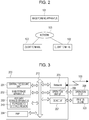
- Fig. 2 is a diagram illustrating an example of a configuration of an image processing system.
- the image processing system includes an image forming apparatus 101 and a plurality of client terminals 102.
- the image forming apparatus 101 is connected to the client terminals 102 through a network 103.
- the image forming apparatus 101 is a multifunction peripheral having various functions including a scanning function, a FAX function, a print function, and a copy function or a printer only having a print function.
- the client terminals 102 are mobile terminals, such as a personal computer (PC), a cellular phone, a personal digital assistance (PDA), a multifunction cellular phone, or a tablet, which are possession of users.
- the client terminals 102 transmit print data to the image forming apparatus 101 through the network 103.
- the network 103 is a wireless or wired network formed as a wide area network (WAN) or a local area network (LAN).
- WAN wide area network
- LAN local area network
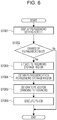
- Fig. 3 is a diagram illustrating an example of a hardware configuration of the image forming apparatus 101.
- a controller unit 200 controls input and output of image signals and device information.
- a central processing unit (CPU) 201 reads a program stored in an auxiliary storage apparatus 203 into a main storage apparatus 202 and executes the program. Furthermore, the CPU 201 integrally controls devices connected to a system bus 212.
- the main storage apparatus 202 functions as a main memory and a work memory of the CPU 201.
- the main storage apparatus 202 is a volatile storage device which stores the PS password.
- the main storage apparatus 202 stores authentication information set in accordance with a first page description language (PDL) command described below.
- PDL page description language
- the first PDL command is issued to instruct a setting of the authentication information to a data interrupter 302.
- the auxiliary storage apparatus 203 is also used to store data. Examples of the auxiliary storage apparatus 203 include a nonvolatile memory. A nonvolatile region described below is a partial region of the auxiliary storage apparatus 203. The information on the PS password described in the administrator UI screen in this embodiment is stored in a PS password storage region 210 which is a portion of the auxiliary storage apparatus 203.
- the auxiliary storage apparatus 203 operates as a nonvolatile storage unit which stores authentication information (the PS password) input through a setting screen.
- a raster image processor (RIP) 204 is hardware dedicated for development of intermediate print data into a raster image.
- the RIP 204 processes intermediate print data generated in the main storage apparatus 202 by the CPU 201 in parallel to execution on the intermediate print data by the CPU 201.
- a network 205 is connected to the network 103 and inputs print data and device information from and output the print data and the device information to an outside of the printer.
- the network 205 receives instructions, such as a print instruction.
- the instructions are described by PDL. Examples of the PDL include PostScript.
- the network 205 receives a first PDL command for instructing a setting of authentication information to an interpreter described below.
- the network 205 further receives a second PDL command including processing execution instructions and the authentication information.
- the CPU 201 functions as a processor which executes a process in accordance with a result of interruption on a processing execution instruction included in the second PDL command when authentication information included in the received second PDL command coincides with authentication information stored in the main storage apparatus 202.
- An operation unit interface (I/F) 206 serving as an interface relative to an operation unit 208 outputs image data to be displayed in the operation unit 208 to the operation unit 208.
- the operation unit I/F 206 performs control such that a setting screen for inputting authentication information to be set to the data interrupter 302 is displayed in a display unit.
- the setting screen may be displayed in a display unit of a communication apparatus connected to the image forming apparatus 101 through a network.
- the operation unit I/F 206 transmits information input by the user of the image forming apparatus 101 using the operation unit 208 to the CPU 201.
- a device I/F 207 performs transmission of an image signal, an instruction of a device operation, and reception of device information in accordance with instructions issued by the CPU 201.
- a controller unit 200 is connected to a printer engine 209 through the device I/F 207.
- the operation unit 208 includes a liquid crystal panel and a sound source as output devices and a touch panel, hardware keys, and a microphone as input devices.
- the printer engine 209 is an output device which outputs an image signal supplied from the controller unit 200 to a medium and may employ an electrophotographic method or an inkjet method.
- Fig. 4 is a diagram illustrating an example of a software configuration of the image forming apparatus 101.
- a transmission/reception unit 301 receives print data from the network 205.
- the data interrupter 302 reads the print data supplied from the transmission/reception unit 301 through a controller 303 and interprets rendering information included in the print data.
- the data interrupter 302 interprets a PDL command described by a predetermined PDL.
- the predetermined page description language is PostScript.
- the data interrupter 302 operates as a PostScript interpreter. Rendering information extracted as a result of the data interpretation process is transmitted to a renderer 304 through the controller 303 and used in a rendering process.
- the controller 303 controls various processes including reception of print data, data interpretation, display of the administrator UI screen, and rendering of an image.
- the renderer 304 uses the RIP 204 to generate a bitmap image from the rendering information supplied from the data interrupter 302.
- the generated bitmap image is supplied to the printer engine 209 through the device I/F 207, and an image forming process is executed on a print sheet.
- a setting change screen controller 305 controls the administrator UI screen which may be accessed only by the administrator.
- a process of controlling a PS password setting screen including a PS password setting change screen which accepts a change of the setting of the PS password of the PS interpreter will be described in detail hereinafter with reference to Figs. 5 and 6 .
- the image forming apparatus 101 includes a PS interpreter, for example, in addition to the components illustrated in Fig. 4 .
- Fig. 5 is a diagram illustrating an example of the administrator UI screen which may be accessed only by the administrator of the image forming apparatus. More specifically, the administrator UI screen is a PS password setting screen which allows a change of the PS password of the PS interpreter. It is assumed that the administrator UI screen is displayed in the operation unit 208 after an authentication process, such as password authentication, is performed so that only the administrator may be accessed. In the administrator UI screen, setting items for managing systems of various image forming apparatuses, not illustrated, may be changed. However, the administrator displays this screen when the administrator intends to change a setting of the PS password in this embodiment.
- the setting change screen controller 305 displays the administrator UI screen of Fig.
- An input field 401 is used to set the PS password of the PS interpreter.
- the administrator inputs a character string of the PS password in the input field 401 and selects an OK button 402. Then the input PS password is stored in the PS password storage region 210.
- Fig. 6 is a flowchart of an example of a process of changing a PS password setting.
- the flowchart of Fig. 6 is started when the administrator of the image forming apparatus 101 accesses the administrator UI screen and selects a button, not illustrated, for displaying the PS password setting screen to change the PS password of the PS interpreter in a menu for the administrator.
- step S1001 the CPU 201 displays the PS password setting screen of Fig. 5 in the operation unit 208.
- the process in step S1001 is an example of a display control process of displaying the administrator screen in the operation unit 208.
- step S1002 the CPU 201 determines whether a setting change has been performed by inputting a character string of the password in the input field 401 of Fig. 5 and selecting the OK button 402 by a user operation.
- the CPU 201 determines that the setting change has not been performed when a previous setting is not changed even though the character string has been input.
- the process proceeds to step S1003, and otherwise, the process in the flowchart of Fig. 6 is terminated.
- step S1003 the CPU 201 updates the PS password stored in the PS password storage region 210 of the auxiliary storage apparatus 203 to the character string input in the input field 401. Since the PS password storage region 210 is a nonvolatile region, even when the image forming apparatus 101 is turned off, the value set in the PS password storage region 210 is maintained.
- step S1004 the CPU 201 obtains the PS password stored in the PS password storage region 210.
- step S1005 the CPU 201 generates a PS job for a change to the obtained PS password. The process will be described in detail hereinafter.
- step S1006 the CPU 201 executes the generated PS job and updates the PS password of the PS interpreter.
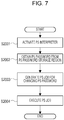
- Fig. 7 is a flowchart of an example of a process of setting the PS password performed when the image forming apparatus 101 is turned on. When a power switch of the image forming apparatus 101 is turned on, the process in the flowchart of Fig. 7 is started.
- step S2001 the CPU 201 activates the PS interpreter.
- a password of the PS interpreter is in the "no setting" state.
- step S2002 the CPU 201 obtains the PS password stored in the PS password storage region 210.
- step S2003 the CPU 201 generates a PS job for a change to the obtained PS password. The process will be described in detail hereinafter.
- step S2004 the CPU 201 executes the generated PS job and updates the PS password of the PS interpreter.
- the password set in the PS password storage region which is the nonvolatile storage region is reflected to the PS password of the PS interpreter.
- the PS password is stored in the main storage apparatus 202 as the PS password of the PS interpreter. Accordingly, even when the image forming apparatus 101 is turned off and then turned on, the PS password set in the administrator UI is maintained in the PS interpreter.
- the CPU 201 stores the PS password stored in the nonvolatile auxiliary storage apparatus 203 when the image forming apparatus 101 is activated in the main storage apparatus 202 as authentication information of the data interrupter 302.
- the CPU 201 obtains the current PS password from the PS interpreter and assigns the current PS password to "oldpassword” described above.
- the CPU 201 assigns the character string set in the PS password setting of the administrator UI screen to an updated PS password ("newpassword" in the example described above).
- the PS interpreter Since the PS interpreter performs language interpretation on the PS command internally issued so that the PS password is changed, the PS password may be reflected to the PS interpreter.
- the authentication information set by the administrator may be maintained. Accordingly, the settings of the image forming apparatus 1010 are prevented from being changed by a malicious user before the PS password is reset after the image forming apparatus 101 is rebooted.
- the PS password includes two types of password, that is, "SystemParamsPassword” and "StartJobPassword".
- the password "SystemParamsPassword” permits a change of system parameters.
- the password “StartJobPassword” permits execution of a "startjob” operator and an "exitserver” operator in the PS command. Therefore, both of the passwords may be set in the administrator screen.
- An example of a UI for the setting is illustrated in Fig. 8 .
- Fig. 8 is a diagram illustrating an example of an administrator UI screen which may be accessed only by an administrator of an image forming apparatus.
- An input field 801 is used to set the PS password "SystemParamsPassword”.
- An input field 802 is used to set the PS password "StartJobPassword”.
- the administrator inputs character strings in the input fields 801 and 802 and selects an OK button 803. Then the input password is stored in a PS password storage region 210.
- the control for reflecting the input password to the PS interpreter is the same as that of the first embodiment.
- the CPU 201 may display a message for prompting a setting of the password "SystemParamsPassword” as illustrated in Fig. 9 .
- the CPU 201 displays a message for prompting input of the password "SystemParamsPassword” in a display unit in a case where the password "StartJobPassword” has been input but the password "SystemParamsPassword” has not been input in the setting screen.
- the PS passwords "SystemParamsPassword” and “StartJobPassword” may be set in the administrator UI screen.
- a process to be performed when the setting is changed by the PS command after the PS password is set in the administrator UI screen is not particularly limited.
- the password updated in accordance with the PS command may be applied until the image forming apparatus 101 is turned off and then rebooted after the setting is changed in accordance with the PS command.
- the PS password set in the administrator UI screen may be enabled every time a job is started.
- Embodiment(s) of the present invention can also be realized by a computer of a system or apparatus that reads out and executes computer executable instructions (e.g., one or more programs) recorded on a storage medium (which may also be referred to more fully as a 'non-transitory computer-readable storage medium') to perform the functions of one or more of the above-described embodiment(s) and/or that includes one or more circuits (e.g., application specific integrated circuit (ASIC)) for performing the functions of one or more of the above-described embodiment(s), and by a method performed by the computer of the system or apparatus by, for example, reading out and executing the computer executable instructions from the storage medium to perform the functions of one or more of the above-described embodiment(s) and/or controlling the one or more circuits to perform the functions of one or more of the above-described embodiment(s).
- computer executable instructions e.g., one or more programs
- a storage medium which may also be referred to more fully as
- the computer may comprise one or more processors (e.g., central processing unit (CPU), micro processing unit (MPU)) and may include a network of separate computers or separate processors to read out and execute the computer executable instructions.
- the computer executable instructions may be provided to the computer, for example, from a network or the storage medium.
- the storage medium may include, for example, one or more of a hard disk, a random-access memory (RAM), a read only memory (ROM), a storage of distributed computing systems, an optical disk (such as a compact disc (CD), digital versatile disc (DVD), or Blu-ray Disc (BD)TM), a flash memory device, a memory card, and the like.
- a plurality of central processing units may be included in the image forming apparatus 101 as a hardware configuration, and the plurality of central processing units may execute processes based on programs stored in an auxiliary storage apparatus, for example. Furthermore, a graphics processing unit (GPU) may be used in place of the central processing unit as the hardware configuration of the image forming apparatus 101.
- GPU graphics processing unit
- a portion of the software configuration of the image forming apparatus 101 may be implemented as a hardware configuration in the image forming apparatus 101.
- the administrator may maintain the set authentication information even after rebooting.
- the password is stored in a volatile memory (202).
- the setting of a password to the PS interpreter is performed through a setting screen, the password is stored in a nonvolatile memory (203), and thereafter, stored in the volatile memory.
Landscapes
- Engineering & Computer Science (AREA)
- Theoretical Computer Science (AREA)
- General Engineering & Computer Science (AREA)
- Computer Security & Cryptography (AREA)
- Physics & Mathematics (AREA)
- General Physics & Mathematics (AREA)
- Computer Hardware Design (AREA)
- Software Systems (AREA)
- Computational Linguistics (AREA)
- Computer Networks & Wireless Communication (AREA)
- Signal Processing (AREA)
- Human Computer Interaction (AREA)
- Mathematical Physics (AREA)
- Accessory Devices And Overall Control Thereof (AREA)
- Facsimiles In General (AREA)
Abstract
Description
- The present disclosure relates to an information processing apparatus, an information processing method, and a program.
- Most image forming apparatuses include a page description language (PDL) interpreter which performs language interpretation on print data described in PDL. The PDL interpreter has a number of parameters for controlling operation and behavior of itself. Examples of the parameters include a parameter for defining a capacity of memory to be used for font cache in PostScript (MaxFontCache). These parameters which define an operation control of the PDL interpreter may be changed by any user in accordance with a language specification of PDL.
- Japanese Patent Laid-Open No.
2011-216089 - In PostScript (PS), when the interpreter interprets PS data including a PS command below, a definition of MaxFontCache indicating a memory size to be used for font cache may be changed to 3500000.
- As a language specification of PS, in such a case where a system parameter is to be changed, a password of the PS interpreter (SystemParamsPassword, that is, "xxxx" in the example above) is required to be specified using "/Password" as the example above. If the password of the PS interpreter (hereinafter referred to as a "PS password") is not appropriate, the system parameter is not changed.
- The PS password may be changed by a PS command. When the interpreter interprets PS data including the following command, the PS password is changed.
- In the example above, "oldpassword" indicates a PS password which is currently set and "newpassword" indicates a PS password after the change. If a designation of "oldpassword" is inappropriate, the PS password is not changed.
- Furthermore, the PS password set in the PS interpreter is stored in a volatile region.
- Therefore, when an image forming apparatus is rebooted, the PS password of the PS interpreter becomes a default setting, that is, "no setting". In the state of "no setting", any password may be specified as the PS password required when system parameters of the PS interpreter is to be changed, and the system parameters may be changed by any password.
- Therefore, a method for setting a PS password in a PS interpreter in advance is employed so that the system parameters for controlling behavior of the PS interpreter are not unnecessarily changed.
- However, the PS password set in the PS interpreter is stored in a volatile region, and therefore, the PS password returns to the default state, that is, "no setting", when the image forming apparatus is rebooted. Accordingly, after the image forming apparatus is rebooted, a malicious user may change settings of the image forming apparatus before the PS password is reset.
- The present invention in its first aspect provides an information processing apparatus as specified in
claims 1 to 9. - The present invention in its second aspect provides an information processing method as specified in claim 10.
- The present invention in its third aspect provides a program as specified in claim 11.
- Further features of the present invention will become apparent from the following description of exemplary embodiments with reference to the attached drawings.
-
-
Fig. 1A is a diagram illustrating outline of a method for controlling a PS password setting in the related art, andFig. 1B is a diagram illustrating outline of a method for controlling a PS password setting according to a first embodiment. -
Fig. 2 is a diagram illustrating an example of a system configuration of an image processing system. -
Fig. 3 is a diagram illustrating an example of a hardware configuration of an image forming apparatus. -
Fig. 4 is a diagram illustrating an example of a software configuration of the image forming apparatus. -
Fig. 5 is a diagram (part I) illustrating an example of a UI screen for an administrator. -
Fig. 6 is a flowchart of an example of a process of changing a PS password setting. -
Fig. 7 is a flowchart of an example of a process of setting a PS password. -
Fig. 8 is a diagram (part II) illustrating an example of a UI screen for an administrator. -
Fig. 9 is a diagram (part III) illustrating an example of a UI screen for an administrator. - Hereinafter, embodiments of the present disclosure will be described with reference to the accompanying drawings.
- Outline of a method for controlling a PS password will be described with reference to
Figs. 1A and 1B . -
Fig. 1A is a diagram illustrating a method for controlling a PS password in a configuration in which only a method for changing a PS password specified by a PS command is supported according to the related art. More specifically, a time series variation of a PS password set in a PS printer is illustrated inFig. 1A . - When the image forming apparatus serving as an information processing apparatus is powered, the image forming apparatus is activated in a state in which the PS password of the PS interpreter is in a default setting, that is, "no setting". In the state of "no setting", any password may be specified as the PS password required when system parameters of the PS interpreter are to be changed, and the system parameters may be changed by any password (Period A). Here, when receiving a PS job including a PS command for specifying a change of the PS password to "yyyy", the image forming apparatus changes the password of the PS interpreter to "yyyy" by executing the job. When the system parameters are to be changed in a next job onwards, this PS password "yyyy" is required to be specified (Period B). Thereafter, when the image forming apparatus is turned off and then turned on (reboot), the PS password returns to the default setting "no setting" (period C).
- Specifically, even if the PS password is changed by executing the PS job, the changed PS password returns to the default state "no setting" by performing turning off and then turning on since the PS password is stored in a volatile region in the PS interpreter.
-
Fig. 1B is a diagram illustrating a method for controlling a PS password setting in a configuration in which a method for changing a PS password in settings of a UI screen for an administrator is supported. More specifically, time series variation of a PS password set in an administrator UI and a PS password set in the PS interpreter is illustrated inFig. 1B . The administrator UI screen is an example of a screen for an administrator. The administrator UI may be displayed when it is determined that a user has a certain authority (as an administrator) by user authentication or the like. - When the image forming apparatus is powered while the PS password in the administrator UI screen is "no setting", the PS interpreter is activated while the PS password of the PS interpreter is in a default setting "no setting" (Period A). Subsequently, when a setting value of the PS password is changed to "yyyy" in the administrator UI screen, the image forming apparatus reflects the PS password to the PS interpreter (Period B). Here, the setting value of the PS password set in the administrator UI screen is stored in a nonvolatile region, and therefore, the value is maintained even when the power is turned off and then on. Thereafter, although the setting value "yyyy" of the PS password in the administrator UI screen is maintained when the image forming apparatus is turned off and then on, the PS password of the PS interpreter returns to the default setting "no setting". However, the image forming apparatus performs a process of reflecting the PS password set in the administrator UI screen to the PS interpreter while an activation process is performed (Period C-1). Thereafter, when a state in which a PS job is acceptable is entered after the activation of the image forming apparatus is completed, the PS password set in the PS interpreter is changed to "yyyy" (Period C-2). Therefore, in this embodiment, the state in which the password "yyyy" of the PS interpreter is maintained even after the image forming apparatus is rebooted. The PS interpreter is an example of an interpreter which performs language interruption on a print job described in a page description language. System Configuration
-
Fig. 2 is a diagram illustrating an example of a configuration of an image processing system. The image processing system according to this embodiment includes animage forming apparatus 101 and a plurality ofclient terminals 102. Theimage forming apparatus 101 is connected to theclient terminals 102 through anetwork 103. - The
image forming apparatus 101 is a multifunction peripheral having various functions including a scanning function, a FAX function, a print function, and a copy function or a printer only having a print function. - The
client terminals 102 are mobile terminals, such as a personal computer (PC), a cellular phone, a personal digital assistance (PDA), a multifunction cellular phone, or a tablet, which are possession of users. Theclient terminals 102 transmit print data to theimage forming apparatus 101 through thenetwork 103. - The
network 103 is a wireless or wired network formed as a wide area network (WAN) or a local area network (LAN). -
Fig. 3 is a diagram illustrating an example of a hardware configuration of theimage forming apparatus 101. - A
controller unit 200 controls input and output of image signals and device information. - A central processing unit (CPU) 201 reads a program stored in an
auxiliary storage apparatus 203 into amain storage apparatus 202 and executes the program. Furthermore, theCPU 201 integrally controls devices connected to asystem bus 212. - The
main storage apparatus 202 functions as a main memory and a work memory of theCPU 201. Themain storage apparatus 202 is a volatile storage device which stores the PS password. Themain storage apparatus 202 stores authentication information set in accordance with a first page description language (PDL) command described below. The first PDL command is issued to instruct a setting of the authentication information to adata interrupter 302. - The
auxiliary storage apparatus 203 is also used to store data. Examples of theauxiliary storage apparatus 203 include a nonvolatile memory. A nonvolatile region described below is a partial region of theauxiliary storage apparatus 203. The information on the PS password described in the administrator UI screen in this embodiment is stored in a PSpassword storage region 210 which is a portion of theauxiliary storage apparatus 203. Theauxiliary storage apparatus 203 operates as a nonvolatile storage unit which stores authentication information (the PS password) input through a setting screen. - A raster image processor (RIP) 204 is hardware dedicated for development of intermediate print data into a raster image.
TheRIP 204 processes intermediate print data generated in themain storage apparatus 202 by theCPU 201 in parallel to execution on the intermediate print data by theCPU 201. - A
network 205 is connected to thenetwork 103 and inputs print data and device information from and output the print data and the device information to an outside of the printer. Thenetwork 205 receives instructions, such as a print instruction. The instructions are described by PDL. Examples of the PDL include PostScript. Thenetwork 205 receives a first PDL command for instructing a setting of authentication information to an interpreter described below. Thenetwork 205 further receives a second PDL command including processing execution instructions and the authentication information. - The
CPU 201 functions as a processor which executes a process in accordance with a result of interruption on a processing execution instruction included in the second PDL command when authentication information included in the received second PDL command coincides with authentication information stored in themain storage apparatus 202. - An operation unit interface (I/F) 206 serving as an interface relative to an
operation unit 208 outputs image data to be displayed in theoperation unit 208 to theoperation unit 208. The operation unit I/F 206 performs control such that a setting screen for inputting authentication information to be set to thedata interrupter 302 is displayed in a display unit. Although a case where the setting screen is displayed in the display unit included in theoperation unit 208 is described as an example in this embodiment, the setting screen may be displayed in a display unit of a communication apparatus connected to theimage forming apparatus 101 through a network. Furthermore, the operation unit I/F 206 transmits information input by the user of theimage forming apparatus 101 using theoperation unit 208 to theCPU 201. - A device I/
F 207 performs transmission of an image signal, an instruction of a device operation, and reception of device information in accordance with instructions issued by theCPU 201. Acontroller unit 200 is connected to aprinter engine 209 through the device I/F 207. - The
operation unit 208 includes a liquid crystal panel and a sound source as output devices and a touch panel, hardware keys, and a microphone as input devices. - The
printer engine 209 is an output device which outputs an image signal supplied from thecontroller unit 200 to a medium and may employ an electrophotographic method or an inkjet method. - When the
CPU 201 executes processes based on programs stored in theauxiliary storage apparatus 203, a software configuration ofFig. 4 described below and information processes inFigs. 6 and7 described below are realized. -
Fig. 4 is a diagram illustrating an example of a software configuration of theimage forming apparatus 101. - A transmission/
reception unit 301 receives print data from thenetwork 205. - The
data interrupter 302 reads the print data supplied from the transmission/reception unit 301 through acontroller 303 and interprets rendering information included in the print data. Thedata interrupter 302 interprets a PDL command described by a predetermined PDL. In this embodiment, the predetermined page description language is PostScript. Thedata interrupter 302 operates as a PostScript interpreter. Rendering information extracted as a result of the data interpretation process is transmitted to arenderer 304 through thecontroller 303 and used in a rendering process. - The
controller 303 controls various processes including reception of print data, data interpretation, display of the administrator UI screen, and rendering of an image. - The
renderer 304 uses theRIP 204 to generate a bitmap image from the rendering information supplied from thedata interrupter 302. The generated bitmap image is supplied to theprinter engine 209 through the device I/F 207, and an image forming process is executed on a print sheet. - A setting
change screen controller 305 controls the administrator UI screen which may be accessed only by the administrator. A process of controlling a PS password setting screen including a PS password setting change screen which accepts a change of the setting of the PS password of the PS interpreter will be described in detail hereinafter with reference toFigs. 5 and6 . - The
image forming apparatus 101 includes a PS interpreter, for example, in addition to the components illustrated inFig. 4 . -
Fig. 5 is a diagram illustrating an example of the administrator UI screen which may be accessed only by the administrator of the image forming apparatus. More specifically, the administrator UI screen is a PS password setting screen which allows a change of the PS password of the PS interpreter. It is assumed that the administrator UI screen is displayed in theoperation unit 208 after an authentication process, such as password authentication, is performed so that only the administrator may be accessed. In the administrator UI screen, setting items for managing systems of various image forming apparatuses, not illustrated, may be changed. However, the administrator displays this screen when the administrator intends to change a setting of the PS password in this embodiment. The settingchange screen controller 305 displays the administrator UI screen ofFig. 5 in theoperation unit 208 when receiving a predetermined operation through theoperation unit 208. Aninput field 401 is used to set the PS password of the PS interpreter. The administrator inputs a character string of the PS password in theinput field 401 and selects anOK button 402. Then the input PS password is stored in the PSpassword storage region 210. -
Fig. 6 is a flowchart of an example of a process of changing a PS password setting. The flowchart ofFig. 6 is started when the administrator of theimage forming apparatus 101 accesses the administrator UI screen and selects a button, not illustrated, for displaying the PS password setting screen to change the PS password of the PS interpreter in a menu for the administrator. - In S1001, the
CPU 201 displays the PS password setting screen ofFig. 5 in theoperation unit 208. The process in step S1001 is an example of a display control process of displaying the administrator screen in theoperation unit 208. - In step S1002, the
CPU 201 determines whether a setting change has been performed by inputting a character string of the password in theinput field 401 ofFig. 5 and selecting theOK button 402 by a user operation. Here, theCPU 201 determines that the setting change has not been performed when a previous setting is not changed even though the character string has been input. When theCPU 201 determines that the setting change has been performed, the process proceeds to step S1003, and otherwise, the process in the flowchart ofFig. 6 is terminated. - In step S1003, the
CPU 201 updates the PS password stored in the PSpassword storage region 210 of theauxiliary storage apparatus 203 to the character string input in theinput field 401. Since the PSpassword storage region 210 is a nonvolatile region, even when theimage forming apparatus 101 is turned off, the value set in the PSpassword storage region 210 is maintained. - In step S1004, the
CPU 201 obtains the PS password stored in the PSpassword storage region 210. - In step S1005, the
CPU 201 generates a PS job for a change to the obtained PS password. The process will be described in detail hereinafter. - In step S1006, the
CPU 201 executes the generated PS job and updates the PS password of the PS interpreter. - When the PS password is set in the administrator UI screen by the process described above, a process of reflecting the password to the PS interpreter is executed. Flowchart of Process When Image Forming Apparatus is Turned On
-
Fig. 7 is a flowchart of an example of a process of setting the PS password performed when theimage forming apparatus 101 is turned on. When a power switch of theimage forming apparatus 101 is turned on, the process in the flowchart ofFig. 7 is started. - In step S2001, the
CPU 201 activates the PS interpreter. In this case, a password of the PS interpreter is in the "no setting" state. - In step S2002, the
CPU 201 obtains the PS password stored in the PSpassword storage region 210. - In step S2003, the
CPU 201 generates a PS job for a change to the obtained PS password. The process will be described in detail hereinafter. - In step S2004, the
CPU 201 executes the generated PS job and updates the PS password of the PS interpreter. - By the process described above, when the
image forming apparatus 101 is turned on, the password set in the PS password storage region which is the nonvolatile storage region is reflected to the PS password of the PS interpreter. Specifically, the PS password is stored in themain storage apparatus 202 as the PS password of the PS interpreter. Accordingly, even when theimage forming apparatus 101 is turned off and then turned on, the PS password set in the administrator UI is maintained in the PS interpreter. - In this way, the
CPU 201 stores the PS password stored in the nonvolatileauxiliary storage apparatus 203 when theimage forming apparatus 101 is activated in themain storage apparatus 202 as authentication information of thedata interrupter 302. Method for Reflecting PS Password in PS Interpreter - In this embodiment, when the PS password is set in the PS password setting of the administrator UI screen, a PS command below is internally issued and interpreted by the PS interpreter so that the PS password setting is reflected to the PS interpreter.
- When a PS password is to be changed, a current PS password ("oldpassword" in the example described above) is required. Therefore, the
CPU 201 obtains the current PS password from the PS interpreter and assigns the current PS password to "oldpassword" described above. TheCPU 201 assigns the character string set in the PS password setting of the administrator UI screen to an updated PS password ("newpassword" in the example described above). - Since the PS interpreter performs language interpretation on the PS command internally issued so that the PS password is changed, the PS password may be reflected to the PS interpreter.
- According to the foregoing embodiment, even when the
image forming apparatus 101 is rebooted, the authentication information set by the administrator may be maintained. Accordingly, the settings of the image forming apparatus 1010 are prevented from being changed by a malicious user before the PS password is reset after theimage forming apparatus 101 is rebooted. - In the first embodiment, the operation of changing the PS password settable in the PS interpreter using the administrator UI screen is described. When the PS password is described in detail here, the PS password includes two types of password, that is, "SystemParamsPassword" and "StartJobPassword". The password "SystemParamsPassword" permits a change of system parameters. The password "StartJobPassword" permits execution of a "startjob" operator and an "exitserver" operator in the PS command. Therefore, both of the passwords may be set in the administrator screen. An example of a UI for the setting is illustrated in
Fig. 8 . - As with
Fig. 5 ,Fig. 8 is a diagram illustrating an example of an administrator UI screen which may be accessed only by an administrator of an image forming apparatus. Aninput field 801 is used to set the PS password "SystemParamsPassword". Aninput field 802 is used to set the PS password "StartJobPassword". The administrator inputs character strings in the input fields 801 and 802 and selects anOK button 803. Then the input password is stored in a PSpassword storage region 210. The control for reflecting the input password to the PS interpreter is the same as that of the first embodiment. - Furthermore, as for the password "StartJobPassword" which permits execution of the "startjob" operator and the "exitserver" operator, even when the password "StartJobPassword" is set, if the password "SystemParamsPassword" is not set, the execution of the "startjob" operator and the "exitserver" operator is permitted. To avoid this state, when the
OK button 803 is selected in a state in which a character string is set only in theinput field 802 corresponding to the password "StartJobPassword", theCPU 201 may display a message for prompting a setting of the password "SystemParamsPassword" as illustrated inFig. 9 . In this way, theCPU 201 displays a message for prompting input of the password "SystemParamsPassword" in a display unit in a case where the password "StartJobPassword" has been input but the password "SystemParamsPassword" has not been input in the setting screen. - By the process described above, the PS passwords "SystemParamsPassword" and "StartJobPassword" may be set in the administrator UI screen.
- A process to be performed when the setting is changed by the PS command after the PS password is set in the administrator UI screen is not particularly limited. The password updated in accordance with the PS command may be applied until the
image forming apparatus 101 is turned off and then rebooted after the setting is changed in accordance with the PS command. Alternatively, even if the setting is changed in accordance with the PS command, the PS password set in the administrator UI screen may be enabled every time a job is started. - Embodiment(s) of the present invention can also be realized by a computer of a system or apparatus that reads out and executes computer executable instructions (e.g., one or more programs) recorded on a storage medium (which may also be referred to more fully as a 'non-transitory computer-readable storage medium') to perform the functions of one or more of the above-described embodiment(s) and/or that includes one or more circuits (e.g., application specific integrated circuit (ASIC)) for performing the functions of one or more of the above-described embodiment(s), and by a method performed by the computer of the system or apparatus by, for example, reading out and executing the computer executable instructions from the storage medium to perform the functions of one or more of the above-described embodiment(s) and/or controlling the one or more circuits to perform the functions of one or more of the above-described embodiment(s). The computer may comprise one or more processors (e.g., central processing unit (CPU), micro processing unit (MPU)) and may include a network of separate computers or separate processors to read out and execute the computer executable instructions. The computer executable instructions may be provided to the computer, for example, from a network or the storage medium. The storage medium may include, for example, one or more of a hard disk, a random-access memory (RAM), a read only memory (ROM), a storage of distributed computing systems, an optical disk (such as a compact disc (CD), digital versatile disc (DVD), or Blu-ray Disc (BD)™), a flash memory device, a memory card, and the like.
- Although the embodiments of the present disclosure have been described in detail hereinabove, the present disclosure is not limited to the specific embodiments.
- A plurality of central processing units may be included in the
image forming apparatus 101 as a hardware configuration, and the plurality of central processing units may execute processes based on programs stored in an auxiliary storage apparatus, for example. Furthermore, a graphics processing unit (GPU) may be used in place of the central processing unit as the hardware configuration of theimage forming apparatus 101. - Furthermore, a portion of the software configuration of the
image forming apparatus 101 may be implemented as a hardware configuration in theimage forming apparatus 101. - As described above, according to the foregoing embodiments, the administrator may maintain the set authentication information even after rebooting.
- While the present invention has been described with reference to exemplary embodiments, it is to be understood that the invention is not limited to the disclosed exemplary embodiments. The scope of the following claims is to be accorded the broadest interpretation so as to encompass all such modifications and equivalent structures and functions.
- When a setting of a password to a PostScript (PS) interpreter is performed by a PS command, the password is stored in a volatile memory (202). When the setting of a password to the PS interpreter is performed through a setting screen, the password is stored in a nonvolatile memory (203), and thereafter, stored in the volatile memory.
Claims (11)
- An information processing apparatus including an interpreter (302) which interprets a page description language (PDL) command described by a predetermined PDL, the information processing apparatus including:a reception unit (205) configured to receive a first PDL command for instructing a setting of authentication information to the interpreter and a second PDL command including a process execution instruction and authentication information;a volatile storage unit (202) configured to store the authentication information set in accordance with the first PDL command;a processor (201) configured to execute a process in accordance with a result of interpretation of the process execution instruction included in the second PDL command in a case where the authentication information included in the second PDL command coincides with the authentication information stored in the volatile storage device; anda display controller (206) configured to perform control of display of a setting screen for inputting authentication information to be set in the interpreter in a display unit;characterized in that the information processing apparatus includes:a nonvolatile storage device (203) configured to store authentication information input through the setting screen; anda controller (201) configured to perform control to store the authentication information stored in the nonvolatile storage device as authentication information of the interpreter in the volatile storage device at a predetermined timing.
- The information processing apparatus according to claim 1, wherein
the controller stores the authentication information stored in the nonvolatile storage device as authentication information of the interpreter in the volatile storage device when the information processing apparatus is activated. - The information processing apparatus according to claim 1 or claim 2, wherein
the controller obtains the authentication information stored in the nonvolatile storage device when the information processing apparatus is activated, and
the controller stores the authentication information in the volatile storage device by executing a job for setting the obtained authentication information in the interpreter. - The information processing apparatus according to claim 1, wherein
first authentication information required for changing system parameters is set through the setting screen and second authentication information required for instructing execution of a predetermined command is set through the setting screen. - The information processing apparatus according to claim 1, wherein
the display controller displays the setting screen when it is determined that a user has predetermined authority. - The information processing apparatus according to claim 1, wherein the predetermined PDL is PostScript and the interpreter is a PostScript interpreter.
- The information processing apparatus according to claim 1, wherein the authentication information is a PostScript password.
- The information processing apparatus according to claim 7, wherein the PostScript password includes passwords "SystemParamsPassword" and "StartJobPassword".
- The information processing apparatus according to claim 8, wherein
the display controller displays a message for prompting input of the password "SystemParamsPassword" in the display unit in a case where the password "StartJobPassword" has been input but the password "SystemParamsPassword" has not been input. - A method for controlling an information processing apparatus including an interpreter which interprets a page description language (PDL) command described by a predetermined PDL, the method comprising:a first reception step of receiving a first PDL command for instructing a setting of authentication information to the interpreter;a first storage step of storing the authentication information set in accordance with the first PDL command in a volatile storage device;a second reception step of receiving a second PDL command including a process execution instruction and authentication information;a processing step of executing a process in accordance with a result of interpretation of the process execution instruction included in the second PDL command in a case where the authentication information included in the second PDL command coincides with the authentication information stored in the volatile storage device;a display control step of performing control of display of a setting screen for inputting authentication information to be set in the interpreter in a display unit;a second storage step of storing authentication information input through the setting screen in a nonvolatile storage device; anda third storage step of storing the authentication information stored in the nonvolatile storage device as authentication information of the interpreter in the volatile storage device at a predetermined timing.
- A program for causing a computer to perform a method of controlling an information processing apparatus including an interpreter which interprets a page description language (PDL) command described by a predetermined PDL, the method comprising:a first reception step of receiving a first PDL command for instructing a setting of authentication information to the interpreter;a first storage step of storing the authentication information set in accordance with the first PDL command in a volatile storage device;a second reception step of receiving a second PDL command including a process execution instruction and authentication information;a processing step of executing a process in accordance with a result of interpretation of the process execution instruction included in the second PDL command in a case where the authentication information included in the second PDL command coincides with the authentication information stored in the volatile storage device;a display control step of performing control of display of a setting screen for inputting authentication information to be set in the interpreter in a display unit;a second storage step of storing authentication information input through the setting screen in a nonvolatile storage device; anda third storage step of storing the authentication information stored in the nonvolatile storage device as authentication information of the interpreter in the volatile storage device at a predetermined timing.
Applications Claiming Priority (1)
| Application Number | Priority Date | Filing Date | Title |
|---|---|---|---|
| JP2017180347A JP6742971B2 (en) | 2017-09-20 | 2017-09-20 | Image forming apparatus, control method and program |
Publications (2)
| Publication Number | Publication Date |
|---|---|
| EP3461163A1 true EP3461163A1 (en) | 2019-03-27 |
| EP3461163B1 EP3461163B1 (en) | 2020-12-16 |
Family
ID=63449335
Family Applications (1)
| Application Number | Title | Priority Date | Filing Date |
|---|---|---|---|
| EP18191642.0A Active EP3461163B1 (en) | 2017-09-20 | 2018-08-30 | Information processing apparatus, information processing method, and program |
Country Status (5)
| Country | Link |
|---|---|
| US (1) | US10872138B2 (en) |
| EP (1) | EP3461163B1 (en) |
| JP (1) | JP6742971B2 (en) |
| KR (1) | KR20190033017A (en) |
| CN (1) | CN109521972B (en) |
Families Citing this family (1)
| Publication number | Priority date | Publication date | Assignee | Title |
|---|---|---|---|---|
| US11989737B2 (en) * | 2021-07-09 | 2024-05-21 | Lexmark International, Inc. | Methods and systems for determining the authenticity of a component |
Citations (4)
| Publication number | Priority date | Publication date | Assignee | Title |
|---|---|---|---|---|
| US20090232520A1 (en) * | 2008-03-14 | 2009-09-17 | Hideaki Matsui | Image forming apparatus |
| US20110242579A1 (en) * | 2010-03-31 | 2011-10-06 | Konica Minolta Systems Laboratory, Inc. | User-by-user control of printer based on printer language (command) |
| US20150052341A1 (en) * | 2013-08-14 | 2015-02-19 | Canon Kabushiki Kaisha | Information processing apparatus enabling high-speed start-up, control method therefor, and storage medium storing control program therefor |
| US20160004482A1 (en) * | 2014-07-07 | 2016-01-07 | Canon Kabushiki Kaisha | Printing system, image processing apparatus, information processing apparatus, information processing method, and program |
Family Cites Families (15)
| Publication number | Priority date | Publication date | Assignee | Title |
|---|---|---|---|---|
| KR100310093B1 (en) * | 1998-07-15 | 2001-11-15 | 윤종용 | Security method of personal computer using password |
| US6823464B2 (en) * | 2001-02-26 | 2004-11-23 | International Business Machines Corporation | Method of providing enhanced security in a remotely managed computer system |
| JP4261781B2 (en) * | 2001-08-09 | 2009-04-30 | キヤノン株式会社 | Information management apparatus, information management control method, and program |
| CN100504818C (en) * | 2003-07-07 | 2009-06-24 | 巨视股份有限公司 | Method for regulating access to non-volatile storage area and automatic method for judging access |
| TW200504508A (en) * | 2003-07-16 | 2005-02-01 | Iadea Corp | Portable non-volatile memory device and data access protection method of the same |
| JP2005153144A (en) * | 2003-11-20 | 2005-06-16 | Canon Inc | Image processing apparatus, image processing method, computer-readable storage medium storing program, and program |
| JP2006159565A (en) * | 2004-12-06 | 2006-06-22 | Canon Inc | Printing system |
| JP4769608B2 (en) * | 2006-03-22 | 2011-09-07 | 富士通株式会社 | Information processing apparatus having start verification function |
| JP2009220317A (en) * | 2008-03-14 | 2009-10-01 | Ricoh Co Ltd | Image formation device, method and program for controlling image formation, and recording medium |
| JP5701039B2 (en) * | 2010-12-14 | 2015-04-15 | キヤノン株式会社 | Printing apparatus, printing control system, printing control system control method, and program |
| JP6034555B2 (en) * | 2011-09-20 | 2016-11-30 | キヤノン株式会社 | Printing control apparatus and control method therefor |
| JP2013165343A (en) * | 2012-02-09 | 2013-08-22 | Canon Inc | Image forming device, image forming method, and program |
| JP6442174B2 (en) * | 2014-07-03 | 2018-12-19 | キヤノン株式会社 | PROCESSING DEVICE, PROCESSING DEVICE CONTROL METHOD, PROGRAM |
| JP2016189047A (en) * | 2015-03-30 | 2016-11-04 | キヤノン株式会社 | Information processing apparatus, control method of information processing apparatus, and program |
| JP6582832B2 (en) * | 2015-09-30 | 2019-10-02 | 株式会社リコー | Electronic device, information processing system, and external linkage method |
-
2017
- 2017-09-20 JP JP2017180347A patent/JP6742971B2/en active Active
-
2018
- 2018-08-30 EP EP18191642.0A patent/EP3461163B1/en active Active
- 2018-09-18 KR KR1020180111180A patent/KR20190033017A/en not_active Ceased
- 2018-09-19 CN CN201811093321.5A patent/CN109521972B/en active Active
- 2018-09-19 US US16/135,522 patent/US10872138B2/en active Active
Patent Citations (5)
| Publication number | Priority date | Publication date | Assignee | Title |
|---|---|---|---|---|
| US20090232520A1 (en) * | 2008-03-14 | 2009-09-17 | Hideaki Matsui | Image forming apparatus |
| US20110242579A1 (en) * | 2010-03-31 | 2011-10-06 | Konica Minolta Systems Laboratory, Inc. | User-by-user control of printer based on printer language (command) |
| JP2011216089A (en) | 2010-03-31 | 2011-10-27 | Konica Minolta Laboratory Usa Inc | User-by-user control of printer based on printer language (command) |
| US20150052341A1 (en) * | 2013-08-14 | 2015-02-19 | Canon Kabushiki Kaisha | Information processing apparatus enabling high-speed start-up, control method therefor, and storage medium storing control program therefor |
| US20160004482A1 (en) * | 2014-07-07 | 2016-01-07 | Canon Kabushiki Kaisha | Printing system, image processing apparatus, information processing apparatus, information processing method, and program |
Also Published As
| Publication number | Publication date |
|---|---|
| KR20190033017A (en) | 2019-03-28 |
| CN109521972A (en) | 2019-03-26 |
| JP6742971B2 (en) | 2020-08-19 |
| EP3461163B1 (en) | 2020-12-16 |
| US10872138B2 (en) | 2020-12-22 |
| JP2019055508A (en) | 2019-04-11 |
| US20190087565A1 (en) | 2019-03-21 |
| CN109521972B (en) | 2023-07-11 |
Similar Documents
| Publication | Publication Date | Title |
|---|---|---|
| US10705774B2 (en) | Managing print settings in multiple different setting software | |
| US9952817B2 (en) | Printing system, mobile terminal, and control method | |
| JP6395374B2 (en) | Image forming apparatus, image forming apparatus control method, and computer-readable program | |
| GB2544592A (en) | Image processing apparatus, display control method in the image processing apparatus, and program | |
| US11394838B2 (en) | Image forming apparatus allowing voice operation, control method therefor, storage medium storing control program therefor, and image forming system | |
| US20150149923A1 (en) | Image processing apparatus, method of controlling the same, and storage medium | |
| US20160330628A1 (en) | Communication apparatus for performing wireless communication, method for controlling communication apparatus, and storage medium | |
| US11169750B2 (en) | Printing apparatus, printing control method, and storage medium | |
| US20220078301A1 (en) | Image forming system, image forming apparatus, and image forming method | |
| US11122182B2 (en) | Information processing apparatus, storage medium, and control method with voice instruction to peform print settings operation | |
| US10306101B2 (en) | Information processing apparatus capable of establishing connection with internet based on first communication method and connection with external apparatus based on second communication method in parallel, and control method | |
| US20210112169A1 (en) | Image processing apparatus, information processing method, and storage medium | |
| EP3461163B1 (en) | Information processing apparatus, information processing method, and program | |
| US11140288B2 (en) | Information processing apparatus that switches languages to be displayed, control method therefor, and storage medium | |
| JP7146361B2 (en) | Information processing device, information processing system, control method for information processing device, and program | |
| US9569153B2 (en) | Image forming apparatus with wireless communication function, control method therefor, and storage medium | |
| JP2016019100A (en) | Image formation apparatus, control method of image formation apparatus, and program | |
| US20160162231A1 (en) | Printing apparatus, method for controlling printing apparatus, and storage medium | |
| US20240348731A1 (en) | Information processing apparatus and display control method | |
| EP4361799A1 (en) | Information processing apparatus, information processing method, and storage medium | |
| US20250224903A1 (en) | Image forming apparatus, method for controlling image forming apparatus, and storage medium | |
| JP2019055505A (en) | Image forming apparatus, information processing method and program | |
| JP2018027634A (en) | Image forming apparatus, control method therefor, and program |
Legal Events
| Date | Code | Title | Description |
|---|---|---|---|
| PUAI | Public reference made under article 153(3) epc to a published international application that has entered the european phase |
Free format text: ORIGINAL CODE: 0009012 |
|
| STAA | Information on the status of an ep patent application or granted ep patent |
Free format text: STATUS: THE APPLICATION HAS BEEN PUBLISHED |
|
| AK | Designated contracting states |
Kind code of ref document: A1 Designated state(s): AL AT BE BG CH CY CZ DE DK EE ES FI FR GB GR HR HU IE IS IT LI LT LU LV MC MK MT NL NO PL PT RO RS SE SI SK SM TR |
|
| AX | Request for extension of the european patent |
Extension state: BA ME |
|
| STAA | Information on the status of an ep patent application or granted ep patent |
Free format text: STATUS: REQUEST FOR EXAMINATION WAS MADE |
|
| 17P | Request for examination filed |
Effective date: 20190927 |
|
| RBV | Designated contracting states (corrected) |
Designated state(s): AL AT BE BG CH CY CZ DE DK EE ES FI FR GB GR HR HU IE IS IT LI LT LU LV MC MK MT NL NO PL PT RO RS SE SI SK SM TR |
|
| STAA | Information on the status of an ep patent application or granted ep patent |
Free format text: STATUS: EXAMINATION IS IN PROGRESS |
|
| 17Q | First examination report despatched |
Effective date: 20200108 |
|
| RIC1 | Information provided on ipc code assigned before grant |
Ipc: G06K 15/00 20060101ALN20200708BHEP Ipc: G06K 15/02 20060101ALI20200708BHEP Ipc: G06F 21/45 20130101ALI20200708BHEP Ipc: H04W 12/06 20090101AFI20200708BHEP |
|
| GRAP | Despatch of communication of intention to grant a patent |
Free format text: ORIGINAL CODE: EPIDOSNIGR1 |
|
| STAA | Information on the status of an ep patent application or granted ep patent |
Free format text: STATUS: GRANT OF PATENT IS INTENDED |
|
| INTG | Intention to grant announced |
Effective date: 20200818 |
|
| GRAS | Grant fee paid |
Free format text: ORIGINAL CODE: EPIDOSNIGR3 |
|
| GRAA | (expected) grant |
Free format text: ORIGINAL CODE: 0009210 |
|
| STAA | Information on the status of an ep patent application or granted ep patent |
Free format text: STATUS: THE PATENT HAS BEEN GRANTED |
|
| AK | Designated contracting states |
Kind code of ref document: B1 Designated state(s): AL AT BE BG CH CY CZ DE DK EE ES FI FR GB GR HR HU IE IS IT LI LT LU LV MC MK MT NL NO PL PT RO RS SE SI SK SM TR |
|
| REG | Reference to a national code |
Ref country code: GB Ref legal event code: FG4D |
|
| REG | Reference to a national code |
Ref country code: DE Ref legal event code: R096 Ref document number: 602018010812 Country of ref document: DE |
|
| REG | Reference to a national code |
Ref country code: IE Ref legal event code: FG4D |
|
| REG | Reference to a national code |
Ref country code: AT Ref legal event code: REF Ref document number: 1346687 Country of ref document: AT Kind code of ref document: T Effective date: 20210115 |
|
| PG25 | Lapsed in a contracting state [announced via postgrant information from national office to epo] |
Ref country code: RS Free format text: LAPSE BECAUSE OF FAILURE TO SUBMIT A TRANSLATION OF THE DESCRIPTION OR TO PAY THE FEE WITHIN THE PRESCRIBED TIME-LIMIT Effective date: 20201216 Ref country code: FI Free format text: LAPSE BECAUSE OF FAILURE TO SUBMIT A TRANSLATION OF THE DESCRIPTION OR TO PAY THE FEE WITHIN THE PRESCRIBED TIME-LIMIT Effective date: 20201216 Ref country code: GR Free format text: LAPSE BECAUSE OF FAILURE TO SUBMIT A TRANSLATION OF THE DESCRIPTION OR TO PAY THE FEE WITHIN THE PRESCRIBED TIME-LIMIT Effective date: 20210317 Ref country code: NO Free format text: LAPSE BECAUSE OF FAILURE TO SUBMIT A TRANSLATION OF THE DESCRIPTION OR TO PAY THE FEE WITHIN THE PRESCRIBED TIME-LIMIT Effective date: 20210316 |
|
| REG | Reference to a national code |
Ref country code: AT Ref legal event code: MK05 Ref document number: 1346687 Country of ref document: AT Kind code of ref document: T Effective date: 20201216 |
|
| REG | Reference to a national code |
Ref country code: NL Ref legal event code: MP Effective date: 20201216 |
|
| PG25 | Lapsed in a contracting state [announced via postgrant information from national office to epo] |
Ref country code: BG Free format text: LAPSE BECAUSE OF FAILURE TO SUBMIT A TRANSLATION OF THE DESCRIPTION OR TO PAY THE FEE WITHIN THE PRESCRIBED TIME-LIMIT Effective date: 20210316 Ref country code: LV Free format text: LAPSE BECAUSE OF FAILURE TO SUBMIT A TRANSLATION OF THE DESCRIPTION OR TO PAY THE FEE WITHIN THE PRESCRIBED TIME-LIMIT Effective date: 20201216 Ref country code: SE Free format text: LAPSE BECAUSE OF FAILURE TO SUBMIT A TRANSLATION OF THE DESCRIPTION OR TO PAY THE FEE WITHIN THE PRESCRIBED TIME-LIMIT Effective date: 20201216 |
|
| PG25 | Lapsed in a contracting state [announced via postgrant information from national office to epo] |
Ref country code: HR Free format text: LAPSE BECAUSE OF FAILURE TO SUBMIT A TRANSLATION OF THE DESCRIPTION OR TO PAY THE FEE WITHIN THE PRESCRIBED TIME-LIMIT Effective date: 20201216 Ref country code: NL Free format text: LAPSE BECAUSE OF FAILURE TO SUBMIT A TRANSLATION OF THE DESCRIPTION OR TO PAY THE FEE WITHIN THE PRESCRIBED TIME-LIMIT Effective date: 20201216 |
|
| REG | Reference to a national code |
Ref country code: LT Ref legal event code: MG9D |
|
| PG25 | Lapsed in a contracting state [announced via postgrant information from national office to epo] |
Ref country code: LT Free format text: LAPSE BECAUSE OF FAILURE TO SUBMIT A TRANSLATION OF THE DESCRIPTION OR TO PAY THE FEE WITHIN THE PRESCRIBED TIME-LIMIT Effective date: 20201216 Ref country code: SK Free format text: LAPSE BECAUSE OF FAILURE TO SUBMIT A TRANSLATION OF THE DESCRIPTION OR TO PAY THE FEE WITHIN THE PRESCRIBED TIME-LIMIT Effective date: 20201216 Ref country code: RO Free format text: LAPSE BECAUSE OF FAILURE TO SUBMIT A TRANSLATION OF THE DESCRIPTION OR TO PAY THE FEE WITHIN THE PRESCRIBED TIME-LIMIT Effective date: 20201216 Ref country code: PT Free format text: LAPSE BECAUSE OF FAILURE TO SUBMIT A TRANSLATION OF THE DESCRIPTION OR TO PAY THE FEE WITHIN THE PRESCRIBED TIME-LIMIT Effective date: 20210416 Ref country code: SM Free format text: LAPSE BECAUSE OF FAILURE TO SUBMIT A TRANSLATION OF THE DESCRIPTION OR TO PAY THE FEE WITHIN THE PRESCRIBED TIME-LIMIT Effective date: 20201216 Ref country code: EE Free format text: LAPSE BECAUSE OF FAILURE TO SUBMIT A TRANSLATION OF THE DESCRIPTION OR TO PAY THE FEE WITHIN THE PRESCRIBED TIME-LIMIT Effective date: 20201216 Ref country code: CZ Free format text: LAPSE BECAUSE OF FAILURE TO SUBMIT A TRANSLATION OF THE DESCRIPTION OR TO PAY THE FEE WITHIN THE PRESCRIBED TIME-LIMIT Effective date: 20201216 |
|
| PG25 | Lapsed in a contracting state [announced via postgrant information from national office to epo] |
Ref country code: AT Free format text: LAPSE BECAUSE OF FAILURE TO SUBMIT A TRANSLATION OF THE DESCRIPTION OR TO PAY THE FEE WITHIN THE PRESCRIBED TIME-LIMIT Effective date: 20201216 Ref country code: PL Free format text: LAPSE BECAUSE OF FAILURE TO SUBMIT A TRANSLATION OF THE DESCRIPTION OR TO PAY THE FEE WITHIN THE PRESCRIBED TIME-LIMIT Effective date: 20201216 |
|
| REG | Reference to a national code |
Ref country code: DE Ref legal event code: R097 Ref document number: 602018010812 Country of ref document: DE |
|
| PG25 | Lapsed in a contracting state [announced via postgrant information from national office to epo] |
Ref country code: IS Free format text: LAPSE BECAUSE OF FAILURE TO SUBMIT A TRANSLATION OF THE DESCRIPTION OR TO PAY THE FEE WITHIN THE PRESCRIBED TIME-LIMIT Effective date: 20210416 |
|
| PLBE | No opposition filed within time limit |
Free format text: ORIGINAL CODE: 0009261 |
|
| STAA | Information on the status of an ep patent application or granted ep patent |
Free format text: STATUS: NO OPPOSITION FILED WITHIN TIME LIMIT |
|
| PG25 | Lapsed in a contracting state [announced via postgrant information from national office to epo] |
Ref country code: IT Free format text: LAPSE BECAUSE OF FAILURE TO SUBMIT A TRANSLATION OF THE DESCRIPTION OR TO PAY THE FEE WITHIN THE PRESCRIBED TIME-LIMIT Effective date: 20201216 Ref country code: AL Free format text: LAPSE BECAUSE OF FAILURE TO SUBMIT A TRANSLATION OF THE DESCRIPTION OR TO PAY THE FEE WITHIN THE PRESCRIBED TIME-LIMIT Effective date: 20201216 |
|
| 26N | No opposition filed |
Effective date: 20210917 |
|
| PG25 | Lapsed in a contracting state [announced via postgrant information from national office to epo] |
Ref country code: DK Free format text: LAPSE BECAUSE OF FAILURE TO SUBMIT A TRANSLATION OF THE DESCRIPTION OR TO PAY THE FEE WITHIN THE PRESCRIBED TIME-LIMIT Effective date: 20201216 |
|
| PG25 | Lapsed in a contracting state [announced via postgrant information from national office to epo] |
Ref country code: ES Free format text: LAPSE BECAUSE OF FAILURE TO SUBMIT A TRANSLATION OF THE DESCRIPTION OR TO PAY THE FEE WITHIN THE PRESCRIBED TIME-LIMIT Effective date: 20201216 |
|
| PG25 | Lapsed in a contracting state [announced via postgrant information from national office to epo] |
Ref country code: SI Free format text: LAPSE BECAUSE OF FAILURE TO SUBMIT A TRANSLATION OF THE DESCRIPTION OR TO PAY THE FEE WITHIN THE PRESCRIBED TIME-LIMIT Effective date: 20201216 |
|
| REG | Reference to a national code |
Ref country code: CH Ref legal event code: PL |
|
| PG25 | Lapsed in a contracting state [announced via postgrant information from national office to epo] |
Ref country code: MC Free format text: LAPSE BECAUSE OF FAILURE TO SUBMIT A TRANSLATION OF THE DESCRIPTION OR TO PAY THE FEE WITHIN THE PRESCRIBED TIME-LIMIT Effective date: 20201216 |
|
| REG | Reference to a national code |
Ref country code: BE Ref legal event code: MM Effective date: 20210831 |
|
| PG25 | Lapsed in a contracting state [announced via postgrant information from national office to epo] |
Ref country code: LI Free format text: LAPSE BECAUSE OF NON-PAYMENT OF DUE FEES Effective date: 20210831 Ref country code: CH Free format text: LAPSE BECAUSE OF NON-PAYMENT OF DUE FEES Effective date: 20210831 |
|
| PG25 | Lapsed in a contracting state [announced via postgrant information from national office to epo] |
Ref country code: IS Free format text: LAPSE BECAUSE OF FAILURE TO SUBMIT A TRANSLATION OF THE DESCRIPTION OR TO PAY THE FEE WITHIN THE PRESCRIBED TIME-LIMIT Effective date: 20210416 Ref country code: LU Free format text: LAPSE BECAUSE OF NON-PAYMENT OF DUE FEES Effective date: 20210830 |
|
| PG25 | Lapsed in a contracting state [announced via postgrant information from national office to epo] |
Ref country code: IE Free format text: LAPSE BECAUSE OF NON-PAYMENT OF DUE FEES Effective date: 20210830 Ref country code: FR Free format text: LAPSE BECAUSE OF NON-PAYMENT OF DUE FEES Effective date: 20210831 Ref country code: BE Free format text: LAPSE BECAUSE OF NON-PAYMENT OF DUE FEES Effective date: 20210831 |
|
| PG25 | Lapsed in a contracting state [announced via postgrant information from national office to epo] |
Ref country code: CY Free format text: LAPSE BECAUSE OF FAILURE TO SUBMIT A TRANSLATION OF THE DESCRIPTION OR TO PAY THE FEE WITHIN THE PRESCRIBED TIME-LIMIT Effective date: 20201216 |
|
| PG25 | Lapsed in a contracting state [announced via postgrant information from national office to epo] |
Ref country code: HU Free format text: LAPSE BECAUSE OF FAILURE TO SUBMIT A TRANSLATION OF THE DESCRIPTION OR TO PAY THE FEE WITHIN THE PRESCRIBED TIME-LIMIT; INVALID AB INITIO Effective date: 20180830 |
|
| PG25 | Lapsed in a contracting state [announced via postgrant information from national office to epo] |
Ref country code: MK Free format text: LAPSE BECAUSE OF FAILURE TO SUBMIT A TRANSLATION OF THE DESCRIPTION OR TO PAY THE FEE WITHIN THE PRESCRIBED TIME-LIMIT Effective date: 20201216 |
|
| PG25 | Lapsed in a contracting state [announced via postgrant information from national office to epo] |
Ref country code: TR Free format text: LAPSE BECAUSE OF FAILURE TO SUBMIT A TRANSLATION OF THE DESCRIPTION OR TO PAY THE FEE WITHIN THE PRESCRIBED TIME-LIMIT Effective date: 20201216 |
|
| PG25 | Lapsed in a contracting state [announced via postgrant information from national office to epo] |
Ref country code: MT Free format text: LAPSE BECAUSE OF FAILURE TO SUBMIT A TRANSLATION OF THE DESCRIPTION OR TO PAY THE FEE WITHIN THE PRESCRIBED TIME-LIMIT Effective date: 20201216 |
|
| PGFP | Annual fee paid to national office [announced via postgrant information from national office to epo] |
Ref country code: DE Payment date: 20250724 Year of fee payment: 8 |
|
| PGFP | Annual fee paid to national office [announced via postgrant information from national office to epo] |
Ref country code: GB Payment date: 20250725 Year of fee payment: 8 |