EP3454180A1 - Electronic device and method for displaying contents - Google Patents
Electronic device and method for displaying contents Download PDFInfo
- Publication number
- EP3454180A1 EP3454180A1 EP18189975.8A EP18189975A EP3454180A1 EP 3454180 A1 EP3454180 A1 EP 3454180A1 EP 18189975 A EP18189975 A EP 18189975A EP 3454180 A1 EP3454180 A1 EP 3454180A1
- Authority
- EP
- European Patent Office
- Prior art keywords
- content
- focus
- area
- gesture operation
- displaying
- Prior art date
- Legal status (The legal status is an assumption and is not a legal conclusion. Google has not performed a legal analysis and makes no representation as to the accuracy of the status listed.)
- Withdrawn
Links
Images




Classifications
-
- G—PHYSICS
- G06—COMPUTING OR CALCULATING; COUNTING
- G06F—ELECTRIC DIGITAL DATA PROCESSING
- G06F3/00—Input arrangements for transferring data to be processed into a form capable of being handled by the computer; Output arrangements for transferring data from processing unit to output unit, e.g. interface arrangements
- G06F3/01—Input arrangements or combined input and output arrangements for interaction between user and computer
- G06F3/048—Interaction techniques based on graphical user interfaces [GUI]
- G06F3/0484—Interaction techniques based on graphical user interfaces [GUI] for the control of specific functions or operations, e.g. selecting or manipulating an object, an image or a displayed text element, setting a parameter value or selecting a range
- G06F3/0485—Scrolling or panning
-
- G—PHYSICS
- G06—COMPUTING OR CALCULATING; COUNTING
- G06F—ELECTRIC DIGITAL DATA PROCESSING
- G06F3/00—Input arrangements for transferring data to be processed into a form capable of being handled by the computer; Output arrangements for transferring data from processing unit to output unit, e.g. interface arrangements
- G06F3/01—Input arrangements or combined input and output arrangements for interaction between user and computer
- G06F3/017—Gesture based interaction, e.g. based on a set of recognized hand gestures
-
- G—PHYSICS
- G06—COMPUTING OR CALCULATING; COUNTING
- G06F—ELECTRIC DIGITAL DATA PROCESSING
- G06F3/00—Input arrangements for transferring data to be processed into a form capable of being handled by the computer; Output arrangements for transferring data from processing unit to output unit, e.g. interface arrangements
- G06F3/01—Input arrangements or combined input and output arrangements for interaction between user and computer
- G06F3/048—Interaction techniques based on graphical user interfaces [GUI]
- G06F3/0484—Interaction techniques based on graphical user interfaces [GUI] for the control of specific functions or operations, e.g. selecting or manipulating an object, an image or a displayed text element, setting a parameter value or selecting a range
- G06F3/04842—Selection of displayed objects or displayed text elements
-
- G—PHYSICS
- G06—COMPUTING OR CALCULATING; COUNTING
- G06F—ELECTRIC DIGITAL DATA PROCESSING
- G06F3/00—Input arrangements for transferring data to be processed into a form capable of being handled by the computer; Output arrangements for transferring data from processing unit to output unit, e.g. interface arrangements
- G06F3/01—Input arrangements or combined input and output arrangements for interaction between user and computer
- G06F3/048—Interaction techniques based on graphical user interfaces [GUI]
- G06F3/0487—Interaction techniques based on graphical user interfaces [GUI] using specific features provided by the input device, e.g. functions controlled by the rotation of a mouse with dual sensing arrangements, or of the nature of the input device, e.g. tap gestures based on pressure sensed by a digitiser
- G06F3/0488—Interaction techniques based on graphical user interfaces [GUI] using specific features provided by the input device, e.g. functions controlled by the rotation of a mouse with dual sensing arrangements, or of the nature of the input device, e.g. tap gestures based on pressure sensed by a digitiser using a touch-screen or digitiser, e.g. input of commands through traced gestures
- G06F3/04883—Interaction techniques based on graphical user interfaces [GUI] using specific features provided by the input device, e.g. functions controlled by the rotation of a mouse with dual sensing arrangements, or of the nature of the input device, e.g. tap gestures based on pressure sensed by a digitiser using a touch-screen or digitiser, e.g. input of commands through traced gestures for inputting data by handwriting, e.g. gesture or text
Definitions
- Embodiments described herein relate generally to an electronic device and a method for displaying contents.
- a swipe or flick a gesture called a swipe or flick to change a range to be displayed of the contents.
- scrollable contents In scrollable contents (referred to as a scroll view in some cases), for example, another content (child content) that can be vertically scrolled is nested in a vertically scrollable content (parent content).
- Scrolling by a gesture is performed on contents displayed in an area subjected to a gesture operation. Therefore, if the gesture operation is performed on the child content, the child content is scrolled.
- the gesture operation is performed on the parent content, the entire parent content including the child content is scrolled. Therefore, it is necessary to perform the gesture operation on an area where contents to be scrolled are displayed, depending on which of the parent content and child content is scrolled.
- an electronic device comprising:
- the electronic device may further comprise a touch panel, wherein the focus setting module is configured to detect the gesture operation based on an input operation on the touch panel.
- the focus setting module may be configured to set the focus on the first content; when the gesture operation on the first area for displaying the first content on which the focus is not set is detected, the focus setting module may be configured to set the focus on the first content; and when the gesture operation on the second area for displaying the second content on which the focus is not set is detected, the focus setting module may be configured to set the focus on the second content.
- the electronic device may further comprise:
- the focus setting module may be configured to set the focus on the first content if the gesture operation is detected, and in a state in which the focus is set on the first content, the focus setting module may be configured to set the focus on the second content if the gesture operation is detected.
- the display may be configured to display contents in which a third area for displaying a third content is nested in the first area for displaying the first content
- the focus setting module may be configured to set a focus on the first content, the second content, or the third content according to a predetermined gesture operation
- the scrolling module may be configured to scroll the first content, the second content, or the third content on which the focus is set according to the predetermined scrolling operation regardless of whether a scrolling operation target is the first area, the second area, or the third area.
- the focus setting module may be configured to set the focus to the third area.
- the focus setting module may be configured to set the focus on the first content when a first gesture operation is detected, and the focus setting module may be configured to set the focus on the second content when a second gesture operation is detected, and in a state in which the focus is set on the first content, the focus setting module may be configured to set the focus on the second content when the second gesture operation is detected, and the focus setting module may be configured to set the focus on the first content when the first gesture operation is detected.
- the display may be configured to display contents in which a third area for displaying a third content is nested in the second area for displaying the second content
- the focus setting module may be configured to set a focus on the first content, the second content, or the third content according to a predetermined gesture operation
- the scrolling module may be configured to scroll the first content, the second content, or the third content on which the focus is set according to the predetermined scrolling operation regardless of whether a scrolling operation target is the first area, the second area, or the third area.
- the focus setting module may be configured to set the focus on the third content when a first gesture operation is detected, and the focus setting module may be configured to set the focus on the first content when a second gesture operation is detected, and in a state in which the focus is set on the third content, the focus setting module may be configured to set the focus on the first content when the second gesture operation is detected, and the focus setting module may be configured to set the focus on the third content when the first gesture operation is detected.
- the focus setting module may be configured to set the focus on the second content when a first gesture operation is detected, and in a state in which the focus is set on the second content, the focus setting module may be configured to set the focus on the third content when the first gesture operation is detected.
- the focus setting module may be configured to set the focus on the second content when a second gesture operation is detected, and in a state in which the focus is set on the second content, the focus setting module may be configured to set the focus on the first content when the second gesture operation is detected.
- the processor may be configured to display the content which is focused to a specific color different from that of the content which is not focused.
- a method for displaying contents comprising:
- the method may further comprise detecting the gesture operation based on an input operation of a touch panel.
- the method may further comprise: when the gesture operation on the second area for displaying the second content on which the focus is set is detected, setting the focus on the first content; when the gesture operation on the first area for displaying the first content on which the focus is not set is detected, setting the focus on the first content; and when the gesture operation on the second area for displaying the second content on which the focus is not set is detected, setting the focus on the second content.
- the method may further comprise detecting the gesture operation based on a detected change in a posture of a main body of an electronic device.
- the method may further comprise:
- the method may further comprise:
- the method may further comprise:
- an electronic device comprises a display module configured to display contents in which a second area for displaying a second content is nested in a first area for displaying a first content; a focus setting module configured to set a focus on the first content or the second content according to a predetermined gesture operation; and a scrolling module configured to scroll the first content or the second content on which the focus is set according to the predetermined gesture operation regardless of whether a scrolling operation target is the first area or the second area.
- Fig. 1 is a block diagram illustrating an arrangement of an electronic device 10 according to some embodiments.
- the electronic device 10 may be a smartphone, a mobile phone, a personal computer (tablet type, notebook type, desktop type), a navigation device, a portable game device, a POS (Point Of Sales) terminal, a digital MFP (Multi-Function Peripheral) and the like.
- the electronic device 10 is a smart phone.
- the electronic device 10 can display the contents on the screen based on data stored in a storage device installed therein or data (such as Web content) received via a network 12 such as Internet and the like.
- the electronic device 10 of some embodiments provides, for example, an operation method of contents (scroll view) to facilitate a scrolling operation on the contents in which another content (child content (second content)) that can be vertically scrolled is nested in a vertically scrollable content (parent content (first content)).
- a scrolling direction is not limited to a vertical direction, for example, it may be a horizontal direction.
- the electronic device 10 comprises a processor 21, a memory 22, a storage device 23, a touch panel 24, a sensor group 25, a communication device 26, which are connected to each other via a bus.
- the processor 21 controls the entire electronic device 10 by executing programs stored in the memory 22.
- the programs executed by the processor 21 include an OS (Operating System) and various application programs.
- the application programs may include, for example, a program for displaying contents such as a browser program.
- the memory 22 may include, for example, a ROM (Read Only Memory) and a RAM (Random Access Memory), and stores programs executed by the processor 21 and various data.
- the program for displaying contents stored in the memory 22 is executed by the processor 21 to display the contents on the touch panel 24.
- the contents displayed on the touch panel 24 include Web contents described in HTML (Hypertext Transfer Protocol), XHTML (eXtensible HyperText Markup Language), or the like.
- the contents in other data formats may also be set as a target.
- the storage device 23 stores a hard disk program and various data.
- the touch panel 24 includes a display device such as a liquid crystal display (LED (Light Emitting Diode)), and an input device such as a touch sensor mounted on a display surface of the display device.
- the display device mounted in the touch panel 24 may be another display such as an organic EL (Electro-Luminescence) display.
- the input device mounted in the touch panel 24 is not limited to the touch sensor, and other types such as a capacitive type, an optical type, an electromagnetic induction type, etc. may be used. It is assumed that the input device of the touch panel 24 is provided with a touch sensor capable of sensing a so-called multi-touch, for example, capable of detecting a touch operation on a plurality of positions at the same time. Embodiments are not limited to a touch sensor capable of sensing multi-touch.
- the sensor group 25 includes a plurality of sensors for detecting a situation of the electronic device 10.
- the sensor group 25 includes a touch sensor for detecting touch on a main body of the electronic device 10, a three-axis acceleration sensor for detecting a change (movement and posture) in the posture of the main body of the electronic device 10, and the like.
- the communication device 26 communicates with an external device via the network 12.
- the processor 21 can recognize a type and a position of the gesture operation performed on the touch panel 24 by detecting an input operation by a fingertip or a pen on the operation surface of the touch panel 24.
- the processor 21 can recognize, as the gesture operation on the touch panel 24, a touch and hold gesture (long press), a swipe gesture (tracing with one finger or a pen), a press (strong press), a double-finger double tap (tap two places twice at the same time), etc.
- the processor 21 can recognize the gesture operation for changing the posture of the main body of the electronic device 10 based on a measured value by the three-axis acceleration sensor of the sensor group 25.
- the processor 21 can recognize, for example, a shake operation (shaking the main body of the device) as the gesture operation for changing the posture of the main body of the device to switch focused contents described later.
- a shake operation for example, in addition to an operation through which any direction and orientation at the time of shaking the main body of the device is possible, an operation of shaking one end (for example, an upper end) of the main body of the device towards a backward direction, and an operation of shaking the other end (for example, a lower end) of the main body of the device towards a forward direction can be recognized.
- other gesture operations for changing the posture of the main body of the electronic device 10 which can be detected by the sensor group 25 may be recognized.
- any gesture operation recognizable by the processor 21 is set in advance as a gesture operation for switching the focused content.
- Fig. 2 is a diagram illustrating an example of contents displayed on the touch panel 24 of the electronic device 10 according to some embodiments.
- a content 24A (referred to as a scroll view in some cases) shown in Fig. 2 can be scrolled in the vertical direction.
- a scroll bar 24Aa is provided on the right lateral side of an area for displaying the content 24A.
- By moving a slider 24Ab of the scroll bar 24Aa in the vertical direction it is possible to scroll the content 24A in the vertical direction.
- a content 24B is displayed in an area nested in the area for displaying the content 24A.
- a scroll bar 24Ba is provided on the right lateral side of the area for displaying the content 24B.
- By moving a slider 24Bb of the scroll bar 24Ba in the vertical direction it is possible to scroll the content 24B in the vertical direction.
- the content 24A and the content 24B have parent-child relationship, the content 24A is equivalent to the parent content, and the content 24B is equivalent to the child content.
- Focus can be set on both the content 24A and the content 24B, and the content on which the focus is set becomes a scrolling target according to the scrolling operation. By default, the focus is set on the content 24A, and the focus is not simultaneously set on both the content 24A and the content 24B.
- the processor 21 displays the content on which focus is set by coloring an area frame with a specific color so as to easily determine the focused content visually.
- the processor 21 recognizes whether an input operation on the touch panel 24 or an operation for changing the posture of the main body of the device detected by the sensor group 25 is a gesture operation. If the foregoing operation is not the gesture operation (No in ACT 1), the processor 21 does not execute a process corresponding to the operation. On the other hand, if the operation is the gesture operation (Yes in ACT 1), the processor 21 determines whether the gesture operation is a predetermined gesture operation for switching the focus.
- the processor 21 executes a focus switching process (ACT 3).
- the focus switching process the focus is set on the content 24A or the content 24B according to the content on which the current focus is set and a content of the gesture operation. Details of the focus switching process are described later.
- the processor 21 determines whether it is a scrolling operation for instructing scrolling of the content.
- the processor 21 determines the operation as an input operation for another process other than the scrolling, and executes another process in response to the input operation.
- the processor 21 scrolls the content in response to the scrolling operation (ACT 6) if the content on which the current focus is set is scrollable (Yes in ACT 5).
- a vertical swipe gesture operation to trace the operation surface of the touch panel 24 vertically with one finger or a pen
- the processor 21 scrolls the content on which the focus is set in response to an operation amount of the vertical swipe gesture.
- the content on which the focus is set is scrolled through the predetermined scrolling operation (vertical swipe gesture).
- vertical swipe gesture there is no need to perform the vertical swipe gesture operation on the area for displaying the content to be scrolled.
- the content 24B is set in most of the area for displaying the content 24A shown in Fig. 2 , even if the area for displaying the content 24A other than the content 24B is narrow and it is difficult to a gesture operation for scrolling on the area for displaying the content 24A, the content 24A can be scrolled by performing an operation on the area for displaying the content 24B. Even if the area for displaying the content 24B is extremely narrow and it is difficult to perform the gesture operation for scrolling on the area for displaying the content 24B, the content 24B can be scrolled by an operation on the area for displaying the content 24A.
- the focus switching process in a case in which the gesture operation for switching the focus is an input operation on the touch panel 24, and the focus switching process in a case in which the gesture operation for switching the focus is the operation for changing the posture of the main body of the device detected by the sensor group 25 are described below.
- Fig. 5 is a diagram for explaining the focus switching process (1).
- the processor 21 searches for the content displayed in an area where the gesture operation is performed.
- the processor 21 searches for the parent content of this content.
- the processor 21 If there is no parent content (No in ACT 12), the processor 21 does not switch the focus. On the other hand, if there is the parent content (Yes in ACT 12), the processor 21 switches the focus to the parent content (ACT 13).
- the focus can be continuously set on the content 24A without switching the focus, as shown in Fig. 5(A2) .
- Fig. 5(B1) if the gesture operation for switching the focus is performed on the area for displaying the content 24B where the focus (F) is set (J), the focus is switched to the content 24A which is the parent content, as shown in Fig. 5(B2) .
- the processor 21 scrolls the content on which the focus is set, regardless of which area for displaying the content the scrolling operation is performed on.
- the content 24A can be scrolled through the scrolling operation on the area for displaying the content 24B.
- the content 24A can naturally be scrolled as well by the scrolling operation on the area for displaying the content 24A.
- the processor 21 switches the focus to the content subjected to the gesture operation (ACT 14).
- Fig. 5(C1) if the gesture operation for switching the focus is performed on the area for displaying the content 24B on which the focus (F) is not set (J), the focus is switched to the content 24B, as shown in Fig. 5(C2) .
- Fig. 5(D1) if the gesture operation for switching the focus is performed on the area for displaying the content 24A on which focus (F) is not set (J), the focus is switched to the content 24A, as shown in Fig. 5(D1) .
- the touch and hold gesture (long press) is described as an example of the gesture operation for switching the focus on the touch panel 24; however, other gesture operations such as the press (strong press), the double-finger double tap (tap two places twice at the same time), and the like may be used.
- Fig. 7 is a diagram for explaining the focus switching process (2).
- the processor 21 searches to determine whether or not there is the parent content of the content on which the current focus is set.
- the processor 21 switches the focus to, for example, the uppermost child content being displayed (ACT 24) if the child content is being displayed (Yes in ACT 23). Contrarily, if there is no child content being displayed (No in ACT 23), the processor 21 does not change the focus. On the other hand, if there is parent content (Yes in ACT 21), the processor 21 switches the focus to the parent content (ACT 22).
- Fig. 7(A1) in a state where the focus (F) is set on the content 24A, in a case in which the gesture operation (shake) for switching the focus is performed (S), if the content 24B is being displayed, the focus is switched to the content 24B, as shown in Fig. 7(A2) .
- Fig. 7(B1) when the focus (F) is set on the content 24B, in a case in which the gesture operation (shake) for switching the focus is performed (S), since the content 24B has the parent content, i.e., the content 24A, the focus is switched to the content 24A, as shown in Fig. 7(B2) .
- the shake gesture operation for switching the focus it is possible to alternately switch the focus to the contents in a parent-child relationship.
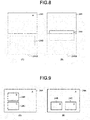
- the state in which the child content is not being displayed means, for example, a state shown in Fig. 8(A).
- Fig. 8A shows a state in which the area for displaying the content 24B of the content 24A is included in a content 24AS which is beyond the display range by scrolling the content 24A.
- the state in which the child content is being displayed means not only the state in which the entire content 24B is displayed but also the state in which a part of the area for displaying the content 24B is displayed as shown in Fig. 8(B) . Therefore, if the shake gesture for switching the focus is performed in the state in Fig. 8(B) , the focus is switched to the content 24B. As shown in Fig. 7(A1) and Fig. 7(A2) , the focus may be switched only when the entire content 24B is being displayed.
- a plurality of child contents (content 24B, content 24C) is set in the content 24A, for example, the focus is switched to the content 24B displayed at an upper side as the uppermost child content. If the content 24A is scrolled upwards, the content 24B is displayed beyond the display range, and the content 24C is displayed, the focus is switched to the content 24C.
- the focus is set on the content 24B arranged on the leftmost side as the uppermost child content. It may be set in advance to switch the focus to the content 24C located at the rightmost side as the uppermost child content.
- the gesture operation for switching the focus is a shake operation for shaking the main body of the device towards any direction or orientation
- a shake operation towards a predetermined direction may be detected to switch the focus in response to the direction of the shake operation.
- the focus may be switched in response to a shake operation for shaking one end (for example, an upper end) of the main body of the device towards a backward direction and an operation for shaking the other end (for example, a lower end) of the main body of the device towards a forward direction.
- Fig. 10 is a flowchart of the focus switching process (3) for switching the focus in response to the direction of the shake operation
- Fig. 11 is a diagram for explaining the focus switching process (3).
- a shake gesture operation for shaking the main body of the device towards the forward direction (shake to the lower end direction of the main body of the device) (Yes in ACT 31)
- the processor 21 searches to determine whether there is the parent content for the content on which the current focus is set. If there is the parent content (Yes in ACT 32), the processor 21 switches the focus to the parent content (ACT 33). On the other hand, if there is no parent content (No in ACT 32), the processor 21 does not switch the focus.
- a shake gesture operation for shaking the main body of the device towards the backward direction (shake to the upper end direction of the main body of the device) (No in ACT 31)
- the processor 21 determines whether there is a child content being displayed for the content on which the focus is set. If there is the child content being displayed (Yes in ACT 34), the processor 21 switches the focus to the child content (ACT 35). On the other hand, if there is no child content (No in ACT 34), the processor 21 does not switch the focus.
- Fig. 11(A) if the backward shake gesture operation (SF) is performed in a state in which the focus is set on the content 24A, the focus is switched to the content 24B which is the child content, as shown in Fig. 11(B) .
- the focus is not switched.
- Fig. 11(B) in a case in which the forward shake gesture operation (SB) is performed in the state in which the focus is set on the content 24B, the focus is switched to the content 24A which is the parent content, as shown in Fig. 11(A) .
- the focus is not switched.
- the focus can be switched in response to different gesture operations (backward shake gesture operation, forward shake gesture operation) for switching the focus. Therefore, even if which content the current focus is set on is not grasped, the focus can be switched to the parent content or the child content by changing the gesture operation.
- a content 24B which is one child content is provided in the area for displaying the content 24A as the parent content; however, as shown in Fig. 12 , for example, a content 24D (grandchild content) which is a further subordinate content is provided in the area for displaying the content 24B.
- the focus may be switched through gesture operations (backward shake gesture and forward shake gesture) between a superordinate content (parent content) and a subordinate content (grandchild content) without a directly nested relationship.
- Fig. 12(A) in a state in which the focus is set on the superordinate content 24A, if the backward shake gesture operation is performed, the focus is switched to the content 24D which is a further subordinate content instead of the content 24B in a directly nested relationship with the content 24A, as shown in Fig. 12(B) .
- the focus is not switched.
- Fig. 12(B) if the forward shake gesture operation (SB) is performed in a state in which the focus is set on the subordinate content 24D, the focus is switched to the content 24A which is a further superordinate content instead of the content 24B in the directly nested relationship with the content 24A, as shown in Fig. 12(A) .
- the focus is not switched.
- the focus is switched between the superordinate content (parent content) and the subordinate content (grandchild content) in a nested relationship of three hierarchies (parent, child and grandchild).
- focus may be switched between arbitrary superordinate and subordinate content combinations.
- Fig. 12 while the case of contents provided in a nested manner in a superordinate and subordinate relationship is taken as an example,embodiments according to inventive concepts are applicable to a case in which a plurality of child contents are nested in one parent content, and the focus may be switched between plural child contents in response to the gesture operation. In this case, the focus may be switched to any one of the child contents corresponding to respective gesture operations in response to a gesture operation among the plurality of different gesture operations for switching the focus.
- the focus may be switched in stages according to the gesture operation on contents in which a plurality of contents is nested hierarchically.
- the focus in a case in which the backward shake gesture operation (SF) is performed in a state in which the focus is set on the uppermost content 24A, the focus is switched to the content 24B which is the subordinate content of the content 24A, as shown in Fig. 13(B) .
- the focus is switched to the lowest content 24D which is the subordinate content of the content 24B, as shown in Fig. 13(C) .
- Fig. 13(C) if the forward shake gesture operation (SB) is performed in the state in which the focus is set on the lowest content 24D, the focus is switched to the content 24B which is the superordinate content of the content 24D, as shown in Fig. 13(B) . Further, if the forward direction shake gesture operation (SB) is performed, as shown in Fig. 13(A) , the focus is switched to the uppermost content 24A.
- the shake gesture operation is taken as an example of the gesture operation for switching the focus; however, as long as it is an operation, which is detectable by the sensor group 25, for changing the posture of the main body of the device, other gesture operations can also be used.
- the programs for enabling a computer to execute the processes described in the above embodiment can be provided in any types of devices by being written in a recording medium such as a magnetic disk (a flexible disk, a hard disk, etc.), an optical disk (a CD-ROM, a DVD or the like), a semiconductor memory or the like.
- the programs may be provided in any types of devices by being transmitted via a communication medium.
- the computer reads the programs recorded on the recording medium or receives the programs via the communication medium and executes the programs to control operations to execute the above processes.
Landscapes
- Engineering & Computer Science (AREA)
- General Engineering & Computer Science (AREA)
- Theoretical Computer Science (AREA)
- Human Computer Interaction (AREA)
- Physics & Mathematics (AREA)
- General Physics & Mathematics (AREA)
- User Interface Of Digital Computer (AREA)
- Controls And Circuits For Display Device (AREA)
- Position Input By Displaying (AREA)
Abstract
An electronic device includes a display module configured to display contents in which a second area for displaying a second content is nested in a first area for displaying a first content. A focus setting module is configured to set a focus on the first content or the second content according to a predetermined gesture operation. A scrolling module is configured to scroll the first content or the second content on which the focus is set according to the predetermined scrolling operation regardless of whether the scrolling operation target is the first area or the second area.
Description
- Embodiments described herein relate generally to an electronic device and a method for displaying contents.
- In recent years, it has become popular to control an operation of a device by performing a so-called "gesture", i.e., performing a specific input operation (touch method) with a finger or a dedicated pen on a touch panel, or performing input through shaking or tilting a main body of the device and then enabling a sensor arranged in the device to react.
- For example, in a smartphone provided with a touch panel, if the entire contents cannot be displayed in one screen, it is possible to scroll contents displayed in the screen by a gesture called a swipe or flick to change a range to be displayed of the contents.
- In scrollable contents (referred to as a scroll view in some cases), for example, another content (child content) that can be vertically scrolled is nested in a vertically scrollable content (parent content). Scrolling by a gesture is performed on contents displayed in an area subjected to a gesture operation. Therefore, if the gesture operation is performed on the child content, the child content is scrolled. On the other hand, if the gesture operation is performed on the parent content, the entire parent content including the child content is scrolled. Therefore, it is necessary to perform the gesture operation on an area where contents to be scrolled are displayed, depending on which of the parent content and child content is scrolled.
- However, as the child content is set in most of the area of the parent content due to the design of the contents, there is a case in which an area of the parent content other than the child content is narrowed. In such a case, it is difficult to perform a gesture operation for scrolling the parent content. On the other hand, if the area of the child content is extremely narrow, it becomes difficult to perform a gesture operation for the child content.
- In the case of contents in which another contents are nested, if the child content is scrolled upward (or downward) to reach the bottom (or top) by the gesture operation on the child content, it is possible to scroll the parent content upward (or downward). However, in a case of trying to scroll the parent content through the gesture operation on the child content, the child content must be scrolled to the bottom or the top. Therefore, if the area of the child content is large, it is necessary to repeat the gesture operation on the child content to scroll the child content to the bottom or the top, leading to large operation burden.
- To solve the above-cited problems, there is provided an electronic device, comprising:
- a display configured to display contents in which a second area for displaying a second content is nested in a first area for displaying a first content; and
- a processor including a focus setting module and a scrolling module,
- the focus setting module configured to set a focus on the first content or the second content according to a predetermined gesture operation; and
- the scrolling module configured to scroll the first content or the second content on which the focus is set according to the predetermined scrolling operation regardless of whether a scrolling operation target is the first area or the second area.
- Preferably the electronic device may further comprise a touch panel, wherein the focus setting module is configured to detect the gesture operation based on an input operation on the touch panel.
- Preferably, when the gesture operation on the second area for displaying the second content on which the focus is set is detected, the focus setting module may be configured to set the focus on the first content; when the gesture operation on the first area for displaying the first content on which the focus is not set is detected, the focus setting module may be configured to set the focus on the first content; and when the gesture operation on the second area for displaying the second content on which the focus is not set is detected, the focus setting module may be configured to set the focus on the second content.
- Preferably the electronic device may further comprise:
- a sensor configured to detect a change in a posture of a main body of the device, wherein
- the focus setting module is configured to detect the gesture operation based on a change in the posture of the main body of the device by the sensor.
- Preferably, in a state in which the focus is set on the second content, the focus setting module may be configured to set the focus on the first content if the gesture operation is detected, and
in a state in which the focus is set on the first content, the focus setting module may be configured to set the focus on the second content if the gesture operation is detected. - Preferably the display may be configured to display contents in which a third area for displaying a third content is nested in the first area for displaying the first content,
the focus setting module may be configured to set a focus on the first content, the second content, or the third content according to a predetermined gesture operation; and
the scrolling module may be configured to scroll the first content, the second content, or the third content on which the focus is set according to the predetermined scrolling operation regardless of whether a scrolling operation target is the first area, the second area, or the third area. - Preferably, when the gesture operation indicates that the focus is to be set on the second area, and the second content is displayed beyond a display range, the focus setting module may be configured to set the focus to the third area.
- Preferably, in a state in which the focus is set on the second content, the focus setting module may be configured to set the focus on the first content when a first gesture operation is detected, and the focus setting module may be configured to set the focus on the second content when a second gesture operation is detected, and
in a state in which the focus is set on the first content, the focus setting module may be configured to set the focus on the second content when the second gesture operation is detected, and the focus setting module may be configured to set the focus on the first content when the first gesture operation is detected. - Preferably the display may be configured to display contents in which a third area for displaying a third content is nested in the second area for displaying the second content,
the focus setting module may be configured to set a focus on the first content, the second content, or the third content according to a predetermined gesture operation; and
the scrolling module may be configured to scroll the first content, the second content, or the third content on which the focus is set according to the predetermined scrolling operation regardless of whether a scrolling operation target is the first area, the second area, or the third area. - Preferably, in a state in which the focus is set on the first content, the focus setting module may be configured to set the focus on the third content when a first gesture operation is detected, and the focus setting module may be configured to set the focus on the first content when a second gesture operation is detected, and
in a state in which the focus is set on the third content, the focus setting module may be configured to set the focus on the first content when the second gesture operation is detected, and the focus setting module may be configured to set the focus on the third content when the first gesture operation is detected. - Preferably, in a state in which the focus is set on the first content, the focus setting module may be configured to set the focus on the second content when a first gesture operation is detected, and
in a state in which the focus is set on the second content, the focus setting module may be configured to set the focus on the third content when the first gesture operation is detected. - Preferably, in a state in which the focus is set on the third content, the focus setting module may be configured to set the focus on the second content when a second gesture operation is detected, and
in a state in which the focus is set on the second content, the focus setting module may be configured to set the focus on the first content when the second gesture operation is detected. - Preferably, the processor may be configured to display the content which is focused to a specific color different from that of the content which is not focused.
- In another exemplary embodiment, there is also provided a method for displaying contents, comprising:
- displaying contents in which a second area for displaying a second content is nested in a first area for displaying a first content;
- setting a focus on the first content or the second content according to a predetermined gesture operation; and
- scrolling the first content or the second content on which the focus is set according to the predetermined scrolling operation regardless of whether a scrolling operation target is the first area or the second area.
- Preferably the method may further comprise detecting the gesture operation based on an input operation of a touch panel.
- Preferably the method may further comprise:
when the gesture operation on the second area for displaying the second content on which the focus is set is detected, setting the focus on the first content; when the gesture operation on the first area for displaying the first content on which the focus is not set is detected, setting the focus on the first content; and when the gesture operation on the second area for displaying the second content on which the focus is not set is detected, setting the focus on the second content. - Preferably the method may further comprise detecting the gesture operation based on a detected change in a posture of a main body of an electronic device.
- Preferably the method may further comprise:
- in a state in which the focus is set on the second content, setting the focus on the first content if the gesture operation is detected, and
- in a state in which the focus is set on the first content, setting the focus on the second content if the gesture operation is detected.
- Preferably the method may further comprise:
- displaying contents in which a third area for displaying a third content is nested in the first area for displaying the first content,
- setting a focus on the first content, the second content, or the third content according to a predetermined gesture operation; and
- scrolling the first content, the second content, or the third content on which the focus is set according to the predetermined scrolling operation regardless of whether a scrolling operation target is the first area, the second area, or the third area.
- Preferably the method may further comprise:
- displaying contents in which a third area for displaying a third content is nested in the second area for displaying the second content,
- setting a focus on the first content, the second content, or the third content according to a predetermined gesture operation; and
- scrolling the first content, the second content, or the third content on which the focus is set according to the predetermined scrolling operation regardless of whether a scrolling operation target is the first area, the second area, or the third area.
- The above and other objects, features and advantages of the present invention will be made apparent from the following description of the preferred embodiments, given as non-limiting examples, with reference to the accompanying drawings, in which:
-
Fig. 1 is a block diagram illustrating an arrangement of an electronic device according to some embodiments; -
Fig. 2 is a diagram illustrating an example of contents displayed on atouch panel 24 of the electronic device according to some embodiments; -
Fig. 3 is a flowchart illustrating a gesture operation process according to some embodiments; -
Fig. 4 is a flowchart illustrating a focus switching process (1) according to some embodiments; -
Fig. 5 is a diagram for explaining the focus switching process (1); -
Fig. 6 is a flowchart illustrating a focus switching process (2) according to some embodiments; -
Fig. 7 is a diagram for explaining the focus switching process (2); -
Fig. 8 is a diagram for explaining the focus switching process (2); -
Fig. 9 is a diagram for explaining the focus switching process (2); -
Fig. 10 is a flow chart depicting a focus switching process (3) according to some embodiments; -
Fig. 11 is a diagram for explaining the focus switching process (3); -
Fig. 12 is a diagram for explaining the focus switching process (3); and -
Fig. 13 is a diagram for explaining the focus switching process (3). - In accordance with some embodiments, an electronic device comprises a display module configured to display contents in which a second area for displaying a second content is nested in a first area for displaying a first content; a focus setting module configured to set a focus on the first content or the second content according to a predetermined gesture operation; and a scrolling module configured to scroll the first content or the second content on which the focus is set according to the predetermined gesture operation regardless of whether a scrolling operation target is the first area or the second area.
- Hereinafter, embodiments will be described with reference to the accompanying drawings.
-
Fig. 1 is a block diagram illustrating an arrangement of anelectronic device 10 according to some embodiments. For example, theelectronic device 10 may be a smartphone, a mobile phone, a personal computer (tablet type, notebook type, desktop type), a navigation device, a portable game device, a POS (Point Of Sales) terminal, a digital MFP (Multi-Function Peripheral) and the like. In the following description, it is assumed that theelectronic device 10 is a smart phone. Theelectronic device 10 can display the contents on the screen based on data stored in a storage device installed therein or data (such as Web content) received via anetwork 12 such as Internet and the like. - The
electronic device 10 of some embodiments provides, for example, an operation method of contents (scroll view) to facilitate a scrolling operation on the contents in which another content (child content (second content)) that can be vertically scrolled is nested in a vertically scrollable content (parent content (first content)). A scrolling direction is not limited to a vertical direction, for example, it may be a horizontal direction. - As shown in
Fig. 1 , theelectronic device 10 comprises aprocessor 21, amemory 22, astorage device 23, atouch panel 24, asensor group 25, acommunication device 26, which are connected to each other via a bus. - The
processor 21 controls the entireelectronic device 10 by executing programs stored in thememory 22. The programs executed by theprocessor 21 include an OS (Operating System) and various application programs. The application programs may include, for example, a program for displaying contents such as a browser program. - The
memory 22 may include, for example, a ROM (Read Only Memory) and a RAM (Random Access Memory), and stores programs executed by theprocessor 21 and various data. The program for displaying contents stored in thememory 22 is executed by theprocessor 21 to display the contents on thetouch panel 24. The contents displayed on thetouch panel 24 include Web contents described in HTML (Hypertext Transfer Protocol), XHTML (eXtensible HyperText Markup Language), or the like. The contents in other data formats may also be set as a target. - The
storage device 23 stores a hard disk program and various data. - The
touch panel 24 includes a display device such as a liquid crystal display (LED (Light Emitting Diode)), and an input device such as a touch sensor mounted on a display surface of the display device. The display device mounted in thetouch panel 24 may be another display such as an organic EL (Electro-Luminescence) display. The input device mounted in thetouch panel 24 is not limited to the touch sensor, and other types such as a capacitive type, an optical type, an electromagnetic induction type, etc. may be used. It is assumed that the input device of thetouch panel 24 is provided with a touch sensor capable of sensing a so-called multi-touch, for example, capable of detecting a touch operation on a plurality of positions at the same time. Embodiments are not limited to a touch sensor capable of sensing multi-touch. - The
sensor group 25 includes a plurality of sensors for detecting a situation of theelectronic device 10. For example, thesensor group 25 includes a touch sensor for detecting touch on a main body of theelectronic device 10, a three-axis acceleration sensor for detecting a change (movement and posture) in the posture of the main body of theelectronic device 10, and the like. - Under the control of the
processor 21, thecommunication device 26 communicates with an external device via thenetwork 12. - The
processor 21 can recognize a type and a position of the gesture operation performed on thetouch panel 24 by detecting an input operation by a fingertip or a pen on the operation surface of thetouch panel 24. Theprocessor 21 can recognize, as the gesture operation on thetouch panel 24, a touch and hold gesture (long press), a swipe gesture (tracing with one finger or a pen), a press (strong press), a double-finger double tap (tap two places twice at the same time), etc. - Further, the
processor 21 can recognize the gesture operation for changing the posture of the main body of theelectronic device 10 based on a measured value by the three-axis acceleration sensor of thesensor group 25. For example, theprocessor 21 can recognize, for example, a shake operation (shaking the main body of the device) as the gesture operation for changing the posture of the main body of the device to switch focused contents described later. As the shake operation, for example, in addition to an operation through which any direction and orientation at the time of shaking the main body of the device is possible, an operation of shaking one end (for example, an upper end) of the main body of the device towards a backward direction, and an operation of shaking the other end (for example, a lower end) of the main body of the device towards a forward direction can be recognized. In addition to the shake operation, other gesture operations for changing the posture of the main body of theelectronic device 10 which can be detected by thesensor group 25 may be recognized. - In the
electronic device 10 according to some embodiments, any gesture operation recognizable by theprocessor 21 is set in advance as a gesture operation for switching the focused content. -
Fig. 2 is a diagram illustrating an example of contents displayed on thetouch panel 24 of theelectronic device 10 according to some embodiments. - A
content 24A (referred to as a scroll view in some cases) shown inFig. 2 can be scrolled in the vertical direction. A scroll bar 24Aa is provided on the right lateral side of an area for displaying thecontent 24A. By moving a slider 24Ab of the scroll bar 24Aa in the vertical direction, it is possible to scroll thecontent 24A in the vertical direction. Acontent 24B is displayed in an area nested in the area for displaying thecontent 24A. A scroll bar 24Ba is provided on the right lateral side of the area for displaying thecontent 24B. By moving a slider 24Bb of the scroll bar 24Ba in the vertical direction, it is possible to scroll thecontent 24B in the vertical direction. - The
content 24A and thecontent 24B have parent-child relationship, thecontent 24A is equivalent to the parent content, and thecontent 24B is equivalent to the child content. Focus can be set on both thecontent 24A and thecontent 24B, and the content on which the focus is set becomes a scrolling target according to the scrolling operation. By default, the focus is set on thecontent 24A, and the focus is not simultaneously set on both thecontent 24A and thecontent 24B. Theprocessor 21 displays the content on which focus is set by coloring an area frame with a specific color so as to easily determine the focused content visually. - Next, a control process of the operation method of the contents (scroll view) by the
electronic device 10 according to some embodiments are described. - First, the gesture operation process in some embodiments is described with reference to a flowchart shown in
Fig. 3 . - The
processor 21 recognizes whether an input operation on thetouch panel 24 or an operation for changing the posture of the main body of the device detected by thesensor group 25 is a gesture operation. If the foregoing operation is not the gesture operation (No in ACT 1), theprocessor 21 does not execute a process corresponding to the operation. On the other hand, if the operation is the gesture operation (Yes in ACT 1), theprocessor 21 determines whether the gesture operation is a predetermined gesture operation for switching the focus. - If the recognized gesture operation is an instruction to switch the focus (Yes in ACT 2), the
processor 21 executes a focus switching process (ACT 3). In the focus switching process, the focus is set on thecontent 24A or thecontent 24B according to the content on which the current focus is set and a content of the gesture operation. Details of the focus switching process are described later. - On the other hand, if the gesture operation is not the focus switching instruction (No in ACT 2), the
processor 21 determines whether it is a scrolling operation for instructing scrolling of the content. - Here, if it is determined that the operation is not a scrolling operation for instructing the scrolling (No in ACT 4), the
processor 21 determines the operation as an input operation for another process other than the scrolling, and executes another process in response to the input operation. - On the other hand, if it is determined that the operation is the scrolling operation for instructing the scrolling (Yes in ACT 4), the
processor 21 scrolls the content in response to the scrolling operation (ACT 6) if the content on which the current focus is set is scrollable (Yes in ACT 5). - For example, in a case in which the focus is set on the
content 24B, if thecontent 24B is beyond the display range, it is determined that scrolling is not possible. If a scrolling operation for further scrolling the content on which the focus is set upward (or downward) is input while the content is scrolled to the top (or bottom), it is determined that scrolling is not possible. - Here, as the scrolling operation, for example, a vertical swipe gesture (operation to trace the operation surface of the
touch panel 24 vertically with one finger or a pen) is used. Theprocessor 21 scrolls the content on which the focus is set in response to an operation amount of the vertical swipe gesture. - In the
electronic device 10 of some embodiments, regardless of whether the target of the vertical swipe gesture operation is the area for displaying thecontent 24A or the area for displaying thecontent 24B, the content on which the focus is set is scrolled through the predetermined scrolling operation (vertical swipe gesture). In other words, there is no need to perform the vertical swipe gesture operation on the area for displaying the content to be scrolled. There is also no need to change the gesture operation for scrolling. - Therefore, since the
content 24B is set in most of the area for displaying thecontent 24A shown inFig. 2 , even if the area for displaying thecontent 24A other than thecontent 24B is narrow and it is difficult to a gesture operation for scrolling on the area for displaying thecontent 24A, thecontent 24A can be scrolled by performing an operation on the area for displaying thecontent 24B. Even if the area for displaying thecontent 24B is extremely narrow and it is difficult to perform the gesture operation for scrolling on the area for displaying thecontent 24B, thecontent 24B can be scrolled by an operation on the area for displaying thecontent 24A. - The focus switching process in a case in which the gesture operation for switching the focus is an input operation on the
touch panel 24, and the focus switching process in a case in which the gesture operation for switching the focus is the operation for changing the posture of the main body of the device detected by thesensor group 25 are described below. - First, the focus switching process (1) in a case in which the gesture operation for switching the focus is an input operation on the
touch panel 24 is described with reference to a flowchart shown inFig. 4 .Fig. 5 is a diagram for explaining the focus switching process (1). - For example, if a predetermined touch and hold gesture (long press), is detected as the gesture operation for switching the focus, the
processor 21 searches for the content displayed in an area where the gesture operation is performed. Here, if the focus is set for the content displayed in an area in which the gesture operation is performed (Yes in ACT 11), theprocessor 21 searches for the parent content of this content. - If there is no parent content (No in ACT 12), the
processor 21 does not switch the focus. On the other hand, if there is the parent content (Yes in ACT 12), theprocessor 21 switches the focus to the parent content (ACT 13). - As shown in
Fig. 5(A1) , if the gesture operation for switching the focus is performed on the area for displaying thecontent 24A on which the focus (F) is set (J), the focus can be continuously set on thecontent 24A without switching the focus, as shown inFig. 5(A2) . - On the other hand, as shown in
Fig. 5(B1) , if the gesture operation for switching the focus is performed on the area for displaying thecontent 24B where the focus (F) is set (J), the focus is switched to thecontent 24A which is the parent content, as shown inFig. 5(B2) . During browsing while scrolling the content displayed as thecontent 24B, by performing the focus switching operation on the area for displaying thecontent 24B, the focus can be switched to thecontent 24A. As described above, theprocessor 21 scrolls the content on which the focus is set, regardless of which area for displaying the content the scrolling operation is performed on. Therefore, after the focus is switched by performing the operation on the area for displaying thecontent 24B, thecontent 24A can be scrolled through the scrolling operation on the area for displaying thecontent 24B. Thecontent 24A can naturally be scrolled as well by the scrolling operation on the area for displaying thecontent 24A. - If the focus is not set on the content displayed in the area where the gesture operation for switching the focus is performed (No in ACT 11), the
processor 21 switches the focus to the content subjected to the gesture operation (ACT 14). - Specifically, as shown in
Fig. 5(C1) , if the gesture operation for switching the focus is performed on the area for displaying thecontent 24B on which the focus (F) is not set (J), the focus is switched to thecontent 24B, as shown inFig. 5(C2) . As shown inFig. 5(D1) , if the gesture operation for switching the focus is performed on the area for displaying thecontent 24A on which focus (F) is not set (J), the focus is switched to thecontent 24A, as shown inFig. 5(D1) . By performing the focus switching gesture operation on the area for displaying the content on which the focus is not set, it is possible to switch the focus to the content which is the target of the gesture operation. - In the above description, the touch and hold gesture (long press) is described as an example of the gesture operation for switching the focus on the
touch panel 24; however, other gesture operations such as the press (strong press), the double-finger double tap (tap two places twice at the same time), and the like may be used. - Next, with reference to a flowchart shown in
Fig. 6 , the focus switching process (2) when the gesture operation for switching the focus is the operation of changing the posture of the main body of the device is described.Fig. 7 is a diagram for explaining the focus switching process (2). - For example, if a predetermined shake gesture (operation of shaking the main body of the device) is detected as the gesture operation for switching the focus, the
processor 21 searches to determine whether or not there is the parent content of the content on which the current focus is set. - If there is no parent content (No in ACT 21), the
processor 21 switches the focus to, for example, the uppermost child content being displayed (ACT 24) if the child content is being displayed (Yes in ACT 23). Contrarily, if there is no child content being displayed (No in ACT 23), theprocessor 21 does not change the focus. On the other hand, if there is parent content (Yes in ACT 21), theprocessor 21 switches the focus to the parent content (ACT 22). - Specifically, as shown in
Fig. 7(A1) , in a state where the focus (F) is set on thecontent 24A, in a case in which the gesture operation (shake) for switching the focus is performed (S), if thecontent 24B is being displayed, the focus is switched to thecontent 24B, as shown inFig. 7(A2) . - On the other hand, as shown in
Fig. 7(B1) , when the focus (F) is set on thecontent 24B, in a case in which the gesture operation (shake) for switching the focus is performed (S), since thecontent 24B has the parent content, i.e., thecontent 24A, the focus is switched to thecontent 24A, as shown inFig. 7(B2) . Specifically, by performing the shake gesture operation for switching the focus, it is possible to alternately switch the focus to the contents in a parent-child relationship. - The state in which the child content is not being displayed means, for example, a state shown in
Fig. 8(A). Fig. 8A shows a state in which the area for displaying thecontent 24B of thecontent 24A is included in a content 24AS which is beyond the display range by scrolling thecontent 24A. - As shown in
Fig. 7(A1) and Fig. 7(A2) , the state in which the child content is being displayed means not only the state in which theentire content 24B is displayed but also the state in which a part of the area for displaying thecontent 24B is displayed as shown inFig. 8(B) . Therefore, if the shake gesture for switching the focus is performed in the state inFig. 8(B) , the focus is switched to thecontent 24B. As shown inFig. 7(A1) and Fig. 7(A2) , the focus may be switched only when theentire content 24B is being displayed. - As shown in
Fig. 9(A) , for example, if a plurality of child contents (content 24B,content 24C) is set in thecontent 24A, for example, the focus is switched to thecontent 24B displayed at an upper side as the uppermost child content. If thecontent 24A is scrolled upwards, thecontent 24B is displayed beyond the display range, and thecontent 24C is displayed, the focus is switched to thecontent 24C. - Further, for example, as shown in
Fig. 9(B) , if thecontent 24B and thecontent 24C are arranged in a horizontal direction, the focus is set on thecontent 24B arranged on the leftmost side as the uppermost child content. It may be set in advance to switch the focus to thecontent 24C located at the rightmost side as the uppermost child content. - In this manner, it is possible to switch the focus through the gesture operation for changing the posture of the main body of the device. Therefore, after the focus is switched by the gesture operation, as described above, regardless of which one of the area for displaying the parent content (
content 24A) and the areas for displaying child contents (contents - In the focus switching process (2) described above, although the gesture operation for switching the focus is a shake operation for shaking the main body of the device towards any direction or orientation, a shake operation towards a predetermined direction may be detected to switch the focus in response to the direction of the shake operation. For example, the focus may be switched in response to a shake operation for shaking one end (for example, an upper end) of the main body of the device towards a backward direction and an operation for shaking the other end (for example, a lower end) of the main body of the device towards a forward direction.
-
Fig. 10 is a flowchart of the focus switching process (3) for switching the focus in response to the direction of the shake operation, andFig. 11 is a diagram for explaining the focus switching process (3). - For example, if a shake gesture operation (hereinafter, referred to as a forward shake gesture operation) for shaking the main body of the device towards the forward direction (shake to the lower end direction of the main body of the device) (Yes in ACT 31), the
processor 21 searches to determine whether there is the parent content for the content on which the current focus is set. If there is the parent content (Yes in ACT 32), theprocessor 21 switches the focus to the parent content (ACT 33). On the other hand, if there is no parent content (No in ACT 32), theprocessor 21 does not switch the focus. - For example, if a shake gesture operation (hereinafter, referred to as a backward shake gesture operation) for shaking the main body of the device towards the backward direction (shake to the upper end direction of the main body of the device) (No in ACT 31), the
processor 21 determines whether there is a child content being displayed for the content on which the focus is set. If there is the child content being displayed (Yes in ACT 34), theprocessor 21 switches the focus to the child content (ACT 35). On the other hand, if there is no child content (No in ACT 34), theprocessor 21 does not switch the focus. - Specifically, as shown in
Fig. 11(A) , if the backward shake gesture operation (SF) is performed in a state in which the focus is set on thecontent 24A, the focus is switched to thecontent 24B which is the child content, as shown inFig. 11(B) . In a state shown inFig. 11(B) , if the backward shake gesture operation (SF) is performed, the focus is not switched. - Further, as shown in
Fig. 11(B) , in a case in which the forward shake gesture operation (SB) is performed in the state in which the focus is set on thecontent 24B, the focus is switched to thecontent 24A which is the parent content, as shown inFig. 11(A) . In a state shown inFig. 11(A) , if the forward shake gesture operation (SB) is performed, the focus is not switched. - In this manner, the focus can be switched in response to different gesture operations (backward shake gesture operation, forward shake gesture operation) for switching the focus. Therefore, even if which content the current focus is set on is not grasped, the focus can be switched to the parent content or the child content by changing the gesture operation.
- In the example shown in
Fig. 11 , an example is shown in which thecontent 24B which is one child content is provided in the area for displaying thecontent 24A as the parent content; however, as shown inFig. 12 , for example, acontent 24D (grandchild content) which is a further subordinate content is provided in the area for displaying thecontent 24B. In such a case, the focus may be switched through gesture operations (backward shake gesture and forward shake gesture) between a superordinate content (parent content) and a subordinate content (grandchild content) without a directly nested relationship. - For example, as shown in
Fig. 12(A) , in a state in which the focus is set on thesuperordinate content 24A, if the backward shake gesture operation is performed, the focus is switched to thecontent 24D which is a further subordinate content instead of thecontent 24B in a directly nested relationship with thecontent 24A, as shown inFig. 12(B) . In a state shown inFig. 12(B) , if the backward shake gesture operation (SF) is performed, the focus is not switched. - Further, as shown in
Fig. 12(B) , if the forward shake gesture operation (SB) is performed in a state in which the focus is set on thesubordinate content 24D, the focus is switched to thecontent 24A which is a further superordinate content instead of thecontent 24B in the directly nested relationship with thecontent 24A, as shown inFig. 12(A) . In the state shown inFig. 12(A) , if the forward shake gesture operation (SB) is performed, the focus is not switched. - In the above description, the focus is switched between the superordinate content (parent content) and the subordinate content (grandchild content) in a nested relationship of three hierarchies (parent, child and grandchild). In the
electronic device 10 of some embodiments, in the case of contents having a nested relationship with four or more hierarchies, focus may be switched between arbitrary superordinate and subordinate content combinations. - Furthermore, in
Fig. 12 , while the case of contents provided in a nested manner in a superordinate and subordinate relationship is taken as an example,embodiments according to inventive concepts are applicable to a case in which a plurality of child contents are nested in one parent content, and the focus may be switched between plural child contents in response to the gesture operation. In this case, the focus may be switched to any one of the child contents corresponding to respective gesture operations in response to a gesture operation among the plurality of different gesture operations for switching the focus. - As described above, it is possible to switch the focus directly to any content corresponding to the gesture operation by different gesture operations. Therefore, even if a plurality of contents in a nested manner is provided, the focus can be switched to any content easily through the gesture operation.
- Furthermore, as shown in
Fig. 13(A), Fig. 13(B), and Fig. 13(C) , the focus may be switched in stages according to the gesture operation on contents in which a plurality of contents is nested hierarchically. For example, as shown inFig. 13(A) , in a case in which the backward shake gesture operation (SF) is performed in a state in which the focus is set on theuppermost content 24A, the focus is switched to thecontent 24B which is the subordinate content of thecontent 24A, as shown inFig. 13(B) . Furthermore, if the backward shake gesture operation (SF) is performed, the focus is switched to thelowest content 24D which is the subordinate content of thecontent 24B, as shown inFig. 13(C) . - Further, as shown in
Fig. 13(C) , if the forward shake gesture operation (SB) is performed in the state in which the focus is set on thelowest content 24D, the focus is switched to thecontent 24B which is the superordinate content of thecontent 24D, as shown inFig. 13(B) . Further, if the forward direction shake gesture operation (SB) is performed, as shown inFig. 13(A) , the focus is switched to theuppermost content 24A. - As described above, even if a plurality of contents is nested hierarchically, it is possible to sequentially switch the focus in a superordinate content direction or a subordinate content direction in response to the gesture operation for switching the focus. Therefore, it becomes easy to grasp which content the focus is switched to in accordance with the gesture operation, and the focus switching can be facilitated.
- In the above description, the shake gesture operation is taken as an example of the gesture operation for switching the focus; however, as long as it is an operation, which is detectable by the
sensor group 25, for changing the posture of the main body of the device, other gesture operations can also be used. - Any one of the above focus switching processes (1), (2) and (3) may be performed, or any combination thereof may be carried out.
- While certain embodiments have been described, these embodiments have been presented by way of example only, and are not intended to limit the scope of the invention. Indeed, the novel embodiments described herein may be embodied in a variety of other forms; furthermore, various omissions, substitutions and changes in the form of the embodiments described herein may be made without departing from the scope of the invention. The accompanying claims and their equivalents are intended to cover such forms or modifications as would fall within the scope of the invention.
- The programs for enabling a computer to execute the processes described in the above embodiment can be provided in any types of devices by being written in a recording medium such as a magnetic disk (a flexible disk, a hard disk, etc.), an optical disk (a CD-ROM, a DVD or the like), a semiconductor memory or the like. The programs may be provided in any types of devices by being transmitted via a communication medium. The computer reads the programs recorded on the recording medium or receives the programs via the communication medium and executes the programs to control operations to execute the above processes.
Claims (15)
- An electronic device, comprising:a display configured to display contents in which a second area for displaying a second content is nested in a first area for displaying a first content; anda processor including a focus setting module and a scrolling module,the focus setting module configured to set a focus on the first content or the second content according to a predetermined gesture operation; andthe scrolling module configured to scroll the first content or the second content on which the focus is set according to the predetermined scrolling operation regardless of whether a scrolling operation target is the first area or the second area.
- The electronic device according to claim 1, further comprising a touch panel, wherein
the focus setting module is configured to detect the gesture operation based on an input operation on the touch panel. - The electronic device according to claim 2, wherein
when the gesture operation on the second area for displaying the second content on which the focus is set is detected, the focus setting module is configured to set the focus on the first content; when the gesture operation on the first area for displaying the first content on which the focus is not set is detected, the focus setting module is configured to set the focus on the first content; and when the gesture operation on the second area for displaying the second content on which the focus is not set is detected, the focus setting module is configured to set the focus on the second content. - The electronic device according to claim 1, further comprising:a sensor configured to detect a change in a posture of a main body of the device, whereinthe focus setting module is configured to detect the gesture operation based on a change in the posture of the main body of the device by the sensor.
- The electronic device according to claim 4, wherein
in a state in which the focus is set on the second content, the focus setting module is configured to set the focus on the first content if the gesture operation is detected, and
in a state in which the focus is set on the first content, the focus setting module is configured to set the focus on the second content if the gesture operation is detected. - The electronic device according to any one of claims 1 to 5, wherein the display is configured to display contents in which a third area for displaying a third content is nested in the first area for displaying the first content or in the second area for displaying the second content,
the focus setting module is configured to set a focus on the first content, the second content, or the third content according to a predetermined gesture operation; and
the scrolling module is configured to scroll the first content, the second content, or the third content on which the focus is set according to the predetermined scrolling operation regardless of whether a scrolling operation target is the first area, the second area, or the third area. - The electronic device according to claim 6,
wherein when the gesture operation indicates that the focus is to be set on the second area, and the second content is displayed beyond a display range, the focus setting module is configured to set the focus to the third area. - The electronic device according to any one of claims 1 to 7, wherein the processor is configured to display the content which is focused to a specific color different from that of the content which is not focused.
- A method for displaying contents, comprising:displaying contents in which a second area for displaying a second content is nested in a first area for displaying a first content;setting a focus on the first content or the second content according to a predetermined gesture operation; andscrolling the first content or the second content on which the focus is set according to the predetermined scrolling operation regardless of whether a scrolling operation target is the first area or the second area.
- The method according to claim 9, further comprising detecting the gesture operation based on an input operation of a touch panel.
- The method according to claim 10, further comprising:when the gesture operation on the second area for displaying the second content on which the focus is set is detected, setting the focus on the first content; when the gesture operation on the first area for displaying the first content on which the focus is not set is detected, setting the focus on the first content; and when the gesture operation on the second area for displaying the second content on which the focus is not set is detected, setting the focus on the second content.
- The method according to claim 9, further comprising detecting the gesture operation based on a detected change in a posture of a main body of an electronic device.
- The method according to claim 12, further comprising:in a state in which the focus is set on the second content, setting the focus on the first content if the gesture operation is detected, andin a state in which the focus is set on the first content, setting the focus on the second content if the gesture operation is detected.
- The method according to any one of claims 9 to 13, further comprising:displaying contents in which a third area for displaying a third content is nested in the first area for displaying the first content or in the second area for displaying the second content,setting a focus on the first content, the second content, or the third content according to a predetermined gesture operation; andscrolling the first content, the second content, or the third content on which the focus is set according to the predetermined scrolling operation regardless of whether a scrolling operation target is the first area, the second area, or the third area.
- The method according to any one of claims 9 to 14, further comprising:displaying the content which is focused to a specific color different from that of the content which is not focused.
Applications Claiming Priority (1)
| Application Number | Priority Date | Filing Date | Title |
|---|---|---|---|
| JP2017173000A JP6910898B2 (en) | 2017-09-08 | 2017-09-08 | Electronic devices and content display programs |
Publications (1)
| Publication Number | Publication Date |
|---|---|
| EP3454180A1 true EP3454180A1 (en) | 2019-03-13 |
Family
ID=63350427
Family Applications (1)
| Application Number | Title | Priority Date | Filing Date |
|---|---|---|---|
| EP18189975.8A Withdrawn EP3454180A1 (en) | 2017-09-08 | 2018-08-21 | Electronic device and method for displaying contents |
Country Status (4)
| Country | Link |
|---|---|
| US (1) | US10768801B2 (en) |
| EP (1) | EP3454180A1 (en) |
| JP (2) | JP6910898B2 (en) |
| CN (1) | CN109471581B (en) |
Cited By (1)
| Publication number | Priority date | Publication date | Assignee | Title |
|---|---|---|---|---|
| US20190065013A1 (en) * | 2015-01-05 | 2019-02-28 | Samsung Electronics Co., Ltd. | Display apparatus and display method |
Families Citing this family (1)
| Publication number | Priority date | Publication date | Assignee | Title |
|---|---|---|---|---|
| CN111580662A (en) * | 2020-05-08 | 2020-08-25 | 北京奇艺世纪科技有限公司 | View scrolling control method and device, electronic equipment and storage medium |
Citations (2)
| Publication number | Priority date | Publication date | Assignee | Title |
|---|---|---|---|---|
| JP2012208636A (en) * | 2011-03-29 | 2012-10-25 | Ntt Docomo Inc | Touch screen device control apparatus, and control method and program for the same |
| US20150160732A1 (en) * | 2013-12-05 | 2015-06-11 | Fuji Xerox Co., Ltd. | Non-transitory computer readable medium |
Family Cites Families (9)
| Publication number | Priority date | Publication date | Assignee | Title |
|---|---|---|---|---|
| US5999176A (en) * | 1997-04-04 | 1999-12-07 | International Business Machines Corporation | Method to provide a single scrolling control for a multi-window interface |
| KR101450584B1 (en) * | 2007-02-22 | 2014-10-14 | 삼성전자주식회사 | Method for displaying screen in terminal |
| CN101661346B (en) * | 2008-08-29 | 2012-06-06 | 佛山市顺德区顺达电脑厂有限公司 | Intelligent touch-control device and method |
| US8493344B2 (en) * | 2009-06-07 | 2013-07-23 | Apple Inc. | Devices, methods, and graphical user interfaces for accessibility using a touch-sensitive surface |
| JP2012118652A (en) * | 2010-11-30 | 2012-06-21 | Sharp Corp | Menu display control device |
| FR2973899B1 (en) * | 2011-04-07 | 2013-04-26 | Archos | METHOD FOR SELECTING AN ELEMENT OF A USER INTERFACE AND DEVICE IMPLEMENTING SUCH A METHOD |
| US8812989B1 (en) * | 2013-08-26 | 2014-08-19 | Google Inc. | Displaying thumbnails |
| CN104360787A (en) * | 2014-10-17 | 2015-02-18 | 联想(北京)有限公司 | Display method and electronic device |
| CN104598248B (en) * | 2015-02-03 | 2018-01-23 | 安徽广电信息网络股份有限公司 | focus switching method based on HTML web page |
-
2017
- 2017-09-08 JP JP2017173000A patent/JP6910898B2/en not_active Expired - Fee Related
-
2018
- 2018-07-12 CN CN201810763640.6A patent/CN109471581B/en active Active
- 2018-07-12 US US16/033,797 patent/US10768801B2/en not_active Expired - Fee Related
- 2018-08-21 EP EP18189975.8A patent/EP3454180A1/en not_active Withdrawn
-
2021
- 2021-07-07 JP JP2021113026A patent/JP2021182405A/en active Pending
Patent Citations (2)
| Publication number | Priority date | Publication date | Assignee | Title |
|---|---|---|---|---|
| JP2012208636A (en) * | 2011-03-29 | 2012-10-25 | Ntt Docomo Inc | Touch screen device control apparatus, and control method and program for the same |
| US20150160732A1 (en) * | 2013-12-05 | 2015-06-11 | Fuji Xerox Co., Ltd. | Non-transitory computer readable medium |
Cited By (2)
| Publication number | Priority date | Publication date | Assignee | Title |
|---|---|---|---|---|
| US20190065013A1 (en) * | 2015-01-05 | 2019-02-28 | Samsung Electronics Co., Ltd. | Display apparatus and display method |
| US11169662B2 (en) * | 2015-01-05 | 2021-11-09 | Samsung Electronics Co., Ltd. | Display apparatus and display method |
Also Published As
| Publication number | Publication date |
|---|---|
| JP6910898B2 (en) | 2021-07-28 |
| US20190079652A1 (en) | 2019-03-14 |
| JP2019049804A (en) | 2019-03-28 |
| CN109471581B (en) | 2023-10-27 |
| CN109471581A (en) | 2019-03-15 |
| JP2021182405A (en) | 2021-11-25 |
| US10768801B2 (en) | 2020-09-08 |
Similar Documents
| Publication | Publication Date | Title |
|---|---|---|
| KR101451999B1 (en) | Data scroll method and apparatus | |
| CN101943990B (en) | Operation control apparatus, operation control method, and computer program | |
| US10627990B2 (en) | Map information display device, map information display method, and map information display program | |
| JP5229084B2 (en) | Display control apparatus, display control method, and computer program | |
| JP5768457B2 (en) | Electronic device, display method and program | |
| JP5304577B2 (en) | Portable information terminal and display control method | |
| US20110169760A1 (en) | Device for control of electronic apparatus by manipulation of graphical objects on a multicontact touch screen | |
| JP2008276776A (en) | Touch-type tag navigation method and related apparatus | |
| JP2013526171A (en) | Virtual keyboard with auxiliary key strip | |
| US20100302188A1 (en) | Electronic device, method for viewing desktop thereof, and computer-readable medium | |
| US12373089B2 (en) | Display device, display method, and program | |
| US9747002B2 (en) | Display apparatus and image representation method using the same | |
| CN105808110B (en) | Table display method and display device | |
| JP5605911B2 (en) | Touch screen device control apparatus, control method thereof, and program | |
| CN104285204B (en) | Show equipment, display control method and non-transitory computer-readable medium | |
| US10768801B2 (en) | Electronic device and method for displaying contents | |
| US20130002714A1 (en) | Display control apparatus and method for controlling display | |
| JP6224539B2 (en) | Information processing apparatus, information processing method, and program | |
| JP6291894B2 (en) | Input device, input method, and program | |
| US11599261B2 (en) | Display apparatus that displays marker on position of target character and displays next marker according to slide operation | |
| KR101899916B1 (en) | Method for controlling a display device at the edge of an information element to be displayed | |
| JP5516794B2 (en) | Portable information terminal, display control method and program | |
| JP2018010382A (en) | Display device and display control program | |
| JP2013011981A (en) | Display control method, program, and display unit | |
| WO2019230188A1 (en) | Display device and display control program |
Legal Events
| Date | Code | Title | Description |
|---|---|---|---|
| PUAI | Public reference made under article 153(3) epc to a published international application that has entered the european phase |
Free format text: ORIGINAL CODE: 0009012 |
|
| STAA | Information on the status of an ep patent application or granted ep patent |
Free format text: STATUS: THE APPLICATION HAS BEEN PUBLISHED |
|
| AK | Designated contracting states |
Kind code of ref document: A1 Designated state(s): AL AT BE BG CH CY CZ DE DK EE ES FI FR GB GR HR HU IE IS IT LI LT LU LV MC MK MT NL NO PL PT RO RS SE SI SK SM TR |
|
| AX | Request for extension of the european patent |
Extension state: BA ME |
|
| STAA | Information on the status of an ep patent application or granted ep patent |
Free format text: STATUS: THE APPLICATION IS DEEMED TO BE WITHDRAWN |
|
| 18D | Application deemed to be withdrawn |
Effective date: 20190914 |