EP3451147A1 - Method, device and system for manipulating miracast presentation content - Google Patents
Method, device and system for manipulating miracast presentation content Download PDFInfo
- Publication number
- EP3451147A1 EP3451147A1 EP16900301.9A EP16900301A EP3451147A1 EP 3451147 A1 EP3451147 A1 EP 3451147A1 EP 16900301 A EP16900301 A EP 16900301A EP 3451147 A1 EP3451147 A1 EP 3451147A1
- Authority
- EP
- European Patent Office
- Prior art keywords
- screen transmission
- play
- presentation
- manipulating
- preset
- Prior art date
- Legal status (The legal status is an assumption and is not a legal conclusion. Google has not performed a legal analysis and makes no representation as to the accuracy of the status listed.)
- Granted
Links
Images

Classifications
-
- G—PHYSICS
- G06—COMPUTING OR CALCULATING; COUNTING
- G06F—ELECTRIC DIGITAL DATA PROCESSING
- G06F3/00—Input arrangements for transferring data to be processed into a form capable of being handled by the computer; Output arrangements for transferring data from processing unit to output unit, e.g. interface arrangements
- G06F3/14—Digital output to display device ; Cooperation and interconnection of the display device with other functional units
- G06F3/1454—Digital output to display device ; Cooperation and interconnection of the display device with other functional units involving copying of the display data of a local workstation or window to a remote workstation or window so that an actual copy of the data is displayed simultaneously on two or more displays, e.g. teledisplay
-
- G—PHYSICS
- G06—COMPUTING OR CALCULATING; COUNTING
- G06F—ELECTRIC DIGITAL DATA PROCESSING
- G06F3/00—Input arrangements for transferring data to be processed into a form capable of being handled by the computer; Output arrangements for transferring data from processing unit to output unit, e.g. interface arrangements
- G06F3/01—Input arrangements or combined input and output arrangements for interaction between user and computer
- G06F3/048—Interaction techniques based on graphical user interfaces [GUI]
- G06F3/0487—Interaction techniques based on graphical user interfaces [GUI] using specific features provided by the input device, e.g. functions controlled by the rotation of a mouse with dual sensing arrangements, or of the nature of the input device, e.g. tap gestures based on pressure sensed by a digitiser
- G06F3/0488—Interaction techniques based on graphical user interfaces [GUI] using specific features provided by the input device, e.g. functions controlled by the rotation of a mouse with dual sensing arrangements, or of the nature of the input device, e.g. tap gestures based on pressure sensed by a digitiser using a touch-screen or digitiser, e.g. input of commands through traced gestures
- G06F3/04886—Interaction techniques based on graphical user interfaces [GUI] using specific features provided by the input device, e.g. functions controlled by the rotation of a mouse with dual sensing arrangements, or of the nature of the input device, e.g. tap gestures based on pressure sensed by a digitiser using a touch-screen or digitiser, e.g. input of commands through traced gestures by partitioning the display area of the touch-screen or the surface of the digitising tablet into independently controllable areas, e.g. virtual keyboards or menus
-
- G—PHYSICS
- G06—COMPUTING OR CALCULATING; COUNTING
- G06F—ELECTRIC DIGITAL DATA PROCESSING
- G06F3/00—Input arrangements for transferring data to be processed into a form capable of being handled by the computer; Output arrangements for transferring data from processing unit to output unit, e.g. interface arrangements
- G06F3/01—Input arrangements or combined input and output arrangements for interaction between user and computer
- G06F3/048—Interaction techniques based on graphical user interfaces [GUI]
- G06F3/0481—Interaction techniques based on graphical user interfaces [GUI] based on specific properties of the displayed interaction object or a metaphor-based environment, e.g. interaction with desktop elements like windows or icons, or assisted by a cursor's changing behaviour or appearance
-
- G—PHYSICS
- G06—COMPUTING OR CALCULATING; COUNTING
- G06F—ELECTRIC DIGITAL DATA PROCESSING
- G06F3/00—Input arrangements for transferring data to be processed into a form capable of being handled by the computer; Output arrangements for transferring data from processing unit to output unit, e.g. interface arrangements
- G06F3/01—Input arrangements or combined input and output arrangements for interaction between user and computer
- G06F3/048—Interaction techniques based on graphical user interfaces [GUI]
- G06F3/0484—Interaction techniques based on graphical user interfaces [GUI] for the control of specific functions or operations, e.g. selecting or manipulating an object, an image or a displayed text element, setting a parameter value or selecting a range
- G06F3/04845—Interaction techniques based on graphical user interfaces [GUI] for the control of specific functions or operations, e.g. selecting or manipulating an object, an image or a displayed text element, setting a parameter value or selecting a range for image manipulation, e.g. dragging, rotation, expansion or change of colour
-
- G—PHYSICS
- G06—COMPUTING OR CALCULATING; COUNTING
- G06F—ELECTRIC DIGITAL DATA PROCESSING
- G06F3/00—Input arrangements for transferring data to be processed into a form capable of being handled by the computer; Output arrangements for transferring data from processing unit to output unit, e.g. interface arrangements
- G06F3/01—Input arrangements or combined input and output arrangements for interaction between user and computer
- G06F3/048—Interaction techniques based on graphical user interfaces [GUI]
- G06F3/0487—Interaction techniques based on graphical user interfaces [GUI] using specific features provided by the input device, e.g. functions controlled by the rotation of a mouse with dual sensing arrangements, or of the nature of the input device, e.g. tap gestures based on pressure sensed by a digitiser
- G06F3/0488—Interaction techniques based on graphical user interfaces [GUI] using specific features provided by the input device, e.g. functions controlled by the rotation of a mouse with dual sensing arrangements, or of the nature of the input device, e.g. tap gestures based on pressure sensed by a digitiser using a touch-screen or digitiser, e.g. input of commands through traced gestures
-
- G—PHYSICS
- G06—COMPUTING OR CALCULATING; COUNTING
- G06F—ELECTRIC DIGITAL DATA PROCESSING
- G06F3/00—Input arrangements for transferring data to be processed into a form capable of being handled by the computer; Output arrangements for transferring data from processing unit to output unit, e.g. interface arrangements
- G06F3/01—Input arrangements or combined input and output arrangements for interaction between user and computer
- G06F3/048—Interaction techniques based on graphical user interfaces [GUI]
- G06F3/0487—Interaction techniques based on graphical user interfaces [GUI] using specific features provided by the input device, e.g. functions controlled by the rotation of a mouse with dual sensing arrangements, or of the nature of the input device, e.g. tap gestures based on pressure sensed by a digitiser
- G06F3/0488—Interaction techniques based on graphical user interfaces [GUI] using specific features provided by the input device, e.g. functions controlled by the rotation of a mouse with dual sensing arrangements, or of the nature of the input device, e.g. tap gestures based on pressure sensed by a digitiser using a touch-screen or digitiser, e.g. input of commands through traced gestures
- G06F3/04883—Interaction techniques based on graphical user interfaces [GUI] using specific features provided by the input device, e.g. functions controlled by the rotation of a mouse with dual sensing arrangements, or of the nature of the input device, e.g. tap gestures based on pressure sensed by a digitiser using a touch-screen or digitiser, e.g. input of commands through traced gestures for inputting data by handwriting, e.g. gesture or text
-
- G—PHYSICS
- G06—COMPUTING OR CALCULATING; COUNTING
- G06F—ELECTRIC DIGITAL DATA PROCESSING
- G06F3/00—Input arrangements for transferring data to be processed into a form capable of being handled by the computer; Output arrangements for transferring data from processing unit to output unit, e.g. interface arrangements
- G06F3/14—Digital output to display device ; Cooperation and interconnection of the display device with other functional units
-
- G—PHYSICS
- G06—COMPUTING OR CALCULATING; COUNTING
- G06F—ELECTRIC DIGITAL DATA PROCESSING
- G06F9/00—Arrangements for program control, e.g. control units
- G06F9/06—Arrangements for program control, e.g. control units using stored programs, i.e. using an internal store of processing equipment to receive or retain programs
- G06F9/44—Arrangements for executing specific programs
-
- G—PHYSICS
- G06—COMPUTING OR CALCULATING; COUNTING
- G06F—ELECTRIC DIGITAL DATA PROCESSING
- G06F9/00—Arrangements for program control, e.g. control units
- G06F9/06—Arrangements for program control, e.g. control units using stored programs, i.e. using an internal store of processing equipment to receive or retain programs
- G06F9/44—Arrangements for executing specific programs
- G06F9/451—Execution arrangements for user interfaces
- G06F9/452—Remote windowing, e.g. X-Window System, desktop virtualisation
-
- G—PHYSICS
- G06—COMPUTING OR CALCULATING; COUNTING
- G06F—ELECTRIC DIGITAL DATA PROCESSING
- G06F2203/00—Indexing scheme relating to G06F3/00 - G06F3/048
- G06F2203/038—Indexing scheme relating to G06F3/038
- G06F2203/0383—Remote input, i.e. interface arrangements in which the signals generated by a pointing device are transmitted to a PC at a remote location, e.g. to a PC in a LAN
-
- G—PHYSICS
- G06—COMPUTING OR CALCULATING; COUNTING
- G06F—ELECTRIC DIGITAL DATA PROCESSING
- G06F2203/00—Indexing scheme relating to G06F3/00 - G06F3/048
- G06F2203/048—Indexing scheme relating to G06F3/048
- G06F2203/04804—Transparency, e.g. transparent or translucent windows
Definitions
- the present invention relates to screen transmission technologies and, in particular, to a method, a device and a system for manipulating presentation content of screen transmission.
- Screen transmission refers to displaying presenting content displayed on one device's screen (a screen transmission source end) onto another device's screen (a screen transmission presentation end), such as displaying a picture, a PPT (PowerPoint) or other document content displayed on a computer onto a conference screen ,or displaying content displayed on a mobile phone onto a TV screen.
- the screen transmission mode includes wired screen transmission and wireless screen transmission, where the wireless screen transmission refers to a wireless transmission of presenting content displayed on one device display screen onto another device screen.
- embodiments of the present invention provide a method, a device and a system for manipulating presenting content of screen transmission, which can implement manipulation of the presenting content on a large touch screen, facilitate users' operations, and advantageously improve the user experience.
- the present invention provides a method for manipulating presenting content of screen transmission, including:
- the present invention provides a method for manipulating presentation content of screen transmission, including:
- the present invention provides a device for manipulating presentation content of screen transmission, including:
- the present invention provides a system for manipulating presenting content of screen transmission, including a screen transmission source end, a screen transmission presentation end coupled to the screen transmission source end via a screen transmission hardware, where the screen transmission source end includes: a message initiation module, is configured to monitor a play start event for presenting content at the screen transmission source end, and transmit play-starting information to the corresponding screen transmission presentation end via a preset screen transmission hardware; where the screen transmission presentation end includes:
- the above technical solutions are implemented by receiving play-starting information for presenting content from a screen transmission source end transmitted by a corresponding screen transmission hardware, and starting a preset play manipulating mode at a screen transmission presentation end; detecting a preset touch operation signal in the play manipulating mode, and obtaining a preset play controlling instruction corresponding to the touch operation signal; and controlling, according to the play controlling instruction, the presenting content at the screen transmission presentation end to enter into a corresponding play state.
- the solutions according to the embodiments of the present invention described above can implement manipulation of the presenting content at the presentation end, facilitate users' operations and advantageously improve the user experience.
- FIG. 1 illustrates a schematic diagram of a working environment according to an embodiment of the present invention, including: a screen transmission source end 100 capable of playing a multimedia file such as a PPT file, taking a PC as an example, the screen transmission source end 100 may be connected to a screen transmission hardware 200 via a USB port; the screen transmission hardware 200 is wirelessly connected to a screen transmission presentation end 300; the screen transmission presentation end 300 is a terminal including a touch display screen, such as a large touch screen of a conference machine, or the like. Moreover, the screen transmission source end 100 may display its presenting content on the screen transmission presentation end 300 via screen transmission via the screen transmission hardware 200 for demonstration.
- a screen transmission source end 100 capable of playing a multimedia file such as a PPT file, taking a PC as an example
- the screen transmission source end 100 may be connected to a screen transmission hardware 200 via a USB port
- the screen transmission hardware 200 is wirelessly connected to a screen transmission presentation end 300
- the screen transmission presentation end 300 is a terminal including a touch display screen
- the screen transmission hardware 200 may be a wireless screen transmission hardware, which is provided with a corresponding wireless connection module and can be wirelessly coupled to the screen transmission presentation end 300 via a wireless network.
- a wireless screen transmission software is running in a system at the screen transmission source end 100
- the wireless screen transmission receiving software is running in a system at the screen transmission presentation end 300
- the screen transmission source end 100 may display its presenting content to a display screen at the screen transmission presentation end 300 via wireless screen transmission via the screen transmission hardware 200.
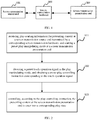
- FIG. 2 is a schematic flowchart of a method for manipulating presentation content of screen transmission according to an embodiment; in this embodiment, as an example, the method is applied to the screen transmission presentation end 300.
- the method for manipulating the screen transmission presenting content in this embodiment includes the following steps:
- the screen transmission source end may be connected to the screen transmission hardware via a USB port, and using the screen transmission hardware via wireless screen transmission, display its presenting content to the screen transmission presentation end for demonstration.
- the screen transmission presentation end can only synchronously present, in a default state (default mode), the content displayed at the screen transmission source end. The user cannot directly perform, at the screen transmission presentation end, play control such as page-turning and annotation for the presenting content.
- a play start message may be transmitted to the screen transmission hardware via a USB port; further, the screen transmission hardware may transmit play-starting information for the presenting content at the screen transmission source end to the screen transmission presentation end via a wireless network such as Bluetooth or WIFI; the screen transmission presentation end may monitor the information transmitted by the screen transmission hardware via a wireless screen transmission receiving software that is running, if the play-starting information is received, a preset play manipulating mode is started. After the screen transmission presentation end enters the play manipulating mode from the default mode, the user may directly perform play controlling such as page-turning, exiting, or annotating for the presenting content via the screen transmission presentation end.
- a preset play toolbar will be displayed on the presenting content, where the play toolbar includes a plurality of touch control buttons. Moreover, the play toolbar is displayed always on top, and is not affected by the play state of the presenting content. For example, if the presenting content is a PPT, the play toolbar may include a Page-Up button, a Page-Down button, a presentation-exiting button, an annotation button, an annotation close button, etc. A corresponding play controlling instruction may be obtained by detecting a touch signal corresponding to each touch control button in the play toolbar.
- the method for manipulating the screen transmission presenting content may further include steps of: establishing an association between the touch signal of each touch control button in the play toolbar and the corresponding play controlling instruction, and storing the association.
- the screen transmission presentation end detects the touch signal, and a corresponding play controlling instruction may be obtained by querying the association.
- the play toolbar is displayed on the left or right side of the touch screen at the screen transmission presentation end, which is convenient for the user to operate, and meanwhile the interference on the presenting content is reduced.
- the play manipulating mode is started at the screen transmission presentation end, a transparent view layer for receiving a touch signal may be generated on the presenting content at the screen transmission presentation end; a preset touch operation signal is detected via the transparent view layer. Moreover, the transparent view layer is displayed always on a top overlay layer, and is not affected by the play state of the presenting content. Further, a preset play controlling instruction corresponding to the touch operation signal may be obtained.
- the method for manipulating the screen transmission presenting content further includes steps of: storing several touch operation signals (such as a touch signal that is left-right slidable or a touch signal that is up-down slidable), establishing an association between each touch operation signal and a corresponding play controlling instruction, and storing the association.
- several touch operation signals such as a touch signal that is left-right slidable or a touch signal that is up-down slidable
- a corresponding relationship between a touch signal sliding from left to right and a Page-Down instruction may be established, a corresponding relationship between a touch signal sliding from right to left and a Page-Up instruction may be established, a corresponding relationship between a touch signal sliding from up to down and a Page-Down instruction may be established, or a corresponding relationship between a touch signal sliding from down to up and a Page-Up instruction may be established.
- an association between a further touch operation signal and a page-turning instruction may also be established. The user performs a corresponding touch operation on the display screen at the screen transmission presentation end, the screen transmission presentation end detects the touch operation signal, and a corresponding play controlling instruction may be obtained by querying the association. This approach is more convenient for the user to operate.
- the transparent view layer is a full-screen transparent view layer, that is, the same as the touch screen at the screen transmission presentation end in terms of size, which is further convenient for the user to operate.
- a transparent view layer for receiving a touch signal is generated on the presenting content at the screen transmission presentation end, meanwhile the play toolbar is also displayed, and the play toolbar is displayed on the transparent view layer.
- the user can control the play state of the presenting content at the screen transmission presentation end by either a click on the touch control button in the play toolbar or a sliding operation.
- the presenting content may include a multimedia file such as a PPT (PowerPoint) file, a picture, and a Word document.
- the play controlling instruction includes a page-turning instruction, a presentation-exiting instruction, or an annotating instruction.
- the instruction obtained in step S12 is the page page-turning instruction, then the presenting content at the screen transmission presentation end is controlled to turn page (Page-Up or Page-Down); if the instruction obtained in step S12 is the presentation-exiting instruction, then the screen transmission presentation end is controlled to exit a presentation of the presenting content; if the instruction obtained in step S12 is the annotating instruction, then the screen transmission presentation end may be controlled to switch to a preset annotating mode.
- Touch operating information for the presenting content at the screen transmission presentation end may be detected in the annotating mode, and corresponding annotating information is generated according to the touch operating information.
- the annotating information that has been generated may be performed with operations such as erasing, modification, etc.
- the method for manipulating the screen transmission presenting content may further include steps of: transmitting, via the screen transmission hardware, page-turning event information at the screen transmission presentation end to the screen transmission source end, so that the screen transmission source end controls its presenting content for a corresponding page-turning after receiving the page-turning event information, thereby realizing the effect of controlling the play state of the presenting content from the presentation end.
- the presentation event exit information or the annotating event information at the screen transmission presentation end can also be transmitted to the screen transmission source end via the screen transmission hardware, hence, the screen transmission source end's control for the presenting content is consistent with the screen transmission presentation end's control for the presenting content.
- the screen transmission presentation end is controlled to exit the play manipulating mode. That is, the play toolbar is closed, the transparent view layer is revoked, and the screen transmission presentation end is switched to the default mode.
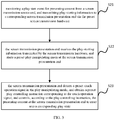
- FIG. 3 is a schematic flowchart of a method for manipulating presentation content of screen transmission according to another embodiment; in this embodiment, descriptions are made to an interaction process between the screen transmission source end and the screen transmission presentation end.
- the method for manipulating the screen transmission presenting content in this embodiment includes the following steps:
- the method for manipulating the screen transmission presenting content further includes steps of: monitoring a play end event for the presenting content from the screen transmission source end, and transmitting play end information to the screen transmission presentation end via the screen transmission hardware; the screen transmission presentation end receives the play end information, and controls the screen transmission presentation end to exit the play manipulating mode.
- the screen transmission source end may monitor a play start event or a play end event for the presenting content at the screen transmission source end by calling a corresponding COM component, or by monitoring a change in a state of a display window.
- the method for manipulating the screen transmission presenting content includes the following steps:
- the wireless screen transmission software at the PC end may notify the wireless screen transmission hardware of a corresponding play state message via USB communications.
- Step 106 the wireless screen transmission hardware is connected to a wireless hotspot transmitted by the large touch screen, communication is made via the wireless hotspot, the corresponding play state message is notified to the wireless screen transmission receiving software at the large touch screen; if it is the PPT play-starting information, proceed to Step 107 and Step 108; if it is the PPT play end information, proceed to Step 109.
- Step 107 detecting a touch gesture at a large touch screen end.
- the wireless screen transmission receiving software at the large touch screen receives the PPT play-starting information at the PC end, generating, on top overlay layer of the display window of the large touch screen, a full-screen transparent view layer for receiving the touch information, and identifying the touch gesture of a sliding operation from left to right as a page-turning instruction; proceed to Step 110.
- Step 108 displaying a control toolbar.
- the wireless screen transmission receiving software at the large touch screen receives PPT play-starting information at the PC end, displaying a PPT play control toolbar on top of the display window at the large touch screen, receiving touch operating information via a touch control button in the toolbar, and obtaining a corresponding control instruction. Proceed to a corresponding step (Step 110, Step 111 or Step 112) according to control instructions corresponding to different touch control buttons.
- Step 109 exiting the play manipulating mode.
- the wireless screen transmission receiving software at the large touch screen receives the PPT play end information at the PC end, controlling the screen transmission presentation end to exit the play manipulating mode, closing the PPT toolbar and revoking the full-screen transparent view layer.
- Step 110 page-turning. if the user clicks the Page-Up/Page-Down arrow button in the toolbar, or swipes left/right on the large touch screen, the large touch screen may be triggered to perform a corresponding page-turning for a currently presented PPT.
- Step 111 exiting the presentation.
- the large touch screen may be triggered to execute an instruction to end the presentation of the PPT.
- Step 112 switching to an annotating mode
- the presentation end may be triggered to enter the annotating mode, proceed to Step 116.
- the large touch screen is triggered to exit from the annotating mode and return to the play manipulating mode.
- Step 113 the wireless screen transmission receiving software detects the PPT play operation event information at the large touch screen side;
- the page-turning event information of the PTT or the presentation-exiting of the PPT at the large touch screen side will be broadcasted to the wireless screen transmission receiving software on the large touch screen.
- Step 114 notifying the wireless screen transmission hardware via the wireless screen transmission receiving software
- the wireless screen transmission receiving software on the large touch screen performs communications via the wireless hotspot, and the wireless screen transmission hardware is notified of a PPT page-turning event or a PPT presentation-exiting message.
- Step 115 the wireless screen transmission hardware notifies the wireless screen transmission software running at the PC end.
- the wireless screen transmission hardware notifies the PPT page-turning event or the PPT presentation-exiting message to the wireless screen transmission software running on the PC via USB communications, after receiving the message, the wireless screen transmission software controls the PC to perform an operation corresponding to the page-turning of the PPT or the exit of the PPT presentation.
- Step 116 generating an annotation.
- the user can write or mark on the large touch screen, and corresponding annotating information is generated according to the detected touch information. Further, the eraser tool in the PPT toolbar may be selected to erase the generated annotating information via a touch gesture.
- the present invention also provides a device for manipulating presentation content of screen transmission which can be used to perform the method for manipulating the screen transmission presenting content described above.
- a device for manipulating presentation content of screen transmission which can be used to perform the method for manipulating the screen transmission presenting content described above.
- the illustrated structure does not limit the device, and may include more or less components than those illustrated, or some components may be combined, or different parts may be arranged.
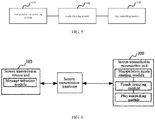
- FIG. 5 is a schematic structural diagram of a device for manipulating presentation content of screen transmission according to an embodiment of the present invention. As shown in FIG. 5 , the device for manipulating the screen transmission presenting content in this embodiment includes: a manipulation mode starting module 510, a touch detecting module 520 and a play controlling module 530, the modules are detailed as follows:
- the play manipulating mode includes: displaying, on the presenting content at the screen transmission presentation end, a preset play toolbar, the preset play toolbar includes a plurality of touch control buttons.
- the touch detecting module 520 includes: a first detecting submodule, is configured to detect a touch signal for a touch control button in the play toolbar; the device for manipulating the screen transmission presenting content further includes: a first setting module is configured to establish an association between a touch signal of each touch control button and a corresponding play controlling instruction.
- the play manipulating mode includes: generating, on the presenting content at the screen transmission presentation end, a transparent view layer for receiving a touch signal.
- the touch detecting module 520 includes: a second detecting submodule, is configured to receive, the touch signal via the transparent view layer, and detect whether the received touch signal is the preset touch operation signal; the manipulation device further includes a second setting module, is configured to store several touch operation signals, and establish an association between each touch operation signal and a corresponding play controlling instruction.
- the preset touch operation signal includes: a touch signal that is left-right slidable or a touch signal that is up-down slidable, which is detected via the transparent view layer.
- the play manipulating mode includes: both generating, on the presenting content at the screen transmission presentation end, a transparent view layer for receiving a touch signal and displaying a preset play toolbar on the presenting content at screen transmission presentation end, where the play toolbar includes a plurality of touch control buttons.
- the device for manipulating the screen transmission presenting content described above further includes: a manipulation mode close module, is configured to receive the play end information transmitted by the screen transmission hardware for the presenting content at screen transmission source end, and control the screen transmission presentation end to exit the play manipulating mode.
- a manipulation mode close module is configured to receive the play end information transmitted by the screen transmission hardware for the presenting content at screen transmission source end, and control the screen transmission presentation end to exit the play manipulating mode.
- the play controlling instruction includes a page-turning instruction, a presentation-exiting instruction, or an annotating instruction.
- the play controlling module 530 may be specifically is configured to: if in the case of the page-turning instruction, control the presenting content at the screen transmission presentation end to turn page; if in the case of the presentation-exiting instruction, control the screen transmission presentation end to exit a presentation of the presenting content; if in the case of the annotating instruction, control the screen transmission presentation end to switch to a preset annotating mode, detect, in the annotating mode, touch operating information at the screen transmission presentation end, and generate, according to the touch operating information, corresponding annotating information.
- the device for manipulating the screen transmission presenting content described above further includes: a feedback notifying module, is configured to transmit, via the screen transmission hardware, page-turning event information at the screen transmission presentation end to the screen transmission source end, so that the screen transmission source end controls a corresponding flip-over of the presenting content after receiving the page-turning event information.
- a feedback notifying module is configured to transmit, via the screen transmission hardware, page-turning event information at the screen transmission presentation end to the screen transmission source end, so that the screen transmission source end controls a corresponding flip-over of the presenting content after receiving the page-turning event information.
- FIG. 6 is a schematic structural diagram of a system for manipulating presentation content of screen transmission according to an embodiment.
- the system for manipulating the screen transmission presenting content in this embodiment includes a screen transmission source end 100 and a screen transmission presentation end 300 coupled to the screen transmission source 100 via corresponding screen transmission hardware.
- the screen transmission source end 100 includes:
- the message initiation module of the screen transmission source end 100 is further is configured to monitor a play end event for the presenting content at the screen transmission source end, and transmit play end information to the screen transmission presentation end via the screen transmission hardware; correspondingly, the screen transmission presentation end 300 further includes: a manipulation mode close module, is configured to receive the play end information transmitted by the screen transmission hardware, and control the screen transmission presentation end to exit the play manipulating mode.
- the screen transmission source end 100 further includes: a state monitoring module, is configured to monitor a play start event or a play end event for the presenting content at the screen transmission source end by calling a corresponding COM component, or by monitoring a change in a state of a display window.
- a state monitoring module is configured to monitor a play start event or a play end event for the presenting content at the screen transmission source end by calling a corresponding COM component, or by monitoring a change in a state of a display window.
- each functional module is only an example.
- the above-described function allocation is completed by different functional modules, that is, the internal structure of the device/system for manipulating the screen transmission presenting content for the presenting content is divided into different functional modules to complete all or part of the functions described above.
- Each functional module may be implemented in the form of hardware or in the form of a software functional module.
- the storage medium may be a magnetic disk, an optical disk, a read-only memory (Read-Only Memory, ROM), a random access memory (Random Access Memory, RAM), or the like.
Landscapes
- Engineering & Computer Science (AREA)
- Theoretical Computer Science (AREA)
- General Engineering & Computer Science (AREA)
- Physics & Mathematics (AREA)
- General Physics & Mathematics (AREA)
- Human Computer Interaction (AREA)
- Software Systems (AREA)
- User Interface Of Digital Computer (AREA)
- Information Transfer Between Computers (AREA)
Abstract
Description
- The present invention relates to screen transmission technologies and, in particular, to a method, a device and a system for manipulating presentation content of screen transmission.
- Screen transmission refers to displaying presenting content displayed on one device's screen (a screen transmission source end) onto another device's screen (a screen transmission presentation end), such as displaying a picture, a PPT (PowerPoint) or other document content displayed on a computer onto a conference screen ,or displaying content displayed on a mobile phone onto a TV screen. The screen transmission mode includes wired screen transmission and wireless screen transmission, where the wireless screen transmission refers to a wireless transmission of presenting content displayed on one device display screen onto another device screen.
- In a traditional implementation of screen transmission, when using a projection or HDMI/VGA cable to project a screen of the computer, the mobile phone or the like onto a large display screen for PPT presentation, the user cannot directly control play operations such as page-turning and exit of the PPT on the large display screen, but to remotely control the computer to play the operations by means of a remote pointer or specifically assign a person to play the corresponding operations at the computer end, which is inconvenient for the user to perform operations for presenting content at the large display screen end.
- Based on this, embodiments of the present invention provide a method, a device and a system for manipulating presenting content of screen transmission, which can implement manipulation of the presenting content on a large touch screen, facilitate users' operations, and advantageously improve the user experience.
- In one aspect, the present invention provides a method for manipulating presenting content of screen transmission, including:
- receiving, play-starting information for presenting content from a screen transmission source end transmitted by a corresponding screen transmission hardware, and starting a preset play manipulating mode at a screen transmission presentation end;
- detecting a preset touch operation signal in the play manipulating mode, and obtaining a preset play controlling instruction corresponding to the touch operation signal; and
- controlling, according to the play controlling instruction, the presenting content at the screen transmission presentation end to enter into a corresponding play state.
- In another aspect, the present invention provides a method for manipulating presentation content of screen transmission, including:
- monitoring a play start event for presenting content from a screen transmission source end, and transmitting play-starting information to a corresponding screen transmission presentation end via a preset screen transmission hardware;
- receiving the play-starting information transmitted by the screen transmission hardware, and starting a preset play manipulating mode at the screen transmission presentation end;
- detecting, in the play manipulating mode, a preset touch operation signal at the screen transmission presentation end, obtaining a preset play controlling instruction corresponding to the touch operation signal, and controlling, according to the play controlling instruction, the presenting content at the screen transmission presentation end to enter into a corresponding play state.
- In another aspect, the present invention provides a device for manipulating presentation content of screen transmission, including:
- a manipulation mode starting module, is configured to receive play-starting information for presenting content from a screen transmission source end transmitted by a corresponding screen transmission hardware, and start a preset play manipulating mode at a screen transmission presentation end;
- a touch detecting module, is configured to detect a preset touch operation signal in the play manipulating mode, and obtain a preset play controlling instruction corresponding to the touch operation signal; and
- a play controlling module, is configured to control, according to the play controlling instruction, the presenting content at the screen transmission presentation end to enter into a corresponding play state.
- In another aspect, the present invention provides a system for manipulating presenting content of screen transmission, including a screen transmission source end, a screen transmission presentation end coupled to the screen transmission source end via a screen transmission hardware,
where the screen transmission source end includes: a message initiation module, is configured to monitor a play start event for presenting content at the screen transmission source end, and transmit play-starting information to the corresponding screen transmission presentation end via a preset screen transmission hardware;
where the screen transmission presentation end includes: - a manipulation mode starting module, is configured to receive the play-starting information for the presenting content from the screen transmission source end transmitted by the screen transmission hardware, and start a preset play manipulating mode;
- a touch detecting module, is configured to detect a preset touch operation signal in the play manipulating mode, and obtain a preset play controlling instruction corresponding to the touch operation signal; and
- a play controlling module, is configured to control, according to the play controlling instruction, the presenting content at the screen transmission presentation end to enter into a corresponding play state.
- The above technical solutions are implemented by receiving play-starting information for presenting content from a screen transmission source end transmitted by a corresponding screen transmission hardware, and starting a preset play manipulating mode at a screen transmission presentation end; detecting a preset touch operation signal in the play manipulating mode, and obtaining a preset play controlling instruction corresponding to the touch operation signal; and controlling, according to the play controlling instruction, the presenting content at the screen transmission presentation end to enter into a corresponding play state. The solutions according to the embodiments of the present invention described above can implement manipulation of the presenting content at the presentation end, facilitate users' operations and advantageously improve the user experience.
-
-
FIG. 1 is a schematic diagram of a working environment according to an embodiment of the present invention; -
FIG. 2 is a schematic flowchart of a method for manipulating presentation content of screen transmission according to an embodiment; -
FIG. 3 is a schematic flowchart of a method for manipulating presentation content of screen transmission according to another embodiment; -
FIG. 4 is a schematic flowchart of a specific application of a method for manipulating presentation content of screen transmission according to another embodiment; -
FIG. 5 is a schematic structural diagram of a device for manipulating presentation content of screen transmission according to an embodiment; and -
FIG. 6 is a schematic structural diagram of a system for manipulating presentation content of screen transmission according to another embodiment. - The present invention will be further described in detail below with reference to the accompanying drawings and embodiments. It should be understood that the specific embodiments described herein are merely illustrative of the present invention but not intended to limit the present invention.
-
FIG. 1 illustrates a schematic diagram of a working environment according to an embodiment of the present invention, including: a screentransmission source end 100 capable of playing a multimedia file such as a PPT file, taking a PC as an example, the screentransmission source end 100 may be connected to ascreen transmission hardware 200 via a USB port; thescreen transmission hardware 200 is wirelessly connected to a screentransmission presentation end 300; the screentransmission presentation end 300 is a terminal including a touch display screen, such as a large touch screen of a conference machine, or the like. Moreover, the screentransmission source end 100 may display its presenting content on the screen transmission presentation end 300 via screen transmission via thescreen transmission hardware 200 for demonstration. - Preferably, the
screen transmission hardware 200 may be a wireless screen transmission hardware, which is provided with a corresponding wireless connection module and can be wirelessly coupled to the screen transmission presentation end 300 via a wireless network. A wireless screen transmission software is running in a system at the screentransmission source end 100, the wireless screen transmission receiving software is running in a system at the screentransmission presentation end 300, and the screentransmission source end 100 may display its presenting content to a display screen at the screentransmission presentation end 300 via wireless screen transmission via thescreen transmission hardware 200. - In conjunction with the schematic diagram as shown in
FIG. 1 , the following describes various embodiments of a method, a device, and a system for manipulating presentation content of screen transmission. -
FIG. 2 is a schematic flowchart of a method for manipulating presentation content of screen transmission according to an embodiment; in this embodiment, as an example, the method is applied to the screentransmission presentation end 300. - As shown in
FIG. 2 , the method for manipulating the screen transmission presenting content in this embodiment includes the following steps: - S11, receiving play-starting information for presenting content at a screen transmission source end transmitted by a corresponding screen transmission hardware, and starting a preset play manipulating mode at a screen transmission presentation end.
- In this embodiment, as shown in
FIG. 1 , the screen transmission source end may be connected to the screen transmission hardware via a USB port, and using the screen transmission hardware via wireless screen transmission, display its presenting content to the screen transmission presentation end for demonstration. The screen transmission presentation end can only synchronously present, in a default state (default mode), the content displayed at the screen transmission source end. The user cannot directly perform, at the screen transmission presentation end, play control such as page-turning and annotation for the presenting content. - Specifically, when the presenting content at the screen transmission source end starts to play, a play start message may be transmitted to the screen transmission hardware via a USB port; further, the screen transmission hardware may transmit play-starting information for the presenting content at the screen transmission source end to the screen transmission presentation end via a wireless network such as Bluetooth or WIFI; the screen transmission presentation end may monitor the information transmitted by the screen transmission hardware via a wireless screen transmission receiving software that is running, if the play-starting information is received, a preset play manipulating mode is started. After the screen transmission presentation end enters the play manipulating mode from the default mode, the user may directly perform play controlling such as page-turning, exiting, or annotating for the presenting content via the screen transmission presentation end.
- S12, detecting a preset touch operation signal in the play manipulating mode, and obtaining a preset play controlling instruction corresponding to the touch operation signal;
- As a preferred embodiment, after a preset play manipulating mode is started at the screen transmission presentation end, a preset play toolbar will be displayed on the presenting content, where the play toolbar includes a plurality of touch control buttons. Moreover, the play toolbar is displayed always on top, and is not affected by the play state of the presenting content. For example, if the presenting content is a PPT, the play toolbar may include a Page-Up button, a Page-Down button, a presentation-exiting button, an annotation button, an annotation close button, etc. A corresponding play controlling instruction may be obtained by detecting a touch signal corresponding to each touch control button in the play toolbar. Correspondingly, the method for manipulating the screen transmission presenting content according to this embodiment may further include steps of: establishing an association between the touch signal of each touch control button in the play toolbar and the corresponding play controlling instruction, and storing the association. When the user clicks on a touch control button in the play toolbar, the screen transmission presentation end detects the touch signal, and a corresponding play controlling instruction may be obtained by querying the association.
- Preferably, the play toolbar is displayed on the left or right side of the touch screen at the screen transmission presentation end, which is convenient for the user to operate, and meanwhile the interference on the presenting content is reduced.
- As another preferred embodiment, the play manipulating mode is started at the screen transmission presentation end, a transparent view layer for receiving a touch signal may be generated on the presenting content at the screen transmission presentation end; a preset touch operation signal is detected via the transparent view layer. Moreover, the transparent view layer is displayed always on a top overlay layer, and is not affected by the play state of the presenting content. Further, a preset play controlling instruction corresponding to the touch operation signal may be obtained. Correspondingly, the method for manipulating the screen transmission presenting content further includes steps of: storing several touch operation signals (such as a touch signal that is left-right slidable or a touch signal that is up-down slidable), establishing an association between each touch operation signal and a corresponding play controlling instruction, and storing the association. For example, if the presenting content is a PPT, a corresponding relationship between a touch signal sliding from left to right and a Page-Down instruction may be established, a corresponding relationship between a touch signal sliding from right to left and a Page-Up instruction may be established, a corresponding relationship between a touch signal sliding from up to down and a Page-Down instruction may be established, or a corresponding relationship between a touch signal sliding from down to up and a Page-Up instruction may be established. According to practical operating habits, an association between a further touch operation signal and a page-turning instruction may also be established. The user performs a corresponding touch operation on the display screen at the screen transmission presentation end, the screen transmission presentation end detects the touch operation signal, and a corresponding play controlling instruction may be obtained by querying the association. This approach is more convenient for the user to operate.
- Preferably, the transparent view layer is a full-screen transparent view layer, that is, the same as the touch screen at the screen transmission presentation end in terms of size, which is further convenient for the user to operate.
- It can be understood that the foregoing two embodiments may be combined, that is, a transparent view layer for receiving a touch signal is generated on the presenting content at the screen transmission presentation end, meanwhile the play toolbar is also displayed, and the play toolbar is displayed on the transparent view layer. The user can control the play state of the presenting content at the screen transmission presentation end by either a click on the touch control button in the play toolbar or a sliding operation.
- S13, controlling, according to the play controlling instruction, the presenting content at the screen transmission presentation end to enter into a corresponding play state.
- In this embodiment, the presenting content may include a multimedia file such as a PPT (PowerPoint) file, a picture, and a Word document. The play controlling instruction includes a page-turning instruction, a presentation-exiting instruction, or an annotating instruction. Correspondingly, if the instruction obtained in step S12 is the page page-turning instruction, then the presenting content at the screen transmission presentation end is controlled to turn page (Page-Up or Page-Down); if the instruction obtained in step S12 is the presentation-exiting instruction, then the screen transmission presentation end is controlled to exit a presentation of the presenting content; if the instruction obtained in step S12 is the annotating instruction, then the screen transmission presentation end may be controlled to switch to a preset annotating mode. Touch operating information for the presenting content at the screen transmission presentation end may be detected in the annotating mode, and corresponding annotating information is generated according to the touch operating information.
- Further, in the annotating mode, according to the touch operating information from the user on the screen transmission presentation end, the annotating information that has been generated may be performed with operations such as erasing, modification, etc.
- As a preferred embodiment, if the instruction obtained in step S12 is the page-turning instruction, the method for manipulating the screen transmission presenting content may further include steps of: transmitting, via the screen transmission hardware, page-turning event information at the screen transmission presentation end to the screen transmission source end, so that the screen transmission source end controls its presenting content for a corresponding page-turning after receiving the page-turning event information, thereby realizing the effect of controlling the play state of the presenting content from the presentation end.
- It can be understood that, according to a practical situation, the presentation event exit information or the annotating event information at the screen transmission presentation end can also be transmitted to the screen transmission source end via the screen transmission hardware, hence, the screen transmission source end's control for the presenting content is consistent with the screen transmission presentation end's control for the presenting content.
- As a preferred embodiment, after the play manipulating mode is started at screen transmission presentation end, if play end information for the presenting content from the screen transmission source end transmitted by the screen transmission hardware is received, then the screen transmission presentation end is controlled to exit the play manipulating mode. That is, the play toolbar is closed, the transparent view layer is revoked, and the screen transmission presentation end is switched to the default mode.
-
FIG. 3 is a schematic flowchart of a method for manipulating presentation content of screen transmission according to another embodiment; in this embodiment, descriptions are made to an interaction process between the screen transmission source end and the screen transmission presentation end. - As shown in
FIG. 3 , the method for manipulating the screen transmission presenting content in this embodiment includes the following steps: - S21, monitoring a play start event for presenting content from a screen transmission source end, and transmitting play-starting information to a corresponding screen transmission presentation end via the preset screen transmission hardware;
- S22, the screen transmission presentation end receives the play-starting information transmitted by the screen transmission hardware, and starts a preset play manipulating mode at the screen transmission presentation end; and
- S23, the screen transmission presentation end detects a preset touch operation signal in the play manipulating mode, and obtains a preset play controlling instruction corresponding to the touch operation signal, and controls, according to the play controlling instruction, the presenting content at the screen transmission presentation end to enter into a corresponding play state.
- As a preferred embodiment, the method for manipulating the screen transmission presenting content according to this embodiment further includes steps of:
monitoring a play end event for the presenting content from the screen transmission source end, and transmitting play end information to the screen transmission presentation end via the screen transmission hardware; the screen transmission presentation end receives the play end information, and controls the screen transmission presentation end to exit the play manipulating mode. - As a preferred embodiment, the screen transmission source end may monitor a play start event or a play end event for the presenting content at the screen transmission source end by calling a corresponding COM component, or by monitoring a change in a state of a display window.
- The method for manipulating the screen transmission presenting content according to another embodiment will be described below with reference to a specific application. The screen transmission source end is a PC, the screen transmission presentation end is a large touch screen, the screen transmission hardware is a wireless screen transmission hardware, and the presenting content is a PPT file. As shown in
FIG. 4 , the method for manipulating the screen transmission presenting content includes the following steps: - Step 101: opening a PPT at a PC end, running a wireless screen transmission software, and entering a wireless screen transmission state.
- Step 102: monitoring the PPT's play state at the PC end.
- The PPT play state may be detected by calling a corresponding COM component or by monitoring a change in a state of a display window;
- Step 103: the wireless screen transmission software at the PC end detects PPT's play start information, and proceed to Step 105.
- Step 104: the wireless screen transmission software at the PC end detects PPT's play end information, and proceed to Step 105.
- Step 105: the PC notifies wireless screen transmission hardware.
- The wireless screen transmission software at the PC end may notify the wireless screen transmission hardware of a corresponding play state message via USB communications.
- Step 106: the wireless screen transmission hardware is connected to a wireless hotspot transmitted by the large touch screen, communication is made via the wireless hotspot, the corresponding play state message is notified to the wireless screen transmission receiving software at the large touch screen; if it is the PPT play-starting information, proceed to Step 107 and
Step 108; if it is the PPT play end information, proceed to Step 109. - Step 107: detecting a touch gesture at a large touch screen end.
- When the wireless screen transmission receiving software at the large touch screen receives the PPT play-starting information at the PC end, generating, on top overlay layer of the display window of the large touch screen, a full-screen transparent view layer for receiving the touch information, and identifying the touch gesture of a sliding operation from left to right as a page-turning instruction; proceed to Step 110.
- Step 108: displaying a control toolbar.
- When the wireless screen transmission receiving software at the large touch screen receives PPT play-starting information at the PC end, displaying a PPT play control toolbar on top of the display window at the large touch screen, receiving touch operating information via a touch control button in the toolbar, and obtaining a corresponding control instruction. Proceed to a corresponding step (
Step 110,Step 111 or Step 112) according to control instructions corresponding to different touch control buttons. - Step 109: exiting the play manipulating mode.
- When the wireless screen transmission receiving software at the large touch screen receives the PPT play end information at the PC end, controlling the screen transmission presentation end to exit the play manipulating mode, closing the PPT toolbar and revoking the full-screen transparent view layer.
- Step 110: page-turning.
if the user clicks the Page-Up/Page-Down arrow button in the toolbar, or swipes left/right on the large touch screen, the large touch screen may be triggered to perform a corresponding page-turning for a currently presented PPT. - Step 111: exiting the presentation.
- If the user clicks the presentation-exiting button in the PPT toolbar, the large touch screen may be triggered to execute an instruction to end the presentation of the PPT.
- Step 112: switching to an annotating mode;
- If the user clicks the annotation button in the PPT toolbar, or other preset touch events associated with an annotating instruction (for example, long press the touch screen), the presentation end may be triggered to enter the annotating mode, proceed to Step 116.
- In addition, in the annotating mode, if a touch event of clicking the annotation close button in the PPT toolbar is detected, the large touch screen is triggered to exit from the annotating mode and return to the play manipulating mode.
- Step 113: the wireless screen transmission receiving software detects the PPT play operation event information at the large touch screen side;
- The page-turning event information of the PTT or the presentation-exiting of the PPT at the large touch screen side will be broadcasted to the wireless screen transmission receiving software on the large touch screen.
- Step 114: notifying the wireless screen transmission hardware via the wireless screen transmission receiving software;
- The wireless screen transmission receiving software on the large touch screen performs communications via the wireless hotspot, and the wireless screen transmission hardware is notified of a PPT page-turning event or a PPT presentation-exiting message.
- Step 115: the wireless screen transmission hardware notifies the wireless screen transmission software running at the PC end.
- The wireless screen transmission hardware notifies the PPT page-turning event or the PPT presentation-exiting message to the wireless screen transmission software running on the PC via USB communications, after receiving the message, the wireless screen transmission software controls the PC to perform an operation corresponding to the page-turning of the PPT or the exit of the PPT presentation.
- Step 116: generating an annotation.
- After entry of the annotating mode, the user can write or mark on the large touch screen, and corresponding annotating information is generated according to the detected touch information. Further, the eraser tool in the PPT toolbar may be selected to erase the generated annotating information via a touch gesture.
- Through the above-described method for manipulating the screen transmission presenting content, the effect of directly controlling, at the presentation side, the PPT to be played is achieved, and an auxiliary function of quick annotation is provided, which is more convenient for the user to present the PPT.
- It can be understood that, the foregoing embodiments are described by taking the wireless screen transmission mode as an example, and descriptions are made to the method for manipulating the screen transmission presenting content described above. Based on similar principles, the method for manipulating the screen transmission presenting content described above can also be applied to a wired screen transmission scenario.
- It should be noted that, for the sake of brevity, the foregoing method embodiments are all described as a series of action combinations, but those skilled in the art should understand that the present invention is not limited by the described action sequence. According to the present invention, certain steps can be used in other sequences or at the same time.
- Based on the same idea as that of the method for manipulating the screen transmission presenting content in the above embodiments, the present invention also provides a device for manipulating presentation content of screen transmission which can be used to perform the method for manipulating the screen transmission presenting content described above. For the convenience of description, in the structural schematic diagram of the embodiment device for manipulating the screen transmission presenting content, only parts related to the embodiments of the present invention are shown. Those skilled in the art can understand that the illustrated structure does not limit the device, and may include more or less components than those illustrated, or some components may be combined, or different parts may be arranged.
-
FIG. 5 is a schematic structural diagram of a device for manipulating presentation content of screen transmission according to an embodiment of the present invention; as shown inFIG. 5 , the device for manipulating the screen transmission presenting content in this embodiment includes: a manipulationmode starting module 510, atouch detecting module 520 and aplay controlling module 530, the modules are detailed as follows: - the manipulation
mode starting module 510 is configured to receive play-starting information from presenting content at a screen transmission source end transmitted by a corresponding screen transmission hardware, and start a preset play manipulating mode at a screen transmission presentation end; - the
touch detecting module 520 is configured to detect a preset touch operation signal in the play manipulating mode, and obtain a preset play controlling instruction corresponding to the touch operation signal; and - the
play controlling module 530 is configured to control, according to the play controlling instruction, the presenting content at the screen transmission presentation end to enter into a corresponding play state. - As a preferred embodiment, the play manipulating mode includes: displaying, on the presenting content at the screen transmission presentation end, a preset play toolbar, the preset play toolbar includes a plurality of touch control buttons. Correspondingly, the
touch detecting module 520 includes: a first detecting submodule, is configured to detect a touch signal for a touch control button in the play toolbar; the device for manipulating the screen transmission presenting content further includes: a first setting module is configured to establish an association between a touch signal of each touch control button and a corresponding play controlling instruction. - As another preferred embodiment, the play manipulating mode includes: generating, on the presenting content at the screen transmission presentation end, a transparent view layer for receiving a touch signal. Correspondingly, the
touch detecting module 520 includes: a second detecting submodule, is configured to receive, the touch signal via the transparent view layer, and detect whether the received touch signal is the preset touch operation signal; the manipulation device further includes a second setting module, is configured to store several touch operation signals, and establish an association between each touch operation signal and a corresponding play controlling instruction. For example, the preset touch operation signal includes: a touch signal that is left-right slidable or a touch signal that is up-down slidable, which is detected via the transparent view layer. - It should be noted that the above two preferred embodiments may also be combined, that is, the play manipulating mode includes: both generating, on the presenting content at the screen transmission presentation end, a transparent view layer for receiving a touch signal and displaying a preset play toolbar on the presenting content at screen transmission presentation end, where the play toolbar includes a plurality of touch control buttons.
- As another preferred embodiment, the device for manipulating the screen transmission presenting content described above further includes: a manipulation mode close module, is configured to receive the play end information transmitted by the screen transmission hardware for the presenting content at screen transmission source end, and control the screen transmission presentation end to exit the play manipulating mode.
- Preferably, in this embodiment, the play controlling instruction includes a page-turning instruction, a presentation-exiting instruction, or an annotating instruction. Correspondingly, the
play controlling module 530 may be specifically is configured to: if in the case of the page-turning instruction, control the presenting content at the screen transmission presentation end to turn page; if in the case of the presentation-exiting instruction, control the screen transmission presentation end to exit a presentation of the presenting content; if in the case of the annotating instruction, control the screen transmission presentation end to switch to a preset annotating mode, detect, in the annotating mode, touch operating information at the screen transmission presentation end, and generate, according to the touch operating information, corresponding annotating information. - As another preferred embodiment, the device for manipulating the screen transmission presenting content described above further includes: a feedback notifying module, is configured to transmit, via the screen transmission hardware, page-turning event information at the screen transmission presentation end to the screen transmission source end, so that the screen transmission source end controls a corresponding flip-over of the presenting content after receiving the page-turning event information.
-
FIG. 6 is a schematic structural diagram of a system for manipulating presentation content of screen transmission according to an embodiment. As shown inFIG. 6 , the system for manipulating the screen transmission presenting content in this embodiment includes a screen transmission source end 100 and a screentransmission presentation end 300 coupled to thescreen transmission source 100 via corresponding screen transmission hardware. Moreover, the screen transmission source end 100 includes: - a message initiation module is configured to monitor a play start event for presenting content at the screen transmission source end, and transmit the play-starting information to the corresponding screen transmission presentation end via a preset screen transmission hardware;
- the screen
transmission presentation end 300 includes: - a manipulation mode starting module, is configured to receive the play-starting information for the presenting content from the screen transmission source end transmitted by the screen transmission hardware, and start a preset play manipulating mode;
- a touch detecting module, is configured to detect a preset touch operation signal in the play manipulating mode, and obtain a preset play controlling instruction corresponding to the touch operation signal; and
- a play controlling module, is configured to control, according to the play controlling instruction, the presenting content at the screen transmission presentation end to enter into a corresponding play state.
- As a preferred embodiment, the message initiation module of the screen transmission source end 100 is further is configured to monitor a play end event for the presenting content at the screen transmission source end, and transmit play end information to the screen transmission presentation end via the screen transmission hardware; correspondingly, the screen
transmission presentation end 300 further includes: a manipulation mode close module, is configured to receive the play end information transmitted by the screen transmission hardware, and control the screen transmission presentation end to exit the play manipulating mode. - As a preferred embodiment, the screen transmission source end 100 further includes: a state monitoring module, is configured to monitor a play start event or a play end event for the presenting content at the screen transmission source end by calling a corresponding COM component, or by monitoring a change in a state of a display window.
- It should be noted that, in the embodiments of the exemplary device/system for manipulating the screen transmission presenting content described above, since the information interaction and execution process between the modules/units is based on the same concept as that of the foregoing method embodiments of the present invention, it achieves the same technical effects as those of the foregoing method embodiments of the present invention. For details, reference may be made to descriptions in the method embodiments of the present invention, and details will not be described herein again.
- Further, in the embodiments of the exemplary device/system for manipulating the screen transmission presenting content described above, the logical division of each functional module is only an example. In practical applications, as needed, for example, due to configuration requirements of corresponding hardware or for the convenience of implementation of software, the above-described function allocation is completed by different functional modules, that is, the internal structure of the device/system for manipulating the screen transmission presenting content for the presenting content is divided into different functional modules to complete all or part of the functions described above. Each functional module may be implemented in the form of hardware or in the form of a software functional module.
- A person skilled in the art can understand that all or part of the processes in the foregoing embodiments can be implemented by a computer program to instruct related hardware, and the program can be stored in a computer readable storage medium, sold or used as an independent product. The program, when executed, may perform all or part of the steps of the embodiments of the methods described above. The storage medium may be a magnetic disk, an optical disk, a read-only memory (Read-Only Memory, ROM), a random access memory (Random Access Memory, RAM), or the like.
- In the above embodiments, each embodiment is described with a different emphasis, and for the part not elaborated in a certain embodiment, reference may be made to related descriptions in other embodiments. It will be appreciated that the terms such as "first", "second", and the like, as used herein, are used to distinguish objects, but these objects are not limited by these terms.
- The above-described embodiments are merely illustrative of several implementing schemes of the invention, but should not be construed as limiting the scope of the present invention. It should be noted that variations and modifications may be made by those skilled in the art without departing from the concept of the present invention. Therese variations and modifications all fall into the protection scope of the present invention. Therefore, the scope of the present invention should be subject to the appended claims.
Claims (16)
- A method for manipulating presentation content of screen transmission, characterized by comprising:receiving play-starting information for presenting content from a screen transmission source end transmitted by a corresponding screen transmission hardware, and starting a preset play manipulating mode at a screen transmission presentation end;detecting a preset touch operation signal in the play manipulating mode, and obtaining a preset play controlling instruction corresponding to the touch operation signal; andcontrolling, according to the play controlling instruction, the presenting content at the screen transmission presentation end to enter into a corresponding play state.
- The method for manipulating presentation content of screen transmission according to claim 1, characterized that wherein the play manipulating mode comprises: displaying, above the presenting content at the screen transmission presentation end, a preset play toolbar, the preset play toolbar comprises a plurality of touch control buttons;
wherein the detecting the preset touch operation signal in the play manipulating mode comprises: detecting a touch signal for a touch control button in the play toolbar. - The method for manipulating presentation content of screen transmission according to claim 1, characterized that wherein the play manipulating mode comprises: generating, on the presenting content at the screen transmission presentation end, a transparent view layer for receiving a touch signal;
wherein the detecting the preset touch operation signal in the play manipulating mode comprises: receiving the touch signal via the transparent view layer, and detecting whether the received touch signal is the preset touch operation signal. - The method for manipulating presentation content of screen transmission according to claim 3, characterized that wherein the preset touch operation signal comprises: a touch signal that is left-right slidable or a touch signal that is up-down slidable.
- The method for manipulating presentation content of screen transmission according to claim 1, characterized that after starting the preset play manipulating mode at the screen transmission presentation end, further comprising:receiving play end information for the presenting content from the screen transmission source end transmitted by the screen transmission hardware, and controlling the screen transmission presentation end to exit the play manipulating mode.
- The method for manipulating presentation content of screen transmission according to claim 1, characterized that wherein the play controlling instruction comprises a page-turning instruction, a presentation-exiting instruction, or an annotating instruction;
the controlling, according to the play controlling instruction, the presenting content at the screen transmission presentation end to enter the corresponding play state comprises:controlling, if the play controlling instruction is the page-turning instruction, the presenting content at the screen transmission presentation end to turn page;controlling, if the play controlling instruction is the presentation-exiting instruction, the screen transmission presentation end to exit a presentation of the presenting content;controlling, if the play controlling instruction is the annotating instruction, the screen transmission presentation end to switch to a preset annotating mode, detecting, in the annotating mode, touch operating information at the screen transmission presentation end, and generating, according to the touch operating information, corresponding annotating information. - The method for manipulating presentation content of screen transmission according to claim 6, characterized that after controlling the presenting content at the screen transmission presentation end to turn page, further comprising:transmitting, via the screen transmission hardware, page-turning event information at the screen transmission presentation end to the screen transmission source end, to allow the screen transmission source end to control a corresponding flip-over of the presenting content after receiving the page-turning event information.
- A method for manipulating presentation content of screen transmission, characterized by comprising:monitoring a play start event for presenting content at a screen transmission source end, and transmitting play-starting information to a corresponding screen transmission presentation end via a preset screen transmission hardware;receiving the play-starting information transmitted by the screen transmission hardware, and starting a preset play manipulating mode at the screen transmission presentation end; anddetecting, in the play manipulating mode, a preset touch operation signal at the screen transmission presentation end, obtaining a preset play controlling instruction corresponding to the touch operation signal, and controlling, according to the play controlling instruction, the presenting content at the screen transmission presentation end to enter into a corresponding play state.
- The method for manipulating presentation content of screen transmission according to claim 8, characterized by further comprising:monitoring a play end event for the presenting content at the screen transmission source end, and transmitting play end information to the screen transmission presentation end via the screen transmission hardware; receiving the play end information transmitted by the screen transmission hardware, and controlling the screen transmission presentation end to exit the play manipulating mode.
- The method for manipulating presentation content of screen transmission according to claim 8, characterized by further comprising: monitoring a play start event or a play end event for the presenting content at the screen transmission source end by calling a corresponding COM component, or by monitoring a change in a state of a display window.
- A device for manipulating presentation content of screen transmission, characterized by comprising:a manipulation mode starting module, is configured to receive play-starting information for presenting content from a screen transmission source end transmitted by a corresponding screen transmission hardware, and start a preset play manipulating mode at a screen transmission presentation end;a touch detecting module, is configured to detect a preset touch operation signal in the play manipulating mode, and obtain a preset play controlling instruction corresponding to the touch operation signal; anda play controlling module, is configured to control, according to the play controlling instruction, the presenting content at the screen transmission presentation end to enter into a corresponding play state.
- The device for manipulating presentation content of screen transmission according to claim 11, characterized that wherein the play manipulating mode comprises: displaying, above the presenting content at the screen transmission presentation end, a preset play toolbar, the preset play toolbar comprises a plurality of touch control buttons;
wherein the touch detecting module comprises: a first detecting submodule is configured to detect a touch signal for a touch control button in the play toolbar, and obtain the preset play controlling instruction corresponding to the touch operation signal. - The device for manipulating presentation content of screen transmission according to claim 11, characterized that wherein the play manipulating mode comprises: generating, on the presenting content at the screen transmission presentation end, a transparent view layer for receiving a touch signal;
wherein the touch detecting module comprises: a second detecting submodule, is configured to receive the touch signal via the transparent view layer, and detect whether the received touch signal is the preset touch operation signal; if so, obtain the preset play controlling instruction corresponding to the touch operation signal. - A system for manipulating presentation content of screen transmission, characterized by comprising a screen transmission source end and a screen transmission presentation end coupled to the screen transmission source end via a screen transmission hardware, wherein:the screen transmission source end comprises: a message initiation module is configured to monitor a play start event for presenting content at the screen transmission source end, and transmit play-starting information to the corresponding screen transmission presentation end via a preset screen transmission hardware;the screen transmission presentation end comprises:a manipulation mode starting module, is configured to receive the play-starting information for the presenting content from the screen transmission source end transmitted by the screen transmission hardware, and start a preset play manipulating mode;a touch detecting module, is configured to detect a preset touch operation signal in the play manipulating mode, and obtain a preset play controlling instruction corresponding to the touch operation signal; anda play controlling module, is configured to control, according to the play controlling instruction, the presenting content at the screen transmission presentation end to enter into a corresponding play state.
- The system for manipulating presentation content of screen transmission according to claim 14, characterized that wherein the message initiation module is further is configured to monitor a play end event for the presenting content at the screen transmission source end, and transmit play end information to the screen transmission presentation end via the screen transmission hardware;
wherein the screen transmission presentation end further comprises: a manipulation mode close module, is configured to receive the play end information transmitted by the screen transmission hardware, and control the screen transmission presentation end to exit the play manipulating mode. - The system for manipulating presentation content of screen transmission according to claim 14, characterized that wherein the screen transmission source end further comprises: a state monitoring module, is configured to monitor a play start event or a play end event for the presenting content at the screen transmission source end by calling a corresponding COM component, or by monitoring a change in a state of a display window.
Applications Claiming Priority (2)
| Application Number | Priority Date | Filing Date | Title |
|---|---|---|---|
| CN201610269812.5A CN105955685A (en) | 2016-04-25 | 2016-04-25 | Control method, device and system for screen transmission demonstration content |
| PCT/CN2016/113196 WO2017185797A1 (en) | 2016-04-25 | 2016-12-29 | Method, device and system for manipulating miracast presentation content |
Publications (3)
| Publication Number | Publication Date |
|---|---|
| EP3451147A1 true EP3451147A1 (en) | 2019-03-06 |
| EP3451147A4 EP3451147A4 (en) | 2019-05-08 |
| EP3451147B1 EP3451147B1 (en) | 2021-07-07 |
Family
ID=56916621
Family Applications (1)
| Application Number | Title | Priority Date | Filing Date |
|---|---|---|---|
| EP16900301.9A Active EP3451147B1 (en) | 2016-04-25 | 2016-12-29 | Method, device and system for manipulating miracast presentation content |
Country Status (6)
| Country | Link |
|---|---|
| US (1) | US10754544B2 (en) |
| EP (1) | EP3451147B1 (en) |
| CN (1) | CN105955685A (en) |
| ES (1) | ES2886610T3 (en) |
| TW (1) | TWI612469B (en) |
| WO (1) | WO2017185797A1 (en) |
Families Citing this family (15)
| Publication number | Priority date | Publication date | Assignee | Title |
|---|---|---|---|---|
| CN105955685A (en) | 2016-04-25 | 2016-09-21 | 广州视睿电子科技有限公司 | Control method, device and system for screen transmission demonstration content |
| CN106412651A (en) * | 2016-09-29 | 2017-02-15 | 努比亚技术有限公司 | Information processing method and mobile terminal |
| CN107948569B (en) * | 2016-10-12 | 2021-06-18 | 广州视源电子科技股份有限公司 | Method and device for realizing wired screen transmission |
| CN113965799B (en) * | 2016-10-12 | 2024-03-29 | 广州视源电子科技股份有限公司 | Method and device for realizing wired screen transmission |
| CN107948565B (en) * | 2016-10-12 | 2021-08-20 | 广州视源电子科技股份有限公司 | Method and device for realizing wired screen transmission |
| CN107948567B (en) * | 2016-10-12 | 2021-05-18 | 广州视源电子科技股份有限公司 | USB wired screen transmission method and device |
| CN107291412B (en) * | 2017-05-19 | 2020-09-22 | 广州视源电子科技股份有限公司 | Wireless screen sharing method and system |
| CN107341137B (en) * | 2017-05-22 | 2020-04-24 | 广州视源电子科技股份有限公司 | Multi-panel-based annotation following method and system |
| CN107193794B (en) * | 2017-06-28 | 2021-05-18 | 广州视源电子科技股份有限公司 | Display content annotating method and device |
| CN110888698A (en) * | 2018-09-10 | 2020-03-17 | 杭州海康威视数字技术股份有限公司 | A presentation control method, device and system |
| CN111009162A (en) * | 2018-10-08 | 2020-04-14 | 江苏学正教育科技有限公司 | Interactive teaching system based on PPT demonstration |
| CN110312114B (en) * | 2019-07-01 | 2021-10-29 | 深圳市云海易联电子有限公司 | Intelligent touch projection system |
| CN111124338B (en) * | 2019-12-18 | 2024-03-08 | 青岛海信商用显示股份有限公司 | Screen control method and touch display device |
| CN112036964A (en) * | 2020-10-10 | 2020-12-04 | 江苏新九联展示设备有限公司 | Intelligent shopping guide and tour guide system |
| CN115334293B (en) * | 2022-07-11 | 2023-10-13 | 岚图汽车科技有限公司 | Display system, projection control method thereof and main and auxiliary display systems |
Family Cites Families (15)
| Publication number | Priority date | Publication date | Assignee | Title |
|---|---|---|---|---|
| JP4765893B2 (en) * | 2006-10-27 | 2011-09-07 | 株式会社ケンウッド | Touch panel mounting device, external device, and operation method of external device |
| CN102141882A (en) | 2010-12-07 | 2011-08-03 | 华为终端有限公司 | Method for realizing marquee selection operation on touch screen terminal, and touch screen terminal |
| US9436381B2 (en) * | 2011-01-24 | 2016-09-06 | Apple Inc. | Device, method, and graphical user interface for navigating and annotating an electronic document |
| WO2013008330A1 (en) * | 2011-07-14 | 2013-01-17 | 株式会社ビジョナリスト | Interactive-screen data transmission/reception system and interactive-screen data transmission/reception program |
| CN102802068A (en) * | 2012-05-07 | 2012-11-28 | 海信集团有限公司 | Remote control method and system smart television |
| CN202758595U (en) | 2012-07-26 | 2013-02-27 | 山东瑞科物联信息技术有限公司 | Wireless high definition transmission screen multimedia display |
| CN203164829U (en) | 2013-01-28 | 2013-08-28 | 山东瑞科物联信息技术有限公司 | Wireless high definition transmission screen intelligent all-in-one machine |
| CN104301012A (en) | 2013-07-15 | 2015-01-21 | 深圳市同洲电子股份有限公司 | Interaction method, terminal and system realized by NFC technique |
| US10712842B2 (en) * | 2013-10-18 | 2020-07-14 | Touchplus Information Corp. | Touch display and control module of same |
| TW201525767A (en) * | 2013-12-16 | 2015-07-01 | Utechzone Co Ltd | Data display system and method thereof, and control apparatus |
| CN105677135A (en) | 2014-11-20 | 2016-06-15 | 中兴通讯股份有限公司 | Play control method and device for projector |
| CN204217085U (en) | 2014-11-29 | 2015-03-18 | 南通同洲电子有限责任公司 | A kind of real-time biography screen device of digital television signal |
| CN109871190B (en) * | 2015-06-16 | 2022-05-31 | 广州视睿电子科技有限公司 | Wireless screen transmission method, expansion equipment and wireless screen transmission system |
| CN105138262B (en) * | 2015-08-17 | 2018-07-06 | 四川长虹电器股份有限公司 | Touchpad device playback method based on computer control |
| CN105955685A (en) * | 2016-04-25 | 2016-09-21 | 广州视睿电子科技有限公司 | Control method, device and system for screen transmission demonstration content |
-
2016
- 2016-04-25 CN CN201610269812.5A patent/CN105955685A/en active Pending
- 2016-11-18 TW TW105137775A patent/TWI612469B/en active
- 2016-12-29 ES ES16900301T patent/ES2886610T3/en active Active
- 2016-12-29 EP EP16900301.9A patent/EP3451147B1/en active Active
- 2016-12-29 US US16/093,981 patent/US10754544B2/en active Active
- 2016-12-29 WO PCT/CN2016/113196 patent/WO2017185797A1/en not_active Ceased
Also Published As
| Publication number | Publication date |
|---|---|
| US20190129613A1 (en) | 2019-05-02 |
| EP3451147A4 (en) | 2019-05-08 |
| WO2017185797A1 (en) | 2017-11-02 |
| EP3451147B1 (en) | 2021-07-07 |
| ES2886610T3 (en) | 2021-12-20 |
| TWI612469B (en) | 2018-01-21 |
| US10754544B2 (en) | 2020-08-25 |
| TW201738727A (en) | 2017-11-01 |
| CN105955685A (en) | 2016-09-21 |
Similar Documents
| Publication | Publication Date | Title |
|---|---|---|
| EP3451147B1 (en) | Method, device and system for manipulating miracast presentation content | |
| EP4148547B1 (en) | Sharing method and apparatus, and electronic device | |
| US11202119B2 (en) | Video playing method and terminal device | |
| US10459545B2 (en) | All-in-one machine and method and computer memory medium for realizing quick touch in all channels thereof | |
| CN110929054B (en) | Multimedia information application interface display method and device, terminal and medium | |
| KR102120843B1 (en) | Display apparatus and method for performing a multi view display | |
| CN102630056B (en) | Control method and device | |
| CN105630452A (en) | Screen transmission method and electronic devices | |
| US20240187698A1 (en) | Video stream playback control method, device, and storage medium | |
| US20130283209A1 (en) | Display apparatus and method for providing user interface thereof | |
| US20150121238A1 (en) | Remote play system | |
| WO2022156662A1 (en) | Method and apparatus for switching audio playing mode, and electronic device and storage medium | |
| JP2018523861A (en) | Electronic device, input / output device, and method of using the same | |
| WO2015062437A1 (en) | Browser-based method and device for indicating mode switch | |
| US20170163715A1 (en) | File Transmission Method and Apparatus, Terminal, Wearable Device and Storage Medium | |
| KR102428934B1 (en) | Display apparatus, user terminal apparatus, system and the controlling method | |
| CN105487805A (en) | Object operating method and device | |
| KR20220100437A (en) | Display apparatus and the control method thereof | |
| KR20130126067A (en) | Method and system for controlling function of display device using remote control unit | |
| WO2022237669A1 (en) | Display control method and apparatus | |
| CN112752126A (en) | Control method and control system of set top box and computer readable storage medium | |
| JP2018510395A (en) | State switching method, apparatus, program, and recording medium | |
| US12613716B2 (en) | Control method, electronic device, and non-transitory readable storage medium | |
| US11362854B2 (en) | Information processing apparatus, information processing method, program, and information processing system | |
| US20170139588A1 (en) | Method and device for switching keyboard style |
Legal Events
| Date | Code | Title | Description |
|---|---|---|---|
| STAA | Information on the status of an ep patent application or granted ep patent |
Free format text: STATUS: THE INTERNATIONAL PUBLICATION HAS BEEN MADE |
|
| PUAI | Public reference made under article 153(3) epc to a published international application that has entered the european phase |
Free format text: ORIGINAL CODE: 0009012 |
|
| STAA | Information on the status of an ep patent application or granted ep patent |
Free format text: STATUS: REQUEST FOR EXAMINATION WAS MADE |
|
| 17P | Request for examination filed |
Effective date: 20181123 |
|
| AK | Designated contracting states |
Kind code of ref document: A1 Designated state(s): AL AT BE BG CH CY CZ DE DK EE ES FI FR GB GR HR HU IE IS IT LI LT LU LV MC MK MT NL NO PL PT RO RS SE SI SK SM TR |
|
| AX | Request for extension of the european patent |
Extension state: BA ME |
|
| A4 | Supplementary search report drawn up and despatched |
Effective date: 20190405 |
|
| RIC1 | Information provided on ipc code assigned before grant |
Ipc: G06F 9/44 20180101ALI20190401BHEP Ipc: G06F 3/0488 20130101ALI20190401BHEP Ipc: G06F 3/14 20060101AFI20190401BHEP |
|
| DAV | Request for validation of the european patent (deleted) | ||
| DAX | Request for extension of the european patent (deleted) | ||
| STAA | Information on the status of an ep patent application or granted ep patent |
Free format text: STATUS: EXAMINATION IS IN PROGRESS |
|
| 17Q | First examination report despatched |
Effective date: 20200619 |
|
| GRAP | Despatch of communication of intention to grant a patent |
Free format text: ORIGINAL CODE: EPIDOSNIGR1 |
|
| STAA | Information on the status of an ep patent application or granted ep patent |
Free format text: STATUS: GRANT OF PATENT IS INTENDED |
|
| INTG | Intention to grant announced |
Effective date: 20210209 |
|
| GRAS | Grant fee paid |
Free format text: ORIGINAL CODE: EPIDOSNIGR3 |
|
| GRAA | (expected) grant |
Free format text: ORIGINAL CODE: 0009210 |
|
| STAA | Information on the status of an ep patent application or granted ep patent |
Free format text: STATUS: THE PATENT HAS BEEN GRANTED |
|
| AK | Designated contracting states |
Kind code of ref document: B1 Designated state(s): AL AT BE BG CH CY CZ DE DK EE ES FI FR GB GR HR HU IE IS IT LI LT LU LV MC MK MT NL NO PL PT RO RS SE SI SK SM TR |
|
| REG | Reference to a national code |
Ref country code: GB Ref legal event code: FG4D |
|
| REG | Reference to a national code |
Ref country code: AT Ref legal event code: REF Ref document number: 1409232 Country of ref document: AT Kind code of ref document: T Effective date: 20210715 |
|
| REG | Reference to a national code |
Ref country code: DE Ref legal event code: R096 Ref document number: 602016060473 Country of ref document: DE |
|
| REG | Reference to a national code |
Ref country code: IE Ref legal event code: FG4D |
|
| REG | Reference to a national code |
Ref country code: NL Ref legal event code: FP |
|
| REG | Reference to a national code |
Ref country code: LT Ref legal event code: MG9D |
|
| REG | Reference to a national code |
Ref country code: AT Ref legal event code: MK05 Ref document number: 1409232 Country of ref document: AT Kind code of ref document: T Effective date: 20210707 |
|
| REG | Reference to a national code |
Ref country code: ES Ref legal event code: FG2A Ref document number: 2886610 Country of ref document: ES Kind code of ref document: T3 Effective date: 20211220 |
|
| PG25 | Lapsed in a contracting state [announced via postgrant information from national office to epo] |
Ref country code: HR Free format text: LAPSE BECAUSE OF FAILURE TO SUBMIT A TRANSLATION OF THE DESCRIPTION OR TO PAY THE FEE WITHIN THE PRESCRIBED TIME-LIMIT Effective date: 20210707 Ref country code: FI Free format text: LAPSE BECAUSE OF FAILURE TO SUBMIT A TRANSLATION OF THE DESCRIPTION OR TO PAY THE FEE WITHIN THE PRESCRIBED TIME-LIMIT Effective date: 20210707 Ref country code: NO Free format text: LAPSE BECAUSE OF FAILURE TO SUBMIT A TRANSLATION OF THE DESCRIPTION OR TO PAY THE FEE WITHIN THE PRESCRIBED TIME-LIMIT Effective date: 20211007 Ref country code: PT Free format text: LAPSE BECAUSE OF FAILURE TO SUBMIT A TRANSLATION OF THE DESCRIPTION OR TO PAY THE FEE WITHIN THE PRESCRIBED TIME-LIMIT Effective date: 20211108 Ref country code: LT Free format text: LAPSE BECAUSE OF FAILURE TO SUBMIT A TRANSLATION OF THE DESCRIPTION OR TO PAY THE FEE WITHIN THE PRESCRIBED TIME-LIMIT Effective date: 20210707 Ref country code: AT Free format text: LAPSE BECAUSE OF FAILURE TO SUBMIT A TRANSLATION OF THE DESCRIPTION OR TO PAY THE FEE WITHIN THE PRESCRIBED TIME-LIMIT Effective date: 20210707 Ref country code: BG Free format text: LAPSE BECAUSE OF FAILURE TO SUBMIT A TRANSLATION OF THE DESCRIPTION OR TO PAY THE FEE WITHIN THE PRESCRIBED TIME-LIMIT Effective date: 20211007 Ref country code: SE Free format text: LAPSE BECAUSE OF FAILURE TO SUBMIT A TRANSLATION OF THE DESCRIPTION OR TO PAY THE FEE WITHIN THE PRESCRIBED TIME-LIMIT Effective date: 20210707 Ref country code: RS Free format text: LAPSE BECAUSE OF FAILURE TO SUBMIT A TRANSLATION OF THE DESCRIPTION OR TO PAY THE FEE WITHIN THE PRESCRIBED TIME-LIMIT Effective date: 20210707 |
|
| PG25 | Lapsed in a contracting state [announced via postgrant information from national office to epo] |
Ref country code: PL Free format text: LAPSE BECAUSE OF FAILURE TO SUBMIT A TRANSLATION OF THE DESCRIPTION OR TO PAY THE FEE WITHIN THE PRESCRIBED TIME-LIMIT Effective date: 20210707 Ref country code: LV Free format text: LAPSE BECAUSE OF FAILURE TO SUBMIT A TRANSLATION OF THE DESCRIPTION OR TO PAY THE FEE WITHIN THE PRESCRIBED TIME-LIMIT Effective date: 20210707 Ref country code: GR Free format text: LAPSE BECAUSE OF FAILURE TO SUBMIT A TRANSLATION OF THE DESCRIPTION OR TO PAY THE FEE WITHIN THE PRESCRIBED TIME-LIMIT Effective date: 20211008 |
|
| REG | Reference to a national code |
Ref country code: DE Ref legal event code: R097 Ref document number: 602016060473 Country of ref document: DE |
|
| PG25 | Lapsed in a contracting state [announced via postgrant information from national office to epo] |
Ref country code: DK Free format text: LAPSE BECAUSE OF FAILURE TO SUBMIT A TRANSLATION OF THE DESCRIPTION OR TO PAY THE FEE WITHIN THE PRESCRIBED TIME-LIMIT Effective date: 20210707 |
|
| PLBE | No opposition filed within time limit |
Free format text: ORIGINAL CODE: 0009261 |
|
| STAA | Information on the status of an ep patent application or granted ep patent |
Free format text: STATUS: NO OPPOSITION FILED WITHIN TIME LIMIT |
|
| PG25 | Lapsed in a contracting state [announced via postgrant information from national office to epo] |
Ref country code: SM Free format text: LAPSE BECAUSE OF FAILURE TO SUBMIT A TRANSLATION OF THE DESCRIPTION OR TO PAY THE FEE WITHIN THE PRESCRIBED TIME-LIMIT Effective date: 20210707 Ref country code: SK Free format text: LAPSE BECAUSE OF FAILURE TO SUBMIT A TRANSLATION OF THE DESCRIPTION OR TO PAY THE FEE WITHIN THE PRESCRIBED TIME-LIMIT Effective date: 20210707 Ref country code: RO Free format text: LAPSE BECAUSE OF FAILURE TO SUBMIT A TRANSLATION OF THE DESCRIPTION OR TO PAY THE FEE WITHIN THE PRESCRIBED TIME-LIMIT Effective date: 20210707 Ref country code: EE Free format text: LAPSE BECAUSE OF FAILURE TO SUBMIT A TRANSLATION OF THE DESCRIPTION OR TO PAY THE FEE WITHIN THE PRESCRIBED TIME-LIMIT Effective date: 20210707 Ref country code: CZ Free format text: LAPSE BECAUSE OF FAILURE TO SUBMIT A TRANSLATION OF THE DESCRIPTION OR TO PAY THE FEE WITHIN THE PRESCRIBED TIME-LIMIT Effective date: 20210707 Ref country code: AL Free format text: LAPSE BECAUSE OF FAILURE TO SUBMIT A TRANSLATION OF THE DESCRIPTION OR TO PAY THE FEE WITHIN THE PRESCRIBED TIME-LIMIT Effective date: 20210707 |
|
| 26N | No opposition filed |
Effective date: 20220408 |
|
| PG25 | Lapsed in a contracting state [announced via postgrant information from national office to epo] |
Ref country code: MC Free format text: LAPSE BECAUSE OF FAILURE TO SUBMIT A TRANSLATION OF THE DESCRIPTION OR TO PAY THE FEE WITHIN THE PRESCRIBED TIME-LIMIT Effective date: 20210707 Ref country code: IT Free format text: LAPSE BECAUSE OF FAILURE TO SUBMIT A TRANSLATION OF THE DESCRIPTION OR TO PAY THE FEE WITHIN THE PRESCRIBED TIME-LIMIT Effective date: 20210707 |
|
| REG | Reference to a national code |
Ref country code: CH Ref legal event code: PL |
|
| REG | Reference to a national code |
Ref country code: BE Ref legal event code: MM Effective date: 20211231 |
|
| PG25 | Lapsed in a contracting state [announced via postgrant information from national office to epo] |
Ref country code: LU Free format text: LAPSE BECAUSE OF NON-PAYMENT OF DUE FEES Effective date: 20211229 Ref country code: IE Free format text: LAPSE BECAUSE OF NON-PAYMENT OF DUE FEES Effective date: 20211229 |
|
| PG25 | Lapsed in a contracting state [announced via postgrant information from national office to epo] |
Ref country code: BE Free format text: LAPSE BECAUSE OF NON-PAYMENT OF DUE FEES Effective date: 20211231 |
|
| PG25 | Lapsed in a contracting state [announced via postgrant information from national office to epo] |
Ref country code: LI Free format text: LAPSE BECAUSE OF NON-PAYMENT OF DUE FEES Effective date: 20211231 Ref country code: CH Free format text: LAPSE BECAUSE OF NON-PAYMENT OF DUE FEES Effective date: 20211231 |
|
| PG25 | Lapsed in a contracting state [announced via postgrant information from national office to epo] |
Ref country code: CY Free format text: LAPSE BECAUSE OF FAILURE TO SUBMIT A TRANSLATION OF THE DESCRIPTION OR TO PAY THE FEE WITHIN THE PRESCRIBED TIME-LIMIT Effective date: 20210707 |
|
| PG25 | Lapsed in a contracting state [announced via postgrant information from national office to epo] |
Ref country code: HU Free format text: LAPSE BECAUSE OF FAILURE TO SUBMIT A TRANSLATION OF THE DESCRIPTION OR TO PAY THE FEE WITHIN THE PRESCRIBED TIME-LIMIT; INVALID AB INITIO Effective date: 20161229 |
|
| P01 | Opt-out of the competence of the unified patent court (upc) registered |
Effective date: 20230719 |
|
| PG25 | Lapsed in a contracting state [announced via postgrant information from national office to epo] |
Ref country code: MK Free format text: LAPSE BECAUSE OF FAILURE TO SUBMIT A TRANSLATION OF THE DESCRIPTION OR TO PAY THE FEE WITHIN THE PRESCRIBED TIME-LIMIT Effective date: 20210707 |
|
| PG25 | Lapsed in a contracting state [announced via postgrant information from national office to epo] |
Ref country code: MT Free format text: LAPSE BECAUSE OF FAILURE TO SUBMIT A TRANSLATION OF THE DESCRIPTION OR TO PAY THE FEE WITHIN THE PRESCRIBED TIME-LIMIT Effective date: 20210707 |
|
| PG25 | Lapsed in a contracting state [announced via postgrant information from national office to epo] |
Ref country code: TR Free format text: LAPSE BECAUSE OF FAILURE TO SUBMIT A TRANSLATION OF THE DESCRIPTION OR TO PAY THE FEE WITHIN THE PRESCRIBED TIME-LIMIT Effective date: 20210707 |
|
| PGFP | Annual fee paid to national office [announced via postgrant information from national office to epo] |
Ref country code: DE Payment date: 20251211 Year of fee payment: 10 |
|
| PGFP | Annual fee paid to national office [announced via postgrant information from national office to epo] |
Ref country code: GB Payment date: 20251219 Year of fee payment: 10 |
|
| PGFP | Annual fee paid to national office [announced via postgrant information from national office to epo] |
Ref country code: NL Payment date: 20251219 Year of fee payment: 10 Ref country code: FR Payment date: 20251229 Year of fee payment: 10 |
|
| PGFP | Annual fee paid to national office [announced via postgrant information from national office to epo] |
Ref country code: ES Payment date: 20260130 Year of fee payment: 10 |