EP3451134A1 - Application association processing method and apparatus - Google Patents
Application association processing method and apparatus Download PDFInfo
- Publication number
- EP3451134A1 EP3451134A1 EP18174250.3A EP18174250A EP3451134A1 EP 3451134 A1 EP3451134 A1 EP 3451134A1 EP 18174250 A EP18174250 A EP 18174250A EP 3451134 A1 EP3451134 A1 EP 3451134A1
- Authority
- EP
- European Patent Office
- Prior art keywords
- content
- application
- icon
- control
- preset
- Prior art date
- Legal status (The legal status is an assumption and is not a legal conclusion. Google has not performed a legal analysis and makes no representation as to the accuracy of the status listed.)
- Granted
Links
Images


Classifications
-
- G—PHYSICS
- G06—COMPUTING OR CALCULATING; COUNTING
- G06F—ELECTRIC DIGITAL DATA PROCESSING
- G06F3/00—Input arrangements for transferring data to be processed into a form capable of being handled by the computer; Output arrangements for transferring data from processing unit to output unit, e.g. interface arrangements
- G06F3/01—Input arrangements or combined input and output arrangements for interaction between user and computer
- G06F3/048—Interaction techniques based on graphical user interfaces [GUI]
- G06F3/0481—Interaction techniques based on graphical user interfaces [GUI] based on specific properties of the displayed interaction object or a metaphor-based environment, e.g. interaction with desktop elements like windows or icons, or assisted by a cursor's changing behaviour or appearance
- G06F3/04817—Interaction techniques based on graphical user interfaces [GUI] based on specific properties of the displayed interaction object or a metaphor-based environment, e.g. interaction with desktop elements like windows or icons, or assisted by a cursor's changing behaviour or appearance using icons
-
- G—PHYSICS
- G06—COMPUTING OR CALCULATING; COUNTING
- G06F—ELECTRIC DIGITAL DATA PROCESSING
- G06F3/00—Input arrangements for transferring data to be processed into a form capable of being handled by the computer; Output arrangements for transferring data from processing unit to output unit, e.g. interface arrangements
- G06F3/01—Input arrangements or combined input and output arrangements for interaction between user and computer
- G06F3/017—Gesture based interaction, e.g. based on a set of recognized hand gestures
-
- G—PHYSICS
- G06—COMPUTING OR CALCULATING; COUNTING
- G06F—ELECTRIC DIGITAL DATA PROCESSING
- G06F3/00—Input arrangements for transferring data to be processed into a form capable of being handled by the computer; Output arrangements for transferring data from processing unit to output unit, e.g. interface arrangements
- G06F3/01—Input arrangements or combined input and output arrangements for interaction between user and computer
- G06F3/048—Interaction techniques based on graphical user interfaces [GUI]
- G06F3/0484—Interaction techniques based on graphical user interfaces [GUI] for the control of specific functions or operations, e.g. selecting or manipulating an object, an image or a displayed text element, setting a parameter value or selecting a range
- G06F3/04847—Interaction techniques to control parameter settings, e.g. interaction with sliders or dials
-
- G—PHYSICS
- G06—COMPUTING OR CALCULATING; COUNTING
- G06F—ELECTRIC DIGITAL DATA PROCESSING
- G06F3/00—Input arrangements for transferring data to be processed into a form capable of being handled by the computer; Output arrangements for transferring data from processing unit to output unit, e.g. interface arrangements
- G06F3/01—Input arrangements or combined input and output arrangements for interaction between user and computer
- G06F3/048—Interaction techniques based on graphical user interfaces [GUI]
- G06F3/0487—Interaction techniques based on graphical user interfaces [GUI] using specific features provided by the input device, e.g. functions controlled by the rotation of a mouse with dual sensing arrangements, or of the nature of the input device, e.g. tap gestures based on pressure sensed by a digitiser
- G06F3/0488—Interaction techniques based on graphical user interfaces [GUI] using specific features provided by the input device, e.g. functions controlled by the rotation of a mouse with dual sensing arrangements, or of the nature of the input device, e.g. tap gestures based on pressure sensed by a digitiser using a touch-screen or digitiser, e.g. input of commands through traced gestures
-
- G—PHYSICS
- G06—COMPUTING OR CALCULATING; COUNTING
- G06F—ELECTRIC DIGITAL DATA PROCESSING
- G06F3/00—Input arrangements for transferring data to be processed into a form capable of being handled by the computer; Output arrangements for transferring data from processing unit to output unit, e.g. interface arrangements
- G06F3/01—Input arrangements or combined input and output arrangements for interaction between user and computer
- G06F3/048—Interaction techniques based on graphical user interfaces [GUI]
- G06F3/0487—Interaction techniques based on graphical user interfaces [GUI] using specific features provided by the input device, e.g. functions controlled by the rotation of a mouse with dual sensing arrangements, or of the nature of the input device, e.g. tap gestures based on pressure sensed by a digitiser
- G06F3/0488—Interaction techniques based on graphical user interfaces [GUI] using specific features provided by the input device, e.g. functions controlled by the rotation of a mouse with dual sensing arrangements, or of the nature of the input device, e.g. tap gestures based on pressure sensed by a digitiser using a touch-screen or digitiser, e.g. input of commands through traced gestures
- G06F3/04883—Interaction techniques based on graphical user interfaces [GUI] using specific features provided by the input device, e.g. functions controlled by the rotation of a mouse with dual sensing arrangements, or of the nature of the input device, e.g. tap gestures based on pressure sensed by a digitiser using a touch-screen or digitiser, e.g. input of commands through traced gestures for inputting data by handwriting, e.g. gesture or text
Definitions
- the present invention relates to communications technologies, and in particular, to an application association processing method and apparatus.
- touchscreen terminal devices such as mobile phones and tablets also tend to develop rapidly. Researches show that over ten thousand new devices are activated worldwide on a daily basis; therefore, applications used on these devices are increasingly diversified and improved as user demands become different.
- Applications can help a user know about news events, capture a note, engage in socialization, listen to music, have entertainment, play games, and the like at any time.
- functions provided by current applications are increasingly improved and diversified, and currently, many applications can all provide two forms: a control and an application icon for a user to select and use.
- An application icon is generally a main entry to enter the application, and a control can display some functions of the application, for example, the control can make, by using a visual window, it convenient for a user to intuitively know about related functions provided by the application.
- a main interface of the weather forecast can be entered by using an application icon, and a control can display information such as a temperature and a wind force today on a desktop.
- Embodiments of the present invention provide an application association processing method and apparatus, which can reduce user operation complexity.
- an embodiment of the present invention provides an application association processing method, including:
- the method before the detecting a first operation instruction entered by a user, the method further includes:
- the first preset operation includes: a sliding operation within a preset area surrounding the first content.
- the displaying prompt information of second content associated with the first content includes: determining, according to an application package file, the second content that has the association relationship with the first content, and displaying the prompt information of the second content, where the application package file is a source file of the first content and the second content.
- the displaying prompt information of second content associated with the first content includes: displaying, in a form of a floating window, the prompt information of the second content associated with the first content.
- the method further includes:
- an application association processing apparatus including:
- the apparatus further includes:
- the second preset operation includes: a sliding operation within a preset area surrounding the first content.
- the first preset operation includes:
- the first processing unit is specifically configured to: if it is determined that the first operation instruction is to perform, by the user, the first preset operation on the first content displayed on the display interface, determine, according to an application package file, the second content that has the association relationship with the first content, and display the prompt information of the second content, where the application package file is a source file of the first content and the second content.
- the first processing unit is specifically configured to display, in a form of a floating window, the prompt information of the second content associated with the first content.
- a third detection unit configured to detect a third operation instruction entered by the user
- a third processing unit configured to: when it is determined that the third operation instruction is to perform, by the user, a third preset operation on the displayed prompt information of the second content, display the second content on the display interface, where the third preset operation is an operation gesture preset for displaying the second content.
- the embodiments of the present invention provide an application association processing method and apparatus.
- the application association processing apparatus detects a first operation instruction entered by a user; and when it is determined that the first operation instruction is to perform, by the user, a first preset operation on first content displayed on a display interface, displays prompt information of second content associated with the first content, where the first preset operation is an operation gesture preset by the user, and the prompt information is used to inform the user that an association relationship exists between the first content and the second content, where when the first content is an application icon, the second content is an icon of at least one control included in an application corresponding to the application icon; or when the first content is an icon of a control, the second content is an icon of an application to which the control belongs.
- the present invention is applicable to a touchscreen apparatus, and can also be used in other apparatuses that have a touchscreen function and can have an application installed therein.
- the embodiments of the present invention use an example in which an application association processing apparatus is a touchscreen apparatus for description, but are not limited thereto.
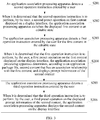
- FIG. 1 is a flowchart of an embodiment of an application association processing method according to the present invention. As shown in FIG. 1 , the method includes: S101: An application association processing apparatus detects a first operation instruction entered by a user.
- a touchscreen apparatus detects a sliding operation instruction entered by a user.
- the touchscreen apparatus may determine a specific implementation form of the first operation instruction by using a position change of a touch point.
- the first operation instruction is a curved sliding gesture or a gesture of quickly taping for multiple times, and the first operation instruction may be detected according to a moving track or a moving manner of the touch point, where the touch point is formed on a touchscreen during a touch operation of the user by using thermal capacitance of a touching body or a falling point after pressing.
- the first preset operation is an operation gesture preset by the user, and the prompt information is used to inform the user that an association relationship exists between the first content and the second content.
- the first content is an application icon, and the second content is an icon of at least one control included in an application corresponding to the application icon; or the first content is an icon of a control, and the second content is an icon of an application to which the control belongs.
- the first preset operation may be a sliding operation within a preset area surrounding the first content.
- the sliding operation is an operation that uses, as a start point, a position at which the first content is located; or the sliding operation is an operation that uses, as a fixed point, a position at which the first content is located, and uses a preset area surrounding the first content as a sliding area.
- the application association processing apparatus may preset a first preset operation; and if the first operation instruction of the user is the same as the first preset operation, it may be determined that the first operation instruction is input by the user for the first content displayed on the display interface, and an objective of the first operation instruction is that the application association processing apparatus displays the prompt information of the second content associated with the first content.
- the first preset operation may be a sliding operation within the preset area surrounding the first content.
- the application association processing apparatus can detect multiple touch points; and start points of these touch points may be all at the position of the first content, and subsequently, a finger leaves the position of the first content and continues to move within the preset area; or one fixed point in these touch points is at the position of the first content, and other moving points are at any positions within the preset area surrounding the first content, and a finger moves within the preset area starting from the any positions.
- an area that uses the first content as a geometric center and whose covering radius outward is 4 cm to 6 cm is the preset area, within the area starting from the first content, the user makes a zoom-in gesture within the area by using two fingers, and the application association processing apparatus detects that a distance between the two touch points becomes longer, and the first preset operation is the operation of the user; in this case, the application association processing apparatus may determine that the first operation instruction is specific to the first content, and request to display the prompt information of the second content associated with the first content.
- the first content is an application icon
- prompt information of icons of all controls included in an application corresponding to the application icon is displayed on the screen, for example, a floating window of the screen; or if the first content is an icon of a control, prompt information of an icon of an application to which the control belongs is displayed on the screen, for example, a floating window of the screen.
- an area that uses the first content as a geometric center and that covers all ranges of the touchscreen outward is the preset area
- the user performs an operation within the area by using three fingers, where one finger is always on the first content, and the other two fingers make a zoom-in gesture within the area
- the application association processing apparatus detects that one fixed point is on the first content and a distance between other two sliding touch points becomes longer, and the first preset operation is the operation of the user; in this case, the application association processing apparatus may determine that the first operation instruction is specific to the first content, and may further determine that the first operation instruction requests to display the prompt information of the second content associated with the first content.
- the first content is an application icon
- prompt information of icons of all controls included in an application corresponding to the application icon is displayed on the screen, for example, a floating window of the screen; or if the first content is an icon of a control, prompt information of an icon of an application to which the control belongs is displayed on the screen, for example, a floating window of the screen.
- the first preset operation and the preset area are both used as an example for description, but do not constitute any limitation, and another operation gesture and different preset area settings all fall within the protection scope.
- the another operation gesture is an operation of shortening a distance by using two fingers, or an operation of pressing and holding by using one finger, and shortening a distance by using other multiple fingers.
- a control encapsulates data and a method.
- a control is a basic visual component block and is included in an application, and each control controls partial data processed by the application and an interactive operation related to the data.
- a control may be a visual window for a temperature today, another control may be a visual window for air quality, wearing reminding, and a high temperature or rainstorm warning, still another control may be a visual window for a current room temperature, and the like.
- An icon of the control may be a thumbnail, a partial screenshot, or the like of the visual window, or may be a framework icon of the control.
- an application icon is an entry to access the application to acquire all functions of the application, and may be considered as a shortcut that is commonly referred to as.
- the user may select, by using a correspondence, which has been determined by the application association processing apparatus, between a control and an application icon, for example, one application icon corresponds to several controls, a control or an application icon provided by the application association processing apparatus.
- the application association processing apparatus detects a first operation instruction entered by a user; and when it is determined that the first operation instruction is to perform, by the user, a first preset operation on first content displayed on a display interface, displays prompt information of second content associated with the first content, where the first preset operation is an operation gesture preset by the user, and the prompt information is used to inform the user that an association relationship exists between the first content and the second content, where when the first content is an application icon, the second content is an icon of at least one control included in an application corresponding to the application icon; or when the first content is an icon of a control, the second content is an icon of an application to which the control belongs.
- FIG. 2 is a flowchart of an embodiment of another application association processing method according to the present invention. As shown in FIG. 2 , the method includes: S201: An application association processing apparatus detects a second operation instruction entered by a user.
- the second preset operation is an operation gesture preset for switching the first content to the editable state.
- the second preset operation may be a pressing operation exceeding preset duration.
- the user presses a control icon, a control, or an application icon for more than three seconds, and all applications on the page on the application association processing apparatus enter an editable mode, or only the control icon, the control, or the application icon enters an editable mode.
- an example in which there is only the control icon, the control, or the application icon is used for description, but does not constitute any limitation.
- the editable mode refers to that the control icon, the control, or the application icon can be deleted or moved, or may merely be a premode for searching for associated second content in this embodiment, and the editable state may specifically be a capturing state, that is, an icon enters a floating state after being pressed for a long time.
- the application association processing apparatus detects a first operation instruction entered by the user for the first content in the editable state.
- the first operation instruction that is detected by the application association processing apparatus when the first content is in the editable state is specific to the first content.
- the application association processing apparatus determines, according to an application package file, second content that has an association relationship with the first content, and displays prompt information of the second content.
- the first content is an application icon
- the second content is an icon of at least one control included in an application corresponding to the application icon; or the first content is an icon of a control, and the second content is an icon of an application to which the control belongs.
- the application package file is a source file of the first content and the second content, for example, both the first content and the second content run on the application association processing apparatus after the application package file is decompressed and installed.
- the first preset operation may be a sliding operation within a preset area surrounding the first content.
- a start point of a sliding operation is at a position of the first content; or a fixed point of a sliding operation is at a position of the first content, and a sliding point is at any position within the preset area surrounding the first content.
- the first preset operation is set to be similar to the foregoing two types of operations; in this way, the application association processing apparatus can conveniently determine the first content on which an operation needs to be performed.
- the first preset operation may further be the following several operation manners.
- the user performs a click operation, for example, one finger slides within a preset area, where the preset area is described by using an example in the foregoing embodiment and is not described herein again.
- a touchscreen detects that a position of a touch point formed by the finger changes, for example, a value of a horizontal coordinate and/or a value of a vertical coordinate of the touch point changes, determines, according to the application package file, the second content that has the association relationship with the first content, and displays the prompt information of the second content.
- the first preset operation may also be set according to a position of the single point, for example, a sliding operation is performed on the first content along a diagonal direction from the single point.
- the user performs a zoom-in or zoom-out operation by using at least two fingers; if the application association processing apparatus detects that positions of at least two touch points formed by this operation change, the application association processing apparatus continuously detects a distance between two neighboring touch points; and if the distance increases, or the distance decreases, the application association processing apparatus determines, according to the application package file, the second content that has the association relationship with the first content, and displays the prompt information of the second content.
- the user slides within a preset area by using at least three fingers, changes of positions of at least three touch points are detected, a size of an area surrounded by all the touch points is determined according to the changes of the positions, and if the size increases or decreases, the second content that has the association relationship with the first content is determined according to the application package file, and the prompt information of the second content is displayed.
- the foregoing operations are performed within preset duration, for example, if the second operation instruction detected within 3 seconds conforms to one of the foregoing second preset operations, the prompt information of the second content associated with the first content may be displayed.
- the application association processing apparatus may display, in a form of a floating window, the prompt information of the second content associated with the first content.
- the second content that has the association relationship with the first content according to the application package file it may be further determined, according to buffered information about the first content and buffered application information corresponding to the second content, such as a control attribute and an application attribute, or in another manner, whether the first content is associated with the second content.
- the application association processing apparatus detects a first operation instruction entered by a user; and when it is determined that the first operation instruction is to perform, by the user, a first preset operation on first content displayed on a display interface, displays prompt information of second content associated with the first content, where the first preset operation is an operation gesture preset by the user, and the prompt information is used to inform the user that an association relationship exists between the first content and the second content, where when the first content is an application icon, the second content is an icon of at least one control included in an application corresponding to the application icon; or when the first content is an icon of a control, the second content is an icon of an application to which the control belongs.
- FIG. 3 is a flowchart of an embodiment of still another application association processing method according to the present invention. As shown in FIG. 3 , after S204, the method further includes: S205: The application association processing apparatus detects a third operation instruction entered by the user.
- the third preset operation is an operation gesture preset for displaying the second content.
- the third preset operation may be at least one tap operation on the second content, for example, a tap or double-tap operation or the like performed on a control icon or an application icon on a floating window.
- the application association processing apparatus displays the second content on the interface. If the second content is an application icon, the application icon is displayed on a desktop, or an application program corresponding to the application icon is entered. If the second content is an icon of a control, a visual window of the control may be displayed on a desktop.
- the application association processing apparatus detects a first operation instruction entered by a user; and when it is determined that the first operation instruction is to perform, by the user, a first preset operation on first content displayed on a display interface, displays prompt information of second content associated with the first content, where the first preset operation is an operation gesture preset by the user, and the prompt information is used to inform the user that an association relationship exists between the first content and the second content, where when the first content is an application icon, the second content is an icon of at least one control included in an application corresponding to the application icon; or when the first content is an icon of a control, the second content is an icon of an application to which the control belongs.
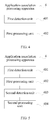
- FIG. 4 is a schematic structural diagram of an embodiment of an application association processing apparatus according to the present invention. As shown in FIG. 4 , the application association processing apparatus 4 includes:
- the first processing unit 402 may be configured to display, in a form of a floating window, the prompt information of the second content associated with the first content.
- the first preset operation may be a sliding operation within a preset area surrounding the first content.
- the sliding operation is an operation that uses, as a start point, a position at which the first content is located; or the sliding operation is an operation that uses, as a fixed point, a position at which the first content is located, and uses a preset area surrounding the first content as a sliding area.
- FIG. 5 is a schematic structural diagram of an embodiment of another application association processing apparatus according to the present invention. As shown in FIG. 5 , the application association processing apparatus 4 further includes:
- the second preset operation may be a pressing operation exceeding preset duration.
- the first detection unit 401 may be configured to detect the first operation instruction entered by the user for the first content in the editable state, so that, if it is determined that the first operation instruction is to perform, by the user, the first preset operation on the first content displayed on the display interface, the first processing unit 402 displays the prompt information of the second content associated with the first content.
- the first processing unit 402 may be configured to: if it is determined that the first operation instruction is to perform, by the user, the first preset operation on the first content displayed on the display interface, determine, according to an application package file, the second content that has the association relationship with the first content, and display the prompt information of the second content, where the application package file is a source file of the first content and the second content.
- FIG. 6 is a schematic structural diagram of an embodiment of still another application association processing apparatus according to the present invention. As shown in FIG. 6 , the application association processing apparatus further includes:
- the third preset operation may be at least one tap operation on the second content, for example, a tap or double-tap operation or the like.
- the application association processing apparatus 4 may work by using the methods provided by the foregoing embodiments, and details are not described herein again.
- the application association processing apparatus detects a first operation instruction entered by a user; and when it is determined that the first operation instruction is to perform, by the user, a first preset operation on first content displayed on a display interface, displays prompt information of second content associated with the first content, where the first preset operation is an operation gesture preset by the user, and the prompt information is used to inform the user that an association relationship exists between the first content and the second content, where when the first content is an application icon, the second content is an icon of at least one control included in an application corresponding to the application icon; or when the first content is an icon of a control, the second content is an icon of an application to which the control belongs.
- the program may be stored in a computer-readable storage medium. When the program runs, the steps of the method embodiments are performed.
- the foregoing storage medium includes: any medium that can store program code, such as a ROM, a RAM, a magnetic disk, or an optical disc.
Landscapes
- Engineering & Computer Science (AREA)
- General Engineering & Computer Science (AREA)
- Theoretical Computer Science (AREA)
- Human Computer Interaction (AREA)
- Physics & Mathematics (AREA)
- General Physics & Mathematics (AREA)
- User Interface Of Digital Computer (AREA)
Abstract
Description
- This application claims priority to Chinese Patent Application No.
CN 201310382155.1 - The present invention relates to communications technologies, and in particular, to an application association processing method and apparatus.
- With the innovation of communications technologies, touchscreen terminal devices such as mobile phones and tablets also tend to develop rapidly. Researches show that over ten thousand new devices are activated worldwide on a daily basis; therefore, applications used on these devices are increasingly diversified and improved as user demands become different.
- Applications can help a user know about news events, capture a note, engage in socialization, listen to music, have entertainment, play games, and the like at any time. To meet a user demand, functions provided by current applications are increasingly improved and diversified, and currently, many applications can all provide two forms: a control and an application icon for a user to select and use. An application icon is generally a main entry to enter the application, and a control can display some functions of the application, for example, the control can make, by using a visual window, it convenient for a user to intuitively know about related functions provided by the application. For example, for a weather forecast application, a main interface of the weather forecast can be entered by using an application icon, and a control can display information such as a temperature and a wind force today on a desktop.
- However, as functions of an application become increasingly powerful, the application includes increasing controls, and user operation complexity is increased.
- Embodiments of the present invention provide an application association processing method and apparatus, which can reduce user operation complexity.
- According to a first aspect, an embodiment of the present invention provides an application association processing method, including:
- detecting a first operation instruction entered by a user; and
- when it is determined that the first operation instruction is to perform, by the user, a first preset operation on first content displayed on a display interface, displaying prompt information of second content associated with the first content, where the first preset operation is an operation gesture preset by the user, and the prompt information is used to inform the user that an association relationship exists between the first content and the second content, where
- when the first content is an application icon, the second content is an icon of at least one control included in an application corresponding to the application icon; or
- when the first content is an icon of a control, the second content is an icon of an application to which the control belongs.
- In a first possible implementation manner, according to the first aspect, before the detecting a first operation instruction entered by a user, the method further includes:
- detecting a second operation instruction entered by the user; and
- when the second operation instruction is to perform, by the user, a second preset operation on the first content displayed on the display interface, switching the displayed first content to an editable state, where the second preset operation is an operation gesture preset for switching the first content to the editable state, where
- the detecting a first operation instruction entered by a user includes:
detecting the first operation instruction entered by the user for the first content in the editable state. - In a second possible implementation manner, with reference to the first aspect and the first possible implementation manner, the first preset operation includes:
a sliding operation within a preset area surrounding the first content. - In a third possible implementation manner, with reference to the first aspect, the first possible implementation manner, and the second possible implementation manner, the displaying prompt information of second content associated with the first content includes:
determining, according to an application package file, the second content that has the association relationship with the first content, and displaying the prompt information of the second content, where the application package file is a source file of the first content and the second content. - In a fourth possible implementation manner, with reference to the first aspect, the first possible implementation manner, the second possible implementation manner, and the third possible implementation manner, the displaying prompt information of second content associated with the first content includes:
displaying, in a form of a floating window, the prompt information of the second content associated with the first content. - In a fifth possible implementation manner, with reference to the first aspect, the first possible implementation manner, the second possible implementation manner, the third possible implementation manner, and the fourth possible implementation manner, after the displaying prompt information of second content associated with the first content, the method further includes:
- detecting a third operation instruction entered by the user; and
- when the third operation instruction is to perform, by the user, a third preset operation on the prompt information of the second content, displaying the second content on the display interface, where the third preset operation is an operation gesture preset for displaying the second content.
- According to a second aspect, an embodiment of the present invention provides an application association processing apparatus, including:
- a first detection unit, configured to detect a first operation instruction entered by a user; and
- a first processing unit, configured to: when it is determined that the first operation instruction is to perform, by the user, a first preset operation on first content displayed on a display interface, display prompt information of second content associated with the first content, where the first preset operation is an operation gesture preset by the user, and the prompt information is used to inform the user that an association relationship exists between the first content and the second content, where
- when the first content is an application icon, the second content is an icon of at least one control included in an application corresponding to the application icon; or
- when the first content is an icon of a control, the second content is an icon of an application to which the control belongs.
- In a first possible implementation manner, according to the second aspect, the apparatus further includes:
- a second detection unit, configured to: before the first detection unit detects the first operation instruction entered by the user, detect a second operation instruction entered by the user; and
- a second processing unit, configured to: when the second operation instruction is to perform, by the user, a second preset operation on the first content displayed on the display interface, switch the displayed first content to an editable state, where the second preset operation is an operation gesture preset for switching the first content to the editable state, where
- the first detection unit is specifically configured to detect the first operation instruction entered by the user for the first content in the editable state.
- In a second possible implementation manner, with reference to the second aspect and the first possible implementation manner, the second preset operation includes: a sliding operation within a preset area surrounding the first content.
- In a third possible implementation manner, with reference to the second aspect, the first possible implementation manner, and the second possible implementation manner, the first preset operation includes:
- The first processing unit is specifically configured to: if it is determined that the first operation instruction is to perform, by the user, the first preset operation on the first content displayed on the display interface, determine, according to an application package file, the second content that has the association relationship with the first content, and display the prompt information of the second content, where the application package file is a source file of the first content and the second content.
- In a fourth possible implementation manner, with reference to the second aspect, the first possible implementation manner, the second possible implementation manner, and the third possible implementation manner, the first processing unit is specifically configured to display, in a form of a floating window, the prompt information of the second content associated with the first content.
- In a fifth possible implementation manner, with reference to the second aspect, the first possible implementation manner, the second possible implementation manner, the third possible implementation manner, and the fourth possible implementation manner, a third detection unit, configured to detect a third operation instruction entered by the user; and
a third processing unit, configured to: when it is determined that the third operation instruction is to perform, by the user, a third preset operation on the displayed prompt information of the second content, display the second content on the display interface, where the third preset operation is an operation gesture preset for displaying the second content. - The embodiments of the present invention provide an application association processing method and apparatus. The application association processing apparatus detects a first operation instruction entered by a user; and when it is determined that the first operation instruction is to perform, by the user, a first preset operation on first content displayed on a display interface, displays prompt information of second content associated with the first content, where the first preset operation is an operation gesture preset by the user, and the prompt information is used to inform the user that an association relationship exists between the first content and the second content, where when the first content is an application icon, the second content is an icon of at least one control included in an application corresponding to the application icon; or when the first content is an icon of a control, the second content is an icon of an application to which the control belongs. In this way, an association between an application icon and a control is indicated, and prompt information is displayed, so that a user conveniently knows an association relationship between the application icon and the control, and the user performs a further operation according to the prompt information, thereby reducing user operation complexity.
- To describe the technical solutions in the embodiments of the present invention or in the prior art more clearly, the following briefly introduces the accompanying drawings required for describing the embodiments or the prior art. Apparently, the accompanying drawings in the following description show merely some embodiments of the present invention, and persons of ordinary skill in the art may still derive other drawings from these accompanying drawings without creative efforts.
-
FIG. 1 is a flowchart of an embodiment of an application association processing method according to the present invention; -
FIG. 2 is a flowchart of an embodiment of another application association processing method according to the present invention; -
FIG. 3 is a flowchart of an embodiment of still another application association processing method according to the present invention; -
FIG. 4 is a schematic structural diagram of an embodiment of an application association processing apparatus according to the present invention; -
FIG. 5 is a schematic structural diagram of an embodiment of another application association processing apparatus according to the present invention; and -
FIG. 6 is a schematic structural diagram of an embodiment of still another application association processing apparatus according to the present invention. - To make the objectives, technical solutions, and advantages of the embodiments of the present invention clearer, the following clearly and completely describes the technical solutions in the embodiments of the present invention with reference to the accompanying drawings in the embodiments of the present invention. Apparently, the described embodiments are some but not all of the embodiments of the present invention. All other embodiments obtained by persons of ordinary skill in the art based on the embodiments of the present invention without creative efforts shall fall within the protection scope of the present invention.
- The present invention is applicable to a touchscreen apparatus, and can also be used in other apparatuses that have a touchscreen function and can have an application installed therein. The embodiments of the present invention use an example in which an application association processing apparatus is a touchscreen apparatus for description, but are not limited thereto.
-
FIG. 1 is a flowchart of an embodiment of an application association processing method according to the present invention. As shown inFIG. 1 , the method includes:
S101: An application association processing apparatus detects a first operation instruction entered by a user. - For example, a touchscreen apparatus detects a sliding operation instruction entered by a user. For example, the touchscreen apparatus may determine a specific implementation form of the first operation instruction by using a position change of a touch point. For example, the first operation instruction is a curved sliding gesture or a gesture of quickly taping for multiple times, and the first operation instruction may be detected according to a moving track or a moving manner of the touch point, where the touch point is formed on a touchscreen during a touch operation of the user by using thermal capacitance of a touching body or a falling point after pressing.
- S102: When it is determined that the first operation instruction is to perform, by the user, a first preset operation on first content displayed on a display interface, the application association processing apparatus displays prompt information of second content associated with the first content.
- For example, the first preset operation is an operation gesture preset by the user, and the prompt information is used to inform the user that an association relationship exists between the first content and the second content. The first content is an application icon, and the second content is an icon of at least one control included in an application corresponding to the application icon; or the first content is an icon of a control, and the second content is an icon of an application to which the control belongs.
- Further, the first preset operation may be a sliding operation within a preset area surrounding the first content. The sliding operation is an operation that uses, as a start point, a position at which the first content is located; or the sliding operation is an operation that uses, as a fixed point, a position at which the first content is located, and uses a preset area surrounding the first content as a sliding area.
- For example, the application association processing apparatus may preset a first preset operation; and if the first operation instruction of the user is the same as the first preset operation, it may be determined that the first operation instruction is input by the user for the first content displayed on the display interface, and an objective of the first operation instruction is that the application association processing apparatus displays the prompt information of the second content associated with the first content.
- Further, the first preset operation may be a sliding operation within the preset area surrounding the first content. For example, during a sliding operation, the application association processing apparatus can detect multiple touch points; and start points of these touch points may be all at the position of the first content, and subsequently, a finger leaves the position of the first content and continues to move within the preset area; or one fixed point in these touch points is at the position of the first content, and other moving points are at any positions within the preset area surrounding the first content, and a finger moves within the preset area starting from the any positions.
- For example, an area that uses the first content as a geometric center and whose covering radius outward is 4 cm to 6 cm is the preset area, within the area starting from the first content, the user makes a zoom-in gesture within the area by using two fingers, and the application association processing apparatus detects that a distance between the two touch points becomes longer, and the first preset operation is the operation of the user; in this case, the application association processing apparatus may determine that the first operation instruction is specific to the first content, and request to display the prompt information of the second content associated with the first content. If the first content is an application icon, prompt information of icons of all controls included in an application corresponding to the application icon is displayed on the screen, for example, a floating window of the screen; or if the first content is an icon of a control, prompt information of an icon of an application to which the control belongs is displayed on the screen, for example, a floating window of the screen.
- For another example, it is determined that an area that uses the first content as a geometric center and that covers all ranges of the touchscreen outward is the preset area, the user performs an operation within the area by using three fingers, where one finger is always on the first content, and the other two fingers make a zoom-in gesture within the area, and the application association processing apparatus detects that one fixed point is on the first content and a distance between other two sliding touch points becomes longer, and the first preset operation is the operation of the user; in this case, the application association processing apparatus may determine that the first operation instruction is specific to the first content, and may further determine that the first operation instruction requests to display the prompt information of the second content associated with the first content. If the first content is an application icon, prompt information of icons of all controls included in an application corresponding to the application icon is displayed on the screen, for example, a floating window of the screen; or if the first content is an icon of a control, prompt information of an icon of an application to which the control belongs is displayed on the screen, for example, a floating window of the screen.
- It should be noted that the first preset operation and the preset area are both used as an example for description, but do not constitute any limitation, and another operation gesture and different preset area settings all fall within the protection scope. For example, the another operation gesture is an operation of shortening a distance by using two fingers, or an operation of pressing and holding by using one finger, and shortening a distance by using other multiple fingers.
- It should be noted that a control encapsulates data and a method. A control is a basic visual component block and is included in an application, and each control controls partial data processed by the application and an interactive operation related to the data. For example, for a weather forecast application, a control may be a visual window for a temperature today, another control may be a visual window for air quality, wearing reminding, and a high temperature or rainstorm warning, still another control may be a visual window for a current room temperature, and the like. An icon of the control may be a thumbnail, a partial screenshot, or the like of the visual window, or may be a framework icon of the control.
- However, an application icon is an entry to access the application to acquire all functions of the application, and may be considered as a shortcut that is commonly referred to as. By using the method provided by this embodiment, when a control and an application icon need to be switched, the user may select, by using a correspondence, which has been determined by the application association processing apparatus, between a control and an application icon, for example, one application icon corresponds to several controls, a control or an application icon provided by the application association processing apparatus.
- This embodiment of the present invention provides an application association processing method. The application association processing apparatus detects a first operation instruction entered by a user; and when it is determined that the first operation instruction is to perform, by the user, a first preset operation on first content displayed on a display interface, displays prompt information of second content associated with the first content, where the first preset operation is an operation gesture preset by the user, and the prompt information is used to inform the user that an association relationship exists between the first content and the second content, where when the first content is an application icon, the second content is an icon of at least one control included in an application corresponding to the application icon; or when the first content is an icon of a control, the second content is an icon of an application to which the control belongs. In this way, an association between an application icon and a control is indicated, and prompt information is displayed, so that a user conveniently knows an association relationship between the application icon and the control, and the user performs a further operation according to the prompt information, thereby reducing user operation complexity.
-
FIG. 2 is a flowchart of an embodiment of another application association processing method according to the present invention. As shown inFIG. 2 , the method includes:
S201: An application association processing apparatus detects a second operation instruction entered by a user. - S202: When it is determined that the second operation instruction is to perform, by the user, a second preset operation on first content displayed on a display interface, the application association processing apparatus switches the displayed first content to an editable state.
- The second preset operation is an operation gesture preset for switching the first content to the editable state. For example, the second preset operation may be a pressing operation exceeding preset duration. For example, the user presses a control icon, a control, or an application icon for more than three seconds, and all applications on the page on the application association processing apparatus enter an editable mode, or only the control icon, the control, or the application icon enters an editable mode. In this embodiment, an example in which there is only the control icon, the control, or the application icon is used for description, but does not constitute any limitation.
- The editable mode refers to that the control icon, the control, or the application icon can be deleted or moved, or may merely be a premode for searching for associated second content in this embodiment, and the editable state may specifically be a capturing state, that is, an icon enters a floating state after being pressed for a long time.
- S203: The application association processing apparatus detects a first operation instruction entered by the user for the first content in the editable state.
- It should be noted that the first operation instruction that is detected by the application association processing apparatus when the first content is in the editable state is specific to the first content.
- S204: When it is determined that the first operation instruction is to perform, by the user, a first preset operation on the first content displayed on the display interface, the application association processing apparatus determines, according to an application package file, second content that has an association relationship with the first content, and displays prompt information of the second content.
- The first content is an application icon, and the second content is an icon of at least one control included in an application corresponding to the application icon; or the first content is an icon of a control, and the second content is an icon of an application to which the control belongs. The application package file is a source file of the first content and the second content, for example, both the first content and the second content run on the application association processing apparatus after the application package file is decompressed and installed.
- It should be noted that the first preset operation may be a sliding operation within a preset area surrounding the first content. For example, a start point of a sliding operation is at a position of the first content; or a fixed point of a sliding operation is at a position of the first content, and a sliding point is at any position within the preset area surrounding the first content. These operations have been described in detail in the foregoing embodiment, and details are not described herein again. It should be noted that, if the user presses a control icon, a control, or an application icon for more than preset duration, all applications on the page on the application association processing apparatus enter the editable mode. Preferably, the first preset operation is set to be similar to the foregoing two types of operations; in this way, the application association processing apparatus can conveniently determine the first content on which an operation needs to be performed. In a case in which the user presses a control icon, a control, or an application icon for more than preset duration, and only the first content enters the editable mode, the first preset operation may further be the following several operation manners.
- For example, the user performs a click operation, for example, one finger slides within a preset area, where the preset area is described by using an example in the foregoing embodiment and is not described herein again. If a touchscreen detects that a position of a touch point formed by the finger changes, for example, a value of a horizontal coordinate and/or a value of a vertical coordinate of the touch point changes, determines, according to the application package file, the second content that has the association relationship with the first content, and displays the prompt information of the second content. The first preset operation may also be set according to a position of the single point, for example, a sliding operation is performed on the first content along a diagonal direction from the single point.
- Alternatively, the user performs a zoom-in or zoom-out operation by using at least two fingers; if the application association processing apparatus detects that positions of at least two touch points formed by this operation change, the application association processing apparatus continuously detects a distance between two neighboring touch points; and if the distance increases, or the distance decreases, the application association processing apparatus determines, according to the application package file, the second content that has the association relationship with the first content, and displays the prompt information of the second content.
- Further, if the user slides within a preset area by using at least three fingers, changes of positions of at least three touch points are detected, a size of an area surrounded by all the touch points is determined according to the changes of the positions, and if the size increases or decreases, the second content that has the association relationship with the first content is determined according to the application package file, and the prompt information of the second content is displayed.
- It should be noted that, it may be defined that the foregoing operations are performed within preset duration, for example, if the second operation instruction detected within 3 seconds conforms to one of the foregoing second preset operations, the prompt information of the second content associated with the first content may be displayed.
- Further, the application association processing apparatus may display, in a form of a floating window, the prompt information of the second content associated with the first content.
- It should be noted that, in addition to determining the second content that has the association relationship with the first content according to the application package file, it may be further determined, according to buffered information about the first content and buffered application information corresponding to the second content, such as a control attribute and an application attribute, or in another manner, whether the first content is associated with the second content.
- This embodiment of the present invention provides an application association processing method. The application association processing apparatus detects a first operation instruction entered by a user; and when it is determined that the first operation instruction is to perform, by the user, a first preset operation on first content displayed on a display interface, displays prompt information of second content associated with the first content, where the first preset operation is an operation gesture preset by the user, and the prompt information is used to inform the user that an association relationship exists between the first content and the second content, where when the first content is an application icon, the second content is an icon of at least one control included in an application corresponding to the application icon; or when the first content is an icon of a control, the second content is an icon of an application to which the control belongs. In this way, an association between an application icon and a control is indicated, and prompt information is displayed, so that a user conveniently knows an association relationship between the application icon and the control, and the user performs a further operation according to the prompt information, thereby reducing user operation complexity.
-
FIG. 3 is a flowchart of an embodiment of still another application association processing method according to the present invention. As shown inFIG. 3 , after S204, the method further includes:
S205: The application association processing apparatus detects a third operation instruction entered by the user. - S206: When it is determined that the third operation instruction is to perform, by the user, a third preset operation on the displayed prompt information of the second content, the application association processing apparatus displays the second content on the display interface.
- Further, the third preset operation is an operation gesture preset for displaying the second content. For example, the third preset operation may be at least one tap operation on the second content, for example, a tap or double-tap operation or the like performed on a control icon or an application icon on a floating window.
- It should be noted that after the user executes the third operation instruction, the application association processing apparatus displays the second content on the interface. If the second content is an application icon, the application icon is displayed on a desktop, or an application program corresponding to the application icon is entered. If the second content is an icon of a control, a visual window of the control may be displayed on a desktop.
- This embodiment of the present invention provides an application association processing method. The application association processing apparatus detects a first operation instruction entered by a user; and when it is determined that the first operation instruction is to perform, by the user, a first preset operation on first content displayed on a display interface, displays prompt information of second content associated with the first content, where the first preset operation is an operation gesture preset by the user, and the prompt information is used to inform the user that an association relationship exists between the first content and the second content, where when the first content is an application icon, the second content is an icon of at least one control included in an application corresponding to the application icon; or when the first content is an icon of a control, the second content is an icon of an application to which the control belongs. In this way, an association between an application icon and a control is indicated, and prompt information is displayed, so that a user conveniently knows an association relationship between the application icon and the control, and the user performs a further operation according to the prompt information, thereby reducing user operation complexity.
-
FIG. 4 is a schematic structural diagram of an embodiment of an application association processing apparatus according to the present invention. As shown inFIG. 4 , the applicationassociation processing apparatus 4 includes: - a
first detection unit 401, configured to detect a first operation instruction entered by a user; and - a
first processing unit 402, configured to: when it is determined that the first operation instruction is to perform, by the user, a first preset operation on first content displayed on a display interface, display prompt information of second content associated with the first content, where the first preset operation is an operation gesture preset by the user, and the prompt information is used to inform the user that an association relationship exists between the first content and the second content, where - the first content is an application icon, and the second content is an icon of at least one control included in an application corresponding to the application icon; or the first content is a control icon, and the second content is an icon of an application to which the control belongs.
- Further, the
first processing unit 402 may be configured to display, in a form of a floating window, the prompt information of the second content associated with the first content. - For example, the first preset operation may be a sliding operation within a preset area surrounding the first content. The sliding operation is an operation that uses, as a start point, a position at which the first content is located; or the sliding operation is an operation that uses, as a fixed point, a position at which the first content is located, and uses a preset area surrounding the first content as a sliding area.
- It should be noted that the first preset operation has been described by using an example in the foregoing embodiments, and details are not described herein again.
- Further,
FIG. 5 is a schematic structural diagram of an embodiment of another application association processing apparatus according to the present invention. As shown inFIG. 5 , the applicationassociation processing apparatus 4 further includes: - a
second detection unit 403, configured to: before thefirst detection unit 401 detects the first operation instruction entered by the user, detect a second operation instruction entered by the user; and - a
second processing unit 404, configured to: when the second operation instruction is to perform, by the user, a second preset operation on the first content displayed on the display interface, switch the displayed first content to an editable state, where the second preset operation is an operation gesture preset for switching the first content to the editable state. - The second preset operation may be a pressing operation exceeding preset duration.
- It should be noted that the second preset operation has been described by using an example in the foregoing embodiments, and details are not described herein again.
- In this case, the
first detection unit 401 may be configured to detect the first operation instruction entered by the user for the first content in the editable state, so that, if it is determined that the first operation instruction is to perform, by the user, the first preset operation on the first content displayed on the display interface, thefirst processing unit 402 displays the prompt information of the second content associated with the first content. - For example, the
first processing unit 402 may be configured to: if it is determined that the first operation instruction is to perform, by the user, the first preset operation on the first content displayed on the display interface, determine, according to an application package file, the second content that has the association relationship with the first content, and display the prompt information of the second content, where the application package file is a source file of the first content and the second content. - Further,
FIG. 6 is a schematic structural diagram of an embodiment of still another application association processing apparatus according to the present invention. As shown inFIG. 6 , the application association processing apparatus further includes: - a
third detection unit 405, configured to detect a third operation instruction entered by the user; and - a
third processing unit 406, configured to: when it is determined that the third operation instruction is to perform, by the user, a third preset operation on the displayed prompt information of the second content, display the second content on the display interface, where the third preset operation is an operation gesture preset for displaying the second content. - The third preset operation may be at least one tap operation on the second content, for example, a tap or double-tap operation or the like.
- It should be noted that the third preset operation has been described by using an example in the foregoing embodiments, and details are not described herein again.
- The application
association processing apparatus 4 may work by using the methods provided by the foregoing embodiments, and details are not described herein again. - This embodiment of the present invention provides an application association processing apparatus. The application association processing apparatus detects a first operation instruction entered by a user; and when it is determined that the first operation instruction is to perform, by the user, a first preset operation on first content displayed on a display interface, displays prompt information of second content associated with the first content, where the first preset operation is an operation gesture preset by the user, and the prompt information is used to inform the user that an association relationship exists between the first content and the second content, where when the first content is an application icon, the second content is an icon of at least one control included in an application corresponding to the application icon; or when the first content is an icon of a control, the second content is an icon of an application to which the control belongs. In this way, an association between an application icon and a control is indicated, and prompt information is displayed, so that a user conveniently knows an association relationship between the application icon and the control, and the user performs a further operation according to the prompt information, thereby reducing user operation complexity.
- The invention also provides the following embodiments. It should be noted that the numbering of the following embodiments do not necessarily follow the order of the preceding embodiments:
- Embodiment 1. An application association processing method, comprising:
- detecting a first operation instruction entered by a user; and
- when it is determined that the first operation instruction is to perform, by the user, a first preset operation on first content displayed on a display interface, displaying prompt information of second content associated with the first content, wherein the first preset operation is an operation gesture preset by the user, and the prompt information is used to inform the user that an association relationship exists between the first content and the second content, wherein
- when the first content is an application icon, the second content is an icon of at least one control comprised in an application corresponding to the application icon; or
- when the first content is an icon of a control, the second content is an icon of an application to which the control belongs.
- Embodiment 2. The method according to embodiment 1, before the detecting a first operation instruction entered by a user, further comprising:
- detecting a second operation instruction entered by the user; and
- when the second operation instruction is to perform, by the user, a second preset operation on the first content displayed on the display interface, switching the displayed first content to an editable state, wherein the second preset operation is an operation gesture preset for switching the first content to the editable state, wherein
- the detecting a first operation instruction entered by a user comprises:
detecting the first operation instruction entered by the user for the first content in the editable state.
- Embodiment 3. The method according to embodiment 2, wherein the second preset operation comprises: a pressing operation exceeding preset duration.
-
Embodiment 4. The method according to any one of embodiments 1 to 3, wherein the first preset operation comprises: a sliding operation within a preset area surrounding the first content. - Embodiment 5. The method according to
embodiment 4, wherein the sliding operation is an operation that uses, as a start point, a position at which the first content is located; or - the sliding operation is an operation that uses, as a fixed point, a position at which the first content is located, and uses the preset area surrounding the first content as a sliding area.
- Embodiment 6. The method according to any one of embodiment s 1 to 5, wherein the displaying prompt information of second content associated with the first content comprises:
- determining, according to an application package file, the second content that has the association relationship with the first content, and displaying the prompt information of the second content, wherein the application package file is a source file of the first content and the second content.
- Embodiment 7. The method according to any one of embodiments 1 to 6, wherein the displaying prompt information of second content associated with the first content comprises:
displaying, in a form of a floating window, the prompt information of the second content associated with the first content. - Embodiment 8. The method according to any one of embodiments 1 to 7, after the displaying prompt information of second content associated with the first content, further comprising:
- detecting a third operation instruction entered by the user; and
- when the third operation instruction is to perform, by the user, a third preset operation on the prompt information of the second content, displaying the second content on the display interface, wherein the third preset operation is an operation gesture preset for displaying the second content.
- Embodiment 9. The method according to embodiment 8, wherein the third preset operation comprises:
at least one tap operation on the second content. - Embodiment 10. An application association processing apparatus, comprising:
- a first detection unit, configured to detect a first operation instruction entered by a user; and
- a first processing unit, configured to: when it is determined that the first operation instruction is to perform, by the user, a first preset operation on first content displayed on a display interface, display prompt information of second content associated with the first content, wherein the first preset operation is an operation gesture preset by the user, and the prompt information is used to inform the user that an association relationship exists between the first content and the second content, wherein
- when the first content is an application icon, the second content is an icon of at least one control comprised in an application corresponding to the application icon; or
- when the first content is an icon of a control, the second content is an icon of an application to which the control belongs.
- Embodiment 11. The apparatus according to embodiment 10, further comprising:
- a second detection unit, configured to: before the first detection unit detects the first operation instruction entered by the user, detect a second operation instruction entered by the user; and
- a second processing unit, configured to: when the second operation instruction is to perform, by the user, a second preset operation on the first content displayed on the display interface, switch the displayed first content to an editable state, wherein the second preset operation is an operation gesture preset for switching the first content to the editable state, wherein
- the first detection unit is specifically configured to detect the first operation instruction entered by the user for the first content in the editable state.
- Embodiment 12. The apparatus according to embodiment 11, wherein the second preset operation comprises: a pressing operation exceeding preset duration.
- Embodiment 13. The apparatus according to any one of embodiments 10 to 12, wherein the first preset operation comprises: a sliding operation within a preset area surrounding the first content.
- Embodiment 14. The apparatus according to embodiment 13, wherein the sliding operation is an operation that uses, as a start point, a position at which the first content is located; or
the sliding operation is an operation that uses, as a fixed point, a position at which the first content is located, and uses the preset area surrounding the first content as a sliding area. - Embodiment 15. The apparatus according to any one of embodiment s 10 to 14, wherein
the first processing unit is specifically configured to: if it is determined that the first operation instruction is to perform, by the user, the first preset operation on the first content displayed on the display interface, determine, according to an application package file, the second content that has the association relationship with the first content, and display the prompt information of the second content, wherein the application package file is a source file of the first content and the second content. - Embodiment 16. The apparatus according to any one of embodiments 10 to 15, wherein
the first processing unit is specifically configured to display, in a form of a floating window, the prompt information of the second content associated with the first content. - Embodiment 17. The apparatus according to any one of embodiments 10 to 16, further comprising:
a third detection unit, configured to detect a third operation instruction entered by the user; and a third processing unit, configured to: when it is determined that the third operation instruction is to perform, by the user, a third preset operation on the displayed prompt information of the second content, display the second content on the display interface, wherein the third preset operation is an operation gesture preset for displaying the second content. - A person of ordinary skill in the art may understand that all or some of the steps of the method embodiments may be implemented by a program instructing relevant hardware. The program may be stored in a computer-readable storage medium. When the program runs, the steps of the method embodiments are performed. The foregoing storage medium includes: any medium that can store program code, such as a ROM, a RAM, a magnetic disk, or an optical disc.
- Finally, it should be noted that the foregoing embodiments are merely intended for describing the technical solutions of the present invention, rather than limiting the present invention. Although the present invention is described in detail with reference to the foregoing embodiments, a person of ordinary skill in the art should understand that they may still make modifications to the technical solutions described in the foregoing embodiments or make equivalent replacements to some or all technical features thereof, as long as such modifications or replacements do not cause the essence of corresponding technical solutions to depart from the scope of the technical solutions of the embodiments of the present invention.
Claims (15)
- An application association processing method, comprising:detecting (S101) a first operation gesture entered by a user; andwhen it is determined that the first operation instruction is to perform a first preset operation on an application icon corresponding to an application displayed on a display interface, displaying (S102) prompt information of a control icon corresponding to a control associated with the application icon , wherein the prompt information is used to inform the user that an association relationship exists between the application icon and the control icon, and the control is included in the application; anddetecting (S205) a second operation gesture entered by the user; andwhen the second operation gesture is to perform a second preset operation on the prompt information, displaying (S206) the control icon on the display interface.
- The method according to claim 1, wherein the control icon displayed is switched to the editable mode of being deleted or moved when detecting a third preset operation gesture.
- The method according to claim 2, wherein the third preset operation gesture is a pressing operation exceeding preset duration on the control icon or control.
- The method according to claim any one of claims 1 to 3, wherein the control encapsulates data and a method controlling partial data processed by the application and an interactive operation related to the partial data.
- The method according to any one of claims 1 to 4, wherein the control icon is a thumbnail or a partial screenshot of a visual window of the control, or the control icon is a framework icon of the control.
- The method according to any one of claims 1 to 5, wherein the prompt information is displayed in a floating window.
- The method according to any one of claims 1 or 6, wherein the first preset operation comprises: a sliding operation within a preset area surrounding the application icon; and
wherein the sliding operation is an operation that uses, as a start point, a position at which the application icon is located; or
the sliding operation is an operation that uses, as a fixed point, a position at which the application icon is located, and uses the preset area surrounding the first content as a sliding area. - The method according to any one of claims 1 to 7, wherein the displaying (S102) prompt information of a control icon corresponding to a control associated with the application icon comprises:determining, according to an application package file, the control icon that has the association relationship with the application icon, and displaying the prompt information of the control icon, wherein the application package file is a source file of the application and control.
- The method according to any one of claims 1 to 8, wherein the application is a weather forecast application and the control is a visual window for a temperature today.
- An application association processing apparatus, comprising:a first detection unit, configured to detect a first operation instruction entered by a user; anda first processing unit, configured to: display prompt information of a control icon corresponding to a control associated with the application icon, when it is determined that the first operation instruction is to perform a first preset operation on an application icon corresponding to an application displayed on a display interface; wherein the prompt information is used to inform the user that an association relationship exists between the application icon and the control icon, and the control is included in the application;a second detection unit, configured to detect a second operation instruction entered by the user; anda second processing unit, configured to: display the control icon on the display interface, when the second operation gesture is to perform a second preset operation on the prompt information.
- The apparatus according to claim 10, further comprising:a third processing unit, configured to: switch the control icon displayed to the editable mode of being deleted or moved when detecting a third preset operation gesture.
- The apparatus according to claim 11, wherein the third preset operation comprises: a pressing operation exceeding preset duration.
- The method according to claim any one of claims 10 to 12, wherein the control encapsulates data and a method controlling partial data processed by the application and an interactive operation related to the partial data.
- The method according to any one of claims 10 to 13, wherein the control icon is a thumbnail or a partial screenshot of a visual window of the control, or the control icon is a framework icon of the control.
- The apparatus according to any one of claims 8 to 10, wherein the first preset operation comprises:a sliding operation within a preset area surrounding the application icon; andwherein the sliding operation is an operation that uses, as a start point, a position at which the application icon is located; orthe sliding operation is an operation that uses, as a fixed point, a position at which the application icon is located, and uses the preset area surrounding the first content as a sliding area.
Priority Applications (1)
| Application Number | Priority Date | Filing Date | Title |
|---|---|---|---|
| EP21183615.0A EP3979055B1 (en) | 2013-08-28 | 2014-08-01 | Application association processing method and apparatus |
Applications Claiming Priority (3)
| Application Number | Priority Date | Filing Date | Title |
|---|---|---|---|
| CN201310382155.1A CN103455278B (en) | 2013-08-28 | 2013-08-28 | Application association processing method and device |
| PCT/CN2014/083512 WO2015027790A1 (en) | 2013-08-28 | 2014-08-01 | Application association processing method and apparatus |
| EP14840205.0A EP2998844A4 (en) | 2013-08-28 | 2014-08-01 | METHOD AND APPARATUS FOR PROCESSING APPLICATION ASSOCIATION |
Related Parent Applications (1)
| Application Number | Title | Priority Date | Filing Date |
|---|---|---|---|
| EP14840205.0A Division EP2998844A4 (en) | 2013-08-28 | 2014-08-01 | METHOD AND APPARATUS FOR PROCESSING APPLICATION ASSOCIATION |
Related Child Applications (2)
| Application Number | Title | Priority Date | Filing Date |
|---|---|---|---|
| EP21183615.0A Division-Into EP3979055B1 (en) | 2013-08-28 | 2014-08-01 | Application association processing method and apparatus |
| EP21183615.0A Division EP3979055B1 (en) | 2013-08-28 | 2014-08-01 | Application association processing method and apparatus |
Publications (2)
| Publication Number | Publication Date |
|---|---|
| EP3451134A1 true EP3451134A1 (en) | 2019-03-06 |
| EP3451134B1 EP3451134B1 (en) | 2021-10-06 |
Family
ID=49737704
Family Applications (3)
| Application Number | Title | Priority Date | Filing Date |
|---|---|---|---|
| EP21183615.0A Active EP3979055B1 (en) | 2013-08-28 | 2014-08-01 | Application association processing method and apparatus |
| EP18174250.3A Active EP3451134B1 (en) | 2013-08-28 | 2014-08-01 | Application association processing method and apparatus |
| EP14840205.0A Ceased EP2998844A4 (en) | 2013-08-28 | 2014-08-01 | METHOD AND APPARATUS FOR PROCESSING APPLICATION ASSOCIATION |
Family Applications Before (1)
| Application Number | Title | Priority Date | Filing Date |
|---|---|---|---|
| EP21183615.0A Active EP3979055B1 (en) | 2013-08-28 | 2014-08-01 | Application association processing method and apparatus |
Family Applications After (1)
| Application Number | Title | Priority Date | Filing Date |
|---|---|---|---|
| EP14840205.0A Ceased EP2998844A4 (en) | 2013-08-28 | 2014-08-01 | METHOD AND APPARATUS FOR PROCESSING APPLICATION ASSOCIATION |
Country Status (6)
| Country | Link |
|---|---|
| US (3) | US11269482B2 (en) |
| EP (3) | EP3979055B1 (en) |
| CN (2) | CN103455278B (en) |
| DE (1) | DE202014011564U1 (en) |
| ES (1) | ES2901823T3 (en) |
| WO (1) | WO2015027790A1 (en) |
Families Citing this family (27)
| Publication number | Priority date | Publication date | Assignee | Title |
|---|---|---|---|---|
| CN103455278B (en) | 2013-08-28 | 2018-02-06 | 华为终端(东莞)有限公司 | Application association processing method and device |
| BR112016028832B8 (en) * | 2014-06-20 | 2022-10-11 | Huawei Tech Co Ltd | METHOD AND DEVICE TO DISPLAY APPLICATION INTERFACE AND ELECTRONIC DEVICE |
| CN104281452A (en) * | 2014-09-23 | 2015-01-14 | 深圳市金立通信设备有限公司 | Terminal |
| CN104281453A (en) * | 2014-09-23 | 2015-01-14 | 深圳市金立通信设备有限公司 | Multitasking method |
| CN104915224B (en) * | 2015-04-24 | 2019-01-04 | 青岛海信电器股份有限公司 | A kind of processing method and processing device of affiliate application |
| CN105808094B (en) * | 2015-06-30 | 2019-07-26 | 维沃移动通信有限公司 | A kind of application call method and terminal |
| CN105549810A (en) * | 2015-10-28 | 2016-05-04 | 东莞酷派软件技术有限公司 | A method, device and terminal for application icon processing |
| CN105407040A (en) * | 2015-11-11 | 2016-03-16 | 掌赢信息科技(上海)有限公司 | Instant messaging method and equipment |
| CN106855772A (en) * | 2015-12-09 | 2017-06-16 | 阿里巴巴集团控股有限公司 | A kind of information displaying method and device |
| CN106484479B (en) * | 2016-10-10 | 2019-08-27 | Oppo广东移动通信有限公司 | Multi-open application management method and device and intelligent terminal |
| JP6208837B1 (en) * | 2016-10-12 | 2017-10-04 | 株式会社エイチアイ | Method, program and apparatus for controlling user interface |
| CN107092421B (en) * | 2017-04-12 | 2020-03-27 | 广州三星通信技术研究有限公司 | Method and device for displaying control of application |
| CN107278368B (en) * | 2017-04-24 | 2023-08-11 | 北京小米移动软件有限公司 | Screen control method and device |
| JP6938232B2 (en) * | 2017-06-09 | 2021-09-22 | キヤノン株式会社 | Information processing equipment, information processing methods and programs |
| CN107479785A (en) * | 2017-07-31 | 2017-12-15 | 珠海市魅族科技有限公司 | A kind of control method of control, device, computer installation and readable storage medium storing program for executing |
| CN108319436A (en) * | 2018-01-18 | 2018-07-24 | 努比亚技术有限公司 | Dual-screen mobile terminal screen display method, mobile terminal and storage medium |
| CN108446156B (en) * | 2018-03-16 | 2021-01-08 | 维沃移动通信有限公司 | Application program control method and terminal |
| CN109388302B (en) * | 2018-09-17 | 2021-07-13 | 珠海格力电器股份有限公司 | Schedule display method and terminal equipment |
| CN111352499B (en) * | 2018-12-24 | 2022-08-23 | 中移(杭州)信息技术有限公司 | Application control method, device, terminal equipment and medium |
| CN109782976B (en) * | 2019-01-15 | 2020-12-22 | Oppo广东移动通信有限公司 | File processing method, device, terminal and storage medium |
| CN110109585A (en) * | 2019-05-09 | 2019-08-09 | 成都终身成长科技有限公司 | Determination method, apparatus, storage medium and the electronic equipment of learning Content |
| CN110502163B (en) * | 2019-07-18 | 2021-04-13 | 维沃移动通信有限公司 | Terminal device control method and terminal device |
| CN112445317A (en) * | 2019-08-28 | 2021-03-05 | 西安中兴新软件有限责任公司 | Prompting method, electronic equipment and storable medium |
| CN111176506A (en) * | 2019-12-25 | 2020-05-19 | 华为技术有限公司 | Screen display method and electronic equipment |
| CN111240549B (en) * | 2020-01-13 | 2021-07-02 | 维沃移动通信有限公司 | Display control method, electronic device and medium |
| CN113190365B (en) * | 2021-04-30 | 2023-12-22 | 维沃移动通信有限公司 | Information processing methods, devices and electronic equipment |
| CN115878232A (en) * | 2021-09-27 | 2023-03-31 | 华为技术有限公司 | Display method and electronic equipment |
Citations (4)
| Publication number | Priority date | Publication date | Assignee | Title |
|---|---|---|---|---|
| US20090058821A1 (en) * | 2007-09-04 | 2009-03-05 | Apple Inc. | Editing interface |
| US20100299638A1 (en) * | 2009-05-25 | 2010-11-25 | Choi Jin-Won | Function execution method and apparatus thereof |
| EP2568372A1 (en) * | 2011-09-07 | 2013-03-13 | Acer Incorporated | Electronic device and method for operating application programs |
| EP2600235A2 (en) * | 2011-11-29 | 2013-06-05 | LG Electronics Inc. | Mobile terminal and controlling method thereof |
Family Cites Families (24)
| Publication number | Priority date | Publication date | Assignee | Title |
|---|---|---|---|---|
| JPS6416255A (en) | 1987-07-10 | 1989-01-19 | Toshiba Corp | Gate signal generator |
| US7546555B2 (en) * | 2006-02-24 | 2009-06-09 | Sony Ericsson Mobile Communications Ab | Method and apparatus for matching a control with an icon |
| US8095476B2 (en) * | 2006-11-27 | 2012-01-10 | Inquira, Inc. | Automated support scheme for electronic forms |
| KR101012300B1 (en) | 2008-03-07 | 2011-02-08 | 삼성전자주식회사 | User interface device of portable terminal with touch screen and method thereof |
| CN101345941A (en) * | 2008-07-16 | 2009-01-14 | 宇龙计算机通信科技(深圳)有限公司 | Mobile terminal, its information presentation method and system |
| JP4632102B2 (en) * | 2008-07-17 | 2011-02-16 | ソニー株式会社 | Information processing apparatus, information processing method, and information processing program |
| CA2731745A1 (en) * | 2010-02-15 | 2011-08-15 | Research In Motion Limited | Contact objects |
| US9134897B2 (en) * | 2010-04-26 | 2015-09-15 | Via Technologies, Inc. | Electronic system and method for operating touch screen thereof |
| US8457353B2 (en) * | 2010-05-18 | 2013-06-04 | Microsoft Corporation | Gestures and gesture modifiers for manipulating a user-interface |
| US8799815B2 (en) * | 2010-07-30 | 2014-08-05 | Apple Inc. | Device, method, and graphical user interface for activating an item in a folder |
| US20120150446A1 (en) * | 2010-12-10 | 2012-06-14 | Google Inc. | Interactive User Interface for Weather Data |
| CN102065178A (en) * | 2010-12-28 | 2011-05-18 | 东莞宇龙通信科技有限公司 | Quick start method of application function and mobile terminal |
| EP2712441B1 (en) * | 2011-06-05 | 2020-09-23 | Apple Inc. | Systems and methods for displaying notifications received from multiple applications |
| CN103019662B (en) * | 2011-09-23 | 2016-06-01 | 比亚迪股份有限公司 | The icon processing method of mobile terminal and the function key for it |
| CN103135969B (en) * | 2011-11-26 | 2017-09-19 | 华为技术有限公司 | Method and device for operating, generating, and starting application program |
| CN103257792A (en) * | 2012-02-17 | 2013-08-21 | 宇龙计算机通信科技(深圳)有限公司 | Icon operation method, icon operation device and mobile terminal |
| CN102799348A (en) * | 2012-06-13 | 2012-11-28 | 北京小米科技有限责任公司 | Method and device for icon edition on terminal adopting touch screen |
| CN102819345A (en) * | 2012-06-25 | 2012-12-12 | 赵旭阳 | Double-window touch screen device |
| US9495069B2 (en) * | 2012-08-31 | 2016-11-15 | Paypal, Inc. | Expanded icon functionality |
| CN103067577B (en) * | 2012-12-21 | 2014-11-19 | 东莞宇龙通信科技有限公司 | Terminal and information display method |
| CN103235781A (en) * | 2013-03-27 | 2013-08-07 | 深圳市爱渡飞科技有限公司 | Information display method and device |
| CN103218133B (en) * | 2013-03-28 | 2016-12-28 | 东莞宇龙通信科技有限公司 | The startup method of affiliate application and terminal |
| CN103246398B (en) * | 2013-05-03 | 2017-02-08 | 彭苑健 | Implement method of touch operation |
| CN103455278B (en) | 2013-08-28 | 2018-02-06 | 华为终端(东莞)有限公司 | Application association processing method and device |
-
2013
- 2013-08-28 CN CN201310382155.1A patent/CN103455278B/en active Active
- 2013-08-28 CN CN201810089791.8A patent/CN108388401B/en active Active
-
2014
- 2014-08-01 DE DE202014011564.8U patent/DE202014011564U1/en not_active Expired - Lifetime
- 2014-08-01 WO PCT/CN2014/083512 patent/WO2015027790A1/en not_active Ceased
- 2014-08-01 US US14/901,557 patent/US11269482B2/en active Active
- 2014-08-01 EP EP21183615.0A patent/EP3979055B1/en active Active
- 2014-08-01 EP EP18174250.3A patent/EP3451134B1/en active Active
- 2014-08-01 ES ES18174250T patent/ES2901823T3/en active Active
- 2014-08-01 EP EP14840205.0A patent/EP2998844A4/en not_active Ceased
-
2022
- 2022-01-28 US US17/587,839 patent/US11604560B2/en active Active
-
2023
- 2023-01-20 US US18/157,736 patent/US11966558B2/en active Active
Patent Citations (4)
| Publication number | Priority date | Publication date | Assignee | Title |
|---|---|---|---|---|
| US20090058821A1 (en) * | 2007-09-04 | 2009-03-05 | Apple Inc. | Editing interface |
| US20100299638A1 (en) * | 2009-05-25 | 2010-11-25 | Choi Jin-Won | Function execution method and apparatus thereof |
| EP2568372A1 (en) * | 2011-09-07 | 2013-03-13 | Acer Incorporated | Electronic device and method for operating application programs |
| EP2600235A2 (en) * | 2011-11-29 | 2013-06-05 | LG Electronics Inc. | Mobile terminal and controlling method thereof |
Also Published As
| Publication number | Publication date |
|---|---|
| ES2901823T3 (en) | 2022-03-23 |
| CN108388401A (en) | 2018-08-10 |
| US11966558B2 (en) | 2024-04-23 |
| US11604560B2 (en) | 2023-03-14 |
| DE202014011564U1 (en) | 2022-03-21 |
| US20160170605A1 (en) | 2016-06-16 |
| CN103455278A (en) | 2013-12-18 |
| US11269482B2 (en) | 2022-03-08 |
| EP3451134B1 (en) | 2021-10-06 |
| EP3979055B1 (en) | 2023-11-15 |
| US20230266860A1 (en) | 2023-08-24 |
| CN108388401B (en) | 2021-01-29 |
| EP2998844A1 (en) | 2016-03-23 |
| WO2015027790A1 (en) | 2015-03-05 |
| EP2998844A4 (en) | 2016-06-22 |
| US20220221979A1 (en) | 2022-07-14 |
| EP3979055A1 (en) | 2022-04-06 |
| CN103455278B (en) | 2018-02-06 |
Similar Documents
| Publication | Publication Date | Title |
|---|---|---|
| US11966558B2 (en) | Application association processing method and apparatus | |
| EP2825950B1 (en) | Touch screen hover input handling | |
| KR101735902B1 (en) | User interface interaction method and apparatus applied in touchscreen device, touchscreen device, program and storage medium | |
| US9013422B2 (en) | Device, method, and storage medium storing program | |
| KR101929316B1 (en) | Method and apparatus for displaying keypad in terminal having touchscreen | |
| CN104035678B (en) | Scrolling method and the electronic equipment using the scrolling method | |
| CN103488419A (en) | Operating method of communication terminal and communication terminal | |
| KR20130097331A (en) | Apparatus and method for selecting object in device with touch screen | |
| CN108170354A (en) | A kind of display methods and device, mobile terminal | |
| US12086395B2 (en) | Device control method, storage medium, and non-transitory computer-readable electronic device | |
| US20170068374A1 (en) | Changing an interaction layer on a graphical user interface | |
| CN103777856B (en) | A kind of method, system and remote terminal that touch event is processed into remote control gesture | |
| US20160170596A1 (en) | Image display apparatus, image display method, and image-display program product | |
| CN105988707A (en) | Method and device for controlling electronic device | |
| CN104461332A (en) | Information processing method and electronic equipment | |
| WO2015141091A1 (en) | Information processing device, information processing method, and information processing program | |
| KR20140040061A (en) | Operational method of user interface for touch screen |
Legal Events
| Date | Code | Title | Description |
|---|---|---|---|
| PUAI | Public reference made under article 153(3) epc to a published international application that has entered the european phase |
Free format text: ORIGINAL CODE: 0009012 |
|
| STAA | Information on the status of an ep patent application or granted ep patent |
Free format text: STATUS: REQUEST FOR EXAMINATION WAS MADE |
|
| 17P | Request for examination filed |
Effective date: 20180525 |
|
| AC | Divisional application: reference to earlier application |
Ref document number: 2998844 Country of ref document: EP Kind code of ref document: P |
|
| AK | Designated contracting states |
Kind code of ref document: A1 Designated state(s): AL AT BE BG CH CY CZ DE DK EE ES FI FR GB GR HR HU IE IS IT LI LT LU LV MC MK MT NL NO PL PT RO RS SE SI SK SM TR |
|
| RAP1 | Party data changed (applicant data changed or rights of an application transferred) |
Owner name: HUAWEI DEVICE CO., LTD. |
|
| GRAP | Despatch of communication of intention to grant a patent |
Free format text: ORIGINAL CODE: EPIDOSNIGR1 |
|
| STAA | Information on the status of an ep patent application or granted ep patent |
Free format text: STATUS: GRANT OF PATENT IS INTENDED |
|
| INTG | Intention to grant announced |
Effective date: 20200120 |
|
| GRAS | Grant fee paid |
Free format text: ORIGINAL CODE: EPIDOSNIGR3 |
|
| GRAJ | Information related to disapproval of communication of intention to grant by the applicant or resumption of examination proceedings by the epo deleted |
Free format text: ORIGINAL CODE: EPIDOSDIGR1 |
|
| GRAL | Information related to payment of fee for publishing/printing deleted |
Free format text: ORIGINAL CODE: EPIDOSDIGR3 |
|
| STAA | Information on the status of an ep patent application or granted ep patent |
Free format text: STATUS: REQUEST FOR EXAMINATION WAS MADE |
|
| STAA | Information on the status of an ep patent application or granted ep patent |
Free format text: STATUS: EXAMINATION IS IN PROGRESS |
|
| INTC | Intention to grant announced (deleted) | ||
| 17Q | First examination report despatched |
Effective date: 20200612 |
|
| GRAP | Despatch of communication of intention to grant a patent |
Free format text: ORIGINAL CODE: EPIDOSNIGR1 |
|
| STAA | Information on the status of an ep patent application or granted ep patent |
Free format text: STATUS: GRANT OF PATENT IS INTENDED |
|
| INTG | Intention to grant announced |
Effective date: 20210331 |
|
| GRAS | Grant fee paid |
Free format text: ORIGINAL CODE: EPIDOSNIGR3 |
|
| GRAA | (expected) grant |
Free format text: ORIGINAL CODE: 0009210 |
|
| STAA | Information on the status of an ep patent application or granted ep patent |
Free format text: STATUS: THE PATENT HAS BEEN GRANTED |
|
| AC | Divisional application: reference to earlier application |
Ref document number: 2998844 Country of ref document: EP Kind code of ref document: P |
|
| AK | Designated contracting states |
Kind code of ref document: B1 Designated state(s): AL AT BE BG CH CY CZ DE DK EE ES FI FR GB GR HR HU IE IS IT LI LT LU LV MC MK MT NL NO PL PT RO RS SE SI SK SM TR |
|
| REG | Reference to a national code |
Ref country code: GB Ref legal event code: FG4D |
|
| REG | Reference to a national code |
Ref country code: CH Ref legal event code: EP Ref country code: AT Ref legal event code: REF Ref document number: 1436802 Country of ref document: AT Kind code of ref document: T Effective date: 20211015 |
|
| REG | Reference to a national code |
Ref country code: IE Ref legal event code: FG4D |
|
| REG | Reference to a national code |
Ref country code: DE Ref legal event code: R096 Ref document number: 602014080584 Country of ref document: DE |
|
| REG | Reference to a national code |
Ref country code: SE Ref legal event code: TRGR |
|
| REG | Reference to a national code |
Ref country code: NL Ref legal event code: FP |
|
| REG | Reference to a national code |
Ref country code: LT Ref legal event code: MG9D |
|
| REG | Reference to a national code |
Ref country code: AT Ref legal event code: MK05 Ref document number: 1436802 Country of ref document: AT Kind code of ref document: T Effective date: 20211006 |
|
| REG | Reference to a national code |
Ref country code: ES Ref legal event code: FG2A Ref document number: 2901823 Country of ref document: ES Kind code of ref document: T3 Effective date: 20220323 |
|
| PG25 | Lapsed in a contracting state [announced via postgrant information from national office to epo] |
Ref country code: RS Free format text: LAPSE BECAUSE OF FAILURE TO SUBMIT A TRANSLATION OF THE DESCRIPTION OR TO PAY THE FEE WITHIN THE PRESCRIBED TIME-LIMIT Effective date: 20211006 Ref country code: LT Free format text: LAPSE BECAUSE OF FAILURE TO SUBMIT A TRANSLATION OF THE DESCRIPTION OR TO PAY THE FEE WITHIN THE PRESCRIBED TIME-LIMIT Effective date: 20211006 Ref country code: FI Free format text: LAPSE BECAUSE OF FAILURE TO SUBMIT A TRANSLATION OF THE DESCRIPTION OR TO PAY THE FEE WITHIN THE PRESCRIBED TIME-LIMIT Effective date: 20211006 Ref country code: BG Free format text: LAPSE BECAUSE OF FAILURE TO SUBMIT A TRANSLATION OF THE DESCRIPTION OR TO PAY THE FEE WITHIN THE PRESCRIBED TIME-LIMIT Effective date: 20220106 Ref country code: AT Free format text: LAPSE BECAUSE OF FAILURE TO SUBMIT A TRANSLATION OF THE DESCRIPTION OR TO PAY THE FEE WITHIN THE PRESCRIBED TIME-LIMIT Effective date: 20211006 |
|
| PG25 | Lapsed in a contracting state [announced via postgrant information from national office to epo] |
Ref country code: IS Free format text: LAPSE BECAUSE OF FAILURE TO SUBMIT A TRANSLATION OF THE DESCRIPTION OR TO PAY THE FEE WITHIN THE PRESCRIBED TIME-LIMIT Effective date: 20220206 Ref country code: PT Free format text: LAPSE BECAUSE OF FAILURE TO SUBMIT A TRANSLATION OF THE DESCRIPTION OR TO PAY THE FEE WITHIN THE PRESCRIBED TIME-LIMIT Effective date: 20220207 Ref country code: PL Free format text: LAPSE BECAUSE OF FAILURE TO SUBMIT A TRANSLATION OF THE DESCRIPTION OR TO PAY THE FEE WITHIN THE PRESCRIBED TIME-LIMIT Effective date: 20211006 Ref country code: NO Free format text: LAPSE BECAUSE OF FAILURE TO SUBMIT A TRANSLATION OF THE DESCRIPTION OR TO PAY THE FEE WITHIN THE PRESCRIBED TIME-LIMIT Effective date: 20220106 Ref country code: LV Free format text: LAPSE BECAUSE OF FAILURE TO SUBMIT A TRANSLATION OF THE DESCRIPTION OR TO PAY THE FEE WITHIN THE PRESCRIBED TIME-LIMIT Effective date: 20211006 Ref country code: HR Free format text: LAPSE BECAUSE OF FAILURE TO SUBMIT A TRANSLATION OF THE DESCRIPTION OR TO PAY THE FEE WITHIN THE PRESCRIBED TIME-LIMIT Effective date: 20211006 Ref country code: GR Free format text: LAPSE BECAUSE OF FAILURE TO SUBMIT A TRANSLATION OF THE DESCRIPTION OR TO PAY THE FEE WITHIN THE PRESCRIBED TIME-LIMIT Effective date: 20220107 |
|
| REG | Reference to a national code |
Ref country code: DE Ref legal event code: R097 Ref document number: 602014080584 Country of ref document: DE |
|
| PG25 | Lapsed in a contracting state [announced via postgrant information from national office to epo] |
Ref country code: SM Free format text: LAPSE BECAUSE OF FAILURE TO SUBMIT A TRANSLATION OF THE DESCRIPTION OR TO PAY THE FEE WITHIN THE PRESCRIBED TIME-LIMIT Effective date: 20211006 Ref country code: SK Free format text: LAPSE BECAUSE OF FAILURE TO SUBMIT A TRANSLATION OF THE DESCRIPTION OR TO PAY THE FEE WITHIN THE PRESCRIBED TIME-LIMIT Effective date: 20211006 Ref country code: RO Free format text: LAPSE BECAUSE OF FAILURE TO SUBMIT A TRANSLATION OF THE DESCRIPTION OR TO PAY THE FEE WITHIN THE PRESCRIBED TIME-LIMIT Effective date: 20211006 Ref country code: EE Free format text: LAPSE BECAUSE OF FAILURE TO SUBMIT A TRANSLATION OF THE DESCRIPTION OR TO PAY THE FEE WITHIN THE PRESCRIBED TIME-LIMIT Effective date: 20211006 Ref country code: DK Free format text: LAPSE BECAUSE OF FAILURE TO SUBMIT A TRANSLATION OF THE DESCRIPTION OR TO PAY THE FEE WITHIN THE PRESCRIBED TIME-LIMIT Effective date: 20211006 Ref country code: CZ Free format text: LAPSE BECAUSE OF FAILURE TO SUBMIT A TRANSLATION OF THE DESCRIPTION OR TO PAY THE FEE WITHIN THE PRESCRIBED TIME-LIMIT Effective date: 20211006 |
|
| PLBE | No opposition filed within time limit |
Free format text: ORIGINAL CODE: 0009261 |
|
| STAA | Information on the status of an ep patent application or granted ep patent |
Free format text: STATUS: NO OPPOSITION FILED WITHIN TIME LIMIT |
|
| 26N | No opposition filed |
Effective date: 20220707 |
|
| PG25 | Lapsed in a contracting state [announced via postgrant information from national office to epo] |
Ref country code: AL Free format text: LAPSE BECAUSE OF FAILURE TO SUBMIT A TRANSLATION OF THE DESCRIPTION OR TO PAY THE FEE WITHIN THE PRESCRIBED TIME-LIMIT Effective date: 20211006 |
|
| PG25 | Lapsed in a contracting state [announced via postgrant information from national office to epo] |
Ref country code: SI Free format text: LAPSE BECAUSE OF FAILURE TO SUBMIT A TRANSLATION OF THE DESCRIPTION OR TO PAY THE FEE WITHIN THE PRESCRIBED TIME-LIMIT Effective date: 20211006 |
|
| PG25 | Lapsed in a contracting state [announced via postgrant information from national office to epo] |
Ref country code: MC Free format text: LAPSE BECAUSE OF FAILURE TO SUBMIT A TRANSLATION OF THE DESCRIPTION OR TO PAY THE FEE WITHIN THE PRESCRIBED TIME-LIMIT Effective date: 20211006 |
|
| REG | Reference to a national code |
Ref country code: CH Ref legal event code: PL |
|
| PG25 | Lapsed in a contracting state [announced via postgrant information from national office to epo] |
Ref country code: LU Free format text: LAPSE BECAUSE OF NON-PAYMENT OF DUE FEES Effective date: 20220801 Ref country code: LI Free format text: LAPSE BECAUSE OF NON-PAYMENT OF DUE FEES Effective date: 20220831 Ref country code: CH Free format text: LAPSE BECAUSE OF NON-PAYMENT OF DUE FEES Effective date: 20220831 |
|
| REG | Reference to a national code |
Ref country code: BE Ref legal event code: MM Effective date: 20220831 |
|
| P01 | Opt-out of the competence of the unified patent court (upc) registered |
Effective date: 20230511 |
|
| PG25 | Lapsed in a contracting state [announced via postgrant information from national office to epo] |
Ref country code: IE Free format text: LAPSE BECAUSE OF NON-PAYMENT OF DUE FEES Effective date: 20220801 |
|
| PG25 | Lapsed in a contracting state [announced via postgrant information from national office to epo] |
Ref country code: BE Free format text: LAPSE BECAUSE OF NON-PAYMENT OF DUE FEES Effective date: 20220831 |
|
| PG25 | Lapsed in a contracting state [announced via postgrant information from national office to epo] |
Ref country code: HU Free format text: LAPSE BECAUSE OF FAILURE TO SUBMIT A TRANSLATION OF THE DESCRIPTION OR TO PAY THE FEE WITHIN THE PRESCRIBED TIME-LIMIT; INVALID AB INITIO Effective date: 20140801 |
|
| PG25 | Lapsed in a contracting state [announced via postgrant information from national office to epo] |
Ref country code: MK Free format text: LAPSE BECAUSE OF FAILURE TO SUBMIT A TRANSLATION OF THE DESCRIPTION OR TO PAY THE FEE WITHIN THE PRESCRIBED TIME-LIMIT Effective date: 20211006 Ref country code: CY Free format text: LAPSE BECAUSE OF FAILURE TO SUBMIT A TRANSLATION OF THE DESCRIPTION OR TO PAY THE FEE WITHIN THE PRESCRIBED TIME-LIMIT Effective date: 20211006 |
|
| REG | Reference to a national code |
Ref country code: NL Ref legal event code: PD Owner name: BEIJING KUNSHI INTELLECTUAL PROPERTY MANAGEMENT CO., LTD; CN Free format text: DETAILS ASSIGNMENT: CHANGE OF OWNER(S), ASSIGNMENT; FORMER OWNER NAME: HUAWEI DEVICE CO., LTD. Effective date: 20240827 |
|
| PG25 | Lapsed in a contracting state [announced via postgrant information from national office to epo] |
Ref country code: MT Free format text: LAPSE BECAUSE OF FAILURE TO SUBMIT A TRANSLATION OF THE DESCRIPTION OR TO PAY THE FEE WITHIN THE PRESCRIBED TIME-LIMIT Effective date: 20211006 |
|
| REG | Reference to a national code |
Ref country code: GB Ref legal event code: 732E Free format text: REGISTERED BETWEEN 20240926 AND 20241002 |
|
| REG | Reference to a national code |
Ref country code: ES Ref legal event code: PC2A Owner name: BEIJING KUNSHI INTELLECTUAL PROPERTY MANAGEMENT CO., LTD. Effective date: 20241028 |
|
| PGFP | Annual fee paid to national office [announced via postgrant information from national office to epo] |
Ref country code: NL Payment date: 20250716 Year of fee payment: 12 |
|
| PGFP | Annual fee paid to national office [announced via postgrant information from national office to epo] |
Ref country code: ES Payment date: 20250905 Year of fee payment: 12 |
|
| PGFP | Annual fee paid to national office [announced via postgrant information from national office to epo] |
Ref country code: DE Payment date: 20250708 Year of fee payment: 12 |
|
| PGFP | Annual fee paid to national office [announced via postgrant information from national office to epo] |
Ref country code: IT Payment date: 20250722 Year of fee payment: 12 |
|
| PGFP | Annual fee paid to national office [announced via postgrant information from national office to epo] |
Ref country code: GB Payment date: 20250710 Year of fee payment: 12 |
|
| PGFP | Annual fee paid to national office [announced via postgrant information from national office to epo] |
Ref country code: FR Payment date: 20250708 Year of fee payment: 12 |
|
| PGFP | Annual fee paid to national office [announced via postgrant information from national office to epo] |
Ref country code: SE Payment date: 20250710 Year of fee payment: 12 |
|
| PG25 | Lapsed in a contracting state [announced via postgrant information from national office to epo] |
Ref country code: TR Free format text: LAPSE BECAUSE OF FAILURE TO SUBMIT A TRANSLATION OF THE DESCRIPTION OR TO PAY THE FEE WITHIN THE PRESCRIBED TIME-LIMIT Effective date: 20211006 |