EP3440540B1 - User settings across programs - Google Patents
User settings across programs Download PDFInfo
- Publication number
- EP3440540B1 EP3440540B1 EP17717605.4A EP17717605A EP3440540B1 EP 3440540 B1 EP3440540 B1 EP 3440540B1 EP 17717605 A EP17717605 A EP 17717605A EP 3440540 B1 EP3440540 B1 EP 3440540B1
- Authority
- EP
- European Patent Office
- Prior art keywords
- settings
- application
- web
- user
- client machine
- Prior art date
- Legal status (The legal status is an assumption and is not a legal conclusion. Google has not performed a legal analysis and makes no representation as to the accuracy of the status listed.)
- Not-in-force
Links
Images




Classifications
-
- G—PHYSICS
- G06—COMPUTING OR CALCULATING; COUNTING
- G06F—ELECTRIC DIGITAL DATA PROCESSING
- G06F9/00—Arrangements for program control, e.g. control units
- G06F9/06—Arrangements for program control, e.g. control units using stored programs, i.e. using an internal store of processing equipment to receive or retain programs
- G06F9/44—Arrangements for executing specific programs
- G06F9/445—Program loading or initiating
- G06F9/44505—Configuring for program initiating, e.g. using registry, configuration files
-
- G—PHYSICS
- G06—COMPUTING OR CALCULATING; COUNTING
- G06F—ELECTRIC DIGITAL DATA PROCESSING
- G06F8/00—Arrangements for software engineering
- G06F8/60—Software deployment
- G06F8/65—Updates
-
- G—PHYSICS
- G06—COMPUTING OR CALCULATING; COUNTING
- G06F—ELECTRIC DIGITAL DATA PROCESSING
- G06F9/00—Arrangements for program control, e.g. control units
- G06F9/06—Arrangements for program control, e.g. control units using stored programs, i.e. using an internal store of processing equipment to receive or retain programs
- G06F9/44—Arrangements for executing specific programs
- G06F9/451—Execution arrangements for user interfaces
-
- H—ELECTRICITY
- H04—ELECTRIC COMMUNICATION TECHNIQUE
- H04L—TRANSMISSION OF DIGITAL INFORMATION, e.g. TELEGRAPHIC COMMUNICATION
- H04L67/00—Network arrangements or protocols for supporting network services or applications
- H04L67/34—Network arrangements or protocols for supporting network services or applications involving the movement of software or configuration parameters
-
- H—ELECTRICITY
- H04—ELECTRIC COMMUNICATION TECHNIQUE
- H04L—TRANSMISSION OF DIGITAL INFORMATION, e.g. TELEGRAPHIC COMMUNICATION
- H04L67/00—Network arrangements or protocols for supporting network services or applications
- H04L67/50—Network services
- H04L67/56—Provisioning of proxy services
- H04L67/568—Storing data temporarily at an intermediate stage, e.g. caching
Definitions
- Computer programs often include various settings that users may change to customize the behavior of a given program. For example, a user may change the default margins in a word processing application so that a newly created document will fit a given size of paper (e.g., A4, A3, 8 1 ⁇ 2 ⁇ 11, legal). To change these settings across multiple computer programs or on multiple devices, however, users must change the settings application by application and device by device, which is labor intensive for the user, and requires additional processing resources to be expended each time a settings dialog is presented to the user which is limited to a given program.
- a user may change the default margins in a word processing application so that a newly created document will fit a given size of paper (e.g., A4, A3, 8 1 ⁇ 2 ⁇ 11, legal).
- users must change the settings application by application and device by device, which is labor intensive for the user, and requires additional processing resources to be expended each time a settings dialog is presented to the user which is limited to a given program.
- GB 2 510 199 A relates to a method for managing a desktop setting comprising: maintaining, on a server, a container for storing setting data and a configuration file for storing mode data, where the container comprises a shared portion and an isolated portion; synchronizing the container and configuration file between the server and a client; determining whether a setting is in a shared mode or a separate mode using the mode data; and managing the setting in accordance with the determined mode. Synchronization may be performed at logoff and/or logon. The use of a shared portion to store setting data optimizes capacity/space usage in the container by not duplicating data. Setting data may be translated for use in different client operating system environments, allowing user preferences to be maintained in a single container.
- US 2011/283215 A1 relates to a web application dialog user interface for presenting users with controls for viewing, editing, and otherwise managing content through the web application. Consistency in style and order of control elements in the user interface with control elements of a standard application user interface, launching of the dialog without a page refresh, and maintenance of task continuity provide users a seamless experience in managing their documents through the web application without loss of context.
- US 2015/370581 A1 relates to a method for managing settings of applications.
- a request from an application to store runtime settings currently being used by the application is identified.
- the runtime settings are then stored on in a repository of runtime settings.
- the application is running on an operating system on a computer system, and the request is communicated through a common system service of the operating system.
- a dialog is provided within a first application that provides the user the ability to view multiple applications in which a setting may be modified.
- user settings for programs available to the user are aggregated for the user to browse and modify.
- the settings are stored to a remote storage medium, such as on the "cloud,” and are distributed to connected devices to enable the propagation of settings across programs with reduced use of processing and memory resources.
- a dialog is provided within a first application that provides the user the ability to view multiple applications in which a setting may be modified.
- user settings for programs available to the user are aggregated for the user to browse and modify.
- the settings are stored to a remote storage medium, such as the cloud, and distributed to connected devices to enable the propagation of settings across programs and devices with reduced use of processing and memory resources.
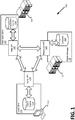
- FIGURE 1 illustrates an example environment 100 in which the modification of user settings across platforms may be practiced.
- the example environment 100 includes a client machine 110, a rights server 120, and an application host 130, which are all examples of computing devices.
- the client machine 110 provides a user interface (UI) by which a user may interact with programs and change the settings for one or more programs across devices.
- the application host 130 provides web applications 132 to the client machine 110, which may be accessed via a local client 112 running on the client machine 110 to provide the program functionality to the user.
- the rights server 120 determines which local clients 112 may affect which settings of which web applications 132, and which web applications 132 may affect which settings of which local clients 112.
- FIGURE 1 illustrates an example environment 100 in which the modification of user settings across platforms may be practiced.
- the example environment 100 includes a client machine 110, a rights server 120, and an application host 130, which are all examples of computing devices.
- the client machine 110 provides a user interface (UI) by which a user may interact
- the client machine 110, the rights server 120, and the application host 130 are illustrative of a multitude of computing systems including, without limitation, desktop computer systems, wired and wireless computing systems, mobile computing systems (e.g., mobile telephones, netbooks, tablet or slate type computers, notebook computers, and laptop computers), hand-held devices, multiprocessor systems, microprocessor-based or programmable consumer electronics, minicomputers, and mainframe computers.
- mobile computing systems e.g., mobile telephones, netbooks, tablet or slate type computers, notebook computers, and laptop computers
- hand-held devices e.g., multiprocessor systems, microprocessor-based or programmable consumer electronics, minicomputers, and mainframe computers.
- multiprocessor systems e.g., microprocessor-based or programmable consumer electronics
- minicomputers e.g., minicomputers, and mainframe computers.
- the client machine 110 is accessed locally and/or by a network, which may include the Internet, a Local Area Network (LAN), a private distributed network for an entity (e.g., a company, a university, a government agency), a wireless ad hoc network, a Virtual Private Network (VPN) or other direct data link (e.g., Bluetooth connection, a directly wired link).
- a network may include the Internet, a Local Area Network (LAN), a private distributed network for an entity (e.g., a company, a university, a government agency), a wireless ad hoc network, a Virtual Private Network (VPN) or other direct data link (e.g., Bluetooth connection, a directly wired link).
- Data are transferred between the client machine 110, the rights server 120, and the application host 130 for sharing settings, notifications, and other communications.
- the network may be exclusively used for the distribution of settings or may be accessed by the computing devices for communication with devices that are not part of the distribution group.
- the client machine 110 accepts inputs from the user, who may access a web application 132 provided over a network via a local client 112.
- the local client 112 may be a thin client, such as a web browser, which sends information to the application host 130 for the provision of the web application 132 as a web-based program. Examples of web-based programs include Google DocsTM or Google SheetsTM (available from Alphabet, Inc. of Mountain View, CA) or the Office 365TM online productivity suite (available from Microsoft, Corp. of Redmond, WA).
- the local client 112 may also be a local program that is in communication with a web-based equivalent or an online storage solution linked with the program. For example, the Pages® or WordTM word-processing programs (available from Apple, Inc.
- Cupertino, CA and Microsoft, Corp., respectively are examples of local programs that may be in communication with web-based versions of those programs or storage solutions, such as, for example, Google DriveTM or OneDrive® (available from Alphabet, Inc. and Microsoft, Corp., respectively).
- a user Via the local client 112, a user may be presented with a user interface (UI) element or a dialog to change settings for the program and other programs to which the user has access rights.
- UI user interface
- These settings are stored locally in the client cache 114 and remotely in the application cache 134.
- the settings are shared between the local client 112 and the web application 132 via Application Program Interfaces (API) such as the suite API 116 on the local client 112 and the web API 136 on the application host 130.
- API Application Program Interfaces
- the suite API 116 enables the user to change exposed settings (i.e., those settings which the user is enabled to adjust) locally in the client cache 114 and remotely in the application cache 134 for the program that the user is accessing and for multiple programs while those programs are in an inactive state (i.e., are not in active memory or being "run" on the local client 112).
- a user may access a settings dialog in a word processing application and change settings for the word processing application, as well as a spreadsheet application, an email application, a presentation application, etc., from the same settings dialog without leaving the word processing application or entering the other applications.
- the web API 136 commits settings changes, made on the local client 112 and transmitted via the suite API 116, to the application caches 134 of affected web applications 132, but also transmits those changes to local clients 112 to ensure that the settings remain synchronized across platforms.
- a user on a first client machine 110 e.g., a smartphone
- a user may opt a given client machine 110 or local client 112 out of receiving updates to settings (or the client machine 110 or local client 112 may lack network connectivity), in which case the settings stored in the client cache 114 will be used for the associated local client 112.
- the application host 130 may provide a first web application 132, a second web application 132, and a third web application 132, for which a user wishes to change a "default page size” setting, but an administrative user may restrict the user from changing the "default page size” setting in the first web application 132 and the developers of the second web application 132 may have hidden (i.e., prevented the exposure of) the "default page size" setting on the web-based version of the application, leaving the user the ability to change the setting only for the third web application 132 despite all three example applications including this property.
- a user may be restricted from changing language options (and other settings used outside of the application), author identifiers (and other personal information used within the application), or favorites (and other settings that rely on local content).
- the rights server 120 hosts the rights manager 122, which is an application that determines which web applications 132 the user is authorized to access, enables the suite API 116 to present only those applications to the user for which settings may be modified, and regulates which client machines 110 the web API 136 accepts settings changes from or transmits settings changes to.
- the rights server 120 may run on the same computing device as the client machine 110 or the application host 130.
- the rights manager 122 communicates with the local client 112 and web applications 132 via the restriction API 126, and determines which licenses 124 the user has for various web applications 132 and whether those licenses are available for the particular client machine 110 that the user is currently using.
- the licenses 124 stored by the rights server 120 may be machine licenses (tied to a given computing device or set of computing devices), site licenses (tied to a given computing domain for a given number of "seats"), user licenses (tied to a given user), or combinations thereof. Licenses 124 may set various permissions for various users (e.g., a guest user, a tenant user, an administrative user) and may vary across applications.
- the local client 112 when in communication with the rights server 120 and the application host 130, is operable to provide to the user a single dialog in a given application by which the user may browse user settings and make modifications thereto for applications (including and in addition to the application providing the dialog) to which the user has access.
- Applications for which the user does not have access i.e., lacks a license 124 ) or for which user settings are not available, are not presented in the dialog or are presented as "grayed out" and/or stating how that setting may be modified (e.g., locally modifiable only, administrator rights required).
- the user may filter and rearrange the presentation of settings in the dialog to affect their presentation in the UI to navigate and browse the settings.
- the user may make modifications to the settings via the dialog, which will be transmitted to the various web applications 132 and/or received by other client machines 110 associated with the user that are in communication with the rights server 120 and application host 130 , thereby enabling the propagation of settings across programs and devices with reduced use of processing and memory resources compared to systems that require multiple dialogs that are specific to programs or devices.
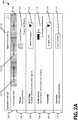
- FIGURES 2A-F illustrate various example dialogs 200 in which settings across programs and devices may be aggregated and by which a user may browse and modify those settings.
- the dialogs 200 include several user interface elements which will be identifiable from the illustrations, and alternate arrangements of data, different controls, and different data are possible in other dialogs, and thus, the illustrated dialogs 200 are non-limiting examples.
- a dialog 200 is shown for a user to manipulate settings organized into groups.
- Each group of settings is associated with a tab 210 in the illustrated dialog 200 , and a tab 210 for a "productivity suite" group of setting is shown as highlighted and active.
- the settings and controls 220 to modify the settings are shown for the active group.
- the controls 220 may take many forms in various aspects, such as, for example: list boxes, drop-down-lists, a date picker, combo boxes, text boxes, slider bars, radio buttons, check boxes, rotary selectors, spinners, buttons, etc.
- Each settings group displayed may include a preview 230 and one or more controls 220.
- the dialog 200 also includes a search bar 240 for a user to set search criteria by which to find programs or settings matching or related to the search criteria to view or modify.
- the controls 220 may cause the displayed setting to expand from an initial display into a detailed display, such as is shown in FIGURE 2B relative to FIGURE 2A .
- the preview 230 for the "theme" group of settings is expanded to allow the user greater control and more space in the graphical user interface to display options related to the group that is of interest to the user.
- sub-tabs, pop-up windows, and scroll bars may be provided to allow for more information to be included that can be shown in a given display area and the amount of expansion of a preview 230 may vary in different aspects.
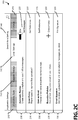
- FIGURE 2C illustrates a dialog 200 when a different tab 210 has been selected than is illustrated in FIGURE 2A (the "email settings” tab 210 instead of the “productivity suite” tab 210 ).
- FIGURE 2D shows an expanded view of the "automatic replies" group from FIGURE 2C .
- the settings modified from a selected tab 210 will affect the program or programs that are grouped into the dialog 200. For example, when the "email settings" tab 210 is selected, settings related to an email application will be displayed for the user to view and potentially modify.
- a tab 210 may encompass settings for multiple applications (e.g., a productivity suite tab 210 may affect a word processor, a spreadsheet application, a presentation application, etc.) and one application may have its settings broken across multiple tabs 210 (e.g., an email application may have settings broken into a "calendar settings” tab 210 , an "email settings” tab 210 , and a "contacts” tab 210 ).
- a productivity suite tab 210 may affect a word processor, a spreadsheet application, a presentation application, etc.
- one application may have its settings broken across multiple tabs 210 (e.g., an email application may have settings broken into a "calendar settings” tab 210 , an "email settings” tab 210 , and a "contacts” tab 210 ).
- the exact number of tabs 210 and the settings grouped under each tab 210 may be set by a developer and may vary in different aspects.
- the search bar 240 allows a user to input search criteria to locate settings either within a specific tab 210 or independently of a tab 210 .
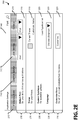
- FIGURE 2E illustrates a dialog 200 showing an example search criteria for "font" input into the search bar 240 returning various settings related to fonts across several applications. For example, a settings group for a "default font,” “theme,” “custom typefaces,” “language,” and “customize menu” may all implicate font selection/manipulation/presentation in some way in one or more applications and will be returned in response to the search criteria.
- the search criteria are checked against the search metadata to determine which user settings are related to the search criteria.
- the previews 230 for the settings may be organized in the dialog 200 according to a relevance of the settings group to the search criteria, a number of applications (licensed or regardless of license status) referenced by the settings group, a frequency of modification of the settings within the settings group, alphabetically, or combinations thereof.
- FIGURE 2F illustrates a dialog 200 showing an expansion of the "default font" preview 230 of FIGURE 2E .
- the applications affected by the setting whose preview 230 was selected are shown with selectors 250 associated with each application so that the user may actuate or un-actuate a selector 250 and have the given setting applied or not applied to the associated application.
- selectors 250 associated with each application so that the user may actuate or un-actuate a selector 250 and have the given setting applied or not applied to the associated application.
- the application may retain the current state of the selected setting, the user may be prompted to set a different state for that setting in the application, or the application may be set into a sub-grouping that the user may affect separately.
- each sub-group may be displayed in conjunction with different previews 230 or different controls 220 within the same preview 230 to distinguish each sub-group and allow the user to move a given program from one sub-group to another.
- CAD Computer Aided Drafting
- alerts 260 are illustrated in the dialog 200 that indicate that a given application cannot or does not accept a given setting from the dialog 200 . Alerts 260 may be shown with icons, text explanations, highlighting (e.g., graying out the associated selector 250 or name) and combinations thereof.
- FIGURE 3 is a flowchart showing general stages involved in an example method 300 for providing a user with a dialog by which settings across programs and devices may be aggregated and with which a user may browse and modify those settings.
- Method 300 begins at OPERATION 310 when a user command to change settings is received. In various aspects, such a command may be received when a user clicks on a UI element (such as an icon of a gear) or a menu item for settings, options, themes, master document, template, or the like.
- Method 300 then proceeds to OPERATION 320 , where the application data needed to provide the dialog are downloaded. These data include listings of the exposed settings that a user can change, what the current settings are for the user, and metadata needed to search and browse the settings. Depending on which data are retrieved, and the sources from which they are retrieved, the provision of the dialog will change to match the available data.
- DECISION 330 it is determined whether any data relating to exposed settings have been retrieved. If no data are retrieved, or data indicating that no settings are exposed for the user are retrieved, method 300 may conclude or continue trying to download data for exposed settings. As will be appreciated, a timeout length of time or a number of attempts to try to find exposed settings may be set in the local client 112 so that method 300 will conclude once that value is reached. If data are retrieved that indicate settings are exposed for the user to modify, method 300 proceeds to DECISION 340.
- DECISION 340 it is determined whether the user's current settings have been retrieved. If the user's current settings have not been retrieved, method 300 proceeds to OPERATION 380. If the user's current settings have been retrieved, method 300 proceeds to DECISION 350 , where it is determined whether the user's current settings were retrieved from a client cache 114 or an application cache 134 for the relevant application. If it is determined that the settings were retrieved from a client cache 114 , a request is made at OPERATION 355 to the application cache 134 for the user's current settings. If the request made at OPERATION 355 fails, method 300 proceeds to OPERATION 380 .
- a timeout length of time or a number of attempts to try to retrieve the user's settings from the application cache 134 may be set in the local client 112 so that method 300 will proceed to OPERATION 380 once that value is reached. If the user's current settings have been retrieved from the application cache 134 , either at DECISION 350 or at OPERATION 355 , method 300 proceeds to DECISION 360 .
- DECISION 360 it is determined whether the search metadata were retrieved. If no search metadata were retrieved, method 300 proceeds to OPERATION 365 , where search functionality is disabled in the dialog. Once the search functionality has been disabled or it is determined in DECISION 360 that the search metadata were retrieved, method 300 proceeds to OPERATION 370 .
- OPERATION 370 provides an editable dialog by which a user may edit the settings for multiple applications across one or more devices, whereas OPERATION 380 provides a fallback mode for the dialog.
- the dialog in OPERATION 370 presents the user's settings as they are known across devices to the application hosts 130 and may be searchable (depending on the results of DECISION 360 ) and organizable based on the application, the setting (e.g., page size, font, theme, style, start page, notification policies, save policies, contact preferences, language), the time of last editing the setting, etc., and may be grouped alphabetically, thematically (e.g., all font settings are placed together), chronologically (e.g., least recently modified first, most recently modified first), based on frequency (e.g., settings modified most often, settings appearing in the most applications), etc.
- a user may browse the dialog and make changes, which will be transmitted by the suite API 116 to the web APIs 136 of affected web applications 132 so that the change will propagate from the one dialog to affect multiple applications.
- Various examples of the dialog are shown in FIGURES 2A-G.
- a fallback dialog is provided to the user. This may be done temporarily while the data to build the full dialog are retrieved and processed, so as to reduce user frustration while the full dialog is rendered or to illustrate what settings are exposed, but may be unavailable due to connectivity issues or group policies that forbid the modification of those settings. For example, when no current settings for the user are known, the settings shown in the example dialogs of FIGURES 2A-G (or other dialogs) may be shown with no value (e.g., just a category for the setting is shown or available options are shown without a highlight around a currently chosen option).
- the settings shown in the example dialogs of FIGURES 2A-G may be locked or grayed out so that the user cannot modify them or additional information will be shown to the user to indicate that changes made will only affect the local client 112 and will not be distributed out to the web-based programs or storage solutions.
- Method 300 concludes after OPERATION 370 or OPERATION 380 when the user commits a change or closes the dialog.
- program modules include routines, programs, components, data structures, and other types of structures that perform particular tasks or implement particular abstract data types.
- computing systems including, without limitation, desktop computer systems, wired and wireless computing systems, mobile computing systems (e.g., mobile telephones, netbooks, tablet or slate type computers, notebook computers, and laptop computers), hand-held devices, multiprocessor systems, microprocessor-based or programmable consumer electronics, minicomputers, and mainframe computers.
- mobile computing systems e.g., mobile telephones, netbooks, tablet or slate type computers, notebook computers, and laptop computers
- hand-held devices e.g., multiprocessor systems, microprocessor-based or programmable consumer electronics, minicomputers, and mainframe computers.
- the aspects and functionalities described herein operate over distributed systems (e.g., cloud-based computing systems), where application functionality, memory, data storage and retrieval and various processing functions are operated remotely from each other over a distributed computing network, such as the Internet or an intranet.
- a distributed computing network such as the Internet or an intranet.
- user interfaces and information of various types are displayed via on-board computing device displays or via remote display units associated with one or more computing devices. For example, user interfaces and information of various types are displayed and interacted with on a wall surface onto which user interfaces and information of various types are projected.
- Interaction with the multitude of computing systems with which implementations are practiced include, keystroke entry, touch screen entry, voice or other audio entry, gesture entry where an associated computing device is equipped with detection (e.g., camera) functionality for capturing and interpreting user gestures for controlling the functionality of the computing device, and the like.
- detection e.g., camera
- FIGURES 4-6 and the associated descriptions provide a discussion of a variety of operating environments in which examples are practiced.
- the devices and systems illustrated and discussed with respect to FIGURES 4-6 are for purposes of example and illustration and are not limiting of a vast number of computing device configurations that are utilized for practicing aspects, described herein.
- FIGURE 4 is a block diagram illustrating physical components (i.e., hardware) of a computing device 400 with which examples of the present disclosure may be practiced.
- the computing device 400 includes at least one processing unit 402 and a system memory 404.
- the system memory 404 comprises, but is not limited to, volatile storage (e.g., random access memory), non-volatile storage (e.g., read-only memory), flash memory, or any combination of such memories.
- the system memory 404 includes an operating system 405 and one or more program modules 406 suitable for running software applications 450.
- the system memory 404 includes a local client 112 , web application 132 , and/or rights manager 122 , operable to enable a software application 450 to employ the teachings of the present disclosure via stored instructions.
- the operating system 405 for example, is suitable for controlling the operation of the computing device 400 .
- aspects are practiced in conjunction with a graphics library, other operating systems, or any other application program, and is not limited to any particular application or system. This basic configuration is illustrated in FIGURE 4 by those components within a dashed line 408.
- the computing device 400 has additional features or functionality.
- the computing device 400 includes additional data storage devices (removable and/or non-removable) such as, for example, magnetic disks, optical disks, or tape.
- additional storage is illustrated in FIGURE 4 by a removable storage device 409 and a non-removable storage device 410 .
- a number of program modules and data files are stored in the system memory 404. While executing on the processing unit 402 , the program modules 406 (e.g., local client 112 , web application 132 , and/or rights manager 122 ) perform processes including, but not limited to, one or more of the stages of the method 300 illustrated in FIGURE 3 . According to an aspect, other program modules are used in accordance with examples and include applications such as electronic mail and contacts applications, word processing applications, spreadsheet applications, database applications, slide presentation applications, drawing or computer-aided application programs, etc.
- applications such as electronic mail and contacts applications, word processing applications, spreadsheet applications, database applications, slide presentation applications, drawing or computer-aided application programs, etc.
- the computing device 400 has one or more input device(s) 412 such as a keyboard, a mouse, a pen, a sound input device, a touch input device, etc.
- the output device(s) 414 such as a display, speakers, a printer, etc. are also included according to an aspect.
- the aforementioned devices are examples and others may be used.
- the computing device 400 includes one or more communication connections 416 allowing communications with other computing devices 418. Examples of suitable communication connections 416 include, but are not limited to, radio frequency (RF) transmitter, receiver, and/or transceiver circuitry; universal serial bus (USB), parallel, and/or serial ports.
- RF radio frequency
- USB universal serial bus
- Computer readable media includes computer storage media apparatuses and articles of manufacture.
- Computer storage media include volatile and nonvolatile, removable and non-removable media implemented in any method or technology for storage of information, such as computer readable instructions, data structures, or program modules.
- the system memory 404 , the removable storage device 409 , and the non-removable storage device 410 are all computer storage media examples (i.e., memory storage).
- computer storage media include RAM, ROM, electrically erasable programmable read-only memory (EEPROM), flash memory or other memory technology, CD-ROM, digital versatile disks (DVD) or other optical storage, magnetic cassettes, magnetic tape, magnetic disk storage or other magnetic storage devices, or any other article of manufacture which can be used to store information and which can be accessed by the computing device 400 .
- any such computer storage media is part of the computing device 400 .
- Computer storage media do not include a carrier wave or other propagated data signal.
- communication media are embodied by computer readable instructions, data structures, program modules, or other data in a modulated data signal, such as a carrier wave or other transport mechanism, and include any information delivery media.
- modulated data signal describes a signal that has one or more characteristics set or changed in such a manner as to encode information in the signal.
- communication media include wired media such as a wired network or direct-wired connection, and wireless media such as acoustic, radio frequency (RF), infrared, and other wireless media.
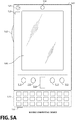
- FIGURES 5A and 5B illustrate a mobile computing device 500 , for example, a mobile telephone, a smart phone, a tablet personal computer, a laptop computer, and the like, with which aspects may be practiced.
- a mobile computing device 500 for example, a mobile telephone, a smart phone, a tablet personal computer, a laptop computer, and the like, with which aspects may be practiced.
- FIGURE 5A an example of a mobile computing device 500 for implementing the aspects is illustrated.
- the mobile computing device 500 is a handheld computer having both input elements and output elements.
- the mobile computing device 500 typically includes a display 505 and one or more input buttons 510 that allow the user to enter information into the mobile computing device 500 .
- the display 505 of the mobile computing device 500 functions as an input device (e.g., a touch screen display). If included, an optional side input element 515 allows further user input.
- the side input element 515 is a rotary switch, a button, or any other type of manual input element.
- mobile computing device 500 incorporates more or fewer input elements.
- the display 505 may not be a touch screen in some examples.
- the mobile computing device 500 is a portable phone system, such as a cellular phone.
- the mobile computing device 500 includes an optional keypad 535 .
- the optional keypad 535 is a physical keypad.
- the optional keypad 535 is a "soft" keypad generated on the touch screen display.
- the output elements include the display 505 for showing a graphical user interface (GUI), a visual indicator 520 (e.g., a light emitting diode), and/or an audio transducer 525 (e.g., a speaker).
- GUI graphical user interface
- the mobile computing device 500 incorporates a vibration transducer for providing the user with tactile feedback.
- the mobile computing device 500 incorporates a peripheral device port 540 , such as an audio input (e.g., a microphone jack), an audio output (e.g., a headphone jack), and a video output (e.g., a HDMI port) for sending signals to or receiving signals from an external device.
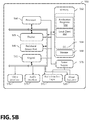
- FIGURE 5B is a block diagram illustrating the architecture of one example of a mobile computing device. That is, the mobile computing device 500 incorporates a system (i.e., an architecture) 502 to implement some examples.
- the system 502 is implemented as a "smart phone" capable of running one or more applications (e.g., browser, e-mail, calendaring, contact managers, messaging clients, games, and media clients/players).
- the system 502 is integrated as a computing device, such as an integrated personal digital assistant (PDA) and wireless phone.
- PDA personal digital assistant
- one or more application programs 550 are loaded into the memory 562 and run on or in association with the operating system 564 .
- Examples of the application programs include phone dialer programs, e-mail programs, personal information management (PIM) programs, word processing programs, spreadsheet programs, Internet browser programs, messaging programs, and so forth.
- local client 112 is loaded into memory 562 .
- the system 502 also includes a non-volatile storage area 568 within the memory 562. The non-volatile storage area 568 is used to store persistent information that should not be lost if the system 502 is powered down.
- the application programs 550 may use and store information in the non-volatile storage area 568 , such as e-mail or other messages used by an e-mail application, and the like.
- a synchronization application (not shown) also resides on the system 502 and is programmed to interact with a corresponding synchronization application resident on a host computer to keep the information stored in the non-volatile storage area 568 synchronized with corresponding information stored at the host computer.
- other applications may be loaded into the memory 562 and run on the mobile computing device 500 .
- the system 502 has a power supply 570 , which is implemented as one or more batteries.
- the power supply 570 further includes an external power source, such as an AC adapter or a powered docking cradle that supplements or recharges the batteries.
- the system 502 includes a radio 572 that performs the function of transmitting and receiving radio frequency communications.
- the radio 572 facilitates wireless connectivity between the system 502 and the "outside world," via a communications carrier or service provider. Transmissions to and from the radio 572 are conducted under control of the operating system 564. In other words, communications received by the radio 572 may be disseminated to the application programs 550 via the operating system 564 , and vice versa.
- the visual indicator 520 is used to provide visual notifications and/or an audio interface 574 is used for producing audible notifications via the audio transducer 525 .
- the visual indicator 520 is a light emitting diode (LED) and the audio transducer 525 is a speaker.
- LED light emitting diode
- the LED may be programmed to remain on indefinitely until the user takes action to indicate the powered-on status of the device.
- the audio interface 574 is used to provide audible signals to and receive audible signals from the user.
- the audio interface 574 may also be coupled to a microphone to receive audible input, such as to facilitate a telephone conversation.
- the system 502 further includes a video interface 576 that enables an operation of an on-board camera 530 to record still images, video stream, and the like.
- a mobile computing device 500 implementing the system 502 has additional features or functionality.
- the mobile computing device 500 includes additional data storage devices (removable and/or non-removable) such as, magnetic disks, optical disks, or tape.
- additional storage is illustrated in FIGURE 5B by the non-volatile storage area 568 .
- data/information generated or captured by the mobile computing device 500 and stored via the system 502 are stored locally on the mobile computing device 500 , as described above.
- the data are stored on any number of storage media that are accessible by the device via the radio 572 or via a wired connection between the mobile computing device 500 and a separate computing device associated with the mobile computing device 500 , for example, a server computer in a distributed computing network, such as the Internet.
- a server computer in a distributed computing network such as the Internet.
- data/information are accessible via the mobile computing device 500 via the radio 572 or via a distributed computing network.
- such data/information are readily transferred between computing devices for storage and use according to well-known data/information transfer and storage means, including electronic mail and collaborative data/information sharing systems.
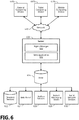
- FIGURE 6 illustrates one example of the architecture of a system for automatic presentation of blocks of repeated content as described above.
- Content developed, interacted with, or edited in association with the web application 132 , and/or rights manager 122 is enabled to be stored in different communication channels or other storage types.
- various documents may be stored using a directory service 622 , a web portal 624 , a mailbox service 626 , an instant messaging store 628 , or a social networking site 630 .
- the web application 132 , and/or rights manager 122 is operative to use any of these types of systems or the like for distribution of selected content, as described herein.
- a server 620 provides the web application 132 , and/or rights manager 122 to clients 605a-c (generally clients 605 ), which may be run client machines 110.
- the server 620 is a web server providing web application 132 , and/or rights manager 122 over the web.
- the server 620 provides web application 132 , and/or rights manager 122 over the web to clients 605 through a network 640.
- the client computing device is implemented and embodied in a personal computer 605a , a tablet computing device 605b or a mobile computing device 605c (e.g., a smart phone), or other computing device. Any of these examples of the client computing device are operable to obtain content from the store 616.
Landscapes
- Engineering & Computer Science (AREA)
- Software Systems (AREA)
- Theoretical Computer Science (AREA)
- General Engineering & Computer Science (AREA)
- Physics & Mathematics (AREA)
- General Physics & Mathematics (AREA)
- Computer Networks & Wireless Communication (AREA)
- Signal Processing (AREA)
- Human Computer Interaction (AREA)
- Computer Security & Cryptography (AREA)
- Information Transfer Between Computers (AREA)
- User Interface Of Digital Computer (AREA)
Description
- Computer programs often include various settings that users may change to customize the behavior of a given program. For example, a user may change the default margins in a word processing application so that a newly created document will fit a given size of paper (e.g., A4, A3, 8 ½ × 11, legal). To change these settings across multiple computer programs or on multiple devices, however, users must change the settings application by application and device by device, which is labor intensive for the user, and requires additional processing resources to be expended each time a settings dialog is presented to the user which is limited to a given program.
-
GB 2 510 199 A -
US 2011/283215 A1 relates to a web application dialog user interface for presenting users with controls for viewing, editing, and otherwise managing content through the web application. Consistency in style and order of control elements in the user interface with control elements of a standard application user interface, launching of the dialog without a page refresh, and maintenance of task continuity provide users a seamless experience in managing their documents through the web application without loss of context. -
US 2015/370581 A1 relates to a method for managing settings of applications. A request from an application to store runtime settings currently being used by the application is identified. In response to identifying the request, the runtime settings are then stored on in a repository of runtime settings. In one or more examples, the application is running on an operating system on a computer system, and the request is communicated through a common system service of the operating system. - It is the object of the present invention to provide methods and systems for enabling efficient modification of user settings across programs and devices.
- This object is solved by the subject matter of the independent claims.
- Preferred embodiments are defined by the dependent claims.
- This summary is provided to introduce a selection of concepts in a simplified form that are further described below in the Detailed Description section. This summary is not intended to identify all features of the claimed subject matter, nor is it intended as limiting the scope of the claimed subject matter.
- Systems and methods are provided herein for enabling a more efficient modification of user settings across programs or across devices. A dialog is provided within a first application that provides the user the ability to view multiple applications in which a setting may be modified. Within the dialog, user settings for programs available to the user are aggregated for the user to browse and modify. The settings are stored to a remote storage medium, such as on the "cloud," and are distributed to connected devices to enable the propagation of settings across programs with reduced use of processing and memory resources.
- The details of one or more aspects are set forth in the accompanying drawings and description below. Other features and advantages will be apparent from a reading of the following detailed description and a review of the associated drawings. It is to be understood that the following detailed description is explanatory only and is not restrictive; the proper scope of the present disclosure is set by the claims.
- The accompanying drawings, which are incorporated in and constitute a part of this disclosure, illustrate various aspects of the present disclosure. In the drawings:
-
FIGURE 1 illustrates an example environment in which the modification of user settings across platforms may be practiced; -
FIGURES 2A-F illustrate various example dialogs in which settings across programs and devices may be aggregated and by which a user may browse and modify those settings; -
FIGURE 3 is a flowchart showing general stages involved in an example method for providing a user with a dialog by which settings across programs and devices may be aggregated and a user may browse and modify those settings; -
FIGURE 4 is a block diagram illustrating physical components of a computing device with which examples may be practiced; -
FIGURES 5A and5B are block diagrams of a mobile computing device with which aspects may be practiced; and -
FIGURE 6 is a block diagram of a distributed computing system in which aspects may be practiced. - The following detailed description refers to the accompanying drawings. Wherever possible, the same reference numbers are used in the drawings and the following description to refer to the same or similar elements. While aspects of the present disclosure may be described, modifications, adaptations, and other implementations are possible. For example, substitutions, additions, or modifications may be made to the elements illustrated in the drawings, and the methods described herein may be modified by substituting, reordering, or adding stages to the disclosed methods. Accordingly, the following detailed description does not limit the present disclosure, but instead, the proper scope of the present disclosure is defined by the appended claims. Examples may take the form of a hardware implementation, or an entirely software implementation, or an implementation combining software and hardware aspects. The following detailed description is, therefore, not to be taken in a limiting sense.
- Systems and methods are provided herein for enabling a more efficient modification of user settings across programs or across devices. A dialog is provided within a first application that provides the user the ability to view multiple applications in which a setting may be modified. Within the dialog, user settings for programs available to the user are aggregated for the user to browse and modify. The settings are stored to a remote storage medium, such as the cloud, and distributed to connected devices to enable the propagation of settings across programs and devices with reduced use of processing and memory resources.
-
FIGURE 1 illustrates anexample environment 100 in which the modification of user settings across platforms may be practiced. Theexample environment 100 includes aclient machine 110, arights server 120, and anapplication host 130, which are all examples of computing devices. Theclient machine 110 provides a user interface (UI) by which a user may interact with programs and change the settings for one or more programs across devices. Theapplication host 130 providesweb applications 132 to theclient machine 110, which may be accessed via alocal client 112 running on theclient machine 110 to provide the program functionality to the user. Therights server 120 determines whichlocal clients 112 may affect which settings of whichweb applications 132, and whichweb applications 132 may affect which settings of whichlocal clients 112. As will be appreciated, although only one of each machine and its components are illustrated inFIGURE 1 , environments that include multiple of one or more of the illustrated machines, which may each run multiple components are contemplated by and included in the present disclosure. - The
client machine 110, therights server 120, and theapplication host 130 are illustrative of a multitude of computing systems including, without limitation, desktop computer systems, wired and wireless computing systems, mobile computing systems (e.g., mobile telephones, netbooks, tablet or slate type computers, notebook computers, and laptop computers), hand-held devices, multiprocessor systems, microprocessor-based or programmable consumer electronics, minicomputers, and mainframe computers. The hardware of these computing systems is discussed in greater detail in regard toFIGURES 4 ,5A ,5B , and6 . - In various aspects, the
client machine 110 is accessed locally and/or by a network, which may include the Internet, a Local Area Network (LAN), a private distributed network for an entity (e.g., a company, a university, a government agency), a wireless ad hoc network, a Virtual Private Network (VPN) or other direct data link (e.g., Bluetooth connection, a directly wired link). Data are transferred between theclient machine 110, therights server 120, and theapplication host 130 for sharing settings, notifications, and other communications. As will be understood, the network may be exclusively used for the distribution of settings or may be accessed by the computing devices for communication with devices that are not part of the distribution group. - The
client machine 110 accepts inputs from the user, who may access aweb application 132 provided over a network via alocal client 112. Thelocal client 112 may be a thin client, such as a web browser, which sends information to theapplication host 130 for the provision of theweb application 132 as a web-based program. Examples of web-based programs include Google Docs™ or Google Sheets™ (available from Alphabet, Inc. of Mountain View, CA) or the Office 365™ online productivity suite (available from Microsoft, Corp. of Redmond, WA). Thelocal client 112 may also be a local program that is in communication with a web-based equivalent or an online storage solution linked with the program. For example, the Pages® or Word™ word-processing programs (available from Apple, Inc. of Cupertino, CA and Microsoft, Corp., respectively) are examples of local programs that may be in communication with web-based versions of those programs or storage solutions, such as, for example, Google Drive™ or OneDrive® (available from Alphabet, Inc. and Microsoft, Corp., respectively). - Via the
local client 112, a user may be presented with a user interface (UI) element or a dialog to change settings for the program and other programs to which the user has access rights. These settings are stored locally in theclient cache 114 and remotely in theapplication cache 134. The settings are shared between thelocal client 112 and theweb application 132 via Application Program Interfaces (API) such as thesuite API 116 on thelocal client 112 and theweb API 136 on theapplication host 130. Thesuite API 116 enables the user to change exposed settings (i.e., those settings which the user is enabled to adjust) locally in theclient cache 114 and remotely in theapplication cache 134 for the program that the user is accessing and for multiple programs while those programs are in an inactive state (i.e., are not in active memory or being "run" on the local client 112). For example, a user may access a settings dialog in a word processing application and change settings for the word processing application, as well as a spreadsheet application, an email application, a presentation application, etc., from the same settings dialog without leaving the word processing application or entering the other applications. Theweb API 136 commits settings changes, made on thelocal client 112 and transmitted via thesuite API 116, to theapplication caches 134 ofaffected web applications 132, but also transmits those changes tolocal clients 112 to ensure that the settings remain synchronized across platforms. For example, a user on a first client machine 110 (e.g., a smartphone) may change settings which theweb API 136 will commit to asecond client machine 110 that is associated with the same user (e.g., a personal computer) so that the user's settings will be consistently applied across devices. As will be appreciated, in various aspects, a user may opt a givenclient machine 110 orlocal client 112 out of receiving updates to settings (or theclient machine 110 orlocal client 112 may lack network connectivity), in which case the settings stored in theclient cache 114 will be used for the associatedlocal client 112. - Settings are exposed on a per application basis and may have additional restrictions placed thereon by administrators in a computing domain or the developers of the applications. For example, the
application host 130 may provide afirst web application 132, asecond web application 132, and athird web application 132, for which a user wishes to change a "default page size" setting, but an administrative user may restrict the user from changing the "default page size" setting in thefirst web application 132 and the developers of thesecond web application 132 may have hidden (i.e., prevented the exposure of) the "default page size" setting on the web-based version of the application, leaving the user the ability to change the setting only for thethird web application 132 despite all three example applications including this property. In another example, a user may be restricted from changing language options (and other settings used outside of the application), author identifiers (and other personal information used within the application), or favorites (and other settings that rely on local content). - The
rights server 120 hosts therights manager 122, which is an application that determines whichweb applications 132 the user is authorized to access, enables thesuite API 116 to present only those applications to the user for which settings may be modified, and regulates whichclient machines 110 theweb API 136 accepts settings changes from or transmits settings changes to. In various aspects, therights server 120 may run on the same computing device as theclient machine 110 or theapplication host 130. Therights manager 122 communicates with thelocal client 112 andweb applications 132 via therestriction API 126, and determines which licenses 124 the user has forvarious web applications 132 and whether those licenses are available for theparticular client machine 110 that the user is currently using. In various aspects, thelicenses 124 stored by therights server 120 may be machine licenses (tied to a given computing device or set of computing devices), site licenses (tied to a given computing domain for a given number of "seats"), user licenses (tied to a given user), or combinations thereof.Licenses 124 may set various permissions for various users (e.g., a guest user, a tenant user, an administrative user) and may vary across applications. - The
local client 112, when in communication with therights server 120 and theapplication host 130, is operable to provide to the user a single dialog in a given application by which the user may browse user settings and make modifications thereto for applications (including and in addition to the application providing the dialog) to which the user has access. Applications for which the user does not have access (i.e., lacks a license 124) or for which user settings are not available, are not presented in the dialog or are presented as "grayed out" and/or stating how that setting may be modified (e.g., locally modifiable only, administrator rights required). Additionally, the user may filter and rearrange the presentation of settings in the dialog to affect their presentation in the UI to navigate and browse the settings. The user may make modifications to the settings via the dialog, which will be transmitted to thevarious web applications 132 and/or received byother client machines 110 associated with the user that are in communication with therights server 120 andapplication host 130, thereby enabling the propagation of settings across programs and devices with reduced use of processing and memory resources compared to systems that require multiple dialogs that are specific to programs or devices. -
FIGURES 2A-F illustratevarious example dialogs 200 in which settings across programs and devices may be aggregated and by which a user may browse and modify those settings. As one of ordinary skill in the art will recognize, thedialogs 200 include several user interface elements which will be identifiable from the illustrations, and alternate arrangements of data, different controls, and different data are possible in other dialogs, and thus, the illustrateddialogs 200 are non-limiting examples. - As illustrated in
FIGURE 2A , adialog 200 is shown for a user to manipulate settings organized into groups. Each group of settings is associated with atab 210 in the illustrateddialog 200, and atab 210 for a "productivity suite" group of setting is shown as highlighted and active. The settings and controls 220 to modify the settings are shown for the active group. As will be appreciated, thecontrols 220 may take many forms in various aspects, such as, for example: list boxes, drop-down-lists, a date picker, combo boxes, text boxes, slider bars, radio buttons, check boxes, rotary selectors, spinners, buttons, etc. Each settings group displayed may include apreview 230 and one ormore controls 220. Thedialog 200 also includes asearch bar 240 for a user to set search criteria by which to find programs or settings matching or related to the search criteria to view or modify. - In various aspects the
controls 220 may cause the displayed setting to expand from an initial display into a detailed display, such as is shown inFIGURE 2B relative toFIGURE 2A . In thedialog 200 ofFIGURE 2B , in response to a user selecting the "customize theme"control 220, thepreview 230 for the "theme" group of settings is expanded to allow the user greater control and more space in the graphical user interface to display options related to the group that is of interest to the user. Although not illustrated, one of ordinary skill in the art will appreciate that sub-tabs, pop-up windows, and scroll bars may be provided to allow for more information to be included that can be shown in a given display area and the amount of expansion of apreview 230 may vary in different aspects. -
FIGURE 2C illustrates adialog 200 when adifferent tab 210 has been selected than is illustrated inFIGURE 2A (the "email settings"tab 210 instead of the "productivity suite" tab 210). Similarly,FIGURE 2D shows an expanded view of the "automatic replies" group fromFIGURE 2C . The settings modified from a selectedtab 210 will affect the program or programs that are grouped into thedialog 200. For example, when the "email settings"tab 210 is selected, settings related to an email application will be displayed for the user to view and potentially modify. Atab 210 may encompass settings for multiple applications (e.g., aproductivity suite tab 210 may affect a word processor, a spreadsheet application, a presentation application, etc.) and one application may have its settings broken across multiple tabs 210 (e.g., an email application may have settings broken into a "calendar settings"tab 210, an "email settings"tab 210, and a "contacts" tab 210). The exact number oftabs 210 and the settings grouped under eachtab 210 may be set by a developer and may vary in different aspects. - The
search bar 240 allows a user to input search criteria to locate settings either within aspecific tab 210 or independently of atab 210.FIGURE 2E illustrates adialog 200 showing an example search criteria for "font" input into thesearch bar 240 returning various settings related to fonts across several applications. For example, a settings group for a "default font," "theme," "custom typefaces," "language," and "customize menu" may all implicate font selection/manipulation/presentation in some way in one or more applications and will be returned in response to the search criteria. The search criteria are checked against the search metadata to determine which user settings are related to the search criteria. Thepreviews 230 for the settings may be organized in thedialog 200 according to a relevance of the settings group to the search criteria, a number of applications (licensed or regardless of license status) referenced by the settings group, a frequency of modification of the settings within the settings group, alphabetically, or combinations thereof. -
FIGURE 2F illustrates adialog 200 showing an expansion of the "default font"preview 230 ofFIGURE 2E . In the illustratedpreview 230, the applications affected by the setting whosepreview 230 was selected are shown withselectors 250 associated with each application so that the user may actuate or un-actuate aselector 250 and have the given setting applied or not applied to the associated application. In various aspects, when a given application does not have itsselector 250 actuated when a setting is applied, the application may retain the current state of the selected setting, the user may be prompted to set a different state for that setting in the application, or the application may be set into a sub-grouping that the user may affect separately. For example, if a user were to want two different default typefaces for different sub-groups of programs (e.g., Garamond for a word processor and presentation application, and Arial for a spreadsheet application and a Computer Aided Drafting (CAD) program), each sub-group may be displayed in conjunction withdifferent previews 230 ordifferent controls 220 within thesame preview 230 to distinguish each sub-group and allow the user to move a given program from one sub-group to another. - As will be appreciated, not every program that the
dialog 200 is in communication with will be able to accept all the chosen settings or have a license for the user to access that program. For example, and as is illustrated inFIGURE 2F , a NoteTaking application may refuse permission to modify the given setting via thedialog 200, a notepad program may not be able to apply an Arial typeface atsize 12, and a user may not have a valid license to access a CAD application. Therefore, alerts 260 are illustrated in thedialog 200 that indicate that a given application cannot or does not accept a given setting from thedialog 200.Alerts 260 may be shown with icons, text explanations, highlighting (e.g., graying out the associatedselector 250 or name) and combinations thereof. -
FIGURE 3 is a flowchart showing general stages involved in anexample method 300 for providing a user with a dialog by which settings across programs and devices may be aggregated and with which a user may browse and modify those settings.Method 300 begins atOPERATION 310 when a user command to change settings is received. In various aspects, such a command may be received when a user clicks on a UI element (such as an icon of a gear) or a menu item for settings, options, themes, master document, template, or the like.Method 300 then proceeds toOPERATION 320, where the application data needed to provide the dialog are downloaded. These data include listings of the exposed settings that a user can change, what the current settings are for the user, and metadata needed to search and browse the settings. Depending on which data are retrieved, and the sources from which they are retrieved, the provision of the dialog will change to match the available data. - At
DECISION 330, it is determined whether any data relating to exposed settings have been retrieved. If no data are retrieved, or data indicating that no settings are exposed for the user are retrieved,method 300 may conclude or continue trying to download data for exposed settings. As will be appreciated, a timeout length of time or a number of attempts to try to find exposed settings may be set in thelocal client 112 so thatmethod 300 will conclude once that value is reached. If data are retrieved that indicate settings are exposed for the user to modify,method 300 proceeds toDECISION 340. - At
DECISION 340, it is determined whether the user's current settings have been retrieved. If the user's current settings have not been retrieved,method 300 proceeds toOPERATION 380. If the user's current settings have been retrieved,method 300 proceeds toDECISION 350, where it is determined whether the user's current settings were retrieved from aclient cache 114 or anapplication cache 134 for the relevant application. If it is determined that the settings were retrieved from aclient cache 114, a request is made atOPERATION 355 to theapplication cache 134 for the user's current settings. If the request made atOPERATION 355 fails,method 300 proceeds toOPERATION 380. As will be appreciated, a timeout length of time or a number of attempts to try to retrieve the user's settings from theapplication cache 134 may be set in thelocal client 112 so thatmethod 300 will proceed toOPERATION 380 once that value is reached. If the user's current settings have been retrieved from theapplication cache 134, either atDECISION 350 or atOPERATION 355,method 300 proceeds toDECISION 360. - At
DECISION 360 it is determined whether the search metadata were retrieved. If no search metadata were retrieved,method 300 proceeds toOPERATION 365, where search functionality is disabled in the dialog. Once the search functionality has been disabled or it is determined inDECISION 360 that the search metadata were retrieved,method 300 proceeds toOPERATION 370. - In
method 300,OPERATION 370 provides an editable dialog by which a user may edit the settings for multiple applications across one or more devices, whereasOPERATION 380 provides a fallback mode for the dialog. The dialog inOPERATION 370 presents the user's settings as they are known across devices to the application hosts 130 and may be searchable (depending on the results of DECISION 360) and organizable based on the application, the setting (e.g., page size, font, theme, style, start page, notification policies, save policies, contact preferences, language), the time of last editing the setting, etc., and may be grouped alphabetically, thematically (e.g., all font settings are placed together), chronologically (e.g., least recently modified first, most recently modified first), based on frequency (e.g., settings modified most often, settings appearing in the most applications), etc. A user may browse the dialog and make changes, which will be transmitted by thesuite API 116 to theweb APIs 136 ofaffected web applications 132 so that the change will propagate from the one dialog to affect multiple applications. Various examples of the dialog are shown in FIGURES 2A-G. - In
OPERATION 380, a fallback dialog is provided to the user. This may be done temporarily while the data to build the full dialog are retrieved and processed, so as to reduce user frustration while the full dialog is rendered or to illustrate what settings are exposed, but may be unavailable due to connectivity issues or group policies that forbid the modification of those settings. For example, when no current settings for the user are known, the settings shown in the example dialogs of FIGURES 2A-G (or other dialogs) may be shown with no value (e.g., just a category for the setting is shown or available options are shown without a highlight around a currently chosen option). In another example, when the settings known for the user are known from theclient cache 114, but not from theapplication cache 134, the settings shown in the example dialogs of FIGURES 2A-G (or other dialogs) may be locked or grayed out so that the user cannot modify them or additional information will be shown to the user to indicate that changes made will only affect thelocal client 112 and will not be distributed out to the web-based programs or storage solutions. - When a change is made in the dialog to a setting, it may be committed immediately in the
local client 112 via theclient cache 114 as it is propagated to the remote application hosts 130 or the change may wait to take effect until confirmation from theapplication host 130 is received that the change has been committed to theapplication cache 134.Method 300 concludes afterOPERATION 370 orOPERATION 380 when the user commits a change or closes the dialog. - While implementations have been described in the general context of program modules that execute in conjunction with an application program that runs on an operating system on a computer, those skilled in the art will recognize that aspects may also be implemented in combination with other program modules. Generally, program modules include routines, programs, components, data structures, and other types of structures that perform particular tasks or implement particular abstract data types.
- The aspects and functionalities described herein may operate via a multitude of computing systems including, without limitation, desktop computer systems, wired and wireless computing systems, mobile computing systems (e.g., mobile telephones, netbooks, tablet or slate type computers, notebook computers, and laptop computers), hand-held devices, multiprocessor systems, microprocessor-based or programmable consumer electronics, minicomputers, and mainframe computers.
- In addition, according to an aspect, the aspects and functionalities described herein operate over distributed systems (e.g., cloud-based computing systems), where application functionality, memory, data storage and retrieval and various processing functions are operated remotely from each other over a distributed computing network, such as the Internet or an intranet. According to an aspect, user interfaces and information of various types are displayed via on-board computing device displays or via remote display units associated with one or more computing devices. For example, user interfaces and information of various types are displayed and interacted with on a wall surface onto which user interfaces and information of various types are projected. Interaction with the multitude of computing systems with which implementations are practiced include, keystroke entry, touch screen entry, voice or other audio entry, gesture entry where an associated computing device is equipped with detection (e.g., camera) functionality for capturing and interpreting user gestures for controlling the functionality of the computing device, and the like.
-
FIGURES 4-6 and the associated descriptions provide a discussion of a variety of operating environments in which examples are practiced. However, the devices and systems illustrated and discussed with respect toFIGURES 4-6 are for purposes of example and illustration and are not limiting of a vast number of computing device configurations that are utilized for practicing aspects, described herein. -
FIGURE 4 is a block diagram illustrating physical components (i.e., hardware) of acomputing device 400 with which examples of the present disclosure may be practiced. In a basic configuration, thecomputing device 400 includes at least oneprocessing unit 402 and asystem memory 404. According to an aspect, depending on the configuration and type of computing device, thesystem memory 404 comprises, but is not limited to, volatile storage (e.g., random access memory), non-volatile storage (e.g., read-only memory), flash memory, or any combination of such memories. According to an aspect, thesystem memory 404 includes anoperating system 405 and one ormore program modules 406 suitable for runningsoftware applications 450. According to an aspect, thesystem memory 404 includes alocal client 112,web application 132, and/orrights manager 122, operable to enable asoftware application 450 to employ the teachings of the present disclosure via stored instructions. Theoperating system 405, for example, is suitable for controlling the operation of thecomputing device 400. Furthermore, aspects are practiced in conjunction with a graphics library, other operating systems, or any other application program, and is not limited to any particular application or system. This basic configuration is illustrated inFIGURE 4 by those components within a dashedline 408. According to an aspect, thecomputing device 400 has additional features or functionality. For example, according to an aspect, thecomputing device 400 includes additional data storage devices (removable and/or non-removable) such as, for example, magnetic disks, optical disks, or tape. Such additional storage is illustrated inFIGURE 4 by aremovable storage device 409 and anon-removable storage device 410. - As stated above, according to an aspect, a number of program modules and data files are stored in the
system memory 404. While executing on theprocessing unit 402, the program modules 406 (e.g.,local client 112,web application 132, and/or rights manager 122) perform processes including, but not limited to, one or more of the stages of themethod 300 illustrated inFIGURE 3 . According to an aspect, other program modules are used in accordance with examples and include applications such as electronic mail and contacts applications, word processing applications, spreadsheet applications, database applications, slide presentation applications, drawing or computer-aided application programs, etc. - According to an aspect, the
computing device 400 has one or more input device(s) 412 such as a keyboard, a mouse, a pen, a sound input device, a touch input device, etc. The output device(s) 414 such as a display, speakers, a printer, etc. are also included according to an aspect. The aforementioned devices are examples and others may be used. According to an aspect, thecomputing device 400 includes one ormore communication connections 416 allowing communications withother computing devices 418. Examples ofsuitable communication connections 416 include, but are not limited to, radio frequency (RF) transmitter, receiver, and/or transceiver circuitry; universal serial bus (USB), parallel, and/or serial ports. - The term computer readable media, as used herein, includes computer storage media apparatuses and articles of manufacture. Computer storage media include volatile and nonvolatile, removable and non-removable media implemented in any method or technology for storage of information, such as computer readable instructions, data structures, or program modules. The
system memory 404, theremovable storage device 409, and thenon-removable storage device 410 are all computer storage media examples (i.e., memory storage). According to an aspect, computer storage media include RAM, ROM, electrically erasable programmable read-only memory (EEPROM), flash memory or other memory technology, CD-ROM, digital versatile disks (DVD) or other optical storage, magnetic cassettes, magnetic tape, magnetic disk storage or other magnetic storage devices, or any other article of manufacture which can be used to store information and which can be accessed by thecomputing device 400. According to an aspect, any such computer storage media is part of thecomputing device 400. Computer storage media do not include a carrier wave or other propagated data signal. - According to an aspect, communication media are embodied by computer readable instructions, data structures, program modules, or other data in a modulated data signal, such as a carrier wave or other transport mechanism, and include any information delivery media. According to an aspect, the term "modulated data signal" describes a signal that has one or more characteristics set or changed in such a manner as to encode information in the signal. By way of example, and not limitation, communication media include wired media such as a wired network or direct-wired connection, and wireless media such as acoustic, radio frequency (RF), infrared, and other wireless media.
-
FIGURES 5A and5B illustrate amobile computing device 500, for example, a mobile telephone, a smart phone, a tablet personal computer, a laptop computer, and the like, with which aspects may be practiced. With reference toFIGURE 5A , an example of amobile computing device 500 for implementing the aspects is illustrated. In a basic configuration, themobile computing device 500 is a handheld computer having both input elements and output elements. Themobile computing device 500 typically includes adisplay 505 and one ormore input buttons 510 that allow the user to enter information into themobile computing device 500. According to an aspect, thedisplay 505 of themobile computing device 500 functions as an input device (e.g., a touch screen display). If included, an optionalside input element 515 allows further user input. According to an aspect, theside input element 515 is a rotary switch, a button, or any other type of manual input element. In alternative examples,mobile computing device 500 incorporates more or fewer input elements. For example, thedisplay 505 may not be a touch screen in some examples. In alternative examples, themobile computing device 500 is a portable phone system, such as a cellular phone. According to an aspect, themobile computing device 500 includes anoptional keypad 535. According to an aspect, theoptional keypad 535 is a physical keypad. According to another aspect, theoptional keypad 535 is a "soft" keypad generated on the touch screen display. In various aspects, the output elements include thedisplay 505 for showing a graphical user interface (GUI), a visual indicator 520 (e.g., a light emitting diode), and/or an audio transducer 525 (e.g., a speaker). In some examples, themobile computing device 500 incorporates a vibration transducer for providing the user with tactile feedback. In yet another example, themobile computing device 500 incorporates aperipheral device port 540, such as an audio input (e.g., a microphone jack), an audio output (e.g., a headphone jack), and a video output (e.g., a HDMI port) for sending signals to or receiving signals from an external device. -
FIGURE 5B is a block diagram illustrating the architecture of one example of a mobile computing device. That is, themobile computing device 500 incorporates a system (i.e., an architecture) 502 to implement some examples. In one example, thesystem 502 is implemented as a "smart phone" capable of running one or more applications (e.g., browser, e-mail, calendaring, contact managers, messaging clients, games, and media clients/players). In some examples, thesystem 502 is integrated as a computing device, such as an integrated personal digital assistant (PDA) and wireless phone. - According to an aspect, one or
more application programs 550 are loaded into thememory 562 and run on or in association with theoperating system 564. Examples of the application programs include phone dialer programs, e-mail programs, personal information management (PIM) programs, word processing programs, spreadsheet programs, Internet browser programs, messaging programs, and so forth. According to an aspect,local client 112 is loaded intomemory 562. Thesystem 502 also includes anon-volatile storage area 568 within thememory 562. Thenon-volatile storage area 568 is used to store persistent information that should not be lost if thesystem 502 is powered down. Theapplication programs 550 may use and store information in thenon-volatile storage area 568, such as e-mail or other messages used by an e-mail application, and the like. A synchronization application (not shown) also resides on thesystem 502 and is programmed to interact with a corresponding synchronization application resident on a host computer to keep the information stored in thenon-volatile storage area 568 synchronized with corresponding information stored at the host computer. As should be appreciated, other applications may be loaded into thememory 562 and run on themobile computing device 500. - According to an aspect, the
system 502 has apower supply 570, which is implemented as one or more batteries. According to an aspect, thepower supply 570 further includes an external power source, such as an AC adapter or a powered docking cradle that supplements or recharges the batteries. - According to an aspect, the
system 502 includes aradio 572 that performs the function of transmitting and receiving radio frequency communications. Theradio 572 facilitates wireless connectivity between thesystem 502 and the "outside world," via a communications carrier or service provider. Transmissions to and from theradio 572 are conducted under control of theoperating system 564. In other words, communications received by theradio 572 may be disseminated to theapplication programs 550 via theoperating system 564, and vice versa. - According to an aspect, the
visual indicator 520 is used to provide visual notifications and/or anaudio interface 574 is used for producing audible notifications via theaudio transducer 525. In the illustrated example, thevisual indicator 520 is a light emitting diode (LED) and theaudio transducer 525 is a speaker. These devices may be directly coupled to thepower supply 570 so that when activated, they remain on for a duration dictated by the notification mechanism even though theprocessor 560 and other components might shut down for conserving battery power. The LED may be programmed to remain on indefinitely until the user takes action to indicate the powered-on status of the device. Theaudio interface 574 is used to provide audible signals to and receive audible signals from the user. For example, in addition to being coupled to theaudio transducer 525, theaudio interface 574 may also be coupled to a microphone to receive audible input, such as to facilitate a telephone conversation. According to an aspect, thesystem 502 further includes avideo interface 576 that enables an operation of an on-board camera 530 to record still images, video stream, and the like. - According to an aspect, a
mobile computing device 500 implementing thesystem 502 has additional features or functionality. For example, themobile computing device 500 includes additional data storage devices (removable and/or non-removable) such as, magnetic disks, optical disks, or tape. Such additional storage is illustrated inFIGURE 5B by thenon-volatile storage area 568. - According to an aspect, data/information generated or captured by the
mobile computing device 500 and stored via thesystem 502 are stored locally on themobile computing device 500, as described above. According to another aspect, the data are stored on any number of storage media that are accessible by the device via theradio 572 or via a wired connection between themobile computing device 500 and a separate computing device associated with themobile computing device 500, for example, a server computer in a distributed computing network, such as the Internet. As should be appreciated, such data/information are accessible via themobile computing device 500 via theradio 572 or via a distributed computing network. Similarly, according to an aspect, such data/information are readily transferred between computing devices for storage and use according to well-known data/information transfer and storage means, including electronic mail and collaborative data/information sharing systems. -
FIGURE 6 illustrates one example of the architecture of a system for automatic presentation of blocks of repeated content as described above. Content developed, interacted with, or edited in association with theweb application 132, and/orrights manager 122 is enabled to be stored in different communication channels or other storage types. For example, various documents may be stored using adirectory service 622, aweb portal 624, amailbox service 626, aninstant messaging store 628, or asocial networking site 630. Theweb application 132, and/orrights manager 122 is operative to use any of these types of systems or the like for distribution of selected content, as described herein. According to an aspect, aserver 620 provides theweb application 132, and/orrights manager 122 toclients 605a-c (generally clients 605), which may be runclient machines 110. As one example, theserver 620 is a web server providingweb application 132, and/orrights manager 122 over the web. Theserver 620 providesweb application 132, and/orrights manager 122 over the web to clients 605 through anetwork 640. By way of example, the client computing device is implemented and embodied in apersonal computer 605a, atablet computing device 605b or amobile computing device 605c (e.g., a smart phone), or other computing device. Any of these examples of the client computing device are operable to obtain content from thestore 616. - Implementations, for example, are described above with reference to block diagrams and/or operational illustrations of methods, systems, and computer program products according to aspects. The functions/acts noted in the blocks may occur out of the order as shown in any flowchart. For example, two blocks shown in succession may in fact be executed substantially concurrently or the blocks may sometimes be executed in the reverse order, depending upon the functionality/acts involved.
- The description and illustration of one or more examples provided in this application are not intended to limit or restrict the scope as claimed in any way. The aspects, examples, and details provided in this application are considered sufficient to convey possession and enable others to make and use the best mode. Implementations should not be construed as being limited to any aspect, example, or detail provided in this application. Regardless of whether shown and described in combination or separately, the various features (both structural and methodological) are intended to be selectively included or omitted to produce an example with a particular set of features. Having been provided with the description and illustration of the present application, one skilled in the art may envision variations, modifications, and alternate examples falling within the
broader aspects of the general inventive concept embodied in this application that do not depart from the broader scope of the present disclosure.
Claims (11)
- A method at an application host (130) for sharing user settings across a plurality of web applications (132) from a dialog provided in a first web application, comprising:providing the plurality of web applications to a first client machine (110), in communication with the application host;receiving (310) a user command request to change the user settingsidentifying (330) exposed settings for the plurality of web applications, wherein the exposedsettings are user settings which a user is enabled to adjust and which are exposed on a per application basis;providing a dialog (200) populated with the exposed settings on the first client machine withinthe first web application of the plurality of applications, wherein the dialog allows the user to browse and modify the exposed settings for the plurality of web applications, including and in addition to the first web application providing the dialog;receiving, via the dialog, updates to the exposed settings of a second web application of the plurality of web applications distinct from the first web application, wherein the updates do not affect the first web application;transmitting the updated exposed settings of the second web application to the first client machine for updating a first local cache (114) on the first client machine according to the updates of the exposed settings of the second web application; andupdating an application cache (134) on the application host according to the updates of the exposed settings of the second web application.
- The method of claim 1, wherein the application host is in communication with a second client machine (110) associated with the first client machine, the method further comprising:
transmitting the updated exposed settings of the second web application to the second client machine for updating a second local cache on the second client machine according to the updates of the exposed settings of the second web application. - The method of claim 1, wherein the first local cache applies the updated exposed settings of the second web application to a local application.
- The method of claim 1, where at least one of the plurality of web applications distinct from the first web application is operable to receive the updates to the exposed settings while in an inactive state, wherein a web application is in an inactive state when it is not in active memory or not being run on the first client machine.
- The method of claim 1, wherein the application host is in communication with a rights server, the method further comprising:querying the rights server for licenses associated with a user of the first client machine to determine which of the plurality of web applications are unlicensed web applications for the first client machine; andproviding alerts in the dialog associated to the unlicensed web applications.
- A computer-readable medium storing thereon computer-executable instructions that, when carried out by a processor, cause the processor to perform the method of any of claims 1 to 5.
- A system for sharing user settings across a plurality of web applications (132) from a dialog provided in a first web application, comprising:
an application host (130), comprising a processor and a computer storage medium, in communication with a first client machine (110), the application host operable to:provide the plurality of web applications to the first client machine;receive (310) a user command request to change the user settingsidentify (330) exposed settings for the plurality of web applications, wherein the exposedsettings are user settings which a user is enabled to adjust and which are exposed on a per application basis;provide a dialog (200) populated with the exposed settings on the first client machinewithin the first web application of the plurality of web applications, wherein the dialog allows the user to browse and modify the exposed settings for the plurality of web applications, including and in addition to the first web application providing the dialog;receive, via the dialog, updates to the exposed settings of a second web application of the plurality of web applications distinct from the first web application, wherein the updates do not affect the first web application;transmit the updated exposed settings of the second web application to the first client machine for updating a first local cache (114) on the first client machine according to the updates of the exposed settings of the second web application; andupdate an application cache (134) on the application host according to the updates of the exposed settings of the second web application. - The system of claim 7, wherein the application host is in communication with a second client machine (110) associated with the first client machine, and the application host is further operable to:
transmit the updated exposed settings of the second web application to the second client machine for updating a second local cache on the second client machine according to the updates of the exposed settings of the second web application. - The system of claim 7, wherein the first local cache applies the updated exposed settings of the second web application to a local application.
- The system of claim 7, where at least one of the plurality of web applications distinct from the first web application is operable to receive the updates to the exposed settings while in an inactive state, wherein a web application is in an inactive state when it is not in active memory or not being run on the first client machine.
- The system of claim 7, wherein the application host is in communication with a rights server and is further operable to:query the rights server for licenses associated with a user of the first client machine to determine which of the plurality of web applications are unlicensed web applications for the first client machine; andprovide alerts in the dialog associated to the unlicensed web applications.
Applications Claiming Priority (3)
| Application Number | Priority Date | Filing Date | Title |
|---|---|---|---|
| US201662320167P | 2016-04-08 | 2016-04-08 | |
| US15/231,740 US10241776B2 (en) | 2016-04-08 | 2016-08-08 | User settings across programs |
| PCT/US2017/025228 WO2017176564A1 (en) | 2016-04-08 | 2017-03-31 | User settings across programs |
Publications (2)
| Publication Number | Publication Date |
|---|---|
| EP3440540A1 EP3440540A1 (en) | 2019-02-13 |
| EP3440540B1 true EP3440540B1 (en) | 2021-11-24 |
Family
ID=59998789
Family Applications (1)
| Application Number | Title | Priority Date | Filing Date |
|---|---|---|---|
| EP17717605.4A Not-in-force EP3440540B1 (en) | 2016-04-08 | 2017-03-31 | User settings across programs |
Country Status (4)
| Country | Link |
|---|---|
| US (1) | US10241776B2 (en) |
| EP (1) | EP3440540B1 (en) |
| CN (1) | CN109074264B (en) |
| WO (1) | WO2017176564A1 (en) |
Families Citing this family (9)
| Publication number | Priority date | Publication date | Assignee | Title |
|---|---|---|---|---|
| US9935959B2 (en) * | 2014-02-07 | 2018-04-03 | Oracle International Corporation | Cloud service custom execution environment |
| US10628179B2 (en) * | 2017-05-19 | 2020-04-21 | Microsoft Technology Licensing, Llc | Universal graphical user interface objects |
| US10769233B2 (en) * | 2017-06-13 | 2020-09-08 | Open Text Corporation | Systems and methods for communication across multiple browser pages for an application |
| EP4250170B1 (en) * | 2018-07-16 | 2026-03-11 | Google LLC | Embedding productivity applications in third party platforms |
| JP7070276B2 (en) * | 2018-09-20 | 2022-05-18 | 日本電信電話株式会社 | Personal information protection device, personal information protection method and program |
| US10853045B2 (en) * | 2019-01-07 | 2020-12-01 | Microsoft Technology Licensing, Llc | Cross-platform native personalized experiences |
| US20220147368A1 (en) * | 2019-07-26 | 2022-05-12 | Hewlett-Packard Development Company, L.P. | Configuring localizations based on peripheral device localization settings |
| JP7418168B2 (en) * | 2019-08-09 | 2024-01-19 | キヤノン株式会社 | Information processing device, its control method, and program |
| US11138025B2 (en) * | 2019-10-21 | 2021-10-05 | Slack Technologies, Inc. | Systems and methods for rendering and retaining application data associated with a plurality of applications within a group-based communication system |
Family Cites Families (32)
| Publication number | Priority date | Publication date | Assignee | Title |
|---|---|---|---|---|
| US7987491B2 (en) * | 2002-05-10 | 2011-07-26 | Richard Reisman | Method and apparatus for browsing using alternative linkbases |
| US20050091346A1 (en) | 2003-10-23 | 2005-04-28 | Brijesh Krishnaswami | Settings management infrastructure |
| US8156489B2 (en) * | 2004-05-21 | 2012-04-10 | Computer Associates Think, Inc. | Distributed installation configuration system and method |
| US7725605B2 (en) * | 2004-08-06 | 2010-05-25 | Salesforce.Com, Inc. | Providing on-demand access to services in a wide area network |
| US7784031B1 (en) * | 2005-04-01 | 2010-08-24 | Adobe Systems, Inc. | Methods and apparatus for establishing configuration settings between applications |
| US8074288B2 (en) | 2005-07-15 | 2011-12-06 | Microsoft Corporation | Isolation of application-specific data within a user account |
| US7996778B2 (en) * | 2006-05-18 | 2011-08-09 | Dell Products L.P. | Central internet browser control for multiple browsers enabled system |
| US8086698B2 (en) | 2006-06-02 | 2011-12-27 | Google Inc. | Synchronizing configuration information among multiple clients |
| US20070288591A1 (en) | 2006-06-13 | 2007-12-13 | Wong Henry Y | Method, system, and program product for caching application data in a browser cache |
| US20080026729A1 (en) | 2006-07-31 | 2008-01-31 | Research In Motion Limited | Method and apparatus for configuring unique profile settings for multiple services |
| US9817680B1 (en) * | 2008-08-04 | 2017-11-14 | Open Invention Network, Llc | Application configuration tool |
| US8504001B2 (en) | 2008-08-12 | 2013-08-06 | Apple Inc. | Unified settings for multiple account types |
| CN101650670B (en) * | 2008-08-14 | 2013-01-09 | 鸿富锦精密工业(深圳)有限公司 | Electronic system capable of sharing application program configuration parameters and method thereof |
| JP2010166382A (en) | 2009-01-16 | 2010-07-29 | Canon Inc | Application setting and management apparatus, method of controlling setting and management apparatus, program and storage medium |
| US8606889B2 (en) | 2010-01-21 | 2013-12-10 | Microsoft Corporation | Roaming application settings across multiple computing devices |
| US20110231482A1 (en) * | 2010-03-22 | 2011-09-22 | Strangeloop Networks Inc. | Automated Optimization Based On Determination Of Website Usage Scenario |
| US8856672B2 (en) | 2010-05-11 | 2014-10-07 | Microsoft Corporation | Integrated user interface controls for web dialogs |
| US8983902B2 (en) * | 2010-12-10 | 2015-03-17 | Sap Se | Transparent caching of configuration data |
| US20120174212A1 (en) | 2010-12-29 | 2012-07-05 | Microsoft Corporation | Connected account provider for multiple personal computers |
| CN102325195B (en) * | 2011-10-10 | 2013-11-27 | 百度在线网络技术(北京)有限公司 | Application environment setting method, terminal, server and system |
| US9110750B2 (en) * | 2011-10-19 | 2015-08-18 | Good Technology Corporation | Application installation system |
| US9258382B2 (en) * | 2012-06-21 | 2016-02-09 | Microsoft Technology Licensing, Llc | User-specific roaming settings |
| GB2510199A (en) | 2013-01-29 | 2014-07-30 | Appsense Ltd | Managing desktop settings using shared and separate modes |
| CN104364767A (en) * | 2013-03-15 | 2015-02-18 | 莫基移动公司 | Device and settings management platform |
| US20140282062A1 (en) * | 2013-03-15 | 2014-09-18 | Microsoft Corporation | Techniques for efficient and granular composition of a user profile |
| US9544293B2 (en) * | 2013-09-20 | 2017-01-10 | Oracle International Corporation | Global unified session identifier across multiple data centers |
| US9979751B2 (en) * | 2013-09-20 | 2018-05-22 | Open Text Sa Ulc | Application gateway architecture with multi-level security policy and rule promulgations |
| US9621424B2 (en) * | 2013-10-04 | 2017-04-11 | Microsoft Technologies Licensing, LLC | Providing a common interface for accessing and presenting component configuration settings |
| US9122557B1 (en) | 2014-03-10 | 2015-09-01 | Google Inc. | User settings management using external sources |
| US9818065B2 (en) * | 2014-03-12 | 2017-11-14 | Microsoft Technology Licensing, Llc | Attribution of activity in multi-user settings |
| WO2015171501A1 (en) * | 2014-05-05 | 2015-11-12 | Citrix Systems, Inc. | Policy configuration management console |
| US9389883B2 (en) | 2014-06-18 | 2016-07-12 | International Business Machines Corporation | Common system services for managing configuration and other runtime settings of applications |
-
2016
- 2016-08-08 US US15/231,740 patent/US10241776B2/en active Active
-
2017
- 2017-03-31 WO PCT/US2017/025228 patent/WO2017176564A1/en not_active Ceased
- 2017-03-31 EP EP17717605.4A patent/EP3440540B1/en not_active Not-in-force
- 2017-03-31 CN CN201780021468.0A patent/CN109074264B/en not_active Expired - Fee Related
Non-Patent Citations (1)
| Title |
|---|
| None * |
Also Published As
| Publication number | Publication date |
|---|---|
| WO2017176564A1 (en) | 2017-10-12 |
| US10241776B2 (en) | 2019-03-26 |
| EP3440540A1 (en) | 2019-02-13 |
| CN109074264A (en) | 2018-12-21 |
| CN109074264B (en) | 2022-02-25 |
| US20170293479A1 (en) | 2017-10-12 |
Similar Documents
| Publication | Publication Date | Title |
|---|---|---|
| US10241776B2 (en) | User settings across programs | |
| US10042655B2 (en) | Adaptable user interface display | |
| US10635540B2 (en) | Modern document save and synchronization status | |
| US20150143211A1 (en) | Link insertion and link preview features | |
| CN109154935B (en) | Method, system and readable storage device for analyzing captured information for task completion | |
| US10102183B2 (en) | System for transferring annotations between documents displayed side by side | |
| CN113261023A (en) | Remote access to metadata for a collaborative document | |
| US20140236986A1 (en) | Natural language document search | |
| CN108279931A (en) | Context Paste Target Prediction | |
| US12118296B2 (en) | Collaborative coauthoring with artificial intelligence | |
| CN106164855A (en) | Transient state user interface element | |
| WO2017123898A1 (en) | Content authoring inline commands | |
| US9836469B2 (en) | Techniques for processing digital assets for editing in a digital asset editing computer program | |
| CN106030572B (en) | Encoded associations with external content items | |
| EP3011439B1 (en) | User interface coalescing heuristics | |
| WO2017079353A1 (en) | Extensibility of compound data objects | |
| EP4053687B1 (en) | Information processing apparatus, information processing program and information processing system | |
| EP3523715B1 (en) | Select and move hint | |
| JP7100637B2 (en) | Layered content selection | |
| CN106415626B (en) | Group selection initiated from a single project | |
| US10162492B2 (en) | Tap-to-open link selection areas | |
| US20230136942A1 (en) | Interactive user interface controls for shared dynamic objects |
Legal Events
| Date | Code | Title | Description |
|---|---|---|---|
| STAA | Information on the status of an ep patent application or granted ep patent |
Free format text: STATUS: UNKNOWN |
|
| STAA | Information on the status of an ep patent application or granted ep patent |
Free format text: STATUS: THE INTERNATIONAL PUBLICATION HAS BEEN MADE |
|
| PUAI | Public reference made under article 153(3) epc to a published international application that has entered the european phase |
Free format text: ORIGINAL CODE: 0009012 |
|
| STAA | Information on the status of an ep patent application or granted ep patent |
Free format text: STATUS: REQUEST FOR EXAMINATION WAS MADE |
|
| 17P | Request for examination filed |
Effective date: 20181008 |
|
| AK | Designated contracting states |
Kind code of ref document: A1 Designated state(s): AL AT BE BG CH CY CZ DE DK EE ES FI FR GB GR HR HU IE IS IT LI LT LU LV MC MK MT NL NO PL PT RO RS SE SI SK SM TR |
|
| AX | Request for extension of the european patent |
Extension state: BA ME |
|
| DAV | Request for validation of the european patent (deleted) | ||
| DAX | Request for extension of the european patent (deleted) | ||
| STAA | Information on the status of an ep patent application or granted ep patent |
Free format text: STATUS: EXAMINATION IS IN PROGRESS |
|
| 17Q | First examination report despatched |
Effective date: 20201119 |
|
| GRAP | Despatch of communication of intention to grant a patent |
Free format text: ORIGINAL CODE: EPIDOSNIGR1 |
|
| STAA | Information on the status of an ep patent application or granted ep patent |
Free format text: STATUS: GRANT OF PATENT IS INTENDED |
|
| INTG | Intention to grant announced |
Effective date: 20210728 |
|
| GRAS | Grant fee paid |
Free format text: ORIGINAL CODE: EPIDOSNIGR3 |
|
| GRAA | (expected) grant |
Free format text: ORIGINAL CODE: 0009210 |
|
| STAA | Information on the status of an ep patent application or granted ep patent |
Free format text: STATUS: THE PATENT HAS BEEN GRANTED |
|
| RAP3 | Party data changed (applicant data changed or rights of an application transferred) |
Owner name: MICROSOFT TECHNOLOGY LICENSING, LLC |
|
| AK | Designated contracting states |
Kind code of ref document: B1 Designated state(s): AL AT BE BG CH CY CZ DE DK EE ES FI FR GB GR HR HU IE IS IT LI LT LU LV MC MK MT NL NO PL PT RO RS SE SI SK SM TR |
|
| REG | Reference to a national code |
Ref country code: GB Ref legal event code: FG4D |
|
| REG | Reference to a national code |
Ref country code: AT Ref legal event code: REF Ref document number: 1450368 Country of ref document: AT Kind code of ref document: T Effective date: 20211215 |
|
| REG | Reference to a national code |
Ref country code: DE Ref legal event code: R096 Ref document number: 602017049754 Country of ref document: DE |
|
| REG | Reference to a national code |
Ref country code: IE Ref legal event code: FG4D |
|
| REG | Reference to a national code |
Ref country code: LT Ref legal event code: MG9D |
|
| REG | Reference to a national code |
Ref country code: NL Ref legal event code: MP Effective date: 20211124 |
|
| REG | Reference to a national code |
Ref country code: AT Ref legal event code: MK05 Ref document number: 1450368 Country of ref document: AT Kind code of ref document: T Effective date: 20211124 |
|
| PG25 | Lapsed in a contracting state [announced via postgrant information from national office to epo] |
Ref country code: RS Free format text: LAPSE BECAUSE OF FAILURE TO SUBMIT A TRANSLATION OF THE DESCRIPTION OR TO PAY THE FEE WITHIN THE PRESCRIBED TIME-LIMIT Effective date: 20211124 Ref country code: LT Free format text: LAPSE BECAUSE OF FAILURE TO SUBMIT A TRANSLATION OF THE DESCRIPTION OR TO PAY THE FEE WITHIN THE PRESCRIBED TIME-LIMIT Effective date: 20211124 Ref country code: FI Free format text: LAPSE BECAUSE OF FAILURE TO SUBMIT A TRANSLATION OF THE DESCRIPTION OR TO PAY THE FEE WITHIN THE PRESCRIBED TIME-LIMIT Effective date: 20211124 Ref country code: BG Free format text: LAPSE BECAUSE OF FAILURE TO SUBMIT A TRANSLATION OF THE DESCRIPTION OR TO PAY THE FEE WITHIN THE PRESCRIBED TIME-LIMIT Effective date: 20220224 Ref country code: AT Free format text: LAPSE BECAUSE OF FAILURE TO SUBMIT A TRANSLATION OF THE DESCRIPTION OR TO PAY THE FEE WITHIN THE PRESCRIBED TIME-LIMIT Effective date: 20211124 |
|
| PG25 | Lapsed in a contracting state [announced via postgrant information from national office to epo] |
Ref country code: IS Free format text: LAPSE BECAUSE OF FAILURE TO SUBMIT A TRANSLATION OF THE DESCRIPTION OR TO PAY THE FEE WITHIN THE PRESCRIBED TIME-LIMIT Effective date: 20220324 Ref country code: SE Free format text: LAPSE BECAUSE OF FAILURE TO SUBMIT A TRANSLATION OF THE DESCRIPTION OR TO PAY THE FEE WITHIN THE PRESCRIBED TIME-LIMIT Effective date: 20211124 Ref country code: PT Free format text: LAPSE BECAUSE OF FAILURE TO SUBMIT A TRANSLATION OF THE DESCRIPTION OR TO PAY THE FEE WITHIN THE PRESCRIBED TIME-LIMIT Effective date: 20220324 Ref country code: PL Free format text: LAPSE BECAUSE OF FAILURE TO SUBMIT A TRANSLATION OF THE DESCRIPTION OR TO PAY THE FEE WITHIN THE PRESCRIBED TIME-LIMIT Effective date: 20211124 Ref country code: NO Free format text: LAPSE BECAUSE OF FAILURE TO SUBMIT A TRANSLATION OF THE DESCRIPTION OR TO PAY THE FEE WITHIN THE PRESCRIBED TIME-LIMIT Effective date: 20220224 Ref country code: NL Free format text: LAPSE BECAUSE OF FAILURE TO SUBMIT A TRANSLATION OF THE DESCRIPTION OR TO PAY THE FEE WITHIN THE PRESCRIBED TIME-LIMIT Effective date: 20211124 Ref country code: LV Free format text: LAPSE BECAUSE OF FAILURE TO SUBMIT A TRANSLATION OF THE DESCRIPTION OR TO PAY THE FEE WITHIN THE PRESCRIBED TIME-LIMIT Effective date: 20211124 Ref country code: HR Free format text: LAPSE BECAUSE OF FAILURE TO SUBMIT A TRANSLATION OF THE DESCRIPTION OR TO PAY THE FEE WITHIN THE PRESCRIBED TIME-LIMIT Effective date: 20211124 Ref country code: GR Free format text: LAPSE BECAUSE OF FAILURE TO SUBMIT A TRANSLATION OF THE DESCRIPTION OR TO PAY THE FEE WITHIN THE PRESCRIBED TIME-LIMIT Effective date: 20220225 Ref country code: ES Free format text: LAPSE BECAUSE OF FAILURE TO SUBMIT A TRANSLATION OF THE DESCRIPTION OR TO PAY THE FEE WITHIN THE PRESCRIBED TIME-LIMIT Effective date: 20211124 |
|
| PG25 | Lapsed in a contracting state [announced via postgrant information from national office to epo] |
Ref country code: SM Free format text: LAPSE BECAUSE OF FAILURE TO SUBMIT A TRANSLATION OF THE DESCRIPTION OR TO PAY THE FEE WITHIN THE PRESCRIBED TIME-LIMIT Effective date: 20211124 Ref country code: SK Free format text: LAPSE BECAUSE OF FAILURE TO SUBMIT A TRANSLATION OF THE DESCRIPTION OR TO PAY THE FEE WITHIN THE PRESCRIBED TIME-LIMIT Effective date: 20211124 Ref country code: RO Free format text: LAPSE BECAUSE OF FAILURE TO SUBMIT A TRANSLATION OF THE DESCRIPTION OR TO PAY THE FEE WITHIN THE PRESCRIBED TIME-LIMIT Effective date: 20211124 Ref country code: EE Free format text: LAPSE BECAUSE OF FAILURE TO SUBMIT A TRANSLATION OF THE DESCRIPTION OR TO PAY THE FEE WITHIN THE PRESCRIBED TIME-LIMIT Effective date: 20211124 Ref country code: DK Free format text: LAPSE BECAUSE OF FAILURE TO SUBMIT A TRANSLATION OF THE DESCRIPTION OR TO PAY THE FEE WITHIN THE PRESCRIBED TIME-LIMIT Effective date: 20211124 Ref country code: CZ Free format text: LAPSE BECAUSE OF FAILURE TO SUBMIT A TRANSLATION OF THE DESCRIPTION OR TO PAY THE FEE WITHIN THE PRESCRIBED TIME-LIMIT Effective date: 20211124 |
|
| REG | Reference to a national code |
Ref country code: DE Ref legal event code: R097 Ref document number: 602017049754 Country of ref document: DE |
|
| PLBE | No opposition filed within time limit |
Free format text: ORIGINAL CODE: 0009261 |
|
| STAA | Information on the status of an ep patent application or granted ep patent |
Free format text: STATUS: NO OPPOSITION FILED WITHIN TIME LIMIT |
|
| PG25 | Lapsed in a contracting state [announced via postgrant information from national office to epo] |
Ref country code: MC Free format text: LAPSE BECAUSE OF FAILURE TO SUBMIT A TRANSLATION OF THE DESCRIPTION OR TO PAY THE FEE WITHIN THE PRESCRIBED TIME-LIMIT Effective date: 20211124 Ref country code: AL Free format text: LAPSE BECAUSE OF FAILURE TO SUBMIT A TRANSLATION OF THE DESCRIPTION OR TO PAY THE FEE WITHIN THE PRESCRIBED TIME-LIMIT Effective date: 20211124 |
|
| REG | Reference to a national code |
Ref country code: CH Ref legal event code: PL |
|
| 26N | No opposition filed |
Effective date: 20220825 |
|
| PG25 | Lapsed in a contracting state [announced via postgrant information from national office to epo] |
Ref country code: SI Free format text: LAPSE BECAUSE OF FAILURE TO SUBMIT A TRANSLATION OF THE DESCRIPTION OR TO PAY THE FEE WITHIN THE PRESCRIBED TIME-LIMIT Effective date: 20211124 |
|
| REG | Reference to a national code |
Ref country code: BE Ref legal event code: MM Effective date: 20220331 |
|
| PG25 | Lapsed in a contracting state [announced via postgrant information from national office to epo] |
Ref country code: LU Free format text: LAPSE BECAUSE OF NON-PAYMENT OF DUE FEES Effective date: 20220331 Ref country code: LI Free format text: LAPSE BECAUSE OF NON-PAYMENT OF DUE FEES Effective date: 20220331 Ref country code: IE Free format text: LAPSE BECAUSE OF NON-PAYMENT OF DUE FEES Effective date: 20220331 Ref country code: CH Free format text: LAPSE BECAUSE OF NON-PAYMENT OF DUE FEES Effective date: 20220331 |
|
| PG25 | Lapsed in a contracting state [announced via postgrant information from national office to epo] |
Ref country code: BE Free format text: LAPSE BECAUSE OF NON-PAYMENT OF DUE FEES Effective date: 20220331 |
|
| PG25 | Lapsed in a contracting state [announced via postgrant information from national office to epo] |
Ref country code: IT Free format text: LAPSE BECAUSE OF FAILURE TO SUBMIT A TRANSLATION OF THE DESCRIPTION OR TO PAY THE FEE WITHIN THE PRESCRIBED TIME-LIMIT Effective date: 20211124 |
|
| P01 | Opt-out of the competence of the unified patent court (upc) registered |
Effective date: 20230505 |
|
| PG25 | Lapsed in a contracting state [announced via postgrant information from national office to epo] |
Ref country code: HU Free format text: LAPSE BECAUSE OF FAILURE TO SUBMIT A TRANSLATION OF THE DESCRIPTION OR TO PAY THE FEE WITHIN THE PRESCRIBED TIME-LIMIT; INVALID AB INITIO Effective date: 20170331 |
|
| PG25 | Lapsed in a contracting state [announced via postgrant information from national office to epo] |
Ref country code: MK Free format text: LAPSE BECAUSE OF FAILURE TO SUBMIT A TRANSLATION OF THE DESCRIPTION OR TO PAY THE FEE WITHIN THE PRESCRIBED TIME-LIMIT Effective date: 20211124 Ref country code: CY Free format text: LAPSE BECAUSE OF FAILURE TO SUBMIT A TRANSLATION OF THE DESCRIPTION OR TO PAY THE FEE WITHIN THE PRESCRIBED TIME-LIMIT Effective date: 20211124 |
|
| PGFP | Annual fee paid to national office [announced via postgrant information from national office to epo] |
Ref country code: DE Payment date: 20240220 Year of fee payment: 8 Ref country code: GB Payment date: 20240220 Year of fee payment: 8 |
|
| PGFP | Annual fee paid to national office [announced via postgrant information from national office to epo] |
Ref country code: FR Payment date: 20240220 Year of fee payment: 8 |
|
| PG25 | Lapsed in a contracting state [announced via postgrant information from national office to epo] |
Ref country code: MT Free format text: LAPSE BECAUSE OF FAILURE TO SUBMIT A TRANSLATION OF THE DESCRIPTION OR TO PAY THE FEE WITHIN THE PRESCRIBED TIME-LIMIT Effective date: 20211124 |
|
| REG | Reference to a national code |
Ref country code: DE Ref legal event code: R119 Ref document number: 602017049754 Country of ref document: DE |
|
| GBPC | Gb: european patent ceased through non-payment of renewal fee |
Effective date: 20250331 |
|
| PG25 | Lapsed in a contracting state [announced via postgrant information from national office to epo] |
Ref country code: TR Free format text: LAPSE BECAUSE OF FAILURE TO SUBMIT A TRANSLATION OF THE DESCRIPTION OR TO PAY THE FEE WITHIN THE PRESCRIBED TIME-LIMIT Effective date: 20211124 |
|
| PG25 | Lapsed in a contracting state [announced via postgrant information from national office to epo] |
Ref country code: DE Free format text: LAPSE BECAUSE OF NON-PAYMENT OF DUE FEES Effective date: 20251001 |
|
| PG25 | Lapsed in a contracting state [announced via postgrant information from national office to epo] |
Ref country code: GB Free format text: LAPSE BECAUSE OF NON-PAYMENT OF DUE FEES Effective date: 20250331 |
|
| PG25 | Lapsed in a contracting state [announced via postgrant information from national office to epo] |
Ref country code: FR Free format text: LAPSE BECAUSE OF NON-PAYMENT OF DUE FEES Effective date: 20250331 |