EP3418896A1 - Self-learning robotic process automation - Google Patents
Self-learning robotic process automation Download PDFInfo
- Publication number
- EP3418896A1 EP3418896A1 EP18170688.8A EP18170688A EP3418896A1 EP 3418896 A1 EP3418896 A1 EP 3418896A1 EP 18170688 A EP18170688 A EP 18170688A EP 3418896 A1 EP3418896 A1 EP 3418896A1
- Authority
- EP
- European Patent Office
- Prior art keywords
- command
- script
- error
- determining
- computing device
- Prior art date
- Legal status (The legal status is an assumption and is not a legal conclusion. Google has not performed a legal analysis and makes no representation as to the accuracy of the status listed.)
- Granted
Links
Images

Classifications
-
- G—PHYSICS
- G06—COMPUTING OR CALCULATING; COUNTING
- G06F—ELECTRIC DIGITAL DATA PROCESSING
- G06F9/00—Arrangements for program control, e.g. control units
- G06F9/06—Arrangements for program control, e.g. control units using stored programs, i.e. using an internal store of processing equipment to receive or retain programs
- G06F9/44—Arrangements for executing specific programs
- G06F9/451—Execution arrangements for user interfaces
-
- G—PHYSICS
- G06—COMPUTING OR CALCULATING; COUNTING
- G06F—ELECTRIC DIGITAL DATA PROCESSING
- G06F11/00—Error detection; Error correction; Monitoring
- G06F11/07—Responding to the occurrence of a fault, e.g. fault tolerance
- G06F11/0703—Error or fault processing not based on redundancy, i.e. by taking additional measures to deal with the error or fault not making use of redundancy in operation, in hardware, or in data representation
- G06F11/0706—Error or fault processing not based on redundancy, i.e. by taking additional measures to deal with the error or fault not making use of redundancy in operation, in hardware, or in data representation the processing taking place on a specific hardware platform or in a specific software environment
- G06F11/0715—Error or fault processing not based on redundancy, i.e. by taking additional measures to deal with the error or fault not making use of redundancy in operation, in hardware, or in data representation the processing taking place on a specific hardware platform or in a specific software environment in a system implementing multitasking
-
- G—PHYSICS
- G06—COMPUTING OR CALCULATING; COUNTING
- G06F—ELECTRIC DIGITAL DATA PROCESSING
- G06F11/00—Error detection; Error correction; Monitoring
- G06F11/07—Responding to the occurrence of a fault, e.g. fault tolerance
- G06F11/0703—Error or fault processing not based on redundancy, i.e. by taking additional measures to deal with the error or fault not making use of redundancy in operation, in hardware, or in data representation
- G06F11/0793—Remedial or corrective actions
-
- G—PHYSICS
- G06—COMPUTING OR CALCULATING; COUNTING
- G06F—ELECTRIC DIGITAL DATA PROCESSING
- G06F11/00—Error detection; Error correction; Monitoring
- G06F11/36—Prevention of errors by analysis, debugging or testing of software
- G06F11/3668—Testing of software
- G06F11/3672—Test management
-
- G—PHYSICS
- G06—COMPUTING OR CALCULATING; COUNTING
- G06N—COMPUTING ARRANGEMENTS BASED ON SPECIFIC COMPUTATIONAL MODELS
- G06N20/00—Machine learning
Definitions
- This application generally relates to machine learning.
- Manual processes performed on a computer may be repetitive and time consuming. For example, a user may send e-mails in response to web form submissions, and for each web form submission, may need to manually interact with a computer to click buttons to open a window for composing a new e-mail, click buttons to copy information from the web form submission into the window, click keys to write text for a body of the e-mail, and click buttons to send the e-mail.
- Front-end scripts typically interact with the user interface of a system.
- a front-end script may locate an icon that is on a screen using computer vision techniques. The front-end script may select the icon to initialize the corresponding application or to open the corresponding document.
- a back-end script instructs the computing system to open a certain application using the path of the executable file for the application.
- a front-end script may be preferable because it offers more flexibility than a back-end script. Nearly every system that a user interacts with has a front-end. While nearly every system also has a back-end, some system may not allow other systems to interact with the back-end to initiate applications and open files.
- Front-end scripts may be more prone to errors.
- An error may be caused by an unexpected change to the user interface.
- the system may capture a screen shot of the portion of the user interface where the user clicks on or touches the user interface. The size of the captured portion may be a fixed size.
- the system may scan the user interface to locate an area of the screen that matches the captured portion. If a pop up window appears on the screen, then the system may be unable to find an area of the screen that matches the captured portion.
- the system may apply a script repair model to the error.
- the system may have previously trained the script repair model using user interactions, other scripts, and outcomes from those other scripts.
- the script repair model analyzes the error and the screen and identifies the close button of the pop-up window or the cancel button of the pop-up window.
- the script repair model may instruct the system to select the close button.
- the system may repeat scanning of the user interface to locate an area of the screen that matches the captured portion. With the pop-up window closed, the system may be able to successful locate an area that matches the captured portion.
- the system may update the script to include an action to locate the close button of a pop-up window in the event of an error in locating the captured portion.
- the action may be an optional action that the system performs if it detects a pop-up window.
- the system may also update other scripts. For example, the system may update other scripts that scan the user interface and to locate an area of the screen similar to the captured portion. The system may add a similar optional step to those other scripts.
- a method for self-learning robotic process automation includes the actions of receiving, by a computing device, an automated script that includes one or more commands and that is configured to interact with graphical elements that appear on a user interface; executing, by the computing device, a command of the one or more commands of the automated script; determining, by the computing device, that an error occurred during execution of the command of the one or more commands of the automated script; in response to determining that an error occurred during execution of the command, determining, by the computing device, a modification for the command by applying, to the command, a script repair model that is trained using one or more automated scripts that each include commands and results that correspond to each command; executing, by the computing device, the modified command; determining, by the computing device, whether the error or another error occurred during execution of the modified command; and based on determining whether the error or the other error occurred during execution of the modified command, determining whether to update the automated script with the modified command.
- the action of determining, by the computing device, whether the error or another error occurred during execution of the modified command includes determining that the error or the other error occurred during execution of the modified command.
- the action of determining whether to update the automated script with the modified command includes determining not to update the automated script with the modified command.
- the actions further include determining, by the computing device, an additional modification for the command based on the application of the script repair model to the command.
- the actions further include, based on determining that the error or the other error occurred during execution of the modified command, updating the script repair model using data indicating that the error or the other error occurred during execution of the modified command.
- the action of determining, by the computing device, whether the error or another error occurred during execution of the modified command includes determining that the error or the other error did not occur during execution of the modified command.
- the action of determining whether to update the automated script with the modified command includes determining to update the automated script with the modified command.
- the actions further include determining that the error or the other error did not occur during execution of the modified command, updating the script repair model using data indicating that the error or the other error did not occur during execution of the modified command.
- the actions further include identifying another automated script that includes another command that is similar to the command of the automated script; and updating the other command of the other automated script with the modified command.
- the action of executing the command of the one or more commands of the automated script includes analyzing, using computer vision, a screen capture of the user interface; based on analyzing the screen capture of the user interface, identifying, in the user interface, an area of the screen that likely matches a graphical element that is specified by the automated script; and selecting, by the computing device, the area of the screen that matches the graphical element that is specified by the automated script.
- the action of determining the modification for the command includes adjusting a size of the area of the screen that likely matches the graphical element that is specified by the automated script.
- the action of determining, by the computing device, a modification for the command by applying, to the command, a script repair model that is trained using one or more automated scripts that each include commands and results that correspond to each command includes classifying, by the script repair model, the error that occurred during execution of the command of the one or more commands of the automated script; and, based on the classification of the error, determining the modification for the command by applying, to the command, the script repair model.
- the action of executing, by the computing device, the modified command includes simulating, by the computing device, the modified command.
- the action of determining, by the computing device, whether the error or another error occurred during execution of the modified command includes determining whether the error or the other error occurred during simulation of the modified command.
- the action of determining, by the computing device, a modification for the command by applying, to the command, a script repair model that is trained using one or more automated scripts that each include commands and results that correspond to each command includes determining, by applying the script repair model to the command, for each of one or more candidate modifications, a repair confidence score that reflects a likelihood that applying a respective candidate modification to the command will correct the error; and based on the repair confidence scores, selecting, from among the one or more candidate modifications, the modification for the command.
- the action of determining whether to update the automated script with the modified command includes determining whether to update the automated script with the modified command using machine learning.
- implementations of this aspect include corresponding systems, apparatus, and computer programs recorded on computer storage devices, each configured to perform the operations of the methods.
- a system may perform and correct automated front-end scripts.
- the system may save computing resources by updating other scripts when an error is detected and correct in one script.
- the system does not need to encounter an error before correcting the error.
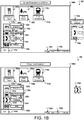
- FIGS. 1A and 1B illustrate example graphical interfaces 100a, 100b, 100c, and 100d of a system 100 during capture, execution, and modification of an automated script.
- the graphical interfaces 100a graphical interface 100a illustrates the system 100 capturing a command of a script.
- Graphical interface 100b illustrates a change to the graphical interface 100b.
- Graphical interface 100c illustrates the system 100 executing and detecting an error in the script.
- Graphical interface 100d illustrates the system 100 modifying and updating the script to correct the error by applying a script repair model and cropping an image captured during generation of the script.
- the graphical interface 100a represents the view presented by the system 100 to the user.
- the graphical interface 100a may include icons and menus that the user can interact with and select to perform various actions.
- the user may select the icon 102a to launch an application to find a restaurant.
- the icon 102a may include a label 104a that describes the icon 102a as the restaurant finder icon.
- the user may select the icon106a to launch an application to find a park.
- the icon 106a may include a label 108a that describes the icon 106a as the park finder icon.
- the user may select the icon 110a to launch an application to view the train schedule.
- the icon 110a may include a label 112a that describes the icon 110a as the train schedule icon.
- the graphical interface 100a may also include a menu button 114a.
- the user may select the menu button 114a to display the menu 116a.
- the menu 116a may include additional icons that the user can interact with and select to perform additional actions.
- the user can select icon 118a to launch an application that displays a bike map.
- the icon 118a may include a label 120a that describes the icon 118a as the bike map icon.
- the user may select icon 122a to launch an application to display the user's contacts.
- the icon 122a may include a label 124a that describes the icon 122a as a contacts icon.
- the user may select icon 126a to launch a mail application.
- the icon 126a may include a label 128a that describes the icon as a mail icon.
- the user interface 100a may also include date and time information 136a and tray icons 138a.
- the user may generate a script by interacting with the graphical interface 100a.
- the interactions may include clicking a button on a mouse, touching a display, typing on a keyboard, providing voice input, or providing input through any other similar input device.
- the system 100 stores data related to the script based on where and how the user interacts with the graphical interface 100a.
- the user may generate a script that include any action or series of actions that the user can perform with the graphical interface 100a.
- the user may be creating a script for selecting and sending a contact from the contacts application.
- One of the actions of that script may involve the selection of the icon 122a.
- the user may, initially, select the menu button 114a by hovering the mouse pointer 130a over the button 114a and clicking the mouse.
- the system 100 may record data reflecting the user's interaction with menu button 114a.
- the user may select the contacts icon 122a.
- the user may hover the mouse pointer 130a over the icon 122a and click the mouse.
- the user may tap the icon 122a with the user's finger in instances where the user interface 100a appears on a touch screen.
- the clicking of the mouse or the tapping of the finger may trigger the system 100 to record a corresponding action.
- the recorded data may include the screen coordinates of the mouse pointer 130a when the user clicked the mouse.
- the recorded data may also include a screen capture around the area 132a of the mouse pointer 130a when the user clicked the mouse.
- the captured area 132a may be a fixed area around the mouse pointer 130a.
- the size of the captured area 132a may correspond to the icons that a user typically selects. In this instance, the size of the captured area 132a may match the size of the icons 102a, 106a, and 110a.
- the size of the captured area 132a may be consistent across other systems that use the same operating system as the system 100. Other operating systems may have primary icons that are a different size than icons 102a, 106a, and 110a.
- the size of the captured area 132a may be defined by the user. For example, the user may select a size for any captured area. As another example, the user may select the size of the captured area 132a each time the user clicks the mouse or taps the screen.
- the size of the captured area 132a may depend on the location of the mouse pointer 130a when the user clicked the mouse. For example, if the mouse pointer 130a is within the menu 116a, then the captured area 132a may be similar in size to the icons 118a, 122a, and 126a. If the mouse pointer 130a is outside the menu 116a, then the captured area may be similar in size to the icons 102a, 106a, and 110a.
- the captured area 132a is a constant shape.
- the system 100 records the image 134a and a selection of the image 134a as an action in the script.
- the system 100 may store the coordinates of the mouse pointer 130a when the user selected the area of the image 134a.
- the system 100 may record additional actions as the user interacts with the user interface 100a.
- the system 100 may store the image 134a, the data related to image 134a, and other images and corresponding information as the script.
- the graphical interface 100b represents another view presented by the system 100 to the user.
- the graphical interface 100b may include similar features and icons as the graphical interface 100b.
- icons 102b, 106b, and 110b may be similar to icons 102a, 106a, and 110a of graphical interface 100a.
- Icons 118b, 122b, and 126b may be similar to icons 118a, 122a, and 126a of graphical interface 100a.
- the graphical interface 100b may include button 114b that the user may select to display the menu 116b and may include date and time information 136b and tray icons 138b.
- the graphical interface 100b includes a change to the graphical interface 100a.
- the user may have installed on the system 100 additional software for an application that displays bus schedules.
- the graphical interface 100b includes icon 121b that the user can select to launch the new application that displays bus schedules.
- the icon 121b may be adjacent to a label 123b that specifies that the icon 121b is for the bus schedule application.
- the system 100 placed the bus schedules icon 121b above the contacts icon 122b and below the bike map icon 118b.
- the user may choose the location of the bus schedule icon 121b. For example, the user may move the bus schedule icon 121b next to the train schedule icon 110b.
- Including the new icon 121b in the graphical interface 100b may not affect the commands of the stored script.
- the script may still include the command related to image 134b.
- the image 134b includes a screen capture of the area around the mouse pointer when the user clicked the mouse during generation of the script. Including the new icon 121b may not change the image 134b.
- the graphical interface 100c represents another view presented by the system 100 to the user during the execution of the stored script.
- the graphical interface 100c may include similar features and icons as the graphical interfaces 100a and 100b.
- icons 102c, 106c, and 110c may be similar to icons 102a, 106a, and 110a of graphical interface 100a.
- Icons 118c, 122c, and 126c may be similar to icons 118a, 122a, and 126a of graphical interface 100a.
- the graphical interface 100c may include button 114c that the user may select to display the menu 116c and may include date and time information 136c and tray icons 138c.
- the user instructs the system 100 to execute the stored script for selecting and sending a contact from the contacts application.
- the system 100 may execute one or more actions of the script before executing the action related to selecting the contacts icon 122c.
- the script may select the button 114c to display the menu 116c.
- the system may analyze a screen capture of the graphical interface 100c and attempt to locate a portion of the screen capture that matches the image 134c that the system captured when generating the script.
- the system 100 may perform computer vision on the screen capture of the graphical interface 100c to locate a portion of the screen that matches image 134c.
- the system 100 may sweep an area of the screen capture that is near the location where the user clicked the mouse. For example, the system 100 may sweep the area that within two hundred pixels of the mouse click location, which is around icon 122c.
- the system 100 may generate image confidence scores that reflect a likelihood that different portion of the screen correspond to the image 134c. For example, the system 100 may analyze an area of the screen that includes icon 110c. In this instance, the system 100 may generate an image confidence score of 0.1. The system 100 may analyze area 133c of the screen capture of the graphical interface 100c. Area 133c may include some similar features to image 134c such as icon 122c, but also includes portions of the new bus schedule icon 121c. The system may generate an image confidence score of 0.7. The system 100 may determine that a portion of the screen matches the image 134c if the image confidence score satisfies a threshold. For example, if the threshold is 0.8, then neither the area 133c or the area of the screen that includes icon 110c have an image confidence score greater the threshold of 0.8. The system 100 may determine that that image 134c is not on the graphical interface 100c.
- the system 100 generates an exception 135c during the execution of the script.
- the system 100 may display the exception 135c on the graphical interface 100c or may provide another type of indication (e.g., an audio indication) to the user that the system 100 encountered an error in executing the script.
- the outline of area 133c does not appear on the graphical interface 100c. Instead, the system 100 compares the area 133c to the image 135c without outlining the area 133c.
- the graphical interface 100d represents another view presented by the system 100 to the user during the modification of the stored script.
- the graphical interface 100d may include similar features and icons as the graphical interfaces 100a, 100b, and 100c.
- icons 102d, 106d, and 110d may be similar to icons 102a, 106a, and 110a of graphical interface 100a.
- Icons 118d, 121d, 122d, and 126c may be similar to icons 118a, 121b, 122a, and 126a of graphical interfaces 100a and 100b.
- the graphical interface 100d may include button 114d that the user may select to display the menu 116d and may include date and time information 136d and tray icons 138d.
- the system 100 detected an error in the script based on being unable to identify a portion of the graphical interface 100c that matched the image 134c.
- the system 100 attempts to correct the error by accessing a script repair model.
- the script repair model may be trained to suggest a correction to the script to repair the error.
- the script repair model may use neural networks and machine learning to recommend a correction.
- the script repair model may be trained using corrections that repaired other scripts and attempted corrections that did not repair other scripts.
- the training data may include data related to the outcome of each correction and attempted correction. In some implementations, the training data may include data related to script actions and results for those actions that worked properly and did not generate an error.
- the system 100 applies the script repair model to the data related to the error.
- the data related to the error may include the image 134c, a portion of the graphical interface 100c that had a highest image confidence score (e.g., area 133c), the coordinates of the mouse pointer when the system captured the image 134c, and the coordinates of the portion of the graphical interface 100c that had a highest image confidence score.
- the script repair model may generate one or more candidate modifications to repair the error.
- the script repair model may generate a repair confidence score for each of the candidate modifications.
- the repair confidence score may reflect a likelihood that the candidate modification will correct the error.
- the system 100 may determine, using the script repair model, to crop the image 134c.
- the system 100 may crop the image 134c to generate the cropped image 139d.
- the scrip repair model may determine the size of the cropped image 139d by analyzing the location of the original mouse click and the size of images that are successfully matched in the area near the original mouse click.
- the system 100 may perform computer vision techniques to identify a whole icon that is located in image 134c and is the size of successfully matched images.
- the system 100 analyzes the graphical interface 100d for the cropped image 139d.
- the system 100 identifies image portion 137d as a match for the cropped image 139d.
- the system 100 continues with the script and selects the image portion 137d. By selecting the image portion 137d, the system 100 opens the contacts application and continues performing the actions of the script.
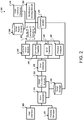
- FIG. 2 illustrates an example system 200 for capturing, executing, and modifying automated scripts.
- the system 200 captures a script based on the interactions that a user has with a graphical interface.
- the system 200 stores the script and executes the stored script by performing the actions that the user performed during capturing of the script.
- the system 200 may generate an error during execution of a script.
- the system 200 applies a script repair model to the error and the script to identify a modification to repair the script.
- the system may be implemented using one or more computing devices.
- the system 200 includes a user interface 205.
- the user interface 205 may include a display to provide visual output to a user.
- the user may interact with the user interface 205.
- the user may touch the display in instances where the display is a touch sensitive display.
- the user may move a mouse around the user interface 205 and click the mouse to provide input to the system 200. Examples of user interfaces are illustrated in FIGS. 1A and 1B with graphical interfaces 100a, 100b, 100c, and 100d.
- the system 200 includes a process manager 210.
- the process manager 210 keeps track of the processes that are currently running on the system.
- the process manager 210 may include an interface that allows other software modules to query the process manager 210.
- the interface may be an API.
- the other software modules may receive a list of processes currently running on the system 200, how long each process has been running, how much processing capability each process is using, and how much memory each process is using.
- the system 200 includes a script generator 215.
- the script generator 215 may be configured to monitory the user interface 205 and the process manager 210 to identify actions performed by a user during recording of a script.
- the script generator 215 may also be configured to monitor the input devices such as the mouse, touch screen, keyboard, or other input devices.
- the script generator 215 may be configured to only monitor the input devices and the user interface 205. In this instance, the script generator 215 may not have access to the process manager 210.
- the user provides an instruction to the script generator 215 to begin recording and generating a script.
- the script generator 215 may begin monitoring the user interface 205 and the processor manager 210.
- the script generator 215 may record the input provided by the user, the processes running on the system 200, and the graphics displayed on the user interface 205. For example, the script generator 215 may record the user clicking the mouse at a particular spot on the screen.
- the script generator 215 may record the coordinates of the mouse when clicked, a screen capture of the user interface 205 during the mouse click, the timing of the mouse click, e.g., a timestamp, the processes running after the mouse click, and any other similar information.
- the script generator 215 may record similar information during each input event.
- An input event may include a mouse click, touch screen press, keyboard press, or other similar event.
- the script generator 215 may store a script in the script storage 220.
- the script may be based on the recorded data.
- the stored action may include the mouse coordinates, an area of the screen around the mouse click, the elapsed time since the previous action, and any process that likely was initiated by the mouse click.
- a subsequent action for an event such as a keyboard event may include the key pressed on the keyboard, the time elapsed since the mouse click action, and any processes that likely were initiated by the keyboard press.
- the script generator 215 may also compare a screen capture of the screen before the keyboard press and after the keyboard press.
- the script generator 215 may be able to determine a location of the cursor by identifying the location of the change in the user interface 205. In this instance, the script generator 215 may store a screen capture of an area of the screen where the cursor was located and where the user likely entered text.
- the script execution module 225 may access the script storage 220 to retrieve a script for execution.
- the script execution module 225 may receive input from a user to retrieve and execute a particular script.
- the user may request that the system 200 perform the script related to updating the user's contacts.
- the user may name the scripts and may request a particular script by name.
- the script execution module 225 performs the actions of the specified script.
- the script execution module 225 may navigate the cursor to a portion of the screen that matched the captured image and click the mouse.
- the script execution module 225 may select a series of keys after clicking the mouse on an area of the screen that matched a captured image, which may have placed a cursor at that location.
- the script execution module 225 may encounter an error.
- the error detector 230 may be configured to analyze the actions performed by the script execution module 225 to determine whether an error or exception occurred.
- the script execution module 225 may generate the error if the script execution module 225 is unable to perform an action. For example, the script execution module 225 may be unable to locate an area of the user interface 205 that matches the image of the screen captured by the script generator 215. In this instance, the script execution module 225 may generate the error.
- the error detector 230 may provide error data to the computer vision module 235.
- the computer vision module 235 may be configured to analyze the screen for a location that likely matches the screen captured by the script generator 215.
- the computer vision module 235 may provide functionality on top of the matching that the script execution module 225 performs. For example, the computer vision module 235 may analyze the text and images of the screen captured by the script generator 215 and compare the text and images to the user interface.
- the computer vision module 235 may identify the letter "conta" in the captured image.
- the computer vision module 235 may sweep the user interface for the text "conta.”
- the computer vision module 235 may perform edge detection to detect shapes in the captured image and sweep the user interface for similar shapes.
- the computer vision module 235 may provide data identifying an area of user interface that likely corresponds to the image captured by the script generator 215.
- the command classifier 240 may be configured to classify the type of command or action that generated the error. Some example types may include selecting an icon with a mouse, selecting an icon by touching the screen, typing on the keyboard, scrolling the mouse, clicking and dragging the mouse, or any other similar type of action or command. To classify the command, the command classifier 240 may analyze the input for the corresponding command or action. For example, single or double clicking the mouse on an area with strong edges may likely indicate that the user clicked on an icon. Using the mouse wheel may likely indicate that the user is scrolling an area of the screen. The command classifier 240 may identify a likely command type and provide that command type to the command modifier 255.
- the error classifier 245 may be configured to classify the type of error generated by the error detector 230. Some example types may include an image location error, an error initializing a process, an unexpected result, or any other similar error. To classify an error, the error classifier 245 may analyze the parameters of the action and any error generated by the error detector 230. For example, an error locating a portion of the screen that corresponds to a captured image may be an image location error. An error may be related to performing an action that the system 200 expects to open a word processing application and the action does not change the processes running on the system 200. The error classifier 245 may identify the type of error and provide the error type to the command modifier 255.
- the process analyzer 250 may be configured to monitor the processes that are running during execution of the script.
- the process analyzer 250 may access the processes through the process manager 210 and compare the processes to the processes expected during execution of the script.
- the process analyzer 250 may identify any processes that should have been running or any processes that should not be running or both.
- the process analyzer 250 may analyze the processes during the actions before the error detector 230 identified the error.
- the process analyzer 250 may analyze the processes immediately before and after the error detector 230 identified the error.
- the process analyzer 250 may provide the process data to the command modifier 255.
- the command modifier 255 receives data from the computer vision module 235, the command classifier 240, the error classifier 245, and the process analyzer 250 and applies a script repair model that is stored in the script repair model storage 260.
- the system generates and trains the script repair models using previous data inputted into the system 200.
- the previous data may include actions that a user has taken to perform a particular task.
- the data may include actions taken by a user to initiate an application to open a bus schedule application.
- the data may include multiple series of actions that different users have taken to open a bus schedule application. Some may include opening the bus schedule application from a menu or from the desktop. Some may include closing a pop up window.
- the previous data may include previous actions and processes that the system 200 has performed.
- the system 200 may identify the application opened by the user by performing computer vision on portions of the user interface or by monitoring the processes or both.
- the previous data may include modifications that the system 200 has applied to other scripts and the outcomes of those modifications.
- the system 200 may have previously cropped an image and compared the cropped image to the current user interface.
- the system 200 may train the script repair model using the image crop data and the result that followed, whether the following result included an error or not.
- the system 200 may also have script repair models that are configured for different types of error and commands.
- a specific type of error identified by the error classifier 245 may cause the command modifier 255 to access a script repair model for the identified type of error.
- a specific type of command identified by the command classifier 240 may cause the command modifier 255 to access a script repair model for the identified type of command.
- the system may use neural networks and machine learning to generate and train the script repair models.
- the command modifier 255 applies the script repair model to the data from the computer vision module 235, the command classifier 240, the error classifier 245, and the process analyzer 250.
- the command modifier 255 generates one or more candidate modifications.
- the candidate modifications may include cropping image 134c, lowering a threshold image score to identify the portion of the user interface 100c that best matches the image 134c, and performing optical character recognition on the image 134c and the user interface 100c.
- the command modifier 255 provides the candidate modifications to the modification scoring module 265 to generate a repair confidence score for each of the candidate modifications.
- the repair confidence score may reflect a likelihood that the candidate modification will correct the error in the script.
- the modification scoring module 265 may use data generated from applying the script repair models to generate the repair confidence scores.
- the command modifier 255 may access a user interface generator 270 to propose the candidate modifications to the user.
- the user interface generator 270 may present the candidate modifications and request that the user select one of the candidate modifications. Alternatively or additionally, the user interface generator 270 may request that the user suggest a modification. Following the example from FIGS. 1A and 1B , the user may suggest that the command modifier 255 modify the script so that the script searches the user interface 100c for the term "contacts.”
- the command modifier 255 may apply a modification to the command and execute the modified command.
- the user interface generator 270 may request confirmation from the user whether the modified command corrected the error.
- the command modifier may simulate the modified command using, in some instances, deep learning techniques or planning techniques or both.
- the command modifier 255 accesses the modified command simulator 275.
- the modified command simulator 275 may be configured to simulate the candidate modifications. Following the example from FIGS. 1A and 1B , the modified command simulator 275 may be able to crop image 134c, lower a threshold image score to identify the portion of the user interface 100c that best matches the image 134c, and perform optical character recognition on the image 134c and the user interface 100c without modifying the script.
- the modified command simulator 275 may be configured to identify which of the simulated modified commands generate an error.
- the modified command simulator 275 may be able to simulate commands that the system 200 performs after the command that generated the error. For example, the modified command simulator 275 may simulate cropping the image 134c and simulate the subsequent actions of the script.
- the modified command simulator 275 may be able to identify any errors in subsequent actions. There may be instances where the modified command may not generate an error but subsequent actions generate error suggesting that the command modification may not have been the correct modification to repair the script.
- the command modifier 255 selects one of the candidate modifications based on applying a script repair model and on data from the modification scoring module 265 and the user interface generator 270. In some implementations, the command modifier 255 receives additional data from the modified command simulator 275 and uses that data to select a modification. The command modifier 255 may select the candidate modification with the highest repair confidence score, the candidate modification selected by the user, or a candidate modification identified by the modified command simulator 275.
- the command modifier 255 applies the modification to the command that generated the error and updates the script.
- the system 200 may execute the modified command and determine whether the modified command generates a new error.
- the command modifier 255 may identify other scripts with similar commands and apply the modification to those scripts.
- the command modifier 255 may identify other scripts that search for images that include image 139d.
- the command modifier 255 may use computer vision techniques to identify the images.
- the command modifier 255 may modify the corresponding commands by cropping those images to be similar to image 139d.
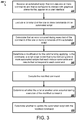
- FIG. 3 illustrates an example process 300 for capturing, executing, and modifying automated scripts.
- the process 300 captures and executes automated scripts.
- the automated script may generate an error.
- the process 300 modifies the script to fix the error.
- the process 300 will be described as being performed by a computer system comprising one or more computers, for example, the system 200 as shown in FIG. 2 .
- the system receives an automated script that includes one or more commands and that is configured to interact with graphical elements that appear on a user interface (310).
- the script may include images for the system to match to corresponding portions of the user interface.
- the script may include images of icons to select for opening a contacts application and accessing a particular contact.
- the scripts may be generated by a user requesting that the system record a script.
- the system executes a command of the one or more commands of the automated script (320).
- the system analyzes using computer vision, a screen capture of the user interface.
- the system identifies, in the user interface, an area of the screen that likely matches a graphical element that is specified by the automated script.
- the system selects the area of the screen that matches the graphical element that is specified by the automated script.
- the system may execute a command to identify and select a portion of the user interface that matches an image included in the script.
- the system determines that an error occurred during execution of the command of the one or more commands of the automated script (330). For example, the system may not be able to identify a portion of the user interface that matches an image included in the script.
- the system determines a modification for the command by applying, to the command, a script repair model that is trained using one or more automated scripts that each include commands and results that correspond to each command (340).
- the system trains the script repair model using inputs provided by different users and across different systems.
- the system also trains the script repair model using results of those inputs.
- the script repair model uses neural networks and the system trains the script repair model using machine learning.
- the system learns the script repair model that describes a modification for an action.
- This script repair model may be, for example, a neural network or other machine learning algorithm.
- the system may use the script repair to simulate subsequent actions from any command.
- the system may use planning techniques on the script repair model to select a repair script or modification.
- the modification includes cropping an image included in the script and attempting to match the cropped image to the user interface.
- the system determines for each of one or more candidate modifications, a repair confidence score that reflects a likelihood that applying a respective candidate modification to the command will correct the error. For example, the system may determine that the repair confidence score for cropping the image is 0.9 and the repair confidence score is 0.7 for selecting the portion of the user interface that best matches the image despite not generating an image match score that satisfies a threshold. The system may select the modification by selectin the modification with the highest repair confidence score.
- the system classifies the command or the error that occurred during execution of the command of the one or more commands of the automated script.
- the system may apply a script repair model that matches the command type or error type. For example, the system may apply different script repair models for different commands such as selecting an icon with a mouse, selecting an icon by touching the screen, typing on the keyboard, scrolling the mouse, or clicking and dragging the mouse.
- the system may present the modification to the user and request confirmation. The system may receive confirmation and apply the modification.
- the system executes the modified command (350). In some implementations, the system simulates the modified command. The system determines whether the error or another error occurred during execution of the modified command (360). In some implementations, the system determines whether the error or the other error occurred during simulation of the modified command.
- the system determines whether to update the automated script with the modified command (370). In some implementations, the system determines that the error or another error occurred during execution of the modified command. In this instance, the system may determine not to update the automated script with the modified command. The system may determine an additional modification for the command based on the application of the script repair model to the command and retry the additional modification. In some implementations, the system updates the script repair model using data indicating that the error or the other error occurred during execution of the modified command. For example, the system may update the script repair model to prevent the script repair model from applying the modification to similar commands.
- the system determines that the error or the other error did not occur during execution of the modified command. In this instance, the system may update the update the automated script with the modified command to indicate that the modification was successful. The system may update the script repair model with data indicating that the modification was successful. The system may also update other similar commands of other scripts with the modification.
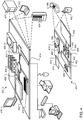
- FIG. 4 shows an example of a computing device 400 and a mobile computing device 450 that can be used to implement the techniques described here.
- the computing device 400 is intended to represent various forms of digital computers, such as laptops, desktops, workstations, personal digital assistants, servers, blade servers, mainframes, and other appropriate computers.
- the mobile computing device 450 is intended to represent various forms of mobile devices, such as personal digital assistants, cellular telephones, smart-phones, and other similar computing devices.
- the components shown here, their connections and relationships, and their functions, are meant to be examples only, and are not meant to be limiting.
- the computing device 400 includes a processor 402, a memory 404, a storage device 406, a high-speed interface 408 connecting to the memory 404 and multiple high-speed expansion ports 410, and a low-speed interface 412 connecting to a low-speed expansion port 414 and the storage device 406.
- Each of the processor 402, the memory 404, the storage device 406, the high-speed interface 408, the high-speed expansion ports 410, and the low-speed interface 412 are interconnected using various busses, and may be mounted on a common motherboard or in other manners as appropriate.
- the processor 402 can process instructions for execution within the computing device 400, including instructions stored in the memory 404 or on the storage device 406 to display graphical information for a GUI on an external input/output device, such as a display 416 coupled to the high-speed interface 408.
- an external input/output device such as a display 416 coupled to the high-speed interface 408.
- multiple processors and/or multiple buses may be used, as appropriate, along with multiple memories and types of memory.
- multiple computing devices may be connected, with each device providing portions of the necessary operations (e.g., as a server bank, a group of blade servers, or a multiprocessor system).
- the memory 404 stores information within the computing device 400.
- the memory 404 is a volatile memory unit or units.
- the memory 404 is a non-volatile memory unit or units.
- the memory 404 may also be another form of computer-readable medium, such as a magnetic or optical disk.
- the storage device 406 is capable of providing mass storage for the computing device 400.
- the storage device 406 may be or contain a computer-readable medium, such as a floppy disk device, a hard disk device, an optical disk device, or a tape device, a flash memory or other similar solid state memory device, or an array of devices, including devices in a storage area network or other configurations.
- Instructions can be stored in an information carrier.
- the instructions when executed by one or more processing devices (for example, processor 402), perform one or more methods, such as those described above.
- the instructions can also be stored by one or more storage devices such as computer- or machine-readable mediums (for example, the memory 404, the storage device 406, or memory on the processor 402).
- the high-speed interface 408 manages bandwidth-intensive operations for the computing device 400, while the low-speed interface 412 manages lower bandwidth-intensive operations. Such allocation of functions is an example only.
- the high-speed interface 408 is coupled to the memory 404, the display 416 (e.g., through a graphics processor or accelerator), and to the high-speed expansion ports 410, which may accept various expansion cards.
- the low-speed interface 412 is coupled to the storage device 406 and the low-speed expansion port 414.
- the low-speed expansion port 414 which may include various communication ports (e.g., USB, Bluetooth, Ethernet, wireless Ethernet) may be coupled to one or more input/output devices, such as a keyboard, a pointing device, a scanner, or a networking device such as a switch or router, e.g., through a network adapter.
- input/output devices such as a keyboard, a pointing device, a scanner, or a networking device such as a switch or router, e.g., through a network adapter.
- the computing device 400 may be implemented in a number of different forms, as shown in the figure. For example, it may be implemented as a standard server 420, or multiple times in a group of such servers. In addition, it may be implemented in a personal computer such as a laptop computer 422. It may also be implemented as part of a rack server system 424. Alternatively, components from the computing device 400 may be combined with other components in a mobile device, such as a mobile computing device 450. Each of such devices may contain one or more of the computing device 400 and the mobile computing device 450, and an entire system may be made up of multiple computing devices communicating with each other.
- the mobile computing device 450 includes a processor 452, a memory 464, an input/output device such as a display 454, a communication interface 466, and a transceiver 468, among other components.
- the mobile computing device 450 may also be provided with a storage device, such as a micro-drive or other device, to provide additional storage.
- a storage device such as a micro-drive or other device, to provide additional storage.
- Each of the processor 452, the memory 464, the display 454, the communication interface 466, and the transceiver 468, are interconnected using various buses, and several of the components may be mounted on a common motherboard or in other manners as appropriate.
- the processor 452 can execute instructions within the mobile computing device 450, including instructions stored in the memory 464.
- the processor 452 may be implemented as a chipset of chips that include separate and multiple analog and digital processors.
- the processor 452 may provide, for example, for coordination of the other components of the mobile computing device 450, such as control of user interfaces, applications run by the mobile computing device 450, and wireless communication by the mobile computing device 450.
- the processor 452 may communicate with a user through a control interface 458 and a display interface 456 coupled to the display 454.
- the display 454 may be, for example, a TFT (Thin-Film-Transistor Liquid Crystal Display) display or an OLED (Organic Light Emitting Diode) display, or other appropriate display technology.
- the display interface 456 may comprise appropriate circuitry for driving the display 454 to present graphical and other information to a user.
- the control interface 458 may receive commands from a user and convert them for submission to the processor 452.
- an external interface 462 may provide communication with the processor 452, so as to enable near area communication of the mobile computing device 450 with other devices.
- the external interface 462 may provide, for example, for wired communication in some implementations, or for wireless communication in other implementations, and multiple interfaces may also be used.
- the memory 464 stores information within the mobile computing device 450.
- the memory 464 can be implemented as one or more of a computer-readable medium or media, a volatile memory unit or units, or a non-volatile memory unit or units.
- An expansion memory 474 may also be provided and connected to the mobile computing device 450 through an expansion interface 472, which may include, for example, a SIMM (Single In Line Memory Module) card interface.
- SIMM Single In Line Memory Module
- the expansion memory 474 may provide extra storage space for the mobile computing device 450, or may also store applications or other information for the mobile computing device 450.
- the expansion memory 474 may include instructions to carry out or supplement the processes described above, and may include secure information also.
- the expansion memory 474 may be provide as a security module for the mobile computing device 450, and may be programmed with instructions that permit secure use of the mobile computing device 450.
- secure applications may be provided via the SIMM cards, along with additional information, such as placing identifying information on the SIMM card in a non-hackable manner.
- the memory may include, for example, flash memory and/or NVRAM memory (non-volatile random access memory), as discussed below.
- instructions are stored in an information carrier. that the instructions, when executed by one or more processing devices (for example, processor 452), perform one or more methods, such as those described above.
- the instructions can also be stored by one or more storage devices, such as one or more computer- or machine-readable mediums (for example, the memory 464, the expansion memory 474, or memory on the processor 452).
- the instructions can be received in a propagated signal, for example, over the transceiver 468 or the external interface 462.
- the mobile computing device 450 may communicate wirelessly through the communication interface 466, which may include digital signal processing circuitry where necessary.
- the communication interface 466 may provide for communications under various modes or protocols, such as GSM voice calls (Global System for Mobile communications), SMS (Short Message Service), EMS (Enhanced Messaging Service), or MMS messaging (Multimedia Messaging Service), CDMA (code division multiple access), TDMA (time division multiple access), PDC (Personal Digital Cellular), WCDMA (Wideband Code Division Multiple Access), CDMA2000, or GPRS (General Packet Radio Service), among others.
- GSM voice calls Global System for Mobile communications
- SMS Short Message Service
- EMS Enhanced Messaging Service
- MMS messaging Multimedia Messaging Service
- CDMA code division multiple access
- TDMA time division multiple access
- PDC Personal Digital Cellular
- WCDMA Wideband Code Division Multiple Access
- CDMA2000 Code Division Multiple Access
- GPRS General Packet Radio Service
- a GPS (Global Positioning System) receiver module 470 may provide additional
- the mobile computing device 450 may also communicate audibly using an audio codec 460, which may receive spoken information from a user and convert it to usable digital information.
- the audio codec 460 may likewise generate audible sound for a user, such as through a speaker, e.g., in a handset of the mobile computing device 450.
- Such sound may include sound from voice telephone calls, may include recorded sound (e.g., voice messages, music files, etc.) and may also include sound generated by applications operating on the mobile computing device 450.
- the mobile computing device 450 may be implemented in a number of different forms, as shown in the figure. For example, it may be implemented as a cellular telephone 480. It may also be implemented as part of a smart-phone 582, personal digital assistant, or other similar mobile device.
- implementations of the systems and techniques described here can be realized in digital electronic circuitry, integrated circuitry, specially designed ASICs (application specific integrated circuits), computer hardware, firmware, software, and/or combinations thereof.
- ASICs application specific integrated circuits
- These various implementations can include implementation in one or more computer programs that are executable and/or interpretable on a programmable system including at least one programmable processor, which may be special or general purpose, coupled to receive data and instructions from, and to transmit data and instructions to, a storage system, at least one input device, and at least one output device.
- machine-readable medium and computer-readable medium refer to any computer program product, apparatus and/or device (e.g., magnetic discs, optical disks, memory, Programmable Logic Devices (PLDs)) used to provide machine instructions and/or data to a programmable processor, including a machine-readable medium that receives machine instructions as a machine-readable signal.
- machine-readable signal refers to any signal used to provide machine instructions and/or data to a programmable processor.
- the systems and techniques described here can be implemented on a computer having a display device (e.g., a CRT (cathode ray tube) or LCD (liquid crystal display) monitor) for displaying information to the user and a keyboard and a pointing device (e.g., a mouse or a trackball) by which the user can provide input to the computer.
- a display device e.g., a CRT (cathode ray tube) or LCD (liquid crystal display) monitor
- a keyboard and a pointing device e.g., a mouse or a trackball
- Other kinds of devices can be used to provide for interaction with a user as well; for example, feedback provided to the user can be any form of sensory feedback (e.g., visual feedback, auditory feedback, or tactile feedback); and input from the user can be received in any form, including acoustic, speech, or tactile input.
- the systems and techniques described here can be implemented in a computing system that includes a back end component (e.g., as a data server), or that includes a middleware component (e.g., an application server), or that includes a front end component (e.g., a client computer having a graphical user interface or a Web browser through which a user can interact with an implementation of the systems and techniques described here), or any combination of such back end, middleware, or front end components.
- the components of the system can be interconnected by any form or medium of digital data communication (e.g., a communication network). Examples of communication networks include a local area network (LAN), a wide area network (WAN), and the Internet.
- LAN local area network
- WAN wide area network
- the Internet the global information network
- the computing system can include clients and servers.
- a client and server are generally remote from each other and typically interact through a communication network.
- the relationship of client and server arises by virtue of computer programs running on the respective computers and having a client-server relationship to each other.
- the delegate(s) may be employed by other applications implemented by one or more processors, such as an application executing on one or more servers.
- the logic flows depicted in the figures do not require the particular order shown, or sequential order, to achieve desirable results.
- other actions may be provided, or actions may be eliminated, from the described flows, and other components may be added to, or removed from, the described systems. Accordingly, other implementations are within the scope of the following claims.
Landscapes
- Engineering & Computer Science (AREA)
- Theoretical Computer Science (AREA)
- Software Systems (AREA)
- General Engineering & Computer Science (AREA)
- Physics & Mathematics (AREA)
- General Physics & Mathematics (AREA)
- Quality & Reliability (AREA)
- Computer Vision & Pattern Recognition (AREA)
- Artificial Intelligence (AREA)
- Data Mining & Analysis (AREA)
- Evolutionary Computation (AREA)
- Medical Informatics (AREA)
- Computing Systems (AREA)
- Mathematical Physics (AREA)
- Human Computer Interaction (AREA)
- Computer Hardware Design (AREA)
- Stored Programmes (AREA)
- User Interface Of Digital Computer (AREA)
- Robotics (AREA)
- Mechanical Engineering (AREA)
Abstract
Description
- This application generally relates to machine learning.
- Manual processes performed on a computer may be repetitive and time consuming. For example, a user may send e-mails in response to web form submissions, and for each web form submission, may need to manually interact with a computer to click buttons to open a window for composing a new e-mail, click buttons to copy information from the web form submission into the window, click keys to write text for a body of the e-mail, and click buttons to send the e-mail.
- Front-end scripts typically interact with the user interface of a system. For example, a front-end script may locate an icon that is on a screen using computer vision techniques. The front-end script may select the icon to initialize the corresponding application or to open the corresponding document. In contrast, a back-end script instructs the computing system to open a certain application using the path of the executable file for the application. A front-end script may be preferable because it offers more flexibility than a back-end script. Nearly every system that a user interacts with has a front-end. While nearly every system also has a back-end, some system may not allow other systems to interact with the back-end to initiate applications and open files.
- Front-end scripts may be more prone to errors. An error may be caused by an unexpected change to the user interface. During generation of a script, the system may capture a screen shot of the portion of the user interface where the user clicks on or touches the user interface. The size of the captured portion may be a fixed size. During execution of the script, the system may scan the user interface to locate an area of the screen that matches the captured portion. If a pop up window appears on the screen, then the system may be unable to find an area of the screen that matches the captured portion. In this instance, the system may apply a script repair model to the error. The system may have previously trained the script repair model using user interactions, other scripts, and outcomes from those other scripts. The script repair model analyzes the error and the screen and identifies the close button of the pop-up window or the cancel button of the pop-up window. The script repair model may instruct the system to select the close button.
- The system may repeat scanning of the user interface to locate an area of the screen that matches the captured portion. With the pop-up window closed, the system may be able to successful locate an area that matches the captured portion. The system may update the script to include an action to locate the close button of a pop-up window in the event of an error in locating the captured portion. The action may be an optional action that the system performs if it detects a pop-up window. In some implementations, the system may also update other scripts. For example, the system may update other scripts that scan the user interface and to locate an area of the screen similar to the captured portion. The system may add a similar optional step to those other scripts.
- According to an innovative aspect of the subject matter described in this application, a method for self-learning robotic process automation includes the actions of receiving, by a computing device, an automated script that includes one or more commands and that is configured to interact with graphical elements that appear on a user interface; executing, by the computing device, a command of the one or more commands of the automated script; determining, by the computing device, that an error occurred during execution of the command of the one or more commands of the automated script; in response to determining that an error occurred during execution of the command, determining, by the computing device, a modification for the command by applying, to the command, a script repair model that is trained using one or more automated scripts that each include commands and results that correspond to each command; executing, by the computing device, the modified command; determining, by the computing device, whether the error or another error occurred during execution of the modified command; and based on determining whether the error or the other error occurred during execution of the modified command, determining whether to update the automated script with the modified command.
- These and other implementations can each optionally include one or more of the following features. The action of determining, by the computing device, whether the error or another error occurred during execution of the modified command includes determining that the error or the other error occurred during execution of the modified command. The action of determining whether to update the automated script with the modified command includes determining not to update the automated script with the modified command. The actions further include determining, by the computing device, an additional modification for the command based on the application of the script repair model to the command. The actions further include, based on determining that the error or the other error occurred during execution of the modified command, updating the script repair model using data indicating that the error or the other error occurred during execution of the modified command. The action of determining, by the computing device, whether the error or another error occurred during execution of the modified command includes determining that the error or the other error did not occur during execution of the modified command.
- The action of determining whether to update the automated script with the modified command includes determining to update the automated script with the modified command. The actions further include determining that the error or the other error did not occur during execution of the modified command, updating the script repair model using data indicating that the error or the other error did not occur during execution of the modified command. The actions further include identifying another automated script that includes another command that is similar to the command of the automated script; and updating the other command of the other automated script with the modified command. The action of executing the command of the one or more commands of the automated script includes analyzing, using computer vision, a screen capture of the user interface; based on analyzing the screen capture of the user interface, identifying, in the user interface, an area of the screen that likely matches a graphical element that is specified by the automated script; and selecting, by the computing device, the area of the screen that matches the graphical element that is specified by the automated script.
- The action of determining the modification for the command includes adjusting a size of the area of the screen that likely matches the graphical element that is specified by the automated script. The action of determining, by the computing device, a modification for the command by applying, to the command, a script repair model that is trained using one or more automated scripts that each include commands and results that correspond to each command includes classifying, by the script repair model, the error that occurred during execution of the command of the one or more commands of the automated script; and, based on the classification of the error, determining the modification for the command by applying, to the command, the script repair model. The action of executing, by the computing device, the modified command includes simulating, by the computing device, the modified command. The action of determining, by the computing device, whether the error or another error occurred during execution of the modified command includes determining whether the error or the other error occurred during simulation of the modified command.
- The action of determining, by the computing device, a modification for the command by applying, to the command, a script repair model that is trained using one or more automated scripts that each include commands and results that correspond to each command includes determining, by applying the script repair model to the command, for each of one or more candidate modifications, a repair confidence score that reflects a likelihood that applying a respective candidate modification to the command will correct the error; and based on the repair confidence scores, selecting, from among the one or more candidate modifications, the modification for the command. The action of determining whether to update the automated script with the modified command includes determining whether to update the automated script with the modified command using machine learning.
- Other implementations of this aspect include corresponding systems, apparatus, and computer programs recorded on computer storage devices, each configured to perform the operations of the methods.
- Particular implementations of the subject matter described in this specification can be implemented so as to realize one or more of the following advantages. A system may perform and correct automated front-end scripts. The system may save computing resources by updating other scripts when an error is detected and correct in one script. The system does not need to encounter an error before correcting the error.
- The details of one or more implementations of the subject matter described in this specification are set forth in the accompanying drawings and the description below. Other features, aspects, and advantages of the subject matter will become apparent from the description, the drawings, and the claims.
-
-
FIGS. 1A and1B illustrate example graphical interfaces of a system during capture, execution, and modification of an automated script. -
FIG. 2 illustrates an example system for capturing, executing, and modifying automated scripts. -
FIG. 3 illustrates an example process for capturing, executing, and modifying automated scripts. -
FIG. 4 illustrates an example of a computing device and a mobile computing device. - Like reference numbers and designations in the various drawings indicate like elements.
-
FIGS. 1A and1B illustrate examplegraphical interfaces system 100 during capture, execution, and modification of an automated script. Briefly, and as described in more detail below, thegraphical interfaces 100agraphical interface 100a illustrates thesystem 100 capturing a command of a script.Graphical interface 100b illustrates a change to thegraphical interface 100b.Graphical interface 100c illustrates thesystem 100 executing and detecting an error in the script.Graphical interface 100d illustrates thesystem 100 modifying and updating the script to correct the error by applying a script repair model and cropping an image captured during generation of the script. - In the example shown in
FIG. 1A , thegraphical interface 100a represents the view presented by thesystem 100 to the user. Thegraphical interface 100a may include icons and menus that the user can interact with and select to perform various actions. For example, the user may select theicon 102a to launch an application to find a restaurant. Theicon 102a may include alabel 104a that describes theicon 102a as the restaurant finder icon. The user may select the icon106a to launch an application to find a park. Theicon 106a may include alabel 108a that describes theicon 106a as the park finder icon. The user may select theicon 110a to launch an application to view the train schedule. Theicon 110a may include alabel 112a that describes theicon 110a as the train schedule icon. - The
graphical interface 100a may also include amenu button 114a. The user may select themenu button 114a to display themenu 116a. Themenu 116a may include additional icons that the user can interact with and select to perform additional actions. For example, the user can selecticon 118a to launch an application that displays a bike map. Theicon 118a may include alabel 120a that describes theicon 118a as the bike map icon. The user may select icon 122a to launch an application to display the user's contacts. The icon 122a may include alabel 124a that describes the icon 122a as a contacts icon. The user may selecticon 126a to launch a mail application. Theicon 126a may include alabel 128a that describes the icon as a mail icon. Theuser interface 100a may also include date andtime information 136a andtray icons 138a. - The user may generate a script by interacting with the
graphical interface 100a. The interactions may include clicking a button on a mouse, touching a display, typing on a keyboard, providing voice input, or providing input through any other similar input device. Thesystem 100 stores data related to the script based on where and how the user interacts with thegraphical interface 100a. The user may generate a script that include any action or series of actions that the user can perform with thegraphical interface 100a. - In the example shown in
user interface 100a, the user may be creating a script for selecting and sending a contact from the contacts application. One of the actions of that script may involve the selection of the icon 122a. With thesystem 100a recording and generating the script, the user may, initially, select themenu button 114a by hovering themouse pointer 130a over thebutton 114a and clicking the mouse. Thesystem 100 may record data reflecting the user's interaction withmenu button 114a. - With the
menu 116a open, the user may select the contacts icon 122a. The user may hover themouse pointer 130a over the icon 122a and click the mouse. In some implementations, the user may tap the icon 122a with the user's finger in instances where theuser interface 100a appears on a touch screen. The clicking of the mouse or the tapping of the finger may trigger thesystem 100 to record a corresponding action. The recorded data may include the screen coordinates of themouse pointer 130a when the user clicked the mouse. The recorded data may also include a screen capture around the area 132a of themouse pointer 130a when the user clicked the mouse. - The captured area 132a may be a fixed area around the
mouse pointer 130a. The size of the captured area 132a may correspond to the icons that a user typically selects. In this instance, the size of the captured area 132a may match the size of theicons system 100. Other operating systems may have primary icons that are a different size thanicons - In some implementations, the size of the captured area 132a may depend on the location of the
mouse pointer 130a when the user clicked the mouse. For example, if themouse pointer 130a is within themenu 116a, then the captured area 132a may be similar in size to theicons mouse pointer 130a is outside themenu 116a, then the captured area may be similar in size to theicons - In the example shown in
FIG. 1A , the captured area 132a is a constant shape. Thesystem 100 records theimage 134a and a selection of theimage 134a as an action in the script. In some implementations, thesystem 100 may store the coordinates of themouse pointer 130a when the user selected the area of theimage 134a. Thesystem 100 may record additional actions as the user interacts with theuser interface 100a. Thesystem 100 may store theimage 134a, the data related toimage 134a, and other images and corresponding information as the script. - In the example shown in
FIG. 1A , thegraphical interface 100b represents another view presented by thesystem 100 to the user. Thegraphical interface 100b may include similar features and icons as thegraphical interface 100b. For example,icons icons graphical interface 100a.Icons icons graphical interface 100a. Thegraphical interface 100b may includebutton 114b that the user may select to display themenu 116b and may include date andtime information 136b andtray icons 138b. - The
graphical interface 100b includes a change to thegraphical interface 100a. In this instance, the user may have installed on thesystem 100 additional software for an application that displays bus schedules. Thegraphical interface 100b includesicon 121b that the user can select to launch the new application that displays bus schedules. Theicon 121b may be adjacent to alabel 123b that specifies that theicon 121b is for the bus schedule application. - As illustrated in
graphical interface 100b, thesystem 100 placed thebus schedules icon 121b above thecontacts icon 122b and below thebike map icon 118b. In some implementations, the user may choose the location of thebus schedule icon 121b. For example, the user may move thebus schedule icon 121b next to thetrain schedule icon 110b. - Including the
new icon 121b in thegraphical interface 100b may not affect the commands of the stored script. The script may still include the command related toimage 134b. Theimage 134b includes a screen capture of the area around the mouse pointer when the user clicked the mouse during generation of the script. Including thenew icon 121b may not change theimage 134b. - In the example shown in
FIG. 1B , thegraphical interface 100c represents another view presented by thesystem 100 to the user during the execution of the stored script. Thegraphical interface 100c may include similar features and icons as thegraphical interfaces icons icons graphical interface 100a.Icons icons graphical interface 100a. Thegraphical interface 100c may includebutton 114c that the user may select to display the menu 116c and may include date andtime information 136c andtray icons 138c. - The user instructs the
system 100 to execute the stored script for selecting and sending a contact from the contacts application. Thesystem 100 may execute one or more actions of the script before executing the action related to selecting thecontacts icon 122c. For example, the script may select thebutton 114c to display the menu 116c. In performing the action related to selecting thecontacts icon 122c, the system may analyze a screen capture of thegraphical interface 100c and attempt to locate a portion of the screen capture that matches theimage 134c that the system captured when generating the script. - The
system 100 may perform computer vision on the screen capture of thegraphical interface 100c to locate a portion of the screen that matchesimage 134c. In some implementations, thesystem 100 may sweep an area of the screen capture that is near the location where the user clicked the mouse. For example, thesystem 100 may sweep the area that within two hundred pixels of the mouse click location, which is aroundicon 122c. - In analyzing the screen capture for a portion of the screen that matches the
image 134c, thesystem 100 may generate image confidence scores that reflect a likelihood that different portion of the screen correspond to theimage 134c. For example, thesystem 100 may analyze an area of the screen that includesicon 110c. In this instance, thesystem 100 may generate an image confidence score of 0.1. Thesystem 100 may analyze area 133c of the screen capture of thegraphical interface 100c. Area 133c may include some similar features to image 134c such asicon 122c, but also includes portions of the new bus schedule icon 121c. The system may generate an image confidence score of 0.7. Thesystem 100 may determine that a portion of the screen matches theimage 134c if the image confidence score satisfies a threshold. For example, if the threshold is 0.8, then neither the area 133c or the area of the screen that includesicon 110c have an image confidence score greater the threshold of 0.8. Thesystem 100 may determine that thatimage 134c is not on thegraphical interface 100c. - The
system 100 generates anexception 135c during the execution of the script. Thesystem 100 may display theexception 135c on thegraphical interface 100c or may provide another type of indication (e.g., an audio indication) to the user that thesystem 100 encountered an error in executing the script. In some implementations, the outline of area 133c does not appear on thegraphical interface 100c. Instead, thesystem 100 compares the area 133c to theimage 135c without outlining the area 133c. - In the example shown in
FIG. 1B , thegraphical interface 100d represents another view presented by thesystem 100 to the user during the modification of the stored script. Thegraphical interface 100d may include similar features and icons as thegraphical interfaces icons icons graphical interface 100a.Icons icons graphical interfaces graphical interface 100d may includebutton 114d that the user may select to display themenu 116d and may include date andtime information 136d andtray icons 138d. - The
system 100 detected an error in the script based on being unable to identify a portion of thegraphical interface 100c that matched theimage 134c. Thesystem 100 attempts to correct the error by accessing a script repair model. The script repair model may be trained to suggest a correction to the script to repair the error. The script repair model may use neural networks and machine learning to recommend a correction. The script repair model may be trained using corrections that repaired other scripts and attempted corrections that did not repair other scripts. The training data may include data related to the outcome of each correction and attempted correction. In some implementations, the training data may include data related to script actions and results for those actions that worked properly and did not generate an error. - The
system 100 applies the script repair model to the data related to the error. The data related to the error may include theimage 134c, a portion of thegraphical interface 100c that had a highest image confidence score (e.g., area 133c), the coordinates of the mouse pointer when the system captured theimage 134c, and the coordinates of the portion of thegraphical interface 100c that had a highest image confidence score. The script repair model may generate one or more candidate modifications to repair the error. The script repair model may generate a repair confidence score for each of the candidate modifications. The repair confidence score may reflect a likelihood that the candidate modification will correct the error. - In the example shown in
graphical interface 100d, thesystem 100 may determine, using the script repair model, to crop theimage 134c. Thesystem 100 may crop theimage 134c to generate the croppedimage 139d. The scrip repair model may determine the size of the croppedimage 139d by analyzing the location of the original mouse click and the size of images that are successfully matched in the area near the original mouse click. Thesystem 100 may perform computer vision techniques to identify a whole icon that is located inimage 134c and is the size of successfully matched images. - The
system 100 analyzes thegraphical interface 100d for the croppedimage 139d. Thesystem 100 identifiesimage portion 137d as a match for the croppedimage 139d. Thesystem 100 continues with the script and selects theimage portion 137d. By selecting theimage portion 137d, thesystem 100 opens the contacts application and continues performing the actions of the script. -
FIG. 2 illustrates anexample system 200 for capturing, executing, and modifying automated scripts. Briefly, and as described in more detail below, thesystem 200 captures a script based on the interactions that a user has with a graphical interface. Thesystem 200 stores the script and executes the stored script by performing the actions that the user performed during capturing of the script. Thesystem 200 may generate an error during execution of a script. Thesystem 200 applies a script repair model to the error and the script to identify a modification to repair the script. The system may be implemented using one or more computing devices. - In the example shown in
FIG. 2 , thesystem 200 includes auser interface 205. Theuser interface 205 may include a display to provide visual output to a user. The user may interact with theuser interface 205. For example, the user may touch the display in instances where the display is a touch sensitive display. The user may move a mouse around theuser interface 205 and click the mouse to provide input to thesystem 200. Examples of user interfaces are illustrated inFIGS. 1A and1B withgraphical interfaces - The
system 200 includes aprocess manager 210. Theprocess manager 210 keeps track of the processes that are currently running on the system. In some implementations, theprocess manager 210 may include an interface that allows other software modules to query theprocess manager 210. For example, the interface may be an API. The other software modules may receive a list of processes currently running on thesystem 200, how long each process has been running, how much processing capability each process is using, and how much memory each process is using. - The
system 200 includes ascript generator 215. Thescript generator 215 may be configured to monitory theuser interface 205 and theprocess manager 210 to identify actions performed by a user during recording of a script. Thescript generator 215 may also be configured to monitor the input devices such as the mouse, touch screen, keyboard, or other input devices. In some implementations, thescript generator 215 may be configured to only monitor the input devices and theuser interface 205. In this instance, thescript generator 215 may not have access to theprocess manager 210. - The user provides an instruction to the
script generator 215 to begin recording and generating a script. Thescript generator 215 may begin monitoring theuser interface 205 and theprocessor manager 210. Thescript generator 215 may record the input provided by the user, the processes running on thesystem 200, and the graphics displayed on theuser interface 205. For example, thescript generator 215 may record the user clicking the mouse at a particular spot on the screen. Thescript generator 215 may record the coordinates of the mouse when clicked, a screen capture of theuser interface 205 during the mouse click, the timing of the mouse click, e.g., a timestamp, the processes running after the mouse click, and any other similar information. Thescript generator 215 may record similar information during each input event. An input event may include a mouse click, touch screen press, keyboard press, or other similar event. - The
script generator 215 may store a script in thescript storage 220. The script may be based on the recorded data. For the example of the mouse click action, the stored action may include the mouse coordinates, an area of the screen around the mouse click, the elapsed time since the previous action, and any process that likely was initiated by the mouse click. A subsequent action for an event such as a keyboard event may include the key pressed on the keyboard, the time elapsed since the mouse click action, and any processes that likely were initiated by the keyboard press. For the keyboard event, thescript generator 215 may also compare a screen capture of the screen before the keyboard press and after the keyboard press. Thescript generator 215 may be able to determine a location of the cursor by identifying the location of the change in theuser interface 205. In this instance, thescript generator 215 may store a screen capture of an area of the screen where the cursor was located and where the user likely entered text. - The
script execution module 225 may access thescript storage 220 to retrieve a script for execution. Thescript execution module 225 may receive input from a user to retrieve and execute a particular script. For example, the user may request that thesystem 200 perform the script related to updating the user's contacts. The user may name the scripts and may request a particular script by name. - The
script execution module 225 performs the actions of the specified script. Thescript execution module 225 may navigate the cursor to a portion of the screen that matched the captured image and click the mouse. Thescript execution module 225 may select a series of keys after clicking the mouse on an area of the screen that matched a captured image, which may have placed a cursor at that location. - In some instances, the
script execution module 225 may encounter an error. Theerror detector 230 may be configured to analyze the actions performed by thescript execution module 225 to determine whether an error or exception occurred. In some instances, thescript execution module 225 may generate the error if thescript execution module 225 is unable to perform an action. For example, thescript execution module 225 may be unable to locate an area of theuser interface 205 that matches the image of the screen captured by thescript generator 215. In this instance, thescript execution module 225 may generate the error. - The
error detector 230 may provide error data to thecomputer vision module 235. Thecomputer vision module 235 may be configured to analyze the screen for a location that likely matches the screen captured by thescript generator 215. Thecomputer vision module 235 may provide functionality on top of the matching that thescript execution module 225 performs. For example, thecomputer vision module 235 may analyze the text and images of the screen captured by thescript generator 215 and compare the text and images to the user interface. Thecomputer vision module 235 may identify the letter "conta" in the captured image. Thecomputer vision module 235 may sweep the user interface for the text "conta." Thecomputer vision module 235 may perform edge detection to detect shapes in the captured image and sweep the user interface for similar shapes. Thecomputer vision module 235 may provide data identifying an area of user interface that likely corresponds to the image captured by thescript generator 215. - The
command classifier 240 may be configured to classify the type of command or action that generated the error. Some example types may include selecting an icon with a mouse, selecting an icon by touching the screen, typing on the keyboard, scrolling the mouse, clicking and dragging the mouse, or any other similar type of action or command. To classify the command, thecommand classifier 240 may analyze the input for the corresponding command or action. For example, single or double clicking the mouse on an area with strong edges may likely indicate that the user clicked on an icon. Using the mouse wheel may likely indicate that the user is scrolling an area of the screen. Thecommand classifier 240 may identify a likely command type and provide that command type to thecommand modifier 255. - The
error classifier 245 may be configured to classify the type of error generated by theerror detector 230. Some example types may include an image location error, an error initializing a process, an unexpected result, or any other similar error. To classify an error, theerror classifier 245 may analyze the parameters of the action and any error generated by theerror detector 230. For example, an error locating a portion of the screen that corresponds to a captured image may be an image location error. An error may be related to performing an action that thesystem 200 expects to open a word processing application and the action does not change the processes running on thesystem 200. Theerror classifier 245 may identify the type of error and provide the error type to thecommand modifier 255. - The process analyzer 250 may be configured to monitor the processes that are running during execution of the script. The process analyzer 250 may access the processes through the
process manager 210 and compare the processes to the processes expected during execution of the script. When theerror detector 230 detects an error, theprocess analyzer 250 may identify any processes that should have been running or any processes that should not be running or both. The process analyzer 250 may analyze the processes during the actions before theerror detector 230 identified the error. The process analyzer 250 may analyze the processes immediately before and after theerror detector 230 identified the error. The process analyzer 250 may provide the process data to thecommand modifier 255. - The
command modifier 255 receives data from thecomputer vision module 235, thecommand classifier 240, theerror classifier 245, and theprocess analyzer 250 and applies a script repair model that is stored in the scriptrepair model storage 260. The system generates and trains the script repair models using previous data inputted into thesystem 200. The previous data may include actions that a user has taken to perform a particular task. For example, the data may include actions taken by a user to initiate an application to open a bus schedule application. The data may include multiple series of actions that different users have taken to open a bus schedule application. Some may include opening the bus schedule application from a menu or from the desktop. Some may include closing a pop up window. The previous data may include previous actions and processes that thesystem 200 has performed. - The
system 200 may identify the application opened by the user by performing computer vision on portions of the user interface or by monitoring the processes or both. The previous data may include modifications that thesystem 200 has applied to other scripts and the outcomes of those modifications. For example, thesystem 200 may have previously cropped an image and compared the cropped image to the current user interface. Thesystem 200 may train the script repair model using the image crop data and the result that followed, whether the following result included an error or not. Thesystem 200 may also have script repair models that are configured for different types of error and commands. A specific type of error identified by theerror classifier 245 may cause thecommand modifier 255 to access a script repair model for the identified type of error. A specific type of command identified by thecommand classifier 240 may cause thecommand modifier 255 to access a script repair model for the identified type of command. The system may use neural networks and machine learning to generate and train the script repair models. - The
command modifier 255 applies the script repair model to the data from thecomputer vision module 235, thecommand classifier 240, theerror classifier 245, and theprocess analyzer 250. Thecommand modifier 255 generates one or more candidate modifications. Following the example fromFIGS. 1A and1B , the candidate modifications may include croppingimage 134c, lowering a threshold image score to identify the portion of theuser interface 100c that best matches theimage 134c, and performing optical character recognition on theimage 134c and theuser interface 100c. Thecommand modifier 255 provides the candidate modifications to themodification scoring module 265 to generate a repair confidence score for each of the candidate modifications. The repair confidence score may reflect a likelihood that the candidate modification will correct the error in the script. Themodification scoring module 265 may use data generated from applying the script repair models to generate the repair confidence scores. - In some implementations, the
command modifier 255 may access auser interface generator 270 to propose the candidate modifications to the user. Theuser interface generator 270 may present the candidate modifications and request that the user select one of the candidate modifications. Alternatively or additionally, theuser interface generator 270 may request that the user suggest a modification. Following the example fromFIGS. 1A and1B , the user may suggest that thecommand modifier 255 modify the script so that the script searches theuser interface 100c for the term "contacts." In some implementations, thecommand modifier 255 may apply a modification to the command and execute the modified command. Theuser interface generator 270 may request confirmation from the user whether the modified command corrected the error. In some implementations, the command modifier may simulate the modified command using, in some instances, deep learning techniques or planning techniques or both. - In some implementations, the
command modifier 255 accesses the modifiedcommand simulator 275. The modifiedcommand simulator 275 may be configured to simulate the candidate modifications. Following the example fromFIGS. 1A and1B , the modifiedcommand simulator 275 may be able to cropimage 134c, lower a threshold image score to identify the portion of theuser interface 100c that best matches theimage 134c, and perform optical character recognition on theimage 134c and theuser interface 100c without modifying the script. The modifiedcommand simulator 275 may be configured to identify which of the simulated modified commands generate an error. The modifiedcommand simulator 275 may be able to simulate commands that thesystem 200 performs after the command that generated the error. For example, the modifiedcommand simulator 275 may simulate cropping theimage 134c and simulate the subsequent actions of the script. The modifiedcommand simulator 275 may be able to identify any errors in subsequent actions. There may be instances where the modified command may not generate an error but subsequent actions generate error suggesting that the command modification may not have been the correct modification to repair the script. - The
command modifier 255 selects one of the candidate modifications based on applying a script repair model and on data from themodification scoring module 265 and theuser interface generator 270. In some implementations, thecommand modifier 255 receives additional data from the modifiedcommand simulator 275 and uses that data to select a modification. Thecommand modifier 255 may select the candidate modification with the highest repair confidence score, the candidate modification selected by the user, or a candidate modification identified by the modifiedcommand simulator 275. - The
command modifier 255 applies the modification to the command that generated the error and updates the script. Thesystem 200 may execute the modified command and determine whether the modified command generates a new error. In some implementations, thecommand modifier 255 may identify other scripts with similar commands and apply the modification to those scripts. For example, thecommand modifier 255 may identify other scripts that search for images that includeimage 139d. Thecommand modifier 255 may use computer vision techniques to identify the images. Thecommand modifier 255 may modify the corresponding commands by cropping those images to be similar toimage 139d. -
FIG. 3 illustrates anexample process 300 for capturing, executing, and modifying automated scripts. In general, theprocess 300 captures and executes automated scripts. In some instances, the automated script may generate an error. In those instances, theprocess 300 modifies the script to fix the error. Theprocess 300 will be described as being performed by a computer system comprising one or more computers, for example, thesystem 200 as shown inFIG. 2 . - The system receives an automated script that includes one or more commands and that is configured to interact with graphical elements that appear on a user interface (310). The script may include images for the system to match to corresponding portions of the user interface. For example, the script may include images of icons to select for opening a contacts application and accessing a particular contact. The scripts may be generated by a user requesting that the system record a script.
- The system executes a command of the one or more commands of the automated script (320). In some implementations, the system analyzes using computer vision, a screen capture of the user interface. The system identifies, in the user interface, an area of the screen that likely matches a graphical element that is specified by the automated script. The system selects the area of the screen that matches the graphical element that is specified by the automated script. For example, the system may execute a command to identify and select a portion of the user interface that matches an image included in the script. The system determines that an error occurred during execution of the command of the one or more commands of the automated script (330). For example, the system may not be able to identify a portion of the user interface that matches an image included in the script.
- The system, in response to determining that an error occurred during execution of the command, determines a modification for the command by applying, to the command, a script repair model that is trained using one or more automated scripts that each include commands and results that correspond to each command (340). In some implementations the system trains the script repair model using inputs provided by different users and across different systems. The system also trains the script repair model using results of those inputs. In some implementations, the script repair model uses neural networks and the system trains the script repair model using machine learning. In some implementations, the system learns the script repair model that describes a modification for an action. This script repair model may be, for example, a neural network or other machine learning algorithm. The system may use the script repair to simulate subsequent actions from any command. The system may use planning techniques on the script repair model to select a repair script or modification. In some implementations, the modification includes cropping an image included in the script and attempting to match the cropped image to the user interface.
- In some implementations, the system determines for each of one or more candidate modifications, a repair confidence score that reflects a likelihood that applying a respective candidate modification to the command will correct the error. For example, the system may determine that the repair confidence score for cropping the image is 0.9 and the repair confidence score is 0.7 for selecting the portion of the user interface that best matches the image despite not generating an image match score that satisfies a threshold. The system may select the modification by selectin the modification with the highest repair confidence score.
- In some implementations, the system classifies the command or the error that occurred during execution of the command of the one or more commands of the automated script. The system may apply a script repair model that matches the command type or error type. For example, the system may apply different script repair models for different commands such as selecting an icon with a mouse, selecting an icon by touching the screen, typing on the keyboard, scrolling the mouse, or clicking and dragging the mouse. In some implementations, the system may present the modification to the user and request confirmation. The system may receive confirmation and apply the modification.
- The system executes the modified command (350). In some implementations, the system simulates the modified command. The system determines whether the error or another error occurred during execution of the modified command (360). In some implementations, the system determines whether the error or the other error occurred during simulation of the modified command.
- The system based on determining whether the error or the other error occurred during execution of the modified command, determines whether to update the automated script with the modified command (370). In some implementations, the system determines that the error or another error occurred during execution of the modified command. In this instance, the system may determine not to update the automated script with the modified command. The system may determine an additional modification for the command based on the application of the script repair model to the command and retry the additional modification. In some implementations, the system updates the script repair model using data indicating that the error or the other error occurred during execution of the modified command. For example, the system may update the script repair model to prevent the script repair model from applying the modification to similar commands.
- In some implementations, the system determines that the error or the other error did not occur during execution of the modified command. In this instance, the system may update the update the automated script with the modified command to indicate that the modification was successful. The system may update the script repair model with data indicating that the modification was successful. The system may also update other similar commands of other scripts with the modification.
-
FIG. 4 shows an example of acomputing device 400 and amobile computing device 450 that can be used to implement the techniques described here. Thecomputing device 400 is intended to represent various forms of digital computers, such as laptops, desktops, workstations, personal digital assistants, servers, blade servers, mainframes, and other appropriate computers. Themobile computing device 450 is intended to represent various forms of mobile devices, such as personal digital assistants, cellular telephones, smart-phones, and other similar computing devices. The components shown here, their connections and relationships, and their functions, are meant to be examples only, and are not meant to be limiting. - The
computing device 400 includes aprocessor 402, amemory 404, astorage device 406, a high-speed interface 408 connecting to thememory 404 and multiple high-speed expansion ports 410, and a low-speed interface 412 connecting to a low-speed expansion port 414 and thestorage device 406. Each of theprocessor 402, thememory 404, thestorage device 406, the high-speed interface 408, the high-speed expansion ports 410, and the low-speed interface 412, are interconnected using various busses, and may be mounted on a common motherboard or in other manners as appropriate. Theprocessor 402 can process instructions for execution within thecomputing device 400, including instructions stored in thememory 404 or on thestorage device 406 to display graphical information for a GUI on an external input/output device, such as a display 416 coupled to the high-speed interface 408. In other implementations, multiple processors and/or multiple buses may be used, as appropriate, along with multiple memories and types of memory. Also, multiple computing devices may be connected, with each device providing portions of the necessary operations (e.g., as a server bank, a group of blade servers, or a multiprocessor system). - The
memory 404 stores information within thecomputing device 400. In some implementations, thememory 404 is a volatile memory unit or units. In some implementations, thememory 404 is a non-volatile memory unit or units. Thememory 404 may also be another form of computer-readable medium, such as a magnetic or optical disk. - The
storage device 406 is capable of providing mass storage for thecomputing device 400. In some implementations, thestorage device 406 may be or contain a computer-readable medium, such as a floppy disk device, a hard disk device, an optical disk device, or a tape device, a flash memory or other similar solid state memory device, or an array of devices, including devices in a storage area network or other configurations. Instructions can be stored in an information carrier. The instructions, when executed by one or more processing devices (for example, processor 402), perform one or more methods, such as those described above. The instructions can also be stored by one or more storage devices such as computer- or machine-readable mediums (for example, thememory 404, thestorage device 406, or memory on the processor 402). - The high-
speed interface 408 manages bandwidth-intensive operations for thecomputing device 400, while the low-speed interface 412 manages lower bandwidth-intensive operations. Such allocation of functions is an example only. In some implementations, the high-speed interface 408 is coupled to thememory 404, the display 416 (e.g., through a graphics processor or accelerator), and to the high-speed expansion ports 410, which may accept various expansion cards. In the implementation, the low-speed interface 412 is coupled to thestorage device 406 and the low-speed expansion port 414. The low-speed expansion port 414, which may include various communication ports (e.g., USB, Bluetooth, Ethernet, wireless Ethernet) may be coupled to one or more input/output devices, such as a keyboard, a pointing device, a scanner, or a networking device such as a switch or router, e.g., through a network adapter. - The
computing device 400 may be implemented in a number of different forms, as shown in the figure. For example, it may be implemented as astandard server 420, or multiple times in a group of such servers. In addition, it may be implemented in a personal computer such as alaptop computer 422. It may also be implemented as part of arack server system 424. Alternatively, components from thecomputing device 400 may be combined with other components in a mobile device, such as amobile computing device 450. Each of such devices may contain one or more of thecomputing device 400 and themobile computing device 450, and an entire system may be made up of multiple computing devices communicating with each other. - The
mobile computing device 450 includes aprocessor 452, amemory 464, an input/output device such as adisplay 454, acommunication interface 466, and a transceiver 468, among other components. Themobile computing device 450 may also be provided with a storage device, such as a micro-drive or other device, to provide additional storage. Each of theprocessor 452, thememory 464, thedisplay 454, thecommunication interface 466, and the transceiver 468, are interconnected using various buses, and several of the components may be mounted on a common motherboard or in other manners as appropriate. - The
processor 452 can execute instructions within themobile computing device 450, including instructions stored in thememory 464. Theprocessor 452 may be implemented as a chipset of chips that include separate and multiple analog and digital processors. Theprocessor 452 may provide, for example, for coordination of the other components of themobile computing device 450, such as control of user interfaces, applications run by themobile computing device 450, and wireless communication by themobile computing device 450. - The
processor 452 may communicate with a user through acontrol interface 458 and adisplay interface 456 coupled to thedisplay 454. Thedisplay 454 may be, for example, a TFT (Thin-Film-Transistor Liquid Crystal Display) display or an OLED (Organic Light Emitting Diode) display, or other appropriate display technology. Thedisplay interface 456 may comprise appropriate circuitry for driving thedisplay 454 to present graphical and other information to a user. Thecontrol interface 458 may receive commands from a user and convert them for submission to theprocessor 452. In addition, anexternal interface 462 may provide communication with theprocessor 452, so as to enable near area communication of themobile computing device 450 with other devices. Theexternal interface 462 may provide, for example, for wired communication in some implementations, or for wireless communication in other implementations, and multiple interfaces may also be used. - The
memory 464 stores information within themobile computing device 450. Thememory 464 can be implemented as one or more of a computer-readable medium or media, a volatile memory unit or units, or a non-volatile memory unit or units. Anexpansion memory 474 may also be provided and connected to themobile computing device 450 through anexpansion interface 472, which may include, for example, a SIMM (Single In Line Memory Module) card interface. Theexpansion memory 474 may provide extra storage space for themobile computing device 450, or may also store applications or other information for themobile computing device 450. Specifically, theexpansion memory 474 may include instructions to carry out or supplement the processes described above, and may include secure information also. Thus, for example, theexpansion memory 474 may be provide as a security module for themobile computing device 450, and may be programmed with instructions that permit secure use of themobile computing device 450. In addition, secure applications may be provided via the SIMM cards, along with additional information, such as placing identifying information on the SIMM card in a non-hackable manner. - The memory may include, for example, flash memory and/or NVRAM memory (non-volatile random access memory), as discussed below. In some implementations, instructions are stored in an information carrier. that the instructions, when executed by one or more processing devices (for example, processor 452), perform one or more methods, such as those described above. The instructions can also be stored by one or more storage devices, such as one or more computer- or machine-readable mediums (for example, the
memory 464, theexpansion memory 474, or memory on the processor 452). In some implementations, the instructions can be received in a propagated signal, for example, over the transceiver 468 or theexternal interface 462. - The
mobile computing device 450 may communicate wirelessly through thecommunication interface 466, which may include digital signal processing circuitry where necessary. Thecommunication interface 466 may provide for communications under various modes or protocols, such as GSM voice calls (Global System for Mobile communications), SMS (Short Message Service), EMS (Enhanced Messaging Service), or MMS messaging (Multimedia Messaging Service), CDMA (code division multiple access), TDMA (time division multiple access), PDC (Personal Digital Cellular), WCDMA (Wideband Code Division Multiple Access), CDMA2000, or GPRS (General Packet Radio Service), among others. Such communication may occur, for example, through the transceiver 468 using a radio-frequency. In addition, short-range communication may occur, such as using a Bluetooth, WiFi, or other such transceiver. In addition, a GPS (Global Positioning System)receiver module 470 may provide additional navigation- and location-related wireless data to themobile computing device 450, which may be used as appropriate by applications running on themobile computing device 450. - The
mobile computing device 450 may also communicate audibly using anaudio codec 460, which may receive spoken information from a user and convert it to usable digital information. Theaudio codec 460 may likewise generate audible sound for a user, such as through a speaker, e.g., in a handset of themobile computing device 450. Such sound may include sound from voice telephone calls, may include recorded sound (e.g., voice messages, music files, etc.) and may also include sound generated by applications operating on themobile computing device 450. - The
mobile computing device 450 may be implemented in a number of different forms, as shown in the figure. For example, it may be implemented as acellular telephone 480. It may also be implemented as part of a smart-phone 582, personal digital assistant, or other similar mobile device. - Various implementations of the systems and techniques described here can be realized in digital electronic circuitry, integrated circuitry, specially designed ASICs (application specific integrated circuits), computer hardware, firmware, software, and/or combinations thereof. These various implementations can include implementation in one or more computer programs that are executable and/or interpretable on a programmable system including at least one programmable processor, which may be special or general purpose, coupled to receive data and instructions from, and to transmit data and instructions to, a storage system, at least one input device, and at least one output device.
- These computer programs (also known as programs, software, software applications or code) include machine instructions for a programmable processor, and can be implemented in a high-level procedural and/or object-oriented programming language, and/or in assembly/machine language. As used herein, the terms machine-readable medium and computer-readable medium refer to any computer program product, apparatus and/or device (e.g., magnetic discs, optical disks, memory, Programmable Logic Devices (PLDs)) used to provide machine instructions and/or data to a programmable processor, including a machine-readable medium that receives machine instructions as a machine-readable signal. The term machine-readable signal refers to any signal used to provide machine instructions and/or data to a programmable processor.
- To provide for interaction with a user, the systems and techniques described here can be implemented on a computer having a display device (e.g., a CRT (cathode ray tube) or LCD (liquid crystal display) monitor) for displaying information to the user and a keyboard and a pointing device (e.g., a mouse or a trackball) by which the user can provide input to the computer. Other kinds of devices can be used to provide for interaction with a user as well; for example, feedback provided to the user can be any form of sensory feedback (e.g., visual feedback, auditory feedback, or tactile feedback); and input from the user can be received in any form, including acoustic, speech, or tactile input.
- The systems and techniques described here can be implemented in a computing system that includes a back end component (e.g., as a data server), or that includes a middleware component (e.g., an application server), or that includes a front end component (e.g., a client computer having a graphical user interface or a Web browser through which a user can interact with an implementation of the systems and techniques described here), or any combination of such back end, middleware, or front end components. The components of the system can be interconnected by any form or medium of digital data communication (e.g., a communication network). Examples of communication networks include a local area network (LAN), a wide area network (WAN), and the Internet.
- The computing system can include clients and servers. A client and server are generally remote from each other and typically interact through a communication network. The relationship of client and server arises by virtue of computer programs running on the respective computers and having a client-server relationship to each other.
- Although a few implementations have been described in detail above, other modifications are possible. For example, while a client application is described as accessing the delegate(s), in other implementations the delegate(s) may be employed by other applications implemented by one or more processors, such as an application executing on one or more servers. In addition, the logic flows depicted in the figures do not require the particular order shown, or sequential order, to achieve desirable results. In addition, other actions may be provided, or actions may be eliminated, from the described flows, and other components may be added to, or removed from, the described systems. Accordingly, other implementations are within the scope of the following claims.
Claims (15)
- A computer-implemented method comprising:receiving, by a computing device, an automated script that includes one or more commands and that is configured to interact with graphical elements that appear on a user interface;executing, by the computing device, a command of the one or more commands of the automated script;determining, by the computing device, that an error occurred during execution of the command of the one or more commands of the automated script;in response to determining that an error occurred during execution of the command, determining, by the computing device, a modification for the command by applying, to the command, a script repair model that is trained using one or more automated scripts that each include commands and results that correspond to each command;executing, by the computing device, the modified command;determining, by the computing device, whether the error or another error occurred during execution of the modified command; andbased on determining whether the error or the other error occurred during execution of the modified command, determining whether to update the automated script with the modified command.
- The method of claim 1, wherein:determining, by the computing device, whether the error or another error occurred during execution of the modified command comprises:
determining that the error or the other error occurred during execution of the modified command,determining whether to update the automated script with the modified command comprises:
determining not to update the automated script with the modified command, andthe method comprises:
determining, by the computing device, an additional modification for the command based on the application of the script repair model to the command. - The method of claim 2, comprising:
based on determining that the error or the other error occurred during execution of the modified command, updating the script repair model using data indicating that the error or the other error occurred during execution of the modified command. - The method of any of the preceding claims, wherein:determining, by the computing device, whether the error or another error occurred during execution of the modified command comprises:
determining that the error or the other error did not occur during execution of the modified command,determining whether to update the automated script with the modified command comprises:
determining to update the automated script with the modified command. - The method of claim 4, comprising:
determining that the error or the other error did not occur during execution of the modified command, updating the script repair model using data indicating that the error or the other error did not occur during execution of the modified command. - The method of claim 4 or 5, comprising:identifying another automated script that includes another command that is similar to the command of the automated script; andupdating the other command of the other automated script with the modified command.
- The method of any of the preceding claims, wherein:executing the command of the one or more commands of the automated script comprises:analyzing, using computer vision, a screen capture of the user interface;based on analyzing the screen capture of the user interface, identifying, in the user interface, an area of the screen that likely matches a graphical element that is specified by the automated script; andselecting, by the computing device, the area of the screen that matches the graphical element that is specified by the automated script, anddetermining the modification for the command comprises:
adjusting a size of the area of the screen that likely matches the graphical element that is specified by the automated script. - The method of any of the preceding claims, wherein determining, by the computing device, a modification for the command by applying, to the command, a script repair model that is trained using one or more automated scripts that each include commands and results that correspond to each command comprises:classifying, by the script repair model, the error that occurred during execution of the command of the one or more commands of the automated script; andbased on the classification of the error, determining the modification for the command by applying, to the command, the script repair model.
- The method of any of the preceding claims, wherein:executing, by the computing device, the modified command comprises:
simulating, by the computing device, the modified command, anddetermining, by the computing device, whether the error or another error occurred during execution of the modified command comprises:
determining whether the error or the other error occurred during simulation of the modified command. - The method of any of the preceding claims, wherein determining, by the computing device, a modification for the command by applying, to the command, a script repair model that is trained using one or more automated scripts that each include commands and results that correspond to each command comprises:determining, by applying the script repair model to the command, for each of one or more candidate modifications, a repair confidence score that reflects a likelihood that applying a respective candidate modification to the command will correct the error; andbased on the repair confidence scores, selecting, from among the one or more candidate modifications, the modification for the command.
- The method of any of the preceding claims, wherein determining whether to update the automated script with the modified command comprises:
determining whether to update the automated script with the modified command using machine learning. - A system comprising:one or more computers; andone or more storage devices storing instructions that are operable, when executed by the one or more computers, to cause the one or more computers to perform operations comprising:receiving, by a computing device, an automated script that includes one or more commands and that is configured to interact with graphical elements that appear on a user interface;executing, by the computing device, a command of the one or more commands of the automated script;determining, by the computing device, that an error occurred during execution of the command of the one or more commands of the automated script;in response to determining that an error occurred during execution of the command, determining, by the computing device, a modification for the command by applying, to the command, a script repair model that is trained using one or more automated scripts that each include commands and results that correspond to each command;executing, by the computing device, the modified command;determining, by the computing device, whether the error or another error occurred during execution of the modified command; andbased on determining whether the error or the other error occurred during execution of the modified command, determining whether to update the automated script with the modified command.
- The system of claim 12, wherein the instructions are operable, when executed by the one or more computers, to cause the one or more computers to perform operations defined in one or more of claims 2 to 11.
- Computer program instructions executable by one or more computers which, upon such execution, cause the one or more computers to perform operations comprising:receiving, by a computing device, an automated script that includes one or more commands and that is configured to interact with graphical elements that appear on a user interface;executing, by the computing device, a command of the one or more commands of the automated script;determining, by the computing device, that an error occurred during execution of the command of the one or more commands of the automated script;in response to determining that an error occurred during execution of the command, determining, by the computing device, a modification for the command by applying, to the command, a script repair model that is trained using one or more automated scripts that each include commands and results that correspond to each command;executing, by the computing device, the modified command;determining, by the computing device, whether the error or another error occurred during execution of the modified command; andbased on determining whether the error or the other error occurred during execution of the modified command, determining whether to update the automated script with the modified command.
- The computer program instructions of claim 14, wherein upon execution of the computer program instructions, such execution causes the one or more computers to perform operations as defined in one or more of claims 2 to 11.
Applications Claiming Priority (1)
| Application Number | Priority Date | Filing Date | Title |
|---|---|---|---|
| US15/632,099 US10235192B2 (en) | 2017-06-23 | 2017-06-23 | Self-learning robotic process automation |
Publications (2)
| Publication Number | Publication Date |
|---|---|
| EP3418896A1 true EP3418896A1 (en) | 2018-12-26 |
| EP3418896B1 EP3418896B1 (en) | 2020-07-22 |
Family
ID=62217733
Family Applications (1)
| Application Number | Title | Priority Date | Filing Date |
|---|---|---|---|
| EP18170688.8A Active EP3418896B1 (en) | 2017-06-23 | 2018-05-03 | Self-learning robotic process automation |
Country Status (3)
| Country | Link |
|---|---|
| US (2) | US10235192B2 (en) |
| EP (1) | EP3418896B1 (en) |
| CN (1) | CN109117215B (en) |
Cited By (4)
| Publication number | Priority date | Publication date | Assignee | Title |
|---|---|---|---|---|
| CN109807913A (en) * | 2019-03-29 | 2019-05-28 | 郑州市智慧环境机器人产业研究院有限公司 | A kind of tow-armed robot removal of mines cooperative control system and method for removing mines |
| CN113268431A (en) * | 2021-06-24 | 2021-08-17 | 深圳市凯莱特科技股份有限公司 | Learning method of RPA robot software |
| US11327828B2 (en) * | 2017-12-04 | 2022-05-10 | Bank Of America Corporation | Process automation action repository and assembler |
| GB2609947A (en) * | 2021-08-18 | 2023-02-22 | Blue Prism Ltd | Systems and methods for determining GUI in interaction information for an end user device |
Families Citing this family (65)
| Publication number | Priority date | Publication date | Assignee | Title |
|---|---|---|---|---|
| US10235192B2 (en) | 2017-06-23 | 2019-03-19 | Accenture Global Solutions Limited | Self-learning robotic process automation |
| US11138539B2 (en) * | 2017-08-25 | 2021-10-05 | Target Brands, Inc. | Robtic business process automation system utilizing reusable task-based microbots |
| US10503627B2 (en) | 2017-10-30 | 2019-12-10 | Bank Of America Corporation | Robotic process automation enabled file dissection for error diagnosis and correction |
| US11693923B1 (en) | 2018-05-13 | 2023-07-04 | Automation Anywhere, Inc. | Robotic process automation system with hybrid workflows |
| US12164934B1 (en) * | 2018-05-13 | 2024-12-10 | Automation Anywhere, Inc. | Robotic process automation system with advanced combinational triggers |
| US10878531B2 (en) * | 2018-08-17 | 2020-12-29 | Accenture Global Solutions Limited | Robotic process automation |
| US11366857B2 (en) * | 2018-08-21 | 2022-06-21 | Directly, Inc. | Artificial intelligence communications agent |
| US10810020B2 (en) * | 2018-10-18 | 2020-10-20 | EMC IP Holding Company LLC | Configuring a device using an automated manual process bridge |
| US10710239B2 (en) * | 2018-11-08 | 2020-07-14 | Bank Of America Corporation | Intelligent control code update for robotic process automation |
| US11194448B2 (en) | 2019-03-04 | 2021-12-07 | Samsung Electronics Co., Ltd. | Apparatus for vision and language-assisted smartphone task automation and method thereof |
| CN109732613B (en) * | 2019-03-13 | 2023-08-18 | 哈尔滨市伟晨星知识产权法律服务有限公司 | Evaluation system for effect of mechanical arm reaching specific state |
| US11113095B2 (en) | 2019-04-30 | 2021-09-07 | Automation Anywhere, Inc. | Robotic process automation system with separate platform, bot and command class loaders |
| US11487973B2 (en) * | 2019-07-19 | 2022-11-01 | UiPath, Inc. | Retraining a computer vision model for robotic process automation |
| US10936351B2 (en) * | 2019-07-19 | 2021-03-02 | UiPath, Inc. | Multi-anchor based extraction, recognition, and machine learning of user interface (UI) |
| US11074063B2 (en) | 2019-09-10 | 2021-07-27 | International Business Machines Corporation | Automatic upgrade of robotic process automation using a computer |
| US12153400B2 (en) | 2019-10-15 | 2024-11-26 | UiPath, Inc. | Human-in-the-loop robot training for robotic process automation |
| US11440201B2 (en) | 2019-10-15 | 2022-09-13 | UiPath, Inc. | Artificial intelligence-based process identification, extraction, and automation for robotic process automation |
| US11488015B2 (en) | 2019-10-15 | 2022-11-01 | UiPath, Inc. | Artificial intelligence layer-based process extraction for robotic process automation |
| US10963231B1 (en) * | 2019-10-15 | 2021-03-30 | UiPath, Inc. | Using artificial intelligence to select and chain models for robotic process automation |
| US11263117B2 (en) * | 2019-10-28 | 2022-03-01 | Bank Of America Corporation | System for intelligent code update for a test automation engine |
| JP2023505835A (en) * | 2019-12-13 | 2023-02-13 | ズーム ビデオ コミュニケーションズ インコーポレイテッド | Error correction and extraction in request dialogue |
| US11822913B2 (en) | 2019-12-20 | 2023-11-21 | UiPath, Inc. | Dynamic artificial intelligence / machine learning model update, or retrain and update, in digital processes at runtime |
| US20210191367A1 (en) * | 2019-12-20 | 2021-06-24 | UiPath, Inc. | System and computer-implemented method for analyzing a robotic process automation (rpa) workflow |
| US11481304B1 (en) | 2019-12-22 | 2022-10-25 | Automation Anywhere, Inc. | User action generated process discovery |
| CN111273798B (en) * | 2020-01-16 | 2024-02-06 | 钮永豪 | Method and system for executing macro instruction of mouse, and method and device for executing macro instruction |
| US11514154B1 (en) | 2020-01-31 | 2022-11-29 | Automation Anywhere, Inc. | Automation of workloads involving applications employing multi-factor authentication |
| US12475024B2 (en) | 2020-04-21 | 2025-11-18 | UiPath, Inc. | Test automation for robotic process automation |
| US11797432B2 (en) | 2020-04-21 | 2023-10-24 | UiPath, Inc. | Test automation for robotic process automation |
| US11200441B2 (en) | 2020-05-01 | 2021-12-14 | UiPath, Inc. | Text detection, caret tracking, and active element detection |
| US11461164B2 (en) * | 2020-05-01 | 2022-10-04 | UiPath, Inc. | Screen response validation of robot execution for robotic process automation |
| US11080548B1 (en) | 2020-05-01 | 2021-08-03 | UiPath, Inc. | Text detection, caret tracking, and active element detection |
| US20210349430A1 (en) * | 2020-05-11 | 2021-11-11 | UiPath, Inc. | Graphical element search technique selection, fuzzy logic selection of anchors and targets, and/or hierarchical graphical element identification for robotic process automation |
| CN111673747B (en) * | 2020-06-02 | 2021-12-17 | 中国建设银行股份有限公司 | Remote testing method and device for robot agent end |
| US11449359B2 (en) | 2020-06-12 | 2022-09-20 | Optum Services (Ireland) Limited | Prioritized data object processing under processing time constraints |
| US11748069B2 (en) | 2020-07-07 | 2023-09-05 | UiPath, Inc. | User interface (UI) descriptors, UI object libraries, UI object repositories, and UI object browsers for robotic process automation |
| US12111646B2 (en) * | 2020-08-03 | 2024-10-08 | Automation Anywhere, Inc. | Robotic process automation with resilient playback of recordings |
| US11775321B2 (en) | 2020-08-03 | 2023-10-03 | Automation Anywhere, Inc. | Robotic process automation with resilient playback capabilities |
| US11507259B2 (en) * | 2020-09-08 | 2022-11-22 | UiPath, Inc. | Graphical element detection using a combined series and delayed parallel execution unified target technique, a default graphical element detection technique, or both |
| US20220108107A1 (en) | 2020-10-05 | 2022-04-07 | Automation Anywhere, Inc. | Method and system for extraction of table data from documents for robotic process automation |
| US10963731B1 (en) * | 2020-10-13 | 2021-03-30 | Fmr Llc | Automatic classification of error conditions in automated user interface testing |
| US11301269B1 (en) | 2020-10-14 | 2022-04-12 | UiPath, Inc. | Determining sequences of interactions, process extraction, and robot generation using artificial intelligence / machine learning models |
| US11650874B2 (en) * | 2020-10-14 | 2023-05-16 | UiPath, Inc. | Anomaly detection and self-healing for robotic process automation via artificial intelligence / machine learning |
| US12591441B2 (en) | 2020-10-14 | 2026-03-31 | UiPath, Inc. | Determining sequences of interactions, process extraction, and robot generation using generative artificial intelligence / machine learning models |
| US11921608B2 (en) | 2020-10-30 | 2024-03-05 | Accenture Global Solutions Limited | Identifying a process and generating a process diagram |
| CN112230973B (en) * | 2020-11-11 | 2021-11-02 | 国网山东省电力公司 | Adaptive Cross-Software Domain RPA System |
| US11200073B1 (en) * | 2020-11-20 | 2021-12-14 | UiPath, Inc. | Automatic anchor determination and target graphical element identification in user interface automation |
| CN112748909A (en) * | 2021-01-22 | 2021-05-04 | 平安普惠企业管理有限公司 | Data modification method, device, equipment and medium based on neural network model |
| US11513886B2 (en) | 2021-03-11 | 2022-11-29 | UiPath, Inc. | System and computer-implemented method for managing robotic process automation (RPA) robots |
| US12118043B2 (en) | 2021-05-06 | 2024-10-15 | UiPath Inc. | Robotic process automation (RPA) comprising automatic document scrolling |
| US12153904B2 (en) | 2021-06-17 | 2024-11-26 | International Business Machines Corporation | Robotic process automation |
| US12097622B2 (en) | 2021-07-29 | 2024-09-24 | Automation Anywhere, Inc. | Repeating pattern detection within usage recordings of robotic process automation to facilitate representation thereof |
| US11968182B2 (en) | 2021-07-29 | 2024-04-23 | Automation Anywhere, Inc. | Authentication of software robots with gateway proxy for access to cloud-based services |
| US12217063B2 (en) | 2021-09-28 | 2025-02-04 | UiPath, Inc. | Preconfigured robots for robotic process automation |
| US20230101948A1 (en) * | 2021-09-28 | 2023-03-30 | UiPath, Inc. | Generation of rpa platform design components for configuring rpa platforms |
| US20230139969A1 (en) * | 2021-11-04 | 2023-05-04 | Sap Se | Idempotent resource management system provisioning |
| US12197927B2 (en) | 2021-11-29 | 2025-01-14 | Automation Anywhere, Inc. | Dynamic fingerprints for robotic process automation |
| KR102418739B1 (en) * | 2022-03-29 | 2022-07-08 | 주식회사 시메이션 | Robotic automation method and computing device for executing the method |
| US12165384B2 (en) | 2022-05-17 | 2024-12-10 | Fmr Llc | Methods and systems for automated cross-browser user interface testing |
| EP4290435B1 (en) * | 2022-06-06 | 2025-07-16 | Blue Prism Limited | Methods and systems for managing robotic process automation |
| US12602032B2 (en) * | 2022-06-24 | 2026-04-14 | Wipro Limited | Method and system for managing enterprise digital automation processes |
| US12602947B2 (en) | 2022-10-18 | 2026-04-14 | Automation Anywhere Inc. | Method and system for extracting data from documents and automatically modifying data item of the extracted data based on guidance retrieved from feedback file |
| US12461843B2 (en) | 2023-09-14 | 2025-11-04 | UiPath, Inc. | Fallback engine for updating selectors of an automation |
| US20250104458A1 (en) * | 2023-09-26 | 2025-03-27 | UiPath, Inc. | Using a cognitive artificial intelligence layer to perform robotic process automation robot repair |
| US12475007B2 (en) * | 2024-03-13 | 2025-11-18 | Penguin Solutions, Inc. | Methods and systems for enhanced fault detection of a component of a computing node through peer-based assessments |
| US12608290B2 (en) * | 2024-04-26 | 2026-04-21 | Dell Products L.P. | Determining hardware issues and recommending corresponding actions using artificial intelligence techniques |
Citations (3)
| Publication number | Priority date | Publication date | Assignee | Title |
|---|---|---|---|---|
| US20090288070A1 (en) * | 2008-05-13 | 2009-11-19 | Ayal Cohen | Maintenance For Automated Software Testing |
| US20140244831A1 (en) * | 2013-02-28 | 2014-08-28 | Hewlett-Packard Development Company, L.P. | Transport script generation based on a user interface script |
| US20160342501A1 (en) * | 2015-05-18 | 2016-11-24 | Hcl Technologies Limited | Accelerating Automated Testing |
Family Cites Families (63)
| Publication number | Priority date | Publication date | Assignee | Title |
|---|---|---|---|---|
| US4825394A (en) | 1985-05-07 | 1989-04-25 | General Dynamics Corporation | Vision metrology system |
| US7453451B1 (en) | 1999-03-16 | 2008-11-18 | Maguire Francis J Jr | Moveable headrest for viewing images from different directions |
| US6181371B1 (en) | 1995-05-30 | 2001-01-30 | Francis J Maguire, Jr. | Apparatus for inducing attitudinal head movements for passive virtual reality |
| US8330812B2 (en) | 1995-05-30 | 2012-12-11 | Simulated Percepts, Llc | Method and apparatus for producing and storing, on a resultant non-transitory storage medium, computer generated (CG) video in correspondence with images acquired by an image acquisition device tracked in motion with respect to a 3D reference frame |
| JP2001159903A (en) | 1999-12-01 | 2001-06-12 | Yamaha Motor Co Ltd | Optimizer for unit equipment for combined finished products |
| US6907546B1 (en) | 2000-03-27 | 2005-06-14 | Accenture Llp | Language-driven interface for an automated testing framework |
| EP1472052A2 (en) | 2002-01-31 | 2004-11-03 | Braintech Canada, Inc. | Method and apparatus for single camera 3d vision guided robotics |
| US7505604B2 (en) | 2002-05-20 | 2009-03-17 | Simmonds Precision Prodcuts, Inc. | Method for detection and recognition of fog presence within an aircraft compartment using video images |
| US7165240B2 (en) * | 2002-06-20 | 2007-01-16 | International Business Machines Corporation | Topological best match naming convention apparatus and method for use in testing graphical user interfaces |
| SE0203908D0 (en) | 2002-12-30 | 2002-12-30 | Abb Research Ltd | An augmented reality system and method |
| US7565607B2 (en) | 2003-01-07 | 2009-07-21 | Microsoft Corporation | Automatic image capture for generating content |
| US7191172B2 (en) * | 2003-03-25 | 2007-03-13 | International Business Machines Corporation | Fuzzy location of a testable object in a functional testing tool |
| US7613953B2 (en) | 2003-05-27 | 2009-11-03 | Oracle International Corporation | Method of converting a regression test script of an automated testing tool into a function |
| US8381207B2 (en) | 2003-12-02 | 2013-02-19 | International Business Machines Corporation | Script generation engine and mapping semantic models for target platform |
| US8775412B2 (en) * | 2004-01-08 | 2014-07-08 | International Business Machines Corporation | Method and system for a self-healing query access plan |
| US7773799B2 (en) | 2004-04-02 | 2010-08-10 | The Boeing Company | Method for automatic stereo measurement of a point of interest in a scene |
| US7626569B2 (en) | 2004-10-25 | 2009-12-01 | Graphics Properties Holdings, Inc. | Movable audio/video communication interface system |
| CA2615659A1 (en) | 2005-07-22 | 2007-05-10 | Yogesh Chunilal Rathod | Universal knowledge management and desktop search system |
| AU2008239477B2 (en) | 2007-03-29 | 2010-08-05 | Irobot Corporation | Robot operator control unit configuration system and method |
| JP5228716B2 (en) | 2007-10-04 | 2013-07-03 | 日産自動車株式会社 | Information presentation system |
| CA2712607A1 (en) | 2008-01-25 | 2009-07-30 | Mcmaster University | Surgical guidance utilizing tissue feedback |
| US8151276B2 (en) * | 2008-02-27 | 2012-04-03 | Accenture Global Services Gmbh | Test script transformation analyzer with change guide engine |
| US8559699B2 (en) | 2008-10-10 | 2013-10-15 | Roboticvisiontech Llc | Methods and apparatus to facilitate operations in image based systems |
| US8990774B2 (en) * | 2009-12-01 | 2015-03-24 | Cinnober Financial Technology Ab | Methods and apparatus for automatic testing of a graphical user interface |
| FR2954518B1 (en) | 2009-12-18 | 2012-03-23 | Aripa Service Innovation Ind | "ANTICOLLISION SYSTEM FOR THE DISPLACEMENT OF AN OBJECT IN A CONCEALED ENVIRONMENT." |
| US9104202B2 (en) | 2010-05-11 | 2015-08-11 | Irobot Corporation | Remote vehicle missions and systems for supporting remote vehicle missions |
| US9954819B2 (en) | 2010-05-26 | 2018-04-24 | Automation Anywhere, Inc. | System and method for compliance based automation |
| US20180004823A1 (en) | 2010-05-26 | 2018-01-04 | Automation Anywhere, Inc. | System and method for data profile driven analytics |
| US10289959B2 (en) | 2010-05-26 | 2019-05-14 | Automation Anywhere, Inc. | Artificial intelligence and knowledge based automation enhancement |
| US20170060108A1 (en) | 2010-05-26 | 2017-03-02 | Automation Anywhere, Inc. | Roi based automation recommendation and execution |
| US10430180B2 (en) | 2010-05-26 | 2019-10-01 | Automation Anywhere, Inc. | System and method for resilient automation upgrade |
| US8504803B2 (en) | 2010-05-26 | 2013-08-06 | Tethys Solutions LLC | System and method for creating and executing portable software |
| US9462042B2 (en) | 2010-05-26 | 2016-10-04 | Tethys Solutions LLC | System and method for enabling application discovery by automation needs |
| US8572570B2 (en) * | 2010-06-10 | 2013-10-29 | Accenture Global Services Limited | Assisted compositional reasoning for test scripts |
| JP5905031B2 (en) | 2011-01-28 | 2016-04-20 | インタッチ テクノロジーズ インコーポレイテッド | Interfacing with mobile telepresence robot |
| US9183124B2 (en) | 2011-04-18 | 2015-11-10 | Accenture Global Services Limited | Automation controller for next generation testing system |
| WO2012150932A1 (en) * | 2011-05-03 | 2012-11-08 | Hewlett-Packard Development Company L.P. | Automatic classification adjustment of recorded actions for automation script |
| US9049259B2 (en) | 2011-05-03 | 2015-06-02 | Onepatont Software Limited | System and method for dynamically providing visual action or activity news feed |
| US8793578B2 (en) | 2011-07-11 | 2014-07-29 | International Business Machines Corporation | Automating execution of arbitrary graphical interface applications |
| US10176725B2 (en) | 2011-08-29 | 2019-01-08 | Worcester Polytechnic Institute | System and method of pervasive developmental disorder interventions |
| US9679215B2 (en) | 2012-01-17 | 2017-06-13 | Leap Motion, Inc. | Systems and methods for machine control |
| GB201202344D0 (en) | 2012-02-10 | 2012-03-28 | Isis Innovation | Method of locating a sensor and related apparatus |
| US20130335405A1 (en) | 2012-06-18 | 2013-12-19 | Michael J. Scavezze | Virtual object generation within a virtual environment |
| US8996167B2 (en) | 2012-06-21 | 2015-03-31 | Rethink Robotics, Inc. | User interfaces for robot training |
| CN103577316B (en) | 2012-07-31 | 2016-02-10 | 国际商业机器公司 | The method and apparatus that script is repaired automatically |
| US9607787B2 (en) | 2012-09-21 | 2017-03-28 | Google Inc. | Tactile feedback button for a hazard detector and fabrication method thereof |
| CN105101903B (en) | 2013-02-04 | 2018-08-24 | 儿童国家医疗中心 | Hybrid Control Surgical Robotic System |
| US9317410B2 (en) | 2013-03-15 | 2016-04-19 | International Business Machines Corporation | Testing functional correctness and idempotence of software automation scripts |
| GB2517408A (en) | 2013-07-05 | 2015-02-25 | Blue Prism Ltd | System for automating processes |
| US9378122B2 (en) | 2013-09-10 | 2016-06-28 | International Business Machines Corporation | Adopting an existing automation script to a new framework |
| CN104679649B (en) * | 2013-11-29 | 2018-02-27 | 腾讯科技(深圳)有限公司 | A kind of software fluency method of testing and test device |
| US9678825B2 (en) * | 2014-02-18 | 2017-06-13 | International Business Machines Corporation | Autonomous reconfiguration of a failed user action |
| US9672728B2 (en) | 2014-04-07 | 2017-06-06 | Google Inc. | Smart hazard detector drills |
| US9367379B1 (en) | 2014-04-16 | 2016-06-14 | Sprint Communications Company L.P. | Automated self-healing computer system |
| US9704043B2 (en) | 2014-12-16 | 2017-07-11 | Irobot Corporation | Systems and methods for capturing images and annotating the captured images with information |
| US9804955B2 (en) * | 2015-07-28 | 2017-10-31 | TestPlant Europe Limited | Method and apparatus for creating reference images for an automated test of software with a graphical user interface |
| US20170228220A1 (en) * | 2016-02-08 | 2017-08-10 | International Business Machines Corporation | Self-healing automated script-testing tool |
| US10204092B2 (en) * | 2016-12-12 | 2019-02-12 | Wipro Limited | Method and system for automatically updating automation sequences |
| US10162741B2 (en) * | 2017-01-24 | 2018-12-25 | International Business Machines Corporation | Automatically correcting GUI automation using machine learning |
| EP3364299B1 (en) | 2017-02-15 | 2024-07-03 | Blue Prism Limited | System for optimising distribution of processing an automated process |
| US10235192B2 (en) | 2017-06-23 | 2019-03-19 | Accenture Global Solutions Limited | Self-learning robotic process automation |
| US10871977B2 (en) * | 2018-08-29 | 2020-12-22 | Ernst & Young U.S. Llp | Automated software script remediation methods and systems |
| US10949225B2 (en) * | 2019-02-06 | 2021-03-16 | Sap Se | Automatic detection of user interface elements |
-
2017
- 2017-06-23 US US15/632,099 patent/US10235192B2/en active Active
-
2018
- 2018-05-03 EP EP18170688.8A patent/EP3418896B1/en active Active
- 2018-06-21 CN CN201810642081.3A patent/CN109117215B/en active Active
-
2019
- 2019-03-05 US US16/292,602 patent/US10970090B2/en active Active
Patent Citations (3)
| Publication number | Priority date | Publication date | Assignee | Title |
|---|---|---|---|---|
| US20090288070A1 (en) * | 2008-05-13 | 2009-11-19 | Ayal Cohen | Maintenance For Automated Software Testing |
| US20140244831A1 (en) * | 2013-02-28 | 2014-08-28 | Hewlett-Packard Development Company, L.P. | Transport script generation based on a user interface script |
| US20160342501A1 (en) * | 2015-05-18 | 2016-11-24 | Hcl Technologies Limited | Accelerating Automated Testing |
Cited By (5)
| Publication number | Priority date | Publication date | Assignee | Title |
|---|---|---|---|---|
| US11327828B2 (en) * | 2017-12-04 | 2022-05-10 | Bank Of America Corporation | Process automation action repository and assembler |
| CN109807913A (en) * | 2019-03-29 | 2019-05-28 | 郑州市智慧环境机器人产业研究院有限公司 | A kind of tow-armed robot removal of mines cooperative control system and method for removing mines |
| CN113268431A (en) * | 2021-06-24 | 2021-08-17 | 深圳市凯莱特科技股份有限公司 | Learning method of RPA robot software |
| GB2609947A (en) * | 2021-08-18 | 2023-02-22 | Blue Prism Ltd | Systems and methods for determining GUI in interaction information for an end user device |
| US12430148B2 (en) | 2021-08-18 | 2025-09-30 | Blue Prism Limited | Systems and methods for determining GUI interaction information for an end user device |
Also Published As
| Publication number | Publication date |
|---|---|
| CN109117215B (en) | 2021-06-11 |
| EP3418896B1 (en) | 2020-07-22 |
| US20180370029A1 (en) | 2018-12-27 |
| US10970090B2 (en) | 2021-04-06 |
| CN109117215A (en) | 2019-01-01 |
| US10235192B2 (en) | 2019-03-19 |
| US20190265990A1 (en) | 2019-08-29 |
Similar Documents
| Publication | Publication Date | Title |
|---|---|---|
| EP3418896B1 (en) | Self-learning robotic process automation | |
| US11615308B2 (en) | Generating responses to queries about videos utilizing a multi-modal neural network with attention | |
| US9569231B2 (en) | Device, system, and method for providing interactive guidance with execution of operations | |
| US10365799B2 (en) | System and methods for creating on-demand robotic process automation | |
| US11809304B2 (en) | Machine learned decision guidance for alerts originating from monitoring systems | |
| CN110959146B (en) | Intelligent user interface element selection using eye gaze detection | |
| US20100205529A1 (en) | Device, system, and method for creating interactive guidance with execution of operations | |
| EP3614317A1 (en) | Robotic process automation | |
| US20110047514A1 (en) | Recording display-independent computerized guidance | |
| US20170357521A1 (en) | Virtual keyboard with intent-based, dynamically generated task icons | |
| EP3226183A1 (en) | System and methods for dynamically assigning control to one or more bots | |
| US9405558B2 (en) | Display-independent computerized guidance | |
| JP2018515817A (en) | How to improve control by combining eye tracking and speech recognition | |
| US20190163499A1 (en) | Simulating human interface interaction resilient to user interface changes | |
| CA3203601A1 (en) | Systems and methods for application accessibility testing with assistive learning | |
| US20210049238A1 (en) | Utilizing widget content by virtual agent to initiate conversation | |
| JP2011081778A (en) | Method and device for display-independent computerized guidance | |
| US11381677B2 (en) | Systems and methods to manage models for call data | |
| WO2023226367A1 (en) | Sample labeling collation method and apparatus, computing device cluster, and storage medium | |
| US20220189460A1 (en) | Task-oriented dialog system and method through feedback | |
| US20180088767A1 (en) | View Activation via Hit Testing in an Asynchronous Windowing System | |
| US20210034946A1 (en) | Recognizing problems in productivity flow for productivity applications | |
| CN115617243B (en) | Operating methods, devices and computer-readable storage media of scanning pens | |
| Jameson et al. | Looking for unexpected consequences of interface design decisions: The memo workbench | |
| US12301684B2 (en) | User activity recommendation |
Legal Events
| Date | Code | Title | Description |
|---|---|---|---|
| PUAI | Public reference made under article 153(3) epc to a published international application that has entered the european phase |
Free format text: ORIGINAL CODE: 0009012 |
|
| STAA | Information on the status of an ep patent application or granted ep patent |
Free format text: STATUS: THE APPLICATION HAS BEEN PUBLISHED |
|
| AK | Designated contracting states |
Kind code of ref document: A1 Designated state(s): AL AT BE BG CH CY CZ DE DK EE ES FI FR GB GR HR HU IE IS IT LI LT LU LV MC MK MT NL NO PL PT RO RS SE SI SK SM TR |
|
| AX | Request for extension of the european patent |
Extension state: BA ME |
|
| STAA | Information on the status of an ep patent application or granted ep patent |
Free format text: STATUS: REQUEST FOR EXAMINATION WAS MADE |
|
| 17P | Request for examination filed |
Effective date: 20190402 |
|
| RBV | Designated contracting states (corrected) |
Designated state(s): AL AT BE BG CH CY CZ DE DK EE ES FI FR GB GR HR HU IE IS IT LI LT LU LV MC MK MT NL NO PL PT RO RS SE SI SK SM TR |
|
| GRAP | Despatch of communication of intention to grant a patent |
Free format text: ORIGINAL CODE: EPIDOSNIGR1 |
|
| STAA | Information on the status of an ep patent application or granted ep patent |
Free format text: STATUS: GRANT OF PATENT IS INTENDED |
|
| RIC1 | Information provided on ipc code assigned before grant |
Ipc: G06F 11/36 20060101AFI20200206BHEP |
|
| INTG | Intention to grant announced |
Effective date: 20200227 |
|
| GRAS | Grant fee paid |
Free format text: ORIGINAL CODE: EPIDOSNIGR3 |
|
| GRAA | (expected) grant |
Free format text: ORIGINAL CODE: 0009210 |
|
| STAA | Information on the status of an ep patent application or granted ep patent |
Free format text: STATUS: THE PATENT HAS BEEN GRANTED |
|
| AK | Designated contracting states |
Kind code of ref document: B1 Designated state(s): AL AT BE BG CH CY CZ DE DK EE ES FI FR GB GR HR HU IE IS IT LI LT LU LV MC MK MT NL NO PL PT RO RS SE SI SK SM TR |
|
| REG | Reference to a national code |
Ref country code: GB Ref legal event code: FG4D |
|
| REG | Reference to a national code |
Ref country code: CH Ref legal event code: EP |
|
| REG | Reference to a national code |
Ref country code: DE Ref legal event code: R096 Ref document number: 602018006167 Country of ref document: DE |
|
| REG | Reference to a national code |
Ref country code: AT Ref legal event code: REF Ref document number: 1294066 Country of ref document: AT Kind code of ref document: T Effective date: 20200815 |
|
| REG | Reference to a national code |
Ref country code: IE Ref legal event code: FG4D |
|
| REG | Reference to a national code |
Ref country code: NL Ref legal event code: FP |
|
| REG | Reference to a national code |
Ref country code: LT Ref legal event code: MG4D |
|
| REG | Reference to a national code |
Ref country code: AT Ref legal event code: MK05 Ref document number: 1294066 Country of ref document: AT Kind code of ref document: T Effective date: 20200722 |
|
| PG25 | Lapsed in a contracting state [announced via postgrant information from national office to epo] |
Ref country code: ES Free format text: LAPSE BECAUSE OF FAILURE TO SUBMIT A TRANSLATION OF THE DESCRIPTION OR TO PAY THE FEE WITHIN THE PRESCRIBED TIME-LIMIT Effective date: 20200722 Ref country code: GR Free format text: LAPSE BECAUSE OF FAILURE TO SUBMIT A TRANSLATION OF THE DESCRIPTION OR TO PAY THE FEE WITHIN THE PRESCRIBED TIME-LIMIT Effective date: 20201023 Ref country code: BG Free format text: LAPSE BECAUSE OF FAILURE TO SUBMIT A TRANSLATION OF THE DESCRIPTION OR TO PAY THE FEE WITHIN THE PRESCRIBED TIME-LIMIT Effective date: 20201022 Ref country code: NO Free format text: LAPSE BECAUSE OF FAILURE TO SUBMIT A TRANSLATION OF THE DESCRIPTION OR TO PAY THE FEE WITHIN THE PRESCRIBED TIME-LIMIT Effective date: 20201022 Ref country code: AT Free format text: LAPSE BECAUSE OF FAILURE TO SUBMIT A TRANSLATION OF THE DESCRIPTION OR TO PAY THE FEE WITHIN THE PRESCRIBED TIME-LIMIT Effective date: 20200722 Ref country code: PT Free format text: LAPSE BECAUSE OF FAILURE TO SUBMIT A TRANSLATION OF THE DESCRIPTION OR TO PAY THE FEE WITHIN THE PRESCRIBED TIME-LIMIT Effective date: 20201123 Ref country code: FI Free format text: LAPSE BECAUSE OF FAILURE TO SUBMIT A TRANSLATION OF THE DESCRIPTION OR TO PAY THE FEE WITHIN THE PRESCRIBED TIME-LIMIT Effective date: 20200722 Ref country code: LT Free format text: LAPSE BECAUSE OF FAILURE TO SUBMIT A TRANSLATION OF THE DESCRIPTION OR TO PAY THE FEE WITHIN THE PRESCRIBED TIME-LIMIT Effective date: 20200722 Ref country code: SE Free format text: LAPSE BECAUSE OF FAILURE TO SUBMIT A TRANSLATION OF THE DESCRIPTION OR TO PAY THE FEE WITHIN THE PRESCRIBED TIME-LIMIT Effective date: 20200722 Ref country code: HR Free format text: LAPSE BECAUSE OF FAILURE TO SUBMIT A TRANSLATION OF THE DESCRIPTION OR TO PAY THE FEE WITHIN THE PRESCRIBED TIME-LIMIT Effective date: 20200722 |
|
| PG25 | Lapsed in a contracting state [announced via postgrant information from national office to epo] |
Ref country code: LV Free format text: LAPSE BECAUSE OF FAILURE TO SUBMIT A TRANSLATION OF THE DESCRIPTION OR TO PAY THE FEE WITHIN THE PRESCRIBED TIME-LIMIT Effective date: 20200722 Ref country code: RS Free format text: LAPSE BECAUSE OF FAILURE TO SUBMIT A TRANSLATION OF THE DESCRIPTION OR TO PAY THE FEE WITHIN THE PRESCRIBED TIME-LIMIT Effective date: 20200722 Ref country code: PL Free format text: LAPSE BECAUSE OF FAILURE TO SUBMIT A TRANSLATION OF THE DESCRIPTION OR TO PAY THE FEE WITHIN THE PRESCRIBED TIME-LIMIT Effective date: 20200722 Ref country code: IS Free format text: LAPSE BECAUSE OF FAILURE TO SUBMIT A TRANSLATION OF THE DESCRIPTION OR TO PAY THE FEE WITHIN THE PRESCRIBED TIME-LIMIT Effective date: 20201122 |
|
| REG | Reference to a national code |
Ref country code: DE Ref legal event code: R097 Ref document number: 602018006167 Country of ref document: DE |
|
| PG25 | Lapsed in a contracting state [announced via postgrant information from national office to epo] |
Ref country code: IT Free format text: LAPSE BECAUSE OF FAILURE TO SUBMIT A TRANSLATION OF THE DESCRIPTION OR TO PAY THE FEE WITHIN THE PRESCRIBED TIME-LIMIT Effective date: 20200722 Ref country code: SM Free format text: LAPSE BECAUSE OF FAILURE TO SUBMIT A TRANSLATION OF THE DESCRIPTION OR TO PAY THE FEE WITHIN THE PRESCRIBED TIME-LIMIT Effective date: 20200722 Ref country code: EE Free format text: LAPSE BECAUSE OF FAILURE TO SUBMIT A TRANSLATION OF THE DESCRIPTION OR TO PAY THE FEE WITHIN THE PRESCRIBED TIME-LIMIT Effective date: 20200722 Ref country code: DK Free format text: LAPSE BECAUSE OF FAILURE TO SUBMIT A TRANSLATION OF THE DESCRIPTION OR TO PAY THE FEE WITHIN THE PRESCRIBED TIME-LIMIT Effective date: 20200722 Ref country code: CZ Free format text: LAPSE BECAUSE OF FAILURE TO SUBMIT A TRANSLATION OF THE DESCRIPTION OR TO PAY THE FEE WITHIN THE PRESCRIBED TIME-LIMIT Effective date: 20200722 Ref country code: RO Free format text: LAPSE BECAUSE OF FAILURE TO SUBMIT A TRANSLATION OF THE DESCRIPTION OR TO PAY THE FEE WITHIN THE PRESCRIBED TIME-LIMIT Effective date: 20200722 |
|
| PLBE | No opposition filed within time limit |
Free format text: ORIGINAL CODE: 0009261 |
|
| STAA | Information on the status of an ep patent application or granted ep patent |
Free format text: STATUS: NO OPPOSITION FILED WITHIN TIME LIMIT |
|
| PG25 | Lapsed in a contracting state [announced via postgrant information from national office to epo] |
Ref country code: AL Free format text: LAPSE BECAUSE OF FAILURE TO SUBMIT A TRANSLATION OF THE DESCRIPTION OR TO PAY THE FEE WITHIN THE PRESCRIBED TIME-LIMIT Effective date: 20200722 |
|
| 26N | No opposition filed |
Effective date: 20210423 |
|
| PG25 | Lapsed in a contracting state [announced via postgrant information from national office to epo] |
Ref country code: SK Free format text: LAPSE BECAUSE OF FAILURE TO SUBMIT A TRANSLATION OF THE DESCRIPTION OR TO PAY THE FEE WITHIN THE PRESCRIBED TIME-LIMIT Effective date: 20200722 |
|
| PG25 | Lapsed in a contracting state [announced via postgrant information from national office to epo] |
Ref country code: SI Free format text: LAPSE BECAUSE OF FAILURE TO SUBMIT A TRANSLATION OF THE DESCRIPTION OR TO PAY THE FEE WITHIN THE PRESCRIBED TIME-LIMIT Effective date: 20200722 |
|
| REG | Reference to a national code |
Ref country code: CH Ref legal event code: PL |
|
| PG25 | Lapsed in a contracting state [announced via postgrant information from national office to epo] |
Ref country code: CH Free format text: LAPSE BECAUSE OF NON-PAYMENT OF DUE FEES Effective date: 20210531 Ref country code: MC Free format text: LAPSE BECAUSE OF FAILURE TO SUBMIT A TRANSLATION OF THE DESCRIPTION OR TO PAY THE FEE WITHIN THE PRESCRIBED TIME-LIMIT Effective date: 20200722 Ref country code: LU Free format text: LAPSE BECAUSE OF NON-PAYMENT OF DUE FEES Effective date: 20210503 Ref country code: LI Free format text: LAPSE BECAUSE OF NON-PAYMENT OF DUE FEES Effective date: 20210531 |
|
| P01 | Opt-out of the competence of the unified patent court (upc) registered |
Effective date: 20230523 |
|
| PG25 | Lapsed in a contracting state [announced via postgrant information from national office to epo] |
Ref country code: CY Free format text: LAPSE BECAUSE OF FAILURE TO SUBMIT A TRANSLATION OF THE DESCRIPTION OR TO PAY THE FEE WITHIN THE PRESCRIBED TIME-LIMIT Effective date: 20200722 |
|
| PG25 | Lapsed in a contracting state [announced via postgrant information from national office to epo] |
Ref country code: HU Free format text: LAPSE BECAUSE OF FAILURE TO SUBMIT A TRANSLATION OF THE DESCRIPTION OR TO PAY THE FEE WITHIN THE PRESCRIBED TIME-LIMIT; INVALID AB INITIO Effective date: 20180503 |
|
| PG25 | Lapsed in a contracting state [announced via postgrant information from national office to epo] |
Ref country code: MK Free format text: LAPSE BECAUSE OF FAILURE TO SUBMIT A TRANSLATION OF THE DESCRIPTION OR TO PAY THE FEE WITHIN THE PRESCRIBED TIME-LIMIT Effective date: 20200722 |
|
| PG25 | Lapsed in a contracting state [announced via postgrant information from national office to epo] |
Ref country code: MT Free format text: LAPSE BECAUSE OF FAILURE TO SUBMIT A TRANSLATION OF THE DESCRIPTION OR TO PAY THE FEE WITHIN THE PRESCRIBED TIME-LIMIT Effective date: 20200722 |
|
| PGFP | Annual fee paid to national office [announced via postgrant information from national office to epo] |
Ref country code: DE Payment date: 20250311 Year of fee payment: 8 |
|
| PGFP | Annual fee paid to national office [announced via postgrant information from national office to epo] |
Ref country code: BE Payment date: 20250410 Year of fee payment: 8 |
|
| PG25 | Lapsed in a contracting state [announced via postgrant information from national office to epo] |
Ref country code: TR Free format text: LAPSE BECAUSE OF FAILURE TO SUBMIT A TRANSLATION OF THE DESCRIPTION OR TO PAY THE FEE WITHIN THE PRESCRIBED TIME-LIMIT Effective date: 20200722 |
|
| PGFP | Annual fee paid to national office [announced via postgrant information from national office to epo] |
Ref country code: GB Payment date: 20260312 Year of fee payment: 9 |
|
| PGFP | Annual fee paid to national office [announced via postgrant information from national office to epo] |
Ref country code: IE Payment date: 20260310 Year of fee payment: 9 |
|
| PGFP | Annual fee paid to national office [announced via postgrant information from national office to epo] |
Ref country code: NL Payment date: 20260317 Year of fee payment: 9 |
|
| PGFP | Annual fee paid to national office [announced via postgrant information from national office to epo] |
Ref country code: FR Payment date: 20260309 Year of fee payment: 9 |