EP3417404B1 - Contextual note taking - Google Patents
Contextual note taking Download PDFInfo
- Publication number
- EP3417404B1 EP3417404B1 EP17706367.4A EP17706367A EP3417404B1 EP 3417404 B1 EP3417404 B1 EP 3417404B1 EP 17706367 A EP17706367 A EP 17706367A EP 3417404 B1 EP3417404 B1 EP 3417404B1
- Authority
- EP
- European Patent Office
- Prior art keywords
- context image
- presenter
- note taking
- text
- current
- Prior art date
- Legal status (The legal status is an assumption and is not a legal conclusion. Google has not performed a legal analysis and makes no representation as to the accuracy of the status listed.)
- Active
Links
Images



Classifications
-
- G—PHYSICS
- G10—MUSICAL INSTRUMENTS; ACOUSTICS
- G10L—SPEECH ANALYSIS TECHNIQUES OR SPEECH SYNTHESIS; SPEECH RECOGNITION; SPEECH OR VOICE PROCESSING TECHNIQUES; SPEECH OR AUDIO CODING OR DECODING
- G10L15/00—Speech recognition
- G10L15/26—Speech to text systems
-
- G—PHYSICS
- G06—COMPUTING OR CALCULATING; COUNTING
- G06F—ELECTRIC DIGITAL DATA PROCESSING
- G06F3/00—Input arrangements for transferring data to be processed into a form capable of being handled by the computer; Output arrangements for transferring data from processing unit to output unit, e.g. interface arrangements
- G06F3/01—Input arrangements or combined input and output arrangements for interaction between user and computer
- G06F3/048—Interaction techniques based on graphical user interfaces [GUI]
-
- G—PHYSICS
- G06—COMPUTING OR CALCULATING; COUNTING
- G06F—ELECTRIC DIGITAL DATA PROCESSING
- G06F3/00—Input arrangements for transferring data to be processed into a form capable of being handled by the computer; Output arrangements for transferring data from processing unit to output unit, e.g. interface arrangements
- G06F3/01—Input arrangements or combined input and output arrangements for interaction between user and computer
- G06F3/048—Interaction techniques based on graphical user interfaces [GUI]
- G06F3/0484—Interaction techniques based on graphical user interfaces [GUI] for the control of specific functions or operations, e.g. selecting or manipulating an object, an image or a displayed text element, setting a parameter value or selecting a range
- G06F3/04842—Selection of displayed objects or displayed text elements
-
- G—PHYSICS
- G06—COMPUTING OR CALCULATING; COUNTING
- G06F—ELECTRIC DIGITAL DATA PROCESSING
- G06F40/00—Handling natural language data
- G06F40/10—Text processing
- G06F40/103—Formatting, i.e. changing of presentation of documents
- G06F40/106—Display of layout of documents; Previewing
-
- G—PHYSICS
- G06—COMPUTING OR CALCULATING; COUNTING
- G06F—ELECTRIC DIGITAL DATA PROCESSING
- G06F40/00—Handling natural language data
- G06F40/10—Text processing
- G06F40/166—Editing, e.g. inserting or deleting
- G06F40/169—Annotation, e.g. comment data or footnotes
-
- G—PHYSICS
- G06—COMPUTING OR CALCULATING; COUNTING
- G06F—ELECTRIC DIGITAL DATA PROCESSING
- G06F40/00—Handling natural language data
- G06F40/40—Processing or translation of natural language
- G06F40/58—Use of machine translation, e.g. for multi-lingual retrieval, for server-side translation for client devices or for real-time translation
-
- G—PHYSICS
- G06—COMPUTING OR CALCULATING; COUNTING
- G06Q—INFORMATION AND COMMUNICATION TECHNOLOGY [ICT] SPECIALLY ADAPTED FOR ADMINISTRATIVE, COMMERCIAL, FINANCIAL, MANAGERIAL OR SUPERVISORY PURPOSES; SYSTEMS OR METHODS SPECIALLY ADAPTED FOR ADMINISTRATIVE, COMMERCIAL, FINANCIAL, MANAGERIAL OR SUPERVISORY PURPOSES, NOT OTHERWISE PROVIDED FOR
- G06Q10/00—Administration; Management
-
- G—PHYSICS
- G06—COMPUTING OR CALCULATING; COUNTING
- G06Q—INFORMATION AND COMMUNICATION TECHNOLOGY [ICT] SPECIALLY ADAPTED FOR ADMINISTRATIVE, COMMERCIAL, FINANCIAL, MANAGERIAL OR SUPERVISORY PURPOSES; SYSTEMS OR METHODS SPECIALLY ADAPTED FOR ADMINISTRATIVE, COMMERCIAL, FINANCIAL, MANAGERIAL OR SUPERVISORY PURPOSES, NOT OTHERWISE PROVIDED FOR
- G06Q10/00—Administration; Management
- G06Q10/10—Office automation; Time management
-
- G—PHYSICS
- G09—EDUCATION; CRYPTOGRAPHY; DISPLAY; ADVERTISING; SEALS
- G09B—EDUCATIONAL OR DEMONSTRATION APPLIANCES; APPLIANCES FOR TEACHING, OR COMMUNICATING WITH, THE BLIND, DEAF OR MUTE; MODELS; PLANETARIA; GLOBES; MAPS; DIAGRAMS
- G09B5/00—Electrically-operated educational appliances
-
- G—PHYSICS
- G09—EDUCATION; CRYPTOGRAPHY; DISPLAY; ADVERTISING; SEALS
- G09B—EDUCATIONAL OR DEMONSTRATION APPLIANCES; APPLIANCES FOR TEACHING, OR COMMUNICATING WITH, THE BLIND, DEAF OR MUTE; MODELS; PLANETARIA; GLOBES; MAPS; DIAGRAMS
- G09B5/00—Electrically-operated educational appliances
- G09B5/06—Electrically-operated educational appliances with both visual and audible presentation of the material to be studied
-
- G—PHYSICS
- G09—EDUCATION; CRYPTOGRAPHY; DISPLAY; ADVERTISING; SEALS
- G09B—EDUCATIONAL OR DEMONSTRATION APPLIANCES; APPLIANCES FOR TEACHING, OR COMMUNICATING WITH, THE BLIND, DEAF OR MUTE; MODELS; PLANETARIA; GLOBES; MAPS; DIAGRAMS
- G09B5/00—Electrically-operated educational appliances
- G09B5/08—Electrically-operated educational appliances providing for individual presentation of information to a plurality of student stations
-
- G—PHYSICS
- G10—MUSICAL INSTRUMENTS; ACOUSTICS
- G10L—SPEECH ANALYSIS TECHNIQUES OR SPEECH SYNTHESIS; SPEECH RECOGNITION; SPEECH OR VOICE PROCESSING TECHNIQUES; SPEECH OR AUDIO CODING OR DECODING
- G10L15/00—Speech recognition
- G10L15/22—Procedures used during a speech recognition process, e.g. man-machine dialogue
- G10L2015/221—Announcement of recognition results
Definitions
- US 2013/311177 A1 discloses a method that automatically annotates web conference application sharing based on voice and/or web conference data.
- this functionality can be used in schools and online classrooms, at conferences in seminars and meetings with global participants. The functionality can be helpful for people with special needs.
- real-time translation can be included to help international students.
- the message 611 includes both a unit of text and the location identifier so that the note taking assistant may not be required to keep track of the current image context when receiving the units of text.
- the note taking assistant know the unit of text associated with the current location and the current location.
Landscapes
- Engineering & Computer Science (AREA)
- Theoretical Computer Science (AREA)
- Physics & Mathematics (AREA)
- General Physics & Mathematics (AREA)
- Business, Economics & Management (AREA)
- General Engineering & Computer Science (AREA)
- Educational Technology (AREA)
- Educational Administration (AREA)
- Entrepreneurship & Innovation (AREA)
- Human Resources & Organizations (AREA)
- Strategic Management (AREA)
- Audiology, Speech & Language Pathology (AREA)
- Health & Medical Sciences (AREA)
- Computational Linguistics (AREA)
- Human Computer Interaction (AREA)
- Economics (AREA)
- Marketing (AREA)
- Operations Research (AREA)
- Quality & Reliability (AREA)
- Tourism & Hospitality (AREA)
- General Business, Economics & Management (AREA)
- General Health & Medical Sciences (AREA)
- Artificial Intelligence (AREA)
- Multimedia (AREA)
- Acoustics & Sound (AREA)
- Data Mining & Analysis (AREA)
- User Interface Of Digital Computer (AREA)
- Information Transfer Between Computers (AREA)
Description
- Presentations can be conducted in many different settings, such as classrooms, meetings, seminars, and conferences. Attendees of such presentations use different resources to take notes on the presenter's verbal content. These resources include manually writing the notes on paper or typing the notes into a word processor application, presentation application, or a note taking application such as Microsoft OneNote® or Evernote®.
- However, note taking can be challenging and time consuming for the attendee. Often times, the note taker spends more time typing notes than listening to the presenter, resulting in a loss of valuable verbal discussion, incomplete notes, or even inaccurate notes.
-
US 2013/311177 A1 discloses a method that automatically annotates web conference application sharing based on voice and/or web conference data. -
US 2007/133437 A1 discloses a system for enabling controlled application of derived who-is-speaking indications related to activity of participants to a live multiparty communications conference or recorded outputs. - It is therefore the object of the present invention to provide an improved method for contextual note taking , a corresponding system, and a corresponding computer readable storage medium.
- This object is solved by the subject matter of the independent claims.
- Preferred embodiments are defined by the dependent claims.
- Systems and techniques for contextual note taking are described. A note taking assistant is provided that can communicate with or be part of a note taking application (or other productivity application). The note taking assistant receives content originating from a presentation capture application to support and supplement note taking related to content being presented. The presentation capture application enables audio to be captured while a specific presentation session content is being presented using a presentation application.
- The presentation capture application has a broadcast mode in which messages providing speech-to-text and navigation information can be transmitted to devices running the note taking assistant. For example, when a presenter speaks into a microphone, the audio is captured by a presentation capture application and converted into text through, for example, a speech-to-text (STT) service or a local program at the presenter's device. The text is associated with the content of the presentation that is being displayed by the presentation application "current presenter content image" and both the text, as STT data, and information about the current presenter content image, as navigation data, are broadcasted or otherwise transmitted to the note taking assistant.
- The note taking assistant can receive an indication of a specific presentation session. This indication can be used by the note taking assistant to access information or content related to the session or to simply provide a title for including in the note taking application. The note taking assistant can receive specific presentation session content, which includes identifiable context images. Identifiable context images are meant to define an individual page, an individual slide, or other atomic unit in the presentation. The note taking assistant operates by receiving a navigation message, changing the current assistant context image to a current presenter context image based on the navigation message; receiving a speech-to-text message comprising a unit of text; displaying the current presenter context image, and displaying the unit of text associated with the current presenter context image; and storing the unit of text associated with the current presenter context image.
- Regardless of what slide or page in the presentation the attendee is currently viewing, the note taking assistant will display and store the presenter's converted audio content associated with the correct slide or page of the presentation. Thus, an inattentive attendee or one that is making notes on a different part of the presentation can avoid missing any of the presenter's verbal content and have that verbal content properly associated with the correct visual content.
- The note taking assistant can support multiple languages by using a translation service. When the note taking assistant receives a request for translation, the note taking assistant can send a request to a translation service. The request includes a target language and the most recent unit of text associated with a current presenter context image. The note taking assistant then receives, displays and stores the translated unit of text associated with the context image.
- The note taking assistant can be integrated with or communicate with a note taking application to populate a note with the presenter's verbal content. In one case, a special form can be inserted into the note and populated with the identifiable context images. The note taking assistant can then provide the received text units for association with the appropriate context image. In this manner, a user of the note taking application can annotate and take additional notes while having the presenter's verbal content automatically populate the form.
- This Summary is provided to introduce a selection of concepts in a simplified form that are further described below in the Detailed Description. This Summary is not intended to identify key features or essential features of the claimed subject matter, nor is it intended to be used to limit the scope of the claimed subject matter.
-
-
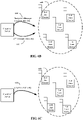
Figures 1-3 illustrate example scenarios employing contextual note taking. -
Figure 4 illustrates a system architecture of an example implementation of a presenter's device. -
Figure 5 illustrates a system architecture of an example implementation of an attendee's device. -
Figures 6A-6C illustrate example process flow diagrams for a presentation capture application for contextual note taking. -
Figures 7A and7B illustrate example process flow diagrams for a note taking assistant for contextual note taking. -
Figures 8A and8B illustrate example scenarios for contextual note taking. -
Figure 9 illustrates another example scenario for contextual note taking. - Systems and techniques for contextual note taking are described. A note taking assistant is provided that can communicate with or be part of a note taking application (or other productivity application). The note taking assistant receives content originating from a presentation capture application to support and supplement note taking related to content being presented. The presentation capture application enables audio to be captured while a specific presentation session content is being presented using a presentation application.
- In accordance with various embodiments of the invention, a presenter can give a presentation, using a presentation application and a presentation capture application, and attendees can hear the presenter and see the presentation in person or online and perform contextual note taking using a note taking assistant.
-
Figures 1-3 illustrate example scenarios for employing contextual note taking. Referring toFigure 1 , apresenter 101 andattendees 102 may all be in the samephysical location 100, for example in a class room. In a typical fashion, thepresenter 101 can give a presentation as part of a specific presentation session (e.g., a class room lesson for a particular course). Using apresentation application 103 running on the presenter'scomputing device 104, the specific presentation session content can be displayed at the presenter'scomputing device 104 and, when available, on a screen 105 (e.g., via a room display or on a surface via a projector). - The
attendees 102 can receive the specific presentation session content so that they have the content at theircorresponding computing devices 106 and can take notes using anote taking application 107 or other productivity application. Contextual note taking can be accomplished using apresentation capture application 108 at the presenter'scomputing device 104 and anote taking assistant 109 at the attendee'scomputing device 106. Thepresentation capture application 108 can be integrated as part of (e.g., built-in or as a plug-in) thepresentation application 103. Thenote taking assistant 109 can be a stand-alone application or be integrated with (either built-in or provided as a plug-in) thenote taking application 107 or other productivity application. - The
presentation capture application 108 has a broadcast mode in which messages providing speech-to-text and navigation information can be transmitted to thecomputing devices 106 running thenote taking assistant 109. For example, when thepresenter 101 speaks into amicrophone 110, the audio is captured by thepresentation capture application 108 and converted into text through, for example, a speech-to-text (STT) service or a local program at the presenter's device. The text is associated with the content of the presentation that is being displayed by the presentation application "current presenter content image" and both the text, as STT data, and information about the current presenter content image, as navigation data, are broadcasted or otherwise transmitted to thenote taking assistants 109. - In the implementation environment illustrated in
Figure 1 , thepresentation capture application 108 can enabledirect broadcasting 111 from the presenter's computing device 104 (or connected broadcasting device) to the attendees'computing devices 106 of the text and navigation information. The mode of communication can be any suitable near or mid-field point-to-point connection, such as Bluetooth. That is, thepresentation capture application 108 may capture audio from the presenter, identify the content being discussed from the specific presentation session content that the presenter is currently presenting from the presenter, and locally broadcast to theattendee computing devices 106 located in the same physical room. In this manner, thenote taking assistants 109 enable contextual note taking when in the physical presence of a presenter using a presentation capture application and only the presenter'scomputing device 104 need be able to access the Internet during the presentation (if using a STT service instead of a local program for STT). - In the implementation environment illustrated in
Figure 2 , thepresenter 201 and theattendees 202 are still in a samephysical location 200. However, instead of receiving information directly from a presenter's computing device as inFigure 1 , note takingassistants 203 atattendee computing devices 204 receive the information via a network such as over the Internet 205. A note takingassistant service 206 can be supported at a server and can receive information from apresentation capture application 207 at thepresenter computing device 208 and transmit that information to thenote taking assistants 203 at theattendee computing devices 204. In this implementation, the attendees may be registered for the specific presentation session so that they can receive the information. In some cases, the transmission of the information to the note taking assistants can be controlled such that only the attendees in physical proximity to the presenter can receive the information. - In the implementation environment illustrated in
Figure 3 , a combination of communication modes may be available. For example,attendee 301 andattendee 302 may both be in a samephysical location 300 as apresenter 303 andattendee 304 may be at alocation 305 remote from thepresenter 303. In thepresentation room 300,attendee 301 may receive, atcomputing device 306, the broadcast directly from the presenter's computing device 307 (or connected broadcasting device) such as described with respect to the environment ofFigure 1 . Since online broadcasting is enabled, some attendees in thepresentation room 300, such asattendee 303 withcomputing device 308, may receive the information over theInternet 310 such as described with respect toFigure 2 . In this implementation, physical presence may not be required and thus,attendee 304 may receive the information at theircomputing device 311 at theremote location 305. - As can be seen by some of the environments in which the described note taking assistant can be deployed, this functionality can be used in schools and online classrooms, at conferences in seminars and meetings with global participants. The functionality can be helpful for people with special needs. In addition, real-time translation can be included to help international students.
-
Figure 4 illustrates a system architecture of an example implementation of a presenter's device.Presentation device 400 can be any computing device such as but not limited to a laptop, desk top, tablet, smart television, smart phone, or other computing device supporting a presentation capture application.Devices attendee computing device 500. Referring toFigure 4 , thepresentation device 400 at least includes amemory storage 401,processor 402,communication interface 403, andmicrophone 404. - The
storage 401 may store a presentation program software 405 and apresentation capture application 406. In some cases, thepresentation capture application 406 is a plug-in or included as part of the presentation program software 405. Theprocessor 402 may include one or more processors and/or other circuitry that retrieves and executes presentation program software 405 andpresentation capture application 406 fromstorage 401. -
Storage 401 may be volatile and/or nonvolatile, removable and/or non-removable media implemented in any method or technology for storage of information, such as computer readable instructions, data structures, program modules, or other data. Examples ofstorage 401 include random access memory, read only memory, magnetic disks, optical disks, CDs, DVDs, flash memory, virtual memory and non-virtual memory, magnetic cassettes, magnetic tape, magnetic disk storage or other magnetic storage devices, or any other suitable storage media. In no case should a "storage medium" (or "storage media") be interpreted to be a propagated signal or carrier wave. -
Storage 401 may be implemented as a single storage device but may also be implemented across multiple storage devices or sub-systems co-located or distributed relative to each other. Further,storage 401 may include additional elements, such as a controller, capable of communicating withprocessor 402. - Examples of
processor 402 include general purpose central processing units, application specific processors, and logic devices, as well as any other type of processing device, combinations, or variations thereof. The one or more processing devices may include multiprocessors or multi-core processors and may operate according to one or more suitable instruction sets including, but not limited to, a Reduced Instruction Set Computing (RISC) instruction set, a Complex Instruction Set Computing (CISC) instruction set, or a combination thereof. In certain embodiments, one or more digital signal processors (DSPs) may be included as part of the computer hardware of the system in place of or in addition to a general purpose CPU. -
Communication interface 403 allows for communication betweendevice 400 and other computing systems (not shown) over a communication network or collection of networks (not shown) or the air. Examples of connections and devices that together allow for inter-system communication may include network interface cards, antennas, power amplifiers, RF circuitry, transceivers, and other communication circuitry. The connections and devices may communicate over communication media to exchange communications with other computing systems or networks of systems, such as metal, glass, air, or any other suitable communication media. The aforementioned communication media, network, connections, and devices are well known and need not be discussed at length here. -
Microphone 404 can be a built-in or a separate microphone that can be coupled todevice 400 via a microphone input port (e.g., via a USB or TRS jack). - Aspects of
presentation device 400 may be implemented within a single computing device but may also be distributed across multiple processing devices or sub-systems that cooperate in executing program instructions. -
Figure 5 illustrates a system architecture of an example implementation of an attendee's device. Anattendee computing device 500 can be any computing device such as but not limited to a laptop, desk top, tablet, smart television, smart phone, or other computing device supporting a note taking assistant.Devices attendee computing device 500. Referring toFigure 5 , theattendee computing device 500 at least includesmemory storage 501, aprocessor 502, and acommunication interface 503. - The
storage 501 may store anote taking assistant 504 and anote taking application 505. In some cases, thenote taking assistant 504 is a plug-in or included as part of thenote taking application 505, such asnote taking application 506. In some cases, note takingapplication 505 or note takingapplication 506 have corresponding online services that enable cross-platform and cross-device note taking for a user's stored notes. - The
processor 502 may include one or more processors and/or other circuitry that retrieves and executesnote taking assistant 504 and note takingapplication 505 or note takingapplication 506 fromstorage 401. -
Storage 501 may be volatile and/or nonvolatile, removable and/or non-removable media implemented in any method or technology for storage of information, such as computer readable instructions, data structures, program modules, or other data. Examples ofstorage 501 include random access memory, read only memory, magnetic disks, optical disks, CDs, DVDs, flash memory, virtual memory and non-virtual memory, magnetic cassettes, magnetic tape, magnetic disk storage or other magnetic storage devices, or any other suitable storage media. In no case should a "storage medium" (or "storage media") be interpreted to be a propagated signal or carrier wave. -
Storage 501 may be implemented as a single storage device but may also be implemented across multiple storage devices or sub-systems co-located or distributed relative to each other. Further,storage 501 may include additional elements, such as a controller, capable of communicating withprocessor 502. - Examples of
processor 502 include general purpose central processing units, application specific processors, and logic devices, as well as any other type of processing device, combinations, or variations thereof. The one or more processing devices may include multiprocessors or multi-core processors and may operate according to one or more suitable instruction sets including, but not limited to, a Reduced Instruction Set Computing (RISC) instruction set, a Complex Instruction Set Computing (CISC) instruction set, or a combination thereof. In certain embodiments, one or more digital signal processors (DSPs) may be included as part of the computer hardware of the system in place of or in addition to a general purpose CPU. -
Communication interface 503 allows for communication betweendevice 500 and other computing systems (not shown) over a communication network or collection of networks (not shown) or the air. Examples of connections and devices that together allow for inter-system communication may include network interface cards, antennas, power amplifiers, RF circuitry, transceivers, and other communication circuitry. The connections and devices may communicate over communication media to exchange communications with other computing systems or networks of systems, such as metal, glass, air, or any other suitable communication media. The aforementioned communication media, network, connections, and devices are well known and need not be discussed at length here. - Aspects of
attendee computing device 500 may be implemented within a single computing device but may also be distributed across multiple processing devices or sub-systems that cooperate in executing program instructions. -
Figures 6A-6C illustrate example process flow diagrams for a presentation capture application for contextual note taking. - Referring to
Figure 6A , when a presenter is in a presentation software program, the presentation capture application may receive a request for broadcast mode (600) and identify specific presentation session content (601). The specific presentation session content may comprise identifiable context images. In one embodiment, the presentation software may be Microsoft PowerPoint® and the specific presentation session content is a slide deck for a specific presentation. In this example case, an identifiable context image refers to a slide in the presentation. Thus, each presentation may have many identifiable context images, one for each slide. - Once the presenter starts the presentation, the presentation capture application module may receive audio input from a microphone for the presenter's device (602). The presentation capture application can, in this implementation, then initiate two-way communication with a speech to text (STT) service via a STT application programming interface (API) (603). The STT service may be any available/accessible online service. In some cases, the STT service is a local application running on the presenter's device. Once the two-way communication has been established, the presentation capture application may send units of recorded speech data to the STT service via the STT API (604) and in return receive a unit of text corresponding to the unit of recorded speech data (605).
- After the unit of text is returned, the presentation capture application may then assign the unit of text with the associated location in the specific presentation session content 606). The associated location may be a slide number, a page number, or the like. In some cases, the text can be displayed on the presenter's device screen. Additionally, the assigned data (the unit of text) may be broadcast (607). The data may be broadcast wired or wirelessly, point-to-point, or over local area network (LAN), a wide area network (WAN), cellular network (e.g. wireless phone), WiFi network, intranet, extranet, Internet, ad-hoc network, or a combination thereof. The particular network can depend on the implementation, for example, as described in the scenarios of
Figures 1-3 . -
Figures 6B and 6C illustrate two example information broadcasting schemes foroperation 607. In one case, as illustrated inFigure 6B , the assigned data may be broadcast over todevices 608 executing note taking assistants in two types of messages. One type of message is anavigation message 609, containing a location identifier. The location identifier provides the location, such as the slide number or the page number, that the presenter is displaying. The other type of message is aSTT message 610. TheSTT message 610 contains the unit of text that can be associated with the current location at the note taking assistant. As the presenter changes slides, a new navigation message can be generated to inform the note taking assistant that subsequent STT messages are to be associated with the new slide. In another case, as illustrated inFigure 6C , themessage 611 includes both a unit of text and the location identifier so that the note taking assistant may not be required to keep track of the current image context when receiving the units of text. Thus, letting the note taking assistant know the unit of text associated with the current location and the current location. -
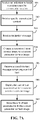
Figures 7A and7B illustrate example process flow diagrams for a note taking assistant for contextual note taking. In some cases, when a note taking assistant is initiated, the note taking assistant begins searching for broadcasts in its vicinity. If so, the note taking assistant may provide an option to a user to select a specific presentation session. Referring toFigure 7A , a note taking assistant can receive an indication to begin receiving a specific presentation session (701). The note taking assistant can receive specific presentation content (702). The specific presentation content comprises identifiable context images. Identifiable context images are meant to define an individual page, an individual slide, or other atomic unit in the presentation (e.g. slides in a power point, pages in a word document, or the like). In some cases, the note taking assistant receives the specific presentation content by receiving a uniform resource locator (URL) message and then retrieving the specific presentation content at the URL location. In some cases, the note taking assistant receives the specific presentation content through direct broadcasting (e.g., Bluetooth) or other communication modalities from a device in the physical environment (e.g., the presenter's computer). - In conjunction with receiving the specific presentation content, the note taking assistant may populate a notebook form with the specific presentation content. The note taking assistant may alternatively, or in addition, populate a note taking assistant user interface.
- The note taking assistant operates by receiving a navigation message, changing the current assistant context image to a current presenter context image based on the navigation message; receiving a speech-to-text message comprising a unit of text; displaying the current presenter context image, and displaying the unit of text associated with the current presenter context image; and storing the unit of text associated with the current presenter context image.
- That is, when the note taking assistant receives a navigation message (703), a location identifier can be identified from the navigation message and be used to identify the current location within the presentation where the presenter is speaking.
- Upon receiving the navigation message, the note taking assistant may change a current assistant context image to a current presenter context image (704). The current assistant context image is the context image that the note taking assistant software may be pointing to (e.g., in a table or other data structure) and to which any text units being received are assigned. The current presenter context image is the context image that the presenter's presentation application is currently on (and displaying). Once the current assistant context image is changed to the current presenter context image, the current presenter image becomes the current assistant context image.
- The note taking assistant may receive a STT message (705). The STT message comprises a unit of text that is to be associated with the current presenter context image. Upon receipt, the note taking assistant may then display the unit of text associated with the current presenter context image (706). Further, the note taking assistant can store the unit of text associated with the current presenter context image (707). The note taking assistant may have its own graphical user interface in which the images and text are displayed (see e.g.,
Figure 8A ). - In some cases, were the images are prepopulated in a form available for a note taking application, the text is displayed in an appropriate region of the form (see e.g.,
Figure 8B and9 ). For example, the note taking assistant can be integrated with or communicate with a note taking application to populate a note with the presenter's verbal content. In one case, as mentioned above, a special form can be inserted into the note and populated with the identifiable context images. The note taking assistant can then provide the received text units for association with the appropriate context image. In this manner, a user of the note taking application can annotate and take additional notes while having the presenter's verbal content automatically populate the form. - Referring to
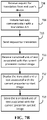
Figure 7B , additional functionality can be included in the note taking assistant. In particular, the end user may choose to change the current language (that the presenter is speaking in) to a different language. The note taking assistant may receive a request for translation from end user's device (708) and an indication of the target language. The target language is the language the current language will be translated into. - The note taking assistant can then initiate two-way communication with a translation service via a translation API (709) and a request to the translation service may be sent (710). The request can include the target language and the most recent unit of text associated with the current presenter context image. The translation may be done using a service or may be completed directly by the note taking assistant (if the translation service is available from a local application).
- The note taking assistant receives the translated unit of text associated with the current presenter context image (711) and may then display the translated unit of text associated with the current presenter context image (712). Further, the note taking assistant may store the translated unit of text associated with the current presenter context image (713).
-
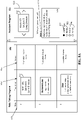
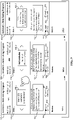
Figures 8A ,8B , and9 illustrate example scenarios for contextual note taking. - Referring to
Figure 8A , the note taking assistant 801 (Assistant Program) andnote taking program 802 are two separate programs. In the view ofFigure 8A , the two programs' graphical interfaces are shown appearing next to each other on one screen. However, the windows may be arranged in any suitable manner. Thenote taking assistant 801 can include a context image display withnavigation 810. STT content corresponding to audio comments from a presenter that is received by the note taking assistant can be displayed associated with the appropriate context image in atext region 803. A context image of aslide 817, with thecorresponding text 818 is shown. There are also be options to translate toother languages navigation 810 and the note taking assistant will still associate the STT content with the correct context slide (as the inserted text toregion 803 is based on the navigation information received by the note taking assistant from a navigation message or the STT message and not any navigation information from the user's interaction with the context image display with navigation 810). Indeed, regardless of what slide or page in the presentation the attendee is currently viewing, the note taking assistant will display and store the presenter's converted audio content associated with the correct slide or page of the presentation. Thus, an inattentive attendee or one that is making notes on a different part of the presentation can avoid missing any of the presenter's verbal content and have that verbal content properly associated with the correct visual content. - While the note taking assistant is operating, the user can simultaneously take notes in the
note taking program 802. In the example shown inFigure 8A , aform 808 may be available that can be populated with the slides of the presentation. The user can take their own notes for the slides. In the example form shown inFigure 8A ,thumbnails 812 of the slides, includingslide 817 are included in the form with a region for user-enterednotes 814. The end user may be able to scroll down the note take program to see the complete list of slides and their notes. -
Figure 8B illustrates an integrated note taking program and note taking assistant. In this example, theform 820 that is populated with the slides of the presentation (the specific presentation session content with identifiable context images) includes, in addition to thethumbnails 812 and region for user-enterednotes 814, a region for theSTT content 821, which takes the place ofregion 803 of Figure 3A. In addition, information about thespecific presentation session 822, such as class/session name, date, and URL of the presentation content, can be inserted into the note. -
Figure 9 shows another example of an integrated note taking assistant and note taking program (Assistant + Note Taking Program) 900. Each view of the Assistant + Note Taking Program 900-1, 900-2, 900-3 is the view the end user would see for each slide 901-1, 901-2, 901-3. As the end user chooses which slide 901-1, 901-2, 901-3 to view, the program 900 may display the content and corresponding STT data that was received for that slide and can insert their own notes associated to the displayed slide in region 907-1, 907-2, and 907-3. The regions 907-1, 907-2, and 907-3 allow the end user to take notes for corresponding slide 901-1, 901-2, 901-3, while still receiving all of the audio content from the presenter. The end user may press the arrow located next to the slide 901-1, 901-2, 901-3 to display the view for the next slide or the previous slide. For example, if the end user would like to viewslide 1 901-1, the program can display slide 1 901-1 along with any corresponding content. Then, when the end user is ready, they may press the right arrow and slide 2 901-2, along with any corresponding content, will be displayed. - Regardless of what slide or page in the presentation the attendee is currently viewing, the note taking assistant will display and store the presenter's converted audio content associated with the correct slide or page of the presentation. Thus, an inattentive attendee or one that is making notes on a different part of the presentation can avoid missing any of the presenter's verbal content and have that verbal content properly associated with the correct visual content.
- The Assistant + Note Taking Program 900 may also include the option to translate the corresponding STT content 902-1 by selecting one of
languages presentation 909. The information may include, but is not limited to, the presenter name, date of presentation, name of presentation, etc. In one embodiment, the content in theinformation region 909 stays the same throughout each view of the Assistant + Note Taking Program 900-1, 900-2, 900-3. The end user may press the arrow next to the slide. - Example specific use cases for a note taking assistant in a classroom environment are provided below.
- Note taking experience in classroom is challenging and time consuming. It becomes very difficult to capture all what gets discussed in class. As a student takes their own notes, it is possible to miss the context from the slides themselves. This issue can be solved by using a system that prepopulates sections in Note Taking Applications so that user can easily capture notes corresponding to each slide. The solution will also help in capturing the verbal discussion per slide as Text. Another advancement will help in real time translation for verbal discussion.
- For example, a Teacher uses a PowerPoint® Deck to teach his/her class. As the students each launch the note taking assistant in the form of a Classroom Assistant, the Classroom Assistant automatically detects what class they are in and what PowerPoint file the teacher is using. The Classroom Assistant populates a Onenote® page (or other note taking application page) with existing slides and placeholder for the student to take Notes corresponding to each slide. As the teacher talks about each slide, Text to speech conversion happens in the presentation application, enabled by the plug-in of the Presentation Capture Application, and is sent to the students.
- As another example, a Teacher uses a PowerPoint Deck to teach his/her class. As the students launch a note taking application with integrated note taking assistant, the note taking application automatically detects what class they are in and what PowerPoint file the teacher is using. The note taking application populates a page with existing slides and placeholder for the student to take Notes corresponding to each slide. As the teacher talks about each slide, Text to speech conversion happens in the presentation application and gets added in the Student's note. Students have the option to choose their language and it provides real time translation for the verbal discussions
- It should be understood that the examples and embodiments described herein are for illustrative purposes only and that various modifications or changes in light thereof will be suggested to persons skilled in the art and are to be included within the purview of this application.
- Although the subject matter has been described in language specific to structural features and/or acts, it is to be understood that the subject matter defined in the appended claims is not necessarily limited to the specific features or acts described above. Rather, the specific features and acts described above are disclosed as examples of implementing the claims and other equivalent features and acts are intended to be within the scope of the claims.
Claims (15)
- A method facilitating contextual note taking, the method comprising:receiving (701), at an end user device, an indication of a specific presentation session;receiving (702), at the end user device, specific presentation session content, the specific presentation session content comprising identifiable context images;receiving (703), from a presenter device, a navigation message via a communication interface of the end user device, the navigation message comprising a location identifier that provides a location in the specific presentation session content a presenter is displaying;responsive to receiving the navigation message, changing (704), at the end user device, a current assistant context image of the specific presentation session content to a current presenter context image based on the navigation message, the current assistant context image corresponding to a context image to which any text units being received are assigned and the current presenter context image corresponding to a context image a presenter is currently displaying;receiving (705), at the end user device, a speech-to-text message comprising a unit of text associated with the current presenter context image from the presenter device;displaying (706), at the end user device, the unit of text associated with the current presenter context image; andstoring (707), at the end user device, the unit of text associated with the current presenter context image regardless of a context image that an end user is currently viewing.
- The method of claim 1, further comprising:receiving an indication of a target language;as the unit of text associated with the current presenter context image is received, sending (710) a request to a translation service, the request including the target language and the unit of text associated with the current presenter context image;receiving (711) a translated unit of text associated with the current presenter context image;displaying (712) the translated unit of text associated with the current presenter context image; andstoring (713) the translated unit of text associated with the current presenter context image.
- The method of claim 1, further comprising:
populating a note taking form with the specific presentation session content, including a plurality of the identifiable context images. - The method of claim 3, further comprising:
identifying the current presenter context image in the note taking form, wherein the unit of text is inserted and displayed in the note taking form associated with the current presenter context image. - The method of claim 4, further comprising:
receiving and displaying user input to the note taking form in a region associated with a different context image than that having the unit of text being inserted and displayed. - The method of claim 3, wherein populating the note taking form with the specific presentation session content comprises:
communicating with a note taking application to input and store the specific presentation session content. - The method of claim 1, wherein the receiving specific presentation session content comprises:receiving a unified resource locator, URL, message; andobtaining the specific presentation specific content at a URL location, identified by the URL message.
- A system comprising:a processing system,a display,a communication interface,one or more computer readable storage media, anda contextual note taking program stored on the one or more computer readable storage media that, when executed by the processing system, directs the processing system to:in response to receiving (703), from a presenter device, a navigation message via the communication interface of the end user device, the navigation message comprising a location identifier, change (704) a current assistant context image of a specific presentation session content to a current presenter context image of the specific presentation session content based on the navigation message, wherein the location identifier provides a location in the specific presentation session content a presenter is displaying, the current assistant context image corresponding to a context image to which any text units being received are assigned and the current presenter context image corresponding to a context image a presenter is currently displaying;in response to receiving (705), from the presenter device, a speech-to-text message comprising a unit of text, at least display (706), at the end user device, the unit of text associated with the current presenter context image and store (707), at the end user device, the unit of text associated with the current presenter context image regardless of a context image that an end user is currently viewing.
- The system of claim 8, further comprising:
a note stored on the one or more computer readable storage media, wherein the contextual note taking program further directs the processing system to:populate a note taking form in the note with the specific presentation session content, including a plurality of the identifiable context images;identify the current presenter context image in the note taking form and insert the unit of text in the note taking form associated with the current presenter context image; andin response to receiving user input to the note taking form in a region associated with a different context image than that having the unit of text being inserted, display the user input. - The system of claim 8, wherein the contextual note taking program further directs the processing system to:communicate with a note taking application to input and store the specific presentation session content; andcommunicate with the note taking application to input the unit of text associated with the current presenter context image.
- The system of claim 8, wherein the contextual note taking program further directs the processing system to:
in response to receiving a unified resource locator, URL, message for an indicated specific presentation session, obtain the specific presentation specific content at a URL location, identified by the URL message. - The system of claim 8, wherein the contextual note taking program further directs the processing system to:provide translation options for target languages;receive an indication of a target language;as the unit of text associated with the current presenter context image is received, send (710) a request to a translation service, the request including the target language and the unit of text associated with the current presenter context image;receive (711) a translated unit of text associated with the current presenter context image;display (712) the translated unit of text associated with the current presenter context image; andstore (713) the translated unit of text associated with the current presenter context image.
- One or more computer readable storage media having a contextual note taking program stored thereon that when executed by a processing system, directs the processing system to:in response to receiving (703), from a presenter device, a navigation message via a communication interface, the navigation message comprising a location identifier, change a current assistant context image of a specific presentation session content to a current presenter context image of the specific presentation session content based on the received navigation message, wherein the location identifier provides a location in the specific presentation session content a presenter is displaying, the current assistant context image corresponding to a context image to which any text units being received are assigned and the current presenter context image corresponding to a context image a presenter is currently displaying;in response to receiving (705), from the presenter device, a speech-to-text message comprising a unit of text, at least display (706) the unit of text associated with the current presenter context image and store (707) the unit of text associated with the current presenter context image regardless of a context image that an end user is currently viewing.
- The media of claim 13, wherein the contextual note taking program further directs the processing system to:populate a note taking form in a note with the specific presentation session content, including a plurality of the identifiable context images;identify the current presenter context image in the note taking form and insert the unit of text in the note taking form associated with the current presenter context image; andin response to receiving user input to the note taking form in a region associated with a different context image than that having the unit of text being inserted, display the user input.
- The media of claim 13, wherein the contextual note taking program further directs the processing system to:
communicate with a note taking application to input and store the specific presentation session content.
Applications Claiming Priority (3)
| Application Number | Priority Date | Filing Date | Title |
|---|---|---|---|
| US201662296596P | 2016-02-17 | 2016-02-17 | |
| US15/062,797 US10121474B2 (en) | 2016-02-17 | 2016-03-07 | Contextual note taking |
| PCT/US2017/017084 WO2017142768A1 (en) | 2016-02-17 | 2017-02-09 | Contextual note taking |
Publications (2)
| Publication Number | Publication Date |
|---|---|
| EP3417404A1 EP3417404A1 (en) | 2018-12-26 |
| EP3417404B1 true EP3417404B1 (en) | 2022-04-13 |
Family
ID=59561617
Family Applications (1)
| Application Number | Title | Priority Date | Filing Date |
|---|---|---|---|
| EP17706367.4A Active EP3417404B1 (en) | 2016-02-17 | 2017-02-09 | Contextual note taking |
Country Status (4)
| Country | Link |
|---|---|
| US (1) | US10121474B2 (en) |
| EP (1) | EP3417404B1 (en) |
| CN (1) | CN108292301B (en) |
| WO (1) | WO2017142768A1 (en) |
Families Citing this family (49)
| Publication number | Priority date | Publication date | Assignee | Title |
|---|---|---|---|---|
| US9318108B2 (en) | 2010-01-18 | 2016-04-19 | Apple Inc. | Intelligent automated assistant |
| US8977255B2 (en) | 2007-04-03 | 2015-03-10 | Apple Inc. | Method and system for operating a multi-function portable electronic device using voice-activation |
| US8676904B2 (en) | 2008-10-02 | 2014-03-18 | Apple Inc. | Electronic devices with voice command and contextual data processing capabilities |
| EP4560630A3 (en) | 2013-02-07 | 2025-08-06 | Apple Inc. | Voice trigger for a digital assistant |
| US9715875B2 (en) | 2014-05-30 | 2017-07-25 | Apple Inc. | Reducing the need for manual start/end-pointing and trigger phrases |
| US10170123B2 (en) | 2014-05-30 | 2019-01-01 | Apple Inc. | Intelligent assistant for home automation |
| US9338493B2 (en) | 2014-06-30 | 2016-05-10 | Apple Inc. | Intelligent automated assistant for TV user interactions |
| US9886953B2 (en) | 2015-03-08 | 2018-02-06 | Apple Inc. | Virtual assistant activation |
| US10460227B2 (en) | 2015-05-15 | 2019-10-29 | Apple Inc. | Virtual assistant in a communication session |
| US10747498B2 (en) | 2015-09-08 | 2020-08-18 | Apple Inc. | Zero latency digital assistant |
| US10671428B2 (en) | 2015-09-08 | 2020-06-02 | Apple Inc. | Distributed personal assistant |
| US10331312B2 (en) | 2015-09-08 | 2019-06-25 | Apple Inc. | Intelligent automated assistant in a media environment |
| US10691473B2 (en) | 2015-11-06 | 2020-06-23 | Apple Inc. | Intelligent automated assistant in a messaging environment |
| CN105869654B (en) | 2016-03-29 | 2020-12-04 | 阿里巴巴集团控股有限公司 | Audio message processing method and device |
| US10586535B2 (en) | 2016-06-10 | 2020-03-10 | Apple Inc. | Intelligent digital assistant in a multi-tasking environment |
| DK201670540A1 (en) | 2016-06-11 | 2018-01-08 | Apple Inc | Application integration with a digital assistant |
| US12197817B2 (en) | 2016-06-11 | 2025-01-14 | Apple Inc. | Intelligent device arbitration and control |
| US11204787B2 (en) | 2017-01-09 | 2021-12-21 | Apple Inc. | Application integration with a digital assistant |
| US11276395B1 (en) | 2017-03-10 | 2022-03-15 | Amazon Technologies, Inc. | Voice-based parameter assignment for voice-capturing devices |
| DK179496B1 (en) | 2017-05-12 | 2019-01-15 | Apple Inc. | USER-SPECIFIC Acoustic Models |
| DK201770428A1 (en) | 2017-05-12 | 2019-02-18 | Apple Inc. | Low-latency intelligent automated assistant |
| US10303715B2 (en) | 2017-05-16 | 2019-05-28 | Apple Inc. | Intelligent automated assistant for media exploration |
| US10923121B2 (en) * | 2017-08-11 | 2021-02-16 | SlackTechnologies, Inc. | Method, apparatus, and computer program product for searchable real-time transcribed audio and visual content within a group-based communication system |
| US10818288B2 (en) | 2018-03-26 | 2020-10-27 | Apple Inc. | Natural assistant interaction |
| JP7338214B2 (en) * | 2018-04-20 | 2023-09-05 | 株式会社リコー | Communication terminal, management system, display method, and program |
| US10928918B2 (en) | 2018-05-07 | 2021-02-23 | Apple Inc. | Raise to speak |
| DK201870355A1 (en) | 2018-06-01 | 2019-12-16 | Apple Inc. | Virtual assistant operation in multi-device environments |
| DK180639B1 (en) | 2018-06-01 | 2021-11-04 | Apple Inc | DISABILITY OF ATTENTION-ATTENTIVE VIRTUAL ASSISTANT |
| KR102067446B1 (en) * | 2018-06-04 | 2020-01-17 | 주식회사 엔씨소프트 | Method and system for generating caption |
| US11462215B2 (en) | 2018-09-28 | 2022-10-04 | Apple Inc. | Multi-modal inputs for voice commands |
| CN109543048B (en) * | 2018-12-12 | 2020-11-06 | 广东小天才科技有限公司 | A note generation method and terminal device |
| US11348573B2 (en) | 2019-03-18 | 2022-05-31 | Apple Inc. | Multimodality in digital assistant systems |
| EP3712781A1 (en) * | 2019-03-20 | 2020-09-23 | Nokia Technologies Oy | An apparatus and associated methods for presentation of presentation data |
| US11475884B2 (en) * | 2019-05-06 | 2022-10-18 | Apple Inc. | Reducing digital assistant latency when a language is incorrectly determined |
| US11307752B2 (en) | 2019-05-06 | 2022-04-19 | Apple Inc. | User configurable task triggers |
| DK201970509A1 (en) | 2019-05-06 | 2021-01-15 | Apple Inc | Spoken notifications |
| US11227599B2 (en) | 2019-06-01 | 2022-01-18 | Apple Inc. | Methods and user interfaces for voice-based control of electronic devices |
| EP3886005B1 (en) * | 2020-03-23 | 2025-01-01 | Ricoh Company, Ltd. | Information processing system, user terminal, method of processing information, and carrier means |
| US11061543B1 (en) | 2020-05-11 | 2021-07-13 | Apple Inc. | Providing relevant data items based on context |
| US12301635B2 (en) | 2020-05-11 | 2025-05-13 | Apple Inc. | Digital assistant hardware abstraction |
| US11490204B2 (en) | 2020-07-20 | 2022-11-01 | Apple Inc. | Multi-device audio adjustment coordination |
| US11438683B2 (en) | 2020-07-21 | 2022-09-06 | Apple Inc. | User identification using headphones |
| CN112087656B (en) * | 2020-09-08 | 2022-10-04 | 远光软件股份有限公司 | Online note generation method and device and electronic equipment |
| US12033619B2 (en) * | 2020-11-12 | 2024-07-09 | International Business Machines Corporation | Intelligent media transcription |
| EP4164255A1 (en) | 2021-10-08 | 2023-04-12 | Nokia Technologies Oy | 6dof rendering of microphone-array captured audio for locations outside the microphone-arrays |
| CN114328999B (en) * | 2021-12-31 | 2025-04-04 | Oook(北京)教育科技有限责任公司 | Interactive method, device, medium and electronic device for presentation |
| CN114327170B (en) * | 2021-12-31 | 2023-12-05 | 北京安博盛赢教育科技有限责任公司 | Alternating current group generation method and device, medium and electronic equipment |
| US12135863B2 (en) | 2022-05-10 | 2024-11-05 | Apple Inc. | Search operations in various user interfaces |
| US20230419434A1 (en) * | 2022-06-23 | 2023-12-28 | International Business Machines Corporation | Personalized adaptive education course adapting to neurodiversity considerations in online learning |
Family Cites Families (46)
| Publication number | Priority date | Publication date | Assignee | Title |
|---|---|---|---|---|
| JP3421359B2 (en) | 1992-03-13 | 2003-06-30 | 三洋電機株式会社 | Phone memo device |
| US8355912B1 (en) * | 2000-05-04 | 2013-01-15 | International Business Machines Corporation | Technique for providing continuous speech recognition as an alternate input device to limited processing power devices |
| US8140980B2 (en) * | 2003-08-05 | 2012-03-20 | Verizon Business Global Llc | Method and system for providing conferencing services |
| US7542971B2 (en) | 2004-02-02 | 2009-06-02 | Fuji Xerox Co., Ltd. | Systems and methods for collaborative note-taking |
| US20070133437A1 (en) | 2005-12-13 | 2007-06-14 | Wengrovitz Michael S | System and methods for enabling applications of who-is-speaking (WIS) signals |
| US7296218B2 (en) | 2006-02-08 | 2007-11-13 | Dittrich William A | Instant note capture/presentation apparatus, system and method |
| US8165609B2 (en) | 2007-07-24 | 2012-04-24 | Yue Fang | Storage and access of digital content |
| US7962525B2 (en) | 2007-11-05 | 2011-06-14 | Microsoft Corporation | Automated capture of information generated at meetings |
| EP3484135A1 (en) * | 2008-04-02 | 2019-05-15 | Twilio Inc. | System and method for processing telephony sessions |
| US8868430B2 (en) | 2009-01-16 | 2014-10-21 | Sony Corporation | Methods, devices, and computer program products for providing real-time language translation capabilities between communication terminals |
| US8768705B2 (en) | 2009-10-27 | 2014-07-01 | Cisco Technology, Inc. | Automated and enhanced note taking for online collaborative computing sessions |
| US9236047B2 (en) * | 2010-05-21 | 2016-01-12 | Microsoft Technology Licensing, Llc | Voice stream augmented note taking |
| US20120150863A1 (en) * | 2010-12-13 | 2012-06-14 | Microsoft Corporation | Bookmarking of meeting context |
| US9473449B2 (en) * | 2011-02-10 | 2016-10-18 | Jeffrey J. Ausfeld | Multi-platform collaboration appliance |
| US20120245936A1 (en) * | 2011-03-25 | 2012-09-27 | Bryan Treglia | Device to Capture and Temporally Synchronize Aspects of a Conversation and Method and System Thereof |
| JP2012256208A (en) * | 2011-06-09 | 2012-12-27 | Casio Comput Co Ltd | Lecture system and display device used for lecture system |
| US9014358B2 (en) * | 2011-09-01 | 2015-04-21 | Blackberry Limited | Conferenced voice to text transcription |
| CA2782793A1 (en) * | 2011-10-17 | 2013-04-17 | Research In Motion Limited | Note compiler interface |
| US9245254B2 (en) * | 2011-12-01 | 2016-01-26 | Elwha Llc | Enhanced voice conferencing with history, language translation and identification |
| US10875525B2 (en) * | 2011-12-01 | 2020-12-29 | Microsoft Technology Licensing Llc | Ability enhancement |
| US9225936B2 (en) | 2012-05-16 | 2015-12-29 | International Business Machines Corporation | Automated collaborative annotation of converged web conference objects |
| US10176156B2 (en) | 2012-10-30 | 2019-01-08 | Microsoft Technology Licensing, Llc | System and method for providing linked note-taking |
| US20140160153A1 (en) | 2012-12-07 | 2014-06-12 | Jatinder Pal Singh | Method and system for real-time learning and collaboration solution |
| US8792863B2 (en) * | 2012-12-28 | 2014-07-29 | Telefonica, S.A. | Method for collecting and storing annotations associated to a voice audio data |
| KR102196671B1 (en) * | 2013-01-11 | 2020-12-30 | 엘지전자 주식회사 | Electronic Device And Method Of Controlling The Same |
| US20140280186A1 (en) * | 2013-03-15 | 2014-09-18 | International Business Machines Corporation | Crowdsourcing and consolidating user notes taken in a virtual meeting |
| US10629188B2 (en) * | 2013-03-15 | 2020-04-21 | International Business Machines Corporation | Automatic note taking within a virtual meeting |
| US20140365200A1 (en) * | 2013-06-05 | 2014-12-11 | Lexifone Communication Systems (2010) Ltd. | System and method for automatic speech translation |
| EP3039509A4 (en) * | 2013-08-28 | 2017-04-19 | Hewlett-Packard Enterprise Development LP | Managing presentations |
| US9402055B2 (en) * | 2013-10-11 | 2016-07-26 | Fuji Xerox Co., Ltd. | Systems and methods for peripheral awareness of, and nominal interaction with, a remote meeting using a wearable device |
| US20150149540A1 (en) * | 2013-11-22 | 2015-05-28 | Dell Products, L.P. | Manipulating Audio and/or Speech in a Virtual Collaboration Session |
| US9398059B2 (en) * | 2013-11-22 | 2016-07-19 | Dell Products, L.P. | Managing information and content sharing in a virtual collaboration session |
| US10459985B2 (en) * | 2013-12-04 | 2019-10-29 | Dell Products, L.P. | Managing behavior in a virtual collaboration session |
| US9372543B2 (en) * | 2013-12-16 | 2016-06-21 | Dell Products, L.P. | Presentation interface in a virtual collaboration session |
| US9329833B2 (en) * | 2013-12-20 | 2016-05-03 | Dell Products, L.P. | Visual audio quality cues and context awareness in a virtual collaboration session |
| KR101864361B1 (en) * | 2014-04-08 | 2018-06-04 | 네이버 주식회사 | Method and system for providing translated result |
| JP2015210683A (en) * | 2014-04-25 | 2015-11-24 | 株式会社リコー | Information processing system, information processing apparatus, information processing method, and program |
| US9614969B2 (en) * | 2014-05-27 | 2017-04-04 | Microsoft Technology Licensing, Llc | In-call translation |
| JP2016062357A (en) * | 2014-09-18 | 2016-04-25 | 株式会社東芝 | Speech translation apparatus, method and program |
| TWI616868B (en) * | 2014-12-30 | 2018-03-01 | Hon Hai Precision Industry Co., Ltd. | Conference recording device and method for automatically generating conference record |
| TWI619115B (en) * | 2014-12-30 | 2018-03-21 | Hon Hai Precision Industry Co., Ltd. | Conference recording device and method for automatically generating conference record |
| TWI590240B (en) * | 2014-12-30 | 2017-07-01 | 鴻海精密工業股份有限公司 | Conference recording device and method for automatically generating conference record |
| US10021152B2 (en) * | 2015-02-05 | 2018-07-10 | At&T Intellectual Property I, L.P. | Sharing location information for locations accessed during a conference |
| US10331304B2 (en) * | 2015-05-06 | 2019-06-25 | Microsoft Technology Licensing, Llc | Techniques to automatically generate bookmarks for media files |
| GB201516552D0 (en) * | 2015-09-18 | 2015-11-04 | Microsoft Technology Licensing Llc | Keyword zoom |
| JP6147825B2 (en) * | 2015-09-29 | 2017-06-14 | 株式会社東芝 | Electronic apparatus and method |
-
2016
- 2016-03-07 US US15/062,797 patent/US10121474B2/en active Active
-
2017
- 2017-02-09 EP EP17706367.4A patent/EP3417404B1/en active Active
- 2017-02-09 CN CN201780004198.2A patent/CN108292301B/en active Active
- 2017-02-09 WO PCT/US2017/017084 patent/WO2017142768A1/en not_active Ceased
Also Published As
| Publication number | Publication date |
|---|---|
| EP3417404A1 (en) | 2018-12-26 |
| CN108292301A (en) | 2018-07-17 |
| US10121474B2 (en) | 2018-11-06 |
| CN108292301B (en) | 2022-12-20 |
| WO2017142768A1 (en) | 2017-08-24 |
| US20170236517A1 (en) | 2017-08-17 |
Similar Documents
| Publication | Publication Date | Title |
|---|---|---|
| US10121474B2 (en) | Contextual note taking | |
| US10735690B2 (en) | System and methods for physical whiteboard collaboration in a video conference | |
| US10341399B2 (en) | Method and apparatus for sharing presentation data and annotation | |
| US10019989B2 (en) | Text transcript generation from a communication session | |
| US9712569B2 (en) | Method and apparatus for timeline-synchronized note taking during a web conference | |
| US9858271B2 (en) | System and method for translating content between devices | |
| US11288031B2 (en) | Information processing apparatus, information processing method, and information processing system | |
| US20140281855A1 (en) | Displaying information in a presentation mode | |
| US9639545B2 (en) | Online binders | |
| US10965743B2 (en) | Synchronized annotations in fixed digital documents | |
| US20240103793A1 (en) | Natural language markup for meetings | |
| CN111930453A (en) | Dictation interaction method and device and electronic equipment | |
| US9035996B1 (en) | Multi-device video communication session | |
| JP2021039618A (en) | Information processing system, information processing device, information processing method and program | |
| EP2632156A2 (en) | Method and apparatus for two way communication | |
| CN115396404B (en) | Synchronous screen throwing method and related device for explanation positions of main speakers in cloud conference scene | |
| Heini et al. | Remote data collection in sociolinguistics: lessons from the COVID-19 pandemic | |
| Kwok | Mobile apps: A conference in your pocket | |
| Li | Mobile Studies Congress 2022 & 2023 and Mobile Innovation Network and Association review | |
| Numazawa et al. | Education and learning support system using proposed note-taking application | |
| Taoua | Reel Resistance: The Cinema of Jean-Marie Teno by Melissa Thackway and Jean-Marie Teno | |
| CN120233968A (en) | Collaborative content performance method, device, electronic device and storage medium | |
| JP2021039506A (en) | Information processing system, information processing apparatus, information processing method, and program | |
| US20190243805A1 (en) | System and method for building and seamless playing of content modules | |
| KR20140069479A (en) | Presentation system for saving energy |
Legal Events
| Date | Code | Title | Description |
|---|---|---|---|
| STAA | Information on the status of an ep patent application or granted ep patent |
Free format text: STATUS: UNKNOWN |
|
| STAA | Information on the status of an ep patent application or granted ep patent |
Free format text: STATUS: THE INTERNATIONAL PUBLICATION HAS BEEN MADE |
|
| PUAI | Public reference made under article 153(3) epc to a published international application that has entered the european phase |
Free format text: ORIGINAL CODE: 0009012 |
|
| STAA | Information on the status of an ep patent application or granted ep patent |
Free format text: STATUS: REQUEST FOR EXAMINATION WAS MADE |
|
| 17P | Request for examination filed |
Effective date: 20180525 |
|
| AK | Designated contracting states |
Kind code of ref document: A1 Designated state(s): AL AT BE BG CH CY CZ DE DK EE ES FI FR GB GR HR HU IE IS IT LI LT LU LV MC MK MT NL NO PL PT RO RS SE SI SK SM TR |
|
| AX | Request for extension of the european patent |
Extension state: BA ME |
|
| DAV | Request for validation of the european patent (deleted) | ||
| DAX | Request for extension of the european patent (deleted) | ||
| STAA | Information on the status of an ep patent application or granted ep patent |
Free format text: STATUS: EXAMINATION IS IN PROGRESS |
|
| 17Q | First examination report despatched |
Effective date: 20210507 |
|
| RAP3 | Party data changed (applicant data changed or rights of an application transferred) |
Owner name: MICROSOFT TECHNOLOGY LICENSING, LLC |
|
| REG | Reference to a national code |
Ref country code: DE Ref legal event code: R079 Ref document number: 602017055872 Country of ref document: DE Free format text: PREVIOUS MAIN CLASS: G06Q0010000000 Ipc: G06F0003048000 |
|
| GRAP | Despatch of communication of intention to grant a patent |
Free format text: ORIGINAL CODE: EPIDOSNIGR1 |
|
| STAA | Information on the status of an ep patent application or granted ep patent |
Free format text: STATUS: GRANT OF PATENT IS INTENDED |
|
| RIC1 | Information provided on ipc code assigned before grant |
Ipc: G10L 15/26 20060101ALI20211119BHEP Ipc: G06Q 10/00 20120101ALI20211119BHEP Ipc: G09B 5/00 20060101ALI20211119BHEP Ipc: G10L 15/22 20060101ALI20211119BHEP Ipc: G09B 5/08 20060101ALI20211119BHEP Ipc: G09B 5/06 20060101ALI20211119BHEP Ipc: G06Q 10/10 20120101ALI20211119BHEP Ipc: G06F 40/169 20200101ALI20211119BHEP Ipc: G06F 3/048 20130101AFI20211119BHEP |
|
| INTG | Intention to grant announced |
Effective date: 20211207 |
|
| GRAS | Grant fee paid |
Free format text: ORIGINAL CODE: EPIDOSNIGR3 |
|
| GRAA | (expected) grant |
Free format text: ORIGINAL CODE: 0009210 |
|
| STAA | Information on the status of an ep patent application or granted ep patent |
Free format text: STATUS: THE PATENT HAS BEEN GRANTED |
|
| AK | Designated contracting states |
Kind code of ref document: B1 Designated state(s): AL AT BE BG CH CY CZ DE DK EE ES FI FR GB GR HR HU IE IS IT LI LT LU LV MC MK MT NL NO PL PT RO RS SE SI SK SM TR |
|
| REG | Reference to a national code |
Ref country code: GB Ref legal event code: FG4D |
|
| REG | Reference to a national code |
Ref country code: CH Ref legal event code: EP |
|
| REG | Reference to a national code |
Ref country code: DE Ref legal event code: R096 Ref document number: 602017055872 Country of ref document: DE |
|
| REG | Reference to a national code |
Ref country code: IE Ref legal event code: FG4D |
|
| REG | Reference to a national code |
Ref country code: AT Ref legal event code: REF Ref document number: 1483914 Country of ref document: AT Kind code of ref document: T Effective date: 20220515 |
|
| REG | Reference to a national code |
Ref country code: NL Ref legal event code: FP |
|
| REG | Reference to a national code |
Ref country code: LT Ref legal event code: MG9D |
|
| REG | Reference to a national code |
Ref country code: AT Ref legal event code: MK05 Ref document number: 1483914 Country of ref document: AT Kind code of ref document: T Effective date: 20220413 |
|
| PG25 | Lapsed in a contracting state [announced via postgrant information from national office to epo] |
Ref country code: SE Free format text: LAPSE BECAUSE OF FAILURE TO SUBMIT A TRANSLATION OF THE DESCRIPTION OR TO PAY THE FEE WITHIN THE PRESCRIBED TIME-LIMIT Effective date: 20220413 Ref country code: PT Free format text: LAPSE BECAUSE OF FAILURE TO SUBMIT A TRANSLATION OF THE DESCRIPTION OR TO PAY THE FEE WITHIN THE PRESCRIBED TIME-LIMIT Effective date: 20220816 Ref country code: NO Free format text: LAPSE BECAUSE OF FAILURE TO SUBMIT A TRANSLATION OF THE DESCRIPTION OR TO PAY THE FEE WITHIN THE PRESCRIBED TIME-LIMIT Effective date: 20220713 Ref country code: LT Free format text: LAPSE BECAUSE OF FAILURE TO SUBMIT A TRANSLATION OF THE DESCRIPTION OR TO PAY THE FEE WITHIN THE PRESCRIBED TIME-LIMIT Effective date: 20220413 Ref country code: HR Free format text: LAPSE BECAUSE OF FAILURE TO SUBMIT A TRANSLATION OF THE DESCRIPTION OR TO PAY THE FEE WITHIN THE PRESCRIBED TIME-LIMIT Effective date: 20220413 Ref country code: GR Free format text: LAPSE BECAUSE OF FAILURE TO SUBMIT A TRANSLATION OF THE DESCRIPTION OR TO PAY THE FEE WITHIN THE PRESCRIBED TIME-LIMIT Effective date: 20220714 Ref country code: FI Free format text: LAPSE BECAUSE OF FAILURE TO SUBMIT A TRANSLATION OF THE DESCRIPTION OR TO PAY THE FEE WITHIN THE PRESCRIBED TIME-LIMIT Effective date: 20220413 Ref country code: ES Free format text: LAPSE BECAUSE OF FAILURE TO SUBMIT A TRANSLATION OF THE DESCRIPTION OR TO PAY THE FEE WITHIN THE PRESCRIBED TIME-LIMIT Effective date: 20220413 Ref country code: BG Free format text: LAPSE BECAUSE OF FAILURE TO SUBMIT A TRANSLATION OF THE DESCRIPTION OR TO PAY THE FEE WITHIN THE PRESCRIBED TIME-LIMIT Effective date: 20220713 Ref country code: AT Free format text: LAPSE BECAUSE OF FAILURE TO SUBMIT A TRANSLATION OF THE DESCRIPTION OR TO PAY THE FEE WITHIN THE PRESCRIBED TIME-LIMIT Effective date: 20220413 |
|
| PG25 | Lapsed in a contracting state [announced via postgrant information from national office to epo] |
Ref country code: RS Free format text: LAPSE BECAUSE OF FAILURE TO SUBMIT A TRANSLATION OF THE DESCRIPTION OR TO PAY THE FEE WITHIN THE PRESCRIBED TIME-LIMIT Effective date: 20220413 Ref country code: PL Free format text: LAPSE BECAUSE OF FAILURE TO SUBMIT A TRANSLATION OF THE DESCRIPTION OR TO PAY THE FEE WITHIN THE PRESCRIBED TIME-LIMIT Effective date: 20220413 Ref country code: LV Free format text: LAPSE BECAUSE OF FAILURE TO SUBMIT A TRANSLATION OF THE DESCRIPTION OR TO PAY THE FEE WITHIN THE PRESCRIBED TIME-LIMIT Effective date: 20220413 Ref country code: IS Free format text: LAPSE BECAUSE OF FAILURE TO SUBMIT A TRANSLATION OF THE DESCRIPTION OR TO PAY THE FEE WITHIN THE PRESCRIBED TIME-LIMIT Effective date: 20220813 |
|
| REG | Reference to a national code |
Ref country code: DE Ref legal event code: R097 Ref document number: 602017055872 Country of ref document: DE |
|
| PG25 | Lapsed in a contracting state [announced via postgrant information from national office to epo] |
Ref country code: SM Free format text: LAPSE BECAUSE OF FAILURE TO SUBMIT A TRANSLATION OF THE DESCRIPTION OR TO PAY THE FEE WITHIN THE PRESCRIBED TIME-LIMIT Effective date: 20220413 Ref country code: SK Free format text: LAPSE BECAUSE OF FAILURE TO SUBMIT A TRANSLATION OF THE DESCRIPTION OR TO PAY THE FEE WITHIN THE PRESCRIBED TIME-LIMIT Effective date: 20220413 Ref country code: RO Free format text: LAPSE BECAUSE OF FAILURE TO SUBMIT A TRANSLATION OF THE DESCRIPTION OR TO PAY THE FEE WITHIN THE PRESCRIBED TIME-LIMIT Effective date: 20220413 Ref country code: EE Free format text: LAPSE BECAUSE OF FAILURE TO SUBMIT A TRANSLATION OF THE DESCRIPTION OR TO PAY THE FEE WITHIN THE PRESCRIBED TIME-LIMIT Effective date: 20220413 Ref country code: DK Free format text: LAPSE BECAUSE OF FAILURE TO SUBMIT A TRANSLATION OF THE DESCRIPTION OR TO PAY THE FEE WITHIN THE PRESCRIBED TIME-LIMIT Effective date: 20220413 Ref country code: CZ Free format text: LAPSE BECAUSE OF FAILURE TO SUBMIT A TRANSLATION OF THE DESCRIPTION OR TO PAY THE FEE WITHIN THE PRESCRIBED TIME-LIMIT Effective date: 20220413 |
|
| PLBE | No opposition filed within time limit |
Free format text: ORIGINAL CODE: 0009261 |
|
| STAA | Information on the status of an ep patent application or granted ep patent |
Free format text: STATUS: NO OPPOSITION FILED WITHIN TIME LIMIT |
|
| 26N | No opposition filed |
Effective date: 20230116 |
|
| PG25 | Lapsed in a contracting state [announced via postgrant information from national office to epo] |
Ref country code: AL Free format text: LAPSE BECAUSE OF FAILURE TO SUBMIT A TRANSLATION OF THE DESCRIPTION OR TO PAY THE FEE WITHIN THE PRESCRIBED TIME-LIMIT Effective date: 20220413 |
|
| PG25 | Lapsed in a contracting state [announced via postgrant information from national office to epo] |
Ref country code: SI Free format text: LAPSE BECAUSE OF FAILURE TO SUBMIT A TRANSLATION OF THE DESCRIPTION OR TO PAY THE FEE WITHIN THE PRESCRIBED TIME-LIMIT Effective date: 20220413 |
|
| P01 | Opt-out of the competence of the unified patent court (upc) registered |
Effective date: 20230505 |
|
| PG25 | Lapsed in a contracting state [announced via postgrant information from national office to epo] |
Ref country code: MC Free format text: LAPSE BECAUSE OF FAILURE TO SUBMIT A TRANSLATION OF THE DESCRIPTION OR TO PAY THE FEE WITHIN THE PRESCRIBED TIME-LIMIT Effective date: 20220413 |
|
| REG | Reference to a national code |
Ref country code: CH Ref legal event code: PL |
|
| REG | Reference to a national code |
Ref country code: BE Ref legal event code: MM Effective date: 20230228 |
|
| PG25 | Lapsed in a contracting state [announced via postgrant information from national office to epo] |
Ref country code: LU Free format text: LAPSE BECAUSE OF NON-PAYMENT OF DUE FEES Effective date: 20230209 Ref country code: LI Free format text: LAPSE BECAUSE OF NON-PAYMENT OF DUE FEES Effective date: 20230228 Ref country code: CH Free format text: LAPSE BECAUSE OF NON-PAYMENT OF DUE FEES Effective date: 20230228 |
|
| REG | Reference to a national code |
Ref country code: IE Ref legal event code: MM4A |
|
| PG25 | Lapsed in a contracting state [announced via postgrant information from national office to epo] |
Ref country code: IT Free format text: LAPSE BECAUSE OF FAILURE TO SUBMIT A TRANSLATION OF THE DESCRIPTION OR TO PAY THE FEE WITHIN THE PRESCRIBED TIME-LIMIT Effective date: 20220413 Ref country code: IE Free format text: LAPSE BECAUSE OF NON-PAYMENT OF DUE FEES Effective date: 20230209 |
|
| PG25 | Lapsed in a contracting state [announced via postgrant information from national office to epo] |
Ref country code: BE Free format text: LAPSE BECAUSE OF NON-PAYMENT OF DUE FEES Effective date: 20230228 |
|
| PGFP | Annual fee paid to national office [announced via postgrant information from national office to epo] |
Ref country code: NL Payment date: 20240123 Year of fee payment: 8 |
|
| PG25 | Lapsed in a contracting state [announced via postgrant information from national office to epo] |
Ref country code: BG Free format text: LAPSE BECAUSE OF FAILURE TO SUBMIT A TRANSLATION OF THE DESCRIPTION OR TO PAY THE FEE WITHIN THE PRESCRIBED TIME-LIMIT Effective date: 20220413 |
|
| PG25 | Lapsed in a contracting state [announced via postgrant information from national office to epo] |
Ref country code: BG Free format text: LAPSE BECAUSE OF FAILURE TO SUBMIT A TRANSLATION OF THE DESCRIPTION OR TO PAY THE FEE WITHIN THE PRESCRIBED TIME-LIMIT Effective date: 20220413 |
|
| PG25 | Lapsed in a contracting state [announced via postgrant information from national office to epo] |
Ref country code: CY Free format text: LAPSE BECAUSE OF FAILURE TO SUBMIT A TRANSLATION OF THE DESCRIPTION OR TO PAY THE FEE WITHIN THE PRESCRIBED TIME-LIMIT; INVALID AB INITIO Effective date: 20170209 |
|
| PG25 | Lapsed in a contracting state [announced via postgrant information from national office to epo] |
Ref country code: HU Free format text: LAPSE BECAUSE OF FAILURE TO SUBMIT A TRANSLATION OF THE DESCRIPTION OR TO PAY THE FEE WITHIN THE PRESCRIBED TIME-LIMIT; INVALID AB INITIO Effective date: 20170209 |
|
| REG | Reference to a national code |
Ref country code: NL Ref legal event code: MM Effective date: 20250301 |
|
| PG25 | Lapsed in a contracting state [announced via postgrant information from national office to epo] |
Ref country code: NL Free format text: LAPSE BECAUSE OF NON-PAYMENT OF DUE FEES Effective date: 20250301 |
|
| PG25 | Lapsed in a contracting state [announced via postgrant information from national office to epo] |
Ref country code: TR Free format text: LAPSE BECAUSE OF FAILURE TO SUBMIT A TRANSLATION OF THE DESCRIPTION OR TO PAY THE FEE WITHIN THE PRESCRIBED TIME-LIMIT Effective date: 20220413 |
|
| PGFP | Annual fee paid to national office [announced via postgrant information from national office to epo] |
Ref country code: GB Payment date: 20260121 Year of fee payment: 10 |
|
| PGFP | Annual fee paid to national office [announced via postgrant information from national office to epo] |
Ref country code: DE Payment date: 20260121 Year of fee payment: 10 |
|
| PGFP | Annual fee paid to national office [announced via postgrant information from national office to epo] |
Ref country code: FR Payment date: 20260121 Year of fee payment: 10 |