EP3415358A1 - A system and method for a user interface display of an agricultural vehicle - Google Patents
A system and method for a user interface display of an agricultural vehicle Download PDFInfo
- Publication number
- EP3415358A1 EP3415358A1 EP18173535.8A EP18173535A EP3415358A1 EP 3415358 A1 EP3415358 A1 EP 3415358A1 EP 18173535 A EP18173535 A EP 18173535A EP 3415358 A1 EP3415358 A1 EP 3415358A1
- Authority
- EP
- European Patent Office
- Prior art keywords
- display
- data tile
- user interface
- user
- array
- Prior art date
- Legal status (The legal status is an assumption and is not a legal conclusion. Google has not performed a legal analysis and makes no representation as to the accuracy of the status listed.)
- Withdrawn
Links
Images



Classifications
-
- G—PHYSICS
- G06—COMPUTING OR CALCULATING; COUNTING
- G06F—ELECTRIC DIGITAL DATA PROCESSING
- G06F3/00—Input arrangements for transferring data to be processed into a form capable of being handled by the computer; Output arrangements for transferring data from processing unit to output unit, e.g. interface arrangements
- G06F3/01—Input arrangements or combined input and output arrangements for interaction between user and computer
- G06F3/048—Interaction techniques based on graphical user interfaces [GUI]
- G06F3/0481—Interaction techniques based on graphical user interfaces [GUI] based on specific properties of the displayed interaction object or a metaphor-based environment, e.g. interaction with desktop elements like windows or icons, or assisted by a cursor's changing behaviour or appearance
- G06F3/0482—Interaction with lists of selectable items, e.g. menus
-
- B—PERFORMING OPERATIONS; TRANSPORTING
- B60—VEHICLES IN GENERAL
- B60K—ARRANGEMENT OR MOUNTING OF PROPULSION UNITS OR OF TRANSMISSIONS IN VEHICLES; ARRANGEMENT OR MOUNTING OF PLURAL DIVERSE PRIME-MOVERS IN VEHICLES; AUXILIARY DRIVES FOR VEHICLES; INSTRUMENTATION OR DASHBOARDS FOR VEHICLES; ARRANGEMENTS IN CONNECTION WITH COOLING, AIR INTAKE, GAS EXHAUST OR FUEL SUPPLY OF PROPULSION UNITS IN VEHICLES
- B60K35/00—Instruments specially adapted for vehicles; Arrangement of instruments in or on vehicles
- B60K35/10—Input arrangements, i.e. from user to vehicle, associated with vehicle functions or specially adapted therefor
-
- B—PERFORMING OPERATIONS; TRANSPORTING
- B60—VEHICLES IN GENERAL
- B60K—ARRANGEMENT OR MOUNTING OF PROPULSION UNITS OR OF TRANSMISSIONS IN VEHICLES; ARRANGEMENT OR MOUNTING OF PLURAL DIVERSE PRIME-MOVERS IN VEHICLES; AUXILIARY DRIVES FOR VEHICLES; INSTRUMENTATION OR DASHBOARDS FOR VEHICLES; ARRANGEMENTS IN CONNECTION WITH COOLING, AIR INTAKE, GAS EXHAUST OR FUEL SUPPLY OF PROPULSION UNITS IN VEHICLES
- B60K35/00—Instruments specially adapted for vehicles; Arrangement of instruments in or on vehicles
- B60K35/20—Output arrangements, i.e. from vehicle to user, associated with vehicle functions or specially adapted therefor
-
- B—PERFORMING OPERATIONS; TRANSPORTING
- B60—VEHICLES IN GENERAL
- B60K—ARRANGEMENT OR MOUNTING OF PROPULSION UNITS OR OF TRANSMISSIONS IN VEHICLES; ARRANGEMENT OR MOUNTING OF PLURAL DIVERSE PRIME-MOVERS IN VEHICLES; AUXILIARY DRIVES FOR VEHICLES; INSTRUMENTATION OR DASHBOARDS FOR VEHICLES; ARRANGEMENTS IN CONNECTION WITH COOLING, AIR INTAKE, GAS EXHAUST OR FUEL SUPPLY OF PROPULSION UNITS IN VEHICLES
- B60K35/00—Instruments specially adapted for vehicles; Arrangement of instruments in or on vehicles
- B60K35/20—Output arrangements, i.e. from vehicle to user, associated with vehicle functions or specially adapted therefor
- B60K35/21—Output arrangements, i.e. from vehicle to user, associated with vehicle functions or specially adapted therefor using visual output, e.g. blinking lights or matrix displays
- B60K35/22—Display screens
-
- B—PERFORMING OPERATIONS; TRANSPORTING
- B60—VEHICLES IN GENERAL
- B60K—ARRANGEMENT OR MOUNTING OF PROPULSION UNITS OR OF TRANSMISSIONS IN VEHICLES; ARRANGEMENT OR MOUNTING OF PLURAL DIVERSE PRIME-MOVERS IN VEHICLES; AUXILIARY DRIVES FOR VEHICLES; INSTRUMENTATION OR DASHBOARDS FOR VEHICLES; ARRANGEMENTS IN CONNECTION WITH COOLING, AIR INTAKE, GAS EXHAUST OR FUEL SUPPLY OF PROPULSION UNITS IN VEHICLES
- B60K35/00—Instruments specially adapted for vehicles; Arrangement of instruments in or on vehicles
- B60K35/20—Output arrangements, i.e. from vehicle to user, associated with vehicle functions or specially adapted therefor
- B60K35/29—Instruments characterised by the way in which information is handled, e.g. showing information on plural displays or prioritising information according to driving conditions
-
- B—PERFORMING OPERATIONS; TRANSPORTING
- B60—VEHICLES IN GENERAL
- B60K—ARRANGEMENT OR MOUNTING OF PROPULSION UNITS OR OF TRANSMISSIONS IN VEHICLES; ARRANGEMENT OR MOUNTING OF PLURAL DIVERSE PRIME-MOVERS IN VEHICLES; AUXILIARY DRIVES FOR VEHICLES; INSTRUMENTATION OR DASHBOARDS FOR VEHICLES; ARRANGEMENTS IN CONNECTION WITH COOLING, AIR INTAKE, GAS EXHAUST OR FUEL SUPPLY OF PROPULSION UNITS IN VEHICLES
- B60K35/00—Instruments specially adapted for vehicles; Arrangement of instruments in or on vehicles
- B60K35/80—Arrangements for controlling instruments
- B60K35/81—Arrangements for controlling instruments for controlling displays
-
- G—PHYSICS
- G06—COMPUTING OR CALCULATING; COUNTING
- G06F—ELECTRIC DIGITAL DATA PROCESSING
- G06F3/00—Input arrangements for transferring data to be processed into a form capable of being handled by the computer; Output arrangements for transferring data from processing unit to output unit, e.g. interface arrangements
- G06F3/01—Input arrangements or combined input and output arrangements for interaction between user and computer
- G06F3/048—Interaction techniques based on graphical user interfaces [GUI]
- G06F3/0481—Interaction techniques based on graphical user interfaces [GUI] based on specific properties of the displayed interaction object or a metaphor-based environment, e.g. interaction with desktop elements like windows or icons, or assisted by a cursor's changing behaviour or appearance
- G06F3/04817—Interaction techniques based on graphical user interfaces [GUI] based on specific properties of the displayed interaction object or a metaphor-based environment, e.g. interaction with desktop elements like windows or icons, or assisted by a cursor's changing behaviour or appearance using icons
-
- G—PHYSICS
- G06—COMPUTING OR CALCULATING; COUNTING
- G06F—ELECTRIC DIGITAL DATA PROCESSING
- G06F3/00—Input arrangements for transferring data to be processed into a form capable of being handled by the computer; Output arrangements for transferring data from processing unit to output unit, e.g. interface arrangements
- G06F3/01—Input arrangements or combined input and output arrangements for interaction between user and computer
- G06F3/048—Interaction techniques based on graphical user interfaces [GUI]
- G06F3/0487—Interaction techniques based on graphical user interfaces [GUI] using specific features provided by the input device, e.g. functions controlled by the rotation of a mouse with dual sensing arrangements, or of the nature of the input device, e.g. tap gestures based on pressure sensed by a digitiser
- G06F3/0488—Interaction techniques based on graphical user interfaces [GUI] using specific features provided by the input device, e.g. functions controlled by the rotation of a mouse with dual sensing arrangements, or of the nature of the input device, e.g. tap gestures based on pressure sensed by a digitiser using a touch-screen or digitiser, e.g. input of commands through traced gestures
- G06F3/04886—Interaction techniques based on graphical user interfaces [GUI] using specific features provided by the input device, e.g. functions controlled by the rotation of a mouse with dual sensing arrangements, or of the nature of the input device, e.g. tap gestures based on pressure sensed by a digitiser using a touch-screen or digitiser, e.g. input of commands through traced gestures by partitioning the display area of the touch-screen or the surface of the digitising tablet into independently controllable areas, e.g. virtual keyboards or menus
-
- G—PHYSICS
- G06—COMPUTING OR CALCULATING; COUNTING
- G06F—ELECTRIC DIGITAL DATA PROCESSING
- G06F9/00—Arrangements for program control, e.g. control units
- G06F9/06—Arrangements for program control, e.g. control units using stored programs, i.e. using an internal store of processing equipment to receive or retain programs
- G06F9/44—Arrangements for executing specific programs
- G06F9/451—Execution arrangements for user interfaces
-
- B—PERFORMING OPERATIONS; TRANSPORTING
- B60—VEHICLES IN GENERAL
- B60K—ARRANGEMENT OR MOUNTING OF PROPULSION UNITS OR OF TRANSMISSIONS IN VEHICLES; ARRANGEMENT OR MOUNTING OF PLURAL DIVERSE PRIME-MOVERS IN VEHICLES; AUXILIARY DRIVES FOR VEHICLES; INSTRUMENTATION OR DASHBOARDS FOR VEHICLES; ARRANGEMENTS IN CONNECTION WITH COOLING, AIR INTAKE, GAS EXHAUST OR FUEL SUPPLY OF PROPULSION UNITS IN VEHICLES
- B60K2360/00—Indexing scheme associated with groups B60K35/00 or B60K37/00 relating to details of instruments or dashboards
- B60K2360/11—Instrument graphical user interfaces or menu aspects
-
- B—PERFORMING OPERATIONS; TRANSPORTING
- B60—VEHICLES IN GENERAL
- B60K—ARRANGEMENT OR MOUNTING OF PROPULSION UNITS OR OF TRANSMISSIONS IN VEHICLES; ARRANGEMENT OR MOUNTING OF PLURAL DIVERSE PRIME-MOVERS IN VEHICLES; AUXILIARY DRIVES FOR VEHICLES; INSTRUMENTATION OR DASHBOARDS FOR VEHICLES; ARRANGEMENTS IN CONNECTION WITH COOLING, AIR INTAKE, GAS EXHAUST OR FUEL SUPPLY OF PROPULSION UNITS IN VEHICLES
- B60K2360/00—Indexing scheme associated with groups B60K35/00 or B60K37/00 relating to details of instruments or dashboards
- B60K2360/151—Instrument output devices for configurable output
-
- B—PERFORMING OPERATIONS; TRANSPORTING
- B60—VEHICLES IN GENERAL
- B60K—ARRANGEMENT OR MOUNTING OF PROPULSION UNITS OR OF TRANSMISSIONS IN VEHICLES; ARRANGEMENT OR MOUNTING OF PLURAL DIVERSE PRIME-MOVERS IN VEHICLES; AUXILIARY DRIVES FOR VEHICLES; INSTRUMENTATION OR DASHBOARDS FOR VEHICLES; ARRANGEMENTS IN CONNECTION WITH COOLING, AIR INTAKE, GAS EXHAUST OR FUEL SUPPLY OF PROPULSION UNITS IN VEHICLES
- B60K2360/00—Indexing scheme associated with groups B60K35/00 or B60K37/00 relating to details of instruments or dashboards
- B60K2360/1523—Matrix displays
-
- B—PERFORMING OPERATIONS; TRANSPORTING
- B60—VEHICLES IN GENERAL
- B60K—ARRANGEMENT OR MOUNTING OF PROPULSION UNITS OR OF TRANSMISSIONS IN VEHICLES; ARRANGEMENT OR MOUNTING OF PLURAL DIVERSE PRIME-MOVERS IN VEHICLES; AUXILIARY DRIVES FOR VEHICLES; INSTRUMENTATION OR DASHBOARDS FOR VEHICLES; ARRANGEMENTS IN CONNECTION WITH COOLING, AIR INTAKE, GAS EXHAUST OR FUEL SUPPLY OF PROPULSION UNITS IN VEHICLES
- B60K2360/00—Indexing scheme associated with groups B60K35/00 or B60K37/00 relating to details of instruments or dashboards
- B60K2360/18—Information management
Definitions
- the present invention relates to a system and method for a user interface display of an agricultural vehicle, such as an agricultural tractor or a harvester machine.
- VDUs visual display units
- VDUs can be configured to display multiple run screens, wherein a user can switch between screen displays on the VDU, the different screen displays showing different layouts of information.
- An example of a display system using different run screens can be found in US Patent Application Publication No. US 2014/0298228 A1 .
- a display method for a user interface display of an agricultural vehicle comprising the steps of:
- the method can allow a user to easily select the layout of data tiles in a display, and can configure the display to devote additional screen space to data tiles of greater interest to the user.
- the step of creating a composite data tile comprises creating an enlarged version of the selected data tile.
- the step of creating a composite data tile comprises creating a rearranged version of the selected data tile, wherein information to be displayed by the data tile is repositioned or scaled to adapt to the area of the selected adjacent display fields.
- the data tile may simply be enlarged to accommodate the selected adjacent display fields, or the method may rearrange the data of the data tile to more clearly display the required information.
- the method further comprises the step of providing a list of selectable data tiles for display.
- the method comprises the steps of: when a user selects a data tile already displayed in the array, displaying an outline indicator of possible composite versions of the selected data tile.
- Providing an outline indicator allows the user to easily see which display fields may be selected to generate an enlarged or composite data tile for the tile selected. The user can then easily decide how to generate a composite data tile for that information.
- the indicator may comprise an at least partly transparent outline of a composite data tile.
- the indicator may indicate the size, shape, and/or layout of the composite data tile.
- the indicator preferably indicates which display fields of the array can be used to display the composite data tile.
- the method comprises the step of providing a plurality of run screens, wherein each run screen is provided with a separate array of display fields for the display of data tiles, and wherein the method comprises the step of allowing a user to switch between different run screens to be displayed on the user interface display.
- the display method allows for the use of separate run screens to be shown on the user interface display, as a result a user is provided with multiple different display areas which can individually be provided with separate arrays of display fields. Accordingly the user can be provided with a plurality of different areas for the display of information.
- a display controller for a user interface display of an agricultural vehicle, the display controller provided with a storage medium having computer-readable instructions stored therein, the instructions arranged to carry out the steps of the method as described above.
- an agricultural vehicle for example an agricultural tractor or a harvester machine, comprising a user interface display and a display controller as described above to implement the steps of the above method.
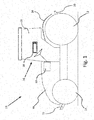
- an agricultural vehicle according to the invention in the form of an agricultural tractor is indicated at 10.
- the tractor 10 comprises rear wheels 12 and front wheels 14, a forward engine compartment 16 and a cab section 18.
- a rear linkage 20 is provided at the rear of the tractor 10
- a front linkage 22 is provided at the front of the tractor 10.
- Rear fenders 24 are provided to cover a portion of the rear wheels 12.
- the invention may also be provided in the form of an agricultural harvester machine, e.g. a combine harvester, or an applicator machine, e.g. a self-propelled sprayer vehicle.
- an operator station 26 is provided, where the operator can access a user interface device 28 which is used to display information relating to tractor operation, and to control different elements of the tractor 10.
- the user interface device 28 may be used alone or in combination with other controls, e.g. levers, switches, etc., to operate different elements of the tractor 10, e.g. hydraulic circuits, lifting systems, and/or to control the acceleration and steering of the tractor 10.
- the tractor 10 is provided with at least one electronic control unit (ECU) 30.
- the ECU 30 is configured to interface with the user interface device 28 and with the various systems and sensors provided about the tractor 10, to provide for monitoring and control of tractor operation.
- the ECU 30 is configured to receive data from the different systems and sensors of the tractor 10, and to output suitable display signals for the user interface device 28, to determine what data is displayed using the device 28.
- the ECU 30 can subsequently receive operator inputs provided via the user interface device 28, for the control of the different systems of the tractor 10.
- the ECU 30 may be provided as a single processing device capable of performing a variety of commands relating to the control of the tractor, or the ECU 30 may be provided as a plurality of different controllers, e.g. a steering controller coupled with the steering system of the tractor, a display controller coupled with the user interface device 28, etc. It will be understood that the ECU 30 may be provided as a separate element of the tractor 10, or an individual display controller may be provided as a part of the user interface device 28 according to the invention.
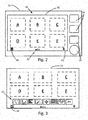
- Fig. 2 provides an enlarged view of an embodiment of user interface device 28.
- the user interface device 28 is provided as an in-cab terminal, having a screen presenting a user interface display 32 to a user.
- the device 28 is provided with various controls 34, e.g. pushbuttons, dials, keypads, joysticks, etc., and/or the display 32 can be provided as a touchscreen display.
- the ECU 30 controls the output of the user interface display 32, such that the display is configured to present an array of display fields to a user.
- the user interface display 32 is provided as a 2 x 3 grid 42 of separate display fields, respectively labelled as A, B, C, D, E, F as indicated in Fig. 2 .
- the individual display fields of the array can be adapted to display a data tile showing information relating to an associated system of the agricultural tractor 10, as will be described below.
- the user interface display 32 can be configured to present a plurality of different run screens to a user, wherein the user can cycle through the different run screens for example by swiping to the side of the display screen.
- the display 32 is provided with a visual indicator 36 as to the presence of different run screens, which also serves to indicate the current run screen displayed.
- the different run screens can be used to provide different configurations of display fields and data tiles to a user.
- the display 32 is further provided with various user-selectable icons which can be selected to access different options, e.g. menus 38, display settings 40, etc.
- a display method for the user interface display 32 is illustrated in Fig. 10 .
- the method comprises dividing the user interface display 32 into an array of display fields 42, in which the display fields of the array are each adapted to display a data tile showing information relating to an associated system of the agricultural vehicle.
- the plurality of data tiles associated with different systems of the agricultural vehicle are provided and, at step 104, the user interface (to enable a user to select which data tile is displayed in each display field of the array), is provided.
- the method can allow a user to easily select the layout of data tiles in a display, and can configure the display to devote additional screen space to data tiles of greater interest to the user.
- Figures 3-9 provide example configurations of the user interface display 32 of the user interface device 28, illustrating the use of the display system and further steps of a display method according to aspects of the invention.
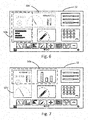
- the display 32 when a user selects the menu icon 38, the display 32 is adapted to present a list of possible data tile types 44 which may be presented in the display fields 42 of the display 32.
- the list 44 is provided at the bottom of the display 32, with the outline of the array 42 compressed to accommodate the list 44 as part of the display 32.
- the list of data tile types 44 comprises a variety of information modules which are configured to display information relating to an associated system of the tractor 10. Examples of possible data tiles include, but are not limited to, systems relating to the monitoring of vehicle speed; engine output; power consumption; fuel consumption; hydraulic circuits; data relating to vehicle attachments; navigation and guidance systems; radio; telephone; internet, etc.
- the user can select individual data tile types from the list 44, and select a corresponding display field A-F of the array 42 wherein the user wishes to display the data tile type in question.
- the selection of the data tile types from the list 44 and the selection of the corresponding display field A-F can be provided by way of discrete selection operations, or a user can click-and-drag data tiles from the list 44 into position in the array 42.
- the list 44 may be closed by the user, with the user interface display 28 configured for clear and efficient display of the required information with the position of the data tiles in the display field array 42 as specified by the user, and as is shown in Fig. 4 with different data tiles indicated at 46 positioned in the different display fields A-F.
- the user interface system can be configured such that user creation of the display field array 42 having assorted data tiles displayed thereon can be replicated for different run screens of the device, by repeating of the above procedure for the available run screens.
- the user interface system and method of the invention is configured to generate composite data tiles, which are adapted to fit more than one display field of the array 42.
- the user selects the menu icon 38 to display the list of possible data tile types 44. Via a touch action 48 or through use of the appropriate controls 34, the user can select a data tile type 44a from the list 44 which is already displayed as part of the current data tiles 46 of the array 42.
- the ECU 30 is configured to detect that the selected data tile type 44a corresponds to a currently-displayed data tile 46a at display field A.
- the ECU 30 can determine if such a data tile type 44a can be provided in an enlarged version, and if so, the ECU 30 controls the display 32 to generate at least one outline indicator 50 for a composite data tile, based on the location of the currently-displayed data tile 46 at display field A.
- the outline indicators 50 are used to demonstrate to a user possible configurations of a composite data tile, based on the usage of display fields which are adjacent to the currently-displayed data tile 46a at display field A.
- the user is presented with two possible outline indicators - indicator 50a encompassing display fields A and B, and indicator 50b encompassing display fields A and D.
- the user can then judge how they would prefer the composite data tile to be arranged, and can select either of the suggested display fields B or D to display the selected data tile type 44a.
- the outline indicators 50a,50b are provided by way of a dashed-line outline, showing the outline shape of such a composite data tile, but it will be understood that other configurations of outline indicator may be provided.
- the system is configured to generate a transparent or ghosted version of a composite data tile as part of the outline indicator.
- the outline indicator 50a' provides a transparent version of a composite data tile encompassing display fields A and B.
- the outline indicator 50b' provides a transparent version of a composite data tile encompassing display fields A and D.
- the ECU 30 may be configured to cycle between the dashed-line outline indicators 50a,50b and the transparent outline indicators 50a',50b' as required, for example if a user hovers over the adjacent display fields in question, such that the user is provided with an indication of how the composite data tile will look when generated.
- the ECU 30 is configured to then control the display 32 to generate a composite data tile adapted to fit the selected data fields of the array 42.
- a composite data tile 52 is generated and presented in the fields A and B.
- the composite data tile 52 can be provided as an adapted version of the data tile originally shown in field A, with additional relevant information provided therein.
- the composite data tile can simply be an enlarged or scaled version of the original data tile.
- the composite data tile can be configured to encompass more than two display fields of the array 42.
- Fig. 9 an example of an enlarged composite data tile 54 is shown, which encompasses the display fields A, B, D and E.
- While the illustrated embodiments show composite data tiles resulting in a 1x2, 2x1 or 2x2 arrangement of the tile across the display fields of the display, it will be understood that other dimensions of composite data tile may be produced through appropriate user selection, e.g. a 1x3 arrangement of display fields.
- the user interface display may be configured to present any number of different display field layouts other than a 2x3 array, e.g. a 3x3 array. This may be accomplished through use of a larger display and/or appropriate scaling of the dimensions of display fields within the display
- the user interface system and method allows for a customisable user interface which can be easily adapted by a user as per their personal requirements.
Landscapes
- Engineering & Computer Science (AREA)
- Theoretical Computer Science (AREA)
- General Engineering & Computer Science (AREA)
- Chemical & Material Sciences (AREA)
- Combustion & Propulsion (AREA)
- Transportation (AREA)
- Mechanical Engineering (AREA)
- Human Computer Interaction (AREA)
- Physics & Mathematics (AREA)
- General Physics & Mathematics (AREA)
- Software Systems (AREA)
- User Interface Of Digital Computer (AREA)
Abstract
Description
- The present invention relates to a system and method for a user interface display of an agricultural vehicle, such as an agricultural tractor or a harvester machine.
- In agricultural vehicles such as tractors, harvesters, or applicator machines such as sprayers, there is a need for the vehicle operator to monitor a wide range of data during field operations. Such data may include various sensor readings, map and route data, speed, weather forecasts, camera outputs, etc. In modern agricultural machinery, such data is generally displayed using various visual display units, or VDUs, provided in the cab of the vehicle.
- As agricultural vehicles incorporate more sensor technology, accordingly the amount of different data sources to monitor also increases, which can require the use of multiple VDUs to effectively monitor the available data. Alternatively, VDUs can be configured to display multiple run screens, wherein a user can switch between screen displays on the VDU, the different screen displays showing different layouts of information. An example of a display system using different run screens can be found in US Patent Application Publication No.
US 2014/0298228 A1 . - However, often a user will be limited by the predefined screen layouts of the run screens in terms of the configuration of the displayed information. Additionally, a user is often required to cycle through different run screens in order to view different sets of data which may be relevant to the current operations. This can result in inconvenience to the user, and the distraction of the user's attention when interacting with the VDU to see the relevant information.
- As a result, it is an object of the invention to provide a display system and method for an agricultural vehicle having increased flexibility of use, depending on the requirements of the operator.
- Accordingly, there is provided a display method for a user interface display of an agricultural vehicle, the method comprising the steps of:
- dividing a user interface display into an array of display fields, wherein the display fields of the array are each adapted to display a data tile showing information relating to an associated system of the agricultural vehicle;
- providing a plurality of data tiles associated with different systems of the agricultural vehicle; and
- providing a user interface to enable a user to select which data tile is displayed in each display field of the array,
- wherein, if the same data tile is selected for display in at least two adjacent display fields, the method further comprises the step of creating a composite data tile based on the selected data tile, the composite data tile adapted to fit the selected adjacent display fields.
- By creating a composite data tile based on the selection of adjacent display fields, the method can allow a user to easily select the layout of data tiles in a display, and can configure the display to devote additional screen space to data tiles of greater interest to the user.
- Preferably, the step of creating a composite data tile comprises creating an enlarged version of the selected data tile.
- Alternatively, the step of creating a composite data tile comprises creating a rearranged version of the selected data tile, wherein information to be displayed by the data tile is repositioned or scaled to adapt to the area of the selected adjacent display fields.
- The data tile may simply be enlarged to accommodate the selected adjacent display fields, or the method may rearrange the data of the data tile to more clearly display the required information.
- Preferably, the method further comprises the step of providing a list of selectable data tiles for display.
- It will be understood that there may be more different types of data tiles for selection than display fields of the array, such that a user can select the data tiles of interest to the user for display. These may be data tiles most relevant to the current operations being performed.
- Preferably, the method comprises the steps of: when a user selects a data tile already displayed in the array, displaying an outline indicator of possible composite versions of the selected data tile.
- Providing an outline indicator allows the user to easily see which display fields may be selected to generate an enlarged or composite data tile for the tile selected. The user can then easily decide how to generate a composite data tile for that information.
- The indicator may comprise an at least partly transparent outline of a composite data tile. The indicator may indicate the size, shape, and/or layout of the composite data tile.
- The indicator preferably indicates which display fields of the array can be used to display the composite data tile.
- Preferably, the method comprises the step of providing a plurality of run screens, wherein each run screen is provided with a separate array of display fields for the display of data tiles, and wherein the method comprises the step of allowing a user to switch between different run screens to be displayed on the user interface display.
- As the display method allows for the use of separate run screens to be shown on the user interface display, as a result a user is provided with multiple different display areas which can individually be provided with separate arrays of display fields. Accordingly the user can be provided with a plurality of different areas for the display of information.
- There is also provided a display controller for a user interface display of an agricultural vehicle, the display controller provided with a storage medium having computer-readable instructions stored therein, the instructions arranged to carry out the steps of the method as described above.
- There is further provided an agricultural vehicle, for example an agricultural tractor or a harvester machine, comprising a user interface display and a display controller as described above to implement the steps of the above method.
- Embodiments of the invention will now be described, by way of example only, with reference to the accompanying drawings, in which:
-
Fig. 1 is a side view of an agricultural tractor having a user interface display system according to the invention; -
Fig. 2 is an illustration of an embodiment of user interface device of the tractor ofFig. 1 ; -
Fig. 3 is an illustration of a user interface display for the user interface device ofFig. 2 having user-configurable display fields; -
Fig. 4 is an illustration of an example configuration of display fields of the user interface display ofFig. 3 ; -
Fig. 5 is an illustration of the user interface display ofFig. 4 , providing an outline indicator when a user wishes to select an additional data tile for display as a composite data tile; -
Figs. 6 and 7 are illustrations of alternative outline indicators for the user interface display ofFig. 4 ; -
Figs. 8 and 9 are examples of the configuration of display fields of the user interface display ofFig. 3 providing a composite data tile; and -
Fig. 10 is a flow chart representation of a display method embodying the invention. - The drawings are provided by way of reference only, and will be acknowledged as not to scale.
- With reference to
Fig. 1 , an agricultural vehicle according to the invention in the form of an agricultural tractor is indicated at 10. Thetractor 10 comprisesrear wheels 12 andfront wheels 14, aforward engine compartment 16 and acab section 18. Arear linkage 20 is provided at the rear of thetractor 10, and afront linkage 22 is provided at the front of thetractor 10.Rear fenders 24 are provided to cover a portion of therear wheels 12. It will be understood that the invention may also be provided in the form of an agricultural harvester machine, e.g. a combine harvester, or an applicator machine, e.g. a self-propelled sprayer vehicle. - Within the
cab 18, anoperator station 26 is provided, where the operator can access auser interface device 28 which is used to display information relating to tractor operation, and to control different elements of thetractor 10. Theuser interface device 28 may be used alone or in combination with other controls, e.g. levers, switches, etc., to operate different elements of thetractor 10, e.g. hydraulic circuits, lifting systems, and/or to control the acceleration and steering of thetractor 10. - The
tractor 10 is provided with at least one electronic control unit (ECU) 30. The ECU 30 is configured to interface with theuser interface device 28 and with the various systems and sensors provided about thetractor 10, to provide for monitoring and control of tractor operation. The ECU 30 is configured to receive data from the different systems and sensors of thetractor 10, and to output suitable display signals for theuser interface device 28, to determine what data is displayed using thedevice 28. TheECU 30 can subsequently receive operator inputs provided via theuser interface device 28, for the control of the different systems of thetractor 10. - It will be understood that the
ECU 30 may be provided as a single processing device capable of performing a variety of commands relating to the control of the tractor, or theECU 30 may be provided as a plurality of different controllers, e.g. a steering controller coupled with the steering system of the tractor, a display controller coupled with theuser interface device 28, etc. It will be understood that theECU 30 may be provided as a separate element of thetractor 10, or an individual display controller may be provided as a part of theuser interface device 28 according to the invention. -
Fig. 2 provides an enlarged view of an embodiment ofuser interface device 28. Theuser interface device 28 is provided as an in-cab terminal, having a screen presenting auser interface display 32 to a user. Thedevice 28 is provided withvarious controls 34, e.g. pushbuttons, dials, keypads, joysticks, etc., and/or thedisplay 32 can be provided as a touchscreen display. - The
ECU 30 controls the output of theuser interface display 32, such that the display is configured to present an array of display fields to a user. In the illustrated embodiment, theuser interface display 32 is provided as a 2 x 3grid 42 of separate display fields, respectively labelled as A, B, C, D, E, F as indicated inFig. 2 . The individual display fields of the array can be adapted to display a data tile showing information relating to an associated system of theagricultural tractor 10, as will be described below. - It will be understood that the
user interface display 32 can be configured to present a plurality of different run screens to a user, wherein the user can cycle through the different run screens for example by swiping to the side of the display screen. Thedisplay 32 is provided with avisual indicator 36 as to the presence of different run screens, which also serves to indicate the current run screen displayed. The different run screens can be used to provide different configurations of display fields and data tiles to a user. Thedisplay 32 is further provided with various user-selectable icons which can be selected to access different options,e.g. menus 38,display settings 40, etc. - A display method for the
user interface display 32 is illustrated inFig. 10 . Firstly, atstep 100, the method comprises dividing theuser interface display 32 into an array of display fields 42, in which the display fields of the array are each adapted to display a data tile showing information relating to an associated system of the agricultural vehicle. Next, atstep 102, the plurality of data tiles associated with different systems of the agricultural vehicle are provided and, atstep 104, the user interface (to enable a user to select which data tile is displayed in each display field of the array), is provided. - At
step 106, a determination is made as to whether the same data tile is selected for display in at least two adjacent display fields. If not, the process ends atstep 108. If so, the method further comprises thestep 110 of creating a composite data tile based on the selected data tile, the composite data tile adapted to fit the selected adjacent display fields. - By creating a composite data tile based on the selection of adjacent display fields, the method can allow a user to easily select the layout of data tiles in a display, and can configure the display to devote additional screen space to data tiles of greater interest to the user.
-
Figures 3-9 provide example configurations of theuser interface display 32 of theuser interface device 28, illustrating the use of the display system and further steps of a display method according to aspects of the invention. - With reference to
Fig. 3 , when a user selects themenu icon 38, thedisplay 32 is adapted to present a list of possibledata tile types 44 which may be presented in the display fields 42 of thedisplay 32. In the illustrated embodiment, thelist 44 is provided at the bottom of thedisplay 32, with the outline of thearray 42 compressed to accommodate thelist 44 as part of thedisplay 32. - The list of data tile types 44 comprises a variety of information modules which are configured to display information relating to an associated system of the
tractor 10. Examples of possible data tiles include, but are not limited to, systems relating to the monitoring of vehicle speed; engine output; power consumption; fuel consumption; hydraulic circuits; data relating to vehicle attachments; navigation and guidance systems; radio; telephone; internet, etc. - The user can select individual data tile types from the
list 44, and select a corresponding display field A-F of thearray 42 wherein the user wishes to display the data tile type in question. The selection of the data tile types from thelist 44 and the selection of the corresponding display field A-F can be provided by way of discrete selection operations, or a user can click-and-drag data tiles from thelist 44 into position in thearray 42. - Once a user has selected the required data tile types for display, the
list 44 may be closed by the user, with theuser interface display 28 configured for clear and efficient display of the required information with the position of the data tiles in thedisplay field array 42 as specified by the user, and as is shown inFig. 4 with different data tiles indicated at 46 positioned in the different display fields A-F. It will be understood that the user interface system can be configured such that user creation of thedisplay field array 42 having assorted data tiles displayed thereon can be replicated for different run screens of the device, by repeating of the above procedure for the available run screens. - During use of the
tractor 10 anduser interface device 28, a user may wish for additional control over the customisation of the information provided on thedisplay 32, for example in terms of a larger or more clear version of the displayeddata tiles 46. Accordingly, the user interface system and method of the invention is configured to generate composite data tiles, which are adapted to fit more than one display field of thearray 42. - With reference to
Fig. 5 , the user selects themenu icon 38 to display the list of possible data tile types 44. Via atouch action 48 or through use of theappropriate controls 34, the user can select adata tile type 44a from thelist 44 which is already displayed as part of thecurrent data tiles 46 of thearray 42. - The
ECU 30 is configured to detect that the selecteddata tile type 44a corresponds to a currently-displayeddata tile 46a at display field A. TheECU 30 can determine if such adata tile type 44a can be provided in an enlarged version, and if so, theECU 30 controls thedisplay 32 to generate at least oneoutline indicator 50 for a composite data tile, based on the location of the currently-displayeddata tile 46 at display field A. Theoutline indicators 50 are used to demonstrate to a user possible configurations of a composite data tile, based on the usage of display fields which are adjacent to the currently-displayeddata tile 46a at display field A. In the illustrated embodiment, the user is presented with two possible outline indicators -indicator 50a encompassing display fields A and B, andindicator 50b encompassing display fields A and D. The user can then judge how they would prefer the composite data tile to be arranged, and can select either of the suggested display fields B or D to display the selecteddata tile type 44a. - In the embodiment of
Fig. 5 , theoutline indicators Figs. 6 and 7 , the system is configured to generate a transparent or ghosted version of a composite data tile as part of the outline indicator. InFig. 6 , theoutline indicator 50a' provides a transparent version of a composite data tile encompassing display fields A and B. InFig. 7 , theoutline indicator 50b' provides a transparent version of a composite data tile encompassing display fields A and D. It will be understood that theECU 30 may be configured to cycle between the dashed-line outline indicators transparent outline indicators 50a',50b' as required, for example if a user hovers over the adjacent display fields in question, such that the user is provided with an indication of how the composite data tile will look when generated. - When the user selects an adjacent data field, the
ECU 30 is configured to then control thedisplay 32 to generate a composite data tile adapted to fit the selected data fields of thearray 42. For example, with reference toFig. 8 , if a user selected fields A and B of thearray 42 to display thedata tile type 44a, acomposite data tile 52 is generated and presented in the fields A and B. It will be understood that thecomposite data tile 52 can be provided as an adapted version of the data tile originally shown in field A, with additional relevant information provided therein. Alternatively, the composite data tile can simply be an enlarged or scaled version of the original data tile. It will further be understood that the composite data tile can be configured to encompass more than two display fields of thearray 42. With reference toFig. 9 , an example of an enlargedcomposite data tile 54 is shown, which encompasses the display fields A, B, D and E. - While the illustrated embodiments show composite data tiles resulting in a 1x2, 2x1 or 2x2 arrangement of the tile across the display fields of the display, it will be understood that other dimensions of composite data tile may be produced through appropriate user selection, e.g. a 1x3 arrangement of display fields. In addition, it will be understood that the user interface display may be configured to present any number of different display field layouts other than a 2x3 array, e.g. a 3x3 array. This may be accomplished through use of a larger display and/or appropriate scaling of the dimensions of display fields within the display
- Allowing the creation of composite data tiles as enlarged or more clearly presented versions of basic data tiles, the user interface system and method allows for a customisable user interface which can be easily adapted by a user as per their personal requirements.
- The invention is not limited to the embodiments described herein, and may be modified or adapted without departing from the scope of the present invention as defined in the following claims.
Claims (11)
- A display method for a user interface display of an agricultural vehicle, the method comprising the steps of:dividing a user interface display into an array of display fields, wherein the display fields of the array are each adapted to display a data tile showing information relating to an associated system of the agricultural vehicle;providing a plurality of data tiles associated with different systems of the agricultural vehicle; andproviding a user interface to enable a user to select which data tile is displayed in each display field of the array,wherein, if the same data tile is selected for display in at least two adjacent display fields, the method further comprises the step of creating a composite data tile based on the selected data tile, the composite data tile adapted to fit the selected adjacent display fields.
- The method of claim 1, wherein the step of creating a composite data tile comprises creating an enlarged version of the selected data tile.
- The method of claim 1 or claim 2, wherein the step of creating a composite data tile comprises creating a rearranged version of the selected data tile, wherein information to be displayed by the data tile is repositioned or scaled to adapt to the area of the selected adjacent display fields.
- The method of any one of claims 1-3, wherein the method further comprises the step of providing a list of selectable data tiles for display.
- The method of any one of claims 1-4, wherein the method comprises the steps of: when a user selects a data tile already displayed in the array, displaying an outline indicator of possible composite versions of the selected data tile.
- The method of claim 5, wherein the method comprises displaying an outline indicator comprising an at least partly transparent outline of a composite data tile.
- The method of claim 5 or claim 6, wherein the method comprises displaying an outline indicator indicating the size, shape, and/or layout of the composite data tile.
- The method of any one of claims 5-7, wherein the method comprises displaying an outline indicator indicating which display fields of the array can be used to display the composite data tile.
- The method of any one of claims 1-8, wherein the method comprises the step of providing a plurality of run screens, wherein each run screen is provided with a separate array of display fields for the display of data tiles, and wherein the method comprises the step of allowing a user to switch between different run screens to be displayed on the user interface display.
- A display controller for a user interface display of an agricultural vehicle, the display controller provided with a storage medium having computer-readable instructions stored therein, the instructions arranged to carry out the steps of the method as described in any one of claims 1-9 when run by the display controller.
- An agricultural vehicle, for example an agricultural tractor or a harvester machine, comprising a user interface display and a display controller adapted to implement the steps of the method as described in any one of claims 1-9.
Applications Claiming Priority (1)
| Application Number | Priority Date | Filing Date | Title |
|---|---|---|---|
| GBGB1709155.4A GB201709155D0 (en) | 2017-06-08 | 2017-06-08 | A system and method for a user interface display of an agricultural vehicle |
Publications (1)
| Publication Number | Publication Date |
|---|---|
| EP3415358A1 true EP3415358A1 (en) | 2018-12-19 |
Family
ID=59358185
Family Applications (1)
| Application Number | Title | Priority Date | Filing Date |
|---|---|---|---|
| EP18173535.8A Withdrawn EP3415358A1 (en) | 2017-06-08 | 2018-05-22 | A system and method for a user interface display of an agricultural vehicle |
Country Status (3)
| Country | Link |
|---|---|
| US (1) | US20180354364A1 (en) |
| EP (1) | EP3415358A1 (en) |
| GB (1) | GB201709155D0 (en) |
Cited By (1)
| Publication number | Priority date | Publication date | Assignee | Title |
|---|---|---|---|---|
| DE102018121644A1 (en) * | 2018-09-05 | 2020-03-05 | Horsch Maschinen Gmbh | Operating system for an agricultural machine and method for pre-configuring such an operating system |
Families Citing this family (3)
| Publication number | Priority date | Publication date | Assignee | Title |
|---|---|---|---|---|
| CN111133182A (en) * | 2017-10-02 | 2020-05-08 | 沃尔布罗有限责任公司 | Multifunctional engine control and input system |
| US10891041B1 (en) * | 2019-08-14 | 2021-01-12 | Tableau Software, Inc. | Data preparation user interface for aggregate comparison of datasets at different nodes in a process flow |
| ES2929517A1 (en) * | 2021-05-26 | 2022-11-29 | Seat Sa | COMPUTER IMPLEMENTED METHOD OF CONFIGURING A TOUCH MONITOR, COMPUTER PROGRAM AND SYSTEM (Machine-translation by Google Translate, not legally binding) |
Citations (3)
| Publication number | Priority date | Publication date | Assignee | Title |
|---|---|---|---|---|
| US20140298228A1 (en) | 2013-03-29 | 2014-10-02 | Deere & Company | Retracting shortcut bars, status shortcuts and edit run page sets |
| EP2886507A1 (en) * | 2013-12-19 | 2015-06-24 | The Raymond Corporation | Integrated touch screen display with multi-mode functionality |
| EP2930049A1 (en) * | 2014-04-08 | 2015-10-14 | Volkswagen Aktiengesellschaft | User interface and method for adapting a view on a display unit |
-
2017
- 2017-06-08 GB GBGB1709155.4A patent/GB201709155D0/en not_active Ceased
-
2018
- 2018-05-22 EP EP18173535.8A patent/EP3415358A1/en not_active Withdrawn
- 2018-06-01 US US15/995,289 patent/US20180354364A1/en not_active Abandoned
Patent Citations (3)
| Publication number | Priority date | Publication date | Assignee | Title |
|---|---|---|---|---|
| US20140298228A1 (en) | 2013-03-29 | 2014-10-02 | Deere & Company | Retracting shortcut bars, status shortcuts and edit run page sets |
| EP2886507A1 (en) * | 2013-12-19 | 2015-06-24 | The Raymond Corporation | Integrated touch screen display with multi-mode functionality |
| EP2930049A1 (en) * | 2014-04-08 | 2015-10-14 | Volkswagen Aktiengesellschaft | User interface and method for adapting a view on a display unit |
Cited By (1)
| Publication number | Priority date | Publication date | Assignee | Title |
|---|---|---|---|---|
| DE102018121644A1 (en) * | 2018-09-05 | 2020-03-05 | Horsch Maschinen Gmbh | Operating system for an agricultural machine and method for pre-configuring such an operating system |
Also Published As
| Publication number | Publication date |
|---|---|
| US20180354364A1 (en) | 2018-12-13 |
| GB201709155D0 (en) | 2017-07-26 |
Similar Documents
| Publication | Publication Date | Title |
|---|---|---|
| US20180354364A1 (en) | System and Method for a User Interface Display of an Agricultural Vehicle | |
| KR101845177B1 (en) | Operating method for an operating and display device in a vehicle and operating and display device in a vehicle | |
| US7889063B2 (en) | Customizable vehicle information display | |
| KR20130067110A (en) | Menu operation device and method in vehicles | |
| US9547417B2 (en) | Retracting shortcut bars, status shortcuts and edit run page sets | |
| US9546470B2 (en) | Screen display method of wheel loader | |
| US9511669B2 (en) | Vehicular input device and vehicular cockpit module | |
| US20120229394A1 (en) | Display terminal | |
| US20120256843A1 (en) | Control unit for display terminal | |
| US20070268270A1 (en) | Touch operation input device | |
| US8527900B2 (en) | Motor vehicle | |
| EP1714539A1 (en) | Settings control of an agricultural vehicle | |
| EP3046015B1 (en) | Driving support information display configuration and device using the same | |
| US9063569B2 (en) | Vehicular device | |
| EP2990252B1 (en) | Speed data display system for a work vehicle | |
| US9671929B2 (en) | Method for resolving and operating poi stacks | |
| JP2010108255A (en) | In-vehicle operation system | |
| GB2477959A (en) | Navigation and display of an array of selectable items | |
| JP2008180786A (en) | Navigation system and navigation device | |
| US20150113464A1 (en) | Indicator system | |
| US20180074687A1 (en) | Steering wheel hard switch for control of mid software switches | |
| JP5925639B2 (en) | Mobile terminal and work machine operation system provided with mobile terminal | |
| EP2461133A1 (en) | Map display device | |
| EP2196359B1 (en) | Control method and device | |
| US12584296B2 (en) | Work machine display control system, work machine display system, work machine, work machine display control method, and work machine display control program |
Legal Events
| Date | Code | Title | Description |
|---|---|---|---|
| PUAI | Public reference made under article 153(3) epc to a published international application that has entered the european phase |
Free format text: ORIGINAL CODE: 0009012 |
|
| STAA | Information on the status of an ep patent application or granted ep patent |
Free format text: STATUS: THE APPLICATION HAS BEEN PUBLISHED |
|
| AK | Designated contracting states |
Kind code of ref document: A1 Designated state(s): AL AT BE BG CH CY CZ DE DK EE ES FI FR GB GR HR HU IE IS IT LI LT LU LV MC MK MT NL NO PL PT RO RS SE SI SK SM TR |
|
| AX | Request for extension of the european patent |
Extension state: BA ME |
|
| STAA | Information on the status of an ep patent application or granted ep patent |
Free format text: STATUS: REQUEST FOR EXAMINATION WAS MADE |
|
| 17P | Request for examination filed |
Effective date: 20190619 |
|
| RBV | Designated contracting states (corrected) |
Designated state(s): AL AT BE BG CH CY CZ DE DK EE ES FI FR GB GR HR HU IE IS IT LI LT LU LV MC MK MT NL NO PL PT RO RS SE SI SK SM TR |
|
| STAA | Information on the status of an ep patent application or granted ep patent |
Free format text: STATUS: THE APPLICATION IS DEEMED TO BE WITHDRAWN |
|
| 18D | Application deemed to be withdrawn |
Effective date: 20190620 |