EP3401759A1 - Method and apparatus for terminal control - Google Patents
Method and apparatus for terminal control Download PDFInfo
- Publication number
- EP3401759A1 EP3401759A1 EP18169619.6A EP18169619A EP3401759A1 EP 3401759 A1 EP3401759 A1 EP 3401759A1 EP 18169619 A EP18169619 A EP 18169619A EP 3401759 A1 EP3401759 A1 EP 3401759A1
- Authority
- EP
- European Patent Office
- Prior art keywords
- terminal
- program
- power supply
- closing instruction
- correspondence
- Prior art date
- Legal status (The legal status is an assumption and is not a legal conclusion. Google has not performed a legal analysis and makes no representation as to the accuracy of the status listed.)
- Ceased
Links
Images





Classifications
-
- G—PHYSICS
- G06—COMPUTING OR CALCULATING; COUNTING
- G06F—ELECTRIC DIGITAL DATA PROCESSING
- G06F1/00—Details not covered by groups G06F3/00 - G06F13/00 and G06F21/00
- G06F1/16—Constructional details or arrangements
- G06F1/1613—Constructional details or arrangements for portable computers
- G06F1/1633—Constructional details or arrangements of portable computers not specific to the type of enclosures covered by groups G06F1/1615 - G06F1/1626
- G06F1/1675—Miscellaneous details related to the relative movement between the different enclosures or enclosure parts
- G06F1/1677—Miscellaneous details related to the relative movement between the different enclosures or enclosure parts for detecting open or closed state or particular intermediate positions assumed by movable parts of the enclosure, e.g. detection of display lid position with respect to main body in a laptop, detection of opening of the cover of battery compartment
-
- G—PHYSICS
- G06—COMPUTING OR CALCULATING; COUNTING
- G06F—ELECTRIC DIGITAL DATA PROCESSING
- G06F1/00—Details not covered by groups G06F3/00 - G06F13/00 and G06F21/00
- G06F1/26—Power supply means, e.g. regulation thereof
- G06F1/32—Means for saving power
- G06F1/3203—Power management, i.e. event-based initiation of a power-saving mode
- G06F1/3234—Power saving characterised by the action undertaken
- G06F1/3237—Power saving characterised by the action undertaken by disabling clock generation or distribution
-
- G—PHYSICS
- G06—COMPUTING OR CALCULATING; COUNTING
- G06F—ELECTRIC DIGITAL DATA PROCESSING
- G06F3/00—Input arrangements for transferring data to be processed into a form capable of being handled by the computer; Output arrangements for transferring data from processing unit to output unit, e.g. interface arrangements
- G06F3/01—Input arrangements or combined input and output arrangements for interaction between user and computer
- G06F3/048—Interaction techniques based on graphical user interfaces [GUI]
- G06F3/0484—Interaction techniques based on graphical user interfaces [GUI] for the control of specific functions or operations, e.g. selecting or manipulating an object, an image or a displayed text element, setting a parameter value or selecting a range
-
- G—PHYSICS
- G06—COMPUTING OR CALCULATING; COUNTING
- G06F—ELECTRIC DIGITAL DATA PROCESSING
- G06F1/00—Details not covered by groups G06F3/00 - G06F13/00 and G06F21/00
- G06F1/26—Power supply means, e.g. regulation thereof
- G06F1/32—Means for saving power
- G06F1/3203—Power management, i.e. event-based initiation of a power-saving mode
- G06F1/3206—Monitoring of events, devices or parameters that trigger a change in power modality
-
- G—PHYSICS
- G06—COMPUTING OR CALCULATING; COUNTING
- G06F—ELECTRIC DIGITAL DATA PROCESSING
- G06F1/00—Details not covered by groups G06F3/00 - G06F13/00 and G06F21/00
- G06F1/26—Power supply means, e.g. regulation thereof
- G06F1/32—Means for saving power
- G06F1/3203—Power management, i.e. event-based initiation of a power-saving mode
- G06F1/3206—Monitoring of events, devices or parameters that trigger a change in power modality
- G06F1/3215—Monitoring of peripheral devices
- G06F1/3218—Monitoring of peripheral devices of display devices
-
- G—PHYSICS
- G06—COMPUTING OR CALCULATING; COUNTING
- G06F—ELECTRIC DIGITAL DATA PROCESSING
- G06F1/00—Details not covered by groups G06F3/00 - G06F13/00 and G06F21/00
- G06F1/26—Power supply means, e.g. regulation thereof
- G06F1/32—Means for saving power
- G06F1/3203—Power management, i.e. event-based initiation of a power-saving mode
- G06F1/3206—Monitoring of events, devices or parameters that trigger a change in power modality
- G06F1/3228—Monitoring task completion, e.g. by use of idle timers, stop commands or wait commands
-
- G—PHYSICS
- G06—COMPUTING OR CALCULATING; COUNTING
- G06F—ELECTRIC DIGITAL DATA PROCESSING
- G06F1/00—Details not covered by groups G06F3/00 - G06F13/00 and G06F21/00
- G06F1/26—Power supply means, e.g. regulation thereof
- G06F1/32—Means for saving power
- G06F1/3203—Power management, i.e. event-based initiation of a power-saving mode
- G06F1/3234—Power saving characterised by the action undertaken
- G06F1/3246—Power saving characterised by the action undertaken by software initiated power-off
-
- G—PHYSICS
- G06—COMPUTING OR CALCULATING; COUNTING
- G06F—ELECTRIC DIGITAL DATA PROCESSING
- G06F1/00—Details not covered by groups G06F3/00 - G06F13/00 and G06F21/00
- G06F1/16—Constructional details or arrangements
- G06F1/1613—Constructional details or arrangements for portable computers
- G06F1/1615—Constructional details or arrangements for portable computers with several enclosures having relative motions, each enclosure supporting at least one I/O or computing function
- G06F1/1616—Constructional details or arrangements for portable computers with several enclosures having relative motions, each enclosure supporting at least one I/O or computing function with folding flat displays, e.g. laptop computers or notebooks having a clamshell configuration, with body parts pivoting to an open position around an axis parallel to the plane they define in closed position
Definitions
- the present disclosure generally relates to electronic device technology, and more particularly to a method and apparatus for terminal control.
- Mobility and easy access of the laptop may greatly facilitate people's daily life.
- a user may directly close the cover of the laptop and put the laptop into a bag if the user has to be occupied by something else, and then the laptop may automatically go to sleep state.
- the laptop may reproduce a page which is shown on the screen before the cover is closed and the user may continue using the laptop .
- the screen of the laptop As the screen of the laptop is small, when the user views a document using the laptop, an external display with a larger screen may be used. However, in order to maintain normal operation of the laptop, the screen of the laptop needs to be kept on for a long time, resulting in a big power consumption of the laptop.
- the user When the user is using the laptop to download a video, if the user closes the cover of the laptop, the laptop may go to sleep state, and the sleep state of the laptop may lead to the interruption of download and thus the download efficiency is low. As such, the setting that the laptop immediately go to sleep state when its cover is closed cannot meet various demands of users, and thus the user experience may not be good.
- a method for controlling a terminal may include: obtaining a cover closing instruction for the terminal, where the cover closing instruction indicated that an upper cover and a lower cover of the terminal are closed; if the terminal has only one cover, the cover closing instruction may indicate that the one cover of the terminal is closed; obtaining, in response to the cover closing instruction, a program running on the terminal; and determining an operation to be performed by the terminal based on the program running on the terminal, where the operation to be performed by the terminal may include any one of: shutdown, sleep, maintaining normal operation, and screen off.
- the terminal may determine, based on and in particular depending from the program currently running on the terminal, whether to shut down, sleep, maintain normal operation, or screen off. In other words, the terminal may chose based on the program currently running on the terminal to shut down sleep, maintain normal operation or put the screen off. As a result, operation flexibility of the terminal is improved based on the current situation, various needs of users can be met and thus the user experience is improved.
- the method further includes: obtaining power supply information of the terminal; wherein determining the operation to be performed by the terminal based on the program running on the terminal comprises: determining the operation to be performed by the terminal based on the program running on the terminal and the power supply information of the terminal.
- the technical solutions provided by the embodiments of the present disclosure may include the following beneficial effects.
- the terminal may determine, based on the program currently running on the terminal and the current power supply information of the terminal, whether to shut down, sleep, maintain normal operation, or screen off.
- operation flexibility of the terminal is improved based on the current situation, various needs of users can be met and thus the user experience is improved.
- the method further includes: obtaining external device information of the terminal; wherein determining the operation to be performed by the terminal based on the program running on the terminal comprises: determining the operation to be performed by the terminal based on the program running on the terminal and the external device information of the terminal.
- the technical solutions provided by the embodiments of the present disclosure may include the following beneficial effects.
- the terminal may determine, based on the program currently running on the terminal and the current external device information of the terminal, whether to shut down, sleep, maintain normal operation, or screen off.
- operation flexibility of the terminal is improved based on the current situation, various needs of users can be met and thus the user experience is improved.
- determining the operation to be performed by the terminal based on the program running on the terminal and the external device information of the terminal comprises: maintaining a normal operation status of the terminal when the program running on the terminal exists and an external display is connected to the terminal.
- the technical solutions provided by the embodiments of the present disclosure may include the following beneficial effects.
- the user may be using the program currently running on the terminal via the external display.
- the terminal may maintain normal operation status when the user closes the upper cover and the lower cover.
- operation flexibility of the terminal is improved based on the external display, various needs of users can be met and thus the user experience is improved.
- the method further includes: establishing a correspondence between a program and a preset operation; wherein determining the operation to be performed by the terminal based on the program running on the terminal comprises: determining the operation to be performed by the terminal based on the correspondence between the program and the preset operation.
- the technical solutions provided by the embodiments of the present disclosure may include the following beneficial effects.
- the terminal may determine the operation that needs to be performed based on the correspondence between program and preset operation, so that the terminal may select a suitable operation based on current situation more accurately, and thus the user experience can be improved.
- the method further includes: obtaining a modifying instruction, wherein the modifying instruction indicates that a first program corresponds to a first preset operation; and modifying, based on the modifying instruction, the correspondence between program and preset operation such that the first program corresponds to the first preset operation.
- the technical solutions provided by the embodiments of the present disclosure may include the following beneficial effects.
- the user may modify the preset correspondence between program and preset operation based on the user's habits and preferences, so that the terminal may select a suitable operation based on demands of the user and the current situation, and thus the user experience can be improved.
- an apparatus for terminal control including: a first obtaining module configured to obtain a cover closing instruction for the terminal, wherein the cover closing instruction indicates that an upper cover and a lower cover of the terminal are closed; a second obtaining module configured to obtain, in response to the cover closing instruction, a program running on the terminal; and a determining module configured to determine an operation to be performed by the terminal based on the program running on the terminal, wherein the operation to be performed by the terminal comprises any one of shutdown, sleep, maintaining normal operation, or screen off.
- the apparatus further includes: a third obtaining module configured to obtain power supply information of the terminal; wherein the determining module is configured to determine the operation to be performed by the terminal based on the program running on the terminal and the power supply information of the terminal.
- the apparatus further includes: a fourth obtaining module configured to obtain external device information of the terminal; wherein the determining module is configured to determine the operation to be performed by the terminal based on the program running on the terminal and the external device information of the terminal.
- the determining module comprises a maintaining submodule configured to maintain normal operation status of the terminal when the program running on the terminal exists and an external display is connected to the terminal.
- the apparatus further includes: an establishing module configured to establish a correspondence between a program and a preset operation; wherein the determining module is configured to determine the operation to be performed by the terminal based on the correspondence between program and preset operation.
- the apparatus further includes: a fifth obtaining module configured to obtain a modifying instruction, wherein the modifying instruction indicates that a first program corresponds to a first preset operation; and a modifying module configured to modify, based on the modifying instruction, the correspondence between the program and the preset operation such that the first program corresponds to the first preset operation.
- an apparatus for terminal control including: a processor; and a memory storing instructions that are executable by the processor; wherein the processor is configured to: obtain a cover closing instruction for the terminal, wherein the cover closing instruction indicates that an upper cover and a lower cover of the terminal are closed; obtain, in response to the cover closing instruction, a program running on the terminal; and determine an operation to be performed by the terminal based on the program running on the terminal, wherein the operation to be performed by the terminal comprises any one of shutdown, sleep, maintaining normal operation, or screen off.
- a computer-readable storage medium having a computer program stored thereon for controlling a terminal which, when executed by a processor, causes the processor to perform operations of the method according to any of the embodiments of the first aspect.
- the technical solutions provided by the embodiments of the present disclosure relates to a terminal, which may be a laptop, a flip phone, a tablet with a portable keyboard installed, or other devices whose upper cover and lower cover enable to be closed.
- a terminal which may be a laptop, a flip phone, a tablet with a portable keyboard installed, or other devices whose upper cover and lower cover enable to be closed.
- the embodiments of the present disclosure are not limited in this respect.
- the terminal may determine, based on the program currently running on the terminal, whether to shut down, sleep, maintain normal operation, or screen off. As a result, operation flexibility of the terminal is improved based on the current situation, various needs of users can be met and thus the user experience is improved.
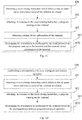
- Fig. 1A is a flow diagram of a method for terminal control according to an exemplary embodiment. The method may be applied to a terminal. The embodiments of the present disclosure are illustrated by taking a laptop as an example. As shown in Fig. 1A , the method for terminal control includes steps 101 to 103.
- step 101 a cover closing instruction is obtained.
- the cover closing instruction indicates that the upper cover and the lower cover of the terminal are closed.
- the upper cover of the terminal is a side where a display is provided, and the lower cover of the terminal is a side where a keyboard is provided.
- the upper cover of the terminal is the tablet itself, and the lower cover of the terminal is the portable keyboard.
- the upper cover and the lower cover of other terminals may be distinguished based on usage of the user, which is not limited in the embodiments of the present disclosure.
- a distance sensor is provided in the lower cover of the laptop.
- the distance sensor may detect the distance between the lower cover and the upper cover in real time.
- the distance sensor detects that the distance between the lower cover and the upper cover is less than or equal to a preset distance threshold, it is determined that a cover closing instruction is received.
- a cover closing instruction may also be sent to the laptop through another control terminal.
- step 102 a program currently running on the terminal is obtained in response to the cover closing instruction.
- the laptop may obtain the program currently running on the terminal.
- the program currently running on the terminal may include a program being used by the user or a program running in background.
- the laptop may determine the program currently running on the terminal based on a process being processed in the processor.
- step 103 an operation that needs to be performed by the terminal is determined based on the program currently running on the terminal.
- the operation that needs to be performed by the terminal may include any one of shutdown, sleep, maintaining normal operation, or screen off.
- the terminal needs perform different operations when it receives the cover closing instruction due to different programs currently running on the terminal. For example, if the cover closing instruction is received when the user is browsing a webpage, the laptop may save the webpage currently browsed by the user and then directly shutdown. When the laptop is turned on next time, it will show the webpage saved in a browser. In this way, stand-by power consumption is saved. For example, if the cover closing instruction is received when the user is watching a video, the laptop may record playing position of the video and then sleep. When the user opens the laptop again, the laptop may be quickly woken up and the video may be watched.
- the laptop may maintain normal operation status, and thus download speed can be enhanced.
- different operations that need to be performed by the terminal may be determined based on different programs currently running on the terminal, and thus various demands of the user can be met.
- the terminal may determine, based on the program currently running on the terminal, whether to shut down, sleep, maintain normal operation, or screen off. As a result, operation flexibility of the terminal is improved based on the current situation, various needs of users can be met and thus the user experience is improved.
- the method may further include step 104.
- step 104 current power supply information of the terminal is obtained.
- the laptop may detect a power interface for an external power supply. If the power interface is connected to an external power supply, the power supply information of the terminal indicates presence of an external power supply. If the power interface is not connected to an external power supply, the power supply information of the terminal indicates absence of an external power supply.
- Determination of an operation that needs to be performed by the terminal based on the program currently running on the terminal in step 103 may be implemented by step 1031 where the operation that needs to be performed by the terminal is determined based on the program currently running on the terminal and the current power supply information of the terminal.
- the laptop after receiving a cover closing instruction, may save the currently edited document and then sleep.
- the laptop may directly open the document required by the user next time when the laptop is turned on. As a result, it is avoided to lose the content edited by the user.
- the laptop after receiving a cover closing instruction, may save the currently edited document and then shut down.
- standby time of a battery of the laptop is increased. For example, if the user is currently watching a video and no external power supply is available, the laptop, after receiving a cover closing instruction, may record the playing position of the video and then shut down.
- the laptop may open related player of the video and paly the video from the playing position recorded when the user opens the laptop next time. For example, if the user is currently downloading a document or a video and an external power supply is available, the laptop, after receiving a cover closing instruction, may maintain normal operation status in order to avoid interruption of the download. As a result, download speed is enhanced. For example, if the user is currently downloading a document or a video and no external power supply is available, the laptop, after receiving a cover closing instruction, may sleep in order to reduce power consumption and increase standby time. To sum up, different operations that need to be performed by the terminal may be determined based on different programs currently running on the terminal and the power supply information, and thus various demands of the user can be met.
- the terminal may determine, based on the program currently running on the terminal and the power supply information, whether to shut down, sleep, maintain normal operation, or screen off. As a result, operation flexibility of the terminal is improved based on the current situation, various needs of users can be met and thus the user experience is improved.
- the method may further include step 105.
- step 105 current external device information of the terminal is obtained.
- the laptop after receiving the cover closing instruction, may detect various interface for external devices to determine whether there is any external device.
- a High Definition Multimedia Interface (HDMI) for an external high-definition display may be detected to determine whether there is connected an external display or a Virtual Reality (VR) device.
- a Video Graphics Array (VGA) for an external common display may be detected to determine whether there is connected an external display.
- VGA Video Graphics Array
- DVI Digital Visual Interface
- USB Universal Serial Bus
- Determination of an operation that needs to be performed by the terminal based on the program currently running on the terminal in step 103 may be implemented by step 1032 where the operation that needs to be performed by the terminal is determined based on the program currently running on the terminal and the current external device information of the terminal.
- the laptop after receiving a cover closing instruction, may maintain the normal operation status. For example, if the user is currently editing a document and no external device is connected, the laptop, after receiving a cover closing instruction, may save the currently edited document and then shut down. As a result, standby time of a battery of the laptop is increased. For example, if the user is currently watching a video and an external display is connected, the laptop, after receiving a cover closing instruction, may maintain the normal operation status. For example, if the user is currently watching a video and no external device is connected, the laptop, after receiving a cover closing instruction, may record the playing position of the video and then sleep.
- the laptop may be woken up and the user may watch the video when the user opens the laptop next time. For example, if the user is currently downloading a document or a video, regardless whether there is detected an external device, the laptop, after receiving a cover closing instruction, may maintain the normal operation status. As a result, download speed is enhanced. To sum up, different operations that need to be performed by the terminal may be determined based on different programs currently running on the terminal and the external device information, and thus various demands of the user can be met.
- the terminal may determine, based on the program currently running on the terminal and the external device information, whether to shut down, sleep, maintain normal operation, or screen off. As a result, operation flexibility of the terminal is improved based on the current situation, various needs of users can be met and thus the user experience is improved.
- the terminal may maintain the normal operation status if there is a program currently running on the terminal and an external display is connected.
- the laptop may maintain the normal operation status when the user closes the upper cover and lower cover of the laptop. That is, when the laptop receives the cover closing instruction, it may maintain the normal operation status so that the user can continue to use the laptop through the external display.
- the user may currently uses the program currently running on the terminal through the external display.
- the terminal may maintain the normal operation status.
- operation flexibility of the terminal is improved based on the current situation, various needs of users can be met and thus the user experience is improved.
- the method may further include step 106.
- step 106 correspondence between program and preset operation is set.
- the correspondence between the running program and the presetting operation may be set in the laptop.
- the correspondence indicates that different programs may correspond to different preset operations.
- the correspondence between program and preset operation may be as shown in Table 1.
- Table 1 Correspondence between program and preset operation Program Preset operation Browser Shutdown Video player Sleep Download Maintaining normal operation status Music player Screen off
- Determination of an operation that needs to be performed by the terminal based on the program currently running on the terminal in step 103 may be implemented by step 1033 where the operation that needs to be performed by the terminal is determined based on the correspondence between program and preset operation.
- the laptop after receiving the cover closing instruction, may obtain the program currently running on the laptop, query Table 1 based on the currently running program, determine a preset operation corresponding to the currently running program, and then take the preset operation as the operation to be performed.
- the terminal may determine the operation that needs to be performed based on the preset correspondence between program and preset operation, so that the terminal may select a suitable operation based on current situation more accurately, and thus the user experience can be improved.
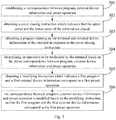
- the method may further include steps 107 and 108.
- a modifying instruction is obtained.
- the modifying instruction indicates that a first program corresponds to a first preset operation.
- the user when using the laptop, may adjust the correspondence between program and preset operation based on his own demands so that different programs may correspond to different preset operations based on user requirements.
- a setting page on the laptop may be viewed.
- multiple programs currently installed on the laptop there are listed multiple programs currently installed on the laptop and multiple potential operations such as shutdown, sleep, maintaining normal operation or screen off.
- the user may modify connection relationship between different programs and different operations based on his own demands.
- the laptop detects that the user modifies the connection relationship between the first program and the first preset operation, it determines that the modifying instruction is received.
- the first program may be any of a plurality of programs installed on the laptop.
- the first preset operation may be any of shutdown, sleep, maintaining normal operation or screen off.
- the modifying instruction indicating that the first program corresponds to the first preset operation may also be sent to the laptop through another control terminal.
- step 108 the correspondence between program and preset operation is modified based on the modifying instruction, such that the first program corresponds to the first preset operation.
- the laptop after receiving the modifying instruction, may save the connection result of the last modification by the user as a new correspondence between program and preset operation.
- the laptop after receiving the modifying instruction sent by another control terminal, may obtains the correspondence between the first program and the first preset operation included in the modifying instruction, and then modify the preset correspondence between program and preset operation based on the correspondence between the first program and the first preset operation.
- the laptop may modify the Table 1 based on the modifying instruction to obtain the new correspondence between program and preset operation.
- the new correspondence between program and preset operation is shown in Table 2 below.
- Table 2 Modified correspondence between program and preset operation Program Preset operation Browser Sleep Video player Sleep Download Maintaining normal operation status Music player Screen off
- the user may modify the preset correspondence between program and preset operation based on the user's habits and preferences, so that the terminal may select suitable operation based on demands of the user and the current situation, and thus the user experience can be improved.
- Fig. 2 is a flow diagram of a method for terminal control according to an exemplary embodiment. The method may be implemented by the terminal. As shown in Fig. 2 , the method includes steps 201-206.
- step 201 correspondence between program, power supply information and preset operation is set.
- Table 3 Correspondence between program, power supply information and preset operation
- Program Power supply information Preset operation Document External power supply is available Sleep No external power supply is available Shutdown Browser External power supply is available Sleep No external power supply is available Shutdown Video player External power supply is available Sleep No external power supply is available Shutdown Download External power supply is available Maintaining normal operation status No external power supply is available Maintaining normal operation status Music player External power supply is available Screen off No external power supply is available Shutdown
- step 202 a cover closing instruction is obtained.
- the cover closing instruction indicates that the upper cover and the lower cover of the terminal are closed.
- step 203 a program currently running on the terminal and current power supply information is obtained in response to the cover closing instruction.
- step 204 an operation that needs to be performed by the terminal is determined based on the preset correspondence between program, power supply information and preset operation.
- the terminal may, based on the obtained current running program and power supply information, query Table 3 to obtain different preset operations which correspond to different programs and different power supply information, and take the queried preset operations as the operations that need to be performed by the terminal.
- a modifying instruction is obtained.
- the modifying instruction indicates a first program and a first power supply information correspond to a first preset operation.
- step 206 the correspondence between program, power supply information and preset operation is modified based on the modifying instruction, so that the first program and the first power supply information correspond to the first preset operation.
- the terminal may determine, based on the program currently running on the terminal and the current power supply information, whether to shut down, sleep, maintain normal operation, or screen off. As a result, operation flexibility of the terminal is improved based on the current situation, various needs of users can be met and thus the user experience is improved.
- Fig. 3 is a flow diagram of a method for terminal control according to an exemplary embodiment. The method may be implemented by the terminal. As shown in Fig. 3 , the method includes steps 301-306.
- step 301 correspondence between program, external device information and preset operation is set.
- Table 4 the correspondence between program, external device information and preset operation may be shown in Table 4.
- Table 4 Correspondence between program, external device information and preset operation
- Program External device information Preset operation Document External display is connected Maintaining normal operation status No external display is connected Sleep Browser External display is connected Maintaining normal operation status No external display is connected Shutdown Video player External display is connected Maintaining normal operation status No external display is connected Sleep Download External display is connected Maintaining normal operation status No external display is connected Maintaining normal operation status Music player External display is connected Screen off No external display is connected Shutdown
- step 302 a cover closing instruction is obtained.
- the cover closing instruction indicates that the upper cover and the lower cover of the terminal are closed.
- step 303 a program currently running on the terminal and current external device information of the terminal is obtained in response to the cover closing instruction.
- step 304 an operation that needs to be performed by the terminal is determined based on the preset correspondence between program, external device information and preset operation.
- the terminal may, based on the obtained current running program and the current external device information, query Table 4 to obtain different preset operations which correspond to different programs and different external device information, and take the queried preset operations as the operations that need to be performed by the terminal.
- a modifying instruction is obtained.
- the modifying instruction indicates a first program and a first external device information correspond to a first preset operation.
- step 306 the correspondence between program, external device information and preset operation is modified based on the modifying instruction, so that the first program and the first external device information correspond to the first preset operation.
- the terminal may determine, based on the program currently running on the terminal and the current external device information, whether to shut down, sleep, maintain normal operation, or screen off. As a result, operation flexibility of the terminal is improved based on the current situation, various needs of users can be met and thus the user experience is improved.
- Fig. 4 is a flow diagram of a method for terminal control according to an exemplary embodiment. The method may be implemented by the terminal. As shown in Fig. 4 , the method includes steps 401-406.
- step 401 correspondence between program, power supply information, external device information and preset operation is set.
- Table 5 Correspondence between program, power supply information, external device information and preset operation
- Program Power supply information External device information
- External device information Preset operation Document External power supply is available External display is connected Maintaining normal operation status No external display is connected Sleep No external power supply is available External display is connected Maintaining normal operation status No external display is connected Shutdown Browser External power supply is available External display is connected Maintaining normal operation status No external display Sleep is connected No external power supply is available External display is connected Maintaining normal operation status No external display is connected Shutdown Video player External power supply is available External display is connected Maintaining normal operation status No external display is connected Sleep No external power supply is available External display is connected Maintaining normal operation status No external display is connected Shutdown Video player External power supply is available External display is connected Maintaining normal operation status No external display is connected Sleep No external power supply is available External display is connected Maintaining normal operation status No external display is connected Shutdown Download External power supply is available External display is connected Maintaining normal operation status No external display is connected Sleep No external power supply is available External display is connected Maintaining normal operation status No external display is
- step 402 a cover closing instruction is obtained.
- the cover closing instruction indicates that the upper cover and the lower cover of the terminal are closed.
- step 403 a program currently running on the terminal, current power supply information and current external device information of the terminal is obtained in response to the cover closing instruction.
- step 404 an operation that needs to be performed by the terminal is determined based on the preset correspondence between program, power supply information, external device information and preset operation.
- the terminal may, based on the obtained current running program the current power supply information, and the current external device information, query Table 5 to obtain different preset operations which correspond to different programs, different power supply information, and different external device information, and take the queried preset operations as the operations that need to be performed by the terminal.
- a modifying instruction is obtained.
- the modifying instruction indicates a first program, a first power supply information, and a first external device information correspond to a first preset operation.
- step 406 the correspondence between program, power supply information, external device information and preset operation is modified based on the modifying instruction, so that the first program, the first power supply information, and the first external device information correspond to the first preset operation.
- the terminal may determine, based on the program currently running on the terminal, the current power supply information and the current external device information, whether to shut down, sleep, maintain normal operation, or screen off.
- operation flexibility of the terminal is improved based on the current situation, various needs of users can be met and thus the user experience is improved.
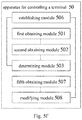
- Fig. 5A is a schematic structure diagram of an apparatus 50 for terminal control according to an exemplary embodiment.
- the apparatus 50 may be implemented as part or entire of an electronic device through software, hardware, or a combination thereof.
- the apparatus 50 for terminal control includes a first obtaining module 501, a second obtaining module 502, and a determining module 503.
- the first obtaining module 501 is configured to obtain a cover closing instruction which indicates that the upper cover and the lower cover of the terminal are closed.
- the second obtaining module 502 is configured to obtain, in response to the cover closing instruction, a program currently running on the terminal.
- the determining module 503 is configured to determine an operation that needs to be performed by the terminal based on the program currently running on the terminal.
- the operation that needs to be performed by the terminal includes any one of shutdown, sleep, maintaining normal operation, or screen off.
- the apparatus 50 further includes a third obtaining module 504.
- the third obtaining module 504 is configured to obtain current power supply information of the terminal.
- the determining module 503 is configured to determine the operation that needs to be performed by the terminal based on the program currently running on the terminal and the current power supply information of the terminal.
- the apparatus 50 further includes a fourth obtaining module 505.
- the fourth obtaining module 505 is configured to obtain current external device information of the terminal.
- the determining module 503 is configured to determine the operation that needs to be performed by the terminal based on the program currently running on the terminal and the current external device information of the terminal.
- the determining module 503 includes a maintaining submodule 5031.
- the maintaining submodule 5031 is configured to maintain normal operation status of the terminal when there is a program currently running on the terminal and an external display is connected to the terminal.
- the apparatus 50 further includes an establishing module 506.
- the establishing module 506 is configured to set correspondence between program and preset operation.
- the determining module 503 is configured to determine the operation that needs to be performed by the terminal based on the correspondence between program and preset operation.
- the apparatus 50 further includes a fifth obtaining module 507 and a modifying module 508.
- the fifth obtaining module 507 is configured to obtain a modifying instruction which indicates that a first program corresponds to a first preset operation.
- the modifying module 508 is configured to modify, based on the modifying instruction, the correspondence between program and preset operation such that the first program corresponds to the first preset operation.
- the apparatus may determine, based on the program currently running on the terminal, the current power supply information and/or the current external device information, whether to shut down, sleep, maintain normal operation, or screen off.
- operation flexibility of the terminal is improved based on the current situation, various needs of users can be met and thus the user experience is improved.
- the apparatus for terminal control includes a processor and a memory to store processor-executable instructions.
- the processor is configured to: obtain a cover closing instruction, wherein the cover closing instruction indicates that the upper cover and the lower cover of the terminal are closed; obtain, in response to the cover closing instruction, a program currently running on the terminal; and determine an operation that needs to be performed by the terminal based on the program currently running on the terminal.
- the operation that needs to be performed by the terminal includes any one of shutdown, sleep, maintaining normal operation, or screen off.
- the processor may be further configured to obtain current power supply information of the terminal, and determine the operation that needs to be performed by the terminal based on the program currently running on the terminal and the current power supply information of the terminal.
- the processor may be further configured to obtain current external device information of the terminal, and determine the operation that needs to be performed by the terminal based on the program currently running on the terminal and the current external device information of the terminal.
- the processor may be further configured to maintain normal operation status of the terminal when there is a program currently running on the terminal and an external display is connected to the terminal.
- the processor may be further configured to set correspondence between program and preset operation, and determine the operation that needs to be performed by the terminal based on the correspondence between program and preset operation.
- the processor may be further configured to obtain a modifying instruction which indicates that a first program corresponds to a first preset operation, and modify, based on the modifying instruction, the correspondence between program and preset operation such that the first program corresponds to the first preset operation.
- the apparatus may determine, based on the program currently running on the terminal, the current power supply information and/or the current external device information, whether to shut down, sleep, maintain normal operation, or screen off.
- operation flexibility of the terminal is improved based on the current situation, various needs of users can be met and thus the user experience is improved.
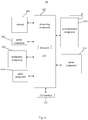
- Fig. 6 is a block diagram illustrating an apparatus 60 for terminal control according to an exemplary embodiment.
- the apparatus 60 may be applied for a terminal.
- the apparatus 60 may be a mobile phone, a computer, a digital broadcast terminal, a messaging device, a gaming console, a tablet, a medical device, exercise equipment, a personal digital assistant, and the like.
- the apparatus 60 may include one or more of the following components: a processing component 602, a memory 604, a power component 606, a multimedia component 608, an audio component 610, an input/output (I/O) interface 612, a sensor component 614, and a communication component 616.
- the processing component 602 typically controls overall operations of the apparatus 60, such as the operations associated with display, telephone calls, data communications, camera operations, and recording operations.
- the processing component 602 may include one or more processors 620 to execute instructions to perform all or part of the steps in the above described methods.
- the processing component 602 may include one or more modules which facilitate the interaction between the processing component 602 and other components.
- the processing component 602 may include a multimedia module to facilitate the interaction between the multimedia component 608 and the processing component 602.
- the memory 604 is configured to store various types of data to support the operation of the apparatus 60. Examples of such data include instructions for any applications or methods operated on the apparatus 60, contact data, phonebook data, messages, pictures, video, etc.
- the memory 604 may be implemented using any type of volatile or non-volatile memory devices, or a combination thereof, such as a static random access memory (SRAM), an electrically erasable programmable read-only memory (EEPROM), an erasable programmable read-only memory (EPROM), a programmable read-only memory (PROM), a read-only memory (ROM), a magnetic memory, a flash memory, a magnetic or optical disk.
- SRAM static random access memory
- EEPROM electrically erasable programmable read-only memory
- EPROM erasable programmable read-only memory
- PROM programmable read-only memory
- ROM read-only memory
- magnetic memory a magnetic memory
- flash memory a flash memory
- magnetic or optical disk a magnetic or optical
- the power component 606 provides power to various components of the apparatus 60.
- the power component 606 may include a power management system, one or more power sources, and any other components associated with the generation, management, and distribution of power for the apparatus 60.
- the multimedia component 608 includes a screen providing an output interface between the apparatus 60 and the user.
- the screen may include a liquid crystal display (LCD) and a touch panel (TP). If the screen includes the touch panel, the screen may be implemented as a touch screen to receive input signals from the user.
- the touch panel includes one or more touch sensors to sense touches, swipes, and gestures on the touch panel. The touch sensors may not only sense a boundary of a touch or swipe action, but also sense a period of time and a pressure associated with the touch or swipe action.
- the multimedia component 608 includes a front camera and/or a rear camera.
- the front camera and the rear camera may receive an external multimedia datum while the apparatus 60 is in an operation mode, such as a photographing mode or a video mode.
- an operation mode such as a photographing mode or a video mode.
- Each of the front camera and the rear camera may be a fixed optical lens system or have optical focusing and zooming capability.
- the audio component 610 is configured to output and/or input audio signals.
- the audio component 610 includes a microphone ("MIC") configured to receive an external audio signal when the apparatus 60 is in an operation mode, such as a call mode, a recording mode, and a voice recognition mode.
- the received audio signal may be further stored in the memory 604 or transmitted via the communication component 616.
- the audio component 610 further includes a speaker to output audio signals.
- the I/O interface 612 provides an interface between the processing component 602 and peripheral interface modules, the peripheral interface modules being, for example, a keyboard, a click wheel, buttons, and the like.
- the buttons may include, but are not limited to, a home button, a volume button, a starting button, and a locking button.
- the sensor component 614 includes one or more sensors to provide status assessments of various aspects of the apparatus 60. For instance, the sensor component 614 may detect an open/closed status of the apparatus 60, relative positioning of components (e.g., the display and the keypad, of the apparatus 60), a change in position of the apparatus 60 or a component of the apparatus 60, a presence or absence of user contact with the apparatus 60, an orientation or an acceleration/deceleration of the apparatus 60, and a change in temperature of the apparatus 60.
- the sensor component 614 may include a proximity sensor configured to detect the presence of a nearby object without any physical contact.
- the sensor component 614 may also include a light sensor, such as a CMOS or CCD image sensor, for use in imaging applications.
- the sensor component 614 may also include an accelerometer sensor, a gyroscope sensor, a magnetic sensor, a pressure sensor, or a temperature sensor.
- the communication component 616 is configured to facilitate communication, wired or wirelessly, between the apparatus 60 and other devices.
- the apparatus 60 can access a wireless network based on a communication standard, such as WiFi, 2G, or 3G, or a combination thereof.
- the communication component 616 receives a broadcast signal or broadcast associated information from an external broadcast management system via a broadcast channel.
- the communication component 616 further includes a near field communication (NFC) module to facilitate short-range communications.
- the NFC module may be implemented based on a radio frequency identification (RFID) technology, an infrared data association (IrDA) technology, an ultra-wideband (UWB) technology, a Bluetooth (BT) technology, and other technologies.
- RFID radio frequency identification
- IrDA infrared data association
- UWB ultra-wideband
- BT Bluetooth
- the apparatus 60 may be implemented with one or more application specific integrated circuits (ASICs), digital signal processors (DSPs), digital signal processing devices (DSPDs), programmable logic devices (PLDs), field programmable gate arrays (FPGAs), controllers, micro-controllers, microprocessors, or other electronic components, for performing the above described methods.
- ASICs application specific integrated circuits
- DSPs digital signal processors
- DSPDs digital signal processing devices
- PLDs programmable logic devices
- FPGAs field programmable gate arrays
- controllers micro-controllers, microprocessors, or other electronic components, for performing the above described methods.
- non-transitory computer-readable storage medium including instructions, such as included in the memory 604, executable by the processor 620 in the apparatus 60, for performing the above-described methods.
- the non-transitory computer-readable storage medium may be a ROM, a Random Access Memory (RAM), a CD-ROM, a magnetic tape, a floppy disc, an optical data storage device, and the like.
- the method may include: obtaining a cover closing instruction, wherein the cover closing instruction indicates that the upper cover and the lower cover of the terminal are closed; obtaining, in response to the cover closing instruction, a program currently running on the terminal; and determining an operation that needs to be performed by the terminal based on the program currently running on the terminal, wherein the operation that needs to be performed by the terminal includes any one of shutdown, sleep, maintaining normal operation, or screen off.
- the method may further include obtaining current power supply information of the terminal.
- the determining an operation that needs to be performed by the terminal based on the program currently running on the terminal may include: determining the operation that needs to be performed by the terminal based on the program currently running on the terminal and the current power supply information of the terminal.
- the method further includes: obtaining current external device information of the terminal.
- the determining an operation that needs to be performed by the terminal based on the program currently running on the terminal includes: determining the operation that needs to be performed by the terminal based on the program currently running on the terminal and the current external device information of the terminal.
- the determining the operation that needs to be performed by the terminal based on the program currently running on the terminal and the current external device information of the terminal includes: maintaining normal operation status of the terminal when there is a program currently running on the terminal and an external display is connected to the terminal.
- the method further includes: establishing correspondence between program and preset operation.
- the determining an operation that needs to be performed by the terminal based on the program currently running on the terminal includes: determining the operation that needs to be performed by the terminal based on the correspondence between program and preset operation.
- the method further includes: obtaining a modifying instruction, wherein the modifying instruction indicates that a first program corresponds to a first preset operation; and modifying, based on the modifying instruction, the correspondence between program and preset operation such that the first program corresponds to the first preset operation.
- the instructions stored in the computer readable storage medium may also be a computer program.
- the apparatus 60 may be configured to execute any of the methods for terminal control described above.
- the present disclosure may include dedicated hardware implementations such as application specific integrated circuits, programmable logic arrays and other hardware devices.
- the hardware implementations can be constructed to implement one or more of the methods described herein.
- Applications that may include the apparatus and systems of various examples can broadly include a variety of electronic and computing systems.
- One or more examples described herein may implement functions using two or more specific interconnected hardware modules or devices with related control and data signals that can be communicated between and through the modules, or as portions of an application-specific integrated circuit. Accordingly, the computing system disclosed may encompass software, firmware, and hardware implementations.
- module may include memory (shared, dedicated, or group) that stores code or instructions that can be executed by one or more processors.
Landscapes
- Engineering & Computer Science (AREA)
- Theoretical Computer Science (AREA)
- General Engineering & Computer Science (AREA)
- Physics & Mathematics (AREA)
- General Physics & Mathematics (AREA)
- Computer Hardware Design (AREA)
- Human Computer Interaction (AREA)
- User Interface Of Digital Computer (AREA)
- Telephone Function (AREA)
- Power Sources (AREA)
Abstract
Description
- The present disclosure generally relates to electronic device technology, and more particularly to a method and apparatus for terminal control.
- With the development of communication technology, more and more users choose to use laptops for routine work and study.
- Mobility and easy access of the laptop may greatly facilitate people's daily life. A user may directly close the cover of the laptop and put the laptop into a bag if the user has to be occupied by something else, and then the laptop may automatically go to sleep state. When the user uses the laptop next time, the laptop may reproduce a page which is shown on the screen before the cover is closed and the user may continue using the laptop .
- As the screen of the laptop is small, when the user views a document using the laptop, an external display with a larger screen may be used. However, in order to maintain normal operation of the laptop, the screen of the laptop needs to be kept on for a long time, resulting in a big power consumption of the laptop. When the user is using the laptop to download a video, if the user closes the cover of the laptop, the laptop may go to sleep state, and the sleep state of the laptop may lead to the interruption of download and thus the download efficiency is low. As such, the setting that the laptop immediately go to sleep state when its cover is closed cannot meet various demands of users, and thus the user experience may not be good.
- In view of the related arts, a method and apparatus for terminal control are provided in the disclosure.
- According to a first aspect of embodiments of the present disclosure, a method for controlling a terminal is provided. The method may include: obtaining a cover closing instruction for the terminal, where the cover closing instruction indicated that an upper cover and a lower cover of the terminal are closed; if the terminal has only one cover, the cover closing instruction may indicate that the one cover of the terminal is closed; obtaining, in response to the cover closing instruction, a program running on the terminal; and determining an operation to be performed by the terminal based on the program running on the terminal, where the operation to be performed by the terminal may include any one of: shutdown, sleep, maintaining normal operation, and screen off.
- The technical solutions provided by the embodiments of the present disclosure may include the following beneficial effects. After the user closes the upper cover and the lower cover of the terminal, the terminal may determine, based on and in particular depending from the program currently running on the terminal, whether to shut down, sleep, maintain normal operation, or screen off. In other words, the terminal may chose based on the program currently running on the terminal to shut down sleep, maintain normal operation or put the screen off. As a result, operation flexibility of the terminal is improved based on the current situation, various needs of users can be met and thus the user experience is improved.
- In an embodiment, the method further includes: obtaining power supply information of the terminal; wherein determining the operation to be performed by the terminal based on the program running on the terminal comprises: determining the operation to be performed by the terminal based on the program running on the terminal and the power supply information of the terminal.
- The technical solutions provided by the embodiments of the present disclosure may include the following beneficial effects. After the user closes the upper cover and the lower cover of the terminal, the terminal may determine, based on the program currently running on the terminal and the current power supply information of the terminal, whether to shut down, sleep, maintain normal operation, or screen off. As a result, operation flexibility of the terminal is improved based on the current situation, various needs of users can be met and thus the user experience is improved.
- In an embodiment, the method further includes: obtaining external device information of the terminal; wherein determining the operation to be performed by the terminal based on the program running on the terminal comprises: determining the operation to be performed by the terminal based on the program running on the terminal and the external device information of the terminal.
- The technical solutions provided by the embodiments of the present disclosure may include the following beneficial effects. After the user closes the upper cover and the lower cover of the terminal, the terminal may determine, based on the program currently running on the terminal and the current external device information of the terminal, whether to shut down, sleep, maintain normal operation, or screen off. As a result, operation flexibility of the terminal is improved based on the current situation, various needs of users can be met and thus the user experience is improved.
- In an embodiment, determining the operation to be performed by the terminal based on the program running on the terminal and the external device information of the terminal comprises: maintaining a normal operation status of the terminal when the program running on the terminal exists and an external display is connected to the terminal.
- The technical solutions provided by the embodiments of the present disclosure may include the following beneficial effects. In the case that there is a program currently running on the terminal and an external display is connected to the terminal, the user may be using the program currently running on the terminal via the external display. Thus, the terminal may maintain normal operation status when the user closes the upper cover and the lower cover. As a result, operation flexibility of the terminal is improved based on the external display, various needs of users can be met and thus the user experience is improved.
- In an embodiment, the method further includes: establishing a correspondence between a program and a preset operation; wherein determining the operation to be performed by the terminal based on the program running on the terminal comprises: determining the operation to be performed by the terminal based on the correspondence between the program and the preset operation.
- The technical solutions provided by the embodiments of the present disclosure may include the following beneficial effects. The terminal may determine the operation that needs to be performed based on the correspondence between program and preset operation, so that the terminal may select a suitable operation based on current situation more accurately, and thus the user experience can be improved.
- In an embodiment, the method further includes: obtaining a modifying instruction, wherein the modifying instruction indicates that a first program corresponds to a first preset operation; and modifying, based on the modifying instruction, the correspondence between program and preset operation such that the first program corresponds to the first preset operation.
- The technical solutions provided by the embodiments of the present disclosure may include the following beneficial effects. The user may modify the preset correspondence between program and preset operation based on the user's habits and preferences, so that the terminal may select a suitable operation based on demands of the user and the current situation, and thus the user experience can be improved.
- According to a second aspect of embodiments of the present disclosure, an apparatus for terminal control is provided, including: a first obtaining module configured to obtain a cover closing instruction for the terminal, wherein the cover closing instruction indicates that an upper cover and a lower cover of the terminal are closed; a second obtaining module configured to obtain, in response to the cover closing instruction, a program running on the terminal; and a determining module configured to determine an operation to be performed by the terminal based on the program running on the terminal, wherein the operation to be performed by the terminal comprises any one of shutdown, sleep, maintaining normal operation, or screen off.
- In an embodiment, the apparatus further includes: a third obtaining module configured to obtain power supply information of the terminal; wherein the determining module is configured to determine the operation to be performed by the terminal based on the program running on the terminal and the power supply information of the terminal.
- In an embodiment, the apparatus further includes: a fourth obtaining module configured to obtain external device information of the terminal; wherein the determining module is configured to determine the operation to be performed by the terminal based on the program running on the terminal and the external device information of the terminal.
- In an embodiment, the determining module comprises a maintaining submodule configured to maintain normal operation status of the terminal when the program running on the terminal exists and an external display is connected to the terminal.
- In an embodiment, the apparatus further includes: an establishing module configured to establish a correspondence between a program and a preset operation; wherein the determining module is configured to determine the operation to be performed by the terminal based on the correspondence between program and preset operation.
- In an embodiment, the apparatus further includes: a fifth obtaining module configured to obtain a modifying instruction, wherein the modifying instruction indicates that a first program corresponds to a first preset operation; and a modifying module configured to modify, based on the modifying instruction, the correspondence between the program and the preset operation such that the first program corresponds to the first preset operation.
- According to a third aspect of embodiments of the present disclosure, there is provided an apparatus for terminal control including: a processor; and a memory storing instructions that are executable by the processor; wherein the processor is configured to: obtain a cover closing instruction for the terminal, wherein the cover closing instruction indicates that an upper cover and a lower cover of the terminal are closed; obtain, in response to the cover closing instruction, a program running on the terminal; and determine an operation to be performed by the terminal based on the program running on the terminal, wherein the operation to be performed by the terminal comprises any one of shutdown, sleep, maintaining normal operation, or screen off.
- According to a fourth aspect of embodiments of the present disclosure, there is provided a computer-readable storage medium having a computer program stored thereon for controlling a terminal which, when executed by a processor, causes the processor to perform operations of the method according to any of the embodiments of the first aspect.
- It is to be understood that both the forgoing general description and the following detailed description are exemplary and illustrative only, and do not limit the present disclosure.
- The accompanying drawings, which are incorporated in and constitute a part of this specification, illustrate embodiments consistent with the disclosure and, together with the description, serve to explain the principles of the disclosure.
-
Fig. 1A is a flow diagram of a method for terminal control according to an exemplary embodiment. -
Fig. 1B is a flow diagram of a method for terminal control according to an exemplary embodiment. -
Fig. 1C is a flow diagram of a method for terminal control according to an exemplary embodiment. - Fig. ID is a flow diagram of a method for terminal control according to an exemplary embodiment.
- Fig. IE is a flow diagram of a method for terminal control according to an exemplary embodiment.
-
Fig. 2 is a flow diagram of a method for terminal control according to an exemplary embodiment. -
Fig. 3 is a flow diagram of a method for terminal control according to an exemplary embodiment. -
Fig. 4 is a flow diagram of a method for terminal control according to an exemplary embodiment. -
Fig. 5A is a schematic structure diagram of an apparatus for terminal control according to an exemplary embodiment. -
Fig. 5B is a schematic structure diagram of an apparatus for terminal control according to an exemplary embodiment. -
Fig. 5C is a schematic structure diagram of an apparatus for terminal control according to an exemplary embodiment. -
Fig. 5D is a schematic structure diagram of an apparatus for terminal control according to an exemplary embodiment. -
Fig. 5E is a schematic structure diagram of an apparatus for terminal control according to an exemplary embodiment. -
Fig. 5F is a schematic structure diagram of an apparatus for terminal control according to an exemplary embodiment. -
Fig. 6 is block diagram of an apparatus for terminal control according to an exemplary embodiment. - Exemplary embodiments are described in detail herein, examples of which are illustrated in the accompanying drawings. The following description refers to the accompanying drawings in which same numbers in different drawings represent same or similar elements unless otherwise described. The implementations set forth in the following description of exemplary embodiments do not represent all implementations consistent with the disclosure. Instead, they are merely examples of apparatuses and methods consistent with aspects related to the disclosure as recited in the appended claims.
- The technical solutions provided by the embodiments of the present disclosure relates to a terminal, which may be a laptop, a flip phone, a tablet with a portable keyboard installed, or other devices whose upper cover and lower cover enable to be closed. The embodiments of the present disclosure are not limited in this respect. In the technical solutions provided by the embodiments of the present disclosure, after the user closes the upper cover and the lower cover of the terminal, the terminal may determine, based on the program currently running on the terminal, whether to shut down, sleep, maintain normal operation, or screen off. As a result, operation flexibility of the terminal is improved based on the current situation, various needs of users can be met and thus the user experience is improved.
-
Fig. 1A is a flow diagram of a method for terminal control according to an exemplary embodiment. The method may be applied to a terminal. The embodiments of the present disclosure are illustrated by taking a laptop as an example. As shown inFig. 1A , the method for terminal control includessteps 101 to 103. - In
step 101, a cover closing instruction is obtained. The cover closing instruction indicates that the upper cover and the lower cover of the terminal are closed. - For example, in the case that the terminal is a laptop or a flip phone, the upper cover of the terminal is a side where a display is provided, and the lower cover of the terminal is a side where a keyboard is provided. For example, in the case that the terminal is a tablet provided with a portable keyboard, the upper cover of the terminal is the tablet itself, and the lower cover of the terminal is the portable keyboard. The upper cover and the lower cover of other terminals may be distinguished based on usage of the user, which is not limited in the embodiments of the present disclosure.
- For instance, in a laptop, a distance sensor is provided in the lower cover of the laptop. When the user uses the laptop, the distance sensor may detect the distance between the lower cover and the upper cover in real time. When the distance sensor detects that the distance between the lower cover and the upper cover is less than or equal to a preset distance threshold, it is determined that a cover closing instruction is received.
- Alternatively, when the user remotely operates the laptop, a cover closing instruction may also be sent to the laptop through another control terminal.
- In
step 102, a program currently running on the terminal is obtained in response to the cover closing instruction. - For example, when the laptop determines that the cover closing instruction is obtained, it may obtain the program currently running on the terminal. The program currently running on the terminal may include a program being used by the user or a program running in background. Specifically, the laptop may determine the program currently running on the terminal based on a process being processed in the processor.
- In
step 103, an operation that needs to be performed by the terminal is determined based on the program currently running on the terminal. The operation that needs to be performed by the terminal may include any one of shutdown, sleep, maintaining normal operation, or screen off. - For example, the terminal needs perform different operations when it receives the cover closing instruction due to different programs currently running on the terminal. For example, if the cover closing instruction is received when the user is browsing a webpage, the laptop may save the webpage currently browsed by the user and then directly shutdown. When the laptop is turned on next time, it will show the webpage saved in a browser. In this way, stand-by power consumption is saved. For example, if the cover closing instruction is received when the user is watching a video, the laptop may record playing position of the video and then sleep. When the user opens the laptop again, the laptop may be quickly woken up and the video may be watched. For example, if the cover closing instruction is received when the user is downloading a document or a video, in order to avoid interruption of the download, the laptop may maintain normal operation status, and thus download speed can be enhanced. In summary, different operations that need to be performed by the terminal may be determined based on different programs currently running on the terminal, and thus various demands of the user can be met.
- In the technical solutions provided in the embodiments of the present disclosure, after the user closes the upper cover and the lower cover of the terminal, the terminal may determine, based on the program currently running on the terminal, whether to shut down, sleep, maintain normal operation, or screen off. As a result, operation flexibility of the terminal is improved based on the current situation, various needs of users can be met and thus the user experience is improved.
- In an embodiment, as shown in
Fig. 1B , the method may further includestep 104. - In
step 104, current power supply information of the terminal is obtained. - For example, after receiving the cover closing instruction, the laptop may detect a power interface for an external power supply. If the power interface is connected to an external power supply, the power supply information of the terminal indicates presence of an external power supply. If the power interface is not connected to an external power supply, the power supply information of the terminal indicates absence of an external power supply.
- Determination of an operation that needs to be performed by the terminal based on the program currently running on the terminal in
step 103 may be implemented bystep 1031 where the operation that needs to be performed by the terminal is determined based on the program currently running on the terminal and the current power supply information of the terminal. - For example, different operations are required to be performed by the laptop due to different programs currently running on the laptop and different power supply information of the laptop.
- For example, if the user is currently editing a document and an external power supply is available, the laptop, after receiving a cover closing instruction, may save the currently edited document and then sleep. The laptop may directly open the document required by the user next time when the laptop is turned on. As a result, it is avoided to lose the content edited by the user. For example, if the user is currently editing a document and no external power supply is available, the laptop, after receiving a cover closing instruction, may save the currently edited document and then shut down. As a result, standby time of a battery of the laptop is increased. For example, if the user is currently watching a video and no external power supply is available, the laptop, after receiving a cover closing instruction, may record the playing position of the video and then shut down. The laptop may open related player of the video and paly the video from the playing position recorded when the user opens the laptop next time. For example, if the user is currently downloading a document or a video and an external power supply is available, the laptop, after receiving a cover closing instruction, may maintain normal operation status in order to avoid interruption of the download. As a result, download speed is enhanced. For example, if the user is currently downloading a document or a video and no external power supply is available, the laptop, after receiving a cover closing instruction, may sleep in order to reduce power consumption and increase standby time. To sum up, different operations that need to be performed by the terminal may be determined based on different programs currently running on the terminal and the power supply information, and thus various demands of the user can be met.
- In the technical solutions provided in the embodiments of the present disclosure, after the user closes the upper cover and the lower cover of the terminal, the terminal may determine, based on the program currently running on the terminal and the power supply information, whether to shut down, sleep, maintain normal operation, or screen off. As a result, operation flexibility of the terminal is improved based on the current situation, various needs of users can be met and thus the user experience is improved.
- In an embodiment, as shown in
Fig. 1C , the method may further includestep 105. - In
step 105, current external device information of the terminal is obtained. - For example, the laptop, after receiving the cover closing instruction, may detect various interface for external devices to determine whether there is any external device. For example, a High Definition Multimedia Interface (HDMI) for an external high-definition display may be detected to determine whether there is connected an external display or a Virtual Reality (VR) device. For example, a Video Graphics Array (VGA) for an external common display may be detected to determine whether there is connected an external display. For example, a Digital Visual Interface (DVI) may be detected to determine whether there is connected an external video player. For example, a Universal Serial Bus (USB) interface may be detected to determine whether there is connected a Bluetooth headset.
- Determination of an operation that needs to be performed by the terminal based on the program currently running on the terminal in
step 103 may be implemented bystep 1032 where the operation that needs to be performed by the terminal is determined based on the program currently running on the terminal and the current external device information of the terminal. - For example, if the user is currently editing a document and an external display is connected, the laptop, after receiving a cover closing instruction, may maintain the normal operation status. For example, if the user is currently editing a document and no external device is connected, the laptop, after receiving a cover closing instruction, may save the currently edited document and then shut down. As a result, standby time of a battery of the laptop is increased. For example, if the user is currently watching a video and an external display is connected, the laptop, after receiving a cover closing instruction, may maintain the normal operation status. For example, if the user is currently watching a video and no external device is connected, the laptop, after receiving a cover closing instruction, may record the playing position of the video and then sleep. The laptop may be woken up and the user may watch the video when the user opens the laptop next time. For example, if the user is currently downloading a document or a video, regardless whether there is detected an external device, the laptop, after receiving a cover closing instruction, may maintain the normal operation status. As a result, download speed is enhanced. To sum up, different operations that need to be performed by the terminal may be determined based on different programs currently running on the terminal and the external device information, and thus various demands of the user can be met.
- In the technical solutions provided in the embodiments of the present disclosure, after the user closes the upper cover and the lower cover of the terminal, the terminal may determine, based on the program currently running on the terminal and the external device information, whether to shut down, sleep, maintain normal operation, or screen off. As a result, operation flexibility of the terminal is improved based on the current situation, various needs of users can be met and thus the user experience is improved.
- In an embodiment, during determination of the operation that needs to be performed by the terminal based on the program currently running on the terminal and the current external device information, the terminal may maintain the normal operation status if there is a program currently running on the terminal and an external display is connected.
- For example, if there is a program running on the laptop and an external display is connected via an HDMI interface or a VGA interface, the user may currently uses the laptop through the external display. In this case, the laptop may maintain the normal operation status when the user closes the upper cover and lower cover of the laptop. That is, when the laptop receives the cover closing instruction, it may maintain the normal operation status so that the user can continue to use the laptop through the external display.
- In the technical solutions provided in the embodiments of the present disclosure, if there is a program running on the terminal and an external display is connected to the terminal, the user may currently uses the program currently running on the terminal through the external display. Thus, after the user closes the upper cover and the lower cover of the terminal, the terminal may maintain the normal operation status. As a result, operation flexibility of the terminal is improved based on the current situation, various needs of users can be met and thus the user experience is improved.
- In an embodiment, as shown in Fig. ID, the method may further include
step 106. - In
step 106, correspondence between program and preset operation is set. - For example, during initialization, the correspondence between the running program and the presetting operation may be set in the laptop. The correspondence indicates that different programs may correspond to different preset operations. Specifically, the correspondence between program and preset operation may be as shown in Table 1.
Table 1 Correspondence between program and preset operation Program Preset operation Browser Shutdown Video player Sleep Download Maintaining normal operation status Music player Screen off - Determination of an operation that needs to be performed by the terminal based on the program currently running on the terminal in
step 103 may be implemented bystep 1033 where the operation that needs to be performed by the terminal is determined based on the correspondence between program and preset operation. - For example, the laptop, after receiving the cover closing instruction, may obtain the program currently running on the laptop, query Table 1 based on the currently running program, determine a preset operation corresponding to the currently running program, and then take the preset operation as the operation to be performed.
- In the technical solutions provided by the embodiments of the present disclosure, the terminal may determine the operation that needs to be performed based on the preset correspondence between program and preset operation, so that the terminal may select a suitable operation based on current situation more accurately, and thus the user experience can be improved.
- In an embodiment, as shown in Fig. IE, the method may further include
steps - In
step 107, a modifying instruction is obtained. The modifying instruction indicates that a first program corresponds to a first preset operation. - For example, the user, when using the laptop, may adjust the correspondence between program and preset operation based on his own demands so that different programs may correspond to different preset operations based on user requirements.
- For example, if the user needs to modify the correspondence between program and preset operation, a setting page on the laptop may be viewed. On the setting page, there are listed multiple programs currently installed on the laptop and multiple potential operations such as shutdown, sleep, maintaining normal operation or screen off. The user may modify connection relationship between different programs and different operations based on his own demands. When the laptop detects that the user modifies the connection relationship between the first program and the first preset operation, it determines that the modifying instruction is received. The first program may be any of a plurality of programs installed on the laptop. The first preset operation may be any of shutdown, sleep, maintaining normal operation or screen off.
- Alternatively, when the user remotely operates the laptop, the modifying instruction indicating that the first program corresponds to the first preset operation may also be sent to the laptop through another control terminal.
- In
step 108, the correspondence between program and preset operation is modified based on the modifying instruction, such that the first program corresponds to the first preset operation. - For example, the laptop, after receiving the modifying instruction, may save the connection result of the last modification by the user as a new correspondence between program and preset operation.
- Alternatively, the laptop, after receiving the modifying instruction sent by another control terminal, may obtains the correspondence between the first program and the first preset operation included in the modifying instruction, and then modify the preset correspondence between program and preset operation based on the correspondence between the first program and the first preset operation.
- In the case that the modifying instruction includes correspondence between browser and sleep, the laptop, after obtaining the modifying instruction, may modify the Table 1 based on the modifying instruction to obtain the new correspondence between program and preset operation. The new correspondence between program and preset operation is shown in Table 2 below.
Table 2 Modified correspondence between program and preset operation Program Preset operation Browser Sleep Video player Sleep Download Maintaining normal operation status Music player Screen off - In the technical solutions provided by the embodiments of the present disclosure, the user may modify the preset correspondence between program and preset operation based on the user's habits and preferences, so that the terminal may select suitable operation based on demands of the user and the current situation, and thus the user experience can be improved.
- Implementations will be described in detail with several embodiments.
-
Fig. 2 is a flow diagram of a method for terminal control according to an exemplary embodiment. The method may be implemented by the terminal. As shown inFig. 2 , the method includes steps 201-206. - In
step 201, correspondence between program, power supply information and preset operation is set. - For example, the correspondence between program, power supply information and preset operation may be shown in Table 3.
Table 3 Correspondence between program, power supply information and preset operation Program Power supply information Preset operation Document External power supply is available Sleep No external power supply is available Shutdown Browser External power supply is available Sleep No external power supply is available Shutdown Video player External power supply is available Sleep No external power supply is available Shutdown Download External power supply is available Maintaining normal operation status No external power supply is available Maintaining normal operation status Music player External power supply is available Screen off No external power supply is available Shutdown - In
step 202, a cover closing instruction is obtained. The cover closing instruction indicates that the upper cover and the lower cover of the terminal are closed. - In
step 203, a program currently running on the terminal and current power supply information is obtained in response to the cover closing instruction. - In
step 204, an operation that needs to be performed by the terminal is determined based on the preset correspondence between program, power supply information and preset operation. - For example, the terminal may, based on the obtained current running program and power supply information, query Table 3 to obtain different preset operations which correspond to different programs and different power supply information, and take the queried preset operations as the operations that need to be performed by the terminal.
- In
step 205, a modifying instruction is obtained. The modifying instruction indicates a first program and a first power supply information correspond to a first preset operation. - In
step 206, the correspondence between program, power supply information and preset operation is modified based on the modifying instruction, so that the first program and the first power supply information correspond to the first preset operation. - In the method for terminal control provided in the embodiments of the present disclosure, after the user closes the upper cover and the lower cover of the terminal, the terminal may determine, based on the program currently running on the terminal and the current power supply information, whether to shut down, sleep, maintain normal operation, or screen off. As a result, operation flexibility of the terminal is improved based on the current situation, various needs of users can be met and thus the user experience is improved.
-
Fig. 3 is a flow diagram of a method for terminal control according to an exemplary embodiment. The method may be implemented by the terminal. As shown inFig. 3 , the method includes steps 301-306. - In
step 301, correspondence between program, external device information and preset operation is set. - For example, the correspondence between program, external device information and preset operation may be shown in Table 4.
Table 4 Correspondence between program, external device information and preset operation Program External device information Preset operation Document External display is connected Maintaining normal operation status No external display is connected Sleep Browser External display is connected Maintaining normal operation status No external display is connected Shutdown Video player External display is connected Maintaining normal operation status No external display is connected Sleep Download External display is connected Maintaining normal operation status No external display is connected Maintaining normal operation status Music player External display is connected Screen off No external display is connected Shutdown - In
step 302, a cover closing instruction is obtained. The cover closing instruction indicates that the upper cover and the lower cover of the terminal are closed. - In
step 303, a program currently running on the terminal and current external device information of the terminal is obtained in response to the cover closing instruction. - In
step 304, an operation that needs to be performed by the terminal is determined based on the preset correspondence between program, external device information and preset operation. - For example, the terminal may, based on the obtained current running program and the current external device information, query Table 4 to obtain different preset operations which correspond to different programs and different external device information, and take the queried preset operations as the operations that need to be performed by the terminal.
- In
step 305, a modifying instruction is obtained. The modifying instruction indicates a first program and a first external device information correspond to a first preset operation. - In
step 306, the correspondence between program, external device information and preset operation is modified based on the modifying instruction, so that the first program and the first external device information correspond to the first preset operation. - In the method for terminal control provided in the embodiments of the present disclosure, after the user closes the upper cover and the lower cover of the terminal, the terminal may determine, based on the program currently running on the terminal and the current external device information, whether to shut down, sleep, maintain normal operation, or screen off. As a result, operation flexibility of the terminal is improved based on the current situation, various needs of users can be met and thus the user experience is improved.
-
Fig. 4 is a flow diagram of a method for terminal control according to an exemplary embodiment. The method may be implemented by the terminal. As shown inFig. 4 , the method includes steps 401-406. - In
step 401, correspondence between program, power supply information, external device information and preset operation is set. - For example, the correspondence between program, power supply information, external device information and preset operation may be shown in Table 5.
Table 5 Correspondence between program, power supply information, external device information and preset operation Program Power supply information External device information Preset operation Document External power supply is available External display is connected Maintaining normal operation status No external display is connected Sleep No external power supply is available External display is connected Maintaining normal operation status No external display is connected Shutdown Browser External power supply is available External display is connected Maintaining normal operation status No external display Sleep is connected No external power supply is available External display is connected Maintaining normal operation status No external display is connected Shutdown Video player External power supply is available External display is connected Maintaining normal operation status No external display is connected Sleep No external power supply is available External display is connected Maintaining normal operation status No external display is connected Shutdown Download External power supply is available External display is connected Maintaining normal operation status No external display is connected Sleep No external power supply is available External display is connected Maintaining normal operation status No external display is connected Shutdown Music player External power supply is available External display is connected Screen off No external display is connected Screen off No external power supply is available External display is connected Shutdown No external display is connected Shutdown - In
step 402, a cover closing instruction is obtained. The cover closing instruction indicates that the upper cover and the lower cover of the terminal are closed. - In
step 403, a program currently running on the terminal, current power supply information and current external device information of the terminal is obtained in response to the cover closing instruction. - In
step 404, an operation that needs to be performed by the terminal is determined based on the preset correspondence between program, power supply information, external device information and preset operation. - For example, the terminal may, based on the obtained current running program the current power supply information, and the current external device information, query Table 5 to obtain different preset operations which correspond to different programs, different power supply information, and different external device information, and take the queried preset operations as the operations that need to be performed by the terminal.
- In
step 405, a modifying instruction is obtained. The modifying instruction indicates a first program, a first power supply information, and a first external device information correspond to a first preset operation. - In
step 406, the correspondence between program, power supply information, external device information and preset operation is modified based on the modifying instruction, so that the first program, the first power supply information, and the first external device information correspond to the first preset operation. - In the method for terminal control provided in the embodiments of the present disclosure, after the user closes the upper cover and the lower cover of the terminal, the terminal may determine, based on the program currently running on the terminal, the current power supply information and the current external device information, whether to shut down, sleep, maintain normal operation, or screen off. As a result, operation flexibility of the terminal is improved based on the current situation, various needs of users can be met and thus the user experience is improved.
- Description will be made below for embodiments of an apparatus which may implement the methods in the above embodiments.
-
Fig. 5A is a schematic structure diagram of an apparatus 50 for terminal control according to an exemplary embodiment. The apparatus 50 may be implemented as part or entire of an electronic device through software, hardware, or a combination thereof. As shown inFig. 5A , the apparatus 50 for terminal control includes a first obtainingmodule 501, a second obtainingmodule 502, and a determiningmodule 503. - The first obtaining
module 501 is configured to obtain a cover closing instruction which indicates that the upper cover and the lower cover of the terminal are closed. - The second obtaining
module 502 is configured to obtain, in response to the cover closing instruction, a program currently running on the terminal. - The determining
module 503 is configured to determine an operation that needs to be performed by the terminal based on the program currently running on the terminal. The operation that needs to be performed by the terminal includes any one of shutdown, sleep, maintaining normal operation, or screen off. - In an embodiment, as shown in
Fig. 5B , the apparatus 50 further includes a third obtainingmodule 504. - The third obtaining
module 504 is configured to obtain current power supply information of the terminal. - The determining
module 503 is configured to determine the operation that needs to be performed by the terminal based on the program currently running on the terminal and the current power supply information of the terminal. - In an embodiment, as shown in
Fig. 5C , the apparatus 50 further includes a fourth obtainingmodule 505. - The fourth obtaining
module 505 is configured to obtain current external device information of the terminal. - The determining
module 503 is configured to determine the operation that needs to be performed by the terminal based on the program currently running on the terminal and the current external device information of the terminal. - In an embodiment, as shown in
Fig. 5D , the determiningmodule 503 includes a maintainingsubmodule 5031. - The maintaining
submodule 5031 is configured to maintain normal operation status of the terminal when there is a program currently running on the terminal and an external display is connected to the terminal. - In an embodiment, as shown in
Fig. 5E , the apparatus 50 further includes an establishingmodule 506. - The establishing
module 506 is configured to set correspondence between program and preset operation. - The determining
module 503 is configured to determine the operation that needs to be performed by the terminal based on the correspondence between program and preset operation. - In an embodiment, as shown in
Fig. 5F , the apparatus 50 further includes a fifth obtainingmodule 507 and a modifyingmodule 508. - The fifth obtaining
module 507 is configured to obtain a modifying instruction which indicates that a first program corresponds to a first preset operation. - The modifying
module 508 is configured to modify, based on the modifying instruction, the correspondence between program and preset operation such that the first program corresponds to the first preset operation. - With the apparatus for terminal control provided in the embodiments of the present disclosure, after the user closes the upper cover and the lower cover of the terminal, the apparatus may determine, based on the program currently running on the terminal, the current power supply information and/or the current external device information, whether to shut down, sleep, maintain normal operation, or screen off. As a result, operation flexibility of the terminal is improved based on the current situation, various needs of users can be met and thus the user experience is improved.
- There is provided an apparatus for terminal control in the embodiments of the present disclosure. The apparatus for terminal control includes a processor and a memory to store processor-executable instructions. The processor is configured to: obtain a cover closing instruction, wherein the cover closing instruction indicates that the upper cover and the lower cover of the terminal are closed; obtain, in response to the cover closing instruction, a program currently running on the terminal; and determine an operation that needs to be performed by the terminal based on the program currently running on the terminal. The operation that needs to be performed by the terminal includes any one of shutdown, sleep, maintaining normal operation, or screen off.
- In an embodiment, the processor may be further configured to obtain current power supply information of the terminal, and determine the operation that needs to be performed by the terminal based on the program currently running on the terminal and the current power supply information of the terminal.
- In an embodiment, the processor may be further configured to obtain current external device information of the terminal, and determine the operation that needs to be performed by the terminal based on the program currently running on the terminal and the current external device information of the terminal.
- In an embodiment, the processor may be further configured to maintain normal operation status of the terminal when there is a program currently running on the terminal and an external display is connected to the terminal.
- In an embodiment, the processor may be further configured to set correspondence between program and preset operation, and determine the operation that needs to be performed by the terminal based on the correspondence between program and preset operation.
- In an embodiment, the processor may be further configured to obtain a modifying instruction which indicates that a first program corresponds to a first preset operation, and modify, based on the modifying instruction, the correspondence between program and preset operation such that the first program corresponds to the first preset operation.
- With the apparatus for terminal control provided in the embodiments of the present disclosure, after the user closes the upper cover and the lower cover of the terminal, the apparatus may determine, based on the program currently running on the terminal, the current power supply information and/or the current external device information, whether to shut down, sleep, maintain normal operation, or screen off. As a result, operation flexibility of the terminal is improved based on the current situation, various needs of users can be met and thus the user experience is improved.
- For the apparatuses in the above embodiments, specific operations performed by each module have been detailed in related method embodiments, and thus detailed description will be omitted here.
-
Fig. 6 is a block diagram illustrating anapparatus 60 for terminal control according to an exemplary embodiment. Theapparatus 60 may be applied for a terminal. For example, theapparatus 60 may be a mobile phone, a computer, a digital broadcast terminal, a messaging device, a gaming console, a tablet, a medical device, exercise equipment, a personal digital assistant, and the like. - The
apparatus 60 may include one or more of the following components: aprocessing component 602, amemory 604, apower component 606, amultimedia component 608, anaudio component 610, an input/output (I/O)interface 612, asensor component 614, and acommunication component 616. - The
processing component 602 typically controls overall operations of theapparatus 60, such as the operations associated with display, telephone calls, data communications, camera operations, and recording operations. Theprocessing component 602 may include one ormore processors 620 to execute instructions to perform all or part of the steps in the above described methods. Moreover, theprocessing component 602 may include one or more modules which facilitate the interaction between theprocessing component 602 and other components. For instance, theprocessing component 602 may include a multimedia module to facilitate the interaction between themultimedia component 608 and theprocessing component 602. - The
memory 604 is configured to store various types of data to support the operation of theapparatus 60. Examples of such data include instructions for any applications or methods operated on theapparatus 60, contact data, phonebook data, messages, pictures, video, etc. Thememory 604 may be implemented using any type of volatile or non-volatile memory devices, or a combination thereof, such as a static random access memory (SRAM), an electrically erasable programmable read-only memory (EEPROM), an erasable programmable read-only memory (EPROM), a programmable read-only memory (PROM), a read-only memory (ROM), a magnetic memory, a flash memory, a magnetic or optical disk. - The
power component 606 provides power to various components of theapparatus 60. Thepower component 606 may include a power management system, one or more power sources, and any other components associated with the generation, management, and distribution of power for theapparatus 60. - The
multimedia component 608 includes a screen providing an output interface between theapparatus 60 and the user. In some embodiments, the screen may include a liquid crystal display (LCD) and a touch panel (TP). If the screen includes the touch panel, the screen may be implemented as a touch screen to receive input signals from the user. The touch panel includes one or more touch sensors to sense touches, swipes, and gestures on the touch panel. The touch sensors may not only sense a boundary of a touch or swipe action, but also sense a period of time and a pressure associated with the touch or swipe action. In some embodiments, themultimedia component 608 includes a front camera and/or a rear camera. The front camera and the rear camera may receive an external multimedia datum while theapparatus 60 is in an operation mode, such as a photographing mode or a video mode. Each of the front camera and the rear camera may be a fixed optical lens system or have optical focusing and zooming capability. - The
audio component 610 is configured to output and/or input audio signals. For example, theaudio component 610 includes a microphone ("MIC") configured to receive an external audio signal when theapparatus 60 is in an operation mode, such as a call mode, a recording mode, and a voice recognition mode. The received audio signal may be further stored in thememory 604 or transmitted via thecommunication component 616. In some embodiments, theaudio component 610 further includes a speaker to output audio signals. - The I/
O interface 612 provides an interface between theprocessing component 602 and peripheral interface modules, the peripheral interface modules being, for example, a keyboard, a click wheel, buttons, and the like. The buttons may include, but are not limited to, a home button, a volume button, a starting button, and a locking button. - The
sensor component 614 includes one or more sensors to provide status assessments of various aspects of theapparatus 60. For instance, thesensor component 614 may detect an open/closed status of theapparatus 60, relative positioning of components (e.g., the display and the keypad, of the apparatus 60), a change in position of theapparatus 60 or a component of theapparatus 60, a presence or absence of user contact with theapparatus 60, an orientation or an acceleration/deceleration of theapparatus 60, and a change in temperature of theapparatus 60. Thesensor component 614 may include a proximity sensor configured to detect the presence of a nearby object without any physical contact. Thesensor component 614 may also include a light sensor, such as a CMOS or CCD image sensor, for use in imaging applications. In some embodiments, thesensor component 614 may also include an accelerometer sensor, a gyroscope sensor, a magnetic sensor, a pressure sensor, or a temperature sensor. - The
communication component 616 is configured to facilitate communication, wired or wirelessly, between theapparatus 60 and other devices. Theapparatus 60 can access a wireless network based on a communication standard, such as WiFi, 2G, or 3G, or a combination thereof. In an exemplary embodiment, thecommunication component 616 receives a broadcast signal or broadcast associated information from an external broadcast management system via a broadcast channel. In an exemplary embodiment, thecommunication component 616 further includes a near field communication (NFC) module to facilitate short-range communications. For example, the NFC module may be implemented based on a radio frequency identification (RFID) technology, an infrared data association (IrDA) technology, an ultra-wideband (UWB) technology, a Bluetooth (BT) technology, and other technologies. - In exemplary embodiments, the
apparatus 60 may be implemented with one or more application specific integrated circuits (ASICs), digital signal processors (DSPs), digital signal processing devices (DSPDs), programmable logic devices (PLDs), field programmable gate arrays (FPGAs), controllers, micro-controllers, microprocessors, or other electronic components, for performing the above described methods. - In exemplary embodiments, there is also provided a non-transitory computer-readable storage medium including instructions, such as included in the
memory 604, executable by theprocessor 620 in theapparatus 60, for performing the above-described methods. For example, the non-transitory computer-readable storage medium may be a ROM, a Random Access Memory (RAM), a CD-ROM, a magnetic tape, a floppy disc, an optical data storage device, and the like. - A non-transitory computer readable storage medium having stored therein instructions that, when executed by a processor of the
apparatus 60, cause theapparatus 60 to perform a method for terminal control. The method may include: obtaining a cover closing instruction, wherein the cover closing instruction indicates that the upper cover and the lower cover of the terminal are closed; obtaining, in response to the cover closing instruction, a program currently running on the terminal; and determining an operation that needs to be performed by the terminal based on the program currently running on the terminal, wherein the operation that needs to be performed by the terminal includes any one of shutdown, sleep, maintaining normal operation, or screen off. - In an embodiment, the method may further include obtaining current power supply information of the terminal. The determining an operation that needs to be performed by the terminal based on the program currently running on the terminal may include: determining the operation that needs to be performed by the terminal based on the program currently running on the terminal and the current power supply information of the terminal.
- In an embodiment, the method further includes: obtaining current external device information of the terminal. The determining an operation that needs to be performed by the terminal based on the program currently running on the terminal includes: determining the operation that needs to be performed by the terminal based on the program currently running on the terminal and the current external device information of the terminal.
- In an embodiment, the determining the operation that needs to be performed by the terminal based on the program currently running on the terminal and the current external device information of the terminal includes: maintaining normal operation status of the terminal when there is a program currently running on the terminal and an external display is connected to the terminal.
- In an embodiment, the method further includes: establishing correspondence between program and preset operation. The determining an operation that needs to be performed by the terminal based on the program currently running on the terminal includes: determining the operation that needs to be performed by the terminal based on the correspondence between program and preset operation.
- In an embodiment, the method further includes: obtaining a modifying instruction, wherein the modifying instruction indicates that a first program corresponds to a first preset operation; and modifying, based on the modifying instruction, the correspondence between program and preset operation such that the first program corresponds to the first preset operation.
- In practice, the instructions stored in the computer readable storage medium may also be a computer program. When the program in the storage medium is executed by the processor of the
apparatus 60, theapparatus 60 may be configured to execute any of the methods for terminal control described above. - The present disclosure may include dedicated hardware implementations such as application specific integrated circuits, programmable logic arrays and other hardware devices. The hardware implementations can be constructed to implement one or more of the methods described herein. Applications that may include the apparatus and systems of various examples can broadly include a variety of electronic and computing systems. One or more examples described herein may implement functions using two or more specific interconnected hardware modules or devices with related control and data signals that can be communicated between and through the modules, or as portions of an application-specific integrated circuit. Accordingly, the computing system disclosed may encompass software, firmware, and hardware implementations. The terms "module," "sub-module," "circuit," "sub-circuit," "circuitry," "sub-circuitry," "unit," or "sub-unit" may include memory (shared, dedicated, or group) that stores code or instructions that can be executed by one or more processors.
- Other embodiments of the disclosure will be apparent to those skilled in the art from consideration of the specification and practice of the disclosures herein. This application is intended to cover any variations, uses, or adaptations of the disclosure following the general principles thereof and including such departures from the present disclosure as come within known or customary practice in the art. It is intended that the specification and examples be considered as exemplary only, with a true scope of the disclosure being indicated by the following claims.
- It will be appreciated that the inventive concept is not limited to the exact construction that has been described above and illustrated in the accompanying drawings, and that various modifications and changes can be made without departing from the scope thereof. It is intended that the scope of the disclosure only be limited by the appended claims.
Claims (14)
- A method for controlling a terminal, characterized by comprising:obtaining (101) a cover closing instruction for the terminal, wherein the cover closing instruction indicates that an upper cover and a lower cover of the terminal are closed;obtaining (102), in response to the cover closing instruction, a program running on the terminal; anddetermining (103) an operation to be performed by the terminal based on the program running on the terminal, wherein the operation to be performed by the terminal comprises any one of shutdown, sleep, maintaining normal operation, and screen off.
- The method of claim 1, further comprising:obtaining (104) power supply information of the terminal;wherein determining (103) the operation to be performed by the terminal based on the program running on the terminal comprises:
determining (1031) the operation to be performed by the terminal based on the program running on the terminal and the power supply information of the terminal. - The method of claim 1, further comprising:obtaining (105) external device information of the terminal;wherein determining (103) the operation to be performed by the terminal based on the program running on the terminal comprises:
determining (1032) the operation to be performed by the terminal based on the program running on the terminal and the external device information of the terminal. - The method of claim 3, wherein determining (1032) the operation to be performed by the terminal based on the program running on the terminal and the external device information of the terminal comprises:
maintaining a normal operation status of the terminal when the program running on the terminal exists and an external display is connected to the terminal. - The method of claim 1, further comprising:establishing (106) a correspondence between a program and a preset operation;wherein determining (103) the operation to be performed by the terminal based on the program running on the terminal comprises:
determining (1033) the operation to be performed by the terminal based on the correspondence between the program and the preset operation. - The method of claim 5, further comprising:obtaining (107) a modifying instruction, wherein the modifying instruction indicates that a first program corresponds to a first preset operation; andmodifying (108), based on the modifying instruction, the correspondence between program and preset operation such that the first program corresponds to the first preset operation.
- An apparatus (50) for controlling a terminal, characterized by comprising:a first obtaining module (501) configured to obtain a cover closing instruction for the terminal, wherein the cover closing instruction indicates that an upper cover and a lower cover of the terminal are closed;a second obtaining module (502) configured to obtain, in response to the cover closing instruction, a program running on the terminal; anda determining module (503) configured to determine an operation to be performed by the terminal based on the program running on the terminal, wherein the operation to be performed by the terminal comprises any one of shutdown, sleep, maintaining normal operation, or screen off.
- The apparatus (50) of claim 7, further comprising:a third obtaining module (504) configured to obtain power supply information of the terminal;wherein the determining module (503) is configured to determine the operation to be performed by the terminal based on the program running on the terminal and the power supply information of the terminal.
- The apparatus (50) of claim 7, further comprising:a fourth obtaining module (505) configured to obtain external device information of the terminal;wherein the determining module (503) is configured to determine the operation to be performed by the terminal based on the program running on the terminal and the external device information of the terminal.
- The apparatus (50) of claim 9, wherein the determining module (503) comprises a maintaining submodule (5031) configured to maintain normal operation status of the terminal when the program running on the terminal exists and an external display is connected to the terminal.
- The apparatus (50) of claim 7, further comprising:an establishing module (506) configured to establish a correspondence between a program and a preset operation;wherein the determining module (503) is configured to determine the operation to be performed by the terminal based on the correspondence between program and preset operation.
- The apparatus (50) of claim 11, further comprising:a fifth obtaining module (507) configured to obtain a modifying instruction, wherein the modifying instruction indicates that a first program corresponds to a first preset operation; anda modifying module (508) configured to modify, based on the modifying instruction, the correspondence between the program and the preset operation such that the first program corresponds to the first preset operation.
- An apparatus (60) for controlling a terminal, characterized by comprising:a processor (620); anda memory (604) storing instructions that are executable by the processor;wherein the processor (620) is configured to:obtain a cover closing instruction for the terminal, wherein the cover closing instruction indicates that an upper cover and a lower cover of the terminal are closed;obtain, in response to the cover closing instruction, a program running on the terminal; anddetermine an operation to be performed by the terminal based on the program running on the terminal, wherein the operation to be performed by the terminal comprises any one of shutdown, sleep, maintaining normal operation, or screen off.
- A non-transitory computer-readable storage medium having a computer program stored thereon for controlling a terminal, characterized in that the computer program, when executed by a processor, causes the processor to perform operations of the method according to any of claims 1-6.
Applications Claiming Priority (1)
| Application Number | Priority Date | Filing Date | Title |
|---|---|---|---|
| CN201710342403.8A CN107239206A (en) | 2017-05-12 | 2017-05-12 | Terminal control method and device |
Publications (1)
| Publication Number | Publication Date |
|---|---|
| EP3401759A1 true EP3401759A1 (en) | 2018-11-14 |
Family
ID=59984911
Family Applications (1)
| Application Number | Title | Priority Date | Filing Date |
|---|---|---|---|
| EP18169619.6A Ceased EP3401759A1 (en) | 2017-05-12 | 2018-04-26 | Method and apparatus for terminal control |
Country Status (3)
| Country | Link |
|---|---|
| US (1) | US10691193B2 (en) |
| EP (1) | EP3401759A1 (en) |
| CN (1) | CN107239206A (en) |
Families Citing this family (2)
| Publication number | Priority date | Publication date | Assignee | Title |
|---|---|---|---|---|
| CN114327010B (en) * | 2021-12-28 | 2025-01-14 | 杭州雾联科技有限公司 | System control method, device and medium |
| US12444027B2 (en) | 2023-05-20 | 2025-10-14 | Earthcam Inc. | Processes to create a docu-narrative, including evidentiary quality images and evidentiary objects within the images, and an image chain of custody, with multi-level authentication and certification |
Citations (4)
| Publication number | Priority date | Publication date | Assignee | Title |
|---|---|---|---|---|
| US20070180282A1 (en) * | 2006-02-02 | 2007-08-02 | Lg Electronics Inc. | Power-saving control apparatus and method for a portable computer |
| US20120110360A1 (en) * | 2010-10-27 | 2012-05-03 | Microsoft Corporation | Application-specific power management |
| US20120303990A1 (en) * | 2011-05-26 | 2012-11-29 | Google Inc. | Postponing suspend |
| CN102981791B (en) * | 2011-09-05 | 2015-09-23 | 联想(北京)有限公司 | A kind of control method of electronic device works and device |
Family Cites Families (8)
| Publication number | Priority date | Publication date | Assignee | Title |
|---|---|---|---|---|
| CN1185575C (en) * | 2001-01-05 | 2005-01-19 | 英业达股份有限公司 | Laptops with Selective Panel Switches |
| JP4262637B2 (en) * | 2004-06-11 | 2009-05-13 | インターナショナル・ビジネス・マシーンズ・コーポレーション | Portable electronic device that can be used with its lid open, electronic device control method, and program |
| WO2007024968A1 (en) * | 2005-08-24 | 2007-03-01 | Thomson Licensing | Method and apparatus for power management for mobile devices |
| CN101398697B (en) * | 2007-09-27 | 2011-03-30 | 联想(北京)有限公司 | Method for implementing auto covering setup of notebook computer |
| US8175232B2 (en) * | 2008-03-31 | 2012-05-08 | Lenovo (Singapore) Pte. Ltd. | Push voicemail via “always on” |
| JP5112542B1 (en) * | 2011-06-30 | 2013-01-09 | 株式会社東芝 | Information processing apparatus and control method of information processing apparatus |
| WO2013048507A1 (en) * | 2011-09-30 | 2013-04-04 | Intel Corporation | Device, system and method of maintaining connectivity over a virtual private network (vpn) |
| TW201518919A (en) * | 2013-11-05 | 2015-05-16 | Wistron Corp | Power management device and method |
-
2017
- 2017-05-12 CN CN201710342403.8A patent/CN107239206A/en active Pending
-
2018
- 2018-03-28 US US15/937,862 patent/US10691193B2/en active Active
- 2018-04-26 EP EP18169619.6A patent/EP3401759A1/en not_active Ceased
Patent Citations (4)
| Publication number | Priority date | Publication date | Assignee | Title |
|---|---|---|---|---|
| US20070180282A1 (en) * | 2006-02-02 | 2007-08-02 | Lg Electronics Inc. | Power-saving control apparatus and method for a portable computer |
| US20120110360A1 (en) * | 2010-10-27 | 2012-05-03 | Microsoft Corporation | Application-specific power management |
| US20120303990A1 (en) * | 2011-05-26 | 2012-11-29 | Google Inc. | Postponing suspend |
| CN102981791B (en) * | 2011-09-05 | 2015-09-23 | 联想(北京)有限公司 | A kind of control method of electronic device works and device |
Non-Patent Citations (2)
| Title |
|---|
| DARIO FREDDI: "PowerDevil, a Power Management Daemon", 26 August 2016 (2016-08-26), XP055510805, Retrieved from the Internet <URL:https://docs.kde.org/trunk5/en/kde-workspace/kcontrol/powerdevil/index.html> [retrieved on 20180927] * |
| HANS ANONYMOUS: "How do you use activities? | Who Says Penguins Can't Fly?", 2 May 2013 (2013-05-02), XP055510991, Retrieved from the Internet <URL:https://web.archive.org/web/20130502063527/http://blog.hanschen.org:80/2009/11/17/how-do-you-use-activities/> [retrieved on 20180928] * |
Also Published As
| Publication number | Publication date |
|---|---|
| CN107239206A (en) | 2017-10-10 |
| US20180329474A1 (en) | 2018-11-15 |
| US10691193B2 (en) | 2020-06-23 |
Similar Documents
| Publication | Publication Date | Title |
|---|---|---|
| JP6401785B2 (en) | Liquid crystal display method and apparatus | |
| EP3035489B1 (en) | Method and device for charge management | |
| EP3136793A1 (en) | Method and apparatus for awakening electronic device | |
| US20160378512A1 (en) | Circuit, method, and device for waking up master mcu | |
| CN112673612B (en) | Display mode switching method, device, equipment and media | |
| CN107426428A (en) | Electronic equipment and display lightness regulating method | |
| CN106033397B (en) | Memory buffer area adjusting method, device and terminal | |
| CN108631401B (en) | Charging circuit, method, electronic device and storage medium | |
| US20210247888A1 (en) | Method and device for controlling a touch screen, terminal and storage medium | |
| CN106371802A (en) | Terminal volume control method and device | |
| US11011124B2 (en) | Method and device for adjusting current of backlight, and storage medium | |
| US10234924B2 (en) | Method and apparatus for displaying time on mobile device | |
| US9678868B2 (en) | Method and device for optimizing memory | |
| EP3015983A1 (en) | Method and device for optimizing memory | |
| CN107526424A (en) | A kind of terminal power-economizing method and its device | |
| CN105657186A (en) | Volume control method and device | |
| CN105653165A (en) | Method and device for regulating character display | |
| CN105807894A (en) | Processing method and device of lock holding of application | |
| CN108172176B (en) | Page refreshing method and device for ink screen | |
| CN107132983B (en) | Split screen window operation method and device | |
| US10691193B2 (en) | Method, apparatus and computer-readable medium for terminal control | |
| CN110941321A (en) | Power supply method, device and smart device for electronic equipment | |
| US20170280393A1 (en) | Method and mobile device for controlling | |
| CN114442789A (en) | Dark screen control method, device, equipment and storage medium | |
| CN111261035B (en) | Screen display method and device |
Legal Events
| Date | Code | Title | Description |
|---|---|---|---|
| PUAI | Public reference made under article 153(3) epc to a published international application that has entered the european phase |
Free format text: ORIGINAL CODE: 0009012 |
|
| STAA | Information on the status of an ep patent application or granted ep patent |
Free format text: STATUS: THE APPLICATION HAS BEEN PUBLISHED |
|
| AK | Designated contracting states |
Kind code of ref document: A1 Designated state(s): AL AT BE BG CH CY CZ DE DK EE ES FI FR GB GR HR HU IE IS IT LI LT LU LV MC MK MT NL NO PL PT RO RS SE SI SK SM TR |
|
| AX | Request for extension of the european patent |
Extension state: BA ME |
|
| STAA | Information on the status of an ep patent application or granted ep patent |
Free format text: STATUS: REQUEST FOR EXAMINATION WAS MADE |
|
| 17P | Request for examination filed |
Effective date: 20190328 |
|
| RBV | Designated contracting states (corrected) |
Designated state(s): AL AT BE BG CH CY CZ DE DK EE ES FI FR GB GR HR HU IE IS IT LI LT LU LV MC MK MT NL NO PL PT RO RS SE SI SK SM TR |
|
| STAA | Information on the status of an ep patent application or granted ep patent |
Free format text: STATUS: EXAMINATION IS IN PROGRESS |
|
| 17Q | First examination report despatched |
Effective date: 20190716 |
|
| STAA | Information on the status of an ep patent application or granted ep patent |
Free format text: STATUS: THE APPLICATION HAS BEEN REFUSED |
|
| 18R | Application refused |
Effective date: 20201026 |