EP3396940A1 - Method and apparatus for sorting filter options - Google Patents
Method and apparatus for sorting filter options Download PDFInfo
- Publication number
- EP3396940A1 EP3396940A1 EP18168023.2A EP18168023A EP3396940A1 EP 3396940 A1 EP3396940 A1 EP 3396940A1 EP 18168023 A EP18168023 A EP 18168023A EP 3396940 A1 EP3396940 A1 EP 3396940A1
- Authority
- EP
- European Patent Office
- Prior art keywords
- filter
- usage count
- user terminal
- filter option
- user
- Prior art date
- Legal status (The legal status is an assumption and is not a legal conclusion. Google has not performed a legal analysis and makes no representation as to the accuracy of the status listed.)
- Granted
Links
Images


Classifications
-
- G—PHYSICS
- G06—COMPUTING OR CALCULATING; COUNTING
- G06F—ELECTRIC DIGITAL DATA PROCESSING
- G06F3/00—Input arrangements for transferring data to be processed into a form capable of being handled by the computer; Output arrangements for transferring data from processing unit to output unit, e.g. interface arrangements
- G06F3/01—Input arrangements or combined input and output arrangements for interaction between user and computer
- G06F3/048—Interaction techniques based on graphical user interfaces [GUI]
- G06F3/0481—Interaction techniques based on graphical user interfaces [GUI] based on specific properties of the displayed interaction object or a metaphor-based environment, e.g. interaction with desktop elements like windows or icons, or assisted by a cursor's changing behaviour or appearance
- G06F3/0482—Interaction with lists of selectable items, e.g. menus
-
- H—ELECTRICITY
- H04—ELECTRIC COMMUNICATION TECHNIQUE
- H04N—PICTORIAL COMMUNICATION, e.g. TELEVISION
- H04N23/00—Cameras or camera modules comprising electronic image sensors; Control thereof
- H04N23/60—Control of cameras or camera modules
- H04N23/64—Computer-aided capture of images, e.g. transfer from script file into camera, check of taken image quality, advice or proposal for image composition or decision on when to take image
-
- H—ELECTRICITY
- H04—ELECTRIC COMMUNICATION TECHNIQUE
- H04N—PICTORIAL COMMUNICATION, e.g. TELEVISION
- H04N23/00—Cameras or camera modules comprising electronic image sensors; Control thereof
- H04N23/60—Control of cameras or camera modules
- H04N23/62—Control of parameters via user interfaces
-
- G—PHYSICS
- G06—COMPUTING OR CALCULATING; COUNTING
- G06F—ELECTRIC DIGITAL DATA PROCESSING
- G06F3/00—Input arrangements for transferring data to be processed into a form capable of being handled by the computer; Output arrangements for transferring data from processing unit to output unit, e.g. interface arrangements
- G06F3/01—Input arrangements or combined input and output arrangements for interaction between user and computer
- G06F3/048—Interaction techniques based on graphical user interfaces [GUI]
- G06F3/0484—Interaction techniques based on graphical user interfaces [GUI] for the control of specific functions or operations, e.g. selecting or manipulating an object, an image or a displayed text element, setting a parameter value or selecting a range
-
- G—PHYSICS
- G06—COMPUTING OR CALCULATING; COUNTING
- G06T—IMAGE DATA PROCESSING OR GENERATION, IN GENERAL
- G06T3/00—Geometric image transformations in the plane of the image
- G06T3/04—Context-preserving transformations, e.g. by using an importance map
-
- G—PHYSICS
- G06—COMPUTING OR CALCULATING; COUNTING
- G06T—IMAGE DATA PROCESSING OR GENERATION, IN GENERAL
- G06T7/00—Image analysis
- G06T7/90—Determination of colour characteristics
-
- H—ELECTRICITY
- H04—ELECTRIC COMMUNICATION TECHNIQUE
- H04N—PICTORIAL COMMUNICATION, e.g. TELEVISION
- H04N23/00—Cameras or camera modules comprising electronic image sensors; Control thereof
- H04N23/60—Control of cameras or camera modules
- H04N23/667—Camera operation mode switching, e.g. between still and video, sport and normal or high- and low-resolution modes
-
- H—ELECTRICITY
- H04—ELECTRIC COMMUNICATION TECHNIQUE
- H04N—PICTORIAL COMMUNICATION, e.g. TELEVISION
- H04N23/00—Cameras or camera modules comprising electronic image sensors; Control thereof
- H04N23/80—Camera processing pipelines; Components thereof
Definitions
- the present disclosure relates to the field of information processing, and more particularly, to a method and an apparatus for sorting filter options.
- filter options in a user terminal such as a cell phone, a tablet computer, etc. are generally arranged in an order of factory settings.
- the filter options in the camera are arranged in a fixed order, and the order of the filter options to be viewed by anybody is the same.
- the user may need to scroll the list multiple times to find a favorite filter mode each time the user wants to use the favorite filter mode. The operation process is not convenient enough.
- the present disclosure provides a method and an apparatus for sorting filter options
- a method for sorting filter options is provided and applied in a user terminal.
- the method includes determining a usage count of each filter option preset in the user terminal; and adjusting a sorting of each filter option in a list of filter options according to the usage count of each filter option.
- the determining the usage count of each filter option preset in the user terminal comprises determining the usage count of each filter option preset in the user terminal based on a plurality of filtered images stored in the user terminal.
- the determining the usage count of each filter option preset in the user terminal based on the plurality of filtered images stored in the user terminal comprises: identifying a plurality of filtered images from all images stored in the user terminal, based on information about the storage of all the images in the user terminal; identifying filtered images associated with a same application, based on a storage path of each of the plurality of filter images; and determining the usage count of each filter option preset in the application, based on the filtered images associated with the same application.
- the determining the usage count of each filter option preset in the user terminal based on the plurality of filtered images stored in the user terminal comprises: identifying filtered images associated with a same user account of a same application, based on a plurality of filtered images stored in the user terminal; and determining the usage count of each filter option preset in the application, based on the filtered images associated with the same user account of the same application.
- the determining the usage count of each filter option preset in the user terminal based on the plurality of filtered images stored in the user terminal comprises: determining a filter option corresponding to each of the plurality of filtered images by comparing the plurality of filter images with filter parameters of each filter option; and calculating the usage count of each filter option based on the filter option corresponding to each filtered image.
- the determining the usage count of each filter option preset in the user terminal comprises determining the usage count of each filter option preset in the user terminal based on a stored usage record of the user using each filter option preset in the user terminal.
- the determining the usage count of each filter option preset in the user terminal comprises determining the usage count of each filter option preset in the user terminal within a predefined time period.
- the determining the usage count of each filter option preset in the user terminal comprises determining the usage count of each filter option preset in the user terminal in each shooting scene.
- the adjusting the sorting of each filter option in the list of filter options according to the usage count of each filter option comprises determining a scene of a current image to be taken by the user; and adjusting a current list of filter options to be a list of filter options applicable to the scene of the current image to be taken by the user, based on the usage count of each filter option preset in the user terminal in each shooting scene.
- an apparatus for sorting filter options is provided and applied in a user terminal.
- the apparatus includes a usage count determination module configured to determine a usage count of each filter option preset in the user terminal; and an adjustment module configured to adjust a sorting of each filter option in a list of filter options according to the usage count of each filter option.
- the usage count determination module comprises a usage count determination submodule configured to determine the usage count of each filter option preset in the user terminal based on a plurality of filtered images stored in the user terminal.
- the usage count determination submodule comprises: a first determination submodule configured to identify a plurality of filtered images from all images stored in the user terminal, based on information about the storage of all the images in the user terminal; a second determination submodule configured to identify filtered images associated with a same application, based on a storage path of each of the plurality of filter images; and a third determination submodule configured to determine the usage count of each filter option preset in the application, based on the filtered images associated with the same application.
- the usage count determination submodule comprises: a fourth determination submodule configured to identify filtered images associated with a same user account of a same application, based on the plurality of filtered images stored in the user terminal; and a fifth determination submodule configured to determine the usage count of each filter option preset in the application, based on the filtered images associated with the same user account of the same application.
- the usage count determination submodule comprises: a sixth determination submodule configured to determine a filter option corresponding to each of the plurality of filtered images by comparing the plurality of filter images with filter parameters of each filter option; and a calculation submodule configured to calculate the usage count of each filter option based on the filter option corresponding to each filtered image.
- the usage count determination module comprises a seventh determination submodule configured to determine the usage count of each filter option preset in the user terminal based on a stored usage record of the user using each filter option preset in the user terminal.
- the usage count determination module comprises an eighth determination submodule configured to determine the usage count of each filter option preset in the user terminal within a predefined time period.
- the usage count determination module comprises a ninth determination submodule configured to determine the usage count of each filter option preset in the user terminal in each shooting scene.
- the adjustment module comprises a scene determination submodule configured to determine a scene of a current image to be taken by the user; and an adjustment submodule configured to adjust a current list of filter options to be a list of filter options applicable to the scene of the current image to be taken by the user, based on the usage count of each filter option preset in the user terminal in each shooting scene.
- an apparatus for sorting filter options includes a processor; and a memory for storing instructions executable by the processor, wherein the processor is configured to determine a usage count of each filter option preset in the user terminal; and adjust a sorting of each filter option in a list of filter options according to the usage count of each filter option.
- a non-transitory computer readable storage medium When instructions in the storage medium are executed by a processor of a user terminal, the user terminal may be able to perform a method for sorting filter options.
- the method includes determining a usage count of each filter option preset in the user terminal according to a plurality of filtered images stored in the user terminal; and adjusting a sorting of each filter option in a list of filter options according to the usage count of each filter option
- the method for sorting filter options provided in the disclosure can sort the filter options according to the usage of the filter options by each user, so as to provide a suitable list of filter options for different users. Whenever a user wants to use a favorite filter option, the user can quickly find the filter option in a reordered list of filter options without the need of multiple scrolling operations. Thus it may be more convenient to use the filter options.
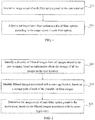
- FIG. 1 a flow chart of a method for sorting filter options according to an exemplary embodiment is illustrated. As shown in Fig. 1 , the method may be applied to a user terminal and include the following steps.
- step S11 it may be determined how many times each filter option preset in the user terminal is used by a user. In other words, a usage count of each filter option may be determined.
- step S12 a sorting of each filter option in a list of filter options may be adjusted, according to the usage count of each filter option.
- the method for sorting filter options provided in the embodiment of the present disclosure may be applied to a user terminal such as a cell phone, a tablet computer, etc.
- the user terminal may have an operation system integrated with a camera, or the user terminal may have an application with a shooting function installed thereon.
- the camera or the application may be preconfigured with a variety of filter options, such as Monochrome, Hue, Black & White, Fade, Bright Yellow, Print, Years, Nostalgic, etc.
- the list of filter options is a list including a number of filter options to be presented for the user to select.
- the sorting of each filter option preset in the user terminal in the list of filter options may be adjusted according to the usage count of each filter option. Specifically, a filter option with a larger usage count may be placed at the top of the list of filter options, and a filter option with a smaller usage count may be placed at the bottom of the list of filter options.
- the user can quickly select a desired filter option, as filter options with larger usage counts are placed at the top of the list. Compared to a list of filter options in a fixed order, the adjusted list of filter options may be more user-friendly and thus the user experience may be improved.
- step S11 may have at least the following two implementations.
- a first way to determine the usage count of each filter option the usage count of each filter option preset in the user terminal may be determined based on a plurality of filtered images stored in the user terminal.
- a second way to determine the usage count of each filter option the usage count of each filter option preset in the user terminal may be determined based on a stored usage record of the user using each filter option preset in the user terminal.
- the usage count of each filter option preset in the user terminal may be determined based on a plurality of filtered images stored in the user terminal or a stored usage record of the user using each filter option preset in the user terminal.
- the first way to determine the usage count of each filter option may be applied in the case that the user terminal has filtered images stored therein.
- the images may be pictures, such as dynamic pictures, static pictures or the like.
- Each filtered image may correspond to a certain filter option, so the filtered images stored in the user terminal may reflect the user's preference for the filter options.
- the filter options corresponding to the filtered images in the user terminal are the filter options that the user has used. The more times a certain filter option has been used, the more the user likes a filter mode selected via the filter option.
- the filter options corresponding to these images may be determined, and then the usage counts of these filter options may be determined. Based on the usage counts of the filter options, an order of the user's preferences for the filter options may be obtained. Then, the sorting of the filter options in the list may be adjusted according to the user's preferences. If some filter options have not been used, then it may represent that the user does not like these filter options, and these filter options may be arranged after the used filter options by default.
- the sorting of filter options may be performed depending on the preference of each user, thereby a suitable list of filter options may be presented to different users.
- the filter option may be quickly found by the user from the list of reordered filter options without the need of multiple times of scrolling or other operations. Therefore, it may be more convenient to use the filter options.
- the procedure of sorting the filter options as provided in the present disclosure may be performed in the background of the user terminal in real time as needed. Each time a new filtered image is detected to be stored in the user terminal, the usage counts of the filter options may be recalculated. If the order of the usage counts of the filter options has changed, then the sorting of the filter options in the list may be re-adjusted, so as to adjust the sorting of the filter options in real time according to the user's preference and thus provide the user with the most convenient use experience.
- the second way to determine the usage count of each filter option may be applied in the case that the user uses a camera to take an image.
- the camera may be a camera that comes with an operating system running on the user terminal, or a third party application that has a shooting function installed on the user terminal.
- the operating system or the third party application having the shooting function may record the usage of each filter option by the user.
- the filter option selected by the user when taking an image may be Black & White
- the filter option selected by the user when taking another image may be Nostalgic, and the like.
- the usage count of each filter option can be calculated. For example, the user has taken totally three pictures, in which two pictures are taken by selecting the filter option Black & White and the remaining one picture is taken by selecting the filter option Nostalgic. As a result, it may be determined that the usage count of the filter option Black & White is 2 and the usage count of the filter option Nostalgic is 1.
- Fig. 2 may be referred to illustrate an implementation that allows each application to correspond to a distinct sorting of filter options.
- Fig. 2 is a flow chart illustrating a process for determining a usage count of a filter option according to an exemplary embodiment. As shown in Fig. 2 , the process for determining the usage count of the filter option may include the following steps.
- a plurality of filtered images may be identified from all images stored in the user terminal, based on information about the storage of all the images in the user terminal.
- step S22 the filtered images associated with a same application may be identified based on the storage path of each of the plurality of filter images.
- step S23 the usage count of each filter option preset in the application may be determined based on the filtered images associated with the same application.
- it is required to firstly screen out the filtered images from all the images stored in the user terminal. It is possible to perform the screening based on the information about the storage of all the images stored in the user terminal.
- a possible way is to perform the screening according to a file name of an image.
- an ordinary image and a filtered image may be stored in the user terminal with different file names.
- the file name of the filtered image may include a special file name suffix, so that the filtered image can be identified from all the images stored in the user terminal.
- the file name of the filtered image may be the name of an original image followed by "_ps" or the name of the original image followed by "_Camera”.
- original images and corresponding filtered images may be identified from all the images stored in the user terminal.
- step S22 and step S23 can be performed.
- the lists of filter options configured in the individual applications may be different from each other, and even the filter options having a same name may present different filter effects in different applications. Accordingly, with respect to different applications, the orders of the user's preferences for the filter options may be different, and thus the resulting sortings of the filter options may be different, too.
- two applications A and B having the filter function are installed.
- the user may use the filter option Black & White more than the filter option Japanese; in the application B, both the filter option Black & White and the filter option Japanese are also provided for selection, but possibly because the filter effects of the two applications are different, the user may use the filter option Japanese more than the filter option Black & White when using the application B.
- a possibly reasonable sorting of the filter options may be that the filter option Black & White is placed before the filter option Japanese in the list of filter options of the application A, while the filter option Japanese is placed before the filter option Black & White in the list of filter options of the application B.
- the files obtained from a same application may usually be stored in a same file folder.
- the filtered images associated with the same application e.g. Camera
- the usage count of each filter option can be determined by comparing filter parameters of these images to filter parameters of each filter option preset in the application.
- the order of each filter option in the list of filter options can be adjusted based on the usage count of each filter option.
- the finally obtained sorting of the filter options may be associated with the application, and thus the finally obtained sorting of the filter options may be bound to the application.
- Fig. 3 may be referred to illustrate another flow chart illustrating a process for determining a usage count of a filter option according to an exemplary embodiment.
- the process for determining the usage count of the filter option may include the following steps.
- step S31 filtered images associated with a same user account of a same application may be identified based on a plurality of filtered images stored in the user terminal.
- step S32 the usage count of each filter option preset in the application may be determined based on the filtered images associated with the same user account of the same application.
- the user terminal may be used by different users. Accordingly, in the user terminal, the same application may include a number of user accounts. The preferences of different users for the filter options in the same application may be different. Thus, in the same application, different sortings of filter options should be provided for different users.
- a user A and a user B may use an application D having a filter function in a user terminal C, wherein the user A may log into the application D using a user account a and the user B may log into the application D using a user account b.
- the usage count of the filter option Black & White is larger than the usage count of the filter option Japanese; while when the user B is using the application D, the usage count of the filter option Japanese is larger than the usage count of the filter option Black & White.
- a possibly reasonable sorting of the filter options may be that the filter option Black & White is placed before the filter option Japanese in the list of filter options if the user A logs into the application D using the user account a; while the filter option Japanese is placed before the filter option Black & White in the list of filter options if the user B logs into the application D using the user account b.
- the above process for determining the usage count of the filter option may be performed. Firstly, the filtered images associated with the same user account of the same application may be identified from the plurality of filtered images stored in the user terminal. Then the usage count of each filter option can be determined by comparing filter parameters of these images to filter parameters of each filter option preset in the application. The order of each filter option in the list of filter options can be adjusted based on the usage count of each filter option. The finally obtained sorting of the filter options may be associated with a certain user account of the application, and thus the finally obtained sorting of the filter options may be bound to the user account.
- Fig. 4 may be referred to illustrate another flow chart illustrating a process for determining a usage count of a filter option according to an exemplary embodiment. As shown in Fig. 4 , the process for determining the usage count of the filter option may include the following steps.
- a filter option corresponding to each of a plurality of filtered images may be determined by comparing the plurality of filter images with filter parameters of the filter option.
- step S42 the usage count of each filter option may be calculated based on the filter option corresponding to each filtered image.
- Each filter option may have distinct filter parameters, and a resulting image processed using a certain filter option may have filter parameters the same as those of the filter option.
- the filter option corresponding to each filtered image may be determined by comparing the filter images with the filter parameters of each filter option.
- a possible way is to determine the filter option corresponding to each filtered image based on a color cast parameter of the filter mode.
- the filter option may usually be represented by color changes, such as Black & White, Old, Japanese or other filter modes.
- Each filter mode may have a different color cast parameter.
- the color cast parameter may include a color cast mode and a color cast factor.
- the color cast mode indicates a primary color of the filter option
- the color cast factor indicates the degree of color cast. The greater the degree of color cast is, the larger the color cast factor is.
- the color cast factor may be determined using the following method.
- An image may be converted from a RGB space to a LAB space, and then the distribution of an AB component of the image may be analyzed.
- the two-dimensional distribution of the AB component of a filtered image is concentrated and unimodal; while the two-dimensional distribution of the AB component of an original image, which is not filtered, is scattered and multimodal.
- the filtered images may also have a corresponding color cast characteristic, so the filter option corresponding to each filtered image may be determined by comparing the color cast parameters of the filter images with the color cast parameter of each filter option.
- the usage count of each filter option may be calculated based on the filter option corresponding to each filtered image. Then the sorting of the filter options may be performed based on the usage count of each filter option.
- the process for de determining the usage count of each filter option preset in the user terminal may include determining the usage count of each filter option preset in the user terminal within a predefined time period.
- a time period may be defined in advance.
- the predefined time period may be defined by the user, or built in the user terminal. As an example, the time period may be the last three months, the last fifteen days, etc.
- determining the usage count of the filter option for each filter option, not only whether the user has used the filter option is determined, but also the time when the user uses the filter option is identified. Then the time when the user uses the filter option may be compared to the predefined time period. If the time when the user uses the filter option falls into the predefined time period, the usage count of the filter option will increase by 1; otherwise, the usage count of the filter option will not change.
- the predefined time period is the last 15 days.
- the user has used the filter option Black & White at a time 12 days before today which is within the last 15 days, so the usage count of the filter option Black & White will increase by 1.
- the user has used the filter option Nostalgic at a time 17 days before today which is outside of the last 15 days, so the usage count of the filter option Nostalgic will not be affected and still keep unchanged.
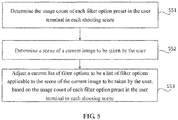
- Fig. 5 may be referred to illustrate another flow chart illustrating a method for sorting filter options according to an exemplary embodiment. As shown in Fig. 5 , the method may include the following steps.
- step S51 a usage count of each filter option preset in the user terminal in each shooting scene may be determined.
- step S52 a scene of a current image to be taken by the user may be determined.
- a current list of filter options may be adjusted to be a list of filter options applicable to the scene of the current image to be taken by the user, based on the usage count of each filter option preset in the user terminal in each shooting scene.
- the shooting scenes may be defined in advance.
- the shooting scenes may be determined depending on a photographed subject and whether a front camera is turned on. As an example, if the subject is a person and the front camera is turned on, then the shooting scene is Selfie; as another example, if the subject is a person other than the user and the rear camera is turned on, then the shooting scene is Portrait; as a further example, if the subject is an article and the rear camera is turned on, then the shooting scene is Article; if the subject is a lanscape and the rear camera is turned on, then the shooting scene is Lanscape; and so on.
- the shooting scene may be defined by the user, or built in the user terminal.
- the user may prefer to use different filter options.
- the usage count of each filter option in each shooting scene may be considered.
- the usage count of each filter option may be subdivided in accordance with the shooting scene, so as to get the usage count of each filter option for each shooting scene.
- the shooting scene of the current image to be taken by the user may be determined by comparing the shooting scene of the current image to be taken by the user to each shooting scene, and then the current list of filter options may be adjusted to be the list of filter options applicable to the scene of the current image to be taken by the user.
- the shooting scene of the current image to be taken by the user may be identified based on whether the current image to be taken by the user is taken when the front camera is turned on or when the rear camera is turned on, or based on whether the current image to be taken by the user includes an article, a landscape, a portrait or the like.
- the current list of filter options may be adjusted to be the list of filter options applicable to the shooting scene Selfie.
- FIG. 6 is a block diagram of an apparatus for sorting filter options according to an exemplary embodiment.
- the apparatus 100 includes a usage count determination module 121 and an adjustment module 122.
- the usage count determination module 121 may be configured to determine a usage count of each filter option preset in a user terminal.
- the adjustment module 122 may be configured to adjust a sorting of each filter option in a list of filter options according to the usage count of each filter option.
- Fig. 7 is another block diagram of an apparatus for sorting filter options according to an exemplary embodiment.
- the usage count determination module 121 of the apparatus 100 may include a usage count determination submodule 1211 configured to determine the usage count of each filter option preset in the user terminal based on a plurality of filtered images stored in the user terminal.
- FIG. 8 is a block diagram of a usage count determination submodule in an apparatus for sorting filter options according to an exemplary embodiment.
- the usage count determination submodule 1211 may include the following submodules.
- a first determination submodule 12111 may be configured to identify a plurality of filtered images from all images stored in the user terminal, based on information about the storage of all the images in the user terminal.
- a second determination submodule 12112 may be configured to identify the filtered images associated with a same application, based on the storage path of each of the plurality of filter images.
- a third determination submodule 12113 may be configured to determine the usage count of each filter option preset in the application, based on the filtered images associated with the same application.
- FIG. 9 is another block diagram of a usage count determination submodule in an apparatus for sorting filter options according to an exemplary embodiment.
- the usage count determination submodule 1211 may include the following submodules.
- a fourth determination submodule 12114 may be configured to identify filtered images associated with a same user account of a same application, based on a plurality of filtered images stored in the user terminal.
- a fifth determination submodule 12115 may be configured to determine the usage count of each filter option preset in the application, based on the filtered images associated with the same user account of the same application.
- FIG. 10 is another block diagram of a usage count determination submodule in an apparatus for sorting filter options according to an exemplary embodiment.
- the usage count determination submodule 1211 may include the following submodules.
- a sixth determination submodule 12116 may be configured to determine a filter option corresponding to each of a plurality of filtered images by comparing the plurality of filter images with filter parameters of each filter option.
- a calculation submodule 12117 may be configured to calculate the usage count of each filter option based on the filter option corresponding to each filtered image.
- the usage count determination module may include a seventh determination submodule configured to determine the usage count of each filter option preset in the user terminal based on a stored usage record of the user using each filter option preset in the user terminal.
- the usage count determination module may include an eighth determination submodule configured to determine the usage count of each filter option preset in the user terminal within a predefined time period.
- the usage count determination module may include a ninth determination submodule configured to determine the usage count of each filter option preset in the user terminal in each shooting scene.
- the adjustment module 122 may include a scene determination submodule 1221 configured to determine a scene of an image to be taken by the user; and an adjustment submodule 1222 configured to adjust a current list of filter options to be a list of filter options applicable to the scene of the current image to be taken by the user, based on the usage count of each filter option preset in the user terminal in each shooting scene.
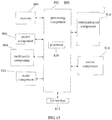
- Fig. 12 is a block diagram illustrating an apparatus 800 for sorting filter options according to an exemplary embodiment.
- the apparatus 800 may be a mobile phone, a computer, a digital broadcasting terminal, a message transceiver, a game console, a tablet device, medical equipment, fitness equipment, a personal digital assistant or the like.
- the apparatus 800 may include one or more of the following components: a processing component 802, a memory 804, a power component 806, a multimedia component 808, an audio component 810, an input/output (I/O) interface 812, a sensor component 814, and a communication component 816.
- a processing component 802 a memory 804, a power component 806, a multimedia component 808, an audio component 810, an input/output (I/O) interface 812, a sensor component 814, and a communication component 816.
- the processing component 802 typically controls overall operations of the apparatus 800, such as the operations associated with display, telephone calls, data communications, camera operations, and recording operations.
- the processing component 802 may include one or more processors 820 to execute instructions to perform all or part of the steps in the above described methods.
- the processing component 802 may include one or more modules which facilitate the interaction between the processing component 802 and other components.
- the processing component 802 may include a multimedia module to facilitate the interaction between the multimedia component 808 and the processing component 802.
- the memory 804 is configured to store various types of data to support operations of the apparatus 800. Examples of such data may include instructions for any applications or methods operated on the apparatus 800, contact data, phonebook data, messages, pictures, videos, etc.
- the memory 804 may be implemented using any type of volatile or non-volatile storages, or a combination thereof, such as a Static Random Access Memory (SRAM), an Electrically Erasable Programmable Read-Only Memory (EEPROM), an Erasable Programmable Read-Only Memory (EPROM), a Programmable Read-Only Memory (PROM), a Read-Only Memory (ROM), a magnetic memory, a flash memory, a magnetic or optical disk.
- SRAM Static Random Access Memory
- EEPROM Electrically Erasable Programmable Read-Only Memory
- EPROM Erasable Programmable Read-Only Memory
- PROM Programmable Read-Only Memory
- ROM Read-Only Memory
- the power component 806 provides power to various components of the apparatus 800.
- the power component 806 may include a power management system, one or more power sources, and any other components associated with the generation, management, and distribution of power in the apparatus 800.
- the multimedia component 808 includes a screen providing an output interface between the apparatus 800 and the user.
- the screen may include a liquid crystal display (LCD) and a touch panel (TP). If the screen includes the touch panel, the screen may be implemented as a touch screen to receive input signals from the user.
- the touch panel includes one or more touch sensors to sense touches, swipes, and gestures on the touch panel. The touch sensors may not only sense a boundary of a touch or swipe action, but also detect a period of time and a pressure associated with the touch or swipe action.
- the multimedia component 808 includes a front camera and/or a rear camera.
- the front camera and/or the rear camera may receive an external multimedia datum while the apparatus 800 is in an operation mode, such as a photographing mode or a video mode.
- an operation mode such as a photographing mode or a video mode.
- Each of the front camera and the rear camera may be a fixed optical lens system or have focus and optical zoom capability.
- the audio component 810 is configured to output and/or input audio signals.
- the audio component 810 includes a microphone ("MIC") configured to receive an external audio signal when the apparatus 800 is in an operation mode, such as a call mode, a recording mode, and a voice recognition mode.
- the received audio signal may be further stored in the memory 804 or transmitted via the communication component 816.
- the audio component 810 further includes a speaker to output audio signals.
- the I/O interface 812 provides an interface between the processing component 802 and peripheral interface modules, such as a keyboard, a click wheel, buttons, and the like.
- the buttons may include, but are not limited to, a home button, a volume button, a starting button, and a locking button.
- the sensor component 814 includes one or more sensors to provide status assessments of various aspects of the apparatus 800. For instance, the sensor component 814 may detect an open/closed status of the apparatus 800, relative positioning of components, e.g., the display and the keypad, of the apparatus 800, a change in position of the apparatus 800 or a component of the apparatus 800, a presence or absence of user contact with the apparatus 800, an orientation or an acceleration/deceleration of the apparatus 800, and a change in temperature of the apparatus 800.
- the sensor component 814 may include a proximity sensor configured to detect the presence of nearby objects without any physical contact.
- the sensor component 814 may also include a light sensor, such as a Complementary Metal Oxide Semiconductor (CMOS) or Charge-coupled Device (CCD) image sensor, for use in imaging applications.
- CMOS Complementary Metal Oxide Semiconductor
- CCD Charge-coupled Device
- the sensor component 814 may also include an accelerometer sensor, a gyroscope sensor, a magnetic sensor, a distance sensor, a pressure sensor, or a temperature sensor.
- the communication component 816 is configured to facilitate communication, wired or wirelessly, between the apparatus 800 and other devices.
- the apparatus 800 can access a wireless network based on a communication standard, such as WiFi, 2G, or 3G, or a combination thereof.
- the communication component 816 receives a broadcast signal or broadcast associated information from an external broadcast management system via a broadcast channel.
- the communication component 816 further includes a Near Field Communication (NFC) module to facilitate short-range communications.
- the NFC module may be implemented based on a Radio Frequency Identification (RFID) technology, an Infrared Data Association (IrDA) technology, an Ultra-Wideband (UWB) technology, a Bluetooth (BT) technology, and other technologies.
- RFID Radio Frequency Identification
- IrDA Infrared Data Association
- UWB Ultra-Wideband
- BT Bluetooth
- the apparatus 800 may be implemented with Application Specific Integrated Circuits (ASICs), Digital Signal Processors (DSPs), Digital Signal Processing Devices (DSPDs), Programmable Logic Devices (PLDs), Field Programmable Gate Arrays (FPGAs), controllers, micro-controllers, microprocessors, or other electronic elements, for performing the above described methods.
- ASICs Application Specific Integrated Circuits
- DSPs Digital Signal Processors
- DSPDs Digital Signal Processing Devices
- PLDs Programmable Logic Devices
- FPGAs Field Programmable Gate Arrays
- controllers micro-controllers, microprocessors, or other electronic elements, for performing the above described methods.
- non-transitory computer-readable storage medium including instructions, such as the memory 804 including instructions or computer programs executable by the processor 820 in the apparatus 800 to perform the above-described methods.
- the non-transitory computer-readable storage medium may be a Ramdom Only Memory (ROM), a Ramdom Access Memory (RAM), a Compact Disc Read-Only Memory (CD-ROM), a magnetic tape, a floppy disc, an optical data storage device, and the like.
Landscapes
- Engineering & Computer Science (AREA)
- Theoretical Computer Science (AREA)
- Multimedia (AREA)
- Signal Processing (AREA)
- General Engineering & Computer Science (AREA)
- Human Computer Interaction (AREA)
- Physics & Mathematics (AREA)
- General Physics & Mathematics (AREA)
- Computer Vision & Pattern Recognition (AREA)
- User Interface Of Digital Computer (AREA)
- Telephone Function (AREA)
Abstract
Description
- The present disclosure relates to the field of information processing, and more particularly, to a method and an apparatus for sorting filter options.
- In daily life, more and more people like to take pictures or videos using a filter mode, or use the filter mode to beautify the pictures or videos they have taken. At present, filter options in a user terminal such as a cell phone, a tablet computer, etc. are generally arranged in an order of factory settings. For example, when the filter mode of a camera is used for shooting, the filter options in the camera are arranged in a fixed order, and the order of the filter options to be viewed by anybody is the same. In this case, when a user's favorite filter option is located at a relatively low position in the list of filter options, the user may need to scroll the list multiple times to find a favorite filter mode each time the user wants to use the favorite filter mode. The operation process is not convenient enough.
- In view of the fact in related arts, the present disclosure provides a method and an apparatus for sorting filter options
- According to a first aspect of embodiments in the present disclosure, a method for sorting filter options is provided and applied in a user terminal. The method includes determining a usage count of each filter option preset in the user terminal; and adjusting a sorting of each filter option in a list of filter options according to the usage count of each filter option.
- Alternatively, the determining the usage count of each filter option preset in the user terminal comprises determining the usage count of each filter option preset in the user terminal based on a plurality of filtered images stored in the user terminal.
- Alternatively, the determining the usage count of each filter option preset in the user terminal based on the plurality of filtered images stored in the user terminal comprises: identifying a plurality of filtered images from all images stored in the user terminal, based on information about the storage of all the images in the user terminal; identifying filtered images associated with a same application, based on a storage path of each of the plurality of filter images; and determining the usage count of each filter option preset in the application, based on the filtered images associated with the same application.
- Alternatively, the determining the usage count of each filter option preset in the user terminal based on the plurality of filtered images stored in the user terminal comprises: identifying filtered images associated with a same user account of a same application, based on a plurality of filtered images stored in the user terminal; and determining the usage count of each filter option preset in the application, based on the filtered images associated with the same user account of the same application.
- Alternatively, the determining the usage count of each filter option preset in the user terminal based on the plurality of filtered images stored in the user terminal comprises: determining a filter option corresponding to each of the plurality of filtered images by comparing the plurality of filter images with filter parameters of each filter option; and calculating the usage count of each filter option based on the filter option corresponding to each filtered image.
- Alternatively, the determining the usage count of each filter option preset in the user terminal comprises determining the usage count of each filter option preset in the user terminal based on a stored usage record of the user using each filter option preset in the user terminal.
- Alternatively, the determining the usage count of each filter option preset in the user terminal comprises determining the usage count of each filter option preset in the user terminal within a predefined time period.
- Alternatively, the determining the usage count of each filter option preset in the user terminal comprises determining the usage count of each filter option preset in the user terminal in each shooting scene.
- Alternatively, the adjusting the sorting of each filter option in the list of filter options according to the usage count of each filter option comprises determining a scene of a current image to be taken by the user; and adjusting a current list of filter options to be a list of filter options applicable to the scene of the current image to be taken by the user, based on the usage count of each filter option preset in the user terminal in each shooting scene.
- According to a second aspect of embodiments in the present disclosure, an apparatus for sorting filter options is provided and applied in a user terminal. The apparatus includes a usage count determination module configured to determine a usage count of each filter option preset in the user terminal; and an adjustment module configured to adjust a sorting of each filter option in a list of filter options according to the usage count of each filter option.
- Alternatively, the usage count determination module comprises a usage count determination submodule configured to determine the usage count of each filter option preset in the user terminal based on a plurality of filtered images stored in the user terminal.
- Alternatively, the usage count determination submodule comprises: a first determination submodule configured to identify a plurality of filtered images from all images stored in the user terminal, based on information about the storage of all the images in the user terminal; a second determination submodule configured to identify filtered images associated with a same application, based on a storage path of each of the plurality of filter images; and a third determination submodule configured to determine the usage count of each filter option preset in the application, based on the filtered images associated with the same application.
- Alternatively, the usage count determination submodule comprises: a fourth determination submodule configured to identify filtered images associated with a same user account of a same application, based on the plurality of filtered images stored in the user terminal; and a fifth determination submodule configured to determine the usage count of each filter option preset in the application, based on the filtered images associated with the same user account of the same application.
- Alternatively, the usage count determination submodule comprises: a sixth determination submodule configured to determine a filter option corresponding to each of the plurality of filtered images by comparing the plurality of filter images with filter parameters of each filter option; and a calculation submodule configured to calculate the usage count of each filter option based on the filter option corresponding to each filtered image.
- Alternatively, the usage count determination module comprises a seventh determination submodule configured to determine the usage count of each filter option preset in the user terminal based on a stored usage record of the user using each filter option preset in the user terminal.
- Alternatively, the usage count determination module comprises an eighth determination submodule configured to determine the usage count of each filter option preset in the user terminal within a predefined time period.
- Alternatively, the usage count determination module comprises a ninth determination submodule configured to determine the usage count of each filter option preset in the user terminal in each shooting scene.
- Alternatively, the adjustment module comprises a scene determination submodule configured to determine a scene of a current image to be taken by the user; and an adjustment submodule configured to adjust a current list of filter options to be a list of filter options applicable to the scene of the current image to be taken by the user, based on the usage count of each filter option preset in the user terminal in each shooting scene.
- According to a third aspect of embodiments in the present disclosure, an apparatus for sorting filter options is provided. The apparatus includes a processor; and a memory for storing instructions executable by the processor, wherein the processor is configured to determine a usage count of each filter option preset in the user terminal; and adjust a sorting of each filter option in a list of filter options according to the usage count of each filter option.
- According to a fourth aspect of embodiments in the present disclosure, a non-transitory computer readable storage medium is provided. When instructions in the storage medium are executed by a processor of a user terminal, the user terminal may be able to perform a method for sorting filter options. The method includes determining a usage count of each filter option preset in the user terminal according to a plurality of filtered images stored in the user terminal; and adjusting a sorting of each filter option in a list of filter options according to the usage count of each filter option
- The method for sorting filter options provided in the disclosure can sort the filter options according to the usage of the filter options by each user, so as to provide a suitable list of filter options for different users. Whenever a user wants to use a favorite filter option, the user can quickly find the filter option in a reordered list of filter options without the need of multiple scrolling operations. Thus it may be more convenient to use the filter options.
- It is to be understood that both the forgoing general descriptions and the following detailed descriptions are exemplary and explanatory only, and are not restrictive of the present disclosure.
- The accompanying drawings, which are incorporated in and constitute a part of this specification, illustrate embodiments consistent with the disclosure and, together with the description, serve to explain the principles of the disclosure.
-
Fig. 1 is a flow chart illustrating a method for sorting filter options according to an exemplary embodiment. -
Fig. 2 is a flow chart illustrating a process for determining a usage count of a filter option, according to an exemplary embodiment. -
Fig. 3 is another flow chart illustrating a process for determining a usage count of a filter option, according to an exemplary embodiment. -
Fig. 4 is another flow chart illustrating a process for determining a usage count of a filter option, according to an exemplary embodiment. -
Fig. 5 is another flow chart illustrating a method for sorting filter options according to an exemplary embodiment. -
Fig. 6 is a block diagram illustrating an apparatus for sorting filter options according to an exemplary embodiment. -
Fig. 7 is another block diagram illustrating an apparatus for sorting filter options according to an exemplary embodiment. -
Fig. 8 is a block diagram illustrating a usage count determination submodule in the apparatus for sorting filter options, according to an exemplary embodiment. -
Fig. 9 is another block diagram illustrating a usage count determination submodule in the apparatus for sorting filter options, according to an exemplary embodiment. -
Fig. 10 is another block diagram illustrating a usage count determination submodule in the apparatus for sorting filter options, according to an exemplary embodiment. -
Fig. 11 is a block diagram illustrating an adjustment module in the apparatus for sorting filter options, according to an exemplary embodiment. -
Fig. 12 is a block diagram illustrating an apparatus for sorting filter options according to an exemplary embodiment. - Reference will now be made in detail to exemplary embodiments, examples of which are illustrated in the accompanying drawings. The following description refers to the accompanying drawings in which same numbers in different drawings represent same or similar elements unless otherwise described. The implementations set forth in the following description of exemplary embodiments do not represent all implementations consistent with the disclosure. Instead, they are merely examples of devices and methods consistent with aspects related to the disclosure as recited in the appended claims.
- Referring to
Fig. 1 , a flow chart of a method for sorting filter options according to an exemplary embodiment is illustrated. As shown inFig. 1 , the method may be applied to a user terminal and include the following steps. - In step S11, it may be determined how many times each filter option preset in the user terminal is used by a user. In other words, a usage count of each filter option may be determined.
- In step S12, a sorting of each filter option in a list of filter options may be adjusted, according to the usage count of each filter option.
- The method for sorting filter options provided in the embodiment of the present disclosure may be applied to a user terminal such as a cell phone, a tablet computer, etc. The user terminal may have an operation system integrated with a camera, or the user terminal may have an application with a shooting function installed thereon. The camera or the application may be preconfigured with a variety of filter options, such as Monochrome, Hue, Black & White, Fade, Bright Yellow, Print, Years, Nostalgic, etc. The list of filter options is a list including a number of filter options to be presented for the user to select.
- In the present embodiment, the sorting of each filter option preset in the user terminal in the list of filter options may be adjusted according to the usage count of each filter option. Specifically, a filter option with a larger usage count may be placed at the top of the list of filter options, and a filter option with a smaller usage count may be placed at the bottom of the list of filter options. The user can quickly select a desired filter option, as filter options with larger usage counts are placed at the top of the list. Compared to a list of filter options in a fixed order, the adjusted list of filter options may be more user-friendly and thus the user experience may be improved.
- Alternatively, step S11 may have at least the following two implementations.
- A first way to determine the usage count of each filter option: the usage count of each filter option preset in the user terminal may be determined based on a plurality of filtered images stored in the user terminal.
- A second way to determine the usage count of each filter option: the usage count of each filter option preset in the user terminal may be determined based on a stored usage record of the user using each filter option preset in the user terminal.
- In the present embodiment, the usage count of each filter option preset in the user terminal may be determined based on a plurality of filtered images stored in the user terminal or a stored usage record of the user using each filter option preset in the user terminal.
- Specifically, the first way to determine the usage count of each filter option may be applied in the case that the user terminal has filtered images stored therein. Here, the images may be pictures, such as dynamic pictures, static pictures or the like. Each filtered image may correspond to a certain filter option, so the filtered images stored in the user terminal may reflect the user's preference for the filter options. The filter options corresponding to the filtered images in the user terminal are the filter options that the user has used. The more times a certain filter option has been used, the more the user likes a filter mode selected via the filter option.
- Thus, according to the plurality of filtered images stored in the user terminal, the filter options corresponding to these images may be determined, and then the usage counts of these filter options may be determined. Based on the usage counts of the filter options, an order of the user's preferences for the filter options may be obtained. Then, the sorting of the filter options in the list may be adjusted according to the user's preferences. If some filter options have not been used, then it may represent that the user does not like these filter options, and these filter options may be arranged after the used filter options by default.
- With the method for sorting the filter options as provided in the present disclosure, the sorting of filter options may be performed depending on the preference of each user, thereby a suitable list of filter options may be presented to different users. Whenever the user wants to use a favorite filter option, the filter option may be quickly found by the user from the list of reordered filter options without the need of multiple times of scrolling or other operations. Therefore, it may be more convenient to use the filter options.
- The procedure of sorting the filter options as provided in the present disclosure may be performed in the background of the user terminal in real time as needed. Each time a new filtered image is detected to be stored in the user terminal, the usage counts of the filter options may be recalculated. If the order of the usage counts of the filter options has changed, then the sorting of the filter options in the list may be re-adjusted, so as to adjust the sorting of the filter options in real time according to the user's preference and thus provide the user with the most convenient use experience.
- The second way to determine the usage count of each filter option may be applied in the case that the user uses a camera to take an image. Here, the camera may be a camera that comes with an operating system running on the user terminal, or a third party application that has a shooting function installed on the user terminal. When the user takes an image using the camera coming with the operating system or the third party application having the shooting function, the operating system or the third party application having the shooting function may record the usage of each filter option by the user. For example, the filter option selected by the user when taking an image may be Black & White, the filter option selected by the user when taking another image may be Nostalgic, and the like.
- Based on the recorded usage of each filter option by the user, the usage count of each filter option can be calculated. For example, the user has taken totally three pictures, in which two pictures are taken by selecting the filter option Black & White and the remaining one picture is taken by selecting the filter option Nostalgic. As a result, it may be determined that the usage count of the filter option Black & White is 2 and the usage count of the filter option Nostalgic is 1.
- Alternatively,
Fig. 2 may be referred to illustrate an implementation that allows each application to correspond to a distinct sorting of filter options.Fig. 2 is a flow chart illustrating a process for determining a usage count of a filter option according to an exemplary embodiment. As shown inFig. 2 , the process for determining the usage count of the filter option may include the following steps. - In step S21, a plurality of filtered images may be identified from all images stored in the user terminal, based on information about the storage of all the images in the user terminal.
- In step S22, the filtered images associated with a same application may be identified based on the storage path of each of the plurality of filter images.
- In step S23, the usage count of each filter option preset in the application may be determined based on the filtered images associated with the same application. In order to perform the method for sorting filter options of the present disclosure, it is required to firstly screen out the filtered images from all the images stored in the user terminal. It is possible to perform the screening based on the information about the storage of all the images stored in the user terminal.
- A possible way is to perform the screening according to a file name of an image. Generally, an ordinary image and a filtered image may be stored in the user terminal with different file names. For example, the file name of the filtered image may include a special file name suffix, so that the filtered image can be identified from all the images stored in the user terminal.
- As an example, the file name of the filtered image may be the name of an original image followed by "_ps" or the name of the original image followed by "_Camera". By screening the file names of the images, original images and corresponding filtered images may be identified from all the images stored in the user terminal.
- After identifying the filtered images, step S22 and step S23 can be performed.
- When a number of applications with a filter function are installed in the user terminal, the lists of filter options configured in the individual applications may be different from each other, and even the filter options having a same name may present different filter effects in different applications. Accordingly, with respect to different applications, the orders of the user's preferences for the filter options may be different, and thus the resulting sortings of the filter options may be different, too.
- For example, two applications A and B having the filter function are installed. In the application A, the user may use the filter option Black & White more than the filter option Japanese; in the application B, both the filter option Black & White and the filter option Japanese are also provided for selection, but possibly because the filter effects of the two applications are different, the user may use the filter option Japanese more than the filter option Black & White when using the application B. In this case, a possibly reasonable sorting of the filter options may be that the filter option Black & White is placed before the filter option Japanese in the list of filter options of the application A, while the filter option Japanese is placed before the filter option Black & White in the list of filter options of the application B.
- In the user terminal, the files obtained from a same application may usually be stored in a same file folder. Thus, based on storage paths of filtered images, the filtered images associated with the same application (e.g. Camera) can be identified. Then the usage count of each filter option can be determined by comparing filter parameters of these images to filter parameters of each filter option preset in the application. The order of each filter option in the list of filter options can be adjusted based on the usage count of each filter option. The finally obtained sorting of the filter options may be associated with the application, and thus the finally obtained sorting of the filter options may be bound to the application.
- With the above method, it can be achieved that different applications correspond to different sortings of filter options to meet different preferences of the user for filter options in different applications. Thus, the convenience for the user to use the filter mode can be enhanced to a greater extent.
- Alternatively,
Fig. 3 may be referred to illustrate another flow chart illustrating a process for determining a usage count of a filter option according to an exemplary embodiment. As shown inFig. 3 , the process for determining the usage count of the filter option may include the following steps. - In step S31, filtered images associated with a same user account of a same application may be identified based on a plurality of filtered images stored in the user terminal.
- In step S32, the usage count of each filter option preset in the application may be determined based on the filtered images associated with the same user account of the same application.
- The user terminal may be used by different users. Accordingly, in the user terminal, the same application may include a number of user accounts. The preferences of different users for the filter options in the same application may be different. Thus, in the same application, different sortings of filter options should be provided for different users.
- For example, suppose both a user A and a user B may use an application D having a filter function in a user terminal C, wherein the user A may log into the application D using a user account a and the user B may log into the application D using a user account b. When the user A is using the application D, the usage count of the filter option Black & White is larger than the usage count of the filter option Japanese; while when the user B is using the application D, the usage count of the filter option Japanese is larger than the usage count of the filter option Black & White. In this case, a possibly reasonable sorting of the filter options may be that the filter option Black & White is placed before the filter option Japanese in the list of filter options if the user A logs into the application D using the user account a; while the filter option Japanese is placed before the filter option Black & White in the list of filter options if the user B logs into the application D using the user account b.
- In order to allow different user accounts to correspond to different sortings of filter options in the same application, the above process for determining the usage count of the filter option may be performed. Firstly, the filtered images associated with the same user account of the same application may be identified from the plurality of filtered images stored in the user terminal. Then the usage count of each filter option can be determined by comparing filter parameters of these images to filter parameters of each filter option preset in the application. The order of each filter option in the list of filter options can be adjusted based on the usage count of each filter option. The finally obtained sorting of the filter options may be associated with a certain user account of the application, and thus the finally obtained sorting of the filter options may be bound to the user account.
- With the above method, it can be achieved that different user accounts in the same application correspond to different sortings of filter options. The sorting of the filter options always meets the preferences of the currently logged-in user for the filter options. Thus, the filter mode may become more user-friendly.
- Alternatively,
Fig. 4 may be referred to illustrate another flow chart illustrating a process for determining a usage count of a filter option according to an exemplary embodiment. As shown inFig. 4 , the process for determining the usage count of the filter option may include the following steps. - In step S41, a filter option corresponding to each of a plurality of filtered images may be determined by comparing the plurality of filter images with filter parameters of the filter option.
- In step S42, the usage count of each filter option may be calculated based on the filter option corresponding to each filtered image.
- Each filter option may have distinct filter parameters, and a resulting image processed using a certain filter option may have filter parameters the same as those of the filter option. Thus, the filter option corresponding to each filtered image may be determined by comparing the filter images with the filter parameters of each filter option.
- A possible way is to determine the filter option corresponding to each filtered image based on a color cast parameter of the filter mode. The filter option may usually be represented by color changes, such as Black & White, Old, Japanese or other filter modes. Each filter mode may have a different color cast parameter. The color cast parameter may include a color cast mode and a color cast factor. Here, the color cast mode indicates a primary color of the filter option, and the color cast factor indicates the degree of color cast. The greater the degree of color cast is, the larger the color cast factor is. The color cast factor may be determined using the following method.
- An image may be converted from a RGB space to a LAB space, and then the distribution of an AB component of the image may be analyzed. The two-dimensional distribution of the AB component of a filtered image is concentrated and unimodal; while the two-dimensional distribution of the AB component of an original image, which is not filtered, is scattered and multimodal.
- Based on the distribution of the AB component of the image, it is possible to obtain a ratio of an average chromaticity D and a chromaticity center distance M of the image, i.e. the color cast factor K. The larger the color cast factor K is, the more severe the degree of color cast is.
- The filtered images may also have a corresponding color cast characteristic, so the filter option corresponding to each filtered image may be determined by comparing the color cast parameters of the filter images with the color cast parameter of each filter option.
- The usage count of each filter option may be calculated based on the filter option corresponding to each filtered image. Then the sorting of the filter options may be performed based on the usage count of each filter option.
- Alternatively, the process for de determining the usage count of each filter option preset in the user terminal may include determining the usage count of each filter option preset in the user terminal within a predefined time period.
- In order to make the adjusted sorting of filter options more accurate, a time period may be defined in advance. When determining the usage count of each filter option, only the usage of each filter option by the user within the time period may be considered, but the usage of each filter option by the user outside of the time period may be not taken into account. Here, the predefined time period may be defined by the user, or built in the user terminal. As an example, the time period may be the last three months, the last fifteen days, etc.
- In the above embodiment of determining the usage count of the filter option, for each filter option, not only whether the user has used the filter option is determined, but also the time when the user uses the filter option is identified. Then the time when the user uses the filter option may be compared to the predefined time period. If the time when the user uses the filter option falls into the predefined time period, the usage count of the filter option will increase by 1; otherwise, the usage count of the filter option will not change.
- For example, the predefined time period is the last 15 days. The user has used the filter option Black & White at a
time 12 days before today which is within the last 15 days, so the usage count of the filter option Black & White will increase by 1. As another example, the user has used the filter option Nostalgic at a time 17 days before today which is outside of the last 15 days, so the usage count of the filter option Nostalgic will not be affected and still keep unchanged. - Alternatively,
Fig. 5 may be referred to illustrate another flow chart illustrating a method for sorting filter options according to an exemplary embodiment. As shown inFig. 5 , the method may include the following steps. - In step S51, a usage count of each filter option preset in the user terminal in each shooting scene may be determined.
- In step S52, a scene of a current image to be taken by the user may be determined.
- In step S53, a current list of filter options may be adjusted to be a list of filter options applicable to the scene of the current image to be taken by the user, based on the usage count of each filter option preset in the user terminal in each shooting scene.
- In order to make the adjusted sorting of filter options more accurate, different shooting scenes may be defined in advance. The shooting scenes may be determined depending on a photographed subject and whether a front camera is turned on. As an example, if the subject is a person and the front camera is turned on, then the shooting scene is Selfie; as another example, if the subject is a person other than the user and the rear camera is turned on, then the shooting scene is Portrait; as a further example, if the subject is an article and the rear camera is turned on, then the shooting scene is Article; if the subject is a lanscape and the rear camera is turned on, then the shooting scene is Lanscape; and so on. Here, the shooting scene may be defined by the user, or built in the user terminal.
- In different shooting scenes, the user may prefer to use different filter options. In determining the usage count of each filter option, the usage count of each filter option in each shooting scene may be considered. The usage count of each filter option may be subdivided in accordance with the shooting scene, so as to get the usage count of each filter option for each shooting scene.
- After calculating the usage count of each filter option for different shooting scenes, the shooting scene of the current image to be taken by the user may be determined by comparing the shooting scene of the current image to be taken by the user to each shooting scene, and then the current list of filter options may be adjusted to be the list of filter options applicable to the scene of the current image to be taken by the user.
- Particularly, the shooting scene of the current image to be taken by the user may be identified based on whether the current image to be taken by the user is taken when the front camera is turned on or when the rear camera is turned on, or based on whether the current image to be taken by the user includes an article, a landscape, a portrait or the like. As an example, if the shooting scene of the current image to be taken by the user is identified to be Selfie, the current list of filter options may be adjusted to be the list of filter options applicable to the shooting scene Selfie.
- Based on the same inventive concept, an apparatus for sorting filter options is also provided in the present disclosure. Refer to
Fig. 6 , which is a block diagram of an apparatus for sorting filter options according to an exemplary embodiment. As shown inFIG. 6 , theapparatus 100 includes a usagecount determination module 121 and anadjustment module 122. - The usage
count determination module 121 may be configured to determine a usage count of each filter option preset in a user terminal. - The
adjustment module 122 may be configured to adjust a sorting of each filter option in a list of filter options according to the usage count of each filter option. - Alternatively, refer to
Fig. 7 , which is another block diagram of an apparatus for sorting filter options according to an exemplary embodiment. As shown inFIG. 7 , the usagecount determination module 121 of theapparatus 100 may include a usagecount determination submodule 1211 configured to determine the usage count of each filter option preset in the user terminal based on a plurality of filtered images stored in the user terminal. - Alternatively, refer to
Fig. 8 , which is a block diagram of a usage count determination submodule in an apparatus for sorting filter options according to an exemplary embodiment. As shown inFIG. 8 , the usagecount determination submodule 1211 may include the following submodules. - A
first determination submodule 12111 may be configured to identify a plurality of filtered images from all images stored in the user terminal, based on information about the storage of all the images in the user terminal. - A
second determination submodule 12112 may be configured to identify the filtered images associated with a same application, based on the storage path of each of the plurality of filter images. - A
third determination submodule 12113 may be configured to determine the usage count of each filter option preset in the application, based on the filtered images associated with the same application. - Alternatively, refer to
Fig. 9 , which is another block diagram of a usage count determination submodule in an apparatus for sorting filter options according to an exemplary embodiment. As shown inFIG. 9 , the usagecount determination submodule 1211 may include the following submodules. - A
fourth determination submodule 12114 may be configured to identify filtered images associated with a same user account of a same application, based on a plurality of filtered images stored in the user terminal. - A
fifth determination submodule 12115 may be configured to determine the usage count of each filter option preset in the application, based on the filtered images associated with the same user account of the same application. - Alternatively, refer to
Fig. 10 , which is another block diagram of a usage count determination submodule in an apparatus for sorting filter options according to an exemplary embodiment. As shown inFIG. 10 , the usagecount determination submodule 1211 may include the following submodules. - A
sixth determination submodule 12116 may be configured to determine a filter option corresponding to each of a plurality of filtered images by comparing the plurality of filter images with filter parameters of each filter option. - A
calculation submodule 12117 may be configured to calculate the usage count of each filter option based on the filter option corresponding to each filtered image. - Alternatively, the usage count determination module may include a seventh determination submodule configured to determine the usage count of each filter option preset in the user terminal based on a stored usage record of the user using each filter option preset in the user terminal.
- Alternatively, the usage count determination module may include an eighth determination submodule configured to determine the usage count of each filter option preset in the user terminal within a predefined time period.
- Alternatively, the usage count determination module may include a ninth determination submodule configured to determine the usage count of each filter option preset in the user terminal in each shooting scene.
- Alternatively, refer to
Fig. 11 , which is another block diagram of an adjustment module in an apparatus for sorting filter options according to an exemplary embodiment. As shown inFIG. 11 , theadjustment module 122 may include ascene determination submodule 1221 configured to determine a scene of an image to be taken by the user; and anadjustment submodule 1222 configured to adjust a current list of filter options to be a list of filter options applicable to the scene of the current image to be taken by the user, based on the usage count of each filter option preset in the user terminal in each shooting scene. - With respect to the apparatus of the above embodiment, the specific mode in which each module operates has been described in detail in the embodiment relating to the method, and the description thereof will not be set forth in detail herein.
-
Fig. 12 is a block diagram illustrating anapparatus 800 for sorting filter options according to an exemplary embodiment. For example, theapparatus 800 may be a mobile phone, a computer, a digital broadcasting terminal, a message transceiver, a game console, a tablet device, medical equipment, fitness equipment, a personal digital assistant or the like. - Referring to
Fig. 12 , theapparatus 800 may include one or more of the following components: aprocessing component 802, amemory 804, apower component 806, amultimedia component 808, anaudio component 810, an input/output (I/O)interface 812, asensor component 814, and acommunication component 816. - The
processing component 802 typically controls overall operations of theapparatus 800, such as the operations associated with display, telephone calls, data communications, camera operations, and recording operations. Theprocessing component 802 may include one ormore processors 820 to execute instructions to perform all or part of the steps in the above described methods. Moreover, theprocessing component 802 may include one or more modules which facilitate the interaction between theprocessing component 802 and other components. For instance, theprocessing component 802 may include a multimedia module to facilitate the interaction between themultimedia component 808 and theprocessing component 802. - The
memory 804 is configured to store various types of data to support operations of theapparatus 800. Examples of such data may include instructions for any applications or methods operated on theapparatus 800, contact data, phonebook data, messages, pictures, videos, etc. Thememory 804 may be implemented using any type of volatile or non-volatile storages, or a combination thereof, such as a Static Random Access Memory (SRAM), an Electrically Erasable Programmable Read-Only Memory (EEPROM), an Erasable Programmable Read-Only Memory (EPROM), a Programmable Read-Only Memory (PROM), a Read-Only Memory (ROM), a magnetic memory, a flash memory, a magnetic or optical disk. - The
power component 806 provides power to various components of theapparatus 800. Thepower component 806 may include a power management system, one or more power sources, and any other components associated with the generation, management, and distribution of power in theapparatus 800. - The
multimedia component 808 includes a screen providing an output interface between theapparatus 800 and the user. In some embodiments, the screen may include a liquid crystal display (LCD) and a touch panel (TP). If the screen includes the touch panel, the screen may be implemented as a touch screen to receive input signals from the user. The touch panel includes one or more touch sensors to sense touches, swipes, and gestures on the touch panel. The touch sensors may not only sense a boundary of a touch or swipe action, but also detect a period of time and a pressure associated with the touch or swipe action. In some embodiments, themultimedia component 808 includes a front camera and/or a rear camera. The front camera and/or the rear camera may receive an external multimedia datum while theapparatus 800 is in an operation mode, such as a photographing mode or a video mode. Each of the front camera and the rear camera may be a fixed optical lens system or have focus and optical zoom capability. - The
audio component 810 is configured to output and/or input audio signals. For example, theaudio component 810 includes a microphone ("MIC") configured to receive an external audio signal when theapparatus 800 is in an operation mode, such as a call mode, a recording mode, and a voice recognition mode. The received audio signal may be further stored in thememory 804 or transmitted via thecommunication component 816. In some embodiments, theaudio component 810 further includes a speaker to output audio signals. - The I/
O interface 812 provides an interface between theprocessing component 802 and peripheral interface modules, such as a keyboard, a click wheel, buttons, and the like. The buttons may include, but are not limited to, a home button, a volume button, a starting button, and a locking button. - The
sensor component 814 includes one or more sensors to provide status assessments of various aspects of theapparatus 800. For instance, thesensor component 814 may detect an open/closed status of theapparatus 800, relative positioning of components, e.g., the display and the keypad, of theapparatus 800, a change in position of theapparatus 800 or a component of theapparatus 800, a presence or absence of user contact with theapparatus 800, an orientation or an acceleration/deceleration of theapparatus 800, and a change in temperature of theapparatus 800. Thesensor component 814 may include a proximity sensor configured to detect the presence of nearby objects without any physical contact. Thesensor component 814 may also include a light sensor, such as a Complementary Metal Oxide Semiconductor (CMOS) or Charge-coupled Device (CCD) image sensor, for use in imaging applications. In some embodiments, thesensor component 814 may also include an accelerometer sensor, a gyroscope sensor, a magnetic sensor, a distance sensor, a pressure sensor, or a temperature sensor. - The
communication component 816 is configured to facilitate communication, wired or wirelessly, between theapparatus 800 and other devices. Theapparatus 800 can access a wireless network based on a communication standard, such as WiFi, 2G, or 3G, or a combination thereof. In an exemplary embodiment, thecommunication component 816 receives a broadcast signal or broadcast associated information from an external broadcast management system via a broadcast channel. In an exemplary embodiment, thecommunication component 816 further includes a Near Field Communication (NFC) module to facilitate short-range communications. For example, the NFC module may be implemented based on a Radio Frequency Identification (RFID) technology, an Infrared Data Association (IrDA) technology, an Ultra-Wideband (UWB) technology, a Bluetooth (BT) technology, and other technologies. - In exemplary embodiments, the
apparatus 800 may be implemented with Application Specific Integrated Circuits (ASICs), Digital Signal Processors (DSPs), Digital Signal Processing Devices (DSPDs), Programmable Logic Devices (PLDs), Field Programmable Gate Arrays (FPGAs), controllers, micro-controllers, microprocessors, or other electronic elements, for performing the above described methods. - In exemplary embodiments, there is also provided a non-transitory computer-readable storage medium including instructions, such as the
memory 804 including instructions or computer programs executable by theprocessor 820 in theapparatus 800 to perform the above-described methods. For example, the non-transitory computer-readable storage medium may be a Ramdom Only Memory (ROM), a Ramdom Access Memory (RAM), a Compact Disc Read-Only Memory (CD-ROM), a magnetic tape, a floppy disc, an optical data storage device, and the like. - Other embodiments of the invention will be apparent to those skilled in the art from consideration of the specification and practice of the invention disclosed here. This application is intended to cover any variations, uses, or adaptations of the disclosure following general principles thereof and including such departures from the present disclosure as come within known or customary practice in the art. The specification and embodiments are merely considered to be exemplary and the substantive scope of the disclosure is limited only by the appended claims.
- It should be understood that the disclosure is not limited to the precise structure as described above and shown in the figures, but can have various modification and alternations without departing from the scope of the disclosure. The scope of the disclosure is limited only by the appended claims.
Claims (15)
- A method for sorting filter options and applied in a user terminal, characterized by comprising:determining (S11) a usage count of each filter option preset in the user terminal; andadjusting (S12) a sorting of each filter option in a list of filter options according to the usage count of each filter option.
- The method of claim 1, wherein the determining (S11) the usage count of each filter option preset in the user terminal comprises:
determining (S11) the usage count of each filter option preset in the user terminal based on a plurality of filtered images stored in the user terminal. - The method of claim 2, wherein the determining (S11) the usage count of each filter option preset in the user terminal based on the plurality of filtered images stored in the user terminal comprises:identifying (S21) a plurality of filtered images from all images stored in the user terminal, based on information about the storage of all the images in the user terminal;identifying (S22) filtered images associated with a same application, based on a storage path of each of the plurality of filter images; anddetermining (S23) the usage count of each filter option preset in the application, based on the filtered images associated with the same application.
- The method of claim 2, wherein the determining (S11) the usage count of each filter option preset in the user terminal based on the plurality of filtered images stored in the user terminal comprises:identifying (S31) filtered images associated with a same user account of a same application, based on a plurality of filtered images stored in the user terminal; anddetermining (S32) the usage count of each filter option preset in the application, based on the filtered images associated with the same user account of the same application.
- The method of claim 2, wherein the determining (S11) the usage count of each filter option preset in the user terminal based on the plurality of filtered images stored in the user terminal comprises:determining (S41) a filter option corresponding to each of the plurality of filtered images by comparing the plurality of filter images with filter parameters of each filter option; andcalculating (S42) the usage count of each filter option based on the filter option corresponding to each filtered image.
- The method of any of claims 1-5, wherein the determining (S11) the usage count of each filter option preset in the user terminal comprises:determining (S11) the usage count of each filter option preset in the user terminal based on a stored usage record of the user using each filter option preset in the user terminal; ordetermining (S11) the usage count of each filter option preset in the user terminal within a predefined time period.
- The method of any of claims 1-6, wherein the determining (S11) the usage count of each filter option preset in the user terminal comprises:determining (S11) the usage count of each filter option preset in the user terminal in each shooting scene,wherein the adjusting (S12) the sorting of each filter option in the list of filter options according to the usage count of each filter option comprises:determining (S52) a scene of a current image to be taken by the user;adjusting (S53) a current list of filter options to be a list of filter options applicable to the scene of the current image to be taken by the user, based on the usage count of each filter option preset in the user terminal in each shooting scene.
- An apparatus (100) for sorting filter options and applied in a user terminal, characterized by comprising:a usage count determination module (121) configured to determine a usage count of each filter option preset in the user terminal; andan adjustment module (122) configured to adjust a sorting of each filter option in a list of filter options according to the usage count of each filter option.
- The apparatus (100) of claim 8, wherein the usage count determination module (121) comprises:
a usage count determination submodule (1211) configured to determine the usage count of each filter option preset in the user terminal based on a plurality of filtered images stored in the user terminal. - The apparatus (100) of claim 9, wherein the usage count determination submodule (1211) comprises:a first determination submodule (12111) configured to identify a plurality of filtered images from all images stored in the user terminal, based on information about the storage of all the images in the user terminal;a second determination submodule (12112) configured to identify filtered images associated with a same application, based on a storage path of each of the plurality of filter images; anda third determination submodule (12113) configured to determine the usage count of each filter option preset in the application, based on the filtered images associated with the same application.
- The apparatus (100) of claim 9, wherein the usage count determination submodule (1211) comprises:a fourth determination submodule (12114) configured to identify filtered images associated with a same user account of a same application, based on the plurality of filtered images stored in the user terminal; anda fifth determination submodule (12115) configured to determine the usage count of each filter option preset in the application, based on the filtered images associated with the same user account of the same application.
- The apparatus (100) of claim 9, wherein the usage count determination submodule (1211) comprises:a sixth determination submodule (12116) configured to determine a filter option corresponding to each of the plurality of filtered images by comparing the plurality of filter images with filter parameters of each filter option; anda calculation submodule (12117) configured to calculate the usage count of each filter option based on the filter option corresponding to each filtered image.
- The apparatus (100) of any of claims 8-12, wherein the usage count determination module (121) comprises:a seventh determination submodule configured to determine the usage count of each filter option preset in the user terminal based on a stored usage record of the user using each filter option preset in the user terminal; oran eighth determination submodule configured to determine the usage count of each filter option preset in the user terminal within a predefined time period.
- The apparatus (100) of any of claims 8-13, wherein the usage count determination module (121) comprises:a ninth determination submodule configured to determine the usage count of each filter option preset in the user terminal in each shooting scene,wherein the adjustment module (122) comprises:a scene determination submodule (1221) configured to determine a scene of a current image to be taken by the user;an adjustment submodule (1222) configured to adjust a current list of filter options to be a list of filter options applicable to the scene of the current image to be taken by the user, based on the usage count of each filter option preset in the user terminal in each shooting scene.
- A computer readable storage medium having computer instructions stored therein, wherein the instructions, when executed by a processor, perform the steps of any of the methods of claims 1-7.
Applications Claiming Priority (1)
| Application Number | Priority Date | Filing Date | Title |
|---|---|---|---|
| CN201710292194.0A CN107135352A (en) | 2017-04-28 | 2017-04-28 | Method and device for sorting filter options |
Publications (2)
| Publication Number | Publication Date |
|---|---|
| EP3396940A1 true EP3396940A1 (en) | 2018-10-31 |
| EP3396940B1 EP3396940B1 (en) | 2020-02-19 |
Family
ID=59715694
Family Applications (1)
| Application Number | Title | Priority Date | Filing Date |
|---|---|---|---|
| EP18168023.2A Active EP3396940B1 (en) | 2017-04-28 | 2018-04-18 | Method and apparatus for sorting filter options |
Country Status (3)
| Country | Link |
|---|---|
| US (1) | US10627996B2 (en) |
| EP (1) | EP3396940B1 (en) |
| CN (1) | CN107135352A (en) |
Families Citing this family (4)
| Publication number | Priority date | Publication date | Assignee | Title |
|---|---|---|---|---|
| US10425593B2 (en) | 2017-10-19 | 2019-09-24 | Paypal, Inc. | Digital image filtering and post-capture processing using user specific data |
| CN110574040A (en) * | 2018-02-14 | 2019-12-13 | 深圳市大疆创新科技有限公司 | Automatic capture method and device, unmanned aerial vehicle and storage medium |
| CN109729267A (en) * | 2018-12-25 | 2019-05-07 | 努比亚技术有限公司 | Filter selection method, mobile terminal and computer readable storage medium |
| CN117764806A (en) * | 2023-12-12 | 2024-03-26 | 北京百度网讯科技有限公司 | Image preprocessing methods, devices, equipment and storage media |
Citations (6)
| Publication number | Priority date | Publication date | Assignee | Title |
|---|---|---|---|---|
| US20020030754A1 (en) * | 2000-09-08 | 2002-03-14 | Masahiko Sugimoto | Electronic camera |
| US20040036779A1 (en) * | 2002-08-23 | 2004-02-26 | Cazier Robert P. | Method and apparatus for prioritizing menu items of an electronic device |
| US20040135889A1 (en) * | 2002-08-07 | 2004-07-15 | Takahiko Koizumi | Image processing apparatus |
| EP2418563A2 (en) * | 2010-08-12 | 2012-02-15 | Pantech Co., Ltd. | User equipment, server, and method for selectively filtering augmented reality |
| US20150253970A1 (en) * | 2012-11-26 | 2015-09-10 | Tencent Technology (Shenzhen) Company Limited | Method, apparatus and storage medium for adjusting filter list |
| EP3101889A2 (en) * | 2015-06-02 | 2016-12-07 | LG Electronics Inc. | Mobile terminal and controlling method thereof |
Family Cites Families (6)
| Publication number | Priority date | Publication date | Assignee | Title |
|---|---|---|---|---|
| US7203681B1 (en) * | 2002-02-20 | 2007-04-10 | Palm, Inc. | Hand-held device filtering |
| CN101465958A (en) * | 2007-12-17 | 2009-06-24 | 鸿富锦精密工业(深圳)有限公司 | Menu management system and method |
| JP2012112843A (en) * | 2010-11-25 | 2012-06-14 | Hitachi High-Technologies Corp | Method and device of operation menu display control of analyzer |
| CN102082874A (en) * | 2011-01-28 | 2011-06-01 | 宇龙计算机通信科技(深圳)有限公司 | Method for arranging application program interfaces in mobile terminal and mobile terminal |
| CN105279161B (en) * | 2014-06-10 | 2019-08-13 | 腾讯科技(深圳)有限公司 | The filter sort method and device of picture processing application |
| KR20170110837A (en) * | 2016-03-24 | 2017-10-12 | 주식회사 하이딥 | Mobile terminal capable of easily converting photographing modes and photographing mode converting method |
-
2017
- 2017-04-28 CN CN201710292194.0A patent/CN107135352A/en active Pending
-
2018
- 2018-04-18 EP EP18168023.2A patent/EP3396940B1/en active Active
- 2018-04-25 US US15/961,921 patent/US10627996B2/en active Active
Patent Citations (6)
| Publication number | Priority date | Publication date | Assignee | Title |
|---|---|---|---|---|
| US20020030754A1 (en) * | 2000-09-08 | 2002-03-14 | Masahiko Sugimoto | Electronic camera |
| US20040135889A1 (en) * | 2002-08-07 | 2004-07-15 | Takahiko Koizumi | Image processing apparatus |
| US20040036779A1 (en) * | 2002-08-23 | 2004-02-26 | Cazier Robert P. | Method and apparatus for prioritizing menu items of an electronic device |
| EP2418563A2 (en) * | 2010-08-12 | 2012-02-15 | Pantech Co., Ltd. | User equipment, server, and method for selectively filtering augmented reality |
| US20150253970A1 (en) * | 2012-11-26 | 2015-09-10 | Tencent Technology (Shenzhen) Company Limited | Method, apparatus and storage medium for adjusting filter list |
| EP3101889A2 (en) * | 2015-06-02 | 2016-12-07 | LG Electronics Inc. | Mobile terminal and controlling method thereof |
Non-Patent Citations (2)
| Title |
|---|
| BERTEL KING, JR.: "[Lollipop Feature Spotlight] Multi-User Support Arrives On Phones", 18 October 2014 (2014-10-18), XP055494130, Retrieved from the Internet <URL:https://www.androidpolice.com/2014/10/18/lollipop-feature-spotlight-multi-user-support-arrives-phones/> [retrieved on 20180720] * |
| RAKESH LIMBASIYA: "Which is the best camera app Android 2016?", 30 November 2016 (2016-11-30), XP055494191, Retrieved from the Internet <URL:https://www.quora.com/Which-is-the-best-camera-app-Android-2016> [retrieved on 20180720] * |
Also Published As
| Publication number | Publication date |
|---|---|
| US10627996B2 (en) | 2020-04-21 |
| US20180314394A1 (en) | 2018-11-01 |
| EP3396940B1 (en) | 2020-02-19 |
| CN107135352A (en) | 2017-09-05 |
Similar Documents
| Publication | Publication Date | Title |
|---|---|---|
| RU2630167C1 (en) | Method and device for switching colour range mode | |
| EP3249509A1 (en) | Method and device for playing live videos | |
| KR101793183B1 (en) | Method, device, program and recording medium for setting shooting parameter | |
| EP3145164A1 (en) | Method and device for displaying answer extension function | |
| EP3396940B1 (en) | Method and apparatus for sorting filter options | |
| JP2016522636A (en) | Imaging parameter setting method, imaging parameter setting device, program, and recording medium | |
| CN106843666B (en) | method and device for adjusting display interface | |
| US20190132567A1 (en) | Method and device for correcting color temperature of flash lamp | |
| CN104216525B (en) | Method and device for mode control of camera application | |
| CN105357449A (en) | Shooting method and device, and image processing method and apparatus | |
| CN111131596B (en) | Screen brightness adjustment method and device | |
| CN117597726B (en) | Brightness adjustment method and device, and storage medium | |
| CN104112460B (en) | Method and device for playing audio data | |
| CN112397039A (en) | Color temperature adjusting method and device, terminal and storage medium | |
| EP3086311A1 (en) | Method and device for adjusting display brightness | |
| CN108650412B (en) | A display method, display device and computer-readable storage medium | |
| KR20230174133A (en) | Method and apparatus for processing image, mobile terminal and storage medium | |
| CN105391942A (en) | Automatic shooting method and device | |
| US11363190B2 (en) | Image capturing method and device | |
| EP3177043A2 (en) | Method and apparatus for managing routing device and mobile terminal | |
| CN110876015B (en) | Method and device for determining image resolution, electronic device and storage medium | |
| CN120147212A (en) | Pseudo-color detection method, device, electronic device and storage medium | |
| CN118552459A (en) | Image processing method and device, electronic equipment, chip and storage medium | |
| CN120876222A (en) | Image processing method, image processing apparatus, electronic device, storage medium, and program product | |
| CN116346980A (en) | Color temperature detection method, device and medium |
Legal Events
| Date | Code | Title | Description |
|---|---|---|---|
| PUAI | Public reference made under article 153(3) epc to a published international application that has entered the european phase |
Free format text: ORIGINAL CODE: 0009012 |
|
| STAA | Information on the status of an ep patent application or granted ep patent |
Free format text: STATUS: THE APPLICATION HAS BEEN PUBLISHED |
|
| AK | Designated contracting states |
Kind code of ref document: A1 Designated state(s): AL AT BE BG CH CY CZ DE DK EE ES FI FR GB GR HR HU IE IS IT LI LT LU LV MC MK MT NL NO PL PT RO RS SE SI SK SM TR |
|
| AX | Request for extension of the european patent |
Extension state: BA ME |
|
| STAA | Information on the status of an ep patent application or granted ep patent |
Free format text: STATUS: REQUEST FOR EXAMINATION WAS MADE |
|
| 17P | Request for examination filed |
Effective date: 20190423 |
|
| RBV | Designated contracting states (corrected) |
Designated state(s): AL AT BE BG CH CY CZ DE DK EE ES FI FR GB GR HR HU IE IS IT LI LT LU LV MC MK MT NL NO PL PT RO RS SE SI SK SM TR |
|
| STAA | Information on the status of an ep patent application or granted ep patent |
Free format text: STATUS: EXAMINATION IS IN PROGRESS |
|
| 17Q | First examination report despatched |
Effective date: 20190619 |
|
| GRAP | Despatch of communication of intention to grant a patent |
Free format text: ORIGINAL CODE: EPIDOSNIGR1 |
|
| STAA | Information on the status of an ep patent application or granted ep patent |
Free format text: STATUS: GRANT OF PATENT IS INTENDED |
|
| INTG | Intention to grant announced |
Effective date: 20191023 |
|
| RIN1 | Information on inventor provided before grant (corrected) |
Inventor name: HOU, WENDI |
|
| GRAS | Grant fee paid |
Free format text: ORIGINAL CODE: EPIDOSNIGR3 |
|
| GRAA | (expected) grant |
Free format text: ORIGINAL CODE: 0009210 |
|
| STAA | Information on the status of an ep patent application or granted ep patent |
Free format text: STATUS: THE PATENT HAS BEEN GRANTED |
|
| AK | Designated contracting states |
Kind code of ref document: B1 Designated state(s): AL AT BE BG CH CY CZ DE DK EE ES FI FR GB GR HR HU IE IS IT LI LT LU LV MC MK MT NL NO PL PT RO RS SE SI SK SM TR |
|
| REG | Reference to a national code |
Ref country code: CH Ref legal event code: EP |
|
| REG | Reference to a national code |
Ref country code: DE Ref legal event code: R096 Ref document number: 602018002472 Country of ref document: DE |
|
| REG | Reference to a national code |
Ref country code: AT Ref legal event code: REF Ref document number: 1236305 Country of ref document: AT Kind code of ref document: T Effective date: 20200315 |
|
| REG | Reference to a national code |
Ref country code: IE Ref legal event code: FG4D |
|
| REG | Reference to a national code |
Ref country code: NL Ref legal event code: MP Effective date: 20200219 |
|
| PG25 | Lapsed in a contracting state [announced via postgrant information from national office to epo] |
Ref country code: RS Free format text: LAPSE BECAUSE OF FAILURE TO SUBMIT A TRANSLATION OF THE DESCRIPTION OR TO PAY THE FEE WITHIN THE PRESCRIBED TIME-LIMIT Effective date: 20200219 Ref country code: FI Free format text: LAPSE BECAUSE OF FAILURE TO SUBMIT A TRANSLATION OF THE DESCRIPTION OR TO PAY THE FEE WITHIN THE PRESCRIBED TIME-LIMIT Effective date: 20200219 Ref country code: NO Free format text: LAPSE BECAUSE OF FAILURE TO SUBMIT A TRANSLATION OF THE DESCRIPTION OR TO PAY THE FEE WITHIN THE PRESCRIBED TIME-LIMIT Effective date: 20200519 |
|
| REG | Reference to a national code |
Ref country code: LT Ref legal event code: MG4D |
|
| PG25 | Lapsed in a contracting state [announced via postgrant information from national office to epo] |
Ref country code: IS Free format text: LAPSE BECAUSE OF FAILURE TO SUBMIT A TRANSLATION OF THE DESCRIPTION OR TO PAY THE FEE WITHIN THE PRESCRIBED TIME-LIMIT Effective date: 20200619 Ref country code: BG Free format text: LAPSE BECAUSE OF FAILURE TO SUBMIT A TRANSLATION OF THE DESCRIPTION OR TO PAY THE FEE WITHIN THE PRESCRIBED TIME-LIMIT Effective date: 20200519 Ref country code: GR Free format text: LAPSE BECAUSE OF FAILURE TO SUBMIT A TRANSLATION OF THE DESCRIPTION OR TO PAY THE FEE WITHIN THE PRESCRIBED TIME-LIMIT Effective date: 20200520 Ref country code: SE Free format text: LAPSE BECAUSE OF FAILURE TO SUBMIT A TRANSLATION OF THE DESCRIPTION OR TO PAY THE FEE WITHIN THE PRESCRIBED TIME-LIMIT Effective date: 20200219 Ref country code: HR Free format text: LAPSE BECAUSE OF FAILURE TO SUBMIT A TRANSLATION OF THE DESCRIPTION OR TO PAY THE FEE WITHIN THE PRESCRIBED TIME-LIMIT Effective date: 20200219 Ref country code: LV Free format text: LAPSE BECAUSE OF FAILURE TO SUBMIT A TRANSLATION OF THE DESCRIPTION OR TO PAY THE FEE WITHIN THE PRESCRIBED TIME-LIMIT Effective date: 20200219 |
|
| PG25 | Lapsed in a contracting state [announced via postgrant information from national office to epo] |
Ref country code: NL Free format text: LAPSE BECAUSE OF FAILURE TO SUBMIT A TRANSLATION OF THE DESCRIPTION OR TO PAY THE FEE WITHIN THE PRESCRIBED TIME-LIMIT Effective date: 20200219 |
|
| PG25 | Lapsed in a contracting state [announced via postgrant information from national office to epo] |
Ref country code: ES Free format text: LAPSE BECAUSE OF FAILURE TO SUBMIT A TRANSLATION OF THE DESCRIPTION OR TO PAY THE FEE WITHIN THE PRESCRIBED TIME-LIMIT Effective date: 20200219 Ref country code: EE Free format text: LAPSE BECAUSE OF FAILURE TO SUBMIT A TRANSLATION OF THE DESCRIPTION OR TO PAY THE FEE WITHIN THE PRESCRIBED TIME-LIMIT Effective date: 20200219 Ref country code: SM Free format text: LAPSE BECAUSE OF FAILURE TO SUBMIT A TRANSLATION OF THE DESCRIPTION OR TO PAY THE FEE WITHIN THE PRESCRIBED TIME-LIMIT Effective date: 20200219 Ref country code: DK Free format text: LAPSE BECAUSE OF FAILURE TO SUBMIT A TRANSLATION OF THE DESCRIPTION OR TO PAY THE FEE WITHIN THE PRESCRIBED TIME-LIMIT Effective date: 20200219 Ref country code: PT Free format text: LAPSE BECAUSE OF FAILURE TO SUBMIT A TRANSLATION OF THE DESCRIPTION OR TO PAY THE FEE WITHIN THE PRESCRIBED TIME-LIMIT Effective date: 20200712 Ref country code: CZ Free format text: LAPSE BECAUSE OF FAILURE TO SUBMIT A TRANSLATION OF THE DESCRIPTION OR TO PAY THE FEE WITHIN THE PRESCRIBED TIME-LIMIT Effective date: 20200219 Ref country code: SK Free format text: LAPSE BECAUSE OF FAILURE TO SUBMIT A TRANSLATION OF THE DESCRIPTION OR TO PAY THE FEE WITHIN THE PRESCRIBED TIME-LIMIT Effective date: 20200219 Ref country code: RO Free format text: LAPSE BECAUSE OF FAILURE TO SUBMIT A TRANSLATION OF THE DESCRIPTION OR TO PAY THE FEE WITHIN THE PRESCRIBED TIME-LIMIT Effective date: 20200219 Ref country code: LT Free format text: LAPSE BECAUSE OF FAILURE TO SUBMIT A TRANSLATION OF THE DESCRIPTION OR TO PAY THE FEE WITHIN THE PRESCRIBED TIME-LIMIT Effective date: 20200219 |
|
| REG | Reference to a national code |
Ref country code: AT Ref legal event code: MK05 Ref document number: 1236305 Country of ref document: AT Kind code of ref document: T Effective date: 20200219 |
|
| REG | Reference to a national code |
Ref country code: DE Ref legal event code: R097 Ref document number: 602018002472 Country of ref document: DE |
|
| PG25 | Lapsed in a contracting state [announced via postgrant information from national office to epo] |
Ref country code: MC Free format text: LAPSE BECAUSE OF FAILURE TO SUBMIT A TRANSLATION OF THE DESCRIPTION OR TO PAY THE FEE WITHIN THE PRESCRIBED TIME-LIMIT Effective date: 20200219 |
|
| PLBE | No opposition filed within time limit |
Free format text: ORIGINAL CODE: 0009261 |
|
| STAA | Information on the status of an ep patent application or granted ep patent |
Free format text: STATUS: NO OPPOSITION FILED WITHIN TIME LIMIT |
|
| 26N | No opposition filed |
Effective date: 20201120 |
|
| PG25 | Lapsed in a contracting state [announced via postgrant information from national office to epo] |
Ref country code: AT Free format text: LAPSE BECAUSE OF FAILURE TO SUBMIT A TRANSLATION OF THE DESCRIPTION OR TO PAY THE FEE WITHIN THE PRESCRIBED TIME-LIMIT Effective date: 20200219 Ref country code: IT Free format text: LAPSE BECAUSE OF FAILURE TO SUBMIT A TRANSLATION OF THE DESCRIPTION OR TO PAY THE FEE WITHIN THE PRESCRIBED TIME-LIMIT Effective date: 20200219 Ref country code: LU Free format text: LAPSE BECAUSE OF NON-PAYMENT OF DUE FEES Effective date: 20200418 |
|
| REG | Reference to a national code |
Ref country code: BE Ref legal event code: MM Effective date: 20200430 |
|
| PG25 | Lapsed in a contracting state [announced via postgrant information from national office to epo] |
Ref country code: BE Free format text: LAPSE BECAUSE OF NON-PAYMENT OF DUE FEES Effective date: 20200430 Ref country code: PL Free format text: LAPSE BECAUSE OF FAILURE TO SUBMIT A TRANSLATION OF THE DESCRIPTION OR TO PAY THE FEE WITHIN THE PRESCRIBED TIME-LIMIT Effective date: 20200219 Ref country code: SI Free format text: LAPSE BECAUSE OF FAILURE TO SUBMIT A TRANSLATION OF THE DESCRIPTION OR TO PAY THE FEE WITHIN THE PRESCRIBED TIME-LIMIT Effective date: 20200219 |
|
| PG25 | Lapsed in a contracting state [announced via postgrant information from national office to epo] |
Ref country code: IE Free format text: LAPSE BECAUSE OF NON-PAYMENT OF DUE FEES Effective date: 20200418 |
|
| PG25 | Lapsed in a contracting state [announced via postgrant information from national office to epo] |
Ref country code: LI Free format text: LAPSE BECAUSE OF NON-PAYMENT OF DUE FEES Effective date: 20210430 Ref country code: CH Free format text: LAPSE BECAUSE OF NON-PAYMENT OF DUE FEES Effective date: 20210430 |
|
| PG25 | Lapsed in a contracting state [announced via postgrant information from national office to epo] |
Ref country code: TR Free format text: LAPSE BECAUSE OF FAILURE TO SUBMIT A TRANSLATION OF THE DESCRIPTION OR TO PAY THE FEE WITHIN THE PRESCRIBED TIME-LIMIT Effective date: 20200219 Ref country code: MT Free format text: LAPSE BECAUSE OF FAILURE TO SUBMIT A TRANSLATION OF THE DESCRIPTION OR TO PAY THE FEE WITHIN THE PRESCRIBED TIME-LIMIT Effective date: 20200219 Ref country code: CY Free format text: LAPSE BECAUSE OF FAILURE TO SUBMIT A TRANSLATION OF THE DESCRIPTION OR TO PAY THE FEE WITHIN THE PRESCRIBED TIME-LIMIT Effective date: 20200219 |
|
| PG25 | Lapsed in a contracting state [announced via postgrant information from national office to epo] |
Ref country code: MK Free format text: LAPSE BECAUSE OF FAILURE TO SUBMIT A TRANSLATION OF THE DESCRIPTION OR TO PAY THE FEE WITHIN THE PRESCRIBED TIME-LIMIT Effective date: 20200219 Ref country code: AL Free format text: LAPSE BECAUSE OF FAILURE TO SUBMIT A TRANSLATION OF THE DESCRIPTION OR TO PAY THE FEE WITHIN THE PRESCRIBED TIME-LIMIT Effective date: 20200219 |
|
| REG | Reference to a national code |
Ref country code: DE Ref legal event code: R079 Ref document number: 602018002472 Country of ref document: DE Free format text: PREVIOUS MAIN CLASS: H04N0005232000 Ipc: H04N0023600000 |
|
| P01 | Opt-out of the competence of the unified patent court (upc) registered |
Effective date: 20230523 |
|
| PGFP | Annual fee paid to national office [announced via postgrant information from national office to epo] |
Ref country code: DE Payment date: 20250422 Year of fee payment: 8 |
|
| PGFP | Annual fee paid to national office [announced via postgrant information from national office to epo] |
Ref country code: GB Payment date: 20260303 Year of fee payment: 9 |
|
| PGFP | Annual fee paid to national office [announced via postgrant information from national office to epo] |
Ref country code: FR Payment date: 20260223 Year of fee payment: 9 |