EP3388936A1 - Media player and a method of operating a media player - Google Patents
Media player and a method of operating a media player Download PDFInfo
- Publication number
- EP3388936A1 EP3388936A1 EP17166189.5A EP17166189A EP3388936A1 EP 3388936 A1 EP3388936 A1 EP 3388936A1 EP 17166189 A EP17166189 A EP 17166189A EP 3388936 A1 EP3388936 A1 EP 3388936A1
- Authority
- EP
- European Patent Office
- Prior art keywords
- touchscreen
- media player
- media
- touch input
- tap
- Prior art date
- Legal status (The legal status is an assumption and is not a legal conclusion. Google has not performed a legal analysis and makes no representation as to the accuracy of the status listed.)
- Granted
Links
Images


Classifications
-
- G—PHYSICS
- G06—COMPUTING OR CALCULATING; COUNTING
- G06F—ELECTRIC DIGITAL DATA PROCESSING
- G06F3/00—Input arrangements for transferring data to be processed into a form capable of being handled by the computer; Output arrangements for transferring data from processing unit to output unit, e.g. interface arrangements
- G06F3/01—Input arrangements or combined input and output arrangements for interaction between user and computer
- G06F3/048—Interaction techniques based on graphical user interfaces [GUI]
- G06F3/0487—Interaction techniques based on graphical user interfaces [GUI] using specific features provided by the input device, e.g. functions controlled by the rotation of a mouse with dual sensing arrangements, or of the nature of the input device, e.g. tap gestures based on pressure sensed by a digitiser
- G06F3/0488—Interaction techniques based on graphical user interfaces [GUI] using specific features provided by the input device, e.g. functions controlled by the rotation of a mouse with dual sensing arrangements, or of the nature of the input device, e.g. tap gestures based on pressure sensed by a digitiser using a touch-screen or digitiser, e.g. input of commands through traced gestures
- G06F3/04886—Interaction techniques based on graphical user interfaces [GUI] using specific features provided by the input device, e.g. functions controlled by the rotation of a mouse with dual sensing arrangements, or of the nature of the input device, e.g. tap gestures based on pressure sensed by a digitiser using a touch-screen or digitiser, e.g. input of commands through traced gestures by partitioning the display area of the touch-screen or the surface of the digitising tablet into independently controllable areas, e.g. virtual keyboards or menus
-
- G—PHYSICS
- G06—COMPUTING OR CALCULATING; COUNTING
- G06F—ELECTRIC DIGITAL DATA PROCESSING
- G06F1/00—Details not covered by groups G06F3/00 - G06F13/00 and G06F21/00
- G06F1/26—Power supply means, e.g. regulation thereof
- G06F1/32—Means for saving power
- G06F1/3203—Power management, i.e. event-based initiation of a power-saving mode
- G06F1/3234—Power saving characterised by the action undertaken
- G06F1/325—Power saving in peripheral device
- G06F1/3262—Power saving in digitizer or tablet
-
- G—PHYSICS
- G06—COMPUTING OR CALCULATING; COUNTING
- G06F—ELECTRIC DIGITAL DATA PROCESSING
- G06F1/00—Details not covered by groups G06F3/00 - G06F13/00 and G06F21/00
- G06F1/16—Constructional details or arrangements
- G06F1/1613—Constructional details or arrangements for portable computers
- G06F1/1633—Constructional details or arrangements of portable computers not specific to the type of enclosures covered by groups G06F1/1615 - G06F1/1626
- G06F1/1684—Constructional details or arrangements related to integrated I/O peripherals not covered by groups G06F1/1635 - G06F1/1675
- G06F1/1694—Constructional details or arrangements related to integrated I/O peripherals not covered by groups G06F1/1635 - G06F1/1675 the I/O peripheral being a single or a set of motion sensors for pointer control or gesture input obtained by sensing movements of the portable computer
-
- G—PHYSICS
- G06—COMPUTING OR CALCULATING; COUNTING
- G06F—ELECTRIC DIGITAL DATA PROCESSING
- G06F1/00—Details not covered by groups G06F3/00 - G06F13/00 and G06F21/00
- G06F1/26—Power supply means, e.g. regulation thereof
- G06F1/32—Means for saving power
- G06F1/3203—Power management, i.e. event-based initiation of a power-saving mode
- G06F1/3234—Power saving characterised by the action undertaken
- G06F1/325—Power saving in peripheral device
- G06F1/3265—Power saving in display device
-
- G—PHYSICS
- G06—COMPUTING OR CALCULATING; COUNTING
- G06F—ELECTRIC DIGITAL DATA PROCESSING
- G06F3/00—Input arrangements for transferring data to be processed into a form capable of being handled by the computer; Output arrangements for transferring data from processing unit to output unit, e.g. interface arrangements
- G06F3/01—Input arrangements or combined input and output arrangements for interaction between user and computer
- G06F3/048—Interaction techniques based on graphical user interfaces [GUI]
- G06F3/0487—Interaction techniques based on graphical user interfaces [GUI] using specific features provided by the input device, e.g. functions controlled by the rotation of a mouse with dual sensing arrangements, or of the nature of the input device, e.g. tap gestures based on pressure sensed by a digitiser
- G06F3/0488—Interaction techniques based on graphical user interfaces [GUI] using specific features provided by the input device, e.g. functions controlled by the rotation of a mouse with dual sensing arrangements, or of the nature of the input device, e.g. tap gestures based on pressure sensed by a digitiser using a touch-screen or digitiser, e.g. input of commands through traced gestures
-
- G—PHYSICS
- G06—COMPUTING OR CALCULATING; COUNTING
- G06F—ELECTRIC DIGITAL DATA PROCESSING
- G06F3/00—Input arrangements for transferring data to be processed into a form capable of being handled by the computer; Output arrangements for transferring data from processing unit to output unit, e.g. interface arrangements
- G06F3/16—Sound input; Sound output
- G06F3/165—Management of the audio stream, e.g. setting of volume, audio stream path
-
- H—ELECTRICITY
- H04—ELECTRIC COMMUNICATION TECHNIQUE
- H04W—WIRELESS COMMUNICATION NETWORKS
- H04W52/00—Power management, e.g. Transmission Power Control [TPC] or power classes
- H04W52/02—Power saving arrangements
- H04W52/0209—Power saving arrangements in terminal devices
- H04W52/0251—Power saving arrangements in terminal devices using monitoring of local events, e.g. events related to user activity
- H04W52/0254—Power saving arrangements in terminal devices using monitoring of local events, e.g. events related to user activity detecting a user operation or a tactile contact or a motion of the device
-
- H—ELECTRICITY
- H04—ELECTRIC COMMUNICATION TECHNIQUE
- H04W—WIRELESS COMMUNICATION NETWORKS
- H04W52/00—Power management, e.g. Transmission Power Control [TPC] or power classes
- H04W52/02—Power saving arrangements
- H04W52/0209—Power saving arrangements in terminal devices
- H04W52/0261—Power saving arrangements in terminal devices managing power supply demand, e.g. depending on battery level
- H04W52/0267—Power saving arrangements in terminal devices managing power supply demand, e.g. depending on battery level by controlling user interface components
-
- G—PHYSICS
- G06—COMPUTING OR CALCULATING; COUNTING
- G06F—ELECTRIC DIGITAL DATA PROCESSING
- G06F2203/00—Indexing scheme relating to G06F3/00 - G06F3/048
- G06F2203/048—Indexing scheme relating to G06F3/048
- G06F2203/04808—Several contacts: gestures triggering a specific function, e.g. scrolling, zooming, right-click, when the user establishes several contacts with the surface simultaneously; e.g. using several fingers or a combination of fingers and pen
-
- Y—GENERAL TAGGING OF NEW TECHNOLOGICAL DEVELOPMENTS; GENERAL TAGGING OF CROSS-SECTIONAL TECHNOLOGIES SPANNING OVER SEVERAL SECTIONS OF THE IPC; TECHNICAL SUBJECTS COVERED BY FORMER USPC CROSS-REFERENCE ART COLLECTIONS [XRACs] AND DIGESTS
- Y02—TECHNOLOGIES OR APPLICATIONS FOR MITIGATION OR ADAPTATION AGAINST CLIMATE CHANGE
- Y02D—CLIMATE CHANGE MITIGATION TECHNOLOGIES IN INFORMATION AND COMMUNICATION TECHNOLOGIES [ICT], I.E. INFORMATION AND COMMUNICATION TECHNOLOGIES AIMING AT THE REDUCTION OF THEIR OWN ENERGY USE
- Y02D10/00—Energy efficient computing, e.g. low power processors, power management or thermal management
-
- Y—GENERAL TAGGING OF NEW TECHNOLOGICAL DEVELOPMENTS; GENERAL TAGGING OF CROSS-SECTIONAL TECHNOLOGIES SPANNING OVER SEVERAL SECTIONS OF THE IPC; TECHNICAL SUBJECTS COVERED BY FORMER USPC CROSS-REFERENCE ART COLLECTIONS [XRACs] AND DIGESTS
- Y02—TECHNOLOGIES OR APPLICATIONS FOR MITIGATION OR ADAPTATION AGAINST CLIMATE CHANGE
- Y02D—CLIMATE CHANGE MITIGATION TECHNOLOGIES IN INFORMATION AND COMMUNICATION TECHNOLOGIES [ICT], I.E. INFORMATION AND COMMUNICATION TECHNOLOGIES AIMING AT THE REDUCTION OF THEIR OWN ENERGY USE
- Y02D30/00—Reducing energy consumption in communication networks
- Y02D30/70—Reducing energy consumption in communication networks in wireless communication networks
Definitions
- the present disclosure relates to a media player and a method of operating a media player.
- the media may be for example audio only, or video or still images only, or video/still images and audio.
- the media may be in digital form.
- the media may be stored on the device and/or streamed to the device from some server or other storage, over for example the Internet or a local area network, etc.
- the touchscreen enables video and still images to be displayed by the device, and also provides an interface by which a user can input commands to the device by "taps" (a typically rapid, brief touch on the screen, typically by a user's digit such as a finger or some other input device) or a "swipe” (which is typically brought about by a user's digit or other input device touching the screen and then being drawn along a portion of the screen before being released from contact with the screen).
- taps a typically rapid, brief touch on the screen, typically by a user's digit such as a finger or some other input device
- swipe which is typically brought about by a user's digit or other input device touching the screen and then being drawn along a portion of the screen before being released from contact with the screen.
- a media player for playing media comprising:
- a user can control the media player (or control the media player functions in the case that the media player is part of some other device, such as a smartphone, etc.) without waking the screen and therefore without using electrical power unnecessarily.
- the touchscreen in the inactive display state, which may be regarded as a power-saving state, the touchscreen is not displaying any image at all or may be displaying an image at a dim or reduced brightness.
- the media player and in particular the touchscreen, may or may not be able to receive and act on touch inputs, depending on the set up of the media player.
- the touchscreen in an active display state, the touchscreen will typically be displaying an image (at high or full brightness) and is able to receive and act on touch inputs, i.e. is responsive to a touch input.
- the touchscreen has plural touch-sensitive input regions, the different touch-sensitive input regions being associated with different media control functions.
- one touch-sensitive input region might be associated with a "play” control and a "pause” control and another touch-sensitive input region might be associated with a fast forward control and a fast backward or rewind control.
- the media player is configured such that a double-tap on the touchscreen is required as a touch input for at least one media control function in order to cause the touchscreen to output corresponding touch input data to the controller. This can help to avoid or minimise inadvertent or unintentional control of the media player functions.
- the media player may be configured such that the touchscreen is responsive to a tap on the touchscreen when not in the active display state. This is particularly useful when a double-tap is required as this tap can be the first tap of a double-tap.
- the touchscreen may be for example be continuously responsive or periodically responsive to a tap on the touchscreen when not in the active display state.
- the media player comprises a movement sensor configured to be responsive to movement of the media player as a result of a tap on the touchscreen. This is particularly useful when a double-tap is required as this tap can be the first tap of a double-tap.
- the movement sensor may be for example one or more of an accelerometer and a gyroscope.
- the media player comprises a proximity sensor configured to be responsive to proximity of a user's digit or other input device during a tap on the touchscreen. This again is particularly useful when a double-tap is required as this tap can be the first tap of a double-tap.
- the media player is configured such that two simultaneous touches of the touchscreen is required as a touch input for at least one media control function in order to cause the touchscreen to output corresponding touch input data to the controller.
- a media player which has a touchscreen comprising:
- the media may be for example audio only, or video or still images only, or video/still images and audio.
- the media may be in digital form.
- the media may be stored on the device and/or streamed to the device from some server or other storage, over for example the Internet.
- the media player may be a dedicated media player, which is only able to operate as a media player, i.e., can play back media, with other related functions such as pause, rewind, fast forward, skip forward to the next track or backwards to the previous track, volume control, etc.
- the media player may be part of or built into some other device that can perform other functions, such as a personal computer, a tablet computer, a smartphone, a so-called "phablet" (a large smartphone, having a size that is more like the size of a typical tablet computer), etc.
- the touchscreen enables video and still images to be displayed by the device, and also provides an interface by which a user can input commands to the device.
- the commands may be input for example by "taps" (a typically rapid, brief touch on the screen, typically by a user's digit such as a finger or some other input device such as a stylus) or a “swipe” or “slide” (which is typically brought about by a user's digit or other input device such as a stylus touching the screen and then being drawn along a portion of the screen before being released from contact with the screen), etc.
- the screen of a media player it is common for the screen of a media player to be put into some inactive or power-saving state after some period of time following an input to reduce power consumption. This is particularly important for battery-powered media players in order to prolong battery life.
- the screen may be put into a state where it is completely blank and not displaying any image.
- the screen may be put into a state in which the brightness is reduced compared to a full or high brightness "active" state.
- the touchscreen may or may not be able to register and act on touch inputs whilst in the inactive or power-saving state, depending on the set-up and configuration of the device.
- this state of the media player will be referred to herein as an "inactive display state", recognising that whilst the display is in some power-saving mode and may be displaying no image or displaying an image at reduced brightness, the touchscreen may or may not be able to register touch inputs depending on the set-up of the device.
- the screen in an active display state, is displaying an image (possibly at full or high brightness, in contrast to a dim screen in a power-saving inactive display state).
- the touchscreen is able to register and act on touch inputs, i.e. the touchscreen is responsive to a touch input, whilst in an active display state.
- a problem is that in order to control operation of a media player that uses a touchscreen for receiving control inputs for controlling the media player, the user has to touch the touchscreen (again, using for example a finger or some stylus or other input device).
- touch the touchscreen again, using for example a finger or some stylus or other input device.
- touching the touchscreen whilst the screen is in an inactive display state may have no effect whatsoever: the user often has to press some button in order to "wake" the screen in order for the touchscreen to be responsive to touch inputs.
- touching the touchscreen whilst the screen is in an inactive display state may be sufficient to cause the touchscreen to be responsive to touch inputs.
- causing the touchscreen to become responsive to touch inputs results in the screen entering an active display state in which the screen is displaying images (possibly at full or high brightness).
- the media player is therefore consuming electrical power at a high level, even though the user may for example simply have wanted to increase the volume of an audio track being played back, or fast forward to the next audio track, etc.
- a media player for playing media has a controller and a touchscreen operable to receive a touch input and configured to output corresponding touch input data to the controller.
- the controller is configured to control the media player in accordance with touch input data received from the touchscreen.
- the controller is configured such that, in the case that the touchscreen is in an inactive display state and touch input data received from the touchscreen indicates that the touch input concerns a media control function, the controller operates to control the media player in accordance with the touch input data received from the touchscreen without causing the touchscreen to enter an active display state. Accordingly the user can control the media player (or control the media player functions in the case that the media player is part of some other device, such as a smartphone, etc.) without waking the screen and therefore without using electrical power unnecessarily.
- the media player 1 is part of a smartphone or a tablet, etc. In other examples, the media player 1 may be a dedicated media player.
- the media player 1 has a touchscreen 2.
- the touchscreen 2 may be for example a capacitive touchscreen or a resistive touchscreen.
- the media player 1 may have one or more control buttons 3 which the user must press to activate the relevant control.
- the media player 1 has a controller 4, which may be implemented by one or more processors.
- the media player 1 has some form of storage (not shown), at least for temporarily storing files, such as media files, and which may be permanent storage for permanent storage of files, such as media files.
- the media player 1 has some form of memory (not shown) for running programs under control of the controller 4. There will typically be some form of controller or control circuitry for controlling operation of the touchscreen 2, including providing image data to the touchscreen 2 for display, receiving and processing touch inputs received at the touchscreen 2, etc.
- the controller for the touchscreen 2 may be provided as part of the main controller 4 or as a separate controller for the touchscreen 2.
- the media player 1 may also have for example transceiver circuits and processors and the like to enable the smartphone/media player 1 to connect wirelessly via WiFi, Bluetooth, etc., to a network.
- the smartphone/media player 1 will have transceiver circuits and processors and the like to enable the smartphone/media player 1 to connect to a cellular network.
- the media player 1 is arranged to enter some power-saving mode if the media player 1 or at least the touchscreen 2 has not been used for a certain period of time. This is particularly important in the case that the media player 1 is battery-powered in order to prolong the battery life, i.e. the time before the battery is exhausted and needs recharging.
- the touchscreen 2 if no touch input has been received by the touchscreen 2 for a certain period of time, the touchscreen 2 enters an inactive display state.
- the touchscreen 2 may be put into a state where it is completely blank and not displaying any image.
- the touchscreen 2 may be put into a state in which the brightness is reduced compared to a full or high brightness "active" state.
- the touchscreen 2 may or may not be able to register and act on touch inputs whilst in the inactive or power-saving state, depending on the set-up and configuration of the media player 1.
- the media player 1 as a whole may be in some deeper sleep or idle state.
- the smartphone/media player 1 as a whole may be in some idle state or some other low power state in which signalling with the cellular network is low or minimal.
- the touchscreen 2 is displaying an image (possibly at full or high brightness, in contrast to a dim screen in a power-saving inactive display state). Moreover, the touchscreen 2 is able to register and act on touch inputs, i.e. the touchscreen 2 is responsive to a touch input, whilst in an active display state.
- the media player 1, in particular the controller 4, is configured such that, in the case that the touchscreen 2 is in an inactive display state and touch input data received from the touchscreen 2 indicates that the touch input concerns a media control function, the controller 4 operates to control the media player 1 in accordance with the touch input data received from the touchscreen 2 without causing the touchscreen 2 to enter an active display state.
- the media control function may be for example one or more of play, pause, rewind, fast forward, fast backward or rewind, skip forward, skip back, volume up or down, etc.
- the media player 1 may be configured so as to respond to different types of touch input on the touchscreen 2 corresponding to different types of media control functions. Some specific examples of this are described further below.
- the media player 1 may be configured for example such that a double-tap on the touchscreen 2 is required as a touch input for at least one media control function in order to cause the touchscreen 2 to output corresponding touch input data to the controller 4. Requiring a double-tap can help to avoid or minimise inadvertent or unintentional control of the media player 1 and activation of the touchscreen 2 to an active display state.
- a double-tap can be differentiated from two successive single taps (which may control some other function of the media player 1 or device more generally) by for example measuring a time difference between two taps detected by the touchscreen 2 and deciding whether this time difference is above or below a time threshold.
- the media player 1 (in particular the main controller 4 and/or a dedicated controller for the touchscreen 2) may be configured such that the media player 1 is responsive to a (single) tap on the touchscreen 2 when not in the active display state. This is particularly useful in the case that a double-tap on the touchscreen 2 is required as a touch input for at least one media control function in order to cause the touchscreen 2 to output corresponding touch input data to the controller 4, as it enables the media player 1 to register the first tap of the double-tap. A number of ways of achieving this are possible.
- the touchscreen 2 may be responsive to a (single) tap on the touchscreen 2 when not in the active display state.
- the touchscreen 2 may for example be continuously responsive or periodically responsive, the latter resulting in greater power savings when the media player 1 is not in an active display state.
- the media player 1 may have a movement sensor which is configured to be responsive to movement of the media player 2 which occurs as a result of a tap on the touchscreen 2.
- the movement sensor may be for example one or more of an accelerometer and a gyroscope.
- the media player 1 may have a proximity sensor which is configured to be responsive to proximity of a user's digit or other input device during a tap on the touchscreen 2.
- the media player 1 may alternatively or additionally be configured such that two simultaneous touches of the touchscreen 2 is required as a touch input for at least one media control function in order to cause the touchscreen 2 to output corresponding touch input data to the controller 4. This can again help to avoid or minimise inadvertent or unintentional control of the media player 1 and activation of the touchscreen 2 to an active display state.
- the two simultaneous touches of the touchscreen 2 may be achieved by for example touching the touchscreen 2 with two fingers or other input devices simultaneously.
- the touchscreen 2 may be (notionally) divided into two or more regions.
- the touchscreen 2 is divided into three regions 2A, 2B, 2C.
- Each region 2A, 2B, 2C corresponds to and is used for registering different media control functions or sets of media control functions. This facilitates usage of the touchscreen 2 by a user, simplifying the range of different actions (tap, swipe or slide, hold, etc., as discussed below) that are needed for different media control functions.
- the media player 1 may be configured such that for example sliding two fingers from the bottom to the top of the touchscreen 2, or at least generally from the bottom to the top of the touchscreen 2, performs a "volume up” function. Likewise, in an example, sliding two fingers from the top to the bottom of the touchscreen 2, or at least generally from the top to the bottom of the touchscreen 2, performs a "volume down" function.
- Figures 2A and 2B show a logic diagram for an example of operation of a media player 1 as described herein. This example corresponds to the correspondence between different regions 2A, 2B, 2C of the touchscreen 2 and certain specific media control functions given by way of example above.
- the media player 1 is in an inactive display state and is responsive to a single tap on the touchscreen 2. (As discussed above, this may be by virtue of the touchscreen 2 being responsive to touch inputs and/or by the user of movement or proximity sensors, etc.)
- the media player 1 waits for a second tap. If a second tap is detected at 30, flow passes to 32; otherwise, if no second tap is detected (within for example a predetermined period of time), then flow returns to 20 described above.
- the second tap which has been detected is a tap in the same region as the previous, first tap, in this example the first region 2A of the touchscreen 2. If not, then flow returns to 20 described above. If yes, then flow continues to 34.
- processor or processing system or circuitry referred to herein may in practice be provided by a single chip or integrated circuit or plural chips or integrated circuits, optionally provided as a chipset, an application-specific integrated circuit (ASIC), field-programmable gate array (FPGA), digital signal processor (DSP), graphics processing units (GPUs), etc.
- the chip or chips may comprise circuitry (as well as possibly firmware) for embodying at least one or more of a data processor or processors and a digital signal processor or processors, which are configurable so as to operate in accordance with the exemplary embodiments.
- the exemplary embodiments may be implemented at least in part by computer software stored in (non-transitory) memory and executable by the processor, or by hardware, or by a combination of tangibly stored software and hardware (and tangibly stored firmware).
Landscapes
- Engineering & Computer Science (AREA)
- Theoretical Computer Science (AREA)
- General Engineering & Computer Science (AREA)
- Physics & Mathematics (AREA)
- General Physics & Mathematics (AREA)
- Human Computer Interaction (AREA)
- Computer Hardware Design (AREA)
- Computer Networks & Wireless Communication (AREA)
- Signal Processing (AREA)
- Multimedia (AREA)
- Health & Medical Sciences (AREA)
- Audiology, Speech & Language Pathology (AREA)
- General Health & Medical Sciences (AREA)
- User Interface Of Digital Computer (AREA)
- Telephone Function (AREA)
Abstract
Description
- The present disclosure relates to a media player and a method of operating a media player.
- Various different types of media player, that is, a device that is able at least to play back media, are known. The media may be for example audio only, or video or still images only, or video/still images and audio. The media may be in digital form. The media may be stored on the device and/or streamed to the device from some server or other storage, over for example the Internet or a local area network, etc.
- Many media players have a touchscreen. The touchscreen enables video and still images to be displayed by the device, and also provides an interface by which a user can input commands to the device by "taps" (a typically rapid, brief touch on the screen, typically by a user's digit such as a finger or some other input device) or a "swipe" (which is typically brought about by a user's digit or other input device touching the screen and then being drawn along a portion of the screen before being released from contact with the screen).
- According to a first aspect disclosed herein, there is provided a media player for playing media, the media player comprising:
- a controller; and
- a touchscreen operable to receive a touch input and configured to output corresponding touch input data to the controller;
- the controller being configured to control the media player in accordance with touch input data received from the touchscreen;
- the controller being configured such that, in the case that the touchscreen is in an inactive display state and touch input data received from the touchscreen indicates that the touch input concerns a media control function, the controller operates to control the media player in accordance with the touch input data received from the touchscreen without causing the touchscreen to enter an active display state.
- In examples, a user can control the media player (or control the media player functions in the case that the media player is part of some other device, such as a smartphone, etc.) without waking the screen and therefore without using electrical power unnecessarily.
- It may be noted that in general and in some examples, in the inactive display state, which may be regarded as a power-saving state, the touchscreen is not displaying any image at all or may be displaying an image at a dim or reduced brightness. In the inactive display state, the media player, and in particular the touchscreen, may or may not be able to receive and act on touch inputs, depending on the set up of the media player. On the other hand, in general and in some examples, in an active display state, the touchscreen will typically be displaying an image (at high or full brightness) and is able to receive and act on touch inputs, i.e. is responsive to a touch input.
- In an example, the touchscreen has plural touch-sensitive input regions, the different touch-sensitive input regions being associated with different media control functions. As just one example, one touch-sensitive input region might be associated with a "play" control and a "pause" control and another touch-sensitive input region might be associated with a fast forward control and a fast backward or rewind control.
- In an example, the media player is configured such that a double-tap on the touchscreen is required as a touch input for at least one media control function in order to cause the touchscreen to output corresponding touch input data to the controller. This can help to avoid or minimise inadvertent or unintentional control of the media player functions.
- In an example, the media player may be configured such that the touchscreen is responsive to a tap on the touchscreen when not in the active display state. This is particularly useful when a double-tap is required as this tap can be the first tap of a double-tap. The touchscreen may be for example be continuously responsive or periodically responsive to a tap on the touchscreen when not in the active display state.
- In an example, the media player comprises a movement sensor configured to be responsive to movement of the media player as a result of a tap on the touchscreen. This is particularly useful when a double-tap is required as this tap can be the first tap of a double-tap. The movement sensor may be for example one or more of an accelerometer and a gyroscope.
- In an example, the media player comprises a proximity sensor configured to be responsive to proximity of a user's digit or other input device during a tap on the touchscreen. This again is particularly useful when a double-tap is required as this tap can be the first tap of a double-tap.
- In an example, the media player is configured such that two simultaneous touches of the touchscreen is required as a touch input for at least one media control function in order to cause the touchscreen to output corresponding touch input data to the controller.
- According to a second aspect disclosed herein, there is provided a method of operating a media player which has a touchscreen, the method comprising:
- putting the touchscreen in an inactive display state;
- receiving a touch input whilst the touchscreen is in the inactive display state;
- determining that the touch input concerns a media control function; and
- controlling the media player in accordance with the touch input data received from the touchscreen without causing the touchscreen to enter an active display state.
- To assist understanding of the present disclosure and to show how embodiments may be put into effect, reference is made by way of example to the accompanying drawings in which:
-
Figure 1 shows schematically an example of a media player; and -
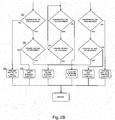
Figures 2A and2B show a logic diagram for an example of operation of a media player. - As mentioned, various different types of media player, that is, a device that is able at least to play back media, are known. The media may be for example audio only, or video or still images only, or video/still images and audio. The media may be in digital form. The media may be stored on the device and/or streamed to the device from some server or other storage, over for example the Internet.
- The media player may be a dedicated media player, which is only able to operate as a media player, i.e., can play back media, with other related functions such as pause, rewind, fast forward, skip forward to the next track or backwards to the previous track, volume control, etc. The media player may be part of or built into some other device that can perform other functions, such as a personal computer, a tablet computer, a smartphone, a so-called "phablet" (a large smartphone, having a size that is more like the size of a typical tablet computer), etc.
- Many media players have a touchscreen. The touchscreen enables video and still images to be displayed by the device, and also provides an interface by which a user can input commands to the device. The commands may be input for example by "taps" (a typically rapid, brief touch on the screen, typically by a user's digit such as a finger or some other input device such as a stylus) or a "swipe" or "slide" (which is typically brought about by a user's digit or other input device such as a stylus touching the screen and then being drawn along a portion of the screen before being released from contact with the screen), etc.
- It is common for the screen of a media player to be put into some inactive or power-saving state after some period of time following an input to reduce power consumption. This is particularly important for battery-powered media players in order to prolong battery life. For example, the screen may be put into a state where it is completely blank and not displaying any image. As another example, the screen may be put into a state in which the brightness is reduced compared to a full or high brightness "active" state. In the case of the screen being a touchscreen, the touchscreen may or may not be able to register and act on touch inputs whilst in the inactive or power-saving state, depending on the set-up and configuration of the device. In general, this state of the media player will be referred to herein as an "inactive display state", recognising that whilst the display is in some power-saving mode and may be displaying no image or displaying an image at reduced brightness, the touchscreen may or may not be able to register touch inputs depending on the set-up of the device.
- In contrast, in an active display state, the screen is displaying an image (possibly at full or high brightness, in contrast to a dim screen in a power-saving inactive display state). Moreover, typically and in the case of the screen being a touchscreen, the touchscreen is able to register and act on touch inputs, i.e. the touchscreen is responsive to a touch input, whilst in an active display state.
- A problem is that in order to control operation of a media player that uses a touchscreen for receiving control inputs for controlling the media player, the user has to touch the touchscreen (again, using for example a finger or some stylus or other input device). But in many existing media players, including in particular smartphones or tablets or the like that have a media player function, touching the touchscreen whilst the screen is in an inactive display state may have no effect whatsoever: the user often has to press some button in order to "wake" the screen in order for the touchscreen to be responsive to touch inputs. In other existing media players, including in particular smartphones or tablets or the like that have a media player function, touching the touchscreen whilst the screen is in an inactive display state may be sufficient to cause the touchscreen to be responsive to touch inputs. However, in either case, causing the touchscreen to become responsive to touch inputs results in the screen entering an active display state in which the screen is displaying images (possibly at full or high brightness). The media player is therefore consuming electrical power at a high level, even though the user may for example simply have wanted to increase the volume of an audio track being played back, or fast forward to the next audio track, etc.
- In examples described herein, a media player for playing media has a controller and a touchscreen operable to receive a touch input and configured to output corresponding touch input data to the controller. The controller is configured to control the media player in accordance with touch input data received from the touchscreen. The controller is configured such that, in the case that the touchscreen is in an inactive display state and touch input data received from the touchscreen indicates that the touch input concerns a media control function, the controller operates to control the media player in accordance with the touch input data received from the touchscreen without causing the touchscreen to enter an active display state. Accordingly the user can control the media player (or control the media player functions in the case that the media player is part of some other device, such as a smartphone, etc.) without waking the screen and therefore without using electrical power unnecessarily.
- Referring now to
Figure 1 , there is shown an example of amedia player 1. In this example, themedia player 1 is part of a smartphone or a tablet, etc. In other examples, themedia player 1 may be a dedicated media player. - The
media player 1 has atouchscreen 2. Thetouchscreen 2 may be for example a capacitive touchscreen or a resistive touchscreen. Themedia player 1 may have one ormore control buttons 3 which the user must press to activate the relevant control. Themedia player 1 has acontroller 4, which may be implemented by one or more processors. Themedia player 1 has some form of storage (not shown), at least for temporarily storing files, such as media files, and which may be permanent storage for permanent storage of files, such as media files. Themedia player 1 has some form of memory (not shown) for running programs under control of thecontroller 4. There will typically be some form of controller or control circuitry for controlling operation of thetouchscreen 2, including providing image data to thetouchscreen 2 for display, receiving and processing touch inputs received at thetouchscreen 2, etc. The controller for thetouchscreen 2 may be provided as part of themain controller 4 or as a separate controller for thetouchscreen 2. - The
media player 1 may also have for example transceiver circuits and processors and the like to enable the smartphone/media player 1 to connect wirelessly via WiFi, Bluetooth, etc., to a network. In the case that themedia player 1 is provided as a function on a smartphone or the like, the smartphone/media player 1 will have transceiver circuits and processors and the like to enable the smartphone/media player 1 to connect to a cellular network. - The
media player 1 is arranged to enter some power-saving mode if themedia player 1 or at least thetouchscreen 2 has not been used for a certain period of time. This is particularly important in the case that themedia player 1 is battery-powered in order to prolong the battery life, i.e. the time before the battery is exhausted and needs recharging. As a particular example, if no touch input has been received by thetouchscreen 2 for a certain period of time, thetouchscreen 2 enters an inactive display state. For example, thetouchscreen 2 may be put into a state where it is completely blank and not displaying any image. As another example, thetouchscreen 2 may be put into a state in which the brightness is reduced compared to a full or high brightness "active" state. Thetouchscreen 2 may or may not be able to register and act on touch inputs whilst in the inactive or power-saving state, depending on the set-up and configuration of themedia player 1. - In addition, as well as the
touchscreen 2 being in an inactive display state, themedia player 1 as a whole may be in some deeper sleep or idle state. As a particular example in the case of themedia player 1 being a smartphone or the like, as well as thetouchscreen 2 being in an inactive display state, the smartphone/media player 1 as a whole may be in some idle state or some other low power state in which signalling with the cellular network is low or minimal. - In contrast, in an active display state, the
touchscreen 2 is displaying an image (possibly at full or high brightness, in contrast to a dim screen in a power-saving inactive display state). Moreover, thetouchscreen 2 is able to register and act on touch inputs, i.e. thetouchscreen 2 is responsive to a touch input, whilst in an active display state. - The
media player 1, in particular thecontroller 4, is configured such that, in the case that thetouchscreen 2 is in an inactive display state and touch input data received from thetouchscreen 2 indicates that the touch input concerns a media control function, thecontroller 4 operates to control themedia player 1 in accordance with the touch input data received from thetouchscreen 2 without causing thetouchscreen 2 to enter an active display state. The media control function may be for example one or more of play, pause, rewind, fast forward, fast backward or rewind, skip forward, skip back, volume up or down, etc. - The
media player 1 may be configured so as to respond to different types of touch input on thetouchscreen 2 corresponding to different types of media control functions. Some specific examples of this are described further below. - In general though, the
media player 1 may be configured for example such that a double-tap on thetouchscreen 2 is required as a touch input for at least one media control function in order to cause thetouchscreen 2 to output corresponding touch input data to thecontroller 4. Requiring a double-tap can help to avoid or minimise inadvertent or unintentional control of themedia player 1 and activation of thetouchscreen 2 to an active display state. A double-tap can be differentiated from two successive single taps (which may control some other function of themedia player 1 or device more generally) by for example measuring a time difference between two taps detected by thetouchscreen 2 and deciding whether this time difference is above or below a time threshold. - The media player 1 (in particular the
main controller 4 and/or a dedicated controller for the touchscreen 2) may be configured such that themedia player 1 is responsive to a (single) tap on thetouchscreen 2 when not in the active display state. This is particularly useful in the case that a double-tap on thetouchscreen 2 is required as a touch input for at least one media control function in order to cause thetouchscreen 2 to output corresponding touch input data to thecontroller 4, as it enables themedia player 1 to register the first tap of the double-tap. A number of ways of achieving this are possible. - For example, the
touchscreen 2 may be responsive to a (single) tap on thetouchscreen 2 when not in the active display state. Thetouchscreen 2 may for example be continuously responsive or periodically responsive, the latter resulting in greater power savings when themedia player 1 is not in an active display state. - Alternatively or additionally, the
media player 1 may have a movement sensor which is configured to be responsive to movement of themedia player 2 which occurs as a result of a tap on thetouchscreen 2. The movement sensor may be for example one or more of an accelerometer and a gyroscope. - Alternatively or additionally, the
media player 1 may have a proximity sensor which is configured to be responsive to proximity of a user's digit or other input device during a tap on thetouchscreen 2. - In general, the
media player 1 may alternatively or additionally be configured such that two simultaneous touches of thetouchscreen 2 is required as a touch input for at least one media control function in order to cause thetouchscreen 2 to output corresponding touch input data to thecontroller 4. This can again help to avoid or minimise inadvertent or unintentional control of themedia player 1 and activation of thetouchscreen 2 to an active display state. The two simultaneous touches of thetouchscreen 2 may be achieved by for example touching thetouchscreen 2 with two fingers or other input devices simultaneously. - The
touchscreen 2 may be (notionally) divided into two or more regions. In the example shown inFigure 1 , thetouchscreen 2 is divided into threeregions region touchscreen 2 by a user, simplifying the range of different actions (tap, swipe or slide, hold, etc., as discussed below) that are needed for different media control functions. - The correspondence between
different regions touchscreen 2 and certain media control functions or set of media control functions may be arranged in one of numerous different ways. As just one specific example to illustrate this: -
first region 2A performs "skip to next" function with double tap with two fingers -
first region 2A performs "fast forward" function with double tap and hold with two fingers -
second region 2B performs "play/pause" function with double tap with two fingers - third region 2C performs "skip to previous" function with double tap with two fingers
- third region 2C performs "fast backwards" or "rewind" function with double tap and hold with two fingers
- As further examples of different touch inputs for different media control functions, the
media player 1 may be configured such that for example sliding two fingers from the bottom to the top of thetouchscreen 2, or at least generally from the bottom to the top of thetouchscreen 2, performs a "volume up" function. Likewise, in an example, sliding two fingers from the top to the bottom of thetouchscreen 2, or at least generally from the top to the bottom of thetouchscreen 2, performs a "volume down" function. -
Figures 2A and2B show a logic diagram for an example of operation of amedia player 1 as described herein. This example corresponds to the correspondence betweendifferent regions touchscreen 2 and certain specific media control functions given by way of example above. - At 20, the
media player 1 is in an inactive display state and is responsive to a single tap on thetouchscreen 2. (As discussed above, this may be by virtue of thetouchscreen 2 being responsive to touch inputs and/or by the user of movement or proximity sensors, etc.) - At 22, it is determined whether or not a tap is detected. If a tap is detected, flow moves to 24. Otherwise, the
media player 1 remains at 22 and continues to determine whether or not a tap is detected. - At 24, it is determined, in this example, whether the tap is with two fingers. If not, flow returns to 22. If yes, flow passes to 26.
- At 26, it is determined which
region touchscreen 2 has been tapped. If it is thefirst region 2A, flow passes to 28. - Continuing the flow from 28, the
media player 1 waits for a second tap. If a second tap is detected at 30, flow passes to 32; otherwise, if no second tap is detected (within for example a predetermined period of time), then flow returns to 20 described above. - At 32, it is determined whether the second tap which has been detected is a tap in the same region as the previous, first tap, in this example the
first region 2A of thetouchscreen 2. If not, then flow returns to 20 described above. If yes, then flow continues to 34. - At 34, it is determined whether the user's fingers or other input device are still touching the
touchscreen 2. If no, then it can be concluded that the input to thetouchscreen 2 by the user is a double-tap on thefirst region 2A of thetouchscreen 2. In accordance with the specific example discussed above, this corresponds to a "skip to next"media control function 36. Thecontroller 4 then controls playback of the media accordingly. - If at 34 it is determined that the user's fingers or other input device are still touching the
touchscreen 2, flow passes to 38. At 38, it is determined whether the user's fingers or other input device are moving up or down along thetouchscreen 2. If not, then this is determined to be a "hold". As such, in accordance with the specific example discussed above, this corresponds to a "fast forward"media control function 40. Thecontroller 4 then controls playback of the media accordingly. - On the other hand, if at 38 it is determined that the user's fingers or other input device are moving up or down along the
touchscreen 2, then, accordance with the specific example discussed above, this corresponds to a "volume up" or a "volume down" function respectively, and thecontroller 4 controls the playback volume from themedia player 1 accordingly. - If at 26 it is determined that it is the second or
third region 2B, 2C of thetouchscreen 2 that has been tapped, a similar logic flow proceeds, resulting in, in this example, one of a "play/pause" function, a "skip to previous" function, a "fast backwards" or a "rewind" function, and a "volume up" or a "volume down" function. This is shown clearly inFigures 2A and2B and will not be described here for reasons of brevity. - It will be understood that the processor or processing system or circuitry referred to herein may in practice be provided by a single chip or integrated circuit or plural chips or integrated circuits, optionally provided as a chipset, an application-specific integrated circuit (ASIC), field-programmable gate array (FPGA), digital signal processor (DSP), graphics processing units (GPUs), etc. The chip or chips may comprise circuitry (as well as possibly firmware) for embodying at least one or more of a data processor or processors and a digital signal processor or processors, which are configurable so as to operate in accordance with the exemplary embodiments. In this regard, the exemplary embodiments may be implemented at least in part by computer software stored in (non-transitory) memory and executable by the processor, or by hardware, or by a combination of tangibly stored software and hardware (and tangibly stored firmware).
- Reference is made herein to data storage for storing data. This may be provided by a single device or by plural devices. Suitable devices include for example a hard disk and non-volatile semiconductor memory.
- The examples described herein are to be understood as illustrative examples of embodiments of the invention. Further embodiments and examples are envisaged. Any feature described in relation to any one example or embodiment may be used alone or in combination with other features. In addition, any feature described in relation to any one example or embodiment may also be used in combination with one or more features of any other of the examples or embodiments, or any combination of any other of the examples or embodiments. Furthermore, equivalents and modifications not described herein may also be employed within the scope of the invention, which is defined in the claims.
Claims (14)
- A media player for playing media, the media player comprising:a controller; anda touchscreen operable to receive a touch input and configured to output corresponding touch input data to the controller;the controller being configured to control the media player in accordance with touch input data received from the touchscreen;the controller being configured such that, in the case that the touchscreen is in an inactive display state and touch input data received from the touchscreen indicates that the touch input concerns a media control function, the controller operates to control the media player in accordance with the touch input data received from the touchscreen without causing the touchscreen to enter an active display state.
- A media player according to claim 1, wherein the touchscreen has plural touch-sensitive input regions, the touch-sensitive input regions being associated with different media control functions.
- A media player according to claim 1 or claim 2, configured such that a double-tap on the touchscreen is required as a touch input for at least one media control function in order to cause the touchscreen to output corresponding touch input data to the controller.
- A media player according to any of claims 1 to 3, configured such that the touchscreen is responsive to a tap on the touchscreen when not in the active display state.
- A media player according to any of claims 1 to 4, comprising a movement sensor configured to be responsive to movement of the media player as a result of a tap on the touchscreen.
- A media player according to any of claims 1 to 5, comprising a proximity sensor configured to be responsive to proximity of a user's digit or other input device during a tap on the touchscreen.
- A media player according to any of claims 1 to 6, configured such that two simultaneous touches of the touchscreen is required as a touch input for at least one media control function in order to cause the touchscreen to output corresponding touch input data to the controller.
- A method of operating a media player which has a touchscreen, the method comprising:putting the touchscreen in an inactive display state;receiving a touch input whilst the touchscreen is in the inactive display state;determining that the touch input concerns a media control function; andcontrolling the media player in accordance with the touch input data received from the touchscreen without causing the touchscreen to enter an active display state.
- A method according to claim 8, wherein the touchscreen has plural touch-sensitive input regions, the touch-sensitive input regions being associated with different media control functions.
- A method according to claim 8 or claim 9, wherein a double-tap on the touchscreen is required as a touch input for at least one media control function.
- A method according to any of claims 8 to 10, wherein the touchscreen is responsive to a tap on the touchscreen when not in the active display state.
- A method according to any of claims 8 to 11, wherein a movement sensor of the media player is responsive to movement of the media player as a result of a tap on the touchscreen.
- A method according to any of claims 8 to 12, wherein a proximity sensor of the media player is responsive to proximity of a user's digit or other input device during a tap on the touchscreen.
- A method according to any of claims 8 to 13, wherein two simultaneous touches of the touchscreen is required as a touch input for at least one media control function.
Priority Applications (6)
| Application Number | Priority Date | Filing Date | Title |
|---|---|---|---|
| EP17166189.5A EP3388936B1 (en) | 2017-04-12 | 2017-04-12 | Media player and a method of operating a media player |
| CN201780091919.8A CN110730949A (en) | 2017-04-12 | 2017-10-06 | Media player and method of operating a media player |
| US16/604,883 US20200379641A1 (en) | 2017-04-12 | 2017-10-06 | Media Player and a Method of Operating a Media Player |
| PCT/EP2017/075495 WO2018188769A1 (en) | 2017-04-12 | 2017-10-06 | Media player and a method of operating a media player |
| KR1020197033345A KR20200010229A (en) | 2017-04-12 | 2017-10-06 | How to operate the media player and media player |
| JP2019555945A JP2020517022A (en) | 2017-04-12 | 2017-10-06 | Media player and operation method of media player |
Applications Claiming Priority (1)
| Application Number | Priority Date | Filing Date | Title |
|---|---|---|---|
| EP17166189.5A EP3388936B1 (en) | 2017-04-12 | 2017-04-12 | Media player and a method of operating a media player |
Publications (2)
| Publication Number | Publication Date |
|---|---|
| EP3388936A1 true EP3388936A1 (en) | 2018-10-17 |
| EP3388936B1 EP3388936B1 (en) | 2020-02-12 |
Family
ID=58544829
Family Applications (1)
| Application Number | Title | Priority Date | Filing Date |
|---|---|---|---|
| EP17166189.5A Active EP3388936B1 (en) | 2017-04-12 | 2017-04-12 | Media player and a method of operating a media player |
Country Status (6)
| Country | Link |
|---|---|
| US (1) | US20200379641A1 (en) |
| EP (1) | EP3388936B1 (en) |
| JP (1) | JP2020517022A (en) |
| KR (1) | KR20200010229A (en) |
| CN (1) | CN110730949A (en) |
| WO (1) | WO2018188769A1 (en) |
Families Citing this family (1)
| Publication number | Priority date | Publication date | Assignee | Title |
|---|---|---|---|---|
| KR102996697B1 (en) * | 2021-04-15 | 2026-07-29 | 삼성전자주식회사 | Electronic device processing touch input data and controlling method thereof |
Citations (3)
| Publication number | Priority date | Publication date | Assignee | Title |
|---|---|---|---|---|
| US20090197635A1 (en) * | 2008-02-01 | 2009-08-06 | Kim Joo Min | user interface for a mobile device |
| EP2876538A1 (en) * | 2013-11-22 | 2015-05-27 | Lg Electronics Inc. | Mobile terminal and method for controlling the same |
| US20160011768A1 (en) * | 2014-07-09 | 2016-01-14 | Lg Electronics Inc. | Mobile terminal and method of controlling the same |
Family Cites Families (10)
| Publication number | Priority date | Publication date | Assignee | Title |
|---|---|---|---|---|
| JP5555200B2 (en) * | 2011-04-14 | 2014-07-23 | レノボ・シンガポール・プライベート・リミテッド | Method for waking up an electronic device having a touch panel and electronic device |
| JP2013246631A (en) * | 2012-05-25 | 2013-12-09 | Toshiba Corp | Electronic apparatus and starting method for the same |
| US9489067B2 (en) * | 2012-08-17 | 2016-11-08 | Qualcomm Incorporated | Scalable touchscreen processing with realtime role negotiation among asymmetric processing cores |
| US9063612B2 (en) * | 2012-12-10 | 2015-06-23 | Intel Corporation | Techniques and apparatus for managing touch interface |
| JP2015002428A (en) * | 2013-06-14 | 2015-01-05 | 富士通株式会社 | Portable terminal device, function control method, and function control program |
| US9454251B1 (en) * | 2013-06-26 | 2016-09-27 | Google Inc. | Methods, systems, and media for controlling a remote device using a touch screen of a mobile device in a display inhibited state |
| KR102179056B1 (en) * | 2013-07-19 | 2020-11-16 | 엘지전자 주식회사 | Mobile terminal and control method for the mobile terminal |
| WO2015126848A1 (en) * | 2014-02-18 | 2015-08-27 | Arokia Nathan | Dynamic switching of power modes for touch screens using force touch |
| KR102176365B1 (en) * | 2014-07-14 | 2020-11-09 | 엘지전자 주식회사 | Mobile terminal and control method for the mobile terminal |
| JP6065939B2 (en) * | 2015-06-11 | 2017-01-25 | カシオ計算機株式会社 | Display device and display method |
-
2017
- 2017-04-12 EP EP17166189.5A patent/EP3388936B1/en active Active
- 2017-10-06 WO PCT/EP2017/075495 patent/WO2018188769A1/en not_active Ceased
- 2017-10-06 JP JP2019555945A patent/JP2020517022A/en active Pending
- 2017-10-06 US US16/604,883 patent/US20200379641A1/en not_active Abandoned
- 2017-10-06 KR KR1020197033345A patent/KR20200010229A/en not_active Ceased
- 2017-10-06 CN CN201780091919.8A patent/CN110730949A/en active Pending
Patent Citations (3)
| Publication number | Priority date | Publication date | Assignee | Title |
|---|---|---|---|---|
| US20090197635A1 (en) * | 2008-02-01 | 2009-08-06 | Kim Joo Min | user interface for a mobile device |
| EP2876538A1 (en) * | 2013-11-22 | 2015-05-27 | Lg Electronics Inc. | Mobile terminal and method for controlling the same |
| US20160011768A1 (en) * | 2014-07-09 | 2016-01-14 | Lg Electronics Inc. | Mobile terminal and method of controlling the same |
Also Published As
| Publication number | Publication date |
|---|---|
| KR20200010229A (en) | 2020-01-30 |
| EP3388936B1 (en) | 2020-02-12 |
| WO2018188769A1 (en) | 2018-10-18 |
| US20200379641A1 (en) | 2020-12-03 |
| JP2020517022A (en) | 2020-06-11 |
| CN110730949A (en) | 2020-01-24 |
Similar Documents
| Publication | Publication Date | Title |
|---|---|---|
| AU2018282404B2 (en) | Touch-sensitive button | |
| US10069953B2 (en) | Electronic device with a touch sensor and method for operating the same | |
| US10338662B2 (en) | Low power detection apparatus and method for displaying information | |
| US8855966B2 (en) | Electronic device having proximity sensor and method for controlling the same | |
| US8793519B2 (en) | Method for reducing power consumption based on motion sensor and portable terminal using the same | |
| US10394444B2 (en) | Information processing device | |
| US20130016046A1 (en) | Control method and system of touch panel | |
| US20160239138A1 (en) | Mobile device, press detection method and computer-readable recording medium | |
| US9489067B2 (en) | Scalable touchscreen processing with realtime role negotiation among asymmetric processing cores | |
| KR20150130554A (en) | Optimized adaptive thresholding for touch sensing | |
| US20140035853A1 (en) | Method and apparatus for providing user interaction based on multi touch finger gesture | |
| US8547352B2 (en) | Method, apparatus for sensing moved touch and computer readable record-medium on which program for executing method thereof | |
| US20150084893A1 (en) | Display device, method for controlling display, and recording medium | |
| JP2013206058A (en) | Power supply management device, power supply management method and power supply management program | |
| CN107526506A (en) | A kind of control method of player, control device and mobile terminal | |
| US20130050094A1 (en) | Method and apparatus for preventing malfunction of touchpad in electronic device | |
| CN107277032B (en) | Video definition switching method and device, storage medium and terminal | |
| EP3388936B1 (en) | Media player and a method of operating a media player | |
| CN105930156A (en) | Terminal control method and terminal | |
| CN112333318B (en) | Key function response method and device and electronic equipment | |
| CN106060616B (en) | Operation processing method and device | |
| US20140136868A1 (en) | Power saving method and handheld electronic device using the same | |
| CN117406906A (en) | Screen processing method, device, electronic equipment and computer-readable storage medium | |
| US20250130710A1 (en) | Electronic device and control method | |
| CN111158706A (en) | Application uninstallation method, device and electronic device |
Legal Events
| Date | Code | Title | Description |
|---|---|---|---|
| PUAI | Public reference made under article 153(3) epc to a published international application that has entered the european phase |
Free format text: ORIGINAL CODE: 0009012 |
|
| STAA | Information on the status of an ep patent application or granted ep patent |
Free format text: STATUS: THE APPLICATION HAS BEEN PUBLISHED |
|
| AK | Designated contracting states |
Kind code of ref document: A1 Designated state(s): AL AT BE BG CH CY CZ DE DK EE ES FI FR GB GR HR HU IE IS IT LI LT LU LV MC MK MT NL NO PL PT RO RS SE SI SK SM TR |
|
| AX | Request for extension of the european patent |
Extension state: BA ME |
|
| STAA | Information on the status of an ep patent application or granted ep patent |
Free format text: STATUS: REQUEST FOR EXAMINATION WAS MADE |
|
| 17P | Request for examination filed |
Effective date: 20190219 |
|
| RBV | Designated contracting states (corrected) |
Designated state(s): AL AT BE BG CH CY CZ DE DK EE ES FI FR GB GR HR HU IE IS IT LI LT LU LV MC MK MT NL NO PL PT RO RS SE SI SK SM TR |
|
| STAA | Information on the status of an ep patent application or granted ep patent |
Free format text: STATUS: EXAMINATION IS IN PROGRESS |
|
| 17Q | First examination report despatched |
Effective date: 20190411 |
|
| GRAP | Despatch of communication of intention to grant a patent |
Free format text: ORIGINAL CODE: EPIDOSNIGR1 |
|
| STAA | Information on the status of an ep patent application or granted ep patent |
Free format text: STATUS: GRANT OF PATENT IS INTENDED |
|
| RIC1 | Information provided on ipc code assigned before grant |
Ipc: G06F 3/16 20060101AFI20190703BHEP Ipc: G06F 1/3234 20190101ALI20190703BHEP Ipc: G06F 3/0488 20130101ALI20190703BHEP Ipc: G06F 1/16 20060101ALI20190703BHEP Ipc: H04W 52/02 20090101ALI20190703BHEP Ipc: G06F 1/32 20190101ALI20190703BHEP |
|
| INTG | Intention to grant announced |
Effective date: 20190726 |
|
| GRAS | Grant fee paid |
Free format text: ORIGINAL CODE: EPIDOSNIGR3 |
|
| GRAJ | Information related to disapproval of communication of intention to grant by the applicant or resumption of examination proceedings by the epo deleted |
Free format text: ORIGINAL CODE: EPIDOSDIGR1 |
|
| GRAL | Information related to payment of fee for publishing/printing deleted |
Free format text: ORIGINAL CODE: EPIDOSDIGR3 |
|
| STAA | Information on the status of an ep patent application or granted ep patent |
Free format text: STATUS: EXAMINATION IS IN PROGRESS |
|
| GRAP | Despatch of communication of intention to grant a patent |
Free format text: ORIGINAL CODE: EPIDOSNIGR1 |
|
| STAA | Information on the status of an ep patent application or granted ep patent |
Free format text: STATUS: GRANT OF PATENT IS INTENDED |
|
| INTC | Intention to grant announced (deleted) | ||
| INTG | Intention to grant announced |
Effective date: 20191210 |
|
| GRAA | (expected) grant |
Free format text: ORIGINAL CODE: 0009210 |
|
| STAA | Information on the status of an ep patent application or granted ep patent |
Free format text: STATUS: THE PATENT HAS BEEN GRANTED |
|
| AK | Designated contracting states |
Kind code of ref document: B1 Designated state(s): AL AT BE BG CH CY CZ DE DK EE ES FI FR GB GR HR HU IE IS IT LI LT LU LV MC MK MT NL NO PL PT RO RS SE SI SK SM TR |
|
| REG | Reference to a national code |
Ref country code: GB Ref legal event code: FG4D |
|
| REG | Reference to a national code |
Ref country code: CH Ref legal event code: EP |
|
| REG | Reference to a national code |
Ref country code: AT Ref legal event code: REF Ref document number: 1233025 Country of ref document: AT Kind code of ref document: T Effective date: 20200215 |
|
| REG | Reference to a national code |
Ref country code: DE Ref legal event code: R096 Ref document number: 602017011493 Country of ref document: DE |
|
| REG | Reference to a national code |
Ref country code: IE Ref legal event code: FG4D |
|
| PG25 | Lapsed in a contracting state [announced via postgrant information from national office to epo] |
Ref country code: RS Free format text: LAPSE BECAUSE OF FAILURE TO SUBMIT A TRANSLATION OF THE DESCRIPTION OR TO PAY THE FEE WITHIN THE PRESCRIBED TIME-LIMIT Effective date: 20200212 Ref country code: FI Free format text: LAPSE BECAUSE OF FAILURE TO SUBMIT A TRANSLATION OF THE DESCRIPTION OR TO PAY THE FEE WITHIN THE PRESCRIBED TIME-LIMIT Effective date: 20200212 Ref country code: NO Free format text: LAPSE BECAUSE OF FAILURE TO SUBMIT A TRANSLATION OF THE DESCRIPTION OR TO PAY THE FEE WITHIN THE PRESCRIBED TIME-LIMIT Effective date: 20200512 |
|
| REG | Reference to a national code |
Ref country code: LT Ref legal event code: MG4D |
|
| REG | Reference to a national code |
Ref country code: NL Ref legal event code: MP Effective date: 20200212 |
|
| PG25 | Lapsed in a contracting state [announced via postgrant information from national office to epo] |
Ref country code: SE Free format text: LAPSE BECAUSE OF FAILURE TO SUBMIT A TRANSLATION OF THE DESCRIPTION OR TO PAY THE FEE WITHIN THE PRESCRIBED TIME-LIMIT Effective date: 20200212 Ref country code: LV Free format text: LAPSE BECAUSE OF FAILURE TO SUBMIT A TRANSLATION OF THE DESCRIPTION OR TO PAY THE FEE WITHIN THE PRESCRIBED TIME-LIMIT Effective date: 20200212 Ref country code: IS Free format text: LAPSE BECAUSE OF FAILURE TO SUBMIT A TRANSLATION OF THE DESCRIPTION OR TO PAY THE FEE WITHIN THE PRESCRIBED TIME-LIMIT Effective date: 20200612 Ref country code: BG Free format text: LAPSE BECAUSE OF FAILURE TO SUBMIT A TRANSLATION OF THE DESCRIPTION OR TO PAY THE FEE WITHIN THE PRESCRIBED TIME-LIMIT Effective date: 20200512 Ref country code: GR Free format text: LAPSE BECAUSE OF FAILURE TO SUBMIT A TRANSLATION OF THE DESCRIPTION OR TO PAY THE FEE WITHIN THE PRESCRIBED TIME-LIMIT Effective date: 20200513 Ref country code: HR Free format text: LAPSE BECAUSE OF FAILURE TO SUBMIT A TRANSLATION OF THE DESCRIPTION OR TO PAY THE FEE WITHIN THE PRESCRIBED TIME-LIMIT Effective date: 20200212 |
|
| PG25 | Lapsed in a contracting state [announced via postgrant information from national office to epo] |
Ref country code: NL Free format text: LAPSE BECAUSE OF FAILURE TO SUBMIT A TRANSLATION OF THE DESCRIPTION OR TO PAY THE FEE WITHIN THE PRESCRIBED TIME-LIMIT Effective date: 20200212 |
|
| PG25 | Lapsed in a contracting state [announced via postgrant information from national office to epo] |
Ref country code: SK Free format text: LAPSE BECAUSE OF FAILURE TO SUBMIT A TRANSLATION OF THE DESCRIPTION OR TO PAY THE FEE WITHIN THE PRESCRIBED TIME-LIMIT Effective date: 20200212 Ref country code: RO Free format text: LAPSE BECAUSE OF FAILURE TO SUBMIT A TRANSLATION OF THE DESCRIPTION OR TO PAY THE FEE WITHIN THE PRESCRIBED TIME-LIMIT Effective date: 20200212 Ref country code: SM Free format text: LAPSE BECAUSE OF FAILURE TO SUBMIT A TRANSLATION OF THE DESCRIPTION OR TO PAY THE FEE WITHIN THE PRESCRIBED TIME-LIMIT Effective date: 20200212 Ref country code: EE Free format text: LAPSE BECAUSE OF FAILURE TO SUBMIT A TRANSLATION OF THE DESCRIPTION OR TO PAY THE FEE WITHIN THE PRESCRIBED TIME-LIMIT Effective date: 20200212 Ref country code: DK Free format text: LAPSE BECAUSE OF FAILURE TO SUBMIT A TRANSLATION OF THE DESCRIPTION OR TO PAY THE FEE WITHIN THE PRESCRIBED TIME-LIMIT Effective date: 20200212 Ref country code: PT Free format text: LAPSE BECAUSE OF FAILURE TO SUBMIT A TRANSLATION OF THE DESCRIPTION OR TO PAY THE FEE WITHIN THE PRESCRIBED TIME-LIMIT Effective date: 20200705 Ref country code: CZ Free format text: LAPSE BECAUSE OF FAILURE TO SUBMIT A TRANSLATION OF THE DESCRIPTION OR TO PAY THE FEE WITHIN THE PRESCRIBED TIME-LIMIT Effective date: 20200212 Ref country code: LT Free format text: LAPSE BECAUSE OF FAILURE TO SUBMIT A TRANSLATION OF THE DESCRIPTION OR TO PAY THE FEE WITHIN THE PRESCRIBED TIME-LIMIT Effective date: 20200212 Ref country code: ES Free format text: LAPSE BECAUSE OF FAILURE TO SUBMIT A TRANSLATION OF THE DESCRIPTION OR TO PAY THE FEE WITHIN THE PRESCRIBED TIME-LIMIT Effective date: 20200212 |
|
| REG | Reference to a national code |
Ref country code: DE Ref legal event code: R097 Ref document number: 602017011493 Country of ref document: DE |
|
| REG | Reference to a national code |
Ref country code: AT Ref legal event code: MK05 Ref document number: 1233025 Country of ref document: AT Kind code of ref document: T Effective date: 20200212 |
|
| PG25 | Lapsed in a contracting state [announced via postgrant information from national office to epo] |
Ref country code: MC Free format text: LAPSE BECAUSE OF FAILURE TO SUBMIT A TRANSLATION OF THE DESCRIPTION OR TO PAY THE FEE WITHIN THE PRESCRIBED TIME-LIMIT Effective date: 20200212 |
|
| REG | Reference to a national code |
Ref country code: CH Ref legal event code: PL |
|
| PLBE | No opposition filed within time limit |
Free format text: ORIGINAL CODE: 0009261 |
|
| STAA | Information on the status of an ep patent application or granted ep patent |
Free format text: STATUS: NO OPPOSITION FILED WITHIN TIME LIMIT |
|
| 26N | No opposition filed |
Effective date: 20201113 |
|
| PG25 | Lapsed in a contracting state [announced via postgrant information from national office to epo] |
Ref country code: AT Free format text: LAPSE BECAUSE OF FAILURE TO SUBMIT A TRANSLATION OF THE DESCRIPTION OR TO PAY THE FEE WITHIN THE PRESCRIBED TIME-LIMIT Effective date: 20200212 Ref country code: LI Free format text: LAPSE BECAUSE OF NON-PAYMENT OF DUE FEES Effective date: 20200430 Ref country code: IT Free format text: LAPSE BECAUSE OF FAILURE TO SUBMIT A TRANSLATION OF THE DESCRIPTION OR TO PAY THE FEE WITHIN THE PRESCRIBED TIME-LIMIT Effective date: 20200212 Ref country code: LU Free format text: LAPSE BECAUSE OF NON-PAYMENT OF DUE FEES Effective date: 20200412 Ref country code: FR Free format text: LAPSE BECAUSE OF NON-PAYMENT OF DUE FEES Effective date: 20200412 Ref country code: CH Free format text: LAPSE BECAUSE OF NON-PAYMENT OF DUE FEES Effective date: 20200430 |
|
| REG | Reference to a national code |
Ref country code: BE Ref legal event code: MM Effective date: 20200430 |
|
| PG25 | Lapsed in a contracting state [announced via postgrant information from national office to epo] |
Ref country code: SI Free format text: LAPSE BECAUSE OF FAILURE TO SUBMIT A TRANSLATION OF THE DESCRIPTION OR TO PAY THE FEE WITHIN THE PRESCRIBED TIME-LIMIT Effective date: 20200212 Ref country code: PL Free format text: LAPSE BECAUSE OF FAILURE TO SUBMIT A TRANSLATION OF THE DESCRIPTION OR TO PAY THE FEE WITHIN THE PRESCRIBED TIME-LIMIT Effective date: 20200212 Ref country code: BE Free format text: LAPSE BECAUSE OF NON-PAYMENT OF DUE FEES Effective date: 20200430 |
|
| PG25 | Lapsed in a contracting state [announced via postgrant information from national office to epo] |
Ref country code: IE Free format text: LAPSE BECAUSE OF NON-PAYMENT OF DUE FEES Effective date: 20200412 |
|
| PGFP | Annual fee paid to national office [announced via postgrant information from national office to epo] |
Ref country code: GB Payment date: 20210325 Year of fee payment: 5 |
|
| PGFP | Annual fee paid to national office [announced via postgrant information from national office to epo] |
Ref country code: DE Payment date: 20210315 Year of fee payment: 5 |
|
| PG25 | Lapsed in a contracting state [announced via postgrant information from national office to epo] |
Ref country code: MT Free format text: LAPSE BECAUSE OF FAILURE TO SUBMIT A TRANSLATION OF THE DESCRIPTION OR TO PAY THE FEE WITHIN THE PRESCRIBED TIME-LIMIT Effective date: 20200212 Ref country code: CY Free format text: LAPSE BECAUSE OF FAILURE TO SUBMIT A TRANSLATION OF THE DESCRIPTION OR TO PAY THE FEE WITHIN THE PRESCRIBED TIME-LIMIT Effective date: 20200212 |
|
| PG25 | Lapsed in a contracting state [announced via postgrant information from national office to epo] |
Ref country code: MK Free format text: LAPSE BECAUSE OF FAILURE TO SUBMIT A TRANSLATION OF THE DESCRIPTION OR TO PAY THE FEE WITHIN THE PRESCRIBED TIME-LIMIT Effective date: 20200212 Ref country code: AL Free format text: LAPSE BECAUSE OF FAILURE TO SUBMIT A TRANSLATION OF THE DESCRIPTION OR TO PAY THE FEE WITHIN THE PRESCRIBED TIME-LIMIT Effective date: 20200212 |
|
| REG | Reference to a national code |
Ref country code: DE Ref legal event code: R119 Ref document number: 602017011493 Country of ref document: DE |
|
| GBPC | Gb: european patent ceased through non-payment of renewal fee |
Effective date: 20220412 |
|
| PG25 | Lapsed in a contracting state [announced via postgrant information from national office to epo] |
Ref country code: GB Free format text: LAPSE BECAUSE OF NON-PAYMENT OF DUE FEES Effective date: 20220412 Ref country code: DE Free format text: LAPSE BECAUSE OF NON-PAYMENT OF DUE FEES Effective date: 20221103 |
|
| PGFP | Annual fee paid to national office [announced via postgrant information from national office to epo] |
Ref country code: TR Payment date: 20260406 Year of fee payment: 10 |