EP3373127A1 - Image processing apparatus, setting-value setting method and setting-value setting program - Google Patents
Image processing apparatus, setting-value setting method and setting-value setting program Download PDFInfo
- Publication number
- EP3373127A1 EP3373127A1 EP18159145.4A EP18159145A EP3373127A1 EP 3373127 A1 EP3373127 A1 EP 3373127A1 EP 18159145 A EP18159145 A EP 18159145A EP 3373127 A1 EP3373127 A1 EP 3373127A1
- Authority
- EP
- European Patent Office
- Prior art keywords
- setting
- setting value
- value
- image
- character
- Prior art date
- Legal status (The legal status is an assumption and is not a legal conclusion. Google has not performed a legal analysis and makes no representation as to the accuracy of the status listed.)
- Withdrawn
Links
Images






Classifications
-
- H—ELECTRICITY
- H04—ELECTRIC COMMUNICATION TECHNIQUE
- H04N—PICTORIAL COMMUNICATION, e.g. TELEVISION
- H04N1/00—Scanning, transmission or reproduction of documents or the like, e.g. facsimile transmission; Details thereof
- H04N1/00127—Connection or combination of a still picture apparatus with another apparatus, e.g. for storage, processing or transmission of still picture signals or of information associated with a still picture
- H04N1/00204—Connection or combination of a still picture apparatus with another apparatus, e.g. for storage, processing or transmission of still picture signals or of information associated with a still picture with a digital computer or a digital computer system, e.g. an internet server
- H04N1/00209—Transmitting or receiving image data, e.g. facsimile data, via a computer, e.g. using e-mail, a computer network, the internet, I-fax
- H04N1/00214—Transmitting or receiving image data, e.g. facsimile data, via a computer, e.g. using e-mail, a computer network, the internet, I-fax details of transmission
- H04N1/00217—Transmitting or receiving image data, e.g. facsimile data, via a computer, e.g. using e-mail, a computer network, the internet, I-fax details of transmission only involving computer data transmission protocols, e.g. SMTP, WAP or HTTP
-
- H—ELECTRICITY
- H04—ELECTRIC COMMUNICATION TECHNIQUE
- H04N—PICTORIAL COMMUNICATION, e.g. TELEVISION
- H04N1/00—Scanning, transmission or reproduction of documents or the like, e.g. facsimile transmission; Details thereof
- H04N1/0035—User-machine interface; Control console
- H04N1/00405—Output means
- H04N1/00474—Output means outputting a plurality of functional options, e.g. scan, copy or print
-
- G—PHYSICS
- G06—COMPUTING OR CALCULATING; COUNTING
- G06F—ELECTRIC DIGITAL DATA PROCESSING
- G06F3/00—Input arrangements for transferring data to be processed into a form capable of being handled by the computer; Output arrangements for transferring data from processing unit to output unit, e.g. interface arrangements
- G06F3/01—Input arrangements or combined input and output arrangements for interaction between user and computer
- G06F3/048—Interaction techniques based on graphical user interfaces [GUI]
- G06F3/0484—Interaction techniques based on graphical user interfaces [GUI] for the control of specific functions or operations, e.g. selecting or manipulating an object, an image or a displayed text element, setting a parameter value or selecting a range
- G06F3/04845—Interaction techniques based on graphical user interfaces [GUI] for the control of specific functions or operations, e.g. selecting or manipulating an object, an image or a displayed text element, setting a parameter value or selecting a range for image manipulation, e.g. dragging, rotation, expansion or change of colour
-
- G—PHYSICS
- G06—COMPUTING OR CALCULATING; COUNTING
- G06F—ELECTRIC DIGITAL DATA PROCESSING
- G06F3/00—Input arrangements for transferring data to be processed into a form capable of being handled by the computer; Output arrangements for transferring data from processing unit to output unit, e.g. interface arrangements
- G06F3/12—Digital output to print unit, e.g. line printer, chain printer
- G06F3/1201—Dedicated interfaces to print systems
- G06F3/1223—Dedicated interfaces to print systems specifically adapted to use a particular technique
- G06F3/1224—Client or server resources management
- G06F3/1228—Printing driverless or using generic drivers
-
- G—PHYSICS
- G06—COMPUTING OR CALCULATING; COUNTING
- G06F—ELECTRIC DIGITAL DATA PROCESSING
- G06F3/00—Input arrangements for transferring data to be processed into a form capable of being handled by the computer; Output arrangements for transferring data from processing unit to output unit, e.g. interface arrangements
- G06F3/12—Digital output to print unit, e.g. line printer, chain printer
- G06F3/1201—Dedicated interfaces to print systems
- G06F3/1223—Dedicated interfaces to print systems specifically adapted to use a particular technique
- G06F3/1237—Print job management
- G06F3/1253—Configuration of print job parameters, e.g. using UI at the client
- G06F3/1258—Configuration of print job parameters, e.g. using UI at the client by updating job settings at the printer
-
- G—PHYSICS
- G06—COMPUTING OR CALCULATING; COUNTING
- G06F—ELECTRIC DIGITAL DATA PROCESSING
- G06F3/00—Input arrangements for transferring data to be processed into a form capable of being handled by the computer; Output arrangements for transferring data from processing unit to output unit, e.g. interface arrangements
- G06F3/12—Digital output to print unit, e.g. line printer, chain printer
- G06F3/1201—Dedicated interfaces to print systems
- G06F3/1278—Dedicated interfaces to print systems specifically adapted to adopt a particular infrastructure
- G06F3/1292—Mobile client, e.g. wireless printing
-
- G—PHYSICS
- G06—COMPUTING OR CALCULATING; COUNTING
- G06T—IMAGE DATA PROCESSING OR GENERATION, IN GENERAL
- G06T1/00—General purpose image data processing
- G06T1/0007—Image acquisition
-
- G—PHYSICS
- G06—COMPUTING OR CALCULATING; COUNTING
- G06T—IMAGE DATA PROCESSING OR GENERATION, IN GENERAL
- G06T7/00—Image analysis
- G06T7/10—Segmentation; Edge detection
-
- H—ELECTRICITY
- H04—ELECTRIC COMMUNICATION TECHNIQUE
- H04N—PICTORIAL COMMUNICATION, e.g. TELEVISION
- H04N1/00—Scanning, transmission or reproduction of documents or the like, e.g. facsimile transmission; Details thereof
- H04N1/00095—Systems or arrangements for the transmission of the picture signal
-
- H—ELECTRICITY
- H04—ELECTRIC COMMUNICATION TECHNIQUE
- H04N—PICTORIAL COMMUNICATION, e.g. TELEVISION
- H04N1/00—Scanning, transmission or reproduction of documents or the like, e.g. facsimile transmission; Details thereof
- H04N1/32—Circuits or arrangements for control or supervision between transmitter and receiver or between image input and image output device, e.g. between a still-image camera and its memory or between a still-image camera and a printer device
- H04N1/32358—Circuits or arrangements for control or supervision between transmitter and receiver or between image input and image output device, e.g. between a still-image camera and its memory or between a still-image camera and a printer device using picture signal storage, e.g. at transmitter
- H04N1/32363—Circuits or arrangements for control or supervision between transmitter and receiver or between image input and image output device, e.g. between a still-image camera and its memory or between a still-image camera and a printer device using picture signal storage, e.g. at transmitter at the transmitter or at the receiver
-
- H—ELECTRICITY
- H04—ELECTRIC COMMUNICATION TECHNIQUE
- H04N—PICTORIAL COMMUNICATION, e.g. TELEVISION
- H04N1/00—Scanning, transmission or reproduction of documents or the like, e.g. facsimile transmission; Details thereof
- H04N1/32—Circuits or arrangements for control or supervision between transmitter and receiver or between image input and image output device, e.g. between a still-image camera and its memory or between a still-image camera and a printer device
- H04N1/327—Initiating, continuing or ending a single-mode communication; Handshaking therefor
- H04N1/32704—Establishing a communication with one of a facsimile and another telecommunication apparatus sharing a single line
- H04N1/32706—Type of the other apparatus
- H04N1/32708—Telephone
-
- H—ELECTRICITY
- H04—ELECTRIC COMMUNICATION TECHNIQUE
- H04N—PICTORIAL COMMUNICATION, e.g. TELEVISION
- H04N1/00—Scanning, transmission or reproduction of documents or the like, e.g. facsimile transmission; Details thereof
- H04N1/40—Picture signal circuits
Definitions
- the preset invention relates to an image processing apparatus, a setting-value setting method and a setting-value setting program.
- the present invention relates to an image processing apparatus that can be wirelessly connected to an external device, a setting-value setting method performed by the image processing apparatus and a setting-value setting program executed by the image processing apparatus.
- Japanese Patent Laid-Open No. 2016-134042 discloses a technique for transmitting data acquired when the MFP scans a document to a destination address defined in an address book stored in the portable device.
- the present invention is made to solve the above-described problem, and an object of the present invention is to provide an image processing apparatus that can set a setting value using a general portable device.
- Another object of the present invention is to provide a setting-value setting method by which a setting value can be set with use of a general portable device.
- a further object of the present invention is to provide a setting-value setting program that can set a setting value using a general portable device.
- an image processing apparatus that is communicable with a portable device carried by a user includes a process execution means for executing a process in accordance with a setting value, an image acquiring means for acquiring a terminal image displayed by the portable device from the portable device, an analyzing means for analyzing the acquired terminal image, and a setting means for setting a setting value to be supplied to the process execution means based on a result of analysis by the analyzing means.
- the setting value for execution of the process is set based on the result of analysis of the terminal image displayed by the portable device, so that the setting value can be easily set by the user. Further, because the terminal image displayed in the portable device is acquired from the portable device, it is not necessary to install a specific application program defining steps of communication with the image processing apparatus. Thus, the image processing apparatus that can set the setting value using a general portable device can be provided.
- the analyzing means recognizes characters in the acquired terminal image and acquires one or more character strings as one piece of character information.
- the character information is acquired by character recognition of the terminal image.
- the setting value composed of character information can be set.
- an extracting means for extracting candidate information that is a candidate for the setting value to be supplied to the process execution means from among one or more pieces of character information acquired by the analyzing means based on a type of the setting value to be supplied to the process execution means, is included.
- the candidate for the setting value can be extracted for the type of the setting value used for a process.
- the extracting means extracts character information including a predetermined character corresponding to the type of the setting value to be supplied to the process execution means as the candidate information.
- a candidate of the type of the setting value including the predetermined character can be extracted.
- the extracting means extracts character information including a predetermined character count, of characters, corresponding to the type of the setting value to be supplied to the process execution means as the candidate information.
- a candidate for the type of the setting value including the predetermined character count of characters can be extracted.
- the extracting means extracts character information arranged at a predetermined relative position relative to character information including a predetermined character string corresponding to the type of the setting value to be supplied to the process execution means as the candidate information.
- candidates for the type of the setting value arranged at the predetermined relative position relative to the character information including the predetermined character string can be extracted.
- a setting-value determining means for determining a setting value to be supplied to the process execution means based on the candidate information extracted by the extracting means is further included.
- the setting value is determined from among candidates extracted for each type of the setting value.
- the setting value can be accurately set.
- the setting-value determining means determines that the one piece of extracted candidate information is the setting value corresponding to the one type.
- the one candidate information is determined as the setting value for the one type.
- the setting value can be automatically set.
- the image processing apparatus further includes a setting screen displaying means for displaying a setting screen for accepting a setting value to be supplied to the process execution means from among a plurality of setting screens, wherein the setting-value determining means determines a setting value corresponding to a type of the setting value defined in the setting screen displayed by the setting screen displaying means.
- the setting value corresponding to the type of the setting value defined by the displayed setting screen is determined. Therefore, if the user performs an operation of displaying the setting screen, the setting value is set. Thus, an operation of inputting the setting value by the user can be simplified.
- the image processing apparatus further includes a setting screen displaying means for displaying a setting screen in which a setting value to be supplied to the process execution means is accepted from among a plurality of setting screens, wherein the setting screen displaying means displays a setting screen for accepting the setting value determined by the setting-value determining means.
- the setting screen for accepting the setting value is displayed.
- an operation of switching the setting screens can be simplified.
- the setting-value determining means determines that the selected candidate information is the setting value to be supplied to the process execution means.
- the candidate information selected by the user is determined as the setting value. Therefore, the setting value can be easily input.
- the analyzing means analyzes a part designated by the user in the acquired terminal image.
- an amount of data to be analyzed can be reduced, so that a process load can be reduced.
- a setting-value setting method is performed by an image processing apparatus that is communicable with a portable device carried by a user, the image processing apparatus includes a process execution means for executing a process in accordance with a setting value, and the setting-value setting method includes an image acquiring step of acquiring a terminal image displayed by the portable device from the portable device, an analyzing step of analyzing the acquired terminal image, and a setting step of setting a setting value to be supplied to the process execution means based on a result of analysis in the analyzing step.
- the setting-value setting method by which the setting value can be set with use of a general portable device can be provided.
- a setting-value setting program is executed by a computer that controls an image processing apparatus that is communicable with a portable device carried by a user, the image processing apparatus includes a process execution means for executing a process in accordance with a setting value, and the setting-value setting program causing the computer to perform an image acquiring step of acquiring a terminal image displayed by the portable device from the portable device, an analyzing step of analyzing the acquired terminal image, and a setting step of setting a setting value to be supplied to the process execution means based on a result of analysis in the analyzing step.
- the setting-value setting program capable of setting the setting value using a general portable device can be provided.
- Fig. 1 is a diagram showing one example of an overview of an information system in the embodiment of the present invention.
- the information system 1 includes an MFP (Multi Function Peripheral) 100 and a smartphone 200.
- MFP Multi Function Peripheral
- the smartphone 200 is one example of a portable device and is carried and used by a user.
- a hardware configuration and functions of the smartphone 200 are well known. Thus, a description thereof will not be repeated.
- the MFP 100 is one example of an image processing apparatus, and includes a document scanning function for scanning a document, an image forming function for forming an image on a recording medium such as a sheet of paper based on image data and a facsimile transmission reception function for transmitting and receiving facsimile data.
- the network 3 is a Local Area Network (LAN), either wired or wireless. Further, the network 3 is not limited to a LAN and may be a network such as a network using Public Switched Telephone Networks. Further, the network 3 may be a Wide Area Network (WAN) such as the Internet.
- LAN Local Area Network
- WAN Wide Area Network
- the smartphone 200 has a wireless LAN function and is communicable with the radio station 5.
- the radio station 5 is a relay device of the network 3.
- the radio station 5 communicates with the smartphone 200 including a communication function using a wireless LAN and connects the smartphone 200 to the network 3. Therefore, the smartphone 200 is communicable with the MFP 100 via the radio station 5.
- the network 3 may further be connected to the Internet. In this case, each of the smartphone 200 and the MFP 100 is communicable with a computer connected to the Internet via the network 3.
- each of the MFP 100 and the smartphone 200 has a function of establishing short-range wireless communication and can communicate one-to-one with another device in the case where the other device is within a predetermined range.
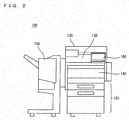
- Fig. 2 is a perspective view showing the appearance of the MFP in the present embodiment.
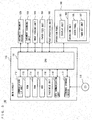
- Fig. 3 is a block diagram showing one example of a hardware configuration of the MFP in the present embodiment.
- the MFP 100 includes a main circuit 110, a document scanning unit 130 for scanning a document, an automatic document feeder 120 for conveying a document to the document scanning unit 130, an image forming unit 140 for forming an image on a sheet of paper or other medium based on image data output by the document scanning unit 130 that has scanned a document, a paper feed unit 150 for supplying sheets of paper to the image forming unit 140, a post-processing unit 155 for processing sheets of paper on which images have been formed, and an operation panel 160 serving as a user interface.
- the post-processing unit 155 performs a sorting process of sorting and discharging one or more sheets of paper on which images have been formed by the image forming unit 140, a punching process of punching the sheets and a stapling process of stapling the sheets.
- the main circuit 110 includes a CPU 111, a communication interface (I/F) unit 112 connected to the CPU 111, a ROM 113, a RAM 114, a Hard Disc Drive (HDD) 115, a facsimile unit 116, and an external storage device 117 and an NFC communication unit 119.
- the CPU 111 is connected to the automatic document feeder 120, the document scanning unit 130, the image forming unit 140, the paper feed unit 150, the post-processing unit 155, and the operation panel 160 and controls the entire MFP 100.
- the ROM 113 stores a program executed by the CPU 111 or data necessary for execution of the program.
- the RAM 114 is used as a work area when the CPU 111 executes a program. Further, the RAM 114 temporarily stores scan data (image data) successively transmitted from the document scanning unit 130.
- the operation panel 160 is provided on the upper surface of the MFP 100 and includes a display unit 161 and an operation unit 163.
- the display unit 161 is a display device such as a Liquid Crystal Display (LCD) or an organic ELD (Electro-Luminescence Display) and displays instruction menus to users, information about the acquired image data and other information.
- the operation unit 163 includes a hard key unit 167 including a plurality of keys and accepts input of a variety of instructions and data such as characters and numerals through operations that are performed by the user and correspond to the keys.
- the operation unit 163 further includes a touch panel 165 provided on the display unit 161.
- the HDD 115 is a mass storage device.
- the communication I/F unit 112 is an interface for connecting the MFP 100 to the network 3.
- the CPU 111 communicates with the smartphone 200 via the communication I/F unit 112 and transmits and receives data. Further, the communication I/F unit 112 can communicate with a computer connected to the Internet via the network 3.
- the facsimile unit 116 is connected to the Public Switched Telephone Networks (PSTN) and transmits facsimile data to or receives facsimile data from the PSTN.
- PSTN Public Switched Telephone Networks
- the facsimile unit 116 stores the received facsimile data in the HDD 115 or outputs the data to the image forming unit 140.
- the image forming unit 140 prints the facsimile data received by the facsimile unit 116 on a sheet of paper. Further, the facsimile unit 116 converts the data stored in the HDD 115 into facsimile data, and transmits the facsimile data to a facsimile machine connected to the PSTN.
- the external storage device 117 is mounted with a CD-ROM (Compact Disc ROM) 118.
- the CPU 111 can access the CD-ROM 118 via the external storage device 117.
- the CPU 111 loads a program, recorded in the CD-ROM 118 that is mounted on the external storage device 117, into the RAM 114 for execution. It is noted that the medium for storing the program executed by the CPU 111 is not limited to the CD-ROM 118.
- It may be an optical disc (MO (Magnetic Optical Disc)/MD (Mini Disc)/DVD (Digital Versatile Disc)), an IC card, an optical card, and a semiconductor memory such as a mask ROM, an EPROM (Erasable Programmable ROM) and an EEPROM (Electrically EPROM).
- the program executed by the CPU 111 is not restricted to the program recorded in the CD-ROM 118, and the CPU 111 may load a program, stored in the HDD 115, into the RAM 114 for execution.
- another computer connected to the network 3 may rewrite the program stored in the HDD 115 of the MFP 100, or may additionally write a new program therein.
- the MFP 100 may download a program from another computer connected to the network 3 and store the program in the HDD 115.
- the program referred to here includes not only a program directly executable by the CPU 111 but also a source program, a compressed program, an encrypted program or the like.
- Fig. 4 is a diagram showing one example of a detailed configuration of the NFC communication unit.
- the NFC communication unit 119 includes an NFC communication control unit 173, an NFC antenna 171 and a detection circuit 175.
- the NFC communication control unit 173 is connected to the NFC antenna 171.
- the NFC communication control unit 173 is controlled by the CPU 111 and wirelessly communicates with an external device, for example, the smartphone 200, using a short-range wireless communication system of NFC (Near Field Communication).
- a communicable distance for the NFC communication unit 119 is several centimeters.
- the NFC antenna 171 is arranged on an upper surface or a lower surface of a display surface of the display unit 161.
- the NFC antenna 171 may be formed on a substrate arranged below the display unit 161 or may be arranged above the display surface of the display unit 161. In the case where being arranged above the display surface of the display unit 161, the NFC antenna 171 is formed of a transparent material. Further, in the case where being arranged above the display surface of the display unit 161, the NFC antenna 171 may be arranged between the display unit 161 and the touch panel 165 or may be arranged on the touch panel 165.
- the detection circuit 175 In the case where the NFC antenna 171 receives radio waves of a predetermined frequency in order for the NFC communication unit 119 to communicate, the detection circuit 175 outputs a signal, indicating that the NFC communication unit 119 has become communicable with an external device, to the CPU 111.
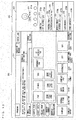
- Fig. 5 is a plan view of the operation panel.
- the operation panel 160 includes a display unit 161, a touch panel 165 and a hard key unit 167.
- the display surface of the display unit 161 and a detection surface of the touch panel 165 are superimposed on each other.
- An antenna region 171A is a region that overlaps with the NFC antenna 171 in the display surface of the display unit 161.
- the hard key unit 167 includes a plurality of hard keys.
- the hard keys are contact switches and are connected to the CPU 111.
- the hard keys are switched OFF while not being pressed by the user and are switched ON when pressed by the user.
- Fig. 6 is a block diagram showing an outline of the hardware configuration of the smartphone in the present embodiment.
- the smartphone 200 in the present embodiment includes a CPU 201 for controlling the entire smartphone 200, a camera 202, a flash memory for storing data in a non-volatile manner, a radio wireless communication unit 204 connected to a call unit 205, a display unit 206 for displaying information, an operation unit 207 for accepting operations by the user, a wireless LANI/F 208, an NFC communication unit 209, an acceleration sensor 210 and an external storage device 211.
- the display unit 206 is a display device such as a liquid crystal display device (LCD) and an organic ELD for displaying instruction menus to the user, information about the acquired image data, and the like.
- the operation unit 207 includes a main key 207A and a touch panel 207B. Further, in the case where the user designates a position in the display surface of the display unit 206, the operation unit 207 outputs a position in the display surface detected by the touch panel 207B to the CPU 201.
- the CPU 201 detects a position designated by the user in the screen displayed in the display unit 206 based on the position detected by the touch panel 207B.
- the CPU 201 accepts input of a variety of instructions and data such as characters and numerals through the operations by the user based on the screen displayed in the display unit 206 and the position detected by the touch panel 207B. For example, in the case where a screen including an image of ten keys is displayed in the display unit 206, the CPU 201 accepts numerals corresponding to the keys displayed at positions detected by the touch panel 207B.
- the camera 202 includes a lens and an optoelectronic transducer and forms an image of light collected by the lens on the optoelectronic transducer.
- the optoelectronic transducer transduces the received light and outputs the image data to the CPU 201.
- the optoelectronic transducer is a CMOS (Complementary Metal Oxide Semiconductor) sensor, a CCD (Charge Coupled Device) sensor or the like.
- the radio communication unit 204 communicates by radio with the mobile phone base station connected to a telephone communication network.
- the radio communication unit 204 connects the smartphone 200 to the telephone communication network to enable a call using the call unit 205.
- the radio communication unit 204 decodes a voice signal obtained by demodulation of a radio signal received from the mobile phone base station and outputs the decoded signal to the call unit 205. Further, the radio communication unit 204 encodes voice input from the call unit 205 and transmits the encoded voice to the mobile phone base station.
- the call unit 205 includes a microphone and a speaker. The voice input from the radio communication unit 204 is output from the speaker, and the voice input from the microphone is output to the radio communication unit 204. Further, the radio communication unit 204 is controlled by the CPU 201 and connects the smartphone 200 to an email server to transmit and receive emails.
- the wireless LANI/F 208 is an interface for communicating with the radio station 5 and connecting the smartphone 200 to the network 3.
- An IP (Internet Protocol) address of the MFP 100 is registered in the smartphone 200, so that the smartphone 200 can communicate with the MFP 100 and can transmit and receive data.
- the NFC communication unit 209 wirelessly communicates with the MFP 100 using a short-range wireless communication system of NFC. When a distance from the MFP 100 is equal to or less than a communicable distance for example, the NFC communication unit 209 communicates with the MFP 100.
- the communicable distance for the NFC communication unit 209 is several centimeters.
- the acceleration sensor 210 is a three-axis acceleration sensor that measures acceleration in three directions of an X axis, a Y axis and a Z axis.
- the acceleration sensor 210 outputs the detected acceleration to the CPU 201.
- the flash memory 203 stores a program executed by the CPU 201 or data required for execution of the program.
- the CPU 201 loads the program recorded in the flash memory 203 into the RAM included in the CPU 201 for execution.
- the external storage device 211 is attachable to and detachable from the smartphone 200.
- a CD-ROM 211A storing a remote operation program can be mounted on the external storage device 211.
- the CPU 201 can access the CD-ROM 211A via the external storage device 211.
- the CPU 201 can load the remote operation program recorded in the CD-ROM 211A mounted on the external storage device 211 into the RAM included in the CPU 201 for execution.
- the program recorded in the flash memory 203 or the CD-ROM 211A has been described as a program executed by the CPU 201.
- another computer connected to the network 3 may rewrite the program stored in the flash memory 203 or additionally write a new program therein.
- the smartphone 200 may download a program from another computer connected to the network 3.
- the program referred to here includes not only a program directly executable by the CPU 201 but also a source program, a compressed program, an encrypted program and the like.
- the program executed by the CPU 201 may be stored not only in the CD-ROM 211A but also in another medium such as an optical disc (MO/MD/DVD), an IC card, an optical card, and a semiconductor memory such as a mask ROM, an EPROM, and an EEPROM.
- an optical disc MO/MD/DVD
- IC card an integrated circuit card
- optical card an optical card
- semiconductor memory such as a mask ROM, an EPROM, and an EEPROM.
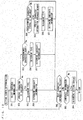
- Fig. 7 is a block diagram showing one example of functions of the CPU included in the MFP in the present embodiment.
- the functions shown in Fig. 7 are formed in the CPU 111 in the case where the CPU 111 included in the MFP 100 executes a setting-value setting program stored in the ROM 113, the HDD 115 or the CD-ROM 118.
- Each function of the CPU 111 shown in Fig. 7 executes a predetermined process corresponding to the input and outputs a result of the process. Therefore, each function of the CPU 111 can be realized by an electronic circuit using a relay or the like. Referring to the Fig.
- the CPU 111 includes an image acquiring portion 51, an analyzing portion 53, an extracting portion 55, a terminal image displaying portion 57, an instruction image displaying portion 59, an operation accepting portion 61, a setting screen displaying portion 63, a setting-value determining portion 65 and a process execution portion 67.
- the image acquiring portion 51 communicates with the smartphone 200 and acquires an image displayed in the display unit 206. For example, when detecting that the NFC communication unit 119 has become communicable with another device, the image acquiring portion 51 controls the communication I/F unit 112 and establishes a communication path with the smartphone 200.
- the frequency of radio waves for the NFC communication unit 119 to communicate with the other device is defined in advance. Therefore, in the case where receiving the radio waves of the predetermined frequency, the NFC communication unit 119 becomes communicable with the other device.
- the communication I/F unit 112 receives an image transmitted by the smartphone 200.
- the image acquiring portion 51 acquires the image received by the communication I/F unit 112 from the smartphone 200 as a terminal image.
- the image acquiring portion 51 outputs the terminal image acquired from the smartphone 200 to the analyzing portion 53 and the terminal image displaying portion 57. Therefore, the smartphone 200 does not have to communicate with the MFP 100 and install a specific application program that is compatible with the specification of the MFP 100 in order for the MFP 100 to acquire the terminal image from the smartphone 200.
- the setting screen displaying portion 63 controls the display unit 161 and displays a setting screen stored in the HDD 115 in a predetermined first region in the display surface of the display unit 161.
- the setting screen includes a screen for setting a setting value in order for the user to cause the MFP 100 to execute a process.
- the setting value is a value used for execution of the process by the process execution portion 67.
- the setting screen displaying portion 63 outputs screen identification information for identifying the displayed setting screen to the extracting portion 55 and the setting-value determining portion 65.
- the terminal image displaying portion 57 displays the terminal image in the display unit 161.
- the terminal image displaying portion 57 displays the terminal image in a predetermined second region in the display surface of the display unit 161. The second region does not overlap with the first region.
- the operation accepting portion 61 controls the operation unit 163 and accepts an operation of inputting in the operation unit 163 by the user.
- the operation accepting portion 61 outputs the accepted operation to the analyzing portion 53, the setting screen displaying portion 63 and the setting-value determining portion 65.
- the operation accepting portion 61 accepts a setting operation of setting the setting value.
- the setting-value determining portion 65 determines the setting value that is specified by the accepted setting operation.
- the setting-value determining portion 65 outputs the determined setting value to the process execution portion 67.
- the touch panel 165 detects a position in the region for the input of the setting value in the setting screen and accepts a region designating operation.
- the setting-value determining portion 65 When accepting the region designating operation, the setting-value determining portion 65 sets a type, of a setting value corresponding to the region specified by the region designating operation, as a process target. Then, in the case where the user inputs a setting value in the operation unit 163, the setting-value determining portion 65 determines that the setting value accepted by the operation unit 163 is the setting value of the type that is set as the process target. For example, it is determined that a numerical text string that is input when the user operates the hard key unit 167 is a setting value. Further, a keyboard is displayed in the display unit 161, and characters assigned to keys corresponding to positions detected by the touch panel 165 are accepted. Then, the setting-value determining portion 65 determines that a string of the plurality of accepted characters is the setting value.
- the process execution portion 67 executes a process in accordance with the setting value determined by the setting-value determining portion 65.
- the operation accepting portion 61 accepts an execution instructing operation.
- the processes executable by the process execution portion 67 includes a document scanning process, an image forming process, a data transmission reception process, a facsimile transmission reception process and a data management process, for example.
- the processes executable by the process execution portion 67 include a process that is a combination of at least two of the document scanning process, the image forming process, the data transmission reception process, the facsimile transmission reception process and the data management process.
- the processes executable by the process execution portion 67 are not limited to these, and may include less types of processes or more types of processes.
- the document scanning process is a process of storing image data, which is acquired when the document scanning unit 130 scans a document, in the RAM 114.
- Setting values used for execution of the document scanning process include whether one side or both sides of the document are to be scanned, whether the document is in color or monochrome, resolution for scanning, image quality, darkness, presence or absence of marks or page numbers, whether a frame that is present around the scanned image is to be deleted, whether an image process such as sharpening is to be executed, a format and a name of a file of image data stored in the RAM 114, a size of the document, the number of documents and a type of the document.
- the types of the document includes a document in mixed-size and a book document indicating the formation of a plurality of pages.
- the image forming process is a process of causing the image forming unit 140 to form an image of data on a sheet of paper that is supplied from the paper feed unit 150.
- Setting values used for execution of the image forming process include whether an image is printed in color or monochrome, a size of paper, a type of paper, the number of copies, designation of a paper feed tray, absence or presence of a post-process, a side of the sheet on which an image is formed (simplex or duplex) and orientation of a document, for example.
- the post-processes include sorting, stapling, punching and the like.
- the data transmission reception process is a process of receiving data from a computer connected to a network via the communication I/F unit 112, or a process of transmitting data stored in the HDD 115 or the external storage device 117 to the computer connected to the network via the communication I/F unit 112.
- Setting values used for execution of the data transmission reception process include transmission destination of data, resolution of data, whether the data is in color or monochrome and a file format, for example.
- the transmission destination of the data includes an email address and an IP (Internet Protocol) address, for example.
- the facsimile transmission reception process is a process of causing the facsimile unit 116 to transmit an image of facsimile data, or a process of externally receiving an image of facsimile data.
- a setting value used for execution of the facsimile transmission reception process includes the facsimile number, for example.
- the data management process is a process of storing data in the HDD 115 or the external storage device 117, a process of changing or deleting the data stored in the HDD 115 or the external storage device 117, and a process of selecting one or more pieces of data from among pieces of data stored in the HDD 115 or the external storage device 117 as the data to be processed.
- the process of changing data includes a process of editing data and a process of changing a format.
- Setting values used for execution of the data management process are a folder name required for creation of a folder in the HDD 115, a password set for the folder, a search character string for searching data, a type of the folder and the time when the document is to be deleted, for example.
- the analyzing portion 53 receives an terminal image from the image acquiring portion 51 and analyzes the terminal image. In response to reception of a start instructing operation by the operation accepting portion 61, the analyzing portion 53 analyzes the terminal image. In the case where the user inputs an operation of instructing the operation unit 163 to start analyzing, the operation accepting portion 61 accepts the start instructing operation. For example, in the case where a terminal image is displayed in the display unit 161 by the terminal image displaying portion 57, the operation accepting portion 61 displays a start instructing button to which a start instruction is assigned in the display unit 161. When a position in the start instructing button is designated by the user, and the touch panel 165 detects the position in the start instructing button, the operation accepting portion 61 accepts the start instructing operation.
- the analyzing portion 53 analyzes a region specified by the region designating operation in the terminal image.
- the operation accepting portion 61 accepts the region designating operation. For example, with the terminal image displayed in the display unit 161 by the terminal image displaying portion 57, when the touch panel 165 detects that any two locations in the terminal image are simultaneously designated by the user, the operation accepting portion 61 accepts the region designating operation of specifying the two simultaneously designated locations by the touch panel 165.
- the touch panel 165 specifies the two last detected locations with which the two fingers are respectively in contact and accepts the region designating operation of designating the two locations last detected by the touch panel 165. Further, in the case where the touch panel 165 detects two locations at different time points, the operation accepting portion 61 accepts the region designating operation of specifying two locations detected by the touch panel 165 at different time points.
- the analyzing portion 53 specifies a rectangular region having two locations diagonally located from each other and specified by the region designating operation, and analyzes an image in the specified region in the terminal image. In the case where the operation accepting portion 61 accepts the region designating operation before accepting the start instructing operation, the analyzing portion 53 analyzes the region specified by the region designating operation in the terminal image. In the case where the operation accepting portion 61 has not accepted the region designating operation before accepting the start instructing operation, the analyzing portion 53 analyzes the entire terminal image.
- the analyzing portion 53 includes a character recognizing portion 71 and a character information determining portion 73.
- the character recognizing portion 71 recognizes characters in the terminal image. In the case where the operation accepting portion 61 accepts the region designating operation before accepting the start instructing operation, the character recognizing portion 71 recognizes the characters in the region specified by the region designating operation in the terminal image. In the case where the operation accepting portion 61 has not accepted the region designating operation before accepting the start instructing operation, the character recognizing portion 71 recognizes the characters in the entire terminal image.
- the analyzing portion 53 extracts images of the characters included in the terminal image, and converts the extracted images of characters into characters.
- the characters includes alphabets, numerals, hiragana characters, katakana characters, kanji characters and symbols, and are text data.
- the symbols include "-", "@", "*” and the like.
- the character recognizing portion 71 outputs a set of characters and position information to the character information determining portion 73.
- the position information is the information indicating the positions of the images corresponding to the characters in the terminal image.
- the character information determining portion 73 determines character information from a set of the characters and the position information received from the character recognizing portion 71.
- the character information is a string of two or more characters.
- the character information determining portion 73 determines relative positions of two or more images respectively corresponding to two or more characters based on positions in the terminal image specified by respective pieces of position information of the two or more characters, and determines one piece of character information including the two or more characters respectively corresponding to the two or more images that are located at predetermined relative positions.
- the relative positions of the two or more characters that constitute the character information are determined based on the positions of the images corresponding to the characters in the terminal screen. Further, the relative positions of the two or more characters that constitute the character information are defined by a distance between two images respectively corresponding to the two characters and a direction in which the two images are arranged. For example, one piece of character information including two or more characters with no spacing between adjacent two characters is determined. Specifically, in the case where a distance between the two images respectively corresponding to the two characters is equal to or smaller than a size of each of the two images respectively corresponding to the two characters, one piece of character information including at least the two characters is determined. Further, one piece of character information including at least two or more characters arranged in one direction is determined.
- one piece of character information including at least three or more characters is determined.
- the character information determining portion 73 outputs one or more pieces of determined character information to the instruction image displaying portion 59 and the extracting portion 55.
- the instruction image displaying portion 59 displays instruction images respectively corresponding to the one or more pieces of character information in a portion corresponding to the one or more pieces of character information in the terminal image displayed in the second region of the display unit 161.
- the instruction image is a rectangular image surrounding a portion corresponding to the character information in the terminal image.
- the portion corresponding to the character information includes all of a plurality of images respectively corresponding to a plurality of characters that constitute the character information in the terminal image.
- the instruction image displaying portion 59 displays a plurality of instruction images respectively corresponding to the plurality of pieces of character information in the display unit 161.
- the extracting portion 55 extracts one or more pieces of character information from among the one or more pieces of character information received from the character information determining portion 73 for each type of a setting value as candidate information.
- the extracting portion 55 outputs a set of the candidate information and the type of the setting value to the setting-value determining portion 65 for each of the one or more pieces of candidate information extracted for each type of the setting value.
- the extracting portion 55 includes a special character extracting portion 75, a character count extracting portion 77, a default character extracting portion 79, a setting-value information determining portion 81 and an instruction extracting portion 83.
- the setting-value information determining portion 81 determines a type of a setting value.
- the setting-value information determining portion 81 determines a type of a setting value that can be accepted in the setting screen specified by the screen identification information. In the case where it is defined that a plurality of setting values are to be accepted in the setting screen, the setting-value information determining portion 81 respectively determines types of the plurality of setting values.
- the special character extracting portion 75 extracts character information including a special character as candidate information for the type of the setting value including a predetermined special character. For example, when the type of the setting value is an email address, a special character "@" is included. Therefore, the special character "@” is defined in advance for the type "the email address" of the setting value.
- the special character extracting portion 75 extracts all pieces of character information including the special character "@” from among the one or more pieces of character information received from the character information determining portion 73 as the candidate information for the type "email address" of the setting value, and outputs a set of the extracted candidate information and the type "email address" of the setting value to the setting-value determining portion 65.
- the special character extracting portion 75 extracts the character information including a predetermined special character for the type of the setting value including the special character as the candidate information. In the case where the type of the setting value including the special character is not determined by the setting-value information determining portion 81, the special character extracting portion 75 sometimes extract the candidate information for the type of the setting value including the special character.
- the special character extracting portion 75 extracts the character information including the special character "@" as the candidate information corresponding to the type "the email address" of the setting value including the special character.
- the special character extracting portion 75 outputs a display instruction to the setting screen displaying portion 63.
- the display instruction includes the type, of the setting value including the special character, which is the type of the extracted candidate information.
- the character count extracting portion 77 extracts character information including a predetermined character count of characters as candidate information for a type of a setting value including the predetermined character count of characters. For example, because a character count for a setting value of the facsimile number is "10", the character count "10" is defined in advance for the type "facsimile number" of the setting value.
- the character count extracting portion 77 extracts the character information including 10 characters from among the one or more pieces of character information received from the character information determining portion 73 as the candidate information for the type of the setting value including the predetermined character count of characters, and outputs a set of the extracted candidate information and the type "facsimile number" of the setting value to the setting-value determining portion 65.
- the character count extracting portion 77 extracts the character information including the predetermined character count of characters as the candidate information for the type of the setting value including the predetermined character count of characters. In the case where the type of the setting value including the predetermined character count of characters is not determined by the setting-value information determining portion 81, the character count extracting portion 77 sometimes extracts the candidate information for the type of the setting value including the predetermined character count of characters.
- the character count extracting portion 77 extracts the character information including the character count "10" of characters as the candidate information for the type of the setting value including the predetermined character count of characters.
- the character count extracting portion 77 outputs a display instruction to the setting screen displaying portion 63.
- the display instruction includes a type, of the setting value including the predetermined character count of characters, which is the type of the extracted candidate information.
- the default character extracting portion 79 extracts character information arranged in the vicinity of character information including a default character string, which is a predetermined character string for a type of a setting value, as the candidate information.
- a setting value for the type "facsimile number" of the setting value is sometimes arranged in the vicinity of a character string "FAX", so that the default character string "FAX" is defined in advance for the type "facsimile number" of the setting value.
- the default character extracting portion 79 extracts the character information arranged in the vicinity of the character information including the default character string "FAX" from among one or more pieces of character information received from the character information determining portion 73 as the candidate information for the type of the setting value arranged in the vicinity of the default character string, and outputs a set of the extracted candidate information and the type of the setting value arranged in the vicinity of the default character string to the setting-value determining portion 65.
- the default character extracting portion 79 extracts the character information arranged in the vicinity of the character information including a predetermined default character string as the candidate information for the type of the setting value arranged in the vicinity of the default character string.
- the default character extracting portion 79 sometimes extracts the candidate information for the type of the setting value arranged in the vicinity of the default character string.
- the character count extracting portion 77 extracts the character information arranged in the vicinity of the character information including the default character string "FAX" as the candidate information.
- the default character extracting portion 79 extracts the candidate information for the type of the setting value arranged in the vicinity of the default character string, the default character extracting portion 79 outputs a display instruction to the setting screen displaying portion 63.
- the display instruction includes a type, of the setting value arranged in the vicinity of the default character string, which is the type of the extracted candidate information.
- the setting-value determining portion 65 determines a set including the type that is the same as any one of the types of the setting values defined by the setting screen specified by the screen identification information from among the sets of the candidate information and the setting value received from the extracting portion 55. In the case where one set is selected, the setting-value determining portion 65 determines that the candidate information included in the set is the setting value for the type that makes a set with the candidate information. In other words, in the case where one candidate information corresponds to one type, the setting-value determining portion 65 determines that the candidate information is the setting value for the type.
- the setting-value determining portion 65 sometimes sets a type of a setting value to be input by the user. In the case where a region where a setting value is to be input in a setting screen is designated by the user, the setting-value determining portion 65 sets the type of the setting value to be input in the region designated by the user as a process target.
- the instruction extracting portion 83 extracts the character information corresponding to the instruction image from among one or more pieces of character information received from the character information determining portion 73 as the candidate information, and outputs a set of the extracted candidate information and the type, which is the process target, to the setting-value determining portion 65.
- the setting-value determining portion 65 determines that the candidate information is the setting value for the type, which is the process target.
- the setting screen displaying portion 63 determines a setting screen for setting a setting value of a type included in the display instruction from among a plurality of setting screens, and displays the determined setting screen in the first region of the display unit 161.
- Fig. 8 is a flow chart showing one example of a flow of a setting-value setting process in the present embodiment.
- the setting-value setting process is a process executed by the CPU 111 in the case where the CPU 111 included in the MFP 100 executes a setting-value setting program stored in the ROM 113, the HDD 115 or the CD-ROM 118.
- the CPU 111 displays the setting screen in the display unit 161 (step S01).
- the CPU 111 displays one of a plurality of setting screens stored in the HDD 115 in the display unit 161.
- a predetermined setting screen among the plurality of setting screens may be displayed, or a setting screen defined by an operation of inputting in the operation unit 163 by the user may be displayed.
- a hard key to which a setting screen for the copy process is assigned is designated from among a plurality of hard keys included in the hard key unit 167 of the operation unit 163, a setting screen assigned to the hard key is displayed.
- a type of the setting value is set as a process target, and the process proceeds to the step S03.
- the CPU 111 sets a predetermined type of the setting screen among the one or more types of the setting values to be defined in the setting screen displayed in the display unit 161 in the step S01 as the process target.
- the CPU 111 determines whether the NFC communication unit 119 has detected another device. If the NFC communication unit 119 receives radio waves of a predetermined frequency, it is determined that another device has been detected. For example, when the smartphone 200 carried by the user is brought close to the antenna of the NFC communication unit 119, the NFC communication unit 119 detects the radio waves of the frequency transmitted from the smartphone 200. Thus, the smartphone 200 is detected. If the NFC communication unit 119 detects another device, the process proceeds to the step S04. If not, the process proceeds to the step S05. The case where the NFC communication unit 119 detects the smartphone 200 will be described below as an example.
- a communication path is established with the device, detected in the step S03, which is the smartphone 200 in this case.
- the CPU 111 controls the communication I/F unit 112 and establishes the communication path with the smartphone 200. Then, the CPU 111 determines whether a terminal image has been received from the smartphone 200. In the case where an application program for transmitting an image displayed in the display unit 206 is executed in the smartphone 200, the smartphone 200 transmits the image displayed in the display unit 206 via the communication path established in the step S04. Thus, the communication I/F unit 112 receives the image transmitted from the smartphone 200 as the terminal image. If the communication I/F unit 112 has received the terminal image, the process proceeds to the step S06. If not, the process proceeds to the step S13. In the case where the communication path is not established with the smartphone 200 in the step S04, the CPU 111 cannot communicate with the smartphone 200. Thus, the process proceeds to the step S13.
- step S06 the terminal image is displayed in the second region of the display unit 161, and the process proceeds to the step S07.
- step S07 characters in the terminal image are recognized, and the process proceeds to the step S08.
- a partial region in the terminal image is designated by the user
- characters in the region designated by the user in the terminal image are recognized.
- a start button may be superimposed on the terminal image, and the characters may be recognized in response to the designation of the start button by the user.
- the CPU 111 determines the character information.
- the CPU 111 determines the character information, which is a group of a plurality of successive characters extracted from the terminal image by the character recognition.
- the CPU 111 determines the character information including the plurality of characters that belong to the same group based on positions of the images corresponding to the characters in the terminal image.
- the CPU 111 determines that the plurality of characters belong to the same group based on a relative positional relationship among the plurality of images respectively corresponding to the plurality of characters.
- the relative positional relationship is defined by distances between adjacent two images of the plurality of images and an arrangement direction. Specifically, the CPU 111 determines that the plurality of characters respectively corresponding to the plurality of images arranged in the one direction at predetermined intervals belong to the same group and constitutes the character information.
- an instruction image corresponding to the character information is displayed in the display unit 161.
- the instruction image corresponds to the character information and surrounds the images corresponding to the plurality of characters that constitute the character information.
- the instruction image is a red rectangular image. Therefore, the instruction image is an image defining the size and a position in the terminal image.
- the CPU 111 executes an extraction setting process, and the process proceeds to the step S11. While details of the extraction setting process will be described below, the extraction setting process is a process of determining the candidate information, which is a candidate for the setting value, from the character information extracted from the terminal image, and setting a setting value for each type, of the setting value, defined in the operation screen.
- the extraction setting process is a process of determining the candidate information, which is a candidate for the setting value, from the character information extracted from the terminal image, and setting a setting value for each type, of the setting value, defined in the operation screen.
- the step S11 as a result of execution of the extraction setting process, it is determined whether the candidate information has been determined. If the candidate information has been determined, the process proceeds to the step S13. If not, the process proceeds to the step S12.
- the case where the candidate information is not determined in the extraction setting process is the case where the character information, which is a candidate for the setting value to be set in the setting screen displayed in the display unit 161 in the step S01, is not present in the terminal image.
- the CPU 111 executes a setting screen determining process, and the process returns to the step S01. The details of the setting screen determining process will be described below.
- the CPU 111 determines whether an operation has been accepted. If the operation unit 163 has accepted the operation of inputting by the user, the process proceeds to the step S14. If not, the process returns to the step S03. In the step S14, the process branches depending on a type of the operation. If the operation input by the user is the region designating operation, the process proceeds to the step S15. If the operation input by the user is an instruction image designating operation of designating an instruction image, the process proceeds to the step S16. If the operation input by the user is the setting-value setting operation of setting a setting value, the process proceeds to the step S19. If the operation input by the user is a screen transition operation of switching a setting screen to another setting screen, the process proceeds to the step S21. If the operation input by the user is the execution instructing operation of instructing the execution of a process, the process proceeds to the step S24.
- a type, of the setting value, which is a process target is determined in the step S15, and the process returns to the step S03.
- the CPU 111 specifies the type of the setting value set in a region specified by the region designating operation from among regions for setting the setting values included in the setting screen displayed in the display unit 161, and sets the specified type as the process target.
- the CPU 111 determines the character information corresponding to the instruction image.
- the CPU 111 determines that the character information is the candidate information for the type, of the setting value, which is set as the process target. Then, the CPU 111 determines that the candidate information is the setting value (step S18), and the process returns to the step S03.
- the candidate information is displayed in a region where the setting value is to be input and which is set as the process target in the setting screen displayed in the display unit 161.
- the CPU 111 accepts the setting value defined by the setting-value setting operation, and the process proceeds to the step S20.
- the CPU 111 sets the setting value accepted in the step S19 as the setting value of the type, which is set as the process target, and the process returns to the step S03.
- the setting value accepted in the step S19 is displayed in a region where the setting value is input and which is set as the process target in the setting screen displayed in the display unit 161.
- the CPU 111 determines a setting screen specified by the screen transition operation.
- the screen transition operation is accepted in the case where a screen transition button included in the setting screen is designated by the user, for example.
- the screen transition button is associated with the setting screen.
- the CPU 111 selects the setting screen associated with the screen transition button designated by the user.
- the step S22 the setting screen determined in the step S21 is displayed in the first region of the display unit 161, and the process proceeds to the step S23.
- the CPU 111 sets one of a plurality of types of the setting values defined in the setting screen determined in the step S21 as a process target, and the process returns to the step S03.
- the CPU 111 executes the process specified by the execution instructing operation in accordance with the setting value, and the process ends.
- Fig. 9 is a flow chart showing one example of a flow of the extraction setting process.
- the extraction setting process is a process executed in the step S10 of Fig. 8 .
- the CPU 111 determines the setting value information.
- the setting value information is the information indicating a type of a setting value.
- the type, of the setting value, which can be accepted in the setting screen displayed in the display unit 161 is determined as the setting value information.
- the CPU 111 selects one piece of setting value information from among the pieces of setting value information determined in the step S31 as a process target, and the process proceeds to the step S33.
- the CPU 111 determines whether the type, of the setting value, indicated by the setting value information includes a special character. For example, in the case where the type of the setting value is an email address, "@" is included as a special character. If the special character is included, the process proceeds to the step S34. If not, the process proceeds to the step S38. In the step S34, the CPU 111 determines whether the character information including the special character is present. One or more pieces of character information is determined in the step S08 from the terminal image received from the smartphone 200. If the character information including the special character is present among the one or more pieces of character information, the character information including the special character is determined as the candidate information, and the process proceeds to the step S35.
- a special character For example, in the case where the type of the setting value is an email address, "@" is included as a special character. If the special character is included, the process proceeds to the step S34. If not, the process proceeds to the step S38. In the step S34, the CPU 111 determines whether the character information
- the process proceeds to the step S48.
- the setting value information selected in the step S32 indicates an email address as the type of the setting value
- the process proceeds to the step S35.
- the CPU 111 determines that the character information including the special character "@" is the candidate information for the type, of the setting value, indicated by the setting value information selected in the step S32, and the process proceeds to the step S36.
- the CPU 111 determines whether one piece of candidate information is present for the type, of the setting value, indicated by the setting value information selected in the step S32. If the one piece of candidate information is present, the process proceeds to the step S37. If not, the process proceeds to the step S48. In the step S37, the CPU 111 determines that the candidate information is the setting value for the type, of the setting value, indicated by the setting value information selected in the step S32, and the process proceeds to the step S48.
- the candidate information determined as the setting value is displayed in a region where a setting value for the type, of the setting value, indicated by the setting value information selected in the step S32 is to be input in the setting screen displayed in the display unit 161.
- the CPU 111 determines whether the character count of the setting value of the type indicated by the setting value information is constant. For example, in the case where the type of the setting value is the facsimile number, the character count of the facsimile number is "10" and constant. If the character count is constant, the process proceeds to the step S39. If not, the process proceeds to the step S48. In the step S39, the CPU 111 determines whether the character information, including the same character count of characters as the character count defined by the type, of the setting value, indicated by the setting value information, is present.
- the process proceeds to the step S40. If not, the process proceeds to the step S48.
- the setting value information selected in the step S32 indicates the facsimile number as the type of the setting value
- the process proceeds to the step S40.
- the CPU 111 determines that the character information including the same character count of characters as the character count defined by the type of the setting value is the candidate information, and the process proceeds to the step S41.
- the CPU 111 determines whether one piece of candidate information for the type, of the setting value, indicated by the setting value information selected in the step S32 is present. If the one piece of candidate information is present, the process proceeds to the step S42. If not, the process proceeds to the step S48. In the step S42, the CPU 111 determines that the candidate information is the setting value for the type, of the setting value, indicated by the setting value information selected in the step S32, and the process proceeds to the step S48.
- the candidate information determined as the setting value is displayed in a region where a setting value for the type, of the setting value, indicated by the setting value information selected in the step S32 is to be input in the setting screen displayed in the display unit 161.
- the CPU 111 determines whether the character information including a predetermined character string is present for the type, of the setting value, indicated by the setting value information. If the character information including a predetermined character string for the type, of the setting value, indicated by the setting value information is present, the character information is extracted, and the process proceeds to the step S44. If not, the process proceeds to the step S48.
- the type of the setting value is the facsimile number
- the character string "FAX" is defined in advance. If the character information including the character string "FAX" is present among the one or more pieces of character information determined by the terminal image received from the smartphone 200, the character information is extracted, and the process proceeds to the step S44.
- the character string "email" is defined in advance. If the character information including the character string "email" is present among the one or more pieces of character information determined by the terminal image received from the smartphone 200, the character information is extracted, and the process proceeds to the step S44.
- the CPU 111 determines the character information arranged in the vicinity of the character information extracted in the step S43, and the process proceeds to the step S45.
- the CPU 111 determines whether another piece of character information is present within a predetermined range from the character information extracted in the step S43. If another piece of character information is present, the process proceeds to the step S45. If not, the process proceeds to the step S48.
- the character information arranged in the vicinity of the character information extracted in the step S43 is determined as the candidate information for the type, of the setting value, indicated by the setting value information selected in the step S32, and the process proceeds to the step S46.
- the type of the setting value is the facsimile number
- the character information arranged in the vicinity of the character information including the character string "FAX" is considered to be the facsimile number, and is determined as the candidate information.
- the type of the setting value is the email address
- the character information arranged in the vicinity of the character information including the character string "email" is considered to be an email address, and determined as the candidate information.
- the CPU 111 determines whether one piece of candidate information is present for the type, of the setting value, indicated by the setting value information selected in the step S32. If one piece of candidate information is present, the process proceeds to the step S47. If not, the process proceeds to the step S48.
- the candidate information is determined as the setting value, and the process proceeds to the step S48. In the case where the candidate information is determined as the setting value, the candidate information determined as the setting value is displayed in a region where the setting value for the type, of the setting value, indicated by the setting value information selected in the step S32 is input in the setting screen displayed in the display unit 161.
- the CPU 111 determines whether the setting value information that is not selected as a process target in the step S32 is present. If the unselected setting value information is present, the process returns to the step S32. If not, the process returns to the setting-value setting process.
- Fig. 10 is a flow chart showing one example of a flow of the setting screen determining process.
- the setting screen determining process is a process performed in the step S12 of Fig. 8 .
- the character information is determined in the step S08, which is a stage prior to the step S12.
- the CPU 111 selects one piece of character information from among pieces of character information as a process target (step S51). In the case where the instruction image is designated by the user, the CPU 111 selects the character information corresponding to the designated instruction image as the process target. In the case where an instruction image is not designated by the user, the CPU 111 may select any one of them.
- the CPU 111 determines whether the piece of character information selected as the process target includes a special character. If the character information includes a special character, the process proceeds to the step S53. If not, the process proceeds to the step S55.
- the special character "@" is defined for the type "email address" of the setting value. If the character information includes the special character "@”, the process proceeds to the step S53.
- the CPU 111 determines the type, of the setting value, corresponding to the special character, and the process proceeds to the step S54. In the case where the special character is "@", the CPU 111 determines that the type of the setting value is an email address.
- the character information selected as the process target in the step S51 is determined as the candidate information for the type of the setting value determined in the step S53, and the process proceeds to the step S62.
- the CPU 111 determines whether the character count of the character information selected as the process target is a predetermined character count. If the character count of the character information selected as the process target is the predetermined character count, the process proceeds to the step S56. If not, the process proceeds to the step S58. For example, in the case where the type of the setting value is the facsimile number, the character count of the facsimile number is "10" and constant. If the character count of the character information is "10", which is the same as the predetermined character count of the facsimile number, the process proceeds to the step S56. Also, in the case where the type of the setting value is the facsimile number, a condition that the character information is in numerals may be added.
- the CPU 111 determines the type, of the setting value, corresponding to the predetermined character count, and the process proceeds to the step S54. In the case where the character count is "10", the CPU 111 determines that the type of the setting value is the facsimile number. In the step S57, the CPU 111 determines that the character information selected as the process target in the step S51 is the candidate information for the type, of the setting value, determined in the step S56, and the process proceeds to the step S62.
- the CPU 111 determines whether the character information selected as the process target includes a predetermined character string. If the character information selected as the process target includes the predetermined character string, the process proceeds to the step S59. If not, the process proceeds to the step S62.
- the character string "FAX” is defined in advance for the type "facsimile number" of the setting value. If the character information includes the predetermined character string "FAX" of the facsimile number, the process proceeds to the step S59. Further, the character string "email” is defined in advance for the type "email address" of the setting value. If the character information includes the predetermined character string "email" of the email address, the process proceeds to the step S59.
- the CPU 111 specifies the character information arranged in the vicinity of the character information. Then, the CPU 111 determines the type, of the setting value, corresponding to the predetermined character string (step S60). If the predetermined character string is "FAX”, it is determined that the type of the setting value is the facsimile number. If the predetermined character string is "email”, it is determined that the type of the setting value is an email address. In the next step S61, the CPU 111 determines that the character information arranged in the vicinity of the character information selected as the process target in the step S51 is the candidate information for the type, of the setting value, determined in the step S60, and the process proceeds to the step S62.
- the CPU 111 determines whether the character information not selected as the process target in the step S51 is present. If the unselected character information is present, the process returns to the step S51. If not, the process proceeds to the step S63. In the step S63, the CPU 111 determines whether the candidate information has been determined. If the candidate information has been determined, the process proceeds to the step S64. If not, the process returns to the setting-value setting process. In the step S64, the CPU 111 determines the setting screen for defining the type, of the setting value, corresponding to the candidate information, and the process returns to the setting-value setting process.
- the setting information, the candidate information and the setting screen are determined when the setting screen determining process is executed in the step S12.
- the CPU 111 displays the setting screen, which is determined by the setting screen determining process and in which the candidate information determined by the setting screen determining process is displayed in a region where the setting value for the type, of the setting value, indicated by the setting value information determined by the setting screen determining process is input, in the display unit 161.
- the processes in the step S02 and the subsequent steps are performed for a setting screen newly displayed in the display unit 161.
- the step S01 is not performed, but the processes in the step S03 and the subsequent steps may be performed.
- Fig. 11 is a first diagram showing one example of an image displayed in the MFP.
- the display unit 161 includes a first region 351 and a second region 353.
- a setting screen 311 is displayed in the first region 351, and a terminal image 411 is displayed in the second region 353.
- the setting screen 311 includes a plurality of transition buttons respectively associated with a plurality of other setting screens. For example, a transition button in which "FAX" is displayed is associated with the setting screen for setting the facsimile number, and a transition button in which "E-mail" is displayed is associated with the setting screen for setting the email address.
- the terminal image 411 is a screen for notifying the user that the MFP can operate in cooperation with a mobile device, and includes an indication image 413 arranged in an antenna region 171A.
- the indication image 413 is an indication indicating a position of the NFC antenna 171.
- the user may bring the smartphone 200 close to the position at which the indication image 413 is displayed in order to cause the smartphone 200 and the MFP 100 to operate in cooperation with each other.
- the user can easily cause the smartphone 200 and the MFP 100 to operate in cooperation with each other.
- Fig. 12 is a second diagram showing one example of an image displayed in the MFP.
- Fig. 12 with the image shown in Fig. 11 displayed in the display unit 161, an image displayed after the smartphone 200 is brought close to the position of the indication image 413 is shown.
- a setting screen 311 is displayed in the first region 351 of the display unit 161, and a terminal image 421 and a start button 423 are displayed in the second region of the display unit 161.
- the setting screen 311 is the image that is the same as the image displayed in the first region 351 shown in Fig. 11 .
- the terminal image 421 is an image that is the same as an image displayed in the display unit 206 of the smartphone 200.
- the terminal image 421 includes 9 pieces of character information 371 to 379 including character strings.
- the start button 423 is representing string "IMAGE ANALYSIS" and superimposed on the terminal image 421.
- the terminal image 421 is analyzed when the user designates the start button 423.
- Fig. 13 is a third diagram showing one example of an image displayed in the MFP.
- the setting screen 311 is displayed in the first region 351 of the display unit 161
- the terminal image 431 is displayed in the second region of the display unit 161.
- the setting screen 311 is an image that is the same as the image displayed in the first region 351 shown in Fig. 11 .
- the terminal image 431 includes instruction images 371A to 379A respectively corresponding to the nine pieces of character information 371 to 379 included in the terminal image 421 shown in Fig. 12 .
- the instruction images 371A to 379A are indicated by rectangles of dotted lines, they are actually red rectangles when displayed.
- Fig. 14 is a fourth diagram showing one example of an image displayed in the MFP.
- Fig. 14 with the image shown in Fig. 13 displayed in the display unit 161, an image displayed in the display unit 161 after the transition button in which "FAX" is displayed is designated by the user.
- a setting screen 321 is displayed in the first region 351 of the display unit 161, and a terminal image 441 is displayed in the second region.
- the setting screen 321 is a screen for setting the facsimile number and includes a region 323 for inputting the facsimile number.
- the terminal image 441 is an image, of the terminal image 431 shown in Fig. 13 , from which the instruction image 371A is removed, and the character information 373 is highlighted.
- the highlight of the character information 373 is indicated by hatching.
- the highlight of the character information 373 may be a display mode that is different from a display mode of the other pieces of character information 371, 372, 374 to 379, for example.
- a color or/ size of the character information 371 may be different from the color and the size of the other pieces of character information.
- a background around the character information 371 may be in a display mode different from display modes of the other parts.
- the setting screen 311 displayed in the first region 351 is switched to a setting screen 321, a character string "12345 6789” that is the same as the character information 373 is arranged in a region 323 of the setting screen 321, and the character string "12345 6789" is set as the facsimile number. Therefore, the facsimile number can be easily input in the region 323.
- Fig. 15 is a fifth diagram showing one example of an image displayed in the MFP.
- Fig. 15 with the image shown in Fig. 13 displayed in the display unit 161, an image displayed in the display unit 161 after the instruction image 375A is designated by the user is displayed.
- a setting screen 331 is displayed in the first region 351 of the display unit 161, and a terminal image 451 is displayed in the second region in the display unit 161.
- the setting screen 331 is a screen for setting an email address and includes a region 333 for inputting the email address.
- the terminal image 451 is an image, of the terminal image 431 shown in Fig. 13 , from which the instruction image 371A is removed, and the character information 375 is highlighted.
- the highlight of the character information 375 is indicated by hatching.
- the highlight of the character information 375 may be a display mode that is different from a display mode of the other pieces of character information 371 to 374, 376 to 379, for example.
- a color or/and size of the character information 375 may be different from the color or/and size of the other pieces of character information.
- a background around the character information 375 may be in a display mode different from display modes of the other parts.
- the setting screen 311 displayed in the first region 351 is switched to the setting screen 331, a character string "kato@konicaminolta.com” that is the same as the character information 375 is arranged in the region 333 of the setting screen 331, and the character string "kato@konicaminolta.com” is set as the email address. Therefore, the email address can be easily input.
- the MFP 100 in the present embodiment functions as an image processing apparatus, acquires a terminal image displayed in the display unit 206 from the smartphone 200, and sets a setting value for executing a process based on a result of analysis of the terminal image. Therefore, the user can easily set setting values. Further, because a terminal image displayed in the display unit 206 is acquired from the smartphone 200, it is not necessary to install a specific application program that defines steps to operate in cooperation with the MFP 100 in the smartphone 200, and a general application program installed in the smartphone 200 may be executed in the smartphone 200. Therefore, setting values can be set in the MFP 100 with use of data stored in the general smartphone 200 in which the specific application program is not installed.
- the MFP 100 recognizes characters in the terminal image acquired from the smartphone 200 and acquires a string of one or more characters as one piece of character information. Thus, setting values can be extracted from the terminal image.
- the MFP 100 extracts candidate information, which is a candidate for a setting value, from among one or more pieces of character information acquired from the terminal image based on a type of the setting value used for a process to be executed, thereby being capable of extracting a candidate for the setting value for each type of a setting value used for a process executed by the MFP 100.
- the MFP 100 extracts the character information including predetermined characters corresponding to the type of the setting value as the candidate information, thereby being capable of extracting a candidate for the type of the setting value including the predetermined character.
- the MFP 100 extracts the character information including a predetermined character count, of characters, corresponding to the type of the setting value as the candidate information, thereby being capable of extracting a candidate, which is the setting value including the predetermined character count of characters.
- the MFP 100 extracts the character information ,which is arranged at a predetermined relative position relative to the character information including a predetermined character string corresponding to the type of the setting value, as the candidate information, thereby being capable of extracting candidates corresponding to the type of the setting value .
- the MFP 100 determines that the one piece of candidate information is a setting value for the one type.
- the setting value can be automatically set.
- the MFP 100 determines a setting value corresponding to the type of the setting value defined in the setting screen displayed in the display unit 161. Thus, if the user performs an operation of displaying the setting screen, the setting value is set. Therefore, an operation of inputting setting values by the user can be simplified.
- the MFP 100 displays the setting screen for accepting the setting value.
- an operation of switching the setting screens by the user can be simplified.
- the MFP 100 determines that the selected character information is the setting value. Therefore, it is not necessary for the user to input the setting value itself, so that the setting value can be easily input.
- the MFP 100 analyzes the part designated by the user in a terminal image, an amount of data to be analyzed can be reduced. Thus, a process load can be reduced.
- the MFP 100 has been described as one example of the image processing apparatus in the above-mentioned embodiments. However, it is needless to say that the present invention can be specified as a setting-value setting method for causing the MFP 100 to execute the setting-value setting process shown in Figs. 8 to 10 , or a setting-value setting program for causing the CPU 111 that controls the MFP 100 to perform the setting-value setting method.
Landscapes
- Engineering & Computer Science (AREA)
- Theoretical Computer Science (AREA)
- General Engineering & Computer Science (AREA)
- Physics & Mathematics (AREA)
- General Physics & Mathematics (AREA)
- Multimedia (AREA)
- Signal Processing (AREA)
- Human Computer Interaction (AREA)
- Computer Networks & Wireless Communication (AREA)
- Computing Systems (AREA)
- Computer Vision & Pattern Recognition (AREA)
- Facsimiles In General (AREA)
Abstract
Description
- The preset invention relates to an image processing apparatus, a setting-value setting method and a setting-value setting program. In particular, the present invention relates to an image processing apparatus that can be wirelessly connected to an external device, a setting-value setting method performed by the image processing apparatus and a setting-value setting program executed by the image processing apparatus.
- In recent years, a technique, for communicating with an image processing apparatus such as an MFP (Multi Function Peripheral) using a portable device such as a smartphone and a PDA (Personal Digital Assistant) carried by a user and causing the MFP to execute a process with use of data stored in the portable device, has been known. For example, Japanese Patent Laid-Open No.
2016-134042 - However, in the technique described in Japanese Patent Laid-Open No.
2016-134042 - The present invention is made to solve the above-described problem, and an object of the present invention is to provide an image processing apparatus that can set a setting value using a general portable device.
- Another object of the present invention is to provide a setting-value setting method by which a setting value can be set with use of a general portable device.
- A further object of the present invention is to provide a setting-value setting program that can set a setting value using a general portable device.
- In order to achieve the above-described objects, according to an aspect of the present invention, an image processing apparatus that is communicable with a portable device carried by a user includes a process execution means for executing a process in accordance with a setting value, an image acquiring means for acquiring a terminal image displayed by the portable device from the portable device, an analyzing means for analyzing the acquired terminal image, and a setting means for setting a setting value to be supplied to the process execution means based on a result of analysis by the analyzing means.
- According to this aspect, the setting value for execution of the process is set based on the result of analysis of the terminal image displayed by the portable device, so that the setting value can be easily set by the user. Further, because the terminal image displayed in the portable device is acquired from the portable device, it is not necessary to install a specific application program defining steps of communication with the image processing apparatus. Thus, the image processing apparatus that can set the setting value using a general portable device can be provided.
- Preferably, the analyzing means recognizes characters in the acquired terminal image and acquires one or more character strings as one piece of character information.
- According to this aspect, the character information is acquired by character recognition of the terminal image. Thus, the setting value composed of character information can be set.
- Preferably, an extracting means, for extracting candidate information that is a candidate for the setting value to be supplied to the process execution means from among one or more pieces of character information acquired by the analyzing means based on a type of the setting value to be supplied to the process execution means, is included.
- According to this aspect, the candidate for the setting value can be extracted for the type of the setting value used for a process.
- Preferably, the extracting means extracts character information including a predetermined character corresponding to the type of the setting value to be supplied to the process execution means as the candidate information.
- According to this aspect, a candidate of the type of the setting value including the predetermined character can be extracted.
- Preferably, the extracting means extracts character information including a predetermined character count, of characters, corresponding to the type of the setting value to be supplied to the process execution means as the candidate information.
- According to this aspect, a candidate for the type of the setting value including the predetermined character count of characters can be extracted.
- Preferably, the extracting means extracts character information arranged at a predetermined relative position relative to character information including a predetermined character string corresponding to the type of the setting value to be supplied to the process execution means as the candidate information.
- According to this aspect, candidates for the type of the setting value arranged at the predetermined relative position relative to the character information including the predetermined character string can be extracted.
- Preferably, a setting-value determining means for determining a setting value to be supplied to the process execution means based on the candidate information extracted by the extracting means is further included.
- According to this aspect, the setting value is determined from among candidates extracted for each type of the setting value. Thus, the setting value can be accurately set.
- Preferably, the setting-value determining means, in the case where one piece of candidate information is extracted for one type by the extracting means, determines that the one piece of extracted candidate information is the setting value corresponding to the one type.
- According to this aspect, in the case where the one piece of candidate information is extracted for the one type, the one candidate information is determined as the setting value for the one type. Thus, the setting value can be automatically set.
- Preferably, the image processing apparatus further includes a setting screen displaying means for displaying a setting screen for accepting a setting value to be supplied to the process execution means from among a plurality of setting screens, wherein the setting-value determining means determines a setting value corresponding to a type of the setting value defined in the setting screen displayed by the setting screen displaying means.
- According to this aspect, the setting value corresponding to the type of the setting value defined by the displayed setting screen is determined. Therefore, if the user performs an operation of displaying the setting screen, the setting value is set. Thus, an operation of inputting the setting value by the user can be simplified.
- Preferably, the image processing apparatus further includes a setting screen displaying means for displaying a setting screen in which a setting value to be supplied to the process execution means is accepted from among a plurality of setting screens, wherein the setting screen displaying means displays a setting screen for accepting the setting value determined by the setting-value determining means.
- According to this aspect, when the setting value is determined, the setting screen for accepting the setting value is displayed. Thus, an operation of switching the setting screens can be simplified.
- Preferably, the setting-value determining means, in the case where the candidate information extracted by the extracting means is selected by the user with a type of a setting value to be supplied to the process execution means specified, determines that the selected candidate information is the setting value to be supplied to the process execution means.
- According to this aspect, in the case where the candidate information is selected by the user with the type of the setting value specified, the candidate information selected by the user is determined as the setting value. Therefore, the setting value can be easily input.
- Preferably, the analyzing means analyzes a part designated by the user in the acquired terminal image.
- According to this aspect, an amount of data to be analyzed can be reduced, so that a process load can be reduced.
- According to another aspect of the present invention, a setting-value setting method is performed by an image processing apparatus that is communicable with a portable device carried by a user, the image processing apparatus includes a process execution means for executing a process in accordance with a setting value, and the setting-value setting method includes an image acquiring step of acquiring a terminal image displayed by the portable device from the portable device, an analyzing step of analyzing the acquired terminal image, and a setting step of setting a setting value to be supplied to the process execution means based on a result of analysis in the analyzing step.
- According to this aspect, the setting-value setting method by which the setting value can be set with use of a general portable device can be provided.
- According to yet another aspect of the present invention, a setting-value setting program is executed by a computer that controls an image processing apparatus that is communicable with a portable device carried by a user, the image processing apparatus includes a process execution means for executing a process in accordance with a setting value, and the setting-value setting program causing the computer to perform an image acquiring step of acquiring a terminal image displayed by the portable device from the portable device, an analyzing step of analyzing the acquired terminal image, and a setting step of setting a setting value to be supplied to the process execution means based on a result of analysis in the analyzing step.
- According to this aspect, the setting-value setting program capable of setting the setting value using a general portable device can be provided.
- The advantages and features provided by one or more embodiments of the invention will become more fully understood from the detailed description given hereinbelow and the appended drawings which are given by way of illustration only, and thus are not intended as a definition of the limits of the present invention.
-
Fig. 1 is a diagram showing one example of an overview of an information system in an embodiment of the present invention; -
Fig. 2 is a perspective view showing the appearance of an MFP in the present embodiment; -
Fig. 3 is a block diagram showing one example of a hardware configuration of the MFP in the present embodiment; -
Fig. 4 is a diagram showing one example of a detailed configuration of an NFC communication unit; -
Fig. 5 is a plan view of an operation panel; -
Fig. 6 is a block diagram showing an outline of a hardware configuration of a smartphone in the present embodiment; -
Fig. 7 is a block diagram showing one example of functions of a CPU included in the MFP in the present embodiment; -
Fig. 8 is a flow chart showing one example of a flow of a setting-value setting process in the present embodiment; -
Fig. 9 is a flow chart showing one example of a flow of an extraction setting process; -
Fig. 10 is a flow chart showing one example of a flow of a setting screen determining process; -
Fig. 11 is a first diagram showing one example of an image displayed in the MFP; -
Fig. 12 is a second diagram showing one example of an image displayed in the MFP; -
Fig. 13 is a third diagram showing one example of an image displayed in the MFP; -
Fig. 14 is a fourth diagram showing one example of an image displayed in the MFP; and -
Fig. 15 is a fifth diagram showing one example of an image displayed in the MFP. - Hereinafter, one or more embodiments of the present invention will be described with reference to the drawings. However, the scope of the invention is not limited to the disclosed embodiments.
- An embodiment of the present invention will be described below with reference to the drawings. In the following description, the same parts are denoted with the same reference characters. Their names and functions are also the same. Thus, a detailed description thereof will not be repeated.
-
Fig. 1 is a diagram showing one example of an overview of an information system in the embodiment of the present invention. Referring toFig. 1 , theinformation system 1 includes an MFP (Multi Function Peripheral) 100 and asmartphone 200. - The
smartphone 200 is one example of a portable device and is carried and used by a user. A hardware configuration and functions of thesmartphone 200 are well known. Thus, a description thereof will not be repeated. - The
MFP 100 is one example of an image processing apparatus, and includes a document scanning function for scanning a document, an image forming function for forming an image on a recording medium such as a sheet of paper based on image data and a facsimile transmission reception function for transmitting and receiving facsimile data. - Each of a
radio station 5 and theMFP 100 is connected to anetwork 3. Thenetwork 3 is a Local Area Network (LAN), either wired or wireless. Further, thenetwork 3 is not limited to a LAN and may be a network such as a network using Public Switched Telephone Networks. Further, thenetwork 3 may be a Wide Area Network (WAN) such as the Internet. - The
smartphone 200 has a wireless LAN function and is communicable with theradio station 5. Theradio station 5 is a relay device of thenetwork 3. Theradio station 5 communicates with thesmartphone 200 including a communication function using a wireless LAN and connects thesmartphone 200 to thenetwork 3. Therefore, thesmartphone 200 is communicable with theMFP 100 via theradio station 5. Thenetwork 3 may further be connected to the Internet. In this case, each of thesmartphone 200 and theMFP 100 is communicable with a computer connected to the Internet via thenetwork 3. - Further, each of the
MFP 100 and thesmartphone 200 has a function of establishing short-range wireless communication and can communicate one-to-one with another device in the case where the other device is within a predetermined range. -
Fig. 2 is a perspective view showing the appearance of the MFP in the present embodiment.Fig. 3 is a block diagram showing one example of a hardware configuration of the MFP in the present embodiment. - Referring to
Figs. 2 and3 , theMFP 100 includes amain circuit 110, adocument scanning unit 130 for scanning a document, anautomatic document feeder 120 for conveying a document to thedocument scanning unit 130, animage forming unit 140 for forming an image on a sheet of paper or other medium based on image data output by thedocument scanning unit 130 that has scanned a document, apaper feed unit 150 for supplying sheets of paper to theimage forming unit 140, apost-processing unit 155 for processing sheets of paper on which images have been formed, and anoperation panel 160 serving as a user interface. - The
post-processing unit 155 performs a sorting process of sorting and discharging one or more sheets of paper on which images have been formed by theimage forming unit 140, a punching process of punching the sheets and a stapling process of stapling the sheets. - The
main circuit 110 includes aCPU 111, a communication interface (I/F)unit 112 connected to theCPU 111, aROM 113, aRAM 114, a Hard Disc Drive (HDD) 115, afacsimile unit 116, and anexternal storage device 117 and anNFC communication unit 119. TheCPU 111 is connected to theautomatic document feeder 120, thedocument scanning unit 130, theimage forming unit 140, thepaper feed unit 150, thepost-processing unit 155, and theoperation panel 160 and controls theentire MFP 100. - The
ROM 113 stores a program executed by theCPU 111 or data necessary for execution of the program. TheRAM 114 is used as a work area when theCPU 111 executes a program. Further, theRAM 114 temporarily stores scan data (image data) successively transmitted from thedocument scanning unit 130. - The
operation panel 160 is provided on the upper surface of theMFP 100 and includes adisplay unit 161 and anoperation unit 163. Thedisplay unit 161 is a display device such as a Liquid Crystal Display (LCD) or an organic ELD (Electro-Luminescence Display) and displays instruction menus to users, information about the acquired image data and other information. Theoperation unit 163 includes a hardkey unit 167 including a plurality of keys and accepts input of a variety of instructions and data such as characters and numerals through operations that are performed by the user and correspond to the keys. Theoperation unit 163 further includes atouch panel 165 provided on thedisplay unit 161. - The
HDD 115 is a mass storage device. The communication I/F unit 112 is an interface for connecting theMFP 100 to thenetwork 3. TheCPU 111 communicates with thesmartphone 200 via the communication I/F unit 112 and transmits and receives data. Further, the communication I/F unit 112 can communicate with a computer connected to the Internet via thenetwork 3. - The
facsimile unit 116 is connected to the Public Switched Telephone Networks (PSTN) and transmits facsimile data to or receives facsimile data from the PSTN. Thefacsimile unit 116 stores the received facsimile data in theHDD 115 or outputs the data to theimage forming unit 140. Theimage forming unit 140 prints the facsimile data received by thefacsimile unit 116 on a sheet of paper. Further, thefacsimile unit 116 converts the data stored in theHDD 115 into facsimile data, and transmits the facsimile data to a facsimile machine connected to the PSTN. - The
external storage device 117 is mounted with a CD-ROM (Compact Disc ROM) 118. TheCPU 111 can access the CD-ROM 118 via theexternal storage device 117. TheCPU 111 loads a program, recorded in the CD-ROM 118 that is mounted on theexternal storage device 117, into theRAM 114 for execution. It is noted that the medium for storing the program executed by theCPU 111 is not limited to the CD-ROM 118. It may be an optical disc (MO (Magnetic Optical Disc)/MD (Mini Disc)/DVD (Digital Versatile Disc)), an IC card, an optical card, and a semiconductor memory such as a mask ROM, an EPROM (Erasable Programmable ROM) and an EEPROM (Electrically EPROM). - Further, the program executed by the
CPU 111 is not restricted to the program recorded in the CD-ROM 118, and theCPU 111 may load a program, stored in theHDD 115, into theRAM 114 for execution. In this case, another computer connected to thenetwork 3 may rewrite the program stored in theHDD 115 of theMFP 100, or may additionally write a new program therein. Further, theMFP 100 may download a program from another computer connected to thenetwork 3 and store the program in theHDD 115. The program referred to here includes not only a program directly executable by theCPU 111 but also a source program, a compressed program, an encrypted program or the like. -
Fig. 4 is a diagram showing one example of a detailed configuration of the NFC communication unit. Referring toFig. 4 , theNFC communication unit 119 includes an NFCcommunication control unit 173, anNFC antenna 171 and adetection circuit 175. The NFCcommunication control unit 173 is connected to theNFC antenna 171. The NFCcommunication control unit 173 is controlled by theCPU 111 and wirelessly communicates with an external device, for example, thesmartphone 200, using a short-range wireless communication system of NFC (Near Field Communication). A communicable distance for theNFC communication unit 119 is several centimeters. TheNFC antenna 171 is arranged on an upper surface or a lower surface of a display surface of thedisplay unit 161. Specifically, theNFC antenna 171 may be formed on a substrate arranged below thedisplay unit 161 or may be arranged above the display surface of thedisplay unit 161. In the case where being arranged above the display surface of thedisplay unit 161, theNFC antenna 171 is formed of a transparent material. Further, in the case where being arranged above the display surface of thedisplay unit 161, theNFC antenna 171 may be arranged between thedisplay unit 161 and thetouch panel 165 or may be arranged on thetouch panel 165. - In the case where the
NFC antenna 171 receives radio waves of a predetermined frequency in order for theNFC communication unit 119 to communicate, thedetection circuit 175 outputs a signal, indicating that theNFC communication unit 119 has become communicable with an external device, to theCPU 111. -
Fig. 5 is a plan view of the operation panel. Referring toFig. 5 , theoperation panel 160 includes adisplay unit 161, atouch panel 165 and a hardkey unit 167. The display surface of thedisplay unit 161 and a detection surface of thetouch panel 165 are superimposed on each other. Anantenna region 171A is a region that overlaps with theNFC antenna 171 in the display surface of thedisplay unit 161. - The hard
key unit 167 includes a plurality of hard keys. The hard keys are contact switches and are connected to theCPU 111. The hard keys are switched OFF while not being pressed by the user and are switched ON when pressed by the user. -
Fig. 6 is a block diagram showing an outline of the hardware configuration of the smartphone in the present embodiment. Referring toFig. 6 , thesmartphone 200 in the present embodiment includes aCPU 201 for controlling theentire smartphone 200, acamera 202, a flash memory for storing data in a non-volatile manner, a radiowireless communication unit 204 connected to acall unit 205, adisplay unit 206 for displaying information, anoperation unit 207 for accepting operations by the user, a wireless LANI/F 208, anNFC communication unit 209, anacceleration sensor 210 and anexternal storage device 211. - The
display unit 206 is a display device such as a liquid crystal display device (LCD) and an organic ELD for displaying instruction menus to the user, information about the acquired image data, and the like. Theoperation unit 207 includes a main key 207A and atouch panel 207B. Further, in the case where the user designates a position in the display surface of thedisplay unit 206, theoperation unit 207 outputs a position in the display surface detected by thetouch panel 207B to theCPU 201. TheCPU 201 detects a position designated by the user in the screen displayed in thedisplay unit 206 based on the position detected by thetouch panel 207B. TheCPU 201 accepts input of a variety of instructions and data such as characters and numerals through the operations by the user based on the screen displayed in thedisplay unit 206 and the position detected by thetouch panel 207B. For example, in the case where a screen including an image of ten keys is displayed in thedisplay unit 206, theCPU 201 accepts numerals corresponding to the keys displayed at positions detected by thetouch panel 207B. - The
camera 202 includes a lens and an optoelectronic transducer and forms an image of light collected by the lens on the optoelectronic transducer. The optoelectronic transducer transduces the received light and outputs the image data to theCPU 201. The optoelectronic transducer is a CMOS (Complementary Metal Oxide Semiconductor) sensor, a CCD (Charge Coupled Device) sensor or the like. - The
radio communication unit 204 communicates by radio with the mobile phone base station connected to a telephone communication network. Theradio communication unit 204 connects thesmartphone 200 to the telephone communication network to enable a call using thecall unit 205. Theradio communication unit 204 decodes a voice signal obtained by demodulation of a radio signal received from the mobile phone base station and outputs the decoded signal to thecall unit 205. Further, theradio communication unit 204 encodes voice input from thecall unit 205 and transmits the encoded voice to the mobile phone base station. Thecall unit 205 includes a microphone and a speaker. The voice input from theradio communication unit 204 is output from the speaker, and the voice input from the microphone is output to theradio communication unit 204. Further, theradio communication unit 204 is controlled by theCPU 201 and connects thesmartphone 200 to an email server to transmit and receive emails. - The wireless LANI/
F 208 is an interface for communicating with theradio station 5 and connecting thesmartphone 200 to thenetwork 3. An IP (Internet Protocol) address of theMFP 100 is registered in thesmartphone 200, so that thesmartphone 200 can communicate with theMFP 100 and can transmit and receive data. - The
NFC communication unit 209 wirelessly communicates with theMFP 100 using a short-range wireless communication system of NFC. When a distance from theMFP 100 is equal to or less than a communicable distance for example, theNFC communication unit 209 communicates with theMFP 100. The communicable distance for theNFC communication unit 209 is several centimeters. - The
acceleration sensor 210 is a three-axis acceleration sensor that measures acceleration in three directions of an X axis, a Y axis and a Z axis. Theacceleration sensor 210 outputs the detected acceleration to theCPU 201. - The
flash memory 203 stores a program executed by theCPU 201 or data required for execution of the program. TheCPU 201 loads the program recorded in theflash memory 203 into the RAM included in theCPU 201 for execution. - The
external storage device 211 is attachable to and detachable from thesmartphone 200. A CD-ROM 211A storing a remote operation program can be mounted on theexternal storage device 211. TheCPU 201 can access the CD-ROM 211A via theexternal storage device 211. TheCPU 201 can load the remote operation program recorded in the CD-ROM 211A mounted on theexternal storage device 211 into the RAM included in theCPU 201 for execution. - The program recorded in the
flash memory 203 or the CD-ROM 211A has been described as a program executed by theCPU 201. However, another computer connected to thenetwork 3 may rewrite the program stored in theflash memory 203 or additionally write a new program therein. Further, thesmartphone 200 may download a program from another computer connected to thenetwork 3. The program referred to here includes not only a program directly executable by theCPU 201 but also a source program, a compressed program, an encrypted program and the like. - The program executed by the
CPU 201 may be stored not only in the CD-ROM 211A but also in another medium such as an optical disc (MO/MD/DVD), an IC card, an optical card, and a semiconductor memory such as a mask ROM, an EPROM, and an EEPROM. -
Fig. 7 is a block diagram showing one example of functions of the CPU included in the MFP in the present embodiment. The functions shown inFig. 7 are formed in theCPU 111 in the case where theCPU 111 included in theMFP 100 executes a setting-value setting program stored in theROM 113, theHDD 115 or the CD-ROM 118. Each function of theCPU 111 shown inFig. 7 executes a predetermined process corresponding to the input and outputs a result of the process. Therefore, each function of theCPU 111 can be realized by an electronic circuit using a relay or the like. Referring to theFig. 7 , theCPU 111 includes animage acquiring portion 51, an analyzingportion 53, an extractingportion 55, a terminalimage displaying portion 57, an instructionimage displaying portion 59, anoperation accepting portion 61, a settingscreen displaying portion 63, a setting-value determining portion 65 and aprocess execution portion 67. - The
image acquiring portion 51 communicates with thesmartphone 200 and acquires an image displayed in thedisplay unit 206. For example, when detecting that theNFC communication unit 119 has become communicable with another device, theimage acquiring portion 51 controls the communication I/F unit 112 and establishes a communication path with thesmartphone 200. The frequency of radio waves for theNFC communication unit 119 to communicate with the other device is defined in advance. Therefore, in the case where receiving the radio waves of the predetermined frequency, theNFC communication unit 119 becomes communicable with the other device. - In this stage, in the case where a general application program defining a process of transmitting an image displayed in the
display unit 206 is executed in thesmartphone 200, the communication I/F unit 112 receives an image transmitted by thesmartphone 200. Theimage acquiring portion 51 acquires the image received by the communication I/F unit 112 from thesmartphone 200 as a terminal image. Theimage acquiring portion 51 outputs the terminal image acquired from thesmartphone 200 to the analyzingportion 53 and the terminalimage displaying portion 57. Therefore, thesmartphone 200 does not have to communicate with theMFP 100 and install a specific application program that is compatible with the specification of theMFP 100 in order for theMFP 100 to acquire the terminal image from thesmartphone 200. - The setting
screen displaying portion 63 controls thedisplay unit 161 and displays a setting screen stored in theHDD 115 in a predetermined first region in the display surface of thedisplay unit 161. Thus, the user can operate theoperation unit 163 and input operations in theMFP 100. The setting screen includes a screen for setting a setting value in order for the user to cause theMFP 100 to execute a process. The setting value is a value used for execution of the process by theprocess execution portion 67. In response to displaying the setting screen in thedisplay unit 161, the settingscreen displaying portion 63 outputs screen identification information for identifying the displayed setting screen to the extractingportion 55 and the setting-value determining portion 65. - In response to reception of the terminal image, the terminal
image displaying portion 57 displays the terminal image in thedisplay unit 161. The terminalimage displaying portion 57 displays the terminal image in a predetermined second region in the display surface of thedisplay unit 161. The second region does not overlap with the first region. - The
operation accepting portion 61 controls theoperation unit 163 and accepts an operation of inputting in theoperation unit 163 by the user. Theoperation accepting portion 61 outputs the accepted operation to the analyzingportion 53, the settingscreen displaying portion 63 and the setting-value determining portion 65. - In the case where the user inputs a setting value in the
operation unit 163 in accordance with the setting screen displayed in thedisplay unit 161, theoperation accepting portion 61 accepts a setting operation of setting the setting value. In the case where the setting operation is accepted by theoperation accepting portion 61, the setting-value determining portion 65 determines the setting value that is specified by the accepted setting operation. The setting-value determining portion 65 outputs the determined setting value to theprocess execution portion 67. Specifically, in the case where the user designates a region for the input of the setting value in the setting screen, thetouch panel 165 detects a position in the region for the input of the setting value in the setting screen and accepts a region designating operation. When accepting the region designating operation, the setting-value determining portion 65 sets a type, of a setting value corresponding to the region specified by the region designating operation, as a process target. Then, in the case where the user inputs a setting value in theoperation unit 163, the setting-value determining portion 65 determines that the setting value accepted by theoperation unit 163 is the setting value of the type that is set as the process target. For example, it is determined that a numerical text string that is input when the user operates the hardkey unit 167 is a setting value. Further, a keyboard is displayed in thedisplay unit 161, and characters assigned to keys corresponding to positions detected by thetouch panel 165 are accepted. Then, the setting-value determining portion 65 determines that a string of the plurality of accepted characters is the setting value. - In the case where the
operation accepting portion 61 accepts an execution instructing operation, theprocess execution portion 67 executes a process in accordance with the setting value determined by the setting-value determining portion 65. In the case where an operation of giving instruction to execute a process is input in theoperation unit 163, theoperation accepting portion 61 accepts an execution instructing operation. The processes executable by theprocess execution portion 67 includes a document scanning process, an image forming process, a data transmission reception process, a facsimile transmission reception process and a data management process, for example. The processes executable by theprocess execution portion 67 include a process that is a combination of at least two of the document scanning process, the image forming process, the data transmission reception process, the facsimile transmission reception process and the data management process. The processes executable by theprocess execution portion 67 are not limited to these, and may include less types of processes or more types of processes. - The document scanning process is a process of storing image data, which is acquired when the
document scanning unit 130 scans a document, in theRAM 114. Setting values used for execution of the document scanning process include whether one side or both sides of the document are to be scanned, whether the document is in color or monochrome, resolution for scanning, image quality, darkness, presence or absence of marks or page numbers, whether a frame that is present around the scanned image is to be deleted, whether an image process such as sharpening is to be executed, a format and a name of a file of image data stored in theRAM 114, a size of the document, the number of documents and a type of the document. The types of the document includes a document in mixed-size and a book document indicating the formation of a plurality of pages. - The image forming process is a process of causing the
image forming unit 140 to form an image of data on a sheet of paper that is supplied from thepaper feed unit 150. Setting values used for execution of the image forming process include whether an image is printed in color or monochrome, a size of paper, a type of paper, the number of copies, designation of a paper feed tray, absence or presence of a post-process, a side of the sheet on which an image is formed (simplex or duplex) and orientation of a document, for example. The post-processes include sorting, stapling, punching and the like. - The data transmission reception process is a process of receiving data from a computer connected to a network via the communication I/
F unit 112, or a process of transmitting data stored in theHDD 115 or theexternal storage device 117 to the computer connected to the network via the communication I/F unit 112. Setting values used for execution of the data transmission reception process include transmission destination of data, resolution of data, whether the data is in color or monochrome and a file format, for example. The transmission destination of the data includes an email address and an IP (Internet Protocol) address, for example. - The facsimile transmission reception process is a process of causing the
facsimile unit 116 to transmit an image of facsimile data, or a process of externally receiving an image of facsimile data. A setting value used for execution of the facsimile transmission reception process includes the facsimile number, for example. - The data management process is a process of storing data in the
HDD 115 or theexternal storage device 117, a process of changing or deleting the data stored in theHDD 115 or theexternal storage device 117, and a process of selecting one or more pieces of data from among pieces of data stored in theHDD 115 or theexternal storage device 117 as the data to be processed. The process of changing data includes a process of editing data and a process of changing a format. Setting values used for execution of the data management process are a folder name required for creation of a folder in theHDD 115, a password set for the folder, a search character string for searching data, a type of the folder and the time when the document is to be deleted, for example. - The analyzing
portion 53 receives an terminal image from theimage acquiring portion 51 and analyzes the terminal image. In response to reception of a start instructing operation by theoperation accepting portion 61, the analyzingportion 53 analyzes the terminal image. In the case where the user inputs an operation of instructing theoperation unit 163 to start analyzing, theoperation accepting portion 61 accepts the start instructing operation. For example, in the case where a terminal image is displayed in thedisplay unit 161 by the terminalimage displaying portion 57, theoperation accepting portion 61 displays a start instructing button to which a start instruction is assigned in thedisplay unit 161. When a position in the start instructing button is designated by the user, and thetouch panel 165 detects the position in the start instructing button, theoperation accepting portion 61 accepts the start instructing operation. - Further, in the case where the
operation accepting portion 61 accepts the region designating operation, the analyzingportion 53 analyzes a region specified by the region designating operation in the terminal image. In the case where the user inputs an operation of designating a region in theoperation unit 163, theoperation accepting portion 61 accepts the region designating operation. For example, with the terminal image displayed in thedisplay unit 161 by the terminalimage displaying portion 57, when thetouch panel 165 detects that any two locations in the terminal image are simultaneously designated by the user, theoperation accepting portion 61 accepts the region designating operation of specifying the two simultaneously designated locations by thetouch panel 165. Further, in the case where the user inputs a pinch operation of determining a distance between two fingers with the two fingers simultaneously in contact with the detection surface of thetouch panel 165, thetouch panel 165 specifies the two last detected locations with which the two fingers are respectively in contact and accepts the region designating operation of designating the two locations last detected by thetouch panel 165. Further, in the case where thetouch panel 165 detects two locations at different time points, theoperation accepting portion 61 accepts the region designating operation of specifying two locations detected by thetouch panel 165 at different time points. - In the case where the
operation accepting portion 61 accepts the region designating operation, the analyzingportion 53 specifies a rectangular region having two locations diagonally located from each other and specified by the region designating operation, and analyzes an image in the specified region in the terminal image. In the case where theoperation accepting portion 61 accepts the region designating operation before accepting the start instructing operation, the analyzingportion 53 analyzes the region specified by the region designating operation in the terminal image. In the case where theoperation accepting portion 61 has not accepted the region designating operation before accepting the start instructing operation, the analyzingportion 53 analyzes the entire terminal image. - The analyzing
portion 53 includes acharacter recognizing portion 71 and a characterinformation determining portion 73. Thecharacter recognizing portion 71 recognizes characters in the terminal image. In the case where theoperation accepting portion 61 accepts the region designating operation before accepting the start instructing operation, thecharacter recognizing portion 71 recognizes the characters in the region specified by the region designating operation in the terminal image. In the case where theoperation accepting portion 61 has not accepted the region designating operation before accepting the start instructing operation, thecharacter recognizing portion 71 recognizes the characters in the entire terminal image. The analyzingportion 53 extracts images of the characters included in the terminal image, and converts the extracted images of characters into characters. The characters includes alphabets, numerals, hiragana characters, katakana characters, kanji characters and symbols, and are text data. The symbols include "-", "@", "*" and the like. Thecharacter recognizing portion 71 outputs a set of characters and position information to the characterinformation determining portion 73. The position information is the information indicating the positions of the images corresponding to the characters in the terminal image. - The character
information determining portion 73 determines character information from a set of the characters and the position information received from thecharacter recognizing portion 71. The character information is a string of two or more characters. The characterinformation determining portion 73 determines relative positions of two or more images respectively corresponding to two or more characters based on positions in the terminal image specified by respective pieces of position information of the two or more characters, and determines one piece of character information including the two or more characters respectively corresponding to the two or more images that are located at predetermined relative positions. - The relative positions of the two or more characters that constitute the character information are determined based on the positions of the images corresponding to the characters in the terminal screen. Further, the relative positions of the two or more characters that constitute the character information are defined by a distance between two images respectively corresponding to the two characters and a direction in which the two images are arranged. For example, one piece of character information including two or more characters with no spacing between adjacent two characters is determined. Specifically, in the case where a distance between the two images respectively corresponding to the two characters is equal to or smaller than a size of each of the two images respectively corresponding to the two characters, one piece of character information including at least the two characters is determined. Further, one piece of character information including at least two or more characters arranged in one direction is determined. Specifically, in the case where three or more images respectively corresponding to three or more characters are arranged in one direction, one piece of character information including at least three or more characters is determined. The character
information determining portion 73 outputs one or more pieces of determined character information to the instructionimage displaying portion 59 and the extractingportion 55. - In response to receiving one or more pieces of character information, the instruction
image displaying portion 59 displays instruction images respectively corresponding to the one or more pieces of character information in a portion corresponding to the one or more pieces of character information in the terminal image displayed in the second region of thedisplay unit 161. Here, the instruction image is a rectangular image surrounding a portion corresponding to the character information in the terminal image. The portion corresponding to the character information includes all of a plurality of images respectively corresponding to a plurality of characters that constitute the character information in the terminal image. In the case where receiving a plurality of pieces of character information from the characterinformation determining portion 73, the instructionimage displaying portion 59 displays a plurality of instruction images respectively corresponding to the plurality of pieces of character information in thedisplay unit 161. - The extracting
portion 55 extracts one or more pieces of character information from among the one or more pieces of character information received from the characterinformation determining portion 73 for each type of a setting value as candidate information. The extractingportion 55 outputs a set of the candidate information and the type of the setting value to the setting-value determining portion 65 for each of the one or more pieces of candidate information extracted for each type of the setting value. The extractingportion 55 includes a specialcharacter extracting portion 75, a charactercount extracting portion 77, a defaultcharacter extracting portion 79, a setting-valueinformation determining portion 81 and aninstruction extracting portion 83. - In response to receiving screen identification information from the setting
screen displaying portion 63, the setting-valueinformation determining portion 81 determines a type of a setting value. The setting-valueinformation determining portion 81 determines a type of a setting value that can be accepted in the setting screen specified by the screen identification information. In the case where it is defined that a plurality of setting values are to be accepted in the setting screen, the setting-valueinformation determining portion 81 respectively determines types of the plurality of setting values. - The special
character extracting portion 75 extracts character information including a special character as candidate information for the type of the setting value including a predetermined special character. For example, when the type of the setting value is an email address, a special character "@" is included. Therefore, the special character "@" is defined in advance for the type "the email address" of the setting value. The specialcharacter extracting portion 75 extracts all pieces of character information including the special character "@" from among the one or more pieces of character information received from the characterinformation determining portion 73 as the candidate information for the type "email address" of the setting value, and outputs a set of the extracted candidate information and the type "email address" of the setting value to the setting-value determining portion 65. - In the case where the type of the setting value including the special character is determined by the setting-value
information determining portion 81, the specialcharacter extracting portion 75 extracts the character information including a predetermined special character for the type of the setting value including the special character as the candidate information. In the case where the type of the setting value including the special character is not determined by the setting-valueinformation determining portion 81, the specialcharacter extracting portion 75 sometimes extract the candidate information for the type of the setting value including the special character. For example, in the case where the type "email address" of the setting value is not determined by the setting-valueinformation determining portion 81, in other words, in the case where the setting screen does not include a region where an email address is to be input, the specialcharacter extracting portion 75 extracts the character information including the special character "@" as the candidate information corresponding to the type "the email address" of the setting value including the special character. In the case where the type of the setting value including the special character is not determined by the setting-valueinformation determining portion 81, if the specialcharacter extracting portion 75 extracts the candidate information for the type of the setting value including the special character, the specialcharacter extracting portion 75 outputs a display instruction to the settingscreen displaying portion 63. The display instruction includes the type, of the setting value including the special character, which is the type of the extracted candidate information. - The character
count extracting portion 77 extracts character information including a predetermined character count of characters as candidate information for a type of a setting value including the predetermined character count of characters. For example, because a character count for a setting value of the facsimile number is "10", the character count "10" is defined in advance for the type "facsimile number" of the setting value. The charactercount extracting portion 77 extracts the character information including 10 characters from among the one or more pieces of character information received from the characterinformation determining portion 73 as the candidate information for the type of the setting value including the predetermined character count of characters, and outputs a set of the extracted candidate information and the type "facsimile number" of the setting value to the setting-value determining portion 65. - In the case where the type of the setting value including the predetermined character count of characters is determined by the setting-value
information determining portion 81, the charactercount extracting portion 77 extracts the character information including the predetermined character count of characters as the candidate information for the type of the setting value including the predetermined character count of characters. In the case where the type of the setting value including the predetermined character count of characters is not determined by the setting-valueinformation determining portion 81, the charactercount extracting portion 77 sometimes extracts the candidate information for the type of the setting value including the predetermined character count of characters. For example, in the case where the type "facsimile number" of the setting value is not determined by the setting-valueinformation determining portion 81, in other words, in the case where the setting screen does not include a region where the facsimile number is to be input, the charactercount extracting portion 77 extracts the character information including the character count "10" of characters as the candidate information for the type of the setting value including the predetermined character count of characters. In the case where the type of the setting value is not determined by the setting-valueinformation determining portion 81, if the charactercount extracting portion 77 extracts the candidate information for the type of the setting value including the predetermined character count of characters, the charactercount extracting portion 77 outputs a display instruction to the settingscreen displaying portion 63. The display instruction includes a type, of the setting value including the predetermined character count of characters, which is the type of the extracted candidate information. - The default
character extracting portion 79 extracts character information arranged in the vicinity of character information including a default character string, which is a predetermined character string for a type of a setting value, as the candidate information. For example, a setting value for the type "facsimile number" of the setting value is sometimes arranged in the vicinity of a character string "FAX", so that the default character string "FAX" is defined in advance for the type "facsimile number" of the setting value. The defaultcharacter extracting portion 79 extracts the character information arranged in the vicinity of the character information including the default character string "FAX" from among one or more pieces of character information received from the characterinformation determining portion 73 as the candidate information for the type of the setting value arranged in the vicinity of the default character string, and outputs a set of the extracted candidate information and the type of the setting value arranged in the vicinity of the default character string to the setting-value determining portion 65. - In the case where the type of the setting value arranged in the vicinity of the default character string is determined by the setting-value
information determining portion 81, the defaultcharacter extracting portion 79 extracts the character information arranged in the vicinity of the character information including a predetermined default character string as the candidate information for the type of the setting value arranged in the vicinity of the default character string. In the case where the type of the setting value arranged in the vicinity of the default character string is not determined by the setting-valueinformation determining portion 81, the defaultcharacter extracting portion 79 sometimes extracts the candidate information for the type of the setting value arranged in the vicinity of the default character string. For example, in the case where the type of the setting value of the facsimile number is not determined by the setting-valueinformation determining portion 81, in other words, in the case where the setting screen does not include a region where the facsimile number is to be input, the charactercount extracting portion 77 extracts the character information arranged in the vicinity of the character information including the default character string "FAX" as the candidate information. In the case where the type of the setting value arranged in the vicinity of the default character string is not determined by the setting-valueinformation determining portion 81, if the defaultcharacter extracting portion 79 extracts the candidate information for the type of the setting value arranged in the vicinity of the default character string, the defaultcharacter extracting portion 79 outputs a display instruction to the settingscreen displaying portion 63. The display instruction includes a type, of the setting value arranged in the vicinity of the default character string, which is the type of the extracted candidate information. - In the case where receiving screen identification information from the setting
screen displaying portion 63 and then receiving sets of candidate information and a type of a setting value from the extractingportion 55, the setting-value determining portion 65 determines a set including the type that is the same as any one of the types of the setting values defined by the setting screen specified by the screen identification information from among the sets of the candidate information and the setting value received from the extractingportion 55. In the case where one set is selected, the setting-value determining portion 65 determines that the candidate information included in the set is the setting value for the type that makes a set with the candidate information. In other words, in the case where one candidate information corresponds to one type, the setting-value determining portion 65 determines that the candidate information is the setting value for the type. - The setting-
value determining portion 65 sometimes sets a type of a setting value to be input by the user. In the case where a region where a setting value is to be input in a setting screen is designated by the user, the setting-value determining portion 65 sets the type of the setting value to be input in the region designated by the user as a process target. In the case where an instruction image displayed by the instructionimage displaying portion 59 is designated by the user with the type set as the process target by the setting-value determining portion 65, theinstruction extracting portion 83 extracts the character information corresponding to the instruction image from among one or more pieces of character information received from the characterinformation determining portion 73 as the candidate information, and outputs a set of the extracted candidate information and the type, which is the process target, to the setting-value determining portion 65. In the case where the set of the candidate information and the type, which is the process target, is received from theinstruction extracting portion 83 with the type, which is the process target, determined, the setting-value determining portion 65 determines that the candidate information is the setting value for the type, which is the process target. - In the case where receiving a display instruction from any one of the special
character extracting portion 75, the charactercount extracting portion 77 and the defaultcharacter extracting portion 79 included in the extractingportion 55, the settingscreen displaying portion 63 determines a setting screen for setting a setting value of a type included in the display instruction from among a plurality of setting screens, and displays the determined setting screen in the first region of thedisplay unit 161. -
Fig. 8 is a flow chart showing one example of a flow of a setting-value setting process in the present embodiment. The setting-value setting process is a process executed by theCPU 111 in the case where theCPU 111 included in theMFP 100 executes a setting-value setting program stored in theROM 113, theHDD 115 or the CD-ROM 118. Referring toFig. 8 , theCPU 111 displays the setting screen in the display unit 161 (step S01). TheCPU 111 displays one of a plurality of setting screens stored in theHDD 115 in thedisplay unit 161. A predetermined setting screen among the plurality of setting screens may be displayed, or a setting screen defined by an operation of inputting in theoperation unit 163 by the user may be displayed. For example, in the case where a hard key to which a setting screen for the copy process is assigned is designated from among a plurality of hard keys included in the hardkey unit 167 of theoperation unit 163, a setting screen assigned to the hard key is displayed. - In the next step S02, a type of the setting value is set as a process target, and the process proceeds to the step S03. The
CPU 111 sets a predetermined type of the setting screen among the one or more types of the setting values to be defined in the setting screen displayed in thedisplay unit 161 in the step S01 as the process target. - In the step S03, the
CPU 111 determines whether theNFC communication unit 119 has detected another device. If theNFC communication unit 119 receives radio waves of a predetermined frequency, it is determined that another device has been detected. For example, when thesmartphone 200 carried by the user is brought close to the antenna of theNFC communication unit 119, theNFC communication unit 119 detects the radio waves of the frequency transmitted from thesmartphone 200. Thus, thesmartphone 200 is detected. If theNFC communication unit 119 detects another device, the process proceeds to the step S04. If not, the process proceeds to the step S05. The case where theNFC communication unit 119 detects thesmartphone 200 will be described below as an example. - In the step S04, a communication path is established with the device, detected in the step S03, which is the
smartphone 200 in this case. For example, theCPU 111 controls the communication I/F unit 112 and establishes the communication path with thesmartphone 200. Then, theCPU 111 determines whether a terminal image has been received from thesmartphone 200. In the case where an application program for transmitting an image displayed in thedisplay unit 206 is executed in thesmartphone 200, thesmartphone 200 transmits the image displayed in thedisplay unit 206 via the communication path established in the step S04. Thus, the communication I/F unit 112 receives the image transmitted from thesmartphone 200 as the terminal image. If the communication I/F unit 112 has received the terminal image, the process proceeds to the step S06. If not, the process proceeds to the step S13. In the case where the communication path is not established with thesmartphone 200 in the step S04, theCPU 111 cannot communicate with thesmartphone 200. Thus, the process proceeds to the step S13. - In the step S06, the terminal image is displayed in the second region of the
display unit 161, and the process proceeds to the step S07. In the step S07, characters in the terminal image are recognized, and the process proceeds to the step S08. In the case where a partial region in the terminal image is designated by the user, characters in the region designated by the user in the terminal image are recognized. Further, a start button may be superimposed on the terminal image, and the characters may be recognized in response to the designation of the start button by the user. - In the step S08, the
CPU 111 determines the character information. TheCPU 111 determines the character information, which is a group of a plurality of successive characters extracted from the terminal image by the character recognition. TheCPU 111 determines the character information including the plurality of characters that belong to the same group based on positions of the images corresponding to the characters in the terminal image. TheCPU 111 determines that the plurality of characters belong to the same group based on a relative positional relationship among the plurality of images respectively corresponding to the plurality of characters. The relative positional relationship is defined by distances between adjacent two images of the plurality of images and an arrangement direction. Specifically, theCPU 111 determines that the plurality of characters respectively corresponding to the plurality of images arranged in the one direction at predetermined intervals belong to the same group and constitutes the character information. - In the step S09, an instruction image corresponding to the character information is displayed in the
display unit 161. The instruction image corresponds to the character information and surrounds the images corresponding to the plurality of characters that constitute the character information. Here, the instruction image is a red rectangular image. Therefore, the instruction image is an image defining the size and a position in the terminal image. - In the step S10, the
CPU 111 executes an extraction setting process, and the process proceeds to the step S11. While details of the extraction setting process will be described below, the extraction setting process is a process of determining the candidate information, which is a candidate for the setting value, from the character information extracted from the terminal image, and setting a setting value for each type, of the setting value, defined in the operation screen. In the step S11, as a result of execution of the extraction setting process, it is determined whether the candidate information has been determined. If the candidate information has been determined, the process proceeds to the step S13. If not, the process proceeds to the step S12. The case where the candidate information is not determined in the extraction setting process is the case where the character information, which is a candidate for the setting value to be set in the setting screen displayed in thedisplay unit 161 in the step S01, is not present in the terminal image. In the step S12, theCPU 111 executes a setting screen determining process, and the process returns to the step S01. The details of the setting screen determining process will be described below. - In the step S13, the
CPU 111 determines whether an operation has been accepted. If theoperation unit 163 has accepted the operation of inputting by the user, the process proceeds to the step S14. If not, the process returns to the step S03. In the step S14, the process branches depending on a type of the operation. If the operation input by the user is the region designating operation, the process proceeds to the step S15. If the operation input by the user is an instruction image designating operation of designating an instruction image, the process proceeds to the step S16. If the operation input by the user is the setting-value setting operation of setting a setting value, the process proceeds to the step S19. If the operation input by the user is a screen transition operation of switching a setting screen to another setting screen, the process proceeds to the step S21. If the operation input by the user is the execution instructing operation of instructing the execution of a process, the process proceeds to the step S24. - A type, of the setting value, which is a process target is determined in the step S15, and the process returns to the step S03. The
CPU 111 specifies the type of the setting value set in a region specified by the region designating operation from among regions for setting the setting values included in the setting screen displayed in thedisplay unit 161, and sets the specified type as the process target. - In the step S16, the
CPU 111 determines the character information corresponding to the instruction image. In the next step S17, theCPU 111 determines that the character information is the candidate information for the type, of the setting value, which is set as the process target. Then, theCPU 111 determines that the candidate information is the setting value (step S18), and the process returns to the step S03. In the case where the candidate information is determined as the setting value, the candidate information determined as the setting value is displayed in a region where the setting value is to be input and which is set as the process target in the setting screen displayed in thedisplay unit 161. - In the step S19, the
CPU 111 accepts the setting value defined by the setting-value setting operation, and the process proceeds to the step S20. In the step S20, theCPU 111 sets the setting value accepted in the step S19 as the setting value of the type, which is set as the process target, and the process returns to the step S03. In the case where the setting value is set, the setting value accepted in the step S19 is displayed in a region where the setting value is input and which is set as the process target in the setting screen displayed in thedisplay unit 161. - In the step S21, the
CPU 111 determines a setting screen specified by the screen transition operation. The screen transition operation is accepted in the case where a screen transition button included in the setting screen is designated by the user, for example. The screen transition button is associated with the setting screen. In this case, theCPU 111 selects the setting screen associated with the screen transition button designated by the user. In the step S22, the setting screen determined in the step S21 is displayed in the first region of thedisplay unit 161, and the process proceeds to the step S23. In the step S23, theCPU 111 sets one of a plurality of types of the setting values defined in the setting screen determined in the step S21 as a process target, and the process returns to the step S03. In the step S24, theCPU 111 executes the process specified by the execution instructing operation in accordance with the setting value, and the process ends. -
Fig. 9 is a flow chart showing one example of a flow of the extraction setting process. The extraction setting process is a process executed in the step S10 ofFig. 8 . Referring toFig. 9 , theCPU 111 determines the setting value information. The setting value information is the information indicating a type of a setting value. The type, of the setting value, which can be accepted in the setting screen displayed in thedisplay unit 161 is determined as the setting value information. In the next step S32, theCPU 111 selects one piece of setting value information from among the pieces of setting value information determined in the step S31 as a process target, and the process proceeds to the step S33. - In the step S33, the
CPU 111 determines whether the type, of the setting value, indicated by the setting value information includes a special character. For example, in the case where the type of the setting value is an email address, "@" is included as a special character. If the special character is included, the process proceeds to the step S34. If not, the process proceeds to the step S38. In the step S34, theCPU 111 determines whether the character information including the special character is present. One or more pieces of character information is determined in the step S08 from the terminal image received from thesmartphone 200. If the character information including the special character is present among the one or more pieces of character information, the character information including the special character is determined as the candidate information, and the process proceeds to the step S35. If not, the process proceeds to the step S48. For example, in the case where the setting value information selected in the step S32 indicates an email address as the type of the setting value, if the character information including the special character "@" is extracted from the terminal image, the process proceeds to the step S35. In the step S35, theCPU 111 determines that the character information including the special character "@" is the candidate information for the type, of the setting value, indicated by the setting value information selected in the step S32, and the process proceeds to the step S36. - In the step S36, the
CPU 111 determines whether one piece of candidate information is present for the type, of the setting value, indicated by the setting value information selected in the step S32. If the one piece of candidate information is present, the process proceeds to the step S37. If not, the process proceeds to the step S48. In the step S37, theCPU 111 determines that the candidate information is the setting value for the type, of the setting value, indicated by the setting value information selected in the step S32, and the process proceeds to the step S48. In the case where the candidate information is determined as the setting value, the candidate information determined as the setting value is displayed in a region where a setting value for the type, of the setting value, indicated by the setting value information selected in the step S32 is to be input in the setting screen displayed in thedisplay unit 161. - In the step S38, the
CPU 111 determines whether the character count of the setting value of the type indicated by the setting value information is constant. For example, in the case where the type of the setting value is the facsimile number, the character count of the facsimile number is "10" and constant. If the character count is constant, the process proceeds to the step S39. If not, the process proceeds to the step S48. In the step S39, theCPU 111 determines whether the character information, including the same character count of characters as the character count defined by the type, of the setting value, indicated by the setting value information, is present. If the character information, including the same character count of characters as the character count defined by the type of the setting value, is present among one or more pieces of character information determined by the terminal image received from thesmartphone 200, the process proceeds to the step S40. If not, the process proceeds to the step S48. For example, in the case where the setting value information selected in the step S32 indicates the facsimile number as the type of the setting value, if the character information including the character count "10" of characters is extracted from the terminal image, the process proceeds to the step S40. In the step S40, theCPU 111 determines that the character information including the same character count of characters as the character count defined by the type of the setting value is the candidate information, and the process proceeds to the step S41. - In the step S41, the
CPU 111 determines whether one piece of candidate information for the type, of the setting value, indicated by the setting value information selected in the step S32 is present. If the one piece of candidate information is present, the process proceeds to the step S42. If not, the process proceeds to the step S48. In the step S42, theCPU 111 determines that the candidate information is the setting value for the type, of the setting value, indicated by the setting value information selected in the step S32, and the process proceeds to the step S48. In the case where the candidate information is determined as the setting value, the candidate information determined as the setting value is displayed in a region where a setting value for the type, of the setting value, indicated by the setting value information selected in the step S32 is to be input in the setting screen displayed in thedisplay unit 161. - In the step S43, the
CPU 111 determines whether the character information including a predetermined character string is present for the type, of the setting value, indicated by the setting value information. If the character information including a predetermined character string for the type, of the setting value, indicated by the setting value information is present, the character information is extracted, and the process proceeds to the step S44. If not, the process proceeds to the step S48. For example, in the case where the type of the setting value is the facsimile number, the character string "FAX" is defined in advance. If the character information including the character string "FAX" is present among the one or more pieces of character information determined by the terminal image received from thesmartphone 200, the character information is extracted, and the process proceeds to the step S44. Further, in the case where the type of the setting value is an email address, the character string "email" is defined in advance. If the character information including the character string "email" is present among the one or more pieces of character information determined by the terminal image received from thesmartphone 200, the character information is extracted, and the process proceeds to the step S44. - In the step S44, the
CPU 111 determines the character information arranged in the vicinity of the character information extracted in the step S43, and the process proceeds to the step S45. TheCPU 111 determines whether another piece of character information is present within a predetermined range from the character information extracted in the step S43. If another piece of character information is present, the process proceeds to the step S45. If not, the process proceeds to the step S48. - In the step S45, the character information arranged in the vicinity of the character information extracted in the step S43 is determined as the candidate information for the type, of the setting value, indicated by the setting value information selected in the step S32, and the process proceeds to the step S46. For example, in the case where the type of the setting value is the facsimile number, the character information arranged in the vicinity of the character information including the character string "FAX" is considered to be the facsimile number, and is determined as the candidate information. Further, in the case where the type of the setting value is the email address, the character information arranged in the vicinity of the character information including the character string "email" is considered to be an email address, and determined as the candidate information.
- In the step S46, the
CPU 111 determines whether one piece of candidate information is present for the type, of the setting value, indicated by the setting value information selected in the step S32. If one piece of candidate information is present, the process proceeds to the step S47. If not, the process proceeds to the step S48. In the step S47, the candidate information is determined as the setting value, and the process proceeds to the step S48. In the case where the candidate information is determined as the setting value, the candidate information determined as the setting value is displayed in a region where the setting value for the type, of the setting value, indicated by the setting value information selected in the step S32 is input in the setting screen displayed in thedisplay unit 161. - In the step S48, the
CPU 111 determines whether the setting value information that is not selected as a process target in the step S32 is present. If the unselected setting value information is present, the process returns to the step S32. If not, the process returns to the setting-value setting process. -
Fig. 10 is a flow chart showing one example of a flow of the setting screen determining process. The setting screen determining process is a process performed in the step S12 ofFig. 8 . The character information is determined in the step S08, which is a stage prior to the step S12. Referring toFig. 10 , theCPU 111 selects one piece of character information from among pieces of character information as a process target (step S51). In the case where the instruction image is designated by the user, theCPU 111 selects the character information corresponding to the designated instruction image as the process target. In the case where an instruction image is not designated by the user, theCPU 111 may select any one of them. In the next step S52, theCPU 111 determines whether the piece of character information selected as the process target includes a special character. If the character information includes a special character, the process proceeds to the step S53. If not, the process proceeds to the step S55. For example, the special character "@" is defined for the type "email address" of the setting value. If the character information includes the special character "@", the process proceeds to the step S53. In the step S53, theCPU 111 determines the type, of the setting value, corresponding to the special character, and the process proceeds to the step S54. In the case where the special character is "@", theCPU 111 determines that the type of the setting value is an email address. In the step S54, the character information selected as the process target in the step S51 is determined as the candidate information for the type of the setting value determined in the step S53, and the process proceeds to the step S62. - In the step S55, the
CPU 111 determines whether the character count of the character information selected as the process target is a predetermined character count. If the character count of the character information selected as the process target is the predetermined character count, the process proceeds to the step S56. If not, the process proceeds to the step S58. For example, in the case where the type of the setting value is the facsimile number, the character count of the facsimile number is "10" and constant. If the character count of the character information is "10", which is the same as the predetermined character count of the facsimile number, the process proceeds to the step S56. Also, in the case where the type of the setting value is the facsimile number, a condition that the character information is in numerals may be added. In the step S56, theCPU 111 determines the type, of the setting value, corresponding to the predetermined character count, and the process proceeds to the step S54. In the case where the character count is "10", theCPU 111 determines that the type of the setting value is the facsimile number. In the step S57, theCPU 111 determines that the character information selected as the process target in the step S51 is the candidate information for the type, of the setting value, determined in the step S56, and the process proceeds to the step S62. - In the step S58, the
CPU 111 determines whether the character information selected as the process target includes a predetermined character string. If the character information selected as the process target includes the predetermined character string, the process proceeds to the step S59. If not, the process proceeds to the step S62. For example, the character string "FAX" is defined in advance for the type "facsimile number" of the setting value. If the character information includes the predetermined character string "FAX" of the facsimile number, the process proceeds to the step S59. Further, the character string "email" is defined in advance for the type "email address" of the setting value. If the character information includes the predetermined character string "email" of the email address, the process proceeds to the step S59. In the step S59, theCPU 111 specifies the character information arranged in the vicinity of the character information. Then, theCPU 111 determines the type, of the setting value, corresponding to the predetermined character string (step S60). If the predetermined character string is "FAX", it is determined that the type of the setting value is the facsimile number. If the predetermined character string is "email", it is determined that the type of the setting value is an email address. In the next step S61, theCPU 111 determines that the character information arranged in the vicinity of the character information selected as the process target in the step S51 is the candidate information for the type, of the setting value, determined in the step S60, and the process proceeds to the step S62. - In the step S62, the
CPU 111 determines whether the character information not selected as the process target in the step S51 is present. If the unselected character information is present, the process returns to the step S51. If not, the process proceeds to the step S63. In the step S63, theCPU 111 determines whether the candidate information has been determined. If the candidate information has been determined, the process proceeds to the step S64. If not, the process returns to the setting-value setting process. In the step S64, theCPU 111 determines the setting screen for defining the type, of the setting value, corresponding to the candidate information, and the process returns to the setting-value setting process. - Here, returning to
Fig. 8 , the setting information, the candidate information and the setting screen are determined when the setting screen determining process is executed in the step S12. In the next step S01, theCPU 111 displays the setting screen, which is determined by the setting screen determining process and in which the candidate information determined by the setting screen determining process is displayed in a region where the setting value for the type, of the setting value, indicated by the setting value information determined by the setting screen determining process is input, in thedisplay unit 161. Then, the processes in the step S02 and the subsequent steps are performed for a setting screen newly displayed in thedisplay unit 161. In the case where the setting screen is not determined by the setting screen determining process, the step S01 is not performed, but the processes in the step S03 and the subsequent steps may be performed. -
Fig. 11 is a first diagram showing one example of an image displayed in the MFP. Referring toFig. 11 , thedisplay unit 161 includes afirst region 351 and asecond region 353. Asetting screen 311 is displayed in thefirst region 351, and aterminal image 411 is displayed in thesecond region 353. Thesetting screen 311 includes a plurality of transition buttons respectively associated with a plurality of other setting screens. For example, a transition button in which "FAX" is displayed is associated with the setting screen for setting the facsimile number, and a transition button in which "E-mail" is displayed is associated with the setting screen for setting the email address. - The
terminal image 411 is a screen for notifying the user that the MFP can operate in cooperation with a mobile device, and includes anindication image 413 arranged in anantenna region 171A. Theindication image 413 is an indication indicating a position of theNFC antenna 171. The user may bring thesmartphone 200 close to the position at which theindication image 413 is displayed in order to cause thesmartphone 200 and theMFP 100 to operate in cooperation with each other. Thus, the user can easily cause thesmartphone 200 and theMFP 100 to operate in cooperation with each other. -
Fig. 12 is a second diagram showing one example of an image displayed in the MFP. InFig. 12 , with the image shown inFig. 11 displayed in thedisplay unit 161, an image displayed after thesmartphone 200 is brought close to the position of theindication image 413 is shown. Referring toFig. 12 , asetting screen 311 is displayed in thefirst region 351 of thedisplay unit 161, and aterminal image 421 and astart button 423 are displayed in the second region of thedisplay unit 161. Thesetting screen 311 is the image that is the same as the image displayed in thefirst region 351 shown inFig. 11 . Theterminal image 421 is an image that is the same as an image displayed in thedisplay unit 206 of thesmartphone 200. Theterminal image 421 includes 9 pieces ofcharacter information 371 to 379 including character strings. Thestart button 423 is representing string "IMAGE ANALYSIS" and superimposed on theterminal image 421. Theterminal image 421 is analyzed when the user designates thestart button 423. -
Fig. 13 is a third diagram showing one example of an image displayed in the MFP. InFig. 13 , with the image shown inFig. 12 displayed in thedisplay unit 161, an image displayed in thedisplay unit 161 after thestart button 423 is designated by the user is shown. Referring toFig. 13 , thesetting screen 311 is displayed in thefirst region 351 of thedisplay unit 161, and theterminal image 431 is displayed in the second region of thedisplay unit 161. Thesetting screen 311 is an image that is the same as the image displayed in thefirst region 351 shown inFig. 11 . Theterminal image 431 includesinstruction images 371A to 379A respectively corresponding to the nine pieces ofcharacter information 371 to 379 included in theterminal image 421 shown inFig. 12 . Although theinstruction images 371A to 379A are indicated by rectangles of dotted lines, they are actually red rectangles when displayed. -
Fig. 14 is a fourth diagram showing one example of an image displayed in the MFP. InFig. 14 , with the image shown inFig. 13 displayed in thedisplay unit 161, an image displayed in thedisplay unit 161 after the transition button in which "FAX" is displayed is designated by the user. Referring toFig. 14 , asetting screen 321 is displayed in thefirst region 351 of thedisplay unit 161, and aterminal image 441 is displayed in the second region. Thesetting screen 321 is a screen for setting the facsimile number and includes aregion 323 for inputting the facsimile number. - The
terminal image 441 is an image, of theterminal image 431 shown inFig. 13 , from which theinstruction image 371A is removed, and thecharacter information 373 is highlighted. InFig. 14 , the highlight of thecharacter information 373 is indicated by hatching. The highlight of thecharacter information 373 may be a display mode that is different from a display mode of the other pieces ofcharacter information character information 371 may be different from the color and the size of the other pieces of character information. Further, a background around thecharacter information 371 may be in a display mode different from display modes of the other parts. - When the transition button in which "FAX" is displayed is designated by the user with the image shown in
Fig. 13 displayed, thesetting screen 311 displayed in thefirst region 351 is switched to asetting screen 321, a character string "12345 6789" that is the same as thecharacter information 373 is arranged in aregion 323 of thesetting screen 321, and the character string "12345 6789" is set as the facsimile number. Therefore, the facsimile number can be easily input in theregion 323. -
Fig. 15 is a fifth diagram showing one example of an image displayed in the MFP. InFig. 15 , with the image shown inFig. 13 displayed in thedisplay unit 161, an image displayed in thedisplay unit 161 after theinstruction image 375A is designated by the user is displayed. Referring toFig. 15 , asetting screen 331 is displayed in thefirst region 351 of thedisplay unit 161, and aterminal image 451 is displayed in the second region in thedisplay unit 161. Thesetting screen 331 is a screen for setting an email address and includes aregion 333 for inputting the email address. - The
terminal image 451 is an image, of theterminal image 431 shown inFig. 13 , from which theinstruction image 371A is removed, and thecharacter information 375 is highlighted. InFig. 15 , the highlight of thecharacter information 375 is indicated by hatching. The highlight of thecharacter information 375 may be a display mode that is different from a display mode of the other pieces ofcharacter information 371 to 374, 376 to 379, for example. For example, a color or/and size of thecharacter information 375 may be different from the color or/and size of the other pieces of character information. Further, a background around thecharacter information 375 may be in a display mode different from display modes of the other parts. - When the
instruction image 375A is designated by the user with the image shown inFig. 13 displayed, thesetting screen 311 displayed in thefirst region 351 is switched to thesetting screen 331, a character string "kato@konicaminolta.com" that is the same as thecharacter information 375 is arranged in theregion 333 of thesetting screen 331, and the character string "kato@konicaminolta.com" is set as the email address. Therefore, the email address can be easily input. - As described above, the
MFP 100 in the present embodiment functions as an image processing apparatus, acquires a terminal image displayed in thedisplay unit 206 from thesmartphone 200, and sets a setting value for executing a process based on a result of analysis of the terminal image. Therefore, the user can easily set setting values. Further, because a terminal image displayed in thedisplay unit 206 is acquired from thesmartphone 200, it is not necessary to install a specific application program that defines steps to operate in cooperation with theMFP 100 in thesmartphone 200, and a general application program installed in thesmartphone 200 may be executed in thesmartphone 200. Therefore, setting values can be set in theMFP 100 with use of data stored in thegeneral smartphone 200 in which the specific application program is not installed. - Further, the
MFP 100 recognizes characters in the terminal image acquired from thesmartphone 200 and acquires a string of one or more characters as one piece of character information. Thus, setting values can be extracted from the terminal image. - Further, the
MFP 100 extracts candidate information, which is a candidate for a setting value, from among one or more pieces of character information acquired from the terminal image based on a type of the setting value used for a process to be executed, thereby being capable of extracting a candidate for the setting value for each type of a setting value used for a process executed by theMFP 100. - Further, the
MFP 100 extracts the character information including predetermined characters corresponding to the type of the setting value as the candidate information, thereby being capable of extracting a candidate for the type of the setting value including the predetermined character. - Further, the
MFP 100 extracts the character information including a predetermined character count, of characters, corresponding to the type of the setting value as the candidate information, thereby being capable of extracting a candidate, which is the setting value including the predetermined character count of characters. - Further, the
MFP 100 extracts the character information ,which is arranged at a predetermined relative position relative to the character information including a predetermined character string corresponding to the type of the setting value, as the candidate information, thereby being capable of extracting candidates corresponding to the type of the setting value . - Further, in the case where one piece of candidate information is extracted for one type, the
MFP 100 determines that the one piece of candidate information is a setting value for the one type. Thus, the setting value can be automatically set. - Further, the
MFP 100 determines a setting value corresponding to the type of the setting value defined in the setting screen displayed in thedisplay unit 161. Thus, if the user performs an operation of displaying the setting screen, the setting value is set. Therefore, an operation of inputting setting values by the user can be simplified. - Further, in the case where the setting value is determined, if the setting screen for setting the setting value is not displayed in the
display unit 206, theMFP 100 displays the setting screen for accepting the setting value. Thus, an operation of switching the setting screens by the user can be simplified. - Further, in the case where, when a region for inputting a setting value in the setting screen is selected by the user and a type of a setting value is specified, one of one or more pieces of character information acquired from a terminal image is selected by the user, the
MFP 100 determines that the selected character information is the setting value. Therefore, it is not necessary for the user to input the setting value itself, so that the setting value can be easily input. - Further, because the
MFP 100 analyzes the part designated by the user in a terminal image, an amount of data to be analyzed can be reduced. Thus, a process load can be reduced. - The
MFP 100 has been described as one example of the image processing apparatus in the above-mentioned embodiments. However, it is needless to say that the present invention can be specified as a setting-value setting method for causing theMFP 100 to execute the setting-value setting process shown inFigs. 8 to 10 , or a setting-value setting program for causing theCPU 111 that controls theMFP 100 to perform the setting-value setting method. - Although embodiments of the present invention have been described and illustrated in detail, the disclosed embodiments are made for purposes of illustration and example only and not limitation. The scope of the present invention should be interpreted by terms of the appended claims.
Claims (14)
- An image processing apparatus (100) that is communicable with a portable device (200) carried by a user, comprising:a process execution means (67) for executing a process in accordance with a setting value;an image acquiring means (51) for acquiring a terminal image displayed by the portable device (200) from the portable device (200);an analyzing means (53) for analyzing the acquired terminal image; anda setting means (65) for setting a setting value to be supplied to the process execution means based on a result of analysis by the analyzing means.
- The image processing apparatus according to claim 1, wherein
the analyzing means (53) recognizes characters in the acquired terminal image (S07) and acquires one or more character strings as one piece of character information (S08). - The image processing apparatus according to claim 2, wherein
an extracting means (55), for extracting candidate information that is a candidate for the setting value to be supplied to the process execution means (67) from among one or more pieces of character information acquired by the analyzing means (53) based on a type of the setting value to be supplied to the process execution means (67), is included. - The image processing apparatus according to claim 3, wherein
the extracting means (55) extracts character information including a predetermined character corresponding to the type of the setting value to be supplied to the process execution means (67) as the candidate information (S34). - The image processing apparatus according to claim 3 or 4, wherein
the extracting means (55) extracts character information including a predetermined character count, of characters, corresponding to the type of the setting value to be supplied to the process execution means (67) as the candidate information (S39). - The image processing apparatus according to any one of claims 3 to 5, wherein
the extracting means (55) extracts character information arranged at a predetermined relative position relative to character information including a predetermined character string corresponding to the type of the setting value to be supplied to the process execution means (67) as the candidate information (S44). - The image processing apparatus according to any one of claims 3 to 6, further comprising a setting-value determining means (65) for determining a setting value to be supplied to the process execution means (67) based on the candidate information extracted by the extracting means (55).
- The image processing apparatus according to claim 7, wherein
the setting-value determining means (65), in the case where one piece of candidate information is extracted for one type by the extracting means (55), determines that the one piece of extracted candidate information is the setting value corresponding to the one type (S37, S42, S47). - The image processing apparatus according to claim 7 or 8, further comprising a setting screen displaying means (S01) for displaying a setting screen for accepting a setting value to be supplied to the process execution means (67) from among a plurality of setting screens, wherein
the setting-value determining means (65) determines a setting value corresponding to a type of the setting value defined in the setting screen displayed by the setting screen displaying means (S01) (S37, S42, S47). - The image processing apparatus according to claim 7 or 8, further comprising a setting screen displaying means (63) for displaying a setting screen in which a setting value to be supplied to the process execution means (67) is accepted from among a plurality of setting screens, wherein
the setting screen displaying means (63) displays a setting screen for accepting the setting value determined by the setting-value determining means (65) (S64). - The image processing apparatus according to any one of claims 7 to 10, wherein
the setting-value determining means (65), in the case where the candidate information extracted by the extracting means (55) is selected by the user with a type of a setting value to be supplied to the process execution means (67) specified, determines that the selected candidate information is the setting value to be supplied to the process execution means (67) (S18). - The image processing apparatus according to any one of claims 1 to 11, wherein
the analyzing means (53) analyzes a part designated by the user in the acquired terminal image (S07). - A setting-value setting method that is performed by an image processing apparatus (100) that is communicable with a portable device (200) carried by a user,
the image processing apparatus (100) comprising a process execution means (67) for executing a process in accordance with a setting value, and
the setting-value setting method including:an image acquiring step (S05) of acquiring a terminal image displayed by the portable device (200) from the portable device (200);an analyzing step (S07) of analyzing the acquired terminal image; anda setting step (S18, S37, S42, S47) of setting a setting value to be supplied to the process execution means (67) based on a result of analysis in the analyzing step (S07). - A setting-value setting program is executed by a computer (111) that controls an image processing apparatus (100) that is communicable with a portable device (200) carried by a user,
the image processing apparatus (100) comprising a process execution means (67) for executing a process in accordance with a setting value, and
the setting-value setting program causing the computer (111) to perform:an image acquiring step (S05) of acquiring a terminal image displayed by the portable device (200) from the portable device (200);an analyzing step (S07) of analyzing the acquired terminal image; anda setting step (S18, S37, S42, S47) of setting a setting value to be supplied to the process execution means (67) based on a result of analysis in the analyzing step.
Applications Claiming Priority (1)
| Application Number | Priority Date | Filing Date | Title |
|---|---|---|---|
| JP2017044230A JP6889393B2 (en) | 2017-03-08 | 2017-03-08 | Image processing device, setting value setting method and setting value setting program |
Publications (1)
| Publication Number | Publication Date |
|---|---|
| EP3373127A1 true EP3373127A1 (en) | 2018-09-12 |
Family
ID=61691617
Family Applications (1)
| Application Number | Title | Priority Date | Filing Date |
|---|---|---|---|
| EP18159145.4A Withdrawn EP3373127A1 (en) | 2017-03-08 | 2018-02-28 | Image processing apparatus, setting-value setting method and setting-value setting program |
Country Status (4)
| Country | Link |
|---|---|
| US (1) | US10404870B2 (en) |
| EP (1) | EP3373127A1 (en) |
| JP (1) | JP6889393B2 (en) |
| CN (1) | CN108574786B (en) |
Families Citing this family (3)
| Publication number | Priority date | Publication date | Assignee | Title |
|---|---|---|---|---|
| JP6830987B2 (en) * | 2019-08-01 | 2021-02-17 | ヤマシンフィルタ株式会社 | Suction strainer |
| JP7493924B2 (en) * | 2019-09-13 | 2024-06-03 | キヤノン株式会社 | Image forming device |
| JP7414476B2 (en) * | 2019-11-08 | 2024-01-16 | キヤノン株式会社 | image forming device |
Citations (3)
| Publication number | Priority date | Publication date | Assignee | Title |
|---|---|---|---|---|
| US20090279127A1 (en) * | 2008-05-08 | 2009-11-12 | Infoprint Solutions Company Llc | Mechanism for data extraction of variable positioned data |
| EP3037954A1 (en) * | 2014-12-22 | 2016-06-29 | Samsung Electronics Co., Ltd | Method of generating workform by using byod service and mobile device for performing the method |
| JP2016134042A (en) | 2015-01-20 | 2016-07-25 | コニカミノルタ株式会社 | Image processing apparatus, transmission destination setting method and transmission destination setting program in the same |
Family Cites Families (15)
| Publication number | Priority date | Publication date | Assignee | Title |
|---|---|---|---|---|
| JP3444956B2 (en) | 1994-04-18 | 2003-09-08 | キヤノン株式会社 | Facsimile machine |
| US7903875B2 (en) * | 2002-08-07 | 2011-03-08 | Panasonic Corporation | Character recognition processing device, character recognition processing method, and mobile terminal device |
| JP4516770B2 (en) | 2004-03-17 | 2010-08-04 | Necインフロンティア株式会社 | Destination transfer method and destination transfer system |
| JP2009164719A (en) | 2007-12-28 | 2009-07-23 | Sharp Corp | Communication device |
| JP5339200B2 (en) * | 2009-06-11 | 2013-11-13 | コニカミノルタ株式会社 | Image forming apparatus, control program, and control method |
| JP5830393B2 (en) * | 2012-01-25 | 2015-12-09 | 株式会社アマダホールディングス | Band saw blade mounting auxiliary device in horizontal band saw machine and band saw blade mounting method in horizontal band saw machine using the same device |
| JP5935457B2 (en) * | 2012-03-30 | 2016-06-15 | ブラザー工業株式会社 | Image processing apparatus, information processing terminal program, and image processing system |
| JP5708589B2 (en) * | 2012-07-30 | 2015-04-30 | コニカミノルタ株式会社 | Image processing linkage system, image processing linkage method, portable terminal device, image processing device, and linkage program |
| JP6355301B2 (en) * | 2013-06-19 | 2018-07-11 | キヤノン株式会社 | Image processing system, portable terminal, and control method and program thereof |
| CN106165436B (en) | 2014-02-28 | 2019-07-12 | 谷歌有限责任公司 | Two-way control of set-top boxes using optical character recognition |
| WO2015156159A1 (en) * | 2014-04-09 | 2015-10-15 | 京セラドキュメントソリューションズ株式会社 | Display input device and image forming device equipped with same |
| JP2017007239A (en) * | 2015-06-24 | 2017-01-12 | 株式会社沖データ | Image forming apparatus, information processing apparatus, information processing program, information processing method, and information processing system |
| JP6292210B2 (en) * | 2015-11-16 | 2018-03-14 | コニカミノルタ株式会社 | Image forming system, image forming apparatus, and program |
| CN105808362A (en) * | 2016-03-08 | 2016-07-27 | 浙江工业大学 | General communication method for automatically docking any third-party program |
| CN106201378A (en) * | 2016-07-08 | 2016-12-07 | 广州睿本信息科技有限公司 | Intelligent movable equipment set printing method and device thereof |
-
2017
- 2017-03-08 JP JP2017044230A patent/JP6889393B2/en active Active
-
2018
- 2018-02-23 US US15/903,471 patent/US10404870B2/en active Active
- 2018-02-28 EP EP18159145.4A patent/EP3373127A1/en not_active Withdrawn
- 2018-03-02 CN CN201810172994.3A patent/CN108574786B/en active Active
Patent Citations (3)
| Publication number | Priority date | Publication date | Assignee | Title |
|---|---|---|---|---|
| US20090279127A1 (en) * | 2008-05-08 | 2009-11-12 | Infoprint Solutions Company Llc | Mechanism for data extraction of variable positioned data |
| EP3037954A1 (en) * | 2014-12-22 | 2016-06-29 | Samsung Electronics Co., Ltd | Method of generating workform by using byod service and mobile device for performing the method |
| JP2016134042A (en) | 2015-01-20 | 2016-07-25 | コニカミノルタ株式会社 | Image processing apparatus, transmission destination setting method and transmission destination setting program in the same |
Also Published As
| Publication number | Publication date |
|---|---|
| JP2018147397A (en) | 2018-09-20 |
| CN108574786A (en) | 2018-09-25 |
| US20180262634A1 (en) | 2018-09-13 |
| JP6889393B2 (en) | 2021-06-18 |
| CN108574786B (en) | 2020-07-31 |
| US10404870B2 (en) | 2019-09-03 |
Similar Documents
| Publication | Publication Date | Title |
|---|---|---|
| JP5895910B2 (en) | Screen generation apparatus, screen generation method, and screen generation program | |
| US9258440B2 (en) | Image forming apparatus, remote operation device, remote control method, remote operation method, non-transitory computer-readable recording medium encoded with remote control program, and non-transitory computer-readable recording medium encoded with remote operation program for performing remote operation | |
| US9560224B2 (en) | Remote control device, remote operation device, screen transmission control method, and non-transitory computer-readable recording medium encoded with screen display control program | |
| US20150169197A1 (en) | Screen generation device, remote operation device, remote control device, screen generation method, and screen generation program | |
| US20160092149A1 (en) | Portable information device, image processing system, remote operation method, and non-transitory computer-readable recording medium encoded with remote operation program | |
| US20190387111A1 (en) | Image forming apparatus, image forming system, control method and non-transitory computer-readable recording medium encoded with control program | |
| EP3373127A1 (en) | Image processing apparatus, setting-value setting method and setting-value setting program | |
| US10341832B2 (en) | Cooperative system, information processing device, cooperation method, and cooperative program | |
| US9979849B2 (en) | Communication path selection for remote control system of an image processing apparatus, remote control and communication path selection method, and non-transitory computer-readable recording medium encoded with remote control and communication path selection program | |
| US10178250B2 (en) | Cooperation system, information processing apparatus, cooperation method and non-transitory computer-readable recording medium encoded with cooperation program | |
| US20170289372A1 (en) | Remote operation device, remote operation method, and non-transitory computer-readable recording medium encoded with remote operation program | |
| JP6197801B2 (en) | Data input system, data input device, data input method, and data input program | |
| US9113012B2 (en) | Image forming system including image forming apparatus remotely operated by portable information device, and cooperation method | |
| JP2019186766A (en) | Image processing device, operation support method, and operation support program | |
| US9648177B2 (en) | Remote control apparatus, remote control method, and non-transitory computer-readable recording medium encoded with remote control program | |
| JP6464751B2 (en) | Image forming system, image forming apparatus, remote control method, and remote control program | |
| JP2018107510A (en) | Information processing device, coordination method, and coordination program | |
| JP2016122331A (en) | Image formation system, image formation device, remote control method and remote control program | |
| JP6747486B2 (en) | Device control system, image processing device, device control method, and device control program | |
| JP6417762B2 (en) | Apparatus control system, image processing apparatus, apparatus control method, and apparatus control program | |
| JP6766589B2 (en) | Cooperation system, information processing device, cooperation method and cooperation program | |
| JP2016153206A (en) | Image processing system, image processing device, setting method and setting program | |
| JP2016122972A (en) | Image processing system, image processing apparatus, remote control method, and remote control program | |
| JP2016081312A (en) | Image processing system and interlocking modification method | |
| KR19980078806A (en) | How to Enter Speed Dial Data from the Fax |
Legal Events
| Date | Code | Title | Description |
|---|---|---|---|
| PUAI | Public reference made under article 153(3) epc to a published international application that has entered the european phase |
Free format text: ORIGINAL CODE: 0009012 |
|
| STAA | Information on the status of an ep patent application or granted ep patent |
Free format text: STATUS: THE APPLICATION HAS BEEN PUBLISHED |
|
| AK | Designated contracting states |
Kind code of ref document: A1 Designated state(s): AL AT BE BG CH CY CZ DE DK EE ES FI FR GB GR HR HU IE IS IT LI LT LU LV MC MK MT NL NO PL PT RO RS SE SI SK SM TR |
|
| AX | Request for extension of the european patent |
Extension state: BA ME |
|
| STAA | Information on the status of an ep patent application or granted ep patent |
Free format text: STATUS: REQUEST FOR EXAMINATION WAS MADE |
|
| 17P | Request for examination filed |
Effective date: 20190306 |
|
| RBV | Designated contracting states (corrected) |
Designated state(s): AL AT BE BG CH CY CZ DE DK EE ES FI FR GB GR HR HU IE IS IT LI LT LU LV MC MK MT NL NO PL PT RO RS SE SI SK SM TR |
|
| STAA | Information on the status of an ep patent application or granted ep patent |
Free format text: STATUS: EXAMINATION IS IN PROGRESS |
|
| 17Q | First examination report despatched |
Effective date: 20210407 |
|
| STAA | Information on the status of an ep patent application or granted ep patent |
Free format text: STATUS: THE APPLICATION HAS BEEN WITHDRAWN |
|
| 18W | Application withdrawn |
Effective date: 20221109 |