EP3299957A1 - Performing live updates to file system volumes - Google Patents
Performing live updates to file system volumes Download PDFInfo
- Publication number
- EP3299957A1 EP3299957A1 EP17188720.1A EP17188720A EP3299957A1 EP 3299957 A1 EP3299957 A1 EP 3299957A1 EP 17188720 A EP17188720 A EP 17188720A EP 3299957 A1 EP3299957 A1 EP 3299957A1
- Authority
- EP
- European Patent Office
- Prior art keywords
- file system
- system volume
- computing device
- mount
- snapshot
- Prior art date
- Legal status (The legal status is an assumption and is not a legal conclusion. Google has not performed a legal analysis and makes no representation as to the accuracy of the status listed.)
- Granted
Links
Images






Classifications
-
- G—PHYSICS
- G06—COMPUTING OR CALCULATING; COUNTING
- G06F—ELECTRIC DIGITAL DATA PROCESSING
- G06F11/00—Error detection; Error correction; Monitoring
- G06F11/07—Responding to the occurrence of a fault, e.g. fault tolerance
- G06F11/14—Error detection or correction of the data by redundancy in operations
- G06F11/1402—Saving, restoring, recovering or retrying
- G06F11/1415—Saving, restoring, recovering or retrying at system level
-
- G—PHYSICS
- G06—COMPUTING OR CALCULATING; COUNTING
- G06F—ELECTRIC DIGITAL DATA PROCESSING
- G06F16/00—Information retrieval; Database structures therefor; File system structures therefor
- G06F16/10—File systems; File servers
- G06F16/11—File system administration, e.g. details of archiving or snapshots
- G06F16/128—Details of file system snapshots on the file-level, e.g. snapshot creation, administration, deletion
-
- G—PHYSICS
- G06—COMPUTING OR CALCULATING; COUNTING
- G06F—ELECTRIC DIGITAL DATA PROCESSING
- G06F16/00—Information retrieval; Database structures therefor; File system structures therefor
- G06F16/10—File systems; File servers
- G06F16/16—File or folder operations, e.g. details of user interfaces specifically adapted to file systems
- G06F16/162—Delete operations
-
- G—PHYSICS
- G06—COMPUTING OR CALCULATING; COUNTING
- G06F—ELECTRIC DIGITAL DATA PROCESSING
- G06F8/00—Arrangements for software engineering
- G06F8/60—Software deployment
- G06F8/65—Updates
- G06F8/656—Updates while running
Definitions
- the described embodiments set forth techniques for performing live updates to file system volumes of computing devices through the utilization of snapshots.
- a common approach for updating an OS of a mobile device involves the following steps: (1) receiving an OS update package at the mobile device, (2) unpacking the OS update package, (3) rebooting the mobile device into a specialized update mode and performing the update (in accordance with the OS update package) to produce an updated OS, and (4) rebooting the device / loading the updated OS.
- step (3) is associated with a number of considerable drawbacks that have yet to be addressed. For example, when step (3) is carried out, the mobile device enters into an inoperable state for a considerable period of time where a user of the mobile device cannot utilize the important functionalities (e.g., connectivity) normally provided by the mobile device.
- step (3) when step (3) is carried out, the specialized update mode places the mobile device in a vulnerable state that can potentially render the mobile device inoperable, e.g., when a power failure occurs, when the update fails, and the like. Accordingly, there exists a need for a more efficient and stable technique for updating operating systems on computing devices.
- the described embodiments set forth techniques for performing live updates to file system volumes (e.g., operating system (OS) file system volumes) of computing devices through the utilization of snapshots.
- file system volumes e.g., operating system (OS) file system volumes
- the techniques enable a computing device to remain active while a majority of an update process is performed, which eliminates the considerable functional downtime that is normally imposed when implementing conventional update techniques.
- the overall robustness of the update process is enhanced as the techniques described herein reduce the amount of time that is required for the computing device to remain in the above-described specialized update mode.
- One embodiment sets forth a technique for performing a live update of a file system volume on a computing device.
- the technique can include the steps of (1) establishing a first mount of the file system volume in a read-only mode, where the first mount is based on a first snapshot of the file system volume, (2) obtaining an update package for the file system volume, (3) establishing a second mount of the file system volume in a read-write mode, (4) applying the update package to the file system volume within the second mount to generate an updated file system volume, (5) generating a second snapshot of the file system volume based on the updated file system volume, and (6) establishing a third mount of the updated file system volume in a read-only mode, wherein the third mount is based on the second snapshot.
- the third mount of the updated file system volume in the read-only mode can occur after the computing device is rebooted. In this manner, a clean boot can occur where the first and second mounts are eliminated and the third mount-which includes the update file system volume-is intact. In this manner, a live update of the file system volume on the computing device can be performed while substantially reducing the amount of time that the computing device operates in the specialized update mode, thereby improving overall efficiency and robustness.
- inventions include at least one non-transitory computer readable medium configured to store instructions that, when executed by at least one processor included in a computing device, cause the computing device to implement any of the techniques set forth herein.
- Further embodiments include a computing device that includes at least one memory and at least one processor that, in conjunction, enable the computing device to implement the various techniques set forth herein.
- a file system manager executing on a computing device can be configured to implement the various techniques described herein.
- the file system manager can be configured to mount different file system volumes-e.g., an operating system (OS) file system volume, a user file system volume, and the like-on the computing device.
- the file system manager can be configured to mount these file system volumes in different manners in order to implement the different techniques described herein, e.g., the file system volumes can be mounted in a read-only mode, a read / write mode, a hidden read / write mode, and the like.
- the file system manager can be configured to service requests for generating snapshots of the file system volumes.
- a storage included in / accessible to the computing device can be configured to store different snapshots of different file system volumes of the computing device, where each snapshot includes data that represents a particular file system volume at a particular point in time.
- a first snapshot can include a complete copy of the data of a file system volume at a first point in time
- a related / second snapshot can include only the data that represents the changes made to the file system volume between when the first snapshot was established and the second snapshot was established.
- the file system manager can be configured to utilize snapshots of file system volumes-as well as different file system mount modes (e.g., read only mode, read / write mode, hidden read/write mode, etc.)-to perform live updates to the file system volumes in a secure, stable, and unobtrusive manner.
- file system mount modes e.g., read only mode, read / write mode, hidden read/write mode, etc.
- FIG. 1 illustrates a block diagram 100 of different components of a computing device 102 that is configured to implement the various techniques described herein, according to some embodiments. More specifically, FIG. 1 illustrates a high-level overview of the computing device 102, which, as shown, can include at least one processor 104, at least one memory 106, and at least one storage 118. According to some embodiments, the processor 104 can be configured to work in conjunction with the memory 106 and the storage 118 to enable the computing device 102 to operate in accordance with this disclosure. For example, the processor 104 can be configured to load / execute a file system manager 108 that is specifically configured to implement the various techniques described herein.
- the file system manager 108 can be configured to mount different file system volumes 109 on the computing device 102, e.g., an operating system (OS) file system volume 109, a user file system volume 109, and the like.
- OS operating system
- an OS file system volume 109 can represent a core OS that is configured to operate on the computing device 102.
- the OS file system volume 109 can enable a variety of processes to execute on the computing device 102, e.g., OS daemons, native OS applications, user applications, and the like.
- a user file system volume 109 can represent a file system hierarchy that stores user applications and user data that are accessible at the computing device 102 by way of the OS file system volume 109.
- the file system manager 108 can be configured to mount these volumes in different modes in order to implement the different techniques described herein, e.g., the file system volumes 109 can be mounted in a read-only mode, a read / write mode, a hidden read / write mode, and the like.
- the file system volumes 109 can be members of a same (or different) logical container and can be configured to utilize the same physical storage space within the storage 118. This beneficially provides enhanced flexibility as each file system volume 109 can consume space within the storage 118 on an as-needed basis.
- each file system volume 109 can be configured to enforce particular configurations (e.g., permissions, ownership, encryption schemes, etc.) that are independent from the configurations of other file system volumes 109 managed by the file system manager 108.
- the storage 118 can represent a storage that is accessible to the computing device 102, e.g., a hard disk drive, a solid state drive, a mass storage device, a remote storage device, and the like.
- the storage 118 can represent a storage that is accessible to the computing device 102 via a local area network (LAN), a personal area network (PAN), and the like.
- LAN local area network
- PAN personal area network
- the storage 118 can be configured to store the data of different file system volumes 109 that the file system manager 108 is capable of mounting.
- the storage 118 can include file system data structures for each file system volume 109, where the file system data structures are utilized by the file system manager 108 to manage the actual data of the file system volumes 109.
- the storage 118 can be configured to store different snapshots 120 of different file system volumes 109 of the computing device 102, where each snapshot includes data that represents a particular file system volume 109 (and, in some cases, one or more other file system volumes 109) at a particular point in time.
- a first snapshot 120 can include a complete copy of the data of a file system volume 109
- a related / second snapshot 120 can include only the data that represents changes that have been made to the file system volume 109 between the first snapshot 120 was established and when the second snapshot 120 was established.
- the file system manager 108 can be configured to service requests for generating snapshots 120 of the file system volumes 109.
- the file system manager 108 can be configured to gather data of a file system volume 109, generate a snapshot 120 based on the data, and then provide the snapshot 120 to the storage 118 (or other storage device accessible to the computing device 102). For example, when a request for a first (i.e., an initial) snapshot 120 of a file system volume 109 is received, the file system manager 108 can respond by creating a first snapshot 120 of the file system volume 109.
- no existing / prior snapshots 120 are associated with the file system volume 109, and it is not necessary for the file system manager 108 to rely on analyzing a previous snapshot 120 (i.e., to identify changes) when gathering data to generate the first snapshot 120. Instead, the file system manager 108 gathers the data-e.g., all of the data, or a subset of the data, depending on a configuration-and generates the first snapshot 120 for the file system volume 109.
- the file system manager 108 can also establish associated data structures (e.g., extent delta trees) that enable the file system manager 108 to efficiently identify any changes made to the file system volume 109 subsequent to creating the first snapshot 120 (e.g., when an update package is processed), which can help increase efficiency when generating subsequent snapshots 120.
- associated data structures e.g., extent delta trees
- the file system manager 108 can receive a subsequent request to generate a second snapshot 120 of the file system volume 109.
- the file system manager 108 can (1) identify the first snapshot 120 associated with the file system volume 109, (2) identify the data structures associated with the first snapshot 120, and (3) generate a second snapshot 120 that captures the changes represented in the data structures associated with the first snapshot 120.
- FIG. 1 sets forth an overview of different components / entities that can be included in the computing device 102 to enable the embodiments described herein to be properly implemented.
- the file system manager 108 can utilize the file system volumes 109 / snapshots 120 to implement techniques for performing live updates to file system volumes 109 (e.g., an OS file system volume 109), thereby enhancing overall stability and performance.
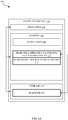
- FIGS. 2A-2H illustrate block diagrams of the computing device of FIG. 1 carrying out a live update of a file system volume 109, according to some embodiments.
- the file system manager 108 mounts two different file system volumes 109 on the computing device 102: an OS file system volume 110 in a read-only mode, and a user file system volume 112 in a read / write mode.
- mounting a file system volume can involve making the file system volume accessible for reading (when in a read-only mode) and writing (when in a read/write mode).
- mounting a file system volume can involve identifying a storage device (e.g., the storage 118) accessible to the computing device 102, identifying at least one available mount point within the storage device, and updating a configuration of the computing device 102 to enable applications executing on the computing device 102 (e.g., a Basic Input/Output System (BIOS) of the computing device 102, an OS of the computing device 102, etc.) to access the contents of the file system volume.
- the read-only OS file system volume 110 can be mounted based on a first snapshot 120 available in the storage 118 (or other storage accessible to the computing device 102).
- the first snapshot 120 can be created prior to, in conjunction with, or subsequent to mounting the read-only OS file system volume 110. In this manner, the read-only OS file system volume 110 can be mounted based on the first snapshot 120 each time the computing device 102 powers-on.
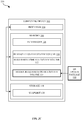
- the file system manager 108 mounts an OS file system volume 114 in a hidden read / write mode.
- mounting the OS file system volume 114 in a hidden read / write mode can involve establishing a file system volume mount that is accessible / visible only to particular entities operating at the computing device 102, e.g., daemons of an OS executing on the computing device 102.
- the hidden read / write OS file system volume 114 can be mounted based on the same first snapshot 120 on which the read-only OS file system volume 110 is based, such that the read-only OS file system volume 110 and the hidden read-write OS file system volume 114 reflect the same state of the OS.
- the hidden read / write OS file system volume 114 is hidden from view of other file system volumes 109 mounted at the computing device. In this manner, the OS files associated with the hidden read / write OS file system volume 114 cannot be improperly modified, e.g., by processes executing in association with the read-only OS file system volume 110 and/or the read-write user file system volume 112. However, as the hidden read / write OS file system volume 114 is readable / writable, OS files can be updated in accordance with an update package even while the read-only OS file system volume 110 and the read / write user file system volume 112 remain operable, which is described below in greater detail in conjunction with FIG. 2C .
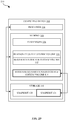
- the file system manager 108 receives and applies an OS update package 122 against the hidden read / write OS file system volume 114.
- the OS update package 122 can be downloaded (e.g., over an Internet connection), loaded directly onto the computing device 102 (e.g., over a local wireless / wired connection), and the like, where the OS update package 122 includes instructions / data for updating the OS files associated with the hidden read / write OS file system volume 114.
- the file system manager 108 can be configured to unpack / verify the contents of the OS update package 122 prior to applying the OS update package 122 to ensure authenticity / stability.
- the hidden read / write OS file system volume 114 is converted into a hidden read / write updated OS file system volume 116 that represents the hidden read / write OS file system volume 114 after the OS update package 122 is processed.
- the file system manager 108 generates a second snapshot 124 based on the hidden read / write updated OS file system volume 116, and stores the second snapshot 124 within the storage 118 (or other available storage).
- the file system manager 108 can update a configuration such that the hidden read / write updated OS file system volume 116 becomes the primary file system volume 109 on the computing device 102.
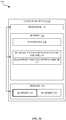
- the file system manager 108 eliminates / unmounts the read-only OS file system volume 110, and also eliminates / unmounts the hidden read / write updated OS file system volume 116.
- eliminating / unmounting a file system volume at the computing device 102 can involve updating a configuration of the computing device 102 such that the contents of the file system volume are no longer accessible. According to some embodiments, this can involve rebooting the computing device 102, performing a live configuration update at the computing device 102, and/or the like.
- the OS update package 122 can indicate whether or not a hard restart of the computing device 102 is necessary for the update to be properly reflected at the computing device 102.
- step 240 involves eliminating / unmounting the old / outdated read-only OS file system volume 110, eliminating / unmounting the hidden read / write updated OS file system volume 116, and then re-mounting the updated OS file system volume 116 in a read-only mode (which is described below in greater detail in conjunction with FIG. 2F )
- the file system manager 108 establishes a read-only mount of the updated OS file system volume 116, while maintaining / restoring (e.g., when the computing device 102 is rebooted) the read-write user file system volume 112.
- the read-only mount of the updated OS file system volume 116 can be established based on the second snapshot 124 that is generated in conjunction with step 230 of FIG. 2D , described above in detail.
- step 260 can be carried out, which involves the file system manager 108 eliminating / deleting the first snapshot 120, as the second snapshot 124 is intact and can enable the computing device 102 to effectively establish the read-only mount of the updated OS file system volume 116 (e.g., each time the computing device 102 is powered-on).
- the file system manager 108 can take measures to ensure that the deletion of the prior snapshot does not reduce the availability of any data that is needed by subsequent snapshots.
- subsequent snapshots will not be affected in any way by the deletion of a prior snapshot, as the subsequent snapshots will still contain all of the information necessary to enable their respective file system volumes to be mounted.
- the file system manager 108 can retain the snapshot 120, e.g., as a restoration option in situations where the updated OS file system volume 116 does not function properly, when a user of the computing device 102 desires to roll back to a previous configuration, and the like.
- step 270 represents an illustration of a stable state of the computing device 102 after steps 200-260 are carried out by the file system manager 108.
- the snapshot 124 is intact and can be utilized each time the updated OS file system volume 116 is mounted in a read-only mode.
- the file system manager 108 can be configured to mount the OS file system volume 109 in a hidden read / write mode.
- the file system manager 108 can carry out steps 220-260 described above in detail to process the subsequent OS update package 122.
- the computing device 102 / file system manager 108 are capable of performing live updates to file system volumes 109 at the computing device 102 in a highly stable manner while substantially reducing the overall downtime that is required when carrying out conventional file system volume update processes.
- FIG. 3 illustrates a method 300 for carrying out a live update of a file system volume 109 on the computing device of FIG. 1 , according to some embodiments.
- the method 300 begins at step 302, and involves the FS manager 108 establishing a first mount of a file system volume 109 in a read-only mode.
- the file system manager 108 can establish the first mount of the file system volume 109 in response to the a boot-up of the computing device 102, where the file system volume 109 represents a core OS configured to execute on the computing device 102.
- the first mount can be based on a first snapshot 120 of the file system volume 109.
- first snapshot 120 is used merely to distinguish the first snapshot 120 from the second snapshot 120 described below at step 310, and that the terms “first” and “second” do not in any way represent temporal / sequential restrictions that must be enforced when implementing the techniques herein.
- first snapshot 120 / second snapshot 120 can represent different snapshots, in any order, among a plurality of snapshots that are available within the storage 118.
- the FS manager 108 obtains an update package 122 for the file system volume 109.
- the update package 122 can be received at the computing device 102 according to any known technique, e.g., an over-the-air (OTA) update, a download, a local file transfer, and the like.
- OTA over-the-air
- the update package 122 can be pushed to the computing device 102 (e.g., by way of a push notification), the update package 122 can be pulled to the computing device 102 (e.g., by way of querying / downloading), and so on.
- step 306 the FS manager 108 establishes a second / hidden mount of the file system volume 109 in a read-write mode.
- step 306 can involve establishing the second mount of the file system volume 109 in an area of memory that is accessible to the file system manager 108 but is not accessible to other file system volumes 109 mounted at the computing device 102. In this manner, it can be difficult for malicious parties to access the second / hidden mount of the file system volume 109, which could otherwise be problematic as the second / hidden mount is readable / writable and could potentially be modified in a harmful manner.
- the FS manager 108 applies the update package 122 to the file system volume 109 within the second / hidden mount to generate an updated file system volume 109.
- the update package 122 can include executables / data for modifying the content associated with the file system volume 109, e.g., a core OS of the computing device 102.
- the file system manager 108 can also be configured to analyze the content of the updated file system volume 109 to ensure that the update package 122 was successfully / properly processed.
- step 310 the FS manager 108 generates a second snapshot 120 of the file system volume 109 based on the updated file system volume 109 generated at step 308.
- step 310 can also optionally involve eliminating the first snapshot 120, e.g., to increase available storage space, to prevent users from rolling back previous / unsupported / unstable file system volumes 109, and the like.
- the FS manager 108 establishes a third mount of the updated file system volume 109 in a read-only mode, where the third mount is based on the second snapshot 120. Accordingly, at the completion of step 312, the updated file system volume 109 is mounted at the computing device 102 in a stable manner.
- FIG. 4 illustrates a detailed view of a computing device 400 that can be used to implement the various techniques described herein, according to some embodiments.
- the detailed view illustrates various components that can be included in the computing device 102 illustrated in FIG. 1 .
- the computing device 400 can include a processor 402 that represents a microprocessor or controller 413 for controlling the overall operation of computing device 400.
- the computing device 400 can also include a user input device 408 that allows a user of the computing device 400 to interact with the computing device 400.
- the computing device 400 can include a display 410 (screen display) that can be controlled by the processor 402 to display information to the user.
- a data bus 416 can facilitate data transfer between the storage device 440, the processor 402, and the controller 413.
- the controller 413 can be used to interface with and control different equipment through an equipment control bus 414.
- the computing device 400 can also include a network/bus interface 411 that couples to a data link 412. In the case of a wireless connection, the network/bus interface 411 can include a wireless transceiver.
- the computing device 400 also include a storage device 440, which can comprise a single disk or multiple disks (e.g., hard drives), and includes a storage management module that manages one or more partitions within the storage device 440.
- the storage device 440 can, alternatively or in addition, include flash memory, persistent memory, semiconductor (solid state) memory or the like.
- the computing device 400 can also include a Random Access Memory (RAM) 420 and a Read-Only Memory (ROM) 422.
- the ROM 422 can store programs, utilities or processes to be executed in a non-volatile manner.
- the RAM 420 can provide volatile data storage, and stores instructions related to the operation of the computing device 400.
- the various aspects, embodiments, implementations or features of the described embodiments can be used separately or in any combination.
- Various aspects of the described embodiments can be implemented by software, hardware or a combination of hardware and software.
- the described embodiments can also be embodied as computer readable code on a computer readable medium.
- the computer readable medium is any data storage device that can store data which can thereafter be read by a computer system. Examples of the computer readable medium include read-only memory, random-access memory, CD-ROMs, DVDs, magnetic tape, hard disk drives, solid state drives, and optical data storage devices.
- the computer readable medium can also be distributed over network-coupled computer systems so that the computer readable code is stored and executed in a distributed fashion.
Landscapes
- Engineering & Computer Science (AREA)
- Theoretical Computer Science (AREA)
- General Engineering & Computer Science (AREA)
- Physics & Mathematics (AREA)
- General Physics & Mathematics (AREA)
- Software Systems (AREA)
- Data Mining & Analysis (AREA)
- Databases & Information Systems (AREA)
- Computer Security & Cryptography (AREA)
- Human Computer Interaction (AREA)
- Quality & Reliability (AREA)
- Information Retrieval, Db Structures And Fs Structures Therefor (AREA)
Abstract
Description
- The described embodiments set forth techniques for performing live updates to file system volumes of computing devices through the utilization of snapshots.
- Existing approaches for performing operating system (OS) updates are task-intensive and highly prone to error. For example, a common approach for updating an OS of a mobile device involves the following steps: (1) receiving an OS update package at the mobile device, (2) unpacking the OS update package, (3) rebooting the mobile device into a specialized update mode and performing the update (in accordance with the OS update package) to produce an updated OS, and (4) rebooting the device / loading the updated OS. Unfortunately, step (3) is associated with a number of considerable drawbacks that have yet to be addressed. For example, when step (3) is carried out, the mobile device enters into an inoperable state for a considerable period of time where a user of the mobile device cannot utilize the important functionalities (e.g., connectivity) normally provided by the mobile device. Moreover, when step (3) is carried out, the specialized update mode places the mobile device in a vulnerable state that can potentially render the mobile device inoperable, e.g., when a power failure occurs, when the update fails, and the like. Accordingly, there exists a need for a more efficient and stable technique for updating operating systems on computing devices.
- The described embodiments set forth techniques for performing live updates to file system volumes (e.g., operating system (OS) file system volumes) of computing devices through the utilization of snapshots. In particular, the techniques enable a computing device to remain active while a majority of an update process is performed, which eliminates the considerable functional downtime that is normally imposed when implementing conventional update techniques. Moreover, the overall robustness of the update process is enhanced as the techniques described herein reduce the amount of time that is required for the computing device to remain in the above-described specialized update mode.
- One embodiment sets forth a technique for performing a live update of a file system volume on a computing device. According to some embodiments, the technique can include the steps of (1) establishing a first mount of the file system volume in a read-only mode, where the first mount is based on a first snapshot of the file system volume, (2) obtaining an update package for the file system volume, (3) establishing a second mount of the file system volume in a read-write mode, (4) applying the update package to the file system volume within the second mount to generate an updated file system volume, (5) generating a second snapshot of the file system volume based on the updated file system volume, and (6) establishing a third mount of the updated file system volume in a read-only mode, wherein the third mount is based on the second snapshot. According to some embodiments, the third mount of the updated file system volume in the read-only mode can occur after the computing device is rebooted. In this manner, a clean boot can occur where the first and second mounts are eliminated and the third mount-which includes the update file system volume-is intact. In this manner, a live update of the file system volume on the computing device can be performed while substantially reducing the amount of time that the computing device operates in the specialized update mode, thereby improving overall efficiency and robustness.
- Other embodiments include at least one non-transitory computer readable medium configured to store instructions that, when executed by at least one processor included in a computing device, cause the computing device to implement any of the techniques set forth herein. Further embodiments include a computing device that includes at least one memory and at least one processor that, in conjunction, enable the computing device to implement the various techniques set forth herein.
- This Summary is provided merely for purposes of summarizing some example embodiments to provide a basic understanding of some aspects of the subject matter described herein. Accordingly, it will be appreciated that the above-described features are merely examples and should not be construed to narrow the scope or spirit of the subject matter described herein in any way. Other features, aspects, and advantages of the subject matter described herein will become apparent from the following Detailed Description, Figures, and Claims.
- Other aspects and advantages of the embodiments described herein will become apparent from the following detailed description taken in conjunction with the accompanying drawings which illustrate, by way of example, the principles of the described embodiments
- The included drawings are for illustrative purposes and serve only to provide examples of possible structures and arrangements for the disclosed inventive apparatuses and methods for their application to computing devices. These drawings in no way limit any changes in form and detail that can be made to the embodiments by one skilled in the art without departing from the spirit and scope of the embodiments. The embodiments will be readily understood by the following detailed description in conjunction with the accompanying drawings, wherein like reference numerals designate like structural elements.
-
FIG. 1 illustrates a block diagram of different components of a computing device configured to implement the various techniques described herein, according to some embodiments. -
FIGS. 2A-2H illustrate block diagrams of the computing device ofFIG. 1 carrying out a live update of afile system volume 109, according to some embodiments. -
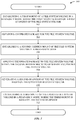
FIG. 3 illustrates a method for carrying out a live update of a file system volume on the computing device ofFIG. 1 , according to some embodiments. -
FIG. 4 illustrates a block diagram of a computing device that can represent the components of a computing device or any other suitable device or component for realizing any of the methods, systems, apparatus, and embodiments described herein. - Representative applications of apparatuses and methods according to the presently described embodiments are provided in this section. These examples are being provided solely to add context and aid in the understanding of the described embodiments. It will thus be apparent to one skilled in the art that the presently described embodiments can be practiced without some or all of these specific details. In other instances, well known process steps have not been described in detail in order to avoid unnecessarily obscuring the presently described embodiments. Other applications are possible, such that the following examples should not be taken as limiting.
- The embodiments described herein set forth techniques for performing live updates to file system volumes of computing devices through the utilization of snapshots. According to some embodiments, a file system manager executing on a computing device can be configured to implement the various techniques described herein. In particular, the file system manager can be configured to mount different file system volumes-e.g., an operating system (OS) file system volume, a user file system volume, and the like-on the computing device. According to some embodiments, the file system manager can be configured to mount these file system volumes in different manners in order to implement the different techniques described herein, e.g., the file system volumes can be mounted in a read-only mode, a read / write mode, a hidden read / write mode, and the like.
- According to some embodiments, the file system manager can be configured to service requests for generating snapshots of the file system volumes. According to some embodiments, a storage included in / accessible to the computing device can be configured to store different snapshots of different file system volumes of the computing device, where each snapshot includes data that represents a particular file system volume at a particular point in time. For example, a first snapshot can include a complete copy of the data of a file system volume at a first point in time, and a related / second snapshot can include only the data that represents the changes made to the file system volume between when the first snapshot was established and the second snapshot was established.
- As described in greater detail herein, the file system manager can be configured to utilize snapshots of file system volumes-as well as different file system mount modes (e.g., read only mode, read / write mode, hidden read/write mode, etc.)-to perform live updates to the file system volumes in a secure, stable, and unobtrusive manner. A more detailed discussion of these techniques is set forth below and described in conjunction with
FIGS. 1-4 , which illustrate detailed diagrams of systems and methods that can be used to implement these techniques. -
FIG. 1 illustrates a block diagram 100 of different components of acomputing device 102 that is configured to implement the various techniques described herein, according to some embodiments. More specifically,FIG. 1 illustrates a high-level overview of thecomputing device 102, which, as shown, can include at least oneprocessor 104, at least onememory 106, and at least onestorage 118. According to some embodiments, theprocessor 104 can be configured to work in conjunction with thememory 106 and thestorage 118 to enable thecomputing device 102 to operate in accordance with this disclosure. For example, theprocessor 104 can be configured to load / execute afile system manager 108 that is specifically configured to implement the various techniques described herein. According to some embodiments, and as described in greater detail herein, thefile system manager 108 can be configured to mount differentfile system volumes 109 on thecomputing device 102, e.g., an operating system (OS)file system volume 109, a userfile system volume 109, and the like. - According to some embodiments, an OS
file system volume 109 can represent a core OS that is configured to operate on thecomputing device 102. For example, the OSfile system volume 109 can enable a variety of processes to execute on thecomputing device 102, e.g., OS daemons, native OS applications, user applications, and the like. According to some embodiments, a userfile system volume 109 can represent a file system hierarchy that stores user applications and user data that are accessible at thecomputing device 102 by way of the OSfile system volume 109. As previously noted herein, thefile system manager 108 can be configured to mount these volumes in different modes in order to implement the different techniques described herein, e.g., thefile system volumes 109 can be mounted in a read-only mode, a read / write mode, a hidden read / write mode, and the like. According to some embodiments, thefile system volumes 109 can be members of a same (or different) logical container and can be configured to utilize the same physical storage space within thestorage 118. This beneficially provides enhanced flexibility as eachfile system volume 109 can consume space within thestorage 118 on an as-needed basis. In addition, eachfile system volume 109 can be configured to enforce particular configurations (e.g., permissions, ownership, encryption schemes, etc.) that are independent from the configurations of otherfile system volumes 109 managed by thefile system manager 108. - According to some embodiments, the
storage 118 can represent a storage that is accessible to thecomputing device 102, e.g., a hard disk drive, a solid state drive, a mass storage device, a remote storage device, and the like. In some examples, thestorage 118 can represent a storage that is accessible to thecomputing device 102 via a local area network (LAN), a personal area network (PAN), and the like. Although not illustrated inFIG. 1 , it is noted that thestorage 118 can be configured to store the data of differentfile system volumes 109 that thefile system manager 108 is capable of mounting. For example, thestorage 118 can include file system data structures for eachfile system volume 109, where the file system data structures are utilized by thefile system manager 108 to manage the actual data of thefile system volumes 109. - According to some embodiments, the
storage 118 can be configured to storedifferent snapshots 120 of differentfile system volumes 109 of thecomputing device 102, where each snapshot includes data that represents a particular file system volume 109 (and, in some cases, one or more other file system volumes 109) at a particular point in time. For example, afirst snapshot 120 can include a complete copy of the data of afile system volume 109, and a related /second snapshot 120 can include only the data that represents changes that have been made to thefile system volume 109 between thefirst snapshot 120 was established and when thesecond snapshot 120 was established. - According to some embodiments, the
file system manager 108 can be configured to service requests for generatingsnapshots 120 of thefile system volumes 109. In particular, thefile system manager 108 can be configured to gather data of afile system volume 109, generate asnapshot 120 based on the data, and then provide thesnapshot 120 to the storage 118 (or other storage device accessible to the computing device 102). For example, when a request for a first (i.e., an initial)snapshot 120 of afile system volume 109 is received, thefile system manager 108 can respond by creating afirst snapshot 120 of thefile system volume 109. Because this is aninitial snapshot 120, no existing /prior snapshots 120 are associated with thefile system volume 109, and it is not necessary for thefile system manager 108 to rely on analyzing a previous snapshot 120 (i.e., to identify changes) when gathering data to generate thefirst snapshot 120. Instead, thefile system manager 108 gathers the data-e.g., all of the data, or a subset of the data, depending on a configuration-and generates thefirst snapshot 120 for thefile system volume 109. According to some embodiments, thefile system manager 108 can also establish associated data structures (e.g., extent delta trees) that enable thefile system manager 108 to efficiently identify any changes made to thefile system volume 109 subsequent to creating the first snapshot 120 (e.g., when an update package is processed), which can help increase efficiency when generatingsubsequent snapshots 120. - At a later time, the
file system manager 108 can receive a subsequent request to generate asecond snapshot 120 of thefile system volume 109. In response, and in accordance with the above-described techniques, thefile system manager 108 can (1) identify thefirst snapshot 120 associated with thefile system volume 109, (2) identify the data structures associated with thefirst snapshot 120, and (3) generate asecond snapshot 120 that captures the changes represented in the data structures associated with thefirst snapshot 120. - Accordingly,
FIG. 1 sets forth an overview of different components / entities that can be included in thecomputing device 102 to enable the embodiments described herein to be properly implemented. As described in greater detail below, thefile system manager 108 can utilize thefile system volumes 109 /snapshots 120 to implement techniques for performing live updates to file system volumes 109 (e.g., an OS file system volume 109), thereby enhancing overall stability and performance. -
FIGS. 2A-2H illustrate block diagrams of the computing device ofFIG. 1 carrying out a live update of afile system volume 109, according to some embodiments. As shown inFIG. 2 , at afirst step 200, thefile system manager 108 mounts two differentfile system volumes 109 on the computing device 102: an OSfile system volume 110 in a read-only mode, and a userfile system volume 112 in a read / write mode. According to some embodiments, mounting a file system volume can involve making the file system volume accessible for reading (when in a read-only mode) and writing (when in a read/write mode). For example, mounting a file system volume can involve identifying a storage device (e.g., the storage 118) accessible to thecomputing device 102, identifying at least one available mount point within the storage device, and updating a configuration of thecomputing device 102 to enable applications executing on the computing device 102 (e.g., a Basic Input/Output System (BIOS) of thecomputing device 102, an OS of thecomputing device 102, etc.) to access the contents of the file system volume. As shown inFIG. 2A , the read-only OSfile system volume 110 can be mounted based on afirst snapshot 120 available in the storage 118 (or other storage accessible to the computing device 102). According to some embodiments, thefirst snapshot 120 can be created prior to, in conjunction with, or subsequent to mounting the read-only OSfile system volume 110. In this manner, the read-only OSfile system volume 110 can be mounted based on thefirst snapshot 120 each time thecomputing device 102 powers-on. - Turning now to
FIG. 2B , atstep 210, thefile system manager 108 mounts an OSfile system volume 114 in a hidden read / write mode. According to some embodiments, mounting the OSfile system volume 114 in a hidden read / write mode can involve establishing a file system volume mount that is accessible / visible only to particular entities operating at thecomputing device 102, e.g., daemons of an OS executing on thecomputing device 102. As shown inFIG. 2B , the hidden read / write OSfile system volume 114 can be mounted based on the samefirst snapshot 120 on which the read-only OSfile system volume 110 is based, such that the read-only OSfile system volume 110 and the hidden read-write OSfile system volume 114 reflect the same state of the OS. According to some embodiments, the hidden read / write OSfile system volume 114 is hidden from view of otherfile system volumes 109 mounted at the computing device. In this manner, the OS files associated with the hidden read / write OSfile system volume 114 cannot be improperly modified, e.g., by processes executing in association with the read-only OSfile system volume 110 and/or the read-write userfile system volume 112. However, as the hidden read / write OSfile system volume 114 is readable / writable, OS files can be updated in accordance with an update package even while the read-only OSfile system volume 110 and the read / write userfile system volume 112 remain operable, which is described below in greater detail in conjunction withFIG. 2C . - Turning now to
FIG. 2C , atstep 220, thefile system manager 108 receives and applies anOS update package 122 against the hidden read / write OSfile system volume 114. According to some embodiments, theOS update package 122 can be downloaded (e.g., over an Internet connection), loaded directly onto the computing device 102 (e.g., over a local wireless / wired connection), and the like, where theOS update package 122 includes instructions / data for updating the OS files associated with the hidden read / write OSfile system volume 114. Additionally, thefile system manager 108 can be configured to unpack / verify the contents of theOS update package 122 prior to applying theOS update package 122 to ensure authenticity / stability. - Turning now to
FIG. 2D , atstep 230, the hidden read / write OSfile system volume 114 is converted into a hidden read / write updated OSfile system volume 116 that represents the hidden read / write OSfile system volume 114 after theOS update package 122 is processed. Additionally, and as also shown inFIG. 2D , atstep 230, thefile system manager 108 generates asecond snapshot 124 based on the hidden read / write updated OSfile system volume 116, and stores thesecond snapshot 124 within the storage 118 (or other available storage). At this point in the live update process, thefile system manager 108 can update a configuration such that the hidden read / write updated OSfile system volume 116 becomes the primaryfile system volume 109 on thecomputing device 102. - Accordingly, and turning now to
FIG. 2E , atstep 240, thefile system manager 108 eliminates / unmounts the read-only OSfile system volume 110, and also eliminates / unmounts the hidden read / write updated OSfile system volume 116. According to some embodiments, eliminating / unmounting a file system volume at thecomputing device 102 can involve updating a configuration of thecomputing device 102 such that the contents of the file system volume are no longer accessible. According to some embodiments, this can involve rebooting thecomputing device 102, performing a live configuration update at thecomputing device 102, and/or the like. For example, theOS update package 122 can indicate whether or not a hard restart of thecomputing device 102 is necessary for the update to be properly reflected at thecomputing device 102. In any case,step 240 involves eliminating / unmounting the old / outdated read-only OSfile system volume 110, eliminating / unmounting the hidden read / write updated OSfile system volume 116, and then re-mounting the updated OSfile system volume 116 in a read-only mode (which is described below in greater detail in conjunction withFIG. 2F ) - Accordingly, and turning now to
FIG. 2F , atstep 250, thefile system manager 108 establishes a read-only mount of the updated OSfile system volume 116, while maintaining / restoring (e.g., when thecomputing device 102 is rebooted) the read-write userfile system volume 112. As shown inFIG. 2F , the read-only mount of the updated OSfile system volume 116 can be established based on thesecond snapshot 124 that is generated in conjunction withstep 230 ofFIG. 2D , described above in detail. - Turning now to
FIG. 2G ,optional step 260 can be carried out, which involves thefile system manager 108 eliminating / deleting thefirst snapshot 120, as thesecond snapshot 124 is intact and can enable thecomputing device 102 to effectively establish the read-only mount of the updated OS file system volume 116 (e.g., each time thecomputing device 102 is powered-on). According to some embodiments, when a prior snapshot is deleted (e.g., the first snapshot 120), thefile system manager 108 can take measures to ensure that the deletion of the prior snapshot does not reduce the availability of any data that is needed by subsequent snapshots. In other words, subsequent snapshots will not be affected in any way by the deletion of a prior snapshot, as the subsequent snapshots will still contain all of the information necessary to enable their respective file system volumes to be mounted. Alternatively, thefile system manager 108 can retain thesnapshot 120, e.g., as a restoration option in situations where the updated OSfile system volume 116 does not function properly, when a user of thecomputing device 102 desires to roll back to a previous configuration, and the like. - Turning to
FIG. 2H ,step 270 represents an illustration of a stable state of thecomputing device 102 after steps 200-260 are carried out by thefile system manager 108. As shown inFIG. 2H , thesnapshot 124 is intact and can be utilized each time the updated OSfile system volume 116 is mounted in a read-only mode. Moreover, when thecomputing device 102 /file system manager 108 receives a subsequentOS update package 122, thefile system manager 108 can be configured to mount the OSfile system volume 109 in a hidden read / write mode. Subsequently, thefile system manager 108 can carry out steps 220-260 described above in detail to process the subsequentOS update package 122. In this manner, thecomputing device 102 /file system manager 108 are capable of performing live updates to filesystem volumes 109 at thecomputing device 102 in a highly stable manner while substantially reducing the overall downtime that is required when carrying out conventional file system volume update processes. -
FIG. 3 illustrates amethod 300 for carrying out a live update of afile system volume 109 on the computing device ofFIG. 1 , according to some embodiments. As shown inFIG. 3 , themethod 300 begins atstep 302, and involves theFS manager 108 establishing a first mount of afile system volume 109 in a read-only mode. Thefile system manager 108 can establish the first mount of thefile system volume 109 in response to the a boot-up of thecomputing device 102, where thefile system volume 109 represents a core OS configured to execute on thecomputing device 102. As shown inFIG. 3 , the first mount can be based on afirst snapshot 120 of thefile system volume 109. It is noted that the term "first"snapshot 120 is used merely to distinguish thefirst snapshot 120 from thesecond snapshot 120 described below atstep 310, and that the terms "first" and "second" do not in any way represent temporal / sequential restrictions that must be enforced when implementing the techniques herein. For example, thefirst snapshot 120 /second snapshot 120 can represent different snapshots, in any order, among a plurality of snapshots that are available within thestorage 118. - At
step 304, theFS manager 108 obtains anupdate package 122 for thefile system volume 109. Theupdate package 122 can be received at thecomputing device 102 according to any known technique, e.g., an over-the-air (OTA) update, a download, a local file transfer, and the like. According to some embodiments, theupdate package 122 can be pushed to the computing device 102 (e.g., by way of a push notification), theupdate package 122 can be pulled to the computing device 102 (e.g., by way of querying / downloading), and so on. - At
step 306, theFS manager 108 establishes a second / hidden mount of thefile system volume 109 in a read-write mode. According to some embodiments, step 306 can involve establishing the second mount of thefile system volume 109 in an area of memory that is accessible to thefile system manager 108 but is not accessible to otherfile system volumes 109 mounted at thecomputing device 102. In this manner, it can be difficult for malicious parties to access the second / hidden mount of thefile system volume 109, which could otherwise be problematic as the second / hidden mount is readable / writable and could potentially be modified in a harmful manner. - At
step 308, theFS manager 108 applies theupdate package 122 to thefile system volume 109 within the second / hidden mount to generate an updatedfile system volume 109. As previously noted herein, theupdate package 122 can include executables / data for modifying the content associated with thefile system volume 109, e.g., a core OS of thecomputing device 102. Atstep 308 thefile system manager 108 can also be configured to analyze the content of the updatedfile system volume 109 to ensure that theupdate package 122 was successfully / properly processed. - At
step 310, theFS manager 108 generates asecond snapshot 120 of thefile system volume 109 based on the updatedfile system volume 109 generated atstep 308. Although not illustrated inFIG. 3 , step 310 can also optionally involve eliminating thefirst snapshot 120, e.g., to increase available storage space, to prevent users from rolling back previous / unsupported / unstablefile system volumes 109, and the like. Finally, atstep 312, theFS manager 108 establishes a third mount of the updatedfile system volume 109 in a read-only mode, where the third mount is based on thesecond snapshot 120. Accordingly, at the completion ofstep 312, the updatedfile system volume 109 is mounted at thecomputing device 102 in a stable manner. -
FIG. 4 illustrates a detailed view of acomputing device 400 that can be used to implement the various techniques described herein, according to some embodiments. In particular, the detailed view illustrates various components that can be included in thecomputing device 102 illustrated inFIG. 1 . As shown inFIG. 4 , thecomputing device 400 can include aprocessor 402 that represents a microprocessor orcontroller 413 for controlling the overall operation ofcomputing device 400. Thecomputing device 400 can also include auser input device 408 that allows a user of thecomputing device 400 to interact with thecomputing device 400. Still further, thecomputing device 400 can include a display 410 (screen display) that can be controlled by theprocessor 402 to display information to the user. Adata bus 416 can facilitate data transfer between thestorage device 440, theprocessor 402, and thecontroller 413. Thecontroller 413 can be used to interface with and control different equipment through anequipment control bus 414. Thecomputing device 400 can also include a network/bus interface 411 that couples to adata link 412. In the case of a wireless connection, the network/bus interface 411 can include a wireless transceiver. - The
computing device 400 also include astorage device 440, which can comprise a single disk or multiple disks (e.g., hard drives), and includes a storage management module that manages one or more partitions within thestorage device 440. In some embodiments, thestorage device 440 can, alternatively or in addition, include flash memory, persistent memory, semiconductor (solid state) memory or the like. Thecomputing device 400 can also include a Random Access Memory (RAM) 420 and a Read-Only Memory (ROM) 422. TheROM 422 can store programs, utilities or processes to be executed in a non-volatile manner. TheRAM 420 can provide volatile data storage, and stores instructions related to the operation of thecomputing device 400. - The various aspects, embodiments, implementations or features of the described embodiments can be used separately or in any combination. Various aspects of the described embodiments can be implemented by software, hardware or a combination of hardware and software. The described embodiments can also be embodied as computer readable code on a computer readable medium. The computer readable medium is any data storage device that can store data which can thereafter be read by a computer system. Examples of the computer readable medium include read-only memory, random-access memory, CD-ROMs, DVDs, magnetic tape, hard disk drives, solid state drives, and optical data storage devices. The computer readable medium can also be distributed over network-coupled computer systems so that the computer readable code is stored and executed in a distributed fashion.
- The foregoing description, for purposes of explanation, used specific nomenclature to provide a thorough understanding of the described embodiments. However, it will be apparent to one skilled in the art that the specific details are not required in order to practice the described embodiments. Thus, the foregoing descriptions of specific embodiments are presented for purposes of illustration and description. They are not intended to be exhaustive or to limit the described embodiments to the precise forms disclosed. It will be apparent to one of ordinary skill in the art that many modifications and variations are possible in view of the above teachings.
Claims (15)
- A method for performing a live update of a file system volume on a computing device, the method comprising, at the computing device:establishing a first mount of the file system volume in a read-only mode, wherein the first mount is based on a first snapshot of the file system volume;obtaining an update package for the file system volume;establishing a second mount of the file system volume in a read-write mode;applying the update package to the file system volume within the second mount to generate an updated file system volume;generating a second snapshot of the file system volume based on the updated file system volume; andestablishing a third mount of the updated file system volume in a read-only mode, wherein the third mount is based on the second snapshot.
- The method of claim 1, wherein the first mount of the file system volume is established when the computing device is booting, and the file system volume comprises components of an operating system (OS) configured to execute on the computing device.
- The method of claim 2, wherein the computing device includes a second file system volume that comprises user applications and user data, and the second file system volume is mounted in a read-write mode in conjunction with establishing the first mount of the file system volume and the third mount of the file system volume.
- The method of claim 1, further comprising, prior to generating the second snapshot of the file system volume:analyzing the updated file system volume to confirm that the update package is properly applied to the file system volume.
- The method of claim 1, further comprising, subsequent to generating the second snapshot:deleting the first snapshot.
- The method of claim 1, wherein the computing device is rebooted in conjunction with establishing the third mount of the updated file system volume.
- The method of claim 6, wherein, when the computing device is rebooted, the first mount and the second mount are unmounted.
- The method of claim 1, further comprising, prior to establishing the first mount of the file system volume in the read-only mode:generating the first snapshot of the file system volume.
- At least one non-transitory computer readable storage medium configured to store instructions that, when executed by at least one processor of a computing device, cause the computing device to implement the method recited in claim 1.
- A computing device configured to perform a live update of a file system volume on the computing device, the computing device comprising:at least one processor; andat least one memory configured to store instructions that, when executed by the at least one processor, cause the computing device to:establish a first mount of the file system volume in a read-only mode, wherein the first mount is based on a first snapshot of the file system volume;obtain an update package for the file system volume;establish a second mount of the file system volume in a read-write mode;apply the update package to the file system volume within the second mount to generate an updated file system volume;generate a second snapshot of the file system volume based on the updated file system volume; andestablish a third mount of the updated file system volume in a read-only mode, wherein the third mount is based on the second snapshot.
- The computing device of claim 10, wherein the first mount of the file system volume is established when the computing device is booting, and the file system volume comprises components of an operating system (OS) configured to execute on the computing device.
- The computing device of claim 11, wherein the computing device includes a second file system volume that comprises user applications and user data, and the second file system volume is mounted in a read-write mode in conjunction with establishing the first mount of the file system volume and the third mount of the file system volume.
- The computing device of claim 10, wherein the computing device is rebooted in conjunction with establishing the third mount of the updated file system volume.
- The computing device of claim 13, wherein, when the computing device is rebooted, the first mount and the second mount are unmounted.
- The computing device of claim 10, wherein the second mount of the file system volume is hidden and cannot be viewed through the first mount of the file system volume.
Applications Claiming Priority (1)
| Application Number | Priority Date | Filing Date | Title |
|---|---|---|---|
| US15/275,099 US10423572B2 (en) | 2016-09-23 | 2016-09-23 | Performing live updates to file system volumes |
Publications (2)
| Publication Number | Publication Date |
|---|---|
| EP3299957A1 true EP3299957A1 (en) | 2018-03-28 |
| EP3299957B1 EP3299957B1 (en) | 2022-08-17 |
Family
ID=59772427
Family Applications (1)
| Application Number | Title | Priority Date | Filing Date |
|---|---|---|---|
| EP17188720.1A Active EP3299957B1 (en) | 2016-09-23 | 2017-08-31 | Performing live updates to file system volumes |
Country Status (3)
| Country | Link |
|---|---|
| US (1) | US10423572B2 (en) |
| EP (1) | EP3299957B1 (en) |
| CN (1) | CN107870968B (en) |
Cited By (13)
| Publication number | Priority date | Publication date | Assignee | Title |
|---|---|---|---|---|
| WO2022125873A1 (en) * | 2020-12-11 | 2022-06-16 | View, Inc. | Component updates in a multi component network |
| US11631493B2 (en) | 2020-05-27 | 2023-04-18 | View Operating Corporation | Systems and methods for managing building wellness |
| US11668992B2 (en) | 2011-03-16 | 2023-06-06 | View, Inc. | Commissioning window networks |
| US11681197B2 (en) | 2011-03-16 | 2023-06-20 | View, Inc. | Onboard controller for multistate windows |
| US11743071B2 (en) | 2018-05-02 | 2023-08-29 | View, Inc. | Sensing and communications unit for optically switchable window systems |
| US11750594B2 (en) | 2020-03-26 | 2023-09-05 | View, Inc. | Access and messaging in a multi client network |
| US11822159B2 (en) | 2009-12-22 | 2023-11-21 | View, Inc. | Self-contained EC IGU |
| US12105394B2 (en) | 2011-03-16 | 2024-10-01 | View, Inc. | Commissioning window networks |
| US12176596B2 (en) | 2019-05-31 | 2024-12-24 | View, Inc. | Building antenna |
| US12242164B2 (en) | 2016-03-09 | 2025-03-04 | View Operating Corporation | Method of commissioning electrochromic windows |
| US12493223B2 (en) | 2009-12-22 | 2025-12-09 | View Operating Corporation | Automated commissioning of controllers in a window network |
| US12498609B2 (en) | 2011-03-16 | 2025-12-16 | View Operating Corporation | Commissioning window networks |
| US12603091B2 (en) | 2017-04-26 | 2026-04-14 | View Operating Corporation | Immersive collaboration of remote participants via media displays |
Families Citing this family (12)
| Publication number | Priority date | Publication date | Assignee | Title |
|---|---|---|---|---|
| US10331902B2 (en) | 2016-12-29 | 2019-06-25 | Noblis, Inc. | Data loss prevention |
| CN108833668B (en) * | 2018-04-27 | 2020-12-15 | Oppo广东移动通信有限公司 | Shutdown method and related product |
| CN110276194B (en) * | 2019-06-21 | 2021-06-15 | 联想(北京)有限公司 | Information processing method, information processing apparatus, and electronic device |
| US11388228B2 (en) * | 2019-10-31 | 2022-07-12 | Keysight Technologies, Inc. | Methods, systems and computer readable media for self-replicating cluster appliances |
| CN112988208B (en) * | 2019-12-18 | 2023-06-30 | 腾讯科技(深圳)有限公司 | Data updating method, device, equipment and storage medium |
| US11372636B2 (en) | 2020-01-03 | 2022-06-28 | International Business Machines Corporation | Live updating a virtual machine virtualizing physical resources |
| CN113253938B (en) * | 2021-06-10 | 2021-11-05 | 北京世纪好未来教育科技有限公司 | Data processing method, device, equipment, storage medium and computer program product |
| US12561154B2 (en) | 2021-07-14 | 2026-02-24 | International Business Machines Corporation | Live updating a virtual machine virtualizing physical resources |
| US12061574B2 (en) * | 2022-09-15 | 2024-08-13 | Red Hat, Inc. | Updating edge nodes in distributed computing environments using partitions |
| US12348404B2 (en) | 2022-11-29 | 2025-07-01 | Keysight Technologies, Inc. | Methods, systems and computer readable media for emulating physical layer impairments in a cloud computing environment |
| US12487769B2 (en) * | 2023-06-09 | 2025-12-02 | Hitachi Vantara, Ltd. | Acceleration secondary use of data |
| US20250291568A1 (en) * | 2024-03-14 | 2025-09-18 | Arista Networks, Inc. | Software Installation Using Mounted File System |
Citations (2)
| Publication number | Priority date | Publication date | Assignee | Title |
|---|---|---|---|---|
| US20130132942A1 (en) * | 2011-11-22 | 2013-05-23 | Huawei Technologies Co., Ltd. | Application software installation method and application software installation apparatus |
| US20160162278A1 (en) * | 2014-12-05 | 2016-06-09 | Cyanogen Inc. | System and method for applying an update to a device system via a system snapshot |
Family Cites Families (15)
| Publication number | Priority date | Publication date | Assignee | Title |
|---|---|---|---|---|
| US7457982B2 (en) | 2003-04-11 | 2008-11-25 | Network Appliance, Inc. | Writable virtual disk of read-only snapshot file objects |
| US8082407B1 (en) | 2007-04-17 | 2011-12-20 | American Megatrends, Inc. | Writable snapshots for boot consolidation |
| US8799595B1 (en) | 2007-08-30 | 2014-08-05 | American Megatrends, Inc. | Eliminating duplicate data in storage systems with boot consolidation |
| US8732417B1 (en) | 2008-10-15 | 2014-05-20 | Symantec Corporation | Techniques for creating snapshots of a target system |
| US8856776B2 (en) * | 2009-02-05 | 2014-10-07 | International Business Machines Corporation | Updating firmware without disrupting service |
| WO2013140460A1 (en) | 2012-03-23 | 2013-09-26 | Hitachi, Ltd. | Patch applying method for virtual machine by cloning an operating system image on shared storage and applying a patch to this cloned image |
| FR3002870B1 (en) * | 2013-03-07 | 2015-03-06 | Snecma | PROCESS FOR PRODUCING A ROTOR BLADE FOR A TURBOMACHINE |
| CN103309713A (en) * | 2013-06-25 | 2013-09-18 | 北京小米科技有限责任公司 | System upgrading method, device and equipment |
| US9959177B2 (en) * | 2014-02-27 | 2018-05-01 | Red Hat Israel, Ltd. | Backing up virtual machines |
| US9430223B2 (en) * | 2014-09-25 | 2016-08-30 | International Business Machines Corporation | Live operating system update mechanisms |
| CN104392189B (en) * | 2014-12-12 | 2017-10-10 | 北京元心科技有限公司 | The method and apparatus for realizing file system safe operation |
| US9852077B2 (en) * | 2015-05-21 | 2017-12-26 | Dell Products L.P. | Preserving user changes to a shared layered resource |
| US10019253B2 (en) * | 2016-02-19 | 2018-07-10 | Dell Products L.P. | Systems and methods of updating hot-pluggable devices |
| US9910666B1 (en) * | 2016-08-22 | 2018-03-06 | International Business Machines Corporation | Implementing locale management on PaaS: live locale object update |
| US10394593B2 (en) * | 2017-03-13 | 2019-08-27 | International Business Machines Corporation | Nondisruptive updates in a networked computing environment |
-
2016
- 2016-09-23 US US15/275,099 patent/US10423572B2/en active Active
-
2017
- 2017-08-31 CN CN201710769626.2A patent/CN107870968B/en active Active
- 2017-08-31 EP EP17188720.1A patent/EP3299957B1/en active Active
Patent Citations (2)
| Publication number | Priority date | Publication date | Assignee | Title |
|---|---|---|---|---|
| US20130132942A1 (en) * | 2011-11-22 | 2013-05-23 | Huawei Technologies Co., Ltd. | Application software installation method and application software installation apparatus |
| US20160162278A1 (en) * | 2014-12-05 | 2016-06-09 | Cyanogen Inc. | System and method for applying an update to a device system via a system snapshot |
Non-Patent Citations (2)
| Title |
|---|
| ANONYMOUS: "how to use snapshots", 27 June 2013 (2013-06-27), https://wiki.netbsd.org/tutorials/how_to_use_snapshots/, XP055444769, Retrieved from the Internet <URL:https://wiki.netbsd.org/tutorials/how_to_use_snapshots/> [retrieved on 20180125] * |
| ANONYMOUS: "Mounting File Systems (System Administration Guide, Volume 3)", 4 March 2015 (2015-03-04), XP055445058, Retrieved from the Internet <URL:https://docs.oracle.com/cd/E19455-01/806-0916/6ja8539fm/index.html> [retrieved on 20180126] * |
Cited By (19)
| Publication number | Priority date | Publication date | Assignee | Title |
|---|---|---|---|---|
| US12493223B2 (en) | 2009-12-22 | 2025-12-09 | View Operating Corporation | Automated commissioning of controllers in a window network |
| US11822159B2 (en) | 2009-12-22 | 2023-11-21 | View, Inc. | Self-contained EC IGU |
| US11927866B2 (en) | 2009-12-22 | 2024-03-12 | View, Inc. | Self-contained EC IGU |
| US12105394B2 (en) | 2011-03-16 | 2024-10-01 | View, Inc. | Commissioning window networks |
| US11668992B2 (en) | 2011-03-16 | 2023-06-06 | View, Inc. | Commissioning window networks |
| US11681197B2 (en) | 2011-03-16 | 2023-06-20 | View, Inc. | Onboard controller for multistate windows |
| US12498609B2 (en) | 2011-03-16 | 2025-12-16 | View Operating Corporation | Commissioning window networks |
| US12242164B2 (en) | 2016-03-09 | 2025-03-04 | View Operating Corporation | Method of commissioning electrochromic windows |
| US12603091B2 (en) | 2017-04-26 | 2026-04-14 | View Operating Corporation | Immersive collaboration of remote participants via media displays |
| US11743071B2 (en) | 2018-05-02 | 2023-08-29 | View, Inc. | Sensing and communications unit for optically switchable window systems |
| US12231260B2 (en) | 2018-05-02 | 2025-02-18 | View, Inc. | Sensing and communications unit for optically switchable window systems |
| US12176596B2 (en) | 2019-05-31 | 2024-12-24 | View, Inc. | Building antenna |
| US12206660B2 (en) | 2020-03-26 | 2025-01-21 | View, Inc. | Access and messaging in a multi client network |
| US11882111B2 (en) | 2020-03-26 | 2024-01-23 | View, Inc. | Access and messaging in a multi client network |
| US11750594B2 (en) | 2020-03-26 | 2023-09-05 | View, Inc. | Access and messaging in a multi client network |
| US12057220B2 (en) | 2020-05-27 | 2024-08-06 | View Operating Corporation | Systems and methods for managing building wellness |
| US11631493B2 (en) | 2020-05-27 | 2023-04-18 | View Operating Corporation | Systems and methods for managing building wellness |
| WO2022125873A1 (en) * | 2020-12-11 | 2022-06-16 | View, Inc. | Component updates in a multi component network |
| US12554482B2 (en) | 2020-12-11 | 2026-02-17 | View Operating Corporation | Component updates in a multi component network |
Also Published As
| Publication number | Publication date |
|---|---|
| US10423572B2 (en) | 2019-09-24 |
| EP3299957B1 (en) | 2022-08-17 |
| CN107870968A (en) | 2018-04-03 |
| CN107870968B (en) | 2021-09-17 |
| US20180089206A1 (en) | 2018-03-29 |
Similar Documents
| Publication | Publication Date | Title |
|---|---|---|
| US10423572B2 (en) | Performing live updates to file system volumes | |
| EP2765508B1 (en) | Installation method and installation device for application software | |
| US9569195B2 (en) | Systems and methods for live operating system upgrades of inline cloud servers | |
| US10747724B2 (en) | System and method of using data blocks to optimize file storage | |
| US9250918B2 (en) | Server management with dynamic construction of pre-boot images | |
| CN105763602B (en) | A kind of method of data request processing, server and system | |
| US8176482B1 (en) | Methods and systems for inserting software applications into images | |
| US8407700B2 (en) | Methods and systems for merging virtualization sublayers | |
| US20180150306A1 (en) | Systems and methods for eliminating reboot during initial machine configuration of operating systems | |
| US11231919B2 (en) | Live updates of stateful components | |
| US20050235281A1 (en) | Combined software installation package | |
| CN113296891B (en) | Platform-based multi-scenario knowledge graph processing method and device | |
| US8225316B1 (en) | Methods and systems for creating and applying patches for virtualized applications | |
| US20140109089A1 (en) | System to rebuild difference virtual hard disk for updating operation system and method thereof | |
| WO2023066246A1 (en) | Method and system for installing application on cloudphone, and client cloudphone | |
| US10127029B1 (en) | Operating system installation using logical volumes | |
| US12118379B1 (en) | Secure package installation into a target container | |
| CN111399936A (en) | A method, system, device and readable storage medium for BMC customization | |
| US20140053276A1 (en) | Safe data storage method and device | |
| US12461730B2 (en) | System and method for uniform cloud provider-specific product deployment | |
| US12056104B2 (en) | Database live mounts using containers | |
| WO2017096889A1 (en) | Method and device for upgrading and downgrading system | |
| CN106933604A (en) | A kind of method for upgrading system and device | |
| EP3425868B1 (en) | Signature rule loading | |
| CN108228196A (en) | The packaging method and device of application program |
Legal Events
| Date | Code | Title | Description |
|---|---|---|---|
| PUAI | Public reference made under article 153(3) epc to a published international application that has entered the european phase |
Free format text: ORIGINAL CODE: 0009012 |
|
| STAA | Information on the status of an ep patent application or granted ep patent |
Free format text: STATUS: REQUEST FOR EXAMINATION WAS MADE |
|
| 17P | Request for examination filed |
Effective date: 20170831 |
|
| AK | Designated contracting states |
Kind code of ref document: A1 Designated state(s): AL AT BE BG CH CY CZ DE DK EE ES FI FR GB GR HR HU IE IS IT LI LT LU LV MC MK MT NL NO PL PT RO RS SE SI SK SM TR |
|
| AX | Request for extension of the european patent |
Extension state: BA ME |
|
| RAP1 | Party data changed (applicant data changed or rights of an application transferred) |
Owner name: APPLE INC. |
|
| STAA | Information on the status of an ep patent application or granted ep patent |
Free format text: STATUS: EXAMINATION IS IN PROGRESS |
|
| 17Q | First examination report despatched |
Effective date: 20190328 |
|
| RIC1 | Information provided on ipc code assigned before grant |
Ipc: G06F 8/656 20180101ALI20211007BHEP Ipc: G06F 9/445 20180101AFI20211007BHEP |
|
| GRAP | Despatch of communication of intention to grant a patent |
Free format text: ORIGINAL CODE: EPIDOSNIGR1 |
|
| STAA | Information on the status of an ep patent application or granted ep patent |
Free format text: STATUS: GRANT OF PATENT IS INTENDED |
|
| INTG | Intention to grant announced |
Effective date: 20211208 |
|
| GRAJ | Information related to disapproval of communication of intention to grant by the applicant or resumption of examination proceedings by the epo deleted |
Free format text: ORIGINAL CODE: EPIDOSDIGR1 |
|
| STAA | Information on the status of an ep patent application or granted ep patent |
Free format text: STATUS: EXAMINATION IS IN PROGRESS |
|
| INTC | Intention to grant announced (deleted) | ||
| GRAP | Despatch of communication of intention to grant a patent |
Free format text: ORIGINAL CODE: EPIDOSNIGR1 |
|
| STAA | Information on the status of an ep patent application or granted ep patent |
Free format text: STATUS: GRANT OF PATENT IS INTENDED |
|
| INTG | Intention to grant announced |
Effective date: 20220506 |
|
| GRAS | Grant fee paid |
Free format text: ORIGINAL CODE: EPIDOSNIGR3 |
|
| GRAA | (expected) grant |
Free format text: ORIGINAL CODE: 0009210 |
|
| STAA | Information on the status of an ep patent application or granted ep patent |
Free format text: STATUS: THE PATENT HAS BEEN GRANTED |
|
| AK | Designated contracting states |
Kind code of ref document: B1 Designated state(s): AL AT BE BG CH CY CZ DE DK EE ES FI FR GB GR HR HU IE IS IT LI LT LU LV MC MK MT NL NO PL PT RO RS SE SI SK SM TR |
|
| REG | Reference to a national code |
Ref country code: CH Ref legal event code: EP |
|
| REG | Reference to a national code |
Ref country code: DE Ref legal event code: R096 Ref document number: 602017060684 Country of ref document: DE |
|
| REG | Reference to a national code |
Ref country code: IE Ref legal event code: FG4D |
|
| REG | Reference to a national code |
Ref country code: AT Ref legal event code: REF Ref document number: 1512621 Country of ref document: AT Kind code of ref document: T Effective date: 20220915 |
|
| REG | Reference to a national code |
Ref country code: NL Ref legal event code: MP Effective date: 20220817 |
|
| REG | Reference to a national code |
Ref country code: LT Ref legal event code: MG9D |
|
| PG25 | Lapsed in a contracting state [announced via postgrant information from national office to epo] |
Ref country code: SE Free format text: LAPSE BECAUSE OF FAILURE TO SUBMIT A TRANSLATION OF THE DESCRIPTION OR TO PAY THE FEE WITHIN THE PRESCRIBED TIME-LIMIT Effective date: 20220817 Ref country code: RS Free format text: LAPSE BECAUSE OF FAILURE TO SUBMIT A TRANSLATION OF THE DESCRIPTION OR TO PAY THE FEE WITHIN THE PRESCRIBED TIME-LIMIT Effective date: 20220817 Ref country code: PT Free format text: LAPSE BECAUSE OF FAILURE TO SUBMIT A TRANSLATION OF THE DESCRIPTION OR TO PAY THE FEE WITHIN THE PRESCRIBED TIME-LIMIT Effective date: 20221219 Ref country code: NO Free format text: LAPSE BECAUSE OF FAILURE TO SUBMIT A TRANSLATION OF THE DESCRIPTION OR TO PAY THE FEE WITHIN THE PRESCRIBED TIME-LIMIT Effective date: 20221117 Ref country code: NL Free format text: LAPSE BECAUSE OF FAILURE TO SUBMIT A TRANSLATION OF THE DESCRIPTION OR TO PAY THE FEE WITHIN THE PRESCRIBED TIME-LIMIT Effective date: 20220817 Ref country code: LV Free format text: LAPSE BECAUSE OF FAILURE TO SUBMIT A TRANSLATION OF THE DESCRIPTION OR TO PAY THE FEE WITHIN THE PRESCRIBED TIME-LIMIT Effective date: 20220817 Ref country code: LT Free format text: LAPSE BECAUSE OF FAILURE TO SUBMIT A TRANSLATION OF THE DESCRIPTION OR TO PAY THE FEE WITHIN THE PRESCRIBED TIME-LIMIT Effective date: 20220817 Ref country code: FI Free format text: LAPSE BECAUSE OF FAILURE TO SUBMIT A TRANSLATION OF THE DESCRIPTION OR TO PAY THE FEE WITHIN THE PRESCRIBED TIME-LIMIT Effective date: 20220817 Ref country code: ES Free format text: LAPSE BECAUSE OF FAILURE TO SUBMIT A TRANSLATION OF THE DESCRIPTION OR TO PAY THE FEE WITHIN THE PRESCRIBED TIME-LIMIT Effective date: 20220817 |
|
| REG | Reference to a national code |
Ref country code: AT Ref legal event code: MK05 Ref document number: 1512621 Country of ref document: AT Kind code of ref document: T Effective date: 20220817 |
|
| PG25 | Lapsed in a contracting state [announced via postgrant information from national office to epo] |
Ref country code: PL Free format text: LAPSE BECAUSE OF FAILURE TO SUBMIT A TRANSLATION OF THE DESCRIPTION OR TO PAY THE FEE WITHIN THE PRESCRIBED TIME-LIMIT Effective date: 20220817 Ref country code: IS Free format text: LAPSE BECAUSE OF FAILURE TO SUBMIT A TRANSLATION OF THE DESCRIPTION OR TO PAY THE FEE WITHIN THE PRESCRIBED TIME-LIMIT Effective date: 20221217 Ref country code: HR Free format text: LAPSE BECAUSE OF FAILURE TO SUBMIT A TRANSLATION OF THE DESCRIPTION OR TO PAY THE FEE WITHIN THE PRESCRIBED TIME-LIMIT Effective date: 20220817 Ref country code: GR Free format text: LAPSE BECAUSE OF FAILURE TO SUBMIT A TRANSLATION OF THE DESCRIPTION OR TO PAY THE FEE WITHIN THE PRESCRIBED TIME-LIMIT Effective date: 20221118 |
|
| REG | Reference to a national code |
Ref country code: CH Ref legal event code: PL |
|
| PG25 | Lapsed in a contracting state [announced via postgrant information from national office to epo] |
Ref country code: SM Free format text: LAPSE BECAUSE OF FAILURE TO SUBMIT A TRANSLATION OF THE DESCRIPTION OR TO PAY THE FEE WITHIN THE PRESCRIBED TIME-LIMIT Effective date: 20220817 Ref country code: RO Free format text: LAPSE BECAUSE OF FAILURE TO SUBMIT A TRANSLATION OF THE DESCRIPTION OR TO PAY THE FEE WITHIN THE PRESCRIBED TIME-LIMIT Effective date: 20220817 Ref country code: LU Free format text: LAPSE BECAUSE OF NON-PAYMENT OF DUE FEES Effective date: 20220831 Ref country code: LI Free format text: LAPSE BECAUSE OF NON-PAYMENT OF DUE FEES Effective date: 20220831 Ref country code: DK Free format text: LAPSE BECAUSE OF FAILURE TO SUBMIT A TRANSLATION OF THE DESCRIPTION OR TO PAY THE FEE WITHIN THE PRESCRIBED TIME-LIMIT Effective date: 20220817 Ref country code: CZ Free format text: LAPSE BECAUSE OF FAILURE TO SUBMIT A TRANSLATION OF THE DESCRIPTION OR TO PAY THE FEE WITHIN THE PRESCRIBED TIME-LIMIT Effective date: 20220817 Ref country code: CH Free format text: LAPSE BECAUSE OF NON-PAYMENT OF DUE FEES Effective date: 20220831 Ref country code: AT Free format text: LAPSE BECAUSE OF FAILURE TO SUBMIT A TRANSLATION OF THE DESCRIPTION OR TO PAY THE FEE WITHIN THE PRESCRIBED TIME-LIMIT Effective date: 20220817 |
|
| REG | Reference to a national code |
Ref country code: BE Ref legal event code: MM Effective date: 20220831 |
|
| REG | Reference to a national code |
Ref country code: DE Ref legal event code: R097 Ref document number: 602017060684 Country of ref document: DE |
|
| PG25 | Lapsed in a contracting state [announced via postgrant information from national office to epo] |
Ref country code: SK Free format text: LAPSE BECAUSE OF FAILURE TO SUBMIT A TRANSLATION OF THE DESCRIPTION OR TO PAY THE FEE WITHIN THE PRESCRIBED TIME-LIMIT Effective date: 20220817 Ref country code: MC Free format text: LAPSE BECAUSE OF FAILURE TO SUBMIT A TRANSLATION OF THE DESCRIPTION OR TO PAY THE FEE WITHIN THE PRESCRIBED TIME-LIMIT Effective date: 20220817 Ref country code: EE Free format text: LAPSE BECAUSE OF FAILURE TO SUBMIT A TRANSLATION OF THE DESCRIPTION OR TO PAY THE FEE WITHIN THE PRESCRIBED TIME-LIMIT Effective date: 20220817 |
|
| PLBE | No opposition filed within time limit |
Free format text: ORIGINAL CODE: 0009261 |
|
| STAA | Information on the status of an ep patent application or granted ep patent |
Free format text: STATUS: NO OPPOSITION FILED WITHIN TIME LIMIT |
|
| PG25 | Lapsed in a contracting state [announced via postgrant information from national office to epo] |
Ref country code: AL Free format text: LAPSE BECAUSE OF FAILURE TO SUBMIT A TRANSLATION OF THE DESCRIPTION OR TO PAY THE FEE WITHIN THE PRESCRIBED TIME-LIMIT Effective date: 20220817 |
|
| P01 | Opt-out of the competence of the unified patent court (upc) registered |
Effective date: 20230526 |
|
| 26N | No opposition filed |
Effective date: 20230519 |
|
| GBPC | Gb: european patent ceased through non-payment of renewal fee |
Effective date: 20221117 |
|
| PG25 | Lapsed in a contracting state [announced via postgrant information from national office to epo] |
Ref country code: IE Free format text: LAPSE BECAUSE OF NON-PAYMENT OF DUE FEES Effective date: 20220831 Ref country code: FR Free format text: LAPSE BECAUSE OF NON-PAYMENT OF DUE FEES Effective date: 20221017 |
|
| PG25 | Lapsed in a contracting state [announced via postgrant information from national office to epo] |
Ref country code: SI Free format text: LAPSE BECAUSE OF FAILURE TO SUBMIT A TRANSLATION OF THE DESCRIPTION OR TO PAY THE FEE WITHIN THE PRESCRIBED TIME-LIMIT Effective date: 20220817 |
|
| PG25 | Lapsed in a contracting state [announced via postgrant information from national office to epo] |
Ref country code: BE Free format text: LAPSE BECAUSE OF NON-PAYMENT OF DUE FEES Effective date: 20220831 |
|
| PG25 | Lapsed in a contracting state [announced via postgrant information from national office to epo] |
Ref country code: GB Free format text: LAPSE BECAUSE OF NON-PAYMENT OF DUE FEES Effective date: 20221117 |
|
| PG25 | Lapsed in a contracting state [announced via postgrant information from national office to epo] |
Ref country code: HU Free format text: LAPSE BECAUSE OF FAILURE TO SUBMIT A TRANSLATION OF THE DESCRIPTION OR TO PAY THE FEE WITHIN THE PRESCRIBED TIME-LIMIT; INVALID AB INITIO Effective date: 20170831 |
|
| PG25 | Lapsed in a contracting state [announced via postgrant information from national office to epo] |
Ref country code: CY Free format text: LAPSE BECAUSE OF FAILURE TO SUBMIT A TRANSLATION OF THE DESCRIPTION OR TO PAY THE FEE WITHIN THE PRESCRIBED TIME-LIMIT Effective date: 20220817 |
|
| PG25 | Lapsed in a contracting state [announced via postgrant information from national office to epo] |
Ref country code: MK Free format text: LAPSE BECAUSE OF FAILURE TO SUBMIT A TRANSLATION OF THE DESCRIPTION OR TO PAY THE FEE WITHIN THE PRESCRIBED TIME-LIMIT Effective date: 20220817 Ref country code: IT Free format text: LAPSE BECAUSE OF FAILURE TO SUBMIT A TRANSLATION OF THE DESCRIPTION OR TO PAY THE FEE WITHIN THE PRESCRIBED TIME-LIMIT Effective date: 20220817 |
|
| PG25 | Lapsed in a contracting state [announced via postgrant information from national office to epo] |
Ref country code: BG Free format text: LAPSE BECAUSE OF FAILURE TO SUBMIT A TRANSLATION OF THE DESCRIPTION OR TO PAY THE FEE WITHIN THE PRESCRIBED TIME-LIMIT Effective date: 20220817 |
|
| PG25 | Lapsed in a contracting state [announced via postgrant information from national office to epo] |
Ref country code: MT Free format text: LAPSE BECAUSE OF FAILURE TO SUBMIT A TRANSLATION OF THE DESCRIPTION OR TO PAY THE FEE WITHIN THE PRESCRIBED TIME-LIMIT Effective date: 20220817 |
|
| PGFP | Annual fee paid to national office [announced via postgrant information from national office to epo] |
Ref country code: DE Payment date: 20250702 Year of fee payment: 9 |
|
| PG25 | Lapsed in a contracting state [announced via postgrant information from national office to epo] |
Ref country code: TR Free format text: LAPSE BECAUSE OF FAILURE TO SUBMIT A TRANSLATION OF THE DESCRIPTION OR TO PAY THE FEE WITHIN THE PRESCRIBED TIME-LIMIT Effective date: 20220817 |