EP3276447A1 - Apparatus and method for executing application for mobile device - Google Patents
Apparatus and method for executing application for mobile device Download PDFInfo
- Publication number
- EP3276447A1 EP3276447A1 EP16769076.7A EP16769076A EP3276447A1 EP 3276447 A1 EP3276447 A1 EP 3276447A1 EP 16769076 A EP16769076 A EP 16769076A EP 3276447 A1 EP3276447 A1 EP 3276447A1
- Authority
- EP
- European Patent Office
- Prior art keywords
- application
- response
- screen
- message
- text
- Prior art date
- Legal status (The legal status is an assumption and is not a legal conclusion. Google has not performed a legal analysis and makes no representation as to the accuracy of the status listed.)
- Pending
Links
Images





Classifications
-
- H—ELECTRICITY
- H04—ELECTRIC COMMUNICATION TECHNIQUE
- H04M—TELEPHONIC COMMUNICATION
- H04M1/00—Substation equipment, e.g. for use by subscribers
- H04M1/72—Mobile telephones; Cordless telephones, i.e. devices for establishing wireless links to base stations without route selection
- H04M1/724—User interfaces specially adapted for cordless or mobile telephones
- H04M1/72403—User interfaces specially adapted for cordless or mobile telephones with means for local support of applications that increase the functionality
- H04M1/72409—User interfaces specially adapted for cordless or mobile telephones with means for local support of applications that increase the functionality by interfacing with external accessories
- H04M1/72415—User interfaces specially adapted for cordless or mobile telephones with means for local support of applications that increase the functionality by interfacing with external accessories for remote control of appliances
-
- G—PHYSICS
- G06—COMPUTING OR CALCULATING; COUNTING
- G06F—ELECTRIC DIGITAL DATA PROCESSING
- G06F3/00—Input arrangements for transferring data to be processed into a form capable of being handled by the computer; Output arrangements for transferring data from processing unit to output unit, e.g. interface arrangements
- G06F3/01—Input arrangements or combined input and output arrangements for interaction between user and computer
- G06F3/02—Input arrangements using manually operated switches, e.g. using keyboards or dials
- G06F3/023—Arrangements for converting discrete items of information into a coded form, e.g. arrangements for interpreting keyboard generated codes as alphanumeric codes, operand codes or instruction codes
-
- G—PHYSICS
- G06—COMPUTING OR CALCULATING; COUNTING
- G06F—ELECTRIC DIGITAL DATA PROCESSING
- G06F3/00—Input arrangements for transferring data to be processed into a form capable of being handled by the computer; Output arrangements for transferring data from processing unit to output unit, e.g. interface arrangements
- G06F3/01—Input arrangements or combined input and output arrangements for interaction between user and computer
- G06F3/03—Arrangements for converting the position or the displacement of a member into a coded form
- G06F3/033—Pointing devices displaced or positioned by the user, e.g. mice, trackballs, pens or joysticks; Accessories therefor
- G06F3/038—Control and interface arrangements therefor, e.g. drivers or device-embedded control circuitry
-
- G—PHYSICS
- G06—COMPUTING OR CALCULATING; COUNTING
- G06F—ELECTRIC DIGITAL DATA PROCESSING
- G06F3/00—Input arrangements for transferring data to be processed into a form capable of being handled by the computer; Output arrangements for transferring data from processing unit to output unit, e.g. interface arrangements
- G06F3/01—Input arrangements or combined input and output arrangements for interaction between user and computer
- G06F3/048—Interaction techniques based on graphical user interfaces [GUI]
- G06F3/0487—Interaction techniques based on graphical user interfaces [GUI] using specific features provided by the input device, e.g. functions controlled by the rotation of a mouse with dual sensing arrangements, or of the nature of the input device, e.g. tap gestures based on pressure sensed by a digitiser
- G06F3/0488—Interaction techniques based on graphical user interfaces [GUI] using specific features provided by the input device, e.g. functions controlled by the rotation of a mouse with dual sensing arrangements, or of the nature of the input device, e.g. tap gestures based on pressure sensed by a digitiser using a touch-screen or digitiser, e.g. input of commands through traced gestures
- G06F3/04883—Interaction techniques based on graphical user interfaces [GUI] using specific features provided by the input device, e.g. functions controlled by the rotation of a mouse with dual sensing arrangements, or of the nature of the input device, e.g. tap gestures based on pressure sensed by a digitiser using a touch-screen or digitiser, e.g. input of commands through traced gestures for inputting data by handwriting, e.g. gesture or text
-
- G—PHYSICS
- G06—COMPUTING OR CALCULATING; COUNTING
- G06F—ELECTRIC DIGITAL DATA PROCESSING
- G06F9/00—Arrangements for program control, e.g. control units
- G06F9/06—Arrangements for program control, e.g. control units using stored programs, i.e. using an internal store of processing equipment to receive or retain programs
- G06F9/44—Arrangements for executing specific programs
-
- H—ELECTRICITY
- H04—ELECTRIC COMMUNICATION TECHNIQUE
- H04L—TRANSMISSION OF DIGITAL INFORMATION, e.g. TELEGRAPHIC COMMUNICATION
- H04L51/00—User-to-user messaging in packet-switching networks, transmitted according to store-and-forward or real-time protocols, e.g. e-mail
- H04L51/07—User-to-user messaging in packet-switching networks, transmitted according to store-and-forward or real-time protocols, e.g. e-mail characterised by the inclusion of specific contents
- H04L51/18—Commands or executable codes
-
- H—ELECTRICITY
- H04—ELECTRIC COMMUNICATION TECHNIQUE
- H04W—WIRELESS COMMUNICATION NETWORKS
- H04W4/00—Services specially adapted for wireless communication networks; Facilities therefor
- H04W4/12—Messaging; Mailboxes; Announcements
Definitions
- Example embodiments relate to an application execution apparatus and method of a mobile device, and more particularly, to an apparatus and method for executing a desired application without switching a screen of a mobile device with a simple manipulation.
- applications for example, a message transmission, a notification, a calendar, a memo, etc.
- a mobile device for example, a smartphone.
- applications with various functions may be installed on the mobile device.
- the mobile device may be wirelessly connected to a peripheral external device.
- An exclusive application for the external device may be installed on the mobile device and be used to control the external device.
- One or more example embodiments provide an application execution apparatus and method that may perform a desired task with a simple manipulation, without switching a screen currently in use, although there is a need to execute an application on a mobile device.
- One or more example embodiments also provide an application execution apparatus and method that may efficiently execute another application without degrading the continuity of a task, although the other application is to be executed during an execution of a single application.
- An application execution apparatus of a mobile device includes a text input device; an application recognizer configured to recognize an application to be executed; a message recognizer reconfigured to recognize a task message to be performed on the application to be executed based on a text that is input through the text input device; a transmission instruction detector configured to detect a task message transmission instruction of a user; a message transferor configured to transfer the task message to the application in response to detecting the task message transmission instruction using the transmission instruction detector; and an application executor configured to execute the task message transferred from the message transferor.
- the text input device is configured to perform a task of the application on a current screen without performing switching to the application to be executed.
- the application recognizer may be configured to recognize a text input with a specific symbol as the application to be executed, and the message recognizer may be configured to recognize a remaining portion as the task message to be performed on the application.
- the application execution apparatus may further include an application designator configured to display a plurality of applications on a screen to select a single application from among the plurality of applications, in response to the plurality of applications being designated to the text input with the specific symbol in the text input through the text input device.
- the message transferor may be configured to transfer the input text to a memo application in response to an absence of the text input with the specific symbol in the text input through the text input device and in response to detecting the task message transmission instruction using the transmission instruction detector.
- the transmission instruction detector may be configured to recognize a preset first swipe motion of the user as the task message transmission instruction.
- the application execution apparatus may further include a text box creator configured to create a text box in response to detecting a preset second swipe motion of the user on a screen on which the text box is absent.
- a text box creator configured to create a text box in response to detecting a preset second swipe motion of the user on a screen on which the text box is absent.
- the application execution apparatus may further include an instruction display configured to display a plurality of functions on a screen in response to the plurality of functions being set to the application recognized by the application recognizer.
- the application execution apparatus may further include an application execution notifier configured to display an application execution result on a screen in response to executing the application using the application executor.
- the application execution apparatus may further include an external device control screen display configured to display a remote controller capable of controlling an external device in response to the application recognized by the application recognizer being an application for controlling the external device and in response to detecting a preset third swipe motion of the user.
- an external device control screen display configured to display a remote controller capable of controlling an external device in response to the application recognized by the application recognizer being an application for controlling the external device and in response to detecting a preset third swipe motion of the user.
- the application execution apparatus may further include an external device searcher and connector configured to search for an external device from among peripheral devices and to connect the external device to a mobile device in response to the application recognized by the application recognizer being an application for controlling the external device.
- An application execution method of a mobile device includes a text input operation; an application recognition operation of recognizing an application to be executed by a user; a message recognition operation of recognizing a task message to be performed on the application to be executed based on an input text; a transmission instruction detection operation of detecting a task message transmission instruction of the user; a message transfer operation of transferring the task message to the application to be executed by the user in response to detecting the task message transmission instruction of the user; and an application execution operation of executing the transferred task message.
- a task of the application is performed on a current screen without performing switching to the application at which the user desires to perform the task.
- the application recognition operation may recognize a text input with a specific symbol as the application at which the task is to be performed, and the message recognition operation may recognize a remaining portion as the task message to be performed on the application.
- the application execution method may further include an application display operation of displaying a plurality of applications on a screen to select a single application from among the plurality of applications, in response to the plurality of applications being designated to the text input with the specific symbol in the text that is input in the text input operation. In response to an absence of the text input with the specific symbol in the text input in the text input operation, when the task message transmission instruction is detected, the input text is transferred to a memo application
- the transmission instruction detection operation may recognize a preset first swipe motion of the user as the task message transmission instruction.
- the application execution method may further include a text box creation operation of creating a text box in response to detecting a preset second swipe motion of the user on a screen on which the text box is absent.
- the application execution method may further include an instruction display operation of displaying a plurality of function in response to the plurality of functions being set to the application recognized in the application recognition operation.
- the application execution method may further include an application execution notification operation of displaying an application execution result on a screen in response to executing the application in the application execution operation.
- the application execution method may further include an external device control screen display operation of displaying a remote controller screen capable of controlling an external device in response to the application recognized in the application recognition operation being an application for controlling the external device and in response to detecting a preset third swipe motion of the user.
- the application execution method may further include an external device searcher and connection operation of searching for an external device from among peripheral devices and connecting the external device to the mobile device in response to the application recognized in the application recognition operation being an application for controlling the external device.
- the desired application when there is a need to execute an application on a mobile device, the desired application may be executed with a simple manipulation of a text input and a message transmission instruction without switching a screen.
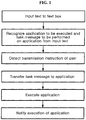
- FIG. 1 illustrates a process of executing a desired application without performing screen switching on a screen of a mobile device according to at least one example embodiment.
- a user inputs a text to a text box using a text input device on a screen of a mobile device that the user is currently using.
- a text input device on a screen of a mobile device that the user is currently using.
- the screen on which the text box is displayed uses, as the text input device, a virtual keyboard that is displayed on the screen in response to activating the text box.
- the external input device may be used as the text input device.
- the text box and the text input device may not be displayed on the screen currently in use.
- a text creator in response to the user performing a motion of swiping a touch screen from down to up, a text creator may detect the motion and may display the text box and the text input device on the screen.
- the text box is not displayed on the screen currently in use, a text input is enabled using the text creator without switching the screen.
- an application recognizer and a message recognizer recognize an application to be executed and a message, for example, a task message, to be performed on the application, respectively, from the input text.
- the application recognizer recognizes an application to be executed based on a text input with a specific symbol, such as @ and #, and the message recognizer a remaining portion as a task to be performed on the application.
- an application that is frequently used at the mobile device may be preset as a default application. Once the application is set as the default application, the default application is recognized as the application to be executed if the input text does not include a text with a specific symbol associated with an application designation.
- the application recognizer may recognize the application to be executed based on a text input to a text input box.
- the application recognizer may recognize a touch of the user on the icon and may recognize the application to be executed. A description related thereto is made below.
- a transmission instruction detector detects the message transmission instruction.
- the message transmission instruction may include a preset swipe motion, for example, a swipe motion in a " ⁇ " form, using the touch screen, and may use any type of instructions that may be distinguishably recognized from other functions of execution instructions stored in the mobile device.
- the transmission instruction detector detects the message transmission instruction of the user, the task message is transferred to the designated application by the message transferor and the application is executed.
- an application notifier may notify the user that the application is executed.
- the execution of the application may be notified by displaying a popup window on a current screen, or by using a notification sound, a vibration, and the like.
- the application in the case of executing an application that is not currently displayed on a screen being used at a mobile device such as a smartphone, the application may be executed by inputting a task message of the application to be executed to a text box of the current screen and by giving a simple message transmission instruction without switching the screen.
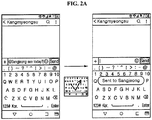
- FIGS. 2A and 2B illustrate an example of inputting a text for a message transmission and performing the message transmission on a screen of a mobile device according to at least one example embodiment.
- a user inputs a text "@Sangjeong see today” to a text box of a current screen of a smartphone and performs a swipe motion of " ⁇ " on a touch screen.
- an application recognizer recognizes an application to be executed from a portion "Sangjeong” input with a symbol "@” in the input text, and recognizes a remaining portion "see today” as a task message to be performed on the application.
- the application recognizer recognizes the message transmission application as the application to be executed from the text "@Sangjeong", and transfers a task message of transmitting a message "see today?" to "Sangjeong” to the message transmission application through a message transferor when a transmission instruction detector detects the swipe motion of " ⁇ ", for example, a task message transmission instruction, of the user.
- the message transmission application receives the task message and executes the corresponding task, and an application execution notifier executes the application and displays a notification window "sent to Sangjeong" on the screen.
- the message transmission application is designated as the application to be executed by inputting a name stored in the contact list with the specific symbol such as "@", and at the same time, a target to which the message is to be transmitted in response to executing the application is designated.
- a plurality of applications for transmitting a message may be installed on a single mobile device.
- an application designator may display the plurality of applications on the screen so that the user may select a single application from among the plurality of message transmission applications.
- the application recognizer and the message recognizer recognize that a message is to be transmitted to "Chohyeongeun” using the message transmission application.
- the application designator displays the plurality of message transmission applications at a lower end of a text box so that the user may select a desired application. If the user touches and selects "KaTalk", the application recognizer and the message recognizer recognize that the message is to be transmitted to "Chohyeongeun” through the application "KaTalk”.
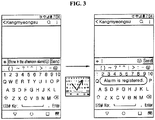
- FIGS. 3 and 4 illustrate an example of setting a notification and an example of registering a schedule to a calendar on a screen of a mobile device, respectively, according to at least one example embodiment.
- an execution result for example, an alarm setting
- a task message of registering a schedule "send a mail at 1pm" to the calendar application is transferred to the calendar application and the calendar application is executed.
- an execution result for example, a schedule registration, is displayed on the screen.
- the setting may be performed in an opposite manner.
- the setting may be performed to directly input names of applications to be executed, such as "@alarm” and "calendar”, as instructions with respect to the alarm registration and the calendar registration, respectively, and to recognize the corresponding applications.
- applications to be executed such as "@alarm” and "calendar”
- FIG. 5 illustrates an example in which only a message "remember room cleaning" is input without an input of a symbol used to designate an application.
- a preset application for example, a default application
- a memo application is set as the default application.
- the message "remember room cleaning" is transferred to the memo application and the memo application is executed. That is, a memo is stored.
- a notification window for notifying the user of an application execution result is displayed on a screen.
- an alarm setting, a schedule registration, and a memo storage may be executed in the same manner of inputting a message to a text box on a screen and thereby giving a transmission instruction.
- FIG. 6 illustrates the above example.
- the application recognizer recognizes "B612" as an application to be executed.
- this application is retrieved from the mobile device. If the application "B612" is installed on the mobile device, the application “B612” may be executed. Otherwise, the application "B612" may not be executed.
- a search result of the corresponding application is displayed by executing an application store, such as Google Play and AppStore.
- an application store such as Google Play and AppStore.
- the corresponding application may be retrieved from the application store and the search result may be displayed. Accordingly, although the user becomes aware of information about a new application during conversation over a messenger, from a news article, etc., the user may immediately download and use the desired application on a current screen.
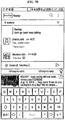
- FIGS. 7A through 7C illustrate an example of performing a screen search and a twitter posting on a screen of a mobile device according to at least one example embodiment.
- an icon designating a specific application may be displayed with the virtual keyboard.
- Icons displayed on the screen may include, for example, an icon (an icon displayed on the leftmost) for a web search, an icon for a contact search (an icon displayed on the third to the left), icons for a search and playback of a video or music (icons displayed on the fourth and the rightmost), an icon for a posting of twitter (an icon displayed on the fifth to the left), an icon (an icon displayed on the sixth to the left) for searching for a specific place such as a restaurant, and the like.
- FIG. 7B illustrates an example of executing a corresponding application using the icon for the web search among icons displayed with the virtual keyboard.
- a search result conducted by a predetermined search server using the keyword "keukey” is displayed.
- a link button that functions to link to further inclusive information may be provided at a display portion that displays a primary search result. For example, if a user selects website address information that is a first arranged search result, the user may immediately connect to the corresponding website.
- a search may be conducted by the search server.
- the search server may be a yahoo server on the virtual keyboard itself.
- a search result conducted by the yahoo server is provided.
- FIG. 7C illustrates an example of executing a corresponding application using the icon for posting of twitter among icons displayed with the virtual keyboard.
- the posting in response to touching a twitter icon and inputting a predetermined posting message through the virtual keyboard, the posting is performed through a twitter application and a search result thereof is displayed on a current screen. That is, the twitter application may be executed on the current screen without performing a screen switching.
- the example embodiment describes that the search result through the application execution result are displayed at locations at which icons designating the respective applications are displayed.
- the search result may be displayed in another form unless the screen switching is required.
- a method of connecting the mobile device to the peripheral external device a variety of methods, for example, a method of automatically finding and connecting devices connected to the same wireless fidelity (WiFi) access point (AP), a method of automatically finding and connecting devices logged in the same account using the same server, a method of inputting a personal identification number (PIN) of device surface on the server, specifying the device, and at the same time, approving a control right and connecting devices, a method of connecting a single device to another device through an inter-layer communication network, for example, a peer-to-peer (P2P) scheme, of WiFi, Bluetooth, and the like.
- P2P peer-to-peer
- FIGS. 8A and 8B illustrate an example of controlling an external device through an application of a mobile device according to the related art.
- a scheme of controlling a device by displaying a remote controller and by touching a button of a desired function as shown in FIG. 8A and a scheme of controlling a device by displaying a conversation box and by transferring a desired task message in a conversation form may be used.
- a cumbersome process of closing or terminating a screen of an application currently in use, executing the dedicated application, and inputting a control instruction needs to be performed.
- an increase in a number of peripheral devices may cause cumbersomeness and inconvenience to increase in selecting an application.
- a manual may be different for each device. In this case, it may be difficult to adapt to the manual.
- the inventor(s) of the present application provides a method of, in response to inputting a desired instruction, for example, a task message, and a text designating an external device to be controlled to a text box and giving a simple transmission instruction on any screen of a mobile device, transferring the instruction to an application for controlling the device, and executing the application.
- a desired instruction for example, a task message
- a text designating an external device to be controlled to a text box and giving a simple transmission instruction on any screen of a mobile device
- FIGS. 9A through 9C illustrate an example of controlling a television (TV) on a screen of a mobile device according to at least one example embodiment.
- a user when a TV or a set-top box is connected to a mobile device, a user inputs a text "@TV infinite challenge” to a text box of a current screen of a smartphone and performs a swipe motion of " ⁇ " on a touch screen.
- an application recognizer of the mobile device recognizes a portion "TV” input with a symbol "@” from the input text as a portion associated with an application to be executed, a message recognizer recognizes a portion "infinite challenge” as a task message to be performed on the application, and a transmission instruction detector detects the swipe motion of " ⁇ ", for example, a transmission instruction.
- a message transferor transfers a task message for playing a VOD "infinite challenge” or a task message for changing to a channel in which "infinite challenge” is currently being broadcasted to a dedicated application for TV control.
- the corresponding application receives the task message, executes the task message, and controls the TV or the set-top box.
- a program name is input as the task message to change a TV channel
- the channel may be changed by directly inputting a desired channel number.
- the TV control may control various functions, such as a power ON/OFF function, a volume control function, a recording reservation function, etc., in addition to a channel change function. Accordingly, in response to recognizing that the user desires to control the TV through the dedicated application, a function designator may display a plurality of functions on the screen so that the user may select a single desired function from among the plurality of functions.
- the application recognizer recognizes that the user desires to control the TV through the dedicated application for TV control.
- a plurality of functions such as the channel change function, the power ON/OFF function, the volume control function, the recording reservation function, etc.
- the function designator may display the plurality of functions at a lower end of the text box. If the user touches "record” among the plurality of functions, additionally inputs a target program, and gives a message transmission instruction, the user may make a reservation of recording the program "infinite challenge" that is to be broadcasted at a closest time.
- a remote controller for controlling the TV may be displayed on the current screen through an external device control screen display.
- the swipe motion for displaying the remote controller may be set to be different from a swipe motion for transmitting a task message and a swipe motion for creating a text box. Any type of instructions that are distinguishably recognizable from execution instructions of other functions and recognized may be used.
- FIG. 10 illustrates an example of controlling an illumination on a screen of a mobile device according to at least one example embodiment.
- a message of turning OFF a light for example, a smart illumination
- an indoor smart illumination uses a general indoor location recognition method of recognizing a BLE signal strength using the mobile device, and the like.
- an illumination state for example, an ON/OFF state, of another place, such as a living room, a kitchen, and the like.
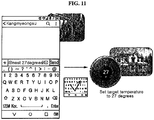
- FIG. 11 illustrates an example of controlling a temperature controller of a product name "nest" on a screen of a mobile device according to at least one example embodiment.
- a target temperature is transferred to a registered temperature controller through the mobile device or a dedicated application of the mobile device and a temperature adjustment is executed. Accordingly, although a user is out, a pleasant environment may be provided by cooling or heating in advance an indoor space at a desired temperature.
- the example embodiment it is possible to easily control an external device connected to a mobile device by simply inputting a text on a screen of the mobile device currently in use.
- FIG. 12 illustrates an example of controlling a projector on a screen of a mobile device according to at least one example embodiment.
- a projector adjacent to the mobile device is retrieved and a result thereof is displayed at a lower end of a text box.
- a connection between the mobile device and the projector is performed through the mobile device or a dedicated application of the mobile device.
- This function may be executed through an external device searcher and connector.
- the user may control an operation of the connected projector by inputting a desired task message and by performing a swipe motion, for example, a task message transmission instruction.
- a user may easily execute a desired application without switching a screen while using a mobile device.
- the user may simply execute a task of a desired application by inputting a text on a current screen and by performing a preset swipe motion. Accordingly, it is possible to reduce the user inconvenience that may occur due to execution of the application and to reduce an amount of time to manipulate an existing application. In addition, it is possible to maintain the continuity of a take being performed by the user.
Landscapes
- Engineering & Computer Science (AREA)
- Theoretical Computer Science (AREA)
- General Engineering & Computer Science (AREA)
- Physics & Mathematics (AREA)
- General Physics & Mathematics (AREA)
- Human Computer Interaction (AREA)
- Software Systems (AREA)
- Computer Networks & Wireless Communication (AREA)
- Signal Processing (AREA)
- User Interface Of Digital Computer (AREA)
- Stored Programmes (AREA)
- Telephone Function (AREA)
Abstract
Description
- Example embodiments relate to an application execution apparatus and method of a mobile device, and more particularly, to an apparatus and method for executing a desired application without switching a screen of a mobile device with a simple manipulation.
- In general, applications, for example, a message transmission, a notification, a calendar, a memo, etc., may be installed on a mobile device, for example, a smartphone. In addition, applications with various functions may be installed on the mobile device. The mobile device may be wirelessly connected to a peripheral external device. An exclusive application for the external device may be installed on the mobile device and be used to control the external device.
- To execute an application of the mobile device, there is a need to find and execute an execution button of the corresponding application on an idle screen of the mobile device. Accordingly, if there is a need to execute another application while a single application is being executed, the following process is to be performed:
- 1. Close a window of an application in execution or terminate the execution of the application by pushing a home button or a back button.
- 2. Find an execution button of an application to be executed.
- 3. Execute the application.
- 4. Touch a necessary button or input an instruction.
- 5. Close a window of the application or terminate the execution thereof.
- 6. Execute again the application that has been in execution at an initial stage.
- As described above, if there is a need to execute another application while a single application is being executed, for example, if a task, such as transmission of a message, setting of a notification, registration of a schedule to a calendar, storing a memo, etc., controlling an external device connected to the mobile device, etc., is required, the aforementioned plurality of operations need to be performed, which may cause the user inconveniences. In addition, a relatively large amount of time may be used to go through the above process and the continuity of a task being performed through the application that has been in execution at an early stage may be degraded.
- One or more example embodiments provide an application execution apparatus and method that may perform a desired task with a simple manipulation, without switching a screen currently in use, although there is a need to execute an application on a mobile device.
- One or more example embodiments also provide an application execution apparatus and method that may efficiently execute another application without degrading the continuity of a task, although the other application is to be executed during an execution of a single application.
- A representative configuration of this disclosure to achieve the objects may follow as.
- An application execution apparatus of a mobile device according to an example embodiment includes a text input device; an application recognizer configured to recognize an application to be executed; a message recognizer reconfigured to recognize a task message to be performed on the application to be executed based on a text that is input through the text input device; a transmission instruction detector configured to detect a task message transmission instruction of a user; a message transferor configured to transfer the task message to the application in response to detecting the task message transmission instruction using the transmission instruction detector; and an application executor configured to execute the task message transferred from the message transferor. The text input device is configured to perform a task of the application on a current screen without performing switching to the application to be executed.
- The application recognizer may be configured to recognize a text input with a specific symbol as the application to be executed, and the message recognizer may be configured to recognize a remaining portion as the task message to be performed on the application. The application execution apparatus may further include an application designator configured to display a plurality of applications on a screen to select a single application from among the plurality of applications, in response to the plurality of applications being designated to the text input with the specific symbol in the text input through the text input device. The message transferor may be configured to transfer the input text to a memo application in response to an absence of the text input with the specific symbol in the text input through the text input device and in response to detecting the task message transmission instruction using the transmission instruction detector.
- The transmission instruction detector may be configured to recognize a preset first swipe motion of the user as the task message transmission instruction.
- The application execution apparatus may further include a text box creator configured to create a text box in response to detecting a preset second swipe motion of the user on a screen on which the text box is absent.
- The application execution apparatus may further include an instruction display configured to display a plurality of functions on a screen in response to the plurality of functions being set to the application recognized by the application recognizer.
- The application execution apparatus may further include an application execution notifier configured to display an application execution result on a screen in response to executing the application using the application executor.
- The application execution apparatus may further include an external device control screen display configured to display a remote controller capable of controlling an external device in response to the application recognized by the application recognizer being an application for controlling the external device and in response to detecting a preset third swipe motion of the user.
- The application execution apparatus may further include an external device searcher and connector configured to search for an external device from among peripheral devices and to connect the external device to a mobile device in response to the application recognized by the application recognizer being an application for controlling the external device.
- An application execution method of a mobile device according to an example embodiment includes a text input operation; an application recognition operation of recognizing an application to be executed by a user; a message recognition operation of recognizing a task message to be performed on the application to be executed based on an input text; a transmission instruction detection operation of detecting a task message transmission instruction of the user; a message transfer operation of transferring the task message to the application to be executed by the user in response to detecting the task message transmission instruction of the user; and an application execution operation of executing the transferred task message. A task of the application is performed on a current screen without performing switching to the application at which the user desires to perform the task.
- The application recognition operation may recognize a text input with a specific symbol as the application at which the task is to be performed, and the message recognition operation may recognize a remaining portion as the task message to be performed on the application. The application execution method may further include an application display operation of displaying a plurality of applications on a screen to select a single application from among the plurality of applications, in response to the plurality of applications being designated to the text input with the specific symbol in the text that is input in the text input operation. In response to an absence of the text input with the specific symbol in the text input in the text input operation, when the task message transmission instruction is detected, the input text is transferred to a memo application
- The transmission instruction detection operation may recognize a preset first swipe motion of the user as the task message transmission instruction.
- The application execution method may further include a text box creation operation of creating a text box in response to detecting a preset second swipe motion of the user on a screen on which the text box is absent.
- The application execution method may further include an instruction display operation of displaying a plurality of function in response to the plurality of functions being set to the application recognized in the application recognition operation.
- The application execution method may further include an application execution notification operation of displaying an application execution result on a screen in response to executing the application in the application execution operation.
- The application execution method may further include an external device control screen display operation of displaying a remote controller screen capable of controlling an external device in response to the application recognized in the application recognition operation being an application for controlling the external device and in response to detecting a preset third swipe motion of the user.
- The application execution method may further include an external device searcher and connection operation of searching for an external device from among peripheral devices and connecting the external device to the mobile device in response to the application recognized in the application recognition operation being an application for controlling the external device.
- According to some example embodiments, when there is a need to execute an application on a mobile device, the desired application may be executed with a simple manipulation of a text input and a message transmission instruction without switching a screen.
- Accordingly, although there is a need to execute another application during an execution of a single application, it is possible to remove inconveniences of terminating the existing application or returning to an idle screen and executing the other application and then executing the existing application in response to terminating the other application. Also, it is possible to save an amount of time used to execute the application. Since there is no need to close a screen of the existing application in execution or terminate the application, the continuity of a task may be maintained.
-
-
FIG. 1 illustrates a process of executing a desired application on a screen of a mobile device according to at least one example embodiment. -
FIGS. 2A and2B illustrate an example of inputting a text for a message transmission and performing the message transmission on a screen of a mobile device according to at least one example embodiment. -
FIG. 3 illustrates an example of setting a notification on a screen of a mobile device according to at least one example embodiment. -
FIG. 4 illustrates an example of registering a schedule to a calendar on a screen of a mobile device according to at least one example embodiment. -
FIG. 5 illustrates an example of storing a memo on a screen of a mobile device according to at least one example embodiment. -
FIG. 6 illustrates an example of verifying whether a specific application is installed and executing the application on a screen of a mobile device according to at least one example embodiment. -
FIGS. 7A through 7C illustrate an example of performing a screen search and a twitter posting on a screen of a mobile device according to at least one example embodiment. -
FIGS. 8A and8B illustrate an example of controlling an external device through an application of a mobile device according to the related art. -
FIGS. 9A through 9C illustrate an example of controlling a television (TV) on a screen of a mobile device according to at least one example embodiment. -
FIG. 10 illustrates an example of controlling an illumination on a screen of a mobile device according to at least one example embodiment. -
FIG. 11 illustrates an example of controlling a temperature controller on a screen of a mobile device according to at least one example embodiment. -
FIG. 12 illustrates an example of controlling a projector on a screen of a mobile device according to at least one example embodiment. - Hereinafter, example embodiments are described in detail to be easily implemented by one of ordinary skill in the art with reference to the accompanying drawings. A description related to a portion irrelevant to the disclosure is omitted for clarity of description. It should be understood that various modifications and changes may be made in the example embodiments disclosed in the specification without departing from the spirit and scope of the disclosure. Accordingly, the scope of the disclosure is not defined by the detailed description, but by the claims and their equivalents and all variations within the scope of the claims and their equivalents are to be construed as being included in the disclosure.
-
FIG. 1 illustrates a process of executing a desired application without performing screen switching on a screen of a mobile device according to at least one example embodiment. - Referring to
FIG. 1 , a user inputs a text to a text box using a text input device on a screen of a mobile device that the user is currently using. Regardless of a screen type such as a message transmission screen, a memo input screen, an Internet search screen, etc., the screen on which the text box is displayed uses, as the text input device, a virtual keyboard that is displayed on the screen in response to activating the text box. If an external input device is connected to the mobile device, the external input device may be used as the text input device. - The text box and the text input device may not be displayed on the screen currently in use. In this case, in response to the user performing a motion of swiping a touch screen from down to up, a text creator may detect the motion and may display the text box and the text input device on the screen. Although the text box is not displayed on the screen currently in use, a text input is enabled using the text creator without switching the screen.
- Once the user inputs a text, an application recognizer and a message recognizer recognize an application to be executed and a message, for example, a task message, to be performed on the application, respectively, from the input text. For example, the application recognizer recognizes an application to be executed based on a text input with a specific symbol, such as @ and #, and the message recognizer a remaining portion as a task to be performed on the application.
- Meanwhile, an application that is frequently used at the mobile device may be preset as a default application. Once the application is set as the default application, the default application is recognized as the application to be executed if the input text does not include a text with a specific symbol associated with an application designation.
- The application recognizer may recognize the application to be executed based on a text input to a text input box. When a separate icon for designating the application to be executed is displayed on the screen, the application recognizer may recognize a touch of the user on the icon and may recognize the application to be executed. A description related thereto is made below.
- When the user inputs the text and gives a message transmission instruction for executing a task message on the application to be executed, a transmission instruction detector detects the message transmission instruction. The message transmission instruction may include a preset swipe motion, for example, a swipe motion in a "√" form, using the touch screen, and may use any type of instructions that may be distinguishably recognized from other functions of execution instructions stored in the mobile device.
- Once the transmission instruction detector detects the message transmission instruction of the user, the task message is transferred to the designated application by the message transferor and the application is executed. Here, an application notifier may notify the user that the application is executed. The execution of the application may be notified by displaying a popup window on a current screen, or by using a notification sound, a vibration, and the like.
- As described above, according to example embodiments, in the case of executing an application that is not currently displayed on a screen being used at a mobile device such as a smartphone, the application may be executed by inputting a task message of the application to be executed to a text box of the current screen and by giving a simple message transmission instruction without switching the screen. Hereinafter, various example embodiments are described with reference to the accompanying drawings to further easily and clearly understand the disclosure.
-
FIGS. 2A and2B illustrate an example of inputting a text for a message transmission and performing the message transmission on a screen of a mobile device according to at least one example embodiment. - Referring to
FIG. 2A , a user inputs a text "@Sangjeong see today" to a text box of a current screen of a smartphone and performs a swipe motion of "√" on a touch screen. Here, an application recognizer recognizes an application to be executed from a portion "Sangjeong" input with a symbol "@" in the input text, and recognizes a remaining portion "see today" as a task message to be performed on the application. - In the example embodiment, if the text input with "@" is information stored in a contact list of the mobile device, a message is set to be transmitted to a corresponding contact through a message transmission application. Also, the swipe motion of "√" is set as an instruction to transmit the task message to the designated application. Accordingly, the application recognizer recognizes the message transmission application as the application to be executed from the text "@Sangjeong", and transfers a task message of transmitting a message "see today?" to "Sangjeong" to the message transmission application through a message transferor when a transmission instruction detector detects the swipe motion of "√", for example, a task message transmission instruction, of the user. The message transmission application receives the task message and executes the corresponding task, and an application execution notifier executes the application and displays a notification window "sent to Sangjeong" on the screen.
- In the example embodiment, the message transmission application is designated as the application to be executed by inputting a name stored in the contact list with the specific symbol such as "@", and at the same time, a target to which the message is to be transmitted in response to executing the application is designated. However, a plurality of applications for transmitting a message may be installed on a single mobile device. In this case, an application designator may display the plurality of applications on the screen so that the user may select a single application from among the plurality of message transmission applications.
- Referring to
FIG. 2B , once "@Chohyeongeun" is input, the application recognizer and the message recognizer recognize that a message is to be transmitted to "Chohyeongeun" using the message transmission application. Here, if a plurality of message transmission applications, such as "SMS", "e-mail", "KaTalk", "LINE", etc., are installed, the application designator displays the plurality of message transmission applications at a lower end of a text box so that the user may select a desired application. If the user touches and selects "KaTalk", the application recognizer and the message recognizer recognize that the message is to be transmitted to "Chohyeongeun" through the application "KaTalk". -
FIGS. 3 and4 illustrate an example of setting a notification and an example of registering a schedule to a calendar on a screen of a mobile device, respectively, according to at least one example embodiment. - In
FIG. 3 , "@one in the afternoon alarm" is input. InFIG. 4 , "@1pm send mail" is input. In the example embodiment, if a user inputs a time using Korean letters with a symbol "@" for recognizing an application, the user is to designate an alarm application for setting an alarm. If the user inputs the time using a number and alphabetical letters, such as pm or am, the user is to designate a calendar application for registering a schedule. Accordingly, inFIG. 3 , in response to detecting a transmission instruction, for example, a swipe motion of "√", of the user, a task message of setting an alarm at 1 pm is transferred to the alarm application and the alarm application is executed. After the execution of the application, an execution result, for example, an alarm setting, is displayed on the screen. InFIG. 4 , in response to detecting a transmission instruction, a task message of registering a schedule "send a mail at 1pm" to the calendar application is transferred to the calendar application and the calendar application is executed. After the execution of the application, an execution result, for example, a schedule registration, is displayed on the screen. - Although the example embodiment describes that, when the time with the symbol "@" is input using Korean letters, it is recognized as a message associated with an alarm registration, and when the number is input, it is recognized as a message associated with a schedule registration, the setting may be performed in an opposite manner. Alternatively, the setting may be performed to directly input names of applications to be executed, such as "@alarm" and "calendar", as instructions with respect to the alarm registration and the calendar registration, respectively, and to recognize the corresponding applications. Alternatively, similar to the example of
FIG. 2 , if a time is input with the symbol "@" regardless of any input type, such as "one in the afternoon" or "1pm", "alarm" or "calendar" may \ be displayed at a lower end of a text box so that the user may select and set the application to be executed, for example, using an application designator, and the user may select the application and may additionally input a detailed message. -
FIG. 5 illustrates an example in which only a message "remember room cleaning" is input without an input of a symbol used to designate an application. In this case, a preset application, for example, a default application, is set to be executed. In the example embodiment, a memo application is set as the default application. Thus, in response to a transmission instruction of a user, the message "remember room cleaning" is transferred to the memo application and the memo application is executed. That is, a memo is stored. Also, once the message is stored on the memo application, a notification window for notifying the user of an application execution result is displayed on a screen. - In addition, to a message transmission, an alarm setting, a schedule registration, and a memo storage, a bulletin board posting using an SNS application, a music playback using a music application, a financial transaction using a bank application, a stock transaction using a security corporation application, a food order using a food delivery application, etc., may be executed in the same manner of inputting a message to a text box on a screen and thereby giving a transmission instruction.
- In the meantime, an application recognized from an input text may not be installed on a mobile device.
FIG. 6 illustrates the above example. In this case, once a text "@B612" is input, the application recognizer recognizes "B612" as an application to be executed. In response to a transmission instruction of a user, this application is retrieved from the mobile device. If the application "B612" is installed on the mobile device, the application "B612" may be executed. Otherwise, the application "B612" may not be executed. - In the example embodiment, if the recognized application is not installed on the mobile device, a search result of the corresponding application is displayed by executing an application store, such as Google Play and AppStore. As described above, in the example embodiment, when an application not installed on the mobile device is determined to be designated as a result of recognizing a message input to a text box, the corresponding application may be retrieved from the application store and the search result may be displayed. Accordingly, although the user becomes aware of information about a new application during conversation over a messenger, from a news article, etc., the user may immediately download and use the desired application on a current screen.
- According to example embodiments, it is possible to display an icon for executing a specific application on a screen with a text input device, and to execute the desired application without performing a screen switching on a screen of the mobile device.
-
FIGS. 7A through 7C illustrate an example of performing a screen search and a twitter posting on a screen of a mobile device according to at least one example embodiment. - Referring to
FIG. 7A , in response to activating a virtual keyboard that is a text input device on a screen of a mobile device, an icon designating a specific application may be displayed with the virtual keyboard. Icons displayed on the screen may include, for example, an icon (an icon displayed on the leftmost) for a web search, an icon for a contact search (an icon displayed on the third to the left), icons for a search and playback of a video or music (icons displayed on the fourth and the rightmost), an icon for a posting of twitter (an icon displayed on the fifth to the left), an icon (an icon displayed on the sixth to the left) for searching for a specific place such as a restaurant, and the like. -
FIG. 7B illustrates an example of executing a corresponding application using the icon for the web search among icons displayed with the virtual keyboard. Referring toFIG. 7B , in response to touching a search icon and inputting a keyword "keukey" through the virtual keyboard, a search result conducted by a predetermined search server using the keyword "keukey" is displayed. - Here, since it is impossible to display all the search results on a limited screen space, a link button that functions to link to further inclusive information may be provided at a display portion that displays a primary search result. For example, if a user selects website address information that is a first arranged search result, the user may immediately connect to the corresponding website. In the example embodiment, a search may be conducted by the search server. For example, the search server may be a yahoo server on the virtual keyboard itself. In this example, when a keyword is input to a search box of a Google site and a search result is conducted using the text box of the example embodiment, a search result conducted by the yahoo server is provided.
-
FIG. 7C illustrates an example of executing a corresponding application using the icon for posting of twitter among icons displayed with the virtual keyboard. Referring toFIG. 7C , in response to touching a twitter icon and inputting a predetermined posting message through the virtual keyboard, the posting is performed through a twitter application and a search result thereof is displayed on a current screen. That is, the twitter application may be executed on the current screen without performing a screen switching. - The example embodiment describes that the search result through the application execution result are displayed at locations at which icons designating the respective applications are displayed. However, it is provided as an example only. The search result may be displayed in another form unless the screen switching is required.
- The example embodiment of executing an application or searching for the application on a screen of a mobile device is described. Hereinafter, another example embodiment is described.
- In the recent times, technology for connecting the mobile device to a peripheral external device and directly controlling the peripheral external device that is connected to the mobile device is known. To this end, the mobile device needs to be connected to the peripheral external device. As a method of connecting the mobile device to the peripheral external device, a variety of methods, for example, a method of automatically finding and connecting devices connected to the same wireless fidelity (WiFi) access point (AP), a method of automatically finding and connecting devices logged in the same account using the same server, a method of inputting a personal identification number (PIN) of device surface on the server, specifying the device, and at the same time, approving a control right and connecting devices, a method of connecting a single device to another device through an inter-layer communication network, for example, a peer-to-peer (P2P) scheme, of WiFi, Bluetooth, and the like. The method of connecting the mobile device to the peripheral external device is not included in the scope of the disclosure and a further description related thereto is omitted.
- When the mobile device is connected to the peripheral external device, the external device may be controlled through a dedicated application installed on the mobile device.
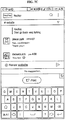
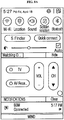
FIGS. 8A and8B illustrate an example of controlling an external device through an application of a mobile device according to the related art. When executing a dedicated application, a scheme of controlling a device by displaying a remote controller and by touching a button of a desired function as shown inFIG. 8A and a scheme of controlling a device by displaying a conversation box and by transferring a desired task message in a conversation form may be used. - Accordingly, to control the external device, a cumbersome process of closing or terminating a screen of an application currently in use, executing the dedicated application, and inputting a control instruction needs to be performed. In addition, an increase in a number of peripheral devices may cause cumbersomeness and inconvenience to increase in selecting an application. Also, a manual may be different for each device. In this case, it may be difficult to adapt to the manual.
- Accordingly, to simplify a control of a peripheral external device through a mobile device, the inventor(s) of the present application provides a method of, in response to inputting a desired instruction, for example, a task message, and a text designating an external device to be controlled to a text box and giving a simple transmission instruction on any screen of a mobile device, transferring the instruction to an application for controlling the device, and executing the application. Hereinafter, various example embodiments of controlling a peripheral external device through a mobile device are described.
-
FIGS. 9A through 9C illustrate an example of controlling a television (TV) on a screen of a mobile device according to at least one example embodiment. - Referring to
FIG. 9A , when a TV or a set-top box is connected to a mobile device, a user inputs a text "@TV infinite challenge" to a text box of a current screen of a smartphone and performs a swipe motion of "√" on a touch screen. In response to detecting the motion of the user, an application recognizer of the mobile device recognizes a portion "TV" input with a symbol "@" from the input text as a portion associated with an application to be executed, a message recognizer recognizes a portion "infinite challenge" as a task message to be performed on the application, and a transmission instruction detector detects the swipe motion of "√", for example, a transmission instruction. Accordingly, a message transferor transfers a task message for playing a VOD "infinite challenge" or a task message for changing to a channel in which "infinite challenge" is currently being broadcasted to a dedicated application for TV control. The corresponding application receives the task message, executes the task message, and controls the TV or the set-top box. Although the example embodiment describes that a program name is input as the task message to change a TV channel, the channel may be changed by directly inputting a desired channel number. - The TV control may control various functions, such as a power ON/OFF function, a volume control function, a recording reservation function, etc., in addition to a channel change function. Accordingly, in response to recognizing that the user desires to control the TV through the dedicated application, a function designator may display a plurality of functions on the screen so that the user may select a single desired function from among the plurality of functions.
- Referring to
FIG. 9B , in response to an input of "@TV", the application recognizer recognizes that the user desires to control the TV through the dedicated application for TV control. Here, a plurality of functions, such as the channel change function, the power ON/OFF function, the volume control function, the recording reservation function, etc., may be present as controllable functions. Thus, the function designator may display the plurality of functions at a lower end of the text box. If the user touches "record" among the plurality of functions, additionally inputs a target program, and gives a message transmission instruction, the user may make a reservation of recording the program "infinite challenge" that is to be broadcasted at a closest time. - Referring to
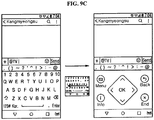
FIG. 9C , in response to an input of "@TV" and a detection of a preset swipe motion, for example, a swipe motion of a linear form from right to left, a remote controller for controlling the TV may be displayed on the current screen through an external device control screen display. The swipe motion for displaying the remote controller may be set to be different from a swipe motion for transmitting a task message and a swipe motion for creating a text box. Any type of instructions that are distinguishably recognizable from execution instructions of other functions and recognized may be used. -
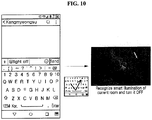
FIG. 10 illustrates an example of controlling an illumination on a screen of a mobile device according to at least one example embodiment. Referring toFIG. 10 , in response to inputting a text "@light off' to a text box and giving a task message transmission instruction, a message of turning OFF a light, for example, a smart illumination, is transferred to an application of the mobile device and the application is executed. Here, an indoor smart illumination uses a general indoor location recognition method of recognizing a BLE signal strength using the mobile device, and the like. - As described above, it is possible to turn OFF an illumination on the screen of the mobile device and to turn ON the illumination in the same manner without being deviated from a current location. Also, it is possible to control or inspect an illumination state, for example, an ON/OFF state, of another place, such as a living room, a kitchen, and the like.
-
FIG. 11 illustrates an example of controlling a temperature controller of a product name "nest" on a screen of a mobile device according to at least one example embodiment. Referring toFIG. 11 , in response to inputting a text "@nest 27 degrees" and giving a task message transmission instruction, a target temperature is transferred to a registered temperature controller through the mobile device or a dedicated application of the mobile device and a temperature adjustment is executed. Accordingly, although a user is out, a pleasant environment may be provided by cooling or heating in advance an indoor space at a desired temperature. - As described above, according to the example embodiment, it is possible to easily control an external device connected to a mobile device by simply inputting a text on a screen of the mobile device currently in use. In addition, according to the example embodiment, it is possible to retrieve an external device not connected to the mobile device and to connect the retrieved external device to the mobile device.
-
FIG. 12 illustrates an example of controlling a projector on a screen of a mobile device according to at least one example embodiment. Referring toFIG. 12 , once a user inputs a text "@projector", a projector adjacent to the mobile device is retrieved and a result thereof is displayed at a lower end of a text box. In response to the user selecting the retrieved projector, a connection between the mobile device and the projector is performed through the mobile device or a dedicated application of the mobile device. This function may be executed through an external device searcher and connector. The user may control an operation of the connected projector by inputting a desired task message and by performing a swipe motion, for example, a task message transmission instruction. According to the example embodiment, it is possible to unify an operation of searching for a peripheral external device of the mobile device and an operation of connecting the external device to the mobile device. - According to example embodiments, a user may easily execute a desired application without switching a screen while using a mobile device. In particular, although there is a need to execute another application during an execution of a single application on the mobile device, and further, although there is a need to control a peripheral external device of the mobile device, the user may simply execute a task of a desired application by inputting a text on a current screen and by performing a preset swipe motion. Accordingly, it is possible to reduce the user inconvenience that may occur due to execution of the application and to reduce an amount of time to manipulate an existing application. In addition, it is possible to maintain the continuity of a take being performed by the user.
- Although the example embodiments are described with reference to the accompanying drawings, it will be understood by one of ordinary skill in the art that various other example embodiments may be implemented without departing from the technical scope or essential features of the disclosure. Therefore, the example embodiments are provided as examples only and construed as being limited.
Claims (20)
- An application execution apparatus of a mobile device, the apparatus comprising:a text input device;an application recognizer configured to recognize an application to be executed;a message recognizer reconfigured to recognize a task message to be performed on the application to be executed based on a text that is input through the text input device;a transmission instruction detector configured to detect a task message transmission instruction of a user;a message transferor configured to transfer the task message to the application in response to detecting the task message transmission instruction using the transmission instruction detector; andan application executor configured to execute the task message transferred from the message transferor,wherein the text input device is configured to perform a task of the application on a current screen without performing switching to the application to be executed.
- The apparatus of claim 1, wherein the application recognizer is configured to recognize a text input with a specific symbol as the application to be executed, and the message recognizer is configured to recognize a remaining portion as the task message to be performed on the application.
- The apparatus of claim 2, further comprising:an application designator configured to display a plurality of applications on a screen to select a single application from among the plurality of applications, in response to the plurality of applications being designated to the text input with the specific symbol in the text input through the text input device.
- The apparatus of claim 2, wherein, the message transferor is configured to transfer the input text to a memo application in response to an absence of the text input with the specific symbol in the text input through the text input device and in response to detecting the task message transmission instruction using the transmission instruction detector.
- The apparatus of claim 1, wherein the transmission instruction detector is configured to recognize a preset first swipe motion of the user as the task message transmission instruction.
- The apparatus of claim 1, further comprising:a text box creator configured to create a text box in response to detecting a preset second swipe motion of the user on a screen on which the text box is absent.
- The apparatus of claim 1, further comprising:an instruction display configured to display a plurality of functions on a screen in response to the plurality of functions being set to the application recognized by the application recognizer.
- The apparatus of claim 1, further comprising:an application execution notifier configured to display an application execution result on a screen in response to executing the application using the application executor.
- The apparatus of claim 1, further comprising;
an external device control screen display configured to display a remote controller capable of controlling an external device in response to the application recognized by the application recognizer being an application for controlling the external device and in response to detecting a preset third swipe motion of the user. - The apparatus of claim 1, further comprising:an external device searcher and connector configured to search for an external device from among peripheral devices and to connect the external device to the mobile device in response to the application recognized by the application recognizer being an application for controlling the external device.
- An application execution method of a mobile device, the method comprising:a text input operation;an application recognition operation of recognizing an application to be executed by a user;a message recognition operation of recognizing a task message to be performed on the application to be executed based on an input text;a transmission instruction detection operation of detecting a task message transmission instruction of the user;a message transfer operation of transferring the task message to the application to be executed by the user in response to detecting the task message transmission instruction of the user; andan application execution operation of executing the transferred task message,wherein a task of the application is performed on a current screen without performing switching to the application at which the user desires to perform the task.
- The method of claim 11, wherein the application recognition operation recognizes a text input with a specific symbol as the application at which the task is to be performed, and the message recognition operation recognizes a remaining portion as the task message to be performed on the application.
- The method of claim 12, further comprising:an application display operation of displaying a plurality of applications on a screen to select a single application from among the plurality of applications, in response to the plurality of applications being designated to the text input with the specific symbol in the text that is input in the text input operation.
- The method of claim 12, wherein, in response to an absence of the text input with the specific symbol in the text input in the text input operation, when the task message transmission instruction is detected, the input text is transferred to a memo application.
- The method of claim 11, wherein the transmission instruction detection operation recognizes a preset first swipe motion of the user as the task message transmission instruction.
- The method of claim 11, further comprising:a text box creation operation of creating a text box in response to detecting a preset second swipe motion of the user on a screen on which the text box is absent.
- The method of claim 11, further comprising:an instruction display operation of displaying a plurality of function in response to the plurality of functions being set to the application recognized in the application recognition operation.
- The method of claim 11, further comprising:an application execution notification operation of displaying an application execution result on a screen in response to executing the application in the application execution operation.
- The method of claim 11, further comprising:an external device control screen display operation of displaying a remote controller screen capable of controlling an external device in response to the application recognized in the application recognition operation being an application for controlling the external device and in response to detecting a preset third swipe motion of the user.
- The method of claim 11, further comprising:an external device searcher and connection operation of searching for an external device from among peripheral devices and connecting the external device to the mobile device in response to the application recognized in the application recognition operation being an application for controlling the external device.
Applications Claiming Priority (3)
| Application Number | Priority Date | Filing Date | Title |
|---|---|---|---|
| KR1020150040062A KR101644627B1 (en) | 2015-03-23 | 2015-03-23 | Appratus for executing application of mobile device and mtehod for the same |
| KR20150120165 | 2015-08-26 | ||
| PCT/KR2016/002869 WO2016153258A1 (en) | 2015-03-23 | 2016-03-22 | Apparatus and method for executing application for mobile device |
Publications (2)
| Publication Number | Publication Date |
|---|---|
| EP3276447A1 true EP3276447A1 (en) | 2018-01-31 |
| EP3276447A4 EP3276447A4 (en) | 2019-01-16 |
Family
ID=56978192
Family Applications (1)
| Application Number | Title | Priority Date | Filing Date |
|---|---|---|---|
| EP16769076.7A Pending EP3276447A4 (en) | 2015-03-23 | 2016-03-22 | APPARATUS AND METHOD FOR APPLICATION EXECUTION FOR MOBILE DEVICE |
Country Status (5)
| Country | Link |
|---|---|
| US (1) | US10425521B2 (en) |
| EP (1) | EP3276447A4 (en) |
| JP (2) | JP6590940B2 (en) |
| CN (1) | CN107636588B (en) |
| WO (1) | WO2016153258A1 (en) |
Families Citing this family (5)
| Publication number | Priority date | Publication date | Assignee | Title |
|---|---|---|---|---|
| KR20180103547A (en) * | 2017-03-10 | 2018-09-19 | 삼성전자주식회사 | Portable apparatus and a screen control method thereof |
| KR102350954B1 (en) * | 2017-08-22 | 2022-01-14 | 삼성전자주식회사 | Electronic device sending message and operation method of thereof |
| WO2019172463A1 (en) * | 2018-03-06 | 2019-09-12 | 라인플러스 주식회사 | Method, system, and non-transitory computer-readable recording medium for recommending profile photo |
| KR102719933B1 (en) | 2018-07-10 | 2024-10-23 | 삼성전자주식회사 | Electronic device and operating method for performing an operation based on bending |
| CN116974707A (en) * | 2023-08-04 | 2023-10-31 | 三星电子(中国)研发中心 | Task processing methods and devices |
Family Cites Families (27)
| Publication number | Priority date | Publication date | Assignee | Title |
|---|---|---|---|---|
| JP2000222522A (en) * | 1999-02-04 | 2000-08-11 | Matsushita Electric Ind Co Ltd | Recognition processing device |
| CN100485603C (en) * | 2003-04-04 | 2009-05-06 | 雅虎公司 | Systems and methods for generating concept units from search queries |
| US7146129B2 (en) * | 2003-07-10 | 2006-12-05 | Lucent Technologies Inc. | Remote control of functions via wireless transmission of text-based messages |
| KR100588623B1 (en) * | 2004-11-12 | 2006-06-14 | 주식회사 케이티프리텔 | Method and system for providing selection service through simultaneous input of numbers and strings |
| JP4769023B2 (en) * | 2005-06-10 | 2011-09-07 | ソニー エリクソン モバイル コミュニケーションズ, エービー | Mobile terminal, remote control method and program for controlled device |
| KR101476180B1 (en) * | 2008-01-02 | 2014-12-24 | 엘지전자 주식회사 | Mobile terminal and method of executing application |
| KR101548958B1 (en) * | 2008-09-18 | 2015-09-01 | 삼성전자주식회사 | Method and apparatus for controlling touch screen operation of a portable terminal |
| JP5385744B2 (en) * | 2009-09-28 | 2014-01-08 | 京セラ株式会社 | Electronic device and application startup method |
| US8572303B2 (en) * | 2010-02-03 | 2013-10-29 | Tal Lavian | Portable universal communication device |
| CN102073454A (en) * | 2011-01-13 | 2011-05-25 | 宇龙计算机通信科技(深圳)有限公司 | Mobile terminal and input control method for touch panel |
| KR101836403B1 (en) * | 2011-04-12 | 2018-04-19 | 엘지전자 주식회사 | Mobile terminal performing remote control fucntion for display device |
| JP5496947B2 (en) * | 2011-05-27 | 2014-05-21 | 株式会社Nttドコモ | Function presentation system, terminal device, and program |
| WO2013054957A1 (en) * | 2011-10-13 | 2013-04-18 | Lg Electronics Inc. | Input interface controlling apparatus and method thereof |
| JP5533837B2 (en) * | 2011-11-02 | 2014-06-25 | コニカミノルタ株式会社 | Handwriting input device and handwriting input control program |
| KR20140008985A (en) * | 2012-07-13 | 2014-01-22 | 삼성전자주식회사 | User interface appratus in a user terminal and method therefor |
| KR20140008987A (en) * | 2012-07-13 | 2014-01-22 | 삼성전자주식회사 | Method and apparatus for controlling application using recognition of handwriting image |
| KR102039553B1 (en) * | 2012-08-31 | 2019-11-01 | 삼성전자 주식회사 | Method and apparatus for providing intelligent service using inputted character in a user device |
| KR101394874B1 (en) * | 2012-09-24 | 2014-05-13 | 주식회사 팬택 | Device and method implementing for particular function based on writing |
| KR101328202B1 (en) * | 2012-12-03 | 2013-11-20 | 김정수 | Method and apparatus for running commands performing functions through gestures |
| JP2014143660A (en) * | 2012-12-26 | 2014-08-07 | Sharp Corp | Mobile terminal, display device, television receiver, and radio communication system |
| KR101294558B1 (en) * | 2013-04-15 | 2013-08-07 | 김민철 | Type error correction method |
| JP6058790B2 (en) * | 2013-04-26 | 2017-01-11 | 京セラ株式会社 | Apparatus, method, and program |
| US20140337804A1 (en) * | 2013-05-10 | 2014-11-13 | Microsoft Corporation | Symbol-based digital ink analysis |
| KR102089447B1 (en) * | 2013-06-04 | 2020-03-16 | 삼성전자 주식회사 | Electronic device and method for controlling applications thereof |
| KR102084507B1 (en) * | 2013-09-05 | 2020-03-04 | 삼성전자주식회사 | Method and apparatus for controlling a home device remotely in a home network system |
| US20150142897A1 (en) * | 2013-11-18 | 2015-05-21 | Dropbox, Inc. | Managing text messages |
| US11188710B2 (en) * | 2016-12-30 | 2021-11-30 | Dropbox, Inc. | Inline content item editor commands |
-
2016
- 2016-03-22 WO PCT/KR2016/002869 patent/WO2016153258A1/en not_active Ceased
- 2016-03-22 CN CN201680012910.9A patent/CN107636588B/en not_active Expired - Fee Related
- 2016-03-22 JP JP2017547104A patent/JP6590940B2/en not_active Expired - Fee Related
- 2016-03-22 EP EP16769076.7A patent/EP3276447A4/en active Pending
-
2017
- 2017-09-22 US US15/713,156 patent/US10425521B2/en active Active
-
2019
- 2019-09-17 JP JP2019168206A patent/JP6797987B2/en not_active Expired - Fee Related
Also Published As
| Publication number | Publication date |
|---|---|
| JP2020009475A (en) | 2020-01-16 |
| JP2018511867A (en) | 2018-04-26 |
| JP6590940B2 (en) | 2019-10-16 |
| EP3276447A4 (en) | 2019-01-16 |
| US10425521B2 (en) | 2019-09-24 |
| CN107636588A (en) | 2018-01-26 |
| WO2016153258A1 (en) | 2016-09-29 |
| CN107636588B (en) | 2021-07-23 |
| US20180013876A1 (en) | 2018-01-11 |
| JP6797987B2 (en) | 2020-12-09 |
Similar Documents
| Publication | Publication Date | Title |
|---|---|---|
| CN108259973B (en) | Graphical user interface display method of smart TV and TV screen screenshots | |
| JP6797987B2 (en) | Mobile device application execution device and its method | |
| US20220303341A1 (en) | Method and device for controlling home device | |
| US20210160200A1 (en) | Method and apparatus for managing message in electronic device | |
| KR102270953B1 (en) | Method for display screen in electronic device and the device thereof | |
| US9632688B2 (en) | Enhanced user interface to transfer media content | |
| US20150100983A1 (en) | Personal Mobile Device as Ad hoc Set-Top Box for Television | |
| US20180176478A1 (en) | Apparatus and method for transmitting information in portable device | |
| US20170322642A1 (en) | Mobile device comprising stylus pen and operation method therefor | |
| AU2016253688A1 (en) | Method and device for providing recommendation panel, and method and server for providing recommendation item | |
| EP2887194A1 (en) | Method for controlling a composition of a screen and electronic device thereof | |
| EP2680125A2 (en) | Enhanced user interface to transfer media content | |
| KR102185368B1 (en) | Performing actions through a user interface | |
| US11281313B2 (en) | Mobile device comprising stylus pen and operation method therefor | |
| KR20130035716A (en) | Method for group controlling of electronic devices and electronic device management system therefor | |
| US9826026B2 (en) | Content transmission method and system, device and computer-readable recording medium that uses the same | |
| US20160092152A1 (en) | Extended screen experience | |
| JP2014116001A (en) | Method for providing information based on context, and system and recording medium thereof | |
| US10911833B2 (en) | Method and device for providing information on content | |
| KR20150081643A (en) | Display apparatus, mobile apparatus, system and setting controlling method for connection thereof | |
| US20110047184A1 (en) | Method of managing contact item information, user device for executing the method, and storage medium thereof | |
| CN104065984B (en) | Display device, remote controller and control method thereof | |
| US20140317573A1 (en) | Display apparatus and method of displaying a context menu | |
| KR101644627B1 (en) | Appratus for executing application of mobile device and mtehod for the same | |
| KR102876659B1 (en) | Method for displaying service related to video and electronic device therefor |
Legal Events
| Date | Code | Title | Description |
|---|---|---|---|
| STAA | Information on the status of an ep patent application or granted ep patent |
Free format text: STATUS: THE INTERNATIONAL PUBLICATION HAS BEEN MADE |
|
| PUAI | Public reference made under article 153(3) epc to a published international application that has entered the european phase |
Free format text: ORIGINAL CODE: 0009012 |
|
| STAA | Information on the status of an ep patent application or granted ep patent |
Free format text: STATUS: REQUEST FOR EXAMINATION WAS MADE |
|
| 17P | Request for examination filed |
Effective date: 20171020 |
|
| AK | Designated contracting states |
Kind code of ref document: A1 Designated state(s): AL AT BE BG CH CY CZ DE DK EE ES FI FR GB GR HR HU IE IS IT LI LT LU LV MC MK MT NL NO PL PT RO RS SE SI SK SM TR |
|
| AX | Request for extension of the european patent |
Extension state: BA ME |
|
| DAV | Request for validation of the european patent (deleted) | ||
| DAX | Request for extension of the european patent (deleted) | ||
| RIC1 | Information provided on ipc code assigned before grant |
Ipc: G06F 3/023 20060101ALI20180828BHEP Ipc: G06F 3/048 20130101ALI20180828BHEP Ipc: G06K 9/20 20060101ALI20180828BHEP Ipc: G06F 3/0488 20130101AFI20180828BHEP Ipc: G06F 3/038 20130101ALI20180828BHEP Ipc: G06F 9/44 20180101ALI20180828BHEP Ipc: G06F 17/24 20060101ALI20180828BHEP |
|
| A4 | Supplementary search report drawn up and despatched |
Effective date: 20181217 |
|
| RIC1 | Information provided on ipc code assigned before grant |
Ipc: G06F 17/24 20060101ALI20181211BHEP Ipc: G06F 3/048 20130101ALI20181211BHEP Ipc: G06F 9/44 20180101ALI20181211BHEP Ipc: G06K 9/20 20060101ALI20181211BHEP Ipc: G06F 3/0488 20130101AFI20181211BHEP Ipc: G06F 3/023 20060101ALI20181211BHEP Ipc: G06F 3/038 20130101ALI20181211BHEP |
|
| STAA | Information on the status of an ep patent application or granted ep patent |
Free format text: STATUS: EXAMINATION IS IN PROGRESS |
|
| 17Q | First examination report despatched |
Effective date: 20210730 |
|
| REG | Reference to a national code |
Ref country code: DE Ref legal event code: R079 Free format text: PREVIOUS MAIN CLASS: G06F0003010000 Ipc: G06F0003048830 |
|
| GRAP | Despatch of communication of intention to grant a patent |
Free format text: ORIGINAL CODE: EPIDOSNIGR1 |
|
| STAA | Information on the status of an ep patent application or granted ep patent |
Free format text: STATUS: GRANT OF PATENT IS INTENDED |
|
| RIC1 | Information provided on ipc code assigned before grant |
Ipc: G06F 3/04883 20220101AFI20260227BHEP Ipc: G06F 9/44 20180101ALI20260227BHEP Ipc: G06F 3/023 20060101ALI20260227BHEP Ipc: G06F 3/038 20130101ALI20260227BHEP Ipc: H04W 4/12 20090101ALI20260227BHEP |
|
| INTG | Intention to grant announced |
Effective date: 20260313 |