EP3196702A1 - Printing apparatus, image reading apparatus, control program of printing apparatus, and control program of image reading apparatus - Google Patents
Printing apparatus, image reading apparatus, control program of printing apparatus, and control program of image reading apparatus Download PDFInfo
- Publication number
- EP3196702A1 EP3196702A1 EP17152389.7A EP17152389A EP3196702A1 EP 3196702 A1 EP3196702 A1 EP 3196702A1 EP 17152389 A EP17152389 A EP 17152389A EP 3196702 A1 EP3196702 A1 EP 3196702A1
- Authority
- EP
- European Patent Office
- Prior art keywords
- setting
- respect
- setting item
- button
- Prior art date
- Legal status (The legal status is an assumption and is not a legal conclusion. Google has not performed a legal analysis and makes no representation as to the accuracy of the status listed.)
- Granted
Links
Images




Classifications
-
- G—PHYSICS
- G03—PHOTOGRAPHY; CINEMATOGRAPHY; ANALOGOUS TECHNIQUES USING WAVES OTHER THAN OPTICAL WAVES; ELECTROGRAPHY; HOLOGRAPHY
- G03G—ELECTROGRAPHY; ELECTROPHOTOGRAPHY; MAGNETOGRAPHY
- G03G15/00—Apparatus for electrographic processes using a charge pattern
- G03G15/50—Machine control of apparatus for electrographic processes using a charge pattern, e.g. regulating differents parts of the machine, multimode copiers, microprocessor control
- G03G15/5016—User-machine interface; Display panels; Control console
-
- H—ELECTRICITY
- H04—ELECTRIC COMMUNICATION TECHNIQUE
- H04N—PICTORIAL COMMUNICATION, e.g. TELEVISION
- H04N1/00—Scanning, transmission or reproduction of documents or the like, e.g. facsimile transmission; Details thereof
- H04N1/0035—User-machine interface; Control console
- H04N1/00501—Tailoring a user interface [UI] to specific requirements
- H04N1/00506—Customising to the data to be displayed
-
- G—PHYSICS
- G03—PHOTOGRAPHY; CINEMATOGRAPHY; ANALOGOUS TECHNIQUES USING WAVES OTHER THAN OPTICAL WAVES; ELECTROGRAPHY; HOLOGRAPHY
- G03G—ELECTROGRAPHY; ELECTROPHOTOGRAPHY; MAGNETOGRAPHY
- G03G15/00—Apparatus for electrographic processes using a charge pattern
- G03G15/50—Machine control of apparatus for electrographic processes using a charge pattern, e.g. regulating differents parts of the machine, multimode copiers, microprocessor control
- G03G15/5016—User-machine interface; Display panels; Control console
- G03G15/502—User-machine interface; Display panels; Control console relating to the structure of the control menu, e.g. pop-up menus, help screens
-
- G—PHYSICS
- G03—PHOTOGRAPHY; CINEMATOGRAPHY; ANALOGOUS TECHNIQUES USING WAVES OTHER THAN OPTICAL WAVES; ELECTROGRAPHY; HOLOGRAPHY
- G03G—ELECTROGRAPHY; ELECTROPHOTOGRAPHY; MAGNETOGRAPHY
- G03G15/00—Apparatus for electrographic processes using a charge pattern
- G03G15/50—Machine control of apparatus for electrographic processes using a charge pattern, e.g. regulating differents parts of the machine, multimode copiers, microprocessor control
- G03G15/5075—Remote control machines, e.g. by a host
- G03G15/5091—Remote control machines, e.g. by a host for user-identification or authorisation
-
- H—ELECTRICITY
- H04—ELECTRIC COMMUNICATION TECHNIQUE
- H04N—PICTORIAL COMMUNICATION, e.g. TELEVISION
- H04N1/00—Scanning, transmission or reproduction of documents or the like, e.g. facsimile transmission; Details thereof
- H04N1/0035—User-machine interface; Control console
- H04N1/00405—Output means
- H04N1/00408—Display of information to the user, e.g. menus
- H04N1/00411—Display of information to the user, e.g. menus the display also being used for user input, e.g. touch screen
-
- H—ELECTRICITY
- H04—ELECTRIC COMMUNICATION TECHNIQUE
- H04N—PICTORIAL COMMUNICATION, e.g. TELEVISION
- H04N1/00—Scanning, transmission or reproduction of documents or the like, e.g. facsimile transmission; Details thereof
- H04N1/0035—User-machine interface; Control console
- H04N1/00405—Output means
- H04N1/00408—Display of information to the user, e.g. menus
- H04N1/00413—Display of information to the user, e.g. menus using menus, i.e. presenting the user with a plurality of selectable options
-
- H—ELECTRICITY
- H04—ELECTRIC COMMUNICATION TECHNIQUE
- H04N—PICTORIAL COMMUNICATION, e.g. TELEVISION
- H04N1/00—Scanning, transmission or reproduction of documents or the like, e.g. facsimile transmission; Details thereof
- H04N1/0035—User-machine interface; Control console
- H04N1/00405—Output means
- H04N1/00408—Display of information to the user, e.g. menus
- H04N1/00413—Display of information to the user, e.g. menus using menus, i.e. presenting the user with a plurality of selectable options
- H04N1/00416—Multi-level menus
- H04N1/00419—Arrangements for navigating between pages or parts of the menu
- H04N1/00432—Arrangements for navigating between pages or parts of the menu using tabs
-
- H—ELECTRICITY
- H04—ELECTRIC COMMUNICATION TECHNIQUE
- H04N—PICTORIAL COMMUNICATION, e.g. TELEVISION
- H04N1/00—Scanning, transmission or reproduction of documents or the like, e.g. facsimile transmission; Details thereof
- H04N1/0035—User-machine interface; Control console
- H04N1/00405—Output means
- H04N1/00474—Output means outputting a plurality of functional options, e.g. scan, copy or print
-
- H—ELECTRICITY
- H04—ELECTRIC COMMUNICATION TECHNIQUE
- H04N—PICTORIAL COMMUNICATION, e.g. TELEVISION
- H04N1/00—Scanning, transmission or reproduction of documents or the like, e.g. facsimile transmission; Details thereof
- H04N1/0035—User-machine interface; Control console
- H04N1/00405—Output means
- H04N1/00482—Output means outputting a plurality of job set-up options, e.g. number of copies, paper size or resolution
-
- H—ELECTRICITY
- H04—ELECTRIC COMMUNICATION TECHNIQUE
- H04N—PICTORIAL COMMUNICATION, e.g. TELEVISION
- H04N1/00—Scanning, transmission or reproduction of documents or the like, e.g. facsimile transmission; Details thereof
- H04N1/0035—User-machine interface; Control console
- H04N1/00405—Output means
- H04N1/00408—Display of information to the user, e.g. menus
- H04N1/00466—Display of information to the user, e.g. menus displaying finishing information, e.g. position of punch holes or staple or orientation references
-
- H—ELECTRICITY
- H04—ELECTRIC COMMUNICATION TECHNIQUE
- H04N—PICTORIAL COMMUNICATION, e.g. TELEVISION
- H04N2201/00—Indexing scheme relating to scanning, transmission or reproduction of documents or the like, and to details thereof
- H04N2201/0077—Types of the still picture apparatus
- H04N2201/0082—Image hardcopy reproducer
Definitions
- the present invention relates to a printing apparatus, an image reading apparatus, a control program of the printing apparatus, and a control apparatus of the image reading apparatus.
- a printing apparatus which includes a touch panel type display and a start button (print start instruction button) separately from the display (for example, refer to JP-A-2012-129836 ).
- a start button print start instruction button
- the start button is displayed on the touch panel type display.
- the number of setting items (the number of setting buttons) which can be displayed on a screen at a time is small compared to the configuration in which the start button is displaced on the outside of the display. Therefore, in a case where the user performs setting or checks content, which is already set, again, the user should frequently perform scroll manipulation or switch the screen in order to display a target setting item, and thus usability is bad.
- An advantage of some aspects of the invention is that usability of setting screen of a printing apparatus and an image reading apparatus is improved.
- a printing apparatus which includes a touch panel type display and a control unit. Furthermore, the control unit displays a setting item with respect to print and a print start instruction button in a situation according to setting content, which is set in the setting item and is used for the print, on the display.
- the print start instruction button has a function of notifying the setting content of the setting item with respect to the print in addition to a function as a Graphic User Interface (GUI) button according to the related art which receives a print start instruction, and thus it is possible to effectively use a limited space of a screen of the display.
- GUI Graphic User Interface
- a user can recognize the setting content according to the situation of the print start instruction button in a case where the user taps the print start instruction button, with the result that the user can perceive, for example, setting errors and setting forgetting before the print start instruction button is tapped, and thus it is possible to prevent the printing errors.
- setting content which is used for the print means setting content which can be printed and is used for the print, and does not include setting content which is difficult to be printed.
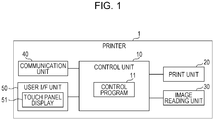
- Fig. 1 is a block diagram illustrating a configuration of a printer 1 according to an embodiment of the invention.
- the printer 1 includes a control unit 10, a print unit 20, an image reading unit 30, a communication unit 40, and a user I/F unit 50, and is formed as a printer which has an image reading function. Accordingly, the printer 1 corresponds to a printing apparatus and an image reading apparatus.
- the print unit 20 includes an actuator sensor, a drive circuit, and a machine component which perform printing on a printing medium, such as photographic paper, plain paper, or OHP sheet, using a well-known printing method such as an ink jet method or an electro-graphic method.
- the image reading unit 30 includes a well-known color image sensor that emits light to a document which is mounted on a document table, divides reflected light from the document into respective colors of RGB, and uses scan image data, and an actuator, which transports a document, a drive circuit, and a machine component.
- the communication unit 40 includes various communication interfaces for wired or wireless communication with external devices.
- the communication unit 40 includes an interface for communication with various removable memories that are mounted on the printer 1.
- the user I/F unit 50 includes a touch panel display 51 (hereinafter, simply referred to as a display 51) and a key input unit which is not illustrated in the drawing.
- the display 51 includes a display panel that displays various pieces of information based on control of the control unit 10, and a touch detection panel that is superimposed on the display panel, and detects touch manipulation performed by a pointing object, such as a finger of a person, according to a well-known method such as a capacitive sensing method, a resistive film method, and an optical method.
- the display 51 outputs information (for example, coordinates of a touch start position and a touch end position, or the like) that indicates the touch manipulation to the control unit 10.
- the control unit 10 includes a CPU, a ROM, a RAM, a nonvolatile memory, and the like which are not illustrated in the drawing.
- the CPU is capable of performing a control program 11, which is recorded in the ROM or the nonvolatile memory, using the RAM or the nonvolatile memory.
- the control program 11 is a program that displays the various pieces of information on the display 51, and, in a case where manipulation (including, for example, tapping, swiping, pinching-in, pinching-out, or the like) performed on the display 51 is detected based on information indicative of the touch manipulation acquired from the display 51, causes the printer 1 to realize a function of performing a process corresponding to the manipulation by controlling each of the units of the printer 1.
- the control program 11 includes a display control function of displaying a start button (corresponding to a print start instruction button or an image reading start instruction button) in a situation according to setting content which is set by a user.
- a plurality of setting items are presented in the setting screen and the user is capable of changing the setting content for each setting item.
- Information indicative of the setting content which is set in each setting item is recorded in the RAM or the nonvolatile memory, and the information is rewritten according to change manipulation of the user.
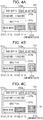
- Figs. 2A to 8C illustrate examples of screens which are displayed on the display 51 of the printer 1.
- the screens are setting screens with respect to a copy function of the printer 1.
- the control unit 10 detects that manipulation which indicates a request to display a copy function setting screen is performed, the control unit 10 displays the copy function setting screen on the display 51.
- the copy function setting screen is provided with an area, which displays a basic setting screen 511 or a detailed setting screen in a switchable manner, in a part thereof.
- the plurality of setting items with respect to the copy function of the printer 1 are assigned to be displayed any one of the basic setting screen 511 and the detailed setting screen.
- the basic setting screen 511 is a screen which is displayed in a case where the basic setting tab 511a is tapped.
- the detailed setting screen is a screen which is displayed in a case where a detailed setting tab 512a is tapped. Meanwhile, each divided drawings of Figs. 2A to 8C illustrates that the basic setting screen 511 is selected and displayed.
- the basic setting screen 511 includes a double side print setting button 511b, a density setting button 511c, a color setting button 511d, and a start button 511e.
- the start button 511e is a button which receives the print start instruction. In a case where it is detected that the start button 511e is tapped, the control unit 10 performs a copy process based on the setting content of each setting item, which will be described later, by controlling the image reading unit 30, the print unit 20, and the communication unit 40.
- the double side print setting button 511b is a button that includes a function of displaying setting content which is set to a setting item with respect to double side print, and a function of receiving change in the setting content for the setting item.
- the options of the setting content include "single side -> single side” and "single side -> double side”.
- the control unit 10 presents the above-described options, and records an option, which is tapped and selected by the user, of the presented options as the setting content in the RAM.
- control unit 10 ends presentation of the options, and displays the double side print setting button 511b which includes letters indicative of the selected content (for example, "single side -> double side” or the like) which is selected by the user.
- the double side print setting button 511b displays the double side print setting button 511b which includes letters indicative of the selected content (for example, "single side -> double side” or the like) which is selected by the user.
- any situation may be used for a method of presenting the above-described options after the double side print setting button 511b is tapped.
- the options may be displayed through pop-up, the options may be displayed through a drop-down list, the options may be presented after transition to a hierarchy screen in advance, or selected content may be updated (replaced in order of single side -> single side and single side -> double side) according to the number of times that the double side print setting button 511b is tapped.
- the density setting button 511c is a button that includes a function of displaying setting content which is set to a setting item with respect to a print density, and a function of receiving change in the setting content for the setting item. For example, it is possible to select “-2", “-1", “ ⁇ 0", “+1”, and “+2" as the setting content.
- the control unit 10 presents the above-described option, ends presentation of the option which is recorded in the RAM while using the option, which is selected from the presented options by the user, as the setting content, and displays the setting content on the density setting button 511c.
- the color setting button 511d is a button group for setting the setting item with respect to color print, that is, selecting color print or monochrome print, and includes a monochrome button 511d1 and a color button 511d2.
- the control unit 10 records information indicative of "color" as setting content of a setting item with respect to the color print in the RAM, and highlights the color button 511d2 rather than the monochrome button 511d1.
- the control unit 10 records information indicative of "monochrome" as the setting content of the setting item with respect to the color print in the RAM, and highlights the monochrome button 511d1 rather than the color button 511d2.
- the start button 511e illustrated in FIG. 2A indicates a start button in an initial state (default state).
- the start button 511e of Fig. 2A simultaneously indicates that "single side -> single side” is set to a setting item with respect to double side print, " ⁇ 0" is set to a setting item with respect to a print density, and "color” is set to a setting item with respect to color print (the color button 511d2 is highlighted rather than the monochrome button 511d1) (meanwhile, in the initial state, the setting content of each setting item included in the detailed setting screen is not reflected in the start button 511e).
- the start button 511e is displayed in a square shape with a chromatic color.
- a mark m1 (a mark which is formed with a square and straight line in the square) around the center of the start button 511e is a mark which indicates that the button is the start button.
- the basic setting screen 511 or the start button 511e which is acquired in a case where the setting content of the various setting items is changed in the detailed setting screen, is displayed will be sequentially described.
- the printer 1 starts copy based on the set setting content, and produces printed matter.
- the start button 511e whose situation is changed from the initial state through the change in setting may return to the initial state again in a case where, for example, the start button 511e is tapped once and copy is performed.
- the control unit 10 changes the setting content of the setting item with respect to the color print from a color to a monochrome color, highlights the monochrome button 511d1 as illustrated in Fig. 2B , and changes a color of the start button 511e after changing a chromatic color which indicates color print to an achromatic color which indicates monochrome print.
- the control unit 10 maintains the color of the start button 511e as the chromatic color in the same density without change, and changes the form of the start button 511e to a form as illustrated in Fig. 2C .
- the control unit 10 displays the start button 511e which expresses that an upper right corner of a printing paper is folded to a near side and a rear surface of the printing paper is seen. That is, the start button 511e of Fig.
- the control unit 10 maintains the color as the achromatic color in the same density as in Fig. 2B without change and changes a shape as illustrated in Fig. 2D (shape is in common with Fig. 2C ). That is, the start button 511e illustrated in Fig.
- 2D simultaneously expresses that "monochrome” is selected in the setting item with respect to the color print, "single side -> double side” is selected in the setting item with respect to the double side print, and " ⁇ 0" is selected in the setting item with respect to the print density.
- the start button 511e may be displayed in a situation according to the setting content of the plurality of setting items.
- the setting item which indicates the setting content using the color of the start button 511e and the setting item which indicates the setting content using the shape of the start button 511e are not interfered with each other on the design, and thus it is possible to realize the setting content of the two setting items using the shape and color of the start button.
- a setting item which indicates setting content using the color of the start button 511e includes a setting item with respect to a print density.
- Fig. 3C illustrates that the basic setting screen 511 is displayed in a state in which "single side -> single side" is set to the setting item with respect to the double side print, " ⁇ 0" is set to the setting item with respect to the print density, and "color” is set to the setting item with respect to the color print.
- the density setting button 511c is tapped the setting item with respect to the print density and the setting content is changed from " ⁇ 0" to, for example, "-1" in a state in which the screen illustrated in Fig.
- the control unit 10 displays the color of the start button 511e using the chromatic color with a color (see Fig. 3B ) which is lighter than the color of the start button 511e (see Fig. 3C ) in a case where " ⁇ 0" is set.
- the control unit 10 displays the start button 511e using a color (see Fig. 3A ) which is lighter than the color (see Fig. 3B ) in a case of "-1".
- the control unit 10 displays the start button 511e using a color (see Fig.
- the control unit 10 displays the start button 511e using a color which is further darker than the color (see Fig. 3D ) in the case of "+1".
- a depth of the color of the start button 511e is associated with the change in the content of the setting item with respect to the print density, it is possible to cause the user to easily recognize the setting content.
- the density of the start button 511e may be changed while maintaining achromatic color in association with the setting content of the setting item with respect to the print density.
- the control unit 10 displays the detailed setting screen on the display 51 instead of the basic setting screen 511.
- the detailed setting screen includes, for example, a number of copies to be printed setting button, an allocation setting button, a binding position setting button, a margin setting button, a paper size setting button, a paper-type setting button, a feeding method setting button, a print quality setting button, a print magnification setting button, a document-type setting button, a watermark print setting button (not illustrated in the drawing), and the like.
- the start button 511e may be or may not be displayed in the detailed setting screen, description will be performed while assuming that the start button 511e is not displayed on the detailed setting screen in the embodiment. Accordingly, in the embodiment, it is necessary for the user to tap the basic setting tab 511a again and display the basic setting screen 511 in order to tap the start button after setting the setting items included in the detailed setting screen.
- the paper type indicates a type of a printing medium (recording medium), and, for example, "plain paper”, “picture paper”, or the like is assumed.
- the document type indicates a type of content which is included in a document corresponding to a copy source, and, for example, a "picture", a "letter”, or the like is assumed.
- the start button 511e is displayed according to the setting content of the setting item with respect to the number of copies to be printed will be described with reference to Figs. 4A to 4C .
- the control unit 10 displays the basic setting screen 511 and changes a shape of an outer edge of the start button 511e to a shape as illustrated in Fig. 4A or 4B.
- FIG. 4A illustrates the start button 511e acquired in a case where the number of copies to be printed is set to two copies
- Fig. 4B illustrates the start button 511e acquired in a case where the number of copies to be printed is set to three copies.
- Figs. 4A and 4B illustrate that the number of copies to be printed becomes two copies by increasing a line, which indicates a periphery of the start button 511e, and a similar-shaped rectangular frame line by one in the outer edge of the start button 511e, and, similarly, illustrate that the number of copies to be printed becomes three copies by increasing the rectangular frame line by two in the outer edge. Meanwhile, it is difficult for the user to see if too many number of rectangular frame lines is provided.
- a number which indicates the number of copies to be printed may be displayed at the bottom of the mark m1 of the start button 511e, as illustrated in Fig. 4C .
- the start button 511e is displayed according to the setting content of the setting item with respect to the allocation
- the control unit 10 displays the basic setting screen 511 and changes the shape of the start button 511e to a shape as illustrated in Fig. 5A or 5B .
- Options of the setting content of the setting item with respect to the allocation include, for example, "two-page allocation” and "four-page allocation".
- Fig. 5A illustrates the start button 511e acquired in a case in which the two-page allocation is set.
- Fig. 5B illustrates the start button 511e acquired in a case in which the four-page allocation is set.
- Figs. 5A and 5B illustrates that the start button 511e is divided into two parts in a case of the "two-page allocation” and is divided into four parts in a case of the "four-page allocation".
- the start button 511e is displayed according to the setting content of the setting item with respect to the binding position
- the control unit 10 displays the basic setting screen 511 and changes the shape of the start button 511e of the basic setting screen 511 to a shape as in Fig. 5C or 5D .
- Options of the setting content of the setting item with respect to the binding position include, for example, "long side binding” and "short side binding".
- Fig. 5C illustrates the start button 511e in a case where the long side binding is set.
- the long side binding is illustrated by forming the square start button 511e to have a vertically long shape and displaying a broken line which is parallel to the side in the vicinity of one of two long sides.
- Fig. 5D illustrates the start button 511e in a case where the short side binding is set.
- the short side binding is illustrated by forming the square start button 511e to have a horizontally long shape and displaying a broken line which is parallel to the side in the vicinity of one of two short sides.
- the start button 511e is displayed according to the setting content of the setting item with respect to the margin
- the control unit 10 displays the basic setting screen 511 and changes the shape of the start button 511e and an internal image as illustrated in Figs. 6A and 6B .
- Options of the setting content of the setting item with respect to the margin include "existence of margin” and "non-existence of margin”.
- Fig. 6A illustrates the start button 511e acquired in a case where the "existence of margin” is set. Specifically, an area is provided which indicates a margin in the outline part of the button, and an image which indicates a picture is displayed on the button instead of the mark m1.
- Fig. 6B illustrates the start button 511e in the case where the "non-existence of margin” is set. Specifically, although an image which indicates a picture is displayed on the button instead of the mark m1, "non-existence of margin" is realized in such a way that an area which indicates the margin is not provided in the outline part of the button. As described above, it is possible to cause the user to easily recognize the setting content of the setting item with respect to the margin, which is not displayed in the same screen as the start button 511e, according to the situation of the start button 511e.
- Fig. 7A illustrates the start button 511e acquired in a case where "plain paper” is set.
- Fig. 7B illustrates the start button 511e in a case where "picture paper” is set.
- Figs. 7C and 7D illustrate a case where it is detected that the user taps the detailed setting tab 512a in the state in which the screen illustrated in Fig. 2A is displayed, the setting content of the setting item with respect to the feeding method is changed by manipulating the feeding method setting button in the displayed detailed setting screen, and the basic setting tab 511a is tapped, the control unit 10 displays the basic setting screen 511 and changes the shape of the start button 511e as illustrated in Figs. 7C and 7D .
- Options of the setting content of the setting item with respect to the feeding method includes "lower tray", "upper tray”, and the like.
- Fig. 7C illustrates the start button 511e in a case where the "lower tray” is set.
- Fig. 7D illustrates the start button 511e in a case where the "upper tray” is set.
- a numerical value corresponding to enlargement or a numerical value corresponding to reduction is set as the setting content of the setting item with respect to the print magnification.
- Fig. 7E illustrates the start button 511e in a case where the numerical value corresponding to enlargement is set.
- Fig. 7F illustrates the start button 511e in a case where the numerical value corresponding to reduction is set.
- the start button 511e is displayed according to the setting item with respect to the print quality according to the setting item with respect to the print quality.
- the control unit 10 displays the basic setting screen 511 and changes the shape of the start button 511e as illustrated in, for example, Fig. 8A .
- the print quality may be realized according to positions and the number of star marks which are painted as illustrated in Fig. 8A .
- Fig. 8B illustrates an example in which the start button 511e is displayed in a case where watermark print is set in a setting item with respect to the watermark print.
- Fig. 8C illustrates a situation of the start button 511e in a case where the setting content of the setting item with respect to a paper size is set to "A4". Letters "A4" are displayed at the bottom of the mark m1.
- a technical scope of the invention is not limited to the above-described embodiment, and it is apparent that various changes may be added without departing from the scope of the invention as defined by the claims.
- a case where the print start instruction button is displayed in a situation according to the setting content may be assumed that arbitrary one or more of, for example, a color of the whole button, a color of a part of the button, a shape of the whole button, a shape of a part of the button, a size and a position of an area which is caused to function as the button, a rotation angle of the button on the screen, existence/non-existence of inversion of the button on the screen, a pattern in which the button changes according to animation, and the like are changed according to the setting content.
- a setting item with respect to a color of the printed matter is a setting item related to a change in the color of the printed matter, and, for example, contrast, color balance, brightness, and the like may be assumed in addition to the setting item with respect to the print density and the setting item with respect to the color print which are described in the above-described embodiment.
- the shape of the print start instruction button may include any one of a shape of the contour of the button and an inner shape of the contour of the button.
- the size may be changed while a relationship similar to the shape of the button acquired before change is maintained.
- the example is described in which the start button is displayed in which the pieces of setting content of the plurality of setting items are respectively reflected if situations which indicate the pieces of setting content of the setting items are not interfered with each other on the design in the case where the pieces of setting content of the plurality of setting items are changed.
- a setting item, in which the setting content is reflected in the start button, and a setting item, in which the setting content is not reflected in the start button may be selected based on notification priorities determined in advance.
- the setting item, in which the setting content is reflected in the start button, and the setting item, in which the setting content is not reflected in the start button may be selected based on the notification priorities.
- the start button may be displayed in a situation which does not comply with pieces of setting content of some setting items of the plurality of setting items in order of low notification priorities. Therefore, for example, only setting content of a setting item or items which has/have the highest notification priority may be reflected in the start button among a plurality of setting items whose setting is changed. In this case, the pieces of setting content of remaining setting items of the plurality of setting items whose setting is changed are not reflected in the start button.
- start button is displayed in a situation according to the pieces of setting content of the whole setting items of the plurality of changed setting items, it is conceivable that it is rather difficult to cause the user to recognize the changed setting content.
- a start button is displayed in a situation at least according to setting content of a setting item whose notification priority is the highest, and a situation at least according to setting content of a setting item whose notification priority is the lowest.
- the start button is displayed in a situation according to, for example, the whole plurality of changed setting items, it is possible to display a start button in a simple situation, and it is possible to cause the user to efficiently recognize the setting content of the setting item whose notification priority is high.
- the notification priorities are set in advance such that, for example, a higher notification priority is set to a setting item in which setting is changed at high frequency based on a result of sampling for a plurality of users. It is apparent that it is possible for each user to individually change the notification priorities.
- the priority may be set sequentially starting from a highest priority, that is, in order of the setting item with respect to the double side print, the setting item with respect to the density, the setting item with respect to the color print, the setting item with respect to the print magnification, the setting item with respect to the paper size, the setting item with respect to the paper type, the setting item with respect to the feeding method, the setting item with respect to the allocation, the setting item with respect to the print quality, the setting item with respect to the document type, and the setting item with respect to the margin.
- a highest priority that is, in order of the setting item with respect to the double side print, the setting item with respect to the density, the setting item with respect to the color print, the setting item with respect to the print magnification, the setting item with respect to the paper size, the setting item with respect to the paper type, the setting item with respect to the feeding method, the setting item with respect to the allocation, the setting item with respect to the print quality, the setting item with respect to the document type, and the setting item with respect to the margin.
- the notification priorities may be set such that a notification priority of a setting item which is not displayed on the same screen as the start button is higher than a notification priority of a setting item which is displayed on the same screen as the start button.
- the setting content of the setting item with respect to the feeding method which has a higher notification priority, between the setting item with respect to the feeding method and the setting item with respect to the print quality, which are not displayed on the basic setting screen 511 that includes the start button 511e, may be reflected in the situation of the start button.
- the notification priorities may be dynamically changed in association with the change of the setting items.
- the notification priorities may correspond to orders that the user performs setting. The reason for this is that, if the user performs setting before, the user forgets the setting, and thus effect of checking the situation of the start button is increased while the user understands the setting content of a setting item, which is set by the user immediately before the start button is manipulated, and so the user does not need to check the situation of the start button for that setting item.
- the start button may have a large occupy (occupancy) ratio for the screen compared to the start button described in the embodiment.
- an explanatory diagram which illustrates the setting content more specifically rather than the start button 511e of the above-described embodiment may be displayed in an area which is larger than an area occupied by the start button of the above-described embodiment, and the explanatory diagram itself may function as the start button.
- a start button 511f illustrated in Fig. 9 is displayed in a case where the setting item with respect to the double side print is set to "single side -> double side".
- Fig. 9 illustrates that an explanatory diagram, which illustrates that copy is performed from the single side to the double side, is displayed in the start button 511f.
- Setting items of a scanner include, for example, a setting item with respect to a read resolution, a setting item with respect to a document type, a setting item with respect to an output destination, a setting item with respect to color setting, a setting item with respect to a document size, a setting item with respect to faded image restoration, a setting item with respect to preview, and the like. Furthermore, in accordance with the start button in which the setting items are reflected being touched by the user, a document is read and an image is produced with the setting items.
- Figs. 10A to 11E illustrate examples of setting screens related to the scan function.
- the basic setting screen 511 and the detailed setting screen are displayed in a switchable manner in the setting screens related to the scan function.
- the basic setting screen 511 of the scan function includes, for example, a resolution setting button 511g, an output destination setting button 511h, a color setting button 511d, and a start button 511e.
- the detailed setting screen of the scan function includes, for example, a document size setting button, a document-type setting button, a faded image restoration setting button, a preview setting button, and the like.
- Fig. 10A illustrates an example in which the start button 511e is displayed according to setting content of the setting item with respect to the document size.
- the control unit 10 displays the start button 511e illustrated in Fig. 10A in the basic setting screen 511.
- the start button 511e illustrated in Fig. 10A expresses a document table and a document which is mounted thereon. Letters "A4"indicative of the document size are displayed in the rectangular section indicative of the document. A size of the rectangular section indicative of a document for a rectangular section indicative of a document table, and letters indicative of the document size are changed according to the set document size.
- Fig. 10B illustrates an example in which the start button 511e is displayed according to setting content of the setting item with respect to the document type.
- the control unit 10 displays a start button 511e illustrated in Fig. 10B in the basic setting screen 511.
- the start button 511e illustrated in Fig. 10B also expresses a document table and a document which is mounted thereon.
- a plurality of lines, which are included in a rectangular section indicative of the document express that the document is paper. For example, in a case where a picture is set as the document type, a figure indicative of a picture is displayed instead of the rectangular section indicative of the document.
- Fig. 10C illustrates an example in which the start button 511e is displayed according to setting content of the setting item with respect to the faded image restoration.
- the control unit 10 displays the start button 511e illustrated in Fig. 10C in the basic setting screen 511.
- the start button 511e illustrated in Fig. 10C also expresses a document table and a document which is mounted thereon. A fact that the faded image restoration is performed is expressed by disposing a figure indicative of light at an end of the rectangular section indicative of a document.
- Fig. 10D illustrates an example in which the start button 511e is displayed in a case where setting content of the setting item with respect to the preview is changed to "preview available" (or display preview to be carried out).
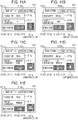
- Figs. 11A to 11E illustrate examples in which the start button 511e is displayed according to setting content of the setting item with respect to the output destination.
- the control unit 10 changes an image included in the start button 511e of the basic setting screen 511 as illustrated in Figs. 11A to 11E .
- Options of the setting content of the setting item with respect to the output destination include, for example, a "Personal Computer (PC)", an "E-mail”, a "memory card”, a “USB memory”, a “printer”, and the like.
- FIG. 11A illustrates the start button 511e in a case where setting is performed such that scanned image data is output to the "PC". Specifically, an image indicative of a PC is displayed in the start button 511e instead of the mark m1 indicative of the start button.
- 11E sequentially illustrate the start button 511e in a case where setting is performed such that the image data is attached to the "E-mail" and transmitted, in a case where setting is performed such that the image data is stored in the "memory card", in a case where setting is performed such that the image data is stored in the "USB memory”, and in a case where setting is performed such that the image data is printed using the "printer” (that is, performs copy), respectively.
- an image indicative of the E-mail, an image indicative of the memory card, an image indicative of the USB memory, or an image indicative of the printer are displayed in the start button 511e.
- a grayout start button may be displayed in a shape in which the setting item that is set at that time is reflected such that it is difficult for the user to perform manipulation. Since it is difficult (or impossible) for the start button in a grayout state to perform print or scan, the start button corresponds to a "print start instruction button in a situation according to setting content which is not used for print” or an "image reading start instruction button in a situation according to setting content which is not used for image reading".
- a part or all of the setting items may be set using a method, such as physical keys, other than the touch panel, and the print start instruction button may exist as a physical key in addition to buttons which are displayed on the display.
- the invention is established as the invention of a method of producing the printed matter and a method of producing an image.
- the invention provides the method of producing printed matter including: receiving setting of a setting item with respect to print from a user; displaying a start instruction button in a situation according to the received setting content, which is used for the print, on a touch panel type display; and producing printed matter by performing the print based on the received setting content, which is used for the print, in accordance with the user touching the start instruction button in the situation according to the setting content which is used for the print, and the method of producing an image including: receiving setting of a setting item with respect to image reading from a user; displaying a start instruction button in a situation according to the received setting content, which is used for the image reading, on a touch panel type display; and producing printed matter by performing the image reading based on the received setting content, which is used for the image reading, in accordance with the user touching the start instruction button in the situation according to the setting content which is used for the image reading.
- the invention is established as the invention of a control program of the printing apparatus and a control program of the image reading apparatus.
- functions of respective units disclosed in claims are realized by hardware resources whose functions are specified in the configurations thereof, software resources whose functions are specified by programs, or combinations thereof.
- functions of the respective units are not limited to realization through hardware resources which are physically independent from each other.
Landscapes
- Engineering & Computer Science (AREA)
- Human Computer Interaction (AREA)
- Multimedia (AREA)
- Signal Processing (AREA)
- Microelectronics & Electronic Packaging (AREA)
- Physics & Mathematics (AREA)
- General Physics & Mathematics (AREA)
- Computer Security & Cryptography (AREA)
- Accessory Devices And Overall Control Thereof (AREA)
- Facsimiles In General (AREA)
- User Interface Of Digital Computer (AREA)
- Record Information Processing For Printing (AREA)
Abstract
Description
- The present invention relates to a printing apparatus, an image reading apparatus, a control program of the printing apparatus, and a control apparatus of the image reading apparatus.
- In the related art, a printing apparatus is known which includes a touch panel type display and a start button (print start instruction button) separately from the display (for example, refer to
JP-A-2012-129836 - However, in a case of a configuration in which the start button is disposed separately from the display, it is necessary for a user to move a finger from the display to the start button after performing setting manipulation on the display, and thus it is difficult to rapidly press the start button after performing setting, thereby being inconvenient. In contrast, in a case of a configuration in which the start button is displayed on the display, if a size of the display is the same, an area which displays information other than the start button becomes narrow, compared to the configuration in which the start button is disposed on the outside of the display. It is difficult to make a size of the button (the start button or a setting button of each setting item), which is displayed on the display, smaller than an area to the extent that touch manipulation is easily performed by the finger of the user. Therefore, in a case where the start button is displayed on the display, the number of setting items (the number of setting buttons) which can be displayed on a screen at a time is small compared to the configuration in which the start button is displaced on the outside of the display. Therefore, in a case where the user performs setting or checks content, which is already set, again, the user should frequently perform scroll manipulation or switch the screen in order to display a target setting item, and thus usability is bad.
- An advantage of some aspects of the invention is that usability of setting screen of a printing apparatus and an image reading apparatus is improved.
- According to an aspect of the invention, there is provided a printing apparatus which includes a touch panel type display and a control unit. Furthermore, the control unit displays a setting item with respect to print and a print start instruction button in a situation according to setting content, which is set in the setting item and is used for the print, on the display.
- According to the aspect of the invention, the print start instruction button has a function of notifying the setting content of the setting item with respect to the print in addition to a function as a Graphic User Interface (GUI) button according to the related art which receives a print start instruction, and thus it is possible to effectively use a limited space of a screen of the display. In addition, after setting manipulation is performed, a user can recognize the setting content according to the situation of the print start instruction button in a case where the user taps the print start instruction button, with the result that the user can perceive, for example, setting errors and setting forgetting before the print start instruction button is tapped, and thus it is possible to prevent the printing errors. As a result, it is possible to improve usability of a setting screen. Meanwhile, setting content which is used for the print means setting content which can be printed and is used for the print, and does not include setting content which is difficult to be printed.
- Embodiments of the invention will now be described by way of example only with reference to the accompanying drawings, wherein like numbers reference like elements.
- Fig. 1
- is a block diagram illustrating a configuration of a printer.
- Figs. 2A to 2D
- are views illustrating a setting screen.
- Figs. 3A to 3D
- are views illustrating a setting screen.
- Figs. 4A to 4C
- are views illustrating a setting screen.
- Figs. 5A to 5D
- are views illustrating a setting screen.
- Figs. 6A to 6B
- are views illustrating a setting screen.
- Figs. 7A to 7F
- are views illustrating a setting screen.
- Figs. 8A to 8C
- are views illustrating a setting screen.
- Fig. 9
- is a view illustrating a setting screen.
- Figs. 10A to 10D
- are views illustrating a setting screen.
- Figs. 11A to 11E
- are views illustrating a setting screen.
- Hereinafter, embodiments of the invention will be described with reference to the accompanying drawing. Also, the same reference numerals are attached to relevant components in each drawing, and the description thereof will not be repeated.
-
Fig. 1 is a block diagram illustrating a configuration of aprinter 1 according to an embodiment of the invention. Theprinter 1 includes acontrol unit 10, aprint unit 20, animage reading unit 30, acommunication unit 40, and a user I/F unit 50, and is formed as a printer which has an image reading function. Accordingly, theprinter 1 corresponds to a printing apparatus and an image reading apparatus. - The
print unit 20 includes an actuator sensor, a drive circuit, and a machine component which perform printing on a printing medium, such as photographic paper, plain paper, or OHP sheet, using a well-known printing method such as an ink jet method or an electro-graphic method. Theimage reading unit 30 includes a well-known color image sensor that emits light to a document which is mounted on a document table, divides reflected light from the document into respective colors of RGB, and uses scan image data, and an actuator, which transports a document, a drive circuit, and a machine component. - The
communication unit 40 includes various communication interfaces for wired or wireless communication with external devices. In addition, thecommunication unit 40 includes an interface for communication with various removable memories that are mounted on theprinter 1. The user I/F unit 50 includes a touch panel display 51 (hereinafter, simply referred to as a display 51) and a key input unit which is not illustrated in the drawing. Thedisplay 51 includes a display panel that displays various pieces of information based on control of thecontrol unit 10, and a touch detection panel that is superimposed on the display panel, and detects touch manipulation performed by a pointing object, such as a finger of a person, according to a well-known method such as a capacitive sensing method, a resistive film method, and an optical method. Furthermore, thedisplay 51 outputs information (for example, coordinates of a touch start position and a touch end position, or the like) that indicates the touch manipulation to thecontrol unit 10. - The
control unit 10 includes a CPU, a ROM, a RAM, a nonvolatile memory, and the like which are not illustrated in the drawing. The CPU is capable of performing acontrol program 11, which is recorded in the ROM or the nonvolatile memory, using the RAM or the nonvolatile memory. Thecontrol program 11 is a program that displays the various pieces of information on thedisplay 51, and, in a case where manipulation (including, for example, tapping, swiping, pinching-in, pinching-out, or the like) performed on thedisplay 51 is detected based on information indicative of the touch manipulation acquired from thedisplay 51, causes theprinter 1 to realize a function of performing a process corresponding to the manipulation by controlling each of the units of theprinter 1. Specifically, in a setting screen of theprinter 1, thecontrol program 11 includes a display control function of displaying a start button (corresponding to a print start instruction button or an image reading start instruction button) in a situation according to setting content which is set by a user. A plurality of setting items are presented in the setting screen and the user is capable of changing the setting content for each setting item. Information indicative of the setting content which is set in each setting item is recorded in the RAM or the nonvolatile memory, and the information is rewritten according to change manipulation of the user. -
Figs. 2A to 8C illustrate examples of screens which are displayed on thedisplay 51 of theprinter 1. The screens are setting screens with respect to a copy function of theprinter 1. In a case where thecontrol unit 10 detects that manipulation which indicates a request to display a copy function setting screen is performed, thecontrol unit 10 displays the copy function setting screen on thedisplay 51. In the embodiment, the copy function setting screen is provided with an area, which displays abasic setting screen 511 or a detailed setting screen in a switchable manner, in a part thereof. Furthermore, the plurality of setting items with respect to the copy function of theprinter 1 are assigned to be displayed any one of thebasic setting screen 511 and the detailed setting screen. Thebasic setting screen 511 is a screen which is displayed in a case where thebasic setting tab 511a is tapped. The detailed setting screen is a screen which is displayed in a case where adetailed setting tab 512a is tapped. Meanwhile, each divided drawings ofFigs. 2A to 8C illustrates that thebasic setting screen 511 is selected and displayed. - In the embodiment, the
basic setting screen 511 includes a double sideprint setting button 511b, adensity setting button 511c, a color setting button 511d, and astart button 511e. Thestart button 511e is a button which receives the print start instruction. In a case where it is detected that thestart button 511e is tapped, thecontrol unit 10 performs a copy process based on the setting content of each setting item, which will be described later, by controlling theimage reading unit 30, theprint unit 20, and thecommunication unit 40. - The double side
print setting button 511b is a button that includes a function of displaying setting content which is set to a setting item with respect to double side print, and a function of receiving change in the setting content for the setting item. The options of the setting content include "single side -> single side" and "single side -> double side". In a case where it is detected that the double sideprint setting button 511b is tapped, thecontrol unit 10 presents the above-described options, and records an option, which is tapped and selected by the user, of the presented options as the setting content in the RAM. Furthermore, thecontrol unit 10 ends presentation of the options, and displays the double sideprint setting button 511b which includes letters indicative of the selected content (for example, "single side -> double side" or the like) which is selected by the user. Meanwhile, any situation may be used for a method of presenting the above-described options after the double sideprint setting button 511b is tapped. For example, the options may be displayed through pop-up, the options may be displayed through a drop-down list, the options may be presented after transition to a hierarchy screen in advance, or selected content may be updated (replaced in order of single side -> single side and single side -> double side) according to the number of times that the double sideprint setting button 511b is tapped. - The
density setting button 511c is a button that includes a function of displaying setting content which is set to a setting item with respect to a print density, and a function of receiving change in the setting content for the setting item. For example, it is possible to select "-2", "-1", "±0", "+1", and "+2" as the setting content. In a case where it is detected that thedensity setting button 511c is tapped, thecontrol unit 10 presents the above-described option, ends presentation of the option which is recorded in the RAM while using the option, which is selected from the presented options by the user, as the setting content, and displays the setting content on thedensity setting button 511c. - The color setting button 511d is a button group for setting the setting item with respect to color print, that is, selecting color print or monochrome print, and includes a monochrome button 511d1 and a color button 511d2. In a case where it is detected that the color button 511d2 is tapped, the
control unit 10 records information indicative of "color" as setting content of a setting item with respect to the color print in the RAM, and highlights the color button 511d2 rather than the monochrome button 511d1. In a case where it is detected that the monochrome button 511d1 is tapped, thecontrol unit 10 records information indicative of "monochrome" as the setting content of the setting item with respect to the color print in the RAM, and highlights the monochrome button 511d1 rather than the color button 511d2. - The
start button 511e illustrated inFIG. 2A indicates a start button in an initial state (default state). Thestart button 511e ofFig. 2A simultaneously indicates that "single side -> single side" is set to a setting item with respect to double side print, "±0" is set to a setting item with respect to a print density, and "color" is set to a setting item with respect to color print (the color button 511d2 is highlighted rather than the monochrome button 511d1) (meanwhile, in the initial state, the setting content of each setting item included in the detailed setting screen is not reflected in thestart button 511e). In this case, as illustrated inFig. 2A , thestart button 511e is displayed in a square shape with a chromatic color. Meanwhile, a mark m1 (a mark which is formed with a square and straight line in the square) around the center of thestart button 511e is a mark which indicates that the button is the start button. Based on the state, an example in which thebasic setting screen 511 or thestart button 511e, which is acquired in a case where the setting content of the various setting items is changed in the detailed setting screen, is displayed will be sequentially described. Furthermore, in a case where thestart button 511e, which is acquired in a case where the setting content is changed, is touched by the user, theprinter 1 starts copy based on the set setting content, and produces printed matter. Meanwhile, thestart button 511e whose situation is changed from the initial state through the change in setting may return to the initial state again in a case where, for example, thestart button 511e is tapped once and copy is performed. - In a case where it is detected that the user taps the monochrome button 511d1 in a state in which the screen illustrated in
Fig. 2A is displayed on thedisplay 51, thecontrol unit 10 changes the setting content of the setting item with respect to the color print from a color to a monochrome color, highlights the monochrome button 511d1 as illustrated inFig. 2B , and changes a color of thestart button 511e after changing a chromatic color which indicates color print to an achromatic color which indicates monochrome print. - As described above, compared to a case in which the color of the
start button 511e is not changed in the case where the color of thestart button 511e is changed according to the setting content of the setting item with respect to the color print, it is easy to cause the user to intuitively recognize that change in the setting content of the setting item with respect to the color print is received. In addition, in a case where the color of thestart button 511e is changed, it is possible to grasp the setting content of the setting item with respect to the color print by the color of thestart button 511e which is visually recognized in a case where thestart button 511e is tapped. Furthermore, the user is capable of tapping thestart button 511e in a state in which the setting content is grasped, and thus, as a result, it is possible to prevent printing errors. - Subsequently, in a case where it is detected that the double side
print setting button 511b is tapped and the setting content is changed from "single side -> single side" to "single side -> double side" in the state in which the screen illustrated inFig. 2A is displayed on thedisplay 51, thecontrol unit 10 maintains the color of thestart button 511e as the chromatic color in the same density without change, and changes the form of thestart button 511e to a form as illustrated inFig. 2C . Specifically, thecontrol unit 10 displays thestart button 511e which expresses that an upper right corner of a printing paper is folded to a near side and a rear surface of the printing paper is seen. That is, thestart button 511e ofFig. 2C simultaneously expresses that "color" is selected in the setting item with respect to the color print because the color is expressed by the chromatic color, "single side -> double side" is selected in the setting item with respect to the double side print, and "±0" is selected in the setting item with respect to the print density. - In addition, in a case where it is detected that the double side
print setting button 511b is tapped in a state in which the screen illustrated inFig. 2B is displayed and the setting content is changed from "single side -> single side" to "single side -> double side", thecontrol unit 10 maintains the color as the achromatic color in the same density as inFig. 2B without change and changes a shape as illustrated inFig. 2D (shape is in common withFig. 2C ). That is, thestart button 511e illustrated inFig. 2D simultaneously expresses that "monochrome" is selected in the setting item with respect to the color print, "single side -> double side" is selected in the setting item with respect to the double side print, and "±0" is selected in the setting item with respect to the print density. - As described above, the
start button 511e may be displayed in a situation according to the setting content of the plurality of setting items. The setting item which indicates the setting content using the color of thestart button 511e and the setting item which indicates the setting content using the shape of thestart button 511e are not interfered with each other on the design, and thus it is possible to realize the setting content of the two setting items using the shape and color of the start button. - In addition, a setting item which indicates setting content using the color of the
start button 511e includes a setting item with respect to a print density. Similarly toFig. 2A ,Fig. 3C illustrates that thebasic setting screen 511 is displayed in a state in which "single side -> single side" is set to the setting item with respect to the double side print, "±0" is set to the setting item with respect to the print density, and "color" is set to the setting item with respect to the color print. In a case where it is detected that thedensity setting button 511c is tapped the setting item with respect to the print density and the setting content is changed from "±0" to, for example, "-1" in a state in which the screen illustrated inFig. 3C is displayed, thecontrol unit 10 displays the color of thestart button 511e using the chromatic color with a color (seeFig. 3B ) which is lighter than the color of thestart button 511e (seeFig. 3C ) in a case where "±0" is set. In a case in which the setting content of the setting item with respect to the print density is changed to "-2", thecontrol unit 10 displays thestart button 511e using a color (seeFig. 3A ) which is lighter than the color (seeFig. 3B ) in a case of "-1". In a case in which the setting content of the setting item with respect to the print density is changed to "+1", thecontrol unit 10 displays thestart button 511e using a color (seeFig. 3D ) which is darker than the color (seeFig. 3C ) in the case of "±0". Although not illustrated in the drawing, in a case where the setting content is changed to "+2", thecontrol unit 10 displays thestart button 511e using a color which is further darker than the color (seeFig. 3D ) in the case of "+1". As described above, in a case where a depth of the color of thestart button 511e is associated with the change in the content of the setting item with respect to the print density, it is possible to cause the user to easily recognize the setting content. - Meanwhile, although not illustrated in the drawing, in a case where the setting content of the setting item with respect to the print density is changed from a state in which the screen illustrated in
Fig. 2B is displayed (state in which monochrome is selected in the setting item with respect to the color print), the density of thestart button 511e may be changed while maintaining achromatic color in association with the setting content of the setting item with respect to the print density. - Here, the situation, in which the
start button 511e is displayed according to the setting content of the setting item which is assigned to thebasic setting screen 511, is described. Subsequently, a situation, in which thestart button 511e is displayed according to setting content of a setting item which is assigned to the detailed setting screen, will be described. In a case where it is detected that the user taps thedetailed setting tab 512a, thecontrol unit 10 displays the detailed setting screen on thedisplay 51 instead of thebasic setting screen 511. The detailed setting screen includes, for example, a number of copies to be printed setting button, an allocation setting button, a binding position setting button, a margin setting button, a paper size setting button, a paper-type setting button, a feeding method setting button, a print quality setting button, a print magnification setting button, a document-type setting button, a watermark print setting button (not illustrated in the drawing), and the like. Although thestart button 511e may be or may not be displayed in the detailed setting screen, description will be performed while assuming that thestart button 511e is not displayed on the detailed setting screen in the embodiment. Accordingly, in the embodiment, it is necessary for the user to tap thebasic setting tab 511a again and display thebasic setting screen 511 in order to tap the start button after setting the setting items included in the detailed setting screen. - Meanwhile, the paper type indicates a type of a printing medium (recording medium), and, for example, "plain paper", "picture paper", or the like is assumed. The document type indicates a type of content which is included in a document corresponding to a copy source, and, for example, a "picture", a "letter", or the like is assumed.
- First, an example in which the
start button 511e is displayed according to the setting content of the setting item with respect to the number of copies to be printed will be described with reference toFigs. 4A to 4C . In a case where it is detected that the user taps thedetailed setting tab 512a in the state in which the screen illustrated inFig. 2A is displayed, setting content of a setting item with respect to the number of copies to be printed is changed to two copies or three copies by tapping a print copy number setting button in the displayed detailed setting screen, and thebasic setting tab 511a is tapped, thecontrol unit 10 displays thebasic setting screen 511 and changes a shape of an outer edge of thestart button 511e to a shape as illustrated inFig. 4A or 4B. Fig. 4A illustrates thestart button 511e acquired in a case where the number of copies to be printed is set to two copies, andFig. 4B illustrates thestart button 511e acquired in a case where the number of copies to be printed is set to three copies. Specifically,Figs. 4A and 4B illustrate that the number of copies to be printed becomes two copies by increasing a line, which indicates a periphery of thestart button 511e, and a similar-shaped rectangular frame line by one in the outer edge of thestart button 511e, and, similarly, illustrate that the number of copies to be printed becomes three copies by increasing the rectangular frame line by two in the outer edge. Meanwhile, it is difficult for the user to see if too many number of rectangular frame lines is provided. Therefore, in a case where a predetermined number of copies to be printed (for example, 34 copies) or more is set, a number which indicates the number of copies to be printed may be displayed at the bottom of the mark m1 of thestart button 511e, as illustrated inFig. 4C . - As described above, it is possible to cause the user to easily recognize setting content of the setting item with respect to the number of copies to be printed, which is not displayed in the same screen as the
start button 511e, by reflecting the setting item in the situation of thestart button 511e. Therefore, it is not necessary for the user to display the detailed setting screen by tapping thedetailed setting tab 512a again in order to check the setting content of the setting item with respect to the number of copies to be printed, and thus is convenient. - Subsequently, an example in which the
start button 511e is displayed according to the setting content of the setting item with respect to the allocation will be described with reference toFigs. 5A and 5B . In a case where it is detected that the user taps thedetailed setting tab 512a in the state in which the screen illustrated inFig. 2A is displayed, the setting content of the setting item with respect to the allocation is changed by manipulating the allocation setting button in the displayed detailed setting screen, and thebasic setting tab 511a is tapped, thecontrol unit 10 displays thebasic setting screen 511 and changes the shape of thestart button 511e to a shape as illustrated inFig. 5A or 5B . Options of the setting content of the setting item with respect to the allocation include, for example, "two-page allocation" and "four-page allocation".Fig. 5A illustrates thestart button 511e acquired in a case in which the two-page allocation is set.Fig. 5B illustrates thestart button 511e acquired in a case in which the four-page allocation is set. Specifically,Figs. 5A and 5B illustrates that thestart button 511e is divided into two parts in a case of the "two-page allocation" and is divided into four parts in a case of the "four-page allocation". As described above, it is possible to cause the user to easily recognize the setting content of the setting item with respect to the allocation, which is not displayed in the same screen as thestart button 511e, according to the situation of thestart button 511e. - Subsequently, an example in which the
start button 511e is displayed according to the setting content of the setting item with respect to the binding position will be described with reference toFigs. 5C and 5D . In a case where it is detected that the user taps thedetailed setting tab 512a in the state in which the screen illustrated inFig. 2A is displayed, changes the setting content of the setting item with respect to the binding position by manipulating the binding position setting button in the displayed detailed setting screen, and thebasic setting tab 511a is tapped, thecontrol unit 10 displays thebasic setting screen 511 and changes the shape of thestart button 511e of thebasic setting screen 511 to a shape as inFig. 5C or 5D . Options of the setting content of the setting item with respect to the binding position include, for example, "long side binding" and "short side binding".Fig. 5C illustrates thestart button 511e in a case where the long side binding is set. Specifically, the long side binding is illustrated by forming thesquare start button 511e to have a vertically long shape and displaying a broken line which is parallel to the side in the vicinity of one of two long sides.Fig. 5D illustrates thestart button 511e in a case where the short side binding is set. Specifically, the short side binding is illustrated by forming thesquare start button 511e to have a horizontally long shape and displaying a broken line which is parallel to the side in the vicinity of one of two short sides. As described above, it is possible to cause the user to easily recognize the setting content of the setting item with respect to the binding position, which is not displayed in the same screen as thestart button 511e, according to the situation of thestart button 511e. - Subsequently, an example in which the
start button 511e is displayed according to the setting content of the setting item with respect to the margin will be described with reference toFigs. 6A and 6B . In a case where it is detected that the user taps thedetailed setting tab 512a in the state in which the screen illustrated inFig. 2A is displayed, the setting content of the setting item with respect to the margin is changed by manipulating the margin setting button in the displayed detailed setting screen, and thebasic setting tab 511a is tapped, thecontrol unit 10 displays thebasic setting screen 511 and changes the shape of thestart button 511e and an internal image as illustrated inFigs. 6A and 6B . Options of the setting content of the setting item with respect to the margin include "existence of margin" and "non-existence of margin".Fig. 6A illustrates thestart button 511e acquired in a case where the "existence of margin" is set. Specifically, an area is provided which indicates a margin in the outline part of the button, and an image which indicates a picture is displayed on the button instead of the mark m1.Fig. 6B illustrates thestart button 511e in the case where the "non-existence of margin" is set. Specifically, although an image which indicates a picture is displayed on the button instead of the mark m1, "non-existence of margin" is realized in such a way that an area which indicates the margin is not provided in the outline part of the button. As described above, it is possible to cause the user to easily recognize the setting content of the setting item with respect to the margin, which is not displayed in the same screen as thestart button 511e, according to the situation of thestart button 511e. - Subsequently, an example in which the
start button 511e is displayed according to the setting item with respect to the paper type will be described with reference toFigs. 7A and 7B . In a case where it is detected that the user taps thedetailed setting tab 512a in the state in which the screen illustrated inFig. 2A is displayed, the setting content of the setting item with respect to the paper type is changed by manipulating the paper-type setting button in the displayed detailed setting screen, and thebasic setting tab 511a is tapped, thecontrol unit 10 displays thebasic setting screen 511 and changes the shape and the internal image of thestart button 511e as illustrated inFigs. 7A and 7B . Options of the setting content of the setting item with respect to the paper type include "plain paper", "picture paper", and the like.Fig. 7A illustrates thestart button 511e acquired in a case where "plain paper" is set.Fig. 7B illustrates thestart button 511e in a case where "picture paper" is set. - Subsequently, an example in which the
start button 511e is displayed according to the setting item with respect to the feeding method will be described with reference toFigs. 7C and 7D . In a case where it is detected that the user taps thedetailed setting tab 512a in the state in which the screen illustrated inFig. 2A is displayed, the setting content of the setting item with respect to the feeding method is changed by manipulating the feeding method setting button in the displayed detailed setting screen, and thebasic setting tab 511a is tapped, thecontrol unit 10 displays thebasic setting screen 511 and changes the shape of thestart button 511e as illustrated inFigs. 7C and 7D . Options of the setting content of the setting item with respect to the feeding method includes "lower tray", "upper tray", and the like.Fig. 7C illustrates thestart button 511e in a case where the "lower tray" is set.Fig. 7D illustrates thestart button 511e in a case where the "upper tray" is set. - Subsequently, an example in which the
start button 511e is displayed according to the setting item with respect to the print magnification will be described with reference toFigs. 7E and 7F . In a case where it is detected that the user taps thedetailed setting tab 512a in the state in which the screen illustrated inFig. 2A is displayed, the setting content of the setting item with respect to the print magnification is changed by manipulating the print magnification setting button in the displayed detailed setting screen, and thebasic setting tab 511a is tapped, thecontrol unit 10 displays thebasic setting screen 511 and changes the shape of thestart button 511e as illustrated inFigs. 7E and 7F . A numerical value corresponding to enlargement or a numerical value corresponding to reduction is set as the setting content of the setting item with respect to the print magnification.Fig. 7E illustrates thestart button 511e in a case where the numerical value corresponding to enlargement is set.Fig. 7F illustrates thestart button 511e in a case where the numerical value corresponding to reduction is set. - Subsequently, an example in which the
start button 511e is displayed according to the setting item with respect to the print quality will be described with reference toFig. 8A . In a case where it is detected that the user taps thedetailed setting tab 512a in the state in which the screen illustrated inFig. 2A is displayed, the setting content of the setting item with respect to the print quality is changed by manipulating the print quality setting button in the displayed detailed setting screen, and thebasic setting tab 511a is tapped, thecontrol unit 10 displays thebasic setting screen 511 and changes the shape of thestart button 511e as illustrated in, for example,Fig. 8A . The print quality may be realized according to positions and the number of star marks which are painted as illustrated inFig. 8A . - Meanwhile,
Fig. 8B illustrates an example in which thestart button 511e is displayed in a case where watermark print is set in a setting item with respect to the watermark print. - Meanwhile, a configuration in which the setting content is notified according to letters in the
start button 511e may be used. For example,Fig. 8C illustrates a situation of thestart button 511e in a case where the setting content of the setting item with respect to a paper size is set to "A4". Letters "A4" are displayed at the bottom of the mark m1. - As described above, it is possible to cause the user to recognize the setting content before the
start button 511e is tapped by changing the situation of thestart button 511e according to the setting content acquired in a case where the setting item is set. As a result, it is possible to prevent the printing errors or the image reading errors due to setting errors, setting forgetting, and the like in advance, and thus it is possible to improve the usability of the setting screen. 2. Another Embodiment: - Also, a technical scope of the invention is not limited to the above-described embodiment, and it is apparent that various changes may be added without departing from the scope of the invention as defined by the claims. For example, a case where the print start instruction button is displayed in a situation according to the setting content may be assumed that arbitrary one or more of, for example, a color of the whole button, a color of a part of the button, a shape of the whole button, a shape of a part of the button, a size and a position of an area which is caused to function as the button, a rotation angle of the button on the screen, existence/non-existence of inversion of the button on the screen, a pattern in which the button changes according to animation, and the like are changed according to the setting content.
- In addition, a setting item with respect to a color of the printed matter is a setting item related to a change in the color of the printed matter, and, for example, contrast, color balance, brightness, and the like may be assumed in addition to the setting item with respect to the print density and the setting item with respect to the color print which are described in the above-described embodiment.
- In addition, the shape of the print start instruction button may include any one of a shape of the contour of the button and an inner shape of the contour of the button. In addition, the size may be changed while a relationship similar to the shape of the button acquired before change is maintained.
- In addition, in the embodiment, the example is described in which the start button is displayed in which the pieces of setting content of the plurality of setting items are respectively reflected if situations which indicate the pieces of setting content of the setting items are not interfered with each other on the design in the case where the pieces of setting content of the plurality of setting items are changed. However, in a case where the pieces of setting content of the plurality of setting items are changed such that the situations which indicate the pieces of setting content of the setting items are interfered with each other on the design, a setting item, in which the setting content is reflected in the start button, and a setting item, in which the setting content is not reflected in the start button, may be selected based on notification priorities determined in advance. It is apparent that, even in the case where the situations which indicate the pieces of setting content of the setting items are not interfered with each other on the design, the setting item, in which the setting content is reflected in the start button, and the setting item, in which the setting content is not reflected in the start button, may be selected based on the notification priorities.
- In other words, in a case where the pieces of setting content are changed in the plurality of setting items, the start button may be displayed in a situation which does not comply with pieces of setting content of some setting items of the plurality of setting items in order of low notification priorities. Therefore, for example, only setting content of a setting item or items which has/have the highest notification priority may be reflected in the start button among a plurality of setting items whose setting is changed. In this case, the pieces of setting content of remaining setting items of the plurality of setting items whose setting is changed are not reflected in the start button. In a case where the start button is displayed in a situation according to the pieces of setting content of the whole setting items of the plurality of changed setting items, it is conceivable that it is rather difficult to cause the user to recognize the changed setting content. In a case where the situation of the start button is caused to become the situation which does not comply with only some setting items in order of low notification priorities for the user, a start button is displayed in a situation at least according to setting content of a setting item whose notification priority is the highest, and a situation at least according to setting content of a setting item whose notification priority is the lowest. Therefore, compared to a configuration in which the start button is displayed in a situation according to, for example, the whole plurality of changed setting items, it is possible to display a start button in a simple situation, and it is possible to cause the user to efficiently recognize the setting content of the setting item whose notification priority is high.
- Meanwhile, the notification priorities are set in advance such that, for example, a higher notification priority is set to a setting item in which setting is changed at high frequency based on a result of sampling for a plurality of users. It is apparent that it is possible for each user to individually change the notification priorities. Meanwhile, for example, the priority may be set sequentially starting from a highest priority, that is, in order of the setting item with respect to the double side print, the setting item with respect to the density, the setting item with respect to the color print, the setting item with respect to the print magnification, the setting item with respect to the paper size, the setting item with respect to the paper type, the setting item with respect to the feeding method, the setting item with respect to the allocation, the setting item with respect to the print quality, the setting item with respect to the document type, and the setting item with respect to the margin. Therefore, for example, in a case where the user changes the pieces of setting content in order of the setting item with respect to the color print, the setting item with respect to the feeding method, the setting item with respect to the double side print, and the setting item with respect to the print quality, only the setting content of the setting item with respect to the double side print which has the highest notification priority therein may be reflected in the situation of the start button.
- Meanwhile, the notification priorities may be set such that a notification priority of a setting item which is not displayed on the same screen as the start button is higher than a notification priority of a setting item which is displayed on the same screen as the start button. For example, in a case where the user changes the pieces of setting content in order of the setting item with respect to the color print, the setting item with respect to the feeding method, the setting item with respect to the double side print, and the setting item with respect to the print quality, the setting content of the setting item with respect to the feeding method, which has a higher notification priority, between the setting item with respect to the feeding method and the setting item with respect to the print quality, which are not displayed on the
basic setting screen 511 that includes thestart button 511e, may be reflected in the situation of the start button. In a case where setting items, which are displayed on the same screen as the start button, are dynamically changed through scroll and the like, the notification priorities may be dynamically changed in association with the change of the setting items. - In addition, the notification priorities may correspond to orders that the user performs setting. The reason for this is that, if the user performs setting before, the user forgets the setting, and thus effect of checking the situation of the start button is increased while the user understands the setting content of a setting item, which is set by the user immediately before the start button is manipulated, and so the user does not need to check the situation of the start button for that setting item.
- Meanwhile, the start button may have a large occupy (occupancy) ratio for the screen compared to the start button described in the embodiment. For example, an explanatory diagram which illustrates the setting content more specifically rather than the
start button 511e of the above-described embodiment may be displayed in an area which is larger than an area occupied by the start button of the above-described embodiment, and the explanatory diagram itself may function as the start button. For example, astart button 511f illustrated inFig. 9 is displayed in a case where the setting item with respect to the double side print is set to "single side -> double side".Fig. 9 illustrates that an explanatory diagram, which illustrates that copy is performed from the single side to the double side, is displayed in thestart button 511f. - Meanwhile, it is possible to apply the invention to a scanner. Setting items of a scanner include, for example, a setting item with respect to a read resolution, a setting item with respect to a document type, a setting item with respect to an output destination, a setting item with respect to color setting, a setting item with respect to a document size, a setting item with respect to faded image restoration, a setting item with respect to preview, and the like. Furthermore, in accordance with the start button in which the setting items are reflected being touched by the user, a document is read and an image is produced with the setting items.
-
Figs. 10A to 11E illustrate examples of setting screens related to the scan function. Thebasic setting screen 511 and the detailed setting screen are displayed in a switchable manner in the setting screens related to the scan function. Thebasic setting screen 511 of the scan function includes, for example, aresolution setting button 511g, an outputdestination setting button 511h, a color setting button 511d, and astart button 511e. The detailed setting screen of the scan function includes, for example, a document size setting button, a document-type setting button, a faded image restoration setting button, a preview setting button, and the like. -
Fig. 10A illustrates an example in which thestart button 511e is displayed according to setting content of the setting item with respect to the document size. In a case where it is detected that the user changes the setting content of the setting item with respect to the document size by manipulating the document size setting button in the detailed setting screen and thebasic setting tab 511a is tapped, thecontrol unit 10 displays thestart button 511e illustrated inFig. 10A in thebasic setting screen 511. Thestart button 511e illustrated inFig. 10A expresses a document table and a document which is mounted thereon. Letters "A4"indicative of the document size are displayed in the rectangular section indicative of the document. A size of the rectangular section indicative of a document for a rectangular section indicative of a document table, and letters indicative of the document size are changed according to the set document size. -
Fig. 10B illustrates an example in which thestart button 511e is displayed according to setting content of the setting item with respect to the document type. In a case where it is detected that the user changes the setting content of the setting item with respect to the document type by manipulating the document-type setting button in detailed setting screen and thebasic setting tab 511a is tapped, thecontrol unit 10 displays astart button 511e illustrated inFig. 10B in thebasic setting screen 511. Thestart button 511e illustrated inFig. 10B also expresses a document table and a document which is mounted thereon. A plurality of lines, which are included in a rectangular section indicative of the document, express that the document is paper. For example, in a case where a picture is set as the document type, a figure indicative of a picture is displayed instead of the rectangular section indicative of the document. -
Fig. 10C illustrates an example in which thestart button 511e is displayed according to setting content of the setting item with respect to the faded image restoration. In a case where it is detected that the user changes the setting content of the setting item with respect to the faded image restoration to "available" (or restoration to be carried out) by manipulating the faded image restoration setting button in the detailed setting screen and thebasic setting tab 511a is tapped, thecontrol unit 10 displays thestart button 511e illustrated inFig. 10C in thebasic setting screen 511. Thestart button 511e illustrated inFig. 10C also expresses a document table and a document which is mounted thereon. A fact that the faded image restoration is performed is expressed by disposing a figure indicative of light at an end of the rectangular section indicative of a document. - Meanwhile,
Fig. 10D illustrates an example in which thestart button 511e is displayed in a case where setting content of the setting item with respect to the preview is changed to "preview available" (or display preview to be carried out). -
Figs. 11A to 11E illustrate examples in which thestart button 511e is displayed according to setting content of the setting item with respect to the output destination. In a case where it is detected that the user changes the output destination by manipulating the outputdestination setting button 511h, thecontrol unit 10 changes an image included in thestart button 511e of thebasic setting screen 511 as illustrated inFigs. 11A to 11E . Options of the setting content of the setting item with respect to the output destination include, for example, a "Personal Computer (PC)", an "E-mail", a "memory card", a "USB memory", a "printer", and the like.Fig. 11A illustrates thestart button 511e in a case where setting is performed such that scanned image data is output to the "PC". Specifically, an image indicative of a PC is displayed in thestart button 511e instead of the mark m1 indicative of the start button.Figs. 11B, Fig. 11C, Fig. 11D, Fig. 11E sequentially illustrate thestart button 511e in a case where setting is performed such that the image data is attached to the "E-mail" and transmitted, in a case where setting is performed such that the image data is stored in the "memory card", in a case where setting is performed such that the image data is stored in the "USB memory", and in a case where setting is performed such that the image data is printed using the "printer" (that is, performs copy), respectively. Specifically, instead of the mark m1 indicative of the start button, an image indicative of the E-mail, an image indicative of the memory card, an image indicative of the USB memory, or an image indicative of the printer are displayed in thestart button 511e. - In addition, there is a possibility that a state occurs in which it is difficult to perform print, copy, or scan such as a case where items which are set to the printer and the scanner are items which are difficult to be simultaneously set. In this case, a grayout start button may be displayed in a shape in which the setting item that is set at that time is reflected such that it is difficult for the user to perform manipulation. Since it is difficult (or impossible) for the start button in a grayout state to perform print or scan, the start button corresponds to a "print start instruction button in a situation according to setting content which is not used for print" or an "image reading start instruction button in a situation according to setting content which is not used for image reading".
- In addition, a part or all of the setting items may be set using a method, such as physical keys, other than the touch panel, and the print start instruction button may exist as a physical key in addition to buttons which are displayed on the display.
- Meanwhile, the invention is established as the invention of a method of producing the printed matter and a method of producing an image. Specifically, the invention provides the method of producing printed matter including: receiving setting of a setting item with respect to print from a user; displaying a start instruction button in a situation according to the received setting content, which is used for the print, on a touch panel type display; and producing printed matter by performing the print based on the received setting content, which is used for the print, in accordance with the user touching the start instruction button in the situation according to the setting content which is used for the print, and the method of producing an image including: receiving setting of a setting item with respect to image reading from a user; displaying a start instruction button in a situation according to the received setting content, which is used for the image reading, on a touch panel type display; and producing printed matter by performing the image reading based on the received setting content, which is used for the image reading, in accordance with the user touching the start instruction button in the situation according to the setting content which is used for the image reading. In addition, the invention is established as the invention of a control program of the printing apparatus and a control program of the image reading apparatus. In addition, it is possible to apply the invention to control programs of a PC, a smart phone, and a tablet terminal, which control the printing apparatus or the image reading apparatus. In addition, functions of respective units disclosed in claims are realized by hardware resources whose functions are specified in the configurations thereof, software resources whose functions are specified by programs, or combinations thereof. In addition, functions of the respective units are not limited to realization through hardware resources which are physically independent from each other.
Claims (9)
- A printing apparatus (1) comprising:a touch panel type display (51); anda control unit (10) configured to display a setting item with respect to print and a start instruction button (511e) adapted to correspond to to setting content, which is set in the setting item and is used for the print, on the display.
- A printing apparatus according to claim 1, wherein the starting instruction button is adapted to correspond to the setting content by changing the form of the starting instruction button for example by changing at least one of a shape, colour, shade, image, lettering, numbering, graphic, size or icon of the starting instruction button.
- The printing apparatus according to Claim 1 or Claim 2,
wherein the control unit is configured to display the start instruction button according to setting content which is set in at least one of a setting item with respect to a color of printed matter, a setting item with respect to double side print, a setting item with respect to print magnification, a setting item with respect to a paper type, a setting item with respect to a feeding method, a setting item with respect to allocation, a setting item with respect to a document type, a setting item with respect to a document size, a setting item with respect to a margin, a setting item with respect to the number of copies to be printed, and a setting item with respect to a binding position. - The printing apparatus according to any one of the preceding claims,
wherein the control unit is configured to display the start instruction button that includes an image indicative of setting content which is set in at least one of a setting item with respect to a print quality and a setting item with respect to an image data output destination. - The printing apparatus according to any one of the preceding claims,
wherein, in a case where pieces of setting content are changed in the plurality of setting items, the start instruction button is not adapted to correspond toone or more pieces of setting content which are set in some setting items of the plurality of setting items in order of low notification priorities which are determined in advance. - The printing apparatus according to any one of the preceding claims,
wherein the start instruction button adapted to correspond to setting content of a setting item, which is not displayed together with the start instruction button, is displayed on the display. - The printing apparatus according to any one of the preceding claims,
wherein, in a case where it is difficult to start print using a set setting item, the control unit is configured to display the start instruction button adapted to correspond to setting content, which is not used for the print, instead of the start instruction button adapted to correspond to setting content which is used for the print. - An image reading apparatus comprising:a touch panel type display (51); anda control unit (10) configured to display a setting item with respect to image reading and a start instruction button (511e) adapted to correspond to setting content, which is set in the setting item and is used for the image reading, on the display.
- A method of producing printed matter comprising:receiving setting of a setting item with respect to print from a user;displaying a start instruction button (511e) adapted to correspond to the received setting content, which is used for the print, on a touch panel type display; andproducing printed matter by performing the print based on the received setting content, which is used for the print, in accordance with the user touching the start instruction button in the situation according to the setting content which is used for the print.
Applications Claiming Priority (1)
| Application Number | Priority Date | Filing Date | Title |
|---|---|---|---|
| JP2016008512A JP6776538B2 (en) | 2016-01-20 | 2016-01-20 | Printing device, image reading device, printing device control program, image reading device control program |
Publications (2)
| Publication Number | Publication Date |
|---|---|
| EP3196702A1 true EP3196702A1 (en) | 2017-07-26 |
| EP3196702B1 EP3196702B1 (en) | 2020-10-07 |
Family
ID=57868088
Family Applications (1)
| Application Number | Title | Priority Date | Filing Date |
|---|---|---|---|
| EP17152389.7A Active EP3196702B1 (en) | 2016-01-20 | 2017-01-20 | Printing apparatus, image reading apparatus, control program of printing apparatus, and control program of image reading apparatus |
Country Status (4)
| Country | Link |
|---|---|
| US (1) | US10063724B2 (en) |
| EP (1) | EP3196702B1 (en) |
| JP (1) | JP6776538B2 (en) |
| CN (1) | CN106990683B (en) |
Families Citing this family (6)
| Publication number | Priority date | Publication date | Assignee | Title |
|---|---|---|---|---|
| JP7099126B2 (en) * | 2018-07-25 | 2022-07-12 | セイコーエプソン株式会社 | Display control device and display control program |
| JP2021069053A (en) * | 2019-10-25 | 2021-04-30 | キヤノン株式会社 | Image processing device, control method of the same, and program |
| EP4083715A4 (en) * | 2019-12-27 | 2023-06-07 | FUJIFILM Corporation | Control apparatus, information processing device, and control program of information processing device |
| JP7528577B2 (en) * | 2020-07-08 | 2024-08-06 | 富士フイルムビジネスイノベーション株式会社 | Information processing device |
| JP7484613B2 (en) * | 2020-09-23 | 2024-05-16 | セイコーエプソン株式会社 | Display control device and display control program |
| JP2024107606A (en) * | 2023-01-30 | 2024-08-09 | セイコーエプソン株式会社 | PRINTING SYSTEM, PRINT PRODUCTION METHOD, AND PROGRAM |
Citations (4)
| Publication number | Priority date | Publication date | Assignee | Title |
|---|---|---|---|---|
| US20070028187A1 (en) * | 2005-08-01 | 2007-02-01 | Goro Katsuyama | Apparatus and method for performing display processing, and computer program product |
| US20100287490A1 (en) * | 2009-05-08 | 2010-11-11 | Canon Kabushiki Kaisha | Information processing apparatus, control method for information processing apparatus, and storage medium |
| US20120050776A1 (en) * | 2010-08-27 | 2012-03-01 | Sharp Kabushiki Kaisha | Image forming appartus |
| JP2012129836A (en) | 2010-12-16 | 2012-07-05 | Konica Minolta Business Technologies Inc | Image forming system and program |
Family Cites Families (3)
| Publication number | Priority date | Publication date | Assignee | Title |
|---|---|---|---|---|
| JP4273761B2 (en) * | 2002-12-19 | 2009-06-03 | 富士ゼロックス株式会社 | Printing instruction apparatus and printing system |
| US7843578B2 (en) * | 2004-12-21 | 2010-11-30 | Canon Kabushiki Kaisha | Image forming apparatus and method of controlling the same |
| JP6558949B2 (en) | 2015-05-25 | 2019-08-14 | キヤノン株式会社 | Image forming apparatus, control method therefor, and program |
-
2016
- 2016-01-20 JP JP2016008512A patent/JP6776538B2/en active Active
- 2016-12-13 CN CN201611143997.1A patent/CN106990683B/en active Active
-
2017
- 2017-01-18 US US15/409,073 patent/US10063724B2/en active Active
- 2017-01-20 EP EP17152389.7A patent/EP3196702B1/en active Active
Patent Citations (4)
| Publication number | Priority date | Publication date | Assignee | Title |
|---|---|---|---|---|
| US20070028187A1 (en) * | 2005-08-01 | 2007-02-01 | Goro Katsuyama | Apparatus and method for performing display processing, and computer program product |
| US20100287490A1 (en) * | 2009-05-08 | 2010-11-11 | Canon Kabushiki Kaisha | Information processing apparatus, control method for information processing apparatus, and storage medium |
| US20120050776A1 (en) * | 2010-08-27 | 2012-03-01 | Sharp Kabushiki Kaisha | Image forming appartus |
| JP2012129836A (en) | 2010-12-16 | 2012-07-05 | Konica Minolta Business Technologies Inc | Image forming system and program |
Also Published As
| Publication number | Publication date |
|---|---|
| CN106990683B (en) | 2020-03-03 |
| JP6776538B2 (en) | 2020-10-28 |
| JP2017130776A (en) | 2017-07-27 |
| CN106990683A (en) | 2017-07-28 |
| US10063724B2 (en) | 2018-08-28 |
| US20170208196A1 (en) | 2017-07-20 |
| EP3196702B1 (en) | 2020-10-07 |
Similar Documents
| Publication | Publication Date | Title |
|---|---|---|
| EP3196702B1 (en) | Printing apparatus, image reading apparatus, control program of printing apparatus, and control program of image reading apparatus | |
| US8804148B2 (en) | Image forming apparatus and non-transitory computer readable medium storing a program for controlling the same | |
| CN109254512B (en) | Processing apparatus, display apparatus, and processing method | |
| US10063722B2 (en) | Image forming apparatus configured to display function setting buttons and switch display mode between first display mode and second display mode and image recording medium | |
| US9426316B2 (en) | Image reading apparatus, display apparatus, non-transitory computer readable recording medium, and image displaying method | |
| US10649620B2 (en) | Image forming apparatus, processing device, and non-transitory computer-readable medium | |
| US9552792B2 (en) | Image processing apparatus, image processing method, and program for controlling the display of image data on a display | |
| JP5494872B1 (en) | Processing device and program | |
| JP2023179561A (en) | Display control device, information equipment and display control program | |
| US20170251114A1 (en) | Display device, image forming device, method of displaying keypad screen, and program for displaying keypad screen | |
| CN105721732B (en) | The control method of display input device, image forming apparatus, display input device | |
| EP3521936B1 (en) | Display input device, image forming apparatus, control method for display input device | |
| US10506116B2 (en) | Image processing apparatus causing display to display images, method, and non-transitory computer-readable recording medium storing computer-readable instructions | |
| JP6197698B2 (en) | Processing equipment | |
| US10122873B2 (en) | Electronic device | |
| JP2023115017A (en) | Information communication apparatus and program for controlling information communication apparatus | |
| JP6372116B2 (en) | Display processing apparatus, screen display method, and computer program | |
| JP2013084024A (en) | Information apparatus, image processing device, display control method of operation screen, and computer program | |
| JP2014108533A (en) | Image processing device, image processing device control method, and program | |
| JP7413673B2 (en) | Image forming device and display control method | |
| JP6225757B2 (en) | Image reading device | |
| US20120092706A1 (en) | Print setting apparatus, image forming apparatus, and print setting method | |
| JP2017129899A (en) | Electronic equipment, electronic equipment control program | |
| JP2024107606A (en) | PRINTING SYSTEM, PRINT PRODUCTION METHOD, AND PROGRAM | |
| US20070097388A1 (en) | Image reading device |
Legal Events
| Date | Code | Title | Description |
|---|---|---|---|
| PUAI | Public reference made under article 153(3) epc to a published international application that has entered the european phase |
Free format text: ORIGINAL CODE: 0009012 |
|
| STAA | Information on the status of an ep patent application or granted ep patent |
Free format text: STATUS: THE APPLICATION HAS BEEN PUBLISHED |
|
| AK | Designated contracting states |
Kind code of ref document: A1 Designated state(s): AL AT BE BG CH CY CZ DE DK EE ES FI FR GB GR HR HU IE IS IT LI LT LU LV MC MK MT NL NO PL PT RO RS SE SI SK SM TR |
|
| AX | Request for extension of the european patent |
Extension state: BA ME |
|
| STAA | Information on the status of an ep patent application or granted ep patent |
Free format text: STATUS: REQUEST FOR EXAMINATION WAS MADE |
|
| 17P | Request for examination filed |
Effective date: 20171208 |
|
| RBV | Designated contracting states (corrected) |
Designated state(s): AL AT BE BG CH CY CZ DE DK EE ES FI FR GB GR HR HU IE IS IT LI LT LU LV MC MK MT NL NO PL PT RO RS SE SI SK SM TR |
|
| STAA | Information on the status of an ep patent application or granted ep patent |
Free format text: STATUS: EXAMINATION IS IN PROGRESS |
|
| 17Q | First examination report despatched |
Effective date: 20180420 |
|
| GRAP | Despatch of communication of intention to grant a patent |
Free format text: ORIGINAL CODE: EPIDOSNIGR1 |
|
| STAA | Information on the status of an ep patent application or granted ep patent |
Free format text: STATUS: GRANT OF PATENT IS INTENDED |
|
| INTG | Intention to grant announced |
Effective date: 20200508 |
|
| GRAS | Grant fee paid |
Free format text: ORIGINAL CODE: EPIDOSNIGR3 |
|
| GRAA | (expected) grant |
Free format text: ORIGINAL CODE: 0009210 |
|
| STAA | Information on the status of an ep patent application or granted ep patent |
Free format text: STATUS: THE PATENT HAS BEEN GRANTED |
|
| AK | Designated contracting states |
Kind code of ref document: B1 Designated state(s): AL AT BE BG CH CY CZ DE DK EE ES FI FR GB GR HR HU IE IS IT LI LT LU LV MC MK MT NL NO PL PT RO RS SE SI SK SM TR |
|
| REG | Reference to a national code |
Ref country code: GB Ref legal event code: FG4D |
|
| REG | Reference to a national code |
Ref country code: AT Ref legal event code: REF Ref document number: 1321802 Country of ref document: AT Kind code of ref document: T Effective date: 20201015 Ref country code: CH Ref legal event code: EP |
|
| REG | Reference to a national code |
Ref country code: IE Ref legal event code: FG4D |
|
| REG | Reference to a national code |
Ref country code: DE Ref legal event code: R096 Ref document number: 602017024832 Country of ref document: DE |
|
| REG | Reference to a national code |
Ref country code: NL Ref legal event code: MP Effective date: 20201007 |
|
| REG | Reference to a national code |
Ref country code: AT Ref legal event code: MK05 Ref document number: 1321802 Country of ref document: AT Kind code of ref document: T Effective date: 20201007 |
|
| PG25 | Lapsed in a contracting state [announced via postgrant information from national office to epo] |
Ref country code: RS Free format text: LAPSE BECAUSE OF FAILURE TO SUBMIT A TRANSLATION OF THE DESCRIPTION OR TO PAY THE FEE WITHIN THE PRESCRIBED TIME-LIMIT Effective date: 20201007 Ref country code: PT Free format text: LAPSE BECAUSE OF FAILURE TO SUBMIT A TRANSLATION OF THE DESCRIPTION OR TO PAY THE FEE WITHIN THE PRESCRIBED TIME-LIMIT Effective date: 20210208 Ref country code: NL Free format text: LAPSE BECAUSE OF FAILURE TO SUBMIT A TRANSLATION OF THE DESCRIPTION OR TO PAY THE FEE WITHIN THE PRESCRIBED TIME-LIMIT Effective date: 20201007 Ref country code: NO Free format text: LAPSE BECAUSE OF FAILURE TO SUBMIT A TRANSLATION OF THE DESCRIPTION OR TO PAY THE FEE WITHIN THE PRESCRIBED TIME-LIMIT Effective date: 20210107 Ref country code: FI Free format text: LAPSE BECAUSE OF FAILURE TO SUBMIT A TRANSLATION OF THE DESCRIPTION OR TO PAY THE FEE WITHIN THE PRESCRIBED TIME-LIMIT Effective date: 20201007 Ref country code: GR Free format text: LAPSE BECAUSE OF FAILURE TO SUBMIT A TRANSLATION OF THE DESCRIPTION OR TO PAY THE FEE WITHIN THE PRESCRIBED TIME-LIMIT Effective date: 20210108 |
|
| REG | Reference to a national code |
Ref country code: LT Ref legal event code: MG4D |
|
| PG25 | Lapsed in a contracting state [announced via postgrant information from national office to epo] |
Ref country code: AT Free format text: LAPSE BECAUSE OF FAILURE TO SUBMIT A TRANSLATION OF THE DESCRIPTION OR TO PAY THE FEE WITHIN THE PRESCRIBED TIME-LIMIT Effective date: 20201007 Ref country code: ES Free format text: LAPSE BECAUSE OF FAILURE TO SUBMIT A TRANSLATION OF THE DESCRIPTION OR TO PAY THE FEE WITHIN THE PRESCRIBED TIME-LIMIT Effective date: 20201007 Ref country code: BG Free format text: LAPSE BECAUSE OF FAILURE TO SUBMIT A TRANSLATION OF THE DESCRIPTION OR TO PAY THE FEE WITHIN THE PRESCRIBED TIME-LIMIT Effective date: 20210107 Ref country code: IS Free format text: LAPSE BECAUSE OF FAILURE TO SUBMIT A TRANSLATION OF THE DESCRIPTION OR TO PAY THE FEE WITHIN THE PRESCRIBED TIME-LIMIT Effective date: 20210207 Ref country code: PL Free format text: LAPSE BECAUSE OF FAILURE TO SUBMIT A TRANSLATION OF THE DESCRIPTION OR TO PAY THE FEE WITHIN THE PRESCRIBED TIME-LIMIT Effective date: 20201007 Ref country code: LV Free format text: LAPSE BECAUSE OF FAILURE TO SUBMIT A TRANSLATION OF THE DESCRIPTION OR TO PAY THE FEE WITHIN THE PRESCRIBED TIME-LIMIT Effective date: 20201007 Ref country code: SE Free format text: LAPSE BECAUSE OF FAILURE TO SUBMIT A TRANSLATION OF THE DESCRIPTION OR TO PAY THE FEE WITHIN THE PRESCRIBED TIME-LIMIT Effective date: 20201007 |
|
| PG25 | Lapsed in a contracting state [announced via postgrant information from national office to epo] |
Ref country code: HR Free format text: LAPSE BECAUSE OF FAILURE TO SUBMIT A TRANSLATION OF THE DESCRIPTION OR TO PAY THE FEE WITHIN THE PRESCRIBED TIME-LIMIT Effective date: 20201007 |
|
| REG | Reference to a national code |
Ref country code: DE Ref legal event code: R097 Ref document number: 602017024832 Country of ref document: DE |
|
| PG25 | Lapsed in a contracting state [announced via postgrant information from national office to epo] |
Ref country code: LT Free format text: LAPSE BECAUSE OF FAILURE TO SUBMIT A TRANSLATION OF THE DESCRIPTION OR TO PAY THE FEE WITHIN THE PRESCRIBED TIME-LIMIT Effective date: 20201007 Ref country code: SM Free format text: LAPSE BECAUSE OF FAILURE TO SUBMIT A TRANSLATION OF THE DESCRIPTION OR TO PAY THE FEE WITHIN THE PRESCRIBED TIME-LIMIT Effective date: 20201007 Ref country code: EE Free format text: LAPSE BECAUSE OF FAILURE TO SUBMIT A TRANSLATION OF THE DESCRIPTION OR TO PAY THE FEE WITHIN THE PRESCRIBED TIME-LIMIT Effective date: 20201007 Ref country code: CZ Free format text: LAPSE BECAUSE OF FAILURE TO SUBMIT A TRANSLATION OF THE DESCRIPTION OR TO PAY THE FEE WITHIN THE PRESCRIBED TIME-LIMIT Effective date: 20201007 Ref country code: SK Free format text: LAPSE BECAUSE OF FAILURE TO SUBMIT A TRANSLATION OF THE DESCRIPTION OR TO PAY THE FEE WITHIN THE PRESCRIBED TIME-LIMIT Effective date: 20201007 Ref country code: RO Free format text: LAPSE BECAUSE OF FAILURE TO SUBMIT A TRANSLATION OF THE DESCRIPTION OR TO PAY THE FEE WITHIN THE PRESCRIBED TIME-LIMIT Effective date: 20201007 |
|
| PLBE | No opposition filed within time limit |
Free format text: ORIGINAL CODE: 0009261 |
|
| STAA | Information on the status of an ep patent application or granted ep patent |
Free format text: STATUS: NO OPPOSITION FILED WITHIN TIME LIMIT |
|
| PG25 | Lapsed in a contracting state [announced via postgrant information from national office to epo] |
Ref country code: MC Free format text: LAPSE BECAUSE OF FAILURE TO SUBMIT A TRANSLATION OF THE DESCRIPTION OR TO PAY THE FEE WITHIN THE PRESCRIBED TIME-LIMIT Effective date: 20201007 Ref country code: DK Free format text: LAPSE BECAUSE OF FAILURE TO SUBMIT A TRANSLATION OF THE DESCRIPTION OR TO PAY THE FEE WITHIN THE PRESCRIBED TIME-LIMIT Effective date: 20201007 |
|
| REG | Reference to a national code |
Ref country code: CH Ref legal event code: PL |
|
| 26N | No opposition filed |
Effective date: 20210708 |
|
| PG25 | Lapsed in a contracting state [announced via postgrant information from national office to epo] |
Ref country code: LU Free format text: LAPSE BECAUSE OF NON-PAYMENT OF DUE FEES Effective date: 20210120 |
|
| REG | Reference to a national code |
Ref country code: BE Ref legal event code: MM Effective date: 20210131 |
|
| PG25 | Lapsed in a contracting state [announced via postgrant information from national office to epo] |
Ref country code: IT Free format text: LAPSE BECAUSE OF FAILURE TO SUBMIT A TRANSLATION OF THE DESCRIPTION OR TO PAY THE FEE WITHIN THE PRESCRIBED TIME-LIMIT Effective date: 20201007 Ref country code: AL Free format text: LAPSE BECAUSE OF FAILURE TO SUBMIT A TRANSLATION OF THE DESCRIPTION OR TO PAY THE FEE WITHIN THE PRESCRIBED TIME-LIMIT Effective date: 20201007 |
|
| PG25 | Lapsed in a contracting state [announced via postgrant information from national office to epo] |
Ref country code: SI Free format text: LAPSE BECAUSE OF FAILURE TO SUBMIT A TRANSLATION OF THE DESCRIPTION OR TO PAY THE FEE WITHIN THE PRESCRIBED TIME-LIMIT Effective date: 20201007 Ref country code: CH Free format text: LAPSE BECAUSE OF NON-PAYMENT OF DUE FEES Effective date: 20210131 Ref country code: LI Free format text: LAPSE BECAUSE OF NON-PAYMENT OF DUE FEES Effective date: 20210131 |
|
| PG25 | Lapsed in a contracting state [announced via postgrant information from national office to epo] |
Ref country code: IE Free format text: LAPSE BECAUSE OF NON-PAYMENT OF DUE FEES Effective date: 20210120 |
|
| PG25 | Lapsed in a contracting state [announced via postgrant information from national office to epo] |
Ref country code: IS Free format text: LAPSE BECAUSE OF FAILURE TO SUBMIT A TRANSLATION OF THE DESCRIPTION OR TO PAY THE FEE WITHIN THE PRESCRIBED TIME-LIMIT Effective date: 20210207 |
|
| PG25 | Lapsed in a contracting state [announced via postgrant information from national office to epo] |
Ref country code: BE Free format text: LAPSE BECAUSE OF NON-PAYMENT OF DUE FEES Effective date: 20210131 |
|
| PG25 | Lapsed in a contracting state [announced via postgrant information from national office to epo] |
Ref country code: HU Free format text: LAPSE BECAUSE OF FAILURE TO SUBMIT A TRANSLATION OF THE DESCRIPTION OR TO PAY THE FEE WITHIN THE PRESCRIBED TIME-LIMIT; INVALID AB INITIO Effective date: 20170120 |
|
| PG25 | Lapsed in a contracting state [announced via postgrant information from national office to epo] |
Ref country code: CY Free format text: LAPSE BECAUSE OF FAILURE TO SUBMIT A TRANSLATION OF THE DESCRIPTION OR TO PAY THE FEE WITHIN THE PRESCRIBED TIME-LIMIT Effective date: 20201007 |
|
| PG25 | Lapsed in a contracting state [announced via postgrant information from national office to epo] |
Ref country code: MK Free format text: LAPSE BECAUSE OF FAILURE TO SUBMIT A TRANSLATION OF THE DESCRIPTION OR TO PAY THE FEE WITHIN THE PRESCRIBED TIME-LIMIT Effective date: 20201007 |
|
| PG25 | Lapsed in a contracting state [announced via postgrant information from national office to epo] |
Ref country code: MT Free format text: LAPSE BECAUSE OF FAILURE TO SUBMIT A TRANSLATION OF THE DESCRIPTION OR TO PAY THE FEE WITHIN THE PRESCRIBED TIME-LIMIT Effective date: 20201007 |
|
| PG25 | Lapsed in a contracting state [announced via postgrant information from national office to epo] |
Ref country code: TR Free format text: LAPSE BECAUSE OF FAILURE TO SUBMIT A TRANSLATION OF THE DESCRIPTION OR TO PAY THE FEE WITHIN THE PRESCRIBED TIME-LIMIT Effective date: 20201007 |
|
| PGFP | Annual fee paid to national office [announced via postgrant information from national office to epo] |
Ref country code: GB Payment date: 20251127 Year of fee payment: 10 |
|
| PGFP | Annual fee paid to national office [announced via postgrant information from national office to epo] |
Ref country code: FR Payment date: 20251128 Year of fee payment: 10 |
|
| PGFP | Annual fee paid to national office [announced via postgrant information from national office to epo] |
Ref country code: DE Payment date: 20251203 Year of fee payment: 10 |