EP3173919A1 - Method and apparatus for application icon management - Google Patents
Method and apparatus for application icon management Download PDFInfo
- Publication number
- EP3173919A1 EP3173919A1 EP16198914.0A EP16198914A EP3173919A1 EP 3173919 A1 EP3173919 A1 EP 3173919A1 EP 16198914 A EP16198914 A EP 16198914A EP 3173919 A1 EP3173919 A1 EP 3173919A1
- Authority
- EP
- European Patent Office
- Prior art keywords
- terminal
- preset
- application icon
- lock screen
- moving
- Prior art date
- Legal status (The legal status is an assumption and is not a legal conclusion. Google has not performed a legal analysis and makes no representation as to the accuracy of the status listed.)
- Withdrawn
Links
Images


Classifications
-
- G—PHYSICS
- G06—COMPUTING OR CALCULATING; COUNTING
- G06F—ELECTRIC DIGITAL DATA PROCESSING
- G06F3/00—Input arrangements for transferring data to be processed into a form capable of being handled by the computer; Output arrangements for transferring data from processing unit to output unit, e.g. interface arrangements
- G06F3/01—Input arrangements or combined input and output arrangements for interaction between user and computer
- G06F3/048—Interaction techniques based on graphical user interfaces [GUI]
- G06F3/0487—Interaction techniques based on graphical user interfaces [GUI] using specific features provided by the input device, e.g. functions controlled by the rotation of a mouse with dual sensing arrangements, or of the nature of the input device, e.g. tap gestures based on pressure sensed by a digitiser
-
- G—PHYSICS
- G06—COMPUTING OR CALCULATING; COUNTING
- G06F—ELECTRIC DIGITAL DATA PROCESSING
- G06F3/00—Input arrangements for transferring data to be processed into a form capable of being handled by the computer; Output arrangements for transferring data from processing unit to output unit, e.g. interface arrangements
- G06F3/01—Input arrangements or combined input and output arrangements for interaction between user and computer
- G06F3/017—Gesture based interaction, e.g. based on a set of recognized hand gestures
-
- G—PHYSICS
- G06—COMPUTING OR CALCULATING; COUNTING
- G06F—ELECTRIC DIGITAL DATA PROCESSING
- G06F3/00—Input arrangements for transferring data to be processed into a form capable of being handled by the computer; Output arrangements for transferring data from processing unit to output unit, e.g. interface arrangements
- G06F3/01—Input arrangements or combined input and output arrangements for interaction between user and computer
- G06F3/03—Arrangements for converting the position or the displacement of a member into a coded form
- G06F3/033—Pointing devices displaced or positioned by the user, e.g. mice, trackballs, pens or joysticks; Accessories therefor
- G06F3/0346—Pointing devices displaced or positioned by the user, e.g. mice, trackballs, pens or joysticks; Accessories therefor with detection of the device orientation or free movement in a three-dimensional [3D] space, e.g. 3D mice, 6-DOF [six degrees of freedom] pointers using gyroscopes, accelerometers or tilt-sensors
-
- G—PHYSICS
- G06—COMPUTING OR CALCULATING; COUNTING
- G06F—ELECTRIC DIGITAL DATA PROCESSING
- G06F3/00—Input arrangements for transferring data to be processed into a form capable of being handled by the computer; Output arrangements for transferring data from processing unit to output unit, e.g. interface arrangements
- G06F3/01—Input arrangements or combined input and output arrangements for interaction between user and computer
- G06F3/048—Interaction techniques based on graphical user interfaces [GUI]
- G06F3/0481—Interaction techniques based on graphical user interfaces [GUI] based on specific properties of the displayed interaction object or a metaphor-based environment, e.g. interaction with desktop elements like windows or icons, or assisted by a cursor's changing behaviour or appearance
- G06F3/04817—Interaction techniques based on graphical user interfaces [GUI] based on specific properties of the displayed interaction object or a metaphor-based environment, e.g. interaction with desktop elements like windows or icons, or assisted by a cursor's changing behaviour or appearance using icons
-
- G—PHYSICS
- G06—COMPUTING OR CALCULATING; COUNTING
- G06F—ELECTRIC DIGITAL DATA PROCESSING
- G06F3/00—Input arrangements for transferring data to be processed into a form capable of being handled by the computer; Output arrangements for transferring data from processing unit to output unit, e.g. interface arrangements
- G06F3/01—Input arrangements or combined input and output arrangements for interaction between user and computer
- G06F3/048—Interaction techniques based on graphical user interfaces [GUI]
- G06F3/0487—Interaction techniques based on graphical user interfaces [GUI] using specific features provided by the input device, e.g. functions controlled by the rotation of a mouse with dual sensing arrangements, or of the nature of the input device, e.g. tap gestures based on pressure sensed by a digitiser
- G06F3/0488—Interaction techniques based on graphical user interfaces [GUI] using specific features provided by the input device, e.g. functions controlled by the rotation of a mouse with dual sensing arrangements, or of the nature of the input device, e.g. tap gestures based on pressure sensed by a digitiser using a touch-screen or digitiser, e.g. input of commands through traced gestures
-
- G—PHYSICS
- G09—EDUCATION; CRYPTOGRAPHY; DISPLAY; ADVERTISING; SEALS
- G09G—ARRANGEMENTS OR CIRCUITS FOR CONTROL OF INDICATING DEVICES USING STATIC MEANS TO PRESENT VARIABLE INFORMATION
- G09G5/00—Control arrangements or circuits for visual indicators common to cathode-ray tube indicators and other visual indicators
- G09G5/10—Intensity circuits
-
- H—ELECTRICITY
- H04—ELECTRIC COMMUNICATION TECHNIQUE
- H04M—TELEPHONIC COMMUNICATION
- H04M1/00—Substation equipment, e.g. for use by subscribers
- H04M1/72—Mobile telephones; Cordless telephones, i.e. devices for establishing wireless links to base stations without route selection
- H04M1/724—User interfaces specially adapted for cordless or mobile telephones
- H04M1/72448—User interfaces specially adapted for cordless or mobile telephones with means for adapting the functionality of the device according to specific conditions
- H04M1/72454—User interfaces specially adapted for cordless or mobile telephones with means for adapting the functionality of the device according to specific conditions according to context-related or environment-related conditions
-
- G—PHYSICS
- G09—EDUCATION; CRYPTOGRAPHY; DISPLAY; ADVERTISING; SEALS
- G09G—ARRANGEMENTS OR CIRCUITS FOR CONTROL OF INDICATING DEVICES USING STATIC MEANS TO PRESENT VARIABLE INFORMATION
- G09G2360/00—Aspects of the architecture of display systems
- G09G2360/14—Detecting light within display terminals, e.g. using a single or a plurality of photosensors
- G09G2360/144—Detecting light within display terminals, e.g. using a single or a plurality of photosensors the light being ambient light
-
- H—ELECTRICITY
- H04—ELECTRIC COMMUNICATION TECHNIQUE
- H04M—TELEPHONIC COMMUNICATION
- H04M1/00—Substation equipment, e.g. for use by subscribers
- H04M1/02—Constructional features of telephone sets
- H04M1/22—Illumination; Arrangements for improving the visibility of characters on dials
Definitions
- the present invention generally relates to the field of terminal technology, and more particularly, to a method and apparatus for application icon management
- a theme interface for a terminal operating system may have shortcut icons provided on its lock screen for quickly launching corresponding functions, such as a dialing function.
- the shortcut icons are fixed and cannot be changed at will.
- Some terminal operating systems themselves contain torch applications. When the torch application is launched, the camera flashlight is turned on. Moreover, advanced setting is applied: a shortcut button is set so that the torch can be turned on conveniently.
- the torch application is often buried in piles of applications and cannot be easily found. Therefore, the problem is that it is difficult to find the torch application in urgent situations.
- the torch may be turned on quickly by setting a shortcut for the torch application, not everyone knows the shortcut (few users read the manual completely) and not everybody can keep it in mind.
- the present invention provides a method and apparatus for application icon management as follows.
- a method for application icon management comprising:
- the lighting the designated application icon on the lock screen interface of the terminal comprises:
- the current environment parameter information comprises at least illumination intensity information and information on a distance between the terminal and an obstruction.
- the lighting the designated application icon on the lock screen interface of the terminal when the current environment parameter information satisfies preset environment parameter information, comprises: when a current distance between the terminal and the obstruction is greater than or equal to a preset distance and a current illumination intensity is lower than a preset illumination intensity, lighting a torch application icon on the lock screen interface of the terminal.
- the lighting the designated application icon on the lock screen interface of the terminal when the moving status satisfies the preset status, comprises: when it is detected that the terminal in the lock screen state has a moving speed greater than or equal to a preset moving speed, a moving acceleration greater than or equal to a preset moving acceleration, a moving frequency greater than or equal to a preset moving frequency, and/or a moving trajectory that meets a preset moving trajectory, lighting the designated application icon on the lock screen interface of the terminal.
- the method further comprises: when a number of received touches on the designated application icon is greater than or equal to a preset touch number and/or a frequency of the touches is greater than or equal to a preset touch frequency, launching the designated application.
- the designated application icon when the designated application icon is not lighted, the designated application icon is hidden on the lock screen interface of the terminal.
- an apparatus for application icon management comprising:
- the processing module comprises:
- the current environment parameter information comprises at least illumination intensity information and information on a distance between the terminal and an obstruction.
- the first lighting submodule is configured to: light a torch application icon on the lock screen interface of the terminal, when a current distance between the terminal and the obstruction is greater than or equal to a preset distance and a current illumination intensity is lower than a preset illumination intensity.
- the processing module comprises: a second lighting submodule configured to light the designated application icon on the lock screen interface of the terminal, when it is detected that the terminal in the lock screen state has a moving speed greater than or equal to a preset moving speed, a moving acceleration greater than or equal to a preset moving acceleration, a moving frequency greater than or equal to a preset moving frequency, and/or a moving trajectory that meets a preset moving trajectory.
- the apparatus further comprises: a launching module configured to launch the designated application, when a number of received touches on the designated application icon is greater than or equal to a preset touch number and/or a frequency of the touches is greater than or equal to a preset touch frequency.
- the designated application icon when the designated application icon is not lighted, the designated application icon is hidden on the lock screen interface of the terminal.
- an apparatus for application icon management comprising:
- the steps of the method for application icon management are determined by computer program instructions.
- the invention is also directed to a computer program for executing the steps of a method for application icon management as described above when this program is executed by a computer.
- This program can use any programming language and take the form of source code, object code or a code intermediate between source code and object code, such as a partially compiled form, or any other desirable form.
- the invention is also directed to a computer-readable information medium containing instructions of a computer program as described above.
- the information medium can be any entity or device capable of storing the program.
- the support can include storage means such as a ROM, for example a CD ROM or a microelectronic circuit ROM, or magnetic storage means, for example a diskette (floppy disk) or a hard disk.
- the information medium can be an integrated circuit in which the program is incorporated, the circuit being adapted to execute the method in question or to be used in its execution.
- the moving status of the terminal in the lock screen state may be detected by the sensor, and the designated application icon may be lighted on the lock screen interface of the terminal when the moving status satisfies a preset status.
- a user's needs are determined according to the moving status of the terminal, and a needed application is automatically provided on the lock screen interface for the user. Accordingly, the user does not have to be bothered to look for the application and the operation process is simplified, so that the application on the terminal can be utilized more conveniently, easily and rapidly and user experience is improved.
- An embodiment of invention provides a method for application icon management, which may be used or implemented in a terminal device. As shown in Fig. 1 , the method includes steps S101-S103.
- step S101 a moving status of a terminal in a lock screen state is detected by a sensor.
- the moving status may refer to such a status as whether the terminal is being shaken or whether the terminal is being tapped, etc.
- step S102 it is determined whether the moving status of the terminal in the lock screen state satisfies a preset status.
- a designated application icon is lighted on a lock screen interface of the terminal.
- the designated application icon may be an application icon set by the user or preset by the manufacturer on the terminal lock screen interface.
- the moving status of the terminal in the lock screen state can be detected by the sensor, and the designated application icon can be lighted on the lock screen interface of the terminal when the moving status satisfies the preset status.
- the designated application icon can be lighted on the lock screen interface of the terminal when the moving status satisfies the preset status.
- the designated application icon when the designated application icon is not lighted, the designated application icon may be displayed or hidden.
- the designated application icon when the designated application icon is not lighted, it may exist on the lock screen interface of the terminal but is hidden (that is, the application icon is invisible to the user), even if the lock screen interface is lighted by the user. Only when the moving status of the terminal satisfies a preset status, lighted is the designated application icon that was hidden, so as to facilitate the user's use of the designated application.
- step S103 comprises steps S201-S202.
- step S201 current environment parameter information of an environment in which the terminal is located is obtained.
- step S202 when the current environment parameter information satisfies preset environment parameter information, the designated application icon is lighted on the lock screen interface of the terminal.
- the current environment parameter information of the environment in which the terminal is located may be obtained, and it is determined based on the environment parameter whether to light the designated application icon. Specifically, when the current environment parameter information satisfies the preset environment parameter information, the designated application icon is lighted.
- the current environment parameter information comprises at least illumination intensity information and information on a distance between the terminal and an obstruction.
- the illumination intensity information and the information on the distance between the terminal and the obstruction may be used to determine whether the current environment parameter information satisfies the preset environment parameter information.
- the designated application icon is lighted.
- step S202 comprises step S301.
- step S301 when the current distance between the terminal and the obstruction is greater than or equal to a preset distance and the current illumination intensity is lower than a preset illumination intensity, the designated application icon is lighted on the lock screen interface of the terminal.
- the torch application icon that is hidden on the lock screen interface may be lighted, so as to make it convenient for the user to turn on the torch.
- the torch application is taken as an example. It would be appreciated by those skilled in the art that the designated application icon may also be another application icon, such as a phone application icon, a message application icon, etc. Accordingly, the current environment parameter information may also be some other information, such as ambient noise information, temperature information, humidity information, etc.
- step S103 may also comprise step S401.
- step S401 when it is detected that the terminal in the lock screen state has a moving speed greater than or equal to a preset moving speed, a moving acceleration greater than or equal to a preset moving acceleration, a moving frequency greater than or equal to a preset moving frequency, and/or a moving trajectory that meets a preset moving trajectory, the designated application icon is lighted on the lock screen interface of the terminal.
- the preset status may comprise at least one of: the moving speed of the terminal in the lock screen state being greater than or equal to the preset moving speed, the moving acceleration being greater than or equal to the preset moving acceleration, the moving frequency being greater than or equal to the preset moving frequency, and the moving trajectory meeting the preset moving trajectory.
- the preset moving speed may be set as 50cm/s, and the designated application may be lighted on the lock screen interface of the terminal when the moving speed exceeds 50cm/s.
- the user or the manufacturer may preset a moving trajectory for the terminal, such as a circle, and the designated application may also be lighted on the lock screen interface when the user draws a circle in the air with his hand holding the terminal.
- the designated application may be lighted on the lock screen interface when the user consecutively taps on the screen of the terminal.
- the terminal can determine a user's needs according to the moving status and automatically provide the needed application on the lock screen interface for the user. Accordingly, the user does not have to be bothered to look for the application and the operation process is simplified, so that the application on the terminal can be utilized more conveniently, easily and rapidly and user experience is improved.
- the above method may further comprise step S501.
- step S501 when a number of received touches on the designated application icon is greater than or equal to a preset touch number and/or a frequency of the touches is greater than or equal to a preset touch frequency, the designated application is launched.
- the designated application when the number of received touches by the user on the designated application icon is greater than or equal to the preset touch number, the designated application may be launched.
- the preset touch number may be set as 2, so that when the user double taps the designated application icon the designated application may be launched.
- the frequency of touches by the user on the designated application icon is greater than the preset touch frequency, such as 2 times per second, the designated application may be launched.
- these two conditions may be applied in combination, that is, when the number of received touches on the designated application icon is greater than or equal to the preset touch number and the frequency of the touches is greater than or equal to the preset touch frequency, the designated application may be launched. In this manner, misoperation of the user can be avoided.
- Fig. 6 is a block diagram of an apparatus for application icon management according to an exemplary embodiment.
- This apparatus may be implemented as a terminal device or a part thereof in form of software, hardware or a combination thereof. As shown in Fig. 6 , the apparatus comprises:
- the moving status of the terminal in the lock screen state can be detected by the sensor, and the designated application icon can be lighted on the lock screen interface of the terminal when the moving status satisfies the preset status.
- the designated application icon can be lighted on the lock screen interface of the terminal when the moving status satisfies the preset status.
- the designated application icon when the designated application icon is not lighted, the designated application icon is hidden on the lock screen interface of the terminal.
- the designated application icon when the designated application icon is not lighted, it exists on the lock screen interface of the terminal but is hidden, that is, the application icon is invisible to the user. Only when the moving status of the terminal satisfies a preset status, lighted is the designated application icon that was hidden, so as to facilitate the user's use of the designated application.
- the processing module 63 comprises:
- the current environment parameter information of the environment in which the terminal is located may be obtained, and it is determined whether to light the designated application icon based on the environment parameter. Specifically, when the current environment parameter information satisfies the preset environment parameter information, the designated application icon is lighted.
- the current environment parameter information comprises at least illumination intensity information and information on a distance between the terminal and an obstruction.
- the illumination intensity information and the information on the distance between the terminal and the obstruction may be used to determine whether the current environment parameter information satisfies the preset environment parameter information.
- the designated application icon is lighted.
- the first lighting submodule 72 is configured to: light a torch application icon on the lock screen interface of the terminal when a current distance between the terminal and the obstruction is greater than or equal to a preset distance and current illumination intensity is lower than a preset illumination intensity.
- the torch application icon that is hidden on the lock screen interface may be lighted, so as to make it convenient for the user to turn on the torch.
- the torch application is taken as an example. It would be appreciated by those skilled in the art that the designated application icon may also be another application icon, such as a phone application icon, a message application icon, etc. Accordingly, the current environment parameter information may also be some other information, such as ambient noise information, temperature information, humidity information, etc.
- the processing module 63 comprises:
- the preset status may comprise at least one of: the moving speed of the terminal in the lock screen state being greater than or equal to the preset moving speed, the moving acceleration being greater than or equal to the preset moving acceleration, the moving frequency being greater than or equal to the preset moving frequency, and the moving trajectory meeting a preset moving trajectory.
- the preset moving speed may be set as 50cm/s, and the designated application may be lighted on the lock screen interface of the terminal when the moving speed exceeds 50cm/s.
- the user or the manufacturer may preset a moving trajectory for the terminal, such as a circle, and the designated application may also be lighted on the lock screen interface when the user draws a circle in the air with his hand holding the terminal.
- the terminal can determine a user's needs according to the moving status and automatically provide the needed application on the lock screen interface for the user. Accordingly, the user does not have to be bothered to look for the application and the operation process is simplified, so that the application on the terminal can be utilized more conveniently, easily and rapidly and user experience is improved.
- the above apparatus further comprises:
- the designated application when the number of received touches by the user on the designated application icon is greater than or equal to the preset touch number, the designated application may be launched.
- the preset touch number may be set as 2, so that when the user double taps the designated application icon the designated application may be launched.
- the frequency of touches by the user on the designated application icon is greater than the preset touch frequency, such as 2 times per second, the designated application may be launched.
- these two conditions may be applied in combination, that is, when the number of received touches on the designated application icon is greater than or equal to the preset touch number and the frequency of the touches is greater than or equal to the preset touch frequency, the designated application may be launched. In this manner, misoperation of the user can be avoided.
- an apparatus for application icon management comprises:
- the above processor may be further configured such that the lighting the designated application icon on the lock screen interface of the terminal comprises:
- the above processor may be further configured such that the current environment parameter information comprises at least illumination intensity information and information on a distance between the terminal and an obstruction.
- the above processor may be further configured such that the lighting the designated application icon on the lock screen interface of the terminal, when the current environment parameter information satisfies the preset environment parameter information, comprises:
- the above processor may be further configured such that the lighting the designated application icon on the lock screen interface of the terminal comprises, when the moving status satisfies the preset status, comprises: when it is detected that the terminal in the lock screen state has a moving speed greater than or equal to a preset moving speed, a moving acceleration greater than or equal to a preset moving acceleration, a moving frequency greater than or equal to a preset moving frequency, and/or a moving trajectory that meets a preset moving trajectory, lighting the designated application icon on the lock screen interface of the terminal.
- the above processor may be further configured such that, when a number of received touches on the designated application icon is greater than or equal to a preset touch number and/or a frequency of the touches is greater than or equal to a preset touch frequency, the designated application is launched.
- the above processor may be further configured such that, when the designated application icon is not lighted, the designated application icon is hidden on the lock screen interface of the terminal.
- Fig. 10 is a block diagram of an apparatus 1000 for application icon management according to an exemplary embodiment, which may be used in a terminal device.
- the apparatus 1000 may be a mobile phone, a computer, a digital broadcast terminal, a messaging device, a gaming console, a tablet, a medical device, exercise equipment, a personal digital assistant, and the like.
- the apparatus 1000 may include one or more of the following components: a processing component 1002, a memory 1004, a power component 1006, a multimedia component 1008, an audio component 1010, an input/output (I/O) interface 1012, a sensor component 1014, and a communication component 1016.
- the processing component 1002 typically controls overall operations of the apparatus 1000, such as the operations associated with display, telephone calls, data communications, camera operations, and recording operations.
- the processing component 1002 may include one or more processors 1020 to execute instructions to perform all or part of the steps in the above described methods.
- the processing component 1002 may include one or more modules which facilitate the interaction between the processing component 1002 and other components.
- the processing component 1002 may include a multimedia module to facilitate the interaction between the multimedia component 1008 and the processing component 1002.
- the memory 1004 is configured to store various types of data to support the operation of the apparatus 1000. Examples of such data include instructions for any applications or methods operated on the apparatus 1000, contact data, phonebook data, messages, pictures, video, etc.
- the memory 1004 may be implemented using any type of volatile or non-volatile memory devices, or a combination thereof, such as a static random access memory (SRAM), an electrically erasable programmable read-only memory (EEPROM), an erasable programmable read-only memory (EPROM), a programmable read-only memory (PROM), a read-only memory (ROM), a magnetic memory, a flash memory, a magnetic or optical disk.
- SRAM static random access memory
- EEPROM electrically erasable programmable read-only memory
- EPROM erasable programmable read-only memory
- PROM programmable read-only memory
- ROM read-only memory
- magnetic memory a magnetic memory
- flash memory a flash memory
- magnetic or optical disk a magnetic or optical
- the power component 1006 provides power to various components of the apparatus 1000.
- the power component 1006 may include a power management system, one or more power sources, and any other components associated with the generation, management, and distribution of power in the apparatus 1000.
- the multimedia component 1008 includes a screen providing an output interface between the apparatus 1000 and the user.
- the screen may include a liquid crystal display (LCD) and a touch panel (TP). If the screen includes the touch panel, the screen may be implemented as a touch screen to receive input signals from the user.
- the touch panel includes one or more touch sensors to sense touches, swipes, and gestures on the touch panel. The touch sensors may not only sense a boundary of a touch or swipe action, but also sense a period of time and a pressure associated with the touch or swipe action.
- the multimedia component 1008 includes a front camera and/or a rear camera. The front camera and the rear camera may receive an external multimedia datum while the apparatus 1000 is in an operation mode, such as a photographing mode or a video mode. Each of the front camera and the rear camera may be a fixed optical lens system or have focus and optical zoom capability.
- the audio component 1010 is configured to output and/or input audio signals.
- the audio component 1010 includes a microphone ("MIC") configured to receive an external audio signal when the apparatus 1000 is in an operation mode, such as a call mode, a recording mode, and a voice recognition mode.
- the received audio signal may be further stored in the memory 1004 or transmitted via the communication component 1016.
- the audio component 1010 further includes a speaker to output audio signals.
- the I/O interface 1012 provides an interface between the processing component 1002 and peripheral interface modules, such as a keyboard, a click wheel, buttons, and the like.
- the buttons may include, but are not limited to, a home button, a volume button, a starting button, and a locking button.
- the sensor component 1014 includes one or more sensors to provide status assessments of various aspects of the apparatus 1000. For instance, the sensor component 1014 may detect an open/closed status of the apparatus 1000, relative positioning of components, e.g., the display and the keypad, of the apparatus 1000, a change in position of the apparatus 1000 or a component of the apparatus 1000, a presence or absence of user contact with the apparatus 1000, an orientation or an acceleration/deceleration of the apparatus 1000, and a change in temperature of the apparatus 1000.
- the sensor component 1014 may include a proximity sensor configured to detect the presence of nearby objects without any physical contact.
- the sensor component 1014 may also include a light sensor, such as a CMOS or CCD image sensor, for use in imaging applications.
- the sensor component 1014 may also include an accelerometer sensor, a gyroscope sensor, a magnetic sensor, a pressure sensor, or a temperature sensor.
- the communication component 1016 is configured to facilitate communication, wired or wirelessly, between the apparatus 1000 and other devices.
- the apparatus 1000 can access a wireless network based on a communication standard, such as WiFi, 2G, or 3G, or a combination thereof.
- the communication component 1016 receives a broadcast signal or broadcast associated information from an external broadcast management system via a broadcast channel.
- the communication component 1016 further includes a near field communication (NFC) module to facilitate short-range communications.
- the NFC module may be implemented based on a radio frequency identification (RFID) technology, an infrared data association (IrDA) technology, an ultra-wideband (UWB) technology, a Bluetooth (BT) technology, and other technologies.
- RFID radio frequency identification
- IrDA infrared data association
- UWB ultra-wideband
- BT Bluetooth
- the apparatus 1000 may be implemented with one or more application specific integrated circuits (ASICs), digital signal processors (DSPs), digital signal processing devices (DSPDs), programmable logic devices (PLDs), field programmable gate arrays (FPGAs), controllers, micro-controllers, microprocessors, or other electronic components, for performing the above described methods.
- ASICs application specific integrated circuits
- DSPs digital signal processors
- DSPDs digital signal processing devices
- PLDs programmable logic devices
- FPGAs field programmable gate arrays
- controllers micro-controllers, microprocessors, or other electronic components, for performing the above described methods.
- non-transitory computer-readable storage medium including instructions, such as included in the memory 1004, executable by the processor 1020 in the apparatus 1000, for performing the above-described methods.
- the non-transitory computer-readable storage medium may be a ROM, a RAM, a CD-ROM, a magnetic tape, a floppy disc, an optical data storage device, and the like.
- a non-transitory computer-readable storage medium including instructions, which when executed by the processor of the apparatus 1000 cause the apparatus 1000 to perform the above-described method for application icon management.
- the method comprises: detecting, by a sensor, a moving status of a terminal in a lock screen state; determining whether the moving status of the terminal in the lock screen state satisfies a preset status; and lighting a designated application icon on a lock screen interface of the terminal, when the moving status satisfies the preset status.
- the lighting the designated application icon on the lock screen interface of the terminal comprises: obtaining current environment parameter information of an environment in which the terminal is located; and lighting the designated application icon on the lock screen interface of the terminal, when the current environment parameter information satisfies preset environment parameter information.
- the current environment parameter information comprises at least illumination intensity information and information on a distance between the terminal and an obstruction.
- the lighting the designated application icon on the lock screen interface of the terminal when the current environment parameter information satisfies the preset environment parameter information, comprises: when a current distance between the terminal and the obstruction is greater than or equal to a preset distance and current illumination intensity is lower than a preset illumination intensity, lighting a torch application icon on the lock screen interface of the terminal.
- the lighting the designated application icon on the lock screen interface of the terminal when the moving status satisfies the preset status, comprises: when it is detected that the terminal in the lock screen state has a moving speed greater than or equal to a preset moving speed, a moving acceleration greater than or equal to a preset moving acceleration, a moving frequency greater than or equal to a preset moving frequency, and/or a moving trajectory that meets a preset moving trajectory, lighting the designated application icon on the lock screen interface of the terminal.
- the method further comprises: when a number of received touches on the designated application icon is greater than or equal to a preset touch number and/or a frequency of the touches is greater than or equal to a preset touch frequency, launching the designated application.
- the designated application icon when the designated application icon is not lighted, the designated application icon is hidden on the lock screen interface of the terminal.
- modules are referred to in apparatus embodiments for carrying out various steps of the described method(s) it will be understood that these modules may be implemented in hardware, in software, or a combination of the two.
- the modules When implemented in hardware, the modules may be implemented as one or more hardware modules, such as one or more application specific integrated circuits.
- the modules When implemented in software, the modules may be implemented as one or more computer programs that are executed on one or more processors.
Landscapes
- Engineering & Computer Science (AREA)
- Theoretical Computer Science (AREA)
- General Engineering & Computer Science (AREA)
- Human Computer Interaction (AREA)
- Physics & Mathematics (AREA)
- General Physics & Mathematics (AREA)
- Environmental & Geological Engineering (AREA)
- Computer Networks & Wireless Communication (AREA)
- Signal Processing (AREA)
- Computer Hardware Design (AREA)
- User Interface Of Digital Computer (AREA)
- Telephone Function (AREA)
Abstract
Description
- The present invention generally relates to the field of terminal technology, and more particularly, to a method and apparatus for application icon management
- Currently, many smart terminals have built-in camera flashlights that can be used as torches. Such flashlights are fairly convenient for terminal users, especially in dark environments. Additionally, a theme interface for a terminal operating system may have shortcut icons provided on its lock screen for quickly launching corresponding functions, such as a dialing function. However, the shortcut icons are fixed and cannot be changed at will.
- Some terminal operating systems themselves contain torch applications. When the torch application is launched, the camera flashlight is turned on. Moreover, advanced setting is applied: a shortcut button is set so that the torch can be turned on conveniently.
- Typically, a user needs to use the torch in urgent situations. However, as an infrequently used application, the torch application is often buried in piles of applications and cannot be easily found. Therefore, the problem is that it is difficult to find the torch application in urgent situations. Although the torch may be turned on quickly by setting a shortcut for the torch application, not everyone knows the shortcut (few users read the manual completely) and not everybody can keep it in mind.
- The present invention provides a method and apparatus for application icon management as follows.
- According to a first aspect, there is provided a method for application icon management, comprising:
- detecting, by a sensor, a moving status of a terminal in a lock screen state;
- determining whether the moving status of the terminal in the lock screen state satisfies a preset status; and
- lighting a designated application icon on a lock screen interface of the terminal, when the moving status satisfies the preset status.
- In an embodiment, the lighting the designated application icon on the lock screen interface of the terminal comprises:
- obtaining current environment parameter information of an environment in which the terminal is located; and
- lighting the designated application icon on the lock screen interface of the terminal, when the current environment parameter information satisfies preset environment parameter information.
- In an embodiment, the current environment parameter information comprises at least illumination intensity information and information on a distance between the terminal and an obstruction.
- In an embodiment, the lighting the designated application icon on the lock screen interface of the terminal, when the current environment parameter information satisfies preset environment parameter information, comprises: when a current distance between the terminal and the obstruction is greater than or equal to a preset distance and a current illumination intensity is lower than a preset illumination intensity, lighting a torch application icon on the lock screen interface of the terminal.
- In an embodiment, the lighting the designated application icon on the lock screen interface of the terminal, when the moving status satisfies the preset status, comprises: when it is detected that the terminal in the lock screen state has a moving speed greater than or equal to a preset moving speed, a moving acceleration greater than or equal to a preset moving acceleration, a moving frequency greater than or equal to a preset moving frequency, and/or a moving trajectory that meets a preset moving trajectory, lighting the designated application icon on the lock screen interface of the terminal.
- In an embodiment, the method further comprises: when a number of received touches on the designated application icon is greater than or equal to a preset touch number and/or a frequency of the touches is greater than or equal to a preset touch frequency, launching the designated application.
- In an embodiment, when the designated application icon is not lighted, the designated application icon is hidden on the lock screen interface of the terminal.
- According to a second aspect, there is provided an apparatus for application icon management, comprising:
- a detecting module configured to detect a moving status of a terminal in a lock screen state by a sensor;
- a determining module configured to determine whether the moving status of the terminal in the lock screen state, which is detected by the detecting module, satisfies a preset status; and
- a processing module configured to light a designated application icon on a lock screen interface of the terminal when the determining module determines that the moving status satisfies the preset status.
- In an embodiment, the processing module comprises:
- an obtaining submodule configured to obtain current environment parameter information of an environment in which the terminal is located; and
- a first lighting submodule configured to light the designated application icon on the lock screen interface of the terminal when the current environment parameter information, which is obtained by the obtaining submodule, satisfies preset environment parameter information.
- In an embodiment, the current environment parameter information comprises at least illumination intensity information and information on a distance between the terminal and an obstruction.
- In an embodiment, the first lighting submodule is configured to: light a torch application icon on the lock screen interface of the terminal, when a current distance between the terminal and the obstruction is greater than or equal to a preset distance and a current illumination intensity is lower than a preset illumination intensity.
- In an embodiment, the processing module comprises: a second lighting submodule configured to light the designated application icon on the lock screen interface of the terminal, when it is detected that the terminal in the lock screen state has a moving speed greater than or equal to a preset moving speed, a moving acceleration greater than or equal to a preset moving acceleration, a moving frequency greater than or equal to a preset moving frequency, and/or a moving trajectory that meets a preset moving trajectory.
- In an embodiment, the apparatus further comprises: a launching module configured to launch the designated application, when a number of received touches on the designated application icon is greater than or equal to a preset touch number and/or a frequency of the touches is greater than or equal to a preset touch frequency.
- In an embodiment, when the designated application icon is not lighted, the designated application icon is hidden on the lock screen interface of the terminal.
- According to a third aspect, there is provided an apparatus for application icon management, comprising:
- a processor; and
- a memory for storing instructions executable by the processor,
- wherein the processor is configured to:
- detect, by a sensor, a moving status of a terminal in a lock screen state;
- determine whether the moving status of the terminal in the lock screen state satisfies a preset status; and
- light a designated application icon on a lock screen interface of the terminal when the moving status satisfies the preset status.
- In one particular embodiment, the steps of the method for application icon management are determined by computer program instructions.
- Consequently, according to a fourth aspect, the invention is also directed to a computer program for executing the steps of a method for application icon management as described above when this program is executed by a computer.
- This program can use any programming language and take the form of source code, object code or a code intermediate between source code and object code, such as a partially compiled form, or any other desirable form.
- The invention is also directed to a computer-readable information medium containing instructions of a computer program as described above.
- The information medium can be any entity or device capable of storing the program. For example, the support can include storage means such as a ROM, for example a CD ROM or a microelectronic circuit ROM, or magnetic storage means, for example a diskette (floppy disk) or a hard disk.
- Alternatively, the information medium can be an integrated circuit in which the program is incorporated, the circuit being adapted to execute the method in question or to be used in its execution.
- The technical solutions according to the embodiments of the present invention may achieve the following beneficial effects.
- With the above solutions, the moving status of the terminal in the lock screen state may be detected by the sensor, and the designated application icon may be lighted on the lock screen interface of the terminal when the moving status satisfies a preset status. As such, a user's needs are determined according to the moving status of the terminal, and a needed application is automatically provided on the lock screen interface for the user. Accordingly, the user does not have to be bothered to look for the application and the operation process is simplified, so that the application on the terminal can be utilized more conveniently, easily and rapidly and user experience is improved.
- It is to be understood that both the foregoing general description and the following detailed description are exemplary and explanatory only and are not restrictive of the present invention.
- The accompanying drawings, which are incorporated in and constitute a part of this specification, illustrate embodiments consistent with the present invention and, together with the description, serve to explain the principles of the present invention.
-
Fig. 1 is a flow chart showing a method for application icon management according to an exemplary embodiment. -
Fig. 2 is a flow chart showing a step S103 of a method for application icon management according to an exemplary embodiment. -
Fig. 3 is a flow chart showing another method for application icon management according to an exemplary embodiment. -
Fig. 4 is a flow chart showing another method for application icon management according to an exemplary embodiment. -
Fig. 5 is a flow chart showing a further method for application icon management according to an exemplary embodiment. -
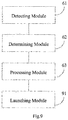
Fig. 6 is a block diagram of an apparatus for application icon management according to an exemplary embodiment. -
Fig. 7 is a block diagram of a processing module of an apparatus for application icon management according to an exemplary embodiment. -
Fig. 8 is a block diagram of another processing module of an apparatus for application icon management according to an exemplary embodiment. -
Fig. 9 is a block diagram of another apparatus for application icon management according to an exemplary embodiment. -
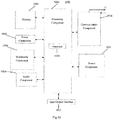
Fig. 10 is a block diagram showing an apparatus for application icon management according to an exemplary embodiment. - Reference will now be made in detail to exemplary embodiments, examples of which are illustrated in the accompanying drawings. The following description refers to the accompanying drawings in which the same numbers in different drawings represent the same or similar elements unless otherwise represented. The implementations set forth in the following description of exemplary embodiments do not represent all implementations consistent with the present invention. Instead, they are merely examples of apparatus and methods consistent with aspects related to the present invention.
- An embodiment of invention provides a method for application icon management, which may be used or implemented in a terminal device. As shown in
Fig. 1 , the method includes steps S101-S103. - In step S101, a moving status of a terminal in a lock screen state is detected by a sensor. The moving status may refer to such a status as whether the terminal is being shaken or whether the terminal is being tapped, etc.
- In step S102, it is determined whether the moving status of the terminal in the lock screen state satisfies a preset status.
- In step S103, when the moving status satisfies the preset status, a designated application icon is lighted on a lock screen interface of the terminal. The designated application icon may be an application icon set by the user or preset by the manufacturer on the terminal lock screen interface.
- In this embodiment, the moving status of the terminal in the lock screen state can be detected by the sensor, and the designated application icon can be lighted on the lock screen interface of the terminal when the moving status satisfies the preset status. As such, a user's needs are determined according to the moving status of the terminal, and the needed application is automatically provided on the lock screen interface for the user. Accordingly, the user does not have to be bothered to look for the application and the operation process is simplified, so that the application on the terminal can be utilized more conveniently, easily and rapidly and user experience is improved.
- In an embodiment, when the designated application icon is not lighted, the designated application icon may be displayed or hidden.
- In the embodiment, when the designated application icon is not lighted, it may exist on the lock screen interface of the terminal but is hidden (that is, the application icon is invisible to the user), even if the lock screen interface is lighted by the user. Only when the moving status of the terminal satisfies a preset status, lighted is the designated application icon that was hidden, so as to facilitate the user's use of the designated application.
- As shown in
Fig. 2 , in an embodiment, the above step S103 comprises steps S201-S202. - In step S201, current environment parameter information of an environment in which the terminal is located is obtained.
- In step S202, when the current environment parameter information satisfies preset environment parameter information, the designated application icon is lighted on the lock screen interface of the terminal.
- In this embodiment, the current environment parameter information of the environment in which the terminal is located may be obtained, and it is determined based on the environment parameter whether to light the designated application icon. Specifically, when the current environment parameter information satisfies the preset environment parameter information, the designated application icon is lighted.
- In an embodiment, the current environment parameter information comprises at least illumination intensity information and information on a distance between the terminal and an obstruction.
- In this embodiment, the illumination intensity information and the information on the distance between the terminal and the obstruction may be used to determine whether the current environment parameter information satisfies the preset environment parameter information. When the preset environment parameter is satisfied, the designated application icon is lighted.
- As shown in
Fig. 3 , in an embodiment, the above step S202 comprises step S301. - In step S301, when the current distance between the terminal and the obstruction is greater than or equal to a preset distance and the current illumination intensity is lower than a preset illumination intensity, the designated application icon is lighted on the lock screen interface of the terminal.
- In this embodiment, when the current distance between the terminal and the obstruction is greater than or equal to the preset distance (i.e. there is no obstruction around the terminal to block light) and the current illumination intensity is lower than the preset illumination intensity (i.e. the brightness around the terminal is rather low), it indicates that the user may need a torch. Then, the torch application icon that is hidden on the lock screen interface may be lighted, so as to make it convenient for the user to turn on the torch.
- In the above embodiment, the torch application is taken as an example. It would be appreciated by those skilled in the art that the designated application icon may also be another application icon, such as a phone application icon, a message application icon, etc. Accordingly, the current environment parameter information may also be some other information, such as ambient noise information, temperature information, humidity information, etc.
- As shown in
Fig. 4 , in an embodiment, the above step S103 may also comprise step S401. - In step S401, when it is detected that the terminal in the lock screen state has a moving speed greater than or equal to a preset moving speed, a moving acceleration greater than or equal to a preset moving acceleration, a moving frequency greater than or equal to a preset moving frequency, and/or a moving trajectory that meets a preset moving trajectory, the designated application icon is lighted on the lock screen interface of the terminal.
- In this embodiment, the preset status may comprise at least one of: the moving speed of the terminal in the lock screen state being greater than or equal to the preset moving speed, the moving acceleration being greater than or equal to the preset moving acceleration, the moving frequency being greater than or equal to the preset moving frequency, and the moving trajectory meeting the preset moving trajectory. For example, when a user rapidly and continuously shakes his terminal, its moving speed, moving acceleration and moving frequency are greater than respective preset values and the designated application may be lighted on the lock screen interface. Alternatively, the preset moving speed may be set as 50cm/s, and the designated application may be lighted on the lock screen interface of the terminal when the moving speed exceeds 50cm/s. Alternatively, the user or the manufacturer may preset a moving trajectory for the terminal, such as a circle, and the designated application may also be lighted on the lock screen interface when the user draws a circle in the air with his hand holding the terminal. Alternatively, the designated application may be lighted on the lock screen interface when the user consecutively taps on the screen of the terminal. As such, the terminal can determine a user's needs according to the moving status and automatically provide the needed application on the lock screen interface for the user. Accordingly, the user does not have to be bothered to look for the application and the operation process is simplified, so that the application on the terminal can be utilized more conveniently, easily and rapidly and user experience is improved.
- As shown in
Fig. 5 , in an embodiment, the above method may further comprise step S501. - In step S501, when a number of received touches on the designated application icon is greater than or equal to a preset touch number and/or a frequency of the touches is greater than or equal to a preset touch frequency, the designated application is launched.
- In this embodiment, when the number of received touches by the user on the designated application icon is greater than or equal to the preset touch number, the designated application may be launched. For example, the preset touch number may be set as 2, so that when the user double taps the designated application icon the designated application may be launched. Alternatively, when the frequency of touches by the user on the designated application icon is greater than the preset touch frequency, such as 2 times per second, the designated application may be launched. Of course, these two conditions may be applied in combination, that is, when the number of received touches on the designated application icon is greater than or equal to the preset touch number and the frequency of the touches is greater than or equal to the preset touch frequency, the designated application may be launched. In this manner, misoperation of the user can be avoided.
- In the following, embodiments of apparatus according to the invention that can perform the methods described above will be described.
-
Fig. 6 is a block diagram of an apparatus for application icon management according to an exemplary embodiment. This apparatus may be implemented as a terminal device or a part thereof in form of software, hardware or a combination thereof. As shown inFig. 6 , the apparatus comprises: - a detecting
module 61 configured to detect a moving status of a terminal in a lock screen state by a sensor, wherein the moving status may refer to such a status as whether the terminal is being shaken or whether the terminal is being tapped, etc.; - a determining
module 62 configured to determine whether the moving status of the terminal in the lock screen state, which is detected by the detectingmodule 61, satisfies a preset status; and - a
processing module 63 configured to light a designated application icon on a lock screen interface of the terminal when the determiningmodule 62 determines that the moving status satisfies the preset status, wherein the designated application icon may be an application icon set by the user or preset by the manufacturer on the terminal lock screen interface. - In this embodiment, the moving status of the terminal in the lock screen state can be detected by the sensor, and the designated application icon can be lighted on the lock screen interface of the terminal when the moving status satisfies the preset status. As such, a user's needs are determined according to terminal moving status and the needed application is automatically provided on the lock screen interface for the user. Accordingly, the user does not have to be bothered to look for the application and the operation process is simplified, so that the application on the terminal can be utilized more conveniently, easily and rapidly and user experience is improved.
- In an embodiment, when the designated application icon is not lighted, the designated application icon is hidden on the lock screen interface of the terminal.
- In the embodiment, when the designated application icon is not lighted, it exists on the lock screen interface of the terminal but is hidden, that is, the application icon is invisible to the user. Only when the moving status of the terminal satisfies a preset status, lighted is the designated application icon that was hidden, so as to facilitate the user's use of the designated application.
- As shown in
Fig. 7 , in an embodiment, theprocessing module 63 comprises: - an obtaining
submodule 71 configured to obtain current environment parameter information of an environment in which the terminal is located; - a
first lighting submodule 72 configured to light the designated application icon on the lock screen interface of the terminal when the current environment parameter information, which is obtained by the obtaining submodule, satisfies preset environment parameter information. - In this embodiment, the current environment parameter information of the environment in which the terminal is located may be obtained, and it is determined whether to light the designated application icon based on the environment parameter. Specifically, when the current environment parameter information satisfies the preset environment parameter information, the designated application icon is lighted.
- In an embodiment, the current environment parameter information comprises at least illumination intensity information and information on a distance between the terminal and an obstruction.
- In this embodiment, the illumination intensity information and the information on the distance between the terminal and the obstruction may be used to determine whether the current environment parameter information satisfies the preset environment parameter information. When the preset environment parameter is satisfied, the designated application icon is lighted.
- In an embodiment, the
first lighting submodule 72 is configured to: light a torch application icon on the lock screen interface of the terminal when a current distance between the terminal and the obstruction is greater than or equal to a preset distance and current illumination intensity is lower than a preset illumination intensity. - In this embodiment, when the current distance between the terminal and the obstruction is greater than or equal to the preset distance (i.e. there is no obstruction around the terminal to block light) and the current illumination intensity is lower than the preset illumination intensity (i.e. the brightness level around the terminal is rather low), it indicates that the user may need a torch. Then, the torch application icon that is hidden on the lock screen interface may be lighted, so as to make it convenient for the user to turn on the torch.
- In the above embodiment, the torch application is taken as an example. It would be appreciated by those skilled in the art that the designated application icon may also be another application icon, such as a phone application icon, a message application icon, etc. Accordingly, the current environment parameter information may also be some other information, such as ambient noise information, temperature information, humidity information, etc.
- As shown in
Fig. 8 , in an embodiment, theprocessing module 63 comprises: - a
second lighting submodule 81 configured to light the designated application icon on the lock screen interface of the terminal when it is detected that the terminal in the lock screen state has a moving speed greater than or equal to a preset moving speed, a moving acceleration greater than or equal to a preset moving acceleration, a moving frequency greater than or equal to a preset moving frequency, and/or a moving trajectory that meets a preset moving trajectory. - In this embodiment, the preset status may comprise at least one of: the moving speed of the terminal in the lock screen state being greater than or equal to the preset moving speed, the moving acceleration being greater than or equal to the preset moving acceleration, the moving frequency being greater than or equal to the preset moving frequency, and the moving trajectory meeting a preset moving trajectory. For example, when a user rapidly shakes his terminal, its moving speed, moving acceleration and moving frequency are greater than respective preset values and the designated application may be lighted on the lock screen interface. Alternatively, the preset moving speed may be set as 50cm/s, and the designated application may be lighted on the lock screen interface of the terminal when the moving speed exceeds 50cm/s. Alternatively, the user or the manufacturer may preset a moving trajectory for the terminal, such as a circle, and the designated application may also be lighted on the lock screen interface when the user draws a circle in the air with his hand holding the terminal. As such, the terminal can determine a user's needs according to the moving status and automatically provide the needed application on the lock screen interface for the user. Accordingly, the user does not have to be bothered to look for the application and the operation process is simplified, so that the application on the terminal can be utilized more conveniently, easily and rapidly and user experience is improved.
- As shown in
Fig. 9 , in an embodiment, the above apparatus further comprises: - a
launching module 91 configured to launch the designated application when a number of received touches on the designated application icon is greater than or equal to a preset touch number and/or a frequency of the touches is greater than or equal to a preset touch frequency. - In this embodiment, when the number of received touches by the user on the designated application icon is greater than or equal to the preset touch number, the designated application may be launched. For example, the preset touch number may be set as 2, so that when the user double taps the designated application icon the designated application may be launched. Alternatively, when the frequency of touches by the user on the designated application icon is greater than the preset touch frequency, such as 2 times per second, the designated application may be launched. Of course, these two conditions may be applied in combination, that is, when the number of received touches on the designated application icon is greater than or equal to the preset touch number and the frequency of the touches is greater than or equal to the preset touch frequency, the designated application may be launched. In this manner, misoperation of the user can be avoided.
- According to a third aspect of the invention, an apparatus for application icon management is provided. The apparatus comprises:
- a processor; and
- a memory for storing instructions executable by the processor,
- wherein the processor is configured to:
- detect, by a sensor, a moving status of a terminal in a lock screen state;
- determine whether the moving status of the terminal in the lock screen state satisfies a preset status; and
- light a designated application icon on a lock screen interface of the terminal when the moving status satisfies the preset status.
- The above processor may be further configured such that the lighting the designated application icon on the lock screen interface of the terminal comprises:
- obtaining current environment parameter information of an environment in which the terminal is located; and
- lighting the designated application icon on the lock screen interface of the terminal, when the current environment parameter information satisfies preset environment parameter information.
- The above processor may be further configured such that the current environment parameter information comprises at least illumination intensity information and information on a distance between the terminal and an obstruction.
- The above processor may be further configured such that the lighting the designated application icon on the lock screen interface of the terminal, when the current environment parameter information satisfies the preset environment parameter information, comprises:
- when a current distance between the terminal and the obstruction is greater than or equal to a preset distance and a current illumination intensity is lower than a preset illumination intensity, lighting a torch application icon on the lock screen interface of the terminal.
- The above processor may be further configured such that the lighting the designated application icon on the lock screen interface of the terminal comprises, when the moving status satisfies the preset status, comprises: when it is detected that the terminal in the lock screen state has a moving speed greater than or equal to a preset moving speed, a moving acceleration greater than or equal to a preset moving acceleration, a moving frequency greater than or equal to a preset moving frequency, and/or a moving trajectory that meets a preset moving trajectory, lighting the designated application icon on the lock screen interface of the terminal.
- The above processor may be further configured such that, when a number of received touches on the designated application icon is greater than or equal to a preset touch number and/or a frequency of the touches is greater than or equal to a preset touch frequency, the designated application is launched.
- The above processor may be further configured such that, when the designated application icon is not lighted, the designated application icon is hidden on the lock screen interface of the terminal.
-
Fig. 10 is a block diagram of anapparatus 1000 for application icon management according to an exemplary embodiment, which may be used in a terminal device. For example, theapparatus 1000 may be a mobile phone, a computer, a digital broadcast terminal, a messaging device, a gaming console, a tablet, a medical device, exercise equipment, a personal digital assistant, and the like. - Referring to
Fig. 10 , theapparatus 1000 may include one or more of the following components: aprocessing component 1002, amemory 1004, apower component 1006, amultimedia component 1008, anaudio component 1010, an input/output (I/O)interface 1012, asensor component 1014, and acommunication component 1016. - The
processing component 1002 typically controls overall operations of theapparatus 1000, such as the operations associated with display, telephone calls, data communications, camera operations, and recording operations. Theprocessing component 1002 may include one ormore processors 1020 to execute instructions to perform all or part of the steps in the above described methods. Moreover, theprocessing component 1002 may include one or more modules which facilitate the interaction between theprocessing component 1002 and other components. For instance, theprocessing component 1002 may include a multimedia module to facilitate the interaction between themultimedia component 1008 and theprocessing component 1002. - The
memory 1004 is configured to store various types of data to support the operation of theapparatus 1000. Examples of such data include instructions for any applications or methods operated on theapparatus 1000, contact data, phonebook data, messages, pictures, video, etc. Thememory 1004 may be implemented using any type of volatile or non-volatile memory devices, or a combination thereof, such as a static random access memory (SRAM), an electrically erasable programmable read-only memory (EEPROM), an erasable programmable read-only memory (EPROM), a programmable read-only memory (PROM), a read-only memory (ROM), a magnetic memory, a flash memory, a magnetic or optical disk. - The
power component 1006 provides power to various components of theapparatus 1000. Thepower component 1006 may include a power management system, one or more power sources, and any other components associated with the generation, management, and distribution of power in theapparatus 1000. - The
multimedia component 1008 includes a screen providing an output interface between theapparatus 1000 and the user. In some embodiments, the screen may include a liquid crystal display (LCD) and a touch panel (TP). If the screen includes the touch panel, the screen may be implemented as a touch screen to receive input signals from the user. The touch panel includes one or more touch sensors to sense touches, swipes, and gestures on the touch panel. The touch sensors may not only sense a boundary of a touch or swipe action, but also sense a period of time and a pressure associated with the touch or swipe action. In some embodiments, themultimedia component 1008 includes a front camera and/or a rear camera. The front camera and the rear camera may receive an external multimedia datum while theapparatus 1000 is in an operation mode, such as a photographing mode or a video mode. Each of the front camera and the rear camera may be a fixed optical lens system or have focus and optical zoom capability. - The
audio component 1010 is configured to output and/or input audio signals. For example, theaudio component 1010 includes a microphone ("MIC") configured to receive an external audio signal when theapparatus 1000 is in an operation mode, such as a call mode, a recording mode, and a voice recognition mode. The received audio signal may be further stored in thememory 1004 or transmitted via thecommunication component 1016. In some embodiments, theaudio component 1010 further includes a speaker to output audio signals. - The I/
O interface 1012 provides an interface between theprocessing component 1002 and peripheral interface modules, such as a keyboard, a click wheel, buttons, and the like. The buttons may include, but are not limited to, a home button, a volume button, a starting button, and a locking button. - The
sensor component 1014 includes one or more sensors to provide status assessments of various aspects of theapparatus 1000. For instance, thesensor component 1014 may detect an open/closed status of theapparatus 1000, relative positioning of components, e.g., the display and the keypad, of theapparatus 1000, a change in position of theapparatus 1000 or a component of theapparatus 1000, a presence or absence of user contact with theapparatus 1000, an orientation or an acceleration/deceleration of theapparatus 1000, and a change in temperature of theapparatus 1000. Thesensor component 1014 may include a proximity sensor configured to detect the presence of nearby objects without any physical contact. Thesensor component 1014 may also include a light sensor, such as a CMOS or CCD image sensor, for use in imaging applications. In some embodiments, thesensor component 1014 may also include an accelerometer sensor, a gyroscope sensor, a magnetic sensor, a pressure sensor, or a temperature sensor. - The
communication component 1016 is configured to facilitate communication, wired or wirelessly, between theapparatus 1000 and other devices. Theapparatus 1000 can access a wireless network based on a communication standard, such as WiFi, 2G, or 3G, or a combination thereof. In one exemplary embodiment, thecommunication component 1016 receives a broadcast signal or broadcast associated information from an external broadcast management system via a broadcast channel. In one exemplary embodiment, thecommunication component 1016 further includes a near field communication (NFC) module to facilitate short-range communications. For example, the NFC module may be implemented based on a radio frequency identification (RFID) technology, an infrared data association (IrDA) technology, an ultra-wideband (UWB) technology, a Bluetooth (BT) technology, and other technologies. - In exemplary embodiments, the
apparatus 1000 may be implemented with one or more application specific integrated circuits (ASICs), digital signal processors (DSPs), digital signal processing devices (DSPDs), programmable logic devices (PLDs), field programmable gate arrays (FPGAs), controllers, micro-controllers, microprocessors, or other electronic components, for performing the above described methods. - In exemplary embodiments, there is also provided a non-transitory computer-readable storage medium including instructions, such as included in the
memory 1004, executable by theprocessor 1020 in theapparatus 1000, for performing the above-described methods. For example, the non-transitory computer-readable storage medium may be a ROM, a RAM, a CD-ROM, a magnetic tape, a floppy disc, an optical data storage device, and the like. - A non-transitory computer-readable storage medium including instructions, which when executed by the processor of the
apparatus 1000 cause theapparatus 1000 to perform the above-described method for application icon management. The method comprises: detecting, by a sensor, a moving status of a terminal in a lock screen state; determining whether the moving status of the terminal in the lock screen state satisfies a preset status; and lighting a designated application icon on a lock screen interface of the terminal, when the moving status satisfies the preset status. - In an embodiment, the lighting the designated application icon on the lock screen interface of the terminal comprises: obtaining current environment parameter information of an environment in which the terminal is located; and lighting the designated application icon on the lock screen interface of the terminal, when the current environment parameter information satisfies preset environment parameter information.
- In an embodiment, the current environment parameter information comprises at least illumination intensity information and information on a distance between the terminal and an obstruction.
- In an embodiment, the lighting the designated application icon on the lock screen interface of the terminal, when the current environment parameter information satisfies the preset environment parameter information, comprises: when a current distance between the terminal and the obstruction is greater than or equal to a preset distance and current illumination intensity is lower than a preset illumination intensity, lighting a torch application icon on the lock screen interface of the terminal.
- In an embodiment, the lighting the designated application icon on the lock screen interface of the terminal, when the moving status satisfies the preset status, comprises: when it is detected that the terminal in the lock screen state has a moving speed greater than or equal to a preset moving speed, a moving acceleration greater than or equal to a preset moving acceleration, a moving frequency greater than or equal to a preset moving frequency, and/or a moving trajectory that meets a preset moving trajectory, lighting the designated application icon on the lock screen interface of the terminal.
- In an embodiment, the method further comprises: when a number of received touches on the designated application icon is greater than or equal to a preset touch number and/or a frequency of the touches is greater than or equal to a preset touch frequency, launching the designated application.
- In an embodiment, when the designated application icon is not lighted, the designated application icon is hidden on the lock screen interface of the terminal.
- Where functional modules are referred to in apparatus embodiments for carrying out various steps of the described method(s) it will be understood that these modules may be implemented in hardware, in software, or a combination of the two. When implemented in hardware, the modules may be implemented as one or more hardware modules, such as one or more application specific integrated circuits. When implemented in software, the modules may be implemented as one or more computer programs that are executed on one or more processors.
- Other embodiments of the invention will be apparent to those skilled in the art from consideration of the specification and practice of the embodiments disclosed herein. This application is intended to cover any variations, uses, or adaptations of the invention following the general principles thereof and including such departures from the present invention as come within known or customary practice in the art. It is intended that the specification and examples be considered as exemplary only, with a true scope of the invention being indicated by the following claims.
- It will be appreciated that the present invention is not limited to the exact construction that has been described above and illustrated in the accompanying drawings, and that various modifications and changes can be made without departing from the scope thereof. It is intended that the scope of the invention only be limited by the appended claims.
Claims (15)
- A method for application icon management, characterized by comprising:detecting, by a sensor, a moving status of a terminal in a lock screen state;determining whether the moving status of the terminal in the lock screen state satisfies a preset status; andlighting a designated application icon on a lock screen interface of the terminal, when the moving status satisfies the preset status.
- The method of claim 1, characterized in that the lighting the designated application icon on the lock screen interface of the terminal comprises:obtaining current environment parameter information of an environment in which the terminal is located; andlighting the designated application icon on the lock screen interface of the terminal, when the current environment parameter information satisfies preset environment parameter information.
- The method of claim 2, characterized in that the current environment parameter information comprises at least illumination intensity information and information on a distance between the terminal and an obstruction.
- The method of claim 3, characterized in that the lighting the designated application icon on the lock screen interface of the terminal, when the current environment parameter information satisfies the preset environment parameter information, comprises:when a current distance between the terminal and the obstruction is greater than or equal to a preset distance and a current illumination intensity is lower than a preset illumination intensity, lighting a torch application icon on the lock screen interface of the terminal.
- The method of any preceding claim, characterized in that the lighting the designated application icon on the lock screen interface of the terminal, when the moving status satisfies the preset status, comprises:when it is detected that the terminal in the lock screen state has a moving speed greater than or equal to a preset moving speed, a moving acceleration greater than or equal to a preset moving acceleration, a moving frequency greater than or equal to a preset moving frequency, and/or a moving trajectory that meets a preset moving trajectory, lighting the designated application icon on the lock screen interface of the terminal.
- The method of any preceding claim, characterized by further comprising:when a number of received touches on the designated application icon is greater than or equal to a preset touch number and/or a frequency of the touches is greater than or equal to a preset touch frequency, launching the designated application.
- The method of any of claims 1-6, characterized in that
when the designated application icon is not lighted, the designated application icon is hidden on the lock screen interface of the terminal. - An apparatus for application icon management, characterized by comprising:a detecting module configured to detect a moving status of a terminal in a lock screen state by a sensor;a determining module configured to determine whether the moving status of the terminal in the lock screen state, which is detected by the detecting module, satisfies a preset status; anda processing module configured to light a designated application icon on a lock screen interface of the terminal when the determining module determines that the moving status satisfies the preset status.
- The apparatus of claim 8, characterized in that the processing module comprises:an obtaining submodule configured to obtain current environment parameter information of an environment in which the terminal is located; anda first lighting submodule configured to light the designated application icon on the lock screen interface of the terminal when the current environment parameter information, which is obtained by the obtaining submodule, satisfies preset environment parameter information.
- The apparatus of claim 9, characterized in that the current environment parameter information comprises at least illumination intensity information and information on a distance between the terminal and an obstruction.
- The apparatus of claim 10, characterized in that the first lighting submodule is configured to:light a torch application icon on the lock screen interface of the terminal, when a current distance between the terminal and the obstruction is greater than or equal to a preset distance and a current illumination intensity is lower than a preset illumination intensity.
- The apparatus of any of claims 8 to 11, characterized in that the processing module comprises:a second lighting submodule configured to light the designated application icon on the lock screen interface of the terminal, when it is detected that the terminal in the lock screen state has a moving speed greater than or equal to a preset moving speed, a moving acceleration greater than or equal to a preset moving acceleration, a moving frequency greater than or equal to a preset moving frequency, and/or a moving trajectory that meets a preset moving trajectory.
- The apparatus of any of claims 8 to 12, characterized by comprising:a launching module configured to launch the designated application, when a number of received touches on the designated application icon is greater than or equal to a preset touch number and/or a frequency of the touches is greater than or equal to a preset touch frequency.
- The apparatus of any of claims 8-13, characterized in that, when the designated application icon is not lighted, the designated application icon is hidden on the lock screen interface of the terminal.
- An apparatus for application icon management, characterized by comprising:a processor; anda memory for storing instructions executable by the processor,wherein the processor is configured to:detect, by a sensor, a moving status of a terminal in a lock screen state;determine whether the moving status of the terminal in the lock screen state satisfies a preset status; andlight a designated application icon on a lock screen interface of the terminal when the moving status satisfies the preset status.
Applications Claiming Priority (1)
| Application Number | Priority Date | Filing Date | Title |
|---|---|---|---|
| CN201510857523.2A CN105487786A (en) | 2015-11-30 | 2015-11-30 | Application icon management method and device |
Publications (1)
| Publication Number | Publication Date |
|---|---|
| EP3173919A1 true EP3173919A1 (en) | 2017-05-31 |
Family
ID=55674797
Family Applications (1)
| Application Number | Title | Priority Date | Filing Date |
|---|---|---|---|
| EP16198914.0A Withdrawn EP3173919A1 (en) | 2015-11-30 | 2016-11-15 | Method and apparatus for application icon management |
Country Status (8)
| Country | Link |
|---|---|
| US (1) | US20170153793A1 (en) |
| EP (1) | EP3173919A1 (en) |
| JP (1) | JP6386040B2 (en) |
| KR (1) | KR20180081638A (en) |
| CN (1) | CN105487786A (en) |
| MX (1) | MX361221B (en) |
| RU (1) | RU2651151C2 (en) |
| WO (1) | WO2017092129A1 (en) |
Cited By (1)
| Publication number | Priority date | Publication date | Assignee | Title |
|---|---|---|---|---|
| CN111327767A (en) * | 2020-02-06 | 2020-06-23 | Tcl移动通信科技(宁波)有限公司 | Lighting device control method, system, storage medium and mobile terminal |
Families Citing this family (9)
| Publication number | Priority date | Publication date | Assignee | Title |
|---|---|---|---|---|
| CN106126044A (en) * | 2016-07-04 | 2016-11-16 | 百度在线网络技术(北京)有限公司 | Display/the hidden method of application icon and device for terminal |
| CN106445299A (en) * | 2016-09-28 | 2017-02-22 | 维沃移动通信有限公司 | Control method and mobile terminal |
| CN106793030B (en) * | 2016-12-01 | 2020-07-10 | 北京安云世纪科技有限公司 | Application management method and device and mobile terminal |
| CN107222622A (en) * | 2017-05-31 | 2017-09-29 | 深圳天珑无线科技有限公司 | The method and its system of intelligent switch flashlight |
| CN107402688A (en) * | 2017-06-14 | 2017-11-28 | 努比亚技术有限公司 | A kind of screen locking control method, terminal and computer-readable recording medium |
| CN108509247A (en) * | 2018-04-08 | 2018-09-07 | 深圳先搜科技有限公司 | A kind of extremely simple mode implementation method, system and terminal device |
| CN111510552A (en) * | 2019-01-31 | 2020-08-07 | 北京小米移动软件有限公司 | Terminal operating method and device |
| CN110413172B (en) | 2019-08-16 | 2021-08-03 | 维沃移动通信有限公司 | A kind of button indicating method and electronic device |
| CN111090475A (en) * | 2019-11-25 | 2020-05-01 | 深圳传音控股股份有限公司 | Application opening method, terminal and computer storage medium |
Citations (2)
| Publication number | Priority date | Publication date | Assignee | Title |
|---|---|---|---|---|
| US20120297304A1 (en) * | 2011-05-17 | 2012-11-22 | Apple Inc. | Adaptive Operating System |
| CN103345355A (en) * | 2013-07-18 | 2013-10-09 | 北京小米科技有限责任公司 | Screen-locking interface display control method, device and terminal device |
Family Cites Families (18)
| Publication number | Priority date | Publication date | Assignee | Title |
|---|---|---|---|---|
| US7924271B2 (en) * | 2007-01-05 | 2011-04-12 | Apple Inc. | Detecting gestures on multi-event sensitive devices |
| US8296670B2 (en) * | 2008-05-19 | 2012-10-23 | Microsoft Corporation | Accessing a menu utilizing a drag-operation |
| JP4995783B2 (en) * | 2008-07-30 | 2012-08-08 | 京セラ株式会社 | Portable terminal |
| KR20100027686A (en) * | 2008-09-03 | 2010-03-11 | 엘지전자 주식회사 | Mobile terminal and method for controlling the same |
| TWI546700B (en) * | 2011-01-13 | 2016-08-21 | 宏達國際電子股份有限公司 | Portable electronic device, and control method and computer program product of the same |
| JP5799628B2 (en) * | 2011-07-15 | 2015-10-28 | ソニー株式会社 | Information processing apparatus, information processing method, and program |
| CN102520852A (en) * | 2011-11-29 | 2012-06-27 | 华为终端有限公司 | Control method of mobile equipment screen status and associated mobile equipment |
| US20130187753A1 (en) * | 2012-01-20 | 2013-07-25 | Research In Motion Limited | Predictive Context-Aware Dynamic Lock Screen |
| CN103809871A (en) * | 2012-11-06 | 2014-05-21 | 中国移动通信集团公司 | Processing method and mobile terminal for icon of application program |
| US20140215496A1 (en) * | 2013-01-29 | 2014-07-31 | Nexovation, Inc. | Device including a plurality of functionalities, and method of operating the device |
| KR20140111495A (en) * | 2013-03-11 | 2014-09-19 | 삼성전자주식회사 | Method for controlling display and an electronic device thereof |
| CN103354582B (en) * | 2013-06-14 | 2015-02-25 | 广东欧珀移动通信有限公司 | Method and system for intelligently associating with application through sensor |
| CN103309618A (en) * | 2013-07-02 | 2013-09-18 | 姜洪明 | Mobile operating system |
| KR20150011249A (en) * | 2013-07-22 | 2015-01-30 | 엘지전자 주식회사 | Control apparatus of mobile communication terminal and method thereof |
| CN103744597A (en) * | 2014-02-14 | 2014-04-23 | 贝壳网际(北京)安全技术有限公司 | Display method and system of shortcut of application program on screen locking interface |
| CN103873684B (en) * | 2014-02-27 | 2015-12-09 | 小米科技有限责任公司 | The application process of flashlight and device |
| CN103955337B (en) * | 2014-05-06 | 2017-07-21 | 北京金山安全软件有限公司 | Method and system for opening application program in mobile terminal |
| US9954989B2 (en) * | 2015-05-06 | 2018-04-24 | Eyespage Inc. | Lock screen graphical user interface |
-
2015
- 2015-11-30 CN CN201510857523.2A patent/CN105487786A/en active Pending
- 2015-12-29 RU RU2016128501A patent/RU2651151C2/en active
- 2015-12-29 KR KR1020167010363A patent/KR20180081638A/en not_active Ceased
- 2015-12-29 MX MX2016005880A patent/MX361221B/en active IP Right Grant
- 2015-12-29 JP JP2016522795A patent/JP6386040B2/en active Active
- 2015-12-29 WO PCT/CN2015/099615 patent/WO2017092129A1/en not_active Ceased
-
2016
- 2016-11-15 EP EP16198914.0A patent/EP3173919A1/en not_active Withdrawn
- 2016-11-29 US US15/363,573 patent/US20170153793A1/en not_active Abandoned
Patent Citations (2)
| Publication number | Priority date | Publication date | Assignee | Title |
|---|---|---|---|---|
| US20120297304A1 (en) * | 2011-05-17 | 2012-11-22 | Apple Inc. | Adaptive Operating System |
| CN103345355A (en) * | 2013-07-18 | 2013-10-09 | 北京小米科技有限责任公司 | Screen-locking interface display control method, device and terminal device |
Cited By (1)
| Publication number | Priority date | Publication date | Assignee | Title |
|---|---|---|---|---|
| CN111327767A (en) * | 2020-02-06 | 2020-06-23 | Tcl移动通信科技(宁波)有限公司 | Lighting device control method, system, storage medium and mobile terminal |
Also Published As
| Publication number | Publication date |
|---|---|
| WO2017092129A1 (en) | 2017-06-08 |
| JP6386040B2 (en) | 2018-09-05 |
| MX361221B (en) | 2018-11-29 |
| CN105487786A (en) | 2016-04-13 |
| RU2651151C2 (en) | 2018-04-18 |
| KR20180081638A (en) | 2018-07-17 |
| US20170153793A1 (en) | 2017-06-01 |
| JP2018502462A (en) | 2018-01-25 |
| MX2016005880A (en) | 2017-08-02 |
Similar Documents
| Publication | Publication Date | Title |
|---|---|---|
| EP3173919A1 (en) | Method and apparatus for application icon management | |
| EP3086539B1 (en) | Method and device for deleting smart scene | |
| EP3249509A1 (en) | Method and device for playing live videos | |
| EP3173970A1 (en) | Image processing method and apparatus | |
| EP2985991B1 (en) | Method and device for time-lapse photographing | |
| EP3176776A1 (en) | Luminance adjusting method and apparatus, computer program and recording medium | |
| EP3136658A1 (en) | Method, device, terminal device, computer program and recording medium for changing emoticon in chat interface | |
| EP3046016A1 (en) | Method and apparatus for switching display mode | |
| EP3136216A1 (en) | Method for controlling mobile terminal and mobile terminal | |
| EP3249514A1 (en) | Method and device for determining operation mode of terminal | |
| EP3171554A1 (en) | Method and device for displaying a message | |
| EP2924552B1 (en) | Method and mobile terminal for executing user instructions | |
| US20190235745A1 (en) | Method and device for displaying descriptive information | |
| EP3322227B1 (en) | Methods and apparatuses for controlling wireless connection, computer program and recording medium | |
| EP3109741B1 (en) | Method and device for determining character | |
| EP3232301B1 (en) | Mobile terminal and virtual key processing method | |
| EP3379524A1 (en) | View angle switching method and apparatus | |
| EP3147802B1 (en) | Method and apparatus for processing information | |
| US10318069B2 (en) | Method for controlling state of touch screen, and electronic device and medium for implementing the same | |
| CN105446616A (en) | Screen display control method, apparatus and device | |
| EP3176982B1 (en) | Alarm setting method and apparatus, computer program and recording medium | |
| US10705729B2 (en) | Touch control method and apparatus for function key, and storage medium | |
| CN107529699A (en) | Control method of electronic device and device | |
| CN106708519A (en) | Operation control adding method and device | |
| EP3015968A1 (en) | Method for image deletion and device thereof |
Legal Events
| Date | Code | Title | Description |
|---|---|---|---|
| PUAI | Public reference made under article 153(3) epc to a published international application that has entered the european phase |
Free format text: ORIGINAL CODE: 0009012 |
|
| AK | Designated contracting states |
Kind code of ref document: A1 Designated state(s): AL AT BE BG CH CY CZ DE DK EE ES FI FR GB GR HR HU IE IS IT LI LT LU LV MC MK MT NL NO PL PT RO RS SE SI SK SM TR |
|
| AX | Request for extension of the european patent |
Extension state: BA ME |
|
| 17P | Request for examination filed |
Effective date: 20171127 |
|
| RBV | Designated contracting states (corrected) |
Designated state(s): AL AT BE BG CH CY CZ DE DK EE ES FI FR GB GR HR HU IE IS IT LI LT LU LV MC MK MT NL NO PL PT RO RS SE SI SK SM TR |
|
| 17Q | First examination report despatched |
Effective date: 20180405 |
|
| STAA | Information on the status of an ep patent application or granted ep patent |
Free format text: STATUS: THE APPLICATION HAS BEEN WITHDRAWN |
|
| 18W | Application withdrawn |
Effective date: 20190711 |