EP3143544B1 - Claiming data from a virtual whiteboard - Google Patents
Claiming data from a virtual whiteboard Download PDFInfo
- Publication number
- EP3143544B1 EP3143544B1 EP15726792.3A EP15726792A EP3143544B1 EP 3143544 B1 EP3143544 B1 EP 3143544B1 EP 15726792 A EP15726792 A EP 15726792A EP 3143544 B1 EP3143544 B1 EP 3143544B1
- Authority
- EP
- European Patent Office
- Prior art keywords
- user
- whiteboard
- display device
- data
- computing system
- Prior art date
- Legal status (The legal status is an assumption and is not a legal conclusion. Google has not performed a legal analysis and makes no representation as to the accuracy of the status listed.)
- Not-in-force
Links
Images




Classifications
-
- G—PHYSICS
- G06—COMPUTING OR CALCULATING; COUNTING
- G06F—ELECTRIC DIGITAL DATA PROCESSING
- G06F21/00—Security arrangements for protecting computers, components thereof, programs or data against unauthorised activity
- G06F21/30—Authentication, i.e. establishing the identity or authorisation of security principals
- G06F21/31—User authentication
-
- G—PHYSICS
- G06—COMPUTING OR CALCULATING; COUNTING
- G06F—ELECTRIC DIGITAL DATA PROCESSING
- G06F21/00—Security arrangements for protecting computers, components thereof, programs or data against unauthorised activity
- G06F21/30—Authentication, i.e. establishing the identity or authorisation of security principals
- G06F21/31—User authentication
- G06F21/36—User authentication by graphic or iconic representation
-
- G—PHYSICS
- G06—COMPUTING OR CALCULATING; COUNTING
- G06F—ELECTRIC DIGITAL DATA PROCESSING
- G06F21/00—Security arrangements for protecting computers, components thereof, programs or data against unauthorised activity
- G06F21/30—Authentication, i.e. establishing the identity or authorisation of security principals
- G06F21/31—User authentication
- G06F21/32—User authentication using biometric data, e.g. fingerprints, iris scans or voiceprints
-
- G—PHYSICS
- G06—COMPUTING OR CALCULATING; COUNTING
- G06F—ELECTRIC DIGITAL DATA PROCESSING
- G06F21/00—Security arrangements for protecting computers, components thereof, programs or data against unauthorised activity
- G06F21/30—Authentication, i.e. establishing the identity or authorisation of security principals
- G06F21/31—User authentication
- G06F21/34—User authentication involving the use of external additional devices, e.g. dongles or smart cards
- G06F21/35—User authentication involving the use of external additional devices, e.g. dongles or smart cards communicating wirelessly
-
- G—PHYSICS
- G06—COMPUTING OR CALCULATING; COUNTING
- G06F—ELECTRIC DIGITAL DATA PROCESSING
- G06F21/00—Security arrangements for protecting computers, components thereof, programs or data against unauthorised activity
- G06F21/60—Protecting data
- G06F21/62—Protecting access to data via a platform, e.g. using keys or access control rules
- G06F21/6218—Protecting access to data via a platform, e.g. using keys or access control rules to a system of files or objects, e.g. local or distributed file system or database
-
- G—PHYSICS
- G06—COMPUTING OR CALCULATING; COUNTING
- G06V—IMAGE OR VIDEO RECOGNITION OR UNDERSTANDING
- G06V40/00—Recognition of biometric, human-related or animal-related patterns in image or video data
- G06V40/10—Human or animal bodies, e.g. vehicle occupants or pedestrians; Body parts, e.g. hands
- G06V40/16—Human faces, e.g. facial parts, sketches or expressions
-
- G—PHYSICS
- G06—COMPUTING OR CALCULATING; COUNTING
- G06V—IMAGE OR VIDEO RECOGNITION OR UNDERSTANDING
- G06V40/00—Recognition of biometric, human-related or animal-related patterns in image or video data
- G06V40/10—Human or animal bodies, e.g. vehicle occupants or pedestrians; Body parts, e.g. hands
- G06V40/16—Human faces, e.g. facial parts, sketches or expressions
- G06V40/172—Classification, e.g. identification
-
- G—PHYSICS
- G06—COMPUTING OR CALCULATING; COUNTING
- G06V—IMAGE OR VIDEO RECOGNITION OR UNDERSTANDING
- G06V40/00—Recognition of biometric, human-related or animal-related patterns in image or video data
- G06V40/30—Writer recognition; Reading and verifying signatures
- G06V40/33—Writer recognition; Reading and verifying signatures based only on signature image, e.g. static signature recognition
Definitions
- Prior whiteboard applications have been used via computer systems, enabling displayed content to be drawn upon or otherwise manipulated via input devices such as mice, trackpads, touchscreens, etc.
- the whiteboard application can provide the functionality of a physical dry-erase or chalkboard in a computing context.
- Whiteboard applications are commonly used in collaborative settings such as meetings, brainstorming sessions, classrooms, etc. Therefore, in some instances a plurality of users may manipulate content presented via the whiteboard application in one or more sessions.
- the data associated with the manipulation of the content may be saved locally by the computing system.
- the computing system using the whiteboard application may be used by a number of users. Therefore, storing the data locally may create security concerns. Furthermore, storing the data locally may increase the amount of storage needed in the computing system.
- offloading the content may be desirable to alleviate the security concerns and decrease local storage needs.
- offloading the content to a portable storage device e.g., thumbdrive
- a portable storage device e.g., thumbdrive
- users may find interaction with the whiteboard application slow and awkward.
- US 2007/0216660 A1 discloses an electronic whiteboard that uses biometric characteristics of a user to authenticate the user.
- a display may receive user input and may further display text. Physical characteristics of a user of the apparatus may be received by an input receiver to determine the identity of the user.
- the electronic whiteboard first receives biometric user authentication information to determine whether the user is allowed to access the whiteboard. If the user is authorized, further user input including input vectors is received and stored.
- US 2012/233615 A1 discloses techniques for automatically performing one or more actions responsive to a successful login. An action automatically performed responsive to the login could use content created prior to the login.
- the invention is defined by a method of storing data from a whiteboard application and a computing system according to the independent claims. Preferred embodiments are defined in the dependent claims.
- a method of storing data from a whiteboard application executed on a computing system including an interactive display device comprises storing, in a memory of the computing system, whiteboard data input to the whiteboard application in response to user interaction with the interactive display device, displaying a login selector on the interactive display device, upon detecting actuation of the login selector, identifying the user based on credentials of the user; and in response to identifying the user, (i) retrieving previews of stored whiteboard files from a user account in a cloud-based storage system corresponding to the identity of the user, (ii) displaying the previews on the interactive display device, and (iii) uploading the whiteboard data as a whiteboard file from the memory of the computing system to the user account.
- a whiteboard application executed by a computing system including an interactive display device is described herein.
- the whiteboard application is configured to quickly and efficiently upload and download data to and from a cloud-based storage device during a whiteboard application user session.
- data may be generated via the whiteboard application and subsequently sent to a cloud-based storage system when a user provides credentials to a user account in the cloud-based storage system.
- previews of files stored in the cloud-based storage device can also be presented via the interactive display device in response to the user entering user credentials.
- a user can not only easily offload desired content to a cloud-based storage system but also quickly preview content stored in the cloud-based storage system, thereby enhancing the current whiteboard session.
- a user can quickly capture content and send the captured content to a cloud-based system for later use as well as preview previously captured content stored in the cloud-based system.
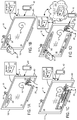
- FIG. 1A depicts a computing system 10 configured to store data from a whiteboard application 18 executed on the computing system 10.
- the computing system 10 may be configured to include an interactive display device 12 (e.g., interactive touch sensitive display device) and a memory 14 including instructions executable by a processor 15.
- the whiteboard application 18 may be stored in memory 14 as instructions executable by the processor 15.
- the computing system 10 may be further configured to record, in the memory 14, a whiteboard file 24.
- the whiteboard file 24 may include whiteboard data 16 input into the whiteboard application 18 by a user 20 via the interactive display device 12.
- the interactive display device 12 may include a sensing device 80.
- the sensing device may include one or more of a capacitive touch sensor, an optical touch sensor, etc.
- the interactive display device 12 may include a liquid crystal display (LCD), an organic light-emitting diode (OLED), active-matrix organic light-emitting diode (AMOLED), projection display, etc., for presenting graphics.
- the interactive display device 12 is configured to receive and process ink inputs and touch inputs. It will be appreciated that an ink input includes an interactive input with a stylus 82.
- the interactive display device 12 may further be configured to receive and process multi-touch inputs. Additionally, it will be appreciated that the aforementioned inputs may be sent to the memory 14 and processor 15 for processing via the whiteboard application 18.
- FIG. 1B depicts the computing system 10 further configured to display a login selector 26 on the interactive display device 12.
- the login selector 26 may be a soft button generated graphically by the interactive display device 12 or a hard button physically present on the interactive display device 12, itself.
- the computing system 10 may then be further configured to identify the user 20 based on credentials of the user 20.
- the login selector 26 may be a soft button persistently displayed on the interactive display device 12 via the whiteboard application 18. In this way, a user can quickly select the login selector while the whiteboard application is executed.
- whiteboard application user interface configurations have been contemplated, such as using biometric indicators including facial image recognition to log a user in, or using a device identifier received from a user device (e.g., mobile phone, watch, stylus, etc.) to log a user in, as described below.
- biometric indicators including facial image recognition to log a user in
- a device identifier received from a user device (e.g., mobile phone, watch, stylus, etc.) to log a user in, as described below.
- FIG. 1C depicts the computing system 10 further configured to identify the user 20 via a sign in prompt 28 requesting the user 20 enter a user ID 30 and a password 32.
- the user 20 is identified by the computing system 10 as "USER A".
- the computing system 10 may also be further configured to identify the credentials of the user 20 via facial recognition.
- the computing system 10 may be configured to compare a captured image of the user 20 captured with camera 40 to a stored profile image associated with a cloud-based account (e.g., online account) of the user 20.
- the computing system 10 may be configured to identify the user 20 by wirelessly detecting the credentials of the user stored in a linked portable device.
- FIG. 1C depicts the computing system 10 further configured to identify the user 20 via a sign in prompt 28 requesting the user 20 enter a user ID 30 and a password 32.
- the user 20 is identified by the computing system 10 as "USER A".
- the computing system 10 may also be further configured to identify the credentials of the user
- the linked portable device is depicted as cell phone 42 which may be configured to communicate wirelessly with the computing system 10. It should be noted, however, that the computing system 10 may be configured to wirelessly detect the credentials of a user 20 via another suitable device, such as a security token (e.g., fob), stylus, or watch.
- a security token e.g., fob
- FIG. 1D depicts the computing system 10 further configured to access a user account 34 on a cloud-based storage system 36.
- the user account 34 corresponds to the identity of the user 20 established by the computing system 10, as described above with respect to FIG. 1C .
- the computing system 10 may be configured to upload the whiteboard file 24 from the memory 14 of the computing system 10 to the user account 34.
- the computing system may be configured to display on the interactive display device 12 a save selector 62 and, upon detecting actuation of the save selector 62 by the user 20, to upload the whiteboard file 24 to the user account 34.
- the computing system 10 may be further configured to display a logout selector 38 on the interactive display device. As shown in FIG. 2B , the computing system 10 may be then configured to revoke access to the user account 34 upon detecting actuation of the logout selector 38 by the user 20. Additionally, previews of the files stored in the cloud-based storage system may be removed from the interactive display device upon detecting actuation of the logout selector. The previews are discussed in greater detail herein.
- the computing system 10 may be further configured to retrieve previews 44 of stored whiteboard files 46 from the user account 34 on the cloud-based storage system 36.
- the computing system 10 may be configured to display an open selector 64 on the interactive display device 12 and, upon detecting actuation of the open selector 64 by the user 20, to retrieve previews 44 of the stored whiteboard files 46 from the user account 34.
- the computing system may then be configured to display the previews 44 on the interactive display device 12.
- the previews 44 may be displayed by the computing device as a horizontal strip of preview images, with the preview images grouped chronologically.
- the previews 44 may be further grouped into folders.
- the previews may be presented as tiles (e.g., tiles aligned in a grid pattern) or stacked with each preview having a different z-order.
- the computing system 10 may be further configured to allow the user 20 to select one of the previews 44 via the interactive display device 12.
- the computing system 10 may be configured to retrieve the stored whiteboard file 46 corresponding to the selected preview 44.
- the computing system 10 may then be configured to display the stored whiteboard file 46 on the interactive display device 12.
- the whiteboard application may be configured to enable the user manipulate the whiteboard file, such as adding additional content, erasing content, modifying content, etc. For instance, a user may implement an ink input and/or touch input to generate additional graphics (e.g., alphanumeric symbols) in the whiteboard file.
- the computing system 10 may be further configured to display a second login selector 50 on the interactive display device 12.
- the computing system 10 may be configured to identify a second user 52 based on credentials of the second user 52 after detecting actuation of the second login selector 50 by the second user 52.
- the computing system 10 may then be configured to access a second user account on a cloud-based storage system corresponding to the identity of the second user 52 and upload the whiteboard file 24 from the memory 14 of the computing system 10 to the second user account.
- the computing system 10 may be configured to upload the whiteboard file 24 from the memory 14 to the second user account, as well.
- the computing system 10 may be configured to allow multiple user to operate in a split-screen mode wherein the whiteboard data from one predetermined half of the interactive display device is uploaded to the user account of the first user, and the whiteboard data from the other half may be uploaded to the user account of the second user.
- multiple users may be able to select portions of the whiteboard data and upload only the selected portion to their user account.
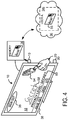
- the computing system 10 may be configured to create virtual sticky-notes 54 via the interactive display device 12.
- the virtual sticky-notes 54 may contain content such as text input by the user and may be associated with a location or an element in the whiteboard data. For example, if a virtual sticky-note 54 is placed on a location within the whiteboard data of the whiteboard application 18, the virtual sticky-note 54 will remain in that location even if the whiteboard data is scrolled or resized on the interactive display device 12.
- the virtual sticky-notes 54 may also be configured such that multiple virtual sticky-notes may be stacked, resized, or arranged on the screen by the user 20.
- the computing system 10 may be further configured to record the virtual sticky-notes 54 in the memory 14 and to upload the virtual sticky-notes 54 to the user account 34 as a part of a whiteboard file 56.
- the virtual sticky-notes can be stored on the computing system 10 and in user account 34 of the user 20.
- FIG. 4 further depicts the computing system 10 configured to detect a privacy keyword 58 via handwriting recognition on the interactive display device 12.
- the computing system 10 is configured to detect the word "Secret" or another suitable privacy keyword, such as confidential, private, etc., via handwriting recognition.
- the computing system 10 may then be configured to assign a privacy level 60 to the whiteboard file 56 based on the privacy keyword 58.
- the computing system may then be configured to restrict access to the whiteboard file 56 based on the privacy level 60.
- the computing system 10 may be configured to restrict access to the whiteboard file 56 by locking the file and not allowing any unauthorized users to upload the whiteboard file 56.
- the computing system 10 may be configured to restrict access to a whiteboard file 56 by not displaying a preview of the file among the previews of stored files retrieved from the user account 34 if unauthorized users are currently logged into the computing system 10.
- the computing system 10 may restrict access to a whiteboard file 56 by displaying a warning message when an additional user logs into the computing system 10, if the additional user is not authorized to upload the whiteboard file 56.
- FIG. 5 is a flowchart depicting a method 500 of storing data from a whiteboard application executed on a computing system including an interactive display device.
- the method 500 includes receiving ink inputs and/or touch inputs at the interactive display device. It will be appreciated that the ink inputs may be implemented via a stylus and the touch inputs may be implemented via digits of a user, for instance.
- the method includes generating whiteboard data based on the received inputs in response to receiving the inputs.
- the whiteboard data is in a data format specific to the whiteboard application.
- the whiteboard data includes at least one of modifiable ink input data, touch input data, and sticky-note data associated with a location or another element in the whiteboard data. It will be appreciated that the sticky-note data may mimic the functionality of physical sticky notes on a physical whiteboard.
- the method includes storing, in a memory of the computing system, the whiteboard data in response to receiving the inputs at the interactive display.
- the whiteboard data may be stored in the memory in direct response to receiving the inputs at the interactive display.
- direct response means that there are not intervening input commands implemented between the corresponding actions.
- the method includes detecting a privacy keyword via handwriting recognition on the interactive display device and at 510 the method includes assigning a privacy level to the whiteboard data based on the privacy keyword.
- the privacy keyword may be "secret”, "classified”, “confidential”, etc.
- the method includes restricting access to the whiteboard data based on the privacy level. In this way, a user may provide increased security to data quickly and intuitively through interaction with the interactive display device.
- the method includes displaying a login selector on the interactive display and at 516 the method includes detecting actuation of the login selector. Detecting actuation of the login selector may include detecting actuation of a button via user input (e.g., ink input, touch input, mouse input, etc.), for instance.
- the method includes upon detecting actuation of the login selector, identifying a user based on credentials of the user. Identifying the user based on the credential of the user may include at 520 prompting user to input a username and password associated with a user account on a cloud-based storage system.
- identifying the user based on the credentials of the user may include at 522 determining the identity of the user based on a facial recognition. Additionally or alternatively, identifying the user based on the credential of the user may include at 524 wirelessly detecting the credentials of the user stored in a linked portable device and at 526 determining the identity of the user based on the credentials.
- the linked portable device is one of a stylus, mobile computing device, and security token device.
- the credentials may be supplied by at least one of a stylus, mobile computing device, and security token device via wireless communication. In this way, a device associated with the user may be used to quickly identify the identity of the user.
- the method includes at 528-534 in response to identifying the user (i) retrieving preview of stored whiteboard files from a user account in a cloud-based storage system corresponding to the identity of the user, (ii) displaying the previews on the interactive display device, and (iii) uploading the whiteboard data as a whiteboard file from the memory of the computing system to the user account.
- whiteboard data may be quickly pushed and pulled from the user account in the cloud-based storage system.
- the uploaded whiteboard data only includes a selected portion of data presented on the interactive touch sensitive display associated with the whiteboard application.
- a user may select a portion of the data via an ink input, touch gesture, etc., indicating the portion of data they would like to be uploaded.
- a stylus may be associated with a user and only the portion of whiteboard data generated by the specific stylus may be uploaded to the cloud-based storage system. However, in other examples all of the whiteboard data presented on the interactive display may be uploaded to the cloud-based storage system.
- the method includes receiving a selection input of one of the previews via the interactive display device.
- the method includes retrieving the stored whiteboard file corresponding to the selected preview from the cloud-based storage system.
- the method includes displaying the stored whiteboard file on the interactive display and at 542 the method includes displaying a second login selector on the interactive display.
- the method includes detecting actuation of the second login selector.
- the method includes upon detection of actuation of the second login selector, identifying a second user based on credentials of the second user.
- the method includes in response to identifying the second user, uploading the whiteboard data from the memory of the computing system to a second user account in the cloud-based storage system, the second user account distinct from the first user account.
- the method includes displaying a logout selector on the interactive display device.
- the method includes upon detecting actuation of the logout selector, revoking access to the user account and removing the previews of the stored whiteboard files from the interactive display device.
- the above described systems and methods provide the potential advantage that a user can quickly pull and push data to and from a cloud-based storage system.
- the users can quickly and intuitively acquire relevant data during a collaborative session for use at a later time.
- previously stored files are presented during the current whiteboard session for use during the current whiteboard session, if desired, further expanding the content that can be used is a single session.
- data from multiple whiteboard sessions can be provided in a single interface further enhancing the current whiteboard session by providing greater amount of collaborative content.
- the functionality of the whiteboard is expanded to provide a user with quick and efficient access to cloud-based content.
- content from more than one whiteboard session may be linked via a cloud-based storage system enabling the user to link content from multiple whiteboard sessions, if desired.
- the methods and processes described herein may be tied to a computing system of one or more computing devices.
- such methods and processes may be implemented as a computer-application program or service, an application-programming interface (API), a library, and/or other computer-program product.
- API application-programming interface
- the methods and processing herein may be tied to the computing system discussed above with regard to FIGS. 1-4 .
- FIG. 6 schematically shows a non-limiting embodiment of a computing system 600 that can enact one or more of the methods and processes described above.
- Computing system 600 is shown in simplified form.
- Computing system 600 may take the form of a touch-screen display device, as well as any other suitable computing system, including but not limited to game consoles, one or more personal computers, server computers, tablet computers, home-entertainment computers, network computing devices, gaming devices, mobile computing devices, mobile communication devices (e.g., smart phone), and/or other computing devices.
- game consoles one or more personal computers, server computers, tablet computers, home-entertainment computers, network computing devices, gaming devices, mobile computing devices, mobile communication devices (e.g., smart phone), and/or other computing devices.
- Computing system 600 includes a logic machine 602 and a storage machine 604. Computing system 600 may also include a display subsystem 606, input subsystem 608, communication subsystem 610, and/or other components not shown in FIG. 6 .
- Logic machine 602 includes one or more physical devices configured to execute instructions.
- the logic machine may be configured to execute instructions that are part of one or more applications, services, programs, routines, libraries, objects, components, data structures, or other logical constructs.
- Such instructions may be implemented to perform a task, implement a data type, transform the state of one or more components, achieve a technical effect, or otherwise arrive at a desired result.
- the logic machine may include one or more processors configured to execute software instructions. Additionally or alternatively, the logic machine may include one or more hardware or firmware logic machines configured to execute hardware or firmware instructions. Processors of the logic machine may be single-core or multi-core, and the instructions executed thereon may be configured for sequential, parallel, and/or distributed processing. Individual components of the logic machine optionally may be distributed among two or more separate devices, which may be remotely located and/or configured for coordinated processing. Aspects of the logic machine may be virtualized and executed by remotely accessible, networked computing devices configured in a cloud-computing configuration.
- Storage machine 604 includes one or more physical devices configured to hold instructions executable by the logic machine to implement the methods and processes described herein. When such methods and processes are implemented, the state of storage machine 604 may be transformed-e.g., to hold different data.
- Storage machine 604 may include removable and/or built-in devices.
- Storage machine 604 may include optical memory (e.g., CD, DVD, HD-DVD, Blu-Ray Disc, etc.), semiconductor memory (e.g., RAM, EPROM, EEPROM, etc.), and/or magnetic memory (e.g., hard-disk drive, floppy-disk drive, tape drive, MRAM, etc.), among others.
- Storage machine 604 may include volatile, nonvolatile, dynamic, static, read/write, read-only, random-access, sequential-access, location-addressable, file-addressable, and/or content-addressable devices.
- storage machine 604 includes one or more physical devices.
- aspects of the instructions described herein alternatively may be propagated by a communication medium (e.g., an electromagnetic signal, an optical signal, etc.) that is not held by a physical device for a finite duration.
- a communication medium e.g., an electromagnetic signal, an optical signal, etc.
- logic machine 602 and storage machine 604 may be integrated together into one or more hardware-logic components.
- Such hardware-logic components may include field-programmable gate arrays (FPGAs), program- and application-specific integrated circuits (PASIC / ASICs), program- and application-specific standard products (PSSP / ASSPs), system-on-a-chip (SOC), and complex programmable logic devices (CPLDs), for example.
- FPGAs field-programmable gate arrays
- PASIC / ASICs program- and application-specific integrated circuits
- PSSP / ASSPs program- and application-specific standard products
- SOC system-on-a-chip
- CPLDs complex programmable logic devices
- module may be used to describe an aspect of computing system 600 implemented to perform a particular function.
- a module, program, or engine may be instantiated via logic machine 602 executing instructions held by storage machine 604. It will be understood that different modules, programs, and/or engines may be instantiated from the same application, service, code block, object, library, routine, API, function, etc. Likewise, the same module, program, and/or engine may be instantiated by different applications, services, code blocks, objects, routines, APIs, functions, etc.
- module may encompass individual or groups of executable files, data files, libraries, drivers, scripts, database records, etc.
- display subsystem 606 may be used to present a visual representation of data held by storage machine 604.
- This visual representation may take the form of a graphical user interface (GUI).
- GUI graphical user interface
- Display subsystem 606 may include one or more display devices utilizing virtually any type of technology. Such display devices may be combined with logic machine 602 and/or storage machine 604 in a shared enclosure, or such display devices may be peripheral display devices.
- input subsystem 608 may comprise or interface with one or more user-input devices such as a keyboard, mouse, touch screen, or game controller.
- the input subsystem may comprise or interface with selected natural user input (NUI) componentry.
- NUI natural user input
- Such componentry may be integrated or peripheral, and the transduction and/or processing of input actions may be handled on- or off-board.
- NUI componentry may include a microphone for speech and/or voice recognition; an infrared, color, stereoscopic, and/or depth camera for machine vision and/or gesture recognition; a head tracker, eye tracker, accelerometer, and/or gyroscope for motion detection and/or intent recognition; as well as electric-field sensing componentry for assessing brain activity.
- communication subsystem 610 may be configured to communicatively couple computing system 600 with one or more other computing devices.
- Communication subsystem 610 may include wired and/or wireless communication devices compatible with one or more different communication protocols.
- the communication subsystem may be configured for communication via a wireless telephone network, or a wired or wireless local- or wide-area network.
- the communication subsystem may allow computing system 600 to send and/or receive messages to and/or from other devices via a network such as the Internet.
- a method of storing data from a whiteboard application executed on a computing system including an interactive display device includes, storing, in a memory of the computing system, whiteboard data input to the whiteboard application in response to user interaction with the interactive display device, displaying a login selector on the interactive display device, and upon detecting actuation of the login selector; identifying the user based on credentials of the user; in response to identifying the user, (i) retrieving previews of stored whiteboard files from a user account in a cloud-based storage system corresponding to the identity of the user, (ii) displaying the previews on the interactive display device, and (iii) uploading the whiteboard data as a whiteboard file from the memory of the computing system to the user account.
- the method may further include displaying a logout selector on the interactive display device; and upon detecting actuation of the logout selector, revoking access to the user account and removing the previews of the stored whiteboard files from the interactive display device.
- identifying the user based on credentials of the user may further comprise: prompting the user to input a username and a password associated with a user account on a cloud-based storage system.
- identifying the user based on credentials of the user may further comprise: determining the identity of the user based on a facial recognition.
- identifying the user based on credentials of the user may further comprise: wirelessly detecting the credentials of the user stored in a linked portable device; and determining the identity of the user based on the credentials.
- the linked portable device may be one of a stylus, mobile computing device, and security token device.
- the method may further include receiving a selection input of one of the previews via the interactive display device; retrieving the stored whiteboard file corresponding to the selected preview from the cloud-based storage system; and displaying the stored whiteboard file on the interactive display device.
- the method may further include displaying a second login selector on the interactive display device; upon detecting actuation of the second login selector, identifying a second user based on credentials of the second user; and in response to identifying the second user, uploading the whiteboard data from the memory of the computing system to a second user account in the cloud-based storage system, the second user account distinct from the first user account.
- the method may further include detecting a privacy keyword via handwriting recognition on the interactive display device; assigning a privacy level to the whiteboard data based on the privacy keyword; and restricting access to the whiteboard data based on the privacy level.
- the whiteboard data may be in a data format specific to the whiteboard application.
- the uploaded whiteboard data may only include a selected portion of data presented on the interactive touch sensitive display associated with the whiteboard application.
- a computing system which includes an interactive touch sensitive display device; code stored in memory executable by a processor to: store, in a memory of the computing system, whiteboard data input to the whiteboard application in direct response to user interaction with the interactive touch sensitive display device; display a login selector on the interactive touch sensitive display device; upon detecting actuation of the login selector, identifying the user based on credentials of the user; and in response to identifying the user, (i) retrieve previews of stored whiteboard files from the user account on the cloud-based storage system, (ii) display the previews on the interactive touch sensitive display device, and (iii) upload the whiteboard data as a whiteboard file from the memory of the computing system to the user account.
- the whiteboard data may be in a data format specific to the whiteboard application.
- the whiteboard data may include at least one of modifiable ink input data, touch input data, and sticky-note data associated with a location or another element in the whiteboard data.
- the computing system may further include code stored in memory executable by a processor to; detect a privacy keyword via handwriting recognition on the interactive touch sensitive display device; assign a privacy level to the whiteboard data based on the privacy keyword; and restrict access to the whiteboard data based on the privacy level.
- the credentials may be supplied by at least one of a stylus, mobile computing device, and security token device via wireless communication.
- the whiteboard data may be uploaded in direct response to identifying the user.
- a method of storing data from a whiteboard application executed on a computing system including an interactive touch sensitive display device includes storing, in a memory of the computing system, whiteboard data input to the whiteboard application in direct response to user interaction with the interactive touch sensitive display device, the whiteboard data includes at least one of modifiable ink input data, touch input data, and sticky-note data associated with a location or another element in the whiteboard data; displaying a login selector on the interactive touch sensitive display device; upon detecting actuation of the login selector, identifying the user based on credentials of the user; and in response to identifying the user, (i) retrieving previews of stored whiteboard files from the user account on the cloud-based storage system, (ii) displaying the previews on the interactive touch sensitive display device, and (iii) uploading the whiteboard data as a whiteboard file from the memory of the computing system to the user account.
- the whiteboard data may be uploaded in direct response to identifying the user.
- the uploaded whiteboard data may only include a selected portion of data presented on the interactive touch sensitive display associated with the whiteboard application.
Landscapes
- Engineering & Computer Science (AREA)
- Theoretical Computer Science (AREA)
- Computer Security & Cryptography (AREA)
- Physics & Mathematics (AREA)
- General Physics & Mathematics (AREA)
- Software Systems (AREA)
- General Engineering & Computer Science (AREA)
- Computer Hardware Design (AREA)
- Health & Medical Sciences (AREA)
- General Health & Medical Sciences (AREA)
- Human Computer Interaction (AREA)
- Multimedia (AREA)
- Computer Networks & Wireless Communication (AREA)
- Oral & Maxillofacial Surgery (AREA)
- Databases & Information Systems (AREA)
- Bioethics (AREA)
- User Interface Of Digital Computer (AREA)
Description
- Prior whiteboard applications have been used via computer systems, enabling displayed content to be drawn upon or otherwise manipulated via input devices such as mice, trackpads, touchscreens, etc. In this way, the whiteboard application can provide the functionality of a physical dry-erase or chalkboard in a computing context. Whiteboard applications are commonly used in collaborative settings such as meetings, brainstorming sessions, classrooms, etc. Therefore, in some instances a plurality of users may manipulate content presented via the whiteboard application in one or more sessions. The data associated with the manipulation of the content may be saved locally by the computing system. However, the computing system using the whiteboard application may be used by a number of users. Therefore, storing the data locally may create security concerns. Furthermore, storing the data locally may increase the amount of storage needed in the computing system. Therefore, offloading the content may be desirable to alleviate the security concerns and decrease local storage needs. However, offloading the content to a portable storage device (e.g., thumbdrive), for example, can be cumbersome and require many awkward steps involving numerous input commands. Consequently, it may be inefficient for one or more users to offload the content quickly during a collaborative session. As a result, users may find interaction with the whiteboard application slow and awkward. Moreover, it may be difficult to upload the offloaded content for use in a subsequent whiteboard session, leading to additional interactive inefficiency.
-
US 2007/0216660 A1 discloses an electronic whiteboard that uses biometric characteristics of a user to authenticate the user. A display may receive user input and may further display text. Physical characteristics of a user of the apparatus may be received by an input receiver to determine the identity of the user. The electronic whiteboard first receives biometric user authentication information to determine whether the user is allowed to access the whiteboard. If the user is authorized, further user input including input vectors is received and stored. -
US 2012/233615 A1 discloses techniques for automatically performing one or more actions responsive to a successful login. An action automatically performed responsive to the login could use content created prior to the login. - The invention is defined by a method of storing data from a whiteboard application and a computing system according to the independent claims. Preferred embodiments are defined in the dependent claims.
- A method of storing data from a whiteboard application executed on a computing system including an interactive display device is provided. The method comprises storing, in a memory of the computing system, whiteboard data input to the whiteboard application in response to user interaction with the interactive display device, displaying a login selector on the interactive display device, upon detecting actuation of the login selector, identifying the user based on credentials of the user; and in response to identifying the user, (i) retrieving previews of stored whiteboard files from a user account in a cloud-based storage system corresponding to the identity of the user, (ii) displaying the previews on the interactive display device, and (iii) uploading the whiteboard data as a whiteboard file from the memory of the computing system to the user account.
- This Summary is provided to introduce a selection of concepts in a simplified form that are further described below in the Detailed Description. This Summary is not intended to identify key features or essential features of the claimed subject matter, nor is it intended to be used to limit the scope of the claimed subject matter. Furthermore, the claimed subject matter is not limited to implementations that solve any or all disadvantages noted in any part of this disclosure.
-
-
FIG. 1A depicts a computing system configured to store data from a whiteboard application executed on the computing system. -
FIG. 1B depicts the computing system ofFIG. 1A further configured to display a login selector on an interactive display device. -
FIG. 1C depicts the computing system ofFIG. 1A further configured to identify the user via a sign in prompt requesting the user enter a user ID and a password. -
FIG. 1D depicts the computing system ifFIG. 1A further configured to access a user account on a cloud-based storage system. -
FIG. 2A depicts the computing system ofFIGS. 1A-1D further configured to display a logout selector on the interactive display device. -
FIG. 2B depicts the operation of the logout selector ofFIG. 2A . -
FIG. 3A depicts the computing system ofFIGS. 1A-1D further configured to retrieve previews of stored whiteboard files from the user account on the cloud-based storage system. -
FIG. 3B depicts the computing system ofFIG. 3A configured to display a stored whiteboard file corresponding to a selected preview. -
FIG. 4 depicts the computing system ofFIGS. 1A-1D further configured to create virtual sticky-notes and recognize privacy keywords via handwriting recognition. -
FIGS. 5A and5B depict a flowchart for a method for storing data from a whiteboard application executed on the computing system in accordance with an embodiment of the present disclosure. -
FIG. 6 schematically depicts a non-limiting embodiment of a computing system in accordance with an embodiment of the present disclosure. - A whiteboard application executed by a computing system including an interactive display device is described herein. The whiteboard application is configured to quickly and efficiently upload and download data to and from a cloud-based storage device during a whiteboard application user session. Specifically, data may be generated via the whiteboard application and subsequently sent to a cloud-based storage system when a user provides credentials to a user account in the cloud-based storage system. Additionally, previews of files stored in the cloud-based storage device can also be presented via the interactive display device in response to the user entering user credentials. As a result, a user can not only easily offload desired content to a cloud-based storage system but also quickly preview content stored in the cloud-based storage system, thereby enhancing the current whiteboard session. In this way, a user can quickly capture content and send the captured content to a cloud-based system for later use as well as preview previously captured content stored in the cloud-based system.
-
FIG. 1A depicts acomputing system 10 configured to store data from awhiteboard application 18 executed on thecomputing system 10. Thecomputing system 10 may be configured to include an interactive display device 12 (e.g., interactive touch sensitive display device) and amemory 14 including instructions executable by aprocessor 15. Thewhiteboard application 18 may be stored inmemory 14 as instructions executable by theprocessor 15. Thecomputing system 10 may be further configured to record, in thememory 14, awhiteboard file 24. Thewhiteboard file 24 may includewhiteboard data 16 input into thewhiteboard application 18 by auser 20 via theinteractive display device 12. - The
interactive display device 12 may include asensing device 80. The sensing device may include one or more of a capacitive touch sensor, an optical touch sensor, etc. Theinteractive display device 12 may include a liquid crystal display (LCD), an organic light-emitting diode (OLED), active-matrix organic light-emitting diode (AMOLED), projection display, etc., for presenting graphics. Theinteractive display device 12 is configured to receive and process ink inputs and touch inputs. It will be appreciated that an ink input includes an interactive input with astylus 82. Theinteractive display device 12 may further be configured to receive and process multi-touch inputs. Additionally, it will be appreciated that the aforementioned inputs may be sent to thememory 14 andprocessor 15 for processing via thewhiteboard application 18. -
FIG. 1B depicts thecomputing system 10 further configured to display alogin selector 26 on theinteractive display device 12. Thelogin selector 26 may be a soft button generated graphically by theinteractive display device 12 or a hard button physically present on theinteractive display device 12, itself. Upon detecting actuation of thelogin selector 26, thecomputing system 10 may then be further configured to identify theuser 20 based on credentials of theuser 20. In one example, thelogin selector 26 may be a soft button persistently displayed on theinteractive display device 12 via thewhiteboard application 18. In this way, a user can quickly select the login selector while the whiteboard application is executed. However, other whiteboard application user interface configurations have been contemplated, such as using biometric indicators including facial image recognition to log a user in, or using a device identifier received from a user device (e.g., mobile phone, watch, stylus, etc.) to log a user in, as described below. -
FIG. 1C depicts thecomputing system 10 further configured to identify theuser 20 via a sign in prompt 28 requesting theuser 20 enter auser ID 30 and a password 32. Theuser 20 is identified by thecomputing system 10 as "USER A". Thecomputing system 10 may also be further configured to identify the credentials of theuser 20 via facial recognition. For example, thecomputing system 10 may be configured to compare a captured image of theuser 20 captured withcamera 40 to a stored profile image associated with a cloud-based account (e.g., online account) of theuser 20. Thecamera 40 linked to thecomputing system 10. In addition, thecomputing system 10 may be configured to identify theuser 20 by wirelessly detecting the credentials of the user stored in a linked portable device. InFIG. 1C , the linked portable device is depicted ascell phone 42 which may be configured to communicate wirelessly with thecomputing system 10. It should be noted, however, that thecomputing system 10 may be configured to wirelessly detect the credentials of auser 20 via another suitable device, such as a security token (e.g., fob), stylus, or watch. -
FIG. 1D depicts thecomputing system 10 further configured to access a user account 34 on a cloud-basedstorage system 36. The user account 34 corresponds to the identity of theuser 20 established by thecomputing system 10, as described above with respect toFIG. 1C . Upon accessing the user account 34, thecomputing system 10 may be configured to upload thewhiteboard file 24 from thememory 14 of thecomputing system 10 to the user account 34. For example, the computing system may be configured to display on the interactive display device 12 asave selector 62 and, upon detecting actuation of thesave selector 62 by theuser 20, to upload thewhiteboard file 24 to the user account 34. - Turning briefly to
FIG. 2A , thecomputing system 10 may be further configured to display alogout selector 38 on the interactive display device. As shown inFIG. 2B , thecomputing system 10 may be then configured to revoke access to the user account 34 upon detecting actuation of thelogout selector 38 by theuser 20. Additionally, previews of the files stored in the cloud-based storage system may be removed from the interactive display device upon detecting actuation of the logout selector. The previews are discussed in greater detail herein. - Turning next to
FIG. 3A , thecomputing system 10 may be further configured to retrievepreviews 44 of stored whiteboard files 46 from the user account 34 on the cloud-basedstorage system 36. For example, thecomputing system 10 may be configured to display anopen selector 64 on theinteractive display device 12 and, upon detecting actuation of theopen selector 64 by theuser 20, to retrievepreviews 44 of the stored whiteboard files 46 from the user account 34. The computing system may then be configured to display thepreviews 44 on theinteractive display device 12. Thepreviews 44 may be displayed by the computing device as a horizontal strip of preview images, with the preview images grouped chronologically. Thepreviews 44 may be further grouped into folders. Additionally or alternatively, the previews may be presented as tiles (e.g., tiles aligned in a grid pattern) or stacked with each preview having a different z-order. Thecomputing system 10 may be further configured to allow theuser 20 to select one of thepreviews 44 via theinteractive display device 12. Upon detecting a selection by theuser 20, thecomputing system 10 may be configured to retrieve the storedwhiteboard file 46 corresponding to the selectedpreview 44. As shown inFIG. 3B , thecomputing system 10 may then be configured to display the storedwhiteboard file 46 on theinteractive display device 12. The whiteboard application may be configured to enable the user manipulate the whiteboard file, such as adding additional content, erasing content, modifying content, etc. For instance, a user may implement an ink input and/or touch input to generate additional graphics (e.g., alphanumeric symbols) in the whiteboard file. - Turning back to FIG. ID, the
computing system 10 may be further configured to display asecond login selector 50 on theinteractive display device 12. Thecomputing system 10 may be configured to identify asecond user 52 based on credentials of thesecond user 52 after detecting actuation of thesecond login selector 50 by thesecond user 52. Thecomputing system 10 may then be configured to access a second user account on a cloud-based storage system corresponding to the identity of thesecond user 52 and upload thewhiteboard file 24 from thememory 14 of thecomputing system 10 to the second user account. Although only the user account 34 is depicted in FIG. ID, it should be noted that thecomputing system 10 may be configured to upload thewhiteboard file 24 from thememory 14 to the second user account, as well. For example, it should be further noted that thecomputing system 10 may be configured to allow multiple user to operate in a split-screen mode wherein the whiteboard data from one predetermined half of the interactive display device is uploaded to the user account of the first user, and the whiteboard data from the other half may be uploaded to the user account of the second user. In another example, multiple users may be able to select portions of the whiteboard data and upload only the selected portion to their user account. - Turning next to
FIG. 4 , thecomputing system 10 may be configured to create virtual sticky-notes 54 via theinteractive display device 12. The virtual sticky-notes 54 may contain content such as text input by the user and may be associated with a location or an element in the whiteboard data. For example, if a virtual sticky-note 54 is placed on a location within the whiteboard data of thewhiteboard application 18, the virtual sticky-note 54 will remain in that location even if the whiteboard data is scrolled or resized on theinteractive display device 12. The virtual sticky-notes 54 may also be configured such that multiple virtual sticky-notes may be stacked, resized, or arranged on the screen by theuser 20. Thecomputing system 10 may be further configured to record the virtual sticky-notes 54 in thememory 14 and to upload the virtual sticky-notes 54 to the user account 34 as a part of awhiteboard file 56. As such, the virtual sticky-notes can be stored on thecomputing system 10 and in user account 34 of theuser 20. -
FIG. 4 further depicts thecomputing system 10 configured to detect aprivacy keyword 58 via handwriting recognition on theinteractive display device 12. In the example shown inFIG. 4 , thecomputing system 10 is configured to detect the word "Secret" or another suitable privacy keyword, such as confidential, private, etc., via handwriting recognition. Thecomputing system 10 may then be configured to assign aprivacy level 60 to thewhiteboard file 56 based on theprivacy keyword 58. The computing system may then be configured to restrict access to thewhiteboard file 56 based on theprivacy level 60. For example, thecomputing system 10 may be configured to restrict access to thewhiteboard file 56 by locking the file and not allowing any unauthorized users to upload thewhiteboard file 56. Alternately, thecomputing system 10 may be configured to restrict access to awhiteboard file 56 by not displaying a preview of the file among the previews of stored files retrieved from the user account 34 if unauthorized users are currently logged into thecomputing system 10. In another example, thecomputing system 10 may restrict access to awhiteboard file 56 by displaying a warning message when an additional user logs into thecomputing system 10, if the additional user is not authorized to upload thewhiteboard file 56. -
FIG. 5 is a flowchart depicting amethod 500 of storing data from a whiteboard application executed on a computing system including an interactive display device. At 502, themethod 500 includes receiving ink inputs and/or touch inputs at the interactive display device. It will be appreciated that the ink inputs may be implemented via a stylus and the touch inputs may be implemented via digits of a user, for instance. - Next at 504 the method includes generating whiteboard data based on the received inputs in response to receiving the inputs. In one example, the whiteboard data is in a data format specific to the whiteboard application. However, other whiteboard data formats have been contemplated. Further in one example, the whiteboard data includes at least one of modifiable ink input data, touch input data, and sticky-note data associated with a location or another element in the whiteboard data. It will be appreciated that the sticky-note data may mimic the functionality of physical sticky notes on a physical whiteboard.
- At 506 the method includes storing, in a memory of the computing system, the whiteboard data in response to receiving the inputs at the interactive display. In one example, the whiteboard data may be stored in the memory in direct response to receiving the inputs at the interactive display. In the context of the invention direct response means that there are not intervening input commands implemented between the corresponding actions. Next at 508 the method includes detecting a privacy keyword via handwriting recognition on the interactive display device and at 510 the method includes assigning a privacy level to the whiteboard data based on the privacy keyword. The privacy keyword may be "secret", "classified", "confidential", etc. At 512 the method includes restricting access to the whiteboard data based on the privacy level. In this way, a user may provide increased security to data quickly and intuitively through interaction with the interactive display device.
- At 514 the method includes displaying a login selector on the interactive display and at 516 the method includes detecting actuation of the login selector. Detecting actuation of the login selector may include detecting actuation of a button via user input (e.g., ink input, touch input, mouse input, etc.), for instance. At 518 the method includes upon detecting actuation of the login selector, identifying a user based on credentials of the user. Identifying the user based on the credential of the user may include at 520 prompting user to input a username and password associated with a user account on a cloud-based storage system. Additionally or alternatively, identifying the user based on the credentials of the user may include at 522 determining the identity of the user based on a facial recognition. Additionally or alternatively, identifying the user based on the credential of the user may include at 524 wirelessly detecting the credentials of the user stored in a linked portable device and at 526 determining the identity of the user based on the credentials. In one example, the linked portable device is one of a stylus, mobile computing device, and security token device. Thus, the credentials may be supplied by at least one of a stylus, mobile computing device, and security token device via wireless communication. In this way, a device associated with the user may be used to quickly identify the identity of the user.
- Now turning to
FIG. 5B , the method includes at 528-534 in response to identifying the user (i) retrieving preview of stored whiteboard files from a user account in a cloud-based storage system corresponding to the identity of the user, (ii) displaying the previews on the interactive display device, and (iii) uploading the whiteboard data as a whiteboard file from the memory of the computing system to the user account. In this way, whiteboard data may be quickly pushed and pulled from the user account in the cloud-based storage system. In one example, the uploaded whiteboard data only includes a selected portion of data presented on the interactive touch sensitive display associated with the whiteboard application. For instance, a user may select a portion of the data via an ink input, touch gesture, etc., indicating the portion of data they would like to be uploaded. Still further in other examples, a stylus may be associated with a user and only the portion of whiteboard data generated by the specific stylus may be uploaded to the cloud-based storage system. However, in other examples all of the whiteboard data presented on the interactive display may be uploaded to the cloud-based storage system. - At 536 the method includes receiving a selection input of one of the previews via the interactive display device. Next at 538 the method includes retrieving the stored whiteboard file corresponding to the selected preview from the cloud-based storage system. At 540 the method includes displaying the stored whiteboard file on the interactive display and at 542 the method includes displaying a second login selector on the interactive display. At 544 the method includes detecting actuation of the second login selector. At 546 the method includes upon detection of actuation of the second login selector, identifying a second user based on credentials of the second user. Next at 548 the method includes in response to identifying the second user, uploading the whiteboard data from the memory of the computing system to a second user account in the cloud-based storage system, the second user account distinct from the first user account. At 550 the method includes displaying a logout selector on the interactive display device. Next at 552 the method includes upon detecting actuation of the logout selector, revoking access to the user account and removing the previews of the stored whiteboard files from the interactive display device.
- The above described systems and methods provide the potential advantage that a user can quickly pull and push data to and from a cloud-based storage system. As a result, the users can quickly and intuitively acquire relevant data during a collaborative session for use at a later time. Furthermore, previously stored files are presented during the current whiteboard session for use during the current whiteboard session, if desired, further expanding the content that can be used is a single session. In this way, data from multiple whiteboard sessions can be provided in a single interface further enhancing the current whiteboard session by providing greater amount of collaborative content. As a result, the functionality of the whiteboard is expanded to provide a user with quick and efficient access to cloud-based content. In this way, content from more than one whiteboard session may be linked via a cloud-based storage system enabling the user to link content from multiple whiteboard sessions, if desired.
- In some embodiments, the methods and processes described herein may be tied to a computing system of one or more computing devices. In particular, such methods and processes may be implemented as a computer-application program or service, an application-programming interface (API), a library, and/or other computer-program product. Specifically, the methods and processing herein may be tied to the computing system discussed above with regard to
FIGS. 1-4 . -
FIG. 6 schematically shows a non-limiting embodiment of acomputing system 600 that can enact one or more of the methods and processes described above.Computing system 600 is shown in simplified form.Computing system 600 may take the form of a touch-screen display device, as well as any other suitable computing system, including but not limited to game consoles, one or more personal computers, server computers, tablet computers, home-entertainment computers, network computing devices, gaming devices, mobile computing devices, mobile communication devices (e.g., smart phone), and/or other computing devices. -
Computing system 600 includes alogic machine 602 and astorage machine 604.Computing system 600 may also include adisplay subsystem 606,input subsystem 608,communication subsystem 610, and/or other components not shown inFIG. 6 . -
Logic machine 602 includes one or more physical devices configured to execute instructions. For example, the logic machine may be configured to execute instructions that are part of one or more applications, services, programs, routines, libraries, objects, components, data structures, or other logical constructs. Such instructions may be implemented to perform a task, implement a data type, transform the state of one or more components, achieve a technical effect, or otherwise arrive at a desired result. - The logic machine may include one or more processors configured to execute software instructions. Additionally or alternatively, the logic machine may include one or more hardware or firmware logic machines configured to execute hardware or firmware instructions. Processors of the logic machine may be single-core or multi-core, and the instructions executed thereon may be configured for sequential, parallel, and/or distributed processing. Individual components of the logic machine optionally may be distributed among two or more separate devices, which may be remotely located and/or configured for coordinated processing. Aspects of the logic machine may be virtualized and executed by remotely accessible, networked computing devices configured in a cloud-computing configuration.
-
Storage machine 604 includes one or more physical devices configured to hold instructions executable by the logic machine to implement the methods and processes described herein. When such methods and processes are implemented, the state ofstorage machine 604 may be transformed-e.g., to hold different data. -
Storage machine 604 may include removable and/or built-in devices.Storage machine 604 may include optical memory (e.g., CD, DVD, HD-DVD, Blu-Ray Disc, etc.), semiconductor memory (e.g., RAM, EPROM, EEPROM, etc.), and/or magnetic memory (e.g., hard-disk drive, floppy-disk drive, tape drive, MRAM, etc.), among others.Storage machine 604 may include volatile, nonvolatile, dynamic, static, read/write, read-only, random-access, sequential-access, location-addressable, file-addressable, and/or content-addressable devices. - It will be appreciated that
storage machine 604 includes one or more physical devices. However, aspects of the instructions described herein alternatively may be propagated by a communication medium (e.g., an electromagnetic signal, an optical signal, etc.) that is not held by a physical device for a finite duration. - Aspects of
logic machine 602 andstorage machine 604 may be integrated together into one or more hardware-logic components. Such hardware-logic components may include field-programmable gate arrays (FPGAs), program- and application-specific integrated circuits (PASIC / ASICs), program- and application-specific standard products (PSSP / ASSPs), system-on-a-chip (SOC), and complex programmable logic devices (CPLDs), for example. - The terms "module," "program," and "engine" may be used to describe an aspect of
computing system 600 implemented to perform a particular function. In some cases, a module, program, or engine may be instantiated vialogic machine 602 executing instructions held bystorage machine 604. It will be understood that different modules, programs, and/or engines may be instantiated from the same application, service, code block, object, library, routine, API, function, etc. Likewise, the same module, program, and/or engine may be instantiated by different applications, services, code blocks, objects, routines, APIs, functions, etc. The terms "module," "program," and "engine" may encompass individual or groups of executable files, data files, libraries, drivers, scripts, database records, etc. - When included,
display subsystem 606 may be used to present a visual representation of data held bystorage machine 604. This visual representation may take the form of a graphical user interface (GUI). As the herein described methods and processes change the data held by the storage machine, and thus transform the state of the storage machine, the state ofdisplay subsystem 606 may likewise be transformed to visually represent changes in the underlying data.Display subsystem 606 may include one or more display devices utilizing virtually any type of technology. Such display devices may be combined withlogic machine 602 and/orstorage machine 604 in a shared enclosure, or such display devices may be peripheral display devices. - When included,
input subsystem 608 may comprise or interface with one or more user-input devices such as a keyboard, mouse, touch screen, or game controller. In some embodiments, the input subsystem may comprise or interface with selected natural user input (NUI) componentry. Such componentry may be integrated or peripheral, and the transduction and/or processing of input actions may be handled on- or off-board. Example NUI componentry may include a microphone for speech and/or voice recognition; an infrared, color, stereoscopic, and/or depth camera for machine vision and/or gesture recognition; a head tracker, eye tracker, accelerometer, and/or gyroscope for motion detection and/or intent recognition; as well as electric-field sensing componentry for assessing brain activity. - When included,
communication subsystem 610 may be configured to communicatively couplecomputing system 600 with one or more other computing devices.Communication subsystem 610 may include wired and/or wireless communication devices compatible with one or more different communication protocols. As non-limiting examples, the communication subsystem may be configured for communication via a wireless telephone network, or a wired or wireless local- or wide-area network. In some embodiments, the communication subsystem may allowcomputing system 600 to send and/or receive messages to and/or from other devices via a network such as the Internet. - It will be understood that the configurations and/or approaches described herein are exemplary in nature, and that these specific embodiments or examples are not to be considered in a limiting sense, because numerous variations are possible. The specific routines or methods described herein may represent one or more of any number of processing strategies. As such, various acts illustrated and/or described may be performed in the sequence illustrated and/or described, in other sequences, in parallel, or omitted. Likewise, the order of the above-described processes may be changed.
- The subject matter of the present disclosure includes all novel and nonobvious combinations and subcombinations of the various processes, systems and configurations, and other features, functions, acts, and/or properties disclosed herein, as well as any and all equivalents thereof.
- The subject matter of the present disclosure is further described in the following paragraphs. According to one aspect, a method of storing data from a whiteboard application executed on a computing system including an interactive display device is provided. The method includes, storing, in a memory of the computing system, whiteboard data input to the whiteboard application in response to user interaction with the interactive display device, displaying a login selector on the interactive display device, and upon detecting actuation of the login selector; identifying the user based on credentials of the user; in response to identifying the user, (i) retrieving previews of stored whiteboard files from a user account in a cloud-based storage system corresponding to the identity of the user, (ii) displaying the previews on the interactive display device, and (iii) uploading the whiteboard data as a whiteboard file from the memory of the computing system to the user account.
- In this aspect, the method may further include displaying a logout selector on the interactive display device; and upon detecting actuation of the logout selector, revoking access to the user account and removing the previews of the stored whiteboard files from the interactive display device.
- In this aspect, identifying the user based on credentials of the user may further comprise: prompting the user to input a username and a password associated with a user account on a cloud-based storage system.
- In this aspect, identifying the user based on credentials of the user may further comprise: determining the identity of the user based on a facial recognition.
- In this aspect, identifying the user based on credentials of the user may further comprise: wirelessly detecting the credentials of the user stored in a linked portable device; and determining the identity of the user based on the credentials.
- In this aspect, the linked portable device may be one of a stylus, mobile computing device, and security token device.
- In this aspect, the method may further include receiving a selection input of one of the previews via the interactive display device; retrieving the stored whiteboard file corresponding to the selected preview from the cloud-based storage system; and displaying the stored whiteboard file on the interactive display device.
- In this aspect, the method may further include displaying a second login selector on the interactive display device; upon detecting actuation of the second login selector, identifying a second user based on credentials of the second user; and in response to identifying the second user, uploading the whiteboard data from the memory of the computing system to a second user account in the cloud-based storage system, the second user account distinct from the first user account.
- In this aspect, the method may further include detecting a privacy keyword via handwriting recognition on the interactive display device; assigning a privacy level to the whiteboard data based on the privacy keyword; and restricting access to the whiteboard data based on the privacy level.
- In this aspect, the whiteboard data may be in a data format specific to the whiteboard application.
- In this aspect, the uploaded whiteboard data may only include a selected portion of data presented on the interactive touch sensitive display associated with the whiteboard application.
- According to another aspect, a computing system is provided which includes an interactive touch sensitive display device; code stored in memory executable by a processor to: store, in a memory of the computing system, whiteboard data input to the whiteboard application in direct response to user interaction with the interactive touch sensitive display device; display a login selector on the interactive touch sensitive display device; upon detecting actuation of the login selector, identifying the user based on credentials of the user; and in response to identifying the user, (i) retrieve previews of stored whiteboard files from the user account on the cloud-based storage system, (ii) display the previews on the interactive touch sensitive display device, and (iii) upload the whiteboard data as a whiteboard file from the memory of the computing system to the user account.
- In this aspect, the whiteboard data may be in a data format specific to the whiteboard application.
- In this aspect, the whiteboard data may include at least one of modifiable ink input data, touch input data, and sticky-note data associated with a location or another element in the whiteboard data.
- In this aspect, the computing system may further include code stored in memory executable by a processor to; detect a privacy keyword via handwriting recognition on the interactive touch sensitive display device; assign a privacy level to the whiteboard data based on the privacy keyword; and restrict access to the whiteboard data based on the privacy level.
- In this aspect, the credentials may be supplied by at least one of a stylus, mobile computing device, and security token device via wireless communication.
- In this aspect, the whiteboard data may be uploaded in direct response to identifying the user.
- According to another aspect, a method of storing data from a whiteboard application executed on a computing system including an interactive touch sensitive display device is provided. The method includes storing, in a memory of the computing system, whiteboard data input to the whiteboard application in direct response to user interaction with the interactive touch sensitive display device, the whiteboard data includes at least one of modifiable ink input data, touch input data, and sticky-note data associated with a location or another element in the whiteboard data; displaying a login selector on the interactive touch sensitive display device; upon detecting actuation of the login selector, identifying the user based on credentials of the user; and in response to identifying the user, (i) retrieving previews of stored whiteboard files from the user account on the cloud-based storage system, (ii) displaying the previews on the interactive touch sensitive display device, and (iii) uploading the whiteboard data as a whiteboard file from the memory of the computing system to the user account.
- In this aspect, the whiteboard data may be uploaded in direct response to identifying the user.
- In this aspect, the uploaded whiteboard data may only include a selected portion of data presented on the interactive touch sensitive display associated with the whiteboard application.
Claims (12)
- A method of storing data from a whiteboard application executed on a computing system including an interactive display device, the method comprising:storing (506), in a memory of the computing system, whiteboard data input to the whiteboard application in response to user interaction with the interactive display device;displaying (514) a login selector on the interactive display device;upon detecting actuation of the login selector, identifying (518) the user based on credentials of the user;in response to identifying (528) the user,(i) retrieving (530) previews of stored whiteboard files from a user account in a cloud-based storage system corresponding to the identity of the user,(ii) displaying (532) the previews from the user account on the interactive display device, and(iii) uploading (534) the whiteboard data as a whiteboard file from the memory of the computing system to the user account;detecting (508) a privacy keyword via handwriting recognition on the interactive display device;assigning (510) a privacy level to the whiteboard data based on the privacy keyword;displaying (542) a second login selector on the interactive display device;upon detecting actuation (544) of the second login selector, identifying (546) a second user based on credentials of the second user;in response to identifying the second user,(i) retrieving (530) previews of stored whiteboard files from a second user account in the cloud-based storage system corresponding to the identity of the second user, and(ii) displaying (532) the previews from the second user account on the interactive display device;determining that the second user is not authorized to access the whiteboard data associated with the first user and the assigned privacy level; andrestricting (512) the second user's access to the whiteboard data associated with the first user and the assigned privacy level.
- The method of claim 1, further comprising:displaying (550) a logout selector on the interactive display device; andupon detecting actuation of the logout selector, revoking (552) access to the user account and removing the previews of the stored whiteboard files from the interactive display device.
- The method of claim 1, wherein identifying (518) the user based on credentials of the user further comprises:
prompting (520) the user to input a username and a password associated with a user account on a cloud-based storage system. - The method of claim 1, wherein identifying (518) the user based on credentials of the user further comprises:
determining (522) the identity of the user based on a facial recognition. - The method of claim 1, wherein identifying (518) the user based on credentials of the user further comprises:wirelessly detecting (524) the credentials of the user stored in a linked portable device; anddetermining (526) the identity of the user based on the credentials.
- The method of claim 5, wherein the linked portable device is one of a stylus, mobile computing device, and security token device.
- The method of claim 1, further comprising:receiving (536) a selection input of one of the previews via the interactive display device;retrieving (538) the stored whiteboard file corresponding to the selected preview from the cloud-based storage system; anddisplaying (540) the stored whiteboard file on the interactive display device.
- The method of claim 1, wherein the whiteboard data is in a data format specific to the whiteboard application and wherein the uploaded whiteboard data only includes a selected portion of data presented on the interactive touch sensitive display associated with the whiteboard application.
- A computing system comprising:an interactive touch sensitive display device;code stored in memory executable by a processor to:store, in a memory of the computing system, whiteboard data input to the whiteboard application in direct response to user interaction with the interactive touch sensitive display device;display a login selector on the interactive touch sensitive display device;upon detecting actuation of the login selector, identifying the user based on credentials of the user;in response to identifying the user,(i) retrieve previews of stored whiteboard files from the user account on the cloud-based storage system,(ii) display the previews on the interactive touch sensitive display device, and(iii) upload the whiteboard data as a whiteboard file from the memory of the computing system to the user account;detect a privacy keyword via handwriting recognition on the interactive touch sensitive display device;assign a privacy level to the whiteboard data based on the privacy keyword;display (542) a second login selector on the interactive display device;upon detecting actuation (544) of the second login selector, identify (546) a second user based on credentials of the second user;in response to identifying the second user,(i) retrieve previews of stored whiteboard files from a second user account in the cloud-based storage system corresponding to the identity of the second user, and(ii) display the previews from the second user account on the interactive display device;determine that the second user is not authorized to access the whiteboard data associated with the first user and the assigned privacy level; andrestrict the second user's access to the whiteboard data associated with the first user and the assigned privacy level.
- The computing system of claim 9, wherein the whiteboard data is in a data format specific to the whiteboard application.
- The computing system of claim 9, wherein the whiteboard data includes at least one of modifiable ink input data, touch input data, and sticky-note data associated with a location or another element in the whiteboard data.
- The computing system of claim 9, wherein the credentials are supplied by at least one of a stylus, mobile computing device, and security token device via wireless communication and the whiteboard data is uploaded in direct response to identifying the user.
Applications Claiming Priority (3)
| Application Number | Priority Date | Filing Date | Title |
|---|---|---|---|
| US201461996781P | 2014-05-14 | 2014-05-14 | |
| US14/516,497 US9552473B2 (en) | 2014-05-14 | 2014-10-16 | Claiming data from a virtual whiteboard |
| PCT/US2015/030452 WO2015175586A1 (en) | 2014-05-14 | 2015-05-13 | Claiming data from a virtual whiteboard |
Publications (2)
| Publication Number | Publication Date |
|---|---|
| EP3143544A1 EP3143544A1 (en) | 2017-03-22 |
| EP3143544B1 true EP3143544B1 (en) | 2020-06-03 |
Family
ID=53277058
Family Applications (1)
| Application Number | Title | Priority Date | Filing Date |
|---|---|---|---|
| EP15726792.3A Not-in-force EP3143544B1 (en) | 2014-05-14 | 2015-05-13 | Claiming data from a virtual whiteboard |
Country Status (5)
| Country | Link |
|---|---|
| US (2) | US9552473B2 (en) |
| EP (1) | EP3143544B1 (en) |
| KR (1) | KR102362311B1 (en) |
| CN (1) | CN106462679B (en) |
| WO (1) | WO2015175586A1 (en) |
Families Citing this family (44)
| Publication number | Priority date | Publication date | Assignee | Title |
|---|---|---|---|---|
| US11727357B2 (en) * | 2019-07-31 | 2023-08-15 | True Client Pro | Data structures, graphical user interfaces, and computer-implemented processes for automation of project management |
| US10429968B2 (en) * | 2014-11-06 | 2019-10-01 | Visteon Global Technologies, Inc. | Reconfigurable messaging assembly |
| CN107209608A (en) | 2015-01-28 | 2017-09-26 | 平蛙实验室股份公司 | Dynamic Touch Isolation Frame |
| EP3256936A4 (en) | 2015-02-09 | 2018-10-17 | FlatFrog Laboratories AB | Optical touch system comprising means for projecting and detecting light beams above and inside a transmissive panel |
| US10887384B2 (en) * | 2015-03-25 | 2021-01-05 | Accenture Global Services Limited | Digital collaboration system |
| US9769183B2 (en) * | 2015-07-14 | 2017-09-19 | Ricoh Company, Ltd. | Information processing apparatus, information processing system, and image processing method |
| US10775937B2 (en) | 2015-12-09 | 2020-09-15 | Flatfrog Laboratories Ab | Stylus identification |
| JP6992293B2 (en) * | 2016-07-20 | 2022-01-13 | 株式会社リコー | Shared terminals, communication systems, image transmission methods, and programs |
| EP3282412A1 (en) * | 2016-08-10 | 2018-02-14 | Ricoh Company, Ltd. | Shared terminal and image transmission method |
| EP3293665B1 (en) * | 2016-09-08 | 2019-03-06 | Ricoh Company, Ltd. | Shared terminal, communication system, display control method, and carrier medium |
| CN110100226A (en) | 2016-11-24 | 2019-08-06 | 平蛙实验室股份公司 | The Automatic Optimal of touch signal |
| US20200064937A1 (en) * | 2016-12-07 | 2020-02-27 | Flatfrog Laboratories Ab | Active pen true id |
| EP3667475B1 (en) | 2016-12-07 | 2022-09-07 | FlatFrog Laboratories AB | A curved touch device |
| US10848483B2 (en) * | 2016-12-08 | 2020-11-24 | Ricoh Company, Ltd. | Shared terminal, communication system, and display control method, and recording medium |
| CN116679845A (en) | 2017-02-06 | 2023-09-01 | 平蛙实验室股份公司 | touch sensing device |
| WO2018174786A1 (en) | 2017-03-22 | 2018-09-27 | Flatfrog Laboratories | Pen differentiation for touch displays |
| WO2018182476A1 (en) | 2017-03-28 | 2018-10-04 | Flatfrog Laboratories Ab | Touch sensing apparatus and method for assembly |
| US10204082B2 (en) * | 2017-03-31 | 2019-02-12 | Dropbox, Inc. | Generating digital document content from a digital image |
| JP7043913B2 (en) * | 2017-03-31 | 2022-03-30 | 株式会社リコー | Shared terminals, communication systems, communication methods, and programs |
| US11163866B2 (en) * | 2017-03-31 | 2021-11-02 | Ricoh Company, Ltd. | Shared terminal, display control method, and non-transitory computer-readable medium |
| US20180309742A1 (en) * | 2017-04-25 | 2018-10-25 | Yoshinaga Kato | Shared terminal, communication method, and non-transitory computer-readable medium |
| US10691429B2 (en) | 2017-07-11 | 2020-06-23 | International Business Machines Corporation | Converting whiteboard images to personalized wireframes |
| EP3676694A4 (en) | 2017-09-01 | 2021-06-09 | FlatFrog Laboratories AB | Improved optical component |
| CN107748839A (en) * | 2017-09-15 | 2018-03-02 | 广州视源电子科技股份有限公司 | Whiteboard information reading method and device, readable storage medium and electronic whiteboard |
| US11567610B2 (en) | 2018-03-05 | 2023-01-31 | Flatfrog Laboratories Ab | Detection line broadening |
| US11003470B1 (en) * | 2018-03-05 | 2021-05-11 | Parallels International Gmbh | Implementing sticky notes associated with remotely executed applications |
| JP6996367B2 (en) * | 2018-03-14 | 2022-01-17 | 株式会社リコー | Electronic blackboard system, electronic blackboard, method, program and conference system |
| JP7070134B2 (en) * | 2018-06-19 | 2022-05-18 | 株式会社リコー | Information processing system, information processing device, program and file transmission method |
| WO2020080992A1 (en) | 2018-10-20 | 2020-04-23 | Flatfrog Laboratories Ab | Frame for a touch-sensitive device and tool therefor |
| JP7211039B2 (en) * | 2018-11-29 | 2023-01-24 | 株式会社リコー | Information processing device, information processing system, electronic blackboard device, control method, and program |
| WO2020153890A1 (en) | 2019-01-25 | 2020-07-30 | Flatfrog Laboratories Ab | A videoconferencing terminal and method of operating the same |
| US11061489B2 (en) * | 2019-05-10 | 2021-07-13 | Topoleg, Inc. | Automating and reducing user input required for user session on writing and/or drawing system |
| CN114217726B (en) | 2019-10-09 | 2024-06-18 | 广州视源电子科技股份有限公司 | Operation method, device, terminal equipment and storage medium of intelligent interactive tablet |
| US11638147B2 (en) | 2019-11-22 | 2023-04-25 | International Business Machines Corporation | Privacy-preserving collaborative whiteboard using augmented reality |
| US12056316B2 (en) | 2019-11-25 | 2024-08-06 | Flatfrog Laboratories Ab | Touch-sensing apparatus |
| EP4100822A4 (en) | 2020-02-08 | 2024-02-28 | FlatFrog Laboratories AB | TOUCH DEVICE WITH LOW LATENCY INTERACTIONS |
| CN121614054A (en) | 2020-02-10 | 2026-03-06 | 平蛙实验室股份公司 | Touch sensing apparatus and method of manufacturing frame element of touch sensing apparatus |
| US11651332B2 (en) * | 2020-04-28 | 2023-05-16 | International Business Machines Corporation | Distributed collaborative environment using physical notes |
| CN111796744B (en) * | 2020-06-28 | 2022-02-11 | 维沃移动通信有限公司 | Application control method, device and electronic device |
| WO2022104606A1 (en) | 2020-11-18 | 2022-05-27 | 京东方科技集团股份有限公司 | Interaction method for terminal, and electronic whiteboard and non-transitory computer-readable storage medium |
| JP2022148922A (en) * | 2021-03-24 | 2022-10-06 | 富士フイルムビジネスイノベーション株式会社 | Information processing device and program |
| US20220318068A1 (en) * | 2021-04-06 | 2022-10-06 | Mantech International Corporation | Methods and systems for managing a plurality of cloud assets |
| US12572705B2 (en) | 2021-11-10 | 2026-03-10 | International Business Machines Corporation | Collaborative digital board |
| US12596778B2 (en) * | 2024-02-21 | 2026-04-07 | Cisco Technology, Inc. | Security techniques for biometric keyboard with continuous reading from in-line fingerprint sensors |
Citations (1)
| Publication number | Priority date | Publication date | Assignee | Title |
|---|---|---|---|---|
| US20120233615A1 (en) * | 2011-03-07 | 2012-09-13 | Ricoh Company, Ltd. | Automatically performing an action upon a login |
Family Cites Families (95)
| Publication number | Priority date | Publication date | Assignee | Title |
|---|---|---|---|---|
| EP0814611B1 (en) | 1996-06-17 | 2002-08-28 | Siemens Aktiengesellschaft | Communication system and method for recording and managing digital images |
| US5790114A (en) | 1996-10-04 | 1998-08-04 | Microtouch Systems, Inc. | Electronic whiteboard with multi-functional user interface |
| US6108444A (en) | 1997-09-29 | 2000-08-22 | Xerox Corporation | Method of grouping handwritten word segments in handwritten document images |
| US6256028B1 (en) | 1998-08-14 | 2001-07-03 | Microsoft Corporation | Dynamic site browser |
| US7043529B1 (en) * | 1999-04-23 | 2006-05-09 | The United States Of America As Represented By The Secretary Of The Navy | Collaborative development network for widely dispersed users and methods therefor |
| US6952803B1 (en) | 1998-12-29 | 2005-10-04 | Xerox Corporation | Method and system for transcribing and editing using a structured freeform editor |
| KR20020012200A (en) | 1999-05-01 | 2002-02-15 | 피터 기딩스 | Pyrimidinone Compounds |
| US6529122B1 (en) | 1999-12-10 | 2003-03-04 | Siemens Technology-To-Business Center, Llc | Tactile sensor apparatus and methods |
| US6781611B1 (en) | 2000-06-28 | 2004-08-24 | International Business Machines Corporation | Method and system for navigating between applications, documents, and files |
| GB2372924A (en) | 2001-02-22 | 2002-09-04 | Hewlett Packard Co | Networked electronic whiteboard |
| EP1331556B9 (en) | 2001-06-08 | 2009-10-28 | Real Enterprise Solutions Development B.V. | Server-based computer environment |
| US7039234B2 (en) | 2001-07-19 | 2006-05-02 | Microsoft Corporation | Electronic ink as a software object |
| US8635531B2 (en) | 2002-02-21 | 2014-01-21 | Ricoh Company, Ltd. | Techniques for displaying information stored in multiple multimedia documents |
| US7120872B2 (en) | 2002-03-25 | 2006-10-10 | Microsoft Corporation | Organizing, editing, and rendering digital ink |
| US7925987B2 (en) | 2002-05-14 | 2011-04-12 | Microsoft Corporation | Entry and editing of electronic ink |
| US8166388B2 (en) | 2002-05-14 | 2012-04-24 | Microsoft Corporation | Overlaying electronic ink |
| US20040070616A1 (en) | 2002-06-02 | 2004-04-15 | Hildebrandt Peter W. | Electronic whiteboard |
| US7062090B2 (en) | 2002-06-28 | 2006-06-13 | Microsoft Corporation | Writing guide for a free-form document editor |
| JP4321203B2 (en) | 2002-10-29 | 2009-08-26 | 富士ゼロックス株式会社 | Remote conference system, remote conference support method, and computer program |
| US7590696B1 (en) | 2002-11-18 | 2009-09-15 | Aol Llc | Enhanced buddy list using mobile device identifiers |
| US7136885B2 (en) | 2002-12-20 | 2006-11-14 | International Business Machines Corporation | Free space management |
| US20040196313A1 (en) | 2003-02-26 | 2004-10-07 | Microsoft Corporation | Ink repurposing |
| US7823077B2 (en) | 2003-03-24 | 2010-10-26 | Microsoft Corporation | System and method for user modification of metadata in a shell browser |
| US7716273B2 (en) | 2003-10-24 | 2010-05-11 | Microsoft Corporation | Systems and methods for projecting content from computing devices |
| US7804948B2 (en) | 2003-12-22 | 2010-09-28 | Linqware, Inc. | System and method for initiating a conference call |
| US7707249B2 (en) | 2004-09-03 | 2010-04-27 | Open Text Corporation | Systems and methods for collaboration |
| US7508354B1 (en) * | 2004-12-20 | 2009-03-24 | Dynamic Knowledge Transfer, Llc | Multi-board presentation system |
| US7961943B1 (en) | 2005-06-02 | 2011-06-14 | Zeevi Eli I | Integrated document editor |
| EP1804153A1 (en) | 2005-12-27 | 2007-07-04 | Amadeus s.a.s | User customizable drop-down control list for GUI software applications |
| US20070174429A1 (en) | 2006-01-24 | 2007-07-26 | Citrix Systems, Inc. | Methods and servers for establishing a connection between a client system and a virtual machine hosting a requested computing environment |
| US8593502B2 (en) | 2006-01-26 | 2013-11-26 | Polycom, Inc. | Controlling videoconference with touch screen interface |
| US7587675B2 (en) | 2006-02-28 | 2009-09-08 | Microsoft Corporation | Network map |
| US20070216660A1 (en) | 2006-03-20 | 2007-09-20 | Steve Sposato | Methods and apparatus to implement electronic whiteboards |
| JP4147255B2 (en) | 2006-06-23 | 2008-09-10 | キヤノン株式会社 | Image processing apparatus, image processing control method, program, and storage medium |
| US20080086370A1 (en) | 2006-10-06 | 2008-04-10 | International Business Machines Corporation | Environmental services broker for mediating collaborative computing sessions |
| EP1936483A1 (en) | 2006-12-22 | 2008-06-25 | Research In Motion Limited | System and method for switching between running application programs on handheld devices |
| US8655939B2 (en) * | 2007-01-05 | 2014-02-18 | Digital Doors, Inc. | Electromagnetic pulse (EMP) hardened information infrastructure with extractor, cloud dispersal, secure storage, content analysis and classification and method therefor |
| TWI399671B (en) | 2007-01-19 | 2013-06-21 | Lg Electronics Inc | Inputting information through touch input device |
| US8014607B2 (en) | 2007-03-23 | 2011-09-06 | Palo Alto Research Center Incorporated | Method and apparatus for creating and editing node-link diagrams in pen computing systems |
| US20080248834A1 (en) | 2007-04-03 | 2008-10-09 | Palm, Inc. | System and methods for providing access to a desktop and applications of a mobile device |
| US20090119604A1 (en) * | 2007-11-06 | 2009-05-07 | Microsoft Corporation | Virtual office devices |
| US8824684B2 (en) * | 2007-12-08 | 2014-09-02 | International Business Machines Corporation | Dynamic, selective obfuscation of information for multi-party transmission |
| US9300912B2 (en) | 2008-03-28 | 2016-03-29 | Microsoft Technology Licensing, Llc | Software based whiteboard capture solution for conference room meetings |
| WO2009143294A2 (en) | 2008-05-20 | 2009-11-26 | Citrix Systems, Inc. | Methods and systems for using external display devices with a mobile computing device |
| US8271887B2 (en) | 2008-07-17 | 2012-09-18 | The Boeing Company | Systems and methods for whiteboard collaboration and annotation |
| US9525711B2 (en) * | 2008-08-08 | 2016-12-20 | Jigsaw Meeting, Llc | Multi-media conferencing system |
| US20100060572A1 (en) | 2008-09-11 | 2010-03-11 | Ely Tsern | Display device for interfacing with a handheld computer device that dynamically generates a different user environment for the display device |
| US8254704B2 (en) | 2008-10-30 | 2012-08-28 | Microsoft Corporation | Remote computing platforms providing high-fidelity display and interactivity for clients |
| US8594467B2 (en) | 2008-12-19 | 2013-11-26 | Microsoft Corporation | Interactive virtual display system for ubiquitous devices |
| US20100171754A1 (en) | 2009-01-07 | 2010-07-08 | Microsoft Corporation | Converting digital ink to shapes and text |
| JP5414282B2 (en) | 2009-01-07 | 2014-02-12 | キヤノン株式会社 | File management system, file management method and program |
| US8477019B2 (en) | 2009-02-12 | 2013-07-02 | Qualcomm Incorporated | Methods and apparatus for a universal device controller using peer to peer communication |
| US20100216508A1 (en) | 2009-02-23 | 2010-08-26 | Augusta Technology, Inc. | Systems and Methods for Driving an External Display Device Using a Mobile Phone Device |
| US8334902B2 (en) | 2009-03-31 | 2012-12-18 | Fuji Xerox Co., Ltd. | System and method for facilitating the use of whiteboards |
| US8914462B2 (en) | 2009-04-14 | 2014-12-16 | Lg Electronics Inc. | Terminal and controlling method thereof |
| CN101567798A (en) * | 2009-05-27 | 2009-10-28 | 中兴通讯股份有限公司 | System and method for realizing electronic whiteboard conference based on IP multimedia system configuration |
| US20100302141A1 (en) | 2009-05-28 | 2010-12-02 | Subramonian Shankar | Display and Interaction Environment for Mobile Devices |
| JP2011008621A (en) | 2009-06-26 | 2011-01-13 | Fujitsu Ltd | Information processing apparatus, method and program |
| US9268466B2 (en) | 2009-12-09 | 2016-02-23 | Citrix Systems, Inc. | Methods and systems for updating a dock with a user interface element representative of a remote application |
| US9104659B2 (en) | 2010-01-20 | 2015-08-11 | Bank Of America Corporation | Systems and methods for providing content aware document analysis and modification |
| US20110246875A1 (en) | 2010-04-02 | 2011-10-06 | Symantec Corporation | Digital whiteboard implementation |
| US8972891B2 (en) * | 2010-04-26 | 2015-03-03 | Smart Technologies Ulc | Method for handling objects representing annotations on an interactive input system and interactive input system executing the method |
| US20120124484A1 (en) | 2010-11-12 | 2012-05-17 | General Electric Company | System and method for collaboration in project development |
| US20120204093A1 (en) | 2011-02-08 | 2012-08-09 | Microsoft Corporation | Providing web-based content to local device |
| US8866701B2 (en) | 2011-03-03 | 2014-10-21 | Citrix Systems, Inc. | Transparent user interface integration between local and remote computing environments |
| US9086798B2 (en) * | 2011-03-07 | 2015-07-21 | Ricoh Company, Ltd. | Associating information on a whiteboard with a user |
| US20120278738A1 (en) * | 2011-04-26 | 2012-11-01 | Infocus Corporation | Interactive and Collaborative Computing Device |
| EP2715490B1 (en) | 2011-05-23 | 2018-07-11 | Haworth, Inc. | Digital whiteboard collaboration apparatuses, methods and systems |
| US9582187B2 (en) | 2011-07-14 | 2017-02-28 | Microsoft Technology Licensing, Llc | Dynamic context based menus |
| US8935265B2 (en) * | 2011-08-30 | 2015-01-13 | Abbyy Development Llc | Document journaling |
| KR20130029237A (en) | 2011-09-14 | 2013-03-22 | 삼성전자주식회사 | Device and method for connecting device in wireless terminal |
| US8682973B2 (en) | 2011-10-05 | 2014-03-25 | Microsoft Corporation | Multi-user and multi-device collaboration |
| WO2013085570A2 (en) | 2011-12-06 | 2013-06-13 | Agreeya Mobility | Seamless collaboration and communication |
| US8874657B2 (en) | 2012-04-27 | 2014-10-28 | Seiko Epson Corporation | Method for securely distributing meeting data from interactive whiteboard projector |
| KR20130093806A (en) * | 2012-01-10 | 2013-08-23 | 한국전자통신연구원 | System for notifying access of individual information and method thereof |
| US20130218978A1 (en) | 2012-02-17 | 2013-08-22 | Numira Biosciences | Systems and Methods for Project Collaboration in a Cloud Computing Environment |
| US9161166B2 (en) | 2012-02-24 | 2015-10-13 | Blackberry Limited | Method and apparatus for interconnected devices |
| US9826572B2 (en) | 2012-03-15 | 2017-11-21 | Intel Corporation | Wireless enhanced projector |
| US9479548B2 (en) * | 2012-05-23 | 2016-10-25 | Haworth, Inc. | Collaboration system with whiteboard access to global collaboration data |
| KR101395480B1 (en) | 2012-06-01 | 2014-05-14 | 주식회사 팬택 | Method for activating application based on handwriting input and terminal thereof |
| KR20140008987A (en) | 2012-07-13 | 2014-01-22 | 삼성전자주식회사 | Method and apparatus for controlling application using recognition of handwriting image |
| US20140040767A1 (en) * | 2012-08-03 | 2014-02-06 | Oracle International Corporation | Shared digital whiteboard |
| KR102059800B1 (en) | 2012-08-30 | 2019-12-27 | 삼성전자주식회사 | User interface appratus in a user terminal and method therefor |
| KR102001218B1 (en) | 2012-11-02 | 2019-07-17 | 삼성전자주식회사 | Method and device for providing information regarding the object |
| US9575712B2 (en) | 2012-11-28 | 2017-02-21 | Microsoft Technology Licensing, Llc | Interactive whiteboard sharing |
| US20140160153A1 (en) | 2012-12-07 | 2014-06-12 | Jatinder Pal Singh | Method and system for real-time learning and collaboration solution |
| US10397162B2 (en) | 2012-12-14 | 2019-08-27 | Facebook, Inc. | Sending notifications to members of social group in a social networking system |
| US9477376B1 (en) | 2012-12-19 | 2016-10-25 | Google Inc. | Prioritizing content based on user frequency |
| US9535503B2 (en) | 2013-01-29 | 2017-01-03 | Blackberry Limited | Methods and devices for simultaneous multi-touch input |
| WO2014152997A2 (en) | 2013-03-14 | 2014-09-25 | Sticky Storm, LLC | Software-based tool for digital idea collection, organization, and collaboration |
| US20140331166A1 (en) | 2013-05-06 | 2014-11-06 | Samsung Electronics Co., Ltd. | Customize smartphone's system-wide progress bar with user-specified content |
| KR102053822B1 (en) * | 2013-06-03 | 2019-12-09 | 삼성전자주식회사 | Portable apparatus and method for displaying a screen |
| CN104243425B (en) | 2013-06-19 | 2018-09-04 | 深圳市腾讯计算机系统有限公司 | A kind of method, apparatus and system carrying out Content Management in content distributing network |
| CN103441986B (en) * | 2013-07-29 | 2017-05-17 | 中国航天科工集团第二研究院七〇六所 | Data resource security control method in thin client mode |
| US9111181B2 (en) * | 2013-12-10 | 2015-08-18 | International Business Machines Corporation | Detecting and flagging likely confidential content in photographs to prevent automated dissemination |
-
2014
- 2014-10-16 US US14/516,497 patent/US9552473B2/en not_active Expired - Fee Related
-
2015
- 2015-05-13 EP EP15726792.3A patent/EP3143544B1/en not_active Not-in-force
- 2015-05-13 KR KR1020167034749A patent/KR102362311B1/en not_active Expired - Fee Related
- 2015-05-13 CN CN201580025026.4A patent/CN106462679B/en not_active Expired - Fee Related
- 2015-05-13 WO PCT/US2015/030452 patent/WO2015175586A1/en not_active Ceased
-
2016
- 2016-09-20 US US15/270,288 patent/US10073963B2/en active Active
Patent Citations (1)
| Publication number | Priority date | Publication date | Assignee | Title |
|---|---|---|---|---|
| US20120233615A1 (en) * | 2011-03-07 | 2012-09-13 | Ricoh Company, Ltd. | Automatically performing an action upon a login |
Also Published As
| Publication number | Publication date |
|---|---|
| CN106462679A (en) | 2017-02-22 |
| WO2015175586A1 (en) | 2015-11-19 |
| KR102362311B1 (en) | 2022-02-11 |
| US9552473B2 (en) | 2017-01-24 |
| US10073963B2 (en) | 2018-09-11 |
| US20170011227A1 (en) | 2017-01-12 |
| US20150332037A1 (en) | 2015-11-19 |
| EP3143544A1 (en) | 2017-03-22 |
| CN106462679B (en) | 2019-08-27 |
| KR20170008780A (en) | 2017-01-24 |
Similar Documents
| Publication | Publication Date | Title |
|---|---|---|
| US10073963B2 (en) | Claiming data from a virtual whiteboard | |
| US9996254B2 (en) | Hidden application icons | |
| US10325117B2 (en) | Quick usage control | |
| US8462997B2 (en) | User-specific attribute customization | |
| KR102305240B1 (en) | Persistent user identification | |
| US10484596B2 (en) | Capturing and viewing access-protected photos and videos | |
| US20230222256A1 (en) | Geospatially referenced building floorplan data | |
| EP3539041B1 (en) | Simultaneous authentication system for multi-user collaboration | |
| US11620304B2 (en) | Example management for string transformation | |
| US9986437B2 (en) | Code verification for wireless display connectivity | |
| US20150331557A1 (en) | Selector to coordinate experiences between related applications | |
| US20170235706A1 (en) | Effecting multi-step operations in an application in response to direct manipulation of a selected object | |
| US20140354533A1 (en) | Tagging using eye gaze detection | |
| EP3644578B1 (en) | Point and click authentication | |
| US20150331604A1 (en) | Presenting stored files in whiteboard application | |
| US12517593B2 (en) | Character editing on a physical device via interaction with a virtual device user interface | |
| US20170308255A1 (en) | Character-selection band for character entry | |
| US8972864B2 (en) | Website list navigation | |
| US20150373003A1 (en) | Simple image lock and key | |
| JP2017102590A (en) | Web server device, and control method and program thereof |
Legal Events
| Date | Code | Title | Description |
|---|---|---|---|
| STAA | Information on the status of an ep patent application or granted ep patent |
Free format text: STATUS: THE INTERNATIONAL PUBLICATION HAS BEEN MADE |
|
| PUAI | Public reference made under article 153(3) epc to a published international application that has entered the european phase |
Free format text: ORIGINAL CODE: 0009012 |
|
| STAA | Information on the status of an ep patent application or granted ep patent |
Free format text: STATUS: REQUEST FOR EXAMINATION WAS MADE |
|
| 17P | Request for examination filed |
Effective date: 20161007 |
|
| AK | Designated contracting states |
Kind code of ref document: A1 Designated state(s): AL AT BE BG CH CY CZ DE DK EE ES FI FR GB GR HR HU IE IS IT LI LT LU LV MC MK MT NL NO PL PT RO RS SE SI SK SM TR |
|
| AX | Request for extension of the european patent |
Extension state: BA ME |
|
| DAV | Request for validation of the european patent (deleted) | ||
| DAX | Request for extension of the european patent (deleted) | ||
| STAA | Information on the status of an ep patent application or granted ep patent |
Free format text: STATUS: EXAMINATION IS IN PROGRESS |
|
| 17Q | First examination report despatched |
Effective date: 20180625 |
|
| GRAP | Despatch of communication of intention to grant a patent |
Free format text: ORIGINAL CODE: EPIDOSNIGR1 |
|
| STAA | Information on the status of an ep patent application or granted ep patent |
Free format text: STATUS: GRANT OF PATENT IS INTENDED |
|
| INTG | Intention to grant announced |
Effective date: 20191213 |
|
| GRAS | Grant fee paid |
Free format text: ORIGINAL CODE: EPIDOSNIGR3 |
|
| GRAA | (expected) grant |
Free format text: ORIGINAL CODE: 0009210 |
|
| STAA | Information on the status of an ep patent application or granted ep patent |
Free format text: STATUS: THE PATENT HAS BEEN GRANTED |
|
| AK | Designated contracting states |
Kind code of ref document: B1 Designated state(s): AL AT BE BG CH CY CZ DE DK EE ES FI FR GB GR HR HU IE IS IT LI LT LU LV MC MK MT NL NO PL PT RO RS SE SI SK SM TR |
|
| REG | Reference to a national code |
Ref country code: GB Ref legal event code: FG4D |
|
| REG | Reference to a national code |
Ref country code: CH Ref legal event code: EP Ref country code: AT Ref legal event code: REF Ref document number: 1277754 Country of ref document: AT Kind code of ref document: T Effective date: 20200615 |
|
| REG | Reference to a national code |
Ref country code: DE Ref legal event code: R096 Ref document number: 602015053730 Country of ref document: DE |
|
| REG | Reference to a national code |
Ref country code: LT Ref legal event code: MG4D |
|
| PG25 | Lapsed in a contracting state [announced via postgrant information from national office to epo] |
Ref country code: FI Free format text: LAPSE BECAUSE OF FAILURE TO SUBMIT A TRANSLATION OF THE DESCRIPTION OR TO PAY THE FEE WITHIN THE PRESCRIBED TIME-LIMIT Effective date: 20200603 Ref country code: LT Free format text: LAPSE BECAUSE OF FAILURE TO SUBMIT A TRANSLATION OF THE DESCRIPTION OR TO PAY THE FEE WITHIN THE PRESCRIBED TIME-LIMIT Effective date: 20200603 Ref country code: SE Free format text: LAPSE BECAUSE OF FAILURE TO SUBMIT A TRANSLATION OF THE DESCRIPTION OR TO PAY THE FEE WITHIN THE PRESCRIBED TIME-LIMIT Effective date: 20200603 Ref country code: NO Free format text: LAPSE BECAUSE OF FAILURE TO SUBMIT A TRANSLATION OF THE DESCRIPTION OR TO PAY THE FEE WITHIN THE PRESCRIBED TIME-LIMIT Effective date: 20200903 Ref country code: GR Free format text: LAPSE BECAUSE OF FAILURE TO SUBMIT A TRANSLATION OF THE DESCRIPTION OR TO PAY THE FEE WITHIN THE PRESCRIBED TIME-LIMIT Effective date: 20200904 |
|
| REG | Reference to a national code |
Ref country code: NL Ref legal event code: MP Effective date: 20200603 |
|
| PG25 | Lapsed in a contracting state [announced via postgrant information from national office to epo] |
Ref country code: RS Free format text: LAPSE BECAUSE OF FAILURE TO SUBMIT A TRANSLATION OF THE DESCRIPTION OR TO PAY THE FEE WITHIN THE PRESCRIBED TIME-LIMIT Effective date: 20200603 Ref country code: HR Free format text: LAPSE BECAUSE OF FAILURE TO SUBMIT A TRANSLATION OF THE DESCRIPTION OR TO PAY THE FEE WITHIN THE PRESCRIBED TIME-LIMIT Effective date: 20200603 Ref country code: LV Free format text: LAPSE BECAUSE OF FAILURE TO SUBMIT A TRANSLATION OF THE DESCRIPTION OR TO PAY THE FEE WITHIN THE PRESCRIBED TIME-LIMIT Effective date: 20200603 Ref country code: BG Free format text: LAPSE BECAUSE OF FAILURE TO SUBMIT A TRANSLATION OF THE DESCRIPTION OR TO PAY THE FEE WITHIN THE PRESCRIBED TIME-LIMIT Effective date: 20200903 |
|
| REG | Reference to a national code |
Ref country code: AT Ref legal event code: MK05 Ref document number: 1277754 Country of ref document: AT Kind code of ref document: T Effective date: 20200603 |
|
| PG25 | Lapsed in a contracting state [announced via postgrant information from national office to epo] |
Ref country code: NL Free format text: LAPSE BECAUSE OF FAILURE TO SUBMIT A TRANSLATION OF THE DESCRIPTION OR TO PAY THE FEE WITHIN THE PRESCRIBED TIME-LIMIT Effective date: 20200603 Ref country code: AL Free format text: LAPSE BECAUSE OF FAILURE TO SUBMIT A TRANSLATION OF THE DESCRIPTION OR TO PAY THE FEE WITHIN THE PRESCRIBED TIME-LIMIT Effective date: 20200603 |
|
| PG25 | Lapsed in a contracting state [announced via postgrant information from national office to epo] |
Ref country code: CZ Free format text: LAPSE BECAUSE OF FAILURE TO SUBMIT A TRANSLATION OF THE DESCRIPTION OR TO PAY THE FEE WITHIN THE PRESCRIBED TIME-LIMIT Effective date: 20200603 Ref country code: ES Free format text: LAPSE BECAUSE OF FAILURE TO SUBMIT A TRANSLATION OF THE DESCRIPTION OR TO PAY THE FEE WITHIN THE PRESCRIBED TIME-LIMIT Effective date: 20200603 Ref country code: PT Free format text: LAPSE BECAUSE OF FAILURE TO SUBMIT A TRANSLATION OF THE DESCRIPTION OR TO PAY THE FEE WITHIN THE PRESCRIBED TIME-LIMIT Effective date: 20201006 Ref country code: EE Free format text: LAPSE BECAUSE OF FAILURE TO SUBMIT A TRANSLATION OF THE DESCRIPTION OR TO PAY THE FEE WITHIN THE PRESCRIBED TIME-LIMIT Effective date: 20200603 Ref country code: SM Free format text: LAPSE BECAUSE OF FAILURE TO SUBMIT A TRANSLATION OF THE DESCRIPTION OR TO PAY THE FEE WITHIN THE PRESCRIBED TIME-LIMIT Effective date: 20200603 Ref country code: IT Free format text: LAPSE BECAUSE OF FAILURE TO SUBMIT A TRANSLATION OF THE DESCRIPTION OR TO PAY THE FEE WITHIN THE PRESCRIBED TIME-LIMIT Effective date: 20200603 Ref country code: RO Free format text: LAPSE BECAUSE OF FAILURE TO SUBMIT A TRANSLATION OF THE DESCRIPTION OR TO PAY THE FEE WITHIN THE PRESCRIBED TIME-LIMIT Effective date: 20200603 Ref country code: AT Free format text: LAPSE BECAUSE OF FAILURE TO SUBMIT A TRANSLATION OF THE DESCRIPTION OR TO PAY THE FEE WITHIN THE PRESCRIBED TIME-LIMIT Effective date: 20200603 |
|
| PG25 | Lapsed in a contracting state [announced via postgrant information from national office to epo] |
Ref country code: PL Free format text: LAPSE BECAUSE OF FAILURE TO SUBMIT A TRANSLATION OF THE DESCRIPTION OR TO PAY THE FEE WITHIN THE PRESCRIBED TIME-LIMIT Effective date: 20200603 Ref country code: SK Free format text: LAPSE BECAUSE OF FAILURE TO SUBMIT A TRANSLATION OF THE DESCRIPTION OR TO PAY THE FEE WITHIN THE PRESCRIBED TIME-LIMIT Effective date: 20200603 Ref country code: IS Free format text: LAPSE BECAUSE OF FAILURE TO SUBMIT A TRANSLATION OF THE DESCRIPTION OR TO PAY THE FEE WITHIN THE PRESCRIBED TIME-LIMIT Effective date: 20201003 |
|
| REG | Reference to a national code |
Ref country code: DE Ref legal event code: R097 Ref document number: 602015053730 Country of ref document: DE |
|
| PLBE | No opposition filed within time limit |
Free format text: ORIGINAL CODE: 0009261 |
|
| STAA | Information on the status of an ep patent application or granted ep patent |
Free format text: STATUS: NO OPPOSITION FILED WITHIN TIME LIMIT |
|
| PG25 | Lapsed in a contracting state [announced via postgrant information from national office to epo] |
Ref country code: DK Free format text: LAPSE BECAUSE OF FAILURE TO SUBMIT A TRANSLATION OF THE DESCRIPTION OR TO PAY THE FEE WITHIN THE PRESCRIBED TIME-LIMIT Effective date: 20200603 |
|
| 26N | No opposition filed |
Effective date: 20210304 |
|
| PG25 | Lapsed in a contracting state [announced via postgrant information from national office to epo] |
Ref country code: SI Free format text: LAPSE BECAUSE OF FAILURE TO SUBMIT A TRANSLATION OF THE DESCRIPTION OR TO PAY THE FEE WITHIN THE PRESCRIBED TIME-LIMIT Effective date: 20200603 |
|
| REG | Reference to a national code |
Ref country code: CH Ref legal event code: PL |
|
| PG25 | Lapsed in a contracting state [announced via postgrant information from national office to epo] |
Ref country code: CH Free format text: LAPSE BECAUSE OF NON-PAYMENT OF DUE FEES Effective date: 20210531 Ref country code: MC Free format text: LAPSE BECAUSE OF FAILURE TO SUBMIT A TRANSLATION OF THE DESCRIPTION OR TO PAY THE FEE WITHIN THE PRESCRIBED TIME-LIMIT Effective date: 20200603 Ref country code: LI Free format text: LAPSE BECAUSE OF NON-PAYMENT OF DUE FEES Effective date: 20210531 Ref country code: LU Free format text: LAPSE BECAUSE OF NON-PAYMENT OF DUE FEES Effective date: 20210513 |
|
| REG | Reference to a national code |
Ref country code: BE Ref legal event code: MM Effective date: 20210531 |
|
| PG25 | Lapsed in a contracting state [announced via postgrant information from national office to epo] |
Ref country code: IE Free format text: LAPSE BECAUSE OF NON-PAYMENT OF DUE FEES Effective date: 20210513 |
|
| PG25 | Lapsed in a contracting state [announced via postgrant information from national office to epo] |
Ref country code: BE Free format text: LAPSE BECAUSE OF NON-PAYMENT OF DUE FEES Effective date: 20210531 |
|
| PG25 | Lapsed in a contracting state [announced via postgrant information from national office to epo] |
Ref country code: HU Free format text: LAPSE BECAUSE OF FAILURE TO SUBMIT A TRANSLATION OF THE DESCRIPTION OR TO PAY THE FEE WITHIN THE PRESCRIBED TIME-LIMIT; INVALID AB INITIO Effective date: 20150513 |
|
| P01 | Opt-out of the competence of the unified patent court (upc) registered |
Effective date: 20230512 |
|
| PG25 | Lapsed in a contracting state [announced via postgrant information from national office to epo] |
Ref country code: CY Free format text: LAPSE BECAUSE OF FAILURE TO SUBMIT A TRANSLATION OF THE DESCRIPTION OR TO PAY THE FEE WITHIN THE PRESCRIBED TIME-LIMIT Effective date: 20200603 |
|
| PG25 | Lapsed in a contracting state [announced via postgrant information from national office to epo] |
Ref country code: MK Free format text: LAPSE BECAUSE OF FAILURE TO SUBMIT A TRANSLATION OF THE DESCRIPTION OR TO PAY THE FEE WITHIN THE PRESCRIBED TIME-LIMIT Effective date: 20200603 |
|
| PG25 | Lapsed in a contracting state [announced via postgrant information from national office to epo] |
Ref country code: TR Free format text: LAPSE BECAUSE OF FAILURE TO SUBMIT A TRANSLATION OF THE DESCRIPTION OR TO PAY THE FEE WITHIN THE PRESCRIBED TIME-LIMIT Effective date: 20200603 |
|
| PGFP | Annual fee paid to national office [announced via postgrant information from national office to epo] |
Ref country code: GB Payment date: 20240419 Year of fee payment: 10 |
|
| PGFP | Annual fee paid to national office [announced via postgrant information from national office to epo] |
Ref country code: DE Payment date: 20240418 Year of fee payment: 10 |
|
| PGFP | Annual fee paid to national office [announced via postgrant information from national office to epo] |
Ref country code: FR Payment date: 20240418 Year of fee payment: 10 |
|
| PG25 | Lapsed in a contracting state [announced via postgrant information from national office to epo] |
Ref country code: MT Free format text: LAPSE BECAUSE OF FAILURE TO SUBMIT A TRANSLATION OF THE DESCRIPTION OR TO PAY THE FEE WITHIN THE PRESCRIBED TIME-LIMIT Effective date: 20200603 |
|
| REG | Reference to a national code |
Ref country code: DE Ref legal event code: R119 Ref document number: 602015053730 Country of ref document: DE |
|
| GBPC | Gb: european patent ceased through non-payment of renewal fee |
Effective date: 20250513 |
|
| PG25 | Lapsed in a contracting state [announced via postgrant information from national office to epo] |
Ref country code: GB Free format text: LAPSE BECAUSE OF NON-PAYMENT OF DUE FEES Effective date: 20250513 |
|
| PG25 | Lapsed in a contracting state [announced via postgrant information from national office to epo] |
Ref country code: DE Free format text: LAPSE BECAUSE OF NON-PAYMENT OF DUE FEES Effective date: 20251202 |
|
| PG25 | Lapsed in a contracting state [announced via postgrant information from national office to epo] |
Ref country code: FR Free format text: LAPSE BECAUSE OF NON-PAYMENT OF DUE FEES Effective date: 20250531 |