EP3115926A1 - Method for control using recognition of two-hand gestures - Google Patents
Method for control using recognition of two-hand gestures Download PDFInfo
- Publication number
- EP3115926A1 EP3115926A1 EP15175964.4A EP15175964A EP3115926A1 EP 3115926 A1 EP3115926 A1 EP 3115926A1 EP 15175964 A EP15175964 A EP 15175964A EP 3115926 A1 EP3115926 A1 EP 3115926A1
- Authority
- EP
- European Patent Office
- Prior art keywords
- hand
- gesture
- options
- user
- computer
- Prior art date
- Legal status (The legal status is an assumption and is not a legal conclusion. Google has not performed a legal analysis and makes no representation as to the accuracy of the status listed.)
- Ceased
Links
Images



Classifications
-
- G—PHYSICS
- G06—COMPUTING OR CALCULATING; COUNTING
- G06F—ELECTRIC DIGITAL DATA PROCESSING
- G06F3/00—Input arrangements for transferring data to be processed into a form capable of being handled by the computer; Output arrangements for transferring data from processing unit to output unit, e.g. interface arrangements
- G06F3/01—Input arrangements or combined input and output arrangements for interaction between user and computer
- G06F3/017—Gesture based interaction, e.g. based on a set of recognized hand gestures
-
- G—PHYSICS
- G06—COMPUTING OR CALCULATING; COUNTING
- G06F—ELECTRIC DIGITAL DATA PROCESSING
- G06F3/00—Input arrangements for transferring data to be processed into a form capable of being handled by the computer; Output arrangements for transferring data from processing unit to output unit, e.g. interface arrangements
- G06F3/01—Input arrangements or combined input and output arrangements for interaction between user and computer
- G06F3/011—Arrangements for interaction with the human body, e.g. for user immersion in virtual reality
-
- G—PHYSICS
- G06—COMPUTING OR CALCULATING; COUNTING
- G06F—ELECTRIC DIGITAL DATA PROCESSING
- G06F3/00—Input arrangements for transferring data to be processed into a form capable of being handled by the computer; Output arrangements for transferring data from processing unit to output unit, e.g. interface arrangements
- G06F3/01—Input arrangements or combined input and output arrangements for interaction between user and computer
- G06F3/048—Interaction techniques based on graphical user interfaces [GUI]
- G06F3/0484—Interaction techniques based on graphical user interfaces [GUI] for the control of specific functions or operations, e.g. selecting or manipulating an object, an image or a displayed text element, setting a parameter value or selecting a range
- G06F3/0485—Scrolling or panning
-
- G—PHYSICS
- G06—COMPUTING OR CALCULATING; COUNTING
- G06F—ELECTRIC DIGITAL DATA PROCESSING
- G06F3/00—Input arrangements for transferring data to be processed into a form capable of being handled by the computer; Output arrangements for transferring data from processing unit to output unit, e.g. interface arrangements
- G06F3/16—Sound input; Sound output
- G06F3/167—Audio in a user interface, e.g. using voice commands for navigating, audio feedback
-
- G—PHYSICS
- G06—COMPUTING OR CALCULATING; COUNTING
- G06V—IMAGE OR VIDEO RECOGNITION OR UNDERSTANDING
- G06V10/00—Arrangements for image or video recognition or understanding
- G06V10/20—Image preprocessing
- G06V10/22—Image preprocessing by selection of a specific region containing or referencing a pattern; Locating or processing of specific regions to guide the detection or recognition
-
- G—PHYSICS
- G06—COMPUTING OR CALCULATING; COUNTING
- G06V—IMAGE OR VIDEO RECOGNITION OR UNDERSTANDING
- G06V20/00—Scenes; Scene-specific elements
- G06V20/50—Context or environment of the image
- G06V20/52—Surveillance or monitoring of activities, e.g. for recognising suspicious objects
-
- G—PHYSICS
- G06—COMPUTING OR CALCULATING; COUNTING
- G06V—IMAGE OR VIDEO RECOGNITION OR UNDERSTANDING
- G06V40/00—Recognition of biometric, human-related or animal-related patterns in image or video data
- G06V40/20—Movements or behaviour, e.g. gesture recognition
- G06V40/28—Recognition of hand or arm movements, e.g. recognition of deaf sign language
Definitions
- Embodiments of the present invention relate to monitoring a scene. In particular, they relate to automated monitoring of a scene.
- Current monitoring systems such as surveillance systems, may comprise one or more cameras for video recording, with or without audio recording, connected via wires or wirelessly to a hub that stores or enables storage of the data recorded from the scene.
- An operator may, in some examples, be able to use the hub to program settings for the cameras and/or the hub.
- an apparatus comprising: at least one processor; and at least one memory including computer program code the at least one memory and the computer program code configured to, with the at least one processor, cause the apparatus at least to perform a method as claimed in any of claims 1-13.
- the system 100 described is a system that monitors at least one scene.
- the operation of the system can be controlled by a user within the scene by carrying out actions within the scene.
- the user is able to control the system so that the user can perform commands relating to at least one virtual boundary monitored by the system.
- Fig 1 schematically illustrates a system 100 comprising: one or more sensors 110 configured to record sensor data 112 from a scene 140; a processing module 120 configured to process the sensor data 112 recorded from the scene 140 to recognise automatically events that occur in the scene 140 and to automatically take decisions as a consequence of the recognition; and a communication module 130 configured to communicate, when a decision to communicate is taken by the processing module 120.
- Some but not necessarily all of the events that are recognised may relate to an object 152 or a particular object 152 in the scene 140.
- An object may be an inanimate object, an animal, a person or a particular person 150 in the scene 140.
- the system 100 is a real-time recognition system and the automatic recognition and decision, if any, occur substantially at the same time as the sensor data 112 is recorded.
- the system 100 may be used for surveillance, monitoring, assisted living, elderly care or other applications.
- the system 100 may be used in businesses, public areas or at home. One expected use is as a home surveillance system.
- the system 100 may enable a user to control monitoring, for example, when the user is a person 150 in the scene 140.
- the system 100 may enable a user to control recognition and/or a consequence of recognition, for example, when the user is a person 150 in the scene 140.
- the system 100 may comprise a number of discrete apparatus.
- the sensors 110 may be housed in one or more separate apparatus
- the processing module 120 may be housed in one or more apparatus
- the communication module 130 may be housed in one or more apparatus.
- a component or components of the system 100 are housed in discrete apparatus, those apparatus may be local or remote to each other and, where they are remote they may communicate, for example, over a network.
- system 100 may be housed in a single apparatus.
- the sensors 110 are configured to record or enable recording of sensor data 112 from the scene 140.
- a scene 140 may comprise static components that have, for example, fixed relative positions, such as for example static objects. These static objects have different static positions in the scene's three-dimensional space (scene space).
- a scene 140 may comprise moving components, such as for example a moving object.
- a moving object has different positions in the scene space over time. Reference to 'the scene' in relation to different sensor data 112 or different times implies a continuity of those static components of the scene 140 that are sensed, it does not necessarily imply a continuity of some or all of the dynamic components although this may occur.
- the recording of sensor data 112 may comprise only temporary recording, or it may comprise permanent recording or it may comprise both temporary recording and permanent recording,
- Temporary recording implies the recording of data temporarily. This may, for example, occur during sensing, occur at a dynamic memory, occur at a buffer such as a circular buffer, a register, a cache or similar.
- Permanent recording implies that the data is in the form of an addressable data structure that is retrievable from an addressable memory space and can therefore be stored and retrieved until deleted or over-written, although long-term storage may or may not occur.
- the sensors 110 may be configured to transduce propagating waves, such as sound waves and/or light waves, to electrical signals encoding the propagating wave data from the scene 140 as sensor data 112.
- the sensors 110 are fixed in space relative to the scene space 140. In other examples, the sensors 110 are movable or moving relative to the scene space 140.
- the sensors 110 are or comprise image sensors 114.
- An example of an image sensor 114 is a digital image sensor that is configured to operate as a camera. Such a camera may be operated to record static images and/or video images.
- cameras may be configured in a stereoscopic or other spatially distributed arrangement so that the scene 140 is viewed from different perspectives. This may enable the creation of a three-dimensional image and/or processing to establish depth, for example, via the parallax effect.
- the sensors 110 are or comprise audio sensors 116.
- An example of an audio sensor 116 is a microphone or microphones.
- Microphones may be configured in a stereoscopic or other spatially distributed arrangement such as a microphone array so that the scene 140 is sampled from different perspectives. This may enable three-dimensional spatial audio processing, that allows positioning of audio within the scene 140.
- the sensors are or comprise depth sensors 118.
- a depth sensor 118 may comprise a transmitter and a receiver.
- the transmitter transmits a signal (for example, a signal a human cannot sense such as ultrasound or infrared light) and the receiver receives the reflected signal.
- a signal for example, a signal a human cannot sense such as ultrasound or infrared light
- the receiver receives the reflected signal.
- some depth information may be achieved via measuring the time of flight from transmission to reception. Better resolution may be achieved by using more transmitters and/or more receivers (spatial diversity).
- the transmitter is configured to 'paint' the scene 140 with light, preferably invisible light such as infrared light, with a spatially dependent pattern. Detection of a certain pattern by the receiver allows the scene 140 to be spatially resolved.
- the distance to the spatially resolved portion of the scene 140 may be determined by time of flight and/or stereoscopy (if the receiver is in a stereoscopic position relative to the transmitter).
- a person 150 may carry a positioning apparatus that is configured to position the positioning apparatus within the scene space 140.
- the positioning apparatus may for example measure motion of the positioning apparatus from a reference position using accelerometers.
- Gyroscopes may optionally be used to determine orientation.
- the positioning apparatus may enable positioning via triangulation (trilateration) by transmitting to multiple receivers and/or receiving from multiple transmitters.
- the processing module 120 comprises a memory sub-module 122, a processing sub-module 124, a recognition sub-module 126, and a control sub-module 128. While the 'modules' are described and illustrated separately they may be, although they need not be, separate or combined in different combinations.
- the processing sub-module 124, the recognition sub-module 126, and the control sub-module 128 may be performed by the same circuitry or under the control of the same computer program.
- one or more of the processing sub-module 124, the recognition sub-module 126, and the control sub-module 128 may be performed by dedicated circuitry or a dedicated computer program.
- the sub-modules may be performed using software, dedicated hardware or a mix of programmed hardware and software.
- the memory sub-module 122 may be used to store unprocessed sensor data 111 and/or processed sensor data 112 (scene data), computer programs, scene space models and other data used by the processing module 120, although other sub-modules may have their own memories.
- the processing sub-module 124 may be configured to process the sensor data 112 to determine scene data that is meaningful about the scene 140.
- the processing sub-module 124 may be configured to perform image processing where the sensor data 110 comprises image data from a camera or cameras 114.
- the processing sub-module 124 may be configured to perform audio processing where the sensor data 110 comprises audio data from a microphone or microphones 116.
- the processing sub-module 124 may be configured to perform automatically one or more of the following tasks using the sensor data 112 to create scene data that has potential meaning for the scene 140:
- An example of image processing is 'histogram of gradient features' analysis which creates a distribution of intensity gradients or edge directions for an image.
- the image may be divided into small connected regions (cells), and for each cell, a histogram of gradient directions or edge orientations is created for the pixels within the cell. The combination of these histograms then represents a descriptor.
- An example of audio processing is 'mel-frequency cepstral coefficients' determination, spatial audio processing using, for example, audio beamforming techniques, audio event recognition or classification, speaker recognition or verification or speech recognition.
- Motion detection may be achieved, for example, using differencing with respect to a background model (background subtraction) or with respect to a preceding image (temporal differencing), or using some other approach such as optical flow analysis using a vector-based approach.
- Object classification may be achieved, for example, using shape-based analysis and/or motion-based analysis.
- Classification of a person may be classification that an object is human or classification that an object is a particular human (identification). Identification may be achieved using an attribute or a combination of attributes that uniquely identifies a person within the set of possible persons. Examples of attributes include: biometric features that are or may be particular to a person such as their face or their voice: their shape and size; their behaviour.
- Object tracking may be achieved by labelling objects and recording the position in the scene 140 of the labelled object.
- the algorithm may need to deal with one or more of the following events: object entrance to the scene 140; object exit from the scene 140; object re-entrance to the scene 140; object occlusion; object merge. How to deal with these events is known in the art.
- Object tracking may be used to determine when an object or person changes. For example, tracking the object on a large macro-scale allows one to create a frame of reference that moves with the object. That frame of reference can then be used to track time-evolving changes of shape of the object, by using temporal differencing with respect to the object. This can be used to detect small scale human motion such as gestures, hand movement, facial movement. These are scene independent user (only) movements relative to the user.
- the system may track a plurality of objects and/or points in relation to a person's body, for example one or more joints of the person's body.
- the system 100 may perform full body skeletal tracking of a person's body.
- the tracking of one or more objects and/or points in relation to a person's body may be used by the system 100 in gesture recognition and so on.
- An event may be something that occurs at a spatio-temporal instance or it may be a spatio-temporal sequence (a pattern of spatio-temporal instances over time).
- An event may relate to motion of an object (or person) or interaction of a person and object.
- an event may be represented by a putative symbol defined in terms of parameters determined from the machine (computer) vision analysis and/or the spatial analysis. These parameters encode some or more of what is happening, where it is happening, when it is happening and who is doing it.
- the recognition sub-module 126 is configured to recognise a putative symbol encoding an event in the scene 140 as a meaningful symbol associated with a particular meaning.
- the recognition sub-module 126 may be configured to recognize a putative symbol, defined in terms of parameters determined from the machine (computer) vision analysis and/or the spatial analysis, and produced by the processing sub-module 124 as having meaning.
- the recognition sub-module 126 may, for example, store or access a database of meaningful reference symbols and may use a similarity test to determine whether a putative symbol is 'similar' to a meaningful symbol.
- the recognition sub-module 126 may be configured as a machine (computer) inference engine or other recognition engine such as an artificial neural network or clustering in the parameter space.
- the recognition sub-module may 126, in some examples, be trained, via supervised learning, to recognise meaningful symbols as similar to reference symbols.
- the control sub-module 128 responds to the determination that a meaningful event has occurred in the scene 140 in dependence on the event:
- a user may be able to program or teach a meaningful response symbol that is added to the database of reference symbols.
- the programming may occur via motion of the user within the scene 140.
- a user may be able to program or teach an action performed when the putative symbol is matched to a response symbol.
- Examples of actions performed may be the generation of an alert or notification.
- the operation of the processing module 120 may be further understood from Fig 2 which illustrates a state machine 200 for the processing module 120.
- the state machine 200 has a monitoring state 210, a user control state 220 and an automatic response state 230.
- the sensors 110 provide sensor data 112, and the processing sub-module 124 automatically processes the sensor data 112 (video and/or audio and/or depth) to create scene data that has potential meaning.
- the recognition sub-module 126 automatically processes the scene data to identify actual meaning, that is meaningful symbols, within the scene data.
- the meaningful symbols are predetermined, that is actions have occurred that determine a symbol prior to recognition.
- the control sub-module 126 responds automatically depending on the event. If the meaningful event is a 'response' event, then the state machine 200 transitions to the response state 230 and the control sub-module 126 performs a response action. The response action may be associated with the response event. If the event is a 'user control' event, then the state machine 200 transitions to the user control state 220 and user control of monitoring and/or response is enabled. The enablement may be in a manner associated with that user control state 220.
- a particular gesture user input may be used as a 'user control' event.
- a gesture user input is a gesture that has meaning to the system 100 as a user input.
- a gesture may be static or moving.
- a moving gesture may comprise a movement or a movement pattern comprising a series of movements. For example it could be making a circling motion or a side to side or up and down motion or the tracing of a sign in space.
- a moving gesture may, for example, be an apparatus-independent gesture or an apparatus-dependent gesture.
- a moving gesture may involve movement of a user input object e.g. a user body part or parts, or a further apparatus, relative to the sensors 110.
- the body part may comprise the user's hand or part of the user's hand such as one or more fingers and thumbs.
- the user input object may comprise a different part of the body of the user such as their head or arm.
- Three-dimensional movement may comprise motion of the user input object in any three orthogonal directions.
- the motion may comprise the user input object moving towards or away from the sensors 110 as well as moving in a plane parallel to the sensors or any combination of such motion.
- a gesture may be a non-contact gesture.
- a non-contact gesture does not contact the apparatus sensors at any time during the gesture.
- a gesture may be an absolute gesture that is defined in terms of an absolute displacement from the sensors 110. Such a gesture may be tethered, in that it is performed at a precise location in the scene space.
- a gesture may be a relative gesture that is defined in terms of relative displacement during the gesture.
- Such a gesture may be un-tethered, in that it need not be performed at a precise location relative in the scene space and may be performed at a large number of arbitrary locations.
- a gesture may be defined as evolution of displacement, of a tracked point relative to an origin, with time. It may, for example, be defined in terms of motion using time variable parameters such as displacement, velocity or using other kinematic parameters.
- An un-tethered gesture may be defined as evolution of relative displacement ⁇ d with relative time ⁇ t.
- a gesture may be performed in one spatial dimension (1 D gesture), two spatial dimensions (2D gesture) or three spatial dimensions (3D gesture).
- the system 100 may track one or more objects and/or points in relation to a person's body in gesture recognition. For example, the system 100 may perform full skeletal tracking of a person's body in gesture recognition.
- controller circuitry 120 may be implemented in hardware alone, have certain aspects in software including firmware alone or can be a combination of hardware and software (including firmware).
- controller 120 may be implemented using instructions that enable hardware functionality, for example, by using executable computer program instructions 322 in a general-purpose or special-purpose processor 310 that may be stored on a computer readable storage medium (disk, memory etc) to be executed by such a processor 310.
- a general-purpose or special-purpose processor 310 may be stored on a computer readable storage medium (disk, memory etc) to be executed by such a processor 310.
- the processor 310 is configured to read from and write to the memory 320.
- the processor 310 may also comprise an output interface via which data and/or commands are output by the processor 310 and an input interface via which data and/or commands are input to the processor 310.
- the memory 320 stores a computer program 322 comprising computer program instructions (computer program code) that controls the operation of the processing module 120 when loaded into the processor 310.
- the computer program instructions, of the computer program 322 provide the logic and routines that enables the processing module to perform the methods discussed.
- the processor 310 by reading the memory 320 is able to load and execute the computer program 322.
- the system 100 may therefore comprise an apparatus 120 that comprises:
- the computer program 322 may arrive at such an apparatus via any suitable delivery mechanism 324.
- the delivery mechanism 324 may be, for example, a non-transitory computer-readable storage medium, a computer program product, a memory device, a record medium such as a compact disc read-only memory (CD-ROM) or digital versatile disc (DVD), an article of manufacture that tangibly embodies the computer program 322.
- the delivery mechanism may be a signal configured to reliably transfer the computer program 322.
- the apparatus 120 may propagate or transmit the computer program 322 as a computer data signal.
- memory 320 is illustrated as a single component/circuitry it may be implemented as one or more separate components/circuitry some or all of which may be integrated/removable and/or may provide permanent/semi-permanent/ dynamic/cached storage.
- processor 310 is illustrated as a single component/circuitry it may be implemented as one or more separate components/circuitry some or all of which may be integrated/removable.
- the processor 310 may be a single core or multi-core processor.
- references to 'computer-readable storage medium', 'computer program product', 'tangibly embodied computer program' etc. or a 'controller', 'computer', 'processor' etc. should be understood to encompass not only computers having different architectures such as single /multi- processor architectures and sequential (Von Neumann)/parallel architectures but also specialized circuits such as field-programmable gate arrays (FPGA), application specific circuits (ASIC), signal processing devices and other processing circuitry.
- References to computer program, instructions, code etc. should be understood to encompass software for a programmable processor or firmware such as, for example, the programmable content of a hardware device whether instructions for a processor, or configuration settings for a fixed-function device, gate array or programmable logic device etc.
- circuitry refers to all of the following:
- circuitry would also cover an implementation of merely a processor (or multiple processors) or portion of a processor and its (or their) accompanying software and/or firmware.
- circuitry would also cover, for example and if applicable to the particular claim element, a baseband integrated circuit or applications processor integrated circuit for a mobile phone or a similar integrated circuit in a server, a cellular network device, or other network device.
- the blocks 124, 126, 128 illustrated in the Fig 1 and/or the blocks illustrated in Fig 12 may represent steps in a method and/or sections of code in the computer program 322.
- the illustration of a particular order to the blocks does not necessarily imply that there is a required or preferred order for the blocks and the order and arrangement of the block may be varied. Furthermore, it may be possible for some blocks to be omitted.
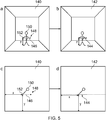
- Fig 5 illustrates an example of operation of the system 100.
- Part a in the example of Fig 5 illustrates a scene 140.
- the scene 140 is a real-world scene.
- the scene 140 comprises a three-dimensional space and may therefore be considered a scene space 140.
- the scene space 140 is monitored by the system 100.
- the scene space may therefore be considered a monitored scene space 140.
- the monitored scene space 140 is a room comprising four walls, a ceiling and a floor.
- the monitored scene space 140 may comprise no boundaries. Additionally or alternatively in examples the monitored scene space 140 may comprise a plurality of rooms that may or may not be spatially connected.
- a person 150 a user, is standing in the monitored scene space 140.
- the person 150 is performing at least one gesture user input 146 to define at least one computer-implemented virtual boundary 144.
- the gesture user input 146 may be referred to as a gesture 146 and may be as described above with reference to Fig 2 .
- the gesture 146 may be considered a boundary indication gesture 146.
- the person 150 is performing a gesture 146 to define a single computer-implemented virtual boundary 144.
- the gesture 146 comprises movement of one or more user input objects, which may be body parts.
- the gesture 146 comprises the person 150 moving 148 one or more user input object 152.
- the movement 148 may comprise any motion in one spatial dimension, two spatial dimensions or three spatial dimensions and may take any form.
- Part c of the example of Fig 5 illustrates an overhead view of the monitored scene space 140 in which the person 150 is illustrated making the gesture 146 to define a computer-implemented virtual boundary 144.
- the gesture 146 has a position having Cartesian orthogonal coordinates (x i (t), y i (t), z i (t)) in the scene 140 for each user input object i, at time t.
- x i (t) is measured from the left wall
- y i (t) is measured from the front wall
- z i (t) is measured from the floor. It will be understood that other coordinate systems may be used and that different orientations of the Cartesian coordinate system may be used
- the gesture 146 comprises motion of one user input object 152 in one spatial dimension- as the value of x changes along the path 148 and the values of y and z remain constant.
- the values of x, y and/or z may vary in any way with movement 148 from any starting position in the monitored scene space 140. Also multiple user input objects may be used.
- Parts b and d of the example of Fig 5 illustrate a monitoring space 142.
- the monitoring space 142 comprises a virtual representation of the monitored scene space 140 created and used by the system 100.
- the monitoring space 142 may be formed, for example, from sensor data 112 provided by the sensors 110, such as received image data and/or audio data and/or depth data.
- Parts b and d illustrate respectively the same views as illustrated in parts a and c of Fig 5 .
- the system 100 may use information of the geometry of the monitored scene space 140 to form the monitoring space 142.
- the system 100 may use a three dimensional model of the monitored scene space 140 in the formation of the monitoring space 142.
- the three dimensional model of the monitored scene space 140 may be created by the system 100 and/or may be received by the system 100. Methods for creating a three dimensional model of the monitored scene space 140 are known in the art.
- the system 100 may use the monitoring space 142 to monitor the scene space 140.
- the system may use the monitoring space 142 to implement and monitor at least one virtual boundary 144.
- Fig 5 there is a correspondence between the monitoring space 142 and the monitored scene space 140. In some examples there may be a one to one mapping between the monitoring space 142 and the monitored scene space 140.
- the system 100 recognizes the gesture 146 performed by the person 150 and in response implements at least one virtual boundary 144 in the monitoring space 142.
- recognizing the gesture 146 may comprise processing sensor data 112, such as image data and/or depth data.
- the system 100 may analyze one or more video feeds.
- a shape and position of the virtual boundary 144 in the monitoring space is determined, at least partially, the gesture 146 in the monitored scene space 140 and the virtual boundary 144 is located in the monitoring space at a corresponding location equivalent to the location of the path 148 in the monitored scene space 140.
- the gesture 146 may be an absolute gesture or tethered gesture as described above in relation to Fig 2 .
- the system 100 may process sensor data 112 to generate a response event when there is, relative to the at least one virtual boundary 144, a change in a portion of the monitored scene space 140 that causes a change in a portion of the monitoring space 142 demarcated by the virtual boundary.
- the system 100 may process data 112 provided by the sensors 110, such as audio and/or image data, to generate the response event.
- the system may analyze one or more audio and/or video feeds to generate the response event.
- processing the sensor data 112 to generate the response event may be considered monitoring the virtual boundary 144.
- the same sensor such as a camera, may be used in recognition of the gesture 146 defining the at least one virtual boundary 144 and for monitoring the at least one virtual boundary 144.
- processing sensor data 112 to generate the response event may comprise processing sensor data 112 to monitor the virtual boundary 144 to detect activity across the virtual boundary 144 and/or activity within a threshold of the virtual boundary 144.
- the system 100 may process audio and/or image and/or depth data to monitor the virtual boundary 144 to detect activity across the virtual boundary 144 or within a threshold of the virtual boundary 144.
- system 100 is configured to cause computer implementation of the at least one virtual boundary 144 in a monitoring space 142 corresponding to a monitored scene space 140 and to process sensor data 112 to generate a response event when there is, relative to the at least one computer-implemented virtual boundary 144, a change in a portion of the monitored scene space 140.
- the system 100 is additionally configured to recognize a first hand gesture 149 relating to a first hand 152 1 of a user 150 in the monitored scene space 140 and in response to recognizing the first hand gesture 149 in the monitored scene space 140 in relation to a portion of the computer-implemented virtual boundary 144 enable user location of a portion of the implemented computer-implemented virtual boundary 144.
- the system 100 is additionally configured to recognize a second hand gesture 151 relating to a second hand 152 2 of the user 150 in the monitored scene space 140 and in response to recognizing the second hand gesture 151 in the monitored scene space 140 perform a command relating to the user located portion of the computer-implemented virtual boundary 144.
- the command may be an information command that enables the user 150 to control the system 100 to provide to the user 150 information relating to the computer-implemented virtual boundary 144.
- the command may be a boundary adaptation command that enables the user 150 to control the system 100 to adapt the computer-implemented virtual boundary 144.
- the adaptation of the computer-implemented virtual boundary 144 may comprise modifying one or more of: a shape of the computer-implemented virtual boundary 144, a position of the computer-implemented virtual boundary 144 and an orientation of the computer-implemented virtual boundary 144.
- the system 100 then processes sensor data 112 to generate a response event based on the modified computer-implemented virtual boundary 144.
- the response event is produced when there is, relative to the modified computer-implemented virtual boundary 144, a change in a portion of the monitored scene space 140.
- the adaptation of the computer-implemented virtual boundary 144 may alternatively comprise deletion of the computer-implemented virtual boundary 144.
- the system 100 does not then processes sensor data 112 to generate a response event based on the computer-implemented virtual boundary 144.
- the first hand 152 1 may be used consistently for boundary location and for selection but not for effecting commands and the second hand 152 2 may be used consistently for effecting commands but not for boundary location and selection.
- the second hand gesture 151 is part of a two-handed gesture 148 in the monitored scene space 140.
- the two-handed gesture 148 comprises a first hand gesture 149 and the second hand gesture 151.
- the command, performed in response to recognizing the second hand gesture 151 in the monitored scene space 140, is dependent upon the two-handed gesture 148.
- the process of recognizing a two-handed gesture 148 may comprise processing sensor data 112 (e.g. image data and/or depth data) to track motion of parts of the user's body in the monitored scene space 140.
- a two-handed gesture 148 may be a gesture that involves relative movement of both hands of one person relative to one or more of: a wrist joint and/or an elbow joint and/or a shoulder joint.
- the command, performed in response to recognizing the second hand gesture 151 in the monitored scene space 140, is dependent upon a state of the first hand 152 1 , concurrent with the second hand gesture 151.
- Figs 6A, 6B, 7A, 7B, 8A, 8B illustrate an example of how options associated with a 'hot-spot' 160 in a monitored scene space 140 defined by a corresponding computer-implemented virtual boundary 144 in a corresponding monitoring space 142 may be browsed and selected by user gestures 148, 149, 151 in the monitored scene space 140.
- Figs 6A, 7A, 8A illustrate the 'hot-spot' 160 in a monitored scene space 140 and different user gestures 148, 149, 151 at the hot spot 160.
- Figs 6B, 7B, 8B illustrate the different user gestures 148, 149, 151 performed in respective Figs 6A, 7A, 8A .
- the system 100 processes sensor data 112 to recognize a transition hand gesture 148 A relative to the computer-implemented virtual boundary 144 in the monitoring space 142.
- the system 100 In response to recognizing the transition hand gesture 148 A relative to the computer-implemented virtual boundary 144 the system 100 enables a browsing mode in which browsing of a plurality of options and selection of an option is possible by a user.
- Recognition of a transition hand gesture 148 A relative to the computer-implemented virtual boundary 144 in the monitoring space may comprise recognizing that the transition hand gesture 148 A is performed in the monitored scene space 140 at a location (hot spot 160) that corresponds with a location in the monitoring space 142 that is at, or inside or within a threshold distance of the computer-implemented virtual boundary 144 in the monitoring space 142.
- the system 100 may be configured to process sensor data 112 to recognize the transition hand gesture as or as part of a transition two-handed gesture 148 A .
- the transition two-handed gesture 148 A comprises a transition first hand gesture 149 11 and a transition second hand gesture 151 21 .
- the transition first hand gesture 149 11 may be defined by two components- a description of a state or shape of the first hand 152 1 and a description of the motion (or lack of motion) of the first hand 152 1 .
- the first hand 152 1 is in a first state (a fist in this example) and is stationary.
- the sub-script label of the transition first hand gesture 149 11 has a first sub-script indicating the state or shape of the first hand 152 1 and a second sub-script indicating the motion of the first hand 152 1 .
- the transition second hand gesture 151 21 may be defined by two components- a description of a state or shape of the second hand 152 2 and a description of the motion (or lack of motion) of the second hand 152 2 .
- the second hand 152 2 is in a second state (palm open, fingers upwards) and is stationary.
- the sub-script label of the transition second hand gesture 151 21 has a first sub-script indicating the state or shape of the second hand 152 2 and a second sub-script indicating the motion of the second hand 152 2 .
- the system 100 may be configured to provide feedback to the user in response to recognizing the transition hand gesture 148 A relative to the computer-implemented virtual boundary 144.
- the system 100 processes sensor data 112 to recognize a first hand gesture 149 12 , relating to a first hand 152 1 of a user 150 in the monitored scene space 140, relative to the computer-implemented virtual boundary 144 in the monitoring space 142.
- the system 100 In response to recognizing the first hand gesture 149 12 , relating to a first hand 152 1 of a user 150 in the monitored scene space 140, relative to the computer-implemented virtual boundary 144 the system 100 causes browsing of the plurality of options.
- Recognition of the first hand gesture 149 12 relating to the first hand 152 1 of the user 150 in the monitored scene space 140, relative to the computer-implemented virtual boundary 144 in the monitoring space 142 may comprise recognizing that the first hand gesture 149 12 is performed in the monitored scene space 140 by the first hand 152 1 of a user 150 (or a particular user 150) and recognizing that the first hand gesture 149 12 is performed at a location (hot spot 160) that corresponds with a location in the monitoring space 142 that is at, or inside or within a threshold distance of the computer-implemented virtual boundary 144 in the monitoring space 142.
- the system 100 may be configured to processes sensor data 112 to recognize the first hand gesture as or as part of a first two-handed gesture 148 B .
- the first two-handed gesture 148 B comprises a first hand gesture 149 12 and a second hand gesture 151 21 .
- the first hand gesture 149 12 may be defined by two components- a description of a state or shape of the first hand 152 1 and a description of the motion (or lack of motion) of the first hand 152 1 .
- the first hand 152 1 is in a first state (a fist in this example) and is moving.
- the sub-script label of the first hand gesture 149 12 has a first sub-script indicating the state or shape of the first hand 152 1 and a second sub-script indicating the motion of the first hand 152 1 .
- the second hand gesture 151 21 may be defined by two components- a description of a state or shape of the second hand 152 2 and a description of the motion (or lack of motion) of the second hand 152 2 .
- the second hand 152 2 is in a second state (palm open, fingers upwards) and is stationary.
- the sub-script label of the second hand gesture 151 21 has a first sub-script indicating the state or shape of the second hand 152 2 and a second sub-script indicating the motion of the second hand 152 2 .
- the first two-handed gesture 148 B is similar to the transition two-handed gesture 148 A in that the second hand gesture 151 21 is the same in both state and motion.
- the first two-handed gesture 148 B is different to the transition two-handed gesture 148 A in that the first hand gesture 149 12 has the same state but has different motion.
- the motion of the first hand 152 1 in the first hand gesture 149 12 is a linear motion.
- the system 100 may be configured to provide feedback to the user in response to recognizing the first hand gesture 149 12 , relating to a first hand 152 1 of a user 150 in the monitored scene space 140, relative to the computer-implemented virtual boundary 144 in the monitoring space 142.
- the system 100 processes sensor data 112 to recognize a second hand gesture 151 22 , relating to a second hand 152 2 of the user 150 in the monitored scene space 140, relative to the virtual boundary 144 in the monitoring space 142
- the system 100 selects one of the plurality of options.
- Recognition of the second hand gesture 151 22 relating to the second hand 152 2 of the user 150 in the monitored scene space 140, relative to the computer-implemented virtual boundary 144 in the monitoring space 142 may comprise recognizing that the second hand gesture 151 22 is performed in the monitored scene space 140 by the second hand 152 2 of a user 150 (or a particular user 150) and recognizing that the second hand gesture 151 22 is performed at a location (hot spot 160) that corresponds with a location in the monitoring space 142 that is at, or inside or within a threshold distance of the computer-implemented virtual boundary 144 in the monitoring space 142.
- the system 100 may be configured to processes sensor data 112 to recognize the second hand gesture 151 22 as or as part of a second two-handed gesture 148 C .
- the second two-handed gesture 148 C comprises a first hand gesture 149 11 and a second hand gesture 151 22 .
- the first hand gesture 149 11 may be defined by two components- a description of a state or shape of the first hand 152 1 and a description of the motion (or lack of motion) of the first hand 152 1 .
- the first hand 152 1 is in a first state (a fist in this example) and is stationary.
- the sub-script label of the first hand gesture 149 11 has a first sub-script indicating the state or shape of the first hand 152 1 and a second sub-script indicating the motion of the first hand 152 1 .
- the second hand gesture 151 22 may be defined by two components- a description of a state or shape of the second hand 152 2 and a description of the motion (or lack of motion) of the second hand 152 2 .
- the second hand 152 2 is in a second state (palm open, fingers upwards) and is moving.
- the sub-script label of the second hand gesture 151 22 has a first sub-script indicating the state or shape of the second hand 152 2 and a second sub-script indicating the motion of the second hand 152 2 .
- the second two-handed gesture 148 C is similar to the first two-handed gesture 148 B in that the states but not the motions of the first hand gesture 149 11 and the second hand gesture 151 21 is the same.
- the second two-handed gesture 148 C is different to the first two-handed gesture 148 B in that the first hand gesture 149 11 has the same state but has different motion.
- the second two-handed gesture 148 C is different to the first two-handed gesture 148 B in that the second hand gesture 151 22 has the same state but has different motion.
- the second two-handed gesture 148 C is similar to the transition two-handed gesture 148 A in that the first hand gesture 149 11 is the same in both state and motion.
- the second two-handed gesture 148 C is different to the transition two-handed gesture 148 A in that the second hand gesture 151 22 has the same state but has different motion.
- the motion of the second hand 152 2 in the second hand gesture 151 22 is a rotation.
- the system 100 may be configured to provide feedback to the user in response to recognizing the second hand gesture 151 22 , relating to a second hand 152 2 of the user 150 in the monitored scene space 140, relative to the virtual boundary 144 in the monitoring space 142.
- the plurality of options may comprises command options enabling a user to actuate user commands for example as described below.
- a plurality of options 200 may take the form of a list 206 of options 202.
- the first hand gesture 149 12 ( Fig 7A, 7B ) changes a current option 204 from one option 202 in the list 206 to another different option 202 in the list 206.
- the second hand gesture 151 22 ( Fig 8A, 8B ) selects the current option 204 and provides a command in relation the current option 204.
- the current option 204 is the option C.
- the current option 204 has scrolled up the list 206 and the current option 204 is the option B that precedes the option C in the list 206.
- Performing the first hand gesture 149 12 again in the first direction would scroll up the list 206 again changing the current option 204 to option A that precedes the option B in the list 206.
- the current option 204 is the option C.
- the second direction may for example be downwards.
- the current option 204 has scrolled down the list 206 and the current option 204 is the option D that follows the option C in the list 206.
- Performing the first hand gesture 149 12 again in the second direction would scroll down the list 206 again changing the current option 204 to option E that follows the option D in the list 206.
- feedback may be provided to the user 150 for example indicating a consequence of selection of the current option 204.
- the second hand gesture 151 22 selects the current option 204 and provides a command in relation to the current option 204.
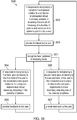
- Fig 10 illustrates a method 300.
- options associated with a 'hot-spot' 160 in a monitored scene space 140 defined by a corresponding computer-implemented virtual boundary 144 in a corresponding monitoring space 142 are browsed and selected by user gestures in the monitored scene space 140.
- the system 100 processes sensor data 112 to recognize a transition hand gesture 148 A relative to the computer-implemented virtual boundary 144 in the monitoring space 142.
- the system 100 enables a browsing mode in which browsing of a plurality of options and selection of an option is possible by a user.
- the system 100 may be configured to provide feedback to the user in response to recognizing the transition hand gesture 148 A relative to the computer-implemented virtual boundary 144.
- the system 100 processes sensor data 112 to recognize hand gestures in the browsing mode.
- the system 100 processes sensor data 112 to recognize a first hand gesture 149 12 , relating to a moving first hand 152 1 of a user 150 in the monitored scene space 140, relative to the computer-implemented virtual boundary 144 in the monitoring space 142.
- the system 100 processes sensor data 112 to recognize a moving second hand gesture 151 22 , relating to a second hand 152 2 of the user 150 in the monitored scene space 140, relative to the virtual boundary 144 in the monitoring space 142
- the system 100 causes browsing of the plurality of options.
- the system 100 may be configured to provide feedback to the user in response to recognizing the moving first hand gesture 149 12 , relating to a first hand 152 1 of a user 150 in the monitored scene space 140, relative to the computer-implemented virtual boundary 144 in the monitoring space 142.
- the loop from block 301, via block 304 and back to block 301 enables browsing of the plurality of options.
- the system 100 selects one of the plurality of options.
- the system 100 may be configured to provide feedback to the user in response to recognizing the second hand gesture 151 22 , relating to a second hand 152 2 of the user 150 in the monitored scene space 140, relative to the virtual boundary 144 in the monitoring space 142
- the method then returns to block 302.
- the blocks 304, 306 are only accessible via the block 302.
- browsing of the plurality of options is enabled only when the transition hand gesture is relative to the computer-implemented virtual boundary (e.g. at or near the hot spot 160).
- Browsing of the plurality of options is not enabled when the transition hand gesture is not relative to the computer-implemented virtual boundary (e.g. at or near the hot spot 160).
- the plurality of options may be options for controlling one or more appliances.
- the plurality of options 200 may take the form of a list 206 of options 202 for appliances.
- appliances include but are not limited to a dish washer, a stove, a heater, a sauna.
- the system 100 allows a user 150 to remotely control one or more appliances by performing predetermined gestures 148 A , 148 B , 148 C , relative to the virtual boundary 144.
- the system 100 causes browsing of the plurality of options 200. For example, any option 202 in a list 206 of options 202 can be controlled by the user to be the current option 204.
- the system 100 is configured to provide feedback to the user each time the current option 204 changes. Feedback may be provided to the user 150 indicating a consequence of selection of the current option 204.
- each new current option 204 is associated with a different appliance.
- the name of the appliance will be provided to the user via synthetic speech as audio output.
- the status of the appliance will be provided automatically via synthetic speech as audio output.
- the status may indicate, for example, whether the appliance is on or off, timing information and other setting information depending upon the appliance.
- the list 206 of options 202 is an ordered list.
- the list of options may be ordered in most popular first, alphabetically, location or based on ease of programming an option.
- the ordering of the list 206 may therefore be dynamic and change over time.
- the system 100 selects the current option 204.
- the selection of the current option 204 may, for example, comprise in relation to the appliance associated with the current option, switching the appliance on, switching the appliance off, setting timing information or other setting information depending upon the appliance.
- the system 100 is configured to provide feedback to the user in response to selecting the current option.
- a new status of the appliance may be provided to the user via synthetic speech as audio output.
- the status may indicate, for example, whether the appliance is on or off, timing information and other setting information depending upon the appliance.
- the list 206 of options 202 relates to multiple appliances and provides a list of appliances as options 202. Selection of a current option 204 enables programming of that appliance.
- the list 206 of options 202 may relate to one appliance and provide a list of functions as options 202. Selection of a current option 204 enables programming of that function.
- a plurality of audio output devices 309 may be arranged in the monitored scene space 140.
- the output devices 309 are controlled by the system 100 to created a specific audio field in the monitored scene space 140 such that audio output appears to the user 150 to come from the hot spot 160.
- the system 100 may track the position of the user 150 relative to the hot spot and then create the required audio field using the plurality of audio output devices 309.
- the feedback described above may be provided by such directional audio output.
- This directional audio output appears to originate from within a portion of the monitored scene space corresponding to the computer-implemented virtual boundary in the monitoring space (the hot-spot 160), irrespective of a bearing of the user 150 from the portion of the monitored scene space (hot-spot 160).
- the blocks 304, 306 are only accessible only via the block 302.
- browsing of the plurality of options is enabled only when the transition hand gesture is relative to the computer-implemented virtual boundary (e.g. at or near the hot spot 160).
- Browsing of the plurality of options is not enabled when the transition hand gesture is not relative to the computer-implemented virtual boundary (e.g. at or near the hot spot 160).
- block 302 may enable browsing of the plurality of options only when the transition hand gesture is by a predetermined person and relative to the computer-implemented virtual boundary (e.g. at or near the hot spot 160). Browsing of the plurality of options is not enabled when the transition hand gesture is not relative to the computer-implemented virtual boundary (e.g. at or near the hot spot 160). Browsing of the plurality of options is not enabled when the transition hand gesture is not by the correct person.
- a hot-spot 160 may be created, deleted or modified by a user.
- a hot spot 160 may be created at a user's location by performing the transition two-handed gesture 148 A .
- a hot spot 160 may be deleted by performing the transition two-handed gesture 148 A at the hot spot 160 and then performing a throw-away gesture with both hands.
- a hot spot 160 may be moved by performing a two-handed pull (both hands in first state and moving either relative to the user or stationary relative to moving user 150) or a two-handed push (both hands in second state and moving either relative to the user or stationary relative to the moving user).
- the system 100 allows a user 150 to perform remote control by performing predetermined gestures 148 A , 148 B , 148 C at or near the hot spot 160 corresponding to the computer-implemented virtual boundary 144.
- the system 100 may be configured to enable a user 150 to program one or more of the predetermined gestures 148 A , 148 B , 148 C by performing gestures in the monitored scene space 140.
- audio feedback has been described above, the system 100 may, for example, provide audio and/or haptic feedback that is projected in the monitored scene space 140 or via a user's mobile device.
- two-handed gestures 148 may be used to transition between states in a state machine, and that the outcome following a particular two-handed gesture depends not only on the particular two-handed gesture 148 but also the current state of the state-machine and also the design of the state-machine which determines the post-transition state.
- the system 100 may provide feedback to a user to confirm that the system 100 has recognized a gesture 146.
- the feedback may comprise any suitable feedback, for example audio and/or visual and/or tactile feedback and so on.
- the system 100 may send one or more messages to a device or devices to inform the user that the system 100 has implemented the virtual boundary 144.
- Examples of the disclosure provide for an easy and intuitive way to define virtual boundaries for a surveillance system.
Landscapes
- Engineering & Computer Science (AREA)
- Theoretical Computer Science (AREA)
- General Engineering & Computer Science (AREA)
- General Physics & Mathematics (AREA)
- Physics & Mathematics (AREA)
- Human Computer Interaction (AREA)
- Multimedia (AREA)
- Health & Medical Sciences (AREA)
- General Health & Medical Sciences (AREA)
- Audiology, Speech & Language Pathology (AREA)
- Computer Vision & Pattern Recognition (AREA)
- Psychiatry (AREA)
- Social Psychology (AREA)
- User Interface Of Digital Computer (AREA)
Abstract
Description
- Embodiments of the present invention relate to monitoring a scene. In particular, they relate to automated monitoring of a scene.
- Current monitoring systems, such as surveillance systems, may comprise one or more cameras for video recording, with or without audio recording, connected via wires or wirelessly to a hub that stores or enables storage of the data recorded from the scene. An operator may, in some examples, be able to use the hub to program settings for the cameras and/or the hub.
- According to various, but not necessarily all, examples of the disclosure there is provided a method as claimed in any of claims 1-13.
- According to various, but not necessarily all, examples of the disclosure there is provided an apparatus as claimed in claim 14.
- According to various, but not necessarily all, examples of the disclosure there is provided an apparatus comprising: at least one processor; and
at least one memory including computer program code
the at least one memory and the computer program code configured to, with the at least one processor, cause the apparatus at least to perform a method as claimed in any of claims 1-13. - According to various, but not necessarily all, examples of the disclosure there is provided computer program code that, when performed by at least one processor, causes a method of at least one of claims 1-13 to be performed.
- According to various, but not necessarily all, examples of the disclosure there is provided a computer program that, when run on a computer, performs: a method as claimed in any of claims 1-13.
- According to various, but not necessarily all, embodiments of the invention there is provided examples as claimed in the appended claims.
- For a better understanding of various examples that are useful for understanding the brief description, reference will now be made by way of example only to the accompanying drawings in which:
-
Fig 1 schematically illustrates an example of a system; -
Fig 2 illustrates an example of a state machine; -
Fig 3 illustrates an example of a processing module; -
Fig 4 illustrates an example of a delivery mechanism for a computer program; -
Fig 5 illustrates an example of operation of the system; -
Figs 6A, 6B, 7A, 7B, 8A, 8B illustrate an example of how options associated with a 'hot-spot' in a monitored scene space defined by a corresponding computer-implemented virtual boundary in a corresponding monitoring space may be browsed and selected by user gestures in the monitored scene space; -
Figs 9A, 9B and 9C illustrate an example of a plurality of options in the form of a list; -
Fig 10 illustrates a method by which options associated with a 'hot-spot' are browsed and selected by user gestures in the monitored scene space; and -
Fig 11 illustrates a plurality of audio output devices for directed audio output. - The
system 100 described is a system that monitors at least one scene. The operation of the system can be controlled by a user within the scene by carrying out actions within the scene. For example, the user is able to control the system so that the user can perform commands relating to at least one virtual boundary monitored by the system. -
Fig 1 schematically illustrates asystem 100 comprising: one ormore sensors 110 configured to recordsensor data 112 from ascene 140; aprocessing module 120 configured to process thesensor data 112 recorded from thescene 140 to recognise automatically events that occur in thescene 140 and to automatically take decisions as a consequence of the recognition; and acommunication module 130 configured to communicate, when a decision to communicate is taken by theprocessing module 120. - Some but not necessarily all of the events that are recognised may relate to an
object 152 or aparticular object 152 in thescene 140. An object may be an inanimate object, an animal, a person or aparticular person 150 in thescene 140. In some but not necessarily all examples of thesystem 100, thesystem 100 is a real-time recognition system and the automatic recognition and decision, if any, occur substantially at the same time as thesensor data 112 is recorded. - The
system 100 may be used for surveillance, monitoring, assisted living, elderly care or other applications. Thesystem 100 may be used in businesses, public areas or at home. One expected use is as a home surveillance system. - The
system 100 may enable a user to control monitoring, for example, when the user is aperson 150 in thescene 140. Thesystem 100 may enable a user to control recognition and/or a consequence of recognition, for example, when the user is aperson 150 in thescene 140. - In some but not necessarily all examples, the
system 100 may comprise a number of discrete apparatus. For example, thesensors 110 may be housed in one or more separate apparatus, theprocessing module 120 may be housed in one or more apparatus and thecommunication module 130 may be housed in one or more apparatus. Where a component or components of thesystem 100 are housed in discrete apparatus, those apparatus may be local or remote to each other and, where they are remote they may communicate, for example, over a network. - In some but not necessarily all examples, the
system 100 may be housed in a single apparatus. - The
sensors 110 are configured to record or enable recording ofsensor data 112 from thescene 140. - A
scene 140 may comprise static components that have, for example, fixed relative positions, such as for example static objects. These static objects have different static positions in the scene's three-dimensional space (scene space). Ascene 140 may comprise moving components, such as for example a moving object. A moving object has different positions in the scene space over time. Reference to 'the scene' in relation todifferent sensor data 112 or different times implies a continuity of those static components of thescene 140 that are sensed, it does not necessarily imply a continuity of some or all of the dynamic components although this may occur. - The recording of
sensor data 112 may comprise only temporary recording, or it may comprise permanent recording or it may comprise both temporary recording and permanent recording, Temporary recording implies the recording of data temporarily. This may, for example, occur during sensing, occur at a dynamic memory, occur at a buffer such as a circular buffer, a register, a cache or similar. Permanent recording implies that the data is in the form of an addressable data structure that is retrievable from an addressable memory space and can therefore be stored and retrieved until deleted or over-written, although long-term storage may or may not occur. - The
sensors 110 may be configured to transduce propagating waves, such as sound waves and/or light waves, to electrical signals encoding the propagating wave data from thescene 140 assensor data 112. - In some but not necessarily all examples, the
sensors 110 are fixed in space relative to thescene space 140. In other examples, thesensors 110 are movable or moving relative to thescene space 140. - In some, but not necessarily all embodiments, the
sensors 110 are or compriseimage sensors 114. An example of animage sensor 114 is a digital image sensor that is configured to operate as a camera. Such a camera may be operated to record static images and/or video images. - In some, but not necessarily all embodiments, cameras may be configured in a stereoscopic or other spatially distributed arrangement so that the
scene 140 is viewed from different perspectives. This may enable the creation of a three-dimensional image and/or processing to establish depth, for example, via the parallax effect. - In some, but not necessarily all embodiments, the
sensors 110 are or compriseaudio sensors 116. An example of anaudio sensor 116 is a microphone or microphones. Microphones may be configured in a stereoscopic or other spatially distributed arrangement such as a microphone array so that thescene 140 is sampled from different perspectives. This may enable three-dimensional spatial audio processing, that allows positioning of audio within thescene 140. - In some, but not necessarily all embodiments, the sensors are or comprise
depth sensors 118. Adepth sensor 118 may comprise a transmitter and a receiver. The transmitter transmits a signal (for example, a signal a human cannot sense such as ultrasound or infrared light) and the receiver receives the reflected signal. Using a single transmitter and a single receiver some depth information may be achieved via measuring the time of flight from transmission to reception. Better resolution may be achieved by using more transmitters and/or more receivers (spatial diversity). In one example, the transmitter is configured to 'paint' thescene 140 with light, preferably invisible light such as infrared light, with a spatially dependent pattern. Detection of a certain pattern by the receiver allows thescene 140 to be spatially resolved. The distance to the spatially resolved portion of thescene 140 may be determined by time of flight and/or stereoscopy (if the receiver is in a stereoscopic position relative to the transmitter). - In these 'passive' or 'non-active' examples of depth sensing the
person 150 or object 152 to be sensed are passive and merely reflect incident light or sound waves emitted by a transmitter. However, 'active' examples, which require activity at the sensed object, may additionally or alternatively be used. As an example, aperson 150 may carry a positioning apparatus that is configured to position the positioning apparatus within thescene space 140. The positioning apparatus may for example measure motion of the positioning apparatus from a reference position using accelerometers. Gyroscopes may optionally be used to determine orientation. Additionally or alternatively, the positioning apparatus may enable positioning via triangulation (trilateration) by transmitting to multiple receivers and/or receiving from multiple transmitters. - In the illustrated example, but not necessarily all examples, the
processing module 120 comprises amemory sub-module 122, aprocessing sub-module 124, arecognition sub-module 126, and acontrol sub-module 128. While the 'modules' are described and illustrated separately they may be, although they need not be, separate or combined in different combinations. For example, theprocessing sub-module 124, therecognition sub-module 126, and thecontrol sub-module 128 may be performed by the same circuitry or under the control of the same computer program. Alternatively one or more of theprocessing sub-module 124, therecognition sub-module 126, and thecontrol sub-module 128 may be performed by dedicated circuitry or a dedicated computer program. The sub-modules may be performed using software, dedicated hardware or a mix of programmed hardware and software. - The
memory sub-module 122 may be used to store unprocessed sensor data 111 and/or processed sensor data 112 (scene data), computer programs, scene space models and other data used by theprocessing module 120, although other sub-modules may have their own memories. - The processing sub-module 124 may be configured to process the
sensor data 112 to determine scene data that is meaningful about thescene 140. - The processing sub-module 124 may be configured to perform image processing where the
sensor data 110 comprises image data from a camera orcameras 114. The processing sub-module 124 may be configured to perform audio processing where thesensor data 110 comprises audio data from a microphone ormicrophones 116. - The processing sub-module 124 may be configured to perform automatically one or more of the following tasks using the
sensor data 112 to create scene data that has potential meaning for the scene 140: - use machine (computer) vision to perform one or more of:
- detect a (moving or stationary) object or person,
- classify a (moving or stationary) object or person, and/or
- track a (moving or stationary) object or person;
- use spatial analysis to perform one or more of:
- position a (moving or stationary) object in the scene space using depth determination; and/or
- create a map of the scene space; and/or
- use behaviour analysis to describe an event that occurs in the
scene 140 as a potentially meaningful symbol. - An example of image processing is 'histogram of gradient features' analysis which creates a distribution of intensity gradients or edge directions for an image. The image may be divided into small connected regions (cells), and for each cell, a histogram of gradient directions or edge orientations is created for the pixels within the cell. The combination of these histograms then represents a descriptor.
- An example of audio processing is 'mel-frequency cepstral coefficients' determination, spatial audio processing using, for example, audio beamforming techniques, audio event recognition or classification, speaker recognition or verification or speech recognition.
- Motion detection may be achieved, for example, using differencing with respect to a background model (background subtraction) or with respect to a preceding image (temporal differencing), or using some other approach such as optical flow analysis using a vector-based approach.
- Object classification may be achieved, for example, using shape-based analysis and/or motion-based analysis.
- Classification of a person may be classification that an object is human or classification that an object is a particular human (identification). Identification may be achieved using an attribute or a combination of attributes that uniquely identifies a person within the set of possible persons. Examples of attributes include: biometric features that are or may be particular to a person such as their face or their voice: their shape and size; their behaviour.
- Object tracking may be achieved by labelling objects and recording the position in the
scene 140 of the labelled object. The algorithm may need to deal with one or more of the following events: object entrance to thescene 140; object exit from thescene 140; object re-entrance to thescene 140; object occlusion; object merge. How to deal with these events is known in the art. - Object tracking may be used to determine when an object or person changes. For example, tracking the object on a large macro-scale allows one to create a frame of reference that moves with the object. That frame of reference can then be used to track time-evolving changes of shape of the object, by using temporal differencing with respect to the object. This can be used to detect small scale human motion such as gestures, hand movement, facial movement. These are scene independent user (only) movements relative to the user.
- The system may track a plurality of objects and/or points in relation to a person's body, for example one or more joints of the person's body. In some examples, the
system 100 may perform full body skeletal tracking of a person's body. - The tracking of one or more objects and/or points in relation to a person's body may be used by the
system 100 in gesture recognition and so on. - Behaviour analysis requires describing an event that occurs in the
scene 140 using a meaningful symbology. An event may be something that occurs at a spatio-temporal instance or it may be a spatio-temporal sequence (a pattern of spatio-temporal instances over time). An event may relate to motion of an object (or person) or interaction of a person and object. - In some, but not necessarily all implementations, an event may be represented by a putative symbol defined in terms of parameters determined from the machine (computer) vision analysis and/or the spatial analysis. These parameters encode some or more of what is happening, where it is happening, when it is happening and who is doing it.
- The
recognition sub-module 126 is configured to recognise a putative symbol encoding an event in thescene 140 as a meaningful symbol associated with a particular meaning. - The recognition sub-module 126 may be configured to recognize a putative symbol, defined in terms of parameters determined from the machine (computer) vision analysis and/or the spatial analysis, and produced by the
processing sub-module 124 as having meaning. The recognition sub-module 126 may, for example, store or access a database of meaningful reference symbols and may use a similarity test to determine whether a putative symbol is 'similar' to a meaningful symbol. - The recognition sub-module 126 may be configured as a machine (computer) inference engine or other recognition engine such as an artificial neural network or clustering in the parameter space. The recognition sub-module may 126, in some examples, be trained, via supervised learning, to recognise meaningful symbols as similar to reference symbols.
- The control sub-module 128 responds to the determination that a meaningful event has occurred in the
scene 140 in dependence on the event: - a) If the putative symbol is similar to a response symbol, the meaningful event is a 'response' event, and the
control sub-module 126 performs a response action.
In some but not necessarily all examples the action performed may be programmed by a user. In some but not necessarily all examples the programming may occur via motion of the user within the scene. Examples of actions performed may be the generation of an alert or notification.
The alert or notification may be provided via thecommunications module 130. Thecommunications module 130 may communicate wirelessly, via radio waves or via a wired connection to a local or remote apparatus. Examples of such apparatus include but are not limited to displays, televisions, audio output apparatus, personal devices such as mobile telephone or personal computers, a projector or other user output apparatus.
In some but not necessarily all examples the response symbol may be programmed by a user. For example, a user may be able to program or teach a meaningful event that is represented by a meaningful response symbol. The response symbol, created by the user, may be added to the database of reference symbols or otherwise used to recognise a putative symbol as a meaningful symbol. In some but not necessarily all examples the programming may occur via motion of the user within thescene 140. Examples of meaningful events that are represented by meaningful symbols include particular actions or movements performed such as user input gestures. - b) If the putative symbol is similar to a user control symbol, the meaningful event is a 'user control' event, and the
control sub-module 126 enables user control of monitoring and/or user control of the response. - For example, a user may be able to program or teach a meaningful response symbol that is added to the database of reference symbols. In some but not necessarily all examples the programming may occur via motion of the user within the
scene 140. - For example, a user may be able to program or teach an action performed when the putative symbol is matched to a response symbol. Examples of actions performed may be the generation of an alert or notification.
- The operation of the
processing module 120 may be further understood fromFig 2 which illustrates astate machine 200 for theprocessing module 120. Thestate machine 200 has amonitoring state 210, auser control state 220 and anautomatic response state 230. - In the
monitoring state 210, thesensors 110 providesensor data 112, and theprocessing sub-module 124 automatically processes the sensor data 112 (video and/or audio and/or depth) to create scene data that has potential meaning. The recognition sub-module 126 automatically processes the scene data to identify actual meaning, that is meaningful symbols, within the scene data. - The meaningful symbols are predetermined, that is actions have occurred that determine a symbol prior to recognition.
- However, 'predetermined' in this document should not be considered to mean exact or fixed. The symbol used for similarity matching merely has prior determination, it may dynamically evolve or may be fixed.
- If the
recognition sub-module 126 determines that a meaningful event has occurred in thescene 140, thecontrol sub-module 126 responds automatically depending on the event. If the meaningful event is a 'response' event, then thestate machine 200 transitions to theresponse state 230 and thecontrol sub-module 126 performs a response action. The response action may be associated with the response event. If the event is a 'user control' event, then thestate machine 200 transitions to theuser control state 220 and user control of monitoring and/or response is enabled. The enablement may be in a manner associated with thatuser control state 220. - A particular gesture user input may be used as a 'user control' event. A gesture user input is a gesture that has meaning to the
system 100 as a user input. A gesture may be static or moving. A moving gesture may comprise a movement or a movement pattern comprising a series of movements. For example it could be making a circling motion or a side to side or up and down motion or the tracing of a sign in space. A moving gesture may, for example, be an apparatus-independent gesture or an apparatus-dependent gesture. A moving gesture may involve movement of a user input object e.g. a user body part or parts, or a further apparatus, relative to thesensors 110. The body part may comprise the user's hand or part of the user's hand such as one or more fingers and thumbs. In other examples, the user input object may comprise a different part of the body of the user such as their head or arm. Three-dimensional movement may comprise motion of the user input object in any three orthogonal directions. The motion may comprise the user input object moving towards or away from thesensors 110 as well as moving in a plane parallel to the sensors or any combination of such motion. A gesture may be a non-contact gesture. A non-contact gesture does not contact the apparatus sensors at any time during the gesture. A gesture may be an absolute gesture that is defined in terms of an absolute displacement from thesensors 110. Such a gesture may be tethered, in that it is performed at a precise location in the scene space. Alternatively a gesture may be a relative gesture that is defined in terms of relative displacement during the gesture. Such a gesture may be un-tethered, in that it need not be performed at a precise location relative in the scene space and may be performed at a large number of arbitrary locations. A gesture may be defined as evolution of displacement, of a tracked point relative to an origin, with time. It may, for example, be defined in terms of motion using time variable parameters such as displacement, velocity or using other kinematic parameters. An un-tethered gesture may be defined as evolution of relative displacement Δd with relative time Δt. A gesture may be performed in one spatial dimension (1 D gesture), two spatial dimensions (2D gesture) or three spatial dimensions (3D gesture). - In some examples, the
system 100 may track one or more objects and/or points in relation to a person's body in gesture recognition. For example, thesystem 100 may perform full skeletal tracking of a person's body in gesture recognition. - Implementation of the
processor module 120 or part of theprocessor module 120 may be as controller circuitry. Thecontroller circuitry 120 may be implemented in hardware alone, have certain aspects in software including firmware alone or can be a combination of hardware and software (including firmware). - As illustrated in
Fig 3 thecontroller 120 may be implemented using instructions that enable hardware functionality, for example, by using executablecomputer program instructions 322 in a general-purpose or special-purpose processor 310 that may be stored on a computer readable storage medium (disk, memory etc) to be executed by such aprocessor 310. - The
processor 310 is configured to read from and write to thememory 320. Theprocessor 310 may also comprise an output interface via which data and/or commands are output by theprocessor 310 and an input interface via which data and/or commands are input to theprocessor 310. - The
memory 320 stores acomputer program 322 comprising computer program instructions (computer program code) that controls the operation of theprocessing module 120 when loaded into theprocessor 310. The computer program instructions, of thecomputer program 322, provide the logic and routines that enables the processing module to perform the methods discussed. Theprocessor 310 by reading thememory 320 is able to load and execute thecomputer program 322. - The
system 100 may therefore comprise anapparatus 120 that comprises: - at least one
processor 310; and at least onememory 320 includingcomputer program code 322 the at least onememory 320 and thecomputer program code 322 configured to, with the at least oneprocessor 310, cause theapparatus 120 at least to perform one or more ofblocks Fig 1 and/or one or more of the blocks of Fig 12. - As illustrated in
Fig 4 , thecomputer program 322 may arrive at such an apparatus via anysuitable delivery mechanism 324. Thedelivery mechanism 324 may be, for example, a non-transitory computer-readable storage medium, a computer program product, a memory device, a record medium such as a compact disc read-only memory (CD-ROM) or digital versatile disc (DVD), an article of manufacture that tangibly embodies thecomputer program 322. The delivery mechanism may be a signal configured to reliably transfer thecomputer program 322. Theapparatus 120 may propagate or transmit thecomputer program 322 as a computer data signal. - Although the
memory 320 is illustrated as a single component/circuitry it may be implemented as one or more separate components/circuitry some or all of which may be integrated/removable and/or may provide permanent/semi-permanent/ dynamic/cached storage. - Although the
processor 310 is illustrated as a single component/circuitry it may be implemented as one or more separate components/circuitry some or all of which may be integrated/removable. Theprocessor 310 may be a single core or multi-core processor. - References to 'computer-readable storage medium', 'computer program product', 'tangibly embodied computer program' etc. or a 'controller', 'computer', 'processor' etc. should be understood to encompass not only computers having different architectures such as single /multi- processor architectures and sequential (Von Neumann)/parallel architectures but also specialized circuits such as field-programmable gate arrays (FPGA), application specific circuits (ASIC), signal processing devices and other processing circuitry. References to computer program, instructions, code etc. should be understood to encompass software for a programmable processor or firmware such as, for example, the programmable content of a hardware device whether instructions for a processor, or configuration settings for a fixed-function device, gate array or programmable logic device etc.
- As used in this application, the term 'circuitry' refers to all of the following:
- (a) hardware-only circuit implementations (such as implementations in only analog and/or digital circuitry) and
- (b) to combinations of circuits and software (and/or firmware), such as (as applicable): (i) to a combination of processor(s) or (ii) to portions of processor(s)/software (including digital signal processor(s)), software, and memory(ies) that work together to cause an apparatus, such as a mobile phone or server, to perform various functions) and
- (c) to circuits, such as a microprocessor(s) or a portion of a microprocessor(s), that require software or firmware for operation, even if the software or firmware is not physically present.
- This definition of 'circuitry' applies to all uses of this term in this application, including in any claims. As a further example, as used in this application, the term "circuitry" would also cover an implementation of merely a processor (or multiple processors) or portion of a processor and its (or their) accompanying software and/or firmware. The term "circuitry" would also cover, for example and if applicable to the particular claim element, a baseband integrated circuit or applications processor integrated circuit for a mobile phone or a similar integrated circuit in a server, a cellular network device, or other network device.
- The
blocks Fig 1 and/or the blocks illustrated in Fig 12 may represent steps in a method and/or sections of code in thecomputer program 322. The illustration of a particular order to the blocks does not necessarily imply that there is a required or preferred order for the blocks and the order and arrangement of the block may be varied. Furthermore, it may be possible for some blocks to be omitted. -
Fig 5 illustrates an example of operation of thesystem 100. Part a in the example ofFig 5 illustrates ascene 140. Thescene 140 is a real-world scene. Thescene 140 comprises a three-dimensional space and may therefore be considered ascene space 140. Thescene space 140 is monitored by thesystem 100. The scene space may therefore be considered a monitoredscene space 140. In the example ofFig 5 the monitoredscene space 140 is a room comprising four walls, a ceiling and a floor. - In some examples the monitored
scene space 140 may comprise no boundaries. Additionally or alternatively in examples the monitoredscene space 140 may comprise a plurality of rooms that may or may not be spatially connected. - In the example of
Fig 5 aperson 150, a user, is standing in the monitoredscene space 140. Theperson 150 is performing at least onegesture user input 146 to define at least one computer-implementedvirtual boundary 144. Thegesture user input 146 may be referred to as agesture 146 and may be as described above with reference toFig 2 . Thegesture 146 may be considered aboundary indication gesture 146. - In the illustrated example the
person 150 is performing agesture 146 to define a single computer-implementedvirtual boundary 144. - The
gesture 146 comprises movement of one or more user input objects, which may be body parts. In the example ofFig 5 thegesture 146 comprises theperson 150 moving 148 one or moreuser input object 152. - In examples, the
movement 148 may comprise any motion in one spatial dimension, two spatial dimensions or three spatial dimensions and may take any form. - Part c of the example of
Fig 5 illustrates an overhead view of the monitoredscene space 140 in which theperson 150 is illustrated making thegesture 146 to define a computer-implementedvirtual boundary 144. - As can be seen in parts a and c of the example of
Fig 5 , thegesture 146 has a position having Cartesian orthogonal coordinates (xi(t), yi(t), zi(t)) in thescene 140 for each user input object i, at time t. In this example, xi(t) is measured from the left wall, yi(t) is measured from the front wall and zi(t) is measured from the floor. It will be understood that other coordinate systems may be used and that different orientations of the Cartesian coordinate system may be used - For simplicity of illustration in
Fig 5 , thegesture 146 comprises motion of oneuser input object 152 in one spatial dimension- as the value of x changes along thepath 148 and the values of y and z remain constant. In other examples the values of x, y and/or z may vary in any way withmovement 148 from any starting position in the monitoredscene space 140. Also multiple user input objects may be used. - Parts b and d of the example of
Fig 5 illustrate amonitoring space 142. Themonitoring space 142 comprises a virtual representation of the monitoredscene space 140 created and used by thesystem 100. Themonitoring space 142 may be formed, for example, fromsensor data 112 provided by thesensors 110, such as received image data and/or audio data and/or depth data. - Parts b and d illustrate respectively the same views as illustrated in parts a and c of
Fig 5 . - In some examples the
system 100 may use information of the geometry of the monitoredscene space 140 to form themonitoring space 142. For example, thesystem 100 may use a three dimensional model of the monitoredscene space 140 in the formation of themonitoring space 142. The three dimensional model of the monitoredscene space 140 may be created by thesystem 100 and/or may be received by thesystem 100. Methods for creating a three dimensional model of the monitoredscene space 140 are known in the art. - The
system 100 may use themonitoring space 142 to monitor thescene space 140. For example, the system may use themonitoring space 142 to implement and monitor at least onevirtual boundary 144. - As indicated by the arrows between parts a and b and parts c and d of
Fig 5 there is a correspondence between themonitoring space 142 and the monitoredscene space 140. In some examples there may be a one to one mapping between themonitoring space 142 and the monitoredscene space 140. - In other examples there may be a scale invariant transformation between the monitored
scene space 140 and themonitoring space 142. - The
system 100 recognizes thegesture 146 performed by theperson 150 and in response implements at least onevirtual boundary 144 in themonitoring space 142. In some examples, recognizing thegesture 146 may comprise processingsensor data 112, such as image data and/or depth data. For example, thesystem 100 may analyze one or more video feeds. - In examples, a shape and position of the
virtual boundary 144 in the monitoring space is determined, at least partially, thegesture 146 in the monitoredscene space 140 and thevirtual boundary 144 is located in the monitoring space at a corresponding location equivalent to the location of thepath 148 in the monitoredscene space 140. - The
gesture 146 may be an absolute gesture or tethered gesture as described above in relation toFig 2 . - The
system 100, may processsensor data 112 to generate a response event when there is, relative to the at least onevirtual boundary 144, a change in a portion of the monitoredscene space 140 that causes a change in a portion of themonitoring space 142 demarcated by the virtual boundary. - For example, the
system 100 may processdata 112 provided by thesensors 110, such as audio and/or image data, to generate the response event. The system may analyze one or more audio and/or video feeds to generate the response event. In some examples processing thesensor data 112 to generate the response event may be considered monitoring thevirtual boundary 144. - In examples the same sensor, such as a camera, may be used in recognition of the
gesture 146 defining the at least onevirtual boundary 144 and for monitoring the at least onevirtual boundary 144. - In some examples, processing
sensor data 112 to generate the response event may comprise processingsensor data 112 to monitor thevirtual boundary 144 to detect activity across thevirtual boundary 144 and/or activity within a threshold of thevirtual boundary 144. For example, thesystem 100 may process audio and/or image and/or depth data to monitor thevirtual boundary 144 to detect activity across thevirtual boundary 144 or within a threshold of thevirtual boundary 144. - From the foregoing it will be understood that the
system 100 is configured to cause computer implementation of the at least onevirtual boundary 144 in amonitoring space 142 corresponding to a monitoredscene space 140 and to processsensor data 112 to generate a response event when there is, relative to the at least one computer-implementedvirtual boundary 144, a change in a portion of the monitoredscene space 140. - The
system 100 is additionally configured to recognize a first hand gesture 149 relating to afirst hand 1521 of auser 150 in the monitoredscene space 140 and in response to recognizing the first hand gesture 149 in the monitoredscene space 140 in relation to a portion of the computer-implementedvirtual boundary 144 enable user location of a portion of the implemented computer-implementedvirtual boundary 144. - The
system 100 is additionally configured to recognize a second hand gesture 151 relating to asecond hand 1522 of theuser 150 in the monitoredscene space 140 and in response to recognizing the second hand gesture 151 in the monitoredscene space 140 perform a command relating to the user located portion of the computer-implementedvirtual boundary 144. - The command may be an information command that enables the
user 150 to control thesystem 100 to provide to theuser 150 information relating to the computer-implementedvirtual boundary 144. - The command may be a boundary adaptation command that enables the
user 150 to control thesystem 100 to adapt the computer-implementedvirtual boundary 144. The adaptation of the computer-implementedvirtual boundary 144 may comprise modifying one or more of: a shape of the computer-implementedvirtual boundary 144, a position of the computer-implementedvirtual boundary 144 and an orientation of the computer-implementedvirtual boundary 144. Thesystem 100 then processessensor data 112 to generate a response event based on the modified computer-implementedvirtual boundary 144. The response event is produced when there is, relative to the modified computer-implementedvirtual boundary 144, a change in a portion of the monitoredscene space 140. - The adaptation of the computer-implemented
virtual boundary 144 may alternatively comprise deletion of the computer-implementedvirtual boundary 144. Thesystem 100 does not then processessensor data 112 to generate a response event based on the computer-implementedvirtual boundary 144. - In examples, such as those described below, the
first hand 1521 may be used consistently for boundary location and for selection but not for effecting commands and thesecond hand 1522 may be used consistently for effecting commands but not for boundary location and selection. - In examples, such as those described below, the second hand gesture 151 is part of a two-
handed gesture 148 in the monitoredscene space 140. The two-handed gesture 148 comprises a first hand gesture 149 and the second hand gesture 151. In some but not necessarily all examples, the command, performed in response to recognizing the second hand gesture 151 in the monitoredscene space 140, is dependent upon the two-handed gesture 148. - The process of recognizing a two-
handed gesture 148 may comprise processing sensor data 112 (e.g. image data and/or depth data) to track motion of parts of the user's body in the monitoredscene space 140. A two-handed gesture 148 may be a gesture that involves relative movement of both hands of one person relative to one or more of: a wrist joint and/or an elbow joint and/or a shoulder joint. - In some but not necessarily all examples, the command, performed in response to recognizing the second hand gesture 151 in the monitored
scene space 140, is dependent upon a state of thefirst hand 1521, concurrent with the second hand gesture 151. -
Figs 6A, 6B, 7A, 7B, 8A, 8B illustrate an example of how options associated with a 'hot-spot' 160 in a monitoredscene space 140 defined by a corresponding computer-implementedvirtual boundary 144 in acorresponding monitoring space 142 may be browsed and selected byuser gestures 148, 149, 151 in the monitoredscene space 140. -
Figs 6A, 7A, 8A illustrate the 'hot-spot' 160 in a monitoredscene space 140 anddifferent user gestures 148, 149, 151 at thehot spot 160.Figs 6B, 7B, 8B illustrate thedifferent user gestures 148, 149, 151 performed in respectiveFigs 6A, 7A, 8A . - Referring to
Figs 6A, 6B , thesystem 100processes sensor data 112 to recognize atransition hand gesture 148A relative to the computer-implementedvirtual boundary 144 in themonitoring space 142. - In response to recognizing the
transition hand gesture 148A relative to the computer-implementedvirtual boundary 144 thesystem 100 enables a browsing mode in which browsing of a plurality of options and selection of an option is possible by a user. - Recognition of a
transition hand gesture 148A relative to the computer-implementedvirtual boundary 144 in the monitoring space may comprise recognizing that thetransition hand gesture 148A is performed in the monitoredscene space 140 at a location (hot spot 160) that corresponds with a location in themonitoring space 142 that is at, or inside or within a threshold distance of the computer-implementedvirtual boundary 144 in themonitoring space 142. - The
system 100 may be configured to processsensor data 112 to recognize the transition hand gesture as or as part of a transition two-handed gesture 148A. The transition two-handed gesture 148A comprises a transition first hand gesture 14911 and a transition second hand gesture 15121. - The transition first hand gesture 14911 may be defined by two components- a description of a state or shape of the
first hand 1521 and a description of the motion (or lack of motion) of thefirst hand 1521. In this example, but not necessarily all examples, thefirst hand 1521 is in a first state (a fist in this example) and is stationary. The sub-script label of the transition first hand gesture 14911 has a first sub-script indicating the state or shape of thefirst hand 1521 and a second sub-script indicating the motion of thefirst hand 1521. - The transition second hand gesture 15121 may be defined by two components- a description of a state or shape of the
second hand 1522 and a description of the motion (or lack of motion) of thesecond hand 1522. In this example, but not necessarily all examples, thesecond hand 1522 is in a second state (palm open, fingers upwards) and is stationary. The sub-script label of the transition second hand gesture 15121 has a first sub-script indicating the state or shape of thesecond hand 1522 and a second sub-script indicating the motion of thesecond hand 1522. - The
system 100 may be configured to provide feedback to the user in response to recognizing thetransition hand gesture 148A relative to the computer-implementedvirtual boundary 144. - Referring to
Figs 7A, 7B , after entering the browsing mode, thesystem 100processes sensor data 112 to recognize a first hand gesture 14912, relating to afirst hand 1521 of auser 150 in the monitoredscene space 140, relative to the computer-implementedvirtual boundary 144 in themonitoring space 142. - In response to recognizing the first hand gesture 14912, relating to a
first hand 1521 of auser 150 in the monitoredscene space 140, relative to the computer-implementedvirtual boundary 144 thesystem 100 causes browsing of the plurality of options. - Recognition of the first hand gesture 14912 relating to the
first hand 1521 of theuser 150 in the monitoredscene space 140, relative to the computer-implementedvirtual boundary 144 in themonitoring space 142 may comprise recognizing that the first hand gesture 14912 is performed in the monitoredscene space 140 by thefirst hand 1521 of a user 150 (or a particular user 150) and recognizing that the first hand gesture 14912 is performed at a location (hot spot 160) that corresponds with a location in themonitoring space 142 that is at, or inside or within a threshold distance of the computer-implementedvirtual boundary 144 in themonitoring space 142. - The
system 100 may be configured toprocesses sensor data 112 to recognize the first hand gesture as or as part of a first two-handed gesture 148B. The first two-handed gesture 148B comprises a first hand gesture 14912 and a second hand gesture 15121. - The first hand gesture 14912 may be defined by two components- a description of a state or shape of the
first hand 1521 and a description of the motion (or lack of motion) of thefirst hand 1521. In this example, but not necessarily all examples, thefirst hand 1521 is in a first state (a fist in this example) and is moving. The sub-script label of the first hand gesture 14912 has a first sub-script indicating the state or shape of thefirst hand 1521 and a second sub-script indicating the motion of thefirst hand 1521. - The second hand gesture 15121 may be defined by two components- a description of a state or shape of the
second hand 1522 and a description of the motion (or lack of motion) of thesecond hand 1522. In this example, but not necessarily all examples, thesecond hand 1522 is in a second state (palm open, fingers upwards) and is stationary. The sub-script label of the second hand gesture 15121 has a first sub-script indicating the state or shape of thesecond hand 1522 and a second sub-script indicating the motion of thesecond hand 1522. - The first two-
handed gesture 148B is similar to the transition two-handed gesture 148A in that the second hand gesture 15121 is the same in both state and motion. The first two-handed gesture 148B is different to the transition two-handed gesture 148A in that the first hand gesture 14912 has the same state but has different motion. - In this example but not necessarily all examples, the motion of the
first hand 1521 in the first hand gesture 14912 is a linear motion. - The
system 100 may be configured to provide feedback to the user in response to recognizing the first hand gesture 14912, relating to afirst hand 1521 of auser 150 in the monitoredscene space 140, relative to the computer-implementedvirtual boundary 144 in themonitoring space 142. - Referring to
Figs 8A, 8B , next after user browsing of the plurality of options, thesystem 100processes sensor data 112 to recognize a second hand gesture 15122, relating to asecond hand 1522 of theuser 150 in the monitoredscene space 140, relative to thevirtual boundary 144 in themonitoring space 142 - In response to recognizing the second hand gesture 15122 relating to the
second hand 1522 of theuser 150 in the monitoredscene space 140, relative to the computer-implementedvirtual boundary 144, thesystem 100 selects one of the plurality of options. - Recognition of the second hand gesture 15122 relating to the
second hand 1522 of theuser 150 in the monitoredscene space 140, relative to the computer-implementedvirtual boundary 144 in themonitoring space 142 may comprise recognizing that the second hand gesture 15122 is performed in the monitoredscene space 140 by thesecond hand 1522 of a user 150 (or a particular user 150) and recognizing that the second hand gesture 15122 is performed at a location (hot spot 160) that corresponds with a location in themonitoring space 142 that is at, or inside or within a threshold distance of the computer-implementedvirtual boundary 144 in themonitoring space 142. - The
system 100 may be configured toprocesses sensor data 112 to recognize the second hand gesture 15122 as or as part of a second two-handed gesture 148C. The second two-handed gesture 148C comprises a first hand gesture 14911 and a second hand gesture 15122. - The first hand gesture 14911 may be defined by two components- a description of a state or shape of the
first hand 1521 and a description of the motion (or lack of motion) of thefirst hand 1521. In this example, but not necessarily all examples, thefirst hand 1521 is in a first state (a fist in this example) and is stationary. The sub-script label of the first hand gesture 14911 has a first sub-script indicating the state or shape of thefirst hand 1521 and a second sub-script indicating the motion of thefirst hand 1521. - The second hand gesture 15122 may be defined by two components- a description of a state or shape of the
second hand 1522 and a description of the motion (or lack of motion) of thesecond hand 1522. In this example, but not necessarily all examples, thesecond hand 1522 is in a second state (palm open, fingers upwards) and is moving. The sub-script label of the second hand gesture 15122 has a first sub-script indicating the state or shape of thesecond hand 1522 and a second sub-script indicating the motion of thesecond hand 1522. - The second two-
handed gesture 148C is similar to the first two-handed gesture 148B in that the states but not the motions of the first hand gesture 14911 and the second hand gesture 15121 is the same. The second two-handed gesture 148C is different to the first two-handed gesture 148B in that the first hand gesture 14911 has the same state but has different motion. The second two-handed gesture 148C is different to the first two-handed gesture 148B in that the second hand gesture 15122 has the same state but has different motion. - The second two-
handed gesture 148C is similar to the transition two-handed gesture 148A in that the first hand gesture 14911 is the same in both state and motion. The second two-handed gesture 148C is different to the transition two-handed gesture 148A in that the second hand gesture 15122 has the same state but has different motion. - In this example but not necessarily all examples, the motion of the
second hand 1522 in the second hand gesture 15122 is a rotation. - The
system 100 may be configured to provide feedback to the user in response to recognizing the second hand gesture 15122, relating to asecond hand 1522 of theuser 150 in the monitoredscene space 140, relative to thevirtual boundary 144 in themonitoring space 142. - It will be understood that although particular gestures are illustrated in
Figs 6A, 6B, 7A, 7B, 8A, 8B other gestures may be used. The invention is not intended to be limited to the gestures, states or motions illustrated. The gestures, states and motions illustrated are but one way of implementing the invention. - The plurality of options may comprises command options enabling a user to actuate user commands for example as described below.
- For example, as illustrated in
Figs 9A, 9B and 9C a plurality ofoptions 200 may take the form of alist 206 ofoptions 202. - The first hand gesture 14912 (
Fig 7A, 7B ) changes acurrent option 204 from oneoption 202 in thelist 206 to anotherdifferent option 202 in thelist 206. The second hand gesture 15122 (Fig 8A, 8B ) selects thecurrent option 204 and provides a command in relation thecurrent option 204. - In
Fig 9A , thecurrent option 204 is the option C. Performing the first hand gesture 14912 in a first direction, for example upwards, scrolls up thelist 206 changing thecurrent option 204. InFig 9B , thecurrent option 204 has scrolled up thelist 206 and thecurrent option 204 is the option B that precedes the option C in thelist 206. Performing the first hand gesture 14912 again in the first direction would scroll up thelist 206 again changing thecurrent option 204 to option A that precedes the option B in thelist 206. - In
Fig 9A , thecurrent option 204 is the option C. Performing the first hand gesture 14912 in a second direction, opposite the first direction, scrolls down thelist 206 changing thecurrent option 204. The second direction may for example be downwards. InFig 9C , thecurrent option 204 has scrolled down thelist 206 and thecurrent option 204 is the option D that follows the option C in thelist 206. Performing the first hand gesture 14912 again in the second direction would scroll down thelist 206 again changing thecurrent option 204 to option E that follows the option D in thelist 206. - In will therefore be understood that by performing the first hand gestures 14912 in the first and/or second directions the plurality of
options 200 is browsed and anyoption 202 in thelist 206 ofoptions 202 can be controlled by the user to be thecurrent option 204. - Each time the
current option 204 changes, feedback may be provided to theuser 150 for example indicating a consequence of selection of thecurrent option 204. - The second hand gesture 15122 (
Figs 8A, 8B ) selects thecurrent option 204 and provides a command in relation to thecurrent option 204. -
Fig 10 illustrates amethod 300. In thismethod 300, options associated with a 'hot-spot' 160 in a monitoredscene space 140 defined by a corresponding computer-implementedvirtual boundary 144 in acorresponding monitoring space 142 are browsed and selected by user gestures in the monitoredscene space 140. - At
block 302, thesystem 100processes sensor data 112 to recognize atransition hand gesture 148A relative to the computer-implementedvirtual boundary 144 in themonitoring space 142. In response to recognizing thetransition hand gesture 148A relative to the computer-implementedvirtual boundary 144 thesystem 100 enables a browsing mode in which browsing of a plurality of options and selection of an option is possible by a user. - At
optional block 303, thesystem 100 may be configured to provide feedback to the user in response to recognizing thetransition hand gesture 148A relative to the computer-implementedvirtual boundary 144. - Next at
block 301 thesystem 100processes sensor data 112 to recognize hand gestures in the browsing mode. Thesystem 100processes sensor data 112 to recognize a first hand gesture 14912, relating to a movingfirst hand 1521 of auser 150 in the monitoredscene space 140, relative to the computer-implementedvirtual boundary 144 in themonitoring space 142. Thesystem 100processes sensor data 112 to recognize a moving second hand gesture 15122, relating to asecond hand 1522 of theuser 150 in the monitoredscene space 140, relative to thevirtual boundary 144 in themonitoring space 142 - At
block 304, in response to recognizing the moving first hand gesture 14912, relating to afirst hand 1521 of auser 150 in the monitoredscene space 140, relative to the computer-implementedvirtual boundary 144 thesystem 100 causes browsing of the plurality of options. - At
optional block 305, thesystem 100 may be configured to provide feedback to the user in response to recognizing the moving first hand gesture 14912, relating to afirst hand 1521 of auser 150 in the monitoredscene space 140, relative to the computer-implementedvirtual boundary 144 in themonitoring space 142. - The loop from
block 301, viablock 304 and back to block 301 enables browsing of the plurality of options. - At
block 306, in response to recognizing the second hand gesture 15122 relating to thesecond hand 1522 of theuser 150 in the monitoredscene space 140, relative to the computer-implementedvirtual boundary 144, thesystem 100 selects one of the plurality of options. - At
optional block 307, thesystem 100 may be configured to provide feedback to the user in response to recognizing the second hand gesture 15122, relating to asecond hand 1522 of theuser 150 in the monitoredscene space 140, relative to thevirtual boundary 144 in themonitoring space 142 - The method then returns to block 302.
- Referring to
Fig 10 , it will be understood that in some examples theblocks block 302. Thus browsing of the plurality of options is enabled only when the transition hand gesture is relative to the computer-implemented virtual boundary (e.g. at or near the hot spot 160). Browsing of the plurality of options is not enabled when the transition hand gesture is not relative to the computer-implemented virtual boundary (e.g. at or near the hot spot 160). - The plurality of options may be options for controlling one or more appliances. For example, as illustrated in
Figs 9A, 9B and 9C the plurality ofoptions 200 may take the form of alist 206 ofoptions 202 for appliances. - Examples of appliances include but are not limited to a dish washer, a stove, a heater, a sauna. The
system 100 allows auser 150 to remotely control one or more appliances by performingpredetermined gestures virtual boundary 144. - At
block 304, in response to recognizing the moving first hand gesture 14912, relating to afirst hand 1521 of auser 150 in the monitoredscene space 140, relative to the computer-implementedvirtual boundary 144 thesystem 100 causes browsing of the plurality ofoptions 200. For example, anyoption 202 in alist 206 ofoptions 202 can be controlled by the user to be thecurrent option 204. - At
block 305, thesystem 100 is configured to provide feedback to the user each time thecurrent option 204 changes. Feedback may be provided to theuser 150 indicating a consequence of selection of thecurrent option 204. - For example, where the
list 206 ofoptions 202 is a list of appliances each newcurrent option 204 is associated with a different appliance. When thecurrent option 204 changes, the name of the appliance will be provided to the user via synthetic speech as audio output. - In some but not necessarily all examples, after the name of the appliance has been provided to the user via synthetic speech as audio output, the status of the appliance will be provided automatically via synthetic speech as audio output. The status may indicate, for example, whether the appliance is on or off, timing information and other setting information depending upon the appliance.
- In some but not necessarily all examples, the
list 206 ofoptions 202 is an ordered list. For example, the list of options may be ordered in most popular first, alphabetically, location or based on ease of programming an option. The ordering of thelist 206 may therefore be dynamic and change over time. - At
block 306, in response to recognizing the moving second hand gesture 15122 relating to thesecond hand 1522 of theuser 150 in the monitoredscene space 140, relative to the computer-implementedvirtual boundary 144, thesystem 100 selects thecurrent option 204. - The selection of the
current option 204 may, for example, comprise in relation to the appliance associated with the current option, switching the appliance on, switching the appliance off, setting timing information or other setting information depending upon the appliance. - At
block 307, thesystem 100 is configured to provide feedback to the user in response to selecting the current option. - For example a new status of the appliance may be provided to the user via synthetic speech as audio output. The status may indicate, for example, whether the appliance is on or off, timing information and other setting information depending upon the appliance.
- In this example, the
list 206 ofoptions 202 relates to multiple appliances and provides a list of appliances asoptions 202. Selection of acurrent option 204 enables programming of that appliance. - In another example, the
list 206 ofoptions 202 may relate to one appliance and provide a list of functions asoptions 202. Selection of acurrent option 204 enables programming of that function. - As illustrated in
Fig 11 , a plurality ofaudio output devices 309 may be arranged in the monitoredscene space 140. Theoutput devices 309 are controlled by thesystem 100 to created a specific audio field in the monitoredscene space 140 such that audio output appears to theuser 150 to come from thehot spot 160. - The
system 100 may track the position of theuser 150 relative to the hot spot and then create the required audio field using the plurality ofaudio output devices 309. - The feedback described above may be provided by such directional audio output. This directional audio output appears to originate from within a portion of the monitored scene space corresponding to the computer-implemented virtual boundary in the monitoring space (the hot-spot 160), irrespective of a bearing of the
user 150 from the portion of the monitored scene space (hot-spot 160). - Referring back to
Fig 10 , it will be understood that in some examples theblocks block 302. Thus browsing of the plurality of options is enabled only when the transition hand gesture is relative to the computer-implemented virtual boundary (e.g. at or near the hot spot 160). Browsing of the plurality of options is not enabled when the transition hand gesture is not relative to the computer-implemented virtual boundary (e.g. at or near the hot spot 160). - An extra condition or conditions may be placed on the transition from
block 302 to block 304. For example, block 302 may enable browsing of the plurality of options only when the transition hand gesture is by a predetermined person and relative to the computer-implemented virtual boundary (e.g. at or near the hot spot 160). Browsing of the plurality of options is not enabled when the transition hand gesture is not relative to the computer-implemented virtual boundary (e.g. at or near the hot spot 160). Browsing of the plurality of options is not enabled when the transition hand gesture is not by the correct person. - A hot-
spot 160 may be created, deleted or modified by a user. For example, ahot spot 160 may be created at a user's location by performing the transition two-handed gesture 148A. For example, ahot spot 160 may be deleted by performing the transition two-handed gesture 148A at thehot spot 160 and then performing a throw-away gesture with both hands. For example, ahot spot 160 may be moved by performing a two-handed pull (both hands in first state and moving either relative to the user or stationary relative to moving user 150) or a two-handed push (both hands in second state and moving either relative to the user or stationary relative to the moving user). - The
system 100 allows auser 150 to perform remote control by performingpredetermined gestures hot spot 160 corresponding to the computer-implementedvirtual boundary 144. Thesystem 100 may be configured to enable auser 150 to program one or more of thepredetermined gestures scene space 140. Although audio feedback has been described above, thesystem 100 may, for example, provide audio and/or haptic feedback that is projected in the monitoredscene space 140 or via a user's mobile device. - It will be understood from the foregoing that two-handed
gestures 148 may be used to transition between states in a state machine, and that the outcome following a particular two-handed gesture depends not only on the particular two-handed gesture 148 but also the current state of the state-machine and also the design of the state-machine which determines the post-transition state. - The
system 100 may provide feedback to a user to confirm that thesystem 100 has recognized agesture 146. The feedback may comprise any suitable feedback, for example audio and/or visual and/or tactile feedback and so on. Additionally or alternatively thesystem 100 may send one or more messages to a device or devices to inform the user that thesystem 100 has implemented thevirtual boundary 144. - Where a structural feature has been described, it may be replaced by means for performing one or more of the functions of the structural feature whether that function or those functions are explicitly or implicitly described.
- Examples of the disclosure provide for an easy and intuitive way to define virtual boundaries for a surveillance system.
- The term 'comprise' is used in this document with an inclusive not an exclusive meaning. That is any reference to X comprising Y indicates that X may comprise only one Y or may comprise more than one Y. If it is intended to use 'comprise' with an exclusive meaning then it will be made clear in the context by referring to "comprising only one.." or by using "consisting".
- In this brief description, reference has been made to various examples. The description of features or functions in relation to an example indicates that those features or functions are present in that example. The use of the term 'example' or 'for example' or 'may' in the text denotes, whether explicitly stated or not, that such features or functions are present in at least the described example, whether described as an example or not, and that they can be, but are not necessarily, present in some of or all other examples. Thus 'example', 'for example' or 'may' refers to a particular instance in a class of examples. A property of the instance can be a property of only that instance or a property of the class or a property of a sub-class of the class that includes some but not all of the instances in the class. It is therefore implicitly disclosed that a features described with reference to one example but not with reference to another example, can where possible be used in that other example but does not necessarily have to be used in that other example.
- Although embodiments of the present invention have been described in the preceding paragraphs with reference to various examples, it should be appreciated that modifications to the examples given can be made without departing from the scope of the invention as claimed.
- Features described in the preceding description may be used in combinations other than the combinations explicitly described.
- Although functions have been described with reference to certain features, those functions may be performable by other features whether described or not.
- Although features have been described with reference to certain embodiments, those features may also be present in other embodiments whether described or not.
- Whilst endeavoring in the foregoing specification to draw attention to those features of the invention believed to be of particular importance it should be understood that the Applicant claims protection in respect of any patentable feature or combination of features hereinbefore referred to and/or shown in the drawings whether or not particular emphasis has been placed thereon.
Claims (15)
- A method comprising:causing computer implementation of a virtual boundary in a monitoring space corresponding to a monitored scene space;processing sensor data to recognize a first hand gesture, relating to a first hand of a user in the monitored scene space, relative to the computer-implemented virtual boundary in the monitoring space and in response to recognizing the first hand gesture relative to the computer-implemented virtual boundary causing browsing of a plurality of options andprocessing sensor data to recognize a second hand gesture, relating to a second hand of the user in the monitored scene space, relative to the virtual boundary in the monitoring space and in response to recognizing the second hand gesture in the monitored scene space selecting one of the plurality of options.
- A method as claimed in claim 1, comprising recognizing the first hand gesture as part of a first two-handed gesture and recognizing the second hand gesture as part of a second two-handed gesture.
- A method as claimed in any preceding claim, comprising recognizing the first hand gesture as a first two-handed gesture involving the first hand and the second hand of a user, wherein the first two-handed gesture comprises a moving first hand in a first state and a stationary second hand in a second state and comprising recognizing the second hand gesture as a second two-handed gesture involving the first hand and the second hand of a user, wherein the second two-handed gesture comprises a stationary first hand in the first state and a moving second hand in the second state.
- A method as claimed in claim 3, wherein one of the first and second state is a fist and the other of the first and second state is palm open.
- A method as claimed in any preceding claim, wherein the plurality of options comprises command options enabling a user to make user commands.
- A method as claimed in any preceding claim, wherein the plurality of options is arranged as a list of options, wherein the first hand gesture changes a current option from one option in the list to another different option in the list, and wherein the second hand gesture selects the current option and provides a command in relation the current option.
- A method as claimed in any preceding claim, wherein the plurality of options is arranged as a list of options, wherein the first hand gesture in a first direction scrolls up the list changing a current option and wherein the first hand gesture in a second direction, opposite the first direction, scrolls down the list changing the current option, and wherein the second hand gesture selects the current option and provides a command in relation to the current option.
- A method as claimed in any preceding claim, providing feedback to the user in response to recognizing the first hand gesture relative to the computer-implemented virtual boundary indicating a currently browsed one of the plurality of options and/or in response to recognizing the second hand gesture indicating a consequence of selection of a current one of the plurality of options.
- A method as claimed in any preceding claim, comprising, prior to processing sensor data to recognize the first hand gesture relative to the computer-implemented virtual boundary:processing sensor data to recognize a transition hand gesture relative to the computer-implemented virtual boundary in the monitoring space and in response to recognizing the transition hand gesture relative to the computer-implemented virtual boundary enabling browsing of the plurality of options.
- A method as claimed in claim 9,
further comprising enabling browsing of the plurality of options only when the transition hand gesture is relative to the computer-implemented virtual boundary and not enabling browsing of the plurality of options when the transition hand gesture is not relative to the computer-implemented virtual boundary. - A method as claimed in claim 9,
further comprising enabling browsing of the plurality of options only when the transition hand gesture is by a predetermined person and relative to the computer-implemented virtual boundary and not enabling browsing of the plurality of options when the transition hand gesture is not relative to the computer-implemented virtual boundary and not enabling browsing of the plurality of options when the transition hand gesture is not by the predetermined person relative to the computer-implemented virtual boundary. - A method as claimed in any preceding claim, wherein the options are options for controlling one or more appliances.
- A method as claimed in any preceding claim, further comprising providing an audio output to a user to enable the user to browse the plurality of options and selecting a user chosen one of the plurality of options, wherein the audio output is a directional audio output configured to originate from within a portion of the monitored scene space corresponding to the computer-implemented virtual boundary in the monitoring space, irrespective of a bearing of the user from the portion of the monitored scene space.
- An apparatus comprising means for performing the method of at least one of claims 1 to 13.
- Computer program code, that when performed by at least one processor, causes at least the method of at least one of claims 1 to 13 to be performed.
Priority Applications (3)
| Application Number | Priority Date | Filing Date | Title |
|---|---|---|---|
| EP15175964.4A EP3115926A1 (en) | 2015-07-08 | 2015-07-08 | Method for control using recognition of two-hand gestures |
| US15/742,577 US10444852B2 (en) | 2015-07-08 | 2016-07-05 | Method and apparatus for monitoring in a monitoring space |
| PCT/FI2016/050499 WO2017005983A1 (en) | 2015-07-08 | 2016-07-05 | Monitoring |
Applications Claiming Priority (1)
| Application Number | Priority Date | Filing Date | Title |
|---|---|---|---|
| EP15175964.4A EP3115926A1 (en) | 2015-07-08 | 2015-07-08 | Method for control using recognition of two-hand gestures |
Publications (1)
| Publication Number | Publication Date |
|---|---|
| EP3115926A1 true EP3115926A1 (en) | 2017-01-11 |
Family
ID=53716310
Family Applications (1)
| Application Number | Title | Priority Date | Filing Date |
|---|---|---|---|
| EP15175964.4A Ceased EP3115926A1 (en) | 2015-07-08 | 2015-07-08 | Method for control using recognition of two-hand gestures |
Country Status (3)
| Country | Link |
|---|---|
| US (1) | US10444852B2 (en) |
| EP (1) | EP3115926A1 (en) |
| WO (1) | WO2017005983A1 (en) |
Cited By (2)
| Publication number | Priority date | Publication date | Assignee | Title |
|---|---|---|---|---|
| US10402984B2 (en) | 2015-08-14 | 2019-09-03 | Nokia Technologies Oy | Monitoring |
| US10776631B2 (en) | 2015-07-09 | 2020-09-15 | Nokia Technologies Oy | Monitoring |
Families Citing this family (3)
| Publication number | Priority date | Publication date | Assignee | Title |
|---|---|---|---|---|
| JP6934618B2 (en) * | 2016-11-02 | 2021-09-15 | パナソニックIpマネジメント株式会社 | Gesture input system and gesture input method |
| US11106223B2 (en) * | 2019-05-09 | 2021-08-31 | GEOSAT Aerospace & Technology | Apparatus and methods for landing unmanned aerial vehicle |
| CN112527107B (en) | 2020-11-30 | 2023-04-07 | 京东方科技集团股份有限公司 | Gesture recognition method and device, electronic equipment and storage medium |
Citations (8)
| Publication number | Priority date | Publication date | Assignee | Title |
|---|---|---|---|---|
| EP2474950A1 (en) * | 2011-01-05 | 2012-07-11 | Softkinetic Software | Natural gesture based user interface methods and systems |
| US20130024819A1 (en) * | 2011-07-18 | 2013-01-24 | Fuji Xerox Co., Ltd. | Systems and methods for gesture-based creation of interactive hotspots in a real world environment |
| WO2013095679A1 (en) * | 2011-12-23 | 2013-06-27 | Intel Corporation | Computing system utilizing coordinated two-hand command gestures |
| US20140168062A1 (en) * | 2012-12-13 | 2014-06-19 | Eyesight Mobile Technologies Ltd. | Systems and methods for triggering actions based on touch-free gesture detection |
| US20140282224A1 (en) * | 2013-03-15 | 2014-09-18 | Qualcomm Incorporated | Detection of a scrolling gesture |
| US20150040040A1 (en) * | 2013-08-05 | 2015-02-05 | Alexandru Balan | Two-hand interaction with natural user interface |
| US20150185851A1 (en) * | 2013-12-30 | 2015-07-02 | Google Inc. | Device Interaction with Self-Referential Gestures |
| US20150188776A1 (en) * | 2013-12-27 | 2015-07-02 | Kt Corporation | Synchronizing user interface across multiple devices |
Family Cites Families (1)
| Publication number | Priority date | Publication date | Assignee | Title |
|---|---|---|---|---|
| JP6553052B2 (en) * | 2014-01-03 | 2019-07-31 | ハーマン インターナショナル インダストリーズ インコーポレイテッド | Gesture-interactive wearable spatial audio system |
-
2015
- 2015-07-08 EP EP15175964.4A patent/EP3115926A1/en not_active Ceased
-
2016
- 2016-07-05 WO PCT/FI2016/050499 patent/WO2017005983A1/en not_active Ceased
- 2016-07-05 US US15/742,577 patent/US10444852B2/en active Active
Patent Citations (8)
| Publication number | Priority date | Publication date | Assignee | Title |
|---|---|---|---|---|
| EP2474950A1 (en) * | 2011-01-05 | 2012-07-11 | Softkinetic Software | Natural gesture based user interface methods and systems |
| US20130024819A1 (en) * | 2011-07-18 | 2013-01-24 | Fuji Xerox Co., Ltd. | Systems and methods for gesture-based creation of interactive hotspots in a real world environment |
| WO2013095679A1 (en) * | 2011-12-23 | 2013-06-27 | Intel Corporation | Computing system utilizing coordinated two-hand command gestures |
| US20140168062A1 (en) * | 2012-12-13 | 2014-06-19 | Eyesight Mobile Technologies Ltd. | Systems and methods for triggering actions based on touch-free gesture detection |
| US20140282224A1 (en) * | 2013-03-15 | 2014-09-18 | Qualcomm Incorporated | Detection of a scrolling gesture |
| US20150040040A1 (en) * | 2013-08-05 | 2015-02-05 | Alexandru Balan | Two-hand interaction with natural user interface |
| US20150188776A1 (en) * | 2013-12-27 | 2015-07-02 | Kt Corporation | Synchronizing user interface across multiple devices |
| US20150185851A1 (en) * | 2013-12-30 | 2015-07-02 | Google Inc. | Device Interaction with Self-Referential Gestures |
Cited By (2)
| Publication number | Priority date | Publication date | Assignee | Title |
|---|---|---|---|---|
| US10776631B2 (en) | 2015-07-09 | 2020-09-15 | Nokia Technologies Oy | Monitoring |
| US10402984B2 (en) | 2015-08-14 | 2019-09-03 | Nokia Technologies Oy | Monitoring |
Also Published As
| Publication number | Publication date |
|---|---|
| WO2017005983A1 (en) | 2017-01-12 |
| US20180203515A1 (en) | 2018-07-19 |
| US10444852B2 (en) | 2019-10-15 |
Similar Documents
| Publication | Publication Date | Title |
|---|---|---|
| EP3037917B1 (en) | Monitoring | |
| EP3131311B1 (en) | Monitoring | |
| US10936880B2 (en) | Surveillance | |
| US10540543B2 (en) | Human-computer-interaction through scene space monitoring | |
| US10444852B2 (en) | Method and apparatus for monitoring in a monitoring space | |
| EP3115870B1 (en) | Monitoring | |
| EP3037916B1 (en) | Monitoring | |
| KR20180031013A (en) | monitoring |
Legal Events
| Date | Code | Title | Description |
|---|---|---|---|
| PUAI | Public reference made under article 153(3) epc to a published international application that has entered the european phase |
Free format text: ORIGINAL CODE: 0009012 |
|
| STAA | Information on the status of an ep patent application or granted ep patent |
Free format text: STATUS: THE APPLICATION HAS BEEN PUBLISHED |
|
| AK | Designated contracting states |
Kind code of ref document: A1 Designated state(s): AL AT BE BG CH CY CZ DE DK EE ES FI FR GB GR HR HU IE IS IT LI LT LU LV MC MK MT NL NO PL PT RO RS SE SI SK SM TR |
|
| AX | Request for extension of the european patent |
Extension state: BA ME |
|
| STAA | Information on the status of an ep patent application or granted ep patent |
Free format text: STATUS: REQUEST FOR EXAMINATION WAS MADE |
|
| 17P | Request for examination filed |
Effective date: 20170707 |
|
| RBV | Designated contracting states (corrected) |
Designated state(s): AL AT BE BG CH CY CZ DE DK EE ES FI FR GB GR HR HU IE IS IT LI LT LU LV MC MK MT NL NO PL PT RO RS SE SI SK SM TR |
|
| STAA | Information on the status of an ep patent application or granted ep patent |
Free format text: STATUS: EXAMINATION IS IN PROGRESS |
|
| 17Q | First examination report despatched |
Effective date: 20171130 |
|
| RAP1 | Party data changed (applicant data changed or rights of an application transferred) |
Owner name: NOKIA TECHNOLOGIES OY |
|
| STAA | Information on the status of an ep patent application or granted ep patent |
Free format text: STATUS: THE APPLICATION HAS BEEN REFUSED |
|
| 18R | Application refused |
Effective date: 20210501 |