EP3115919A1 - Image sending apparatus and authentication method in image sending apparatus - Google Patents
Image sending apparatus and authentication method in image sending apparatus Download PDFInfo
- Publication number
- EP3115919A1 EP3115919A1 EP16179965.5A EP16179965A EP3115919A1 EP 3115919 A1 EP3115919 A1 EP 3115919A1 EP 16179965 A EP16179965 A EP 16179965A EP 3115919 A1 EP3115919 A1 EP 3115919A1
- Authority
- EP
- European Patent Office
- Prior art keywords
- authentication
- destination
- image data
- user
- authentication information
- Prior art date
- Legal status (The legal status is an assumption and is not a legal conclusion. Google has not performed a legal analysis and makes no representation as to the accuracy of the status listed.)
- Granted
Links
Images







Classifications
-
- G—PHYSICS
- G06—COMPUTING OR CALCULATING; COUNTING
- G06F—ELECTRIC DIGITAL DATA PROCESSING
- G06F3/00—Input arrangements for transferring data to be processed into a form capable of being handled by the computer; Output arrangements for transferring data from processing unit to output unit, e.g. interface arrangements
- G06F3/12—Digital output to print unit, e.g. line printer, chain printer
- G06F3/1201—Dedicated interfaces to print systems
- G06F3/1202—Dedicated interfaces to print systems specifically adapted to achieve a particular effect
- G06F3/1203—Improving or facilitating administration, e.g. print management
- G06F3/1204—Improving or facilitating administration, e.g. print management resulting in reduced user or operator actions, e.g. presetting, automatic actions, using hardware token storing data
-
- G—PHYSICS
- G06—COMPUTING OR CALCULATING; COUNTING
- G06F—ELECTRIC DIGITAL DATA PROCESSING
- G06F21/00—Security arrangements for protecting computers, components thereof, programs or data against unauthorised activity
- G06F21/30—Authentication, i.e. establishing the identity or authorisation of security principals
- G06F21/31—User authentication
-
- G—PHYSICS
- G06—COMPUTING OR CALCULATING; COUNTING
- G06F—ELECTRIC DIGITAL DATA PROCESSING
- G06F21/00—Security arrangements for protecting computers, components thereof, programs or data against unauthorised activity
- G06F21/60—Protecting data
- G06F21/606—Protecting data by securing the transmission between two devices or processes
- G06F21/608—Secure printing
-
- G—PHYSICS
- G06—COMPUTING OR CALCULATING; COUNTING
- G06F—ELECTRIC DIGITAL DATA PROCESSING
- G06F3/00—Input arrangements for transferring data to be processed into a form capable of being handled by the computer; Output arrangements for transferring data from processing unit to output unit, e.g. interface arrangements
- G06F3/12—Digital output to print unit, e.g. line printer, chain printer
-
- G—PHYSICS
- G06—COMPUTING OR CALCULATING; COUNTING
- G06F—ELECTRIC DIGITAL DATA PROCESSING
- G06F3/00—Input arrangements for transferring data to be processed into a form capable of being handled by the computer; Output arrangements for transferring data from processing unit to output unit, e.g. interface arrangements
- G06F3/12—Digital output to print unit, e.g. line printer, chain printer
- G06F3/1201—Dedicated interfaces to print systems
- G06F3/1202—Dedicated interfaces to print systems specifically adapted to achieve a particular effect
- G06F3/1222—Increasing security of the print job
-
- G—PHYSICS
- G06—COMPUTING OR CALCULATING; COUNTING
- G06F—ELECTRIC DIGITAL DATA PROCESSING
- G06F3/00—Input arrangements for transferring data to be processed into a form capable of being handled by the computer; Output arrangements for transferring data from processing unit to output unit, e.g. interface arrangements
- G06F3/12—Digital output to print unit, e.g. line printer, chain printer
- G06F3/1201—Dedicated interfaces to print systems
- G06F3/1223—Dedicated interfaces to print systems specifically adapted to use a particular technique
- G06F3/1237—Print job management
- G06F3/1238—Secure printing, e.g. user identification, user rights for device usage, unallowed content, blanking portions or fields of a page, releasing held jobs
-
- G—PHYSICS
- G06—COMPUTING OR CALCULATING; COUNTING
- G06F—ELECTRIC DIGITAL DATA PROCESSING
- G06F3/00—Input arrangements for transferring data to be processed into a form capable of being handled by the computer; Output arrangements for transferring data from processing unit to output unit, e.g. interface arrangements
- G06F3/12—Digital output to print unit, e.g. line printer, chain printer
- G06F3/1201—Dedicated interfaces to print systems
- G06F3/1223—Dedicated interfaces to print systems specifically adapted to use a particular technique
- G06F3/1237—Print job management
- G06F3/1239—Restricting the usage of resources, e.g. usage or user levels, credit limit, consumables, special fonts
-
- H—ELECTRICITY
- H01—ELECTRIC ELEMENTS
- H01M—PROCESSES OR MEANS, e.g. BATTERIES, FOR THE DIRECT CONVERSION OF CHEMICAL ENERGY INTO ELECTRICAL ENERGY
- H01M10/00—Secondary cells; Manufacture thereof
- H01M10/05—Accumulators with non-aqueous electrolyte
- H01M10/052—Li-accumulators
- H01M10/0525—Rocking-chair batteries, i.e. batteries with lithium insertion or intercalation in both electrodes; Lithium-ion batteries
-
- H—ELECTRICITY
- H01—ELECTRIC ELEMENTS
- H01M—PROCESSES OR MEANS, e.g. BATTERIES, FOR THE DIRECT CONVERSION OF CHEMICAL ENERGY INTO ELECTRICAL ENERGY
- H01M10/00—Secondary cells; Manufacture thereof
- H01M10/05—Accumulators with non-aqueous electrolyte
- H01M10/056—Accumulators with non-aqueous electrolyte characterised by the materials used as electrolytes, e.g. mixed inorganic/organic electrolytes
- H01M10/0564—Accumulators with non-aqueous electrolyte characterised by the materials used as electrolytes, e.g. mixed inorganic/organic electrolytes the electrolyte being constituted of organic materials only
- H01M10/0566—Liquid materials
- H01M10/0568—Liquid materials characterised by the solutes
-
- H—ELECTRICITY
- H01—ELECTRIC ELEMENTS
- H01M—PROCESSES OR MEANS, e.g. BATTERIES, FOR THE DIRECT CONVERSION OF CHEMICAL ENERGY INTO ELECTRICAL ENERGY
- H01M4/00—Electrodes
- H01M4/02—Electrodes composed of, or comprising, active material
- H01M4/13—Electrodes for accumulators with non-aqueous electrolyte, e.g. for lithium-accumulators; Processes of manufacture thereof
- H01M4/134—Electrodes based on metals, Si or alloys
-
- H—ELECTRICITY
- H01—ELECTRIC ELEMENTS
- H01M—PROCESSES OR MEANS, e.g. BATTERIES, FOR THE DIRECT CONVERSION OF CHEMICAL ENERGY INTO ELECTRICAL ENERGY
- H01M4/00—Electrodes
- H01M4/02—Electrodes composed of, or comprising, active material
- H01M4/36—Selection of substances as active materials, active masses, active liquids
- H01M4/38—Selection of substances as active materials, active masses, active liquids of elements or alloys
- H01M4/386—Silicon or alloys based on silicon
-
- H—ELECTRICITY
- H01—ELECTRIC ELEMENTS
- H01M—PROCESSES OR MEANS, e.g. BATTERIES, FOR THE DIRECT CONVERSION OF CHEMICAL ENERGY INTO ELECTRICAL ENERGY
- H01M4/00—Electrodes
- H01M4/02—Electrodes composed of, or comprising, active material
- H01M4/36—Selection of substances as active materials, active masses, active liquids
- H01M4/48—Selection of substances as active materials, active masses, active liquids of inorganic oxides or hydroxides
- H01M4/52—Selection of substances as active materials, active masses, active liquids of inorganic oxides or hydroxides of nickel, cobalt or iron
- H01M4/525—Selection of substances as active materials, active masses, active liquids of inorganic oxides or hydroxides of nickel, cobalt or iron of mixed oxides or hydroxides containing iron, cobalt or nickel for inserting or intercalating light metals, e.g. LiNiO2, LiCoO2 or LiCoOxFy
-
- H—ELECTRICITY
- H01—ELECTRIC ELEMENTS
- H01M—PROCESSES OR MEANS, e.g. BATTERIES, FOR THE DIRECT CONVERSION OF CHEMICAL ENERGY INTO ELECTRICAL ENERGY
- H01M4/00—Electrodes
- H01M4/02—Electrodes composed of, or comprising, active material
- H01M4/36—Selection of substances as active materials, active masses, active liquids
- H01M4/48—Selection of substances as active materials, active masses, active liquids of inorganic oxides or hydroxides
- H01M4/50—Selection of substances as active materials, active masses, active liquids of inorganic oxides or hydroxides of manganese
- H01M4/505—Selection of substances as active materials, active masses, active liquids of inorganic oxides or hydroxides of manganese of mixed oxides or hydroxides containing manganese for inserting or intercalating light metals, e.g. LiMn2O4 or LiMn2OxFy
-
- H—ELECTRICITY
- H04—ELECTRIC COMMUNICATION TECHNIQUE
- H04L—TRANSMISSION OF DIGITAL INFORMATION, e.g. TELEGRAPHIC COMMUNICATION
- H04L63/00—Network architectures or network communication protocols for network security
- H04L63/08—Network architectures or network communication protocols for network security for authentication of entities
- H04L63/0815—Network architectures or network communication protocols for network security for authentication of entities providing single-sign-on or federations
-
- Y—GENERAL TAGGING OF NEW TECHNOLOGICAL DEVELOPMENTS; GENERAL TAGGING OF CROSS-SECTIONAL TECHNOLOGIES SPANNING OVER SEVERAL SECTIONS OF THE IPC; TECHNICAL SUBJECTS COVERED BY FORMER USPC CROSS-REFERENCE ART COLLECTIONS [XRACs] AND DIGESTS
- Y02—TECHNOLOGIES OR APPLICATIONS FOR MITIGATION OR ADAPTATION AGAINST CLIMATE CHANGE
- Y02E—REDUCTION OF GREENHOUSE GAS [GHG] EMISSIONS, RELATED TO ENERGY GENERATION, TRANSMISSION OR DISTRIBUTION
- Y02E60/00—Enabling technologies; Technologies with a potential or indirect contribution to GHG emissions mitigation
- Y02E60/10—Energy storage using batteries
-
- Y—GENERAL TAGGING OF NEW TECHNOLOGICAL DEVELOPMENTS; GENERAL TAGGING OF CROSS-SECTIONAL TECHNOLOGIES SPANNING OVER SEVERAL SECTIONS OF THE IPC; TECHNICAL SUBJECTS COVERED BY FORMER USPC CROSS-REFERENCE ART COLLECTIONS [XRACs] AND DIGESTS
- Y02—TECHNOLOGIES OR APPLICATIONS FOR MITIGATION OR ADAPTATION AGAINST CLIMATE CHANGE
- Y02T—CLIMATE CHANGE MITIGATION TECHNOLOGIES RELATED TO TRANSPORTATION
- Y02T10/00—Road transport of goods or passengers
- Y02T10/60—Other road transportation technologies with climate change mitigation effect
- Y02T10/70—Energy storage systems for electromobility, e.g. batteries
Definitions
- the present invention relates to an image sending apparatus requiring authentication for use of the apparatus and a function provided therein, and an authentication method in the image sending apparatus.
- image sending apparatuses have the function of sending image data to a network folder (shared folder) with use of the Server Message Block (SMB) protocol or another protocol.
- SMB Server Message Block
- a user uses this function of an image sending apparatus, authentication to access a specified folder may be required of the user, depending on the setting of a file server that offers the network folder.
- SSO Single Sign-On
- the SSO technique is interactively used at a personal computer. If a user is successfully authenticated in authentication processing to log in a personal computer but fails to be authenticated in later authentication to access a folder, the personal computer displays an authentication screen prompting the user to enter a username and password at this time. Then, the user can enter a correct username and password to access the folder when the screen is displayed.
- the send function at an image sending apparatus first, a user sets destinations and authentication information for each destination, and then later, the personal computer performs authentication processing and send processing for each destination. Therefore, it is highly likely that a user does not stay in front of an image sending apparatus when authentication fails in the send processing that is performed at a later time. Obviously, it is impossible to enter correct authentication information without presence of the user in front of the image sending apparatus.
- a folder shared by all users is registered in an address book together with a public username and a password, and a system administrator wants this registered information to be just used as it is for the send authentication when that folder is selected as a send destination.
- a system administrator wants a user to access that folder by using the username specified in the function authentication for the send function. In this way, uniformly setting whether to inherit authentication does not necessarily improve efficiency of user authentication.
- the image sending apparatus provides an image sending apparatus enabling settings about whether to inherit authentication information for image sending and whether to display a screen for inputting authentication information according to a kind of destination or a destination setting method. According to the image sending apparatus of the present invention, it is possible to select settings about whether to inherit authentication information for image sending and whether to display a screen for inputting authentication information according to a kind of destination or a destination setting method.
- the present invention in its first aspect provides an image sending apparatus as specified in claims 1 to 6.
- Fig. 1 illustrates an example of a system configuration including an image sending apparatus (MFP) according to a first exemplary embodiment.
- MFP image sending apparatus
- a multi function peripheral (MFP) 200 which is an example of an image sending apparatus, is connected to a Lightweight Directory Access Protocol (LDAP) server 300 via a local area network (LAN) 100.
- the MFP 200 is a multi-function image processing apparatus provided with multiple functions such as the copy function, the print function, and the image send function.
- the image send function of the MFP 200 is a function of sending image data obtained by, for example, scanning an original document to a destination.
- the image send function can send image data by a plurality of kinds of sending methods.
- the image send function of the MFP 200 according to the present exemplary embodiment can send image data via an electronic mail, a file transfer under SMB, and a file transfer under File Transfer Protocol (FTP), as the kinds of sending methods.
- FTP File Transfer Protocol
- the MFP 200 realizes user authentication when a user uses the send function, which will be described later, by communicating with the LDAP server 300 under a predetermined protocol.
- This protocol is a known technique, and therefore will not be described in detail herein.
- the LDAP server 300 is an example of an authentication server.
- the MFP 200 may be equipped with a user authentication means. In this case, the LDAP server 300 may be omitted.
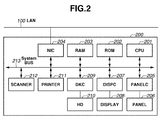
- Fig. 2 is a block diagram illustrating an example of a hardware configuration of the MFP 200.
- the MFP 200 includes a central processing unit (CPU) 201, a read only memory (ROM) 202, a random access memory (RAM) 203, a network interface card (NIC) 204, an external input controller (PANELC) 205, and various buttons and a touch panel (PANEL) 206.
- the MFP 200 further includes a display controller (DISPC) 207, a display (DISPLAY, display unit) 208, a disk controller (DKC) 209, a hard disk (HD) 210, a printer unit (PRINTER) 211, and a scanner unit (SCANNER) 212.
- CPU central processing unit
- ROM read only memory
- RAM random access memory
- NIC network interface card
- PANELC external input controller
- PANEL various buttons and a touch panel
- the MFP 200 further includes a display controller (DISPC) 207, a display (DISPLAY, display unit) 208, a disk controller (DKC) 209, a hard disk (HD)
- the CPU 201 is in charge of overall control of devices connected to a system bus 213, and execution of firmware modules stored in the ROM 202, or the HD 210 which is a mass storage device.
- firmware modules there are at least two modules. Updating the firmware modules can be executed individually for each module.
- the CPU 201 performs the processing illustrated in the flowcharts that will be described later, based on the firmware modules as the control programs.
- the HD 210 may be also used as a space for temporarily storing an image.
- the RAM 203 functions as a main memory and a work area of the CPU 201.
- the single CPU 201 executes various programs, but a plurality of CPUs may execute those programs in collaboration with each other.
- the PANELC 205 controls an instruction input from the PANEL 206 provided to the MFP 200.
- the PANEL 206 includes various kinds of buttons, keys, a touch panel sheet, and the like, and constitutes an operation unit of the MFP 200.
- a DISPC 207 controls image drawing on the DISPLAY 208.
- the DISPLAY 208 is constituted by, for example, a liquid crystal display, and displays an operation screen of the MFP 200.
- the operation unit of the MFP 200 is constituted by the PANEL 206 and the DISPLAY 208.
- the NIC 204 is in charge of exchanges of data with another MFP, a file server (not illustrated), or the LDAP server 300 via the LAN 100.
- the PRINTER 211 forms an image on a recording sheet by the electrophotographic method.
- the SCANNER 212 reads an image printed on a recording sheet.
- the SCANNER 212 is equipped with a not-illustrated auto document feeder, and thereby can automatically read a plurality of documents.
- the MFP 200 is configured to perform the device authentication and the send authentication.
- the send authentication is an example of the function authentication.
- the device authentication is realized by storage of an authentication table containing department IDs and passwords in the HD 210 of the MFP 200, and a check of a department ID and a password input by a user against the table.
- the MFP 200 communicates with the LDAP server 300 via the LAN 100 to authenticate a user.
- a user authenticated by the device authentication is allowed to use the copy function and the print function of the MFP 200.
- a user authenticated by the send authentication is allowed to use the send function of the MFP 200.
- the authentication status is changed from an authenticated status to a unauthenticated status (logout status).
- This "predetermined time” is set to the MFP 200 in advance, and a timer (auto-logout timer) in the form of software counts this time.
- the auto-logout timer may be embodied in the form of hardware. In this case, when the auto-logout timer detects that the predetermined time has passed, an interrupt signal is issued to the CPU 201.
- Fig. 3 is a flowchart illustrating an example of send authentication processing and send destination selection processing in the present exemplary embodiment.
- the term "inherit authentication information” or the more simple term “inherit” is used to refer to utilization of authentication information (context) such as a username (or a user identification (ID)) and a password entered for the send authentication, for other authentication processing that is performed at a later time.
- authentication information context
- the term “inheritance authentication” is used to refer to use of authentication information used in prior authentication processing, for other authentication processing that is performed at a later time.
- the term “each-time” is used herein in such a manner that "each-time display” means a display of an input screen for entering authentication information at the time of authentication processing different from the send authentication that is performed after the send authentication to prompt a user to enter authentication information once more.
- each-time authentication is used to refer to requiring a user to enter authentication information for each authentication processing as mentioned above.
- the MFP 200 can even employ both the "each-time” method and the "inheritance” method.
- the MFP 200 displays a screen for entering authentication information when later authentication processing is performed. Then, the inherited authentication information is set (preset) on this displayed screen as an initial value thereof.
- a program required for execution of the send authentication processing and the send destination selection processing illustrated in the flowchart of Fig. 3 is stored in the HD 210 together with the other programs.
- the program stored in the HD 210 is developed into the RAM 203 when the power source of the MFP 200 is turned on. Then, authentication of a user by the device authentication enables the CPU 201 to carry out the flowchart of Fig. 3 .
- the processing of the flowcharts that will be described later is also developed into the RAM 203 and carried out by the CPU 201 in the same manner.
- step S3-001 the CPU 201 displays, on the DISPLAY 208, a screen prompting an input of a username and a password required for the send authentication.
- the CPU 201 receives the username and the password that the user enters by operating the PANEL 206, and waits a login request for the send authentication.
- the CPU 201 accesses the LDAP server 300 via the LAN 100. More specifically, the CPU 201 requests the authentication by sending the entered username and password to the LDAP server 300 with use of a predetermined protocol.
- the LDAP server 300 checks the received username and password, and returns the authentication result to the MFP 200. After the MFP 200 receives the authentication result from the LDAP server 300, the processing proceeds to step S3-002.
- step S3-002 the CPU 201 determines whether the authentication result of the send authentication received from the LDAP server 300 indicates that the user can be successfully authenticated. If the authentication result indicates that the user can be successfully authenticated (YES in step S3-002), the processing proceeds to step S3-003. If not (NO in step S3-002), a send authentication failure is displayed on the DISPLAY 208, and the processing returns to step S3-001.
- step S3-003 the CPU 201 acquires the directory information of the authenticated user from the LDAP server 300. More specifically, the CPU 201 requests a search for the homeDirectory property value of the authenticated user from the LDAP server 300, and acquires the search result. This process enables the CPU 201 to locate the home directory that is a storage area assigned to the authenticated user. After that, the CPU 201 stores the username and the password used in the send authentication, the Internet Protocol (IP) address of the LDAP server 300, the folder path to the home directory, and the like in the RAM 203 as a context 5000 in such a manner that these pieces of data are associated with one another.
- IP Internet Protocol
- Fig. 5 illustrates an example of a context 5000.
- the context 500 is an example in which a user is authenticated by the LDAP server 300 with use of the username "ikeda" and the password "password". Further, " ⁇ home ⁇ ikeda” is acquired as the homeDirectory property value.
- the context 5000 illustrated in Fig. 5 does not contain a server name in the property value.
- the IP address of the LDAP server 300 " ⁇ 192.168.0.1" is set as the IP address of the server where the home directory exists. This means that, in the example illustrated in Fig. 5 , the home directory of the authenticated user exists in the LDAP server 300.
- step S3-004 the CPU 201 displays, on the DISPLAY 208, a send operation screen, and buttons for an operation such as setting a reading resolution and switching between one-sided reading and two-sided reading. Then, the CPU 201 receives various kinds of settings for an image sending operation. Further, the CPU 201 receives an operation for setting a send destination. The detailed flow of the send destination setting will be described later.
- step S3-005 If authentication is necessary to access one or more set destinations, the CPU 201 performs the "each time” processing and the "inheritance" processing with respect to the authentication information (context). If the authentication information is inherited, the context 5000, which is obtained by performing the send authentication, is inherited. The details thereof will be described later. When all destinations are established, the processing proceeds to step S3-006.
- step S3-006 the SCANNER 212 reads an original document placed on the SCANNER 212 illustrated in Fig. 2 .
- the CPU 201 creates a send job by associating the read data with all of the established destinations, and inputs the send job into a queue for the send processing. Then, the processing proceeds to step S3-007.
- step S3-007 the CPU 201 checks the user's selection about whether the user wants to continue the destination setting processing. If the user selects to continue the destination setting processing (YES in step S3-007), the processing returns to step S3-004. If the user selects to end the destination setting processing to log out from the send authentication (NO in step S3-007), the processing proceeds to step S3-008.
- step S3-008 the CPU 201 discards (ends) the send authentication. More specifically, the CPU 201 deletes the context 5000 that is stored in the RAM 203 in step S3-003. Then, the present flowchart is ended.
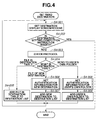
- Fig. 4 is a flowchart illustrating an example of the send destination setting processing performed in step S3-004.
- step S4-001 the CPU 201 displays a screen for setting a send destination on the PANEL 206, and receives the user's setting of send destination. At this time, the CPU 201 receives any of an instruction indicating that the user selects a specific destination from destinations displayed in a destination table, an instruction indicating that the user enters a new destination, and an instruction indicating that the user wants to "send data to the user's own folder". Then, the processing proceeds to step S4-002.
- step S4-002 the CPU 201 determines whether one or more destinations are set, and the setting and selection of send destination are completed. If the destination setting is completed (YES in step S4-002), the present flowchart is ended. More specifically, an operation screen for setting the destination is displayed on the PANEL 206, and this operation screen contains a "COMPETE" button for issuing an instruction to complete a destination setting operation. When the user presses the "COMPETE" button, the present flowchart is ended.
- step S4-002 If not (NO in step S4-002), the processing proceeds to step S4-003.
- step S4-003 the CPU 201 checks the protocol to be used for sending image data to the selected destination.
- the protocol include a protocol for a file transfer (SMB, FTP), and an electric mail (Simple Mail Transfer Protocol (SMTP)). If image data is sent to a shared folder as a destination with use of the SMB protocol, authentication may be required in order to access to the folder. Alternatively, if image data is sent to an FTP server as a destination with use of the FTP protocol, authentication may be required in order to access the FTP server. Further alternatively, if an electric mail with image data attached thereto is sent to an electric mail address as a destination, authentication may be required at the SMTP server.
- SMB file transfer
- SMTP Simple Mail Transfer Protocol
- the MFP 200 can offer the following two input methods as a method of inputting authentication information (username and password) for authentication required in order to send image data to a destination.
- One of them is a method of requesting a user to input authentication information each time the user selects a send destination (each-time authentication).
- the other is a method of using authentication information (context 5000) used in the send authentication (inheritance authentication).
- the MFP 200 is configured such that a user or an administrator can set an authentication method in advance as to whether to perform the each-time authentication or the inheritance authentication when a user selects a send authentication and is required to undergo authentication.
- the setting about the authentication method is stored in, for example, the HD 210 as setting information.
- step S4-004 the CPU 201 checks the type of the selected destination.
- step S4-005 If the selected destination is a destination registered in the destination table (FILE IN DESTINATION TABLE in step S4-004), the processing proceeds to step S4-005. If the selected destination is a destination that user newly enters (FILE OF NEW DESTINATION in step S4-004), the processing proceeds to step S4-006. If the selected destination is the folder of the user authenticated by the send authentication (SEND DATA TO USER' S OWN FOLDER in step S4-004), the processing proceeds to step S4-008.
- the destination table (address book) is a table in which send destinations supposed to be used by a user frequently are registered in advance, and is stored in the HD 210.
- the CPU 201 displays a list of the send destinations registered in the destination table on the DISPLAY 208, and can set the destination that the user specifies from the displayed list as a send destination.
- step S4-005 the CPU 201 adds one or more destinations selected from the destination table to a destination list, and then the processing returns to step S4-001.
- the details of the destination list will be described later.
- step S4-006 the CPU 201 sets the authentication information required for the authentication for sending image data to the newly specified file destination. The details of the inheritance processing will be described later. Then, the processing proceeds to step S4-007.
- step S4-007 the CPU 201 adds the newly specified file destination to the destination list, and then the processing returns to step S4-001.
- Step S4-008 is performed when the user decides in step S4-004 to send data to the user (which means "me” for this user) authenticated by the send authentication.
- the destination of the user authenticated by the send authentication is the folder of the home folder which is set to the user authenticated by the send authentication based on the directory information contained in the context 5000 acquired from the LDAP server 300. Therefore, the image data is sent to the home folder.
- the CPU 201 sets the authentication information to access this home folder. Then, the processing proceeds to step S4-009.
- step S4-009 the CPU 201 adds the destination of the authenticated user (the home folder of this user) to the destination list, and the processing returns to step S4-001.
- the destination of the authenticated user is not limited to the home folder of the user, and may be another type of destination information such as the electric mail address of the user.
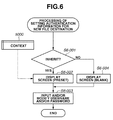
- Fig. 6 is a flowchart illustrating an example of the processing of setting authentication information for a new file destination performed in step S4-006 illustrated in Fig. 4 .
- step S6-001 the CPU 201 checks the setting of the authentication method applied to a new destination by referring to the authentication setting information stored in the HD 210. The details of the authentication setting information will be described later. If the setting is to inherit the authentication information for a new destination (YES in step S6-001), the processing proceeds to step S6-002, and if not (NO in step S6-001), the processing proceeds to step S6-004.
- step S6-002 the CPU 201 displays a screen prompting the user to enter authentication information such as a username and a password on the DISPLAY 208. Then, the CPU 201 presets the username and the password stored in the context 5000 into the input fields of username and password.
- Fig. 9A illustrates an example of the screen displayed on the DISPLAY 208 in step S6-002.
- Figs. 9A and 9B illustrate examples of the screen on which a shared folder under, for example, the SMB protocol, is set as a send destination.
- the destination is specified by the items "HOST NAME" and "FOLDER PATH" illustrated in Figs. 9A and 9B , to which, in the examples illustrated in Figs. 9A and 9B , the user is supposed to enter a new destination through a manual operation.
- the items "USERNAME" and "PASSWORD" are inherited from the context 5000 illustrated in Fig. 5 and preset.
- the true password stored in context 5000 is replaced with dummy characters (for example, the character "*"), but actually, internal processing presets the true password stored in the context 5000.
- dummy characters for example, the character "*"
- user's operation of setting the authentication information can be simplified by presetting the authentication information used in the send authentication as illustrated in Fig. 9A .
- step S6-004 the CPU 201 displays, on the DISPLAY 208, a screen prompting the user to enter the authentication information such as a username and a password.
- the displayed screen contains blank "USERNAME” and "PASSWORD" input fields as illustrated in Fig. 9B .
- the user has to enter data to the respective input fields through a manual operation.
- step S6-003 the CPU 201 receives the user's input and/or modifications of host name, folder path, username, and/or password.
- input completion is notified by pressing of an OK button on the screen illustrated in Figs. 9A and 9B , the present flowchart is ended.
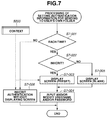
- Fig. 7 is a flowchart illustrating an example of the processing of setting authentication information for sending data to user's own folder performed in step S4-008 in Fig. 4 .
- step S7-001 and S7-002 the CPU 201 checks the setting of the authentication method for sending data to user' s own folder by referring to the authentication setting information stored in the HD 210. First, the CPU 201 checks in step S7-001 whether the each-time authentication is supposed to be performed. If the setting of performing the each-time authentication is selected for sending data to user' s own folder (YES in step S7-001), the processing proceeds to step S7-002, and if not (NO in step S7-001), the processing proceeds to step S7-006.
- step S7-002 the CPU 201 checks the setting about whether to perform "inheritance" of the authentication information. If the setting of inheriting the authentication information is selected for sending data to user's own folder (YES in step S7-002), the processing proceeds to step S7-003, and if not (NO in step S7-002), the processing proceeds to step S7-005.
- step S7-003 the CPU 201 displays a screen prompting the user to enter a username and a password on the DISPLAY 208.
- the username and password stored in the context 5000 are preset to the username and password input fields.
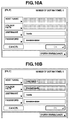
- Figs. 10A illustrates an example of the screen displayed in step S7-003.
- the inherited username and password in the context 5000 are input in the username and password input fields as initial values.
- the true password stored in context 5000 is replaced with dummy characters (for example, the character "*"), but actually, internal processing presets the true password in the context 5000.
- the input fields for the host name and folder path specifying the send destination are displayed in gray, which indicates that these fields are not to be filled and cannot be edited.
- the values of server and folder path stored in the context 5000 illustrated in Fig. 5 are used as the host name and the folder path.
- Fig. 10B illustrates another example of the screen displayed in step S7-003.
- the screen illustrated in Fig. 10B is the same as the screen illustrated in Fig. 10A , except for the host name and folder path input fields of Fig. 10B that are respectively filled with the values of server name and folder path stored in the context 5000, and are displayed in gray indicating that these fields cannot be edited.
- step S7-005 the CPU 201 displays a screen prompting the user to enter a username and a password on the DISPLAY 208.
- the CPU 201 displays the same screen as the screen illustrated in Fig. 10A , except that the screen this time contains blank username and password input fields. Then, the processing proceeds to step S7-004.
- step S7-004 the CPU 201 receives the user's input and/or modifications of the username and/or password. Then, when input completion is notified by pressing of the OK button illustrated in Figs. 10A and 10B , the present flowchart is ended.
- step S7-001 determines in step S7-001 that the setting of not displaying the each-time screen is selected for sending data to user's own folder (NO in step S7-001)
- the processing proceeds to step S7-006.
- step S7-006 without displaying a screen such as the ones illustrated in Figs. 10A and 10B , the send destination and the authentication information are set by inheriting the server, the folder path, the username, and the password stored in the context 5000 illustrated in Fig. 5 .
- Fig. 13 illustrates an example of the destination list.
- the destination list 13 is a list storing destinations that are each determined as a send destination in image sending performed by the MFP 200.
- a destination is added to the destination list 13 in steps S4-005, S4-007, and S4-009 illustrated in Fig. 4 .
- Fig. 13 illustrates, by way of example, the destination list 13 in which the destinations of Nos. 001 and 002 in the destination table are added to idx 1 and 2 in step S4-005. Further, this destination list 13 indicates that a new destination having the network folder path " ⁇ share ⁇ scan" is added to idx 4 in step S4-007. Further, this destination list 13 indicates that the destination for sending a file to the user's own folder is added to idx 3 based on the data in the context 5000 illustrated in Fig. 5 in step S4-009.
- Fig. 8 is a flowchart illustrating an example of the processing of setting authentication information for a destination selected from the destination table, which is performed in step S3-005.
- step S8-001 the CPU 201 checks the destination type in the destination list 13, starting from the first destination (idx 1). If the destination type is the destination table (FILE IN DESTINATION TABLE in step S8-001), the processing proceeds to step S8-002, and if not (OTHERS in step S8-001), the processing proceeds to step S8-008.
- step S8-002 and S8-003 the CPU 201 checks the setting of the authentication method for a destination selected from the destination table by referring to the authentication setting information stored in the HD 210. If the setting of displaying the each-time screen is selected for a destination from the destination table (YES in step S8-002), the processing proceeds to step S8-003, and if not (NO in step S8-002), the processing proceeds to step S8-007.
- step S8-003 the CPU 201 checks the setting about whether to inherit the authentication information used in the send authentication as the authentication method for a destination selected from the destination table, by referring to the authentication setting information. If the setting of inheriting the authentication information is selected for a destination from the destination table (YES in step S8-003), the processing proceeds to step S8-004, and if not (NO in step S8-003), the processing proceeds to step S8-006.
- step S8-004 the CPU 201 displays a screen prompting the user to enter a username and a password on the DISPLAY 208, and presets the username and the password stored in the context 5000 illustrated in Fig. 5 to the username and password input fields.
- Fig. 11A illustrates an example of the screen displayed on the DISPLAY 208 in step S8-004.
- the username stored in the context 5000 is preset to the username field.
- the true password stored in context 5000 is replaced with dummy characters (for example, the character "*"), but actually, internal processing presets the true password in the context 5000.
- step S8-006 the CPU 201 displays a screen prompting the user to enter authentication information such as a username and a password on the DISPLAY 208.
- the CPU 201 displays a screen containing blank "USERNAME” and "PASSWORD” input fields, as illustrated in Fig. 11B . In this case, the user has to enter data into the respective input fields through a manual operation.
- step S8-005 the CPU 201 receives the user's inputs and/or modifications of username and/or password. Then, when input completion is notified by pressing of the OK button illustrated in Figs. 11A and 11B , the processing proceeds to step S8-008.
- step S8-002 If the CPU determines in step S8-002 that the setting of not displaying the each-time screen is selected for a destination from the destination table (NO in step S8-002), the processing proceeds to step S8-007.
- step S8-007 the CPU 201 does not display the screen as illustrated in Figs. 11A and 11B , and uses the username and the password registered in the destination table without any modification. Then, the processing proceeds to step S8-008.
- step S8-008 the CPU 201 checks whether the currently processed destination is the last idx in the destination list. If the currently processed destination is the last idx in the destination list (YES in step S8-008), the present flowchart is ended. If not (NO in step S8-008), the idx is incremented by one, and the processing returns to S8-001.
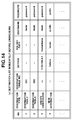
- Fig. 14 illustrates an example 14 of the destination list after completion of setting of the authentication information for the destinations in the destination table by the processing illustrated in the flowchart of Fig. 8 (immediately before the destination list is put in the send processing queue as a job).
- the usernames and passwords stored in the context 5000 are set to the usernames and passwords of idx1 and idx2 in Fig. 14 .
- This example indicates that the setting of displaying the each-time screen is selected (YES in step S8-002) and the setting of inheriting the authentication information for the send authentication is selected (YES in step S8-003) for a destination from the destination table.
- Fig. 12 illustrates an example of an authentication method setting screen to be displayed on the DISPLAY 208 so that a user or administrator can set the authentication setting information.
- a SETTING CHANGE button 1202 is a button for selecting the settings required for SMTP authentication.
- the DISPLAY 208 shows a not-illustrated screen for selecting detailed settings for SMTP authentication. This screen allows a user to enable/disable SMTP authentication, and set authentication information such as a username and a password if SMTP authentication is enabled.
- Radio buttons 1204 to 1208 are buttons allowing selections about the authentication method when a user sends image data via an electric mail.
- the radio button 1204 is a button for a selection of inheriting the authentication information (context 5000) used in the send authentication, and presetting the authentication information used in the send authentication on the screen for inputting authentication information, when a user sends image data via an electric mail.
- the radio button 1206 is a button for a selection of not inheriting the authentication information used in the send authentication, and displaying blank fields for inputting authentication information on the screen for inputting the authentication information, when a user sends image data via an electric mail.
- the radio button 1208 is a button for a selection of using the authentication information unique to the apparatus, i.e., the username and the password for SMTP authentication set by pressing of the SETTING CHANGE button 1202, and not displaying a screen for inputting authentication information, when a user sends image data via an electric mail.
- Radio buttons 1210 to 1224 are buttons allowing selections about the authentication methods when a user sends image data with use of the SMB protocol or the FTP protocol. There are prepared radio buttons for setting the authentication methods in such a manner that the authentication methods are associated with the destination setting methods when a user sends image data with use of the SMB protocol or the FTP protocol.
- the radio button 1210 is a button for a selection of inheriting the authentication information (context 5000) used in the send authentication, and presetting the authentication information used in the send authentication on the screen for inputting authentication information, when the destination to which image data is sent is a new destination that is not selected from the destination table.
- the radio button 1212 is a button for a selection of not inheriting the authentication information used in the send authentication, and displaying blank fields for inputting authentication information on the screen for inputting the authentication information, when the destination to which image data is sent is a new destination.
- the radio button 1214 is a button for a selection of inheriting the authentication information (context 5000) used in the send authentication, and presetting the authentication information used in the send authentication on the screen for inputting authentication information, when a user sends image data to a destination selected from the destination table.
- the radio button 1216 is a button for a selection of not inheriting the authentication information used in the send authentication, and displaying blank fields for inputting authentication information on the screen for inputting the authentication information, when a user sends image data to a destination selected from the destination table.
- the radio button 1218 is a button for a selection of using the authentication information registered in the destination table, and not displaying a screen for inputting authentication information, when a user sends image data to a destination selected from the destination table.
- the radio button 1220 is a button for a selection of inheriting the authentication information (context 5000) used in the send authentication, and presetting the authentication information used in the send authentication on the screen for inputting authentication information, when a user sends image data to the user' s own folder.
- the radio button 1222 is a button for a selection of not inheriting the authentication information used in the send authentication, and displaying blank fields for inputting authentication information on the screen for inputting the authentication information, when a user sends image data to the user' s own folder.
- the radio button 1224 is a button for a selection of using the authentication information (context 5000) used in the send authentication, and not displaying the screen for inputting authentication information, when a user sends image data to the user's own folder.
- the MFP 200 is configured so as to enable a user to set a desired authentication method for each of the send protocols that the MFP 200 supports (SMTP, SMB / FTP in the present exemplary embodiment), and further, for each of the destination selection methods.
- the selections set on the screen illustrated in Fig. 12 are stored in the HD 210 as the authentication setting information by pressing of a not-illustrated OK button.
- the authentication setting information set on the setting screen illustrated in Fig. 12 and stored in the HD 210 is referred to when the CPU 201 makes a determination in step S6-001 in Fig. 6 , steps S7-001 and S7-002 in Fig. 7 , and steps S8-002 and S8-003 in Fig. 8 .
- the radio buttons grouped by "new destination”, “destination table”, and “send data to user's own folder" are controlled in such a manner that only one button can be selected for each group.
- the MFP 200 enables a user to arbitrarily switch whether to inherit the authentication information and whether to display the authentication screen according to a kind of selected destination and a selected destination setting method.
- the present exemplary embodiment has been described, focusing on the send authentication by the LDAP server 300 as one example of the function authentication.
- the present exemplary embodiment is not limited to the function authentication.
- the authentication information used in the device authentication may be used as the above-mentioned context 5000.
- the send authentication may be performed by the MFP 200, instead of the LDAP server 300.
- such a configuration can be realized by storing a table containing usernames and passwords in the HD 210 of the MFP 200, and checking a username and a password entered on an authentication screen against this table.
- the present exemplary embodiment is configured in such a manner that the each-time processing and the inheritance processing for a file destination in the destination table is performed after establishment of a destination selection.
- the each-time processing and the inheritance processing may not be performed after destination establishment.
- steps S8-001 and S8-008 may be removed from the processing illustrated in Fig. 8 and the each-time processing and the inheritance processing may be performed before step S4-005 in Fig. 4 .
- the same effects can be achieved even if the destination list illustrated in Figs. 13 and 14 does not contain the item of destination type.
- step S8-001 step of determining whether the destination is "send data to user's own folder"
- the present exemplary embodiment is configured in such a manner that the authentication method can be selected for each of the three destination setting methods, i.e., "new destination", "destination table", and "send data to user's own folder".
- the MFP 200 may be configured in such a manner that the authentication method can be also set for each of those destination setting methods.
- it is possible to offer more flexible combinations of "each-time” and "inheritance" to a user.
- each-time and “inheritance” is applied to the authentication to access a folder in a file transfer.
- “each-time” and “inheritance” may be applied to another authentication that is not folder authentication.
- “each-time” and “inheritance” can be applied to SMTP authentication for sending an electronic mail. More specifically, the same effects can be obtained by individually setting "each-time” and “inheritance” to SMTP authentication in normal electric mail sending in which a user selects a destination, and to SMTP authentication when a send result is notified to a specific destination by an electric mail. Further, "each-time” and “inheritance” about SMTP authentication may be switched according to electronic mail or I-Fax.
- aspects of the present invention can also be realized by a computer of a system or apparatus (or devices such as a CPU or MPU) that reads out and executes a program recorded on a memory device to perform the functions of the above-described embodiment(s), and by a method, the steps of which are performed by a computer of a system or apparatus by, for example, reading out and executing a program recorded on a memory device to perform the functions of the above-described embodiment(s).
- the program is provided to the computer for example via a network or from a recording medium of various types serving as the memory device (e.g., computer-readable medium).
Landscapes
- Engineering & Computer Science (AREA)
- Chemical & Material Sciences (AREA)
- Theoretical Computer Science (AREA)
- Chemical Kinetics & Catalysis (AREA)
- General Chemical & Material Sciences (AREA)
- Electrochemistry (AREA)
- General Physics & Mathematics (AREA)
- Physics & Mathematics (AREA)
- General Engineering & Computer Science (AREA)
- Inorganic Chemistry (AREA)
- Human Computer Interaction (AREA)
- Computer Security & Cryptography (AREA)
- Materials Engineering (AREA)
- Manufacturing & Machinery (AREA)
- Software Systems (AREA)
- Computer Hardware Design (AREA)
- Health & Medical Sciences (AREA)
- Bioethics (AREA)
- General Health & Medical Sciences (AREA)
- Condensed Matter Physics & Semiconductors (AREA)
- Facsimiles In General (AREA)
- Facsimile Transmission Control (AREA)
- Information Transfer Between Computers (AREA)
Abstract
Description
- The present invention relates to an image sending apparatus requiring authentication for use of the apparatus and a function provided therein, and an authentication method in the image sending apparatus.
- There is known an image sending apparatus allowing an authenticated user to use a specific function provided in the apparatus such as the send function or the print function. Hereinafter, the term "function authentication" is used to refer to user authentication performed to allow or limit use of a specific function provided in an apparatus.
- Further, some image sending apparatuses have the function of sending image data to a network folder (shared folder) with use of the Server Message Block (SMB) protocol or another protocol. When a user uses this function of an image sending apparatus, authentication to access a specified folder may be required of the user, depending on the setting of a file server that offers the network folder.
- On the other hand, for example, there is known the Single Sign-On (hereinafter referred to as "SSO") technique used in a personal computer, as a technique for enabling authentication required at a login to use a personal computer, to be automatically inherited to authentication required to access a folder. Use of this technique also enables the device authentication or the function authentication in an image sending apparatus to be inherited to authentication for a specified folder.
- Further, even without use of the SSO technique, it is possible to apparently emulate the SSO technique by applying the technique for presetting a username and password used in prior authentication, to a screen of later authentication, as discussed in Japanese Patent Application Laid-Open No.
2003-186849 - In most cases, the SSO technique is interactively used at a personal computer. If a user is successfully authenticated in authentication processing to log in a personal computer but fails to be authenticated in later authentication to access a folder, the personal computer displays an authentication screen prompting the user to enter a username and password at this time. Then, the user can enter a correct username and password to access the folder when the screen is displayed. On the other hand, when performing the send function at an image sending apparatus, first, a user sets destinations and authentication information for each destination, and then later, the personal computer performs authentication processing and send processing for each destination. Therefore, it is highly likely that a user does not stay in front of an image sending apparatus when authentication fails in the send processing that is performed at a later time. Obviously, it is impossible to enter correct authentication information without presence of the user in front of the image sending apparatus.
- Further, the above-mentioned application of the technique discussed in Japanese Patent Application Laid-Open No.
2003-186849 - Further, it is possible that a folder shared by all users is registered in an address book together with a public username and a password, and a system administrator wants this registered information to be just used as it is for the send authentication when that folder is selected as a send destination. Conversely, another possible situation that, although a shared folder is registered in an address book, a system administrator wants a user to access that folder by using the username specified in the function authentication for the send function. In this way, uniformly setting whether to inherit authentication does not necessarily improve efficiency of user authentication.
- The image sending apparatus according to the present invention provides an image sending apparatus enabling settings about whether to inherit authentication information for image sending and whether to display a screen for inputting authentication information according to a kind of destination or a destination setting method. According to the image sending apparatus of the present invention, it is possible to select settings about whether to inherit authentication information for image sending and whether to display a screen for inputting authentication information according to a kind of destination or a destination setting method.
- The present invention in its first aspect provides an image sending apparatus as specified in
claims 1 to 6. - Further features and aspects of the present invention will become apparent from the following detailed description of exemplary embodiments with reference to the attached drawings.
- The accompanying drawings, which are incorporated in and constitute a part of the specification, illustrate exemplary embodiments, features, and aspects of the invention and, together with the description, serve to explain the principles of the invention.
-
Fig. 1 illustrates an example of a system configuration including an image sending apparatus (multi function peripheral (MFP)). -
Fig. 2 is a block diagram illustrating an example of a hardware configuration of the MFP. -
Fig. 3 is a flowchart illustrating an example of send authentication processing and send destination setting processing in a first exemplary embodiment. -
Fig. 4 is a flowchart illustrating an example of the send destination setting processing. -
Fig. 5 illustrates an example of a context. -
Fig. 6 is a flowchart illustrating an example of processing of setting authentication information for a new file destination. -
Fig. 7 is a flowchart illustrating an example of processing of setting authentication information to send data to user's own folder. -
Fig. 8 is a flowchart illustrating each-time processing and inheritance processing for a file destination in a destination table. -
Figs 9A and 9B illustrate examples of a screen prompting a user to enter a username and a password for sending data to a new destination. -
Figs 10A and 10B illustrate examples of a screen prompting a user to enter a username and a password for sending data to the user's own folder. -
Figs 11A and 11B illustrate examples of a screen prompting a user to enter a username and a password for sending data to a destination selected from the destination table. -
Fig. 12 illustrates an example of a setting screen for setting authentication setting information. -
Fig. 13 illustrates an example of a destination list. -
Fig. 14 illustrates an example of the destination list after completion of setting of authentication information. - Various exemplary embodiments, features, and aspects of the invention will be described in detail below with reference to the drawings.
-
Fig. 1 illustrates an example of a system configuration including an image sending apparatus (MFP) according to a first exemplary embodiment. - A multi function peripheral (MFP) 200, which is an example of an image sending apparatus, is connected to a Lightweight Directory Access Protocol (LDAP)
server 300 via a local area network (LAN) 100. The MFP 200 is a multi-function image processing apparatus provided with multiple functions such as the copy function, the print function, and the image send function. The image send function of theMFP 200 is a function of sending image data obtained by, for example, scanning an original document to a destination. The image send function can send image data by a plurality of kinds of sending methods. The image send function of theMFP 200 according to the present exemplary embodiment can send image data via an electronic mail, a file transfer under SMB, and a file transfer under File Transfer Protocol (FTP), as the kinds of sending methods. - The MFP 200 realizes user authentication when a user uses the send function, which will be described later, by communicating with the LDAP
server 300 under a predetermined protocol. This protocol is a known technique, and therefore will not be described in detail herein. The LDAPserver 300 is an example of an authentication server. Alternatively, the MFP 200 may be equipped with a user authentication means. In this case, the LDAPserver 300 may be omitted. -
Fig. 2 is a block diagram illustrating an example of a hardware configuration of theMFP 200. - The
MFP 200 includes a central processing unit (CPU) 201, a read only memory (ROM) 202, a random access memory (RAM) 203, a network interface card (NIC) 204, an external input controller (PANELC) 205, and various buttons and a touch panel (PANEL) 206. The MFP 200 further includes a display controller (DISPC) 207, a display (DISPLAY, display unit) 208, a disk controller (DKC) 209, a hard disk (HD) 210, a printer unit (PRINTER) 211, and a scanner unit (SCANNER) 212. - The
CPU 201 is in charge of overall control of devices connected to a system bus 213, and execution of firmware modules stored in theROM 202, or theHD 210 which is a mass storage device. As the firmware modules, there are at least two modules. Updating the firmware modules can be executed individually for each module. - Further, the
CPU 201 performs the processing illustrated in the flowcharts that will be described later, based on the firmware modules as the control programs. In some cases, theHD 210 may be also used as a space for temporarily storing an image. TheRAM 203 functions as a main memory and a work area of theCPU 201. In the present exemplary embodiment, thesingle CPU 201 executes various programs, but a plurality of CPUs may execute those programs in collaboration with each other. - The
PANELC 205 controls an instruction input from thePANEL 206 provided to theMFP 200. ThePANEL 206 includes various kinds of buttons, keys, a touch panel sheet, and the like, and constitutes an operation unit of theMFP 200. ADISPC 207 controls image drawing on theDISPLAY 208. TheDISPLAY 208 is constituted by, for example, a liquid crystal display, and displays an operation screen of theMFP 200. The operation unit of theMFP 200 is constituted by thePANEL 206 and theDISPLAY 208. - The
NIC 204 is in charge of exchanges of data with another MFP, a file server (not illustrated), or theLDAP server 300 via theLAN 100. ThePRINTER 211 forms an image on a recording sheet by the electrophotographic method. TheSCANNER 212 reads an image printed on a recording sheet. TheSCANNER 212 is equipped with a not-illustrated auto document feeder, and thereby can automatically read a plurality of documents. - The
MFP 200 according to the present exemplary embodiment is configured to perform the device authentication and the send authentication. The send authentication is an example of the function authentication. The device authentication is realized by storage of an authentication table containing department IDs and passwords in theHD 210 of theMFP 200, and a check of a department ID and a password input by a user against the table. For the send authentication, theMFP 200 communicates with theLDAP server 300 via theLAN 100 to authenticate a user. In the present exemplary embodiment, a user authenticated by the device authentication is allowed to use the copy function and the print function of theMFP 200. Further, a user authenticated by the send authentication is allowed to use the send function of theMFP 200. In each of the device authentication and the send authentication, if a user does not operate thePANEL 206 for a predetermined time after the user is authenticated (after the user logs in), the authentication status is changed from an authenticated status to a unauthenticated status (logout status). This "predetermined time" is set to theMFP 200 in advance, and a timer (auto-logout timer) in the form of software counts this time. The auto-logout timer may be embodied in the form of hardware. In this case, when the auto-logout timer detects that the predetermined time has passed, an interrupt signal is issued to theCPU 201. -
Fig. 3 is a flowchart illustrating an example of send authentication processing and send destination selection processing in the present exemplary embodiment. - In the present exemplary embodiment, the term "inherit authentication information" or the more simple term "inherit" is used to refer to utilization of authentication information (context) such as a username (or a user identification (ID)) and a password entered for the send authentication, for other authentication processing that is performed at a later time. In this way, the term "inheritance authentication" is used to refer to use of authentication information used in prior authentication processing, for other authentication processing that is performed at a later time. On the other hand, the term "each-time" is used herein in such a manner that "each-time display" means a display of an input screen for entering authentication information at the time of authentication processing different from the send authentication that is performed after the send authentication to prompt a user to enter authentication information once more. In this regard, in the present exemplary embodiment, the term "each-time authentication" is used to refer to requiring a user to enter authentication information for each authentication processing as mentioned above. The
MFP 200 can even employ both the "each-time" method and the "inheritance" method. In this case, theMFP 200 displays a screen for entering authentication information when later authentication processing is performed. Then, the inherited authentication information is set (preset) on this displayed screen as an initial value thereof. - A program required for execution of the send authentication processing and the send destination selection processing illustrated in the flowchart of
Fig. 3 is stored in theHD 210 together with the other programs. The program stored in theHD 210 is developed into theRAM 203 when the power source of theMFP 200 is turned on. Then, authentication of a user by the device authentication enables theCPU 201 to carry out the flowchart ofFig. 3 . The processing of the flowcharts that will be described later is also developed into theRAM 203 and carried out by theCPU 201 in the same manner. - First, in step S3-001, the
CPU 201 displays, on theDISPLAY 208, a screen prompting an input of a username and a password required for the send authentication. Next, theCPU 201 receives the username and the password that the user enters by operating thePANEL 206, and waits a login request for the send authentication. Upon a reception of the login request, theCPU 201 accesses theLDAP server 300 via theLAN 100. More specifically, theCPU 201 requests the authentication by sending the entered username and password to theLDAP server 300 with use of a predetermined protocol. Upon a reception of the request, theLDAP server 300 checks the received username and password, and returns the authentication result to theMFP 200. After theMFP 200 receives the authentication result from theLDAP server 300, the processing proceeds to step S3-002. - In step S3-002, the
CPU 201 determines whether the authentication result of the send authentication received from theLDAP server 300 indicates that the user can be successfully authenticated. If the authentication result indicates that the user can be successfully authenticated (YES in step S3-002), the processing proceeds to step S3-003. If not (NO in step S3-002), a send authentication failure is displayed on theDISPLAY 208, and the processing returns to step S3-001. - In step S3-003, the
CPU 201 acquires the directory information of the authenticated user from theLDAP server 300. More specifically, theCPU 201 requests a search for the homeDirectory property value of the authenticated user from theLDAP server 300, and acquires the search result. This process enables theCPU 201 to locate the home directory that is a storage area assigned to the authenticated user. After that, theCPU 201 stores the username and the password used in the send authentication, the Internet Protocol (IP) address of theLDAP server 300, the folder path to the home directory, and the like in theRAM 203 as acontext 5000 in such a manner that these pieces of data are associated with one another. -
Fig. 5 illustrates an example of acontext 5000. The context 500 is an example in which a user is authenticated by theLDAP server 300 with use of the username "ikeda" and the password "password". Further, "\home\ikeda" is acquired as the homeDirectory property value. Thecontext 5000 illustrated inFig. 5 does not contain a server name in the property value. In this case, the IP address of theLDAP server 300 "\\192.168.0.1" is set as the IP address of the server where the home directory exists. This means that, in the example illustrated inFig. 5 , the home directory of the authenticated user exists in theLDAP server 300. - Next, the processing proceeds to step S3-004. In step S3-004, the
CPU 201 displays, on theDISPLAY 208, a send operation screen, and buttons for an operation such as setting a reading resolution and switching between one-sided reading and two-sided reading. Then, theCPU 201 receives various kinds of settings for an image sending operation. Further, theCPU 201 receives an operation for setting a send destination. The detailed flow of the send destination setting will be described later. - After completion of the send destination setting, the processing proceeds to step S3-005. If authentication is necessary to access one or more set destinations, the
CPU 201 performs the "each time" processing and the "inheritance" processing with respect to the authentication information (context). If the authentication information is inherited, thecontext 5000, which is obtained by performing the send authentication, is inherited. The details thereof will be described later. When all destinations are established, the processing proceeds to step S3-006. - In step S3-006, the
SCANNER 212 reads an original document placed on theSCANNER 212 illustrated inFig. 2 . After completion of the reading, theCPU 201 creates a send job by associating the read data with all of the established destinations, and inputs the send job into a queue for the send processing. Then, the processing proceeds to step S3-007. - In step S3-007, the
CPU 201 checks the user's selection about whether the user wants to continue the destination setting processing. If the user selects to continue the destination setting processing (YES in step S3-007), the processing returns to step S3-004. If the user selects to end the destination setting processing to log out from the send authentication (NO in step S3-007), the processing proceeds to step S3-008. - In step S3-008, the
CPU 201 discards (ends) the send authentication. More specifically, theCPU 201 deletes thecontext 5000 that is stored in theRAM 203 in step S3-003. Then, the present flowchart is ended. -
Fig. 4 is a flowchart illustrating an example of the send destination setting processing performed in step S3-004. - In step S4-001, the
CPU 201 displays a screen for setting a send destination on thePANEL 206, and receives the user's setting of send destination. At this time, theCPU 201 receives any of an instruction indicating that the user selects a specific destination from destinations displayed in a destination table, an instruction indicating that the user enters a new destination, and an instruction indicating that the user wants to "send data to the user's own folder". Then, the processing proceeds to step S4-002. - In step S4-002, the
CPU 201 determines whether one or more destinations are set, and the setting and selection of send destination are completed. If the destination setting is completed (YES in step S4-002), the present flowchart is ended. More specifically, an operation screen for setting the destination is displayed on thePANEL 206, and this operation screen contains a "COMPETE" button for issuing an instruction to complete a destination setting operation. When the user presses the "COMPETE" button, the present flowchart is ended. - If not (NO in step S4-002), the processing proceeds to step S4-003.
- In step S4-003, the
CPU 201 checks the protocol to be used for sending image data to the selected destination. Examples of the protocol include a protocol for a file transfer (SMB, FTP), and an electric mail (Simple Mail Transfer Protocol (SMTP)). If image data is sent to a shared folder as a destination with use of the SMB protocol, authentication may be required in order to access to the folder. Alternatively, if image data is sent to an FTP server as a destination with use of the FTP protocol, authentication may be required in order to access the FTP server. Further alternatively, if an electric mail with image data attached thereto is sent to an electric mail address as a destination, authentication may be required at the SMTP server. TheMFP 200 according to the present exemplary embodiment can offer the following two input methods as a method of inputting authentication information (username and password) for authentication required in order to send image data to a destination. One of them is a method of requesting a user to input authentication information each time the user selects a send destination (each-time authentication). The other is a method of using authentication information (context 5000) used in the send authentication (inheritance authentication). TheMFP 200 is configured such that a user or an administrator can set an authentication method in advance as to whether to perform the each-time authentication or the inheritance authentication when a user selects a send authentication and is required to undergo authentication. The setting about the authentication method is stored in, for example, theHD 210 as setting information. - Next, the processing proceeds to step S4-004 in which the
CPU 201 checks the type of the selected destination. - If the selected destination is a destination registered in the destination table (FILE IN DESTINATION TABLE in step S4-004), the processing proceeds to step S4-005. If the selected destination is a destination that user newly enters (FILE OF NEW DESTINATION in step S4-004), the processing proceeds to step S4-006. If the selected destination is the folder of the user authenticated by the send authentication (SEND DATA TO USER' S OWN FOLDER in step S4-004), the processing proceeds to step S4-008. The destination table (address book) is a table in which send destinations supposed to be used by a user frequently are registered in advance, and is stored in the
HD 210. TheCPU 201 displays a list of the send destinations registered in the destination table on theDISPLAY 208, and can set the destination that the user specifies from the displayed list as a send destination. - In step S4-005, the
CPU 201 adds one or more destinations selected from the destination table to a destination list, and then the processing returns to step S4-001. The details of the destination list will be described later. - In step S4-006, the
CPU 201 sets the authentication information required for the authentication for sending image data to the newly specified file destination. The details of the inheritance processing will be described later. Then, the processing proceeds to step S4-007. - In step S4-007, the
CPU 201 adds the newly specified file destination to the destination list, and then the processing returns to step S4-001. - Step S4-008 is performed when the user decides in step S4-004 to send data to the user (which means "me" for this user) authenticated by the send authentication. The destination of the user authenticated by the send authentication is the folder of the home folder which is set to the user authenticated by the send authentication based on the directory information contained in the
context 5000 acquired from theLDAP server 300. Therefore, the image data is sent to the home folder. In step S4-008, theCPU 201 sets the authentication information to access this home folder. Then, the processing proceeds to step S4-009. - In step S4-009, the
CPU 201 adds the destination of the authenticated user (the home folder of this user) to the destination list, and the processing returns to step S4-001. - The destination of the authenticated user is not limited to the home folder of the user, and may be another type of destination information such as the electric mail address of the user.
-
Fig. 6 is a flowchart illustrating an example of the processing of setting authentication information for a new file destination performed in step S4-006 illustrated inFig. 4 . - In step S6-001, the
CPU 201 checks the setting of the authentication method applied to a new destination by referring to the authentication setting information stored in theHD 210. The details of the authentication setting information will be described later. If the setting is to inherit the authentication information for a new destination (YES in step S6-001), the processing proceeds to step S6-002, and if not (NO in step S6-001), the processing proceeds to step S6-004. - In step S6-002, the
CPU 201 displays a screen prompting the user to enter authentication information such as a username and a password on theDISPLAY 208. Then, theCPU 201 presets the username and the password stored in thecontext 5000 into the input fields of username and password. -
Fig. 9A illustrates an example of the screen displayed on theDISPLAY 208 in step S6-002.Figs. 9A and 9B illustrate examples of the screen on which a shared folder under, for example, the SMB protocol, is set as a send destination. The destination is specified by the items "HOST NAME" and "FOLDER PATH" illustrated inFigs. 9A and 9B , to which, in the examples illustrated inFigs. 9A and 9B , the user is supposed to enter a new destination through a manual operation. On the screen illustrated inFig. 9A , the items "USERNAME" and "PASSWORD" are inherited from thecontext 5000 illustrated inFig. 5 and preset. In the "PASSWORD" field on the screen, the true password stored incontext 5000 is replaced with dummy characters (for example, the character "*"), but actually, internal processing presets the true password stored in thecontext 5000. When the authentication to access the folder set as a new destination requires the same authentication information as the authentication information for the send authentication, user's operation of setting the authentication information can be simplified by presetting the authentication information used in the send authentication as illustrated inFig. 9A . - On the other hand, in step S6-004, the
CPU 201 displays, on theDISPLAY 208, a screen prompting the user to enter the authentication information such as a username and a password. In this case, since the authentication information is not inherited, the displayed screen contains blank "USERNAME" and "PASSWORD" input fields as illustrated inFig. 9B . In this case, the user has to enter data to the respective input fields through a manual operation. When the authentication to access the folder set as a new destination requires authentication information different from the authentication information for the send authentication, the authentication information for the send authentication does not have to be preset. - In step S6-003, the
CPU 201 receives the user's input and/or modifications of host name, folder path, username, and/or password. When input completion is notified by pressing of an OK button on the screen illustrated inFigs. 9A and 9B , the present flowchart is ended. -
Fig. 7 is a flowchart illustrating an example of the processing of setting authentication information for sending data to user's own folder performed in step S4-008 inFig. 4 . - In steps S7-001 and S7-002, the
CPU 201 checks the setting of the authentication method for sending data to user' s own folder by referring to the authentication setting information stored in theHD 210. First, theCPU 201 checks in step S7-001 whether the each-time authentication is supposed to be performed. If the setting of performing the each-time authentication is selected for sending data to user' s own folder (YES in step S7-001), the processing proceeds to step S7-002, and if not (NO in step S7-001), the processing proceeds to step S7-006. - In step S7-002, the
CPU 201 checks the setting about whether to perform "inheritance" of the authentication information. If the setting of inheriting the authentication information is selected for sending data to user's own folder (YES in step S7-002), the processing proceeds to step S7-003, and if not (NO in step S7-002), the processing proceeds to step S7-005. - In step S7-003, the
CPU 201 displays a screen prompting the user to enter a username and a password on theDISPLAY 208. The username and password stored in thecontext 5000 are preset to the username and password input fields. -
Figs. 10A illustrates an example of the screen displayed in step S7-003. On the screen illustrated inFig. 10A , the inherited username and password in thecontext 5000 are input in the username and password input fields as initial values. In the password field on the screen, the true password stored incontext 5000 is replaced with dummy characters (for example, the character "*"), but actually, internal processing presets the true password in thecontext 5000. On the screen illustrated inFig. 10A , the input fields for the host name and folder path specifying the send destination are displayed in gray, which indicates that these fields are not to be filled and cannot be edited. As internal processing, the values of server and folder path stored in thecontext 5000 illustrated inFig. 5 are used as the host name and the folder path. -
Fig. 10B illustrates another example of the screen displayed in step S7-003. The screen illustrated inFig. 10B is the same as the screen illustrated inFig. 10A , except for the host name and folder path input fields ofFig. 10B that are respectively filled with the values of server name and folder path stored in thecontext 5000, and are displayed in gray indicating that these fields cannot be edited. - On the other hand, in step S7-005, the
CPU 201 displays a screen prompting the user to enter a username and a password on theDISPLAY 208. In this case, since the authentication information is not inherited from the send authentication, theCPU 201 displays the same screen as the screen illustrated inFig. 10A , except that the screen this time contains blank username and password input fields. Then, the processing proceeds to step S7-004. - In step S7-004, the
CPU 201 receives the user's input and/or modifications of the username and/or password. Then, when input completion is notified by pressing of the OK button illustrated inFigs. 10A and 10B , the present flowchart is ended. - If the
CPU 201 determines in step S7-001 that the setting of not displaying the each-time screen is selected for sending data to user's own folder (NO in step S7-001), the processing proceeds to step S7-006. In step S7-006, without displaying a screen such as the ones illustrated inFigs. 10A and 10B , the send destination and the authentication information are set by inheriting the server, the folder path, the username, and the password stored in thecontext 5000 illustrated inFig. 5 . -
Fig. 13 illustrates an example of the destination list. Thedestination list 13 is a list storing destinations that are each determined as a send destination in image sending performed by theMFP 200. A destination is added to thedestination list 13 in steps S4-005, S4-007, and S4-009 illustrated inFig. 4 .Fig. 13 illustrates, by way of example, thedestination list 13 in which the destinations of Nos. 001 and 002 in the destination table are added toidx destination list 13 indicates that a new destination having the network folder path "\\share\scan" is added toidx 4 in step S4-007. Further, thisdestination list 13 indicates that the destination for sending a file to the user's own folder is added toidx 3 based on the data in thecontext 5000 illustrated inFig. 5 in step S4-009. -
Fig. 8 is a flowchart illustrating an example of the processing of setting authentication information for a destination selected from the destination table, which is performed in step S3-005. - In step S8-001, the
CPU 201 checks the destination type in thedestination list 13, starting from the first destination (idx 1). If the destination type is the destination table (FILE IN DESTINATION TABLE in step S8-001), the processing proceeds to step S8-002, and if not (OTHERS in step S8-001), the processing proceeds to step S8-008. - In steps S8-002 and S8-003, the
CPU 201 checks the setting of the authentication method for a destination selected from the destination table by referring to the authentication setting information stored in theHD 210. If the setting of displaying the each-time screen is selected for a destination from the destination table (YES in step S8-002), the processing proceeds to step S8-003, and if not (NO in step S8-002), the processing proceeds to step S8-007. - In step S8-003, the
CPU 201 checks the setting about whether to inherit the authentication information used in the send authentication as the authentication method for a destination selected from the destination table, by referring to the authentication setting information. If the setting of inheriting the authentication information is selected for a destination from the destination table (YES in step S8-003), the processing proceeds to step S8-004, and if not (NO in step S8-003), the processing proceeds to step S8-006. - In step S8-004, the
CPU 201 displays a screen prompting the user to enter a username and a password on theDISPLAY 208, and presets the username and the password stored in thecontext 5000 illustrated inFig. 5 to the username and password input fields. -
Fig. 11A illustrates an example of the screen displayed on theDISPLAY 208 in step S8-004. The username stored in thecontext 5000 is preset to the username field. Further, in the password field on the screen, the true password stored incontext 5000 is replaced with dummy characters (for example, the character "*"), but actually, internal processing presets the true password in thecontext 5000. - On the other hand, in step S8-006, the
CPU 201 displays a screen prompting the user to enter authentication information such as a username and a password on theDISPLAY 208. In this case, since the authentication information is not inherited, theCPU 201 displays a screen containing blank "USERNAME" and "PASSWORD" input fields, as illustrated inFig. 11B . In this case, the user has to enter data into the respective input fields through a manual operation. - In step S8-005, the
CPU 201 receives the user's inputs and/or modifications of username and/or password. Then, when input completion is notified by pressing of the OK button illustrated inFigs. 11A and 11B , the processing proceeds to step S8-008. - If the CPU determines in step S8-002 that the setting of not displaying the each-time screen is selected for a destination from the destination table (NO in step S8-002), the processing proceeds to step S8-007. In step S8-007, the
CPU 201 does not display the screen as illustrated inFigs. 11A and 11B , and uses the username and the password registered in the destination table without any modification. Then, the processing proceeds to step S8-008. - In step S8-008, the
CPU 201 checks whether the currently processed destination is the last idx in the destination list. If the currently processed destination is the last idx in the destination list (YES in step S8-008), the present flowchart is ended. If not (NO in step S8-008), the idx is incremented by one, and the processing returns to S8-001. -
Fig. 14 illustrates an example 14 of the destination list after completion of setting of the authentication information for the destinations in the destination table by the processing illustrated in the flowchart ofFig. 8 (immediately before the destination list is put in the send processing queue as a job). The usernames and passwords stored in thecontext 5000 are set to the usernames and passwords of idx1 and idx2 inFig. 14 . This example indicates that the setting of displaying the each-time screen is selected (YES in step S8-002) and the setting of inheriting the authentication information for the send authentication is selected (YES in step S8-003) for a destination from the destination table. -
Fig. 12 illustrates an example of an authentication method setting screen to be displayed on theDISPLAY 208 so that a user or administrator can set the authentication setting information. - A
SETTING CHANGE button 1202 is a button for selecting the settings required for SMTP authentication. When theSETTING CHANGE button 1202 is pressed, theDISPLAY 208 shows a not-illustrated screen for selecting detailed settings for SMTP authentication. This screen allows a user to enable/disable SMTP authentication, and set authentication information such as a username and a password if SMTP authentication is enabled. -
Radio buttons 1204 to 1208 are buttons allowing selections about the authentication method when a user sends image data via an electric mail. Theradio button 1204 is a button for a selection of inheriting the authentication information (context 5000) used in the send authentication, and presetting the authentication information used in the send authentication on the screen for inputting authentication information, when a user sends image data via an electric mail. Theradio button 1206 is a button for a selection of not inheriting the authentication information used in the send authentication, and displaying blank fields for inputting authentication information on the screen for inputting the authentication information, when a user sends image data via an electric mail. Theradio button 1208 is a button for a selection of using the authentication information unique to the apparatus, i.e., the username and the password for SMTP authentication set by pressing of theSETTING CHANGE button 1202, and not displaying a screen for inputting authentication information, when a user sends image data via an electric mail. -
Radio buttons 1210 to 1224 are buttons allowing selections about the authentication methods when a user sends image data with use of the SMB protocol or the FTP protocol. There are prepared radio buttons for setting the authentication methods in such a manner that the authentication methods are associated with the destination setting methods when a user sends image data with use of the SMB protocol or the FTP protocol. - The
radio button 1210 is a button for a selection of inheriting the authentication information (context 5000) used in the send authentication, and presetting the authentication information used in the send authentication on the screen for inputting authentication information, when the destination to which image data is sent is a new destination that is not selected from the destination table. Theradio button 1212 is a button for a selection of not inheriting the authentication information used in the send authentication, and displaying blank fields for inputting authentication information on the screen for inputting the authentication information, when the destination to which image data is sent is a new destination. - The
radio button 1214 is a button for a selection of inheriting the authentication information (context 5000) used in the send authentication, and presetting the authentication information used in the send authentication on the screen for inputting authentication information, when a user sends image data to a destination selected from the destination table. Theradio button 1216 is a button for a selection of not inheriting the authentication information used in the send authentication, and displaying blank fields for inputting authentication information on the screen for inputting the authentication information, when a user sends image data to a destination selected from the destination table. Theradio button 1218 is a button for a selection of using the authentication information registered in the destination table, and not displaying a screen for inputting authentication information, when a user sends image data to a destination selected from the destination table. - The
radio button 1220 is a button for a selection of inheriting the authentication information (context 5000) used in the send authentication, and presetting the authentication information used in the send authentication on the screen for inputting authentication information, when a user sends image data to the user' s own folder. Theradio button 1222 is a button for a selection of not inheriting the authentication information used in the send authentication, and displaying blank fields for inputting authentication information on the screen for inputting the authentication information, when a user sends image data to the user' s own folder. Theradio button 1224 is a button for a selection of using the authentication information (context 5000) used in the send authentication, and not displaying the screen for inputting authentication information, when a user sends image data to the user's own folder. In this way, theMFP 200 is configured so as to enable a user to set a desired authentication method for each of the send protocols that theMFP 200 supports (SMTP, SMB / FTP in the present exemplary embodiment), and further, for each of the destination selection methods. The selections set on the screen illustrated inFig. 12 are stored in theHD 210 as the authentication setting information by pressing of a not-illustrated OK button. - The authentication setting information set on the setting screen illustrated in
Fig. 12 and stored in theHD 210 is referred to when theCPU 201 makes a determination in step S6-001 inFig. 6 , steps S7-001 and S7-002 inFig. 7 , and steps S8-002 and S8-003 inFig. 8 . The radio buttons grouped by "new destination", "destination table", and "send data to user's own folder" are controlled in such a manner that only one button can be selected for each group. - According to the present exemplary embodiment as mentioned above, the
MFP 200 enables a user to arbitrarily switch whether to inherit the authentication information and whether to display the authentication screen according to a kind of selected destination and a selected destination setting method. - The present exemplary embodiment has been described, focusing on the send authentication by the
LDAP server 300 as one example of the function authentication. However, the present exemplary embodiment is not limited to the function authentication. For example, the authentication information used in the device authentication may be used as the above-mentionedcontext 5000. Further, the send authentication may be performed by theMFP 200, instead of theLDAP server 300. For example, such a configuration can be realized by storing a table containing usernames and passwords in theHD 210 of theMFP 200, and checking a username and a password entered on an authentication screen against this table. - Further, the present exemplary embodiment is configured in such a manner that the each-time processing and the inheritance processing for a file destination in the destination table is performed after establishment of a destination selection. However, the each-time processing and the inheritance processing may not be performed after destination establishment. For example, steps S8-001 and S8-008 may be removed from the processing illustrated in
Fig. 8 and the each-time processing and the inheritance processing may be performed before step S4-005 inFig. 4 . By this modification, the same effects can be achieved even if the destination list illustrated inFigs. 13 and14 does not contain the item of destination type. On the contrary, the each-time processing and the inheritance processing for "send data to user's own folder" illustrated inFig. 7 may be performed at the same timing as the timing of the each-time processing and the inheritance processing for a file destination in the destination table in the first exemplary embodiment, and this modification can provide the same effects as the effects of the first exemplary embodiment. In this case, however, the processing illustrated inFig. 7 should additionally have a step similar to step S8-001 (step of determining whether the destination is "send data to user's own folder"), and a step corresponding to step S8-008. - Further, as illustrated in
Fig. 12 , the present exemplary embodiment is configured in such a manner that the authentication method can be selected for each of the three destination setting methods, i.e., "new destination", "destination table", and "send data to user's own folder". However, for example, if theMFP 200 is provided with the function enabling a selection of a destination from the past send history, or enabling a selection of a destination from a routine work registered in advance, theMFP 200 may be configured in such a manner that the authentication method can be also set for each of those destination setting methods. As a result, it is possible to offer more flexible combinations of "each-time" and "inheritance" to a user. - Further, in the first exemplary embodiment, "each-time" and "inheritance" is applied to the authentication to access a folder in a file transfer. However, "each-time" and "inheritance" may be applied to another authentication that is not folder authentication. For example, "each-time" and "inheritance" can be applied to SMTP authentication for sending an electronic mail. More specifically, the same effects can be obtained by individually setting "each-time" and "inheritance" to SMTP authentication in normal electric mail sending in which a user selects a destination, and to SMTP authentication when a send result is notified to a specific destination by an electric mail. Further, "each-time" and "inheritance" about SMTP authentication may be switched according to electronic mail or I-Fax.
- Aspects of the present invention can also be realized by a computer of a system or apparatus (or devices such as a CPU or MPU) that reads out and executes a program recorded on a memory device to perform the functions of the above-described embodiment(s), and by a method, the steps of which are performed by a computer of a system or apparatus by, for example, reading out and executing a program recorded on a memory device to perform the functions of the above-described embodiment(s). For this purpose, the program is provided to the computer for example via a network or from a recording medium of various types serving as the memory device (e.g., computer-readable medium).
- While the present invention has been described with reference to exemplary embodiments, it is to be understood that the invention is not limited to the disclosed exemplary embodiments. The scope of the following claims is to be accorded the broadest interpretation so as to encompass all modifications, equivalent structures, and functions.
- This application is a divisional application of European patent application no.
11163248.5 EP 2381387 A2 . The original claims of the parent application are repeated below in the present specification and form part of the content of this divisional application as filed. The claims of this application are identified as such. - 1. An image sending apparatus (200) comprising:
- a first authentication means for performing processing for first authentication to authenticate a user;
- a storage means (210) for storing authentication information (5000) used in a case that the first authentication means authenticates the user;
- a sending means capable of sending image data by a plurality of different sending methods;
- a destination setting means for setting a destination to which the sending means sends the image data;
- a second authentication means for performing processing for second authentication required for the sending means to send the image data to the destination set by the destination setting means; and
- a determination means for determining whether to use the authentication information (5000) stored in the storage means (210) in a case that the second authentication means performs the processing for the second authentication, based on the sending method by which the sending means sends the image data to the destination,
- wherein the second authentication means is configured to selectively perform the processing for the second authentication with use of the authentication information (5000) stored in the storage means (210), or the processing for the second authentication without use of the authentication information (5000) stored in the storage means (210), according to the determination made by the determination means.
- 2. An image sending apparatus (200) according to
claim 1, wherein the destination setting means can set the destination to which the image data is sent by one of a plurality of different sending methods, and
wherein the determination means is configured to determine whether to use the authentication information (5000) stored in the storage means (210) in a case that the second authentication means performs the processing for the second authentication means, based on the method by which the destination setting means sets the determination to which the image data is sent. - 3. An image sending apparatus (200) according to
claim 2, wherein the plurality of different sending methods include at least any of the following methods:- (1) selecting a destination to which the image data is sent from a destination table stored in the storage means (210) ;
- (2) setting a destination that is not stored in the destination table, by an operation of the user; and
- (3) setting a destination associated with the user identified from an authentication result of the first authentication means, and authenticated by the first authentication.
- 4. An image sending apparatus (200) according to any one of
claims 1 to 3, further comprising:- a notification means for issuing a notification to the user to prompt the user to enter authentication information (5000) required for the second authentication in a case that the sending means sends the image data to the destination selected by the destination setting means, if the determination means determines not to use the authentication information (5000) stored in the storage means (210).
- 5. An image sending apparatus (200) according to any one of
claims 1 to 4, wherein the plurality of different sending methods include any of an electronic mail, a file transfer with use of the SMB protocol, and a file transfer with use of the FTP protocol. - 6. An image sending apparatus (200) according to any one of
claims 1 to 5, further comprising:- an authentication method setting means for setting whether to use the authentication information (5000) stored in the storage means (210) in a case that the second authentication means performs the processing for the second authentication, in association with at least any of the plurality of different sending methods,
- wherein the determination means is configured to determine whether to use the authentication information (5000) stored in the storage means (210) in a case that the second authentication means performs the processing for the second authentication, according to a setting content set by the authentication method setting means.
- 7. An authentication method in an image sending apparatus (200) comprising a sending means capable of sending image data by a plurality of different sending methods, the authentication method comprising:
- performing processing for first authentication of authenticating a user;
- storing, into a storing means, authentication information (5000) used when the processing for the first authentication is performed;
- setting a destination to which the sending means sends the image data;
- performing processing for second authentication required for the sending means to send the image data to the set destination; and
- determining whether to use the authentication information (5000) stored in the storage means (210) when the processing for the second authentication is performed, based on the sending method by which the sending means sends the image data to the destination.
- 8. A program that, when executed by an image sending apparatus (200), causes the image sending apparatus (200) to perform a method according to claim 7.
- 9. A storage medium storing a program according to claim 8.
Claims (14)
- An image data sending apparatus (200), comprising:receiving means (206) for receiving authentication information in a login process of a user;a storage means (210) for storing the authentication information (5000) received in the login process of the user;a sending means capable of sending image data by a plurality of different sending protocol;a destination setting means for setting a destination to which the sending means sends image data; andan authentication means for performing processing for authentication required for the sending means to send the image data to the destination set by the destination setting means; wherein the authentication means uses:in authentication in a first transmission protocol, the authentication information received by the receiving means (206), andthe authentication information does not use, in authentication in a second transmission protocol, the authentication information received by the receiving means (206).
- The image data sending apparatus (200) according to claim 1, further comprising:second receiving means (206) for receiving authentication information after the login process of the user,wherein, in authentication in the second transmission protocol, authentication information which is received by the second receiving means can be used.
- The image data sending apparatus (200) according to claim 2, further comprising:display means (208) for displaying a destination setting screen,wherein the second receiving means receives the authentication information in a state that the destination setting screen is displayed.
- The image data sending apparatus (200) according to claim 3, wherein the authentication information received by the receiving means (206) is preset in a first destination setting screen for setting a destination of the first transmission protocol, which is displayed by the display means (208).
- The image data sending apparatus (200) according to claim 3, wherein the authentication information received by the receiving means (206) is not preset in a second destination setting screen for setting a destination of the second transmission protocol, which is displayed by the display means (208).
- The image data sending apparatus (200) according to any one of claims 1 to 5, wherein the first transmission protocol is a SMB and the second transmission protocol is a SMTP.
- The image data sending apparatus (200) according to any one of claims 1 to 5, wherein the first transmission protocol is a FTP and the second transmission protocol is a SMTP.
- The image data sending apparatus (200) according to any one of claims 1 to 7, wherein the authentication information is a user ID.
- The image data sending apparatus (200) according to any one of claims 1 to 7, wherein the authentication information is a password.
- The image data sending apparatus (200) according to any one of claims 1 to 9, wherein the authentication in the first transmission protocol is authentication for transmitting image data to a destination.
- The image data sending apparatus (200) according to any one of claims 1 to 10, further comprising:reading means for reading an image on a document and generating image data,wherein the first transmission protocol and the second transmission protocol are for transmitting the image data.
- An authentication method for controlling an image data sending apparatus (200) comprising a sending means capable of sending image data by a plurality of different sending protocol, comprising:receiving authentication information in a login process of a user;storing, into a storing means, authentication information (5000) received in the login process of the user;setting a destination to which the sending means sends image data; andperforming processing for authentication required for the sending means to send the image data to the set destination; wherein:in the authentication in a first transmission protocol, the authentication information received in the login process is used, andin the authentication in a second transmission protocol, the authentication information received in the login process is not used.
- A program that, when executed by the image data sending (200) apparatus, causes the image data sending apparatus (200) to perform the authentication method according to claim 12.
- A storage medium storing a program according to claim 13.
Priority Applications (1)
| Application Number | Priority Date | Filing Date | Title |
|---|---|---|---|
| EP18183904.4A EP3418935B1 (en) | 2010-04-26 | 2011-04-20 | Image sending apparatus and authentication method in image sending apparatus |
Applications Claiming Priority (2)
| Application Number | Priority Date | Filing Date | Title |
|---|---|---|---|
| JP2010101303A JP5355487B2 (en) | 2010-04-26 | 2010-04-26 | Image transmitting apparatus and authentication method for image transmitting apparatus |
| EP11163248A EP2381387A3 (en) | 2010-04-26 | 2011-04-20 | Image sending apparatus and authentication method in image sending apparatus |
Related Parent Applications (1)
| Application Number | Title | Priority Date | Filing Date |
|---|---|---|---|
| EP11163248A Division EP2381387A3 (en) | 2010-04-26 | 2011-04-20 | Image sending apparatus and authentication method in image sending apparatus |
Related Child Applications (2)
| Application Number | Title | Priority Date | Filing Date |
|---|---|---|---|
| EP18183904.4A Division EP3418935B1 (en) | 2010-04-26 | 2011-04-20 | Image sending apparatus and authentication method in image sending apparatus |
| EP18183904.4A Division-Into EP3418935B1 (en) | 2010-04-26 | 2011-04-20 | Image sending apparatus and authentication method in image sending apparatus |
Publications (2)
| Publication Number | Publication Date |
|---|---|
| EP3115919A1 true EP3115919A1 (en) | 2017-01-11 |
| EP3115919B1 EP3115919B1 (en) | 2018-09-05 |
Family
ID=44542978
Family Applications (3)
| Application Number | Title | Priority Date | Filing Date |
|---|---|---|---|
| EP18183904.4A Active EP3418935B1 (en) | 2010-04-26 | 2011-04-20 | Image sending apparatus and authentication method in image sending apparatus |
| EP11163248A Withdrawn EP2381387A3 (en) | 2010-04-26 | 2011-04-20 | Image sending apparatus and authentication method in image sending apparatus |
| EP16179965.5A Active EP3115919B1 (en) | 2010-04-26 | 2011-04-20 | Image sending apparatus and authentication method in image sending apparatus |
Family Applications Before (2)
| Application Number | Title | Priority Date | Filing Date |
|---|---|---|---|
| EP18183904.4A Active EP3418935B1 (en) | 2010-04-26 | 2011-04-20 | Image sending apparatus and authentication method in image sending apparatus |
| EP11163248A Withdrawn EP2381387A3 (en) | 2010-04-26 | 2011-04-20 | Image sending apparatus and authentication method in image sending apparatus |
Country Status (6)
| Country | Link |
|---|---|
| US (3) | US9183404B2 (en) |
| EP (3) | EP3418935B1 (en) |
| JP (1) | JP5355487B2 (en) |
| KR (1) | KR101424626B1 (en) |
| CN (1) | CN102238008B (en) |
| RU (2) | RU2460232C1 (en) |
Cited By (1)
| Publication number | Priority date | Publication date | Assignee | Title |
|---|---|---|---|---|
| EP3418935A1 (en) | 2010-04-26 | 2018-12-26 | Canon Kabushiki Kaisha | Image sending apparatus and authentication method in image sending apparatus |
Families Citing this family (24)
| Publication number | Priority date | Publication date | Assignee | Title |
|---|---|---|---|---|
| JP5693051B2 (en) * | 2010-06-09 | 2015-04-01 | キヤノン株式会社 | Information processing apparatus and user authentication method for information processing apparatus |
| JP2013109631A (en) * | 2011-11-22 | 2013-06-06 | Canon Inc | Data communication apparatus, control method therefor, and program |
| KR20130071138A (en) * | 2011-12-20 | 2013-06-28 | 삼성전자주식회사 | Method for performing image forming operation using user information and image forming apparatus performing the same |
| JP6027750B2 (en) * | 2012-02-08 | 2016-11-16 | キヤノン株式会社 | Information processing apparatus, information processing apparatus control method, and program |
| JP6066572B2 (en) * | 2012-02-28 | 2017-01-25 | キヤノン株式会社 | Image processing apparatus, control method for image processing apparatus, and control program |
| JP6049275B2 (en) * | 2012-03-07 | 2016-12-21 | キヤノン株式会社 | Image processing system, image processing apparatus, control method for image processing apparatus, and program |
| JP6032906B2 (en) * | 2012-03-15 | 2016-11-30 | キヤノン株式会社 | Image processing system, image processing apparatus, control method for image processing apparatus, and program |
| JP5988674B2 (en) * | 2012-04-26 | 2016-09-07 | キヤノン株式会社 | Image processing system, image processing apparatus, control method for image processing apparatus, and program |
| JP6000639B2 (en) * | 2012-05-21 | 2016-10-05 | キヤノン株式会社 | Image processing apparatus, image processing apparatus control method, and program |
| JP6184059B2 (en) * | 2012-05-21 | 2017-08-23 | キヤノン株式会社 | Image processing apparatus, image processing apparatus control method, and program |
| EP2765529B1 (en) * | 2013-02-12 | 2021-11-17 | Canon Europa N.V. | A method of authenticating a user of a peripheral apparatus, a peripheral apparatus, and a system for authenticating a user of a peripheral apparatus |
| JP6160374B2 (en) * | 2013-09-06 | 2017-07-12 | コニカミノルタ株式会社 | Image forming apparatus and program |
| JP6415040B2 (en) * | 2013-11-29 | 2018-10-31 | キヤノン株式会社 | Image processing apparatus, image processing method, and program |
| JP6180951B2 (en) * | 2014-01-31 | 2017-08-16 | 株式会社沖データ | Electronic address book storage device and electronic address book storage method |
| JP6390123B2 (en) * | 2014-03-11 | 2018-09-19 | 株式会社リコー | Information processing system and authentication information providing method |
| JP6418031B2 (en) | 2015-03-27 | 2018-11-07 | ブラザー工業株式会社 | Image processing device |
| JP6478844B2 (en) | 2015-07-07 | 2019-03-06 | キヤノン株式会社 | Image processing apparatus, control method thereof, and program |
| JP6634796B2 (en) * | 2015-11-30 | 2020-01-22 | 株式会社リコー | Information processing apparatus, program, and access control method |
| JP6227074B2 (en) * | 2016-08-10 | 2017-11-08 | キヤノン株式会社 | Data transmitting apparatus, control method therefor, and program |
| JP6465851B2 (en) * | 2016-10-26 | 2019-02-06 | キヤノン株式会社 | Image processing apparatus, image processing apparatus control method, and program |
| JP7005192B2 (en) | 2017-06-30 | 2022-01-21 | キヤノン株式会社 | Information processing equipment, information processing methods and programs |
| JP6552558B2 (en) * | 2017-07-27 | 2019-07-31 | キヤノン株式会社 | Image processing apparatus and control method of image processing apparatus |
| JP6576407B2 (en) * | 2017-10-12 | 2019-09-18 | キヤノン株式会社 | Data transmitting apparatus, control method therefor, and program |
| JP7546429B2 (en) | 2020-09-28 | 2024-09-06 | シャープ株式会社 | Information processing device, control method, and program |
Citations (2)
| Publication number | Priority date | Publication date | Assignee | Title |
|---|---|---|---|---|
| US20050188226A1 (en) * | 2004-02-25 | 2005-08-25 | Kiyoshi Kasatani | Authentication method |
| US20090195820A1 (en) * | 2008-02-05 | 2009-08-06 | Yasuaki Sugimoto | Information Processing Apparatus, Program and Information Processing Method |
Family Cites Families (88)
| Publication number | Priority date | Publication date | Assignee | Title |
|---|---|---|---|---|
| US5270773A (en) * | 1992-11-27 | 1993-12-14 | Xerox Corporation | Image producing device with security to prevent disclosure of sensitive documents |
| TW228631B (en) * | 1993-06-07 | 1994-08-21 | Microsoft Corp | Facsimile user interface and method of use |
| US6769128B1 (en) * | 1995-06-07 | 2004-07-27 | United Video Properties, Inc. | Electronic television program guide schedule system and method with data feed access |
| JP3201319B2 (en) | 1997-11-01 | 2001-08-20 | 日本電気株式会社 | Electronic devices that can be connected to a network |
| US7213030B1 (en) * | 1998-10-16 | 2007-05-01 | Jenkins Steven R | Web-enabled transaction and collaborative management system |
| US6839562B2 (en) * | 2000-04-11 | 2005-01-04 | Telecommunication Systems, Inc. | Intelligent delivery agent for short message distribution center |
| US6697806B1 (en) * | 2000-04-24 | 2004-02-24 | Sprint Communications Company, L.P. | Access network authorization |
| US7721210B2 (en) * | 2000-11-29 | 2010-05-18 | Nokia Corporation | Electronic calendar system |
| JP2002215582A (en) * | 2000-12-28 | 2002-08-02 | Morgan Stanley Dean Witter Japan Ltd | Authentication method and device |
| US7899702B2 (en) * | 2001-03-23 | 2011-03-01 | Melamed David P | System and method for facilitating generation and performance of on-line evaluations |
| US7500197B2 (en) * | 2001-04-10 | 2009-03-03 | Hewlett-Packard Development Company, L.P. | Extensible user interface |
| US20030065954A1 (en) * | 2001-09-28 | 2003-04-03 | O'neill Keegan F. | Remote desktop interface |
| JP4585159B2 (en) | 2001-12-21 | 2010-11-24 | 大日本印刷株式会社 | Computer with authentication data automatic input function |
| JP3680034B2 (en) * | 2002-03-20 | 2005-08-10 | 株式会社東芝 | Information processing apparatus and user switching method used in the same apparatus |
| US20030223093A1 (en) * | 2002-06-03 | 2003-12-04 | Baird Jeffrey C. | User-personalized print menus |
| JP3728277B2 (en) * | 2002-06-04 | 2005-12-21 | キヤノン株式会社 | DIGITAL CAMERA, ITS CONTROL METHOD, AND PRINT SYSTEM |
| US7068165B2 (en) * | 2002-06-21 | 2006-06-27 | Brother Kogyo Kabushiki Kaisha | Environment setup system, electronic apparatus, radio communication terminal, program |
| US8601606B2 (en) * | 2002-11-25 | 2013-12-03 | Carolyn W. Hafeman | Computer recovery or return |
| JP2004192131A (en) * | 2002-12-09 | 2004-07-08 | Minolta Co Ltd | Function setting program and function setting method for printer |
| US7559083B2 (en) * | 2003-01-14 | 2009-07-07 | Microsoft Corporation | Method and apparatus for generating secured attention sequence |
| JP2004252862A (en) * | 2003-02-21 | 2004-09-09 | Canon Inc | Login apparatus, control method therefor, and data processing apparatus and method |
| US20040181581A1 (en) * | 2003-03-11 | 2004-09-16 | Michael Thomas Kosco | Authentication method for preventing delivery of junk electronic mail |
| US7496953B2 (en) * | 2003-04-29 | 2009-02-24 | International Business Machines Corporation | Single sign-on method for web-based applications |
| AU2003231556A1 (en) * | 2003-04-30 | 2004-11-23 | Allied Telesis Kabushiki Kaisha | Method for control input/output of network business machine input/output control system and network business machine input/output control system |
| JP2004336562A (en) * | 2003-05-09 | 2004-11-25 | Canon Inc | Image transmission device |
| EP1480104A3 (en) * | 2003-05-22 | 2007-05-30 | Ricoh Company, Ltd. | Information processing apparatus entry information management method, certification function control method, a computer program and a computer readable storage medium |
| US20040258277A1 (en) * | 2003-06-17 | 2004-12-23 | Naofumi Ueda | Information processing apparatus and computer program product |
| US7370347B2 (en) * | 2003-06-27 | 2008-05-06 | Sap Ag | Authentication scheme system and method |
| US7450567B1 (en) * | 2003-09-08 | 2008-11-11 | Avaya Inc. | Web-based personal assistant |
| CN100354859C (en) * | 2003-10-06 | 2007-12-12 | 佳能株式会社 | Information processing apparatus, information processing method, and control program |
| US7430614B2 (en) * | 2003-10-31 | 2008-09-30 | Redback Networks, Inc. | Use of IP address blocks with default interfaces in a router |
| RU2354066C2 (en) * | 2003-11-07 | 2009-04-27 | Телеком Италия С.П.А. | Method and system for authentication of data processing system user |
| JP4338508B2 (en) * | 2003-12-05 | 2009-10-07 | シャープ株式会社 | Data processing device |
| WO2005101220A1 (en) * | 2004-03-30 | 2005-10-27 | Ibm Japan, Ltd. | User authentication system, method, program, and recording medium containing the program |
| KR100612492B1 (en) * | 2004-05-07 | 2006-08-16 | 삼성전자주식회사 | Print Option Setting Method and Device |
| US20050289645A1 (en) * | 2004-06-25 | 2005-12-29 | Kyocera Mita Corporation | Image processing device and program |
| US20060005234A1 (en) * | 2004-06-30 | 2006-01-05 | International Business Machines Corporation | Method and apparatus for handling custom token propagation without Java serialization |
| JP4080469B2 (en) * | 2004-09-14 | 2008-04-23 | シャープ株式会社 | CONTENT REPRODUCTION DEVICE, CONTENT REPRODUCTION PROGRAM, AND COMPUTER-READABLE RECORDING MEDIUM CONTAINING THE SAME |
| US7810143B2 (en) * | 2005-04-22 | 2010-10-05 | Microsoft Corporation | Credential interface |
| US20070022196A1 (en) * | 2005-06-29 | 2007-01-25 | Subodh Agrawal | Single token multifactor authentication system and method |
| JP5020566B2 (en) * | 2005-09-01 | 2012-09-05 | キヤノン株式会社 | Information processing apparatus and file operation restriction method |
| JP4626464B2 (en) * | 2005-09-22 | 2011-02-09 | 村田機械株式会社 | Processing equipment |
| JP4315148B2 (en) | 2005-11-25 | 2009-08-19 | 株式会社ニコン | Electronic camera |
| US20070143851A1 (en) * | 2005-12-21 | 2007-06-21 | Fiberlink | Method and systems for controlling access to computing resources based on known security vulnerabilities |
| WO2007084955A2 (en) * | 2006-01-19 | 2007-07-26 | Oliver Charles Lawless | Integrated prescription management and compliance system |
| US7249900B1 (en) * | 2006-02-01 | 2007-07-31 | Ricoh Company Limited | Approach for implementing locked printing on printing devices |
| JP4886312B2 (en) * | 2006-02-09 | 2012-02-29 | キヤノン株式会社 | Information processing apparatus, information processing apparatus control method, and program |
| JP2007279974A (en) * | 2006-04-05 | 2007-10-25 | Ricoh Co Ltd | Display screen control device, electronic device, display screen control system, display screen control method, screen display method, display screen control program, and screen display program |
| JP5023541B2 (en) | 2006-04-14 | 2012-09-12 | 日産自動車株式会社 | Manufacturing method of secondary battery |
| US7552467B2 (en) * | 2006-04-24 | 2009-06-23 | Jeffrey Dean Lindsay | Security systems for protecting an asset |
| JP4364220B2 (en) | 2006-06-23 | 2009-11-11 | シャープ株式会社 | Image processing system |
| JP4274206B2 (en) * | 2006-07-21 | 2009-06-03 | コニカミノルタビジネステクノロジーズ株式会社 | Job processing system, job processing apparatus, job specifying method, and job specifying processing program |
| JP2008040840A (en) * | 2006-08-07 | 2008-02-21 | Konica Minolta Business Technologies Inc | Data output control method, output management server, and data output system |
| JP4062345B2 (en) * | 2006-08-16 | 2008-03-19 | 富士ゼロックス株式会社 | Information processing apparatus, information processing system, and control program |
| JP2008065426A (en) * | 2006-09-05 | 2008-03-21 | Ricoh Co Ltd | Image forming method, apparatus, and image forming system |
| CN101169812A (en) * | 2006-10-25 | 2008-04-30 | 知网生物识别科技股份有限公司 | Multi-factor authentication system and login method of window operating system |
| JP5011959B2 (en) * | 2006-11-01 | 2012-08-29 | 富士ゼロックス株式会社 | Authentication agent device, authentication agent program, and authentication agent system |
| JP5100209B2 (en) * | 2006-11-20 | 2012-12-19 | キヤノン株式会社 | COMMUNICATION DEVICE AND ITS CONTROL METHOD |
| JP2008173804A (en) * | 2007-01-17 | 2008-07-31 | Brother Ind Ltd | Printing apparatus, communication system, and printing method |
| US8572703B2 (en) | 2007-03-29 | 2013-10-29 | Ricoh Americas Corporation | System and method for authenticating a user of an image processing system |
| KR20080076813A (en) | 2007-02-16 | 2008-08-20 | 소니 가부시끼가이샤 | Negative electrode, manufacturing method and battery |
| JP4367512B2 (en) * | 2007-03-27 | 2009-11-18 | コニカミノルタビジネステクノロジーズ株式会社 | Image processing apparatus, image data transfer control method, and transfer control program |
| JP4445520B2 (en) * | 2007-06-08 | 2010-04-07 | 株式会社沖データ | Image processing apparatus and image processing method |
| JP4991402B2 (en) * | 2007-06-11 | 2012-08-01 | キヤノン株式会社 | Information processing apparatus, print setting method, and program |
| JP4395797B2 (en) * | 2007-08-22 | 2010-01-13 | コニカミノルタビジネステクノロジーズ株式会社 | Destination list management apparatus, destination list management method, and destination list management program |
| JP2009075772A (en) * | 2007-09-19 | 2009-04-09 | Fuji Xerox Co Ltd | Print instruction apparatus, printing apparatus, printing system, and program |
| US20090094551A1 (en) * | 2007-10-05 | 2009-04-09 | International Business Machines Corporation | Enhancements to prevent split entries in the event of a window focus shift |
| JP2009152978A (en) * | 2007-12-21 | 2009-07-09 | Konica Minolta Business Technologies Inc | Software, control apparatus and controlling method |
| JP2009158415A (en) | 2007-12-27 | 2009-07-16 | Mitsui Mining & Smelting Co Ltd | Cathode active material for non-aqueous electrolyte secondary battery and non-aqueous electrolyte secondary battery having the same |
| US8296245B2 (en) * | 2008-01-03 | 2012-10-23 | Kount Inc. | Method and system for creation and validation of anonymous digital credentials |
| JP4971999B2 (en) | 2008-01-21 | 2012-07-11 | 株式会社リコー | Image processing apparatus and program |
| JP5018520B2 (en) * | 2008-02-01 | 2012-09-05 | 富士通株式会社 | Information processing apparatus, information processing method, and computer program |
| JP2009260641A (en) * | 2008-04-16 | 2009-11-05 | Ricoh Co Ltd | Information processing system, information processor, image forming device, information processing method, and information processing program |
| JP4656182B2 (en) | 2008-05-09 | 2011-03-23 | コニカミノルタビジネステクノロジーズ株式会社 | Data transmission apparatus, data transmission method, and data transmission program |
| JP5252989B2 (en) * | 2008-05-15 | 2013-07-31 | キヤノン株式会社 | Information processing apparatus, control method therefor, data management system, and computer program |
| JP4692580B2 (en) * | 2008-06-06 | 2011-06-01 | コニカミノルタビジネステクノロジーズ株式会社 | Image processing apparatus, image processing method, and image processing program |
| US8615326B2 (en) * | 2008-10-27 | 2013-12-24 | Lennox Industries Inc. | System and method of use for a user interface dashboard of a heating, ventilation and air conditioning network |
| JP2010130410A (en) * | 2008-11-28 | 2010-06-10 | Oki Data Corp | Image processor |
| JP5262802B2 (en) * | 2009-02-17 | 2013-08-14 | 株式会社リコー | Information processing apparatus, information processing method, and program |
| JP2010198364A (en) * | 2009-02-25 | 2010-09-09 | Ricoh Co Ltd | Image forming apparatus, delivery processing system, image processing method, program, and recording medium |
| US8172675B2 (en) * | 2009-03-27 | 2012-05-08 | Microsoft Corporation | Personalization using a hand-pressure signature |
| JP5256097B2 (en) * | 2009-03-31 | 2013-08-07 | 株式会社日立ソリューションズ | Login processing apparatus, login processing method and program |
| US8972561B1 (en) * | 2009-05-13 | 2015-03-03 | Tellabs Operations, Inc. | Methods and apparatus for obtaining network information using file transfer |
| US8364954B2 (en) * | 2009-12-16 | 2013-01-29 | Symantec Corporation | Method and system for provisioning multiple digital certificates |
| US8763089B2 (en) * | 2010-01-12 | 2014-06-24 | Microsoft Corporation | Flexible authentication and authorization mechanism |
| JP5062285B2 (en) * | 2010-04-19 | 2012-10-31 | コニカミノルタビジネステクノロジーズ株式会社 | Image forming apparatus and image forming system |
| JP5355487B2 (en) * | 2010-04-26 | 2013-11-27 | キヤノン株式会社 | Image transmitting apparatus and authentication method for image transmitting apparatus |
| JP5683128B2 (en) * | 2010-04-28 | 2015-03-11 | キヤノン株式会社 | COMMUNICATION DEVICE, ITS CONTROL METHOD, AND PROGRAM |
-
2010
- 2010-04-26 JP JP2010101303A patent/JP5355487B2/en active Active
-
2011
- 2011-04-20 EP EP18183904.4A patent/EP3418935B1/en active Active
- 2011-04-20 EP EP11163248A patent/EP2381387A3/en not_active Withdrawn
- 2011-04-20 EP EP16179965.5A patent/EP3115919B1/en active Active
- 2011-04-20 US US13/090,986 patent/US9183404B2/en active Active
- 2011-04-21 KR KR1020110037052A patent/KR101424626B1/en active Active
- 2011-04-25 RU RU2011116345/07A patent/RU2460232C1/en active
- 2011-04-26 CN CN201110105653.2A patent/CN102238008B/en active Active
-
2012
- 2012-05-02 RU RU2012118035/07A patent/RU2517713C2/en active
-
2015
- 2015-09-21 US US14/860,520 patent/US10838667B2/en active Active
-
2020
- 2020-10-07 US US17/065,057 patent/US12067301B2/en active Active
Patent Citations (2)
| Publication number | Priority date | Publication date | Assignee | Title |
|---|---|---|---|---|
| US20050188226A1 (en) * | 2004-02-25 | 2005-08-25 | Kiyoshi Kasatani | Authentication method |
| US20090195820A1 (en) * | 2008-02-05 | 2009-08-06 | Yasuaki Sugimoto | Information Processing Apparatus, Program and Information Processing Method |
Cited By (1)
| Publication number | Priority date | Publication date | Assignee | Title |
|---|---|---|---|---|
| EP3418935A1 (en) | 2010-04-26 | 2018-12-26 | Canon Kabushiki Kaisha | Image sending apparatus and authentication method in image sending apparatus |
Also Published As
| Publication number | Publication date |
|---|---|
| US20110265144A1 (en) | 2011-10-27 |
| EP3418935B1 (en) | 2020-07-01 |
| RU2460232C1 (en) | 2012-08-27 |
| EP2381387A3 (en) | 2011-11-23 |
| US12067301B2 (en) | 2024-08-20 |
| KR20110119543A (en) | 2011-11-02 |
| CN102238008A (en) | 2011-11-09 |
| KR101424626B1 (en) | 2014-08-01 |
| EP2381387A2 (en) | 2011-10-26 |
| RU2012118035A (en) | 2013-11-10 |
| EP3115919B1 (en) | 2018-09-05 |
| EP3418935A1 (en) | 2018-12-26 |
| BRPI1101898A2 (en) | 2012-09-25 |
| US10838667B2 (en) | 2020-11-17 |
| JP5355487B2 (en) | 2013-11-27 |
| US9183404B2 (en) | 2015-11-10 |
| BRPI1101898A8 (en) | 2021-02-02 |
| RU2517713C2 (en) | 2014-05-27 |
| JP2011232884A (en) | 2011-11-17 |
| US20210019095A1 (en) | 2021-01-21 |
| CN102238008B (en) | 2014-12-03 |
| US20160011822A1 (en) | 2016-01-14 |
Similar Documents
| Publication | Publication Date | Title |
|---|---|---|
| US12067301B2 (en) | Image sending apparatus and authentication method in image sending apparatus | |
| US8994977B2 (en) | Image transmission apparatus and method of controlling image transmission apparatus | |
| US8881262B2 (en) | Image processing apparatus and user authentication method for image processing apparatus | |
| US9602491B2 (en) | Information processing apparatus, method of controlling the same, and storage medium | |
| JP2019155610A (en) | Image formation device, authentication method of image formation device, program and print system | |
| US10983740B2 (en) | Image forming apparatus, method, storage medium storing program, and system | |
| US20150256716A1 (en) | Information processing apparatus, control method, and storage medium storing program | |
| US9756217B2 (en) | Image processing apparatus, an image processing method, and a non-transitory storage medium for receiving data from an information processing apparatus and executing processes | |
| US12316616B2 (en) | Information processing apparatus, method of controlling the same, and storage medium | |
| JP5591388B2 (en) | Image transmitting apparatus and authentication method for image transmitting apparatus | |
| JP2011204075A (en) | Processor, processing system, and processing control program | |
| JP2024165192A (en) | Information processing apparatus, image forming apparatus, information processing method, and program | |
| BRPI1101898B1 (en) | IMAGE TRANSMISSION DEVICE AND AUTHENTICATION METHOD IN AN IMAGE TRANSMISSION DEVICE |
Legal Events
| Date | Code | Title | Description |
|---|---|---|---|
| PUAI | Public reference made under article 153(3) epc to a published international application that has entered the european phase |
Free format text: ORIGINAL CODE: 0009012 |
|
| STAA | Information on the status of an ep patent application or granted ep patent |
Free format text: STATUS: THE APPLICATION HAS BEEN PUBLISHED |
|
| AC | Divisional application: reference to earlier application |
Ref document number: 2381387 Country of ref document: EP Kind code of ref document: P |
|
| AK | Designated contracting states |
Kind code of ref document: A1 Designated state(s): AL AT BE BG CH CY CZ DE DK EE ES FI FR GB GR HR HU IE IS IT LI LT LU LV MC MK MT NL NO PL PT RO RS SE SI SK SM TR |
|
| STAA | Information on the status of an ep patent application or granted ep patent |
Free format text: STATUS: REQUEST FOR EXAMINATION WAS MADE |
|
| STAA | Information on the status of an ep patent application or granted ep patent |
Free format text: STATUS: EXAMINATION IS IN PROGRESS |
|
| 17P | Request for examination filed |
Effective date: 20170711 |
|
| RBV | Designated contracting states (corrected) |
Designated state(s): AL AT BE BG CH CY CZ DE DK EE ES FI FR GB GR HR HU IE IS IT LI LT LU LV MC MK MT NL NO PL PT RO RS SE SI SK SM TR |
|
| 17Q | First examination report despatched |
Effective date: 20170808 |
|
| GRAP | Despatch of communication of intention to grant a patent |
Free format text: ORIGINAL CODE: EPIDOSNIGR1 |
|
| STAA | Information on the status of an ep patent application or granted ep patent |
Free format text: STATUS: GRANT OF PATENT IS INTENDED |
|
| INTG | Intention to grant announced |
Effective date: 20180307 |
|
| GRAS | Grant fee paid |
Free format text: ORIGINAL CODE: EPIDOSNIGR3 |
|
| GRAA | (expected) grant |
Free format text: ORIGINAL CODE: 0009210 |
|
| STAA | Information on the status of an ep patent application or granted ep patent |
Free format text: STATUS: THE PATENT HAS BEEN GRANTED |
|
| AC | Divisional application: reference to earlier application |
Ref document number: 2381387 Country of ref document: EP Kind code of ref document: P |
|
| AK | Designated contracting states |
Kind code of ref document: B1 Designated state(s): AL AT BE BG CH CY CZ DE DK EE ES FI FR GB GR HR HU IE IS IT LI LT LU LV MC MK MT NL NO PL PT RO RS SE SI SK SM TR |
|
| REG | Reference to a national code |
Ref country code: GB Ref legal event code: FG4D |
|
| REG | Reference to a national code |
Ref country code: CH Ref legal event code: EP |
|
| REG | Reference to a national code |
Ref country code: AT Ref legal event code: REF Ref document number: 1038672 Country of ref document: AT Kind code of ref document: T Effective date: 20180915 |
|
| REG | Reference to a national code |
Ref country code: IE Ref legal event code: FG4D |
|
| REG | Reference to a national code |
Ref country code: DE Ref legal event code: R096 Ref document number: 602011051913 Country of ref document: DE |
|
| REG | Reference to a national code |
Ref country code: NL Ref legal event code: MP Effective date: 20180905 |
|
| REG | Reference to a national code |
Ref country code: LT Ref legal event code: MG4D |
|
| PG25 | Lapsed in a contracting state [announced via postgrant information from national office to epo] |
Ref country code: SE Free format text: LAPSE BECAUSE OF FAILURE TO SUBMIT A TRANSLATION OF THE DESCRIPTION OR TO PAY THE FEE WITHIN THE PRESCRIBED TIME-LIMIT Effective date: 20180905 Ref country code: NO Free format text: LAPSE BECAUSE OF FAILURE TO SUBMIT A TRANSLATION OF THE DESCRIPTION OR TO PAY THE FEE WITHIN THE PRESCRIBED TIME-LIMIT Effective date: 20181205 Ref country code: BG Free format text: LAPSE BECAUSE OF FAILURE TO SUBMIT A TRANSLATION OF THE DESCRIPTION OR TO PAY THE FEE WITHIN THE PRESCRIBED TIME-LIMIT Effective date: 20181205 Ref country code: LT Free format text: LAPSE BECAUSE OF FAILURE TO SUBMIT A TRANSLATION OF THE DESCRIPTION OR TO PAY THE FEE WITHIN THE PRESCRIBED TIME-LIMIT Effective date: 20180905 Ref country code: FI Free format text: LAPSE BECAUSE OF FAILURE TO SUBMIT A TRANSLATION OF THE DESCRIPTION OR TO PAY THE FEE WITHIN THE PRESCRIBED TIME-LIMIT Effective date: 20180905 Ref country code: RS Free format text: LAPSE BECAUSE OF FAILURE TO SUBMIT A TRANSLATION OF THE DESCRIPTION OR TO PAY THE FEE WITHIN THE PRESCRIBED TIME-LIMIT Effective date: 20180905 Ref country code: GR Free format text: LAPSE BECAUSE OF FAILURE TO SUBMIT A TRANSLATION OF THE DESCRIPTION OR TO PAY THE FEE WITHIN THE PRESCRIBED TIME-LIMIT Effective date: 20181206 |
|
| REG | Reference to a national code |
Ref country code: AT Ref legal event code: MK05 Ref document number: 1038672 Country of ref document: AT Kind code of ref document: T Effective date: 20180905 |
|
| PG25 | Lapsed in a contracting state [announced via postgrant information from national office to epo] |
Ref country code: HR Free format text: LAPSE BECAUSE OF FAILURE TO SUBMIT A TRANSLATION OF THE DESCRIPTION OR TO PAY THE FEE WITHIN THE PRESCRIBED TIME-LIMIT Effective date: 20180905 Ref country code: AL Free format text: LAPSE BECAUSE OF FAILURE TO SUBMIT A TRANSLATION OF THE DESCRIPTION OR TO PAY THE FEE WITHIN THE PRESCRIBED TIME-LIMIT Effective date: 20180905 Ref country code: LV Free format text: LAPSE BECAUSE OF FAILURE TO SUBMIT A TRANSLATION OF THE DESCRIPTION OR TO PAY THE FEE WITHIN THE PRESCRIBED TIME-LIMIT Effective date: 20180905 |
|
| PG25 | Lapsed in a contracting state [announced via postgrant information from national office to epo] |
Ref country code: RO Free format text: LAPSE BECAUSE OF FAILURE TO SUBMIT A TRANSLATION OF THE DESCRIPTION OR TO PAY THE FEE WITHIN THE PRESCRIBED TIME-LIMIT Effective date: 20180905 Ref country code: AT Free format text: LAPSE BECAUSE OF FAILURE TO SUBMIT A TRANSLATION OF THE DESCRIPTION OR TO PAY THE FEE WITHIN THE PRESCRIBED TIME-LIMIT Effective date: 20180905 Ref country code: EE Free format text: LAPSE BECAUSE OF FAILURE TO SUBMIT A TRANSLATION OF THE DESCRIPTION OR TO PAY THE FEE WITHIN THE PRESCRIBED TIME-LIMIT Effective date: 20180905 Ref country code: ES Free format text: LAPSE BECAUSE OF FAILURE TO SUBMIT A TRANSLATION OF THE DESCRIPTION OR TO PAY THE FEE WITHIN THE PRESCRIBED TIME-LIMIT Effective date: 20180905 Ref country code: IS Free format text: LAPSE BECAUSE OF FAILURE TO SUBMIT A TRANSLATION OF THE DESCRIPTION OR TO PAY THE FEE WITHIN THE PRESCRIBED TIME-LIMIT Effective date: 20190105 Ref country code: PL Free format text: LAPSE BECAUSE OF FAILURE TO SUBMIT A TRANSLATION OF THE DESCRIPTION OR TO PAY THE FEE WITHIN THE PRESCRIBED TIME-LIMIT Effective date: 20180905 Ref country code: NL Free format text: LAPSE BECAUSE OF FAILURE TO SUBMIT A TRANSLATION OF THE DESCRIPTION OR TO PAY THE FEE WITHIN THE PRESCRIBED TIME-LIMIT Effective date: 20180905 Ref country code: CZ Free format text: LAPSE BECAUSE OF FAILURE TO SUBMIT A TRANSLATION OF THE DESCRIPTION OR TO PAY THE FEE WITHIN THE PRESCRIBED TIME-LIMIT Effective date: 20180905 |
|
| PG25 | Lapsed in a contracting state [announced via postgrant information from national office to epo] |
Ref country code: SK Free format text: LAPSE BECAUSE OF FAILURE TO SUBMIT A TRANSLATION OF THE DESCRIPTION OR TO PAY THE FEE WITHIN THE PRESCRIBED TIME-LIMIT Effective date: 20180905 Ref country code: PT Free format text: LAPSE BECAUSE OF FAILURE TO SUBMIT A TRANSLATION OF THE DESCRIPTION OR TO PAY THE FEE WITHIN THE PRESCRIBED TIME-LIMIT Effective date: 20190105 Ref country code: SM Free format text: LAPSE BECAUSE OF FAILURE TO SUBMIT A TRANSLATION OF THE DESCRIPTION OR TO PAY THE FEE WITHIN THE PRESCRIBED TIME-LIMIT Effective date: 20180905 |
|
| REG | Reference to a national code |
Ref country code: DE Ref legal event code: R097 Ref document number: 602011051913 Country of ref document: DE |
|
| PLBE | No opposition filed within time limit |
Free format text: ORIGINAL CODE: 0009261 |
|
| STAA | Information on the status of an ep patent application or granted ep patent |
Free format text: STATUS: NO OPPOSITION FILED WITHIN TIME LIMIT |
|
| PG25 | Lapsed in a contracting state [announced via postgrant information from national office to epo] |
Ref country code: DK Free format text: LAPSE BECAUSE OF FAILURE TO SUBMIT A TRANSLATION OF THE DESCRIPTION OR TO PAY THE FEE WITHIN THE PRESCRIBED TIME-LIMIT Effective date: 20180905 |
|
| 26N | No opposition filed |
Effective date: 20190606 |
|
| PG25 | Lapsed in a contracting state [announced via postgrant information from national office to epo] |
Ref country code: SI Free format text: LAPSE BECAUSE OF FAILURE TO SUBMIT A TRANSLATION OF THE DESCRIPTION OR TO PAY THE FEE WITHIN THE PRESCRIBED TIME-LIMIT Effective date: 20180905 |
|
| REG | Reference to a national code |
Ref country code: CH Ref legal event code: PL |
|
| REG | Reference to a national code |
Ref country code: BE Ref legal event code: MM Effective date: 20190430 |
|
| PG25 | Lapsed in a contracting state [announced via postgrant information from national office to epo] |
Ref country code: LU Free format text: LAPSE BECAUSE OF NON-PAYMENT OF DUE FEES Effective date: 20190420 Ref country code: MC Free format text: LAPSE BECAUSE OF FAILURE TO SUBMIT A TRANSLATION OF THE DESCRIPTION OR TO PAY THE FEE WITHIN THE PRESCRIBED TIME-LIMIT Effective date: 20180905 |
|
| PG25 | Lapsed in a contracting state [announced via postgrant information from national office to epo] |
Ref country code: LI Free format text: LAPSE BECAUSE OF NON-PAYMENT OF DUE FEES Effective date: 20190430 Ref country code: CH Free format text: LAPSE BECAUSE OF NON-PAYMENT OF DUE FEES Effective date: 20190430 |
|
| PG25 | Lapsed in a contracting state [announced via postgrant information from national office to epo] |
Ref country code: BE Free format text: LAPSE BECAUSE OF NON-PAYMENT OF DUE FEES Effective date: 20190430 |
|
| PG25 | Lapsed in a contracting state [announced via postgrant information from national office to epo] |
Ref country code: TR Free format text: LAPSE BECAUSE OF FAILURE TO SUBMIT A TRANSLATION OF THE DESCRIPTION OR TO PAY THE FEE WITHIN THE PRESCRIBED TIME-LIMIT Effective date: 20180905 |
|
| PG25 | Lapsed in a contracting state [announced via postgrant information from national office to epo] |
Ref country code: IE Free format text: LAPSE BECAUSE OF NON-PAYMENT OF DUE FEES Effective date: 20190420 |
|
| PG25 | Lapsed in a contracting state [announced via postgrant information from national office to epo] |
Ref country code: CY Free format text: LAPSE BECAUSE OF FAILURE TO SUBMIT A TRANSLATION OF THE DESCRIPTION OR TO PAY THE FEE WITHIN THE PRESCRIBED TIME-LIMIT Effective date: 20180905 |
|
| PG25 | Lapsed in a contracting state [announced via postgrant information from national office to epo] |
Ref country code: HU Free format text: LAPSE BECAUSE OF FAILURE TO SUBMIT A TRANSLATION OF THE DESCRIPTION OR TO PAY THE FEE WITHIN THE PRESCRIBED TIME-LIMIT; INVALID AB INITIO Effective date: 20110420 Ref country code: MT Free format text: LAPSE BECAUSE OF FAILURE TO SUBMIT A TRANSLATION OF THE DESCRIPTION OR TO PAY THE FEE WITHIN THE PRESCRIBED TIME-LIMIT Effective date: 20180905 |
|
| PG25 | Lapsed in a contracting state [announced via postgrant information from national office to epo] |
Ref country code: MK Free format text: LAPSE BECAUSE OF FAILURE TO SUBMIT A TRANSLATION OF THE DESCRIPTION OR TO PAY THE FEE WITHIN THE PRESCRIBED TIME-LIMIT Effective date: 20180905 |
|
| PGFP | Annual fee paid to national office [announced via postgrant information from national office to epo] |
Ref country code: DE Payment date: 20250319 Year of fee payment: 15 |
|
| PGFP | Annual fee paid to national office [announced via postgrant information from national office to epo] |
Ref country code: GB Payment date: 20260319 Year of fee payment: 16 |
|
| PGFP | Annual fee paid to national office [announced via postgrant information from national office to epo] |
Ref country code: IT Payment date: 20260319 Year of fee payment: 16 |
|
| PGFP | Annual fee paid to national office [announced via postgrant information from national office to epo] |
Ref country code: FR Payment date: 20260319 Year of fee payment: 16 |