EP3091733A1 - Display method and terminal - Google Patents
Display method and terminal Download PDFInfo
- Publication number
- EP3091733A1 EP3091733A1 EP13900665.4A EP13900665A EP3091733A1 EP 3091733 A1 EP3091733 A1 EP 3091733A1 EP 13900665 A EP13900665 A EP 13900665A EP 3091733 A1 EP3091733 A1 EP 3091733A1
- Authority
- EP
- European Patent Office
- Prior art keywords
- display content
- display
- region
- terminal
- preset object
- Prior art date
- Legal status (The legal status is an assumption and is not a legal conclusion. Google has not performed a legal analysis and makes no representation as to the accuracy of the status listed.)
- Withdrawn
Links
Images





Classifications
-
- H—ELECTRICITY
- H04—ELECTRIC COMMUNICATION TECHNIQUE
- H04N—PICTORIAL COMMUNICATION, e.g. TELEVISION
- H04N5/00—Details of television systems
- H04N5/44—Receiver circuitry for the reception of television signals according to analogue transmission standards
- H04N5/445—Receiver circuitry for the reception of television signals according to analogue transmission standards for displaying additional information
-
- G—PHYSICS
- G06—COMPUTING OR CALCULATING; COUNTING
- G06F—ELECTRIC DIGITAL DATA PROCESSING
- G06F18/00—Pattern recognition
- G06F18/20—Analysing
- G06F18/22—Matching criteria, e.g. proximity measures
-
- G—PHYSICS
- G06—COMPUTING OR CALCULATING; COUNTING
- G06T—IMAGE DATA PROCESSING OR GENERATION, IN GENERAL
- G06T1/00—General purpose image data processing
- G06T1/60—Memory management
-
- G—PHYSICS
- G06—COMPUTING OR CALCULATING; COUNTING
- G06T—IMAGE DATA PROCESSING OR GENERATION, IN GENERAL
- G06T11/00—Two-dimensional [2D] image generation
- G06T11/60—Creating or editing images; Combining images with text
-
- G—PHYSICS
- G06—COMPUTING OR CALCULATING; COUNTING
- G06T—IMAGE DATA PROCESSING OR GENERATION, IN GENERAL
- G06T3/00—Geometric image transformations in the plane of the image
- G06T3/40—Scaling of whole images or parts thereof, e.g. expanding or contracting
-
- G—PHYSICS
- G09—EDUCATION; CRYPTOGRAPHY; DISPLAY; ADVERTISING; SEALS
- G09G—ARRANGEMENTS OR CIRCUITS FOR CONTROL OF INDICATING DEVICES USING STATIC MEANS TO PRESENT VARIABLE INFORMATION
- G09G5/00—Control arrangements or circuits for visual indicators common to cathode-ray tube indicators and other visual indicators
- G09G5/36—Control arrangements or circuits for visual indicators common to cathode-ray tube indicators and other visual indicators characterised by the display of a graphic pattern, e.g. using an all-points-addressable [APA] memory
- G09G5/37—Details of the operation on graphic patterns
- G09G5/377—Details of the operation on graphic patterns for mixing or overlaying two or more graphic patterns
-
- G—PHYSICS
- G09—EDUCATION; CRYPTOGRAPHY; DISPLAY; ADVERTISING; SEALS
- G09G—ARRANGEMENTS OR CIRCUITS FOR CONTROL OF INDICATING DEVICES USING STATIC MEANS TO PRESENT VARIABLE INFORMATION
- G09G5/00—Control arrangements or circuits for visual indicators common to cathode-ray tube indicators and other visual indicators
- G09G5/36—Control arrangements or circuits for visual indicators common to cathode-ray tube indicators and other visual indicators characterised by the display of a graphic pattern, e.g. using an all-points-addressable [APA] memory
- G09G5/38—Control arrangements or circuits for visual indicators common to cathode-ray tube indicators and other visual indicators characterised by the display of a graphic pattern, e.g. using an all-points-addressable [APA] memory with means for controlling the display position
-
- H—ELECTRICITY
- H04—ELECTRIC COMMUNICATION TECHNIQUE
- H04N—PICTORIAL COMMUNICATION, e.g. TELEVISION
- H04N21/00—Selective content distribution, e.g. interactive television or video on demand [VOD]
- H04N21/40—Client devices specifically adapted for the reception of or interaction with content, e.g. set-top-box [STB]; Operations thereof
- H04N21/41—Structure of client; Structure of client peripherals
- H04N21/414—Specialised client platforms, e.g. receiver in car or embedded in a mobile appliance
- H04N21/41407—Specialised client platforms, e.g. receiver in car or embedded in a mobile appliance embedded in a portable device, e.g. video client on a mobile phone, PDA, laptop
-
- H—ELECTRICITY
- H04—ELECTRIC COMMUNICATION TECHNIQUE
- H04N—PICTORIAL COMMUNICATION, e.g. TELEVISION
- H04N21/00—Selective content distribution, e.g. interactive television or video on demand [VOD]
- H04N21/40—Client devices specifically adapted for the reception of or interaction with content, e.g. set-top-box [STB]; Operations thereof
- H04N21/43—Processing of content or additional data, e.g. demultiplexing additional data from a digital video stream; Elementary client operations, e.g. monitoring of home network or synchronising decoder's clock; Client middleware
- H04N21/431—Generation of visual interfaces for content selection or interaction; Content or additional data rendering
- H04N21/4312—Generation of visual interfaces for content selection or interaction; Content or additional data rendering involving specific graphical features, e.g. screen layout, special fonts or colors, blinking icons, highlights or animations
- H04N21/4314—Generation of visual interfaces for content selection or interaction; Content or additional data rendering involving specific graphical features, e.g. screen layout, special fonts or colors, blinking icons, highlights or animations for fitting data in a restricted space on the screen, e.g. EPG data in a rectangular grid
-
- H—ELECTRICITY
- H04—ELECTRIC COMMUNICATION TECHNIQUE
- H04N—PICTORIAL COMMUNICATION, e.g. TELEVISION
- H04N21/00—Selective content distribution, e.g. interactive television or video on demand [VOD]
- H04N21/40—Client devices specifically adapted for the reception of or interaction with content, e.g. set-top-box [STB]; Operations thereof
- H04N21/43—Processing of content or additional data, e.g. demultiplexing additional data from a digital video stream; Elementary client operations, e.g. monitoring of home network or synchronising decoder's clock; Client middleware
- H04N21/431—Generation of visual interfaces for content selection or interaction; Content or additional data rendering
- H04N21/4312—Generation of visual interfaces for content selection or interaction; Content or additional data rendering involving specific graphical features, e.g. screen layout, special fonts or colors, blinking icons, highlights or animations
- H04N21/4316—Generation of visual interfaces for content selection or interaction; Content or additional data rendering involving specific graphical features, e.g. screen layout, special fonts or colors, blinking icons, highlights or animations for displaying supplemental content in a region of the screen, e.g. an advertisement in a separate window
-
- H—ELECTRICITY
- H04—ELECTRIC COMMUNICATION TECHNIQUE
- H04N—PICTORIAL COMMUNICATION, e.g. TELEVISION
- H04N21/00—Selective content distribution, e.g. interactive television or video on demand [VOD]
- H04N21/40—Client devices specifically adapted for the reception of or interaction with content, e.g. set-top-box [STB]; Operations thereof
- H04N21/43—Processing of content or additional data, e.g. demultiplexing additional data from a digital video stream; Elementary client operations, e.g. monitoring of home network or synchronising decoder's clock; Client middleware
- H04N21/443—OS processes, e.g. booting an STB, implementing a Java virtual machine in an STB or power management in an STB
- H04N21/4438—Window management, e.g. event handling following interaction with the user interface
-
- H—ELECTRICITY
- H04—ELECTRIC COMMUNICATION TECHNIQUE
- H04N—PICTORIAL COMMUNICATION, e.g. TELEVISION
- H04N21/00—Selective content distribution, e.g. interactive television or video on demand [VOD]
- H04N21/40—Client devices specifically adapted for the reception of or interaction with content, e.g. set-top-box [STB]; Operations thereof
- H04N21/47—End-user applications
- H04N21/478—Supplemental services, e.g. displaying phone caller identification, shopping application
- H04N21/4782—Web browsing, e.g. WebTV
-
- H—ELECTRICITY
- H04—ELECTRIC COMMUNICATION TECHNIQUE
- H04N—PICTORIAL COMMUNICATION, e.g. TELEVISION
- H04N21/00—Selective content distribution, e.g. interactive television or video on demand [VOD]
- H04N21/40—Client devices specifically adapted for the reception of or interaction with content, e.g. set-top-box [STB]; Operations thereof
- H04N21/47—End-user applications
- H04N21/482—End-user interface for programme selection
-
- H—ELECTRICITY
- H04—ELECTRIC COMMUNICATION TECHNIQUE
- H04N—PICTORIAL COMMUNICATION, e.g. TELEVISION
- H04N21/00—Selective content distribution, e.g. interactive television or video on demand [VOD]
- H04N21/40—Client devices specifically adapted for the reception of or interaction with content, e.g. set-top-box [STB]; Operations thereof
- H04N21/47—End-user applications
- H04N21/485—End-user interface for client configuration
- H04N21/4858—End-user interface for client configuration for modifying screen layout parameters, e.g. fonts, size of the windows
-
- G—PHYSICS
- G09—EDUCATION; CRYPTOGRAPHY; DISPLAY; ADVERTISING; SEALS
- G09G—ARRANGEMENTS OR CIRCUITS FOR CONTROL OF INDICATING DEVICES USING STATIC MEANS TO PRESENT VARIABLE INFORMATION
- G09G2340/00—Aspects of display data processing
- G09G2340/12—Overlay of images, i.e. displayed pixel being the result of switching between the corresponding input pixels
-
- G—PHYSICS
- G09—EDUCATION; CRYPTOGRAPHY; DISPLAY; ADVERTISING; SEALS
- G09G—ARRANGEMENTS OR CIRCUITS FOR CONTROL OF INDICATING DEVICES USING STATIC MEANS TO PRESENT VARIABLE INFORMATION
- G09G2340/00—Aspects of display data processing
- G09G2340/14—Solving problems related to the presentation of information to be displayed
Definitions
- the present disclosure relates to communication field, and particularly to a display method and a terminal.
- terminal technology such as mobile terminals (such as smart phones, tablet computers, and laptops) and fixed terminals (such as desktop computers)
- the manufacturer has allowed the manufacturer to preset pictures as the display background (such as desktop wallpaper) of the terminal in order to make the displayed screen more vivid and interesting.
- the preset pictures the number is relatively small and the type is very limited, and as a result, more and more terminals have allowed the user to set the pictures as the display background manually.
- the user can set desktop wallpapers as the background picture of a standby interface, and can also set lock-screen wallpapers as the background picture of a lock-screen interface, etc.
- the terminal not only the above-mentioned pictures but also other contents are displayed. That is to say, the pictures are just "background" on the screen of the terminal, above which other contents (such as application icons, widgets, and the like) are also displayed.
- the contents tend to cause background picture shielding and incomplete display.
- the characters or scenery comprised in the background picture that the user want to view may be blocked and only insignificant parts are viewable.
- the present disclosure provides a new display technology, which can avoid a preset object on a background picture from being shielded by the display content(s) on the screen of a terminal, so that the preset object can be fully displayed, which helps to improve user experience.
- the present disclosure provides a display method, which comprises: identifying a background picture on a screen interface of a terminal; and when the background picture comprises a preset object, ensuring that there is no display content shielding a display region of the preset object on the screen interface.
- the display position adjustment of the display content on the screen interface can only be performed when the preset object is comprised in the background picture, whereby reducing the number of display position adjustment as much as possible, which helps to reduce the power consumption of the terminal and save the processing resources.
- the position of the display content on the screen interface will be controlled or adjusted, such that the display region of the preset object will not be shielded and the preset object can be fully displayed on the screen interface, which helps to improve user experience.
- the preset object can be preset by the manufacturer or set by the user, and can be any display content (such as characters, scenery, text, and the like) of interest to the user in the background picture.
- display contents such as application icons, widgets, window-based application interface, and the like
- any display content could shield the background picture and the position thereof can be adjusted by the terminal to avoid such shielding.
- the method further comprises: pre-storing a standard image of the preset object in the terminal.
- the process of identifying the background picture comprises: taking an object comprised in the background picture as the preset object if it matches the standard image.
- the terminal by pre-storing the standard image of the preset object (such as the standard images of faces, trees, houses, and the like) in the terminal, the terminal can use the standard image to match the background picture by itself, and the object matched successfully in the background picture will be the preset object.
- the standard image of the preset object such as the standard images of faces, trees, houses, and the like
- the process of identifying the background picture comprises: acquiring the pre-stored characteristic parameter information of the preset object; and taking an object comprised in the background picture as the preset object if it matches the characteristic parameter information.
- the same kinds of objects may have the same characteristics, and the characteristic parameter information therefore refers to the corresponding characteristics of the preset object.
- the characteristic parameter information may include: eye, nose, mouth, and the like, and the respective shape, color, size, location, and other information thereof.
- the terminal can not only identify the same image as the standard image but also "learn” and “recognize” all the objects which have the above-mentioned characteristic parameter information. Still take "face” as an example, all faces, instead of a certain face, will be identified via the characteristic parameter information.
- the characteristic parameter information can be applied to all kinds of preset objects, such as faces, scenery, and the like.
- the characteristic parameter information can be entered into the terminal directly by the user or the manufacturer; or, the image information of a specific preset object can be entered into the terminal, such that the terminal can summarize and store the corresponding characteristic parameter information via automatic "learning" of the image information.
- automatic "learning" the more the image information of the preset object pre-entered, the more accurate the characteristic parameter information will be summarized.
- the user can select a region(s) of the background picture directly, and the region selected will be the preset object.
- the process of ensuring that there is no shielding comprises: moving the display content out of the display region.
- the process of moving the display content out of the display region comprises: moving the display content to the blank region.
- the process of moving the display content out of the display region comprises: moving the display content to a specific folder already established on the screen interface; or, moving the display content to other terminal interfaces of the terminal.
- the process of moving the display content out of the display region comprises: moving the display content to other terminal interfaces of the terminal; or, moving the display content to a specific folder already established on the screen interface; or, moving a part of the display content to the blank region, and moving the remain display content to other terminal interfaces of the terminal, the specific folder already established on the screen interface, and/or a new folder on the screen interface.
- the process of moving the display content out of the display region comprises: exchanging the display positions of the display content and the other display content, such that the display content is displayed in the combined region, and the other display content will not shield the display region.
- blade region refers to regions other than the display region of the preset object, in which there is no other display content except the background picture.
- the method for moving the display content out of the display region can be determined according to the use of terminal interfaces and personal habits of the user. More specifically, by moving the display content to the blank region or the already established specific folder or the new folder, or, moving the display content directly to other terminal interfaces, the preset object can be fully displayed and the shielding thereof can be eliminated.
- the process of ensuring that there is no shielding comprises: adjusting the size and/or display mode of the display content.
- the shielding can be eliminated by adjusting the size of the display content.
- the size proportion of the display content can be changed, for example, an icon of 2*2 can be changed to a small icon of 1*1 for displaying.
- the change of the display mode of the display content includes but is not limited to: the adjustment of the position, sequence, and the like of the individual elements contained in the display content, or, the adjustment of the arranging direction of the display content; for example, adjusting the display mode of "Time” in a lock-screen state from "Horizontal display” to "Vertical display”.
- the process of ensuring that there is no shielding comprises: adjusting the display properties of the background picture.
- the shielding can also be eliminated by adjusting the display properties of the background picture.
- the display properties of the background picture can be any of: display proportion, the relative position relationship between the background picture and the screen interface, arranging mode, and the like.
- the adjustment of the display properties of the background picture includes but is not limited to: scaling, moving, cropping, rotating, and the like.
- the display region comprises a high priority region and a low priority region; and the process of adjusting the display properties of the background picture comprises: setting the low priority region as a blank region, such that all of the blank regions will be enough for the display content after setting.
- the area of "blank region" can be expanded to hold more display contents so as to avoid too much changes to the display content.
- a terminal which comprises: a picture identifying unit, configured to identify a background picture on a screen interface of a terminal so as to determine whether the background picture comprises a preset object; and a display controlling unit, configured to ensure that there is no display content shielding a display region of the preset object on the screen interface if the background picture comprises the preset object.
- the display position adjustment of the display content on the screen interface can only be performed when the preset object is comprised in the background picture, whereby reducing the number of display position adjustment as much as possible, which helps to reduce the power consumption of the terminal and save the processing resources.
- the position of the display content on the screen interface will be controlled or adjusted, such that the display region of the preset object will not be shielded and the preset object can be fully displayed on the screen interface, which helps to improve user experience.
- the preset object can be preset by the manufacturer or set by the user, and can be any display content (such as characters, scenery, text, and the like) of interest to the user in the background picture.
- display content such as application icons, widgets, window-based application interface, and the like
- any display content could shield the background picture and the position thereof can be adjusted by the terminal to avoid such shielding.
- the terminal further comprises: an image storing unit, configured to pre-store a standard image of the preset object; wherein the picture identifying unit is further configured to take an object comprised in the background picture as the preset object if it matches the standard image.
- the terminal by pre-storing the standard image of the preset object (such as the standard images of faces, trees, houses, and the like) in the terminal, the terminal can use the standard image to match the background picture by itself, and the object successfully matched in the background picture will be the preset object.
- the standard image of the preset object such as the standard images of faces, trees, houses, and the like
- the picture identifying unit is further configured to: acquire the pre-stored characteristic parameter information of the preset object, and take an object comprised in the background pictured as the preset object if it matches the characteristic parameter information.
- the same kinds of objects may have the same characteristics, and the characteristic parameter information therefore refers to the corresponding characteristics of the preset object.
- the characteristic parameter information may include: eye, nose, mouth, and the like, and the respective shape, color, size, location, and other information thereof.
- the terminal can not only identify the same image as the standard image but also "learn” and “recognize” all the objects which have the above-mentioned characteristic parameter information. Still take "face” as an example, all faces, instead of a certain face, will be identified via the characteristic parameter information.
- the characteristic parameter information can be applied to all kinds of preset objects, such as faces, scenery, and the like.
- the characteristic parameter information can be entered into the terminal directly by the user or the manufacturer; or, the image information of a specific preset object can be entered into the terminal, such that the terminal can summarize and store the corresponding characteristic parameter information via automatic "learning" of the image information.
- automatic "learning" the more the image information of the preset object pre-entered, the more accurate the characteristic parameter information will be summarized.
- the user can select a region(s) of the background picture, and the region selected will be the preset object.
- the display controlling unit is configured to: if the preset object is comprised in the background picture and is shielded by the display content, move the display content out of the display region.
- the display controlling unit is configured to: if there is any blank region which is big enough for the display content other than the display region on the screen interface, move the display content to the blank region; optionally, if there is no blank region other than the display region on the screen interface, move the display content to a specific folder already established on the screen interface or move the display content to other terminal interfaces of the terminal; optionally, if the blank region is not big enough for all of the display content, move the display content to other terminal interfaces of the terminal, or, move the display content to a specific folder already established on the screen interface, or, move a part of the display content to the blank region and move the remain display content to other terminal interfaces of the terminal, the specific folder already established on the screen interface, and/or a new folder on the screen interface.
- the display controlling unit is further configured to: if the blank region is not big enough for all of the display content, and if a combined region consists of the blank region and a occupied region of other display content in the vicinity of the blank region is big enough for all of the display content, exchange the display positions of the display content and the other display content, such that the display content is displayed in the combined region, and the other display content will not shield the display region.
- blade region refers to regions other than the display region of the preset object, in which there is no other display content except the background picture.
- the method for moving the display content out of the display region can be determined according to the use of terminal interfaces and personal habits of the user. More specifically, by moving the display content to the blank region or the already established specific folder or the new folder, or, moving the display content directly to other terminal interfaces, the preset object can be fully displayed and the shielding thereof can be eliminated.
- the display controlling unit is configured to: if the preset object is comprised in the background picture and is shielded by the display content, adjust the size and/or display mode of the display content.
- the shielding can be eliminated by adjusting the size of the display content.
- the size proportion of the display content can be changed, for example, an icon of 2*2 can be changed to a small icon of 1*1 for displaying.
- the change of the display mode of the display content includes but is not limited to: the adjustment of the position, sequence, and the like of the individual elements comprised in the display content, or, the adjustment of the arranging direction of the display content; for example, adjusting the display mode of "Time” in a lock-screen state from "Horizontal display” to "Vertical display”.
- the display controlling unit is configured to: if the preset object is comprised in the background picture and is shielded by the display content, adjust the display properties of the background picture.
- the shielding can also be eliminated by adjusting the display properties of the background picture.
- the display properties of the background picture can be any of: display proportion, the relative position relationship between the background picture and the screen interface, arranging mode, and the like.
- the adjustment of the display properties of the background picture includes but is not limited to: scaling, moving, cropping, rotating, and the like.
- the display region comprises a high priority region and a low priority region; and the display controlling unit is configured to: if the preset object is comprised in the background picture and is shielded by the display content, set the low priority region as a blank region, such that all of the blank regions will be enough for the display content after setting.
- the area of "blank region" can be expanded to hold more display contents so as to avoid too much changes to the display content.
- a preset object in a background picture can be avoided from being shielded by the display content on the screen of a terminal, so that the preset object can be fully displayed, which helps to improve user experience.
- a program product stored in a non-volatile machine readable medium for terminal control.
- the program product includes machine executable instructions, when executed by a computer system, causing the system to execute the following: forming at least one contact on a screen interface of a terminal; if the at least one contact is located in a gap between the bottom edge of the screen interface and the application icons displayed on the screen interface, and a preset gesture track is formed with the contact as a start point, displaying a preset function interface on the screen interface.
- a non-volatile machine readable medium storing a program product for terminal control.
- the program product includes machine executable instructions, when executed by a computer system (such as a system comprises a processor(s) and a memory), causing the system to execute the following: forming at least one contact on a screen interface of a terminal; if the at least one contact is located in a gap between the bottom edge of the screen interface and the application icons displayed on the screen interface, and a preset gesture track is formed with the contact as a start point, displaying a preset function interface on the screen interface.
- a computer system such as a system comprises a processor(s) and a memory
- a machine-readable program configured to cause the machine to execute any of the terminal controlling methods described in the abovementioned technical solutions.
- a storage medium storing a machine-readable program.
- the machine-readable program is configured to cause the machine to execute any of the terminal controlling methods described in the abovementioned technical solutions.
- FIG. 1 a schematic flowchart illustrating a display method according to one embodiment of the invention.
- the display method according to the embodiment of the invention comprises: Step 102, identifying a background picture on a screen interface of a terminal; and Step 104, when the background picture comprises a preset object, ensuring that there is no display content shielding a display region of the preset object on the screen interface.
- the display position adjustment of the display content on the screen interface can only be performed when the preset object is comprised in the background picture, whereby reducing the number of display position adjustment as much as possible, which helps to reduce the power consumption of the terminal and save the processing resources.
- the position of the display content on the screen interface will be controlled or adjusted, such that the display region of the preset object will not be shielded and the preset object can be fully displayed on the screen interface, which helps to improve user experience.
- the preset object can be preset by the manufacturer or set by the user, and can be any display content (such as characters, scenery, text, and the like) of interest to the user in the background picture.
- display content such as application icons, widgets, window-based application interface, and the like
- any display content could shield the background picture and the position thereof can be adjusted by the terminal to avoid such shielding.
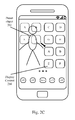
- FIG. 2A illustrates a specific situation where a preset object 202 on the terminal is shielded by the display content 204; wherein the preset object 202 is a "character" image in the background picture and the display content 204 is an application icon on the screen interface of the terminal.
- the face, body, or limbs of the preset object 202 are shielded by the display content 204 such as application icon A, application icon B, application icon E, application icon F, and the like, such that the user cannot view the preset object 202 clearly and completely, which affects the user experience.
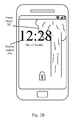
- FIG. 2B illustrates another specific situation where the preset object 202 on the terminal is shielded by display content 204; wherein the preset object 202 is a "plant” image in the background picture and the display content 204 is the "digital clock (can be a inner plug-in or a third party plug-in)" on the screen interface of the terminal.
- the branches and leaves of the preset object 202 are shielded by the display content, i.e., the clock plug-in with "12:28", and as a result, the user cannot view the preset object 202 clearly and completely, which affects the user experience.
- the display content i.e., the clock plug-in with "12:28”
- the identification of the preset object and the elimination of the shielding of the preset object should be achieved, which will be described in detail below respectively.
- the terminal has to identify whether there is a preset object in the background picture at the first place, and then determine whether there is any display content shielding the preset object, so as to achieve corresponding display control.
- a standard image of the preset object can be pre-stored in the terminal; and the process of identifying the background picture comprises: taking an object comprised in the background picture as the preset object if it matches the standard image.
- the terminal by pre-storing the standard image of the preset object (such as the standard images of faces, trees, and houses, and the like) in the terminal, the terminal can use the standard image to match the background picture by itself, and the object successfully matched in the background picture will be the preset object.
- the standard image of the preset object such as the standard images of faces, trees, and houses, and the like
- the image thereof can be pre-stored in the terminal, when a picture comprises the "character” or "plant” is used as the background picture, the terminal can identify the preset object accurately via comparison and matching between the background picture and the standard image.
- the method comprises: acquiring the pre-stored characteristic parameter information of the preset object; and taking an object comprised in the background picture as the preset object if it matches the characteristic parameter information.
- the same kinds of objects may have the same characteristics, and the characteristic parameter information therefore refers to the corresponding characteristics of the preset object.
- the characteristic parameter information may include: eye, nose, mouth, and the like, and the respective shape, color, size, location, and other information thereof.
- the terminal can not only identify the same image as the standard image but also "learn” and “recognize” all the objects which have the above-mentioned characteristic parameter information. Still take "face” as an example, all faces, instead of a certain face, will be identified via the characteristic parameter information.
- the characteristic parameter information can be applied to all kinds of preset objects, such as faces, scenery, and the like.
- the characteristic parameter information can be entered into the terminal directly by the user or the manufacturer; or, the image information of a specific preset object can be entered into the terminal, such that the terminal can summarize and store the corresponding characteristic parameter information via automatic "learning" of the image information.
- automatic "learning" the more the image information of the preset object pre-entered, the more accurate the characteristic parameter information will be summarized.
- Embodiment 1 and Embodiment 2 described above are by no means for specific restrictions.
- the user can select a region(s) of the background picture directly, and the region selected will be the preset object (not shown in figures).
- the shielding of the preset object can be eliminated through display control of the screen interface.
- the process of ensuring that there is no shielding comprises: moving the display content out of the display region.
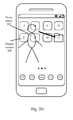
- the process of moving the display content out of the display region comprises: moving the display content to the blank region.
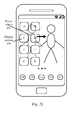
- the preset object 204 is shielded by the display content 204 such as application icon A and the like. There is no other application icon or widget in the lower right corner of the screen interface of the terminal and it is big enough for the display content 204, consequently, the display content 204 can be moved directly to the blank region.
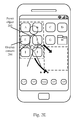
- the display content 204 can be moved into a certain folder so as to save display space of the screen interface.
- the display content 204 that is, the application icon A and the like
- folder H can be a folder already established on the screen interface or a new folder.
- the display content 204 is a first widget in a first region and the display area thereof is S 1; the other display content is a second widget (or application icon) in a second region and the display area thereof is S2; the area of the blank region of the screen interface is S3, wherein S1 > S2 and S1 ⁇ S2+S3.
- the preset object on the screen interface is shield by the first widget, and then the display positions of the first widget and the second widget can be exchanged.
- the first widget can be displayed in the combined region consists of the blank region and the second region, whereby eliminating the shielding of the preset object;
- S1 > S2 when the second widget is displayed in the first region, the shielding of the preset object can be avoided, whereby the preset object can be fully displayed.
- the process of ensuring that there is no shielding comprises: adjusting the size and/or display mode of the display content.
- the adjustment of the size of the display content 204 can be achieved by reducing the display scale of application icons, such that the display content 204 will not shield the preset object 204 after reducing. Specifically, as shown in FIG. 2G , after the display scale of application icon A and application icon E is adjusted, the shielding of the preset object 202 is eliminated.
- the adjustment of the display mode of the display content 204 can be achieved by adjusting the position, sequence, and the like of the individual elements contained in the display content 204 or by adjusting the arranging direction of the display content 204, so as to eliminate the shielding of the preset object 202 caused by it.
- the display mode thereof can be changed from "Horizontal display” to "Vertical display” to eliminate the shielding of preset object 202.
- the process of ensuring that there is no shielding comprises: adjusting the display properties of the background picture.
- the shielding of the preset object 202 can be eliminated by moving the preset object 202 from the upper left to the blank region on the lower right of the screen interface, or from the left to the blank region on the right of the screen interface.
- FIG. 2I and FIG. 2J both illustrate the situation where the shielding of the preset object 202 caused by the display content 204 is eliminated by adjusting the relative position relationship between the background picture and the screen interface, that is, by "moving", a person skilled in the art will understand that, the above-mentioned technical solution can also be achieved by other means, for example, the display properties of the background picture can be any of: display proportion, the relative position relationship between the background picture and the screen interface, arranging mode, and the like.
- the adjustment of the display properties of the background picture includes but is not limited to: scaling, moving, cropping, rotating, and the like.
- Embodiment 1 to Embodiment 3 can be combined with each other according to actual needs.
- the adjustment of size and the adjustment of position of the display content 204 as shown in FIG.2G can be combined, and the shielding of the preset object 202 caused by the display content 204 can be eliminated through the combined technical solution of adjustment.
- the display region of the preset object 202 can be divided into multiple parts according to priority.
- the shielding of the part with lower priority is allowed, but the shielding of the part with higher priority is not allowed.
- the preset object 202 can comprise several priority levels, and the user can set thresholds used to divide "higher” or "lower" priority according to actual needs.
- the "face" of the preset object 202 is set as a higher priority region 206 and no shielding is allowed, but the shielding of other parts other than the higher priority part is allowed.
- the shielding of the higher priority region 206 can be eliminated by moving application icon A and application icon B in the display content 204 to the blank region of the screen interface.
- the area of "blank region" can be expanded to hold more display contents 204 so as to avoid too much changes to the display content 204.
- FIG. 3 is a block schematic diagram illustrating a terminal according to one embodiment of the invention.
- a terminal 300 comprises: a picture identifying unit 302, configured to identify a background picture on a screen interface of the terminal 300 so as to determine whether the background picture comprises a preset object; a display controlling unit 304, configured to ensure that there is no display content shielding a display region of the preset object on the screen interface if the background picture comprises the preset object.
- the display position adjustment of the display content on the screen interface can only be performed when the preset object is comprised in the background picture, whereby reducing the number of display position adjustment as much as possible, which helps to reduce the power consumption of the terminal and save the processing resources.
- the position of the display content on the screen interface will be controlled or adjusted, such that the display region of the preset object will not be shielded and the preset object can be fully displayed on the screen interface, which helps to improve user experience.
- the preset object can be preset by the manufacturer or set by the user, and can be any display content (such as characters, scenery, text, and the like) of interest to the user in the background picture.
- display content such as application icons, widgets, window-based application interface, and the like
- any display content could shield the background picture and the position thereof can be adjusted by the terminal to avoid such shielding.
- the terminal 300 further comprises: an image storing unit 306, configured to pre-store a standard image of the preset object; wherein the picture identifying unit 302 is further configured to take an object comprised in the background picture as the preset object if it matches the standard image.
- the terminal by pre-storing the standard image of the preset object (such as the standard images of faces, trees, houses, and the like) in the terminal, the terminal can use the standard image to match the background picture by itself, and the object matched successfully in the background picture will be the preset object.
- the standard image of the preset object such as the standard images of faces, trees, houses, and the like
- the picture identifying unit 302 is further configured to: acquire the pre-stored characteristic parameter information of the preset object, and take an object comprised in the background picture as the preset object if it matches the standard image.
- the same kinds of objects may have the same characteristics, and the characteristic parameter information therefore refers to the corresponding characteristics of the preset object.
- the characteristic parameter information may include: eye, nose, mouth, and the like, and the respective shape, color, size, location, and other information thereof.
- the terminal can not only identify the same image as the standard image but also "learn” and “recognize” all the objects which have the above-mentioned characteristic parameter information. Still take "face” as an example, all faces, instead of a certain face, will be identified via the characteristic parameter information.
- the characteristic parameter information can be applied to all kinds of preset objects, such as faces, scenery, and the like.
- the characteristic parameter information can be entered into the terminal directly by the user or the manufacturer; or, the image information of a specific preset object can be entered into the terminal, such that the terminal can summarize and store the corresponding characteristic parameter information via automatic "learning" of the image information.
- automatic "learning" the more the image information of the preset object pre-entered, the more accurate the characteristic parameter information will be summarized.
- the user can select a region(s) of the background picture directly, and the region selected will be the preset object.
- the display controlling unit 304 is further configured to: if the preset object is comprised in the background picture and is shielded by the display content, move the display content out of the display region.
- the display controlling unit 304 is further configured to perform any of the following: (1) if there is any blank region which is big enough for the display content other than the display region on the screen interface, moving the display content to the blank region; (2) if there is no blank region other than the display region on the screen interface, moving the display content to a specific folder already established on the screen interface; or, moving the display content to other terminal interfaces of the terminal; (3) if the blank region is not big enough for all of the display content, moving the display content to other terminal interfaces of the terminal; or, moving the display content to a specific folder already established on the screen interface; or, moving a part of the display content to the blank region, and moving the remain display content to other terminal interfaces of the terminal, the specific folder already established on the screen interface and/or a new folder on the screen interface; (4) if the blank region is not big enough for all of the display content and a combined region consists of the blank region and an occupied region of other display content in the vicinity of
- blade region refers to regions other than the display region of the preset object, in which there is no other display content except the background picture.
- the method for moving the display content out of the display region can be determined according to the use of terminal interfaces and personal habits of the user. More specifically, by moving the display content to the blank region or the already established specific folder or the new folder, or, moving the display content directly to other terminal interfaces, the preset object can be fully displayed and the shielding thereof can be eliminated.
- the display controlling unit 304 is further configured to: if the preset object is comprised in the background picture and is shielded by the display content, adjust the size and/or display mode of the display content.
- the shielding can be eliminated by adjusting the size of the display content.
- the size proportion of the display content can be changed, for example, an icon of 2*2 can be changed to a small icon of 1 * 1 for displaying.
- the change of the display mode of the display content includes but is not limited to: the adjustment of the position, sequence, and the like. of the individual elements contained in the display content, or, the adjustment of the arranging direction of the display content; for example, adjusting the display mode of "Time” in a lock-screen state from "Horizontal display” to "Vertical display”.
- the display controlling unit 304 is further configured to: if the preset object is comprised in the background picture and is shielded by the display content, adjust the display properties of the background picture.
- the shielding can also be eliminated by adjusting the display properties of the background picture.
- the display properties of the background picture can be any of: display proportion, the relative position relationship between the background picture and the screen interface, arranging mode, and the like.
- the adjustment of the display properties of the background picture includes but is not limited to: scaling, moving, cropping, rotating, and the like.
- the display region comprises a high priority region and a low priority region; and the display controlling unit 304 is further configured to: if the preset object is comprised in the background picture and is shielded by the display content, set the low priority region as a blank region, such that all of the blank regions will be enough for the display content after setting.
- the area of "blank region" can be expanded to hold more display contents so as to avoid too much changes to the display content.
- FIG. 4 is a schematic flowchart illustrating a method of controlling terminal display according to one embodiment of the invention. As shown in FIG. 4 , the method comprises Step 402- Step 426:
- a display method and a terminal in the present invention which can avoid the shielding of the preset object of the background picture caused by the display contents of the terminal, whereby the preset object can be fully displayed, which helps to improve user experience.
- a program product stored in a non-volatile machine readable medium for terminal control.
- the program product includes machine executable instructions, when executed by a computer system, causing the system to execute the following: forming at least one contact on a screen interface of a terminal; if the at least one contact is located in a gap between the bottom edge of the screen interface and the application icons displayed on the screen interface, and a preset gesture track is formed with the contact as a start point, displaying a preset function interface on the screen interface.
- a non-volatile machine readable medium storing a program product for terminal control.
- the program product includes machine executable instructions, when executed by a computer system (such as a system comprises a processor and a memory), causing the system to execute the following: forming at least one contact on a screen interface of a terminal; if the at least one contact is located in a gap between the bottom edge of the screen interface and the application icons displayed on the screen interface, and a preset gesture track is formed with the contact as a start point, displaying a preset function interface on the screen interface.
- a computer system such as a system comprises a processor and a memory
- a machine-readable program configured to cause the machine to execute any of the terminal controlling methods described in the abovementioned technical solutions.
- a storage medium storing a machine-readable program.
- the machine-readable program is configured to cause the machine to execute any of the terminal controlling methods described in the abovementioned technical solutions.
Landscapes
- Engineering & Computer Science (AREA)
- Multimedia (AREA)
- Signal Processing (AREA)
- Theoretical Computer Science (AREA)
- Physics & Mathematics (AREA)
- General Physics & Mathematics (AREA)
- Human Computer Interaction (AREA)
- General Engineering & Computer Science (AREA)
- Computer Hardware Design (AREA)
- Marketing (AREA)
- Business, Economics & Management (AREA)
- Software Systems (AREA)
- Data Mining & Analysis (AREA)
- Bioinformatics & Computational Biology (AREA)
- Evolutionary Computation (AREA)
- Evolutionary Biology (AREA)
- Computer Vision & Pattern Recognition (AREA)
- Life Sciences & Earth Sciences (AREA)
- Bioinformatics & Cheminformatics (AREA)
- Artificial Intelligence (AREA)
- User Interface Of Digital Computer (AREA)
Abstract
Description
- The present disclosure relates to communication field, and particularly to a display method and a terminal.
- The rapid progress of terminal technology, such as mobile terminals (such as smart phones, tablet computers, and laptops) and fixed terminals (such as desktop computers), has allowed the manufacturer to preset pictures as the display background (such as desktop wallpaper) of the terminal in order to make the displayed screen more vivid and interesting. On the other hand, currently, as to the preset pictures, the number is relatively small and the type is very limited, and as a result, more and more terminals have allowed the user to set the pictures as the display background manually.
- In smart phones, for example, the user can set desktop wallpapers as the background picture of a standby interface, and can also set lock-screen wallpapers as the background picture of a lock-screen interface, etc.
- However, in the terminal, not only the above-mentioned pictures but also other contents are displayed. That is to say, the pictures are just "background" on the screen of the terminal, above which other contents (such as application icons, widgets, and the like) are also displayed. The contents tend to cause background picture shielding and incomplete display. Sometimes, due to the display positions of the contents on the screen, the characters or scenery comprised in the background picture that the user want to view may be blocked and only insignificant parts are viewable.
- To this end, how to reasonably arrange the display content on the screen of the terminal so as to avoid shielding of the interested parts of the background picture has become a technical problem to be solved at present.
- Taking into consideration the above-mentioned issues, the present disclosure provides a new display technology, which can avoid a preset object on a background picture from being shielded by the display content(s) on the screen of a terminal, so that the preset object can be fully displayed, which helps to improve user experience.
- In view of this, the present disclosure provides a display method, which comprises: identifying a background picture on a screen interface of a terminal; and when the background picture comprises a preset object, ensuring that there is no display content shielding a display region of the preset object on the screen interface.
- In this technical solution, by identifying whether the background picture comprises the preset object, the display position adjustment of the display content on the screen interface can only be performed when the preset object is comprised in the background picture, whereby reducing the number of display position adjustment as much as possible, which helps to reduce the power consumption of the terminal and save the processing resources.
- If the background picture comprises the preset object, the position of the display content on the screen interface will be controlled or adjusted, such that the display region of the preset object will not be shielded and the preset object can be fully displayed on the screen interface, which helps to improve user experience.
- Wherein, the preset object can be preset by the manufacturer or set by the user, and can be any display content (such as characters, scenery, text, and the like) of interest to the user in the background picture. On the other hand, there can be a lot of display contents (such as application icons, widgets, window-based application interface, and the like) which may shield the preset object. In fact, any display content could shield the background picture and the position thereof can be adjusted by the terminal to avoid such shielding.
- As one preferred embodiment, the method further comprises: pre-storing a standard image of the preset object in the terminal. The process of identifying the background picture comprises: taking an object comprised in the background picture as the preset object if it matches the standard image.
- In the above-mentioned technical solution, by pre-storing the standard image of the preset object (such as the standard images of faces, trees, houses, and the like) in the terminal, the terminal can use the standard image to match the background picture by itself, and the object matched successfully in the background picture will be the preset object.
- As another preferred embodiment, the process of identifying the background picture comprises: acquiring the pre-stored characteristic parameter information of the preset object; and taking an object comprised in the background picture as the preset object if it matches the characteristic parameter information.
- In the above-mentioned technical solution, the same kinds of objects may have the same characteristics, and the characteristic parameter information therefore refers to the corresponding characteristics of the preset object. For example, for "face", the characteristic parameter information may include: eye, nose, mouth, and the like, and the respective shape, color, size, location, and other information thereof.
- Compared with the manner of storing the standard image directly, through the characteristic parameter information, the terminal can not only identify the same image as the standard image but also "learn" and "recognize" all the objects which have the above-mentioned characteristic parameter information. Still take "face" as an example, all faces, instead of a certain face, will be identified via the characteristic parameter information.
- Of course, the characteristic parameter information can be applied to all kinds of preset objects, such as faces, scenery, and the like. The characteristic parameter information can be entered into the terminal directly by the user or the manufacturer; or, the image information of a specific preset object can be entered into the terminal, such that the terminal can summarize and store the corresponding characteristic parameter information via automatic "learning" of the image information. During the process of automatic "learning", the more the image information of the preset object pre-entered, the more accurate the characteristic parameter information will be summarized.
- A person skilled in the art will understand that, there are many other ways to identify the preset object and therefore the above-mentioned technical solution is by no means for specific restrictions. In some cases, the user can select a region(s) of the background picture directly, and the region selected will be the preset object.
- Preferably, in the above-mentioned technical solution, if the preset object is comprised in the background picture and is shielded by the display content, the process of ensuring that there is no shielding comprises: moving the display content out of the display region.
- In the technical solution, in the situation where the number of application icons or the background picture in the terminal changes, if the preset object is comprised in the background picture and is shielded by the display content on the screen interface, the shielding caused by the display content will be eliminated by moving it out of the display region of the preset object.
- As one preferred embodiment, if there is any blank region which is big enough for the display content other than the display region on the screen interface, the process of moving the display content out of the display region comprises: moving the display content to the blank region.
- As another preferred embodiment, if there is no blank region other than the display region on the screen interface, the process of moving the display content out of the display region comprises: moving the display content to a specific folder already established on the screen interface; or, moving the display content to other terminal interfaces of the terminal.
- As another preferred embodiment, if the blank region is not big enough for all of the display content, the process of moving the display content out of the display region comprises: moving the display content to other terminal interfaces of the terminal; or, moving the display content to a specific folder already established on the screen interface; or, moving a part of the display content to the blank region, and moving the remain display content to other terminal interfaces of the terminal, the specific folder already established on the screen interface, and/or a new folder on the screen interface.
- As another preferred embodiment, if the blank region is not big enough for all of the display content and a combined region consists of the blank region and an occupied region of other display content in the vicinity of the blank region is big enough for all of the display content, the process of moving the display content out of the display region comprises: exchanging the display positions of the display content and the other display content, such that the display content is displayed in the combined region, and the other display content will not shield the display region.
- In the above-mentioned technical solution, "blank region" refers to regions other than the display region of the preset object, in which there is no other display content except the background picture. The method for moving the display content out of the display region can be determined according to the use of terminal interfaces and personal habits of the user. More specifically, by moving the display content to the blank region or the already established specific folder or the new folder, or, moving the display content directly to other terminal interfaces, the preset object can be fully displayed and the shielding thereof can be eliminated.
- In the above-mentioned technical solution, preferably, if the preset object is comprised in the background picture and is shielded by the display content, the process of ensuring that there is no shielding comprises: adjusting the size and/or display mode of the display content.
- In this technical solution, in some situations, such as where the preset object is shielded by a part of the display content, the shielding can be eliminated by adjusting the size of the display content. To be specific, the size proportion of the display content can be changed, for example, an icon of 2*2 can be changed to a small icon of 1*1 for displaying.
- At the same time, the change of the display mode of the display content includes but is not limited to: the adjustment of the position, sequence, and the like of the individual elements contained in the display content, or, the adjustment of the arranging direction of the display content; for example, adjusting the display mode of "Time" in a lock-screen state from "Horizontal display" to "Vertical display".
- In the above-mentioned technical solution, preferably, if the preset object is comprised in the background picture and is shielded by the display content, the process of ensuring that there is no shielding comprises: adjusting the display properties of the background picture.
- It can be seen that, in this technical solution, if the preset object is shielded by the display content, the shielding can also be eliminated by adjusting the display properties of the background picture. Wherein the display properties of the background picture can be any of: display proportion, the relative position relationship between the background picture and the screen interface, arranging mode, and the like. The adjustment of the display properties of the background picture includes but is not limited to: scaling, moving, cropping, rotating, and the like.
- In the above-mentioned technical solution, preferably, the display region comprises a high priority region and a low priority region; and the process of adjusting the display properties of the background picture comprises: setting the low priority region as a blank region, such that all of the blank regions will be enough for the display content after setting.
- In this technical solution, by dividing the display region of the preset object into the high priority region and the low priority region and setting the latter as the blank region, in the situation where the display positions on the screen interface are limited and it is undesirable to move the display content to other interfaces, the area of "blank region" can be expanded to hold more display contents so as to avoid too much changes to the display content.
- According to another aspect of the invention, it is provided a terminal, which comprises: a picture identifying unit, configured to identify a background picture on a screen interface of a terminal so as to determine whether the background picture comprises a preset object; and a display controlling unit, configured to ensure that there is no display content shielding a display region of the preset object on the screen interface if the background picture comprises the preset object.
- In this technical solution, by identifying whether the background picture comprises the preset object, the display position adjustment of the display content on the screen interface can only be performed when the preset object is comprised in the background picture, whereby reducing the number of display position adjustment as much as possible, which helps to reduce the power consumption of the terminal and save the processing resources.
- If the background picture comprises the preset object, the position of the display content on the screen interface will be controlled or adjusted, such that the display region of the preset object will not be shielded and the preset object can be fully displayed on the screen interface, which helps to improve user experience.
- Wherein, the preset object can be preset by the manufacturer or set by the user, and can be any display content (such as characters, scenery, text, and the like) of interest to the user in the background picture. On the other hand, there can be a lot of display content (such as application icons, widgets, window-based application interface, and the like) which may shield the preset object. In fact, any display content could shield the background picture and the position thereof can be adjusted by the terminal to avoid such shielding.
- As one preferred embodiment, the terminal further comprises: an image storing unit, configured to pre-store a standard image of the preset object; wherein the picture identifying unit is further configured to take an object comprised in the background picture as the preset object if it matches the standard image.
- In the above-mentioned technical solution, by pre-storing the standard image of the preset object (such as the standard images of faces, trees, houses, and the like) in the terminal, the terminal can use the standard image to match the background picture by itself, and the object successfully matched in the background picture will be the preset object.
- As another preferred embodiment, the picture identifying unit is further configured to: acquire the pre-stored characteristic parameter information of the preset object, and take an object comprised in the background pictured as the preset object if it matches the characteristic parameter information.
- In the above-mentioned technical solution, the same kinds of objects may have the same characteristics, and the characteristic parameter information therefore refers to the corresponding characteristics of the preset object. For example, for "face", the characteristic parameter information may include: eye, nose, mouth, and the like, and the respective shape, color, size, location, and other information thereof.
- Compared with the manner of storing the standard image directly, through the characteristic parameter information, the terminal can not only identify the same image as the standard image but also "learn" and "recognize" all the objects which have the above-mentioned characteristic parameter information. Still take "face" as an example, all faces, instead of a certain face, will be identified via the characteristic parameter information.
- Of course, the characteristic parameter information can be applied to all kinds of preset objects, such as faces, scenery, and the like. The characteristic parameter information can be entered into the terminal directly by the user or the manufacturer; or, the image information of a specific preset object can be entered into the terminal, such that the terminal can summarize and store the corresponding characteristic parameter information via automatic "learning" of the image information. During the process of automatic "learning", the more the image information of the preset object pre-entered, the more accurate the characteristic parameter information will be summarized.
- A person skilled in the art will understand that, there are many other ways to identify the preset object and therefore the above-mentioned technical solution is by no means for specific restrictions. In some cases, the user can select a region(s) of the background picture, and the region selected will be the preset object.
- Preferably, in the above-mentioned technical solution, the display controlling unit is configured to: if the preset object is comprised in the background picture and is shielded by the display content, move the display content out of the display region.
- In the technical solution, in the situation where the number of application icons or the background picture in the terminal changes, if the preset object is comprised in the background picture and is shielded by the display content on the screen interface, the shielding caused by the display content will be eliminated by moving the latter out of the display region of the preset object.
- In the above-mentioned technical solution, the display controlling unit is configured to: if there is any blank region which is big enough for the display content other than the display region on the screen interface, move the display content to the blank region; optionally, if there is no blank region other than the display region on the screen interface, move the display content to a specific folder already established on the screen interface or move the display content to other terminal interfaces of the terminal; optionally, if the blank region is not big enough for all of the display content, move the display content to other terminal interfaces of the terminal, or, move the display content to a specific folder already established on the screen interface, or, move a part of the display content to the blank region and move the remain display content to other terminal interfaces of the terminal, the specific folder already established on the screen interface, and/or a new folder on the screen interface.
- The display controlling unit is further configured to: if the blank region is not big enough for all of the display content, and if a combined region consists of the blank region and a occupied region of other display content in the vicinity of the blank region is big enough for all of the display content, exchange the display positions of the display content and the other display content, such that the display content is displayed in the combined region, and the other display content will not shield the display region.
- In the above-mentioned technical solution, "blank region" refers to regions other than the display region of the preset object, in which there is no other display content except the background picture. The method for moving the display content out of the display region can be determined according to the use of terminal interfaces and personal habits of the user. More specifically, by moving the display content to the blank region or the already established specific folder or the new folder, or, moving the display content directly to other terminal interfaces, the preset object can be fully displayed and the shielding thereof can be eliminated.
- In the above-mentioned technical solution, preferably, the display controlling unit is configured to: if the preset object is comprised in the background picture and is shielded by the display content, adjust the size and/or display mode of the display content.
- In this technical solution, in some situations, such as where the preset object is shielded by a part of the display content, the shielding can be eliminated by adjusting the size of the display content. To be specific, the size proportion of the display content can be changed, for example, an icon of 2*2 can be changed to a small icon of 1*1 for displaying.
- At the same time, the change of the display mode of the display content includes but is not limited to: the adjustment of the position, sequence, and the like of the individual elements comprised in the display content, or, the adjustment of the arranging direction of the display content; for example, adjusting the display mode of "Time" in a lock-screen state from "Horizontal display" to "Vertical display".
- In the above-mentioned technical solution, preferably, the display controlling unit is configured to: if the preset object is comprised in the background picture and is shielded by the display content, adjust the display properties of the background picture.
- It can be seen that, in this technical solution, if the preset object is shielded by the display content, the shielding can also be eliminated by adjusting the display properties of the background picture. Wherein the display properties of the background picture can be any of: display proportion, the relative position relationship between the background picture and the screen interface, arranging mode, and the like. The adjustment of the display properties of the background picture includes but is not limited to: scaling, moving, cropping, rotating, and the like.
- In the above-mentioned technical solution, preferably, the display region comprises a high priority region and a low priority region; and the display controlling unit is configured to: if the preset object is comprised in the background picture and is shielded by the display content, set the low priority region as a blank region, such that all of the blank regions will be enough for the display content after setting.
- In this technical solution, by dividing the display region of the preset objects into the high priority region and the low priority region and setting the latter as the blank region, in the situation where the display positions on the screen interface are limited and it is undesirable to move the display content to other interfaces, the area of "blank region" can be expanded to hold more display contents so as to avoid too much changes to the display content.
- Through the above-mentioned technical solution, a preset object in a background picture can be avoided from being shielded by the display content on the screen of a terminal, so that the preset object can be fully displayed, which helps to improve user experience.
- In accordance with a further aspect of the invention, it is further provided a program product stored in a non-volatile machine readable medium for terminal control. The program product includes machine executable instructions, when executed by a computer system, causing the system to execute the following: forming at least one contact on a screen interface of a terminal; if the at least one contact is located in a gap between the bottom edge of the screen interface and the application icons displayed on the screen interface, and a preset gesture track is formed with the contact as a start point, displaying a preset function interface on the screen interface.
- In accordance with a further aspect of the invention, it is further provided a non-volatile machine readable medium storing a program product for terminal control. The program product includes machine executable instructions, when executed by a computer system (such as a system comprises a processor(s) and a memory), causing the system to execute the following: forming at least one contact on a screen interface of a terminal; if the at least one contact is located in a gap between the bottom edge of the screen interface and the application icons displayed on the screen interface, and a preset gesture track is formed with the contact as a start point, displaying a preset function interface on the screen interface.
- According to a further aspect of the disclosure, it is further provided a machine-readable program, configured to cause the machine to execute any of the terminal controlling methods described in the abovementioned technical solutions.
- According to a further aspect of the disclosure, it is further provided a storage medium storing a machine-readable program. The machine-readable program is configured to cause the machine to execute any of the terminal controlling methods described in the abovementioned technical solutions.
-
-
FIG. 1 a schematic flowchart illustrating a display method according to one embodiment of the invention; -
FIG.2A-2K are interface sketches illustrating the scenarios of controlling terminal display according to the contents of a background picture according to one embodiment of the invention; -
FIG. 3 is a block schematic diagram illustrating a terminal according to one embodiment of the invention; -
FIG. 4 is a schematic flowchart illustrating a method of controlling terminal display according to one embodiment of the invention. - In order to more clearly understand the above object, features, and advantages of the present invention, it will be described in further detail with refer to the accompanying drawings and the following embodiments. It should be noted that, the embodiments and the features thereof can be combined with each other without confliction.
- In the following description, numerous specific details are set forth in order to fully understand the present invention, but the present invention can also be achieved in other ways different from the embodiments described herein, therefore, the scope of the present invention is not limited to the following specific embodiments.
-
FIG. 1 a schematic flowchart illustrating a display method according to one embodiment of the invention. As shown inFIG. 1 , the display method according to the embodiment of the invention comprises: Step 102, identifying a background picture on a screen interface of a terminal; andStep 104, when the background picture comprises a preset object, ensuring that there is no display content shielding a display region of the preset object on the screen interface. - In this technical solution, by identifying whether the background picture comprises the preset object, the display position adjustment of the display content on the screen interface can only be performed when the preset object is comprised in the background picture, whereby reducing the number of display position adjustment as much as possible, which helps to reduce the power consumption of the terminal and save the processing resources.
- If the background picture comprises the preset object, the position of the display content on the screen interface will be controlled or adjusted, such that the display region of the preset object will not be shielded and the preset object can be fully displayed on the screen interface, which helps to improve user experience.
- Wherein, the preset object can be preset by the manufacturer or set by the user, and can be any display content (such as characters, scenery, text, and the like) of interest to the user in the background picture. On the other hand, there can be a lot of display content (such as application icons, widgets, window-based application interface, and the like) which may shield the preset object. In fact, any display content could shield the background picture and the position thereof can be adjusted by the terminal to avoid such shielding.
- As a specific application scenario,
FIG. 2A illustrates a specific situation where apreset object 202 on the terminal is shielded by thedisplay content 204; wherein thepreset object 202 is a "character" image in the background picture and thedisplay content 204 is an application icon on the screen interface of the terminal. - As can be seen from
FIG. 2A , the face, body, or limbs of thepreset object 202 are shielded by thedisplay content 204 such as application icon A, application icon B, application icon E, application icon F, and the like, such that the user cannot view thepreset object 202 clearly and completely, which affects the user experience. - As another specific application scenario,
FIG. 2B illustrates another specific situation where thepreset object 202 on the terminal is shielded bydisplay content 204; wherein thepreset object 202 is a "plant" image in the background picture and thedisplay content 204 is the "digital clock (can be a inner plug-in or a third party plug-in)" on the screen interface of the terminal. - As can be seen from
FIG.2B , the branches and leaves of thepreset object 202 are shielded by the display content, i.e., the clock plug-in with "12:28", and as a result, the user cannot view thepreset object 202 clearly and completely, which affects the user experience. - To overcome the shielding of the
preset object 202 caused by thedisplay content 204, the identification of the preset object and the elimination of the shielding of the preset object should be achieved, which will be described in detail below respectively. - The terminal has to identify whether there is a preset object in the background picture at the first place, and then determine whether there is any display content shielding the preset object, so as to achieve corresponding display control.
- Preferably, a standard image of the preset object can be pre-stored in the terminal; and the process of identifying the background picture comprises: taking an object comprised in the background picture as the preset object if it matches the standard image.
- In the above-mentioned technical solution, by pre-storing the standard image of the preset object (such as the standard images of faces, trees, and houses, and the like) in the terminal, the terminal can use the standard image to match the background picture by itself, and the object successfully matched in the background picture will be the preset object.
- For example, as to the "character" as shown in
FIG. 2A or the "plant" as shown inFIG. 2B , the image thereof can be pre-stored in the terminal, when a picture comprises the "character" or "plant" is used as the background picture, the terminal can identify the preset object accurately via comparison and matching between the background picture and the standard image. - However, in this way, there are some limitations. For example, as to "character", there are differences between different people; even for the same person, different molding in different pictures may not match the stored standard image. Therefore, the method based on the storage of the standard image tends to only applicable to the identification of same pictures.
- Another method for identifying the background picture is provided to eliminate the limitations of Embodiment 1. The method comprises: acquiring the pre-stored characteristic parameter information of the preset object; and taking an object comprised in the background picture as the preset object if it matches the characteristic parameter information.
- In the above-mentioned technical solution, the same kinds of objects may have the same characteristics, and the characteristic parameter information therefore refers to the corresponding characteristics of the preset object. For example, for "face", the characteristic parameter information may include: eye, nose, mouth, and the like, and the respective shape, color, size, location, and other information thereof.
- Compared with the manner of storing the standard image directly, through the characteristic parameter information, the terminal can not only identify the same image as the standard image but also "learn" and "recognize" all the objects which have the above-mentioned characteristic parameter information. Still take "face" as an example, all faces, instead of a certain face, will be identified via the characteristic parameter information.
- Of course, the characteristic parameter information can be applied to all kinds of preset objects, such as faces, scenery, and the like. The characteristic parameter information can be entered into the terminal directly by the user or the manufacturer; or, the image information of a specific preset object can be entered into the terminal, such that the terminal can summarize and store the corresponding characteristic parameter information via automatic "learning" of the image information. During the process of automatic "learning", the more the image information of the preset object pre-entered, the more accurate the characteristic parameter information will be summarized.
- A person skilled in the art will understand that, there are many other ways to identify the preset object and Embodiment 1 and Embodiment 2 described above are by no means for specific restrictions. In some cases, the user can select a region(s) of the background picture directly, and the region selected will be the preset object (not shown in figures).
- After the identification of the preset object, the shielding of the preset object can be eliminated through display control of the screen interface.
- Preferably, if the preset object is comprised in the background picture and is shielded by the display content, the process of ensuring that there is no shielding comprises: moving the display content out of the display region.
- In the technical solution, in the situation where the number of application icons or the background picture in the terminal changes, if the preset object is comprised in the background picture and is shielded by the display content on the screen interface, the shielding caused by the display content will be eliminated by moving it out of the display region of the preset object.
- As one preferred embodiment, if there is any blank region which is big enough for the display content other than the display region on the screen interface, the process of moving the display content out of the display region comprises: moving the display content to the blank region.
- For example, as shown in
FIG. 2C , thepreset object 204 is shielded by thedisplay content 204 such as application icon A and the like. There is no other application icon or widget in the lower right corner of the screen interface of the terminal and it is big enough for thedisplay content 204, consequently, thedisplay content 204 can be moved directly to the blank region. - Without doubt, instead of occupying the blank region, the
display content 204 can be moved into a certain folder so as to save display space of the screen interface. For example, as shown inFIG. 2D , the display content 204 (that is, the application icon A and the like) can be moved into folder H directly to eliminate the shielding of thepreset object 202. Wherein folder H can be a folder already established on the screen interface or a new folder. - In fact, just like the case shown in
FIG. 2D , even if there is a blank region which is big enough for thedisplay content 204 on the screen interface of the terminal, the user can still move thedisplay content 204 into a certain folder such as folder H according to actual needs. The common cases are the following Case (1) - Case (3). - Case(1): if there is no blank region other than the display region on the screen interface (it is supposed that there is no blank region in the lower right corner of the screen interface in
FIG. 2D ), the process of moving the display content out of the display region comprises: moving the display content to a specific folder (such as folder H) already established on the screen interface; or, moving the display content to other terminal interfaces (not shown in the figures) of the terminal. - Case (2): if the blank region is not big enough for all of the display content, the process of moving the display content out of the display region comprises: moving the display content to other terminal interfaces of the terminal; or, moving the display content to a specific folder already established on the screen interface; or, moving a part of the display content to the blank region, and moving the remain display content to other terminal interfaces of the terminal, the specific folder already established on the screen interface and/or a new folder on the screen interface.
As to case 2), as shown inFIG. 2E , it is supposed that thedisplay content 204 comprises application icon A, application icon B, application icon E, application icon F, application icon I, application icon J, and the like, and the blank region is able to hold four application icons only. As a preferred embodiment, thedisplay content 204 can be processed as a whole, such as moved into folder H or moved to a blank region or folder on another interface (not shown in figures) as a whole.
As another preferred embodiment, thedisplay content 204 can be divided into two parts, as to the part which can be moved to the blank region arbitrarily, it can be moved to the blank region or folder H, or moved to another blank region or folder in other interfaces; on the other hand, as to the part which cannot be moved to the blank region after the division, if any, it can be moved to folder H, or moved to another blank region or folder in other interfaces.
The number of parts that thedisplay content 204 will be divided into can be set or adjusted according to actual needs. For example, as shown inFIG. 2E , application icon A, application icon B, application icon E and application icon F are moved to the blank region as one part; at the same time, application icon I and application icon J are moved to another interface as another part.
To better explain the technical solution of Embodiment 1,FIG.2F illustrates an application scenario corresponding toFIG. 2B , in which the process of moving thedisplay content 204 is illustrated.
Specifically, as shown inFIG. 2F , on the lock-screen interface of the terminal, thedisplay content 204 is the "time" plug-in, and thepreset project 202 is "plant" in the background picture. By changing the display position of thedisplay content 204, thedisplay content 204 will not shield thepreset object 202 after moving, which helps to achieve better display effects. - Case (3): if the blank region is not big enough for all of the display content, and if a combined region consists of the blank region and an occupied region of other display content in the vicinity of the blank region is big enough for all of the display content, the process of moving the display content out of the display region comprises: exchanging the display positions of the display content and the other display content, such that the display content is displayed in the combined region, and the other display content will not shield the display region.
- For example, the
display content 204 is a first widget in a first region and the display area thereof is S 1; the other display content is a second widget (or application icon) in a second region and the display area thereof is S2; the area of the blank region of the screen interface is S3, wherein S1 > S2 and S1 ≤ S2+S3. - It is supposed that the preset object on the screen interface is shield by the first widget, and then the display positions of the first widget and the second widget can be exchanged. On one hand, since S1 ≤ S2+S3, the first widget can be displayed in the combined region consists of the blank region and the second region, whereby eliminating the shielding of the preset object; on the other hand, since S1 > S2, when the second widget is displayed in the first region, the shielding of the preset object can be avoided, whereby the preset object can be fully displayed.
- Preferably, if the preset object is comprised in the background picture and is shielded by the display content, the process of ensuring that there is no shielding comprises: adjusting the size and/or display mode of the display content.
- The adjustment of the size of the
display content 204 can be achieved by reducing the display scale of application icons, such that thedisplay content 204 will not shield thepreset object 204 after reducing. Specifically, as shown inFIG. 2G , after the display scale of application icon A and application icon E is adjusted, the shielding of thepreset object 202 is eliminated. - Sometimes, the combination of a variety of means will be needed to achieve a better adjustment effect. For example, in
FIG.2G , as to the application icon B, application icon C, application icon D, application icon F, application icon G, and application icon H, after adjusting the display scale thereof, five adjusted application icons should be displayed per line on the screen interface. But, since application icon B and application icon F may still shield thepreset object 202 after adjusting, the display positions in the second column of each line shall be made vacant, that is to say, application icon B and application icon F will be moved out of the display region of thepreset object 202 in order to avoid shielding. - The adjustment of the display mode of the
display content 204 can be achieved by adjusting the position, sequence, and the like of the individual elements contained in thedisplay content 204 or by adjusting the arranging direction of thedisplay content 204, so as to eliminate the shielding of thepreset object 202 caused by it. As shown inFIG. 2H , as to thedisplay content 204, that is, the "time" plug-in, as a specific implementation, the display mode thereof can be changed from "Horizontal display" to "Vertical display" to eliminate the shielding ofpreset object 202. - Preferably, if the preset object is comprised in the background picture and is shielded by the display content, the process of ensuring that there is no shielding comprises: adjusting the display properties of the background picture.
- As shown in
FIG.2I andFIG.2J , when thepreset object 202 is shielded by thedisplay content 204, the shielding of thepreset object 202 can be eliminated by moving thepreset object 202 from the upper left to the blank region on the lower right of the screen interface, or from the left to the blank region on the right of the screen interface. - While
FIG. 2I andFIG. 2J both illustrate the situation where the shielding of thepreset object 202 caused by thedisplay content 204 is eliminated by adjusting the relative position relationship between the background picture and the screen interface, that is, by "moving", a person skilled in the art will understand that, the above-mentioned technical solution can also be achieved by other means, for example, the display properties of the background picture can be any of: display proportion, the relative position relationship between the background picture and the screen interface, arranging mode, and the like. The adjustment of the display properties of the background picture includes but is not limited to: scaling, moving, cropping, rotating, and the like. - It is to be noted that:
- First, various technical means described in Embodiment 1 to Embodiment 3 can be combined with each other according to actual needs. For example, the adjustment of size and the adjustment of position of the
display content 204 as shown inFIG.2G can be combined, and the shielding of thepreset object 202 caused by thedisplay content 204 can be eliminated through the combined technical solution of adjustment. - Second, in a specific implementation, the display region of the
preset object 202 can be divided into multiple parts according to priority. In the situation where the blank region of the screen interface is relatively small or the user does not want to move thedisplay content 204 to a folder or another interface, the shielding of the part with lower priority is allowed, but the shielding of the part with higher priority is not allowed. For example, thepreset object 202 can comprise several priority levels, and the user can set thresholds used to divide "higher" or "lower" priority according to actual needs. - For example, in
FIG. 2K , the "face" of thepreset object 202 is set as ahigher priority region 206 and no shielding is allowed, but the shielding of other parts other than the higher priority part is allowed. The shielding of thehigher priority region 206 can be eliminated by moving application icon A and application icon B in thedisplay content 204 to the blank region of the screen interface. - By dividing the
preset object 202 into ahigher priority region 206 and a lower priority region (not illustrated in figures) and setting the lower priority region to be a blank region, in the situation where the display positions on the screen interface are limited and/or the user does not want to move the display content to another interface, the area of "blank region" can be expanded to holdmore display contents 204 so as to avoid too much changes to thedisplay content 204. -
FIG. 3 is a block schematic diagram illustrating a terminal according to one embodiment of the invention. - As shown in
FIG. 3 , a terminal 300 according to the embodiment of the invention comprises: apicture identifying unit 302, configured to identify a background picture on a screen interface of the terminal 300 so as to determine whether the background picture comprises a preset object; adisplay controlling unit 304, configured to ensure that there is no display content shielding a display region of the preset object on the screen interface if the background picture comprises the preset object. - In this technical solution, by identifying whether the background picture comprises the preset object, the display position adjustment of the display content on the screen interface can only be performed when the preset object is comprised in the background picture, whereby reducing the number of display position adjustment as much as possible, which helps to reduce the power consumption of the terminal and save the processing resources.
- If the background picture comprises the preset object, the position of the display content on the screen interface will be controlled or adjusted, such that the display region of the preset object will not be shielded and the preset object can be fully displayed on the screen interface, which helps to improve user experience.
- Wherein, the preset object can be preset by the manufacturer or set by the user, and can be any display content (such as characters, scenery, text, and the like) of interest to the user in the background picture. On the other hand, there can be a lot of display content (such as application icons, widgets, window-based application interface, and the like) which may shield the preset object. In fact, any display content could shield the background picture and the position thereof can be adjusted by the terminal to avoid such shielding.
- In the technical solution described above, preferably, the terminal 300 further comprises: an
image storing unit 306, configured to pre-store a standard image of the preset object; wherein thepicture identifying unit 302 is further configured to take an object comprised in the background picture as the preset object if it matches the standard image. - In the above-mentioned technical solution, by pre-storing the standard image of the preset object (such as the standard images of faces, trees, houses, and the like) in the terminal, the terminal can use the standard image to match the background picture by itself, and the object matched successfully in the background picture will be the preset object.
- In the above-mentioned technical solution, preferably, the
picture identifying unit 302 is further configured to: acquire the pre-stored characteristic parameter information of the preset object, and take an object comprised in the background picture as the preset object if it matches the standard image. - In the above-mentioned technical solution, the same kinds of objects may have the same characteristics, and the characteristic parameter information therefore refers to the corresponding characteristics of the preset object. For example, for "face", the characteristic parameter information may include: eye, nose, mouth, and the like, and the respective shape, color, size, location, and other information thereof.
- Compared with the manner of storing the standard image directly, through the characteristic parameter information, the terminal can not only identify the same image as the standard image but also "learn" and "recognize" all the objects which have the above-mentioned characteristic parameter information. Still take "face" as an example, all faces, instead of a certain face, will be identified via the characteristic parameter information.
- Of course, the characteristic parameter information can be applied to all kinds of preset objects, such as faces, scenery, and the like. The characteristic parameter information can be entered into the terminal directly by the user or the manufacturer; or, the image information of a specific preset object can be entered into the terminal, such that the terminal can summarize and store the corresponding characteristic parameter information via automatic "learning" of the image information. During the process of automatic "learning", the more the image information of the preset object pre-entered, the more accurate the characteristic parameter information will be summarized.
- A person skilled in the art will understand that, there are many other ways to identify the preset object and therefore the above-mentioned technical solution is by no means for specific restrictions. In some cases, the user can select a region(s) of the background picture directly, and the region selected will be the preset object.
- Preferably, in the above-mentioned technical solution, the
display controlling unit 304 is further configured to: if the preset object is comprised in the background picture and is shielded by the display content, move the display content out of the display region. - In the technical solution, in the situation where the number of application icons or the background picture in the terminal changes, if the preset object is comprised in the background picture and is shielded by the display content on the screen interface, the shielding caused by the display content will be eliminated by moving it out of the display region of the preset object.
- Preferably, in the above-mentioned technical solution, the display controlling unit 304 is further configured to perform any of the following: (1) if there is any blank region which is big enough for the display content other than the display region on the screen interface, moving the display content to the blank region; (2) if there is no blank region other than the display region on the screen interface, moving the display content to a specific folder already established on the screen interface; or, moving the display content to other terminal interfaces of the terminal; (3) if the blank region is not big enough for all of the display content, moving the display content to other terminal interfaces of the terminal; or, moving the display content to a specific folder already established on the screen interface; or, moving a part of the display content to the blank region, and moving the remain display content to other terminal interfaces of the terminal, the specific folder already established on the screen interface and/or a new folder on the screen interface; (4) if the blank region is not big enough for all of the display content and a combined region consists of the blank region and an occupied region of other display content in the vicinity of the blank region is big enough for all of the display content, exchanging the display positions of the display content and the other display content, such that the display content is displayed in the combined region, and the other display content will not shield the display region.
- In the above-mentioned technical solution, "blank region" refers to regions other than the display region of the preset object, in which there is no other display content except the background picture. The method for moving the display content out of the display region can be determined according to the use of terminal interfaces and personal habits of the user. More specifically, by moving the display content to the blank region or the already established specific folder or the new folder, or, moving the display content directly to other terminal interfaces, the preset object can be fully displayed and the shielding thereof can be eliminated.
- Preferably, in the above-mentioned technical solution, the
display controlling unit 304 is further configured to: if the preset object is comprised in the background picture and is shielded by the display content, adjust the size and/or display mode of the display content. - In this technical solution, in some situations, such as where the preset object is shielded by a part of the display content, the shielding can be eliminated by adjusting the size of the display content. To be specific, the size proportion of the display content can be changed, for example, an icon of 2*2 can be changed to a small icon of 1 * 1 for displaying.
- At the same time, the change of the display mode of the display content includes but is not limited to: the adjustment of the position, sequence, and the like. of the individual elements contained in the display content, or, the adjustment of the arranging direction of the display content; for example, adjusting the display mode of "Time" in a lock-screen state from "Horizontal display" to "Vertical display".
- In the above-mentioned technical solution, preferably, the
display controlling unit 304 is further configured to: if the preset object is comprised in the background picture and is shielded by the display content, adjust the display properties of the background picture. - It can be seen that, in this technical solution, if the preset object is shielded by the display content, the shielding can also be eliminated by adjusting the display properties of the background picture. Wherein the display properties of the background picture can be any of: display proportion, the relative position relationship between the background picture and the screen interface, arranging mode, and the like. The adjustment of the display properties of the background picture includes but is not limited to: scaling, moving, cropping, rotating, and the like.
- In the above-mentioned technical solution, preferably, the display region comprises a high priority region and a low priority region; and the
display controlling unit 304 is further configured to: if the preset object is comprised in the background picture and is shielded by the display content, set the low priority region as a blank region, such that all of the blank regions will be enough for the display content after setting. - In this technical solution, by dividing the display region of the preset objects into the high priority region and the low priority region and setting the latter as the blank region, in the situation where the display positions on the screen interface are limited and it is undesirable to move the display content to other interfaces, the area of "blank region" can be expanded to hold more display contents so as to avoid too much changes to the display content.
-
FIG. 4 is a schematic flowchart illustrating a method of controlling terminal display according to one embodiment of the invention. As shown inFIG. 4 , the method comprises Step 402- Step 426: - Step 402: turning on the wallpaper setting function of a terminal through wallpaper function setting options or third party applications in the terminal.
- Step 404: determining whether to turn on the face recognition function; if yes, proceed to Step 408; otherwise, proceed to Step 406; wherein "face" is used as an example of the preset object so as to illustrate how to avoid shielding "face" in the wallpaper.
-
Step 406, setting the wallpaper normally, wherein application icons and widgets and the like may shield the background picture (that is, the wall paper). -
Step 408, setting the wallpaper, which may be one or more of standby wallpaper, main interface wallpaper, or desktop wallpaper, etc. -
Step 410, determining whether this is any character portrait (that is, "face") in the wallpaper via face recognition function; if yes, proceed to Step 414; otherwise, proceed to Step 412. -
Step 412, do not acquiring a face region within the wallpaper, and there is no need to highlighting or un-shielding "face". -
Step 414, acquiring the face region within the wallpaper, and the acquired face region is not allowed to enter. -
Step 416, determining a relative position relationship between the acquired "face" region and a region of application icons. -
Step 418, determining whether there is a large or small quantity of application icons; if there is large quantity of application icons, proceed to Step 420; otherwise, proceed to Step 422. -
Step 420, avoiding the shielding of the "face" region caused by the application icons so as to display the "face" region prominently; as to other positions in the wallpaper other than the "face", application icons can be arranged arbitrarily thereon and shielding is allowable. -
Step 422, fully display the character region (for example, comprising the "face" and body parts of a character) and the shielding thereof caused by the application icons is avoided. -
Step 424, determining whether to continue to set wallpapers; if yes, return toStep 410; otherwise, proceed to Step 426. -
Step 426, exiting the wallpaper setting function. - The technical solutions of the present invention have been described in detail with refer to the figures. Taking into account that the contents in the background picture is easily to be shielded by the application icons and widgets etc., it is provided a display method and a terminal in the present invention, which can avoid the shielding of the preset object of the background picture caused by the display contents of the terminal, whereby the preset object can be fully displayed, which helps to improve user experience.
- According to another embodiment of the invention, it is provided a program product stored in a non-volatile machine readable medium for terminal control. The program product includes machine executable instructions, when executed by a computer system, causing the system to execute the following: forming at least one contact on a screen interface of a terminal; if the at least one contact is located in a gap between the bottom edge of the screen interface and the application icons displayed on the screen interface, and a preset gesture track is formed with the contact as a start point, displaying a preset function interface on the screen interface.
- In accordance with a further aspect of the invention, it is further provided a non-volatile machine readable medium storing a program product for terminal control. The program product includes machine executable instructions, when executed by a computer system (such as a system comprises a processor and a memory), causing the system to execute the following: forming at least one contact on a screen interface of a terminal; if the at least one contact is located in a gap between the bottom edge of the screen interface and the application icons displayed on the screen interface, and a preset gesture track is formed with the contact as a start point, displaying a preset function interface on the screen interface.
- According to a further aspect of the disclosure, it is further provided a machine-readable program, configured to cause the machine to execute any of the terminal controlling methods described in the abovementioned technical solutions.
- According to a further aspect of the disclosure, it is further provided a storage medium storing a machine-readable program. The machine-readable program is configured to cause the machine to execute any of the terminal controlling methods described in the abovementioned technical solutions.
- The foregoing descriptions are merely preferred embodiments of the present disclosure, rather than limiting the present disclosure. Various modifications and alterations may be made to the present disclosure for those skilled in the art. Any modification, equivalent substitution, improvement or the like made within the spirit and principle of the present disclosure shall fall into the protection scope of the present disclosure.
Claims (12)
- A display method, comprising:identifying a background picture on a screen interface of a terminal; andwhen the background picture comprises a preset object, ensuring that there is no display content shielding a display region of the preset object on the screen interface.
- The display method according to claim1, wherein the method further comprises:pre-storing a standard image of the preset object in the terminal; andthe process of identifying the background picture comprises: taking an object comprised in the background picture as the preset object if it matches the standard image.
- The display method according to claim1, wherein the process of identifying the background picture comprises:acquiring the pre-stored characteristic parameter information of the preset object; andtaking an object comprised in the background picture as the preset object if it matches the characteristic parameter information.
- The display method according to any of claims 1-3, wherein
if the preset object is comprised in the background picture and is shielded by the display content, the process of ensuring that there is no shielding comprises: moving the display content out of the display region. - The display method according to claim 4, wherein
if there is any blank region which is big enough for the display content other than the display region on the screen interface, the process of moving the display content out of the display region comprises: moving the display content to the blank region;
if there is no blank region other than the display region on the screen interface, the process of moving the display content out of the display region comprises: moving the display content to a specific folder already established on the screen interface; or, moving the display content to other terminal interfaces of the terminal;
if the blank region is not big enough for all of the display content, the process of moving the display content out of the display region comprises: moving the display content to other terminal interfaces of the terminal; or, moving the display content to a specific folder already established on the screen interface; or, moving a part of the display content to the blank region, and moving the remain display content to other terminal interfaces of the terminal, the specific folder already established on the screen interface, and/or a new folder on the screen interface; or
if the blank region is not big enough for all of the display content and a combined region consists of the blank region and an occupied region of other display content in the vicinity of the blank region is big enough for all of the display content, the process of moving the display content out of the display region comprises: exchanging the display positions of the display content and the other display content, such that the display content is displayed in the combined region, and the other display content will not shield the display region. - The display method according to any of claims 1-3, wherein
if the preset object is comprised in the background picture and is shielded by the display content, the process of ensuring that there is no shielding comprises: adjusting the size and/or display mode of the display content. - A terminal, comprising:a picture identifying unit, configured to identify a background picture on a screen interface of a terminal so as to determine whether the background picture comprises a preset object; anda display controlling unit, configured to ensure that there is no display content shielding a display region of the preset object on the screen interface if the background picture comprises the preset object.
- The terminal according to claim 7, wherein the terminal further comprises:an image storing unit, configured to pre-store a standard image of the preset object; andwherein the picture identifying unit is configured to: take an object comprised in the background picture as the preset object if it matches the standard image.
- The terminal according to claim 7, wherein the picture identifying unit is configured to:acquire the pre-stored characteristic parameter information of the preset object, and take an object comprised in the background pictured as the preset object if it matches the characteristic parameter information.
- The terminal according to any of claims 7-9, wherein the display controlling unit is configured to: move the display content out of the display region if the preset object is comprised in the background picture and is shielded by the display content.
- The terminal according to claim 10, wherein the display controlling unit is configured to:move the display content to the blank region if there is any blank region which is big enough for the display content other than the display region on the screen interface;move the display content to a specific folder already established on the screen interface or move the display content to other terminal interfaces of the terminal if there is no blank region other than the display region on the screen interface;move the display content to other terminal interfaces of the terminal, or, move the display content to a specific folder already established on the screen interface, or, move a part of the display content to the blank region and move the remain display content to other terminal interfaces of the terminal, the specific folder already established on the screen interface, and/or a new folder on the screen interface, if the blank region is not big enough for all of the display content; orexchange the display positions of the display content and the other display content such that the display content is displayed in the combined region and the other display content will not shield the display region if the blank region is not big enough for all of the display content and if a combined region consists of the blank region and a occupied region of other display content in the vicinity of the blank region is big enough for all of the display content.
- The terminal according to any of claims 7-9, wherein the display controlling unit is configured to:adjust the size and/or display mode of the display content if the preset object is comprised in the background picture and is shielded by the display content.
Applications Claiming Priority (1)
| Application Number | Priority Date | Filing Date | Title |
|---|---|---|---|
| PCT/CN2013/091057 WO2015100594A1 (en) | 2013-12-31 | 2013-12-31 | Display method and terminal |
Publications (2)
| Publication Number | Publication Date |
|---|---|
| EP3091733A1 true EP3091733A1 (en) | 2016-11-09 |
| EP3091733A4 EP3091733A4 (en) | 2017-08-02 |
Family
ID=53492946
Family Applications (1)
| Application Number | Title | Priority Date | Filing Date |
|---|---|---|---|
| EP13900665.4A Withdrawn EP3091733A4 (en) | 2013-12-31 | 2013-12-31 | Display method and terminal |
Country Status (4)
| Country | Link |
|---|---|
| US (1) | US9959652B2 (en) |
| EP (1) | EP3091733A4 (en) |
| CN (1) | CN105850146A (en) |
| WO (1) | WO2015100594A1 (en) |
Families Citing this family (10)
| Publication number | Priority date | Publication date | Assignee | Title |
|---|---|---|---|---|
| CN106681608A (en) * | 2016-12-07 | 2017-05-17 | 上海传英信息技术有限公司 | Method and device for setting wallpaper and electronic equipment |
| CN109445653B (en) * | 2018-09-28 | 2021-01-08 | 维沃移动通信有限公司 | Icon processing method and mobile terminal |
| CN110286813B (en) * | 2019-05-22 | 2020-12-01 | 北京达佳互联信息技术有限公司 | Icon position determining method and device |
| CN110209314A (en) * | 2019-05-29 | 2019-09-06 | 北京小米智能科技有限公司 | Icon arrangement method and device |
| WO2021054809A1 (en) | 2019-09-21 | 2021-03-25 | Samsung Electronics Co., Ltd. | Method and system for generating dynamic user interface layout for an electronic device |
| CN111857501A (en) * | 2020-07-03 | 2020-10-30 | Oppo广东移动通信有限公司 | Information display method, device and storage medium |
| CN113656622B (en) * | 2021-08-16 | 2022-10-14 | 稿定(厦门)科技有限公司 | Background picture screening method and device |
| CN115129410B (en) * | 2022-06-14 | 2023-06-23 | 荣耀终端有限公司 | Desktop wallpaper configuration method, device, electronic device and readable storage medium |
| CN118349153A (en) * | 2024-03-30 | 2024-07-16 | 华为技术有限公司 | Wallpaper display method and electronic device |
| CN120469599A (en) * | 2024-09-09 | 2025-08-12 | 荣耀终端股份有限公司 | Interface display method, electronic device and readable storage medium |
Family Cites Families (15)
| Publication number | Priority date | Publication date | Assignee | Title |
|---|---|---|---|---|
| WO2004063917A2 (en) * | 2003-01-14 | 2004-07-29 | Koninklijke Philips Electronics N.V. | Rearranging views on a computer screen |
| JP4522229B2 (en) * | 2004-11-02 | 2010-08-11 | キヤノン株式会社 | Image processing method and apparatus |
| WO2006123513A1 (en) * | 2005-05-19 | 2006-11-23 | Access Co., Ltd. | Information display device and information displaying method |
| DE102007052671B4 (en) * | 2007-11-05 | 2012-11-08 | Airbus Operations Gmbh | Display module for displaying passenger-specific display information |
| JP5088118B2 (en) * | 2007-12-07 | 2012-12-05 | 株式会社ニコン | Focus adjustment device |
| TW201009687A (en) * | 2008-08-28 | 2010-03-01 | Honda Shing | System of automatic window adjustment and method thereof |
| US8359541B1 (en) * | 2009-09-18 | 2013-01-22 | Sprint Communications Company L.P. | Distributing icons so that they do not overlap certain screen areas of a mobile device |
| US8564619B2 (en) * | 2009-12-17 | 2013-10-22 | Motorola Mobility Llc | Electronic device and method for displaying a background setting together with icons and/or application windows on a display screen thereof |
| US20120050316A1 (en) * | 2010-08-31 | 2012-03-01 | Nokia Corporation | Methods and apparatuses for enhancing wallpaper display |
| US8943426B2 (en) * | 2011-11-03 | 2015-01-27 | Htc Corporation | Method for displaying background wallpaper and one or more user interface elements on display unit of electrical apparatus at the same time, computer program product for the method and electrical apparatus implementing the method |
| US9047795B2 (en) * | 2012-03-23 | 2015-06-02 | Blackberry Limited | Methods and devices for providing a wallpaper viewfinder |
| US8977648B2 (en) * | 2012-04-10 | 2015-03-10 | Seiko Epson Corporation | Fast and robust classification algorithm for vein recognition using infrared images |
| CN103020173B (en) * | 2012-11-27 | 2017-02-08 | 北京百度网讯科技有限公司 | Video image information searching method and system for mobile terminal and mobile terminal |
| KR101561827B1 (en) * | 2013-02-21 | 2015-10-20 | 주식회사 팬택 | Apparatus and method for processing object on screen of terminal |
| CN103337086B (en) * | 2013-06-17 | 2015-11-25 | 北京金山安全软件有限公司 | picture editing method and device for mobile terminal |
-
2013
- 2013-12-31 CN CN201380081876.7A patent/CN105850146A/en active Pending
- 2013-12-31 WO PCT/CN2013/091057 patent/WO2015100594A1/en not_active Ceased
- 2013-12-31 EP EP13900665.4A patent/EP3091733A4/en not_active Withdrawn
-
2016
- 2016-06-29 US US15/196,286 patent/US9959652B2/en active Active
Also Published As
| Publication number | Publication date |
|---|---|
| WO2015100594A1 (en) | 2015-07-09 |
| US9959652B2 (en) | 2018-05-01 |
| EP3091733A4 (en) | 2017-08-02 |
| CN105850146A (en) | 2016-08-10 |
| US20160307352A1 (en) | 2016-10-20 |
Similar Documents
| Publication | Publication Date | Title |
|---|---|---|
| US9959652B2 (en) | Display method and terminal | |
| US10606533B2 (en) | Editing an image on a medium using a template including attribute information of an object in the image | |
| AU2013225479B2 (en) | Application display method and terminal | |
| EP3220249A1 (en) | Method, device and terminal for implementing regional screen capture | |
| EP3686723A1 (en) | User terminal device providing user interaction and method therefor | |
| EP3832459A1 (en) | Graphic drawing method and apparatus, device, and storage medium | |
| US20160037056A1 (en) | Information processing apparatus, information processing method, and program | |
| CN111190672A (en) | UI interface adaptation method of electronic device, electronic device and storage medium | |
| CN113559501B (en) | Virtual unit selection method and device in game, storage medium and electronic equipment | |
| CN106796731A (en) | Optimize the legibility of the displayed text | |
| US20180174363A1 (en) | Systems and methods for presenting indication(s) of whether virtual object presented at first device is also presented at second device | |
| KR20150136440A (en) | Method for controlling display and electronic device supporting the same | |
| US20180018018A1 (en) | Foveated rendering | |
| CN106598410B (en) | Display methods, device and the terminal device of e-book | |
| US20160070450A1 (en) | Electronic device, method, and computer program product | |
| US10802786B2 (en) | Content sharing methods and apparatuses | |
| US12014019B2 (en) | Display method, apparatus and computer readable storage medium | |
| CN106293369B (en) | Exchange method, interactive device and user equipment based on barrage | |
| CN107122104B (en) | Data display method and device | |
| CN111639634B (en) | OCR (optical character recognition) method and electronic equipment | |
| CN108681531B (en) | Document input control method and device | |
| CN106354409A (en) | Information display method and device and terminal | |
| EP4199503A1 (en) | Electronic apparatus and control method thereof | |
| KR20220110027A (en) | Electronic apparatus and control method thereof | |
| US11886888B2 (en) | Reduced application view during loading |
Legal Events
| Date | Code | Title | Description |
|---|---|---|---|
| PUAI | Public reference made under article 153(3) epc to a published international application that has entered the european phase |
Free format text: ORIGINAL CODE: 0009012 |
|
| 17P | Request for examination filed |
Effective date: 20160704 |
|
| AK | Designated contracting states |
Kind code of ref document: A1 Designated state(s): AL AT BE BG CH CY CZ DE DK EE ES FI FR GB GR HR HU IE IS IT LI LT LU LV MC MK MT NL NO PL PT RO RS SE SI SK SM TR |
|
| AX | Request for extension of the european patent |
Extension state: BA ME |
|
| DAX | Request for extension of the european patent (deleted) | ||
| A4 | Supplementary search report drawn up and despatched |
Effective date: 20170630 |
|
| RIC1 | Information provided on ipc code assigned before grant |
Ipc: G06F 3/048 20130101ALI20170626BHEP Ipc: H04N 5/445 20110101AFI20170626BHEP |
|
| STAA | Information on the status of an ep patent application or granted ep patent |
Free format text: STATUS: THE APPLICATION IS DEEMED TO BE WITHDRAWN |
|
| 18D | Application deemed to be withdrawn |
Effective date: 20180130 |