EP3082037A1 - Application icon adaptive adjustment method and terminal - Google Patents
Application icon adaptive adjustment method and terminal Download PDFInfo
- Publication number
- EP3082037A1 EP3082037A1 EP13899239.1A EP13899239A EP3082037A1 EP 3082037 A1 EP3082037 A1 EP 3082037A1 EP 13899239 A EP13899239 A EP 13899239A EP 3082037 A1 EP3082037 A1 EP 3082037A1
- Authority
- EP
- European Patent Office
- Prior art keywords
- terminal
- mode
- state mode
- application
- application program
- Prior art date
- Legal status (The legal status is an assumption and is not a legal conclusion. Google has not performed a legal analysis and makes no representation as to the accuracy of the status listed.)
- Ceased
Links
Images



Classifications
-
- G—PHYSICS
- G06—COMPUTING OR CALCULATING; COUNTING
- G06F—ELECTRIC DIGITAL DATA PROCESSING
- G06F3/00—Input arrangements for transferring data to be processed into a form capable of being handled by the computer; Output arrangements for transferring data from processing unit to output unit, e.g. interface arrangements
- G06F3/01—Input arrangements or combined input and output arrangements for interaction between user and computer
- G06F3/048—Interaction techniques based on graphical user interfaces [GUI]
- G06F3/0481—Interaction techniques based on graphical user interfaces [GUI] based on specific properties of the displayed interaction object or a metaphor-based environment, e.g. interaction with desktop elements like windows or icons, or assisted by a cursor's changing behaviour or appearance
- G06F3/04817—Interaction techniques based on graphical user interfaces [GUI] based on specific properties of the displayed interaction object or a metaphor-based environment, e.g. interaction with desktop elements like windows or icons, or assisted by a cursor's changing behaviour or appearance using icons
-
- G—PHYSICS
- G06—COMPUTING OR CALCULATING; COUNTING
- G06F—ELECTRIC DIGITAL DATA PROCESSING
- G06F3/00—Input arrangements for transferring data to be processed into a form capable of being handled by the computer; Output arrangements for transferring data from processing unit to output unit, e.g. interface arrangements
- G06F3/01—Input arrangements or combined input and output arrangements for interaction between user and computer
- G06F3/048—Interaction techniques based on graphical user interfaces [GUI]
- G06F3/0481—Interaction techniques based on graphical user interfaces [GUI] based on specific properties of the displayed interaction object or a metaphor-based environment, e.g. interaction with desktop elements like windows or icons, or assisted by a cursor's changing behaviour or appearance
- G06F3/0482—Interaction with lists of selectable items, e.g. menus
-
- G—PHYSICS
- G06—COMPUTING OR CALCULATING; COUNTING
- G06F—ELECTRIC DIGITAL DATA PROCESSING
- G06F9/00—Arrangements for program control, e.g. control units
- G06F9/06—Arrangements for program control, e.g. control units using stored programs, i.e. using an internal store of processing equipment to receive or retain programs
- G06F9/44—Arrangements for executing specific programs
- G06F9/451—Execution arrangements for user interfaces
- G06F9/453—Help systems
-
- H—ELECTRICITY
- H04—ELECTRIC COMMUNICATION TECHNIQUE
- H04M—TELEPHONIC COMMUNICATION
- H04M1/00—Substation equipment, e.g. for use by subscribers
- H04M1/72—Mobile telephones; Cordless telephones, i.e. devices for establishing wireless links to base stations without route selection
- H04M1/724—User interfaces specially adapted for cordless or mobile telephones
- H04M1/72448—User interfaces specially adapted for cordless or mobile telephones with means for adapting the functionality of the device according to specific conditions
- H04M1/72454—User interfaces specially adapted for cordless or mobile telephones with means for adapting the functionality of the device according to specific conditions according to context-related or environment-related conditions
-
- H—ELECTRICITY
- H04—ELECTRIC COMMUNICATION TECHNIQUE
- H04M—TELEPHONIC COMMUNICATION
- H04M1/00—Substation equipment, e.g. for use by subscribers
- H04M1/72—Mobile telephones; Cordless telephones, i.e. devices for establishing wireless links to base stations without route selection
- H04M1/724—User interfaces specially adapted for cordless or mobile telephones
- H04M1/72469—User interfaces specially adapted for cordless or mobile telephones for operating the device by selecting functions from two or more displayed items, e.g. menus or icons
- H04M1/72472—User interfaces specially adapted for cordless or mobile telephones for operating the device by selecting functions from two or more displayed items, e.g. menus or icons wherein the items are sorted according to specific criteria, e.g. frequency of use
Definitions
- the present invention relates to the technical field of communications, and specifically relates to an application icon adaptive adjustment method and a terminal.
- Application icons on a terminal are increasing, and at present, these application icons are mainly arranged at random, or arranged according to the drag positions of a user, or arranged according to the statistical use frequency of application programs.
- the present invention proposes a new application icon adaptive adjustment technology, namely, the display status of each application icon on a terminal desktop is adjusted by acquiring the use condition of the corresponding application program in each state mode of a terminal.
- an application icon adaptive adjustment method including: collecting statistics on the running duration and/or use frequency of at least one application program in one or more state modes of a terminal; detecting the current state mode of the terminal; and according to the statistical running duration and/or use frequency of the at least one application program in the current state mode, adjusting the display status of the application icon on a terminal interface.
- the state mode of the terminal can be understood as a state of the terminal.
- the terminal has various set parameters, and once a user or the terminal sets a parameter, the set parameter can be regarded as a state of the terminal. For example, the user sets enabling a terminal positioning service, then a state mode of the terminal can be determined, and statistics on the running duration or use frequency of each application in the state mode can be collected. The display status of the application icon is adjusted according to the statistical data. For example, when the terminal enables the positioning service, statistics on longest use time of Baidu map application in the state mode is collected. When the terminal enables the positioning service next time, the terminal discovers that the use time of Baidu map is the longest, and then displays the icon of the Baidu map in the front of the desktop or highlights the icon of the Baidu map, thus facilitating the user to search.
- the present invention can really consider the use habit of the user, statistics on the use condition of an application is collected in each parameter setting condition, running state or terminal pose of the terminal, and the display status of the application icon is adjusted according to the statistical data in the state mode when the terminal is detected to be in the previous state again.
- the step of adjusting the display status of an application icon on the terminal desktop may include: adjusting the color, shape and size of the application icon and/or the display position of the application icon on the terminal interface.
- the icon color of the application mostly used by the user can be changed into a color different from that of other applications, or the icon is enlarged, or the icon is displayed in the front of the interface.
- the display status of each application icon is adjusted according to the length of the running duration and/or the use frequency.
- the state mode includes any one or more of a horizontal screen display mode, a vertical screen display mode and multiple scenario modes of the terminal, wherein the multiple scenario modes at least include a silent mode, a conference mode, an airplane mode and an outdoor mode.
- each parameter setting of the terminal can be referred to as a state mode, e.g., WIFI setting, Bluetooth setting, font setting, etc.
- the method may further include: calculating a state mode of longest running duration and/or highest use frequency of at least one application program in one or more state modes of the terminal; when any application program of the one or more application programs is started, judging whether the current state mode of the terminal corresponds to the state mode of longest running duration and/or highest use frequency of the any application program; and if the judgment result is no, then adjusting the current state mode of the terminal to the state mode of longest running duration and/or highest use frequency of the any application program.
- the state mode of the terminal when the application is used previously can be judged according to the previous statistical data, and if the current state mode of the terminal is different from the judged state mode, the state mode of the terminal is switched.
- the method may further include: when the terminal is switched to the current state mode, reminding the user whether to enable the application program with the longest running duration and/or highest use frequency in the current state mode.
- the terminal determines the application program mostly used by the user according to the state mode, and then reminds the user whether to enable the application program or directly enables the application program. For example, when the terminal enables the positioning service, the terminal judges that Baidu map is used mostly, and then reminds the user whether to enable the Baidu map or directly enables the Baidu map.
- a terminal including: a statistical unit, used for collecting statistics on the running duration and/or use frequency of at least one application program in one or more state modes of a terminal; a detection unit, used for detecting the current state mode of the terminal; and an adjustment unit, connected to the statistical unit and the detection unit, and used for, according to the statistical running duration and/or use frequency of the at least one application program in the current state mode, adjusting the display status of the application icon on a terminal interface.
- the state mode of the terminal can be understood as a state of the terminal, the terminal has various set parameters, and once a user or the terminal sets a parameter, the set parameter can be regarded as a state of the terminal.
- the user sets enabling a terminal positioning service, then a state mode of the terminal can be determined, and statistics on the running duration or use frequency of each application in the state mode can be collected.
- the display status of the application icon is adjusted according to the statistical data. For example, when the terminal enables the positioning service, statistics on longest use time of Baidu map application in the state mode is collected.
- the terminal discovers that the use time of Baidu map is the longest, and then displays the icon of the Baidu map in the front of the desktop or highlights the icon of the Baidu map, thus facilitating the user to search.
- the present invention can really consider the use habit of the user, statistics on the use condition of an application is collected in each parameter setting condition, running state or terminal pose of the terminal, and the display status of the application icon is adjusted according to the statistical data in the state mode when the terminal is detected to be in the previous state again.
- the adjustment unit is used for adjusting the color, shape and size of the application icon and/or the display position of the application icon on the terminal interface.
- the icon color of the application mostly used by the user can be changed into a color different from that of other applications, or the icon is enlarged, or the icon is displayed in the front of the interface.
- the adjustment unit is further used for adjusting the display status of each application icon according to the length of the running duration and/or the use frequency.
- the state mode includes any one or more of a horizontal screen display mode, a vertical screen display mode and multiple scenario modes of the terminal, wherein the multiple scenario modes at least include a silent mode, a conference mode, an airplane mode and an outdoor mode.
- each parameter setting of the terminal can be referred to as a state mode, e.g., WIFI setting, Bluetooth setting, font setting, etc.
- the terminal may further include: a calculation unit, used for calculating a state mode of longest running duration and/or highest use frequency of at least one application program in one or more state modes of the terminal; and a judgment unit, connected to the calculation unit, and used for, when any application program of the one or more application programs is started, judging whether the current state mode of the terminal corresponds to the state mode of longest running duration and/or highest use frequency of the any application program; wherein the adjustment unit is further used for, if the judgment result of the judgment unit is no, adjusting the current state mode of the terminal to the state mode of longest running duration and/or highest use frequency of the any application program.
- the state mode of the terminal when the application is used previously can be judged according to the previous statistical data, and if the current state mode of the terminal is different from the judged state mode, the state mode of the terminal is switched.
- the terminal may further include: a reminding unit, connected to the detection unit, and used for, when the terminal is switched to the current state mode, reminding the user whether to enable the application program with the longest running duration and/or highest use frequency in the current state mode.
- a reminding unit connected to the detection unit, and used for, when the terminal is switched to the current state mode, reminding the user whether to enable the application program with the longest running duration and/or highest use frequency in the current state mode.
- the terminal determines the application program mostly used by the user according to the state mode, and then reminds the user whether to enable the application program or directly enables the application program. For example, when the terminal enables the positioning service, the terminal judges that Baidu map is used mostly, and then reminds the user whether to enable the Baidu map or directly enables the Baidu map.
- a program product stored in a nonvolatile machine readable medium and used for adjusting the display of an application icon
- the program product including a machine executive instruction enabling a computer system to execute the following steps: collecting statistics on the running duration and/or use frequency of at least one application program in one or more state modes of a terminal; detecting the current state mode of the terminal; and according to the statistical running duration and/or use frequency of the at least one application program in the current state mode, adjusting the display status of the application icon on a terminal interface.
- a nonvolatile machine readable medium storing a program product for adjusting the display of an application icon, the program product including a machine executive instruction enabling a computer system to execute the following steps: collecting statistics on the running duration and/or use frequency of at least one application program in one or more state modes of a terminal; detecting the current state mode of the terminal; and according to the statistical running duration and/or use frequency of the at least one application program in the current state mode, adjusting the display status of the application icon on a terminal interface.
- a machine readable program which enables a machine to execute the application icon adaptive adjustment method in any above technical solution.
- a storage medium storing a machine readable program, wherein the machine readable program enables a machine to execute the application icon adaptive adjustment method in any above technical solution.
- Fig. 1 shows a flow diagram of an application icon adaptive adjustment method according to an embodiment of the present invention.
- the application icon adaptive adjustment method may include the following steps: 102, collecting statistics on the running duration and/or use frequency of at least one application program in one or more state modes of a terminal; 104, detecting the current state mode of the terminal; and 106, according to the statistical running duration and/or use frequency of the at least one application program in the current state mode, adjusting the display status of the application icon on a terminal interface.
- the state mode of the terminal can be understood as a state of the terminal.
- the terminal has various set parameters, and once a user or the terminal sets a parameter, the set parameter can be regarded as a state of the terminal. For example, the user sets enabling a terminal positioning service, then a state mode of the terminal can be determined, and statistics on the running duration or use frequency of each application in the state mode can be collected. The display status of the application icon is adjusted according to the statistical data. For example, when the terminal enables the positioning service, statistics on longest use time of Baidu map application in the state mode is collected. When the terminal enables the positioning service next time, the terminal discovers that the use time of Baidu map is the longest, and then displays the icon of the Baidu map in the front of the desktop or highlights the icon of the Baidu map, thus facilitating the user to search.
- the present invention can really consider the use habit of the user, statistics on the use condition of an application is collected in each parameter setting condition, running state or terminal pose of the terminal, and the display status of the application icon is adjusted according to the statistical data in the state mode when the terminal is detected to be in the previous state again.
- the step of adjusting the display status of an application icon on the terminal desktop may include: adjusting the color, shape and size of the application icon and/or the display position of the application icon on the terminal interface.
- the icon color of the application mostly used by the user can be changed into a color different from that of other applications, or the icon is enlarged, or the icon is displayed in the front of the interface.
- the display status of each application icon is adjusted according to the length of the running duration and/or the use frequency.
- the state mode includes any one or more of a horizontal screen display mode, a vertical screen display mode and multiple scenario modes of the terminal, wherein the multiple scenario modes at least include a silent mode, a conference mode, an airplane mode and an outdoor mode.
- each parameter setting of the terminal can be referred to as a state mode, e.g., WIFI setting, Bluetooth setting, font setting, etc.
- the method may further include: calculating a state mode of longest running duration and/or highest use frequency of at least one application program in one or more state modes of the terminal; when any application program of the one or more application programs is started, judging whether the current state mode of the terminal corresponds to the state mode of longest running duration and/or highest use frequency of the any application program; and if the judgment result is no, adjusting the current state mode of the terminal to the state mode of longest running duration and/or highest use frequency of the any application program.
- the state mode of the terminal when the application is used previously can be judged according to the previous statistical data, and if the current state mode of the terminal is different from the judged state mode, the state mode of the terminal is switched.
- the method may further include: when the terminal is switched to the current state mode, reminding the user whether to enable the application program with the longest running duration and/or highest use frequency in the current state mode.
- the terminal determines the application program mostly used by the user according to the state mode, and then reminds the user whether to enable the application program or directly enables the application program. For example, when the terminal enables the positioning service, the terminal judges that Baidu map is used mostly, and then reminds the user whether to enable the Baidu map or directly enables the Baidu map.
- the terminal collects the statistics on the application use condition in each state mode.
- the terminal is currently in a horizontal screen state mode, the user is using a video application, and the use duration of the video application is 2 hours by statistics.
- the use duration of a game "CarrotFantasy” is 0.5 hour by statistics in the same horizontal screen state mode. That is to say, in the horizontal screen state mode, the use duration of the video application is longer than that of the game "CarrotFantasy", and the use durations of the two applications are longer than those of other applications.
- the terminal When the terminal enters the horizontal screen state mode next time, the terminal detects the state mode, calls the statistical data in the state mode, and adjusts the display status of the application icons according to the statistical data.
- the dial application and the camera application are in the front; when the terminal is switched to the horizontal screen state mode, the display order of the application icons is adjusted, namely, the video application 302 and the CarrotFantasy application 304 are displayed in the front, so that the user can quickly find the applications mostly used in the state mode.
- any parameter setting of the terminal can be a state mode of the terminal, even setting the volume of the terminal or the brightness of a back light can also be regarded as a state mode of the terminal, for example, when the volume is set to be maximum, statistics on longest use duration of the music application is collected, so when the volume is set to be maximum, the music application may be displayed at the most prominent position of the desktop or the icon of the music application can be enlarged.
- Fig. 5 it is supposed that when the terminal enables the positioning service (the terminal enters a state mode), statistics on longest use duration of Baidu map is collected.
- the terminal detects that the Baidu map is started it reminds the user whether to enable the positioning service 502 or directly enables the positioning service, thus facilitating the user to use.
- the statistical use duration of the video application in the horizontal screen state mode is the longest, and when the terminal enters the horizontal screen state mode, it automatically reminds the user whether to enable the video application 602 or directly starts the video application, thus reducing the operation of the user.
- Fig. 7 shows a block diagram of a terminal according to an embodiment of the present invention.
- the terminal 700 in the embodiment of the present invention includes: a statistical unit 702, used for collecting statistics on the running duration and/or use frequency of at least one application program in one or more state modes of a terminal; a detection unit 704, used for detecting the current state mode of the terminal; and an adjustment unit 706, connected to the statistical unit 702 and the detection unit 704, and used for, according to the statistical running duration and/or use frequency of the at least one application program in the current state mode, adjusting the display status of the application icon on a terminal interface.
- a statistical unit 702 used for collecting statistics on the running duration and/or use frequency of at least one application program in one or more state modes of a terminal
- a detection unit 704 used for detecting the current state mode of the terminal
- an adjustment unit 706, connected to the statistical unit 702 and the detection unit 704, and used for, according to the statistical running duration and/or use frequency of the at least one application program in the current state mode, adjusting the display status of the application icon on a terminal interface.
- the state mode of the terminal can be understood as a state of the terminal.
- the terminal has various set parameters, and once a user or the terminal sets a parameter, the set parameter can be regarded as a state of the terminal. For example, the user sets enabling a terminal positioning service, then a state mode of the terminal can be determined, and statistics on the running duration or use frequency of each application in the state mode can be collected. The display status of the application icon is adjusted according to the statistical data. For example, when the terminal enables the positioning service, statistics on longest use time of Baidu map application in the state mode is collected. When the terminal enables the positioning service next time, the terminal discovers that the use time of Baidu map is the longest, and then displays the icon of the Baidu map in the front of the desktop or highlights the icon of the Baidu map, thus facilitating the user to search.
- the present invention can really consider the use habit of the user, statistics on the use condition of an application is collected in each parameter setting condition, running state or terminal pose of the terminal, and the display status of the application icon is adjusted according to the statistical data in the state mode when the terminal is detected to be in the previous state again.
- the adjustment unit 706 is used for adjusting the color, shape and size of the application icon and/or the display position of the application icon on the terminal interface.
- the icon color of the application mostly used by the user can be changed into a color different from that of other applications, or the icon is enlarged, or the icon is displayed in the front of the interface.
- the adjustment unit 706 is further used for adjusting the display status of each application icon according to the length of the running duration and/or the use frequency.
- the state mode includes any one or more of a horizontal screen display mode, a vertical screen display mode and multiple scenario modes of the terminal, wherein the multiple scenario modes at least include a silent mode, a conference mode, an airplane mode and an outdoor mode.
- each parameter setting of the terminal can be referred to as a state mode, e.g., WIFI setting, Bluetooth setting, font setting, etc.
- the terminal may further include: a calculation unit 708, used for calculating a state mode of longest running duration and/or highest use frequency of at least one application program in one or more state modes of the terminal; and a judgment unit 710, connected to the calculation unit 708, and used for, when any application program of the one or more application programs is started, judging whether the current state mode of the terminal corresponds to the state mode of longest running duration and/or highest use frequency of the any application program; wherein the adjustment unit is further used for, if the judgment result of the judgment unit is no, adjusting the current state mode of the terminal to the state mode of longest running duration and/or highest use frequency of the any application program.
- the state mode of the terminal when the application is used previously can be judged according to the previous statistical data, and if the current state mode of the terminal is different from the judged state mode, the state mode of the terminal is switched.
- the terminal may further include: a reminding unit 712, connected to the detection unit 704, and used for, when the terminal is switched to the current state mode, reminding the user whether to enable the application program with the longest running duration and/or highest use frequency in the current state mode.
- a reminding unit 712 connected to the detection unit 704, and used for, when the terminal is switched to the current state mode, reminding the user whether to enable the application program with the longest running duration and/or highest use frequency in the current state mode.
- the terminal determines the application program mostly used by the user according to the state mode, and then reminds the user whether to enable the application program or directly enables the application program. For example, when the terminal enables the positioning service, the terminal judges that Baidu map is used mostly, and then reminds the user whether to enable the Baidu map or directly enables the Baidu map.
- a program product stored in a nonvolatile machine readable medium and used for adjusting the display of an application icon
- the program product including a machine executive instruction enabling a computer system to execute the following steps: collecting statistics on the running duration and/or use frequency of at least one application program in one or more state modes of a terminal; detecting the current state mode of the terminal; and according to the statistical running duration and/or use frequency of the at least one application program in the current state mode, adjusting the display status of the application icon on a terminal interface.
- a nonvolatile machine readable medium storing a program product for adjusting the display of an application icon, the program product including a machine executive instruction enabling a computer system to execute the following steps: collecting statistics on the running duration and/or use frequency of at least one application program in one or more state modes of a terminal; detecting the current state mode of the terminal; and according to the statistical running duration and/or use frequency of the at least one application program in the current state mode, adjusting the display status of the application icon on a terminal interface.
- a machine readable program which enables a machine to execute the application icon adaptive adjustment method in any above technical solution.
- a storage medium storing a machine readable program, wherein the machine readable program enables a machine to execute the application icon adaptive adjustment method in any above technical solution.
- the use condition of each application program of the terminal in each state mode is detected, and when the terminal enters a certain state mode, the display status of the application icon is adjusted according to the statistical application program use condition corresponding to the state mode, namely, the display position, size, color and the like of the application icon is adjusted, so that the user can conveniently find the desired application icon from a large number of application icons, and the time for searching the application program is greatly shortened.
Landscapes
- Engineering & Computer Science (AREA)
- Theoretical Computer Science (AREA)
- Human Computer Interaction (AREA)
- General Engineering & Computer Science (AREA)
- Physics & Mathematics (AREA)
- General Physics & Mathematics (AREA)
- Software Systems (AREA)
- Computer Networks & Wireless Communication (AREA)
- Signal Processing (AREA)
- Environmental & Geological Engineering (AREA)
- User Interface Of Digital Computer (AREA)
- Telephone Function (AREA)
Abstract
Description
- The present invention relates to the technical field of communications, and specifically relates to an application icon adaptive adjustment method and a terminal.
- Application icons on a terminal are increasing, and at present, these application icons are mainly arranged at random, or arranged according to the drag positions of a user, or arranged according to the statistical use frequency of application programs.
- No mode above sufficiently considers the use habit of the user, even the solution of collecting statistics on the use frequency of application programs only considers the use frequency of the user but does not consider other factors, so the solution still cannot meet the requirement of the user.
- Based on the above problems, the present invention proposes a new application icon adaptive adjustment technology, namely, the display status of each application icon on a terminal desktop is adjusted by acquiring the use condition of the corresponding application program in each state mode of a terminal.
- According to an aspect of the present invention, provided is an application icon adaptive adjustment method, including: collecting statistics on the running duration and/or use frequency of at least one application program in one or more state modes of a terminal; detecting the current state mode of the terminal; and according to the statistical running duration and/or use frequency of the at least one application program in the current state mode, adjusting the display status of the application icon on a terminal interface.
- The state mode of the terminal can be understood as a state of the terminal. The terminal has various set parameters, and once a user or the terminal sets a parameter, the set parameter can be regarded as a state of the terminal. For example, the user sets enabling a terminal positioning service, then a state mode of the terminal can be determined, and statistics on the running duration or use frequency of each application in the state mode can be collected. The display status of the application icon is adjusted according to the statistical data. For example, when the terminal enables the positioning service, statistics on longest use time of Baidu map application in the state mode is collected. When the terminal enables the positioning service next time, the terminal discovers that the use time of Baidu map is the longest, and then displays the icon of the Baidu map in the front of the desktop or highlights the icon of the Baidu map, thus facilitating the user to search.
- Accordingly, the present invention can really consider the use habit of the user, statistics on the use condition of an application is collected in each parameter setting condition, running state or terminal pose of the terminal, and the display status of the application icon is adjusted according to the statistical data in the state mode when the terminal is detected to be in the previous state again.
- In the above technical solution, preferably, the step of adjusting the display status of an application icon on the terminal desktop may include: adjusting the color, shape and size of the application icon and/or the display position of the application icon on the terminal interface.
- The icon color of the application mostly used by the user can be changed into a color different from that of other applications, or the icon is enlarged, or the icon is displayed in the front of the interface.
- In any above technical solution, preferably, the display status of each application icon is adjusted according to the length of the running duration and/or the use frequency.
- In any above technical solution, preferably, the state mode includes any one or more of a horizontal screen display mode, a vertical screen display mode and multiple scenario modes of the terminal, wherein the multiple scenario modes at least include a silent mode, a conference mode, an airplane mode and an outdoor mode. In fact, each parameter setting of the terminal can be referred to as a state mode, e.g., WIFI setting, Bluetooth setting, font setting, etc.
- In any above technical solution, preferably, the method may further include: calculating a state mode of longest running duration and/or highest use frequency of at least one application program in one or more state modes of the terminal; when any application program of the one or more application programs is started, judging whether the current state mode of the terminal corresponds to the state mode of longest running duration and/or highest use frequency of the any application program; and if the judgment result is no, then adjusting the current state mode of the terminal to the state mode of longest running duration and/or highest use frequency of the any application program.
- When the user starts an application, the state mode of the terminal when the application is used previously can be judged according to the previous statistical data, and if the current state mode of the terminal is different from the judged state mode, the state mode of the terminal is switched.
- It is supposed that the user uses Youku application most frequently in the horizontal screen state. When the user starts the Youku application, whether the terminal is currently in the horizontal screen state is judged, and if not, the user is reminded of switching the terminal to the horizontal screen state, thus satisfying the use habit of the user.
- In any above technical solution, preferably, the method may further include: when the terminal is switched to the current state mode, reminding the user whether to enable the application program with the longest running duration and/or highest use frequency in the current state mode.
- When the terminal enters a certain state mode, the terminal determines the application program mostly used by the user according to the state mode, and then reminds the user whether to enable the application program or directly enables the application program. For example, when the terminal enables the positioning service, the terminal judges that Baidu map is used mostly, and then reminds the user whether to enable the Baidu map or directly enables the Baidu map.
- According to another aspect of the present invention, further provided is a terminal, including: a statistical unit, used for collecting statistics on the running duration and/or use frequency of at least one application program in one or more state modes of a terminal; a detection unit, used for detecting the current state mode of the terminal; and an adjustment unit, connected to the statistical unit and the detection unit, and used for, according to the statistical running duration and/or use frequency of the at least one application program in the current state mode, adjusting the display status of the application icon on a terminal interface.
- The state mode of the terminal can be understood as a state of the terminal, the terminal has various set parameters, and once a user or the terminal sets a parameter, the set parameter can be regarded as a state of the terminal. For example, the user sets enabling a terminal positioning service, then a state mode of the terminal can be determined, and statistics on the running duration or use frequency of each application in the state mode can be collected. The display status of the application icon is adjusted according to the statistical data. For example, when the terminal enables the positioning service, statistics on longest use time of Baidu map application in the state mode is collected. When the terminal enables the positioning service next time, the terminal discovers that the use time of Baidu map is the longest, and then displays the icon of the Baidu map in the front of the desktop or highlights the icon of the Baidu map, thus facilitating the user to search.
- Accordingly, the present invention can really consider the use habit of the user, statistics on the use condition of an application is collected in each parameter setting condition, running state or terminal pose of the terminal, and the display status of the application icon is adjusted according to the statistical data in the state mode when the terminal is detected to be in the previous state again.
- In the above technical solution, preferably, the adjustment unit is used for adjusting the color, shape and size of the application icon and/or the display position of the application icon on the terminal interface. The icon color of the application mostly used by the user can be changed into a color different from that of other applications, or the icon is enlarged, or the icon is displayed in the front of the interface.
- In the above technical solution, preferably, the adjustment unit is further used for adjusting the display status of each application icon according to the length of the running duration and/or the use frequency.
- In the above technical solution, preferably, the state mode includes any one or more of a horizontal screen display mode, a vertical screen display mode and multiple scenario modes of the terminal, wherein the multiple scenario modes at least include a silent mode, a conference mode, an airplane mode and an outdoor mode. In fact, each parameter setting of the terminal can be referred to as a state mode, e.g., WIFI setting, Bluetooth setting, font setting, etc.
- In any above technical solution, preferably, the terminal may further include: a calculation unit, used for calculating a state mode of longest running duration and/or highest use frequency of at least one application program in one or more state modes of the terminal; and a judgment unit, connected to the calculation unit, and used for, when any application program of the one or more application programs is started, judging whether the current state mode of the terminal corresponds to the state mode of longest running duration and/or highest use frequency of the any application program; wherein the adjustment unit is further used for, if the judgment result of the judgment unit is no, adjusting the current state mode of the terminal to the state mode of longest running duration and/or highest use frequency of the any application program.
- When the user starts an application, the state mode of the terminal when the application is used previously can be judged according to the previous statistical data, and if the current state mode of the terminal is different from the judged state mode, the state mode of the terminal is switched.
- It is supposed that the user uses Youku application most frequently in the horizontal screen state. When the user starts the Youku application, whether the terminal is currently in the horizontal screen state is judged, and if not, the user is reminded of switching the terminal to the horizontal screen state, thus satisfying the use habit of the user.
- In any above technical solution, preferably, the terminal may further include: a reminding unit, connected to the detection unit, and used for, when the terminal is switched to the current state mode, reminding the user whether to enable the application program with the longest running duration and/or highest use frequency in the current state mode.
- When the terminal enters a certain state mode, the terminal determines the application program mostly used by the user according to the state mode, and then reminds the user whether to enable the application program or directly enables the application program. For example, when the terminal enables the positioning service, the terminal judges that Baidu map is used mostly, and then reminds the user whether to enable the Baidu map or directly enables the Baidu map.
- According to a further aspect of the present invention, provided is a program product stored in a nonvolatile machine readable medium and used for adjusting the display of an application icon, the program product including a machine executive instruction enabling a computer system to execute the following steps: collecting statistics on the running duration and/or use frequency of at least one application program in one or more state modes of a terminal; detecting the current state mode of the terminal; and according to the statistical running duration and/or use frequency of the at least one application program in the current state mode, adjusting the display status of the application icon on a terminal interface.
- According to a still further aspect of the present invention, provided is a nonvolatile machine readable medium storing a program product for adjusting the display of an application icon, the program product including a machine executive instruction enabling a computer system to execute the following steps: collecting statistics on the running duration and/or use frequency of at least one application program in one or more state modes of a terminal; detecting the current state mode of the terminal; and according to the statistical running duration and/or use frequency of the at least one application program in the current state mode, adjusting the display status of the application icon on a terminal interface.
- According to a still further aspect of the present invention, provided is a machine readable program, which enables a machine to execute the application icon adaptive adjustment method in any above technical solution.
- According to a still further aspect of the present invention, provided is a storage medium storing a machine readable program, wherein the machine readable program enables a machine to execute the application icon adaptive adjustment method in any above technical solution.
-
-
Fig. 1 shows a flow diagram of an application icon adaptive adjustment method according to an embodiment of the present invention; -
Fig. 2A and Fig. 2B respectively show a schematic diagram of a statistical application use condition according to an embodiment of the present invention; -
Fig. 3 shows a schematic diagram of adjusting the arrangement mode of application icons according to the statistical data in an embodiment of the present invention; -
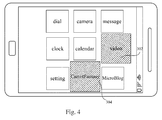
Fig. 4 shows a schematic diagram of adjusting the arrangement mode of application icons according to the statistical data in another embodiment of the present invention; -
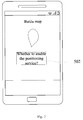
Fig. 5 shows a schematic diagram of reminding the user whether to switch the state mode of the terminal according to an embodiment of the present invention; -
Fig. 6 shows a schematic diagram of reminding the user whether to start an application according to an embodiment of the present invention; -
Fig. 7 shows a block diagram of a terminal according to an embodiment of the present invention. - In order to understand the above purposes, features and advantages of the present invention more clearly, the present invention will be further described in detail below in combination with the accompanying drawings and specific embodiments. It should be noted that, the embodiments of the present application and the features in the embodiments can be combined with each other without conflicts.
- Many specific details are described below for sufficiently understanding the present invention, however, the present invention may be further implemented by adopting other modes different from those described herein, so the protection scope of the present invention is not limited by the specific embodiments disclosed below.
-
Fig. 1 shows a flow diagram of an application icon adaptive adjustment method according to an embodiment of the present invention. - As shown in
Fig. 1 , the application icon adaptive adjustment method according to an embodiment of the present invention may include the following steps: 102, collecting statistics on the running duration and/or use frequency of at least one application program in one or more state modes of a terminal; 104, detecting the current state mode of the terminal; and 106, according to the statistical running duration and/or use frequency of the at least one application program in the current state mode, adjusting the display status of the application icon on a terminal interface. - The state mode of the terminal can be understood as a state of the terminal. The terminal has various set parameters, and once a user or the terminal sets a parameter, the set parameter can be regarded as a state of the terminal. For example, the user sets enabling a terminal positioning service, then a state mode of the terminal can be determined, and statistics on the running duration or use frequency of each application in the state mode can be collected. The display status of the application icon is adjusted according to the statistical data. For example, when the terminal enables the positioning service, statistics on longest use time of Baidu map application in the state mode is collected. When the terminal enables the positioning service next time, the terminal discovers that the use time of Baidu map is the longest, and then displays the icon of the Baidu map in the front of the desktop or highlights the icon of the Baidu map, thus facilitating the user to search.
- Accordingly, the present invention can really consider the use habit of the user, statistics on the use condition of an application is collected in each parameter setting condition, running state or terminal pose of the terminal, and the display status of the application icon is adjusted according to the statistical data in the state mode when the terminal is detected to be in the previous state again.
- In the above technical solution, preferably, the step of adjusting the display status of an application icon on the terminal desktop may include: adjusting the color, shape and size of the application icon and/or the display position of the application icon on the terminal interface.
- The icon color of the application mostly used by the user can be changed into a color different from that of other applications, or the icon is enlarged, or the icon is displayed in the front of the interface.
- In any above technical solution, preferably, the display status of each application icon is adjusted according to the length of the running duration and/or the use frequency.
- In any above technical solution, preferably, the state mode includes any one or more of a horizontal screen display mode, a vertical screen display mode and multiple scenario modes of the terminal, wherein the multiple scenario modes at least include a silent mode, a conference mode, an airplane mode and an outdoor mode. In fact, each parameter setting of the terminal can be referred to as a state mode, e.g., WIFI setting, Bluetooth setting, font setting, etc.
- In any above technical solution, preferably, the method may further include: calculating a state mode of longest running duration and/or highest use frequency of at least one application program in one or more state modes of the terminal; when any application program of the one or more application programs is started, judging whether the current state mode of the terminal corresponds to the state mode of longest running duration and/or highest use frequency of the any application program; and if the judgment result is no, adjusting the current state mode of the terminal to the state mode of longest running duration and/or highest use frequency of the any application program.
- When the user starts an application, the state mode of the terminal when the application is used previously can be judged according to the previous statistical data, and if the current state mode of the terminal is different from the judged state mode, the state mode of the terminal is switched.
- It is supposed that the user uses Youku application most frequently in the horizontal screen state. When the user starts the Youku application, whether the terminal is currently in the horizontal screen state is judged, and if not, the user is reminded of switching the terminal to the horizontal screen state, thus satisfying the use habit of the user.
- In any above technical solution, preferably, the method may further include: when the terminal is switched to the current state mode, reminding the user whether to enable the application program with the longest running duration and/or highest use frequency in the current state mode.
- When the terminal enters a certain state mode, the terminal determines the application program mostly used by the user according to the state mode, and then reminds the user whether to enable the application program or directly enables the application program. For example, when the terminal enables the positioning service, the terminal judges that Baidu map is used mostly, and then reminds the user whether to enable the Baidu map or directly enables the Baidu map.
- The application icon adaptive adjustment method in the present invention will be further described below in combination with
Fig. 2A to Fig. 6 . - Firstly, the terminal collects the statistics on the application use condition in each state mode. As shown in
Fig. 2A , the terminal is currently in a horizontal screen state mode, the user is using a video application, and the use duration of the video application is 2 hours by statistics. As shown inFig. 2B , the use duration of a game "CarrotFantasy" is 0.5 hour by statistics in the same horizontal screen state mode. That is to say, in the horizontal screen state mode, the use duration of the video application is longer than that of the game "CarrotFantasy", and the use durations of the two applications are longer than those of other applications. - When the terminal enters the horizontal screen state mode next time, the terminal detects the state mode, calls the statistical data in the state mode, and adjusts the display status of the application icons according to the statistical data. As shown in
Fig. 3 , when the terminal is in a vertical screen state mode, the dial application and the camera application are in the front; when the terminal is switched to the horizontal screen state mode, the display order of the application icons is adjusted, namely, thevideo application 302 and theCarrotFantasy application 304 are displayed in the front, so that the user can quickly find the applications mostly used in the state mode. - Besides the adjustment on the display positions of the application icons, other adjustment modes are available. As shown in
Fig. 4 , the display order of the applications is not changed, but the display size and color of the application icons are adjusted, namely, the icons of thevideo application 302 and theCarrotFantasy application 304 are enlarged and are deepened in color, so that the user can quickly note the mostly used applications. - It should be understood that, horizontal screen and vertical screen are only two states of the terminal, and any parameter setting of the terminal can be a state mode of the terminal, even setting the volume of the terminal or the brightness of a back light can also be regarded as a state mode of the terminal, for example, when the volume is set to be maximum, statistics on longest use duration of the music application is collected, so when the volume is set to be maximum, the music application may be displayed at the most prominent position of the desktop or the icon of the music application can be enlarged.
- As shown in
Fig. 5 , it is supposed that when the terminal enables the positioning service (the terminal enters a state mode), statistics on longest use duration of Baidu map is collected. When the terminal detects that the Baidu map is started, it reminds the user whether to enable thepositioning service 502 or directly enables the positioning service, thus facilitating the user to use. - As shown in
Fig. 6 , it is supposed that the statistical use duration of the video application in the horizontal screen state mode is the longest, and when the terminal enters the horizontal screen state mode, it automatically reminds the user whether to enable thevideo application 602 or directly starts the video application, thus reducing the operation of the user. -
Fig. 7 shows a block diagram of a terminal according to an embodiment of the present invention. - As shown in
Fig. 7 , the terminal 700 in the embodiment of the present invention includes: astatistical unit 702, used for collecting statistics on the running duration and/or use frequency of at least one application program in one or more state modes of a terminal; adetection unit 704, used for detecting the current state mode of the terminal; and an adjustment unit 706, connected to thestatistical unit 702 and thedetection unit 704, and used for, according to the statistical running duration and/or use frequency of the at least one application program in the current state mode, adjusting the display status of the application icon on a terminal interface. - The state mode of the terminal can be understood as a state of the terminal. The terminal has various set parameters, and once a user or the terminal sets a parameter, the set parameter can be regarded as a state of the terminal. For example, the user sets enabling a terminal positioning service, then a state mode of the terminal can be determined, and statistics on the running duration or use frequency of each application in the state mode can be collected. The display status of the application icon is adjusted according to the statistical data. For example, when the terminal enables the positioning service, statistics on longest use time of Baidu map application in the state mode is collected. When the terminal enables the positioning service next time, the terminal discovers that the use time of Baidu map is the longest, and then displays the icon of the Baidu map in the front of the desktop or highlights the icon of the Baidu map, thus facilitating the user to search.
- Accordingly, the present invention can really consider the use habit of the user, statistics on the use condition of an application is collected in each parameter setting condition, running state or terminal pose of the terminal, and the display status of the application icon is adjusted according to the statistical data in the state mode when the terminal is detected to be in the previous state again.
- In the above technical solution, preferably, the adjustment unit 706 is used for adjusting the color, shape and size of the application icon and/or the display position of the application icon on the terminal interface. The icon color of the application mostly used by the user can be changed into a color different from that of other applications, or the icon is enlarged, or the icon is displayed in the front of the interface.
- In the above technical solution, preferably, the adjustment unit 706 is further used for adjusting the display status of each application icon according to the length of the running duration and/or the use frequency.
- In the above technical solution, preferably, the state mode includes any one or more of a horizontal screen display mode, a vertical screen display mode and multiple scenario modes of the terminal, wherein the multiple scenario modes at least include a silent mode, a conference mode, an airplane mode and an outdoor mode. In fact, each parameter setting of the terminal can be referred to as a state mode, e.g., WIFI setting, Bluetooth setting, font setting, etc.
- In any above technical solution, preferably, the terminal may further include: a
calculation unit 708, used for calculating a state mode of longest running duration and/or highest use frequency of at least one application program in one or more state modes of the terminal; and ajudgment unit 710, connected to thecalculation unit 708, and used for, when any application program of the one or more application programs is started, judging whether the current state mode of the terminal corresponds to the state mode of longest running duration and/or highest use frequency of the any application program; wherein the adjustment unit is further used for, if the judgment result of the judgment unit is no, adjusting the current state mode of the terminal to the state mode of longest running duration and/or highest use frequency of the any application program. - When the user starts an application, the state mode of the terminal when the application is used previously can be judged according to the previous statistical data, and if the current state mode of the terminal is different from the judged state mode, the state mode of the terminal is switched.
- It is supposed that the user uses Youku application most frequently in the horizontal screen state. When the user starts the Youku application, whether the terminal is currently in the horizontal screen state is judged, and if not, the user is reminded of switching the terminal to the horizontal screen state, thus satisfying the use habit of the user.
- In any above technical solution, preferably, the terminal may further include: a reminding
unit 712, connected to thedetection unit 704, and used for, when the terminal is switched to the current state mode, reminding the user whether to enable the application program with the longest running duration and/or highest use frequency in the current state mode. - When the terminal enters a certain state mode, the terminal determines the application program mostly used by the user according to the state mode, and then reminds the user whether to enable the application program or directly enables the application program. For example, when the terminal enables the positioning service, the terminal judges that Baidu map is used mostly, and then reminds the user whether to enable the Baidu map or directly enables the Baidu map.
- According to a further aspect of the present invention, provided is a program product stored in a nonvolatile machine readable medium and used for adjusting the display of an application icon, the program product including a machine executive instruction enabling a computer system to execute the following steps: collecting statistics on the running duration and/or use frequency of at least one application program in one or more state modes of a terminal; detecting the current state mode of the terminal; and according to the statistical running duration and/or use frequency of the at least one application program in the current state mode, adjusting the display status of the application icon on a terminal interface.
- According to a still further aspect of the present invention, provided is a nonvolatile machine readable medium storing a program product for adjusting the display of an application icon, the program product including a machine executive instruction enabling a computer system to execute the following steps: collecting statistics on the running duration and/or use frequency of at least one application program in one or more state modes of a terminal; detecting the current state mode of the terminal; and according to the statistical running duration and/or use frequency of the at least one application program in the current state mode, adjusting the display status of the application icon on a terminal interface.
- According to a still further aspect of the present invention, provided is a machine readable program, which enables a machine to execute the application icon adaptive adjustment method in any above technical solution.
- According to a still further aspect of the present invention, provided is a storage medium storing a machine readable program, wherein the machine readable program enables a machine to execute the application icon adaptive adjustment method in any above technical solution.
- The technical solutions of the present invention are described in detail above in combination with the accompanying drawings. In the present invention, the use condition of each application program of the terminal in each state mode is detected, and when the terminal enters a certain state mode, the display status of the application icon is adjusted according to the statistical application program use condition corresponding to the state mode, namely, the display position, size, color and the like of the application icon is adjusted, so that the user can conveniently find the desired application icon from a large number of application icons, and the time for searching the application program is greatly shortened.
- Only preferred embodiments of the present invention are described above, but the present invention is not limited thereto. Various modifications and alterations may be made to the present invention for those skilled in the art. Any modifications, equivalent substitutions, improvements and the like made within the spirit and principle of the present invention shall fall into the protection scope of the present invention.
Claims (10)
- An application icon adaptive adjustment method, comprising:collecting statistics on the running duration and/or use frequency of at least one application program in one or more state modes of a terminal;detecting the current state mode of the terminal; andaccording to the statistical running duration and/or use frequency of the at least one application program in the current state mode, adjusting the display status of the application icon on a terminal interface.
- The application icon adaptive adjustment method of claim 1, wherein the step of adjusting the display status of the application icon on the terminal interface comprises:adjusting the color, shape and size of the application icon and/or the display position of the application icon on the terminal interface.
- The application icon adaptive adjustment method of claim 1, wherein the state mode comprises any one or more of a horizontal screen display mode, a vertical screen display mode and multiple scenario modes of the terminal; and the multiple scenario modes at least comprise a silent mode, a conference mode, an airplane mode and an outdoor mode.
- The application icon adaptive adjustment method of claim 3, further comprising:calculating a state mode of longest running duration and/or highest use frequency of at least one application program in one or more state modes of the terminal;when any application program of the one or more application programs is started, judging whether the current state mode of the terminal corresponds to the state mode of longest running duration and/or highest use frequency of the any application program; andif the judgment result is no, adjusting the current state mode of the terminal to the state mode of longest running duration and/or highest use frequency of the any application program.
- The application icon adaptive adjustment method of any of claims 1 to 4, further comprising:when the terminal is switched to the current state mode, reminding the user whether to enable the application program with the longest running duration and/or highest use frequency in the current state mode.
- A terminal, comprising:a statistical unit, used for collecting statistics on the running duration and/or use frequency of at least one application program in one or more state modes of a terminal;a detection unit, used for detecting the current state mode of the terminal; andan adjustment unit, connected to the statistical unit and the detection unit, and used for, according to the statistical running duration and/or use frequency of the at least one application program in the current state mode, adjusting the display status of the application icon on a terminal interface.
- The terminal of claim 6, wherein the adjustment unit is used for adjusting the color, shape and size of the application icon and/or the display position of the application icon on the terminal interface.
- The terminal of claim 6, wherein the state mode comprises any one or more of a horizontal screen display mode, a vertical screen display mode and multiple scenario modes of the terminal, and the multiple scenario modes at least comprise a silent mode, a conference mode, an airplane mode and an outdoor mode.
- The terminal of claim 8, further comprising:a calculation unit, used for calculating a state mode of longest running duration and/orhighest use frequency of at least one application program in one or more state modes of the terminal; anda judgment unit, connected to the calculation unit, and used for, when any application program of the one or more application programs is started, judging whether the current state mode of the terminal corresponds to the state mode of longest running duration and/or highest use frequency of the any application program;wherein the adjustment unit is further used for, if the judgment result of the judgment unit is no, adjusting the current state mode of the terminal to the state mode of longest running duration and/or highest use frequency of the any application program.
- The terminal of any of claims 6 to 9, further comprising:a reminding unit, connected to the detection unit, and used for, when the terminal is switched to the current state mode, reminding the user whether to enable the application program with the longest running duration and/or highest use frequency in the current state mode.
Applications Claiming Priority (1)
| Application Number | Priority Date | Filing Date | Title |
|---|---|---|---|
| PCT/CN2013/089465 WO2015085599A1 (en) | 2013-12-15 | 2013-12-15 | Application icon adaptive adjustment method and terminal |
Publications (2)
| Publication Number | Publication Date |
|---|---|
| EP3082037A1 true EP3082037A1 (en) | 2016-10-19 |
| EP3082037A4 EP3082037A4 (en) | 2017-06-28 |
Family
ID=53370546
Family Applications (1)
| Application Number | Title | Priority Date | Filing Date |
|---|---|---|---|
| EP13899239.1A Ceased EP3082037A4 (en) | 2013-12-15 | 2013-12-15 | Application icon adaptive adjustment method and terminal |
Country Status (4)
| Country | Link |
|---|---|
| US (1) | US10235011B2 (en) |
| EP (1) | EP3082037A4 (en) |
| CN (1) | CN104903856A (en) |
| WO (1) | WO2015085599A1 (en) |
Families Citing this family (14)
| Publication number | Priority date | Publication date | Assignee | Title |
|---|---|---|---|---|
| CN105549815A (en) * | 2015-11-27 | 2016-05-04 | 努比亚技术有限公司 | Desktop icon display device and method |
| CN105930139A (en) * | 2016-01-16 | 2016-09-07 | 平安科技(深圳)有限公司 | Application program control dynamic configuration method and electronic device |
| CN108241568A (en) * | 2016-12-26 | 2018-07-03 | 北京国双科技有限公司 | A kind of duration statistical method and relevant apparatus |
| KR20200058511A (en) * | 2017-10-20 | 2020-05-27 | 후아웨이 테크놀러지 컴퍼니 리미티드 | Icon display methods, devices, and systems |
| CN109814971B (en) * | 2019-01-22 | 2023-03-31 | 平安科技(深圳)有限公司 | Desktop application icon arrangement method, electronic device and storage medium |
| CN109829107A (en) | 2019-01-23 | 2019-05-31 | 华为技术有限公司 | A kind of recommended method and electronic equipment based on user movement state |
| CN113687808B (en) * | 2020-05-18 | 2024-09-24 | Oppo广东移动通信有限公司 | Desktop icon layout method, device, storage medium and electronic device |
| US11422673B2 (en) * | 2020-06-12 | 2022-08-23 | Samsung Electronics Co., Ltd. | Electronic apparatus and control method thereof |
| CN112433656B (en) * | 2020-10-28 | 2023-04-18 | 福建星网视易信息系统有限公司 | Interface dynamic display method and equipment |
| CN112379810B (en) * | 2020-12-08 | 2022-09-09 | 四川酷赛科技有限公司 | Method for dynamically adjusting size of desktop icon and mobile terminal |
| CN114827448A (en) * | 2021-01-29 | 2022-07-29 | 华为技术有限公司 | Video recording method and electronic equipment |
| CN113590244B (en) * | 2021-07-05 | 2024-03-22 | 青岛海信移动通信技术有限公司 | Control method of setting function applied to terminal equipment and terminal equipment |
| CN113805999B (en) * | 2021-09-22 | 2023-12-08 | 深圳康佳电子科技有限公司 | Intelligent identification processing method and device for horizontal and vertical screens, intelligent terminal and storage medium |
| CN117492879A (en) * | 2022-07-25 | 2024-02-02 | 华为技术有限公司 | Methods and electronic devices for application management |
Family Cites Families (10)
| Publication number | Priority date | Publication date | Assignee | Title |
|---|---|---|---|---|
| DE102008055011A1 (en) * | 2008-12-19 | 2010-07-01 | Deutsche Telekom Ag | Method for controlling a user interface |
| CN101795321B (en) * | 2010-01-27 | 2012-07-11 | 华为终端有限公司 | Application display method and mobile communication terminal based on user habit |
| CN102541414A (en) * | 2010-12-28 | 2012-07-04 | 英华达(上海)科技有限公司 | Mobile terminal device capable of automatically switching operation mode |
| CN102081501A (en) | 2011-01-19 | 2011-06-01 | 宇龙计算机通信科技(深圳)有限公司 | Method and device for providing shortcut operation application programs for user and mobile terminal |
| CN102609164A (en) * | 2011-01-20 | 2012-07-25 | 深圳富泰宏精密工业有限公司 | Directory icon adjusting system and directory icon adjusting method |
| US9781540B2 (en) | 2011-07-07 | 2017-10-03 | Qualcomm Incorporated | Application relevance determination based on social context |
| US9542061B2 (en) * | 2012-09-17 | 2017-01-10 | Harman International Industries, Incorporated | Graphical user interface sizing and arrangement system |
| US20140283141A1 (en) * | 2013-03-15 | 2014-09-18 | Apple Inc. | Switching a Mobile Device from Operating in a Primary Access Mode to a Secondary Access Mode |
| CN103150169A (en) * | 2013-03-26 | 2013-06-12 | 锤子科技(北京)有限公司 | Icon adjusting method |
| CN103218243A (en) * | 2013-04-22 | 2013-07-24 | 广东欧珀移动通信有限公司 | Application icon display method and device |
-
2013
- 2013-12-15 CN CN201380068854.7A patent/CN104903856A/en active Pending
- 2013-12-15 WO PCT/CN2013/089465 patent/WO2015085599A1/en not_active Ceased
- 2013-12-15 US US15/037,876 patent/US10235011B2/en active Active
- 2013-12-15 EP EP13899239.1A patent/EP3082037A4/en not_active Ceased
Also Published As
| Publication number | Publication date |
|---|---|
| WO2015085599A1 (en) | 2015-06-18 |
| EP3082037A4 (en) | 2017-06-28 |
| CN104903856A (en) | 2015-09-09 |
| US20160291837A1 (en) | 2016-10-06 |
| US10235011B2 (en) | 2019-03-19 |
Similar Documents
| Publication | Publication Date | Title |
|---|---|---|
| US10235011B2 (en) | Application icon adaptive adjustment method and terminal | |
| US10447843B2 (en) | Method, device and storage medium for setting position of function setting key of mobile terminal | |
| US10419823B2 (en) | Method for controlling multimedia playing, apparatus thereof and storage medium | |
| US9170722B2 (en) | Display control device, display control method, and program | |
| US9420180B2 (en) | Method and device for switching between double cameras | |
| CN112997134B (en) | Application icon display method, device, storage medium and electronic device | |
| US9967824B2 (en) | Mobile terminal managing method and system, mobile terminal | |
| US10827306B2 (en) | Intelligent event information presentation method and terminal | |
| US8676271B2 (en) | Application displaying method and mobile communication terminal based on user's habit | |
| US20150212691A1 (en) | Method and apparatus for desktop management | |
| CN108111687B (en) | Display control method and related product | |
| US20140082516A1 (en) | Method and apparatus for switching software interface of a mobile terminal | |
| CN102929650A (en) | Method and device for independently configuring application program running environment and mobile device | |
| CN103118192A (en) | Terminal equipment and display method thereof | |
| US20170269823A1 (en) | Control Display Method and Device, and Terminal | |
| CN108701365A (en) | Light spot recognition method, device and system | |
| WO2022012662A1 (en) | Notification display method and apparatus, and electronic device | |
| CN105843488A (en) | Method and apparatus for sorting options of setup menu | |
| CN105677544B (en) | Lamplight display method and light display apparatus | |
| US20170366840A9 (en) | Video playing method and system | |
| CN106648730A (en) | Processing method and device of abnormal application | |
| CN105573603A (en) | Method and device for adjusting screen darkening time of terminal | |
| WO2017101336A1 (en) | Switch shortcut controlling method and device | |
| US20160274955A1 (en) | Method and Device for Activating and Controlling Application in Multi-Screen System, and Mobile Terminal | |
| CN104506732A (en) | Contact person based system switching method and contact person based system switching device |
Legal Events
| Date | Code | Title | Description |
|---|---|---|---|
| PUAI | Public reference made under article 153(3) epc to a published international application that has entered the european phase |
Free format text: ORIGINAL CODE: 0009012 |
|
| 17P | Request for examination filed |
Effective date: 20160429 |
|
| AK | Designated contracting states |
Kind code of ref document: A1 Designated state(s): AL AT BE BG CH CY CZ DE DK EE ES FI FR GB GR HR HU IE IS IT LI LT LU LV MC MK MT NL NO PL PT RO RS SE SI SK SM TR |
|
| AX | Request for extension of the european patent |
Extension state: BA ME |
|
| DAX | Request for extension of the european patent (deleted) | ||
| A4 | Supplementary search report drawn up and despatched |
Effective date: 20170529 |
|
| RIC1 | Information provided on ipc code assigned before grant |
Ipc: G06F 3/0482 20130101ALI20170522BHEP Ipc: G06F 3/0481 20130101ALI20170522BHEP Ipc: G06F 9/44 20060101AFI20170522BHEP Ipc: H04M 1/725 20060101ALI20170522BHEP |
|
| STAA | Information on the status of an ep patent application or granted ep patent |
Free format text: STATUS: EXAMINATION IS IN PROGRESS |
|
| 17Q | First examination report despatched |
Effective date: 20190429 |
|
| REG | Reference to a national code |
Ref country code: DE Ref legal event code: R003 |
|
| STAA | Information on the status of an ep patent application or granted ep patent |
Free format text: STATUS: THE APPLICATION HAS BEEN REFUSED |
|
| 18R | Application refused |
Effective date: 20210614 |