EP3079051A1 - Operation method of touch screen and touch screen device - Google Patents
Operation method of touch screen and touch screen device Download PDFInfo
- Publication number
- EP3079051A1 EP3079051A1 EP14812700.4A EP14812700A EP3079051A1 EP 3079051 A1 EP3079051 A1 EP 3079051A1 EP 14812700 A EP14812700 A EP 14812700A EP 3079051 A1 EP3079051 A1 EP 3079051A1
- Authority
- EP
- European Patent Office
- Prior art keywords
- screen
- touch
- target region
- medium
- touch point
- Prior art date
- Legal status (The legal status is an assumption and is not a legal conclusion. Google has not performed a legal analysis and makes no representation as to the accuracy of the status listed.)
- Ceased
Links
Images

Classifications
-
- G—PHYSICS
- G06—COMPUTING OR CALCULATING; COUNTING
- G06F—ELECTRIC DIGITAL DATA PROCESSING
- G06F3/00—Input arrangements for transferring data to be processed into a form capable of being handled by the computer; Output arrangements for transferring data from processing unit to output unit, e.g. interface arrangements
- G06F3/01—Input arrangements or combined input and output arrangements for interaction between user and computer
- G06F3/048—Interaction techniques based on graphical user interfaces [GUI]
- G06F3/0487—Interaction techniques based on graphical user interfaces [GUI] using specific features provided by the input device, e.g. functions controlled by the rotation of a mouse with dual sensing arrangements, or of the nature of the input device, e.g. tap gestures based on pressure sensed by a digitiser
- G06F3/0488—Interaction techniques based on graphical user interfaces [GUI] using specific features provided by the input device, e.g. functions controlled by the rotation of a mouse with dual sensing arrangements, or of the nature of the input device, e.g. tap gestures based on pressure sensed by a digitiser using a touch-screen or digitiser, e.g. input of commands through traced gestures
-
- G—PHYSICS
- G06—COMPUTING OR CALCULATING; COUNTING
- G06F—ELECTRIC DIGITAL DATA PROCESSING
- G06F3/00—Input arrangements for transferring data to be processed into a form capable of being handled by the computer; Output arrangements for transferring data from processing unit to output unit, e.g. interface arrangements
- G06F3/01—Input arrangements or combined input and output arrangements for interaction between user and computer
- G06F3/048—Interaction techniques based on graphical user interfaces [GUI]
- G06F3/0484—Interaction techniques based on graphical user interfaces [GUI] for the control of specific functions or operations, e.g. selecting or manipulating an object, an image or a displayed text element, setting a parameter value or selecting a range
- G06F3/04845—Interaction techniques based on graphical user interfaces [GUI] for the control of specific functions or operations, e.g. selecting or manipulating an object, an image or a displayed text element, setting a parameter value or selecting a range for image manipulation, e.g. dragging, rotation, expansion or change of colour
-
- G—PHYSICS
- G06—COMPUTING OR CALCULATING; COUNTING
- G06F—ELECTRIC DIGITAL DATA PROCESSING
- G06F3/00—Input arrangements for transferring data to be processed into a form capable of being handled by the computer; Output arrangements for transferring data from processing unit to output unit, e.g. interface arrangements
- G06F3/01—Input arrangements or combined input and output arrangements for interaction between user and computer
- G06F3/048—Interaction techniques based on graphical user interfaces [GUI]
- G06F3/0487—Interaction techniques based on graphical user interfaces [GUI] using specific features provided by the input device, e.g. functions controlled by the rotation of a mouse with dual sensing arrangements, or of the nature of the input device, e.g. tap gestures based on pressure sensed by a digitiser
- G06F3/0488—Interaction techniques based on graphical user interfaces [GUI] using specific features provided by the input device, e.g. functions controlled by the rotation of a mouse with dual sensing arrangements, or of the nature of the input device, e.g. tap gestures based on pressure sensed by a digitiser using a touch-screen or digitiser, e.g. input of commands through traced gestures
- G06F3/04883—Interaction techniques based on graphical user interfaces [GUI] using specific features provided by the input device, e.g. functions controlled by the rotation of a mouse with dual sensing arrangements, or of the nature of the input device, e.g. tap gestures based on pressure sensed by a digitiser using a touch-screen or digitiser, e.g. input of commands through traced gestures for inputting data by handwriting, e.g. gesture or text
-
- G—PHYSICS
- G06—COMPUTING OR CALCULATING; COUNTING
- G06F—ELECTRIC DIGITAL DATA PROCESSING
- G06F2203/00—Indexing scheme relating to G06F3/00 - G06F3/048
- G06F2203/048—Indexing scheme relating to G06F3/048
- G06F2203/04805—Virtual magnifying lens, i.e. window or frame movable on top of displayed information to enlarge it for better reading or selection
-
- G—PHYSICS
- G06—COMPUTING OR CALCULATING; COUNTING
- G06F—ELECTRIC DIGITAL DATA PROCESSING
- G06F2203/00—Indexing scheme relating to G06F3/00 - G06F3/048
- G06F2203/048—Indexing scheme relating to G06F3/048
- G06F2203/04806—Zoom, i.e. interaction techniques or interactors for controlling the zooming operation
Definitions
- the present disclosure relates to the technical field of electronic technologies, and more particularly, to an operation method of a touch screen and to a touch screen device.
- the touch screen is a kind of new computer input device having such advantages as having a high response speed, saving space and easy to use. So far, the touch screen is known as the simplest and most straightforward means for human-machine interaction, and the user can execute a corresponding operation simply by slightly touching an icon or a text on the touch screen of a touch screen device. This makes the human-machine interaction more straightforward and very convenient for the user.
- the touch screen still has the problem of insensitivity in response, so it is often the case that when a user using a touch screen device clicks on an application or a link, the target fails to be selected, and this makes the touch screen inconvenient to use.
- this is solved usually by improving quality of the touch screen or reasonably planning the layout of applications so as to improve accuracy of touch points.
- the prior art solutions can still not fundamentally solve the problem of mis-touches.
- the main technical problem to be solved by the present disclosure is to provide an operation method of a touch screen and a touch screen device, which can reduce occurrences of mis-touches in the process of operating the touch screen and make the touch screen very convenient to use by the user.
- a technical solution adopted in the present disclosure is to provide an operation method of a touch screen, comprising: acquiring an input trajectory on the screen; determining whether the input trajectory is consistent with a predetermined trajectory; zooming in a target region that corresponds to a current touch point between a touch medium and the screen if the determination result is "yes"; detecting in the zoomed-in target region a touch-screen operation instruction indicating that the touch medium is leaving the screen; and executing a corresponding operation, which is triggered when a target object corresponding to the touch point before the touch medium leaves the screen is clicked, in the target region according to the touch-screen operation instruction indicating that the touch medium is leaving the screen; wherein the step of zooming in a target region that corresponds to a current touch point between the a touch medium and the screen, comprises: acquiring a circular target region that takes the touch point as an origin and has a preset radius on the screen, and acquiring a bitmap of the circular target region; and zooming
- the method further comprises: changing the target region with the change of the touch point between the touch medium and the screen as the touch medium moves on the screen, and zooming in the changed target region.
- the method further comprises: restoring the zoomed-in target region into a normal displaying state of the screen when another input trajectory consistent with the predetermined trajectory is acquired as the touch medium keeps in touch with the screen.
- another technical solution adopted in the present disclosure is to provide an operation method of a touch screen, comprising: acquiring an input trajectory on the screen; determining whether the input trajectory is consistent with a predetermined trajectory; zooming in a target region that corresponds to a current touch point between a touch medium and the screen if the determination result is "yes"; detecting a touch-screen operation instruction in the zoomed-in target region; and executing a corresponding operation according to the touch-screen operation instruction.
- the step of detecting a touch-screen operation instruction in the zoomed-in target region comprises: detecting in the zoomed-in target region the touch-screen operation instruction indicating that the touch medium is leaving the screen; the step of executing a corresponding operation according to the touch-screen operation instruction comprises: executing a corresponding operation, which is triggered when a target object corresponding to the touch point before the touch medium leaves the screen is clicked, in the target region according to the touch-screen operation instruction indicating that the touch medium is leaving the screen.
- the step of zooming in a target region that corresponds to a current touch point between a touch medium and the screen comprises: acquiring a circular target region that takes the touch point as an origin and has a preset radius on the screen, and acquiring a bitmap of the circular target region; and zooming in the bitmap of the circular target region at a preset scale and displaying the bitmap.
- the method further comprises: changing the target region with the change of the touch point between the touch medium and the screen as the touch medium moves on the screen, and zooming in the changed target region.
- the method further comprises: restoring the zoomed-in target region into a normal displaying state of the screen when another input trajectory consistent with the predetermined trajectory is acquired as the touch medium keeps in touch with the screen.
- a touch screen device comprising: a first acquiring module, being configured to acquire an input trajectory on the screen; a determining module, being configured to determine whether the input trajectory is consistent with a predetermined trajectory; a displaying module, being configured to zoom in a target region that corresponds to a current touch point between a touch medium and the screen if the determination result is "yes"; a second acquiring module, being configured to detect a touch-screen operation instruction in the zoomed-in target region; and an executing module, being configured to execute a corresponding operation according to the touch-screen operation instruction.
- the second acquiring module is configured to detect in the zoomed-in target region a touch-screen operation instruction indicating that the touch medium is leaving the screen; and the executing module is configured to execute a corresponding operation, which is triggered when a target object corresponding to the touch point before the touch medium leaves the screen is clicked, in the target region according to the touch-screen operation instruction indicating that the touch medium is leaving the screen.
- the displaying module comprises: an acquiring unit, being configured to acquire a circular target region that takes the touch point as an origin and has a preset radius on the screen, and acquiring a bitmap of the circular target region; and a zoom-in displaying unit, being configured to zoom in the bitmap of the circular target region at a preset scale and display the bitmap.
- the target region changes with the change of the touch point between the touch medium and the screen as the touch medium moves on the screen
- the displaying module is configured to zoom in the changed target region
- the displaying module restores the zoomed-in target region into a normal displaying state of the screen when another input trajectory consistent with the predetermined trajectory is acquired as the touch medium keeps in touch with the screen.
- the positioning method of the touch screen according to the present disclosure firstly acquires an input trajectory on the screen, then determines whether the input trajectory is consistent with a predetermined trajectory, zooms in a target region on the screen that corresponds to a current touch point of a touch medium if the determination result is "yes”, detects a touch-screen operation instruction in the zoomed-in target region, and executes a corresponding operation according to the touch-screen operation instruction.
- the user can see the target object corresponding to the touch point more clearly so that whether the target object corresponding to the touch point is a desired object to be operated by the user can be determined more accurately, thus reducing occurrences of mis-touches.
- the present disclosure mainly simulates the effect of a magnifying lens, and zooms in the content displayed on the screen to reduce occurrences of mis-touches in the process of operating the touch screen by the user so as to improve the user experience.
- an embodiment of a positioning method of a touch screen of the present disclosure comprises the following steps of:
- the predetermined trajectory is a preset hand gesture for "awaking" the magnifying lens application.
- the hand gesture is self-defined by the user, for example, it may be a circle, or a letter, and may also be a hand gesture defined by the system. Supposing that the predetermined trajectory is a circle, the touch screen device receives an input trajectory of the user, and determines whether the input trajectory is consistent with the predetermined trajectory. Then, the touch screen device zooms in a target region on the screen that corresponds to a current touch point of the touch medium if the determination result is "yes"; and otherwise, the zoom-in operation is performed.
- the coordinate on the screen of the current touch point of the touch medium (e.g., a finger or a touch pen) is acquired firstly.
- the coordinate value of the touch point can be acquired by calling a standard interface of the system in a manner well known in the art. Taking the Android system as an example, onTouchEvent may be called to read the coordinate value (X, Y) in Event, and the coordinate value of the touch point of the touch medium on the screen may be acquired with reference to the following code segment:
- the touch point of the touch medium on the screen usually is the content currently operated by the user.
- a target region corresponding to the touch point is acquired according to the position of the touch point on the touch screen.
- the size and the shape of the target region may be set as needed as long as the touch point is included in the target region (i.e., the content in the target region includes the content corresponding to the touch point (e.g., a certain application or a link corresponding to the touch point or the like)).
- the target region acquired on the screen is a circular target region taking the touch point as an origin and having a defined radius.
- the radius of the circular target region may be set as needed, for example, may be 100Pixel, and of course, may also be 150Pixel; and additionally, the range of the circular target region may be set as needed by the user, and the present disclosure has no limitation on this.
- a bitmap of the circular target region is acquired and enlarged at a scale that is set, and then the enlarged bitmap is displayed on the screen to cover the position of the touch point so as to zoom in the target region corresponding to the touch point.
- the bitmap of the acquired target region may be zoomed in twice, and of course, may also be at other scales, for example, threefold or fivefold etc.; and of course, the scale may be adjusted by the user as needed.
- the target region on the screen that corresponds to the touch point of the touch medium is zoomed-in in real time. Specifically, after the target region that corresponds to the current touch point between the touch medium and the screen is zoomed in, if it is detected that the touch medium is moving on the screen (i.e., the touch medium still keeps in touch with the screen, but the touch point on the screen changes continually), then the target region corresponding to the touch point also changes with the position of the touch point changing.
- the target region corresponding to the current touch point is acquired in real time in the process of moving the touch medium on the screen, and the acquired target region is zoomed in in real time in the process of moving the touch medium on the screen. Furthermore, if another input trajectory consistent with the predetermined trajectory is acquired in the process where the touch medium keeps in touch with the screen, the zoom-in effect of the zoomed-in target region will become disappeared to restore the zoomed-in target region into a normal displaying state of the screen.
- Step S104 detecting in the zoomed-in target region a touch-screen operation instruction.
- Step S105 executing a corresponding operation according to the touch-screen operation instruction.
- a touch-screen operation instruction is acquired according to the operation of the user on the touch screen so as to execute a corresponding operation according to the operation of the user on the touch screen.
- zooming in the target region the user can see the content on the screen corresponding to the touch point of the touch medium more clearly. Then, whether the content corresponding to the touch point is the content he or she needs to operate can be determined more accurately, thus executing a related corresponding operation.
- the user may not click the target object directly to start the target object, but simply remove the touch medium from the screen; and when the touch screen device detects that the touch point of the touch medium on the screen has disappeared (i.e., the touch screen device detects a touch-screen operation instruction indicating that the touch medium has left the screen), a related operation in the target region, which is triggered when the target object corresponding to the touch point before the touch medium leaves the screen is clicked, is executed so as to start the target object, thus further reducing the probability of clicking a wrong target by the user.
- the user may remove the touch medium from the screen.
- a related operation in the target region which is triggered when the application corresponding to the touch point before the touch medium leaves the screen is clicked, is executed so as to start the application without the need of a manual click by the user.
- the related operation triggered after the target object is clicked varies with different target objects, and thus, the corresponding operation to be executed also varies.
- the target object corresponding to the touch point is a text displayed on the screen that are provided for the user to select when the user inputs texts through an input editor
- the operation triggered after the text is clicked is to select the text for displaying at the input position on the screen
- the corresponding operation to be executed is to select the text for displaying at the input position on the screen.
- the zoom-in effect in the zoomed-in target region disappears so as to restore the zoomed-in target region into a normal displaying state of the screen.
- the user can see the content corresponding to the touch point more clearly so that whether the content corresponding to the touch point is the content that he or she needs to operate can be determined more accurately, thus reducing occurrences of mis-touches and the probability of clicking a wrong target by the user.
- the user may also trigger the touch screen device to execute the corresponding operation, which is triggered when the target object is clicked, through double clicks on the screen instead of removing the touch medium from the screen.
- the user may remove the touch medium from the screen firstly.
- the touch screen device still keeps the zoom-in effect of the target region; and at this time point, the target region is the target region on the screen that corresponds to the touch point of the touch medium before the touch medium leaves the screen.
- the user may double click the target object on the screen in the zoomed-in target region.
- the touch screen device After having received the user's double-click operation instruction, the touch screen device executes the corresponding operation, which is triggered when the target object is clicked, according to the double-click operation instruction, and restores the zoomed-in target region into a normal displaying state of the screen.
- the user may also execute other operations on the zoomed-in target region, for example, a single-click operation, or a dragging operation or the like, and the touch screen device executes a corresponding operation after detecting the related touch-screen operation instruction.
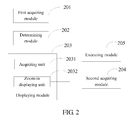
- the touch screen device comprises a first acquiring module 201, a determining module 202, a displaying module 203, a second acquiring module 204 and an executing module 205.
- the first acquiring module 201 is configured to acquire an input trajectory on the screen; the determining module 202 is configured to determine whether the input trajectory on the screen is consistent with a predetermined trajectory; the displaying module 203 is configured to zoom in a target region that corresponds to a current touch point between a touch medium and the screen when the determining module 202 determines that the input trajectory acquired is consistent with the predetermined trajectory; the second acquiring module 204 is configured to detect a touch-screen operation instruction in the zoomed-in target region; and the executing module 205 is configured to execute a corresponding operation according to the touch-screen operation instruction.
- the user can see the content corresponding to the touch point more clearly so that whether the content corresponding to the touch point is the target object that he or she needs to operate user can be determined more accurately and a related screen operation can be executed accordingly, thus reducing occurrences of mis-touches and the probability of clicking a wrong target by the user.
- the displaying module 203 comprises an acquiring unit 2031 and a zoom-in displaying unit 2032.
- the acquiring unit 2031 firstly acquires a coordinate position on the screen of the touch point of the touch medium, then acquires a circular target region on the screen that takes the touch point as an origin and has a defined radius, and acquires a bitmap of the circular target region (specifically, the bitmap of the circular target region may be copied).
- the zoom-in displaying unit 2032 zooms in the bitmap of the circular target region at a scale that is set and displays the zoomed-in bitmap of the circular target region on the screen so as to achieve the zoom-in purpose.
- the size and the shape of the target region corresponding to the touch point may also be set as needed.
- the target region may be a circular target region that takes the coordinate of the touch point as an origin and has a set radius of 100 pixels or 200 pixels, and may also be a square target region that takes the coordinate of the touch point as an center point as long as the touch point is included therein.
- the user can determine whether the content corresponding to the touch point is the target object to be operated more clearly according to the zoomed-in target region, thus executing the related screen operation. For example, when the user determines that the content in the zoomed-in circular target region is just the target object that he or she needs to click, the user may remove the touch medium from the screen.
- the executing module 205 executes the corresponding operation, which is triggered when a target object corresponding to the touch point before the touch medium leaves the screen is clicked, in the target region according to the touch-screen operation instruction indicating that the touch medium has left the screen, thus reducing the probability of clicking a wrong object by the user.
- a double-click operation instruction for the target object in the zoomed-in target region is acquired to execute a related operation triggered by the double-click operation instruction. That is, when the target region is zoomed in and the user determines that the content in the zoomed-in target region is just the target object that he or she needs to click, the user may remove the touch medium from the screen. When detecting the disappearance of the touch point, the touch screen device still keeps the zoom-in effect of the target region, and then the user may double click or single click the target object in the zoomed-in target region. After the double-click or single-click operation instruction of the user is detected by the second acquiring module, the executing module executes the corresponding operation, which is triggered when the target object is clicked, according to the acquired double-click or single-click operation instruction.
- the acquiring unit 2031 of the displaying module 203 acquires the touch point of the touch medium on the screen in real time so as to acquire the target region corresponding to the touch point in real time in the process of moving the touch medium on the screen (i.e., the target region changes with the touch point); and the zoom-in displaying unit 2032 zooms in the changed target region so as to zoom in the target region corresponding to the touch point in real time. Additionally, when another input trajectory consistent with the predetermined trajectory is acquired by the acquiring module 201 as the touch medium keeps in touch with the screen, the displaying module 203 restores the zoomed-in target region into a normal displaying state of the screen.
- the user can see the content corresponding to the touch point more clearly so that whether the content corresponding to the touch point is the content that the user needs to operate can be determined more accurately so as to execute the related screen operation, thus reducing occurrences of mis-touches and the probability of clicking a wrong target by the user.
Landscapes
- Engineering & Computer Science (AREA)
- General Engineering & Computer Science (AREA)
- Theoretical Computer Science (AREA)
- Human Computer Interaction (AREA)
- Physics & Mathematics (AREA)
- General Physics & Mathematics (AREA)
- User Interface Of Digital Computer (AREA)
- Position Input By Displaying (AREA)
Abstract
Description
- The present disclosure relates to the technical field of electronic technologies, and more particularly, to an operation method of a touch screen and to a touch screen device.
- As compared with conventional keyboard input devices, the touch screen is a kind of new computer input device having such advantages as having a high response speed, saving space and easy to use. So far, the touch screen is known as the simplest and most straightforward means for human-machine interaction, and the user can execute a corresponding operation simply by slightly touching an icon or a text on the touch screen of a touch screen device. This makes the human-machine interaction more straightforward and very convenient for the user.
- However, the touch screen still has the problem of insensitivity in response, so it is often the case that when a user using a touch screen device clicks on an application or a link, the target fails to be selected, and this makes the touch screen inconvenient to use. In the prior art, this is solved usually by improving quality of the touch screen or reasonably planning the layout of applications so as to improve accuracy of touch points. However, the prior art solutions can still not fundamentally solve the problem of mis-touches.
- The main technical problem to be solved by the present disclosure is to provide an operation method of a touch screen and a touch screen device, which can reduce occurrences of mis-touches in the process of operating the touch screen and make the touch screen very convenient to use by the user.
- To solve the aforesaid technical problem, a technical solution adopted in the present disclosure is to provide an operation method of a touch screen, comprising: acquiring an input trajectory on the screen; determining whether the input trajectory is consistent with a predetermined trajectory; zooming in a target region that corresponds to a current touch point between a touch medium and the screen if the determination result is "yes"; detecting in the zoomed-in target region a touch-screen operation instruction indicating that the touch medium is leaving the screen; and executing a corresponding operation, which is triggered when a target object corresponding to the touch point before the touch medium leaves the screen is clicked, in the target region according to the touch-screen operation instruction indicating that the touch medium is leaving the screen; wherein the step of zooming in a target region that corresponds to a current touch point between the a touch medium and the screen, comprises: acquiring a circular target region that takes the touch point as an origin and has a preset radius on the screen, and acquiring a bitmap of the circular target region; and zooming in the bitmap of the circular target region at a preset scale and displaying the bitmap.
- Preferably, after the step of zooming in a target region that corresponds to a current touch point between the a touch medium and the screen, the method further comprises: changing the target region with the change of the touch point between the touch medium and the screen as the touch medium moves on the screen, and zooming in the changed target region.
- Preferably, after the step of zooming in a target region that corresponds to a current touch point between the touch medium and the screen, the method further comprises: restoring the zoomed-in target region into a normal displaying state of the screen when another input trajectory consistent with the predetermined trajectory is acquired as the touch medium keeps in touch with the screen.
- To solve the aforesaid technical problem, another technical solution adopted in the present disclosure is to provide an operation method of a touch screen, comprising: acquiring an input trajectory on the screen; determining whether the input trajectory is consistent with a predetermined trajectory; zooming in a target region that corresponds to a current touch point between a touch medium and the screen if the determination result is "yes"; detecting a touch-screen operation instruction in the zoomed-in target region; and
executing a corresponding operation according to the touch-screen operation instruction. - Preferably, the step of detecting a touch-screen operation instruction in the zoomed-in target region comprises: detecting in the zoomed-in target region the touch-screen operation instruction indicating that the touch medium is leaving the screen; the step of executing a corresponding operation according to the touch-screen operation instruction comprises: executing a corresponding operation, which is triggered when a target object corresponding to the touch point before the touch medium leaves the screen is clicked, in the target region according to the touch-screen operation instruction indicating that the touch medium is leaving the screen.
- Preferably, the step of zooming in a target region that corresponds to a current touch point between a touch medium and the screen, comprises: acquiring a circular target region that takes the touch point as an origin and has a preset radius on the screen, and acquiring a bitmap of the circular target region; and zooming in the bitmap of the circular target region at a preset scale and displaying the bitmap.
- Preferably, after the step of zooming in a target region that corresponds to a current touch point between a touch medium and the screen, the method further comprises: changing the target region with the change of the touch point between the touch medium and the screen as the touch medium moves on the screen, and zooming in the changed target region.
- Preferably, after the step of zooming in a target region that corresponds to a current touch point between a touch medium and the screen, the method further comprises: restoring the zoomed-in target region into a normal displaying state of the screen when another input trajectory consistent with the predetermined trajectory is acquired as the touch medium keeps in touch with the screen.
- To solve the aforesaid technical problem, another technical solution adopted in the present disclosure is to provide a touch screen device, comprising: a first acquiring module, being configured to acquire an input trajectory on the screen; a determining module, being configured to determine whether the input trajectory is consistent with a predetermined trajectory; a displaying module, being configured to zoom in a target region that corresponds to a current touch point between a touch medium and the screen if the determination result is "yes"; a second acquiring module, being configured to detect a touch-screen operation instruction in the zoomed-in target region; and an executing module, being configured to execute a corresponding operation according to the touch-screen operation instruction.
- Preferably, the second acquiring module is configured to detect in the zoomed-in target region a touch-screen operation instruction indicating that the touch medium is leaving the screen; and the executing module is configured to execute a corresponding operation, which is triggered when a target object corresponding to the touch point before the touch medium leaves the screen is clicked, in the target region according to the touch-screen operation instruction indicating that the touch medium is leaving the screen.
- Preferably, the displaying module comprises: an acquiring unit, being configured to acquire a circular target region that takes the touch point as an origin and has a preset radius on the screen, and acquiring a bitmap of the circular target region; and a zoom-in displaying unit, being configured to zoom in the bitmap of the circular target region at a preset scale and display the bitmap.
- Preferably, the target region changes with the change of the touch point between the touch medium and the screen as the touch medium moves on the screen, and the displaying module is configured to zoom in the changed target region.
- Preferably, the displaying module restores the zoomed-in target region into a normal displaying state of the screen when another input trajectory consistent with the predetermined trajectory is acquired as the touch medium keeps in touch with the screen.
- The present disclosure has the following benefits: as compared to the prior art, the positioning method of the touch screen according to the present disclosure firstly acquires an input trajectory on the screen, then determines whether the input trajectory is consistent with a predetermined trajectory, zooms in a target region on the screen that corresponds to a current touch point of a touch medium if the determination result is "yes", detects a touch-screen operation instruction in the zoomed-in target region, and executes a corresponding operation according to the touch-screen operation instruction. By zooming in the target region corresponding to the touch point, the user can see the target object corresponding to the touch point more clearly so that whether the target object corresponding to the touch point is a desired object to be operated by the user can be determined more accurately, thus reducing occurrences of mis-touches.
-
-
FIG. 1 is a flowchart diagram illustrating an embodiment of a positioning method of the touch screen of the present disclosure; and -
FIG. 2 is a schematic structural view illustrating an embodiment of a touch screen device of the present disclosure. - The present disclosure will be detailed with reference to the attached drawings and embodiments thereof.
- Because of the sensitivity of the touch screen or a gesture angle of the user who is using the touch screen, problems such as difficult to hit a predetermined target are often caused. The present disclosure mainly simulates the effect of a magnifying lens, and zooms in the content displayed on the screen to reduce occurrences of mis-touches in the process of operating the touch screen by the user so as to improve the user experience.
- Referring to
FIG. 1 , an embodiment of a positioning method of a touch screen of the present disclosure comprises the following steps of: - step S101: acquiring an input trajectory on the screen;
- step S102: determining whether the input trajectory is consistent with a predetermined trajectory; and
- step S103: zooming in a target region that corresponds to a current touch point of a touch medium and the screen if the determination result is "yes".
- The predetermined trajectory is a preset hand gesture for "awaking" the magnifying lens application. The hand gesture is self-defined by the user, for example, it may be a circle, or a letter, and may also be a hand gesture defined by the system. Supposing that the predetermined trajectory is a circle, the touch screen device receives an input trajectory of the user, and determines whether the input trajectory is consistent with the predetermined trajectory. Then, the touch screen device zooms in a target region on the screen that corresponds to a current touch point of the touch medium if the determination result is "yes"; and otherwise, the zoom-in operation is performed.
- Specifically, the coordinate on the screen of the current touch point of the touch medium (e.g., a finger or a touch pen) is acquired firstly. The coordinate value of the touch point can be acquired by calling a standard interface of the system in a manner well known in the art. Taking the Android system as an example, onTouchEvent may be called to read the coordinate value (X, Y) in Event, and the coordinate value of the touch point of the touch medium on the screen may be acquired with reference to the following code segment:
        Public boolean onTouchEvent(MotionEvent event)
        {
        //acquiring the touch coordinate
        floatx=event.getX();
        floaty=event.getY();
        ...;
        }
Claims (13)
- An operation method of a touch screen, comprising:acquiring an input trajectory on the screen;determining whether the input trajectory is consistent with a predetermined trajectory;zooming in a target region that corresponds to a current touch point between a touch medium and the screen if the determination result is "yes";detecting in the zoomed-in target region a touch-screen operation instruction indicating that the touch medium is leaving the screen; andexecuting a corresponding operation, which is triggered when a target object corresponding to the touch point before the touch medium leaves the screen is clicked, in the target region according to the touch-screen operation instruction indicating that the touch medium is leaving the screen;wherein the step of zooming in a target region that corresponds to a current touch point between the a touch medium and the screen, comprises:acquiring a circular target region that takes the touch point as an origin and has a preset radius on the screen, and acquiring a bitmap of the circular target region; andzooming in the bitmap of the circular target region at a preset scale and displaying the bitmap.
- The method of claim 1, wherein after the step of zooming in a target region that corresponds to a current touch point between the a touch medium and the screen, the method further comprises:changing the target region with the change of the touch point between the touch medium and the screen as the touch medium moves on the screen, and zooming in the changed target region.
- The method of claim 1, wherein after the step of zooming in a target region that corresponds to a current touch point between the touch medium and the screen, the method further comprises:restoring the zoomed-in target region into a normal displaying state of the screen when another input trajectory consistent with the predetermined trajectory is acquired as the touch medium keeps in touch with the screen.
- An operation method of a touch screen, comprising:acquiring an input trajectory on the screen;determining whether the input trajectory is consistent with a predetermined trajectory;zooming in a target region that corresponds to a current touch point between a touch medium and the screen if the determination result is "yes";detecting a touch-screen operation instruction in the zoomed-in target region; andexecuting a corresponding operation according to the touch-screen operation instruction.
- The method of claim 4, wherein:the step of detecting a touch-screen operation instruction in the zoomed-in target region, comprises:detecting in the zoomed-in target region the touch-screen operation instruction indicating that the touch medium is leaving the screen;the step of executing a corresponding operation according to the touch-screen operation instruction, comprises:executing a corresponding operation, which is triggered when a target object corresponding to the touch point before the touch medium leaves the screen is clicked, in the target region according to the touch-screen operation instruction indicating that the touch medium is leaving the screen.
- The method of claim 4, wherein the step of zooming in a target region that corresponds to a current touch point between a touch medium and the screen, comprises:acquiring a circular target region that takes the touch point as an origin and has a preset radius on the screen, and acquiring a bitmap of the circular target region; andzooming in the bitmap of the circular target region at a preset scale and displaying the bitmap.
- The method of claim 4, wherein after the step of zooming in a target region that corresponds to a current touch point between a touch medium and the screen, the method further comprises:changing the target region with the change of the touch point between the touch medium and the screen as the touch medium moves on the screen, and zooming in the changed target region.
- The method of claim 4, wherein after the step of zooming in a target region that corresponds to a current touch point between a touch medium and the screen, the method further comprises:restoring the zoomed-in target region into a normal displaying state of the screen when another input trajectory consistent with the predetermined trajectory is acquired as the touch medium keeps in touch with the screen.
- A touch screen device, comprising:a first acquiring module, being configured to acquire an input trajectory on the screen;a determining module, being configured to determine whether the input trajectory is consistent with a predetermined trajectory;a displaying module, being configured to zoom in a target region that corresponds to a current touch point between a touch medium and the screen if the determination result is "yes";a second acquiring module, being configured to detect a touch-screen operation instruction in the zoomed-in target region; andan executing module, being configured to execute a corresponding operation according to the touch-screen operation instruction.
- The touch screen device of claim 9, wherein:the second acquiring module is configured to detect in the zoomed-in target region a touch-screen operation instruction indicating that the touch medium is leaving the screen; andthe executing module is configured to execute a corresponding operation, which is triggered when a target object corresponding to the touch point before the touch medium leaves the screen is clicked, in the target region according to the touch-screen operation instruction indicating that the touch medium is leaving the screen.
- The touch screen device of claim 9, wherein the displaying module comprises:an acquiring unit, being configured to acquire a circular target region that takes the touch point as an origin and has a preset radius on the screen, and acquiring a bitmap of the circular target region; anda zoom-in displaying unit, being configured to zoom in the bitmap of the circular target region at a preset scale and display the bitmap.
- The touch screen device of claim 9, wherein:the target region changes with the change of the touch point between the touch medium and the screen as the touch medium moves on the screen, and the displaying module is configured to zoom in the changed target region.
- The touch screen device of claim 9, wherein:the displaying module restores the zoomed-in target region into a normal displaying state of the screen when another input trajectory consistent with the predetermined trajectory is acquired as the touch medium keeps in touch with the screen.
Applications Claiming Priority (2)
| Application Number | Priority Date | Filing Date | Title |
|---|---|---|---|
| CN201310648552.9A CN103616973B (en) | 2013-12-04 | 2013-12-04 | The operating method and touch panel device of a kind of touch-screen |
| PCT/CN2014/074820 WO2015081646A1 (en) | 2013-12-04 | 2014-04-04 | Operation method of touch screen and touch screen device |
Publications (2)
| Publication Number | Publication Date |
|---|---|
| EP3079051A1 true EP3079051A1 (en) | 2016-10-12 |
| EP3079051A4 EP3079051A4 (en) | 2017-08-09 |
Family
ID=50167676
Family Applications (1)
| Application Number | Title | Priority Date | Filing Date |
|---|---|---|---|
| EP14812700.4A Ceased EP3079051A4 (en) | 2013-12-04 | 2014-04-04 | Operation method of touch screen and touch screen device |
Country Status (4)
| Country | Link |
|---|---|
| US (1) | US9612683B2 (en) |
| EP (1) | EP3079051A4 (en) |
| CN (1) | CN103616973B (en) |
| WO (1) | WO2015081646A1 (en) |
Families Citing this family (5)
| Publication number | Priority date | Publication date | Assignee | Title |
|---|---|---|---|---|
| CN103616973B (en) * | 2013-12-04 | 2017-07-14 | 惠州Tcl移动通信有限公司 | The operating method and touch panel device of a kind of touch-screen |
| CN107450811A (en) * | 2016-05-31 | 2017-12-08 | 宇龙计算机通信科技(深圳)有限公司 | Touch area amplification display method and system |
| JP6604274B2 (en) * | 2016-06-15 | 2019-11-13 | カシオ計算機株式会社 | Output control device, output control method, and program |
| CN112214156B (en) | 2020-10-21 | 2022-07-15 | 安徽鸿程光电有限公司 | Touch screen magnifier calling method and device, electronic equipment and storage medium |
| CN115049819B (en) * | 2021-02-26 | 2025-10-17 | 华为技术有限公司 | Gaze area identification method and device |
Family Cites Families (20)
| Publication number | Priority date | Publication date | Assignee | Title |
|---|---|---|---|---|
| US7760187B2 (en) * | 2004-07-30 | 2010-07-20 | Apple Inc. | Visual expander |
| CN101354618A (en) * | 2007-07-24 | 2009-01-28 | 英华达(上海)电子有限公司 | Method and apparatus for positioning touch screen |
| US8471823B2 (en) * | 2007-08-16 | 2013-06-25 | Sony Corporation | Systems and methods for providing a user interface |
| KR20120092686A (en) * | 2007-10-02 | 2012-08-21 | 가부시키가이샤 아쿠세스 | Terminal device, link selection method, and computer-readable recording medium stored thereon display program |
| JP4533943B2 (en) * | 2008-04-28 | 2010-09-01 | 株式会社東芝 | Information processing apparatus, display control method, and program |
| JP5326802B2 (en) | 2009-05-19 | 2013-10-30 | ソニー株式会社 | Information processing apparatus, image enlargement / reduction method, and program thereof |
| CN101937302A (en) * | 2009-06-29 | 2011-01-05 | 台均科技(深圳)有限公司 | Method and device for inputting position information and displaying information matching |
| US8490013B2 (en) * | 2009-07-30 | 2013-07-16 | Atmel Corporation | Method and apparatus for single touch zoom using spiral rotation |
| JP5160579B2 (en) * | 2010-03-08 | 2013-03-13 | 株式会社エヌ・ティ・ティ・ドコモ | Display device and screen display method |
| CN102541325B (en) | 2010-12-14 | 2017-08-25 | 联想(北京)有限公司 | A kind of input recognition method and input unit |
| WO2012115627A1 (en) * | 2011-02-22 | 2012-08-30 | Hewlett-Packard Development Company, L.P. | Control area for facilitating user input |
| US9389764B2 (en) * | 2011-05-27 | 2016-07-12 | Microsoft Technology Licensing, Llc | Target disambiguation and correction |
| CN102855074A (en) * | 2011-06-30 | 2013-01-02 | 安凯(广州)微电子技术有限公司 | Touch screen operating method |
| KR20130017241A (en) * | 2011-08-10 | 2013-02-20 | 삼성전자주식회사 | Method and apparauts for input and output in touch screen terminal |
| US10552030B2 (en) * | 2012-10-15 | 2020-02-04 | Kirusa, Inc. | Multi-gesture media recording system |
| CN103777875A (en) | 2012-10-18 | 2014-05-07 | 中兴通讯股份有限公司 | Human-machine interaction method and device and electronic device thereof |
| GB2509541A (en) * | 2013-01-08 | 2014-07-09 | Ibm | Display tool with a magnifier with a crosshair tool. |
| CN103150116A (en) * | 2013-03-05 | 2013-06-12 | 福建升腾资讯有限公司 | RDP-based method for magnification display of cloud desktop |
| CN103176712B (en) * | 2013-03-08 | 2016-03-09 | 小米科技有限责任公司 | A kind of image magnification display method and device |
| CN103616973B (en) | 2013-12-04 | 2017-07-14 | 惠州Tcl移动通信有限公司 | The operating method and touch panel device of a kind of touch-screen |
-
2013
- 2013-12-04 CN CN201310648552.9A patent/CN103616973B/en active Active
-
2014
- 2014-04-04 EP EP14812700.4A patent/EP3079051A4/en not_active Ceased
- 2014-04-04 WO PCT/CN2014/074820 patent/WO2015081646A1/en not_active Ceased
- 2014-04-04 US US14/435,862 patent/US9612683B2/en active Active
Also Published As
| Publication number | Publication date |
|---|---|
| US9612683B2 (en) | 2017-04-04 |
| CN103616973A (en) | 2014-03-05 |
| CN103616973B (en) | 2017-07-14 |
| EP3079051A4 (en) | 2017-08-09 |
| WO2015081646A1 (en) | 2015-06-11 |
| US20160034101A1 (en) | 2016-02-04 |
Similar Documents
| Publication | Publication Date | Title |
|---|---|---|
| CN101699387B (en) | Non-touch interactive system and method | |
| US8042044B2 (en) | User interface with displaced representation of touch area | |
| EP2657811B1 (en) | Touch input processing device, information processing device, and touch input control method | |
| JP6180888B2 (en) | Electronic device, method and program | |
| US20100295806A1 (en) | Display control apparatus, display control method, and computer program | |
| EP3100151B1 (en) | Virtual mouse for a touch screen device | |
| JP5449630B1 (en) | Programmable display and its screen operation processing program | |
| KR20150014083A (en) | Method For Sensing Inputs of Electrical Device And Electrical Device Thereof | |
| EP2701052A2 (en) | Portable device and guide information provision method thereof | |
| TWI463355B (en) | Signal processing apparatus, signal processing method and selecting method of user-interface icon for multi-touch interface | |
| CN103257811A (en) | Picture display system and method based on touch screen | |
| EP2770419B1 (en) | Method and electronic device for displaying virtual keypad | |
| KR20140038568A (en) | Multi-touch uses, gestures, and implementation | |
| US20130141326A1 (en) | Gesture detecting method, gesture detecting system and computer readable storage medium | |
| US9612683B2 (en) | Operation method of touch screen with zooming-in function and touch screen device | |
| CN104063092A (en) | Method and device for controlling touch screen | |
| US9507515B2 (en) | System and method for data selection by means of a touch-sensitive surface | |
| CN103513884A (en) | Information processing device and information processing method | |
| WO2017018384A1 (en) | Touch panel type information terminal device, information input processing method therefor, and program | |
| EP3605299A1 (en) | Touch panel device, method for display control thereof, and program | |
| US10540086B2 (en) | Apparatus, method and computer program product for information processing and input determination | |
| CN102789358A (en) | Image output and display method, device and display equipment | |
| KR101819104B1 (en) | Method and device of providing mouse function based on touch screen | |
| WO2015167531A2 (en) | Cursor grip | |
| CN114082185A (en) | Virtual map display method and device, terminal equipment and storage medium |
Legal Events
| Date | Code | Title | Description |
|---|---|---|---|
| PUAI | Public reference made under article 153(3) epc to a published international application that has entered the european phase |
Free format text: ORIGINAL CODE: 0009012 |
|
| 17P | Request for examination filed |
Effective date: 20160701 |
|
| AK | Designated contracting states |
Kind code of ref document: A1 Designated state(s): AL AT BE BG CH CY CZ DE DK EE ES FI FR GB GR HR HU IE IS IT LI LT LU LV MC MK MT NL NO PL PT RO RS SE SI SK SM TR |
|
| AX | Request for extension of the european patent |
Extension state: BA ME |
|
| DAX | Request for extension of the european patent (deleted) | ||
| A4 | Supplementary search report drawn up and despatched |
Effective date: 20170712 |
|
| RIC1 | Information provided on ipc code assigned before grant |
Ipc: G06F 3/0488 20130101AFI20170706BHEP |
|
| STAA | Information on the status of an ep patent application or granted ep patent |
Free format text: STATUS: EXAMINATION IS IN PROGRESS |
|
| 17Q | First examination report despatched |
Effective date: 20181030 |
|
| REG | Reference to a national code |
Ref country code: DE Ref legal event code: R003 |
|
| STAA | Information on the status of an ep patent application or granted ep patent |
Free format text: STATUS: THE APPLICATION HAS BEEN REFUSED |
|
| 18R | Application refused |
Effective date: 20210424 |