EP3046068A1 - Method and device for adjusting page display - Google Patents
Method and device for adjusting page display Download PDFInfo
- Publication number
- EP3046068A1 EP3046068A1 EP15200042.8A EP15200042A EP3046068A1 EP 3046068 A1 EP3046068 A1 EP 3046068A1 EP 15200042 A EP15200042 A EP 15200042A EP 3046068 A1 EP3046068 A1 EP 3046068A1
- Authority
- EP
- European Patent Office
- Prior art keywords
- page
- logic density
- layout
- application program
- display
- Prior art date
- Legal status (The legal status is an assumption and is not a legal conclusion. Google has not performed a legal analysis and makes no representation as to the accuracy of the status listed.)
- Granted
Links
Images




Classifications
-
- G—PHYSICS
- G06—COMPUTING OR CALCULATING; COUNTING
- G06F—ELECTRIC DIGITAL DATA PROCESSING
- G06F3/00—Input arrangements for transferring data to be processed into a form capable of being handled by the computer; Output arrangements for transferring data from processing unit to output unit, e.g. interface arrangements
- G06F3/01—Input arrangements or combined input and output arrangements for interaction between user and computer
- G06F3/048—Interaction techniques based on graphical user interfaces [GUI]
- G06F3/0484—Interaction techniques based on graphical user interfaces [GUI] for the control of specific functions or operations, e.g. selecting or manipulating an object, an image or a displayed text element, setting a parameter value or selecting a range
- G06F3/04845—Interaction techniques based on graphical user interfaces [GUI] for the control of specific functions or operations, e.g. selecting or manipulating an object, an image or a displayed text element, setting a parameter value or selecting a range for image manipulation, e.g. dragging, rotation, expansion or change of colour
-
- G—PHYSICS
- G06—COMPUTING OR CALCULATING; COUNTING
- G06F—ELECTRIC DIGITAL DATA PROCESSING
- G06F3/00—Input arrangements for transferring data to be processed into a form capable of being handled by the computer; Output arrangements for transferring data from processing unit to output unit, e.g. interface arrangements
- G06F3/01—Input arrangements or combined input and output arrangements for interaction between user and computer
- G06F3/048—Interaction techniques based on graphical user interfaces [GUI]
- G06F3/0484—Interaction techniques based on graphical user interfaces [GUI] for the control of specific functions or operations, e.g. selecting or manipulating an object, an image or a displayed text element, setting a parameter value or selecting a range
-
- G—PHYSICS
- G06—COMPUTING OR CALCULATING; COUNTING
- G06F—ELECTRIC DIGITAL DATA PROCESSING
- G06F3/00—Input arrangements for transferring data to be processed into a form capable of being handled by the computer; Output arrangements for transferring data from processing unit to output unit, e.g. interface arrangements
- G06F3/01—Input arrangements or combined input and output arrangements for interaction between user and computer
- G06F3/048—Interaction techniques based on graphical user interfaces [GUI]
- G06F3/0481—Interaction techniques based on graphical user interfaces [GUI] based on specific properties of the displayed interaction object or a metaphor-based environment, e.g. interaction with desktop elements like windows or icons, or assisted by a cursor's changing behaviour or appearance
- G06F3/0482—Interaction with lists of selectable items, e.g. menus
-
- G—PHYSICS
- G06—COMPUTING OR CALCULATING; COUNTING
- G06F—ELECTRIC DIGITAL DATA PROCESSING
- G06F3/00—Input arrangements for transferring data to be processed into a form capable of being handled by the computer; Output arrangements for transferring data from processing unit to output unit, e.g. interface arrangements
- G06F3/01—Input arrangements or combined input and output arrangements for interaction between user and computer
- G06F3/048—Interaction techniques based on graphical user interfaces [GUI]
- G06F3/0484—Interaction techniques based on graphical user interfaces [GUI] for the control of specific functions or operations, e.g. selecting or manipulating an object, an image or a displayed text element, setting a parameter value or selecting a range
- G06F3/04842—Selection of displayed objects or displayed text elements
-
- G—PHYSICS
- G06—COMPUTING OR CALCULATING; COUNTING
- G06T—IMAGE DATA PROCESSING OR GENERATION, IN GENERAL
- G06T3/00—Geometric image transformations in the plane of the image
- G06T3/40—Scaling of whole images or parts thereof, e.g. expanding or contracting
-
- G—PHYSICS
- G09—EDUCATION; CRYPTOGRAPHY; DISPLAY; ADVERTISING; SEALS
- G09G—ARRANGEMENTS OR CIRCUITS FOR CONTROL OF INDICATING DEVICES USING STATIC MEANS TO PRESENT VARIABLE INFORMATION
- G09G5/00—Control arrangements or circuits for visual indicators common to cathode-ray tube indicators and other visual indicators
- G09G5/003—Details of a display terminal, the details relating to the control arrangement of the display terminal and to the interfaces thereto
- G09G5/005—Adapting incoming signals to the display format of the display terminal
-
- G—PHYSICS
- G09—EDUCATION; CRYPTOGRAPHY; DISPLAY; ADVERTISING; SEALS
- G09G—ARRANGEMENTS OR CIRCUITS FOR CONTROL OF INDICATING DEVICES USING STATIC MEANS TO PRESENT VARIABLE INFORMATION
- G09G5/00—Control arrangements or circuits for visual indicators common to cathode-ray tube indicators and other visual indicators
- G09G5/36—Control arrangements or circuits for visual indicators common to cathode-ray tube indicators and other visual indicators characterised by the display of a graphic pattern, e.g. using an all-points-addressable [APA] memory
- G09G5/37—Details of the operation on graphic patterns
- G09G5/373—Details of the operation on graphic patterns for modifying the size of the graphic pattern
-
- G—PHYSICS
- G06—COMPUTING OR CALCULATING; COUNTING
- G06F—ELECTRIC DIGITAL DATA PROCESSING
- G06F2203/00—Indexing scheme relating to G06F3/00 - G06F3/048
- G06F2203/048—Indexing scheme relating to G06F3/048
- G06F2203/04806—Zoom, i.e. interaction techniques or interactors for controlling the zooming operation
-
- G—PHYSICS
- G09—EDUCATION; CRYPTOGRAPHY; DISPLAY; ADVERTISING; SEALS
- G09G—ARRANGEMENTS OR CIRCUITS FOR CONTROL OF INDICATING DEVICES USING STATIC MEANS TO PRESENT VARIABLE INFORMATION
- G09G2340/00—Aspects of display data processing
- G09G2340/04—Changes in size, position or resolution of an image
-
- G—PHYSICS
- G09—EDUCATION; CRYPTOGRAPHY; DISPLAY; ADVERTISING; SEALS
- G09G—ARRANGEMENTS OR CIRCUITS FOR CONTROL OF INDICATING DEVICES USING STATIC MEANS TO PRESENT VARIABLE INFORMATION
- G09G2354/00—Aspects of interface with display user
Definitions
- the present disclosure generally relates to the field of internet technology, and more particularly, to a method and a device for adjusting page display.
- various logic densities are defined for various terminals according to resolutions of their display screens. These logic densities, or generalized densities, are predetermined densities corresponding to particular density ranges.
- a set of generalized densities may include: ldpi (low) - 120dpi; mdpi (medium) -160dpi; hdpi (high) -240dpi; xhdpi (extra-high) -320dpi; xxhdpi (extra-extra high) -480dpi; xxxhdpi (extra-extra-extra high) - 640dpi; and so on.
- Each generalized density corresponds to a range of actual screen densities and so these densities are sometimes referred to as density "buckets".
- two devices that report a screen density of xhdpi might have slightly different real pixel densities.
- these differences are abstract to applications, so that UIs can be designed for the generalized or logic densities, and the Android system then handles any final adjustments as necessary.
- the native Android system just selects a logic density corresponding to one of the density buckets according to a resolution, the same logic density may be selected for mobile phones having different physical screen sizes. For example, for mobile phones of 5 inches and 5.5 inches, the logic density may be the same xxhdpi (480dpi).
- most users purchasing a mobile phone with a large screen are expecting for more displayed content (for example, more app icons displayed on one page), rather than just an enlarged version of a small screen.
- layouts of third party application programs cannot be adjusted.
- a picture may be stretched horizontally or longitudinally as desired while maintaining the pixel precision, to satisfy the demand for accommodating various resolutions for the Android platform.
- picture adjusting methods can only adjust page layouts for pre-installed application programs such as system application programs, and cannot adjust for third party application programs installed by the users, and cannot adjust layouts for particular devices.
- the embodiments of the present disclosure provide a method and a device for adjusting page or screen display, which is to achieve the objective of adjusting the page display of a terminal device according to a user demand.
- a method for adjusting page display including:
- determining a scaling factor of elements in a page of the application program according to the first logic density and the second logic density may include:
- acquiring a first logic density corresponding to the user demand on page display may include:
- the method may further include:
- acquiring a first logic density corresponding to the user demand on page display may include:
- a device for adjusting page display including:
- the determining module may include:
- the first acquiring module may include:
- the device may further include:
- the first acquiring module may include:
- a device for adjusting page display including:
- a computer program which when being executed on a processor, performs the method according to the above first aspect.
- a computer program product stored on a computer usable medium, comprising computer-readable program means for causing a server to implement the method according to the above first aspect.
- the scaling factor may be determined, and sent to the electronic device in order to cause scaling of the elements in the page of the application program for display according to the scaling factor.
- Appropriate instructions may be sent with the scaling factor to cause the electronic device to perform the scaling.
- a first logic density corresponding to the user demand on page display, and a second logic density of an application program to be displayed are acquired, and a scaling factor of elements in a page of the application program is determined according to the first logic density and the second logic density, so as to scale the elements in the page of the application program for display according to the scaling factor.
- Fig. 1 is a flow chart of a method for adjusting page display according to an exemplary embodiment. As shown in Fig. 1 , the method can be applied in a system program or other application programs of a device.
- the method for adjusting page display includes the following steps S101-S104.
- step S101 according to a user demand on page display, a first logic density corresponding to the user demand on page display is acquired, the first logic density being defined in an operating system by a developer.
- the first logic density is a logic density defined in the operating system by a highly customized developer of the Android system, instead of a logic density defined in a native Android system.
- logic densities for display of devices are defined in default.
- the native Android operating system defines several values of screen logic densities, such as 160dpi (mdpi), 240dpi (hdpi), 320dpi (xhdpi), 480dpi (xxhdpi) and 640dpi (xxxhdpi).
- the native Android operating system uses a logic density of xxxhdpi in default, to control the display of the device, without taking the physical size of the screen into account.
- the logic densities are re-defined by a highly customized developer of the Android system.
- the logic density is not selected in accordance with the resolution of the mobile phone. Rather, various logic densities are self-defined according to user demands about page display.
- a user demand on page display at least includes the following two situations.
- setting options can be set in the operating system, to provide different sizes of page layouts for the users to select.
- options for page layouts can be added in a boot or in a "settings" menu.
- the options for page layouts can have several options such as “small”, “default”, “medium”, “large”, “super large” and so on.
- a user may click one of the options. Since each of the options corresponds to a scaling factor, the page layout can be adjusted according to the scaling factor corresponding to the option.
- step S101 can be performed as the following step S201:
- step S201 according to a setting about a size of a page layout from a user, a first logic density corresponding to the size of the page layout set by the user is selected.
- the above method may also include steps S105-S106.
- step S105 at least two page-layout options are set, each of the page-layout options containing a representation indicating a size of a page layout corresponding to the page-layout option; and a first logic density corresponding to each of the at least two page-layout options is set and stored.
- step S201 can be performed as the following step S106.
- step S106 the at least two page-layout options are displayed; a page-layout option of the at least two page-layout options which is selected by the user is determined; and a first logic density corresponding to the page-layout option selected by the user is taken as the first logic density corresponding to the size of the page layout set by the user.
- the physical sizes of the screens may be different.
- the resolution is 480dpi
- the physical size is 5 inches
- the resolution is 480 dpi
- the physical size is 5.5 inches.
- the same logic density will be selected for both X1 and X2. Then, on the page on X2 with the 5.5-inch screen, the page will be enlarged.
- the user wants the physical size of the elements displayed on the screens of different sizes to be the same, for effective utilization of the screen of the device with a large screen, and also to improve the visual experience of the user.
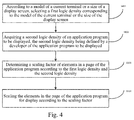
- the step S101 can be performed as the following step S401.
- step S401 according to a model of a current terminal or a size of a display screen, a first logic density corresponding to the model of the current terminal or the size of the display screen is selected.
- step S102 a second logic density of an application program to be displayed is acquired, the second logic density being defined by a developer of the application program to be displayed.
- the second logic density may be also called a resource density.
- the second logic density can be set when a user develops an application program.
- the second logic density can be 480dpi.
- step S103 a scaling factor of elements in pages of the application program is determined according to the first logic density and the second logic density.
- step S103 can be performed as the following step A1.
- the first logic density is 480dpi
- the second logic density is 400dpi.
- step S104 the elements in the page of the application program are scaled for display according to the scaling factor.
- the scaling factor calculated in the step S103 is 1.2, then the elements in the page will be enlarged by 1.2 times.
- a first logic density can be set according to a model of a terminal or a size of a screen, instead of using the default logic density in the native system.
- the logic density can correspond to the model of the terminal or the size of the screen, instead of only corresponding to the resolution of the screen.
- the scaling is only directed to elements, mainly elements displayed in accordance with a logic density, in a displayed page of an application program, rather than the whole displayed resources in the application program, therefore, the reasonable layout of the displayed page will not be affected in the scaling.
- a first logic density corresponding to the user demand on page display, and a second logic density of an application program to be displayed are acquired, and a scaling factor of elements in a page of the application program is determined according to the first logic density and the second logic density, so as to scale the elements in the page of the application program for display according to the scaling factor.
- Fig. 5 is a block diagram of a device for adjusting page display according to an exemplary embodiment. As shown in Fig. 5 , the device for adjusting page display includes:
- the determining module 53 may include:
- the first acquiring module 51 may include:
- the device may further include:
- the first acquiring module 51 may include:
- a first logic density corresponding to the user demand on page display, and a second logic density of an application program to be displayed are acquired, and a scaling factor of elements in a page of the application program is determined according to the first logic density and the second logic density, so as to scale the elements in the page of the application program for display according to the scaling factor.
- Fig. 10 is a block diagram of a device 600 for adjusting page display according to an exemplary embodiment, which is applied in a terminal device.
- the device 600 may be a mobile phone, a computer, a digital broadcast terminal, a messaging device, a gaming console, a tablet, a medical device, exercise equipment, a personal digital assistant, and the like.
- the device 600 may include one or more of the following components: a processing component 602, a memory 604, a power component 606, a multimedia component 608, an audio component 610, an input/output (I/O) interface 612, a sensor component 614, and a communication component 616.
- the processing component 602 typically controls overall operations of the device 600, such as the operations associated with display, telephone calls, data communications, camera operations, and recording operations.
- the processing component 602 may include one or more processors 620 to execute instructions to perform all or part of the steps in the above described methods.
- the processing component 602 may include one or more modules which facilitate the interaction between the processing component 602 and other components.
- the processing component 602 may include a multimedia module to facilitate the interaction between the multimedia component 608 and the processing component 602.
- the memory 604 is configured to store various types of data to support the operation of the device 600. Examples of such data include instructions for any applications or methods operated on the device 600, contact data, phonebook data, messages, pictures, video, etc.
- the memory 604 may be implemented using any type of volatile or non-volatile memory devices, or a combination thereof, such as a static random access memory (SRAM), an electrically erasable programmable read-only memory (EEPROM), an erasable programmable read-only memory (EPROM), a programmable read-only memory (PROM), a read-only memory (ROM), a magnetic memory, a flash memory, a magnetic or optical disk.
- SRAM static random access memory
- EEPROM electrically erasable programmable read-only memory
- EPROM erasable programmable read-only memory
- PROM programmable read-only memory
- ROM read-only memory
- magnetic memory a magnetic memory
- flash memory a flash memory
- magnetic or optical disk a magnetic or optical
- the power component 606 provides power to various components of the device 600.
- the power component 606 may include a power management system, one or more power sources, and any other components associated with the generation, management, and distribution of power in the device 600.
- the multimedia component 608 includes a screen providing an output interface between the device 600 and the user.
- the screen may include a liquid crystal display (LCD) and a touch panel (TP). If the screen includes the touch panel, the screen may be implemented as a touch screen to receive input signals from the user.
- the touch panel includes one or more touch sensors to sense touches, swipes, and gestures on the touch panel. The touch sensors may not only sense a boundary of a touch or swipe action, but also sense a period of time and a pressure associated with the touch or swipe action.
- the multimedia component 608 includes a front camera and/or a rear camera. The front camera and the rear camera may receive an external multimedia datum while the device 600 is in an operation mode, such as a photographing mode or a video mode. Each of the front camera and the rear camera may be a fixed optical lens system or have focus and optical zoom capability.
- the audio component 610 is configured to output and/or input audio signals.
- the audio component 610 includes a microphone ("MIC") configured to receive an external audio signal when the device 600 is in an operation mode, such as a call mode, a recording mode, and a voice recognition mode.
- the received audio signal may be further stored in the memory 604 or transmitted via the communication component 616.
- the audio component 610 further includes a speaker to output audio signals.
- the I/O interface 612 provides an interface between the processing component 602 and peripheral interface modules, such as a keyboard, a click wheel, buttons, and the like.
- the buttons may include, but are not limited to, a home button, a volume button, a starting button, and a locking button.
- the sensor component 614 includes one or more sensors to provide status assessments of various aspects of the device 600. For instance, the sensor component 614 may detect an open/closed status of the device 600, relative positioning of components, e.g., the display and the keypad, of the device 600, a change in position of the device 600 or a component of the device 600, a presence or absence of user contact with the device 600, an orientation or an acceleration/deceleration of the device 600, and a change in temperature of the device 600.
- the sensor component 614 may include a proximity sensor configured to detect the presence of nearby objects without any physical contact.
- the sensor component 614 may also include a light sensor, such as a CMOS or CCD image sensor, for use in imaging applications.
- the sensor component 614 may also include an accelerometer sensor, a gyroscope sensor, a magnetic sensor, a pressure sensor, or a temperature sensor.
- the communication component 616 is configured to facilitate communication, wired or wirelessly, between the device 600 and other devices.
- the device 600 can access a wireless network based on a communication standard, such as WiFi, 2G, or 3G, or a combination thereof.
- the communication component 616 receives a broadcast signal or broadcast associated information from an external broadcast management system via a broadcast channel.
- the communication component 616 further includes a near field communication (NFC) module to facilitate short-range communications.
- the NFC module may be implemented based on a radio frequency identification (RFID) technology, an infrared data association (IrDA) technology, an ultra-wideband (UWB) technology, a Bluetooth (BT) technology, and other technologies.
- RFID radio frequency identification
- IrDA infrared data association
- UWB ultra-wideband
- BT Bluetooth
- the device 600 may be implemented with one or more application specific integrated circuits (ASICs), digital signal processors (DSPs), digital signal processing devices (DSPDs), programmable logic devices (PLDs), field programmable gate arrays (FPGAs), controllers, micro-controllers, microprocessors, or other electronic components, for performing the above described methods.
- ASICs application specific integrated circuits
- DSPs digital signal processors
- DSPDs digital signal processing devices
- PLDs programmable logic devices
- FPGAs field programmable gate arrays
- controllers micro-controllers, microprocessors, or other electronic components, for performing the above described methods.
- non-transitory computer-readable storage medium including instructions, such as included in the memory 604, executable by the processor 620 in the device 600, for performing the above-described methods.
- the non-transitory computer-readable storage medium may be a ROM, a RAM, a CD-ROM, a magnetic tape, a floppy disc, an optical data storage device, and the like.
- a device for adjusting page display including:
- the processor is further configured to perform:
- the processor is further configured to perform: determining a scaling factor of elements in a page of the application program according to the first logic density and the second logic density may include:
- the processor is further configured to perform: according to a user demand on page display, acquiring a first logic density corresponding to the user demand on page display, may include:
- the processor is further configured to perform: setting at least two page-layout options, each of the page-layout options containing a representation indicating a size of a page layout corresponding to the page-layout option; and setting and storing a first logic density corresponding to each of the at least two page-layout options; and according to a setting about a size of a page layout from a user, selecting a first logic density corresponding to the size of the page layout set by the user, includes:
- the processor is further configured to perform: according to a user demand on page display, acquiring a first logic density corresponding to the user demand on page display, may include:
- a non-transitory computer readable storage medium when instructions in the storage medium are executed by a processor of a mobile terminal, the mobile terminal is caused to perform a method for adjusting page display, including:
- determining a scaling factor of elements in a page of the application program according to the first logic density and the second logic density may include:
- acquiring a first logic density corresponding to the user demand on page display may include:
- the method may further include:
- acquiring a first logic density corresponding to the user demand on page display may include:
Landscapes
- Engineering & Computer Science (AREA)
- Theoretical Computer Science (AREA)
- General Engineering & Computer Science (AREA)
- Physics & Mathematics (AREA)
- General Physics & Mathematics (AREA)
- Human Computer Interaction (AREA)
- Computer Hardware Design (AREA)
- User Interface Of Digital Computer (AREA)
- Controls And Circuits For Display Device (AREA)
- Software Systems (AREA)
- Information Transfer Between Computers (AREA)
Abstract
Description
- The present disclosure generally relates to the field of internet technology, and more particularly, to a method and a device for adjusting page display.
- In a native Android system, various logic densities are defined for various terminals according to resolutions of their display screens. These logic densities, or generalized densities, are predetermined densities corresponding to particular density ranges. For example a set of generalized densities may include: ldpi (low) - 120dpi; mdpi (medium) -160dpi; hdpi (high) -240dpi; xhdpi (extra-high) -320dpi; xxhdpi (extra-extra high) -480dpi; xxxhdpi (extra-extra-extra high) - 640dpi; and so on. Each generalized density corresponds to a range of actual screen densities and so these densities are sometimes referred to as density "buckets". For example, two devices that report a screen density of xhdpi might have slightly different real pixel densities. In the Android system these differences are abstract to applications, so that UIs can be designed for the generalized or logic densities, and the Android system then handles any final adjustments as necessary. Since the native Android system just selects a logic density corresponding to one of the density buckets according to a resolution, the same logic density may be selected for mobile phones having different physical screen sizes. For example, for mobile phones of 5 inches and 5.5 inches, the logic density may be the same xxhdpi (480dpi). When an application program having a xxhdpi resource is respectively installed in the two mobile phones, in visual effects, the xxhdpi picture resource on the mobile phone of 5.5 inches will be 1.1 times as large as that on the mobile phone of 5.5 inches (5.5 / 5 = 1.1). However, most users purchasing a mobile phone with a large screen are expecting for more displayed content (for example, more app icons displayed on one page), rather than just an enlarged version of a small screen. Under the current density mechanism of the Android system, layouts of third party application programs cannot be adjusted.
- In the related art, mobile phone manufacturers utilize different picture adjusting methods for mobile phones having different screen sizes. A picture may be stretched horizontally or longitudinally as desired while maintaining the pixel precision, to satisfy the demand for accommodating various resolutions for the Android platform. However, such picture adjusting methods can only adjust page layouts for pre-installed application programs such as system application programs, and cannot adjust for third party application programs installed by the users, and cannot adjust layouts for particular devices.
- In order to overcome the problem in the related art, the embodiments of the present disclosure provide a method and a device for adjusting page or screen display, which is to achieve the objective of adjusting the page display of a terminal device according to a user demand.
- According to a first aspect of embodiments of the present disclosure, there is provided a method for adjusting page display, including:
- according to a user demand on page display, acquiring a first logic density corresponding to the user demand on page display, the first logic density being defined in an operating system by a developer, for example the first logic density may be a dpi corresponding to a dpi representative of a predetermined range of densities;
- acquiring a second logic density of an application program to be displayed, the second logic density being defined by a developer of the application program to be displayed, for example the second logic density may be a specifically selected dpi different from those permitted according to the first set of logic densities;
- determining a scaling factor of elements in a page of the application program according to the first logic density and the second logic density; and
- scaling the elements in the page of the application program for display according to the scaling factor.
- In an embodiment, determining a scaling factor of elements in a page of the application program according to the first logic density and the second logic density may include:
- calculating the scaling factor m of the elements in the page of the application program based on the following formula

- In an embodiment, according to a user demand on page display, acquiring a first logic density corresponding to the user demand on page display, may include:
- according to a setting about a size of a page layout from a user, selecting a first logic density corresponding to the size of the page layout set by the user.
- In an embodiment, the method may further include:
- setting at least two page-layout options, each of the page-layout options containing a representation indicating a size of a page layout corresponding to the page-layout option; and setting and storing a first logic density corresponding to each of the at least two page-layout options; and
- according to a setting about a size of a page layout from a user, selecting a first logic density corresponding to the size of the page layout set by the user, includes:
- displaying the at least two page-layout options; determining a page-layout option of the at least two page-layout options which is selected by the user; and taking a first logic density corresponding to the page-layout option selected by the user as the first logic density corresponding to the size of the page layout set by the user.
- In an embodiment, according to a user demand on page display, acquiring a first logic density corresponding to the user demand on page display, may include:
- according to a model of a current terminal or a size of a display screen, selecting a first logic density corresponding to the model of the current terminal or the size of the display screen.
- According to a second aspect of embodiments of the present disclosure, there is provided a device for adjusting page display, including:
- a first acquiring module configured to, according to a user demand on page display, acquire a first logic density corresponding to the user demand on page display, the first logic density being defined in an operating system by a developer;
- a second acquiring module configured to acquire a second logic density of an application program to be displayed, the second logic density being defined by a developer of the application program to be displayed;
- a determining module configured to determine a scaling factor of elements in a page of the application program according to the first logic density and the second logic density; and
- a scaling module configured to scale the elements in the page of the application program for display according to the scaling factor.
- In an embodiment, the determining module may include:
- a calculating sub-module configured to calculate the scaling factor m of the elements in the page of the application program based on the following formula

- In an embodiment, the first acquiring module may include:
- a first selecting sub-module configured to, according to a setting about a size of a page layout from a user, select a first logic density corresponding to the size of the page layout set by the user.
- In an embodiment, the device may further include:
- a setting module configured to set at least two page-layout options, each of the page-layout options containing a representation indicating a size of a page layout corresponding to the page-layout option; and set and store a first logic density corresponding to each of the at least two page-layout options; and
- the first selecting sub-module is further configured to: display the at least two page-layout options; determine a page-layout option of the at least two page-layout options which is selected by the user; and take a first logic density corresponding to the page-layout option selected by the user as the first logic density corresponding to the size of the page layout set by the user.
- In an embodiment, the first acquiring module may include:
- a second selecting sub-module configured to, according to a model of a current terminal or a size of a display screen, select a first logic density corresponding to the model of the current terminal or the size of the display screen.
- According to a third aspect of embodiments of the present disclosure, there is provided a device for adjusting page display, including:
- a processor; and
- a memory for storing instructions executable by the processor;
- wherein the processor is configured to perform:
- according to a user demand on page display, acquiring a first logic density corresponding to the user demand on page display, the first logic density being defined in an operating system by a developer;
- acquiring a second logic density of an application program to be displayed, the second logic density being defined by a developer of the application program to be displayed;
- determining a scaling factor of elements in a page of the application program according to the first logic density and the second logic density; and
- scaling the elements in the page of the application program for display according to the scaling factor.
- According to a fourth aspect of embodiments of the present disclosure, there is provided a computer program, which when being executed on a processor, performs the method according to the above first aspect.
- According to a fifth aspect of embodiments of the present disclosure, there is provided a computer program product stored on a computer usable medium, comprising computer-readable program means for causing a server to implement the method according to the above first aspect. When implemented in a server, the scaling factor may be determined, and sent to the electronic device in order to cause scaling of the elements in the page of the application program for display according to the scaling factor. Appropriate instructions may be sent with the scaling factor to cause the electronic device to perform the scaling.
- The advantageous effects brought by the technical solutions according to the embodiments of the present disclosure may include:
- In the technical solutions provided by the embodiments of the present disclosure, a first logic density corresponding to the user demand on page display, and a second logic density of an application program to be displayed are acquired, and a scaling factor of elements in a page of the application program is determined according to the first logic density and the second logic density, so as to scale the elements in the page of the application program for display according to the scaling factor. Thereby, the page display can be adjusted according to the user demand, and the user demand on different manners of page display can be satisfied.
- It is to be understood that both the foregoing general description and the following detailed description are exemplary and explanatory only and are not restrictive of the invention, as claimed.
- The accompanying drawings, which are incorporated in and constitute a part of this specification, illustrate embodiments consistent with the invention and, together with the description, serve to explain the principles of the invention.
-
Fig. 1 is a flow chart of a method for adjusting page display according to an exemplary embodiment. -
Fig. 2 is a flow chart of another method for adjusting page display according to an exemplary embodiment. -
Fig. 3 is a flow chart of still another method for adjusting page display according to an exemplary embodiment. -
Fig. 4 is a flow chart of further still another method for adjusting page display according to another exemplary embodiment. -
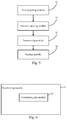
Fig. 5 is a block diagram of a device for adjusting page display according to an exemplary embodiment. -
Fig. 6 is a block diagram of another device for adjusting page display according to an exemplary embodiment. -
Fig. 7 is a block diagram of still another device for adjusting page display according to an exemplary embodiment. -
Fig. 8 is a block diagram of further still another device for adjusting page display according to an exemplary embodiment. -
Fig. 9 is a block diagram of further still another device for adjusting page display according to an exemplary embodiment. -
Fig. 10 is a block diagram of a device applied for adjusting page display according to an exemplary embodiment. - Reference will now be made in detail to exemplary embodiments, examples of which are illustrated in the accompanying drawings. The following description refers to the accompanying drawings in which the same numbers in different drawings represent the same or similar elements unless otherwise represented. The implementations set forth in the following description of exemplary embodiments do not represent all implementations consistent with the invention. Instead, they are merely examples of devices and methods consistent with aspects related to the invention as recited in the appended claims.
-
Fig. 1 is a flow chart of a method for adjusting page display according to an exemplary embodiment. As shown inFig. 1 , the method can be applied in a system program or other application programs of a device. The method for adjusting page display includes the following steps S101-S104. - In step S101, according to a user demand on page display, a first logic density corresponding to the user demand on page display is acquired, the first logic density being defined in an operating system by a developer.
- In the present embodiment, the first logic density is a logic density defined in the operating system by a highly customized developer of the Android system, instead of a logic density defined in a native Android system.
- In an Android mobile phone, for example, in the native Android operating system, logic densities for display of devices are defined in default. For example, the native Android operating system defines several values of screen logic densities, such as 160dpi (mdpi), 240dpi (hdpi), 320dpi (xhdpi), 480dpi (xxhdpi) and 640dpi (xxxhdpi).
- For example, in a mobile terminal having a display screen with a resolution of 640, the native Android operating system uses a logic density of xxxhdpi in default, to control the display of the device, without taking the physical size of the screen into account.
- In an embodiment of the present disclosure, to improve the above method, the logic densities are re-defined by a highly customized developer of the Android system. Thus, the logic density is not selected in accordance with the resolution of the mobile phone. Rather, various logic densities are self-defined according to user demands about page display.
- Specifically, a user demand on page display at least includes the following two situations.
- In this case, some users (such as the aged) prefer elements displayed in a page as large as possible, some users prefer small elements displayed in a page with as much content displayed on a screen as possible. In this regard, setting options can be set in the operating system, to provide different sizes of page layouts for the users to select.
- For example, options for page layouts can be added in a boot or in a "settings" menu. The options for page layouts can have several options such as "small", "default", "medium", "large", "super large" and so on. When he wants to adjust a page layout, a user may click one of the options. Since each of the options corresponds to a scaling factor, the page layout can be adjusted according to the scaling factor corresponding to the option.
- Based on this method, as shown in
Fig. 2 , the step S101 can be performed as the following step S201: - In step S201, according to a setting about a size of a page layout from a user, a first logic density corresponding to the size of the page layout set by the user is selected.
- Also based on the above method, in an embodiment, as shown in
Fig. 3 , the above method may also include steps S105-S106. - In step S105, at least two page-layout options are set, each of the page-layout options containing a representation indicating a size of a page layout corresponding to the page-layout option; and a first logic density corresponding to each of the at least two page-layout options is set and stored.
- Then, step S201 can be performed as the following step S106.
- In step S106, the at least two page-layout options are displayed; a page-layout option of the at least two page-layout options which is selected by the user is determined; and a first logic density corresponding to the page-layout option selected by the user is taken as the first logic density corresponding to the size of the page layout set by the user.
- (2) Based on a user demand on a physical size of page elements displayed on a screen.
- With the same resolution, the physical sizes of the screens may be different.
- For example,
for a screen of a mobile phone with a model X1, the resolution is 480dpi, the physical size is 5 inches; and
for a screen of a mobile phone with a model X2, the resolution is 480 dpi, the physical size is 5.5 inches. - Under the definition of the native Android system, the same logic density will be selected for both X1 and X2. Then, on the page on X2 with the 5.5-inch screen, the page will be enlarged. However, in practical application, the user wants the physical size of the elements displayed on the screens of different sizes to be the same, for effective utilization of the screen of the device with a large screen, and also to improve the visual experience of the user.
- Accordingly, in the embodiments of the present disclosure, by improving the logic density mechanism in the native system, different logic densities can be set for mobile phones of different models (or of different sizes), such that the physical sizes of elements can be the same when pages are displayed on screens of different sizes.
- Based on the above method, as shown in
Fig. 4 , the step S101 can be performed as the following step S401. - In step S401, according to a model of a current terminal or a size of a display screen, a first logic density corresponding to the model of the current terminal or the size of the display screen is selected.
- In step S102, a second logic density of an application program to be displayed is acquired, the second logic density being defined by a developer of the application program to be displayed.
- In an embodiment, the second logic density may be also called a resource density. The second logic density can be set when a user develops an application program. For example, the second logic density can be 480dpi.
- In step S103, a scaling factor of elements in pages of the application program is determined according to the first logic density and the second logic density.
- In an embodiment, the step S103 can be performed as the following step A1.
- In step A1, the scaling factor m of the elements in the page of the application program is calculated based on the following formula (1):

wherein, m denotes the scaling factor of the elements in the page of the application program; X denotes the first logic density; and Z denotes the second logic density. - For example, in a device with a screen size of 5.5 inches, the first logic density is 480dpi, the second logic density is 400dpi. Then, the scaling factor m of the elements in the page of the application program is m=480dpi/400dpi=1.2 times.
- In step S104, the elements in the page of the application program are scaled for display according to the scaling factor.
- For example, the scaling factor calculated in the step S103 is 1.2, then the elements in the page will be enlarged by 1.2 times.
- It can be seen from the above that, in the embodiments of the present disclosure, at least two methods (such as step S201 and step S401) for selecting a logic density are provided. By modifying the logic density selection mechanism of the native system, the embodiments of the present disclosure can achieve various effects.
- For example:
- In the method for selecting a logic density as described in step S201, a corresponding logic density can be set for each size of a page layout. Then when he wants to change the size of the page layout, the user can easily adjust the size of the page layout by changing the first logic density.
- In the method for selecting a logic density as described in step S401, a first logic density can be set according to a model of a terminal or a size of a screen, instead of using the default logic density in the native system. This brings about an advantage in that, the logic density can correspond to the model of the terminal or the size of the screen, instead of only corresponding to the resolution of the screen. By selecting a logic density according to a model of a terminal or a size of a screen, an optimal logic density corresponding to the model or the size of the screen can be acquired. Thus, it realizes that sizes of elements in the displayed pages on different terminals will be the same, which is best for the visual feeling of the user. Moreover, a large screen can display more contents, rather than just displaying an enlarged page than that on a terminal having a screen of a smaller size but with the same resolution.
- In an implementation of the present disclosure, the scaling is only directed to elements, mainly elements displayed in accordance with a logic density, in a displayed page of an application program, rather than the whole displayed resources in the application program, therefore, the reasonable layout of the displayed page will not be affected in the scaling.
- In the above methods provided by the embodiments of the present disclosure, a first logic density corresponding to the user demand on page display, and a second logic density of an application program to be displayed are acquired, and a scaling factor of elements in a page of the application program is determined according to the first logic density and the second logic density, so as to scale the elements in the page of the application program for display according to the scaling factor. Thereby, the page display can be adjusted according to the user demand, and the user demand on different manners of page display can be satisfied.
-
Fig. 5 is a block diagram of a device for adjusting page display according to an exemplary embodiment. As shown inFig. 5 , the device for adjusting page display includes: - a first acquiring
module 51 configured to, according to a user demand on page display, acquire a first logic density corresponding to the user demand on page display, the first logic density being defined in an operating system by a developer; - a second acquiring
module 52 configured to acquire a second logic density of an application program to be displayed, the second logic density being defined by a developer of the application program to be displayed; - a determining
module 53 configured to determine a scaling factor of elements in a page of the application program according to the first logic density and the second logic density; and - a scaling module configured to scale the elements in the page of the application program for display according to the scaling factor.
- In an embodiment, as shown in
Fig. 6 , the determiningmodule 53 may include: - a calculating sub-module 531 configured to calculate the scaling factor m of the elements in the page of the application program based on the following formula

- In an embodiment, as shown in
Fig. 7 , the first acquiringmodule 51 may include: - a first selecting sub-module 511 configured to, according to a setting about a size of a page layout from a user, select a first logic density corresponding to the size of the page layout set by the user.
- In an embodiment, as shown in
Fig. 8 , the device may further include: - a
setting module 55 configured to set at least two page-layout options, each of the page-layout options containing a representation indicating a size of a page layout corresponding to the page-layout option; and set and store a first logic density corresponding to each of the at least two page-layout options; and - the first selecting
sub-module 511 is further configured to: display the at least two page-layout options; determine a page-layout option of the at least two page-layout options which is selected by the user; and take a first logic density corresponding to the page-layout option selected by the user as the first logic density corresponding to the size of the page layout set by the user. - In an embodiment, as shown in
Fig. 9 , the first acquiringmodule 51 may include: - a second selecting sub-module 512 configured to, according to a model of a current terminal or a size of a display screen, select a first logic density corresponding to the model of the current terminal or the size of the display screen.
- In the above devices provided by the embodiments of the present disclosure, a first logic density corresponding to the user demand on page display, and a second logic density of an application program to be displayed are acquired, and a scaling factor of elements in a page of the application program is determined according to the first logic density and the second logic density, so as to scale the elements in the page of the application program for display according to the scaling factor. Thereby, the page display can be adjusted according to the user demand, and the user demand on different manners of page display can be satisfied.
-
Fig. 10 is a block diagram of adevice 600 for adjusting page display according to an exemplary embodiment, which is applied in a terminal device. For example, thedevice 600 may be a mobile phone, a computer, a digital broadcast terminal, a messaging device, a gaming console, a tablet, a medical device, exercise equipment, a personal digital assistant, and the like. - Referring to
Fig. 10 , thedevice 600 may include one or more of the following components: aprocessing component 602, amemory 604, apower component 606, amultimedia component 608, anaudio component 610, an input/output (I/O)interface 612, asensor component 614, and acommunication component 616. - The
processing component 602 typically controls overall operations of thedevice 600, such as the operations associated with display, telephone calls, data communications, camera operations, and recording operations. Theprocessing component 602 may include one ormore processors 620 to execute instructions to perform all or part of the steps in the above described methods. Moreover, theprocessing component 602 may include one or more modules which facilitate the interaction between theprocessing component 602 and other components. For instance, theprocessing component 602 may include a multimedia module to facilitate the interaction between themultimedia component 608 and theprocessing component 602. - The
memory 604 is configured to store various types of data to support the operation of thedevice 600. Examples of such data include instructions for any applications or methods operated on thedevice 600, contact data, phonebook data, messages, pictures, video, etc. Thememory 604 may be implemented using any type of volatile or non-volatile memory devices, or a combination thereof, such as a static random access memory (SRAM), an electrically erasable programmable read-only memory (EEPROM), an erasable programmable read-only memory (EPROM), a programmable read-only memory (PROM), a read-only memory (ROM), a magnetic memory, a flash memory, a magnetic or optical disk. - The
power component 606 provides power to various components of thedevice 600. Thepower component 606 may include a power management system, one or more power sources, and any other components associated with the generation, management, and distribution of power in thedevice 600. - The
multimedia component 608 includes a screen providing an output interface between thedevice 600 and the user. In some embodiments, the screen may include a liquid crystal display (LCD) and a touch panel (TP). If the screen includes the touch panel, the screen may be implemented as a touch screen to receive input signals from the user. The touch panel includes one or more touch sensors to sense touches, swipes, and gestures on the touch panel. The touch sensors may not only sense a boundary of a touch or swipe action, but also sense a period of time and a pressure associated with the touch or swipe action. In some embodiments, themultimedia component 608 includes a front camera and/or a rear camera. The front camera and the rear camera may receive an external multimedia datum while thedevice 600 is in an operation mode, such as a photographing mode or a video mode. Each of the front camera and the rear camera may be a fixed optical lens system or have focus and optical zoom capability. - The
audio component 610 is configured to output and/or input audio signals. For example, theaudio component 610 includes a microphone ("MIC") configured to receive an external audio signal when thedevice 600 is in an operation mode, such as a call mode, a recording mode, and a voice recognition mode. The received audio signal may be further stored in thememory 604 or transmitted via thecommunication component 616. In some embodiments, theaudio component 610 further includes a speaker to output audio signals. - The I/
O interface 612 provides an interface between theprocessing component 602 and peripheral interface modules, such as a keyboard, a click wheel, buttons, and the like. The buttons may include, but are not limited to, a home button, a volume button, a starting button, and a locking button. - The
sensor component 614 includes one or more sensors to provide status assessments of various aspects of thedevice 600. For instance, thesensor component 614 may detect an open/closed status of thedevice 600, relative positioning of components, e.g., the display and the keypad, of thedevice 600, a change in position of thedevice 600 or a component of thedevice 600, a presence or absence of user contact with thedevice 600, an orientation or an acceleration/deceleration of thedevice 600, and a change in temperature of thedevice 600. Thesensor component 614 may include a proximity sensor configured to detect the presence of nearby objects without any physical contact. Thesensor component 614 may also include a light sensor, such as a CMOS or CCD image sensor, for use in imaging applications. In some embodiments, thesensor component 614 may also include an accelerometer sensor, a gyroscope sensor, a magnetic sensor, a pressure sensor, or a temperature sensor. - The
communication component 616 is configured to facilitate communication, wired or wirelessly, between thedevice 600 and other devices. Thedevice 600 can access a wireless network based on a communication standard, such as WiFi, 2G, or 3G, or a combination thereof. In one exemplary embodiment, thecommunication component 616 receives a broadcast signal or broadcast associated information from an external broadcast management system via a broadcast channel. In one exemplary embodiment, thecommunication component 616 further includes a near field communication (NFC) module to facilitate short-range communications. For example, the NFC module may be implemented based on a radio frequency identification (RFID) technology, an infrared data association (IrDA) technology, an ultra-wideband (UWB) technology, a Bluetooth (BT) technology, and other technologies. - In exemplary embodiments, the
device 600 may be implemented with one or more application specific integrated circuits (ASICs), digital signal processors (DSPs), digital signal processing devices (DSPDs), programmable logic devices (PLDs), field programmable gate arrays (FPGAs), controllers, micro-controllers, microprocessors, or other electronic components, for performing the above described methods. - In exemplary embodiments, there is also provided a non-transitory computer-readable storage medium including instructions, such as included in the
memory 604, executable by theprocessor 620 in thedevice 600, for performing the above-described methods. For example, the non-transitory computer-readable storage medium may be a ROM, a RAM, a CD-ROM, a magnetic tape, a floppy disc, an optical data storage device, and the like. - A device for adjusting page display, including:
- a processor; and
- a memory for storing instructions executable by the processor;
- wherein the processor is configured to perform:
- according to a user demand on page display, acquiring a first logic density corresponding to the user demand on page display, the first logic density being defined in an operating system by a developer;
- acquiring a second logic density of an application program to be displayed, the second logic density being defined by a developer of the application program to be displayed;
- determining a scaling factor of elements in a page of the application program according to the first logic density and the second logic density; and
- scaling the elements in the page of the application program for display according to the scaling factor.
- The processor is further configured to perform:
- according to a user demand on page display, acquiring a first logic density corresponding to the user demand on page display, the first logic density being defined in an operating system by a developer;
- acquiring a second logic density of an application program to be displayed, the second logic density being defined by a developer of the application program to be displayed;
- determining a scaling factor of elements in a page of the application program according to the first logic density and the second logic density; and
- scaling the elements in the page of the application program for display according to the scaling factor.
- The processor is further configured to perform: determining a scaling factor of elements in a page of the application program according to the first logic density and the second logic density may include:
- calculating the scaling factor m of the elements in the page of the application program based on the following formula

- The processor is further configured to perform: according to a user demand on page display, acquiring a first logic density corresponding to the user demand on page display, may include:
- according to a setting about a size of a page layout from a user, selecting a first logic density corresponding to the size of the page layout set by the user.
- The processor is further configured to perform: setting at least two page-layout options, each of the page-layout options containing a representation indicating a size of a page layout corresponding to the page-layout option; and setting and storing a first logic density corresponding to each of the at least two page-layout options; and
according to a setting about a size of a page layout from a user, selecting a first logic density corresponding to the size of the page layout set by the user, includes: - displaying the at least two page-layout options; determining a page-layout option of the at least two page-layout options which is selected by the user; and taking a first logic density corresponding to the page-layout option selected by the user as the first logic density corresponding to the size of the page layout set by the user.
- The processor is further configured to perform: according to a user demand on page display, acquiring a first logic density corresponding to the user demand on page display, may include:
- according to a model of a current terminal or a size of a display screen, selecting a first logic density corresponding to the model of the current terminal or the size of the display screen.
- A non-transitory computer readable storage medium, when instructions in the storage medium are executed by a processor of a mobile terminal, the mobile terminal is caused to perform a method for adjusting page display, including:
- according to a user demand on page display, acquiring a first logic density corresponding to the user demand on page display, the first logic density being defined in an operating system by a developer;
- acquiring a second logic density of an application program to be displayed, the second logic density being defined by a developer of the application program to be displayed;
- determining a scaling factor of elements in a page of the application program according to the first logic density and the second logic density; and
- scaling the elements in the page of the application program for display according to the scaling factor.
- In an embodiment, determining a scaling factor of elements in a page of the application program according to the first logic density and the second logic density may include:
- calculating the scaling factor m of the elements in the page of the application program based on the following formula

- In an embodiment, according to a user demand on page display, acquiring a first logic density corresponding to the user demand on page display, may include:
- according to a setting about a size of a page layout from a user, selecting a first logic density corresponding to the size of the page layout set by the user.
- In an embodiment, the method may further include:
- setting at least two page-layout options, each of the page-layout options containing a representation indicating a size of a page layout corresponding to the page-layout option; and setting and storing a first logic density corresponding to each of the at least two page-layout options; and
- according to a setting about a size of a page layout from a user, selecting a first logic density corresponding to the size of the page layout set by the user, includes:
- displaying the at least two page-layout options; determining a page-layout option of the at least two page-layout options which is selected by the user; and taking a first logic density corresponding to the page-layout option selected by the user as the first logic density corresponding to the size of the page layout set by the user.
- In an embodiment, according to a user demand on page display, acquiring a first logic density corresponding to the user demand on page display, may include:
- according to a model of a current terminal or a size of a display screen, selecting a first logic density corresponding to the model of the current terminal or the size of the display screen.
- Other embodiments of the invention will be apparent to those skilled in the art from consideration of the specification and practice of the invention disclosed here. This application is intended to cover any variations, uses, or adaptations of the invention following the general principles thereof and including such departures from the present disclosure as come within known or customary practice in the art. It is intended that the specification and examples be considered as exemplary only.
- It will be appreciated that the present invention is not limited to the exact construction that has been described above and illustrated in the accompanying drawings, and that various modifications and changes can be made without departing from the scope thereof. It is intended that the scope of the invention only be limited by the appended claims.
Claims (14)
- A method for adjusting page display on an electronic device, the method comprising:according to a user demand relating to page display, acquiring (S101) a first logic density corresponding to the user demand relating to page display, the first logic density being defined in an operating system of the electronic device;acquiring (S102) a second logic density of an application program to be displayed, the second logic density being defined in relation to the application program to be displayed;determining (S103) a scaling factor of elements in a page of the application program according to the first logic density and the second logic density; andscaling (S104) the elements in the page of the application program for display according to the scaling factor.
- The method according to claim 1, wherein determining a scaling factor of elements in a page of the application program according to the first logic density and the second logic density comprises:calculating the scaling factor m of the elements in the page of the application program based on the following formula

- The method according to claim 1 or 2, wherein according to a user demand relating to page display, acquiring a first logic density corresponding to the user demand relating to page display, comprises:according to a setting about a size of a page layout from a user, selecting (S201) a first logic density corresponding to the size of the page layout set by the user.
- The method according to claim 3, wherein the method further comprises:setting (S105) at least two page-layout options, each of the page-layout options containing a representation indicating a size of a page layout corresponding to the page-layout option; and setting and storing a first logic density corresponding to each of the at least two page-layout options; andaccording to a setting about a size of a page layout from a user, selecting a first logic density corresponding to the size of the page layout set by the user, comprises:displaying (S106) the at least two page-layout options; determining a page-layout option of the at least two page-layout options which is selected by the user; and taking a first logic density corresponding to the page-layout option selected by the user as the first logic density corresponding to the size of the page layout set by the user.
- The method according to claim 1 or 2, wherein according to a user demand relating to page display, acquiring a first logic density corresponding to the user demand on page display, comprises:according to a model of a current terminal or a size of a display screen, selecting (S401) a first logic density corresponding to the model of the current terminal or the size of the display screen.
- An electronic device for adjusting page display, the device comprising:a first acquiring module (51) configured to, according to a user demand relating to page display, acquire a first logic density corresponding to the user demand relating to page display, the first logic density being defined in an operating system of the electronic device;a second acquiring module (52) configured to acquire a second logic density of an application program to be displayed, the second logic density being defined in relation to the application program to be displayed;a determining module (53) configured to determine a scaling factor of elements in a page of the application program according to the first logic density and the second logic density; anda scaling module (54) configured to scale the elements in the page of the application program for display according to the scaling factor.
- The device according to claim 6, wherein the determining module comprises:a calculating sub-module (531) configured to calculate the scaling factor m of the elements in the page of the application program based on the following formula

- The device according to claim 6 or 7, wherein the first acquiring module comprises:a selecting sub-module (511) configured to, according to a setting about a size of a page layout from a user, select a first logic density corresponding to the size of the page layout set by the user.
- The device according to claim 8, wherein the device further comprises:a setting module (55) configured to set at least two page-layout options, each of the page-layout options containing a representation indicating a size of a page layout corresponding to the page-layout option; and set and store a first logic density corresponding to each of the at least two page-layout options; andthe selecting sub-module is further configured to: display the at least two page-layout options; determine a page-layout option of the at least two page-layout options which is selected by the user; and take a first logic density corresponding to the page-layout option selected by the user as the first logic density corresponding to the size of the page layout set by the user.
- The device according to claim 6 or 7, wherein the first acquiring module comprises:a selecting sub-module (512) configured to, according to a model of a current terminal or a size of a display screen, select a first logic density corresponding to the model of the current terminal or the size of the display screen.
- A device for adjusting page display, characterized in that, the device comprises:a processor (620); anda memory (604) for storing instructions executable by the processor;wherein the processor is configured to perform the method of any of claims 1 to 5.
- A computer program, which when being executed on a processor, causes it to perform the method according to any one of claims 1 to 5.
- A computer program product stored on a computer usable medium, comprising computer-readable program means for causing a server to implement the method according to any one of claims 1 to 5.
- A computer program product stored on a computer usable medium, comprising computer-readable program means for causing a server to implement the method of:according to a user demand relating to page display, acquiring (S101) a first logic density corresponding to the user demand relating to page display, the first logic density being defined in an operating system of an electronic device;acquiring (S102) a second logic density of an application program to be displayed, the second logic density being defined in relation to the application program to be displayed;determining (S103) a scaling factor of elements in a page of the application program according to the first logic density and the second logic density; andsending the scaling factor to the electronic device to scale the elements in the page of the application program for display according to the scaling factor.
Applications Claiming Priority (1)
| Application Number | Priority Date | Filing Date | Title |
|---|---|---|---|
| CN201510020768.XA CN104598131B (en) | 2015-01-15 | 2015-01-15 | Adjust the method and device of page display way |
Publications (2)
| Publication Number | Publication Date |
|---|---|
| EP3046068A1 true EP3046068A1 (en) | 2016-07-20 |
| EP3046068B1 EP3046068B1 (en) | 2020-09-02 |
Family
ID=53123961
Family Applications (1)
| Application Number | Title | Priority Date | Filing Date |
|---|---|---|---|
| EP15200042.8A Active EP3046068B1 (en) | 2015-01-15 | 2015-12-15 | Method and device for adjusting page display |
Country Status (9)
| Country | Link |
|---|---|
| US (1) | US20160210726A1 (en) |
| EP (1) | EP3046068B1 (en) |
| JP (1) | JP2017510914A (en) |
| KR (1) | KR101779483B1 (en) |
| CN (1) | CN104598131B (en) |
| BR (1) | BR112015030053A2 (en) |
| MX (1) | MX354970B (en) |
| RU (1) | RU2637475C2 (en) |
| WO (1) | WO2016112696A1 (en) |
Families Citing this family (13)
| Publication number | Priority date | Publication date | Assignee | Title |
|---|---|---|---|---|
| CN104598131B (en) * | 2015-01-15 | 2018-07-24 | 小米科技有限责任公司 | Adjust the method and device of page display way |
| CN107533568B (en) * | 2015-09-15 | 2020-12-18 | 谷歌有限责任公司 | System and method for determining application zoom level |
| CN105892960A (en) * | 2015-10-27 | 2016-08-24 | 乐视移动智能信息技术(北京)有限公司 | Zooming method and device for screen display of mobile terminal |
| CN106201709A (en) * | 2016-06-28 | 2016-12-07 | 北京小米移动软件有限公司 | Resource display method and device |
| CN108205441A (en) * | 2016-12-20 | 2018-06-26 | 北大方正集团有限公司 | Method of adjustment, system and the terminal of list style |
| CN106843854A (en) * | 2016-12-28 | 2017-06-13 | 北京五八信息技术有限公司 | The generation method and device of page indicator |
| CN108734656A (en) * | 2017-04-18 | 2018-11-02 | 腾讯科技(深圳)有限公司 | Scaling method and device |
| CN107256142B (en) * | 2017-04-21 | 2020-12-29 | 腾讯科技(深圳)有限公司 | Page display method and terminal |
| CN111880869B (en) * | 2020-06-17 | 2024-11-19 | 西安万像电子科技有限公司 | Screen adjustment method, device and system |
| CN114115619B (en) * | 2020-08-31 | 2024-07-05 | 华为技术有限公司 | Method and electronic device for displaying application program interface |
| CN113204346A (en) * | 2021-07-05 | 2021-08-03 | 城云科技(中国)有限公司 | Page adaptation method and device, computer equipment and storage medium |
| CN113886744B (en) * | 2021-12-08 | 2022-05-06 | 浙江口碑网络技术有限公司 | Content rendering method, device, electronic device and storage medium |
| CN114297547B (en) * | 2021-12-30 | 2025-04-08 | 中国工商银行股份有限公司 | Page element adjustment method, device, equipment, storage medium and program product |
Family Cites Families (15)
| Publication number | Priority date | Publication date | Assignee | Title |
|---|---|---|---|---|
| US8819569B2 (en) * | 2005-02-18 | 2014-08-26 | Zumobi, Inc | Single-handed approach for navigation of application tiles using panning and zooming |
| US8862986B2 (en) * | 2007-10-01 | 2014-10-14 | Hewlett-Packard Development Company, L.P. | Arranging graphic objects on a page with relative position based control |
| RU2348975C1 (en) * | 2007-10-18 | 2009-03-10 | Корпорация "САМСУНГ ЭЛЕКТРОНИКС Ко., Лтд." | Method of displaying of pages at preview |
| CN101226454A (en) * | 2008-01-18 | 2008-07-23 | 魏新成 | Common mobile phone functional operation on W2VGA mobile phone touch panel |
| CN101694770B (en) * | 2009-10-19 | 2011-06-15 | 华为终端有限公司 | Method for controlling screen display, device and hand-held equipment |
| CN101882055A (en) * | 2010-06-21 | 2010-11-10 | 中兴通讯股份有限公司 | Method and device for zooming and displaying pages on a terminal |
| KR101975906B1 (en) * | 2012-01-09 | 2019-05-08 | 삼성전자주식회사 | Apparatus and method for scaling layout of application program in visual display unit |
| CN102662616B (en) * | 2012-03-28 | 2015-12-16 | 北京邮电大学 | For screen graph adaptive approach and the system of mobile terminal |
| CN104350737B (en) * | 2012-05-30 | 2017-09-19 | 富士胶片株式会社 | X-ray imaging apparatus and radiation detector |
| CN104050185B (en) * | 2013-03-13 | 2019-04-26 | 百度在线网络技术(北京)有限公司 | A kind of content of pages Zoom display processing method and processing device |
| CN103699329B (en) * | 2013-12-31 | 2017-04-05 | 优视科技有限公司 | Page zoom-in and zoom-out method, device and terminal unit |
| US10102848B2 (en) * | 2014-02-28 | 2018-10-16 | Google Llc | Hotwords presentation framework |
| CN104063148A (en) * | 2014-06-11 | 2014-09-24 | 科大讯飞股份有限公司 | Method and system for dynamically fitting interface of Web application program on mobile terminal |
| CN104182270A (en) * | 2014-08-25 | 2014-12-03 | 北京云巢动脉科技有限公司 | Display method for enabling virtual machine interfaces to adapt to mobile terminal screens with different resolution ratios |
| CN104598131B (en) * | 2015-01-15 | 2018-07-24 | 小米科技有限责任公司 | Adjust the method and device of page display way |
-
2015
- 2015-01-15 CN CN201510020768.XA patent/CN104598131B/en active Active
- 2015-08-31 WO PCT/CN2015/088582 patent/WO2016112696A1/en not_active Ceased
- 2015-08-31 BR BR112015030053A patent/BR112015030053A2/en not_active IP Right Cessation
- 2015-08-31 JP JP2016568993A patent/JP2017510914A/en active Pending
- 2015-08-31 MX MX2015015871A patent/MX354970B/en active IP Right Grant
- 2015-08-31 KR KR1020157031180A patent/KR101779483B1/en active Active
- 2015-08-31 RU RU2015152475A patent/RU2637475C2/en active
- 2015-12-15 EP EP15200042.8A patent/EP3046068B1/en active Active
- 2015-12-31 US US14/986,201 patent/US20160210726A1/en not_active Abandoned
Non-Patent Citations (2)
| Title |
|---|
| AARON SHER: "Automatically Scaling Android Apps For Multiple Screens", 18 April 2012 (2012-04-18), pages 1 - 15, XP055272561, Retrieved from the Internet <URL:http://www.vanteon.com/downloads/Scaling_Android_Apps_White_Paper.pdf> [retrieved on 20160513] * |
| ANONYMOUS: "Supporting multiple screens", 28 December 2014 (2014-12-28), pages 1 - 16, XP002757697, Retrieved from the Internet <URL:https://web.archive.org/web/20141228172659/http://developer.android.com/guide/practices/screens_support.html> [retrieved on 20160510] * |
Also Published As
| Publication number | Publication date |
|---|---|
| KR20160098964A (en) | 2016-08-19 |
| KR101779483B1 (en) | 2017-09-18 |
| WO2016112696A1 (en) | 2016-07-21 |
| CN104598131B (en) | 2018-07-24 |
| MX2015015871A (en) | 2016-10-06 |
| EP3046068B1 (en) | 2020-09-02 |
| RU2015152475A (en) | 2017-06-14 |
| BR112015030053A2 (en) | 2017-07-25 |
| JP2017510914A (en) | 2017-04-13 |
| CN104598131A (en) | 2015-05-06 |
| RU2637475C2 (en) | 2017-12-04 |
| US20160210726A1 (en) | 2016-07-21 |
| MX354970B (en) | 2018-03-27 |
Similar Documents
| Publication | Publication Date | Title |
|---|---|---|
| EP3046068B1 (en) | Method and device for adjusting page display | |
| EP3136658B1 (en) | Method, device, terminal device, computer program and recording medium for changing emoticon in chat interface | |
| US11086482B2 (en) | Method and device for displaying history pages in application program and computer-readable medium | |
| EP3249509A1 (en) | Method and device for playing live videos | |
| EP3333690A2 (en) | Object starting method and device | |
| EP3173923A1 (en) | Method and device for image display | |
| EP3121699A1 (en) | Method and device for displaying badge of icon | |
| CN110704059B (en) | Image processing method, device, electronic equipment and storage medium | |
| US20150116368A1 (en) | Method and device for adjusting characters of application | |
| CN104238890B (en) | Character displaying method and device | |
| EP3312702A1 (en) | Method and device for identifying gesture | |
| EP3012725A1 (en) | Method, device and electronic device for displaying descriptive icon information | |
| US20170316805A1 (en) | Method and apparatus for adjusting playing progress of media file | |
| EP2921969A1 (en) | Method and apparatus for centering and zooming webpage and electronic device | |
| JP6170626B2 (en) | Composition changing method, composition changing apparatus, terminal, program, and recording medium | |
| EP3435218A1 (en) | Method and device for displaying application, and storage medium | |
| CN106155703B (en) | Emotional state display method and device | |
| EP3173925B1 (en) | Interface display method and apparatus, computer program and recording medium | |
| US10705729B2 (en) | Touch control method and apparatus for function key, and storage medium | |
| CN119718425B (en) | Method, device, equipment and storage medium for selecting jump address of jump instruction | |
| EP3118729A1 (en) | Method and device for presenting tasks | |
| CN112463084A (en) | Split screen display method and device, terminal equipment and computer readable storage medium | |
| EP3128722A1 (en) | File transmission method and apparatus, computer program and recording medium | |
| US20220291890A1 (en) | Method for interaction between devices and medium | |
| CN105808096A (en) | Sliding block display method and apparatus |
Legal Events
| Date | Code | Title | Description |
|---|---|---|---|
| PUAI | Public reference made under article 153(3) epc to a published international application that has entered the european phase |
Free format text: ORIGINAL CODE: 0009012 |
|
| AK | Designated contracting states |
Kind code of ref document: A1 Designated state(s): AL AT BE BG CH CY CZ DE DK EE ES FI FR GB GR HR HU IE IS IT LI LT LU LV MC MK MT NL NO PL PT RO RS SE SI SK SM TR |
|
| AX | Request for extension of the european patent |
Extension state: BA ME |
|
| STAA | Information on the status of an ep patent application or granted ep patent |
Free format text: STATUS: REQUEST FOR EXAMINATION WAS MADE |
|
| 17P | Request for examination filed |
Effective date: 20170110 |
|
| RBV | Designated contracting states (corrected) |
Designated state(s): AL AT BE BG CH CY CZ DE DK EE ES FI FR GB GR HR HU IE IS IT LI LT LU LV MC MK MT NL NO PL PT RO RS SE SI SK SM TR |
|
| STAA | Information on the status of an ep patent application or granted ep patent |
Free format text: STATUS: EXAMINATION IS IN PROGRESS |
|
| 17Q | First examination report despatched |
Effective date: 20170919 |
|
| GRAP | Despatch of communication of intention to grant a patent |
Free format text: ORIGINAL CODE: EPIDOSNIGR1 |
|
| STAA | Information on the status of an ep patent application or granted ep patent |
Free format text: STATUS: GRANT OF PATENT IS INTENDED |
|
| INTG | Intention to grant announced |
Effective date: 20200326 |
|
| GRAS | Grant fee paid |
Free format text: ORIGINAL CODE: EPIDOSNIGR3 |
|
| GRAA | (expected) grant |
Free format text: ORIGINAL CODE: 0009210 |
|
| STAA | Information on the status of an ep patent application or granted ep patent |
Free format text: STATUS: THE PATENT HAS BEEN GRANTED |
|
| AK | Designated contracting states |
Kind code of ref document: B1 Designated state(s): AL AT BE BG CH CY CZ DE DK EE ES FI FR GB GR HR HU IE IS IT LI LT LU LV MC MK MT NL NO PL PT RO RS SE SI SK SM TR |
|
| REG | Reference to a national code |
Ref country code: GB Ref legal event code: FG4D |
|
| REG | Reference to a national code |
Ref country code: AT Ref legal event code: REF Ref document number: 1309703 Country of ref document: AT Kind code of ref document: T Effective date: 20200915 Ref country code: CH Ref legal event code: EP |
|
| REG | Reference to a national code |
Ref country code: DE Ref legal event code: R096 Ref document number: 602015058296 Country of ref document: DE |
|
| REG | Reference to a national code |
Ref country code: IE Ref legal event code: FG4D |
|
| REG | Reference to a national code |
Ref country code: LT Ref legal event code: MG4D |
|
| PG25 | Lapsed in a contracting state [announced via postgrant information from national office to epo] |
Ref country code: BG Free format text: LAPSE BECAUSE OF FAILURE TO SUBMIT A TRANSLATION OF THE DESCRIPTION OR TO PAY THE FEE WITHIN THE PRESCRIBED TIME-LIMIT Effective date: 20201202 Ref country code: HR Free format text: LAPSE BECAUSE OF FAILURE TO SUBMIT A TRANSLATION OF THE DESCRIPTION OR TO PAY THE FEE WITHIN THE PRESCRIBED TIME-LIMIT Effective date: 20200902 Ref country code: LT Free format text: LAPSE BECAUSE OF FAILURE TO SUBMIT A TRANSLATION OF THE DESCRIPTION OR TO PAY THE FEE WITHIN THE PRESCRIBED TIME-LIMIT Effective date: 20200902 Ref country code: FI Free format text: LAPSE BECAUSE OF FAILURE TO SUBMIT A TRANSLATION OF THE DESCRIPTION OR TO PAY THE FEE WITHIN THE PRESCRIBED TIME-LIMIT Effective date: 20200902 Ref country code: SE Free format text: LAPSE BECAUSE OF FAILURE TO SUBMIT A TRANSLATION OF THE DESCRIPTION OR TO PAY THE FEE WITHIN THE PRESCRIBED TIME-LIMIT Effective date: 20200902 Ref country code: NO Free format text: LAPSE BECAUSE OF FAILURE TO SUBMIT A TRANSLATION OF THE DESCRIPTION OR TO PAY THE FEE WITHIN THE PRESCRIBED TIME-LIMIT Effective date: 20201202 Ref country code: GR Free format text: LAPSE BECAUSE OF FAILURE TO SUBMIT A TRANSLATION OF THE DESCRIPTION OR TO PAY THE FEE WITHIN THE PRESCRIBED TIME-LIMIT Effective date: 20201203 |
|
| REG | Reference to a national code |
Ref country code: NL Ref legal event code: MP Effective date: 20200902 |
|
| REG | Reference to a national code |
Ref country code: AT Ref legal event code: MK05 Ref document number: 1309703 Country of ref document: AT Kind code of ref document: T Effective date: 20200902 |
|
| PG25 | Lapsed in a contracting state [announced via postgrant information from national office to epo] |
Ref country code: RS Free format text: LAPSE BECAUSE OF FAILURE TO SUBMIT A TRANSLATION OF THE DESCRIPTION OR TO PAY THE FEE WITHIN THE PRESCRIBED TIME-LIMIT Effective date: 20200902 Ref country code: LV Free format text: LAPSE BECAUSE OF FAILURE TO SUBMIT A TRANSLATION OF THE DESCRIPTION OR TO PAY THE FEE WITHIN THE PRESCRIBED TIME-LIMIT Effective date: 20200902 Ref country code: PL Free format text: LAPSE BECAUSE OF FAILURE TO SUBMIT A TRANSLATION OF THE DESCRIPTION OR TO PAY THE FEE WITHIN THE PRESCRIBED TIME-LIMIT Effective date: 20200902 |
|
| PG25 | Lapsed in a contracting state [announced via postgrant information from national office to epo] |
Ref country code: CZ Free format text: LAPSE BECAUSE OF FAILURE TO SUBMIT A TRANSLATION OF THE DESCRIPTION OR TO PAY THE FEE WITHIN THE PRESCRIBED TIME-LIMIT Effective date: 20200902 Ref country code: EE Free format text: LAPSE BECAUSE OF FAILURE TO SUBMIT A TRANSLATION OF THE DESCRIPTION OR TO PAY THE FEE WITHIN THE PRESCRIBED TIME-LIMIT Effective date: 20200902 Ref country code: SM Free format text: LAPSE BECAUSE OF FAILURE TO SUBMIT A TRANSLATION OF THE DESCRIPTION OR TO PAY THE FEE WITHIN THE PRESCRIBED TIME-LIMIT Effective date: 20200902 Ref country code: RO Free format text: LAPSE BECAUSE OF FAILURE TO SUBMIT A TRANSLATION OF THE DESCRIPTION OR TO PAY THE FEE WITHIN THE PRESCRIBED TIME-LIMIT Effective date: 20200902 Ref country code: NL Free format text: LAPSE BECAUSE OF FAILURE TO SUBMIT A TRANSLATION OF THE DESCRIPTION OR TO PAY THE FEE WITHIN THE PRESCRIBED TIME-LIMIT Effective date: 20200902 Ref country code: PT Free format text: LAPSE BECAUSE OF FAILURE TO SUBMIT A TRANSLATION OF THE DESCRIPTION OR TO PAY THE FEE WITHIN THE PRESCRIBED TIME-LIMIT Effective date: 20210104 |
|
| PG25 | Lapsed in a contracting state [announced via postgrant information from national office to epo] |
Ref country code: IS Free format text: LAPSE BECAUSE OF FAILURE TO SUBMIT A TRANSLATION OF THE DESCRIPTION OR TO PAY THE FEE WITHIN THE PRESCRIBED TIME-LIMIT Effective date: 20210102 Ref country code: AT Free format text: LAPSE BECAUSE OF FAILURE TO SUBMIT A TRANSLATION OF THE DESCRIPTION OR TO PAY THE FEE WITHIN THE PRESCRIBED TIME-LIMIT Effective date: 20200902 Ref country code: AL Free format text: LAPSE BECAUSE OF FAILURE TO SUBMIT A TRANSLATION OF THE DESCRIPTION OR TO PAY THE FEE WITHIN THE PRESCRIBED TIME-LIMIT Effective date: 20200902 Ref country code: ES Free format text: LAPSE BECAUSE OF FAILURE TO SUBMIT A TRANSLATION OF THE DESCRIPTION OR TO PAY THE FEE WITHIN THE PRESCRIBED TIME-LIMIT Effective date: 20200902 |
|
| REG | Reference to a national code |
Ref country code: DE Ref legal event code: R097 Ref document number: 602015058296 Country of ref document: DE |
|
| PG25 | Lapsed in a contracting state [announced via postgrant information from national office to epo] |
Ref country code: SK Free format text: LAPSE BECAUSE OF FAILURE TO SUBMIT A TRANSLATION OF THE DESCRIPTION OR TO PAY THE FEE WITHIN THE PRESCRIBED TIME-LIMIT Effective date: 20200902 |
|
| PLBE | No opposition filed within time limit |
Free format text: ORIGINAL CODE: 0009261 |
|
| STAA | Information on the status of an ep patent application or granted ep patent |
Free format text: STATUS: NO OPPOSITION FILED WITHIN TIME LIMIT |
|
| REG | Reference to a national code |
Ref country code: CH Ref legal event code: PL |
|
| 26N | No opposition filed |
Effective date: 20210603 |
|
| PG25 | Lapsed in a contracting state [announced via postgrant information from national office to epo] |
Ref country code: DK Free format text: LAPSE BECAUSE OF FAILURE TO SUBMIT A TRANSLATION OF THE DESCRIPTION OR TO PAY THE FEE WITHIN THE PRESCRIBED TIME-LIMIT Effective date: 20200902 Ref country code: MC Free format text: LAPSE BECAUSE OF FAILURE TO SUBMIT A TRANSLATION OF THE DESCRIPTION OR TO PAY THE FEE WITHIN THE PRESCRIBED TIME-LIMIT Effective date: 20200902 Ref country code: SI Free format text: LAPSE BECAUSE OF FAILURE TO SUBMIT A TRANSLATION OF THE DESCRIPTION OR TO PAY THE FEE WITHIN THE PRESCRIBED TIME-LIMIT Effective date: 20200902 |
|
| REG | Reference to a national code |
Ref country code: BE Ref legal event code: MM Effective date: 20201231 |
|
| PG25 | Lapsed in a contracting state [announced via postgrant information from national office to epo] |
Ref country code: LU Free format text: LAPSE BECAUSE OF NON-PAYMENT OF DUE FEES Effective date: 20201215 Ref country code: IT Free format text: LAPSE BECAUSE OF FAILURE TO SUBMIT A TRANSLATION OF THE DESCRIPTION OR TO PAY THE FEE WITHIN THE PRESCRIBED TIME-LIMIT Effective date: 20200902 Ref country code: IE Free format text: LAPSE BECAUSE OF NON-PAYMENT OF DUE FEES Effective date: 20201215 |
|
| PG25 | Lapsed in a contracting state [announced via postgrant information from national office to epo] |
Ref country code: CH Free format text: LAPSE BECAUSE OF NON-PAYMENT OF DUE FEES Effective date: 20201231 Ref country code: LI Free format text: LAPSE BECAUSE OF NON-PAYMENT OF DUE FEES Effective date: 20201231 |
|
| PG25 | Lapsed in a contracting state [announced via postgrant information from national office to epo] |
Ref country code: TR Free format text: LAPSE BECAUSE OF FAILURE TO SUBMIT A TRANSLATION OF THE DESCRIPTION OR TO PAY THE FEE WITHIN THE PRESCRIBED TIME-LIMIT Effective date: 20200902 Ref country code: MT Free format text: LAPSE BECAUSE OF FAILURE TO SUBMIT A TRANSLATION OF THE DESCRIPTION OR TO PAY THE FEE WITHIN THE PRESCRIBED TIME-LIMIT Effective date: 20200902 Ref country code: CY Free format text: LAPSE BECAUSE OF FAILURE TO SUBMIT A TRANSLATION OF THE DESCRIPTION OR TO PAY THE FEE WITHIN THE PRESCRIBED TIME-LIMIT Effective date: 20200902 |
|
| PG25 | Lapsed in a contracting state [announced via postgrant information from national office to epo] |
Ref country code: MK Free format text: LAPSE BECAUSE OF FAILURE TO SUBMIT A TRANSLATION OF THE DESCRIPTION OR TO PAY THE FEE WITHIN THE PRESCRIBED TIME-LIMIT Effective date: 20200902 |
|
| PG25 | Lapsed in a contracting state [announced via postgrant information from national office to epo] |
Ref country code: BE Free format text: LAPSE BECAUSE OF NON-PAYMENT OF DUE FEES Effective date: 20201231 |
|
| P01 | Opt-out of the competence of the unified patent court (upc) registered |
Effective date: 20230523 |
|
| PGFP | Annual fee paid to national office [announced via postgrant information from national office to epo] |
Ref country code: GB Payment date: 20241224 Year of fee payment: 10 |
|
| PGFP | Annual fee paid to national office [announced via postgrant information from national office to epo] |
Ref country code: FR Payment date: 20241224 Year of fee payment: 10 |
|
| PGFP | Annual fee paid to national office [announced via postgrant information from national office to epo] |
Ref country code: DE Payment date: 20251212 Year of fee payment: 11 |