EP3014862B1 - Automatic presentation of slide design suggestions - Google Patents
Automatic presentation of slide design suggestions Download PDFInfo
- Publication number
- EP3014862B1 EP3014862B1 EP14735771.9A EP14735771A EP3014862B1 EP 3014862 B1 EP3014862 B1 EP 3014862B1 EP 14735771 A EP14735771 A EP 14735771A EP 3014862 B1 EP3014862 B1 EP 3014862B1
- Authority
- EP
- European Patent Office
- Prior art keywords
- slide
- content
- presentation
- design suggestions
- suggestions
- Prior art date
- Legal status (The legal status is an assumption and is not a legal conclusion. Google has not performed a legal analysis and makes no representation as to the accuracy of the status listed.)
- Active
Links
Images





Classifications
-
- G—PHYSICS
- G06—COMPUTING OR CALCULATING; COUNTING
- G06F—ELECTRIC DIGITAL DATA PROCESSING
- G06F3/00—Input arrangements for transferring data to be processed into a form capable of being handled by the computer; Output arrangements for transferring data from processing unit to output unit, e.g. interface arrangements
- G06F3/01—Input arrangements or combined input and output arrangements for interaction between user and computer
- G06F3/048—Interaction techniques based on graphical user interfaces [GUI]
- G06F3/0484—Interaction techniques based on graphical user interfaces [GUI] for the control of specific functions or operations, e.g. selecting or manipulating an object, an image or a displayed text element, setting a parameter value or selecting a range
- G06F3/04847—Interaction techniques to control parameter settings, e.g. interaction with sliders or dials
-
- H—ELECTRICITY
- H04—ELECTRIC COMMUNICATION TECHNIQUE
- H04N—PICTORIAL COMMUNICATION, e.g. TELEVISION
- H04N1/00—Scanning, transmission or reproduction of documents or the like, e.g. facsimile transmission; Details thereof
- H04N1/00127—Connection or combination of a still picture apparatus with another apparatus, e.g. for storage, processing or transmission of still picture signals or of information associated with a still picture
- H04N1/00132—Connection or combination of a still picture apparatus with another apparatus, e.g. for storage, processing or transmission of still picture signals or of information associated with a still picture in a digital photofinishing system, i.e. a system where digital photographic images undergo typical photofinishing processing, e.g. printing ordering
- H04N1/00183—Photography assistance, e.g. displaying suggestions to the user
-
- H—ELECTRICITY
- H04—ELECTRIC COMMUNICATION TECHNIQUE
- H04N—PICTORIAL COMMUNICATION, e.g. TELEVISION
- H04N1/00—Scanning, transmission or reproduction of documents or the like, e.g. facsimile transmission; Details thereof
- H04N1/00127—Connection or combination of a still picture apparatus with another apparatus, e.g. for storage, processing or transmission of still picture signals or of information associated with a still picture
- H04N1/00132—Connection or combination of a still picture apparatus with another apparatus, e.g. for storage, processing or transmission of still picture signals or of information associated with a still picture in a digital photofinishing system, i.e. a system where digital photographic images undergo typical photofinishing processing, e.g. printing ordering
- H04N1/00185—Image output
- H04N1/00196—Creation of a photo-montage, e.g. photoalbum
-
- H—ELECTRICITY
- H04—ELECTRIC COMMUNICATION TECHNIQUE
- H04N—PICTORIAL COMMUNICATION, e.g. TELEVISION
- H04N1/00—Scanning, transmission or reproduction of documents or the like, e.g. facsimile transmission; Details thereof
- H04N1/00127—Connection or combination of a still picture apparatus with another apparatus, e.g. for storage, processing or transmission of still picture signals or of information associated with a still picture
- H04N1/00132—Connection or combination of a still picture apparatus with another apparatus, e.g. for storage, processing or transmission of still picture signals or of information associated with a still picture in a digital photofinishing system, i.e. a system where digital photographic images undergo typical photofinishing processing, e.g. printing ordering
- H04N1/00185—Image output
- H04N1/00198—Creation of a soft photo presentation, e.g. digital slide-show
Definitions
- Presentation editors typically do not offer a robust method for placing content on slides and it is often challenging for presentation creators to envision alternative suggestions regarding where to effectively organize slide content. Such organization is vital for conveying a message to the presentation viewer, making effective use of the slide space, and making presentations more visually interesting.
- Current presentation editors provide an inflexible and limited tool to organize content on slides. For example, presentation editors simply provide a few slide layouts (also referred to as "slide formats") from which to choose and only allow users to add content according to the slide format provided. Thus, reorganizing the slide requires selecting a new slide format and re-adding content.
- US 2013/111373 A1 discloses a presentation content generation device that generates various types of presentation contents by dynamically generating a template appropriate for the substance of each content set.
- the presentation content generation device includes an attribute information extraction unit 2 that extracts attribute information indicating image feature from a content set stored in a local data storage unit 1, a design type determination unit 4 that determines a base land pattern and a color of a template based on the extracted attribute information, a selection index type determination unit 5 that, based on the extracted attribute information, selects one or more contents to be placed on the template and respective placement positions of the selected contents on the template, and a view format conversion unit 6 that places the selected contents on the respective placement positions to generate a presentation content.
- Embodiments of the present disclosure provide a method and system for quickly organizing content on slides by analyzing inserted content and thereafter offering alternative solutions for placing content on a slide in an effective and visually interesting organization.
- a presentation editor may initially prompt a creator to insert content.
- the presentation editor may then analyze the content by running analytics such as, but not limited to, facial recognition, content analysis on the slide, background recognition, analysis of content on other slides, user history, rules and heuristics related to content, invariant region recognition on images, or other data in order to determine slide design suggestions.
- these analytics may be performed to assist in placing additional content on the slide, such as text on a background area of an accompanying image.
- the presentation editor may further offer alternative design suggestions for organizing the content on a slide, wherein the alternative design suggestions are placed within the current slide or are easily accessible for selection.
- a presentation creator may then simply select an alternative design suggestion and automatically receive a newly organized slide including the inserted content without having to manually re-insert and/or reorganize the content. Accordingly, embodiments of the present disclosure enable a presentation creator to efficiently organize content on slides while making effective use of the slide space,
- Embodiments may be implemented as a computer process, a computing system or as an article of manufacture such as a computer program product or computer readable media.
- the computer program product may be computer storage media readable by a computer system and encoding a computer program of instructions for executing a computer process.
- FIG. 1 illustrates a main selection page 100 of a presentation application.
- the main selection page 100 includes a plurality of content types that can be inserted into a presentation.
- the content types shown include: images 102, media 104, text 106, SmartArt ® 108, charts 110, and information graphics 112. In other examples, other content types may be shown.
- this main selection page 100 is used to select what type of content to display on a slide or slides. Also, each content type is linkable to a directory. For example, clicking on the 'Charts' content type 110 will make a selection of charts available for the user to insert.
- a main selection page 100 may also show mixtures of content types.
- main selection page 100 may offer a choice of text 106 with charts 110. Any permutation of content type may be offered on main selection page 100.
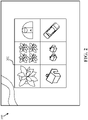
- FIG. 2 illustrates an image gallery page 200 of a presentation application.
- an example image gallery 200 may appear. While a two row, three column image gallery 202 is shown, it is understood that alternative methods of displaying images are included within the disclosure.
- six images are included in the image gallery 200.
- users place images in a folder from where the presentation application can retrieve images. Alternatively, a user may upload these images directly to the gallery.
- a user may select an image stored in a "cloud" data center or elsewhere on the internet.
- a user can select an image by double clicking on the image or by right clicking on the image and selecting the image.
- a user can click on an image and select a button to generate that image on a slide.
- a user can drag and drop, copy and paste, or simply upload content to a slide.
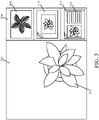
- FIG. 3 illustrates a slide 300 including an image 302 of a flower, selected from the image gallery 202.
- the slide 300 further includes slide design suggestions area 304 shown as a vertical bar on the right side of the slide 300.
- slide design suggestions area 304 is shown as a drop down menu, an alternative window, or placed horizontally above or below the slide. Still further, slide design suggestions area 304 may be located elsewhere.
- the presentation application automatically places the image 302 on the slide 300. As shown in this example, the presentation application placed the image 302 on the right side of the slide 300 by default. In other examples, the presentation application may place the selected image 302 on other areas of the slide 300 such as the left, middle, top, and/or bottom of the slide 300. Still further, the presentation application may place a border around the selected image 302.
- placement of the image 302 on the slide 300 may depend on various factors such as, but not limited to placement of the content placeholder, the type of content placeholder, the content placeholder size, and the size of the content inserted. The factors may be used in the analysis of slide design suggestions to suggest.
- the presentation application further determines areas of interest within the image and places the image on the slide 300 accordingly. For example, if the image 302 is of a person and a background, then the presentation application may determine the area(s) of interest, such as the person's face. The presentation application may then suitably place the image on the slide 300 so that the person's face is placed in an unobstructed area on the slide 300.
- the presentation application may suitably place the image on the slide so that the person's face is not obstructed from additional content, such as text on the slide 300.
- additional content such as text on the slide 300.
- the content itself was analyzed so that the location of the content placeholder, in the lower right corner of the slide, was suggested.
- the presentation application may use the "rule of thirds" to place the object of interest on the far right or far left area of the slide 300 rather than directly in the middle of the slide.
- the "rule of thirds” is a suggested methodology for placing an image 302 where it is most visually interesting (e.g., on the left or right side rather than directly in the center). For example, placing the image 302 on the right side of the slide 300 enables text to be placed on the left side of the slide 300.
- the presentation application may crop or resize the image 302 before placing it on the slide 300. In the latter case, the content size is adjusted based on the analysis of the content.
- the slide 300 also includes slide design suggestions area 304 located on the right side of the slide 300.
- the slide design suggestions area 304 includes suggested alternative slide designs that can be used in place of slide 300.
- the suggested alternative slide design suggestions are viewable as thumbnails next to the slide 300.
- Slide design suggestions may include variations of content size, content type, number of content placeholders, suggested content, background to slides, or any other slide design suggestions.
- Content design suggestions may be based on analysis of content on the current slide, content on the previous or next slide, content within the entire slide deck, user history data, user preferences, rules or heuristics about types of content, or other data.
- slide design suggestions can have text, images, charts, video, or any combination thereof.
- the slide design suggestions area 304 includes three alternative slide design suggestions: a slide 308 including a full view of an image that spans the entire slide 308; a slide 310 including the selected image 302 that spans part of the slide 310; and a slide 312 including the content image 302 next to a text box 314. While three alternative slide design suggestions are shown in this example, it is understood that more or fewer alternative slide design suggestions may also be included. In some embodiments, the number of design suggestions depends on the content that is inserted, the content that is already on the slide, the content on other slides in the same slide deck, user history with content, and/or the preferences of the presentation creator.
- the presentation application disclosed herein analyzes the content and thereafter provides additional design suggestions for displaying other content on a slide. For example, if a slide includes statistics in the form of text, the presentation application may analyze the data and provide alternative means of displaying this data on a slide, such as in the form of a graph. As an example, if a quadratic equation had been entered in a text content placeholder, then a content design suggestion may include a chart of a parabola.
- the presentation application may query a search server for additional content, the content of the same or different content type, to display with or instead of the content. Alternatively or additionally, the presentation application may retrieve related, supplemental data from a repository or a database and insert additional data not included on the slide.
- the presentation application may include additional statistics, related to content inserted on the slide that is retrieved from a database.
- additional statistics related to content inserted on the slide that is retrieved from a database.
- the presentation application may analyze this picture and suggest alternative pictures of beaches retrieved from a database.
- the alternative design suggestions may be used to supplement content on a slide or used to entirely replace content on a slide.
- slide design suggestions area 304 is located along the right of the slide 300 in the example shown, it is understood that the slide design suggestions area 304 may be positioned along the bottom area, top area, or left area of the slide 300. Alternatively, the slide design suggestions area 304 may be displayed separately from the slide 300, such as in a pop-up window or a floating toolbar.
- FIG. 4 illustrates a slide and slide design suggestions, the slide design suggestions showing variations of content, content types, content size and content position.
- the slide suggestions are made based on analysis of factors such as existing slide content, slide content from other slides in the slide deck, user preferences, rules or heuristics associated with the type of content, etc.
- this example illustrates a slide that may result after a user selects the third slide 312 design suggestion as shown and described with reference to FIG. 3 .
- selected slide 312 includes the selected image 302 and a text box 314.
- the display of slide 312 further provides an additional slide design suggestions area 402 that include further suggestions for a slide.
- the suggested alternative slide design suggestions are viewable as thumbnails next to the slide 312.
- slide 404 includes a text box 314 on the left of the selected image 302; slide 406 includes two text boxes 314; slide 408 includes two alternative suggested images 410 and 412 and accompanying text; and slide 414 includes an alternative suggested image 410 and a text box 314 laid horizontally across the top of the slide 412. While four design suggestions for slide designs are shown in this example, it is understood that more or fewer alternative slide designs may also be included.
- the automated system for suggesting individual slide designs may also be used to organize a layout of an existing presentation slide deck.
- a presentation creator may open an existing slide deck in the presentation application.
- the presentation application may then reorganize the content of each slide in the existing slide deck, thereby automatically generating an entirely new slide deck incorporating the content provided in the pre-existing slide deck.
- a user may have a quadratic equation on a slide in an existing slide deck, and the presentation application may thereafter insert a parabola representing the equation onto a new slide within the same slide deck.
- the chart may have a similar background, content placeholder size, and content position as the content placeholder that includes the equation.
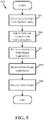
- FIG. 5 illustrates a method 500 for organizing a slide using an automatic slide design feature in a presentation application.
- the method 500 begins at operation 502 in which a presentation creator selects a content type from the main selection page of the presentation application.
- the presentation creator selects "Image" from the content type, however alternative content types include, but are not limited to, media, text, SmartArt ® , charts, and information graphics.
- the presentation creator selects a particular content from the content gallery. As shown with reference to FIG. 2 , a variety of images are displayed from which the creator may select.
- the presentation application performs analysis on the content selected in order to provide slide design suggestions.
- analysis includes analysis of content on the current slide, content on the previous or next slide, content within the entire slide deck, user history data, user preferences, rules or heuristics about types of content, or other data.
- the presentation creator receives automatically generated slide design suggestions, wherein the automatically generated slide design suggestions include a plurality of generated slide designs.
- a slide design may describe the type of content that is on a slide, the position of content, the size of content, alternative content that may be displayed instead of the selected content or adjacent to the selected content, font size associated with content, background images associated with content, or any other visual variation of the content.
- slides can have text, images, charts, video, or any combination thereof.
- a slide design suggestion may be viewable in the main slide 300 and the remaining design suggestions may be viewable, for example, as smaller thumbnails, such as those shown in the slide design suggestion area 304.
- the presentation creator receives a desired slide design.
- the presentation creator may select the generated slide that is viewable in the main slide or select another generated slide that is viewable as a smaller thumbnail, such as a slide presented in the slide design suggestions area 304.
- the presentation creator receives a slide design.
- FIG. 6 illustrates a method 600 for automatically organizing a slide and generating slide design suggestions by a presentation application.
- This method begins at operation 602 in which the presentation application performs analysis on inserted content by running analytics such as, but not limited to facial recognition, content analysis on the slide, background recognition, analysis of content on other slides, user history, rules, and heuristics related to the content, invariant region recognition on images, or other data in order to determine slide design suggestions.
- analytics such as, but not limited to facial recognition, content analysis on the slide, background recognition, analysis of content on other slides, user history, rules, and heuristics related to the content, invariant region recognition on images, or other data in order to determine slide design suggestions.
- the presentation application may optionally perform a search for content suggestions based on the analysis conducted in operation 602.
- the analysis is used to supplement or entirely replace content on a slide by retrieving data not provided by the presentation creator.
- the presentation application may analyze the data and provide alternative means of displaying this data on a slide, such as in the form of a graph.
- a content design suggestion may include a chart of a parabola.
- the presentation application may query a search server for additional content, the content of the same or different content type, to display with or instead of the content.
- the presentation application may retrieve related, supplemental data from a repository or a database and insert additional data not included on the slide.
- the presentation application may include additional statistics, related to content inserted on the slide that is retrieved from a database.
- the presentation application may analyze this picture and suggest alternative pictures of beaches retrieved from a database.
- the presentation application performs analysis on an area of interest of the image in order to suitably place the content on the slide.
- the presentation application may perform facial recognition, determine invariant regions in the image, crop and resize content, and/or determine background shapes in order to effectively place content on a slide so that it is unobstructed from other content. For example, if an image includes a person and a background, the presentation application may suitably place the image on the slide so that the person's face is not obstructed from additional content, such as text on the slide.
- operation 608 the presentation application displays suggested slide designs, from which the user may select, based on results. Operation 608 may involve generating more than one suggested slide design based on the one or more analyses performed in operations 602-606.
- FIGs. 7-9 and the associated descriptions provide a discussion of a variety of operating environments in which embodiments of the invention may be practiced.
- the devices and systems illustrated and discussed with respect to FIGS. 7-9 are for purposes of example and illustration and are not limiting of a vast number of computing device configurations that may be utilized for practicing embodiments of the invention, described herein.
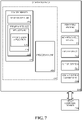
- FIG. 7 is a block diagram illustrating physical components (i.e., hardware) of a computing device 105 with which embodiments of the invention may be practiced.
- the computing device components described below may be suitable for the computing devices described above.
- the computing device 105 may include at least one processing unit 702 and a system memory 704, Depending on the configuration and type of computing device, the system memory 704 may comprise, but is not limited to, volatile storage (e.g., random access memory), non-volatile storage (e.g., read-only memory), flash memory, or any combination of such memories.
- the system memory 704 may include an operating system 705 and one or more program modules 706 suitable for running software applications 720 such as a presentation application 118.
- the operating system 705 may be suitable for controlling the operation of the computing device 105.
- embodiments of the invention may be practiced in conjunction with a graphics library, other operating systems, or any other application program and is not limited to any particular application or system.
- This basic configuration is illustrated in FIG. 7 by those components within a dashed line 708.
- the computing device 105 may have additional features or functionality.
- the computing device 105 may also include additional data storage devices (removable and/or non-removable) such as, for example, magnetic disks, optical disks, or tape. Such additional storage is illustrated in FIG. 7 by a removable storage device 709 and anon-removable storage device 710.
- program modules 706 may perform processes including, but not limited to, one or more of the stages of the methods 500-600 illustrated in FIGs. 5-6 .
- Other program modules may include electronic mail and contacts applications, word processing applications, spreadsheet applications, database applications, slide presentation applications, drawing or computer-aided application programs, etc.
- embodiments of the invention may be practiced in an electrical circuit comprising discrete electronic elements, packaged or integrated electronic chips containing logic gates, a circuit utilizing a microprocessor, or on a single chip containing electronic elements or microprocessors.
- embodiments of the invention may be practiced via a system-on-a-chip (SOC) where each or many of the components illustrated in FIG. 7 may be integrated onto a single integrated circuit.
- SOC system-on-a-chip
- Such an SOC device may include one or more processing units, graphics units, communications units, system virtualization units and various application functionality all of which are integrated (or "burned") onto the chip substrate as a single integrated circuit.
- the functionality, described herein, with respect to the presentation application 1 18 may be operated via application-specific logic integrated with other components of the computing device 105 on the single integrated circuit (chip).
- Embodiments of the invention may also be practiced using other technologies capable of performing logical operations such as, for example, AND, OR, and NOT, including but not limited to mechanical, optical, fluidic, and quantum technologies.
- embodiments of the invention may be practiced within a general purpose computer or in any other circuits or systems.
- the computing device 105 may also have one or more input device(s) 712 such as a keyboard, a mouse, a pen, a sound input device, a touch input device, etc,
- the output device(s) 714 such as a display, speakers, a printer, etc. may also be included.
- the aforementioned devices are examples and others may be used.
- the computing device 105 may include one or more communication connections 716 allowing communications with other computing devices 718. Examples of suitable communication connections 716 include, but are not limited to, RF transmitter, receiver, and/or transceiver circuitry; universal serial bus (USB), parallel, and/or serial ports,
- Computer readable media may include computer storage media.
- Computer storage media may include volatile and nonvolatile, removable and non-removable media implemented in any method or technology for storage of information, such as computer readable instructions, data structures, or program modules.
- the system memory 704, the removable storage device 709, and the non-removable storage device 710 are all computer storage media examples (i.e., memory storage.)
- Computer storage media may include RAM, ROM, electrically erasable read-only memory (EEPROM), flash memory or other memory technology, CD-ROM, digital versatile disks (DVD) or other optical storage, magnetic cassettes, magnetic tape, magnetic disk storage or other magnetic storage devices, or any other article of manufacture which can be used to store information and which can be accessed by the computing device 105. Any such computer storage media may be part of the computing device 105.
- Computer storage media does not include a carrier wave or other propagated or modulated data signal.
- Communication media may be embodied by computer readable instructions, data structures, program modules, or other data in a modulated data signal, such as a carrier wave or other transport mechanism, and includes any information delivery media.
- modulated data signal may describe a signal that has one or more characteristics set or changed in such a manner as to encode information in the signal.
- communication media may include wired media such as a wired network or direct-wired connection, and wireless media such as acoustic, radio frequency (RF), infrared, and other wireless media.
- RF radio frequency
- FIGs. 8A and 8B illustrate a mobile computing device 800, for example, a mobile telephone, a smart phone, a tablet personal computer 610, a laptop computer, and the like, with which embodiments of the invention may be practiced.
- a mobile computing device 800 for implementing the embodiments is illustrated.
- the mobile computing device 800 is a handheld computer having both input elements and output elements.
- the mobile computing device 800 typically includes a display 805 and one or more input buttons 810 that allow the user to enter information into the mobile computing device 800.
- the display 805 of the mobile computing device 800 may also function as an input device (e.g., a touch screen display). If included, an optional side input element 815 allows further user input.
- the side input element 815 may be a rotary switch, a button, or any other type of manual input element.
- mobile computing device 800 may incorporate more or less input elements.
- the display 805 may not be a touch screen in some embodiments.
- the mobile computing device 800 is a portable phone system, such as a cellular phone.
- the mobile computing device 800 may also include an optional keypad 835.
- Optional keypad 835 may be a physical keypad or a "soft" keypad generated on the touch screen display.
- the output elements include the display 805 for showing a graphical user interface (GUI), a visual indicator 820 (e.g., a light emitting diode), and/or an audio transducer 825 (e.g., a speaker).
- GUI graphical user interface
- the mobile computing device 800 incorporates a vibration transducer for providing the user with tactile feedback.
- the mobile computing device 800 incorporates input and/or output ports, such as an audio input (e.g., a microphone jack), an audio output (e.g., a headphone jack), and a video output (e.g., a HDMI port) for sending signals to or receiving signals from an external device.
- FIG. 8B is a block diagram illustrating the architecture of one embodiment of a mobile computing device. That is, the mobile computing device 800 can incorporate a system (i.e., an architecture) 802 to implement some embodiments.
- the system 802 is implemented as a "smart phone" capable of running one or more applications (e.g., browser, e-mail, calendaring, contact managers, messaging clients, games, and media clients/players).
- the system 802 is integrated as a computing device, such as an integrated personal digital assistant (PDA) and wireless phone.
- PDA personal digital assistant
- One or more application programs 866 may be loaded into the memory 862 and run on or in association with the operating system 864. Examples of the application programs include phone dialer programs, e-mail programs, personal information management (PIM) programs, word processing programs, spreadsheet programs, Internet browser programs, messaging programs, and so forth.
- the system 802 also includes a non-volatile storage area 868 within the memory 862. The non-volatile storage area 868 may be used to store persistent information that should not be lost if the system 802 is powered down.
- the application programs 866 may use and store information in the non-volatile storage area 868, such as e-mail or other messages used by an e-mail application, and the like.
- a synchronization application (not shown) also resides on the system 802 and is programmed to interact with a corresponding synchronization application resident on a host computer to keep the information stored in the non-volatile storage area 868 synchronized with corresponding information stored at the host computer.
- other applications may be loaded into the memory 862 and run on the mobile computing device 800, including the presentation application 118 described herein.
- the system 802 has a power supply 870, which may be implemented as one or more batteries.
- the power supply 870 might further include an external power source, such as an AC adapter or a powered docking cradle that supplements or recharges the batteries.
- the system 802 may also include a radio 872 that performs the function of transmitting and receiving radio frequency communications.
- the radio 872 facilitates wireless connectivity between the system 802 and the "outside world", via a communications carrier or service provider. Transmissions to and from the radio 872 are conducted under control of the operating system 864. In other words, communications received by the radio 872 may be disseminated to the application programs 866 via the operating system 864, and vice versa.
- the audio interface 874 is used to provide audible signals to and receive audible signals from the user.
- the audio interface 874 may also be coupled to a microphone to receive audible input, such as to facilitate a telephone conversation,
- the microphone may also serve as an audio sensor to facilitate control of notifications, as will be described below.
- the system 802 may further include a video interface 876 that enables an operation of an on-board camera 830 to record still images, video stream, and the like.
- a mobile computing device 800 implementing the system 802 may have additional features or functionality.
- the mobile computing device 800 may also include additional data storage devices (removable and/or non-removable) such as, magnetic disks, optical disks, or tape.
- additional storage is illustrated in FIG. 8B by the non-volatile storage area 868.
- Data/information generated or captured by the mobile computing device 800 and stored via the system 802 may be stored locally on the mobile computing device 800, as described above, or the data may be stored on any number of storage media that may be accessed by the device via the radio 872 or via a wired connection between the mobile computing device 800 and a separate computing device associated with the mobile computing device 800, for example, a server computer in a distributed computing network, such as the Internet.
- a server computer in a distributed computing network such as the Internet.
- data/information may be accessed via the mobile computing device 800 via the radio 872 or via a distributed computing network.
- data/information may be readily transferred between computing devices for storage and use according to well-known data/information transfer and storage means, including electronic mail and collaborative data/information sharing systems.
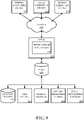
- FIG. 9 illustrates one embodiment of the architecture of a system for providing detection and grouping of graphics elements in a fixed format document to one or more client devices, as described above.
- Content developed, interacted with, or edited in association with the presentation application 118 may be stored in different communication channels or other storage types. For example, various documents may be stored using a directory service 922, a web portal 924, a mailbox service 926, an instant messaging store 928, or a social networking site 930.
- the presentation application 118 may use any of these types of systems or the like for enabling data utilization, as described herein.
- a server 920 may provide the presentation application 1 18 to clients. As one example, the server 920 may be a web server providing the presentation application 118 over the web.
- the server 920 may provide the presentation application 118 over the web to clients through a network 915.
- the client computing device may be implemented as the computing device 105 and embodied in a personal computer, a tablet computing device 910 and/or a mobile computing device 800 (e.g., a smart phone). Any of these embodiments of the client computing device 105, 610, 800 may obtain content from the store 916.
- Embodiments of the present invention are described above with reference to block diagrams and/or operational illustrations of methods, systems, and computer program products according to embodiments of the invention.
- the functions/acts noted in the blocks may occur out of the order as shown in any flowchart.
- two blocks shown in succession may in fact be executed substantially concurrently or the blocks may sometimes be executed in the reverse order, depending upon the functionality/acts involved.
Landscapes
- Engineering & Computer Science (AREA)
- Multimedia (AREA)
- Signal Processing (AREA)
- General Engineering & Computer Science (AREA)
- Theoretical Computer Science (AREA)
- Human Computer Interaction (AREA)
- Physics & Mathematics (AREA)
- General Physics & Mathematics (AREA)
- User Interface Of Digital Computer (AREA)
- Processing Or Creating Images (AREA)
Description
- Presentation editors typically do not offer a robust method for placing content on slides and it is often challenging for presentation creators to envision alternative suggestions regarding where to effectively organize slide content. Such organization is vital for conveying a message to the presentation viewer, making effective use of the slide space, and making presentations more visually interesting. Current presentation editors provide an inflexible and limited tool to organize content on slides. For example, presentation editors simply provide a few slide layouts (also referred to as "slide formats") from which to choose and only allow users to add content according to the slide format provided. Thus, reorganizing the slide requires selecting a new slide format and re-adding content.
- It is with respect to these and other general considerations that embodiments have been made. Also, although relatively specific problems have been discussed, it should be understood that the embodiments should not be limited to solving the specific problems identified in the background.
-
US 2013/111373 A1 discloses a presentation content generation device that generates various types of presentation contents by dynamically generating a template appropriate for the substance of each content set. The presentation content generation device includes an attribute information extraction unit 2 that extracts attribute information indicating image feature from a content set stored in a local data storage unit 1, a design type determination unit 4 that determines a base land pattern and a color of a template based on the extracted attribute information, a selection index type determination unit 5 that, based on the extracted attribute information, selects one or more contents to be placed on the template and respective placement positions of the selected contents on the template, and a view format conversion unit 6 that places the selected contents on the respective placement positions to generate a presentation content. - It is therefore the object of the invention to provide an improved method, system and computer-readable medium for automatically organizing content on a presentation slide.
- This object is solved by the subject matter of the independent claims.
- Preferred embodiments are defined by the dependent claims.
- This Summary is provided to introduce a selection of concepts in a simplified form that are further described below in the Detailed Description. This Summary is not intended to identify key features or essential features of the claimed subject matter, nor is it intended to be used to limit the scope of the claimed subject matter.
- Embodiments of the present disclosure provide a method and system for quickly organizing content on slides by analyzing inserted content and thereafter offering alternative solutions for placing content on a slide in an effective and visually interesting organization. For example, a presentation editor may initially prompt a creator to insert content. The presentation editor may then analyze the content by running analytics such as, but not limited to, facial recognition, content analysis on the slide, background recognition, analysis of content on other slides, user history, rules and heuristics related to content, invariant region recognition on images, or other data in order to determine slide design suggestions. In some embodiments, these analytics may be performed to assist in placing additional content on the slide, such as text on a background area of an accompanying image. The presentation editor may further offer alternative design suggestions for organizing the content on a slide, wherein the alternative design suggestions are placed within the current slide or are easily accessible for selection. A presentation creator may then simply select an alternative design suggestion and automatically receive a newly organized slide including the inserted content without having to manually re-insert and/or reorganize the content. Accordingly, embodiments of the present disclosure enable a presentation creator to efficiently organize content on slides while making effective use of the slide space,
- By automatically offering slide design suggestions based on analysis, various technical advantages may be achieved. For example, user efficiency may be increased because a correct slide design suggestion may be quickly selected. In addition, processor cycles may be ultimately reduced because time selecting different designs in an editor may be reduced, Still further, errors may be reduced because appropriate slide designs may be automatically available after analysis.
- Embodiments may be implemented as a computer process, a computing system or as an article of manufacture such as a computer program product or computer readable media. The computer program product may be computer storage media readable by a computer system and encoding a computer program of instructions for executing a computer process.
-
-
FIG. 1 illustrates a main selection page of a presentation application. -
FIG. 2 illustrates an image gallery page of a presentation application. -
FIG. 3 illustrates a slide and slide design suggestions, the slide design suggestions showing variations of content placeholder types and content placeholder size. -
FIG. 4 illustrates a slide and slide design suggestions, the slide design suggestions showing variations of content and content types. -
FIG. 5 illustrates a method for organizing a slide using an automatic slide suggestion feature in a presentation application. -
FIG. 6 illustrates a method for automatically organizing a slide and generating slide design suggestions by a presentation application. -
FIG. 7 is a block diagram illustrating example physical components of a computing device with which embodiments of the invention may be practiced. -
FIG. 8A illustrates one embodiment of a mobile computing device executing one or more embodiments disclosed herein. -
FIG. 8B is a simplified block diagram of a mobile computing device with which embodiments of the present invention may be practiced. -
FIG. 9 is a simplified block diagram of a distributed computing system in which embodiments of the present invention may be practiced. - Various embodiments are described more fully below with reference to the accompanying drawings, which form a part hereof, and which show specific exemplary embodiments. However, embodiments may be implemented in many different forms and should not be construed as limited to the embodiments set forth herein; rather, these embodiments are provided so that this disclosure will be thorough and complete, and will fully convey the scope of the embodiments to those skilled in the art. Embodiments may be practiced as methods, systems or devices. Accordingly, embodiments may take the form of a hardware implementation, an entirely software implementation or an implementation combining software and hardware aspects. The following detailed description is, therefore, not to be taken in a limiting sense.
-
FIG. 1 illustrates amain selection page 100 of a presentation application. As shown, themain selection page 100 includes a plurality of content types that can be inserted into a presentation. In this example, the content types shown include:images 102,media 104,text 106, SmartArt® 108,charts 110, andinformation graphics 112. In other examples, other content types may be shown. In this example, thismain selection page 100 is used to select what type of content to display on a slide or slides. Also, each content type is linkable to a directory. For example, clicking on the 'Charts'content type 110 will make a selection of charts available for the user to insert. Such a selection of charts includes, but is not limited to, bar graphs, pie charts, scatter plots, pictographs, flow charts, and line graphs. Amain selection page 100 may also show mixtures of content types. For example,main selection page 100 may offer a choice oftext 106 withcharts 110. Any permutation of content type may be offered onmain selection page 100. -
FIG. 2 illustrates animage gallery page 200 of a presentation application. In this example, if a user selects the 'Images'content type 102 from the main selection page as shown and described with reference toFIG 1 , anexample image gallery 200 may appear. While a two row, threecolumn image gallery 202 is shown, it is understood that alternative methods of displaying images are included within the disclosure. In this example, six images are included in theimage gallery 200. In some embodiments, users place images in a folder from where the presentation application can retrieve images. Alternatively, a user may upload these images directly to the gallery. Still further, a user may select an image stored in a "cloud" data center or elsewhere on the internet. A user can select an image by double clicking on the image or by right clicking on the image and selecting the image. In other embodiments, a user can click on an image and select a button to generate that image on a slide. Yet in other embodiments, a user can drag and drop, copy and paste, or simply upload content to a slide. -
FIG. 3 illustrates aslide 300 including animage 302 of a flower, selected from theimage gallery 202. Theslide 300 further includes slidedesign suggestions area 304 shown as a vertical bar on the right side of theslide 300. However in other embodiments, a slidedesign suggestions area 304 is shown as a drop down menu, an alternative window, or placed horizontally above or below the slide. Still further, slidedesign suggestions area 304 may be located elsewhere. - In this example, if a user selects the
image 302 shown in theimage gallery 202 inFIG. 2 , then the presentation application automatically places theimage 302 on theslide 300. As shown in this example, the presentation application placed theimage 302 on the right side of theslide 300 by default. In other examples, the presentation application may place the selectedimage 302 on other areas of theslide 300 such as the left, middle, top, and/or bottom of theslide 300. Still further, the presentation application may place a border around the selectedimage 302. - Referring still to
FIG. 3 , placement of theimage 302 on theslide 300 may depend on various factors such as, but not limited to placement of the content placeholder, the type of content placeholder, the content placeholder size, and the size of the content inserted. The factors may be used in the analysis of slide design suggestions to suggest. The presentation application further determines areas of interest within the image and places the image on theslide 300 accordingly. For example, if theimage 302 is of a person and a background, then the presentation application may determine the area(s) of interest, such as the person's face. The presentation application may then suitably place the image on theslide 300 so that the person's face is placed in an unobstructed area on theslide 300. For example, if an image includes a person and a background, the presentation application may suitably place the image on the slide so that the person's face is not obstructed from additional content, such as text on theslide 300. In the example ofFIG. 3 , the content itself was analyzed so that the location of the content placeholder, in the lower right corner of the slide, was suggested. - Furthermore, in some embodiments, the presentation application may use the "rule of thirds" to place the object of interest on the far right or far left area of the
slide 300 rather than directly in the middle of the slide. The "rule of thirds" is a suggested methodology for placing animage 302 where it is most visually interesting (e.g., on the left or right side rather than directly in the center). For example, placing theimage 302 on the right side of theslide 300 enables text to be placed on the left side of theslide 300. Additionally, the presentation application may crop or resize theimage 302 before placing it on theslide 300. In the latter case, the content size is adjusted based on the analysis of the content. - The
slide 300 also includes slidedesign suggestions area 304 located on the right side of theslide 300. The slidedesign suggestions area 304 includes suggested alternative slide designs that can be used in place ofslide 300. In this instance, the suggested alternative slide design suggestions are viewable as thumbnails next to theslide 300. Although a thumbnail is discussed, one skilled in the art may envision various alternative methods of displaying generated slide design suggestions, such as in a new window, a drop down menu, nested within a ribbon in the application, etc. Slide design suggestions may include variations of content size, content type, number of content placeholders, suggested content, background to slides, or any other slide design suggestions. Content design suggestions may be based on analysis of content on the current slide, content on the previous or next slide, content within the entire slide deck, user history data, user preferences, rules or heuristics about types of content, or other data. - For example, slide design suggestions can have text, images, charts, video, or any combination thereof. In the example of
FIG. 3 , the slidedesign suggestions area 304 includes three alternative slide design suggestions: aslide 308 including a full view of an image that spans theentire slide 308; aslide 310 including the selectedimage 302 that spans part of theslide 310; and aslide 312 including thecontent image 302 next to atext box 314. While three alternative slide design suggestions are shown in this example, it is understood that more or fewer alternative slide design suggestions may also be included. In some embodiments, the number of design suggestions depends on the content that is inserted, the content that is already on the slide, the content on other slides in the same slide deck, user history with content, and/or the preferences of the presentation creator. - In some embodiments, the presentation application disclosed herein analyzes the content and thereafter provides additional design suggestions for displaying other content on a slide. For example, if a slide includes statistics in the form of text, the presentation application may analyze the data and provide alternative means of displaying this data on a slide, such as in the form of a graph. As an example, if a quadratic equation had been entered in a text content placeholder, then a content design suggestion may include a chart of a parabola. The presentation application may query a search server for additional content, the content of the same or different content type, to display with or instead of the content. Alternatively or additionally, the presentation application may retrieve related, supplemental data from a repository or a database and insert additional data not included on the slide. For example, the presentation application may include additional statistics, related to content inserted on the slide that is retrieved from a database. As another example, if a presentation creator added a picture of a beach, the presentation application may analyze this picture and suggest alternative pictures of beaches retrieved from a database. Hence, the alternative design suggestions may be used to supplement content on a slide or used to entirely replace content on a slide.
- While the slide
design suggestions area 304 is located along the right of theslide 300 in the example shown, it is understood that the slidedesign suggestions area 304 may be positioned along the bottom area, top area, or left area of theslide 300. Alternatively, the slidedesign suggestions area 304 may be displayed separately from theslide 300, such as in a pop-up window or a floating toolbar. -
FIG. 4 illustrates a slide and slide design suggestions, the slide design suggestions showing variations of content, content types, content size and content position. Here also, the slide suggestions are made based on analysis of factors such as existing slide content, slide content from other slides in the slide deck, user preferences, rules or heuristics associated with the type of content, etc. In particular, this example illustrates a slide that may result after a user selects thethird slide 312 design suggestion as shown and described with reference toFIG. 3 . In this example, selectedslide 312 includes the selectedimage 302 and atext box 314. The display ofslide 312 further provides an additional slidedesign suggestions area 402 that include further suggestions for a slide. In this instance, the suggested alternative slide design suggestions are viewable as thumbnails next to theslide 312. Although a thumbnail is discussed, various alternative methods of displaying generated slide design suggestions are possible, such as display in a new window, a drop down menu, nested within a ribbon in the application, etc. In this example, because the user selected theslide 312 that includes two content areas (e.g.,image 302 and text box 314), the additional slide design suggestions may include different combinations of the two selected content areas laid out on the slide. For example, slide 404 includes atext box 314 on the left of the selectedimage 302; slide 406 includes twotext boxes 314; slide 408 includes two alternative suggestedimages image 410 and atext box 314 laid horizontally across the top of theslide 412. While four design suggestions for slide designs are shown in this example, it is understood that more or fewer alternative slide designs may also be included. - Notably, the automated system for suggesting individual slide designs may also be used to organize a layout of an existing presentation slide deck. For example, in some embodiments, a presentation creator may open an existing slide deck in the presentation application. The presentation application may then reorganize the content of each slide in the existing slide deck, thereby automatically generating an entirely new slide deck incorporating the content provided in the pre-existing slide deck.
- As yet another example, a user may have a quadratic equation on a slide in an existing slide deck, and the presentation application may thereafter insert a parabola representing the equation onto a new slide within the same slide deck. The chart may have a similar background, content placeholder size, and content position as the content placeholder that includes the equation.
-
FIG. 5 illustrates amethod 500 for organizing a slide using an automatic slide design feature in a presentation application. Themethod 500 begins atoperation 502 in which a presentation creator selects a content type from the main selection page of the presentation application. In the illustrated example, the presentation creator selects "Image" from the content type, however alternative content types include, but are not limited to, media, text, SmartArt®, charts, and information graphics. Inoperation 504, the presentation creator selects a particular content from the content gallery. As shown with reference toFIG. 2 , a variety of images are displayed from which the creator may select. - In
operation 505, the presentation application performs analysis on the content selected in order to provide slide design suggestions. As discussed above, analysis includes analysis of content on the current slide, content on the previous or next slide, content within the entire slide deck, user history data, user preferences, rules or heuristics about types of content, or other data. - In
operation 506, the presentation creator receives automatically generated slide design suggestions, wherein the automatically generated slide design suggestions include a plurality of generated slide designs. As discussed above, a slide design may describe the type of content that is on a slide, the position of content, the size of content, alternative content that may be displayed instead of the selected content or adjacent to the selected content, font size associated with content, background images associated with content, or any other visual variation of the content. For example, slides can have text, images, charts, video, or any combination thereof. In this instance, a slide design suggestion may be viewable in themain slide 300 and the remaining design suggestions may be viewable, for example, as smaller thumbnails, such as those shown in the slidedesign suggestion area 304. - In
operation 508, the presentation creator receives a desired slide design. Inoperation 508, the presentation creator may select the generated slide that is viewable in the main slide or select another generated slide that is viewable as a smaller thumbnail, such as a slide presented in the slidedesign suggestions area 304. Thus, inoperation 508, the presentation creator receives a slide design. -
FIG. 6 illustrates amethod 600 for automatically organizing a slide and generating slide design suggestions by a presentation application. This method begins atoperation 602 in which the presentation application performs analysis on inserted content by running analytics such as, but not limited to facial recognition, content analysis on the slide, background recognition, analysis of content on other slides, user history, rules, and heuristics related to the content, invariant region recognition on images, or other data in order to determine slide design suggestions. - In
operation 604 the presentation application may optionally perform a search for content suggestions based on the analysis conducted inoperation 602. In some embodiments, the analysis is used to supplement or entirely replace content on a slide by retrieving data not provided by the presentation creator. As an example, if a slide includes statistics in the form of text, the presentation application may analyze the data and provide alternative means of displaying this data on a slide, such as in the form of a graph. As yet another example, if a quadratic equation had been entered in a text content placeholder, then a content design suggestion may include a chart of a parabola. The presentation application may query a search server for additional content, the content of the same or different content type, to display with or instead of the content. Alternatively or additionally, the presentation application may retrieve related, supplemental data from a repository or a database and insert additional data not included on the slide. For example, the presentation application may include additional statistics, related to content inserted on the slide that is retrieved from a database. As another example, if a presentation creator added a picture of a beach, the presentation application may analyze this picture and suggest alternative pictures of beaches retrieved from a database. - In
operation 606, the presentation application performs analysis on an area of interest of the image in order to suitably place the content on the slide. The presentation application may perform facial recognition, determine invariant regions in the image, crop and resize content, and/or determine background shapes in order to effectively place content on a slide so that it is unobstructed from other content. For example, if an image includes a person and a background, the presentation application may suitably place the image on the slide so that the person's face is not obstructed from additional content, such as text on the slide. - In
operation 608, the presentation application displays suggested slide designs, from which the user may select, based on results.Operation 608 may involve generating more than one suggested slide design based on the one or more analyses performed in operations 602-606. -
FIGs. 7-9 and the associated descriptions provide a discussion of a variety of operating environments in which embodiments of the invention may be practiced. However, the devices and systems illustrated and discussed with respect toFIGS. 7-9 are for purposes of example and illustration and are not limiting of a vast number of computing device configurations that may be utilized for practicing embodiments of the invention, described herein. -
FIG. 7 is a block diagram illustrating physical components (i.e., hardware) of acomputing device 105 with which embodiments of the invention may be practiced. The computing device components described below may be suitable for the computing devices described above. In a basic configuration, thecomputing device 105 may include at least oneprocessing unit 702 and asystem memory 704, Depending on the configuration and type of computing device, thesystem memory 704 may comprise, but is not limited to, volatile storage (e.g., random access memory), non-volatile storage (e.g., read-only memory), flash memory, or any combination of such memories. Thesystem memory 704 may include anoperating system 705 and one ormore program modules 706 suitable for runningsoftware applications 720 such as apresentation application 118. Theoperating system 705, for example, may be suitable for controlling the operation of thecomputing device 105. Furthermore, embodiments of the invention may be practiced in conjunction with a graphics library, other operating systems, or any other application program and is not limited to any particular application or system. This basic configuration is illustrated inFIG. 7 by those components within a dashedline 708. Thecomputing device 105 may have additional features or functionality. For example, thecomputing device 105 may also include additional data storage devices (removable and/or non-removable) such as, for example, magnetic disks, optical disks, or tape. Such additional storage is illustrated inFIG. 7 by aremovable storage device 709 and anon-removable storage device 710. - As stated above, a number of program modules and data files may be stored in the
system memory 704. While executing on theprocessing unit 702, the program modules 706 (e.g., the presentation application 118) may perform processes including, but not limited to, one or more of the stages of the methods 500-600 illustrated inFIGs. 5-6 . Other program modules that may be used in accordance with embodiments of the present invention may include electronic mail and contacts applications, word processing applications, spreadsheet applications, database applications, slide presentation applications, drawing or computer-aided application programs, etc. - Furthermore, embodiments of the invention may be practiced in an electrical circuit comprising discrete electronic elements, packaged or integrated electronic chips containing logic gates, a circuit utilizing a microprocessor, or on a single chip containing electronic elements or microprocessors. For example, embodiments of the invention may be practiced via a system-on-a-chip (SOC) where each or many of the components illustrated in
FIG. 7 may be integrated onto a single integrated circuit. Such an SOC device may include one or more processing units, graphics units, communications units, system virtualization units and various application functionality all of which are integrated (or "burned") onto the chip substrate as a single integrated circuit. When operating via an SOC, the functionality, described herein, with respect to the presentation application 1 18 may be operated via application-specific logic integrated with other components of thecomputing device 105 on the single integrated circuit (chip). Embodiments of the invention may also be practiced using other technologies capable of performing logical operations such as, for example, AND, OR, and NOT, including but not limited to mechanical, optical, fluidic, and quantum technologies. In addition, embodiments of the invention may be practiced within a general purpose computer or in any other circuits or systems. - The
computing device 105 may also have one or more input device(s) 712 such as a keyboard, a mouse, a pen, a sound input device, a touch input device, etc, The output device(s) 714 such as a display, speakers, a printer, etc. may also be included. The aforementioned devices are examples and others may be used. Thecomputing device 105 may include one ormore communication connections 716 allowing communications withother computing devices 718. Examples ofsuitable communication connections 716 include, but are not limited to, RF transmitter, receiver, and/or transceiver circuitry; universal serial bus (USB), parallel, and/or serial ports, - The term computer readable media as used herein may include computer storage media. Computer storage media may include volatile and nonvolatile, removable and non-removable media implemented in any method or technology for storage of information, such as computer readable instructions, data structures, or program modules. The
system memory 704, theremovable storage device 709, and thenon-removable storage device 710 are all computer storage media examples (i.e., memory storage.) Computer storage media may include RAM, ROM, electrically erasable read-only memory (EEPROM), flash memory or other memory technology, CD-ROM, digital versatile disks (DVD) or other optical storage, magnetic cassettes, magnetic tape, magnetic disk storage or other magnetic storage devices, or any other article of manufacture which can be used to store information and which can be accessed by thecomputing device 105. Any such computer storage media may be part of thecomputing device 105. Computer storage media does not include a carrier wave or other propagated or modulated data signal. - Communication media may be embodied by computer readable instructions, data structures, program modules, or other data in a modulated data signal, such as a carrier wave or other transport mechanism, and includes any information delivery media. The term "modulated data signal" may describe a signal that has one or more characteristics set or changed in such a manner as to encode information in the signal. By way of example, and not limitation, communication media may include wired media such as a wired network or direct-wired connection, and wireless media such as acoustic, radio frequency (RF), infrared, and other wireless media.
-
FIGs. 8A and8B illustrate amobile computing device 800, for example, a mobile telephone, a smart phone, a tablet personal computer 610, a laptop computer, and the like, with which embodiments of the invention may be practiced. With reference toFIG. 8A , one embodiment of amobile computing device 800 for implementing the embodiments is illustrated. In a basic configuration, themobile computing device 800 is a handheld computer having both input elements and output elements. Themobile computing device 800 typically includes adisplay 805 and one ormore input buttons 810 that allow the user to enter information into themobile computing device 800. Thedisplay 805 of themobile computing device 800 may also function as an input device (e.g., a touch screen display). If included, an optionalside input element 815 allows further user input. Theside input element 815 may be a rotary switch, a button, or any other type of manual input element. In alternative embodiments,mobile computing device 800 may incorporate more or less input elements. For example, thedisplay 805 may not be a touch screen in some embodiments. In yet another alternative embodiment, themobile computing device 800 is a portable phone system, such as a cellular phone. Themobile computing device 800 may also include anoptional keypad 835.Optional keypad 835 may be a physical keypad or a "soft" keypad generated on the touch screen display. In various embodiments, the output elements include thedisplay 805 for showing a graphical user interface (GUI), a visual indicator 820 (e.g., a light emitting diode), and/or an audio transducer 825 (e.g., a speaker). In some embodiments, themobile computing device 800 incorporates a vibration transducer for providing the user with tactile feedback. In yet another embodiment, themobile computing device 800 incorporates input and/or output ports, such as an audio input (e.g., a microphone jack), an audio output (e.g., a headphone jack), and a video output (e.g., a HDMI port) for sending signals to or receiving signals from an external device. -
FIG. 8B is a block diagram illustrating the architecture of one embodiment of a mobile computing device. That is, themobile computing device 800 can incorporate a system (i.e., an architecture) 802 to implement some embodiments. In one embodiment, thesystem 802 is implemented as a "smart phone" capable of running one or more applications (e.g., browser, e-mail, calendaring, contact managers, messaging clients, games, and media clients/players). In some embodiments, thesystem 802 is integrated as a computing device, such as an integrated personal digital assistant (PDA) and wireless phone. - One or
more application programs 866 may be loaded into thememory 862 and run on or in association with theoperating system 864. Examples of the application programs include phone dialer programs, e-mail programs, personal information management (PIM) programs, word processing programs, spreadsheet programs, Internet browser programs, messaging programs, and so forth. Thesystem 802 also includes anon-volatile storage area 868 within thememory 862. Thenon-volatile storage area 868 may be used to store persistent information that should not be lost if thesystem 802 is powered down. Theapplication programs 866 may use and store information in thenon-volatile storage area 868, such as e-mail or other messages used by an e-mail application, and the like. A synchronization application (not shown) also resides on thesystem 802 and is programmed to interact with a corresponding synchronization application resident on a host computer to keep the information stored in thenon-volatile storage area 868 synchronized with corresponding information stored at the host computer. As should be appreciated, other applications may be loaded into thememory 862 and run on themobile computing device 800, including thepresentation application 118 described herein. - The
system 802 has apower supply 870, which may be implemented as one or more batteries. Thepower supply 870 might further include an external power source, such as an AC adapter or a powered docking cradle that supplements or recharges the batteries. - The
system 802 may also include aradio 872 that performs the function of transmitting and receiving radio frequency communications. Theradio 872 facilitates wireless connectivity between thesystem 802 and the "outside world", via a communications carrier or service provider. Transmissions to and from theradio 872 are conducted under control of theoperating system 864. In other words, communications received by theradio 872 may be disseminated to theapplication programs 866 via theoperating system 864, and vice versa. - The
audio interface 874 is used to provide audible signals to and receive audible signals from the user. For example, in addition to being coupled to theaudio transducer 825, theaudio interface 874 may also be coupled to a microphone to receive audible input, such as to facilitate a telephone conversation, In accordance with embodiments of the present invention, the microphone may also serve as an audio sensor to facilitate control of notifications, as will be described below. Thesystem 802 may further include avideo interface 876 that enables an operation of an on-board camera 830 to record still images, video stream, and the like. - A
mobile computing device 800 implementing thesystem 802 may have additional features or functionality. For example, themobile computing device 800 may also include additional data storage devices (removable and/or non-removable) such as, magnetic disks, optical disks, or tape. Such additional storage is illustrated inFIG. 8B by thenon-volatile storage area 868. - Data/information generated or captured by the
mobile computing device 800 and stored via thesystem 802 may be stored locally on themobile computing device 800, as described above, or the data may be stored on any number of storage media that may be accessed by the device via theradio 872 or via a wired connection between themobile computing device 800 and a separate computing device associated with themobile computing device 800, for example, a server computer in a distributed computing network, such as the Internet. As should be appreciated such data/information may be accessed via themobile computing device 800 via theradio 872 or via a distributed computing network. Similarly, such data/information may be readily transferred between computing devices for storage and use according to well-known data/information transfer and storage means, including electronic mail and collaborative data/information sharing systems. -
FIG. 9 illustrates one embodiment of the architecture of a system for providing detection and grouping of graphics elements in a fixed format document to one or more client devices, as described above. Content developed, interacted with, or edited in association with thepresentation application 118 may be stored in different communication channels or other storage types. For example, various documents may be stored using adirectory service 922, aweb portal 924, amailbox service 926, aninstant messaging store 928, or asocial networking site 930. Thepresentation application 118 may use any of these types of systems or the like for enabling data utilization, as described herein. Aserver 920 may provide the presentation application 1 18 to clients. As one example, theserver 920 may be a web server providing thepresentation application 118 over the web. Theserver 920 may provide thepresentation application 118 over the web to clients through anetwork 915. By way of example, the client computing device may be implemented as thecomputing device 105 and embodied in a personal computer, atablet computing device 910 and/or a mobile computing device 800 (e.g., a smart phone). Any of these embodiments of theclient computing device store 916. - Embodiments of the present invention, for example, are described above with reference to block diagrams and/or operational illustrations of methods, systems, and computer program products according to embodiments of the invention. The functions/acts noted in the blocks may occur out of the order as shown in any flowchart. For example, two blocks shown in succession may in fact be executed substantially concurrently or the blocks may sometimes be executed in the reverse order, depending upon the functionality/acts involved.
- The description and illustration of one or more embodiments provided in this application are not intended to limit or restrict the scope of the invention . The embodiments, examples, and details provided in this application are considered sufficient to convey possession and enable others to make and use the best mode of the invention. The invention should not be construed as being limited to any embodiment, example, or detail provided in this application. Regardless of whether shown and described in combination or separately, the various features (both structural and methodological) are intended to be selectively included or omitted to produce an example with a particular set of features. Having been provided with the description and illustration of the present application, one skilled in the art may envision variations, modifications, and alternate embodiments falling within the spirit of the broader aspects of the general inventive concept embodied in this application
Claims (5)
- A method for automatically organizing content on a presentation slide (300) using a presentation editor, the method comprising:receiving a selection of first content (302);displaying a presentation slide (300) wherein the presentation slide includes the first content;determining a plurality of slide design suggestions (308, 310, 312) based on an analysis of the first content, comprising:
analyzing the first content, wherein at least one of the slide design suggestions (308, 310, 312) includes an alternative content to the first content (302), and wherein the determining a plurality of slide design suggestions (308, 310, 312) comprises analyzing at least one of content within the presentation slide, content within another slide within a slide deck comprising the presentation slide and the another slide, user preferences, a background image, or a rule associated with the selected content type, and
automatically determining an area of interest in the first content (302);displaying the plurality of slide design suggestions on an area (304; 402) next to the presentation slide, wherein the plurality of slide design suggestions include multiple different placement alternatives of the first content, including cropping or resizing the first content on the slide design suggestions to avoid obscuring the area of interest from other content;receiving a selection of one of the slide design suggestions; anddisplaying the presentation slide according to the selected slide design suggestion. - The method of claim 1, wherein at least one of the slide design suggestions (308, 310, 312) includes any one of: a different size for the selected content, a different location for the selected content, an alternative content to the selected content (302).
- The method of claim 1, further comprising:receiving a selection of second content within the selected content type; anddisplaying the presentation slide (300) according to the selected slide design suggestion, wherein the presentation slide includes the first and second content.
- A computer-readable medium storing instructions for automatically organizing content on a presentation slide (300) using a presentation editor, the instructions when executed causing a computing device to perform a method, comprising:receiving a selection of first content (302);displaying a presentation slide (300) wherein the presentation slide includes the first content;determining a plurality of slide design suggestions (308, 310, 312) based on an analysis of the first content, comprising:analyzing the first content, wherein at least one of the slide design suggestions (308, 310, 312) includes an alternative content to the first content (302), and wherein the determining a plurality of slide design suggestions (308, 310, 312) comprises analyzing at least one of content within the presentation slide, content within another slide within a slide deck comprising the presentation slide and the another slide, user preferences, a background image, or a rule associated with the selected content type, andautomatically determining an area of interest in the first content (302);displaying the plurality of slide design suggestions on an area (304; 402) next to the presentation slide, wherein the plurality of slide design suggestions include multiple different placement alternatives of the first content, including cropping or resizing the first content on the slide design suggestions to avoid obscuring the area of interest from other content;receiving a selection of one of the plurality of slide design suggestions; anddisplaying the presentation slide according to the selected slide design suggestion.
- A computing system (802) comprising:at least one processor (860); andat least one memory (862) storing instructions that when executed by the at least one processor cause the computing system to perform a method for automatically organizing content on a presentation slide (300) using a presentation editor, the method comprising:receiving a selection of first content (302);displaying a presentation slide (300) wherein the presentation slide includes the first content;determining a plurality of slide design suggestions (308, 310, 312) based on an analysis of the first content, comprising:analyzing the first content, wherein at least one of the slide design suggestions (308, 310, 312) includes an alternative content to the first content (302), and wherein the determining a plurality of slide design suggestions (308, 310, 312) comprises analyzing at least one of content within the presentation slide, content within another slide within a slide deck comprising the presentation slide and the another slide, user preferences, a background image, or a rule associated with the selected content type, andautomatically determining an area of interest in the first content (302);displaying the plurality of slide design suggestions on an area (304; 402) next to the presentation slide, wherein the plurality of slide design suggestions include multiple different placement alternatives of the first content, including cropping or resizing the first content on the slide design suggestions to avoid obscuring the area of interest from other content;receiving a selection of one of the plurality of slide design suggestions; anddisplaying the presentation slide according to the selected slide design suggestion.
Applications Claiming Priority (2)
| Application Number | Priority Date | Filing Date | Title |
|---|---|---|---|
| US13/925,114 US10282075B2 (en) | 2013-06-24 | 2013-06-24 | Automatic presentation of slide design suggestions |
| PCT/US2014/041025 WO2014209561A1 (en) | 2013-06-24 | 2014-06-05 | Automatic presentation of slide design suggestions |
Publications (2)
| Publication Number | Publication Date |
|---|---|
| EP3014862A1 EP3014862A1 (en) | 2016-05-04 |
| EP3014862B1 true EP3014862B1 (en) | 2022-05-04 |
Family
ID=51063835
Family Applications (1)
| Application Number | Title | Priority Date | Filing Date |
|---|---|---|---|
| EP14735771.9A Active EP3014862B1 (en) | 2013-06-24 | 2014-06-05 | Automatic presentation of slide design suggestions |
Country Status (4)
| Country | Link |
|---|---|
| US (2) | US10282075B2 (en) |
| EP (1) | EP3014862B1 (en) |
| CN (2) | CN105474614B (en) |
| WO (1) | WO2014209561A1 (en) |
Families Citing this family (27)
| Publication number | Priority date | Publication date | Assignee | Title |
|---|---|---|---|---|
| US10049084B2 (en) | 2013-03-18 | 2018-08-14 | Hsc Acquisition, Llc | Rules based content management system and method |
| USD733732S1 (en) * | 2013-05-14 | 2015-07-07 | Microsoft Corporation | Display screen with graphical user interface |
| WO2015051450A1 (en) * | 2013-10-11 | 2015-04-16 | Wriber Inc | Computer-implemented method and system for content creation |
| US9824291B2 (en) | 2015-11-13 | 2017-11-21 | Microsoft Technology Licensing, Llc | Image analysis based color suggestions |
| US10528547B2 (en) | 2015-11-13 | 2020-01-07 | Microsoft Technology Licensing, Llc | Transferring files |
| US10534748B2 (en) | 2015-11-13 | 2020-01-14 | Microsoft Technology Licensing, Llc | Content file suggestions |
| US20170140250A1 (en) * | 2015-11-13 | 2017-05-18 | Microsoft Technology Licensing, Llc | Content file image analysis |
| JP2017099616A (en) * | 2015-12-01 | 2017-06-08 | ソニー株式会社 | Surgical control device, surgical control method and program, and surgical system |
| US10242672B2 (en) | 2016-10-28 | 2019-03-26 | Microsoft Technology Licensing, Llc | Intelligent assistance in presentations |
| US11481550B2 (en) | 2016-11-10 | 2022-10-25 | Google Llc | Generating presentation slides with distilled content |
| US10733372B2 (en) * | 2017-01-10 | 2020-08-04 | Microsoft Technology Licensing, Llc | Dynamic content generation |
| US10628526B2 (en) | 2017-05-26 | 2020-04-21 | Microsoft Technology Licensing, Llc | Providing suggested diagrammatic representations of user entered textual information |
| US10861206B2 (en) * | 2017-06-29 | 2020-12-08 | Salesforce.Com, Inc. | Presentation collaboration with various electronic devices |
| CN107463351B (en) * | 2017-08-14 | 2020-07-31 | 京东方科技集团股份有限公司 | Picture display control method and device and electronic picture frame |
| US10936648B2 (en) * | 2017-12-12 | 2021-03-02 | Google Llc | Generating slide presentations using a collaborative multi-content application |
| CN110390087A (en) * | 2018-04-20 | 2019-10-29 | 成都野望数码科技有限公司 | A kind of image processing method and device applied to PowerPoint |
| CN110399594A (en) * | 2018-04-25 | 2019-11-01 | 珠海金山办公软件有限公司 | A kind of playback method and device, computer readable storage medium of PowerPoint |
| US12045897B2 (en) | 2019-11-04 | 2024-07-23 | Hsc Acquisition, Llc | Cloud-based enterprise platform for event handling |
| NL2024634B1 (en) | 2020-01-09 | 2021-09-07 | Microsoft Technology Licensing Llc | Presenting Intelligently Suggested Content Enhancements |
| US20220374190A1 (en) * | 2021-05-24 | 2022-11-24 | Google Llc | Overlaying an image of a conference call participant with a shared document |
| US11860951B2 (en) * | 2021-10-01 | 2024-01-02 | Micro Focus Llc | Optimization of a file format |
| CN113947954B (en) * | 2021-10-18 | 2022-06-17 | 贵州振华信息技术有限公司 | Manuscript demonstration system with cutting function and demonstration method |
| US11532179B1 (en) | 2022-06-03 | 2022-12-20 | Prof Jim Inc. | Systems for and methods of creating a library of facial expressions |
| US11582272B1 (en) | 2021-12-21 | 2023-02-14 | Microsoft Technology Licensing, Llc | Whiteboard background customization system |
| WO2023220068A1 (en) * | 2022-05-09 | 2023-11-16 | Prezent Inc. | Systems and methods for content creation based on audience preference and contextual factors |
| US11775748B1 (en) | 2022-05-09 | 2023-10-03 | Prezent Inc. | Systems and methods for content creation based on audience preference and contextual factors |
| US12585376B2 (en) * | 2022-06-30 | 2026-03-24 | Apple Inc. | Systems and methods of reducing obstruction by three-dimensional content |
Citations (1)
| Publication number | Priority date | Publication date | Assignee | Title |
|---|---|---|---|---|
| US20110234613A1 (en) * | 2010-03-25 | 2011-09-29 | Apple Inc. | Generating digital media presentation layouts dynamically based on image features |
Family Cites Families (121)
| Publication number | Priority date | Publication date | Assignee | Title |
|---|---|---|---|---|
| US5634021A (en) | 1991-08-15 | 1997-05-27 | Borland International, Inc. | System and methods for generation of design images based on user design inputs |
| DE69427924T2 (en) | 1994-01-03 | 2002-04-11 | Norton-Lambert Corp., Santa Barbara | DATA TRANSFER METHOD AND DEVICE USING HASH NUMBERS |
| US6081262A (en) | 1996-12-04 | 2000-06-27 | Quark, Inc. | Method and apparatus for generating multi-media presentations |
| US5909689A (en) | 1997-09-18 | 1999-06-01 | Sony Corporation | Automatic update of file versions for files shared by several computers which record in respective file directories temporal information for indicating when the files have been created |
| US6035323A (en) | 1997-10-24 | 2000-03-07 | Pictra, Inc. | Methods and apparatuses for distributing a collection of digital media over a network with automatic generation of presentable media |
| US6192518B1 (en) | 1998-01-22 | 2001-02-20 | Mis Only, Inc. | Method for distributing software over network links via electronic mail |
| US7046842B2 (en) | 1999-08-17 | 2006-05-16 | National Instruments Corporation | System and method for color characterization using fuzzy pixel classification with application in color matching and color match location |
| US6711291B1 (en) | 1999-09-17 | 2004-03-23 | Eastman Kodak Company | Method for automatic text placement in digital images |
| US7262778B1 (en) | 2000-02-11 | 2007-08-28 | Sony Corporation | Automatic color adjustment of a template design |
| US6924908B1 (en) | 2000-05-31 | 2005-08-02 | Brown University Research Foundation | Color management systems and methods with improved color matching techniques |
| US7039229B2 (en) | 2000-08-14 | 2006-05-02 | National Instruments Corporation | Locating regions in a target image using color match, luminance pattern match and hill-climbing techniques |
| US7620665B1 (en) | 2000-11-21 | 2009-11-17 | International Business Machines Corporation | Method and system for a generic metadata-based mechanism to migrate relational data between databases |
| US7171042B2 (en) | 2000-12-04 | 2007-01-30 | Intel Corporation | System and method for classification of images and videos |
| US7152205B2 (en) | 2000-12-18 | 2006-12-19 | Siemens Corporate Research, Inc. | System for multimedia document and file processing and format conversion |
| US7194134B2 (en) | 2001-01-02 | 2007-03-20 | Microsoft Corporation | Hierarchical, probabilistic, localized, semantic image classifier |
| US7363278B2 (en) | 2001-04-05 | 2008-04-22 | Audible Magic Corporation | Copyright detection and protection system and method |
| EP1393256A4 (en) | 2001-05-25 | 2007-09-19 | Learning Tree Int Inc | System and method for electronic presentations |
| US7716332B1 (en) | 2001-06-20 | 2010-05-11 | At&T Intellectual Property I, L.P. | System and method for server-based predictive caching of back-end system data |
| US6983068B2 (en) | 2001-09-28 | 2006-01-03 | Xerox Corporation | Picture/graphics classification system and method |
| US20040001106A1 (en) | 2002-06-26 | 2004-01-01 | John Deutscher | System and process for creating an interactive presentation employing multi-media components |
| JP4055494B2 (en) | 2002-07-09 | 2008-03-05 | セイコーエプソン株式会社 | Layout system, layout program, and layout method |
| US7383509B2 (en) | 2002-09-13 | 2008-06-03 | Fuji Xerox Co., Ltd. | Automatic generation of multimedia presentation |
| US7106901B2 (en) | 2003-01-15 | 2006-09-12 | Xerox Corporation | Method and apparatus for image classification |
| US7322007B2 (en) | 2003-05-30 | 2008-01-22 | Vistaprint Technologies Limited | Electronic document modification |
| US7346627B2 (en) | 2003-06-25 | 2008-03-18 | Oracle International Corporation | Approaches for migrating portal objects from a source installation to a target installation |
| US7386791B2 (en) | 2003-09-24 | 2008-06-10 | Format Dynamics, Llc | Method and systems for creating a digital document altered in response to at least one event |
| US20050108619A1 (en) | 2003-11-14 | 2005-05-19 | Theall James D. | System and method for content management |
| MXPA06006205A (en) | 2003-12-17 | 2006-09-04 | Speechgear Inc | Translation tool. |
| CN103067353B (en) | 2004-03-02 | 2016-07-20 | 代维网络有限公司 | The method that data stream from long-range sender is delivered to long-range destination |
| US8255828B2 (en) | 2004-08-16 | 2012-08-28 | Microsoft Corporation | Command user interface for displaying selectable software functionality controls |
| JP4234709B2 (en) | 2004-10-26 | 2009-03-04 | エルジー エレクトロニクス インコーポレイティド | Mobile communication terminal |
| US7656543B2 (en) * | 2004-11-12 | 2010-02-02 | Hewlett-Packard Development Company, L.P. | Albuming images |
| US8631347B2 (en) | 2004-11-15 | 2014-01-14 | Microsoft Corporation | Electronic document style matrix |
| US7352912B2 (en) | 2004-12-10 | 2008-04-01 | Xerox Corporation | Method for automatically determining a region of interest for text and data overlay |
| US20060136520A1 (en) | 2004-12-17 | 2006-06-22 | Nokia Corporation | Apparatus, method and computer program to provide metadata-based data transfer from one mobile terminal to another mobile terminal |
| US7614000B2 (en) * | 2004-12-20 | 2009-11-03 | Microsoft Corporation | File formats, methods, and computer program products for representing presentations |
| US8024658B1 (en) * | 2005-01-09 | 2011-09-20 | Apple Inc. | Application for designing photo albums |
| JP4588642B2 (en) * | 2005-03-15 | 2010-12-01 | 富士フイルム株式会社 | Album creating apparatus, album creating method, and program |
| US7500194B2 (en) | 2005-05-13 | 2009-03-03 | Microsoft Corporation | Applying a slide layout with an arbitrary number of placeholders |
| US20090222450A1 (en) | 2005-05-16 | 2009-09-03 | Ron Zigelman | System and a method for transferring email file attachments over a telecommunication network using a peer-to-peer connection |
| JP3112848U (en) | 2005-05-26 | 2005-08-25 | 株式会社三洋製作所 | Locking member mounting device |
| US7577905B2 (en) | 2005-06-13 | 2009-08-18 | Microsoft Corporation | Applying a design to a slide using equivalent layouts |
| US8560952B2 (en) | 2005-06-13 | 2013-10-15 | Microsoft Corporation | Adding an arbitrary number of placeholders to a custom layout |
| US7546533B2 (en) | 2005-06-24 | 2009-06-09 | Microsoft Corporation | Storage and utilization of slide presentation slides |
| US7474801B2 (en) | 2005-07-07 | 2009-01-06 | Shutterfly, Inc. | Automatic generation of a photo album |
| JP4762731B2 (en) * | 2005-10-18 | 2011-08-31 | 富士フイルム株式会社 | Album creating apparatus, album creating method, and album creating program |
| US20070185926A1 (en) | 2005-11-28 | 2007-08-09 | Anand Prahlad | Systems and methods for classifying and transferring information in a storage network |
| US7657089B2 (en) | 2006-02-21 | 2010-02-02 | Microsoft Corporation | Automatic classification of photographs and graphics |
| TW200739503A (en) | 2006-04-04 | 2007-10-16 | Au Optronics Corp | Color correction system and method |
| US20080005195A1 (en) | 2006-06-30 | 2008-01-03 | Microsoft Corporation | Versioning synchronization for mass p2p file sharing |
| US7809185B2 (en) | 2006-09-21 | 2010-10-05 | Microsoft Corporation | Extracting dominant colors from images using classification techniques |
| JP4971768B2 (en) | 2006-12-07 | 2012-07-11 | キヤノン株式会社 | Editing apparatus, editing method, and program |
| US20090049064A1 (en) | 2007-08-15 | 2009-02-19 | Lori Alquier | Data and application model for configurable tracking and reporting system |
| US20090055351A1 (en) | 2007-08-24 | 2009-02-26 | Microsoft Corporation | Direct mass storage device file indexing |
| US8117546B2 (en) * | 2007-08-26 | 2012-02-14 | Cyberlink Corp. | Method and related display device for displaying pictures in digital picture slide show |
| US9521186B2 (en) | 2007-09-13 | 2016-12-13 | International Business Machines Corporation | Method and system for file transfer over a messaging infrastructure |
| US9037974B2 (en) | 2007-12-28 | 2015-05-19 | Microsoft Technology Licensing, Llc | Creating and editing dynamic graphics via a web interface |
| US8131066B2 (en) | 2008-04-04 | 2012-03-06 | Microsoft Corporation | Image classification |
| US20080276176A1 (en) | 2008-05-19 | 2008-11-06 | Avram Wahba | Guestbook |
| US9015181B2 (en) | 2008-09-26 | 2015-04-21 | Commvault Systems, Inc. | Systems and methods for managing single instancing data |
| US20100082713A1 (en) | 2008-09-30 | 2010-04-01 | Soonr | Method and system for attaching files to e-mail from backup copies remotely stored |
| US9043276B2 (en) | 2008-10-03 | 2015-05-26 | Microsoft Technology Licensing, Llc | Packaging and bulk transfer of files and metadata for synchronization |
| US8775918B2 (en) | 2008-10-07 | 2014-07-08 | Visual Software Systems Ltd. | System and method for automatic improvement of electronic presentations |
| US8189924B2 (en) | 2008-10-15 | 2012-05-29 | Yahoo! Inc. | Phishing abuse recognition in web pages |
| US8401334B2 (en) * | 2008-12-19 | 2013-03-19 | Disney Enterprises, Inc. | Method, system and apparatus for media customization |
| US8214742B2 (en) | 2008-12-23 | 2012-07-03 | International Business Machines Corporation | Method of rapidly creating visual aids for presentation without technical knowledge |
| CN101539931A (en) | 2009-04-21 | 2009-09-23 | 中国民航大学 | Flight dynamic information data integrator and processing method |
| JP5388683B2 (en) * | 2009-05-12 | 2014-01-15 | キヤノン株式会社 | Image arrangement apparatus, image arrangement method, program, and storage medium |
| US8416255B1 (en) | 2009-05-22 | 2013-04-09 | Adobe Systems Incorporated | Methods and systems for using colors and color themes |
| WO2010147578A1 (en) | 2009-06-15 | 2010-12-23 | Hewlett-Packard Development Company, L.P. | Image and theme artwork management |
| WO2010151255A1 (en) * | 2009-06-24 | 2010-12-29 | Hewlett-Packard Development Company, L.P. | Image album creation |
| US8478799B2 (en) | 2009-06-26 | 2013-07-02 | Simplivity Corporation | Namespace file system accessing an object store |
| US8285681B2 (en) | 2009-06-30 | 2012-10-09 | Commvault Systems, Inc. | Data object store and server for a cloud storage environment, including data deduplication and data management across multiple cloud storage sites |
| JP2011054081A (en) | 2009-09-04 | 2011-03-17 | Sony Corp | Image processing apparatus, method, and program |
| US8423520B2 (en) | 2009-11-23 | 2013-04-16 | Dell Products L.P. | Methods and apparatus for efficient compression and deduplication |
| US20110131341A1 (en) | 2009-11-30 | 2011-06-02 | Microsoft Corporation | Selective content pre-caching |
| CN101719936A (en) | 2009-12-09 | 2010-06-02 | 成都市华为赛门铁克科技有限公司 | Method, device and cache system for providing file downloading service |
| US9319640B2 (en) * | 2009-12-29 | 2016-04-19 | Kodak Alaris Inc. | Camera and display system interactivity |
| US8924376B1 (en) | 2010-01-31 | 2014-12-30 | Bryant Christopher Lee | Method for human ranking of search results |
| JP2011170690A (en) * | 2010-02-19 | 2011-09-01 | Sony Corp | Information processor, information processing method and program |
| US20110221764A1 (en) | 2010-03-12 | 2011-09-15 | Microsoft Corporation | Laying out and cropping images in pre-defined layouts |
| CA2720054C (en) | 2010-03-31 | 2015-01-27 | Research In Motion Limited | Presentation slide preparation |
| US8655111B2 (en) | 2010-05-13 | 2014-02-18 | Shutterfly, Inc. | System and method for creating and sharing photo stories |
| US20110280476A1 (en) | 2010-05-13 | 2011-11-17 | Kelly Berger | System and method for automatically laying out photos and coloring design elements within a photo story |
| US9235593B2 (en) | 2010-09-30 | 2016-01-12 | Emc Corporation | Transmitting filesystem changes over a network |
| US8909657B2 (en) | 2011-01-14 | 2014-12-09 | Apple Inc. | Content based file chunking |
| US8713300B2 (en) | 2011-01-21 | 2014-04-29 | Symantec Corporation | System and method for netbackup data decryption in a high latency low bandwidth environment |
| JP5908849B2 (en) * | 2011-02-17 | 2016-04-26 | パナソニック インテレクチュアル プロパティ コーポレーション オブ アメリカPanasonic Intellectual Property Corporation of America | Image evaluation apparatus, image evaluation method, program, integrated circuit |
| US9715485B2 (en) | 2011-03-28 | 2017-07-25 | Microsoft Technology Licensing, Llc | Techniques for electronic aggregation of information |
| US9449411B2 (en) * | 2011-04-29 | 2016-09-20 | Kodak Alaris Inc. | Ranking image importance with a photo-collage |
| US20130111373A1 (en) * | 2011-05-07 | 2013-05-02 | Ryouichi Kawanishi | Presentation content generation device, presentation content generation method, presentation content generation program, and integrated circuit |
| US8890886B2 (en) | 2011-09-02 | 2014-11-18 | Microsoft Corporation | User interface with color themes based on input image data |
| US8745158B2 (en) | 2011-09-30 | 2014-06-03 | Avid Technology, Inc. | Application-guided bandwidth-managed caching |
| US9176933B2 (en) | 2011-10-13 | 2015-11-03 | Microsoft Technology Licensing, Llc | Application of multiple content items and functionality to an electronic content item |
| US8898244B2 (en) | 2011-10-20 | 2014-11-25 | Allen Miglore | System and method for transporting files between networked or connected systems and devices |
| US20130124980A1 (en) | 2011-11-16 | 2013-05-16 | Future IP Limited | Framework for creating interactive digital content |
| US9354779B2 (en) | 2012-03-12 | 2016-05-31 | Microsoft Technology Licensing, Llc | Providing theme variations in a user interface |
| JP5662962B2 (en) | 2012-04-19 | 2015-02-04 | 富士フイルム株式会社 | Image processing apparatus, method, and program |
| US8914900B2 (en) | 2012-05-23 | 2014-12-16 | Box, Inc. | Methods, architectures and security mechanisms for a third-party application to access content in a cloud-based platform |
| US9400610B1 (en) | 2012-06-13 | 2016-07-26 | Emc Corporation | Method for cleaning a delta storage system |
| US20140025650A1 (en) | 2012-07-18 | 2014-01-23 | Microsoft Corporation | Abstract relational model for transforming data into consumable content |
| US9330437B2 (en) | 2012-09-13 | 2016-05-03 | Blackberry Limited | Method for automatically generating presentation slides containing picture elements |
| US8799829B2 (en) | 2012-09-28 | 2014-08-05 | Interactive Memories, Inc. | Methods and systems for background uploading of media files for improved user experience in production of media-based products |
| CN105046678B (en) * | 2012-11-12 | 2018-05-18 | 北京奇虎科技有限公司 | A kind of device, method and picture processing system for realizing picture splicing |
| GB2509504A (en) | 2013-01-04 | 2014-07-09 | Ibm | Accessing de-duplicated data files stored across networked servers |
| US9400801B1 (en) | 2013-02-07 | 2016-07-26 | Parallels IP Holdings GmbH | System and method for local file management and editing utilizing remote applications |
| CN105144672B (en) | 2013-03-01 | 2018-02-27 | 微软技术许可有限责任公司 | Dynamic demo prototyping and generation |
| US9250779B2 (en) * | 2013-03-15 | 2016-02-02 | Intel Corporation | System and method for content creation |
| US9223773B2 (en) | 2013-08-08 | 2015-12-29 | Palatir Technologies Inc. | Template system for custom document generation |
| US9535578B2 (en) | 2013-10-18 | 2017-01-03 | Apple Inc. | Automatic configuration of displays for slide presentation |
| US20150277726A1 (en) | 2014-04-01 | 2015-10-01 | Microsoft Corporation | Sliding surface |
| EP3138029A4 (en) | 2014-04-29 | 2017-04-05 | Wix.com Ltd. | System and method for the creation and use of visually-diverse high-quality dynamic layouts |
| US9177225B1 (en) | 2014-07-03 | 2015-11-03 | Oim Squared Inc. | Interactive content generation |
| US9576554B2 (en) | 2014-12-15 | 2017-02-21 | Flipboard, Inc. | Determining a dominant color of an image based on pixel components |
| US10715595B2 (en) | 2014-12-23 | 2020-07-14 | Western Digital Technologies, Inc. | Remotes metadata extraction and transcoding of files to be stored on a network attached storage (NAS) |
| US10033794B2 (en) | 2015-07-17 | 2018-07-24 | Bio-Rad Laboratories, Inc. | Network transfer of large files in unstable network environments |
| JP6340347B2 (en) | 2015-07-24 | 2018-06-06 | 富士フイルム株式会社 | Image processing apparatus, image processing method, program, and recording medium |
| US10534748B2 (en) | 2015-11-13 | 2020-01-14 | Microsoft Technology Licensing, Llc | Content file suggestions |
| US10528547B2 (en) | 2015-11-13 | 2020-01-07 | Microsoft Technology Licensing, Llc | Transferring files |
| US20170140250A1 (en) | 2015-11-13 | 2017-05-18 | Microsoft Technology Licensing, Llc | Content file image analysis |
| US9824291B2 (en) | 2015-11-13 | 2017-11-21 | Microsoft Technology Licensing, Llc | Image analysis based color suggestions |
-
2013
- 2013-06-24 US US13/925,114 patent/US10282075B2/en active Active
-
2014
- 2014-06-05 CN CN201480036154.4A patent/CN105474614B/en active Active
- 2014-06-05 CN CN201910111027.0A patent/CN110072026B/en active Active
- 2014-06-05 WO PCT/US2014/041025 patent/WO2014209561A1/en not_active Ceased
- 2014-06-05 EP EP14735771.9A patent/EP3014862B1/en active Active
-
2017
- 2017-12-21 US US15/850,191 patent/US11010034B2/en active Active
Patent Citations (1)
| Publication number | Priority date | Publication date | Assignee | Title |
|---|---|---|---|---|
| US20110234613A1 (en) * | 2010-03-25 | 2011-09-29 | Apple Inc. | Generating digital media presentation layouts dynamically based on image features |
Also Published As
| Publication number | Publication date |
|---|---|
| US20180217742A1 (en) | 2018-08-02 |
| CN110072026A (en) | 2019-07-30 |
| CN110072026B (en) | 2021-09-28 |
| US10282075B2 (en) | 2019-05-07 |
| US20140380171A1 (en) | 2014-12-25 |
| WO2014209561A1 (en) | 2014-12-31 |
| CN105474614B (en) | 2019-03-01 |
| CN105474614A (en) | 2016-04-06 |
| EP3014862A1 (en) | 2016-05-04 |
| US11010034B2 (en) | 2021-05-18 |
Similar Documents
| Publication | Publication Date | Title |
|---|---|---|
| US11010034B2 (en) | Automatic presentation of slide design suggestions | |
| US11334519B2 (en) | Content file suggestions | |
| US11200372B2 (en) | Calculations on images within cells in spreadsheets | |
| US9824291B2 (en) | Image analysis based color suggestions | |
| US10216750B2 (en) | Annotated geometry | |
| US10540435B2 (en) | Decks, cards, and mobile UI | |
| US20180232340A1 (en) | Output Generation Based on Semantic Expressions | |
| US20170140250A1 (en) | Content file image analysis | |
| KR102304770B1 (en) | Seamless grid and canvas integration in a spreadsheet application | |
| US20150277726A1 (en) | Sliding surface | |
| US10108586B2 (en) | Previews of electronic notes | |
| US20190196670A1 (en) | Navigating content hierarchies and persisting content item collections | |
| US20130239030A1 (en) | Application for publishing journals | |
| US20140372865A1 (en) | Interaction of Web Content with an Electronic Application Document | |
| TW201502956A (en) | Using scrollbars as live notification areas | |
| AU2015241256A1 (en) | Command user interface for displaying and scaling selectable controls and commands |
Legal Events
| Date | Code | Title | Description |
|---|---|---|---|
| PUAI | Public reference made under article 153(3) epc to a published international application that has entered the european phase |
Free format text: ORIGINAL CODE: 0009012 |
|
| 17P | Request for examination filed |
Effective date: 20151218 |
|
| AK | Designated contracting states |
Kind code of ref document: A1 Designated state(s): AL AT BE BG CH CY CZ DE DK EE ES FI FR GB GR HR HU IE IS IT LI LT LU LV MC MK MT NL NO PL PT RO RS SE SI SK SM TR |
|
| AX | Request for extension of the european patent |
Extension state: BA ME |
|
| DAX | Request for extension of the european patent (deleted) | ||
| STAA | Information on the status of an ep patent application or granted ep patent |
Free format text: STATUS: EXAMINATION IS IN PROGRESS |
|
| 17Q | First examination report despatched |
Effective date: 20190320 |
|
| RAP3 | Party data changed (applicant data changed or rights of an application transferred) |
Owner name: MICROSOFT TECHNOLOGY LICENSING, LLC |
|
| GRAP | Despatch of communication of intention to grant a patent |
Free format text: ORIGINAL CODE: EPIDOSNIGR1 |
|
| STAA | Information on the status of an ep patent application or granted ep patent |
Free format text: STATUS: GRANT OF PATENT IS INTENDED |
|
| INTG | Intention to grant announced |
Effective date: 20211222 |
|
| GRAS | Grant fee paid |
Free format text: ORIGINAL CODE: EPIDOSNIGR3 |
|
| GRAA | (expected) grant |
Free format text: ORIGINAL CODE: 0009210 |
|
| STAA | Information on the status of an ep patent application or granted ep patent |
Free format text: STATUS: THE PATENT HAS BEEN GRANTED |
|
| AK | Designated contracting states |
Kind code of ref document: B1 Designated state(s): AL AT BE BG CH CY CZ DE DK EE ES FI FR GB GR HR HU IE IS IT LI LT LU LV MC MK MT NL NO PL PT RO RS SE SI SK SM TR |
|
| REG | Reference to a national code |
Ref country code: GB Ref legal event code: FG4D |
|
| REG | Reference to a national code |
Ref country code: CH Ref legal event code: EP |
|
| REG | Reference to a national code |
Ref country code: AT Ref legal event code: REF Ref document number: 1490388 Country of ref document: AT Kind code of ref document: T Effective date: 20220515 |
|
| REG | Reference to a national code |
Ref country code: DE Ref legal event code: R096 Ref document number: 602014083538 Country of ref document: DE |
|
| REG | Reference to a national code |
Ref country code: IE Ref legal event code: FG4D |
|
| REG | Reference to a national code |
Ref country code: LT Ref legal event code: MG9D |
|
| REG | Reference to a national code |
Ref country code: NL Ref legal event code: MP Effective date: 20220504 |
|
| REG | Reference to a national code |
Ref country code: AT Ref legal event code: MK05 Ref document number: 1490388 Country of ref document: AT Kind code of ref document: T Effective date: 20220504 |
|
| PG25 | Lapsed in a contracting state [announced via postgrant information from national office to epo] |
Ref country code: SE Free format text: LAPSE BECAUSE OF FAILURE TO SUBMIT A TRANSLATION OF THE DESCRIPTION OR TO PAY THE FEE WITHIN THE PRESCRIBED TIME-LIMIT Effective date: 20220504 Ref country code: PT Free format text: LAPSE BECAUSE OF FAILURE TO SUBMIT A TRANSLATION OF THE DESCRIPTION OR TO PAY THE FEE WITHIN THE PRESCRIBED TIME-LIMIT Effective date: 20220905 Ref country code: NO Free format text: LAPSE BECAUSE OF FAILURE TO SUBMIT A TRANSLATION OF THE DESCRIPTION OR TO PAY THE FEE WITHIN THE PRESCRIBED TIME-LIMIT Effective date: 20220804 Ref country code: NL Free format text: LAPSE BECAUSE OF FAILURE TO SUBMIT A TRANSLATION OF THE DESCRIPTION OR TO PAY THE FEE WITHIN THE PRESCRIBED TIME-LIMIT Effective date: 20220504 Ref country code: LT Free format text: LAPSE BECAUSE OF FAILURE TO SUBMIT A TRANSLATION OF THE DESCRIPTION OR TO PAY THE FEE WITHIN THE PRESCRIBED TIME-LIMIT Effective date: 20220504 Ref country code: HR Free format text: LAPSE BECAUSE OF FAILURE TO SUBMIT A TRANSLATION OF THE DESCRIPTION OR TO PAY THE FEE WITHIN THE PRESCRIBED TIME-LIMIT Effective date: 20220504 Ref country code: GR Free format text: LAPSE BECAUSE OF FAILURE TO SUBMIT A TRANSLATION OF THE DESCRIPTION OR TO PAY THE FEE WITHIN THE PRESCRIBED TIME-LIMIT Effective date: 20220805 Ref country code: FI Free format text: LAPSE BECAUSE OF FAILURE TO SUBMIT A TRANSLATION OF THE DESCRIPTION OR TO PAY THE FEE WITHIN THE PRESCRIBED TIME-LIMIT Effective date: 20220504 Ref country code: ES Free format text: LAPSE BECAUSE OF FAILURE TO SUBMIT A TRANSLATION OF THE DESCRIPTION OR TO PAY THE FEE WITHIN THE PRESCRIBED TIME-LIMIT Effective date: 20220504 Ref country code: BG Free format text: LAPSE BECAUSE OF FAILURE TO SUBMIT A TRANSLATION OF THE DESCRIPTION OR TO PAY THE FEE WITHIN THE PRESCRIBED TIME-LIMIT Effective date: 20220804 Ref country code: AT Free format text: LAPSE BECAUSE OF FAILURE TO SUBMIT A TRANSLATION OF THE DESCRIPTION OR TO PAY THE FEE WITHIN THE PRESCRIBED TIME-LIMIT Effective date: 20220504 |
|
| PG25 | Lapsed in a contracting state [announced via postgrant information from national office to epo] |
Ref country code: RS Free format text: LAPSE BECAUSE OF FAILURE TO SUBMIT A TRANSLATION OF THE DESCRIPTION OR TO PAY THE FEE WITHIN THE PRESCRIBED TIME-LIMIT Effective date: 20220504 Ref country code: PL Free format text: LAPSE BECAUSE OF FAILURE TO SUBMIT A TRANSLATION OF THE DESCRIPTION OR TO PAY THE FEE WITHIN THE PRESCRIBED TIME-LIMIT Effective date: 20220504 Ref country code: LV Free format text: LAPSE BECAUSE OF FAILURE TO SUBMIT A TRANSLATION OF THE DESCRIPTION OR TO PAY THE FEE WITHIN THE PRESCRIBED TIME-LIMIT Effective date: 20220504 Ref country code: IS Free format text: LAPSE BECAUSE OF FAILURE TO SUBMIT A TRANSLATION OF THE DESCRIPTION OR TO PAY THE FEE WITHIN THE PRESCRIBED TIME-LIMIT Effective date: 20220904 |
|
| PG25 | Lapsed in a contracting state [announced via postgrant information from national office to epo] |
Ref country code: SM Free format text: LAPSE BECAUSE OF FAILURE TO SUBMIT A TRANSLATION OF THE DESCRIPTION OR TO PAY THE FEE WITHIN THE PRESCRIBED TIME-LIMIT Effective date: 20220504 Ref country code: SK Free format text: LAPSE BECAUSE OF FAILURE TO SUBMIT A TRANSLATION OF THE DESCRIPTION OR TO PAY THE FEE WITHIN THE PRESCRIBED TIME-LIMIT Effective date: 20220504 Ref country code: RO Free format text: LAPSE BECAUSE OF FAILURE TO SUBMIT A TRANSLATION OF THE DESCRIPTION OR TO PAY THE FEE WITHIN THE PRESCRIBED TIME-LIMIT Effective date: 20220504 Ref country code: EE Free format text: LAPSE BECAUSE OF FAILURE TO SUBMIT A TRANSLATION OF THE DESCRIPTION OR TO PAY THE FEE WITHIN THE PRESCRIBED TIME-LIMIT Effective date: 20220504 Ref country code: DK Free format text: LAPSE BECAUSE OF FAILURE TO SUBMIT A TRANSLATION OF THE DESCRIPTION OR TO PAY THE FEE WITHIN THE PRESCRIBED TIME-LIMIT Effective date: 20220504 Ref country code: CZ Free format text: LAPSE BECAUSE OF FAILURE TO SUBMIT A TRANSLATION OF THE DESCRIPTION OR TO PAY THE FEE WITHIN THE PRESCRIBED TIME-LIMIT Effective date: 20220504 |
|
| REG | Reference to a national code |
Ref country code: CH Ref legal event code: PL |
|
| REG | Reference to a national code |
Ref country code: DE Ref legal event code: R097 Ref document number: 602014083538 Country of ref document: DE |
|
| REG | Reference to a national code |
Ref country code: BE Ref legal event code: MM Effective date: 20220630 |
|
| PG25 | Lapsed in a contracting state [announced via postgrant information from national office to epo] |
Ref country code: MC Free format text: LAPSE BECAUSE OF FAILURE TO SUBMIT A TRANSLATION OF THE DESCRIPTION OR TO PAY THE FEE WITHIN THE PRESCRIBED TIME-LIMIT Effective date: 20220504 |
|
| PLBE | No opposition filed within time limit |
Free format text: ORIGINAL CODE: 0009261 |
|
| STAA | Information on the status of an ep patent application or granted ep patent |
Free format text: STATUS: NO OPPOSITION FILED WITHIN TIME LIMIT |
|
| PG25 | Lapsed in a contracting state [announced via postgrant information from national office to epo] |
Ref country code: AL Free format text: LAPSE BECAUSE OF FAILURE TO SUBMIT A TRANSLATION OF THE DESCRIPTION OR TO PAY THE FEE WITHIN THE PRESCRIBED TIME-LIMIT Effective date: 20220504 |
|
| 26N | No opposition filed |
Effective date: 20230207 |
|
| PG25 | Lapsed in a contracting state [announced via postgrant information from national office to epo] |
Ref country code: LU Free format text: LAPSE BECAUSE OF NON-PAYMENT OF DUE FEES Effective date: 20220605 Ref country code: LI Free format text: LAPSE BECAUSE OF NON-PAYMENT OF DUE FEES Effective date: 20220630 Ref country code: IE Free format text: LAPSE BECAUSE OF NON-PAYMENT OF DUE FEES Effective date: 20220605 Ref country code: CH Free format text: LAPSE BECAUSE OF NON-PAYMENT OF DUE FEES Effective date: 20220630 |
|
| PG25 | Lapsed in a contracting state [announced via postgrant information from national office to epo] |
Ref country code: SI Free format text: LAPSE BECAUSE OF FAILURE TO SUBMIT A TRANSLATION OF THE DESCRIPTION OR TO PAY THE FEE WITHIN THE PRESCRIBED TIME-LIMIT Effective date: 20220504 Ref country code: BE Free format text: LAPSE BECAUSE OF NON-PAYMENT OF DUE FEES Effective date: 20220630 |
|
| P01 | Opt-out of the competence of the unified patent court (upc) registered |
Effective date: 20230505 |
|
| PG25 | Lapsed in a contracting state [announced via postgrant information from national office to epo] |
Ref country code: IT Free format text: LAPSE BECAUSE OF FAILURE TO SUBMIT A TRANSLATION OF THE DESCRIPTION OR TO PAY THE FEE WITHIN THE PRESCRIBED TIME-LIMIT Effective date: 20220504 |
|
| PG25 | Lapsed in a contracting state [announced via postgrant information from national office to epo] |
Ref country code: HU Free format text: LAPSE BECAUSE OF FAILURE TO SUBMIT A TRANSLATION OF THE DESCRIPTION OR TO PAY THE FEE WITHIN THE PRESCRIBED TIME-LIMIT; INVALID AB INITIO Effective date: 20140605 |
|
| PG25 | Lapsed in a contracting state [announced via postgrant information from national office to epo] |
Ref country code: MK Free format text: LAPSE BECAUSE OF FAILURE TO SUBMIT A TRANSLATION OF THE DESCRIPTION OR TO PAY THE FEE WITHIN THE PRESCRIBED TIME-LIMIT Effective date: 20220504 Ref country code: CY Free format text: LAPSE BECAUSE OF FAILURE TO SUBMIT A TRANSLATION OF THE DESCRIPTION OR TO PAY THE FEE WITHIN THE PRESCRIBED TIME-LIMIT Effective date: 20220504 |
|
| PGFP | Annual fee paid to national office [announced via postgrant information from national office to epo] |
Ref country code: FR Payment date: 20240522 Year of fee payment: 11 |
|
| PG25 | Lapsed in a contracting state [announced via postgrant information from national office to epo] |
Ref country code: MT Free format text: LAPSE BECAUSE OF FAILURE TO SUBMIT A TRANSLATION OF THE DESCRIPTION OR TO PAY THE FEE WITHIN THE PRESCRIBED TIME-LIMIT Effective date: 20220504 |
|
| PG25 | Lapsed in a contracting state [announced via postgrant information from national office to epo] |
Ref country code: BG Free format text: LAPSE BECAUSE OF FAILURE TO SUBMIT A TRANSLATION OF THE DESCRIPTION OR TO PAY THE FEE WITHIN THE PRESCRIBED TIME-LIMIT Effective date: 20220504 |
|
| PG25 | Lapsed in a contracting state [announced via postgrant information from national office to epo] |
Ref country code: BG Free format text: LAPSE BECAUSE OF FAILURE TO SUBMIT A TRANSLATION OF THE DESCRIPTION OR TO PAY THE FEE WITHIN THE PRESCRIBED TIME-LIMIT Effective date: 20220504 |
|
| PGFP | Annual fee paid to national office [announced via postgrant information from national office to epo] |
Ref country code: DE Payment date: 20250520 Year of fee payment: 12 |
|
| PGFP | Annual fee paid to national office [announced via postgrant information from national office to epo] |
Ref country code: GB Payment date: 20250520 Year of fee payment: 12 |
|
| PG25 | Lapsed in a contracting state [announced via postgrant information from national office to epo] |
Ref country code: TR Free format text: LAPSE BECAUSE OF FAILURE TO SUBMIT A TRANSLATION OF THE DESCRIPTION OR TO PAY THE FEE WITHIN THE PRESCRIBED TIME-LIMIT Effective date: 20220504 |
|
| PG25 | Lapsed in a contracting state [announced via postgrant information from national office to epo] |
Ref country code: FR Free format text: LAPSE BECAUSE OF NON-PAYMENT OF DUE FEES Effective date: 20250630 |