EP2997468B1 - Kiosk application mode for operating system - Google Patents
Kiosk application mode for operating system Download PDFInfo
- Publication number
- EP2997468B1 EP2997468B1 EP14797017.2A EP14797017A EP2997468B1 EP 2997468 B1 EP2997468 B1 EP 2997468B1 EP 14797017 A EP14797017 A EP 14797017A EP 2997468 B1 EP2997468 B1 EP 2997468B1
- Authority
- EP
- European Patent Office
- Prior art keywords
- computer
- application
- mode
- kiosk mode
- kiosk
- Prior art date
- Legal status (The legal status is an assumption and is not a legal conclusion. Google has not performed a legal analysis and makes no representation as to the accuracy of the status listed.)
- Active
Links
Images




Classifications
-
- G—PHYSICS
- G06—COMPUTING OR CALCULATING; COUNTING
- G06F—ELECTRIC DIGITAL DATA PROCESSING
- G06F9/00—Arrangements for program control, e.g. control units
- G06F9/06—Arrangements for program control, e.g. control units using stored programs, i.e. using an internal store of processing equipment to receive or retain programs
- G06F9/44—Arrangements for executing specific programs
- G06F9/4401—Bootstrapping
-
- G—PHYSICS
- G06—COMPUTING OR CALCULATING; COUNTING
- G06F—ELECTRIC DIGITAL DATA PROCESSING
- G06F21/00—Security arrangements for protecting computers, components thereof, programs or data against unauthorised activity
- G06F21/10—Protecting distributed programs or content, e.g. vending or licensing of copyrighted material ; Digital rights management [DRM]
- G06F21/12—Protecting executable software
- G06F21/121—Restricting unauthorised execution of programs
-
- G—PHYSICS
- G06—COMPUTING OR CALCULATING; COUNTING
- G06F—ELECTRIC DIGITAL DATA PROCESSING
- G06F21/00—Security arrangements for protecting computers, components thereof, programs or data against unauthorised activity
- G06F21/50—Monitoring users, programs or devices to maintain the integrity of platforms, e.g. of processors, firmware or operating systems
- G06F21/57—Certifying or maintaining trusted computer platforms, e.g. secure boots or power-downs, version controls, system software checks, secure updates or assessing vulnerabilities
-
- G—PHYSICS
- G06—COMPUTING OR CALCULATING; COUNTING
- G06F—ELECTRIC DIGITAL DATA PROCESSING
- G06F21/00—Security arrangements for protecting computers, components thereof, programs or data against unauthorised activity
- G06F21/60—Protecting data
- G06F21/62—Protecting access to data via a platform, e.g. using keys or access control rules
- G06F21/629—Protecting access to data via a platform, e.g. using keys or access control rules to features or functions of an application
-
- G—PHYSICS
- G06—COMPUTING OR CALCULATING; COUNTING
- G06F—ELECTRIC DIGITAL DATA PROCESSING
- G06F8/00—Arrangements for software engineering
- G06F8/60—Software deployment
- G06F8/65—Updates
-
- G—PHYSICS
- G06—COMPUTING OR CALCULATING; COUNTING
- G06F—ELECTRIC DIGITAL DATA PROCESSING
- G06F2221/00—Indexing scheme relating to security arrangements for protecting computers, components thereof, programs or data against unauthorised activity
- G06F2221/21—Indexing scheme relating to G06F21/00 and subgroups addressing additional information or applications relating to security arrangements for protecting computers, components thereof, programs or data against unauthorised activity
- G06F2221/2105—Dual mode as a secondary aspect
-
- G—PHYSICS
- G06—COMPUTING OR CALCULATING; COUNTING
- G06F—ELECTRIC DIGITAL DATA PROCESSING
- G06F2221/00—Indexing scheme relating to security arrangements for protecting computers, components thereof, programs or data against unauthorised activity
- G06F2221/21—Indexing scheme relating to G06F21/00 and subgroups addressing additional information or applications relating to security arrangements for protecting computers, components thereof, programs or data against unauthorised activity
- G06F2221/2149—Restricted operating environment
-
- H—ELECTRICITY
- H04—ELECTRIC COMMUNICATION TECHNIQUE
- H04N—PICTORIAL COMMUNICATION, e.g. TELEVISION
- H04N7/00—Television systems
- H04N7/14—Systems for two-way working
- H04N7/141—Systems for two-way working between two video terminals, e.g. videophone
Definitions
- This disclosure generally relates a kiosk application mode for an operating system of a computer.
- US 2003 016243 A1 describes a method for enabling a user of a personal computer to access web applications in an kiosk-like environment where access to the normal desktop environment is blocked and where certain key presses and popup windows are blocked. On initialization, the user is given the choice of entering the normal desktop environment or accessing a web application in the kiosk-like environment.
- Systems are automatically updated. Systems are resilient and if an application operating in a kiosk mode crashes, the system (via the operating system) automatically re-launches itself into the right place ( to a state before it crashed). The operating system monitors the state of the application and automatically push updates to any kiosk.
- FIG. 1A is a block diagram of a system that can be used to provide a kiosk mode.
- System 100 includes at least one device 110 and at least one management console 140, which may be interconnected through at least one network 120.
- the device 110 is a computer that may execute a user interface, download and execute software applications, and communicate with a network 120. In some implementations, as described in more detail below, the device may include a camera/microphone dongle with an input/output port.
- the device 110 includes an operating system 112, and may include an application 114.
- the application may be a packaged application or a web application, and may be downloaded from a web or digital store.
- a "web application” may be an application that is configured to execute a single task or multiple tasks for a user.
- the web application may be configured to be executed or interpreted by a web browser or may be directly operating by an operating system in a kiosk mode.
- web applications can be programmed with web technologies and run with a dedicated user interface, and typically provide functionality and an experience that is more rich and interactive than a standalone website but are less cumbersome and monolithic than a desktop application. Examples of web applications include games, photo editors, and video players that are run inside the browser.
- a web application may include a manifest file including metadata about the web application (such as a fields for a name, description, version, URLs that the web application uses, icons, permissions, and other data), and one or more web pages or user interface elements.
- a web application or an installed application may refer to a number of different types of applications.
- Web applications can be "hosted applications" or "packaged applications.”
- Hosted applications may include at least a portion of a web site that itself includes web pages, plus some metadata that may be especially pertinent to the web application or to the user of the web application to allow the web application to perform some particular functionality for the user.
- Packaged applications can be thought of as web applications whose code is bundled, so that the user can download all of the content of the web application for execution by the browser.
- a packaged web application may not need to have network access to perform its functionality for the user, and rather may be executed successfully by the browser locally on the computing device without access to a network.
- Web applications generally run standalone, like any regular website.
- various applications are coded only with web technologies, such as HTML, CSS, JAVASCRIPT, DART, NaCl, etc., and may operate like native applications without the use of the browser. These applications may have a similar structure as a web application.
- the device 110 may include a display screen 116. In some implementations, the device 110 may not include a display screen and instead may include other features, such as a camera or microphone and an input/output port or cable with HDMI or USB connections.
- Network 120 may be a single network or a combination of any type of computer network, such as a Local Area Network (LAN) or a Wide Area Network (WAN), a WIFI network, a BLUETOOTH network, or other network.
- network 120 may be a combination of public (e.g., Internet) and private networks.
- device 110 The components illustrated in association with device 110 are merely for illustration, as other components may be included. Various alternative and additional examples of devices are described in more detail below.
- the management console 140 may be a computing device with a user interface that allows for a control panel to control various features of computers operating in an enterprise system, which may, in some implementations, include device 110.
- an administrator or other user may control, for example, which application is launched when the device is in a kiosk mode, which applications or websites a user may or may not access, timed logout sessions, input/output access for a device, a startup or login screen, and other features.
- the device 110 runs an operating system mode or a kiosk mode.
- the operating system mode may include any kind of operating system features, applications such as web browsers, workstation programs, email, etc.
- the kiosk mode may be executed in a consumer mode or an enterprise mode.
- a consumer mode a user may obtain an application from an online application store.
- the application may be developed using web technologies and may include a unique (e.g., 32-bit) identification number and a kiosk mode flag in a manifest file.
- the user may set the application identifier to be the kiosk application, via a user interface.
- the operating system may then download the application, restart the device 110, determining that it is set to execute in kiosk mode and determining that an application exists, and install the application.
- the device 110 may launch a special operating session that executes that application, for example without requiring any login or startup screen, so that the application operates immediately upon launching the device 110 as a full screen user interface with the startup screen of the application.
- the user may at any time disable the kiosk mode, to switch back to the operating system mode, using a set of keyboard termination credentials.
- the user may at any time switch the application for the kiosk mode to a different application, for example by entering another application identifier as the application for the kiosk mode, for example from a control panel.
- the user may switch a single device 110 from a video conferencing kiosk, back to a regular laptop, and then to a personal assistant kiosk, and then to a customized ordering system for a business, without installation of additional hardware or special configurations for each kiosk mode.
- an administrator may create an enterprise policy and manage one or more devices including device 110, for example as described in more detail below with respect to FIG. 1B .
- the devices may be configured to accept control from a management console.
- a user of the device 110 could not switch out of the kiosk mode (enterprise mode) if the administrator disallowed switching at a device level.
- the administrator may utilize an enterprise policy management panel to setup a kiosk mode and control various devices as kiosk devices to run a specific application in kiosk mode.
- various devices may be preconfigured as customized devices that run in kiosk mode at startup.
- a device may be a customized video frame that automatically boots into a video conferencing user interface and immediately allows a user to video call anyone in the world, requiring no setup from a user.
- system 100 any number of alternative or additional networks, servers, services, mobile devices, or devices may be included in system 100.
- the use of one device 110 and one management console 140 is merely for illustration.
- the disclosed methods and systems allow a user to turn any operating system machine into a highly customized and branded single application experience for users. Examples include airline kiosks, coffee shop owners showing their menu or building an ordering process application, library catalogs, a flower shop that wants a digital catalog application, a mid-size company that wants to take fifteen old LCDs, plug a unit in and turn them into quick video conference units, with almost no setup for any of those.
- Such a system may use packaged applications or any website and set a device to display only the packaged application, web application, or website, which allows for immediate updates for an application, for example using web technologies.
- a multi-application consumer kiosk mode may enable a highly targeted multi-application device with effectively no OS. Users/vendors can decide to install three kiosk apps (video conference application, personal assistant application, voice search application) and create uniquely customized devices for use cases (kitchen computer, ambient display, entertainment display, home automation control, etc.).
- a video conference frame may become a customized device (e.g. a single display slate) that boots into a video conference user interface and immediately allows a user to video call anybody in the world via a video conferencing application, requiring no setup.
- a kiosk camera may include a camera/microphone dongle that includes a tiny computer inside the camera housing running an OS. If plugged in via HDMI and/or USB into any monitor, that monitor is transformed into a personal video conference unit that auto-updates all the time without setup or hassles.
- FIG. 1B illustrates a block diagram of another system that can be used to provide a kiosk mode.
- FIG. 1B includes the network 120 connecting a management console device 150 with various computers 160A, 160B, 160C, and 160D.
- the computers 160A, 160B, 160C, and 160D may be laptops or other computing devices and they may be distributed from each other or connected via an enterprise system, for example.
- the management console device 150 may include a user interface to provide an enterprise administrator to manage the computers 160A, 160B, 160C, and 160D.
- Such a configuration may allow for a fully managed experience, including fleet management for kiosk applications, auto-enrollment (i.e., zero touch enrollment), and pre-enrollment of kiosk devices.
- Over the air device repurposing may be used, for example, with a few video conferencing units.
- a large shareholder meeting may require terminals for voting.
- the meeting may be conducted using a videoconferencing application on computers 160A, 160B, 160C, and 160D.
- the administrator using the management console device 150 may push a new application ID to transform an entire fleet of devices for the meeting (e.g., computers 160A, 160B, 160C, and 160D) into a shareholder vote entry fleet using a simple voting application or website. After the vote, the administrator of the management console device 150 may push videoconferencing on the devices (e.g., computers 160A, 160B, 160C, and 160D) again to make them all videoconferencing units and to continue the meeting. After the meeting, the administrator of the management console device 150 may turn the devices back into regular workstations.
- a new application ID to transform an entire fleet of devices for the meeting (e.g., computers 160A, 160B, 160C, and 160D) into a shareholder vote entry fleet using a simple voting application or website.
- the administrator of the management console device 150 may push videoconferencing on the devices (e.g., computers 160A, 160B, 160C, and 160D) again to make them all videoconferencing units and to continue the meeting.
- the administrator of the management console device 150 may turn the
- FIG. 2 is a sequence diagram illustrating an example of a system 200 implementing a kiosk mode.
- the system 200 may include a device 210, an application store 220, and a management console 230.
- the device 210 may be a laptop or other computing device, such as device 110 shown in FIG. 1A , which may execute an operating system and one or more applications.
- the application store 120 may be an online web store or other digital media store.
- an application such as a web application or packaged application may have been downloaded from a service or content provider web site or an online application store (such as application store 120).
- the black lines associated with each of the components of the system represent the execution, by at least one microprocessor, of a process associated with that component.
- the management console 230 may be a user interface operated by at least one remote server or device.
- Action 232 illustrates that, in one implementation, the management console 230 may remotely configure the device 210's kiosk mode. Such an configuration may include identifying and establishing an application to be installed or downloaded from application store 220 or from a service or content provider web site. In some implementations, the configuration may be made once, when the device 210 is initiated, and it will be understood that action 232 is an optional action.
- the configuration may also include other management features, such as blocking a website or an application from access via the computer, configuring an input or output for the computer, establishing a timed log out for each session on the computer, or customizing the kiosk mode, such as adding a business logo or image to a start up or login screen of the kiosk mode.
- other management features such as blocking a website or an application from access via the computer, configuring an input or output for the computer, establishing a timed log out for each session on the computer, or customizing the kiosk mode, such as adding a business logo or image to a start up or login screen of the kiosk mode.
- Action 240 illustrates that the device 210 obtains (e.g., downloads or installs) the application from the application store 220.
- the application store may push the application to device 210 after receiving instructions to do so from the management console 230 (not shown) or after receiving a request from the device 210.
- the application may include a unique identification number and a kiosk flag in a manifest file of the application, the kiosk flag being set to true to indicate that the application is enabled to be operated in kiosk mode.
- Action 242 illustrates that the device 210 launches kiosk mode.
- the device 210 may launch kiosk mode upon installing the application, upon being booted up or restarted, or upon receiving an input indicating a new session is being initiated by a user (e.g., upon receiving login credentials).
- action 244 illustrates that the device 210 initiates an access session.
- the access session may include, for example, allowing a user to use the application as a video conference, to place a menu order, airline or hotel check in, etc.
- Action 246 illustrates that the device 210 terminates the access session 246. This may be done in response to any number of signals, such as a timeout after a period of inactivity, a general timeout, a logout, or due to instructions from the management console 230 (not shown).
- the application may crash.
- the operating system on the device 210 monitors the state of the application. Upon detecting a crash, the operating system automatically re-launches the application at the appropriate point.
- Action 248 illustrates that the device 210 automatically updates the application, e.g. without user input, for example by communicating with the application store, a service, or another website. In various implementations, action 248 may be performed on a continuing or periodic basis at any time, regardless of whether an access session is in progress.
- Action 250 illustrates that the management console 230 may configure the device kiosk mode again, as an option. For example, the management console 230 may configure the device kiosk mode various times, as described above with respect to FIG. 1B .
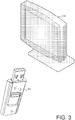
- FIG. 3 is a block diagram of another example system for providing a kiosk mode.
- FIG. 3 includes a monitor 310 and a hardware device 320.
- the monitor 310 may be part of a computer system or may be a separate wall mounted monitor that has a USB or HDMI input/output device.
- the hardware device 320 may be configured to include an operating system and a microprocessor that can execute applications such as web applications, which may be for example video conference applications.
- the hardware device 320 may be a USB memory stick configured with a special operating system.
- the hardware device 320 may be a camera/microphone dongle that can connect to the input/output device of the monitor 310.
- a user may plug in the hardware device 320 to the monitor 310 to launch a video conference session via the monitor.
- the hardware device 320 may automatically launch a kiosk mode, such as described above with respect to FIGs. 1A , 1B , and 2 , and the kiosk mode may execute a video conference application via the monitor 310.
- the user may communicate with others via the camera/microphone.
- the monitor 310 may be equipped with a camera and microphone. In such implementations, the monitor 310 may serve as a "window" into another user's home or business with the user's permission such that two people can periodically conduct video conferencing without cumbersome setup processes.
- FIG. 4 is an example user interface that can be used with a kiosk mode.
- the user interface may be displayed, for example, when a kiosk mode is launched such as in action 242 shown in FIG. 2 , or when a device is launched an automatically launches into a kiosk mode.
- the user interface 410 may be customized, for example by an administrator using a management console (e.g., management console 230 shown in FIG. 2 ).
- a management console e.g., management console 230 shown in FIG. 2
- the text 420 and an image 430 may be customized.
- a user may be required to enter login credentials.
- FIG. 5 is an example manifest file that can be used to provide a kiosk mode for a web application.
- the manifest file 510 may be included with a web application.
- a web application may be a zipped file (such as a .CRX file) that includes metadata describing the web application.
- the metadata may, in some examples, contain a user interface (UI) element, and a manifest file.
- the UI element may include an image file, an HTML file, an icon such as a PNG file, or any other graphical user interface element.
- the manifest file may point to the UI element, and the manifest file may also include a name, description, version, URL(s), and permissions for the web application, among other data, such as a kiosk enabled mode flag.
- the manifest may include a URL that the web application uses, including a launch page for the web application.
- the manifest may be a .JSON or other file format.
- the manifest file 510 includes a name, version number, manifest version number, and kiosk enabled flag (Boolean value). As shown in FIG. 5 , in the illustrated example, the name is "My Kiosk App,” the version is “1”, the manifest version is “2”, and the kiosk_enabled flag is set to "true.”
- FIG. 6 is a flowchart of a process for providing a kiosk mode.
- the process illustrated in FIG. 6 may be performed at least in part by a computing device, for example, the device 110 shown in FIG. 1A .
- the device transforms a mode of a computer from an operating system mode to a kiosk mode (610).
- a remote device such as the management console shown in FIG. 2 may transform the operating system mode of the computer to a kiosk mode.
- a user of the computer may transform operating system mode of the computer to the kiosk mode.
- the computer automatically updates the web application via a network while the computer is operating in kiosk mode (620). For example, the computer (e.g., via its operating system) may periodically query an application store to determine whether the application has any updates available for installation. Such a query may be done automatically, and without user input or the display of any user interface. The operating system may then push any updates to the application, again without user input, and in some implementations, without displaying any user interface or notification. The computer also automatically updates its operating system via a network while the computer is operating in kiosk mode (630). Such updating may be performed on a periodic basis by the operating system, or in response to the operating system receiving a pushed update from a remote server.
- the computer monitors the state of the application while in kiosk mode, and the computer thus detects an interrupted status of the web application (640), for example if the web application crashes unexpectedly while in a session. If the computer detects an interrupted status of the web application (640, yes), the computer automatically re-launches the web application using the operating system to automatically re-boot the computer and launch in the kiosk mode such that the application is executing at the same point where it was before it crashed. Such automatic re-launching may be performed by the operating system without requiring user input.
- the process shown in FIG. 6 may begin again whenever the device is turned on or whenever a management console accesses the device for reconfiguration.
- the logic flow depicted in FIG. 6 does not require the particular order shown, or sequential order, and steps may be added or deleted.
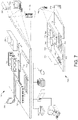
- FIG. 7 illustrates an example of a computing device and a mobile computing device that can be used to implement the techniques described here.
- Computing device 700 is intended to represent various forms of digital computers, such as laptops, desktops, workstations, personal digital assistants, servers, blade servers, mainframes, and other appropriate computers.
- Computing device 750 is intended to represent various forms of mobile devices, such as personal digital assistants, cellular telephones, smart phones, and other similar computing devices.
- the components shown here, their connections and relationships, and their functions, are meant to be examples only, and are not meant to limit implementations of the inventions described and/or claimed in this document.
- Computing device 700 includes a processor 702, memory 704, a storage device 706, a high-speed interface 708 connecting to memory 704 and high-speed expansion ports 710, and a low speed interface 712 connecting to low speed bus 714 and storage device 706.
- Each of the components 702, 704, 706, 708, 710, and 712, are interconnected using various busses, and may be mounted on a common motherboard or in other manners as appropriate.
- the processor 702 can process instructions for execution within the computing device 700, including instructions stored in the memory 704 or on the storage device 706 to display graphical information for a GUI on an external input/output device, such as display 716 coupled to high speed interface 708.
- multiple processors and/or multiple buses may be used, as appropriate, along with multiple memories and types of memory.
- multiple computing devices may be connected, with each device providing portions of the necessary operations (e.g., as a server bank, a group of blade servers, or a multi-processor system).
- the memory 704 stores information within the computing device 700.
- the memory 704 is a volatile memory unit or units.
- the memory 704 is a non-volatile memory unit or units.
- the memory includes a combination of volatile and non-volatile memory units, for example as described above with respect to FIG. 3 .
- the memory 704 may also be another form of computer-readable medium, such as a magnetic or optical disk.
- the storage device 706 is capable of providing mass storage for the computing device 700.
- the storage device 706 may be or contain a computer-readable medium, such as a floppy disk device, a hard disk device, an optical disk device, or a tape device, a flash memory or other similar solid state memory device, or an array of devices, including devices in a storage area network or other configurations.
- a computer program product can be tangibly embodied in an information carrier.
- the computer program product may also contain instructions that, when executed, perform one or more methods, such as those described above.
- the information carrier is a computer- or machine-readable medium, such as the memory 704, the storage device 706, or memory on processor 702.
- the high speed controller 708 manages bandwidth-intensive operations for the computing device 700, while the low speed controller 712 manages lower bandwidth-intensive operations. Such allocation of functions is illustrative only.
- the high-speed controller 708 is coupled to memory 704, display 716 (e.g., through a graphics processor or accelerator), and to high-speed expansion ports 710, which may accept various expansion cards (not shown).
- low-speed controller 712 is coupled to storage device 706 and low-speed expansion bus 714.
- the low-speed expansion bus which may include various communication ports (e.g., USB, BLUETOOTH, ETHERNET, wireless ETHERNET) may be coupled to one or more input/output devices, such as a keyboard, a pointing device, a scanner, or a networking device such as a switch or router, e.g., through a network adapter.
- input/output devices such as a keyboard, a pointing device, a scanner, or a networking device such as a switch or router, e.g., through a network adapter.
- the computing device 700 may be implemented in a number of different forms, as shown in the figure. For example, it may be implemented as a standard server 720, or multiple times in a group of such servers. It may also be implemented as part of a rack server system 724. In addition, it may be implemented in a personal computer such as a laptop computer 722. Alternatively, components from computing device 700 may be combined with other components in a mobile device (not shown), such as device 750. Each of such devices may contain one or more of computing device 700, 750, and an entire system may be made up of multiple computing devices communicating with each other.
- Computing device 750 includes a processor 752, memory 764, an input/output device such as a display 754, a communication interface 766, and a transceiver 768, among other components.
- the device 750 may also be provided with a storage device, such as a microdrive or other device, to provide additional storage.
- a storage device such as a microdrive or other device, to provide additional storage.
- Each of the components 750, 752, 764, 754, 766, and 768, are interconnected using various buses, and several of the components may be mounted on a common motherboard or in other manners as appropriate.
- the processor 752 can execute instructions within the computing device 750, including instructions stored in the memory 764.
- the processor may be implemented as a chipset of chips that include separate and multiple analog and digital processors.
- the processor may provide, for example, for coordination of the other components of the device 750, such as control of user interfaces, applications run by device 750, and wireless communication by device 750.
- Processor 752 may communicate with a user through control interface 758 and display interface 756 coupled to a display 754.
- the display 754 may be, for example, a TFT LCD (Thin-Film-Transistor Liquid Crystal Display) or an OLED (Organic Light Emitting Diode) display, or other appropriate display technology.
- the display interface 756 may comprise appropriate circuitry for driving the display 754 to present graphical and other information to a user.
- the control interface 758 may receive commands from a user and convert them for submission to the processor 752.
- an external interface 762 may be provided in communication with processor 752, so as to enable near area communication of device 750 with other devices.
- External interface 762 may provide, for example, for wired communication in some implementations, or for wireless communication in other implementations, and multiple interfaces may also be used.
- the memory 764 stores information within the computing device 750.
- the memory 764 can be implemented as one or more of a computer-readable medium or media, a volatile memory unit or units, or a non-volatile memory unit or units.
- Expansion memory 774 may also be provided and connected to device 750 through expansion interface 772, which may include, for example, a SIMM (Single In Line Memory Module) card interface.
- SIMM Single In Line Memory Module
- expansion memory 774 may provide extra storage space for device 750, or may also store applications or other information for device 750.
- expansion memory 774 may include instructions to carry out or supplement the processes described above, and may include secure information also.
- expansion memory 774 may be provided as a security module for device 750, and may be programmed with instructions that permit secure use of device 750.
- secure applications may be provided via the SIMM cards, along with additional information, such as placing identifying information on the SIMM card in a non-hackable manner.
- the memory may include, for example, flash memory and/or NVRAM memory, as discussed below.
- a computer program product is tangibly embodied in an information carrier.
- the computer program product contains instructions that, when executed, perform one or more methods, such as those described above.
- the information carrier is a computer- or machine-readable medium, such as the memory 764, expansion memory 774, or memory on processor 752, which may be received, for example, over transceiver 768 or external interface 762.
- Device 750 may communicate wirelessly through communication interface 766, which may include digital signal processing circuitry where necessary. Communication interface 766 may provide for communications under various modes or protocols, such as GSM voice calls, SMS, EMS, or MMS messaging, CDMA, TDMA, PDC, WCDMA, CDMA2000, or GPRS, among others. Such communication may occur, for example, through radio-frequency transceiver 768. In addition, short-range communication may occur, such as using a BLUETOOTH, WIFI, or other such transceiver (not shown). In addition, GPS (Global Positioning System) receiver module 770 may provide additional navigation- and location-related wireless data to device 750, which may be used as appropriate by applications running on device 750.
- GPS Global Positioning System
- Device 750 may also communicate audibly using audio codec 760, which may receive spoken information from a user and convert it to usable digital information. Audio codec 760 may likewise generate audible sound for a user, such as through a speaker, e.g., in a handset of device 750. Such sound may include sound from voice telephone calls, may include recorded sound (e.g., voice messages, music files, etc.) and may also include sound generated by applications operating on device 750.
- Audio codec 760 may receive spoken information from a user and convert it to usable digital information. Audio codec 760 may likewise generate audible sound for a user, such as through a speaker, e.g., in a handset of device 750. Such sound may include sound from voice telephone calls, may include recorded sound (e.g., voice messages, music files, etc.) and may also include sound generated by applications operating on device 750.
- the computing device 750 may be implemented in a number of different forms, as shown in the figure. For example, it may be implemented as a cellular telephone 780. It may also be implemented as part of a smart phone 782, personal digital assistant, or other similar mobile device.
- implementations of the systems and techniques described here can be realized in digital electronic circuitry, integrated circuitry, specially designed ASICs (application specific integrated circuits), computer hardware, firmware, software, and/or combinations thereof.
- ASICs application specific integrated circuits
- These various implementations can include implementation in one or more computer programs that are executable and/or interpretable on a programmable system including at least one programmable processor, which may be special or general purpose, coupled to receive data and instructions from, and to transmit data and instructions to, a storage system, at least one input device, and at least one output device.
- the systems and techniques described here can be implemented on a computer having a display device (e.g., a CRT (cathode ray tube) or LCD (liquid crystal display) monitor) for displaying information to the user and a keyboard and a pointing device (e.g., a mouse or a trackball) by which the user can provide input to the computer.
- a display device e.g., a CRT (cathode ray tube) or LCD (liquid crystal display) monitor
- a keyboard and a pointing device e.g., a mouse or a trackball
- Other kinds of devices can be used to provide for interaction with a user as well; for example, feedback provided to the user can be any form of sensory feedback (e.g., visual feedback, auditory feedback, or tactile feedback); and input from the user can be received in any form, including acoustic, speech, or tactile input.
- the systems and techniques described here can be implemented in a computing system that includes a back end component (e.g., as a data server), or that includes a middleware component (e.g., an application server), or that includes a front end component (e.g., a client computer having a graphical user interface or a Web browser through which a user can interact with an implementation of the systems and techniques described here), or any combination of such back end, middleware, or front end components.
- the components of the system can be interconnected by any form or medium of digital data communication (e.g., a communication network). Examples of communication networks include a local area network ("LAN”), a wide area network (“WAN”), and the Internet.
- LAN local area network
- WAN wide area network
- the Internet the global information network
- the computing system can include clients and servers.
- a client and server are generally remote from each other and typically interact through a communication network.
- the relationship of client and server arises by virtue of computer programs running on the respective computers and having a client-server relationship to each other.
Landscapes
- Engineering & Computer Science (AREA)
- Software Systems (AREA)
- Theoretical Computer Science (AREA)
- Computer Security & Cryptography (AREA)
- General Engineering & Computer Science (AREA)
- Physics & Mathematics (AREA)
- General Physics & Mathematics (AREA)
- Computer Hardware Design (AREA)
- Multimedia (AREA)
- Technology Law (AREA)
- Health & Medical Sciences (AREA)
- Bioethics (AREA)
- General Health & Medical Sciences (AREA)
- Information Transfer Between Computers (AREA)
- User Interface Of Digital Computer (AREA)
- Telephonic Communication Services (AREA)
- Signal Processing (AREA)
Description
- This disclosure generally relates a kiosk application mode for an operating system of a computer.
- Developers want to develop systems that are very specialized. Examples of specialized systems include are airline kiosks, metro ticket stations, or even snack machines. Other examples include ambient displays, home automation, or single-purpose applications devices. For example, an application developer for a game may want to produce a customized game machine.
- Developers may use a custom Linux build, some mobile operating system (OS), or even write their entire OS themselves. Those solutions are expensive, not scalable, and may prove to be a huge undertaking especially for smaller developers.
-
US 2003 016243 A1 describes a method for enabling a user of a personal computer to access web applications in an kiosk-like environment where access to the normal desktop environment is blocked and where certain key presses and popup windows are blocked. On initialization, the user is given the choice of entering the normal desktop environment or accessing a web application in the kiosk-like environment. - In anonymous, "sitekiosk 7", url: https://webbeta.Archive.Org/web/20091229033510/http://www.provisio.com/downlo ad/brochures/sitekiosk-en.pdf, (20170328), xp055359716 [i] 1-7 ∗ pages 1-7,10, a software for presenting web based content and applications on public access terminals is described.
- The matter for protection is defined by the claims.
- One or more of the implementations of the subject matter described herein provide the following advantages. Systems are automatically updated. Systems are resilient and if an application operating in a kiosk mode crashes, the system (via the operating system) automatically re-launches itself into the right place ( to a state before it crashed). The operating system monitors the state of the application and automatically push updates to any kiosk.
- The details of one or more implementations are set forth in the accompanying drawings and the description below. Other features will be apparent from the description and drawings, and from the claims.
-
-
FIG. 1A is a block diagram of a system that can be used to provide a kiosk mode. -
FIG. 1B is a block diagram of another system that can be used to provide a kiosk mode. -
FIG. 2 is a sequence diagram illustrating an example of a system implementing kiosk mode. -
FIG. 3 is a block diagram of another example system for providing a kiosk mode. -
FIG. 4 is an example user interface that can be used with a kiosk mode. -
FIG. 5 is an example manifest file that can be used to provide a kiosk mode. -
FIG. 6 is a flowchart of a process for providing kiosk mode. -
FIG. 7 illustrates an example of a computing device and a mobile computing device that can be used to implement the techniques described here. - Like reference symbols in the various drawings indicate like elements.
-
FIG. 1A is a block diagram of a system that can be used to provide a kiosk mode.System 100 includes at least onedevice 110 and at least onemanagement console 140, which may be interconnected through at least onenetwork 120. Thedevice 110 is a computer that may execute a user interface, download and execute software applications, and communicate with anetwork 120. In some implementations, as described in more detail below, the device may include a camera/microphone dongle with an input/output port. Thedevice 110 includes anoperating system 112, and may include anapplication 114. The application may be a packaged application or a web application, and may be downloaded from a web or digital store. - In this context, a "web application" may be an application that is configured to execute a single task or multiple tasks for a user. In such an implementation, the web application may be configured to be executed or interpreted by a web browser or may be directly operating by an operating system in a kiosk mode. Thus, web applications can be programmed with web technologies and run with a dedicated user interface, and typically provide functionality and an experience that is more rich and interactive than a standalone website but are less cumbersome and monolithic than a desktop application. Examples of web applications include games, photo editors, and video players that are run inside the browser. A web application may include a manifest file including metadata about the web application (such as a fields for a name, description, version, URLs that the web application uses, icons, permissions, and other data), and one or more web pages or user interface elements.
- Throughout this document, a web application or an installed application may refer to a number of different types of applications. Web applications can be "hosted applications" or "packaged applications." Hosted applications may include at least a portion of a web site that itself includes web pages, plus some metadata that may be especially pertinent to the web application or to the user of the web application to allow the web application to perform some particular functionality for the user. Packaged applications can be thought of as web applications whose code is bundled, so that the user can download all of the content of the web application for execution by the browser. A packaged web application may not need to have network access to perform its functionality for the user, and rather may be executed successfully by the browser locally on the computing device without access to a network. Web applications generally run standalone, like any regular website.
- In some implementations, various applications are coded only with web technologies, such as HTML, CSS, JAVASCRIPT, DART, NaCl, etc., and may operate like native applications without the use of the browser. These applications may have a similar structure as a web application.
- In some implementations, the
device 110 may include adisplay screen 116. In some implementations, thedevice 110 may not include a display screen and instead may include other features, such as a camera or microphone and an input/output port or cable with HDMI or USB connections. - Network 120 may be a single network or a combination of any type of computer network, such as a Local Area Network (LAN) or a Wide Area Network (WAN), a WIFI network, a BLUETOOTH network, or other network. In addition,
network 120 may be a combination of public (e.g., Internet) and private networks. - The components illustrated in association with
device 110 are merely for illustration, as other components may be included. Various alternative and additional examples of devices are described in more detail below. - The
management console 140 may be a computing device with a user interface that allows for a control panel to control various features of computers operating in an enterprise system, which may, in some implementations, includedevice 110. In such implementations, an administrator or other user may control, for example, which application is launched when the device is in a kiosk mode, which applications or websites a user may or may not access, timed logout sessions, input/output access for a device, a startup or login screen, and other features. - The
device 110 runs an operating system mode or a kiosk mode. The operating system mode may include any kind of operating system features, applications such as web browsers, workstation programs, email, etc. The kiosk mode may be executed in a consumer mode or an enterprise mode. In a consumer mode, a user may obtain an application from an online application store. The application may be developed using web technologies and may include a unique (e.g., 32-bit) identification number and a kiosk mode flag in a manifest file. The user may set the application identifier to be the kiosk application, via a user interface. In the background, the operating system may then download the application, restart thedevice 110, determining that it is set to execute in kiosk mode and determining that an application exists, and install the application. Thedevice 110 may launch a special operating session that executes that application, for example without requiring any login or startup screen, so that the application operates immediately upon launching thedevice 110 as a full screen user interface with the startup screen of the application. In some implementations, the user may at any time disable the kiosk mode, to switch back to the operating system mode, using a set of keyboard termination credentials. - In various implementations, the user may at any time switch the application for the kiosk mode to a different application, for example by entering another application identifier as the application for the kiosk mode, for example from a control panel. In such a way, the user may switch a
single device 110 from a video conferencing kiosk, back to a regular laptop, and then to a personal assistant kiosk, and then to a customized ordering system for a business, without installation of additional hardware or special configurations for each kiosk mode. - In the enterprise mode, an administrator may create an enterprise policy and manage one or more
devices including device 110, for example as described in more detail below with respect toFIG. 1B . In those implementations, the devices may be configured to accept control from a management console. In such an implementation, a user of thedevice 110 could not switch out of the kiosk mode (enterprise mode) if the administrator disallowed switching at a device level. In those implementations, the administrator may utilize an enterprise policy management panel to setup a kiosk mode and control various devices as kiosk devices to run a specific application in kiosk mode. - In some implementations, various devices may be preconfigured as customized devices that run in kiosk mode at startup. For example, a device may be a customized video frame that automatically boots into a video conferencing user interface and immediately allows a user to video call anyone in the world, requiring no setup from a user.
- It will be appreciated that any number of alternative or additional networks, servers, services, mobile devices, or devices may be included in
system 100. The use of onedevice 110 and onemanagement console 140 is merely for illustration. - One or more of the implementations of the subject matter described herein may provide one or more of the following advantages. The disclosed methods and systems allow a user to turn any operating system machine into a highly customized and branded single application experience for users. Examples include airline kiosks, coffee shop owners showing their menu or building an ordering process application, library catalogs, a flower shop that wants a digital catalog application, a mid-size company that wants to take fifteen old LCDs, plug a unit in and turn them into quick video conference units, with almost no setup for any of those. Such a system may use packaged applications or any website and set a device to display only the packaged application, web application, or website, which allows for immediate updates for an application, for example using web technologies. Moreover, both the OS and the kiosk mode are automatically updated without administrative or user interaction, and in some cases, without needing to reboot a device. A multi-application consumer kiosk mode may enable a highly targeted multi-application device with effectively no OS. Users/vendors can decide to install three kiosk apps (video conference application, personal assistant application, voice search application) and create uniquely customized devices for use cases (kitchen computer, ambient display, entertainment display, home automation control, etc.). A video conference frame may become a customized device (e.g. a single display slate) that boots into a video conference user interface and immediately allows a user to video call anybody in the world via a video conferencing application, requiring no setup. A kiosk camera may include a camera/microphone dongle that includes a tiny computer inside the camera housing running an OS. If plugged in via HDMI and/or USB into any monitor, that monitor is transformed into a personal video conference unit that auto-updates all the time without setup or hassles.
-
FIG. 1B illustrates a block diagram of another system that can be used to provide a kiosk mode.FIG. 1B includes thenetwork 120 connecting amanagement console device 150 withvarious computers computers - The
management console device 150 may include a user interface to provide an enterprise administrator to manage thecomputers FIG. 1B , may allow for a fully managed experience, including fleet management for kiosk applications, auto-enrollment (i.e., zero touch enrollment), and pre-enrollment of kiosk devices. Over the air device repurposing may be used, for example, with a few video conferencing units. In one example, a large shareholder meeting may require terminals for voting. The meeting may be conducted using a videoconferencing application oncomputers management console device 150 may push a new application ID to transform an entire fleet of devices for the meeting (e.g.,computers management console device 150 may push videoconferencing on the devices (e.g.,computers management console device 150 may turn the devices back into regular workstations. -
FIG. 2 is a sequence diagram illustrating an example of asystem 200 implementing a kiosk mode. Thesystem 200 may include adevice 210, anapplication store 220, and amanagement console 230. Thedevice 210 may be a laptop or other computing device, such asdevice 110 shown inFIG. 1A , which may execute an operating system and one or more applications. Theapplication store 120 may be an online web store or other digital media store. - In one example, an application such as a web application or packaged application may have been downloaded from a service or content provider web site or an online application store (such as application store 120).
- In the illustrated embodiment, the black lines associated with each of the components of the system (e.g.,
device 210, application store 220) represent the execution, by at least one microprocessor, of a process associated with that component. - The
management console 230 may be a user interface operated by at least one remote server or device. - Action 232 illustrates that, in one implementation, the
management console 230 may remotely configure thedevice 210's kiosk mode. Such an configuration may include identifying and establishing an application to be installed or downloaded fromapplication store 220 or from a service or content provider web site. In some implementations, the configuration may be made once, when thedevice 210 is initiated, and it will be understood that action 232 is an optional action. - The configuration may also include other management features, such as blocking a website or an application from access via the computer, configuring an input or output for the computer, establishing a timed log out for each session on the computer, or customizing the kiosk mode, such as adding a business logo or image to a start up or login screen of the kiosk mode.
-
Action 240 illustrates that thedevice 210 obtains (e.g., downloads or installs) the application from theapplication store 220. In some implementations, the application store may push the application todevice 210 after receiving instructions to do so from the management console 230 (not shown) or after receiving a request from thedevice 210. The application may include a unique identification number and a kiosk flag in a manifest file of the application, the kiosk flag being set to true to indicate that the application is enabled to be operated in kiosk mode. -
Action 242 illustrates that thedevice 210 launches kiosk mode. Thedevice 210 may launch kiosk mode upon installing the application, upon being booted up or restarted, or upon receiving an input indicating a new session is being initiated by a user (e.g., upon receiving login credentials). - After launching the kiosk mode,
action 244 illustrates that thedevice 210 initiates an access session. The access session may include, for example, allowing a user to use the application as a video conference, to place a menu order, airline or hotel check in, etc.Action 246 illustrates that thedevice 210 terminates theaccess session 246. This may be done in response to any number of signals, such as a timeout after a period of inactivity, a general timeout, a logout, or due to instructions from the management console 230 (not shown). - In some implementations, the application may crash. The operating system on the
device 210 monitors the state of the application. Upon detecting a crash, the operating system automatically re-launches the application at the appropriate point. -
Action 248 illustrates that thedevice 210 automatically updates the application, e.g. without user input, for example by communicating with the application store, a service, or another website. In various implementations,action 248 may be performed on a continuing or periodic basis at any time, regardless of whether an access session is in progress. Action 250 illustrates that themanagement console 230 may configure the device kiosk mode again, as an option. For example, themanagement console 230 may configure the device kiosk mode various times, as described above with respect toFIG. 1B . -
FIG. 3 is a block diagram of another example system for providing a kiosk mode.FIG. 3 includes amonitor 310 and ahardware device 320. Themonitor 310 may be part of a computer system or may be a separate wall mounted monitor that has a USB or HDMI input/output device. Thehardware device 320 may be configured to include an operating system and a microprocessor that can execute applications such as web applications, which may be for example video conference applications. In some implementations, thehardware device 320 may be a USB memory stick configured with a special operating system. In some implementations, thehardware device 320 may be a camera/microphone dongle that can connect to the input/output device of themonitor 310. In one example, a user may plug in thehardware device 320 to themonitor 310 to launch a video conference session via the monitor. Thehardware device 320 may automatically launch a kiosk mode, such as described above with respect toFIGs. 1A ,1B , and2 , and the kiosk mode may execute a video conference application via themonitor 310. The user may communicate with others via the camera/microphone. In some implementations, themonitor 310 may be equipped with a camera and microphone. In such implementations, themonitor 310 may serve as a "window" into another user's home or business with the user's permission such that two people can periodically conduct video conferencing without cumbersome setup processes. -
FIG. 4 is an example user interface that can be used with a kiosk mode. The user interface may be displayed, for example, when a kiosk mode is launched such as inaction 242 shown inFIG. 2 , or when a device is launched an automatically launches into a kiosk mode. Theuser interface 410 may be customized, for example by an administrator using a management console (e.g.,management console 230 shown inFIG. 2 ). For example, in some implementations thetext 420 and animage 430 may be customized. In some implementations, (not shown), a user may be required to enter login credentials. -
FIG. 5 is an example manifest file that can be used to provide a kiosk mode for a web application. Themanifest file 510 may be included with a web application. - A web application may be a zipped file (such as a .CRX file) that includes metadata describing the web application. The metadata may, in some examples, contain a user interface (UI) element, and a manifest file. The UI element may include an image file, an HTML file, an icon such as a PNG file, or any other graphical user interface element. The manifest file may point to the UI element, and the manifest file may also include a name, description, version, URL(s), and permissions for the web application, among other data, such as a kiosk enabled mode flag. The manifest may include a URL that the web application uses, including a launch page for the web application. The manifest may be a .JSON or other file format.
- In the implementation shown in
FIG. 5 , themanifest file 510 includes a name, version number, manifest version number, and kiosk enabled flag (Boolean value). As shown inFIG. 5 , in the illustrated example, the name is "My Kiosk App," the version is "1", the manifest version is "2", and the kiosk_enabled flag is set to "true." -
FIG. 6 is a flowchart of a process for providing a kiosk mode. The process illustrated inFIG. 6 may be performed at least in part by a computing device, for example, thedevice 110 shown inFIG. 1A . As shown inFIG. 6 , the device transforms a mode of a computer from an operating system mode to a kiosk mode (610). In some implementations, a remote device such as the management console shown inFIG. 2 may transform the operating system mode of the computer to a kiosk mode. In various implementations, a user of the computer may transform operating system mode of the computer to the kiosk mode. - The computer automatically updates the web application via a network while the computer is operating in kiosk mode (620). For example, the computer (e.g., via its operating system) may periodically query an application store to determine whether the application has any updates available for installation. Such a query may be done automatically, and without user input or the display of any user interface. The operating system may then push any updates to the application, again without user input, and in some implementations, without displaying any user interface or notification. The computer also automatically updates its operating system via a network while the computer is operating in kiosk mode (630). Such updating may be performed on a periodic basis by the operating system, or in response to the operating system receiving a pushed update from a remote server.
- The computer monitors the state of the application while in kiosk mode, and the computer thus detects an interrupted status of the web application (640), for example if the web application crashes unexpectedly while in a session. If the computer detects an interrupted status of the web application (640, yes), the computer automatically re-launches the web application using the operating system to automatically re-boot the computer and launch in the kiosk mode such that the application is executing at the same point where it was before it crashed. Such automatic re-launching may be performed by the operating system without requiring user input.
- In some implementations, the process shown in
FIG. 6 may begin again whenever the device is turned on or whenever a management console accesses the device for reconfiguration. In addition, the logic flow depicted inFIG. 6 does not require the particular order shown, or sequential order, and steps may be added or deleted. -
FIG. 7 illustrates an example of a computing device and a mobile computing device that can be used to implement the techniques described here.Computing device 700 is intended to represent various forms of digital computers, such as laptops, desktops, workstations, personal digital assistants, servers, blade servers, mainframes, and other appropriate computers.Computing device 750 is intended to represent various forms of mobile devices, such as personal digital assistants, cellular telephones, smart phones, and other similar computing devices. The components shown here, their connections and relationships, and their functions, are meant to be examples only, and are not meant to limit implementations of the inventions described and/or claimed in this document. -
Computing device 700 includes aprocessor 702,memory 704, astorage device 706, a high-speed interface 708 connecting tomemory 704 and high-speed expansion ports 710, and alow speed interface 712 connecting tolow speed bus 714 andstorage device 706. Each of thecomponents processor 702 can process instructions for execution within thecomputing device 700, including instructions stored in thememory 704 or on thestorage device 706 to display graphical information for a GUI on an external input/output device, such asdisplay 716 coupled tohigh speed interface 708. In other implementations, multiple processors and/or multiple buses may be used, as appropriate, along with multiple memories and types of memory. Also, multiple computing devices may be connected, with each device providing portions of the necessary operations (e.g., as a server bank, a group of blade servers, or a multi-processor system). - The
memory 704 stores information within thecomputing device 700. In one implementation, thememory 704 is a volatile memory unit or units. In another implementation, thememory 704 is a non-volatile memory unit or units. In some implementations, the memory includes a combination of volatile and non-volatile memory units, for example as described above with respect toFIG. 3 . Thememory 704 may also be another form of computer-readable medium, such as a magnetic or optical disk. - The
storage device 706 is capable of providing mass storage for thecomputing device 700. In one implementation, thestorage device 706 may be or contain a computer-readable medium, such as a floppy disk device, a hard disk device, an optical disk device, or a tape device, a flash memory or other similar solid state memory device, or an array of devices, including devices in a storage area network or other configurations. A computer program product can be tangibly embodied in an information carrier. The computer program product may also contain instructions that, when executed, perform one or more methods, such as those described above. The information carrier is a computer- or machine-readable medium, such as thememory 704, thestorage device 706, or memory onprocessor 702. - The
high speed controller 708 manages bandwidth-intensive operations for thecomputing device 700, while thelow speed controller 712 manages lower bandwidth-intensive operations. Such allocation of functions is illustrative only. In one implementation, the high-speed controller 708 is coupled tomemory 704, display 716 (e.g., through a graphics processor or accelerator), and to high-speed expansion ports 710, which may accept various expansion cards (not shown). In the implementation, low-speed controller 712 is coupled tostorage device 706 and low-speed expansion bus 714. The low-speed expansion bus, which may include various communication ports (e.g., USB, BLUETOOTH, ETHERNET, wireless ETHERNET) may be coupled to one or more input/output devices, such as a keyboard, a pointing device, a scanner, or a networking device such as a switch or router, e.g., through a network adapter. - The
computing device 700 may be implemented in a number of different forms, as shown in the figure. For example, it may be implemented as astandard server 720, or multiple times in a group of such servers. It may also be implemented as part of arack server system 724. In addition, it may be implemented in a personal computer such as alaptop computer 722. Alternatively, components fromcomputing device 700 may be combined with other components in a mobile device (not shown), such asdevice 750. Each of such devices may contain one or more ofcomputing device -
Computing device 750 includes aprocessor 752,memory 764, an input/output device such as adisplay 754, a communication interface 766, and a transceiver 768, among other components. Thedevice 750 may also be provided with a storage device, such as a microdrive or other device, to provide additional storage. Each of thecomponents - The
processor 752 can execute instructions within thecomputing device 750, including instructions stored in thememory 764. The processor may be implemented as a chipset of chips that include separate and multiple analog and digital processors. The processor may provide, for example, for coordination of the other components of thedevice 750, such as control of user interfaces, applications run bydevice 750, and wireless communication bydevice 750. -
Processor 752 may communicate with a user throughcontrol interface 758 anddisplay interface 756 coupled to adisplay 754. Thedisplay 754 may be, for example, a TFT LCD (Thin-Film-Transistor Liquid Crystal Display) or an OLED (Organic Light Emitting Diode) display, or other appropriate display technology. Thedisplay interface 756 may comprise appropriate circuitry for driving thedisplay 754 to present graphical and other information to a user. Thecontrol interface 758 may receive commands from a user and convert them for submission to theprocessor 752. In addition, anexternal interface 762 may be provided in communication withprocessor 752, so as to enable near area communication ofdevice 750 with other devices.External interface 762 may provide, for example, for wired communication in some implementations, or for wireless communication in other implementations, and multiple interfaces may also be used. - The
memory 764 stores information within thecomputing device 750. Thememory 764 can be implemented as one or more of a computer-readable medium or media, a volatile memory unit or units, or a non-volatile memory unit or units.Expansion memory 774 may also be provided and connected todevice 750 throughexpansion interface 772, which may include, for example, a SIMM (Single In Line Memory Module) card interface.Such expansion memory 774 may provide extra storage space fordevice 750, or may also store applications or other information fordevice 750. Specifically,expansion memory 774 may include instructions to carry out or supplement the processes described above, and may include secure information also. Thus, for example,expansion memory 774 may be provided as a security module fordevice 750, and may be programmed with instructions that permit secure use ofdevice 750. In addition, secure applications may be provided via the SIMM cards, along with additional information, such as placing identifying information on the SIMM card in a non-hackable manner. - The memory may include, for example, flash memory and/or NVRAM memory, as discussed below. In one implementation, a computer program product is tangibly embodied in an information carrier. The computer program product contains instructions that, when executed, perform one or more methods, such as those described above. The information carrier is a computer- or machine-readable medium, such as the
memory 764,expansion memory 774, or memory onprocessor 752, which may be received, for example, over transceiver 768 orexternal interface 762. -
Device 750 may communicate wirelessly through communication interface 766, which may include digital signal processing circuitry where necessary. Communication interface 766 may provide for communications under various modes or protocols, such as GSM voice calls, SMS, EMS, or MMS messaging, CDMA, TDMA, PDC, WCDMA, CDMA2000, or GPRS, among others. Such communication may occur, for example, through radio-frequency transceiver 768. In addition, short-range communication may occur, such as using a BLUETOOTH, WIFI, or other such transceiver (not shown). In addition, GPS (Global Positioning System)receiver module 770 may provide additional navigation- and location-related wireless data todevice 750, which may be used as appropriate by applications running ondevice 750. -
Device 750 may also communicate audibly usingaudio codec 760, which may receive spoken information from a user and convert it to usable digital information.Audio codec 760 may likewise generate audible sound for a user, such as through a speaker, e.g., in a handset ofdevice 750. Such sound may include sound from voice telephone calls, may include recorded sound (e.g., voice messages, music files, etc.) and may also include sound generated by applications operating ondevice 750. - The
computing device 750 may be implemented in a number of different forms, as shown in the figure. For example, it may be implemented as acellular telephone 780. It may also be implemented as part of asmart phone 782, personal digital assistant, or other similar mobile device. - Various implementations of the systems and techniques described here can be realized in digital electronic circuitry, integrated circuitry, specially designed ASICs (application specific integrated circuits), computer hardware, firmware, software, and/or combinations thereof. These various implementations can include implementation in one or more computer programs that are executable and/or interpretable on a programmable system including at least one programmable processor, which may be special or general purpose, coupled to receive data and instructions from, and to transmit data and instructions to, a storage system, at least one input device, and at least one output device.
- These computer programs (also known as programs, software, software applications or code) include machine instructions for a programmable processor, and can be implemented in a high-level procedural and/or object-oriented programming language, and/or in assembly/machine language. As used herein, the terms "machine-readable medium" "computer-readable medium" refers to any computer program product, apparatus and/or device (e.g., magnetic discs, optical disks, memory, Programmable Logic Devices (PLDs)) used to provide machine instructions and/or data to a programmable processor, including a machine-readable medium that receives machine instructions as a machine-readable signal. The term "machine-readable signal" refers to any signal used to provide machine instructions and/or data to a programmable processor.
- To provide for interaction with a user, the systems and techniques described here can be implemented on a computer having a display device (e.g., a CRT (cathode ray tube) or LCD (liquid crystal display) monitor) for displaying information to the user and a keyboard and a pointing device (e.g., a mouse or a trackball) by which the user can provide input to the computer. Other kinds of devices can be used to provide for interaction with a user as well; for example, feedback provided to the user can be any form of sensory feedback (e.g., visual feedback, auditory feedback, or tactile feedback); and input from the user can be received in any form, including acoustic, speech, or tactile input.
- The systems and techniques described here can be implemented in a computing system that includes a back end component (e.g., as a data server), or that includes a middleware component (e.g., an application server), or that includes a front end component (e.g., a client computer having a graphical user interface or a Web browser through which a user can interact with an implementation of the systems and techniques described here), or any combination of such back end, middleware, or front end components. The components of the system can be interconnected by any form or medium of digital data communication (e.g., a communication network). Examples of communication networks include a local area network ("LAN"), a wide area network ("WAN"), and the Internet.
- The computing system can include clients and servers. A client and server are generally remote from each other and typically interact through a communication network. The relationship of client and server arises by virtue of computer programs running on the respective computers and having a client-server relationship to each other.
- In addition, the logic flows depicted in the figures do not require the particular order shown, or sequential order, to achieve desirable results. In addition, other steps may be provided, or steps may be eliminated from the described flows, and other components may be added to, or removed from, the described systems. The invention is defined by the appended claims.
Claims (15)
- A method comprising:transforming a mode of a computer from an operating system mode to a kiosk mode, wherein the kiosk mode provides a user interface for a first web application, and wherein the kiosk mode prevents access to any other application or the operating system (112) of the computer;automatically updating the first web application via a network (120) while the computer is operating in the kiosk mode;automatically updating the operating system (112) of the computer via the network (120) while the computer is operating in the kiosk mode;monitoring, by the operating system, a state of the first web application while the computer is operating in the kiosk mode and, in response to detecting an interrupted status of the first web application, automatically re-launching, via the computer, the first web application using the operating system to automatically re-boot the computer and launch in the kiosk mode such that the first application is executing at the same point as that at which it was executing before the interrupted status was detected; andreceiving, at the computer and from a management console device while the first application is running in the kiosk mode, an application identifier of a second web application to replace the first web application running in the kiosk mode;running, by the computer, only the second web application in the kiosk mode.
- The method of claim 1, further comprising:initiating a session of the kiosk mode upon receiving an input from a user;after initiating a session of the kiosk mode, receiving data from the user during the session; andautomatically removing the data after an end point of the session.
- The method of claim 2, wherein the input from the user includes login credentials.
- The method of any of the preceding claims, wherein the web application includes a manifest file and an HTML file.
- The method of any of the preceding claims, further comprising:
upon booting up the computer, automatically launching the computer in the kiosk mode. - The method of any of the preceding claims, further comprising:
remotely controlling the kiosk mode of the computer from the management console device (140, 230). - The method of claim 6, wherein the remotely controlling includes:establishing the web application that launches when a user accesses the computer; and/orblocking a website or an application from access via the computer; and/orconfiguring an input for the computer and an output for the computer; and/orestablishing a timed log out for each session on the computer; and/orcustomizing the web application.
- The method of any of the preceding claims, wherein web application is one of a video conference application, a business check-in application, a digital catalog application, or an ordering application.
- The method of claim 1, wherein the transforming of the mode of the computer comprises configuring, via an enterprise policy control panel of the management console device, the operating system mode of the computer to a kiosk mode.
- The method of claim 9, further comprising:
establishing, via the enterprise policy control panel, the web application that launches when a user accesses the computer. - The method of claim 9 or 10, further comprising:
blocking, via the enterprise policy control panel, a website or an application from access via the computer. - The method of claim 9, 10, or 11, further comprising:
establishing, via the enterprise policy control panel, a timed log out for each session on the computer. - The method of claim 9, 10, 11, or 12, further comprising:
customizing, via the enterprise policy control panel, the kiosk mode. - A computer system (110) comprising at least one processor and at least one computer storage device which stores an operating system and instructions which, when executed by the at least one processor, cause the computing device to perform the method of any one of the preceding claims.
- Computer-readable instructions which, when executed by at least one processor, cause the at least one processor to perform the method of any one of claims 1 to 13.
Applications Claiming Priority (2)
| Application Number | Priority Date | Filing Date | Title |
|---|---|---|---|
| US13/892,673 US9389873B2 (en) | 2013-05-13 | 2013-05-13 | Kiosk application mode for operating system |
| PCT/US2014/037281 WO2014186205A1 (en) | 2013-05-13 | 2014-05-08 | Kiosk application mode for operating system |
Publications (3)
| Publication Number | Publication Date |
|---|---|
| EP2997468A1 EP2997468A1 (en) | 2016-03-23 |
| EP2997468A4 EP2997468A4 (en) | 2017-08-16 |
| EP2997468B1 true EP2997468B1 (en) | 2022-04-13 |
Family
ID=51865715
Family Applications (1)
| Application Number | Title | Priority Date | Filing Date |
|---|---|---|---|
| EP14797017.2A Active EP2997468B1 (en) | 2013-05-13 | 2014-05-08 | Kiosk application mode for operating system |
Country Status (7)
| Country | Link |
|---|---|
| US (1) | US9389873B2 (en) |
| EP (1) | EP2997468B1 (en) |
| CN (1) | CN105210031B (en) |
| AU (1) | AU2014265749B2 (en) |
| CA (1) | CA2908327A1 (en) |
| DE (1) | DE212014000125U1 (en) |
| WO (1) | WO2014186205A1 (en) |
Cited By (1)
| Publication number | Priority date | Publication date | Assignee | Title |
|---|---|---|---|---|
| US11961373B2 (en) | 2020-07-01 | 2024-04-16 | Pepsico, Inc. | Method and system of touch-free vending |
Families Citing this family (14)
| Publication number | Priority date | Publication date | Assignee | Title |
|---|---|---|---|---|
| US9135269B2 (en) * | 2011-12-07 | 2015-09-15 | Egnyte, Inc. | System and method of implementing an object storage infrastructure for cloud-based services |
| US9389873B2 (en) | 2013-05-13 | 2016-07-12 | Google Inc. | Kiosk application mode for operating system |
| EP3080693B1 (en) * | 2013-12-13 | 2019-07-24 | Razer (Asia-Pacific) Pte Ltd. | Devices, updaters, methods for controlling a device, and methods for controlling an updater |
| US10410673B2 (en) * | 2014-10-28 | 2019-09-10 | Clipchamp Ip Pty Ltd | Embeddable video capturing, processing and conversion application |
| US10275370B2 (en) * | 2015-01-05 | 2019-04-30 | Google Llc | Operating system dongle |
| US10069940B2 (en) * | 2015-09-10 | 2018-09-04 | Microsoft Technology Licensing, Llc | Deployment meta-data based applicability targetting |
| US10101872B2 (en) | 2015-09-17 | 2018-10-16 | Hewlett-Packard Development Company, L.P. | Operating system events of a kiosk device |
| US11438390B2 (en) * | 2016-12-30 | 2022-09-06 | Motorola Mobility Llc | Automatic call forwarding during system updates |
| US11055110B2 (en) | 2018-06-05 | 2021-07-06 | Microsoft Technology Licensing, Llc | Operating system service for persistently executing programs |
| CN109062718B (en) * | 2018-07-12 | 2021-08-17 | 联想(北京)有限公司 | Server and data processing method |
| US20200125200A1 (en) * | 2018-10-18 | 2020-04-23 | Crestron Electronics, Inc. | Touchscreen monitor using Ethernet remote framework |
| CN111586128B (en) | 2020-04-28 | 2023-06-09 | 百度在线网络技术(北京)有限公司 | Method, device, equipment and storage medium for acquiring applet data |
| CN115291983A (en) * | 2022-07-18 | 2022-11-04 | 深圳市星网信通科技有限公司 | Display control method, smart screen and storage medium |
| US20240354729A1 (en) * | 2023-04-18 | 2024-10-24 | Bank Of America Corporation | Universal self-service kiosk platform |
Citations (1)
| Publication number | Priority date | Publication date | Assignee | Title |
|---|---|---|---|---|
| US6195694B1 (en) * | 1997-03-13 | 2001-02-27 | International Business Machines Corporation | Server for reconfiguring control of a subset of devices on one or more kiosks |
Family Cites Families (12)
| Publication number | Priority date | Publication date | Assignee | Title |
|---|---|---|---|---|
| US5715386A (en) * | 1992-09-30 | 1998-02-03 | Lucent Technologies Inc. | Apparatus and methods for software rejuvenation |
| EP0720412A2 (en) | 1994-12-27 | 1996-07-03 | AT&T Corp. | Telelcommunication kiosk network architecture |
| US20030016243A1 (en) * | 2001-07-23 | 2003-01-23 | Aravinda Korala | Provision of kiosk functionality through personal computers |
| US7493487B2 (en) | 2004-10-15 | 2009-02-17 | Microsoft Corporation | Portable computing environment |
| US20060130045A1 (en) * | 2004-11-19 | 2006-06-15 | Jonathan Wesley | Systems and methods for dynamically updating computer systems |
| US9106613B2 (en) | 2006-06-19 | 2015-08-11 | Ncr Corporation | Remote self service facilities administration system |
| US20080228773A1 (en) | 2007-03-14 | 2008-09-18 | Hand Held Products, Inc. | Apparatus and method for data input device |
| CN101547232A (en) * | 2009-05-06 | 2009-09-30 | 北京优佳荣科技有限公司 | Multifunctional telephone |
| CN102547142B (en) * | 2010-12-27 | 2016-04-27 | 佛山络威网络技术有限公司 | A kind of management of the video matrix based on meeting and the method for control |
| US9087178B2 (en) * | 2012-04-25 | 2015-07-21 | Convivial Corporation | System and method for posting content to network sites |
| US8947489B2 (en) * | 2012-08-08 | 2015-02-03 | Tellybean Oy | Video call service |
| US9389873B2 (en) | 2013-05-13 | 2016-07-12 | Google Inc. | Kiosk application mode for operating system |
-
2013
- 2013-05-13 US US13/892,673 patent/US9389873B2/en active Active
-
2014
- 2014-05-08 DE DE212014000125.0U patent/DE212014000125U1/en not_active Expired - Lifetime
- 2014-05-08 EP EP14797017.2A patent/EP2997468B1/en active Active
- 2014-05-08 CA CA2908327A patent/CA2908327A1/en not_active Abandoned
- 2014-05-08 CN CN201480026535.4A patent/CN105210031B/en active Active
- 2014-05-08 WO PCT/US2014/037281 patent/WO2014186205A1/en not_active Ceased
- 2014-05-08 AU AU2014265749A patent/AU2014265749B2/en active Active
Patent Citations (1)
| Publication number | Priority date | Publication date | Assignee | Title |
|---|---|---|---|---|
| US6195694B1 (en) * | 1997-03-13 | 2001-02-27 | International Business Machines Corporation | Server for reconfiguring control of a subset of devices on one or more kiosks |
Cited By (1)
| Publication number | Priority date | Publication date | Assignee | Title |
|---|---|---|---|---|
| US11961373B2 (en) | 2020-07-01 | 2024-04-16 | Pepsico, Inc. | Method and system of touch-free vending |
Also Published As
| Publication number | Publication date |
|---|---|
| WO2014186205A1 (en) | 2014-11-20 |
| AU2014265749B2 (en) | 2020-02-06 |
| AU2014265749A1 (en) | 2015-10-22 |
| DE212014000125U1 (en) | 2015-12-21 |
| EP2997468A4 (en) | 2017-08-16 |
| US9389873B2 (en) | 2016-07-12 |
| US20140337611A1 (en) | 2014-11-13 |
| CN105210031A (en) | 2015-12-30 |
| CN105210031B (en) | 2020-02-07 |
| EP2997468A1 (en) | 2016-03-23 |
| CA2908327A1 (en) | 2014-11-20 |
Similar Documents
| Publication | Publication Date | Title |
|---|---|---|
| US9389873B2 (en) | Kiosk application mode for operating system | |
| US10681050B2 (en) | Ephemeral applications | |
| US9110732B1 (en) | Proxy for injecting configuration information | |
| US20150205489A1 (en) | Browser interface for installed applications | |
| US8726365B2 (en) | Multi mode operation using user interface lock | |
| US10922445B2 (en) | Computing systems and methods | |
| US20150277960A1 (en) | Software Application Previews | |
| EP2901274B1 (en) | Cross system installation of web applications | |
| US20150244814A1 (en) | Adaptive co-browsing | |
| US9805181B1 (en) | Messaging channel for web pages and web applications | |
| US12260261B2 (en) | Remote cloud function invocation service | |
| US11119748B2 (en) | Method and apparatus for operating a mobile application store | |
| US11451635B2 (en) | Secure session resume | |
| KR102124330B1 (en) | Method for updating of application and apparatus for the same | |
| US10025574B1 (en) | Packaged installation file based on automatic detection of device capabilities | |
| EP4662552A1 (en) | Virtual desktop during device setup | |
| US20230409356A1 (en) | Password protection for screen sharing | |
| US20170270108A1 (en) | System for supporting remote accesses to a host computer from a mobile computing device | |
| Smith | Apple macOS and iOS System Administration | |
| CN106714161A (en) | Method for cutting off network connection of unauthorized mobile terminal, equipment and system | |
| US20250363182A1 (en) | Managing progressive web applications | |
| US20230325593A1 (en) | Computing device and methods providing enhanced language detection and display features for virtual computing sessions | |
| Raggi et al. | Getting Everything Up and Running |
Legal Events
| Date | Code | Title | Description |
|---|---|---|---|
| PUAI | Public reference made under article 153(3) epc to a published international application that has entered the european phase |
Free format text: ORIGINAL CODE: 0009012 |
|
| 17P | Request for examination filed |
Effective date: 20151214 |
|
| AK | Designated contracting states |
Kind code of ref document: A1 Designated state(s): AL AT BE BG CH CY CZ DE DK EE ES FI FR GB GR HR HU IE IS IT LI LT LU LV MC MK MT NL NO PL PT RO RS SE SI SK SM TR |
|
| AX | Request for extension of the european patent |
Extension state: BA ME |
|
| DAX | Request for extension of the european patent (deleted) | ||
| RIC1 | Information provided on ipc code assigned before grant |
Ipc: G06F 9/445 20060101ALN20170330BHEP Ipc: G06F 21/57 20130101AFI20170330BHEP Ipc: G06F 21/62 20130101ALI20170330BHEP |
|
| A4 | Supplementary search report drawn up and despatched |
Effective date: 20170717 |
|
| RIC1 | Information provided on ipc code assigned before grant |
Ipc: G06F 9/445 20060101ALN20170711BHEP Ipc: G06F 21/62 20130101ALI20170711BHEP Ipc: G06F 21/57 20130101AFI20170711BHEP |
|
| RAP1 | Party data changed (applicant data changed or rights of an application transferred) |
Owner name: GOOGLE LLC |
|
| STAA | Information on the status of an ep patent application or granted ep patent |
Free format text: STATUS: EXAMINATION IS IN PROGRESS |
|
| 17Q | First examination report despatched |
Effective date: 20200214 |
|
| REG | Reference to a national code |
Ref country code: DE Ref legal event code: R079 Ref document number: 602014083241 Country of ref document: DE Free format text: PREVIOUS MAIN CLASS: G06F0009440000 Ipc: G06F0021120000 |
|
| RIC1 | Information provided on ipc code assigned before grant |
Ipc: H04N 7/14 20060101ALN20210923BHEP Ipc: G06F 9/445 20180101ALN20210923BHEP Ipc: G06F 21/62 20130101ALI20210923BHEP Ipc: G06F 21/57 20130101ALI20210923BHEP Ipc: G06F 21/12 20130101AFI20210923BHEP |
|
| GRAP | Despatch of communication of intention to grant a patent |
Free format text: ORIGINAL CODE: EPIDOSNIGR1 |
|
| STAA | Information on the status of an ep patent application or granted ep patent |
Free format text: STATUS: GRANT OF PATENT IS INTENDED |
|
| RIC1 | Information provided on ipc code assigned before grant |
Ipc: H04N 7/14 20060101ALN20210928BHEP Ipc: G06F 9/445 20180101ALN20210928BHEP Ipc: G06F 21/62 20130101ALI20210928BHEP Ipc: G06F 21/57 20130101ALI20210928BHEP Ipc: G06F 21/12 20130101AFI20210928BHEP |
|
| INTG | Intention to grant announced |
Effective date: 20211102 |
|
| GRAS | Grant fee paid |
Free format text: ORIGINAL CODE: EPIDOSNIGR3 |
|
| GRAA | (expected) grant |
Free format text: ORIGINAL CODE: 0009210 |
|
| STAA | Information on the status of an ep patent application or granted ep patent |
Free format text: STATUS: THE PATENT HAS BEEN GRANTED |
|
| AK | Designated contracting states |
Kind code of ref document: B1 Designated state(s): AL AT BE BG CH CY CZ DE DK EE ES FI FR GB GR HR HU IE IS IT LI LT LU LV MC MK MT NL NO PL PT RO RS SE SI SK SM TR |
|
| REG | Reference to a national code |
Ref country code: GB Ref legal event code: FG4D |
|
| REG | Reference to a national code |
Ref country code: CH Ref legal event code: EP |
|
| REG | Reference to a national code |
Ref country code: DE Ref legal event code: R096 Ref document number: 602014083241 Country of ref document: DE |
|
| REG | Reference to a national code |
Ref country code: IE Ref legal event code: FG4D |
|
| REG | Reference to a national code |
Ref country code: AT Ref legal event code: REF Ref document number: 1483962 Country of ref document: AT Kind code of ref document: T Effective date: 20220515 |
|
| REG | Reference to a national code |
Ref country code: LT Ref legal event code: MG9D |
|
| REG | Reference to a national code |
Ref country code: NL Ref legal event code: MP Effective date: 20220413 |
|
| REG | Reference to a national code |
Ref country code: AT Ref legal event code: MK05 Ref document number: 1483962 Country of ref document: AT Kind code of ref document: T Effective date: 20220413 |
|
| PG25 | Lapsed in a contracting state [announced via postgrant information from national office to epo] |
Ref country code: NL Free format text: LAPSE BECAUSE OF FAILURE TO SUBMIT A TRANSLATION OF THE DESCRIPTION OR TO PAY THE FEE WITHIN THE PRESCRIBED TIME-LIMIT Effective date: 20220413 |
|
| PG25 | Lapsed in a contracting state [announced via postgrant information from national office to epo] |
Ref country code: SE Free format text: LAPSE BECAUSE OF FAILURE TO SUBMIT A TRANSLATION OF THE DESCRIPTION OR TO PAY THE FEE WITHIN THE PRESCRIBED TIME-LIMIT Effective date: 20220413 Ref country code: PT Free format text: LAPSE BECAUSE OF FAILURE TO SUBMIT A TRANSLATION OF THE DESCRIPTION OR TO PAY THE FEE WITHIN THE PRESCRIBED TIME-LIMIT Effective date: 20220816 Ref country code: NO Free format text: LAPSE BECAUSE OF FAILURE TO SUBMIT A TRANSLATION OF THE DESCRIPTION OR TO PAY THE FEE WITHIN THE PRESCRIBED TIME-LIMIT Effective date: 20220713 Ref country code: LT Free format text: LAPSE BECAUSE OF FAILURE TO SUBMIT A TRANSLATION OF THE DESCRIPTION OR TO PAY THE FEE WITHIN THE PRESCRIBED TIME-LIMIT Effective date: 20220413 Ref country code: HR Free format text: LAPSE BECAUSE OF FAILURE TO SUBMIT A TRANSLATION OF THE DESCRIPTION OR TO PAY THE FEE WITHIN THE PRESCRIBED TIME-LIMIT Effective date: 20220413 Ref country code: GR Free format text: LAPSE BECAUSE OF FAILURE TO SUBMIT A TRANSLATION OF THE DESCRIPTION OR TO PAY THE FEE WITHIN THE PRESCRIBED TIME-LIMIT Effective date: 20220714 Ref country code: FI Free format text: LAPSE BECAUSE OF FAILURE TO SUBMIT A TRANSLATION OF THE DESCRIPTION OR TO PAY THE FEE WITHIN THE PRESCRIBED TIME-LIMIT Effective date: 20220413 Ref country code: ES Free format text: LAPSE BECAUSE OF FAILURE TO SUBMIT A TRANSLATION OF THE DESCRIPTION OR TO PAY THE FEE WITHIN THE PRESCRIBED TIME-LIMIT Effective date: 20220413 Ref country code: BG Free format text: LAPSE BECAUSE OF FAILURE TO SUBMIT A TRANSLATION OF THE DESCRIPTION OR TO PAY THE FEE WITHIN THE PRESCRIBED TIME-LIMIT Effective date: 20220713 Ref country code: AT Free format text: LAPSE BECAUSE OF FAILURE TO SUBMIT A TRANSLATION OF THE DESCRIPTION OR TO PAY THE FEE WITHIN THE PRESCRIBED TIME-LIMIT Effective date: 20220413 |
|
| PG25 | Lapsed in a contracting state [announced via postgrant information from national office to epo] |
Ref country code: RS Free format text: LAPSE BECAUSE OF FAILURE TO SUBMIT A TRANSLATION OF THE DESCRIPTION OR TO PAY THE FEE WITHIN THE PRESCRIBED TIME-LIMIT Effective date: 20220413 Ref country code: PL Free format text: LAPSE BECAUSE OF FAILURE TO SUBMIT A TRANSLATION OF THE DESCRIPTION OR TO PAY THE FEE WITHIN THE PRESCRIBED TIME-LIMIT Effective date: 20220413 Ref country code: LV Free format text: LAPSE BECAUSE OF FAILURE TO SUBMIT A TRANSLATION OF THE DESCRIPTION OR TO PAY THE FEE WITHIN THE PRESCRIBED TIME-LIMIT Effective date: 20220413 Ref country code: IS Free format text: LAPSE BECAUSE OF FAILURE TO SUBMIT A TRANSLATION OF THE DESCRIPTION OR TO PAY THE FEE WITHIN THE PRESCRIBED TIME-LIMIT Effective date: 20220813 |
|
| REG | Reference to a national code |
Ref country code: CH Ref legal event code: PL |
|
| REG | Reference to a national code |
Ref country code: DE Ref legal event code: R097 Ref document number: 602014083241 Country of ref document: DE |
|
| REG | Reference to a national code |
Ref country code: BE Ref legal event code: MM Effective date: 20220531 |
|
| PG25 | Lapsed in a contracting state [announced via postgrant information from national office to epo] |
Ref country code: SM Free format text: LAPSE BECAUSE OF FAILURE TO SUBMIT A TRANSLATION OF THE DESCRIPTION OR TO PAY THE FEE WITHIN THE PRESCRIBED TIME-LIMIT Effective date: 20220413 Ref country code: SK Free format text: LAPSE BECAUSE OF FAILURE TO SUBMIT A TRANSLATION OF THE DESCRIPTION OR TO PAY THE FEE WITHIN THE PRESCRIBED TIME-LIMIT Effective date: 20220413 Ref country code: RO Free format text: LAPSE BECAUSE OF FAILURE TO SUBMIT A TRANSLATION OF THE DESCRIPTION OR TO PAY THE FEE WITHIN THE PRESCRIBED TIME-LIMIT Effective date: 20220413 Ref country code: MC Free format text: LAPSE BECAUSE OF FAILURE TO SUBMIT A TRANSLATION OF THE DESCRIPTION OR TO PAY THE FEE WITHIN THE PRESCRIBED TIME-LIMIT Effective date: 20220413 Ref country code: LU Free format text: LAPSE BECAUSE OF NON-PAYMENT OF DUE FEES Effective date: 20220508 Ref country code: LI Free format text: LAPSE BECAUSE OF NON-PAYMENT OF DUE FEES Effective date: 20220531 Ref country code: EE Free format text: LAPSE BECAUSE OF FAILURE TO SUBMIT A TRANSLATION OF THE DESCRIPTION OR TO PAY THE FEE WITHIN THE PRESCRIBED TIME-LIMIT Effective date: 20220413 Ref country code: DK Free format text: LAPSE BECAUSE OF FAILURE TO SUBMIT A TRANSLATION OF THE DESCRIPTION OR TO PAY THE FEE WITHIN THE PRESCRIBED TIME-LIMIT Effective date: 20220413 Ref country code: CZ Free format text: LAPSE BECAUSE OF FAILURE TO SUBMIT A TRANSLATION OF THE DESCRIPTION OR TO PAY THE FEE WITHIN THE PRESCRIBED TIME-LIMIT Effective date: 20220413 Ref country code: CH Free format text: LAPSE BECAUSE OF NON-PAYMENT OF DUE FEES Effective date: 20220531 |
|
| PLBE | No opposition filed within time limit |
Free format text: ORIGINAL CODE: 0009261 |
|
| STAA | Information on the status of an ep patent application or granted ep patent |
Free format text: STATUS: NO OPPOSITION FILED WITHIN TIME LIMIT |
|
| 26N | No opposition filed |
Effective date: 20230116 |
|
| GBPC | Gb: european patent ceased through non-payment of renewal fee |
Effective date: 20220713 |
|
| PG25 | Lapsed in a contracting state [announced via postgrant information from national office to epo] |
Ref country code: AL Free format text: LAPSE BECAUSE OF FAILURE TO SUBMIT A TRANSLATION OF THE DESCRIPTION OR TO PAY THE FEE WITHIN THE PRESCRIBED TIME-LIMIT Effective date: 20220413 |
|
| PG25 | Lapsed in a contracting state [announced via postgrant information from national office to epo] |
Ref country code: IE Free format text: LAPSE BECAUSE OF NON-PAYMENT OF DUE FEES Effective date: 20220508 Ref country code: FR Free format text: LAPSE BECAUSE OF NON-PAYMENT OF DUE FEES Effective date: 20220613 |
|
| PG25 | Lapsed in a contracting state [announced via postgrant information from national office to epo] |
Ref country code: GB Free format text: LAPSE BECAUSE OF NON-PAYMENT OF DUE FEES Effective date: 20220713 Ref country code: BE Free format text: LAPSE BECAUSE OF NON-PAYMENT OF DUE FEES Effective date: 20220531 Ref country code: SI Free format text: LAPSE BECAUSE OF FAILURE TO SUBMIT A TRANSLATION OF THE DESCRIPTION OR TO PAY THE FEE WITHIN THE PRESCRIBED TIME-LIMIT Effective date: 20220413 |
|
| P01 | Opt-out of the competence of the unified patent court (upc) registered |
Effective date: 20230508 |
|
| PG25 | Lapsed in a contracting state [announced via postgrant information from national office to epo] |
Ref country code: IT Free format text: LAPSE BECAUSE OF FAILURE TO SUBMIT A TRANSLATION OF THE DESCRIPTION OR TO PAY THE FEE WITHIN THE PRESCRIBED TIME-LIMIT Effective date: 20220413 |
|
| PG25 | Lapsed in a contracting state [announced via postgrant information from national office to epo] |
Ref country code: HU Free format text: LAPSE BECAUSE OF FAILURE TO SUBMIT A TRANSLATION OF THE DESCRIPTION OR TO PAY THE FEE WITHIN THE PRESCRIBED TIME-LIMIT; INVALID AB INITIO Effective date: 20140508 |
|
| PG25 | Lapsed in a contracting state [announced via postgrant information from national office to epo] |
Ref country code: MK Free format text: LAPSE BECAUSE OF FAILURE TO SUBMIT A TRANSLATION OF THE DESCRIPTION OR TO PAY THE FEE WITHIN THE PRESCRIBED TIME-LIMIT Effective date: 20220413 Ref country code: CY Free format text: LAPSE BECAUSE OF FAILURE TO SUBMIT A TRANSLATION OF THE DESCRIPTION OR TO PAY THE FEE WITHIN THE PRESCRIBED TIME-LIMIT Effective date: 20220413 |
|
| PG25 | Lapsed in a contracting state [announced via postgrant information from national office to epo] |
Ref country code: TR Free format text: LAPSE BECAUSE OF FAILURE TO SUBMIT A TRANSLATION OF THE DESCRIPTION OR TO PAY THE FEE WITHIN THE PRESCRIBED TIME-LIMIT Effective date: 20220413 |
|
| PG25 | Lapsed in a contracting state [announced via postgrant information from national office to epo] |
Ref country code: MT Free format text: LAPSE BECAUSE OF FAILURE TO SUBMIT A TRANSLATION OF THE DESCRIPTION OR TO PAY THE FEE WITHIN THE PRESCRIBED TIME-LIMIT Effective date: 20220413 |
|
| PG25 | Lapsed in a contracting state [announced via postgrant information from national office to epo] |
Ref country code: BG Free format text: LAPSE BECAUSE OF FAILURE TO SUBMIT A TRANSLATION OF THE DESCRIPTION OR TO PAY THE FEE WITHIN THE PRESCRIBED TIME-LIMIT Effective date: 20220413 |
|
| PG25 | Lapsed in a contracting state [announced via postgrant information from national office to epo] |
Ref country code: BG Free format text: LAPSE BECAUSE OF FAILURE TO SUBMIT A TRANSLATION OF THE DESCRIPTION OR TO PAY THE FEE WITHIN THE PRESCRIBED TIME-LIMIT Effective date: 20220413 |
|
| PGFP | Annual fee paid to national office [announced via postgrant information from national office to epo] |
Ref country code: DE Payment date: 20250529 Year of fee payment: 12 |