EP2990939A1 - Wireless communications device and method of adding widget thereof - Google Patents
Wireless communications device and method of adding widget thereof Download PDFInfo
- Publication number
- EP2990939A1 EP2990939A1 EP13883009.6A EP13883009A EP2990939A1 EP 2990939 A1 EP2990939 A1 EP 2990939A1 EP 13883009 A EP13883009 A EP 13883009A EP 2990939 A1 EP2990939 A1 EP 2990939A1
- Authority
- EP
- European Patent Office
- Prior art keywords
- widget
- application icon
- desktop
- type
- wireless communication
- Prior art date
- Legal status (The legal status is an assumption and is not a legal conclusion. Google has not performed a legal analysis and makes no representation as to the accuracy of the status listed.)
- Granted
Links
Images


Classifications
-
- G—PHYSICS
- G06—COMPUTING OR CALCULATING; COUNTING
- G06F—ELECTRIC DIGITAL DATA PROCESSING
- G06F3/00—Input arrangements for transferring data to be processed into a form capable of being handled by the computer; Output arrangements for transferring data from processing unit to output unit, e.g. interface arrangements
- G06F3/01—Input arrangements or combined input and output arrangements for interaction between user and computer
- G06F3/048—Interaction techniques based on graphical user interfaces [GUI]
- G06F3/0481—Interaction techniques based on graphical user interfaces [GUI] based on specific properties of the displayed interaction object or a metaphor-based environment, e.g. interaction with desktop elements like windows or icons, or assisted by a cursor's changing behaviour or appearance
- G06F3/04817—Interaction techniques based on graphical user interfaces [GUI] based on specific properties of the displayed interaction object or a metaphor-based environment, e.g. interaction with desktop elements like windows or icons, or assisted by a cursor's changing behaviour or appearance using icons
-
- G—PHYSICS
- G06—COMPUTING OR CALCULATING; COUNTING
- G06F—ELECTRIC DIGITAL DATA PROCESSING
- G06F3/00—Input arrangements for transferring data to be processed into a form capable of being handled by the computer; Output arrangements for transferring data from processing unit to output unit, e.g. interface arrangements
- G06F3/01—Input arrangements or combined input and output arrangements for interaction between user and computer
- G06F3/048—Interaction techniques based on graphical user interfaces [GUI]
- G06F3/0484—Interaction techniques based on graphical user interfaces [GUI] for the control of specific functions or operations, e.g. selecting or manipulating an object, an image or a displayed text element, setting a parameter value or selecting a range
- G06F3/04842—Selection of displayed objects or displayed text elements
-
- G—PHYSICS
- G06—COMPUTING OR CALCULATING; COUNTING
- G06F—ELECTRIC DIGITAL DATA PROCESSING
- G06F3/00—Input arrangements for transferring data to be processed into a form capable of being handled by the computer; Output arrangements for transferring data from processing unit to output unit, e.g. interface arrangements
- G06F3/01—Input arrangements or combined input and output arrangements for interaction between user and computer
- G06F3/048—Interaction techniques based on graphical user interfaces [GUI]
- G06F3/0484—Interaction techniques based on graphical user interfaces [GUI] for the control of specific functions or operations, e.g. selecting or manipulating an object, an image or a displayed text element, setting a parameter value or selecting a range
- G06F3/04845—Interaction techniques based on graphical user interfaces [GUI] for the control of specific functions or operations, e.g. selecting or manipulating an object, an image or a displayed text element, setting a parameter value or selecting a range for image manipulation, e.g. dragging, rotation, expansion or change of colour
-
- G—PHYSICS
- G06—COMPUTING OR CALCULATING; COUNTING
- G06F—ELECTRIC DIGITAL DATA PROCESSING
- G06F3/00—Input arrangements for transferring data to be processed into a form capable of being handled by the computer; Output arrangements for transferring data from processing unit to output unit, e.g. interface arrangements
- G06F3/01—Input arrangements or combined input and output arrangements for interaction between user and computer
- G06F3/048—Interaction techniques based on graphical user interfaces [GUI]
- G06F3/0484—Interaction techniques based on graphical user interfaces [GUI] for the control of specific functions or operations, e.g. selecting or manipulating an object, an image or a displayed text element, setting a parameter value or selecting a range
- G06F3/0486—Drag-and-drop
-
- G—PHYSICS
- G06—COMPUTING OR CALCULATING; COUNTING
- G06F—ELECTRIC DIGITAL DATA PROCESSING
- G06F3/00—Input arrangements for transferring data to be processed into a form capable of being handled by the computer; Output arrangements for transferring data from processing unit to output unit, e.g. interface arrangements
- G06F3/01—Input arrangements or combined input and output arrangements for interaction between user and computer
- G06F3/048—Interaction techniques based on graphical user interfaces [GUI]
- G06F3/0487—Interaction techniques based on graphical user interfaces [GUI] using specific features provided by the input device, e.g. functions controlled by the rotation of a mouse with dual sensing arrangements, or of the nature of the input device, e.g. tap gestures based on pressure sensed by a digitiser
- G06F3/0488—Interaction techniques based on graphical user interfaces [GUI] using specific features provided by the input device, e.g. functions controlled by the rotation of a mouse with dual sensing arrangements, or of the nature of the input device, e.g. tap gestures based on pressure sensed by a digitiser using a touch-screen or digitiser, e.g. input of commands through traced gestures
- G06F3/04883—Interaction techniques based on graphical user interfaces [GUI] using specific features provided by the input device, e.g. functions controlled by the rotation of a mouse with dual sensing arrangements, or of the nature of the input device, e.g. tap gestures based on pressure sensed by a digitiser using a touch-screen or digitiser, e.g. input of commands through traced gestures for inputting data by handwriting, e.g. gesture or text
-
- G—PHYSICS
- G06—COMPUTING OR CALCULATING; COUNTING
- G06F—ELECTRIC DIGITAL DATA PROCESSING
- G06F9/00—Arrangements for program control, e.g. control units
- G06F9/06—Arrangements for program control, e.g. control units using stored programs, i.e. using an internal store of processing equipment to receive or retain programs
- G06F9/44—Arrangements for executing specific programs
- G06F9/451—Execution arrangements for user interfaces
-
- G—PHYSICS
- G06—COMPUTING OR CALCULATING; COUNTING
- G06F—ELECTRIC DIGITAL DATA PROCESSING
- G06F2203/00—Indexing scheme relating to G06F3/00 - G06F3/048
- G06F2203/048—Indexing scheme relating to G06F3/048
- G06F2203/04806—Zoom, i.e. interaction techniques or interactors for controlling the zooming operation
Definitions
- the present disclosure relates to the technical field of communication technologies, and more particularly, to a wireless communication apparatus and a method of adding a widget therefore.
- Widgets of different applications are different depending on their functions as well as occupied areas and aspect ratios, and even if the same kind of application desktop widgets may also be categorized into different types, which generally are the simple type (4*1), the complex type (4*4) and other types (e.g., 3*2).
- the music playing widgets are categorized into the simple type and the complex type depending on the occupied areas.
- the simple type occupies a smaller desktop space so that more application plug-ins can be disposed on the desktop, but it comprises fewer functions (e.g., it can only be used for music playing control but cannot display the lyrics); and the complex type occupies a larger desktop space which makes the number of widgets that can be disposed on the desktop smaller, but it comprises more functions (e.g., it can display the music lyrics). Therefore, the widgets bring about great conveniences to the users, and the users often need to add widgets of applications or change the type of the widgets in the system.
- the operations of adding a widget or change the type of a widget of an application are relatively complex. Specifically, the user firstly has to enter into a widget list of applications, and then select a corresponding widget from the widget list. Further, the user who wants to change the type of a widget of a certain application on the current desktop also needs to enter into the widget list and to select a different type before deleting the original widget. This way of adding a widget is relatively complex and inefficient.
- the present disclosure mainly provides a wireless communication apparatus and a method of adding a widget therefor, which can solve the problem that the efficiency of adding a widget in a wireless communication apparatus is poor.
- a technical solution adopted in the present disclosure is to provide a method of adding a widget in a wireless communication apparatus, which comprises: displaying an application icon comprising the widget and a common application icon in different manners; listing the application icon comprising the widget to be an editable mode according to a preset operation performed by a user on the application icon of the wireless communication apparatus which comprises the widget; zooming in or out the application icon comprising the widget according to an editing operation of the user on the application icon comprising the widget; monitoring a size of the application icon comprising the widget; and adding a corresponding widget type to a desktop of the wireless communication apparatus when monitoring that the application icon comprising the widget is zoomed in or out to the corresponding widget type; wherein the preset operation is a long-press operation or a double-clicking operation, and the editing operation is a dragging operation.
- the step of displaying an application icon comprising the widget and a common application icon in different manners specifically comprises: displaying the application icon comprising the widget in a highlighted, flashing or animation manner, and displaying the common application icon in a normal manner.
- the step of adding the corresponding widget type to the desktop of the wireless communication apparatus specifically comprises: comparing a size of an area necessary for the corresponding widget type with a size of an available area of the desktop; and adding the corresponding widget type to the desktop if the area necessary for the corresponding widget type is smaller than or equal to the available area of the desktop.
- the step of adding the corresponding widget type to the desktop if the area necessary for the corresponding widget type is smaller than or equal to the available area of the desktop further comprises: if the area necessary for the corresponding widget type is smaller than the available area of the desktop, displaying at least one said widget type, of which the area necessary is smaller than the available area of the desktop, for the user selecting to add the widget type that is needed; the method further comprises the following step after the step of comparing a size of an area necessary for the corresponding widget type with a size of an available area of the desktop: prompting that the adding operation of the user fails if the area necessary for the corresponding widget type is larger than the available area of the desktop.
- another technical solution adopted in the present disclosure is to provide a method of adding a widget in a wireless communication apparatus, which comprises: listing an application icon comprising the widget to be an editable mode according to a preset operation performed by a user on the application icon of the wireless communication apparatus which comprises the widget; zooming in or out the application icon comprising the widget according to an editing operation of the user on the application icon comprising the widget; monitoring a size of the application icon comprising the widget; and adding a corresponding widget type to a desktop of the wireless communication apparatus when monitoring that the application icon comprising the widget is zoomed in or out to the corresponding widget type.
- the method further comprises the following step before the step of listing the application icon comprising the widget to be an editable mode according to a preset operation performed by a user on the application icon of the wireless communication apparatus which comprises the widget: displaying the application icon comprising the widget and a common application icon in different manners.
- the step of displaying the application icon comprising the widget and a common application icon in different manners specifically comprises: displaying the application icon comprising the widget in a highlighted, flashing or animation manner, and displaying the common application icon in a normal manner.
- the step of adding a corresponding widget type to a desktop of the wireless communication apparatus specifically comprises: comparing a size of an area necessary for the corresponding widget type with a size of an available area of the desktop; adding the corresponding widget type to the desktop if the area necessary for the corresponding widget type is smaller than or equal to the available area of the desktop.
- the step of adding the corresponding widget type to the desktop if the area necessary for the corresponding widget type is smaller than or equal to the available area of the desktop further comprises: if the area necessary for the corresponding widget type is smaller than the available area of the desktop, displaying at least one said widget type, of which the area necessary is smaller than the available area of the desktop, for the user selecting to add the widget type that is needed; the method further comprises the following step after the step of comparing a size of an area necessary for the corresponding widget type with a size of an available area of the desktop: prompting that the adding operation of the user fails if the area necessary for the corresponding widget type is larger than the available area of the desktop.
- the preset operation is a long-press operation or a double-clicking operation
- the editing operation is a dragging operation
- a wireless communication system which comprises: an application management module, being configured to list an application icon comprising the widget to be an editable mode according to a preset operation performed by a user on the application icon of the wireless communication apparatus which comprises the widget; a widget editing module, being configured to zoom in or out the application icon comprising the widget according to an editing operation of the user on the application icon comprising the widget after the application icon comprising the widget is listed to be the editable mode by the application management module; a monitoring module, being configured to monitor a size of the application icon comprising the widget when the application icon is zoomed in or out by the widget editing module; and an adding module, being configured to add a corresponding widget type to a desktop of the wireless communication apparatus when the monitoring module monitors that the application icon comprising the widget is zoomed in or out to the corresponding widget type.
- the wireless communication apparatus further comprises an application displaying module, which is configured to display the application icon comprising the widget and a common application icon in different manners.
- the adding module specifically comprises: a comparing unit, being configured to compare a size of an area necessary for the corresponding widget type with a size of an available area of the desktop; a processing unit, being configured to add the corresponding widget type to the desktop if the comparing unit determines that the area necessary for the corresponding widget type is smaller than or equal to the available area of the desktop.
- the adding module further comprises: a first prompting unit, being configured to display at least one said widget type, of which the area necessary is smaller than the available area of the desktop, for the user selecting to add the widget type that is needed if the comparing unit determines that the area necessary for the corresponding widget type is smaller than the available area of the desktop, so that the corresponding widget type is added by the processing unit to the desktop; a second prompting unit, being configured to prompt that the adding operation of the user fails if the area necessary for the corresponding widget type is larger than the available area of the desktop.
- the present disclosure zooms in or out an application icon comprising a widget by performing an editing operation on the application icon comprising the widget, and, when it is monitored that the application icon comprising the widget is zoomed in or out to the corresponding widget type, adds the corresponding widget type to the desktop.
- the present disclosure does not need to enter into a widget list to search for and select a widget type. Thereby, the present disclosure can improve the efficiency of adding a widget and the user's experiences.
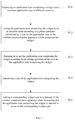
- FIG. 1 shows a schematic flowchart diagram of an embodiment of a method of adding a widget according to the present disclosure.
- the method of adding a widget according to the present disclosure may be used in a wireless communication apparatus, for example, a cell phone, a personal computer or the like, but the present disclosure has no limitation on this.
- the method of adding a widget according to the present disclosure comprises the following steps.
- Step S11 displaying an application icon comprising the widget and a common application icon in different manners.
- all the applications have corresponding icons and names, which are displayed in an application menu in a certain sequence.
- the sequence may be decided according to the symbol string UNICODE codes of the application names, or according to the types, the edition and dragging of the user, the usage frequencies, or the installation sequence of the applications.
- this embodiment displays the installed or upgraded application according to different sequences so that the user can conveniently know the applications that are installed or upgraded recently; and in case a malicious application or a virus application is installed without being known by the user, there may also be clear prompts to the user in the main menu or the list. This improves the efficiency of the user in using the applications and can further prevent the wireless communication apparatus from being infected at the same time.
- the application icon comprising the widget may be displayed in a highlighted, flashing or animation manner, and a common application icon may be displayed in a normal manner at the same time so that the application icon comprising the widget and the common application icon can be distinguished from each other.
- an application “Chinese Lunar Calendar” comprises a widget and an application “UCWEB” is a common application, so the icon of the application “Chinese Lunar Calendar” may be displayed in a highlighted manner and the application "UCWEB" may be displayed in a normal manner.
- a plurality of static pictures comprised in the application "Chinese Lunar Calendar” may also be saved beforehand, and then the plurality of static pictures are displayed cyclically according to a certain frequency so that a flashing effect of displaying can be achieved; and the application "UCWEB” is displayed in a normal manner.
- the names of the applications may also be displayed in a highlighted, flashing or animation manner, which can also achieve the purpose of distinguishing the application icon comprising the widget from the normal application icon, and the present disclosure has no limitation on this.
- the widgets comprised in the applications may be of more than one type (e.g., a 4*1 type and a 4*2 type)
- the present disclosure may also display the types of the widgets comprised in the applications. In this way, it may be more convenient for the user to know the information of the widgets of the applications and to add the widgets.
- Step S12 listing the application icon comprising the widget to be an editable mode according to a preset operation performed by the user on the application icon of the wireless communication apparatus which comprises the widget.
- the preset operation may be a long-press operation, and of course, may also be a double-clicking operation and etc.; and those skilled in the art can set the preset operation according to the specific needs thereof.
- the application icon comprising the widget enters into the editable mode so that the user can perform further operations on the application icon comprising the widget.
- Step S13 zooming in or out the application icon comprising the widget according to an editing operation of the user on the application icon comprising the widget.
- the editing operation is a dragging operation. Specifically, after the application icon comprising the widget enters into the editable mode, the user can drag the edges thereof to zoom in or out the application icon comprising the widget.
- the editing operation may also be a double-clicking operation or the like, and those skilled in the art can set the editing operation depending on the specific needs thereof.
- Step S14 monitoring a size of the application icon comprising the widget.
- an application may comprise widgets of a plurality of types, and the widgets of different types have different sizes and provide different functions.
- step S15 is executed.
- Step S15 adding the corresponding widget type to the desktop of the wireless communication apparatus when monitoring that the application icon comprising the widget is zoomed in or out to the corresponding widget type.
- FIG. 2 is a detailed flowchart diagram of a process of adding a widget to a desktop in an embodiment of the method of adding a widget according to the present disclosure.
- the detailed steps of the process of adding the widget to the desktop include:
- step S152 is executed; and if the size of the area necessary for the corresponding widget type is smaller than or equal to the size of the available area of the desktop, step S153 is executed.
- Step S152 adding the corresponding widget type to the desktop if the area necessary for the corresponding widget type is smaller than or equal to the available area of the desktop.
- the application "Chinese Lunar Calendar” comprises widgets of a 4*1 type, a 4*2 type and a 4*3 type; and if the areas necessary for the widgets of the 4*1 type and the 4*2 type are both smaller than the available area of the desktop, then the widgets of the 4*1 type and the 4*2 type are displayed for choice by the user. If the user chooses the widget of the 4*1 type, then the widget is added to the desktop.
- the corresponding widget type is added to the desktop.
- Step S153 prompting that the adding operation of the user fails if the area necessary for the corresponding widget type is larger than the available area of the desktop.
- the area necessary for the corresponding widget type is larger than the available area of the desktop, then it means that the area necessary for any one of the widget types of the application is larger than the available area of the desktop and the current desktop is unable to contain the corresponding widget type. Therefore, the user is prompted that the adding operation fails and may be further prompted to add the corresponding widget type to other desktops.
- the method of adding a widget firstly displays an application icon comprising the widget and a common application in different manners, and then directly performs an editing operation on the application icon comprising the widget so as to add the widget to the desktop. This eliminates the need of entering into a widget list to select a widget therefrom, thus improving the efficiency of adding the widget and the user's experiences. Furthermore, a comparison of an area necessary for the widget type to be added with an available area of the desktop is made firstly before the adding operation, which can prevent failure of the adding operation caused when the available area of the desktop is not enough for containing the widget and thus improves the accuracy of the adding operation.
- the wireless communication apparatus comprises but is not limited to: an application displaying module 10, an application management module 20, a widget editing module 30, a monitoring module 40 and an adding module 50.
- the wireless communication apparatus may be a cell phone, a personal computer or the like.
- the application displaying module 10 is configured to display an application icon comprising a widget and a common application icon in different manners.
- the application icon comprising the widget may be displayed in a highlighted, flashing or animation manner
- the common application icon may be displayed in a normal manner at the same time so that the application icon comprising the widget and the common application icon can be distinguished from each other.
- the name of the application may also be displayed in a highlighted, flashing or animation manner, which can also achieve the purpose of distinguishing the application icon comprising the widget from the common application icon; and the present disclosure has no limitation on this.
- the application management module 20 is configured to list an application icon comprising the widget to be an editable mode according to a preset operation performed by a user on the application icon comprising the widget of the wireless communication apparatus.
- the preset operation is a long-press operation, and of course, may also be a double-clicking operation or the like. Those skilled in the art can set the preset operation according the specific needs thereof.
- the widget editing module 30 is configured to zoom in or out the application icon comprising the widget according to an editing operation of the user on the application icon comprising the widget after the application icon comprising the widget is listed to be the editable mode by the application management module 20.
- the editing operation is a dragging operation, and of course, may also be a double-clicking operation; and those skilled in the art can set the editing operation according to the specific needs thereof.
- the monitoring module 40 is configured to monitor a size of the application icon comprising the widget when the application icon is zoomed in or out by the widget editing module 30.
- the adding module 50 is configured to add a corresponding widget type to a desktop of the wireless communication apparatus when the monitoring module 40 monitors that the application icon comprising the widget is zoomed in or out to the corresponding widget type.
- the adding module 50 comprises a comparing unit 501, a processing unit 502, a first prompting unit 503 and a second prompting unit 504.
- the comparing unit 501 is configured to compare a size of an area necessary for the corresponding widget type with a size of an available area of the desktop.
- the available area of the desktop may be not enough for containing the widgets. Therefore, a comparison of the area necessary for the corresponding widget type with the available area of the desktop needs to be made before the widget is added to the desktop.
- the processing unit 502 is configured to add the corresponding widget type to the desktop if the comparing unit 501 determines that the area necessary for the corresponding widget type is smaller than or equal to the available area of the desktop.
- the processing unit 502 adds the corresponding widget type to the desktop.
- the first prompting unit 503 is configured to display at least one said widget type, of which the area necessary is smaller than the available area of the desktop, for the user selecting to add the widget type that is needed if the comparing unit 501 determines that the area necessary for the corresponding widget type is smaller than the available area of the desktop, so that the corresponding widget type is added by the processing unit 502 to the desktop.
- the application "Chinese Lunar Calendar” comprises widgets of a 4*1 type, a 4*2 type and a 4*3 type; and if the areas necessary for the widgets of the 4*1 type and the 4*2 type are both smaller than the available area of the desktop, then it is prompted that the widgets of the 4*1 type and the 4*2 type are displayed for choice by the user. If the user chooses the widget of the 4*1 type, then the processing unit 502 adds the corresponding widget type to the desktop.
- the second prompting unit 504 is configured to prompt that the adding operation of the user fails if the comparing unit 501 determines that the area necessary for the corresponding widget type is larger than the available area of the desktop.
- the area necessary for the corresponding widget type is larger than the available area of the desktop, then it means that the area necessary for any one of the widget types of the application is larger than the available area of the desktop and the current desktop is unable to contain the corresponding widget type. Therefore, the user is prompted that the adding operation fails and may further be prompted to add the corresponding widget type to other desktops.
- the wireless communication apparatus displays an application icon comprising a widget and a common application in different manners by means of the application displaying module 10, then zooms in or out the application icon comprising the widget to the corresponding widget type by means of the widget editing module 30 and adds the corresponding widget type to the desktop directly by means of the adding module 50.
Landscapes
- Engineering & Computer Science (AREA)
- Theoretical Computer Science (AREA)
- General Engineering & Computer Science (AREA)
- Human Computer Interaction (AREA)
- Physics & Mathematics (AREA)
- General Physics & Mathematics (AREA)
- Software Systems (AREA)
- User Interface Of Digital Computer (AREA)
- Telephone Function (AREA)
Abstract
Description
- The present disclosure relates to the technical field of communication technologies, and more particularly, to a wireless communication apparatus and a method of adding a widget therefore.
- Owing to the development of wireless communication apparatuses, now we can install various kinds of application software in the wireless communication apparatuses depending on the individual demands, e.g., the communication software MSN, QQ, games, music playing software, map software, graphic processing applications, file processing applications and so on. Furthermore, as the kinds of applications become diversified, the number of applications installed in the wireless communication apparatuses also becomes increasingly greater. Therefore, to facilitate the users' operations, widgets of various applications are disposed on the desktop in many systems so that the applications can be operated directly through use of the widgets. For example, a music playing widget allows a user to directly view information and lyrics of a piece of music and perform controlling operations on the music being played. Widgets of different applications are different depending on their functions as well as occupied areas and aspect ratios, and even if the same kind of application desktop widgets may also be categorized into different types, which generally are the simple type (4*1), the complex type (4*4) and other types (e.g., 3*2). For example, the music playing widgets are categorized into the simple type and the complex type depending on the occupied areas. The simple type occupies a smaller desktop space so that more application plug-ins can be disposed on the desktop, but it comprises fewer functions (e.g., it can only be used for music playing control but cannot display the lyrics); and the complex type occupies a larger desktop space which makes the number of widgets that can be disposed on the desktop smaller, but it comprises more functions (e.g., it can display the music lyrics). Therefore, the widgets bring about great conveniences to the users, and the users often need to add widgets of applications or change the type of the widgets in the system.
- However, the operations of adding a widget or change the type of a widget of an application are relatively complex. Specifically, the user firstly has to enter into a widget list of applications, and then select a corresponding widget from the widget list. Further, the user who wants to change the type of a widget of a certain application on the current desktop also needs to enter into the widget list and to select a different type before deleting the original widget. This way of adding a widget is relatively complex and inefficient.
- The present disclosure mainly provides a wireless communication apparatus and a method of adding a widget therefor, which can solve the problem that the efficiency of adding a widget in a wireless communication apparatus is poor.
- To solve the above technical problems, a technical solution adopted in the present disclosure is to provide a method of adding a widget in a wireless communication apparatus, which comprises: displaying an application icon comprising the widget and a common application icon in different manners; listing the application icon comprising the widget to be an editable mode according to a preset operation performed by a user on the application icon of the wireless communication apparatus which comprises the widget; zooming in or out the application icon comprising the widget according to an editing operation of the user on the application icon comprising the widget; monitoring a size of the application icon comprising the widget; and adding a corresponding widget type to a desktop of the wireless communication apparatus when monitoring that the application icon comprising the widget is zoomed in or out to the corresponding widget type; wherein the preset operation is a long-press operation or a double-clicking operation, and the editing operation is a dragging operation.
- The step of displaying an application icon comprising the widget and a common application icon in different manners specifically comprises: displaying the application icon comprising the widget in a highlighted, flashing or animation manner, and displaying the common application icon in a normal manner.
- The step of adding the corresponding widget type to the desktop of the wireless communication apparatus specifically comprises: comparing a size of an area necessary for the corresponding widget type with a size of an available area of the desktop; and adding the corresponding widget type to the desktop if the area necessary for the corresponding widget type is smaller than or equal to the available area of the desktop.
- The step of adding the corresponding widget type to the desktop if the area necessary for the corresponding widget type is smaller than or equal to the available area of the desktop further comprises: if the area necessary for the corresponding widget type is smaller than the available area of the desktop, displaying at least one said widget type, of which the area necessary is smaller than the available area of the desktop, for the user selecting to add the widget type that is needed; the method further comprises the following step after the step of comparing a size of an area necessary for the corresponding widget type with a size of an available area of the desktop: prompting that the adding operation of the user fails if the area necessary for the corresponding widget type is larger than the available area of the desktop.
- To solve the aforesaid technical problem, another technical solution adopted in the present disclosure is to provide a method of adding a widget in a wireless communication apparatus, which comprises: listing an application icon comprising the widget to be an editable mode according to a preset operation performed by a user on the application icon of the wireless communication apparatus which comprises the widget; zooming in or out the application icon comprising the widget according to an editing operation of the user on the application icon comprising the widget; monitoring a size of the application icon comprising the widget; and adding a corresponding widget type to a desktop of the wireless communication apparatus when monitoring that the application icon comprising the widget is zoomed in or out to the corresponding widget type.
- The method further comprises the following step before the step of listing the application icon comprising the widget to be an editable mode according to a preset operation performed by a user on the application icon of the wireless communication apparatus which comprises the widget: displaying the application icon comprising the widget and a common application icon in different manners.
- The step of displaying the application icon comprising the widget and a common application icon in different manners specifically comprises: displaying the application icon comprising the widget in a highlighted, flashing or animation manner, and displaying the common application icon in a normal manner.
- The step of adding a corresponding widget type to a desktop of the wireless communication apparatus specifically comprises: comparing a size of an area necessary for the corresponding widget type with a size of an available area of the desktop; adding the corresponding widget type to the desktop if the area necessary for the corresponding widget type is smaller than or equal to the available area of the desktop.
- The step of adding the corresponding widget type to the desktop if the area necessary for the corresponding widget type is smaller than or equal to the available area of the desktop further comprises: if the area necessary for the corresponding widget type is smaller than the available area of the desktop, displaying at least one said widget type, of which the area necessary is smaller than the available area of the desktop, for the user selecting to add the widget type that is needed; the method further comprises the following step after the step of comparing a size of an area necessary for the corresponding widget type with a size of an available area of the desktop: prompting that the adding operation of the user fails if the area necessary for the corresponding widget type is larger than the available area of the desktop.
- The preset operation is a long-press operation or a double-clicking operation, and the editing operation is a dragging operation.
- To solve the aforesaid technical problems, still another technical solution adopted in the present disclosure is to provide a wireless communication system, which comprises: an application management module, being configured to list an application icon comprising the widget to be an editable mode according to a preset operation performed by a user on the application icon of the wireless communication apparatus which comprises the widget; a widget editing module, being configured to zoom in or out the application icon comprising the widget according to an editing operation of the user on the application icon comprising the widget after the application icon comprising the widget is listed to be the editable mode by the application management module; a monitoring module, being configured to monitor a size of the application icon comprising the widget when the application icon is zoomed in or out by the widget editing module; and an adding module, being configured to add a corresponding widget type to a desktop of the wireless communication apparatus when the monitoring module monitors that the application icon comprising the widget is zoomed in or out to the corresponding widget type.
- The wireless communication apparatus further comprises an application displaying module, which is configured to display the application icon comprising the widget and a common application icon in different manners.
- The adding module specifically comprises: a comparing unit, being configured to compare a size of an area necessary for the corresponding widget type with a size of an available area of the desktop; a processing unit, being configured to add the corresponding widget type to the desktop if the comparing unit determines that the area necessary for the corresponding widget type is smaller than or equal to the available area of the desktop.
- The adding module further comprises: a first prompting unit, being configured to display at least one said widget type, of which the area necessary is smaller than the available area of the desktop, for the user selecting to add the widget type that is needed if the comparing unit determines that the area necessary for the corresponding widget type is smaller than the available area of the desktop, so that the corresponding widget type is added by the processing unit to the desktop; a second prompting unit, being configured to prompt that the adding operation of the user fails if the area necessary for the corresponding widget type is larger than the available area of the desktop.
- The present disclosure zooms in or out an application icon comprising a widget by performing an editing operation on the application icon comprising the widget, and, when it is monitored that the application icon comprising the widget is zoomed in or out to the corresponding widget type, adds the corresponding widget type to the desktop. As compared to the prior art, the present disclosure does not need to enter into a widget list to search for and select a widget type. Thereby, the present disclosure can improve the efficiency of adding a widget and the user's experiences.
-
-
FIG. 1 is a schematic flowchart diagram of an embodiment of a method of adding a widget according to the present disclosure; -
FIG. 2 is a detailed flowchart diagram of a process of adding a widget to a desktop in an embodiment of the method of adding a widget according to the present disclosure; -
FIG. 3 is a schematic structural view of an embodiment of a wireless communication system according to the present disclosure; and -
FIG. 4 is a schematic structural view of an adding module shown inFIG. 3 . - The present disclosure will be detailed hereinbelow with reference to the attached drawings and the embodiments.
- Refer to
FIG. 1 , which shows a schematic flowchart diagram of an embodiment of a method of adding a widget according to the present disclosure. The method of adding a widget according to the present disclosure may be used in a wireless communication apparatus, for example, a cell phone, a personal computer or the like, but the present disclosure has no limitation on this. The method of adding a widget according to the present disclosure comprises the following steps. - Step S11: displaying an application icon comprising the widget and a common application icon in different manners.
- In wireless communication apparatuses, all the applications have corresponding icons and names, which are displayed in an application menu in a certain sequence. The sequence may be decided according to the symbol string UNICODE codes of the application names, or according to the types, the edition and dragging of the user, the usage frequencies, or the installation sequence of the applications.
- It should be appreciated that, when installing or updating an application, the user firstly monitors whether the application comprises a widget and then adds the application to the application menu, and then applications can be displayed according to any of the aforesaid displaying sequences. In other words, this embodiment displays the installed or upgraded application according to different sequences so that the user can conveniently know the applications that are installed or upgraded recently; and in case a malicious application or a virus application is installed without being known by the user, there may also be clear prompts to the user in the main menu or the list. This improves the efficiency of the user in using the applications and can further prevent the wireless communication apparatus from being infected at the same time.
- In this embodiment, the application icon comprising the widget may be displayed in a highlighted, flashing or animation manner, and a common application icon may be displayed in a normal manner at the same time so that the application icon comprising the widget and the common application icon can be distinguished from each other. For example, an application "Chinese Lunar Calendar" comprises a widget and an application "UCWEB" is a common application, so the icon of the application "Chinese Lunar Calendar" may be displayed in a highlighted manner and the application "UCWEB" may be displayed in a normal manner. Further, a plurality of static pictures comprised in the application "Chinese Lunar Calendar" may also be saved beforehand, and then the plurality of static pictures are displayed cyclically according to a certain frequency so that a flashing effect of displaying can be achieved; and the application "UCWEB" is displayed in a normal manner. Of course, the names of the applications may also be displayed in a highlighted, flashing or animation manner, which can also achieve the purpose of distinguishing the application icon comprising the widget from the normal application icon, and the present disclosure has no limitation on this. It should be appreciated that, because the widgets comprised in the applications may be of more than one type (e.g., a 4*1 type and a 4*2 type), the present disclosure may also display the types of the widgets comprised in the applications. In this way, it may be more convenient for the user to know the information of the widgets of the applications and to add the widgets.
- Step S12: listing the application icon comprising the widget to be an editable mode according to a preset operation performed by the user on the application icon of the wireless communication apparatus which comprises the widget.
- In this embodiment, the preset operation may be a long-press operation, and of course, may also be a double-clicking operation and etc.; and those skilled in the art can set the preset operation according to the specific needs thereof. Through the preset operation, the application icon comprising the widget enters into the editable mode so that the user can perform further operations on the application icon comprising the widget.
- Step S13: zooming in or out the application icon comprising the widget according to an editing operation of the user on the application icon comprising the widget.
- In this embodiment, the editing operation is a dragging operation. Specifically, after the application icon comprising the widget enters into the editable mode, the user can drag the edges thereof to zoom in or out the application icon comprising the widget. Of course, the editing operation may also be a double-clicking operation or the like, and those skilled in the art can set the editing operation depending on the specific needs thereof.
- Step S14: monitoring a size of the application icon comprising the widget.
- As described above, an application may comprise widgets of a plurality of types, and the widgets of different types have different sizes and provide different functions. When it is monitored that the size of the application icon comprising the widget is of the corresponding widget type, step S15 is executed.
- Step S15: adding the corresponding widget type to the desktop of the wireless communication apparatus when monitoring that the application icon comprising the widget is zoomed in or out to the corresponding widget type.
- Because the desktop of the wireless communication apparatus can also display shortcuts, folders or the like of other applications in addition to the widgets, the available area of the desktop may be not enough to contain the widgets. Therefore, a comparison of an area necessary for the corresponding widget type with an available area of the desktop needs to be made before the widget is added to the desktop, as shown in
FIG. 2. FIG. 2 is a detailed flowchart diagram of a process of adding a widget to a desktop in an embodiment of the method of adding a widget according to the present disclosure. The detailed steps of the process of adding the widget to the desktop include: - Step S151: comparing a size of an area necessary for the corresponding widget type with a size of an available area of the desktop.
- If the size of the area necessary for the corresponding widget type is smaller than or equal to the size of the available area of the desktop, step S152 is executed; and if the size of the area necessary for the corresponding widget type is smaller than or equal to the size of the available area of the desktop, step S153 is executed.
- Step S152: adding the corresponding widget type to the desktop if the area necessary for the corresponding widget type is smaller than or equal to the available area of the desktop.
- Specifically, if the area necessary for the corresponding widget type is smaller than the available area of the desktop, then at least one said widget type, of which the area necessary is smaller than the available area of the desktop, is displayed for the user selecting to add the widget type that is needed. For example, the application "Chinese Lunar Calendar" comprises widgets of a 4*1 type, a 4*2 type and a 4*3 type; and if the areas necessary for the widgets of the 4*1 type and the 4*2 type are both smaller than the available area of the desktop, then the widgets of the 4*1 type and the 4*2 type are displayed for choice by the user. If the user chooses the widget of the 4*1 type, then the widget is added to the desktop.
- If the area necessary for the corresponding widget type is equal to the available area of the desktop, then the corresponding widget type is added to the desktop.
- Step S153: prompting that the adding operation of the user fails if the area necessary for the corresponding widget type is larger than the available area of the desktop.
- If the area necessary for the corresponding widget type is larger than the available area of the desktop, then it means that the area necessary for any one of the widget types of the application is larger than the available area of the desktop and the current desktop is unable to contain the corresponding widget type. Therefore, the user is prompted that the adding operation fails and may be further prompted to add the corresponding widget type to other desktops.
- The method of adding a widget according to the embodiment of the present disclosure firstly displays an application icon comprising the widget and a common application in different manners, and then directly performs an editing operation on the application icon comprising the widget so as to add the widget to the desktop. This eliminates the need of entering into a widget list to select a widget therefrom, thus improving the efficiency of adding the widget and the user's experiences. Furthermore, a comparison of an area necessary for the widget type to be added with an available area of the desktop is made firstly before the adding operation, which can prevent failure of the adding operation caused when the available area of the desktop is not enough for containing the widget and thus improves the accuracy of the adding operation.
- Refer to
FIG. 3 , which shows a schematic structural view of an embodiment of a wireless communication apparatus according to the present disclosure. The wireless communication apparatus comprises but is not limited to: anapplication displaying module 10, anapplication management module 20, awidget editing module 30, amonitoring module 40 and an adding module 50. In this embodiment, the wireless communication apparatus may be a cell phone, a personal computer or the like. - The
application displaying module 10 is configured to display an application icon comprising a widget and a common application icon in different manners. - Specifically, the application icon comprising the widget may be displayed in a highlighted, flashing or animation manner, and the common application icon may be displayed in a normal manner at the same time so that the application icon comprising the widget and the common application icon can be distinguished from each other. Of course, the name of the application may also be displayed in a highlighted, flashing or animation manner, which can also achieve the purpose of distinguishing the application icon comprising the widget from the common application icon; and the present disclosure has no limitation on this.
- The
application management module 20 is configured to list an application icon comprising the widget to be an editable mode according to a preset operation performed by a user on the application icon comprising the widget of the wireless communication apparatus. - Specifically, in this embodiment, the preset operation is a long-press operation, and of course, may also be a double-clicking operation or the like. Those skilled in the art can set the preset operation according the specific needs thereof.
- The
widget editing module 30 is configured to zoom in or out the application icon comprising the widget according to an editing operation of the user on the application icon comprising the widget after the application icon comprising the widget is listed to be the editable mode by theapplication management module 20. - Specifically, in this embodiment, the editing operation is a dragging operation, and of course, may also be a double-clicking operation; and those skilled in the art can set the editing operation according to the specific needs thereof.
- The
monitoring module 40 is configured to monitor a size of the application icon comprising the widget when the application icon is zoomed in or out by thewidget editing module 30. - The adding module 50 is configured to add a corresponding widget type to a desktop of the wireless communication apparatus when the
monitoring module 40 monitors that the application icon comprising the widget is zoomed in or out to the corresponding widget type. - Specifically, the adding module 50 comprises a comparing
unit 501, aprocessing unit 502, afirst prompting unit 503 and asecond prompting unit 504. - The comparing
unit 501 is configured to compare a size of an area necessary for the corresponding widget type with a size of an available area of the desktop. - Because the desktop of the wireless communication apparatus also displays shortcuts, folders or the like of other applications in addition to the widgets, the available area of the desktop may be not enough for containing the widgets. Therefore, a comparison of the area necessary for the corresponding widget type with the available area of the desktop needs to be made before the widget is added to the desktop.
- The
processing unit 502 is configured to add the corresponding widget type to the desktop if the comparingunit 501 determines that the area necessary for the corresponding widget type is smaller than or equal to the available area of the desktop. - Specifically, if the area necessary for the corresponding widget type is equal to the available area of the desktop, then the
processing unit 502 adds the corresponding widget type to the desktop. - The
first prompting unit 503 is configured to display at least one said widget type, of which the area necessary is smaller than the available area of the desktop, for the user selecting to add the widget type that is needed if the comparingunit 501 determines that the area necessary for the corresponding widget type is smaller than the available area of the desktop, so that the corresponding widget type is added by theprocessing unit 502 to the desktop. - For example, the application "Chinese Lunar Calendar" comprises widgets of a 4*1 type, a 4*2 type and a 4*3 type; and if the areas necessary for the widgets of the 4*1 type and the 4*2 type are both smaller than the available area of the desktop, then it is prompted that the widgets of the 4*1 type and the 4*2 type are displayed for choice by the user. If the user chooses the widget of the 4*1 type, then the
processing unit 502 adds the corresponding widget type to the desktop. - The
second prompting unit 504 is configured to prompt that the adding operation of the user fails if the comparingunit 501 determines that the area necessary for the corresponding widget type is larger than the available area of the desktop. - If the area necessary for the corresponding widget type is larger than the available area of the desktop, then it means that the area necessary for any one of the widget types of the application is larger than the available area of the desktop and the current desktop is unable to contain the corresponding widget type. Therefore, the user is prompted that the adding operation fails and may further be prompted to add the corresponding widget type to other desktops.
- In the aforesaid way, the wireless communication apparatus according to the embodiment of the present disclosure displays an application icon comprising a widget and a common application in different manners by means of the
application displaying module 10, then zooms in or out the application icon comprising the widget to the corresponding widget type by means of thewidget editing module 30 and adds the corresponding widget type to the desktop directly by means of the adding module 50. This eliminates the need of entering into the widget list to select a widget therefrom. Thereby, the efficiency of adding the widget and the user's experiences is improved. - What described above are only embodiments of the present disclosure, but are not intended to limit the scope of the present disclosure. Any equivalent structures or equivalent process flow modifications that are made according to the specification and the attached drawings of the present disclosure, or any direct or indirect applications of the present disclosure in other related technical fields shall all be covered within the protection scope of the present disclosure.
Claims (14)
- A method of adding a widget in a wireless communication apparatus, comprising:displaying an application icon comprising the widget and a common application icon in different manners;listing the application icon comprising the widget to be an editable mode according to a preset operation performed by a user on the application icon of the wireless communication apparatus which comprises the widget;zooming in or out the application icon comprising the widget according to an editing operation of the user on the application icon comprising the widget;monitoring a size of the application icon comprising the widget; andadding a corresponding widget type to a desktop of the wireless communication apparatus when monitoring that the application icon comprising the widget is zoomed in or out to the corresponding widget type;wherein the preset operation is a long-press operation or a double-clicking operation, and the editing operation is a dragging operation.
- The method of claim 1, wherein the step of displaying an application icon comprising the widget and a common application icon in different manners specifically comprises:displaying the application icon comprising the widget in a highlighted, flashing or animation manner, and displaying the common application icon in a normal manner.
- The method of claim 1, wherein the step of adding the corresponding widget type to the desktop of the wireless communication apparatus specifically comprises:comparing a size of an area necessary for the corresponding widget type with a size of an available area of the desktop; andadding the corresponding widget type to the desktop if the area necessary for the corresponding widget type is smaller than or equal to the available area of the desktop.
- The method of claim 3, wherein:the step of adding the corresponding widget type to the desktop if the area necessary for the corresponding widget type is smaller than or equal to the available area of the desktop further comprises:if the area necessary for the corresponding widget type is smaller than the available area of the desktop, displaying at least one said widget type, of which the area necessary is smaller than the available area of the desktop, for the user selecting to add the widget type that is needed;the method further comprises the following step after the step of comparing a size of an area necessary for the corresponding widget type with a size of an available area of the desktop:prompting that the adding operation of the user fails if the area necessary for the corresponding widget type is larger than the available area of the desktop.
- A method of adding a widget in a wireless communication apparatus, comprising:listing an application icon comprising the widget to be an editable mode according to a preset operation performed by a user on the application icon of the wireless communication apparatus which comprises the widget;zooming in or out the application icon comprising the widget according to an editing operation of the user on the application icon comprising the widget;monitoring a size of the application icon comprising the widget; andadding a corresponding widget type to a desktop of the wireless communication apparatus when monitoring that the application icon comprising the widget is zoomed in or out to the corresponding widget type.
- The method of claim 5, further comprising the following step before the step of listing the application icon comprising the widget to be an editable mode according to a preset operation performed by a user on the application icon of the wireless communication apparatus which comprises the widget:displaying the application icon comprising the widget and a common application icon in different manners.
- The method of claim 6, wherein the step of displaying the application icon comprising the widget and a common application icon in different manners specifically comprises:displaying the application icon comprising the widget in a highlighted, flashing or animation manner, and displaying the common application icon in a normal manner.
- The method of claim 5, wherein the step of adding a corresponding widget type to a desktop of the wireless communication apparatus specifically comprises:comparing a size of an area necessary for the corresponding widget type with a size of an available area of the desktop; andadding the corresponding widget type to the desktop if the area necessary for the corresponding widget type is smaller than or equal to the available area of the desktop.
- The method of claim 8, wherein:the step of adding the corresponding widget type to the desktop if the area necessary for the corresponding widget type is smaller than or equal to the available area of the desktop further comprises:if the area necessary for the corresponding widget type is smaller than the available area of the desktop, displaying at least one said widget type, of which the area necessary is smaller than the available area of the desktop, for the user selecting to add the widget type that is needed;the method further comprises the following step after the step of comparing a size of an area necessary for the corresponding widget type with a size of an available area of the desktop:prompting that the adding operation of the user fails if the area necessary for the corresponding widget type is larger than the available area of the desktop.
- The method of claim 5, wherein the preset operation is a long-press operation or a double-clicking operation, and the editing operation is a dragging operation.
- A wireless communication apparatus, comprising:an application management module, being configured to list an application icon comprising the widget to be an editable mode according to a preset operation performed by a user on the application icon of the wireless communication apparatus which comprises the widget;a widget editing module, being configured to zoom in or out the application icon comprising the widget according to an editing operation of the user on the application icon comprising the widget after the application icon comprising the widget is listed to be the editable mode by the application management module;a monitoring module, being configured to monitor a size of the application icon comprising the widget when the application icon is zoomed in or out by the widget editing module; andan adding module, being configured to add a corresponding widget type to a desktop of the wireless communication apparatus when the monitoring module monitors that the application icon comprising the widget is zoomed in or out to the corresponding widget type.
- The wireless communication apparatus of claim 11, further comprising:an application displaying module, being configured to display the application icon comprising the widget and a common application icon in different manners.
- The wireless communication apparatus of claim 11, wherein the adding module specifically comprises:a comparing unit, being configured to compare a size of an area necessary for the corresponding widget type with a size of an available area of the desktop; anda processing unit, being configured to add the corresponding widget type to the desktop if the comparing unit determines that the area necessary for the corresponding widget type is smaller than or equal to the available area of the desktop.
- The wireless communication apparatus of claim 13, wherein the adding module further comprises:a first prompting unit, being configured to display at least one said widget type, of which the area necessary is smaller than the available area of the desktop, for the user selecting to add the widget type that is needed if the comparing unit determines that the area necessary for the corresponding widget type is smaller than the available area of the desktop, so that the corresponding widget type is added by the processing unit to the desktop; anda second prompting unit, being configured to prompt that the adding operation of the user fails if the area necessary for the corresponding widget type is larger than the available area of the desktop.
Applications Claiming Priority (2)
| Application Number | Priority Date | Filing Date | Title |
|---|---|---|---|
| CN201310143790.4A CN103279261B (en) | 2013-04-23 | 2013-04-23 | The adding method of wireless telecommunications system and widget thereof |
| PCT/CN2013/080881 WO2014173036A1 (en) | 2013-04-23 | 2013-08-06 | Wireless communications device and method of adding widget thereof |
Publications (3)
| Publication Number | Publication Date |
|---|---|
| EP2990939A1 true EP2990939A1 (en) | 2016-03-02 |
| EP2990939A4 EP2990939A4 (en) | 2016-12-21 |
| EP2990939B1 EP2990939B1 (en) | 2019-09-25 |
Family
ID=49061810
Family Applications (1)
| Application Number | Title | Priority Date | Filing Date |
|---|---|---|---|
| EP13883009.6A Active EP2990939B1 (en) | 2013-04-23 | 2013-08-06 | Wireless communications device and method of adding widget thereof |
Country Status (5)
| Country | Link |
|---|---|
| US (1) | US9495071B2 (en) |
| EP (1) | EP2990939B1 (en) |
| CN (1) | CN103279261B (en) |
| ES (1) | ES2749720T3 (en) |
| WO (1) | WO2014173036A1 (en) |
Families Citing this family (44)
| Publication number | Priority date | Publication date | Assignee | Title |
|---|---|---|---|---|
| CN103455245B (en) * | 2013-08-20 | 2017-02-01 | 华为技术有限公司 | Method and device for regulating area of widget |
| CN103699381A (en) * | 2013-12-20 | 2014-04-02 | Tcl集团股份有限公司 | Method and system for setting Widget based on Firefox OS (Operating System) platform |
| EP4160376A1 (en) | 2014-08-02 | 2023-04-05 | Apple Inc. | Method of editing a watch face user interface at a watch with a touch-sensitive display |
| US10452253B2 (en) | 2014-08-15 | 2019-10-22 | Apple Inc. | Weather user interface |
| US10254948B2 (en) | 2014-09-02 | 2019-04-09 | Apple Inc. | Reduced-size user interfaces for dynamically updated application overviews |
| EP4089534A1 (en) | 2014-09-02 | 2022-11-16 | Apple Inc. | User interface for receiving user input |
| CN104267870A (en) * | 2014-09-10 | 2015-01-07 | 北京金山安全软件有限公司 | Window display method, display device and terminal |
| US10055121B2 (en) | 2015-03-07 | 2018-08-21 | Apple Inc. | Activity based thresholds and feedbacks |
| WO2016144385A1 (en) | 2015-03-08 | 2016-09-15 | Apple Inc. | Sharing user-configurable graphical constructs |
| CN104731456B (en) * | 2015-03-31 | 2018-01-19 | 努比亚技术有限公司 | Desktop widget display methods and device |
| CN104765860A (en) * | 2015-04-21 | 2015-07-08 | 广州市久邦数码科技有限公司 | Alphabetical index system for highlighting application program name and implementation method thereof |
| US9916075B2 (en) | 2015-06-05 | 2018-03-13 | Apple Inc. | Formatting content for a reduced-size user interface |
| CN105187876B (en) * | 2015-06-25 | 2019-03-08 | 小米科技有限责任公司 | Cursor switching method and device |
| US10304347B2 (en) | 2015-08-20 | 2019-05-28 | Apple Inc. | Exercised-based watch face and complications |
| CN105912262B (en) * | 2016-05-24 | 2020-11-10 | 山东兴创信息科技有限公司 | Desktop icon adjusting device, terminal and desktop icon adjusting method |
| US12175065B2 (en) | 2016-06-10 | 2024-12-24 | Apple Inc. | Context-specific user interfaces for relocating one or more complications in a watch or clock interface |
| US20170357644A1 (en) | 2016-06-12 | 2017-12-14 | Apple Inc. | Notable moments in a collection of digital assets |
| AU2017100670C4 (en) | 2016-06-12 | 2019-11-21 | Apple Inc. | User interfaces for retrieving contextually relevant media content |
| DK201670609A1 (en) | 2016-06-12 | 2018-01-02 | Apple Inc | User interfaces for retrieving contextually relevant media content |
| CN106371698A (en) * | 2016-08-31 | 2017-02-01 | 瓦戈科技(上海)有限公司 | Display operation method for desktop of mobile phone system |
| KR102332483B1 (en) | 2017-03-06 | 2021-12-01 | 삼성전자주식회사 | Method for displaying an icon and an electronic device thereof |
| DK179412B1 (en) | 2017-05-12 | 2018-06-06 | Apple Inc | Context-Specific User Interfaces |
| US11243996B2 (en) | 2018-05-07 | 2022-02-08 | Apple Inc. | Digital asset search user interface |
| US11086935B2 (en) | 2018-05-07 | 2021-08-10 | Apple Inc. | Smart updates from historical database changes |
| US11327650B2 (en) | 2018-05-07 | 2022-05-10 | Apple Inc. | User interfaces having a collection of complications |
| US10846343B2 (en) | 2018-09-11 | 2020-11-24 | Apple Inc. | Techniques for disambiguating clustered location identifiers |
| US10803135B2 (en) | 2018-09-11 | 2020-10-13 | Apple Inc. | Techniques for disambiguating clustered occurrence identifiers |
| CN109669754A (en) * | 2018-12-25 | 2019-04-23 | 苏州思必驰信息科技有限公司 | The dynamic display method of interactive voice window, voice interactive method and device with telescopic interactive window |
| JP6921338B2 (en) | 2019-05-06 | 2021-08-18 | アップル インコーポレイテッドApple Inc. | Limited operation of electronic devices |
| US11131967B2 (en) | 2019-05-06 | 2021-09-28 | Apple Inc. | Clock faces for an electronic device |
| US11960701B2 (en) | 2019-05-06 | 2024-04-16 | Apple Inc. | Using an illustration to show the passing of time |
| US10878782B1 (en) | 2019-09-09 | 2020-12-29 | Apple Inc. | Techniques for managing display usage |
| CN115220838A (en) * | 2020-01-17 | 2022-10-21 | 华为技术有限公司 | A widget processing method and related device |
| DK202070624A1 (en) | 2020-05-11 | 2022-01-04 | Apple Inc | User interfaces related to time |
| US11372659B2 (en) | 2020-05-11 | 2022-06-28 | Apple Inc. | User interfaces for managing user interface sharing |
| CN115552375A (en) | 2020-05-11 | 2022-12-30 | 苹果公司 | User interface for managing user interface sharing |
| CN111813493B (en) * | 2020-09-14 | 2020-12-22 | 深圳传音控股股份有限公司 | Method, terminal and storage medium for operating components |
| US11694590B2 (en) | 2020-12-21 | 2023-07-04 | Apple Inc. | Dynamic user interface with time indicator |
| US11720239B2 (en) | 2021-01-07 | 2023-08-08 | Apple Inc. | Techniques for user interfaces related to an event |
| CN115022695B (en) * | 2021-03-04 | 2023-09-19 | 聚好看科技股份有限公司 | Display device and Widget control display method |
| US12182373B2 (en) | 2021-04-27 | 2024-12-31 | Apple Inc. | Techniques for managing display usage |
| US11921992B2 (en) | 2021-05-14 | 2024-03-05 | Apple Inc. | User interfaces related to time |
| US12493267B2 (en) | 2022-01-24 | 2025-12-09 | Apple Inc. | User interfaces for indicating time |
| US12578975B2 (en) | 2022-09-15 | 2026-03-17 | Apple Inc. | User interfaces for indicating time |
Family Cites Families (20)
| Publication number | Priority date | Publication date | Assignee | Title |
|---|---|---|---|---|
| US7707514B2 (en) * | 2005-11-18 | 2010-04-27 | Apple Inc. | Management of user interface elements in a display environment |
| US9317195B1 (en) * | 2006-04-25 | 2016-04-19 | Parallels IP Holdings GmbH | Seamless integration of non-native windows with dynamically scalable resolution into host operating system |
| CN101853158A (en) * | 2010-05-11 | 2010-10-06 | 中兴通讯股份有限公司 | Method and device for adjusting Widget window |
| US8407184B2 (en) * | 2010-06-07 | 2013-03-26 | Salesforce.Com, Inc. | Maintaining applications that are occasionally connected to an online services system |
| US20110314373A1 (en) * | 2010-06-21 | 2011-12-22 | Salesforce.Com, Inc. | System, method and computer program product for performing actions associated with data to be displayed, utilizing a widget |
| KR101660746B1 (en) * | 2010-08-24 | 2016-10-10 | 엘지전자 주식회사 | Mobile terminal and Method for setting application indicator thereof |
| EP2431870B1 (en) * | 2010-09-17 | 2019-11-27 | LG Electronics Inc. | Mobile terminal and control method thereof |
| US20120084732A1 (en) * | 2010-10-01 | 2012-04-05 | Vasily Filippov | Methods and apparatus for organizing applications and widgets on a mobile device interface |
| KR101729523B1 (en) * | 2010-12-21 | 2017-04-24 | 엘지전자 주식회사 | Mobile terminal and operation control method thereof |
| KR20120080922A (en) * | 2011-01-10 | 2012-07-18 | 삼성전자주식회사 | Display apparatus and method for displaying thereof |
| CN102736903A (en) * | 2011-04-08 | 2012-10-17 | 腾讯科技(深圳)有限公司 | Method and device for managing widgets based on intelligent terminal desktop |
| US9833142B2 (en) * | 2011-07-05 | 2017-12-05 | Saudi Arabian Oil Company | Systems, computer medium and computer-implemented methods for coaching employees based upon monitored health conditions using an avatar |
| WO2013030892A1 (en) * | 2011-08-31 | 2013-03-07 | パナソニック株式会社 | Information processing terminal, display control method, and display control program |
| KR101873744B1 (en) * | 2011-11-29 | 2018-07-03 | 엘지전자 주식회사 | Mobile terminal and method for controlling the same |
| KR101873413B1 (en) * | 2012-02-17 | 2018-07-02 | 엘지전자 주식회사 | Mobile terminal and control method for the mobile terminal |
| EP2664983A3 (en) * | 2012-05-17 | 2018-01-03 | LG Electronics, Inc. | Mobile terminal and control method therefor |
| CN103034396B (en) * | 2012-11-28 | 2016-01-20 | 广东欧珀移动通信有限公司 | A kind of moving icon is to the method and apparatus of android system desktop |
| CN103051965B (en) * | 2012-12-07 | 2018-09-21 | 康佳集团股份有限公司 | A kind of smart television desktop theme customizing method and system |
| US9342324B2 (en) * | 2013-05-23 | 2016-05-17 | Rakuten Kobo, Inc. | System and method for displaying a multimedia container |
| KR102231092B1 (en) * | 2013-09-05 | 2021-03-24 | 삼성전자주식회사 | Control device |
-
2013
- 2013-04-23 CN CN201310143790.4A patent/CN103279261B/en not_active Expired - Fee Related
- 2013-08-06 ES ES13883009T patent/ES2749720T3/en active Active
- 2013-08-06 WO PCT/CN2013/080881 patent/WO2014173036A1/en not_active Ceased
- 2013-08-06 EP EP13883009.6A patent/EP2990939B1/en active Active
- 2013-08-06 US US14/402,256 patent/US9495071B2/en active Active
Also Published As
| Publication number | Publication date |
|---|---|
| ES2749720T3 (en) | 2020-03-23 |
| US20150106752A1 (en) | 2015-04-16 |
| WO2014173036A1 (en) | 2014-10-30 |
| CN103279261B (en) | 2016-06-29 |
| CN103279261A (en) | 2013-09-04 |
| EP2990939B1 (en) | 2019-09-25 |
| EP2990939A4 (en) | 2016-12-21 |
| US9495071B2 (en) | 2016-11-15 |
Similar Documents
| Publication | Publication Date | Title |
|---|---|---|
| US9495071B2 (en) | Wireless communication apparatus and method of adding a widget therefor | |
| EP2871569B1 (en) | Method and device for user interface management | |
| CN112214142B (en) | Application information display method and device, electronic equipment and storage medium | |
| US10902078B2 (en) | User-specified user application data sharing | |
| EP2652606B1 (en) | Managing an immersive environment | |
| EP3059667B1 (en) | Theme display method and related device | |
| US9727348B2 (en) | Providing a context-aware help content using a transparent overlay on a touch sensitive screen | |
| US20130247021A1 (en) | Electronic device, system and method for updating and uninstalling software | |
| CN103309575B (en) | The method of display icon and terminal | |
| CN105607905B (en) | Display method and device of application icons on toolbar and electronic equipment | |
| CN111831176B (en) | Application program management method and device | |
| KR20170115543A (en) | Desktop Sharing Method and Mobile Terminal | |
| CN103513969A (en) | Establishment method, device and terminal of application program entry | |
| US20150082164A1 (en) | Gui configuration | |
| US20110191790A1 (en) | Method and apparatus for generating user adaptive application in mobile terminal | |
| JP5389673B2 (en) | Centralized discovery of website services | |
| US7793223B2 (en) | Methods, systems, and computer program products for managing user focus change between applications | |
| US20060036569A1 (en) | Method and apparatus for changing background screen in gui operating system | |
| CN106020695A (en) | Display method for desktop icons and mobile terminal | |
| JP5504168B2 (en) | Method and apparatus for controlling display of information area on standby screen of mobile terminal | |
| CN104346190A (en) | Information processing method and electronic equipment | |
| TW201435742A (en) | Electronic device with function of sharing operating system, system and method for sharing operating system | |
| CN111752631B (en) | Parameter setting method and device for application program, electronic equipment and storage medium | |
| KR101699059B1 (en) | Method, system and recording medium for providing quick menu and contents on idle screen | |
| EP2816479A1 (en) | Information processing device |
Legal Events
| Date | Code | Title | Description |
|---|---|---|---|
| PUAI | Public reference made under article 153(3) epc to a published international application that has entered the european phase |
Free format text: ORIGINAL CODE: 0009012 |
|
| 17P | Request for examination filed |
Effective date: 20141118 |
|
| AK | Designated contracting states |
Kind code of ref document: A1 Designated state(s): AL AT BE BG CH CY CZ DE DK EE ES FI FR GB GR HR HU IE IS IT LI LT LU LV MC MK MT NL NO PL PT RO RS SE SI SK SM TR |
|
| AX | Request for extension of the european patent |
Extension state: BA ME |
|
| DAX | Request for extension of the european patent (deleted) | ||
| A4 | Supplementary search report drawn up and despatched |
Effective date: 20161118 |
|
| RIC1 | Information provided on ipc code assigned before grant |
Ipc: G06F 3/0481 20130101AFI20161114BHEP Ipc: G06F 3/0488 20130101ALI20161114BHEP Ipc: G06F 9/44 20060101ALI20161114BHEP |
|
| REG | Reference to a national code |
Ref country code: DE Ref legal event code: R079 Ref document number: 602013061102 Country of ref document: DE Free format text: PREVIOUS MAIN CLASS: G06F0009440000 Ipc: G06F0003048100 |
|
| GRAP | Despatch of communication of intention to grant a patent |
Free format text: ORIGINAL CODE: EPIDOSNIGR1 |
|
| STAA | Information on the status of an ep patent application or granted ep patent |
Free format text: STATUS: GRANT OF PATENT IS INTENDED |
|
| RIC1 | Information provided on ipc code assigned before grant |
Ipc: G06F 3/0481 20130101AFI20181112BHEP Ipc: G06F 9/451 20180101ALI20181112BHEP Ipc: G06F 9/44 20180101ALI20181112BHEP Ipc: G06F 3/0488 20130101ALI20181112BHEP |
|
| INTG | Intention to grant announced |
Effective date: 20181217 |
|
| RIC1 | Information provided on ipc code assigned before grant |
Ipc: G06F 3/0481 20130101AFI20181112BHEP Ipc: G06F 9/451 20180101ALI20181112BHEP Ipc: G06F 9/44 20180101ALI20181112BHEP Ipc: G06F 3/0488 20130101ALI20181112BHEP |
|
| GRAJ | Information related to disapproval of communication of intention to grant by the applicant or resumption of examination proceedings by the epo deleted |
Free format text: ORIGINAL CODE: EPIDOSDIGR1 |
|
| STAA | Information on the status of an ep patent application or granted ep patent |
Free format text: STATUS: REQUEST FOR EXAMINATION WAS MADE |
|
| GRAP | Despatch of communication of intention to grant a patent |
Free format text: ORIGINAL CODE: EPIDOSNIGR1 |
|
| STAA | Information on the status of an ep patent application or granted ep patent |
Free format text: STATUS: GRANT OF PATENT IS INTENDED |
|
| INTC | Intention to grant announced (deleted) | ||
| INTG | Intention to grant announced |
Effective date: 20190325 |
|
| GRAS | Grant fee paid |
Free format text: ORIGINAL CODE: EPIDOSNIGR3 |
|
| GRAA | (expected) grant |
Free format text: ORIGINAL CODE: 0009210 |
|
| STAA | Information on the status of an ep patent application or granted ep patent |
Free format text: STATUS: THE PATENT HAS BEEN GRANTED |
|
| AK | Designated contracting states |
Kind code of ref document: B1 Designated state(s): AL AT BE BG CH CY CZ DE DK EE ES FI FR GB GR HR HU IE IS IT LI LT LU LV MC MK MT NL NO PL PT RO RS SE SI SK SM TR |
|
| REG | Reference to a national code |
Ref country code: GB Ref legal event code: FG4D |
|
| REG | Reference to a national code |
Ref country code: CH Ref legal event code: EP |
|
| REG | Reference to a national code |
Ref country code: AT Ref legal event code: REF Ref document number: 1184470 Country of ref document: AT Kind code of ref document: T Effective date: 20191015 |
|
| REG | Reference to a national code |
Ref country code: IE Ref legal event code: FG4D |
|
| REG | Reference to a national code |
Ref country code: DE Ref legal event code: R096 Ref document number: 602013061102 Country of ref document: DE |
|
| REG | Reference to a national code |
Ref country code: NL Ref legal event code: MP Effective date: 20190925 |
|
| PG25 | Lapsed in a contracting state [announced via postgrant information from national office to epo] |
Ref country code: BG Free format text: LAPSE BECAUSE OF FAILURE TO SUBMIT A TRANSLATION OF THE DESCRIPTION OR TO PAY THE FEE WITHIN THE PRESCRIBED TIME-LIMIT Effective date: 20191225 Ref country code: LT Free format text: LAPSE BECAUSE OF FAILURE TO SUBMIT A TRANSLATION OF THE DESCRIPTION OR TO PAY THE FEE WITHIN THE PRESCRIBED TIME-LIMIT Effective date: 20190925 Ref country code: HR Free format text: LAPSE BECAUSE OF FAILURE TO SUBMIT A TRANSLATION OF THE DESCRIPTION OR TO PAY THE FEE WITHIN THE PRESCRIBED TIME-LIMIT Effective date: 20190925 Ref country code: SE Free format text: LAPSE BECAUSE OF FAILURE TO SUBMIT A TRANSLATION OF THE DESCRIPTION OR TO PAY THE FEE WITHIN THE PRESCRIBED TIME-LIMIT Effective date: 20190925 Ref country code: NO Free format text: LAPSE BECAUSE OF FAILURE TO SUBMIT A TRANSLATION OF THE DESCRIPTION OR TO PAY THE FEE WITHIN THE PRESCRIBED TIME-LIMIT Effective date: 20191225 Ref country code: FI Free format text: LAPSE BECAUSE OF FAILURE TO SUBMIT A TRANSLATION OF THE DESCRIPTION OR TO PAY THE FEE WITHIN THE PRESCRIBED TIME-LIMIT Effective date: 20190925 |
|
| REG | Reference to a national code |
Ref country code: LT Ref legal event code: MG4D |
|
| PG25 | Lapsed in a contracting state [announced via postgrant information from national office to epo] |
Ref country code: RS Free format text: LAPSE BECAUSE OF FAILURE TO SUBMIT A TRANSLATION OF THE DESCRIPTION OR TO PAY THE FEE WITHIN THE PRESCRIBED TIME-LIMIT Effective date: 20190925 Ref country code: GR Free format text: LAPSE BECAUSE OF FAILURE TO SUBMIT A TRANSLATION OF THE DESCRIPTION OR TO PAY THE FEE WITHIN THE PRESCRIBED TIME-LIMIT Effective date: 20191226 Ref country code: LV Free format text: LAPSE BECAUSE OF FAILURE TO SUBMIT A TRANSLATION OF THE DESCRIPTION OR TO PAY THE FEE WITHIN THE PRESCRIBED TIME-LIMIT Effective date: 20190925 |
|
| REG | Reference to a national code |
Ref country code: ES Ref legal event code: FG2A Ref document number: 2749720 Country of ref document: ES Kind code of ref document: T3 Effective date: 20200323 |
|
| REG | Reference to a national code |
Ref country code: AT Ref legal event code: MK05 Ref document number: 1184470 Country of ref document: AT Kind code of ref document: T Effective date: 20190925 |
|
| PG25 | Lapsed in a contracting state [announced via postgrant information from national office to epo] |
Ref country code: RO Free format text: LAPSE BECAUSE OF FAILURE TO SUBMIT A TRANSLATION OF THE DESCRIPTION OR TO PAY THE FEE WITHIN THE PRESCRIBED TIME-LIMIT Effective date: 20190925 Ref country code: PT Free format text: LAPSE BECAUSE OF FAILURE TO SUBMIT A TRANSLATION OF THE DESCRIPTION OR TO PAY THE FEE WITHIN THE PRESCRIBED TIME-LIMIT Effective date: 20200127 Ref country code: EE Free format text: LAPSE BECAUSE OF FAILURE TO SUBMIT A TRANSLATION OF THE DESCRIPTION OR TO PAY THE FEE WITHIN THE PRESCRIBED TIME-LIMIT Effective date: 20190925 Ref country code: NL Free format text: LAPSE BECAUSE OF FAILURE TO SUBMIT A TRANSLATION OF THE DESCRIPTION OR TO PAY THE FEE WITHIN THE PRESCRIBED TIME-LIMIT Effective date: 20190925 Ref country code: AT Free format text: LAPSE BECAUSE OF FAILURE TO SUBMIT A TRANSLATION OF THE DESCRIPTION OR TO PAY THE FEE WITHIN THE PRESCRIBED TIME-LIMIT Effective date: 20190925 Ref country code: PL Free format text: LAPSE BECAUSE OF FAILURE TO SUBMIT A TRANSLATION OF THE DESCRIPTION OR TO PAY THE FEE WITHIN THE PRESCRIBED TIME-LIMIT Effective date: 20190925 Ref country code: AL Free format text: LAPSE BECAUSE OF FAILURE TO SUBMIT A TRANSLATION OF THE DESCRIPTION OR TO PAY THE FEE WITHIN THE PRESCRIBED TIME-LIMIT Effective date: 20190925 |
|
| PG25 | Lapsed in a contracting state [announced via postgrant information from national office to epo] |
Ref country code: IS Free format text: LAPSE BECAUSE OF FAILURE TO SUBMIT A TRANSLATION OF THE DESCRIPTION OR TO PAY THE FEE WITHIN THE PRESCRIBED TIME-LIMIT Effective date: 20200224 Ref country code: SK Free format text: LAPSE BECAUSE OF FAILURE TO SUBMIT A TRANSLATION OF THE DESCRIPTION OR TO PAY THE FEE WITHIN THE PRESCRIBED TIME-LIMIT Effective date: 20190925 Ref country code: SM Free format text: LAPSE BECAUSE OF FAILURE TO SUBMIT A TRANSLATION OF THE DESCRIPTION OR TO PAY THE FEE WITHIN THE PRESCRIBED TIME-LIMIT Effective date: 20190925 Ref country code: CZ Free format text: LAPSE BECAUSE OF FAILURE TO SUBMIT A TRANSLATION OF THE DESCRIPTION OR TO PAY THE FEE WITHIN THE PRESCRIBED TIME-LIMIT Effective date: 20190925 |
|
| REG | Reference to a national code |
Ref country code: DE Ref legal event code: R097 Ref document number: 602013061102 Country of ref document: DE |
|
| PG2D | Information on lapse in contracting state deleted |
Ref country code: IS |
|
| PG25 | Lapsed in a contracting state [announced via postgrant information from national office to epo] |
Ref country code: DK Free format text: LAPSE BECAUSE OF FAILURE TO SUBMIT A TRANSLATION OF THE DESCRIPTION OR TO PAY THE FEE WITHIN THE PRESCRIBED TIME-LIMIT Effective date: 20190925 Ref country code: IS Free format text: LAPSE BECAUSE OF FAILURE TO SUBMIT A TRANSLATION OF THE DESCRIPTION OR TO PAY THE FEE WITHIN THE PRESCRIBED TIME-LIMIT Effective date: 20200126 |
|
| PLBE | No opposition filed within time limit |
Free format text: ORIGINAL CODE: 0009261 |
|
| STAA | Information on the status of an ep patent application or granted ep patent |
Free format text: STATUS: NO OPPOSITION FILED WITHIN TIME LIMIT |
|
| 26N | No opposition filed |
Effective date: 20200626 |
|
| PG25 | Lapsed in a contracting state [announced via postgrant information from national office to epo] |
Ref country code: SI Free format text: LAPSE BECAUSE OF FAILURE TO SUBMIT A TRANSLATION OF THE DESCRIPTION OR TO PAY THE FEE WITHIN THE PRESCRIBED TIME-LIMIT Effective date: 20190925 |
|
| PG25 | Lapsed in a contracting state [announced via postgrant information from national office to epo] |
Ref country code: MC Free format text: LAPSE BECAUSE OF FAILURE TO SUBMIT A TRANSLATION OF THE DESCRIPTION OR TO PAY THE FEE WITHIN THE PRESCRIBED TIME-LIMIT Effective date: 20190925 |
|
| REG | Reference to a national code |
Ref country code: CH Ref legal event code: PL |
|
| PG25 | Lapsed in a contracting state [announced via postgrant information from national office to epo] |
Ref country code: LU Free format text: LAPSE BECAUSE OF NON-PAYMENT OF DUE FEES Effective date: 20200806 Ref country code: CH Free format text: LAPSE BECAUSE OF NON-PAYMENT OF DUE FEES Effective date: 20200831 Ref country code: LI Free format text: LAPSE BECAUSE OF NON-PAYMENT OF DUE FEES Effective date: 20200831 |
|
| REG | Reference to a national code |
Ref country code: BE Ref legal event code: MM Effective date: 20200831 |
|
| PG25 | Lapsed in a contracting state [announced via postgrant information from national office to epo] |
Ref country code: IE Free format text: LAPSE BECAUSE OF NON-PAYMENT OF DUE FEES Effective date: 20200806 Ref country code: BE Free format text: LAPSE BECAUSE OF NON-PAYMENT OF DUE FEES Effective date: 20200831 |
|
| PG25 | Lapsed in a contracting state [announced via postgrant information from national office to epo] |
Ref country code: TR Free format text: LAPSE BECAUSE OF FAILURE TO SUBMIT A TRANSLATION OF THE DESCRIPTION OR TO PAY THE FEE WITHIN THE PRESCRIBED TIME-LIMIT Effective date: 20190925 Ref country code: MT Free format text: LAPSE BECAUSE OF FAILURE TO SUBMIT A TRANSLATION OF THE DESCRIPTION OR TO PAY THE FEE WITHIN THE PRESCRIBED TIME-LIMIT Effective date: 20190925 Ref country code: CY Free format text: LAPSE BECAUSE OF FAILURE TO SUBMIT A TRANSLATION OF THE DESCRIPTION OR TO PAY THE FEE WITHIN THE PRESCRIBED TIME-LIMIT Effective date: 20190925 |
|
| PG25 | Lapsed in a contracting state [announced via postgrant information from national office to epo] |
Ref country code: MK Free format text: LAPSE BECAUSE OF FAILURE TO SUBMIT A TRANSLATION OF THE DESCRIPTION OR TO PAY THE FEE WITHIN THE PRESCRIBED TIME-LIMIT Effective date: 20190925 |
|
| P01 | Opt-out of the competence of the unified patent court (upc) registered |
Effective date: 20230530 |
|
| PGFP | Annual fee paid to national office [announced via postgrant information from national office to epo] |
Ref country code: ES Payment date: 20250926 Year of fee payment: 13 |
|
| PGFP | Annual fee paid to national office [announced via postgrant information from national office to epo] |
Ref country code: DE Payment date: 20250820 Year of fee payment: 13 |
|
| PGFP | Annual fee paid to national office [announced via postgrant information from national office to epo] |
Ref country code: IT Payment date: 20250825 Year of fee payment: 13 |
|
| PGFP | Annual fee paid to national office [announced via postgrant information from national office to epo] |
Ref country code: GB Payment date: 20250821 Year of fee payment: 13 |
|
| PGFP | Annual fee paid to national office [announced via postgrant information from national office to epo] |
Ref country code: FR Payment date: 20250829 Year of fee payment: 13 |