EP2985685A1 - Icon arrangement method, apparatus, and device - Google Patents
Icon arrangement method, apparatus, and device Download PDFInfo
- Publication number
- EP2985685A1 EP2985685A1 EP13881755.6A EP13881755A EP2985685A1 EP 2985685 A1 EP2985685 A1 EP 2985685A1 EP 13881755 A EP13881755 A EP 13881755A EP 2985685 A1 EP2985685 A1 EP 2985685A1
- Authority
- EP
- European Patent Office
- Prior art keywords
- icons
- icon
- user
- desktop
- arranging
- Prior art date
- Legal status (The legal status is an assumption and is not a legal conclusion. Google has not performed a legal analysis and makes no representation as to the accuracy of the status listed.)
- Ceased
Links
Images





Classifications
-
- H—ELECTRICITY
- H04—ELECTRIC COMMUNICATION TECHNIQUE
- H04M—TELEPHONIC COMMUNICATION
- H04M1/00—Substation equipment, e.g. for use by subscribers
- H04M1/72—Mobile telephones; Cordless telephones, i.e. devices for establishing wireless links to base stations without route selection
- H04M1/724—User interfaces specially adapted for cordless or mobile telephones
- H04M1/72448—User interfaces specially adapted for cordless or mobile telephones with means for adapting the functionality of the device according to specific conditions
-
- G—PHYSICS
- G06—COMPUTING OR CALCULATING; COUNTING
- G06F—ELECTRIC DIGITAL DATA PROCESSING
- G06F2203/00—Indexing scheme relating to G06F3/00 - G06F3/048
- G06F2203/048—Indexing scheme relating to G06F3/048
- G06F2203/04803—Split screen, i.e. subdividing the display area or the window area into separate subareas
-
- G—PHYSICS
- G06—COMPUTING OR CALCULATING; COUNTING
- G06F—ELECTRIC DIGITAL DATA PROCESSING
- G06F3/00—Input arrangements for transferring data to be processed into a form capable of being handled by the computer; Output arrangements for transferring data from processing unit to output unit, e.g. interface arrangements
- G06F3/01—Input arrangements or combined input and output arrangements for interaction between user and computer
- G06F3/048—Interaction techniques based on graphical user interfaces [GUI]
- G06F3/0481—Interaction techniques based on graphical user interfaces [GUI] based on specific properties of the displayed interaction object or a metaphor-based environment, e.g. interaction with desktop elements like windows or icons, or assisted by a cursor's changing behaviour or appearance
- G06F3/04817—Interaction techniques based on graphical user interfaces [GUI] based on specific properties of the displayed interaction object or a metaphor-based environment, e.g. interaction with desktop elements like windows or icons, or assisted by a cursor's changing behaviour or appearance using icons
-
- G—PHYSICS
- G06—COMPUTING OR CALCULATING; COUNTING
- G06F—ELECTRIC DIGITAL DATA PROCESSING
- G06F3/00—Input arrangements for transferring data to be processed into a form capable of being handled by the computer; Output arrangements for transferring data from processing unit to output unit, e.g. interface arrangements
- G06F3/01—Input arrangements or combined input and output arrangements for interaction between user and computer
- G06F3/048—Interaction techniques based on graphical user interfaces [GUI]
- G06F3/0481—Interaction techniques based on graphical user interfaces [GUI] based on specific properties of the displayed interaction object or a metaphor-based environment, e.g. interaction with desktop elements like windows or icons, or assisted by a cursor's changing behaviour or appearance
- G06F3/0482—Interaction with lists of selectable items, e.g. menus
-
- G—PHYSICS
- G06—COMPUTING OR CALCULATING; COUNTING
- G06F—ELECTRIC DIGITAL DATA PROCESSING
- G06F3/00—Input arrangements for transferring data to be processed into a form capable of being handled by the computer; Output arrangements for transferring data from processing unit to output unit, e.g. interface arrangements
- G06F3/01—Input arrangements or combined input and output arrangements for interaction between user and computer
- G06F3/048—Interaction techniques based on graphical user interfaces [GUI]
- G06F3/0484—Interaction techniques based on graphical user interfaces [GUI] for the control of specific functions or operations, e.g. selecting or manipulating an object, an image or a displayed text element, setting a parameter value or selecting a range
- G06F3/0486—Drag-and-drop
-
- G—PHYSICS
- G06—COMPUTING OR CALCULATING; COUNTING
- G06F—ELECTRIC DIGITAL DATA PROCESSING
- G06F3/00—Input arrangements for transferring data to be processed into a form capable of being handled by the computer; Output arrangements for transferring data from processing unit to output unit, e.g. interface arrangements
- G06F3/01—Input arrangements or combined input and output arrangements for interaction between user and computer
- G06F3/048—Interaction techniques based on graphical user interfaces [GUI]
- G06F3/0487—Interaction techniques based on graphical user interfaces [GUI] using specific features provided by the input device, e.g. functions controlled by the rotation of a mouse with dual sensing arrangements, or of the nature of the input device, e.g. tap gestures based on pressure sensed by a digitiser
- G06F3/0488—Interaction techniques based on graphical user interfaces [GUI] using specific features provided by the input device, e.g. functions controlled by the rotation of a mouse with dual sensing arrangements, or of the nature of the input device, e.g. tap gestures based on pressure sensed by a digitiser using a touch-screen or digitiser, e.g. input of commands through traced gestures
Definitions
- the present disclosure relates to the field of mobile terminal, and particularly to a method, an apparatus and a device for arranging icons.
- APPs Applications
- Internet for being installed in the smart mobile terminals so as to perform various functions.
- an icon is generated on a desktop of the smart terminal for being clicked by the user to start the APP.
- the user generally installs a great deal of APPs in the mobile terminal. Therefore, there are a great deal of icons on the desktop.
- the operating system of the mobile terminal has the function of arranging icons, such as moving icons, deleting icons, collapsing icons into a folder.
- the conventional operation of arranging icons is bothersome. Taking the operation of moving icons as an example, if the user wants to simultaneously move a plurality of icons to be arranged on the screen, the user needs to firstly touch the desktop of the mobile terminal to enter an edit mode, long press an icon to be arranged to select the icon, slides the screen with another hand, and then arrange the icon to be arranged to a target location when a target screen is shown. Such operation only can move the icons one by one.
- the conventional method for arranging icons can only perform operation to a single icon to be arranged, and the operation for arrangement is complex and the operation is time-consuming.
- the embodiments of the present disclosure provide a method, an apparatus and a device for arranging icons.
- the present disclosure provides a method for arranging icons, which method includes:
- the present disclosure provides an apparatus for arranging icons, which apparatus includes:
- the present disclosure provides a device, which device includes:
- the embodiments of the present disclosure at least have the following advantages.
- the buffer region for storing the icons to be arranged is created to allow arranging operation of a plurality of icons, so that the operation for arranging icons is easy and timesaving; meanwhile, the user may go back on his words during the arranging process of a plurality of icons since the buffer region may temporarily store the icons to be arranged selected by the user, so that the operation for arranging icons becomes more humane.
- an embodiment of the present disclosure provides a method for arranging icons, as shown in Fig. 1 , the method includes the following steps.
- S101 a buffer region is created, icons selected by a user are marked as icons to be arranged and are stored in the buffer region.
- the method may further include:
- step S101 may adopt the following manner:
- the step of marking at least one icon selected by the user as the icons to be arranged, storing the icons to be arranged in the buffer region, and displaying them in the first preset area may adopt the following manner:
- the step of marking the icon selected by the user as the icons to be arranged and storing them in the buffer region may adopt the following manner:
- the method may further include:
- step S102 may adopt the following manner:
- step S102 may also adopt the following manner:
- the inserting and pushing means continuously inserting a plurality of icons to be arranged of the target icon into the location (between two icons) selected by the user on the desktop, and if no empty space is existing between the two icons or the empty spaces between two icons are not enough, the two icons and adjacent icons are pushed forward or backward, which will not be repeated hereinafter.
- the icon is firstly pushed backward to provide an empty space for the target icon.
- step S102 may also adopt the following manner:
- the step of filling the target icon into the empty spaces on the desktop one by one in order of the sequence that the icons are selected by the user may adopt the following manner:
- the preset event means an event that two contacts moves relative to one another occurred in the first preset area (such as two-finger pinch), or means an event that a single contact unilaterally moves occurred in the first preset area (such as pushing the icons to be arranged in the first preset area by one finger along an edge of the screen).
- the preset event is not limited to the above two events.
- the method may further include:
- the buffer region for storing the icons to be arranged is created to allow arranging operation of a plurality of icons, so that the operation for arranging icons is easy and timesaving; meanwhile, the user may go back on his words during the arranging process of a plurality of icons since the buffer region may temporarily store the icons to be arranged selected by the user, so that the operation for arranging icons becomes more humane.
- the embodiment of the present disclosure also discloses another method for arranging icons, which may be implemented in a desktop management APP of a mobile terminal. Taking an Android phone as an example, as shown in Fig. 2 , the method may include the following steps.
- the above edit mode is the same as that in the conventional art, i.e., the desktop enters an editable state.
- a user may perform two-finger pinch on the screen such that the desktop enters the edit mode.
- entering the edit mode may be triggered by any manner preset by a developer or the user, for example, by long pressing a blank area on the desktop or selecting a menu option to enter the edit mode.
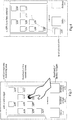
- Fig. 3 is an illustrative diagram showing that the user clicks any icon in the edit mode.
- a top part (i.e., the second preset area) of the screen is a text prompt area/removing area (removing bar)
- a middle part of the screen is a thumbnail of the current screen for displaying APP icons on the current screen, which icons may be edited by the user
- a bottom part of the screen i.e., the first preset area
- Widget such as folders, plug-ins or desktop widgets
- the buffer region is a buffer space for storing one or more icons to be arranged selected by the user, and is used to assist the user to perform a batch process for the icons, i.e., to enter a batch arranging mode.
- the triggering condition of the batch arranging mode is that any icon is clicked by the user in the edit mode.
- Fig. 4 is a diagram showing an effect of triggering the batch arranging mode.
- the first preset area is replaced so as to display a list of the selected APPs, and in order to improve user experience, an animation showing that a first icon selected by the user falls into the first preset area is output.
- S203 a plurality of icons selected by the user are continually received, are marked as icons to be arranged and are stored in the buffer region.
- the step of marking the plurality of icons selected by the user as the icons to be arranged may adopt the following manner:
- the icons are remarked in order of the sequence that the icons are selected by the user.
- Fig. 5 is a diagram showing a display effect that the user selects icons to be arranged of a plurality of APPs.
- icons on the desktop include at least the following two types: an APP icon and a folder icon.
- one folder icon which facilitates the user to create a folder on the desktop, is also displayed in the first preset area.
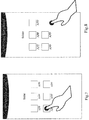
- Fig. 6 is a diagram showing a display effect that the user clicks the folder icon in the batch arranging mode.
- step S203 may be as follows:
- Fig. 7 is a diagram showing a display effect that the user selects icons of n APPs.
- the user may click a blank area (a display area of the folder except areas occupied by APP icons and a folder title) in the display area of the folder to close the folder.
- a blank area a display area of the folder except areas occupied by APP icons and a folder title
- Fig. 8 is an illustrative diagram showing an operation of closing the folder in the batch arranging mode of the icons.
- the embodiments provide various arranging manners, so as to perform different arranging operations on the icons to be arranged according to different arranging instructions.
- the above arranging instructions at least include:
- the clicked icons to be arranged are filled into the first empty space on the current screen as a target icon, and the clicked icons to be arranged are removed from the buffer region (the display of the clicked icons to be arranged in the first preset area is also cancelled).
- the form of clicking the icon so as to be filled into the first empty space may be as follows: the clicked icon to be arranged moves up to the first empty space on the current screen from the first preset area.
- the empty space means an area on which no icon is placed in the display area on the screen.
- Fig. 9 is a diagram showing a display effect that a single icon is moved.
- the long-pressed icon is set as the target icon, and the second preset area is set to display the removing bar which is used to remove icons to be arranged. If the user drags the target icon to the display area of the removing bar, the target icon is removed and the APP corresponding to the target icon is uninstalled.
- Fig. 10 is a diagram showing a display effect that a certain icon to be arranged is long pressed.
- the empty space may also be filled or the location may be filled through inserting and pushing.
- the inserting and pushing means that the icons to be arranged in the target icon are continuously inserted into the location on the desktop selected by the user (between two icons), if there is no empty space between the two icons or the empty spaces between the two icons are not enough, the two icons and adjacent icons are pushed forward or backward.
- the icon is firstly pushed backward to provide an empty space for the target icon.
- the icons in the buffer region may be displayed through horizontal sliding on the first preset area in any arranging process.
- the plurality of icons should be selected firstly.
- the manner of triggering each of the plurality of icons to be selected may be performed through two-finger pinch on the first preset area.
- each of the plurality of icons to be selected is not limited to the two-finger pinch on the first preset area, but may be any preset manner, such as pushing the icons to be arranged in the first preset area by one finger along an edge of the screen, and shaking.
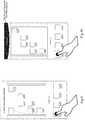
- Fig. 11 is a diagram showing a display effect that the two-finger pinch is performed on the first preset area so as to select a plurality of icons to be arranged.
- Fig. 12 is a diagram showing a display effect that the plurality of icons to be arranged are selected.
- the selected plurality of icons are shown as n stacked icons, and the n stacked icons are set as the target icon, wherein n is the number of the selected icons to be arranged.
- the moving of a plurality of icons at least includes the following three manners.
- the first manner at least includes the following two cases.
- the icons to be arranged included in the target icon are filled into the empty spaces on the current screen in order of the sequence that the icons are selected by the user (the sequence selected in step S203).
- Fig. 13 is a diagram showing a display effect that the target icon including the plurality of icons to be arranged is clicked.
- the method further includes determining whether the empty spaces on the current screen are enough to arrange the plurality of icons to be arranged included in the target icon, when filling the empty spaces.
- the desktop reverts to the edit mode after filling the target icon is completed.
- Fig. 14 is a diagram showing a display effect that the plurality of icons to be arranged have been filled when the empty spaces are enough.
- the icons are filled in order of the sequence that the icons are selected by the user.
- the icons which cannot be filled into the empty spaces fall back to the first preset area; meanwhile, the second preset area displays the number of the icons to be arranged which cannot be filled into the empty spaces.
- Fig. 15 is a diagram showing that the plurality of icons to be arranged are filled when the empty spaces are not enough.
- the target icon is filled into the space between the icons on the desktop through inserting and pushing.
- the inserting and pushing means a plurality of icons to be arranged of the target icon are continuously inserted into the location selected by the user on the desktop (between two icons), and if there is no empty space between the two icons or the empty space between two icons are not enough, the two icons and adjacent icons are pushed forward or backward.
- the icon is firstly pushed backward to provide an empty space for the target icon.
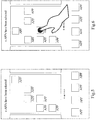
- Fig. 16 is an illustrative diagram showing that an insert location for the target icon is selected on the screen through dragging.
- Fig. 17 is an illustrative diagram showing that the icons are filling into a location of the finger through inserting and pushing.
- the target icon is long pressed by the user (i.e., pressed over the preset time) and the target icon is dragged to the location occupied by an APP icon in the display area, a folder with a preset name is generated and the icons to be arranged included in the target icon and the APP icon are put into the folder with the preset name.
- Fig. 18 is an illustrative diagram showing an operation that the target icon is dragged to an area occupied by an icon.
- Fig. 19 is an illustrative diagram showing a display effect that the folder is generated through overlaying.
- the present disclosure also provides the removing of a plurality of icons, which may be as follows: if the target icon is long pressed by the user (i.e., pressed over the preset time), a removing bar is displayed at the second preset area (i.e., the top part of the screen).
- the user is prompted to determine whether the APP corresponding to the target icon is uninstalled.
- Fig. 20 is a diagram showing a display effect that the user drags the target icon to the removing bar.
- Fig. 21 is an illustrative diagram showing an effect of the prompt for removing.
- the target icon When receiving an instruction of confirming the removing from the user, the target icon is removed and the APP corresponding to the target icon is uninstalled.
- the target icon When receiving an instruction of cancelling the removing from the user, the target icon is reverted to the first preset area.
- the widget having been arranged on the screen cannot be operated in the batch arranging mode.
- Fig. 22 is a diagram showing a display effect that the user clicks the widget in the batch arranging mode.
- the buffer region for storing the icons to be arranged may be created to allow arranging operation for a plurality of icons, so that the operation for arranging icons is easy and timesaving; meanwhile, the user may go back on his words during the arranging process of a plurality of icons since the buffer region may temporarily store the icons to be arranged selected by the user, for example, it is unnecessary for the user to arrange the plurality of icons to be arranged selected by the user at a certain location, such that the operation for arranging icons becomes more humane.
- an apparatus for arranging icons is provided by the embodiments of the present disclosure.
- the apparatus includes:
- the apparatus further includes:
- the marking module 302 includes:
- a first operating unit is configured to mark the at least one icon selected by the user as the icons to be arranged in order of a sequence that icons are selected by the user and to store the icons to be arranged in the buffer region, and to display the icons selected by the user in the first preset area in order of the sequence that icons are selected by the user.
- the step of marking the icon selected by the user as the icons to be arranged and storing them in the buffer region adopts the following manner:
- the apparatus further includes:
- the arranging module 303 is configured, if the icon to be arranged in the first preset area is clicked, to place the clicked icons in the first empty space on the desktop as the target icon.
- the arranging module 303 includes:
- the arranging module 303 includes:
- the target icon is filled into the empty spaces on the desktop in order of the sequence that the icons are selected by the user:
- the preset event may be an event that two contacts moves relative to one another occurred in the first preset area; or an event that a single contact unilaterally moves occurred in the first preset area.
- the apparatus further includes:
- the buffer region for storing the icons to be arranged is created to allow arranging operation of a plurality of icons, so that the operation for arranging icons is easy and timesaving; meanwhile, the user may go back on his words during the arranging process of a plurality of icons since the buffer region may temporarily store the icons to be arranged selected by the user, for example, it is unnecessary for the user to arrange the selected plurality of icons to be arranged on a certain location, so that the operation for arranging icons becomes more humane.
- the embodiments of the present disclosure also provides a device, which includes:
- the one or more modules may be further configured to have the following functions:
- the buffer region is created, the icons selected by the user are marked as icons to be arranged and stored in the buffer region:
- the at least one icon selected by the user is marked as the icons to be arranged, is stored in the buffer region and is displayed in the first preset area:
- the icon selected by the user is a folder icon
- the icon selected by the user is marked as the icons to be arranged and stored in the buffer region:
- the one or more modules also may be configured to have the following functions:
- an arranging operation corresponding to an arranging instruction issued by the user is performed on the icons to be arranged in the buffer region according to the arranging instruction:
- the arranging operation corresponding to the arranging instruction issued by the user is performed on the icons to be arranged in the buffer region according to the arranging instruction:
- the arranging operation corresponding to the arranging instruction issued by the user is performed on the icons to be arranged in the buffer region according to the arranging instruction:
- the target icon is filled into the empty spaces on the desktop one by one in order of the sequence that the icons are selected by the user:
- the preset event may be an event that two contacts moves relative to one another occurred in the first preset area; or an event that a single contact unilaterally moves occurred in the first preset area.
- the one or more modules may be configured to also have the following function:
- the buffer region for storing the icons to be arranged is created to allow arranging operation of a plurality of icons, so that the operation for arranging icons is easy and timesaving; meanwhile, the user may go back on his words during the arranging process of a plurality of icons since the buffer region may temporarily store the icons to be arranged selected by the user, so that the operation for arranging icons becomes more humane.
- the embodiment of the present disclosure also provides a nonvolatile readable storage medium including one or more programs. If the one or more programs are applied to a device with a touch screen, the device will have the function of:
- the one or more programs may allow the device to have the function of:
- the buffer region is created, icons selected by the user are marked as icons to be arranged and stored in the buffer region:
- At least one icon selected by the user is marked as the icons to be arranged, is stored in the buffer region and is displayed in the first preset area:
- the icon selected by the user is a folder icon
- the icon selected by the user is marked as the icons to be arranged and is stored in the buffer region:
- the one or more programs may allow the device to have the function of:
- an arranging operation corresponding to an arranging instruction issued by the user is performed on the icons to be arranged in the buffer region according to the arranging instruction:
- an arranging operation corresponding to an arranging instruction issued by the user is performed on the icons to be arranged in the buffer region according to the arranging instruction:
- the arranging operation corresponding to the arranging instruction issued by the user is performed on the icons to be arranged in the buffer region according to the arranging instruction:
- the target icon is filled into the empty spaces on the desktop in order of the sequence that the icons are selected by the user:
- the preset event may be an event that two contacts moves relative to one another occurred in the first preset area; or an event that a single contact unilaterally moves occurred in the first preset area.
- the one or more programs may allow the apparatus to have the function of:
- the buffer region for storing the icons to be arranged is created to allow arranging operation of a plurality of icons, so that the operation for arranging icons is easy and timesaving; meanwhile, the user may go back on his words during the arranging process of a plurality of icons since the buffer region may temporarily store the icons to be arranged selected by the user, so that the operation for arranging icons becomes more humane.
- the person skilled in the art should have a good understanding that the embodiments of the present disclosure may be achieved by hardware or combination of software and a necessary general hardware platform. Based on the understanding, the technical solutions of the embodiments of the present disclosure may be embodied as a software product.
- the software product may be stored in a nonvolatile storage medium (e.g., CD-ROM, USB flash disk, mobile HDD) and includes several commands to allow a computer device (e.g., personal computer, server, or network device) to perform the methods according to embodiments of the present disclosure.
- a computer device e.g., personal computer, server, or network device
- modules in the apparatus may be distributed in the apparatus according to the corresponding description, or may be changed to be located in one or more apparatuses.
- the modules in the above embodiments may be integrated as a single module or may be further divided into a plurality of sub-modules.
Landscapes
- Engineering & Computer Science (AREA)
- General Engineering & Computer Science (AREA)
- Theoretical Computer Science (AREA)
- Human Computer Interaction (AREA)
- Physics & Mathematics (AREA)
- General Physics & Mathematics (AREA)
- Computer Networks & Wireless Communication (AREA)
- Signal Processing (AREA)
- User Interface Of Digital Computer (AREA)
Abstract
Description
- The present application claims the priority to and the benefit of Chinese Patent Application No.
201310120284.3, filed on April 8, 2013 - The present disclosure relates to the field of mobile terminal, and particularly to a method, an apparatus and a device for arranging icons.
- With development of smart mobile terminals, users are increasingly relying on smart mobile terminals. Due to intelligence and convenience of the smart mobile terminals, various APPs (Applications), such as office APPs, game APPs, photo APPs and the like, are provided on Internet for being installed in the smart mobile terminals so as to perform various functions.
- After the APP is installed by a user, an icon is generated on a desktop of the smart terminal for being clicked by the user to start the APP. At present, the user generally installs a great deal of APPs in the mobile terminal. Therefore, there are a great deal of icons on the desktop. The operating system of the mobile terminal has the function of arranging icons, such as moving icons, deleting icons, collapsing icons into a folder.
- However, the conventional operation of arranging icons is bothersome. Taking the operation of moving icons as an example, if the user wants to simultaneously move a plurality of icons to be arranged on the screen, the user needs to firstly touch the desktop of the mobile terminal to enter an edit mode, long press an icon to be arranged to select the icon, slides the screen with another hand, and then arrange the icon to be arranged to a target location when a target screen is shown. Such operation only can move the icons one by one.
- Therefore, the conventional method for arranging icons can only perform operation to a single icon to be arranged, and the operation for arrangement is complex and the operation is time-consuming.
- The embodiments of the present disclosure provide a method, an apparatus and a device for arranging icons.
- In one aspect, the present disclosure provides a method for arranging icons, which method includes:
- creating a buffer region, marking icons selected by a user as icons to be arranged and storing the icons to be arranged in the buffer region; and
- performing an arranging operation corresponding to an arranging instruction issued by the user on the icons to be arranged in the buffer region according to the arranging instruction.
- In another aspect, the present disclosure provides an apparatus for arranging icons, which apparatus includes:
- a creating module configured to create a buffer region;
- a marking module configured to mark icons selected by a user as icons to be arranged and storing the icons to be arranged in the buffer region; and
- an arranging module configured to perform an arranging operation corresponding to an arranging instruction issued by the user on the icons to be arranged in the buffer region according to the arranging instruction.
- In further another aspect, the present disclosure provides a device, which device includes:
- one or more processors;
- a memory;
- a displaying screen; and
- one or more modules stored in the memory and configured to be performed by the one or more processors, the one or more modules are configured to have the following functions:
- creating a buffer region, marking icons selected by a user as icons to be arranged and storing the icons to be arranged in the buffer region; and
- performing an arranging operation corresponding to an arranging instruction issued by the user on the icons to be arranged in the buffer region according to the arranging instruction.
- It should be understood that the above general description and the following detailed description are for illustrative purpose only, rather than to limit the present disclosure.
- The embodiments of the present disclosure at least have the following advantages.
- Through the method, the apparatus and the device for arranging icons in the embodiments of the present disclosure, the buffer region for storing the icons to be arranged is created to allow arranging operation of a plurality of icons, so that the operation for arranging icons is easy and timesaving; meanwhile, the user may go back on his words during the arranging process of a plurality of icons since the buffer region may temporarily store the icons to be arranged selected by the user, so that the operation for arranging icons becomes more humane.
-
-
Fig. 1 is an illustrative flow chart showing one method for arranging icons provided by an embodiment of the present disclosure; -
Fig. 2 is an illustrative flow chart showing another method for arranging icons provided by an embodiment of the present disclosure; -
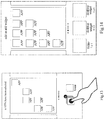
Fig. 3 is an illustrative diagram showing that a user clicks any icon in an edit mode provided by an embodiment of the present disclosure; -
Fig. 4 is a diagram showing a display effect that a batch arranging mode is triggered provided by an embodiment of the present disclosure; -
Fig. 5 is a diagram showing a display effect that the user selects icons to be arranged of a plurality of APPs provided by an embodiment of the present disclosure; -
Fig. 6 is a diagram showing a display effect that the user clicks a folder icon in the batch arranging mode provided by an embodiment of the present disclosure; -
Fig. 7 is a diagram showing a display effect that the user selects icons to be arranged of n APPs provided by an embodiment of the present disclosure; -
Fig. 8 is an illustrative diagram showing an operation of closing the folder in the batch arranging mode of the icons provided by an embodiment of the present disclosure; -
Fig. 9 is a diagram showing a display effect that a single icon is moved provided by an embodiment of the present disclosure; -
Fig. 10 is a diagram showing a display effect that a certain icon to be arranged is long pressed provided by an embodiment of the present disclosure; -
Fig. 11 is a diagram showing a display effect that two-finger pinch is performed on a first preset area so as to select a plurality of icons to be arranged provided by an embodiment of the present disclosure; -
Fig. 12 is a diagram showing a display effect that the plurality of icons to be arranged are selected provided by an embodiment of the present disclosure; -
Fig. 13 is a diagram showing a display effect that a target icon including the plurality of icons to be arranged is clicked provided by an embodiment of the present disclosure; -
Fig. 14 is a diagram showing a display effect that the plurality of icons to be arranged have been filled into empty spaces when the empty spaces are enough provided by an embodiment of the present disclosure; -
Fig. 15 is a diagram showing a display effect that the plurality of icons to be arranged are filled into the empty spaces when the empty spaces are not enough provided by an embodiment of the present disclosure; -
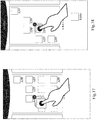
Fig. 16 is an illustrative diagram showing that an insert location for the target icon is selected on the screen through dragging provided by an embodiment of the present disclosure; -
Fig. 17 is an illustrative diagram showing that the icons are filled at the location of the finger through inserting and pushing provided by an embodiment of the present disclosure; -
Fig. 18 is an illustrative diagram showing an operation that the target icon is dragged to an area occupied by an icon provided by an embodiment of the present disclosure; -
Fig. 19 is an illustrative diagram showing an operation effect that a folder is generated through overlaying provided by an embodiment of the present disclosure; -
Fig. 20 is a diagram showing a display effect that the user drags the target icon to a removing bar provided by an embodiment of the present disclosure; -
Fig. 21 is an illustrative diagram showing an effect of prompting for removing provided by an embodiment of the present disclosure; -
Fig. 22 is a diagram showing a display effect that the user clicks widget in the batch arranging mode provided by an embodiment of the present disclosure; and -
Fig. 23 is an illustrative diagram of a structure of an apparatus for arranging icons provided by an embodiment of the present disclosure. - Some specific embodiments of the present disclosure are illustrated through the above mentioned drawings, followed by description in more detail hereinafter. Such drawings and description are provided to explain the concept of the present disclosure for those skilled in the art with reference to particular embodiments, rather than to limit the scope of the disclosed conception in any manner.
- Hereinafter, the implementations of methods, apparatuses and devices for arranging icons provided by the embodiments of the present disclosure will be described in detail with reference to the accompanying drawings.
- Firstly, an embodiment of the present disclosure provides a method for arranging icons, as shown in
Fig. 1 , the method includes the following steps. - S101: a buffer region is created, icons selected by a user are marked as icons to be arranged and are stored in the buffer region.
- As one preferable implementation, before step S101, the method may further include:
- making a desktop enter an edit mode and setting a first preset area on the desktop as a plug-in selecting area for selection by the user.
- Preferably, step S101 may adopt the following manner:
- when it is detected that any icon on the desktop is clicked, the buffer region is created and the first preset area on the desktop is set as a display area for the icons to be arranged; and
- at least one icon selected by the user is marked as the icons to be arranged, is stored in the buffer region, and is displayed in the first preset area.
- Preferably, the step of marking at least one icon selected by the user as the icons to be arranged, storing the icons to be arranged in the buffer region, and displaying them in the first preset area may adopt the following manner:
- at least one icon selected by the user is marked as the icons to be arranged, and is stored in the buffer region in order of a sequence that icons are selected by the user, and the at least one icon is displayed in the first preset area one by one in order of the sequence that icons are selected by the user.
- Preferably, if the icon selected by the user is a folder icon, the step of marking the icon selected by the user as the icons to be arranged and storing them in the buffer region may adopt the following manner:
- all icons in the folder are displayed, and at least one icon in the folder selected by the user is marked as the icons to be arranged and stored in the buffer region.
- Preferably, after the step of marking at least one icon in the folder selected by the user as the icons to be arranged and storing them in the buffer region, the method may further include:
- closing the folder if it is detected that any area in the display area of the folder other than the display area of all the icons in the folder and a title of the folder is clicked.
- S102: an arranging operation corresponding to an arranging instruction issued by the user is performed on the icons to be arranged in the buffer region according to the arranging instruction.
- Preferably, step S102 may adopt the following manner:
- if the icon to be arranged in the first preset area is clicked, the clicked icon is placed on the first empty space on the desktop as a target icon.
- Preferably, step S102 may also adopt the following manner:
- if any icon to be arranged in the first preset area has been pressed over a first preset time, the icon which has been pressed over the first preset time is set as the target icon, and a second preset area on the desktop is set as a display area for a removing bar;
- if the target icon is dragged to the second preset area, the target icon is removed and an APP corresponding to the target icon is uninstalled;
- if the target icon is dragged to a location without an icon on the desktop, the location is filled with the target icon, or the target icon is filled into the location through inserting and pushing; and
- if the target icon is dragged to a region occupied by an icon on the desktop, a folder with a preset name is generated at the region occupied by the icon, and both of the icon occupying the region and the target icon are put into the folder with the preset name.
- In embodiments of the present disclosure, the inserting and pushing means continuously inserting a plurality of icons to be arranged of the target icon into the location (between two icons) selected by the user on the desktop, and if no empty space is existing between the two icons or the empty spaces between two icons are not enough, the two icons and adjacent icons are pushed forward or backward, which will not be repeated hereinafter.
- In the present embodiment, preferably, the icon is firstly pushed backward to provide an empty space for the target icon.
- Preferably, step S102 may also adopt the following manner:
- if a preset event is triggered, a number of all the icons to be arranged stored in the buffer region is displayed, and all the icons to be arranged stored in the buffer region are set as the target icon;
- if the target icon is clicked, the target icon is filled into the empty spaces on the desktop one by one in order of the sequence that the icons are selected by the user;
- if the target icon is pressed over a second preset time, the second preset area is set as the display area of the removing bar, and if the target icon is dragged to the second preset area, the target icon is removed and an APP corresponding to the target icon is uninstalled;
- if the target icon is dragged to the region occupied by an icon on the desktop, a folder with a preset name is generated at the region occupied by the icon, and both of the icon occupying the region and the target icon are put into the folder with the preset name; and
- if the target icon is dragged to the location without an icon on the desktop, the location (i.e., the location of the user's finger, which may be an empty space on the desktop or space between any two icons) is filled with the target icon, or the target icon is filled into the location through inserting and pushing.
- Preferably, the step of filling the target icon into the empty spaces on the desktop one by one in order of the sequence that the icons are selected by the user may adopt the following manner:
- it is determined that whether the empty spaces on the desktop are enough;
- if the empty spaces on the desktop are enough, the target icon is filled into the empty spaces on the desktop one by one in order of the sequence that the icons are selected by the user; and
- if the empty spaces on the desktop are not enough, icons to be filled are determined according to a number of the empty spaces and the sequence that the icons are selected by the user, and the icons to be filled are filled into the empty spaces on the desktop one by one in order of the sequence that the icons are selected by the user.
- In embodiments of the present disclosure, the preset event means an event that two contacts moves relative to one another occurred in the first preset area (such as two-finger pinch), or means an event that a single contact unilaterally moves occurred in the first preset area (such as pushing the icons to be arranged in the first preset area by one finger along an edge of the screen). However, the preset event is not limited to the above two events.
- Preferably, after step S102, the method may further include:
- removing the icon to be arranged which has been arranged from the buffer region.
- According to the method for arranging icons provided by the embodiment of the present disclosure, the buffer region for storing the icons to be arranged is created to allow arranging operation of a plurality of icons, so that the operation for arranging icons is easy and timesaving; meanwhile, the user may go back on his words during the arranging process of a plurality of icons since the buffer region may temporarily store the icons to be arranged selected by the user, so that the operation for arranging icons becomes more humane.
- The embodiment of the present disclosure also discloses another method for arranging icons, which may be implemented in a desktop management APP of a mobile terminal. Taking an Android phone as an example, as shown in
Fig. 2 , the method may include the following steps. - S201: a desktop enters an edit mode.
- The above edit mode is the same as that in the conventional art, i.e., the desktop enters an editable state. A user may perform two-finger pinch on the screen such that the desktop enters the edit mode.
- Additionally, entering the edit mode may be triggered by any manner preset by a developer or the user, for example, by long pressing a blank area on the desktop or selecting a menu option to enter the edit mode.
-
Fig. 3 is an illustrative diagram showing that the user clicks any icon in the edit mode. InFig. 3 , a top part (i.e., the second preset area) of the screen is a text prompt area/removing area (removing bar), a middle part of the screen is a thumbnail of the current screen for displaying APP icons on the current screen, which icons may be edited by the user, and a bottom part of the screen (i.e., the first preset area) is thumbnails of desktop widgets for displaying Widget (such as folders, plug-ins or desktop widgets) to be selected by the user. - S202: if the user clicks any icon on the desktop, a buffer region is created, and the bottom part of the screen is set as a display area for the buffer region.
- The buffer region is a buffer space for storing one or more icons to be arranged selected by the user, and is used to assist the user to perform a batch process for the icons, i.e., to enter a batch arranging mode.
- The triggering condition of the batch arranging mode is that any icon is clicked by the user in the edit mode.
- It should be explained that in order to facilitate the user to arrange the icons in batch mode intuitively, after the batch arranging mode is triggered, the thumbnails of desktop widgets in the first preset area are replaced with the display area of the corresponding buffer region, the icons to be arranged stored in the buffer region are displayed on the display area, and icons to be arranged in the thumbnail of the current screen are removed.
-
Fig. 4 is a diagram showing an effect of triggering the batch arranging mode. InFig. 4 , the first preset area is replaced so as to display a list of the selected APPs, and in order to improve user experience, an animation showing that a first icon selected by the user falls into the first preset area is output. - S203: a plurality of icons selected by the user are continually received, are marked as icons to be arranged and are stored in the buffer region.
- The step of marking the plurality of icons selected by the user as the icons to be arranged may adopt the following manner:
- the icons selected by the user are stored in the buffer region, and the display of these icons are cleaned from the screen.
- The form of the above marking process is as follows:
- the icons to be arranged selected by the user fall into the first preset area one by one.
- As one preferred implementation, during marking the icons to be arranged, the icons are remarked in order of the sequence that the icons are selected by the user.
-
Fig. 5 is a diagram showing a display effect that the user selects icons to be arranged of a plurality of APPs. - It should be explained that in the relevant technology, icons on the desktop include at least the following two types: an APP icon and a folder icon.
- As one preferred implementation, one folder icon, which facilitates the user to create a folder on the desktop, is also displayed in the first preset area.
-
Fig. 6 is a diagram showing a display effect that the user clicks the folder icon in the batch arranging mode. - If the icon selected by the user is a folder, step S203 may be as follows:
- all the icons in the folder are displayed, the icons in the folder selected by the user are marked as icons to be arranged and are stored in the buffer region; preferably, the top part of the screen displays the number of the APP icons selected by the user at the same time.
-
Fig. 7 is a diagram showing a display effect that the user selects icons of n APPs. - As one preferred implementation, if the selection of icons in the folder is finished, the user may click a blank area (a display area of the folder except areas occupied by APP icons and a folder title) in the display area of the folder to close the folder.
-
Fig. 8 is an illustrative diagram showing an operation of closing the folder in the batch arranging mode of the icons. - S204: an arranging operation corresponding to an arranging instruction issued by the user is performed on the icons to be arranged in the buffer region according to the arranging instruction.
- To meet various arranging requirements of the user, the embodiments provide various arranging manners, so as to perform different arranging operations on the icons to be arranged according to different arranging instructions.
- Preferably, the above arranging instructions at least include:
- moving a single icon, removing a single icon, moving a plurality of icons, removing a plurality of icons, etc.
- Hereinafter, the description will be given by taking the above four instructions as examples.
- If the user clicks (e.g., click once) the icons to be arranged in the first preset area, the clicked icons to be arranged are filled into the first empty space on the current screen as a target icon, and the clicked icons to be arranged are removed from the buffer region (the display of the clicked icons to be arranged in the first preset area is also cancelled).
- Preferably, the form of clicking the icon so as to be filled into the first empty space may be as follows: the clicked icon to be arranged moves up to the first empty space on the current screen from the first preset area.
- The empty space means an area on which no icon is placed in the display area on the screen.
-
Fig. 9 is a diagram showing a display effect that a single icon is moved. - If the user long presses an icon (i.e., presses an icon over a preset time), the long-pressed icon is set as the target icon, and the second preset area is set to display the removing bar which is used to remove icons to be arranged. If the user drags the target icon to the display area of the removing bar, the target icon is removed and the APP corresponding to the target icon is uninstalled.
-
Fig. 10 is a diagram showing a display effect that a certain icon to be arranged is long pressed. - Additionally, when the long-pressed icon is dragged to an empty space on the desktop or a location between any two icons, the empty space may also be filled or the location may be filled through inserting and pushing.
- The inserting and pushing means that the icons to be arranged in the target icon are continuously inserted into the location on the desktop selected by the user (between two icons), if there is no empty space between the two icons or the empty spaces between the two icons are not enough, the two icons and adjacent icons are pushed forward or backward.
- In the present embodiment, preferably, the icon is firstly pushed backward to provide an empty space for the target icon.
- It should be explained that the icons in the buffer region may be displayed through horizontal sliding on the first preset area in any arranging process.
- In the process of moving a plurality of icons, the plurality of icons should be selected firstly. The manner of triggering each of the plurality of icons to be selected may be performed through two-finger pinch on the first preset area.
- It should be explained that the manner of triggering each of the plurality of icons to be selected is not limited to the two-finger pinch on the first preset area, but may be any preset manner, such as pushing the icons to be arranged in the first preset area by one finger along an edge of the screen, and shaking.
-
Fig. 11 is a diagram showing a display effect that the two-finger pinch is performed on the first preset area so as to select a plurality of icons to be arranged. -
Fig. 12 is a diagram showing a display effect that the plurality of icons to be arranged are selected. - Preferably, as shown in
Fig. 12 , after the plurality of icons to be arranged are selected, the selected plurality of icons are shown as n stacked icons, and the n stacked icons are set as the target icon, wherein n is the number of the selected icons to be arranged. - It should be explained that the moving of a plurality of icons at least includes the following three manners.
- The first manner at least includes the following two cases.
- a) If the target icon is clicked by the user, the icons to be arranged included in the target icon are filled into the empty spaces on the current screen in order of the sequence that the icons are selected by the user (the sequence selected in step S203).
-
Fig. 13 is a diagram showing a display effect that the target icon including the plurality of icons to be arranged is clicked. - Preferably, the method further includes determining whether the empty spaces on the current screen are enough to arrange the plurality of icons to be arranged included in the target icon, when filling the empty spaces.
- If the empty spaces are enough, the desktop reverts to the edit mode after filling the target icon is completed.
-
Fig. 14 is a diagram showing a display effect that the plurality of icons to be arranged have been filled when the empty spaces are enough. - If the empty spaces are not enough, the icons are filled in order of the sequence that the icons are selected by the user. The icons which cannot be filled into the empty spaces fall back to the first preset area; meanwhile, the second preset area displays the number of the icons to be arranged which cannot be filled into the empty spaces.
-
Fig. 15 is a diagram showing that the plurality of icons to be arranged are filled when the empty spaces are not enough. - b) if the target icon is long pressed by the user (i.e., pressed over the preset time) and the target icon is dragged to the thumbnail area on the desktop, the target icon is filled into the space between the icons on the desktop through inserting and pushing.
- Preferably, the inserting and pushing means a plurality of icons to be arranged of the target icon are continuously inserted into the location selected by the user on the desktop (between two icons), and if there is no empty space between the two icons or the empty space between two icons are not enough, the two icons and adjacent icons are pushed forward or backward.
- In the present embodiment, preferably, the icon is firstly pushed backward to provide an empty space for the target icon.
-
Fig. 16 is an illustrative diagram showing that an insert location for the target icon is selected on the screen through dragging. -
Fig. 17 is an illustrative diagram showing that the icons are filling into a location of the finger through inserting and pushing. - It should be explained that in the case (b), it is still needed to determine whether the empty spaces on the current screen are enough to place the plurality of icons included in the target icon; if the empty spaces are enough, the desktop returns to a home page of the edit mode; if the empty spaces are not enough, the icons are filled into the space through inserting and pushing in priority of the sequence that the icons are selected by the user, the icons which cannot be filled into the space fall back to the first preset area, meanwhile the second preset area displays the number of the icons to be arranged which cannot be filled into the space. The conditions that the space is enough or is not enough are similar to those shown in
Figs. 13 and 14 , which will not be repeated hereinafter. - If the target icon is long pressed by the user (i.e., pressed over the preset time) and the target icon is dragged to the location occupied by an APP icon in the display area, a folder with a preset name is generated and the icons to be arranged included in the target icon and the APP icon are put into the folder with the preset name.
-
Fig. 18 is an illustrative diagram showing an operation that the target icon is dragged to an area occupied by an icon. -
Fig. 19 is an illustrative diagram showing a display effect that the folder is generated through overlaying. - The present disclosure also provides the removing of a plurality of icons, which may be as follows: if the target icon is long pressed by the user (i.e., pressed over the preset time), a removing bar is displayed at the second preset area (i.e., the top part of the screen).
- If the target icon is dragged to the second preset area by the user, the user is prompted to determine whether the APP corresponding to the target icon is uninstalled.
-
Fig. 20 is a diagram showing a display effect that the user drags the target icon to the removing bar. -
Fig. 21 is an illustrative diagram showing an effect of the prompt for removing. - When receiving an instruction of confirming the removing from the user, the target icon is removed and the APP corresponding to the target icon is uninstalled.
- When receiving an instruction of cancelling the removing from the user, the target icon is reverted to the first preset area.
- Preferably, the widget having been arranged on the screen cannot be operated in the batch arranging mode.
-
Fig. 22 is a diagram showing a display effect that the user clicks the widget in the batch arranging mode. - According to the method for arranging icons provided by the embodiments in the present disclosure, the buffer region for storing the icons to be arranged may be created to allow arranging operation for a plurality of icons, so that the operation for arranging icons is easy and timesaving; meanwhile, the user may go back on his words during the arranging process of a plurality of icons since the buffer region may temporarily store the icons to be arranged selected by the user, for example, it is unnecessary for the user to arrange the plurality of icons to be arranged selected by the user at a certain location, such that the operation for arranging icons becomes more humane.
- As shown in
Fig. 23 , an apparatus for arranging icons is provided by the embodiments of the present disclosure. The apparatus includes: - a creating
module 301 configured to create a buffer region; - a
marking module 302 configured to mark icons selected by a user as icons to be arranged and store the icons to be arranged in the buffer region; and - an arranging
module 303 configured to perform an arranging operation corresponding to an arranging instruction issued by the user on the icons to be arranged in the buffer region according to the arranging instruction. - Preferably, the apparatus further includes:
- an edit entering module configured, before the creating module creates the buffer region, to make a desktop enter an edit mode and to set a first preset area on the desktop as a plug-in selecting area for selection by the user.
- Preferably, the marking
module 302 includes: - a creating unit configured, if it is detected that any icon on the desktop is clicked, to create the buffer region and to set the first preset area on the desktop as a display area for the icons to be arranged; and
- a display unit configured to mark at least one icon selected by the user as the icons to be arranged, to store the icons to be arranged in the buffer region, and to display the icons to be arranged in the first preset area.
- Preferably, a first operating unit is configured to mark the at least one icon selected by the user as the icons to be arranged in order of a sequence that icons are selected by the user and to store the icons to be arranged in the buffer region, and to display the icons selected by the user in the first preset area in order of the sequence that icons are selected by the user.
- Preferably, if the icon selected by the user is a folder icon, the step of marking the icon selected by the user as the icons to be arranged and storing them in the buffer region adopts the following manner:
- all icons in the folder are displayed, and at least one icon in the folder selected by the user is marked as the icons to be arranged and stored in the buffer region.
- Preferably, the apparatus further includes:
- a closing module configured, after the marking module has marked the at least one icon in the folder selected by the user as the icons to be arranged and stored the icons to be arranged in the buffer region, to close the folder if it is detected that any area in the display area of the folder other than areas occupied by each icon and a title of the folder is clicked.
- Preferably, the arranging
module 303 is configured, if the icon to be arranged in the first preset area is clicked, to place the clicked icons in the first empty space on the desktop as the target icon. - Preferably, the arranging
module 303 includes: - a first triggering unit configured, if any icon to be arranged in the first preset area is pressed over a preset time, to set the icon to be arranged which has been pressed over the preset time as a target icon, and to set a second preset area on the desktop as a display area for a removing bar;
- a first arranging unit configured, if the target icon is dragged to the second preset area, to remove the target icon and uninstall APP corresponding to the target icon;
- a second arranging unit configured, if the target icon is dragged to a location without an icon on the desktop, to fill the target icon into the location or fill the target icon into the location through inserting and pushing;
- a third arranging unit configured, if the target icon is dragged to a region occupied by an icon on the desktop, to generate a folder with a preset name at the region occupied by the icon and to put both of the icon occupying the region and the target icon into the folder with the preset name.
- Preferably, the arranging
module 303 includes: - a second triggering unit configured, if a preset event is triggered, to display a number of all the icons to be arranged stored in the buffer region and to set all the icons to be arranged stored in the buffer region as the target icon;
- a fourth arranging unit configured, if the target icon is clicked, to fill the target icon into the empty spaces on the desktop one by one in order of the sequence that the icons are selected by the user;
- a fifth arranging unit configured, if the target icon is pressed over the preset time, to set the second preset area as the display area of the removing bar, and if the target icon is dragged to the second preset area, to remove the target icon and uninstall the APPs corresponding to the target icon;
- a sixth arranging unit configured, if the target icon is dragged to the region occupied by an icon on the desktop, to generate the folder with the preset name at the region occupied by the icon, and to put the icon occupying the region and the target icon into the folder with the preset name; and
- a seventh arranging unit configured, if the target icon is dragged to the location without an icon on the desktop, to fill the target icon into the location or to fill the target icon into the location through inserting and pushing.
- Preferably, it may be achieved in the following manner that the target icon is filled into the empty spaces on the desktop in order of the sequence that the icons are selected by the user:
- it is determined that whether the empty spaces on the desktop is enough;
- if the empty spaces on the desktop are enough, the target icon is filled into the empty spaces on the desktop one by one in order of the sequence that the icons are selected by the user; and
- if the empty spaces on the desktop are not enough, icons to be filled are determined according to the number of the empty spaces and the sequence that the icons are selected by the user, and the icons to be filled are filled into the empty spaces on the desktop one by one in order of the sequence that the icons are selected by the user.
- Preferably, the preset event may be an event that two contacts moves relative to one another occurred in the first preset area; or an event that a single contact unilaterally moves occurred in the first preset area.
- The apparatus further includes:
- a removing module configured, after the arranging module performs the arranging operation corresponding to the arranging instruction issued by the user on the icons to be arranged in the buffer region according to the arranging instruction, to remove the icon to be arranged stored in the buffer region which has been arranged.
- According to the apparatus for arranging icons provided by the embodiment of the disclosure, the buffer region for storing the icons to be arranged is created to allow arranging operation of a plurality of icons, so that the operation for arranging icons is easy and timesaving; meanwhile, the user may go back on his words during the arranging process of a plurality of icons since the buffer region may temporarily store the icons to be arranged selected by the user, for example, it is unnecessary for the user to arrange the selected plurality of icons to be arranged on a certain location, so that the operation for arranging icons becomes more humane.
- Additionally, the embodiments of the present disclosure also provides a device, which includes:
- one or more processors;
- a memory;
- a display screen; and
- one or more modules stored in the memory and configured to be performed by the one or more processors, the one or more modules are configured to have the following functions:
- creating a buffer region, marking icons selected by a user as icons to be arranged and storing the icons to be arranged in the buffer region;
- performing an arranging operation corresponding to an arranging instruction issued by the user on the icons to be arranged in the buffer region according to the arranging instruction.
- Preferably, the one or more modules may be further configured to have the following functions:
- before the buffer region is created, making a desktop enter an edit mode and setting a first preset area on the desktop as a plug-in selecting area for selection by the user.
- Preferably, it may be achieved in the following manner that the buffer region is created, the icons selected by the user are marked as icons to be arranged and stored in the buffer region:
- when it is detected that any icon on the desktop is clicked, the buffer region is created and the first preset area on the desktop is set as a display area for the icons to be arranged; and
- at least one icon selected by the user is marked as the icons to be arranged, is stored in the buffer region, and is displayed in the first preset area.
- Preferably, it may be achieved in the following manner that the at least one icon selected by the user is marked as the icons to be arranged, is stored in the buffer region and is displayed in the first preset area:
- at least one icon selected by the user is marked as the icons to be arranged nd stored in the buffer region in order of the sequence that icons are selected by the user a, and is displayed in the first preset area in order of the sequence that icons are selected by the user.
- Preferably, it may be achieved in the following manner that if the icon selected by the user is a folder icon, the icon selected by the user is marked as the icons to be arranged and stored in the buffer region:
- all the icons in the folder are displayed, and at least one icon in the folder selected by the user is marked as the icons to be arranged and stored in the buffer region.
- Preferably, the one or more modules also may be configured to have the following functions:
- after at least one icon in the folder selected by the user is marked as the icons to be arranged and stored in the buffer region, closing the folder if it is detected that any area in the display area of the folder other than areas occupied by each icon and a title of the folder is clicked.
- Preferably, it may be achieved in the following manner that an arranging operation corresponding to an arranging instruction issued by the user is performed on the icons to be arranged in the buffer region according to the arranging instruction:
- if the icon to be arranged in the first preset area is clicked, the clicked icon is placed on the first empty space on the desktop as the target icon.
- Preferably, it may be achieved in the following manner that the arranging operation corresponding to the arranging instruction issued by the user is performed on the icons to be arranged in the buffer region according to the arranging instruction:
- if any icon to be arranged in the first preset area is pressed over a preset time, the icon which has been pressed over the preset time is set as the target icon, and a second preset area on the desktop is set as a display area for a removing bar;
- if the target icon is dragged to the second preset area, the target icon is removed and an APP corresponding to the target icon is uninstalled;
- if the target icon is dragged to a location without an icon on the desktop, the location is filled with the target icon, or the target icon is filled into the location through inserting and pushing; and
- if the target icon is dragged to a region occupied by an icon on the desktop, a folder with a preset name is generated at the region occupied by the icon and both of the icon occupying the region and the target icon are put into the folder with the preset name.
- Preferably, it may be achieved in the following manner that the arranging operation corresponding to the arranging instruction issued by the user is performed on the icons to be arranged in the buffer region according to the arranging instruction:
- if a preset event is triggered, a number of all the icons to be arranged stored in the buffer region is displayed, and all the icons to be arranged stored in the buffer region are set as the target icon;
- if the target icon is clicked, the target icon is filled into the empty spaces on the desktop one by one in order of the sequence that the icons are selected by the user;
- if the target icon is pressed over the preset time, the second preset area is set as the display area for the removing bar, and if the target icon is dragged to the second preset area, the target icon is removed and the APP corresponding to the target icon is uninstalled;
- if the target icon is dragged to the region occupied by an icon on the desktop, a folder with a preset name is generated at the region occupied by the icon and both of the icon occupying the region and the target icon are put into the folder with the preset name; and
- if the target icon is dragged to the location without an icon on the desktop, the location is filled by the target icon, or the target icon is filled into the location through inserting and pushing.
- Preferably, it may be performed in the following manner that the target icon is filled into the empty spaces on the desktop one by one in order of the sequence that the icons are selected by the user:
- it is determined that whether the empty spaces on the desktop is enough;
- if the empty spaces on the desktop are enough, the target icon is filled into the empty spaces on the desktop one by one in order of the sequence that the icons are selected by the user;
- if the empty spaces on the desktop are not enough, icons to be filled are determined according to the number of the empty spaces and the sequence that the icons are selected by the user, and the icons to be filled are filled into the empty spaces on the desktop one by one in order of the sequence that the icons are selected by the user.
- Preferably, the preset event may be an event that two contacts moves relative to one another occurred in the first preset area; or an event that a single contact unilaterally moves occurred in the first preset area.
- Preferably, the one or more modules may be configured to also have the following function:
- after the arranging operation corresponding to the arranging instruction issued by the user is performed on the icons to be arranged in the buffer region according to the arranging instruction, removing the icon to be arranged which has been arranged from the buffer region.
- According to the device in the embodiment of the disclosure, the buffer region for storing the icons to be arranged is created to allow arranging operation of a plurality of icons, so that the operation for arranging icons is easy and timesaving; meanwhile, the user may go back on his words during the arranging process of a plurality of icons since the buffer region may temporarily store the icons to be arranged selected by the user, so that the operation for arranging icons becomes more humane.
- Additionally, the embodiment of the present disclosure also provides a nonvolatile readable storage medium including one or more programs. If the one or more programs are applied to a device with a touch screen, the device will have the function of:
- creating a buffer region, marking icons selected by a user as icons to be arranged and storing the icons to be arranged in the buffer region; and
- performing an arranging operation corresponding to an arranging instruction issued by the user on the icons to be arranged in the buffer region according to the arranging instruction.
- Preferably, the one or more programs may allow the device to have the function of:
- making a desktop enter an edit mode and setting a first preset area on the desktop as a plug-in selecting area for selection by the user, before the buffer region is created.
- Preferably, it may be achieved in the following manner that the buffer region is created, icons selected by the user are marked as icons to be arranged and stored in the buffer region:
- when it is detected that any icon on the desktop is clicked, the buffer region is created and the first preset area on the desktop is set as a display area for the icons to be arranged; and
- at least one icon selected by the user is marked as the icons to be arranged, is stored in the buffer region, and is displayed in the first preset area.
- Preferably, it may be achieved in the following manner that at least one icon selected by the user is marked as the icons to be arranged, is stored in the buffer region and is displayed in the first preset area:
- at least one icon selected by the user is marked as the icons to be arranged in order of the sequence that icons are selected by the user and is stored in the buffer region, and is displayed in the first preset area in order of the sequence that icons are selected by the user.
- Preferably, it may be achieved in the following manner that if the icon selected by the user is a folder icon, the icon selected by the user is marked as the icons to be arranged and is stored in the buffer region:
- All the icons in the folder are displayed, and at least one icon in the folder selected by the user is marked as the icons to be arranged and is stored in the buffer region.
- Preferably, the one or more programs may allow the device to have the function of:
- closing the folder if it is detected that any area in the display area of the folder other than areas occupied by each icon and a title of the folder is clicked, after at least one icon in the folder selected by the user is marked as the icons to be arranged and is stored in the buffer region.
- Preferably, it may be achieved in the following manner that an arranging operation corresponding to an arranging instruction issued by the user is performed on the icons to be arranged in the buffer region according to the arranging instruction:
- if the icon to be arranged in the first preset area is clicked, the clicked icon is placed on the first empty space on the desktop as the target icon.
- Preferably, it may be achieved in the following manner that an arranging operation corresponding to an arranging instruction issued by the user is performed on the icons to be arranged in the buffer region according to the arranging instruction:
- if any icon to be arranged in the first preset area is pressed over a preset time, the icon which has been pressed over the preset time is set as the target icon, and a second preset area on the desktop is set as a display area for a removing bar;
- if the target icon is dragged to the second preset area, the target icon is removed and an APP corresponding to the target icon is uninstalled;
- if the target icon is dragged to a location without an icon on the desktop, the location is filled by the target icon, or the target icon is filled into the location through inserting and pushing; and
- if the target icon is dragged to a region occupied by an icon on the desktop, a folder with a preset name is generated at the region occupied by the icon and both of the icon occupying the region and the target icon are put into the folder with the preset name.
- Preferably, it may be achieved in the following manner that the arranging operation corresponding to the arranging instruction issued by the user is performed on the icons to be arranged in the buffer region according to the arranging instruction:
- if a preset event is triggered, the number of all the icons to be arranged stored in the buffer region is displayed, and all the icons to be arranged stored in the buffer region are set as the target icon;
- if the target icon is clicked, the target icon is filled into the empty spaces on the desktop in order of the sequence that the icons are selected by the user;
- if the target icon is pressed over a second preset time, the second preset area is set as the display area for the removing bar, and if the target icon is dragged to the second preset area, the target icon is removed and the APP corresponding to the target icon is removed;
- if the target icon is dragged to a region occupied by an icon on the desktop, a folder with a preset name is generated at the region occupied by the icon and both of the icon occupying the region and the target icon are put into the folder with the preset name; and
- if the target icon is dragged to a location without an icon on the desktop, the location is filled by the target icon, or the target icon is filled into the location through inserting and pushing.
- Preferably, it may be achieved in the following manner that the target icon is filled into the empty spaces on the desktop in order of the sequence that the icons are selected by the user:
- it is determined that whether the empty spaces on the desktop are enough;
- if the empty spaces on the desktop are enough, the target icon is filled into the empty spaces on the desktop one by one in order of the sequence that the icons are selected by the user;
- if the empty spaces on the desktop are not enough, icons to be filled are determined according to the number of the empty spaces and the sequence that the icons are selected by the user, and the icons to be filled are filled into the empty spaces on the desktop one by one in order of the sequence that the icons are selected by the user.
- Preferably, the preset event may be an event that two contacts moves relative to one another occurred in the first preset area; or an event that a single contact unilaterally moves occurred in the first preset area.
- Preferably, the one or more programs may allow the apparatus to have the function of:
- removing the icon to be arranged which has been arranged from the buffer region, after the arranging operation corresponding to the arranging instruction issued by the user is performed on the icons to be arranged in the buffer region according to the arranging instruction.
- When the storage medium provided by the embodiment of the present disclosure is applied to the device, the buffer region for storing the icons to be arranged is created to allow arranging operation of a plurality of icons, so that the operation for arranging icons is easy and timesaving; meanwhile, the user may go back on his words during the arranging process of a plurality of icons since the buffer region may temporarily store the icons to be arranged selected by the user, so that the operation for arranging icons becomes more humane.
- Through the above description, the person skilled in the art should have a good understanding that the embodiments of the present disclosure may be achieved by hardware or combination of software and a necessary general hardware platform. Based on the understanding, the technical solutions of the embodiments of the present disclosure may be embodied as a software product. The software product may be stored in a nonvolatile storage medium (e.g., CD-ROM, USB flash disk, mobile HDD) and includes several commands to allow a computer device (e.g., personal computer, server, or network device) to perform the methods according to embodiments of the present disclosure.
- The person skilled in the art should appreciate that the drawings are exemplary diagrams of preferred embodiments, in which modules or flow may not be necessary for the present disclosure.
- The person skilled in the art should appreciate that the modules in the apparatus may be distributed in the apparatus according to the corresponding description, or may be changed to be located in one or more apparatuses. The modules in the above embodiments may be integrated as a single module or may be further divided into a plurality of sub-modules.
- The number of the embodiments is only used for ease of description rather than quality of the embodiments.
- Obviously, the person skilled in the art may modify or change the solutions of the present disclosure without departing the spirit and protection scope of the present disclosure. Therefore, all the modifications, equivalent substitution, and improvements which are made within sprits and principles of the present disclosure shall fall within the protection scope of the present disclosure.
Claims (25)
- A method for arranging icons, characterized in that the method comprises:creating a buffer region, marking icons selected by a user as icons to be arranged and storing the icons to be arranged in the buffer region; andperforming an arranging operation corresponding to an arranging instruction issued by the user on the icons to be arranged in the buffer region according to the arranging instruction.
- The method according to claim 1, characterized in that before the creating the buffer region, the method further comprises:making a desktop enter an edit mode, and setting a first preset area on the desktop as a plug-in selecting area for selection by the user.
- The method according to claim 2, characterized in that the creating the buffer region, marking the icons selected by the user as the icons to be arranged and storing icons to be arranged in the buffer region comprises:if any icon on the desktop is detected as clicked, creating the buffer region, and setting the first preset area on the desktop as a display area for the icons to be arranged; andmarking at least one icon selected by the user as the icons to be arranged, storing the icons to be arranged in the buffer region and displaying them in the first preset area.
- The method according to claim 3, characterized in that the marking at least one icon selected by the user as the icons to be arranged, storing the icons to be arranged in the buffer region and displaying them in the first preset area comprises:marking the at least one icon selected by the user as the icons to be arranged and storing the icons to be arranged in the buffer region in order of a sequence that the icons are selected by the user, and displaying the at least one icon selected by the user in the first preset area one by one in order of the sequence that the icons are selected by the user.
- The method according to claim 1, characterized in that if the icon selected by the user is a folder icon, the marking the icon selected by the user as the icons to be arranged and storing the icons to be arranged in the buffer region comprises:displaying all the icons in the folder, marking at least one icon in the folder selected by the user as the icons to be arranged and storing the icons to be arranged in the buffer region.
- The method according to claim 5, characterized in that after the marking at least one icon in the folder selected by the user as the icons to be arranged and storing the icons to be arranged in the buffer region, the method further comprises:closing the folder if any area in a display area of the folder other than areas occupied by all the icons in the folder and a title of the folder is detected as clicked.
- The method according to claim 3, characterized in that the performing the arranging operation corresponding to the arranging instruction issued by the user on the icons to be arranged in the buffer region according to the arranging instruction comprises:if the icon to be arranged in the first preset area is clicked, placing the clicked icon on the first empty space on the desktop as a target icon.
- The method according to claim 3, characterized in that the performing the arranging operation corresponding to the arranging instruction issued by the user on the icons to be arranged in the buffer region according to the arranging instruction comprises:if any icon to be arranged in the first preset area is pressed over a preset time, setting the icon which has been pressed over the preset time as a target icon, and setting a second preset area on the desktop as a display area for a removing bar;if the target icon is dragged to the second preset area, removing the target icon and uninstalling an APP corresponding to the target icon;if the target icon is dragged to a location without an icon on the desktop, filling the target icon into the location, or filling the target icon into the location through inserting and pushing; andif the target icon is dragged to a region occupied by an icon on the desktop, generating a folder with a preset name at the region occupied by the icon, and putting both of the icon occupying the region and the target icon into the folder with the preset name.
- The method according to claim 3, characterized in that the performing the arranging operation corresponding to the arranging instruction issued by the user on the icons to be arranged in the buffer region according to the arranging instruction comprises:if a preset event is triggered, displaying a number of all the icons to be arranged stored in the buffer region, and setting all the icons to be arranged stored in the buffer region as a target icon;if the target icon is clicked, filling the target icon into empty spaces on the desktop one by one in order of the sequence that the icons are selected by the user;if the target icon is pressed over a preset time, setting a second preset area on the desktop as a display area for a removing bar, and if the target icon is dragged to the second preset area, the target icon is removed and an APP corresponding to the target icon is uninstalled;if the target icon is dragged to a region occupied by an icon on the desktop, generating a folder with a preset name at the region occupied by the icon, and putting both of the icon occupying the region and the target icon into the folder with the preset name; andif the target icon is dragged to a location without an icon on the desktop, filing the target icon into the location, or filling the target icon into the location through inserting and pushing.
- The method according to claim 9, characterized in that the filling the target icon into the empty spaces on the desktop one by one in order of the sequence that the icons are selected by the user comprises:determining whether the empty spaces on the desktop are enough;if the empty spaces on the desktop are enough, filling the target icon into the empty spaces on the desktop one by one in order of the sequence that the icons are selected by the user; andif the empty spaces on the desktop are enough, determining icons to be filled according to the number of the empty spaces and the sequence that the icons are selected by the user, and filling the icons to be filled into the empty spaces on the desktop one by one in order of the sequence that the icons are selected by the user.
- The method according to claim 9, characterized in that the preset event is an event that two contacts moves relative to one another occurred in the first preset area, or an event that a single contact unilaterally moves occurred in the first preset area.
- The method according to any one of claims 1-11, characterized in that after the performing the arranging operation corresponding to the arranging instruction issued by the user on the icons to be arranged in the buffer region according to the arranging instruction, the method further comprises:removing the icons to be arranged, which have been arranged, from the buffer region.
- An apparatus for arranging icons, characterized in that the apparatus comprises:a creating module configured to create a buffer region;a marking module configured to mark icons selected by a user as icons to be arranged and stored the icons to be arranged in the buffer region; andan arranging module configured to perform an arranging operation corresponding to an arranging instruction issued by the user on the icons to be arranged in the buffer region according to the arranging instruction.
- The apparatus according to claim 1, characterized in that the apparatus further comprises:an edit entering module configured, before the creating module creates the buffer region, to make a desktop enter an edit mode and to set a first preset area on the desktop as a plug-in selecting area for selection by the user.
- The apparatus according to claim 14, characterized in that the marking module comprises:a creating unit configured, if any icon on the desktop is detected as clicked, to create the buffer region and to set the first preset area on the desktop as a display area for the icons to be arranged; anda display unit configured to mark at least one icon selected by the user as the icons to be arranged, to store the icons to be arranged in the buffer region, and to display the icons to be arranged in the first preset area.
- The apparatus according to claim 15, characterized in that a first operating unit is configured to mark the at least one icon selected by the user as the icons to be arranged in order of a sequence that icons are selected by the user, to store the icons to be arranged in the buffer region, and to display the icons to be arranged in the first preset area in order of the sequence that icons are selected by the user.
- The apparatus according to claim 13, characterized in that if the icon selected by the user is a folder icon, the marking the icon selected by the user as the icons to be arranged and storing the icons to be arranged in the buffer region are performed by:displaying all the icons in the folder, and marking at least one icon in the folder selected by the user as the icons to be arranged and storing the icons to be arranged in the buffer region.
- The apparatus according to claim 17, characterized in that the apparatus further comprises:a closing module configured, after the marking module has marked the at least one icon in the folder selected by the user as the icons to be arranged and stored the icons to be arranged in the buffer region, to close the folder if any area in a display area of the folder other than areas occupied by each icon and a title of the folder is detected as clicked.
- The apparatus according to claim 15, characterized in that the arranging module is configured, if the icon to be arranged in the first preset area is clicked, to place the clicked icon on the first empty space on the desktop as a target icon.
- The apparatus according to claim 15, characterized in that the arranging module comprises:a first triggering unit configured, if any icon to be arranged in the first preset area is pressed over a preset time, to set the icon which has been pressed over the preset time as a target icon, and to set a second preset area on the desktop as a display area for a removing bar;a first arranging unit configured, if the target icon is dragged to the second preset area, to remove the target icon and to uninstall an APP corresponding to the target icon;a second arranging unit configured, if the target icon is dragged to a location without an icon on the desktop, to fill the target icon into the location or to fill the target icon into the location through inserting and pushing; anda third arranging unit configured, if the target icon is dragged to a region occupied by an icon on the desktop, to generate a folder with a preset name at the region occupied by the icon and to put both of the icon occupying the region and the target icon into the folder with the preset name.
- The apparatus according to claim 15, characterized in that the arranging module comprises:a second triggering unit configured, if a preset event is triggered, to display the number of all the icons to be arranged stored in the buffer region and to set all the icons to be arranged stored in the buffer region as a target icon;a fourth arranging unit configured, if the target icon is clicked, to fill the target icon into empty spaces on the desktop one by one in order of the sequence that the icons are selected by the user;a fifth arranging unit configured, if the target icon is pressed over a preset time, to set a second preset area as a display area for a removing bar, and if the target icon is dragged to the second preset area, the fifth arranging unit is configured to remove the target icon and to uninstall an APP corresponding to the target icon;the sixth arranging unit configured, if the target icon is dragged to a region occupied by an icon on the desktop, to generate a folder with a preset name at the region occupied by the icon, and to put the icon occupying the region and the target icon into the folder with the preset name; anda seventh arranging unit configured, if the target icon is dragged to a location without an icon on the desktop, to fill the target icon into the location or to fill the target icon into the location through inserting and pushing.
- The apparatus according to claim 21, characterized in that the target icon is filled into the empty spaces on the desktop one by one in order of the sequence that the icons are selected by the user are performed by:determining whether the empty spaces on the desktop are enough;if the empty spaces on the desktop are enough, filling the target icon into the empty spaces on the desktop one by one in order of the sequence that the icons are selected by the user; andif the empty spaces on the desktop are enough, determining icons to be filled according to the number of the empty spaces and the sequence that the icons are selected by the user, and filling the icons to be filled into the empty spaces on the desktop one by one in order of the sequence that the icons are selected by the user.
- The apparatus according to claim 21, characterized in that the preset event is an event that two contacts moves relative to one another occurred in the first preset area, or an event that a single contact unilaterally moves occurred in the first preset area.
- The apparatus according to any one of claims 13-23, characterized in that the apparatus further comprises:a removing module configured, after the arranging module performs the arranging operation corresponding to the arranging instruction issued by the user on the icons to be arranged in the buffer region according to the arranging instruction, to remove the icon to be arranged which has been arranged from the buffer region.
- A device, characterized in that the device comprises:one or more processors;a memory;a display screen; andone or more modules stored in the memory and configured to be performed by the one or more processors, the one or more modules are configured to have the following functions:creating a buffer region, marking icons selected by a user as icons to be arranged and storing the icons to be arranged in the buffer region; andperforming an arranging operation corresponding to an arranging instruction issued by the user on the icons to be arranged in the buffer region according to the arranging instruction.
Applications Claiming Priority (2)
| Application Number | Priority Date | Filing Date | Title |
|---|---|---|---|
| CN201310120284.3A CN103226473B (en) | 2013-04-08 | 2013-04-08 | A kind of arrangement figure calibration method, device and equipment |
| PCT/CN2013/085872 WO2014166226A1 (en) | 2013-04-08 | 2013-10-24 | Icon arrangement method, apparatus, and device |
Publications (2)
| Publication Number | Publication Date |
|---|---|
| EP2985685A1 true EP2985685A1 (en) | 2016-02-17 |
| EP2985685A4 EP2985685A4 (en) | 2016-11-16 |
Family
ID=48836938
Family Applications (1)
| Application Number | Title | Priority Date | Filing Date |
|---|---|---|---|
| EP13881755.6A Ceased EP2985685A4 (en) | 2013-04-08 | 2013-10-24 | METHOD, APPARATUS AND DEVICE FOR ARRANGING ICONS |
Country Status (9)
| Country | Link |
|---|---|
| US (1) | US20140304631A1 (en) |
| EP (1) | EP2985685A4 (en) |
| JP (1) | JP6029767B2 (en) |
| KR (1) | KR20150079862A (en) |
| CN (1) | CN103226473B (en) |
| BR (1) | BR112015015717A2 (en) |
| MX (1) | MX344892B (en) |
| RU (1) | RU2629446C2 (en) |
| WO (1) | WO2014166226A1 (en) |
Cited By (4)
| Publication number | Priority date | Publication date | Assignee | Title |
|---|---|---|---|---|
| CN112269501A (en) * | 2020-10-14 | 2021-01-26 | 维沃移动通信有限公司 | Icon moving method and device and electronic equipment |
| EP3925678A4 (en) * | 2019-06-21 | 2022-04-13 | Tencent Technology (Shenzhen) Company Limited | Method and apparatus for controlling virtual object to mark virtual item, and medium |
| US20220137800A1 (en) * | 2020-10-30 | 2022-05-05 | Tencent Technology (Shenzhen) Company Limited | Method and apparatus for adjusting position of virtual button, device, storage medium, and program product |
| EP3779656B1 (en) * | 2018-03-30 | 2023-08-23 | Vivo Mobile Communication Co., Ltd. | Method for controlling icon display, and terminal |
Families Citing this family (68)
| Publication number | Priority date | Publication date | Assignee | Title |
|---|---|---|---|---|
| USD817979S1 (en) * | 2011-04-25 | 2018-05-15 | Sony Corporation | Display panel or screen with graphical user interface |
| USD820878S1 (en) * | 2012-04-06 | 2018-06-19 | Samsung Electronics Co., Ltd. | Electronic device with animated graphical user interface |
| USD732570S1 (en) * | 2012-08-17 | 2015-06-23 | Samsung Electronics Co., Ltd. | Portable electronic device with animated graphical user interface |
| CN103226473B (en) * | 2013-04-08 | 2016-08-17 | 小米科技有限责任公司 | A kind of arrangement figure calibration method, device and equipment |
| USD741353S1 (en) * | 2013-06-10 | 2015-10-20 | Apple Inc. | Display screen or portion thereof with animated graphical user interface |
| JP2015022567A (en) * | 2013-07-19 | 2015-02-02 | 富士ゼロックス株式会社 | Information processing apparatus and information processing program |
| USD731522S1 (en) * | 2013-08-09 | 2015-06-09 | Microsoft Corporation | Display screen with graphical user interface |
| CN104346033B (en) * | 2013-08-09 | 2017-09-22 | 联想(北京)有限公司 | A kind of information processing method and electronic equipment |
| CN103577044A (en) * | 2013-08-31 | 2014-02-12 | 成都西可科技有限公司 | Rapid management method for moving application icon onto desktop |
| CN104423918A (en) * | 2013-09-09 | 2015-03-18 | 联想(北京)有限公司 | Information processing method and electronic equipment |
| CN103473103B (en) | 2013-09-10 | 2019-05-31 | 中兴通讯股份有限公司 | A method and device for setting a mobile terminal icon |
| CN103685761B (en) * | 2013-12-26 | 2016-03-16 | 广东欧珀移动通信有限公司 | Mobile phone desktop icon drag method and device |
| CN103645857B (en) * | 2013-12-27 | 2018-08-31 | 联想(北京)有限公司 | A kind of method and electronic equipment of control electronics |
| KR20150081073A (en) * | 2014-01-03 | 2015-07-13 | 삼성전자주식회사 | Method for providing glance information, machine-readable storage medium and electronic device |
| CN103778004A (en) * | 2014-01-08 | 2014-05-07 | 中科创达软件股份有限公司 | Method for forming file folder |
| CN103777947B (en) * | 2014-01-09 | 2016-10-05 | 广东欧珀移动通信有限公司 | The management method at the main interface of a kind of mobile terminal and device |
| CN104834430A (en) * | 2014-02-12 | 2015-08-12 | 宇龙计算机通信科技(深圳)有限公司 | Method and apparatus for moving icons |
| CN103902163B (en) * | 2014-04-09 | 2019-01-22 | 努比亚技术有限公司 | Method and smart terminal for arranging desktop icons |
| CN105094630B (en) * | 2014-04-24 | 2019-02-12 | 阿里巴巴集团控股有限公司 | Method and device for processing prompt information of application push message |
| USD757094S1 (en) * | 2014-04-29 | 2016-05-24 | Tencent Technology (Shenzhen) Company Limited | Display screen portion with animated graphical user interface |
| CN104063134B (en) * | 2014-07-03 | 2018-01-02 | 上海斐讯数据通信技术有限公司 | A kind of method of Android Launcher desktop managements |
| TW201624262A (en) * | 2014-12-31 | 2016-07-01 | 富智康(香港)有限公司 | System and method for canceling files |
| CN104615337B (en) * | 2015-02-27 | 2019-01-15 | Oppo广东移动通信有限公司 | A kind of main interface icon management method and device applied to intelligent terminal |
| CN104808894A (en) * | 2015-03-30 | 2015-07-29 | 深圳市金立通信设备有限公司 | Terminal |
| CN104808895A (en) * | 2015-03-30 | 2015-07-29 | 深圳市金立通信设备有限公司 | Icon arranging method |
| CN104750391A (en) * | 2015-04-13 | 2015-07-01 | 魅族科技(中国)有限公司 | Icon batch processing method and terminal |
| KR102627464B1 (en) * | 2015-04-14 | 2024-01-18 | 하이드릴 유에스에이 디스트리뷰션 엘엘씨 | Graphical indexing for life cycle management of drilling system assets |
| CN105653114A (en) * | 2015-04-15 | 2016-06-08 | 宇龙计算机通信科技(深圳)有限公司 | Folder processing method and apparatus |
| CN104881232A (en) * | 2015-05-15 | 2015-09-02 | 青岛海信移动通信技术股份有限公司 | Page ordering method and device for operation interface |
| CN104866179B (en) * | 2015-05-29 | 2020-03-17 | 小米科技有限责任公司 | Terminal application program management method and device |
| CN104915103B (en) * | 2015-06-29 | 2018-06-05 | 努比亚技术有限公司 | The method and mobile terminal of arranging desktop icons |
| USD848458S1 (en) | 2015-08-03 | 2019-05-14 | Google Llc | Display screen with animated graphical user interface |
| USD849027S1 (en) | 2015-08-03 | 2019-05-21 | Google Llc | Display screen with animated graphical user interface |
| USD888733S1 (en) | 2015-08-03 | 2020-06-30 | Google Llc | Display screen with animated graphical user interface |
| CN105700773A (en) * | 2016-01-12 | 2016-06-22 | 广东欧珀移动通信有限公司 | Method and device for moving application icons of terminal equipment |
| CN105930828B (en) * | 2016-04-15 | 2021-05-14 | 腾讯科技(深圳)有限公司 | Control method and device for facial expression classification identification |
| CN105955650A (en) * | 2016-04-29 | 2016-09-21 | 努比亚技术有限公司 | Human-computer interaction operation method and device |
| CN105912343B (en) * | 2016-05-03 | 2020-11-13 | Oppo广东移动通信有限公司 | Desktop plug-in splitting method and mobile terminal |
| JP6555189B2 (en) * | 2016-05-17 | 2019-08-07 | 京セラドキュメントソリューションズ株式会社 | Display control apparatus and display control method |
| JP6555188B2 (en) * | 2016-05-17 | 2019-08-07 | 京セラドキュメントソリューションズ株式会社 | Display control apparatus and display control method |
| KR20180005071A (en) * | 2016-07-05 | 2018-01-15 | 엘지전자 주식회사 | Mobile terminal and method for controlling the same |
| JP6885221B2 (en) * | 2017-06-30 | 2021-06-09 | ブラザー工業株式会社 | Display control device, display control method and display control program |
| CN107370880A (en) * | 2017-07-24 | 2017-11-21 | 深圳市泰衡诺科技有限公司 | Method and system for arranging icons of an intelligent terminal |
| CN107678657A (en) * | 2017-10-23 | 2018-02-09 | 努比亚技术有限公司 | Batch selection image processing method and corresponding mobile terminal |
| CN107704158A (en) * | 2017-11-09 | 2018-02-16 | 珠海市魅族科技有限公司 | A kind of desktop icon management method and device, terminal and storage medium |
| CN108121485A (en) * | 2017-11-10 | 2018-06-05 | 深圳市金立通信设备有限公司 | A kind of icon method for sorting, terminal and computer readable storage medium |
| KR102464590B1 (en) * | 2017-11-13 | 2022-11-09 | 삼성전자 주식회사 | Display apparauts and control method thereof |
| CN107957835A (en) * | 2017-11-28 | 2018-04-24 | 努比亚技术有限公司 | A kind of icon moving method, device and computer-readable recording medium |
| CN109101149A (en) * | 2018-07-17 | 2018-12-28 | 维沃移动通信有限公司 | A kind of application icon management method and terminal |
| CN109324805A (en) * | 2018-08-02 | 2019-02-12 | 珠海格力电器股份有限公司 | Method and equipment for deleting application in background |
| CN109407929B (en) * | 2018-10-30 | 2024-07-16 | 维沃移动通信有限公司 | Desktop icon arrangement method and terminal |
| JP7271149B2 (en) * | 2018-11-30 | 2023-05-11 | キヤノン株式会社 | Apparatus, method and program |
| CN110069179B (en) | 2019-03-14 | 2021-02-26 | 维沃移动通信有限公司 | Icon control method and terminal equipment |
| JP7291878B2 (en) * | 2019-05-17 | 2023-06-16 | 株式会社電通 | Display control method, display control device, display control program and display control system |
| CN110750317A (en) * | 2019-08-31 | 2020-02-04 | 华为技术有限公司 | Desktop editing method and electronic equipment |
| CN111045559A (en) * | 2019-10-18 | 2020-04-21 | 宇龙计算机通信科技(深圳)有限公司 | Method, device, electronic equipment and medium for arranging application icons |
| CN111475071B (en) * | 2020-04-08 | 2021-11-19 | 维沃移动通信(杭州)有限公司 | Icon sorting method and electronic equipment |
| CN111596815B (en) * | 2020-04-16 | 2021-07-23 | 维沃移动通信有限公司 | Application icon display method and electronic device |
| CN111694627B (en) * | 2020-05-19 | 2024-03-05 | 维沃移动通信有限公司 | Desktop editing method and device |
| CN112214139A (en) * | 2020-09-24 | 2021-01-12 | 维沃移动通信有限公司 | Application management method and device |
| CN112130739B (en) * | 2020-10-10 | 2021-09-10 | 佳都科技集团股份有限公司 | Touch screen display frame adjusting method and device, touch screen equipment and storage medium |
| CN112558838B (en) * | 2020-12-24 | 2022-06-28 | 维沃移动通信有限公司 | Application icon layout method, apparatus, electronic device and readable storage medium |
| CN112764613A (en) * | 2021-01-22 | 2021-05-07 | 维沃移动通信有限公司 | Icon arranging method and device, electronic equipment and readable storage medium |
| CN113393373B (en) * | 2021-07-02 | 2023-03-24 | 维沃移动通信(杭州)有限公司 | Icon processing method and device |
| CN113535026A (en) * | 2021-07-29 | 2021-10-22 | 维沃移动通信有限公司 | Icon display control method, electronic device, and medium |
| CN114047857A (en) * | 2021-11-09 | 2022-02-15 | 维沃移动通信有限公司 | Desktop management method and device and electronic equipment |
| CN116450865A (en) * | 2022-01-05 | 2023-07-18 | 北京沃东天骏信息技术有限公司 | Article searching method and device |
| KR102585471B1 (en) * | 2023-01-04 | 2023-10-10 | 남문우 | Arrangement and usage method of icons on smartphones and tablets with shape-shaped buttons |
Family Cites Families (27)
| Publication number | Priority date | Publication date | Assignee | Title |
|---|---|---|---|---|
| JPH0844530A (en) * | 1994-07-27 | 1996-02-16 | Canon Inc | Information processing device and dialogue device |
| JP3720230B2 (en) * | 2000-02-18 | 2005-11-24 | シャープ株式会社 | Expression data control system, expression data control apparatus constituting the same, and recording medium on which the program is recorded |
| JP4143956B2 (en) * | 2002-02-14 | 2008-09-03 | 富士フイルム株式会社 | Image display device and image management program |
| US8464176B2 (en) * | 2005-01-19 | 2013-06-11 | Microsoft Corporation | Dynamic stacking and expansion of visual items |
| US7673255B2 (en) * | 2005-04-22 | 2010-03-02 | Microsoft Corporation | Interface and system for manipulating thumbnails of live windows in a window manager |
| US7509588B2 (en) * | 2005-12-30 | 2009-03-24 | Apple Inc. | Portable electronic device with interface reconfiguration mode |
| KR100801650B1 (en) * | 2007-02-13 | 2008-02-05 | 삼성전자주식회사 | How to execute a function on the standby screen of the mobile terminal |
| KR101379986B1 (en) * | 2007-04-05 | 2014-04-03 | 엘지전자 주식회사 | Electronic Device and Method of adding for Contents Using the Same |
| US8037424B2 (en) * | 2007-05-24 | 2011-10-11 | Yahoo! Inc. | Visual browsing system and method |
| US9305027B2 (en) * | 2007-08-03 | 2016-04-05 | Apple Inc. | User configurable quick groups |
| US8619038B2 (en) * | 2007-09-04 | 2013-12-31 | Apple Inc. | Editing interface |
| KR101320919B1 (en) * | 2008-01-29 | 2013-10-21 | 삼성전자주식회사 | Method for providing GUI by divided screen and multimedia device using the same |
| KR101012300B1 (en) * | 2008-03-07 | 2011-02-08 | 삼성전자주식회사 | User interface device of portable terminal with touch screen and method thereof |
| US8762885B2 (en) * | 2008-12-15 | 2014-06-24 | Verizon Patent And Licensing Inc. | Three dimensional icon stacks |
| JP5173870B2 (en) * | 2009-01-28 | 2013-04-03 | 京セラ株式会社 | Input device |
| KR101646254B1 (en) * | 2009-10-09 | 2016-08-05 | 엘지전자 주식회사 | Method for removing icon in mobile terminal and mobile terminal using the same |
| US8621391B2 (en) * | 2009-12-16 | 2013-12-31 | Apple Inc. | Device, method, and computer readable medium for maintaining a selection order in a displayed thumbnail stack of user interface elements acted upon via gestured operations |
| US9170708B2 (en) * | 2010-04-07 | 2015-10-27 | Apple Inc. | Device, method, and graphical user interface for managing folders |
| CN101833418B (en) * | 2010-04-28 | 2014-12-31 | 华为终端有限公司 | Method and device for adding icon in interface and mobile terminal |
| EP2431870B1 (en) * | 2010-09-17 | 2019-11-27 | LG Electronics Inc. | Mobile terminal and control method thereof |
| US9323442B2 (en) * | 2010-09-30 | 2016-04-26 | Apple Inc. | Managing items in a user interface |
| US20120098639A1 (en) * | 2010-10-26 | 2012-04-26 | Nokia Corporation | Method and apparatus for providing a device unlock mechanism |
| JP5782810B2 (en) * | 2011-04-22 | 2015-09-24 | ソニー株式会社 | Information processing apparatus, information processing method, and program |
| KR101860342B1 (en) * | 2011-09-15 | 2018-05-23 | 엘지전자 주식회사 | Mobile terminal and control method therof |
| CN103309692A (en) * | 2012-03-13 | 2013-09-18 | 富泰华工业(深圳)有限公司 | Touch screen electronic device, software rapid and convenient upgrading and uninstalling system and software rapid and convenient upgrading and uninstalling method |
| CN103324383A (en) * | 2012-03-21 | 2013-09-25 | 汉王科技股份有限公司 | Method and device for ranking files or icons |
| CN103226473B (en) * | 2013-04-08 | 2016-08-17 | 小米科技有限责任公司 | A kind of arrangement figure calibration method, device and equipment |
-
2013
- 2013-04-08 CN CN201310120284.3A patent/CN103226473B/en active Active
- 2013-10-24 MX MX2015008150A patent/MX344892B/en active IP Right Grant
- 2013-10-24 BR BR112015015717A patent/BR112015015717A2/en not_active Application Discontinuation
- 2013-10-24 KR KR1020157013973A patent/KR20150079862A/en not_active Ceased
- 2013-10-24 JP JP2015543269A patent/JP6029767B2/en active Active
- 2013-10-24 RU RU2015125069A patent/RU2629446C2/en active
- 2013-10-24 WO PCT/CN2013/085872 patent/WO2014166226A1/en not_active Ceased
- 2013-10-24 EP EP13881755.6A patent/EP2985685A4/en not_active Ceased
-
2014
- 2014-01-28 US US14/166,134 patent/US20140304631A1/en not_active Abandoned
Cited By (8)
| Publication number | Priority date | Publication date | Assignee | Title |
|---|---|---|---|---|
| EP3779656B1 (en) * | 2018-03-30 | 2023-08-23 | Vivo Mobile Communication Co., Ltd. | Method for controlling icon display, and terminal |
| EP3925678A4 (en) * | 2019-06-21 | 2022-04-13 | Tencent Technology (Shenzhen) Company Limited | Method and apparatus for controlling virtual object to mark virtual item, and medium |
| US11980814B2 (en) | 2019-06-21 | 2024-05-14 | Tencent Technology (Shenzhen) Company Limited | Method and apparatus for controlling virtual object to mark virtual item and medium |
| CN112269501A (en) * | 2020-10-14 | 2021-01-26 | 维沃移动通信有限公司 | Icon moving method and device and electronic equipment |
| US20220137800A1 (en) * | 2020-10-30 | 2022-05-05 | Tencent Technology (Shenzhen) Company Limited | Method and apparatus for adjusting position of virtual button, device, storage medium, and program product |
| EP4012542A4 (en) * | 2020-10-30 | 2022-10-12 | Tencent Technology (Shenzhen) Company Limited | METHOD AND APPARATUS FOR ADJUSTING VIRTUAL KEY POSITION AND DEVICE, STORAGE MEDIA AND PRODUCT-PROGRAM |
| US11836335B2 (en) | 2020-10-30 | 2023-12-05 | Tencent Technology (Shenzhen) Company Limited | Method and apparatus for adjusting position of virtual button, device, storage medium, and program product |
| US12524138B2 (en) | 2020-10-30 | 2026-01-13 | Tencent Technology (Shenzhen) Company Limited | Method and apparatus for adjusting position of virtual button, device, storage medium, and program product |
Also Published As
| Publication number | Publication date |
|---|---|
| US20140304631A1 (en) | 2014-10-09 |
| RU2015125069A (en) | 2017-01-10 |
| MX2015008150A (en) | 2015-09-16 |
| KR20150079862A (en) | 2015-07-08 |
| BR112015015717A2 (en) | 2017-07-11 |
| CN103226473A (en) | 2013-07-31 |
| MX344892B (en) | 2017-01-10 |
| JP2016502184A (en) | 2016-01-21 |
| WO2014166226A1 (en) | 2014-10-16 |
| RU2629446C2 (en) | 2017-08-29 |
| EP2985685A4 (en) | 2016-11-16 |
| JP6029767B2 (en) | 2016-11-24 |
| CN103226473B (en) | 2016-08-17 |
Similar Documents
| Publication | Publication Date | Title |
|---|---|---|
| EP2985685A1 (en) | Icon arrangement method, apparatus, and device | |
| US9003283B2 (en) | Copying text using parameters displayed on a clipboard | |
| CN105677305B (en) | Icon management method and device and terminal | |
| CN105094557B (en) | A kind of display control method and device, electronic equipment | |
| US9141406B2 (en) | Method and system to provide a user interface with respect to a plurality of applications | |
| CN102855085B (en) | File operation method of electronic terminal | |
| KR102024820B1 (en) | Desktop sharing method and mobile terminal | |
| KR102280474B1 (en) | Method and apparatus for operating of electronic device | |
| CN105144058A (en) | Deferred placement prompt | |
| CN104123383B (en) | A kind of method and device used in media application | |
| CN104881232A (en) | Page ordering method and device for operation interface | |
| CN105204751A (en) | Method and terminal for touch screen equipment background image conversion | |
| CN104516674B (en) | Literal processing method and device | |
| CN103513969A (en) | Establishment method, device and terminal of application program entry | |
| CN106095240A (en) | The display packing of a kind of text box and device | |
| CN103279276B (en) | The method of locating information and device | |
| US9785334B2 (en) | Method for editing frame-based page, electronic apparatus and recording medium using the same | |
| CN108681431A (en) | Control method, device and the mobile terminal of concealed space | |
| CN114518821A (en) | Application icon management method and device and electronic equipment | |
| CN114253440A (en) | APP icon management method, electronic device and storage medium | |
| EP3657314B1 (en) | Terminal and view character copying method thereof, and storage apparatus | |
| CN113468121A (en) | Folder management method and device | |
| CN105630381A (en) | Page display method and apparatus | |
| CN111679780A (en) | Page turning viewing method and system for mobile terminal page | |
| CN112602048A (en) | Electronic document management method, mobile terminal and computer readable storage medium |
Legal Events
| Date | Code | Title | Description |
|---|---|---|---|
| PUAI | Public reference made under article 153(3) epc to a published international application that has entered the european phase |
Free format text: ORIGINAL CODE: 0009012 |
|
| 17P | Request for examination filed |
Effective date: 20151022 |
|
| AK | Designated contracting states |
Kind code of ref document: A1 Designated state(s): AL AT BE BG CH CY CZ DE DK EE ES FI FR GB GR HR HU IE IS IT LI LT LU LV MC MK MT NL NO PL PT RO RS SE SI SK SM TR |
|
| AX | Request for extension of the european patent |
Extension state: BA ME |
|
| DAX | Request for extension of the european patent (deleted) | ||
| A4 | Supplementary search report drawn up and despatched |
Effective date: 20161014 |
|
| RIC1 | Information provided on ipc code assigned before grant |
Ipc: G06F 3/0488 20130101ALI20161010BHEP Ipc: G06F 3/048 20060101AFI20161010BHEP Ipc: G06F 3/0482 20130101ALI20161010BHEP |
|
| 17Q | First examination report despatched |
Effective date: 20180816 |
|
| REG | Reference to a national code |
Ref country code: DE Ref legal event code: R003 |
|
| STAA | Information on the status of an ep patent application or granted ep patent |
Free format text: STATUS: THE APPLICATION HAS BEEN REFUSED |
|
| 18R | Application refused |
Effective date: 20190726 |