EP2979216B1 - Systems and methods for performing actions for users from a locked device - Google Patents
Systems and methods for performing actions for users from a locked device Download PDFInfo
- Publication number
- EP2979216B1 EP2979216B1 EP13771291.5A EP13771291A EP2979216B1 EP 2979216 B1 EP2979216 B1 EP 2979216B1 EP 13771291 A EP13771291 A EP 13771291A EP 2979216 B1 EP2979216 B1 EP 2979216B1
- Authority
- EP
- European Patent Office
- Prior art keywords
- user
- lock screen
- computing device
- allowing
- operating system
- Prior art date
- Legal status (The legal status is an assumption and is not a legal conclusion. Google has not performed a legal analysis and makes no representation as to the accuracy of the status listed.)
- Active
Links
Images



Classifications
-
- G—PHYSICS
- G06—COMPUTING OR CALCULATING; COUNTING
- G06F—ELECTRIC DIGITAL DATA PROCESSING
- G06F3/00—Input arrangements for transferring data to be processed into a form capable of being handled by the computer; Output arrangements for transferring data from processing unit to output unit, e.g. interface arrangements
- G06F3/01—Input arrangements or combined input and output arrangements for interaction between user and computer
- G06F3/048—Interaction techniques based on graphical user interfaces [GUI]
- G06F3/0484—Interaction techniques based on graphical user interfaces [GUI] for the control of specific functions or operations, e.g. selecting or manipulating an object, an image or a displayed text element, setting a parameter value or selecting a range
- G06F3/0485—Scrolling or panning
-
- G—PHYSICS
- G06—COMPUTING OR CALCULATING; COUNTING
- G06F—ELECTRIC DIGITAL DATA PROCESSING
- G06F21/00—Security arrangements for protecting computers, components thereof, programs or data against unauthorised activity
- G06F21/30—Authentication, i.e. establishing the identity or authorisation of security principals
- G06F21/31—User authentication
-
- G—PHYSICS
- G06—COMPUTING OR CALCULATING; COUNTING
- G06F—ELECTRIC DIGITAL DATA PROCESSING
- G06F3/00—Input arrangements for transferring data to be processed into a form capable of being handled by the computer; Output arrangements for transferring data from processing unit to output unit, e.g. interface arrangements
- G06F3/01—Input arrangements or combined input and output arrangements for interaction between user and computer
- G06F3/048—Interaction techniques based on graphical user interfaces [GUI]
- G06F3/0481—Interaction techniques based on graphical user interfaces [GUI] based on specific properties of the displayed interaction object or a metaphor-based environment, e.g. interaction with desktop elements like windows or icons, or assisted by a cursor's changing behaviour or appearance
- G06F3/0482—Interaction with lists of selectable items, e.g. menus
-
- G—PHYSICS
- G06—COMPUTING OR CALCULATING; COUNTING
- G06F—ELECTRIC DIGITAL DATA PROCESSING
- G06F3/00—Input arrangements for transferring data to be processed into a form capable of being handled by the computer; Output arrangements for transferring data from processing unit to output unit, e.g. interface arrangements
- G06F3/01—Input arrangements or combined input and output arrangements for interaction between user and computer
- G06F3/048—Interaction techniques based on graphical user interfaces [GUI]
- G06F3/0487—Interaction techniques based on graphical user interfaces [GUI] using specific features provided by the input device, e.g. functions controlled by the rotation of a mouse with dual sensing arrangements, or of the nature of the input device, e.g. tap gestures based on pressure sensed by a digitiser
- G06F3/0488—Interaction techniques based on graphical user interfaces [GUI] using specific features provided by the input device, e.g. functions controlled by the rotation of a mouse with dual sensing arrangements, or of the nature of the input device, e.g. tap gestures based on pressure sensed by a digitiser using a touch-screen or digitiser, e.g. input of commands through traced gestures
- G06F3/04883—Interaction techniques based on graphical user interfaces [GUI] using specific features provided by the input device, e.g. functions controlled by the rotation of a mouse with dual sensing arrangements, or of the nature of the input device, e.g. tap gestures based on pressure sensed by a digitiser using a touch-screen or digitiser, e.g. input of commands through traced gestures for inputting data by handwriting, e.g. gesture or text
-
- G—PHYSICS
- G06—COMPUTING OR CALCULATING; COUNTING
- G06F—ELECTRIC DIGITAL DATA PROCESSING
- G06F3/00—Input arrangements for transferring data to be processed into a form capable of being handled by the computer; Output arrangements for transferring data from processing unit to output unit, e.g. interface arrangements
- G06F3/01—Input arrangements or combined input and output arrangements for interaction between user and computer
- G06F3/048—Interaction techniques based on graphical user interfaces [GUI]
- G06F3/0487—Interaction techniques based on graphical user interfaces [GUI] using specific features provided by the input device, e.g. functions controlled by the rotation of a mouse with dual sensing arrangements, or of the nature of the input device, e.g. tap gestures based on pressure sensed by a digitiser
- G06F3/0488—Interaction techniques based on graphical user interfaces [GUI] using specific features provided by the input device, e.g. functions controlled by the rotation of a mouse with dual sensing arrangements, or of the nature of the input device, e.g. tap gestures based on pressure sensed by a digitiser using a touch-screen or digitiser, e.g. input of commands through traced gestures
- G06F3/04886—Interaction techniques based on graphical user interfaces [GUI] using specific features provided by the input device, e.g. functions controlled by the rotation of a mouse with dual sensing arrangements, or of the nature of the input device, e.g. tap gestures based on pressure sensed by a digitiser using a touch-screen or digitiser, e.g. input of commands through traced gestures by partitioning the display area of the touch-screen or the surface of the digitising tablet into independently controllable areas, e.g. virtual keyboards or menus
-
- H—ELECTRICITY
- H04—ELECTRIC COMMUNICATION TECHNIQUE
- H04M—TELEPHONIC COMMUNICATION
- H04M1/00—Substation equipment, e.g. for use by subscribers
- H04M1/72—Mobile telephones; Cordless telephones, i.e. devices for establishing wireless links to base stations without route selection
- H04M1/724—User interfaces specially adapted for cordless or mobile telephones
- H04M1/72448—User interfaces specially adapted for cordless or mobile telephones with means for adapting the functionality of the device according to specific conditions
- H04M1/72463—User interfaces specially adapted for cordless or mobile telephones with means for adapting the functionality of the device according to specific conditions to restrict the functionality of the device
- H04M1/724631—User interfaces specially adapted for cordless or mobile telephones with means for adapting the functionality of the device according to specific conditions to restrict the functionality of the device by limiting the access to the user interface, e.g. locking a touch-screen or a keypad
- H04M1/724634—With partially locked states, e.g. when some telephonic functional locked states or applications remain accessible in the locked states
-
- H—ELECTRICITY
- H04—ELECTRIC COMMUNICATION TECHNIQUE
- H04M—TELEPHONIC COMMUNICATION
- H04M1/00—Substation equipment, e.g. for use by subscribers
- H04M1/66—Substation equipment, e.g. for use by subscribers with means for preventing unauthorised or fraudulent calling
- H04M1/667—Preventing unauthorised calls from a telephone set
- H04M1/67—Preventing unauthorised calls from a telephone set by electronic means
Definitions
- lock screen provides safety and confidence for users of a computing device or platform.
- an operating system may be a multi-user environment - allowing multiple users to access/share such a computing device.
- a user's lock screen may be personalized and specific to each user on the computer device (e.g., computer, laptop, tablet, smart phone or the like).
- WO2012088474 discloses an electronic device with a display and a touch-sensitive surface, which displays a first authentication user interface on the display; detects a first input by a user on the touch-sensitive surface while displaying the first authentication user interface; in response to detecting the first input, displays a second authentication user interface on the display, distinct from the first authentication user interface, the second authentication user interface configured for entering a gesture-based authentication code.
- EP2424200 discloses a mobile terminal including: a touchscreen controllable to display at least one home screen or a lock screen; and a controller configured to: control the touchscreen to display the at least one home screen when the mobile terminal is in a standby state, one of the at least one home screen including at least one application object including one or more widget objects; and control the touchscreen to display the lock screen when the mobile terminal is switched from the standby state to a locked state.
- Florence Ion ET AL “Hands-on: Multiple users, lock screen widgets round out Android 4.2 Ars Technica", Arstechnica, 14 November 2012 , describes a multiuser support for tablets including using lock screen widgets.
- a computing device may comprise a touch-sensitive display screen that may allow a user to scroll through a set of user interfaces that may comprise a set of lock screen interfaces - one of which may be associated with the user, if authorized for using the computing device.
- the computing device may allow the user to scroll to one of the following: a set of locked screen interfaces, a set of sign-in interfaces, a set of applications allowed for use (e.g., a camera) by the computer device (even if the user is not signed-in) and a new mode of functionality for computing device (e.g., a children's entertainment application).
- the computer system may allow swiping from multiple discernible directions to allow the scrolling through user interfaces in a natural manner.
- a method for performing actions for users with a computing device in a locked state comprising: presenting a first user interface to a user of a computing device, said first user interface being a first lock screen interface; allowing user to scroll from said first user interface to a second user interface; and wherein said second user interface being one of a group, said group comprising: a second lock screen, a set of applications allowed to be accessed by said user from said first lock screen and a new mode of functionality for said computing device.
- a computing device comprising: a controller; a touch-sensitive display; an operating system, said operating system capable of executing on said controller and said controlling said computing device; wherein said operating system is capable of managing a set of authorized users for said computing device and presenting associated user interfaces to users of said computing device; further wherein said operating system is capable of: presenting a first user interface to a user of a computing device, said first user interface being a first lock screen interface; allowing user to scroll from said first user interface to a second user interface; and wherein said second user interface being one of a group, said group comprising: a second lock screen, a set of applications allowed to be accessed by said user from said first lock screen and a new mode of functionality for said computing device.
- components As utilized herein, terms “component,” “system,” “interface,” “controller” and the like are intended to refer to a computer-related entity, either hardware, software (e.g., in execution), and/or firmware. For example, any of these terms can be a process running on a processor, a processor, an object, an executable, a program, and/or a computer. By way of illustration, both an application running on a server and the server can be a component and/or controller. One or more components/controllers can reside within a process and a component/controller can be localized on one computer and/or distributed between two or more computers.
- various features and/or functionality may be made available and/or their usage from a device in a lock screen mode (e.g., possibly in a multi-user environment) may be made smoother.
- users may be allowed to directly scroll through or otherwise manipulate the lock screen surface - e.g., to switch the user that will sign in, or activate certain functions or features of the device (e.g., the camera or the like).
- direct manipulation of a device in lock screen mode might allow the user to switch the locked device into a distinctly different mode (for example, as for children's entertainment application, like a "Kid's Corner") while still in a locked state.
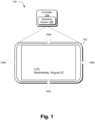
- FIG. 1 is one embodiment 100 of an exemplary device 102 as may be employed in association with systems and/or methods of the present application.
- Device 102 may further comprise a controller 104 that may be executing an operating system 106.
- device 102 may also comprise a touch screen -- in which various touch and/or swiping gestures (e.g., in a number of directions as shown, vertical and/or horizontal directions 108) may invoke various actions by the operating system in response thereto.
- device 102 is depicted in a lock screen mode (e.g., showing local time, or any other desired information thereon). From a lock screen mode, it may be possible that device 102 may have different mechanisms to place the device into different modes, allow a desired set of applications, or allow access to different users in a multi-user environment. For example, for a touch screen enabled device like 102, swiping gestures 108 (e.g. from vertical and/or horizontal directions) may produce desired actions from a lock screen mode.
- swiping gestures 108 e.g. from vertical and/or horizontal directions
- FIG. 1 depicts a touch screen enabled computing device (e.g., Apple iPad ® tablet or Microsoft Surface TM tablet), the systems, methods and principles of the present application may also find application in other devices and/or platforms - e.g., personal computers, laptops, smart devices or the like.
- Touch screen gestures or commands may possibly be substituted by suitable other I/O commands (e.g., touch pad, mouse, keyboard strokes, voice commands) or the like.
- touch gestures such as swipes or the like
- it may be possible to duplicate such gesture with another I/O command for a suitable computing device e.g., that may not be touch-enabled.
- a lock screen may be directly manipulated in (e.g., a touch device) by various gestures and swipes.
- a swipe in both a first direction may: (1) switch potential users that may sign in when it is swiped; (2) allow a current user to activate some feature and/or functionality (e.g., the camera) when it is swiped; or (3) enable another mode of functionality for the device.
- such utility may be desirable in order to allow the current user (whether an authorized user or otherwise) to capture a photo or video for a particular user in a multi-user environment prior to sign in.
- swiping gestures may allow the user to switch the device into a distinct new mode, such as a children's entertainment application ("Kid's Corner" or the like).
- a children's entertainment application (“Kid's Corner" or the like).
- FIG. 2 shows one embodiment of a flowchart (200) that allows a device and/or its operating system to switch access to the device by multiple users of such a device.
- a device in a lock screen mode for a first user may receive a swipe (or other gesture) in a first direction to switch user lock screens (e.g., to a second, authorized user). If the current user's lock screen is not displayed on the screen, then the device may continue to receive swipes/gestures to toggle between different user lock screens (back at 202).
- the device may receive another swipe/gesture at 206 to produce the current user's sign on screen at 208.
- the current user may enter his/her sign on credentials (e.g., a password, other swipe gestures or the like) at 210 - thereby allowing the current user to access the device (e.g., as at a Start screen or the like).
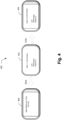
- FIG. 3 is one embodiment of a flowchart (300) of allowing potentially multiple users of a device to access a set of allowed application while still in a lock screen mode.
- Device 302 may exhibit User 1's lock screen. If the current user desiring to use the device is not User 1, then a swipe (320c or 320b) may toggle the lock screen of the current user to the fore (e.g., at 304 or 308).
- a swipe e.g., 320a or 320d
- a swipe in e.g., potentially a second direction may exhibit a set of allowed applications to be selected from by the current user (e.g., at 306 or 310).
- a user may swipe down on the lock screen and the camera is activated for that user. Photos and videos that are captured will be placed into that user's "camera roll" folder. If a different user wanted to take photos or videos and have that media saved to her camera roll folder, the user may swipe from left to right on the lock screen to find her own personalized lock screen, then swipe up to activate the camera for the user and save the media to the user's own camera roll.
- the set of allowed application for a given user may be different for different users of the device. This may be set by the administrator and/or owner of the device, as desired.
- FIG. 4 shows one embodiment of a flowchart (400) that allows a current user to switch user's lock screen or choose an alternative functional mode.
- Device 402 may present User 1's lock screen. If this is not the desired current user, then the current user may swipe and/or gesture (420b) to present other user (e.g., User 2) lock screen.
- This swipe may be continued (e.g., in a first direction) until the current user's lock screen is presented or all of the authorized user's lock screens have been presented (at 406).
- the current user may swipe (420a) to produce a new mode of functionality for the device (e.g., a children's entertainment mode - "Kid's Corner" or the like).
- the swipe/gesture 420a may be in a new, second direction - or continue in the first direction, after the list of authorized user's lock screens have been exhausted.
- a user may engage in: (1) swiping up to unlock the device; (2) swiping down to access one of a set of allowed applications (e.g., the camera) for the user whose lock screen is shown; and/or (3) swiping left or right to switch between various users' lock screens, or goes into a new mode, like Kid's Corner.
- a set of allowed applications e.g., the camera
- FIG. 5 shows one embodiment of a flowchart (500) of such a process.
- Device 502 may present User 1's lock screen. If this is the current user, then User 1 may swipe/gesture (520c) to access a sign-on screen. Alternatively, User 1 may swipe/gesture (520a) to access a set of allowed applications from the lock screen (e.g., the camera) at 504. In another embodiment, User 1 may swipe/gesture (520d) to place the device into another mode of functionality at 510.
- the lock screen e.g., the camera
- the current user may swipe/gesture (at 520b) to access other users' lock screens (506). Once the desired lock screen is presented by the device, then the current user may continue swiping/gesturing - as in 520a through 520d, and continue as desired.
- a user may swipe left or right, directly on the lock screen, to switch between various users' lock screens. Once on a particular lock screen, the user can swipe up to sign in for that user, or swipe down to activate the camera for that user.
- a user may swipe from a user's lock screen to a mode, such as Kid's Corner. This "mode" would likely be on the end of the list of users' lock screens. It could be on the far left end of the list or the far right end of the list.
- a user may activate the camera from a locked device for a particular user, after landing on that user's lock screen.
- the terms (including a reference to a "means") used to describe such components are intended to correspond, unless otherwise indicated, to any component which performs the specified function of the described component (e.g., a functional equivalent), even though not structurally equivalent to the disclosed structure, which performs the function in the herein illustrated exemplary aspects of the claimed subject matter.
- the innovation includes a system as well as a computer-readable medium having computer-executable instructions for performing the acts and/or events of the various methods of the claimed subject matter.
Landscapes
- Engineering & Computer Science (AREA)
- Theoretical Computer Science (AREA)
- General Engineering & Computer Science (AREA)
- Human Computer Interaction (AREA)
- Physics & Mathematics (AREA)
- General Physics & Mathematics (AREA)
- Computer Security & Cryptography (AREA)
- Computer Hardware Design (AREA)
- Software Systems (AREA)
- Signal Processing (AREA)
- Computer Networks & Wireless Communication (AREA)
- User Interface Of Digital Computer (AREA)
Description
- In many operating systems (e.g., Windows® Operating System), the concept of a "lock screen" provides safety and confidence for users of a computing device or platform. In some cases, such an operating system may be a multi-user environment - allowing multiple users to access/share such a computing device. In addition, a user's lock screen may be personalized and specific to each user on the computer device (e.g., computer, laptop, tablet, smart phone or the like).
- In addition, when the device is in lock screen mode, it may not be possible to use features of the device unless and/or until at least one of the users have signed in (or otherwise, logged in) to the device.
WO2012088474 discloses an electronic device with a display and a touch-sensitive surface, which displays a first authentication user interface on the display; detects a first input by a user on the touch-sensitive surface while displaying the first authentication user interface; in response to detecting the first input, displays a second authentication user interface on the display, distinct from the first authentication user interface, the second authentication user interface configured for entering a gesture-based authentication code.
EP2424200 discloses a mobile terminal including: a touchscreen controllable to display at least one home screen or a lock screen; and a controller configured to: control the touchscreen to display the at least one home screen when the mobile terminal is in a standby state, one of the at least one home screen including at least one application object including one or more widget objects; and control the touchscreen to display the lock screen when the mobile terminal is switched from the standby state to a locked state.
Florence Ion ET AL: "Hands-on: Multiple users, lock screen widgets round out Android 4.2 Ars Technica", Arstechnica, 14 November 2012, describes a multiuser support for tablets including using lock screen widgets. - The following presents a simplified summary of the innovation in order to provide a basic understanding of some aspects described herein. This summary is not an extensive overview of the claimed subject matter. It is intended to neither identify key or critical elements of the claimed subject matter nor delineate the scope of the subject innovation. Its sole purpose is to present some concepts of the claimed subject matter in a simplified form as a prelude to the more detailed description that is presented later. The invention is defined by independent claims 1, 7 and 11. Further embodiments are defined by the dependent claims.
- Systems and methods for providing actions for users of a computer device from a lock screen interface are provided. A computing device may comprise a touch-sensitive display screen that may allow a user to scroll through a set of user interfaces that may comprise a set of lock screen interfaces - one of which may be associated with the user, if authorized for using the computing device. The computing device may allow the user to scroll to one of the following: a set of locked screen interfaces, a set of sign-in interfaces, a set of applications allowed for use (e.g., a camera) by the computer device (even if the user is not signed-in) and a new mode of functionality for computing device (e.g., a children's entertainment application). The computer system may allow swiping from multiple discernible directions to allow the scrolling through user interfaces in a natural manner.
- In one embodiment, a method for performing actions for users with a computing device in a locked state is presented, the method comprising: presenting a first user interface to a user of a computing device, said first user interface being a first lock screen interface; allowing user to scroll from said first user interface to a second user interface; and wherein said second user interface being one of a group, said group comprising: a second lock screen, a set of applications allowed to be accessed by said user from said first lock screen and a new mode of functionality for said computing device.
- In another embodiment, a computing device is presented comprising: a controller; a touch-sensitive display; an operating system, said operating system capable of executing on said controller and said controlling said computing device; wherein said operating system is capable of managing a set of authorized users for said computing device and presenting associated user interfaces to users of said computing device; further wherein said operating system is capable of: presenting a first user interface to a user of a computing device, said first user interface being a first lock screen interface; allowing user to scroll from said first user interface to a second user interface; and wherein said second user interface being one of a group, said group comprising: a second lock screen, a set of applications allowed to be accessed by said user from said first lock screen and a new mode of functionality for said computing device.
- Other features and aspects of the present system are presented below in the Detailed Description when read in connection with the drawings presented within this application.
- Exemplary embodiments are illustrated in referenced figures of the drawings. It is intended that the embodiments and figures disclosed herein are to be considered illustrative rather than restrictive.
-
FIG. 1 depicts one embodiment of a computer device/system in made in accordance with the principles of the present application -
FIG. 2 shows one embodiment of a method of traversing a multi-user environment to allow different users to sign into a device similar to that shown inFIG. 1 . -
FIG. 3 shows one embodiment of a flowchart for allowing multiple users of a device from lock screen mode to access a set of allowed applications from their corresponding lock screens. -
FIG. 4 shows one embodiment of a flowchart for allowing multiple users of a device to access their associated lock screens. -
FIG. 5 shows one embodiment of a flowchart for allowing a user of a device to move from a user's lock screen to a set of other allowed applications, modes and other user's lock screens. - As utilized herein, terms "component," "system," "interface," "controller" and the like are intended to refer to a computer-related entity, either hardware, software (e.g., in execution), and/or firmware. For example, any of these terms can be a process running on a processor, a processor, an object, an executable, a program, and/or a computer. By way of illustration, both an application running on a server and the server can be a component and/or controller. One or more components/controllers can reside within a process and a component/controller can be localized on one computer and/or distributed between two or more computers.
- The claimed subject matter is described with reference to the drawings, wherein like reference numerals are used to refer to like elements throughout. In the following description, for purposes of explanation, numerous specific details are set forth in order to provide a thorough understanding of the subject innovation. It may be evident, however, that the claimed subject matter may be practiced without these specific details. In other instances, well-known structures and devices are shown in block diagram form in order to facilitate describing the subject innovation.
- While a device is in lock screen mode, it may be desirable to allow the use of some functionality and/or features of the device -- even while the device is in such a mode. In many embodiment, various features and/or functionality may be made available and/or their usage from a device in a lock screen mode (e.g., possibly in a multi-user environment) may be made smoother. In many such embodiments, users may be allowed to directly scroll through or otherwise manipulate the lock screen surface - e.g., to switch the user that will sign in, or activate certain functions or features of the device (e.g., the camera or the like).
- For merely one example, direct manipulation of a device in lock screen mode might allow the user to switch the locked device into a distinctly different mode (for example, as for children's entertainment application, like a "Kid's Corner") while still in a locked state.
-
FIG. 1 is oneembodiment 100 of anexemplary device 102 as may be employed in association with systems and/or methods of the present application.Device 102 may further comprise acontroller 104 that may be executing an operating system 106. In one embodiment,device 102 may also comprise a touch screen -- in which various touch and/or swiping gestures (e.g., in a number of directions as shown, vertical and/or horizontal directions 108) may invoke various actions by the operating system in response thereto. - In
FIG. 1 ,device 102 is depicted in a lock screen mode (e.g., showing local time, or any other desired information thereon). From a lock screen mode, it may be possible thatdevice 102 may have different mechanisms to place the device into different modes, allow a desired set of applications, or allow access to different users in a multi-user environment. For example, for a touch screen enabled device like 102, swiping gestures 108 (e.g. from vertical and/or horizontal directions) may produce desired actions from a lock screen mode. - It should be appreciated that, while
FIG. 1 depicts a touch screen enabled computing device (e.g., Apple iPad® tablet or Microsoft Surface™ tablet), the systems, methods and principles of the present application may also find application in other devices and/or platforms - e.g., personal computers, laptops, smart devices or the like. Touch screen gestures or commands may possibly be substituted by suitable other I/O commands (e.g., touch pad, mouse, keyboard strokes, voice commands) or the like. Thus, where the application discusses touch gestures (such as swipes or the like), it may be possible to duplicate such gesture with another I/O command for a suitable computing device (e.g., that may not be touch-enabled). - In one embodiment, a lock screen may be directly manipulated in (e.g., a touch device) by various gestures and swipes. For example, a swipe in both a first direction may: (1) switch potential users that may sign in when it is swiped; (2) allow a current user to activate some feature and/or functionality (e.g., the camera) when it is swiped; or (3) enable another mode of functionality for the device. For one example, such utility may be desirable in order to allow the current user (whether an authorized user or otherwise) to capture a photo or video for a particular user in a multi-user environment prior to sign in. In another embodiment, swiping gestures (e.g., at the end of a horizontally panning list) may allow the user to switch the device into a distinct new mode, such as a children's entertainment application ("Kid's Corner" or the like). The following is a list of potentially desirable actions:
- (i) User Switching from a Locked Device
- When a device is locked, the lock screen for the user that was last active on the device may be shown. If another user wants to sign in to the device, the user may simply swipe e.g., to the left or to the right (or any other suitable direction) to find the user's own personalized lock screen. From there, the user may then swipe (possibly in a second direction) to sign in.
FIG. 2 shows one embodiment of a flowchart (200) that allows a device and/or its operating system to switch access to the device by multiple users of such a device. At 202, a device in a lock screen mode for a first user may receive a swipe (or other gesture) in a first direction to switch user lock screens (e.g., to a second, authorized user). If the current user's lock screen is not displayed on the screen, then the device may continue to receive swipes/gestures to toggle between different user lock screens (back at 202). - If the current user's lock screen is displayed on the device, then the device may receive another swipe/gesture at 206 to produce the current user's sign on screen at 208. At this point, the current user may enter his/her sign on credentials (e.g., a password, other swipe gestures or the like) at 210 - thereby allowing the current user to access the device (e.g., as at a Start screen or the like).
- In another embodiment, while a device is locked, a current user may be able to activate one of a set of allowed applications (e.g., using the camera) from the lock screen. One paradigm example would be to capture a photo or video without first signing in.
FIG. 3 is one embodiment of a flowchart (300) of allowing potentially multiple users of a device to access a set of allowed application while still in a lock screen mode.Device 302 may exhibit User 1's lock screen. If the current user desiring to use the device is not User 1, then a swipe (320c or 320b) may toggle the lock screen of the current user to the fore (e.g., at 304 or 308). One the current user's lock screen is exhibited, then a swipe (e.g., 320a or 320d) in e.g., potentially a second direction may exhibit a set of allowed applications to be selected from by the current user (e.g., at 306 or 310). - In one paradigm example, a user may swipe down on the lock screen and the camera is activated for that user. Photos and videos that are captured will be placed into that user's "camera roll" folder. If a different user wanted to take photos or videos and have that media saved to her camera roll folder, the user may swipe from left to right on the lock screen to find her own personalized lock screen, then swipe up to activate the camera for the user and save the media to the user's own camera roll.
- It may be appreciated that the set of allowed application for a given user may be different for different users of the device. This may be set by the administrator and/or owner of the device, as desired.
- In another embodiment, while the device is locked, a user may be able to swipe to switch between various users' lock screens. In one embodiment, at the end of that list, a new mode may be presented to the user -- into which the user may swipe into a screen that activates a new, distinct mode on the locked device, such as Kid's Corner, a demonstration mode, etc.
FIG. 4 shows one embodiment of a flowchart (400) that allows a current user to switch user's lock screen or choose an alternative functional mode.Device 402 may present User 1's lock screen. If this is not the desired current user, then the current user may swipe and/or gesture (420b) to present other user (e.g., User 2) lock screen. This swipe may be continued (e.g., in a first direction) until the current user's lock screen is presented or all of the authorized user's lock screens have been presented (at 406). At this point, the current user may swipe (420a) to produce a new mode of functionality for the device (e.g., a children's entertainment mode - "Kid's Corner" or the like). The swipe/gesture 420a may be in a new, second direction - or continue in the first direction, after the list of authorized user's lock screens have been exhausted. - In another embodiment, while the device is locked, it may be possible to allow a user to swipe in a number of distinct directions to access different behavior. For merely exemplary purposes, a user may engage in: (1) swiping up to unlock the device; (2) swiping down to access one of a set of allowed applications (e.g., the camera) for the user whose lock screen is shown; and/or (3) swiping left or right to switch between various users' lock screens, or goes into a new mode, like Kid's Corner.
-
FIG. 5 shows one embodiment of a flowchart (500) of such a process.Device 502 may present User 1's lock screen. If this is the current user, then User 1 may swipe/gesture (520c) to access a sign-on screen. Alternatively, User 1 may swipe/gesture (520a) to access a set of allowed applications from the lock screen (e.g., the camera) at 504. In another embodiment, User 1 may swipe/gesture (520d) to place the device into another mode of functionality at 510. - If this is not the current user, then the current user may swipe/gesture (at 520b) to access other users' lock screens (506). Once the desired lock screen is presented by the device, then the current user may continue swiping/gesturing - as in 520a through 520d, and continue as desired.
- In other embodiments, a user may swipe left or right, directly on the lock screen, to switch between various users' lock screens. Once on a particular lock screen, the user can swipe up to sign in for that user, or swipe down to activate the camera for that user. A user may swipe from a user's lock screen to a mode, such as Kid's Corner. This "mode" would likely be on the end of the list of users' lock screens. It could be on the far left end of the list or the far right end of the list. A user may activate the camera from a locked device for a particular user, after landing on that user's lock screen.
- What has been described above includes examples of the subject innovation. It is, of course, not possible to describe every conceivable combination of components or methodologies for purposes of describing the claimed subject matter, but one of ordinary skill in the art may recognize that many further combinations and permutations of the subject innovation are possible. Accordingly, the claimed subject matter is intended to embrace all such alterations, modifications, and variations that fall within the spirit and scope of the appended claims.
- In particular and in regard to the various functions performed by the above described components, devices, circuits, systems and the like, the terms (including a reference to a "means") used to describe such components are intended to correspond, unless otherwise indicated, to any component which performs the specified function of the described component (e.g., a functional equivalent), even though not structurally equivalent to the disclosed structure, which performs the function in the herein illustrated exemplary aspects of the claimed subject matter. In this regard, it will also be recognized that the innovation includes a system as well as a computer-readable medium having computer-executable instructions for performing the acts and/or events of the various methods of the claimed subject matter.
- In addition, while a particular feature of the subject innovation may have been disclosed with respect to only one of several implementations, such feature may be combined with one or more other features of the other implementations as may be desired and advantageous for any given or particular application. Furthermore, to the extent that the terms "includes," and "including" and variants thereof are used in either the detailed description or the claims, these terms are intended to be inclusive in a manner similar to the term "comprising."
Claims (11)
- A method for performing actions for users with a computing device in a locked state, the method comprising:presenting a first user interface to a user of a computing device, said first user interface being a first lock screen interface;allowing the user to scroll from said first user interface through a set of lock screen interfaces, each of which is associated with a user, to find the user's own personalized lock screen by swiping in a first direction;activating an application from the set of lock screen interfaces associated with the user of the lock screen by swiping in a second direction different from the first direction while the device remains in the locked state; andsaving content produced by the activated application in an application folder of the user of the lock screen.
- The method of claim 1, wherein said computing device further comprises:a controller;a display; andan operating system, said operating system capable of executing on said controller;wherein said operating system is capable of managing a set of authorized users for said computing device and presenting associated user interfaces to users of said computing device.
- The method of claim 2, wherein said computing device comprises a touch screen, said touch screen capable of allowing users to swipe through a set of user interfaces presented by said operating system.
- The method of claim 1, wherein said method further comprises:allowing said user select a sign-in screen interface associated with one of said set of lock screen interfaces;allowing said user access to user's account on said computer device, if said user provides suitable authorization input to said sign-in screen.
- The method of claim 4, wherein said method further comprises:
allowing said user to scroll to a set of applications allowed by said computing system without said user having signed-in to said computer device. - The method of claim 5, wherein said method further comprises:
allowing said user to scroll to an interface that provides another mode of functionality. - A computing device (102) comprising:a controller (104);a touch-sensitive display;an operating system (106), said operating system (106) capable of executing on said controller (104), wherein said operating system (106) is capable of:presenting a first user interface to a user of a computing device (102), said first user interface being a first lock screen interface;allowing the user to scroll from said first user interface through a set of lock screen interfaces, each of which is associated with a user, to find the user's own personalized lock screen by swiping in a first direction;activating an application from the set of lock screen interfaces associated with the user of the lock screen by swiping in a second direction different from the first direction while the device remains in the locked state; andsaving content produced by the activated application in an application folder of the user of the lock screen.
- The computing device of claim 7, wherein said operating system is further capable of:allowing said user select a sign-in screen interface associated with one of said set of lock screen interfaces;allowing said user access to user's account on said computer device, if said user provides suitable authorization input to said sign-in screen.
- The computing device of claim 8, wherein said operating system is further capable of:
allowing said user to scroll to a set of applications allowed by said computing system without said user having signed-in to said computer device. - The computing device of claim 9, wherein said operating system is further capable of:
allowing said user to scroll to an interface that provides another mode of functionality. - A computer program comprising instructions which, when the program is executed by a computer, cause the computer to carry out the method of any of claims 1 to 6.
Applications Claiming Priority (2)
| Application Number | Priority Date | Filing Date | Title |
|---|---|---|---|
| US13/853,353 US10114536B2 (en) | 2013-03-29 | 2013-03-29 | Systems and methods for performing actions for users from a locked device |
| PCT/US2013/060490 WO2014158223A1 (en) | 2013-03-29 | 2013-09-19 | Systems and methods for performing actions for users from a locked device |
Publications (2)
| Publication Number | Publication Date |
|---|---|
| EP2979216A1 EP2979216A1 (en) | 2016-02-03 |
| EP2979216B1 true EP2979216B1 (en) | 2023-07-05 |
Family
ID=49293870
Family Applications (1)
| Application Number | Title | Priority Date | Filing Date |
|---|---|---|---|
| EP13771291.5A Active EP2979216B1 (en) | 2013-03-29 | 2013-09-19 | Systems and methods for performing actions for users from a locked device |
Country Status (5)
| Country | Link |
|---|---|
| US (1) | US10114536B2 (en) |
| EP (1) | EP2979216B1 (en) |
| KR (1) | KR102061386B1 (en) |
| CN (1) | CN105144183B (en) |
| WO (1) | WO2014158223A1 (en) |
Families Citing this family (15)
| Publication number | Priority date | Publication date | Assignee | Title |
|---|---|---|---|---|
| US20140372896A1 (en) * | 2013-06-14 | 2014-12-18 | Microsoft Corporation | User-defined shortcuts for actions above the lock screen |
| US9851896B2 (en) * | 2013-12-17 | 2017-12-26 | Google Inc. | Edge swiping gesture for home navigation |
| CN111488112B (en) | 2014-01-23 | 2024-03-08 | 苹果公司 | virtual computer keyboard |
| US11914419B2 (en) | 2014-01-23 | 2024-02-27 | Apple Inc. | Systems and methods for prompting a log-in to an electronic device based on biometric information received from a user |
| KR20160061053A (en) * | 2014-11-21 | 2016-05-31 | 삼성전자주식회사 | An electronic apparatus and a method for displaying a screen of the electronic apparatus |
| US20160196419A1 (en) * | 2015-01-06 | 2016-07-07 | Google Inc. | Multi-action lock screen |
| US10057772B2 (en) | 2016-03-29 | 2018-08-21 | Microsoft Technology Licensing, Llc | Projection via a device |
| WO2017181219A1 (en) * | 2016-04-22 | 2017-10-26 | Simpal Pty. Ltd. | Method and application for enabling data display on a locked screen of an electronic device |
| CN106062762B (en) * | 2016-05-25 | 2019-03-08 | 北京小米移动软件有限公司 | Application encryption method and device |
| DK201670620A1 (en) * | 2016-06-12 | 2018-01-22 | Apple Inc | Devices and Methods for Accessing Prevalent Device Functions |
| DK201670616A1 (en) * | 2016-06-12 | 2018-01-22 | Apple Inc | Devices and Methods for Accessing Prevalent Device Functions |
| AU2017100879B4 (en) * | 2016-07-29 | 2017-09-28 | Apple Inc. | Systems, devices, and methods for dynamically providing user interface controls at touch-sensitive secondary display |
| EP4478167A3 (en) | 2019-05-31 | 2025-02-26 | Apple Inc. | Device, method, and graphical user interface for updating a background for home and wake screen user interfaces |
| US12566540B2 (en) | 2022-05-10 | 2026-03-03 | Apple Inc. | Devices, methods, and graphical user interfaces for providing notifications and application information |
| EP4697151A4 (en) * | 2024-07-04 | 2026-04-29 | Samsung Electronics Co Ltd | ELECTRONIC DEVICE, METHOD AND NON-TRANSITORABLE COMPUTER-READABLE STORAGE MEDIUM FOR REFUSING CONTACT INPUT |
Family Cites Families (54)
| Publication number | Priority date | Publication date | Assignee | Title |
|---|---|---|---|---|
| US9292111B2 (en) * | 1998-01-26 | 2016-03-22 | Apple Inc. | Gesturing with a multipoint sensing device |
| US6807666B1 (en) * | 1999-12-15 | 2004-10-19 | Microsoft Corporation | Methods and arrangements for providing multiple concurrent desktops and workspaces in a shared computing environment |
| US7213054B2 (en) * | 1999-12-15 | 2007-05-01 | Microsoft Corporation | Methods and apparatuses for handling single-user applications in multi-user computing environments |
| US20030227487A1 (en) * | 2002-06-01 | 2003-12-11 | Hugh Harlan M. | Method and apparatus for creating and accessing associative data structures under a shared model of categories, rules, triggers and data relationship permissions |
| US7418702B2 (en) * | 2002-08-06 | 2008-08-26 | Sheng (Ted) Tai Tsao | Concurrent web based multi-task support for control management system |
| GB0322716D0 (en) * | 2003-09-29 | 2003-10-29 | Symbian Ltd | Multi-user mobile telephones for community access to services |
| US7966572B2 (en) * | 2004-02-20 | 2011-06-21 | Microsoft Corporation | User interface transition |
| US7617530B2 (en) * | 2005-04-22 | 2009-11-10 | Microsoft Corporation | Rights elevator |
| US7657849B2 (en) * | 2005-12-23 | 2010-02-02 | Apple Inc. | Unlocking a device by performing gestures on an unlock image |
| US8280979B2 (en) * | 2006-02-27 | 2012-10-02 | Microsoft Corporation | Persistent public machine setting |
| US20080126978A1 (en) * | 2006-11-28 | 2008-05-29 | Likun Bai | System and method of enhancing computer security by using dual desktop technologies |
| US7877707B2 (en) * | 2007-01-06 | 2011-01-25 | Apple Inc. | Detecting and interpreting real-world and security gestures on touch and hover sensitive devices |
| TWI428814B (en) | 2008-04-15 | 2014-03-01 | Htc Corp | Method for switching wallpaper in screen lock state, mobile electronic device thereof, and recording medium thereof |
| US8549657B2 (en) * | 2008-05-12 | 2013-10-01 | Microsoft Corporation | Owner privacy in a shared mobile device |
| US8341557B2 (en) * | 2008-09-05 | 2012-12-25 | Apple Inc. | Portable touch screen device, method, and graphical user interface for providing workout support |
| US8650290B2 (en) * | 2008-12-19 | 2014-02-11 | Openpeak Inc. | Portable computing device and method of operation of same |
| US8615581B2 (en) * | 2008-12-19 | 2013-12-24 | Openpeak Inc. | System for managing devices and method of operation of same |
| US20100223558A1 (en) * | 2009-02-27 | 2010-09-02 | International Business Machines Corporation | Remote desktop connection to any private desktop to tam e-sso access agent |
| US8839155B2 (en) * | 2009-03-16 | 2014-09-16 | Apple Inc. | Accelerated scrolling for a multifunction device |
| US8984431B2 (en) * | 2009-03-16 | 2015-03-17 | Apple Inc. | Device, method, and graphical user interface for moving a current position in content at a variable scrubbing rate |
| KR101564222B1 (en) * | 2009-05-26 | 2015-11-06 | 삼성전자주식회사 | A method and device for releasing a lock mode of a portable terminal |
| US20110283241A1 (en) * | 2010-05-14 | 2011-11-17 | Google Inc. | Touch Gesture Actions From A Device's Lock Screen |
| CN101894023B (en) * | 2010-07-06 | 2016-03-30 | 中兴通讯股份有限公司 | screen locking method and mobile terminal |
| US8811948B2 (en) * | 2010-07-09 | 2014-08-19 | Microsoft Corporation | Above-lock camera access |
| US8528072B2 (en) * | 2010-07-23 | 2013-09-03 | Apple Inc. | Method, apparatus and system for access mode control of a device |
| KR101669967B1 (en) | 2010-08-23 | 2016-10-27 | 엘지전자 주식회사 | Mobile terminal and method for controlling the same |
| US9027117B2 (en) | 2010-10-04 | 2015-05-05 | Microsoft Technology Licensing, Llc | Multiple-access-level lock screen |
| KR20120067445A (en) * | 2010-12-16 | 2012-06-26 | 엘지전자 주식회사 | Mobile terminal and operation control method thereof |
| US10620794B2 (en) * | 2010-12-23 | 2020-04-14 | Apple Inc. | Device, method, and graphical user interface for switching between two user interfaces |
| WO2012088474A2 (en) | 2010-12-23 | 2012-06-28 | Apple Inc. | Device, method, and graphical user interface for switching between two user interfaces |
| US20120223959A1 (en) * | 2011-03-01 | 2012-09-06 | Apple Inc. | System and method for a touchscreen slider with toggle control |
| WO2012116647A1 (en) * | 2011-03-02 | 2012-09-07 | 联想(北京)有限公司 | Method for controlling terminal device, and terminal device and electronic device |
| US8417570B2 (en) * | 2011-04-07 | 2013-04-09 | 1Spire, Inc. | System for automated media delivery to mobile devices and mobile device lockscreens |
| US9606643B2 (en) * | 2011-05-02 | 2017-03-28 | Microsoft Technology Licensing, Llc | Extended above the lock-screen experience |
| US10222974B2 (en) * | 2011-05-03 | 2019-03-05 | Nokia Technologies Oy | Method and apparatus for providing quick access to device functionality |
| KR101677639B1 (en) * | 2011-05-06 | 2016-11-18 | 엘지전자 주식회사 | Mobile device and control method for the same |
| US9886567B2 (en) * | 2011-06-24 | 2018-02-06 | Facebook, Inc. | Display dynamic contents on locked screens |
| US8787984B2 (en) * | 2011-08-03 | 2014-07-22 | Kyocera Corporation | Mobile electronic device and control method for changing setting of locked state on touch screen display |
| US20130069893A1 (en) * | 2011-09-15 | 2013-03-21 | Htc Corporation | Electronic device, controlling method thereof and computer program product |
| WO2013061156A2 (en) * | 2011-10-27 | 2013-05-02 | Cell Rox, Ltd. | Systems and method for implementing multiple personas on mobile technology platforms |
| US20130305354A1 (en) * | 2011-12-23 | 2013-11-14 | Microsoft Corporation | Restricted execution modes |
| JP5775445B2 (en) * | 2011-12-27 | 2015-09-09 | 京セラ株式会社 | Apparatus, method, and program |
| US9372978B2 (en) * | 2012-01-20 | 2016-06-21 | Apple Inc. | Device, method, and graphical user interface for accessing an application in a locked device |
| US20130203397A1 (en) * | 2012-02-02 | 2013-08-08 | Joel Vidal | Phone that prevents accidental dialing to a contact |
| CN102830920A (en) | 2012-08-03 | 2012-12-19 | 广东欧珀移动通信有限公司 | A privacy protection method for handheld devices |
| CN102917348A (en) | 2012-10-30 | 2013-02-06 | 广东欧珀移动通信有限公司 | A multi-user smart phone and its login method |
| CN103019599B (en) * | 2012-12-12 | 2016-10-05 | 华为终端有限公司 | Electronic equipment and unlocking screen method thereof |
| US20140189596A1 (en) * | 2012-12-27 | 2014-07-03 | Kabushiki Kaisha Toshiba | Information processing apparatus, screen control program and screen control method |
| US9098695B2 (en) * | 2013-02-01 | 2015-08-04 | Barnes & Noble College Booksellers, Llc | Secure note system for computing device lock screen |
| US9367672B2 (en) * | 2013-03-13 | 2016-06-14 | Blackberry Limited | Method of locking an application on a computing device |
| US20170139584A1 (en) * | 2014-05-29 | 2017-05-18 | Hewlett-Packard Development Company, L.P. | User account switching interface |
| US9880717B1 (en) * | 2014-06-23 | 2018-01-30 | Google Llc | Account switching |
| US20160196419A1 (en) * | 2015-01-06 | 2016-07-07 | Google Inc. | Multi-action lock screen |
| US20160371872A1 (en) * | 2015-06-18 | 2016-12-22 | Facebook, Inc. | Systems and methods for providing transitions between content interfaces |
-
2013
- 2013-03-29 US US13/853,353 patent/US10114536B2/en active Active
- 2013-09-19 WO PCT/US2013/060490 patent/WO2014158223A1/en not_active Ceased
- 2013-09-19 EP EP13771291.5A patent/EP2979216B1/en active Active
- 2013-09-19 CN CN201380075259.6A patent/CN105144183B/en active Active
- 2013-09-19 KR KR1020157030521A patent/KR102061386B1/en active Active
Also Published As
| Publication number | Publication date |
|---|---|
| US10114536B2 (en) | 2018-10-30 |
| KR20150140302A (en) | 2015-12-15 |
| CN105144183A (en) | 2015-12-09 |
| WO2014158223A1 (en) | 2014-10-02 |
| KR102061386B1 (en) | 2019-12-31 |
| US20140298190A1 (en) | 2014-10-02 |
| CN105144183B (en) | 2019-03-19 |
| EP2979216A1 (en) | 2016-02-03 |
Similar Documents
| Publication | Publication Date | Title |
|---|---|---|
| US10114536B2 (en) | Systems and methods for performing actions for users from a locked device | |
| EP3482345B1 (en) | Implementation of biometric authentication with detection and display of an error indication | |
| CN105359083B (en) | Dynamic management of user input on touch devices | |
| EP2684115B1 (en) | Method and apparatus for providing quick access to media functions from a locked screen | |
| CN107483721B (en) | Control method, device, storage medium and mobile terminal based on black screen gesture | |
| KR102013940B1 (en) | Method for managing security for applications and an electronic device thereof | |
| CN104360900B (en) | Method for operating multiple operating systems, corresponding system and mobile device | |
| US9916028B2 (en) | Touch system and display device for preventing misoperation on edge area | |
| US20140189604A1 (en) | Method and system for unlocking a touchscreen of an electronic device | |
| US20150199125A1 (en) | Displaying an application image on two or more displays | |
| US20140283112A1 (en) | Operating a Computer with a Touchscreen | |
| WO2013182090A1 (en) | Method and system for controlling display position of desktop icon | |
| US20150138127A1 (en) | Electronic apparatus and input method | |
| CN102681785A (en) | Unlocking method and mobile equipment | |
| WO2014155196A1 (en) | Method to unlock a screen using a touch input | |
| CN103793137A (en) | Display method and electronic device | |
| KR101719280B1 (en) | Activation of an application on a programmable device using gestures on an image | |
| WO2017118317A1 (en) | Information image display method, a barcode payment method, and device | |
| JP6141349B2 (en) | Program and application control method | |
| US20150193139A1 (en) | Touchscreen device operation | |
| CN102707869B (en) | Electronic device and its control method | |
| CN104484095A (en) | Information processing method and electronic device | |
| JP2014241080A (en) | Program and application control method | |
| CN103729130A (en) | Unlocking method of touch sensitive equipment and touch sensitive equipment | |
| WO2015152890A1 (en) | Three-part gesture |
Legal Events
| Date | Code | Title | Description |
|---|---|---|---|
| PUAI | Public reference made under article 153(3) epc to a published international application that has entered the european phase |
Free format text: ORIGINAL CODE: 0009012 |
|
| 17P | Request for examination filed |
Effective date: 20150807 |
|
| AK | Designated contracting states |
Kind code of ref document: A1 Designated state(s): AL AT BE BG CH CY CZ DE DK EE ES FI FR GB GR HR HU IE IS IT LI LT LU LV MC MK MT NL NO PL PT RO RS SE SI SK SM TR |
|
| AX | Request for extension of the european patent |
Extension state: BA ME |
|
| DAX | Request for extension of the european patent (deleted) | ||
| STAA | Information on the status of an ep patent application or granted ep patent |
Free format text: STATUS: EXAMINATION IS IN PROGRESS |
|
| 17Q | First examination report despatched |
Effective date: 20190220 |
|
| RAP3 | Party data changed (applicant data changed or rights of an application transferred) |
Owner name: MICROSOFT TECHNOLOGY LICENSING, LLC |
|
| RIC1 | Information provided on ipc code assigned before grant |
Ipc: G06F 3/0485 20130101ALI20230110BHEP Ipc: G06F 3/0482 20130101ALI20230110BHEP Ipc: G06F 3/04883 20220101ALI20230110BHEP Ipc: H04M 1/72463 20210101ALI20230110BHEP Ipc: H04M 1/725 20000101ALI20230110BHEP Ipc: H04M 1/67 20000101ALI20230110BHEP Ipc: G06F 21/31 20130101AFI20230110BHEP |
|
| GRAP | Despatch of communication of intention to grant a patent |
Free format text: ORIGINAL CODE: EPIDOSNIGR1 |
|
| STAA | Information on the status of an ep patent application or granted ep patent |
Free format text: STATUS: GRANT OF PATENT IS INTENDED |
|
| INTG | Intention to grant announced |
Effective date: 20230307 |
|
| GRAS | Grant fee paid |
Free format text: ORIGINAL CODE: EPIDOSNIGR3 |
|
| GRAA | (expected) grant |
Free format text: ORIGINAL CODE: 0009210 |
|
| STAA | Information on the status of an ep patent application or granted ep patent |
Free format text: STATUS: THE PATENT HAS BEEN GRANTED |
|
| AK | Designated contracting states |
Kind code of ref document: B1 Designated state(s): AL AT BE BG CH CY CZ DE DK EE ES FI FR GB GR HR HU IE IS IT LI LT LU LV MC MK MT NL NO PL PT RO RS SE SI SK SM TR |
|
| REG | Reference to a national code |
Ref country code: CH Ref legal event code: EP |
|
| REG | Reference to a national code |
Ref country code: AT Ref legal event code: REF Ref document number: 1585488 Country of ref document: AT Kind code of ref document: T Effective date: 20230715 |
|
| REG | Reference to a national code |
Ref country code: DE Ref legal event code: R096 Ref document number: 602013084168 Country of ref document: DE |
|
| REG | Reference to a national code |
Ref country code: IE Ref legal event code: FG4D |
|
| P01 | Opt-out of the competence of the unified patent court (upc) registered |
Effective date: 20230801 |
|
| REG | Reference to a national code |
Ref country code: LT Ref legal event code: MG9D |
|
| REG | Reference to a national code |
Ref country code: NL Ref legal event code: MP Effective date: 20230705 |
|
| REG | Reference to a national code |
Ref country code: AT Ref legal event code: MK05 Ref document number: 1585488 Country of ref document: AT Kind code of ref document: T Effective date: 20230705 |
|
| PG25 | Lapsed in a contracting state [announced via postgrant information from national office to epo] |
Ref country code: NL Free format text: LAPSE BECAUSE OF FAILURE TO SUBMIT A TRANSLATION OF THE DESCRIPTION OR TO PAY THE FEE WITHIN THE PRESCRIBED TIME-LIMIT Effective date: 20230705 |
|
| PG25 | Lapsed in a contracting state [announced via postgrant information from national office to epo] |
Ref country code: GR Free format text: LAPSE BECAUSE OF FAILURE TO SUBMIT A TRANSLATION OF THE DESCRIPTION OR TO PAY THE FEE WITHIN THE PRESCRIBED TIME-LIMIT Effective date: 20231006 |
|
| PG25 | Lapsed in a contracting state [announced via postgrant information from national office to epo] |
Ref country code: ES Free format text: LAPSE BECAUSE OF FAILURE TO SUBMIT A TRANSLATION OF THE DESCRIPTION OR TO PAY THE FEE WITHIN THE PRESCRIBED TIME-LIMIT Effective date: 20230705 |
|
| PG25 | Lapsed in a contracting state [announced via postgrant information from national office to epo] |
Ref country code: IS Free format text: LAPSE BECAUSE OF FAILURE TO SUBMIT A TRANSLATION OF THE DESCRIPTION OR TO PAY THE FEE WITHIN THE PRESCRIBED TIME-LIMIT Effective date: 20231105 |
|
| PG25 | Lapsed in a contracting state [announced via postgrant information from national office to epo] |
Ref country code: SE Free format text: LAPSE BECAUSE OF FAILURE TO SUBMIT A TRANSLATION OF THE DESCRIPTION OR TO PAY THE FEE WITHIN THE PRESCRIBED TIME-LIMIT Effective date: 20230705 Ref country code: RS Free format text: LAPSE BECAUSE OF FAILURE TO SUBMIT A TRANSLATION OF THE DESCRIPTION OR TO PAY THE FEE WITHIN THE PRESCRIBED TIME-LIMIT Effective date: 20230705 Ref country code: PT Free format text: LAPSE BECAUSE OF FAILURE TO SUBMIT A TRANSLATION OF THE DESCRIPTION OR TO PAY THE FEE WITHIN THE PRESCRIBED TIME-LIMIT Effective date: 20231106 Ref country code: NO Free format text: LAPSE BECAUSE OF FAILURE TO SUBMIT A TRANSLATION OF THE DESCRIPTION OR TO PAY THE FEE WITHIN THE PRESCRIBED TIME-LIMIT Effective date: 20231005 Ref country code: LV Free format text: LAPSE BECAUSE OF FAILURE TO SUBMIT A TRANSLATION OF THE DESCRIPTION OR TO PAY THE FEE WITHIN THE PRESCRIBED TIME-LIMIT Effective date: 20230705 Ref country code: LT Free format text: LAPSE BECAUSE OF FAILURE TO SUBMIT A TRANSLATION OF THE DESCRIPTION OR TO PAY THE FEE WITHIN THE PRESCRIBED TIME-LIMIT Effective date: 20230705 Ref country code: IS Free format text: LAPSE BECAUSE OF FAILURE TO SUBMIT A TRANSLATION OF THE DESCRIPTION OR TO PAY THE FEE WITHIN THE PRESCRIBED TIME-LIMIT Effective date: 20231105 Ref country code: HR Free format text: LAPSE BECAUSE OF FAILURE TO SUBMIT A TRANSLATION OF THE DESCRIPTION OR TO PAY THE FEE WITHIN THE PRESCRIBED TIME-LIMIT Effective date: 20230705 Ref country code: GR Free format text: LAPSE BECAUSE OF FAILURE TO SUBMIT A TRANSLATION OF THE DESCRIPTION OR TO PAY THE FEE WITHIN THE PRESCRIBED TIME-LIMIT Effective date: 20231006 Ref country code: FI Free format text: LAPSE BECAUSE OF FAILURE TO SUBMIT A TRANSLATION OF THE DESCRIPTION OR TO PAY THE FEE WITHIN THE PRESCRIBED TIME-LIMIT Effective date: 20230705 Ref country code: ES Free format text: LAPSE BECAUSE OF FAILURE TO SUBMIT A TRANSLATION OF THE DESCRIPTION OR TO PAY THE FEE WITHIN THE PRESCRIBED TIME-LIMIT Effective date: 20230705 Ref country code: AT Free format text: LAPSE BECAUSE OF FAILURE TO SUBMIT A TRANSLATION OF THE DESCRIPTION OR TO PAY THE FEE WITHIN THE PRESCRIBED TIME-LIMIT Effective date: 20230705 |
|
| PG25 | Lapsed in a contracting state [announced via postgrant information from national office to epo] |
Ref country code: PL Free format text: LAPSE BECAUSE OF FAILURE TO SUBMIT A TRANSLATION OF THE DESCRIPTION OR TO PAY THE FEE WITHIN THE PRESCRIBED TIME-LIMIT Effective date: 20230705 |
|
| REG | Reference to a national code |
Ref country code: DE Ref legal event code: R097 Ref document number: 602013084168 Country of ref document: DE |
|
| PG25 | Lapsed in a contracting state [announced via postgrant information from national office to epo] |
Ref country code: SM Free format text: LAPSE BECAUSE OF FAILURE TO SUBMIT A TRANSLATION OF THE DESCRIPTION OR TO PAY THE FEE WITHIN THE PRESCRIBED TIME-LIMIT Effective date: 20230705 Ref country code: RO Free format text: LAPSE BECAUSE OF FAILURE TO SUBMIT A TRANSLATION OF THE DESCRIPTION OR TO PAY THE FEE WITHIN THE PRESCRIBED TIME-LIMIT Effective date: 20230705 Ref country code: EE Free format text: LAPSE BECAUSE OF FAILURE TO SUBMIT A TRANSLATION OF THE DESCRIPTION OR TO PAY THE FEE WITHIN THE PRESCRIBED TIME-LIMIT Effective date: 20230705 Ref country code: DK Free format text: LAPSE BECAUSE OF FAILURE TO SUBMIT A TRANSLATION OF THE DESCRIPTION OR TO PAY THE FEE WITHIN THE PRESCRIBED TIME-LIMIT Effective date: 20230705 Ref country code: CZ Free format text: LAPSE BECAUSE OF FAILURE TO SUBMIT A TRANSLATION OF THE DESCRIPTION OR TO PAY THE FEE WITHIN THE PRESCRIBED TIME-LIMIT Effective date: 20230705 Ref country code: SK Free format text: LAPSE BECAUSE OF FAILURE TO SUBMIT A TRANSLATION OF THE DESCRIPTION OR TO PAY THE FEE WITHIN THE PRESCRIBED TIME-LIMIT Effective date: 20230705 |
|
| REG | Reference to a national code |
Ref country code: CH Ref legal event code: PL |
|
| PLBE | No opposition filed within time limit |
Free format text: ORIGINAL CODE: 0009261 |
|
| STAA | Information on the status of an ep patent application or granted ep patent |
Free format text: STATUS: NO OPPOSITION FILED WITHIN TIME LIMIT |
|
| PG25 | Lapsed in a contracting state [announced via postgrant information from national office to epo] |
Ref country code: LU Free format text: LAPSE BECAUSE OF NON-PAYMENT OF DUE FEES Effective date: 20230919 |
|
| REG | Reference to a national code |
Ref country code: BE Ref legal event code: MM Effective date: 20230930 |
|
| PG25 | Lapsed in a contracting state [announced via postgrant information from national office to epo] |
Ref country code: LU Free format text: LAPSE BECAUSE OF NON-PAYMENT OF DUE FEES Effective date: 20230919 Ref country code: IT Free format text: LAPSE BECAUSE OF FAILURE TO SUBMIT A TRANSLATION OF THE DESCRIPTION OR TO PAY THE FEE WITHIN THE PRESCRIBED TIME-LIMIT Effective date: 20230705 Ref country code: MC Free format text: LAPSE BECAUSE OF FAILURE TO SUBMIT A TRANSLATION OF THE DESCRIPTION OR TO PAY THE FEE WITHIN THE PRESCRIBED TIME-LIMIT Effective date: 20230705 |
|
| 26N | No opposition filed |
Effective date: 20240408 |
|
| REG | Reference to a national code |
Ref country code: IE Ref legal event code: MM4A |
|
| PG25 | Lapsed in a contracting state [announced via postgrant information from national office to epo] |
Ref country code: IE Free format text: LAPSE BECAUSE OF NON-PAYMENT OF DUE FEES Effective date: 20230919 |
|
| PG25 | Lapsed in a contracting state [announced via postgrant information from national office to epo] |
Ref country code: CH Free format text: LAPSE BECAUSE OF NON-PAYMENT OF DUE FEES Effective date: 20230930 |
|
| PG25 | Lapsed in a contracting state [announced via postgrant information from national office to epo] |
Ref country code: IE Free format text: LAPSE BECAUSE OF NON-PAYMENT OF DUE FEES Effective date: 20230919 Ref country code: CH Free format text: LAPSE BECAUSE OF NON-PAYMENT OF DUE FEES Effective date: 20230930 Ref country code: SI Free format text: LAPSE BECAUSE OF FAILURE TO SUBMIT A TRANSLATION OF THE DESCRIPTION OR TO PAY THE FEE WITHIN THE PRESCRIBED TIME-LIMIT Effective date: 20230705 |
|
| PG25 | Lapsed in a contracting state [announced via postgrant information from national office to epo] |
Ref country code: BE Free format text: LAPSE BECAUSE OF NON-PAYMENT OF DUE FEES Effective date: 20230930 |
|
| PG25 | Lapsed in a contracting state [announced via postgrant information from national office to epo] |
Ref country code: BG Free format text: LAPSE BECAUSE OF FAILURE TO SUBMIT A TRANSLATION OF THE DESCRIPTION OR TO PAY THE FEE WITHIN THE PRESCRIBED TIME-LIMIT Effective date: 20230705 |
|
| PG25 | Lapsed in a contracting state [announced via postgrant information from national office to epo] |
Ref country code: BG Free format text: LAPSE BECAUSE OF FAILURE TO SUBMIT A TRANSLATION OF THE DESCRIPTION OR TO PAY THE FEE WITHIN THE PRESCRIBED TIME-LIMIT Effective date: 20230705 |
|
| PG25 | Lapsed in a contracting state [announced via postgrant information from national office to epo] |
Ref country code: CY Free format text: LAPSE BECAUSE OF FAILURE TO SUBMIT A TRANSLATION OF THE DESCRIPTION OR TO PAY THE FEE WITHIN THE PRESCRIBED TIME-LIMIT; INVALID AB INITIO Effective date: 20130919 |
|
| PG25 | Lapsed in a contracting state [announced via postgrant information from national office to epo] |
Ref country code: HU Free format text: LAPSE BECAUSE OF FAILURE TO SUBMIT A TRANSLATION OF THE DESCRIPTION OR TO PAY THE FEE WITHIN THE PRESCRIBED TIME-LIMIT; INVALID AB INITIO Effective date: 20130919 |
|
| PGFP | Annual fee paid to national office [announced via postgrant information from national office to epo] |
Ref country code: DE Payment date: 20250820 Year of fee payment: 13 |
|
| PGFP | Annual fee paid to national office [announced via postgrant information from national office to epo] |
Ref country code: GB Payment date: 20250820 Year of fee payment: 13 |
|
| PGFP | Annual fee paid to national office [announced via postgrant information from national office to epo] |
Ref country code: FR Payment date: 20250821 Year of fee payment: 13 |
|
| PG25 | Lapsed in a contracting state [announced via postgrant information from national office to epo] |
Ref country code: TR Free format text: LAPSE BECAUSE OF FAILURE TO SUBMIT A TRANSLATION OF THE DESCRIPTION OR TO PAY THE FEE WITHIN THE PRESCRIBED TIME-LIMIT Effective date: 20230705 |