EP2961149A1 - Image processing apparatus, and method and computer-readable medium for the same - Google Patents
Image processing apparatus, and method and computer-readable medium for the same Download PDFInfo
- Publication number
- EP2961149A1 EP2961149A1 EP15173672.5A EP15173672A EP2961149A1 EP 2961149 A1 EP2961149 A1 EP 2961149A1 EP 15173672 A EP15173672 A EP 15173672A EP 2961149 A1 EP2961149 A1 EP 2961149A1
- Authority
- EP
- European Patent Office
- Prior art keywords
- image processing
- setting information
- document
- processing apparatus
- information
- Prior art date
- Legal status (The legal status is an assumption and is not a legal conclusion. Google has not performed a legal analysis and makes no representation as to the accuracy of the status listed.)
- Granted
Links
Images





Classifications
-
- H—ELECTRICITY
- H04—ELECTRIC COMMUNICATION TECHNIQUE
- H04N—PICTORIAL COMMUNICATION, e.g. TELEVISION
- H04N1/00—Scanning, transmission or reproduction of documents or the like, e.g. facsimile transmission; Details thereof
- H04N1/00795—Reading arrangements
- H04N1/00798—Circuits or arrangements for the control thereof, e.g. using a programmed control device or according to a measured quantity
- H04N1/00811—Circuits or arrangements for the control thereof, e.g. using a programmed control device or according to a measured quantity according to user specified instructions, e.g. user selection of reading mode
-
- H—ELECTRICITY
- H04—ELECTRIC COMMUNICATION TECHNIQUE
- H04N—PICTORIAL COMMUNICATION, e.g. TELEVISION
- H04N1/00—Scanning, transmission or reproduction of documents or the like, e.g. facsimile transmission; Details thereof
- H04N1/00127—Connection or combination of a still picture apparatus with another apparatus, e.g. for storage, processing or transmission of still picture signals or of information associated with a still picture
- H04N1/00204—Connection or combination of a still picture apparatus with another apparatus, e.g. for storage, processing or transmission of still picture signals or of information associated with a still picture with a digital computer or a digital computer system, e.g. an internet server
- H04N1/00209—Transmitting or receiving image data, e.g. facsimile data, via a computer, e.g. using e-mail, a computer network, the internet, I-fax
- H04N1/00222—Transmitting or receiving image data, e.g. facsimile data, via a computer, e.g. using e-mail, a computer network, the internet, I-fax details of image data generation or reproduction, e.g. scan-to-email or network printing
- H04N1/00225—Transmitting or receiving image data, e.g. facsimile data, via a computer, e.g. using e-mail, a computer network, the internet, I-fax details of image data generation or reproduction, e.g. scan-to-email or network printing details of image data generation, e.g. scan-to-email or network scanners
-
- H—ELECTRICITY
- H04—ELECTRIC COMMUNICATION TECHNIQUE
- H04N—PICTORIAL COMMUNICATION, e.g. TELEVISION
- H04N1/00—Scanning, transmission or reproduction of documents or the like, e.g. facsimile transmission; Details thereof
- H04N1/00962—Input arrangements for operating instructions or parameters, e.g. updating internal software
- H04N1/0097—Storage of instructions or parameters, e.g. customised instructions or different parameters for different user IDs
-
- H—ELECTRICITY
- H04—ELECTRIC COMMUNICATION TECHNIQUE
- H04N—PICTORIAL COMMUNICATION, e.g. TELEVISION
- H04N1/00—Scanning, transmission or reproduction of documents or the like, e.g. facsimile transmission; Details thereof
- H04N1/32—Circuits or arrangements for control or supervision between transmitter and receiver or between image input and image output device, e.g. between a still-image camera and its memory or between a still-image camera and a printer device
- H04N1/32101—Display, printing, storage or transmission of additional information, e.g. ID code, date and time or title
- H04N1/32128—Display, printing, storage or transmission of additional information, e.g. ID code, date and time or title attached to the image data, e.g. file header, transmitted message header, information on the same page or in the same computer file as the image
- H04N1/32133—Display, printing, storage or transmission of additional information, e.g. ID code, date and time or title attached to the image data, e.g. file header, transmitted message header, information on the same page or in the same computer file as the image on the same paper sheet, e.g. a facsimile page header
- H04N1/32138—Display, printing, storage or transmission of additional information, e.g. ID code, date and time or title attached to the image data, e.g. file header, transmitted message header, information on the same page or in the same computer file as the image on the same paper sheet, e.g. a facsimile page header in an electronic device attached to the sheet, e.g. in an RFID tag
-
- H—ELECTRICITY
- H04—ELECTRIC COMMUNICATION TECHNIQUE
- H04N—PICTORIAL COMMUNICATION, e.g. TELEVISION
- H04N1/00—Scanning, transmission or reproduction of documents or the like, e.g. facsimile transmission; Details thereof
- H04N1/00127—Connection or combination of a still picture apparatus with another apparatus, e.g. for storage, processing or transmission of still picture signals or of information associated with a still picture
- H04N1/00326—Connection or combination of a still picture apparatus with another apparatus, e.g. for storage, processing or transmission of still picture signals or of information associated with a still picture with a data reading, recognizing or recording apparatus, e.g. with a bar-code apparatus
-
- H—ELECTRICITY
- H04—ELECTRIC COMMUNICATION TECHNIQUE
- H04N—PICTORIAL COMMUNICATION, e.g. TELEVISION
- H04N1/00—Scanning, transmission or reproduction of documents or the like, e.g. facsimile transmission; Details thereof
- H04N1/00681—Detecting the presence, position or size of a sheet or correcting its position before scanning
- H04N1/00684—Object of the detection
- H04N1/00687—Presence or absence
- H04N1/00689—Presence
Definitions
- a method adapted to be implemented on a processor coupled with an image processing apparatus comprising a sensor, an image processing device, and a reader, the method including, in response to a recording medium being brought in proximity to or in contact with the reader, controlling the reader to read registration information from the recording medium via near-field wireless communication, the registration information including at least one of identification information for the recording medium and setting information for an image processing operation performed by the image processing device, in response to the registration information being read by the reader, acquiring the setting information based on the read registration information, in response to acquiring the setting information, determining whether a document is set on the image processing apparatus, based on a detection signal from the sensor configured to detect the document set on the image processing apparatus, and in response to determining that the document is set on the image processing apparatus, controlling the image processing device to perform the image processing operation of processing an image of the document in accordance with the acquired setting information.
- the image processing operation in response to the recording medium being brought in proximity to or in contact with the reader, the image processing operation is performed in accordance with the acquired setting information when it is determined that the document is set on the image processing apparatus.
- the image scanner 10 is configured to scan a document set on an automatic document feeder (hereinafter referred to as an "ADF") (not shown) and generate scanned data.
- ADF automatic document feeder
- the image scanner 10 is a sheet feed scanner.
- the image scanner 10 includes a central processing unit (hereinafter referred to as a "CPU") 12, a storage device 14, a display 16, an input interface (hereinafter referred to as an "input I/F") 18, an image reading device 19, a detection sensor 20, a card reader 22, and a network interface (hereinafter referred to as a "network I/F”) 24.
- CPU central processing unit
- I/F input interface
- an image reading device 19 an image reading device 19
- detection sensor 20 a detection sensor
- card reader 22 a card reader 22
- network I/F network interface
- the display 16 has a display surface configured to display various functions of the image scanner 10.
- a liquid crystal display hereinafter referred to as an "LCD”
- an organic electroluminescence display hereinafter referred to as an "OELD”
- a plasma display can be cited as examples of the display 16.
- the input I/F 18 is configured to accept user operations to buttons displayed on the display 16.
- the input I/F 18 may include a touch panel configured integrally with the display 16.
- the input I/F 18 may include hard keys.
- the image reading device 19 is configured to read an image of a document.
- the image reading device 19 includes a plurality of conveyance rollers and an image sensor (such as a CCD image sensor or a contact image sensor).
- the detection sensor 20 may include a rotatable member configured to be rotated by a document set on the ADF, and a photo-coupler configured to detect a position of the rotatable member.
- the card reader 22 is configured to, in response to a card 40 with an IC chip incorporated therein being brought in proximity to or in contact with the card reader 22, read a production number of the card 40 that is stored in the IC chip, via a near-field wireless communication.
- the card 40 is an example of a recording medium according to aspects of the present disclosure.
- the production number of the card 40 is an example of identification information according to aspects of the present disclosure.
- a selection screen 68 is displayed on the display 16, as shown in Fig. 3 .
- the shortcut information input in the entry fields 62 on the registration screen 60 is displayed for user confirmation.
- a card registration button 70, a card-less registration button 72, and a cancel button 74 are displayed.
- the card registration button 70 is a button for registering the card 40 for executing the image scanning operation.
- the card-less registration button 72 is a button for registering shortcut information for executing the image scanning operation using a shortcut button instead of the card 40.
- the image scanner 10 extracts the shortcut information that is stored in the data storage area 32 in association with the read production number of the card 40. According to the extracted shortcut information, the image scanner 10 performs the image scanning operation. Meanwhile, when the user selects the registered shortcut button 88, the image scanner 10 extracts the shortcut information that is stored in the data storage area 32 in association with the selected shortcut button 88. According to the extracted shortcut information, the image scanner 10 performs the image scanning operation.
- the image scanner 10 scans the document and generates scanned data in accordance with the information included in the extracted shortcut information, such as the information on the resolution for the image scanning operation, the information for specifying one of monochrome scanning and color scanning, and the information on the file format of the scanned data. Then, the image scanner 10 transmits the scanned data, e.g., to the PC 50 via the network I/F 24, based on the information on the transmission destination that is included in the extracted shortcut information.
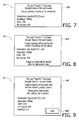
- a first notification screen 100 is displayed on the display 16, as shown in Fig. 7 .
- the first notification screen 100 displays thereon the shortcut information for the image scanning operation to be executed and a message notifying that the image scanning operation using the card 40 is about to be executed.
- a second notification screen 102 is displayed on the display 16, as shown in Fig. 8 .
- the second notification screen 102 displays thereon a message notifying that the registered card 40 has been detected and the shortcut information associated with the card 40 (i.e., the shortcut information for the image scanning operation using the card 40). The user is allowed to confirm the shortcut information for the image scanning operation using the card 40.
- the second notification screen 102 also displays thereon a message that the image scanning operation will be executed immediately after a document is set on the ADF.
- the image scanning operation is executed in accordance with the extracted shortcut information. Scanned data generated in the image scanning operation is transmitted to the transmission destination included in the extracted shortcut information. Thereby, after making sure of the shortcut information, the user is allowed to conveniently execute the image scanning operation without having to operate any buttons.
- a third notification screen 106 is displayed on the display 16, as shown in Fig. 9 , regardless of whether there is a document set on the ADF.
- the third notification screen 106 displays thereon the shortcut information associated with the card 40 (i.e., the shortcut information for the image scanning operation using the card 40).
- the third notification screen 106 also displays thereon a start button 108 and a message notifying that the image scanning operation is executed in accordance with the displayed shortcut information when the user operates the start button 108 after setting a document on the ADF.
- the start button 108 the image scanning operation is executed in accordance with the extracted shortcut information.
- the CPU 12 extracts the shortcut information. Further, the CPU 12 determines whether one-push setting included in the extracted shortcut information is set ON (S108). When determining that one-push setting included in the extracted shortcut information is set ON (S108: Yes), the CPU 12 determines whether there is a document set on the ADF (S110). When determining that there is a document set on the ADF (S110: Yes), the CPU 12 controls (e.g., transmits a control signal to) the display 16 to display the first notification screen 100 (S112).
- the CPU 12 controls (e.g., transmits a control signal to) the display 16 to display the second notification screen 102 (S118).
- the CPU 12 determines whether a document has been set on the ADF (S120).
- the CPU 12 repeatedly performs the operation in S120. Meanwhile, when determining that a document has been set on the ADF (S120: Yes), the CPU 12 goes to S 114.
- the CPU 12 When determining that one-push setting included in the extracted shortcut information is set OFF (S108: No), the CPU 12 performs a one-push OFF process subroutine (S122). In the one-push OFF process subroutine, as shown in Fig. 12 , the CPU 12 controls (e.g., transmits a control signal to) the display 16 to display the third notification screen 106 (S130). The CPU 12 determines whether the start button has been operated (S132). When determining that the start button has not been operated (S132: No), the CPU 12 repeatedly performs the operation in S 132. Meanwhile, when determining that the start button has been operated (S132: Yes), the CPU 12 determines whether there is a document set on the ADF (S 134).
- the CPU 12 controls (e.g., transmits a control signal to) the display 16 to display the card waiting screen 76 (S158).
- the CPU 12 determines whether the card 40 has been detected, i.e., whether the card 40 has been brought in proximity to or in contact with the card reader 22 (S160).
- the CPU 12 repeatedly performs the operation in S160.
- the CPU 12 controls the card reader 22 to read the production number of the card 40 (S 162).
- the card reader/writer 154 of the image scanner 152 is configured to write various kinds of data into a card 40 and read data written in the card 40. Therefore, according to the communication system 150, in an image scanning operation using the card 40, a unique ID number generated by the image scanner 152 is used instead of a production number of the card 40. The unique ID number generated by the image scanner 152 is written into the card 40, and the image scanning operation is executed using the ID number. More specifically, when the card 40 is registered in the image scanner 152, the registration screen 60 shown in Fig. 2 is displayed on the display 16 in response to a button (not shown) for performing the registration of the card 40 being operated.
- the image scanner 152 when a card-specific ID number is written into each individual card, it is possible to enhance the possibility that only a single card exists with the same ID number written therein. Therefore, according to the image scanner 152 of the second illustrative embodiment, it is possible to certainly secure the confidentiality of registered information.
- the production number of the card 40 and the shortcut information are stored into the data storage area 32 in association with each other, and the shortcut information is extracted using the production number of the card 40.
- the ID number and the shortcut information are stored into the data storage area 32 in association with each other, and the shortcut information is extracted using the ID number.
- shortcut information is written in a card 40, and the shortcut information is read by the card reader/writer 154. Thereby, an image scanning operation is executed in accordance with the shortcut information.
- the registration screen 60 shown in Fig. 2 is displayed on the display 16 in response to a button (not shown) for performing the registration for the card 40 being operated.
- a button not shown
- the OK button 66 is operated after the shortcut information is input in the entry fields 62 on the registration screen 60, a card waiting screen 160 is displayed on the display 16, as shown in Fig. 16 .
- the shortcut information input in the entry fields 62 on the registration screen 60 On the card waiting screen 160, the shortcut information input in the entry fields 62 on the registration screen 60, a message that prompts the user to bring the card 40 in proximity to or in contact with the card reader/writer 154 in order for the shortcut information to be written into the card 40, and a cancel button 162 are displayed.
- the user confirms the message on the card waiting screen 160 and then brings the card 40 for registration in proximity to or in contact with the card reader/writer 154.
- the shortcut information input in the entry fields 62 on the registration screen 60 is written into the card 40 for registration.
- a confirmation screen 166 is displayed on the display 16, as shown in Fig. 17 .
- the shortcut information registered in the card 40 and an OK button 168 are displayed.
- the OK button 168 When the OK button 168 is operated, the registration for the card 40 is completed.
- the production number of the card 40 and the shortcut information are registered in association with each other.
- the production number and the shortcut information need to be registered in each intended image scanner.
- the ID number and the shortcut information are registered in association with each other.
- the ID number and the shortcut information need to be registered in each intended image scanner.
- the shortcut information is not registered in the image scanner 152 but registered in the card 40.
- the image scanning operation using the card 40 with the shortcut information registered therein as described above is performed when the first control program 30 is executed by the CPU 12 of the image scanner 152. Further, the aforementioned registration for the card 40 is performed when the second control program 31 is executed by the CPU 12 of the image scanner 152.
- Figs. 18 and 19 an explanation will be provided of a flow of a process to be performed when the first control program 30 is executed by the CPU 12 of the image scanner 152.
- Fig. 20 an explanation will be provided of a flow of a process to be performed when the second control program 31 is executed by the CPU 12 of the image scanner 152. In this respect, nonetheless, the process shown in Figs.
- the CPU 12 executes operations in S200 and S202 in the same manner as executed in S100 and S102 shown in Fig. 10 . Then, when determining that the card 40 has been detected (S202: Yes), the CPU 12 controls the card reader/writer 154 to read data from the detected card 40 and decodes the read data (S204). The CPU 12 determines whether the data has successfully been decoded (S206). When determining that the data has not successfully been decoded (S206: No), the CPU 12 goes back to S200. Meanwhile, when determining that the data has successfully been decoded (S206: Yes), the CPU 12 executes operations in S208 to S222 in the same manner as executed in S108 to S 122 shown in Fig. 10 . Thereafter, the CPU 12 terminates the process based on the first control program 30. It is noted that the shortcut information to be used in the process shown in Fig. 20 is acquired through the decoding of the data read out from the card 40.
- the CPU 12 executes operations in S230 and S232 in the same manner as executed in S150 and S152 shown in Fig. 13 .
- the CPU 12 controls (e.g., transmits a control signal to) the display 16 to display the card waiting screen 160 (S234).
- the CPU 12 determines whether the card 40 has been detected, i.e., whether the card 40 has been brought in proximity to or in contact with the card reader/writer 154 (S236).
- S236 determines whether the card 40 has not been detected (S236: No)
- the CPU 12 repeatedly performs the operation in S236.
- the CPU 12 controls the card reader/writer 154 to write into the card 40 the shortcut information input in the entry fields 62 on the registration screen 60 (S238).
- the CPU 12 executes operations in S240 and S242 in the same manner as executed in S166 and S168 shown in Fig. 13 . Thereafter, the CPU 12 terminates the process based on the second control program 31.
- the card 40 is registered in association with the shortcut information in response to the card registration button 70 being operated on the selection screen 68.
- the shortcut button 88 is registered in association with the shortcut information in response to the card-less registration button 72 being operated on the selection screen 68.
- the card 40 and the shortcut button 88 may concurrently be registered in association with the shortcut information in response to the card registration button 70 being operated. Namely, by a user operation of the card registration button 70, the shortcut information input on the registration screen 60, the production number of the card 40 that has been read by the card reader 22, and the information on the shortcut button 88 may be stored in association with each other.
- the second notification screen 102 may be displayed in the same manner as executed in S118. Thereafter, a determination may be made as to whether a document has been set on the ADF in the same manner as executed in S120. When it is determined that a document has been set on the ADF, the image scanning operation may be performed in the same manner as executed in S 114.
- the display 16 has been shown as an example of the display according to aspects of the present disclosure. Nonetheless, any other display device such as a light emitting diode (hereinafter referred to as an "LED") may be used in addition to or instead of the display 16.
- the CPU 12 may show predetermined kinds of display on the LED in addition to or instead of notification of predetermined information via the first notification screen 100, the second notification screen 102, and the third notification screen 106.
- various screens are displayed in the display 16 of the image scanner 10 (or 152).
- the various screens may be displayed in another display connected to the PC 50.
- the CPU 12 may transmit a control signal via the network I/F 24 to the PC 50 to cause the other display, connected to the PC 50, to display the second notification screen 102.
- the CPU 12 may transmit a control signal via the network I/F 24 to the PC 50 to cause the other display, connected to the PC 50, to display the various screens.
- the image scanner 10 (or 152) may not include the display 16.
- the CPU 12 performs the processes shown in Figs. 10 to 13 , Fig. 15 , and Figs. 18 to 20 . Nonetheless, the processes may be performed by one or more application specific integrated circuits (hereinafter referred to as "ASICs") or one or more logic integrated circuits. Further, the processes may be performed by one or more CPUs, one or more ASICs, and one or more logic integrated circuits in cooperation with each other.
- ASICs application specific integrated circuits
- the processes may be performed by one or more CPUs, one or more ASICs, and one or more logic integrated circuits in cooperation with each other.
Landscapes
- Engineering & Computer Science (AREA)
- General Engineering & Computer Science (AREA)
- Multimedia (AREA)
- Signal Processing (AREA)
- Computing Systems (AREA)
- Facsimiles In General (AREA)
- Accessory Devices And Overall Control Thereof (AREA)
- Control Or Security For Electrophotography (AREA)
Abstract
Description
- The following description relates to one or more aspects of an image processing apparatus configured to perform an image processing operation.
- An image scanner has been known that provides a shortcut function for simplifying user operations (e.g., see Japanese Patent Provisional Publication No.
2008-22183 - According to the known image scanner, as described above, it is possible to simplify user operations by using the shortcut function. Nonetheless, there may be users who feel like it is troublesome to search for and operate an intended shortcut button. Therefore, it is desired to further simplify user operations.
- Aspects of the present disclosure are advantageous to provide one or more improved techniques, for an image processing apparatus, which make it possible to further simplify user operations.
- According to aspects of the present disclosure, an image processing apparatus is provided, which includes a sensor configured to detect a document set on the image processing apparatus, an image processing device configured to perform an image processing operation of processing an image of the document, a reader configured to read registration information from a recording medium positioned in proximity to or in contact with the reader, the registration information including at least one of identification information for the recording medium and setting information for the image processing operation, and a controller configured to, in response to the recording medium being brought in proximity to or in contact with the reader, control the reader to read the registration information from the recording medium, in response to the registration information being read by the reader, acquire the setting information based on the read registration information, in response to acquiring the setting information, determine whether the document is set on the image processing apparatus, based on a detection signal from the sensor, and in response to determining that the document is set on the image processing apparatus, control the image processing device to perform the image processing operation in accordance with the acquired setting information.
- According to aspects of the present disclosure, further provided is a method adapted to be implemented on a processor coupled with an image processing apparatus comprising a sensor, an image processing device, and a reader, the method including, in response to a recording medium being brought in proximity to or in contact with the reader, controlling the reader to read registration information from the recording medium via near-field wireless communication, the registration information including at least one of identification information for the recording medium and setting information for an image processing operation performed by the image processing device, in response to the registration information being read by the reader, acquiring the setting information based on the read registration information, in response to acquiring the setting information, determining whether a document is set on the image processing apparatus, based on a detection signal from the sensor configured to detect the document set on the image processing apparatus, and in response to determining that the document is set on the image processing apparatus, controlling the image processing device to perform the image processing operation of processing an image of the document in accordance with the acquired setting information.
- According to aspects of the present disclosure, further provided is a non-transitory computer-readable medium storing computer-readable instructions that are executable by a processor coupled with an image processing apparatus comprising a sensor, an image processing device, and a reader, the instructions being configured to, when executed by the processor, cause the processor to, in response to a recording medium being brought in proximity to or in contact with the reader, control the reader to read registration information from the recording medium via near-field wireless communication, the registration information including at least one of identification information for the recording medium and setting information for an image processing operation performed by the image processing device, in response to the registration information being read by the reader, acquire the setting information based on the read registration information, in response to acquiring the setting information, determine whether a document is set on the image processing apparatus, based on a detection signal from the sensor configured to detect the document set on the image processing apparatus, and in response to determining that the document is set on the image processing apparatus, controlling the image processing device to perform the image processing operation of processing an image of the document in accordance with the acquired setting information.
- According to aspects of the present disclosure, the image processing apparatus includes the reader configured to read registration information from the recording medium positioned in proximity to or in contact with the reader, the registration information including at least one of identification information for the recording medium and setting information for an image processing operation. In the image processing apparatus, when the recording medium is brought in proximity to or in contact with the reader, operations are performed that include reading, by the reader, the registration information from the recording medium, acquiring the setting information based on the read registration information, determining whether a document is set on the image processing apparatus, based on a detection signal from the sensor, and in response to determining that the document is set on the image processing apparatus, performing the image processing operation in accordance with the acquired setting information. Thus, in the image processing apparatus according to aspects of the present disclosure, in response to the recording medium being brought in proximity to or in contact with the reader, the image processing operation is performed in accordance with the acquired setting information when it is determined that the document is set on the image processing apparatus. Thereby, it is possible to achieve an image processing apparatus configured to perform an image processing operation via more simplified user operations.
-
-
Fig. 1 is a block diagram showing a configuration of a communication system in a first illustrative embodiment according to one or more aspects of the present disclosure. -
Fig. 2 exemplifies a registration screen displayed on a display of an image scanner included in the communication system in the first illustrative embodiment according to one or more aspects of the present disclosure. -
Fig. 3 exemplifies a selection screen displayed on the display of the image scanner in the first illustrative embodiment according to one or more aspects of the present disclosure. -
Fig. 4 exemplifies a card waiting screen displayed on the display of the image scanner in the first illustrative embodiment according to one or more aspects of the present disclosure. -
Fig. 5 exemplifies a confirmation screen displayed on the display of the image scanner in the first illustrative embodiment according to one or more aspects of the present disclosure. -
Fig. 6 exemplifies a shortcut button selection screen displayed on the display of the image scanner in the first illustrative embodiment according to one or more aspects of the present disclosure. -
Fig. 7 exemplifies a first notification screen displayed on the display of the image scanner in the first illustrative embodiment according to one or more aspects of the present disclosure. -
Fig. 8 exemplifies a second notification screen displayed on the display of the image scanner in the first illustrative embodiment according to one or more aspects of the present disclosure. -
Fig. 9 exemplifies a third notification screen displayed on the display of the image scanner in the first illustrative embodiment according to one or more aspects of the present disclosure. -
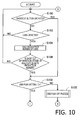
Figs. 10 to 12 are flowcharts showing a procedure of a process to be performed when a first control program is executed by a CPU of the image scanner in the first illustrative embodiment according to one or more aspects of the present disclosure. -
Fig. 13 is a flowchart showing a procedure of a process to be performed when a second control program is executed by the CPU of the image scanner in the first illustrative embodiment according to one or more aspects of the present disclosure. -
Fig. 14 is a block diagram showing a configuration of a communication system in a second illustrative embodiment according to one or more aspects of the present disclosure. -
Fig. 15 is a flowchart showing a procedure of a process to be performed when a second control program is executed by a CPU of an image scanner included in the communication system in the second illustrative embodiment according to one or more aspects of the present disclosure. -
Fig. 16 exemplifies a card waiting screen displayed on a display of the image scanner in the second illustrative embodiment according to one or more aspects of the present disclosure. -
Fig. 17 exemplifies a confirmation screen displayed on the display of the image scanner in the second illustrative embodiment according to one or more aspects of the present disclosure. -
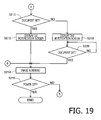
Figs. 18 to 20 are flowcharts showing a procedure of a process to be performed when a first control program is executed by a CPU of an image scanner in a third illustrative embodiment according to one or more aspects of the present disclosure. - It is noted that various connections are set forth between elements in the following description. It is noted that these connections in general and, unless specified otherwise, may be direct or indirect and that this specification is not intended to be limiting in this respect. Aspects of the present disclosure may be implemented on circuits (such as application specific integrated circuits) or in computer software as programs storable on computer-readable media including but not limited to RAMs, ROMs, flash memories, EEPROMs, CD-media, DVD-media, temporary storage, hard disk drives, floppy drives, permanent storage, and the like.
- Hereinafter, illustrative embodiments according to aspects of the present disclosure will be described with reference to the accompanying drawings.
- As shown in
Fig. 1 , acommunication system 1 includes animage scanner 10, a personal computer (hereinafter referred to as a "PC" in an abbreviation form) 50, and arouter 52. It is noted that theimage scanner 10 is an example of an image processing apparatus according to aspects of the present disclosure. - The
image scanner 10 is configured to scan a document set on an automatic document feeder (hereinafter referred to as an "ADF") (not shown) and generate scanned data. Namely, theimage scanner 10 is a sheet feed scanner. Theimage scanner 10 includes a central processing unit (hereinafter referred to as a "CPU") 12, astorage device 14, adisplay 16, an input interface (hereinafter referred to as an "input I/F") 18, animage reading device 19, adetection sensor 20, acard reader 22, and a network interface (hereinafter referred to as a "network I/F") 24. These elements included in theimage scanner 10 are communicably connected with each other via an input/output port (hereinafter referred to as an I/O port") 28. Thedisplay 16 is an example of a display according to aspects of the present disclosure. The input I/F 18 is an example of an operation device according to aspects of the present disclosure. Thedetection sensor 20 is an example of a sensor according to aspects of the present disclosure. Thecard reader 22 is an example of a reader according to aspects of the present disclosure. - The
CPU 12 is configured to execute operations in accordance with afirst control program 30 and asecond control program 31 stored in thestorage device 14. It is noted that thestorage device 14 is an example of a non-transitory computer-readable medium according to aspects of the present disclosure. Thefirst control program 30 is a program for executing an image scanning operation and transmitting to the PC 50 scanned data generated in the image scanning operation. Thesecond control program 31 is a program for registering a card and a shortcut button to be used for the image scanning operation. It is noted that theCPU 12 executing thecontrol programs control programs CPU 12 executing thecontrol programs - The
storage device 14 includes adata storage area 32 configured to store data necessary for execution of thefirst control program 30. Thestorage device 14 is formed by a combination of storage devices such as a random access memory (hereinafter referred to as a "RAM"), a read only memory (hereinafter referred to as a "ROM"), a flash memory, a hard disk drive (hereinafter referred to as an "HDD"), and a buffer provided to theCPU 12. - The
display 16 has a display surface configured to display various functions of theimage scanner 10. For instance, a liquid crystal display (hereinafter referred to as an "LCD"), an organic electroluminescence display (hereinafter referred to as an "OELD"), and a plasma display can be cited as examples of thedisplay 16. The input I/F 18 is configured to accept user operations to buttons displayed on thedisplay 16. For instance, the input I/F 18 may include a touch panel configured integrally with thedisplay 16. Further, for instance, the input I/F 18 may include hard keys. Theimage reading device 19 is configured to read an image of a document. For instance, theimage reading device 19 includes a plurality of conveyance rollers and an image sensor (such as a CCD image sensor or a contact image sensor). The plurality of conveyance rollers are driven by a motor. The image sensor is configured to read a document sheet being conveyed by the plurality of conveyance rollers. Theimage scanner 10 may be a flatbed scanner. In this case, theimage reading device 19 may include a moving mechanism configured to move the image sensor in a sub scanning direction, in addition to or instead of the plurality of conveyance rollers. Thedetection sensor 20 is configured to detect whether there is a document set on the ADF of theimage scanner 10. For instance, thedetection sensor 20 includes a light emitting element configured to emit light and a light receiving element configured to receive the light from the light emitting element. When there is a document set on the ADF of theimage scanner 10, the light from the light emitting element is blocked by the document. Thereby, a light receiving quantity of the light receiving element (i.e., a quantity of light received by the light receiving element) is changed. Thus, it is possible for thedetection sensor 20 to detect whether there is a document set on the ADF of theimage scanner 10. Alternatively, thedetection sensor 20 may include a rotatable member configured to be rotated by a document set on the ADF, and a photo-coupler configured to detect a position of the rotatable member. - The
card reader 22 is configured to, in response to acard 40 with an IC chip incorporated therein being brought in proximity to or in contact with thecard reader 22, read a production number of thecard 40 that is stored in the IC chip, via a near-field wireless communication. It is noted that thecard 40 is an example of a recording medium according to aspects of the present disclosure. Further, the production number of thecard 40 is an example of identification information according to aspects of the present disclosure. - The network I/
F 24 is configured to communicate with an external device via therouter 52. The network I/F 24 is connected with thePC 50 via therouter 52. Thereby, theimage scanner 10 is allowed to perform data communication with thePC 50. - In the
communication system 1, it is possible to perform an image scanning operation using thecard 40 by theimage scanner 10, and to transmit scanned data generated in the image scanning operation to thePC 50. Specifically, in theimage scanner 10, firstly, thecard 40 is registered. In theimage scanner 10, when a button (not shown) for registering thecard 40 is operated, aregistration screen 60 is displayed on thedisplay 16, as shown inFig. 2 . On the registration screen, a plurality of entry fields 62, a cancelbutton 64, and anOK button 66 are displayed. Eachentry field 62 is configured to accept an entry of a corresponding piece of shortcut information associated with thecard 40 to be registered. It is noted that the shortcut information is an example of setting information according to aspects of the present disclosure. - The shortcut information is required to use the shortcut function in the image scanning operation. The shortcut information includes information on a transmission destination of the scanned data to be generated in the image scanning operation, information on a resolution for the image scanning operation, information for specifying one of monochrome scanning and color scanning, information on a file format of the scanned data to be generated in the image scanning operation, and information on a one-push setting. Each piece of information included in the shortcut information is input in a corresponding one of the entry fields 62. It is noted that the one-push setting is a setting for starting the image scanning operation in response to a simple operation. When the one-push setting is set ON, the image scanning operation is started in response to a simple operation. Meanwhile, when the one-push setting is set OFF, the image scanning operation is started after a user operation for reconfirmation.
- When the
OK button 66 is operated after the shortcut information has been input in the entry fields 62, aselection screen 68 is displayed on thedisplay 16, as shown inFig. 3 . On theselection screen 68, the shortcut information input in the entry fields 62 on theregistration screen 60 is displayed for user confirmation. Additionally, on theselection screen 68, acard registration button 70, acard-less registration button 72, and a cancelbutton 74 are displayed. Thecard registration button 70 is a button for registering thecard 40 for executing the image scanning operation. Thecard-less registration button 72 is a button for registering shortcut information for executing the image scanning operation using a shortcut button instead of thecard 40. - When the
card registration button 70 is operated on theselection screen 68, acard waiting screen 76 is displayed on thedisplay 16, as shown inFig. 4 . On thecard waiting screen 76, a message that prompts the user to bring thecard 40 in proximity to or in contact with thecard reader 22, and a cancelbutton 78 are displayed, as shown inFig. 4 . The user confirms the message on thecard waiting screen 76 and then brings thecard 40 to be registered in proximity to or in contact with thecard reader 22. Thereby, the production number of thecard 40 to be registered is read by thecard reader 22. The production number of thecard 40 is stored into thedata storage area 32 in association with the shortcut information input in the entry fields 62 on theregistration screen 60. After the production number and the shortcut information are stored into thedata storage area 32 in association with each other, aconfirmation screen 81 is displayed on thedisplay 16, as shown inFig. 5 . On theconfirmation screen 81, the registered production number of thecard 40, the registered shortcut information, and anOK button 82 are displayed. When theOK button 82 is operated, the registration of thecard 40 is completed. - When the
card-less registration button 72 is operated on theselection screen 68, shortcut information for executing the image scanning operation using a shortcut button is registered. Specifically, when thecard-less registration button 72 is operated on theselection screen 68, a shortcutbutton selection screen 86 is displayed on thedisplay 16, as shown inFig. 6 . On the shortcutbutton selection screen 86, a plurality ofshortcut buttons 88 are displayed. When the user selects one of theshortcut buttons 88, information on the selectedshortcut button 88 and the shortcut information input in the entry fields 62 on theregistration screen 60 are stored into thedata storage area 32 in association with each other. Thereafter, on thedisplay 16, a screen (not shown) is displayed for confirming the shortcut information stored in association with the selectedshortcut button 88. Thereby, the registration of the shortcut information in association with the selectedshortcut button 88 is completed. - When the registration of the
card 40 or the registration of the shortcut information associated with the selectedshortcut button 88 is completed, it becomes possible to execute the image scanning operation using the registeredcard 40 or the registeredshortcut button 88. Specifically, when the user brings the registeredcard 40 in proximity to or in contact with thecard reader 22, the production number of thecard 40 is read by thecard reader 22. Then, theimage scanner 10 extracts the shortcut information that is stored in thedata storage area 32 in association with the read production number of thecard 40. According to the extracted shortcut information, theimage scanner 10 performs the image scanning operation. Meanwhile, when the user selects the registeredshortcut button 88, theimage scanner 10 extracts the shortcut information that is stored in thedata storage area 32 in association with the selectedshortcut button 88. According to the extracted shortcut information, theimage scanner 10 performs the image scanning operation. - When there is not any document set on the ADF, it is not possible to perform the image scanning operation. Hence, the
image scanner 10 determines whether there is a document set on the ADF, based on a detection value from thedetection sensor 20. Further, as described above, the shortcut information includes the information on the one-push setting. When the one-push setting is set ON, the image scanning operation is started in response to a simple operation. Meanwhile, when the one-push setting is set OFF, a user operation for reconfirmation is required to start the image scanning operation. When there is a document set on the ADF, and the one-push setting included in the extracted shortcut information is set ON, the image scanning operation is performed in response to the registeredcard 40 being just brought in proximity to or in contact with thecard reader 22. - In the image scanning operation, the
image scanner 10 scans the document and generates scanned data in accordance with the information included in the extracted shortcut information, such as the information on the resolution for the image scanning operation, the information for specifying one of monochrome scanning and color scanning, and the information on the file format of the scanned data. Then, theimage scanner 10 transmits the scanned data, e.g., to thePC 50 via the network I/F 24, based on the information on the transmission destination that is included in the extracted shortcut information. When the image scanning operation is executed in accordance with the aforementioned procedure, afirst notification screen 100 is displayed on thedisplay 16, as shown inFig. 7 . Thefirst notification screen 100 displays thereon the shortcut information for the image scanning operation to be executed and a message notifying that the image scanning operation using thecard 40 is about to be executed. - When the shortcut information associated with the production number of the
card 40 is extracted, in a case where the one-push setting included in the extracted shortcut information is set ON, and there is not any document set on the ADF, asecond notification screen 102 is displayed on thedisplay 16, as shown inFig. 8 . Thesecond notification screen 102 displays thereon a message notifying that the registeredcard 40 has been detected and the shortcut information associated with the card 40 (i.e., the shortcut information for the image scanning operation using the card 40). The user is allowed to confirm the shortcut information for the image scanning operation using thecard 40. For instance, when the user forgets settings for the image scanning operation using thecard 40, the user is allowed to make sure of the settings for the image scanning operation using thecard 40, by intentionally not setting any document on the ADF and bringing thecard 40 in proximity to or in contact with thecard reader 22. - The
second notification screen 102 also displays thereon a message that the image scanning operation will be executed immediately after a document is set on the ADF. When the user sets a document on the ADF in a state where thesecond notification screen 102 is displayed on thedisplay 16, the image scanning operation is executed in accordance with the extracted shortcut information. Scanned data generated in the image scanning operation is transmitted to the transmission destination included in the extracted shortcut information. Thereby, after making sure of the shortcut information, the user is allowed to conveniently execute the image scanning operation without having to operate any buttons. - When the shortcut information associated with the production number of the
card 40 is extracted, in a case where the one-push setting included in the extracted shortcut information is set OFF, athird notification screen 106 is displayed on thedisplay 16, as shown inFig. 9 , regardless of whether there is a document set on the ADF. Thethird notification screen 106 displays thereon the shortcut information associated with the card 40 (i.e., the shortcut information for the image scanning operation using the card 40). Thethird notification screen 106 also displays thereon astart button 108 and a message notifying that the image scanning operation is executed in accordance with the displayed shortcut information when the user operates thestart button 108 after setting a document on the ADF. When the user operates thestart button 108, the image scanning operation is executed in accordance with the extracted shortcut information. Scanned data generated in the image scanning operation is transmitted to the transmission destination included in the extracted shortcut information. After the user brings thecard 40 in proximity to or in contact with thecard reader 22, the image scanning operation is executed in response to the user confirming the shortcut information and performing a user operation after confirmation. Thereby, it is possible to certainly make sure of user's intentions, to prevent the image scanning operation from being executed despite user's intentions, and to prevent the scanned data from being mistakenly transmitted. - When the registered
shortcut button 88 is operated, the image scanning operation is executed in the same manner as when the registeredcard 40 is brought in proximity to or in contact with thecard reader 22. When theshortcut button 88 is operated, the shortcut information associated with theshortcut button 88 is extracted. Subsequently, it is determined whether there is a document set on the ADF. Further, it is determined whether the one-push setting included in the extracted shortcut information is set ON. When it is determined that there is a document set on the ADF and that the one-push setting included in the extracted shortcut information is set ON, the image scanning operation is executed. Namely, when a document is set on the ADF, and the one-push setting included in the extracted shortcut information is set ON, the image scanning operation is executed in response to theshortcut button 88 being just operated. Since the image scanning operation to be executed in response to theshortcut button 88 being operated is substantially the same as the image scanning operation using thecard 40, a detailed explanation thereof will be omitted. When the image scanning operation is executed in response to theshortcut button 88 being operated, a screen that is similar to thefirst notification screen 100 shown inFig. 7 is displayed on thedisplay 16. On the screen, a message "The shortcut button #X has been operated." is displayed instead of a message "The card ofScan# 11 has been brought in proximity to the card reader." on thefirst notification screen 100. - When the shortcut information is extracted in response to the
shortcut button 88 being operated, in a case where the one-push setting included in the extracted shortcut information is set ON, and there is not any document set on the ADF, a screen similar to thesecond notification screen 102 shown inFig. 8 is displayed on thedisplay 16. On the screen, a message "The shortcut button #X has been operated." is displayed instead of a message "The card ofScan# 11 has been brought in proximity to the card reader." on thesecond notification screen 102. Thereby, in the same manner as when the image scanning operation is executed using thecard 40, for instance, when the user forgets information associated with theshortcut button 88, the user is allowed to make sure of the information associated with theshortcut button 88, by intentionally not setting any document on the ADF and operating theshortcut button 88. When the user sets a document on the ADF in accordance with a message displayed on the screen, the image scanning operation is executed. Thereby, after making sure of the shortcut information on the screen similar to thesecond notification screen 102, the user is allowed to conveniently execute the image scanning operation without having to operate any buttons. - When the shortcut information is extracted in response to the
shortcut button 88 being operated, in a case where the one-push setting included in the extracted shortcut information is set OFF, a screen similar to thethird notification screen 106 shown inFig. 9 is displayed on thedisplay 16, regardless of whether there is a document set on the ADF. On the screen, a message "The shortcut button #X has been operated." is displayed instead of a message "The card ofScan# 11 has been brought in proximity to the card reader." on thethird notification screen 106. On the screen, in the same manner as on thethird notification screen 106, when astart button 108 is operated, the image scanning operation is executed in accordance with the extracted shortcut information. After the user operates theshortcut button 88, the image scanning operation is executed in response to the user confirming the shortcut information and performing a user operation after confirmation. Thereby, it is possible to certainly make sure of user's intentions, to prevent the image scanning operation from being executed despite user's intentions, and to prevent the scanned data from being mistakenly transmitted. - The aforementioned image scanning operation is performed when the
first control program 30 is executed by theCPU 12 of theimage scanner 10. Further, the registration of thecard 40 and the shortcut button to be used for the image scanning operation is performed when thesecond control program 31 is executed by theCPU 12 of theimage scanner 10. Hereinafter, referring toFigs. 10 to 12 , an explanation will be provided of a flow of a process to be performed when thefirst control program 30 is executed by theCPU 12 of theimage scanner 10. Further, referring toFig. 13 , an explanation will be provided of a flow of a process to be performed when thesecond control program 31 is executed by theCPU 12 of theimage scanner 10. - When executing the
first control program 30, as shown inFig. 10 , theCPU 12 initially determines whether the registered shortcut button has been operated (S100). When determining that the shortcut button has not been operated (S100: No), theCPU 12 determines whether the registeredcard 40 has been detected (S102). In other words, in S102, theCPU 12 determines whether the registeredcard 40 has been brought in proximity to or in contact with thecard reader 22. When determining that thecard 40 has not been detected (S102: No), theCPU 12 goes back to S100. - Meanwhile, when determining that the
card 40 has been detected (S102: Yes), theCPU 12 controls thecard reader 22 to read the production number of the card 40 (S104). TheCPU 12 determines whether there is shortcut information stored in thedata storage area 32 in association with the read production number of the card 40 (S106). When determining that there is not shortcut information stored in thedata storage area 32 in association with the production number of the card 40 (S106: No), theCPU 12 goes back to S100. - Meanwhile, when determining that there is shortcut information stored in the
data storage area 32 in association with the production number of the card 40 (S106: Yes), theCPU 12 extracts the shortcut information. Further, theCPU 12 determines whether one-push setting included in the extracted shortcut information is set ON (S108). When determining that one-push setting included in the extracted shortcut information is set ON (S108: Yes), theCPU 12 determines whether there is a document set on the ADF (S110). When determining that there is a document set on the ADF (S110: Yes), theCPU 12 controls (e.g., transmits a control signal to) thedisplay 16 to display the first notification screen 100 (S112). - The
CPU 12 performs an image scanning operation based on the extracted shortcut information (S114). For instance, theCPU 12 transmits, to theimage readingdevice 19, a control signal based on the extracted shortcut information. Theimage reading device 19 controls driving of the conveyance rollers and the image sensor based on the control signal. TheCPU 12 determines whether theimage scanner 10 is powered OFF (S116). When determining that theimage scanner 10 is not powered OFF (S116: No), theCPU 12 goes back to S100. Meanwhile, when determining that theimage scanner 10 is powered OFF (S116: Yes), theCPU 12 completes the process of thefirst control program 30. - When determining in S110 that there is not a document set on the ADF (S110: No), the
CPU 12 controls (e.g., transmits a control signal to) thedisplay 16 to display the second notification screen 102 (S118). TheCPU 12 determines whether a document has been set on the ADF (S120). When determining that a document has not been set on the ADF (S120: NO), theCPU 12 repeatedly performs the operation in S120. Meanwhile, when determining that a document has been set on the ADF (S120: Yes), theCPU 12 goes to S 114. - When determining that one-push setting included in the extracted shortcut information is set OFF (S108: No), the
CPU 12 performs a one-push OFF process subroutine (S122). In the one-push OFF process subroutine, as shown inFig. 12 , theCPU 12 controls (e.g., transmits a control signal to) thedisplay 16 to display the third notification screen 106 (S130). TheCPU 12 determines whether the start button has been operated (S132). When determining that the start button has not been operated (S132: No), theCPU 12 repeatedly performs the operation in S 132. Meanwhile, when determining that the start button has been operated (S132: Yes), theCPU 12 determines whether there is a document set on the ADF (S 134). When determining that there is not a document set on the ADF (S 134: No), theCPU 12 controls (e.g., transmits a control signal to) thedisplay 16 to display an error screen (not shown) (S136). Thereafter, theCPU 12 goes back to S130. Meanwhile, when determining that there is a document set on the ADF (S134: Yes), theCPU 12 terminates the one-push process subroutine, and goes to S 114 in the main routine. - When determining that the shortcut button has been operated (S100: Yes), the
CPU 12 goes to S108. In this case, in S108, theCPU 12 extracts the shortcut information associated with the operated shortcut button. Further, in S108, theCPU 12 determines whether the one-push setting included in the extracted shortcut information is set ON. - The
CPU 12 launches thesecond control program 31 in response to accepting an instruction to register a shortcut on a menu screen (not shown). As shown inFig. 13 , when thesecond control program 31 is launched, theCPU 12 controls (e.g., transmits a control signal to) thedisplay 16 to display the registration screen 60 (S150). Subsequently, theCPU 12 determines whether theOK button 66 has been operated on the registration screen 60 (S152). When determining that theOK button 66 has not been operated on the registration screen 60 (S152: No), theCPU 12 repeatedly performs the operation in S152. Meanwhile, when determining that theOK button 66 has been operated on the registration screen 60 (S152: Yes), theCPU 12 controls (e.g., transmits a control signal to) thedisplay 16 to display the selection screen 68 (S154). Then, theCPU 12 determines whether thecard registration button 70 has been operated on the selection screen 68 (S156). - When determining that the
card registration button 70 has been operated on the selection screen 68 (S156: Yes), theCPU 12 controls (e.g., transmits a control signal to) thedisplay 16 to display the card waiting screen 76 (S158). TheCPU 12 determines whether thecard 40 has been detected, i.e., whether thecard 40 has been brought in proximity to or in contact with the card reader 22 (S160). When determining that thecard 40 has not been detected (S160: No), theCPU 12 repeatedly performs the operation in S160. Meanwhile, when determining that thecard 40 has been detected (S160: Yes), theCPU 12 controls thecard reader 22 to read the production number of the card 40 (S 162). - The
CPU 12 stores, into thedata storage area 32, the read production number and the shortcut information input in the entry fields 62 on theregistration screen 60 in association with each other (S164). Subsequently, theCPU 12 controls (e.g., transmits a control signal to) thedisplay 16 to display the confirmation screen 81 (S166). TheCPU 12 determines whether theOK button 82 has been operated on the confirmation screen 81 (S168). When determining that theOK button 82 has not been operated on the confirmation screen 81 (S168: No), theCPU 12 repeatedly performs the operation in S168. Meanwhile, when determining that theOK button 82 has been operated on the confirmation screen 81 (S168: Yes), theCPU 12 terminates the process based on thesecond control program 31. - In S156, when the
card-less registration button 72, instead of thecard registration button 70, has been operated on the selection screen 68 (S156: No), theCPU 12 goes to S164. In this case, in S164, theCPU 12 stores, into thedata storage area 32, the operatedshortcut button 88 and the shortcut information input in the entry fields 62 on theregistration screen 60 in association with each other. -
Fig. 14 is a block diagram of acommunication system 150 in a second illustrative embodiment according to aspects of the present disclosure. Thecommunication system 150 has the same configuration as that of thecommunication system 1 of the first illustrative embodiment, except for a card reader/writer 154 of animage scanner 152. It is noted that theimage scanner 152 is an example of an image processing apparatus according to aspects of the present disclosure. The card reader/writer 154 is an example of a reader and an example of a writer according to aspects of the present disclosure. Hence, in thecommunication system 150, the same elements as those of the first illustrative embodiment will be provided with the same reference characters as those of the first illustrative embodiment. - In the
communication system 150, the card reader/writer 154 of theimage scanner 152 is configured to write various kinds of data into acard 40 and read data written in thecard 40. Therefore, according to thecommunication system 150, in an image scanning operation using thecard 40, a unique ID number generated by theimage scanner 152 is used instead of a production number of thecard 40. The unique ID number generated by theimage scanner 152 is written into thecard 40, and the image scanning operation is executed using the ID number. More specifically, when thecard 40 is registered in theimage scanner 152, theregistration screen 60 shown inFig. 2 is displayed on thedisplay 16 in response to a button (not shown) for performing the registration of thecard 40 being operated. - When the
OK button 66 is operated after shortcut information is input in the entry fields 62 on theregistration screen 60, theselection screen 68 shown inFig. 3 is displayed on thedisplay 16. When thecard registration button 70 is operated on theselection screen 68, thecard waiting screen 76 shown inFig. 4 is displayed on thedisplay 16. Before thecard waiting screen 76 is displayed, theCPU 12 generates the unique ID number. When the user brings thecard 40 in proximity to or in contact with the card reader/writer 154 in accordance with the message displayed on thecard waiting screen 76, the ID number is written into thecard 40. The ID number and the shortcut information input in the entry fields 62 on theregistration screen 60 are stored into thedata storage area 32 in association with each other. Thereafter, theconfirmation screen 81 shown inFig. 5 is displayed on thedisplay 16. When theOK button 82 is operated on theconfirmation screen 81, the registration of thecard 40 is completed. - When the registered
card 40 is brought in proximity to or in contact with the card reader/writer 154, the ID number written in thecard 40 is read by the card reader/writer 154. The shortcut information, stored in thedata storage area 32 in association with the read ID number, is extracted. Since operations to be executed after the extraction of the shortcut information are substantially the same as those in the first illustrative embodiment, explanations of the operations will be omitted. Nonetheless, in theimage scanner 152 of the second illustrative embodiment as well, it is possible to execute the image scanning operation using thecard 40, in the same manner as executed by theimage scanner 10 of the first illustrative embodiment. - In the aforementioned first illustrative embodiment, the
image scanner 10 executes the image scanning operation using the production number of thecard 40. In the second illustrative embodiment, theimage scanner 152 generates the unique ID number and executes the image scanning operation using the ID number. The production number of thecard 40 is a number set for each individual card by a manufacturing company of thecard 40. Therefore, there is little possibility that there are two or more cards of the same production number. However, for instance, when a huge number of cards are issued, there might be a case, with very low possibility, where there are two or more cards of the same production number. In such a case, confidentiality of registered information might be impaired. On the other hand, in the case of the unique ID number generated by theimage scanner 152, when a card-specific ID number is written into each individual card, it is possible to enhance the possibility that only a single card exists with the same ID number written therein. Therefore, according to theimage scanner 152 of the second illustrative embodiment, it is possible to certainly secure the confidentiality of registered information. - The aforementioned registration of the
card 40 is performed when thesecond control program 31 is executed by theCPU 12 of theimage scanner 152. Hereinafter, referring toFig. 15 , an explanation will be provided of a flow of a process to be performed when thesecond control program 31 is executed by theCPU 12 of theimage scanner 152. In this respect, nonetheless, the process shown inFig. 15 has many operations in common with the process shown inFig. 13 . Therefore, a simple explanation will be provided of each operation in common with the process shown inFig. 13 . - When the
second control program 31 is launched, theCPU 12 executes operations in S170 to S180 in the same manner as executed in S150 to S160 shown inFig. 13 . Then, when determining that thecard 40 has been detected (S180: Yes), theCPU 12 generates the unique ID number and writes the ID number into the card 40 (S182). TheCPU 12 stores, into thedata storage area 32, the ID number and the shortcut information input in the entry fields 62 on theregistration screen 60 in association with each other (S184). Subsequently, theCPU 12 executes operations in S186 and S188 in the same manner as executed in S166 and S168 shown inFig. 13 , respectively. Thereafter, theCPU 12 terminates the process based on thesecond control program 31. - A
communication system 150 of a third illustrative embodiment has substantially the same configuration as thecommunication system 150 of the second illustrative embodiment. Therefore, the configuration of thecommunication system 150 of the third illustrative embodiment will not be shown in any drawings or be described. - In the
image scanner 10 of the aforementioned first illustrative embodiment, the production number of thecard 40 and the shortcut information are stored into thedata storage area 32 in association with each other, and the shortcut information is extracted using the production number of thecard 40. Further, in theimage scanner 152 of the aforementioned second illustrative embodiment, the ID number and the shortcut information are stored into thedata storage area 32 in association with each other, and the shortcut information is extracted using the ID number. In thecommunication system 150 of the third illustrative embodiment, shortcut information is written in acard 40, and the shortcut information is read by the card reader/writer 154. Thereby, an image scanning operation is executed in accordance with the shortcut information. - Specifically, when registration for the
card 40 is performed by theimage scanner 152, theregistration screen 60 shown inFig. 2 is displayed on thedisplay 16 in response to a button (not shown) for performing the registration for thecard 40 being operated. When theOK button 66 is operated after the shortcut information is input in the entry fields 62 on theregistration screen 60, acard waiting screen 160 is displayed on thedisplay 16, as shown inFig. 16 . - On the
card waiting screen 160, the shortcut information input in the entry fields 62 on theregistration screen 60, a message that prompts the user to bring thecard 40 in proximity to or in contact with the card reader/writer 154 in order for the shortcut information to be written into thecard 40, and a cancelbutton 162 are displayed. The user confirms the message on thecard waiting screen 160 and then brings thecard 40 for registration in proximity to or in contact with the card reader/writer 154. Thereby, the shortcut information input in the entry fields 62 on theregistration screen 60 is written into thecard 40 for registration. When the shortcut information is completely written into thecard 40, aconfirmation screen 166 is displayed on thedisplay 16, as shown inFig. 17 . On theconfirmation screen 166, the shortcut information registered in thecard 40 and anOK button 168 are displayed. When theOK button 168 is operated, the registration for thecard 40 is completed. - When the
card 40, for which the registration has been completed, is brought in proximity to or in contact with the card reader/writer 154, the shortcut information written in thecard 40 is read by the card reader/writer 154. An image scanning operation is executed using the shortcut information, in the same manner as executed by theimage scanner 10 of the first illustrative embodiment and by theimage scanner 152 of the second illustrative embodiment. Thus, in theimage scanner 152 of the third illustrative embodiment as well, it is possible to execute the image scanning operation using thecard 40, in the same manner as executed by theimage scanner 10 of the first illustrative embodiment and by theimage scanner 152 of the second illustrative embodiment. - In the
image scanner 10 of the first illustrative embodiment, the production number of thecard 40 and the shortcut information are registered in association with each other. In order to execute the image scanning operation using thecard 40 in the first illustrative embodiment, the production number and the shortcut information need to be registered in each intended image scanner. Further, in theimage scanner 152 of the second illustrative embodiment, the ID number and the shortcut information are registered in association with each other. In order to execute the image scanning operation using thecard 40 in the second illustrative embodiment, the ID number and the shortcut information need to be registered in each intended image scanner. On the contrary, according to the third illustrative embodiment, the shortcut information is not registered in theimage scanner 152 but registered in thecard 40. In theimage scanner 152 of the third illustrative embodiment, it is possible to execute the image scanning operation using thecard 40 with the shortcut information registered therein, without having to register card-specific information (such as a production number or an ID number) in theimage scanner 152. Thereby, it is possible to achieve a versatile scanning operation. - The image scanning operation using the
card 40 with the shortcut information registered therein as described above is performed when thefirst control program 30 is executed by theCPU 12 of theimage scanner 152. Further, the aforementioned registration for thecard 40 is performed when thesecond control program 31 is executed by theCPU 12 of theimage scanner 152. Hereinafter, referring toFigs. 18 and19 , an explanation will be provided of a flow of a process to be performed when thefirst control program 30 is executed by theCPU 12 of theimage scanner 152. Further, referring toFig. 20 , an explanation will be provided of a flow of a process to be performed when thesecond control program 31 is executed by theCPU 12 of theimage scanner 152. In this respect, nonetheless, the process shown inFigs. 18 and19 has many operations in common with the process shown inFigs. 10 and11 , and the process shown inFig. 20 has many operations in common with the process shown inFig. 13 . Therefore, a simple explanation will be provided of each operation in common with the processes of the first illustrative embodiment. - When the
first control program 30 is launched, theCPU 12 executes operations in S200 and S202 in the same manner as executed in S100 and S102 shown inFig. 10 . Then, when determining that thecard 40 has been detected (S202: Yes), theCPU 12 controls the card reader/writer 154 to read data from the detectedcard 40 and decodes the read data (S204). TheCPU 12 determines whether the data has successfully been decoded (S206). When determining that the data has not successfully been decoded (S206: No), theCPU 12 goes back to S200. Meanwhile, when determining that the data has successfully been decoded (S206: Yes), theCPU 12 executes operations in S208 to S222 in the same manner as executed in S108 to S 122 shown inFig. 10 . Thereafter, theCPU 12 terminates the process based on thefirst control program 30. It is noted that the shortcut information to be used in the process shown inFig. 20 is acquired through the decoding of the data read out from thecard 40. - When the
second control program 31 is launched, theCPU 12 executes operations in S230 and S232 in the same manner as executed in S150 and S152 shown inFig. 13 . When determining in S232 that theOK button 66 has been operated on the registration screen 60 (S232: Yes), theCPU 12 controls (e.g., transmits a control signal to) thedisplay 16 to display the card waiting screen 160 (S234). TheCPU 12 determines whether thecard 40 has been detected, i.e., whether thecard 40 has been brought in proximity to or in contact with the card reader/writer 154 (S236). When determining that thecard 40 has not been detected (S236: No), theCPU 12 repeatedly performs the operation in S236. Meanwhile, when determining that thecard 40 has been detected (S236: Yes), theCPU 12 controls the card reader/writer 154 to write into thecard 40 the shortcut information input in the entry fields 62 on the registration screen 60 (S238). TheCPU 12 executes operations in S240 and S242 in the same manner as executed in S166 and S168 shown inFig. 13 . Thereafter, theCPU 12 terminates the process based on thesecond control program 31. - Hereinabove, the illustrative embodiments according to aspects of the present disclosure have been described. The present disclosure can be practiced by employing conventional materials, methodology and equipment. Accordingly, the details of such materials, equipment and methodology are not set forth herein in detail. In the previous descriptions, numerous specific details are set forth, such as specific materials, structures, chemicals, processes, etc., in order to provide a thorough understanding of the present disclosure. However, it should be recognized that the present disclosure can be practiced without reapportioning to the details specifically set forth. In other instances, well known processing structures have not been described in detail, in order not to unnecessarily obscure the present disclosure.
- Only exemplary illustrative embodiments of the present disclosure and but a few examples of their versatility are shown and described in the present disclosure. It is to be understood that the present disclosure is capable of use in various other combinations and environments and is capable of changes or modifications within the scope of the inventive concept as expressed herein. For instance, according to aspects of the present disclosure, the following modifications are possible.
- In the aforementioned illustrative embodiments, the
card 40 is registered in association with the shortcut information in response to thecard registration button 70 being operated on theselection screen 68. Further, theshortcut button 88 is registered in association with the shortcut information in response to thecard-less registration button 72 being operated on theselection screen 68. Instead, thecard 40 and theshortcut button 88 may concurrently be registered in association with the shortcut information in response to thecard registration button 70 being operated. Namely, by a user operation of thecard registration button 70, the shortcut information input on theregistration screen 60, the production number of thecard 40 that has been read by thecard reader 22, and the information on theshortcut button 88 may be stored in association with each other. Thereby, no matter which one, of thecard 40 and theshortcut button 88 registered in response to the user operation of thecard registration button 70, is used to execute the image scanning operation, it is possible to execute the image scanning operation under the same condition. Additionally, when thecard 40 and theshortcut button 88 are concurrently registered in response to thecard registration button 70 being operated, theshortcut button 88 may only be registered in response to thecard-less registration button 72. - In the aforementioned illustrative embodiments, the image scanning operation is executed using the
card 40. Nonetheless, instead, a printing operation or a copy operation may be executed using thecard 40. Shortcut information for a printing operation or a copy operation to be executed using thecard 40 may include information for specifying a size of printing sheets, information for specifying one of monochrome printing and color printing, information on a one-push setting, and information for determining whether printing is to be performed on printing sheets set in a feed tray or printing sheets set on a manual feed tray. - When information that printing is to be performed on printing sheets set on the manual feed tray is set as shortcut information for the printing operation or the copy operation, and printing sheets are set on the manual feed tray, the printing operation or the copy operation may be performed in response to detection of the
card 40. Meanwhile, when information that printing is to be performed on printing sheets set on the manual feed tray is set as shortcut information for the printing operation or the copy operation, and there is no printing sheet set on the manual feed tray, a screen that is substantially equivalent to thesecond notification screen 102 shown inFig. 8 may be displayed on thedisplay 16 after detection of thecard 40. The screen may display thereon shortcut information for the printing operation and a message that the printing operation will be executed immediately after printing sheets are set on the manual feed tray. - In the aforementioned illustrative embodiments, in a case where, when the
card 40 is detected, the one-push setting is set ON, and there is not a document set on the ADF, the shortcut information for the image scanning operation is displayed on thedisplay 16. Thereafter, the image scanning operation is started immediately after a document is set on the ADF. Nonetheless, the image scanning operation may be started in response to acceptance of a user operation after the shortcut information is displayed on thedisplay 16 and then a document is set on the ADF. Thereby, it is possible to prevent a sheet jam in the ADF from being caused when the image scanning operation is started under an undesired condition, e.g., a situation where a document is set inclined on the ADF. - When a document is not set (S134: No) during execution of the one-push OFF process (S 122 or S222) in the aforementioned illustrative embodiments, the
second notification screen 102, instead of the error screen (S136), may be displayed in the same manner as executed in S118. Thereafter, a determination may be made as to whether a document has been set on the ADF in the same manner as executed in S120. When it is determined that a document has been set on the ADF, the image scanning operation may be performed in the same manner as executed in S 114. - In the aforementioned illustrative embodiments, the shortcut information includes the information on the one-push setting. Nonetheless, the shortcut information may not include the information on the one-push setting. In other words, the image scanner may be configured to only perform the same operations as when the one-push setting is set ON in the aforementioned illustrative embodiments. Alternatively, the image scanner may be configured to only perform the same operations as when the one-push setting is set OFF in the aforementioned illustrative embodiments.
- In the aforementioned illustrative embodiments, the
display 16 has been shown as an example of the display according to aspects of the present disclosure. Nonetheless, any other display device such as a light emitting diode (hereinafter referred to as an "LED") may be used in addition to or instead of thedisplay 16. In this case, theCPU 12 may show predetermined kinds of display on the LED in addition to or instead of notification of predetermined information via thefirst notification screen 100, thesecond notification screen 102, and thethird notification screen 106. - In the aforementioned illustrative embodiments, image scanning is performed in an ADF method. Nonetheless, image scanning may be performed in a flatbed (hereinafter referred to as "FB") method. In this case, a determination as to whether a document has been set may be made based on image data acquired by the image sensor included in the
image reading device 19 or based on detection signal from a detection sensor disposed at the FB. - In the aforementioned illustrative embodiments, the
card 40 with the IC chip incorporated therein is employed as a recording medium for recording identification information. Nonetheless, a mobile terminal device such as a smartphone or a tablet computer may be employed. Further, the identification information associated with the shortcut information may be read via communication other than the near-field wireless communication. For instance, the identification information may be acquired as a character string by scanning a barcode with the image sensor and decoding the scanned barcode. - In the aforementioned illustrative embodiments, various screens (e.g., the
registration screen 60, theselection screen 68, thecard waiting screen 76, theconfirmation screen 81, the shortcutbutton selection screen 86, thefirst notification screen 100, thesecond notification screen 102, thethird notification screen 106, thecard waiting screen 160, and the confirmation screen 166) are displayed in thedisplay 16 of the image scanner 10 (or 152). Additionally or alternatively, the various screens may be displayed in another display connected to thePC 50. For example, in S 118, theCPU 12 may transmit a control signal via the network I/F 24 to thePC 50 to cause the other display, connected to thePC 50, to display thesecond notification screen 102. Similarly, theCPU 12 may transmit a control signal via the network I/F 24 to thePC 50 to cause the other display, connected to thePC 50, to display the various screens. In this configuration, the image scanner 10 (or 152) may not include thedisplay 16. - In the aforementioned illustrative embodiments, examples have been described in which the
CPU 12 performs the processes shown inFigs. 10 to 13 ,Fig. 15 , andFigs. 18 to 20 . Nonetheless, the processes may be performed by one or more application specific integrated circuits (hereinafter referred to as "ASICs") or one or more logic integrated circuits. Further, the processes may be performed by one or more CPUs, one or more ASICs, and one or more logic integrated circuits in cooperation with each other.
Claims (15)
- An image processing apparatus comprising:a sensor configured to detect a document set on the image processing apparatus;an image processing device configured to perform an image processing operation of processing an image of the document;a reader configured to read registration information from a recording medium positioned in proximity to or in contact with the reader, the registration information including at least one of identification information for the recording medium and setting information for the image processing operation; anda controller configured to:in response to the recording medium being brought in proximity to or in contact with the reader, control the reader to read the registration information from the recording medium;in response to the registration information being read by the reader, acquire the setting information based on the read registration information;in response to acquiring the setting information, determine whether the document is set on the image processing apparatus, based on a detection signal from the sensor; andin response to determining that the document is set on the image processing apparatus, control the image processing device to perform the image processing operation in accordance with the acquired setting information.
- The image processing apparatus according to claim 1, further comprising:a storage device configured to store the setting information and the identification information in association with each other; anda display,wherein the image processing device is configured to perform an image reading operation of reading the image of the document, andwherein the controller is further configured to:control the reader to read the identification information of the registration information from the recording medium;in response to the identification information being read by the reader, acquire, from the storage device, the setting information associated with the read identification information;in response to acquiring the setting information, determine whether the document is set on the image processing apparatus, based on the detection signal from the sensor;when determining that the document is set on the image processing apparatus, control the image processing device to perform the image reading operation in accordance with the acquired setting information; andwhen determining that the document is not set on the image processing apparatus, control the display to display the acquired setting information.
- The image processing apparatus according to claim 2,
wherein the controller is further configured to:when determining that the document is not set on the image processing apparatus, perform:controlling the display to display the acquired setting information;after the setting information is displayed on the display, determining whether the document is set on the image processing apparatus, based on the detection signal from the sensor; andwhen determining that the document is set on the image processing apparatus, controlling the image processing device to perform the image reading operation in accordance with the acquired setting information. - The image processing apparatus according to claim 2 or 3, further comprising an operation device configured to accept an operation and output a signal corresponding to the accepted operation,
wherein the setting information includes an operation mode setting representing whether a predetermined operation mode is active, and
wherein the controller is further configured to:in response to acquiring the setting information, determine whether the operation mode setting included in the acquired setting information represents that the predetermined operation mode is active;when determining that the operation mode setting does not represent that the predetermined operation mode is active, control the image processing device to perform the image reading operation in accordance with the acquired setting information in response to receiving from the operation device a confirmation signal representing confirmation of the setting information associated with the identification information; andwhen determining that the operation mode setting information represents that the predetermined operation mode is active, control the image processing device to perform the image reading operation in accordance with the acquired setting information, without receiving the confirmation signal from the operation device. - The image processing apparatus according to claim 2 or 3, further comprising an operation device configured to accept an operation and output a signal corresponding to the accepted operation,
wherein the controller is further configured to:control the display to display an icon, the icon being associated with the setting information stored in the storage device in association with the identification information; andwhen receiving from the operation device a selection signal representing selection of the icon displayed on the display, control the image processing device to perform the image reading operation in accordance with the setting information associated with the selected icon. - The image processing apparatus according to claim 5,
wherein the setting information includes an operation mode setting that specifies one of:a first mode in which the controller controls the image processing device to perform the image reading operation in accordance with the setting information associated with the selected icon, in response to receiving from the operation device a confirmation signal representing confirmation of the setting information associated with the selected icon, after receiving from the operation device the selection signal representing selection of the icon displayed on the display; anda second mode in which the controller controls the image processing device to perform the image reading operation in accordance with the setting information associated with the selected icon, in response to receiving from the operation device the selection signal representing selection of the icon displayed on the display, without receiving the confirmation signal. - The image processing apparatus according to any of claims 2 to 6,
wherein the controller is further configured to store, into the storage device, the identification information read by the reader and the setting information for the image reading operation in association with each other. - The image processing apparatus according to any of claims 2 to 7, further comprising a writer configured to write the identification information into the recording medium,
wherein the controller is further configured to:control the writer to write the identification information into the recording medium;store, into the storage device, the identification information written by the writer and the setting information for the image reading operation in association with each other. - The image processing apparatus according to claim 1, further comprising a display,
wherein the image processing device is configured to perform an image reading operation of reading the image of the document, and
wherein the controller is further configured to:control the reader to read the registration information from the recording medium and acquiring the setting information from the read registration information;in response to acquiring the setting information from the registration information, determine whether the document is set on the image processing apparatus, based on the detection signal from the sensor;when determining that the document is set on the image processing apparatus, control the image processing device to perform the image reading operation in accordance with the acquired setting information; andwhen determining that the document is not set on the image processing apparatus, perform:controlling the display to display the acquired setting information;after the setting information is displayed on the display, determining whether the document is set on the image processing apparatus; andin response to determining that the document is set on the image processing apparatus, controlling the image processing device to perform the image reading operation in accordance with the acquired setting information. - A method adapted to be implemented on a processor coupled with an image processing apparatus comprising a sensor, an image processing device, and a reader, the method comprising:in response to a recording medium being brought in proximity to or in contact with the reader, controlling the reader to read registration information from the recording medium via near-field wireless communication, the registration information including at least one of identification information for the recording medium and setting information for an image processing operation performed by the image processing device;in response to the registration information being read by the reader, acquiring the setting information based on the read registration information;in response to acquiring the setting information, determining whether a document is set on the image processing apparatus, based on a detection signal from the sensor configured to detect the document set on the image processing apparatus; andin response to determining that the document is set on the image processing apparatus, controlling the image processing device to perform the image processing operation of processing an image of the document in accordance with the acquired setting information.
- The method according to claim 10, further comprising:controlling the reader to read the identification information of the registration information from the recording medium;in response to the identification information being read by the reader, acquiring the setting information from a storage device storing the setting information and the identification information in association with each other;in response to acquiring the setting information from the storage device, determining whether the document is set on the image processing apparatus, based on the detection signal from the sensor;when determining that the document is set on the image processing apparatus, controlling the image processing device to perform an image reading operation of reading the image of the document in accordance with the acquired setting information; andwhen determining that the document is not set on the image processing apparatus, transmitting a control signal to display the acquired setting information.
- The method according to claim 10, further comprising:controlling the reader to read the registration information from the recording medium and acquiring the setting information from the read registration information;in response to acquiring the setting information from the registration information, determining whether the document is set on the image processing apparatus, based on the detection signal from the sensor;when determining that the document is set on the image processing apparatus, controlling the image processing device to perform an image reading operation of reading the image of the document in accordance with the acquired setting information; andwhen determining that the document is not set on the image processing apparatus, performing:transmitting a control signal to display the acquired setting information;after transmitting the control signal to display the acquired setting information, determining whether the document is set on the image processing apparatus; andin response to determining that the document is set on the image processing apparatus, controlling the image processing device to perform the image reading operation in accordance with the acquired setting information.
- A non-transitory computer-readable medium storing computer-readable instructions that are executable by a processor coupled with an image processing apparatus comprising a sensor, an image processing device, and a reader, the instructions being configured to, when executed by the processor, cause the processor to:in response to a recording medium being brought in proximity to or in contact with the reader, control the reader to read registration information from the recording medium via near-field wireless communication, the registration information including at least one of identification information for the recording medium and setting information for an image processing operation performed by the image processing device;in response to the registration information being read by the reader, acquire the setting information based on the read registration information;in response to acquiring the setting information, determine whether a document is set on the image processing apparatus, based on a detection signal from the sensor configured to detect the document set on the image processing apparatus; andin response to determining that the document is set on the image processing apparatus, controlling the image processing device to perform the image processing operation of processing an image of the document in accordance with the acquired setting information.
- The non-transitory computer-readable medium according to claim 13,
wherein the instructions are further configured to, when executed by the processor, cause the processor to:control the reader to read the identification information of the registration information from the recording medium;in response to the identification information being read by the reader, acquire the setting information from a storage device storing the setting information and the identification information in association with each other;in response to acquiring the setting information from the storage device, determine whether the document is set on the image processing apparatus, based on the detection signal from the sensor;when determining that the document is set on the image processing apparatus, control the image processing device to perform an image reading operation of reading the image of the document in accordance with the acquired setting information; andwhen determining that the document is not set on the image processing apparatus, transmit a control signal to display the acquired setting information. - The non-transitory computer-readable medium according to claim 13,
wherein the instructions are further configured to, when executed by the processor, cause the processor to:control the reader to read the registration information from the recording medium and acquiring the setting information from the read registration information;in response to acquiring the setting information from the registration information, determine whether the document is set on the image processing apparatus, based on the detection signal from the sensor;when determining that the document is set on the image processing apparatus, control the image processing unit to perform an image reading operation of reading the image of the document in accordance with the acquired setting information; andwhen determining that the document is not set on the image processing apparatus, perform:transmitting a control signal to display the acquired setting information;after transmitting the control signal to display the acquired setting information, determining whether the document is set on the image processing apparatus; andin response to determining that the document is set on the image processing apparatus, controlling the image processing device to perform the image reading operation in accordance with the acquired setting information.
Applications Claiming Priority (1)
| Application Number | Priority Date | Filing Date | Title |
|---|---|---|---|
| JP2014130640A JP6357911B2 (en) | 2014-06-25 | 2014-06-25 | Image processing apparatus and control program |
Publications (2)
| Publication Number | Publication Date |
|---|---|
| EP2961149A1 true EP2961149A1 (en) | 2015-12-30 |
| EP2961149B1 EP2961149B1 (en) | 2020-01-22 |
Family
ID=53489889
Family Applications (1)
| Application Number | Title | Priority Date | Filing Date |
|---|---|---|---|
| EP15173672.5A Active EP2961149B1 (en) | 2014-06-25 | 2015-06-24 | Image processing apparatus, and method and computer-readable medium for the same |
Country Status (3)
| Country | Link |
|---|---|
| US (1) | US9473656B2 (en) |
| EP (1) | EP2961149B1 (en) |
| JP (1) | JP6357911B2 (en) |
Cited By (2)
| Publication number | Priority date | Publication date | Assignee | Title |
|---|---|---|---|---|
| US20180367690A1 (en) * | 2017-06-20 | 2018-12-20 | Kabushiki Kaisha Toshiba | Image processing machine, in-store image processing system, and image processing method |
| EP3793181A1 (en) * | 2019-09-12 | 2021-03-17 | Toshiba Tec Kabushiki Kaisha | Image reading apparatus and control method thereof |
Families Citing this family (12)
| Publication number | Priority date | Publication date | Assignee | Title |
|---|---|---|---|---|
| JP2018047650A (en) * | 2016-09-23 | 2018-03-29 | 株式会社Okiデータ・インフォテック | Image forming apparatus |
| JP6919370B2 (en) * | 2017-07-04 | 2021-08-18 | 富士フイルムビジネスイノベーション株式会社 | Image forming device and program |
| JP7163717B2 (en) * | 2018-10-23 | 2022-11-01 | ブラザー工業株式会社 | Image processing device |
| JP7115215B2 (en) * | 2018-10-23 | 2022-08-09 | ブラザー工業株式会社 | Image processing device, screen display method and program |
| JP7255284B2 (en) * | 2019-03-28 | 2023-04-11 | ブラザー工業株式会社 | Information processing device, information processing method and information processing program |
| JP7243387B2 (en) * | 2019-03-29 | 2023-03-22 | ブラザー工業株式会社 | Information processing device, information processing method and information processing program |
| JP7293806B2 (en) * | 2019-03-29 | 2023-06-20 | ブラザー工業株式会社 | Information processing device, information processing method and information processing program |
| JP7457518B2 (en) * | 2020-02-14 | 2024-03-28 | 東芝テック株式会社 | Image forming apparatus, program and image forming system |
| JP7570817B2 (en) * | 2020-03-31 | 2024-10-22 | キヤノン株式会社 | Image processing device, control method and program |
| JP7512075B2 (en) * | 2020-05-08 | 2024-07-08 | キヤノン株式会社 | Image processing device, control method and program |
| JP7542992B2 (en) * | 2020-05-22 | 2024-09-02 | キヤノン株式会社 | Image processing device, method, and program |
| JP7552209B2 (en) * | 2020-09-30 | 2024-09-18 | セイコーエプソン株式会社 | Image reading device, image reading system, and method for controlling image reading device |
Citations (5)
| Publication number | Priority date | Publication date | Assignee | Title |
|---|---|---|---|---|
| US6827279B2 (en) * | 2001-05-15 | 2004-12-07 | Denso Wave Incorporated | Sheet of printing paper, a printer, a copy machine, a facsimile, a document scanner, a method of controlling a printer, a method of controlling a document scanner, a method of controlling a scanner, a printer and a communication unit |
| US20040257601A1 (en) * | 2003-05-29 | 2004-12-23 | Canon Kabushiki Kaisha | Image forming apparatus |
| US20050080844A1 (en) * | 2003-10-10 | 2005-04-14 | Sridhar Dathathraya | System and method for managing scan destination profiles |
| JP2008022183A (en) | 2006-07-12 | 2008-01-31 | Murata Mach Ltd | Facsimile apparatus |
| EP2182714A1 (en) * | 2008-10-31 | 2010-05-05 | Canon Kabushiki Kaisha | Image processing apparatus and image processing apparatus control method |
Family Cites Families (14)
| Publication number | Priority date | Publication date | Assignee | Title |
|---|---|---|---|---|
| JP3762051B2 (en) * | 1997-06-20 | 2006-03-29 | キヤノン株式会社 | Image reading apparatus and control method thereof |
| US6176425B1 (en) | 1998-09-10 | 2001-01-23 | Xerox Corporation | Information management system supporting multiple electronic tags |
| US6008727A (en) | 1998-09-10 | 1999-12-28 | Xerox Corporation | Selectively enabled electronic tags |
| US6446208B1 (en) | 1998-09-10 | 2002-09-03 | Xerox Corporation | User interface system based on sequentially read electronic tags |
| US6249226B1 (en) | 1998-09-10 | 2001-06-19 | Xerox Corporation | Network printer document interface using electronic tags |
| JP4541465B2 (en) | 1998-09-10 | 2010-09-08 | ミルストーン トランスファー エージー、エル.エル.シー. | Electronic tag, electronic tag identification system |
| US6342830B1 (en) | 1998-09-10 | 2002-01-29 | Xerox Corporation | Controlled shielding of electronic tags |
| JP2003087479A (en) * | 2001-09-06 | 2003-03-20 | Ricoh Co Ltd | Image reading system |
| JP2003154729A (en) * | 2001-11-21 | 2003-05-27 | Riso Kagaku Corp | Image forming device |
| JP4087293B2 (en) * | 2003-05-29 | 2008-05-21 | 株式会社リコー | Image reading system |
| JP4584556B2 (en) | 2003-09-08 | 2010-11-24 | 株式会社エヌ・ティ・ティ・ドコモ | Program control apparatus and program control method |
| JP5171188B2 (en) * | 2007-09-28 | 2013-03-27 | 京セラドキュメントソリューションズ株式会社 | Image forming apparatus |
| JP5049875B2 (en) * | 2008-05-22 | 2012-10-17 | 京セラドキュメントソリューションズ株式会社 | Image forming apparatus and image forming system |
| JP6351241B2 (en) * | 2013-11-20 | 2018-07-04 | キヤノン株式会社 | System, image processing apparatus, and control method |
-
2014
- 2014-06-25 JP JP2014130640A patent/JP6357911B2/en active Active
-
2015
- 2015-06-23 US US14/747,424 patent/US9473656B2/en active Active
- 2015-06-24 EP EP15173672.5A patent/EP2961149B1/en active Active
Patent Citations (5)
| Publication number | Priority date | Publication date | Assignee | Title |
|---|---|---|---|---|
| US6827279B2 (en) * | 2001-05-15 | 2004-12-07 | Denso Wave Incorporated | Sheet of printing paper, a printer, a copy machine, a facsimile, a document scanner, a method of controlling a printer, a method of controlling a document scanner, a method of controlling a scanner, a printer and a communication unit |
| US20040257601A1 (en) * | 2003-05-29 | 2004-12-23 | Canon Kabushiki Kaisha | Image forming apparatus |
| US20050080844A1 (en) * | 2003-10-10 | 2005-04-14 | Sridhar Dathathraya | System and method for managing scan destination profiles |
| JP2008022183A (en) | 2006-07-12 | 2008-01-31 | Murata Mach Ltd | Facsimile apparatus |
| EP2182714A1 (en) * | 2008-10-31 | 2010-05-05 | Canon Kabushiki Kaisha | Image processing apparatus and image processing apparatus control method |
Cited By (4)
| Publication number | Priority date | Publication date | Assignee | Title |
|---|---|---|---|---|
| US20180367690A1 (en) * | 2017-06-20 | 2018-12-20 | Kabushiki Kaisha Toshiba | Image processing machine, in-store image processing system, and image processing method |
| EP3419272A1 (en) * | 2017-06-20 | 2018-12-26 | Toshiba Tec Kabushiki Kaisha | Image processing machine, in-store image processing system, and image processing method |
| EP3793181A1 (en) * | 2019-09-12 | 2021-03-17 | Toshiba Tec Kabushiki Kaisha | Image reading apparatus and control method thereof |
| US11212405B2 (en) | 2019-09-12 | 2021-12-28 | Toshiba Tec Kabushiki Kaisha | Image reading apparatus that starts scanning based on detection of original and control method thereof |
Also Published As
| Publication number | Publication date |
|---|---|
| EP2961149B1 (en) | 2020-01-22 |
| JP6357911B2 (en) | 2018-07-18 |
| US9473656B2 (en) | 2016-10-18 |
| JP2016010059A (en) | 2016-01-18 |
| US20150381839A1 (en) | 2015-12-31 |
Similar Documents
| Publication | Publication Date | Title |
|---|---|---|
| US9473656B2 (en) | Image processing apparatus, and method and computer-readable medium for the same including registration and document presence features | |
| US11023184B2 (en) | Image forming system and program between a portable terminal and an image forming device with confirmation feature | |
| US10079955B2 (en) | Image processing apparatus and printing apparatus, methods of controlling the same, and storage, for changing to transmission setting screen | |
| US9727809B2 (en) | Mobile terminal, program, and communication system for avoiding display of an unnecessary message | |
| JP4754788B2 (en) | Image forming apparatus | |
| JP6291169B2 (en) | Information processing device, terminal device, and information processing method and program thereof | |
| US9760323B2 (en) | Image processing apparatus, and method and computer-readable medium for the same | |
| US8665456B2 (en) | Image processing apparatus, method for controlling the same, and computer-readable storage medium storing computer program for selecting a transmission destination to which read data is to be transmitted | |
| JP6525092B2 (en) | Image processing apparatus and control program | |
| JP5935457B2 (en) | Image processing apparatus, information processing terminal program, and image processing system | |
| US20170187912A1 (en) | Image forming apparatus, information processing method, and computer program product | |
| US11281416B2 (en) | Image reading apparatus | |
| CN114363471B (en) | Image reading device, image reading system, and control method for image reading device | |
| US20200059569A1 (en) | Information processing apparatus and non-transitory computer readable medium | |
| US20150281494A1 (en) | Non-transitory storage medium storing instructions executable by information processing device, information processing device, and scanner device | |
| US10477062B2 (en) | Image forming apparatus for managing substantially simultaneous image processing requests | |
| CN115708347A (en) | Information processing apparatus and information processing method | |
| CN115129274A (en) | Image processing apparatus, output system, terminal apparatus, and output method | |
| US20240385791A1 (en) | Image forming apparatus and execution method | |
| JP2018107687A (en) | Communication system, communication method, and control program | |
| JP2022043115A (en) | Image forming system, portable terminal, and program |
Legal Events
| Date | Code | Title | Description |
|---|---|---|---|
| PUAI | Public reference made under article 153(3) epc to a published international application that has entered the european phase |
Free format text: ORIGINAL CODE: 0009012 |
|
| AK | Designated contracting states |
Kind code of ref document: A1 Designated state(s): AL AT BE BG CH CY CZ DE DK EE ES FI FR GB GR HR HU IE IS IT LI LT LU LV MC MK MT NL NO PL PT RO RS SE SI SK SM TR |
|
| AX | Request for extension of the european patent |
Extension state: BA ME |
|
| 17P | Request for examination filed |
Effective date: 20160629 |
|
| RBV | Designated contracting states (corrected) |
Designated state(s): AL AT BE BG CH CY CZ DE DK EE ES FI FR GB GR HR HU IE IS IT LI LT LU LV MC MK MT NL NO PL PT RO RS SE SI SK SM TR |
|
| STAA | Information on the status of an ep patent application or granted ep patent |
Free format text: STATUS: EXAMINATION IS IN PROGRESS |
|
| 17Q | First examination report despatched |
Effective date: 20181017 |
|
| GRAP | Despatch of communication of intention to grant a patent |
Free format text: ORIGINAL CODE: EPIDOSNIGR1 |
|
| STAA | Information on the status of an ep patent application or granted ep patent |
Free format text: STATUS: GRANT OF PATENT IS INTENDED |
|
| INTG | Intention to grant announced |
Effective date: 20190918 |
|
| GRAS | Grant fee paid |
Free format text: ORIGINAL CODE: EPIDOSNIGR3 |
|
| GRAA | (expected) grant |
Free format text: ORIGINAL CODE: 0009210 |
|
| STAA | Information on the status of an ep patent application or granted ep patent |
Free format text: STATUS: THE PATENT HAS BEEN GRANTED |
|
| RIN1 | Information on inventor provided before grant (corrected) |
Inventor name: ADACHI, TOYOSHI |
|
| AK | Designated contracting states |
Kind code of ref document: B1 Designated state(s): AL AT BE BG CH CY CZ DE DK EE ES FI FR GB GR HR HU IE IS IT LI LT LU LV MC MK MT NL NO PL PT RO RS SE SI SK SM TR |
|
| REG | Reference to a national code |
Ref country code: GB Ref legal event code: FG4D |
|
| REG | Reference to a national code |
Ref country code: CH Ref legal event code: EP |
|
| REG | Reference to a national code |
Ref country code: AT Ref legal event code: REF Ref document number: 1227690 Country of ref document: AT Kind code of ref document: T Effective date: 20200215 |
|
| REG | Reference to a national code |
Ref country code: IE Ref legal event code: FG4D |
|
| REG | Reference to a national code |
Ref country code: DE Ref legal event code: R096 Ref document number: 602015045875 Country of ref document: DE |
|
| REG | Reference to a national code |
Ref country code: NL Ref legal event code: MP Effective date: 20200122 |
|
| REG | Reference to a national code |
Ref country code: LT Ref legal event code: MG4D |
|
| PG25 | Lapsed in a contracting state [announced via postgrant information from national office to epo] |
Ref country code: RS Free format text: LAPSE BECAUSE OF FAILURE TO SUBMIT A TRANSLATION OF THE DESCRIPTION OR TO PAY THE FEE WITHIN THE PRESCRIBED TIME-LIMIT Effective date: 20200122 Ref country code: NL Free format text: LAPSE BECAUSE OF FAILURE TO SUBMIT A TRANSLATION OF THE DESCRIPTION OR TO PAY THE FEE WITHIN THE PRESCRIBED TIME-LIMIT Effective date: 20200122 Ref country code: NO Free format text: LAPSE BECAUSE OF FAILURE TO SUBMIT A TRANSLATION OF THE DESCRIPTION OR TO PAY THE FEE WITHIN THE PRESCRIBED TIME-LIMIT Effective date: 20200422 Ref country code: FI Free format text: LAPSE BECAUSE OF FAILURE TO SUBMIT A TRANSLATION OF THE DESCRIPTION OR TO PAY THE FEE WITHIN THE PRESCRIBED TIME-LIMIT Effective date: 20200122 Ref country code: PT Free format text: LAPSE BECAUSE OF FAILURE TO SUBMIT A TRANSLATION OF THE DESCRIPTION OR TO PAY THE FEE WITHIN THE PRESCRIBED TIME-LIMIT Effective date: 20200614 |
|
| PG25 | Lapsed in a contracting state [announced via postgrant information from national office to epo] |
Ref country code: LV Free format text: LAPSE BECAUSE OF FAILURE TO SUBMIT A TRANSLATION OF THE DESCRIPTION OR TO PAY THE FEE WITHIN THE PRESCRIBED TIME-LIMIT Effective date: 20200122 Ref country code: HR Free format text: LAPSE BECAUSE OF FAILURE TO SUBMIT A TRANSLATION OF THE DESCRIPTION OR TO PAY THE FEE WITHIN THE PRESCRIBED TIME-LIMIT Effective date: 20200122 Ref country code: GR Free format text: LAPSE BECAUSE OF FAILURE TO SUBMIT A TRANSLATION OF THE DESCRIPTION OR TO PAY THE FEE WITHIN THE PRESCRIBED TIME-LIMIT Effective date: 20200423 Ref country code: IS Free format text: LAPSE BECAUSE OF FAILURE TO SUBMIT A TRANSLATION OF THE DESCRIPTION OR TO PAY THE FEE WITHIN THE PRESCRIBED TIME-LIMIT Effective date: 20200522 Ref country code: SE Free format text: LAPSE BECAUSE OF FAILURE TO SUBMIT A TRANSLATION OF THE DESCRIPTION OR TO PAY THE FEE WITHIN THE PRESCRIBED TIME-LIMIT Effective date: 20200122 Ref country code: BG Free format text: LAPSE BECAUSE OF FAILURE TO SUBMIT A TRANSLATION OF THE DESCRIPTION OR TO PAY THE FEE WITHIN THE PRESCRIBED TIME-LIMIT Effective date: 20200422 |
|
| REG | Reference to a national code |
Ref country code: DE Ref legal event code: R097 Ref document number: 602015045875 Country of ref document: DE |
|
| PG25 | Lapsed in a contracting state [announced via postgrant information from national office to epo] |
Ref country code: SK Free format text: LAPSE BECAUSE OF FAILURE TO SUBMIT A TRANSLATION OF THE DESCRIPTION OR TO PAY THE FEE WITHIN THE PRESCRIBED TIME-LIMIT Effective date: 20200122 Ref country code: CZ Free format text: LAPSE BECAUSE OF FAILURE TO SUBMIT A TRANSLATION OF THE DESCRIPTION OR TO PAY THE FEE WITHIN THE PRESCRIBED TIME-LIMIT Effective date: 20200122 Ref country code: RO Free format text: LAPSE BECAUSE OF FAILURE TO SUBMIT A TRANSLATION OF THE DESCRIPTION OR TO PAY THE FEE WITHIN THE PRESCRIBED TIME-LIMIT Effective date: 20200122 Ref country code: LT Free format text: LAPSE BECAUSE OF FAILURE TO SUBMIT A TRANSLATION OF THE DESCRIPTION OR TO PAY THE FEE WITHIN THE PRESCRIBED TIME-LIMIT Effective date: 20200122 Ref country code: ES Free format text: LAPSE BECAUSE OF FAILURE TO SUBMIT A TRANSLATION OF THE DESCRIPTION OR TO PAY THE FEE WITHIN THE PRESCRIBED TIME-LIMIT Effective date: 20200122 Ref country code: EE Free format text: LAPSE BECAUSE OF FAILURE TO SUBMIT A TRANSLATION OF THE DESCRIPTION OR TO PAY THE FEE WITHIN THE PRESCRIBED TIME-LIMIT Effective date: 20200122 Ref country code: DK Free format text: LAPSE BECAUSE OF FAILURE TO SUBMIT A TRANSLATION OF THE DESCRIPTION OR TO PAY THE FEE WITHIN THE PRESCRIBED TIME-LIMIT Effective date: 20200122 Ref country code: SM Free format text: LAPSE BECAUSE OF FAILURE TO SUBMIT A TRANSLATION OF THE DESCRIPTION OR TO PAY THE FEE WITHIN THE PRESCRIBED TIME-LIMIT Effective date: 20200122 |
|
| REG | Reference to a national code |
Ref country code: AT Ref legal event code: MK05 Ref document number: 1227690 Country of ref document: AT Kind code of ref document: T Effective date: 20200122 |
|
| PLBE | No opposition filed within time limit |
Free format text: ORIGINAL CODE: 0009261 |
|
| STAA | Information on the status of an ep patent application or granted ep patent |
Free format text: STATUS: NO OPPOSITION FILED WITHIN TIME LIMIT |
|
| 26N | No opposition filed |
Effective date: 20201023 |
|
| PG25 | Lapsed in a contracting state [announced via postgrant information from national office to epo] |
Ref country code: MC Free format text: LAPSE BECAUSE OF FAILURE TO SUBMIT A TRANSLATION OF THE DESCRIPTION OR TO PAY THE FEE WITHIN THE PRESCRIBED TIME-LIMIT Effective date: 20200122 Ref country code: IT Free format text: LAPSE BECAUSE OF FAILURE TO SUBMIT A TRANSLATION OF THE DESCRIPTION OR TO PAY THE FEE WITHIN THE PRESCRIBED TIME-LIMIT Effective date: 20200122 Ref country code: AT Free format text: LAPSE BECAUSE OF FAILURE TO SUBMIT A TRANSLATION OF THE DESCRIPTION OR TO PAY THE FEE WITHIN THE PRESCRIBED TIME-LIMIT Effective date: 20200122 |
|
| REG | Reference to a national code |
Ref country code: CH Ref legal event code: PL |
|
| PG25 | Lapsed in a contracting state [announced via postgrant information from national office to epo] |
Ref country code: SI Free format text: LAPSE BECAUSE OF FAILURE TO SUBMIT A TRANSLATION OF THE DESCRIPTION OR TO PAY THE FEE WITHIN THE PRESCRIBED TIME-LIMIT Effective date: 20200122 Ref country code: PL Free format text: LAPSE BECAUSE OF FAILURE TO SUBMIT A TRANSLATION OF THE DESCRIPTION OR TO PAY THE FEE WITHIN THE PRESCRIBED TIME-LIMIT Effective date: 20200122 |
|
| GBPC | Gb: european patent ceased through non-payment of renewal fee |
Effective date: 20200624 |
|
| PG25 | Lapsed in a contracting state [announced via postgrant information from national office to epo] |
Ref country code: LU Free format text: LAPSE BECAUSE OF NON-PAYMENT OF DUE FEES Effective date: 20200624 |
|
| REG | Reference to a national code |
Ref country code: BE Ref legal event code: MM Effective date: 20200630 |
|
| PG25 | Lapsed in a contracting state [announced via postgrant information from national office to epo] |
Ref country code: GB Free format text: LAPSE BECAUSE OF NON-PAYMENT OF DUE FEES Effective date: 20200624 Ref country code: IE Free format text: LAPSE BECAUSE OF NON-PAYMENT OF DUE FEES Effective date: 20200624 Ref country code: CH Free format text: LAPSE BECAUSE OF NON-PAYMENT OF DUE FEES Effective date: 20200630 Ref country code: LI Free format text: LAPSE BECAUSE OF NON-PAYMENT OF DUE FEES Effective date: 20200630 Ref country code: FR Free format text: LAPSE BECAUSE OF NON-PAYMENT OF DUE FEES Effective date: 20200630 |
|
| PG25 | Lapsed in a contracting state [announced via postgrant information from national office to epo] |
Ref country code: BE Free format text: LAPSE BECAUSE OF NON-PAYMENT OF DUE FEES Effective date: 20200630 |
|
| PG25 | Lapsed in a contracting state [announced via postgrant information from national office to epo] |
Ref country code: TR Free format text: LAPSE BECAUSE OF FAILURE TO SUBMIT A TRANSLATION OF THE DESCRIPTION OR TO PAY THE FEE WITHIN THE PRESCRIBED TIME-LIMIT Effective date: 20200122 Ref country code: MT Free format text: LAPSE BECAUSE OF FAILURE TO SUBMIT A TRANSLATION OF THE DESCRIPTION OR TO PAY THE FEE WITHIN THE PRESCRIBED TIME-LIMIT Effective date: 20200122 Ref country code: CY Free format text: LAPSE BECAUSE OF FAILURE TO SUBMIT A TRANSLATION OF THE DESCRIPTION OR TO PAY THE FEE WITHIN THE PRESCRIBED TIME-LIMIT Effective date: 20200122 |
|
| PG25 | Lapsed in a contracting state [announced via postgrant information from national office to epo] |
Ref country code: MK Free format text: LAPSE BECAUSE OF FAILURE TO SUBMIT A TRANSLATION OF THE DESCRIPTION OR TO PAY THE FEE WITHIN THE PRESCRIBED TIME-LIMIT Effective date: 20200122 Ref country code: AL Free format text: LAPSE BECAUSE OF FAILURE TO SUBMIT A TRANSLATION OF THE DESCRIPTION OR TO PAY THE FEE WITHIN THE PRESCRIBED TIME-LIMIT Effective date: 20200122 |
|
| PGFP | Annual fee paid to national office [announced via postgrant information from national office to epo] |
Ref country code: DE Payment date: 20260402 Year of fee payment: 12 |