EP2960749A1 - Information processing apparatus, method of controlling a lock screen displayed while the information processing apparatus is locked, and recording medium - Google Patents
Information processing apparatus, method of controlling a lock screen displayed while the information processing apparatus is locked, and recording medium Download PDFInfo
- Publication number
- EP2960749A1 EP2960749A1 EP15172510.8A EP15172510A EP2960749A1 EP 2960749 A1 EP2960749 A1 EP 2960749A1 EP 15172510 A EP15172510 A EP 15172510A EP 2960749 A1 EP2960749 A1 EP 2960749A1
- Authority
- EP
- European Patent Office
- Prior art keywords
- user
- icon
- processing apparatus
- information processing
- lock screen
- Prior art date
- Legal status (The legal status is an assumption and is not a legal conclusion. Google has not performed a legal analysis and makes no representation as to the accuracy of the status listed.)
- Granted
Links
Images










Classifications
-
- G—PHYSICS
- G06—COMPUTING OR CALCULATING; COUNTING
- G06F—ELECTRIC DIGITAL DATA PROCESSING
- G06F3/00—Input arrangements for transferring data to be processed into a form capable of being handled by the computer; Output arrangements for transferring data from processing unit to output unit, e.g. interface arrangements
- G06F3/01—Input arrangements or combined input and output arrangements for interaction between user and computer
- G06F3/048—Interaction techniques based on graphical user interfaces [GUI]
- G06F3/0484—Interaction techniques based on graphical user interfaces [GUI] for the control of specific functions or operations, e.g. selecting or manipulating an object, an image or a displayed text element, setting a parameter value or selecting a range
-
- G—PHYSICS
- G06—COMPUTING OR CALCULATING; COUNTING
- G06F—ELECTRIC DIGITAL DATA PROCESSING
- G06F21/00—Security arrangements for protecting computers, components thereof, programs or data against unauthorised activity
- G06F21/30—Authentication, i.e. establishing the identity or authorisation of security principals
- G06F21/31—User authentication
- G06F21/32—User authentication using biometric data, e.g. fingerprints, iris scans or voiceprints
-
- G—PHYSICS
- G06—COMPUTING OR CALCULATING; COUNTING
- G06F—ELECTRIC DIGITAL DATA PROCESSING
- G06F3/00—Input arrangements for transferring data to be processed into a form capable of being handled by the computer; Output arrangements for transferring data from processing unit to output unit, e.g. interface arrangements
- G06F3/01—Input arrangements or combined input and output arrangements for interaction between user and computer
- G06F3/048—Interaction techniques based on graphical user interfaces [GUI]
- G06F3/0481—Interaction techniques based on graphical user interfaces [GUI] based on specific properties of the displayed interaction object or a metaphor-based environment, e.g. interaction with desktop elements like windows or icons, or assisted by a cursor's changing behaviour or appearance
- G06F3/04817—Interaction techniques based on graphical user interfaces [GUI] based on specific properties of the displayed interaction object or a metaphor-based environment, e.g. interaction with desktop elements like windows or icons, or assisted by a cursor's changing behaviour or appearance using icons
-
- G—PHYSICS
- G06—COMPUTING OR CALCULATING; COUNTING
- G06F—ELECTRIC DIGITAL DATA PROCESSING
- G06F3/00—Input arrangements for transferring data to be processed into a form capable of being handled by the computer; Output arrangements for transferring data from processing unit to output unit, e.g. interface arrangements
- G06F3/01—Input arrangements or combined input and output arrangements for interaction between user and computer
- G06F3/048—Interaction techniques based on graphical user interfaces [GUI]
- G06F3/0481—Interaction techniques based on graphical user interfaces [GUI] based on specific properties of the displayed interaction object or a metaphor-based environment, e.g. interaction with desktop elements like windows or icons, or assisted by a cursor's changing behaviour or appearance
- G06F3/0482—Interaction with lists of selectable items, e.g. menus
-
- G—PHYSICS
- G06—COMPUTING OR CALCULATING; COUNTING
- G06F—ELECTRIC DIGITAL DATA PROCESSING
- G06F3/00—Input arrangements for transferring data to be processed into a form capable of being handled by the computer; Output arrangements for transferring data from processing unit to output unit, e.g. interface arrangements
- G06F3/01—Input arrangements or combined input and output arrangements for interaction between user and computer
- G06F3/048—Interaction techniques based on graphical user interfaces [GUI]
- G06F3/0487—Interaction techniques based on graphical user interfaces [GUI] using specific features provided by the input device, e.g. functions controlled by the rotation of a mouse with dual sensing arrangements, or of the nature of the input device, e.g. tap gestures based on pressure sensed by a digitiser
- G06F3/0488—Interaction techniques based on graphical user interfaces [GUI] using specific features provided by the input device, e.g. functions controlled by the rotation of a mouse with dual sensing arrangements, or of the nature of the input device, e.g. tap gestures based on pressure sensed by a digitiser using a touch-screen or digitiser, e.g. input of commands through traced gestures
-
- G—PHYSICS
- G06—COMPUTING OR CALCULATING; COUNTING
- G06F—ELECTRIC DIGITAL DATA PROCESSING
- G06F3/00—Input arrangements for transferring data to be processed into a form capable of being handled by the computer; Output arrangements for transferring data from processing unit to output unit, e.g. interface arrangements
- G06F3/01—Input arrangements or combined input and output arrangements for interaction between user and computer
- G06F3/048—Interaction techniques based on graphical user interfaces [GUI]
- G06F3/0487—Interaction techniques based on graphical user interfaces [GUI] using specific features provided by the input device, e.g. functions controlled by the rotation of a mouse with dual sensing arrangements, or of the nature of the input device, e.g. tap gestures based on pressure sensed by a digitiser
- G06F3/0488—Interaction techniques based on graphical user interfaces [GUI] using specific features provided by the input device, e.g. functions controlled by the rotation of a mouse with dual sensing arrangements, or of the nature of the input device, e.g. tap gestures based on pressure sensed by a digitiser using a touch-screen or digitiser, e.g. input of commands through traced gestures
- G06F3/04883—Interaction techniques based on graphical user interfaces [GUI] using specific features provided by the input device, e.g. functions controlled by the rotation of a mouse with dual sensing arrangements, or of the nature of the input device, e.g. tap gestures based on pressure sensed by a digitiser using a touch-screen or digitiser, e.g. input of commands through traced gestures for inputting data by handwriting, e.g. gesture or text
-
- H—ELECTRICITY
- H04—ELECTRIC COMMUNICATION TECHNIQUE
- H04N—PICTORIAL COMMUNICATION, e.g. TELEVISION
- H04N1/00—Scanning, transmission or reproduction of documents or the like, e.g. facsimile transmission; Details thereof
- H04N1/0035—User-machine interface; Control console
- H04N1/00352—Input means
- H04N1/00392—Other manual input means, e.g. digitisers or writing tablets
-
- H—ELECTRICITY
- H04—ELECTRIC COMMUNICATION TECHNIQUE
- H04N—PICTORIAL COMMUNICATION, e.g. TELEVISION
- H04N1/00—Scanning, transmission or reproduction of documents or the like, e.g. facsimile transmission; Details thereof
- H04N1/0035—User-machine interface; Control console
- H04N1/00352—Input means
- H04N1/00395—Arrangements for reducing operator input
-
- H—ELECTRICITY
- H04—ELECTRIC COMMUNICATION TECHNIQUE
- H04N—PICTORIAL COMMUNICATION, e.g. TELEVISION
- H04N1/00—Scanning, transmission or reproduction of documents or the like, e.g. facsimile transmission; Details thereof
- H04N1/0035—User-machine interface; Control console
- H04N1/00405—Output means
- H04N1/00408—Display of information to the user, e.g. menus
- H04N1/00411—Display of information to the user, e.g. menus the display also being used for user input, e.g. touch screen
-
- H—ELECTRICITY
- H04—ELECTRIC COMMUNICATION TECHNIQUE
- H04N—PICTORIAL COMMUNICATION, e.g. TELEVISION
- H04N1/00—Scanning, transmission or reproduction of documents or the like, e.g. facsimile transmission; Details thereof
- H04N1/0035—User-machine interface; Control console
- H04N1/00405—Output means
- H04N1/00408—Display of information to the user, e.g. menus
- H04N1/00413—Display of information to the user, e.g. menus using menus, i.e. presenting the user with a plurality of selectable options
- H04N1/00437—Intelligent menus, e.g. anticipating user selections
-
- H—ELECTRICITY
- H04—ELECTRIC COMMUNICATION TECHNIQUE
- H04N—PICTORIAL COMMUNICATION, e.g. TELEVISION
- H04N1/00—Scanning, transmission or reproduction of documents or the like, e.g. facsimile transmission; Details thereof
- H04N1/0035—User-machine interface; Control console
- H04N1/00405—Output means
- H04N1/00474—Output means outputting a plurality of functional options, e.g. scan, copy or print
-
- H—ELECTRICITY
- H04—ELECTRIC COMMUNICATION TECHNIQUE
- H04N—PICTORIAL COMMUNICATION, e.g. TELEVISION
- H04N1/00—Scanning, transmission or reproduction of documents or the like, e.g. facsimile transmission; Details thereof
- H04N1/0035—User-machine interface; Control console
- H04N1/00501—Tailoring a user interface [UI] to specific requirements
- H04N1/00509—Personalising for a particular user or group of users, e.g. a workgroup or company
- H04N1/00514—Personalising for a particular user or group of users, e.g. a workgroup or company for individual users
-
- H—ELECTRICITY
- H04—ELECTRIC COMMUNICATION TECHNIQUE
- H04N—PICTORIAL COMMUNICATION, e.g. TELEVISION
- H04N1/00—Scanning, transmission or reproduction of documents or the like, e.g. facsimile transmission; Details thereof
- H04N1/44—Secrecy systems
- H04N1/4406—Restricting access, e.g. according to user identity
-
- H—ELECTRICITY
- H04—ELECTRIC COMMUNICATION TECHNIQUE
- H04N—PICTORIAL COMMUNICATION, e.g. TELEVISION
- H04N1/00—Scanning, transmission or reproduction of documents or the like, e.g. facsimile transmission; Details thereof
- H04N1/44—Secrecy systems
- H04N1/4406—Restricting access, e.g. according to user identity
- H04N1/4433—Restricting access, e.g. according to user identity to an apparatus, part of an apparatus or an apparatus function
-
- H—ELECTRICITY
- H04—ELECTRIC COMMUNICATION TECHNIQUE
- H04N—PICTORIAL COMMUNICATION, e.g. TELEVISION
- H04N2201/00—Indexing scheme relating to scanning, transmission or reproduction of documents or the like, and to details thereof
- H04N2201/0077—Types of the still picture apparatus
- H04N2201/0094—Multifunctional device, i.e. a device capable of all of reading, reproducing, copying, facsimile transception, file transception
Definitions
- the present invention relates to an information processing apparatus such as a personal computer, a tablet computer terminal, and an image processing apparatus, a method of controlling a lock screen displayed while the information processing apparatus is locked, and a non-transitory computer-readable recording medium.
- portable terminal apparatuses are commonly configured to display, while they are locked, a lock screen on their displays along with an unlock icon being present on the lock screen so that users can unlock them by touching and moving (swiping) the unlock icon on the lock screen.
- Japanese Unexamined Patent Publication No. 2013-065289 proposes a technique of: displaying an unlock icon and application icons each corresponding to an application on a lock screen; and activating a desired application by releasing the unlock icon on an application icon representing this application. This technique allows users to finish unlocking and application selecting and activating by taking only one gesture, which apparently contributes to the user-friendliness.
- Multi-function peripherals i.e., multifunctional digital image processing apparatuses having copier function, scanner function, facsimile function, and other functions were recognized as copier-based apparatuses having other functions, conventionally.
- MFP multi-function peripherals
- modern years they are recognized as integrated communication apparatuses having many essential printer and scanner functions such as Web printing and scanned data transmission and many of them are configured, as in a conventional manner, to initially display a function selecting screen instead of a copier function screen.
- MFP for example, that requires user authentication. After a user logs out by operating an operation panel, such a MFP is locked to fall in standby state and displays an unlock icon and function icons on a screen so that users can finish unlocking and function selecting by taking only one gesture that is touching and moving the unlock icon and releasing it on one of the function icons.
- the MFP has a problem as described below.
- the MFP requires user authentication; despite the technique that permits unlocking and function selecting by taking only one gesture, users are required to take an extra step for user authentication in order to use a desired function. This is still not user-friendly.
- the present invention has been made to solve the above-described problem. It is an object of the present invention to provide an information processing apparatus having a security system that requires user authentication and unlocks the information processing apparatus when a user touches and moves an unlock icon on a lock screen displayed on its display, the information processing apparatus being more user-friendly without requiring the user to take an extra step for user authentication after unlocking. It is another object of the present invention to provide a method of controlling a lock screen displayed on the information processing apparatus. It is yet another object of the present invention to provide a non-transitory computer-readable recording medium.
- the information processing apparatus is locked to fall in standby state, after user logout, and initially displays a lock screen on the display, the lock screen indicating that the information processing apparatus is presently locked, the lock screen having a first icon for unlock and one or more second icons each representing a function of the information processing apparatus.
- the lock screen is refreshed such that the first icon is present at a different position.
- the information processing apparatus can be unlocked with the touch and move gesture.
- the user releases the first icon at the position where the one second icon or one of the second icons is present, a function represented by the second icon being present at the release position is recognized as being selected by the user.
- User information for identifying the user is obtained without the need of user input and user authentication is conducted with the obtained user information while the user is moving the first icon.
- users can finish unlocking, function setting, and user authentication by taking only one gesture on the first icon. Users are not required to take an extra step for user authentication after unlocking, which will contribute to the user-friendliness.
- the lock screen can change to a dedicated screen of the authenticated user to limit the second icons displayed thereon to only that or those each representing a permitted function for the authenticated user, for example. This will further contribute to the user-friendliness.
- the user information is obtained from an intra-body communication terminal carried out by the user, by intra-body communication technology enabling communication through a human body as a communication medium. This allows users to enter their user information in a reliable manner.
- the lock screen changes to the dedicated screen to display the one or more second icons in a different manner from those on the lock screen.
- the lock screen changes to the dedicated screen to display the one second icon or one of the second icons in a different manner from that on the lock screen, the one second icon or the one of the second icons representing the prohibited function. This allows users to ensure good visibility of their prohibited functions.
- the lock screen changes to the dedicated screen to display the one or more second icons in a different color, in a different shape, or at a different position.
- the lock screen changes to the dedicated screen to display one or more of the second icons in a larger size than that on the lock screen, the one or more of the second icons representing a permitted function for the authenticated user. This allows users to ensure good visibility of their permitted functions.
- a third icon is displayed while the user is moving the first icon, the third icon representing an option related to the one or more second icons.
- a third icon representing the user's available option is displayed. This allows users to finish the following operations only by releasing the first icon on the third icon: unlocking, user authentication, and selecting an option of a function represented by one of the second icons, which will further contribute the user-friendliness.
- the dedicated screen displayed thereon is reflected to a background image. This allows users to select the one second icon or one of the second icons with reference to the background image.
- the background image is a main screen of a function that is most likely intended by the user releasing the first icon on the one second icon or one of the second icons. This allows users to select the one second icon or one of the second icons with reference to the main screen.
- the background image is displayed in an opaque manner and the opacity level of the background image changes depending on the distance traveled by the first icon being moved. This allows users to ensure good visibility of a function that is most likely intended by the user releasing the first icon on the one second icon or one of the second icons, in order to avoid selecting an unintended function accidentally.
- the information processing apparatus is unlocked at a predetermined timing until the user releases the first icon at the position where the one second icon or one of the second icons is present.
- a user authentication requesting screen is displayed on the display means after the user releases the first icon. Users do not need to be bothered by finding a user authentication screen.
- user authentication is conducted when the user starts moving the first icon.
- users can finish unlocking, function selecting, and being authorized by taking only one gesture on the first icon. Users are not required to take an extra step for user authentication after unlocking, which will contribute to the user-friendliness.
- the lock screen can change to a dedicated screen of the authenticated user to limit the second icons displayed thereon to only that or those each representing a permitted function for the authenticated user, for example. This will further contribute to the user-friendliness.
- the CPU of the information processing apparatus controls such that users can finish unlocking, function selecting, and user authentication by taking only one gesture on the first icon and such that, upon finish of user authentication, the lock screen changes to a dedicated screen of the authenticated user.
- FIG. 1 is a block diagram illustrating configurations of a firmware module and a user interface device loaded on a MFP 1, i.e., a multifunctional digital image processing apparatus as an example of an information processing apparatus according to one embodiment of the present invention, as described above.
- information processing apparatuses are not necessarily limited to multifunctional digital image processing apparatuses and may be personal computers and tablet computer terminals as long as they implements user authentication.
- the MFP 1 is provided with an operation panel 2 and a controller 3.
- the operation panel 2 is provided with a display 22 consisting of a liquid-crystal display, for example, a touch panel 21 disposed on the surface of the display 22, and an intra-body communication-based receiver device 23.
- a display 22 consisting of a liquid-crystal display, for example, a touch panel 21 disposed on the surface of the display 22, and an intra-body communication-based receiver device 23.
- the display 22 displays operation screens, including a lock screen, for users to operate the MFP 1 and messages and other information for users.
- the touch panel 21 receives touch gestures of users. It should be understood that touch gestures include swipe or slide gestures (moving an object), flick gestures, pinch gestures, and others.
- the intra-body communication-based receiver device 23 receives the radio signals to obtain user information from the intra-body communication-based transmitter terminal 5.
- the intra-body communication receiver device 23 and the touch panel 21 are separately disposed on the display 22, in the form of layers.
- the controller 3 is provided with a CPU 31 controlling the MFP 1 in a unified manner, a ROM 32 storing operation programs and other information for the CPU 31, and a RAM 33 providing a work area for the CPU 31 to execute processing in accordance with the operation programs.
- the controller 3 is provided with a touch panel controller 34, a display controller 35, an intra-body communication-based device controller 36, a screen controller 37, a user authentication processor 38, and a MFP functions controller 39.
- the operations of these controllers are executed by the CPU 31, in accordance with firmware (FW).
- the touch panel controller 34 controls the touch panel 21; it receives coordinate data of a user's touch position from the touch panel 21.
- the display controller 35 transmits screen graphic data to the display 22 to display various screens thereon.
- the intra-body communication-based device controller 36 controls the intra-body communication-based receiver device 23; it receives communication signals by way of the intra-body communication-based receiver device 23.
- the screen controller 37 analyzes the coordinate received by the touch panel controller 34, generates screen graphic data on the basis of the coordinates of a touch position, then delivers the screen graphic data to the display controller 35.
- the user authentication processor 38 conducts user identification and authentication by analyzing the communication signals received by the intra-body communication-based device controller 36 and searching user basic information stored in advance for a matched record.
- the user authentication processor 38 also transmits identification information (ID) of an identified user and other information to the MFP functions controller 39.
- ID identification information
- the MFP functions controller 39 controls all operations of the MFP 1 in a unified and systematic manner. Specifically, in this embodiment, when a user logs out, the MFP functions controller 39 locks the MFP 1 to put it in standby state and displays a lock screen indicating that the MFP 1 is presently locked, as a standby screen. Upon receiving an authentication result from the user authentication processor 38, the MFP functions controller 39 refers to permitted functions information of the user and, on the basis of the permitted functions information, conducts control such that the lock screen changes to a dedicated screen of the user. This will be later described in details.
- the MFP 1 does not necessarily search user basic information stored on itself for a matched record: user basic information may be stored on an authentication server, not on the MFP 1.
- the MFP 1 transfers to the authentication server, user information obtained by the intra-body communication-based receiver device 23 and the authentication server searches the user basic information stored on itself for a matched record and returns a search result.
- permitted functions information of authenticated users may be stored on the authentication server, not on the MFP 1; in this case, the MFP functions controller 39 obtains permitted functions information of the user from the authentication server.
- the MFP 1 is operated by the user 4 who carries the intra-body communication-based transmitter terminal 5.
- the intra-body communication-based transmitter terminal 5 is provided with an intra-body communication-based transmitter device 51 and a user information storage 52.
- the intra-body communication-based transmitter device 51 transmits signals having user information. It transmits radio signals to the MFP 1 by intra-body communication technology enabling communication through a human body as a communication medium and the intra-body communication-based receiver device 23 receives them.
- the user information storage 52 is a memory storing user information that is necessary to identify users, such as identification information that is user-specific.
- the MFP 1 has a lock function of locking the MFP 1 itself after user logout; the MFP 1 is in standby state while it is locked.
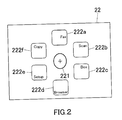
- a lock screen indicating that the MFP 1 is presently locked is initially displayed on the display 22 as illustrated in FIG. 2 and all touch gestures except for specified touch gestures including unlock gestures are disabled.
- a first icon for unlock (also to be referred to as unlock icon) 221 is displayed at the center of the lock screen and one or more second icons (also to be referred to as function icons) 222a to 222f each representing a function of the MFP 1 are arranged around the unlock icon 221.
- unlock icon also to be referred to as unlock icon
- function icons also to be referred to as function icons
- the MFP 1 is not unlocked at a fixed timing but is unlocked at a predetermined timing after the unlock icon 221 starting to be moved. It is preferred that the MFP 1 be unlocked during a period from the unlock icon 221 starting to be moved until the unlock icon 221 being released on any of the function icons 222a to 222f.
- the MFP 1 may be unlocked when the unlock icon 221 is released on any of the function icons 222a to 222f; alternatively, the MFP 1 may be unlocked upon successful finish of user authentication, i.e., when the lock screen changes to a dedicated screen of the authenticated user such that the unlock icon 221 is present at a different position.
- the MFP 1 is configured to be unlocked when the unlock icon 221 is released on any of the function icons 222a to 222f.
- users can finish unlocking, function selecting, and user authentication by taking only one gesture on the unlock icon 221. Users are not required to take an extra step for user authentication after unlocking, which will contribute to the user-friendliness.
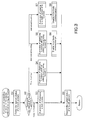
- FIG. 3 is a flowchart representing a routine to be executed depending on the judgment whether or not a user touches the touch panel 21 on a lock screen initially displayed on the display 22.
- the flowchart is activated on a regular basis.
- the routine represented by the flowchart in FIG. 3 and the following flowcharts are executed by the CPU 31 of the MFP 1 in accordance with operation programs stored on a recording medium such as the ROM 32.
- Step S1 the status of a touch gesture is obtained; in Step S2, the status of a touch gesture is determined.
- the status of a touch gesture is determined on the basis of a combination of the previous and current statuses obtained in Step S1 as indicated in the table of FIG. 4 . Specifically, the status of a touch gesture is determined to be "keep touching” in the case where the previous status is determined to be “touching” and the current status is also determined to be “touching” and the status of a touch gesture is determined to be “just ended touching” in the case where the previous status is determined to be “touching” and the current status is determined to be "no touching”.
- the status of a touch gesture is determined to be “just started touching” in the case where the previous status is determined to be “no touching” and the current status is determined to be “touching” and the status of a touch gesture is determined to be "keep no touching” in the case where the previous status is determined to be “no touching” and the current status is also determined to be “no touching”.
- Step S2 the flowchart branches into different options depending on the status determined in Step S2. If the status of a touch gesture is determined to be "keep no touching", the flowchart proceeds to Step S3 to implement a process of displaying a lock screen. The flowchart then proceeds to Step S9. The process of displaying a lock screen will be later described in details.
- Step S4 If the status of a touch gesture is determined to be "keep touching", the flowchart proceeds to Step S4 to implement a process of displaying a screen while an unlock icon is being moved (1). The flowchart then proceeds to Step S9. The process of displaying an unlock icon being moved (1) will be later described in details.
- Step S5 If the status of a touch gesture is determined to be "just started touching", the flowchart proceeds to Step S5 to implement a process of displaying a screen while an unlock icon is being moved (2) and to Step S6 to set the status of intra-body communication to "enabled”. The flowchart then proceeds to Step S9.
- the process of displaying an unlock icon being moved (2) will be later described in details.
- Step S7 If the status of a touch gesture is determined to be "at the end of touch", the flowchart proceeds to Step S7 to implement a process of jumping to a main screen of a function and to Step S8 to disable intra-body communication. The flowchart then proceeds to Step S9. The process of switching to a function screen will be later described in details.
- Step S9 The current status is recorded in Step S9; the flowchart then returns to the beginning.
- FIG. 5 is a flowchart representing a subroutine to be executed as a process of displaying a lock screen, Step S3 of the FIG. 3 flowchart.
- Step S3 of the FIG. 3 flowchart In the process of displaying a lock screen, a lock screen initially displayed on the display 22 is kept being displayed in Step S31. The flowchart then returns to the beginning.
- FIG. 6 is a flowchart representing a subroutine to be executed as a process of displaying a screen while an unlock icon is being moved (1), Step S4 of the FIG. 3 flowchart.
- Step S41 it is judged whether or not the unlock icon 221 is being moved. If the unlock icon 221 is not being moved (No in Step S41), the lock screen is kept being displayed in Step S46. If the unlock icon 221 is being moved (YES in Step S41), it is then judged in Step S42 whether or not user authentication is already finished. If user authentication is not finished yet (NO in Step S42), the lock screen is refreshed such that the unlock icon 221 is present at a different position on the lock screen in Step S45. The flowchart then returns to the beginning.
- Step S42 If user authentication is already finished (YES in Step S42), permitted functions information of the authenticated user is obtained in Step S43 and the lock screen changes to a dedicated screen of the authenticated user in Step S44.
- the flowchart then returns to the beginning.
- the dedicated screen of the user will be later described in details.
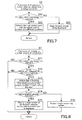
- FIG. 7 is a flowchart representing a subroutine to be executed as a process of displaying a screen while an unlock icon is being moved (2), Step S5 of the FIG. 3 flowchart.
- Step S51 it is judged whether or not the unlock icon 221 is being moved. If it is being moved (YES in Step S51), the lock screen is refreshed such that the unlock icon 221 is present at a different position on the lock screen in Step S52. The flowchart then returns to the beginning. If it is not being moved (NO in Step S51), the lock screen initially displayed on the display 22 is kept being displayed in Step S53. The flowchart then returns to the beginning.
- FIG. 8 is a flowchart representing a subroutine to be executed as a process of jumping to a main screen of a function, Step S7 of the FIG. 3 flowchart.
- Step S71 it is judged whether or not the unlock icon 221 is being moved. If it is being moved (YES in Step S71), it is then judged in Step S72 whether or not the unlock icon 221 is released on one of the function icons 222a to 222f. If the unlock icon 221 is released on one of the function icons 222a to 222f (YES in Step S72), a function represented by the function icon being present at the release position is recognized as being selected by the user in Step S73.
- Step S74 it is judged whether or not user authentication is already finished. If user authentication is already finished (YES in Step S74), a main screen of the function selected by the authenticated user is displayed in Step S75. The flowchart then returns to the beginning. If user authentication is not finished yet (NO in Step S74), a login requesting screen is displayed in Step S76. The flowchart then returns to the beginning.
- Step S71 where the unlock icon 221 is not being moved in Step S71 (NO in Step S71); and where the unlock icon 221 is not released on one of the function icons 222a to 222f in Step S72 (NO in Step S72).
- FIG. 9 illustrates the login requesting screen.
- Displayed in the login requesting screen are the following objects: a message 223a requesting to enter user information such as identification information and a password and requesting to perform a long touch gesture on a login key 223d indicated by a predetermined symbol; a user information entry field 223b; and a software keyboard 223c.
- a user enters user information or performs a long touch gesture on the login key 223d user authentication is conducted again.
- the intra-body communication transmitter terminal 5 transmits user information to the MFP 1 via the intra-body communication device 23 by intra-body communication technology and the MFP 1 conducts user authentication with the user information obtained therefrom. Once user authentication by intra-body communication technology is finished, the authentication result is effective even during key entry.
- FIG. 10 is a flowchart representing a process of conducting user authentication by intra-body communication technology.
- user authentication is conducted with user information obtained from the intra-body communication transmitter terminal 5 by intra-body communication technology.
- the flowchart is activated on a regular basis.
- Step S101 it is judged whether or not the status of intra-body communication is "enabled”. If it is "enabled” (YES in Step S101), analysis is conducted on data obtained from the intra-body communication transmitter terminal 5 by intra-body communication technology in Step S102 and it is then judged in Step S103 whether or not the data includes user information.
- Step S103 If the data includes user information (YES in Step S103), user basic information (authentication information) stored on the MFP 1 is searched for a record that matches the user information in Step S104 and it is then judged in Step S105 whether or not there is a record that matches the user information. If there is a matched record (YES in Step S105), the status of user authentication is set to "authenticated” and a notice of permitted functions for the authenticated user is obtained in Step S106. The flowchart then returns to the beginning.
- authentication information user basic information
- Step S101 the status of intra-body communication is not "enabled” in Step S101
- Step S103 the data does not include user information in Step S103
- Step S105 the user information in Step S105
- FIG. 11 is a flowchart representing a process of displaying a screen when a user logs out.
- the status of user authentication is set to "unauthenticated” in Step S201.
- the flowchart then returns to the beginning.
- the MFP 1 is locked to fall in standby state; the MFP 1 initially displays a lock screen.
- the lock screen is refreshed such that the unlock icon 221 is present at a different position on the lock screen.
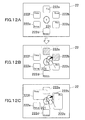
- the function icons 222a and 222b each representing a prohibited function for the authenticated user are displayed in a different color, for example, in a grayout manner as illustrated in FIG. 12B , although the function icons 222a and 222b are actually highlighted by hatching in FIG. 12B for the sake of explanation.
- the function icons 222a and 222b are displayed in a different color. This allows users to ensure good visibility of their prohibited functions in order to avoid selecting them accidentally, which will contribute to the user-friendliness.
- the function icons 222a and 222b each representing a prohibited function may be displayed in a different shape or at a different position, not in a different color.
- the function icons 222a and 222b may be displayed in a different manner: for example, in a different color, in a different shape, at a different position, or by a combination of two or all of the foregoing.
- the function icons 222c to 222f each representing a permitted function may be displayed in a different manner, instead of the function icons 222a and 222b each representing a prohibited function.
- function icons each representing a permitted function may be displayed in an enlarged size such that they overlap with the function icons 222a and 222b each representing a prohibited function as illustrated in FIG. 12C .
- the function icons 222c to 222f displayed in an enlarged size users can ensure a room in a limited display area, which is large enough to release the unlock icon 221 therein. This will further contribute to the user-friendliness.
- lock screen be changed to a dedicated screen of the user animatedly and slowly in conjunction with the unlock icon 221 being moved; with the animation display, users can continue manipulating comfortably.
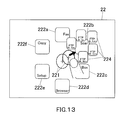
- FIG. 13 illustrates another example of a user's dedicated screen to be displayed.
- users may need to configure settings on a main screen of the function. For example, after selecting scanner function, users may need to select an address on a main screen of scanner function to transmit image data. It would be desirable to finish these steps by taking only one gesture, from the aspect of user-friendliness.
- subordinate icons 224 each representing the user's available option of the user's most likely intended function (scanner function represented by the function icon 222b, for example) are displayed on a dedicated screen of the user.
- a plurality of address icons 224 each representing the user's available scan-to address of scanner function that is most likely intended by the user are arranged around the function icon 222b representing scanner function, as subordinates to the function icon 222b, in a selectable manner.
- users can finish unlocking, user authentication, and settings of a function represented by one of the function icons 222a to 222f, by taking only one gesture, which will contribute to the user-friendliness.
- the MFP 1 is unlocked when the unlock icon 221 is released on one of the address icons 224.
- the subordinate icons 224 each representing a general option of the user's most likely intended function among those represented by the function icons 222a to 222f are displayed; upon finish of user authentication, the subordinate icons 224 each representing the user's available option of the user's most likely intended function are displayed.
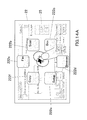
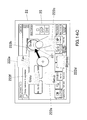
- FIG. 14 illustrates yet another example of a user's dedicated screen to be displayed.
- a main screen of the user's most likely intended function is displayed in an opaque manner as a background image 25.
- the opacity level of the background image 25 changes depending on the distance traveled by the unlock icon 221 being moved with a gesture: the background image 25 is displayed at a higher opacity level (more clearly) in proportion to the distance traveled by the unlock icon 221, as illustrated in FIGs 14B and 14C .
- the background image 25 is illustrated by dashed lines in FIG. 14A , by solid lines in FIG. 14B , and by bold lines in FIG. 14C , in ascending order of clarity.
- FIG. 15 is a table that determines opacity levels of the background image 25 and others depending on the distance traveled by the unlock icon 221.
- the background image 25 is displayed at an opacity level determined in the table of FIG. 15 , by the CPU 31.
- the distance traveled by the unlock icon 221 from the home position to a function icon representing a user's selected function is defined as X
- the distance traveled by the unlock icon 221 from the home position to a position at which the unlock icon is currently present is defined as Y.
- the percentages of Y to X are grouped into the following five ranges: 0 to 24%, 25 to 49%, 50 to 74%, 75 to 124%, and more than 124%.
- opacity levels of the function icons each representing a permitted function, the function icons each representing a prohibited function, and the background image 25 are determined. These objects are displayed most clearly at an opacity level of 100% and most obscurely at an opacity level of 0%.
- the function icons each representing a permitted function are displayed at an opacity level of 100%
- the function icons each representing a prohibited function are displayed at an opacity level of 100%
- the background image 25 is displayed in a grayout manner.
- the function icons each representing a permitted function are displayed at an opacity level of 100%
- the function icons each representing a prohibited function are displayed at an opacity level of 60%
- the background image 25 is displayed at an opacity level of 30%.
- the function icons each representing a permitted function are displayed at an opacity level of 100%
- the function icons each representing a prohibited function are displayed at an opacity level of 30%
- the background image 25 is displayed at an opacity level of 60%.
- the function icons each representing a permitted function are displayed at an opacity level of 100%
- the function icons each representing a prohibited function are displayed at an opacity level of 10%
- the background image 25 is displayed at an opacity level of 90%.
- the function icons each representing a permitted function are displayed at an opacity level of 100%
- the function icons each representing a prohibited function are displayed at an opacity level of 100%
- the background image 25 is displayed in a grayout manner.
- the background image 25 is displayed in an opaque manner such that the function icons 222a to 222f stand out against a background and the opacity level of the background image 25 changes depending on the distance traveled by the unlock icon 221 being moved with a gesture. This allows users to ensure good visibility of the most likely intended function among those represented by the function icons 222a to 222f in order to avoid selecting an unintended function accidentally.
- FIGs. 16 and 17 are drawings for describing a predetermined configuration that determines different screens as described above depending on the status of a touch gesture on the unlock icon 221, the position of the unlock icon 221, the status of user authentication, and others.
- the screens can be displayed on the display 22 in accordance with this configuration, by the CPU 31.
- area 1 is an area for the home position of the unlock icon 221
- area 2 is a peripheral part of the area 1
- areas 4A to 4F are areas A to F for the function icons 222a to 222f
- areas 3A to 3F are areas as pathways on which the unlock icon 221 can be moved to the function icons 222a to 222f
- area 5" is an area other than those corresponding to the areas 1 to 4.
- Different screens are determined in FIG. 17 depending on the area in which the unlock icon is present.
- FIG. 17A is a table that determines a user's dedicated screen as illustrated in FIG. 12 .
- a lock screen initially displayed on the display 22 is kept being displayed without the unlock icon 221 being touched.
- the lock screen is refreshed such that the unlock icon 221 is present at a different position thereon.
- area 3(n) is an area to be selected by the user among the areas 3A to 3F
- area 4(n) is an area to be selected by the user among the areas 4A to 4F.
- the lock screen When the unlock icon 221 is touched and moved to any of the areas 1, 2, and 5 by an authenticated user, the lock screen is refreshed such that the unlock icon 221 is present at a different position thereon. When it is touched and moved to the area 3(n) or 4(n) by an authenticated user, the lock screen changes to a dedicated screen of the user as illustrated in FIG. 12 .
- the lock screen When the unlock icon 221 is released on any of the areas 1, 2, 3(n) and 5 by a user, the lock screen is kept being displayed regardless of whether or not it is an authenticated user. When it is released in the area 4(n) by an authenticated user, the lock screen jumps to a main screen of the selected function. When it is released in the area 4(n) by an unauthenticated user, the lock screen jumps to a login requesting screen as illustrated in FIG. 9 .
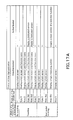
- FIG. 17B is a table that determines a user's dedicated screen as illustrated in FIG. 13 .
- a lock screen initially displayed on the display 22 is kept being displayed without the unlock icon 221 being touched.
- the lock screen is refreshed such that the unlock icon 221 is present at a different position thereon regardless of whether or not it is an authenticated user.
- the lock screen is refreshed such that the unlock icon 221 is present at a different position and the subordinate icons 224 each representing a general option of the user's most likely intended function (n) are displayed thereon.
- the lock screen is refreshed such that the unlock icon 221 is present at a different position and the subordinate icons 224 each representing the user's available option of the user's most likely intended function (n) are displayed thereon as illustrated in FIG. 13 .
- the lock screen When the unlock icon 221 is released on any of the areas 1,2, 3(n) and 5 by a user, the lock screen is kept being displayed regardless of whether or not it is an authenticated user.
- the lock screen jumps to a main screen of the selected function.
- the lock screen jumps to a main screen of the selected function on which the selected option is already filled in.
- the lock screen jumps to a login requesting screen as illustrated in FIG. 9 and the subordinate icons 224 each representing a general option of the user's most likely intended function (n) are kept being displayed in a selectable manner behind the login requesting screen.
- FIG. 17C is a table that determines a user's dedicated screen as illustrated in FIG. 14 .
- a lock screen initially displayed on the display 22 is kept being displayed without the unlock icon 221 being touched.
- the lock screen is refreshed such that the unlock icon 221 is present at a different position thereon.
- the lock screen is refreshed such that the unlock icon 221 is present at a different position thereon.
- the lock screen changes to the background image 25 as a dedicated screen of the user as illustrated in FIG. 14 .
- the opacity level changes depending on the position of the unlock icon 221.
- the lock screen When the unlock icon 221 is released on any of the areas 1, 2, 3(n) and 5 by a user, the lock screen is kept being displayed regardless of whether or not it is an authenticated user. When it is released in the area 4(n) by an authenticated user, the lock screen jumps to a main screen of the selected function. When it is released in the area 4(n) by an unauthenticated user, the lock screen jumps to a login requesting screen as illustrated in FIG. 9 .
- One of the dedicated screens of FIGs. 12 to 14 may be displayed by default; an administrator or users may select one of them.
- user information is obtained by intra-body communication technology without the need of user input in this embodiment. Since the present invention is not limited thereto, user information alternatively may be obtained by wireless communication technology from a recording medium that is carried by a user, for example, an IC card.
Landscapes
- Engineering & Computer Science (AREA)
- Human Computer Interaction (AREA)
- Theoretical Computer Science (AREA)
- Multimedia (AREA)
- Signal Processing (AREA)
- General Engineering & Computer Science (AREA)
- General Physics & Mathematics (AREA)
- Physics & Mathematics (AREA)
- Computer Security & Cryptography (AREA)
- Computer Hardware Design (AREA)
- Software Systems (AREA)
- User Interface Of Digital Computer (AREA)
- Telephone Function (AREA)
Abstract
Description
- The present invention relates to an information processing apparatus such as a personal computer, a tablet computer terminal, and an image processing apparatus, a method of controlling a lock screen displayed while the information processing apparatus is locked, and a non-transitory computer-readable recording medium.
- Users operate portable terminal apparatuses such as smartphones and tablet computer terminals with touch gestures on touch panels provided on their displays. In order to avoid waking a portable terminal apparatus from standby state with an unintended touch gesture on a standby screen, it is very common for users to disable all touch gestures except for specified touch gestures including unlock gestures by locking the portable terminal apparatus.
- Furthermore, portable terminal apparatuses are commonly configured to display, while they are locked, a lock screen on their displays along with an unlock icon being present on the lock screen so that users can unlock them by touching and moving (swiping) the unlock icon on the lock screen.
- In this configuration, after unlocking a portable terminal apparatuses with a swipe gesture, users need to select a desired application again; in other words, they need to take more than one step, unlocking and application selecting, in order to use a desired application. This is not user-friendly.
- As a solution to the problem,
Japanese Unexamined Patent Publication No. 2013-065289 - Information processing apparatuses such as multi-function peripherals (MFP), i.e., multifunctional digital image processing apparatuses having copier function, scanner function, facsimile function, and other functions were recognized as copier-based apparatuses having other functions, conventionally. Recent years, they are recognized as integrated communication apparatuses having many essential printer and scanner functions such as Web printing and scanned data transmission and many of them are configured, as in a conventional manner, to initially display a function selecting screen instead of a copier function screen.
- Many of them are also capable of working with smartphones and tablet computer terminals and an environment in which users operate information processing apparatuses such as MFPs, smartphones, and tablet computer terminals has become seamless.
- With the above-described background technology, there is a discussion about a MFP, for example, that requires user authentication. After a user logs out by operating an operation panel, such a MFP is locked to fall in standby state and displays an unlock icon and function icons on a screen so that users can finish unlocking and function selecting by taking only one gesture that is touching and moving the unlock icon and releasing it on one of the function icons. The MFP, however, has a problem as described below.
- As previously mentioned, the MFP requires user authentication; despite the technique that permits unlocking and function selecting by taking only one gesture, users are required to take an extra step for user authentication in order to use a desired function. This is still not user-friendly.
- This is not just about MFPs as described above and the same is true on any other information processing apparatuses that require user authentication.
- The present invention has been made to solve the above-described problem. It is an object of the present invention to provide an information processing apparatus having a security system that requires user authentication and unlocks the information processing apparatus when a user touches and moves an unlock icon on a lock screen displayed on its display, the information processing apparatus being more user-friendly without requiring the user to take an extra step for user authentication after unlocking. It is another object of the present invention to provide a method of controlling a lock screen displayed on the information processing apparatus. It is yet another object of the present invention to provide a non-transitory computer-readable recording medium.
- The above-described problem can be solved by the following means.
- [1] An information processing apparatus comprising:
- a touch-enabled display means;
- a lock means that puts the information processing apparatus in standby state and disables all touch gestures except for specified touch gestures including unlock gestures, by locking the information processing apparatus after user logout;
- a display control means that performs the following operations: initially displaying a lock screen on the display means, the lock screen indicating that the information processing apparatus is presently locked, the lock screen having a first icon for unlock and one or more second icons each representing a function of the information processing apparatus; and refreshing the lock screen initially displayed on the display means such that the first icon is present at a different position on the lock screen, when a user moves the first icon on the display means;
- an unlock means that unlocks the information processing apparatus based on touching and moving the first icon on the lock screen by the user that intends to log in;
- a recognition means that recognizes a function as being selected by the user, the function being represented by the one second icon or one of the second icons being present at the position where the user releases the first icon;
- a user information obtaining means that obtains user information for identifying the user without requiring user input; and
- an authentication means that conducts user authentication on the user with the user information obtained by the user information obtaining means, while the user is moving the first icon,
wherein the display control means changes the lock screen on the display means to a dedicated screen of the user if user authentication is finished by the authentication means while the user is moving the first icon.
- [2] The information processing apparatus as recited in
Claim 1, wherein the user information obtaining means obtains the user information from an intra-body communication terminal carried out by the user, by intra-body communication technology enabling communication through a human body as a communication medium. - [3] The information processing apparatus as recited in
Claim - [4] The information processing apparatus as recited in
Claim 3, wherein, if there is a prohibited function for the authenticated user, the display control means changes the lock screen to the dedicated screen to display the one second icon or one of the second icons in a different manner from that on the lock screen, the one second icon or the one of the second icons representing the prohibited function. - [5] The information processing apparatus as recited in
Claim - [6] The information processing apparatus as recited in
Claim 3, wherein, if there is a prohibited function for the authenticated user, the display control means changes the lock screen to the dedicated screen to display one or more of the second icons in a larger size than that on the lock screen, the one or more of the second each icons representing a permitted function for the authenticated user. - [7] The information processing apparatus as recited in any one of
Claims 1 to 6, wherein the display control means further displays a third icon on the display means while the user is moving the first icon, the third icon representing a function setting related to the one or more second icons. - [8] The information processing apparatus as recited in Claim 7, wherein the third icon represents a specific function setting for the authenticated user.
- [9] The information processing apparatus as recited in any one of
Claims 1 to 8, wherein the display control means reflects the dedicated screen to a background image. - [10] The information processing apparatus as recited in Claim 9, wherein the background image is a main screen of a function, the function being most likely intended by the user releasing the first icon on the one second icon or one of the second icons.
- [11] The information processing apparatus as recited in
Claim 10, wherein the display control means displays the background image in an opaque manner and changes the opacity level of the background image depending on the distance traveled by the first icon being moved. - [12] The information processing apparatus as recited in any one of
Claims 1 to 11, wherein the unlock means unlocks the information processing apparatus at a predetermined timing until the user releases the first icon at the position where the one second icon or one of the second icons is present. - [13] The information processing apparatus as recited in Claim 12, wherein, if user authentication is not finished by the authentication means until the user releases the first icon at the position where the one second icon or one of the second icons is present, the display control means displays a user authentication requesting screen on the display means after the user releases the first icon.
- [14] The information processing apparatus as recited in any one of
Claims 1 to 13, wherein the authentication means conducts user authentication on the user when the user starts moving the first icon. - [15] A display control method of controlling a lock screen displayed, the display control method to be implemented by an information processing apparatus comprising a touch-enabled display means, the display control method comprising:
- putting the information processing apparatus in standby state and disable all touch gestures except for specified touch gestures including unlock gestures, by locking the information processing apparatus after user logout;
- performing the following operations: initially displaying a lock screen on the display means, the lock screen indicating that the information processing apparatus is presently locked, the lock screen having a first icon for unlock and one or more second icons each representing a function of the information processing apparatus; and refreshing the lock screen initially displayed on the display means such that the first icon is present at a different position on the lock screen, when a user moves the first icon on the display means;
- unlocking the information processing apparatus based on touching and moving the first icon on the lock screen by the user that intends to log in;
- recognizing a function as being selected by the user, the function being represented by the one second icon or one of the second icons being present at the position where the user releases the first icon;
- obtaining user information for identifying the user without requiring user input; and
- conducting user authentication on the user with the user information being obtained, while the user is moving the first icon,
- [16] A non-transitory computer-readable recording medium storing a display control program for an information processing apparatus comprising a touch-enabled display means, the display control program for making a CPU of the information processing apparatus execute:
- putting the information processing apparatus in standby state and disable all touch gestures except for specified touch gestures including unlock gestures, by locking the information processing apparatus after user logout;
- performing the following operations: initially displaying a lock screen on the display means, the lock screen indicating that the information processing apparatus is presently locked, the lock screen having a first icon for unlock and one or more second icons each representing a function of the information processing apparatus; and refreshing the lock screen initially displayed on the display means such that the first icon is present at a different position on the lock screen, when a user moves the first icon on the display means;
- unlocking the information processing apparatus based on touching and moving the first icon on the lock screen by the user that intends to log in;
- recognizing a function as being selected by the user, the function being represented by the one second icon or one of the second icons being present at the position where the user releases the first icon;
- obtaining user information for identifying the user without requiring user input; and
- conducting user authentication on the user with the user information being obtained, while the user is moving the first icon,
- According to the above-described invention [1], the information processing apparatus is locked to fall in standby state, after user logout, and initially displays a lock screen on the display, the lock screen indicating that the information processing apparatus is presently locked, the lock screen having a first icon for unlock and one or more second icons each representing a function of the information processing apparatus. When a user touches the first icon and moves to the one second icon or one of the second icons, the lock screen is refreshed such that the first icon is present at a different position. The information processing apparatus can be unlocked with the touch and move gesture. When the user releases the first icon at the position where the one second icon or one of the second icons is present, a function represented by the second icon being present at the release position is recognized as being selected by the user. User information for identifying the user is obtained without the need of user input and user authentication is conducted with the obtained user information while the user is moving the first icon.
- That is, users can finish unlocking, function setting, and user authentication by taking only one gesture on the first icon. Users are not required to take an extra step for user authentication after unlocking, which will contribute to the user-friendliness.
- Upon finish of user authentication, the lock screen can change to a dedicated screen of the authenticated user to limit the second icons displayed thereon to only that or those each representing a permitted function for the authenticated user, for example. This will further contribute to the user-friendliness.
- According to the above-described invention [2], the user information is obtained from an intra-body communication terminal carried out by the user, by intra-body communication technology enabling communication through a human body as a communication medium. This allows users to enter their user information in a reliable manner.
- According to the above-described invention [3], the lock screen changes to the dedicated screen to display the one or more second icons in a different manner from those on the lock screen.
- According to the above-described invention [4], if there is a prohibited function for the authenticated user, the lock screen changes to the dedicated screen to display the one second icon or one of the second icons in a different manner from that on the lock screen, the one second icon or the one of the second icons representing the prohibited function. This allows users to ensure good visibility of their prohibited functions.
- According to the above-described invention [5], the lock screen changes to the dedicated screen to display the one or more second icons in a different color, in a different shape, or at a different position.
- According to the above-described invention [6], if there is a prohibited function for the authenticated user, the lock screen changes to the dedicated screen to display one or more of the second icons in a larger size than that on the lock screen, the one or more of the second icons representing a permitted function for the authenticated user. This allows users to ensure good visibility of their permitted functions.
- According to the above-described invention [7], a third icon is displayed while the user is moving the first icon, the third icon representing an option related to the one or more second icons.
- According to the above-described invention [8], a third icon representing the user's available option is displayed. This allows users to finish the following operations only by releasing the first icon on the third icon: unlocking, user authentication, and selecting an option of a function represented by one of the second icons, which will further contribute the user-friendliness.
- According to the above-described invention [9], the dedicated screen displayed thereon is reflected to a background image. This allows users to select the one second icon or one of the second icons with reference to the background image.
- According to the above-described invention [10], the background image is a main screen of a function that is most likely intended by the user releasing the first icon on the one second icon or one of the second icons. This allows users to select the one second icon or one of the second icons with reference to the main screen.
- According to the above-described invention [11], the background image is displayed in an opaque manner and the opacity level of the background image changes depending on the distance traveled by the first icon being moved. This allows users to ensure good visibility of a function that is most likely intended by the user releasing the first icon on the one second icon or one of the second icons, in order to avoid selecting an unintended function accidentally.
- According to the above-described invention [12], the information processing apparatus is unlocked at a predetermined timing until the user releases the first icon at the position where the one second icon or one of the second icons is present.
- According to the above-described invention [13], if user authentication is not finished until the user releases the first icon at the position where the one second icon or one of the second icons is present, a user authentication requesting screen is displayed on the display means after the user releases the first icon. Users do not need to be bothered by finding a user authentication screen.
- According to the above-described invention [14], user authentication is conducted when the user starts moving the first icon.
- According to the above-described invention [15], users can finish unlocking, function selecting, and being authorized by taking only one gesture on the first icon. Users are not required to take an extra step for user authentication after unlocking, which will contribute to the user-friendliness. Upon finish of user authentication, the lock screen can change to a dedicated screen of the authenticated user to limit the second icons displayed thereon to only that or those each representing a permitted function for the authenticated user, for example. This will further contribute to the user-friendliness.
- According to the above-described invention [16], the CPU of the information processing apparatus controls such that users can finish unlocking, function selecting, and user authentication by taking only one gesture on the first icon and such that, upon finish of user authentication, the lock screen changes to a dedicated screen of the authenticated user.
-
-
FIG. 1 is a block diagram illustrating configurations of a firmware module and a user interface device loaded on an information processing apparatus according to one embodiment of the present invention. -
FIG. 2 illustrates a lock screen initially displayed on a display. -
FIG. 3 is a flowchart representing a routine to be executed depending on the judgment whether or not a user touches a touch panel while a lock screen is displayed on the display. -
FIG. 4 is a table that contains criteria for determining the status of a touch gesture. -
FIG. 5 is a flowchart representing a subroutine to be executed as a process of displaying a lock screen, Step S3 of theFIG. 3 flowchart. -
FIG. 6 is a flowchart representing a subroutine to be executed as a process of displaying a screen while an unlock icon is being moved (1), Step S4 of theFIG. 3 flowchart. -
FIG. 7 is a flowchart representing a subroutine to be executed as a process of displaying a screen while an unlock icon is being moved (2), Step S5 of theFIG. 3 flowchart. -
FIG. 8 is a flowchart representing a subroutine to be executed as a process of jumping to a main screen of a function, Step S7 of theFIG. 3 flowchart. -
FIG. 9 illustrates a login requesting screen. -
FIG. 10 is a flowchart representing a process of conducting user authentication by intra-body communication technology. -
FIG. 11 is a flowchart representing a process of displaying a screen when user a user logs out. -
FIGs. 12A, 12B, and 12C illustrate an example of a user's dedicated screen to be displayed on the display. -
FIG. 13 illustrates another example of a user's dedicated screen to de displayed. -
FIGs. 14A ,14B , and14C illustrate yet another example of a user's dedicated screen to be displayed. -
FIG. 15 is a table that determines opacity levels of a background image and others depending on the distance traveled by the unlock icon. -
FIG. 16 is an explanatory view of areas being present on the lock screen; -
FIGs. 17A to 17C each is a table that determines a screen to be displayed on the display depending on the status of a touch gesture on the unlock icon, the position of the unlock icon, the status of user authentication, and others. - Hereinafter, some embodiments of the present invention will be described with reference to the accompanying drawings.
-
FIG. 1 is a block diagram illustrating configurations of a firmware module and a user interface device loaded on aMFP 1, i.e., a multifunctional digital image processing apparatus as an example of an information processing apparatus according to one embodiment of the present invention, as described above. - It should be understood that information processing apparatuses are not necessarily limited to multifunctional digital image processing apparatuses and may be personal computers and tablet computer terminals as long as they implements user authentication.
- As referred to in
FIG. 1 , theMFP 1 is provided with anoperation panel 2 and acontroller 3. - The
operation panel 2 is provided with adisplay 22 consisting of a liquid-crystal display, for example, atouch panel 21 disposed on the surface of thedisplay 22, and an intra-body communication-basedreceiver device 23. - The
display 22 displays operation screens, including a lock screen, for users to operate theMFP 1 and messages and other information for users. Thetouch panel 21 receives touch gestures of users. It should be understood that touch gestures include swipe or slide gestures (moving an object), flick gestures, pinch gestures, and others. - When a
user 4, who carries an intra-body communication-basedtransmitter terminal 5 that transmits radio signals in a user-specific form, touches theoperation panel 21, the intra-body communication-basedreceiver device 23 receives the radio signals to obtain user information from the intra-body communication-basedtransmitter terminal 5. The intra-bodycommunication receiver device 23 and thetouch panel 21 are separately disposed on thedisplay 22, in the form of layers. - The
controller 3 is provided with aCPU 31 controlling theMFP 1 in a unified manner, aROM 32 storing operation programs and other information for theCPU 31, and aRAM 33 providing a work area for theCPU 31 to execute processing in accordance with the operation programs. - From its functional aspects, the
controller 3 is provided with a touch panel controller 34, adisplay controller 35, an intra-body communication-baseddevice controller 36, ascreen controller 37, auser authentication processor 38, and a MFP functionscontroller 39. The operations of these controllers are executed by theCPU 31, in accordance with firmware (FW). - The touch panel controller 34 controls the
touch panel 21; it receives coordinate data of a user's touch position from thetouch panel 21. Thedisplay controller 35 transmits screen graphic data to thedisplay 22 to display various screens thereon. - The intra-body communication-based
device controller 36 controls the intra-body communication-basedreceiver device 23; it receives communication signals by way of the intra-body communication-basedreceiver device 23. Thescreen controller 37 analyzes the coordinate received by the touch panel controller 34, generates screen graphic data on the basis of the coordinates of a touch position, then delivers the screen graphic data to thedisplay controller 35. - The
user authentication processor 38 conducts user identification and authentication by analyzing the communication signals received by the intra-body communication-baseddevice controller 36 and searching user basic information stored in advance for a matched record. Theuser authentication processor 38 also transmits identification information (ID) of an identified user and other information to the MFP functionscontroller 39. - The MFP functions
controller 39 controls all operations of theMFP 1 in a unified and systematic manner. Specifically, in this embodiment, when a user logs out, the MFP functionscontroller 39 locks theMFP 1 to put it in standby state and displays a lock screen indicating that theMFP 1 is presently locked, as a standby screen. Upon receiving an authentication result from theuser authentication processor 38, the MFP functionscontroller 39 refers to permitted functions information of the user and, on the basis of the permitted functions information, conducts control such that the lock screen changes to a dedicated screen of the user. This will be later described in details. - The
MFP 1 does not necessarily search user basic information stored on itself for a matched record: user basic information may be stored on an authentication server, not on theMFP 1. In this case, theMFP 1 transfers to the authentication server, user information obtained by the intra-body communication-basedreceiver device 23 and the authentication server searches the user basic information stored on itself for a matched record and returns a search result. Similarly, permitted functions information of authenticated users may be stored on the authentication server, not on theMFP 1; in this case, the MFP functionscontroller 39 obtains permitted functions information of the user from the authentication server. - The
MFP 1 is operated by theuser 4 who carries the intra-body communication-basedtransmitter terminal 5. The intra-body communication-basedtransmitter terminal 5 is provided with an intra-body communication-basedtransmitter device 51 and auser information storage 52. - The intra-body communication-based
transmitter device 51 transmits signals having user information. It transmits radio signals to theMFP 1 by intra-body communication technology enabling communication through a human body as a communication medium and the intra-body communication-basedreceiver device 23 receives them. Theuser information storage 52 is a memory storing user information that is necessary to identify users, such as identification information that is user-specific. - In this embodiment, the
MFP 1 has a lock function of locking theMFP 1 itself after user logout; theMFP 1 is in standby state while it is locked. A lock screen indicating that theMFP 1 is presently locked is initially displayed on thedisplay 22 as illustrated inFIG. 2 and all touch gestures except for specified touch gestures including unlock gestures are disabled. - The following objects are displayed on the lock screen of
FIG. 2 . A first icon for unlock (also to be referred to as unlock icon) 221 is displayed at the center of the lock screen and one or more second icons (also to be referred to as function icons) 222a to 222f each representing a function of theMFP 1 are arranged around theunlock icon 221. When a user performs an unlock gesture on the lock screen initially displayed on thedisplay 22, by touching theunlock icon 221 and moving to a desired one of thefunction icons 222a to 222f, the lock screen is refreshed such that theunlock icon 221 is present at a different position on the lock screen. Meanwhile, user authentication also starts with this unlock gesture; upon successful finish of user authentication, the lock screen changes to a dedicated screen of the authenticated user. When the user selects a function by leaving (releasing) theunlock icon 221 at the position where one of thefunction icons 222a to 222f is present, a main screen of the selected function is displayed. - The
MFP 1 is not unlocked at a fixed timing but is unlocked at a predetermined timing after theunlock icon 221 starting to be moved. It is preferred that theMFP 1 be unlocked during a period from theunlock icon 221 starting to be moved until theunlock icon 221 being released on any of thefunction icons 222a to 222f. For example, theMFP 1 may be unlocked when theunlock icon 221 is released on any of thefunction icons 222a to 222f; alternatively, theMFP 1 may be unlocked upon successful finish of user authentication, i.e., when the lock screen changes to a dedicated screen of the authenticated user such that theunlock icon 221 is present at a different position. In this embodiment, theMFP 1 is configured to be unlocked when theunlock icon 221 is released on any of thefunction icons 222a to 222f. - As described above, users can finish unlocking, function selecting, and user authentication by taking only one gesture on the
unlock icon 221. Users are not required to take an extra step for user authentication after unlocking, which will contribute to the user-friendliness. - Controlling screens on the
display 22 upon an unlock gesture as described above will be hereinafter described in details with reference to the flowchart inFIG. 3 and the following flowcharts. -
FIG. 3 is a flowchart representing a routine to be executed depending on the judgment whether or not a user touches thetouch panel 21 on a lock screen initially displayed on thedisplay 22. The flowchart is activated on a regular basis. - The routine represented by the flowchart in
FIG. 3 and the following flowcharts are executed by theCPU 31 of theMFP 1 in accordance with operation programs stored on a recording medium such as theROM 32. - In Step S1, the status of a touch gesture is obtained; in Step S2, the status of a touch gesture is determined.
- The status of a touch gesture is determined on the basis of a combination of the previous and current statuses obtained in Step S1 as indicated in the table of
FIG. 4 . Specifically, the status of a touch gesture is determined to be "keep touching" in the case where the previous status is determined to be "touching" and the current status is also determined to be "touching" and the status of a touch gesture is determined to be "just ended touching" in the case where the previous status is determined to be "touching" and the current status is determined to be "no touching". The status of a touch gesture is determined to be "just started touching" in the case where the previous status is determined to be "no touching" and the current status is determined to be "touching" and the status of a touch gesture is determined to be "keep no touching" in the case where the previous status is determined to be "no touching" and the current status is also determined to be "no touching". - Back to
FIG. 3 , the flowchart branches into different options depending on the status determined in Step S2. If the status of a touch gesture is determined to be "keep no touching", the flowchart proceeds to Step S3 to implement a process of displaying a lock screen. The flowchart then proceeds to Step S9. The process of displaying a lock screen will be later described in details. - If the status of a touch gesture is determined to be "keep touching", the flowchart proceeds to Step S4 to implement a process of displaying a screen while an unlock icon is being moved (1). The flowchart then proceeds to Step S9. The process of displaying an unlock icon being moved (1) will be later described in details.
- If the status of a touch gesture is determined to be "just started touching", the flowchart proceeds to Step S5 to implement a process of displaying a screen while an unlock icon is being moved (2) and to Step S6 to set the status of intra-body communication to "enabled". The flowchart then proceeds to Step S9. The process of displaying an unlock icon being moved (2) will be later described in details.
- If the status of a touch gesture is determined to be "at the end of touch", the flowchart proceeds to Step S7 to implement a process of jumping to a main screen of a function and to Step S8 to disable intra-body communication. The flowchart then proceeds to Step S9. The process of switching to a function screen will be later described in details.
- The current status is recorded in Step S9; the flowchart then returns to the beginning.
-
FIG. 5 is a flowchart representing a subroutine to be executed as a process of displaying a lock screen, Step S3 of theFIG. 3 flowchart. In the process of displaying a lock screen, a lock screen initially displayed on thedisplay 22 is kept being displayed in Step S31. The flowchart then returns to the beginning. -
FIG. 6 is a flowchart representing a subroutine to be executed as a process of displaying a screen while an unlock icon is being moved (1), Step S4 of theFIG. 3 flowchart. - In Step S41, it is judged whether or not the
unlock icon 221 is being moved. If theunlock icon 221 is not being moved (No in Step S41), the lock screen is kept being displayed in Step S46. If theunlock icon 221 is being moved (YES in Step S41), it is then judged in Step S42 whether or not user authentication is already finished. If user authentication is not finished yet (NO in Step S42), the lock screen is refreshed such that theunlock icon 221 is present at a different position on the lock screen in Step S45. The flowchart then returns to the beginning. - If user authentication is already finished (YES in Step S42), permitted functions information of the authenticated user is obtained in Step S43 and the lock screen changes to a dedicated screen of the authenticated user in Step S44. The flowchart then returns to the beginning. The dedicated screen of the user will be later described in details.
-
FIG. 7 is a flowchart representing a subroutine to be executed as a process of displaying a screen while an unlock icon is being moved (2), Step S5 of theFIG. 3 flowchart. - In Step S51, it is judged whether or not the
unlock icon 221 is being moved. If it is being moved (YES in Step S51), the lock screen is refreshed such that theunlock icon 221 is present at a different position on the lock screen in Step S52. The flowchart then returns to the beginning. If it is not being moved (NO in Step S51), the lock screen initially displayed on thedisplay 22 is kept being displayed in Step S53. The flowchart then returns to the beginning. -
FIG. 8 is a flowchart representing a subroutine to be executed as a process of jumping to a main screen of a function, Step S7 of theFIG. 3 flowchart. - In Step S71, it is judged whether or not the
unlock icon 221 is being moved. If it is being moved (YES in Step S71), it is then judged in Step S72 whether or not theunlock icon 221 is released on one of thefunction icons 222a to 222f. If theunlock icon 221 is released on one of thefunction icons 222a to 222f (YES in Step S72), a function represented by the function icon being present at the release position is recognized as being selected by the user in Step S73. - Subsequently, in Step S74, it is judged whether or not user authentication is already finished. If user authentication is already finished (YES in Step S74), a main screen of the function selected by the authenticated user is displayed in Step S75. The flowchart then returns to the beginning. If user authentication is not finished yet (NO in Step S74), a login requesting screen is displayed in Step S76. The flowchart then returns to the beginning.
- The flowchart returns to the beginning in the following cases: where the
unlock icon 221 is not being moved in Step S71 (NO in Step S71); and where theunlock icon 221 is not released on one of thefunction icons 222a to 222f in Step S72 (NO in Step S72). -
FIG. 9 illustrates the login requesting screen. Displayed in the login requesting screen are the following objects: amessage 223a requesting to enter user information such as identification information and a password and requesting to perform a long touch gesture on alogin key 223d indicated by a predetermined symbol; a userinformation entry field 223b; and asoftware keyboard 223c. When a user enters user information or performs a long touch gesture on thelogin key 223d, user authentication is conducted again. Specifically, when a user performs a long touch gesture on thelogin key 223d, the intra-bodycommunication transmitter terminal 5 transmits user information to theMFP 1 via theintra-body communication device 23 by intra-body communication technology and theMFP 1 conducts user authentication with the user information obtained therefrom. Once user authentication by intra-body communication technology is finished, the authentication result is effective even during key entry. -
FIG. 10 is a flowchart representing a process of conducting user authentication by intra-body communication technology. In this process, user authentication is conducted with user information obtained from the intra-bodycommunication transmitter terminal 5 by intra-body communication technology. The flowchart is activated on a regular basis. - In Step S101, it is judged whether or not the status of intra-body communication is "enabled". If it is "enabled" (YES in Step S101), analysis is conducted on data obtained from the intra-body
communication transmitter terminal 5 by intra-body communication technology in Step S102 and it is then judged in Step S103 whether or not the data includes user information. - If the data includes user information (YES in Step S103), user basic information (authentication information) stored on the
MFP 1 is searched for a record that matches the user information in Step S104 and it is then judged in Step S105 whether or not there is a record that matches the user information. If there is a matched record (YES in Step S105), the status of user authentication is set to "authenticated" and a notice of permitted functions for the authenticated user is obtained in Step S106. The flowchart then returns to the beginning. - The flowchart immediately returns to the beginning in the following cases: where the status of intra-body communication is not "enabled" in Step S101 (NO in Step S101); where the data does not include user information in Step S103 (NO in Step S103); and where there is not a record that matches the user information in Step S105 (NO in Step S105).
-
FIG. 11 is a flowchart representing a process of displaying a screen when a user logs out. When a user logs out, the status of user authentication is set to "unauthenticated" in Step S201. The flowchart then returns to the beginning. When a user logs out, theMFP 1 is locked to fall in standby state; theMFP 1 initially displays a lock screen. - Hereinafter, the user's dedicated screen displayed on the
display 22 in Step S44 ofFIG. 6 will be described in details. - In the example of
FIG. 12 , when the user touches and moves theunlock icon 221 on the lock screen initially displayed on thedisplay 22 as illustrated inFIG. 12A , the lock screen is refreshed such that theunlock icon 221 is present at a different position on the lock screen. Upon successful finish of user authentication, thefunction icons FIG. 12B , although thefunction icons FIG. 12B for the sake of explanation. As described above, thefunction icons - The
function icons function icons function icons 222c to 222f each representing a permitted function may be displayed in a different manner, instead of thefunction icons - Still alternatively, function icons each representing a permitted function (the
function icons function icons FIG. 12C . With thefunction icons 222c to 222f displayed in an enlarged size, users can ensure a room in a limited display area, which is large enough to release theunlock icon 221 therein. This will further contribute to the user-friendliness. - It is preferred that the lock screen be changed to a dedicated screen of the user animatedly and slowly in conjunction with the
unlock icon 221 being moved; with the animation display, users can continue manipulating comfortably. -
FIG. 13 illustrates another example of a user's dedicated screen to be displayed. After selecting a function by releasing theunlock icon 221 on one of the function icons, users may need to configure settings on a main screen of the function. For example, after selecting scanner function, users may need to select an address on a main screen of scanner function to transmit image data. It would be desirable to finish these steps by taking only one gesture, from the aspect of user-friendliness. - In such a desirable configuration, upon finish of user authentication,
subordinate icons 224 each representing the user's available option of the user's most likely intended function (scanner function represented by thefunction icon 222b, for example) are displayed on a dedicated screen of the user. In the example ofFIG. 13 , a plurality ofaddress icons 224 each representing the user's available scan-to address of scanner function that is most likely intended by the user are arranged around thefunction icon 222b representing scanner function, as subordinates to thefunction icon 222b, in a selectable manner. When a user selects a desired scan-to address by releasing theunlock icon 221 on one of theaddress icons 224, the lock screen jumps to a main screen of scanner function on which the selected scan-to address is already filled in. Scan-to address information is obtained along with permitted functions information at the time of user authentication. - In this configuration, users can finish unlocking, user authentication, and settings of a function represented by one of the
function icons 222a to 222f, by taking only one gesture, which will contribute to the user-friendliness. In this embodiment, theMFP 1 is unlocked when theunlock icon 221 is released on one of theaddress icons 224. - Alternatively, it may be configured as described below. If user authentication is not finished while the
unlock icon 221 is being moved, thesubordinate icons 224 each representing a general option of the user's most likely intended function among those represented by thefunction icons 222a to 222f are displayed; upon finish of user authentication, thesubordinate icons 224 each representing the user's available option of the user's most likely intended function are displayed. -
FIG. 14 illustrates yet another example of a user's dedicated screen to be displayed. For light users of theMFP 1, there is sometimes a difference between the name of a function and a desired function. When a light user fails in selecting a desired function, he/she needs to take an extra step for deselecting and trying again. - In the example of
FIG. 14 , if user authentication is finished while theunlock icon 221 is being moved, a main screen of the user's most likely intended function is displayed in an opaque manner as abackground image 25. - The opacity level of the
background image 25 changes depending on the distance traveled by theunlock icon 221 being moved with a gesture: thebackground image 25 is displayed at a higher opacity level (more clearly) in proportion to the distance traveled by theunlock icon 221, as illustrated inFIGs 14B and14C . Thebackground image 25 is illustrated by dashed lines inFIG. 14A , by solid lines inFIG. 14B , and by bold lines inFIG. 14C , in ascending order of clarity. -
FIG. 15 is a table that determines opacity levels of thebackground image 25 and others depending on the distance traveled by theunlock icon 221. Thebackground image 25 is displayed at an opacity level determined in the table ofFIG. 15 , by theCPU 31. In the table ofFIG. 15 , the distance traveled by theunlock icon 221 from the home position to a function icon representing a user's selected function (thefunction icon 222b, for example) is defined as X and the distance traveled by theunlock icon 221 from the home position to a position at which the unlock icon is currently present is defined as Y. The percentages of Y to X are grouped into the following five ranges: 0 to 24%, 25 to 49%, 50 to 74%, 75 to 124%, and more than 124%. Depending on the range, opacity levels of the function icons each representing a permitted function, the function icons each representing a prohibited function, and thebackground image 25 are determined. These objects are displayed most clearly at an opacity level of 100% and most obscurely at an opacity level of 0%. - Specifically, when the percentage of Y to X is within the range of 0 to 24%, in other words, when the
unlock icon 221 is not moved or is moved only a short distance, the function icons each representing a permitted function are displayed at an opacity level of 100%, the function icons each representing a prohibited function are displayed at an opacity level of 100%, and thebackground image 25 is displayed in a grayout manner. When the percentage of Y to X is within the range of 25 to 49%, the function icons each representing a permitted function are displayed at an opacity level of 100%, the function icons each representing a prohibited function are displayed at an opacity level of 60%, and thebackground image 25 is displayed at an opacity level of 30%. - When the percentage of Y to X is within the range of 50 to 74%, the function icons each representing a permitted function are displayed at an opacity level of 100%, the function icons each representing a prohibited function are displayed at an opacity level of 30%, and the
background image 25 is displayed at an opacity level of 60%. When the percentage of Y to X is within the range of 75 to 124%, the function icons each representing a permitted function are displayed at an opacity level of 100%, the function icons each representing a prohibited function are displayed at an opacity level of 10%, and thebackground image 25 is displayed at an opacity level of 90%. When the percentage of Y to X is within the range of more than 124%, the function icons each representing a permitted function are displayed at an opacity level of 100%, the function icons each representing a prohibited function are displayed at an opacity level of 100%, and thebackground image 25 is displayed in a grayout manner. - As described above, the
background image 25 is displayed in an opaque manner such that thefunction icons 222a to 222f stand out against a background and the opacity level of thebackground image 25 changes depending on the distance traveled by theunlock icon 221 being moved with a gesture. This allows users to ensure good visibility of the most likely intended function among those represented by thefunction icons 222a to 222f in order to avoid selecting an unintended function accidentally. -
FIGs. 16 and17 are drawings for describing a predetermined configuration that determines different screens as described above depending on the status of a touch gesture on theunlock icon 221, the position of theunlock icon 221, the status of user authentication, and others. The screens can be displayed on thedisplay 22 in accordance with this configuration, by theCPU 31. - As illustrated in
FIG. 16 , the following areas are present on the lock screen displayed on the display 22: "area 1" is an area for the home position of theunlock icon 221, "area 2" is a peripheral part of thearea 1, "areas 4A to 4F" are areas A to F for thefunction icons 222a to 222f, "areas 3A to 3F" are areas as pathways on which theunlock icon 221 can be moved to thefunction icons 222a to 222f, and "area 5" is an area other than those corresponding to theareas 1 to 4. Different screens are determined inFIG. 17 depending on the area in which the unlock icon is present. -
FIG. 17A is a table that determines a user's dedicated screen as illustrated inFIG. 12 . A lock screen initially displayed on thedisplay 22 is kept being displayed without theunlock icon 221 being touched. When theunlock icon 221 is touched and moved to any of theareas 1 to 5 by an unauthenticated user, the lock screen is refreshed such that theunlock icon 221 is present at a different position thereon. In this example, "area 3(n)" is an area to be selected by the user among theareas 3A to 3F and "area 4(n)" is an area to be selected by the user among theareas 4A to 4F. When theunlock icon 221 is touched and moved to any of theareas unlock icon 221 is present at a different position thereon. When it is touched and moved to the area 3(n) or 4(n) by an authenticated user, the lock screen changes to a dedicated screen of the user as illustrated inFIG. 12 . - When the
unlock icon 221 is released on any of theareas FIG. 9 . -
FIG. 17B is a table that determines a user's dedicated screen as illustrated inFIG. 13 . A lock screen initially displayed on thedisplay 22 is kept being displayed without theunlock icon 221 being touched. When theunlock icon 221 is touched and moved to any of theareas unlock icon 221 is present at a different position thereon regardless of whether or not it is an authenticated user. - When the
unlock icon 221 is touched and moved to the area 3(n) or 4(n) by an unauthenticated user, the lock screen is refreshed such that theunlock icon 221 is present at a different position and thesubordinate icons 224 each representing a general option of the user's most likely intended function (n) are displayed thereon. When it is touched and moved to the same by an authenticated user, the lock screen is refreshed such that theunlock icon 221 is present at a different position and thesubordinate icons 224 each representing the user's available option of the user's most likely intended function (n) are displayed thereon as illustrated inFIG. 13 . - When the
unlock icon 221 is released on any of theareas function icons 222a to 222f in the area 4(n) by an authenticated user, the lock screen jumps to a main screen of the selected function. When it is released on any of thesubordinate icons 224 in the area 4(n) by an authenticated user, the lock screen jumps to a main screen of the selected function on which the selected option is already filled in. When it is released in the area 4(n) by an unauthenticated user, the lock screen jumps to a login requesting screen as illustrated inFIG. 9 and thesubordinate icons 224 each representing a general option of the user's most likely intended function (n) are kept being displayed in a selectable manner behind the login requesting screen. -
FIG. 17C is a table that determines a user's dedicated screen as illustrated inFIG. 14 . A lock screen initially displayed on thedisplay 22 is kept being displayed without theunlock icon 221 being touched. When theunlock icon 221 is touched and moved to any of theareas 1 to 5 by an unauthenticated user, the lock screen is refreshed such that theunlock icon 221 is present at a different position thereon. When theunlock icon 221 is touched and moved to any of theareas unlock icon 221 is present at a different position thereon. When it is touched and moved to the area 3(n) or 4(n) by an authenticated user, the lock screen changes to thebackground image 25 as a dedicated screen of the user as illustrated inFIG. 14 . As described above, the opacity level changes depending on the position of theunlock icon 221. - When the
unlock icon 221 is released on any of theareas FIG. 9 . - One of the dedicated screens of
FIGs. 12 to 14 may be displayed by default; an administrator or users may select one of them. - While one embodiment of the present invention has been described in details herein it should be understood that the present invention is not limited to the above-described embodiment. For example, user information is obtained by intra-body communication technology without the need of user input in this embodiment. Since the present invention is not limited thereto, user information alternatively may be obtained by wireless communication technology from a recording medium that is carried by a user, for example, an IC card.
Claims (16)
- An information processing apparatus (1) comprising:a touch-enabled display means (22);a lock means (3) that puts the information processing apparatus in standby state and disables all touch gestures except for specified touch gestures including unlock gestures, by locking the information processing apparatus (1) after user logout;a display control means (35) that performs the following operations: initially displaying a lock screen on the display means (22), the lock screen indicating that the information processing apparatus (1) is presently locked, the lock screen having a first icon (221) for unlock and one or more second icons (222a)∼(222f) each representing a function of the information processing apparatus (1); and refreshing the lock screen initially displayed on the display means (22) such that the first icon (221) is present at a different position on the lock screen, when a user moves the first icon on the display means (22);an unlock means (3) that unlocks the information processing apparatus (1) based on touching and moving the first icon (221) on the lock screen by the user that intends to log in;a recognition means (3) that recognizes a function as being selected by the user, the function being represented by the one second icon or one of the second icons (222a)∼(222f) being present at the position where the user releases the first icon (221);a user information obtaining means (36) that obtains user information for identifying the user without requiring user input; andan authentication means (38) that conducts user authentication on the user with the user information obtained by the user information obtaining means (36), while the user is moving the first icon,
wherein the display control means (35) changes the lock screen on the display means to a dedicated screen of the user if user authentication is finished by the authentication means (38) while the user is moving the first icon (221). - The information processing apparatus (1) as recited in Claim 1, wherein the user information obtaining means (36) obtains the user information from an intra-body communication terminal (4) carried out by the user, by intra-body communication technology enabling communication through a human body as a communication medium.
- The information processing apparatus (1) as recited in Claim 1 or 2, wherein the display control means (35) changes the lock screen to the dedicated screen to display the one or more second icons (222a)∼(222f) in a different manner from those on the lock screen.
- The information processing apparatus (1) as recited in Claim 3, wherein, if there is a prohibited function for the authenticated user, the display control means (35) changes the lock screen to the dedicated screen to display the one second icon or one of the second icons (222a)∼(222f) in a different manner from that on the lock screen, the one second icon or the one of the second icons representing the prohibited function.
- The information processing apparatus (1) as recited in Claim 3 or 4, wherein displaying in a different manner indicates displaying in a different color, in a different shape, at a different position, or by a combination of two or all of the foregoing.
- The information processing apparatus (1) as recited in Claim 3, wherein, if there is a prohibited function for the authenticated user, the display control means (35) changes the lock screen to the dedicated screen to display one or more of the second icons (222a)∼(222f) in a larger size than that on the lock screen, the one or more of the second each icons representing a permitted function for the authenticated user.
- The information processing apparatus (1) as recited in any one of Claims 1 to 6, wherein the display control means (35) further displays a third icon (224) on the display means (22) while the user is moving the first icon (221), the third icon (224) representing a function setting related to the one or more second icons (222a)∼(222f).
- The information processing apparatus (1) as recited in Claim 7, wherein the third icon (224) represents a specific function setting for the authenticated user.
- The information processing apparatus (1) as recited in any one of Claims 1 to 8, wherein the display control means (35) reflects the dedicated screen to a background image.
- The information processing apparatus (1) as recited in Claim 9, wherein the background image is a main screen of a function, the function being most likely intended by the user releasing the first icon (221) on the one second icon or one of the second icons (222a)∼(222f).
- The information processing apparatus (1) as recited in Claim 10, wherein the display control means (35) displays the background image in an opaque manner and changes the opacity level of the background image depending on the distance traveled by the first icon (221) being moved.
- The information processing apparatus (1) as recited in any one of Claims 1 to 11, wherein the unlock means (3) unlocks the information processing apparatus (1) at a predetermined timing until the user releases the first icon (221) at the position where the one second icon or one of the second icons (222a)∼(222f) is present.
- The information processing apparatus (1) as recited in Claim 12, wherein, if user authentication is not finished by the authentication means (38) until the user releases the first icon (221) at the position where the one second icon or one of the second icons (222a)∼(222f) is present, the display control means (35) displays a user authentication requesting screen on the display means (22) after the user releases the first icon.
- The information processing apparatus (1) as recited in any one of Claims 1 to 13, wherein the authentication means (38) conducts user authentication on the user when the user starts moving the first icon (221).
- A display control method of controlling a lock screen displayed, the display control method to be implemented by an information processing apparatus (1) comprising a touch-enabled display means (22), the display control method comprising:putting the information processing apparatus (1) in standby state and disable all touch gestures except for specified touch gestures including unlock gestures, by locking the information processing apparatus (1) after user logout;performing the following operations: initially displaying a lock screen on the display means (22), the lock screen indicating that the information processing apparatus (1) is presently locked, the lock screen having a first icon (221) for unlock and one or more second icons (222a)∼(222f) each representing a function of the information processing apparatus (1); and refreshing the lock screen initially displayed on the display means (22) such that the first icon (221) is present at a different position on the lock screen, when a user moves the first icon (221) on the display means (22);unlocking the information processing apparatus (1) based on touching and moving the first icon (221) on the lock screen by the user that intends to log in;recognizing a function as being selected by the user, the function being represented by the one second icon or one of the second icons (222a)∼(222f) being present at the position where the user releases the first icon (221);obtaining user information for identifying the user without requiring user input; andconducting user authentication on the user with the user information being obtained, while the user is moving the first icon (221),
wherein the lock screen on the display means (22) changes a dedicated screen of the user if user authentication is finished while the user is moving the first icon (221). - A non-transitory computer-readable recording medium storing a display control program for an information processing apparatus (1) comprising a touch-enabled display means (22), the display control program for making a CPU (31) of the information processing apparatus (1) execute:putting the information processing apparatus (1) in standby state and disable all touch gestures except for specified touch gestures including unlock gestures, by locking the information processing apparatus (1) after user logout;performing the following operations: initially displaying a lock screen on the display means (22), the lock screen indicating that the information processing apparatus (1) is presently locked, the lock screen having a first icon (221) for unlock and one or more second icons (222a)∼(222f) each representing a function of the information processing apparatus (1); and refreshing the lock screen initially displayed on the display means (22) such that the first icon (221) is present at a different position on the lock screen, when a user moves the first icon (221) on the display means (22);unlocking the information processing apparatus (1) based on touching and moving the first icon (221) on the lock screen by the user that intends to log in;recognizing a function as being selected by the user, the function being represented by the one second icon or one of the second icons (222a)∼(222f) being present at the position where the user releases the first icon (221);obtaining user information for identifying the user without requiring user input; andconducting user authentication on the user with the user information being obtained, while the user is moving the first icon,
wherein the lock screen on the display means (22) changes to a dedicated screen of the user if user authentication is finished while the user is moving the first icon.
Applications Claiming Priority (1)
| Application Number | Priority Date | Filing Date | Title |
|---|---|---|---|
| JP2014129736A JP6137068B2 (en) | 2014-06-24 | 2014-06-24 | Information processing apparatus, locked screen display control method and display control program in the same apparatus |
Publications (2)
| Publication Number | Publication Date |
|---|---|
| EP2960749A1 true EP2960749A1 (en) | 2015-12-30 |
| EP2960749B1 EP2960749B1 (en) | 2019-03-27 |
Family
ID=54007456
Family Applications (1)
| Application Number | Title | Priority Date | Filing Date |
|---|---|---|---|
| EP15172510.8A Active EP2960749B1 (en) | 2014-06-24 | 2015-06-17 | Information processing apparatus, method of controlling a lock screen displayed while the information processing apparatus is locked, and recording medium |
Country Status (4)
| Country | Link |
|---|---|
| US (1) | US9898171B2 (en) |
| EP (1) | EP2960749B1 (en) |
| JP (1) | JP6137068B2 (en) |
| CN (1) | CN105208239B (en) |
Cited By (1)
| Publication number | Priority date | Publication date | Assignee | Title |
|---|---|---|---|---|
| FR3110986A1 (en) * | 2020-06-02 | 2021-12-03 | Idemia Identity & Security France | Method and device for tactile input of a series of characters, in particular alphanumeric characters. |
Families Citing this family (13)
| Publication number | Priority date | Publication date | Assignee | Title |
|---|---|---|---|---|
| US9101268B2 (en) | 2009-06-18 | 2015-08-11 | Endochoice Innovation Center Ltd. | Multi-camera endoscope |
| JP6176174B2 (en) * | 2014-03-31 | 2017-08-09 | ブラザー工業株式会社 | Control program and information processing apparatus |
| CN104866755B (en) * | 2015-06-11 | 2018-03-30 | 北京金山安全软件有限公司 | Application program unlocking interface background image setting method, device and electronic equipment |
| WO2017000138A1 (en) * | 2015-06-29 | 2017-01-05 | Orange | Method for controlling the execution of a program configurable into a disabled state and enabled state |
| CN106527923B (en) * | 2016-10-19 | 2020-03-10 | 华为机器有限公司 | Graph display method and device |
| CN107219976B (en) * | 2017-05-31 | 2020-07-28 | Oppo广东移动通信有限公司 | Application display method and related products |
| CN109085962A (en) * | 2018-07-10 | 2018-12-25 | 维沃移动通信有限公司 | A kind of display control method and terminal |
| US12377349B2 (en) | 2019-02-22 | 2025-08-05 | Sony Group Corporation | Information processing apparatus and information processing method |
| JP7638725B2 (en) * | 2021-02-22 | 2025-03-04 | キヤノン株式会社 | Image forming system |
| EP4421662A4 (en) * | 2021-10-26 | 2025-02-26 | Samsung Electronics Co., Ltd. | ELECTRONIC DEVICE AND USER INTERFACE METHOD WITH BIOMETRIC RECOGNITION IN THE ELECTRONIC DEVICE |
| JP2023151824A (en) * | 2022-04-01 | 2023-10-16 | ブラザー工業株式会社 | Image forming device |
| JP2023151825A (en) * | 2022-04-01 | 2023-10-16 | ブラザー工業株式会社 | Image forming device |
| JP2023151830A (en) * | 2022-04-01 | 2023-10-16 | ブラザー工業株式会社 | Image forming device |
Citations (4)
| Publication number | Priority date | Publication date | Assignee | Title |
|---|---|---|---|---|
| EP1914656A1 (en) * | 2005-08-05 | 2008-04-23 | Sharp Kabushiki Kaisha | Communication device and communication system |
| US20130086522A1 (en) * | 2011-10-03 | 2013-04-04 | Kyocera Corporation | Device, method, and storage medium storing program |
| JP2013065289A (en) | 2011-08-29 | 2013-04-11 | Kyocera Corp | Device, method, and program |
| US20140115694A1 (en) * | 2007-09-24 | 2014-04-24 | Apple Inc. | Embedded Authentication Systems in an Electronic Device |
Family Cites Families (20)
| Publication number | Priority date | Publication date | Assignee | Title |
|---|---|---|---|---|
| JPH07104915A (en) * | 1993-10-06 | 1995-04-21 | Toshiba Corp | Graphic user interface device |
| JP4501338B2 (en) * | 2002-11-27 | 2010-07-14 | セイコーエプソン株式会社 | Device control apparatus, user interface display method, and computer readable medium storing computer program for displaying user interface |
| JP2005149279A (en) * | 2003-11-18 | 2005-06-09 | Matsushita Electric Ind Co Ltd | Information processing apparatus and program |
| WO2006064698A1 (en) * | 2004-12-15 | 2006-06-22 | Pioneer Corporation | Operation instruction device, electronic device, operation instruction method, and operation instruction program |
| JP4766078B2 (en) | 2008-06-18 | 2011-09-07 | コニカミノルタビジネステクノロジーズ株式会社 | Image forming apparatus, authentication method and authentication program executed by image forming apparatus |
| KR101537706B1 (en) * | 2009-04-16 | 2015-07-20 | 엘지전자 주식회사 | Mobile terminal and control method thereof |
| US8434153B2 (en) * | 2009-08-24 | 2013-04-30 | Microsoft Corporation | Application display on a locked device |
| GB2486707A (en) | 2010-12-21 | 2012-06-27 | Sharp Kk | A touch screen handset with a combined application launcher and touch screen unlock mechanism. |
| JP5799628B2 (en) * | 2011-07-15 | 2015-10-28 | ソニー株式会社 | Information processing apparatus, information processing method, and program |
| WO2013061156A2 (en) * | 2011-10-27 | 2013-05-02 | Cell Rox, Ltd. | Systems and method for implementing multiple personas on mobile technology platforms |
| TWI456486B (en) * | 2012-03-06 | 2014-10-11 | Acer Inc | Electronic device and method of controlling electronic device |
| US20150145763A1 (en) * | 2012-06-15 | 2015-05-28 | Nikon Corporation | Electronic device |
| JP2014007509A (en) | 2012-06-22 | 2014-01-16 | Konica Minolta Inc | Image formation apparatus, control method thereof, and control program thereof |
| JP5929572B2 (en) * | 2012-07-09 | 2016-06-08 | コニカミノルタ株式会社 | Operation display device and program |
| KR101949717B1 (en) * | 2012-10-30 | 2019-02-19 | 에이치피프린팅코리아 유한회사 | Method for managing programs in image forming apparatus and image forming apparatus by using the same |
| JP5986484B2 (en) * | 2012-11-15 | 2016-09-06 | 京セラ株式会社 | Portable terminal, lock state control program, and lock state control method |
| US20140143856A1 (en) * | 2012-11-20 | 2014-05-22 | Google Inc. | Operational shortcuts for computing devices |
| KR20140090297A (en) * | 2012-12-20 | 2014-07-17 | 삼성전자주식회사 | Image forming method and apparatus of using near field communication |
| US20140210728A1 (en) * | 2013-01-25 | 2014-07-31 | Verizon Patent And Licensing Inc. | Fingerprint driven profiling |
| US20150149375A1 (en) * | 2013-11-22 | 2015-05-28 | Proteus Digital Health, Inc. | Crowd endorsement system |
-
2014
- 2014-06-24 JP JP2014129736A patent/JP6137068B2/en active Active
-
2015
- 2015-06-17 EP EP15172510.8A patent/EP2960749B1/en active Active
- 2015-06-19 CN CN201510347366.0A patent/CN105208239B/en active Active
- 2015-06-23 US US14/747,229 patent/US9898171B2/en not_active Expired - Fee Related
Patent Citations (4)
| Publication number | Priority date | Publication date | Assignee | Title |
|---|---|---|---|---|
| EP1914656A1 (en) * | 2005-08-05 | 2008-04-23 | Sharp Kabushiki Kaisha | Communication device and communication system |
| US20140115694A1 (en) * | 2007-09-24 | 2014-04-24 | Apple Inc. | Embedded Authentication Systems in an Electronic Device |
| JP2013065289A (en) | 2011-08-29 | 2013-04-11 | Kyocera Corp | Device, method, and program |
| US20130086522A1 (en) * | 2011-10-03 | 2013-04-04 | Kyocera Corporation | Device, method, and storage medium storing program |
Cited By (1)
| Publication number | Priority date | Publication date | Assignee | Title |
|---|---|---|---|---|
| FR3110986A1 (en) * | 2020-06-02 | 2021-12-03 | Idemia Identity & Security France | Method and device for tactile input of a series of characters, in particular alphanumeric characters. |
Also Published As
| Publication number | Publication date |
|---|---|
| EP2960749B1 (en) | 2019-03-27 |
| CN105208239A (en) | 2015-12-30 |
| US20150370438A1 (en) | 2015-12-24 |
| JP6137068B2 (en) | 2017-05-31 |
| CN105208239B (en) | 2019-03-12 |
| JP2016009340A (en) | 2016-01-18 |
| US9898171B2 (en) | 2018-02-20 |
Similar Documents
| Publication | Publication Date | Title |
|---|---|---|
| EP2960749B1 (en) | Information processing apparatus, method of controlling a lock screen displayed while the information processing apparatus is locked, and recording medium | |
| JP5728562B2 (en) | Application security management method and electronic device thereof | |
| RU2666314C2 (en) | User terminal apparatus and corresponding control method | |
| US8832606B2 (en) | Wallpaper assignment for multi-user mobile device | |
| US9280276B2 (en) | Method for controlling electronic device with touch screen and electronic device thereof | |
| JP5584802B2 (en) | Information processing apparatus, information processing apparatus control method, control program, and computer-readable recording medium | |
| EP2763070B1 (en) | Graphical user interface (GUI) that receives directional input to change face for receiving passcode | |
| JP6161418B2 (en) | Image forming apparatus, method for controlling image forming apparatus, and computer program | |
| KR102527291B1 (en) | User terminal apparatus, electronic apparatus, system and control method thereof | |
| US12184922B2 (en) | User terminal apparatus, electronic apparatus, system, and control method thereof | |
| JP5831412B2 (en) | Information sharing system, shared terminal, and shared control program | |
| US11698685B2 (en) | Character string input system | |
| JP5332956B2 (en) | Information processing apparatus, item display control method, item use control method, and program | |
| CN107169342A (en) | Screen unlocking method and terminal | |
| JP5957041B2 (en) | Information processing apparatus, information processing apparatus control method, control program, and computer-readable recording medium | |
| JP6816405B2 (en) | Information processing equipment and programs | |
| HK1167025B (en) | Multiple-access-level lock screen | |
| HK1167025A1 (en) | Multiple-access-level lock screen |
Legal Events
| Date | Code | Title | Description |
|---|---|---|---|
| PUAI | Public reference made under article 153(3) epc to a published international application that has entered the european phase |
Free format text: ORIGINAL CODE: 0009012 |
|
| AK | Designated contracting states |
Kind code of ref document: A1 Designated state(s): AL AT BE BG CH CY CZ DE DK EE ES FI FR GB GR HR HU IE IS IT LI LT LU LV MC MK MT NL NO PL PT RO RS SE SI SK SM TR |
|
| AX | Request for extension of the european patent |
Extension state: BA ME |
|
| 17P | Request for examination filed |
Effective date: 20160621 |
|
| RBV | Designated contracting states (corrected) |
Designated state(s): AL AT BE BG CH CY CZ DE DK EE ES FI FR GB GR HR HU IE IS IT LI LT LU LV MC MK MT NL NO PL PT RO RS SE SI SK SM TR |
|
| STAA | Information on the status of an ep patent application or granted ep patent |
Free format text: STATUS: EXAMINATION IS IN PROGRESS |
|
| 17Q | First examination report despatched |
Effective date: 20171004 |
|
| GRAP | Despatch of communication of intention to grant a patent |
Free format text: ORIGINAL CODE: EPIDOSNIGR1 |
|
| STAA | Information on the status of an ep patent application or granted ep patent |
Free format text: STATUS: GRANT OF PATENT IS INTENDED |
|
| INTG | Intention to grant announced |
Effective date: 20181119 |
|
| GRAS | Grant fee paid |
Free format text: ORIGINAL CODE: EPIDOSNIGR3 |
|
| GRAA | (expected) grant |
Free format text: ORIGINAL CODE: 0009210 |
|
| STAA | Information on the status of an ep patent application or granted ep patent |
Free format text: STATUS: THE PATENT HAS BEEN GRANTED |
|
| AK | Designated contracting states |
Kind code of ref document: B1 Designated state(s): AL AT BE BG CH CY CZ DE DK EE ES FI FR GB GR HR HU IE IS IT LI LT LU LV MC MK MT NL NO PL PT RO RS SE SI SK SM TR |
|
| REG | Reference to a national code |
Ref country code: GB Ref legal event code: FG4D |
|
| REG | Reference to a national code |
Ref country code: CH Ref legal event code: EP |
|
| REG | Reference to a national code |
Ref country code: AT Ref legal event code: REF Ref document number: 1113827 Country of ref document: AT Kind code of ref document: T Effective date: 20190415 |
|
| REG | Reference to a national code |
Ref country code: IE Ref legal event code: FG4D |
|
| REG | Reference to a national code |
Ref country code: DE Ref legal event code: R096 Ref document number: 602015027020 Country of ref document: DE |
|
| PG25 | Lapsed in a contracting state [announced via postgrant information from national office to epo] |
Ref country code: FI Free format text: LAPSE BECAUSE OF FAILURE TO SUBMIT A TRANSLATION OF THE DESCRIPTION OR TO PAY THE FEE WITHIN THE PRESCRIBED TIME-LIMIT Effective date: 20190327 Ref country code: NO Free format text: LAPSE BECAUSE OF FAILURE TO SUBMIT A TRANSLATION OF THE DESCRIPTION OR TO PAY THE FEE WITHIN THE PRESCRIBED TIME-LIMIT Effective date: 20190627 Ref country code: SE Free format text: LAPSE BECAUSE OF FAILURE TO SUBMIT A TRANSLATION OF THE DESCRIPTION OR TO PAY THE FEE WITHIN THE PRESCRIBED TIME-LIMIT Effective date: 20190327 Ref country code: LT Free format text: LAPSE BECAUSE OF FAILURE TO SUBMIT A TRANSLATION OF THE DESCRIPTION OR TO PAY THE FEE WITHIN THE PRESCRIBED TIME-LIMIT Effective date: 20190327 |
|
| REG | Reference to a national code |
Ref country code: NL Ref legal event code: MP Effective date: 20190327 |
|
| PG25 | Lapsed in a contracting state [announced via postgrant information from national office to epo] |
Ref country code: NL Free format text: LAPSE BECAUSE OF FAILURE TO SUBMIT A TRANSLATION OF THE DESCRIPTION OR TO PAY THE FEE WITHIN THE PRESCRIBED TIME-LIMIT Effective date: 20190327 Ref country code: RS Free format text: LAPSE BECAUSE OF FAILURE TO SUBMIT A TRANSLATION OF THE DESCRIPTION OR TO PAY THE FEE WITHIN THE PRESCRIBED TIME-LIMIT Effective date: 20190327 Ref country code: BG Free format text: LAPSE BECAUSE OF FAILURE TO SUBMIT A TRANSLATION OF THE DESCRIPTION OR TO PAY THE FEE WITHIN THE PRESCRIBED TIME-LIMIT Effective date: 20190627 Ref country code: HR Free format text: LAPSE BECAUSE OF FAILURE TO SUBMIT A TRANSLATION OF THE DESCRIPTION OR TO PAY THE FEE WITHIN THE PRESCRIBED TIME-LIMIT Effective date: 20190327 Ref country code: GR Free format text: LAPSE BECAUSE OF FAILURE TO SUBMIT A TRANSLATION OF THE DESCRIPTION OR TO PAY THE FEE WITHIN THE PRESCRIBED TIME-LIMIT Effective date: 20190628 Ref country code: LV Free format text: LAPSE BECAUSE OF FAILURE TO SUBMIT A TRANSLATION OF THE DESCRIPTION OR TO PAY THE FEE WITHIN THE PRESCRIBED TIME-LIMIT Effective date: 20190327 |
|
| REG | Reference to a national code |
Ref country code: AT Ref legal event code: MK05 Ref document number: 1113827 Country of ref document: AT Kind code of ref document: T Effective date: 20190327 |
|
| PG25 | Lapsed in a contracting state [announced via postgrant information from national office to epo] |
Ref country code: EE Free format text: LAPSE BECAUSE OF FAILURE TO SUBMIT A TRANSLATION OF THE DESCRIPTION OR TO PAY THE FEE WITHIN THE PRESCRIBED TIME-LIMIT Effective date: 20190327 Ref country code: PT Free format text: LAPSE BECAUSE OF FAILURE TO SUBMIT A TRANSLATION OF THE DESCRIPTION OR TO PAY THE FEE WITHIN THE PRESCRIBED TIME-LIMIT Effective date: 20190727 Ref country code: SK Free format text: LAPSE BECAUSE OF FAILURE TO SUBMIT A TRANSLATION OF THE DESCRIPTION OR TO PAY THE FEE WITHIN THE PRESCRIBED TIME-LIMIT Effective date: 20190327 Ref country code: AL Free format text: LAPSE BECAUSE OF FAILURE TO SUBMIT A TRANSLATION OF THE DESCRIPTION OR TO PAY THE FEE WITHIN THE PRESCRIBED TIME-LIMIT Effective date: 20190327 Ref country code: CZ Free format text: LAPSE BECAUSE OF FAILURE TO SUBMIT A TRANSLATION OF THE DESCRIPTION OR TO PAY THE FEE WITHIN THE PRESCRIBED TIME-LIMIT Effective date: 20190327 Ref country code: IT Free format text: LAPSE BECAUSE OF FAILURE TO SUBMIT A TRANSLATION OF THE DESCRIPTION OR TO PAY THE FEE WITHIN THE PRESCRIBED TIME-LIMIT Effective date: 20190327 Ref country code: RO Free format text: LAPSE BECAUSE OF FAILURE TO SUBMIT A TRANSLATION OF THE DESCRIPTION OR TO PAY THE FEE WITHIN THE PRESCRIBED TIME-LIMIT Effective date: 20190327 Ref country code: ES Free format text: LAPSE BECAUSE OF FAILURE TO SUBMIT A TRANSLATION OF THE DESCRIPTION OR TO PAY THE FEE WITHIN THE PRESCRIBED TIME-LIMIT Effective date: 20190327 |
|
| PG25 | Lapsed in a contracting state [announced via postgrant information from national office to epo] |
Ref country code: SM Free format text: LAPSE BECAUSE OF FAILURE TO SUBMIT A TRANSLATION OF THE DESCRIPTION OR TO PAY THE FEE WITHIN THE PRESCRIBED TIME-LIMIT Effective date: 20190327 Ref country code: PL Free format text: LAPSE BECAUSE OF FAILURE TO SUBMIT A TRANSLATION OF THE DESCRIPTION OR TO PAY THE FEE WITHIN THE PRESCRIBED TIME-LIMIT Effective date: 20190327 |
|
| PG25 | Lapsed in a contracting state [announced via postgrant information from national office to epo] |
Ref country code: AT Free format text: LAPSE BECAUSE OF FAILURE TO SUBMIT A TRANSLATION OF THE DESCRIPTION OR TO PAY THE FEE WITHIN THE PRESCRIBED TIME-LIMIT Effective date: 20190327 Ref country code: IS Free format text: LAPSE BECAUSE OF FAILURE TO SUBMIT A TRANSLATION OF THE DESCRIPTION OR TO PAY THE FEE WITHIN THE PRESCRIBED TIME-LIMIT Effective date: 20190727 |
|
| REG | Reference to a national code |
Ref country code: DE Ref legal event code: R097 Ref document number: 602015027020 Country of ref document: DE |
|
| PG25 | Lapsed in a contracting state [announced via postgrant information from national office to epo] |
Ref country code: DK Free format text: LAPSE BECAUSE OF FAILURE TO SUBMIT A TRANSLATION OF THE DESCRIPTION OR TO PAY THE FEE WITHIN THE PRESCRIBED TIME-LIMIT Effective date: 20190327 Ref country code: MC Free format text: LAPSE BECAUSE OF FAILURE TO SUBMIT A TRANSLATION OF THE DESCRIPTION OR TO PAY THE FEE WITHIN THE PRESCRIBED TIME-LIMIT Effective date: 20190327 |
|
| REG | Reference to a national code |
Ref country code: CH Ref legal event code: PL |
|
| PLBE | No opposition filed within time limit |
Free format text: ORIGINAL CODE: 0009261 |
|
| STAA | Information on the status of an ep patent application or granted ep patent |
Free format text: STATUS: NO OPPOSITION FILED WITHIN TIME LIMIT |
|
| PG25 | Lapsed in a contracting state [announced via postgrant information from national office to epo] |
Ref country code: SI Free format text: LAPSE BECAUSE OF FAILURE TO SUBMIT A TRANSLATION OF THE DESCRIPTION OR TO PAY THE FEE WITHIN THE PRESCRIBED TIME-LIMIT Effective date: 20190327 |
|
| 26N | No opposition filed |
Effective date: 20200103 |
|
| REG | Reference to a national code |
Ref country code: BE Ref legal event code: MM Effective date: 20190630 |
|
| PG25 | Lapsed in a contracting state [announced via postgrant information from national office to epo] |
Ref country code: TR Free format text: LAPSE BECAUSE OF FAILURE TO SUBMIT A TRANSLATION OF THE DESCRIPTION OR TO PAY THE FEE WITHIN THE PRESCRIBED TIME-LIMIT Effective date: 20190327 |
|
| PG25 | Lapsed in a contracting state [announced via postgrant information from national office to epo] |
Ref country code: IE Free format text: LAPSE BECAUSE OF NON-PAYMENT OF DUE FEES Effective date: 20190617 |
|
| PG25 | Lapsed in a contracting state [announced via postgrant information from national office to epo] |
Ref country code: CH Free format text: LAPSE BECAUSE OF NON-PAYMENT OF DUE FEES Effective date: 20190630 Ref country code: LU Free format text: LAPSE BECAUSE OF NON-PAYMENT OF DUE FEES Effective date: 20190617 Ref country code: BE Free format text: LAPSE BECAUSE OF NON-PAYMENT OF DUE FEES Effective date: 20190630 Ref country code: LI Free format text: LAPSE BECAUSE OF NON-PAYMENT OF DUE FEES Effective date: 20190630 |
|
| PG25 | Lapsed in a contracting state [announced via postgrant information from national office to epo] |
Ref country code: CY Free format text: LAPSE BECAUSE OF FAILURE TO SUBMIT A TRANSLATION OF THE DESCRIPTION OR TO PAY THE FEE WITHIN THE PRESCRIBED TIME-LIMIT Effective date: 20190327 |
|
| PG25 | Lapsed in a contracting state [announced via postgrant information from national office to epo] |
Ref country code: HU Free format text: LAPSE BECAUSE OF FAILURE TO SUBMIT A TRANSLATION OF THE DESCRIPTION OR TO PAY THE FEE WITHIN THE PRESCRIBED TIME-LIMIT; INVALID AB INITIO Effective date: 20150617 Ref country code: MT Free format text: LAPSE BECAUSE OF FAILURE TO SUBMIT A TRANSLATION OF THE DESCRIPTION OR TO PAY THE FEE WITHIN THE PRESCRIBED TIME-LIMIT Effective date: 20190327 |
|
| PG25 | Lapsed in a contracting state [announced via postgrant information from national office to epo] |
Ref country code: MK Free format text: LAPSE BECAUSE OF FAILURE TO SUBMIT A TRANSLATION OF THE DESCRIPTION OR TO PAY THE FEE WITHIN THE PRESCRIBED TIME-LIMIT Effective date: 20190327 |
|
| REG | Reference to a national code |
Ref country code: FR Ref legal event code: PLFP Year of fee payment: 9 |
|
| P01 | Opt-out of the competence of the unified patent court (upc) registered |
Effective date: 20230510 |
|
| PGFP | Annual fee paid to national office [announced via postgrant information from national office to epo] |
Ref country code: DE Payment date: 20250402 Year of fee payment: 11 |
|
| PGFP | Annual fee paid to national office [announced via postgrant information from national office to epo] |
Ref country code: GB Payment date: 20250401 Year of fee payment: 11 |
|
| PGFP | Annual fee paid to national office [announced via postgrant information from national office to epo] |
Ref country code: FR Payment date: 20250409 Year of fee payment: 11 |