EP2953008A1 - Information terminal, display method for image for information input, and computer-readable recording medium - Google Patents
Information terminal, display method for image for information input, and computer-readable recording medium Download PDFInfo
- Publication number
- EP2953008A1 EP2953008A1 EP13873255.7A EP13873255A EP2953008A1 EP 2953008 A1 EP2953008 A1 EP 2953008A1 EP 13873255 A EP13873255 A EP 13873255A EP 2953008 A1 EP2953008 A1 EP 2953008A1
- Authority
- EP
- European Patent Office
- Prior art keywords
- rule
- input image
- attribute value
- information input
- information terminal
- Prior art date
- Legal status (The legal status is an assumption and is not a legal conclusion. Google has not performed a legal analysis and makes no representation as to the accuracy of the status listed.)
- Withdrawn
Links
Images








Classifications
-
- G—PHYSICS
- G06—COMPUTING OR CALCULATING; COUNTING
- G06F—ELECTRIC DIGITAL DATA PROCESSING
- G06F3/00—Input arrangements for transferring data to be processed into a form capable of being handled by the computer; Output arrangements for transferring data from processing unit to output unit, e.g. interface arrangements
- G06F3/01—Input arrangements or combined input and output arrangements for interaction between user and computer
- G06F3/03—Arrangements for converting the position or the displacement of a member into a coded form
- G06F3/041—Digitisers, e.g. for touch screens or touch pads, characterised by the transducing means
- G06F3/0416—Control or interface arrangements specially adapted for digitisers
-
- G—PHYSICS
- G06—COMPUTING OR CALCULATING; COUNTING
- G06F—ELECTRIC DIGITAL DATA PROCESSING
- G06F21/00—Security arrangements for protecting computers, components thereof, programs or data against unauthorised activity
- G06F21/30—Authentication, i.e. establishing the identity or authorisation of security principals
- G06F21/31—User authentication
-
- G—PHYSICS
- G06—COMPUTING OR CALCULATING; COUNTING
- G06F—ELECTRIC DIGITAL DATA PROCESSING
- G06F3/00—Input arrangements for transferring data to be processed into a form capable of being handled by the computer; Output arrangements for transferring data from processing unit to output unit, e.g. interface arrangements
- G06F3/01—Input arrangements or combined input and output arrangements for interaction between user and computer
- G06F3/03—Arrangements for converting the position or the displacement of a member into a coded form
- G06F3/033—Pointing devices displaced or positioned by the user, e.g. mice, trackballs, pens or joysticks; Accessories therefor
- G06F3/0346—Pointing devices displaced or positioned by the user, e.g. mice, trackballs, pens or joysticks; Accessories therefor with detection of the device orientation or free movement in a three-dimensional [3D] space, e.g. 3D mice, 6-DOF [six degrees of freedom] pointers using gyroscopes, accelerometers or tilt-sensors
-
- G—PHYSICS
- G06—COMPUTING OR CALCULATING; COUNTING
- G06F—ELECTRIC DIGITAL DATA PROCESSING
- G06F3/00—Input arrangements for transferring data to be processed into a form capable of being handled by the computer; Output arrangements for transferring data from processing unit to output unit, e.g. interface arrangements
- G06F3/01—Input arrangements or combined input and output arrangements for interaction between user and computer
- G06F3/048—Interaction techniques based on graphical user interfaces [GUI]
- G06F3/0487—Interaction techniques based on graphical user interfaces [GUI] using specific features provided by the input device, e.g. functions controlled by the rotation of a mouse with dual sensing arrangements, or of the nature of the input device, e.g. tap gestures based on pressure sensed by a digitiser
- G06F3/0488—Interaction techniques based on graphical user interfaces [GUI] using specific features provided by the input device, e.g. functions controlled by the rotation of a mouse with dual sensing arrangements, or of the nature of the input device, e.g. tap gestures based on pressure sensed by a digitiser using a touch-screen or digitiser, e.g. input of commands through traced gestures
- G06F3/04886—Interaction techniques based on graphical user interfaces [GUI] using specific features provided by the input device, e.g. functions controlled by the rotation of a mouse with dual sensing arrangements, or of the nature of the input device, e.g. tap gestures based on pressure sensed by a digitiser using a touch-screen or digitiser, e.g. input of commands through traced gestures by partitioning the display area of the touch-screen or the surface of the digitising tablet into independently controllable areas, e.g. virtual keyboards or menus
-
- G—PHYSICS
- G06—COMPUTING OR CALCULATING; COUNTING
- G06T—IMAGE DATA PROCESSING OR GENERATION, IN GENERAL
- G06T11/00—Two-dimensional [2D] image generation
- G06T11/60—Creating or editing images; Combining images with text
-
- H—ELECTRICITY
- H04—ELECTRIC COMMUNICATION TECHNIQUE
- H04M—TELEPHONIC COMMUNICATION
- H04M1/00—Substation equipment, e.g. for use by subscribers
- H04M1/02—Constructional features of telephone sets
- H04M1/23—Construction or mounting of dials or of equivalent devices; Means for facilitating the use thereof
-
- H—ELECTRICITY
- H04—ELECTRIC COMMUNICATION TECHNIQUE
- H04M—TELEPHONIC COMMUNICATION
- H04M2250/00—Details of telephonic subscriber devices
- H04M2250/22—Details of telephonic subscriber devices including a touch pad, a touch sensor or a touch detector
Definitions
- the present invention relates to input systems using information input images, e.g., an information terminal having a software keyboard, a method for displaying an information input image, and a computer-readable recording medium recording a program for achieving them.
- information input images e.g., an information terminal having a software keyboard, a method for displaying an information input image, and a computer-readable recording medium recording a program for achieving them.
- the software keyboard is constituted by an information input image displayed on the screen, a problem arises in that the visibility, the operability, and the like thereof are likely to be lower than those of a physical keyboard. For this reason, various kinds of development have been made in order to improve the visibility, the operability, and the like of the software keyboard.
- Patent Document 1 discloses an information terminal that can display an information input image of a software keyboard (an image of a keyboard) in a translucent state in order to suppress a decrease in the amount of information on a screen as a result of the information on the screen being blocked by the information input image.
- Patent Document 2 discloses an information terminal on which a screen is automatically scrolled such that an input box for inputting a text or the like is not hidden by an information input image when the input box overlaps the information input image.
- An object of the present invention is to solve the foregoing problem and provide an information terminal, a method for displaying an information input image, and a computer-readable recording medium with which an attribute value necessary for displaying an information input image can be easily changed.
- an information terminal is an information terminal that accepts key entry made by a touch on an information input image on a screen, and the information terminal includes:
- a method for displaying an information input image is an information input image display method for displaying an information input image on a screen when key entry is made by a touch on an information terminal, and the method includes:
- a computer-readable recording medium is a computer-readable recording medium recording a program for displaying an information input image on a screen when key entry is made by a touch on a computer, and the program includes a command for causing the computer to execute:
- an attribute value necessary for displaying an information input image can be easily changed.
- FIG. 1 is a block diagram showing a configuration of the information terminal according to Embodiment 1 of the present invention.
- an information terminal 100 is an apparatus that accepts key entry made by a touch on an information input image 21 a on a screen of a display panel 20.
- the information terminal 100 is a smartphone, a tablet-type terminal, a laptop personal computer, or the like on which touch entry is enabled.
- the information input image 21 a is an image of a keyboard that constitutes a software keyboard.
- the information terminal 100 includes a display control unit 11 and an image display unit 12.
- the display control unit 11 specifies attribute values necessary for displaying the information input image 21 a based on a rule that is preset regarding a display of the information input image 21 a.
- the image display unit 12 causes the information input image 21 a to be displayed on the screen based on the specified attribute values.
- the attribute value of the information input image 21a constituting the software keyboard is determined by the preset rule. Accordingly, the attribute value necessary for the display can be easily changed by rewriting only the rule.
- the information terminal 100 includes, in addition to the display control unit 11 and the image display unit 12, a rule management unit 13, a system unit 14, a system information acquisition unit 15, an attribute value setting unit 16, an input accepting unit 17, a rule storing unit 18, and an attribute value list storing unit 19.
- the display control unit 11, the image display unit 12, the rule management unit 13, the system unit 14, the system information acquisition unit 15, the attribute value setting unit 16, and the input accepting unit 17 are constructed on an operating system (OS) 10 installed in the information terminal 100 by program modules.
- the rule storing unit 18 and the attribute value list storing unit 19 are constructed in a storage area of a storage apparatus, such as a memory, which is managed by the operating system 10.
- an application program 20 that requires a display of the information input image 21 a is executed.
- the rule management unit 13 receives the aforementioned rule from the application program 20, and provides the received rule to the display control unit 11. If the application program 20 has changed the rule, the rule management unit 13 provides the changed rule to the display control unit 11.
- the application program 20 outputs a rule description that describes the aforementioned rule, and the rule management unit 13 accordingly receives this rule description from the application program 20.
- the rule management unit 13 stores the received rule description in the rule storing unit 18 in order to provide the rule description to the display control unit 11.
- the display control unit 11 acquires the rule from the rule storing unit 18.
- the rule management unit 13 Upon the application program 20 changing the rule, the rule management unit 13 receives the changed rule description and updates, using this, the rule description stored in the rule storing unit 18. For this reason, the change of the rule by the application program 20 is also immediately reflected in the display control unit 11, and as a result, attribute values necessary for the display is also immediately changed, as described later.
- the rule defines attribute values regarding the information input screen, such as the display position (the coordinates: X-coordinate value, Y-coordinate value), the display size (the number of dots in X direction, the number of dots in Y direction), the display color (white, black, red, etc.), and the transmittance (0% to 100%), for example.
- the type of the attribute values defined by the rule is not limited to the above examples.
- the possible range of each attribute value is not particularly limited either.
- the system unit 14 manages the overall system, and for example, upon the application program 20 making a request to display the information input screen 21 a, the system unit 14 requests the display control unit 11 to display the information input image 21a on the screen.
- the display control unit 11 upon receiving this request, executes the aforementioned processing.
- the system information acquisition unit 15 acquires system information necessary for specifying the attribute values from the operation 10 in accordance with the request of the display control unit 11.
- the system information acquisition unit 15 acquires information (hereinafter referred to as "app information") regarding the application program 20.
- the information that the system information acquisition unit 15 acquires need only be numeric data that can be acquired from the operation system 10, and is not particularly limited.
- the display control unit 11 upon receiving the request from the system unit 14, acquires the rule from the rule storing unit 18, and specifies the attribute values necessary for displaying the information input image 21a based on the acquired rule and app information.
- the rule is set for each application program to be executed in the information terminal 10, as described later.
- the display control unit 11 specifies a rule corresponding to the application program that is being executed, based on the acquired rule and app information, and specifies the attribute values based on the specified rule.
- the display control unit 11 also generates a list (an attribute value list) that includes the specified attribute values, and outputs this list to the attribute value setting unit 16. Thereafter, the display control unit 11 requests the image display unit 12 to display the information input image 21 a.
- the attribute value setting unit 16 upon receiving the attribute value list, determines whether or not each attribute value included in the received attribute value list is appropriate as the attribute value to be used to display the information input image 21 a by the image display unit 12. If the attribute value setting unit 16 determines that the attribute value is appropriate, the attribute value setting unit 16 stores the attribute value list subjected to the determination in the attribute value list storing unit 19.
- the image display unit 12 upon receiving the display request from the display control unit 11, acquires the attribute value list from the attribute value list storing unit 19, and displays the information input image 21 a on the screen of the display panel 21 based on the acquired attribute value list. If an execution screen of the application program 20 is already displayed on the display panel 21, the image display unit 12 displays the information input image 21a so as to superimpose the information input image 21a on the execution screen.
- the input accepting unit 17 also accepts information from a touch-type input apparatus 22 provided in the information terminal 100, and outputs the received information to the system information acquisition unit 15.
- the touch-type input apparatus 22 is a touch panel, and outputs information of the coordinates of a position touched by the user.
- FIG. 1 will be referenced as appropriate.
- a method for displaying the information input image is implemented by causing the information terminal 100 to operate. Accordingly, the following description of the operations of the information terminal 100 will be substituted for the description of the method for displaying the information input image according to Embodiment 1.
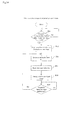
- FIG. 2 is a flowchart showing operations at the time when the information terminal according to Embodiment 1 of the present invention executes the processing for storing the rule description.
- the rule management unit 13 determines whether or not the rule description has been output from the application program 20 (step A1). If a result of the determination in step A1 is that the rule description has not been output, the rule management unit 13 enters a standby state.
- step A2 determines whether the output rule description is new or for changing a rule description that is already stored in the rule storing unit 18 (step A2).
- step A3 If a result of the determination in step A2 is that the output rule description is new, the rule management unit 13 causes the output rule description to be stored in the rule storing unit 18 (step A3).
- step A2 determines whether the output rule description is not new, i.e., is for changing the already-stored rule description. If a result of the determination in step A2 is that the output rule description is not new, i.e., is for changing the already-stored rule description, the rule management unit 13 updates the rule description stored in the rule storing unit 18 using the output rule description (step A4).
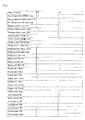
- FIG. 3 is a diagram showing an exemplary rule description used in Embodiment 1 of the present invention.
- the rule description is constituted by a decision table (which conforms to the JIS X 0125 1986 decision table). Note that the rule description need only be a description of the rule, and the format thereof is not limited.
- the rule is set for each execution status of the application program 20 (hereinafter also referred to as an "app A"). Specifically, in the decision table in FIG. 3 , it is set as a condition in a condition box (an upper left box among four boxes divided by double lines) whether or not the app A is active. Rules are separately set for the case “Y” where the condition is satisfied and the case "N” where the condition is not satisfied.
- a list of attribute values is shown in a lower left box among the four boxes divided by the double lines.
- an "x" mark is written in a box of an attribute value to be set, and a "-" mark is written in a box of an attribute value that is not to be set.
- the display control unit 11 if the app A is active, the display control unit 11 generates the following attribute value list in step B3 shown in later-described FIG. 5 .
- the display control unit 11 generates the following attribute value list in step B3 in later-described FIG. 5 .
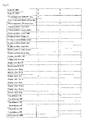
- FIG. 4 is a diagram showing the rule description shown in FIG. 3 after the change.
- the app A has changed the display color of the information input image when the app A is active from “red” to “green”, and has further changed the transmittance from "70%” to "0%”.
- the display control unit 11 generates the following attribute value list in step B3 in later-described FIG. 5 .
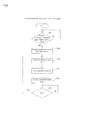
- FIG. 5 is a flowchart showing operations at the time when the information terminal according to Embodiment 1 of the present invention executes processing for displaying the information input image.
- the processing shown in FIG. 5 is based on the premise that the app A requests the system unit 14 to newly display the information input screen 21 a or change the attribute values in accordance with a change of the rule description, and the system unit 14 requests the display control unit 11 to display the information input image 21 a.
- the display control unit 11 determines whether or not the request to display the information input screen 21 a has been output from the system unit 14 (step B1). If a result of the determination in step B1 is that the request has not been output, the display control unit 11 enters a standby state. On the other hand, if a result of the determination in step B1 is that the request has been output, the display control unit 11 requests the system information acquisition unit 15 to acquire the system information.
- the system information acquisition unit 15 upon being requested to acquire the system information, acquires the app information of the application program 20 that is active on the operating system 10 as the system information (step B2).
- the system information acquisition unit 15 also outputs the acquired app information to the display control unit 11.
- the display control unit 11 accesses the rule storing unit 18 to acquire the rule description (see FIGS. 3 and 4 ), specifies the attribute values necessary for displaying the information input image 21 a based on the received app information and the acquired rule description, and generates the attribute value list that includes the specified attribute values (step B3).
- the display control unit 11 specifies the attribute values to which the "x" mark is given for the case "Y" in FIG. 3 (or FIG. 4 ) and generates the attribute value list using the specified attribute values (see the above "Attribute value list when app A is active").
- the display control unit 11 outputs the generated attribute value list to the attribute value setting unit 16 and requests the attribute value setting unit 16 to store the generated attribute value list in the attribute value list storing unit 19.
- the attribute value setting unit 16 thereby stores the attribute value list in the attribute value list storing unit 19 (step B4). Also, in step B4, the attribute value setting unit 16 notifies the display control unit 11 of completion of the storage upon the storage of the attribute value list being finished.
- the display control unit 11 upon receiving the notification of the completion of the storage from the attribute value setting unit 16, requests the image display unit 12 to display the information input image 21 a.
- the image display unit 12 thereby acquires the attribute value list from the attribute value list storing unit 19, and displays the information input image 21 a so as to superimpose the information input image 21 a on the execution screen of the app A that is displayed on the display panel 21, based on the acquired attribute value list (step B5).
- steps B1 to B5 are thus executed, an image of a keyboard, which is the information input image 21 a, is displayed on the screen of the display panel 21 in accordance with the set rule. Since steps B1 to B5 are repeatedly executed, if the app A has changed the rule description, the information input image 21a is redisplayed based on the changed rule description.
- the attribute values of the information input image (an image of a keyboard), such as the display location, the size, the color, and the transmittance can be easily changed by the application program changing the rule description. Accordingly, according to Embodiment 1, the visibility of the information input image can be significantly improved.
- Embodiment 1 since the attribute values can be easily changed, trial and error for improving the visibility and the operability can be easily done, and therefore the ease of development of the software keyboard or the like is also improved. Furthermore, if the rule description is created in the form of a file or the like that can be easily replaced, the rule description can be easily changed or replaced, and therefore the ease of development is further improved.
- Embodiment 1 since various kinds of information of the system can be easily reflected in the attribute values of the information input image 21 a, an improvement of the operability thereof at the time of performing input operations using the information input image is achieved.
- a program according to Embodiment 1 need only be a program that causes a computer constituting the information terminal 100 to execute steps A1 to A4 shown in FIG. 3 and steps B1 to B5 shown in FIG. 6 .
- a CPU Central Processing Unit
- the computer functions as the display control unit 11, the image display unit 12, the rule management unit 13, the system unit 14, the system information acquisition unit 15, the attribute value setting unit 16, and the input accepting unit 17, and performs the processing.
- FIG. 6 is a block diagram showing a configuration of the information terminal according to Embodiment 2 of the present invention.
- an information terminal 200 according to Embodiment 2 includes a tilt detection unit 30 and an acceleration sensor 33, and is different from the information terminal 100 according to Embodiment 1 shown in FIG. 1 in this regard. Note that the other features of the information terminal 200 are configured similarly to the information terminal 100 according to Embodiment 1. Differences from Embodiment 1 will be mainly described below.
- the tilt detection unit 30 detects a tilt of the information terminal 200 based on a signal from the acceleration sensor 33, and outputs information (hereinafter referred to as "tilt information") that specifies the detected tilt to the system information acquisition unit 15.
- tilt information information that specifies the detected tilt to the system information acquisition unit 15.
- the system information acquisition unit 15 also outputs system information including the tilt information to the display control unit 11.
- Embodiment 2 in the rule description, a rule is set for each tilted state of the information terminal 200. For this reason, the display control unit 11 specifies a corresponding rule based on the tilt of the information terminal 200 specified by the tilt information, and further generates an attribute value list that is based on the specified rule.
- the information input image 21 a can be moved such that the user can easily view the information input image 21 a in accordance with a tilt direction of the information terminal 200.
- FIGS. 7 and 8 operations of the information terminal 200 according to Embodiment 2 of the present invention will be described using FIGS. 7 and 8 .
- FIG. 6 will be referenced as appropriate.
- a method for displaying the information input image is implemented by causing the information terminal 200 to operate. Accordingly, the following description of the operations of the information terminal 200 will be substituted for the description of the method for displaying the information input image according to Embodiment 2.
- Embodiment 2 First, a specific example of the rule description used in Embodiment 2 will be described. Note that, in Embodiment 2 as well, processing for storing the rule description is performed similarly to the storing processing in Embodiment 1 shown in FIG. 2 .
- FIG. 7 is a diagram showing an exemplary rule description used in Embodiment 2 of the present invention.
- the rule description is constituted by a decision table (which conforms to the JIS X 0125 1986 decision table).
- the rule is set for each tilted state of the information terminal 200. Specifically, in the decision table in FIG. 7 , “initial activation”, “tilt around x-axis: +10 degrees”, and “tilt around x-axis: -10 degrees” are set as conditions in a condition box (an upper left box among four boxes divided by double lines). Three rules are set for the case “Y” where the conditions are satisfied and the case “N” where the conditions are not satisfied. Note that the x-axis is a virtual axis passing through the center of the screen of the display panel and parallel with the horizontal direction of the screen.
- the display control unit 11 when the rule description shown in FIG. 7 is stored in the rule storing unit 18, if the app A is first activated, the display control unit 11 generates the following attribute value list (see step B3 in FIG. 5 ).
- the "x-axis" shown in FIG. 7 is an axis parallel with the horizontal direction of the screen of the information terminal 200.
- the display control unit 11 If the information terminal 200 is tilted +10 degrees around the x-axis (if the upper part of the information terminal is tilted toward the distal side 10 degrees as viewed from the user) after the app A is activated, the display control unit 11 generates the following attribute value list (see step B3 in FIG. 5 ).
- the display control unit 11 generates the following attribute value list (see step B3 in FIG. 5 ).
- FIG. 8 is a flowchart showing operations at the time when the information terminal according to Embodiment 2 of the present invention executes processing for displaying the information input image.
- the processing shown in FIG. 8 is also based on the premise, similarly to the processing shown in FIG. 5 , that the app A requests the system unit 14 to newly display the information input screen 21 a or change the attribute values in accordance with a change of the rule description, and the system unit 14 requests the display control unit 11 to display the information input image 21 a.
- the display control unit 11 determines whether or not the request to display the information input screen 21 a has been output from the system unit 14 (step B11). If a result of the determination in step B11 is that the request has not been output, the display control unit 11 enters a standby state. On the other hand, if a result of the determination in step B11 is that the request has been output, the display control unit 11 requests the system information acquisition unit 15 to acquire system information.
- the system information acquisition unit 15 upon being requested to acquire the system information, acquires the tilt information as the system information from the tilt detection unit 30, and outputs the acquired tilt information to the display control unit 11 (step B12).
- the display control unit 11 accesses the rule storing unit 18 to acquire the rule description (see FIGS. 3 and 4 ), specifies the attribute values necessary for displaying the information input image 21 a based on the received tilt information and the acquired rule description, and generates the attribute value list that includes the specified attribute values (step B13).
- step B13 is performed immediately after the app A is activated, the attribute value list at the time of initial activation is generated even if the information terminal 200 is in a tilted state.
- the display control unit 11 outputs the generated attribute value list to the attribute value setting unit 16 and requests the attribute value setting unit 16 to store the attribute value list in the attribute value list storing unit 19.
- the attribute value setting unit 16 thereby stores the attribute value list in the attribute value list storing unit 19 (step B14). Also, in step B14 as well, the attribute value setting unit 16 notifies the display control unit 11 of completion of the storage upon the storage of the attribute value list being finished.
- the display control unit 11 upon receiving the notification of the completion of the storage from the attribute value setting unit 16, requests the image display unit 12 to display the information input image 21 a.
- the image display unit 12 thereby acquires the attribute value list from the attribute value list storing unit 19, and displays the information input image 21a so as to superimpose the information input image 21 a on the execution screen of the app A that is displayed on the display panel 21, based on the acquired attribute value list (step B 15).
- the display control unit 11 causes the system information acquisition unit 15 to reacquire the tilt information, and after acquiring this, the display control unit 11 determines whether or not the tilt of the information terminal 200 has changed (step B16).
- step B16 If a result of step B16 is that the tilt of the information terminal 200 has not changed, the display control unit 11 enters a standby state. On the other hand, if a result of step B16 is that the tilt of the information terminal 200 has changed, the display control unit 11 again executes step B 13 and updates the display of the information input image 21 a using the reacquired tilt information.
- Embodiment 2 since the tilt of the information terminal 200 is always monitored, and the display position of the information input image 21 a is changed in accordance with the tilt, the visibility and the operability thereof is further improved.
- a program according to Embodiment 2 need only be a program that causes a computer constituting the information terminal 200 to execute steps A1 to A4 shown in FIG. 3 and steps B11 to B16 shown in FIG. 8 .
- the information terminal 200 and the method for displaying the information input image according to Embodiment 2 can be achieved.
- a CPU in the computer functions as the display control unit 11, the image display unit 12, the rule management unit 13, the system unit 14, the system information acquisition unit 15, the attribute value setting unit 16, the input accepting unit 17, and the tilt detection unit 30, and performs the processing.
- FIG. 9 is a block diagram showing a configuration of the information terminal according to Embodiment 3 of the present invention.
- an information terminal 300 according to Embodiment 3 includes an authentication execution unit 31, and is different from the information terminal 100 according to Embodiment 1 shown in FIG. 1 in this regard. Note that the other features of the information terminal 300 are configured similarly to the information terminal 100 according to Embodiment 1. Differences from Embodiment 1 will be mainly described below.
- the authentication execution unit 31 receives authentication information (an identifier, a password, etc.) of the user that is input from the touch-type input apparatus 22 via the input accepting unit 17, and performs authentication based on the received authentication information. If the authentication is successful, the authentication execution unit 31 outputs the identifier (a login ID) of the user to the system information acquisition unit 15. Furthermore, in response to this, the system information acquisition unit 15 outputs the output login ID of the user to the display control unit 11.
- authentication information an identifier, a password, etc.
- Embodiment 3 in the rule description, a rule is set for each login ID of the user. For this reason, the display control unit 11 specifies a corresponding rule based on the output login ID, and further generates an attribute value list that is based on the specified rule.
- the key arrangement, the size, the color, the transmittance, and the like of the information input image can be set for each user in accordance with preference of the user. That is to say, the information input image can be displayed in accordance with the age (adult, child), the gender, and the like of the user under the most preferable conditions.
- FIGS. 10 and 11 operations of the information terminal 300 according to Embodiment 2 of the present invention will be described using FIGS. 10 and 11 .
- FIG. 9 will be referenced as appropriate.
- a method for displaying the information input image is implemented by causing the information terminal 300 to operate. Accordingly, the following description of the operations of the information terminal 300 will be substituted for the description of the method for displaying the information input image according to Embodiment 3.
- Embodiment 3 As well, processing for storing the rule description is performed similarly to the storing processing according to Embodiment 1 shown in FIG. 2 .
- FIG. 10 is a diagram showing an exemplary rule description used in Embodiment 3 of the present invention.
- the rule description is constituted by a decision table (which conforms to the JIS X 0125 1986 decision table).
- the rule is set for each identifier (login ID) of the user. Specifically, in the decision table in FIG. 10 , "login ID: 0001" and “login ID: 0002" are set as conditions in a condition box (an upper left box among four boxes divided by double lines). Two rules are set for the case “Y” where the conditions are satisfied and the case “N” where the conditions are not satisfied.
- the display control unit 11 if the app A is active and the login ID of the user is "0001 ", the display control unit 11 generates the following attribute value list (see step B3 in FIG. 5 ).
- the display control unit 11 If the login ID of the user is "0002", the display control unit 11 generates the following attribute value list (see step B3 in FIG. 5 ).
- FIG. 11 is a flowchart showing operations at the time when the information terminal according to Embodiment 3 of the present invention executes processing for displaying the information input image.
- the processing shown in FIG. 11 is also based on the premise, similarly to the processing shown in FIG. 5 , that the app A requests the system unit 14 to newly display the information input screen 21 a or change the attribute values in accordance with a change of the rule description, and the system unit 14 requests the display control unit 11 to display the information input image 21 a.
- the display control unit 11 determines whether or not the request to display the information input screen 21 a has been output from the system unit 14 (step B21). If a result of the determination in step B21 is that the request has not been output, the display control unit 11 enters a standby state. On the other hand, if a result of the determination in step B21 is that the request has been output, the display control unit 11 requests the system information acquisition unit 15 to acquire system information.
- the system information acquisition unit 15 upon being requested to acquire the system information, acquires a login ID with which authentication has been successful as the system information from the authentication execution unit 31, and outputs the acquired login ID to the display control unit 11 (step B22).
- the display control unit 11 accesses the rule storing unit 18 to acquire the rule description (see FIGS. 3 and 4 ), specifies the attribute values necessary for displaying the information input image 21a based on the received login ID and the acquired rule description, and generates the attribute value list that includes the specified attribute values (step B23).
- the display control unit 11 outputs the generated attribute value list to the attribute value setting unit 16 and requests the attribute value setting unit 16 to store the attribute value list in the attribute value list storing unit 19.
- the attribute value setting unit 16 thereby stores the attribute value list in the attribute value list storing unit 19 (step B24). Also, in step B24 as well, the attribute value setting unit 16 notifies the display control unit 11 of completion of the storage upon the storage of the attribute value list being finished.
- the display control unit 11 upon receiving the notification of the completion of the storage from the attribute value setting unit 16, requests the image display unit 12 to display the information input image 21a.
- the image display unit 12 thereby acquires the attribute value list from the attribute value list storing unit 19, and displays the information input image 21a so as to superimpose the information input image 21 a on the execution screen of the app A that is displayed on the display panel 21, based on the acquired attribute value list (step B25).
- Embodiment 3 the key arrangement, the size, the color, the transmittance, and the like of the information input image 21a can be changed for each user, and therefore the visibility and the operability thereof is further improved.
- a program according to Embodiment 3 need only be a program that causes a computer constituting the information terminal 300 to execute steps A1 to A4 shown in FIG. 3 and steps B21 to B25 shown in FIG. 11 .
- the information terminal 300 and the method for displaying the information input image according to Embodiment 3 can be achieved.
- a CPU in the computer functions as the display control unit 11, the image display unit 12, the rule management unit 13, the system unit 14, the system information acquisition unit 15, the attribute value setting unit 16, the input accepting unit 17, and the authentication execution unit 31, and performs the processing.
- FIG. 12 is a block diagram showing a configuration of the information terminal according to Embodiment 4 of the present invention.
- the information terminal 400 according to Embodiment 4 includes an operation pattern detection unit 32, and is different from the information terminal 100 according to Embodiment 1 shown in FIG. 1 in this regard. Note that the other features of the information terminal 400 are configured similarly to the information terminal 100 according to Embodiment 1. Differences from Embodiment 1 will be mainly described below.
- the operation pattern detection unit 32 receives, via the input accepting unit 17, information (hereinafter referred to as "operation information") that specifies a user operation which is input to the touch-type input apparatus 22, and detects an operation pattern made on the screen by the user.
- operation information information that specifies a user operation which is input to the touch-type input apparatus 22, and detects an operation pattern made on the screen by the user.
- the operation information contains the coordinates of each touch position at each set time. Accordingly, the operation pattern detection unit 32 specifies a temporal change of each touch position, and determines based on the specified temporal change whether or not the operation pattern made on the screen by the user corresponds to pinch-in or pinch-out.
- the operation pattern detection unit 32 then outputs a determination result to the system information acquisition unit 15. Furthermore, in response to this, the system information acquisition unit 15 outputs the output determination result to the display control unit 11.
- Embodiment 4 in the rule description, a rule is set for each operation pattern of the user. For this reason, the display control unit 11 specifies a corresponding rule based on the operation pattern of the determination result, and further generates an attribute value list that is based on the specified rule.
- the size, the color, the transmittance, and the like of the information input image can be changed in accordance with the operation pattern of the user, such as pinch-in or pinch-out.
- pinch-in refers to an operation of the user simultaneously touching two points on a touch surface of the touch-type input apparatus 22 and shortening the distance between these two points.
- Pinch-out refers to an operation of the user simultaneously touching two points on the touch surface of the touch-type input apparatus 22 and widening the distance between these two points.
- Embodiment 4 operations of the information terminal 400 in Embodiment 4 of the present invention will be described using FIGS. 13 and 14 .
- FIG. 12 will be referenced as appropriate.
- Embodiment 4 a method for displaying the information input image is implemented by causing the information terminal 400 to operate. Accordingly, the following description of the operations of the information terminal 400 will be substituted for the description of the method for displaying the information input image in Embodiment 4.
- Embodiment 4 As well, processing for storing the rule description is performed similarly to the storing processing in Embodiment 1 shown in FIG. 2 .
- FIG. 13 is a diagram showing an exemplary rule description used in Embodiment 4 of the present invention.
- the rule description is constituted by a decision table (which conforms to the JIS X 0125 1986 decision table).
- the rule is set for each operation pattern made on the information terminal 400 by the user. Specifically, in the decision table in FIG. 13 , "initial activation”, “pinch-in”, and “pinch-out” are set as conditions in a condition box (an upper left box among four boxes divided by double lines). Three rules are set for the case “Y” where the conditions are satisfied and the case “N” where the conditions are not satisfied.
- the display control unit 11 when the rule description shown in FIG. 13 is stored in the rule storing unit 18, if the app A is first activated, the display control unit 11 generates the following attribute value list (see step B3 in FIG. 5 ).
- the display control unit 11 If the user performs pinch-in as an input operation on the information terminal 400 after the app A is activated, the display control unit 11 generates the following attribute value list (see step B3 in FIG. 5 ).
- the display control unit 11 generates the following attribute value list (see step B3 in FIG. 5 ).
- FIG. 14 is a flowchart showing operations at the time when the information terminal according to Embodiment 4 of the present invention executes processing for displaying the information input image.
- the processing shown in FIG. 14 is also based on the premise, similarly to the processing shown in FIG. 5 , that the app A requests the system unit 14 to newly display the information input screen 21 a or change the attribute values in accordance with a change of the rule description, and the system unit 14 requests the display control unit 11 to display the information input image 21 a.
- the display control unit 11 determines whether or not the request to display the information input screen 21 a has been output from the system unit 14 (step B31). If a result of the determination in step B31 is that the request has not been output, the display control unit 11 enters a standby state. On the other hand, if a result of the determination in step B31 is that the request has been output, the display control unit 11 requests the system information acquisition unit 15 to acquire system information.
- the system information acquisition unit 15 upon being requested to acquire the system information, acquires the operation information as the system information from the operation pattern detection unit 32, and outputs the acquired operation information to the display control unit 11 (step B32).
- the display control unit 11 accesses the rule storing unit 18 to acquire the rule description (see FIGS. 3 and 4 ), specifies the attribute values necessary for displaying the information input image 21a based on the received operation information and the acquired rule description, and generates the attribute value list that includes the specified attribute values (step B33).
- step B33 is performed immediately after the app A is activated, the attribute value list at the time of initial activation is generated even if the user has performed pinch-in or pinch-out.
- the display control unit 11 outputs the generated attribute value list to the attribute value setting unit 16 and requests the attribute value setting unit 16 to store the attribute value list in the attribute value list storing unit 19.
- the attribute value setting unit 16 thereby stores the attribute value list in the attribute value list storing unit 19 (step B34). Also, in step B34 as well, the attribute value setting unit 16 notifies the display control unit 11 of completion of the storage upon the storage of the attribute value list being finished.
- the display control unit 11 upon receiving the notification of the completion of the storage from the attribute value setting unit 16, requests the image display unit 12 to display the information input image 21a.
- the image display unit 12 thereby acquires the attribute value list from the attribute value list storing unit 19, and displays the information input image 21 a so as to superimpose the information input image 21 a on the execution screen of the app A that is displayed on the display panel 21, based on the acquired attribute value list (step B35).
- the display control unit 11 causes the system information acquisition unit 15 to reacquire the operation information, and upon acquiring this, the display control unit 11 determines whether or not the user has performed a set operation input (pinch-in or pinch-out) (step B36).
- step B36 If a result of step B36 is that the user has not performed the set operation input, the display control unit 11 enters a standby state. On the other hand, if a result of step B36 is that the user has performed the set operation input, the display control unit 11 again executes step B33 using the reacquired operation information and updates the display of the information input image 21a.
- Embodiment 4 since the user operation to the information terminal 400 is monitored, and the size and the like of the information input image 21 a are changed in accordance with the operation pattern, the visibility and the operability thereof is further improved.
- a program in Embodiment 4 need only be a program that causes a computer constituting the information terminal 400 to execute steps A1 to A4 shown in FIG. 3 and steps B31 to B36 shown in FIG. 14 .
- the information terminal 400 and the method for displaying the information input image in Embodiment 4 can be achieved.
- a CPU in the computer functions as the display control unit 11, the image display unit 12, the rule management unit 13, the system unit 14, the system information acquisition unit 15, the attribute value setting unit 16, the input accepting unit 17, and the operation pattern detection unit 32, and performs the processing.
- FIG. 15 is a block diagram showing an exemplary portable terminal apparatus that can be used as the information terminals according to Embodiments 1 to 4 of the present invention.
- a portable terminal apparatus 40 includes a CPU 41, a memory 42, a display 43, a storage apparatus 44, a communication module 45, and a touch panel 46. These units are connected to each other in a manner that enables data communication, via a bus 47.
- the CPU 41 performs various types of calculation by deploying, in the memory 42, the programs (codes) according to the embodiments stored in the storage apparatus 44 and executing these codes in a predetermined order.
- the memory 42 typically, is a volatile memory such as a DRAM (Dynamic Random Access Memory).
- the programs according to Embodiments 1 to 4 may be provided in a state of being stored in a computer-readable recording medium, or may be transmitted on the Internet connected via the communication module 45.
- General-purpose semiconductor storage devices such as a CF (Compact Flash (registered trademark)) and an SD (Secure Digital) are given as specific examples of the recording medium.
- a hard disk and a semiconductor storage apparatus such as a flash memory are given as specific examples of the storage apparatus 44.
- the touch panel 46 is an input device that accepts a user input.
- the display 43 is a display panel such as a liquid crystal display apparatus.
- the communication module 45 is a device for achieving communication using a wireless LAN and communication using a mobile phone network.
- the terminal apparatus 40 is not limited to the above-described portable terminal apparatus such as a tablet-type terminal or a smartphone, and may be a personal computer such as a laptop PC, an electronic paper, or the like.
- An information terminal that accepts key entry made by a touch on an information input image on a screen, the information terminal including:
- the information terminal according to Note 1, wherein the information input image is an image of a keyboard that constitutes a software keyboard.
- the information terminal further including a rule management unit that receives the rule from an application program executed on the information terminal, and provides the rule which is received to the display control unit, wherein if the application program has changed the rule, the rule management unit provides the changed rule to the display control unit.
- the information terminal according to any of Notes 1 to 3, wherein the rule is set for each execution status of an application program executed on the information terminal, and the display control unit specifies a rule corresponding to execution status of the application program on the information terminal, and specifies the attribute value based on the specified rule.
- the information terminal further including a tilt detection unit that detects a tilt of the information terminal, wherein the rule is set for each tilted state of the information terminal, and the display control unit specifies a corresponding rule based on the tilt detected by the detection unit, and specifies the attribute value based on the specified rule.
- the information terminal further including an authentication execution unit that performs authentication based on an identifier which is set for each user of the information terminal, wherein the rule is set for each identifier of the user, and the display control unit specifies a rule corresponding to an identifier authenticated by the authentication execution unit, and specifies the attribute value based on the specified rule.
- the information terminal further including an operation pattern detection unit that detects an operation pattern made on the screen by a user of the information terminal, wherein the rule is set for each operation pattern, and the display control unit specifies a corresponding rule based on an operation pattern detected by the operation pattern detection unit, and specifies the attribute value based on the specified rule.
- An information input image display method for displaying an information input image on a screen when key entry is made by a touch on an information terminal, the method including:
- the information input image display method wherein the information input image is an image of a keyboard that constitutes a software keyboard.
- the information input image display method according to Note 8 or 9, further including:
- the information input image display method further including a step (e) of detecting a tilt of the information terminal, wherein the rule is set for each tilted state of the information terminal, and in the step (a), a corresponding rule is specified based on the tilt detected by the step (e), and the attribute value is specified based on the specified rule.
- the information input image display method further including a step (f) of performing authentication based on an identifier that is set for each user of the information terminal, wherein the rule is set for each identifier of the user, and in the step (a), a rule corresponding to an identifier authenticated in the step (f) is specified, and the attribute value is specified based on the specified rule.
- the information input image display method further including a step (g) of detecting an operation pattern made on the screen by a user of the information terminal, wherein the rule is set for each operation pattern, and in the step (a), a corresponding rule is specified based on an operation pattern detected in the step (g), and the attribute value is specified based on the specified rule.
- a computer-readable recording medium recording a program for displaying an information input image on a screen when key entry is made by a touch on a computer, the program including a command for causing the computer to execute:
- the computer-readable recording medium according to Note 15, wherein the information input image is an image of a keyboard that constitutes a software keyboard.
- the attribute values necessary for displaying the information input image such as an image of a keyboard constituting a software keyboard can be easily changed, and an improvement of the visibility and the operability thereof can be achieved.
- the present invention is particularly useful for a terminal apparatus on which a software keyboard is implemented.
Landscapes
- Engineering & Computer Science (AREA)
- Theoretical Computer Science (AREA)
- General Engineering & Computer Science (AREA)
- Physics & Mathematics (AREA)
- General Physics & Mathematics (AREA)
- Human Computer Interaction (AREA)
- Computer Security & Cryptography (AREA)
- Software Systems (AREA)
- Computer Hardware Design (AREA)
- User Interface Of Digital Computer (AREA)
- Input From Keyboards Or The Like (AREA)
- Position Input By Displaying (AREA)
- Telephone Function (AREA)
Abstract
Description
- The present invention relates to input systems using information input images, e.g., an information terminal having a software keyboard, a method for displaying an information input image, and a computer-readable recording medium recording a program for achieving them.
- In recent years, in the field of information terminals, software keyboards have been increasingly used in place of physical keyboards as touch panels widespread. With an information terminal on which a software keyboard is employed, a user can make key entry by touching a key on a keyboard displayed on a screen.
- However, since the software keyboard is constituted by an information input image displayed on the screen, a problem arises in that the visibility, the operability, and the like thereof are likely to be lower than those of a physical keyboard. For this reason, various kinds of development have been made in order to improve the visibility, the operability, and the like of the software keyboard.
- For example,
Patent Document 1 discloses an information terminal that can display an information input image of a software keyboard (an image of a keyboard) in a translucent state in order to suppress a decrease in the amount of information on a screen as a result of the information on the screen being blocked by the information input image.Patent Document 2 discloses an information terminal on which a screen is automatically scrolled such that an input box for inputting a text or the like is not hidden by an information input image when the input box overlaps the information input image. -
- Patent Document 1:
JP 2007-183787A - Patent Document 2:
JP 2011-254358A - Thus, with the information terminals disclosed in
Patent Documents Patent Documents - An object of the present invention is to solve the foregoing problem and provide an information terminal, a method for displaying an information input image, and a computer-readable recording medium with which an attribute value necessary for displaying an information input image can be easily changed.
- To achieve the above-stated object, an information terminal according to one aspect of the present invention is an information terminal that accepts key entry made by a touch on an information input image on a screen, and the information terminal includes:
- a display control unit that specifies an attribute value necessary for displaying the information input image, based on a rule preset for a display of the information input image; and
- an image display unit that causes the information input image to be displayed on the screen based on the attribute value which is specified.
- Also, to achieve the above-stated object, a method for displaying an information input image according to one aspect of the present invention is an information input image display method for displaying an information input image on a screen when key entry is made by a touch on an information terminal, and the method includes:
- a step (a) of specifying an attribute value necessary for displaying the information input image, based on a rule preset for a display of the information input image; and
- a step (b) of causing the information input image to be displayed on the screen based on the attribute value that is specified in the step (a).
- Furthermore, to achieve the above-stated object, a computer-readable recording medium according to one aspect of the present invention is a computer-readable recording medium recording a program for displaying an information input image on a screen when key entry is made by a touch on a computer, and the program includes a command for causing the computer to execute:
- a step (a) of specifying an attribute value necessary for displaying the information input image, based on a rule preset for a display of the information input image; and
- a step (b) of causing the information input image to be displayed on the screen based on the attribute value that is specified in the step (a).
- As described above, according to the present invention, an attribute value necessary for displaying an information input image can be easily changed.
-
- [
Figure 1] FIG. 1 is a block diagram showing a configuration of an information terminal according toEmbodiment 1 of the present invention. - [
Figure 2] FIG. 2 is a flowchart showing operations at the time when the information terminal according toEmbodiment 1 of the present invention executes processing for storing a rule description. - [
Figure 3] FIG. 3 is a diagram showing an exemplary rule description used inEmbodiment 1 of the present invention. - [
Figure 4] FIG. 4 is a diagram showing the rule description shown inFIG. 3 after the change. - [
Figure 5] FIG. 5 is a flowchart showing operations at the time when the information terminal according toEmbodiment 1 of the present invention executes processing for displaying the information input image. - [
Figure 6] FIG. 6 is a block diagram showing a configuration of an information terminal according toEmbodiment 2 of the present invention. - [
Figure 7] FIG. 7 is a diagram showing an exemplary rule description used inEmbodiment 2 of the present invention. - [
Figure 8] FIG. 8 is a flowchart showing operations at the time when the information terminal according toEmbodiment 2 of the present invention executes processing for displaying the information input image. - [
Figure 9] FIG. 9 is a block diagram showing a configuration of an information terminal according toEmbodiment 3 of the present invention. - [
Figure 10] FIG. 10 is a diagram showing an exemplary rule description used inEmbodiment 3 of the present invention. - [
Figure 11] FIG. 11 is a flowchart showing operations at the time when the information terminal according toEmbodiment 3 of the present invention executes processing for displaying the information input image. - [
Figure 12] FIG. 12 is a block diagram showing a configuration of an information terminal according toEmbodiment 4 of the present invention. - [
Figure 13] FIG. 13 is a diagram showing an exemplary rule description used inEmbodiment 4 of the present invention. - [
Figure 14] FIG. 14 is a flowchart showing operations at the time when the information terminal according toEmbodiment 4 of the present invention executes processing for displaying the information input image. - [
Figure 15] FIG. 15 is a block diagram showing an exemplary portable terminal apparatus that can be used as the information terminals according toEmbodiments 1 to 4 of the present invention. - An information terminal, a method for displaying an information input image, and a program according to
Embodiment 1 of the present invention will be described below with reference toFIGS. 1 to 6 . - Firstly, a configuration of an information terminal according to
Embodiment 1 will be described usingFIG. 1. FIG. 1 is a block diagram showing a configuration of the information terminal according toEmbodiment 1 of the present invention. - First, an
information terminal 100 according toEmbodiment 1 shown inFIG. 1 is an apparatus that accepts key entry made by a touch on aninformation input image 21 a on a screen of adisplay panel 20. InEmbodiment 1, theinformation terminal 100 is a smartphone, a tablet-type terminal, a laptop personal computer, or the like on which touch entry is enabled. Theinformation input image 21 a is an image of a keyboard that constitutes a software keyboard. - As shown in
FIG. 1 , theinformation terminal 100 includes adisplay control unit 11 and animage display unit 12. Of these, thedisplay control unit 11 specifies attribute values necessary for displaying theinformation input image 21 a based on a rule that is preset regarding a display of theinformation input image 21 a. Theimage display unit 12 causes theinformation input image 21 a to be displayed on the screen based on the specified attribute values. - Thus, in the
information terminal 100, the attribute value of theinformation input image 21a constituting the software keyboard is determined by the preset rule. Accordingly, the attribute value necessary for the display can be easily changed by rewriting only the rule. - The configuration of the
information terminal 100 according toEmbodiment 1 will now be described in more detail. As shown inFIG. 2 , theinformation terminal 100 includes, in addition to thedisplay control unit 11 and theimage display unit 12, arule management unit 13, asystem unit 14, a systeminformation acquisition unit 15, an attributevalue setting unit 16, aninput accepting unit 17, arule storing unit 18, and an attribute valuelist storing unit 19. - Also, in the
Embodiment 1, thedisplay control unit 11, theimage display unit 12, therule management unit 13, thesystem unit 14, the systeminformation acquisition unit 15, the attributevalue setting unit 16, and theinput accepting unit 17 are constructed on an operating system (OS) 10 installed in theinformation terminal 100 by program modules. Therule storing unit 18 and the attribute valuelist storing unit 19 are constructed in a storage area of a storage apparatus, such as a memory, which is managed by theoperating system 10. Furthermore, in theoperating system 10, anapplication program 20 that requires a display of theinformation input image 21 a is executed. - The
rule management unit 13 receives the aforementioned rule from theapplication program 20, and provides the received rule to thedisplay control unit 11. If theapplication program 20 has changed the rule, therule management unit 13 provides the changed rule to thedisplay control unit 11. - Specifically, the
application program 20 outputs a rule description that describes the aforementioned rule, and therule management unit 13 accordingly receives this rule description from theapplication program 20. Therule management unit 13 stores the received rule description in therule storing unit 18 in order to provide the rule description to thedisplay control unit 11. Thedisplay control unit 11 acquires the rule from therule storing unit 18. - Upon the
application program 20 changing the rule, therule management unit 13 receives the changed rule description and updates, using this, the rule description stored in therule storing unit 18. For this reason, the change of the rule by theapplication program 20 is also immediately reflected in thedisplay control unit 11, and as a result, attribute values necessary for the display is also immediately changed, as described later. - In
Embodiment 1, the rule defines attribute values regarding the information input screen, such as the display position (the coordinates: X-coordinate value, Y-coordinate value), the display size (the number of dots in X direction, the number of dots in Y direction), the display color (white, black, red, etc.), and the transmittance (0% to 100%), for example. Note that the type of the attribute values defined by the rule is not limited to the above examples. The possible range of each attribute value is not particularly limited either. - The
system unit 14 manages the overall system, and for example, upon theapplication program 20 making a request to display theinformation input screen 21 a, thesystem unit 14 requests thedisplay control unit 11 to display theinformation input image 21a on the screen. Thedisplay control unit 11, upon receiving this request, executes the aforementioned processing. - When the
display control unit 11 receives the request to display theinformation input image 21 a from thesystem unit 14, the systeminformation acquisition unit 15 acquires system information necessary for specifying the attribute values from theoperation 10 in accordance with the request of thedisplay control unit 11. - Specifically, in
Embodiment 1, the systeminformation acquisition unit 15 acquires information (hereinafter referred to as "app information") regarding theapplication program 20. Note that the information that the systeminformation acquisition unit 15 acquires need only be numeric data that can be acquired from theoperation system 10, and is not particularly limited. - In
Embodiment 1, thedisplay control unit 11, upon receiving the request from thesystem unit 14, acquires the rule from therule storing unit 18, and specifies the attribute values necessary for displaying theinformation input image 21a based on the acquired rule and app information. - Specifically, in
Embodiment 1, the rule is set for each application program to be executed in theinformation terminal 10, as described later. Accordingly, thedisplay control unit 11 specifies a rule corresponding to the application program that is being executed, based on the acquired rule and app information, and specifies the attribute values based on the specified rule. Thedisplay control unit 11 also generates a list (an attribute value list) that includes the specified attribute values, and outputs this list to the attributevalue setting unit 16. Thereafter, thedisplay control unit 11 requests theimage display unit 12 to display theinformation input image 21 a. - The attribute
value setting unit 16, upon receiving the attribute value list, determines whether or not each attribute value included in the received attribute value list is appropriate as the attribute value to be used to display theinformation input image 21 a by theimage display unit 12. If the attributevalue setting unit 16 determines that the attribute value is appropriate, the attributevalue setting unit 16 stores the attribute value list subjected to the determination in the attribute valuelist storing unit 19. - In the present embodiment, the
image display unit 12, upon receiving the display request from thedisplay control unit 11, acquires the attribute value list from the attribute valuelist storing unit 19, and displays theinformation input image 21 a on the screen of thedisplay panel 21 based on the acquired attribute value list. If an execution screen of theapplication program 20 is already displayed on thedisplay panel 21, theimage display unit 12 displays theinformation input image 21a so as to superimpose theinformation input image 21a on the execution screen. - The
input accepting unit 17 also accepts information from a touch-type input apparatus 22 provided in theinformation terminal 100, and outputs the received information to the systeminformation acquisition unit 15. InEmbodiment 1, the touch-type input apparatus 22 is a touch panel, and outputs information of the coordinates of a position touched by the user. - Next, operations of the
information terminal 100 according toEmbodiment 1 of the present invention will be described usingFIGS. 2 to 5 . In the following description,FIG. 1 will be referenced as appropriate. InEmbodiment 1, a method for displaying the information input image is implemented by causing theinformation terminal 100 to operate. Accordingly, the following description of the operations of theinformation terminal 100 will be substituted for the description of the method for displaying the information input image according toEmbodiment 1. - First, processing for storing the rule description will be described using
FIG. 2. FIG. 2 is a flowchart showing operations at the time when the information terminal according toEmbodiment 1 of the present invention executes the processing for storing the rule description. - Initially, as shown in
FIG. 2 , therule management unit 13 determines whether or not the rule description has been output from the application program 20 (step A1). If a result of the determination in step A1 is that the rule description has not been output, therule management unit 13 enters a standby state. - On the other hand, if a result of the determination in step A1 is that the rule description has been output, the
rule management unit 13 determines whether the output rule description is new or for changing a rule description that is already stored in the rule storing unit 18 (step A2). - If a result of the determination in step A2 is that the output rule description is new, the
rule management unit 13 causes the output rule description to be stored in the rule storing unit 18 (step A3). - On the other hand, if a result of the determination in step A2 is that the output rule description is not new, i.e., is for changing the already-stored rule description, the
rule management unit 13 updates the rule description stored in therule storing unit 18 using the output rule description (step A4). - A specific example of the rule description will now be described using
FIG. 3. FIG. 3 is a diagram showing an exemplary rule description used inEmbodiment 1 of the present invention. As shown inFIG. 3 , inEmbodiment 1, the rule description is constituted by a decision table (which conforms to the JIS X 0125 1986 decision table). Note that the rule description need only be a description of the rule, and the format thereof is not limited. - In the rule description (decision table) shown in
FIG. 3 , the rule is set for each execution status of the application program 20 (hereinafter also referred to as an "app A"). Specifically, in the decision table inFIG. 3 , it is set as a condition in a condition box (an upper left box among four boxes divided by double lines) whether or not the app A is active. Rules are separately set for the case "Y" where the condition is satisfied and the case "N" where the condition is not satisfied. - Also, in the rule description in
FIG. 3 , a list of attribute values is shown in a lower left box among the four boxes divided by the double lines. Regarding each condition, an "x" mark is written in a box of an attribute value to be set, and a "-" mark is written in a box of an attribute value that is not to be set. - Accordingly, in the case where the rule description shown in
FIG. 3 is stored in therule storing unit 18, if the app A is active, thedisplay control unit 11 generates the following attribute value list in step B3 shown in later-describedFIG. 5 . -
- [Attribute value list when app A is active]
- Key arrangement: QWERTY type
- Display position: Lower center
- Display size: 100×50
- Display color: Red
- Transmittance: 70%
- On the other hand, if the app A is not active, the
display control unit 11 generates the following attribute value list in step B3 in later-describedFIG. 5 . -
- [Attribute value list when App A is not active]
- Key arrangement: 50-sound type
- Display position: Lower center
- Display size: 100×50
- Display color: White
- Transmittance: 0%
- Subsequently, a description will be given of the case where the app A has changed the rule description in a situation where the rule description shown in
FIG. 3 is stored.FIG. 4 is a diagram showing the rule description shown inFIG. 3 after the change. - In the example in
FIG. 4 , the app A has changed the display color of the information input image when the app A is active from "red" to "green", and has further changed the transmittance from "70%" to "0%". In this case, thedisplay control unit 11 generates the following attribute value list in step B3 in later-describedFIG. 5 . -
- [Attribute value list when app A is active (after change)]
- Key arrangement: QWERTY type
- Display position: Lower center
- Display size: 100×50
- Display color: Green
- Transmittance: 0%
- Subsequently, processing for displaying the information input image will be described using
FIG. 5. FIG. 5 is a flowchart showing operations at the time when the information terminal according toEmbodiment 1 of the present invention executes processing for displaying the information input image. - The processing shown in
FIG. 5 is based on the premise that the app A requests thesystem unit 14 to newly display theinformation input screen 21 a or change the attribute values in accordance with a change of the rule description, and thesystem unit 14 requests thedisplay control unit 11 to display theinformation input image 21 a. - As shown in
FIG. 5 , initially, thedisplay control unit 11 determines whether or not the request to display theinformation input screen 21 a has been output from the system unit 14 (step B1). If a result of the determination in step B1 is that the request has not been output, thedisplay control unit 11 enters a standby state. On the other hand, if a result of the determination in step B1 is that the request has been output, thedisplay control unit 11 requests the systeminformation acquisition unit 15 to acquire the system information. - Next, the system
information acquisition unit 15, upon being requested to acquire the system information, acquires the app information of theapplication program 20 that is active on theoperating system 10 as the system information (step B2). The systeminformation acquisition unit 15 also outputs the acquired app information to thedisplay control unit 11. - Next, the
display control unit 11 accesses therule storing unit 18 to acquire the rule description (seeFIGS. 3 and4 ), specifies the attribute values necessary for displaying theinformation input image 21 a based on the received app information and the acquired rule description, and generates the attribute value list that includes the specified attribute values (step B3). - Specifically, since the app A is active in this case, the
display control unit 11 specifies the attribute values to which the "x" mark is given for the case "Y" inFIG. 3 (orFIG. 4 ) and generates the attribute value list using the specified attribute values (see the above "Attribute value list when app A is active"). - Next, the
display control unit 11 outputs the generated attribute value list to the attributevalue setting unit 16 and requests the attributevalue setting unit 16 to store the generated attribute value list in the attribute valuelist storing unit 19. The attributevalue setting unit 16 thereby stores the attribute value list in the attribute value list storing unit 19 (step B4). Also, in step B4, the attributevalue setting unit 16 notifies thedisplay control unit 11 of completion of the storage upon the storage of the attribute value list being finished. - Next, the
display control unit 11, upon receiving the notification of the completion of the storage from the attributevalue setting unit 16, requests theimage display unit 12 to display theinformation input image 21 a. Theimage display unit 12 thereby acquires the attribute value list from the attribute valuelist storing unit 19, and displays theinformation input image 21 a so as to superimpose theinformation input image 21 a on the execution screen of the app A that is displayed on thedisplay panel 21, based on the acquired attribute value list (step B5). - After steps B1 to B5 are thus executed, an image of a keyboard, which is the
information input image 21 a, is displayed on the screen of thedisplay panel 21 in accordance with the set rule. Since steps B1 to B5 are repeatedly executed, if the app A has changed the rule description, theinformation input image 21a is redisplayed based on the changed rule description. - As described above, in
Embodiment 1, the attribute values of the information input image (an image of a keyboard), such as the display location, the size, the color, and the transmittance can be easily changed by the application program changing the rule description. Accordingly, according toEmbodiment 1, the visibility of the information input image can be significantly improved. - In
Embodiment 1, since the attribute values can be easily changed, trial and error for improving the visibility and the operability can be easily done, and therefore the ease of development of the software keyboard or the like is also improved. Furthermore, if the rule description is created in the form of a file or the like that can be easily replaced, the rule description can be easily changed or replaced, and therefore the ease of development is further improved. - In
Embodiment 1, since various kinds of information of the system can be easily reflected in the attribute values of theinformation input image 21 a, an improvement of the operability thereof at the time of performing input operations using the information input image is achieved. - A program according to
Embodiment 1 need only be a program that causes a computer constituting theinformation terminal 100 to execute steps A1 to A4 shown inFIG. 3 and steps B1 to B5 shown inFIG. 6 . By installing and executing this program in the computer, theinformation terminal 100 and the method for displaying the information input image according toEmbodiment 1 can be achieved. In this case, a CPU (Central Processing Unit) of the computer functions as thedisplay control unit 11, theimage display unit 12, therule management unit 13, thesystem unit 14, the systeminformation acquisition unit 15, the attributevalue setting unit 16, and theinput accepting unit 17, and performs the processing. - An information terminal, a method for displaying an information input image, and a program according to
Embodiment 2 of the present invention will be described below with reference toFIGS. 6 to 8 . - Firstly, a configuration of an information terminal according to
Embodiment 2 will be described usingFIG. 6. FIG. 6 is a block diagram showing a configuration of the information terminal according toEmbodiment 2 of the present invention. - As shown in
FIG. 6 , aninformation terminal 200 according toEmbodiment 2 includes atilt detection unit 30 and an acceleration sensor 33, and is different from theinformation terminal 100 according toEmbodiment 1 shown inFIG. 1 in this regard. Note that the other features of theinformation terminal 200 are configured similarly to theinformation terminal 100 according toEmbodiment 1. Differences fromEmbodiment 1 will be mainly described below. - In
FIG. 6 , thetilt detection unit 30 detects a tilt of theinformation terminal 200 based on a signal from the acceleration sensor 33, and outputs information (hereinafter referred to as "tilt information") that specifies the detected tilt to the systeminformation acquisition unit 15. The systeminformation acquisition unit 15 also outputs system information including the tilt information to thedisplay control unit 11. - In
Embodiment 2, in the rule description, a rule is set for each tilted state of theinformation terminal 200. For this reason, thedisplay control unit 11 specifies a corresponding rule based on the tilt of theinformation terminal 200 specified by the tilt information, and further generates an attribute value list that is based on the specified rule. - Therefore, according to
Embodiment 2, for example, theinformation input image 21 a can be moved such that the user can easily view theinformation input image 21 a in accordance with a tilt direction of theinformation terminal 200. - Next, operations of the
information terminal 200 according toEmbodiment 2 of the present invention will be described usingFIGS. 7 and8 . In the following description,FIG. 6 will be referenced as appropriate. InEmbodiment 2, a method for displaying the information input image is implemented by causing theinformation terminal 200 to operate. Accordingly, the following description of the operations of theinformation terminal 200 will be substituted for the description of the method for displaying the information input image according toEmbodiment 2. - First, a specific example of the rule description used in
Embodiment 2 will be described. Note that, inEmbodiment 2 as well, processing for storing the rule description is performed similarly to the storing processing inEmbodiment 1 shown inFIG. 2 . -
FIG. 7 is a diagram showing an exemplary rule description used inEmbodiment 2 of the present invention. As shown inFIG. 7 , inEmbodiment 2 as well, the rule description is constituted by a decision table (which conforms to the JIS X 0125 1986 decision table). - In the rule description (decision table) shown in
FIG. 7 , the rule is set for each tilted state of theinformation terminal 200. Specifically, in the decision table inFIG. 7 , "initial activation", "tilt around x-axis: +10 degrees", and "tilt around x-axis: -10 degrees" are set as conditions in a condition box (an upper left box among four boxes divided by double lines). Three rules are set for the case "Y" where the conditions are satisfied and the case "N" where the conditions are not satisfied. Note that the x-axis is a virtual axis passing through the center of the screen of the display panel and parallel with the horizontal direction of the screen. - Furthermore, in the rule description in
FIG. 7 as well, a list of attribute values is shown in a lower left box among the four boxes divided by the double lines, and regarding each condition, an "x" mark is written in a box of an attribute value to be set, and a "-" mark is written in a box of an attribute value that is not to be set, as in the example inFIG. 3 . - Accordingly, when the rule description shown in
FIG. 7 is stored in therule storing unit 18, if the app A is first activated, thedisplay control unit 11 generates the following attribute value list (see step B3 inFIG. 5 ). Note that the "x-axis" shown inFIG. 7 is an axis parallel with the horizontal direction of the screen of theinformation terminal 200. -
- [Attribute value list at the time of initial activation]
- Key arrangement: QWERTY type
- Display position: Lower center
- Display size: 100×50
- Display color: Green
- Transmittance: 70%
- If the
information terminal 200 is tilted +10 degrees around the x-axis (if the upper part of the information terminal is tilted toward thedistal side 10 degrees as viewed from the user) after the app A is activated, thedisplay control unit 11 generates the following attribute value list (see step B3 inFIG. 5 ). -
- [Attribute value list when tilt around x-axis is +10 degrees]
- Key arrangement: QWERTY type
- Display position: X coordinate remains at current position, Y coordinate moves by +10 (+10 upward)
- Display size: 100×50
- Display color: Green
- Transmittance: 70%
- On the other hand, if the
information terminal 200 is tilted -10 degrees around the x-axis (if the upper part of the information terminal is tilted toward theproximal side 10 degrees as viewed from the user) after the app A is activated, thedisplay control unit 11 generates the following attribute value list (see step B3 inFIG. 5 ). -
- [Attribute value list when tilt around x-axis is -10 degrees]
- Key arrangement: QWERTY type
- Display position: X coordinate remains at current position, Y coordinate moves by -10 (-10 downward)
- Display size: 100×50
- Display color: Green
- Degree of transparency: 70%
- Subsequently, processing for displaying the information input image will be described using
FIG. 8. FIG. 8 is a flowchart showing operations at the time when the information terminal according toEmbodiment 2 of the present invention executes processing for displaying the information input image. - The processing shown in
FIG. 8 is also based on the premise, similarly to the processing shown inFIG. 5 , that the app A requests thesystem unit 14 to newly display theinformation input screen 21 a or change the attribute values in accordance with a change of the rule description, and thesystem unit 14 requests thedisplay control unit 11 to display theinformation input image 21 a. - As shown in
FIG. 8 , initially, thedisplay control unit 11 determines whether or not the request to display theinformation input screen 21 a has been output from the system unit 14 (step B11). If a result of the determination in step B11 is that the request has not been output, thedisplay control unit 11 enters a standby state. On the other hand, if a result of the determination in step B11 is that the request has been output, thedisplay control unit 11 requests the systeminformation acquisition unit 15 to acquire system information. - Next, the system
information acquisition unit 15, upon being requested to acquire the system information, acquires the tilt information as the system information from thetilt detection unit 30, and outputs the acquired tilt information to the display control unit 11 (step B12). - Next, the
display control unit 11 accesses therule storing unit 18 to acquire the rule description (seeFIGS. 3 and4 ), specifies the attribute values necessary for displaying theinformation input image 21 a based on the received tilt information and the acquired rule description, and generates the attribute value list that includes the specified attribute values (step B13). At this time, if step B13 is performed immediately after the app A is activated, the attribute value list at the time of initial activation is generated even if theinformation terminal 200 is in a tilted state. - Next, the
display control unit 11 outputs the generated attribute value list to the attributevalue setting unit 16 and requests the attributevalue setting unit 16 to store the attribute value list in the attribute valuelist storing unit 19. The attributevalue setting unit 16 thereby stores the attribute value list in the attribute value list storing unit 19 (step B14). Also, in step B14 as well, the attributevalue setting unit 16 notifies thedisplay control unit 11 of completion of the storage upon the storage of the attribute value list being finished. - Next, the
display control unit 11, upon receiving the notification of the completion of the storage from the attributevalue setting unit 16, requests theimage display unit 12 to display theinformation input image 21 a. Theimage display unit 12 thereby acquires the attribute value list from the attribute valuelist storing unit 19, and displays theinformation input image 21a so as to superimpose theinformation input image 21 a on the execution screen of the app A that is displayed on thedisplay panel 21, based on the acquired attribute value list (step B 15). - Subsequently, the
display control unit 11 causes the systeminformation acquisition unit 15 to reacquire the tilt information, and after acquiring this, thedisplay control unit 11 determines whether or not the tilt of theinformation terminal 200 has changed (step B16). - If a result of step B16 is that the tilt of the
information terminal 200 has not changed, thedisplay control unit 11 enters a standby state. On the other hand, if a result of step B16 is that the tilt of theinformation terminal 200 has changed, thedisplay control unit 11 again executesstep B 13 and updates the display of theinformation input image 21 a using the reacquired tilt information. - Thus, in
Embodiment 2, since the tilt of theinformation terminal 200 is always monitored, and the display position of theinformation input image 21 a is changed in accordance with the tilt, the visibility and the operability thereof is further improved. - A program according to
Embodiment 2 need only be a program that causes a computer constituting theinformation terminal 200 to execute steps A1 to A4 shown inFIG. 3 and steps B11 to B16 shown inFIG. 8 . By installing and executing this program in the computer, theinformation terminal 200 and the method for displaying the information input image according toEmbodiment 2 can be achieved. In this case, a CPU in the computer functions as thedisplay control unit 11, theimage display unit 12, therule management unit 13, thesystem unit 14, the systeminformation acquisition unit 15, the attributevalue setting unit 16, theinput accepting unit 17, and thetilt detection unit 30, and performs the processing. - An information terminal, a method for displaying an information input image, and a program according to
Embodiment 3 of the present invention will be described below with reference toFIGS. 9 to 11 . - Firstly, a configuration of an information terminal according to
Embodiment 3 will be described usingFIG. 9. FIG. 9 is a block diagram showing a configuration of the information terminal according toEmbodiment 3 of the present invention. - As shown in
FIG. 9 , aninformation terminal 300 according toEmbodiment 3 includes anauthentication execution unit 31, and is different from theinformation terminal 100 according toEmbodiment 1 shown inFIG. 1 in this regard. Note that the other features of theinformation terminal 300 are configured similarly to theinformation terminal 100 according toEmbodiment 1. Differences fromEmbodiment 1 will be mainly described below. - In
FIG. 9 , theauthentication execution unit 31 receives authentication information (an identifier, a password, etc.) of the user that is input from the touch-type input apparatus 22 via theinput accepting unit 17, and performs authentication based on the received authentication information. If the authentication is successful, theauthentication execution unit 31 outputs the identifier (a login ID) of the user to the systeminformation acquisition unit 15. Furthermore, in response to this, the systeminformation acquisition unit 15 outputs the output login ID of the user to thedisplay control unit 11. - In
Embodiment 3, in the rule description, a rule is set for each login ID of the user. For this reason, thedisplay control unit 11 specifies a corresponding rule based on the output login ID, and further generates an attribute value list that is based on the specified rule. - Thus, according to
Embodiment 3, the key arrangement, the size, the color, the transmittance, and the like of the information input image can be set for each user in accordance with preference of the user. That is to say, the information input image can be displayed in accordance with the age (adult, child), the gender, and the like of the user under the most preferable conditions. - Next, operations of the
information terminal 300 according toEmbodiment 2 of the present invention will be described usingFIGS. 10 and11 . In the following description,FIG. 9 will be referenced as appropriate. InEmbodiment 3, a method for displaying the information input image is implemented by causing theinformation terminal 300 to operate. Accordingly, the following description of the operations of theinformation terminal 300 will be substituted for the description of the method for displaying the information input image according toEmbodiment 3. - First, a specific example of the rule description used in
Embodiment 3 will be described. Note that, inEmbodiment 3 as well, processing for storing the rule description is performed similarly to the storing processing according toEmbodiment 1 shown inFIG. 2 . -
FIG. 10 is a diagram showing an exemplary rule description used inEmbodiment 3 of the present invention. As shown inFIG. 10 , inEmbodiment 3 as well, the rule description is constituted by a decision table (which conforms to the JIS X 0125 1986 decision table). - In the rule description (decision table) shown in
FIG. 10 , the rule is set for each identifier (login ID) of the user. Specifically, in the decision table inFIG. 10 , "login ID: 0001" and "login ID: 0002" are set as conditions in a condition box (an upper left box among four boxes divided by double lines). Two rules are set for the case "Y" where the conditions are satisfied and the case "N" where the conditions are not satisfied. - Furthermore, in the rule description in
FIG. 10 as well, a list of attribute values is shown in a lower left box among the four boxes divided by the double lines, and regarding each condition, an "x" mark is written in a box of an attribute value to be set, and a "-" mark is written in a box of an attribute value that is not to be set, as in the example inFIG. 3 . - Accordingly, in the case where the rule description shown in
FIG. 10 is stored in therule storing unit 18, if the app A is active and the login ID of the user is "0001 ", thedisplay control unit 11 generates the following attribute value list (see step B3 inFIG. 5 ). -
- [Attribute value list in the case of Login ID: 0001]
- Key arrangement: QWERTY type
- Display position: Lower center
- Display size: 100×50
- Display color: Red
- Transmittance: 0%
- If the login ID of the user is "0002", the
display control unit 11 generates the following attribute value list (see step B3 inFIG. 5 ). -
- [Attribute value list in the case of Login ID: 0002]
- Key arrangement: 50-sound type
- Display position: Lower center
- Display size: 50×50
- Display color: White
- Degree of transparency: 0%
- Subsequently, processing for displaying the information input image will be described using
FIG. 11. FIG. 11 is a flowchart showing operations at the time when the information terminal according toEmbodiment 3 of the present invention executes processing for displaying the information input image. - The processing shown in
FIG. 11 is also based on the premise, similarly to the processing shown inFIG. 5 , that the app A requests thesystem unit 14 to newly display theinformation input screen 21 a or change the attribute values in accordance with a change of the rule description, and thesystem unit 14 requests thedisplay control unit 11 to display theinformation input image 21 a. - As shown in
FIG. 11 , initially, thedisplay control unit 11 determines whether or not the request to display theinformation input screen 21 a has been output from the system unit 14 (step B21). If a result of the determination in step B21 is that the request has not been output, thedisplay control unit 11 enters a standby state. On the other hand, if a result of the determination in step B21 is that the request has been output, thedisplay control unit 11 requests the systeminformation acquisition unit 15 to acquire system information. - Next, the system
information acquisition unit 15, upon being requested to acquire the system information, acquires a login ID with which authentication has been successful as the system information from theauthentication execution unit 31, and outputs the acquired login ID to the display control unit 11 (step B22). - Next, the
display control unit 11 accesses therule storing unit 18 to acquire the rule description (seeFIGS. 3 and4 ), specifies the attribute values necessary for displaying theinformation input image 21a based on the received login ID and the acquired rule description, and generates the attribute value list that includes the specified attribute values (step B23). - Next, the
display control unit 11 outputs the generated attribute value list to the attributevalue setting unit 16 and requests the attributevalue setting unit 16 to store the attribute value list in the attribute valuelist storing unit 19. The attributevalue setting unit 16 thereby stores the attribute value list in the attribute value list storing unit 19 (step B24). Also, in step B24 as well, the attributevalue setting unit 16 notifies thedisplay control unit 11 of completion of the storage upon the storage of the attribute value list being finished. - Next, the
display control unit 11, upon receiving the notification of the completion of the storage from the attributevalue setting unit 16, requests theimage display unit 12 to display theinformation input image 21a. Theimage display unit 12 thereby acquires the attribute value list from the attribute valuelist storing unit 19, and displays theinformation input image 21a so as to superimpose theinformation input image 21 a on the execution screen of the app A that is displayed on thedisplay panel 21, based on the acquired attribute value list (step B25). - Thus, in
Embodiment 3, the key arrangement, the size, the color, the transmittance, and the like of theinformation input image 21a can be changed for each user, and therefore the visibility and the operability thereof is further improved. - A program according to
Embodiment 3 need only be a program that causes a computer constituting theinformation terminal 300 to execute steps A1 to A4 shown inFIG. 3 and steps B21 to B25 shown inFIG. 11 . By installing and executing this program in the computer, theinformation terminal 300 and the method for displaying the information input image according toEmbodiment 3 can be achieved. In this case, a CPU in the computer functions as thedisplay control unit 11, theimage display unit 12, therule management unit 13, thesystem unit 14, the systeminformation acquisition unit 15, the attributevalue setting unit 16, theinput accepting unit 17, and theauthentication execution unit 31, and performs the processing. - An information terminal, a method for displaying an information input image, and a program according to
Embodiment 4 of the present invention will be described below with reference toFIGS. 12 to 14 . - Firstly, a configuration of an information terminal according to
Embodiment 4 will be described usingFIG. 12. FIG. 12 is a block diagram showing a configuration of the information terminal according toEmbodiment 4 of the present invention. - As shown in
FIG. 12 , theinformation terminal 400 according toEmbodiment 4 includes an operationpattern detection unit 32, and is different from theinformation terminal 100 according toEmbodiment 1 shown inFIG. 1 in this regard. Note that the other features of theinformation terminal 400 are configured similarly to theinformation terminal 100 according toEmbodiment 1. Differences fromEmbodiment 1 will be mainly described below. - In
FIG. 12 , the operationpattern detection unit 32 receives, via theinput accepting unit 17, information (hereinafter referred to as "operation information") that specifies a user operation which is input to the touch-type input apparatus 22, and detects an operation pattern made on the screen by the user. - Specifically, the operation information contains the coordinates of each touch position at each set time. Accordingly, the operation
pattern detection unit 32 specifies a temporal change of each touch position, and determines based on the specified temporal change whether or not the operation pattern made on the screen by the user corresponds to pinch-in or pinch-out. - The operation
pattern detection unit 32 then outputs a determination result to the systeminformation acquisition unit 15. Furthermore, in response to this, the systeminformation acquisition unit 15 outputs the output determination result to thedisplay control unit 11. - In
Embodiment 4, in the rule description, a rule is set for each operation pattern of the user. For this reason, thedisplay control unit 11 specifies a corresponding rule based on the operation pattern of the determination result, and further generates an attribute value list that is based on the specified rule. - Thus, according to
Embodiment 4, the size, the color, the transmittance, and the like of the information input image can be changed in accordance with the operation pattern of the user, such as pinch-in or pinch-out. Note that, inEmbodiment 4, "pinch-in" refers to an operation of the user simultaneously touching two points on a touch surface of the touch-type input apparatus 22 and shortening the distance between these two points. "Pinch-out" refers to an operation of the user simultaneously touching two points on the touch surface of the touch-type input apparatus 22 and widening the distance between these two points. - Next, operations of the
information terminal 400 inEmbodiment 4 of the present invention will be described usingFIGS. 13 and14 . In the following description,FIG. 12 will be referenced as appropriate. InEmbodiment 4, a method for displaying the information input image is implemented by causing theinformation terminal 400 to operate. Accordingly, the following description of the operations of theinformation terminal 400 will be substituted for the description of the method for displaying the information input image inEmbodiment 4. - First, a specific example of the rule description used in
Embodiment 4 will be described. Note that, inEmbodiment 4 as well, processing for storing the rule description is performed similarly to the storing processing inEmbodiment 1 shown inFIG. 2 . -
FIG. 13 is a diagram showing an exemplary rule description used inEmbodiment 4 of the present invention. As shown inFIG. 13 , inEmbodiment 4 as well, the rule description is constituted by a decision table (which conforms to the JIS X 0125 1986 decision table). - In the rule description (decision table) shown in
FIG. 13 , the rule is set for each operation pattern made on theinformation terminal 400 by the user. Specifically, in the decision table inFIG. 13 , "initial activation", "pinch-in", and "pinch-out" are set as conditions in a condition box (an upper left box among four boxes divided by double lines). Three rules are set for the case "Y" where the conditions are satisfied and the case "N" where the conditions are not satisfied. - Furthermore, in the rule description in
FIG. 13 as well, a list of attribute values is shown in a lower left box among the four boxes divided by the double lines, and regarding each condition, an "x" mark is written in a box of an attribute value to be set, and a "-" mark is written in a box of an attribute value that is not to be set, as in the example inFIG. 3 . - Accordingly, when the rule description shown in
FIG. 13 is stored in therule storing unit 18, if the app A is first activated, thedisplay control unit 11 generates the following attribute value list (see step B3 inFIG. 5 ). -
- [Attribute value list at the time of initial activation]
- Key arrangement: QWERTY type
- Display position: Lower center
- Display size: 100×50
- Display color: Red
- Degree of transparency: 50%
- If the user performs pinch-in as an input operation on the
information terminal 400 after the app A is activated, thedisplay control unit 11 generates the following attribute value list (see step B3 inFIG. 5 ). -
- [At the time of pinch-in input]
- Key arrangement: QWERTY type
- Display position: Lower center
- Display size: Shrink from the current size (-10%)
- Display color: Red
- Transmittance: 50%
- On the other hand, if the user performs pinch-out as an input operation on the
information terminal 400 after the app A is activated, thedisplay control unit 11 generates the following attribute value list (see step B3 inFIG. 5 ). -
- [At the time of pinch-out input]
- Key arrangement: QWERTY type
- Display position: Lower center
- Display size: Expand from the current size (+10%)
- Display color: Red
- Degree of transparency: 50%
- Subsequently, processing for displaying the information input image will be described using
FIG. 14. FIG. 14 is a flowchart showing operations at the time when the information terminal according toEmbodiment 4 of the present invention executes processing for displaying the information input image. - The processing shown in
FIG. 14 is also based on the premise, similarly to the processing shown inFIG. 5 , that the app A requests thesystem unit 14 to newly display theinformation input screen 21 a or change the attribute values in accordance with a change of the rule description, and thesystem unit 14 requests thedisplay control unit 11 to display theinformation input image 21 a. - As shown in
FIG. 14 , initially, thedisplay control unit 11 determines whether or not the request to display theinformation input screen 21 a has been output from the system unit 14 (step B31). If a result of the determination in step B31 is that the request has not been output, thedisplay control unit 11 enters a standby state. On the other hand, if a result of the determination in step B31 is that the request has been output, thedisplay control unit 11 requests the systeminformation acquisition unit 15 to acquire system information. - Next, the system
information acquisition unit 15, upon being requested to acquire the system information, acquires the operation information as the system information from the operationpattern detection unit 32, and outputs the acquired operation information to the display control unit 11 (step B32). - Next, the
display control unit 11 accesses therule storing unit 18 to acquire the rule description (seeFIGS. 3 and4 ), specifies the attribute values necessary for displaying theinformation input image 21a based on the received operation information and the acquired rule description, and generates the attribute value list that includes the specified attribute values (step B33). At this time, if step B33 is performed immediately after the app A is activated, the attribute value list at the time of initial activation is generated even if the user has performed pinch-in or pinch-out. - Next, the
display control unit 11 outputs the generated attribute value list to the attributevalue setting unit 16 and requests the attributevalue setting unit 16 to store the attribute value list in the attribute valuelist storing unit 19. The attributevalue setting unit 16 thereby stores the attribute value list in the attribute value list storing unit 19 (step B34). Also, in step B34 as well, the attributevalue setting unit 16 notifies thedisplay control unit 11 of completion of the storage upon the storage of the attribute value list being finished. - Next, the
display control unit 11, upon receiving the notification of the completion of the storage from the attributevalue setting unit 16, requests theimage display unit 12 to display theinformation input image 21a. Theimage display unit 12 thereby acquires the attribute value list from the attribute valuelist storing unit 19, and displays theinformation input image 21 a so as to superimpose theinformation input image 21 a on the execution screen of the app A that is displayed on thedisplay panel 21, based on the acquired attribute value list (step B35). - Subsequently, the
display control unit 11 causes the systeminformation acquisition unit 15 to reacquire the operation information, and upon acquiring this, thedisplay control unit 11 determines whether or not the user has performed a set operation input (pinch-in or pinch-out) (step B36). - If a result of step B36 is that the user has not performed the set operation input, the
display control unit 11 enters a standby state. On the other hand, if a result of step B36 is that the user has performed the set operation input, thedisplay control unit 11 again executes step B33 using the reacquired operation information and updates the display of theinformation input image 21a. - Thus, in
Embodiment 4, since the user operation to theinformation terminal 400 is monitored, and the size and the like of theinformation input image 21 a are changed in accordance with the operation pattern, the visibility and the operability thereof is further improved. - A program in
Embodiment 4 need only be a program that causes a computer constituting theinformation terminal 400 to execute steps A1 to A4 shown inFIG. 3 and steps B31 to B36 shown inFIG. 14 . By installing and executing this program in the computer, theinformation terminal 400 and the method for displaying the information input image inEmbodiment 4 can be achieved. In this case, a CPU in the computer functions as thedisplay control unit 11, theimage display unit 12, therule management unit 13, thesystem unit 14, the systeminformation acquisition unit 15, the attributevalue setting unit 16, theinput accepting unit 17, and the operationpattern detection unit 32, and performs the processing. - Subsequently, a portable terminal apparatus that achieves an information terminal by executing the programs according to
Embodiments 1 to 4 will be described usingFIG. 15. FIG. 15 is a block diagram showing an exemplary portable terminal apparatus that can be used as the information terminals according toEmbodiments 1 to 4 of the present invention. - As shown in
FIG. 15 , a portableterminal apparatus 40 includes aCPU 41, amemory 42, adisplay 43, astorage apparatus 44, acommunication module 45, and atouch panel 46. These units are connected to each other in a manner that enables data communication, via abus 47. - The
CPU 41 performs various types of calculation by deploying, in thememory 42, the programs (codes) according to the embodiments stored in thestorage apparatus 44 and executing these codes in a predetermined order. Thememory 42, typically, is a volatile memory such as a DRAM (Dynamic Random Access Memory). - The programs according to
Embodiments 1 to 4 may be provided in a state of being stored in a computer-readable recording medium, or may be transmitted on the Internet connected via thecommunication module 45. General-purpose semiconductor storage devices such as a CF (Compact Flash (registered trademark)) and an SD (Secure Digital) are given as specific examples of the recording medium. - A hard disk and a semiconductor storage apparatus such as a flash memory are given as specific examples of the
storage apparatus 44. Thetouch panel 46 is an input device that accepts a user input. Thedisplay 43 is a display panel such as a liquid crystal display apparatus. Thecommunication module 45 is a device for achieving communication using a wireless LAN and communication using a mobile phone network. - In the embodiments, the
terminal apparatus 40 is not limited to the above-described portable terminal apparatus such as a tablet-type terminal or a smartphone, and may be a personal computer such as a laptop PC, an electronic paper, or the like. - The above-described embodiments are represented in full or in part by (Note 1) to (Note 21) described below, but are not limited to the following description.
- An information terminal that accepts key entry made by a touch on an information input image on a screen, the information terminal including:
- a display control unit that specifies an attribute value necessary for displaying the information input image, based on a rule preset for a display of the information input image; and
- an image display unit that causes the information input image to be displayed on the screen based on the attribute value that is specified.
- The information terminal according to
Note 1,
wherein the information input image is an image of a keyboard that constitutes a software keyboard. - The information terminal according to
Note
further including a rule management unit that receives the rule from an application program executed on the information terminal, and provides the rule which is received to the display control unit,
wherein if the application program has changed the rule, the rule management unit provides the changed rule to the display control unit. - The information terminal according to any of
Notes 1 to 3,
wherein the rule is set for each execution status of an application program executed on the information terminal, and
the display control unit specifies a rule corresponding to execution status of the application program on the information terminal, and specifies the attribute value based on the specified rule. - The information terminal according to any of
Notes 1 to 3,
further including a tilt detection unit that detects a tilt of the information terminal,
wherein the rule is set for each tilted state of the information terminal, and
the display control unit specifies a corresponding rule based on the tilt detected by the detection unit, and specifies the attribute value based on the specified rule. - The information terminal according to any of
Notes 1 to 3,
further including an authentication execution unit that performs authentication based on an identifier which is set for each user of the information terminal,
wherein the rule is set for each identifier of the user, and
the display control unit specifies a rule corresponding to an identifier authenticated by the authentication execution unit, and specifies the attribute value based on the specified rule. - The information terminal according to any of
Notes 1 to 3,
further including an operation pattern detection unit that detects an operation pattern made on the screen by a user of the information terminal,
wherein the rule is set for each operation pattern, and
the display control unit specifies a corresponding rule based on an operation pattern detected by the operation pattern detection unit, and specifies the attribute value based on the specified rule. - An information input image display method for displaying an information input image on a screen when key entry is made by a touch on an information terminal, the method including:
- a step (a) of specifying an attribute value necessary for displaying the information input image, based on a rule preset for a display of the information input image; and
- a step (b) of causing the information input image to be displayed on the screen based on the attribute value that is specified in the step (a).
- The information input image display method according to
Note 8,
wherein the information input image is an image of a keyboard that constitutes a software keyboard. - The information input image display method according to
Note - a step (c) of receiving the rule to be used in the step (a) from an application program executed on the information terminal, and
- a step (d) of setting, if the application program has changed the rule, the changed rule as the rule to be used in the step (a).
- The information input image display method according to any of
Notes 8 to 10,
wherein the rule is set for each execution status of an application program executed on the information terminal, and
in the step (a), a rule corresponding to execution status of the application program on the information terminal is specified, and the attribute value is specified based on the specified rule. - The information input image display method according to any of
Notes 8 to 10, further including a step (e) of detecting a tilt of the information terminal,
wherein the rule is set for each tilted state of the information terminal, and
in the step (a), a corresponding rule is specified based on the tilt detected by the step (e), and the attribute value is specified based on the specified rule. - The information input image display method according to any of
Notes 8 to 10, further including a step (f) of performing authentication based on an identifier that is set for each user of the information terminal,
wherein the rule is set for each identifier of the user, and
in the step (a), a rule corresponding to an identifier authenticated in the step (f) is specified, and the attribute value is specified based on the specified rule. - The information input image display method according to any of
Notes 8 to 10, further including a step (g) of detecting an operation pattern made on the screen by a user of the information terminal,
wherein the rule is set for each operation pattern, and
in the step (a), a corresponding rule is specified based on an operation pattern detected in the step (g), and the attribute value is specified based on the specified rule. - A computer-readable recording medium recording a program for displaying an information input image on a screen when key entry is made by a touch on a computer,
the program including a command for causing the computer to execute: - a step (a) of specifying an attribute value necessary for displaying the information input image, based on a rule preset for a display of the information input image; and
- a step (b) of causing the information input image to be displayed on the screen based on the attribute value that is specified in the step (a).
- The computer-readable recording medium according to Note 15,
wherein the information input image is an image of a keyboard that constitutes a software keyboard. - The computer-readable recording medium according to Note 15 or 16,
wherein the program further includes a command for causing the computer to execute: - a step (c) of receiving the rule to be used in the step (a) from an application program executed on the computer, and
- a step (d) of setting, if the application program has changed the rule, the changed rule as the rule to be used in the step (a).
- The computer-readable recording medium according to any of
Notes 15 to 17,
wherein the rule is set for each execution status of an application program executed on the computer, and
in the step (a), a rule corresponding to execution status of the application program on the computer is specified, and the attribute value is specified based on the specified rule. - The computer-readable recording medium according to any of
Notes 15 to 17,
wherein the program further includes a command for causing the computer to execute: - a step (e) of detecting a tilt of the computer,
- The computer-readable recording medium according to any of
Notes 15 to 17,
wherein the program further includes a command for causing the computer to execute: - a step (f) of performing authentication based on an identifier that is set for each user of the computer,
- The computer-readable recording medium according to any of
Notes 15 to 17,
wherein the program further includes a command for causing the computer to execute: - a step (g) of detecting an operation pattern made on the screen by a user of the computer,
- Although the claimed invention has been described above with reference to the embodiments, the claimed invention is not limited to the above embodiments. Various modifications that will be appreciated by those skilled in the art can be made to the configurations and details of the claimed invention, within the scope of the claimed invention.
- This application claims the benefit of priority based on Japanese Patent Application No.
2013-015298 filed on January 30, 2013 - As described above, according to the present invention, the attribute values necessary for displaying the information input image, such as an image of a keyboard constituting a software keyboard can be easily changed, and an improvement of the visibility and the operability thereof can be achieved. The present invention is particularly useful for a terminal apparatus on which a software keyboard is implemented.
-
- 11
- Display control unit
- 12
- Image display unit
- 13
- Rule management unit
- 14
- System unit
- 15
- System information acquisition unit
- 16
- Attribute value setting unit
- 17
- Input accepting unit
- 18
- Rule storing unit
- 19
- Attribute value list storing unit
- 20
- Application program
- 21
- Display panel
- 21a
- Information input image
- 22
- Touch-type input apparatus
- 30
- Tilt detection unit
- 31
- Authentication execution unit
- 32
- Operation pattern detection unit
- 33
- Acceleration sensor
- 40
- Portable terminal apparatus
- 41
- CPU
- 42
- Memory
- 43
- Display
- 44
- Storage apparatus
- 45
- Communication module
- 46
- Touch panel
- 47
- Bus
- 100
- Information terminal (Embodiment 1)
- 200
- Information terminal (Embodiment 2)
- 300
- Information terminal (Embodiment 3)
- 400
- Information terminal (Embodiment 4)
in the step (a), a corresponding rule is specified based on the tilt detected by the step (e), and the attribute value is specified based on the specified rule.
in the step (a), a rule corresponding to an identifier authenticated in the step (f) is specified, and the attribute value is specified based on the specified rule.
in the step (a), a corresponding rule is specified based on an operation pattern detected in the step (g), and the attribute value is specified based on the specified rule.
Claims (9)
- An information terminal that accepts key entry made by a touch on an information input image on a screen, the information terminal comprising:a display control unit that specifies an attribute value necessary for displaying the information input image, based on a rule preset for a display of the information input image; andan image display unit that causes the information input image to be displayed on the screen based on the attribute value which is specified.
- The information terminal according to claim 1,
wherein the information input image is an image of a keyboard that constitutes a software keyboard. - The information terminal according to claim 1 or 2,
further comprising a rule management unit that receives the rule from an application program executed on the information terminal, and provides the rule which is received to the display control unit,
wherein if the application program has changed the rule, the rule management unit provides the changed rule to the display control unit. - The information terminal according to any of claims 1 to 3,
wherein the rule is set for each execution status of an application program executed on the information terminal, and
the display control unit specifies a rule corresponding to execution status of the application program on the information terminal, and specifies the attribute value based on the specified rule. - The information terminal according to any of claims 1 to 3,
further comprising a tilt detection unit that detects a tilt of the information terminal,
wherein the rule is set for each tilted state of the information terminal, and the display control unit specifies a corresponding rule based on the tilt detected by the detection unit, and specifies the attribute value based on the specified rule. - The information terminal according to any of claims 1 to 3,
further comprising an authentication execution unit that performs authentication based on an identifier which is set for each user of the information terminal,
wherein the rule is set for each identifier of the user, and
the display control unit specifies a rule corresponding to an identifier authenticated by the authentication execution unit, and specifies the attribute value based on the specified rule. - The information terminal according to any of claims 1 to 3,
further comprising an operation pattern detection unit that detects an operation pattern made on the screen by a user of the information terminal,
wherein the rule is set for each operation pattern, and
the display control unit specifies a corresponding rule based on an operation pattern detected by the operation pattern detection unit, and specifies the attribute value based on the specified rule. - An information input image display method for displaying an information input image on a screen when key entry is made by a touch on an information terminal, the method comprising:a step (a) of specifying an attribute value necessary for displaying the information input image, based on a rule preset for a display of the information input image; anda step (b) of causing the information input image to be displayed on the screen based on the attribute value that is specified in the step (a).
- A computer-readable recording medium recording a program for displaying an information input image on a screen when key entry is made by a touch on a computer,
the program including a command for causing the computer to execute:a step (a) of specifying an attribute value necessary for displaying the information input image, based on a rule preset for a display of the information input image; anda step (b) of causing the information input image to be displayed on the screen based on the attribute value that is specified in the step (a).
Applications Claiming Priority (2)
| Application Number | Priority Date | Filing Date | Title |
|---|---|---|---|
| JP2013015298A JP5831948B2 (en) | 2013-01-30 | 2013-01-30 | Information terminal, information input image display method, and program |
| PCT/JP2013/082951 WO2014119134A1 (en) | 2013-01-30 | 2013-12-09 | Information terminal, display method for image for information input, and computer-readable recording medium |
Publications (2)
| Publication Number | Publication Date |
|---|---|
| EP2953008A1 true EP2953008A1 (en) | 2015-12-09 |
| EP2953008A4 EP2953008A4 (en) | 2016-09-28 |
Family
ID=51261863
Family Applications (1)
| Application Number | Title | Priority Date | Filing Date |
|---|---|---|---|
| EP13873255.7A Withdrawn EP2953008A4 (en) | 2013-01-30 | 2013-12-09 | INFORMATION TERMINAL, IMAGE DISPLAY METHOD FOR INFORMATION INPUT, AND COMPUTER READABLE RECORDING MEDIUM |
Country Status (6)
| Country | Link |
|---|---|
| US (1) | US20150363583A1 (en) |
| EP (1) | EP2953008A4 (en) |
| JP (1) | JP5831948B2 (en) |
| HK (1) | HK1214379A1 (en) |
| TW (1) | TWI546705B (en) |
| WO (1) | WO2014119134A1 (en) |
Family Cites Families (16)
| Publication number | Priority date | Publication date | Assignee | Title |
|---|---|---|---|---|
| US5115501A (en) * | 1988-11-04 | 1992-05-19 | International Business Machines Corporation | Procedure for automatically customizing the user interface of application programs |
| JP2001075691A (en) * | 1999-09-02 | 2001-03-23 | Casio Comput Co Ltd | Data processing device and storage medium |
| JP2005100186A (en) * | 2003-09-25 | 2005-04-14 | Casio Comput Co Ltd | Software keyboard display device and display program |
| US20050071136A1 (en) * | 2003-09-30 | 2005-03-31 | Vredenburgh David W. | Knowledge management system with interactive rule changes for computer-aided design modeling |
| JP2007183787A (en) | 2006-01-06 | 2007-07-19 | Hitachi High-Technologies Corp | Software keyboard display device |
| US8068605B2 (en) * | 2006-03-07 | 2011-11-29 | Sony Ericsson Mobile Communications Ab | Programmable keypad |
| WO2008120338A1 (en) * | 2007-03-28 | 2008-10-09 | Fujitsu Limited | List display method, list display device, and list display program |
| JP5273028B2 (en) * | 2009-12-09 | 2013-08-28 | 富士通モバイルコミュニケーションズ株式会社 | Mobile device |
| JP5388216B2 (en) * | 2010-03-26 | 2014-01-15 | 株式会社Nttドコモ | Information terminal and soft key display method |
| JP2011248411A (en) * | 2010-05-21 | 2011-12-08 | Toshiba Corp | Information processor and display method for virtual keyboard |
| JP5634135B2 (en) | 2010-06-03 | 2014-12-03 | 株式会社Pfu | Image reading apparatus, image processing method, and program |
| US8836643B2 (en) * | 2010-06-10 | 2014-09-16 | Qualcomm Incorporated | Auto-morphing adaptive user interface device and methods |
| JP2012008866A (en) * | 2010-06-25 | 2012-01-12 | Kyocera Corp | Portable terminal, key display program, and key display method |
| DE112010005736B4 (en) * | 2010-07-13 | 2020-03-26 | Lg Electronics Inc. | Mobile terminal and configuration method for a idle screen of the same |
| KR101870773B1 (en) * | 2011-08-31 | 2018-06-26 | 삼성전자 주식회사 | Method and apparatus for managing schedule using optical character reader |
| JP2013239137A (en) * | 2012-04-20 | 2013-11-28 | Sharp Corp | Information processing apparatus, control method of information processing apparatus, and control program of information processing apparatus |
-
2013
- 2013-01-30 JP JP2013015298A patent/JP5831948B2/en active Active
- 2013-12-09 US US14/764,184 patent/US20150363583A1/en not_active Abandoned
- 2013-12-09 HK HK16102175.5A patent/HK1214379A1/en unknown
- 2013-12-09 WO PCT/JP2013/082951 patent/WO2014119134A1/en not_active Ceased
- 2013-12-09 EP EP13873255.7A patent/EP2953008A4/en not_active Withdrawn
- 2013-12-12 TW TW102145807A patent/TWI546705B/en not_active IP Right Cessation
Also Published As
| Publication number | Publication date |
|---|---|
| TW201443703A (en) | 2014-11-16 |
| JP2014146237A (en) | 2014-08-14 |
| TWI546705B (en) | 2016-08-21 |
| WO2014119134A1 (en) | 2014-08-07 |
| JP5831948B2 (en) | 2015-12-09 |
| US20150363583A1 (en) | 2015-12-17 |
| EP2953008A4 (en) | 2016-09-28 |
| HK1214379A1 (en) | 2016-07-22 |
Similar Documents
| Publication | Publication Date | Title |
|---|---|---|
| US11281360B2 (en) | Display management for native user experiences | |
| AU2017410571B2 (en) | Display control method and apparatus | |
| US10503344B2 (en) | Dynamic cross-environment application configuration/orientation | |
| US8966379B2 (en) | Dynamic cross-environment application configuration/orientation in an active user environment | |
| US9645782B2 (en) | Multiple displays for displaying workspaces | |
| EP3133481B1 (en) | Terminal device display method and terminal device | |
| CA2839068A1 (en) | Touch event processing method and portable device implementing the same | |
| US20130159917A1 (en) | Dynamic user interface based on connected devices | |
| US20110285631A1 (en) | Information processing apparatus and method of displaying a virtual keyboard | |
| US10929085B2 (en) | Electronic apparatus for controlling display of virtual input interface in environment of a plurality of output screens and operating method thereof | |
| US8860758B2 (en) | Display control apparatus and method for displaying overlapping windows | |
| WO2008044321A1 (en) | Operation support computer program, and operation support computer system | |
| US20150135115A1 (en) | Multi-touch input for changing text and image attributes | |
| KR20200052956A (en) | Display processing method and electronic device | |
| EP4462238B1 (en) | Window display method, electronic device, and computer-readable storage medium | |
| US11989571B2 (en) | Generating user interface containers | |
| US10956663B2 (en) | Controlling digital input | |
| US10102404B2 (en) | Security of screen in electronic device | |
| US11507398B1 (en) | Enhancing user experience on moving and resizing windows of remote applications | |
| HK1214379A1 (en) | Information terminal, display method for image for information input, and computer-readable recording medium | |
| US9996185B2 (en) | Preventing the automatic display of an onscreen keyboard | |
| US12314621B2 (en) | Control method, apparatus, and electronic device | |
| US11494074B1 (en) | Systems for accessing additional information from an interface | |
| CN119248385A (en) | Application display screen adjustment method, device, intelligent terminal and storage medium |
Legal Events
| Date | Code | Title | Description |
|---|---|---|---|
| PUAI | Public reference made under article 153(3) epc to a published international application that has entered the european phase |
Free format text: ORIGINAL CODE: 0009012 |
|
| 17P | Request for examination filed |
Effective date: 20150831 |
|
| AK | Designated contracting states |
Kind code of ref document: A1 Designated state(s): AL AT BE BG CH CY CZ DE DK EE ES FI FR GB GR HR HU IE IS IT LI LT LU LV MC MK MT NL NO PL PT RO RS SE SI SK SM TR |
|
| AX | Request for extension of the european patent |
Extension state: BA ME |
|
| DAX | Request for extension of the european patent (deleted) | ||
| REG | Reference to a national code |
Ref country code: HK Ref legal event code: DE Ref document number: 1214379 Country of ref document: HK |
|
| A4 | Supplementary search report drawn up and despatched |
Effective date: 20160825 |
|
| RIC1 | Information provided on ipc code assigned before grant |
Ipc: G06F 3/023 20060101AFI20160819BHEP Ipc: G06F 3/041 20060101ALI20160819BHEP Ipc: G06F 3/048 20060101ALI20160819BHEP Ipc: H03M 11/04 20060101ALI20160819BHEP Ipc: H04M 1/00 20060101ALI20160819BHEP |
|
| 17Q | First examination report despatched |
Effective date: 20180619 |
|
| STAA | Information on the status of an ep patent application or granted ep patent |
Free format text: STATUS: THE APPLICATION IS DEEMED TO BE WITHDRAWN |
|
| 18D | Application deemed to be withdrawn |
Effective date: 20191204 |
|
| REG | Reference to a national code |
Ref country code: HK Ref legal event code: WD Ref document number: 1214379 Country of ref document: HK |