EP2940636A1 - Automated remote transaction assistance - Google Patents
Automated remote transaction assistance Download PDFInfo
- Publication number
- EP2940636A1 EP2940636A1 EP15162247.9A EP15162247A EP2940636A1 EP 2940636 A1 EP2940636 A1 EP 2940636A1 EP 15162247 A EP15162247 A EP 15162247A EP 2940636 A1 EP2940636 A1 EP 2940636A1
- Authority
- EP
- European Patent Office
- Prior art keywords
- customer
- remote
- expert
- transaction
- teller
- Prior art date
- Legal status (The legal status is an assumption and is not a legal conclusion. Google has not performed a legal analysis and makes no representation as to the accuracy of the status listed.)
- Withdrawn
Links
Images


Classifications
-
- G—PHYSICS
- G06—COMPUTING OR CALCULATING; COUNTING
- G06Q—INFORMATION AND COMMUNICATION TECHNOLOGY [ICT] SPECIALLY ADAPTED FOR ADMINISTRATIVE, COMMERCIAL, FINANCIAL, MANAGERIAL OR SUPERVISORY PURPOSES; SYSTEMS OR METHODS SPECIALLY ADAPTED FOR ADMINISTRATIVE, COMMERCIAL, FINANCIAL, MANAGERIAL OR SUPERVISORY PURPOSES, NOT OTHERWISE PROVIDED FOR
- G06Q30/00—Commerce
- G06Q30/01—Customer relationship services
- G06Q30/015—Providing customer assistance, e.g. assisting a customer within a business location or via helpdesk
- G06Q30/016—After-sales
-
- G—PHYSICS
- G06—COMPUTING OR CALCULATING; COUNTING
- G06Q—INFORMATION AND COMMUNICATION TECHNOLOGY [ICT] SPECIALLY ADAPTED FOR ADMINISTRATIVE, COMMERCIAL, FINANCIAL, MANAGERIAL OR SUPERVISORY PURPOSES; SYSTEMS OR METHODS SPECIALLY ADAPTED FOR ADMINISTRATIVE, COMMERCIAL, FINANCIAL, MANAGERIAL OR SUPERVISORY PURPOSES, NOT OTHERWISE PROVIDED FOR
- G06Q20/00—Payment architectures, schemes or protocols
- G06Q20/08—Payment architectures
- G06Q20/10—Payment architectures specially adapted for electronic funds transfer [EFT] systems; specially adapted for home banking systems
- G06Q20/108—Remote banking, e.g. home banking
-
- G—PHYSICS
- G06—COMPUTING OR CALCULATING; COUNTING
- G06Q—INFORMATION AND COMMUNICATION TECHNOLOGY [ICT] SPECIALLY ADAPTED FOR ADMINISTRATIVE, COMMERCIAL, FINANCIAL, MANAGERIAL OR SUPERVISORY PURPOSES; SYSTEMS OR METHODS SPECIALLY ADAPTED FOR ADMINISTRATIVE, COMMERCIAL, FINANCIAL, MANAGERIAL OR SUPERVISORY PURPOSES, NOT OTHERWISE PROVIDED FOR
- G06Q20/00—Payment architectures, schemes or protocols
- G06Q20/08—Payment architectures
- G06Q20/18—Payment architectures involving self-service terminals [SST], vending machines, kiosks or multimedia terminals
-
- G—PHYSICS
- G06—COMPUTING OR CALCULATING; COUNTING
- G06Q—INFORMATION AND COMMUNICATION TECHNOLOGY [ICT] SPECIALLY ADAPTED FOR ADMINISTRATIVE, COMMERCIAL, FINANCIAL, MANAGERIAL OR SUPERVISORY PURPOSES; SYSTEMS OR METHODS SPECIALLY ADAPTED FOR ADMINISTRATIVE, COMMERCIAL, FINANCIAL, MANAGERIAL OR SUPERVISORY PURPOSES, NOT OTHERWISE PROVIDED FOR
- G06Q20/00—Payment architectures, schemes or protocols
- G06Q20/30—Payment architectures, schemes or protocols characterised by the use of specific devices or networks
- G06Q20/32—Payment architectures, schemes or protocols characterised by the use of specific devices or networks using wireless devices
- G06Q20/322—Aspects of commerce using mobile devices [M-devices]
-
- G—PHYSICS
- G06—COMPUTING OR CALCULATING; COUNTING
- G06Q—INFORMATION AND COMMUNICATION TECHNOLOGY [ICT] SPECIALLY ADAPTED FOR ADMINISTRATIVE, COMMERCIAL, FINANCIAL, MANAGERIAL OR SUPERVISORY PURPOSES; SYSTEMS OR METHODS SPECIALLY ADAPTED FOR ADMINISTRATIVE, COMMERCIAL, FINANCIAL, MANAGERIAL OR SUPERVISORY PURPOSES, NOT OTHERWISE PROVIDED FOR
- G06Q40/00—Finance; Insurance; Tax strategies; Processing of corporate or income taxes
- G06Q40/03—Credit; Loans; Processing thereof
-
- G—PHYSICS
- G07—CHECKING-DEVICES
- G07F—COIN-FREED OR LIKE APPARATUS
- G07F19/00—Complete banking systems; Coded card-freed arrangements adapted for dispensing or receiving monies or the like and posting such transactions to existing accounts, e.g. automatic teller machines
- G07F19/20—Automatic teller machines [ATMs]
- G07F19/209—Monitoring, auditing or diagnose of functioning of ATMs
-
- G—PHYSICS
- G07—CHECKING-DEVICES
- G07F—COIN-FREED OR LIKE APPARATUS
- G07F9/00—Details other than those peculiar to special kinds or types of apparatus
- G07F9/02—Devices for alarm or indication, e.g. when empty; Advertising arrangements in coin-freed apparatus
- G07F9/026—Devices for alarm or indication, e.g. when empty; Advertising arrangements in coin-freed apparatus for alarm, monitoring and auditing in vending machines or means for indication, e.g. when empty
Definitions
- SSTs Self-Service Terminals
- the locations can include financial institutions, grocery stores, retail stores, government venues, entertainment venues, gaming venues, transportation venues, and the like.
- SSTs have made transactions easier for enterprises and consumers. Consumers can now even conduct transactions with enterprises via their mobile devices.
- loan transactions One such transaction that is not presently conducive for mobile or SST processing is loan transactions.
- a loan officer may need access to documents that he/she does not have, may require signatures on documents where the debtor is not present, may require proof of identification for the debtor, may need proof of income, and the like.
- loan transactions and other similar situated transactions have largely not been automated to any significant degree and still largely require the physical presence of the consumer, particularly during closings.
- These types of transactions are not available at SSTs and are not conducted via mobile devices of the consumers.
- a method for automated remote transaction assistance is provided. Specifically, a local device is connected to a remote device and a customer operating the local device engages in a communication session with an expert operating the remote device. Next, information is captured on the local device at the direction of the expert and the information is automatically sent from the local device to the remote device once captured during the communication session.
- a method of performing a customer transaction comprising the steps of: establishing a connection between a customer device and a teller device remote from the customer device; sending a permissions request to the customer device to allow the teller device to access components in the customer device; receiving information from components in the customer device in the event that the permissions request is accepted; using the received information as part of a transaction request from the customer device.
- a portable terminal configured to perform a transaction with a remote teller device
- the portable terminal comprising: a display ; a touch-sensitive panel overlying the display , a front-facing camera; a rear-facing camera; and a customer-assistance application configured and arranged to: i) execute on the portable terminal, ii) establish a communication session with a remote teller device on at least one screen of the display , iii) present a remote control permissions request to the customer, iv) in response to acceptance of the remote control permissions request, capture images representing information relating to a transaction using the front-facing camera and the rear-facing camera in response to a command from the remote teller device , and iv) automatically send the information to the remote teller device during the communication session.
- a method comprising: connecting a local device to a remote device; engaging a customer operating the local device in a communication session with an expert operating the remote device; capturing information on the local device at the direction of the expert; and automatically sending the information from the local device to the remote device once captured during the communication session.
- the method optionally further comprises receiving expert-provided information on the local device.
- the method optionally further comprises sending an image of a signature of the customer from the local device to the remote device.
- the method optionally further comprises automatically activating a peripheral device of the local device on instruction from the expert.
- the method optionally further comprises activating a peripheral device of the local device on instruction from the expert after a control presented in a screen of a display for the local device is activated by the customer authorizing the peripheral device activation.
- the step of connecting optionally further includes establishing the connection through a third party not associated with the remote device and local device.
- the step of connecting optionally further includes establishing the connection on a request activated by the customer on the local device.
- the step of connecting optionally further includes establishing the connection at the direction of the expert on the remote device.
- the step of engaging optionally further includes establishing the communication session as a real-time and live two-way video call between the expert operating the remote device and the customer operating the local device.
- the step of capturing optionally further includes activating one or more peripheral devices of the local device to obtain images of one or more of: a customer identification card, a customer document, a picture of the customer, a customer fingerprint, and a picture of a customer article.
- a method comprising: connecting a local device operated by an expert with a remote device operated by a customer; establishing a video conference call between the expert and the customer; directing at least one peripheral of the remote device to activate; and receiving information captured from the at least one peripheral of the remote device.
- the method optionally further comprises sending other information from the local device to the remote device.
- the step of directing optionally further includes instructing the remote device to obtain consent from the customer before activating the at least one peripheral.
- the step of directing optionally further includes sending a document from the local device to the remote device and instructing a printer interfaced to the remote device to automatically print the document on behalf of the customer.
- the step of directing optionally further includes instructing the remote device to activate a camera as the at least one peripheral.
- the step of directing optionally further includes instructing the remote device to present a signature block on a screen of a display for the remote device to obtain an image of signature for the customer.
- a portable terminal comprising: a display; a peripheral device; and an customer-assistance application configured and adapted to: i) execute on the portable terminal, ii) establish a communication session with a remote expert on at least one screen of the display, iii) capture images representing information for a customer using the peripheral device on the direction of the remote expert, and iv) automatically send the information to the remote expert during the communication session.
- the customer-assistance application is further configured and adapted to v) establish a live and real-time video feed between the remote expert and the customer, and vi) only capture images representing information for a customer using the peripheral device in response to receiving permission from the customer.
- the portable terminal further comprises a touch-sensitive panel overlying the display
- the customer-assistance application is further configured and adapted to vii) receive other information from the expert for presentation to the customer during the communication session, and viii) receive a signature from the customer via the touch-sensitive panel.
- the portable terminal is one of: a mobile phone, a tablet, and a wearable processing device.
- FIG. 1 is a diagram 100 of components for practicing automated remote transaction assistance, according to an example embodiment. It is to be noted that the components are shown schematically in greatly simplified form, with only those components relevant to understanding of the embodiments being illustrated.
- the methods and portable terminal presented herein and below for automated remote transaction assistance can be implemented in whole or in part in one, all, or some combination of the components shown with the diagram 100.
- the methods are programmed as executable instructions in memory and/or non-transitory computer-readable storage media and executed on one or more processors associated with the components.
- the diagram 100 permits automated remote transaction assistance utilizing applications executing on the components.
- the details of this approach in view of the components, within the diagram 100, are now presented with reference to some embodiments of the FIG. 1 within the context of a bank branch 110.
- the methods and portable terminal presented herein and below are not limited to just the banking industry; that is, any enterprise, any SST terminal (kiosk, vending machine, check-in and/or check-out terminal, such as those used in retail, hotel, car rental, healthcare, or financial industries, etc.), or any portable terminal (mobile phone, wearable processing device, touchscreen device, laptop computer, tablet, etc.) can benefit from the automated remote transaction assistance discussed herein.
- the diagram 100 includes a bank branch 110, a server 120, a network 130, and an end-user device with an application (app) 140.
- the bank branch 110 includes a teller device with a teller application (app) 111, a customer-accessible device with an application (app) 112, and, optionally a dashboard 113.
- the techniques and features of automated remote transaction assistance are illustrated with reference to the components of the diagram 100 for a transaction being handled by a bank for one or more customers of that bank.
- the transaction is a loan or the closing of a loan, where the customer is the debtor and the bank is the creditor.
- the bank associated with the bank branch 110 can have many other branches that span the globe, the single bank branch is shown for purposes of ease of comprehension only.
- the customer can go to the bank branch 110 and access a customer-accessible device having the application 112. In an embodiment, this is a designated space within the bank branch 110, perhaps having a couch, a table, etc.
- the customer-accessible device with the application 112 can include a monitor, a camera, a microphone, one or more input mechanisms (such as a keyboard, a mouse, a stylus, and the like), and a processing unit, which may or may not be visible to the customer. The processing unit executes the application of the customer-accessible device with the app 112.
- the app 112 is configured to receive and respond to instructions from a remote app controlled by the loan officer or underwriter.
- the initial connection between the customer and the loan officer or underwriter can be done in a variety of ways. Initiated by the customer from the customer-accessible device with the app 112 when the customer is ready. Initiated by the loan officer of the underwriter when the customer is present in front of the camera or answers a video call using the customer-accessible device with the app 112. In another case, a teller can establish the connection using the teller device with app 111. The teller can also monitor the interactions between the customer and the loan officer or underwriter via the teller device with app 111.
- the apps of the loan officer's device (not shown in the FIG. 1 ) and the customer-accessible device with the app 112 provide a real time video and messaging feed between the two parties to provide the customer and the loan officer or underwriter with assistance as needed during the communication session between the two.
- the apps permit the loan officer or underwriter to activate controls and issue commands to peripherals and control what the app on the customer-assisted device 112 does. So, the loan officer can pop-up on a screen of the monitor of the customer-assisted device 112 a document for the customer to review or print the document for the customer to review (local to the customer at a printer accessible to the customer-assisted device 112).
- the loan officer or underwriter can also activate a camera on the customer-assisted device (though the apps) to acquire information, such as an image of the customer, an image of a passport provided by the customer, an image of a paystub, an image of a driver's license, and any other relevant image for documents needed by the loan officer or underwriter.
- the loan officer or underwriter can also activate a signature block on a screen of the monitor for the customer-assisted device 112 and the customer can use a finger or a stylus to sign on the signature block on the screen (touch screen).
- a separate peripheral for signing is interfaced to the customer-assisted device and the loan officer or underwriter instructs the customer to sign using the signature peripheral.
- any expert needed by the customer can be on the other end of the communication session and does not have to just be a loan officer or underwriter. So, a mortgage expert, insurance expert, investment expert, and others can be used by the customer for the transaction. Also, the expert (loan officer, underwriter, mortgage expert, insurance expert, etc.) does not have to be the one that initiates the communication. That is, the customer may make an inquiry for a particular expert and the teller instructs the customer to go sit in the area of the customer-assisted device with app 112 and notifies the bank expert and then the bank expert makes the connection to the session (but it was initiated by the customer). So, the transaction may be a first step in the processor of obtaining some service of the bank.
- the customer is either contacted or makes a first contact for an expert of a bank for purposes of assisting in an on-going transaction that the customer has with the bank or for purposes of stating a transaction with a bank through an expert.
- the customer does not want to visit the bank branch 110.
- the customer uses his/her own end-user device with the app 140.
- This device 140 can be a laptop, a desktop, a tablet, a phone, or a wearable processing device (such as GOOGLE (trade mark) GLASS (trade mark)).
- the initial connection occurs over the network 130 through the server 120 with an expert that may or may not be at the bank branch 110 (in which case the network routes to the location of the expert).
- the expert may be located at a call centre or a remote teller location.
- the network can be a wired, wireless, or a combination of both wired and wireless.
- the expert can initiate a video call or the customer via the end-user device with the app 140 can initiate the call, for example, by requesting a generic expert related to a specific area that the bank provides experts in.
- the app on the end-user device 140 may provide a browsing interface such that the customer selects a particular expert, such as a loan officer, the app then routes the call to one of the bank's loan officers.
- a particular expert such as a loan officer
- the expert using a remote app that communicates with the app on the end-user device 140
- the control of the end-user device 140 can be retained by the customer, such that the customer activates the devices when instructed by the expert on the video conference or after the expert causes the app on the end-user device 140 to present a message on the customer's device 140 asking the customer to print something, activate the camera and take an image of something, etc. This ensures that the remote expert cannot activate any peripherals in the user's device 140 (such as the camera, any printer, or signature capture (in the case of a phone on the touchscreen of the phone)) without first obtaining the customer's permission.
- the ability to take full control may exist but based on customer preference can be disabled such that control of devices associated with the end-user device 140 remains with the customer and not the remote expert.
- the remote app of the expert is configured to interact with the app of the customer (on the customer's own device or a device the customer is accessing at a bank branch).
- the expert and customer engage in a real-time live video session and the expert uses the remote app to acquire information from the customer that the expert needs and can provide information to the customer that the customer should retain or print for review.
- the information can be documents, images of documents, images of people or identity cards and the like.
- text and email messages can be used during the session to send and receive documents and/or images. In some cases, faxes can be sent and received between the expert and the customer as well.
- the local dashboard 113 of the bank branch 110 provides a facility for monitoring of the transaction and other transactions occurring within the bank branch 110.
- the teller device with the teller app 111 is operated by the expert that the customer interacts with at the customer-accessible device with the app 112.
- the customer-accessible device is a separate and secure interface on an Automated Teller Machine (ATM) within the bank branch 110, the secure interface being isolated on the ATM from the ATM transaction interface for security. So, the customer could approach an ATM at the bank branch 110 and access the secure interface to obtain a real time and live connection and interaction with a bank expert. In this manner the app of the customer-assisted device can operate on existing bank Self-Service Terminals (SST).
- the customer-accessible device may comprise an automated teller machine that can work as a remote teller controlled terminal or as an conventional self-service ATM.
- the customer-assisted device is a kiosk, such as a self-service grocery store checkout station or any other kiosk that executes app of the customer-assisted device. So, the customer could receive expert assistance for an on-going or newly initiated transaction on any SST enabled to execute the app, such that it can be considered a customer-assisted device.
- some of these embodiments enable a user's own device to be controlled by a remote expert, but only once the customer has provided the remote expert with the necessary provisions.
- FIGS. 2-4 Some of these embodiments and other embodiments are now discussed with reference to the FIGS. 2-4 .
- FIG. 2 is a diagram illustrating the steps in a method 200 for automated remote transaction assistance, according to an example embodiment.
- the software module(s) that implements the method 200 is referred to as a "customer-assisted application.”
- the customer-assisted application is implemented as executable instructions programmed and residing within memory and/or a non-transitory computer-readable (processor-readable) storage medium and executed by one or more processors of a client-accessible device.
- the processor(s) of the device that executes the customer-assisted application are specifically configured and programmed to process the customer-assisted application.
- the customer-assisted application has access to a network during its processing.
- the network can be wired, wireless, or a combination of wired and wireless.
- the device that executes the assistance manager is the customer-accessible device 112 of the FIG. 1 .
- the device that executes the customer-assisted application is the end-user device 140 of the FIG. 1 .
- the device that executes the customer-assisted application is an ATM.
- the device that executes the customer-assisted application is a SST.
- the processing of the customer-assisted application is from the perspective of a device operated by a customer, which can be accessed at an enterprise and not owned by the customer or which can be owned by the customer (desktop, tablet, phone, laptop, wearable processing device, etc .) .
- the customer-assisted application connects a local device to a remote device.
- the initiating party can vary.
- the customer-assisted application establishes the connection through a third party not associated with the remote device and the local device.
- a the customer-assisted application can be configured to present an interface on a screen of a display of the local device and allow the customer to browser or search for experts related to a transaction that the customer is interested in and select a particular area.
- This causes the customer-assisted application to contact a third-party referral service that locates the expert desired and facilitates the connection with that expert.
- this third-party was a teller (in other embodiments, the teller was the expert).
- the customer-assisted application establishes the connection on a request activated by the customer on the local device.
- the customer-assisted application provides an interface and when the customer selects the expert a direct connection is made to that expert. This may be a known expert to the customer for an ongoing transaction or a new transaction for which the expert is desired by the customer for whatever reason.
- the customer-assisted application establishes the connection at the direction of the expert on the remote device.
- the customer had previously requested a call back from this particular expert or the customer has an ongoing transaction with the expert and the expert is in need of documents and other information from the customer, such that the expert makes the connection to the customer through the customer-assisted application.
- the customer-assisted application engages a customer operating the local device in a communication session with the expert who is operating the remote device.
- the customer-assisted application establishes the communication session as a real-time live two-way video call between the expert operating the remote device and the customer operating the local device, which is executing the customer-assisted application.
- the customer-assisted application captures information on the local device at the direction of the expert. This can be a variety of captured information as was discussed above with reference to the FIG. 1 .
- the customer-assisted application activates one or more peripheral devices of the local device to obtain images of one or more of: a customer document, a picture of the customer, a customer fingerprint, and a picture of some article of the customers (property, perhaps, if the expert is an insurance adjustor and the image is of a damaged vehicle or house of the customer).
- the customer-assisted application automatically sends the information from the local device to the remote device once captured during the communication session. That is, there does not have to be any action on the part of the customer to send the information once it was captured.
- the customer-assisted application receives expert provided information. So, the information exchange can be two-way during the session. This may happen when the expert needs the customer to review and acknowledge a legal disclosure that the customer must acknowledge reviewing before signing, or perhaps the customer wants to review a document that the customer cannot recall that is relevant to the transaction with the expert.
- the customer-assisted application sends an image of the customer's signature from the local device to the remote device.
- the expert needs a signature on a document for purposes of the transaction with the customer.
- the customer-assisted application automatically activates a peripheral device of the local device on instruction from the expert. This occurs without any action of the customer and it is a peripheral associated with the customer's local device.
- the customer-assisted application activates a peripheral device of the local device on instruction from the expert but after a control presented in a screen of a display for the local device is activated by the customer authorizing (providing consent for) the peripheral device activation. This ensures that control of the local device is only handed over to the remote device with the consent of the operator of the local device.
- FIG. 3 is a diagram of another method 300 for automated remote transaction assistance, according to an example embodiment.
- the software module(s) that implements the method 300 is referred to as an "expert application".
- the expert application is implemented as executable instructions programmed and residing within memory and/or a non-transitory computer-readable (processor-readable) storage medium and executed by one or more processors of an expert operated device.
- the processors that execute the expert application are specifically configured and programmed to process the expert application.
- the expert application has access to a network during its processing.
- the network can be wired, wireless, or a combination of wired and wireless.
- the device that executes the expert application is the teller device 111 of the FIG. 1 .
- the processing perspective of the expert application is from that of a device operated by an expert.
- the expert application interacts in real time over the network with the customer-assisted application of the FIG. 2 .
- the customer-device is remote to the local device of the expert.
- the processing perspective was from that of the customer device, such that the customer device was local and the expert device was remote; however, that is reversed herein with respect to the discussion of the devices because the local device in FIG. 3 is the expert device and the remote device is the customer device.
- the expert application connects a local device operated by an expert with a remote device operated by a customer. This connection can be initiated by a third-party, by the expert, or by the customer (similar to the FIG. 2 ).
- the expert application establishes a video conference call between the expert and the customer.
- the expert application directs at least one peripheral of the remote device to activate.
- the expert application instructs the remote device to obtain consent from the customer before activating the at least one peripheral.
- This can be a default scenario but can be changed based on a customer profile where the customer authorizes the remote activation without having to select the control giving consent.
- the expert application sends a document from the local device to the remote device and instructs a printer interfaced to the remote device to automatically print the document on behalf of the customer.
- the expert application instructs the remote device to activate a camera as the at least one peripheral.
- the expert application instructs the remote device to present a signature block on a screen of a display for the remote device to obtain an image of the customer's signature.
- the expert application receives information captured from the at least one peripheral device of the remote device.
- the expert application sends other information from the local device to the remote device. So, information passing can be two-way between the expert and the customer during the transaction.
- FIG. 4 is a diagram of portable terminal 400, according to an example embodiment.
- the components of the portable terminal 400 are programmed and reside within memory and/or a non-transitory computer-readable medium and execute on one or more processors of the portable terminal 400.
- the portable terminal 400 communicates one or more networks, which can be wired, wireless, or a combination of wired and wireless.
- the portable terminal 400 is one of the following: an ATM, a kiosk, a self-service grocery checkout station, a touchscreen device, a mobile phone, a wearable processing device, a SST, a laptop computer, and a tablet.
- the portable terminal 400 includes a display 401, a peripheral device, and a customer-assistance application (or manager) 403.
- the customer-assistance application 403 is configured and adapted to: execute on the portable terminal 400, establish a communication session with a remote expert on at least one screen of the display 401, capture images representing information for a customer using the peripheral device 402 on the direction of the remote expert, and automatically send the information to the remote expert during the communication session.
- the customer-assistance manager 403 is further adapted and configured to establish a live and real-time video feed between the remote expert and the customer.
- the customer-assistance manager 403 is further adapted and configured to receive other information from the expert for presentation to the customer during the communication session.
- modules are illustrated as separate modules, but may be implemented as homogenous code, as individual components, some, but not all of these modules may be combined, or the functions may be implemented in software structured in any other convenient manner.
Landscapes
- Business, Economics & Management (AREA)
- Accounting & Taxation (AREA)
- Finance (AREA)
- Physics & Mathematics (AREA)
- General Physics & Mathematics (AREA)
- Engineering & Computer Science (AREA)
- Strategic Management (AREA)
- General Business, Economics & Management (AREA)
- Theoretical Computer Science (AREA)
- Economics (AREA)
- Development Economics (AREA)
- Marketing (AREA)
- Computer Networks & Wireless Communication (AREA)
- Technology Law (AREA)
- Telephonic Communication Services (AREA)
Abstract
Description
- Increasingly, enterprises are deploying Self-Service Terminals (SSTs) at various locations for use by consumers. The locations can include financial institutions, grocery stores, retail stores, government venues, entertainment venues, gaming venues, transportation venues, and the like.
- SSTs have made transactions easier for enterprises and consumers. Consumers can now even conduct transactions with enterprises via their mobile devices.
- However, some transactions are currently not well-suited for SSTs and mobile devices. These are transactions where documentation may be needed, signatures may be needed, two or more party interaction may be required, and others.
- One such transaction that is not presently conducive for mobile or SST processing is loan transactions. A loan officer may need access to documents that he/she does not have, may require signatures on documents where the debtor is not present, may require proof of identification for the debtor, may need proof of income, and the like.
- Thus, to date loan transactions and other similar situated transactions (passport processing, etc.) have largely not been automated to any significant degree and still largely require the physical presence of the consumer, particularly during closings. These types of transactions are not available at SSTs and are not conducted via mobile devices of the consumers.
- In various embodiments, methods and an SST for automated remote transaction assistance are presented.
- According to an embodiment, a method for automated remote transaction assistance is provided. Specifically, a local device is connected to a remote device and a customer operating the local device engages in a communication session with an expert operating the remote device. Next, information is captured on the local device at the direction of the expert and the information is automatically sent from the local device to the remote device once captured during the communication session.
- According to a first aspect of the present invention there is provided a method of performing a customer transaction, the method comprising the steps of: establishing a connection between a customer device and a teller device remote from the customer device; sending a permissions request to the customer device to allow the teller device to access components in the customer device; receiving information from components in the customer device in the event that the permissions request is accepted; using the received information as part of a transaction request from the customer device.
- According to a second aspect of the present invention there is provided a portable terminal configured to perform a transaction with a remote teller device , the portable terminal comprising: a display ; a touch-sensitive panel overlying the display , a front-facing camera; a rear-facing camera; and a customer-assistance application configured and arranged to: i) execute on the portable terminal, ii) establish a communication session with a remote teller device on at least one screen of the display , iii) present a remote control permissions request to the customer, iv) in response to acceptance of the remote control permissions request, capture images representing information relating to a transaction using the front-facing camera and the rear-facing camera in response to a command from the remote teller device , and iv) automatically send the information to the remote teller device during the communication session.
- According to a third aspect of the present invention there is provided a method comprising: connecting a local device to a remote device; engaging a customer operating the local device in a communication session with an expert operating the remote device; capturing information on the local device at the direction of the expert; and automatically sending the information from the local device to the remote device once captured during the communication session.
- The method optionally further comprises receiving expert-provided information on the local device.
- The method optionally further comprises sending an image of a signature of the customer from the local device to the remote device.
- The method optionally further comprises automatically activating a peripheral device of the local device on instruction from the expert.
- The method optionally further comprises activating a peripheral device of the local device on instruction from the expert after a control presented in a screen of a display for the local device is activated by the customer authorizing the peripheral device activation.
- The step of connecting optionally further includes establishing the connection through a third party not associated with the remote device and local device.
- The step of connecting optionally further includes establishing the connection on a request activated by the customer on the local device.
- The step of connecting optionally further includes establishing the connection at the direction of the expert on the remote device.
- The step of engaging optionally further includes establishing the communication session as a real-time and live two-way video call between the expert operating the remote device and the customer operating the local device.
- The step of capturing optionally further includes activating one or more peripheral devices of the local device to obtain images of one or more of: a customer identification card, a customer document, a picture of the customer, a customer fingerprint, and a picture of a customer article.
- According to a fourth aspect of the present invention there is provided a method, comprising: connecting a local device operated by an expert with a remote device operated by a customer; establishing a video conference call between the expert and the customer; directing at least one peripheral of the remote device to activate; and receiving information captured from the at least one peripheral of the remote device.
- The method optionally further comprises sending other information from the local device to the remote device.
- The step of directing optionally further includes instructing the remote device to obtain consent from the customer before activating the at least one peripheral.
- The step of directing optionally further includes sending a document from the local device to the remote device and instructing a printer interfaced to the remote device to automatically print the document on behalf of the customer.
- The step of directing optionally further includes instructing the remote device to activate a camera as the at least one peripheral.
- The step of directing optionally further includes instructing the remote device to present a signature block on a screen of a display for the remote device to obtain an image of signature for the customer.
- According to a fifth aspect of the present invention there is provided a portable terminal comprising: a display; a peripheral device; and an customer-assistance application configured and adapted to: i) execute on the portable terminal, ii) establish a communication session with a remote expert on at least one screen of the display, iii) capture images representing information for a customer using the peripheral device on the direction of the remote expert, and iv) automatically send the information to the remote expert during the communication session.
- Optionally, the customer-assistance application is further configured and adapted to v) establish a live and real-time video feed between the remote expert and the customer, and vi) only capture images representing information for a customer using the peripheral device in response to receiving permission from the customer.
- Optionally, the portable terminal further comprises a touch-sensitive panel overlying the display, and the customer-assistance application is further configured and adapted to vii) receive other information from the expert for presentation to the customer during the communication session, and viii) receive a signature from the customer via the touch-sensitive panel.
- Optionally, the portable terminal is one of: a mobile phone, a tablet, and a wearable processing device.
- These and other aspects of the present invention will be apparent from the following specific description, given by way of example, with reference to the accompanying drawings, in which:
-
FIG. 1 is a diagram of components for practicing automated remote transaction assistance, according to an example embodiment; -
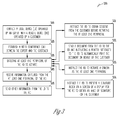
FIG. 2 is a diagram of a method for automated remote transaction assistance, according to an example embodiment; -
FIG. 3 is a diagram of another method for automated remote transaction assistance, according to an example embodiment; and -
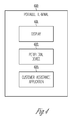
FIG. 4 is a diagram of a portable terminal, according to an example embodiment. -
FIG. 1 is a diagram 100 of components for practicing automated remote transaction assistance, according to an example embodiment. It is to be noted that the components are shown schematically in greatly simplified form, with only those components relevant to understanding of the embodiments being illustrated. - Furthermore, the various components (that are identified in the
FIG. 1 ) are illustrated and the arrangement of the components is presented for purposes of illustration only. It is to be noted that other arrangements with more or less components are possible without departing from the teachings of automated remote transaction assistance, presented herein and below. - Furthermore, the methods and portable terminal presented herein and below for automated remote transaction assistance can be implemented in whole or in part in one, all, or some combination of the components shown with the diagram 100. The methods are programmed as executable instructions in memory and/or non-transitory computer-readable storage media and executed on one or more processors associated with the components.
- Specifically, the diagram 100 permits automated remote transaction assistance utilizing applications executing on the components. The details of this approach in view of the components, within the diagram 100, are now presented with reference to some embodiments of the
FIG. 1 within the context of abank branch 110. - However, before discussion of the diagram 100 is presented, it is to be noted that the methods and portable terminal presented herein and below are not limited to just the banking industry; that is, any enterprise, any SST terminal (kiosk, vending machine, check-in and/or check-out terminal, such as those used in retail, hotel, car rental, healthcare, or financial industries, etc.), or any portable terminal (mobile phone, wearable processing device, touchscreen device, laptop computer, tablet, etc.) can benefit from the automated remote transaction assistance discussed herein.
- The diagram 100 includes a
bank branch 110, aserver 120, anetwork 130, and an end-user device with an application (app) 140. Moreover, thebank branch 110 includes a teller device with a teller application (app) 111, a customer-accessible device with an application (app) 112, and, optionally adashboard 113. - The techniques and features of automated remote transaction assistance are illustrated with reference to the components of the diagram 100 for a transaction being handled by a bank for one or more customers of that bank. For this embodiment, the transaction is a loan or the closing of a loan, where the customer is the debtor and the bank is the creditor. It is noted that the bank associated with the
bank branch 110 can have many other branches that span the globe, the single bank branch is shown for purposes of ease of comprehension only. - During the loan transaction process (such as closing or while the loan is in process), a variety of information may be needed by the loan officer of the bank or the underwriter used by the bank. These individuals are likely not located at the
bank branch 100, which is convenient for the customer to get to for purposes of supplying documents or signing documents needed by the loan officer of the underwriter. - The customer has a few options with the teachings presented herein that were previously not available. This also speeds up the loan processing but getting the loan officer or underwriter the documents and signatures that they need in a timely manner to conclude a decision on the requested loan or to close the loan.
- In a first embodiment, the customer can go to the
bank branch 110 and access a customer-accessible device having theapplication 112. In an embodiment, this is a designated space within thebank branch 110, perhaps having a couch, a table, etc. In this embodiment, the customer-accessible device with theapplication 112 can include a monitor, a camera, a microphone, one or more input mechanisms (such as a keyboard, a mouse, a stylus, and the like), and a processing unit, which may or may not be visible to the customer. The processing unit executes the application of the customer-accessible device with theapp 112. - The
app 112 is configured to receive and respond to instructions from a remote app controlled by the loan officer or underwriter. The initial connection between the customer and the loan officer or underwriter can be done in a variety of ways. Initiated by the customer from the customer-accessible device with theapp 112 when the customer is ready. Initiated by the loan officer of the underwriter when the customer is present in front of the camera or answers a video call using the customer-accessible device with theapp 112. In another case, a teller can establish the connection using the teller device withapp 111. The teller can also monitor the interactions between the customer and the loan officer or underwriter via the teller device withapp 111. - Once the connection is made, the apps of the loan officer's device (not shown in the
FIG. 1 ) and the customer-accessible device with theapp 112 provide a real time video and messaging feed between the two parties to provide the customer and the loan officer or underwriter with assistance as needed during the communication session between the two. - Moreover, the apps permit the loan officer or underwriter to activate controls and issue commands to peripherals and control what the app on the customer-assisted
device 112 does. So, the loan officer can pop-up on a screen of the monitor of the customer-assisted device 112 a document for the customer to review or print the document for the customer to review (local to the customer at a printer accessible to the customer-assisted device 112). The loan officer or underwriter can also activate a camera on the customer-assisted device (though the apps) to acquire information, such as an image of the customer, an image of a passport provided by the customer, an image of a paystub, an image of a driver's license, and any other relevant image for documents needed by the loan officer or underwriter. The loan officer or underwriter can also activate a signature block on a screen of the monitor for the customer-assisteddevice 112 and the customer can use a finger or a stylus to sign on the signature block on the screen (touch screen). In other cases, perhaps a separate peripheral for signing is interfaced to the customer-assisted device and the loan officer or underwriter instructs the customer to sign using the signature peripheral. - It is noted that any expert needed by the customer can be on the other end of the communication session and does not have to just be a loan officer or underwriter. So, a mortgage expert, insurance expert, investment expert, and others can be used by the customer for the transaction. Also, the expert (loan officer, underwriter, mortgage expert, insurance expert, etc.) does not have to be the one that initiates the communication. That is, the customer may make an inquiry for a particular expert and the teller instructs the customer to go sit in the area of the customer-assisted device with
app 112 and notifies the bank expert and then the bank expert makes the connection to the session (but it was initiated by the customer). So, the transaction may be a first step in the processor of obtaining some service of the bank. - In a second embodiment, the customer is either contacted or makes a first contact for an expert of a bank for purposes of assisting in an on-going transaction that the customer has with the bank or for purposes of stating a transaction with a bank through an expert. In this embodiment, the customer does not want to visit the
bank branch 110. So, the customer uses his/her own end-user device with theapp 140. Thisdevice 140 can be a laptop, a desktop, a tablet, a phone, or a wearable processing device (such as GOOGLE (trade mark) GLASS (trade mark)). So, the initial connection occurs over thenetwork 130 through theserver 120 with an expert that may or may not be at the bank branch 110 (in which case the network routes to the location of the expert). For example, the expert may be located at a call centre or a remote teller location. The network can be a wired, wireless, or a combination of both wired and wireless. The expert can initiate a video call or the customer via the end-user device with theapp 140 can initiate the call, for example, by requesting a generic expert related to a specific area that the bank provides experts in. - When the customer initiates the call, the app on the end-
user device 140 may provide a browsing interface such that the customer selects a particular expert, such as a loan officer, the app then routes the call to one of the bank's loan officers. - Once the video session is established, similar to what was discussed above, the expert (using a remote app that communicates with the app on the end-user device 140) can take control of (or gain access to) integrated devices and peripherals of the end-
user device 140 to do the same operations for purposes of acquiring images, sending documents, receiving documents, printing on behalf of the customer, and acquiring the customer's signatures on documents. However, in some embodiments, when not desired by the customer, the control of the end-user device 140 can be retained by the customer, such that the customer activates the devices when instructed by the expert on the video conference or after the expert causes the app on the end-user device 140 to present a message on the customer'sdevice 140 asking the customer to print something, activate the camera and take an image of something, etc. This ensures that the remote expert cannot activate any peripherals in the user's device 140 (such as the camera, any printer, or signature capture (in the case of a phone on the touchscreen of the phone)) without first obtaining the customer's permission. - The ability to take full control may exist but based on customer preference can be disabled such that control of devices associated with the end-
user device 140 remains with the customer and not the remote expert. - The remote app of the expert is configured to interact with the app of the customer (on the customer's own device or a device the customer is accessing at a bank branch). The expert and customer engage in a real-time live video session and the expert uses the remote app to acquire information from the customer that the expert needs and can provide information to the customer that the customer should retain or print for review. The information can be documents, images of documents, images of people or identity cards and the like. Moreover, text and email messages can be used during the session to send and receive documents and/or images. In some cases, faxes can be sent and received between the expert and the customer as well.
- The
local dashboard 113 of thebank branch 110 provides a facility for monitoring of the transaction and other transactions occurring within thebank branch 110. - Moreover, in an embodiment, the teller device with the
teller app 111 is operated by the expert that the customer interacts with at the customer-accessible device with theapp 112. - In an embodiment, the customer-accessible device is a separate and secure interface on an Automated Teller Machine (ATM) within the
bank branch 110, the secure interface being isolated on the ATM from the ATM transaction interface for security. So, the customer could approach an ATM at thebank branch 110 and access the secure interface to obtain a real time and live connection and interaction with a bank expert. In this manner the app of the customer-assisted device can operate on existing bank Self-Service Terminals (SST). In another embodiment, the customer-accessible device may comprise an automated teller machine that can work as a remote teller controlled terminal or as an conventional self-service ATM. - In another embodiment, the customer-assisted device is a kiosk, such as a self-service grocery store checkout station or any other kiosk that executes app of the customer-assisted device. So, the customer could receive expert assistance for an on-going or newly initiated transaction on any SST enabled to execute the app, such that it can be considered a customer-assisted device.
- One now appreciates how customers can be served with newer technologies to initiate or assist in ongoing transaction that conventionally would require in-person and face-to-face interaction but with the teachings herein can occur in any location having a device that executes the app to be considered a customer-assisted device or on the customer's own devices having that app. This provides convenience and expedites ongoing transactions and may generate new customers that keep putting off acquiring an expert for a transaction because of the inconvenience associated with the traditional procedure but would gladly engage an expert for a transaction with the convenience of the teachings presented herein.
- Still further, some transactions such as closing loans are often delayed because the customer has to physically appear or provide something in person before the loan can be closed, such transactions can be closed much quicker with the teachings herein to the benefit of the customer and the loaning organization.
- Additionally, some of these embodiments enable a user's own device to be controlled by a remote expert, but only once the customer has provided the remote expert with the necessary provisions.
- Some of these embodiments and other embodiments are now discussed with reference to the
FIGS. 2-4 . -
FIG. 2 is a diagram illustrating the steps in amethod 200 for automated remote transaction assistance, according to an example embodiment. The software module(s) that implements themethod 200 is referred to as a "customer-assisted application." The customer-assisted application is implemented as executable instructions programmed and residing within memory and/or a non-transitory computer-readable (processor-readable) storage medium and executed by one or more processors of a client-accessible device. The processor(s) of the device that executes the customer-assisted application are specifically configured and programmed to process the customer-assisted application. The customer-assisted application has access to a network during its processing. The network can be wired, wireless, or a combination of wired and wireless. - In an embodiment, the device that executes the assistance manager is the customer-
accessible device 112 of theFIG. 1 . - In an embodiment, the device that executes the customer-assisted application is the end-
user device 140 of theFIG. 1 . - In an embodiment, the device that executes the customer-assisted application is an ATM.
- In an embodiment, the device that executes the customer-assisted application is a SST.
- The processing of the customer-assisted application is from the perspective of a device operated by a customer, which can be accessed at an enterprise and not owned by the customer or which can be owned by the customer (desktop, tablet, phone, laptop, wearable processing device, etc.).
- At 210, the customer-assisted application connects a local device to a remote device. The initiating party can vary.
- For example, at 211, the customer-assisted application establishes the connection through a third party not associated with the remote device and the local device. For instance, a the customer-assisted application can be configured to present an interface on a screen of a display of the local device and allow the customer to browser or search for experts related to a transaction that the customer is interested in and select a particular area. This causes the customer-assisted application to contact a third-party referral service that locates the expert desired and facilitates the connection with that expert. In one embodiment of
FIG. 1 , this third-party was a teller (in other embodiments, the teller was the expert). - In another case, at 212, the customer-assisted application establishes the connection on a request activated by the customer on the local device. Here, the customer-assisted application provides an interface and when the customer selects the expert a direct connection is made to that expert. This may be a known expert to the customer for an ongoing transaction or a new transaction for which the expert is desired by the customer for whatever reason.
- In yet another situation, at 213, the customer-assisted application establishes the connection at the direction of the expert on the remote device. Here, either the customer had previously requested a call back from this particular expert or the customer has an ongoing transaction with the expert and the expert is in need of documents and other information from the customer, such that the expert makes the connection to the customer through the customer-assisted application.
- At 220, the customer-assisted application engages a customer operating the local device in a communication session with the expert who is operating the remote device.
- In an embodiment, at 221, the customer-assisted application establishes the communication session as a real-time live two-way video call between the expert operating the remote device and the customer operating the local device, which is executing the customer-assisted application.
- At 230, the customer-assisted application captures information on the local device at the direction of the expert. This can be a variety of captured information as was discussed above with reference to the
FIG. 1 . - According to an embodiment, at 231, the customer-assisted application activates one or more peripheral devices of the local device to obtain images of one or more of: a customer document, a picture of the customer, a customer fingerprint, and a picture of some article of the customers (property, perhaps, if the expert is an insurance adjustor and the image is of a damaged vehicle or house of the customer).
- At 240, the customer-assisted application automatically sends the information from the local device to the remote device once captured during the communication session. That is, there does not have to be any action on the part of the customer to send the information once it was captured.
- In an embodiment, at 250, the customer-assisted application receives expert provided information. So, the information exchange can be two-way during the session. This may happen when the expert needs the customer to review and acknowledge a legal disclosure that the customer must acknowledge reviewing before signing, or perhaps the customer wants to review a document that the customer cannot recall that is relevant to the transaction with the expert.
- In an embodiment, at 260, the customer-assisted application sends an image of the customer's signature from the local device to the remote device. Here, the expert needs a signature on a document for purposes of the transaction with the customer.
- In an embodiment, at 270, the customer-assisted application automatically activates a peripheral device of the local device on instruction from the expert. This occurs without any action of the customer and it is a peripheral associated with the customer's local device.
- Alternatively, and in an embodiment, at 280, the customer-assisted application activates a peripheral device of the local device on instruction from the expert but after a control presented in a screen of a display for the local device is activated by the customer authorizing (providing consent for) the peripheral device activation. This ensures that control of the local device is only handed over to the remote device with the consent of the operator of the local device.
-
FIG. 3 is a diagram of anothermethod 300 for automated remote transaction assistance, according to an example embodiment. The software module(s) that implements themethod 300 is referred to as an "expert application". The expert application is implemented as executable instructions programmed and residing within memory and/or a non-transitory computer-readable (processor-readable) storage medium and executed by one or more processors of an expert operated device. The processors that execute the expert application are specifically configured and programmed to process the expert application. The expert application has access to a network during its processing. The network can be wired, wireless, or a combination of wired and wireless. - In an embodiment, the device that executes the expert application is the
teller device 111 of theFIG. 1 . - The processing perspective of the expert application is from that of a device operated by an expert. The expert application interacts in real time over the network with the customer-assisted application of the
FIG. 2 . Thus, as used herein withFIG. 3 , the customer-device is remote to the local device of the expert. InFIG. 2 the processing perspective was from that of the customer device, such that the customer device was local and the expert device was remote; however, that is reversed herein with respect to the discussion of the devices because the local device inFIG. 3 is the expert device and the remote device is the customer device. - At 310, the expert application connects a local device operated by an expert with a remote device operated by a customer. This connection can be initiated by a third-party, by the expert, or by the customer (similar to the
FIG. 2 ). - At 320, the expert application establishes a video conference call between the expert and the customer.
- At 330, the expert application directs at least one peripheral of the remote device to activate.
- In an embodiment, at 331, the expert application instructs the remote device to obtain consent from the customer before activating the at least one peripheral. This can be a default scenario but can be changed based on a customer profile where the customer authorizes the remote activation without having to select the control giving consent.
- In an embodiment, at 332, the expert application sends a document from the local device to the remote device and instructs a printer interfaced to the remote device to automatically print the document on behalf of the customer.
- In an embodiment, at 333, the expert application instructs the remote device to activate a camera as the at least one peripheral.
- In an embodiment, at 334, the expert application instructs the remote device to present a signature block on a screen of a display for the remote device to obtain an image of the customer's signature.
- At 340, the expert application receives information captured from the at least one peripheral device of the remote device.
- According to an embodiment, at 350, the expert application sends other information from the local device to the remote device. So, information passing can be two-way between the expert and the customer during the transaction.
-
FIG. 4 is a diagram ofportable terminal 400, according to an example embodiment. The components of theportable terminal 400 are programmed and reside within memory and/or a non-transitory computer-readable medium and execute on one or more processors of theportable terminal 400. Theportable terminal 400 communicates one or more networks, which can be wired, wireless, or a combination of wired and wireless. - In various embodiments, the
portable terminal 400 is one of the following: an ATM, a kiosk, a self-service grocery checkout station, a touchscreen device, a mobile phone, a wearable processing device, a SST, a laptop computer, and a tablet. - The
portable terminal 400 includes adisplay 401, a peripheral device, and a customer-assistance application (or manager) 403. - The customer-
assistance application 403 is configured and adapted to: execute on theportable terminal 400, establish a communication session with a remote expert on at least one screen of thedisplay 401, capture images representing information for a customer using theperipheral device 402 on the direction of the remote expert, and automatically send the information to the remote expert during the communication session. - According to an embodiment, the customer-
assistance manager 403 is further adapted and configured to establish a live and real-time video feed between the remote expert and the customer. - In an embodiment, the customer-
assistance manager 403 is further adapted and configured to receive other information from the expert for presentation to the customer during the communication session. - One now appreciates how automated remote transaction assistance can be achieved via an expert that is remote from a customer, where the expert has control of peripherals of the customer device and the customer device captures information that is automatically sent to the expert. These techniques presented herein permit transactions that remain mostly manual to be achieved in manners irrespective of customer location and at times convenient to the customer.
- It should be appreciated that where software is described in a particular form (such as a component or module) this is merely to aid understanding and is not intended to limit how software that implements those functions may be architected or structured. For example, modules are illustrated as separate modules, but may be implemented as homogenous code, as individual components, some, but not all of these modules may be combined, or the functions may be implemented in software structured in any other convenient manner.
- Furthermore, although the software modules are illustrated as executing on one piece of hardware, the software may be distributed over multiple processors or in any other convenient manner.
- The above description is illustrative, and not restrictive. Many other embodiments will be apparent to those of skill in the art upon reviewing the above description. The scope of embodiments should therefore be determined with reference to the appended claims, along with the full scope of equivalents to which such claims are entitled.
- In the foregoing description of the embodiments, various features are grouped together in a single embodiment for the purpose of streamlining the disclosure. This method of disclosure is not to be interpreted as reflecting that the claimed embodiments have more features than are expressly recited in each claim. Rather, as the following claims reflect, inventive subject matter lies in less than all features of a single disclosed embodiment.
Claims (10)
- A method of performing a customer transaction, the method comprising the steps of:establishing a connection between a customer device (140 or 400) and a teller device (111) remote from the customer device (step 210 or 310);sending a permissions request to the customer device (140 or 400) to allow the teller device (111) to access components in the customer device (140 or 400) (step 280 or 331);receiving information from components in the customer device (140 or 400) in the event that the permissions request is accepted (step 231 or 340);using the received information as part of a transaction request from the customer device (140 or 400).
- The method of claim 1 further comprising the steps of: sending an image of a signature of the customer captured by a touch sensitive panel on the customer device (140 or 400) to the remote teller device (111).
- The method of claim 1 or 2, further comprising automatically activating a front-facing camera of the customer device (140 or 400) on instruction from the remote teller device (111) to capture an image of the customer.
- The method of any preceding claim, further comprising automatically activating a rear-facing camera of the customer device (140 or 400) on instruction from the remote teller device (111) to obtain images of one or more of: a customer identification card, a customer document, and a picture of a customer article.
- The method of any preceding claim, wherein sending a permissions request to the customer device (140 or 400) to allow the teller device (111) to access components in the customer device (140 or 400) further comprises presenting a screen on a display of the customer device (140 or 400) requesting permission for the remote teller device (111) to control components within the customer device (140 or 400).
- The method of any preceding claim, wherein establishing a connection between the customer device (140 or 400) and the remote teller device (111) is performed through a third party not associated with the remote teller device (111) and customer device (140 or 400).
- The method of any preceding claim, wherein establishing a connection between the customer device (140 or 400) and the remote teller device (111) is performed in response to a request initiated by the customer on the customer device (140 or 400).
- The method of any preceding claim, wherein establishing a connection between the customer device (140 or 400) and the remote teller device (111) is performed in response to a request initiated by the remote teller device (111).
- The method of any preceding claim, wherein establishing a connection between the customer device (140 or 400) and the remote teller device (111) comprises a real-time, live, two-way video call.
- A portable terminal (140 or 400) configured to perform a transaction with a remote teller device (111), the portable terminal (140 or 400) comprising:a display (401);a touch-sensitive panel overlying the display (401),a front-facing camera;a rear-facing camera; anda customer-assistance application (403) configured and arranged to: i) execute on the portable terminal (140 or 400), ii) establish a communication session with a remote teller device (111) on at least one screen of the display (401), iii) present a remote control permissions request to the customer, iv) in response to acceptance of the remote control permissions request, capture images representing information relating to a transaction using the front-facing camera and the rear-facing camera in response to a command from the remote teller device (111), and iv) automatically send the information to the remote teller device (111) during the communication session.
Applications Claiming Priority (1)
| Application Number | Priority Date | Filing Date | Title |
|---|---|---|---|
| US14/266,392 US10706426B2 (en) | 2014-04-30 | 2014-04-30 | Automated remote transaction assistance |
Publications (1)
| Publication Number | Publication Date |
|---|---|
| EP2940636A1 true EP2940636A1 (en) | 2015-11-04 |
Family
ID=53039699
Family Applications (1)
| Application Number | Title | Priority Date | Filing Date |
|---|---|---|---|
| EP15162247.9A Withdrawn EP2940636A1 (en) | 2014-04-30 | 2015-04-01 | Automated remote transaction assistance |
Country Status (3)
| Country | Link |
|---|---|
| US (1) | US10706426B2 (en) |
| EP (1) | EP2940636A1 (en) |
| CN (1) | CN105046540A (en) |
Families Citing this family (7)
| Publication number | Priority date | Publication date | Assignee | Title |
|---|---|---|---|---|
| US11049100B1 (en) * | 2014-12-30 | 2021-06-29 | Jpmorgan Chase Bank, N.A. | System and method for remotely loading a consumer profile to a financial transaction machine |
| JP2017091338A (en) * | 2015-11-13 | 2017-05-25 | 沖電気工業株式会社 | Expansion unit and transaction device |
| CN107067320A (en) * | 2017-03-13 | 2017-08-18 | 平安科技(深圳)有限公司 | Sign method and system in loan face |
| US10567380B2 (en) * | 2017-07-08 | 2020-02-18 | Bank Of America Corporation | Document orchestration system for processing digital consent information |
| US10885535B2 (en) * | 2018-07-06 | 2021-01-05 | 1Q, Llc | Online situational awareness and video survey system |
| US10521991B1 (en) | 2018-08-23 | 2019-12-31 | Bank Of America Corporation | Collapsible and deployable interactive structure and system of use |
| CN110070421B (en) * | 2019-04-30 | 2021-09-28 | 北京冠群信息技术股份有限公司 | Online experience method and experience server working method |
Citations (3)
| Publication number | Priority date | Publication date | Assignee | Title |
|---|---|---|---|---|
| WO1999008215A1 (en) * | 1997-08-08 | 1999-02-18 | Citicorp Development Center, Inc. | A method and system for an electronic banking shop |
| US20010007332A1 (en) * | 1999-02-19 | 2001-07-12 | National City Bank | Interactive point access financial and information system |
| WO2013102654A1 (en) * | 2012-01-04 | 2013-07-11 | Talaris Limited | Computer system for controlling machine based transactions |
Family Cites Families (31)
| Publication number | Priority date | Publication date | Assignee | Title |
|---|---|---|---|---|
| US5231571A (en) * | 1990-08-14 | 1993-07-27 | Personal Financial Assistant, Inc. | Personal financial assistant computer method |
| US6046762A (en) * | 1997-04-01 | 2000-04-04 | Cosmocom, Inc. | Multimedia telecommunication automatic call distribution system |
| US6359892B1 (en) * | 1997-11-04 | 2002-03-19 | Inventions, Inc. | Remote access, emulation, and control of office equipment, devices and services |
| US8651373B1 (en) * | 1998-04-17 | 2014-02-18 | Diebold Self-Service Systems, Division Of Diebold, Incorporated | ATM that allows a user to select a desired transaction by touch dragging a displayed icon that represents the desired transaction |
| US6636888B1 (en) * | 1999-06-15 | 2003-10-21 | Microsoft Corporation | Scheduling presentation broadcasts in an integrated network environment |
| JP3591710B2 (en) | 1999-12-08 | 2004-11-24 | ソニー株式会社 | Method of growing nitride III-V compound layer and method of manufacturing substrate using the same |
| US20040169722A1 (en) * | 1999-10-16 | 2004-09-02 | Pena Martin Rangel | Method and system for computer-aided telecommunication and financial transactions |
| US7505921B1 (en) * | 2000-03-03 | 2009-03-17 | Finali Corporation | System and method for optimizing a product configuration |
| US7890405B1 (en) * | 2000-06-09 | 2011-02-15 | Collaborate Solutions Inc. | Method and system for enabling collaboration between advisors and clients |
| US7848984B1 (en) * | 2000-06-09 | 2010-12-07 | Collaborate Solutions Inc. | Method and system for collaborating advisors |
| US6859197B2 (en) * | 2001-05-02 | 2005-02-22 | Universal Electronics Inc. | Universal remote control with display and printer |
| US6694045B2 (en) * | 2002-01-23 | 2004-02-17 | Amerasia International Technology, Inc. | Generation and verification of a digitized signature |
| US20030037341A1 (en) * | 2001-08-17 | 2003-02-20 | Van Der Meulen Pieter Sierd | System for remotely controlling consumer electronics using a web-cam image |
| US20040139156A1 (en) * | 2001-12-21 | 2004-07-15 | Matthews W. Donald | Methods of providing direct technical support over networks |
| US7404001B2 (en) * | 2002-03-27 | 2008-07-22 | Ericsson Ab | Videophone and method for a video call |
| WO2005019982A2 (en) * | 2003-08-15 | 2005-03-03 | Ocwen Financial Corporation | Methods and systems for providing customer relations information |
| US7814016B2 (en) * | 2004-06-30 | 2010-10-12 | Ugenius Ip Holdings, Llc | Personal teller system and method of remote interactive and personalized banking |
| US8228299B1 (en) * | 2005-01-27 | 2012-07-24 | Singleton Technology, Llc | Transaction automation and archival system using electronic contract and disclosure units |
| CA2649276A1 (en) * | 2006-04-17 | 2007-11-01 | Citibank, N.A. | Method and system for video communication |
| US8379830B1 (en) * | 2006-05-22 | 2013-02-19 | Convergys Customer Management Delaware Llc | System and method for automated customer service with contingent live interaction |
| US8833639B1 (en) * | 2007-04-24 | 2014-09-16 | United Services Automobile Association (Usaa) | System and method for financial transactions |
| US8706498B2 (en) * | 2008-02-15 | 2014-04-22 | Astute, Inc. | System for dynamic management of customer direction during live interaction |
| US8533857B2 (en) * | 2011-04-12 | 2013-09-10 | Teletech Holdings, Inc. | Methods for providing cross-vendor support services |
| US8751393B1 (en) * | 2011-11-16 | 2014-06-10 | Jpmorgan Chase Bank, N.A. | System and method for interactive virtual banking |
| TWI492166B (en) * | 2012-01-12 | 2015-07-11 | Kofax Inc | System and method for capturing and processing motion images |
| US9245287B2 (en) * | 2012-07-18 | 2016-01-26 | Teletech Holdings, Inc. | Method for providing support with associates anywhere and notifications |
| US9508058B2 (en) * | 2012-10-15 | 2016-11-29 | Bank Of America Corporation | System providing an interactive conference |
| US9042540B2 (en) * | 2012-10-30 | 2015-05-26 | Teletech Holdings, Inc. | Method for providing support using answer engine and dialog rules |
| US20140258110A1 (en) * | 2013-03-11 | 2014-09-11 | Digimarc Corporation | Methods and arrangements for smartphone payments and transactions |
| US20150227902A1 (en) * | 2014-02-07 | 2015-08-13 | Bank Of America Corporation | Specialist presentation |
| US9972172B2 (en) * | 2014-04-30 | 2018-05-15 | Ncr Corporation | Assisted approval of denied self-service transactions |
-
2014
- 2014-04-30 US US14/266,392 patent/US10706426B2/en active Active
-
2015
- 2015-04-01 EP EP15162247.9A patent/EP2940636A1/en not_active Withdrawn
- 2015-04-27 CN CN201510206732.0A patent/CN105046540A/en active Pending
Patent Citations (3)
| Publication number | Priority date | Publication date | Assignee | Title |
|---|---|---|---|---|
| WO1999008215A1 (en) * | 1997-08-08 | 1999-02-18 | Citicorp Development Center, Inc. | A method and system for an electronic banking shop |
| US20010007332A1 (en) * | 1999-02-19 | 2001-07-12 | National City Bank | Interactive point access financial and information system |
| WO2013102654A1 (en) * | 2012-01-04 | 2013-07-11 | Talaris Limited | Computer system for controlling machine based transactions |
Non-Patent Citations (2)
| Title |
|---|
| ITFREETRAINING: "MCTS 70-680: Windows 7 Remote Assistance/Desktop", YOUTUBE, 24 October 2011 (2011-10-24), pages 1 - 1, XP054976630, Retrieved from the Internet <URL:https://www.youtube.com/watch?v=ZrOVosaKIr8> [retrieved on 20160624] * |
| THE FINANCIAL BRAND: "iPhone, iPad Video Banking Could Spell The End For Branches", 28 September 2012 (2012-09-28), XP055201146, Retrieved from the Internet <URL:http://thefinancialbrand.com/25363/asb-video-banking/> [retrieved on 20150708] * |
Also Published As
| Publication number | Publication date |
|---|---|
| CN105046540A (en) | 2015-11-11 |
| US20150317639A1 (en) | 2015-11-05 |
| US10706426B2 (en) | 2020-07-07 |
Similar Documents
| Publication | Publication Date | Title |
|---|---|---|
| US10706426B2 (en) | Automated remote transaction assistance | |
| US20160132847A1 (en) | System, method, and computer program for conducting online banking using a computer, a mobile communication device, or a wearable mobile communication device and a human teller | |
| US20160098692A1 (en) | Method for processing transaction statement inquiries via an atm | |
| US20130332346A1 (en) | Self-service terminal, self-service system and transaction service method | |
| US20160098709A1 (en) | Atm with dual display having privacy filter | |
| US20160098700A1 (en) | Method for providing privacy through atm communication to consumer devices | |
| US11410506B2 (en) | Processing system for providing enhanced reality interfaces at an automated teller machine (ATM) terminal platform | |
| US9503686B2 (en) | Review bucket for video conferences | |
| US9501765B2 (en) | Preparing preliminary transaction work for a mobile banking customer | |
| US20160104122A1 (en) | Remote video conferencing system | |
| CN105427476B (en) | Transaction assistance | |
| US11610203B2 (en) | Value transfer via facial recognition | |
| US9508070B2 (en) | Transaction preparation using mobile device | |
| US20150324772A1 (en) | System, method, and computer program for conducting online banking using a computer or a mobile communication device and a human teller | |
| AU2011237390A1 (en) | System and method for customizing real-time applications on a user interface | |
| WO2016033165A1 (en) | Augmented reality card activation | |
| US10038644B2 (en) | Communication system for resource usage monitoring | |
| US20150356526A1 (en) | Intuitive Interactive Automated Video Teller Machine | |
| US20170004577A1 (en) | Apparatus, system and method for enabling account opening | |
| KR100981189B1 (en) | Window Service Automation System | |
| EP3154013A1 (en) | Apparatus, method and system providing remote user authentication | |
| US10839392B2 (en) | Systems and methods for use in providing enhanced authentication of consumers | |
| US12223479B2 (en) | Detecting usage issues on enterprise systems and dynamically providing user assistance | |
| US11093943B1 (en) | Account security system | |
| KR20130001460A (en) | Information integrated management system of atm and method thereof |
Legal Events
| Date | Code | Title | Description |
|---|---|---|---|
| PUAI | Public reference made under article 153(3) epc to a published international application that has entered the european phase |
Free format text: ORIGINAL CODE: 0009012 |
|
| AK | Designated contracting states |
Kind code of ref document: A1 Designated state(s): AL AT BE BG CH CY CZ DE DK EE ES FI FR GB GR HR HU IE IS IT LI LT LU LV MC MK MT NL NO PL PT RO RS SE SI SK SM TR |
|
| AX | Request for extension of the european patent |
Extension state: BA ME |
|
| 17P | Request for examination filed |
Effective date: 20160504 |
|
| RBV | Designated contracting states (corrected) |
Designated state(s): AL AT BE BG CH CY CZ DE DK EE ES FI FR GB GR HR HU IE IS IT LI LT LU LV MC MK MT NL NO PL PT RO RS SE SI SK SM TR |
|
| 17Q | First examination report despatched |
Effective date: 20160726 |
|
| 18W | Application withdrawn |
Effective date: 20170428 |
|
| STAA | Information on the status of an ep patent application or granted ep patent |
Free format text: STATUS: THE APPLICATION HAS BEEN WITHDRAWN |