EP2940583A2 - Remote operating system - Google Patents
Remote operating system Download PDFInfo
- Publication number
- EP2940583A2 EP2940583A2 EP14175490.3A EP14175490A EP2940583A2 EP 2940583 A2 EP2940583 A2 EP 2940583A2 EP 14175490 A EP14175490 A EP 14175490A EP 2940583 A2 EP2940583 A2 EP 2940583A2
- Authority
- EP
- European Patent Office
- Prior art keywords
- communication module
- remote
- operating system
- macro
- key
- Prior art date
- Legal status (The legal status is an assumption and is not a legal conclusion. Google has not performed a legal analysis and makes no representation as to the accuracy of the status listed.)
- Withdrawn
Links
Images



Classifications
-
- G—PHYSICS
- G06—COMPUTING OR CALCULATING; COUNTING
- G06F—ELECTRIC DIGITAL DATA PROCESSING
- G06F9/00—Arrangements for program control, e.g. control units
- G06F9/06—Arrangements for program control, e.g. control units using stored programs, i.e. using an internal store of processing equipment to receive or retain programs
- G06F9/46—Multiprogramming arrangements
- G06F9/54—Interprogram communication
-
- G—PHYSICS
- G06—COMPUTING OR CALCULATING; COUNTING
- G06F—ELECTRIC DIGITAL DATA PROCESSING
- G06F9/00—Arrangements for program control, e.g. control units
- G06F9/06—Arrangements for program control, e.g. control units using stored programs, i.e. using an internal store of processing equipment to receive or retain programs
- G06F9/46—Multiprogramming arrangements
- G06F9/50—Allocation of resources, e.g. of the central processing unit [CPU]
- G06F9/5061—Partitioning or combining of resources
- G06F9/5072—Grid computing
Definitions
- This disclosure relates to a remote operating system and, more particularly, to a remote operating system for operations of computer peripheral devices.
- a keyboard and mouse are primarily the peripheral devices for operations.
- the peripheral devices such as keyboards and mice, have been continuously improved, in functionality and structure, to increase user convenience.
- the peripheral devices which would only accept input of characters and numerical information, have been designed to be more human-centered to accept versatile inputs.
- Most computer keyboards or mice of the current design are equipped with a shortcut key by which a corresponding software/program can be launched, or a specific function or operation is executed.
- the function or the operation corresponding to the shortcut key can be defined and recorded by a shortcut application program.
- a shortcut key corresponds to a macro, which may include a series of operations to be executed.
- the shortcut key corresponds to a macro, which may include a series of operations to be executed.
- the users or the game players can invoke the macro by pressing the shortcut key.
- the setting of shortcut keys is dependent on the keyboard or the mouse. That is, when using a different computer, the users or the game players have to bring the keyboard or the mouse and the shortcut key application program, install the program into the computer, and set up a macro corresponding to the shortcut key. What is needed is an easy and convenient way to streamline the operations.
- This disclosure provides a remote operating system for operations of computer peripheral devices so that it is not necessary for a user to carry any shortcut key application program to be re-installed for setting up a macro corresponding to the shortcut key, an operation which otherwise may cause a user inconvenience.
- the remote operating system includes a remote server, a computer device, and an operating device.
- the remote server includes a first communication module and a storage unit, where the storage unit electrically connects to the first communication module and stores at least one macro and at least one shortcut application program.
- the computer device includes a transmission port and a second communication module.
- the second communication module electrically connects to the first communication module of the remote server and receives the macro and/or the shortcut application program from the remote server.
- the operating device includes an operating member and a transmission interface. The operating member is used to generate a control signal.
- the transmission interface electrically connects to the operating member and the transmission port of the computer device, and is used to transmit the control signal to the computer device. When the transmission port receives the control signal, the computer device responds to execute the macro.
- the operating device further includes a memory unit and a control unit.
- the control unit electrically connects to the operating member, the transmission interface, and the memory unit.
- the memory unit is used for storing the macro.
- the macro may be an instruction, a key setting, or a series of plural instructions.
- the shortcut application program may be a macro editing software responsive to the operating member, and is used for editing the macro.
- the operating device may be a mouse, keyboard, or stylus pen.
- the transmission interface and the transmission port may respectively comply with a USB or IEEE transmission interface.
- the first communication module and the second communication module may respectively be a Wi-Fi transceiver, fiber-optic transceiver, network transceiver, or cable transceiver.
- the remote operating system further includes a handheld electronic device, where the handheld electronic device is provided with a third communication module for communicating with the remote server in wireless fashion.
- the handheld electronic device may be a smartphone, tablet PC, or PDA.
- the remote server may be a file server, an application server, or a cloud server.
- a remote operating system includes a remote server 10, a computer device 20, and an operating device 30.
- the remote server 10 includes a first communication module 101 and a storage unit 103.
- the storage unit 103 electrically connects to the first communication module 101 and stores at least one macro 1031 and at least one shortcut application program 1033.
- the macro 1031 for example, may be an instruction, a key setting, or a series of plural instructions.
- the shortcut application program 1033 may be a macro editing software responsive to the operating member 301 of the operating device 30, and is used for editing the macro 1031.
- the remote server 10 further includes a processing unit 102, for example, a central processing unit (CPU), electrically connecting to the first communication module 101 and the storage unit 103, for controlling the first communication module 101 and the storage unit 103.
- CPU central processing unit
- the computer device 20 includes a transmission port 203 and a second communication module 201.
- the second communication module 201 electrically connects to the first communication module 101 of the remote server 10.
- the computer device 20 further includes a control unit 202, for example, a CPU, electrically connecting to the second communication module 201 and the transmission port 203, for controlling the second communication module 201 and/or the transmission port 203.
- the remote server 10, as shown in FIG. 3 may be, for example, a file server, an application server, and/or a cloud server.
- the first communication module 101 and the second communication module 201 may correspond to a Wi-Fi transceiver, a network transceiver, a fiber-optic transceiver, or a cable transceiver, by which the first communication module 101 electrically connects to the second communication module 201 in wired or wireless fashion.
- the computer device 20 may be, but not limited to a desktop PC, for example, a laptop PC, tablet PC, or smartphone.
- the operating device 30 may be, but not limited to a mouse, and may be, for example, a keyboard or stylus pen.
- the operating member 301 of the operating device 30 may be, but not limited to a button or scroll wheel. In the present embodiment, a button 301 is used (as shown in FIG. 3 ).
- the transmission port 203 and the transmission interface 303 may comply with, but not limited to a USB or an IEEE transmission interface.
- the operating member 301 When a user works on the operating device 30, the operating member 301 is operated to generate a control signal 3015.
- the control signal 3015 is sent to the transmission port 203 via the transmission interface 303.
- the control unit 202 of the computer device 20 After receiving the control signal 3015, the control unit 202 of the computer device 20 responds to generate an operation instruction 2025 so as for the second communication module 201 to connect to the first communication module 101 and receive the macro 1031 and/or the shortcut application program 1033 from the remote server 10.
- the control unit 202 of the computer device 20 then executes the macro 1031 and/or the shortcut application program 1033.
- the foregoing embodiment is illustrative of the technical concepts and characteristics of the present disclosure.
- the macro 1031 and/or the shortcut application program 1033 are stored in a remote server 10, and therefore it is not necessary for the user to carry any shortcut application program and set up any macro. More embodiments of this disclosure are recited in the paragraphs that follow.
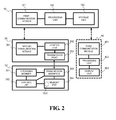
- FIG. 2 is a block diagram of another remote operating system.
- the operating device 30 (a mouse, as indicated in FIG. 3 ) further includes a memory unit 304 and a control unit 302.
- the control unit 302 electrically connects to the operating member 301, the transmission interface 303, and the memory unit 304.
- the memory unit 304 is used to store at least one macro 1031 from the remote server 10, where the memory unit 304 may be an EEPROM or a flash memory.
- the control unit 302 may be, for example, a microcontroller unit (MCU).
- the control unit 302 of the operating device 30 controls the transmission interface 303 to transmit the macro 1031, which is stored in the operating device 30, to the computer device 20 or other computer devices.
- MCU microcontroller unit
- the user when a user wants to use the operating device 30 on another computer device (not shown), the user does not have to edit the macro 1031 again; instead, the user simply operates the operating device 30 to transmit the macro 1031, stored in the operating device 30, to the computer device.
- the macro 1031 stored in the operating device 30 can also be used as a backup if the macro 1031 stored in the remote server 10 is lost.
- the user can edit the macro 1031 and sync up the macro 1031 between the remote server 10 and the operating device 30, as long as the computer device 20 is in communication with the remote server 10.
- the remote operating system further includes a handheld electronic device 40 (shown in a dash frame).
- the handheld electronic device 40 may be, for example, a tablet PC (as shown in FIG. 3 ) or PDA. More specifically, the handheld electronic device 40 includes a third communication module 401, a processing unit 402, and a display unit 403.
- the third communication module 401 communicates with the remote server 10 in wired or wireless fashion.
- the third communication module 401 and the first communication module 101 respectively correspond to a Wi-Fi or 3G transceiver.
- the first communication module 101 wirelessly communicates with the third communication module 401, or the remote server 10 may include another communication module (not shown) to wirelessly communicate with the third communication module 401.
- FIG. 4 is a schematic view showing an illustrative remote operating system according to the second embodiment of the disclosure.
- the operating device 30 in the above mentioned examples is based on, but not limited to a mouse.
- the operating device 30 is a keyboard
- the handheld electronic device 40 is a smartphone.
- the operating member 301 is a key, for example, a special key, numeral key, direction key, or shortcut key.
Landscapes
- Engineering & Computer Science (AREA)
- Software Systems (AREA)
- Theoretical Computer Science (AREA)
- Physics & Mathematics (AREA)
- General Engineering & Computer Science (AREA)
- General Physics & Mathematics (AREA)
- Selective Calling Equipment (AREA)
- Input From Keyboards Or The Like (AREA)
- Health & Medical Sciences (AREA)
- Computing Systems (AREA)
- General Health & Medical Sciences (AREA)
- Medical Informatics (AREA)
- Computer Networks & Wireless Communication (AREA)
- Signal Processing (AREA)
- User Interface Of Digital Computer (AREA)
Abstract
Description
- This disclosure relates to a remote operating system and, more particularly, to a remote operating system for operations of computer peripheral devices.
- In a typical computer system, a keyboard and mouse are primarily the peripheral devices for operations. As computer operating systems, as well as computer games, advance constantly, the functions and operations to control the computer increase, and when the number of controls exceeds beyond some certain extent, a user or a computer game player is likely to find it flustered to operate on the peripheral devices. Hence, the peripheral devices, such as keyboards and mice, have been continuously improved, in functionality and structure, to increase user convenience.
- As the computer system evolves, the peripheral devices, which would only accept input of characters and numerical information, have been designed to be more human-centered to accept versatile inputs. Most computer keyboards or mice of the current design are equipped with a shortcut key by which a corresponding software/program can be launched, or a specific function or operation is executed. The function or the operation corresponding to the shortcut key can be defined and recorded by a shortcut application program.
- The function or the operation of a shortcut key is user definable for different requirements, and the shortcut key corresponds to a macro, which may include a series of operations to be executed. Once a shortcut key on the keyboard or the mouse is set, the users or the game players can invoke the macro by pressing the shortcut key. However, the setting of shortcut keys is dependent on the keyboard or the mouse. That is, when using a different computer, the users or the game players have to bring the keyboard or the mouse and the shortcut key application program, install the program into the computer, and set up a macro corresponding to the shortcut key. What is needed is an easy and convenient way to streamline the operations.
- This disclosure provides a remote operating system for operations of computer peripheral devices so that it is not necessary for a user to carry any shortcut key application program to be re-installed for setting up a macro corresponding to the shortcut key, an operation which otherwise may cause a user inconvenience.
- The remote operating system includes a remote server, a computer device, and an operating device. The remote server includes a first communication module and a storage unit, where the storage unit electrically connects to the first communication module and stores at least one macro and at least one shortcut application program. The computer device includes a transmission port and a second communication module. The second communication module electrically connects to the first communication module of the remote server and receives the macro and/or the shortcut application program from the remote server. The operating device includes an operating member and a transmission interface. The operating member is used to generate a control signal. The transmission interface electrically connects to the operating member and the transmission port of the computer device, and is used to transmit the control signal to the computer device. When the transmission port receives the control signal, the computer device responds to execute the macro.
- In one embodiment, the operating device further includes a memory unit and a control unit. The control unit electrically connects to the operating member, the transmission interface, and the memory unit. The memory unit is used for storing the macro.
- In one embodiment, the macro may be an instruction, a key setting, or a series of plural instructions.
- In one embodiment, the shortcut application program may be a macro editing software responsive to the operating member, and is used for editing the macro.
- In one embodiment, the operating member may be a key, button, scroll wheel, function key, numeral key, direction key, or shortcut key.
- In one embodiment, the operating device may be a mouse, keyboard, or stylus pen.
- In one embodiment, the transmission interface and the transmission port may respectively comply with a USB or IEEE transmission interface.
- In one embodiment, the first communication module and the second communication module may respectively be a Wi-Fi transceiver, fiber-optic transceiver, network transceiver, or cable transceiver.
- In one embodiment, the remote operating system further includes a handheld electronic device, where the handheld electronic device is provided with a third communication module for communicating with the remote server in wireless fashion.
- In one embodiment, the handheld electronic device may be a smartphone, tablet PC, or PDA.
- In one embodiment, the remote server may be a file server, an application server, or a cloud server.
- The structure as well as a preferred mode of use, further objects, and advantages of this disclosure will be best understood by referring to the following detailed description of some illustrative embodiments in conjunction with the accompanying drawings, in which:
-
FIG. 1 is a block diagram of a remote operating system; -
FIG. 2 is a block diagram of another remote operating system; -
FIG. 3 is a schematic view showing an illustrative remote operating system according to the first embodiment of the disclosure; and -
FIG. 4 is a schematic view showing an illustrative remote operating system according to the second embodiment of the disclosure. - Referring to
FIG. 1 andFIG. 3 , a remote operating system according to a first embodiment includes aremote server 10, acomputer device 20, and anoperating device 30. Theremote server 10 includes afirst communication module 101 and astorage unit 103. Thestorage unit 103 electrically connects to thefirst communication module 101 and stores at least onemacro 1031 and at least oneshortcut application program 1033. Themacro 1031, for example, may be an instruction, a key setting, or a series of plural instructions. Theshortcut application program 1033 may be a macro editing software responsive to theoperating member 301 of theoperating device 30, and is used for editing the macro 1031. In the present embodiment, theremote server 10 further includes aprocessing unit 102, for example, a central processing unit (CPU), electrically connecting to thefirst communication module 101 and thestorage unit 103, for controlling thefirst communication module 101 and thestorage unit 103. - The
computer device 20 includes atransmission port 203 and asecond communication module 201. Thesecond communication module 201 electrically connects to thefirst communication module 101 of theremote server 10. In the present embodiment, thecomputer device 20 further includes acontrol unit 202, for example, a CPU, electrically connecting to thesecond communication module 201 and thetransmission port 203, for controlling thesecond communication module 201 and/or thetransmission port 203. - The
operating device 30 includes anoperating member 301 and atransmission interface 303. The operating member is used to generate acontrol signal 3015. Thetransmission interface 303 electrically connects to theoperating member 301 and thetransmission port 203 of thecomputer device 20, and is used to transmit thecontrol signal 3015 to thecomputer device 20. When thetransmission port 203 receives thecontrol signal 3015, thecomputer device 20 responds to execute themacro 1031 and theshortcut application program 1033, which are stored in theremote server 10. - The
remote server 10, as shown inFIG. 3 , may be, for example, a file server, an application server, and/or a cloud server. Thefirst communication module 101 and thesecond communication module 201 may correspond to a Wi-Fi transceiver, a network transceiver, a fiber-optic transceiver, or a cable transceiver, by which thefirst communication module 101 electrically connects to thesecond communication module 201 in wired or wireless fashion. Thecomputer device 20 may be, but not limited to a desktop PC, for example, a laptop PC, tablet PC, or smartphone. Theoperating device 30 may be, but not limited to a mouse, and may be, for example, a keyboard or stylus pen. Theoperating member 301 of theoperating device 30 may be, but not limited to a button or scroll wheel. In the present embodiment, abutton 301 is used (as shown inFIG. 3 ). Thetransmission port 203 and thetransmission interface 303 may comply with, but not limited to a USB or an IEEE transmission interface. - When a user works on the
operating device 30, theoperating member 301 is operated to generate acontrol signal 3015. Thecontrol signal 3015 is sent to thetransmission port 203 via thetransmission interface 303. After receiving thecontrol signal 3015, thecontrol unit 202 of thecomputer device 20 responds to generate anoperation instruction 2025 so as for thesecond communication module 201 to connect to thefirst communication module 101 and receive the macro 1031 and/or theshortcut application program 1033 from theremote server 10. Thecontrol unit 202 of thecomputer device 20 then executes the macro 1031 and/or theshortcut application program 1033. - Through aforementioned operations of this disclosure, it is not necessary for a user to carry any
shortcut application program 1033 and set up amacro 1031. Instead, the user can use the operatingdevice 30, for example, a mouse, through which theshortcut application program 1033 and/or the macro 1031 are downloaded into thecomputer device 20 from theremote server 10 and executed in thecomputer device 20, thereby greatly increasing user convenience. - The foregoing embodiment is illustrative of the technical concepts and characteristics of the present disclosure. With the disclosed remote operating system, the macro 1031 and/or the
shortcut application program 1033 are stored in aremote server 10, and therefore it is not necessary for the user to carry any shortcut application program and set up any macro. More embodiments of this disclosure are recited in the paragraphs that follow. -
FIG. 2 is a block diagram of another remote operating system. Referring toFIG. 2 , with further reference toFIG. 3 , the operating device 30 (a mouse, as indicated inFIG. 3 ) further includes amemory unit 304 and acontrol unit 302. Thecontrol unit 302 electrically connects to the operatingmember 301, thetransmission interface 303, and thememory unit 304. Thememory unit 304 is used to store at least one macro 1031 from theremote server 10, where thememory unit 304 may be an EEPROM or a flash memory. Thecontrol unit 302 may be, for example, a microcontroller unit (MCU). Thecontrol unit 302 of the operatingdevice 30 controls thetransmission interface 303 to transmit the macro 1031, which is stored in the operatingdevice 30, to thecomputer device 20 or other computer devices. Hence, when a user wants to use the operatingdevice 30 on another computer device (not shown), the user does not have to edit the macro 1031 again; instead, the user simply operates the operatingdevice 30 to transmit the macro 1031, stored in the operatingdevice 30, to the computer device. The macro 1031 stored in the operatingdevice 30 can also be used as a backup if the macro 1031 stored in theremote server 10 is lost. Moreover, the user can edit the macro 1031 and sync up the macro 1031 between theremote server 10 and the operatingdevice 30, as long as thecomputer device 20 is in communication with theremote server 10. - With further reference to
FIG. 2 andFIG. 3 , the remote operating system further includes a handheld electronic device 40 (shown in a dash frame). The handheldelectronic device 40 may be, for example, a tablet PC (as shown inFIG. 3 ) or PDA. More specifically, the handheldelectronic device 40 includes athird communication module 401, aprocessing unit 402, and adisplay unit 403. Thethird communication module 401 communicates with theremote server 10 in wired or wireless fashion. For example, in one embodiment, thethird communication module 401 and thefirst communication module 101 respectively correspond to a Wi-Fi or 3G transceiver. Thefirst communication module 101 wirelessly communicates with thethird communication module 401, or theremote server 10 may include another communication module (not shown) to wirelessly communicate with thethird communication module 401. Theprocessing unit 402 electrically connects to, and controls, thethird communication module 401 and thedisplay unit 403. Theprocessing unit 402 controls thethird communication module 401 to receive the macro 1031 and/or theshortcut application program 1033, which are stored in thestorage unit 103 of theremote server 10. Thedisplay unit 403 may be, for example, a screen. Theprocessing unit 402 of the handheldelectronic device 40 controls thedisplay unit 403 to display the contents of macro editing. The user can download theshortcut application program 1033 into the handheldelectronic device 40 and edit the macro 1031. Theprocessing unit 402 then uploads the edited macro 1031 to thestorage unit 103 of theremote server 10. Through the operations of the handheld electronic device, the macro 1031 can be edited and synced up between the handheldelectronic device 40 and theremote server 10. -
FIG. 4 is a schematic view showing an illustrative remote operating system according to the second embodiment of the disclosure. The operatingdevice 30 in the above mentioned examples is based on, but not limited to a mouse. Referring toFIG. 4 , for example, the operatingdevice 30 is a keyboard, and the handheldelectronic device 40 is a smartphone. The operatingmember 301 is a key, for example, a special key, numeral key, direction key, or shortcut key.
Claims (11)
- A remote operating system, characterized by comprising:a remote server (10), including a first communication module (101) and a storage unit (103), said storage unit (103) electrically connecting to said first communication module (101) and storing at least one macro (1031) and at least one shortcut application program (1033);a computer device (20), including a transmission port (203) and a second communication module (201), said second communication module (201) electrically communicating with said first communication module (101) of said remote server (10) and receiving the macro (1031) and/or the shortcut application program (1033) from said remote server (10); andan operating device (30), including an operating member (301) and a transmission interface (303), said operating member (301) serving to generate a control signal (3015), said transmission interface (303) electrically connecting to said operating member (301) and said transmission port (203) of said computer device (20) andserving to transmit said control signal (3015) to said computer device (20).
- The remote operating system as of claim 1, characterized in that said operating device (30) further comprises a memory unit (304) and a control unit (302), and said control unit (302) electrically connects to said operating member (301), said transmission interface (303), and said memory unit, and said memory unit (304) stores the macro (1031).
- The remote operating system as of claim 1, characterized in that the macro (1031) is selected from the group consisting of an instruction, a key setting, and a series of plural instructions.
- The remote operating system as of claim 1, characterized in that the shortcut application program (1033) is a macro editing software responsive to said operating member (301).
- The remote operating system as of claim 1, characterized in that said operating member (301) is selected from the group consisting of a key, a button, a scroll wheel, a function key, a numeral key, a direction key, and a shortcut key.
- The remote operating system as of claim 1, characterized in that said operating device (30) is selected from the group consisting of a mouse, a keyboard, and a stylus pen.
- The remote operating system as of claim 1, characterized in that said transmission interface (303) and said transmission port (203) respectively correspond to a USB transmission interface or an IEEE transmission interface.
- The remote operating system as of claim 1, characterized in that said first communication module (101) and said second communication module (201) respectively correspond to a transceiver selected from the group consisting of a Wi-Fi transceiver, a fiber-optic transceiver, a network transceiver, and a cable transceiver.
- The remote operating system as of claim 1, characterized by further comprising a handheld electronic device (40) provided with a third communication module (401) wirelessly communicating with said remote server (10).
- The remote operating system as of claim 9, characterized in that said handheld electronic device (40) is selected from the group consisting of a smartphone, a tablet PC, and a PDA.
- The remote operating system as of claim 1, characterized in that said remote server (10) is selected from the group consisting of a file server, an application server, and a cloud server.
Applications Claiming Priority (1)
| Application Number | Priority Date | Filing Date | Title |
|---|---|---|---|
| TW103207346U TWM489320U (en) | 2014-04-28 | 2014-04-28 | Distal operating system |
Publications (2)
| Publication Number | Publication Date |
|---|---|
| EP2940583A2 true EP2940583A2 (en) | 2015-11-04 |
| EP2940583A3 EP2940583A3 (en) | 2016-06-22 |
Family
ID=51136337
Family Applications (1)
| Application Number | Title | Priority Date | Filing Date |
|---|---|---|---|
| EP14175490.3A Withdrawn EP2940583A3 (en) | 2014-04-28 | 2014-07-02 | Remote operating system |
Country Status (4)
| Country | Link |
|---|---|
| US (1) | US20150312349A1 (en) |
| EP (1) | EP2940583A3 (en) |
| JP (1) | JP3192299U (en) |
| TW (1) | TWM489320U (en) |
Families Citing this family (3)
| Publication number | Priority date | Publication date | Assignee | Title |
|---|---|---|---|---|
| US20130139113A1 (en) * | 2011-11-30 | 2013-05-30 | Microsoft Corporation | Quick action for performing frequent tasks on a mobile device |
| CN113742414A (en) * | 2020-05-27 | 2021-12-03 | 中兴通讯股份有限公司 | Method, device, system and computer readable storage medium for sharing operating system |
| CN117149043A (en) * | 2022-05-24 | 2023-12-01 | 比亚迪股份有限公司 | System and working method of handheld device as computer input device |
Family Cites Families (4)
| Publication number | Priority date | Publication date | Assignee | Title |
|---|---|---|---|---|
| US7743012B2 (en) * | 2004-09-08 | 2010-06-22 | Universal Electronics Inc. | Configurable controlling device and associated configuration upload and download system and method |
| US8676868B2 (en) * | 2006-08-04 | 2014-03-18 | Chacha Search, Inc | Macro programming for resources |
| US20110040824A1 (en) * | 2009-08-13 | 2011-02-17 | Google Inc. | Shared Server-Side Macros |
| US8556721B2 (en) * | 2009-11-16 | 2013-10-15 | Steelseries Aps | Apparatus and method for managing peripheral device communications |
-
2014
- 2014-04-28 TW TW103207346U patent/TWM489320U/en not_active IP Right Cessation
- 2014-05-27 JP JP2014002735U patent/JP3192299U/en not_active Expired - Fee Related
- 2014-07-02 EP EP14175490.3A patent/EP2940583A3/en not_active Withdrawn
- 2014-07-03 US US14/322,993 patent/US20150312349A1/en not_active Abandoned
Non-Patent Citations (1)
| Title |
|---|
| None |
Also Published As
| Publication number | Publication date |
|---|---|
| US20150312349A1 (en) | 2015-10-29 |
| TWM489320U (en) | 2014-11-01 |
| JP3192299U (en) | 2014-08-07 |
| EP2940583A3 (en) | 2016-06-22 |
Similar Documents
| Publication | Publication Date | Title |
|---|---|---|
| US10642483B2 (en) | Quick screen splitting method, apparatus, and electronic device, display UI, and storage medium | |
| KR102182417B1 (en) | Data sharing method and terminal | |
| US10222900B2 (en) | Method and apparatus for differentiating between grip touch events and touch input events on a multiple display device | |
| EP2752754B1 (en) | Remote mouse function method and terminals | |
| US9798713B2 (en) | Method for configuring application template, method for launching application template, and mobile terminal device | |
| CN105302452B (en) | An operation method and device based on gesture interaction | |
| US9426606B2 (en) | Electronic apparatus and method of pairing in electronic apparatus | |
| CN106951850B (en) | A kind of method and mobile terminal controlling fingerprint recognition mould group | |
| WO2018027551A1 (en) | Message display method, user terminal and graphic user interface | |
| RU2632422C2 (en) | Method and device for the user input processing | |
| KR101195520B1 (en) | Remote control method and remote control apparatus for controlling a mobile terminal | |
| KR102683583B1 (en) | Application sharing method, first electronic device, and computer-readable storage medium | |
| CN104793879B (en) | Object selection method and terminal device on terminal device | |
| KR102265648B1 (en) | Electronic device and method of sending a message using electronic device | |
| CN106156596B (en) | Setting method, device and the terminal of pattern lock | |
| US20150312349A1 (en) | Remote operating system | |
| KR102106354B1 (en) | Method and apparatus for controlling operation in a electronic device | |
| TW201604764A (en) | Handheld electronic device having function of activating application program of electronic device and method thereof and computer program product | |
| CN105320858B (en) | Method and device for rapidly displaying application icons | |
| CN106934003B (en) | File processing method and mobile terminal | |
| US20130249810A1 (en) | Text entry mode selection | |
| WO2022111397A1 (en) | Control method and apparatus, and electronic device | |
| US10706255B2 (en) | Processing method and electronic device | |
| CN111027406A (en) | Picture identification method and device, storage medium and electronic equipment | |
| JP3193817U (en) | Input system |
Legal Events
| Date | Code | Title | Description |
|---|---|---|---|
| PUAI | Public reference made under article 153(3) epc to a published international application that has entered the european phase |
Free format text: ORIGINAL CODE: 0009012 |
|
| AK | Designated contracting states |
Kind code of ref document: A2 Designated state(s): AL AT BE BG CH CY CZ DE DK EE ES FI FR GB GR HR HU IE IS IT LI LT LU LV MC MK MT NL NO PL PT RO RS SE SI SK SM TR |
|
| AX | Request for extension of the european patent |
Extension state: BA ME |
|
| PUAL | Search report despatched |
Free format text: ORIGINAL CODE: 0009013 |
|
| AK | Designated contracting states |
Kind code of ref document: A3 Designated state(s): AL AT BE BG CH CY CZ DE DK EE ES FI FR GB GR HR HU IE IS IT LI LT LU LV MC MK MT NL NO PL PT RO RS SE SI SK SM TR |
|
| AX | Request for extension of the european patent |
Extension state: BA ME |
|
| RIC1 | Information provided on ipc code assigned before grant |
Ipc: G06F 9/54 20060101AFI20160518BHEP Ipc: G06F 9/50 20060101ALN20160518BHEP Ipc: G06F 3/048 20060101ALN20160518BHEP |
|
| STAA | Information on the status of an ep patent application or granted ep patent |
Free format text: STATUS: THE APPLICATION HAS BEEN PUBLISHED |
|
| STAA | Information on the status of an ep patent application or granted ep patent |
Free format text: STATUS: THE APPLICATION IS DEEMED TO BE WITHDRAWN |
|
| 18D | Application deemed to be withdrawn |
Effective date: 20161223 |