EP2884416A1 - Méthode de sécurisation d'entrée de données confidentielles avec un clavier virtuel - Google Patents
Méthode de sécurisation d'entrée de données confidentielles avec un clavier virtuel Download PDFInfo
- Publication number
- EP2884416A1 EP2884416A1 EP13306727.2A EP13306727A EP2884416A1 EP 2884416 A1 EP2884416 A1 EP 2884416A1 EP 13306727 A EP13306727 A EP 13306727A EP 2884416 A1 EP2884416 A1 EP 2884416A1
- Authority
- EP
- European Patent Office
- Prior art keywords
- virtual keyboard
- rotation
- screen
- angle
- electronic device
- Prior art date
- Legal status (The legal status is an assumption and is not a legal conclusion. Google has not performed a legal analysis and makes no representation as to the accuracy of the status listed.)
- Withdrawn
Links
Images



Classifications
-
- G—PHYSICS
- G06—COMPUTING OR CALCULATING; COUNTING
- G06F—ELECTRIC DIGITAL DATA PROCESSING
- G06F21/00—Security arrangements for protecting computers, components thereof, programs or data against unauthorised activity
- G06F21/30—Authentication, i.e. establishing the identity or authorisation of security principals
- G06F21/31—User authentication
- G06F21/36—User authentication by graphic or iconic representation
-
- G—PHYSICS
- G06—COMPUTING OR CALCULATING; COUNTING
- G06F—ELECTRIC DIGITAL DATA PROCESSING
- G06F3/00—Input arrangements for transferring data to be processed into a form capable of being handled by the computer; Output arrangements for transferring data from processing unit to output unit, e.g. interface arrangements
- G06F3/01—Input arrangements or combined input and output arrangements for interaction between user and computer
- G06F3/048—Interaction techniques based on graphical user interfaces [GUI]
- G06F3/0487—Interaction techniques based on graphical user interfaces [GUI] using specific features provided by the input device, e.g. functions controlled by the rotation of a mouse with dual sensing arrangements, or of the nature of the input device, e.g. tap gestures based on pressure sensed by a digitiser
- G06F3/0488—Interaction techniques based on graphical user interfaces [GUI] using specific features provided by the input device, e.g. functions controlled by the rotation of a mouse with dual sensing arrangements, or of the nature of the input device, e.g. tap gestures based on pressure sensed by a digitiser using a touch-screen or digitiser, e.g. input of commands through traced gestures
- G06F3/04886—Interaction techniques based on graphical user interfaces [GUI] using specific features provided by the input device, e.g. functions controlled by the rotation of a mouse with dual sensing arrangements, or of the nature of the input device, e.g. tap gestures based on pressure sensed by a digitiser using a touch-screen or digitiser, e.g. input of commands through traced gestures by partitioning the display area of the touch-screen or the surface of the digitising tablet into independently controllable areas, e.g. virtual keyboards or menus
Definitions
- the present invention relates, in general, to devices and methods for securely inputting potentially critical data (e.g., ATM PIN code), and, in particular, to devices and methods for securely inputting critical data on electronic devices with a touch screen such as mobile phones.
- potentially critical data e.g., ATM PIN code
- fraudster may compromise the computer by installing rogue software such as "key logger” or “keyboard capturing” software.
- rogue software such as "key logger” or “keyboard capturing” software.
- Such software are able to record (or log) the keys struck on a keyboard in a covert manner so that the person using the keyboard is unaware that their actions are being monitored. It is then possible for the fraudster to extract from the captured keystroke logins and passwords inputted by a legitimate user.
- a virtual keyboard on the computer screen.
- a user may for example enters his login via a keyboard connected to the computer, but may be invited to enter his password via a virtual keyboard displayed on the screen, using a pointing device such as a mouse.
- Key loggers software alone are ineffective against this type of mechanism based on virtual keyboard as, even if the different positions of the pointing device may be known, it won't be possible to deduce the corresponding user input from these positions as the location of the virtual keyboard itself on the screen is unknown to the key logger software.
- position on a touch screen of the virtual keyboard may be easily deduced, according to some characteristics such as OS version and/or electronic device model.
- key logger software represents a menace.
- Document US 2008/0148186 discloses a method to improve the security of inputting data on a virtual keyboard.
- the virtual keyboard has substantially the same layout of keys as the layout on a normal keypad, but with the keys in a random organization. Such randomness of the layout of the keys of the virtual keyboard prevents previously described technique to be effective.
- FIG. 1A and 1B are an illustration of the method disclosed in Document US 2008/0148186 (cf. FIG. 5 ) applied to a virtual keypad for simplicity sake.
- FIG. 1 A is an illustration of a virtual keyboard, or more specifically here, a Personal Identification Number (PIN) keypad, potentially displayed on a touch screen of an electronic device such as an Automated Teller Machine (ATM) or a smartphone.
- ATM Automated Teller Machine
- FIG. 1B comparing to the previous virtual keyboard as shown in FIG. 1A , in Document US 2008/0148186 the layout of the different keys of the virtual PIN keypad is reorganized randomly.
- Such randomization of the layout of the virtual PIN keypad keys voids any possibility of intercepting the input of a password on the virtual PIN keypad by capturing the position of the user touch inputs on the touch screen.
- a basic key logger software will not be able to reconcile afterwards the captured positions with a theoretical location of the keys on the screen due to the randomness of their location.
- key 103 classically located in the upper left corner on a (virtual) PIN keypad, as shown in FIG. 1A , has been moved in FIG. 1 B to another location of the PIN keypad.
- Document US 2008/0148186 prevents from deducing possible passwords by examining fingertips on the touch screen of an electronic device.
- the method disclosed in Document US 2008/0148186 offers a good protection against key logger software or fingertips guessing of passwords.
- US patent n° 8,392,846 discloses methods for securing the input of a password on a virtual keyboard.
- One of the embodiments disclosed in US 8,392,846 prevents the previously adverse effect of US 2008/0148186 .
- FIG. 2 illustrates such embodiment.
- the virtual keyboard has the same layout of keys as the layout on a normal keypad. This time, it's the position of the keyboard itself that is randomized on the screen.
- Such embodiment also offers a good protection against key logger software or fingertips guessing of passwords while preserving the layout of the keyboard usual to the users.
- Present system discloses a method for presenting a virtual keyboard on a screen of an electronic device in order to secure the virtual keyboard input, the method being executed by the electronic device and comprising the step of generating the virtual keyboard at a default location, applying a rotation to the virtual keyboard, presenting the rotated virtual keyboard on the screen of the electronic device wherein the rotation is applied to the virtual keyboard around a predetermined reference point and according to a randomly generated rotation angle from the default location.
- the random rotation transformation modifies the respective position of the keys of the virtual keyboard within the screen of the electronic device. Indeed, instead of displaying the virtual keyboard at a default location, the rotation transforms the classical presentation of the keyboard. As such, this randomness offers the desired protection against possible key loggers program.
- this method also advantageously allows the layout of the keys of the virtual keyboard to be unchanged, improving the user experience by facilitating the input on the keyboard.
- this rotation transformation can be applied to a bigger graphical object such as the virtual keyboard within the screen of the electronic device than a transformation such as a translation. Indeed, screen size constraint is much less a problem when applying an adequate rotation to an object.
- the reference point is the center of the virtual keyboard.
- placing the reference point of a rotation at the center of a graphical object allows the rotation to limit any possible displacement of the graphical object over its original position within the screen.
- placing the rotation point at the center of the virtual keyboard it allows to maximize the possible size of the virtual keyboard displayed on the screen. This is particularly true if the default virtual keyboard is presented at the center of the screen.
- the reference point is distinct from the center of the virtual keyboard.
- placing the reference point distinct from the center of the virtual keyboard brings even more randomness to the position of the keys within the screen. Indeed, if the reference point of the rotation transformation is off-centered according to the virtual keyboard, all possible position of the virtual keyboard after a random position covers a larger area than by placing the reference point at the center. In other words, the virtual keyboard position is shifted during the rotation. This is improving randomness and as such security of the system.
- the virtual keyboard is arranged in a circular form
- the reference point is at the center of the screen.
- the circular form or shape of the virtual keyboard maximizes the possible size of the virtual keyboard comparing to more common square or rectangular shapes. Indeed, when rotating such virtual keyboard, if the reference point is chosen adequately at the center of the virtual keyboard, there is no risk that a corner of the virtual keyboard comes out the screen.
- the randomized angle of rotation value is chosen randomly among a list of predefined angle of rotation values.
- the system may prevent keys of the virtual keyboard to be stacked over previous or possible other position of the same keys.
- this solution guarantees that when a rotation is applied to the virtual keyboard, the new position of each key will not stack over the previous position of the same key. This guarantees that user inputs corresponding to a key will be different after a rotation.
- the method further comprises, after the rotation of the virtual keyboard, the steps of rotating the keys of the virtual keyboard around their respective center of an angle of rotation value opposite to the previous randomized angle of rotation value.
- the method further comprises, after the rotation of the virtual keyboard, the steps of rotating the symbol associated to the keys of the virtual keyboard around the respective center of the associated key and of an angle of rotation value opposite to the randomized angle of rotation value.
- the screen is a touch screen.
- Present system advantageously applies to touch screen, as to prevent fingerprints detection of an input password.
- the rotation is applied before or after each user input.
- Such system described hereafter may be used before or after each user input as to greatly improve the randomness of the position of the keys on the screen and reinforce the security of the system.
- the position of the reference point is moved randomly each time the virtual keyboard is rotated.
- Another object of the invention is an electronic device comprising a screen, the electronic device further comprising a processor arranged to generate a virtual keyboard at a default position, apply a rotation to the virtual keyboard, present the rotated virtual keyboard on the screen wherein the rotation is applied to the virtual keyboard around a predetermined reference point and according to a randomly generated rotation angle from the default position.
- Another object of the invention concerns a computer program or application software, in particular computer programs on or in a non-transitory computer readable medium, suitable for presenting a virtual keyboard on a screen of an electronic device in order to secure inputs received on the virtual keyboard.
- These programs can use any programming language, and be in the form of source code, binary code, or of code intermediate between source code and object code such as in a partially compiled form, or in any other desirable form for implementing the methods according to the invention.
- the information medium may be any entity or device capable of storing the software.
- the medium can comprise a storage means, such as a ROM, for example a CD/DVD ROM or a microelectronic circuit ROM, or else a magnetic recording means, for example a diskette (floppy disk) or a hard disk.
- FIGs. 1A and 1B show an embodiment of document US 2008/0148186 teaching. This embodiment has been shortly described before.
- FIG. 1A shows a classical virtual PN keypad that is normally displayed or presented on a touch screen. Only the part of the screen 100 or 120 corresponding to the virtual PIN keypad has been represented here.
- security is achieved by randomly displacing the different keys of the virtual keypad. Indeed, no key in FIG. 1B has the same location within the virtual PIN keypad compared to FIG. 1A virtual PIN keypad.
- Such teaching may be applied to any virtual keyboard, randomly moving, displacing or changing the location of the keys within the virtual keyboard. As said before, such teaching presents the defect that a user has to find out the location of each key, losing time, and preventing a visual or spatial memorization of a password.
- FIGs. 2A and 2B show an embodiment of US patent n° 8,392,846 teaching. This embodiment has also been shortly described before. Contrary to previous FIG. 1 , 200 and 210 represent the whole touch screen. Virtual keyboard 201 would correspond to virtual keyboard 100 of FIGS 1 . In order to obtain randomness, the whole virtual keyboard 201 is displaced within the touch screen 200. Indeed, in FIG. 2B , location of the keys of the displaced virtual keyboard 211 are different from the location of the virtual keyboard 201. Such teaching does not present the drawback of previous teaching. Nevertheless, in order to be able to displace or change the location of the virtual keyboard within the screen, the virtual keyboard size is limited. This is a problem with small screens, and more generally virtual keyboard size are limited with this teaching.
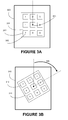
- FIGs. 3A and 3B show an illustration of present system embodiment.
- 300 and 310 represent a screen (as 200 and 210 in FIG. 2 ) of an electronic device 600 (described hereafter).
- 301 and 311 represent a same virtual keyboard, here more precisely a virtual PIN keypad.
- a virtual keyboard comprises a layout of keys, such as key 302. Each key is associated to a symbol; here for the key 302, it is the symbol 303 (representing the value "7").
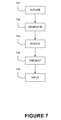
- FIGs 3A and 3B shall be described using FIG. 7 flowchart support.
- a step 701 the system is initiated.
- an application running on the electronic device may need to present a virtual keyboard on the screen to collect a user input, for example when requesting a PIN code from a user.
- a step 702 in order to secure inputs received on the virtual keyboard, the electronic device 600 generates the virtual keyboard at a default position within the screen 300.
- Such position may be for example position represented in 301. It is to be noted that once the virtual keyboard has been generated at the default location by the electronic device 600, it may be displayed or not on the screen. Here, for clarity sake, it has been represented on FIG. 3A .
- the electronic device 600 applies a rotation to the virtual keyboard 301.
- the rotation is applied to the virtual keyboard 301 around a predetermined reference point 305 and according to a randomly generated rotation angle 320 from the default position.
- the reference point 305 is the center of the virtual keyboard.
- next step 704 the electronic device 600 presents the rotated virtual keyboard on its screen, as shown in FIG. 3B .
- a symbol associated to a key is rotated of an angle of rotation value equal to the randomized angle of rotation value, but in the other way round.
- the symbol 303 - representing the value "7" - of the key 302 has been rotated in FIG.
- the keys may have been rotated around their respective center of an angle of rotation value opposite to the previous randomized angle of rotation value.
- the random rotation may cause the virtual keyboard to be partially displayed outside the screen.
- the reference point of the rotation is advantageously chosen at the center of the screen.
- the user may enter for example the requested PIN code on the virtual keyboard.
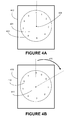
- FIGs. 4A and 4B show an illustration of present system embodiment applied to a circular keyboard. Indeed, as seen in previous embodiments described in FIG. 3A and 3B , the shape of the virtual keyboard could be adapted to maximize the virtual keyboard size. As a rotation is applied to the virtual keyboard, circular shape is a particularly adapted shape. Indeed, in FIG. 4A and 4B , the virtual keyboard 401 and 411 is arranged in a circular form. Such embodiment allows to place the different keys or symbols of the virtual keyboard along the circular edge of the virtual keyboard, as illustrated in FIGs. 4 , for example with the key or symbol 402 associated to the number "6".
- the virtual keyboard 401 it is possible to maximize the size of the virtual keyboard 401, and for example it would have been possible to increase the size of 401 until the edge of the virtual keyboard reach one of the edge of the screen 400.
- the virtual keyboard could be placed at the center of the screen, and the rotation reference 405 could be placed also at the center of the screen, which would be equivalent to the center of the virtual keyboard.
- random angle of rotation 420 may be chosen among the list of values (0°, 36°, 72°, 108°, 144°, 180°, 216°, 252°, 288° or 324°). This is restricting the randomness of the location of the keys on the screen but improves the readability of the system.
- FIGs. 5A and 5B show an illustration of present system embodiment applied to a circular keyboard and with an off centered reference point for the rotation.
- the reference point 505 of the rotation is distinct from the center 506 of the virtual keyboard 501.
- the off centering of the reference point of the rotation improves the randomness of the different location or position of the keys of the virtual keyboard on the screen.
- using a reference point for the rotation distinct from the center of the virtual keyboard shifts the virtual keyboard position during the rotation. Such embodiment improves the security.
- the screen is advantageously a touch screen.
- possible embodiment of present system may use non-touch screen and pointing devices such as mouse or touch pad.
- a different rotation may be applied before or after each user input.
- different rotation it should be understood preferably here "by applying a different angle of rotation”.
- the position of the reference point is moved randomly each time the virtual keyboard is rotated.
- the different positions of the reference point are distinct from the center of the screen or the center of the virtual keyboard. This allows improving the randomness of the location or position of the keys on the screen.
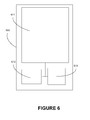
- FIG. 6 is an illustration of an exemplary electronic device or mobile device (or in short, device) 600 used in one embodiment of the present system.
- the mobile device 600 comprises at least a touch screen or display 611, a processor 612, optionally a controller 613 of the display 611, and possibly others module not represented here.
- Mobile device 600 may be for instance a mobile phone, a smartphone, a PDA (Personal Digital Assistant), a tablet ...
- GUI Graphical User Interface
- Processor 612 may control the rendering and/or the display of the GUI on the display device 611. Processor 612 may also handle the user entries according to the present method.
- the user entries or user gestures to interact with an application software may be provided through interactions with the touch panel 611 and will be called hereafter user inputs or touch inputs.
- the touch panel or touch screen 611 can be seen as an input device allowing interactions with one or more fingers of a user or other devices such as a stylus.
- the input received from one or more user's touch is sent to the processor 612.
- the touch panel is configured to detect and report the (location of the) touches inputs to the processor 612 and the processor 612 can interpret the touch inputs in accordance with the application software and the currently displayed GUI.
- a virtual keyboard may be rendered on the touch screen.
- a touch input on the key of the virtual keyboard shall be interpreted by the processor 612 as an entry of a character associated with the touched key on the touch screen.
- the touch panel may be transparent and placed over the display element, as it is commonly done with a smartphone or an electronic tablet.
- the optional controller 613 i.e. a dedicated processor, can be used to process the plurality of touch inputs locally and reduce demand for the main processor 612 of the computer system.
- the touch panel 611 can be based on sensing technologies including but not limited to capacitive sensing, resistive sensing, surface acoustic wave sensing, pressure sensing, optical sensing, and/or the likes.
- touch input should be here after interpreted for example as “touching”, “hovering”, “pushing”, “pressing” or any other term adapted to the sensing technology used.
- the captured touch input may be referred to as a touch input that allows imparting a control on an application software).
- FIG. 7 is described with FIGs. 3A and 3B .
Landscapes
- Engineering & Computer Science (AREA)
- Theoretical Computer Science (AREA)
- General Engineering & Computer Science (AREA)
- Computer Security & Cryptography (AREA)
- Physics & Mathematics (AREA)
- General Physics & Mathematics (AREA)
- Computer Hardware Design (AREA)
- Software Systems (AREA)
- Human Computer Interaction (AREA)
- Input From Keyboards Or The Like (AREA)
- User Interface Of Digital Computer (AREA)
Priority Applications (1)
| Application Number | Priority Date | Filing Date | Title |
|---|---|---|---|
| EP13306727.2A EP2884416A1 (fr) | 2013-12-16 | 2013-12-16 | Méthode de sécurisation d'entrée de données confidentielles avec un clavier virtuel |
Applications Claiming Priority (1)
| Application Number | Priority Date | Filing Date | Title |
|---|---|---|---|
| EP13306727.2A EP2884416A1 (fr) | 2013-12-16 | 2013-12-16 | Méthode de sécurisation d'entrée de données confidentielles avec un clavier virtuel |
Publications (1)
| Publication Number | Publication Date |
|---|---|
| EP2884416A1 true EP2884416A1 (fr) | 2015-06-17 |
Family
ID=49920086
Family Applications (1)
| Application Number | Title | Priority Date | Filing Date |
|---|---|---|---|
| EP13306727.2A Withdrawn EP2884416A1 (fr) | 2013-12-16 | 2013-12-16 | Méthode de sécurisation d'entrée de données confidentielles avec un clavier virtuel |
Country Status (1)
| Country | Link |
|---|---|
| EP (1) | EP2884416A1 (fr) |
Cited By (1)
| Publication number | Priority date | Publication date | Assignee | Title |
|---|---|---|---|---|
| FR3110986A1 (fr) * | 2020-06-02 | 2021-12-03 | Idemia Identity & Security France | Procédé et dispositif de saisie tactile d’une suite de caractères notamment alphanumériques. |
Citations (6)
| Publication number | Priority date | Publication date | Assignee | Title |
|---|---|---|---|---|
| US20050195170A1 (en) * | 2000-01-13 | 2005-09-08 | Tomohiro Habu | Information entry system |
| US20070030963A1 (en) * | 2005-08-04 | 2007-02-08 | Apple Computer, Inc. | Securing and controlling access to digital data |
| US20080148186A1 (en) | 2006-12-18 | 2008-06-19 | Krishnamurthy Sandeep Raman | Secure data entry device and method |
| WO2009017751A1 (fr) * | 2007-08-02 | 2009-02-05 | Caterpillar Inc. | Authentification d'un utilisateur avec un mot de passe en image |
| US20100333195A1 (en) * | 2009-06-25 | 2010-12-30 | Hong Fu Jin Precision Industry(Shenzhen) Co., Ltd. | Password protection system |
| US8392846B2 (en) | 2010-01-28 | 2013-03-05 | Gilbarco, S.R.L. | Virtual pin pad for fuel payment systems |
-
2013
- 2013-12-16 EP EP13306727.2A patent/EP2884416A1/fr not_active Withdrawn
Patent Citations (6)
| Publication number | Priority date | Publication date | Assignee | Title |
|---|---|---|---|---|
| US20050195170A1 (en) * | 2000-01-13 | 2005-09-08 | Tomohiro Habu | Information entry system |
| US20070030963A1 (en) * | 2005-08-04 | 2007-02-08 | Apple Computer, Inc. | Securing and controlling access to digital data |
| US20080148186A1 (en) | 2006-12-18 | 2008-06-19 | Krishnamurthy Sandeep Raman | Secure data entry device and method |
| WO2009017751A1 (fr) * | 2007-08-02 | 2009-02-05 | Caterpillar Inc. | Authentification d'un utilisateur avec un mot de passe en image |
| US20100333195A1 (en) * | 2009-06-25 | 2010-12-30 | Hong Fu Jin Precision Industry(Shenzhen) Co., Ltd. | Password protection system |
| US8392846B2 (en) | 2010-01-28 | 2013-03-05 | Gilbarco, S.R.L. | Virtual pin pad for fuel payment systems |
Cited By (1)
| Publication number | Priority date | Publication date | Assignee | Title |
|---|---|---|---|---|
| FR3110986A1 (fr) * | 2020-06-02 | 2021-12-03 | Idemia Identity & Security France | Procédé et dispositif de saisie tactile d’une suite de caractères notamment alphanumériques. |
Similar Documents
| Publication | Publication Date | Title |
|---|---|---|
| US9922188B2 (en) | Method and system of providing a picture password for relatively smaller displays | |
| US9300659B2 (en) | Method and system of providing a picture password for relatively smaller displays | |
| EP3149645B1 (fr) | Procédé et système de fourniture d'un mot de passe d'image pour des affichages relativement plus petits | |
| US9357391B1 (en) | Unlocking electronic devices with touchscreen input gestures | |
| EP3443724B1 (fr) | Mots de passe d'image de service web | |
| EP3087522B1 (fr) | Procédés et appareil pour faciliter une entrée d'écran sécurisée | |
| US9304655B2 (en) | Graphical user interface (GUI) that receives directional input to change face for receiving passcode | |
| US10075430B2 (en) | Method and system for efficient password input | |
| US20140098141A1 (en) | Method and Apparatus for Securing Input of Information via Software Keyboards | |
| US20140201831A1 (en) | Method and apparatus for authenticating password of user terminal | |
| US20040230843A1 (en) | System and method for authenticating users using image selection | |
| EP2951746B1 (fr) | Système et procédé d'amélioration de la sécurité d'un dispositif sans fil par détection du type d'utilisation | |
| US20150137944A1 (en) | Preventing the discovery of access codes | |
| CN101901312A (zh) | 密码保护方法 | |
| CN106709382A (zh) | 一种键盘显示方法及装置 | |
| JP2022509469A (ja) | 多重要素ベースのパスワード認証 | |
| US8117652B1 (en) | Password input using mouse clicking | |
| US20170038867A1 (en) | Input device and method for capacitive touch screen | |
| KR102014408B1 (ko) | 이미지 터치 패스워드를 이용한 사용자 인증 방법 및 이를 위한 컴퓨터 프로그램 | |
| US11163883B2 (en) | Enhancing security of a touch screen device | |
| CN102364427A (zh) | 一种基于触摸屏的工业嵌入式设备的密码设置方法 | |
| US11551217B2 (en) | Multi-touch key entry interface | |
| US9310929B2 (en) | Unlocking touch screen devices | |
| US10136316B2 (en) | Unlocking of a mobile device by a code received via a stencil on a touchscreen | |
| WO2019210819A1 (fr) | Procédé et appareil d'authentification d'un mot de passe de type icône doté d'une marque de champ de caractère aléatoire |
Legal Events
| Date | Code | Title | Description |
|---|---|---|---|
| PUAI | Public reference made under article 153(3) epc to a published international application that has entered the european phase |
Free format text: ORIGINAL CODE: 0009012 |
|
| 17P | Request for examination filed |
Effective date: 20131216 |
|
| AK | Designated contracting states |
Kind code of ref document: A1 Designated state(s): AL AT BE BG CH CY CZ DE DK EE ES FI FR GB GR HR HU IE IS IT LI LT LU LV MC MK MT NL NO PL PT RO RS SE SI SK SM TR |
|
| AX | Request for extension of the european patent |
Extension state: BA ME |
|
| STAA | Information on the status of an ep patent application or granted ep patent |
Free format text: STATUS: THE APPLICATION IS DEEMED TO BE WITHDRAWN |
|
| 18D | Application deemed to be withdrawn |
Effective date: 20151218 |