EP2827221A1 - Device and method for filtering messages - Google Patents
Device and method for filtering messages Download PDFInfo
- Publication number
- EP2827221A1 EP2827221A1 EP14177335.8A EP14177335A EP2827221A1 EP 2827221 A1 EP2827221 A1 EP 2827221A1 EP 14177335 A EP14177335 A EP 14177335A EP 2827221 A1 EP2827221 A1 EP 2827221A1
- Authority
- EP
- European Patent Office
- Prior art keywords
- touch input
- messages
- list
- unread
- display
- Prior art date
- Legal status (The legal status is an assumption and is not a legal conclusion. Google has not performed a legal analysis and makes no representation as to the accuracy of the status listed.)
- Granted
Links
Images


Classifications
-
- H—ELECTRICITY
- H04—ELECTRIC COMMUNICATION TECHNIQUE
- H04M—TELEPHONIC COMMUNICATION
- H04M1/00—Substation equipment, e.g. for use by subscribers
- H04M1/72—Mobile telephones; Cordless telephones, i.e. devices for establishing wireless links to base stations without route selection
- H04M1/724—User interfaces specially adapted for cordless or mobile telephones
- H04M1/72403—User interfaces specially adapted for cordless or mobile telephones with means for local support of applications that increase the functionality
- H04M1/7243—User interfaces specially adapted for cordless or mobile telephones with means for local support of applications that increase the functionality with interactive means for internal management of messages
-
- G—PHYSICS
- G06—COMPUTING OR CALCULATING; COUNTING
- G06F—ELECTRIC DIGITAL DATA PROCESSING
- G06F1/00—Details not covered by groups G06F3/00 - G06F13/00 and G06F21/00
- G06F1/16—Constructional details or arrangements
- G06F1/1613—Constructional details or arrangements for portable computers
- G06F1/1626—Constructional details or arrangements for portable computers with a single-body enclosure integrating a flat display, e.g. Personal Digital Assistants [PDAs]
-
- G—PHYSICS
- G06—COMPUTING OR CALCULATING; COUNTING
- G06F—ELECTRIC DIGITAL DATA PROCESSING
- G06F3/00—Input arrangements for transferring data to be processed into a form capable of being handled by the computer; Output arrangements for transferring data from processing unit to output unit, e.g. interface arrangements
- G06F3/01—Input arrangements or combined input and output arrangements for interaction between user and computer
- G06F3/017—Gesture based interaction, e.g. based on a set of recognized hand gestures
-
- G—PHYSICS
- G06—COMPUTING OR CALCULATING; COUNTING
- G06F—ELECTRIC DIGITAL DATA PROCESSING
- G06F3/00—Input arrangements for transferring data to be processed into a form capable of being handled by the computer; Output arrangements for transferring data from processing unit to output unit, e.g. interface arrangements
- G06F3/01—Input arrangements or combined input and output arrangements for interaction between user and computer
- G06F3/048—Interaction techniques based on graphical user interfaces [GUI]
- G06F3/0481—Interaction techniques based on graphical user interfaces [GUI] based on specific properties of the displayed interaction object or a metaphor-based environment, e.g. interaction with desktop elements like windows or icons, or assisted by a cursor's changing behaviour or appearance
- G06F3/0482—Interaction with lists of selectable items, e.g. menus
-
- G—PHYSICS
- G06—COMPUTING OR CALCULATING; COUNTING
- G06F—ELECTRIC DIGITAL DATA PROCESSING
- G06F3/00—Input arrangements for transferring data to be processed into a form capable of being handled by the computer; Output arrangements for transferring data from processing unit to output unit, e.g. interface arrangements
- G06F3/01—Input arrangements or combined input and output arrangements for interaction between user and computer
- G06F3/048—Interaction techniques based on graphical user interfaces [GUI]
- G06F3/0487—Interaction techniques based on graphical user interfaces [GUI] using specific features provided by the input device, e.g. functions controlled by the rotation of a mouse with dual sensing arrangements, or of the nature of the input device, e.g. tap gestures based on pressure sensed by a digitiser
- G06F3/0488—Interaction techniques based on graphical user interfaces [GUI] using specific features provided by the input device, e.g. functions controlled by the rotation of a mouse with dual sensing arrangements, or of the nature of the input device, e.g. tap gestures based on pressure sensed by a digitiser using a touch-screen or digitiser, e.g. input of commands through traced gestures
- G06F3/04883—Interaction techniques based on graphical user interfaces [GUI] using specific features provided by the input device, e.g. functions controlled by the rotation of a mouse with dual sensing arrangements, or of the nature of the input device, e.g. tap gestures based on pressure sensed by a digitiser using a touch-screen or digitiser, e.g. input of commands through traced gestures for inputting data by handwriting, e.g. gesture or text
-
- G—PHYSICS
- G06—COMPUTING OR CALCULATING; COUNTING
- G06F—ELECTRIC DIGITAL DATA PROCESSING
- G06F3/00—Input arrangements for transferring data to be processed into a form capable of being handled by the computer; Output arrangements for transferring data from processing unit to output unit, e.g. interface arrangements
- G06F3/01—Input arrangements or combined input and output arrangements for interaction between user and computer
- G06F3/048—Interaction techniques based on graphical user interfaces [GUI]
- G06F3/0487—Interaction techniques based on graphical user interfaces [GUI] using specific features provided by the input device, e.g. functions controlled by the rotation of a mouse with dual sensing arrangements, or of the nature of the input device, e.g. tap gestures based on pressure sensed by a digitiser
- G06F3/0488—Interaction techniques based on graphical user interfaces [GUI] using specific features provided by the input device, e.g. functions controlled by the rotation of a mouse with dual sensing arrangements, or of the nature of the input device, e.g. tap gestures based on pressure sensed by a digitiser using a touch-screen or digitiser, e.g. input of commands through traced gestures
- G06F3/04886—Interaction techniques based on graphical user interfaces [GUI] using specific features provided by the input device, e.g. functions controlled by the rotation of a mouse with dual sensing arrangements, or of the nature of the input device, e.g. tap gestures based on pressure sensed by a digitiser using a touch-screen or digitiser, e.g. input of commands through traced gestures by partitioning the display area of the touch-screen or the surface of the digitising tablet into independently controllable areas, e.g. virtual keyboards or menus
-
- G—PHYSICS
- G06—COMPUTING OR CALCULATING; COUNTING
- G06Q—INFORMATION AND COMMUNICATION TECHNOLOGY [ICT] SPECIALLY ADAPTED FOR ADMINISTRATIVE, COMMERCIAL, FINANCIAL, MANAGERIAL OR SUPERVISORY PURPOSES; SYSTEMS OR METHODS SPECIALLY ADAPTED FOR ADMINISTRATIVE, COMMERCIAL, FINANCIAL, MANAGERIAL OR SUPERVISORY PURPOSES, NOT OTHERWISE PROVIDED FOR
- G06Q10/00—Administration; Management
- G06Q10/10—Office automation; Time management
- G06Q10/107—Computer-aided management of electronic mailing [e-mailing]
-
- H—ELECTRICITY
- H04—ELECTRIC COMMUNICATION TECHNIQUE
- H04M—TELEPHONIC COMMUNICATION
- H04M1/00—Substation equipment, e.g. for use by subscribers
- H04M1/72—Mobile telephones; Cordless telephones, i.e. devices for establishing wireless links to base stations without route selection
- H04M1/724—User interfaces specially adapted for cordless or mobile telephones
- H04M1/72403—User interfaces specially adapted for cordless or mobile telephones with means for local support of applications that increase the functionality
- H04M1/7243—User interfaces specially adapted for cordless or mobile telephones with means for local support of applications that increase the functionality with interactive means for internal management of messages
- H04M1/72436—User interfaces specially adapted for cordless or mobile telephones with means for local support of applications that increase the functionality with interactive means for internal management of messages for text messaging, e.g. short messaging services [SMS] or e-mails
-
- H—ELECTRICITY
- H04—ELECTRIC COMMUNICATION TECHNIQUE
- H04M—TELEPHONIC COMMUNICATION
- H04M2250/00—Details of telephonic subscriber devices
- H04M2250/22—Details of telephonic subscriber devices including a touch pad, a touch sensor or a touch detector
Definitions
- the specification relates generally to electronic devices, and specifically to a device and method for filtering messages.
- this disclosure is directed to a device, and in particular a mobile electronic device, with a touchscreen, that can receive and display messages, at the touchscreen.
- mobile electronic devices represent electronic devices that are readily movable from place to place. Further such mobile electronic devices are often operated with one hand in busy environments. When such devices receive messages, it is desirable to display only unread messages; however accessing unread messages can be challenging on many devices.
- a filter can be manually applied by adjusting a setting in a mail application using a pull down menu or the like, and/or by navigating to unread messages by actuating a series navigation buttons.
- elements may be described as “configured to” perform one or more functions or “configured for” such functions.
- an element that is configured to perform or configured for performing a function is enabled to perform the function, or is suitable for performing the function, or is adapted to perform the function, or is operable to perform the function, or is otherwise capable of performing the function.
- elements such as a processor
- a display and/or a display device comprises image forming apparatus and circuitry for controlling the image forming apparatus.
- an element that "provides" an item at a display communicates with the circuitry which, in turn, controls the image forming apparatus to provide a representation of the item, for example by turning pixels of the image forming apparatus on and off, based on data and/or frame data and/or commands received at the circuitry from the element, such as a processor.
- an element such as a processor
- providing, at a display, a given item a series of technical effects and/or steps occur: as such, providing a given item at a display is not to be interpreted as simply displaying information.
- a processor for example, provides a given item, at a display, a physical state of a device is change and/or modified and/or transformed.
- An aspect of the specification provides a device comprising: a processor; a memory storing messages, at least a subset of the messages designated as unread messages; and a touchscreen including a display; the processor configured to: detect a sliding touch input at the touchscreen, the sliding touch input including a change in direction, the sliding touch input terminating in a static touch input proximal an edge of the touchscreen; and, in response to detecting the static touch input, provide, at the display, a list of the unread messages.
- the processor can be further configured to: prior to providing the list of the unread messages, provide, at the display, an initial list of the messages during the sliding touch input, the initial list of the messages including both the unread messages and the messages designated as read messages.
- the processor can be further configured to: provide the initial list of the messages when the change in direction is detected.
- a first portion of the sliding touch input can be in a first direction and a second portion of the sliding touch input can be in a second direction, and the processor can be further configured to: after the static touch input is detected, detect another sliding touch input beginning at a position of the static touch input, in an opposite direction to the second direction; and, in response, replace, at the display, the list of the unread messages with the initial list of the messages.
- the processor can be further configured to, in response to detecting the static touch input, provide, at the display, a preview of a given unread message, in the list of the unread messages, when providing the list of the unread messages.
- the preview can include: one or more of metadata associated with the given unread message and a subject of the given unread message; and, at least a portion of a body of the unread message, wherein data provided in the list for each of other unread messages can further comprise respective metadata and a respective subject.
- the processor can be further configured to, in response to detecting a further sliding touch input beginning at a position of the static touch input: when the further sliding touch input is in a first direction relative to the position of the static touch input, provide, at the display, a preview of a next unread message in the list of the unread messages; and when the further sliding touch input is in a second direction opposite the first direction, provide, at the display, a preview of a previous unread message in the list of the unread messages.
- the processor can be further configured to, when a given change in position of the further sliding touch input occurs in a length of time greater than a threshold time period, designate a respective one of the unread messages as a read message.
- the processor can be further configured to, when a given change in position of the further sliding touch input occurs in a length of time greater than a threshold time period, delete a respective one of the unread messages.
- the processor can be further configured to provide, at the display, proximal a position of the static touch input. one or more of: a first icon indicative of at least one of that the list of the unread messages can be navigated and an area associated with the static touch input; a second icon indicative that the list of the unread messages can be navigated to preview a next unread message; and, a third icon indicative that the list of the unread messages can be navigated to preview a previous unread message.
- Another aspect of the specification provides a method comprising: at device comprising: a processor; a memory storing messages, at least a subset of the messages designated as unread messages; and a touchscreen including a display, detecting a sliding touch input at the touchscreen, the sliding touch input including a change in direction, the sliding touch input terminating in a static touch input proximal an edge of the touchscreen; and, in response to detecting the static touch input, providing, at the display, a list of the unread messages.
- the method can further comprise: prior to providing the list of the unread messages, providing, at the display, an initial list of the messages during the sliding touch input, the initial list of the messages including both the unread messages and the messages designated as read messages.
- the method can further comprise: providing the initial list of the messages when the change in direction is detected.
- a first portion of the sliding touch input can be in a first direction and a second portion of the sliding touch input can be in a second direction
- the method can further comprise: after the static touch input is detected, detecting another sliding touch input beginning at a position of the static touch input, in an opposite direction to the second direction; and, in response, replacing, at the display, the list of the unread messages with the initial list of the messages.
- the method can further comprise, in response to detecting the static touch input, providing, at the display, a preview of a given unread message, in the list of the unread messages, when providing the list of the unread messages.
- the method can further comprise, in response to detecting a further sliding touch input beginning at a position of the static touch input: when the further sliding touch input is in a first direction relative to the position of the static touch input, providing, at the display, a preview of a next unread message in the list of the unread messages; and when the further sliding touch input is in a second direction opposite the first direction, providing, at the display, a preview of a previous unread message in the list of the unread messages.
- the preview can include: one or more of metadata associated with the given unread message and a subject of the given unread message; and, at least a portion of a body of the unread message, wherein data provided in the list for each of other unread messages can further comprise respective metadata and a respective subject.
- the method can further comprise, when a given change in position of the further sliding touch input occurs in a length of time greater than a threshold time period, designating a respective one of the unread messages as a read message.
- the method can further comprise, when a given change in position of the further sliding touch input occurs in a length of time greater than a threshold time period, deleting a respective one of the unread messages.
- the method can further comprise providing, at the display, proximal a position of the static touch input. one or more of: a first icon indicative of at least one of that the list of the unread messages can be navigated and an area associated with the static touch input; a second icon indicative that the list of the unread messages can be navigated to preview a next unread message; and, a third icon indicative that the list of the unread messages can be navigated to preview a previous unread message.
- a further aspect of the specification provides a computer program product comprising a computer usable medium having a computer readable program code adapted to be executed to implement a method comprising: at device comprising: a processor; a memory storing messages, at least a subset of the messages designated as unread messages; and a touchscreen including a display, detecting a sliding touch input at the touchscreen, the sliding touch input including a change in direction, the sliding touch input terminating in a static touch input proximal an edge of the touchscreen; and, in response to detecting the static touch input, providing, at the display, a list of the unread messages.
- the computer usable medium can comprise a non-transitory computer usable medium.
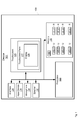
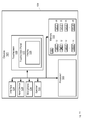
- Fig. 1 depicts a schematic diagram of a mobile electronic device 101, referred to interchangeably hereafter as device 101, according to non-limiting implementations.
- Device 101 comprises a housing 109, a processor 120, a memory 122, a communication interface 124, a touchscreen 125 that includes a display 126 and a touchscreen panel 127, at least one optional input device 128, an optional speaker 132 and an optional microphone 134.
- memory 122 stores messages 140-1, 140-2, 140-3....140-n, 141-1, 141-2, 141-3...141-m.
- Messages 140-1, 140-2, 140-3....140-n, 141-1, 141-2, 141-3...141-m are interchangeably referred to hereafter, collectively, as messages 140, 141 and generically as a message 140 and/or a message 141 and/or a message 140, 141.
- messages 140 can be designated as unread messages and messages 141 can be designated as read messages; in other words, at least a subset of messages 140, 141 are designated as unread messages, as described in further detail below.
- messages 140-1, 140-2, 140-3....140-n are interchangeably referred to hereafter, collectively, as unread messages 140 and generically as an unread message 140; similarly, messages 141-1, 141-2, 141-3....141-n, are interchangeably referred to hereafter, collectively, as read messages 141 and generically as a read message 141.
- unread messages 140 are designated as unread, at memory 122, using a "U” and read messages 141 are designated as read, at memory 122, using an "R"; however, such a convention is merely for example purposes only and any process and/or method and/or means and/or designator can be used to designate messages 140, 141 as unread or read; indeed, messages 140, 141 can be stored in a database at memory 122, and database conventions can be used to designate messages 140, 141 as unread or read. Further, while a number "n" of unread messages 140 and a number “m” read of messages 141 are depicted in Fig. 1 , any number of unread messages 140 and read messages 141 that can be stored at memory 122 is within the scope of present implementation.
- Each of messages 140, 141 can include, but is not limited to, one or more of an email, a text message, a short message service (SMS) message, a multimedia message service (MMS) message, social networking message, a notification message (e.g. including, but not limited to, notifications of telephone calls, voice messages, software updates etc.) and the like.
- SMS short message service
- MMS multimedia message service
- processor 120 is generally configured to: detect a sliding touch input at touchscreen 125, the sliding touch input including a change in direction, the sliding touch input terminating in a static touch input proximal an edge of touchscreen 125; and, in response to detecting the static touch input, provide, at display 126, a list of unread messages 140.
- Device 101 can be any type of electronic device that can be used in a self-contained manner to implement messaging functions, including sending and receiving messages using the communication interface 124 and, in particular, filter messages 140, 141 so that a list of unread messages 140 is provided at display 126.
- Device 101 includes, but is not limited to, any suitable combination of electronic devices, communications devices, computing devices, personal computers, laptop computers, portable electronic devices, mobile computing devices, portable computing devices, tablet computing devices, laptop computing devices, desktop phones, telephones, PDAs (personal digital assistants), cellphones, smartphones, e-readers, internet-enabled appliances and the like. Other suitable devices are within the scope of present implementations.
- Fig. 1 contemplates a device that can be used for both wireless voice (e.g. telephony) and wireless data communications (e.g. email, web browsing, text, and the like).
- Fig. 1 contemplates a device that can be used for any suitable specialized functions, including, but not limited, to one or more of, messaging, telephony, computing, appliance, and/or entertainment related functions.
- Housing 109 can comprise any housing, casing, and the like. It is appreciated that device 101 can be portable (readily movable from place to place) and, in some implementations, device 101 can be handheld (sized and shaped to be held or carried in a human hand, and typically used while so held or carried); hence, housing 109 can be configured for a corresponding type of device 101.
- housing 109 encloses or houses the components of device 101, such as processor 120, memory 122, communication interface 124, etc.; however some components can be visible via apertures, windows and the like in housing 109.
- display 126 is generally visible
- touchscreen panel 127 is generally accessible for touching, for example by a finger of a user.
- Touchscreen 125 comprises display 126 and touchscreen panel 127.
- Display 126 comprises any suitable one of or combination of CRT (cathode ray tube) and/or flat panel displays (e.g. LCD (liquid crystal display), plasma, OLED (organic light emitting diode), and the like).
- Touchscreen panel 127 includes but is not limited to a capacitive touchscreen panel, a resistive touchscreen panel, and the like.
- Touchscreen 125, and in particular touchscreen panel 127 is generally configured to receive input data, and, in particular, touch input data. Touch input data can comprise one or more of sliding touch input and static touch input.
- sliding touch input can comprise data detected at touchscreen panel 127 that corresponds to a series of touch inputs at touchscreen panel 127 in adjacent portions of touchscreen panel 127 that represent continuous touching actuation thereof in a sliding motion; while each touch input in the sliding touch input can be discrete, depending on how often touchscreen panel is sampled by processor 120, the series of touch inputs is recognized by processor 120 as sliding touch input.
- a static touch input can comprise a series of touch inputs at touchscreen panel 127 that are all generally in a same area of touchscreen panel that represent continuous touching actuation thereof without substantial movement; while each touch input in the static touch input can be discrete, depending on how often touchscreen panel is sampled by processor 120, the series of touch inputs is recognized by processor 120 as a static touch input.
- Processor 120 is generally configured to distinguish between a sliding touch input and a static touch input: for example, processor 120 can be configured to determine that, when a touch input is detected within a given area for a given period of time, the touch input is a static touch input, the given area and given period of time being predetermined and stored at memory 122; the given area and given period of time can be determined one or more of one or more of experimentally, heuristically, trial and error, using user interface design software and the like.
- Display 126 and touchscreen panel 127 are generally aligned such that areas of display 126, where actuatable and/or activatable and/or selectable controls and/or items are displayed, correspond to areas of touchscreen panel 127 where touch input can be received to actuate and/or activate and/or select the corresponding controls and/or items.
- processor 120 can determine whether an area of the touch input corresponds to the area of the display where the actuatable and/or activatable and/or selectable controls and/or items are located and control display 126, and device 101, accordingly.
- touchscreen panel 127 can be larger than an area of display 126 so that touch input can be received at a location of touchscreen panel 127 that does not correspond to an area of display 126; for example, in these implementations, touchscreen panel 127 can extend to a bezel of display 126 so that touch input can be received at the bezel.
- Processor 120 can hence be further configured to determine when touch input is received at touchscreen panel 127 at a location that corresponds to an area of display 126, and when touch input is received at touchscreen panel 127 at a location that corresponds to an area of a bezel of display 126.
- device 101 further comprises at least one optional input device 128, in addition to touchscreen 125, the at least one input device 128 is generally configured to receive input data, and can comprise any suitable combination of input devices, including but not limited to a keyboard, a keypad, a pointing device, a mouse, a track wheel, a trackball, a touchpad, a touchscreen and the like. Other suitable input devices are within the scope of present implementations.
- processor 120 which can be implemented as a plurality of processors, including but not limited to one or more central processors (CPUs).
- Processor 120 is configured to communicate with a memory 122 comprising a non-volatile storage unit (e.g. Erasable Electronic Programmable Read Only Memory (“EEPROM”), Flash Memory) and a volatile storage unit (e.g. random access memory (“RAM”).
- EEPROM Erasable Electronic Programmable Read Only Memory
- RAM random access memory
- Programming instructions that implement the functional teachings of device 101 as described herein are typically maintained, persistently, in memory 122 and used by processor 120 which makes appropriate utilization of volatile storage during the execution of such programming instructions.
- memory 122 is an example of computer readable media that can store programming instructions executable on processor 120.
- memory 122 is also an example of a memory unit and/or memory module.
- memory 122 stores at least one application 150, that, when processed by processor 120, enables processor 120 to: detect a sliding touch input at touchscreen 125, the sliding touch input including a change in direction, the sliding touch input terminating in a static touch input proximal an edge of touchscreen 125; and, in response to detecting the static touch input, provide, at display 126, a list of unread messages 140.
- At least one application 150 is an example of programming instructions stored at memory 122.
- at least one application 150 can comprise a combination of a messaging application a filtering application for filtering messages 140, 141, depending on touch input received at touchscreen 125.
- the messaging application and the filtering application can be combined, while in other implementations the messaging application and the filtering application are distinct from one another.
- Processor 120 can be further configured to communicate with optional microphone 134 and speaker 132.
- Microphone 134 comprises any suitable microphone for receiving sound and converting to audio data.
- Speaker 132 comprises any suitable speaker for converting audio data to sound to provide one or more of audible alerts, audible communications from remote communication devices, and the like.
- one or more of input device 128 and touchscreen 125 are external to device 101, with processor 120 in communication with each of input device 128 and/or touchscreen 125 via a suitable connection and/or link.
- Processor 120 also connects to communication interface 124 (interchangeably referred to interchangeably as interface 124), which can be implemented as one or more radios and/or connectors and/or network adaptors, configured to wirelessly communicate with one or more communication networks (not depicted), for example via one or more antennas (not depicted).
- communication interface 124 can be implemented as one or more radios and/or connectors and/or network adaptors, configured to wirelessly communicate with one or more communication networks (not depicted), for example via one or more antennas (not depicted).
- interface 124 is configured to correspond with network architecture that is used to implement one or more communication links to the one or more communication networks, including but not limited to any suitable combination of USB (universal serial bus) cables, serial cables, wireless links, cell-phone links, cellular network links (including but not limited to 2G, 2.5G, 3G, 4G+ such as UMTS (Universal Mobile Telecommunications System), GSM (Global System for Mobile Communications), CDMA (Code division multiple access), FDD (frequency division duplexing), LTE (Long Term Evolution), TDD (time division duplexing), TDD-LTE (TDD-Long Term Evolution), TD-SCDMA (Time Division Synchronous Code Division Multiple Access) and the like, wireless data, Bluetooth links, NFC (near field communication) links, WLAN (wireless local area network) links, WiFi links, WiMax links, packet based links, the Internet, analog networks, the PSTN (public switched telephone network), access points, and the like, and/or a combination.
- USB Universal Serial Bus
- serial cables serial cables
- interface 124 comprises radio equipment (i.e. a radio transmitter and/or radio receiver) for receiving and/or transmitting signals and/or messages 140, 141.
- radio equipment i.e. a radio transmitter and/or radio receiver
- messages 140, 141 were previously received at device 101 via interface 124 and stored at memory 122.
- Device 101 further comprises a power source, not depicted, for example a battery or the like.
- the power source can comprise a connection to a mains power supply and a power adaptor (e.g. and AC-to-DC (alternating current to direct current) adaptor).
- a power adaptor e.g. and AC-to-DC (alternating current to direct current) adaptor.
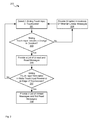
- Fig. 2 depicts a flowchart illustrating a method 200 for filtering messages, according to non-limiting implementations.
- method 200 is performed using device 101.
- device 101 and/or method 200 can be varied, and need not work exactly as discussed herein in conjunction with each other, and that such variations are within the scope of present implementations.
- method 200 is implemented in device 101 by processor 120, for example by implementing application 150.
- method 200 need not be performed in the exact sequence as shown, unless otherwise indicated; and likewise various blocks may be performed in parallel rather than in sequence; hence the elements of method 200 are referred to herein as “blocks” rather than “steps”. It is also to be understood that method 200 can be implemented on variations of device 101 as well.
- processor 120 detects a sliding touch input at touchscreen 125, for example due to a finger of a user (including, but not limited to, a thumb of the user) sliding on touchscreen 125.
- processor 120 determines and/or detects whether the sliding touch input includes a change in direction, for example due to the finger of the user first sliding in a first direction on touchscreen 125 and then sliding in a second direction on touchscreen 125, in a continuous motion without the finger leaving touchscreen 125, though pauses in movement of finger 301 are within the scope of present implementations, including, but not limited to, a slight pause when finger 301 changes direction. In other words, the finger maintains contact with touchscreen 125 while the sliding touch input is being received.
- processor 120 can provide, at display 126, one or more indicators of one or more of: whether there are unread messages stored at memory 122; and a number of unread messages 140 stored at memory 122, as described below with respect to Fig. 4 ; in general, such indicators can be graphical indicators and/or iconic indicators.
- block 204 is optional, as indicated by block 204 being drawn in stippled lines; otherwise block 201 is again implemented as processor 120 performs other tasks and waits until sliding touch input is again detected at touchscreen 125.
- block 204 can be implemented regardless of whether a change in direction is detected at block 203 (i.e. regardless of a "Yes" decision or a "No” decision” at block 203).
- processor 120 provides, at display 126, a list of messages 140, 141, the list including at least a portion of unread messages 140 and a portion of unread messages 141; for example, the list of messages 140, 141 can comprises one or more of metadata and a subject of each message, provided in rows at display 126, in an order that messages 140, 141 are received.
- processor 120 is further configured to, prior to providing a list of unread messages 141, provide, at display 126, an initial list of messages 140, 141 during the sliding touch input, the initial list of messages 140, 141 including both unread messages 140 and the messages designated as read messages 141.
- block 205 is optional, as indicated by block 205 being drawn in stippled lines. Further, when optional block 204 occurs when a "Yes" decision occurs at block 203, optional block 204 can occur before and/or concurrent with block 205.
- processor 120 determines whether the sliding touch input terminates in a static touch input proximal an edge of touchscreen 125: for example, the finger stops moving, and continues to touch touchscreen 125, for example for a given period of time, such as more than about half of a second and/or about 1.5 seconds.
- a given period of time such as more than about half of a second and/or about 1.5 seconds.
- the given period of time over which the static touch input occurs from the edge of touchscreen 125 in order to be considered "static" can be predetermined one or more of experimentally, heuristically, trial and error, using user interface design software and the like.
- the given period of time can be stored at one or more of application 150 and memory 122.
- block 201 is again implemented as processor 120 performs other tasks and waits until sliding touch input is again detected at touchscreen 125.
- a "No" decision can be made at block 207 when either the finger does not maintain contact with touchscreen 125 at the end of the sliding touch input and/or when the static touch input does not occur proximal to an edge of touchscreen 125.
- processor 120 determines that the sliding touch input terminates in a static touch input proximal an edge of touchscreen 125, (e.g. a "Yes" decision at block 207)
- processor 120 determines that the sliding touch input terminates in a static touch input proximal an edge of touchscreen 125, (e.g. a "Yes" decision at block 207)
- processor 120 provides, at display 126, a list of unread messages 140.
- a "Yes" decision can be made at block 207 when the finger maintains contact proximal to an edge of touchscreen 125 for the given period of time.
- Determining whether the static touch input occurs proximal to an edge of touchscreen 125 can include, but is not limited to, determining whether the static touch input occurs within a given area of touchscreen 125 proximal an edge of touchscreen, for example within about 0.5 cm of an edge of touchscreen 125 and/or about 10% from an edge of touchscreen 125.
- the distance from the edge of touchscreen 125 where the static touch input occurs, and/or the area within which that the static touch input occurs, that is considered "proximal" an edge of touchscreen 125 can be predetermined one or more of experimentally, heuristically, trial and error, using user interface design software and the like.
- the distance and/or area can be stored at one or more of application 150 and memory 122.
- method 200 can also comprise applying a first filtering condition to messages 140, 141 when processor 120 determines, at block 203, that the sliding touch input comprises a change in direction and applying a second filtering condition to messages 140, 141 when processor 120 determines, at block 207, that the sliding touch input terminates in a static touch input proximal an edge of touchscreen 125.
- the first filtering condition can comprise including all messages 140, 141 in a list of messages provided at display 126
- the second filtering condition comprises filtering out read messages 141 from the list of messages provided at display 126, and/or including only unread messages 140 at the list of messages provided at display 126.
- processor 120 can be generally configured to: apply a first filtering condition to messages 140, 141 when processor 120 detects a change in direction in a sliding touch input at touchscreen 125, and, in response, provide a list of unread messages 140 and read messages 141 at display 126; and, apply a second filtering condition to messages 140, 141 when processor 120 detects that the sliding touch input terminates in a static touch input proximal an edge of touchscreen 125, and, in response, provide a list of unread messages 140 at display 126.
- FIG. 1 depicts a front perspective view of device 101, including touchscreen 125, display 126 and touchscreen panel 127 (i.e. display 126 is visible through touchscreen panel 127); further, each of Figs. 3 to 10 and Fig. 12 and 13 depict graphic user interfaces (GUI) provided at display 126 when circuitry at display 126 is controlled by processor 120 to provide representations of messages 140, 141 and/or representations of other data. Further, each of Figs. 3 to 10 and Fig. 12 and 13 are substantially similar, with like elements having like numbers.
- GUI graphic user interfaces
- FIG. 3 depicts a finger 301 (including, but not limited to, a thumb of a user) interacting with touchscreen 125, as display 126 is controlled to provide a GUI 302. While most of finger 301 is depicted, generally only a tip of finger 301 will touch touchscreen 125.
- GUI 302 includes an optional status area 303 located in a "top" and/or header region of GUI 302, the status area 303 including icons and/or indicators of states of various electronic components of device 101, as well as a time of day; for example, as depicted, status area 303 includes a battery indicator and a network indicator. However, a location and content of status area 303 is not to be considered particularly limiting.
- GUI 302 further, optionally, includes icons 304, each of which correspond to one or more applications stored at memory 122; a given icon 304 can be designated as selected when static touch input is received at touchscreen panel 127 in an area corresponding to a location of the given icon 304 at display 126; the corresponding application can then be processed by processor 120 and/or "launched".
- touchscreen 125 can receive sliding touch input when finger 301 slides on touchscreen 125, for example in a direction of arrow 305: in other words, arrow 305 corresponds to various positions of finger 301 as finger 301 slides on touchscreen 125.
- processor 120 can detect a corresponding sliding touch input (i.e. block 201) corresponding to finger 301 sliding on touchscreen 125 in direction of arrow 305; indeed, arrow 305 indicates a position of finger at various locations on touchscreen 125 while the sliding touch input is being received.
- Fig. 3 also illustrates that, in general, sliding touch input represented by arrow 305 starts proximal a bottom of touchscreen 125.
- sliding touch input represented by arrow 305 begins approximately midway between a left edge and a right edge of touchscreen 125
- the sliding touch input represented by arrow 305 can begin anywhere at touchscreen 125 that allow a change in direction of the sliding touch input to be received, as described hereafter.
- processor 120 changes GUI 302 to GUI 402, for example using animation and the like.
- Fig. 4 also shows that finger 301 changed direction during the sliding touch input, as indicated by arrow 405.
- processor 120 can detect a corresponding sliding touch input (i.e. block 201) corresponding to finger 301 sliding on touchscreen 125 in direction of arrow 405; indeed, arrows 305, 405 each indicate a position of finger at various locations on touchscreen 125 while the sliding touch input is being received.
- arrows 305, 405 also indicate that processor 120 determines that sliding touch input includes a change in direction (a "Yes" decision at block 203). In general, the sliding touch input is received without finger 301 being removed from touchscreen 125.
- Fig. 4 also depicts a given non-limiting implementation of block 204 of method 200, which can occur whether a change in direction of the sliding touch input indicated by arrows 305, 405 occurs or not.
- each icon 304 when present, can optionally shrink/become smaller, to make room for indicators 410-1, 410-2, 410-3 which are provided at an edge of touchscreen 125.
- Indicators 410-1, 410-2, 410-3 will be interchangeably referred to hereafter, collectively, as indicators 410 and generically as an indicator 410.
- Indicators 410 generally indicate whether any unread messages 140 are stored at memory 122. When unread messages 140 are stored at memory 122, one or more indicators 410 are provided; otherwise indicators 410 are not provided. Optionally, each indicator 410 can provide a number of unread messages 140 stored at memory 122.
- each indicator 410 can be indicative of whether unread messages 140 of a given respective type are stored at memory 122 and/or a number of unread messages 140 of a given respective type.
- an indicator 410-1 comprises a graphical icon indicating that there are unread notification messages at memory 122; as depicted, indicator 410-1 also comprises a number of notification messages designated as unread messages.
- an indicator 410-2 comprises a graphical icon indicating that there are unread email messages at memory 122; as depicted, indicator 410-2 also comprises a number of email messages designated as unread messages.
- an indicator 410-3 comprises a graphical icon indicating that there are unread text messages at memory 122; as depicted, indicator 410-3 also comprises a number of text messages designated as unread messages.
- indicators 410 are depicted as being in a particular order and in particular locations (e.g. with indicator 410-1 below indicator 410-2, which is below indicator 410-3, and with indicators on left hand side of display 126), other orders and locations of indicators 410 are within the scope of present implementations. However, in general, indicators 410 are generally provided on display 126 along a direction of sliding touch input represented by arrow 305.
- Indicators 410 are generally appreciated to be optional, but can provide a visual guide for numbers of different types of unread messages 140.
- processor 120 detects a change in direction of the sliding touch input represented by arrows 305, 405, as depicted in Fig. 5 , processor 120 optionally changes GUI 402 to GUI 502, for example using animation and the like.
- Fig. 5 shows that when processor 120 detected the change in direction in the sliding touch input, processor 120 implemented optional block 205 of method 200 to provide an initial list 503 of messages 140, 141 at display 126. Further, processor 120 applied a first filtering condition to messages 140, 141 stored at memory 122 so that both unread messages 140 and read messages 141 are provided in list 503 (i.e. list 503 includes both unread messages 140 and read messages 141).
- each message 140, 141 in initial list 503 is provided in a respective row and/or rows (as depicted, three rows for each message 140, 141, however of rows dedicated to each message 140, 141 can be adjustable, for example based on font size of text in each row and/or configurable, for example using a pulldown menu and the like).
- each message 140, 141 is represented in list 503 by one or more of respective metadata associated with each message 140, 141, and a subject of each message 140, 141.
- each row of initial list 503 comprises metadata of a respective message 140, 141 including, but not limited to, a time and/or date that a respective message 140, 141 was received, a subject of a respective message 140, 141, and identifier of a sender of a respective message 140, 141, a type of a given message 140, 141 (e.g. "Software Update") and the like.
- data provided for a respective message 140, 141 in initial list 503 can also comprise at least a portion of the text of the text message that can fit on one row of list 503. Further the type of data displayed in each row for each message 140, 141 can be one or more of configurable and respective to a given type of a respective message 140, 141.
- Data provided for a respective unread message 140 in initial list 503 can also comprise a respective icon 525-1, 525-2, 525-3 indicative, respectfully, of an unread notification message, an unread email message and an unread text message; similarly, data provided for a respective read message 141 in initial list 503 can also comprise a respective icon 526-1, 526-2, 526-3 indicative, respectfully, of a read notification message, a read email message and a read text message.
- Icons 525-1, 525-2, 525-3 will be interchangeably referred to hereafter, collectively, as icons 525 and generically as an icon 525.
- Icons 526-1, 526-2, 526-3 will be interchangeably referred to hereafter, collectively, as icons 526 and generically as an icon 526.
- Each icon 525 is similar to a respective icon 526, however with a graphical change thereto; while the changes between icons 525, 526 are depicted as differences in shape, in other implementations, icons 525, 526 can be differentiated by changes in color, shading and the like.
- initial list 503 can be "slidable” so that a user can select initial list 503 using finger 301 and "slide” list 503 "up” or “down” to reveal further messages 140, 141 not initially displayed at display 126.
- the terms “top”, “above”, “up”, “bottom”, “below, “down” , as used herein, are understood to be relative to touchscreen 125 and/or display 126, and are not meant to mean “up” and “down”, and the like, with respect to the ground.
- device 101 can be held horizontally and a user can slide list "up” relative to touchscreen 125 and/or display 126 (e.g.
- indicators 410-1, 410-2, 410 respectively indicate that there are two unread notification messages, four unread email messages and three unread text messages, only one unread notification, one unread email message and two unread text messages (the last partially hidden at an end of list 503) are depicted in list 503, the remaining unread messages accessible by sliding list 503 "up”.
- Fig. 5 also depicts that processor 120 is further configured to, prior to providing a list of unread messages 141, provide, at display 126, an initial list 503 of messages 140, 141 during the sliding touch input, the initial list of messages 140, 141 including both unread messages 140 and the messages designated as read messages 141.
- processor 120 can be further configured to: provide initial list 503 of messages 140, 141 when the change in direction is detected. For example, when finger 301 changes direction from arrow 305 to arrow 405, list 503 can be provided so that, to a user, it appears that finger 301 is "pulling" list 503 over from an edge of touchscreen 125 in an opposite direction of arrow 405 (e.g. from left to right): i.e. in specific non-limiting implementations, list 503 can be animated to slide onto display 126 in a direction of arrow 405.
- indicators 410 continue to be provided at display 126, however, they are moved to an opposite side of touchscreen 125 than in GUI 402, in a direction of arrow 405. Specifically, indicators 410 are provided in a bar 550 located at an edge of display 126 located in a direction of arrow 405 so that, to a user, it appears that indicators 410 are being pulled by finger 301 from a first edge of display 126, as in Fig. 4 , to an opposite edge of display 126, as in Fig. 5 (e.g. from left to right).
- Fig. 5 also shows that finger 301 has remained static when the sliding touch input represented by arrows 305, 405 terminates, such that the sliding touch input terminates in a static touch input, proximal an edge of touchscreen 125 that is in a direction of arrow 405 and/or in bar 550 (e.g. a right edge): in other words, in these implementations, bar 550 graphically defines the area of touchscreen 125 that is considered to be proximal to an edge of touchscreen 125.
- Bar 550 hence acts as a graphical guide to where finger 301 can terminate the sliding touch input in order to cause filtering of messages 140, 141 so that initial list 503 is modified to show unread messages 140 and/or messages 140, 141 are filtered according to a second filtering condition to show unread messages 140. It is nonetheless appreciated that bar 550 and indicators 410 are optional.
- any detected touch input outside of bar 550 and/or the area proximal an area of the static touch input is ignored so that accidental touching of touchscreen 125 outside of bar 550 does not result in unwanted action of processor 120.
- providing list 503 is optional, and the static touch input is received at GUI 402 of Fig. 4 and/or GUI 302 of Fig. 3 without providing list 503 and/or indicators 410.
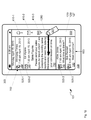
- processor 120 In response, to processor 120 detecting that the sliding touch input terminates in static touch input proximal an edge of touchscreen (i.e. a "Yes" decision at block 207), as depicted in Fig. 6 , processor 120 changes GUI 502 to GUI 602, for example using animation and the like. Further, in response, to processor 120 detecting that the sliding touch input terminates in static touch input proximal an edge of touchscreen (i.e. a "Yes" decision at block 207), processor 120 provides, at display 126, a list 603 of unread messages 140. For example, in response, to processor 120 detecting that the sliding touch input terminates in static touch input proximal an edge of touchscreen (i.e.
- processor 120 applies a second filtering condition to messages 140, 141, the second filtering condition comprising filtering out read messages 141 from initial list 503 of messages 140, 141 provided at display 126, to provide list 603, and/or including only unread messages 140 at list 603 of messages provided at display 126.
- unread messages 141 are not provided at list 603 as read messages 141 have been filtered from list 603, as compared to list 503.
- list 603 can be slidable and the like, so that further unread messages 140 can be accessed by sliding list 603 "down".
- indicators 410 can be blurred (as indicated by indicators 410 being drawn in stippled lines in Fig. 6 ) or removed from display 126.
- rows of list 603 are similar to rows of list 503, as described above, but include data associated with unread messages 140 and not read messages 141.
- processor 120 is further configured to, in response to detecting the static touch input, provide, at display 126, a preview 650 of a given unread message 140, in list 603 of unread messages, when providing list 603 of unread messages 140.
- a preview 650 of a first unread message 140 in list 603 is provided.
- Preview 650 can include, but is not limited to, one or more of metadata associated with the given unread message 140 and a subject of the given unread message 140; and, at least a portion of a body of the unread message 140, for example text from a body of the given unread message 140.
- data provided in list 603 for each of the other unread messages 140 comprises only one or more of respective metadata and a respective subject, and, in the instance of text messages, a portion of the body that can fit on one line of a row of list 603.
- a size of an area of preview 650 can be determined automatically by processor 120, for example based on configurable parameters at device 101, which can be stored at one or more of application 150 and memory 122. For example, a given number of lines of text of a body of a respective unread message 140 can be provided in preview 650; and/or a size of a font of text of a body of a respective unread message 140 can be changed so that all the text fits on display 126; and/or text of a body of a respective unread message 140 in preview 650 can be scrollable using further sliding touch input; and/or a only a portion of text of a body of a respective unread message 140 that fits on display 126 can be provided. It should be understood that a wide variety of configurations for preview 650 are contemplated.
- filtering conditions can be applied to messages 140, 141 that include filtering out read messages 141 so that read messages 140 are provided in a list 603 at display 126.
- further navigation of list 603 can occur from the static position of finger 301 depicted in Fig. 6 .
- Fig. 6 also depicts an arrow 680, which represents a further sliding touch input beginning at a position of the static touch input.
- processor 120 can be further configured to, in response to detecting the further sliding touch input beginning at a position of the static touch input: when the further sliding touch input is in a first direction relative to the position of the static touch input, provide, at display 126, a preview of a next unread message in list 603 of unread messages 140; and, when the further sliding touch input is in a second direction opposite the first direction, provide, at display 126, a preview of a previous unread message 140 in list 603 of unread messages 140.
- Fig. 7 depicts a GUI 702: processor 120 changes GUI 602 to GUI 702, for example using animation and the like, when further sliding touch input represented by arrow 680 is received.
- the further sliding touch input can be one or more of: generally perpendicular to the sliding touch input represented by arrow 405; in an "up” direction relative to touchscreen 125 and/or display 126; and/or in a "down” direction relative to touchscreen 125 and/or display 126.
- the further sliding touch input being "up” and "down” can have different results at display 126.
- arrow 680 is "up"; in these implementations, when the further sliding touch input is “up” relative to the position of the static touch input and/or when the further sliding touch input is in a first direction relative to the position of the static touch input, provide, at display 126, a preview of a next unread message 140 in list 603 of unread messages 140, a preview of a next unread message, in list 603 of unread messages 140, is provided.
- a preview 750 of a second unread message 140 in list 603 is provided, with processor 120 removing preview 650 from display 126.
- Preview 750 is similar to preview 650 but respective to the second unread message 140 in list 603.
- the sliding touch input represented by arrow 680 can be followed by a return to a position of the static touch input, so that a user flicks finger 301 "up” and then back “down” to the initial position of finger 301 in order to navigate list 603 to a next unread message 140.
- an "up-down" movement can be used to navigate to next unread message 140 in list 603.
- a preview of a third unread message 140 in list 603 can be provided, and so on.
- processor 120 can automatically slide list 603 to show the further unread messages 140, and previews thereof can be provided in sequence.
- Fig. 7 further depicts an arrow 780, in an opposite direction to arrow 680, which represents a further sliding touch input beginning at a position of the static touch input.
- Arrow 780 is hence in a "down” direction and, in these implementations, when the further sliding touch input is “down” relative to the position of the static touch input and/or when the further sliding touch input is in a second direction opposite the first direction (i.e. of arrow 680), processor, provides, at display 126, a preview of a previous unread message 140 in list 603 of unread messages 140.
- processor 120 can change GUI 702 back to GUI 602, for example using animation and the like.
- GUI 702 can be changed, similar to the further sliding touch input represented by arrow 780, a preview of a given unread message 140 currently being provided can be replaced by a preview of a previous unread message 140. In this manner list 603 can be navigated to provide previews of unread messages 140.
- the sliding touch input represented by arrow 780 can be followed by a return to a position of the static touch input, so that a user flicks finger 301 "down” and then back "up” to the initial position of finger 301 in order to navigate list 603 to a previous unread message 140.
- a "down-up" movement can be used to navigate to next unread message 140 in list 603.
- sliding touch input corresponding to arrows 680, 780 can be used to "slide” list “up” and “down” relative to one or more of touchscreen 125 and display 126.
- a "down-up" movement can be used to navigate to a next unread message 140 in list 603, while an "up-down” movement can be used to navigate to a previous unread message in list 603.
- Fig. 8 is similar to Fig. 7 with like elements having like numbers. Like Fig. 7 , in Fig. 8 preview 750 is being provided at display 126. Fig. 8 also depicts an arrow 880 representative of a further sliding touch input that occurs in a length of time greater than a threshold period of time (e.g. above a given threshold speed). As with sliding touch inputs represented by arrows 680, 780, the further sliding touch input represented by arrow 880 can be accompanied by a return to the initial position of the static touch input.
- a threshold period of time e.g. above a given threshold speed
- the threshold period of time (and/or a given threshold speed) can be determined one or more of one or more of experimentally, heuristically, trial and error, using user interface design software and the like, and stored at one or more of application 150 and memory 122.
- the further sliding touch input represented by arrow 880 can be indicative of a command to mark a respective message as unread.
- processor 120 can be further configured to, when a given change in position of the further sliding touch input occurs in a length of time greater than a threshold time period, designate a respective one of the unread messages 140 at list 603 as a read message.
- Fig. 8 as the second unread message 140 in list 603 is being previewed at list 603 (i.e. preview 750 is provided, as described above), when the further sliding touch input represented by arrow 880 is received, the second unread message 140 is then designated as a read message as indicated by a change of an associated icon 525-2 to icon 526-2.
- processor 120 changes a designator of message 140-2 is from "U" to "R", indicating that message 140-2 is designated as a read message.
- the second message in list 603 (now a read message) can be removed from list 603, but not deleted from memory 122.
- a rapid (i.e. a given change in position that occurs in a given period of time) "upward” (and then "downward") movement of finger 301 can be used to change a status of an unread message 140 to a read message.
- a further sliding touch input can be used to delete a message in list 603.
- Fig. 10 which is similar to Fig. 7 with like elements having like numbers.
- preview 750 is being provided at display 126.
- Fig. 10 also depicts an arrow 1080 representative of a further sliding touch input that occurs in a length of time greater than a threshold period of time (e.g. above a given threshold speed).
- a threshold period of time e.g. above a given threshold speed
- the threshold period of time can be determined one or more of one or more of experimentally, heuristically, trial and error, using user interface design software and the like, and stored at one or more of application 150 and memory 122.
- the further sliding touch input represented by arrow 1080 can be indicative of a command to delete a message.
- processor 120 can be further configured to, when a given change in position of the further sliding touch input occurs in a length of time greater than a threshold time period, delete, at memory 122, a respective one of the unread messages 140 in list 603.
- Fig. 10 as the second unread message 140 in list 603 is being previewed at list 603 (i.e. preview 750 is provided, as described above), when the further sliding touch input represented by arrow 1080 is received, the second unread message 140 is then deleted, as indicated by the "X" through the second unread message 140 in list 603, which is subsequently removed from list 603.
- processor 120 deletes unread message 140-2 from memory 122, as indicated by the "X" through the second unread message 140-2.
- a rapid (i.e. a give change in position that occurs in a given period of time) "downward” (and then "upward") movement of finger 301 can be used to delete an unread message 140 from memory 122 and list 603.
- Fig. 12 depicts an arrow 1280 representative of another sliding touch input in a direction opposite arrow 405.
- a first portion of the initial sliding touch input represented by arrow 305 is in a first direction and a second portion of the initial sliding touch input represented by arrow 405 is in a second direction.
- the second portion of the initial sliding touch input represented by arrow 405 can cause list 503 to appear to "slide" onto display 126 in a direction of arrow 405 (e.g. left to right).
- processor 120 can be further configured to: after the static touch input described above with respect to Figs.
- processor 120 replaces GUI 702 (or GUI 602 when another sliding touch input in a direction of arrow 1280 is received while GUI 602 is being provided), with GUI 502, using animation or the like, when another sliding touch input in a direction of arrow 1280 is received.
- any detected "left” or “right” touch input received at bar 550 and/or the area proximal an area of the static touch input is ignored so that accidental touching of touchscreen 125 "left” or “right” does not result in unwanted action of processor 120, left and right being relative to one or more of touchscreen 125 and display 126.
- left and right touch input can be used to alternatively designate a respective unread message 140 as a read message and/or delete a respective unread message 140.
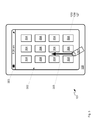
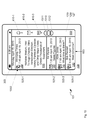
- FIG. 13 depicts an alternative GUI 1302 provided at display 126 in response to processor 120 detecting a sliding touch input at touchscreen 125, the sliding touch input including a change in direction, the sliding touch input terminating in a static touch input proximal an edge of touchscreen 125.
- GUI 1302 is an alternative to GUI 602. It is assumed in Fig. 13 that finger 301, or the like, has caused the sliding touch input corresponding to arrows 305, 405 to be received at device 101, and that the sliding touch input terminates is static touch input, as described above. However, finger 301 is not depicted in Fig. 13 for clarity, though finger 301 is assumed to be nonetheless present.
- GUI 1302 is substantially similar to GUI 602, however GUI 1302 further comprises proximal a position of the static touch input (i.e. a position of tip of finger 301), one or more of: a first icon 1310 indicative that the list of unread messages can be navigated and/or a position of an area associated with the static touch input; a second icon 1311 indicative that list 603 of unread messages 140 can be navigated to preview a next unread message 140; and, a third icon 1312 indicative that list 603 of unread messages 140 can be navigated to preview a previous unread message 140.
- Icon 1310 can, in some implementations, be simply an un-actuatable indicator of unread messages 140 being provided at display 126 and/or device 101 being in an unread message mode.
- Each of icons 1311, 1312 can comprise actuatable virtual buttons and/or controls for navigating list 603.
- Icon 1311 can comprise a control for navigating to a next unread message 140 and optionally providing a preview thereof.
- Icon 1312 can comprise a control for navigating to a previous unread message 140 and optionally providing a preview thereof.
- icon 1310 can also comprise an actuatable virtual buttons and/or control, for example one or more of designating a respective unread message 140 as a read message; deleting a respective unread message 140; returning to a given position of list 603, and the like.
- an action associated with each of icons 1310, 1311, 1312 can be configurable.
- GUI 502 when no touch input is received, after the terminating static touch input is received, GUI 502 can again be provided. In other words, when a user lifts finger 301 off of touchscreen 125, list 603 is replaced with list 503.
- a device configured to filter messages when a series of touch gestures are detected at the device as sliding touch input that includes a change in direction and terminates with static touch input.
- the change in direction of the sliding touch input causes a processor of the device to responsively filter and/or select all of messages, while the terminating static touch input causes the processor to filter out the unread messages and provide the unread messages in a list at the display.
- Such a device can be particularly useful when the device is a mobile electronic device and/or mobile communications device that can be held and operated with one hand. For example, the thumb of the hand can be used to provide the touch input.
- the series of touch gestures has also been found to be more ergonomic for one-handed operation than using menus and/or search options for accessing unread messages.
- the functionality of device 101 can be implemented using pre-programmed hardware or firmware elements (e.g., application specific integrated circuits (ASICs), electrically erasable programmable read-only memories (EEPROMs), etc.), or other related components.
- the functionality of device 101 can be achieved using a computing apparatus that has access to a code memory (not shown) which stores computer-readable program code for operation of the computing apparatus.
- the computer-readable program code could be stored on a computer readable storage medium which is fixed, tangible and readable directly by these components, (e.g., removable diskette, CD-ROM, ROM, fixed disk, USB drive).
- the computer-readable program can be stored as a computer program product comprising a computer usable medium.
- a persistent storage device can comprise the computer readable program code.
- the computer-readable program code and/or computer usable medium can comprise a non-transitory computer-readable program code and/or non-transitory computer usable medium.
- the computer-readable program code could be stored remotely but transmittable to these components via a modem or other interface device connected to a network (including, without limitation, the Internet) over a transmission medium.
- the transmission medium can be either a non-mobile medium (e.g., optical and/or digital and/or analog communications lines) or a mobile medium (e.g., microwave, infrared, free-space optical or other transmission schemes) or a combination thereof.
Landscapes
- Engineering & Computer Science (AREA)
- Theoretical Computer Science (AREA)
- General Engineering & Computer Science (AREA)
- Human Computer Interaction (AREA)
- Physics & Mathematics (AREA)
- General Physics & Mathematics (AREA)
- Business, Economics & Management (AREA)
- Human Resources & Organizations (AREA)
- General Business, Economics & Management (AREA)
- Entrepreneurship & Innovation (AREA)
- Computer Hardware Design (AREA)
- Strategic Management (AREA)
- Signal Processing (AREA)
- Computer Networks & Wireless Communication (AREA)
- Data Mining & Analysis (AREA)
- Economics (AREA)
- Marketing (AREA)
- Operations Research (AREA)
- Quality & Reliability (AREA)
- Tourism & Hospitality (AREA)
- User Interface Of Digital Computer (AREA)
Abstract
Description
- The specification relates generally to electronic devices, and specifically to a device and method for filtering messages.
- The evolution of computers is currently quite active in the electronic device environment. It is now well-known to including messaging functions in electronic devices. More recently, there has been a veritable explosion of the number and type of applications that are configured to the unique form factors and computing environments of electronic devices.
- For a better understanding of the various implementations described herein and to show more clearly how they may be carried into effect, reference will now be made, by way of example only, to the accompanying drawings in which:
-
Fig. 1 depicts a schematic diagram of a device for filtering messages, according to non-limiting implementations. -
Fig. 2 depicts a block diagram of a flowchart of a method for filtering messages, according to non-limiting implementations. -
Fig. 3 depicts a perspective view of the device ofFig. 1 showing a Graphic User Interface (GUI) for filtering messages, and a first portion of sliding touch input being received at the device, the sliding touch input used as a trigger for filtering messages, according to non-limiting implementations. -
Fig. 4 depicts a perspective view of the device ofFig. 1 showing a GUI for filtering messages, and a second portion of sliding touch input being received at the device, according to non-limiting implementations. -
Fig. 5 depicts a perspective view of the device ofFig. 1 showing static touch input being received at the device after a change in direction of sliding touch input is detected, and a optional GUI of unread messages and read messages that is provided when the change in direction of the sliding touch input is detected, according to non-limiting implementations. -
Fig. 6 depicts a perspective view of the device ofFig. 1 showing a resulting GUI of unread messages that is provided when the static touch input terminates the sliding touch input, according to non-limiting implementations. -
Fig. 7 depicts a perspective view of the device ofFig. 1 , and navigation of the GUI ofFig. 6 , according to non-limiting implementations. -
Fig. 8 depicts a perspective view of the device ofFig. 1 and a further sliding touch input being received, that results in an unread message being designated as read, according to non-limiting implementations. -
Fig. 9 depicts the device ofFig. 1 and a processor thereof changing a designation of a message from unread to read at a memory of the device, according to non-limiting implementations. -
Fig. 10 depicts a perspective view of the device ofFig. 1 and a further sliding touch input being received, that results in an unread message being deleted, according to non-limiting implementations. -
Fig. 11 depicts the device ofFig. 1 and a processor thereof changing deleting an unread message at a memory of the device, according to non-limiting implementations. -
Fig. 12 depicts a perspective view of the device ofFig. 1 , and a further sliding touch input being received that results a return to the GUI ofFig. 5 , according to non-limiting implementations. -
Fig. 13 depicts a perspective view of the device ofFig. 1 showing an alternative GUI of unread messages that is provided when static touch input terminates the sliding touch input, the GUI including icons and/or virtual buttons for navigating the unread messages, according to non-limiting implementations. - In general, this disclosure is directed to a device, and in particular a mobile electronic device, with a touchscreen, that can receive and display messages, at the touchscreen. In general, mobile electronic devices represent electronic devices that are readily movable from place to place. Further such mobile electronic devices are often operated with one hand in busy environments. When such devices receive messages, it is desirable to display only unread messages; however accessing unread messages can be challenging on many devices. For example, a filter can be manually applied by adjusting a setting in a mail application using a pull down menu or the like, and/or by navigating to unread messages by actuating a series navigation buttons. However, such operations can be finicky using one-handed operation, and are prone to error, and/or can require two-handed operation and/or require that adjustments be made to the device that may have to be changed later so that all messages can be viewed. This specification hence describes various implementations of a device that can easily, and ergonomically, navigate to unread messages using one-handed gestures at a touchscreen.
- In this specification, elements may be described as "configured to" perform one or more functions or "configured for" such functions. In general, an element that is configured to perform or configured for performing a function is enabled to perform the function, or is suitable for performing the function, or is adapted to perform the function, or is operable to perform the function, or is otherwise capable of performing the function.
- In this specification, elements, such as a processor, may be described as "providing", at a display, given items, such that a display device displays a representation of those items. In general, a display and/or a display device comprises image forming apparatus and circuitry for controlling the image forming apparatus. Hence, in general, an element that "provides" an item at a display communicates with the circuitry which, in turn, controls the image forming apparatus to provide a representation of the item, for example by turning pixels of the image forming apparatus on and off, based on data and/or frame data and/or commands received at the circuitry from the element, such as a processor. Thus, when an element, such as a processor, is described as providing, at a display, a given item, a series of technical effects and/or steps occur: as such, providing a given item at a display is not to be interpreted as simply displaying information. Further, when a processor, for example, provides a given item, at a display, a physical state of a device is change and/or modified and/or transformed.
- An aspect of the specification provides a device comprising: a processor; a memory storing messages, at least a subset of the messages designated as unread messages; and a touchscreen including a display; the processor configured to: detect a sliding touch input at the touchscreen, the sliding touch input including a change in direction, the sliding touch input terminating in a static touch input proximal an edge of the touchscreen; and, in response to detecting the static touch input, provide, at the display, a list of the unread messages.
- The processor can be further configured to: prior to providing the list of the unread messages, provide, at the display, an initial list of the messages during the sliding touch input, the initial list of the messages including both the unread messages and the messages designated as read messages. The processor can be further configured to: provide the initial list of the messages when the change in direction is detected. A first portion of the sliding touch input can be in a first direction and a second portion of the sliding touch input can be in a second direction, and the processor can be further configured to: after the static touch input is detected, detect another sliding touch input beginning at a position of the static touch input, in an opposite direction to the second direction; and, in response, replace, at the display, the list of the unread messages with the initial list of the messages.
- The processor can be further configured to, in response to detecting the static touch input, provide, at the display, a preview of a given unread message, in the list of the unread messages, when providing the list of the unread messages. The preview can include: one or more of metadata associated with the given unread message and a subject of the given unread message; and, at least a portion of a body of the unread message, wherein data provided in the list for each of other unread messages can further comprise respective metadata and a respective subject. The processor can be further configured to, in response to detecting a further sliding touch input beginning at a position of the static touch input: when the further sliding touch input is in a first direction relative to the position of the static touch input, provide, at the display, a preview of a next unread message in the list of the unread messages; and when the further sliding touch input is in a second direction opposite the first direction, provide, at the display, a preview of a previous unread message in the list of the unread messages. The processor can be further configured to, when a given change in position of the further sliding touch input occurs in a length of time greater than a threshold time period, designate a respective one of the unread messages as a read message. The processor can be further configured to, when a given change in position of the further sliding touch input occurs in a length of time greater than a threshold time period, delete a respective one of the unread messages.
- The processor can be further configured to provide, at the display, proximal a position of the static touch input. one or more of: a first icon indicative of at least one of that the list of the unread messages can be navigated and an area associated with the static touch input; a second icon indicative that the list of the unread messages can be navigated to preview a next unread message; and, a third icon indicative that the list of the unread messages can be navigated to preview a previous unread message.
- Another aspect of the specification provides a method comprising: at device comprising: a processor; a memory storing messages, at least a subset of the messages designated as unread messages; and a touchscreen including a display, detecting a sliding touch input at the touchscreen, the sliding touch input including a change in direction, the sliding touch input terminating in a static touch input proximal an edge of the touchscreen; and, in response to detecting the static touch input, providing, at the display, a list of the unread messages.
- The method can further comprise: prior to providing the list of the unread messages, providing, at the display, an initial list of the messages during the sliding touch input, the initial list of the messages including both the unread messages and the messages designated as read messages. The method can further comprise: providing the initial list of the messages when the change in direction is detected. A first portion of the sliding touch input can be in a first direction and a second portion of the sliding touch input can be in a second direction, and the method can further comprise: after the static touch input is detected, detecting another sliding touch input beginning at a position of the static touch input, in an opposite direction to the second direction; and, in response, replacing, at the display, the list of the unread messages with the initial list of the messages.
- The method can further comprise, in response to detecting the static touch input, providing, at the display, a preview of a given unread message, in the list of the unread messages, when providing the list of the unread messages.
- The method can further comprise, in response to detecting a further sliding touch input beginning at a position of the static touch input: when the further sliding touch input is in a first direction relative to the position of the static touch input, providing, at the display, a preview of a next unread message in the list of the unread messages; and when the further sliding touch input is in a second direction opposite the first direction, providing, at the display, a preview of a previous unread message in the list of the unread messages. The preview can include: one or more of metadata associated with the given unread message and a subject of the given unread message; and, at least a portion of a body of the unread message, wherein data provided in the list for each of other unread messages can further comprise respective metadata and a respective subject. The method can further comprise, when a given change in position of the further sliding touch input occurs in a length of time greater than a threshold time period, designating a respective one of the unread messages as a read message. The method can further comprise, when a given change in position of the further sliding touch input occurs in a length of time greater than a threshold time period, deleting a respective one of the unread messages.
- The method can further comprise providing, at the display, proximal a position of the static touch input. one or more of: a first icon indicative of at least one of that the list of the unread messages can be navigated and an area associated with the static touch input; a second icon indicative that the list of the unread messages can be navigated to preview a next unread message; and, a third icon indicative that the list of the unread messages can be navigated to preview a previous unread message.
- Yet a further aspect of the specification provides a computer program product comprising a computer usable medium having a computer readable program code adapted to be executed to implement a method comprising: at device comprising: a processor; a memory storing messages, at least a subset of the messages designated as unread messages; and a touchscreen including a display, detecting a sliding touch input at the touchscreen, the sliding touch input including a change in direction, the sliding touch input terminating in a static touch input proximal an edge of the touchscreen; and, in response to detecting the static touch input, providing, at the display, a list of the unread messages. The computer usable medium can comprise a non-transitory computer usable medium.
-
Fig. 1 depicts a schematic diagram of a mobileelectronic device 101, referred to interchangeably hereafter asdevice 101, according to non-limiting implementations.Device 101 comprises ahousing 109, aprocessor 120, amemory 122, acommunication interface 124, atouchscreen 125 that includes adisplay 126 and atouchscreen panel 127, at least oneoptional input device 128, anoptional speaker 132 and anoptional microphone 134. - In particular,
memory 122 stores messages 140-1, 140-2, 140-3....140-n, 141-1, 141-2, 141-3...141-m. Messages 140-1, 140-2, 140-3....140-n, 141-1, 141-2, 141-3...141-m are interchangeably referred to hereafter, collectively, asmessages message 140 and/or amessage 141 and/or amessage messages 140 can be designated as unread messages andmessages 141 can be designated as read messages; in other words, at least a subset ofmessages unread messages 140 and generically as anunread message 140; similarly, messages 141-1, 141-2, 141-3....141-n, are interchangeably referred to hereafter, collectively, as readmessages 141 and generically as aread message 141. - In
Fig. 1 ,unread messages 140 are designated as unread, atmemory 122, using a "U" and readmessages 141 are designated as read, atmemory 122, using an "R"; however, such a convention is merely for example purposes only and any process and/or method and/or means and/or designator can be used to designatemessages messages memory 122, and database conventions can be used to designatemessages unread messages 140 and a number "m" read ofmessages 141 are depicted inFig. 1 , any number ofunread messages 140 and readmessages 141 that can be stored atmemory 122 is within the scope of present implementation. - Each of
messages - In order to filter
unread messages 140 from readmessages 141, and as will be described hereafter,processor 120 is generally configured to: detect a sliding touch input attouchscreen 125, the sliding touch input including a change in direction, the sliding touch input terminating in a static touch input proximal an edge oftouchscreen 125; and, in response to detecting the static touch input, provide, atdisplay 126, a list ofunread messages 140. -
Device 101 can be any type of electronic device that can be used in a self-contained manner to implement messaging functions, including sending and receiving messages using thecommunication interface 124 and, in particular,filter messages unread messages 140 is provided atdisplay 126. -
Device 101 includes, but is not limited to, any suitable combination of electronic devices, communications devices, computing devices, personal computers, laptop computers, portable electronic devices, mobile computing devices, portable computing devices, tablet computing devices, laptop computing devices, desktop phones, telephones, PDAs (personal digital assistants), cellphones, smartphones, e-readers, internet-enabled appliances and the like. Other suitable devices are within the scope of present implementations. - It should be emphasized that the structure of
device 101 inFig. 1 is purely an example, and contemplates a device that can be used for both wireless voice (e.g. telephony) and wireless data communications (e.g. email, web browsing, text, and the like). However,Fig. 1 contemplates a device that can be used for any suitable specialized functions, including, but not limited, to one or more of, messaging, telephony, computing, appliance, and/or entertainment related functions. - Housing 109 can comprise any housing, casing, and the like. It is appreciated that
device 101 can be portable (readily movable from place to place) and, in some implementations,device 101 can be handheld (sized and shaped to be held or carried in a human hand, and typically used while so held or carried); hence,housing 109 can be configured for a corresponding type ofdevice 101. In general,housing 109 encloses or houses the components ofdevice 101, such asprocessor 120,memory 122,communication interface 124, etc.; however some components can be visible via apertures, windows and the like inhousing 109. For example,display 126 is generally visible, andtouchscreen panel 127 is generally accessible for touching, for example by a finger of a user. -
Touchscreen 125 comprisesdisplay 126 andtouchscreen panel 127.Display 126 comprises any suitable one of or combination of CRT (cathode ray tube) and/or flat panel displays (e.g. LCD (liquid crystal display), plasma, OLED (organic light emitting diode), and the like).Touchscreen panel 127 includes but is not limited to a capacitive touchscreen panel, a resistive touchscreen panel, and the like.Touchscreen 125, and inparticular touchscreen panel 127, is generally configured to receive input data, and, in particular, touch input data. Touch input data can comprise one or more of sliding touch input and static touch input. For example, sliding touch input can comprise data detected attouchscreen panel 127 that corresponds to a series of touch inputs attouchscreen panel 127 in adjacent portions oftouchscreen panel 127 that represent continuous touching actuation thereof in a sliding motion; while each touch input in the sliding touch input can be discrete, depending on how often touchscreen panel is sampled byprocessor 120, the series of touch inputs is recognized byprocessor 120 as sliding touch input. - Similarly, a static touch input can comprise a series of touch inputs at
touchscreen panel 127 that are all generally in a same area of touchscreen panel that represent continuous touching actuation thereof without substantial movement; while each touch input in the static touch input can be discrete, depending on how often touchscreen panel is sampled byprocessor 120, the series of touch inputs is recognized byprocessor 120 as a static touch input. -
Processor 120 is generally configured to distinguish between a sliding touch input and a static touch input: for example,processor 120 can be configured to determine that, when a touch input is detected within a given area for a given period of time, the touch input is a static touch input, the given area and given period of time being predetermined and stored atmemory 122; the given area and given period of time can be determined one or more of one or more of experimentally, heuristically, trial and error, using user interface design software and the like. -
Display 126 andtouchscreen panel 127 are generally aligned such that areas ofdisplay 126, where actuatable and/or activatable and/or selectable controls and/or items are displayed, correspond to areas oftouchscreen panel 127 where touch input can be received to actuate and/or activate and/or select the corresponding controls and/or items. While each ofdisplay 126 andtouchscreen panel 127 can be provided separately, when integrated intodevice 101 astouchscreen 125, they generally work intandem using processor 120 whichcontrol display 126 to provide actuatable and/or activatable and/or selectable controls and/or items, and receives touch input data from touchscreen panel 127:processor 120 can determine whether an area of the touch input corresponds to the area of the display where the actuatable and/or activatable and/or selectable controls and/or items are located andcontrol display 126, anddevice 101, accordingly. - Furthermore,
touchscreen panel 127 can be larger than an area ofdisplay 126 so that touch input can be received at a location oftouchscreen panel 127 that does not correspond to an area ofdisplay 126; for example, in these implementations,touchscreen panel 127 can extend to a bezel ofdisplay 126 so that touch input can be received at the bezel.Processor 120 can hence be further configured to determine when touch input is received attouchscreen panel 127 at a location that corresponds to an area ofdisplay 126, and when touch input is received attouchscreen panel 127 at a location that corresponds to an area of a bezel ofdisplay 126. - In some implementations,
device 101 further comprises at least oneoptional input device 128, in addition totouchscreen 125, the at least oneinput device 128 is generally configured to receive input data, and can comprise any suitable combination of input devices, including but not limited to a keyboard, a keypad, a pointing device, a mouse, a track wheel, a trackball, a touchpad, a touchscreen and the like. Other suitable input devices are within the scope of present implementations. - In any event, input from touchscreen 125 (e.g. touchscreen panel 127), and/or optional at least one
input device 128, is received atprocessor 120, which can be implemented as a plurality of processors, including but not limited to one or more central processors (CPUs). -
Processor 120 is configured to communicate with amemory 122 comprising a non-volatile storage unit (e.g. Erasable Electronic Programmable Read Only Memory ("EEPROM"), Flash Memory) and a volatile storage unit (e.g. random access memory ("RAM")). Programming instructions that implement the functional teachings ofdevice 101 as described herein are typically maintained, persistently, inmemory 122 and used byprocessor 120 which makes appropriate utilization of volatile storage during the execution of such programming instructions. Those skilled in the art will now recognize thatmemory 122 is an example of computer readable media that can store programming instructions executable onprocessor 120. Furthermore,memory 122 is also an example of a memory unit and/or memory module. - In particular,
memory 122 stores at least oneapplication 150, that, when processed byprocessor 120, enablesprocessor 120 to: detect a sliding touch input attouchscreen 125, the sliding touch input including a change in direction, the sliding touch input terminating in a static touch input proximal an edge oftouchscreen 125; and, in response to detecting the static touch input, provide, atdisplay 126, a list ofunread messages 140. - At least one
application 150 is an example of programming instructions stored atmemory 122. For example, at least oneapplication 150 can comprise a combination of a messaging application a filtering application for filteringmessages touchscreen 125. In some implementations the messaging application and the filtering application can be combined, while in other implementations the messaging application and the filtering application are distinct from one another. -
Processor 120 can be further configured to communicate withoptional microphone 134 andspeaker 132.Microphone 134 comprises any suitable microphone for receiving sound and converting to audio data.Speaker 132 comprises any suitable speaker for converting audio data to sound to provide one or more of audible alerts, audible communications from remote communication devices, and the like. In some implementations, one or more ofinput device 128 andtouchscreen 125 are external todevice 101, withprocessor 120 in communication with each ofinput device 128 and/ortouchscreen 125 via a suitable connection and/or link. -
Processor 120 also connects to communication interface 124 (interchangeably referred to interchangeably as interface 124), which can be implemented as one or more radios and/or connectors and/or network adaptors, configured to wirelessly communicate with one or more communication networks (not depicted), for example via one or more antennas (not depicted). It will be appreciated thatinterface 124 is configured to correspond with network architecture that is used to implement one or more communication links to the one or more communication networks, including but not limited to any suitable combination of USB (universal serial bus) cables, serial cables, wireless links, cell-phone links, cellular network links (including but not limited to 2G, 2.5G, 3G, 4G+ such as UMTS (Universal Mobile Telecommunications System), GSM (Global System for Mobile Communications), CDMA (Code division multiple access), FDD (frequency division duplexing), LTE (Long Term Evolution), TDD (time division duplexing), TDD-LTE (TDD-Long Term Evolution), TD-SCDMA (Time Division Synchronous Code Division Multiple Access) and the like, wireless data, Bluetooth links, NFC (near field communication) links, WLAN (wireless local area network) links, WiFi links, WiMax links, packet based links, the Internet, analog networks, the PSTN (public switched telephone network), access points, and the like, and/or a combination. - Specifically,
interface 124 comprises radio equipment (i.e. a radio transmitter and/or radio receiver) for receiving and/or transmitting signals and/ormessages Fig. 1 , it is assumed thatmessages device 101 viainterface 124 and stored atmemory 122. -
Device 101 further comprises a power source, not depicted, for example a battery or the like. In some implementations the power source can comprise a connection to a mains power supply and a power adaptor (e.g. and AC-to-DC (alternating current to direct current) adaptor). - In any event, it should be understood that a wide variety of configurations for
device 101 are contemplated. - Attention is now directed to
Fig. 2 which depicts a flowchart illustrating amethod 200 for filtering messages, according to non-limiting implementations. In order to assist in the explanation ofmethod 200, it will be assumed thatmethod 200 is performed usingdevice 101. Furthermore, the following discussion ofmethod 200 will lead to a further understanding ofdevice 101 and its various components. However, it is to be understood thatdevice 101 and/ormethod 200 can be varied, and need not work exactly as discussed herein in conjunction with each other, and that such variations are within the scope of present implementations. It is appreciated that, in some implementations,method 200 is implemented indevice 101 byprocessor 120, for example by implementingapplication 150. - It is to be emphasized, however, that
method 200 need not be performed in the exact sequence as shown, unless otherwise indicated; and likewise various blocks may be performed in parallel rather than in sequence; hence the elements ofmethod 200 are referred to herein as "blocks" rather than "steps". It is also to be understood thatmethod 200 can be implemented on variations ofdevice 101 as well. - At
block 201,processor 120 detects a sliding touch input attouchscreen 125, for example due to a finger of a user (including, but not limited to, a thumb of the user) sliding ontouchscreen 125. Atblock 203,processor 120 determines and/or detects whether the sliding touch input includes a change in direction, for example due to the finger of the user first sliding in a first direction ontouchscreen 125 and then sliding in a second direction ontouchscreen 125, in a continuous motion without thefinger leaving touchscreen 125, though pauses in movement offinger 301 are within the scope of present implementations, including, but not limited to, a slight pause whenfinger 301 changes direction. In other words, the finger maintains contact withtouchscreen 125 while the sliding touch input is being received. When no change in direction is detected at block 203 (e.g. a "No" decision at block 203), at anoptional block 204,processor 120 can provide, atdisplay 126, one or more indicators of one or more of: whether there are unread messages stored atmemory 122; and a number ofunread messages 140 stored atmemory 122, as described below with respect toFig. 4 ; in general, such indicators can be graphical indicators and/or iconic indicators. However, block 204 is optional, as indicated byblock 204 being drawn in stippled lines; otherwise block 201 is again implemented asprocessor 120 performs other tasks and waits until sliding touch input is again detected attouchscreen 125. Furthermore, in other implementations, block 204 can be implemented regardless of whether a change in direction is detected at block 203 (i.e. regardless of a "Yes" decision or a "No" decision" at block 203). - When a change in direction is detected at block 203 (e.g. a "Yes" decision at block 203), at an
optional block 205,processor 120 provides, atdisplay 126, a list ofmessages unread messages 140 and a portion ofunread messages 141; for example, the list ofmessages display 126, in an order thatmessages processor 120 is further configured to, prior to providing a list ofunread messages 141, provide, atdisplay 126, an initial list ofmessages messages unread messages 140 and the messages designated as readmessages 141. - However, block 205 is optional, as indicated by
block 205 being drawn in stippled lines. Further, whenoptional block 204 occurs when a "Yes" decision occurs atblock 203,optional block 204 can occur before and/or concurrent withblock 205. - Otherwise, at
block 207,processor 120 determines whether the sliding touch input terminates in a static touch input proximal an edge of touchscreen 125: for example, the finger stops moving, and continues to touchtouchscreen 125, for example for a given period of time, such as more than about half of a second and/or about 1.5 seconds. However, the given period of time over which the static touch input occurs from the edge oftouchscreen 125 in order to be considered "static" can be predetermined one or more of experimentally, heuristically, trial and error, using user interface design software and the like. The given period of time can be stored at one or more ofapplication 150 andmemory 122. - When
processor 120 determines that the sliding touch input does not terminate in a static touch input proximal an edge oftouchscreen 125, (e.g. a "No" decision at block 207), block 201 is again implemented asprocessor 120 performs other tasks and waits until sliding touch input is again detected attouchscreen 125. For example, a "No" decision can be made atblock 207 when either the finger does not maintain contact withtouchscreen 125 at the end of the sliding touch input and/or when the static touch input does not occur proximal to an edge oftouchscreen 125. - However, when
processor 120 determines that the sliding touch input terminates in a static touch input proximal an edge oftouchscreen 125, (e.g. a "Yes" decision at block 207), atblock 209, in response to detecting the static touch input,processor 120 provides, atdisplay 126, a list ofunread messages 140. - A "Yes" decision can be made at
block 207 when the finger maintains contact proximal to an edge oftouchscreen 125 for the given period of time. - Determining whether the static touch input occurs proximal to an edge of
touchscreen 125 can include, but is not limited to, determining whether the static touch input occurs within a given area oftouchscreen 125 proximal an edge of touchscreen, for example within about 0.5 cm of an edge oftouchscreen 125 and/or about 10% from an edge oftouchscreen 125. However, the distance from the edge oftouchscreen 125 where the static touch input occurs, and/or the area within which that the static touch input occurs, that is considered "proximal" an edge oftouchscreen 125 can be predetermined one or more of experimentally, heuristically, trial and error, using user interface design software and the like. The distance and/or area can be stored at one or more ofapplication 150 andmemory 122. - It is further appreciated that
method 200 can also comprise applying a first filtering condition tomessages processor 120 determines, atblock 203, that the sliding touch input comprises a change in direction and applying a second filtering condition tomessages processor 120 determines, atblock 207, that the sliding touch input terminates in a static touch input proximal an edge oftouchscreen 125. For example, the first filtering condition can comprise including allmessages display 126, while the second filtering condition comprises filtering out readmessages 141 from the list of messages provided atdisplay 126, and/or including onlyunread messages 140 at the list of messages provided atdisplay 126. In other words,processor 120 can be generally configured to: apply a first filtering condition tomessages processor 120 detects a change in direction in a sliding touch input attouchscreen 125, and, in response, provide a list ofunread messages 140 and readmessages 141 atdisplay 126; and, apply a second filtering condition tomessages processor 120 detects that the sliding touch input terminates in a static touch input proximal an edge oftouchscreen 125, and, in response, provide a list ofunread messages 140 atdisplay 126. -
Method 200 is now described with reference toFigs. 3 to 10 andFig. 12 and13 , each of which depict a front perspective view ofdevice 101, includingtouchscreen 125,display 126 and touchscreen panel 127 (i.e.display 126 is visible through touchscreen panel 127); further, each ofFigs. 3 to 10 andFig. 12 and13 depict graphic user interfaces (GUI) provided atdisplay 126 when circuitry atdisplay 126 is controlled byprocessor 120 to provide representations ofmessages Figs. 3 to 10 andFig. 12 and13 are substantially similar, with like elements having like numbers. - Hence, attention is directed to
Fig. 3 which depicts a finger 301 (including, but not limited to, a thumb of a user) interacting withtouchscreen 125, asdisplay 126 is controlled to provide aGUI 302. While most offinger 301 is depicted, generally only a tip offinger 301 will touchtouchscreen 125. -
GUI 302 includes anoptional status area 303 located in a "top" and/or header region ofGUI 302, thestatus area 303 including icons and/or indicators of states of various electronic components ofdevice 101, as well as a time of day; for example, as depicted,status area 303 includes a battery indicator and a network indicator. However, a location and content ofstatus area 303 is not to be considered particularly limiting. -
GUI 302 further, optionally, includesicons 304, each of which correspond to one or more applications stored atmemory 122; a givenicon 304 can be designated as selected when static touch input is received attouchscreen panel 127 in an area corresponding to a location of the givenicon 304 atdisplay 126; the corresponding application can then be processed byprocessor 120 and/or "launched". - In general,
touchscreen 125 can receive sliding touch input whenfinger 301 slides ontouchscreen 125, for example in a direction of arrow 305: in other words,arrow 305 corresponds to various positions offinger 301 asfinger 301 slides ontouchscreen 125. Further,processor 120 can detect a corresponding sliding touch input (i.e. block 201) corresponding to finger 301 sliding ontouchscreen 125 in direction ofarrow 305; indeed,arrow 305 indicates a position of finger at various locations ontouchscreen 125 while the sliding touch input is being received.Fig. 3 also illustrates that, in general, sliding touch input represented byarrow 305 starts proximal a bottom oftouchscreen 125. However, while the sliding touch input represented byarrow 305 begins approximately midway between a left edge and a right edge oftouchscreen 125, the sliding touch input represented byarrow 305 can begin anywhere attouchscreen 125 that allow a change in direction of the sliding touch input to be received, as described hereafter. - In response, as depicted in
Fig. 4 ,processor 120changes GUI 302 toGUI 402, for example using animation and the like.Fig. 4 also shows thatfinger 301 changed direction during the sliding touch input, as indicated byarrow 405. Further,processor 120 can detect a corresponding sliding touch input (i.e. block 201) corresponding to finger 301 sliding ontouchscreen 125 in direction ofarrow 405; indeed,arrows touchscreen 125 while the sliding touch input is being received. Furthermore,arrows processor 120 determines that sliding touch input includes a change in direction (a "Yes" decision at block 203). In general, the sliding touch input is received withoutfinger 301 being removed fromtouchscreen 125. - However,
Fig. 4 also depicts a given non-limiting implementation ofblock 204 ofmethod 200, which can occur whether a change in direction of the sliding touch input indicated byarrows icon 304, when present, can optionally shrink/become smaller, to make room for indicators 410-1, 410-2, 410-3 which are provided at an edge oftouchscreen 125. Indicators 410-1, 410-2, 410-3 will be interchangeably referred to hereafter, collectively, as indicators 410 and generically as an indicator 410. - Indicators 410 generally indicate whether any
unread messages 140 are stored atmemory 122. Whenunread messages 140 are stored atmemory 122, one or more indicators 410 are provided; otherwise indicators 410 are not provided. Optionally, each indicator 410 can provide a number ofunread messages 140 stored atmemory 122. - Furthermore, each indicator 410 can be indicative of whether
unread messages 140 of a given respective type are stored atmemory 122 and/or a number ofunread messages 140 of a given respective type. For example an indicator 410-1 comprises a graphical icon indicating that there are unread notification messages atmemory 122; as depicted, indicator 410-1 also comprises a number of notification messages designated as unread messages. Similarly, an indicator 410-2 comprises a graphical icon indicating that there are unread email messages atmemory 122; as depicted, indicator 410-2 also comprises a number of email messages designated as unread messages. Similarly, an indicator 410-3 comprises a graphical icon indicating that there are unread text messages atmemory 122; as depicted, indicator 410-3 also comprises a number of text messages designated as unread messages. - Further, while indicators 410 are depicted as being in a particular order and in particular locations (e.g. with indicator 410-1 below indicator 410-2, which is below indicator 410-3, and with indicators on left hand side of display 126), other orders and locations of indicators 410 are within the scope of present implementations. However, in general, indicators 410 are generally provided on
display 126 along a direction of sliding touch input represented byarrow 305. - Indicators 410 are generally appreciated to be optional, but can provide a visual guide for numbers of different types of
unread messages 140. - In any event, as
processor 120 detects a change in direction of the sliding touch input represented byarrows Fig. 5 ,processor 120 optionally changesGUI 402 toGUI 502, for example using animation and the like.Fig. 5 shows that whenprocessor 120 detected the change in direction in the sliding touch input,processor 120 implementedoptional block 205 ofmethod 200 to provide aninitial list 503 ofmessages display 126. Further,processor 120 applied a first filtering condition tomessages memory 122 so that bothunread messages 140 and readmessages 141 are provided in list 503 (i.e.list 503 includes bothunread messages 140 and read messages 141). It is appreciated that eachmessage initial list 503 is provided in a respective row and/or rows (as depicted, three rows for eachmessage message - Further, each
message list 503 by one or more of respective metadata associated with eachmessage message initial list 503 comprises metadata of arespective message respective message respective message respective message message 140, 141 (e.g. "Software Update") and the like. When arespective message respective message initial list 503 can also comprise at least a portion of the text of the text message that can fit on one row oflist 503. Further the type of data displayed in each row for eachmessage respective message - Data provided for a respective
unread message 140 ininitial list 503 can also comprise a respective icon 525-1, 525-2, 525-3 indicative, respectfully, of an unread notification message, an unread email message and an unread text message; similarly, data provided for arespective read message 141 ininitial list 503 can also comprise a respective icon 526-1, 526-2, 526-3 indicative, respectfully, of a read notification message, a read email message and a read text message. Icons 525-1, 525-2, 525-3 will be interchangeably referred to hereafter, collectively, as icons 525 and generically as an icon 525. Similarly, Icons 526-1, 526-2, 526-3 will be interchangeably referred to hereafter, collectively, as icons 526 and generically as an icon 526. Each icon 525 is similar to a respective icon 526, however with a graphical change thereto; while the changes between icons 525, 526 are depicted as differences in shape, in other implementations, icons 525, 526 can be differentiated by changes in color, shading and the like. - Not all
messages display 126 ininitial list 503; rather,initial list 503 can be "slidable" so that a user can selectinitial list 503 usingfinger 301 and "slide"list 503 "up" or "down" to revealfurther messages display 126. The terms "top", "above", "up", "bottom", "below, "down" , as used herein, are understood to be relative totouchscreen 125 and/ordisplay 126, and are not meant to mean "up" and "down", and the like, with respect to the ground. For example,device 101 can be held horizontally and a user can slide list "up" relative totouchscreen 125 and/or display 126 (e.g. away from user) or "down" relative totouchscreen 125 and/or display 126 (e.g. towards user). For example, while indicators 410-1, 410-2, 410 respectively indicate that there are two unread notification messages, four unread email messages and three unread text messages, only one unread notification, one unread email message and two unread text messages (the last partially hidden at an end of list 503) are depicted inlist 503, the remaining unread messages accessible by slidinglist 503 "up". - In any event,
Fig. 5 also depicts thatprocessor 120 is further configured to, prior to providing a list ofunread messages 141, provide, atdisplay 126, aninitial list 503 ofmessages messages unread messages 140 and the messages designated as readmessages 141. In specificnon-limiting implementations processor 120 can be further configured to: provideinitial list 503 ofmessages finger 301 changes direction fromarrow 305 toarrow 405,list 503 can be provided so that, to a user, it appears thatfinger 301 is "pulling"list 503 over from an edge oftouchscreen 125 in an opposite direction of arrow 405 (e.g. from left to right): i.e. in specific non-limiting implementations,list 503 can be animated to slide ontodisplay 126 in a direction ofarrow 405. - In depicted implementations, indicators 410 continue to be provided at
display 126, however, they are moved to an opposite side oftouchscreen 125 than inGUI 402, in a direction ofarrow 405. Specifically, indicators 410 are provided in abar 550 located at an edge ofdisplay 126 located in a direction ofarrow 405 so that, to a user, it appears that indicators 410 are being pulled byfinger 301 from a first edge ofdisplay 126, as inFig. 4 , to an opposite edge ofdisplay 126, as inFig. 5 (e.g. from left to right). -
Fig. 5 also shows thatfinger 301 has remained static when the sliding touch input represented byarrows touchscreen 125 that is in a direction ofarrow 405 and/or in bar 550 (e.g. a right edge): in other words, in these implementations, bar 550 graphically defines the area oftouchscreen 125 that is considered to be proximal to an edge oftouchscreen 125.Bar 550 hence acts as a graphical guide to wherefinger 301 can terminate the sliding touch input in order to cause filtering ofmessages initial list 503 is modified to showunread messages 140 and/ormessages unread messages 140. It is nonetheless appreciated thatbar 550 and indicators 410 are optional. - In some implementations, any detected touch input outside of
bar 550 and/or the area proximal an area of the static touch input is ignored so that accidental touching oftouchscreen 125 outside ofbar 550 does not result in unwanted action ofprocessor 120. - In some
implementations providing list 503 is optional, and the static touch input is received atGUI 402 ofFig. 4 and/orGUI 302 ofFig. 3 without providinglist 503 and/or indicators 410. - In response, to
processor 120 detecting that the sliding touch input terminates in static touch input proximal an edge of touchscreen (i.e. a "Yes" decision at block 207), as depicted inFig. 6 ,processor 120changes GUI 502 toGUI 602, for example using animation and the like. Further, in response, toprocessor 120 detecting that the sliding touch input terminates in static touch input proximal an edge of touchscreen (i.e. a "Yes" decision at block 207),processor 120 provides, atdisplay 126, alist 603 ofunread messages 140. For example, in response, toprocessor 120 detecting that the sliding touch input terminates in static touch input proximal an edge of touchscreen (i.e. a "Yes" decision at block 207),processor 120 applies a second filtering condition tomessages messages 141 frominitial list 503 ofmessages display 126, to providelist 603, and/or including onlyunread messages 140 atlist 603 of messages provided atdisplay 126. - Hence,
unread messages 141 are not provided atlist 603 as readmessages 141 have been filtered fromlist 603, as compared tolist 503. - Similar to list 503,
list 603 can be slidable and the like, so that furtherunread messages 140 can be accessed by slidinglist 603 "down". - In implementations that include indicators 410, indicators 410 can be blurred (as indicated by indicators 410 being drawn in stippled lines in
Fig. 6 ) or removed fromdisplay 126. - In some implementations, when
list 603 is provided, rows oflist 603 are similar to rows oflist 503, as described above, but include data associated withunread messages 140 and not readmessages 141. - In other implementations,
processor 120 is further configured to, in response to detecting the static touch input, provide, atdisplay 126, apreview 650 of a givenunread message 140, inlist 603 of unread messages, when providinglist 603 ofunread messages 140. For example, as depicted, apreview 650 of a firstunread message 140 inlist 603 is provided.Preview 650 can include, but is not limited to, one or more of metadata associated with the givenunread message 140 and a subject of the givenunread message 140; and, at least a portion of a body of theunread message 140, for example text from a body of the givenunread message 140. In contrast to preview 650, data provided inlist 603 for each of the otherunread messages 140 comprises only one or more of respective metadata and a respective subject, and, in the instance of text messages, a portion of the body that can fit on one line of a row oflist 603. - A size of an area of
preview 650 can be determined automatically byprocessor 120, for example based on configurable parameters atdevice 101, which can be stored at one or more ofapplication 150 andmemory 122. For example, a given number of lines of text of a body of a respectiveunread message 140 can be provided inpreview 650; and/or a size of a font of text of a body of a respectiveunread message 140 can be changed so that all the text fits ondisplay 126; and/or text of a body of a respectiveunread message 140 inpreview 650 can be scrollable using further sliding touch input; and/or a only a portion of text of a body of a respectiveunread message 140 that fits ondisplay 126 can be provided. It should be understood that a wide variety of configurations forpreview 650 are contemplated. - Hence, by the use of a combination of sliding and static gestures that can be implemented with one hand, filtering conditions can be applied to
messages messages 141 so that readmessages 140 are provided in alist 603 atdisplay 126. However, further navigation oflist 603 can occur from the static position offinger 301 depicted inFig. 6 . - For example,
Fig. 6 also depicts anarrow 680, which represents a further sliding touch input beginning at a position of the static touch input. In these implementations,processor 120 can be further configured to, in response to detecting the further sliding touch input beginning at a position of the static touch input: when the further sliding touch input is in a first direction relative to the position of the static touch input, provide, atdisplay 126, a preview of a next unread message inlist 603 ofunread messages 140; and, when the further sliding touch input is in a second direction opposite the first direction, provide, atdisplay 126, a preview of a previousunread message 140 inlist 603 ofunread messages 140. - For example, attention is directed to
Fig. 7 , which depicts a GUI 702:processor 120changes GUI 602 toGUI 702, for example using animation and the like, when further sliding touch input represented byarrow 680 is received. The further sliding touch input can be one or more of: generally perpendicular to the sliding touch input represented byarrow 405; in an "up" direction relative totouchscreen 125 and/ordisplay 126; and/or in a "down" direction relative totouchscreen 125 and/ordisplay 126. However, the further sliding touch input being "up" and "down" can have different results atdisplay 126. - As depicted,
arrow 680 is "up"; in these implementations, when the further sliding touch input is "up" relative to the position of the static touch input and/or when the further sliding touch input is in a first direction relative to the position of the static touch input, provide, atdisplay 126, a preview of a nextunread message 140 inlist 603 ofunread messages 140, a preview of a next unread message, inlist 603 ofunread messages 140, is provided. For example, inFig. 7 apreview 750 of a secondunread message 140 inlist 603 is provided, withprocessor 120 removingpreview 650 fromdisplay 126.Preview 750 is similar to preview 650 but respective to the secondunread message 140 inlist 603. - In some implementations, the sliding touch input represented by
arrow 680 can be followed by a return to a position of the static touch input, so that auser flicks finger 301 "up" and then back "down" to the initial position offinger 301 in order to navigatelist 603 to a nextunread message 140. Hence, an "up-down" movement can be used to navigate to nextunread message 140 inlist 603. - When yet a further sliding touch input is received, similar to the further sliding touch input represented by
arrow 680, a preview of a thirdunread message 140 inlist 603 can be provided, and so on. When the lastunread message 140 provided atdisplay 126 is reached (e.g. at a bottom of display 126), and there are furtherunread messages 140 not yet provided at display 126 (e.g. due to limited space at display 126), thenprocessor 120 can automatically slidelist 603 to show the furtherunread messages 140, and previews thereof can be provided in sequence. -
Fig. 7 further depicts anarrow 780, in an opposite direction toarrow 680, which represents a further sliding touch input beginning at a position of the static touch input.Arrow 780 is hence in a "down" direction and, in these implementations, when the further sliding touch input is "down" relative to the position of the static touch input and/or when the further sliding touch input is in a second direction opposite the first direction (i.e. of arrow 680), processor, provides, atdisplay 126, a preview of a previousunread message 140 inlist 603 ofunread messages 140. - For example, when further sliding touch input corresponding to
arrow 780 is received attouchscreen 125, whilepreview 750 of the secondunread message 140 is being provided,processor 120 can changeGUI 702 back toGUI 602, for example using animation and the like. Similarly, when yet a further sliding touch input is received, similar to the further sliding touch input represented byarrow 780, a preview of a givenunread message 140 currently being provided can be replaced by a preview of a previousunread message 140. In thismanner list 603 can be navigated to provide previews ofunread messages 140. - In some implementations, the sliding touch input represented by
arrow 780 can be followed by a return to a position of the static touch input, so that auser flicks finger 301 "down" and then back "up" to the initial position offinger 301 in order to navigatelist 603 to a previousunread message 140. Hence, a "down-up" movement can be used to navigate to nextunread message 140 inlist 603. - Alternatively, when no previews are provided, sliding touch input corresponding to
arrows touchscreen 125 anddisplay 126. - In yet further implementations, a "down-up" movement can be used to navigate to a next
unread message 140 inlist 603, while an "up-down" movement can be used to navigate to a previous unread message inlist 603. - Attention is next directed to
Fig. 8 , which is similar toFig. 7 with like elements having like numbers. LikeFig. 7 , inFig. 8 preview 750 is being provided atdisplay 126.Fig. 8 also depicts anarrow 880 representative of a further sliding touch input that occurs in a length of time greater than a threshold period of time (e.g. above a given threshold speed). As with sliding touch inputs represented byarrows arrow 880 can be accompanied by a return to the initial position of the static touch input. The threshold period of time (and/or a given threshold speed) can be determined one or more of one or more of experimentally, heuristically, trial and error, using user interface design software and the like, and stored at one or more ofapplication 150 andmemory 122. In any event, the further sliding touch input represented byarrow 880 can be indicative of a command to mark a respective message as unread. In other words,processor 120 can be further configured to, when a given change in position of the further sliding touch input occurs in a length of time greater than a threshold time period, designate a respective one of theunread messages 140 atlist 603 as a read message. - For example, in
Fig. 8 , as the secondunread message 140 inlist 603 is being previewed at list 603 (i.e.preview 750 is provided, as described above), when the further sliding touch input represented byarrow 880 is received, the secondunread message 140 is then designated as a read message as indicated by a change of an associated icon 525-2 to icon 526-2. Further, with reference toFig. 9 , substantially similar toFig. 1 , with like elements having like numbers,processor 120 changes a designator of message 140-2 is from "U" to "R", indicating that message 140-2 is designated as a read message. In some implementations, the second message in list 603 (now a read message) can be removed fromlist 603, but not deleted frommemory 122. - Hence, a rapid (i.e. a given change in position that occurs in a given period of time) "upward" (and then "downward") movement of
finger 301 can be used to change a status of anunread message 140 to a read message. - Alternatively, and/or in combination with the implementation of
Fig. 8 , a further sliding touch input can be used to delete a message inlist 603. For example, attention is next directed toFig. 10 , which is similar toFig. 7 with like elements having like numbers. As withFig. 7 , inFig. 10 preview 750 is being provided atdisplay 126.Fig. 10 also depicts anarrow 1080 representative of a further sliding touch input that occurs in a length of time greater than a threshold period of time (e.g. above a given threshold speed). As with sliding touch inputs represented byarrows arrow 1080 can be accompanied by a return to the initial position of the static touch input. The threshold period of time (and/or threshold speed) can be determined one or more of one or more of experimentally, heuristically, trial and error, using user interface design software and the like, and stored at one or more ofapplication 150 andmemory 122. In any event, the further sliding touch input represented byarrow 1080 can be indicative of a command to delete a message. In other words,processor 120 can be further configured to, when a given change in position of the further sliding touch input occurs in a length of time greater than a threshold time period, delete, atmemory 122, a respective one of theunread messages 140 inlist 603. - For example, in
Fig. 10 , as the secondunread message 140 inlist 603 is being previewed at list 603 (i.e.preview 750 is provided, as described above), when the further sliding touch input represented byarrow 1080 is received, the secondunread message 140 is then deleted, as indicated by the "X" through the secondunread message 140 inlist 603, which is subsequently removed fromlist 603. Further, with reference toFig. 11 , substantially similar toFig. 1 , with like elements having like numbers,processor 120 deletes unread message 140-2 frommemory 122, as indicated by the "X" through the second unread message 140-2. - Hence, a rapid (i.e. a give change in position that occurs in a given period of time) "downward" (and then "upward") movement of
finger 301 can be used to delete anunread message 140 frommemory 122 andlist 603. - Attention is next directed to
Fig. 12 , which is similar toFig. 7 with like elements having like numbers.Fig. 12 depicts anarrow 1280 representative of another sliding touch input in a direction oppositearrow 405. Specifically, as has already been described, a first portion of the initial sliding touch input represented byarrow 305 is in a first direction and a second portion of the initial sliding touch input represented byarrow 405 is in a second direction. Further the second portion of the initial sliding touch input represented byarrow 405 can causelist 503 to appear to "slide" ontodisplay 126 in a direction of arrow 405 (e.g. left to right). Hence, to return tolist 503,processor 120 can be further configured to: after the static touch input described above with respect toFigs. 5 and6 is detected, detect another sliding touch input, for example as represented byarrow 1280, beginning at a position of the static touch input, in an opposite direction to the second direction, as represented byarrow 405; and, in response, replace, atdisplay 126,list 603 ofunread messages 140 withinitial list 503 ofmessages 140. In other words,processor 120 replaces GUI 702 (orGUI 602 when another sliding touch input in a direction ofarrow 1280 is received whileGUI 602 is being provided), withGUI 502, using animation or the like, when another sliding touch input in a direction ofarrow 1280 is received. - Persons skilled in the art will appreciate that there are yet more alternative implementations and modifications possible. For example, in some implementations, any detected "left" or "right" touch input received at
bar 550 and/or the area proximal an area of the static touch input is ignored so that accidental touching oftouchscreen 125 "left" or "right" does not result in unwanted action ofprocessor 120, left and right being relative to one or more oftouchscreen 125 anddisplay 126. Alternatively, left and right touch input can be used to alternatively designate a respectiveunread message 140 as a read message and/or delete a respectiveunread message 140. - Other configurations for navigating
list 603 are within the scope of present implementations. For example, attention is next directed toFig. 13 , which is substantially similar toFig. 6 , with like elements having like numbers.Fig. 13 depicts analternative GUI 1302 provided atdisplay 126 in response toprocessor 120 detecting a sliding touch input attouchscreen 125, the sliding touch input including a change in direction, the sliding touch input terminating in a static touch input proximal an edge oftouchscreen 125. In other words,GUI 1302 is an alternative toGUI 602. It is assumed inFig. 13 thatfinger 301, or the like, has caused the sliding touch input corresponding toarrows device 101, and that the sliding touch input terminates is static touch input, as described above. However,finger 301 is not depicted inFig. 13 for clarity, thoughfinger 301 is assumed to be nonetheless present. -
GUI 1302 is substantially similar toGUI 602, howeverGUI 1302 further comprises proximal a position of the static touch input (i.e. a position of tip of finger 301), one or more of: afirst icon 1310 indicative that the list of unread messages can be navigated and/or a position of an area associated with the static touch input; asecond icon 1311 indicative thatlist 603 ofunread messages 140 can be navigated to preview a nextunread message 140; and, athird icon 1312 indicative thatlist 603 ofunread messages 140 can be navigated to preview a previousunread message 140.Icon 1310 can, in some implementations, be simply an un-actuatable indicator ofunread messages 140 being provided atdisplay 126 and/ordevice 101 being in an unread message mode. Each oficons list 603.Icon 1311 can comprise a control for navigating to a nextunread message 140 and optionally providing a preview thereof.Icon 1312 can comprise a control for navigating to a previousunread message 140 and optionally providing a preview thereof. In someimplementations icon 1310 can also comprise an actuatable virtual buttons and/or control, for example one or more of designating a respectiveunread message 140 as a read message; deleting a respectiveunread message 140; returning to a given position oflist 603, and the like. In some implementations an action associated with each oficons - In yet further implementations, when no touch input is received, after the terminating static touch input is received,
GUI 502 can again be provided. In other words, when a user liftsfinger 301 off oftouchscreen 125,list 603 is replaced withlist 503. - Provided herein is a device configured to filter messages when a series of touch gestures are detected at the device as sliding touch input that includes a change in direction and terminates with static touch input. The change in direction of the sliding touch input causes a processor of the device to responsively filter and/or select all of messages, while the terminating static touch input causes the processor to filter out the unread messages and provide the unread messages in a list at the display. Such a device can be particularly useful when the device is a mobile electronic device and/or mobile communications device that can be held and operated with one hand. For example, the thumb of the hand can be used to provide the touch input. The series of touch gestures has also been found to be more ergonomic for one-handed operation than using menus and/or search options for accessing unread messages.
- Those skilled in the art will appreciate that in some implementations, the functionality of
device 101 can be implemented using pre-programmed hardware or firmware elements (e.g., application specific integrated circuits (ASICs), electrically erasable programmable read-only memories (EEPROMs), etc.), or other related components. In other implementations, the functionality ofdevice 101 can be achieved using a computing apparatus that has access to a code memory (not shown) which stores computer-readable program code for operation of the computing apparatus. The computer-readable program code could be stored on a computer readable storage medium which is fixed, tangible and readable directly by these components, (e.g., removable diskette, CD-ROM, ROM, fixed disk, USB drive). Furthermore, it is appreciated that the computer-readable program can be stored as a computer program product comprising a computer usable medium. Further, a persistent storage device can comprise the computer readable program code. It is yet further appreciated that the computer-readable program code and/or computer usable medium can comprise a non-transitory computer-readable program code and/or non-transitory computer usable medium. Alternatively, the computer-readable program code could be stored remotely but transmittable to these components via a modem or other interface device connected to a network (including, without limitation, the Internet) over a transmission medium. The transmission medium can be either a non-mobile medium (e.g., optical and/or digital and/or analog communications lines) or a mobile medium (e.g., microwave, infrared, free-space optical or other transmission schemes) or a combination thereof. - A portion of the disclosure of this patent document contains material which is subject to copyright protection. The copyright owner has no objection to the facsimile reproduction by any one of the patent document or patent disclosure, as it appears in the Patent and Trademark Office patent file or records, but otherwise reserves all copyrights whatsoever.
- Persons skilled in the art will appreciate that there are yet more alternative implementations and modifications possible, and that the above examples are only illustrations of one or more implementations. The scope, therefore, is only to be limited by the claims appended here.
Claims (15)
- A device comprising:a processor; a memory storing messages, at least a subset of the messages designated as unread messages; and a touchscreen including a display; the processor configured to:detect a sliding touch input at the touchscreen, the sliding touch input including a change in direction, the sliding touch input terminating in a static touch input proximal an edge of the touchscreen; and, in response to detecting the static touch input,provide, at the display, a list of the unread messages.
- The device of claim 1, the processor further configured to:prior to providing the list of the unread messages, provide, at the display, an initial list of the messages during the sliding touch input, the initial list of the messages including both the unread messages and the messages designated as read messages.
- The device of claim 2, the processor further configured to: provide the initial list of the messages when the change in direction is detected.
- The device of claim 2 or 3, wherein a first portion of the sliding touch input is in a first direction and a second portion of the sliding touch input is in a second direction, and the processor is further configured to:after the static touch input is detected, detect another sliding touch input beginning at a position of the static touch input, in an opposite direction to the second direction; and, in response,replace, at the display, the list of the unread messages with the initial list of the messages.
- The device of any preceding claim, wherein the processor is further configured to, in response to detecting the static touch input, provide, at the display, a preview of a given unread message, in the list of the unread messages, when providing the list of the unread messages.
- The device of claim 5, wherein the processor is further configured to, in response to detecting a further sliding touch input beginning at a position of the static touch input:when the further sliding touch input is in a first direction relative to the position of the static touch input, provide, at the display, a preview of a next unread message in the list of the unread messages; andwhen the further sliding touch input is in a second direction opposite the first direction, provide, at the display, a preview of a previous unread message in the list of the unread messages.
- The device of claim 6, wherein the processor is further configured to, when a given change in position of the further sliding touch input occurs in a length of time greater than a threshold time period, designate a respective one of the unread messages as a read message.
- A method comprising:at device comprising: a processor; a memory storing messages, at least a subset of the messages designated as unread messages; and a touchscreen including a display, detecting a sliding touch input at the touchscreen, the sliding touch input including a change in direction, the sliding touch input terminating in a static touch input proximal an edge of the touchscreen; and, in response to detecting the static touch input,providing, at the display, a list of the unread messages.
- The method of claim 8, further comprising:prior to providing the list of the unread messages, providing, at the display, an initial list of the messages during the sliding touch input, the initial list of the messages including both the unread messages and the messages designated as read messages.
- The method of claim 9, further comprising: providing the initial list of the messages when the change in direction is detected.
- The method of claim 9 or 10, wherein a first portion of the sliding touch input is in a first direction and a second portion of the sliding touch input is in a second direction, and the method further comprises:after the static touch input is detected, detecting another sliding touch input beginning at a position of the static touch input, in an opposite direction to the second direction; and, in response,replacing, at the display, the list of the unread messages with the initial list of the messages.
- The method of any of claims 8 to 11, further comprising, in response to detecting the static touch input, providing, at the display, a preview of a given unread message, in the list of the unread messages, when providing the list of the unread messages.
- The method of claim 12, further comprising, in response to detecting a further sliding touch input beginning at a position of the static touch input:when the further sliding touch input is in a first direction relative to the position of the static touch input, providing, at the display, a preview of a next unread message in the list of the unread messages; andwhen the further sliding touch input is in a second direction opposite the first direction, providing, at the display, a preview of a previous unread message in the list of the unread messages.
- The method of claim 13, further comprising, when a given change in position of the further sliding touch input occurs in a length of time greater than a threshold time period, designating a respective one of the unread messages as a read message.
- A computer program product comprising a computer usable medium having a computer readable program code adapted to be executed to implement a method comprising:at device comprising: a processor; a memory storing messages, at least a subset of the messages designated as unread messages; and a touchscreen including a display, detecting a sliding touch input at the touchscreen, the sliding touch input including a change in direction, the sliding touch input terminating in a static touch input proximal an edge of the touchscreen; and, in response to detecting the static touch input,providing, at the display, a list of the unread messages.
Applications Claiming Priority (1)
| Application Number | Priority Date | Filing Date | Title |
|---|---|---|---|
| US13/943,847 US9313316B2 (en) | 2013-07-17 | 2013-07-17 | Device and method for filtering messages |
Publications (2)
| Publication Number | Publication Date |
|---|---|
| EP2827221A1 true EP2827221A1 (en) | 2015-01-21 |
| EP2827221B1 EP2827221B1 (en) | 2019-09-04 |
Family
ID=51266090
Family Applications (1)
| Application Number | Title | Priority Date | Filing Date |
|---|---|---|---|
| EP14177335.8A Active EP2827221B1 (en) | 2013-07-17 | 2014-07-16 | Device and method for filtering messages |
Country Status (3)
| Country | Link |
|---|---|
| US (1) | US9313316B2 (en) |
| EP (1) | EP2827221B1 (en) |
| CA (1) | CA2856928C (en) |
Families Citing this family (18)
| Publication number | Priority date | Publication date | Assignee | Title |
|---|---|---|---|---|
| USD788795S1 (en) * | 2013-09-03 | 2017-06-06 | Samsung Electronics Co., Ltd. | Display screen or portion thereof with animated graphical user interface |
| US9395837B2 (en) * | 2013-09-30 | 2016-07-19 | Your Voice S.P.A. | Management of data in an electronic device |
| EP3511811A1 (en) * | 2013-12-20 | 2019-07-17 | Huawei Device Co., Ltd. | Method and apparatus for managing notification bar message |
| WO2015122551A1 (en) * | 2014-02-12 | 2015-08-20 | 엘지전자 주식회사 | Mobile terminal and control method therefor |
| US10185488B2 (en) * | 2014-07-08 | 2019-01-22 | Sony Corporation | Device and method for displaying information |
| WO2018027551A1 (en) * | 2016-08-09 | 2018-02-15 | 华为技术有限公司 | Message display method, user terminal and graphic user interface |
| US10650621B1 (en) | 2016-09-13 | 2020-05-12 | Iocurrents, Inc. | Interfacing with a vehicular controller area network |
| US10206072B1 (en) * | 2017-08-10 | 2019-02-12 | T-Mobile Usa, Inc. | Inline messaging |
| US10664150B2 (en) | 2017-11-06 | 2020-05-26 | Whatsapp Inc. | Providing group messaging thread highlights |
| USD851671S1 (en) | 2017-11-06 | 2019-06-18 | Whatsapp Inc. | Display screen or portion thereof with graphical user interface |
| US10678401B2 (en) * | 2017-11-06 | 2020-06-09 | Whatsapp Inc. | Providing group messaging thread highlights |
| US10685074B2 (en) | 2017-11-06 | 2020-06-16 | Whatsapp Inc. | Providing group messaging thread highlights |
| US20190281422A1 (en) * | 2018-03-09 | 2019-09-12 | Wrinkl, Inc. | Message display apparatus and method |
| DE102018113615A1 (en) * | 2018-06-07 | 2019-12-12 | Nicolas Bissantz | Method for displaying data on a mobile terminal |
| CN112181237A (en) * | 2020-09-29 | 2021-01-05 | 维沃移动通信(杭州)有限公司 | Display method and device and electronic equipment |
| CN113835573B (en) * | 2021-09-17 | 2025-12-09 | 维沃移动通信有限公司 | Message processing method and electronic equipment |
| US12210729B2 (en) * | 2022-06-30 | 2025-01-28 | Snap Inc. | Messaging application with conversation filtering |
| KR20240062248A (en) * | 2022-10-28 | 2024-05-09 | 삼성에스디에스 주식회사 | Method for providing core conversation preview of unread conversations, and apparatus implementing the same method |
Citations (6)
| Publication number | Priority date | Publication date | Assignee | Title |
|---|---|---|---|---|
| US20100134425A1 (en) * | 2008-12-03 | 2010-06-03 | Microsoft Corporation | Manipulation of list on a multi-touch display |
| US20110157029A1 (en) * | 2009-12-31 | 2011-06-30 | Google Inc. | Touch sensor and touchscreen user input combination |
| US20120290947A1 (en) * | 2011-04-12 | 2012-11-15 | Arcode Corporation | Methods and systems to filter and display electronic messages |
| US20130097566A1 (en) * | 2011-10-17 | 2013-04-18 | Carl Fredrik Alexander BERGLUND | System and method for displaying items on electronic devices |
| EP2584440A1 (en) * | 2011-10-17 | 2013-04-24 | Research in Motion TAT AB | System and method for displaying items on electronic devices |
| US20130145290A1 (en) * | 2011-12-06 | 2013-06-06 | Google Inc. | Mechanism for switching between document viewing windows |
Family Cites Families (12)
| Publication number | Priority date | Publication date | Assignee | Title |
|---|---|---|---|---|
| US8635283B2 (en) * | 2004-04-05 | 2014-01-21 | International Business Machines Corporation | Tagging the seen/not-seen status of a real time message |
| US7925306B2 (en) * | 2007-01-12 | 2011-04-12 | Research In Motion Limited | System and method for providing a preview of message content on a mobile device |
| JP2009075844A (en) * | 2007-09-20 | 2009-04-09 | Fujitsu Ltd | Mobile terminal device, mail display program, and mail display method |
| US8640040B2 (en) | 2008-03-28 | 2014-01-28 | Sprint Communications Company L.P. | Persistent event-management access in a mobile communications device |
| US20110231499A1 (en) | 2010-03-22 | 2011-09-22 | Research In Motion Limited | Management and display of grouped messages on a communication device |
| US9052926B2 (en) | 2010-04-07 | 2015-06-09 | Apple Inc. | Device, method, and graphical user interface for managing concurrently open software applications |
| US9015641B2 (en) * | 2011-01-06 | 2015-04-21 | Blackberry Limited | Electronic device and method of providing visual notification of a received communication |
| JP5739303B2 (en) | 2011-10-25 | 2015-06-24 | 京セラ株式会社 | Mobile terminal, lock control program, and lock control method |
| KR20130086409A (en) * | 2012-01-25 | 2013-08-02 | 삼성전자주식회사 | Apparatus and method for controlling a scorll boundary action of terminal |
| US20140165012A1 (en) | 2012-12-12 | 2014-06-12 | Wenbo Shen | Single - gesture device unlock and application launch |
| US9806712B2 (en) | 2013-03-14 | 2017-10-31 | Control4 Corporation | Systems and methods for gesture-based lighting control |
| US8914752B1 (en) * | 2013-08-22 | 2014-12-16 | Snapchat, Inc. | Apparatus and method for accelerated display of ephemeral messages |
-
2013
- 2013-07-17 US US13/943,847 patent/US9313316B2/en active Active
-
2014
- 2014-07-15 CA CA2856928A patent/CA2856928C/en active Active
- 2014-07-16 EP EP14177335.8A patent/EP2827221B1/en active Active
Patent Citations (6)
| Publication number | Priority date | Publication date | Assignee | Title |
|---|---|---|---|---|
| US20100134425A1 (en) * | 2008-12-03 | 2010-06-03 | Microsoft Corporation | Manipulation of list on a multi-touch display |
| US20110157029A1 (en) * | 2009-12-31 | 2011-06-30 | Google Inc. | Touch sensor and touchscreen user input combination |
| US20120290947A1 (en) * | 2011-04-12 | 2012-11-15 | Arcode Corporation | Methods and systems to filter and display electronic messages |
| US20130097566A1 (en) * | 2011-10-17 | 2013-04-18 | Carl Fredrik Alexander BERGLUND | System and method for displaying items on electronic devices |
| EP2584440A1 (en) * | 2011-10-17 | 2013-04-24 | Research in Motion TAT AB | System and method for displaying items on electronic devices |
| US20130145290A1 (en) * | 2011-12-06 | 2013-06-06 | Google Inc. | Mechanism for switching between document viewing windows |
Also Published As
| Publication number | Publication date |
|---|---|
| CA2856928C (en) | 2021-12-07 |
| CA2856928A1 (en) | 2015-01-17 |
| US9313316B2 (en) | 2016-04-12 |
| US20150026590A1 (en) | 2015-01-22 |
| EP2827221B1 (en) | 2019-09-04 |
Similar Documents
| Publication | Publication Date | Title |
|---|---|---|
| EP2827221B1 (en) | Device and method for filtering messages | |
| EP2827233B1 (en) | Device and method for filtering messages using sliding touch input | |
| US10739947B2 (en) | Swiping functions for messaging applications | |
| KR101794000B1 (en) | Apparatus and method for scrolling in portable terminal | |
| KR101646922B1 (en) | Operation Method of associated with a communication function And Portable Device supporting the same | |
| US8650508B2 (en) | Mobile terminal and operating method thereof | |
| US9582903B2 (en) | Display terminal device connectable to external display device and method therefor | |
| CN102902481B (en) | Terminal and terminal operation method | |
| US20140022285A1 (en) | Handheld device with ergonomic display features | |
| EP2565770A2 (en) | A portable apparatus and an input method of a portable apparatus | |
| US20110265039A1 (en) | Category-based list navigation on touch sensitive screen | |
| JP5779063B2 (en) | Apparatus, method, and program | |
| EP3059668B1 (en) | Portable electronic device including touch-sensitive display and method of controlling selection of information | |
| JP6058790B2 (en) | Apparatus, method, and program | |
| CN109960504A (en) | Object switching method, interface display method and device based on visual programming | |
| JP2013257694A (en) | Apparatus, method, and program | |
| KR20140142520A (en) | Apparatus and method for receiving touch input in an apparatus providing a touch interface | |
| JP6480888B2 (en) | File batch processing method and digital device for executing the program | |
| KR101731316B1 (en) | Files batch processing method | |
| EP3079053B1 (en) | Portable electronic device including touch-sensitive display and method of controlling selection of information | |
| EP3352068A1 (en) | Portable electronic device including physical keyboard and method of controlling selection of information | |
| KR101574752B1 (en) | Touch Mouse Device For Controlling Remote Access | |
| EP3457269B1 (en) | Electronic device and method for one-handed operation | |
| CN105373312A (en) | Method and device for operating mobile terminal | |
| JP2012053662A (en) | Touch panel operation type portable terminal |
Legal Events
| Date | Code | Title | Description |
|---|---|---|---|
| 17P | Request for examination filed |
Effective date: 20140716 |
|
| AK | Designated contracting states |
Kind code of ref document: A1 Designated state(s): AL AT BE BG CH CY CZ DE DK EE ES FI FR GB GR HR HU IE IS IT LI LT LU LV MC MK MT NL NO PL PT RO RS SE SI SK SM TR |
|
| AX | Request for extension of the european patent |
Extension state: BA ME |
|
| PUAI | Public reference made under article 153(3) epc to a published international application that has entered the european phase |
Free format text: ORIGINAL CODE: 0009012 |
|
| R17P | Request for examination filed (corrected) |
Effective date: 20150715 |
|
| RBV | Designated contracting states (corrected) |
Designated state(s): AL AT BE BG CH CY CZ DE DK EE ES FI FR GB GR HR HU IE IS IT LI LT LU LV MC MK MT NL NO PL PT RO RS SE SI SK SM TR |
|
| STAA | Information on the status of an ep patent application or granted ep patent |
Free format text: STATUS: EXAMINATION IS IN PROGRESS |
|
| 17Q | First examination report despatched |
Effective date: 20180312 |
|
| GRAP | Despatch of communication of intention to grant a patent |
Free format text: ORIGINAL CODE: EPIDOSNIGR1 |
|
| STAA | Information on the status of an ep patent application or granted ep patent |
Free format text: STATUS: GRANT OF PATENT IS INTENDED |
|
| INTG | Intention to grant announced |
Effective date: 20190306 |
|
| GRAS | Grant fee paid |
Free format text: ORIGINAL CODE: EPIDOSNIGR3 |
|
| GRAA | (expected) grant |
Free format text: ORIGINAL CODE: 0009210 |
|
| STAA | Information on the status of an ep patent application or granted ep patent |
Free format text: STATUS: THE PATENT HAS BEEN GRANTED |
|
| AK | Designated contracting states |
Kind code of ref document: B1 Designated state(s): AL AT BE BG CH CY CZ DE DK EE ES FI FR GB GR HR HU IE IS IT LI LT LU LV MC MK MT NL NO PL PT RO RS SE SI SK SM TR |
|
| REG | Reference to a national code |
Ref country code: GB Ref legal event code: FG4D |
|
| REG | Reference to a national code |
Ref country code: CH Ref legal event code: EP |
|
| REG | Reference to a national code |
Ref country code: AT Ref legal event code: REF Ref document number: 1176257 Country of ref document: AT Kind code of ref document: T Effective date: 20190915 |
|
| REG | Reference to a national code |
Ref country code: DE Ref legal event code: R096 Ref document number: 602014052861 Country of ref document: DE |
|
| REG | Reference to a national code |
Ref country code: IE Ref legal event code: FG4D |
|
| REG | Reference to a national code |
Ref country code: NL Ref legal event code: MP Effective date: 20190904 |
|
| REG | Reference to a national code |
Ref country code: LT Ref legal event code: MG4D |
|
| PG25 | Lapsed in a contracting state [announced via postgrant information from national office to epo] |
Ref country code: HR Free format text: LAPSE BECAUSE OF FAILURE TO SUBMIT A TRANSLATION OF THE DESCRIPTION OR TO PAY THE FEE WITHIN THE PRESCRIBED TIME-LIMIT Effective date: 20190904 Ref country code: BG Free format text: LAPSE BECAUSE OF FAILURE TO SUBMIT A TRANSLATION OF THE DESCRIPTION OR TO PAY THE FEE WITHIN THE PRESCRIBED TIME-LIMIT Effective date: 20191204 Ref country code: SE Free format text: LAPSE BECAUSE OF FAILURE TO SUBMIT A TRANSLATION OF THE DESCRIPTION OR TO PAY THE FEE WITHIN THE PRESCRIBED TIME-LIMIT Effective date: 20190904 Ref country code: LT Free format text: LAPSE BECAUSE OF FAILURE TO SUBMIT A TRANSLATION OF THE DESCRIPTION OR TO PAY THE FEE WITHIN THE PRESCRIBED TIME-LIMIT Effective date: 20190904 Ref country code: FI Free format text: LAPSE BECAUSE OF FAILURE TO SUBMIT A TRANSLATION OF THE DESCRIPTION OR TO PAY THE FEE WITHIN THE PRESCRIBED TIME-LIMIT Effective date: 20190904 Ref country code: NO Free format text: LAPSE BECAUSE OF FAILURE TO SUBMIT A TRANSLATION OF THE DESCRIPTION OR TO PAY THE FEE WITHIN THE PRESCRIBED TIME-LIMIT Effective date: 20191204 |
|
| PG25 | Lapsed in a contracting state [announced via postgrant information from national office to epo] |
Ref country code: GR Free format text: LAPSE BECAUSE OF FAILURE TO SUBMIT A TRANSLATION OF THE DESCRIPTION OR TO PAY THE FEE WITHIN THE PRESCRIBED TIME-LIMIT Effective date: 20191205 Ref country code: RS Free format text: LAPSE BECAUSE OF FAILURE TO SUBMIT A TRANSLATION OF THE DESCRIPTION OR TO PAY THE FEE WITHIN THE PRESCRIBED TIME-LIMIT Effective date: 20190904 Ref country code: ES Free format text: LAPSE BECAUSE OF FAILURE TO SUBMIT A TRANSLATION OF THE DESCRIPTION OR TO PAY THE FEE WITHIN THE PRESCRIBED TIME-LIMIT Effective date: 20190904 Ref country code: AL Free format text: LAPSE BECAUSE OF FAILURE TO SUBMIT A TRANSLATION OF THE DESCRIPTION OR TO PAY THE FEE WITHIN THE PRESCRIBED TIME-LIMIT Effective date: 20190904 Ref country code: LV Free format text: LAPSE BECAUSE OF FAILURE TO SUBMIT A TRANSLATION OF THE DESCRIPTION OR TO PAY THE FEE WITHIN THE PRESCRIBED TIME-LIMIT Effective date: 20190904 |
|
| REG | Reference to a national code |
Ref country code: AT Ref legal event code: MK05 Ref document number: 1176257 Country of ref document: AT Kind code of ref document: T Effective date: 20190904 |
|
| PG25 | Lapsed in a contracting state [announced via postgrant information from national office to epo] |
Ref country code: NL Free format text: LAPSE BECAUSE OF FAILURE TO SUBMIT A TRANSLATION OF THE DESCRIPTION OR TO PAY THE FEE WITHIN THE PRESCRIBED TIME-LIMIT Effective date: 20190904 Ref country code: IT Free format text: LAPSE BECAUSE OF FAILURE TO SUBMIT A TRANSLATION OF THE DESCRIPTION OR TO PAY THE FEE WITHIN THE PRESCRIBED TIME-LIMIT Effective date: 20190904 Ref country code: AT Free format text: LAPSE BECAUSE OF FAILURE TO SUBMIT A TRANSLATION OF THE DESCRIPTION OR TO PAY THE FEE WITHIN THE PRESCRIBED TIME-LIMIT Effective date: 20190904 Ref country code: EE Free format text: LAPSE BECAUSE OF FAILURE TO SUBMIT A TRANSLATION OF THE DESCRIPTION OR TO PAY THE FEE WITHIN THE PRESCRIBED TIME-LIMIT Effective date: 20190904 Ref country code: RO Free format text: LAPSE BECAUSE OF FAILURE TO SUBMIT A TRANSLATION OF THE DESCRIPTION OR TO PAY THE FEE WITHIN THE PRESCRIBED TIME-LIMIT Effective date: 20190904 Ref country code: PL Free format text: LAPSE BECAUSE OF FAILURE TO SUBMIT A TRANSLATION OF THE DESCRIPTION OR TO PAY THE FEE WITHIN THE PRESCRIBED TIME-LIMIT Effective date: 20190904 Ref country code: PT Free format text: LAPSE BECAUSE OF FAILURE TO SUBMIT A TRANSLATION OF THE DESCRIPTION OR TO PAY THE FEE WITHIN THE PRESCRIBED TIME-LIMIT Effective date: 20200106 |
|
| PG25 | Lapsed in a contracting state [announced via postgrant information from national office to epo] |
Ref country code: SM Free format text: LAPSE BECAUSE OF FAILURE TO SUBMIT A TRANSLATION OF THE DESCRIPTION OR TO PAY THE FEE WITHIN THE PRESCRIBED TIME-LIMIT Effective date: 20190904 Ref country code: IS Free format text: LAPSE BECAUSE OF FAILURE TO SUBMIT A TRANSLATION OF THE DESCRIPTION OR TO PAY THE FEE WITHIN THE PRESCRIBED TIME-LIMIT Effective date: 20200224 Ref country code: SK Free format text: LAPSE BECAUSE OF FAILURE TO SUBMIT A TRANSLATION OF THE DESCRIPTION OR TO PAY THE FEE WITHIN THE PRESCRIBED TIME-LIMIT Effective date: 20190904 Ref country code: CZ Free format text: LAPSE BECAUSE OF FAILURE TO SUBMIT A TRANSLATION OF THE DESCRIPTION OR TO PAY THE FEE WITHIN THE PRESCRIBED TIME-LIMIT Effective date: 20190904 |
|
| REG | Reference to a national code |
Ref country code: DE Ref legal event code: R097 Ref document number: 602014052861 Country of ref document: DE |
|
| PLBE | No opposition filed within time limit |
Free format text: ORIGINAL CODE: 0009261 |
|
| STAA | Information on the status of an ep patent application or granted ep patent |
Free format text: STATUS: NO OPPOSITION FILED WITHIN TIME LIMIT |
|
| PG2D | Information on lapse in contracting state deleted |
Ref country code: IS |
|
| PG25 | Lapsed in a contracting state [announced via postgrant information from national office to epo] |
Ref country code: DK Free format text: LAPSE BECAUSE OF FAILURE TO SUBMIT A TRANSLATION OF THE DESCRIPTION OR TO PAY THE FEE WITHIN THE PRESCRIBED TIME-LIMIT Effective date: 20190904 Ref country code: IS Free format text: LAPSE BECAUSE OF FAILURE TO SUBMIT A TRANSLATION OF THE DESCRIPTION OR TO PAY THE FEE WITHIN THE PRESCRIBED TIME-LIMIT Effective date: 20200105 |
|
| 26N | No opposition filed |
Effective date: 20200605 |
|
| PG25 | Lapsed in a contracting state [announced via postgrant information from national office to epo] |
Ref country code: SI Free format text: LAPSE BECAUSE OF FAILURE TO SUBMIT A TRANSLATION OF THE DESCRIPTION OR TO PAY THE FEE WITHIN THE PRESCRIBED TIME-LIMIT Effective date: 20190904 |
|
| PG25 | Lapsed in a contracting state [announced via postgrant information from national office to epo] |
Ref country code: MC Free format text: LAPSE BECAUSE OF FAILURE TO SUBMIT A TRANSLATION OF THE DESCRIPTION OR TO PAY THE FEE WITHIN THE PRESCRIBED TIME-LIMIT Effective date: 20190904 |
|
| REG | Reference to a national code |
Ref country code: CH Ref legal event code: PL |
|
| REG | Reference to a national code |
Ref country code: BE Ref legal event code: MM Effective date: 20200731 |
|
| PG25 | Lapsed in a contracting state [announced via postgrant information from national office to epo] |
Ref country code: LU Free format text: LAPSE BECAUSE OF NON-PAYMENT OF DUE FEES Effective date: 20200716 Ref country code: LI Free format text: LAPSE BECAUSE OF NON-PAYMENT OF DUE FEES Effective date: 20200731 Ref country code: CH Free format text: LAPSE BECAUSE OF NON-PAYMENT OF DUE FEES Effective date: 20200731 |
|
| PG25 | Lapsed in a contracting state [announced via postgrant information from national office to epo] |
Ref country code: BE Free format text: LAPSE BECAUSE OF NON-PAYMENT OF DUE FEES Effective date: 20200731 |
|
| PG25 | Lapsed in a contracting state [announced via postgrant information from national office to epo] |
Ref country code: IE Free format text: LAPSE BECAUSE OF NON-PAYMENT OF DUE FEES Effective date: 20200716 |
|
| PG25 | Lapsed in a contracting state [announced via postgrant information from national office to epo] |
Ref country code: TR Free format text: LAPSE BECAUSE OF FAILURE TO SUBMIT A TRANSLATION OF THE DESCRIPTION OR TO PAY THE FEE WITHIN THE PRESCRIBED TIME-LIMIT Effective date: 20190904 Ref country code: MT Free format text: LAPSE BECAUSE OF FAILURE TO SUBMIT A TRANSLATION OF THE DESCRIPTION OR TO PAY THE FEE WITHIN THE PRESCRIBED TIME-LIMIT Effective date: 20190904 Ref country code: CY Free format text: LAPSE BECAUSE OF FAILURE TO SUBMIT A TRANSLATION OF THE DESCRIPTION OR TO PAY THE FEE WITHIN THE PRESCRIBED TIME-LIMIT Effective date: 20190904 |
|
| PG25 | Lapsed in a contracting state [announced via postgrant information from national office to epo] |
Ref country code: MK Free format text: LAPSE BECAUSE OF FAILURE TO SUBMIT A TRANSLATION OF THE DESCRIPTION OR TO PAY THE FEE WITHIN THE PRESCRIBED TIME-LIMIT Effective date: 20190904 |
|
| REG | Reference to a national code |
Ref country code: DE Ref legal event code: R082 Ref document number: 602014052861 Country of ref document: DE Ref country code: DE Ref legal event code: R081 Ref document number: 602014052861 Country of ref document: DE Owner name: MALIKIE INNOVATIONS LTD., IE Free format text: FORMER OWNER: BLACKBERRY LIMITED, WATERLOO, ONTARIO, CA |
|
| REG | Reference to a national code |
Ref country code: GB Ref legal event code: 732E Free format text: REGISTERED BETWEEN 20240620 AND 20240627 |
|
| PGFP | Annual fee paid to national office [announced via postgrant information from national office to epo] |
Ref country code: DE Payment date: 20250728 Year of fee payment: 12 |
|
| PGFP | Annual fee paid to national office [announced via postgrant information from national office to epo] |
Ref country code: GB Payment date: 20250722 Year of fee payment: 12 |
|
| PGFP | Annual fee paid to national office [announced via postgrant information from national office to epo] |
Ref country code: FR Payment date: 20250725 Year of fee payment: 12 |