EP2796979A1 - Method and apparatus for adjusting a graphical object according to operator preference - Google Patents
Method and apparatus for adjusting a graphical object according to operator preference Download PDFInfo
- Publication number
- EP2796979A1 EP2796979A1 EP20130179088 EP13179088A EP2796979A1 EP 2796979 A1 EP2796979 A1 EP 2796979A1 EP 20130179088 EP20130179088 EP 20130179088 EP 13179088 A EP13179088 A EP 13179088A EP 2796979 A1 EP2796979 A1 EP 2796979A1
- Authority
- EP
- European Patent Office
- Prior art keywords
- preference
- user
- handed
- graphical object
- graphical
- Prior art date
- Legal status (The legal status is an assumption and is not a legal conclusion. Google has not performed a legal analysis and makes no representation as to the accuracy of the status listed.)
- Granted
Links
Images

Classifications
-
- G—PHYSICS
- G06—COMPUTING OR CALCULATING; COUNTING
- G06F—ELECTRIC DIGITAL DATA PROCESSING
- G06F3/00—Input arrangements for transferring data to be processed into a form capable of being handled by the computer; Output arrangements for transferring data from processing unit to output unit, e.g. interface arrangements
- G06F3/01—Input arrangements or combined input and output arrangements for interaction between user and computer
- G06F3/048—Interaction techniques based on graphical user interfaces [GUI]
- G06F3/0481—Interaction techniques based on graphical user interfaces [GUI] based on specific properties of the displayed interaction object or a metaphor-based environment, e.g. interaction with desktop elements like windows or icons, or assisted by a cursor's changing behaviour or appearance
- G06F3/0482—Interaction with lists of selectable items, e.g. menus
-
- G—PHYSICS
- G06—COMPUTING OR CALCULATING; COUNTING
- G06F—ELECTRIC DIGITAL DATA PROCESSING
- G06F3/00—Input arrangements for transferring data to be processed into a form capable of being handled by the computer; Output arrangements for transferring data from processing unit to output unit, e.g. interface arrangements
- G06F3/01—Input arrangements or combined input and output arrangements for interaction between user and computer
- G06F3/048—Interaction techniques based on graphical user interfaces [GUI]
- G06F3/0484—Interaction techniques based on graphical user interfaces [GUI] for the control of specific functions or operations, e.g. selecting or manipulating an object, an image or a displayed text element, setting a parameter value or selecting a range
- G06F3/04845—Interaction techniques based on graphical user interfaces [GUI] for the control of specific functions or operations, e.g. selecting or manipulating an object, an image or a displayed text element, setting a parameter value or selecting a range for image manipulation, e.g. dragging, rotation, expansion or change of colour
-
- G—PHYSICS
- G06—COMPUTING OR CALCULATING; COUNTING
- G06F—ELECTRIC DIGITAL DATA PROCESSING
- G06F3/00—Input arrangements for transferring data to be processed into a form capable of being handled by the computer; Output arrangements for transferring data from processing unit to output unit, e.g. interface arrangements
- G06F3/01—Input arrangements or combined input and output arrangements for interaction between user and computer
- G06F3/048—Interaction techniques based on graphical user interfaces [GUI]
- G06F3/0487—Interaction techniques based on graphical user interfaces [GUI] using specific features provided by the input device, e.g. functions controlled by the rotation of a mouse with dual sensing arrangements, or of the nature of the input device, e.g. tap gestures based on pressure sensed by a digitiser
- G06F3/0488—Interaction techniques based on graphical user interfaces [GUI] using specific features provided by the input device, e.g. functions controlled by the rotation of a mouse with dual sensing arrangements, or of the nature of the input device, e.g. tap gestures based on pressure sensed by a digitiser using a touch-screen or digitiser, e.g. input of commands through traced gestures
-
- G—PHYSICS
- G06—COMPUTING OR CALCULATING; COUNTING
- G06F—ELECTRIC DIGITAL DATA PROCESSING
- G06F3/00—Input arrangements for transferring data to be processed into a form capable of being handled by the computer; Output arrangements for transferring data from processing unit to output unit, e.g. interface arrangements
- G06F3/01—Input arrangements or combined input and output arrangements for interaction between user and computer
- G06F3/048—Interaction techniques based on graphical user interfaces [GUI]
- G06F3/0487—Interaction techniques based on graphical user interfaces [GUI] using specific features provided by the input device, e.g. functions controlled by the rotation of a mouse with dual sensing arrangements, or of the nature of the input device, e.g. tap gestures based on pressure sensed by a digitiser
- G06F3/0488—Interaction techniques based on graphical user interfaces [GUI] using specific features provided by the input device, e.g. functions controlled by the rotation of a mouse with dual sensing arrangements, or of the nature of the input device, e.g. tap gestures based on pressure sensed by a digitiser using a touch-screen or digitiser, e.g. input of commands through traced gestures
- G06F3/04883—Interaction techniques based on graphical user interfaces [GUI] using specific features provided by the input device, e.g. functions controlled by the rotation of a mouse with dual sensing arrangements, or of the nature of the input device, e.g. tap gestures based on pressure sensed by a digitiser using a touch-screen or digitiser, e.g. input of commands through traced gestures for inputting data by handwriting, e.g. gesture or text
Definitions
- This disclosure relates to human-computer interfaces in general and to method and apparatus for adjusting a graphical object according to operator preference.
- Human-computer interfaces provide important means for users to interact with a wide range of computing devices, such as desktop computers, laptop computers, tablet computers, smart phones, etc.
- Existing human-computer interfaces may include user input devices, such as a mouse, keyboard, or touchpad, which receive user inputs.
- user input devices such as a mouse, keyboard, or touchpad
- a conventional touchpad device may operate according to a multi-touch algorithm to detect a user's hand gestures.
- the conventional touchpad device may not, however, allow the user to configure the device to suit different preferences of different hands. Therefore, there is a need for a human-computer interface that may be configured to suit difference preferences by different users.
- a method for adjusting a graphical object according to operator preference includes: rendering a graphical object on a display screen of a handheld device; determining a preference setting indicating one of a left-handed preference or a right-handed preference for operating the handheld device; and adjusting the graphical object according to the preference setting.
- a computer-readable medium includes instructions, which, when executed by a processor, cause the processor to perform a method for adjusting a graphical object according to operator preference.
- the method includes: rendering a graphical object on a display screen of a handheld device; determining a preference setting indicating one of a left-handed preference or a right-handed preference for operating the handheld device; and adjusting the graphical object according to the preference setting.
- an apparatus for adjusting a graphical object according to operator preference includes: a storage module configured to store instructions; an input module configured to receive user inputs; an output module configured to generate a graphical user interface including a plurality of graphical objects; and a processor configured to determine a preference setting indicating one of a left-handed preference or a right-handed preference for operating the apparatus and adjust the graphical objects according to the preference setting.
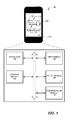
- Fig. 1 illustrates an exemplary computing device 100 that may be adjusted according to a user's preference, according to an embodiment.
- Computing device 100 may be a desktop, laptop, smart phone, tablet, or other computing device known in the art.
- device 100 includes a processor 102, also known as a central processing unit (CPU), a storage module 104, an input module 106, an output module 108, and a communication module 110.
- processor 102 may be an INTEL processor, an AMD processor, or any other processing unit known in the art, and configured to process user inputs and execute computer-executable instructions to operate device 100.
- Storage module 104 may include a hard drive, a flash drive, an optical drive, a random-access memory (RAM), a read-only memory (ROM), or any other computer-readable medium known in the art.
- Storage module 104 is configured to store data and the computer-executable instructions relevant to the operation of device 100.
- Storage module 104 also stores computer-executable instructions associated with a plurality of applications. The applications, when executed by processor 102, cause device 100 to operate as the user desires. The user may select the applications to perform functions including, for example, making telephone calls, playing music or videos, navigating, etc.
- Input module 106 may include a keyboard, a keypad, a mouse, a joystick, a button, a thumbwheel, a touch screen, or any other input device, which is configured to receive inputs from a user.
- input module 106 includes a touch screen 112, which is configured to detect the user's hand gestures or hand motions and convert the user's hand gestures or hand motions to electronic signals for controlling the operation of device 100.
- Output module 108 may include a display device, a speaker, a vibration generator, or other output device. Output module 108 is configured to provide the user with user feedback.
- the display device can be coupled to processor 102 to receive signals and generate a graphical user interface including a plurality of graphical elements.
- the graphical elements may include icons associated with the individual applications stored in storage module 104.
- processor 102 executes the selected application and cause the display device to generate graphical interfaces relevant to the application.
- touch screen 112 is configured to operate as input module 106 as well as output module 108.
- Touch screen 112 receives user inputs through the hand motions of the user and generates user outputs through the graphical interfaces displayed thereon.
- Communication module 110 may be configured to communicate with a telephone network, a wireless cellular network, or a computer network as known in the art.
- communication module 110 may include a modem configured to provide network communication with a telephone network or a wireless cellular network.
- communication module 110 may include an Ethernet interface, a Wi-Fi interface, or a Bluetooth interface to provide network communication with an Ethernet, a local area network (LAN), a wide area network (WAN), or any other computer networks.
- LAN local area network
- WAN wide area network
- processor 102 when the user operates device 100 through touch screen 112 by using, for example, hands or fingers, processor 102 detects a particular motion of the user's hands or fingers according to the electronic signals generated by touch screen 112. For example, based on the electronic signals generated by touch screen 112 in response to such motion, processor 102 detects a swiping motion, a circular motion, or a tapping motion of the user's hands or fingers with respect to touch screen 112. Processor 102 then interprets the detected motions and generates control signals corresponding to the detected motions to control the operation of device 100.
- processor 102 determines a preference setting of device 100 indicating whether the user operates device 100 under a right-handed preference or a left-handed preference. For example, when device 100 is a handheld computing device, such as a smart phone or a tablet, the user may prefer to or be required to operate device 100 using only the right hand or the left hand through touch screen 112.
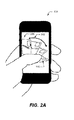
- processor 102 determines the preference setting based on the motions of the user's fingers with respect to touch screen 112. As shown in Figs. 2A and 2B , for example, when the user operates device 100 using only the left hand ( Fig. 2A ) or the right hand ( Fig. 2B ), the left hand or right hand generates different motions 202 and 204, respectively, due to their physical and mechanical limitations. Thus, by analyzing motions 202 and 204, processor 102 determines whether the user uses the left hand or the right hand to operate device 100.
- processor 102 determines whether the user intends to operate device 100 under the right-handed preference or the left-handed preference based on a user input. For example, processor 102 causes touch screen 112 to display a user interface for the user to set the preference setting to the right-handed preference or the left-handed preference.
- the user interface includes a menu, a check box, or a button for the user to select the preference setting.
- processor 102 interprets the motions detected by touch screen 112 according to the selected preference setting.
- processor 102 adjusts the operation of device 100 according to the preference setting. For example, upon detecting the preference setting, processor 102 adjusts the graphical user interface generated by touch screen 112 to suit the selected preference and allow the user to operate device 100 using the left hand or the right hand relatively easier and more efficiently.
- processor 102 executes an application installed on device 100 and causes touch screen 112 to display a graphical object 114 including a plurality of elements 116.
- each element 116 of graphical object 114 is a simulated contact card including contact information of a person or entity associated with the user.
- the contact information includes, for example, a name 118, a photo 120, a telephone number 122, an email address, or other information of the person or entity.
- graphical object 114 may be a simulated business card holder, which allows the user to flip through elements 116 by swiping a finger across touch screen 112.
- graphical object 114 is a simulation of a book, a calendar, or a note pad including a plurality of pages presented by individual elements 116.
- touch screen 112 displays individual elements 116 in a front view with the top element shown in its entirety and other elements obscured in part or in whole by the top element.
- processor 102 adjusts graphical object 114 to a different view according to the preference setting. For example, when processor 102 detects the left-handed preference indicating that the user operates device 100 using only the left hand ( Fig. 2A ), processor 102 adjusts graphical object 114 to a left-handed oblique view 206 by rotating object 114 to the left by a pre-configured angle.
- processor 102 causes individual elements 116 to flip in succession accordingly. Since object 114 is rendered in left-handed oblique view 206, the motion of individual elements 116 is consistent with the swiping motion of user's left hand as if the user is manipulating a stack of the physical card objects or paper documents.
- processor 102 when processor 102 detects the right-handed preference indicating that the user operates device 100 using only the right hand ( Fig. 2B ), processor 102 adjusts graphical object 114 to a right-handed oblique view 208 by rotating object 114 to right by a pre-configured angle.
- processor 102 causes individual elements 116 to flip accordingly. Since object 114 is rendered in right-handed oblique view 208, the motion of individual elements 116 is consistent with the swiping motion of user's right hand as if the user is manipulating a stack of physical card objects or paper documents.
- processor 102 determines the pre-configured angle based on a value provided by the user.
- Processor 102 causes touch screen 112 to display a user interface for the user to input the value for the pre-configured angle.
- processor 102 determines the value for the pre-configured angle according to the motion of the user's hand. For example, when the motion of the user's hand is relatively small, processor 102 sets a relatively smaller value for the pre-configured angle. When the motion of the user's hand is relatively large, processor 102 sets a relatively larger value for the pre-configured angle.
- processor 102 causes touch screen 112 to display a three-dimensional (3D) scene including a plurality of 3D objects.
- the 3D objects may be individually adjusted according to the user's hand motion as described above.
- Each 3D object may be rendered in the front view, the left-handed oblique view, or the right-handed oblique view.
- Processor 102 further changes each of the 3D objects among different views. For example, when the user selects an object in the 3D scene by double tapping the selected object on touch screen 112, processor 102 changes the selected object from the front view to an oblique view or from one oblique view to another oblique view.
- processor 102 changes the view of the selected object when the user explicitly sets the preference setting to the left-handed preference or the right-handed preference. Still alternatively, processor 102 changes the view of the selected object upon detecting the motion made by the left hand or the right hand of the user.
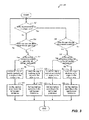
- Fig. 3 depicts a flow chart of a process 300 for adjusting the operation of device 100 according to the user's preference.
- Process 300 is performed by processor 102 according to the computer-executable instructions in storage medium 104.
- processor 102 determines whether a graphical object, such as object 114, is already rendered in an oblique view. More specifically, when the graphical object is initiated, it may be displayed in a front view. Alternatively, the graphical object may be initially displayed in the oblique view according to the preference setting pre-set by the user.
- processor 102 determines whether a user operation triggers the oblique view at step 304.
- the oblique view may be triggered by a variety of user operations as discussed above. For example, when the user selects the object by double tapping the selected object on touch screen 112, processor 102 changes the selected object from the front view to an oblique view. Alternatively, processor 102 changes the selected object from the front view to the oblique view when the user explicitly sets the preference setting to the left-handed preference or the right-handed preference. Still alternatively, processor 102 changes the selected object from the front view to the oblique view upon detecting the motion made by the left hand or the right hand of the user, causing the selected object to be moved within the 3D scene.
- processor 102 determines at step 304 that the user operation does not trigger the oblique view, process 300 proceeds back to step 302. If, on the other hand, processor 102 determines at step 304 that the user operation triggers the oblique view, processor 102 further determines whether the current preference setting is set to the left-handed preference at step 306. Processor 102 sets the current preference setting according to an explicit input from the user or according to the motions of the user's hands or fingers.
- processor 102 determines that the current preference setting is set to the left-handed preference at step 306
- processor 102 then causes the selected object to be rotated to the left (i.e., counterclockwise when viewed from top) by an angle ⁇ to the left-handed oblique view ( Fig. 2A ) at step 308.
- the angle ⁇ is determined according to a user input or a pre-configured parameter.
- processor 102 further sets the graphical elements of the user interface according to the left-handed reference. For example, processor 102 re-arranges or relocates the icons, buttons, or menus of the user interface to an area of touchscreen 112 that are relatively easier to access by the user using the left hand.
- the graphical elements of the user interface are relocated to the right side or the bottom-right corner of touchscreen 112, so that the user may access the graphical elements using the left thumb when operating device 100 using only the left hand.
- photo 120 or other relevant contact information shown on each simulated contact card 116 is displayed on the right side of contact card 116 so that the user may view it when flipping through the simulated contact card holder.
- processor 102 determines that the current preference setting is not set to the left-handed preference at step 306
- processor 102 then causes the selected object to be rotated to the right (i.e., clockwise when viewed from top) by an angle ⁇ to the right-handed oblique view ( Fig. 2B ) at step 312.
- the angle ⁇ is determined according to a user input or a pre-configured parameter.
- the angle ⁇ and the angle ⁇ may be set to the same value.
- processor 102 further sets the graphical elements of the user interface according to the right-handed reference. For example, processor 102 re-arranges or relocates the icons, buttons, or menus of the user interface to an area of touchscreen 112 that are relatively easier to access by the user using the right hand.
- the graphical elements of the user interface are relocated to the left side or the bottom-left corner of touchscreen 112, so that the user may access the graphical elements using the right thumb when operating device 100 using only the right hand.
- photo 120 or other relevant contact information shown on each simulated contact card 116 is displayed on the left side of contact card 116 so that the user may view it when flipping through the simulated contact card holder.
- step 316 processor 102 determines whether the user changes the preference setting between the left-handed preference and the right-handed preference. If the user does not change the preference setting ("No" at step 316), process 300 proceeds back to step 302. If, on the other hand, the user changes the preference setting ("Yes" at step 316), processor 102 determines whether the current preference setting is set to the left-handed preference at step 318.
- processor 102 determines that the current preference setting is set to the left-handed preference at step 318, processor 102 then causes the selected object to be rotated from right to left (i.e., counterclockwise when viewed from top) by an angle ⁇ to the left-handed oblique view ( Fig. 2A ) at step 320.
- processor 102 further sets the graphical elements of the user interface according to the left-handed reference. For example, processor 102 re-arranges or relocates the icons, buttons, or menus of the user interface to an area of touchscreen 112 that are relatively easier to access by the user using the left hand.
- the graphical elements of the user interface are relocated to the right side or the bottom-right corner of touchscreen 112, so that the user may access the graphical elements using the left thumb when operating device 100 using only the left hand.
- photo 120 or other relevant contact information shown on each simulated contact card 116 is displayed on the right side of contact card 116 so that the user may view it when flipping through the simulated contact card holder.
- processor 102 determines that the current preference setting is not set to the left-handed preference at step 318, processor 102 then causes the selected object to be rotated from left to right (i.e., clockwise when viewed from top) by an angle ⁇ to the right-handed oblique view ( Fig. 2B ) at step 324.
- the angles ⁇ and ⁇ are determined according to user inputs or pre-configured parameters. According to a further embodiment, the angles ⁇ and ⁇ may be set to the same value. According a still further embodiment, the angle ⁇ is one half of the angle ⁇ , and the angle ⁇ is one half of the angle ⁇ .
- angles ⁇ , ⁇ , ⁇ , and ⁇ are set according to the perspective of the 3D scene rendered on touch screen 112.
- the rotation of the selected object is consistent with the perspective of the 3D scene as viewed by the user.
- processor 102 further sets the graphical elements of the user interface according to the right-handed reference. For example, processor 102 re-arranges or relocates the icons, buttons, or menus of the user interface to an area of touch screen 112 that are relatively easier to access by the user using the right hand.
- the graphical elements of the user interface are relocated to the left side or the bottom-left corner of touch screen 112, so that the user may access the graphical elements using the right thumb when operating device 100 using only the right hand.
- photo 120 or other relevant contact information shown on each simulated contact card 116 is displayed on the left side of contact card 116 so that the user may view it when flipping through the simulated contact card holder.
- Graphical object 114 is described for illustrative purposes only. The device and process described herein may be used to adjust any graphical elements of a user interface rendered on a screen, not limited to graphical object 114. It is intended that the scope of the invention only be limited by the appended claims.
Landscapes
- Engineering & Computer Science (AREA)
- General Engineering & Computer Science (AREA)
- Theoretical Computer Science (AREA)
- Human Computer Interaction (AREA)
- Physics & Mathematics (AREA)
- General Physics & Mathematics (AREA)
- User Interface Of Digital Computer (AREA)
Abstract

Description
- This disclosure relates to human-computer interfaces in general and to method and apparatus for adjusting a graphical object according to operator preference.
- Human-computer interfaces provide important means for users to interact with a wide range of computing devices, such as desktop computers, laptop computers, tablet computers, smart phones, etc. Existing human-computer interfaces may include user input devices, such as a mouse, keyboard, or touchpad, which receive user inputs. For example, a conventional touchpad device may operate according to a multi-touch algorithm to detect a user's hand gestures. The conventional touchpad device may not, however, allow the user to configure the device to suit different preferences of different hands. Therefore, there is a need for a human-computer interface that may be configured to suit difference preferences by different users.
- In one embodiment, a method for adjusting a graphical object according to operator preference is provided. The method includes: rendering a graphical object on a display screen of a handheld device; determining a preference setting indicating one of a left-handed preference or a right-handed preference for operating the handheld device; and adjusting the graphical object according to the preference setting.
- In another embodiment, a computer-readable medium is provided. The computer-readable medium includes instructions, which, when executed by a processor, cause the processor to perform a method for adjusting a graphical object according to operator preference. The method includes: rendering a graphical object on a display screen of a handheld device; determining a preference setting indicating one of a left-handed preference or a right-handed preference for operating the handheld device; and adjusting the graphical object according to the preference setting.
- In still another embodiment, an apparatus for adjusting a graphical object according to operator preference is provided. The apparatus includes: a storage module configured to store instructions; an input module configured to receive user inputs; an output module configured to generate a graphical user interface including a plurality of graphical objects; and a processor configured to determine a preference setting indicating one of a left-handed preference or a right-handed preference for operating the apparatus and adjust the graphical objects according to the preference setting.
- The accompanying drawings, which are incorporated in and constitute a part of this specification, illustrate embodiments consistent with the invention and, together with the description, serve to explain the principles of the invention.
-
Fig. 1 is a schematic diagram of a computing device according to one embodiment; -
Fig. 2A illustrates operation of the computing device by a left-handed user; -
Fig. 2B illustrates operation of the computing device by a right-handed user; and -
Fig. 3 illustrates a flow diagram of a process for adjusting the computing device according to a user's preference. - Reference will now be made in detail to exemplary embodiments, examples of which are illustrated in the accompanying drawings. The following description refers to the accompanying drawings in which the same numbers in different drawings represent the same or similar elements unless otherwise represented or stated. The implementations set forth in the following description of exemplary embodiments do not represent all implementations consistent with the invention. Instead, they are merely examples of systems and methods consistent with aspects related to the invention as recited in the appended claims.
-
Fig. 1 illustrates anexemplary computing device 100 that may be adjusted according to a user's preference, according to an embodiment.Computing device 100 may be a desktop, laptop, smart phone, tablet, or other computing device known in the art. More particularly,device 100 includes aprocessor 102, also known as a central processing unit (CPU), astorage module 104, aninput module 106, anoutput module 108, and acommunication module 110.Processor 102 may be an INTEL processor, an AMD processor, or any other processing unit known in the art, and configured to process user inputs and execute computer-executable instructions to operatedevice 100. -
Storage module 104 may include a hard drive, a flash drive, an optical drive, a random-access memory (RAM), a read-only memory (ROM), or any other computer-readable medium known in the art.Storage module 104 is configured to store data and the computer-executable instructions relevant to the operation ofdevice 100.Storage module 104 also stores computer-executable instructions associated with a plurality of applications. The applications, when executed byprocessor 102, causedevice 100 to operate as the user desires. The user may select the applications to perform functions including, for example, making telephone calls, playing music or videos, navigating, etc. -
Input module 106 may include a keyboard, a keypad, a mouse, a joystick, a button, a thumbwheel, a touch screen, or any other input device, which is configured to receive inputs from a user. In one embodiment,input module 106 includes atouch screen 112, which is configured to detect the user's hand gestures or hand motions and convert the user's hand gestures or hand motions to electronic signals for controlling the operation ofdevice 100. -
Output module 108 may include a display device, a speaker, a vibration generator, or other output device.Output module 108 is configured to provide the user with user feedback. For example, the display device can be coupled toprocessor 102 to receive signals and generate a graphical user interface including a plurality of graphical elements. The graphical elements may include icons associated with the individual applications stored instorage module 104. When the user selects an application to execute,processor 102 executes the selected application and cause the display device to generate graphical interfaces relevant to the application. - According to a further embodiment,
touch screen 112 is configured to operate asinput module 106 as well asoutput module 108.Touch screen 112 receives user inputs through the hand motions of the user and generates user outputs through the graphical interfaces displayed thereon. -
Communication module 110 may be configured to communicate with a telephone network, a wireless cellular network, or a computer network as known in the art. For example,communication module 110 may include a modem configured to provide network communication with a telephone network or a wireless cellular network. Alternatively,communication module 110 may include an Ethernet interface, a Wi-Fi interface, or a Bluetooth interface to provide network communication with an Ethernet, a local area network (LAN), a wide area network (WAN), or any other computer networks. - According to a further embodiment, when the user operates
device 100 throughtouch screen 112 by using, for example, hands or fingers,processor 102 detects a particular motion of the user's hands or fingers according to the electronic signals generated bytouch screen 112. For example, based on the electronic signals generated bytouch screen 112 in response to such motion,processor 102 detects a swiping motion, a circular motion, or a tapping motion of the user's hands or fingers with respect totouch screen 112.Processor 102 then interprets the detected motions and generates control signals corresponding to the detected motions to control the operation ofdevice 100. - According to a further aspect of the disclosure,
processor 102 determines a preference setting ofdevice 100 indicating whether the user operatesdevice 100 under a right-handed preference or a left-handed preference. For example, whendevice 100 is a handheld computing device, such as a smart phone or a tablet, the user may prefer to or be required to operatedevice 100 using only the right hand or the left hand throughtouch screen 112. - According to one embodiment,
processor 102 determines the preference setting based on the motions of the user's fingers with respect totouch screen 112. As shown inFigs. 2A and2B , for example, when the user operatesdevice 100 using only the left hand (Fig. 2A ) or the right hand (Fig. 2B ), the left hand or right hand generatesdifferent motions motions processor 102 determines whether the user uses the left hand or the right hand to operatedevice 100. - According to another embodiment,
processor 102 determines whether the user intends to operatedevice 100 under the right-handed preference or the left-handed preference based on a user input. For example,processor 102 causestouch screen 112 to display a user interface for the user to set the preference setting to the right-handed preference or the left-handed preference. According to this embodiment, the user interface includes a menu, a check box, or a button for the user to select the preference setting. Upon receiving the user selection,processor 102 interprets the motions detected bytouch screen 112 according to the selected preference setting. - According to a further aspect of the disclosure,
processor 102 adjusts the operation ofdevice 100 according to the preference setting. For example, upon detecting the preference setting,processor 102 adjusts the graphical user interface generated bytouch screen 112 to suit the selected preference and allow the user to operatedevice 100 using the left hand or the right hand relatively easier and more efficiently. - Referring back to
Fig. 1 , for example,processor 102 executes an application installed ondevice 100 and causestouch screen 112 to display agraphical object 114 including a plurality ofelements 116. According to one embodiment, eachelement 116 ofgraphical object 114 is a simulated contact card including contact information of a person or entity associated with the user. The contact information includes, for example, aname 118, aphoto 120, atelephone number 122, an email address, or other information of the person or entity. Thus,graphical object 114 may be a simulated business card holder, which allows the user to flip throughelements 116 by swiping a finger acrosstouch screen 112. Alternatively,graphical object 114 is a simulation of a book, a calendar, or a note pad including a plurality of pages presented byindividual elements 116. - When
graphical object 114 is initially generated,touch screen 112 displaysindividual elements 116 in a front view with the top element shown in its entirety and other elements obscured in part or in whole by the top element. Referring toFigs. 2A and2B , upon determining the preference setting,processor 102 adjustsgraphical object 114 to a different view according to the preference setting. For example, whenprocessor 102 detects the left-handed preference indicating that the user operatesdevice 100 using only the left hand (Fig. 2A ),processor 102 adjustsgraphical object 114 to a left-handed oblique view 206 by rotatingobject 114 to the left by a pre-configured angle. Thus, when the user swipes the thumb of the left hand acrosstouch screen 112,processor 102 causesindividual elements 116 to flip in succession accordingly. Sinceobject 114 is rendered in left-handed oblique view 206, the motion ofindividual elements 116 is consistent with the swiping motion of user's left hand as if the user is manipulating a stack of the physical card objects or paper documents. - Similarly, when
processor 102 detects the right-handed preference indicating that the user operatesdevice 100 using only the right hand (Fig. 2B ),processor 102 adjustsgraphical object 114 to a right-handed oblique view 208 by rotatingobject 114 to right by a pre-configured angle. Thus, when the user swipes the thumb of the right hand acrosstouch screen 112,processor 102 causesindividual elements 116 to flip accordingly. Sinceobject 114 is rendered in right-handed oblique view 208, the motion ofindividual elements 116 is consistent with the swiping motion of user's right hand as if the user is manipulating a stack of physical card objects or paper documents. - According to a further aspect of the disclosure,
processor 102 determines the pre-configured angle based on a value provided by the user.Processor 102 causestouch screen 112 to display a user interface for the user to input the value for the pre-configured angle. Alternatively,processor 102 determines the value for the pre-configured angle according to the motion of the user's hand. For example, when the motion of the user's hand is relatively small,processor 102 sets a relatively smaller value for the pre-configured angle. When the motion of the user's hand is relatively large,processor 102 sets a relatively larger value for the pre-configured angle. - According to a still further aspect of the disclosure,
processor 102 causestouch screen 112 to display a three-dimensional (3D) scene including a plurality of 3D objects. The 3D objects may be individually adjusted according to the user's hand motion as described above. Each 3D object may be rendered in the front view, the left-handed oblique view, or the right-handed oblique view.Processor 102 further changes each of the 3D objects among different views. For example, when the user selects an object in the 3D scene by double tapping the selected object ontouch screen 112,processor 102 changes the selected object from the front view to an oblique view or from one oblique view to another oblique view. Alternatively,processor 102 changes the view of the selected object when the user explicitly sets the preference setting to the left-handed preference or the right-handed preference. Still alternatively,processor 102 changes the view of the selected object upon detecting the motion made by the left hand or the right hand of the user. -
Fig. 3 depicts a flow chart of aprocess 300 for adjusting the operation ofdevice 100 according to the user's preference.Process 300 is performed byprocessor 102 according to the computer-executable instructions instorage medium 104. According toprocess 300, atstep 302,processor 102 determines whether a graphical object, such asobject 114, is already rendered in an oblique view. More specifically, when the graphical object is initiated, it may be displayed in a front view. Alternatively, the graphical object may be initially displayed in the oblique view according to the preference setting pre-set by the user. - If
processor 102 determines that the graphical object is not currently rendered in the oblique view ("No" at step 302),processor 102 further determines whether a user operation triggers the oblique view atstep 304. The oblique view may be triggered by a variety of user operations as discussed above. For example, when the user selects the object by double tapping the selected object ontouch screen 112,processor 102 changes the selected object from the front view to an oblique view. Alternatively,processor 102 changes the selected object from the front view to the oblique view when the user explicitly sets the preference setting to the left-handed preference or the right-handed preference. Still alternatively,processor 102 changes the selected object from the front view to the oblique view upon detecting the motion made by the left hand or the right hand of the user, causing the selected object to be moved within the 3D scene. - If
processor 102 determines atstep 304 that the user operation does not trigger the oblique view,process 300 proceeds back tostep 302. If, on the other hand,processor 102 determines atstep 304 that the user operation triggers the oblique view,processor 102 further determines whether the current preference setting is set to the left-handed preference atstep 306.Processor 102 sets the current preference setting according to an explicit input from the user or according to the motions of the user's hands or fingers. - If
processor 102 determines that the current preference setting is set to the left-handed preference atstep 306,processor 102 then causes the selected object to be rotated to the left (i.e., counterclockwise when viewed from top) by an angle α to the left-handed oblique view (Fig. 2A ) atstep 308. The angle α is determined according to a user input or a pre-configured parameter. - At
step 310,processor 102 further sets the graphical elements of the user interface according to the left-handed reference. For example,processor 102 re-arranges or relocates the icons, buttons, or menus of the user interface to an area oftouchscreen 112 that are relatively easier to access by the user using the left hand. In one embodiment, the graphical elements of the user interface are relocated to the right side or the bottom-right corner oftouchscreen 112, so that the user may access the graphical elements using the left thumb when operatingdevice 100 using only the left hand. In another embodiment, as shown inFig. 2A ,photo 120 or other relevant contact information shown on eachsimulated contact card 116 is displayed on the right side ofcontact card 116 so that the user may view it when flipping through the simulated contact card holder. - If
processor 102 determines that the current preference setting is not set to the left-handed preference atstep 306,processor 102 then causes the selected object to be rotated to the right (i.e., clockwise when viewed from top) by an angle β to the right-handed oblique view (Fig. 2B ) atstep 312. Similarly to the angle α, the angle β is determined according to a user input or a pre-configured parameter. According to a further embodiment, the angle α and the angle β may be set to the same value. - At
step 314,processor 102 further sets the graphical elements of the user interface according to the right-handed reference. For example,processor 102 re-arranges or relocates the icons, buttons, or menus of the user interface to an area oftouchscreen 112 that are relatively easier to access by the user using the right hand. In one embodiment, the graphical elements of the user interface are relocated to the left side or the bottom-left corner oftouchscreen 112, so that the user may access the graphical elements using the right thumb when operatingdevice 100 using only the right hand. In another embodiment, as shown inFig. 2B ,photo 120 or other relevant contact information shown on eachsimulated contact card 116 is displayed on the left side ofcontact card 116 so that the user may view it when flipping through the simulated contact card holder. - Referring back to step 302, if
processor 102 determines that the graphical object is already rendered in the oblique view according to the preference setting,process 300 proceeds to step 316. Atstep 316,processor 102 determines whether the user changes the preference setting between the left-handed preference and the right-handed preference. If the user does not change the preference setting ("No" at step 316),process 300 proceeds back tostep 302. If, on the other hand, the user changes the preference setting ("Yes" at step 316),processor 102 determines whether the current preference setting is set to the left-handed preference atstep 318. - If
processor 102 determines that the current preference setting is set to the left-handed preference atstep 318,processor 102 then causes the selected object to be rotated from right to left (i.e., counterclockwise when viewed from top) by an angle γ to the left-handed oblique view (Fig. 2A ) atstep 320. - At
step 322,processor 102 further sets the graphical elements of the user interface according to the left-handed reference. For example,processor 102 re-arranges or relocates the icons, buttons, or menus of the user interface to an area oftouchscreen 112 that are relatively easier to access by the user using the left hand. In one embodiment, the graphical elements of the user interface are relocated to the right side or the bottom-right corner oftouchscreen 112, so that the user may access the graphical elements using the left thumb when operatingdevice 100 using only the left hand. In another embodiment, as shown inFig. 2A ,photo 120 or other relevant contact information shown on eachsimulated contact card 116 is displayed on the right side ofcontact card 116 so that the user may view it when flipping through the simulated contact card holder. - If
processor 102 determines that the current preference setting is not set to the left-handed preference atstep 318,processor 102 then causes the selected object to be rotated from left to right (i.e., clockwise when viewed from top) by an angle δ to the right-handed oblique view (Fig. 2B ) atstep 324. Similarly to the angles α and β, the angles γ and δ are determined according to user inputs or pre-configured parameters. According to a further embodiment, the angles γ and δ may be set to the same value. According a still further embodiment, the angle α is one half of the angle γ, and the angle β is one half of the angle δ. According to a still further embodiment, the angles α, β, γ, and δ are set according to the perspective of the 3D scene rendered ontouch screen 112. Thus, the rotation of the selected object is consistent with the perspective of the 3D scene as viewed by the user. - At
step 326,processor 102 further sets the graphical elements of the user interface according to the right-handed reference. For example,processor 102 re-arranges or relocates the icons, buttons, or menus of the user interface to an area oftouch screen 112 that are relatively easier to access by the user using the right hand. In one embodiment, the graphical elements of the user interface are relocated to the left side or the bottom-left corner oftouch screen 112, so that the user may access the graphical elements using the right thumb when operatingdevice 100 using only the right hand. In another embodiment, as shown inFig. 2B ,photo 120 or other relevant contact information shown on eachsimulated contact card 116 is displayed on the left side ofcontact card 116 so that the user may view it when flipping through the simulated contact card holder. - It will be appreciated that the present invention is not limited to the exact construction that has been described above and illustrated in the accompanying drawings, and that various modifications and changes can be made without departing from the scope thereof.
Graphical object 114 is described for illustrative purposes only. The device and process described herein may be used to adjust any graphical elements of a user interface rendered on a screen, not limited tographical object 114. It is intended that the scope of the invention only be limited by the appended claims.
Claims (20)
- A method for adjusting a graphical object (114) according to operator preference, including:rendering a graphical object (114) on a display screen of a handheld device;determining a preference setting indicating one of a left-handed preference or a right-handed preference for operating the handheld device; andadjusting the graphical object (114) according to the preference setting.
- The method of claim 1, wherein the determining of the preference setting includes receiving a user input indicating the left-handed preference or a right-handed preference.
- The method of claim 1, wherein the display screen is a touch screen (112), and the determining of the preference setting includes determining the preference setting based on a motion of a finger of a user with respect to the touch screen (112) of the handheld device.
- The method of claim 3, further comprising determining that the motion is associated with one of a left hand or a right hand of the user.
- The method of claim 1, wherein the adjusting of the graphical object (114) further comprises:detecting a change to the preference setting; androtating the graphical object (114) by a predetermined angle in response to the change.
- The method of claim 5, further comprising:detecting that the preference setting is changed to the left-handed preference; androtating the graphical object (114) by the predetermined angle to left.
- The method of claim 5, further comprising:detecting the preference setting is changed to the right-handed preference; androtating the graphical object (114) by the predetermined angle to right.
- The method of claim 1, further comprising:rendering a three-dimensional scene including a plurality of graphical objects (114); anddetecting a change of perspective of the three-dimensional scene;determining the preference setting in response to the change of the perspective; andadjusting each of the graphical objects (114) according to the preference setting.
- The method of claim 1, wherein the adjusting of the graphical object (114) includes relocating the graphical object (114) to allow relatively easier access by a user.
- The method of claim 1, wherein:the left-handed preference indicates operation by a user using only a left hand; andthe right-handed preference indicates operation by the user using only a right hand.
- A computer-readable medium including instructions, which, when executed by a processor (102), cause the processor (102) to perform a method for adjusting a graphical object (114) according to operator preference, the method comprising:rendering a graphical object (114) on a display screen of a handheld device;determining a preference setting indicating one of a left-handed preference or a right-handed preference for operating the handheld device; andadjusting the graphical object (114) according to the preference setting.
- The computer-readable medium of claim 11, wherein the adjusting of the graphical object (114) further comprises:detecting a change to the preference setting; androtating the graphical object (114) by a predetermined angle in response to the change.
- The computer-readable medium of claim 12, the method further comprising:detecting the preference setting is changed to the left-handed preference; androtating the graphical object (114) by the predetermined angle to left.
- The computer-readable medium of claim 12, the method further comprising:detecting the preference setting is changed to the right-handed preference; androtating the graphical object (114) by the predetermined angle to right.
- The computer-readable medium of claim 11, the method further comprising:rendering a three-dimensional scene including a plurality of graphical objects (114); anddetecting a change of perspective of the three-dimensional scene;determining the preference setting in response to the change of the perspective; andadjusting each of the graphical objects (114) according to the preference setting.
- The computer-readable medium of claim 11, wherein the adjusting of the graphical object (114) includes relocating the graphical object (114) to allow relatively easier access by a user.
- The computer-readable medium of claim 11, wherein:the left-handed preference indicates operation by a user using only a left hand; andthe right-handed preference indicates operation by the user using only a right hand.
- An apparatus for adjusting a graphical object (114) according to operator preference, including:a storage module (104) configured to store instructions;an Input module (106) configured to receive user inputs;an Output module (108) configured to generate a graphical user interface including a plurality of graphical objects (114); anda processor (102) configured to:determine a preference setting indicating one of a left-handed preference or a right-handed preference for operating the apparatus; andadjust the graphical objects (114) according to the preference setting.
- The apparatus of claim 18, wherein the Input module (106) and the Output module (108) include a touch screen (112).
- The apparatus of claim 18, wherein the graphical objects (114) include a plurality of simulated contact cards, and
the processor (102) is further configured to render the contact cards in an oblique view (206) according to the preference setting.
Applications Claiming Priority (2)
| Application Number | Priority Date | Filing Date | Title |
|---|---|---|---|
| CN201310153836.0A CN103513866B (en) | 2013-04-27 | 2013-04-27 | Display packing, device and the mobile device of face shape informosome set |
| PCT/CN2013/075463 WO2013189215A2 (en) | 2013-04-27 | 2013-05-10 | Method and apparatus for adjusting a graphical object according to operator preference |
Publications (2)
| Publication Number | Publication Date |
|---|---|
| EP2796979A1 true EP2796979A1 (en) | 2014-10-29 |
| EP2796979B1 EP2796979B1 (en) | 2018-03-21 |
Family
ID=48917400
Family Applications (1)
| Application Number | Title | Priority Date | Filing Date |
|---|---|---|---|
| EP13179088.3A Active EP2796979B1 (en) | 2013-04-27 | 2013-08-02 | Method and apparatus for adjusting a graphical object according to operator preference |
Country Status (1)
| Country | Link |
|---|---|
| EP (1) | EP2796979B1 (en) |
Citations (6)
| Publication number | Priority date | Publication date | Assignee | Title |
|---|---|---|---|---|
| US5402152A (en) * | 1993-12-30 | 1995-03-28 | Intel Corporation | Method and apparatus for tailoring scroll bar and cursor appearance to pen user hand orientation |
| GB2320783A (en) * | 1996-12-31 | 1998-07-01 | Motorola Inc | Portable electronic device adaptively reconfigured for right-handed or left-handed use |
| US5825675A (en) * | 1993-07-29 | 1998-10-20 | Xerox Corporation | Apparatus and configuration method for a small, hand-held computing device |
| US20070236460A1 (en) * | 2006-04-06 | 2007-10-11 | Motorola, Inc. | Method and apparatus for user interface adaptation111 |
| US20100097331A1 (en) * | 2008-10-16 | 2010-04-22 | Hong Fu Jin Precision Industry (Shenzhen) Co., Ltd | Adaptive user interface |
| JP2012199888A (en) * | 2011-03-23 | 2012-10-18 | Ntt Docomo Inc | Portable terminal |
-
2013
- 2013-08-02 EP EP13179088.3A patent/EP2796979B1/en active Active
Patent Citations (6)
| Publication number | Priority date | Publication date | Assignee | Title |
|---|---|---|---|---|
| US5825675A (en) * | 1993-07-29 | 1998-10-20 | Xerox Corporation | Apparatus and configuration method for a small, hand-held computing device |
| US5402152A (en) * | 1993-12-30 | 1995-03-28 | Intel Corporation | Method and apparatus for tailoring scroll bar and cursor appearance to pen user hand orientation |
| GB2320783A (en) * | 1996-12-31 | 1998-07-01 | Motorola Inc | Portable electronic device adaptively reconfigured for right-handed or left-handed use |
| US20070236460A1 (en) * | 2006-04-06 | 2007-10-11 | Motorola, Inc. | Method and apparatus for user interface adaptation111 |
| US20100097331A1 (en) * | 2008-10-16 | 2010-04-22 | Hong Fu Jin Precision Industry (Shenzhen) Co., Ltd | Adaptive user interface |
| JP2012199888A (en) * | 2011-03-23 | 2012-10-18 | Ntt Docomo Inc | Portable terminal |
Also Published As
| Publication number | Publication date |
|---|---|
| EP2796979B1 (en) | 2018-03-21 |
Similar Documents
| Publication | Publication Date | Title |
|---|---|---|
| US12216959B2 (en) | Systems and methods for initiating and interacting with a companion-display mode for an electronic device with a touch-sensitive display | |
| US8823749B2 (en) | User interface methods providing continuous zoom functionality | |
| US12340034B2 (en) | Devices, methods, and graphical user interfaces for an electronic device interacting with a stylus | |
| KR101683320B1 (en) | Dual screen portable touch sensitive computing system | |
| KR101116442B1 (en) | Apparatus, method and computer program product for manipulating a device using dual side input devices | |
| US9612736B2 (en) | User interface method and apparatus using successive touches | |
| EP3690624B1 (en) | Display device and method of controlling the same | |
| EP2613238A2 (en) | Method and apparatus for managing icon in portable terminal | |
| EP2796973B1 (en) | Method and apparatus for generating a three-dimensional user interface | |
| EP2772844A1 (en) | Terminal device and method for quickly starting program | |
| CN107632895A (en) | A kind of information sharing method and mobile terminal | |
| US20160041674A1 (en) | Apparatus and method for controlling a touchscreen display for one hand operation | |
| CN107145317A (en) | Device including multiple touch-screens and the screen changing method for described device | |
| BR112013006616B1 (en) | apparatus and method for detecting an object based on proximity to the input surface, associated item of information and distance from the object | |
| KR20110041915A (en) | Data display method and terminal performing the same | |
| KR20130093043A (en) | Method and mobile device for user interface for touch and swipe navigation | |
| EP2860610A2 (en) | Devices and methods for generating tactile feedback | |
| CN103365541B (en) | The method of impression window and terminal | |
| EP2829967A2 (en) | Method of processing input and electronic device thereof | |
| CN107329644A (en) | A kind of icon moving method and device | |
| US10289293B2 (en) | Method and apparatus for adjusting a graphical object according to operator preference | |
| CN106293351A (en) | Menu arrangements method and device | |
| US10185457B2 (en) | Information processing apparatus and a method for controlling the information processing apparatus | |
| EP2796979B1 (en) | Method and apparatus for adjusting a graphical object according to operator preference | |
| EP3457269B1 (en) | Electronic device and method for one-handed operation |
Legal Events
| Date | Code | Title | Description |
|---|---|---|---|
| PUAI | Public reference made under article 153(3) epc to a published international application that has entered the european phase |
Free format text: ORIGINAL CODE: 0009012 |
|
| 17P | Request for examination filed |
Effective date: 20130802 |
|
| AK | Designated contracting states |
Kind code of ref document: A1 Designated state(s): AL AT BE BG CH CY CZ DE DK EE ES FI FR GB GR HR HU IE IS IT LI LT LU LV MC MK MT NL NO PL PT RO RS SE SI SK SM TR |
|
| AX | Request for extension of the european patent |
Extension state: BA ME |
|
| R17P | Request for examination filed (corrected) |
Effective date: 20150429 |
|
| RBV | Designated contracting states (corrected) |
Designated state(s): AL AT BE BG CH CY CZ DE DK EE ES FI FR GB GR HR HU IE IS IT LI LT LU LV MC MK MT NL NO PL PT RO RS SE SI SK SM TR |
|
| 17Q | First examination report despatched |
Effective date: 20160502 |
|
| GRAP | Despatch of communication of intention to grant a patent |
Free format text: ORIGINAL CODE: EPIDOSNIGR1 |
|
| INTG | Intention to grant announced |
Effective date: 20171031 |
|
| RAP1 | Party data changed (applicant data changed or rights of an application transferred) |
Owner name: SPREADTRUM COMMUNICATIONS (SHANGHAI) CO., LTD. |
|
| RIN1 | Information on inventor provided before grant (corrected) |
Inventor name: YIN, LINNA Inventor name: XIA, LU |
|
| GRAS | Grant fee paid |
Free format text: ORIGINAL CODE: EPIDOSNIGR3 |
|
| GRAA | (expected) grant |
Free format text: ORIGINAL CODE: 0009210 |
|
| AK | Designated contracting states |
Kind code of ref document: B1 Designated state(s): AL AT BE BG CH CY CZ DE DK EE ES FI FR GB GR HR HU IE IS IT LI LT LU LV MC MK MT NL NO PL PT RO RS SE SI SK SM TR |
|
| REG | Reference to a national code |
Ref country code: GB Ref legal event code: FG4D |
|
| REG | Reference to a national code |
Ref country code: CH Ref legal event code: EP |
|
| REG | Reference to a national code |
Ref country code: AT Ref legal event code: REF Ref document number: 981786 Country of ref document: AT Kind code of ref document: T Effective date: 20180415 |
|
| REG | Reference to a national code |
Ref country code: IE Ref legal event code: FG4D |
|
| REG | Reference to a national code |
Ref country code: DE Ref legal event code: R096 Ref document number: 602013034621 Country of ref document: DE |
|
| REG | Reference to a national code |
Ref country code: NL Ref legal event code: MP Effective date: 20180321 |
|
| PG25 | Lapsed in a contracting state [announced via postgrant information from national office to epo] |
Ref country code: NO Free format text: LAPSE BECAUSE OF FAILURE TO SUBMIT A TRANSLATION OF THE DESCRIPTION OR TO PAY THE FEE WITHIN THE PRESCRIBED TIME-LIMIT Effective date: 20180621 Ref country code: HR Free format text: LAPSE BECAUSE OF FAILURE TO SUBMIT A TRANSLATION OF THE DESCRIPTION OR TO PAY THE FEE WITHIN THE PRESCRIBED TIME-LIMIT Effective date: 20180321 Ref country code: LT Free format text: LAPSE BECAUSE OF FAILURE TO SUBMIT A TRANSLATION OF THE DESCRIPTION OR TO PAY THE FEE WITHIN THE PRESCRIBED TIME-LIMIT Effective date: 20180321 Ref country code: CY Free format text: LAPSE BECAUSE OF FAILURE TO SUBMIT A TRANSLATION OF THE DESCRIPTION OR TO PAY THE FEE WITHIN THE PRESCRIBED TIME-LIMIT Effective date: 20180321 Ref country code: FI Free format text: LAPSE BECAUSE OF FAILURE TO SUBMIT A TRANSLATION OF THE DESCRIPTION OR TO PAY THE FEE WITHIN THE PRESCRIBED TIME-LIMIT Effective date: 20180321 |
|
| REG | Reference to a national code |
Ref country code: LT Ref legal event code: MG4D |
|
| REG | Reference to a national code |
Ref country code: AT Ref legal event code: MK05 Ref document number: 981786 Country of ref document: AT Kind code of ref document: T Effective date: 20180321 |
|
| PG25 | Lapsed in a contracting state [announced via postgrant information from national office to epo] |
Ref country code: BG Free format text: LAPSE BECAUSE OF FAILURE TO SUBMIT A TRANSLATION OF THE DESCRIPTION OR TO PAY THE FEE WITHIN THE PRESCRIBED TIME-LIMIT Effective date: 20180621 Ref country code: GR Free format text: LAPSE BECAUSE OF FAILURE TO SUBMIT A TRANSLATION OF THE DESCRIPTION OR TO PAY THE FEE WITHIN THE PRESCRIBED TIME-LIMIT Effective date: 20180622 Ref country code: RS Free format text: LAPSE BECAUSE OF FAILURE TO SUBMIT A TRANSLATION OF THE DESCRIPTION OR TO PAY THE FEE WITHIN THE PRESCRIBED TIME-LIMIT Effective date: 20180321 Ref country code: LV Free format text: LAPSE BECAUSE OF FAILURE TO SUBMIT A TRANSLATION OF THE DESCRIPTION OR TO PAY THE FEE WITHIN THE PRESCRIBED TIME-LIMIT Effective date: 20180321 Ref country code: SE Free format text: LAPSE BECAUSE OF FAILURE TO SUBMIT A TRANSLATION OF THE DESCRIPTION OR TO PAY THE FEE WITHIN THE PRESCRIBED TIME-LIMIT Effective date: 20180321 |
|
| PG25 | Lapsed in a contracting state [announced via postgrant information from national office to epo] |
Ref country code: EE Free format text: LAPSE BECAUSE OF FAILURE TO SUBMIT A TRANSLATION OF THE DESCRIPTION OR TO PAY THE FEE WITHIN THE PRESCRIBED TIME-LIMIT Effective date: 20180321 Ref country code: PL Free format text: LAPSE BECAUSE OF FAILURE TO SUBMIT A TRANSLATION OF THE DESCRIPTION OR TO PAY THE FEE WITHIN THE PRESCRIBED TIME-LIMIT Effective date: 20180321 Ref country code: IT Free format text: LAPSE BECAUSE OF FAILURE TO SUBMIT A TRANSLATION OF THE DESCRIPTION OR TO PAY THE FEE WITHIN THE PRESCRIBED TIME-LIMIT Effective date: 20180321 Ref country code: AL Free format text: LAPSE BECAUSE OF FAILURE TO SUBMIT A TRANSLATION OF THE DESCRIPTION OR TO PAY THE FEE WITHIN THE PRESCRIBED TIME-LIMIT Effective date: 20180321 Ref country code: NL Free format text: LAPSE BECAUSE OF FAILURE TO SUBMIT A TRANSLATION OF THE DESCRIPTION OR TO PAY THE FEE WITHIN THE PRESCRIBED TIME-LIMIT Effective date: 20180321 Ref country code: RO Free format text: LAPSE BECAUSE OF FAILURE TO SUBMIT A TRANSLATION OF THE DESCRIPTION OR TO PAY THE FEE WITHIN THE PRESCRIBED TIME-LIMIT Effective date: 20180321 Ref country code: ES Free format text: LAPSE BECAUSE OF FAILURE TO SUBMIT A TRANSLATION OF THE DESCRIPTION OR TO PAY THE FEE WITHIN THE PRESCRIBED TIME-LIMIT Effective date: 20180321 |
|
| PG25 | Lapsed in a contracting state [announced via postgrant information from national office to epo] |
Ref country code: AT Free format text: LAPSE BECAUSE OF FAILURE TO SUBMIT A TRANSLATION OF THE DESCRIPTION OR TO PAY THE FEE WITHIN THE PRESCRIBED TIME-LIMIT Effective date: 20180321 Ref country code: CZ Free format text: LAPSE BECAUSE OF FAILURE TO SUBMIT A TRANSLATION OF THE DESCRIPTION OR TO PAY THE FEE WITHIN THE PRESCRIBED TIME-LIMIT Effective date: 20180321 Ref country code: SK Free format text: LAPSE BECAUSE OF FAILURE TO SUBMIT A TRANSLATION OF THE DESCRIPTION OR TO PAY THE FEE WITHIN THE PRESCRIBED TIME-LIMIT Effective date: 20180321 Ref country code: SM Free format text: LAPSE BECAUSE OF FAILURE TO SUBMIT A TRANSLATION OF THE DESCRIPTION OR TO PAY THE FEE WITHIN THE PRESCRIBED TIME-LIMIT Effective date: 20180321 |
|
| PG25 | Lapsed in a contracting state [announced via postgrant information from national office to epo] |
Ref country code: PT Free format text: LAPSE BECAUSE OF FAILURE TO SUBMIT A TRANSLATION OF THE DESCRIPTION OR TO PAY THE FEE WITHIN THE PRESCRIBED TIME-LIMIT Effective date: 20180723 |
|
| REG | Reference to a national code |
Ref country code: DE Ref legal event code: R097 Ref document number: 602013034621 Country of ref document: DE |
|
| PLBE | No opposition filed within time limit |
Free format text: ORIGINAL CODE: 0009261 |
|
| STAA | Information on the status of an ep patent application or granted ep patent |
Free format text: STATUS: NO OPPOSITION FILED WITHIN TIME LIMIT |
|
| PG25 | Lapsed in a contracting state [announced via postgrant information from national office to epo] |
Ref country code: DK Free format text: LAPSE BECAUSE OF FAILURE TO SUBMIT A TRANSLATION OF THE DESCRIPTION OR TO PAY THE FEE WITHIN THE PRESCRIBED TIME-LIMIT Effective date: 20180321 |
|
| 26N | No opposition filed |
Effective date: 20190102 |
|
| PG25 | Lapsed in a contracting state [announced via postgrant information from national office to epo] |
Ref country code: MC Free format text: LAPSE BECAUSE OF FAILURE TO SUBMIT A TRANSLATION OF THE DESCRIPTION OR TO PAY THE FEE WITHIN THE PRESCRIBED TIME-LIMIT Effective date: 20180321 |
|
| REG | Reference to a national code |
Ref country code: CH Ref legal event code: PL |
|
| GBPC | Gb: european patent ceased through non-payment of renewal fee |
Effective date: 20180802 |
|
| PG25 | Lapsed in a contracting state [announced via postgrant information from national office to epo] |
Ref country code: LU Free format text: LAPSE BECAUSE OF NON-PAYMENT OF DUE FEES Effective date: 20180802 Ref country code: LI Free format text: LAPSE BECAUSE OF NON-PAYMENT OF DUE FEES Effective date: 20180831 Ref country code: CH Free format text: LAPSE BECAUSE OF NON-PAYMENT OF DUE FEES Effective date: 20180831 |
|
| REG | Reference to a national code |
Ref country code: BE Ref legal event code: MM Effective date: 20180831 |
|
| REG | Reference to a national code |
Ref country code: IE Ref legal event code: MM4A |
|
| PG25 | Lapsed in a contracting state [announced via postgrant information from national office to epo] |
Ref country code: SI Free format text: LAPSE BECAUSE OF FAILURE TO SUBMIT A TRANSLATION OF THE DESCRIPTION OR TO PAY THE FEE WITHIN THE PRESCRIBED TIME-LIMIT Effective date: 20180321 |
|
| PG25 | Lapsed in a contracting state [announced via postgrant information from national office to epo] |
Ref country code: IE Free format text: LAPSE BECAUSE OF NON-PAYMENT OF DUE FEES Effective date: 20180802 |
|
| PG25 | Lapsed in a contracting state [announced via postgrant information from national office to epo] |
Ref country code: BE Free format text: LAPSE BECAUSE OF NON-PAYMENT OF DUE FEES Effective date: 20180831 Ref country code: FR Free format text: LAPSE BECAUSE OF NON-PAYMENT OF DUE FEES Effective date: 20180831 |
|
| PG25 | Lapsed in a contracting state [announced via postgrant information from national office to epo] |
Ref country code: GB Free format text: LAPSE BECAUSE OF NON-PAYMENT OF DUE FEES Effective date: 20180802 |
|
| PG25 | Lapsed in a contracting state [announced via postgrant information from national office to epo] |
Ref country code: MT Free format text: LAPSE BECAUSE OF NON-PAYMENT OF DUE FEES Effective date: 20180802 |
|
| PG25 | Lapsed in a contracting state [announced via postgrant information from national office to epo] |
Ref country code: TR Free format text: LAPSE BECAUSE OF FAILURE TO SUBMIT A TRANSLATION OF THE DESCRIPTION OR TO PAY THE FEE WITHIN THE PRESCRIBED TIME-LIMIT Effective date: 20180321 |
|
| PG25 | Lapsed in a contracting state [announced via postgrant information from national office to epo] |
Ref country code: HU Free format text: LAPSE BECAUSE OF FAILURE TO SUBMIT A TRANSLATION OF THE DESCRIPTION OR TO PAY THE FEE WITHIN THE PRESCRIBED TIME-LIMIT; INVALID AB INITIO Effective date: 20130802 |
|
| PG25 | Lapsed in a contracting state [announced via postgrant information from national office to epo] |
Ref country code: MK Free format text: LAPSE BECAUSE OF NON-PAYMENT OF DUE FEES Effective date: 20180321 |
|
| PG25 | Lapsed in a contracting state [announced via postgrant information from national office to epo] |
Ref country code: IS Free format text: LAPSE BECAUSE OF FAILURE TO SUBMIT A TRANSLATION OF THE DESCRIPTION OR TO PAY THE FEE WITHIN THE PRESCRIBED TIME-LIMIT Effective date: 20180721 |
|
| PGFP | Annual fee paid to national office [announced via postgrant information from national office to epo] |
Ref country code: DE Payment date: 20250819 Year of fee payment: 13 |