EP2701044A1 - Information processing device, information processing method, and computer-readable recording medium which records program - Google Patents
Information processing device, information processing method, and computer-readable recording medium which records program Download PDFInfo
- Publication number
- EP2701044A1 EP2701044A1 EP12774005.8A EP12774005A EP2701044A1 EP 2701044 A1 EP2701044 A1 EP 2701044A1 EP 12774005 A EP12774005 A EP 12774005A EP 2701044 A1 EP2701044 A1 EP 2701044A1
- Authority
- EP
- European Patent Office
- Prior art keywords
- window
- layout
- display
- windows
- controller
- Prior art date
- Legal status (The legal status is an assumption and is not a legal conclusion. Google has not performed a legal analysis and makes no representation as to the accuracy of the status listed.)
- Granted
Links
Images






Classifications
-
- G—PHYSICS
- G06—COMPUTING OR CALCULATING; COUNTING
- G06F—ELECTRIC DIGITAL DATA PROCESSING
- G06F3/00—Input arrangements for transferring data to be processed into a form capable of being handled by the computer; Output arrangements for transferring data from processing unit to output unit, e.g. interface arrangements
- G06F3/01—Input arrangements or combined input and output arrangements for interaction between user and computer
- G06F3/048—Interaction techniques based on graphical user interfaces [GUI]
- G06F3/0487—Interaction techniques based on graphical user interfaces [GUI] using specific features provided by the input device, e.g. functions controlled by the rotation of a mouse with dual sensing arrangements, or of the nature of the input device, e.g. tap gestures based on pressure sensed by a digitiser
- G06F3/0488—Interaction techniques based on graphical user interfaces [GUI] using specific features provided by the input device, e.g. functions controlled by the rotation of a mouse with dual sensing arrangements, or of the nature of the input device, e.g. tap gestures based on pressure sensed by a digitiser using a touch-screen or digitiser, e.g. input of commands through traced gestures
-
- G—PHYSICS
- G06—COMPUTING OR CALCULATING; COUNTING
- G06F—ELECTRIC DIGITAL DATA PROCESSING
- G06F1/00—Details not covered by groups G06F3/00 - G06F13/00 and G06F21/00
- G06F1/16—Constructional details or arrangements
- G06F1/1613—Constructional details or arrangements for portable computers
- G06F1/1633—Constructional details or arrangements of portable computers not specific to the type of enclosures covered by groups G06F1/1615 - G06F1/1626
- G06F1/1637—Details related to the display arrangement, including those related to the mounting of the display in the housing
-
- G—PHYSICS
- G06—COMPUTING OR CALCULATING; COUNTING
- G06F—ELECTRIC DIGITAL DATA PROCESSING
- G06F3/00—Input arrangements for transferring data to be processed into a form capable of being handled by the computer; Output arrangements for transferring data from processing unit to output unit, e.g. interface arrangements
- G06F3/01—Input arrangements or combined input and output arrangements for interaction between user and computer
- G06F3/048—Interaction techniques based on graphical user interfaces [GUI]
- G06F3/0481—Interaction techniques based on graphical user interfaces [GUI] based on specific properties of the displayed interaction object or a metaphor-based environment, e.g. interaction with desktop elements like windows or icons, or assisted by a cursor's changing behaviour or appearance
-
- G—PHYSICS
- G06—COMPUTING OR CALCULATING; COUNTING
- G06F—ELECTRIC DIGITAL DATA PROCESSING
- G06F3/00—Input arrangements for transferring data to be processed into a form capable of being handled by the computer; Output arrangements for transferring data from processing unit to output unit, e.g. interface arrangements
- G06F3/01—Input arrangements or combined input and output arrangements for interaction between user and computer
- G06F3/048—Interaction techniques based on graphical user interfaces [GUI]
- G06F3/0481—Interaction techniques based on graphical user interfaces [GUI] based on specific properties of the displayed interaction object or a metaphor-based environment, e.g. interaction with desktop elements like windows or icons, or assisted by a cursor's changing behaviour or appearance
- G06F3/04817—Interaction techniques based on graphical user interfaces [GUI] based on specific properties of the displayed interaction object or a metaphor-based environment, e.g. interaction with desktop elements like windows or icons, or assisted by a cursor's changing behaviour or appearance using icons
-
- G—PHYSICS
- G06—COMPUTING OR CALCULATING; COUNTING
- G06F—ELECTRIC DIGITAL DATA PROCESSING
- G06F3/00—Input arrangements for transferring data to be processed into a form capable of being handled by the computer; Output arrangements for transferring data from processing unit to output unit, e.g. interface arrangements
- G06F3/01—Input arrangements or combined input and output arrangements for interaction between user and computer
- G06F3/048—Interaction techniques based on graphical user interfaces [GUI]
- G06F3/0487—Interaction techniques based on graphical user interfaces [GUI] using specific features provided by the input device, e.g. functions controlled by the rotation of a mouse with dual sensing arrangements, or of the nature of the input device, e.g. tap gestures based on pressure sensed by a digitiser
- G06F3/0488—Interaction techniques based on graphical user interfaces [GUI] using specific features provided by the input device, e.g. functions controlled by the rotation of a mouse with dual sensing arrangements, or of the nature of the input device, e.g. tap gestures based on pressure sensed by a digitiser using a touch-screen or digitiser, e.g. input of commands through traced gestures
- G06F3/04886—Interaction techniques based on graphical user interfaces [GUI] using specific features provided by the input device, e.g. functions controlled by the rotation of a mouse with dual sensing arrangements, or of the nature of the input device, e.g. tap gestures based on pressure sensed by a digitiser using a touch-screen or digitiser, e.g. input of commands through traced gestures by partitioning the display area of the touch-screen or the surface of the digitising tablet into independently controllable areas, e.g. virtual keyboards or menus
-
- G—PHYSICS
- G06—COMPUTING OR CALCULATING; COUNTING
- G06F—ELECTRIC DIGITAL DATA PROCESSING
- G06F3/00—Input arrangements for transferring data to be processed into a form capable of being handled by the computer; Output arrangements for transferring data from processing unit to output unit, e.g. interface arrangements
- G06F3/14—Digital output to display device ; Cooperation and interconnection of the display device with other functional units
- G06F3/1423—Digital output to display device ; Cooperation and interconnection of the display device with other functional units controlling a plurality of local displays, e.g. CRT and flat panel display
-
- G—PHYSICS
- G06—COMPUTING OR CALCULATING; COUNTING
- G06F—ELECTRIC DIGITAL DATA PROCESSING
- G06F9/00—Arrangements for program control, e.g. control units
- G06F9/06—Arrangements for program control, e.g. control units using stored programs, i.e. using an internal store of processing equipment to receive or retain programs
- G06F9/44—Arrangements for executing specific programs
- G06F9/451—Execution arrangements for user interfaces
-
- G—PHYSICS
- G09—EDUCATION; CRYPTOGRAPHY; DISPLAY; ADVERTISING; SEALS
- G09G—ARRANGEMENTS OR CIRCUITS FOR CONTROL OF INDICATING DEVICES USING STATIC MEANS TO PRESENT VARIABLE INFORMATION
- G09G5/00—Control arrangements or circuits for visual indicators common to cathode-ray tube indicators and other visual indicators
- G09G5/14—Display of multiple viewports
-
- G—PHYSICS
- G06—COMPUTING OR CALCULATING; COUNTING
- G06F—ELECTRIC DIGITAL DATA PROCESSING
- G06F1/00—Details not covered by groups G06F3/00 - G06F13/00 and G06F21/00
- G06F1/16—Constructional details or arrangements
- G06F1/1613—Constructional details or arrangements for portable computers
- G06F1/1633—Constructional details or arrangements of portable computers not specific to the type of enclosures covered by groups G06F1/1615 - G06F1/1626
- G06F1/1637—Details related to the display arrangement, including those related to the mounting of the display in the housing
- G06F1/1647—Details related to the display arrangement, including those related to the mounting of the display in the housing including at least an additional display
-
- G—PHYSICS
- G06—COMPUTING OR CALCULATING; COUNTING
- G06F—ELECTRIC DIGITAL DATA PROCESSING
- G06F8/00—Arrangements for software engineering
- G06F8/30—Creation or generation of source code
- G06F8/38—Creation or generation of source code for implementing user interfaces
Definitions
- the present invention relates to an information processing device, an information processing method, and a computer-readable recording medium that records a program, which support setting contents to be displayed on a display.
- Information processing devices with multiple window functions comprise one or a plurality of display screens.
- a user sometimes manipulates setting a plurality of windows displayed on one or a plurality of screens in a favorable display layout.
- a technique therefore, has been proposed for supporting manipulation of setting a layout for displaying windows for information processing devices with display screens.
- Unexamined Japanese Patent Application Kokai Publication No. 2005-12324 discloses a portable appliance that, based on a running application displayed on a first display screen, determines contents to be displayed on a second display screen.
- Patent Literature 1 Unexamined Japanese Patent Application Kokai Publication No. 2005-12324 .
- the portable appliance described in Unexamined Japanese Patent Application Kokai Publication No. 2005-12324 only displays predetermined contents on the second display screen in predesigned and predetermined situations, being unable to provide flexible setting support tailored to users' needs.
- the present invention has been conceived in consideration of the above context, and has an objective of providing an information processing device, an information processing method, and a computer-readable recording medium that records a program, which realize a favorable window layout tailored to users' needs without necessitating complicated manipulation.
- the information processing device comprises:
- the information processing method comprises:
- a program stored in a computer-readable recording medium causes a computer to execute the processing of:
- FIG. 17 is a diagram showing an example of a window display selection screen according to Embodiment 3.
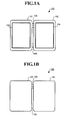
- Embodiment 1 of the present invention The appearance of a portable appliance 100 (an information processing device) according to Embodiment 1 of the present invention will be described with reference to FIGS. 1A and 1B .
- FIG 1A is a diagram showing the foreside of the portable appliance 100
- FIG. 1B is a diagram showing the back side of the portable appliance 100.
- the portable appliance 100 has two chassis (a first chassis 101, a second chassis 102).
- the first chassis 101 houses a first touch panel 103.
- the second chassis 102 houses a second touch panel 104.
- the first touch panel 103 is positioned at left from user's side.
- the second touch panel 104 is positioned at right from user's side.
- the first chassis 101 and the second chassis 102 are connected via a joint 105.
- the joint 105 includes data wires for the first touch panel 103 or the second touch panel 104 to exchange data to and from a controller 205, as will be described hereinafter.
- the joint 105 possibly also comprises a hinge to make the first chassis 101 and the second chassis 102 foldable.
- the portable appliance 100 is configured by a first touch panel 103, a second touch panel 104, a controller 205, and a storage 213.
- the first touch panel 103 and the second touch panel 104 are devices, each comprising a function of displaying images on the screen and a function of detecting a position where a user touched on the screen and outputting a signal indicating the detected position.
- the first touch panel 103 is configured by disposing, in layers, a first liquid crystal panel 202 that displays images designated by the controller 205 on the screen and a first sensor 201 that detects touching and the position of the touching.
- the first sensor 201 detects a position where a user touched on the screen of the first liquid crystal panel 202, and transfers the detected position to the controller 205.
- the second touch panel 104 is, likewise, configured by disposing, in layers, a second liquid crystal panel 204 that displays images designated by the controller 205 on the screen and a second sensor 203 that detects touching and the position of the touching.
- the second sensor 203 detects a position where a user touched on the screen of the second liquid crystal panel 204, and transfers the detected position to the controller 205.
- the controller 205 physically comprises a CPU (Central Processing Unit) or DSP (Digital Signal Processor) and a memory. On the functional side, the controller 205 comprises a first touch panel controller 206, a second touch panel controller 209, and a window controller 212. The controller 205 carries out a variety of processing based on a program stored in the storage 213.
- CPU Central Processing Unit
- DSP Digital Signal Processor
- the portable appliance 100 comprises a communicator, not shown, for communicating with other devices via this communicator.
- the first touch panel controller 206 controls the first touch panel 103.
- the first touch panel controller 206 is configured by a first manipulation determiner 207 and a first display controller 208.
- the first manipulation determiner 207 receives outputs (signals indicating positions where a user touched) of the first sensor 201 of the first touch panel 103 and identifies manipulation that the user performed to the touch panel 103.
- the first display controller 208 receives image data of the images of display subjects from the window controller 212, and controls (drives) the first liquid crystal panel 202 to display the images corresponding to the received image data.
- the second touch panel controller 209 controls the second touch panel 104.
- the second touch panel controller 209 is configured by a second manipulation determiner 210 and a second display controller 211.
- the second manipulation determiner 210 receives outputs (signals indicating positions where a user touched) of the second sensor 203 of the second touch panel 104 and identifies manipulation that the user performed to the touch panel 104.
- the second display controller 211 receives image data of the images of display subjects from the window controller 212, and controls the second liquid crystal panel 204 to display the images corresponding to the received image data.
- the window controller 212 controls windows used by a user for utilizing applications.
- the window controller 212 executes an application program stored in the storage 213, and determines display modes of one or a plurality of windows to be displayed based on the processing result, manipulation identified by the first manipulation determiner 207 and manipulation identified by the second manipulation determiner 210.
- the display modes of windows here, mean the number of the windows, the layout of each window, and the content displayed on each window.
- the window controller 212 instructs the first display controller 208 and the second display controller 211 to display windows in the determined display modes.
- the storage 213 is physically configured by a flash memory, ROM (Read Only Memory), RAM (Random Access Memory), hard disk, and the like, and functionally comprises a window history storage 214.
- the storage 213 stores data designated by a controller 205.
- the controller 205 reads out the designated data from the storage 213.
- FIGS. 3A to 3C show display examples of touch panels 103 and 104 when a user is executing application A.
- the first touch panel 103 displays the display image of application A.
- the first pattern is a case where a user desires only images accompanying the behavior of application A to be displayed in window Wa displayed on the first touch panel 103 (displayed on the whole screen of the first touch panel 103 in FIG. 3A ) without any other special contents to be displayed.
- arbitrary contents are displayed on the second touch panel 104.
- the second touch panel 104 is possibly turned off, displays a black screen, or displays a default screen (a wall paper, a screen saver, or the like) ( FIG. 3A ).
- a window of an arbitrary application is possibly displayed.
- FIG. 3B The next pattern is shown in FIG. 3B where the second touch panel 104 displays window Wb displaying images according to the behavior of application B that is used in relation with application A.
- a user manipulates application A while referring to the screen of application B displayed on the second touch panel 104.
- the user manipulates a mailer (application A) while seeing the window Wb of a browser (application B).
- application A a mailer
- application B a browser
- windows Wa and Wb of two applications are displayed on respective screens
- it is referred to as a two app display.
- such a window display layout is referred to as a two app display layout.
- the last pattern is shown in FIG. 3C where the window Wa of application A is displayed not only on the first touch panel 103, but also on the second touch panel 104.
- the first touch panel 103 displays the left half of the window Wa of application A
- the second touch panel 104 displays the right half of the window Wb.
- two windows, which display application A are respectively displayed on the first touch panel 103 and the second touch panel 104.
- a user uses the window Wa displayed on the two screens to manipulate application A.
- the window controller 212 defines the following hierarchical structure of windows. Windows W1 to W5 to be displayed on the left screen (first touch panel 103) and the right screen (second touch panel 104) will be defined as shown in FIG. 4 .
- windows W1 to W5 are represented by laterally long rectangles with rounded corners.
- Windows W1 to W5 are each assigned ID (Identification) numbers. Such ID numbers are indicated by numerical values within the rounded corner rectangles.
- Windows W1 to W5 are laid out on the right screen (ID: 406, 401), the left screen (ID: 405), or over both left and right screens (ID: 403, 402).
- Windows W1 to W5 are respectively assigned hierarchical values 1 to 5.
- One or a plurality of windows among windows W1 to W5, configure a hierarchical structure.
- the highest level window in the hierarchy (with the largest hierarchical value) for each screen is displayed on the screen.
- the layout of that window is referred to as the display layout (a layout displaying a window).
- window W5 with ID: 406 is displayed on the left screen.
- window W4 with ID: 405 is displayed on the right screen.
- This hierarchical structure changes when a window is disposed; a new application is activated; or a focus is switched to a lower level window, according to the manipulation of a user or the processing result of an application.
- a focus is switched to a lower level window, according to the manipulation of a user or the processing result of an application.
- window W5 with ID: 406 when window W5 with ID: 406 is disposed from the state of FIG.4 , the left half of window W3 with ID: 403, which is located in the next highest layer to the window with ID: 406, is displayed on the left screen. As window W4 with ID: 405 is displayed on the right screen, the right half of window W3 with ID: 403 is still hidden.
- the hierarchical structure of FIG. 4 is, specifically, defined by a window state list 212a shown in FIG. 5 .
- Each row of the window state list 212a has the state of corresponding window registered therein.
- Each column of the window state list 212a indicates the details of each item for defining the state of a window.
- Columns of the window state list 212a are: window ID, the position of window, the hierarchy of window, application ID, the name of application, the type of application, and activation source application ID that induces the application.
- the window ID is an identifier for identifying a corresponding window.
- the position of window represents a screen/screens on which a window corresponding to each row is positioned.
- the position of window takes any one of three values: RIGHT, LEFT, FULL. If the value is RIGHT, the corresponding window is displayed only on the right screen; LEFT, on the left screen; and, FULL, on both left and right screens.
- the hierarchy of window represents a position, in the hierarchical structure shown in FIG. 4 , occupied by the corresponding window.
- the hierarchy of window is defined as a positive value. The larger this numerical value is, the higher in the hierarchy the corresponding window is positioned.
- Each window displays the processing result of the corresponding application.
- Information about this corresponding application is indicated, in the window state list 212a, by application ID, application name, application type, and activation source application ID that induces the application.
- the application ID is an identifier that uniquely represents an application displayed on the window.
- the application name indicates the name of an application displayed on the window.
- the application type indicates to which classification an application displayed on the window belongs. Every application included in the system belongs to any one of predefined classifications.
- the application type possibly has a value of mailer, launcher, browser, or the like.
- application name "A BROWSER” and application name "B BROWSER” are both applications of the classification of "BROWSER.”
- the activation source application ID that induces the application is the ID (identifier) of an application that has activated the application displayed on the window.
- activation app main application
- activated application is referred to as the pair app (pair application).
- the application ID has a value of ID of an activation source app or NULL (a value when there is no activation source app). For example, since HOME app with application ID: 5012 in FIG. 5 is an application that is started up as a home screen when starting up the portable appliance 100 and a standby state screen, HOME app does not have an activation app.
- B MAIL (ID: 5014) is activated by A BROWSER (ID: 5013).
- the activation source application ID of B MAIL (ID: 5014) is 5013 that represents A BROWSER.
- a BROWSER being the activation app
- B MAIL being the pair app.
- the window state list 212a is stored in the internal memory of the window controller 212. When the layout of each window represented by FIG. 4 changes, the window state list 212a is updated, overwritten and stored.
- the window controller 212 supports a user to change the layout of windows to a favorable display layout without performing complicated manipulation. The following will describe processing that the window controller 212 performs for supporting a user with reference to FIGS. 6 to 9 .
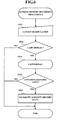
- window history recording processing 1 starts ( FIG. 6 ).
- the window controller 212 determines whether the display layout of the window after the change is a two app display layout ( FIG. 3B ) or not (step S602). If it is not a two app display layout, (step S602: NO), the window history recording processing 1 ends.
- the window controller 212 updates the window state list 212a stored in the internal memory, and displays the screen in the changed display layout (step S603).
- the manipulation at step S601 is a manipulation for generating a new window
- information relating to the new window is added to the window state list 212a.
- the manipulation at step S601 is a manipulation for changing the layout of existing windows, the positions of the windows after changing the layout and hierarchical values of the windows are updated.
- the window state list 212a is referred to so as to determine whether there is an activation association between the two applications that are displayed in a two app display (step S604). If there is an activation association (step S604: YES), data of the changed display layout of the windows is generated as history data, registered in a window history list 214a, and stored in the window history storage 214 (step S605).
- Each row of the window history list 214a has display layout information of windows in a two app display layout that was registered at step S605 as a history.
- Each column of the window history list indicates the details of each item for defining the state of the two app display layout.
- Columns of the window history list 214a are layout ID, saved time and date, app name of activation app, position of activation app, subject of layout determination of pair app, type/name of pair app, and position of pair app.
- the layout ID is an identifier for uniquely defining the display layout of windows registered in each row.
- the saved time and date represents time and date when the display layout of the windows of that row was registered.
- the app name of activation app represents the name of the activation app between the two applications displayed in the two app display layout at step S603.
- the position of activation app represents which of left and right screens the activation app is displayed in the two app display layout at step S603.
- the position of activation app takes any one value of RIGHT, LEFT, and FULL. If the value is RIGHT, the window of corresponding activation app is displayed only on the right screen; LEFT, on the left screen; and, FULL, on both screens.
- the subject of layout determination of pair app is a value for defining whether a method of identifying the pair app is based on an application classification or an application name.
- the value is "APP TYPE;" when the pair app is identified by the application name, the value is "APP NAME.”
- the type/name of pair app has, when the value of the subject of layout determination is "APP TYPE,” a value of information that identifies the classification of the pair app (the name of the application classification). When the value of the subject of layout determination is "APP NAME,” the type/name of pair app has a value of the name of the application that identifies the pair app.
- the position of pair app represents which of left and right screens the pair app is displayed in the two app display layout at step S603.
- the position of pair app takes any one value of RIGHT, LEFT, and FULL. If the value is RIGHT, the window of the corresponding pair app is displayed only on the right screen; LEFT, on the left screen; and, FULL, on both screens.
- Each row of the window history list 214a represents the layout of the windows of two applications that are displayed in the two app display at step S603 and have an activation association which are respectively displayed on the left and right screens.
- this window display layout is purposely set by user manipulation, the window display layout is assumed as a favorable display layout for the user when using the activation app.
- this window display layout is registered as a candidate of a window display layout in the window history list 214a so that the changed window display layout is easily reproduced when the user starts up the activation app next time.
- step S605 After the window history list 214a is generated and saved (after step S605), or there is no activation association (step S604: NO), the processing ends.
- the window history recording processing 1 of FIG. 6 is not the only processing that registers a window display layout as a candidate in the window history list 214a. As another example of registering a window display layout, window history recording processing 2 will be described with reference to FIG. 8 .
- the window history recording processing 2 is characterized in that, when a user manipulates moving a focus between windows of a two app display layout, the display layout of that time is registered in the window history list. Such manipulation of moving a focus is not a manipulation of changing window display layout itself. Thus, in the example that has been described so far, the window display layout at the time of manipulation for moving a focus, does not become a candidate of a window display layout, and, so, this window display layout is not registered in the window history list 214a in the window history recording processing 1. However, if a user is frequently moving a focus in a two app display state, which probably means that the user is required to work by simultaneously using the displayed two applications. Thus, in the window history recording processing 2, such a window display layout is registered in the window history list 214a. In this way, the same window display layout is easily reproduced when starting up the applications thereafter.
- the window history recording processing 2 starts when a user manipulates moving a focus to an unfocused window.
- the window controller 212 refers to the window state list 212a and determines whether the present window layout is a two app display or not (step S802). If the window layout is not a two app display (step S802: NO), the window layout is not a processing subject in the window history recording processing 2, then, the processing ends.
- step S802 If the window layout is a two app display (step S802: YES), first, the processing of moving the focus to a window designated by the user is performed (step S803).
- step S804 data for window history list 214a for newly registering this window display layout is generated and registered in the window history list 214a, and this window history list 214a is overwritten and stored in the window history storage 214.
- window display processing 1 The following will describe processing that is performed for displaying windows in a favorable window display layout selected by a user using the window history list 214a when the user manipulates activating the application (window display processing 1) with reference to FIGS. 9 and 10 .
- window display processing 1 When a user manipulates activating (executing) an application, the window controller 212 starts the window display processing 1.
- step S901 when a user manipulates activating an application (step S901), first, whether the application is registered in the activation app column in the window history list 214a is determined (step S902). If the application is not in the activation app column (step S902: NO), then, the processing ends. In this case, the window is displayed based on the default setting.
- step S902 If the application is registered in the activation app column of the window history list 214a (step S902: YES), all rows with the application registered in the activation app column are extracted from the window history list 214a. Then, processing of a candidate registration loop (steps S903 to S906) is executed for each extracted row.
- the activation app is A BROWSER
- corresponding two rows rows with layout ID values "1" and "2" are extracted from the window history list 214a, and processing of the candidate registration loop is executed for these two rows.
- step S904 whether a pair app window of a row that is a subject of processing has already been registered in the window state list 212a or not is determined.
- the pair apps of the above two rows are "MAIL" and "A TEXT EDITOR,” thus, whether these pair apps are registered in the window state list 212a is determined.
- step S904 NO
- the pair app has not yet been activated.
- the window layout does not become a new window layout candidate (window display layout candidate) in this embodiment.
- the processing of this loop ends for that row.
- a TEXT EDITOR is not registered in the window state list 212a, processing of this loop for the row where pair app is A TEXT EDITOR ends.
- the window display layout is regarded as a window display layout candidate, and the corresponding row of the window history list 214a is registered, as is, in a layout candidate list 214b (step S905).
- the layout of a window where the pair app is MAIL is regarded as a window display layout candidate, and, as shown in FIG. 7B , the corresponding row of the window history list 214a is registered in the layout candidate list 214b.
- step S905 ends, processing for a row that was the subject of processing ends. Then, the candidate registration loop continues with the following row becoming the subject of processing. When the processing completes for all extracted rows, processing of the candidate registration loop ends (step S906).
- the window controller 212 determines whether the window display layout candidate is registered in the layout candidate list 214b (step S907). When no window display layout candidate is registered (step S907: NO), the window display processing 1 ends.
- step S907 If any window display layout candidate is registered in the layout candidate list 214b (step S907: YES), the registered window display layout candidate is displayed on the second touch panel 104 (step S908). The user selects one of the displayed window display layout candidates by manipulating the second touch panel 104.
- the window controller 212 updates the window state list 212a to facilitate reproducing the window display layout of the selected candidate (step S910).
- the window controller 212 changes the values of the positions of windows relating to the candidate among windows W1 to W5 registered in the window state list 212a to the values of the positions matching the window display layout candidate in the layout candidate list 214b. Further, the window controller 212 changes the hierarchical values of those windows to values corresponding to the uppermost level of the positions. Other values of the window layout and the like will not be changed.
- the window controller 212 issues an instruction to the first display controller 208 and the second display controller 211 to update the screens based on the window state list 212a that has been updated by the above change.
- the windows are displayed in the window display layout selected by the user (step S911).
- step S908 will describe the screens to be displayed on the first touch panel 103 and the second touch panel 104 when a user selects a window display layout candidate at the processing of step S908 with reference to FIG. 10 .
- FIG. 10 shows screens displayed when App B, App C, and App D are registered as pair apps of App A in the layout candidate list 214b.
- "APP B,” “APP C,” or “APP D” is selected when a user touches any one of buttons 104a to 104c indicating App B, App C, and App D that are window display layout candidates.
- the window controller 212 extracts information about the corresponding window display layout candidate from the layout candidate list 214b of the window history storage 214. Then, the window controller 212 updates the window state list 212a of the window controller 212 to match the window display layout. The window controller 212 instructs the first display controller 208 and the second display controller 211 to display screens according to the updated window state list 212a.
- a window display layout in which a user simultaneously used an activation app and a pair app in the past is reproduced without complicated manipulation.
- touch panels of known types such as resistive touch panels, surface capacitive touch panels, and projected capacitive touch panels, are possibly used.
- the touch panel of Embodiment 1 is possibly a multi-touch panel that allows touch input by gestural manipulation with two fingers.
- Embodiment 2 is characterized in that, when a pair app is not registered in the window state list 212a, the pair app is newly activated to display the window of the pair app.
- Embodiment 2 the appearance of the portable appliance, configuration, screen layout, the structures of window state list and window history list, the recording processing of the window history list (window history recording processing 1 and 2) are the same as Embodiment 1 ( FIGS. 1 to 8 ).
- processing for displaying a window in a favorable window display layout selected by a user using a window history list when the user manipulates activating an application, with reference to FIGS. 11 , 12 , and 13A to 13D .
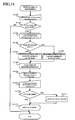
- step S1101 when a user manipulates activating an application (step S1101), the window controller 212 executes window display processing 2.
- steps from the start of processing until it is determined at the candidate registration loop (steps S1101 to S 1104) whether the window of the pair app has already been registered in the window state list 212a are the same as those in the window display processing 1(steps S901 to S904).
- the window display processing 2 is different from the window display processing 1 in processing when the window of a pair app of a row that is a processing subject is not registered in the window state list 212a (step S1104: NO). That is, in the window display processing 2, this window display layout is registered in a second layout candidate list 214c shown in FIGS. 13A and 13D as a window display layout candidate of an unactivated pair app (step S 1106).
- the window display layout is registered in the first layout candidate list 214b shown in FIGS. 13A and 13C as a window display layout candidate of an activated pair app (step S1105).
- the candidate registration loop ends when the loop processing has been executed for all the rows extracted from the window history list 214a shown in FIGS. 13A and 13B (step S 1107).
- window display layout candidates registered in the first layout candidate list 214b and the second layout candidate list 214c are displayed on the screen next (step S1108).
- the user selects one of the displayed candidates by manipulating the second touch panel 104.
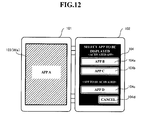
- window display layout candidates corresponding to activated pair app 104a, 104b, and unactivated pair app 104c are distinctively displayed as shown in FIG. 12 . It should be noted that, unlike the window display processing 1, in the window display processing 2, a window display layout candidate always exists if an activation app is registered in the window history list 214a. Therefore, the window display processing 2 does not determine whether there is a window display layout candidate (step S907).
- step S1109 When a user selects one of the window display layout candidates using the displayed screen (step S1109), it is determined whether the pair app of the selected window display layout candidate has been activated yet (step S1110).
- step S1110 If the pair app of the window display layout candidate that the user selected at step S 1109 has not been activated (step S1110: NO), the pair app is newly activated (step S1111).
- step S1110 If the pair app selected by the user has already been activated (step S1110: YES), or has not been activated but is newly activated (step S1111), the windows of the activation app and the pair app are displayed according to the layout content of the selected window display layout candidate (step S 1112). Then, the window display processing 2 ends.
- the screen that a user uses for selecting one of the window display layout candidates at step S 1108 will be described with reference to FIG. 12 .
- the window of App A is temporarily displayed on the first touch panel 103.
- the second touch panel 104 displays a screen used for selecting a window display layout candidate (step S 1108).
- corresponding pair apps are distinctively displayed as the activated candidates and the unactivated candidates.
- the screen is the same as FIG. 10 for other parts.
- App B and App C indicated as pair apps 104a and 104b are activated, and displayed in button shapes under the field displayed as ⁇ ACTIVATED APP>.
- App D indicated as pair app 104c is an unactivated application, and displayed in a button shape under the field displayed as ⁇ APP TO BE ACTIVATED>.
- window display layout candidate For example, if the user selects App B (pair app 104a), windows Wa and Wb of App A and App B are displayed in the window display layout of the corresponding window display layout candidate. It should be noted that, if a plurality of window display layout candidates having App B as pair app are registered in the first layout candidate list 214b, a window display layout candidate that is most recently registered in the window history list 214a is selected as a new window display layout.
- App D (pair app 104 c) is selected, App D is newly activated.
- App A and App D are displayed in a window display layout that is a window display layout candidate having App D as pair app and has been most recently registered in the window history list 214a among the window display layout candidates registered in the layout candidate list 214c.
- Embodiment 2 if the layout candidate list 214b has a plurality of window display layout candidates corresponding to the pair app of the selected window display layout candidate, a window display layout candidate that is registered most recently in the window history list 214a is selected, while the selecting method is not limited to this.
- a selection method there is considered a configuration that allows a user to further select a favorable window display layout from the plurality of window display layout candidates.
- a priority is possibly defined for the plurality of window display layout candidates, and a window display layout candidate with the highest priority is possibly selected automatically. In such a case, the following examples are considered as criteria for defining this priority:
- Embodiment 3 is characterized in that window display layout candidates are generated according to window layout templates that have been recorded in the portable appliance in advance.
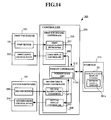
- the configuration of a portable appliance 300 according to Embodiment 3 is different from those of Embodiments 1 and 2 in having a window layout template storage 301 in the storage 213 ( FIG. 14 ).
- the window layout template storage 301 stores a window layout template 301a as will be described hereinafter.
- the window layout template 301a has templates of predefined window display layouts registered therein.
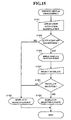
- window display processing 3 starts (step S1401). Then, the window controller 212 determines whether that application has been registered as an activation app in the window layout template 301 a (step S 1402).
- window layout template 301a will be described using FIG. 16.
- the window layout template 301a has a structure as shown in FIG. 16 .
- Each row of the window layout template 301a has a window display layout candidate for each combination of an activation app and a pair app registered therein as a template.
- Each column of the window layout template 301a indicates the details of each item for defining candidates of the window display layout, which includes layout ID, app name of activation app, position of activation app, app name of pair app, and position of pair app.
- FIG. 14 shows a window layout template 301a, assuming a case where B TEXT EDITOR activates B BROWSER and both applications are simultaneously used.
- a row that defines B TEXT EDITOR as the activation app, B BROWSER as the pair app, and the window display layout of the B TEXT EDITOR and B BROWSER is registered with layout ID "5" in the window layout template 301a.
- the layout ID is an ID (identifier) that uniquely represents each row of the window layout template 301a.
- the app name of activation app is a name that uniquely represents an activation app corresponding to the window display layout candidate of that row.
- the position of activation app in the window display layout candidate of that row, indicates which part on the screen the window of the activation app is displayed.
- the position of activation app possibly takes a value of one or a combination of: RIGHT, LEFT, RIGHT_UP, LEFT_UP, RIGHT_DOWN, LEFT_DOWN, FULL and the like. This value being, for example, "LEFT, RIGHT_UP,” means that, in the window display layout candidate of that row, the window of the activation app is displayed on the left screen and the upper portion of the right screen.
- the application name of pair app in the window display layout candidate of that row, indicates the name of application (pair app) that is activated by an activation app and simultaneously used in combination with the activation app.
- the position of pair app indicates, in the window display layout candidate of that row, which part on the screen the window of the pair app is displayed.
- the position of the pair app possibly takes a value of one or a combination of: RIGHT, LEFT, RIGHT_UP, LEFT_UP, RIGHT_DOWN, LEFT_DOWN, FULL, and the like. This value being, for example, "RIGHT_DOWN,” means that, in the window display layout candidate of that row, the window of the pair app is displayed on the lower portion of the right screen.
- step S1402 If an application that was newly activated by a user is not registered in the column of activation app in the window layout template 301 a (step S1402: NO), the window of the activation app is displayed in a default window display layout (step S 1407).
- window display layout candidates having that application as an activation app are extracted from the window display layout candidates registered in the window layout template 301a.
- the extracted window display layout candidates are displayed on the screen (step S1403).
- the user selects one of the displayed window display layout candidates by manipulating the touch panel.
- the window controller 212 determines whether the user performed manipulation of selecting a window display layout candidate or not (step S 1405).
- step S1405 If the user cancelled without performing manipulation of selecting a window display layout candidate (step S1405: NO), the application is displayed on a window of a general window display layout (a default setting) (step S 1407).
- step S 1405 if the user selects any one of the displayed window display layout candidates (step S 1405: YES), the activation app and the pair app are displayed on windows in the window display layout of the selected window display layout candidate (step S1406).
- the window is modified according to the layout of the window display layout candidate and displayed.
- the window controller 212 newly activates the pair app, generates a window that displays the content of the pair app, and displays the window according to the window display layout candidate.
- the window of that application is temporarily displayed on the first touch panel 103.
- the second touch panel 104 displays window display layout candidates (I) to (VI) having the application as activation app among the window display layout candidates registered in the window layout template 301a.
- FIG. 17 shows:
- window display layout candidates (III), (VI) when the windows of activation app and pair app overlap each other in a window display layout candidate, a window occupying a smaller area is displayed in a higher hierarchy than a window occupying a larger area.
- the lower right screen display is possibly any one of upper right, lower left, and upper left screen displays.
- window display layout candidates (I) to (VI) When the user selects one of the above window display layout candidates (I) to (VI), windows are displayed in that window display layout. If the user selects cancellation by touching the cancel button 104d, the window of the activated application is displayed according to the default setting.
- a window layout registered in the window layout template 301 a is reproduced without complicated manipulation.
- the window layout template 301a registers a predefined window display layout
- the content of the window layout template 301 a is not limited to this, and a user is possibly able to register arbitrary window display layout candidates at arbitrary time in the window layout template 301a.
- Embodiments 1 to 3 a configuration is described where one window is displayed on the whole right screen, on the upper or lower right screen, on the whole left screen, on the upper or lower left screen, on both screens, or a combination thereof.
- the window display method is not limited to this, and the window is possibly displayed in a variety of positions and sizes.
- an information processing device has three or more display devices, for each of which a number is defined. For example, if an information processing device has three display devices, numbers 1 to 3 are assigned to the display devices. Then, the positions of windows in Embodiments 1 to 3 are represented by the numbers of the display devices, and the same processing as Embodiments 1 to 3 is performed.
- the position of a window in the window state list 212a is possibly defined by the coordinate values of three points that define the position and size of the window.
- This window state list 212a defines the position of a window on the display screen and the area occupied by the window, whether the window is left or right.
- the changed window display layout is registered in the window history list 214a as a window display layout candidate. In this way, a user is allowed to select a favorable window display layout among a variety of window display layout candidates without limitation to displaying left or right, or on the whole screen, or the like.
- the present invention is possibly also applied to an information processing device having only one display device.
- the position of a window becomes a value for defining which position on the display the window occupies.
- a user is allowed to select a favorable window display layout among display layout candidates with an information processing device with one display rather than the one having a plurality of displays.
- one application is displayed on only one window in Embodiments 1 to 3.
- the present invention is possibly also implemented in a configuration where one application is displayed on a plurality of windows.
- a plurality of windows are registered for one application in the window layout state list and the window history list of Embodiments 1 to 3.
- a central portion that performs processing for a portable appliance comprising a controller 205, a storage 213, and the like, is implementable by a general computer system instead of using a dedicated system.
- the portable appliance executing the processing is possibly configured by distributing a computer program for executing the above behavior stored in a computer-readable recording medium (flexible disk, CD-ROM (Compact Disc - Read Only Memory), DVD-ROM (Digital Versatile Disc - Read Only Memory), and the like), and installing the computer program in a computer.
- the information processing device is possibly configured by storing the computer program in the storage of a server device on a communication network, such as the Internet, and downloading the computer program on a general computer system.
- the application program part is possibly stored in a recording medium or a storage.
- the computer program is possibly superimposed on a carrier wave and delivered via a communication network.
- the computer program is possibly posted on a board on a communication network (BBS: Bulletin Board System), and delivered via the network.
- BSS Bulletin Board System
- the processing is possibly executed by activating the computer program and executing the program under the control of OS in the same way as other applications.
- An information processing device comprising:
- the display controller comprises:
- the information processing device according to any one of Supplementary Notes 1 to 5, wherein when two of the windows are simultaneously displayed and a focus is moved between the two windows, the window controller stores a layout of the two windows as a history in the storage.
- the information processing device according to any one of Supplementary Notes 1 to 6, wherein the storage stores a template of the layout of the windows, and the window controller uses the template as the history of the layout of the windows.
- the information processing device according to any one of Supplementary Notes 1 to 7, wherein the information processing device is a portable appliance comprising a plurality of display screens.
- An information processing method comprising:
- a computer-readable recording medium that stores a program for causing a computer to execute the processing of:
- the present invention is based on Japanese Patent Application No. 2011-094263 filed as of April 20, 2011. This specification includes all the description, claims, and figures of Japanese Patent Application No. 2011-094263 as reference.
- the present invention is applicable for information processing devices that support manipulation of setting a plurality of windows displayed on a plurality of screens in a favorable display layout.
Landscapes
- Engineering & Computer Science (AREA)
- Theoretical Computer Science (AREA)
- General Engineering & Computer Science (AREA)
- Physics & Mathematics (AREA)
- General Physics & Mathematics (AREA)
- Human Computer Interaction (AREA)
- Software Systems (AREA)
- Computer Hardware Design (AREA)
- User Interface Of Digital Computer (AREA)
- Digital Computer Display Output (AREA)
Abstract
Description
- The present invention relates to an information processing device, an information processing method, and a computer-readable recording medium that records a program, which support setting contents to be displayed on a display.
- Information processing devices with multiple window functions, such as portable appliances and personal computers, comprise one or a plurality of display screens. In the use of such information processing devices, a user sometimes manipulates setting a plurality of windows displayed on one or a plurality of screens in a favorable display layout.
- However, user's preferences for a window layout vary depending on the situations. For this reason, there is a problem where a user needs to manipulate changing a window layout each time according to the situation of the moment, making the manipulation complex.
- A technique, therefore, has been proposed for supporting manipulation of setting a layout for displaying windows for information processing devices with display screens.
- For example, Unexamined Japanese Patent Application Kokai Publication No.
2005-12324 - Patent Literature 1: Unexamined Japanese Patent Application Kokai Publication No.
2005-12324 - Nevertheless, there are still insufficiencies in the technique for supporting manipulation of setting a layout for displaying windows for information processing devices with display screens.
- For example, the portable appliance described in Unexamined Japanese Patent Application Kokai Publication No.
2005-12324 - The present invention has been conceived in consideration of the above context, and has an objective of providing an information processing device, an information processing method, and a computer-readable recording medium that records a program, which realize a favorable window layout tailored to users' needs without necessitating complicated manipulation.
- To achieve the above objective, the information processing device according to a first aspect of the present invention comprises:
- a display that displays one or more windows;
- a controller that controls the display so as to control display of the windows by the display and a layout of the windows; and
- a storage that stores a history of the layout of the windows that is displayed on the display,
- wherein the controller comprises:
- a window controller that generates one or more candidates of the layout of the windows based on the history of the layout of the windows; and
- a display controller that causes the display to display the candidates generated by the window controller,
- the window controller issues an instruction to the display controller to display the windows in a layout selected from the candidates displayed on the display, and
- the display controller causes the windows to be displayed in the selected layout according to the instruction from the window controller.
- The information processing method according to a second aspect of the present invention comprises:
- controlling a layout of one or more windows to display the windows;
- storing a history of the layout of the displayed windows;
- generating one or more candidates of the layout of the windows based on the stored history;
- displaying the generated candidates; and
- displaying one or more windows in a layout indicated by a candidate selected from the displayed candidates.
- Further, a program stored in a computer-readable recording medium according to a third aspect of the present invention, causes a computer to execute the processing of:
- controlling a layout of one or more windows to display the windows;
- storing a history of the layout of the displayed windows;
- generating one or more candidates of the layout of the windows based on the stored history;
- displaying the generated candidates; and
- displaying one or more windows in a layout indicated by a candidate selected from the displayed candidates.
- The information processing device, the information processing method, and the computer-readable recording medium that records the program, according to the present invention, based on the history of window display layouts, generate candidates of the window layouts and display windows in the layout of a candidate selected from the generated candidates. This realizes a favorable window layout tailored to users' needs without necessitating complicated manipulation.
-
-
FIG. 1A is a diagram showing the foreside of the portable appliance, andFIG. 1B is a diagram showing the back side of the portable appliance, in terms of appearance of the portable appliance according toEmbodiment 1 of the present invention; -
FIG. 2 is a block view showing a configuration of the portable appliance according toEmbodiment 1; -
FIGS. 3A to 3C show the display screens according toEmbodiment 1 as examples,FIG. 3A is a diagram showing an example where an application is displayed on a first touch panel,FIG. 3B is a diagram showing an example where two different applications are respectively displayed on the first and second touch panels, andFIG. 3C is a diagram showing an example where the same application is displayed on the first and second touch panels; -
FIG. 4 is a diagram showing a conceptual view of window management according toEmbodiment 1; -
FIG. 5 is a diagram showing an example of a window state list according toEmbodiment 1; -
FIG. 6 is a flowchart showing window history recording processing according toEmbodiment 1; -
FIG. 7A is a diagram showing a window history list according toEmbodiment 1, andFIG. 7B is a diagram showing a layout candidate list according toEmbodiment 1; -
FIG. 8 is a flowchart showing window history recording processing according toEmbodiment 1; -
FIG. 9 is a flowchart showing window display processing according toEmbodiment 1; -
FIG. 10 is a diagram showing an example of a window display selection screen according toEmbodiment 1; -
FIG. 11 is a flowchart showing window display processing according toEmbodiment 2 of the present invention; -
FIG. 12 is a diagram showing a window display selection screen according toEmbodiment 2; -
FIG. 13A is a block view showing a storage of the portable appliance according toEmbodiment 2,FIG. 13B is a diagram showing the window history list ofFIG. 13A, FIG. 13C is a diagram showing the first layout candidate list ofFIG. 13A, and FIG. 13D is a diagram showing the second layout candidate list ofFIG. 13A ; -
FIG. 14 is a block view showing a configuration of the portable appliance according toEmbodiment 3 of the present invention; -
FIG. 15 is a flowchart showing window display processing according toEmbodiment 3; -
FIG. 16 is a diagram showing an example of a window layout template according to -
FIG. 17 is a diagram showing an example of a window display selection screen according toEmbodiment 3. - The following will describe the embodiments of the present invention with reference to the drawings. It should be noted that the same or equivalent portions in the drawings are assigned the same signs and numerals.
- The appearance of a portable appliance 100 (an information processing device) according to
Embodiment 1 of the present invention will be described with reference toFIGS. 1A and 1B . -
FIG 1A is a diagram showing the foreside of theportable appliance 100, andFIG. 1B is a diagram showing the back side of theportable appliance 100. - As shown in
FIGS. 1A and 1B , theportable appliance 100 has two chassis (afirst chassis 101, a second chassis 102). Thefirst chassis 101 houses afirst touch panel 103. Thesecond chassis 102 houses asecond touch panel 104. Thefirst touch panel 103 is positioned at left from user's side. Thesecond touch panel 104 is positioned at right from user's side. - The
first chassis 101 and thesecond chassis 102 are connected via a joint 105. - The joint 105 includes data wires for the
first touch panel 103 or thesecond touch panel 104 to exchange data to and from acontroller 205, as will be described hereinafter. The joint 105 possibly also comprises a hinge to make thefirst chassis 101 and thesecond chassis 102 foldable. - Next, the internal configuration of the
portable appliance 100 will be described with reference toFIG. 2 . Theportable appliance 100, as shown inFIG. 2 , is configured by afirst touch panel 103, asecond touch panel 104, acontroller 205, and astorage 213. - The
first touch panel 103 and thesecond touch panel 104 are devices, each comprising a function of displaying images on the screen and a function of detecting a position where a user touched on the screen and outputting a signal indicating the detected position. - To realize the above functions, the
first touch panel 103 is configured by disposing, in layers, a firstliquid crystal panel 202 that displays images designated by thecontroller 205 on the screen and afirst sensor 201 that detects touching and the position of the touching. Thefirst sensor 201 detects a position where a user touched on the screen of the firstliquid crystal panel 202, and transfers the detected position to thecontroller 205. - The
second touch panel 104 is, likewise, configured by disposing, in layers, a secondliquid crystal panel 204 that displays images designated by thecontroller 205 on the screen and asecond sensor 203 that detects touching and the position of the touching. Thesecond sensor 203 detects a position where a user touched on the screen of the secondliquid crystal panel 204, and transfers the detected position to thecontroller 205. - The
controller 205 physically comprises a CPU (Central Processing Unit) or DSP (Digital Signal Processor) and a memory. On the functional side, thecontroller 205 comprises a firsttouch panel controller 206, a secondtouch panel controller 209, and awindow controller 212. Thecontroller 205 carries out a variety of processing based on a program stored in thestorage 213. - The
portable appliance 100 comprises a communicator, not shown, for communicating with other devices via this communicator. - The first
touch panel controller 206 controls thefirst touch panel 103. The firsttouch panel controller 206 is configured by afirst manipulation determiner 207 and afirst display controller 208. - The
first manipulation determiner 207 receives outputs (signals indicating positions where a user touched) of thefirst sensor 201 of thefirst touch panel 103 and identifies manipulation that the user performed to thetouch panel 103. - The
first display controller 208 receives image data of the images of display subjects from thewindow controller 212, and controls (drives) the firstliquid crystal panel 202 to display the images corresponding to the received image data. - The second
touch panel controller 209 controls thesecond touch panel 104. The secondtouch panel controller 209 is configured by asecond manipulation determiner 210 and asecond display controller 211. - The
second manipulation determiner 210 receives outputs (signals indicating positions where a user touched) of thesecond sensor 203 of thesecond touch panel 104 and identifies manipulation that the user performed to thetouch panel 104. - The
second display controller 211 receives image data of the images of display subjects from thewindow controller 212, and controls the secondliquid crystal panel 204 to display the images corresponding to the received image data. - The
window controller 212 controls windows used by a user for utilizing applications. - The
window controller 212 executes an application program stored in thestorage 213, and determines display modes of one or a plurality of windows to be displayed based on the processing result, manipulation identified by thefirst manipulation determiner 207 and manipulation identified by thesecond manipulation determiner 210. The display modes of windows, here, mean the number of the windows, the layout of each window, and the content displayed on each window. Thewindow controller 212 instructs thefirst display controller 208 and thesecond display controller 211 to display windows in the determined display modes. - The
storage 213 is physically configured by a flash memory, ROM (Read Only Memory), RAM (Random Access Memory), hard disk, and the like, and functionally comprises awindow history storage 214. Thestorage 213 stores data designated by acontroller 205. Thecontroller 205 reads out the designated data from thestorage 213. - The following will describe, with reference to
FIGS. 3A to 4 , how windows displayed on the firstliquid crystal panel 202 and the secondliquid crystal panel 204 are controlled in theportable appliance 100 having the above-described configuration. - It should be noted that a case where one window is displayed on one screen will be described for easy understanding.
-
FIGS. 3A to 3C show display examples oftouch panels first touch panel 103 displays the display image of application A. In this case, there are possibly considered three patterns of contents to be displayed on thesecond touch panel 104. - The first pattern is a case where a user desires only images accompanying the behavior of application A to be displayed in window Wa displayed on the first touch panel 103 (displayed on the whole screen of the
first touch panel 103 inFIG. 3A ) without any other special contents to be displayed. In this case, arbitrary contents are displayed on thesecond touch panel 104. Thesecond touch panel 104 is possibly turned off, displays a black screen, or displays a default screen (a wall paper, a screen saver, or the like) (FIG. 3A ). Alternatively, a window of an arbitrary application is possibly displayed. - The next pattern is shown in
FIG. 3B where thesecond touch panel 104 displays window Wb displaying images according to the behavior of application B that is used in relation with application A. In this case, a user manipulates application A while referring to the screen of application B displayed on thesecond touch panel 104. For example, when a user creates a mail based on information that the user searched on the Internet, the user manipulates a mailer (application A) while seeing the window Wb of a browser (application B). Hereinafter, as in this case, when windows Wa and Wb of two applications are displayed on respective screens, it is referred to as a two app display. Moreover, such a window display layout is referred to as a two app display layout. - The last pattern is shown in
FIG. 3C where the window Wa of application A is displayed not only on thefirst touch panel 103, but also on thesecond touch panel 104. In this case, thefirst touch panel 103 displays the left half of the window Wa of application A and thesecond touch panel 104 displays the right half of the window Wb. Alternatively, two windows, which display application A, are respectively displayed on thefirst touch panel 103 and thesecond touch panel 104. A user uses the window Wa displayed on the two screens to manipulate application A. - To display one or a plurality of windows on two screens as shown in
FIGS. 3A to 3C , thewindow controller 212 defines the following hierarchical structure of windows. Windows W1 to W5 to be displayed on the left screen (first touch panel 103) and the right screen (second touch panel 104) will be defined as shown inFIG. 4 . - In
FIG. 4 , windows W1 to W5 are represented by laterally long rectangles with rounded corners. Windows W1 to W5 are each assigned ID (Identification) numbers. Such ID numbers are indicated by numerical values within the rounded corner rectangles. - Windows W1 to W5 are laid out on the right screen (ID: 406, 401), the left screen (ID: 405), or over both left and right screens (ID: 403, 402).
- Windows W1 to W5 are respectively assigned
hierarchical values 1 to 5. One or a plurality of windows among windows W1 to W5, configure a hierarchical structure. The highest level window in the hierarchy (with the largest hierarchical value) for each screen is displayed on the screen. In this way, the state of a window, which is defined by the place and hierarchy occupied by the window, is referred to as the layout of that window. Moreover, the layout of a window in the highest layer displayed on each screen is referred to as the display layout (a layout displaying a window). - In the example of
FIG. 4 , since a window with ID: 406 is in the highest layer on the left screen, window W5 with ID: 406 is displayed on the left screen. Whereas, since a window with ID: 405 is in the highest layer on the right screen, window W4 with ID: 405 is displayed on the right screen. - This hierarchical structure changes when a window is disposed; a new application is activated; or a focus is switched to a lower level window, according to the manipulation of a user or the processing result of an application. When and how the hierarchical structure changes is determined by the system setting.
- When the hierarchical structure changes, a window which has come to be in the highest layer of the renewed hierarchical structure is displayed on each screen.
- For example, when window W5 with ID: 406 is disposed from the state of
FIG.4 , the left half of window W3 with ID: 403, which is located in the next highest layer to the window with ID: 406, is displayed on the left screen. As window W4 with ID: 405 is displayed on the right screen, the right half of window W3 with ID: 403 is still hidden. - The hierarchical structure of
FIG. 4 is, specifically, defined by awindow state list 212a shown inFIG. 5 . Each row of thewindow state list 212a has the state of corresponding window registered therein. Each column of thewindow state list 212a indicates the details of each item for defining the state of a window. - Columns of the
window state list 212a are: window ID, the position of window, the hierarchy of window, application ID, the name of application, the type of application, and activation source application ID that induces the application. - The window ID is an identifier for identifying a corresponding window.
- The position of window represents a screen/screens on which a window corresponding to each row is positioned. The position of window takes any one of three values: RIGHT, LEFT, FULL. If the value is RIGHT, the corresponding window is displayed only on the right screen; LEFT, on the left screen; and, FULL, on both left and right screens.
- The hierarchy of window represents a position, in the hierarchical structure shown in
FIG. 4 , occupied by the corresponding window. The hierarchy of window is defined as a positive value. The larger this numerical value is, the higher in the hierarchy the corresponding window is positioned. - Each window displays the processing result of the corresponding application. Information about this corresponding application is indicated, in the
window state list 212a, by application ID, application name, application type, and activation source application ID that induces the application. - The application ID is an identifier that uniquely represents an application displayed on the window.
- The application name indicates the name of an application displayed on the window.
- The application type indicates to which classification an application displayed on the window belongs. Every application included in the system belongs to any one of predefined classifications. The application type possibly has a value of mailer, launcher, browser, or the like. In the example of
FIG. 5 , application name "A BROWSER" and application name "B BROWSER" are both applications of the classification of "BROWSER." - The activation source application ID that induces the application is the ID (identifier) of an application that has activated the application displayed on the window.
- Hereinafter, when there is a relationship where a given application is activated by another application, there is said to be an activation association between the two applications. Further, such an activation source application is referred to as the activation app (main application) and the activated application is referred to as the pair app (pair application).
- The application ID has a value of ID of an activation source app or NULL (a value when there is no activation source app). For example, since HOME app with application ID: 5012 in
FIG. 5 is an application that is started up as a home screen when starting up theportable appliance 100 and a standby state screen, HOME app does not have an activation app. - In the example of
FIG. 5 , B MAIL (ID: 5014) is activated by A BROWSER (ID: 5013). Thus, the activation source application ID of B MAIL (ID: 5014) is 5013 that represents A BROWSER. There is an activation association between A BROWSER and B MAIL, with A BROWSER being the activation app, B MAIL being the pair app. - The
window state list 212a is stored in the internal memory of thewindow controller 212. When the layout of each window represented byFIG. 4 changes, thewindow state list 212a is updated, overwritten and stored. - The
window controller 212 supports a user to change the layout of windows to a favorable display layout without performing complicated manipulation. The following will describe processing that thewindow controller 212 performs for supporting a user with reference toFIGS. 6 to 9 . - When the
portable appliance 100 is activated and a window is displayed, windowhistory recording processing 1 starts (FIG. 6 ). When a user performs manipulation of converting the display layout of the window (step S601), thewindow controller 212 determines whether the display layout of the window after the change is a two app display layout (FIG. 3B ) or not (step S602). If it is not a two app display layout, (step S602: NO), the windowhistory recording processing 1 ends. - If the display layout of the window after the change is a two app display layout (step S602: YES), the
window controller 212 updates thewindow state list 212a stored in the internal memory, and displays the screen in the changed display layout (step S603). Here, if the manipulation at step S601 is a manipulation for generating a new window, information relating to the new window is added to thewindow state list 212a. If the manipulation at step S601 is a manipulation for changing the layout of existing windows, the positions of the windows after changing the layout and hierarchical values of the windows are updated. - Next, the
window state list 212a is referred to so as to determine whether there is an activation association between the two applications that are displayed in a two app display (step S604). If there is an activation association (step S604: YES), data of the changed display layout of the windows is generated as history data, registered in awindow history list 214a, and stored in the window history storage 214 (step S605). - Here, the window history list will be described with reference to
FIG. 7 . Each row of thewindow history list 214a has display layout information of windows in a two app display layout that was registered at step S605 as a history. Each column of the window history list indicates the details of each item for defining the state of the two app display layout. - Columns of the
window history list 214a are layout ID, saved time and date, app name of activation app, position of activation app, subject of layout determination of pair app, type/name of pair app, and position of pair app. - The layout ID is an identifier for uniquely defining the display layout of windows registered in each row.
- The saved time and date represents time and date when the display layout of the windows of that row was registered.
- The app name of activation app represents the name of the activation app between the two applications displayed in the two app display layout at step S603.
- The position of activation app represents which of left and right screens the activation app is displayed in the two app display layout at step S603. The position of activation app takes any one value of RIGHT, LEFT, and FULL. If the value is RIGHT, the window of corresponding activation app is displayed only on the right screen; LEFT, on the left screen; and, FULL, on both screens.
- The subject of layout determination of pair app is a value for defining whether a method of identifying the pair app is based on an application classification or an application name. When the pair app is identified by the application classification, the value is "APP TYPE;" when the pair app is identified by the application name, the value is "APP NAME."
- The type/name of pair app has, when the value of the subject of layout determination is "APP TYPE," a value of information that identifies the classification of the pair app (the name of the application classification). When the value of the subject of layout determination is "APP NAME," the type/name of pair app has a value of the name of the application that identifies the pair app.
- The position of pair app represents which of left and right screens the pair app is displayed in the two app display layout at step S603. The position of pair app takes any one value of RIGHT, LEFT, and FULL. If the value is RIGHT, the window of the corresponding pair app is displayed only on the right screen; LEFT, on the left screen; and, FULL, on both screens.
- Each row of the
window history list 214a represents the layout of the windows of two applications that are displayed in the two app display at step S603 and have an activation association which are respectively displayed on the left and right screens. As this window display layout is purposely set by user manipulation, the window display layout is assumed as a favorable display layout for the user when using the activation app. Thus, in this embodiment, this window display layout is registered as a candidate of a window display layout in thewindow history list 214a so that the changed window display layout is easily reproduced when the user starts up the activation app next time. - This description continues referring back to
FIG. 6 . - After the
window history list 214a is generated and saved (after step S605), or there is no activation association (step S604: NO), the processing ends. - The window
history recording processing 1 ofFIG. 6 is not the only processing that registers a window display layout as a candidate in thewindow history list 214a. As another example of registering a window display layout, windowhistory recording processing 2 will be described with reference toFIG. 8 . - The window
history recording processing 2 is characterized in that, when a user manipulates moving a focus between windows of a two app display layout, the display layout of that time is registered in the window history list. Such manipulation of moving a focus is not a manipulation of changing window display layout itself. Thus, in the example that has been described so far, the window display layout at the time of manipulation for moving a focus, does not become a candidate of a window display layout, and, so, this window display layout is not registered in thewindow history list 214a in the windowhistory recording processing 1. However, if a user is frequently moving a focus in a two app display state, which probably means that the user is required to work by simultaneously using the displayed two applications. Thus, in the windowhistory recording processing 2, such a window display layout is registered in thewindow history list 214a. In this way, the same window display layout is easily reproduced when starting up the applications thereafter. - The window
history recording processing 2 starts when a user manipulates moving a focus to an unfocused window. When the user performs manipulation of moving a focus (step S801), thewindow controller 212 refers to thewindow state list 212a and determines whether the present window layout is a two app display or not (step S802). If the window layout is not a two app display (step S802: NO), the window layout is not a processing subject in the windowhistory recording processing 2, then, the processing ends. - If the window layout is a two app display (step S802: YES), first, the processing of moving the focus to a window designated by the user is performed (step S803).
- Next, data for
window history list 214a for newly registering this window display layout is generated and registered in thewindow history list 214a, and thiswindow history list 214a is overwritten and stored in the window history storage 214 (step S804). - Then, the window
history recording processing 2 ends. - The following will describe processing that is performed for displaying windows in a favorable window display layout selected by a user using the
window history list 214a when the user manipulates activating the application (window display processing 1) with reference toFIGS. 9 and10 . When a user manipulates activating (executing) an application, thewindow controller 212 starts thewindow display processing 1. - In
FIG. 9 , when a user manipulates activating an application (step S901), first, whether the application is registered in the activation app column in thewindow history list 214a is determined (step S902). If the application is not in the activation app column (step S902: NO), then, the processing ends. In this case, the window is displayed based on the default setting. - If the application is registered in the activation app column of the
window history list 214a (step S902: YES), all rows with the application registered in the activation app column are extracted from thewindow history list 214a. Then, processing of a candidate registration loop (steps S903 to S906) is executed for each extracted row. As an example, if the activation app is A BROWSER, corresponding two rows (rows with layout ID values "1" and "2") are extracted from thewindow history list 214a, and processing of the candidate registration loop is executed for these two rows. - In the candidate registration loop, first, whether a pair app window of a row that is a subject of processing has already been registered in the
window state list 212a or not is determined (step S904). In the above example, the pair apps of the above two rows are "MAIL" and "A TEXT EDITOR," thus, whether these pair apps are registered in thewindow state list 212a is determined. - If the window of the pair app is not registered in the
window state list 212a (step S904: NO), the pair app has not yet been activated. In this case, the window layout does not become a new window layout candidate (window display layout candidate) in this embodiment. Then, the processing of this loop ends for that row. In the above example, as "A TEXT EDITOR" is not registered in thewindow state list 212a, processing of this loop for the row where pair app is A TEXT EDITOR ends. - If the pair app is registered in the
window state list 212a (step S904:YES), the pair app has already been activated. In such a case, the window display layout is regarded as a window display layout candidate, and the corresponding row of thewindow history list 214a is registered, as is, in alayout candidate list 214b (step S905). In the above example, as "MAIL" has already been registered in thewindow state list 212a, the pair app has already been activated. Thus, the layout of a window where the pair app is MAIL is regarded as a window display layout candidate, and, as shown inFIG. 7B , the corresponding row of thewindow history list 214a is registered in thelayout candidate list 214b. - When the processing of step S905 ends, processing for a row that was the subject of processing ends. Then, the candidate registration loop continues with the following row becoming the subject of processing. When the processing completes for all extracted rows, processing of the candidate registration loop ends (step S906).
- When processing of the candidate registration loop ends, the
window controller 212 determines whether the window display layout candidate is registered in thelayout candidate list 214b (step S907). When no window display layout candidate is registered (step S907: NO), thewindow display processing 1 ends. - If any window display layout candidate is registered in the
layout candidate list 214b (step S907: YES), the registered window display layout candidate is displayed on the second touch panel 104 (step S908). The user selects one of the displayed window display layout candidates by manipulating thesecond touch panel 104. - When the user manipulates selecting one of the displayed window display layout candidates (step S909), the
window controller 212 updates thewindow state list 212a to facilitate reproducing the window display layout of the selected candidate (step S910). - In particular, the
window controller 212 changes the values of the positions of windows relating to the candidate among windows W1 to W5 registered in thewindow state list 212a to the values of the positions matching the window display layout candidate in thelayout candidate list 214b. Further, thewindow controller 212 changes the hierarchical values of those windows to values corresponding to the uppermost level of the positions. Other values of the window layout and the like will not be changed. - Then, the
window controller 212 issues an instruction to thefirst display controller 208 and thesecond display controller 211 to update the screens based on thewindow state list 212a that has been updated by the above change. As a result, the windows are displayed in the window display layout selected by the user (step S911). - Here, the following will describe the screens to be displayed on the
first touch panel 103 and thesecond touch panel 104 when a user selects a window display layout candidate at the processing of step S908 with reference toFIG. 10 . - When a user activates application A (hereinafter, App A), the window Wa of App A is temporarily displayed on the
first touch panel 103. At the same time, thesecond touch panel 104 displays "APP B," "APP C," and "APP D" as window display layout candidates.FIG. 10 shows screens displayed when App B, App C, and App D are registered as pair apps of App A in thelayout candidate list 214b. In this case, "APP B," "APP C," or "APP D" is selected when a user touches any one ofbuttons 104a to 104c indicating App B, App C, and App D that are window display layout candidates. - For example, if the user selects App B, the windows of App A and App B are displayed in the window display layout of the corresponding candidate. In particular, the
window controller 212 extracts information about the corresponding window display layout candidate from thelayout candidate list 214b of thewindow history storage 214. Then, thewindow controller 212 updates thewindow state list 212a of thewindow controller 212 to match the window display layout. Thewindow controller 212 instructs thefirst display controller 208 and thesecond display controller 211 to display screens according to the updatedwindow state list 212a. - It should be noted that when a plurality of window display layout candidates having app B as pair app are registered in the
layout candidate list 214b, the layout that is most recently registered in thewindow history list 212a is selected. - As described above, according to the
portable appliance 100 ofEmbodiment 1, a window display layout in which a user simultaneously used an activation app and a pair app in the past is reproduced without complicated manipulation. - As a touch panel of
Embodiment 1, touch panels of known types, such as resistive touch panels, surface capacitive touch panels, and projected capacitive touch panels, are possibly used. - Further, the touch panel of
Embodiment 1 is possibly a multi-touch panel that allows touch input by gestural manipulation with two fingers. - The following will describe
Embodiment 2 of the present invention.Embodiment 2 is characterized in that, when a pair app is not registered in thewindow state list 212a, the pair app is newly activated to display the window of the pair app. - With regard to
Embodiment 2, the appearance of the portable appliance, configuration, screen layout, the structures of window state list and window history list, the recording processing of the window history list (windowhistory recording processing 1 and 2) are the same as Embodiment 1 (FIGS. 1 to 8 ). - The following will describe processing (window display processing 2), in
Embodiment 2, for displaying a window in a favorable window display layout selected by a user using a window history list when the user manipulates activating an application, with reference toFIGS. 11 ,12 , and13A to 13D . - In
FIG. 11 , when a user manipulates activating an application (step S1101), thewindow controller 212 executeswindow display processing 2. - In the
window display processing 2, steps from the start of processing until it is determined at the candidate registration loop (steps S1101 to S 1104) whether the window of the pair app has already been registered in thewindow state list 212a are the same as those in the window display processing 1(steps S901 to S904). - Whereas, the
window display processing 2 is different from thewindow display processing 1 in processing when the window of a pair app of a row that is a processing subject is not registered in thewindow state list 212a (step S1104: NO). That is, in thewindow display processing 2, this window display layout is registered in a secondlayout candidate list 214c shown inFIGS. 13A and 13D as a window display layout candidate of an unactivated pair app (step S 1106). - Further, if the window of the pair app of the row is registered in the
window state list 212a (step S 1104:YES), the window display layout is registered in the firstlayout candidate list 214b shown inFIGS. 13A and 13C as a window display layout candidate of an activated pair app (step S1105). - The candidate registration loop ends when the loop processing has been executed for all the rows extracted from the
window history list 214a shown inFIGS. 13A and 13B (step S 1107). When the loop ends, window display layout candidates registered in the firstlayout candidate list 214b and the secondlayout candidate list 214c are displayed on the screen next (step S1108). The user selects one of the displayed candidates by manipulating thesecond touch panel 104. - Here, window display layout candidates corresponding to activated
pair app unactivated pair app 104c are distinctively displayed as shown inFIG. 12 . It should be noted that, unlike thewindow display processing 1, in thewindow display processing 2, a window display layout candidate always exists if an activation app is registered in thewindow history list 214a. Therefore, thewindow display processing 2 does not determine whether there is a window display layout candidate (step S907). - When a user selects one of the window display layout candidates using the displayed screen (step S1109), it is determined whether the pair app of the selected window display layout candidate has been activated yet (step S1110).
- If the pair app of the window display layout candidate that the user selected at step S 1109 has not been activated (step S1110: NO), the pair app is newly activated (step S1111).
- If the pair app selected by the user has already been activated (step S1110: YES), or has not been activated but is newly activated (step S1111), the windows of the activation app and the pair app are displayed according to the layout content of the selected window display layout candidate (step S 1112). Then, the
window display processing 2 ends. - The screen that a user uses for selecting one of the window display layout candidates at step S 1108 will be described with reference to
FIG. 12 . - When a user activates application A (App A), the window of App A is temporarily displayed on the
first touch panel 103. At the same time, thesecond touch panel 104 displays a screen used for selecting a window display layout candidate (step S 1108). Here, corresponding pair apps are distinctively displayed as the activated candidates and the unactivated candidates. The screen is the same asFIG. 10 for other parts. - In the example of
FIG. 12 , App B and App C indicated aspair apps pair app 104c is an unactivated application, and displayed in a button shape under the field displayed as <APP TO BE ACTIVATED>. By touching any one of the displayed buttons, the user selects the window display layout candidate corresponding to the pair app. - For example, if the user selects App B (
pair app 104a), windows Wa and Wb of App A and App B are displayed in the window display layout of the corresponding window display layout candidate. It should be noted that, if a plurality of window display layout candidates having App B as pair app are registered in the firstlayout candidate list 214b, a window display layout candidate that is most recently registered in thewindow history list 214a is selected as a new window display layout. - Further, if App D (
pair app 104 c) is selected, App D is newly activated. App A and App D are displayed in a window display layout that is a window display layout candidate having App D as pair app and has been most recently registered in thewindow history list 214a among the window display layout candidates registered in thelayout candidate list 214c. - As described above, according to the
portable appliance 100 ofEmbodiment 2, a display layout in which a user simultaneously used an activation app and a pair app in the past, is reproduced without complicated manipulation. Further, even the pair app has not been activated yet, the pair app is automatically activated and displayed. - In
Embodiment 2, if thelayout candidate list 214b has a plurality of window display layout candidates corresponding to the pair app of the selected window display layout candidate, a window display layout candidate that is registered most recently in thewindow history list 214a is selected, while the selecting method is not limited to this. As another selection method, there is considered a configuration that allows a user to further select a favorable window display layout from the plurality of window display layout candidates. Further, a priority is possibly defined for the plurality of window display layout candidates, and a window display layout candidate with the highest priority is possibly selected automatically. In such a case, the following examples are considered as criteria for defining this priority: - 1: accumulated time of time during which each window display layout candidate is being displayed;
- 2: accumulated counts a user manipulated in a display state of each window display layout candidate; and
- 3: accumulated counts a user manipulated for changing each window display layout candidate.
- The following will describe
Embodiment 3 of the present invention.Embodiment 3 is characterized in that window display layout candidates are generated according to window layout templates that have been recorded in the portable appliance in advance. - The configuration of a
portable appliance 300 according toEmbodiment 3 is different from those ofEmbodiments layout template storage 301 in the storage 213 (FIG. 14 ). The windowlayout template storage 301 stores a window layout template 301a as will be described hereinafter. The window layout template 301a has templates of predefined window display layouts registered therein. - The behavior of the
portable appliance 300 ofEmbodiment 3 will be described with reference toFIGS. 15 to 17 . - In
FIG. 15 , if a user manipulates activating an application of theportable appliance 300,window display processing 3 starts (step S1401). Then, thewindow controller 212 determines whether that application has been registered as an activation app in the window layout template 301 a (step S 1402). - The window layout template 301a has a structure as shown in
FIG. 16 . Each row of the window layout template 301a has a window display layout candidate for each combination of an activation app and a pair app registered therein as a template. Each column of the window layout template 301a indicates the details of each item for defining candidates of the window display layout, which includes layout ID, app name of activation app, position of activation app, app name of pair app, and position of pair app. - For example,
FIG. 14 shows a window layout template 301a, assuming a case where B TEXT EDITOR activates B BROWSER and both applications are simultaneously used. Here, a row that defines B TEXT EDITOR as the activation app, B BROWSER as the pair app, and the window display layout of the B TEXT EDITOR and B BROWSER, is registered with layout ID "5" in the window layout template 301a. - The layout ID is an ID (identifier) that uniquely represents each row of the window layout template 301a.
- The app name of activation app is a name that uniquely represents an activation app corresponding to the window display layout candidate of that row.
- The position of activation app, in the window display layout candidate of that row, indicates which part on the screen the window of the activation app is displayed. The position of activation app possibly takes a value of one or a combination of: RIGHT, LEFT, RIGHT_UP, LEFT_UP, RIGHT_DOWN, LEFT_DOWN, FULL and the like. This value being, for example, "LEFT, RIGHT_UP," means that, in the window display layout candidate of that row, the window of the activation app is displayed on the left screen and the upper portion of the right screen.
- The application name of pair app, in the window display layout candidate of that row, indicates the name of application (pair app) that is activated by an activation app and simultaneously used in combination with the activation app.
- The position of pair app indicates, in the window display layout candidate of that row, which part on the screen the window of the pair app is displayed. The position of the pair app possibly takes a value of one or a combination of: RIGHT, LEFT, RIGHT_UP, LEFT_UP, RIGHT_DOWN, LEFT_DOWN, FULL, and the like. This value being, for example, "RIGHT_DOWN," means that, in the window display layout candidate of that row, the window of the pair app is displayed on the lower portion of the right screen.
- This description continues referring back to
FIG. 15 . If an application that was newly activated by a user is not registered in the column of activation app in the window layout template 301 a (step S1402: NO), the window of the activation app is displayed in a default window display layout (step S 1407). - If an application that was activated by a user is registered in the column of activation app of the window layout template 301a (step S 1402: YES), window display layout candidates having that application as an activation app are extracted from the window display layout candidates registered in the window layout template 301a.
- Then, the extracted window display layout candidates are displayed on the screen (step S1403). The user selects one of the displayed window display layout candidates by manipulating the touch panel.
- When the user manipulates using the displayed screen (step S 1404), the
window controller 212 determines whether the user performed manipulation of selecting a window display layout candidate or not (step S 1405). - If the user cancelled without performing manipulation of selecting a window display layout candidate (step S1405: NO), the application is displayed on a window of a general window display layout (a default setting) (step S 1407).
- Whereas, if the user selects any one of the displayed window display layout candidates (step S 1405: YES), the activation app and the pair app are displayed on windows in the window display layout of the selected window display layout candidate (step S1406). Here, if the pair app has already been activated, the window is modified according to the layout of the window display layout candidate and displayed. On the other hand, if the pair app has not been activated, the
window controller 212 newly activates the pair app, generates a window that displays the content of the pair app, and displays the window according to the window display layout candidate. - Then, the
window display processing 3 ends here. - The following will describe a screen that a user uses to select one of the window display layout candidates with reference to
FIG. 17 . - When a user activates an application, the window of that application is temporarily displayed on the
first touch panel 103. At the same time, thesecond touch panel 104 displays window display layout candidates (I) to (VI) having the application as activation app among the window display layout candidates registered in the window layout template 301a. - The example of
FIG. 17 shows: - (I) the window of activation app is displayed on the whole left screen, and the window of pair app is displayed on the whole right screen;
- (II) the window of pair app is displayed on the whole left screen, and the window of activation app is displayed on the whole right screen;
- (III) the window of activation app is displayed on the whole left and right screens, and the window of pair app is displayed on the lower half of the right screen in a hierarchy higher than the activation app; and
- (VI) the window of pair app is displayed on the whole left and right screens, and the window of activation app is displayed on the lower half of the right screen in a hierarchy higher than the pair app. The
second touch panel 104 displays the above window display layout candidates (I) to (VI). A user selects any one of (I) to (VI) by manipulating the touch panel. Further, the user is also able to select display of the window in a default layout by touching the cancelbutton 104d. - It should be noted that, as in the case of the above window display layout candidates (III), (VI), when the windows of activation app and pair app overlap each other in a window display layout candidate, a window occupying a smaller area is displayed in a higher hierarchy than a window occupying a larger area.
- It should also be noted that, for the window display layout candidates (III), (VI), the lower right screen display is possibly any one of upper right, lower left, and upper left screen displays.
- When the user selects one of the above window display layout candidates (I) to (VI), windows are displayed in that window display layout. If the user selects cancellation by touching the cancel
button 104d, the window of the activated application is displayed according to the default setting. - As described above, according to the
portable appliance 300 ofEmbodiment 3, a window layout registered in the window layout template 301 a is reproduced without complicated manipulation. - It should be noted that, while, in
Embodiment 3, the window layout template 301a registers a predefined window display layout, the content of the window layout template 301 a is not limited to this, and a user is possibly able to register arbitrary window display layout candidates at arbitrary time in the window layout template 301a. - While the embodiments of the present invention have been described so far, the present invention is not limited to the above embodiments.
- In
Embodiments 1 to 3, a configuration is described where one window is displayed on the whole right screen, on the upper or lower right screen, on the whole left screen, on the upper or lower left screen, on both screens, or a combination thereof. However, in the present invention, the window display method is not limited to this, and the window is possibly displayed in a variety of positions and sizes. - For example, an information processing device has three or more display devices, for each of which a number is defined. For example, if an information processing device has three display devices,
numbers 1 to 3 are assigned to the display devices. Then, the positions of windows inEmbodiments 1 to 3 are represented by the numbers of the display devices, and the same processing asEmbodiments 1 to 3 is performed. - As another configuration, the position of a window in the
window state list 212a is possibly defined by the coordinate values of three points that define the position and size of the window. Thiswindow state list 212a defines the position of a window on the display screen and the area occupied by the window, whether the window is left or right. In such a configuration, if a window display layout is changed, the changed window display layout is registered in thewindow history list 214a as a window display layout candidate. In this way, a user is allowed to select a favorable window display layout among a variety of window display layout candidates without limitation to displaying left or right, or on the whole screen, or the like. - Further, the present invention is possibly also applied to an information processing device having only one display device. In such a case, the position of a window becomes a value for defining which position on the display the window occupies. Here, a user is allowed to select a favorable window display layout among display layout candidates with an information processing device with one display rather than the one having a plurality of displays.
- Further, one application is displayed on only one window in
Embodiments 1 to 3. However, the present invention is possibly also implemented in a configuration where one application is displayed on a plurality of windows. In such an embodiment, a plurality of windows are registered for one application in the window layout state list and the window history list ofEmbodiments 1 to 3. - A central portion that performs processing for a portable appliance (an information processing device) comprising a
controller 205, astorage 213, and the like, is implementable by a general computer system instead of using a dedicated system. For example, the portable appliance executing the processing is possibly configured by distributing a computer program for executing the above behavior stored in a computer-readable recording medium (flexible disk, CD-ROM (Compact Disc - Read Only Memory), DVD-ROM (Digital Versatile Disc - Read Only Memory), and the like), and installing the computer program in a computer. Further, the information processing device is possibly configured by storing the computer program in the storage of a server device on a communication network, such as the Internet, and downloading the computer program on a general computer system. - In order to realize the function of the portable appliance by sharing burden between the OS (operating system) and an application program, or in combination of the OS and the application program, only the application program part is possibly stored in a recording medium or a storage.
- Further, the computer program is possibly superimposed on a carrier wave and delivered via a communication network. For example, the computer program is possibly posted on a board on a communication network (BBS: Bulletin Board System), and delivered via the network. Then, the processing is possibly executed by activating the computer program and executing the program under the control of OS in the same way as other applications.
- It should be noted that the above embodiments are examples of specific embodiments of the present invention, without limitation to the technical scope of the present invention. The present invention is implementable in varied, applied and improved ways, within a scope of the technical idea described in the claims.
- Part or whole of the above embodiments are also described as, without limitation to, the following supplementary notes.
- An information processing device comprising:
- a display that displays one or more windows;
- a controller that controls the display so as to control display of the windows by the display and a layout of the windows; and
- a storage that stores a history of the layout of the windows that is displayed on the display,
- wherein the controller comprises:
- a window controller that generates one or more candidates of the layout of the windows based on the history of the layout of the windows; and
- a display controller that causes the display to display the candidates generated by the window controller,
- the window controller issues an instruction to the display controller to display the windows in a layout selected from the candidates displayed on the display, and
- the display controller causes the windows to be displayed in the selected layout according to the instruction from the window controller.
- The information processing device according to
Supplementary Note 1, wherein
the windows include: - a main window that displays processing details of a main application; and
- a pair window that displays processing details of a pair application that is activated in association with the main application,
- The information processing device according to
Supplementary Note 2, wherein
when the pair application that is associated with the selected candidate of the layout is not activated, the window controller newly activates the pair application and causes the display to display the pair window. - The information processing device according to
Supplementary Note - a first touch panel comprising:
- a first sensor that detects manipulated input by a user to the main window; and
- a first liquid crystal panel that displays the main window; and
- a second touch panel comprising:
- a second sensor that detects manipulated input by the user to the pair window; and
- a second liquid crystal panel that displays the pair window.
- The information processing device according to
Supplementary Note 4, wherein
the display controller comprises: - a first touch panel controller comprising:
- a first manipulation determiner that receives manipulation information of the user detected by the first sensor and identifies manipulation performed by the user; and
- a first liquid crystal panel controller that causes the first liquid crystal panel to display the main window; and
- a second touch panel controller comprising:
- a second manipulation determiner that receives manipulation information of the user detected by the second sensor and identifies manipulation performed by the user; and
- a second liquid crystal panel controller that causes the second liquid crystal panel to display the pair window.
- The information processing device according to any one of
Supplementary Notes 1 to 5, wherein
when two of the windows are simultaneously displayed and a focus is moved between the two windows, the window controller stores a layout of the two windows as a history in the storage. - The information processing device according to any one of
Supplementary Notes 1 to 6, wherein
the storage stores a template of the layout of the windows, and
the window controller uses the template as the history of the layout of the windows. - The information processing device according to any one of
Supplementary Notes 1 to 7, wherein
the information processing device is a portable appliance comprising a plurality of display screens. - An information processing method comprising:
- controlling a layout of one or more windows to display the windows;
- storing a history of the layout of the displayed windows;
- generating one or more candidates of the layout of the windows based on the stored history;
- displaying the generated candidates; and
- displaying one or more windows in a layout indicated by a candidate selected from the displayed candidates.
- A computer-readable recording medium that stores a program for causing a computer to execute the processing of:
- controlling a layout of one or more windows to display the windows;
- storing a history of the layout of the displayed windows;
- generating one or more candidates of the layout of the windows based on the stored history;
- displaying the generated candidates; and
- displaying one or more windows in a layout indicated by a candidate selected from the displayed candidates.
- The present invention is based on
Japanese Patent Application No. 2011-094263 Japanese Patent Application No. 2011-094263 - The present invention is applicable for information processing devices that support manipulation of setting a plurality of windows displayed on a plurality of screens in a favorable display layout.
-
- 100
- Portable appliance
- 101
- First chassis
- 102
- Second chassis
- 103
- First touch panel
- 104
- Second touch panel
- 201
- First sensor
- 202
- First liquid crystal panel
- 203
- Second sensor
- 204
- Second liquid crystal panel
- 205
- Controller
- 205a
- Window state list
- 206
- First touch panel controller
- 207
- First manipulation determiner
- 208
- First display controller
- 209
- Second touch panel controller
- 210
- Second display controller
- 211
- Second manipulation determiner
- 212
- Window controller
- 213
- Storage
- 214
- Window history storage
- 214a
- Window history list
- 214b
- First layout candidate list
- 214c
- Second layout candidate list
- 300
- Portable appliance
- 301
- Window layout template storage
- 301a
- Window layout template
- Wa, Wb, W1 to W4
- Window
the window controller, when the main application is newly activated, sets the layouts associated with the main application as the candidates of the layout of the windows among the layouts included in the history stored in the storage, and
the display displays the main window and the pair window in the layout indicated by the selected candidate of the layout.
Claims (10)
- An information processing device comprising:a display that displays one or more windows;a controller that controls the display so as to control display of the windows by the display and a layout of the windows; anda storage that stores a history of the layout of the windows that is displayed on the display,wherein the controller comprises:a window controller that generates one or more candidates of the layout of the windows based on the history of the layout of the windows; anda display controller that causes the display to display the candidates generated by the window controller,the window controller issues an instruction to the display controller to display the windows in a layout selected from the candidates displayed on the display, andthe display controller causes the windows to be displayed in the selected layout according to the instruction from the window controller.
- The information processing device according to Claim 1, wherein
the windows include:a main window that displays processing details of a main application; anda pair window that displays processing details of a pair application that is activated in association with the main application,the storage stores a layout of the main window and the pair window in association with the main application and the pair application,
the window controller, when the main application is newly activated, sets the layouts associated with the main application as the candidates of the layout of the windows among the layouts included in the history stored in the storage, and
the display displays the main window and the pair window in the layout indicated by the selected candidate of the layout. - The information processing device according to Claim 2, wherein
when the pair application that is associated with the selected candidate of the layout is not activated, the window controller newly activates the pair application and causes the display to display the pair window. - The information processing device according to Claim 2 or 3, wherein
the display comprises:a first touch panel comprising:a first sensor that detects manipulated input by a user to the main window; anda first liquid crystal panel that displays the main window; anda second touch panel comprising:a second sensor that detects manipulated input by the user to the pair window; anda second liquid crystal panel that displays the pair window. - The information processing device according to Claim 4, wherein
the display controller comprises:a first touch panel controller comprising:a first manipulation determiner that receives manipulation information of the user detected by the first sensor and identifies manipulation performed by the user; anda first liquid crystal panel controller that causes the first liquid crystal panel to display the main window; anda second touch panel controller comprising:a second manipulation determiner that receives manipulation information of the user detected by the second sensor and identifies manipulation performed by the user; anda second liquid crystal panel controller that causes the second liquid crystal panel to display the pair window. - The information processing device according to any one of Claims 1 to 5, wherein when two of the windows are simultaneously displayed and a focus is moved between the two windows, the window controller stores a layout of the two windows as a history in the storage.
- The information processing device according to any one of Claims 1 to 6, wherein
the storage stores a template of the layout of the windows, and
the window controller uses the template as the history of the layout of the windows. - The information processing device according to any one of Claims 1 to 7, wherein
the information processing device is a portable appliance comprising a plurality of display screens. - An information processing method comprising:controlling a layout of one or more windows to display the windows;storing a history of the layout of the displayed windows;generating one or more candidates of the layout of the windows based on the stored history;displaying the generated candidates; anddisplaying one or more windows in a layout indicated by a candidate selected from the displayed candidates.
- A computer-readable recording medium that stores a program for causing a computer to execute the processing of:controlling a layout of one or more windows to display the windows;storing a history of the layout of the displayed windows;generating one or more candidates of the layout of the windows based on the stored history;displaying the generated candidates; anddisplaying one or more windows in a layout indicated by a candidate selected from the displayed candidates.
Applications Claiming Priority (2)
| Application Number | Priority Date | Filing Date | Title |
|---|---|---|---|
| JP2011094263 | 2011-04-20 | ||
| PCT/JP2012/060786 WO2012144632A1 (en) | 2011-04-20 | 2012-04-20 | Information processing device, information processing method, and computer-readable recording medium which records program |
Publications (3)
| Publication Number | Publication Date |
|---|---|
| EP2701044A1 true EP2701044A1 (en) | 2014-02-26 |
| EP2701044A4 EP2701044A4 (en) | 2015-07-08 |
| EP2701044B1 EP2701044B1 (en) | 2021-08-25 |
Family
ID=47041732
Family Applications (1)
| Application Number | Title | Priority Date | Filing Date |
|---|---|---|---|
| EP12774005.8A Active EP2701044B1 (en) | 2011-04-20 | 2012-04-20 | Information processing device, information processing method, and computer-readable recording medium which records program |
Country Status (4)
| Country | Link |
|---|---|
| US (1) | US9483172B2 (en) |
| EP (1) | EP2701044B1 (en) |
| JP (1) | JPWO2012144632A1 (en) |
| WO (1) | WO2012144632A1 (en) |
Cited By (6)
| Publication number | Priority date | Publication date | Assignee | Title |
|---|---|---|---|---|
| WO2016048812A1 (en) * | 2014-09-24 | 2016-03-31 | Microsoft Technology Licensing, Llc | Component-specific application presentation histories |
| US9678640B2 (en) | 2014-09-24 | 2017-06-13 | Microsoft Technology Licensing, Llc | View management architecture |
| US9769227B2 (en) | 2014-09-24 | 2017-09-19 | Microsoft Technology Licensing, Llc | Presentation of computing environment on multiple devices |
| US10025684B2 (en) | 2014-09-24 | 2018-07-17 | Microsoft Technology Licensing, Llc | Lending target device resources to host device computing environment |
| US10448111B2 (en) | 2014-09-24 | 2019-10-15 | Microsoft Technology Licensing, Llc | Content projection |
| US10635296B2 (en) | 2014-09-24 | 2020-04-28 | Microsoft Technology Licensing, Llc | Partitioned application presentation across devices |
Families Citing this family (30)
| Publication number | Priority date | Publication date | Assignee | Title |
|---|---|---|---|---|
| US20140013272A1 (en) * | 2012-07-06 | 2014-01-09 | Navico Holding As | Page Editing |
| US9298079B2 (en) | 2012-07-06 | 2016-03-29 | Navico Holding As | Sonar preview mode |
| JP2014102790A (en) * | 2012-11-22 | 2014-06-05 | Toshiba Corp | Information processing device, profile creation method, and program |
| JP2014106882A (en) * | 2012-11-29 | 2014-06-09 | Toshiba Corp | Information processing device and display control method |
| KR102060155B1 (en) | 2013-01-11 | 2019-12-27 | 삼성전자주식회사 | Method and apparatus for controlling multi-tasking in electronic device using double-sided display |
| US20140365906A1 (en) * | 2013-06-10 | 2014-12-11 | Hewlett-Packard Development Company, L.P. | Displaying pre-defined configurations of content elements |
| WO2014204490A1 (en) | 2013-06-21 | 2014-12-24 | Nokia Corporation | Method and apparatus for operation designation |
| WO2015063361A1 (en) * | 2013-10-28 | 2015-05-07 | Nokia Technologies Oy | Causing rendering of a content item segment on a bead apparatus |
| US9841944B2 (en) * | 2013-10-28 | 2017-12-12 | Lenovo (Beijing) Co., Ltd. | Method for processing information and electronic apparatus |
| CN105683890B (en) | 2013-10-28 | 2019-06-28 | 诺基亚技术有限公司 | Association between content items displayed on a beaded display device and tags |
| EP3063617B1 (en) | 2013-10-28 | 2019-07-03 | Nokia Technologies Oy | Determining a representation of an image and causing display of the representation by a bead apparatus |
| US9857910B2 (en) * | 2014-01-13 | 2018-01-02 | Huawei Device (Dongguan) Co., Ltd. | Method for controlling multiple touchscreens and electronic device |
| US9959839B2 (en) * | 2015-06-24 | 2018-05-01 | Intel Corporation | Predictive screen display method and apparatus |
| US9829573B2 (en) | 2015-07-20 | 2017-11-28 | Navico Holding As | Sonar auto depth range |
| KR102760797B1 (en) | 2017-01-04 | 2025-02-03 | 삼성전자주식회사 | Electronic device and method for displaying history of executed application thereof |
| JP6538795B2 (en) * | 2017-10-05 | 2019-07-03 | 株式会社Nttドコモ | Display device |
| TWI705361B (en) * | 2018-10-29 | 2020-09-21 | 華碩電腦股份有限公司 | Control method, electronic device and non-transitory computer readable storage medium device |
| CN109684024A (en) * | 2018-12-29 | 2019-04-26 | 深圳Tcl数字技术有限公司 | Display methods, intelligent terminal and the computer readable storage medium of multiwindow |
| CN112506386B (en) * | 2019-09-16 | 2023-08-01 | 华为技术有限公司 | Folding screen display method and electronic equipment |
| KR102842476B1 (en) * | 2019-12-11 | 2025-08-05 | 삼성전자 주식회사 | Electronic device and method for configuring layout thereof |
| US11848099B1 (en) | 2020-01-15 | 2023-12-19 | Navvis & Company, LLC | Unified ecosystem experience for managing multiple healthcare applications from a common interface with context passing between applications |
| US11385775B2 (en) * | 2020-04-30 | 2022-07-12 | Citrix Systems, Inc. | Intelligent monitor and layout management |
| KR102885918B1 (en) * | 2020-08-04 | 2025-11-13 | 삼성전자주식회사 | Electronic device supporting multi-window mode and control method thereof |
| CN112083871A (en) * | 2020-09-11 | 2020-12-15 | 北京字节跳动网络技术有限公司 | Method, device, terminal and storage medium for controlling electronic equipment |
| JP2022074748A (en) * | 2020-11-05 | 2022-05-18 | レノボ・シンガポール・プライベート・リミテッド | Information processing device and control method |
| US12099688B2 (en) * | 2020-12-15 | 2024-09-24 | Microsoft Technology Licensing, Llc | Automated on-screen windows arrangements |
| CN112685114A (en) * | 2020-12-29 | 2021-04-20 | 联想(北京)有限公司 | Data processing method and device |
| US11868160B2 (en) | 2022-02-09 | 2024-01-09 | Microsoft Technology Licensing, Llc | Just-in-time snap layouts |
| JP2025113025A (en) * | 2024-01-22 | 2025-08-01 | 株式会社リコー | Information processing device, information processing system, information processing method, and program |
| US20250306965A1 (en) * | 2024-03-29 | 2025-10-02 | Microsoft Technology Licnesing, Llc | Smart application window layouts |
Family Cites Families (32)
| Publication number | Priority date | Publication date | Assignee | Title |
|---|---|---|---|---|
| JPH04287094A (en) * | 1991-03-18 | 1992-10-12 | Fujitsu Ltd | Display system for multiwindow system |
| JPH07111675B2 (en) * | 1992-02-28 | 1995-11-29 | インターナショナル・ビジネス・マシーンズ・コーポレイション | Window display device and method |
| WO1999044117A1 (en) * | 1998-02-25 | 1999-09-02 | Sharp Kabushiki Kaisha | Display device |
| US20030129574A1 (en) * | 1999-12-30 | 2003-07-10 | Cerego Llc, | System, apparatus and method for maximizing effectiveness and efficiency of learning, retaining and retrieving knowledge and skills |
| JP4080680B2 (en) * | 2000-07-13 | 2008-04-23 | パイオニア株式会社 | In-facility image information providing system using portable information terminal and portable information terminal |
| JP4293721B2 (en) * | 2000-10-13 | 2009-07-08 | 富士通株式会社 | Portable electronic viewer system |
| JP3669967B2 (en) * | 2002-03-19 | 2005-07-13 | 富士写真フイルム株式会社 | Image management system |
| GB0211734D0 (en) * | 2002-05-21 | 2002-07-03 | Nokia Corp | Ticketing system |
| JP2004171361A (en) * | 2002-11-21 | 2004-06-17 | Canon Inc | Image display method, image display device, program, and storage medium |
| JP2005012324A (en) | 2003-06-17 | 2005-01-13 | Sharp Corp | Mobile phone equipment |
| JP4037378B2 (en) * | 2004-03-26 | 2008-01-23 | シャープ株式会社 | Information processing apparatus, image output apparatus, information processing program, and recording medium |
| DE202006005761U1 (en) * | 2006-04-06 | 2006-07-06 | Brunnbauer, Gerhard | Faltcomputer |
| US20080040692A1 (en) * | 2006-06-29 | 2008-02-14 | Microsoft Corporation | Gesture input |
| US8736557B2 (en) * | 2006-09-11 | 2014-05-27 | Apple Inc. | Electronic device with image based browsers |
| US8564543B2 (en) * | 2006-09-11 | 2013-10-22 | Apple Inc. | Media player with imaged based browsing |
| KR100929236B1 (en) * | 2007-09-18 | 2009-12-01 | 엘지전자 주식회사 | Portable terminal with touch screen and operation control method thereof |
| JP5179171B2 (en) * | 2007-12-28 | 2013-04-10 | キヤノンソフトウェア株式会社 | Information processing apparatus, information processing method, program, and recording medium |
| JP4750806B2 (en) * | 2008-01-07 | 2011-08-17 | 株式会社エヌ・ティ・ティ・ドコモ | Information processing apparatus and program |
| US20090271731A1 (en) * | 2008-04-27 | 2009-10-29 | Htc Corporation | Electronic device and user interface display method thereof |
| US20090322689A1 (en) * | 2008-06-30 | 2009-12-31 | Wah Yiu Kwong | Touch input across touch-sensitive display devices |
| JP4561888B2 (en) * | 2008-07-01 | 2010-10-13 | ソニー株式会社 | Information processing apparatus and vibration control method in information processing apparatus |
| US8947320B2 (en) * | 2008-09-08 | 2015-02-03 | Qualcomm Incorporated | Method for indicating location and direction of a graphical user interface element |
| KR101546782B1 (en) * | 2008-10-02 | 2015-08-25 | 삼성전자주식회사 | Apparatus and method for composing idle screen in a portable terminal |
| JP2010108012A (en) * | 2008-10-28 | 2010-05-13 | Sony Corp | Information processing apparatus, information processing method, and program |
| JP5257311B2 (en) | 2008-12-05 | 2013-08-07 | ソニー株式会社 | Information processing apparatus and information processing method |
| KR101592943B1 (en) * | 2008-12-11 | 2016-02-12 | 엘지전자 주식회사 | Mobile Terminal And Method Of Managing Data Thereof |
| US8499251B2 (en) * | 2009-01-07 | 2013-07-30 | Microsoft Corporation | Virtual page turn |
| US20100293502A1 (en) * | 2009-05-15 | 2010-11-18 | Lg Electronics Inc. | Mobile terminal equipped with multi-view display and method of controlling the mobile terminal |
| KR101587211B1 (en) * | 2009-05-25 | 2016-01-20 | 엘지전자 주식회사 | Mobile Terminal And Method Of Controlling Same |
| US20110004839A1 (en) * | 2009-07-02 | 2011-01-06 | Derek Cha | User-customized computer display method |
| US10048725B2 (en) * | 2010-01-26 | 2018-08-14 | Apple Inc. | Video out interface for electronic device |
| JP5444073B2 (en) * | 2010-03-25 | 2014-03-19 | Necカシオモバイルコミュニケーションズ株式会社 | Terminal device and program |
-
2012
- 2012-04-20 US US14/112,809 patent/US9483172B2/en active Active
- 2012-04-20 JP JP2013511074A patent/JPWO2012144632A1/en active Pending
- 2012-04-20 EP EP12774005.8A patent/EP2701044B1/en active Active
- 2012-04-20 WO PCT/JP2012/060786 patent/WO2012144632A1/en not_active Ceased
Cited By (13)
| Publication number | Priority date | Publication date | Assignee | Title |
|---|---|---|---|---|
| WO2016048812A1 (en) * | 2014-09-24 | 2016-03-31 | Microsoft Technology Licensing, Llc | Component-specific application presentation histories |
| KR20170062494A (en) * | 2014-09-24 | 2017-06-07 | 마이크로소프트 테크놀로지 라이센싱, 엘엘씨 | Component-specific application presentation histories |
| US9678640B2 (en) | 2014-09-24 | 2017-06-13 | Microsoft Technology Licensing, Llc | View management architecture |
| US9769227B2 (en) | 2014-09-24 | 2017-09-19 | Microsoft Technology Licensing, Llc | Presentation of computing environment on multiple devices |
| US9860306B2 (en) | 2014-09-24 | 2018-01-02 | Microsoft Technology Licensing, Llc | Component-specific application presentation histories |
| US20180007104A1 (en) | 2014-09-24 | 2018-01-04 | Microsoft Corporation | Presentation of computing environment on multiple devices |
| US10025684B2 (en) | 2014-09-24 | 2018-07-17 | Microsoft Technology Licensing, Llc | Lending target device resources to host device computing environment |
| US10277649B2 (en) | 2014-09-24 | 2019-04-30 | Microsoft Technology Licensing, Llc | Presentation of computing environment on multiple devices |
| RU2693186C2 (en) * | 2014-09-24 | 2019-07-01 | МАЙКРОСОФТ ТЕКНОЛОДЖИ ЛАЙСЕНСИНГ, ЭлЭлСи | Application presentation history components specific |
| US10448111B2 (en) | 2014-09-24 | 2019-10-15 | Microsoft Technology Licensing, Llc | Content projection |
| US10635296B2 (en) | 2014-09-24 | 2020-04-28 | Microsoft Technology Licensing, Llc | Partitioned application presentation across devices |
| AU2015321700B2 (en) * | 2014-09-24 | 2020-10-29 | Microsoft Technology Licensing, Llc | Component-specific application presentation histories |
| US10824531B2 (en) | 2014-09-24 | 2020-11-03 | Microsoft Technology Licensing, Llc | Lending target device resources to host device computing environment |
Also Published As
| Publication number | Publication date |
|---|---|
| US20140047379A1 (en) | 2014-02-13 |
| US9483172B2 (en) | 2016-11-01 |
| EP2701044A4 (en) | 2015-07-08 |
| WO2012144632A1 (en) | 2012-10-26 |
| JPWO2012144632A1 (en) | 2014-07-28 |
| EP2701044B1 (en) | 2021-08-25 |
Similar Documents
| Publication | Publication Date | Title |
|---|---|---|
| EP2701044B1 (en) | Information processing device, information processing method, and computer-readable recording medium which records program | |
| KR101701492B1 (en) | Terminal and method for displaying data thereof | |
| US9432322B2 (en) | Electronic sticky note system, information processing terminal, method for processing electronic sticky note, medium storing program, and data structure of electronic sticky note | |
| US20090164930A1 (en) | Electronic device capable of transferring object between two display units and controlling method thereof | |
| KR102076539B1 (en) | Portable terminal using touch pen and hndwriting input method therefor | |
| JP6053332B2 (en) | Information processing apparatus, information processing apparatus control method, and program | |
| US20120278745A1 (en) | Method and apparatus for arranging icon in touch screen terminal | |
| US20110283212A1 (en) | User Interface | |
| CN105378628B (en) | Beginning and application navigation | |
| JP2014149833A (en) | Image display method for multitasking operation, and terminal supporting the same | |
| CN102934065A (en) | Information processing device | |
| US9927973B2 (en) | Electronic device for executing at least one application and method of controlling said electronic device | |
| JP2012247861A (en) | Touch screen device, touch operation input method, and program | |
| CN103201716A (en) | touch sensitive electronics | |
| JP5605911B2 (en) | Touch screen device control apparatus, control method thereof, and program | |
| JP5875262B2 (en) | Display control device | |
| JP7431301B2 (en) | Information processing device, information processing method, and program | |
| JP2014016743A (en) | Information processing device, information processing device control method and information processing device control program | |
| JP6087608B2 (en) | Portable device, method and program for controlling portable device | |
| JP5701081B2 (en) | Display control apparatus and control method thereof | |
| JP5520343B2 (en) | Information processing apparatus, control method therefor, program, and recording medium | |
| JP2024023730A (en) | Information processing device, computer program and information processing method | |
| JP2016095650A (en) | Information processing apparatus and control method therefor, computer program, and storage medium | |
| JP7228964B2 (en) | Information processing device, information processing method, and program | |
| JP2015127953A (en) | Portable terminal, and control method and program therefor |
Legal Events
| Date | Code | Title | Description |
|---|---|---|---|
| PUAI | Public reference made under article 153(3) epc to a published international application that has entered the european phase |
Free format text: ORIGINAL CODE: 0009012 |
|
| 17P | Request for examination filed |
Effective date: 20131004 |
|
| AK | Designated contracting states |
Kind code of ref document: A1 Designated state(s): AL AT BE BG CH CY CZ DE DK EE ES FI FR GB GR HR HU IE IS IT LI LT LU LV MC MK MT NL NO PL PT RO RS SE SI SK SM TR |
|
| DAX | Request for extension of the european patent (deleted) | ||
| RA4 | Supplementary search report drawn up and despatched (corrected) |
Effective date: 20150610 |
|
| RIC1 | Information provided on ipc code assigned before grant |
Ipc: G06F 3/048 20130101AFI20150603BHEP Ipc: G06F 3/14 20060101ALI20150603BHEP |
|
| RAP1 | Party data changed (applicant data changed or rights of an application transferred) |
Owner name: NEC CORPORATION |
|
| STAA | Information on the status of an ep patent application or granted ep patent |
Free format text: STATUS: EXAMINATION IS IN PROGRESS |
|
| 17Q | First examination report despatched |
Effective date: 20180606 |
|
| REG | Reference to a national code |
Ref country code: DE Ref legal event code: R079 Ref document number: 602012076530 Country of ref document: DE Free format text: PREVIOUS MAIN CLASS: G06F0003048000 Ipc: G06F0003048800 |
|
| GRAP | Despatch of communication of intention to grant a patent |
Free format text: ORIGINAL CODE: EPIDOSNIGR1 |
|
| STAA | Information on the status of an ep patent application or granted ep patent |
Free format text: STATUS: GRANT OF PATENT IS INTENDED |
|
| RIC1 | Information provided on ipc code assigned before grant |
Ipc: G06F 9/451 20180101ALI20210414BHEP Ipc: G09G 5/14 20060101ALI20210414BHEP Ipc: G06F 3/0481 20130101ALI20210414BHEP Ipc: G06F 3/14 20060101ALI20210414BHEP Ipc: G06F 3/0488 20130101AFI20210414BHEP |
|
| INTG | Intention to grant announced |
Effective date: 20210512 |
|
| GRAS | Grant fee paid |
Free format text: ORIGINAL CODE: EPIDOSNIGR3 |
|
| GRAA | (expected) grant |
Free format text: ORIGINAL CODE: 0009210 |
|
| STAA | Information on the status of an ep patent application or granted ep patent |
Free format text: STATUS: THE PATENT HAS BEEN GRANTED |
|
| AK | Designated contracting states |
Kind code of ref document: B1 Designated state(s): AL AT BE BG CH CY CZ DE DK EE ES FI FR GB GR HR HU IE IS IT LI LT LU LV MC MK MT NL NO PL PT RO RS SE SI SK SM TR |
|
| REG | Reference to a national code |
Ref country code: GB Ref legal event code: FG4D |
|
| REG | Reference to a national code |
Ref country code: CH Ref legal event code: EP |
|
| REG | Reference to a national code |
Ref country code: IE Ref legal event code: FG4D Ref country code: AT Ref legal event code: REF Ref document number: 1424473 Country of ref document: AT Kind code of ref document: T Effective date: 20210915 |
|
| REG | Reference to a national code |
Ref country code: DE Ref legal event code: R096 Ref document number: 602012076530 Country of ref document: DE |
|
| REG | Reference to a national code |
Ref country code: LT Ref legal event code: MG9D |
|
| REG | Reference to a national code |
Ref country code: NL Ref legal event code: MP Effective date: 20210825 |
|
| REG | Reference to a national code |
Ref country code: AT Ref legal event code: MK05 Ref document number: 1424473 Country of ref document: AT Kind code of ref document: T Effective date: 20210825 |
|
| PG25 | Lapsed in a contracting state [announced via postgrant information from national office to epo] |
Ref country code: ES Free format text: LAPSE BECAUSE OF FAILURE TO SUBMIT A TRANSLATION OF THE DESCRIPTION OR TO PAY THE FEE WITHIN THE PRESCRIBED TIME-LIMIT Effective date: 20210825 Ref country code: FI Free format text: LAPSE BECAUSE OF FAILURE TO SUBMIT A TRANSLATION OF THE DESCRIPTION OR TO PAY THE FEE WITHIN THE PRESCRIBED TIME-LIMIT Effective date: 20210825 Ref country code: RS Free format text: LAPSE BECAUSE OF FAILURE TO SUBMIT A TRANSLATION OF THE DESCRIPTION OR TO PAY THE FEE WITHIN THE PRESCRIBED TIME-LIMIT Effective date: 20210825 Ref country code: NO Free format text: LAPSE BECAUSE OF FAILURE TO SUBMIT A TRANSLATION OF THE DESCRIPTION OR TO PAY THE FEE WITHIN THE PRESCRIBED TIME-LIMIT Effective date: 20211125 Ref country code: PT Free format text: LAPSE BECAUSE OF FAILURE TO SUBMIT A TRANSLATION OF THE DESCRIPTION OR TO PAY THE FEE WITHIN THE PRESCRIBED TIME-LIMIT Effective date: 20211227 Ref country code: LT Free format text: LAPSE BECAUSE OF FAILURE TO SUBMIT A TRANSLATION OF THE DESCRIPTION OR TO PAY THE FEE WITHIN THE PRESCRIBED TIME-LIMIT Effective date: 20210825 Ref country code: BG Free format text: LAPSE BECAUSE OF FAILURE TO SUBMIT A TRANSLATION OF THE DESCRIPTION OR TO PAY THE FEE WITHIN THE PRESCRIBED TIME-LIMIT Effective date: 20211125 Ref country code: AT Free format text: LAPSE BECAUSE OF FAILURE TO SUBMIT A TRANSLATION OF THE DESCRIPTION OR TO PAY THE FEE WITHIN THE PRESCRIBED TIME-LIMIT Effective date: 20210825 Ref country code: HR Free format text: LAPSE BECAUSE OF FAILURE TO SUBMIT A TRANSLATION OF THE DESCRIPTION OR TO PAY THE FEE WITHIN THE PRESCRIBED TIME-LIMIT Effective date: 20210825 Ref country code: SE Free format text: LAPSE BECAUSE OF FAILURE TO SUBMIT A TRANSLATION OF THE DESCRIPTION OR TO PAY THE FEE WITHIN THE PRESCRIBED TIME-LIMIT Effective date: 20210825 |
|
| PG25 | Lapsed in a contracting state [announced via postgrant information from national office to epo] |
Ref country code: PL Free format text: LAPSE BECAUSE OF FAILURE TO SUBMIT A TRANSLATION OF THE DESCRIPTION OR TO PAY THE FEE WITHIN THE PRESCRIBED TIME-LIMIT Effective date: 20210825 Ref country code: LV Free format text: LAPSE BECAUSE OF FAILURE TO SUBMIT A TRANSLATION OF THE DESCRIPTION OR TO PAY THE FEE WITHIN THE PRESCRIBED TIME-LIMIT Effective date: 20210825 Ref country code: GR Free format text: LAPSE BECAUSE OF FAILURE TO SUBMIT A TRANSLATION OF THE DESCRIPTION OR TO PAY THE FEE WITHIN THE PRESCRIBED TIME-LIMIT Effective date: 20211126 |
|
| PG25 | Lapsed in a contracting state [announced via postgrant information from national office to epo] |
Ref country code: NL Free format text: LAPSE BECAUSE OF FAILURE TO SUBMIT A TRANSLATION OF THE DESCRIPTION OR TO PAY THE FEE WITHIN THE PRESCRIBED TIME-LIMIT Effective date: 20210825 |
|
| PG25 | Lapsed in a contracting state [announced via postgrant information from national office to epo] |
Ref country code: DK Free format text: LAPSE BECAUSE OF FAILURE TO SUBMIT A TRANSLATION OF THE DESCRIPTION OR TO PAY THE FEE WITHIN THE PRESCRIBED TIME-LIMIT Effective date: 20210825 |
|
| REG | Reference to a national code |
Ref country code: DE Ref legal event code: R097 Ref document number: 602012076530 Country of ref document: DE |
|
| PG25 | Lapsed in a contracting state [announced via postgrant information from national office to epo] |
Ref country code: SM Free format text: LAPSE BECAUSE OF FAILURE TO SUBMIT A TRANSLATION OF THE DESCRIPTION OR TO PAY THE FEE WITHIN THE PRESCRIBED TIME-LIMIT Effective date: 20210825 Ref country code: SK Free format text: LAPSE BECAUSE OF FAILURE TO SUBMIT A TRANSLATION OF THE DESCRIPTION OR TO PAY THE FEE WITHIN THE PRESCRIBED TIME-LIMIT Effective date: 20210825 Ref country code: RO Free format text: LAPSE BECAUSE OF FAILURE TO SUBMIT A TRANSLATION OF THE DESCRIPTION OR TO PAY THE FEE WITHIN THE PRESCRIBED TIME-LIMIT Effective date: 20210825 Ref country code: EE Free format text: LAPSE BECAUSE OF FAILURE TO SUBMIT A TRANSLATION OF THE DESCRIPTION OR TO PAY THE FEE WITHIN THE PRESCRIBED TIME-LIMIT Effective date: 20210825 Ref country code: CZ Free format text: LAPSE BECAUSE OF FAILURE TO SUBMIT A TRANSLATION OF THE DESCRIPTION OR TO PAY THE FEE WITHIN THE PRESCRIBED TIME-LIMIT Effective date: 20210825 Ref country code: AL Free format text: LAPSE BECAUSE OF FAILURE TO SUBMIT A TRANSLATION OF THE DESCRIPTION OR TO PAY THE FEE WITHIN THE PRESCRIBED TIME-LIMIT Effective date: 20210825 |
|
| PLBE | No opposition filed within time limit |
Free format text: ORIGINAL CODE: 0009261 |
|
| STAA | Information on the status of an ep patent application or granted ep patent |
Free format text: STATUS: NO OPPOSITION FILED WITHIN TIME LIMIT |
|
| PG25 | Lapsed in a contracting state [announced via postgrant information from national office to epo] |
Ref country code: IT Free format text: LAPSE BECAUSE OF FAILURE TO SUBMIT A TRANSLATION OF THE DESCRIPTION OR TO PAY THE FEE WITHIN THE PRESCRIBED TIME-LIMIT Effective date: 20210825 |
|
| 26N | No opposition filed |
Effective date: 20220527 |
|
| PG25 | Lapsed in a contracting state [announced via postgrant information from national office to epo] |
Ref country code: SI Free format text: LAPSE BECAUSE OF FAILURE TO SUBMIT A TRANSLATION OF THE DESCRIPTION OR TO PAY THE FEE WITHIN THE PRESCRIBED TIME-LIMIT Effective date: 20210825 |
|
| REG | Reference to a national code |
Ref country code: CH Ref legal event code: PL |
|
| REG | Reference to a national code |
Ref country code: BE Ref legal event code: MM Effective date: 20220430 |
|
| PG25 | Lapsed in a contracting state [announced via postgrant information from national office to epo] |
Ref country code: MC Free format text: LAPSE BECAUSE OF FAILURE TO SUBMIT A TRANSLATION OF THE DESCRIPTION OR TO PAY THE FEE WITHIN THE PRESCRIBED TIME-LIMIT Effective date: 20210825 Ref country code: LU Free format text: LAPSE BECAUSE OF NON-PAYMENT OF DUE FEES Effective date: 20220420 Ref country code: LI Free format text: LAPSE BECAUSE OF NON-PAYMENT OF DUE FEES Effective date: 20220430 Ref country code: FR Free format text: LAPSE BECAUSE OF NON-PAYMENT OF DUE FEES Effective date: 20220430 Ref country code: CH Free format text: LAPSE BECAUSE OF NON-PAYMENT OF DUE FEES Effective date: 20220430 |
|
| PG25 | Lapsed in a contracting state [announced via postgrant information from national office to epo] |
Ref country code: BE Free format text: LAPSE BECAUSE OF NON-PAYMENT OF DUE FEES Effective date: 20220430 |
|
| PG25 | Lapsed in a contracting state [announced via postgrant information from national office to epo] |
Ref country code: IE Free format text: LAPSE BECAUSE OF NON-PAYMENT OF DUE FEES Effective date: 20220420 |
|
| PG25 | Lapsed in a contracting state [announced via postgrant information from national office to epo] |
Ref country code: HU Free format text: LAPSE BECAUSE OF FAILURE TO SUBMIT A TRANSLATION OF THE DESCRIPTION OR TO PAY THE FEE WITHIN THE PRESCRIBED TIME-LIMIT; INVALID AB INITIO Effective date: 20120420 |
|
| PG25 | Lapsed in a contracting state [announced via postgrant information from national office to epo] |
Ref country code: MK Free format text: LAPSE BECAUSE OF FAILURE TO SUBMIT A TRANSLATION OF THE DESCRIPTION OR TO PAY THE FEE WITHIN THE PRESCRIBED TIME-LIMIT Effective date: 20210825 Ref country code: CY Free format text: LAPSE BECAUSE OF FAILURE TO SUBMIT A TRANSLATION OF THE DESCRIPTION OR TO PAY THE FEE WITHIN THE PRESCRIBED TIME-LIMIT Effective date: 20210825 |
|
| PG25 | Lapsed in a contracting state [announced via postgrant information from national office to epo] |
Ref country code: MT Free format text: LAPSE BECAUSE OF FAILURE TO SUBMIT A TRANSLATION OF THE DESCRIPTION OR TO PAY THE FEE WITHIN THE PRESCRIBED TIME-LIMIT Effective date: 20210825 |
|
| PG25 | Lapsed in a contracting state [announced via postgrant information from national office to epo] |
Ref country code: TR Free format text: LAPSE BECAUSE OF FAILURE TO SUBMIT A TRANSLATION OF THE DESCRIPTION OR TO PAY THE FEE WITHIN THE PRESCRIBED TIME-LIMIT Effective date: 20210825 |
|
| PGFP | Annual fee paid to national office [announced via postgrant information from national office to epo] |
Ref country code: GB Payment date: 20260423 Year of fee payment: 15 |
|
| PGFP | Annual fee paid to national office [announced via postgrant information from national office to epo] |
Ref country code: DE Payment date: 20260422 Year of fee payment: 15 |