EP2680116A1 - Display apparatus, display control method, and program - Google Patents
Display apparatus, display control method, and program Download PDFInfo
- Publication number
- EP2680116A1 EP2680116A1 EP11859309.4A EP11859309A EP2680116A1 EP 2680116 A1 EP2680116 A1 EP 2680116A1 EP 11859309 A EP11859309 A EP 11859309A EP 2680116 A1 EP2680116 A1 EP 2680116A1
- Authority
- EP
- European Patent Office
- Prior art keywords
- display
- lock
- output format
- touch
- section
- Prior art date
- Legal status (The legal status is an assumption and is not a legal conclusion. Google has not performed a legal analysis and makes no representation as to the accuracy of the status listed.)
- Ceased
Links
Images



Classifications
-
- G—PHYSICS
- G06—COMPUTING OR CALCULATING; COUNTING
- G06F—ELECTRIC DIGITAL DATA PROCESSING
- G06F3/00—Input arrangements for transferring data to be processed into a form capable of being handled by the computer; Output arrangements for transferring data from processing unit to output unit, e.g. interface arrangements
- G06F3/01—Input arrangements or combined input and output arrangements for interaction between user and computer
- G06F3/048—Interaction techniques based on graphical user interfaces [GUI]
- G06F3/0487—Interaction techniques based on graphical user interfaces [GUI] using specific features provided by the input device, e.g. functions controlled by the rotation of a mouse with dual sensing arrangements, or of the nature of the input device, e.g. tap gestures based on pressure sensed by a digitiser
- G06F3/0488—Interaction techniques based on graphical user interfaces [GUI] using specific features provided by the input device, e.g. functions controlled by the rotation of a mouse with dual sensing arrangements, or of the nature of the input device, e.g. tap gestures based on pressure sensed by a digitiser using a touch-screen or digitiser, e.g. input of commands through traced gestures
-
- G—PHYSICS
- G06—COMPUTING OR CALCULATING; COUNTING
- G06F—ELECTRIC DIGITAL DATA PROCESSING
- G06F1/00—Details not covered by groups G06F3/00 - G06F13/00 and G06F21/00
- G06F1/16—Constructional details or arrangements
- G06F1/1613—Constructional details or arrangements for portable computers
- G06F1/1626—Constructional details or arrangements for portable computers with a single-body enclosure integrating a flat display, e.g. Personal Digital Assistants [PDAs]
-
- G—PHYSICS
- G06—COMPUTING OR CALCULATING; COUNTING
- G06F—ELECTRIC DIGITAL DATA PROCESSING
- G06F1/00—Details not covered by groups G06F3/00 - G06F13/00 and G06F21/00
- G06F1/16—Constructional details or arrangements
- G06F1/1613—Constructional details or arrangements for portable computers
- G06F1/1633—Constructional details or arrangements of portable computers not specific to the type of enclosures covered by groups G06F1/1615 - G06F1/1626
- G06F1/1637—Details related to the display arrangement, including those related to the mounting of the display in the housing
- G06F1/1643—Details related to the display arrangement, including those related to the mounting of the display in the housing the display being associated to a digitizer, e.g. laptops that can be used as penpads
-
- G—PHYSICS
- G06—COMPUTING OR CALCULATING; COUNTING
- G06F—ELECTRIC DIGITAL DATA PROCESSING
- G06F1/00—Details not covered by groups G06F3/00 - G06F13/00 and G06F21/00
- G06F1/16—Constructional details or arrangements
- G06F1/1613—Constructional details or arrangements for portable computers
- G06F1/1633—Constructional details or arrangements of portable computers not specific to the type of enclosures covered by groups G06F1/1615 - G06F1/1626
- G06F1/1684—Constructional details or arrangements related to integrated I/O peripherals not covered by groups G06F1/1635 - G06F1/1675
- G06F1/1694—Constructional details or arrangements related to integrated I/O peripherals not covered by groups G06F1/1635 - G06F1/1675 the I/O peripheral being a single or a set of motion sensors for pointer control or gesture input obtained by sensing movements of the portable computer
-
- G—PHYSICS
- G06—COMPUTING OR CALCULATING; COUNTING
- G06F—ELECTRIC DIGITAL DATA PROCESSING
- G06F2200/00—Indexing scheme relating to G06F1/04 - G06F1/32
- G06F2200/16—Indexing scheme relating to G06F1/16 - G06F1/18
- G06F2200/161—Indexing scheme relating to constructional details of the monitor
- G06F2200/1614—Image rotation following screen orientation, e.g. switching from landscape to portrait mode
-
- G—PHYSICS
- G06—COMPUTING OR CALCULATING; COUNTING
- G06F—ELECTRIC DIGITAL DATA PROCESSING
- G06F2200/00—Indexing scheme relating to G06F1/04 - G06F1/32
- G06F2200/16—Indexing scheme relating to G06F1/16 - G06F1/18
- G06F2200/163—Indexing scheme relating to constructional details of the computer
- G06F2200/1637—Sensing arrangement for detection of housing movement or orientation, e.g. for controlling scrolling or cursor movement on the display of an handheld computer
-
- G—PHYSICS
- G06—COMPUTING OR CALCULATING; COUNTING
- G06F—ELECTRIC DIGITAL DATA PROCESSING
- G06F2203/00—Indexing scheme relating to G06F3/00 - G06F3/048
- G06F2203/048—Indexing scheme relating to G06F3/048
- G06F2203/04808—Several contacts: gestures triggering a specific function, e.g. scrolling, zooming, right-click, when the user establishes several contacts with the surface simultaneously; e.g. using several fingers or a combination of fingers and pen
Definitions
- the present invention relates to a display apparatus that changes an output format of display information according to an apparatus orientation.
- Some display apparatuses may display display information in an appropriate output format by controlling the output format of display information displayed on a display surface according to an apparatus orientation detected using an acceleration sensor or the like.
- the apparatus orientation is represented by the relative relationship between the direction of the display surface and the direction of gravity. In this case, for example, when the display surface becomes substantially parallel to the direction of gravity, the display apparatus aligns the direction of display information with the direction of gravity to thereby display the display information so as to be readily visible to a user.
- the direction of display information is aligned with the direction of gravity.
- the direction is such that the display information is not well visible to the user.
- the user uses the display apparatus with the display surface oriented in a horizontal direction such as when a map is displayed or when the user looks at the screen together with other people. In this case, only a slight tilt of the display apparatus by the user may change the direction of display information.
- the user temporarily puts the display apparatus held by the hand on a desk or the like and then picks it up. Each operation of putting and picking up the display apparatus may change the direction of display information.
- the display apparatus changes the output format of display information according to the direction of the user's face detected, for example, by a camera or the like.
- the output format of display information is fully automatically controlled, if the camera detects a plurality of user's faces, the output format is frequently changed, and thus even such a display apparatus may cause the user to be annoyed.
- a display apparatus that does not change the direction of display information if the apparatus orientation is changed while a predetermined key is being pressed.
- a display apparatus does not allow the user to change the direction of display information by an intuitive operation, but requires the user to learn key functions, which is inconvenient to the user.
- Patent Literatures 1 and 2 disclose a technique that allows the user to change the direction of display information by intuitive operation using a touch panel. Even if the direction of display information is inappropriate, this technique allows the user to change the direction of display information to an appropriate direction by intuitive operation.
- Patent Literatures 1 and 2 each time the direction of display information is inappropriate, the user is required to change the direction of display information to an appropriate direction accordingly, which has a high probability of causing to the user to be annoyed.
- An object of the present invention is to provide a display apparatus, a display control method, and a program capable of reducing annoyance for displaying display information in an appropriate output format.
- a display apparatus comprises: a display section that has a display surface; a touch detection section that detects a touch to the display surface; an orientation detection section that detects an apparatus orientation; a control section that changes an output format of display information displayed on the display surface according to the apparatus orientation; and a lock section that locks the changed output format when the touch is detected.
- a display control method comprises: detecting an apparatus orientation; changing an output format of display information displayed on a display surface according to the apparatus orientation; detecting a touch to the display surface; and locking the changed output format when the touch is detected.
- FIG 1 is a front view of a display apparatus according to a first exemplary embodiment.
- display apparatus 1 includes display surface 100 that displays various display information such as text information and image information.
- FIG. 2 illustrates a functional configuration of display apparatus 1.
- display apparatus 1 includes display device 11, touch panel 12, sensor section 13, display control section 14, display lock detecting section 15, and display lock release trigger detecting section 16.
- Display device 11 is a display section having display surface 100.
- Touch panel 12 is a touch detection section that detects a touch to display surface 100 of display device 11.
- the touch refers to a contact or a pressing.
- touch panel 12 detects a touch to display surface 100, and outputs position information indicating a touch position touched on display surface 100 to display lock detecting section 15. At this time, when a plurality of locations of display surface 100 are touched, touch panel 12 outputs a plurality of position information items indicating each of a plurality of touch positions that correspond to the plurality of locations to display lock detecting section 15.
- Sensor section 13 is an orientation detection section that detects an apparatus orientation of display apparatus 1 and outputs orientation information indicating the apparatus orientation to display control section 14.
- sensor section 13 uses an acceleration sensor, an angular velocity sensor, or the like to detect the relative relationship between the direction of display surface 100 and the direction of gravity as the apparatus orientation.
- sensor section 13 may use a camera or the like to detect the direction of the user's face and to detect the relative relationship between the direction of display surface 100 and the direction of the user's face as the apparatus orientation.
- Display control section 14 changes the output format of display information displayed on display surface 100 of display device 11 according to the orientation information from sensor section 13.
- the output format of display information represents the direction of display information, the position of display information, the size of display information, and the like.
- the direction of display information is defined by the direction relative to display surface 100.
- the direction of display information is defined by a direction relative to two directions (XY directions in Figure 1 ) within display surface 100.
- display control section 14 determines whether or not the apparatus orientation of display apparatus 1 satisfies a change condition based on the orientation information. If the apparatus orientation of display apparatus 1 satisfies the change condition, display control section 14 changes the output format of display information based on the orientation information.
- display control section 14 rotates the direction of display information by 90 degrees to the opposite direction to the direction of rotation of display apparatus 1.
- the direction of display information is changed from +Y direction to -X direction.
- display control section 14 may change the display format of display information not according to the rotation of display apparatus 1 around the axis normal to display surface 100 but according to the rotation of display apparatus 1 around the axis tangent to display surface 100. In this case, when the user tilts display apparatus 1, the display information can be tilted according to the tilt. Further, display control section 14 may zoom in or out the display information or perform parallel movement thereof according to the apparatus orientation.
- Display lock detecting section 15 is a lock section that performs a display lock of locking the changed output format of display information by display control section 14 when a touch is detected by touch panel 12.
- display lock detecting section 15 determines whether or not touching to display surface 100 satisfies a predetermined determination condition based on the position information. If the touch satisfies the determination condition, display lock detecting section 15 performs a display lock on display control section 14.
- Display lock release trigger detecting section 16 detects whether or not a predetermined lock release trigger occurs. If the lock release trigger occurs, display lock release trigger detecting section 16 releases the display lock that display lock detecting section 15 performed on display control section 14.
- Figure 5A is a flowchart for describing an example of an operation of display lock detecting section 15.
- display lock detecting section 15 determines whether or not touching display surface 100 satisfies a determination condition based on position information received from touch panel 12 (step S101).
- the present exemplary embodiment assumes that the determination condition is touching a plurality of locations of display surface 100. In this case, when a plurality of position information items are received, display lock detecting section 15 determines that the touching display surface 100 satisfies the determination condition.
- display lock detecting section 15 ends processing without performing a display lock on display control section 14 (step S102).
- display lock detecting section 15 outputs a display lock command which has the effect of performing a display lock to display control section 14. Then, while a touch satisfying the determination condition is being detected, display lock detecting section 15 continues to output the display lock command. If a touch satisfying the determination condition is not detected, display lock detecting section 15 stops outputting the display lock command (step S103), and then ends processing.
- Figure 5B is a flowchart for describing an example of the operation of display lock release trigger detecting section 16.
- display lock release trigger detecting section 16 detects whether or not a lock release trigger occurs (step S201).
- display lock release trigger detecting section 16 ends processing without performing a display lock release on display control section 14 (step S202).
- display lock release trigger detecting section 16 outputs a display lock release command which has the effect of releasing the display lock to display control section 14 (step S203), and ends processing.
- Figure 5C is a flowchart for describing an example of operation of display control section 14.
- Display control section 14 determines whether or not to change the output format of display information displayed on display surface 100 of display device 11 based on the orientation information received from sensor section 13 (step S301).
- display control section 14 determines whether or not to perform a display lock (step S302).
- display control section 14 determines whether or not a display lock command is outputted from display lock detecting section 15. If the display lock command is outputted, display control section 14 performs a display lock. Alternatively, a determination may be made such that display control section 14 monitors the output of a display lock command; if a display lock command is outputted, display control section 14 keeps the display lock command; and when the output format of display information is determined to be changed while the display lock command is kept, display control section 14 may determine to perform a display lock.
- display control section 14 changes the output format of display information displayed on display surface 100 according to the orientation information (step S303), and ends processing.
- display control section 14 performs a display lock setting so that the output format of display information displayed on display surface 100 is kept fixed to a current output format (step S304).
- display control section 14 confirms whether or not a display lock release command is outputted from display lock release trigger detecting section 16 to thereby determine whether or not a lock release trigger is detected (step S305).
- step S306 display control section 14 releases the display lock setting (step S306), and returns to step S301.
- a configuration may be such that while a touch satisfying the determination condition is being performed, display lock detecting section 15 keeps the lock status instruction which has the effect of performing a display lock; and then, when a lock release trigger is detected, display lock release trigger detecting section 16 maintains the lock release instruction which has the effect of releasing the display lock.
- step S302 of Figure 5C display control section 14 confirms whether or not display lock detecting section 15 maintains the lock status instruction to thereby determine whether or not to perform a display lock.
- step S305 display control section 14 confirms whether or not display lock release trigger detecting section 16 keeps a lock release instruction to thereby determine whether or not a lock release trigger is detected. If a lock release trigger is detected, in step S306, display control section 14 deletes the lock release instruction kept by display lock release trigger detecting section 1 and the lock status instruction kept by display lock detecting section 15, and at the same time releases the display lock setting, and then returns to step S301.
- the operation described above assumes that the determination condition is a touch to a plurality of locations, but without being limited to this example, may be the following conditions or a combination thereof.
- the determination condition may indicate that in addition to being touching to a plurality of locations, the maximum distance of the distances between each location is equal to or greater than a predetermined specific value.
- display lock detecting section 15 calculates a maximum distance based on the position information and determines whether or not the maximum distance is equal to or greater than the specific value. If the maximum distance is equal to or greater than the specific value, display lock detecting section 15 performs a display lock.
- the determination condition may indicate touching a predetermined specific region on display surface 100.
- display lock detecting section 15 preliminarily keeps a region range as a range of touch positions corresponding to the specific region.
- display lock detecting section 15 determines whether or not the touch position indicated by the position information is included in the region range. If the touch position is included in the region range, display lock detecting section 15 performs a display lock.
- the specific region may be one region or a plurality of regions. If the specific region is a plurality of regions, the determination condition may indicate touching to any one of the plurality of specific regions or a touch to all of the plurality of specific regions.
- examples of the specific region include a region near the left and right ends of display surface 100, a region near the upper and lower ends of display surface 100, a region in which a specific key is displayed on a software keyboard, and the like.
- display control section 14 may display information indicating the specific region on display surface 100.
- the determination condition may indicate touching three or more locations.
- touching to two locations on display surface 100 may be allocated, for example, to a pinch operation to zoom in or out the display information.
- Examples of the display lock release trigger for releasing the display lock include the following events or a combination thereof.
- the display lock release trigger is a mechanism in which the apparatus orientation detected by sensor section 13 satisfies a predetermined release condition.
- the release condition may indicate that the condition is the same as the change condition for display control section 14 to change the display format, that an acceleration equal to or greater than a predetermined threshold is detected, or that a predetermined number or more of accelerations with a mutually different direction is detected in a predetermined period.
- the release condition is the same as the change condition, display lock is performed, and then the user moves display apparatus 1 so as to change the output format of display information, resulting in the display lock being released.
- the release condition indicates that an acceleration equal to or greater than the threshold is detected, the user strongly moves display apparatus 1, resulting in the display lock being released.
- the release condition indicates that a predetermined number or more of accelerations with a mutually different direction are continuously detected in a predetermined period, the user shakes display apparatus 1, resulting in the display lock being released.
- the display lock release trigger may be such that a predetermined time has elapsed since the display lock was performed; a user operation is performed after the display lock was performed; or a predetermined time has elapsed without a user operation being executed since the display lock was performed.
- the user operation may be touching display surface 100; an operation to an operation device other than touch panel 12 like a hardware key provided on display apparatus 1; or both of touching to display surface 100 and an operation to the operation device.
- the display lock release trigger may be such that execution of the application program is ended.
- the changed output format of display information is locked.
- the user may touch display surface 100 in such a feeling as to press an object with fingers so as not to move, and then the user can lock the changed output format of display information.
- the user can prevent the display information from being displayed in an inappropriate output format by intuitive operation, which can reduce user annoyance by displaying display information in an appropriate output format.
- display lock detecting section 15 collectively locks the changed output format of display information displayed on display surface 100. Meanwhile, in the present exemplary embodiment using a plurality of display information items, display lock detecting section 15 locks at least one changed output format from among the plurality of display information items.
- display control section 14 displays windows 601 and 602 as display information on display surface 100.
- display lock detecting section 15 outputs a display lock command which has the effect of performing a display lock on an active window (assumed to be window 602) to display control section 14.
- display control section 14 performs a display lock on the active window.
- display lock detecting section 15 may perform a display lock on a window displayed in a touched location.
- the present exemplary embodiment assumes that display device 11 has a plurality of display surfaces.
- display lock detecting section 15 locks the changed output format of display information displayed on at least one display surface of the plurality of display surfaces.
- display lock detecting section 15 performs a display lock on display information displayed on display surface 100 to which has been touched.
- Figure 8 illustrates a configuration of a display apparatus according to the fourth exemplary embodiment.
- the display apparatus illustrated in Figure 8 includes display device 11, touch panel 12, sensor section 13, display control section 14, and display lock detecting section 15.
- touch panel 12 detects a touch to a display surface of display device 11.
- Sensor section 13 detects an apparatus orientation.
- Display control section 14 changes an output format of display information displayed on the display surface according to the apparatus orientation.
- display lock detecting section 15 locks the changed output format of display information.
- the present exemplary embodiment also locks the changed output format of display information, which can reduce user annoyance for displaying display information in an appropriate output format.
- display apparatus 1 may be implemented such that programs for implementing the function are recorded on a computer-readable recording medium and the programs recorded on the recording medium are read and executed by a computer.
- each illustrated configuration is just an example and the present invention is not limited to the configuration.
- the present invention can be applied to a personal computer, a mobile phone, a portable device such as an electronic book terminal, and other devices.
- a display apparatus comprising:
- the display apparatus further comprising a lock release section that detects whether or not a predetermined lock release trigger occurs; and if the lock release trigger occurs, releases the locked state of the changed output format.
- the display apparatus according to appendix 3 or 4, wherein the orientation detection section detects an acceleration as the apparatus orientation; and the release condition includes the orientation detection section detecting an acceleration equal to or greater than a threshold.
- the display apparatus according to any one of appendices 3 to 5, wherein the lock release trigger includes the elapse of a predetermined time after the lock was performed.
- the display apparatus according to any one of appendices 3 to 5, wherein the lock release trigger includes the elapse of a predetermined time without any detection of the touching made to the display surface after the lock was performed.
- control section executes an application program and displays a screen of the application program on the display surface as the display information; and the lock release trigger includes termination of the application program.
Landscapes
- Engineering & Computer Science (AREA)
- Theoretical Computer Science (AREA)
- Computer Hardware Design (AREA)
- General Engineering & Computer Science (AREA)
- Human Computer Interaction (AREA)
- Physics & Mathematics (AREA)
- General Physics & Mathematics (AREA)
- User Interface Of Digital Computer (AREA)
- Position Input By Displaying (AREA)
- Controls And Circuits For Display Device (AREA)
Abstract
Description
- The present invention relates to a display apparatus that changes an output format of display information according to an apparatus orientation.
- Some display apparatuses may display display information in an appropriate output format by controlling the output format of display information displayed on a display surface according to an apparatus orientation detected using an acceleration sensor or the like. For example, the apparatus orientation is represented by the relative relationship between the direction of the display surface and the direction of gravity. In this case, for example, when the display surface becomes substantially parallel to the direction of gravity, the display apparatus aligns the direction of display information with the direction of gravity to thereby display the display information so as to be readily visible to a user.
- However, if the output format of display information is fully automatically controlled in such a display apparatus as described above, inconvenience may occur.
- For example, consider a case in which the direction of display information is aligned with the direction of gravity. In this case, when the user lies on a sofa or a bed with the face oriented in a horizontal direction, the direction is such that the display information is not well visible to the user. In addition, consider a case in which the user uses the display apparatus with the display surface oriented in a horizontal direction such as when a map is displayed or when the user looks at the screen together with other people. In this case, only a slight tilt of the display apparatus by the user may change the direction of display information. In addition, consider a case in which the user temporarily puts the display apparatus held by the hand on a desk or the like and then picks it up. Each operation of putting and picking up the display apparatus may change the direction of display information.
- Alternatively, there can be considered a display apparatus that represents the apparatus orientation not by a relative relationship between the direction of the display surface and the direction of gravity but by a relative relationship between the direction of the display surface and the direction of the user's face. In this case, the display apparatus changes the output format of display information according to the direction of the user's face detected, for example, by a camera or the like. However, in the case in which the output format of display information is fully automatically controlled, if the camera detects a plurality of user's faces, the output format is frequently changed, and thus even such a display apparatus may cause the user to be annoyed.
- As described above, such a display apparatus that fully automatically controls the output format of display information has a problem of causing inconvenience.
- As a technique capable of solving the above problem, there can be considered a technique for allowing the user to select whether or not the output format of display information is automatically controlled. However, such a technique requires the user to preset whether or not the output format of display information is automatically controlled or not, which is inconvenient to the user.
- Alternatively, there can be considered a display apparatus that does not change the direction of display information if the apparatus orientation is changed while a predetermined key is being pressed. However, such a display apparatus does not allow the user to change the direction of display information by an intuitive operation, but requires the user to learn key functions, which is inconvenient to the user.
- In view of this,
Patent Literatures 1 and 2 disclose a technique that allows the user to change the direction of display information by intuitive operation using a touch panel. Even if the direction of display information is inappropriate, this technique allows the user to change the direction of display information to an appropriate direction by intuitive operation. -
- Patent Literature 1:
JP2008-27453A - Patent Literature 2:
JP2010-252197A - However, according to the techniques disclosed in
Patent Literatures 1 and 2, each time the direction of display information is inappropriate, the user is required to change the direction of display information to an appropriate direction accordingly, which has a high probability of causing to the user to be annoyed. - An object of the present invention is to provide a display apparatus, a display control method, and a program capable of reducing annoyance for displaying display information in an appropriate output format.
- A display apparatus comprises: a display section that has a display surface; a touch detection section that detects a touch to the display surface; an orientation detection section that detects an apparatus orientation; a control section that changes an output format of display information displayed on the display surface according to the apparatus orientation; and a lock section that locks the changed output format when the touch is detected.
- A display control method comprises: detecting an apparatus orientation; changing an output format of display information displayed on a display surface according to the apparatus orientation; detecting a touch to the display surface; and locking the changed output format when the touch is detected.
- A program for causing a computer to execute: a procedure for detecting an apparatus orientation; a procedure for changing an output format of display information displayed on a display surface according to the apparatus orientation; a procedure for detecting a touch to the display surface; and a procedure for locking the changed output format when the touch is detected.
- It is possible to reduce annoyance when displaying display information in an appropriate output format.
-
-
Figure 1 is a front view of a display apparatus according to a first exemplary embodiment. -
Figure 2 illustrates a functional configuration of the display apparatus according to the first exemplary embodiment. -
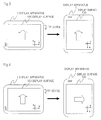
Figure 3 describes an example of a change in the output format of display information. -
Figure 4 describes another example of a change in the output format of display information. -
Figure 5A is a flowchart for describing an example of the operation of a display lock detecting section. -
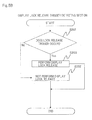
Figure 5B is a flowchart for describing an example of the operation of a display lock release trigger detecting section. -
Figure 5C is a flowchart for describing an example of the operation ofdisplay control section 14. -
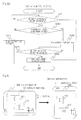
Figure 6 describes a display apparatus according to a second exemplary embodiment. -
Figure 7 describes a display apparatus according to a third exemplary embodiment. -
Figure 8 illustrates a functional configuration of a display apparatus according to a fourth exemplary embodiment. - The following a description of exemplary embodiments with reference to the accompanying drawings. Note that in the following description, the same reference numerals or characters are assigned to the components having same function and the description thereof may be omitted.
-
Figure 1 is a front view of a display apparatus according to a first exemplary embodiment. InFigure 1 ,display apparatus 1 includesdisplay surface 100 that displays various display information such as text information and image information. -
Figure 2 illustrates a functional configuration ofdisplay apparatus 1. InFigure 2 ,display apparatus 1 includesdisplay device 11,touch panel 12,sensor section 13,display control section 14, displaylock detecting section 15, and display lock releasetrigger detecting section 16. -
Display device 11 is a display section havingdisplay surface 100. -
Touch panel 12 is a touch detection section that detects a touch to displaysurface 100 ofdisplay device 11. The touch refers to a contact or a pressing. - More specifically,
touch panel 12 detects a touch to displaysurface 100, and outputs position information indicating a touch position touched ondisplay surface 100 to displaylock detecting section 15. At this time, when a plurality of locations ofdisplay surface 100 are touched,touch panel 12 outputs a plurality of position information items indicating each of a plurality of touch positions that correspond to the plurality of locations to displaylock detecting section 15. -
Sensor section 13 is an orientation detection section that detects an apparatus orientation ofdisplay apparatus 1 and outputs orientation information indicating the apparatus orientation to displaycontrol section 14. For example,sensor section 13 uses an acceleration sensor, an angular velocity sensor, or the like to detect the relative relationship between the direction ofdisplay surface 100 and the direction of gravity as the apparatus orientation. Alternatively,sensor section 13 may use a camera or the like to detect the direction of the user's face and to detect the relative relationship between the direction ofdisplay surface 100 and the direction of the user's face as the apparatus orientation. -
Display control section 14 changes the output format of display information displayed ondisplay surface 100 ofdisplay device 11 according to the orientation information fromsensor section 13. The output format of display information represents the direction of display information, the position of display information, the size of display information, and the like. Note that the direction of display information is defined by the direction relative todisplay surface 100. For example, the direction of display information is defined by a direction relative to two directions (XY directions inFigure 1 ) withindisplay surface 100. - More specifically,
display control section 14 determines whether or not the apparatus orientation ofdisplay apparatus 1 satisfies a change condition based on the orientation information. If the apparatus orientation ofdisplay apparatus 1 satisfies the change condition,display control section 14 changes the output format of display information based on the orientation information. - For example, as illustrated in
Figure 3 , whendisplay apparatus 1 is rotated by a predetermined angle (such as about 90 degrees) or more around an axis normal to thedisplay surface 100,display control section 14 rotates the direction of display information by 90 degrees to the opposite direction to the direction of rotation ofdisplay apparatus 1. In this case, for example, as illustrated by an arrow inFigure 3 , the direction of display information is changed from +Y direction to -X direction. - Alternatively,
display control section 14 may change the display format of display information not according to the rotation ofdisplay apparatus 1 around the axis normal to displaysurface 100 but according to the rotation ofdisplay apparatus 1 around the axis tangent to displaysurface 100. In this case, when the user tiltsdisplay apparatus 1, the display information can be tilted according to the tilt. Further,display control section 14 may zoom in or out the display information or perform parallel movement thereof according to the apparatus orientation. - Display
lock detecting section 15 is a lock section that performs a display lock of locking the changed output format of display information bydisplay control section 14 when a touch is detected bytouch panel 12. - More specifically, when position information is received from
touch panel 12, displaylock detecting section 15 determines whether or not touching to displaysurface 100 satisfies a predetermined determination condition based on the position information. If the touch satisfies the determination condition, displaylock detecting section 15 performs a display lock ondisplay control section 14. - This makes it possible to prevent the output format of display information from being changed even if the apparatus orientation of
display apparatus 1 is changed. For example, as illustrated inFigure 3 , ifdisplay apparatus 1 is rotated by a predetermined value or higher, the direction of display information is rotated, but if a touch satisfying the determination condition is performed, as illustrated inFigure 4 , the rotation of the display information can be locked. - Display lock release
trigger detecting section 16 detects whether or not a predetermined lock release trigger occurs. If the lock release trigger occurs, display lock releasetrigger detecting section 16 releases the display lock that displaylock detecting section 15 performed ondisplay control section 14. - Next, an operation of
display apparatus 1 will be described. -
Figure 5A is a flowchart for describing an example of an operation of displaylock detecting section 15. - First, display
lock detecting section 15 determines whether or not touchingdisplay surface 100 satisfies a determination condition based on position information received from touch panel 12 (step S101). The present exemplary embodiment assumes that the determination condition is touching a plurality of locations ofdisplay surface 100. In this case, when a plurality of position information items are received, displaylock detecting section 15 determines that the touchingdisplay surface 100 satisfies the determination condition. - If the touch does not satisfy the determination condition, display
lock detecting section 15 ends processing without performing a display lock on display control section 14 (step S102). - Meanwhile, if the touch satisfies the determination condition, in order to perform a display lock, display
lock detecting section 15 outputs a display lock command which has the effect of performing a display lock to displaycontrol section 14. Then, while a touch satisfying the determination condition is being detected, displaylock detecting section 15 continues to output the display lock command. If a touch satisfying the determination condition is not detected, displaylock detecting section 15 stops outputting the display lock command (step S103), and then ends processing. -
Figure 5B is a flowchart for describing an example of the operation of display lock releasetrigger detecting section 16. - First, display lock release
trigger detecting section 16 detects whether or not a lock release trigger occurs (step S201). - If no lock release trigger occurs, display lock release
trigger detecting section 16 ends processing without performing a display lock release on display control section 14 (step S202). - Meanwhile, if a lock release trigger occurs, in order to release display lock, display lock release
trigger detecting section 16 outputs a display lock release command which has the effect of releasing the display lock to display control section 14 (step S203), and ends processing. -
Figure 5C is a flowchart for describing an example of operation ofdisplay control section 14. -
Display control section 14 determines whether or not to change the output format of display information displayed ondisplay surface 100 ofdisplay device 11 based on the orientation information received from sensor section 13 (step S301). - If the output format of display information is to be changed,
display control section 14 determines whether or not to perform a display lock (step S302). - For example, when
display control section 14 determines to change the output format of display information,display control section 14 confirms whether or not a display lock command is outputted from displaylock detecting section 15. If the display lock command is outputted,display control section 14 performs a display lock. Alternatively, a determination may be made such thatdisplay control section 14 monitors the output of a display lock command; if a display lock command is outputted,display control section 14 keeps the display lock command; and when the output format of display information is determined to be changed while the display lock command is kept,display control section 14 may determine to perform a display lock. - If a display lock is not to be performed,
display control section 14 changes the output format of display information displayed ondisplay surface 100 according to the orientation information (step S303), and ends processing. - Meanwhile, if a display lock is to be performed,
display control section 14 performs a display lock setting so that the output format of display information displayed ondisplay surface 100 is kept fixed to a current output format (step S304). - Then,
display control section 14 confirms whether or not a display lock release command is outputted from display lock releasetrigger detecting section 16 to thereby determine whether or not a lock release trigger is detected (step S305). - If no lock release trigger is detected,
display control section 14 returns to step S304. - Meanwhile, if a lock release trigger is detected,
display control section 14 releases the display lock setting (step S306), and returns to step S301. - Alternatively, a configuration may be such that while a touch satisfying the determination condition is being performed, display
lock detecting section 15 keeps the lock status instruction which has the effect of performing a display lock; and then, when a lock release trigger is detected, display lock releasetrigger detecting section 16 maintains the lock release instruction which has the effect of releasing the display lock. - In this case, in step S302 of
Figure 5C ,display control section 14 confirms whether or not displaylock detecting section 15 maintains the lock status instruction to thereby determine whether or not to perform a display lock. In step S305,display control section 14 confirms whether or not display lock releasetrigger detecting section 16 keeps a lock release instruction to thereby determine whether or not a lock release trigger is detected. If a lock release trigger is detected, in step S306,display control section 14 deletes the lock release instruction kept by display lock releasetrigger detecting section 1 and the lock status instruction kept by displaylock detecting section 15, and at the same time releases the display lock setting, and then returns to step S301. - Note that the operation described above assumes that the determination condition is a touch to a plurality of locations, but without being limited to this example, may be the following conditions or a combination thereof.
- For example, the determination condition may indicate that in addition to being touching to a plurality of locations, the maximum distance of the distances between each location is equal to or greater than a predetermined specific value. In this case, when a plurality of position information items are received from
touch panel 12, displaylock detecting section 15 calculates a maximum distance based on the position information and determines whether or not the maximum distance is equal to or greater than the specific value. If the maximum distance is equal to or greater than the specific value, displaylock detecting section 15 performs a display lock. - Alternatively, the determination condition may indicate touching a predetermined specific region on
display surface 100. In this case, displaylock detecting section 15 preliminarily keeps a region range as a range of touch positions corresponding to the specific region. When position information is received fromtouch panel 12, displaylock detecting section 15 determines whether or not the touch position indicated by the position information is included in the region range. If the touch position is included in the region range, displaylock detecting section 15 performs a display lock. - The specific region may be one region or a plurality of regions. If the specific region is a plurality of regions, the determination condition may indicate touching to any one of the plurality of specific regions or a touch to all of the plurality of specific regions. Note that examples of the specific region include a region near the left and right ends of
display surface 100, a region near the upper and lower ends ofdisplay surface 100, a region in which a specific key is displayed on a software keyboard, and the like. Moreover, in order to allow the user to easily identify the specific region,display control section 14 may display information indicating the specific region ondisplay surface 100. - Alternatively, the determination condition may indicate touching three or more locations. In this case, touching to two locations on
display surface 100 may be allocated, for example, to a pinch operation to zoom in or out the display information. - Examples of the display lock release trigger for releasing the display lock include the following events or a combination thereof.
- For example, the display lock release trigger is a mechanism in which the apparatus orientation detected by
sensor section 13 satisfies a predetermined release condition. The release condition may indicate that the condition is the same as the change condition fordisplay control section 14 to change the display format, that an acceleration equal to or greater than a predetermined threshold is detected, or that a predetermined number or more of accelerations with a mutually different direction is detected in a predetermined period. - If the release condition is the same as the change condition, display lock is performed, and then the user moves
display apparatus 1 so as to change the output format of display information, resulting in the display lock being released. Alternatively, if the release condition indicates that an acceleration equal to or greater than the threshold is detected, the user strongly movesdisplay apparatus 1, resulting in the display lock being released. Alternatively, if the release condition indicates that a predetermined number or more of accelerations with a mutually different direction are continuously detected in a predetermined period, the user shakesdisplay apparatus 1, resulting in the display lock being released. - Alternatively, the display lock release trigger may be such that a predetermined time has elapsed since the display lock was performed; a user operation is performed after the display lock was performed; or a predetermined time has elapsed without a user operation being executed since the display lock was performed. Note that the user operation may be touching
display surface 100; an operation to an operation device other thantouch panel 12 like a hardware key provided ondisplay apparatus 1; or both of touching to displaysurface 100 and an operation to the operation device. - Further, if
display control section 14 executes an application program and displays a screen of the application program ondisplay surface 100 as display information, the display lock release trigger may be such that execution of the application program is ended. - As described above, according to the present exemplary embodiment, when a touch to display
surface 100 is detected, the changed output format of display information is locked. Thus, if the user does not want to change the output format of display information, the user may touchdisplay surface 100 in such a feeling as to press an object with fingers so as not to move, and then the user can lock the changed output format of display information. Thus, the user can prevent the display information from being displayed in an inappropriate output format by intuitive operation, which can reduce user annoyance by displaying display information in an appropriate output format. - Next, a second exemplary embodiment will be described.
- In the first exemplary embodiment, display
lock detecting section 15 collectively locks the changed output format of display information displayed ondisplay surface 100. Meanwhile, in the present exemplary embodiment using a plurality of display information items, displaylock detecting section 15 locks at least one changed output format from among the plurality of display information items. - For example, as illustrated in
Figure 6 , assume thatdisplay control section 14displays windows display surface 100. At this time, for example, when a touch is detected bytouch panel 12, displaylock detecting section 15 outputs a display lock command which has the effect of performing a display lock on an active window (assumed to be window 602) todisplay control section 14. When the display lock command is received,display control section 14 performs a display lock on the active window. - In this case, as illustrated in
Figure 6 , whendisplay apparatus 1 is moved in such a manner that the apparatus orientation satisfies the change condition, the output format of theactive window 602 is not changed but the output format ofwindow 601 other thanwindow 602 is changed. - Note that display
lock detecting section 15 may perform a display lock on a window displayed in a touched location. - Next, a third exemplary embodiment will be described.
- The present exemplary embodiment assumes that
display device 11 has a plurality of display surfaces. In this case, displaylock detecting section 15 locks the changed output format of display information displayed on at least one display surface of the plurality of display surfaces. - For example, as illustrated in
Figure 7 , if there are twodisplay surfaces lock detecting section 15 performs a display lock on display information displayed ondisplay surface 100 to which has been touched. - Next, a fourth exemplary embodiment will be described.
-
Figure 8 illustrates a configuration of a display apparatus according to the fourth exemplary embodiment. The display apparatus illustrated inFigure 8 includesdisplay device 11,touch panel 12,sensor section 13,display control section 14, and displaylock detecting section 15. - In the display apparatus illustrated in
Figure 8 ,touch panel 12 detects a touch to a display surface ofdisplay device 11.Sensor section 13 detects an apparatus orientation.Display control section 14 changes an output format of display information displayed on the display surface according to the apparatus orientation. When touching is detected, displaylock detecting section 15 locks the changed output format of display information. - Thus, when touching
display surface 100 is detected, the present exemplary embodiment also locks the changed output format of display information, which can reduce user annoyance for displaying display information in an appropriate output format. - Note that the above described function of
display apparatus 1 may be implemented such that programs for implementing the function are recorded on a computer-readable recording medium and the programs recorded on the recording medium are read and executed by a computer. - In each of the above described exemplary embodiments, each illustrated configuration is just an example and the present invention is not limited to the configuration. In addition, the present invention can be applied to a personal computer, a mobile phone, a portable device such as an electronic book terminal, and other devices.
- In addition, some or all of the above exemplary embodiments can be described as the following appendices, but are not limited to the following.
- A display apparatus comprising:
- a display section that has a display surface;
- a touch detection section that detects a touch to the display surface;
- an orientation detection section that detects an apparatus orientation;
- a control section that changes an output format of display information displayed on the display surface according to the apparatus orientation; and
- a lock section that locks the changed output format when the touch is detected.
- The display apparatus according to
appendix 1, further comprising a lock release section that detects whether or not a predetermined lock release trigger occurs; and if the lock release trigger occurs, releases the locked state of the changed output format. - The display apparatus according to appendix 2, wherein the lock release trigger includes the apparatus orientation satisfying a predetermined release condition.
- The display apparatus according to appendix 3, wherein if the apparatus orientation satisfies the predetermined release condition, the control section changes the output format; and
the release condition includes the same content as that of the change condition. - The display apparatus according to appendix 3 or 4, wherein the orientation detection section detects an acceleration as the apparatus orientation; and
the release condition includes the orientation detection section detecting an acceleration equal to or greater than a threshold. - The display apparatus according to any one of appendices 3 to 5, wherein the lock release trigger includes the elapse of a predetermined time after the lock was performed.
- The display apparatus according to any one of appendices 3 to 5, wherein the lock release trigger includes the elapse of a predetermined time without any detection of the touching made to the display surface after the lock was performed.
- The display apparatus according to any one of appendices 3 to 7, wherein the lock release trigger includes the detection of a touch.
- The display apparatus according to any one of appendices 3 to 8, wherein the control section executes an application program and displays a screen of the application program on the display surface as the display information; and
the lock release trigger includes termination of the application program. - This application is based upon and claims the benefit of priority from the prior Japanese Patent Application
2011-034702 filed on February 21, 2011 -
- 1
- display apparatus
- 11
- display device
- 12
- touch panel
- 13
- sensor section
- 14
- display control section
- 15
- display lock detecting section
- 16
- display lock release trigger detecting section
- 100
- display surface
Claims (10)
- A display apparatus comprising:a display section that has a display surface;a touch detection section that detects a touch to the display surface;an orientation detection section that detects an apparatus orientation;a control section that changes an output format of display information displayed on the display surface according to the apparatus orientation; anda lock section that locks the changed output format when the touch is detected.
- The display apparatus according to claim 1, wherein when the touch is detected, if the touch that is made to the display satisfies a predetermined determination condition, said lock section locks the changed output format.
- The display apparatus according to claim 2, wherein the determination condition indicates that touching a plurality of locations of the display surface.
- The display apparatus according to claim 2 or 3, wherein the determination condition indicates a touch to a specific region of the display surface.
- The display apparatus according to claim 3, wherein the determination condition indicates that a maximum distance of the distances between the plurality of locations is equal to or greater than a specific value.
- The display apparatus according to any one of claims 1 to 5, further comprising a lock release section that detects whether or not a predetermined lock release trigger occurs; and if the lock release trigger occurs, releases the locked state of the changed output format.
- The display apparatus according to any one of claims 1 to 6, wherein
the display information is a plurality of display information items; and
said lock section locks at least one changed output format of display information of the plurality of display information items. - The display apparatus according to any one of claims 1 to 7, wherein
the display surface is a plurality of display surfaces; and
said lock section locks the changed output format of display information displayed on at least one display surface of the plurality of display surfaces. - A display control method comprising:detecting an apparatus orientation;changing an output format of display information displayed on a display surface according to the apparatus orientation;detecting a touch to the display surface; andlocking the changed output format when the touch is detected.
- A program for causing a computer to execute:a procedure for detecting an apparatus orientation;a procedure for changing an output format of display information displayed on a display surface according to the apparatus orientation;a procedure for detecting a touch to the display surface; anda procedure for locking the changed output format when the touch is detected.
Applications Claiming Priority (2)
| Application Number | Priority Date | Filing Date | Title |
|---|---|---|---|
| JP2011034702 | 2011-02-21 | ||
| PCT/JP2011/077118 WO2012114592A1 (en) | 2011-02-21 | 2011-11-25 | Display apparatus, display control method, and program |
Publications (2)
| Publication Number | Publication Date |
|---|---|
| EP2680116A1 true EP2680116A1 (en) | 2014-01-01 |
| EP2680116A4 EP2680116A4 (en) | 2016-11-23 |
Family
ID=46720395
Family Applications (1)
| Application Number | Title | Priority Date | Filing Date |
|---|---|---|---|
| EP11859309.4A Ceased EP2680116A4 (en) | 2011-02-21 | 2011-11-25 | Display apparatus, display control method, and program |
Country Status (5)
| Country | Link |
|---|---|
| US (1) | US9348455B2 (en) |
| EP (1) | EP2680116A4 (en) |
| JP (1) | JP6016275B2 (en) |
| CN (1) | CN103370681A (en) |
| WO (1) | WO2012114592A1 (en) |
Families Citing this family (22)
| Publication number | Priority date | Publication date | Assignee | Title |
|---|---|---|---|---|
| KR101862706B1 (en) * | 2011-09-23 | 2018-05-30 | 삼성전자주식회사 | Apparatus and method for locking auto screen rotating in portable terminla |
| EP2889737A4 (en) * | 2012-08-24 | 2016-08-24 | Ntt Docomo Inc | DEVICE AND PROGRAM FOR CONTROLLING IMAGE DISPLAY DIRECTION |
| JP6278593B2 (en) * | 2012-11-14 | 2018-02-14 | 京セラ株式会社 | Portable terminal device, program, and display control method |
| US9501472B2 (en) * | 2012-12-29 | 2016-11-22 | Intel Corporation | System and method for dual screen language translation |
| JP2014137646A (en) * | 2013-01-15 | 2014-07-28 | Sharp Corp | Display device, method for controlling display device, and recording medium |
| US9741150B2 (en) * | 2013-07-25 | 2017-08-22 | Duelight Llc | Systems and methods for displaying representative images |
| JP2015026297A (en) * | 2013-07-29 | 2015-02-05 | 京セラ株式会社 | Portable terminal, and display direction control program and method |
| CN104598136B (en) * | 2013-10-31 | 2018-07-31 | 纬创资通(昆山)有限公司 | The display picture spinning solution of mobile device and mobile device |
| US9992327B1 (en) * | 2014-01-03 | 2018-06-05 | Amazon Technologies, Inc. | Interaction lock mode for mobile devices |
| KR20170003689A (en) * | 2014-05-22 | 2017-01-09 | 후아웨이 테크놀러지 컴퍼니 리미티드 | Method and apparatus for controlling automatic rotation of screen, and terminal |
| CN105630345B (en) | 2014-11-06 | 2019-02-19 | 阿里巴巴集团控股有限公司 | A method and device for controlling display direction |
| US12401911B2 (en) | 2014-11-07 | 2025-08-26 | Duelight Llc | Systems and methods for generating a high-dynamic range (HDR) pixel stream |
| US12401912B2 (en) | 2014-11-17 | 2025-08-26 | Duelight Llc | System and method for generating a digital image |
| US12445736B2 (en) | 2015-05-01 | 2025-10-14 | Duelight Llc | Systems and methods for generating a digital image |
| JP6843564B2 (en) * | 2015-10-05 | 2021-03-17 | キヤノン株式会社 | Display control device, its control method and program |
| US10552946B2 (en) | 2015-10-05 | 2020-02-04 | Canon Kabushiki Kaisha | Display control apparatus and method for controlling the same based on orientation |
| JP6700775B2 (en) * | 2015-12-22 | 2020-05-27 | キヤノン株式会社 | Electronic device and control method thereof |
| JP6188861B2 (en) * | 2016-04-14 | 2017-08-30 | キヤノン株式会社 | Electronic device and control method thereof |
| US20210102820A1 (en) * | 2018-02-23 | 2021-04-08 | Google Llc | Transitioning between map view and augmented reality view |
| US11023124B1 (en) * | 2019-12-18 | 2021-06-01 | Motorola Mobility Llc | Processing user input received during a display orientation change of a mobile device |
| CN115421619B (en) * | 2021-05-31 | 2026-03-24 | 华为技术有限公司 | A window display method and an electronic device |
| CN115639936A (en) * | 2021-07-05 | 2023-01-24 | 华为技术有限公司 | Screen rotation control method and device and electronic equipment |
Family Cites Families (17)
| Publication number | Priority date | Publication date | Assignee | Title |
|---|---|---|---|---|
| JP2001242845A (en) * | 2000-02-29 | 2001-09-07 | Hitachi Ltd | Portable information terminals |
| US8120625B2 (en) * | 2000-07-17 | 2012-02-21 | Microsoft Corporation | Method and apparatus using multiple sensors in a device with a display |
| US20040201595A1 (en) * | 2003-04-11 | 2004-10-14 | Microsoft Corporation | Self-orienting display |
| JP2005071008A (en) * | 2003-08-22 | 2005-03-17 | Matsushita Electric Ind Co Ltd | Information terminal equipment |
| CN100490339C (en) * | 2004-12-31 | 2009-05-20 | 集嘉通讯股份有限公司 | Portable device and operation method thereof |
| US20070294527A1 (en) | 2006-06-15 | 2007-12-20 | Creative Technology Ltd | Reconfigurable portable digital device and a method to reconfigure a setup of a portable digital device |
| US20080020733A1 (en) * | 2006-07-21 | 2008-01-24 | Tomas Karl-Axel Wassingbo | Mobile electronic device with motion detection authentication |
| US8068121B2 (en) * | 2007-06-29 | 2011-11-29 | Microsoft Corporation | Manipulation of graphical objects on a display or a proxy device |
| JP5111003B2 (en) | 2007-07-30 | 2012-12-26 | セイコーエプソン株式会社 | Portable information device, electronic book, information storage medium, portable information device control method, and electronic book control method |
| US8502800B1 (en) * | 2007-11-30 | 2013-08-06 | Motion Computing, Inc. | Method for improving sensitivity of capacitive touch sensors in an electronic device |
| CN101488987A (en) * | 2008-01-14 | 2009-07-22 | 宏达国际电子股份有限公司 | Handheld electronic device and screen locking method thereof |
| US8217964B2 (en) * | 2008-02-14 | 2012-07-10 | Nokia Corporation | Information presentation based on display screen orientation |
| KR101503835B1 (en) * | 2008-10-13 | 2015-03-18 | 삼성전자주식회사 | Method and apparatus for object management using multi-touch |
| JP5120326B2 (en) | 2009-04-17 | 2013-01-16 | 富士通モバイルコミュニケーションズ株式会社 | Mobile device |
| JP5359536B2 (en) | 2009-05-07 | 2013-12-04 | 富士通モバイルコミュニケーションズ株式会社 | Mobile phone and display direction control program for mobile phone |
| US8817048B2 (en) * | 2009-07-17 | 2014-08-26 | Apple Inc. | Selective rotation of a user interface |
| US8994646B2 (en) * | 2010-12-17 | 2015-03-31 | Microsoft Corporation | Detecting gestures involving intentional movement of a computing device |
-
2011
- 2011-11-25 JP JP2013500834A patent/JP6016275B2/en not_active Expired - Fee Related
- 2011-11-25 EP EP11859309.4A patent/EP2680116A4/en not_active Ceased
- 2011-11-25 CN CN2011800680955A patent/CN103370681A/en active Pending
- 2011-11-25 US US13/979,690 patent/US9348455B2/en not_active Expired - Fee Related
- 2011-11-25 WO PCT/JP2011/077118 patent/WO2012114592A1/en not_active Ceased
Also Published As
| Publication number | Publication date |
|---|---|
| JP6016275B2 (en) | 2016-10-26 |
| US20130293502A1 (en) | 2013-11-07 |
| JPWO2012114592A1 (en) | 2014-07-07 |
| US9348455B2 (en) | 2016-05-24 |
| EP2680116A4 (en) | 2016-11-23 |
| WO2012114592A1 (en) | 2012-08-30 |
| CN103370681A (en) | 2013-10-23 |
Similar Documents
| Publication | Publication Date | Title |
|---|---|---|
| US9348455B2 (en) | Display apparatus, display control method, and program | |
| US10871871B2 (en) | Methods and systems for controlling window minimization and maximization on a mobile device | |
| AU2013223015B2 (en) | Method and apparatus for moving contents in terminal | |
| JP5842062B2 (en) | Apparatus and program for controlling display direction of image | |
| US9438713B2 (en) | Method and apparatus for operating electronic device with cover | |
| US20160291864A1 (en) | Method of interacting with a portable electronic device | |
| US20170357473A1 (en) | Mobile device with touch screens and method of controlling the same | |
| US9916028B2 (en) | Touch system and display device for preventing misoperation on edge area | |
| US20160062593A1 (en) | Pinch gesture to swap windows | |
| US20110072345A1 (en) | Mobile terminal and operating method thereof | |
| US20140078091A1 (en) | Terminal Device and Method for Quickly Starting Program | |
| EP2506126A1 (en) | Portable information terminal, input control method, and program | |
| US20110285631A1 (en) | Information processing apparatus and method of displaying a virtual keyboard | |
| EP2757459A1 (en) | Apparatus and method for an adaptive edge-to-edge display system for multi-touch devices | |
| US20120223892A1 (en) | Display device for suspending automatic rotation and method to suspend automatic screen rotation | |
| KR101504310B1 (en) | User terminal and interfacing method of the same | |
| US20150145800A1 (en) | Electronic device, method and storage medium | |
| CA2757527A1 (en) | Motion gestures interface for portable electronic device | |
| EP3340047B1 (en) | Display and method in an electric device | |
| EP3528103B1 (en) | Screen locking method, terminal and screen locking device | |
| JP5841023B2 (en) | Information processing apparatus, information processing method, program, and information storage medium | |
| JP2014110044A (en) | Electronic apparatus, display control method and program |
Legal Events
| Date | Code | Title | Description |
|---|---|---|---|
| PUAI | Public reference made under article 153(3) epc to a published international application that has entered the european phase |
Free format text: ORIGINAL CODE: 0009012 |
|
| 17P | Request for examination filed |
Effective date: 20130814 |
|
| AK | Designated contracting states |
Kind code of ref document: A1 Designated state(s): AL AT BE BG CH CY CZ DE DK EE ES FI FR GB GR HR HU IE IS IT LI LT LU LV MC MK MT NL NO PL PT RO RS SE SI SK SM TR |
|
| DAX | Request for extension of the european patent (deleted) | ||
| RAP1 | Party data changed (applicant data changed or rights of an application transferred) |
Owner name: NEC CORPORATION |
|
| RA4 | Supplementary search report drawn up and despatched (corrected) |
Effective date: 20161021 |
|
| RIC1 | Information provided on ipc code assigned before grant |
Ipc: G06F 1/16 20060101AFI20161017BHEP Ipc: G06F 3/0488 20130101ALI20161017BHEP |
|
| 17Q | First examination report despatched |
Effective date: 20181019 |
|
| REG | Reference to a national code |
Ref country code: DE Ref legal event code: R003 |
|
| STAA | Information on the status of an ep patent application or granted ep patent |
Free format text: STATUS: THE APPLICATION HAS BEEN REFUSED |
|
| 18R | Application refused |
Effective date: 20191012 |