EP2660743A1 - Method for customization of user interface of a medical apparatus for extracorporal blood treatment; medical apparatus for extracorporal blood treatment - Google Patents
Method for customization of user interface of a medical apparatus for extracorporal blood treatment; medical apparatus for extracorporal blood treatment Download PDFInfo
- Publication number
- EP2660743A1 EP2660743A1 EP12166672.1A EP12166672A EP2660743A1 EP 2660743 A1 EP2660743 A1 EP 2660743A1 EP 12166672 A EP12166672 A EP 12166672A EP 2660743 A1 EP2660743 A1 EP 2660743A1
- Authority
- EP
- European Patent Office
- Prior art keywords
- target window
- displayed
- window
- values
- customization
- Prior art date
- Legal status (The legal status is an assumption and is not a legal conclusion. Google has not performed a legal analysis and makes no representation as to the accuracy of the status listed.)
- Granted
Links
Images
Classifications
-
- G—PHYSICS
- G06—COMPUTING OR CALCULATING; COUNTING
- G06F—ELECTRIC DIGITAL DATA PROCESSING
- G06F3/00—Input arrangements for transferring data to be processed into a form capable of being handled by the computer; Output arrangements for transferring data from processing unit to output unit, e.g. interface arrangements
- G06F3/01—Input arrangements or combined input and output arrangements for interaction between user and computer
- G06F3/048—Interaction techniques based on graphical user interfaces [GUI]
- G06F3/0487—Interaction techniques based on graphical user interfaces [GUI] using specific features provided by the input device, e.g. functions controlled by the rotation of a mouse with dual sensing arrangements, or of the nature of the input device, e.g. tap gestures based on pressure sensed by a digitiser
- G06F3/0488—Interaction techniques based on graphical user interfaces [GUI] using specific features provided by the input device, e.g. functions controlled by the rotation of a mouse with dual sensing arrangements, or of the nature of the input device, e.g. tap gestures based on pressure sensed by a digitiser using a touch-screen or digitiser, e.g. input of commands through traced gestures
-
- G—PHYSICS
- G06—COMPUTING OR CALCULATING; COUNTING
- G06F—ELECTRIC DIGITAL DATA PROCESSING
- G06F3/00—Input arrangements for transferring data to be processed into a form capable of being handled by the computer; Output arrangements for transferring data from processing unit to output unit, e.g. interface arrangements
- G06F3/01—Input arrangements or combined input and output arrangements for interaction between user and computer
- G06F3/048—Interaction techniques based on graphical user interfaces [GUI]
- G06F3/0484—Interaction techniques based on graphical user interfaces [GUI] for the control of specific functions or operations, e.g. selecting or manipulating an object, an image or a displayed text element, setting a parameter value or selecting a range
- G06F3/04847—Interaction techniques to control parameter settings, e.g. interaction with sliders or dials
-
- G—PHYSICS
- G16—INFORMATION AND COMMUNICATION TECHNOLOGY [ICT] SPECIALLY ADAPTED FOR SPECIFIC APPLICATION FIELDS
- G16H—HEALTHCARE INFORMATICS, i.e. INFORMATION AND COMMUNICATION TECHNOLOGY [ICT] SPECIALLY ADAPTED FOR THE HANDLING OR PROCESSING OF MEDICAL OR HEALTHCARE DATA
- G16H20/00—ICT specially adapted for therapies or health-improving plans, e.g. for handling prescriptions, for steering therapy or for monitoring patient compliance
- G16H20/40—ICT specially adapted for therapies or health-improving plans, e.g. for handling prescriptions, for steering therapy or for monitoring patient compliance relating to mechanical, radiation or invasive therapies, e.g. surgery, laser therapy, dialysis or acupuncture
-
- G—PHYSICS
- G16—INFORMATION AND COMMUNICATION TECHNOLOGY [ICT] SPECIALLY ADAPTED FOR SPECIFIC APPLICATION FIELDS
- G16H—HEALTHCARE INFORMATICS, i.e. INFORMATION AND COMMUNICATION TECHNOLOGY [ICT] SPECIALLY ADAPTED FOR THE HANDLING OR PROCESSING OF MEDICAL OR HEALTHCARE DATA
- G16H40/00—ICT specially adapted for the management or administration of healthcare resources or facilities; ICT specially adapted for the management or operation of medical equipment or devices
- G16H40/60—ICT specially adapted for the management or administration of healthcare resources or facilities; ICT specially adapted for the management or operation of medical equipment or devices for the operation of medical equipment or devices
- G16H40/63—ICT specially adapted for the management or administration of healthcare resources or facilities; ICT specially adapted for the management or operation of medical equipment or devices for the operation of medical equipment or devices for local operation
-
- A—HUMAN NECESSITIES
- A61—MEDICAL OR VETERINARY SCIENCE; HYGIENE
- A61M—DEVICES FOR INTRODUCING MEDIA INTO, OR ONTO, THE BODY; DEVICES FOR TRANSDUCING BODY MEDIA OR FOR TAKING MEDIA FROM THE BODY; DEVICES FOR PRODUCING OR ENDING SLEEP OR STUPOR
- A61M1/00—Suction or pumping devices for medical purposes; Devices for carrying-off, for treatment of, or for carrying-over, body-liquids; Drainage systems
- A61M1/14—Dialysis systems; Artificial kidneys; Blood oxygenators ; Reciprocating systems for treatment of body fluids, e.g. single needle systems for hemofiltration or pheresis
- A61M1/16—Dialysis systems; Artificial kidneys; Blood oxygenators ; Reciprocating systems for treatment of body fluids, e.g. single needle systems for hemofiltration or pheresis with membranes
-
- A—HUMAN NECESSITIES
- A61—MEDICAL OR VETERINARY SCIENCE; HYGIENE
- A61M—DEVICES FOR INTRODUCING MEDIA INTO, OR ONTO, THE BODY; DEVICES FOR TRANSDUCING BODY MEDIA OR FOR TAKING MEDIA FROM THE BODY; DEVICES FOR PRODUCING OR ENDING SLEEP OR STUPOR
- A61M2205/00—General characteristics of the apparatus
- A61M2205/50—General characteristics of the apparatus with microprocessors or computers
- A61M2205/502—User interfaces, e.g. screens or keyboards
- A61M2205/505—Touch-screens; Virtual keyboard or keypads; Virtual buttons; Soft keys; Mouse touches
-
- A—HUMAN NECESSITIES
- A61—MEDICAL OR VETERINARY SCIENCE; HYGIENE
- A61M—DEVICES FOR INTRODUCING MEDIA INTO, OR ONTO, THE BODY; DEVICES FOR TRANSDUCING BODY MEDIA OR FOR TAKING MEDIA FROM THE BODY; DEVICES FOR PRODUCING OR ENDING SLEEP OR STUPOR
- A61M2205/00—General characteristics of the apparatus
- A61M2205/50—General characteristics of the apparatus with microprocessors or computers
- A61M2205/52—General characteristics of the apparatus with microprocessors or computers with memories providing a history of measured variating parameters of apparatus or patient
Definitions
- the invention relates to a method for customization of a user interface of a microprocessor controlled medical apparatus for extracorporal blood treatment, whereby the medical apparatus comprises a software component driving the user interface on a touch screen of the medical apparatus, and the software component has a technical support and maintenance mode and a treatment mode.
- the invention further relates to a medical apparatus for extracorporal blood treatment that uses this method.
- Modern medical apparatuses are often controlled by a microprocessor that, for example, operates pumps, reads sensors and communicates with an operator via a user interface like a monitor, keypad and/or touchscreen.
- This user interface can make use of text, pictograms and/or graphical icons to guide an operator through the setup and give him/her necessary information during a therapy that is performed by the medical apparatus.
- extracorporal blood treatment involves the continuous withdrawal of blood from a patient, where the blood is processed within a medical device outside of the patient and is then returned to the patient.
- Parameters like the ultrafiltration volume, the therapy time and the ultrafiltration rate can be input by a nurse depending on the patient's prescription, and the medical apparatus can then individually perform the therapy for each patient.
- the therapy can be monitored by the nurse via the user interface.
- parameters like the arterial pressure, the venous pressure, the heparin rate, the dialysate flow, etc. are measured and displayed to the nurse for observation purposes.
- the customization is typically perfomed by technical staff after equipment installation, and the nurses have to inform the technical staff about the desired customization. Consequently, they have to decide at an early stage what kind of customization they prefer. If their preferences change during operation of the medical apparatus, it should be possible for the nurses to change the customization without contacting the technical staff again.
- the present invention addresses the mentioned usability issue, and it is an objective of the invention to provide a method for easy and clear cumstomization of the user interface of a medical apparatus for extracorporal blood treatment even during therapy. It is another objective of the invention to provide a corresponding medical apparatus for extracorporal blood treatment.
- this objective is achieved by a method having the features of independent Claim 1.
- Advantageous refinements of this method are set forth in dependent Claims 2 through 14.
- the objective is also achieved by a medical apparatus according to Claim 15.
- the method according to the invention can be used for customization of a user interface of a microprocessor controlled medical apparatus for extracorporal blood treatment, whereby the medical apparatus comprises a software component driving the user interface on a touch screen of the medical apparatus.
- the software component has a technical support and maintenance mode and a treatment mode, and at least one target window is displayed on the touch screen during therapy in the treatment mode, whereby such target window shows at least data regarding measured and/or set values of the therapy.
- at least the appearance of one target window is modified by a customization procedure that is performed within the target window in the treatment mode.
- the invention resolves the conflict between customization of a user interface and usability by providing a procedure on the user interface itself, by means of which an acceptable minimum set-up for a specific user need and specific location and praxis can be easily and safely created.
- customization of the user interface means that in a defined though limited way and extent, certain screens, their picture elements, the navigations on the user interface shall be configured by not only the technical staff (typically after equipment installation), but by the nursing staff, too.
- the customization can take place in the operation room and even during the therapy, whereby a nurse does not have to enter a special user set-up in order to modify the appearance of a current target window, because customization can take place within the particular target window itself.
- Measured values are values of the actual arterial pressure, the actual venous pressure, the actual heparin rate during therapy, for example.
- Set values can be parameters like the ultrafiltration volume, the therapy time and the ultrafiltration rate, for example, that are input by a nurse depending on the patient's prescription.
- the values mentioned in this application can be actual values that are measured during therapy by sensors, for example, or parameters that are set by an operator before and/or during therapy.
- the customization procedure may modify the selection of values that are displayed in the target window in numerical form in defined positions. Thereby a first value is displayed in a defined position within the target window, and a second value is displayed in this defined position instead of the first value by means of the customization procedure.
- the customization procedure may modifiy the selection of values that are displayed in the target window in graphical form in defined positions. Thereby, a first value is displayed graphically within the target window, and a second value is displayed graphically instead of the first value by means of the customization procedure.
- an indication of selectable second values can be displayed within the target window.
- the indication of selectable second values can permanently be displayed within the target window. This can be advantageous, because the operator can always see all possible parameters. However, the respective window might be overloaded then. Therefore, it can be preferred that the indication of selectable second values is only temporarily displayed within the target window.
- the indication of selectable second values can be produced in different ways. For example, menu buttons can be provided, and when an operator pushes a menu button, selectable second values appear within the target window.
- the indication of selectable second values for a defined position is temporarily displayed upon selection of said defined position. Thereby, an operator touches a defined position that he/she wants to modify and a menu of selectable parameters for this position opens within the target window, for example.
- This menu can be a drop-down menu.
- the customization procedure may be executed by a drag-and-drop operation that involves dragging the indication of one selected value to the defined position on the touch screen. This provides for an easy way of modifying the appearance of a target window, whereby selectable values can be dragged from the frame of the window to the defined position.
- the customization procedure can be executed by a selection operation that involves selecting a second value from a menu via the touch screen.
- the selection operation then involves confirming a selected second value via the touch screen. If a customization is confirmed, the modified target window is used for the current therapy.
- the target window can be a trend window, a prescription window, a protocol window or information window, for example.
- each target window can comprise customizable and non-customizable data.
- a trend window graphically shows the trend of one or more particular actual value over the therapy time and allows monitoring the arterial and venous pressure, for example. This trend can be the main screen during therapy, whereby it can be preferred that only one parameter is displayed in this window by means of a graph.
- a prescription window may numerically shows actual prescription parameters like the UF volume, the therapy time, the heparin rate, the dialysate flow, etc.
- a protocol window may contains all dialysis data which are needed to document by the nurse during the whole therapy. For example, the blood pressure of the patient shall be written down in every half hour by the nurse. Thereby, the protocol window may contains the last measured values.
- An information window can show a great number of parameters like the arterial and venous pressure, the actual heparin rate, the actual value PBE, etc. in one window.
- an information window can comprise an actual part for displaying actual values, and a history part for displaying the history of values, whereby the history can be displayed graphically in form of several graphs again.
- the invention further comprises a medical apparatus for extracorporal blood treatment that is microprocessor controlled and comprises a touch screen and a software component, whereby the software component drives a user interface on the touch screen and has a technical support and maintenance mode and a treatment mode. At least one target window can be displayed by the user interface on the touch screen during therapy in the treatment mode, and such target window can show at least data regarding measured values of the therapy.
- the medical apparatus comprises means for customization of the user interface with the method according to the invention.
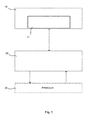
- Fig. 1 shows a diagram depicting the basic features of a system architecture of a microprocessor controlled extracorporal blood treatment device (ECB device).
- the ECB device comprises at least an extracorporal blood circuit, pumps and sensors (not shown) and a software component 20 that controls processes 30 for performing the therapy functions of the ECB device.
- the ECB device also comprises a screen 10 on which several target windows 11 can be displayed by the computer user interface of the software component 20 that runs on the main CPU of the ECB device.
- the screen 10 is a touchscreen which allows display and input of information by a user of the ECB device.
- the software component 20 has at least two modes.
- One is the technical support and maintenance mode (TSM) in which technical staff can perform support and maintenance operations.
- the second mode is the treatment mode in which the therapy is performed by the nursing staff.
- the technical support and maintenance mode preferably also provides means for customization by the technical staff.
- system configuration settings before the start of a therapy can be available in the treatment mode, too (user set-up).
- the invention is directed to customization of a user interface in the treatment mode during therapy.
- the processes 30 and sensors of the ECB device can provide data which is displayed on the user interface during therapy in the treatment mode.
- This data can be displayed together with other data in so-called target screens or target windows 11, whereby a target window 11 shows at least data regarding measured/actual values of the therapy.
- measured values can be the actual arterial pressure, the actual venous pressure, the actual pressure of the arterial side before the dialyser (PBE/Pressure Blood Entrance), the actual heparin rate, total conductivity or other parameters which are important and to be monitored during therapy.
- the actual values can be displayed in numerical and/or graphical form.
- a customizable target window is a trend window (Trend on Main Screen).
- This kind of window graphically shows the trend of one or more particular actual value over the therapy time.
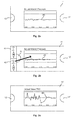
- Fig. 2a shows one embodiment of such trend window that displays the actual arterial pressure over the therapy time in graph 40.
- the graph 40 is displayed in a defined position within the target window 11, and one or more graphs for different values can be displayed. It is preferred that only one single parameter is graphically displayed in this kind of trend window 11, but the selection of displayed values can be customized by an operator during therapy.
- Two menu buttons 12 and 12' are located on both sides of the target window 11 in order to give an operator information about selectable second values. If the left menu button 12 is touched by an operator, for example, two selectable values 41 and 42 are displayed in the left frame region of the target window 11 without overlapping the graph 40.
- One selectable value is the actual venous pressure (VEN), whereas the other selectable value is the actual value PBE.
- VEN venous pressure
- PBE the actual value of each parameter is displayed numerically, too.
- the operator can perform a customization of the user interface by means of a drag-and-drop operation. Thereby, the operator touches the PBE in the left menu and drags it onto the graph 40. This operation is illustrated by an arrow in Fig. 2b .
- the graph 40' will then display the actual value PBE instead of the actual arterial pressure, and the selectable values on the left side will disappear again.
- Fig. 2c shows such customized target window 11'. Consequently, the actual arterial pressure will now be a selectable value, if the operator again wants to customize the target window 11.
- a customizable target window 11 is a prescription window.
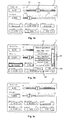
- An example of such prescription window 11 is shown in Fig. 3a .
- This prescription window 11 shows actual prescription values of the therapy time and the UF volume, for example. These values can be displayed numerically and by means of sliders 14, 14' on a scale 13, 13'. Preferably, these values are non-customizable, but additional values below these scales are customizable. However, in another embodiment of the invention, these values are examples of set values that can be customizable, too.
- the customizable values can comprise the heparin rate, the dialysis fluid temperature, the conductivity, the heparin stop time, the dialysate flow and/or the bicarbonate conductivity, for example, and these values are displayed in defined positions within the window 11. Thereby, the actual values are displayed in numerical form. These positions and values might have been set in the TSM mode and/or the user set-up in the treatment mode, but these positions are now customizable during therapy in the treatment mode, too.
- the operator wants to have different values to be displayed in the prescription window 11 or wants to have certain values to be displayed in a different position, the operator can open a menu 43 with selectable values. Thereby, the operator has to indicate which defined position within the window 11 he/she wants to modify. This can be done by touching the defined position. When the user touches the number or the +/- buttons of one of the elements, then the selected value will be edited. So the element can be selected for customization by pressing the label of the element or double clicking the whole element, for example.
- a menu with selectable values opens within the window 11. Thereby, the menu can comprise more values than positions are defined in the window 11.
- FIG. 3b the heparin rate has been selected to be customized in the window 11, and this position is highlighted in order to indicate to the operator that customization can be performed.
- This is illustrated in Fig. 3b by a dark black frame.
- a menu 43 now shows all parameters that can be selected for the chosen position.
- the menu 43 also comprises a "CANCEL” software button 44 and an "OK” software button 45.
- the operator can select a value from the menu 43 by touching and thereby highlighting it directly. Alternatively, the operator can move a bar 46 up and down to select a highlighted value. If the operator touches the "OK" software button 45, the chosen position is modified accordingly. If the operator touches the "CANCEL” software button 44, no customization is performed and the menu 43 might be closed.
- Fig. 3b shows the total conductivity in menu 43, and Fig. 3c shows the resulting modified prescription window 11' with the total conductivity in the former position of the heparin rate.
- the heparin rate is not displayed in the prescription window 11' anymore.
- values and positions can repeatedly be customized during the therapy.
- a current customization can be retained for the therapy of the next patient.
- the next therapy can be started with a default set up and the operator can then customize the target windows differently depending on the patient and/or situation.
Landscapes
- Engineering & Computer Science (AREA)
- Health & Medical Sciences (AREA)
- Theoretical Computer Science (AREA)
- General Engineering & Computer Science (AREA)
- Physics & Mathematics (AREA)
- General Physics & Mathematics (AREA)
- General Health & Medical Sciences (AREA)
- Medical Informatics (AREA)
- Human Computer Interaction (AREA)
- Primary Health Care (AREA)
- Biomedical Technology (AREA)
- Public Health (AREA)
- Epidemiology (AREA)
- Business, Economics & Management (AREA)
- General Business, Economics & Management (AREA)
- Nuclear Medicine, Radiotherapy & Molecular Imaging (AREA)
- Surgery (AREA)
- Urology & Nephrology (AREA)
- External Artificial Organs (AREA)
- User Interface Of Digital Computer (AREA)
Abstract
Description
- The invention relates to a method for customization of a user interface of a microprocessor controlled medical apparatus for extracorporal blood treatment, whereby the medical apparatus comprises a software component driving the user interface on a touch screen of the medical apparatus, and the software component has a technical support and maintenance mode and a treatment mode.
- The invention further relates to a medical apparatus for extracorporal blood treatment that uses this method.
- Modern medical apparatuses are often controlled by a microprocessor that, for example, operates pumps, reads sensors and communicates with an operator via a user interface like a monitor, keypad and/or touchscreen. This user interface can make use of text, pictograms and/or graphical icons to guide an operator through the setup and give him/her necessary information during a therapy that is performed by the medical apparatus.
- Thereby, parameter input is an essential part of such medical equipment. For example, extracorporal blood treatment (ECB) involves the continuous withdrawal of blood from a patient, where the blood is processed within a medical device outside of the patient and is then returned to the patient. Parameters like the ultrafiltration volume, the therapy time and the ultrafiltration rate can be input by a nurse depending on the patient's prescription, and the medical apparatus can then individually perform the therapy for each patient. Furthermore, the therapy can be monitored by the nurse via the user interface. Thereby, parameters like the arterial pressure, the venous pressure, the heparin rate, the dialysate flow, etc. are measured and displayed to the nurse for observation purposes.
- Thereby, different people might prefer different information displayed on a screen. Thus, usability and the adaption of graphical user interfaces to the needs and preferences of the users are an issue, since the work of users is better and safer with a medical apparatus that fulfills her/his needs, and such customization becomes a focus area. However, there is a conflict between different user needs and handling problems.
- Usually, there are different user needs at different locations and praxises, but this leads to handling problems, if every possible user need is accounted for. These handling problems have been created by the traditional answer how to fulfill the above-mentioned different user needs of different locations and praxises. This traditional way is in fact just packing everything onto the same user interface, which may be necessary by any user, any location and any praxises. However, this often leads to overloaded screens and menu structures of the user interface of an ECB equipment, and resulting handling problems have been reported from the field.
- Furthermore, the customization is typically perfomed by technical staff after equipment installation, and the nurses have to inform the technical staff about the desired customization. Consequently, they have to decide at an early stage what kind of customization they prefer. If their preferences change during operation of the medical apparatus, it should be possible for the nurses to change the customization without contacting the technical staff again.
- The present invention addresses the mentioned usability issue, and it is an objective of the invention to provide a method for easy and clear cumstomization of the user interface of a medical apparatus for extracorporal blood treatment even during therapy. It is another objective of the invention to provide a corresponding medical apparatus for extracorporal blood treatment.
- According to the invention, this objective is achieved by a method having the features of independent Claim 1. Advantageous refinements of this method are set forth in dependent Claims 2 through 14. The objective is also achieved by a medical apparatus according to Claim 15.
- The method according to the invention can be used for customization of a user interface of a microprocessor controlled medical apparatus for extracorporal blood treatment, whereby the medical apparatus comprises a software component driving the user interface on a touch screen of the medical apparatus. The software component has a technical support and maintenance mode and a treatment mode, and at least one target window is displayed on the touch screen during therapy in the treatment mode, whereby such target window shows at least data regarding measured and/or set values of the therapy. Thereby, at least the appearance of one target window is modified by a customization procedure that is performed within the target window in the treatment mode.
- Thus, the invention resolves the conflict between customization of a user interface and usability by providing a procedure on the user interface itself, by means of which an acceptable minimum set-up for a specific user need and specific location and praxis can be easily and safely created. Thereby, customization of the user interface means that in a defined though limited way and extent, certain screens, their picture elements, the navigations on the user interface shall be configured by not only the technical staff (typically after equipment installation), but by the nursing staff, too. The customization can take place in the operation room and even during the therapy, whereby a nurse does not have to enter a special user set-up in order to modify the appearance of a current target window, because customization can take place within the particular target window itself.
- The design, verification and validation of the user interface covers the maximum set-up of the user interface, i.e. the union of all the potential specific set-up, this way taking a special care of fulfilling the corresponding regulatory requirements. Thereby, measures and/or set values of the therapy can be customized. Measured values are values of the actual arterial pressure, the actual venous pressure, the actual heparin rate during therapy, for example. Set values can be parameters like the ultrafiltration volume, the therapy time and the ultrafiltration rate, for example, that are input by a nurse depending on the patient's prescription. Thus, the values mentioned in this application can be actual values that are measured during therapy by sensors, for example, or parameters that are set by an operator before and/or during therapy.
- According to one (separate) aspect of the invention, the customization procedure may modify the selection of values that are displayed in the target window in numerical form in defined positions. Thereby a first value is displayed in a defined position within the target window, and a second value is displayed in this defined position instead of the first value by means of the customization procedure.
- According to another (separate) aspect of the invention, the customization procedure may modifiy the selection of values that are displayed in the target window in graphical form in defined positions. Thereby, a first value is displayed graphically within the target window, and a second value is displayed graphically instead of the first value by means of the customization procedure.
- In order to inform the operator of the medical apparatus of customizable positions and values, an indication of selectable second values can be displayed within the target window. Thereby, the indication of selectable second values can permanently be displayed within the target window. This can be advantageous, because the operator can always see all possible parameters. However, the respective window might be overloaded then. Therefore, it can be preferred that the indication of selectable second values is only temporarily displayed within the target window.
- The indication of selectable second values can be produced in different ways. For example, menu buttons can be provided, and when an operator pushes a menu button, selectable second values appear within the target window. In one embodiment of the invention, the indication of selectable second values for a defined position is temporarily displayed upon selection of said defined position. Thereby, an operator touches a defined position that he/she wants to modify and a menu of selectable parameters for this position opens within the target window, for example. This menu can be a drop-down menu.
- According to a further (separate) aspect of the invention, the customization procedure may be executed by a drag-and-drop operation that involves dragging the indication of one selected value to the defined position on the touch screen. This provides for an easy way of modifying the appearance of a target window, whereby selectable values can be dragged from the frame of the window to the defined position.
- Furthermore, the customization procedure can be executed by a selection operation that involves selecting a second value from a menu via the touch screen. Preferably, the selection operation then involves confirming a selected second value via the touch screen. If a customization is confirmed, the modified target window is used for the current therapy.
- The target window can be a trend window, a prescription window, a protocol window or information window, for example. Thereby, each target window can comprise customizable and non-customizable data. A trend window graphically shows the trend of one or more particular actual value over the therapy time and allows monitoring the arterial and venous pressure, for example. This trend can be the main screen during therapy, whereby it can be preferred that only one parameter is displayed in this window by means of a graph.
- A prescription window may numerically shows actual prescription parameters like the UF volume, the therapy time, the heparin rate, the dialysate flow, etc. A protocol window may contains all dialysis data which are needed to document by the nurse during the whole therapy. For example, the blood pressure of the patient shall be written down in every half hour by the nurse. Thereby, the protocol window may contains the last measured values.
- An information window can show a great number of parameters like the arterial and venous pressure, the actual heparin rate, the actual value PBE, etc. in one window. Thereby, an information window can comprise an actual part for displaying actual values, and a history part for displaying the history of values, whereby the history can be displayed graphically in form of several graphs again.
- The invention further comprises a medical apparatus for extracorporal blood treatment that is microprocessor controlled and comprises a touch screen and a software component, whereby the software component drives a user interface on the touch screen and has a technical support and maintenance mode and a treatment mode. At least one target window can be displayed by the user interface on the touch screen during therapy in the treatment mode, and such target window can show at least data regarding measured values of the therapy. Furthermore, the medical apparatus comprises means for customization of the user interface with the method according to the invention.
- Additional advantages, special features and practical refinements of the invention can be gleaned from the dependent claims and from the presentation below of preferred embodiments making reference to the figures.
- The figures show the following:
- Fig. 1
- a schematic illustration of an architecture to implement the method according to the invention;
- Fig. 2a
- one embodiment of a trend window before customization;
- Fig. 2b
- the trend window according to
Fig. 2a during customization; - Fig. 2c
- the trend window according to
Fig. 2a after customization; - Fig. 3a
- one embodiment of a prescription window before customization;
- Fig. 3b
- the prescription window according to
Fig. 3a during customization; and - Fig. 3c
- the prescription window according to
Fig. 3a after customization. -
Fig. 1 shows a diagram depicting the basic features of a system architecture of a microprocessor controlled extracorporal blood treatment device (ECB device). The ECB device comprises at least an extracorporal blood circuit, pumps and sensors (not shown) and asoftware component 20 that controls processes 30 for performing the therapy functions of the ECB device. The ECB device also comprises ascreen 10 on whichseveral target windows 11 can be displayed by the computer user interface of thesoftware component 20 that runs on the main CPU of the ECB device. Preferably, thescreen 10 is a touchscreen which allows display and input of information by a user of the ECB device. - The
software component 20 has at least two modes. One is the technical support and maintenance mode (TSM) in which technical staff can perform support and maintenance operations. The second mode is the treatment mode in which the therapy is performed by the nursing staff. Thereby, the preparation of the ECB device for therapy and the therapy itself are performed in the treatment mode. In addition to the method for customization of the user interface during the therapy, the technical support and maintenance mode preferably also provides means for customization by the technical staff. Furthermore, system configuration settings before the start of a therapy can be available in the treatment mode, too (user set-up). However, the invention is directed to customization of a user interface in the treatment mode during therapy. - Thereby, the
processes 30 and sensors of the ECB device can provide data which is displayed on the user interface during therapy in the treatment mode. This data can be displayed together with other data in so-called target screens ortarget windows 11, whereby atarget window 11 shows at least data regarding measured/actual values of the therapy. Hereby, measured values can be the actual arterial pressure, the actual venous pressure, the actual pressure of the arterial side before the dialyser (PBE/Pressure Blood Entrance), the actual heparin rate, total conductivity or other parameters which are important and to be monitored during therapy. Thereby, the actual values can be displayed in numerical and/or graphical form. - One example of a customizable target window is a trend window (Trend on Main Screen). This kind of window graphically shows the trend of one or more particular actual value over the therapy time.
Fig. 2a shows one embodiment of such trend window that displays the actual arterial pressure over the therapy time ingraph 40. Thegraph 40 is displayed in a defined position within thetarget window 11, and one or more graphs for different values can be displayed. It is preferred that only one single parameter is graphically displayed in this kind oftrend window 11, but the selection of displayed values can be customized by an operator during therapy. - Two
menu buttons 12 and 12' are located on both sides of thetarget window 11 in order to give an operator information about selectable second values. If theleft menu button 12 is touched by an operator, for example, twoselectable values target window 11 without overlapping thegraph 40. One selectable value is the actual venous pressure (VEN), whereas the other selectable value is the actual value PBE. Preferably, the actual value of each parameter is displayed numerically, too. - If an operator now wants to have the trend of the actual value PBE to be displayed in a graph, the operator can perform a customization of the user interface by means of a drag-and-drop operation. Thereby, the operator touches the PBE in the left menu and drags it onto the
graph 40. This operation is illustrated by an arrow inFig. 2b . The graph 40' will then display the actual value PBE instead of the actual arterial pressure, and the selectable values on the left side will disappear again.Fig. 2c shows such customized target window 11'. Consequently, the actual arterial pressure will now be a selectable value, if the operator again wants to customize thetarget window 11. - Another embodiment of a
customizable target window 11 is a prescription window. An example ofsuch prescription window 11 is shown inFig. 3a . Thisprescription window 11 shows actual prescription values of the therapy time and the UF volume, for example. These values can be displayed numerically and by means ofsliders 14, 14' on ascale 13, 13'. Preferably, these values are non-customizable, but additional values below these scales are customizable. However, in another embodiment of the invention, these values are examples of set values that can be customizable, too. - The customizable values can comprise the heparin rate, the dialysis fluid temperature, the conductivity, the heparin stop time, the dialysate flow and/or the bicarbonate conductivity, for example, and these values are displayed in defined positions within the
window 11. Thereby, the actual values are displayed in numerical form. These positions and values might have been set in the TSM mode and/or the user set-up in the treatment mode, but these positions are now customizable during therapy in the treatment mode, too. - If the operator wants to have different values to be displayed in the
prescription window 11 or wants to have certain values to be displayed in a different position, the operator can open amenu 43 with selectable values. Thereby, the operator has to indicate which defined position within thewindow 11 he/she wants to modify. This can be done by touching the defined position. When the user touches the number or the +/- buttons of one of the elements, then the selected value will be edited. So the element can be selected for customization by pressing the label of the element or double clicking the whole element, for example. Upon selection of a defined position/value, a menu with selectable values opens within thewindow 11. Thereby, the menu can comprise more values than positions are defined in thewindow 11. - In
Fig. 3b , the heparin rate has been selected to be customized in thewindow 11, and this position is highlighted in order to indicate to the operator that customization can be performed. This is illustrated inFig. 3b by a dark black frame. Amenu 43 now shows all parameters that can be selected for the chosen position. Preferably, themenu 43 also comprises a "CANCEL"software button 44 and an "OK"software button 45. The operator can select a value from themenu 43 by touching and thereby highlighting it directly. Alternatively, the operator can move abar 46 up and down to select a highlighted value. If the operator touches the "OK"software button 45, the chosen position is modified accordingly. If the operator touches the "CANCEL"software button 44, no customization is performed and themenu 43 might be closed. - In the example of
Fig. 3b , the total conductivity has been chosen inmenu 43, andFig. 3c shows the resulting modified prescription window 11' with the total conductivity in the former position of the heparin rate. The heparin rate is not displayed in the prescription window 11' anymore. - Preferably, values and positions can repeatedly be customized during the therapy. Furthermore, a current customization can be retained for the therapy of the next patient. Alternatively, the next therapy can be started with a default set up and the operator can then customize the target windows differently depending on the patient and/or situation.
-
- 10
- Screen
- 11,11'
- Target window, trend window, prescription window
- 12,12'
- Menu button
- 13,13'
- Scale
- 14,14'
- Slider
- 20
- Software component
- 30
- Processes
- 40
- Graph
- 41,42
- Selectable value
- 43
- Menu
- 44
- CANCEL software button
- 45
- OK software button
- 46
- Bar
Claims (15)
- Method for customization of a user interface of a microprocessor controlled medical apparatus for extracorporal blood treatment, whereby the medical apparatus comprises a software component (20) driving the user interface on a touch screen (10) of the medical apparatus, and the software component (20) has a technical support and maintenance mode and a treatment mode, and at least one target window (11;11') is displayed on the touch screen (10) during therapy in the treatment mode, whereby such target window (11;11') shows at least data regarding measured and/or set values of the therapy, and at least the appearance of one target window (11;11') is modified by a customization procedure that is performed within the target window (11;11') in the treatment mode.
- Method according to Claim 1, wherein the customization procedure modifies the selection of values that are displayed in the target window (11;11') in numerical form in defined positions.
- Method according to Claim 2, wherein a first value is displayed in a defined position within the target window (11;11'), and a second value is displayed in this defined position instead of the first value by means of the customization procedure.
- Method according to Claim 1, wherein the customization procedure modifies the selection of values that are displayed in the target window (11;11') in graphical form in defined positions.
- Method according to Claim 4, wherein a first value is displayed graphically within the target window (11;11'), and a second value is displayed graphically instead of the first value by means of the customization procedure.
- Method according to one or more of Claims 2 to 5, wherein an indication of selectable second values is displayed within the target window (11;11').
- Method according to Claim 6, wherein the indication of selectable second values is permanently displayed within the target window (11;11').
- Method according to Claim 6, wherein the indication of selectable second values is temporarily displayed within the target window (11;11').
- Method according to Claim 8, wherein the indication of selectable second values for a defined position is temporarily displayed upon selection of said defined position.
- Method according to one or more of Claims 6 to 9, wherein the customization procedure is executed by a drag-and-drop operation that involves dragging the indication of one selected value to the defined position on the touch screen (10).
- Method according to one or more of Claims 6 to 9, wherein the customization procedure is executed by a selection operation that involves selecting a second value from a menu (43) via the touch screen (10).
- Method according to Claim 11, wherein the selection operation involves confirming a selected second value via the touch screen (10).
- Method according to one or more of Claims 1 to 12, wherein the target window (11;11') is a trend window, a prescription window, a protocol window or information window.
- Method according to one or more of Claims 1 to 13, wherein the target window (11;11') comprises customizable and non-customizable data.
- Medical apparatus for extracorporal blood treatment that is microprocessor controlled and comprises a touch screen (10) and a software component (20), whereby the software component (20) drives a user interface on the touch screen (10) and has a technical support and maintenance mode and a treatment mode, and at least one target window (11;11') can be displayed by the user interface on the touch screen (10) during therapy in the treatment mode, whereby such target window (11;11') can show at least data regarding measured and/or set values of the therapy, and the medical apparatus comprises means for customization of the user interface with the method according to one or more of Claims 1 to 14.
Priority Applications (3)
| Application Number | Priority Date | Filing Date | Title |
|---|---|---|---|
| EP12166672.1A EP2660743B1 (en) | 2012-05-03 | 2012-05-03 | Method for customization of user interface of a medical apparatus for extracorporal blood treatment; medical apparatus for extracorporal blood treatment |
| US13/870,375 US9703926B2 (en) | 2012-05-03 | 2013-04-25 | Method for customization of user interface of a medical apparatus for extracorporal blood treatment; medical apparatus for extracorporal blood treatment |
| CN201310160879.1A CN103383715B (en) | 2012-05-03 | 2013-05-03 | It is customized for the method for the user interface of the medical treatment device of extracorporeal blood treatment and the medical treatment device for extracorporeal blood treatment |
Applications Claiming Priority (1)
| Application Number | Priority Date | Filing Date | Title |
|---|---|---|---|
| EP12166672.1A EP2660743B1 (en) | 2012-05-03 | 2012-05-03 | Method for customization of user interface of a medical apparatus for extracorporal blood treatment; medical apparatus for extracorporal blood treatment |
Publications (2)
| Publication Number | Publication Date |
|---|---|
| EP2660743A1 true EP2660743A1 (en) | 2013-11-06 |
| EP2660743B1 EP2660743B1 (en) | 2022-03-02 |
Family
ID=46027812
Family Applications (1)
| Application Number | Title | Priority Date | Filing Date |
|---|---|---|---|
| EP12166672.1A Active EP2660743B1 (en) | 2012-05-03 | 2012-05-03 | Method for customization of user interface of a medical apparatus for extracorporal blood treatment; medical apparatus for extracorporal blood treatment |
Country Status (3)
| Country | Link |
|---|---|
| US (1) | US9703926B2 (en) |
| EP (1) | EP2660743B1 (en) |
| CN (1) | CN103383715B (en) |
Families Citing this family (13)
| Publication number | Priority date | Publication date | Assignee | Title |
|---|---|---|---|---|
| US10089443B2 (en) | 2012-05-15 | 2018-10-02 | Baxter International Inc. | Home medical device systems and methods for therapy prescription and tracking, servicing and inventory |
| AU2013201566B2 (en) | 2012-08-31 | 2014-11-27 | Gambro Lundia Ab | Dialysis apparatus with versatile user interface and method and computer program therefor |
| CN105013032B (en) | 2014-03-31 | 2018-06-22 | 甘布罗伦迪亚股份公司 | Extracorporeal blood treatment system and the method for the system |
| WO2016068923A1 (en) | 2014-10-30 | 2016-05-06 | Kardium Inc. | Systems and methods for ablating tissue |
| WO2017167845A1 (en) | 2016-04-01 | 2017-10-05 | Gambro Lundia Ab | Blood circuit pressure graphical element for medical treatment user interfaces |
| CN121313986A (en) * | 2016-04-01 | 2026-01-13 | 甘布罗伦迪亚股份公司 | Bar parameter adjustment element |
| EP3991764B1 (en) | 2020-10-27 | 2024-03-06 | Bellco S.r.l. | Flowmeter for proportioning water in dialysis system |
| US12318528B2 (en) | 2020-10-30 | 2025-06-03 | Mozarc Medical Us Llc | Variable orifice fistula graft |
| ES3007240T3 (en) | 2020-10-30 | 2025-03-19 | Bellco Srl | Dialysis cassette with pump features |
| EP4008376A1 (en) | 2020-12-03 | 2022-06-08 | Medtronic, Inc. | Flexible tube routing accessory for peritoneal dialysis system |
| JP1721461S (en) * | 2021-02-15 | 2022-08-02 | Display screen with graphical user interface for drug injection | |
| USD1059370S1 (en) * | 2021-09-15 | 2025-01-28 | Capital Preferences NZ Limited | Display screen or portion thereof with an animated graphical user interface for a sustainability simulator |
| USD1042513S1 (en) | 2022-06-03 | 2024-09-17 | Apple Inc. | Display screen or portion thereof with graphical user interface |
Citations (3)
| Publication number | Priority date | Publication date | Assignee | Title |
|---|---|---|---|---|
| WO1998029790A2 (en) * | 1996-12-30 | 1998-07-09 | Imd Soft Ltd. | Medical information system |
| US20080134071A1 (en) * | 2006-12-05 | 2008-06-05 | Keohane Susann M | Enabling user control over selectable functions of a running existing application |
| US20110004071A1 (en) * | 2009-05-28 | 2011-01-06 | Anthony Faiola | Medical Information Visualization Assistant System and Method |
Family Cites Families (10)
| Publication number | Priority date | Publication date | Assignee | Title |
|---|---|---|---|---|
| US5858239A (en) * | 1997-02-14 | 1999-01-12 | Aksys, Ltd. | Methods and apparatus for adjustment of blood drip chamber of dialysis machines using touchscreen interface |
| US6005577A (en) * | 1997-05-19 | 1999-12-21 | Watlow Electric Manufacturing | Process controller with user-definable menuing system |
| US7039878B2 (en) * | 2000-11-17 | 2006-05-02 | Draeger Medical Systems, Inc. | Apparatus for processing and displaying patient medical information |
| AU2006204886B2 (en) * | 2005-01-13 | 2011-08-04 | Welch Allyn, Inc. | Vital signs monitor |
| CN101247840B (en) | 2005-08-25 | 2012-10-17 | 甘布罗伦迪亚股份公司 | medical equipment |
| WO2007072116A1 (en) * | 2005-12-19 | 2007-06-28 | Gambro Lundia Ab | Medical apparatus with improved user interface |
| EP1892001A1 (en) | 2006-08-23 | 2008-02-27 | B. Braun Medizintechnologie GmbH | Medical device for extracorporeal blood treatment |
| US8689139B2 (en) * | 2007-12-21 | 2014-04-01 | Adobe Systems Incorporated | Expandable user interface menu |
| US20110029865A1 (en) * | 2009-07-31 | 2011-02-03 | Nellcor Puritan Bennett Llc | Control Interface For A Medical Monitor |
| CN101860698B (en) | 2010-04-30 | 2012-03-07 | 中山大学 | EPG system for realizing personalized function |
-
2012
- 2012-05-03 EP EP12166672.1A patent/EP2660743B1/en active Active
-
2013
- 2013-04-25 US US13/870,375 patent/US9703926B2/en active Active
- 2013-05-03 CN CN201310160879.1A patent/CN103383715B/en active Active
Patent Citations (3)
| Publication number | Priority date | Publication date | Assignee | Title |
|---|---|---|---|---|
| WO1998029790A2 (en) * | 1996-12-30 | 1998-07-09 | Imd Soft Ltd. | Medical information system |
| US20080134071A1 (en) * | 2006-12-05 | 2008-06-05 | Keohane Susann M | Enabling user control over selectable functions of a running existing application |
| US20110004071A1 (en) * | 2009-05-28 | 2011-01-06 | Anthony Faiola | Medical Information Visualization Assistant System and Method |
Also Published As
| Publication number | Publication date |
|---|---|
| US9703926B2 (en) | 2017-07-11 |
| EP2660743B1 (en) | 2022-03-02 |
| CN103383715B (en) | 2018-10-19 |
| US20130298062A1 (en) | 2013-11-07 |
| CN103383715A (en) | 2013-11-06 |
Similar Documents
| Publication | Publication Date | Title |
|---|---|---|
| EP2660743B1 (en) | Method for customization of user interface of a medical apparatus for extracorporal blood treatment; medical apparatus for extracorporal blood treatment | |
| EP2659918B1 (en) | Method for batch parameter setting in a medical apparatus and medical apparatus | |
| EP3436997B1 (en) | Systems and methods including bar-type parameter adjustment elements | |
| EP2248545B1 (en) | Medical apparatus | |
| EP3436996B1 (en) | Bar-type parameter adjustment elements | |
| EP3072074B1 (en) | Dialysis apparatus with versatile user interface and method and computer program therefor | |
| CN110716784B (en) | Method and device for generating graphical user interface of medical equipment | |
| WO2016089753A1 (en) | Medical treatment system training | |
| US12518663B2 (en) | Medical device with a display and with a processing unit and method therefor | |
| JP5729868B2 (en) | Blood purification equipment | |
| EP2659919A1 (en) | Method for safety relevant parameter setting in a medical apparatus and medical apparatus | |
| US11484635B2 (en) | Display apparatus of a medical treatment device |
Legal Events
| Date | Code | Title | Description |
|---|---|---|---|
| PUAI | Public reference made under article 153(3) epc to a published international application that has entered the european phase |
Free format text: ORIGINAL CODE: 0009012 |
|
| AK | Designated contracting states |
Kind code of ref document: A1 Designated state(s): AL AT BE BG CH CY CZ DE DK EE ES FI FR GB GR HR HU IE IS IT LI LT LU LV MC MK MT NL NO PL PT RO RS SE SI SK SM TR |
|
| AX | Request for extension of the european patent |
Extension state: BA ME |
|
| 17P | Request for examination filed |
Effective date: 20140120 |
|
| RBV | Designated contracting states (corrected) |
Designated state(s): AL AT BE BG CH CY CZ DE DK EE ES FI FR GB GR HR HU IE IS IT LI LT LU LV MC MK MT NL NO PL PT RO RS SE SI SK SM TR |
|
| STAA | Information on the status of an ep patent application or granted ep patent |
Free format text: STATUS: EXAMINATION IS IN PROGRESS |
|
| 17Q | First examination report despatched |
Effective date: 20161212 |
|
| REG | Reference to a national code |
Ref country code: DE Ref legal event code: R079 Ref document number: 602012077757 Country of ref document: DE Free format text: PREVIOUS MAIN CLASS: G06F0019000000 Ipc: G16H0020400000 |
|
| GRAP | Despatch of communication of intention to grant a patent |
Free format text: ORIGINAL CODE: EPIDOSNIGR1 |
|
| STAA | Information on the status of an ep patent application or granted ep patent |
Free format text: STATUS: GRANT OF PATENT IS INTENDED |
|
| RIC1 | Information provided on ipc code assigned before grant |
Ipc: G16H 40/63 20180101ALI20210325BHEP Ipc: G16H 20/40 20180101AFI20210325BHEP |
|
| INTG | Intention to grant announced |
Effective date: 20210422 |
|
| GRAJ | Information related to disapproval of communication of intention to grant by the applicant or resumption of examination proceedings by the epo deleted |
Free format text: ORIGINAL CODE: EPIDOSDIGR1 |
|
| STAA | Information on the status of an ep patent application or granted ep patent |
Free format text: STATUS: EXAMINATION IS IN PROGRESS |
|
| INTC | Intention to grant announced (deleted) | ||
| GRAP | Despatch of communication of intention to grant a patent |
Free format text: ORIGINAL CODE: EPIDOSNIGR1 |
|
| STAA | Information on the status of an ep patent application or granted ep patent |
Free format text: STATUS: GRANT OF PATENT IS INTENDED |
|
| INTG | Intention to grant announced |
Effective date: 20210920 |
|
| GRAS | Grant fee paid |
Free format text: ORIGINAL CODE: EPIDOSNIGR3 |
|
| GRAA | (expected) grant |
Free format text: ORIGINAL CODE: 0009210 |
|
| STAA | Information on the status of an ep patent application or granted ep patent |
Free format text: STATUS: THE PATENT HAS BEEN GRANTED |
|
| RIN1 | Information on inventor provided before grant (corrected) |
Inventor name: BOGATIN, GYOERGY Inventor name: SZAMKO, PETER Inventor name: SCHIN, ROBERT D. Inventor name: DOLGOS, SANDOR DR. |
|
| AK | Designated contracting states |
Kind code of ref document: B1 Designated state(s): AL AT BE BG CH CY CZ DE DK EE ES FI FR GB GR HR HU IE IS IT LI LT LU LV MC MK MT NL NO PL PT RO RS SE SI SK SM TR |
|
| REG | Reference to a national code |
Ref country code: GB Ref legal event code: FG4D |
|
| RIN1 | Information on inventor provided before grant (corrected) |
Inventor name: BOGATIN, GYOERGY Inventor name: SZAMKO, PETER Inventor name: SCHIN, ROBERT D. Inventor name: DOLGOS, SANDOR DR. |
|
| REG | Reference to a national code |
Ref country code: CH Ref legal event code: EP Ref country code: AT Ref legal event code: REF Ref document number: 1472910 Country of ref document: AT Kind code of ref document: T Effective date: 20220315 |
|
| REG | Reference to a national code |
Ref country code: DE Ref legal event code: R096 Ref document number: 602012077757 Country of ref document: DE |
|
| REG | Reference to a national code |
Ref country code: IE Ref legal event code: FG4D |
|
| REG | Reference to a national code |
Ref country code: SE Ref legal event code: TRGR |
|
| REG | Reference to a national code |
Ref country code: LT Ref legal event code: MG9D |
|
| REG | Reference to a national code |
Ref country code: NL Ref legal event code: MP Effective date: 20220302 |
|
| PG25 | Lapsed in a contracting state [announced via postgrant information from national office to epo] |
Ref country code: RS Free format text: LAPSE BECAUSE OF FAILURE TO SUBMIT A TRANSLATION OF THE DESCRIPTION OR TO PAY THE FEE WITHIN THE PRESCRIBED TIME-LIMIT Effective date: 20220302 Ref country code: NO Free format text: LAPSE BECAUSE OF FAILURE TO SUBMIT A TRANSLATION OF THE DESCRIPTION OR TO PAY THE FEE WITHIN THE PRESCRIBED TIME-LIMIT Effective date: 20220602 Ref country code: LT Free format text: LAPSE BECAUSE OF FAILURE TO SUBMIT A TRANSLATION OF THE DESCRIPTION OR TO PAY THE FEE WITHIN THE PRESCRIBED TIME-LIMIT Effective date: 20220302 Ref country code: HR Free format text: LAPSE BECAUSE OF FAILURE TO SUBMIT A TRANSLATION OF THE DESCRIPTION OR TO PAY THE FEE WITHIN THE PRESCRIBED TIME-LIMIT Effective date: 20220302 Ref country code: ES Free format text: LAPSE BECAUSE OF FAILURE TO SUBMIT A TRANSLATION OF THE DESCRIPTION OR TO PAY THE FEE WITHIN THE PRESCRIBED TIME-LIMIT Effective date: 20220302 Ref country code: BG Free format text: LAPSE BECAUSE OF FAILURE TO SUBMIT A TRANSLATION OF THE DESCRIPTION OR TO PAY THE FEE WITHIN THE PRESCRIBED TIME-LIMIT Effective date: 20220602 |
|
| REG | Reference to a national code |
Ref country code: AT Ref legal event code: MK05 Ref document number: 1472910 Country of ref document: AT Kind code of ref document: T Effective date: 20220302 |
|
| PG25 | Lapsed in a contracting state [announced via postgrant information from national office to epo] |
Ref country code: PL Free format text: LAPSE BECAUSE OF FAILURE TO SUBMIT A TRANSLATION OF THE DESCRIPTION OR TO PAY THE FEE WITHIN THE PRESCRIBED TIME-LIMIT Effective date: 20220302 Ref country code: LV Free format text: LAPSE BECAUSE OF FAILURE TO SUBMIT A TRANSLATION OF THE DESCRIPTION OR TO PAY THE FEE WITHIN THE PRESCRIBED TIME-LIMIT Effective date: 20220302 Ref country code: GR Free format text: LAPSE BECAUSE OF FAILURE TO SUBMIT A TRANSLATION OF THE DESCRIPTION OR TO PAY THE FEE WITHIN THE PRESCRIBED TIME-LIMIT Effective date: 20220603 Ref country code: FI Free format text: LAPSE BECAUSE OF FAILURE TO SUBMIT A TRANSLATION OF THE DESCRIPTION OR TO PAY THE FEE WITHIN THE PRESCRIBED TIME-LIMIT Effective date: 20220302 |
|
| PG25 | Lapsed in a contracting state [announced via postgrant information from national office to epo] |
Ref country code: NL Free format text: LAPSE BECAUSE OF FAILURE TO SUBMIT A TRANSLATION OF THE DESCRIPTION OR TO PAY THE FEE WITHIN THE PRESCRIBED TIME-LIMIT Effective date: 20220302 |
|
| PG25 | Lapsed in a contracting state [announced via postgrant information from national office to epo] |
Ref country code: SM Free format text: LAPSE BECAUSE OF FAILURE TO SUBMIT A TRANSLATION OF THE DESCRIPTION OR TO PAY THE FEE WITHIN THE PRESCRIBED TIME-LIMIT Effective date: 20220302 Ref country code: SK Free format text: LAPSE BECAUSE OF FAILURE TO SUBMIT A TRANSLATION OF THE DESCRIPTION OR TO PAY THE FEE WITHIN THE PRESCRIBED TIME-LIMIT Effective date: 20220302 Ref country code: RO Free format text: LAPSE BECAUSE OF FAILURE TO SUBMIT A TRANSLATION OF THE DESCRIPTION OR TO PAY THE FEE WITHIN THE PRESCRIBED TIME-LIMIT Effective date: 20220302 Ref country code: PT Free format text: LAPSE BECAUSE OF FAILURE TO SUBMIT A TRANSLATION OF THE DESCRIPTION OR TO PAY THE FEE WITHIN THE PRESCRIBED TIME-LIMIT Effective date: 20220704 Ref country code: EE Free format text: LAPSE BECAUSE OF FAILURE TO SUBMIT A TRANSLATION OF THE DESCRIPTION OR TO PAY THE FEE WITHIN THE PRESCRIBED TIME-LIMIT Effective date: 20220302 Ref country code: CZ Free format text: LAPSE BECAUSE OF FAILURE TO SUBMIT A TRANSLATION OF THE DESCRIPTION OR TO PAY THE FEE WITHIN THE PRESCRIBED TIME-LIMIT Effective date: 20220302 Ref country code: AT Free format text: LAPSE BECAUSE OF FAILURE TO SUBMIT A TRANSLATION OF THE DESCRIPTION OR TO PAY THE FEE WITHIN THE PRESCRIBED TIME-LIMIT Effective date: 20220302 |
|
| PG25 | Lapsed in a contracting state [announced via postgrant information from national office to epo] |
Ref country code: IS Free format text: LAPSE BECAUSE OF FAILURE TO SUBMIT A TRANSLATION OF THE DESCRIPTION OR TO PAY THE FEE WITHIN THE PRESCRIBED TIME-LIMIT Effective date: 20220702 Ref country code: AL Free format text: LAPSE BECAUSE OF FAILURE TO SUBMIT A TRANSLATION OF THE DESCRIPTION OR TO PAY THE FEE WITHIN THE PRESCRIBED TIME-LIMIT Effective date: 20220302 |
|
| REG | Reference to a national code |
Ref country code: DE Ref legal event code: R097 Ref document number: 602012077757 Country of ref document: DE |
|
| PLBE | No opposition filed within time limit |
Free format text: ORIGINAL CODE: 0009261 |
|
| STAA | Information on the status of an ep patent application or granted ep patent |
Free format text: STATUS: NO OPPOSITION FILED WITHIN TIME LIMIT |
|
| REG | Reference to a national code |
Ref country code: BE Ref legal event code: MM Effective date: 20220531 |
|
| PG25 | Lapsed in a contracting state [announced via postgrant information from national office to epo] |
Ref country code: MC Free format text: LAPSE BECAUSE OF FAILURE TO SUBMIT A TRANSLATION OF THE DESCRIPTION OR TO PAY THE FEE WITHIN THE PRESCRIBED TIME-LIMIT Effective date: 20220302 Ref country code: LU Free format text: LAPSE BECAUSE OF NON-PAYMENT OF DUE FEES Effective date: 20220503 Ref country code: DK Free format text: LAPSE BECAUSE OF FAILURE TO SUBMIT A TRANSLATION OF THE DESCRIPTION OR TO PAY THE FEE WITHIN THE PRESCRIBED TIME-LIMIT Effective date: 20220302 |
|
| 26N | No opposition filed |
Effective date: 20221205 |
|
| PG25 | Lapsed in a contracting state [announced via postgrant information from national office to epo] |
Ref country code: SI Free format text: LAPSE BECAUSE OF FAILURE TO SUBMIT A TRANSLATION OF THE DESCRIPTION OR TO PAY THE FEE WITHIN THE PRESCRIBED TIME-LIMIT Effective date: 20220302 |
|
| GBPC | Gb: european patent ceased through non-payment of renewal fee |
Effective date: 20220602 |
|
| PG25 | Lapsed in a contracting state [announced via postgrant information from national office to epo] |
Ref country code: IE Free format text: LAPSE BECAUSE OF NON-PAYMENT OF DUE FEES Effective date: 20220503 Ref country code: FR Free format text: LAPSE BECAUSE OF NON-PAYMENT OF DUE FEES Effective date: 20220531 |
|
| PG25 | Lapsed in a contracting state [announced via postgrant information from national office to epo] |
Ref country code: GB Free format text: LAPSE BECAUSE OF NON-PAYMENT OF DUE FEES Effective date: 20220602 Ref country code: BE Free format text: LAPSE BECAUSE OF NON-PAYMENT OF DUE FEES Effective date: 20220531 |
|
| P01 | Opt-out of the competence of the unified patent court (upc) registered |
Effective date: 20231012 |
|
| PG25 | Lapsed in a contracting state [announced via postgrant information from national office to epo] |
Ref country code: HU Free format text: LAPSE BECAUSE OF FAILURE TO SUBMIT A TRANSLATION OF THE DESCRIPTION OR TO PAY THE FEE WITHIN THE PRESCRIBED TIME-LIMIT; INVALID AB INITIO Effective date: 20120503 |
|
| PG25 | Lapsed in a contracting state [announced via postgrant information from national office to epo] |
Ref country code: MK Free format text: LAPSE BECAUSE OF FAILURE TO SUBMIT A TRANSLATION OF THE DESCRIPTION OR TO PAY THE FEE WITHIN THE PRESCRIBED TIME-LIMIT Effective date: 20220302 Ref country code: CY Free format text: LAPSE BECAUSE OF FAILURE TO SUBMIT A TRANSLATION OF THE DESCRIPTION OR TO PAY THE FEE WITHIN THE PRESCRIBED TIME-LIMIT Effective date: 20220302 |
|
| PG25 | Lapsed in a contracting state [announced via postgrant information from national office to epo] |
Ref country code: TR Free format text: LAPSE BECAUSE OF FAILURE TO SUBMIT A TRANSLATION OF THE DESCRIPTION OR TO PAY THE FEE WITHIN THE PRESCRIBED TIME-LIMIT Effective date: 20220302 |
|
| PG25 | Lapsed in a contracting state [announced via postgrant information from national office to epo] |
Ref country code: MT Free format text: LAPSE BECAUSE OF FAILURE TO SUBMIT A TRANSLATION OF THE DESCRIPTION OR TO PAY THE FEE WITHIN THE PRESCRIBED TIME-LIMIT Effective date: 20220302 |
|
| REG | Reference to a national code |
Ref country code: CH Ref legal event code: U11 Free format text: ST27 STATUS EVENT CODE: U-0-0-U10-U11 (AS PROVIDED BY THE NATIONAL OFFICE) Effective date: 20260601 |
|
| PGFP | Annual fee paid to national office [announced via postgrant information from national office to epo] |
Ref country code: IT Payment date: 20260529 Year of fee payment: 15 |
|
| PGFP | Annual fee paid to national office [announced via postgrant information from national office to epo] |
Ref country code: DE Payment date: 20260520 Year of fee payment: 15 |
|
| PGFP | Annual fee paid to national office [announced via postgrant information from national office to epo] |
Ref country code: SE Payment date: 20260520 Year of fee payment: 15 |
|
| PGFP | Annual fee paid to national office [announced via postgrant information from national office to epo] |
Ref country code: CH Payment date: 20260601 Year of fee payment: 15 |