EP2660731A1 - Method and apparatus pertaining to the sharing of content - Google Patents
Method and apparatus pertaining to the sharing of content Download PDFInfo
- Publication number
- EP2660731A1 EP2660731A1 EP12166310.8A EP12166310A EP2660731A1 EP 2660731 A1 EP2660731 A1 EP 2660731A1 EP 12166310 A EP12166310 A EP 12166310A EP 2660731 A1 EP2660731 A1 EP 2660731A1
- Authority
- EP
- European Patent Office
- Prior art keywords
- content
- sharing services
- different selectable
- display
- displaying
- Prior art date
- Legal status (The legal status is an assumption and is not a legal conclusion. Google has not performed a legal analysis and makes no representation as to the accuracy of the status listed.)
- Ceased
Links
Images



Classifications
-
- G—PHYSICS
- G06—COMPUTING OR CALCULATING; COUNTING
- G06F—ELECTRIC DIGITAL DATA PROCESSING
- G06F16/00—Information retrieval; Database structures therefor; File system structures therefor
- G06F16/40—Information retrieval; Database structures therefor; File system structures therefor of multimedia data, e.g. slideshows comprising image and additional audio data
- G06F16/48—Retrieval characterised by using metadata, e.g. metadata not derived from the content or metadata generated manually
-
- G—PHYSICS
- G06—COMPUTING OR CALCULATING; COUNTING
- G06Q—INFORMATION AND COMMUNICATION TECHNOLOGY [ICT] SPECIALLY ADAPTED FOR ADMINISTRATIVE, COMMERCIAL, FINANCIAL, MANAGERIAL OR SUPERVISORY PURPOSES; SYSTEMS OR METHODS SPECIALLY ADAPTED FOR ADMINISTRATIVE, COMMERCIAL, FINANCIAL, MANAGERIAL OR SUPERVISORY PURPOSES, NOT OTHERWISE PROVIDED FOR
- G06Q10/00—Administration; Management
- G06Q10/40—Business processes related to social networking or social networking services
-
- G—PHYSICS
- G06—COMPUTING OR CALCULATING; COUNTING
- G06F—ELECTRIC DIGITAL DATA PROCESSING
- G06F16/00—Information retrieval; Database structures therefor; File system structures therefor
- G06F16/40—Information retrieval; Database structures therefor; File system structures therefor of multimedia data, e.g. slideshows comprising image and additional audio data
-
- H—ELECTRICITY
- H04—ELECTRIC COMMUNICATION TECHNIQUE
- H04L—TRANSMISSION OF DIGITAL INFORMATION, e.g. TELEGRAPHIC COMMUNICATION
- H04L67/00—Network arrangements or protocols for supporting network services or applications
- H04L67/50—Network services
- H04L67/75—Indicating network or usage conditions on the user display
-
- H—ELECTRICITY
- H04—ELECTRIC COMMUNICATION TECHNIQUE
- H04W—WIRELESS COMMUNICATION NETWORKS
- H04W4/00—Services specially adapted for wireless communication networks; Facilities therefor
- H04W4/20—Services signaling; Auxiliary data signalling, i.e. transmitting data via a non-traffic channel
- H04W4/21—Services signaling; Auxiliary data signalling, i.e. transmitting data via a non-traffic channel for social networking applications
Definitions
- the present disclosure relates to electronic communication devices, including but not limited to portable electronic devices having two-way wireless communications capabilities.
- Modem electronic devices including many portable electronic devices, typically support a wide variety of applications. Examples of such applications and their wide diversity include word processing applications; image capture, editing, and presentation applications; video capture, editing, and presentation applications; appointment scheduling calendars; and contact information applications, to note but a few.
- These same devices also typically support a variety of ways by which the user may elect to share their application-specific content (such as word-processing documents, pictures, videos, scheduling information, contact information, and so forth) with others.
- Examples include personal-forwarding services (i.e., services characterized by directly-addressed communications between one or several persons with typical protocols including email, short message service (SMS), multimedia messaging service (MMS) and so forth), publishing services (i.e., services characterized by a broadcast to a larger audience with typical protocols including Picasa TM , Facebook TM , Gowalla TM , YouTube TM , and so forth), and transfer services (i.e., services characterized by sharing content with another specifically-targeted physical entity, such as a specific portable electronic device, with typical protocols including Bluetooth TM , universal plug and play as promulgated by the Digital Living Network Alliance, Wi-Fi, and so forth).
- personal-forwarding services i.e., services characterized by directly-addressed communications between one or
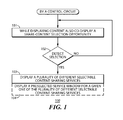
- FIG. 1 is a flow diagram in accordance with the disclosure.
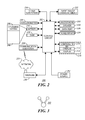
- FIG. 2 is a block diagram in accordance with the disclosure.
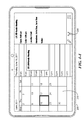
- FIG. 3 is a top plan view in accordance with the disclosure.
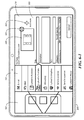
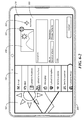
- FIGS. 4-1 to 4-4 are top plan views in accordance with the disclosure.
- FIG. 5 is a top plan view in accordance with the disclosure.
- FIGS. 6-1 and 6-2 are top plan views in accordance with the disclosure.
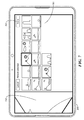
- FIG. 7 is a top plan view in accordance with the disclosure.
- the following describes an apparatus and method pertaining to a control circuit that co-displays a share-content selection opportunity (such as, but not limited to, a user-selectable icon button) when also displaying shareable content.
- a share-content selection opportunity such as, but not limited to, a user-selectable icon button
- the control circuit Upon detecting selection of this share-content selection opportunity, the control circuit displays a plurality of different selectable content-sharing services. By one approach these different selectable content-sharing services are displayed in a window that partially, but not fully, overlies the shareable content.
- these teachings also provide for displaying a preselected service window for a given one of the plurality of different selectable content-sharing services.
- the preselected service can be selected, for example, on the basis of having been a most-recently selected one of the different selectable content-sharing services (either in general or in conjunction with the particular application as corresponds to the shareable content).
- These teachings will also accommodate including branding content as corresponds to the preselected content-sharing service when displaying that preselected service window.
- a user who wishes to share a given item of content can assert a single displayed button to gain access to a listing of all available selectable content-sharing services.
- Such an approach spares the user from having to mentally recollect and formulate such a listing.
- Such an approach also greatly aids in helping the user to avoid overlooking any particular choices in these regards.
- these teachings also provide the user with an intuitive suggestion regarding an appropriate (or even preferred) content-sharing service to utilize with respect to the given item of content.
- This suggestion can, in turn, be based upon any number of criteria including both objective and subjective valuations as desired.
- FIG. 1 presents a process 100 that comports with many of these teachings.
- a control circuit of choice carries out this process 100.
- this control circuit 202 can be configured to control the overall operation of a corresponding portable electronic device 200 (such as, but not limited to, a so-called smartphone or tablet-based computer).
- Communication functions are performed through a communication subsystem 204.
- the communication subsystem receives messages from and sends messages to a wireless network 250.
- the wireless network 250 may be any type of wireless network, including, but not limited to, data wireless networks, voice wireless networks, and networks that support both voice and data communications.
- a power source 242 such as one or more rechargeable batteries or a port to an external power supply, powers the electronic device.
- the control circuit 202 interacts with other elements, such as Random Access Memory (RAM) 208, memory 210, a display 212 with a touch-sensitive overlay 214 operably coupled to an electronic controller 216 that together comprise an optional touch-sensitive display 218, an auxiliary input/output (I/O) subsystem 224, a data port 226, a speaker 228, a microphone 230, a short-range communication subsystem 232, and other device subsystems 234 of choice.
- RAM Random Access Memory
- memory 210 e.g., memory 210
- display 212 with a touch-sensitive overlay 214 operably coupled to an electronic controller 216 that together comprise an optional touch-sensitive display 218, an auxiliary input/output (I/O) subsystem 224, a data port 226, a speaker 228, a microphone 230, a short-range communication subsystem 232, and other device subsystems 234 of choice.
- I/O auxiliary input/output
- One or more user interfaces are provided. Input via a graphical user interface is provided via the touch-sensitive overlay 214.
- the control circuit 202 interacts with the touch-sensitive overlay 214 via the electronic controller 216.
- Information such as text, characters, symbols, images, icons, and other items that may be displayed or rendered on a portable electronic device, is displayed on the touch-sensitive display 218 via the control circuit 202.
- control circuit 202 also interacts with an accelerometer 236 to detect, for example, a direction of gravitational forces or gravity-induced reaction forces. This information can serve, for example, to permit the control circuit 202 to automatically switch between portrait and landscape modes of displaying content on the touch-sensitive display 218.
- the portable electronic device may utilize a Subscriber Identity Module or a Removable User Identity Module (SIM/RUIM) card 238 for communication with a network, such as the wireless network 250.
- SIM/RUIM Removable User Identity Module
- user identification information may be programmed into the memory 210.
- the portable electronic device includes an operating system 246 and software programs, applications, or components 248 that are executed by the control circuit 202 and are typically stored in a persistent, updatable store such as the memory 210. Additional applications or programs may be loaded onto the portable electronic device through the wireless network 250, the auxiliary I/O subsystem 224, the data port 226, the short-range communications subsystem 232, or any other suitable subsystem 234.
- the memory 210 may comprise a non-transitory digital storage media that stores executable code that, when executed by the control circuit 202, causes the control circuit 202 to carry out one or more of the functions or actions described herein.
- a received signal such as a text message, an e-mail message, or web page download is processed by the communication subsystem and input to the control circuit 202.
- the control circuit 202 processes the received signal for output to the display 212 and/or to the auxiliary I/O subsystem 224.
- a subscriber may generate data items, for example e-mail messages, which may be transmitted over the wireless network 250 through the communication subsystem.
- the speaker 228 outputs audible information converted from electrical signals
- the microphone 230 converts audible information into electrical signals for processing.
- the touch-sensitive display 218 may be any suitable touch-sensitive display, such as a capacitive, resistive, infrared, surface acoustic wave (SAW) touch-sensitive display, strain gauge, optical imaging, dispersive signal technology, acoustic pulse recognition, and so forth, as known in the art.
- a capacitive touch-sensitive display includes a capacitive touch-sensitive overlay 214.
- the overlay 214 may be an assembly of multiple layers in a stack including, for example, a substrate, a ground shield layer, a barrier layer, one or more capacitive touch sensor layers separated by a substrate or other barrier, and a cover.
- the capacitive touch sensor layers may comprise any suitable material, such as indium tin oxide (ITO).
- One or more touches may be detected by the touch-sensitive display 218.
- the control circuit 202 may determine attributes of the touch, including a location of a touch.
- Touch location data may include data for an area of contact or data for a single point of contact, such as a point at or near a center of the area of contact.
- the location of a detected touch may include x and y components, e.g., horizontal and vertical components, respectively, with respect to one's view of the touch-sensitive display 218.
- the x location component may be determined by a signal generated from one touch sensor
- the y location component may be determined by a signal generated from another touch sensor.
- a signal is provided to the controller 216 in response to detection of a touch.
- a touch may be detected from any suitable input member, such as a finger, thumb, appendage, or other objects, for example, a stylus, pen, or other pointer, depending on the nature of the touch-sensitive display 218. Multiple simultaneous touches may be detected.
- this share-content selection opportunity may comprise, if desired, a user-selectable icon button 300.
- a user-selectable icon button 300 may comprise, if desired, a user-selectable icon button 300.
- the other content referred to above will typically comprise content that is specific to and otherwise associated with a given application.
- FIGS. 4-1 through 4-4 provide a number of specific illustrative examples in these regards.
- the other content comprises a photograph being provided by an image-processing application.
- the other content comprises contact information for a specific contact as provided within the context of a contacts-list application while in FIG. 4-3 the other content comprises a video as provided by a video-playback application.
- the other content comprises scheduling information within the presentation context of a corresponding calendar application.
- the display of the other content accompanies a display of the aforementioned user-selectable icon button 300.
- the position of this user-selectable icon button 300 can remain constant from one application to another, if desired, or can vary (as shown) to accommodate the needs, limitations, and/or presentation opportunities as tend to characterize a given application.
- this displaying 103 can comprise presenting the plurality of different selectable content-sharing services as a listing 501 in a window that partially, but not fully, overlies the aforementioned content (denoted in FIG. 5 by reference numeral 502).
- the user can remain cognizant of the specific content that is to be shared by making a simple visual reference to that exposed portion of the content 502.
- the content 502 comprises, for example, a photographic image
- the user can readily see a portion of that photographic image and hence remain properly and easily informed in those regards.
- the listing 501 itself can include not only a plurality of different selectable content-sharing services but a plurality of different types of services.
- this listing 501 can include one or more personal-forwarding services, publishing services, and/or transfer services as desired.
- This listing 501 can also comprise a scrollable list to permit the user to easily move the list contents to bring into view additional selectable content-sharing services. By one approach, the user can select a given one of these selectable content-sharing services by simply tapping the representation or identification of the desired service.
- the control circuit 202 preselects one of the selectable content-sharing services in the listing 501.
- the email-based selectable content-sharing service at the top of the listing 501 is so selected.
- the preselected content-sharing service can comprise a most-recently selected one of the different selectable content-sharing services.
- This most-recently selected content-sharing service can comprise, for example, the most-recently selected content-sharing service for any content-sharing purpose or, if desired, the most-recently selected content-sharing service as was employed when sharing content for the particular application and/or for the particular type of content 502 that is now to be shared.
- the described process 100 can also optionally provide for automatically displaying one or more service windows as correspond to the various ones of the selectable content-sharing services.
- this can comprise automatically displaying 104 only one such service window 503, as shown in FIG. 5 .
- the displayed service window 503 can comprise a preselected service window as corresponds to the preselected selectable content-sharing service described above.
- the service window 503 displayed in FIG. 5 would comprise a service window for the already-selected email-based selectable content-sharing service.
- FIG. 6-1 provides one illustrative example in these regards.
- the content 502 is a video and the pre-selected content-sharing service is the YouTube TM service.
- the service window 503 is therefore automatically configured to elicit appropriate information from the user for a YouTube TM submission and to send the video (with the corresponding metadata provided by the user) to the YouTube TM service.
- FIG. 6-2 provides another illustrative example in these regards.
- the content 502 is a photographic image and the pre-selected content-sharing service is the Picassa TM service.
- the service window 503 is now therefore automatically configured to elicit information that is appropriate when using the Picassa TM service and to send that photographic image (and corresponding metadata) to the Picassa TM service.
- one or more of these service windows 503 can comprise generic representations that describe and/or otherwise support using the corresponding service in an unbranded manner. These teachings will also support, however, including branding content in a service window 503 as corresponds to a given corresponding content-sharing service.
- This branding content can include, for example, trademarks and service marks (including words and expressions, catch phrases, logos, and so forth), trade dress (including general designs, font selections, color schemes, and so forth), and so forth.
- the aforementioned service window 503 can include, as appropriate, a thumbnail representation 600 of the content to be forwarded.
- this thumbnail representation 600 can include a selectable icon 601 that the user can select to delete that particular item of content from the forwarding activity.
- the service window 503 can also include, if desired, a selectable icon 602 to permit the user to add additional items of discrete content (such as additional photographic images, videos, music files, text files, and so forth) to the present forwarding activity.
- a selectable icon 602 to permit the user to add additional items of discrete content (such as additional photographic images, videos, music files, text files, and so forth) to the present forwarding activity.
- additional items of discrete content such as additional photographic images, videos, music files, text files, and so forth
- a personal electronic device can greatly facilitate a user's making productive use of a variety of file/content forwarding/sharing services.
- the concepts set forth herein can greatly ease the user's cognitive loading in these regards and help to ensure useful and even optimized forwarding transactions.
Landscapes
- Engineering & Computer Science (AREA)
- Theoretical Computer Science (AREA)
- Physics & Mathematics (AREA)
- General Physics & Mathematics (AREA)
- Business, Economics & Management (AREA)
- Databases & Information Systems (AREA)
- Data Mining & Analysis (AREA)
- General Engineering & Computer Science (AREA)
- Multimedia (AREA)
- Signal Processing (AREA)
- Computer Networks & Wireless Communication (AREA)
- Human Resources & Organizations (AREA)
- Entrepreneurship & Innovation (AREA)
- Economics (AREA)
- Marketing (AREA)
- Operations Research (AREA)
- Quality & Reliability (AREA)
- Strategic Management (AREA)
- Tourism & Hospitality (AREA)
- General Business, Economics & Management (AREA)
- Library & Information Science (AREA)
- User Interface Of Digital Computer (AREA)
Abstract
Description
- The present disclosure relates to electronic communication devices, including but not limited to portable electronic devices having two-way wireless communications capabilities.
- Modem electronic devices, including many portable electronic devices, typically support a wide variety of applications. Examples of such applications and their wide diversity include word processing applications; image capture, editing, and presentation applications; video capture, editing, and presentation applications; appointment scheduling calendars; and contact information applications, to note but a few.
- These same devices also typically support a variety of ways by which the user may elect to share their application-specific content (such as word-processing documents, pictures, videos, scheduling information, contact information, and so forth) with others. Examples include personal-forwarding services (i.e., services characterized by directly-addressed communications between one or several persons with typical protocols including email, short message service (SMS), multimedia messaging service (MMS) and so forth), publishing services (i.e., services characterized by a broadcast to a larger audience with typical protocols including Picasa™, Facebook™, Gowalla™, YouTube™, and so forth), and transfer services (i.e., services characterized by sharing content with another specifically-targeted physical entity, such as a specific portable electronic device, with typical protocols including Bluetooth™, universal plug and play as promulgated by the Digital Living Network Alliance, Wi-Fi, and so forth).
- Unfortunately, this plethora of applications and sharing services gives rise to a considerable number of options when a user wishes to share a particular item of content. The user may forget, for example, the availability of one or more sharing options. Forgetting about the availability of a particular sharing option can be particularly vexing when the forgotten sharing option is in fact a sharing option that is a best suited (or at least most preferred) approach to sharing a particular type of content.
-
FIG. 1 is a flow diagram in accordance with the disclosure. -
FIG. 2 is a block diagram in accordance with the disclosure. -
FIG. 3 is a top plan view in accordance with the disclosure. -
FIGS. 4-1 to 4-4 are top plan views in accordance with the disclosure. -
FIG. 5 is a top plan view in accordance with the disclosure. -
FIGS. 6-1 and 6-2 are top plan views in accordance with the disclosure. -
FIG. 7 is a top plan view in accordance with the disclosure. - The following describes an apparatus and method pertaining to a control circuit that co-displays a share-content selection opportunity (such as, but not limited to, a user-selectable icon button) when also displaying shareable content. Upon detecting selection of this share-content selection opportunity, the control circuit displays a plurality of different selectable content-sharing services. By one approach these different selectable content-sharing services are displayed in a window that partially, but not fully, overlies the shareable content.
- By one approach, these teachings also provide for displaying a preselected service window for a given one of the plurality of different selectable content-sharing services. The preselected service can be selected, for example, on the basis of having been a most-recently selected one of the different selectable content-sharing services (either in general or in conjunction with the particular application as corresponds to the shareable content). These teachings will also accommodate including branding content as corresponds to the preselected content-sharing service when displaying that preselected service window.
- So configured, a user who wishes to share a given item of content can assert a single displayed button to gain access to a listing of all available selectable content-sharing services. Such an approach spares the user from having to mentally recollect and formulate such a listing. Such an approach also greatly aids in helping the user to avoid overlooking any particular choices in these regards.
- By also displaying a preselected service window for a given one of the selectable content-sharing services, these teachings also provide the user with an intuitive suggestion regarding an appropriate (or even preferred) content-sharing service to utilize with respect to the given item of content. This suggestion can, in turn, be based upon any number of criteria including both objective and subjective valuations as desired.
- These teachings are highly flexible in practice and will accommodate a wide variety of content types as well as different types of content-sharing services. The concepts disclosed herein are also readily scaled to include essentially any number of content-sharing services and any size of content file. These teachings are also readily employed in conjunction with many existing platform architectures and hence can readily serve to leverage the functionality and usability of those platforms.
- For simplicity and clarity of illustration, reference numerals may be repeated among the figures to indicate corresponding or analogous elements. Numerous details are set forth to provide an understanding of the embodiments described herein. The embodiments may be practiced without these details. In other instances, well-known methods, procedures, and components have not been described in detail to avoid obscuring the embodiments described. The description is not to be considered as limited to the scope of the embodiments described herein.
-
FIG. 1 presents aprocess 100 that comports with many of these teachings. For the sake of an illustrative example the following description presumes that a control circuit of choice carries out thisprocess 100. By way of further example, and without intending any particular limitations in these regards, as shown inFIG. 2 thiscontrol circuit 202 can be configured to control the overall operation of a corresponding portable electronic device 200 (such as, but not limited to, a so-called smartphone or tablet-based computer). - Communication functions, including data and voice communications, are performed through a
communication subsystem 204. The communication subsystem receives messages from and sends messages to awireless network 250. Thewireless network 250 may be any type of wireless network, including, but not limited to, data wireless networks, voice wireless networks, and networks that support both voice and data communications. Apower source 242, such as one or more rechargeable batteries or a port to an external power supply, powers the electronic device. - The
control circuit 202 interacts with other elements, such as Random Access Memory (RAM) 208,memory 210, adisplay 212 with a touch-sensitive overlay 214 operably coupled to anelectronic controller 216 that together comprise an optional touch-sensitive display 218, an auxiliary input/output (I/O)subsystem 224, adata port 226, aspeaker 228, amicrophone 230, a short-range communication subsystem 232, andother device subsystems 234 of choice. - One or more user interfaces are provided. Input via a graphical user interface is provided via the touch-sensitive overlay 214. The
control circuit 202 interacts with the touch-sensitive overlay 214 via theelectronic controller 216. Information, such as text, characters, symbols, images, icons, and other items that may be displayed or rendered on a portable electronic device, is displayed on the touch-sensitive display 218 via thecontrol circuit 202. - In this illustrative example the
control circuit 202 also interacts with anaccelerometer 236 to detect, for example, a direction of gravitational forces or gravity-induced reaction forces. This information can serve, for example, to permit thecontrol circuit 202 to automatically switch between portrait and landscape modes of displaying content on the touch-sensitive display 218. - To identify a subscriber for network access, the portable electronic device may utilize a Subscriber Identity Module or a Removable User Identity Module (SIM/RUIM)
card 238 for communication with a network, such as thewireless network 250. Alternatively, user identification information may be programmed into thememory 210. - The portable electronic device includes an
operating system 246 and software programs, applications, orcomponents 248 that are executed by thecontrol circuit 202 and are typically stored in a persistent, updatable store such as thememory 210. Additional applications or programs may be loaded onto the portable electronic device through thewireless network 250, the auxiliary I/O subsystem 224, thedata port 226, the short-range communications subsystem 232, or any othersuitable subsystem 234. Thememory 210 may comprise a non-transitory digital storage media that stores executable code that, when executed by thecontrol circuit 202, causes thecontrol circuit 202 to carry out one or more of the functions or actions described herein. - A received signal such as a text message, an e-mail message, or web page download is processed by the communication subsystem and input to the
control circuit 202. Thecontrol circuit 202 processes the received signal for output to thedisplay 212 and/or to the auxiliary I/O subsystem 224. A subscriber may generate data items, for example e-mail messages, which may be transmitted over thewireless network 250 through the communication subsystem. For voice communications, the overall operation of the portable electronic device is similar. Thespeaker 228 outputs audible information converted from electrical signals, and themicrophone 230 converts audible information into electrical signals for processing. - The touch-
sensitive display 218 may be any suitable touch-sensitive display, such as a capacitive, resistive, infrared, surface acoustic wave (SAW) touch-sensitive display, strain gauge, optical imaging, dispersive signal technology, acoustic pulse recognition, and so forth, as known in the art. A capacitive touch-sensitive display includes a capacitive touch-sensitive overlay 214. The overlay 214 may be an assembly of multiple layers in a stack including, for example, a substrate, a ground shield layer, a barrier layer, one or more capacitive touch sensor layers separated by a substrate or other barrier, and a cover. The capacitive touch sensor layers may comprise any suitable material, such as indium tin oxide (ITO). - One or more touches, also known as touch contacts or touch events, may be detected by the touch-
sensitive display 218. Thecontrol circuit 202 may determine attributes of the touch, including a location of a touch. Touch location data may include data for an area of contact or data for a single point of contact, such as a point at or near a center of the area of contact. - The location of a detected touch may include x and y components, e.g., horizontal and vertical components, respectively, with respect to one's view of the touch-
sensitive display 218. For example, the x location component may be determined by a signal generated from one touch sensor, and the y location component may be determined by a signal generated from another touch sensor. A signal is provided to thecontroller 216 in response to detection of a touch. A touch may be detected from any suitable input member, such as a finger, thumb, appendage, or other objects, for example, a stylus, pen, or other pointer, depending on the nature of the touch-sensitive display 218. Multiple simultaneous touches may be detected. - Referring now to both
FIGS. 1 and3 , pursuant to thisprocess 100, thecontrol circuit 202 displays 101 a share-content selection opportunity while also presenting other content. As illustrated inFIG. 3 , this share-content selection opportunity may comprise, if desired, a user-selectable icon button 300. (It will be understood that the particular design of the icon shown inFIG. 3 is provided for illustrative purposes and for the sake of example and is not intended to suggest any particular limitations in these regards.) - The other content referred to above will typically comprise content that is specific to and otherwise associated with a given application.
FIGS. 4-1 through 4-4 provide a number of specific illustrative examples in these regards. InFIG. 4-1 , for example, the other content comprises a photograph being provided by an image-processing application. InFIG. 4-2 , the other content comprises contact information for a specific contact as provided within the context of a contacts-list application while inFIG. 4-3 the other content comprises a video as provided by a video-playback application. InFIG. 4-4 , as yet another example, the other content comprises scheduling information within the presentation context of a corresponding calendar application. These examples, of course, do not constitute an exhaustive presentation in these regards. In fact, the describedprocess 100 will readily accommodate essentially any type of content and application. - In all of the illustrated examples of
FIGS. 4-1 through 4-4 the display of the other content accompanies a display of the aforementioned user-selectable icon button 300. The position of this user-selectable icon button 300 can remain constant from one application to another, if desired, or can vary (as shown) to accommodate the needs, limitations, and/or presentation opportunities as tend to characterize a given application. - For the purposes of this description, it will be presumed that a user can select or otherwise assert this user-
selectable icon button 300 by tapping the touch-sensitive display 218 in an area of thedisplay 218 that corresponds to the user-selectable icon button 300. When thecontrol circuit 202 detects 102 selection of the user-selectable icon button 300, thecontrol circuit 202 responsively and automatically displays 103 a plurality of different selectable content-sharing services. - As shown in
FIG. 5 , by one approach this displaying 103 can comprise presenting the plurality of different selectable content-sharing services as alisting 501 in a window that partially, but not fully, overlies the aforementioned content (denoted inFIG. 5 by reference numeral 502). Using this approach, the user can remain cognizant of the specific content that is to be shared by making a simple visual reference to that exposed portion of thecontent 502. When thecontent 502 comprises, for example, a photographic image, the user can readily see a portion of that photographic image and hence remain properly and easily informed in those regards. - The listing 501 itself can include not only a plurality of different selectable content-sharing services but a plurality of different types of services. For example, this
listing 501 can include one or more personal-forwarding services, publishing services, and/or transfer services as desired. Thislisting 501 can also comprise a scrollable list to permit the user to easily move the list contents to bring into view additional selectable content-sharing services. By one approach, the user can select a given one of these selectable content-sharing services by simply tapping the representation or identification of the desired service. - By one optional approach, the
control circuit 202 preselects one of the selectable content-sharing services in thelisting 501. In the example shown inFIG. 5 the email-based selectable content-sharing service at the top of thelisting 501 is so selected. By one approach the preselected content-sharing service can comprise a most-recently selected one of the different selectable content-sharing services. This most-recently selected content-sharing service can comprise, for example, the most-recently selected content-sharing service for any content-sharing purpose or, if desired, the most-recently selected content-sharing service as was employed when sharing content for the particular application and/or for the particular type ofcontent 502 that is now to be shared. - In addition, the described
process 100 can also optionally provide for automatically displaying one or more service windows as correspond to the various ones of the selectable content-sharing services. By one approach, this can comprise automatically displaying 104 only onesuch service window 503, as shown inFIG. 5 . In particular, the displayedservice window 503 can comprise a preselected service window as corresponds to the preselected selectable content-sharing service described above. By way of example, theservice window 503 displayed inFIG. 5 would comprise a service window for the already-selected email-based selectable content-sharing service. -
FIG. 6-1 provides one illustrative example in these regards. In this example thecontent 502 is a video and the pre-selected content-sharing service is the YouTube™ service. Theservice window 503 is therefore automatically configured to elicit appropriate information from the user for a YouTube™ submission and to send the video (with the corresponding metadata provided by the user) to the YouTube™ service. -
FIG. 6-2 provides another illustrative example in these regards. In this example, thecontent 502 is a photographic image and the pre-selected content-sharing service is the Picassa™ service. Theservice window 503 is now therefore automatically configured to elicit information that is appropriate when using the Picassa™ service and to send that photographic image (and corresponding metadata) to the Picassa™ service. - By one approach, one or more of these
service windows 503 can comprise generic representations that describe and/or otherwise support using the corresponding service in an unbranded manner. These teachings will also support, however, including branding content in aservice window 503 as corresponds to a given corresponding content-sharing service. This branding content can include, for example, trademarks and service marks (including words and expressions, catch phrases, logos, and so forth), trade dress (including general designs, font selections, color schemes, and so forth), and so forth. - These teachings are highly flexible in practice and will accommodate a great variety of alteration and embellishment. As one example in these regards, and with continued reference to
FIGS. 6-1 and 6-2 , theaforementioned service window 503 can include, as appropriate, athumbnail representation 600 of the content to be forwarded. By one approach, if desired, thisthumbnail representation 600 can include aselectable icon 601 that the user can select to delete that particular item of content from the forwarding activity. - As yet a further example of the flexibility of these teachings, and again with continued reference to
FIGS. 6-1 and 6-2 , theservice window 503 can also include, if desired, aselectable icon 602 to permit the user to add additional items of discrete content (such as additional photographic images, videos, music files, text files, and so forth) to the present forwarding activity. By way of an illustrative example, if the user selected thisicon 602 when viewing theservice window 503 shown inFIG. 6-2 , awindow 701 and/or new screen (as desired), as illustrated inFIG. 7 , could be displayed to present other content of similar file type, metadata, or the like that the user could additionally select to include in the forwarding activity. Upon concluding these selections the user could then assert the "done"button 702 to return to the previous service window 503 (which would now include a thumbnail representation for the additionally included items of content). - So configured, a personal electronic device (for example) can greatly facilitate a user's making productive use of a variety of file/content forwarding/sharing services. The concepts set forth herein can greatly ease the user's cognitive loading in these regards and help to ensure useful and even optimized forwarding transactions.
- The present disclosure may be embodied in other specific forms without departing from its spirit or essential characteristics. The described embodiments are to be considered in all respects only as illustrative and not restrictive. The scope of the disclosure is, therefore, indicated by the appended claims rather than by the foregoing description. All changes that come within the meaning and range of equivalency of the claims are to be embraced within their scope.
Claims (15)
- A method comprising:displaying (101) content while also co-displaying a share-content selection opportunity (300);detecting (102) selection of the share-content selection opportunity; andin response to the detection, displaying (103) a plurality (501) of different selectable content-sharing services.
- The method of claim 1 wherein the share-content selection opportunity comprises a user-selectable icon button.
- The method of claim 1 or claim 2 wherein displaying the plurality of different selectable content-sharing services comprises displaying the plurality of different selectable content-sharing services in a window that partially, but not fully, overlies the content.
- The method of any preceding claim wherein the plurality of different selectable content-sharing services comprises at least one service from each of a:personal-forwarding service;publishing service; andtransfer service.
- The method of preceding claim further comprising:upon detecting selection of the share-content selection opportunity, also displaying a preselected service window for a given one of the plurality of different selectable content-sharing services.
- The method of claim 5 wherein displaying the preselected service window for a given one of the plurality of different selectable content-sharing services comprises displaying a preselected service window for only the given one of the plurality of different selectable content-sharing services.
- The method of claim 5 or claim 6 wherein the preselected service window is automatically preselected based upon being a most-recently selected one of the different selectable content-sharing services.
- The method of any of claims 5 to 7 wherein the preselected service window includes branding content as corresponds to the given one of the plurality of different selectable content-sharing services.
- An apparatus (200) comprising:a display (218);a control circuit (202) operably coupled to the display and configured to:display (101) content on the display while also co-displaying on the display a share-content selection opportunity (300);detecting (102) selection of the share-content selection opportunity; and in response to the detecting, displaying (103) on the display a plurality (501) of different selectable content-sharing services.
- The apparatus of claim 9 wherein the control circuit is configured to display the plurality of different selectable content-sharing services by displaying the plurality of different selectable content-sharing services on the display in a window that partially, but not fully, overlies the content.
- The apparatus of claim 9 or claim 10 wherein the control circuit is further configured to also display on the display a preselected service window for a given one of the plurality of different selectable content-sharing services.
- The apparatus of claim 11 wherein the control circuit is configured to display the preselected service window on the display for a given one of the plurality of different selectable content-sharing services by displaying on the display a preselected service window for only the given one of the plurality of different selectable content-sharing services.
- The apparatus of claim 11 or claim 12 wherein the control circuit is configured to automatically preselect the preselected service window based upon whichever of the different selectable content-sharing services was most recently selected.
- The apparatus of any of claims 11 to 13 wherein the preselected service window includes branding content as corresponds to the given one of the plurality of different selectable content-sharing services.
- A non-transitory digital memory (210) having stored therein instructions that, when executed by a control circuit (202), cause the control circuit to:display (101) content while also co-displaying a share-content selection opportunity (300);detect (102) selection of the share-content selection opportunity; andin response to the detecting, display (103) a plurality (501) of different selectable content-sharing services.
Priority Applications (2)
| Application Number | Priority Date | Filing Date | Title |
|---|---|---|---|
| EP12166310.8A EP2660731A1 (en) | 2012-05-01 | 2012-05-01 | Method and apparatus pertaining to the sharing of content |
| CA2813955A CA2813955C (en) | 2012-05-01 | 2013-04-23 | Method and apparatus pertaining to the sharing of content |
Applications Claiming Priority (1)
| Application Number | Priority Date | Filing Date | Title |
|---|---|---|---|
| EP12166310.8A EP2660731A1 (en) | 2012-05-01 | 2012-05-01 | Method and apparatus pertaining to the sharing of content |
Publications (1)
| Publication Number | Publication Date |
|---|---|
| EP2660731A1 true EP2660731A1 (en) | 2013-11-06 |
Family
ID=46149166
Family Applications (1)
| Application Number | Title | Priority Date | Filing Date |
|---|---|---|---|
| EP12166310.8A Ceased EP2660731A1 (en) | 2012-05-01 | 2012-05-01 | Method and apparatus pertaining to the sharing of content |
Country Status (2)
| Country | Link |
|---|---|
| EP (1) | EP2660731A1 (en) |
| CA (1) | CA2813955C (en) |
Cited By (2)
| Publication number | Priority date | Publication date | Assignee | Title |
|---|---|---|---|---|
| WO2018031384A1 (en) * | 2016-08-12 | 2018-02-15 | Microsoft Technology Licensing, Llc | Interface menu presenting non-installed content sharing applications |
| WO2018090204A1 (en) | 2016-11-15 | 2018-05-24 | Microsoft Technology Licensing, Llc. | Content processing across applications |
Citations (4)
| Publication number | Priority date | Publication date | Assignee | Title |
|---|---|---|---|---|
| US20090187825A1 (en) * | 2008-01-23 | 2009-07-23 | Microsoft Corporation | Annotating and Sharing Content |
| US20090234876A1 (en) * | 2008-03-14 | 2009-09-17 | Timothy Schigel | Systems and methods for content sharing |
| US20090292762A1 (en) * | 2008-05-20 | 2009-11-26 | Nokia Corporation | Method, Apparatus, and Computer Program Product for Publishing Content |
| WO2012021369A2 (en) * | 2010-08-13 | 2012-02-16 | Sony Corporation | System and method for digital image and video manipulation and transfer |
-
2012
- 2012-05-01 EP EP12166310.8A patent/EP2660731A1/en not_active Ceased
-
2013
- 2013-04-23 CA CA2813955A patent/CA2813955C/en active Active
Patent Citations (4)
| Publication number | Priority date | Publication date | Assignee | Title |
|---|---|---|---|---|
| US20090187825A1 (en) * | 2008-01-23 | 2009-07-23 | Microsoft Corporation | Annotating and Sharing Content |
| US20090234876A1 (en) * | 2008-03-14 | 2009-09-17 | Timothy Schigel | Systems and methods for content sharing |
| US20090292762A1 (en) * | 2008-05-20 | 2009-11-26 | Nokia Corporation | Method, Apparatus, and Computer Program Product for Publishing Content |
| WO2012021369A2 (en) * | 2010-08-13 | 2012-02-16 | Sony Corporation | System and method for digital image and video manipulation and transfer |
Cited By (4)
| Publication number | Priority date | Publication date | Assignee | Title |
|---|---|---|---|---|
| WO2018031384A1 (en) * | 2016-08-12 | 2018-02-15 | Microsoft Technology Licensing, Llc | Interface menu presenting non-installed content sharing applications |
| WO2018090204A1 (en) | 2016-11-15 | 2018-05-24 | Microsoft Technology Licensing, Llc. | Content processing across applications |
| EP3513283A4 (en) * | 2016-11-15 | 2020-06-24 | Microsoft Technology Licensing, LLC | Content processing across applications |
| US11010211B2 (en) | 2016-11-15 | 2021-05-18 | Microsoft Technology Licensing, Llc | Content processing across applications |
Also Published As
| Publication number | Publication date |
|---|---|
| CA2813955A1 (en) | 2013-11-01 |
| CA2813955C (en) | 2017-11-07 |
Similar Documents
| Publication | Publication Date | Title |
|---|---|---|
| US11928317B2 (en) | Device, method, and graphical user interface for sharing content from a respective application | |
| US12001648B2 (en) | User interfaces for logging user activities | |
| US9491260B2 (en) | Method and apparatus pertaining to the sharing of content | |
| EP3901755B1 (en) | Voice communication method | |
| KR101832045B1 (en) | Device, method, and graphical user interface for sharing content from a respective application | |
| US9063629B2 (en) | Responding to a received message in a locked user interaction mode | |
| US9712577B2 (en) | Device, method, and graphical user interface for sharing content from a respective application | |
| KR102880143B1 (en) | Health event logging and coaching user interfaces | |
| EP2817700B1 (en) | Portable device where the alignment of the displayed content with respect to the orientation of the display may be overruled by making a user input. | |
| US11074618B2 (en) | Method and apparatus pertaining to history-based content-sharing recommendations | |
| EP2811420A2 (en) | Method for quickly executing application on lock screen in mobile device, and mobile device therefor | |
| US20160227010A1 (en) | Device and method for providing lock screen | |
| US10049342B2 (en) | Method and apparatus pertaining to sharing content with scheduled-event participants | |
| EP2866159A1 (en) | Electronic device and method for controlling a screen | |
| KR102672203B1 (en) | User interfaces for enabling an activity | |
| CA2813955C (en) | Method and apparatus pertaining to the sharing of content | |
| US20250125027A1 (en) | User interfaces for organizing user activities | |
| KR102877006B1 (en) | Digital ID credential user interfaces | |
| AU2022202360B2 (en) | Voice communication method | |
| AU2019100525B4 (en) | Voice communication method | |
| EP2813981A1 (en) | Method and apparatus pertaining to sharing content with scheduled-event participants | |
| EP2813982A1 (en) | Method and apparatus pertaining to history-based content-sharing recommendations | |
| WO2025081116A1 (en) | User interfaces for organizing user activities |
Legal Events
| Date | Code | Title | Description |
|---|---|---|---|
| PUAI | Public reference made under article 153(3) epc to a published international application that has entered the european phase |
Free format text: ORIGINAL CODE: 0009012 |
|
| 17P | Request for examination filed |
Effective date: 20120501 |
|
| AK | Designated contracting states |
Kind code of ref document: A1 Designated state(s): AL AT BE BG CH CY CZ DE DK EE ES FI FR GB GR HR HU IE IS IT LI LT LU LV MC MK MT NL NO PL PT RO RS SE SI SK SM TR |
|
| AX | Request for extension of the european patent |
Extension state: BA ME |
|
| RAP1 | Party data changed (applicant data changed or rights of an application transferred) |
Owner name: BLACKBERRY LIMITED |
|
| STAA | Information on the status of an ep patent application or granted ep patent |
Free format text: STATUS: EXAMINATION IS IN PROGRESS |
|
| 17Q | First examination report despatched |
Effective date: 20180709 |
|
| APBK | Appeal reference recorded |
Free format text: ORIGINAL CODE: EPIDOSNREFNE |
|
| APBN | Date of receipt of notice of appeal recorded |
Free format text: ORIGINAL CODE: EPIDOSNNOA2E |
|
| APBR | Date of receipt of statement of grounds of appeal recorded |
Free format text: ORIGINAL CODE: EPIDOSNNOA3E |
|
| APAV | Appeal reference deleted |
Free format text: ORIGINAL CODE: EPIDOSDREFNE |
|
| APBT | Appeal procedure closed |
Free format text: ORIGINAL CODE: EPIDOSNNOA9E |
|
| STAA | Information on the status of an ep patent application or granted ep patent |
Free format text: STATUS: THE APPLICATION HAS BEEN REFUSED |
|
| 18R | Application refused |
Effective date: 20230830 |