EP2649943A1 - Method for implementing an editing function of a user menu - Google Patents
Method for implementing an editing function of a user menu Download PDFInfo
- Publication number
- EP2649943A1 EP2649943A1 EP11846261.3A EP11846261A EP2649943A1 EP 2649943 A1 EP2649943 A1 EP 2649943A1 EP 11846261 A EP11846261 A EP 11846261A EP 2649943 A1 EP2649943 A1 EP 2649943A1
- Authority
- EP
- European Patent Office
- Prior art keywords
- field
- user
- menu items
- menu
- edit
- Prior art date
- Legal status (The legal status is an assumption and is not a legal conclusion. Google has not performed a legal analysis and makes no representation as to the accuracy of the status listed.)
- Ceased
Links
Images

Classifications
-
- G—PHYSICS
- G06—COMPUTING OR CALCULATING; COUNTING
- G06F—ELECTRIC DIGITAL DATA PROCESSING
- G06F3/00—Input arrangements for transferring data to be processed into a form capable of being handled by the computer; Output arrangements for transferring data from processing unit to output unit, e.g. interface arrangements
- G06F3/01—Input arrangements or combined input and output arrangements for interaction between user and computer
- G06F3/048—Interaction techniques based on graphical user interfaces [GUI]
- G06F3/0481—Interaction techniques based on graphical user interfaces [GUI] based on specific properties of the displayed interaction object or a metaphor-based environment, e.g. interaction with desktop elements like windows or icons, or assisted by a cursor's changing behaviour or appearance
- G06F3/0482—Interaction with lists of selectable items, e.g. menus
-
- A—HUMAN NECESSITIES
- A61—MEDICAL OR VETERINARY SCIENCE; HYGIENE
- A61B—DIAGNOSIS; SURGERY; IDENTIFICATION
- A61B8/00—Diagnosis using ultrasonic, sonic or infrasonic waves
- A61B8/46—Ultrasonic, sonic or infrasonic diagnostic devices with special arrangements for interfacing with the operator or the patient
- A61B8/461—Displaying means of special interest
- A61B8/465—Displaying means of special interest adapted to display user selection data, e.g. icons or menus
-
- G—PHYSICS
- G16—INFORMATION AND COMMUNICATION TECHNOLOGY [ICT] SPECIALLY ADAPTED FOR SPECIFIC APPLICATION FIELDS
- G16H—HEALTHCARE INFORMATICS, i.e. INFORMATION AND COMMUNICATION TECHNOLOGY [ICT] SPECIALLY ADAPTED FOR THE HANDLING OR PROCESSING OF MEDICAL OR HEALTHCARE DATA
- G16H40/00—ICT specially adapted for the management or administration of healthcare resources or facilities; ICT specially adapted for the management or operation of medical equipment or devices
- G16H40/60—ICT specially adapted for the management or administration of healthcare resources or facilities; ICT specially adapted for the management or operation of medical equipment or devices for the operation of medical equipment or devices
- G16H40/63—ICT specially adapted for the management or administration of healthcare resources or facilities; ICT specially adapted for the management or operation of medical equipment or devices for the operation of medical equipment or devices for local operation
Definitions
- Embodiments of the present invention relate to a method of realizing a user menu edit function, which allows a user to conveniently edit menu items with regard to each operation mode preferred or mainly used by the user in a variety of diagnostic apparatuses, such as an ultrasound diagnostic apparatus and the like.
- menu items of each diagnostic apparatus are not arranged according to a user action pattern, but are arranged according to a formulary pattern that is uniformly set by product developers at the launch of products, which results in inconvenience when the user selects desired menu items.
- conventional medical diagnostic apparatuses are configured in such a way that some menu items which are frequently used menu items and some menu items which are not are used often are displayed together on a per stage basis without distinction. This results in very complicated arrangement of the displayed menu items, causing the user difficulty in searching for and selecting desired menu items.
- a method of realizing a user menu edit function includes (a) providing a list of menu items selectable on a per mode basis, (b) receiving selection of at least one from the list of menu items input by a user, (c) applying the menu item selected by the user to a diagnostic screen application field linked to a real screen of a diagnostic apparatus, and (d) displaying the menu item selected by the user on the real screen of the diagnostic apparatus in response to the application result.
- An attribute edit field to edit at least one attribute with regard to the menu item selected in operation (b) may be further provided.
- Attributes that the user may edit in the attribute edit field may include names and importance factors of the respective menu items as well as names of classified groups.
- An auto-alignment field to determine alignment criteria of the menu items on the real screen of the diagnostic apparatus may be further provided, and the auto-alignment field may allow the menu items to be aligned based on attributes of the respective menu items, which originally stored or edited in the attribute edit field.
- the menu item selected in operation (c) may be applied to the diagnostic screen application field as the user drags and drops the selected menu item in the diagnostic screen application field, or may be applied to the diagnostic screen application field via selection of the menu item and via selection of a specific position in a desired page on the diagnostic screen application field.
- a grouping field for grouping of a plurality of menu items from the list of the menu items may be further provided.
- a group of the menu items that the user groups using the grouping field may be displayed in the real screen of the diagnosis apparatus.
- An application coverage edit field to edit the setting range of a diagnosis application with regard to the menu item selected in operation (b) may be further provided, or an application coverage edit field to determine the setting range of a diagnosis application to be applied on a per page basis in the diagnostic screen application field may be further provided.
- the user when using variety of diagnostic apparatuses, such as an ultrasound diagnostic apparatus and the like, the user may conveniently edit menu items with regard to each operation mode preferred or mainly used by the user.
- FIG. 1 is a view showing a user menu edit screen provided by a method of realizing a user menu edit function according to one embodiment of the present invention
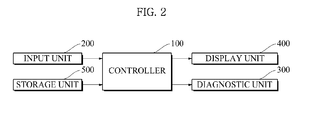
- FIG. 2 is a schematic view showing a system configuration according to the embodiment
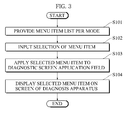
- FIG. 3 is a flowchart explaining a method of realizing a user menu edit function according to the embodiment.
- Each diagnostic apparatus includes a controller 100 to control the entire system, an input unit 200 to receive various user selections or inputs, a diagnostic unit 300 for various diagnoses of a subject, a display unit 400 to display a variety of menu items or images indicating diagnosed results, and a storage unit 500 in which various user input data, menu setting data as well as data regarding diagnosed results are stored.
- the method of realizing a user menu edit function according to the present embodiment is mainly realized by interaction between the controller 100, the input unit 200, the display unit 400, and the storage unit 500.
- the controller 100 controls provision of a list of menu items selectable on a per mode basis (S101). More specifically, as exemplarily shown in FIG. 1 , tabs on a per mode basis are provided in a region 10, and a list of menu items selectable on a per selected mode basis is provided in a region 20.
- the region 10 is provided with tabs with regard to ultrasound image modes of the ultrasound diagnostic apparatus including, e.g., a Brightness (B) mode, a Color (C) mode, a Pulsed-Wave (PW) mode, a Motion (M) mode, and a Continuous Wave (CW) mode.
- B Brightness
- C Color
- PW Pulsed-Wave
- M Motion
- CW Continuous Wave
- the region 20 is provided with a list of selectable menu items based on the B mode including, e.g., 'Focus', 'Frame average', 'Power', and 'Rotation' items.
- the menu items provided in the region 20 may be aligned and provided in alphabetical order or on a per attribute basis based on selection of a name sort tab, an attribute sort tab, or the like as exemplarily shown.
- selection of at least one menu item from the list of menu items is input by the user via the input unit 200 (S102). More specifically, selection of a menu item to be edited and displayed on a real screen of the diagnostic apparatus is input via the input unit 200.
- the controller 100 applies the menu item, selected by the user, to a diagnostic screen application field 60 that is linked to the real screen of the diagnostic apparatus (S103). More specifically, if at least one menu item is selected by the user in operation S102, the menu item is applied to the diagnostic screen application field 60 linked to the real screen of the diagnostic apparatus, such that the selected menu item is activated in a specific page of the diagnostic screen application field 60.
- “linkage with the real screen” means that content applied to the diagnostic screen application field 60 is displayed on the real screen of the diagnostic apparatus.
- the diagnostic screen application field 60 may be set such that each menu item is displayed on a per page basis (page 1, page 2,...) on the real screen of the diagnostic apparatus, and the number of pages may be increased using a button of a region 70.
- the user may drag and drop the selected menu item in the diagnostic screen application field 60, and may apply the selected menu item to the diagnostic screen application field 60 by selecting the menu item and by selecting a specific position in a desired page on the diagnostic screen application field 60 (for example, the user may select 'Gain' from the menu item list, and thereafter select 'MenuItem 8' in page 2 on the diagnostic screen application field 60).
- the controller 100 controls display of the at least one menu item selected by the user on the real screen of the diagnostic apparatus in response to the application result of operation S103 (S104).
- the at least one menu item applied on a per page basis in the diagnostic screen application field 60 in operation S103 may be displayed on the real screen of the diagnostic apparatus so as to be selected by the user.
- a grouping field 50 for selection and grouping of a plurality of menu items from the menu item list may be further provided.
- the grouping field 50 serves to assist the user in grouping and simultaneously using some menu items selected from among a plurality of menu items. As such, a group of the menu items that the user groups using the grouping field 50 is displayed on the real screen of the diagnostic apparatus.
- an application coverage edit field 30 to edit the setting range of a diagnosis application (for example, a diagnosis department) with regard to the selected menu item may be further provided.
- the application coverage edit field the user may set a menu item to be displayed on the screen on a per diagnosis application basis or on a per diagnosis department basis.
- the application coverage edit field 30 may be configured to determine the setting range of the diagnosis application to be applied on a per page basis in the diagnostic screen application field 60.
- an auto-alignment field 80 to determine alignment criteria of menu items on the real screen of the diagnostic apparatus.
- the auto-alignment field 80 allows the menu items to be aligned based on attributes of the respective menu items, which originally stored or edited in the attribute edit field 40. Thereby, the user may preset the alignment criteria of the menu items on the real screen of the diagnostic apparatus, which assists the user in more conveniently performing diagnosis.
- an iterative setting field 90 to iteratively set a plurality of menu items whenever a menu item button is pushed is provided.
- the user when using variety of diagnostic apparatuses, such as an ultrasound diagnostic apparatus and the like, the user may conveniently edit menu items with regard to each operation mode preferred or mainly used by the user.
Landscapes
- Engineering & Computer Science (AREA)
- Health & Medical Sciences (AREA)
- Life Sciences & Earth Sciences (AREA)
- Biomedical Technology (AREA)
- Theoretical Computer Science (AREA)
- General Engineering & Computer Science (AREA)
- Human Computer Interaction (AREA)
- Physics & Mathematics (AREA)
- General Health & Medical Sciences (AREA)
- Public Health (AREA)
- Medical Informatics (AREA)
- General Physics & Mathematics (AREA)
- Nuclear Medicine, Radiotherapy & Molecular Imaging (AREA)
- Pathology (AREA)
- Animal Behavior & Ethology (AREA)
- Molecular Biology (AREA)
- Heart & Thoracic Surgery (AREA)
- Veterinary Medicine (AREA)
- Radiology & Medical Imaging (AREA)
- Surgery (AREA)
- Biophysics (AREA)
- Business, Economics & Management (AREA)
- General Business, Economics & Management (AREA)
- Epidemiology (AREA)
- Primary Health Care (AREA)
- Ultra Sonic Daignosis Equipment (AREA)
- User Interface Of Digital Computer (AREA)
Abstract
Description
- Embodiments of the present invention relate to a method of realizing a user menu edit function, which allows a user to conveniently edit menu items with regard to each operation mode preferred or mainly used by the user in a variety of diagnostic apparatuses, such as an ultrasound diagnostic apparatus and the like.
- Generally, a variety of diagnostic apparatuses, such as an ultrasound diagnostic apparatus and the like, are becoming more complex and including a more diverse array of functions, and thus menu items, which are displayed on the diagnostic apparatus, are diversifying and the number of menu items is increasing. In this case, menu items of each diagnostic apparatus are not arranged according to a user action pattern, but are arranged according to a formulary pattern that is uniformly set by product developers at the launch of products, which results in inconvenience when the user selects desired menu items.
- In particular, in the case of diagnostic apparatuses that are complex, include a diverse array of functions and require special knowledge to operate, the aforementioned problems are becoming more serious issues.
- In addition, conventional medical diagnostic apparatuses are configured in such a way that some menu items which are frequently used menu items and some menu items which are not are used often are displayed together on a per stage basis without distinction. This results in very complicated arrangement of the displayed menu items, causing the user difficulty in searching for and selecting desired menu items.
- It is an aspect of the present invention to provide a method of realizing a user menu edit function, which allows a user to conveniently edit menu items with regard to each operation mode preferred or mainly used by the user in a variety of diagnostic apparatuses, such as an ultrasound diagnostic apparatus and the like.
- In accordance with one aspect of the present invention, a method of realizing a user menu edit function, includes (a) providing a list of menu items selectable on a per mode basis, (b) receiving selection of at least one from the list of menu items input by a user, (c) applying the menu item selected by the user to a diagnostic screen application field linked to a real screen of a diagnostic apparatus, and (d) displaying the menu item selected by the user on the real screen of the diagnostic apparatus in response to the application result.
- An attribute edit field to edit at least one attribute with regard to the menu item selected in operation (b) may be further provided.
- Attributes that the user may edit in the attribute edit field may include names and importance factors of the respective menu items as well as names of classified groups.
- An auto-alignment field to determine alignment criteria of the menu items on the real screen of the diagnostic apparatus may be further provided, and the auto-alignment field may allow the menu items to be aligned based on attributes of the respective menu items, which originally stored or edited in the attribute edit field.
- The respective menu items may be set so as to be displayed on a per page basis on the real screen of the diagnostic apparatus using the diagnostic screen application field.
- The menu item selected in operation (c) may be applied to the diagnostic screen application field as the user drags and drops the selected menu item in the diagnostic screen application field, or may be applied to the diagnostic screen application field via selection of the menu item and via selection of a specific position in a desired page on the diagnostic screen application field.
- The menu items may be aligned and provided in alphabetical order or on a per attribute basis.
- In operation (a) of providing the list of the menu items, a grouping field for grouping of a plurality of menu items from the list of the menu items may be further provided.
- A group of the menu items that the user groups using the grouping field may be displayed in the real screen of the diagnosis apparatus.
- An application coverage edit field to edit the setting range of a diagnosis application with regard to the menu item selected in operation (b) may be further provided, or an application coverage edit field to determine the setting range of a diagnosis application to be applied on a per page basis in the diagnostic screen application field may be further provided.
- According to the embodiment of the present invention, when using variety of diagnostic apparatuses, such as an ultrasound diagnostic apparatus and the like, the user may conveniently edit menu items with regard to each operation mode preferred or mainly used by the user.
-
-
FIG. 1 is a view showing a user menu edit screen provided by a method of realizing a user menu edit function according to one embodiment of the present invention. -
FIG. 2 is a schematic view showing a system configuration according to the embodiment. -
FIG. 3 is a flowchart explaining a method of realizing a user menu edit function according to the embodiment. - Hereinafter, the embodiments of the present invention will be described in more detail. These embodiments are provided by way of example of the present invention, and the scope of the disclosure is not limited to these embodiments.
-
FIG. 1 is a view showing a user menu edit screen provided by a method of realizing a user menu edit function according to one embodiment of the present invention,FIG. 2 is a schematic view showing a system configuration according to the embodiment, andFIG. 3 is a flowchart explaining a method of realizing a user menu edit function according to the embodiment. - The method according to the embodiment, as exemplarily shown in
FIG. 2 , is applicable to a variety of diagnostic apparatuses. Each diagnostic apparatus includes acontroller 100 to control the entire system, aninput unit 200 to receive various user selections or inputs, adiagnostic unit 300 for various diagnoses of a subject, adisplay unit 400 to display a variety of menu items or images indicating diagnosed results, and astorage unit 500 in which various user input data, menu setting data as well as data regarding diagnosed results are stored. The method of realizing a user menu edit function according to the present embodiment is mainly realized by interaction between thecontroller 100, theinput unit 200, thedisplay unit 400, and thestorage unit 500. - The method of realizing a user menu edit function according to the present embodiment will be described as follows with reference to
FIGS. 1 to 3 . - First, the
controller 100 controls provision of a list of menu items selectable on a per mode basis (S101). More specifically, as exemplarily shown inFIG. 1 , tabs on a per mode basis are provided in aregion 10, and a list of menu items selectable on a per selected mode basis is provided in aregion 20. For example, in the case of an ultrasound diagnostic apparatus, theregion 10 is provided with tabs with regard to ultrasound image modes of the ultrasound diagnostic apparatus including, e.g., a Brightness (B) mode, a Color (C) mode, a Pulsed-Wave (PW) mode, a Motion (M) mode, and a Continuous Wave (CW) mode. In addition, for example, if the B mode is selected, theregion 20 is provided with a list of selectable menu items based on the B mode including, e.g., 'Focus', 'Frame average', 'Power', and 'Rotation' items. In this case, the menu items provided in theregion 20 may be aligned and provided in alphabetical order or on a per attribute basis based on selection of a name sort tab, an attribute sort tab, or the like as exemplarily shown. - Next, selection of at least one menu item from the list of menu items is input by the user via the input unit 200 (S102). More specifically, selection of a menu item to be edited and displayed on a real screen of the diagnostic apparatus is input via the
input unit 200. - Then, the
controller 100 applies the menu item, selected by the user, to a diagnosticscreen application field 60 that is linked to the real screen of the diagnostic apparatus (S103). More specifically, if at least one menu item is selected by the user in operation S102, the menu item is applied to the diagnosticscreen application field 60 linked to the real screen of the diagnostic apparatus, such that the selected menu item is activated in a specific page of the diagnosticscreen application field 60. Here, "linkage with the real screen" means that content applied to the diagnosticscreen application field 60 is displayed on the real screen of the diagnostic apparatus. In this case, the diagnosticscreen application field 60 may be set such that each menu item is displayed on a per page basis (page 1,page 2,...) on the real screen of the diagnostic apparatus, and the number of pages may be increased using a button of aregion 70. In addition, in operation S103, the user may drag and drop the selected menu item in the diagnosticscreen application field 60, and may apply the selected menu item to the diagnosticscreen application field 60 by selecting the menu item and by selecting a specific position in a desired page on the diagnostic screen application field 60 (for example, the user may select 'Gain' from the menu item list, and thereafter select 'MenuItem 8' inpage 2 on the diagnostic screen application field 60). - Next, the
controller 100 controls display of the at least one menu item selected by the user on the real screen of the diagnostic apparatus in response to the application result of operation S103 (S104). Thereby, the at least one menu item applied on a per page basis in the diagnosticscreen application field 60 in operation S103 may be displayed on the real screen of the diagnostic apparatus so as to be selected by the user. Through the aforementioned operations, when the user uses various diagnostic apparatuses including the ultrasound diagnostic apparatus and the like, it may be possible to allow the user to conveniently and freely select menu items with regard to each operation mode that the user prefers or mainly uses. - Meanwhile, in the present embodiment, if a specific menu item is selected in operation S102, an
attribute edit field 40 to edit at least one attribute with regard to the menu item may be further provided. Examples of attributes provided in theattribute edit field 40 that the user can edit may include names and importance factors of the respective menu items as well as classified group names for classification and grouping of the items on a per attribute basis. - In addition, in the present embodiment, when providing the menu item list in operation S101, a
grouping field 50 for selection and grouping of a plurality of menu items from the menu item list may be further provided. Thegrouping field 50 serves to assist the user in grouping and simultaneously using some menu items selected from among a plurality of menu items. As such, a group of the menu items that the user groups using thegrouping field 50 is displayed on the real screen of the diagnostic apparatus. - In addition, in the present embodiment, if a specific menu item is selected in operation S102, an application coverage edit
field 30 to edit the setting range of a diagnosis application (for example, a diagnosis department) with regard to the selected menu item may be further provided. Through provision of the application coverage edit field, the user may set a menu item to be displayed on the screen on a per diagnosis application basis or on a per diagnosis department basis. - According to embodiments, the application
coverage edit field 30 may be configured to determine the setting range of the diagnosis application to be applied on a per page basis in the diagnosticscreen application field 60. - In the present embodiment, additionally, an auto-
alignment field 80 to determine alignment criteria of menu items on the real screen of the diagnostic apparatus is provided. The auto-alignment field 80 allows the menu items to be aligned based on attributes of the respective menu items, which originally stored or edited in theattribute edit field 40. Thereby, the user may preset the alignment criteria of the menu items on the real screen of the diagnostic apparatus, which assists the user in more conveniently performing diagnosis. - In the present embodiment, additionally, an iterative setting field 90 to iteratively set a plurality of menu items whenever a menu item button is pushed is provided. In this case, it may be necessary to preset requirements for activation of the iteratively set menu items so as not to conflict with one another.
- As described above, according to the present embodiment, when using variety of diagnostic apparatuses, such as an ultrasound diagnostic apparatus and the like, the user may conveniently edit menu items with regard to each operation mode preferred or mainly used by the user.
Claims (11)
- A method of realizing a user menu edit function, the method comprising:(a) providing a list of menu items selectable on a per mode basis;(b) receiving selection of at least one from the list of menu items input by a user;(c) applying the menu item selected by the user to a diagnostic screen application field linked to a real screen of a diagnostic apparatus; and(d) displaying the menu item selected by the user on the real screen of the diagnostic apparatus in response to the application result.
- The method according to claim 1, wherein an attribute edit field to edit at least one attribute with regard to the menu item selected in operation (b) is further provided.
- The method according to claim 2, wherein attributes that the user may edit in the attribute edit field include names and importance factors of the respective menu items as well as names of classified groups.
- The method according to claim 2, wherein an auto-alignment field to determine alignment criteria of the menu items on the real screen of the diagnostic apparatus is further provided, and
wherein the auto-alignment field allows the menu items to be aligned based on attributes of the respective menu items, which originally stored or edited in the attribute edit field. - The method according to claim 1, wherein the respective menu items are set so as to be displayed on a per page basis on the real screen of the diagnostic apparatus using the diagnostic screen application field.
- The method according to claim 1, wherein the menu item selected in operation (c) is applied to the diagnostic screen application field as the user drags and drops the selected menu item in the diagnostic screen application field, or is applied to the diagnostic screen application field via selection of the menu item and via selection of a specific position in a desired page on the diagnostic screen application field.
- The method according to claim 1, wherein the menu items are aligned and provided in alphabetical order or on a per attribute basis.
- The method according to claim 1, wherein in operation (a) of providing the list of the menu items, a grouping field for grouping of a plurality of menu items from the list of the menu items is further provided.
- The method according to claim 8, wherein a group of the menu items that the user groups using the grouping field is displayed in the real screen of the diagnosis apparatus.
- The method according to claim 1, wherein an application coverage edit field to edit the setting range of a diagnosis application with regard to the menu item selected in operation (b) is further provided.
- The method according to claim 1, wherein an application coverage edit field to determine the setting range of a diagnosis application to be applied on a per page basis in the diagnostic screen application field is further provided.
Applications Claiming Priority (2)
| Application Number | Priority Date | Filing Date | Title |
|---|---|---|---|
| KR1020100124012A KR101232623B1 (en) | 2010-12-07 | 2010-12-07 | Method for Realizing Editing Function of User Menu |
| PCT/KR2011/003565 WO2012077876A1 (en) | 2010-12-07 | 2011-05-13 | Method for implementing an editing function of a user menu |
Publications (2)
| Publication Number | Publication Date |
|---|---|
| EP2649943A1 true EP2649943A1 (en) | 2013-10-16 |
| EP2649943A4 EP2649943A4 (en) | 2017-05-24 |
Family
ID=46207336
Family Applications (1)
| Application Number | Title | Priority Date | Filing Date |
|---|---|---|---|
| EP11846261.3A Ceased EP2649943A4 (en) | 2010-12-07 | 2011-05-13 | Method for implementing an editing function of a user menu |
Country Status (4)
| Country | Link |
|---|---|
| US (1) | US9436350B2 (en) |
| EP (1) | EP2649943A4 (en) |
| KR (1) | KR101232623B1 (en) |
| WO (1) | WO2012077876A1 (en) |
Families Citing this family (4)
| Publication number | Priority date | Publication date | Assignee | Title |
|---|---|---|---|---|
| KR101630761B1 (en) | 2012-09-24 | 2016-06-15 | 삼성전자주식회사 | Ultrasound apparatus and method for providing information using the ultrasound apparatus |
| KR102162836B1 (en) | 2013-08-30 | 2020-10-07 | 삼성전자주식회사 | Apparatas and method for supplying content according to field attribute |
| KR101860910B1 (en) * | 2015-12-29 | 2018-05-28 | 삼성전자주식회사 | A displaying apparatus, a method controlling the same and a medical apparatus |
| CN109831589A (en) * | 2019-04-11 | 2019-05-31 | 深圳市泰衡诺科技有限公司 | Mobile terminal flow control methods, volume control device and mobile terminal |
Family Cites Families (8)
| Publication number | Priority date | Publication date | Assignee | Title |
|---|---|---|---|---|
| US5437008A (en) * | 1992-06-23 | 1995-07-25 | Adobe Systems Incorporated | Method of establishing constraints and links in a distribution frame between graphical elements and resolving the constaints |
| JPH0844851A (en) * | 1994-07-28 | 1996-02-16 | Hitachi Medical Corp | Medical image diagnostic equipment |
| US20020173721A1 (en) | 1999-08-20 | 2002-11-21 | Novasonics, Inc. | User interface for handheld imaging devices |
| CN1558738A (en) * | 2001-11-22 | 2004-12-29 | ��ʽ���綫֥ | Ultrasonic diagnostic equipment, workflow editing system and method for controlling ultrasonic diagnostic equipment |
| US8190483B2 (en) * | 2006-05-02 | 2012-05-29 | Nextep Systems, Inc. | Computer-based ordering system |
| KR20100011669A (en) * | 2008-07-25 | 2010-02-03 | (주)메디슨 | Method and device for providing customized interface in the ultrasound system |
| JP2010244418A (en) * | 2009-04-08 | 2010-10-28 | Toshiba Tec Corp | Order receiving apparatus and program |
| KR20110051375A (en) | 2009-11-10 | 2011-05-18 | 삼성메디슨 주식회사 | Medical Diagnostic Device and Menu Display Method |
-
2010
- 2010-12-07 KR KR1020100124012A patent/KR101232623B1/en active Active
-
2011
- 2011-05-13 WO PCT/KR2011/003565 patent/WO2012077876A1/en not_active Ceased
- 2011-05-13 US US13/992,691 patent/US9436350B2/en active Active
- 2011-05-13 EP EP11846261.3A patent/EP2649943A4/en not_active Ceased
Non-Patent Citations (1)
| Title |
|---|
| See references of WO2012077876A1 * |
Also Published As
| Publication number | Publication date |
|---|---|
| KR20120063018A (en) | 2012-06-15 |
| WO2012077876A1 (en) | 2012-06-14 |
| EP2649943A4 (en) | 2017-05-24 |
| KR101232623B1 (en) | 2013-02-13 |
| US9436350B2 (en) | 2016-09-06 |
| US20140109006A1 (en) | 2014-04-17 |
Similar Documents
| Publication | Publication Date | Title |
|---|---|---|
| EP3166499B1 (en) | Portable ultrasound user interface | |
| US7020844B2 (en) | Method and apparatus for managing workflow in prescribing and processing medical images | |
| US20090177964A1 (en) | Visual wizard launch pad | |
| US20030095144A1 (en) | Method and apparatus for prescribing an imaging scan and determining user input validity | |
| US7098929B2 (en) | Display system and method for the display of images | |
| US20130079624A1 (en) | Graphical user interface for operating an mri | |
| CN105793918B (en) | Simultaneous display of video data from multiple video sources | |
| EP1771800A2 (en) | Image display system and method | |
| US20080117230A1 (en) | Hanging Protocol Display System and Method | |
| JP2013528860A (en) | Temporary formatting and graphing of selected data | |
| US20050188332A1 (en) | Color key presentation for a graphical user interface | |
| CN110276039B (en) | Page element path generation method and device and electronic equipment | |
| US9436350B2 (en) | Method of realizing user menu edit function | |
| CN105930028A (en) | Wallpaper display method and device for mobile terminal equipment | |
| US20090267940A1 (en) | Method and apparatus for curved multi-slice display | |
| US20030202015A1 (en) | Imaging device user interface method and apparatus | |
| EP2056190A1 (en) | Imaging device providing soft buttons and method of changing attributes of the soft buttons | |
| US20060215897A1 (en) | Medical image display apparatus | |
| EP1724672A3 (en) | Data processing setting apparatus, data processing setting method, data processing setting program, and computer-readable recording medium recording the program | |
| JP2006331430A (en) | Method for presenting settable multi-level parameter value associated with item of printer | |
| US20100199207A1 (en) | Method, device and user interface for controlling the acquisition of measurement data in a medical imaging device | |
| US20150317766A1 (en) | Image display system, image display method, and storage medium | |
| EP3028261B1 (en) | Three-dimensional image data analysis and navigation | |
| JPH05336322A (en) | Image display device | |
| JP5262649B2 (en) | Medical image display apparatus and program |
Legal Events
| Date | Code | Title | Description |
|---|---|---|---|
| PUAI | Public reference made under article 153(3) epc to a published international application that has entered the european phase |
Free format text: ORIGINAL CODE: 0009012 |
|
| 17P | Request for examination filed |
Effective date: 20130607 |
|
| AK | Designated contracting states |
Kind code of ref document: A1 Designated state(s): AL AT BE BG CH CY CZ DE DK EE ES FI FR GB GR HR HU IE IS IT LI LT LU LV MC MK MT NL NO PL PT RO RS SE SI SK SM TR |
|
| DAX | Request for extension of the european patent (deleted) | ||
| RA4 | Supplementary search report drawn up and despatched (corrected) |
Effective date: 20170425 |
|
| RIC1 | Information provided on ipc code assigned before grant |
Ipc: G06F 3/048 20130101ALI20170419BHEP Ipc: A61B 8/00 20060101AFI20170419BHEP |
|
| STAA | Information on the status of an ep patent application or granted ep patent |
Free format text: STATUS: EXAMINATION IS IN PROGRESS |
|
| 17Q | First examination report despatched |
Effective date: 20200102 |
|
| REG | Reference to a national code |
Ref country code: DE Ref legal event code: R003 |
|
| STAA | Information on the status of an ep patent application or granted ep patent |
Free format text: STATUS: THE APPLICATION HAS BEEN REFUSED |
|
| 18R | Application refused |
Effective date: 20230408 |