EP2631765A1 - Electronic apparatus and operating method thereof and computer program product - Google Patents
Electronic apparatus and operating method thereof and computer program product Download PDFInfo
- Publication number
- EP2631765A1 EP2631765A1 EP20130000909 EP13000909A EP2631765A1 EP 2631765 A1 EP2631765 A1 EP 2631765A1 EP 20130000909 EP20130000909 EP 20130000909 EP 13000909 A EP13000909 A EP 13000909A EP 2631765 A1 EP2631765 A1 EP 2631765A1
- Authority
- EP
- European Patent Office
- Prior art keywords
- items
- list
- touch screen
- screen display
- gaps
- Prior art date
- Legal status (The legal status is an assumption and is not a legal conclusion. Google has not performed a legal analysis and makes no representation as to the accuracy of the status listed.)
- Ceased
Links
Images








Classifications
-
- G—PHYSICS
- G06—COMPUTING OR CALCULATING; COUNTING
- G06F—ELECTRIC DIGITAL DATA PROCESSING
- G06F3/00—Input arrangements for transferring data to be processed into a form capable of being handled by the computer; Output arrangements for transferring data from processing unit to output unit, e.g. interface arrangements
- G06F3/01—Input arrangements or combined input and output arrangements for interaction between user and computer
- G06F3/048—Interaction techniques based on graphical user interfaces [GUI]
- G06F3/0484—Interaction techniques based on graphical user interfaces [GUI] for the control of specific functions or operations, e.g. selecting or manipulating an object, an image or a displayed text element, setting a parameter value or selecting a range
- G06F3/0485—Scrolling or panning
-
- G—PHYSICS
- G06—COMPUTING OR CALCULATING; COUNTING
- G06F—ELECTRIC DIGITAL DATA PROCESSING
- G06F3/00—Input arrangements for transferring data to be processed into a form capable of being handled by the computer; Output arrangements for transferring data from processing unit to output unit, e.g. interface arrangements
- G06F3/01—Input arrangements or combined input and output arrangements for interaction between user and computer
- G06F3/048—Interaction techniques based on graphical user interfaces [GUI]
- G06F3/0481—Interaction techniques based on graphical user interfaces [GUI] based on specific properties of the displayed interaction object or a metaphor-based environment, e.g. interaction with desktop elements like windows or icons, or assisted by a cursor's changing behaviour or appearance
- G06F3/0482—Interaction with lists of selectable items, e.g. menus
-
- G—PHYSICS
- G06—COMPUTING OR CALCULATING; COUNTING
- G06F—ELECTRIC DIGITAL DATA PROCESSING
- G06F3/00—Input arrangements for transferring data to be processed into a form capable of being handled by the computer; Output arrangements for transferring data from processing unit to output unit, e.g. interface arrangements
- G06F3/01—Input arrangements or combined input and output arrangements for interaction between user and computer
- G06F3/048—Interaction techniques based on graphical user interfaces [GUI]
- G06F3/0487—Interaction techniques based on graphical user interfaces [GUI] using specific features provided by the input device, e.g. functions controlled by the rotation of a mouse with dual sensing arrangements, or of the nature of the input device, e.g. tap gestures based on pressure sensed by a digitiser
- G06F3/0488—Interaction techniques based on graphical user interfaces [GUI] using specific features provided by the input device, e.g. functions controlled by the rotation of a mouse with dual sensing arrangements, or of the nature of the input device, e.g. tap gestures based on pressure sensed by a digitiser using a touch-screen or digitiser, e.g. input of commands through traced gestures
Definitions
- More and more electronic apparatuses are disposed with a touch screen, such that users can operate the electronic apparatus via the touch screen. For example, users may perform operations by touching the touch screens with fingers.
- the present disclosure provides an electronic apparatus and operation method thereof and a computer program product to move one or more items of a list.
- the present application provides a method includes the following steps executed at a computing device with a touch screen display. Display a list of scrollable items on the touch screen display. Detect a movement of an object on or near the touch screen display. In response to an edge of the list being reached, move one or more items in a first direction to display one or more gaps, wherein each gap is between adjacent items and no gap is formed outside of the edge of the list. Move one or more items in a second direction until the one or more gaps are no longer displayed.
- the present application provides an apparatus, including a touch screen display, one or more processors, a memory and one or more programs.
- the one or more programs are stored in the memory and configured to be installed and executed by the one or more processors, and the one or more programs includes a plurality of instructions to execute following steps.
- the present application further provides an apparatus, including a touch screen display, one or more processors, a memory and one or more programs.
- the one or more programs are stored in the memory and configured to be installed and executed by the one or more processors, and the one or more programs includes a plurality of instructions to execute following steps.
- move one or more items in the first direction to display one or more gaps, wherein each gap is between adjacent items and no gap is formed outside of the edge of the list.
- the present application provides a computer program product having stored therein instructions, which when executed by a device with a touch screen display, making the device execute the aforementioned steps and functionalities.
- the items are moved according to the movement of the object and gaps are displayed between items. Next, return the moved items to original places and no gap would be displayed. Hence, when the list is being moved, one or more items are simultaneously moved instead of moving the whole list at once.
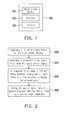
- FIG. 1 is a block diagram of an electronic apparatus according to some examples of the disclosure.
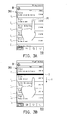
- FIG. 2 is a flowchart of a method of scrolling a list according to some examples of the disclosure.
- FIGs. 3A-3E are schematic diagrams illustrating moving items according to some examples of the present disclosure.
- FIGs. 4A-4D are schematic diagrams illustrating moving items according to some examples of the present disclosure.
- FIGs. 5A-5D are schematic diagrams illustrating moving items according to some examples of the present disclosure.
- FIGs. 6A-6F are schematic diagrams of moving items according to some example of the present disclosure.
- FIGs. 7A-7C are schematic diagrams of list with a search bar according to some examples of the present disclosure.
- FIGa. 8A-8B are schematic diagrams of list with a digital image according to some examples of the present disclosure.
- FIGs. 9A-9E are schematic diagrams illustrating moving items according to some examples of the present disclosure.
- FIGs. 10A-10E are schematic diagrams illustrating moving items according to some examples of the present disclosure.
- FIG. 1 is a block diagram of an electronic apparatus according to some examples of the disclosure.
- the electronic apparatus 100 includes a touch screen display 110, a processor 120 and a memory 130.
- the electronic apparatus 100 can be, for example, a cell phone, a smartphone, a personal computer, a laptop, a tablet, a navigation device, or a video game machine, which is not limited thereto.
- the touch screen display 110 can be, for example, a capacitive screen, a resistance screen or a wave screen.
- the electronic apparatus 100 receives users' operation through the touch screen display 110 to execute the corresponding functions.
- the processor 120 can be, for example, a central processing unit (CPU), a microprocessor, etc., which is configured for executing the hardware, firmware and the data of software.
- CPU central processing unit
- microprocessor etc.
- the memory 130 can be, for example, a non-volatile memory (NVM), a dynamic random access memory (DRAM) or a static random access memory (SRAM), etc.
- NVM non-volatile memory
- DRAM dynamic random access memory
- SRAM static random access memory
- programs stored in the memory 130 would be executed by the processor 120 after the programs being installed.
- the programs include a plurality of instructions, and the processor 120 may perform a plurality of steps via the instructions.
- the electronic apparatus 100 only includes one processor 120.
- the electronic apparatus 100 includes a plurality of processors to execute the programs being installed, though the disclosure is not limited therein.
- FIG. 2 is a flowchart of a method of scrolling a list according to some examples of the disclosure.
- the method provides a visual feedback to a user that an edge of the list has been reached. While the method described below includes a number of operations that appear to occur in a specific order, it should be apparent that the method can include more or fewer operations, which can be executed serially or in parallel (e.g., using parallel processors or multi-threading environment).
- a list of scrollable items is displayed on a touch screen display of a device.
- the list of scrollable items is a list of emails, a list of instant message conversations, a list of phone numbers, a list of contact information, a list of call history, a list of missed calls, a list of labels, a list of email folders, a list of email addresses, a list of physical addresses, a list of ringtones, a list of album names, a list of bookmarks, or a list of files (e.g., document files, music files, or video files), though the disclosure is not limited therein.
- the device that displays the list of scrollable items can be a portable multifunction device, such as a mobile phone, though the disclosure is not limited therein.
- step S210 a movement of an object is detected on or near the touch screen display.
- the object is, for example, a finger or a stylus.
- step S215 in response to an edge of the list being reached, one or more items are moved in a first direction to display one or more gaps.
- each gap is between adjacent items, and no gap is formed outside of the edge of the list.
- the first direction can be a vertical direction, a horizontal direction or a diagonal direction.
- the first direction can be along an x, y, or z-axis in a list implemented by 3D motion.
- the list has a first item and a last item and the edge of the list is either the first item or the last item.
- the edge of the list is, for example, the edge of the first item or the last item in the list, and the edge does not adjoin other item.
- the first item is a title bar, a search bar, or a digital image.
- the gaps are visually distinct from the items, and therefore a visual effect that pulls away the adjacent items can be generated by the gaps.
- the visual distinctions between the gaps and the items can be implemented by using different colors, which can be black, gray, white or a solid color.
- not all adjacent items have a gap in between.
- the method shown in FIG. 2 further comprises a step of detecting the object at an initial location corresponding to an initial item.
- step S215 the one or more items are moved in the first direction to display one or more gap only between the adjacent items located between the first item and the initial item.
- each of the items or part of the items is respectively moved in the first direction, such that gaps between the adjacent items are generated. For example, at least one item would move in the first direction, such that a gap is generated between the item moving in the first direction and the previous adjacent item. Or, all of the items (except the first item near the edge of the list) move in the first direction, such that a gap is generated between each of the items and its previous adjacent item. Or, only part of the items moves in the first direction, such that a gap is generated between the items moving in the first direction and its previous adjacent item.
- the number of the items moving in the first direction is not limited herein.
- step S220 the one or more items are moved in a second direction until the one or more gaps are no longer displayed. That is, the items are moved in the second direction, so as to make the gaps between adjacent items disappear and return the items to the status of closely disposed.
- the second direction is opposite to the first direction. For example, if the first direction is an upward direction, the second direction is a downward direction. In some examples, no additional gap other than the one or more gaps is displayed while moving the one or more items in the second direction.
- step S220 one or more additional gaps between the adjacent items located between the initial item and a last item of the list are displayed while moving the one or more items in the second direction, and the one or more items are moved in the second direction until the one or more gaps and the one or more additional gaps are no longer displayed.
- the one or more items are moved one by one in the second direction.
- step S215 in response to an edge of the list being reached while the object is still detected on or near the touch screen display, the one or more items are moved in the first direction to display the one or more gaps.
- step S220 in response to detecting that the object is no longer on or near the touch screen display, the one or more items are moved in the second direction until the one or more gaps are no longer displayed.
- the movements of the one or more items in the first and second direction are imitation of a spring motion.
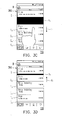
- FIGs. 3A-3E are schematic diagrams illustrating moving items according to some examples of the present disclosure.
- the processor 120 detects an initial item corresponding to the initial location where the finger (object) locates among the items, so as to respectively display one or more gaps between adjacent items located between the first item and the initial item.
- the processor 120 detects an initial item corresponding to the initial location where the finger (object) locates among the items, so as to respectively display one or more gaps between adjacent items located between the first item and the initial item.
- no additional gaps would be displayed between adjacent items located between the initial item and the last item (i.e., the other edge).
- a list 310 is displayed on the touch screen display 110.
- the list 310 includes scrollable items I 1 -I 6 , where the item I 1 is the first item in the list 310.
- the list 310 is a mail list, which includes a plurality of items (e.g., a plurality of mails).
- an edge B of the list 310 e.g., the upper edge of the first item I 1 ) has been reached before the user touches the touch screen display 110.
- the user initiates a touch from the item I 2 on or near the touch screen display 110 with a finger, and the processor 120 detects an object (i.e.,. the finger) at an initial location P1 on or near the touch screen display 110, which corresponds to the initial item I 2 .
- the initial item can be the items I 1 , I 3 -I 6 , or any other items displayed in the touch screen display 110.
- FIGs. 3B and 3C show the movement of the items I 2 -I 6 in response to a movement of the finger.
- the processor 120 detects the movement of the object (e.g., the finger) of dragging down from the initial location P1. Because the edge B of the list 310 has been reached before the user touches the touch screen display 110, the processor 120 moves the items I 2 -I 6 in a first direction d 1 to display a gap g 1 between the adjacent items I 1 and I 2 , which are located between the first item I 1 and the initial item I 2 . Since the first item I 1 does not move, no gap is formed outside of the edge B of the list 310.
- the first direction d 1 is a downward direction.
- the items I 2- -I 6 continue to move in the first direction d 1 in response to the dragging down movement of the object on or near the touch screen display 110.
- the height of the gaps g 1 increases as the items I 2 -I 6 continues to move in the first direction d 1 .
- the first item I 1 still does not move and no gap is formed outside of the edge B of the list 310.
- FIG. 3D-3E show the movement of the items I 2 -I 6 in response to detecting that the object is no longer on or near the touch screen display 110.
- the items I 2 -I 6 move back in a second direction d 2 ( FIG. 3D ) until the gap g 1 is no longer displayed ( FIG. 3E ).
- the second direction d 2 is an upward direction opposite to the first direction d 1 (i.e., the downward direction).
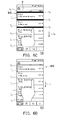
- FIGs. 4A-4D are schematic diagrams illustrating movement of the items according to some examples of the present disclosure.
- an edge B of the list 310 e.g., the upper edge of the first item I 1
- the user initiates a touch from an item I 3 on or near the touch screen display 110 with a finger, and the processor 120 detects an object (i.e.,. the finger) at an initial location P2 on or near the touch screen display 110 corresponding to the initial item I 3 .
- an object i.e.,. the finger
- FIG. 4B shows the movement of the items I 2 -I 6 in response to detecting a movement of the finger.
- the processor 120 detects the dragging down movement of the object (e.g., the finger) from the initial location P2. Because the edge B of the list 310 has been reached before the user touches the touch screen display 110, the processor 120 moves the items I 2 -I 6 in a first direction d 1 to display a gap g 1 between the adjacent items I 1 and I 2 and a gap g 2 between the adjacent items I 2 and I 3 .
- the adjacent items I 1 -I 2 and I 2 -I 3 are located between the first item I 1 and the initial item I 3 .
- the first direction d 1 is a downward direction.
- the gap g 2 is formed earlier than the gap g 1 (not shown), and the heights of the gaps g 1 and gaps g 2 are different (e.g., the height of the gap g 1 is smaller than the height of the gap g 2 ).
- the gaps g 1 and gaps g 2 are formed at the same time, and the heights of the gaps g 1 and gaps g 2 are the same all the time. In this example, no additional gap would be displayed between adjacent items located between the initial item I 3 and the last item (not shown). That is, the items I 3 -I 6 and other subsequent items remain closely disposed.
- FIG. 4C-4D show the movement of the items I 2 -I 6 in response to the detection of the finger leaving the touch screen display 110.
- the items I 2 -I 6 move back in a second direction d 2 ( FIG. 4C ) until the gaps g 1 and g 2 are no longer displayed ( FIG. 4D ).
- the second direction d 2 is an upward direction opposite to the first direction d 1 (i.e., the downward direction).
- the heights of the gaps g 1 and gaps g 2 are different (e.g., the height of the gap g 1 is smaller than the height of the gap g 2 ), and the gap g 1 disappears earlier than the gap g 2 (not shown).
- the heights of the gaps g 1 and gaps g 2 are the same all the time, and the gaps g 1 and gaps g 2 disappear at the same time, though the disclosure is not limited therein.
- the initial item I 3 can be regarded as a reference to separate the items into a first part and a second part of items, and the second part can be viewed as a whole part. That is, the first part of items includes the items I 1 -I 2 located between the first item I 1 and the initial item I 3 , and the second part of the items includes the items I 3 -I 6 located between the initial item I 3 and the last item and the subsequent items of the items I 3 -I 6 .
- the items I 1 -I 2 of the first part of items and the second part of items (which can be viewed as a whole part) in the first direction d 1 are pulled away individually to generate the gaps g 1 and g 2 between adjacent items.
- the pulled away items I 1 -I 2 and the second part of the items are moved individually in the second direction d 2 , such that the pulled away items can be connected with the previous items.
- FIGs. 5A-5D are schematic diagrams illustrating movement of the items according to some examples of the present disclosure.
- the description of FIGs. 5A-5B is the same as the description of FIGs. 4A-4B and is thus omitted for brevity.
- the processor 120 When the finger leaves the touch screen display 110, the processor 120 would move the items I 2 -I 3 in a second direction d 2 ( FIG. 5C ) until the gaps g 1 -g 2 are no longer displayed ( FIG. 5D ).
- the second direction d 2 is an upward direction.
- the items located between the initial item I 3 and the last item i.e., the items I 3 -I 6 and their subsequent items
- are moved in the second direction d 2 such that gaps (such as the gaps g 3 -g 5 ) can be respectively displayed between the adjacent items located between the initial item I 3 and the last item ( FIG. 5C ).
- the items I 3 -I 6 and their subsequent items are continuously moved in the second direction d 2 until the gaps between the items located between the initial item I 3 and the last item are no longer displayed( FIG. 5D ).
- additional gaps would be displayed between the adjacent items located between the initial item I 3 and the last item. That is, the displayed items I 3 -I 6 can spring back in the second direction d 2 like a spring motion.
- the first item of the list may be title bar ( FIGs. 6A-6C and FIGs. 6D-6F ), a search bar ( FIGs. 7A-7C ) or a digital image ( FIGs. 8A-8B ).
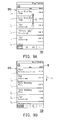
- FIGs. 6A-6C and FIGs. 6D-6F are schematic diagrams illustrating moving items according to some examples of the present disclosure. Referring to FIGs. 6A-6C , the first item I 0 of the list 610 is the title bar. In FIG. 6A , the edge of the list 610 does not reach before the user touches the touch screen display 110. In response to detecting a movement of an object (e.g., a finger), the whole list 610 would be moved to display the edge B of the list 610, as shown in FIG. 6B .
- an object e.g., a finger
- FIGs. 6C in response to the edge B of the list 610 being reached while the finger (object) is still detected on or near the touch screen display 110, e.g. the finger generates a movement of sliding downward, the gaps g 0 -g 2 are respectively displayed between adjacent items which are located between the first item I 0 and the initial item I 3 but no gap is formed outside of the edge B of the list 610.
- the processor 120 would move the items I 1 -I 6 in the second direction which is opposite to the first direction d 1 until the gaps g 0 -g 2 are no longer displayed, and the movement of the items can be understood via FIGs. 4C-4D .
- the first item I 0 of the list 610 is still the title bar.
- the operations of FIGs. 6D-6E are similar to FIGs. 6A and 6B .
- the list 610 in response to the edge B of the list 610 being reached while the finger (object) is still detected on or near the touch screen display 110, the list 610 may moved down continuously, then the item I 6 is not displayed and the items I 0 -I 5 are still displayed. And each of the gaps g 0 -g 4 is displayed between the adjacent items I 0 -I 5 .
- the items After the gaps are generated, the items would move in the second direction, i.e., moving upward, until the gaps disappear (no longer displayed) and return to the pattern illustrated in FIG. 6B . And the movement of the items can be understood via FIGs. 5C-5D .
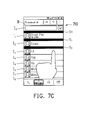
- FIGs. 7A-7C are schematic diagrams of list with a search bar according to some examples of the present disclosure.
- the list 710 includes items I 0 -I 9 and the first item I 0 of the list 710 is the search bar.
- the list 710 is not reached the edge.
- the search bar (item I 0 ) is displayed.
- FIG. 7C in response to the edge B of the list 710 being reached while the finger generates a movement of sliding downward, the gaps g 0 -g 2 are respectively displayed.
- the items I 1 -I 6 would move upward, and the movement of the items I 0 -I 9 can be understood via FIGs. 4C-4D or FIGs. 5C-5D .
- FIGs. 8A-8B are schematic diagrams of a list with a digital image according to some examples of the present disclosure.
- the list 810 includes items I 0 -I 5 and the first item I 0 is the digital image.
- an edge of the list 810 being reached.
- FIG. 8B in response to detecting a movement of an object (e.g., a finger), i.e. when the user's finger drags down on the touch screen display 110, the gaps g 0 -g 1 are respectively displayed.
- the items I 1 -I 5 would move upward, and the movement of the items I 0 -I 5 can be understood via FIGs. 4C-4D or FIGs. 5C-5D .
- any one of the lists 610, 710 and 810 is moved to the edge of the other side (i.e., the lower edge of the last item of the list), and the object is detected moving upward (the first direction), the item would move upward and generate gaps between adjacent items. Next, the items would be moved downward (the second direction) until the gaps disappear.
- the movement of the items in the first direction and the second direction may be both spring motions.
- the movement of either the first direction or the second direction can be spring motions, or none of the movement of the first direction or the second direction is the spring motion.
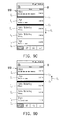
- FIGs. 9A-9E are schematic diagrams illustrating moving items according to some examples of the present disclosure.
- a list 910 is displayed on the touch screen display 110.
- the list 910 includes scrollable items I 1 -I 9 , where the item I 1 is the first item in the list 910.
- the list 910 is a mail list, which includes a plurality of items (e.g., a plurality of mails).
- an edge B of the list 910 (e.g., the upper edge of the first item I 1 ) has not been reached before the user touches the touch screen display 110.
- the edge B of the list 910 has been reached before the user touches the touch screen display 110.
- the processor 120 detects the flicking down movement of the object (e.g., the finger) at an initial location corresponding to an initial item I 3 on or near the touch screen display 110, and the list 910 is moved in a first direction d 1 accordingly.
- the first direction d 1 is a downward direction.
- the processor 120 continues to move the items I 2 -I 6 in the first direction d 1 to display a gap g 1 between the adjacent items I 1 and I 2 and a gap g 2 between the adjacent items I 2 hand I 3 ( FIG. 9C ).
- the adjacent items I 1 -I 2 and I 2 -I 3 are located between the first item I 1 and the initial item I 3 . Since the first item I 1 does not move, no gap is formed outside of the edge B of the list 910.
- the processor 120 moves the items I 1 -I 6 back in a second direction d 2 ( FIG. 9D ) until the gaps g 1 and g 2 are no longer displayed ( FIG. 9E ).
- the second direction d 2 is an upward direction opposite to the first direction d 1 (i.e., the downward direction).
- the processors 120 could continue to move the items I 2 -I 6 in the first direction d 1 to display gaps between every adjacent items I 1 -I 6 , which could be understood via FIG. 6F .
- the processor 120 in response to detecting that the object is no longer on or near the touch screen display 110, the processor 120 would update the list. Besides, in response to detecting that the object is no longer on or near the touch screen display, the processor 120 may further display an updating hint in a gap among the one or more gaps. For example, the updating hint is displayed in the gap between the first item and the second item.
- FIGs. 10A-10E are schematic diagrams illustrating moving items according to some examples of the present disclosure.
- a list 1010 includes items A0-A3, and an edge B of the list 1010 has been reached before the user touches the touch screen display 110.
- the processor 120 moves the items A1-A3 in a first direction to display a gap 1003.
- the first direction is a downward direction.
- an option "Top stories" is displayed in the gap 1003.
- FIG. 10C when the object (ex.
- the processor 120 continues to move the items A1-A3 in the first direction to have the size of the gap 1003 increase, and a updating hint H is displayed in the gap 1003. Meanwhile, the content "RELEASE TO UPDATING" of the updating hint H may be displayed. In this example, the updating hint H is displayed in the first gap. In some examples, the updating hint H may be displayed in any gap other than the first gap.
- the processor 120 detects that the object is no longer on or near the touch screen display 110, in FIG. 10D , the processor 120 would update the list 1010. The content of the updating hint H may be changed from "RELEASE TO UPDATING" to "UPDATING".
- the processor 120 moves the items A1-A3 in a second direction to have the size of the gap 1003 decrease.
- the second direction is an upward direction.
- the processor 120 continues to move the items A1-A3 in the second direction until the gap 1010 is no longer displayed and the content of the list 1010 would be changed due to the updating.
- the items A1-A3 are changed to items A4-A6, and the arrangement manner is different.
- the application provides a computer program product, which records a computer program to be loaded into an electronic apparatus to execute the aforementioned various steps of the method.
- the computer program is basically composed of a plurality of program instructions (for example, an organization chart establishing program instruction, a table approving program instruction, a setting program instruction, and a deployment program instruction, etc.), and these program instructions are loaded into the electronic apparatus and executed by the same to accomplish various steps of the method and various functions of the electronic apparatus described above.
- the items are moved according to the movement of the object. Meanwhile, by displaying gaps between the items, visual effects of sequential movements of the items can be generated with the movement of the object. In addition, after the object stops moving, the moved items are returned to original places. Hence, when the list is being moved, one or more items are simultaneously moved to provide a visual feedback instead of moving the whole list at once.
Landscapes
- Engineering & Computer Science (AREA)
- General Engineering & Computer Science (AREA)
- Theoretical Computer Science (AREA)
- Human Computer Interaction (AREA)
- Physics & Mathematics (AREA)
- General Physics & Mathematics (AREA)
- User Interface Of Digital Computer (AREA)
Abstract
Description
- This application claims the priority benefits of
U.S. provisional application serial no. 61/602,621, filed on February 24, 2012 - With the rapid progress of information technologies in recent years, information products like cell phones, computers and personal digital assistant (PDA) are very common. These products satisfy various requirements of people, and make people become more and more dependent on information products. Nowadays, the information products have become an important part of people's life.
- With constantly development of electronic technologies and manufacturing techniques, functionalities of information products are correspondingly innovated as well. More and more electronic apparatuses are disposed with a touch screen, such that users can operate the electronic apparatus via the touch screen. For example, users may perform operations by touching the touch screens with fingers.
- The present disclosure provides an electronic apparatus and operation method thereof and a computer program product to move one or more items of a list.
- Specifically, the present application provides a method includes the following steps executed at a computing device with a touch screen display. Display a list of scrollable items on the touch screen display. Detect a movement of an object on or near the touch screen display. In response to an edge of the list being reached, move one or more items in a first direction to display one or more gaps, wherein each gap is between adjacent items and no gap is formed outside of the edge of the list. Move one or more items in a second direction until the one or more gaps are no longer displayed.
- In addition, the present application provides an apparatus, including a touch screen display, one or more processors, a memory and one or more programs. The one or more programs are stored in the memory and configured to be installed and executed by the one or more processors, and the one or more programs includes a plurality of instructions to execute following steps. Display a list of scrollable items on the touch screen display. Detect a movement of an object on or near the touch screen display. In response to an edge of the list being reached while the movement of the object is still detected on or near the touch screen display, move one or more items in a first direction to display one or more gaps, wherein each gap is between adjacent items and no gap is formed outside of the edge of the list. In response to detecting that the movement of the object is no longer on or near the touch screen display, move the one or more items in a second direction until the one or more gaps are no longer displayed.
- The present application further provides an apparatus, including a touch screen display, one or more processors, a memory and one or more programs. The one or more programs are stored in the memory and configured to be installed and executed by the one or more processors, and the one or more programs includes a plurality of instructions to execute following steps. Display a list of scrollable items on the touch screen display. In response to detecting a movement of the object, move the list of the items in a first direction. In response to an edge of the list being reached, move one or more items in the first direction to display one or more gaps, wherein each gap is between adjacent items and no gap is formed outside of the edge of the list. Move the one or more items in a second direction until the one or more gaps are no longer displayed.
- The present application provides a computer program product having stored therein instructions, which when executed by a device with a touch screen display, making the device execute the aforementioned steps and functionalities.
- According to the above descriptions, the items are moved according to the movement of the object and gaps are displayed between items. Next, return the moved items to original places and no gap would be displayed. Hence, when the list is being moved, one or more items are simultaneously moved instead of moving the whole list at once.
- The accompanying drawings are included to provide a further understanding of the application, and are incorporated in and constitute a part of this specification. The drawings illustrate examples of the application and, together with the description, serve to explain the principles of the application.
-
FIG. 1 is a block diagram of an electronic apparatus according to some examples of the disclosure. -
FIG. 2 is a flowchart of a method of scrolling a list according to some examples of the disclosure. -
FIGs. 3A-3E are schematic diagrams illustrating moving items according to some examples of the present disclosure. -
FIGs. 4A-4D are schematic diagrams illustrating moving items according to some examples of the present disclosure. -
FIGs. 5A-5D are schematic diagrams illustrating moving items according to some examples of the present disclosure. -
FIGs. 6A-6F are schematic diagrams of moving items according to some example of the present disclosure. -
FIGs. 7A-7C are schematic diagrams of list with a search bar according to some examples of the present disclosure. - FIGa. 8A-8B are schematic diagrams of list with a digital image according to some examples of the present disclosure.
-
FIGs. 9A-9E are schematic diagrams illustrating moving items according to some examples of the present disclosure. -
FIGs. 10A-10E are schematic diagrams illustrating moving items according to some examples of the present disclosure. -
FIG. 1 is a block diagram of an electronic apparatus according to some examples of the disclosure. Referring toFIG. 1 , theelectronic apparatus 100 includes atouch screen display 110, aprocessor 120 and amemory 130. Theelectronic apparatus 100 can be, for example, a cell phone, a smartphone, a personal computer, a laptop, a tablet, a navigation device, or a video game machine, which is not limited thereto. - The
touch screen display 110 can be, for example, a capacitive screen, a resistance screen or a wave screen. Theelectronic apparatus 100 receives users' operation through thetouch screen display 110 to execute the corresponding functions. - The
processor 120 can be, for example, a central processing unit (CPU), a microprocessor, etc., which is configured for executing the hardware, firmware and the data of software. - The
memory 130 can be, for example, a non-volatile memory (NVM), a dynamic random access memory (DRAM) or a static random access memory (SRAM), etc. Herein, there are one or more programs stored in thememory 130 would be executed by theprocessor 120 after the programs being installed. The programs include a plurality of instructions, and theprocessor 120 may perform a plurality of steps via the instructions. In some examples, theelectronic apparatus 100 only includes oneprocessor 120. In some examples, theelectronic apparatus 100 includes a plurality of processors to execute the programs being installed, though the disclosure is not limited therein. -
FIG. 2 is a flowchart of a method of scrolling a list according to some examples of the disclosure. The method provides a visual feedback to a user that an edge of the list has been reached. While the method described below includes a number of operations that appear to occur in a specific order, it should be apparent that the method can include more or fewer operations, which can be executed serially or in parallel (e.g., using parallel processors or multi-threading environment). - In step S205, a list of scrollable items is displayed on a touch screen display of a device. In some examples, the list of scrollable items is a list of emails, a list of instant message conversations, a list of phone numbers, a list of contact information, a list of call history, a list of missed calls, a list of labels, a list of email folders, a list of email addresses, a list of physical addresses, a list of ringtones, a list of album names, a list of bookmarks, or a list of files (e.g., document files, music files, or video files), though the disclosure is not limited therein. The device that displays the list of scrollable items can be a portable multifunction device, such as a mobile phone, though the disclosure is not limited therein.
- Next, in step S210, a movement of an object is detected on or near the touch screen display. In some examples, the object is, for example, a finger or a stylus.
- Next, in step S215, in response to an edge of the list being reached, one or more items are moved in a first direction to display one or more gaps. Herein, each gap is between adjacent items, and no gap is formed outside of the edge of the list. In some examples, the first direction can be a vertical direction, a horizontal direction or a diagonal direction. In some examples, the first direction can be along an x, y, or z-axis in a list implemented by 3D motion. In some examples, the list has a first item and a last item and the edge of the list is either the first item or the last item. The edge of the list is, for example, the edge of the first item or the last item in the list, and the edge does not adjoin other item. In some examples, the first item is a title bar, a search bar, or a digital image. In some examples, the gaps are visually distinct from the items, and therefore a visual effect that pulls away the adjacent items can be generated by the gaps. For example, the visual distinctions between the gaps and the items can be implemented by using different colors, which can be black, gray, white or a solid color. In some example, not all adjacent items have a gap in between. In some examples, the method shown in
FIG. 2 further comprises a step of detecting the object at an initial location corresponding to an initial item. In step S215, the one or more items are moved in the first direction to display one or more gap only between the adjacent items located between the first item and the initial item. - In some examples, when the
processor 120 detects the movement of the object, each of the items or part of the items is respectively moved in the first direction, such that gaps between the adjacent items are generated. For example, at least one item would move in the first direction, such that a gap is generated between the item moving in the first direction and the previous adjacent item. Or, all of the items (except the first item near the edge of the list) move in the first direction, such that a gap is generated between each of the items and its previous adjacent item. Or, only part of the items moves in the first direction, such that a gap is generated between the items moving in the first direction and its previous adjacent item. The number of the items moving in the first direction is not limited herein. - Next, in step S220, the one or more items are moved in a second direction until the one or more gaps are no longer displayed. That is, the items are moved in the second direction, so as to make the gaps between adjacent items disappear and return the items to the status of closely disposed. In some examples, the second direction is opposite to the first direction. For example, if the first direction is an upward direction, the second direction is a downward direction. In some examples, no additional gap other than the one or more gaps is displayed while moving the one or more items in the second direction. In some examples, in step S220, one or more additional gaps between the adjacent items located between the initial item and a last item of the list are displayed while moving the one or more items in the second direction, and the one or more items are moved in the second direction until the one or more gaps and the one or more additional gaps are no longer displayed. In some examples, the one or more items are moved one by one in the second direction.
- In some examples, in step S215, in response to an edge of the list being reached while the object is still detected on or near the touch screen display, the one or more items are moved in the first direction to display the one or more gaps. In some example, in step S220, in response to detecting that the object is no longer on or near the touch screen display, the one or more items are moved in the second direction until the one or more gaps are no longer displayed. In some examples, in step S215 and step S220, the movements of the one or more items in the first and second direction are imitation of a spring motion.
-
FIGs. 3A-3E are schematic diagrams illustrating moving items according to some examples of the present disclosure. In this example, theprocessor 120 detects an initial item corresponding to the initial location where the finger (object) locates among the items, so as to respectively display one or more gaps between adjacent items located between the first item and the initial item. In addition, when the items are moved in the second direction, no additional gaps would be displayed between adjacent items located between the initial item and the last item (i.e., the other edge). - In this example, a
list 310 is displayed on thetouch screen display 110. Thelist 310 includes scrollable items I1-I6, where the item I1 is the first item in thelist 310. Thelist 310 is a mail list, which includes a plurality of items (e.g., a plurality of mails). In the example, an edge B of the list 310 (e.g., the upper edge of the first item I1) has been reached before the user touches thetouch screen display 110. - In
FIG. 3A , the user initiates a touch from the item I2 on or near thetouch screen display 110 with a finger, and theprocessor 120 detects an object (i.e.,. the finger) at an initial location P1 on or near thetouch screen display 110, which corresponds to the initial item I2. In other examples (FIGs. 4A-4D ), the initial item can be the items I1, I3-I6, or any other items displayed in thetouch screen display 110. -
FIGs. 3B and3C show the movement of the items I2-I6 in response to a movement of the finger. InFIG. 3B , when the user's finger drags down on thetouch screen display 110, theprocessor 120 detects the movement of the object (e.g., the finger) of dragging down from the initial location P1. Because the edge B of thelist 310 has been reached before the user touches thetouch screen display 110, theprocessor 120 moves the items I2-I6 in a first direction d1 to display a gap g1 between the adjacent items I1 and I2, which are located between the first item I1 and the initial item I2. Since the first item I1 does not move, no gap is formed outside of the edge B of thelist 310. In this example, the first direction d1 is a downward direction. InFIG. 3C , the items I2--I6 continue to move in the first direction d1 in response to the dragging down movement of the object on or near thetouch screen display 110. The height of the gaps g1 increases as the items I2-I6 continues to move in the first direction d1. Herein, the first item I1 still does not move and no gap is formed outside of the edge B of thelist 310. -
FIG. 3D-3E show the movement of the items I2-I6 in response to detecting that the object is no longer on or near thetouch screen display 110. After the finger leaves the touch screen display 110 (i.e., is no longer on or near the touch screen display 110), the items I2-I6 move back in a second direction d2 (FIG. 3D ) until the gap g1 is no longer displayed (FIG. 3E ). In this example, the second direction d2 is an upward direction opposite to the first direction d1 (i.e., the downward direction). -
FIGs. 4A-4D are schematic diagrams illustrating movement of the items according to some examples of the present disclosure. In this example, an edge B of the list 310 (e.g., the upper edge of the first item I1) has been reached before user touches thetouch screen display 110. - In
FIG. 4A , the user initiates a touch from an item I3 on or near thetouch screen display 110 with a finger, and theprocessor 120 detects an object (i.e.,. the finger) at an initial location P2 on or near thetouch screen display 110 corresponding to the initial item I3. -
FIG. 4B shows the movement of the items I2-I6 in response to detecting a movement of the finger. InFIG. 4B , when the user's finger drags down on thetouch screen display 110, theprocessor 120 detects the dragging down movement of the object (e.g., the finger) from the initial location P2. Because the edge B of thelist 310 has been reached before the user touches thetouch screen display 110, theprocessor 120 moves the items I2-I6 in a first direction d1 to display a gap g1 between the adjacent items I1 and I2 and a gap g2 between the adjacent items I2 and I3. The adjacent items I1-I2 and I2-I3 are located between the first item I1 and the initial item I3. Since the first item I1 does not move, no gap is formed outside of the edge B of thelist 310. In this example, the first direction d1 is a downward direction. In this example, the gap g2 is formed earlier than the gap g1 (not shown), and the heights of the gaps g1 and gaps g2 are different (e.g., the height of the gap g1 is smaller than the height of the gap g2). In some examples, the gaps g1 and gaps g2 are formed at the same time, and the heights of the gaps g1 and gaps g2 are the same all the time. In this example, no additional gap would be displayed between adjacent items located between the initial item I3 and the last item (not shown). That is, the items I3-I6 and other subsequent items remain closely disposed. -
FIG. 4C-4D show the movement of the items I2-I6 in response to the detection of the finger leaving thetouch screen display 110. After the finger leaves thetouch screen display 110, the items I2-I6 move back in a second direction d2 (FIG. 4C ) until the gaps g1 and g2 are no longer displayed (FIG. 4D ). In this example, the second direction d2 is an upward direction opposite to the first direction d1 (i.e., the downward direction). In this example, the heights of the gaps g1 and gaps g2 are different (e.g., the height of the gap g1 is smaller than the height of the gap g2), and the gap g1 disappears earlier than the gap g2 (not shown). In some examples, the heights of the gaps g1 and gaps g2 are the same all the time, and the gaps g1 and gaps g2 disappear at the same time, though the disclosure is not limited therein. - In this example, the initial item I3 can be regarded as a reference to separate the items into a first part and a second part of items, and the second part can be viewed as a whole part. That is, the first part of items includes the items I1-I2 located between the first item I1 and the initial item I3, and the second part of the items includes the items I3-I6 located between the initial item I3 and the last item and the subsequent items of the items I3-I6. The items I1-I2 of the first part of items and the second part of items (which can be viewed as a whole part) in the first direction d1 are pulled away individually to generate the gaps g1 and g2 between adjacent items. When the finger is detected to be no longer on or near the
touch screen display 110" the pulled away items I1-I2 and the second part of the items are moved individually in the second direction d2, such that the pulled away items can be connected with the previous items. -
FIGs. 5A-5D are schematic diagrams illustrating movement of the items according to some examples of the present disclosure. The description ofFIGs. 5A-5B is the same as the description ofFIGs. 4A-4B and is thus omitted for brevity. - When the finger leaves the
touch screen display 110, theprocessor 120 would move the items I2-I3 in a second direction d2 (FIG. 5C ) until the gaps g1-g2 are no longer displayed (FIG. 5D ). In this example, the second direction d2 is an upward direction. Moreover, the items located between the initial item I3 and the last item (i.e., the items I3-I6 and their subsequent items) are moved in the second direction d2, such that gaps (such as the gaps g3-g5) can be respectively displayed between the adjacent items located between the initial item I3 and the last item (FIG. 5C ). And, the items I3-I6 and their subsequent items are continuously moved in the second direction d2 until the gaps between the items located between the initial item I3 and the last item are no longer displayed(FIG. 5D ). - In this example, additional gaps would be displayed between the adjacent items located between the initial item I3 and the last item. That is, the displayed items I3-I6 can spring back in the second direction d2 like a spring motion.
- In some examples, the first item of the list may be title bar (
FIGs. 6A-6C andFIGs. 6D-6F ), a search bar (FIGs. 7A-7C ) or a digital image (FIGs. 8A-8B ).FIGs. 6A-6C andFIGs. 6D-6F are schematic diagrams illustrating moving items according to some examples of the present disclosure. Referring toFIGs. 6A-6C , the first item I0 of thelist 610 is the title bar. InFIG. 6A , the edge of thelist 610 does not reach before the user touches thetouch screen display 110. In response to detecting a movement of an object (e.g., a finger), thewhole list 610 would be moved to display the edge B of thelist 610, as shown inFIG. 6B . - In
FIGs. 6C , in response to the edge B of thelist 610 being reached while the finger (object) is still detected on or near thetouch screen display 110, e.g. the finger generates a movement of sliding downward, the gaps g0-g2 are respectively displayed between adjacent items which are located between the first item I0 and the initial item I3 but no gap is formed outside of the edge B of thelist 610. When the finger leaves thetouch screen display 110, theprocessor 120 would move the items I1-I6 in the second direction which is opposite to the first direction d1 until the gaps g0-g2 are no longer displayed, and the movement of the items can be understood viaFIGs. 4C-4D . - Moreover, referring to
FIGs 6D-6F , the first item I0 of thelist 610 is still the title bar. The operations ofFIGs. 6D-6E are similar toFIGs. 6A and 6B . InFIG. 6D , in response to the edge B of thelist 610 being reached while the finger (object) is still detected on or near thetouch screen display 110, thelist 610 may moved down continuously, then the item I6 is not displayed and the items I0-I5 are still displayed. And each of the gaps g0-g4 is displayed between the adjacent items I0-I5. After the gaps are generated, the items would move in the second direction, i.e., moving upward, until the gaps disappear (no longer displayed) and return to the pattern illustrated inFIG. 6B . And the movement of the items can be understood viaFIGs. 5C-5D . -
FIGs. 7A-7C are schematic diagrams of list with a search bar according to some examples of the present disclosure. Herein, thelist 710 includes items I0-I9 and the first item I0 of thelist 710 is the search bar. InFIG. 7A , thelist 710 is not reached the edge. In response to detecting a movement of an object (e.g., a finger), thewhole list 710 would be moved to display the edge B of thelist 710, as shown inFIG. 7B . Therefore, the search bar (item I0) is displayed. InFIG. 7C , in response to the edge B of thelist 710 being reached while the finger generates a movement of sliding downward, the gaps g0-g2 are respectively displayed. When the finger leaves thetouch screen display 110, the items I1-I6 would move upward, and the movement of the items I0-I9 can be understood viaFIGs. 4C-4D orFIGs. 5C-5D . -
FIGs. 8A-8B are schematic diagrams of a list with a digital image according to some examples of the present disclosure. InFIG. 8A , thelist 810 includes items I0-I5 and the first item I0 is the digital image. Herein, an edge of thelist 810 being reached. InFIG. 8B , in response to detecting a movement of an object (e.g., a finger), i.e. when the user's finger drags down on thetouch screen display 110, the gaps g0-g1 are respectively displayed. When the finger leaves thetouch screen display 110, the items I1-I5 would move upward, and the movement of the items I0-I5 can be understood viaFIGs. 4C-4D orFIGs. 5C-5D . - Moreover, in other examples, when any one of the
lists - In the other examples, the movement of the items in the first direction and the second direction may be both spring motions. Or the movement of either the first direction or the second direction can be spring motions, or none of the movement of the first direction or the second direction is the spring motion.
-
FIGs. 9A-9E are schematic diagrams illustrating moving items according to some examples of the present disclosure. In this example, alist 910 is displayed on thetouch screen display 110. Thelist 910 includes scrollable items I1-I9, where the item I1 is the first item in thelist 910. Thelist 910 is a mail list, which includes a plurality of items (e.g., a plurality of mails). In this example, an edge B of the list 910 (e.g., the upper edge of the first item I1) has not been reached before the user touches thetouch screen display 110. In some examples, the edge B of thelist 910 has been reached before the user touches thetouch screen display 110. - In
FIG. 9A , when the user slides on thetouch screen display 110 with a sliding speed faster than a predetermined speed and releases (i.e., a flick gesture) in a downward direction, theprocessor 120 detects the flicking down movement of the object (e.g., the finger) at an initial location corresponding to an initial item I3 on or near thetouch screen display 110, and thelist 910 is moved in a first direction d1 accordingly. In this example, the first direction d1 is a downward direction. - Because of inertia effects, after the edge B of the
list 910 is reached (FIG. 9B ), theprocessor 120 continues to move the items I2-I6 in the first direction d1 to display a gap g1 between the adjacent items I1 and I2 and a gap g2 between the adjacent items I2 hand I3 (FIG. 9C ). The adjacent items I1-I2 and I2-I3 are located between the first item I1 and the initial item I3. Since the first item I1 does not move, no gap is formed outside of the edge B of thelist 910. - After inertia effects disappear, the
processor 120 moves the items I1-I6 back in a second direction d2 (FIG. 9D ) until the gaps g1 and g2 are no longer displayed (FIG. 9E ). In this example, the second direction d2 is an upward direction opposite to the first direction d1 (i.e., the downward direction). - In some examples, the
processors 120 could continue to move the items I2-I6 in the first direction d1 to display gaps between every adjacent items I1-I6 , which could be understood viaFIG. 6F . - Moreover, in response to detecting that the object is no longer on or near the
touch screen display 110, theprocessor 120 would update the list. Besides, in response to detecting that the object is no longer on or near the touch screen display, theprocessor 120 may further display an updating hint in a gap among the one or more gaps. For example, the updating hint is displayed in the gap between the first item and the second item. - For example,
FIGs. 10A-10E are schematic diagrams illustrating moving items according to some examples of the present disclosure. InFIG. 10A , alist 1010 includes items A0-A3, and an edge B of thelist 1010 has been reached before the user touches thetouch screen display 110. When a movement of an object on or near thetouch screen display 110 is detected, such as the finger touches alocation 1001 of thetouch screen display 110 and drags down, as shown inFIG. 10B , theprocessor 120 moves the items A1-A3 in a first direction to display agap 1003. In this example, the first direction is a downward direction. Herein, an option "Top stories" is displayed in thegap 1003. InFIG. 10C , when the object (ex. the finger) is still on thetouch screen display 110, theprocessor 120 continues to move the items A1-A3 in the first direction to have the size of thegap 1003 increase, and a updating hint H is displayed in thegap 1003. Meanwhile, the content "RELEASE TO UPDATING" of the updating hint H may be displayed. In this example, the updating hint H is displayed in the first gap. In some examples, the updating hint H may be displayed in any gap other than the first gap. When theprocessor 120 detects that the object is no longer on or near thetouch screen display 110, inFIG. 10D , theprocessor 120 would update thelist 1010. The content of the updating hint H may be changed from "RELEASE TO UPDATING" to "UPDATING". Theprocessor 120 moves the items A1-A3 in a second direction to have the size of thegap 1003 decrease. In this example, the second direction is an upward direction. After the update is completed, as shown inFIG. 10E , theprocessor 120 continues to move the items A1-A3 in the second direction until thegap 1010 is no longer displayed and the content of thelist 1010 would be changed due to the updating. For example, the items A1-A3 are changed to items A4-A6, and the arrangement manner is different. - The application provides a computer program product, which records a computer program to be loaded into an electronic apparatus to execute the aforementioned various steps of the method. The computer program is basically composed of a plurality of program instructions (for example, an organization chart establishing program instruction, a table approving program instruction, a setting program instruction, and a deployment program instruction, etc.), and these program instructions are loaded into the electronic apparatus and executed by the same to accomplish various steps of the method and various functions of the electronic apparatus described above.
- In summary, in the aforementioned examples, the items are moved according to the movement of the object. Meanwhile, by displaying gaps between the items, visual effects of sequential movements of the items can be generated with the movement of the object. In addition, after the object stops moving, the moved items are returned to original places. Hence, when the list is being moved, one or more items are simultaneously moved to provide a visual feedback instead of moving the whole list at once.
Claims (15)
- A method, comprising
at a computing device (100) with a touch screen display (110):displaying (S205) a list of scrollable items on the touch screen display (110);detecting (S210) a movement of an object on or near the touch screen display (110);in response to an edge of the list being reached, moving (S215) one or more items in a first direction to display one or more gaps, wherein each gap is between the adjacent items and no gap is formed outside of the edge of the list; andmoving (S220) the one or more items in a second direction until the one or more gaps are no longer displayed. - The method of claim 1, wherein not all of the adjacent items have a gap in between.
- The method of claim 1, further comprising:detecting the object at an initial location corresponding to an initial item; andmoving the one or more items in the first direction to display the one or more gaps only between the adjacent items located between the first item and the initial item.
- The method of claim 3, wherein no additional gap is displayed between the adjacent items located between the initial item and a last item of the list while moving the one or more items in the second direction.
- The method of claim 3, further comprising:displaying one or more additional gaps between the adjacent items located between the initial item and a last item of the list while moving the one or more items in the second direction; andmoving the one or more items in the second direction until the one or more gaps and the one or more additional gaps are no longer displayed.
- The method of claim 1, further comprising:in response to detecting that the object is no longer on or near the touch screen display (110), updating the list.
- The method of claim 1, further comprising:in response to detecting that the object is no longer on or near the touch screen display (110), displaying an updating hint in a gap of the one or more gaps.
- The method of claim 1, wherein the first item is a title bar, a search bar or a digital image.
- The method of claim 1, wherein the list of items is a list of contacts, mails, messages, call history, or files.
- The method of claim 1, wherein the movement of the one or more items in the first and second direction is a spring motion.
- The method of claim 1, further comprising:moving the one or more items one by one in the second direction.
- An apparatus, comprising:a touch screen display (110):one or more processors (120);a memory (130); andone or more programs, wherein the one or more programs are stored in the memory (130) and configured to be installed and executed by the one or more processors (120), and the one or more programs includes a plurality of instructions to execute the following steps:displaying a list of scrollable items on the touch screen display (110);detecting a movement of an object on or near the touch screen display (110);in response to an edge of the list being reached while the object is still detected on or near the touch screen display (110), moving the one or more items in a first direction to display one or more gaps, wherein each gap is between adjacent items and no gap is formed outside of the edge of the list; andin response to detecting that the object is no longer on or near the touch screen display (110), moving the one or more items in a second direction until the one or more gaps are no longer displayed.
- An apparatus, comprising:a touch screen display (110):one or more processors (120);a memory (130); andone or more programs, wherein the one or more programs is stored in the memory (130) and configured to be installed and executed by the one or more processors (120), and the one or more programs includes a plurality of instructions to execute the following steps:displaying a list of scrollable items on the touch screen display (110);in response to detecting a movement of an object on or near the touch screen display (110), moving the list of the items in a first direction;in response to an edge of the list being reached, moving one or more items in the first direction to display one or more gaps, wherein each gap is between adjacent items and no gap is formed outside of the edge of the list; andmoving the one or more items in a second direction until the one or more gaps are no longer displayed.
- A computer program product, containing instructions,, which when executed by a device with a touch screen display (110), making the device execute following steps:displaying a list of scrollable items on the touch screen display (110);detecting a movement of an object on or near the touch screen display (110);in response to an edge of the list being reached while the object is still detected on or near the touch screen display (110), moving the one or more items in a first direction to display one or more gaps, wherein each gap is between adjacent items and no gap is formed outside of the edge of the list; andin response to detecting that the object is no longer on or near the touch screen display (110), moving the one or more items in a second direction until the one or more gaps are no longer displayed.
- A computer program product, containing instructions, which when executed by a device with a touch screen display (110), making the device execute following steps:displaying a list of scrollable items on the touch screen display (110);in response to detecting a movement of an object on or near the touch screen display (110), moving the list of the items in a first direction;in response to an edge of the list being reached, moving one or more items in the first direction to display one or more gaps, wherein each gap is between adjacent items and no gap is formed outside of the edge of the list; and
moving the one or more items in a second direction until the one or more gaps are no longer displayed.
Applications Claiming Priority (1)
| Application Number | Priority Date | Filing Date | Title |
|---|---|---|---|
| US201261602621P | 2012-02-24 | 2012-02-24 |
Publications (1)
| Publication Number | Publication Date |
|---|---|
| EP2631765A1 true EP2631765A1 (en) | 2013-08-28 |
Family
ID=47789946
Family Applications (1)
| Application Number | Title | Priority Date | Filing Date |
|---|---|---|---|
| EP20130000909 Ceased EP2631765A1 (en) | 2012-02-24 | 2013-02-22 | Electronic apparatus and operating method thereof and computer program product |
Country Status (4)
| Country | Link |
|---|---|
| US (1) | US9851885B2 (en) |
| EP (1) | EP2631765A1 (en) |
| CN (1) | CN103294391A (en) |
| TW (1) | TWI476674B (en) |
Families Citing this family (21)
| Publication number | Priority date | Publication date | Assignee | Title |
|---|---|---|---|---|
| USD745529S1 (en) * | 2013-01-04 | 2015-12-15 | Samsung Electronics Co., Ltd. | Portable electronic device with graphical user interface |
| USD744508S1 (en) * | 2013-01-25 | 2015-12-01 | Htc Corporation | Display screen with a graphical user interface |
| USD742916S1 (en) * | 2013-02-07 | 2015-11-10 | Htc Corporation | Portion of a display screen with a graphical user interface |
| USD745528S1 (en) * | 2013-05-10 | 2015-12-15 | Samsung Electronics Co., Ltd. | Portable electronic device with graphical user interface |
| USD745016S1 (en) * | 2013-05-10 | 2015-12-08 | Samsung Electronics Co., Ltd. | Portable electronic device with graphical user interface |
| CN104156245B (en) * | 2014-08-06 | 2018-04-10 | 小米科技有限责任公司 | list updating method and device |
| CN104182133B (en) * | 2014-08-29 | 2017-10-13 | 广东欧珀移动通信有限公司 | Control method by sliding list and device |
| KR102337216B1 (en) | 2015-01-05 | 2021-12-08 | 삼성전자주식회사 | Image display apparatus and method for displaying image |
| USD765118S1 (en) * | 2015-04-13 | 2016-08-30 | Apple Inc. | Display screen or portion thereof with graphical user interface |
| USD797133S1 (en) * | 2016-01-07 | 2017-09-12 | Invisalert Solutions, LLC | Display screen with graphical user interface |
| JP6759023B2 (en) * | 2016-09-09 | 2020-09-23 | キヤノン株式会社 | Display control device, its control method, program, and storage medium |
| CA3036999A1 (en) | 2016-09-14 | 2018-03-22 | Invisalert Solutions, LLC | Tamper resistant clasp and wristband apparatus and associated patient monitoring system and method of use |
| USD875743S1 (en) | 2018-06-04 | 2020-02-18 | Apple Inc. | Display screen or portion thereof with graphical user interface |
| USD906359S1 (en) | 2018-07-05 | 2020-12-29 | Invisalert Solutions, Inc. | Display screen with graphical user interface |
| USD902947S1 (en) | 2019-03-25 | 2020-11-24 | Apple Inc. | Electronic device with graphical user interface |
| USD926781S1 (en) | 2019-05-28 | 2021-08-03 | Apple Inc. | Display screen or portion thereof with graphical user interface |
| CA3153945A1 (en) | 2019-09-11 | 2021-03-18 | Invisalert Solutions, Inc. | Wireless patient monitoring compliance system |
| CN120029514A (en) * | 2020-08-31 | 2025-05-23 | 华为终端有限公司 | A page sliding processing method and related device |
| CN116450967A (en) * | 2023-04-14 | 2023-07-18 | 武汉联影医疗科技有限公司 | List view display method, computer device and storage medium |
| US12315353B1 (en) | 2024-06-04 | 2025-05-27 | Invisalert Solutions, Inc. | Patient safety monitoring method and apparatus |
| US12355745B1 (en) | 2024-10-28 | 2025-07-08 | Invisalert Solutions, Inc. | Secure mobile device management |
Citations (4)
| Publication number | Priority date | Publication date | Assignee | Title |
|---|---|---|---|---|
| US20070146337A1 (en) * | 2005-12-23 | 2007-06-28 | Bas Ording | Continuous scrolling list with acceleration |
| EP2034399A2 (en) * | 2007-09-04 | 2009-03-11 | LG Electronics Inc. | Scrolling method of mobile terminal |
| US20110001709A1 (en) * | 2009-07-01 | 2011-01-06 | Shih-Yang Wang | Methods for displaying and moving data and systems using the same |
| US20110010659A1 (en) * | 2009-07-13 | 2011-01-13 | Samsung Electronics Co., Ltd. | Scrolling method of mobile terminal and apparatus for performing the same |
Family Cites Families (14)
| Publication number | Priority date | Publication date | Assignee | Title |
|---|---|---|---|---|
| US7469381B2 (en) * | 2007-01-07 | 2008-12-23 | Apple Inc. | List scrolling and document translation, scaling, and rotation on a touch-screen display |
| US7024491B1 (en) * | 2001-05-23 | 2006-04-04 | Western Digital Ventures, Inc. | Remotely synchronizing a mobile terminal by adapting ordering and filtering synchronization rules based on a user's operation of the mobile terminal |
| US20040155909A1 (en) * | 2003-02-07 | 2004-08-12 | Sun Microsystems, Inc. | Scroll tray mechanism for cellular telephone |
| KR100873679B1 (en) * | 2007-09-04 | 2008-12-12 | 엘지전자 주식회사 | Scrolling method of mobile terminal |
| US20100058240A1 (en) * | 2008-08-26 | 2010-03-04 | Apple Inc. | Dynamic Control of List Navigation Based on List Item Properties |
| US8624925B2 (en) * | 2009-10-16 | 2014-01-07 | Qualcomm Incorporated | Content boundary signaling techniques |
| US8799816B2 (en) * | 2009-12-07 | 2014-08-05 | Motorola Mobility Llc | Display interface and method for displaying multiple items arranged in a sequence |
| US8448084B2 (en) * | 2010-04-08 | 2013-05-21 | Twitter, Inc. | User interface mechanics |
| JP5679169B2 (en) * | 2010-10-20 | 2015-03-04 | 株式会社ソニー・コンピュータエンタテインメント | Menu display device, menu display control method, and program |
| JP2012174247A (en) * | 2011-02-24 | 2012-09-10 | Kyocera Corp | Mobile electronic device, contact operation control method, and contact operation control program |
| US20130063383A1 (en) * | 2011-02-28 | 2013-03-14 | Research In Motion Limited | Electronic device and method of displaying information in response to detecting a gesture |
| US20120278754A1 (en) * | 2011-04-29 | 2012-11-01 | Google Inc. | Elastic Over-Scroll |
| US9035967B2 (en) * | 2011-06-30 | 2015-05-19 | Google Technology Holdings LLC | Method and device for enhancing scrolling and other operations on a display |
| US20140215341A1 (en) * | 2013-01-31 | 2014-07-31 | Lsi Corporation | Transitioning between pages of content on a display of a user device |
-
2013
- 2013-02-22 EP EP20130000909 patent/EP2631765A1/en not_active Ceased
- 2013-02-22 TW TW102106311A patent/TWI476674B/en not_active IP Right Cessation
- 2013-02-22 CN CN2013100573598A patent/CN103294391A/en active Pending
- 2013-02-23 US US13/775,121 patent/US9851885B2/en not_active Expired - Fee Related
Patent Citations (4)
| Publication number | Priority date | Publication date | Assignee | Title |
|---|---|---|---|---|
| US20070146337A1 (en) * | 2005-12-23 | 2007-06-28 | Bas Ording | Continuous scrolling list with acceleration |
| EP2034399A2 (en) * | 2007-09-04 | 2009-03-11 | LG Electronics Inc. | Scrolling method of mobile terminal |
| US20110001709A1 (en) * | 2009-07-01 | 2011-01-06 | Shih-Yang Wang | Methods for displaying and moving data and systems using the same |
| US20110010659A1 (en) * | 2009-07-13 | 2011-01-13 | Samsung Electronics Co., Ltd. | Scrolling method of mobile terminal and apparatus for performing the same |
Non-Patent Citations (1)
| Title |
|---|
| COCOANETICS: "How to make a Pull-To-Reload TableView just like Tweetie 2", 4 December 2010 (2010-12-04), XP002699297, Retrieved from the Internet <URL:http://web.archive.org/web/20101204054013/http://www.cocoanetics.com/2009/12/how-to-make-a-pull-to-reload-tableview-just-like-tweetie-2/> [retrieved on 20130621] * |
Also Published As
| Publication number | Publication date |
|---|---|
| CN103294391A (en) | 2013-09-11 |
| TWI476674B (en) | 2015-03-11 |
| US20130227486A1 (en) | 2013-08-29 |
| TW201337713A (en) | 2013-09-16 |
| US9851885B2 (en) | 2017-12-26 |
Similar Documents
| Publication | Publication Date | Title |
|---|---|---|
| US9851885B2 (en) | Electronic apparatus and operating method thereof and computer readable storage medium | |
| JP7606580B2 (en) | SYSTEM, METHOD, AND USER INTERFACE FOR INTERACTING WITH MULTIPLE APPLICATION WINDOWS - Patent application | |
| US12164745B2 (en) | Device, method, and graphical user interface for managing folders | |
| JP7028935B2 (en) | User interface for your application Devices, methods, and graphical user interfaces for interacting with objects. | |
| US10102010B2 (en) | Layer-based user interface | |
| US9304668B2 (en) | Method and apparatus for customizing a display screen of a user interface | |
| US8966387B2 (en) | Method and apparatus for managing icon in portable terminal | |
| CN103098011B (en) | Item display method and equipment | |
| US9977523B2 (en) | Apparatus and method for displaying information in a portable terminal device | |
| US20110157027A1 (en) | Method and Apparatus for Performing an Operation on a User Interface Object | |
| EP2708997B1 (en) | Display device, user interface method, and program | |
| US20130159900A1 (en) | Method, apparatus and computer program product for graphically enhancing the user interface of a device | |
| JP5679169B2 (en) | Menu display device, menu display control method, and program | |
| US20140310653A1 (en) | Displaying history information for application | |
| WO2012110989A1 (en) | Method, apparatus and computer program product for integrated application and task manager display | |
| JP2011022842A (en) | Display apparatus, display method, and program | |
| JPWO2013183722A1 (en) | Electronic device, control method thereof, and program | |
| US12579209B2 (en) | Devices, methods, and graphical user interfaces for interacting with a web-browser | |
| CN103197876A (en) | Method and apparatus for displaying e-book in terminal having function of e-book reader | |
| US8749558B2 (en) | Method for displaying displacement of object on display of electronic device | |
| JP2012208244A (en) | Electronic apparatus and display method thereof |
Legal Events
| Date | Code | Title | Description |
|---|---|---|---|
| PUAI | Public reference made under article 153(3) epc to a published international application that has entered the european phase |
Free format text: ORIGINAL CODE: 0009012 |
|
| 17P | Request for examination filed |
Effective date: 20130222 |
|
| AK | Designated contracting states |
Kind code of ref document: A1 Designated state(s): AL AT BE BG CH CY CZ DE DK EE ES FI FR GB GR HR HU IE IS IT LI LT LU LV MC MK MT NL NO PL PT RO RS SE SI SK SM TR |
|
| AX | Request for extension of the european patent |
Extension state: BA ME |
|
| RBV | Designated contracting states (corrected) |
Designated state(s): AL AT BE BG CH CY CZ DE DK EE ES FI FR GB GR HR HU IE IS IT LI LT LU LV MC MK MT NL NO PL PT RO RS SE SI SK SM TR |
|
| RAP1 | Party data changed (applicant data changed or rights of an application transferred) |
Owner name: HTC CORPORATION |
|
| STAA | Information on the status of an ep patent application or granted ep patent |
Free format text: STATUS: THE APPLICATION HAS BEEN REFUSED |
|
| 18R | Application refused |
Effective date: 20150205 |