EP2608063A1 - Instant communication tool and method for same to accomplish convenient search - Google Patents
Instant communication tool and method for same to accomplish convenient search Download PDFInfo
- Publication number
- EP2608063A1 EP2608063A1 EP11817789.8A EP11817789A EP2608063A1 EP 2608063 A1 EP2608063 A1 EP 2608063A1 EP 11817789 A EP11817789 A EP 11817789A EP 2608063 A1 EP2608063 A1 EP 2608063A1
- Authority
- EP
- European Patent Office
- Prior art keywords
- text
- command
- message
- starting
- searching
- Prior art date
- Legal status (The legal status is an assumption and is not a legal conclusion. Google has not performed a legal analysis and makes no representation as to the accuracy of the status listed.)
- Granted
Links
Images
Classifications
-
- G—PHYSICS
- G06—COMPUTING OR CALCULATING; COUNTING
- G06F—ELECTRIC DIGITAL DATA PROCESSING
- G06F16/00—Information retrieval; Database structures therefor; File system structures therefor
- G06F16/30—Information retrieval; Database structures therefor; File system structures therefor of unstructured textual data
- G06F16/33—Querying
- G06F16/332—Query formulation
Definitions
- the present invention relates to Internet technologies, and more particularly to an instant messenger and a method for performing convenient search by the instant messenger.
- Instant messengers can implement instant communication on Internet through a point-to-point technology, and even implement group chat among multiple buddies. Now, instant messengers have been accepted by most netizen, and become absolutely necessary communication tools of users.
- embodiments of the present invention provide an instant messenger and a method for performing convenient search by the instant messenger, so as to implement convenient search.
- An instant messenger includes a search starting module, a text selecting module and a searching module, where the search starting module is configured to receive a command of starting convenient searching function; the text selecting module is configured to monitor a command of starting to select text and a command of terminating to select text, and select text contents according to the command of starting to select text and the command of terminating to select text; and the searching module is configured to monitor the command of terminating to select text, and start to search for the text contents after the text selecting module selects the text contents.
- a method for performing convenient search by the instant messenger includes:
- the instant messenger monitors a command of selecting text, and takes a command of terminating to select text as a command of starting to search for selected text contents.
- the instant messenger may instantly start to search for the text contents after selecting the text.
- the instant messenger since the instant messenger monitors the command of selecting text, and instantly starts to search for the text contents after detecting the command of terminating to select text, it is not required to start a special searching tool, and also not required to switch between the window of instant messenger and windows of other searching tools, so as to implement convenient search and facilitate users.
- Embodiments of the present invention provide an instant messenger and a method for performing convenient search by the instant messenger, so as to provide users with a chat assistant function of conveniently searching for professional terms or new vocabularies during a chat process.
- an Instant Messaging (IM) user may perform search in an IM chat window through drag-selecting a keyword while chatting.
- IM Instant Messaging
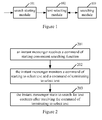
- Figure 1 is a schematic diagram illustrating the structure of an instant messenger according to an embodiment of the present invention.
- the instant messenger includes a search starting module 101, a text selecting module 102 and a searching module 103.
- the search starting module 101 is configured to receive a command of starting convenient searching function.
- the text selecting module 102 is configured to monitor a command of starting to select text and a command of terminating to select text, and select text contents according to the command of starting to select text and the command of terminating to select text.
- the searching module 103 is configured to monitor the command of terminating to select text, and starting to search for the text contents when the text selecting module 102 selects the text contents.
- the command of starting convenient searching function may be a triggering command of a specific hot key on a keyboard, or a triggering command of a specific button on the interface of the instant messenger.
- the text selecting module 102 monitors the command of starting to select text and the command of terminating to select text which are inputted in a text area of the instant messenger, where the text area includes a message displaying area and/or a message inputting area.
- the searching module 103 starts to search for the text contents when the text selecting module 102 selects the text contents from the text area.
- the text area of the instant messenger includes a message displaying area and/or a message inputting area.
- the instant messenger may monitor whether an IM user selects the text contents from the text area; if the instant messenger detects the command of terminating to select text and the IM user selects the text contents from the text area, the instant messenger instantly starts to search for the text contents.
- the command of starting to select text is an operation of pressing the left key of mouse
- the command of terminating to select text is an operation of releasing the left key of mouse.
- the IM user drag-selects the text contents in the text area until the left key of mouse is released.
- the instant messenger takes the operation of releasing the left key of mouse as the command of starting search, and determines whether the text contents have been selected. If the text contents have been selected, the instant messenger instantly searches for the selected text contents.
- the instant messenger determines, through mouse locating, control locating and interface invoking, whether the text contents have been selected. Specifically, after detecting an operation of releasing the left key of mouse, the instant messenger locates a window where the mouse is located, then locates a control of the text area according to a control tree of the window, where the text area includes a message displaying area and/or a message inputting area, and obtains, through an interface provided by the control of the text area, the text contents selected by the user. Through a high-light displaying mode, the text contents selected by the user may be differentiated from other text contents which are not selected by the user.
- command of starting to select text and the command of terminating to select text may be predefined as the command of starting to select text and the command of terminating to select text.
- the embodiment of the present invention does not limit the form of the command of starting to select text and the command of terminating to select text.
- a specific keyboard operation or a specific audio command may be taken as the command of starting to select text or the command of terminating to select text.
- the embodiment of the present invention may further extend the searching module 103, so as to drag or copy text contents in other programs or windows besides the current process of the instant messenger to the searching module 103, and the searching module 103 instantly starts to search the text contents after receiving the text contents.
- the searching module 103 After receiving the text contents, the searching module 103 generates a Universal Resource Locator (URL) in which the text contents are filled as a keyword, and performs search according to the generated URL. From the respective of user, the searching process may be started as long as the user drags the text contents to the searching module 103. As long as the keyword and the URL format of a searching engine are learned, the URL meeting the requirements of the searching engine may be generated according to the URL format and the keyword.
- the searching module 103 is configured to generate the URL and send the URL to the searching engine, and the searching engine performs search.
- a keyword inputted by the user is processed based on webpage script, and then a processing result is provided to a searching engine server at the background so as to be used for search.
- the interaction capability provided by the webpage script is limited, and after the keyword inputted by the user is received, it is needed to further monitor a command of starting search. For example, an operation of pressing an enter key or an operation of clicking a specific button is taken as the command of starting search. From the respective of user, after the user inputs the keyword into a searching box, it is needed to press the enter key or click a specific key to start search.
- the method provided by the embodiment of the present invention is easier.
- a searching module may be displayed on the right sidebar of the instant messenger, and then text contents in other programs such as a Word document is dragged to the searching module.
- the searching module may instantly start to search the text contents without monitoring the command of starting search. From the respective of user, after the user drags the text contents to the searching module, the searching module instantly starts to search for the text contents without needing other commands such as clicking the enter key after receiving the text contents.
- the instant messenger provided by the embodiment of the present invention further includes a message pump and a quitting module.
- mouse and keyboard messages of Windows operation system are only distributed to an input focus window.
- the message pump is adopted to intercept messages, so as to ensure that the searching module for implementing the convenient searching function in the instant messenger is not influenced by the operation of changing the window which has input focus currently such as the operation of switching the user's window.
- the message pump can obtain messages belonging to the convenient searching process, so as to ensure that the convenient searching process is performed successfully.
- the message pump is configured to receive all messages of current process of the instant messenger after the search starting module 101 receives a starting command, send messages used for the convenient searching process to the text selecting module 102 or the quitting module, return other messages to the current process to be distributed continuously, receive a quitting indication and close the message pump.
- the text selecting module 102 is configured to receive the command of starting to select text and the command of terminating to select text which are sent by the message pump, receive a quitting indication and close the text selecting module 102.
- the searching module 103 is configured to receive a quitting indication and close the searching module 103.
- the quitting module is configured to receive a message of quitting the convenient searching process sent by the message pump, and send the quitting indication to the message pump, the text selecting module 102 and the searching module 103.
- the message of quitting the convenient searching process includes: a message of closing the current chat window, a message of quitting the operation system, a message of pressing the ESC key, a triggering message of the right key of mouse and a triggering message of an executable control.
- Figure 2 is a flowchart illustrating a method for performing convenient search by an instant messenger according to an embodiment of the present invention.
- the method includes following processes.
- Block 201 an instant messenger receives a command of starting convenient searching function.
- Block 202 the instant messenger monitors a command of starting to select text and a command of terminating to select text.
- Block 203 the instant messenger starts to search for text contents after receiving the command of terminating to select text.
- the process of monitoring the command of starting to select text and the command of terminating to select text includes: starting a message pump specially used for convenient search, receiving all messages of current process of the instant messenger, determining messages used for the convenient searching process, performing convenient search according to the messages used for the convenient searching process, and returning other messages to the current process so as to be distributed continuously.
- the messages used for the convenient searching process include the command of starting to select text, the command of terminating to select text and the message of quitting the convenient searching process.
- the message of quitting the convenient searching process includes: a message of closing the current chat window, a message of quitting the operation system, a message of pressing the ESC key, a triggering message of the right key of mouse and/or a triggering message of an executable control.
- a message extracted from the messages intercepted by the message pump is the triggering message of the left key of mouse, if the triggering location of the left key of mouse is not in a text area and an executable control is triggered by the left key of mouse, the convenient searching process is quitted.
- the process of starting to search the text contents includes:
- the method for performing convenient search by the instant messenger is illustrated schematically with reference to a specific embodiment, and the embodiment includes following processes.
- a drag-selecting state is started.
- the user starts the drag-selecting state through a button or a hot key during a chat process; at this time, the pattern of mouse is changed to a searching state, to prompt the user that the current state is the drag-selecting state.
- Process 2 a drag-selecting operation is performed.
- the user may drag-select a keyword in a message displaying area or a message inputting area in the chat window so as to perform search, where the drag-selecting state starts at the time of receiving a triggering operation of pressing the left key of mouse and terminates at the time of receiving a triggering operation of releasing the left key of mouse.
- Corresponding text in the text area is highlighted according to the drag-selecting operation of user.
- Process 3 a searching result is displayed.
- the searching result is displayed on the right sidebar of the chat window.
- the searching module of the instant messenger may be further extended. Specifically, the searching module takes the received text contents as the command of starting search, and instantly starts to search for the text contents after receiving the text contents. That is to say, after the searching result is displayed on the right sidebar of the chat window, the user may drag to-be-searched text contents in any other window (e.g., a Word text document or webpage) to the searching module on the right sidebar through a dragging operation, so as to utilize the right sidebar of the chat window to the largest degree to facilitate the searching operation of the user.
- any other window e.g., a Word text document or webpage
- the instant messenger monitors a close event of the current chat window, and closes the module for performing convenient search after detecting the close event. Since the convenient searching state relates to the current chat window, it is needed to quit the convenient searching state when the chat window is closed, and thus the instant messenger needs to monitor the close event of the current chat window.
- the normal pattern of mouse is changed into a predefined searching pattern. That is to say, in order to make the user learn that the current chat window is in the convenient searching state, the pattern of mouse needs to be changed.
- the pattern of mouse may be changed through a specific API interface into a searching pattern specially used in the drag-selecting state.
- the instant messenger may depict a floating tooltip on the right-bottom corner of mouse to follow the movement of mouse, and brief description of the drag-selecting operation is displayed on the floating tooltip.
- the instant messenger monitors all mouse and keyboard messages of the current process no matter whether the current operation focus is on the module for performing convenient search, and thus the switch of the operation focus between windows will not result in that the convenient searching process can not be performed.
- the instant messenger may close the floating tooltip, and change the pattern of mouse into a normal pattern.
- the instant messenger After detecting the command of terminating to select text, the instant messenger extracts the text contents selected by the user, copies the text contents to the searching module on the right sidebar, and after receiving the text contents, the searching module performs search by taking the text contents as a keyword.
- the instant messenger detects the command of terminating to select text, if the instant messenger has not started the searching module, the instant messenger starts the searching module; if the searching module has been started, the instant messenger sends the text contents selected by the user to the searching module to be searched for.
- the message pump mentioned in the embodiment of the present invention is one of important modules.
- the message pump filters each system message, and returns messages unrelated to the convenient searching function to a primary thread message pump to be distributed. Messages related to the convenient searching function are first processed by a special message pump, and then are determined whether to be returned to the current process. Generally, messages quitting from the convenient searching state may not be returned to the current process, and other messages related to the convenient searching function need to be returned to the current process.
Landscapes
- Engineering & Computer Science (AREA)
- Physics & Mathematics (AREA)
- Theoretical Computer Science (AREA)
- Mathematical Physics (AREA)
- Computational Linguistics (AREA)
- Data Mining & Analysis (AREA)
- Databases & Information Systems (AREA)
- General Engineering & Computer Science (AREA)
- General Physics & Mathematics (AREA)
- Information Transfer Between Computers (AREA)
- User Interface Of Digital Computer (AREA)
- Information Retrieval, Db Structures And Fs Structures Therefor (AREA)
Abstract
Description
- The present invention relates to Internet technologies, and more particularly to an instant messenger and a method for performing convenient search by the instant messenger.
- Instant messengers can implement instant communication on Internet through a point-to-point technology, and even implement group chat among multiple buddies. Now, instant messengers have been accepted by most netizen, and become absolutely necessary communication tools of users.
- At present, when a user chats through an instant messenger, some professional terms or new vocabularies talked by buddies may be unfamiliar for the user. At this time, the user must start a browser, open a commonly used searching website, and input a keyword to search for the professional terms or new vocabularies. The whole process is time-consuming and cumbersome, and it is required to switch between two windows of application layer.
- In view of the above, embodiments of the present invention provide an instant messenger and a method for performing convenient search by the instant messenger, so as to implement convenient search.
- The technical solution of the present invention is implemented as follows.
- An instant messenger includes a search starting module, a text selecting module and a searching module, where
the search starting module is configured to receive a command of starting convenient searching function;
the text selecting module is configured to monitor a command of starting to select text and a command of terminating to select text, and select text contents according to the command of starting to select text and the command of terminating to select text; and
the searching module is configured to monitor the command of terminating to select text, and start to search for the text contents after the text selecting module selects the text contents. - A method for performing convenient search by the instant messenger includes:
- receiving, by the instant messenger, a command of starting convenient searching function; monitoring a command of starting to select text and a command of terminating to select text, selecting text contents according to the command of starting to select text and the command of terminating to select text; and after receiving the command of terminating to select text, starting to search for the text contents.
- As can be seen from the above technical solution, after receiving a command of starting convenient searching function, the instant messenger monitors a command of selecting text, and takes a command of terminating to select text as a command of starting to search for selected text contents. In this way, the instant messenger may instantly start to search for the text contents after selecting the text. Moreover, since the instant messenger monitors the command of selecting text, and instantly starts to search for the text contents after detecting the command of terminating to select text, it is not required to start a special searching tool, and also not required to switch between the window of instant messenger and windows of other searching tools, so as to implement convenient search and facilitate users.
-
-
Figure 1 is a schematic diagram illustrating the structure of an instant messenger according to an embodiment of the present invention. -
Figure 2 is a flowchart illustrating a method for performing convenient search by an instant messenger according to an embodiment of the present invention. - Embodiments of the present invention provide an instant messenger and a method for performing convenient search by the instant messenger, so as to provide users with a chat assistant function of conveniently searching for professional terms or new vocabularies during a chat process. Through the embodiments of the present invention, an Instant Messaging (IM) user may perform search in an IM chat window through drag-selecting a keyword while chatting.
-
Figure 1 is a schematic diagram illustrating the structure of an instant messenger according to an embodiment of the present invention. - As shown in
Figure 1 , the instant messenger includes asearch starting module 101, atext selecting module 102 and asearching module 103. - The
search starting module 101 is configured to receive a command of starting convenient searching function. - The
text selecting module 102 is configured to monitor a command of starting to select text and a command of terminating to select text, and select text contents according to the command of starting to select text and the command of terminating to select text. - The
searching module 103 is configured to monitor the command of terminating to select text, and starting to search for the text contents when thetext selecting module 102 selects the text contents. - The command of starting convenient searching function may be a triggering command of a specific hot key on a keyboard, or a triggering command of a specific button on the interface of the instant messenger.
- Specifically, the
text selecting module 102 monitors the command of starting to select text and the command of terminating to select text which are inputted in a text area of the instant messenger, where the text area includes a message displaying area and/or a message inputting area. - The
searching module 103 starts to search for the text contents when thetext selecting module 102 selects the text contents from the text area. - The text area of the instant messenger includes a message displaying area and/or a message inputting area. After the convenient searching function is started, the instant messenger may monitor whether an IM user selects the text contents from the text area; if the instant messenger detects the command of terminating to select text and the IM user selects the text contents from the text area, the instant messenger instantly starts to search for the text contents.
- Typically, the command of starting to select text is an operation of pressing the left key of mouse, and the command of terminating to select text is an operation of releasing the left key of mouse. In other words, after pressing the left key of mouse, the IM user drag-selects the text contents in the text area until the left key of mouse is released. After detecting an operation of releasing the left key of mouse, the instant messenger takes the operation of releasing the left key of mouse as the command of starting search, and determines whether the text contents have been selected. If the text contents have been selected, the instant messenger instantly searches for the selected text contents.
- The instant messenger determines, through mouse locating, control locating and interface invoking, whether the text contents have been selected. Specifically, after detecting an operation of releasing the left key of mouse, the instant messenger locates a window where the mouse is located, then locates a control of the text area according to a control tree of the window, where the text area includes a message displaying area and/or a message inputting area, and obtains, through an interface provided by the control of the text area, the text contents selected by the user. Through a high-light displaying mode, the text contents selected by the user may be differentiated from other text contents which are not selected by the user.
- Of course other operation information may be predefined as the command of starting to select text and the command of terminating to select text. The embodiment of the present invention does not limit the form of the command of starting to select text and the command of terminating to select text. For example, a specific keyboard operation or a specific audio command may be taken as the command of starting to select text or the command of terminating to select text.
- The embodiment of the present invention may further extend the
searching module 103, so as to drag or copy text contents in other programs or windows besides the current process of the instant messenger to thesearching module 103, and thesearching module 103 instantly starts to search the text contents after receiving the text contents. - Specifically, after receiving the text contents, the
searching module 103 generates a Universal Resource Locator (URL) in which the text contents are filled as a keyword, and performs search according to the generated URL. From the respective of user, the searching process may be started as long as the user drags the text contents to thesearching module 103. As long as the keyword and the URL format of a searching engine are learned, the URL meeting the requirements of the searching engine may be generated according to the URL format and the keyword. In the embodiment of the present invention, thesearching module 103 is configured to generate the URL and send the URL to the searching engine, and the searching engine performs search. - In a conventional method for performing search in a browser, a keyword inputted by the user is processed based on webpage script, and then a processing result is provided to a searching engine server at the background so as to be used for search. The interaction capability provided by the webpage script is limited, and after the keyword inputted by the user is received, it is needed to further monitor a command of starting search. For example, an operation of pressing an enter key or an operation of clicking a specific button is taken as the command of starting search. From the respective of user, after the user inputs the keyword into a searching box, it is needed to press the enter key or click a specific key to start search. Obviously, compared with the conventional method for performing search in a browser, the method provided by the embodiment of the present invention is easier. For example, after a convenient searching function is started in the instant messenger, a searching module may be displayed on the right sidebar of the instant messenger, and then text contents in other programs such as a Word document is dragged to the searching module. The searching module may instantly start to search the text contents without monitoring the command of starting search. From the respective of user, after the user drags the text contents to the searching module, the searching module instantly starts to search for the text contents without needing other commands such as clicking the enter key after receiving the text contents.
- In order to make the convenient searching function of the instant messenger be performed or quitted successfully, the instant messenger provided by the embodiment of the present invention further includes a message pump and a quitting module.
- In a default case, mouse and keyboard messages of Windows operation system are only distributed to an input focus window. In order to ensure that a drag-selecting process is not influenced by an operation of changing the window which has input focus currently such as an operation of switching the user's window, it is needed to intercept all messages of current process in the whole drag-selecting process, to ensure that the drag-selecting operation is performed successfully and the drag-selecting process is quitted normally.
- In the embodiment of the present invention, the message pump is adopted to intercept messages, so as to ensure that the searching module for implementing the convenient searching function in the instant messenger is not influenced by the operation of changing the window which has input focus currently such as the operation of switching the user's window. The message pump can obtain messages belonging to the convenient searching process, so as to ensure that the convenient searching process is performed successfully.
- Specifically, the message pump is configured to receive all messages of current process of the instant messenger after the
search starting module 101 receives a starting command, send messages used for the convenient searching process to thetext selecting module 102 or the quitting module, return other messages to the current process to be distributed continuously, receive a quitting indication and close the message pump. - The
text selecting module 102 is configured to receive the command of starting to select text and the command of terminating to select text which are sent by the message pump, receive a quitting indication and close thetext selecting module 102. - The searching
module 103 is configured to receive a quitting indication and close the searchingmodule 103. - The quitting module is configured to receive a message of quitting the convenient searching process sent by the message pump, and send the quitting indication to the message pump, the
text selecting module 102 and the searchingmodule 103. - The message of quitting the convenient searching process includes: a message of closing the current chat window, a message of quitting the operation system, a message of pressing the ESC key, a triggering message of the right key of mouse and a triggering message of an executable control.
-
Figure 2 is a flowchart illustrating a method for performing convenient search by an instant messenger according to an embodiment of the present invention. - As shown in
Figure 2 , the method includes following processes. -
Block 201, an instant messenger receives a command of starting convenient searching function. -
Block 202, the instant messenger monitors a command of starting to select text and a command of terminating to select text. -
Block 203, the instant messenger starts to search for text contents after receiving the command of terminating to select text. - The process of monitoring the command of starting to select text and the command of terminating to select text includes: starting a message pump specially used for convenient search, receiving all messages of current process of the instant messenger, determining messages used for the convenient searching process, performing convenient search according to the messages used for the convenient searching process, and returning other messages to the current process so as to be distributed continuously.
- The messages used for the convenient searching process include the command of starting to select text, the command of terminating to select text and the message of quitting the convenient searching process.
- The message of quitting the convenient searching process includes: a message of closing the current chat window, a message of quitting the operation system, a message of pressing the ESC key, a triggering message of the right key of mouse and/or a triggering message of an executable control. When a message extracted from the messages intercepted by the message pump is the triggering message of the left key of mouse, if the triggering location of the left key of mouse is not in a text area and an executable control is triggered by the left key of mouse, the convenient searching process is quitted.
- The process of starting to search the text contents includes:
- generating a URL in which the text contents are filled as a keyword, sending the generated URL to a searching engine, and the searching engine performing search according to the URL.
- The method for performing convenient search by the instant messenger is illustrated schematically with reference to a specific embodiment, and the embodiment includes following processes.
- Process 1: a drag-selecting state is started. The user starts the drag-selecting state through a button or a hot key during a chat process; at this time, the pattern of mouse is changed to a searching state, to prompt the user that the current state is the drag-selecting state.
- Process 2: a drag-selecting operation is performed. The user may drag-select a keyword in a message displaying area or a message inputting area in the chat window so as to perform search, where the drag-selecting state starts at the time of receiving a triggering operation of pressing the left key of mouse and terminates at the time of receiving a triggering operation of releasing the left key of mouse. Corresponding text in the text area is highlighted according to the drag-selecting operation of user.
- Process 3: a searching result is displayed. When the user terminates the drag-selecting operation through releasing the left key of mouse and has selected a segment of characters, the searching result is displayed on the right sidebar of the chat window.
- In order to facilitate the user to perform convenient search, the searching module of the instant messenger may be further extended. Specifically, the searching module takes the received text contents as the command of starting search, and instantly starts to search for the text contents after receiving the text contents. That is to say, after the searching result is displayed on the right sidebar of the chat window, the user may drag to-be-searched text contents in any other window (e.g., a Word text document or webpage) to the searching module on the right sidebar through a dragging operation, so as to utilize the right sidebar of the chat window to the largest degree to facilitate the searching operation of the user.
- Hereinafter, technical features for ensuring that the convenient searching method of instant messenger is implemented successfully will be illustrated in detail.
- Since much logic conflict will be caused if more than one drag-selecting state is started at the same time, in the embodiment of the present invention, only one drag-selecting state exists in the current process at the same time. Specifically, the problem of starting multiple drag-selecting states may be avoided through reentering preventing protection.
- The instant messenger monitors a close event of the current chat window, and closes the module for performing convenient search after detecting the close event. Since the convenient searching state relates to the current chat window, it is needed to quit the convenient searching state when the chat window is closed, and thus the instant messenger needs to monitor the close event of the current chat window.
- After the instant messenger starts the convenient searching function, the normal pattern of mouse is changed into a predefined searching pattern. That is to say, in order to make the user learn that the current chat window is in the convenient searching state, the pattern of mouse needs to be changed. Specifically, the pattern of mouse may be changed through a specific API interface into a searching pattern specially used in the drag-selecting state.
- In order to assist the user to perform the drag-selecting operation, the instant messenger may depict a floating tooltip on the right-bottom corner of mouse to follow the movement of mouse, and brief description of the drag-selecting operation is displayed on the floating tooltip.
- Through starting the message pump, the instant messenger monitors all mouse and keyboard messages of the current process no matter whether the current operation focus is on the module for performing convenient search, and thus the switch of the operation focus between windows will not result in that the convenient searching process can not be performed.
- After the drag-selecting state terminates, i.e., after the instant messenger detects the command of terminating to select text, the instant messenger may close the floating tooltip, and change the pattern of mouse into a normal pattern.
- After detecting the command of terminating to select text, the instant messenger extracts the text contents selected by the user, copies the text contents to the searching module on the right sidebar, and after receiving the text contents, the searching module performs search by taking the text contents as a keyword.
- When the instant messenger detects the command of terminating to select text, if the instant messenger has not started the searching module, the instant messenger starts the searching module; if the searching module has been started, the instant messenger sends the text contents selected by the user to the searching module to be searched for.
- The message pump mentioned in the embodiment of the present invention is one of important modules. In the convenient searching state, the message pump filters each system message, and returns messages unrelated to the convenient searching function to a primary thread message pump to be distributed. Messages related to the convenient searching function are first processed by a special message pump, and then are determined whether to be returned to the current process. Generally, messages quitting from the convenient searching state may not be returned to the current process, and other messages related to the convenient searching function need to be returned to the current process.
- The foregoing is only preferred embodiments of the present invention and is not used to limit the protection scope of the present invention. Any modification, equivalent substitution and improvement without departing from the principle of the present invention are within the protection scope of the present invention.
Claims (14)
- An instant messenger, comprising a search starting module, a text selecting module and a searching module, wherein
the search starting module is configured to receive a command of starting convenient searching function;
the text selecting module is configured to monitor a command of starting to select text and a command of terminating to select text, and select text contents according to the command of starting to select text and the command of terminating to select text; and
the searching module is configured to monitor the command of terminating to select text, and start to search for the text contents after the text selecting module selects the text contents. - The instant messenger of claim 1, wherein the text selecting module is configured to monitor the command of starting to select text and the command of terminating to select text which are inputted in a text area of the instant messenger, wherein the text area comprises at least one of a message displaying area and a message inputting area.
- The instant messenger of claim 2, wherein the command of starting to select text is an operation of pressing the left key of mouse, and the command of terminating to select text is an operation of releasing the left key of mouse.
- The instant messenger of claim 3, wherein the text selecting module is configured to monitor the operation of the left key of mouse, locate a window where the mouse is located, locate a control of the text area according to a control tree of the window, and obtain the selected text contents through an interface provided by the control of the text area.
- The instant messenger of claim 1, wherein the searching module is configured to receive the text contents in other process or window besides the current process of the instant messenger, and after receiving the text contents, instantly start to search for the text contents.
- The instant messenger of claim 1 or 5, wherein the searching module generates a Universal Resource Locator (URL) in which the text contents are filled as a keyword, and send the generated URL to a searching engine, wherein the searching engine performs search according to the URL.
- The instant messenger of claim 1, further comprising a message pump and a quitting module, wherein
the message pump is configured to, after the search starting module receives the command of starting convenient searching function, receive all messages of the current process of the instant messenger, send a message used for the convenient searching process to the text selecting module or the quitting module, return other messages to the current process to be distributed, receive a quitting indication and close the message pump;
the text selecting module is configured to select the text contents according to the command of starting to select text and the command of terminating to select text which are sent by the message pump, receive a quitting indication and close the text selecting module;
the searching module is configured to receive a quitting indication and close the searching module;
the quitting module is configured to receive a message of quitting the convenient searching process which is sent by the message pump, and send the quitting indication to the message pump, the text selecting module and the searching module. - The instant messenger of claim 6, wherein the message of quitting the convenient searching process comprises at least one of a message of closing a current chat window, a message of quitting an operation system, a message of pressing an ESC key, a message of clicking the right key of mouse and a message of clicking an executable control.
- A method for performing convenient search by an instant messenger, comprising:receiving, by the instant messenger, a command of starting convenient searching function; monitoring a command of starting to select text and a command of terminating to select text, selecting text contents according to the command of starting to select text and the command of terminating to select text; and after receiving the command of terminating to select text, starting to search for the text contents.
- The method of claim 9, wherein the monitoring the command of starting to select text and the command of terminating to select text comprises:starting a message pump, receiving all messages of the current process of the instant messenger, determining a message used for a convenient searching process, performing convenient search according to the message used for the convenient searching process, and return other messages to the current process to be distributed.
- The method of claim 10, wherein the message used for the convenient searching process comprises the command of starting to select text, the command of terminating to select text and a message of quitting the convenient searching process.
- The method of claim 11, wherein the message of quitting the convenient searching process comprises at least one of a message of closing a current chat window, a message of quitting an operation system, a message of pressing an ESC key, a message of clicking the right key of mouse and a message of clicking an executable control.
- The method of claim 9, further comprising:receiving text contents in other process or window besides the current process of the instant messenger, and after receiving the text contents, starting to search for the text contents.
- The method of claim 9 or 13, wherein starting to search for the text contents comprises:generating a Universal Resource Locator (URL) in which the text contents are filled as a keyword, and sending the generated URL to a searching engine, wherein the searching engine performs search according to the URL.
Applications Claiming Priority (2)
| Application Number | Priority Date | Filing Date | Title |
|---|---|---|---|
| CN2010102589188A CN102375841A (en) | 2010-08-18 | 2010-08-18 | Instant messenger and method for implementing easy search thereof |
| PCT/CN2011/078556 WO2012022262A1 (en) | 2010-08-18 | 2011-08-18 | Instant communication tool and method for same to accomplish convenient search |
Publications (3)
| Publication Number | Publication Date |
|---|---|
| EP2608063A1 true EP2608063A1 (en) | 2013-06-26 |
| EP2608063A4 EP2608063A4 (en) | 2015-01-21 |
| EP2608063B1 EP2608063B1 (en) | 2019-01-09 |
Family
ID=45604780
Family Applications (1)
| Application Number | Title | Priority Date | Filing Date |
|---|---|---|---|
| EP11817789.8A Active EP2608063B1 (en) | 2010-08-18 | 2011-08-18 | Instant communication tool and method for same to accomplish convenient search |
Country Status (6)
| Country | Link |
|---|---|
| US (1) | US20130073661A1 (en) |
| EP (1) | EP2608063B1 (en) |
| JP (1) | JP5564614B2 (en) |
| KR (1) | KR20130003007A (en) |
| CN (1) | CN102375841A (en) |
| WO (1) | WO2012022262A1 (en) |
Families Citing this family (13)
| Publication number | Priority date | Publication date | Assignee | Title |
|---|---|---|---|---|
| US20130159849A1 (en) * | 2011-12-20 | 2013-06-20 | Keng Fai Lee | Jump to Collaborator Cursor |
| CN102594734A (en) * | 2012-03-24 | 2012-07-18 | 上海量明科技发展有限公司 | Method, terminal and system for starting instant communication interactive interface |
| CN102945243B (en) * | 2012-09-20 | 2018-05-04 | 百度在线网络技术(北京)有限公司 | A kind of contact details recognition methods based on browsing content |
| KR102072113B1 (en) | 2012-10-17 | 2020-02-03 | 삼성전자주식회사 | User terminal device and control method thereof |
| KR102108412B1 (en) * | 2013-05-08 | 2020-05-28 | 에스케이플래닛 주식회사 | Method for providing search service on chatting based on messaging service, and device therefor |
| KR101537555B1 (en) * | 2013-11-29 | 2015-07-20 | (주)넷피아 | A direct search system for message on the instant messenger |
| KR101607919B1 (en) * | 2014-10-16 | 2016-04-01 | 네이버 주식회사 | Method, system and recording medium for providing search function and search result on messenger |
| US10296513B2 (en) * | 2014-12-08 | 2019-05-21 | Samsung Electronics Co., Ltd. | Accessing messaging applications in search |
| CN105992171A (en) * | 2015-02-13 | 2016-10-05 | 阿里巴巴集团控股有限公司 | Text information processing method and device |
| KR101665969B1 (en) * | 2015-03-25 | 2016-10-13 | 주식회사 카카오 | Device, server and method for keyword retrieval via interaction |
| CA2939395A1 (en) | 2016-08-15 | 2016-10-17 | Richard S. Brown | Method and device for invoking a search from a text message |
| CN111488504B (en) * | 2019-01-29 | 2024-06-11 | 广州金山移动科技有限公司 | Information search method, device, computer storage medium and terminal |
| KR102252393B1 (en) * | 2020-04-29 | 2021-05-14 | 에스케이플래닛 주식회사 | Method for providing search service on chatting based on messaging service, and device therefor |
Family Cites Families (15)
| Publication number | Priority date | Publication date | Assignee | Title |
|---|---|---|---|---|
| JP2710547B2 (en) * | 1994-02-15 | 1998-02-10 | インターナショナル・ビジネス・マシーンズ・コーポレイション | Graphical user interface |
| JPH0854999A (en) * | 1994-08-11 | 1996-02-27 | Mitsubishi Electric Corp | Image display system |
| US6009459A (en) * | 1997-01-10 | 1999-12-28 | Microsoft Corporation | Intelligent automatic searching for resources in a distributed environment |
| GB9711022D0 (en) * | 1997-05-28 | 1997-07-23 | Rank Xerox Ltd | Text/image selection from document images |
| US5982370A (en) * | 1997-07-18 | 1999-11-09 | International Business Machines Corporation | Highlighting tool for search specification in a user interface of a computer system |
| US20030206759A1 (en) * | 2002-05-02 | 2003-11-06 | Emerson Harry E. | Computer keyboard numeric keypad having calculator function keys |
| KR20050085564A (en) * | 2002-12-11 | 2005-08-29 | 코닌클리케 필립스 일렉트로닉스 엔.브이. | Method and system for utilizing video content to obtain text keywords or phrases for providing content related links to network-based resources |
| US7363295B2 (en) * | 2004-04-19 | 2008-04-22 | Yahoo! Inc. | Techniques for inline searching in an instant messenger environment |
| CN101243449A (en) * | 2005-06-16 | 2008-08-13 | 文字点击有限公司 | Method and system for automatically initiating search queries from content displayed by a computer |
| US7590699B2 (en) * | 2005-06-23 | 2009-09-15 | Microsoft Corporation | Instant messaging with built-in search |
| US7730081B2 (en) * | 2005-10-18 | 2010-06-01 | Microsoft Corporation | Searching based on messages |
| US7925716B2 (en) * | 2005-12-05 | 2011-04-12 | Yahoo! Inc. | Facilitating retrieval of information within a messaging environment |
| US20080201434A1 (en) * | 2007-02-16 | 2008-08-21 | Microsoft Corporation | Context-Sensitive Searches and Functionality for Instant Messaging Applications |
| JP2009230472A (en) * | 2008-03-24 | 2009-10-08 | Vle:Kk | Information retrieval method and information retrieval system |
| CN101446969A (en) * | 2008-12-15 | 2009-06-03 | 腾讯科技(深圳)有限公司 | Drag and drop search method and system thereof |
-
2010
- 2010-08-18 CN CN2010102589188A patent/CN102375841A/en active Pending
-
2011
- 2011-08-18 JP JP2013508363A patent/JP5564614B2/en active Active
- 2011-08-18 WO PCT/CN2011/078556 patent/WO2012022262A1/en not_active Ceased
- 2011-08-18 EP EP11817789.8A patent/EP2608063B1/en active Active
- 2011-08-18 KR KR1020127026593A patent/KR20130003007A/en not_active Ceased
-
2012
- 2012-11-14 US US13/676,950 patent/US20130073661A1/en not_active Abandoned
Also Published As
| Publication number | Publication date |
|---|---|
| CN102375841A (en) | 2012-03-14 |
| KR20130003007A (en) | 2013-01-08 |
| US20130073661A1 (en) | 2013-03-21 |
| EP2608063B1 (en) | 2019-01-09 |
| WO2012022262A1 (en) | 2012-02-23 |
| EP2608063A4 (en) | 2015-01-21 |
| JP5564614B2 (en) | 2014-07-30 |
| JP2013532317A (en) | 2013-08-15 |
Similar Documents
| Publication | Publication Date | Title |
|---|---|---|
| EP2608063B1 (en) | Instant communication tool and method for same to accomplish convenient search | |
| US8832569B2 (en) | Scrolling chat for participation in multiple instant messaging conversations | |
| KR102277300B1 (en) | Message service providing method for message service linking search service and message server and user device for performing the method | |
| US7661067B2 (en) | Method for providing quick responses in instant messaging conversations | |
| US8122088B2 (en) | Adding personal note capabilities to text exchange clients | |
| CN106293355B (en) | Method and device for displaying instant messaging window | |
| WO2008014116A1 (en) | Multi-threaded instant messaging | |
| US20070300169A1 (en) | Method and system for flagging content in a chat session and providing enhancements in a transcript window | |
| US20140173456A1 (en) | Modifying conversation windows | |
| WO2012125338A1 (en) | Inline user addressing in chat and document editing sessions | |
| WO2013066302A1 (en) | Email tags | |
| CN108062290B (en) | Message text processing method and device, electronic equipment and storage medium | |
| US20070198645A1 (en) | Method for providing in-context responses to instant messaging conversations | |
| CN103365840A (en) | Web-based screenshot taking method and device | |
| CN106302081A (en) | Instant communication method and client | |
| CN113094143A (en) | Cross-application message sending method and device, electronic equipment and readable storage medium | |
| CN107347028B (en) | Message processing method and device | |
| US20120127078A1 (en) | Automatic keyboard mode selection based on input field type | |
| CN105227431B (en) | The method and apparatus that good friend or group are fast added in instant messaging | |
| CN103123566B (en) | Electronic equipment and character input method thereof | |
| CN103139233A (en) | Method and device for generating desktop contact persons | |
| CN111010335A (en) | Chat expression sending method and device, electronic equipment and medium | |
| WO2008034649A1 (en) | A method of correlating instant messages in a history of instant messages | |
| EP3602265B1 (en) | Method for displaying a virtual keyboard on a mobile terminal screen | |
| CN113114554A (en) | Message display method and device |
Legal Events
| Date | Code | Title | Description |
|---|---|---|---|
| PUAI | Public reference made under article 153(3) epc to a published international application that has entered the european phase |
Free format text: ORIGINAL CODE: 0009012 |
|
| 17P | Request for examination filed |
Effective date: 20121001 |
|
| AK | Designated contracting states |
Kind code of ref document: A1 Designated state(s): AL AT BE BG CH CY CZ DE DK EE ES FI FR GB GR HR HU IE IS IT LI LT LU LV MC MK MT NL NO PL PT RO RS SE SI SK SM TR |
|
| DAX | Request for extension of the european patent (deleted) | ||
| A4 | Supplementary search report drawn up and despatched |
Effective date: 20141222 |
|
| RIC1 | Information provided on ipc code assigned before grant |
Ipc: G06F 17/30 20060101AFI20141216BHEP |
|
| 17Q | First examination report despatched |
Effective date: 20160916 |
|
| STAA | Information on the status of an ep patent application or granted ep patent |
Free format text: STATUS: EXAMINATION IS IN PROGRESS |
|
| GRAP | Despatch of communication of intention to grant a patent |
Free format text: ORIGINAL CODE: EPIDOSNIGR1 |
|
| STAA | Information on the status of an ep patent application or granted ep patent |
Free format text: STATUS: GRANT OF PATENT IS INTENDED |
|
| INTG | Intention to grant announced |
Effective date: 20180827 |
|
| GRAS | Grant fee paid |
Free format text: ORIGINAL CODE: EPIDOSNIGR3 |
|
| GRAA | (expected) grant |
Free format text: ORIGINAL CODE: 0009210 |
|
| STAA | Information on the status of an ep patent application or granted ep patent |
Free format text: STATUS: THE PATENT HAS BEEN GRANTED |
|
| AK | Designated contracting states |
Kind code of ref document: B1 Designated state(s): AL AT BE BG CH CY CZ DE DK EE ES FI FR GB GR HR HU IE IS IT LI LT LU LV MC MK MT NL NO PL PT RO RS SE SI SK SM TR |
|
| REG | Reference to a national code |
Ref country code: GB Ref legal event code: FG4D |
|
| REG | Reference to a national code |
Ref country code: CH Ref legal event code: EP Ref country code: AT Ref legal event code: REF Ref document number: 1088165 Country of ref document: AT Kind code of ref document: T Effective date: 20190115 |
|
| REG | Reference to a national code |
Ref country code: DE Ref legal event code: R096 Ref document number: 602011055631 Country of ref document: DE |
|
| REG | Reference to a national code |
Ref country code: IE Ref legal event code: FG4D |
|
| REG | Reference to a national code |
Ref country code: NL Ref legal event code: MP Effective date: 20190109 |
|
| REG | Reference to a national code |
Ref country code: LT Ref legal event code: MG4D |
|
| PG25 | Lapsed in a contracting state [announced via postgrant information from national office to epo] |
Ref country code: NL Free format text: LAPSE BECAUSE OF FAILURE TO SUBMIT A TRANSLATION OF THE DESCRIPTION OR TO PAY THE FEE WITHIN THE PRESCRIBED TIME-LIMIT Effective date: 20190109 |
|
| REG | Reference to a national code |
Ref country code: AT Ref legal event code: MK05 Ref document number: 1088165 Country of ref document: AT Kind code of ref document: T Effective date: 20190109 |
|
| PG25 | Lapsed in a contracting state [announced via postgrant information from national office to epo] |
Ref country code: FI Free format text: LAPSE BECAUSE OF FAILURE TO SUBMIT A TRANSLATION OF THE DESCRIPTION OR TO PAY THE FEE WITHIN THE PRESCRIBED TIME-LIMIT Effective date: 20190109 Ref country code: LT Free format text: LAPSE BECAUSE OF FAILURE TO SUBMIT A TRANSLATION OF THE DESCRIPTION OR TO PAY THE FEE WITHIN THE PRESCRIBED TIME-LIMIT Effective date: 20190109 Ref country code: ES Free format text: LAPSE BECAUSE OF FAILURE TO SUBMIT A TRANSLATION OF THE DESCRIPTION OR TO PAY THE FEE WITHIN THE PRESCRIBED TIME-LIMIT Effective date: 20190109 Ref country code: PL Free format text: LAPSE BECAUSE OF FAILURE TO SUBMIT A TRANSLATION OF THE DESCRIPTION OR TO PAY THE FEE WITHIN THE PRESCRIBED TIME-LIMIT Effective date: 20190109 Ref country code: NO Free format text: LAPSE BECAUSE OF FAILURE TO SUBMIT A TRANSLATION OF THE DESCRIPTION OR TO PAY THE FEE WITHIN THE PRESCRIBED TIME-LIMIT Effective date: 20190409 Ref country code: SE Free format text: LAPSE BECAUSE OF FAILURE TO SUBMIT A TRANSLATION OF THE DESCRIPTION OR TO PAY THE FEE WITHIN THE PRESCRIBED TIME-LIMIT Effective date: 20190109 Ref country code: PT Free format text: LAPSE BECAUSE OF FAILURE TO SUBMIT A TRANSLATION OF THE DESCRIPTION OR TO PAY THE FEE WITHIN THE PRESCRIBED TIME-LIMIT Effective date: 20190509 |
|
| PG25 | Lapsed in a contracting state [announced via postgrant information from national office to epo] |
Ref country code: RS Free format text: LAPSE BECAUSE OF FAILURE TO SUBMIT A TRANSLATION OF THE DESCRIPTION OR TO PAY THE FEE WITHIN THE PRESCRIBED TIME-LIMIT Effective date: 20190109 Ref country code: HR Free format text: LAPSE BECAUSE OF FAILURE TO SUBMIT A TRANSLATION OF THE DESCRIPTION OR TO PAY THE FEE WITHIN THE PRESCRIBED TIME-LIMIT Effective date: 20190109 Ref country code: LV Free format text: LAPSE BECAUSE OF FAILURE TO SUBMIT A TRANSLATION OF THE DESCRIPTION OR TO PAY THE FEE WITHIN THE PRESCRIBED TIME-LIMIT Effective date: 20190109 Ref country code: IS Free format text: LAPSE BECAUSE OF FAILURE TO SUBMIT A TRANSLATION OF THE DESCRIPTION OR TO PAY THE FEE WITHIN THE PRESCRIBED TIME-LIMIT Effective date: 20190509 Ref country code: BG Free format text: LAPSE BECAUSE OF FAILURE TO SUBMIT A TRANSLATION OF THE DESCRIPTION OR TO PAY THE FEE WITHIN THE PRESCRIBED TIME-LIMIT Effective date: 20190409 Ref country code: GR Free format text: LAPSE BECAUSE OF FAILURE TO SUBMIT A TRANSLATION OF THE DESCRIPTION OR TO PAY THE FEE WITHIN THE PRESCRIBED TIME-LIMIT Effective date: 20190410 |
|
| REG | Reference to a national code |
Ref country code: DE Ref legal event code: R097 Ref document number: 602011055631 Country of ref document: DE |
|
| PG25 | Lapsed in a contracting state [announced via postgrant information from national office to epo] |
Ref country code: EE Free format text: LAPSE BECAUSE OF FAILURE TO SUBMIT A TRANSLATION OF THE DESCRIPTION OR TO PAY THE FEE WITHIN THE PRESCRIBED TIME-LIMIT Effective date: 20190109 Ref country code: SK Free format text: LAPSE BECAUSE OF FAILURE TO SUBMIT A TRANSLATION OF THE DESCRIPTION OR TO PAY THE FEE WITHIN THE PRESCRIBED TIME-LIMIT Effective date: 20190109 Ref country code: AL Free format text: LAPSE BECAUSE OF FAILURE TO SUBMIT A TRANSLATION OF THE DESCRIPTION OR TO PAY THE FEE WITHIN THE PRESCRIBED TIME-LIMIT Effective date: 20190109 Ref country code: CZ Free format text: LAPSE BECAUSE OF FAILURE TO SUBMIT A TRANSLATION OF THE DESCRIPTION OR TO PAY THE FEE WITHIN THE PRESCRIBED TIME-LIMIT Effective date: 20190109 Ref country code: RO Free format text: LAPSE BECAUSE OF FAILURE TO SUBMIT A TRANSLATION OF THE DESCRIPTION OR TO PAY THE FEE WITHIN THE PRESCRIBED TIME-LIMIT Effective date: 20190109 Ref country code: AT Free format text: LAPSE BECAUSE OF FAILURE TO SUBMIT A TRANSLATION OF THE DESCRIPTION OR TO PAY THE FEE WITHIN THE PRESCRIBED TIME-LIMIT Effective date: 20190109 Ref country code: DK Free format text: LAPSE BECAUSE OF FAILURE TO SUBMIT A TRANSLATION OF THE DESCRIPTION OR TO PAY THE FEE WITHIN THE PRESCRIBED TIME-LIMIT Effective date: 20190109 Ref country code: IT Free format text: LAPSE BECAUSE OF FAILURE TO SUBMIT A TRANSLATION OF THE DESCRIPTION OR TO PAY THE FEE WITHIN THE PRESCRIBED TIME-LIMIT Effective date: 20190109 |
|
| PLBE | No opposition filed within time limit |
Free format text: ORIGINAL CODE: 0009261 |
|
| STAA | Information on the status of an ep patent application or granted ep patent |
Free format text: STATUS: NO OPPOSITION FILED WITHIN TIME LIMIT |
|
| PG25 | Lapsed in a contracting state [announced via postgrant information from national office to epo] |
Ref country code: SM Free format text: LAPSE BECAUSE OF FAILURE TO SUBMIT A TRANSLATION OF THE DESCRIPTION OR TO PAY THE FEE WITHIN THE PRESCRIBED TIME-LIMIT Effective date: 20190109 |
|
| 26N | No opposition filed |
Effective date: 20191010 |
|
| PG25 | Lapsed in a contracting state [announced via postgrant information from national office to epo] |
Ref country code: SI Free format text: LAPSE BECAUSE OF FAILURE TO SUBMIT A TRANSLATION OF THE DESCRIPTION OR TO PAY THE FEE WITHIN THE PRESCRIBED TIME-LIMIT Effective date: 20190109 |
|
| PG25 | Lapsed in a contracting state [announced via postgrant information from national office to epo] |
Ref country code: TR Free format text: LAPSE BECAUSE OF FAILURE TO SUBMIT A TRANSLATION OF THE DESCRIPTION OR TO PAY THE FEE WITHIN THE PRESCRIBED TIME-LIMIT Effective date: 20190109 |
|
| PG25 | Lapsed in a contracting state [announced via postgrant information from national office to epo] |
Ref country code: LI Free format text: LAPSE BECAUSE OF NON-PAYMENT OF DUE FEES Effective date: 20190831 Ref country code: CH Free format text: LAPSE BECAUSE OF NON-PAYMENT OF DUE FEES Effective date: 20190831 Ref country code: LU Free format text: LAPSE BECAUSE OF NON-PAYMENT OF DUE FEES Effective date: 20190818 Ref country code: MC Free format text: LAPSE BECAUSE OF FAILURE TO SUBMIT A TRANSLATION OF THE DESCRIPTION OR TO PAY THE FEE WITHIN THE PRESCRIBED TIME-LIMIT Effective date: 20190109 |
|
| REG | Reference to a national code |
Ref country code: BE Ref legal event code: MM Effective date: 20190831 |
|
| PG25 | Lapsed in a contracting state [announced via postgrant information from national office to epo] |
Ref country code: IE Free format text: LAPSE BECAUSE OF NON-PAYMENT OF DUE FEES Effective date: 20190818 |
|
| PG25 | Lapsed in a contracting state [announced via postgrant information from national office to epo] |
Ref country code: BE Free format text: LAPSE BECAUSE OF NON-PAYMENT OF DUE FEES Effective date: 20190831 |
|
| PG25 | Lapsed in a contracting state [announced via postgrant information from national office to epo] |
Ref country code: CY Free format text: LAPSE BECAUSE OF FAILURE TO SUBMIT A TRANSLATION OF THE DESCRIPTION OR TO PAY THE FEE WITHIN THE PRESCRIBED TIME-LIMIT Effective date: 20190109 |
|
| PG25 | Lapsed in a contracting state [announced via postgrant information from national office to epo] |
Ref country code: HU Free format text: LAPSE BECAUSE OF FAILURE TO SUBMIT A TRANSLATION OF THE DESCRIPTION OR TO PAY THE FEE WITHIN THE PRESCRIBED TIME-LIMIT; INVALID AB INITIO Effective date: 20110818 Ref country code: MT Free format text: LAPSE BECAUSE OF FAILURE TO SUBMIT A TRANSLATION OF THE DESCRIPTION OR TO PAY THE FEE WITHIN THE PRESCRIBED TIME-LIMIT Effective date: 20190109 |
|
| PG25 | Lapsed in a contracting state [announced via postgrant information from national office to epo] |
Ref country code: MK Free format text: LAPSE BECAUSE OF FAILURE TO SUBMIT A TRANSLATION OF THE DESCRIPTION OR TO PAY THE FEE WITHIN THE PRESCRIBED TIME-LIMIT Effective date: 20190109 |
|
| PGFP | Annual fee paid to national office [announced via postgrant information from national office to epo] |
Ref country code: GB Payment date: 20250626 Year of fee payment: 15 |
|
| PGFP | Annual fee paid to national office [announced via postgrant information from national office to epo] |
Ref country code: FR Payment date: 20250610 Year of fee payment: 15 |
|
| PGFP | Annual fee paid to national office [announced via postgrant information from national office to epo] |
Ref country code: DE Payment date: 20250624 Year of fee payment: 15 |