EP2600347A1 - Method and apparatus for virtual tour creation in mobile device - Google Patents
Method and apparatus for virtual tour creation in mobile device Download PDFInfo
- Publication number
- EP2600347A1 EP2600347A1 EP12194233.8A EP12194233A EP2600347A1 EP 2600347 A1 EP2600347 A1 EP 2600347A1 EP 12194233 A EP12194233 A EP 12194233A EP 2600347 A1 EP2600347 A1 EP 2600347A1
- Authority
- EP
- European Patent Office
- Prior art keywords
- capturing
- map
- image
- mobile device
- scanning
- Prior art date
- Legal status (The legal status is an assumption and is not a legal conclusion. Google has not performed a legal analysis and makes no representation as to the accuracy of the status listed.)
- Ceased
Links
Images






Classifications
-
- H—ELECTRICITY
- H04—ELECTRIC COMMUNICATION TECHNIQUE
- H04N—PICTORIAL COMMUNICATION, e.g. TELEVISION
- H04N5/00—Details of television systems
- H04N5/222—Studio circuitry; Studio devices; Studio equipment
- H04N5/262—Studio circuits, e.g. for mixing, switching-over, change of character of image, other special effects ; Cameras specially adapted for the electronic generation of special effects
-
- G—PHYSICS
- G11—INFORMATION STORAGE
- G11B—INFORMATION STORAGE BASED ON RELATIVE MOVEMENT BETWEEN RECORD CARRIER AND TRANSDUCER
- G11B27/00—Editing; Indexing; Addressing; Timing or synchronising; Monitoring; Measuring tape travel
- G11B27/02—Editing, e.g. varying the order of information signals recorded on, or reproduced from, record carriers
- G11B27/031—Electronic editing of digitised analogue information signals, e.g. audio or video signals
- G11B27/034—Electronic editing of digitised analogue information signals, e.g. audio or video signals on discs
-
- G—PHYSICS
- G11—INFORMATION STORAGE
- G11B—INFORMATION STORAGE BASED ON RELATIVE MOVEMENT BETWEEN RECORD CARRIER AND TRANSDUCER
- G11B27/00—Editing; Indexing; Addressing; Timing or synchronising; Monitoring; Measuring tape travel
- G11B27/10—Indexing; Addressing; Timing or synchronising; Measuring tape travel
- G11B27/34—Indicating arrangements
Definitions
- the present invention relates to image processing, and more particular, to a virtual tour creation method and apparatus which creates a virtual tour as video in a mobile device.
- VT Virtual Tour
- Google's "Street View” where data is captured by Google a van using dedicated cameras and hardware.
- the creation of a VT requires dedicated hardware and/or the use of offline editing tools.
- the current options for a user to create VT content are:
- the present invention provides a method and apparatus for creating a Virtual Tour (VT) in a mobile device, in which a VT can be created through the mobile device without a separate hardware for VT creation.
- VT Virtual Tour
- the present invention also provides a method and apparatus for creating a VT in a mobile device, in which assistance and feedback for capturing are provided to a user during execution of image capturing for VT creation.
- the present invention also provides a method and apparatus for creating a VT in a mobile device, in which a VT map is automatically created during execution of image capturing for VT creation.
- the present invention also provides a method and apparatus for creating a VT in a mobile device, in which a VT created through the mobile device can be socially shared.
- a method and apparatus for creating a VT in a mobile device including capturing an image in a VT creation mode, automatically creating a VT map while capturing the image, and if the VT creation mode is terminated, saving the captured images as a file for the VT.
- an apparatus for creating a VT in a mobile device including a camera, sensors, and a capture engine for capturing an image in a VT creation mode, automatically creating a VT map while capturing the image, and saving the captured images as a file for the VT, if the VT creation mode is terminated.
- suitable software is provided on (or otherwise associated with) a camera device, which guides the user in the process of capturing the VT content, thus enabling the online VT creation.
- the software associated with the camera device using image processing technology and/or other sensor's data, analyzes the captured scene while shooting the VT.
- the capturing process is divided into three main features:
- a map of the captured tour is created while capturing.
- the map is used for the virtual tour viewer at later stage.
- the differentiating between turning around and going forward is based on a combination of parameters from sensors and imaging.
- the gyro, compass and or accelerometers on the other hand, cannot tell standing from moving forward. This differentiation must be supported by image processing.
- the sensors also suffer from environment noise.
- the compass is affected by electrical devices found in its vicinities.
- the optical flow of consecutive frames can provide the full needed information.
- optical flow is one of the suitable methods to determine camera movement between two frames.
- the capturing of data for the VT may also be non-continuous. For example a user may start at point A, go to point B and then want to capture the VT route from point A to point C. In this case the user may stop capturing at point B, and restart capturing when he is back in point A.
- the invention enables the creation and editing to the VT map.
- a schematic map is created during the capture process. This map can be presented to the user while capturing the VT online, as shown in the illustrative example of FIGS. 1A through 1C .
- An illustrative method to create the map is described below, which enables an average user to create VT content on his mobile device, without the need to use external editing tool, and to see the results during the capturing process.
- the invention is intended to allow a user to create and share a virtual tour (VT). Once created a virtual tour allows a person to explore a place without actually being there.
- VT virtual tour
- an illustrative implementation is divided into 3 stages:
- the capture engine receives for each frame the below Inputs:
- the capture engine will then output:
- the motion estimation of the camera is done by SAD (Sum of Absolute Difference) minimization on a set of significant points.
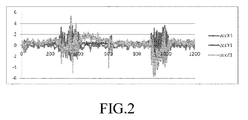
- FIG. 2 is a diagram showing an output signal of an accelerometer provide in a mobile device during execution of capturing for VT creation in the mobile device.
- the visual information is considered more reliable all through the analysis, and azimuth is used only as fallback and for sanity check. This is the result in unreliable inputs used while developing and testing.
- Each scan has a "marker" frame near its start, which is compared and matched to the coming frames when the scan is closed.
- each coming frame is checked. Once a frame with sufficient visual information is detected, it is set to be the marker. Frames of the scan before the marker frame are not kept.
- Scan frames are accumulated. Frames are kept so that the gap between them is about 1/6 of the frame size. This means that if the field of view, in the scanning direction, is 45 degrees, a frame will be kept every 7.5 degrees, and a full scan will hold about 48 frames.
- the 270 threshold represent the unreliability of azimuth estimate based on sensors and image registration inputs.
- the scan is closed. At this stage we need to connect the last frame from walking stage to the relevant scan frame, to create accurate junction point at scan entry.
- the user gets a feedback of scan closed, and should continue scanning until he leaves the room.
- scan stop is detected, and the first frame of the path is compared to scan frames, to create an accurate junction point at scan exit.
- the capture engine decides whether to keep it as "partial scan” or to convert all the frames to path frames. A scan is kept if it already holds more than 180 degrees.
- Matching two images is done whenever we need to "connect" two frames that are not consecutive. This can be for scan frame versus either scan marker, scan entry, or scan exit.
- homography transformation is found to best transform one image to the other. This homography represents a slight distortion between images, resulting from camera tilt, or from the user moving slightly closer or farther from the scene.
- a warped image is created according to 2D translation and homography.
- the similarity of the warped image to the other one is evaluated by two independent calculations - SAD on a set of selected grid points, uniformly distributed in the image, and cross-correlation on down sampled images.
- FIG. 3 is a diagram showing a process of transforming an image (a) into another image (d) through two stages such as a 2D image (b) and a slightly distorted image (c) in a mobile device.
- the View table contains a set of metadata parameters for each frame that was chosen to be saved for the virtual tour. Below is a description of the different fields of the table:
- Step 2 There are 2 steps to creating a virtual tour. First one is capturing the tour. This process involves going through the tour route and grabbing camera feed of the areas of interest. The second stage involves editing the automatic created map.
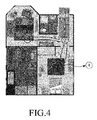
- FIG. 4 is a diagram showing a capturing path prior to execution of capturing for VT creation in a mobile device. Note that there are 2 modes of capture:
- Fig. 4 the user will start walking from the house entrance (marked by route #1) then make a 360 deg turn (marked by circle #2) to scan the house entrance hall and so on until he is done with all areas.
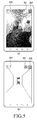
- FIG. 5 is a diagram showing GUI display for guiding capturing during execution of a capturing operation for VT creation in a mobile device
- (b) of FIG. 5 is a diagram for briefly describing (a) of FIG. 5 .
- a start/stop button 501 As a GUI for guiding capturing during execution of the capturing operation for VT creation, a start/stop button 501, an azimuth 502, and a capturing state indicator 503 are displayed on the screen.
- the start/stop button 501 performs recording of an image or stop recording of an image.
- the azimuth 502 is an azimuth indicating the current location of the user.
- the capturing state indicator 503 informs the user about the automatic capturing state.
- the capturing state indicator 503 is indicated in the following colors which represent different states.
- the user can use the android menu button in order to perform the following operations:
- the map edit stage allows the user the following changes to the map:
- VT map On an automatically created VT map, long press on a room and then drag it to the desired new position. By doing so the user can fix the room locations to match their actual location.
- FIGs. 6A and 6B are diagrams showing a room movement editing operation in a manual map editing step of a mobile device.
- (a) of FIG. 6A shows a VT map prior to room movement
- (b) of FIG. 6A is a diagram for briefly describing (a) of FIG. 6A.
- (a) of FIG. 6B shows a VT map after room movement
- (b) of FIG. 6B is a diagram for briefly describing (a) of FIG. 6B .
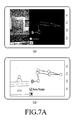
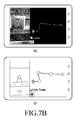
- Fig. 7 show a before ( Fig. 7A ) and after ( Fig. 7B ) merge of a typical map.
- FIGs. 7A and 7B are diagrams showing a room merge editing operation in a manual map editing step of a mobile device.
- (a) of FIG. 7A shows a VT map prior to room merge
- (b) of FIG, 7A is a diagram for briefly describing (a) of FIG. 7A.
- (a) of FIG. 7B shows a VT map after room merge
- (b) of FIG. 7B is a diagram for briefly describing (a) of FIG. 7B .
- the map view always show a corridor as a straight line between 2 rooms. Some times when a corridor is not straight it is desired to add a split point in a corridor line. That new split point can be moved and create a corridor which is not straight.
- FIGs. 8A and 8B are diagrams showing a corridor split editing operation in a manual map editing step of a mobile device.
- (a) of FIG. 8A shows a VT map prior to corridor split
- (b) of FIG. 8A is a diagram for briefly describing (a) of FIG. 8A.
- (a) of FIG. 8B shows a VT map after corridor split
- (b) of FIG. 8B is a diagram for briefly describing (a) of FIG. 8B .
- pressing the options menu allows the user to do the following operations:
- a method and apparatus for creating a VT in a mobile device assistance and feedback for capturing are provided to a user during execution of image capturing for VT creation, a VT map is automatically created and provided during capturing, and selectively, social sharing may be possible.
Landscapes
- Engineering & Computer Science (AREA)
- Multimedia (AREA)
- Signal Processing (AREA)
- Television Signal Processing For Recording (AREA)
- Processing Or Creating Images (AREA)
Abstract
Description
- The present invention relates to image processing, and more particular, to a virtual tour creation method and apparatus which creates a virtual tour as video in a mobile device.
- By Virtual Tour (VT) it is normally intended to refer to a mode that enables a user to look at a certain place and walk around it through non linear data content. The most famous VT product available today on the web is Google's "Street View", where data is captured by Google a van using dedicated cameras and hardware. There are companies that provide services to create VT content mainly for the real estate agents. However, according to existing solutions the creation of a VT requires dedicated hardware and/or the use of offline editing tools.
- The current options for a user to create VT content are:
- a) Using a professional company to generate it. Such companies employ dedicated hardware (mainly 360° camera) and dedicated editing tools;
- b) Taking images or video and using Photoshop and plug-ins to edit it off-line. However, it takes a long time and requires careful planning of the capturing process; and
- c) A tool for easily editing video to create VT is offered. However, in spite of such a solution, planning of the scene is still required any feedback is not given while shooting.
- Also in existing solutions, the various editors present much limitation:
- All require prior planning of the shooting scene.
- All are off-line and therefore no feedback is provided to the user while shooting.
- Editing requires time and practice.
- Accordingly, the present invention provides a method and apparatus for creating a Virtual Tour (VT) in a mobile device, in which a VT can be created through the mobile device without a separate hardware for VT creation.
- The present invention also provides a method and apparatus for creating a VT in a mobile device, in which assistance and feedback for capturing are provided to a user during execution of image capturing for VT creation.
- The present invention also provides a method and apparatus for creating a VT in a mobile device, in which a VT map is automatically created during execution of image capturing for VT creation.
- The present invention also provides a method and apparatus for creating a VT in a mobile device, in which a VT created through the mobile device can be socially shared. According to an aspect of the present invention, there is provided a method and apparatus for creating a VT in a mobile device; the method including capturing an image in a VT creation mode, automatically creating a VT map while capturing the image, and if the VT creation mode is terminated, saving the captured images as a file for the VT.
- According to another aspect of the present invention, there is provided an apparatus for creating a VT in a mobile device, the apparatus including a camera, sensors, and a capture engine for capturing an image in a VT creation mode, automatically creating a VT map while capturing the image, and saving the captured images as a file for the VT, if the VT creation mode is terminated.
- The above and other features and advantages of exemplary embodiments of the present invention will be more apparent from the following detailed description taken in conjunction with the accompanying drawings, in which:
-
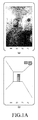
FIG. 1A is a diagram showing a capturing operation for Virtual Tour (VT) creation in a mobile device; -
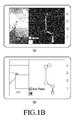
FIG. 1B is a diagram showing an operation of manually modifying an automatically created VT map in a mobile device; -
FIG. 1C is a diagram showing an operation of launching a created VT through a viewer in a mobile device; -
FIG. 2 is a diagram showing an output signal of an accelerometer provided in a mobile phone during execution of capturing for VT creation in a mobile device; -
FIG. 3 is a flowchart showing an operation of translating an image for image matching in a mobile device; -
FIG. 4 is a diagram showing a capturing path prior to execution of capturing for VT creation in a mobile device; -
FIG. 5 is a diagram showing a Graphic User Interface (GUI) display for guiding capturing during execution of a capturing operation for VT creation in a mobile device; -
FIGs. 6A through 8B are diagrams showing an editing operation in a manual map editing step of a mobile device. - In accordance with the invention suitable software is provided on (or otherwise associated with) a camera device, which guides the user in the process of capturing the VT content, thus enabling the online VT creation.
- In one embodiment of the invention, inter alia, the following elements are provided:
- a) Capturing - guided capturing that gives the user an indication of the scene captured, and instructs the user regarding the shot being currently taken. The acquisition can be in any suitable video format or raw images.
- b) Automatic editing - during the capturing process the system selects the relevant frames for display and builds up the scene map. The automatic editing can be an iterative operation.
- c) Review and manually edit: the user may review the result and correct or change it where needed. The user sees the VT on the device and decides if he wants to continue shooting or confirm it.
- d) Socially share the VT either with friends on a peer to peer basis or through a server. The sharing of the VT has two modes: (1) View Only, (2) Editable version, which includes metadata.
- The software associated with the camera device, using image processing technology and/or other sensor's data, analyzes the captured scene while shooting the VT. The capturing process is divided into three main features:
- a. Turning around ("scanning");
- b. Moving forward and backward ("walking"); and
- c. Staying in place and holding the camera ("stop").
- According to the invention and based on sensors data and image processing, it is possible to recognize the three different situations mentioned above and to combine them together online in order to create a virtual tour. The user has a GUI, which gives him an indication as to the map scene and the current capturing mode.
- A map of the captured tour is created while capturing. The map is used for the virtual tour viewer at later stage.
- The abovementioned classification is based on a combination of image processing and of sensors data, because:
- The sensors (without GPS) cannot detect a difference when the user moves forward or backward as compared to when the user stands still.
- Image processing requires non-repetitive patterns to analyze the movement. For example, part of the wall that has no significant pattern may cause an error in detecting turn around activity.
- The differentiating between turning around and going forward is based on a combination of parameters from sensors and imaging.
- To further illustrate this point, while being outside, where GPS works well, there is a simple way to differentiate - if the camera location changed - the user moved forward and if it did not change - he was either standing or turning around.
- The gyro, compass and or accelerometers, on the other hand, cannot tell standing from moving forward. This differentiation must be supported by image processing.
- The sensors also suffer from environment noise. For example, the compass is affected by electrical devices found in its vicinities.
- The optical flow of consecutive frames can provide the full needed information.
- For example, in a predetermined number of consecutive frames,:
- If the pixels are fixed in place - no movement;
- If the flow of pixels is purely horizontal - the user has turned around; and
- If the flow of pixels is such that pixels are spread from the center - this means that the user walked forward.
- The aforementioned "optical flow" method is one of the suitable methods to determine camera movement between two frames. Other methods known in the art and not discussed herein in detail for the sake of brevity, can also be used.
- The capturing of data for the VT may also be non-continuous. For example a user may start at point A, go to point B and then want to capture the VT route from point A to point C. In this case the user may stop capturing at point B, and restart capturing when he is back in point A.
- The invention enables the creation and editing to the VT map. As shown in the figures and further discussed in detail below, a schematic map is created during the capture process. This map can be presented to the user while capturing the VT online, as shown in the illustrative example of
FIGS. 1A through 1C . An illustrative method to create the map is described below, which enables an average user to create VT content on his mobile device, without the need to use external editing tool, and to see the results during the capturing process. - The following illustrative description makes reference to the technical features and the GUI implemented on a mobile phone with compass and accelerometers (but without a gyro). As said, the invention is intended to allow a user to create and share a virtual tour (VT). Once created a virtual tour allows a person to explore a place without actually being there. In one embodiment of the invention an illustrative implementation is divided into 3 stages:
- 1) Tour capture - the user goes through the tour area and captures a movie of the different places of interest. (a) of
FIG. 1A is a diagram showing an operation of capturing an image through a mobile device, and (b) ofFIG. 1A is a diagram for briefly describing (a) ofFIG. 1A . The capture software estimates the user's position and creates a map which is correlated to the view at each point, by using sensors provided in the mobile device. - 2) Tour Map edit - Since the map creation is not optimal (Created with indoor navigation techniques) the user manually modifies the created map at this stage. (a) of
FIG. 1B is a diagram showing an operation of manually modifying a VT map automatically created in a mobile device, and (b) ofFIG. 1B is a diagram for briefly describing (a) ofFIG. 1B . - 3) Tour view - a viewer provided with the user's device (which is conventional and therefore not described in detail for the sake of brevity) allows the user to walk through the virtual tour. The user can navigate with the map to different places and see what the creator saw while he captured the map. (a) of
FIG. 1C is a diagram showing an operation of launching a created VT through a viewer in a mobile device, and (b) ofFIG. 1C is a diagram for briefly describing (a) ofFIG. 1C . - The capture engine receives for each frame the below Inputs:
- 1. Frame buffer.
- 2. Sensors data - gravity projection on x, y, z directions, north direction projection on x, y, z directions, compass (actually not used).
- Through the inputs, the capture engine will then output:
- 1. Current status (scanning, walking etc).
- 2. Instruction for keeping / ignoring a previous frame.
- From VirtualTourApi.h:
- unsigned long VirtualTour_HandleData(
- VirtualTourInstance inst, unsigned char *frameBuffer, float accX, float accY, float accZ, float mgtX, float mgtY, float mgtZ, float cmp,
- VT_API_FrameResult* pFrameRes // keep or ignore a previous frame
- );
- The process result is a view table where each kept frame is represented as a single row (see detailed description below).
- Analysis Performed for each frame
- 1. Perform a 2D rigid registration relative to the previous frame.
- 2. Detection stage - Analyze status according to 2D camera position changes and to sensors inputs on last few frames. This step is used to automatically detect scan state (360 deg turn) start and stop and walking state.
- 3. Handle the frame according to detected status.
- Below is a detailed description:
- The motion estimation of the camera is done by SAD (Sum of Absolute Difference) minimization on a set of significant points.
- First, the accelerometer inputs' variance is check for the last few frames. Hand shakes while walking are clearly seen on accelerometers input. Scanning happens on frames.
FIG. 2 is a diagram showing an output signal of an accelerometer provide in a mobile device during execution of capturing for VT creation in the mobile device. - If the variance is big and we are currently in "walking" mode - continue walking.
- If the variance is small and we are currently in "scanning" mode - continue scanning.
- If the camera movement by the last few frames' visual information is smooth and horizontal - we are in "scan" mode. Otherwise - in "walk" mode.
- If no visual information exists on the last few frames (that is, scanning or walking against a white wall), compass data will replace the visual information in the detection stage.
- In general, the visual information is considered more reliable all through the analysis, and azimuth is used only as fallback and for sanity check. This is the result in unreliable inputs used while developing and testing.
- Each scan has a "marker" frame near its start, which is compared and matched to the coming frames when the scan is closed.
- When a scan starts, each coming frame is checked. Once a frame with sufficient visual information is detected, it is set to be the marker. Frames of the scan before the marker frame are not kept.
- Scan frames are accumulated. Frames are kept so that the gap between them is about 1/6 of the frame size. This means that if the field of view, in the scanning direction, is 45 degrees, a frame will be kept every 7.5 degrees, and a full scan will hold about 48 frames.
- After scanning about 270 degrees, we start comparing the current frames to the marker to try "closing" the scan. The 270 threshold represent the unreliability of azimuth estimate based on sensors and image registration inputs.
- Once a frame is matched to the marker, the scan is closed. At this stage we need to connect the last frame from walking stage to the relevant scan frame, to create accurate junction point at scan entry.
- This is done by comparing the last frame on the path (walking stage) to scan frames.
- The user gets a feedback of scan closed, and should continue scanning until he leaves the room.
- When the user starts walking out of the room, scan stop is detected, and the first frame of the path is compared to scan frames, to create an accurate junction point at scan exit.
- If a scan closing point was missed, a new marker is chosen from among scan frames, the scan beginning is erased, and scanning continues. This is rare, and happens mostly if the scene changed, if the user moved while scanning, or if the device was tilted.
- If a scan was stopped before being closed, the capture engine decides whether to keep it as "partial scan" or to convert all the frames to path frames. A scan is kept if it already holds more than 180 degrees.
- If we moved for "scan" to "path" state, and shortly thereafter detected a scan again, we conclude that the scan stop was wrong and probably resulted from a shaking of the user's hand. In this case we continue the previously stopped scan. If we were in "redundant scan" mode, that is, the scan was already closed, we have no problem continuing. If the scan was not yet closed, we must restart the scan (that is - erase the incomplete scan just created), and choose a new marker.
- Matching two images is done whenever we need to "connect" two frames that are not consecutive. This can be for scan frame versus either scan marker, scan entry, or scan exit.
- Matching is done as following:
- First, the two images are registered by 2D translation, as done for consecutive frames. The "significance" of the minima found while registering, that is, the ratio of SAD value on best match for SAD values on other translations, is calculated and kept as a first score to evaluate the match.
- Next, homography transformation is found to best transform one image to the other. This homography represents a slight distortion between images, resulting from camera tilt, or from the user moving slightly closer or farther from the scene.
- A warped image is created according to 2D translation and homography. The similarity of the warped image to the other one is evaluated by two independent calculations - SAD on a set of selected grid points, uniformly distributed in the image, and cross-correlation on down sampled images.
- The three scores - SAD minima significance, SAD on grid points and cross-correlation, are combined and threshold to get a final decision as to the two images match.
-
FIG. 3 is a diagram showing a process of transforming an image (a) into another image (d) through two stages such as a 2D image (b) and a slightly distorted image (c) in a mobile device. - The View table contains a set of metadata parameters for each frame that was chosen to be saved for the virtual tour. Below is a description of the different fields of the table:
- Frame Id: a unique index to the frames number;
- Left Id: an index of the frame to the left of current frame. -1 if there is no such frame exists;
- Right Id: an index of the frame to the right of current frame. -1 if there is no such frame exists;
- Forward Id: an index of the frame ahead of the current frame. -1 if there is no such frame exists;
- Backward Id: an index of the frame behind the current frame. -1 if there is no such frame exists;
- Navigation X: X location of the current frame (This is calculated based on rough indoor navigation algorithm);
- Navigation Y: Y location of the current frame (This is calculated based on rough indoor navigation algorithm); and
- Azimuth: heading (relative to north) of the camera for current frame.
- This table structure is defined in VirtualTourTypes.H:
           typedef struct
           {
                 IM_API_INT mInputId;
                 IM_API_INT mLeft, mRight, mForward, mBackward;
                 IM_API_FLOAT mNavigationX, mNavigationY;
                 IM_API_FLOAT mCmpVal;
       } VT_API_ViewRecord;
- 1) Room scan - 360 deg scan.
- 2) Corridor scan - scan of a walk from room to room.
- ○ Green - Corridor mapping is currently active.
- ○ Blue - Room mapping (360 deg turn) is currently active.
- ○ Grey - Current Room mapping is complete. This is to tell the user that the application detected a full scan of a room and he can continue walking to next corridor.
- ○ Red - Virtual tour engine error.
- View Recording - will launch the vtour viewer for the currently finished vtour file. If this is selected before recording the user will be asked to choose file from a list;
- View Map - will launch the vtour map viewer for the currently finished vtour file. If this is selected before recording the user will be asked to choose file from list;
- List - will let the user to choose an existing vtour file from a list and open it in the map viewer;
- Delete - will let the user choose an existing vtour file from a list and delete it; and
- Delete last recording - will delete the last vtour file recorded.
- Open - choose a vtour file to edit;
- View - runs the vtour viewer; and
- Settings - Opens the setting screen which allows:
- ○ Check "auto rotate" to allow map to rotate according to the current azimuth; and
- ○ Check "Show Map Debug Info" to show position of each frame on the map (marked with an arrow in the direction of picture taken).
- Save - save all the changes made in the map.
Claims (16)
- A method for creating a Virtual Tour (VT) in a mobile device, the method comprising:capturing an image in a VT creation mode;automatically creating a VT map while capturing the image; andif the VT creation mode is terminated, saving the captured images as a file for the VT.
- The method of claim 1, wherein the capturing of the image comprises displaying a Graphic User Interface (GUI) which guides capturing on a screen, while capturing the image.
- The method of claim 2, wherein the GUI comprises a start/stop button for executing recording of the captured image or stopping the recording, an azimuth indicating a current location of a user, and a capturing state indicator indicating a current capturing state.
- The method of claim 3, wherein the capturing state indicator represents a scanning active state, a scanning complete state, a movement active state, and a movement complete state with different colors.
- The method of claim 1, wherein the capturing of the image comprises:determining a capturing operation by using a camera position change and sensor data in the VT creation mode;if the capturing operation is a 360 degree turn scanning operation, matching images captured through the scanning operation to a position in which the capturing operation occurs;if the capturing operation is a forward/backward moving operation, matching images captured through the moving operation to a position in which the capturing operation occurs; andif the capturing operation is a stopping operation, matching images captured through the stopping operation to a position in which the capturing operation occurs.
- The method of claim 1, wherein the automatically creating of the VT map comprises creating a map associated with each position in which the capturing operation occurs, by using a sensor capable of estimating a position, which is provided in the mobile device.
- The method of claim 1, further comprising:manually editing the automatically created VT map.
- The method of claim 1, further comprising socially sharing the saved file for the VT.
- An apparatus for creating a Virtual Tour (VT) in a mobile device, the apparatus comprising:a camera;sensors; anda capture engine for capturing an image in a VT creation mode, automatically creating a VT map while capturing the image, and saving the captured images as a file for the VT, if the VT creation mode is terminated.
- The apparatus of claim 9, wherein the capture engine displays a Graphic User Interface (GUI) which guides capturing on a screen, while capturing the image.
- The apparatus of claim 10, wherein the GUI comprises a start/stop button for executing recording of the captured image or stopping the recording, an azimuth indicating a current location of a user, and a capturing state indicator indicating a current capturing state.
- The apparatus of claim 10, wherein the capturing state indicator represents a scanning active state, a scanning complete state, a movement active state, and a movement complete state with different colors.
- The apparatus of claim 9, wherein the capture engine determines a capturing operation by using a camera position change and sensor data in the VT creation mode, if the capturing operation is a 360 degree turn scanning operation, matches images captured through the scanning operation to a position in which the capturing operation occurs, if the capturing operation is a forward/backward moving operation, matches images captured through the moving operation to a position in which the capturing operation occurs, and if the capturing operation is a stopping operation, matches images captured through the stopping operation to a position in which the capturing operation occurs.
- The apparatus of claim 9, wherein the capture engine creates a map associated with each position in which the capturing operation occurs, by using a sensor capable of estimating a position, which is provided in the mobile device.
- The apparatus of claim 9, further comprising a manual map editor for manually editing the automatically created VT map.
- The apparatus of claim 9, wherein the saved file for the VT is socially shared.
Applications Claiming Priority (1)
| Application Number | Priority Date | Filing Date | Title |
|---|---|---|---|
| US13/305,767 US20130135479A1 (en) | 2011-11-29 | 2011-11-29 | Method and Apparatus for Real Time Virtual Tour Automatic Creation |
Publications (1)
| Publication Number | Publication Date |
|---|---|
| EP2600347A1 true EP2600347A1 (en) | 2013-06-05 |
Family
ID=47665794
Family Applications (1)
| Application Number | Title | Priority Date | Filing Date |
|---|---|---|---|
| EP12194233.8A Ceased EP2600347A1 (en) | 2011-11-29 | 2012-11-26 | Method and apparatus for virtual tour creation in mobile device |
Country Status (3)
| Country | Link |
|---|---|
| US (1) | US20130135479A1 (en) |
| EP (1) | EP2600347A1 (en) |
| KR (1) | KR20130060121A (en) |
Cited By (1)
| Publication number | Priority date | Publication date | Assignee | Title |
|---|---|---|---|---|
| EP3764059A1 (en) * | 2019-04-23 | 2021-01-13 | Oriient New Media Ltd. | Indoor positioning paths mapping tool |
Families Citing this family (5)
| Publication number | Priority date | Publication date | Assignee | Title |
|---|---|---|---|---|
| JP5687940B2 (en) * | 2011-03-31 | 2015-03-25 | 株式会社日立製作所 | Information display terminal |
| US10924627B2 (en) * | 2012-12-31 | 2021-02-16 | Virtually Anywhere | Content management for virtual tours |
| JP6843773B2 (en) | 2015-03-03 | 2021-03-17 | プレナヴ インコーポレイテッド | Environmental scanning and unmanned aerial vehicle tracking |
| EP3566178A4 (en) * | 2017-02-02 | 2020-08-26 | Prenav Inc. | Tracking image collection for digital capture of environments, and associated systems and methods |
| KR102499668B1 (en) * | 2021-10-08 | 2023-02-16 | 주식회사 쓰리아이 | Systeam for providing virtual space tour and method thereof |
Citations (1)
| Publication number | Priority date | Publication date | Assignee | Title |
|---|---|---|---|---|
| EP2267716A2 (en) * | 2009-06-23 | 2010-12-29 | Sony Corporation | Image processing device, image processing method and program |
Family Cites Families (4)
| Publication number | Priority date | Publication date | Assignee | Title |
|---|---|---|---|---|
| EP1516287A1 (en) * | 2002-06-27 | 2005-03-23 | MJW Corporation | Interactive video tour system editor |
| US7262783B2 (en) * | 2004-03-03 | 2007-08-28 | Virtual Iris Studios, Inc. | System for delivering and enabling interactivity with images |
| US20090265105A1 (en) * | 2008-04-21 | 2009-10-22 | Igt | Real-time navigation devices, systems and methods |
| US8705892B2 (en) * | 2010-10-26 | 2014-04-22 | 3Ditize Sl | Generating three-dimensional virtual tours from two-dimensional images |
-
2011
- 2011-11-29 US US13/305,767 patent/US20130135479A1/en not_active Abandoned
-
2012
- 2012-11-08 KR KR1020120126261A patent/KR20130060121A/en not_active Withdrawn
- 2012-11-26 EP EP12194233.8A patent/EP2600347A1/en not_active Ceased
Patent Citations (1)
| Publication number | Priority date | Publication date | Assignee | Title |
|---|---|---|---|---|
| EP2267716A2 (en) * | 2009-06-23 | 2010-12-29 | Sony Corporation | Image processing device, image processing method and program |
Cited By (1)
| Publication number | Priority date | Publication date | Assignee | Title |
|---|---|---|---|---|
| EP3764059A1 (en) * | 2019-04-23 | 2021-01-13 | Oriient New Media Ltd. | Indoor positioning paths mapping tool |
Also Published As
| Publication number | Publication date |
|---|---|
| KR20130060121A (en) | 2013-06-07 |
| US20130135479A1 (en) | 2013-05-30 |
Similar Documents
| Publication | Publication Date | Title |
|---|---|---|
| US11711618B2 (en) | Image processing apparatus, image processing method, and program | |
| US7110592B2 (en) | Image recording apparatus, image reproducing apparatus and methods therefor | |
| US8803992B2 (en) | Augmented reality navigation for repeat photography and difference extraction | |
| JP5096301B2 (en) | Imaging device | |
| Asadi et al. | Real-time image localization and registration with BIM using perspective alignment for indoor monitoring of construction | |
| US20180249077A1 (en) | Image processing apparatus, image processing method, and program | |
| JP5096302B2 (en) | Imaging device | |
| US9712750B2 (en) | Display control device and associated methodology of identifying a subject in an image | |
| JP5096303B2 (en) | Imaging device | |
| US20130135479A1 (en) | Method and Apparatus for Real Time Virtual Tour Automatic Creation | |
| US20140300775A1 (en) | Method and apparatus for determining camera location information and/or camera pose information according to a global coordinate system | |
| US8542255B2 (en) | Associating media content items with geographical data | |
| US20120242783A1 (en) | Method for generating video data and image photographing device thereof | |
| JP6506032B2 (en) | Survey data processing apparatus, survey data processing method and program | |
| JP2010093713A (en) | Display control device, display control method, and program | |
| KR20130112578A (en) | Appratus and method for providing augmented reality information based on user | |
| JP6506031B2 (en) | Survey data processing apparatus, survey data processing method and program | |
| JP6639832B2 (en) | Imaging device, imaging method, imaging program | |
| JP2009267773A (en) | Video editing device, photographic device, and video-editing method | |
| JP5209100B2 (en) | Imaging device | |
| WO2021075878A1 (en) | Augmented reality record service provision method and user terminal | |
| JP5209139B2 (en) | Imaging device | |
| CN116499455B (en) | Positioning method and device | |
| KR102827541B1 (en) | Method of Voice Data Localization Using Video Motion Analysis | |
| JP2008152374A (en) | Image system, photographing direction specifying device, photographing direction specifying method and program |
Legal Events
| Date | Code | Title | Description |
|---|---|---|---|
| PUAI | Public reference made under article 153(3) epc to a published international application that has entered the european phase |
Free format text: ORIGINAL CODE: 0009012 |
|
| AK | Designated contracting states |
Kind code of ref document: A1 Designated state(s): AL AT BE BG CH CY CZ DE DK EE ES FI FR GB GR HR HU IE IS IT LI LT LU LV MC MK MT NL NO PL PT RO RS SE SI SK SM TR |
|
| AX | Request for extension of the european patent |
Extension state: BA ME |
|
| 17P | Request for examination filed |
Effective date: 20131205 |
|
| STAA | Information on the status of an ep patent application or granted ep patent |
Free format text: STATUS: EXAMINATION IS IN PROGRESS |
|
| 17Q | First examination report despatched |
Effective date: 20171006 |
|
| STAA | Information on the status of an ep patent application or granted ep patent |
Free format text: STATUS: THE APPLICATION HAS BEEN REFUSED |
|
| 18R | Application refused |
Effective date: 20190113 |