EP2592482A2 - Image forming apparatus and image forming method - Google Patents
Image forming apparatus and image forming method Download PDFInfo
- Publication number
- EP2592482A2 EP2592482A2 EP12190947.7A EP12190947A EP2592482A2 EP 2592482 A2 EP2592482 A2 EP 2592482A2 EP 12190947 A EP12190947 A EP 12190947A EP 2592482 A2 EP2592482 A2 EP 2592482A2
- Authority
- EP
- European Patent Office
- Prior art keywords
- toner save
- page
- value
- processing
- toner
- Prior art date
- Legal status (The legal status is an assumption and is not a legal conclusion. Google has not performed a legal analysis and makes no representation as to the accuracy of the status listed.)
- Granted
Links
Images






Classifications
-
- G—PHYSICS
- G03—PHOTOGRAPHY; CINEMATOGRAPHY; ANALOGOUS TECHNIQUES USING WAVES OTHER THAN OPTICAL WAVES; ELECTROGRAPHY; HOLOGRAPHY
- G03G—ELECTROGRAPHY; ELECTROPHOTOGRAPHY; MAGNETOGRAPHY
- G03G21/00—Arrangements not provided for by groups G03G13/00 - G03G19/00, e.g. cleaning, elimination of residual charge
-
- G—PHYSICS
- G06—COMPUTING OR CALCULATING; COUNTING
- G06F—ELECTRIC DIGITAL DATA PROCESSING
- G06F3/00—Input arrangements for transferring data to be processed into a form capable of being handled by the computer; Output arrangements for transferring data from processing unit to output unit, e.g. interface arrangements
- G06F3/12—Digital output to print unit, e.g. line printer, chain printer
- G06F3/1201—Dedicated interfaces to print systems
- G06F3/1202—Dedicated interfaces to print systems specifically adapted to achieve a particular effect
- G06F3/1218—Reducing or saving of used resources, e.g. avoiding waste of consumables or improving usage of hardware resources
- G06F3/1219—Reducing or saving of used resources, e.g. avoiding waste of consumables or improving usage of hardware resources with regard to consumables, e.g. ink, toner, paper
-
- G—PHYSICS
- G03—PHOTOGRAPHY; CINEMATOGRAPHY; ANALOGOUS TECHNIQUES USING WAVES OTHER THAN OPTICAL WAVES; ELECTROGRAPHY; HOLOGRAPHY
- G03G—ELECTROGRAPHY; ELECTROPHOTOGRAPHY; MAGNETOGRAPHY
- G03G15/00—Apparatus for electrographic processes using a charge pattern
- G03G15/50—Machine control of apparatus for electrographic processes using a charge pattern, e.g. regulating differents parts of the machine, multimode copiers, microprocessor control
- G03G15/5062—Machine control of apparatus for electrographic processes using a charge pattern, e.g. regulating differents parts of the machine, multimode copiers, microprocessor control by measuring the characteristics of an image on the copy material
-
- G—PHYSICS
- G03—PHOTOGRAPHY; CINEMATOGRAPHY; ANALOGOUS TECHNIQUES USING WAVES OTHER THAN OPTICAL WAVES; ELECTROGRAPHY; HOLOGRAPHY
- G03G—ELECTROGRAPHY; ELECTROPHOTOGRAPHY; MAGNETOGRAPHY
- G03G15/00—Apparatus for electrographic processes using a charge pattern
- G03G15/55—Self-diagnostics; Malfunction or lifetime display
- G03G15/553—Monitoring or warning means for exhaustion or lifetime end of consumables, e.g. indication of insufficient copy sheet quantity for a job
- G03G15/556—Monitoring or warning means for exhaustion or lifetime end of consumables, e.g. indication of insufficient copy sheet quantity for a job for toner consumption, e.g. pixel counting, toner coverage detection or toner density measurement
-
- G—PHYSICS
- G06—COMPUTING OR CALCULATING; COUNTING
- G06F—ELECTRIC DIGITAL DATA PROCESSING
- G06F3/00—Input arrangements for transferring data to be processed into a form capable of being handled by the computer; Output arrangements for transferring data from processing unit to output unit, e.g. interface arrangements
- G06F3/12—Digital output to print unit, e.g. line printer, chain printer
- G06F3/1201—Dedicated interfaces to print systems
- G06F3/1223—Dedicated interfaces to print systems specifically adapted to use a particular technique
- G06F3/1229—Printer resources management or printer maintenance, e.g. device status, power levels
-
- G—PHYSICS
- G06—COMPUTING OR CALCULATING; COUNTING
- G06F—ELECTRIC DIGITAL DATA PROCESSING
- G06F3/00—Input arrangements for transferring data to be processed into a form capable of being handled by the computer; Output arrangements for transferring data from processing unit to output unit, e.g. interface arrangements
- G06F3/12—Digital output to print unit, e.g. line printer, chain printer
- G06F3/1201—Dedicated interfaces to print systems
- G06F3/1223—Dedicated interfaces to print systems specifically adapted to use a particular technique
- G06F3/1237—Print job management
- G06F3/1253—Configuration of print job parameters, e.g. using UI at the client
- G06F3/1254—Automatic configuration, e.g. by driver
-
- G—PHYSICS
- G06—COMPUTING OR CALCULATING; COUNTING
- G06F—ELECTRIC DIGITAL DATA PROCESSING
- G06F3/00—Input arrangements for transferring data to be processed into a form capable of being handled by the computer; Output arrangements for transferring data from processing unit to output unit, e.g. interface arrangements
- G06F3/12—Digital output to print unit, e.g. line printer, chain printer
- G06F3/1201—Dedicated interfaces to print systems
- G06F3/1278—Dedicated interfaces to print systems specifically adapted to adopt a particular infrastructure
- G06F3/1285—Remote printer device, e.g. being remote from client or server
Definitions
- the present invention relates to a technique of forming an image at a predetermined toner consumption amount.
- a processing mode for suppressing the color material consumption amount of an image forming apparatus is widely known as a function for reducing the density in printing to save printing costs. Recently, in the toner save mode, an image quality as close as possible to that output in normal printing is requested of processing while saving toner.
- the toner save method is switched for each object. Depending on the ratio of each object to a document, the toner consumption amount in toner saving mode changes.
- the present invention provides an apparatus and method capable of keeping to a preset toner consumption amount during toner saving, while still maintaining the user's desired image quality.
- the present invention comprises the following arrangement.
- the present invention in its first aspect provides an image forming apparatus as specified in claims 1 to 7.
- the present invention in its second aspect provides a method of controlling an image forming apparatus as specified in claim 8.
- the present invention in its third aspect provides a program for causing a computer to function as each means of an image forming apparatus defined in any one of claims 1 to 7, as specified in claim 9.
- a preset toner consumption amount in toner saving can be strictly adhered to, and the user's desired image quality can be maintained.
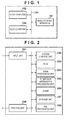
- Fig. 1 is a block diagram exemplifying the arrangement of a printing system
- Fig. 2 is a block diagram exemplifying the arrangement of an image forming apparatus 101;
- Fig. 3 is a block diagram showing the detailed arrangement of a toner save information processing unit 205;
- Fig. 4 is a block diagram showing the detailed arrangement of an image processing unit 204;
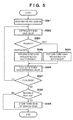
- Fig. 5 is a flowchart showing toner save processing in toner save printing according to the first embodiment
- Fig. 6 is a view showing a screen which prompts the user to select a toner consumption amount in toner saving
- Fig. 7 is a view showing a screen which prompts the user to select a priority item in toner saving
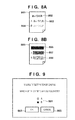
- Figs. 8A and 8B are views each exemplifying a printout from the image forming apparatus 101;
- Fig. 9 is a view showing a screen which prompts the user to select a visibility test result in toner saving
- Fig. 10 is a flowchart showing details of toner save processing in "text priority"
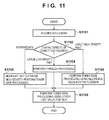
- Fig. 11 is a flowchart showing details of toner save processing in "photo priority"
- Figs. 12A to 12F are graphs each showing the distribution characteristic of the histogram of a photo part
- Fig. 13 is a flowchart showing toner save processing in toner save printing according to the second embodiment
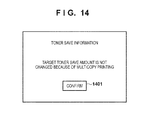
- Fig. 14 is a view showing a toner save information display screen in the second embodiment
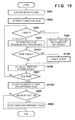
- Fig. 15 is a flowchart showing toner save processing in toner save printing according to the third embodiment
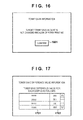
- Fig. 16 is a view showing a toner save information display screen in the third embodiment
- Fig. 17 is a view showing a toner save difference value information display screen in the
- Fig. 18 is a flowchart showing toner save processing in toner save printing according to the fourth embodiment.
- the first embodiment will describe a method capable of keeping the setting of a toner save amount and ensuring a user's desired image quality in an image forming apparatus.
- the embodiment will exemplify a multi-function peripheral having a plurality of functions (for example, copy, print, and FAX).
- An image forming apparatus 101 shown in Fig. 1 can implement printout from host computers 102 and 103 via a network 104.
- the image forming apparatus 101 can transmit read image data to the host computers 102 and 103.
- the image forming apparatus 101 can print out (copy) read image data.
- the first embodiment assumes printout (so printing instructions sent) from the host computers 102 and 103.
- the present invention is not limited to this and is effective even in a copy operation which similarly uses a printing apparatus.
- the image forming apparatus 101 includes an input unit 201, system control unit 202, ROM 203, image processing unit 204, toner save information processing unit 205, UI unit 206, storage unit 207, printing unit 208, and PDL processing unit 209. Details of each unit will be further described later.
- Toner save printing is set by two methods.
- One method is print setting by a printer driver installed in each of the host computers 102 and 103. In this setting, every time the user prints out (instructs printing of a document), he sets a toner consumption amount in toner saving with a slider bar 601 for setting it, and confirms it by pressing an OK button 602. To cancel the setting, the user presses a cancel button 603. That is, the toner consumption amount is set in every printout.
- the other method sets a toner consumption amount using the screen of Fig. 6 displayed on the UI unit 206 of the image forming apparatus 101, similar to the printer driver. In this case, all printouts from the image forming apparatus 101 are printed at a set toner consumption amount.
- An example "75%" indicated by the slider bar 601 means that printing is executed using 75% of a toner amount used in normal printing.
- the first embodiment will explain a case in which the image forming apparatus 101 sets a toner consumption amount in toner saving.
- the user can select an object which has priority in toner save printing.
- the user can select "photo priority” or "text priority” displayed in an area 701.
- toner save processing is performed up to an "allowable value” for the photo part of a printout, and up to a "lower limit value” for the text part using a parameter smaller by one step than the "allowable value”.
- the "lower limit value” is smaller than the "allowable value”.
- toner save processing is performed up to an "allowable value” for the text part of a printout, and up to a “lower limit value” for the text part.
- the storage unit 207 saves in advance a toner save coefficient for "photo priority” and a toner save coefficient for "text priority” to perform this processing.
- the "allowed value” and “lower limit value” to the set text part and the “allowed value” and “lower limit value” to the photo part are stored in the storage unit 207, and referred in S504 and S505 of Fig. 5 to be described, respectively.
- Figs. 8A and 8B exemplify printouts from the image forming apparatus 101 when deciding an "allowable value” and “lower limit value”.
- Fig. 8A shows an example of deciding an "allowable value” and “lower limit value” for the text.
- Fig. 8B shows an example of deciding an "allowable value” and “lower limit value” for the photograph.
- Fig. 9 is a view exemplifying a screen displayed on the UI unit 206.
- the user selects, from a printout 801 from the image forming apparatus 101, a text which is determined to be allowable upon toner save processing.
- a printing result 802 in normal output
- a printing result 803 when "75%” is selected with the slider bar 601
- a printing result 804 when "50%” is selected with the slider bar 601.
- "A” and “B” attached to the printing results are choices corresponding to "A” and "B” on a visibility test screen in toner saving shown in Fig. 9 .
- the user selects "A” or "B” using a selection button in an area 901 of the visibility test screen in toner saving, and presses a button 902, thereby deciding an "allowable value”.
- the storage unit 207 saves the decided "allowable value” and "lower limit value".
- the lower limit value is (automatically) set to 50% when the allowable value is set to 75%, and 25% when the allowable value is set to 50%.
- this is merely an example.
- text or image density examples corresponding to these values are displayed.
- the user may approve the input allowable value and lower limit value (so the user may decide both the allowable value and the lower limit value).
- the other value may be (automatically) decided, similar to the example of Figs. 8A and 8B .
- the user can decide at least one of the allowable value and lower limit value.
- the toner save information processing unit 205 and image processing unit 204 shown in Fig. 2 execute toner save processing in toner save printing.
- the toner save information processing unit 205 includes a job analysis unit 301 and toner save calculation unit 302.
- the image processing unit 204 includes an input unit 401, color processing unit 402, toner save processing unit 403, image forming unit 404, and output unit 405.
- Toner save processing in toner save printing according to the first embodiment will be explained with reference to a flowchart shown in Fig. 5 . Note that this processing is implemented by executing it with the system control unit 202 of the image forming apparatus 101 in accordance with a program stored in the ROM 203.
- step S501 the input unit 201 receives printer driver data (a print job) sent from the printer driver in the host computer 102.
- the PDL processing unit 209 analyzes the received printer driver data, and creates PDL data. After that, the PDL processing unit 209 rasterizes the PDL data to create bitmap data, image-compresses the created bitmap data, and transmits the compressed data to the image processing unit 204.
- the compression method a general method (for example, JPEG) is used.
- step S502 the system control unit 202 transmits, to the toner save information processing unit 205, the set value of a target toner save amount set on the UI unit 206.
- the toner save calculation unit 302 receives the set value.
- a toner consumption amount in toner saving is set by designating (via) the UI shown in Fig. 6 .
- step S503 the system control unit 202 transmits, to the toner save information processing unit 205, the setting of a priority item in toner save printing that is set on the UI unit 206.
- the toner save calculation unit 302 determines the setting of the priority item.
- step S504 If the toner saving calculation unit 302 determines that "photo priority" is set, the process advances to step S504, and the toner save calculation unit 302 reads out the toner save coefficient for "photo priority" from the storage unit 207, and transmits it to the toner save processing unit 403 of the image processing unit 204.
- step S504 toner save processing for photo priority is performed for the first page as the page of interest using the target toner save amount set in step S502.
- step S502 for the second and subsequent pages, the toner save calculation unit 302 adds a toner save difference value calculated in step S506 (to be described later) to the set target toner save amount, and sets the calculated value as a target toner save amount for the next page.
- step S502 for the first page (of the next print job), the toner save calculation unit 302 adds a toner save difference value saved in step S509 (to be described later) to the set target toner save amount, and sets the calculated value as a target toner save amount for the next page.
- a target toner save amount reflecting the difference value will be referred to as a target toner save amount set in step S502.
- step S503 If the toner saving calculation unit 302 determines in step S503 that "text priority" is set, the process advances to step S505, and the toner save calculation unit 302 reads out the toner save coefficient for "text priority" from the storage unit 207, and transmits it to the toner save processing unit 403 of the image processing unit 204. In step S505, toner save processing for text priority is performed using the target toner save amount set in step S502.
- the input unit 401 in the image processing unit 204 decompresses the image-compressed bitmap data.
- the color processing unit 402 performs color conversion for the decompressed bitmap data. Color conversion is processing of, when bitmap data is RGB data, converting it into CMYK data, and when it is CMYK data, not converting it.
- the toner save processing unit 403 calculates an actual toner save amount from the histogram of bitmap data (of the page of interest) before toner save processing and that of bitmap data (of the page of interest) after toner save processing.
- Bitmap data before toner save processing is bitmap data before processing in step S504 (or step S505).
- Bitmap data after toner save processing is bitmap data after processing in step S504 (or step S505).
- the actual toner save amount is a difference between toner save amounts before and after toner save processing in the toner save processing unit 403.
- a sum A is calculated by adding the C, M, Y, and K values of each pixel in bitmap data (of the page of interest) before toner save processing for all the pixels of the bitmap data.
- a sum B is calculated by adding the C, M, Y, and K values of each pixel in bitmap data (of the page of interest) after toner save processing for all the pixels of the bitmap data. Assuming that the sums A and B of pixels and consumed toner amounts have a linear relationship, the consumed toner amounts are given by k ⁇ A (g) and k ⁇ B (g) (k is a coefficient).
- the calculated actual toner save amount is compared with the target toner save amount set in step S502.
- the toner save processing unit 403 calculates a toner save difference value by subtracting the actual toner save amount from the target toner save amount, and transmits it to the toner save calculation unit 302. For example, when the target toner save value set in step S502 is 25%, the calculated actual toner save amount (k ⁇ A - 0.83k ⁇ A (g)) is compared with the target toner save amount (k ⁇ A - 0.75k ⁇ A (g)). Subtracting the actual toner save amount from the target toner save amount yields 0.08k ⁇ A (g).
- toner save calculation unit 302. When toner is reduced to only 0.83k ⁇ A (g), the remaining difference of 0.08k ⁇ A (g) is transmitted to the toner save calculation unit 302. For example, when a given page has few images and most of the page is blank, there are few objects for which toner can be reduced, and the target toner save amount cannot be achieved. In contrast, when toner is reduced to 0.65k ⁇ A (g) at the 75% setting, that is, 0.75k ⁇ A (g), the achieved difference of 0.1k ⁇ A (g) is transmitted to the toner save calculation unit 302.
- N is an integer of 2 or more
- a sum C is calculated by adding the C, M, Y, and K values of each pixel in bitmap data before toner save processing of the Nth page for all the pixels.
- the job analysis unit 301 determines whether processing is completed up to the final page. If the current page is not the final page, the toner save calculation unit 302 calculates a new target toner save amount including (using) the received toner save difference value in step S502.
- the target toner save value for the second page is adjusted based on the toner save difference value of the first page and the target toner save value for the third page is adjusted based on the toner save different value of the second page etc.
- the new target toner save amount is 0.75k ⁇ C (g). If 0.08k ⁇ A (g) is remaining as the toner save difference value calculated in step S506, the new target toner save value is 0.75k ⁇ C (g) - 0.08k ⁇ A (g).
- step S502 ((0.75k ⁇ C - 0.08k ⁇ A) ⁇ 100/(k ⁇ C))% is set again as the (adjusted) target toner save value. Thereafter, the processes in steps S502 to S507 are repeated. If the job analysis unit 301 determines in step S507 that the current page is the final page, the toner save calculation unit 302 determines in step S508 whether there is a toner save difference value to be considered for the next job different from the document. If the toner save calculation unit 302 determines that there is no toner save difference value to be considered, the process ends.
- the toner save calculation unit 302 determines that there is a toner save difference value to be considered, the toner save calculation unit 302 transmits, to the storage unit 207, a toner save difference value obtained at the end of all pages, and the storage unit 207 saves it in step S509.
- the toner save calculation unit 302 calculates a new target toner save amount including the toner save difference value saved in the storage unit 207.
- the process skips step S509.
- the target value may exceed an appropriate printing range owing to accumulation of toner save difference values between jobs.
- the determination criterion in step S508 may be a user-designated option, and if an option "absorb" is designated for the next job, the difference value may be saved. In this case, if no option is designated, the difference value to be saved is set to 0.
- the image forming unit 404 performs image forming processing, and the output unit 405 transmits print data to the printing unit 208.
- the printing unit 208 prints out in accordance with the print data.
- step S1005 If the target toner save value exceeds the allowable value in step S1005, the process advances to step S1006, and the toner save calculation unit 302 prepares a linear processing coefficient capable of achieving the target toner save value, and transmits it to the toner save processing unit 403.
- the toner save processing unit 403 performs toner save processing for bitmap data using the linear processing coefficient in the entire density region, as shown in Fig. 12B . If the target toner save value is equal to or smaller than the allowable value in step S1005, the toner save calculation unit 302 determines, in step S1001 using bitmap data which has been converted into CMYK data by the color processing unit 402, whether the text color of the text part is a multi-order color or single color.
- a single color is a color containing only a single color component
- a multi-order color is a color containing a plurality of color components. If the text color is a multi-order color, the process advances to step S1002, and the toner save calculation unit 302 replaces the multi-order color with a single color having a smallest color difference. For example, when the processing target color is red, red serving as a multi-order color is replaced with magenta which is the single color having a smallest color difference. Red contains yellow and magenta color components, so when it is replaced with magenta, toner is saved by the yellow toner amount. When a multi-order color is converted into a single color, not only hue but also lightness (density) change.
- step S1003 the toner save calculation unit 302 prepares, for bitmap data, a linear processing coefficient capable of keeping to the "allowable value" for the text, and transmits it to the toner save processing unit 403.
- the toner save processing unit 403 performs toner save processing for the bitmap data using the coefficient for the text part (text region).
- step S1004 the toner save calculation unit 302 prepares a linear processing coefficient capable of keeping to the "lower limit value" for the photograph, and transmits it to the toner save processing unit 403.
- the toner save processing unit 403 performs toner save processing using the coefficient for the photo part (photo region).
- the text regions and the photo regions have been determined in the target image in accordance with the well-known technique.
- the text region is determined by detecting edges in the target image.
- Remaining regions are determined to be the photo regions.
- the color processing unit 402 acquires the histogram of the photo part in step S1101, and the toner save calculation unit 302 determines the distribution result (distribution characteristic) in step S1102. If the toner saving calculation unit 302 determines that the center of the peak of the histogram is on the right side from the center, that is, the distribution has a large high-density part ( Fig. 12A ), the process advances to step S1103.
- the toner save calculation unit 302 prepares a linear processing coefficient capable of keeping to the "allowable value" for the photograph, as shown in Fig. 12B , and transmits it to the toner save processing unit 403.
- the toner save processing unit 403 performs toner save processing using the coefficient for the photo part.
- step S1103 if the target toner save value exceeds the allowable value, the toner save calculation unit 302 performs toner save processing using a linear processing coefficient capable of achieving the target toner save value. If the target toner save value is smaller than the allowable value, the toner save calculation unit 302 performs toner save processing using a linear processing coefficient capable of keeping to the allowable value.
- step S1102 determines in step S1102 that the center of the peak of the histogram is on the left side from the center, that is, the distribution has a large low-density part ( Fig. 12C )
- the process advances to step S1104.
- the toner save calculation unit 302 prepares a coefficient for performing no processing, as shown in Fig. 12D , and transmits it to the toner save processing unit 403.
- the toner save processing unit 403 performs toner save processing using the coefficient for the photo part.
- step S1102 determines in step S1102 that, for example, the histogram has a plurality of peaks and it cannot be determined which of low- and high-density parts is larger ( Fig. 12E ).
- the process advances to step S1105.
- the toner save calculation unit 302 prepares a linear processing coefficient capable of keeping to the "allowable value" for the photograph in the high-density part, without performing processing in the low-density part, as shown in Fig. 12F , and transmits it to the toner save processing unit 403.
- the toner save processing unit 403 performs toner save processing using the coefficient for the photo part.
- step S1105 if the target toner save value exceeds the allowable value, the toner save calculation unit 302 performs toner save processing for the high-density part using a linear processing coefficient capable of achieving the target toner save value, without performing processing for the low-density part. If the target toner save value is smaller than the allowable value, the toner save calculation unit 302 performs toner save processing using a linear processing coefficient capable of keeping to the allowable value, without performing processing for the low-density part.
- step S1102 it is also possible to calculate the weighted average of the center of the peak by calculating a weighted average of peaks of density distribution, where the peaks are weighted by frequencies of respective peaks, and compare it with a threshold.
- two thresholds high-density threshold and low-density threshold are prepared in advance to discriminate a distribution characteristic having a large high-density part, a distribution characteristic having a large low-density part, and an intermediate distribution characteristic. If the center of the peak is a density lower than the low-density threshold, it can be determined that the image has a characteristic in which the low-density part is large.
- the center of the peak is a density higher than the high-density threshold, it can be determined that the image has a characteristic in which the high-density part is large. If the center of the peak is a density which is higher than the low-density threshold and lower than the high-density threshold, it can be determined that the image has an intermediate characteristic.
- step S1106 the toner save calculation unit 302 prepares a linear processing coefficient capable of keeping to the "lower limit value" for the text, and transmits it to the toner save processing unit 403.
- the toner save processing unit 403 performs toner save processing using the coefficient for the text part.
- a set toner save amount can be kept to strictly in accordance with the setting of an object which has priority in toner save processing, and an image quality the user wants can be maintained.
- Toner save processing in toner save printing according to the second embodiment will be explained with reference to a flowchart shown in Fig. 13 . Note that this processing is implemented by executing it by a system control unit 202 of an image forming apparatus 101 in accordance with a program stored in a ROM 203. Processes in steps S501 to S505 are the same as those in the first embodiment, and a description thereof will not be repeated.
- a job analysis unit 301 determines whether a job to be printed designates multicopy printing. If the job designates multicopy printing, the process advances to step S1302, and the job analysis unit 301 displays, on the screen of a UI unit 206, a screen "a new target toner save amount is not changed because of multicopy printing" as shown in Fig. 14 . Although this screen can be canceled by pressing a button 1401, it automatically disappears upon the lapse of a predetermined time. If a plurality of copies are designated, the job analysis unit 301 determines in step S1301 that the job designates multicopy printing.
- a toner save processing unit 403 calculates an actual toner save amount from the histogram of bitmap data before toner save processing and that of bitmap data after toner save processing, and compares the calculated actual toner save amount with a target toner save amount set in step S502. After the comparison, the toner save processing unit 403 calculates a toner save difference value by subtracting the actual toner save amount from the target toner save amount, and transmits it to a toner save calculation unit 302.
- step S507 the job analysis unit 301 determines whether image processing is completed up to the final page. If the current page is not the final page, the process branches to step S503, so the toner save calculation unit 302 does not change the target toner save amount.
- the toner save difference value is transmitted to a storage unit 207, and the storage unit 207 accumulates and saves it. After that, the processes in steps S503 to S507 are repeated. Every time one page ends, the toner save difference value is transmitted to the storage unit 207, and added to the toner save difference value of a preceding page.
- step S507 the job analysis unit 301 determines in step S507 that the current page is the final page, the process advances to step S1303, and the toner save calculation unit 302 acquires the toner save difference value in multicopy printing that is accumulated in the storage unit 207.
- step S508 the toner save calculation unit 302 determines whether there is a toner save difference value to be considered for the next job. If there is no toner save difference value to be considered, the process ends. If there is a toner save difference value to be considered, the toner save calculation unit 302 transmits, to the storage unit 207, a value obtained by accumulating toner save difference values obtained at the end of all pages, and the storage unit 207 saves it in step S509.
- the second embodiment when multicopy printing is designated, printing continues without calculating a new target toner save amount for the next page based on the toner save difference value.
- the toner save difference value is calculated for an entire print job, and the difference can be compensated for in the next print job.
- the third embodiment considers the fact that when print data contains a form, the output results of respective printouts are desirably free from a difference. To attain this, even if there is a toner save difference value, a new target toner save amount for the next page is not considered.
- the form is data defined separately.
- the form is a print data file defined in advance. Since the form is cited in a predetermined format, the presence/absence of a form in print data can be determined.
- Toner save processing in toner save printing according to the third embodiment will be explained with reference to a flowchart shown in Fig. 15 . Note that this processing is implemented by executing it by a system control unit 202 of an image forming apparatus 101 in accordance with a program stored in a ROM 203. Processes in steps S501 to S505 are the same as those in the first embodiment, and a description thereof will not be repeated.
- a form analysis unit 303 determines whether a job to be printed contains a form. If the form analysis unit 303 determines that the job contains a form, the process advances to step S1502, and a job analysis unit 301 displays, on the screen of a UI unit 206, a screen "a new target toner save amount is not changed because of form printing", as shown in Fig. 16 . Although this screen can be canceled by pressing a button 1601, it automatically disappears upon the lapse of a predetermined time.
- a toner save processing unit 403 calculates an actual toner save amount from the histogram of bitmap data before toner save processing and that of bitmap data after toner save processing, and compares the calculated actual toner save amount with a target toner save amount set in step S502. After the comparison, the toner save processing unit 403 calculates a toner save difference value by subtracting the actual toner save amount from the target toner save amount, and transmits it to a toner save calculation unit 302.
- step S507 the job analysis unit 301 determines whether image processing is completed up to the final page. If the current page is not the final page, the toner save calculation unit 302 does not change the target toner save amount in step S502. The toner save difference value is transmitted to a storage unit 207, and the storage unit 207 saves it. Thereafter, the processes in steps S504 to S507 are repeated. Every time one page ends, the toner save difference value is transmitted to the storage unit 207, and added to the toner save difference value of a preceding page.
- step S507 the job analysis unit 301 determines in step S507 that the current page is the final page, the process advances to step S1503, and the toner save calculation unit 302 acquires the toner save difference value in form printing that is accumulated in the storage unit 207.
- step S508 the toner save calculation unit 302 determines whether there is a toner save difference value to be considered for the next job. If there is no toner save difference value to be considered, the process ends. If there is a toner save difference value to be considered, the toner save calculation unit 302 transmits, to the storage unit 207, a toner save difference value obtained at the end of all pages, and the storage unit 207 saves it.
- printing continues without calculating a new target toner save amount for the next page based on the toner save difference value.
- the same image quality can be obtained for all pages.
- the toner save difference value is managed for each user to calculate a new target toner save amount in accordance with the user.
- Toner save processing in toner save printing according to the fourth embodiment will be explained with reference to a flowchart shown in Fig. 18 . Note that this processing is implemented by executing it by a system control unit 202 of an image forming apparatus 101 in accordance with a program stored in a ROM 203. Processes in steps S501 to S507 are the same as those in the first embodiment, and a description thereof will not be repeated.
- step S1801 a job analysis unit 301 acquires user information of the job, and saves it in a storage unit 207.
- the process advances to step S1802, and a toner save calculation unit 302 saves a toner save difference value generated in the job in association with the user information which has already been stored in the storage unit 207.
- the target toner save amount is calculated in consideration of the toner save difference value which has been saved in association with the user.
- the job analysis unit 301 acquires user information of the job in step S1801. Based on information saved in the storage unit 207, the job analysis unit 301 determines whether the user has a toner save difference value. If the user has a toner save difference value, the toner save calculation unit 302 calculates a new target toner save amount in step S502. If the user does not have a toner save difference value, the toner save calculation unit 302 calculates a target toner save amount without considering a toner save difference value.
- the user can confirm a toner save difference value for each user on a screen shown in Fig. 17 that is displayed on the screen of a UI unit 206.
- a list of user names 1701 and toner save difference values 1702 of the users is displayed on the screen.
- a step corresponding to step S508 of Fig. 5 is not performed in the fourth embodiment, but may be executed immediately before step S1802. In this case, step S1802 is executed as long as an option for absorbing a toner save difference value in the next job is selected.
- the toner save difference value is managed for each user. Reduction of a toner amount usable by a user, which is caused by printing by another user, can be prevented.
- aspects of the present invention can also be realized by a computer of a system or apparatus (or devices such as a CPU or MPU) that reads out and executes a program recorded on a memory device to perform the functions of the above-described embodiment(s), and by a method, the steps of which are performed by a computer of a system or apparatus by, for example, reading out and executing a program recorded on a memory device to perform the functions of the above-described embodiment(s).
- the program is provided to the computer for example via a network or from a recording medium of various types serving as the memory device (for example, computer-readable medium).
- the present invention also provides an image forming apparatus, method of controlling an image forming apparatus and program as set out in the following numbered clauses (in which the reference numbers are exemplary and non-limiting):
Landscapes
- Engineering & Computer Science (AREA)
- Theoretical Computer Science (AREA)
- Physics & Mathematics (AREA)
- General Physics & Mathematics (AREA)
- Human Computer Interaction (AREA)
- General Engineering & Computer Science (AREA)
- Microelectronics & Electronic Packaging (AREA)
- Control Or Security For Electrophotography (AREA)
- Accessory Devices And Overall Control Thereof (AREA)
Description
- The present invention relates to a technique of forming an image at a predetermined toner consumption amount.
- A processing mode, called "toner save mode", for suppressing the color material consumption amount of an image forming apparatus is widely known as a function for reducing the density in printing to save printing costs. Recently, in the toner save mode, an image quality as close as possible to that output in normal printing is requested of processing while saving toner.
- As this processing method, there is proposed a method of switching an optimum toner save method (method of thinning out pixels in a predetermined cycle or a method using a toner save gamma correction table) for each object which forms a document to be printed (see, for example, Japanese Patent Laid-Open No.
2001-083845 - However, in the prior art literature, the toner save method is switched for each object. Depending on the ratio of each object to a document, the toner consumption amount in toner saving mode changes.
- The present invention provides an apparatus and method capable of keeping to a preset toner consumption amount during toner saving, while still maintaining the user's desired image quality.
- The present invention comprises the following arrangement.
- The present invention in its first aspect provides an image forming apparatus as specified in claims 1 to 7.
- The present invention in its second aspect provides a method of controlling an image forming apparatus as specified in claim 8.
- The present invention in its third aspect provides a program for causing a computer to function as each means of an image forming apparatus defined in any one of claims 1 to 7, as specified in claim 9.
- According to the present invention, a preset toner consumption amount in toner saving can be strictly adhered to, and the user's desired image quality can be maintained.
- Further features of the present invention will become apparent from the following description of exemplary embodiments with reference to the attached drawings.
-
Fig. 1 is a block diagram exemplifying the arrangement of a printing system; -
Fig. 2 is a block diagram exemplifying the arrangement of animage forming apparatus 101; -
Fig. 3 is a block diagram showing the detailed arrangement of a toner saveinformation processing unit 205; -
Fig. 4 is a block diagram showing the detailed arrangement of animage processing unit 204; -
Fig. 5 is a flowchart showing toner save processing in toner save printing according to the first embodiment; -
Fig. 6 is a view showing a screen which prompts the user to select a toner consumption amount in toner saving; -
Fig. 7 is a view showing a screen which prompts the user to select a priority item in toner saving; -
Figs. 8A and 8B are views each exemplifying a printout from theimage forming apparatus 101; -
Fig. 9 is a view showing a screen which prompts the user to select a visibility test result in toner saving; -
Fig. 10 is a flowchart showing details of toner save processing in "text priority"; -
Fig. 11 is a flowchart showing details of toner save processing in "photo priority"; -
Figs. 12A to 12F are graphs each showing the distribution characteristic of the histogram of a photo part; -
Fig. 13 is a flowchart showing toner save processing in toner save printing according to the second embodiment; -
Fig. 14 is a view showing a toner save information display screen in the second embodiment; -
Fig. 15 is a flowchart showing toner save processing in toner save printing according to the third embodiment; -
Fig. 16 is a view showing a toner save information display screen in the third embodiment; -
Fig. 17 is a view showing a toner save difference value information display screen in the -
Fig. 18 is a flowchart showing toner save processing in toner save printing according to the fourth embodiment. - Preferred embodiments of the present invention will now be described in detail, with reference to the accompanying drawings.
- The first embodiment will describe a method capable of keeping the setting of a toner save amount and ensuring a user's desired image quality in an image forming apparatus. As the image forming apparatus, the embodiment will exemplify a multi-function peripheral having a plurality of functions (for example, copy, print, and FAX).
- An example of the arrangement of a printing system including an image forming apparatus which implements toner save printing, and a plurality of host computers will be explained with reference to a block diagram shown in
Fig. 1 . Animage forming apparatus 101 shown inFig. 1 can implement printout fromhost computers network 104. By using an image reading apparatus (not shown), theimage forming apparatus 101 can transmit read image data to thehost computers image forming apparatus 101 can print out (copy) read image data. - The first embodiment assumes printout (so printing instructions sent) from the
host computers - An example of the arrangement of the
image forming apparatus 101 will be explained with reference to a block diagram shown inFig. 2 . As shown inFig. 2 , theimage forming apparatus 101 includes aninput unit 201,system control unit 202,ROM 203,image processing unit 204, toner saveinformation processing unit 205,UI unit 206,storage unit 207,printing unit 208, andPDL processing unit 209. Details of each unit will be further described later. - An example of a screen displayed on the display devices (monitors) of the
host computers UI unit 206 will be explained with reference toFig. 6 . Toner save printing is set by two methods. One method is print setting by a printer driver installed in each of thehost computers slider bar 601 for setting it, and confirms it by pressing anOK button 602. To cancel the setting, the user presses acancel button 603. That is, the toner consumption amount is set in every printout. - The other method sets a toner consumption amount using the screen of
Fig. 6 displayed on theUI unit 206 of theimage forming apparatus 101, similar to the printer driver. In this case, all printouts from theimage forming apparatus 101 are printed at a set toner consumption amount. An example "75%" indicated by theslider bar 601 means that printing is executed using 75% of a toner amount used in normal printing. The first embodiment will explain a case in which theimage forming apparatus 101 sets a toner consumption amount in toner saving. - An example of a screen displayed on the monitors of the
host computers UI unit 206 will be explained with reference toFig. 7 . The user can select an object which has priority in toner save printing. The user can select "photo priority" or "text priority" displayed in anarea 701. When the user selects "photo priority", toner save processing is performed up to an "allowable value" for the photo part of a printout, and up to a "lower limit value" for the text part using a parameter smaller by one step than the "allowable value". The "lower limit value" is smaller than the "allowable value". When the user selects "text priority", toner save processing is performed up to an "allowable value" for the text part of a printout, and up to a "lower limit value" for the text part. Note that thestorage unit 207 saves in advance a toner save coefficient for "photo priority" and a toner save coefficient for "text priority" to perform this processing. The "allowed value" and "lower limit value" to the set text part and the "allowed value" and "lower limit value" to the photo part are stored in thestorage unit 207, and referred in S504 and S505 ofFig. 5 to be described, respectively. -
Figs. 8A and 8B exemplify printouts from theimage forming apparatus 101 when deciding an "allowable value" and "lower limit value".Fig. 8A shows an example of deciding an "allowable value" and "lower limit value" for the text.Fig. 8B shows an example of deciding an "allowable value" and "lower limit value" for the photograph.Fig. 9 is a view exemplifying a screen displayed on theUI unit 206. - When deciding an "allowable value" and "lower limit value" for the text, the user selects, from a
printout 801 from theimage forming apparatus 101, a text which is determined to be allowable upon toner save processing. InFig. 8A , the user selects one of aprinting result 802 in normal output, a printing result 803 when "75%" is selected with theslider bar 601, and aprinting result 804 when "50%" is selected with theslider bar 601. "A" and "B" attached to the printing results are choices corresponding to "A" and "B" on a visibility test screen in toner saving shown inFig. 9 . When the user selects the printing result 803, that is, "A" (75% consumption amount) as the "allowable value", a toner save coefficient obtained when "50%" is selected with the slider bar is (automatically) set as the "lower limit value". Similarly, when the user selects theprinting result 804, that is, "B" as the "allowable value", a toner save coefficient obtained when "25%" is selected with the slider bar is (automatically) set as the "lower limit value". - For a photograph, similar to the decision of the "allowable value" and "lower limit value" for the text, the user decides an "allowable value" and "lower limit value" by selecting either of "A" and "B" attached to respective printing results on a
printout 805 inFig. 8B . - In this manner, based on printing results, the user selects "A" or "B" using a selection button in an
area 901 of the visibility test screen in toner saving, and presses abutton 902, thereby deciding an "allowable value". When the user presses abutton 903, the decision is canceled. Note that thestorage unit 207 saves the decided "allowable value" and "lower limit value". In this example, the lower limit value is (automatically) set to 50% when the allowable value is set to 75%, and 25% when the allowable value is set to 50%. However, this is merely an example. As an alternative, for example, when the user inputs an allowable value and lower limit value, text or image density examples corresponding to these values are displayed. After checking the displayed text or image, the user may approve the input allowable value and lower limit value (so the user may decide both the allowable value and the lower limit value). Alternatively, by approving either an allowable value or lower limit value, the other value may be (automatically) decided, similar to the example ofFigs. 8A and 8B . In any case, the user can decide at least one of the allowable value and lower limit value. - An outline of toner save printing will be explained. The toner save
information processing unit 205 andimage processing unit 204 shown inFig. 2 execute toner save processing in toner save printing. As shown inFig. 3 , the toner saveinformation processing unit 205 includes ajob analysis unit 301 and toner savecalculation unit 302. As shown inFig. 4 , theimage processing unit 204 includes aninput unit 401,color processing unit 402, toner save processingunit 403,image forming unit 404, andoutput unit 405. - Toner save processing in toner save printing according to the first embodiment will be explained with reference to a flowchart shown in
Fig. 5 . Note that this processing is implemented by executing it with thesystem control unit 202 of theimage forming apparatus 101 in accordance with a program stored in theROM 203. - First, toner save processing when performing toner save printing for the first page (as a page of interest) of a document formed from a plurality of pages will be explained. In step S501, the
input unit 201 receives printer driver data (a print job) sent from the printer driver in thehost computer 102. ThePDL processing unit 209 analyzes the received printer driver data, and creates PDL data. After that, thePDL processing unit 209 rasterizes the PDL data to create bitmap data, image-compresses the created bitmap data, and transmits the compressed data to theimage processing unit 204. As the compression method, a general method (for example, JPEG) is used. - In step S502, the
system control unit 202 transmits, to the toner saveinformation processing unit 205, the set value of a target toner save amount set on theUI unit 206. The toner savecalculation unit 302 receives the set value. In particular, in step S502, a toner consumption amount in toner saving is set by designating (via) the UI shown inFig. 6 . In step S503, thesystem control unit 202 transmits, to the toner saveinformation processing unit 205, the setting of a priority item in toner save printing that is set on theUI unit 206. The toner savecalculation unit 302 determines the setting of the priority item. If the toner savingcalculation unit 302 determines that "photo priority" is set, the process advances to step S504, and the toner savecalculation unit 302 reads out the toner save coefficient for "photo priority" from thestorage unit 207, and transmits it to the toner save processingunit 403 of theimage processing unit 204. In step S504, toner save processing for photo priority is performed for the first page as the page of interest using the target toner save amount set in step S502. In step S502, for the second and subsequent pages, the toner savecalculation unit 302 adds a toner save difference value calculated in step S506 (to be described later) to the set target toner save amount, and sets the calculated value as a target toner save amount for the next page. In step S502, for the first page (of the next print job), the toner savecalculation unit 302 adds a toner save difference value saved in step S509 (to be described later) to the set target toner save amount, and sets the calculated value as a target toner save amount for the next page. A target toner save amount reflecting the difference value will be referred to as a target toner save amount set in step S502. - If the toner saving
calculation unit 302 determines in step S503 that "text priority" is set, the process advances to step S505, and the toner savecalculation unit 302 reads out the toner save coefficient for "text priority" from thestorage unit 207, and transmits it to the toner save processingunit 403 of theimage processing unit 204. In step S505, toner save processing for text priority is performed using the target toner save amount set in step S502. - The
input unit 401 in theimage processing unit 204 decompresses the image-compressed bitmap data. Thecolor processing unit 402 performs color conversion for the decompressed bitmap data. Color conversion is processing of, when bitmap data is RGB data, converting it into CMYK data, and when it is CMYK data, not converting it. - In step S506, the toner save processing
unit 403 calculates an actual toner save amount from the histogram of bitmap data (of the page of interest) before toner save processing and that of bitmap data (of the page of interest) after toner save processing. Bitmap data before toner save processing is bitmap data before processing in step S504 (or step S505). Bitmap data after toner save processing is bitmap data after processing in step S504 (or step S505). The actual toner save amount is a difference between toner save amounts before and after toner save processing in the toner save processingunit 403. As for a toner amount before toner save processing, a sum A is calculated by adding the C, M, Y, and K values of each pixel in bitmap data (of the page of interest) before toner save processing for all the pixels of the bitmap data. As for a toner amount after toner save processing, a sum B is calculated by adding the C, M, Y, and K values of each pixel in bitmap data (of the page of interest) after toner save processing for all the pixels of the bitmap data. Assuming that the sums A and B of pixels and consumed toner amounts have a linear relationship, the consumed toner amounts are given by k × A (g) and k × B (g) (k is a coefficient). The calculated actual toner save amount is compared with the target toner save amount set in step S502. After the comparison, the toner save processingunit 403 calculates a toner save difference value by subtracting the actual toner save amount from the target toner save amount, and transmits it to the toner savecalculation unit 302. For example, when the target toner save value set in step S502 is 25%, the calculated actual toner save amount (k × A - 0.83k × A (g)) is compared with the target toner save amount (k × A - 0.75k × A (g)). Subtracting the actual toner save amount from the target toner save amount yields 0.08k × A (g). When toner is reduced to only 0.83k × A (g), the remaining difference of 0.08k × A (g) is transmitted to the toner savecalculation unit 302. For example, when a given page has few images and most of the page is blank, there are few objects for which toner can be reduced, and the target toner save amount cannot be achieved. In contrast, when toner is reduced to 0.65k × A (g) at the 75% setting, that is, 0.75k × A (g), the achieved difference of 0.1k × A (g) is transmitted to the toner savecalculation unit 302. - Next, processing for the Nth page (N is an integer of 2 or more) of a document formed from a plurality of pages will be explained. A sum C is calculated by adding the C, M, Y, and K values of each pixel in bitmap data before toner save processing of the Nth page for all the pixels. In step S507, the
job analysis unit 301 determines whether processing is completed up to the final page. If the current page is not the final page, the toner savecalculation unit 302 calculates a new target toner save amount including (using) the received toner save difference value in step S502. So the target toner save value for the second page is adjusted based on the toner save difference value of the first page and the target toner save value for the third page is adjusted based on the toner save different value of the second page etc. For example, when the target toner save value set in step S502 before calculating an actual toner save amount is 75%, the new target toner save amount is 0.75k × C (g). If 0.08k × A (g) is remaining as the toner save difference value calculated in step S506, the new target toner save value is 0.75k × C (g) - 0.08k × A (g). In step S502, ((0.75k × C - 0.08k × A) × 100/(k × C))% is set again as the (adjusted) target toner save value. Thereafter, the processes in steps S502 to S507 are repeated. If thejob analysis unit 301 determines in step S507 that the current page is the final page, the toner savecalculation unit 302 determines in step S508 whether there is a toner save difference value to be considered for the next job different from the document. If the toner savecalculation unit 302 determines that there is no toner save difference value to be considered, the process ends. If the toner savecalculation unit 302 determines that there is a toner save difference value to be considered, the toner savecalculation unit 302 transmits, to thestorage unit 207, a toner save difference value obtained at the end of all pages, and thestorage unit 207 saves it in step S509. When steps S501 to S509 are repeated for the next job, the toner savecalculation unit 302 calculates a new target toner save amount including the toner save difference value saved in thestorage unit 207. InFig. 5 , if there is no difference value in step S508, that is, the difference value is 0, the process skips step S509. However, the target value may exceed an appropriate printing range owing to accumulation of toner save difference values between jobs. To prevent accumulation of difference values, the determination criterion in step S508 may be a user-designated option, and if an option "absorb" is designated for the next job, the difference value may be saved. In this case, if no option is designated, the difference value to be saved is set to 0. - After that, the
image forming unit 404 performs image forming processing, and theoutput unit 405 transmits print data to theprinting unit 208. Upon receiving the print data, theprinting unit 208 prints out in accordance with the print data. - Details of toner save processing in "text priority" will be described with reference to a flowchart shown in
Fig. 10 . Note that this processing is implemented by executing it by thesystem control unit 202 of theimage forming apparatus 101 in accordance with a program stored in theROM 203. - If the target toner save value exceeds the allowable value in step S1005, the process advances to step S1006, and the toner save
calculation unit 302 prepares a linear processing coefficient capable of achieving the target toner save value, and transmits it to the toner save processingunit 403. The toner saveprocessing unit 403 performs toner save processing for bitmap data using the linear processing coefficient in the entire density region, as shown inFig. 12B . If the target toner save value is equal to or smaller than the allowable value in step S1005, the toner savecalculation unit 302 determines, in step S1001 using bitmap data which has been converted into CMYK data by thecolor processing unit 402, whether the text color of the text part is a multi-order color or single color. A single color is a color containing only a single color component, and a multi-order color is a color containing a plurality of color components. If the text color is a multi-order color, the process advances to step S1002, and the toner savecalculation unit 302 replaces the multi-order color with a single color having a smallest color difference. For example, when the processing target color is red, red serving as a multi-order color is replaced with magenta which is the single color having a smallest color difference. Red contains yellow and magenta color components, so when it is replaced with magenta, toner is saved by the yellow toner amount. When a multi-order color is converted into a single color, not only hue but also lightness (density) change. When the paper color is white, the lightness of an image increases by a toner amount removed upon color component removal. To compensate for the increase, the value of the color component of the single color after conversion may be increased. Even when lightness compensation is performed in conversion from red into magenta, yellow toner hardly affects change of the lightness, and magenta toner increases only by a small amount. Even in this example, toner can be saved by the yellow toner amount. - If it is determined that the text color is not a multi-order color or replacement with a single color is completed in step S1002, the process advances to step S1003. In step S1003, the toner save
calculation unit 302 prepares, for bitmap data, a linear processing coefficient capable of keeping to the "allowable value" for the text, and transmits it to the toner save processingunit 403. The toner saveprocessing unit 403 performs toner save processing for the bitmap data using the coefficient for the text part (text region). - In step S1004, the toner save
calculation unit 302 prepares a linear processing coefficient capable of keeping to the "lower limit value" for the photograph, and transmits it to the toner save processingunit 403. The toner saveprocessing unit 403 performs toner save processing using the coefficient for the photo part (photo region). - The text regions and the photo regions have been determined in the target image in accordance with the well-known technique. For example, the text region is determined by detecting edges in the target image. Remaining regions are determined to be the photo regions.
- Next, details of toner save processing in "photo priority" will be described with reference to a flowchart shown in
Fig. 11 . Note that this processing is implemented by executing it by thesystem control unit 202 of theimage forming apparatus 101 in accordance with a program stored in theROM 203. - The
color processing unit 402 acquires the histogram of the photo part in step S1101, and the toner savecalculation unit 302 determines the distribution result (distribution characteristic) in step S1102. If the toner savingcalculation unit 302 determines that the center of the peak of the histogram is on the right side from the center, that is, the distribution has a large high-density part (Fig. 12A ), the process advances to step S1103. The toner savecalculation unit 302 prepares a linear processing coefficient capable of keeping to the "allowable value" for the photograph, as shown inFig. 12B , and transmits it to the toner save processingunit 403. The toner saveprocessing unit 403 performs toner save processing using the coefficient for the photo part. In step S1103, if the target toner save value exceeds the allowable value, the toner savecalculation unit 302 performs toner save processing using a linear processing coefficient capable of achieving the target toner save value. If the target toner save value is smaller than the allowable value, the toner savecalculation unit 302 performs toner save processing using a linear processing coefficient capable of keeping to the allowable value. - If the toner save
calculation unit 302 determines in step S1102 that the center of the peak of the histogram is on the left side from the center, that is, the distribution has a large low-density part (Fig. 12C ), the process advances to step S1104. The toner savecalculation unit 302 prepares a coefficient for performing no processing, as shown inFig. 12D , and transmits it to the toner save processingunit 403. The toner saveprocessing unit 403 performs toner save processing using the coefficient for the photo part. - If the toner save
calculation unit 302 determines in step S1102 that, for example, the histogram has a plurality of peaks and it cannot be determined which of low- and high-density parts is larger (Fig. 12E ), the process advances to step S1105. In this case, the toner savecalculation unit 302 prepares a linear processing coefficient capable of keeping to the "allowable value" for the photograph in the high-density part, without performing processing in the low-density part, as shown inFig. 12F , and transmits it to the toner save processingunit 403. The toner saveprocessing unit 403 performs toner save processing using the coefficient for the photo part. In step S1105, if the target toner save value exceeds the allowable value, the toner savecalculation unit 302 performs toner save processing for the high-density part using a linear processing coefficient capable of achieving the target toner save value, without performing processing for the low-density part. If the target toner save value is smaller than the allowable value, the toner savecalculation unit 302 performs toner save processing using a linear processing coefficient capable of keeping to the allowable value, without performing processing for the low-density part. - In the determination of step S1102, it is also possible to calculate the weighted average of the center of the peak by calculating a weighted average of peaks of density distribution, where the peaks are weighted by frequencies of respective peaks, and compare it with a threshold. In this case, two thresholds (high-density threshold and low-density threshold) are prepared in advance to discriminate a distribution characteristic having a large high-density part, a distribution characteristic having a large low-density part, and an intermediate distribution characteristic. If the center of the peak is a density lower than the low-density threshold, it can be determined that the image has a characteristic in which the low-density part is large. If the center of the peak is a density higher than the high-density threshold, it can be determined that the image has a characteristic in which the high-density part is large. If the center of the peak is a density which is higher than the low-density threshold and lower than the high-density threshold, it can be determined that the image has an intermediate characteristic.
- In step S1106, the toner save
calculation unit 302 prepares a linear processing coefficient capable of keeping to the "lower limit value" for the text, and transmits it to the toner save processingunit 403. The toner saveprocessing unit 403 performs toner save processing using the coefficient for the text part. - According to the first embodiment, a set toner save amount can be kept to strictly in accordance with the setting of an object which has priority in toner save processing, and an image quality the user wants can be maintained.
- The second embodiment according to the present invention will be described in detail with reference to the accompanying drawings. In the second embodiment, in addition to the first embodiment, when multicopy printing is designated, it is desirable that the output results of respective printouts do not have a difference. Even if there is a toner save difference value, a new target toner save amount for the next page is not considered. In multicopy printing, the same page is printed by a plurality of copies designated by the user.
- The arrangements of a printing system and image forming apparatus in the second embodiment are the same as those in the first embodiment, and a description thereof will not be repeated.
- Toner save processing in toner save printing according to the second embodiment will be explained with reference to a flowchart shown in
Fig. 13 . Note that this processing is implemented by executing it by asystem control unit 202 of animage forming apparatus 101 in accordance with a program stored in aROM 203. Processes in steps S501 to S505 are the same as those in the first embodiment, and a description thereof will not be repeated. - In step S1301, a
job analysis unit 301 determines whether a job to be printed designates multicopy printing. If the job designates multicopy printing, the process advances to step S1302, and thejob analysis unit 301 displays, on the screen of aUI unit 206, a screen "a new target toner save amount is not changed because of multicopy printing" as shown inFig. 14 . Although this screen can be canceled by pressing abutton 1401, it automatically disappears upon the lapse of a predetermined time. If a plurality of copies are designated, thejob analysis unit 301 determines in step S1301 that the job designates multicopy printing. - In step S506, a toner save
processing unit 403 calculates an actual toner save amount from the histogram of bitmap data before toner save processing and that of bitmap data after toner save processing, and compares the calculated actual toner save amount with a target toner save amount set in step S502. After the comparison, the toner save processingunit 403 calculates a toner save difference value by subtracting the actual toner save amount from the target toner save amount, and transmits it to a toner savecalculation unit 302. - In step S507, the
job analysis unit 301 determines whether image processing is completed up to the final page. If the current page is not the final page, the process branches to step S503, so the toner savecalculation unit 302 does not change the target toner save amount. The toner save difference value is transmitted to astorage unit 207, and thestorage unit 207 accumulates and saves it. After that, the processes in steps S503 to S507 are repeated. Every time one page ends, the toner save difference value is transmitted to thestorage unit 207, and added to the toner save difference value of a preceding page. - If the
job analysis unit 301 determines in step S507 that the current page is the final page, the process advances to step S1303, and the toner savecalculation unit 302 acquires the toner save difference value in multicopy printing that is accumulated in thestorage unit 207. In step S508, the toner savecalculation unit 302 determines whether there is a toner save difference value to be considered for the next job. If there is no toner save difference value to be considered, the process ends. If there is a toner save difference value to be considered, the toner savecalculation unit 302 transmits, to thestorage unit 207, a value obtained by accumulating toner save difference values obtained at the end of all pages, and thestorage unit 207 saves it in step S509. - According to the second embodiment, when multicopy printing is designated, printing continues without calculating a new target toner save amount for the next page based on the toner save difference value. Thus, the same image quality can be obtained for all pages. The toner save difference value is calculated for an entire print job, and the difference can be compensated for in the next print job.
- The third embodiment according to the present invention will be described in detail with reference to the accompanying drawings. In addition to the features of the first embodiment, the third embodiment considers the fact that when print data contains a form, the output results of respective printouts are desirably free from a difference. To attain this, even if there is a toner save difference value, a new target toner save amount for the next page is not considered. The form is data defined separately. For example, the form is a print data file defined in advance. Since the form is cited in a predetermined format, the presence/absence of a form in print data can be determined.
- The arrangements of a printing system and image forming apparatus in the third embodiment are the same as those in the first embodiment, and a description thereof will not be repeated.
- Toner save processing in toner save printing according to the third embodiment will be explained with reference to a flowchart shown in
Fig. 15 . Note that this processing is implemented by executing it by asystem control unit 202 of animage forming apparatus 101 in accordance with a program stored in aROM 203. Processes in steps S501 to S505 are the same as those in the first embodiment, and a description thereof will not be repeated. - In step S1501, a
form analysis unit 303 determines whether a job to be printed contains a form. If theform analysis unit 303 determines that the job contains a form, the process advances to step S1502, and ajob analysis unit 301 displays, on the screen of aUI unit 206, a screen "a new target toner save amount is not changed because of form printing", as shown inFig. 16 . Although this screen can be canceled by pressing abutton 1601, it automatically disappears upon the lapse of a predetermined time. - In step S506, a toner save
processing unit 403 calculates an actual toner save amount from the histogram of bitmap data before toner save processing and that of bitmap data after toner save processing, and compares the calculated actual toner save amount with a target toner save amount set in step S502. After the comparison, the toner save processingunit 403 calculates a toner save difference value by subtracting the actual toner save amount from the target toner save amount, and transmits it to a toner savecalculation unit 302. - In step S507, the
job analysis unit 301 determines whether image processing is completed up to the final page. If the current page is not the final page, the toner savecalculation unit 302 does not change the target toner save amount in step S502. The toner save difference value is transmitted to astorage unit 207, and thestorage unit 207 saves it. Thereafter, the processes in steps S504 to S507 are repeated. Every time one page ends, the toner save difference value is transmitted to thestorage unit 207, and added to the toner save difference value of a preceding page. - If the
job analysis unit 301 determines in step S507 that the current page is the final page, the process advances to step S1503, and the toner savecalculation unit 302 acquires the toner save difference value in form printing that is accumulated in thestorage unit 207. In step S508, the toner savecalculation unit 302 determines whether there is a toner save difference value to be considered for the next job. If there is no toner save difference value to be considered, the process ends. If there is a toner save difference value to be considered, the toner savecalculation unit 302 transmits, to thestorage unit 207, a toner save difference value obtained at the end of all pages, and thestorage unit 207 saves it. - According to the third embodiment, when form printing is designated, printing continues without calculating a new target toner save amount for the next page based on the toner save difference value. The same image quality can be obtained for all pages.
- The fourth embodiment according to the present invention will be described in detail with reference to the accompanying drawings. In the fourth embodiment, in addition to the first to third embodiments, the toner save difference value is managed for each user to calculate a new target toner save amount in accordance with the user.
- The arrangements of a printing system and image forming apparatus in the fourth embodiment are the same as those in the first embodiment, and a description thereof will not be repeated.
- Toner save processing in toner save printing according to the fourth embodiment will be explained with reference to a flowchart shown in
Fig. 18 . Note that this processing is implemented by executing it by asystem control unit 202 of animage forming apparatus 101 in accordance with a program stored in aROM 203. Processes in steps S501 to S507 are the same as those in the first embodiment, and a description thereof will not be repeated. - In step S1801, a
job analysis unit 301 acquires user information of the job, and saves it in astorage unit 207. After executing the processes in step S501 to S507, the process advances to step S1802, and a toner savecalculation unit 302 saves a toner save difference value generated in the job in association with the user information which has already been stored in thestorage unit 207. In step S502, the target toner save amount is calculated in consideration of the toner save difference value which has been saved in association with the user. - When processing the next job, the
job analysis unit 301 acquires user information of the job in step S1801. Based on information saved in thestorage unit 207, thejob analysis unit 301 determines whether the user has a toner save difference value. If the user has a toner save difference value, the toner savecalculation unit 302 calculates a new target toner save amount in step S502. If the user does not have a toner save difference value, the toner savecalculation unit 302 calculates a target toner save amount without considering a toner save difference value. - The user can confirm a toner save difference value for each user on a screen shown in
Fig. 17 that is displayed on the screen of aUI unit 206. As shown inFig. 17 , a list ofuser names 1701 and toner savedifference values 1702 of the users is displayed on the screen. Note that a step corresponding to step S508 ofFig. 5 is not performed in the fourth embodiment, but may be executed immediately before step S1802. In this case, step S1802 is executed as long as an option for absorbing a toner save difference value in the next job is selected. - According to the fourth embodiment, the toner save difference value is managed for each user. Reduction of a toner amount usable by a user, which is caused by printing by another user, can be prevented.
- Aspects of the present invention can also be realized by a computer of a system or apparatus (or devices such as a CPU or MPU) that reads out and executes a program recorded on a memory device to perform the functions of the above-described embodiment(s), and by a method, the steps of which are performed by a computer of a system or apparatus by, for example, reading out and executing a program recorded on a memory device to perform the functions of the above-described embodiment(s). For this purpose, the program is provided to the computer for example via a network or from a recording medium of various types serving as the memory device (for example, computer-readable medium).
- The present invention also provides an image forming apparatus, method of controlling an image forming apparatus and program as set out in the following numbered clauses (in which the reference numbers are exemplary and non-limiting):
- 1. An image forming apparatus (101) comprising:
- setting means (201; 206; S502) for setting a target toner save value used in toner save processing;
- processing means (204, 403; S504; S505) for performing, in accordance with the target toner save value set by the setting means, toner save processing for data of a page of interest of a print job formed from a plurality of pages; and
- calculation means (205, 302; S506) for calculating, as a toner save amount, a toner consumption amount difference before and after the toner save processing by the processing means, and calculating a difference value between the calculated toner save amount and the target toner save value set by the setting means,
- wherein the setting means sets a target toner save value for data of a page next to the page of interest and subsequent pages, based on the difference value calculated by the calculation means.
- 2. The apparatus according to clause 1, further comprising save means (S509) for, when the page of interest is a final page of the print job, saving the difference value calculated by the calculation means for a print job to be executed next,
wherein when the page of interest is a first page of the print job, the setting means sets a target toner save value based on the difference value saved by the save means and a target toner save value set for the first page. - 3. The apparatus according to clause 1, wherein the setting means newly sets, as a target toner save value for a page next to the page of interest, a value obtained by adding a target toner save value set for the page next to the page of interest and the difference value.
- 4. The apparatus according to clause 1, wherein when printing of a plurality of copies is set for the print job, or when the print job designates form printing, the setting means sets a target toner save value for a first page of the print job, and the target toner save value set for the first page is used even for second and subsequent pages.
- 5. The apparatus according to clause 4, wherein the calculation means calculates a difference value of each page, accumulates the difference value, and saves the accumulated difference value for a print job to be executed next.
- 6. The apparatus according to clause 1, further comprising management means (S1801; S1802) for acquiring user information of the print job, and managing a difference value of the target toner save value for each user in accordance with the user information,
wherein the setting means sets a target toner save value for each user based on the difference value of the target toner save value for each user. - 7. A method of controlling an image forming apparatus, comprising:
- a setting step of setting a target toner save value used in toner save processing;
- a processing step of performing, in accordance with the target toner save value set in the setting step, toner save processing for data of a page of interest of a print job formed from a plurality of pages; and
- a calculation step of calculating, as a toner save amount, a toner consumption amount difference before and after the toner save processing in the processing step, and calculating a difference value between the calculated toner save amount and the target toner save value set in the setting step,
- wherein in the setting step, a target toner save value for data of a page next to the page of interest and subsequent pages is set based on the difference value calculated in the calculation step. 8. A program for causing a computer to function as each means of an image forming apparatus defined in any one of clauses 1 to 6.
- While the present invention has been described with reference to exemplary embodiments, it is to be understood that the invention is not limited to the disclosed exemplary embodiments. The scope of the following claims is to be accorded the broadest interpretation so as to encompass all such modifications and equivalent structures and functions.
Claims (11)
- An image forming apparatus (101) comprising:setting means (201; 206; S502) for setting a target toner save value used in toner save processing;processing means (204, 403; S504; S505) for performing, in accordance with the target toner save value set by the setting means, toner save processing on data of a page of interest of a print job formed from a plurality of pages; andcalculation means (205, 302; S506) for calculating, as a toner save amount, a toner consumption amount difference before and after the toner save processing by the processing means, and calculating a difference value between the calculated toner save amount and the target toner save value set by the setting means,wherein the setting means set an adjusted target toner save value for data of a page next to the page of interest, based on the difference value calculated by the calculation means.
- The apparatus according to claim 1, wherein the processing, calculation and setting means are arranged to perform their functions on each sequential page of the print job as the page of interest.
- The apparatus according to claim 1 or 2, further comprising save means (S509) for, when the page of interest is a final page of the print job, saving the difference value calculated by the calculation means for a print job to be executed next,
wherein when the page of interest is a first page of the next print job, the setting means is arranged to set a target toner save value for the page of interest and to adjust the set target toner save value based on the difference value saved by the save means. - The apparatus according to any preceding claim, wherein the setting means is arranged to set, as a target toner save value for a page next to the page of interest, an adjusted target toner save value obtained by adding the difference value to the target toner save value previously set by the setting means.
- The apparatus according to any preceding claim, wherein in the case that printing of a plurality of copies is set for the print job, or when the print job designates form printing, the setting means is arranged to set a target toner save value for a first page of the print job, and the target toner save value set for the first page is used even for second and subsequent pages.
- The apparatus according to claim 5, wherein the calculation means is arranged to calculate a difference value of each page, accumulate the difference values for each page, and save the accumulated difference value for a print job to be executed next.
- The apparatus according to any preceding claim, further comprising management means (S1801; S1802) for acquiring user information of the print job, and managing a difference value of the target toner save value for a user in accordance with the user information,
wherein the setting means sets a target toner save value for the user based on a difference value previously obtained by the calculation means for the user. - A method of controlling an image forming apparatus, comprising:a setting step (S502) of setting a target toner save value used in toner save processing;a processing step (S504, S505) of performing, in accordance with the target toner save value set in the setting step, toner save processing on data of a page of interest of a print job formed from a plurality of pages; anda calculation step (S506) of calculating, as a toner save amount, a toner consumption amount difference before and after the toner save processing in the processing step, and calculating a difference value between the calculated toner save amount and the target toner save value set in the setting step,a further setting step of setting an adjusted target toner save value, for data of a page next to the page of interest in the print job, based on the difference value calculated in the calculation step.
- A program for causing a programmable image forming apparatus to function as each means of an image forming apparatus defined in any one of claims 1 to 7.
- A program which, on execution by a computer, causes the computer to implement the method of claim 8.
- A computer readable medium storing the program of claim 9 and/or claim 10.
Applications Claiming Priority (2)
| Application Number | Priority Date | Filing Date | Title |
|---|---|---|---|
| JP2011241526 | 2011-11-02 | ||
| JP2012229246A JP6041614B2 (en) | 2011-11-02 | 2012-10-16 | Image forming apparatus and image forming method |
Publications (3)
| Publication Number | Publication Date |
|---|---|
| EP2592482A2 true EP2592482A2 (en) | 2013-05-15 |
| EP2592482A3 EP2592482A3 (en) | 2017-10-11 |
| EP2592482B1 EP2592482B1 (en) | 2022-01-05 |
Family
ID=47428468
Family Applications (1)
| Application Number | Title | Priority Date | Filing Date |
|---|---|---|---|
| EP12190947.7A Not-in-force EP2592482B1 (en) | 2011-11-02 | 2012-11-01 | Image forming apparatus and image forming method |
Country Status (5)
| Country | Link |
|---|---|
| US (1) | US8923714B2 (en) |
| EP (1) | EP2592482B1 (en) |
| JP (1) | JP6041614B2 (en) |
| KR (1) | KR101532472B1 (en) |
| CN (1) | CN103092025B (en) |
Families Citing this family (10)
| Publication number | Priority date | Publication date | Assignee | Title |
|---|---|---|---|---|
| US9851928B2 (en) | 2012-04-12 | 2017-12-26 | Hp Indigo B.V. | Printing with target color data |
| JP2014146909A (en) * | 2013-01-28 | 2014-08-14 | Ricoh Co Ltd | Image processing apparatus, image processing method, and program |
| JP5918176B2 (en) * | 2013-07-26 | 2016-05-18 | 京セラドキュメントソリューションズ株式会社 | Image forming apparatus |
| CN104424389B (en) * | 2013-08-30 | 2017-09-29 | 北大方正集团有限公司 | Ink saving statistical method and device |
| KR20150108192A (en) | 2014-03-17 | 2015-09-25 | 삼성전자주식회사 | Image forming apparatus having toner saving function and method for printing |
| KR20160016458A (en) * | 2014-08-05 | 2016-02-15 | 삼성전자주식회사 | Print control apparatus, printing control method, image forming apparatus, image forming method and computer-readable recording medium |
| US9692935B2 (en) * | 2015-02-02 | 2017-06-27 | Canon Kabushiki Kaisha | Information processing apparatus, information processing method, and medium with adjustment level setting and charging level setting |
| US10126680B1 (en) * | 2017-06-27 | 2018-11-13 | Kyocera Document Solutions Inc. | Colorant saver feature in a printer |
| WO2019035019A1 (en) * | 2017-08-18 | 2019-02-21 | Krishna Raj Ashwin | An intelligent print device manipulation tool that continually tracks & progressively alters the print device settings |
| CN117676028A (en) * | 2023-11-30 | 2024-03-08 | 珠海奔图电子有限公司 | An image forming method, device, equipment and storage medium |
Citations (1)
| Publication number | Priority date | Publication date | Assignee | Title |
|---|---|---|---|---|
| JP2001083845A (en) | 1999-09-14 | 2001-03-30 | Canon Inc | Image processing method and apparatus |
Family Cites Families (14)
| Publication number | Priority date | Publication date | Assignee | Title |
|---|---|---|---|---|
| JP3103470B2 (en) * | 1993-10-26 | 2000-10-30 | 京セラミタ株式会社 | Image forming device |
| JP4846941B2 (en) * | 2001-08-30 | 2011-12-28 | 富士通株式会社 | Print control apparatus and program |
| JP3929392B2 (en) * | 2002-11-28 | 2007-06-13 | 京セラミタ株式会社 | Image forming apparatus and its consumption material consumption notification system |
| US7567360B2 (en) * | 2003-03-27 | 2009-07-28 | Canon Kabushiki Kaisha | Image forming system, method and program of controlling image forming system, and storage medium |
| JP2005004477A (en) * | 2003-06-12 | 2005-01-06 | Ricoh Co Ltd | Printer management system |
| JP2005169939A (en) * | 2003-12-12 | 2005-06-30 | Seiko Epson Corp | Printer, computer connected to printer for printing, and program used therefor |
| JP4517753B2 (en) * | 2004-07-05 | 2010-08-04 | コニカミノルタビジネステクノロジーズ株式会社 | Image forming apparatus |
| JP4515285B2 (en) | 2005-02-24 | 2010-07-28 | シャープ株式会社 | Image forming apparatus and image forming method |
| JP2007133122A (en) * | 2005-11-10 | 2007-05-31 | Ricoh Co Ltd | Developing device and image forming apparatus |
| JP4586725B2 (en) * | 2005-12-27 | 2010-11-24 | ブラザー工業株式会社 | Monitoring device, image forming apparatus, and image forming system |
| JP2009069680A (en) * | 2007-09-14 | 2009-04-02 | Fuji Xerox Co Ltd | Image processor and program |
| JP5124229B2 (en) * | 2007-10-12 | 2013-01-23 | 京セラドキュメントソリューションズ株式会社 | Image forming apparatus |
| US8412063B2 (en) * | 2009-07-25 | 2013-04-02 | Konica Minolta Business Techologies, Inc. | Image forming apparatus that performs image stabilization control |
| JP2011154146A (en) * | 2010-01-27 | 2011-08-11 | Sharp Corp | Image forming apparatus, image forming method, control program, and recording medium |
-
2012
- 2012-10-16 JP JP2012229246A patent/JP6041614B2/en not_active Expired - Fee Related
- 2012-10-25 US US13/660,390 patent/US8923714B2/en active Active
- 2012-11-01 KR KR1020120123036A patent/KR101532472B1/en not_active Expired - Fee Related
- 2012-11-01 CN CN201210442373.5A patent/CN103092025B/en not_active Expired - Fee Related
- 2012-11-01 EP EP12190947.7A patent/EP2592482B1/en not_active Not-in-force
Patent Citations (1)
| Publication number | Priority date | Publication date | Assignee | Title |
|---|---|---|---|---|
| JP2001083845A (en) | 1999-09-14 | 2001-03-30 | Canon Inc | Image processing method and apparatus |
Also Published As
| Publication number | Publication date |
|---|---|
| KR101532472B1 (en) | 2015-06-29 |
| KR20130048705A (en) | 2013-05-10 |
| US20130108296A1 (en) | 2013-05-02 |
| CN103092025A (en) | 2013-05-08 |
| CN103092025B (en) | 2015-09-09 |
| US8923714B2 (en) | 2014-12-30 |
| JP2013117715A (en) | 2013-06-13 |
| EP2592482A3 (en) | 2017-10-11 |
| EP2592482B1 (en) | 2022-01-05 |
| JP6041614B2 (en) | 2016-12-14 |
Similar Documents
| Publication | Publication Date | Title |
|---|---|---|
| EP2592482B1 (en) | Image forming apparatus and image forming method | |
| US8467093B2 (en) | Image processing apparatus and computer program product storing image and print setting information associated with index used to suppress toner consumption | |
| US20120087684A1 (en) | Image forming apparatus, toner amount calculation method, and storage medium | |
| US8767227B2 (en) | Storage medium for printer driver program, print control apparatus, and method for controlling same | |
| JP2009207120A (en) | System and method for managing image forming apparatus | |
| US10101951B2 (en) | Image processing apparatus and image processing method that increase a width of a line constituting a white character in image data in a printing color saving mode | |
| US8970897B2 (en) | Image processing apparatus, image processing method, and program performing color material reduction processing on objects | |
| JP5961988B2 (en) | Image forming apparatus, control method thereof, program, and computer-readable recording medium | |
| JP2016134128A (en) | Information processing apparatus, information processing method, and program | |
| US9104147B2 (en) | Image forming apparatus with controlled fixing temperature, control method and storage medium | |
| JP4058315B2 (en) | Information processing device | |
| US20110128556A1 (en) | Image forming apparatus and image processing method | |
| US9423988B2 (en) | Print control apparatus, print control method, image forming apparatus, image forming method and computer-readable recording medium | |
| US8335016B2 (en) | Image processing apparatus and program product using index vale or presentation image to decide consumption of recording material | |
| KR101369536B1 (en) | Printing apparatus and control method and computer readable medium | |
| US8937739B2 (en) | Image processing system for performing upper limit management of print volume | |
| US9692935B2 (en) | Information processing apparatus, information processing method, and medium with adjustment level setting and charging level setting | |
| JP2005101934A (en) | Image processing apparatus and method | |
| JP2010010937A (en) | Image processor, image processing method, program and storage medium | |
| US20160062705A1 (en) | Image forming apparatus, control method of image forming apparatus, and storage medium | |
| US20130094055A1 (en) | Printer controlling terminal, image forming apparatus, method for controlling print and method for imaging forming | |
| JP6486126B2 (en) | Information processing apparatus, information processing method, and program | |
| US10860270B2 (en) | Apparatus including printing function, its control method, and storage medium | |
| JP2014221542A (en) | Image processing apparatus, image processing method, and program | |
| JP2026077301A (en) | Application programs, storage media, methods, and information processing devices |
Legal Events
| Date | Code | Title | Description |
|---|---|---|---|
| PUAI | Public reference made under article 153(3) epc to a published international application that has entered the european phase |
Free format text: ORIGINAL CODE: 0009012 |
|
| AK | Designated contracting states |
Kind code of ref document: A2 Designated state(s): AL AT BE BG CH CY CZ DE DK EE ES FI FR GB GR HR HU IE IS IT LI LT LU LV MC MK MT NL NO PL PT RO RS SE SI SK SM TR |
|
| AX | Request for extension of the european patent |
Extension state: BA ME |
|
| PUAL | Search report despatched |
Free format text: ORIGINAL CODE: 0009013 |
|
| AK | Designated contracting states |
Kind code of ref document: A3 Designated state(s): AL AT BE BG CH CY CZ DE DK EE ES FI FR GB GR HR HU IE IS IT LI LT LU LV MC MK MT NL NO PL PT RO RS SE SI SK SM TR |
|
| AX | Request for extension of the european patent |
Extension state: BA ME |
|
| RIC1 | Information provided on ipc code assigned before grant |
Ipc: G03G 15/00 20060101AFI20170901BHEP Ipc: G06F 3/12 20060101ALI20170901BHEP |
|
| STAA | Information on the status of an ep patent application or granted ep patent |
Free format text: STATUS: REQUEST FOR EXAMINATION WAS MADE |
|
| 17P | Request for examination filed |
Effective date: 20180411 |
|
| RBV | Designated contracting states (corrected) |
Designated state(s): AL AT BE BG CH CY CZ DE DK EE ES FI FR GB GR HR HU IE IS IT LI LT LU LV MC MK MT NL NO PL PT RO RS SE SI SK SM TR |
|
| GRAP | Despatch of communication of intention to grant a patent |
Free format text: ORIGINAL CODE: EPIDOSNIGR1 |
|
| STAA | Information on the status of an ep patent application or granted ep patent |
Free format text: STATUS: GRANT OF PATENT IS INTENDED |
|
| INTG | Intention to grant announced |
Effective date: 20210713 |
|
| GRAS | Grant fee paid |
Free format text: ORIGINAL CODE: EPIDOSNIGR3 |
|
| GRAA | (expected) grant |
Free format text: ORIGINAL CODE: 0009210 |
|
| STAA | Information on the status of an ep patent application or granted ep patent |
Free format text: STATUS: THE PATENT HAS BEEN GRANTED |
|
| RIN1 | Information on inventor provided before grant (corrected) |
Inventor name: IINUMA, OSAMU |
|
| AK | Designated contracting states |
Kind code of ref document: B1 Designated state(s): AL AT BE BG CH CY CZ DE DK EE ES FI FR GB GR HR HU IE IS IT LI LT LU LV MC MK MT NL NO PL PT RO RS SE SI SK SM TR |
|
| REG | Reference to a national code |
Ref country code: GB Ref legal event code: FG4D |
|
| REG | Reference to a national code |
Ref country code: CH Ref legal event code: EP |
|
| REG | Reference to a national code |
Ref country code: AT Ref legal event code: REF Ref document number: 1461118 Country of ref document: AT Kind code of ref document: T Effective date: 20220115 |
|
| REG | Reference to a national code |
Ref country code: DE Ref legal event code: R096 Ref document number: 602012077477 Country of ref document: DE |
|
| REG | Reference to a national code |
Ref country code: IE Ref legal event code: FG4D |
|
| REG | Reference to a national code |
Ref country code: LT Ref legal event code: MG9D |
|
| REG | Reference to a national code |
Ref country code: NL Ref legal event code: MP Effective date: 20220105 |
|
| REG | Reference to a national code |
Ref country code: AT Ref legal event code: MK05 Ref document number: 1461118 Country of ref document: AT Kind code of ref document: T Effective date: 20220105 |
|
| PG25 | Lapsed in a contracting state [announced via postgrant information from national office to epo] |
Ref country code: NL Free format text: LAPSE BECAUSE OF FAILURE TO SUBMIT A TRANSLATION OF THE DESCRIPTION OR TO PAY THE FEE WITHIN THE PRESCRIBED TIME-LIMIT Effective date: 20220105 |
|
| PG25 | Lapsed in a contracting state [announced via postgrant information from national office to epo] |
Ref country code: SE Free format text: LAPSE BECAUSE OF FAILURE TO SUBMIT A TRANSLATION OF THE DESCRIPTION OR TO PAY THE FEE WITHIN THE PRESCRIBED TIME-LIMIT Effective date: 20220105 Ref country code: RS Free format text: LAPSE BECAUSE OF FAILURE TO SUBMIT A TRANSLATION OF THE DESCRIPTION OR TO PAY THE FEE WITHIN THE PRESCRIBED TIME-LIMIT Effective date: 20220105 Ref country code: PT Free format text: LAPSE BECAUSE OF FAILURE TO SUBMIT A TRANSLATION OF THE DESCRIPTION OR TO PAY THE FEE WITHIN THE PRESCRIBED TIME-LIMIT Effective date: 20220505 Ref country code: NO Free format text: LAPSE BECAUSE OF FAILURE TO SUBMIT A TRANSLATION OF THE DESCRIPTION OR TO PAY THE FEE WITHIN THE PRESCRIBED TIME-LIMIT Effective date: 20220405 Ref country code: LT Free format text: LAPSE BECAUSE OF FAILURE TO SUBMIT A TRANSLATION OF THE DESCRIPTION OR TO PAY THE FEE WITHIN THE PRESCRIBED TIME-LIMIT Effective date: 20220105 Ref country code: HR Free format text: LAPSE BECAUSE OF FAILURE TO SUBMIT A TRANSLATION OF THE DESCRIPTION OR TO PAY THE FEE WITHIN THE PRESCRIBED TIME-LIMIT Effective date: 20220105 Ref country code: ES Free format text: LAPSE BECAUSE OF FAILURE TO SUBMIT A TRANSLATION OF THE DESCRIPTION OR TO PAY THE FEE WITHIN THE PRESCRIBED TIME-LIMIT Effective date: 20220105 Ref country code: BG Free format text: LAPSE BECAUSE OF FAILURE TO SUBMIT A TRANSLATION OF THE DESCRIPTION OR TO PAY THE FEE WITHIN THE PRESCRIBED TIME-LIMIT Effective date: 20220405 |
|
| PG25 | Lapsed in a contracting state [announced via postgrant information from national office to epo] |
Ref country code: PL Free format text: LAPSE BECAUSE OF FAILURE TO SUBMIT A TRANSLATION OF THE DESCRIPTION OR TO PAY THE FEE WITHIN THE PRESCRIBED TIME-LIMIT Effective date: 20220105 Ref country code: LV Free format text: LAPSE BECAUSE OF FAILURE TO SUBMIT A TRANSLATION OF THE DESCRIPTION OR TO PAY THE FEE WITHIN THE PRESCRIBED TIME-LIMIT Effective date: 20220105 Ref country code: GR Free format text: LAPSE BECAUSE OF FAILURE TO SUBMIT A TRANSLATION OF THE DESCRIPTION OR TO PAY THE FEE WITHIN THE PRESCRIBED TIME-LIMIT Effective date: 20220406 Ref country code: FI Free format text: LAPSE BECAUSE OF FAILURE TO SUBMIT A TRANSLATION OF THE DESCRIPTION OR TO PAY THE FEE WITHIN THE PRESCRIBED TIME-LIMIT Effective date: 20220105 Ref country code: AT Free format text: LAPSE BECAUSE OF FAILURE TO SUBMIT A TRANSLATION OF THE DESCRIPTION OR TO PAY THE FEE WITHIN THE PRESCRIBED TIME-LIMIT Effective date: 20220105 |
|
| PG25 | Lapsed in a contracting state [announced via postgrant information from national office to epo] |
Ref country code: IS Free format text: LAPSE BECAUSE OF FAILURE TO SUBMIT A TRANSLATION OF THE DESCRIPTION OR TO PAY THE FEE WITHIN THE PRESCRIBED TIME-LIMIT Effective date: 20220505 |
|
| REG | Reference to a national code |
Ref country code: DE Ref legal event code: R097 Ref document number: 602012077477 Country of ref document: DE |
|
| PG25 | Lapsed in a contracting state [announced via postgrant information from national office to epo] |
Ref country code: SM Free format text: LAPSE BECAUSE OF FAILURE TO SUBMIT A TRANSLATION OF THE DESCRIPTION OR TO PAY THE FEE WITHIN THE PRESCRIBED TIME-LIMIT Effective date: 20220105 Ref country code: SK Free format text: LAPSE BECAUSE OF FAILURE TO SUBMIT A TRANSLATION OF THE DESCRIPTION OR TO PAY THE FEE WITHIN THE PRESCRIBED TIME-LIMIT Effective date: 20220105 Ref country code: RO Free format text: LAPSE BECAUSE OF FAILURE TO SUBMIT A TRANSLATION OF THE DESCRIPTION OR TO PAY THE FEE WITHIN THE PRESCRIBED TIME-LIMIT Effective date: 20220105 Ref country code: EE Free format text: LAPSE BECAUSE OF FAILURE TO SUBMIT A TRANSLATION OF THE DESCRIPTION OR TO PAY THE FEE WITHIN THE PRESCRIBED TIME-LIMIT Effective date: 20220105 Ref country code: DK Free format text: LAPSE BECAUSE OF FAILURE TO SUBMIT A TRANSLATION OF THE DESCRIPTION OR TO PAY THE FEE WITHIN THE PRESCRIBED TIME-LIMIT Effective date: 20220105 Ref country code: CZ Free format text: LAPSE BECAUSE OF FAILURE TO SUBMIT A TRANSLATION OF THE DESCRIPTION OR TO PAY THE FEE WITHIN THE PRESCRIBED TIME-LIMIT Effective date: 20220105 |
|
| PLBE | No opposition filed within time limit |
Free format text: ORIGINAL CODE: 0009261 |
|
| STAA | Information on the status of an ep patent application or granted ep patent |
Free format text: STATUS: NO OPPOSITION FILED WITHIN TIME LIMIT |
|
| PG25 | Lapsed in a contracting state [announced via postgrant information from national office to epo] |
Ref country code: AL Free format text: LAPSE BECAUSE OF FAILURE TO SUBMIT A TRANSLATION OF THE DESCRIPTION OR TO PAY THE FEE WITHIN THE PRESCRIBED TIME-LIMIT Effective date: 20220105 |
|
| 26N | No opposition filed |
Effective date: 20221006 |
|
| PG25 | Lapsed in a contracting state [announced via postgrant information from national office to epo] |
Ref country code: SI Free format text: LAPSE BECAUSE OF FAILURE TO SUBMIT A TRANSLATION OF THE DESCRIPTION OR TO PAY THE FEE WITHIN THE PRESCRIBED TIME-LIMIT Effective date: 20220105 |
|
| PG25 | Lapsed in a contracting state [announced via postgrant information from national office to epo] |
Ref country code: MC Free format text: LAPSE BECAUSE OF FAILURE TO SUBMIT A TRANSLATION OF THE DESCRIPTION OR TO PAY THE FEE WITHIN THE PRESCRIBED TIME-LIMIT Effective date: 20220105 |
|
| REG | Reference to a national code |
Ref country code: CH Ref legal event code: PL |
|
| GBPC | Gb: european patent ceased through non-payment of renewal fee |
Effective date: 20221101 |
|
| REG | Reference to a national code |
Ref country code: BE Ref legal event code: MM Effective date: 20221130 |
|
| PG25 | Lapsed in a contracting state [announced via postgrant information from national office to epo] |
Ref country code: LI Free format text: LAPSE BECAUSE OF NON-PAYMENT OF DUE FEES Effective date: 20221130 Ref country code: IT Free format text: LAPSE BECAUSE OF FAILURE TO SUBMIT A TRANSLATION OF THE DESCRIPTION OR TO PAY THE FEE WITHIN THE PRESCRIBED TIME-LIMIT Effective date: 20220105 Ref country code: CH Free format text: LAPSE BECAUSE OF NON-PAYMENT OF DUE FEES Effective date: 20221130 |
|
| PG25 | Lapsed in a contracting state [announced via postgrant information from national office to epo] |
Ref country code: LU Free format text: LAPSE BECAUSE OF NON-PAYMENT OF DUE FEES Effective date: 20221101 |
|
| PG25 | Lapsed in a contracting state [announced via postgrant information from national office to epo] |
Ref country code: IE Free format text: LAPSE BECAUSE OF NON-PAYMENT OF DUE FEES Effective date: 20221101 Ref country code: GB Free format text: LAPSE BECAUSE OF NON-PAYMENT OF DUE FEES Effective date: 20221101 |
|
| PG25 | Lapsed in a contracting state [announced via postgrant information from national office to epo] |
Ref country code: FR Free format text: LAPSE BECAUSE OF NON-PAYMENT OF DUE FEES Effective date: 20221130 Ref country code: BE Free format text: LAPSE BECAUSE OF NON-PAYMENT OF DUE FEES Effective date: 20221130 |
|
| PGFP | Annual fee paid to national office [announced via postgrant information from national office to epo] |
Ref country code: DE Payment date: 20231019 Year of fee payment: 12 |
|
| PG25 | Lapsed in a contracting state [announced via postgrant information from national office to epo] |
Ref country code: HU Free format text: LAPSE BECAUSE OF FAILURE TO SUBMIT A TRANSLATION OF THE DESCRIPTION OR TO PAY THE FEE WITHIN THE PRESCRIBED TIME-LIMIT; INVALID AB INITIO Effective date: 20121101 |
|
| PG25 | Lapsed in a contracting state [announced via postgrant information from national office to epo] |
Ref country code: CY Free format text: LAPSE BECAUSE OF FAILURE TO SUBMIT A TRANSLATION OF THE DESCRIPTION OR TO PAY THE FEE WITHIN THE PRESCRIBED TIME-LIMIT Effective date: 20220105 |
|
| PG25 | Lapsed in a contracting state [announced via postgrant information from national office to epo] |
Ref country code: MK Free format text: LAPSE BECAUSE OF FAILURE TO SUBMIT A TRANSLATION OF THE DESCRIPTION OR TO PAY THE FEE WITHIN THE PRESCRIBED TIME-LIMIT Effective date: 20220105 |
|
| PG25 | Lapsed in a contracting state [announced via postgrant information from national office to epo] |
Ref country code: TR Free format text: LAPSE BECAUSE OF FAILURE TO SUBMIT A TRANSLATION OF THE DESCRIPTION OR TO PAY THE FEE WITHIN THE PRESCRIBED TIME-LIMIT Effective date: 20220105 |
|
| PG25 | Lapsed in a contracting state [announced via postgrant information from national office to epo] |
Ref country code: MT Free format text: LAPSE BECAUSE OF FAILURE TO SUBMIT A TRANSLATION OF THE DESCRIPTION OR TO PAY THE FEE WITHIN THE PRESCRIBED TIME-LIMIT Effective date: 20220105 |
|
| REG | Reference to a national code |
Ref country code: DE Ref legal event code: R119 Ref document number: 602012077477 Country of ref document: DE |
|
| PG25 | Lapsed in a contracting state [announced via postgrant information from national office to epo] |
Ref country code: DE Free format text: LAPSE BECAUSE OF NON-PAYMENT OF DUE FEES Effective date: 20250603 |