EP2581823A1 - Method and system for applying three-dimensional (3d) switch panels in instant messaging tool - Google Patents
Method and system for applying three-dimensional (3d) switch panels in instant messaging tool Download PDFInfo
- Publication number
- EP2581823A1 EP2581823A1 EP11791840.9A EP11791840A EP2581823A1 EP 2581823 A1 EP2581823 A1 EP 2581823A1 EP 11791840 A EP11791840 A EP 11791840A EP 2581823 A1 EP2581823 A1 EP 2581823A1
- Authority
- EP
- European Patent Office
- Prior art keywords
- window
- plane model
- instant messaging
- viewport3d
- messaging tool
- Prior art date
- Legal status (The legal status is an assumption and is not a legal conclusion. Google has not performed a legal analysis and makes no representation as to the accuracy of the status listed.)
- Granted
Links
Images



Classifications
-
- G—PHYSICS
- G06—COMPUTING OR CALCULATING; COUNTING
- G06F—ELECTRIC DIGITAL DATA PROCESSING
- G06F3/00—Input arrangements for transferring data to be processed into a form capable of being handled by the computer; Output arrangements for transferring data from processing unit to output unit, e.g. interface arrangements
- G06F3/01—Input arrangements or combined input and output arrangements for interaction between user and computer
- G06F3/048—Interaction techniques based on graphical user interfaces [GUI]
- G06F3/0481—Interaction techniques based on graphical user interfaces [GUI] based on specific properties of the displayed interaction object or a metaphor-based environment, e.g. interaction with desktop elements like windows or icons, or assisted by a cursor's changing behaviour or appearance
- G06F3/04815—Interaction with a metaphor-based environment or interaction object displayed as three-dimensional [3D], e.g. changing the user viewpoint with respect to the environment or object
-
- G—PHYSICS
- G06—COMPUTING OR CALCULATING; COUNTING
- G06F—ELECTRIC DIGITAL DATA PROCESSING
- G06F3/00—Input arrangements for transferring data to be processed into a form capable of being handled by the computer; Output arrangements for transferring data from processing unit to output unit, e.g. interface arrangements
- G06F3/01—Input arrangements or combined input and output arrangements for interaction between user and computer
- G06F3/048—Interaction techniques based on graphical user interfaces [GUI]
- G06F3/0481—Interaction techniques based on graphical user interfaces [GUI] based on specific properties of the displayed interaction object or a metaphor-based environment, e.g. interaction with desktop elements like windows or icons, or assisted by a cursor's changing behaviour or appearance
-
- G—PHYSICS
- G06—COMPUTING OR CALCULATING; COUNTING
- G06F—ELECTRIC DIGITAL DATA PROCESSING
- G06F3/00—Input arrangements for transferring data to be processed into a form capable of being handled by the computer; Output arrangements for transferring data from processing unit to output unit, e.g. interface arrangements
- G06F3/01—Input arrangements or combined input and output arrangements for interaction between user and computer
- G06F3/048—Interaction techniques based on graphical user interfaces [GUI]
- G06F3/0484—Interaction techniques based on graphical user interfaces [GUI] for the control of specific functions or operations, e.g. selecting or manipulating an object, an image or a displayed text element, setting a parameter value or selecting a range
- G06F3/04845—Interaction techniques based on graphical user interfaces [GUI] for the control of specific functions or operations, e.g. selecting or manipulating an object, an image or a displayed text element, setting a parameter value or selecting a range for image manipulation, e.g. dragging, rotation, expansion or change of colour
-
- G—PHYSICS
- G06—COMPUTING OR CALCULATING; COUNTING
- G06F—ELECTRIC DIGITAL DATA PROCESSING
- G06F9/00—Arrangements for program control, e.g. control units
- G06F9/06—Arrangements for program control, e.g. control units using stored programs, i.e. using an internal store of processing equipment to receive or retain programs
- G06F9/44—Arrangements for executing specific programs
- G06F9/451—Execution arrangements for user interfaces
-
- G—PHYSICS
- G06—COMPUTING OR CALCULATING; COUNTING
- G06F—ELECTRIC DIGITAL DATA PROCESSING
- G06F2203/00—Indexing scheme relating to G06F3/00 - G06F3/048
- G06F2203/048—Indexing scheme relating to G06F3/048
- G06F2203/04802—3D-info-object: information is displayed on the internal or external surface of a three dimensional manipulable object, e.g. on the faces of a cube that can be rotated by the user
Definitions
- the present invention relates to computer technology application, and more particular to a method and system for applying 3D switch panel in an instant messaging tool.
- An interface window presented to users by the traditional instant messaging tools is a two-dimensional image, clicking corresponding buttons on the interface displays different panels to realize panel switching, for example, clicking "contact” button, then the content of a "contact” panel is displayed, clicking "recent contact” button, then the content of a "recent contact” panel is displayed, thus, the traditional instant messaging tools cannot apply 3D switch panel.
- a method for applying 3D switch panel in an instant messaging tool includes following steps: creating a window, and creating a plane model according to the window; receiving a command for triggering rotation; rotating the plane model to drive the interface window of the instant messaging tool contained in the created window to rotate.
- a predetermined number of pixels is reserved at four sides of the created window so that a size of a remaining window of the created window after removing the reserved pixels from the created window is the same as a size of the interface window of the instant messaging tool.
- the step of creating a plane model specifically is: creating a Viewport3D which has the same size as the created window and covers the created window, setting transparency of the Viewport3D as 0, and creating the plane model in the Viewport3D.
- the step of creating the plane model in the Viewport3D specifically is:
- the step of rotating the plane model to drive the interface window of the instant messaging tool contained in the created window to rotate specifically is:
- the step of rotating the plane model with the screenshots pasted thereon specifically is:
- the method further includes:
- a system for applying 3D switch panel in an instant messaging tool includes: a window creation module configured to create a window; a model creation module configured to create a plane model according to the window; a trigger configured to receive a command for triggering rotation; a rotation module configured to, when the trigger receives the command for triggering rotation, rotate the plane model to drive the interface window of the instant messaging tool contained in the created window.
- a predetermined number of pixels is reserved at four sides of the window created by the window creation module so that a size of a remaining window of the window created by the window after removing the reserved pixels from the window created by the window is the same as a size of the interface window of the instant messaging tool.
- the model creation module is configured to create a Viewport3D which has the same size as the created window and covers the created window, create in a three-dimensional coordinate system of the Viewport3D a rectangle of which a center coincides with an origin of the coordinate system, and create the plane model according to heights of the created rectangle and the interface window of the instant messaging tool;
- the system further includes a model scaling module, which is configured to calculate a scaling which enables a height of an image of the rectangle in the Viewport3D to be the same as a height of the interface window of the instant messaging tool, and scale the rectangle according to the scaling to form the plane model;
- a model scaling module which is configured to calculate a scaling which enables a height of an image of the rectangle in the Viewport3D to be the same as a height of the interface window of the instant messaging tool, and scale the rectangle according to the scaling to form the plane model;
- the rotation module is further configured to use AxisAngleRotation3D method to rotate the plane model with the screenshots pasted thereon 180 degrees;
- the above method and system for applying 3D switch panel in an instant messaging tool uses the created window and the plane model to rotate the interface window of the instant messaging tool after receiving a command for triggering rotation, thereby achieving using the 3D to switch panels of the instant messaging tool, which can satisfy users' individual demands and improves the usability of the instant messaging tool.
- a method for applying 3D switch panel in an instant messaging tool includes following steps:
- a window A is a created window, and predetermined number of pixels is reserved at four sides of the window A (such as 20 pixels), so that a size of a remaining window after removing the reserved pixels is the same as a size of an interface window of the instant messaging tool.
- a window B shown in Fig. 2 is a visible window, and its size is the same as the size of the interface window of the instant messaging tool, and displays content which can be presented; viewing from users' sight, the content in the widow B is the interface window of the instant messaging tool, that is, the created window holds the interface window of the instant messaging tool, and the window B will be displayed as a window C after the window B is rotated.
- creating a Viewport3D which has the same size as the window A and overlaps the window A, and setting the transparency of the Viewport3D as 0, and creating the plane model in the Viewport3D.
- the Viewport3D is a component which can display 3D modeling provided by WPF (Windows Presentation Foundation, Microsoft's next-generation graphics system, running on the NET Framework3.0, providing uniform descriptions and operation methods fro user interface, 2D/3D graphics, documents and media).
- a rectangle is created, a center of the rectangle coincides with an origin of the coordinate system, and the created rectangle is the plane model.
- the plane model is formed by four points P1, P2, P3 and P4 which are connected with straight lines.
- Fig. 4 shows imaging principle of the plane model of one embodiment; after the plane model forms an image, what is displayed in the imaging area is a target window, i.e., visible window. Since a height of the direct imaging of the plane model is different from a height of the target window, thus, it is needed to scale the plane model, so that a height of the imaging of the plane model is the same as the height of the target window.
- a calculation formula getting the scaling of the plane model in the Y-axis according to the above formula is:
- the scaling of the plane model can be obtained through calculation according to the height of the target window. Since the actually created window (such as the window A shown in Fig. 2 ) reserves a predetermined number of pixels relative to the interface window (such as the window B) of the instant messaging tool, when the interface window of the instant messaging tool is presented to user's plane such as the window B, the plane model which has been scaled according to the scaling should have the same size with the remaining window of the window A after the reserved pixels are removed from the window A. S20: receiving a command for triggering rotation.
- a variety of ways can be set to trigger the rotation, for example, setting a rotation button on the panel of the instant messaging tool and clicking the rotation button to trigger rotation of the interface window of the instant messaging tool; for another example, setting using mouse to click an area of the interface window of the instant messaging tool and using the movement operation of the mouse after the left key or the right key of the mouse is pressed to trigger rotation of the interface window of the instant messaging tool.
- Step S30 rotating the plane model to drive the interface window of the instant messaging tool to rotate.
- the Viewport3D which has the same size with the window has been created, the Viewport3D covers the entire window, the transparency of the Viewport3D is set as 0, thus, the window is visible for users, and the plane model is created in the Viewport3D.
- the specific process of the step S30 is as follow:
- GeometryModel3D method (which provides methods for setting maps for models) is adopted to paste the screenshot on the front of the plane model which has been scaled.
- Step S304 taking a screenshot of an interface needed to be presented after the interface window of the instant messaging tool is rotated, and pasting the screenshot on the back of the plane model which has been scaled.
- GeometryModel3D method is also adopted to paste the screenshot on the back of the plane model which has been scaled.
- Step S305 setting transparency of the Viewport3D as 1.
- the transparency of the Viewport3D is 1, the Viewport3D covers the window, and thus, the interface presented to users by the instant messaging tool is hidden.
- Step S306 rotating the plane model which has been scaled by using a method for executing a specified angle 3D rotation around a specified axis.
- the AxisAngleRotation3D method (a method acts on models, to enable models to rotate according specified angles) is adopted to rotate the plane model which has been scaled; after 180 degrees rotation, setting the transparency of the Viewport3D as 0, that is, the Viewport3D is hidden, displaying a target window in which the back of the plane model which has been scaled forms an image, i.e., presenting an interface needed to be displayed after the instant messaging tool is rotated to users.
- an interface presented to users by the instant messaging tool is "contact" panel.
- the interface window of the instant messaging tool is rotated, through the states 2 ⁇ 6, an interface finally presented to users is preset "basic setting" panel, thereby realizing using the 3D to switch panels of the instant messaging tool, which can satisfy users' individual demands and improves the usability of the instant messaging tool.
- a system for applying 3D switch panel in an instant messaging tool includes a window creation module 10, a model creation module 20, a trigger 30 and a rotation module 40.
- the window creation module 10 is configured to create a window;
- the model creation module 20 is configured to create a plane model;
- the trigger 30 is configured to receive a command for triggering rotation;
- the rotation module 40 is configured to, when the trigger 30 receives a command for triggering rotation, use the window and the plane model to drive the interface window of the instant messaging tool.
- a predetermined number of pixels is reserved at four sides of the window created by the window creation module 10, so that a size of a remaining window after removing the reserved pixels is the same as a size of the interface window of the instant messaging tool.
- the model creation module 20 creates a Viewport3D which has the same size as the window created by the window creation module 10 and covers the window created by the window creation module 10, and creates the plane model in the Viewport3D. As shown in Fig. 3 and Fig.
- the plane model is created in X-axis and Y-axis plane in three-dimensional coordinate system, and a target window after the plane model forms an image in the Viewport3D is the visible window; in order to make the target window after the plane model forms an image have the same size as the interface window of the instant messaging tool, it is needed to scale the plane model according to a certain scaling, and the scaling of the plane model can be obtained through calculation according to the above formula.
- the system further includes a transparency setting module 50 and a model scaling module 60, besides the window creation module 10, the model creation module 20, the trigger 30 and the rotation module 40.
- the transparency setting module 50 sets the transparency of the Viewport3D as 0, after the Viewport3D has been created by the model creation module 20, here, the Viewport3D is hidden;
- the model scaling module 60 is configured to calculate a scaling which enables a height of the image of the plane model in the Viewport3D is the same as a height of the interface window of the instant messaging tool, and scale the plane model according to the scaling.
- the rotation module 40 includes a picture pasting module 401 for taking a screenshot of the interface presented to users by the instant messaging tool and pasting the screenshot on the front of the plane model which has been scaled, and taking a screenshot of an interface needed to be presented after the interface window of the instant messaging tool is rotated and pasting the screenshot on the back of the plane model which has been scaled.
- the transparency setting module 50 sets the transparency of the Viewport3D as 1, here, the window is covered by the Viewport3D.
- the rotation module 40 is configured to use a method for executing a specified angle 3D rotation around a specified axis to rotate the plane model which has been scaled, specifically, the AxisAngleRotation3D method (a method acts on models, to enable models to rotate according specified angles) is used to rotate the plane model which has been scaled; after 180 degrees rotation, setting the transparency of the Viewport3D as 0, that is, the Viewport3D is hidden, displaying a target window after the back of the plane model which has been scaled forms an image, i.e., presenting an interface needed to be displayed after the instant messaging tool is rotated to users.
- the AxisAngleRotation3D method a method acts on models, to enable models to rotate according specified angles
Landscapes
- Engineering & Computer Science (AREA)
- Theoretical Computer Science (AREA)
- General Engineering & Computer Science (AREA)
- Human Computer Interaction (AREA)
- Physics & Mathematics (AREA)
- General Physics & Mathematics (AREA)
- Software Systems (AREA)
- User Interface Of Digital Computer (AREA)
- Image Generation (AREA)
Abstract
Description
- The present invention relates to computer technology application, and more particular to a method and system for applying 3D switch panel in an instant messaging tool.
- Network instant messaging tools develop up to now, have been accepted by the majority of internet users, and become essential software tools of users, and have been widely used not only in the usual leisure entertainment but also in users' work. Thus, the users put forward high requirements for usability, stability and other aspects of the instant messaging software. An interface window presented to users by the traditional instant messaging tools is a two-dimensional image, clicking corresponding buttons on the interface displays different panels to realize panel switching, for example, clicking "contact" button, then the content of a "contact" panel is displayed, clicking "recent contact" button, then the content of a "recent contact" panel is displayed, thus, the traditional instant messaging tools cannot apply 3D switch panel.
- In other scenes of applying 3D, such as rotation in 3D games, is to rotate one element presented in the widow, and this rotation is just rotating the rotating object, rather than the window itself.
- Based on this, it is necessary to provide a method and system for applying 3D switch panel in an instant messaging tool, which can rotate the window of the instant messaging tool.
- A method for applying 3D switch panel in an instant messaging tool, includes following steps: creating a window, and creating a plane model according to the window; receiving a command for triggering rotation; rotating the plane model to drive the interface window of the instant messaging tool contained in the created window to rotate.
- Preferably, a predetermined number of pixels is reserved at four sides of the created window so that a size of a remaining window of the created window after removing the reserved pixels from the created window is the same as a size of the interface window of the instant messaging tool.
- Preferably, the step of creating a plane model specifically is: creating a Viewport3D which has the same size as the created window and covers the created window, setting transparency of the Viewport3D as 0, and creating the plane model in the Viewport3D.
- Preferably, the step of creating the plane model in the Viewport3D specifically is:
- creating in a three-dimensional coordinate system of the Viewport3D a rectangle, of which a center coincides with an origin of the coordinate system;
- calculating a scaling which enables a height of an image of the rectangle in the Viewport3D is the same as a height of the interface window of the instant messaging tool;
- scaling the rectangle according to the scaling to form the plane model;
- taking a screenshot of an interface presented to users by the instant messaging tool, and pasting the screenshot on a front of the plane model;
- taking a screenshot of an interface needed to be presented after the interface window of the instant messaging tool is rotated, and pasting the screenshot of the interface needed to be presented after the interface window of the instant messaging tool is rotated on a back of the plane model.
- The step of rotating the plane model to drive the interface window of the instant messaging tool contained in the created window to rotate specifically is:
- setting transparency of the Viewport3D as 1;
- rotating the plane model with the screenshots pasted thereon by using a method for executing a specified angle 3D rotation around a specified axis.
- Further preferably, the step of rotating the plane model with the screenshots pasted thereon specifically is:
- using AxisAngleRotation3D method to rotate the plane model with the screenshots pasted thereon 180 degrees.
- After the step of rotating the plane model with the screenshots pasted thereon, the method further includes:
- setting transparency of the Viewport3D as 0 and displaying a target window after the back of the plane model with the screenshots pasted thereon forms an image.
- Further, it also necessary to provide a system for applying 3D switch panel in an instant messaging tool.
- A system for applying 3D switch panel in an instant messaging tool, includes: a window creation module configured to create a window; a model creation module configured to create a plane model according to the window; a trigger configured to receive a command for triggering rotation; a rotation module configured to, when the trigger receives the command for triggering rotation, rotate the plane model to drive the interface window of the instant messaging tool contained in the created window.
- Preferably, a predetermined number of pixels is reserved at four sides of the window created by the window creation module so that a size of a remaining window of the window created by the window after removing the reserved pixels from the window created by the window is the same as a size of the interface window of the instant messaging tool.
- Preferably, the model creation module is configured to create a Viewport3D which has the same size as the created window and covers the created window, create in a three-dimensional coordinate system of the Viewport3D a rectangle of which a center coincides with an origin of the coordinate system, and create the plane model according to heights of the created rectangle and the interface window of the instant messaging tool;
- the system further comprises a transparency setting module, and the transparency setting module sets transparency of the Viewport3D as 0 after the Viewport3D is created by the model creation module.
- Preferably, the system further includes a model scaling module, which is configured to calculate a scaling which enables a height of an image of the rectangle in the Viewport3D to be the same as a height of the interface window of the instant messaging tool, and scale the rectangle according to the scaling to form the plane model;
- wherein the rotation module includes a picture pasting module for taking a screenshot of an interface presented to users by the instant messaging tool and pasting the screenshot on a front of the plane model, and taking a screenshot of an interface needed to be presented after the interface window of the instant messaging tool is rotated and pasting the screenshot of the interface needed to be presented after the interface window of the instant messaging tool is rotated on a back of the plane model;
- the transparency setting module sets transparency of the Viewport3D as 1 after the picture pasting module pastes the screenshots on the front and the back of the plane model;
- the rotation module rotates the plane model with the screenshots pasted thereon by using a method for executing a specified angle 3D rotation around a specified axis.
- Further preferably, the rotation module is further configured to use AxisAngleRotation3D method to rotate the plane model with the screenshots pasted thereon 180 degrees;
- the transparency setting module is further configured to set transparency of the Viewport3D as 0 after the rotation module rotate the plane model with the screenshots pasted thereon.
- The above method and system for applying 3D switch panel in an instant messaging tool, uses the created window and the plane model to rotate the interface window of the instant messaging tool after receiving a command for triggering rotation, thereby achieving using the 3D to switch panels of the instant messaging tool, which can satisfy users' individual demands and improves the usability of the instant messaging tool.
- In order to more clearly illustrate embodiments of the present invention, the figures which are needed to be used in the description of the embodiments will be briefly described in the following. Obviously, the figures in the following description are only some embodiments of the present invention, and it is easily for those skilled in the art to obtain other figures based on the following figures without creative work.
-
Fig. 1 is a flow chart of a method for applying 3D switch panel in an instant messaging tool of one embodiment; -
Fig. 2 is schematic diagram of creating a window of one embodiment; -
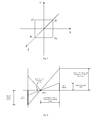
Fig. 3 is schematic diagram of creating a plane model of one embodiment; -
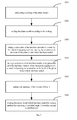
Fig. 4 is a schematic diagram showing imaging principle of a plane model of one embodiment; -
Fig. 5 is a flow chart of a method for rotating an interface window of the instant messaging tool of one embodiment; -
Fig. 6 is an effect diagram of applying 3D switch panel in the instant messaging tool of one embodiment; -
Fig. 7 is a structure schematic diagram of a system for applying 3D switch panel in an instant messaging tool of one embodiment; -
Fig. 8 is a structure schematic diagram of a system for applying 3D switch panel in an instant messaging tool of another embodiment. - To make the above objectives, features and advantages of the present invention more clear, the present invention are hereinafter further described in detail with reference to the accompanying drawings and embodiments.
- As shown in
Fig. 1 , a method for applying 3D switch panel in an instant messaging tool includes following steps: - Step S10: creating a window, and creating a plane model according to the window.
- In this step, as shown in
Fig. 2 , a window A is a created window, and predetermined number of pixels is reserved at four sides of the window A (such as 20 pixels), so that a size of a remaining window after removing the reserved pixels is the same as a size of an interface window of the instant messaging tool. A window B shown inFig. 2 is a visible window, and its size is the same as the size of the interface window of the instant messaging tool, and displays content which can be presented; viewing from users' sight, the content in the widow B is the interface window of the instant messaging tool, that is, the created window holds the interface window of the instant messaging tool, and the window B will be displayed as a window C after the window B is rotated. - In one implementation, creating a Viewport3D which has the same size as the window A and overlaps the window A, and setting the transparency of the Viewport3D as 0, and creating the plane model in the Viewport3D. The Viewport3D is a component which can display 3D modeling provided by WPF (Windows Presentation Foundation, Microsoft's next-generation graphics system, running on the NET Framework3.0, providing uniform descriptions and operation methods fro user interface, 2D/3D graphics, documents and media).
- In X-axis and Y-axis plane in three-dimensional coordinate system, a rectangle is created, a center of the rectangle coincides with an origin of the coordinate system, and the created rectangle is the plane model. As shown in
Fig. 3 , the plane model is formed by four points P1, P2, P3 and P4 which are connected with straight lines.Fig. 4 shows imaging principle of the plane model of one embodiment; after the plane model forms an image, what is displayed in the imaging area is a target window, i.e., visible window. Since a height of the direct imaging of the plane model is different from a height of the target window, thus, it is needed to scale the plane model, so that a height of the imaging of the plane model is the same as the height of the target window. - The calculation principle of scaling is as follows:
- setting a height of the target window (i.e., visible area or visible window) as height_target, a width of the visible area as width_target, a height of the plane model as height_object, a width of the plane model as width_object, a vertical distance between a camera and the plane model as zPosition_Camera, a vertical distance from the camera to the imaging area (i.e., target window) as Position, a horizontal view angle of the camera as FieldOfView of which the unit is degree which is needed to be converted to radians during calculation. Defining a scaling of the plane model in the X-axis as ScaleXmulriple, and a scaling c as ScaleYmulriple. So there are:
- (width_object*ScaleXmulriple)/zPosition_Camera=tg(FieldOfView*PI/180/2), a calculation formula getting the scaling of the plane model in the X-axis according to the above formula is:
- ScaleXmulriple=(zPosition_Camera*tg(FieldOfView/2))/width_object ,
- According to
Fig. 4 , there are: - Position=width_object/tg(FieldOfView*PI/180/2)
- tanY=height_target/Position
- tanY=(height_object*ScaleYmulriple)/zPostion_Camera
- ScaleYmulriple=((height_target*zPostion_Camera)/Position)/height_object
- A calculation formula getting the scaling of the plane model in the Y-axis according to the above formula is:
- ScaleYmulriple=((height_target*zPostion_Camera*tg(FieldOfView*PI/180/2))/widt h_object)/height_object
- Thus, after the height and width of the plane model, the horizontal view angle of the camera as well as the vertical distance between the camera and the plane model are obtained, the scaling of the plane model can be obtained through calculation according to the height of the target window. Since the actually created window (such as the window A shown in
Fig. 2 ) reserves a predetermined number of pixels relative to the interface window (such as the window B) of the instant messaging tool, when the interface window of the instant messaging tool is presented to user's plane such as the window B, the plane model which has been scaled according to the scaling should have the same size with the remaining window of the window A after the reserved pixels are removed from the window A.
S20: receiving a command for triggering rotation. - In this step, a variety of ways can be set to trigger the rotation, for example, setting a rotation button on the panel of the instant messaging tool and clicking the rotation button to trigger rotation of the interface window of the instant messaging tool; for another example, setting using mouse to click an area of the interface window of the instant messaging tool and using the movement operation of the mouse after the left key or the right key of the mouse is pressed to trigger rotation of the interface window of the instant messaging tool.
- Step S30: rotating the plane model to drive the interface window of the instant messaging tool to rotate.
- In this embodiment, as previously mentioned, the Viewport3D which has the same size with the window has been created, the Viewport3D covers the entire window, the transparency of the Viewport3D is set as 0, thus, the window is visible for users, and the plane model is created in the Viewport3D. In one embodiment, as shown in
Fig. 5 , the specific process of the step S30 is as follow: - Step S301: calculating a scaling which enables a height of the image of the plane model in the Viewport3D is the same as a height of the interface window of the instant messaging tool. After the plane model is created, the scaling of the plane model in X-axis and the Y-axis can be obtained through calculation in accordance with the above formula according to the height and width of the flat model.
- Step S302: scaling the plane model according to the scaling. An image of the plane model which has been scaled has the same size with the target window (the interface window of the instant messaging tool).
- Step S303: taking a screenshot of the interface presented to users by the instant messaging tool, and pasting the screenshot on the front of the plane model which has been scaled.
- In this embodiment, GeometryModel3D method (which provides methods for setting maps for models) is adopted to paste the screenshot on the front of the plane model which has been scaled.
- Step S304: taking a screenshot of an interface needed to be presented after the interface window of the instant messaging tool is rotated, and pasting the screenshot on the back of the plane model which has been scaled.
- In this embodiment, GeometryModel3D method is also adopted to paste the screenshot on the back of the plane model which has been scaled.
- Step S305: setting transparency of the Viewport3D as 1.
- In this embodiment, the transparency of the Viewport3D is 1, the Viewport3D covers the window, and thus, the interface presented to users by the instant messaging tool is hidden.
- Step S306: rotating the plane model which has been scaled by using a method for executing a specified angle 3D rotation around a specified axis.
- In this embodiment, the AxisAngleRotation3D method (a method acts on models, to enable models to rotate according specified angles) is adopted to rotate the plane model which has been scaled; after 180 degrees rotation, setting the transparency of the Viewport3D as 0, that is, the Viewport3D is hidden, displaying a target window in which the back of the plane model which has been scaled forms an image, i.e., presenting an interface needed to be displayed after the instant messaging tool is rotated to users.
- As shown in
Fig. 6 , in thestate 1, an interface presented to users by the instant messaging tool is "contact" panel. After triggering rotation, the interface window of the instant messaging tool is rotated, through thestates 2∼6, an interface finally presented to users is preset "basic setting" panel, thereby realizing using the 3D to switch panels of the instant messaging tool, which can satisfy users' individual demands and improves the usability of the instant messaging tool. - As shown in
Fig. 7 , a system for applying 3D switch panel in an instant messaging tool includes awindow creation module 10, amodel creation module 20, atrigger 30 and arotation module 40. Thewindow creation module 10 is configured to create a window; themodel creation module 20 is configured to create a plane model; thetrigger 30 is configured to receive a command for triggering rotation; therotation module 40 is configured to, when thetrigger 30 receives a command for triggering rotation, use the window and the plane model to drive the interface window of the instant messaging tool. - In one embodiment, a predetermined number of pixels is reserved at four sides of the window created by the
window creation module 10, so that a size of a remaining window after removing the reserved pixels is the same as a size of the interface window of the instant messaging tool. Themodel creation module 20 creates a Viewport3D which has the same size as the window created by thewindow creation module 10 and covers the window created by thewindow creation module 10, and creates the plane model in the Viewport3D. As shown inFig. 3 and Fig. 4 , the plane model is created in X-axis and Y-axis plane in three-dimensional coordinate system, and a target window after the plane model forms an image in the Viewport3D is the visible window; in order to make the target window after the plane model forms an image have the same size as the interface window of the instant messaging tool, it is needed to scale the plane model according to a certain scaling, and the scaling of the plane model can be obtained through calculation according to the above formula. - In one embodiment, as shown in
Fig. 8 , the system further includes atransparency setting module 50 and amodel scaling module 60, besides thewindow creation module 10, themodel creation module 20, thetrigger 30 and therotation module 40. Thetransparency setting module 50 sets the transparency of the Viewport3D as 0, after the Viewport3D has been created by themodel creation module 20, here, the Viewport3D is hidden; themodel scaling module 60 is configured to calculate a scaling which enables a height of the image of the plane model in the Viewport3D is the same as a height of the interface window of the instant messaging tool, and scale the plane model according to the scaling. - In this embodiment, the
rotation module 40 includes apicture pasting module 401 for taking a screenshot of the interface presented to users by the instant messaging tool and pasting the screenshot on the front of the plane model which has been scaled, and taking a screenshot of an interface needed to be presented after the interface window of the instant messaging tool is rotated and pasting the screenshot on the back of the plane model which has been scaled. After thepicture pasting module 401 pastes the screenshots on the front and the back of the plane model which has been scaled, thetransparency setting module 50 sets the transparency of the Viewport3D as 1, here, the window is covered by the Viewport3D. Therotation module 40 is configured to use a method for executing a specified angle 3D rotation around a specified axis to rotate the plane model which has been scaled, specifically, the AxisAngleRotation3D method (a method acts on models, to enable models to rotate according specified angles) is used to rotate the plane model which has been scaled; after 180 degrees rotation, setting the transparency of the Viewport3D as 0, that is, the Viewport3D is hidden, displaying a target window after the back of the plane model which has been scaled forms an image, i.e., presenting an interface needed to be displayed after the instant messaging tool is rotated to users. - The foregoing embodiments are only several implementations of the present invention, and their descriptions are more specific and detailed, but cannot be understood as the limit of the scope of the present invention. It should be noted, for those skilled in the art, some modifications and improvements can be made without departing from the concept of the present invention, and these should be covered within the protection scope of the invention. Thus, the scope of protection of the present invention should be based on the claims as appended.
Claims (12)
- A method for applying 3D switch panel in an instant messaging tool, comprising following steps:creating a window, and creating a plane model according to the window;receiving a command for triggering rotation;rotating the plane model to drive the interface window of the instant messaging tool contained in the created window to rotate.
- The method of claim 1, wherein a predetermined number of pixels is reserved at four sides of the created window so that a size of a remaining window after removing the reserved pixels is the same as a size of the interface window of the instant messaging tool.
- The method of claim 1 or 2, wherein the step of creating a plane model specifically is: creating a Viewport3D which has the same size as the created window and covers the created window, setting transparency of the Viewport3D as 0, and creating the plane model in the Viewport3D.
- The method of claim 3, wherein the step of creating the plane model in the Viewport3D specifically is:creating in a three-dimensional coordinate system of the Viewport3D a rectangle, of which a center coincides with an origin of the coordinate system;calculating a scaling which enables a height of an image of the rectangle in the Viewport3D is the same as a height of the interface window of the instant messaging tool;scaling the rectangle according to the scaling to form the plane model;taking a screenshot of an interface presented to users by the instant messaging tool, and pasting the screenshot on a front of the plane model;taking a screenshot of an interface needed to be presented after the interface window of the instant messaging tool is rotated, and pasting the screenshot on a back of the plane model.
- The method of claim 4, wherein the step of rotating the plane model to drive the interface window of the instant messaging tool contained in the created window to rotate specifically is:setting transparency of the Viewport3D as 1;rotating the plane model with the screenshots pasted thereon by using a method for executing a specified angle 3D rotation around a specified axis.
- The method of claim 5, wherein the step of rotating the plane model with the screenshots pasted thereon specifically is:using AxisAngleRotation3D method to rotate the plane model with the screenshots pasted thereon 180 degrees.
- The method of claim 6, further comprising setting transparency of the Viewport3D as 0 and displaying a target window after the back of the plane model with the screenshots pasted thereon forms an image, after the step of rotating the plane model with the screenshots pasted thereon.
- A system for applying 3D switch panel in an instant messaging tool comprising:a window creation module configured to create a window;a model creation module configured to create a plane model according to the window;a trigger configured to receive a command for triggering rotation;a rotation module configured to, when the trigger receives the command for triggering rotation, rotate the plane model to drive the interface window of the instant messaging tool contained in the created window.
- The system of claim 8, wherein the step of rotating
a predetermined number of pixels is reserved at four sides of the window created by the window creation module so that a size of a remaining window after removing the reserved pixels is the same as a size of the interface window of the instant messaging tool. - The system of claim 8 or 9, wherein the model creation module is configured to create a Viewport3D which has the same size as the created window and covers the created window, create in a three-dimensional coordinate system of the Viewport3D a rectangle of which a center coincides with an origin of the coordinate system, and create the plane model according to heights of the created rectangle and the interface window of the instant messaging tool;
the system further comprises a transparency setting module, and the transparency setting module sets transparency of the Viewport3D as 0 after the Viewport3D is created by the model creation module. - The system of claim 10, further comprising a model scaling module, which is configured to calculate a scaling which enables a height of an image of the rectangle in the Viewport3D to be the same as a height of the interface window of the instant messaging tool, and scale the rectangle according to the scaling to form the plane model;
wherein the rotation module includes a picture pasting module for taking a screenshot of an interface presented to users by the instant messaging tool and pasting the screenshot on a front of the plane model, and taking a screenshot of an interface needed to be presented after the interface window of the instant messaging tool is rotated and pasting the screenshot on a back of the plane model;
the transparency setting module sets transparency of the Viewport3D as 1 after the picture pasting module pastes the screenshots on the front and the back of the plane model;
the rotation module rotates the plane model with the screenshots pasted thereon by using a method for executing a specified angle 3D rotation around a specified axis. - The system of claim 11, wherein the rotation module is further configured to use AxisAngleRotation3D method to rotate the plane model with the screenshots pasted thereon 180 degrees;
the transparency setting module is further configured to set transparency of the Viewport3D as 0 after the rotation module rotate the plane model with the screenshots pasted thereon.
Applications Claiming Priority (2)
| Application Number | Priority Date | Filing Date | Title |
|---|---|---|---|
| CN201010196369.6A CN102279732B (en) | 2010-06-09 | 2010-06-09 | The method and system that 3D switches panel are applied in immediate communication tool |
| PCT/CN2011/071234 WO2011153848A1 (en) | 2010-06-09 | 2011-02-24 | Method and system for applying three-dimensional (3d) switch panels in instant messaging tool |
Publications (3)
| Publication Number | Publication Date |
|---|---|
| EP2581823A1 true EP2581823A1 (en) | 2013-04-17 |
| EP2581823A4 EP2581823A4 (en) | 2014-11-05 |
| EP2581823B1 EP2581823B1 (en) | 2018-11-07 |
Family
ID=45097509
Family Applications (1)
| Application Number | Title | Priority Date | Filing Date |
|---|---|---|---|
| EP11791840.9A Active EP2581823B1 (en) | 2010-06-09 | 2011-02-24 | Method and system for applying three-dimensional (3d) switch panels in instant messaging tool |
Country Status (4)
| Country | Link |
|---|---|
| US (1) | US8719732B2 (en) |
| EP (1) | EP2581823B1 (en) |
| CN (1) | CN102279732B (en) |
| WO (1) | WO2011153848A1 (en) |
Families Citing this family (5)
| Publication number | Priority date | Publication date | Assignee | Title |
|---|---|---|---|---|
| CN102736827A (en) * | 2011-04-12 | 2012-10-17 | 上海三旗通信科技股份有限公司 | Realizing method of mobile terminal for supporting 3D flipping record cover |
| US11030685B1 (en) | 2014-05-14 | 2021-06-08 | Affirm, Inc. | Refinancing tools for purchasing transactions |
| US9721305B2 (en) | 2014-08-01 | 2017-08-01 | Mobile Data Labs, Inc. | Mobile device distance tracking |
| CN106530234B (en) * | 2016-10-14 | 2019-09-20 | 广州酷狗计算机科技有限公司 | Image display method and device |
| CN107454272A (en) * | 2017-09-19 | 2017-12-08 | 武汉亿维登科技发展有限公司 | Dynamic switching method based on mobile phone application interface |
Family Cites Families (11)
| Publication number | Priority date | Publication date | Assignee | Title |
|---|---|---|---|---|
| US5515486A (en) * | 1994-12-16 | 1996-05-07 | International Business Machines Corporation | Method, apparatus and memory for directing a computer system to display a multi-axis rotatable, polyhedral-shape panel container having front panels for displaying objects |
| US6887157B2 (en) * | 2001-08-09 | 2005-05-03 | Igt | Virtual cameras and 3-D gaming environments in a gaming machine |
| US7007242B2 (en) * | 2002-02-20 | 2006-02-28 | Nokia Corporation | Graphical user interface for a mobile device |
| US20050204306A1 (en) * | 2003-09-15 | 2005-09-15 | Hideya Kawahara | Enhancements for manipulating two-dimensional windows within a three-dimensional display model |
| GB2425700A (en) * | 2005-04-29 | 2006-11-01 | Gordon Frederick Ross | Data entry using a three dimensional visual user interface |
| US8259132B2 (en) * | 2006-08-29 | 2012-09-04 | Buchheit Brian K | Rotationally dependent information in a three dimensional graphical user interface |
| US8782043B2 (en) * | 2007-07-10 | 2014-07-15 | Nbc Universal, Inc. | Multi-sided media viewer and technique for media association |
| CN101424995A (en) * | 2007-10-30 | 2009-05-06 | 英业达股份有限公司 | Three-dimensional window operation interface and operation method thereof |
| CN101231571A (en) * | 2008-02-19 | 2008-07-30 | 倚天资讯股份有限公司 | System, method and graphical user interface for switching between menus |
| TW201019211A (en) * | 2008-11-14 | 2010-05-16 | Nat Univ Tsing Hua | System for instant messaging with virtual three-dimensional intuitive interface and the method of the same |
| US8132120B2 (en) * | 2008-12-29 | 2012-03-06 | Verizon Patent And Licensing Inc. | Interface cube for mobile device |
-
2010
- 2010-06-09 CN CN201010196369.6A patent/CN102279732B/en active Active
-
2011
- 2011-02-24 EP EP11791840.9A patent/EP2581823B1/en active Active
- 2011-02-24 WO PCT/CN2011/071234 patent/WO2011153848A1/en not_active Ceased
-
2012
- 2012-12-07 US US13/708,545 patent/US8719732B2/en active Active
Also Published As
| Publication number | Publication date |
|---|---|
| EP2581823A4 (en) | 2014-11-05 |
| EP2581823B1 (en) | 2018-11-07 |
| US8719732B2 (en) | 2014-05-06 |
| CN102279732B (en) | 2016-03-23 |
| US20130125048A1 (en) | 2013-05-16 |
| CN102279732A (en) | 2011-12-14 |
| WO2011153848A1 (en) | 2011-12-15 |
Similar Documents
| Publication | Publication Date | Title |
|---|---|---|
| CN102651180B (en) | OSG-based (open scene graph-based) electric-electronic virtual experiment simulation system | |
| WO2013184446A4 (en) | Rotation operations in a mapping application | |
| CN105913478A (en) | 360-degree panorama display method and display module, and mobile terminal | |
| EP2581823A1 (en) | Method and system for applying three-dimensional (3d) switch panels in instant messaging tool | |
| CN101236485A (en) | Multi-screen 3D synchronous display method, device and system | |
| WO2020190305A1 (en) | Scaling and rendering virtual hand | |
| WO2025011347A1 (en) | Virtual object display method and apparatus, storage medium, and electronic device | |
| US11074747B2 (en) | Computer-aided techniques for designing detailed three-dimensional objects | |
| WO2017092430A1 (en) | Method and device for realizing user interface control based on virtual reality application | |
| CN115328304A (en) | 2D-3D fused virtual reality interaction method and device | |
| TWI694355B (en) | Tracking system, tracking method for real-time rendering an image and non-transitory computer-readable medium | |
| CN105354031A (en) | Leap Motion based 3D commodity display method | |
| US9043707B2 (en) | Configurable viewcube controller | |
| JP2001134633A (en) | Electronic drawing viewer | |
| CN113041616A (en) | Method and device for controlling jumping display in game, electronic equipment and storage medium | |
| JP2016018363A (en) | Game program for controlling display of objects placed on a virtual space plane | |
| CN112667137B (en) | Switching display method and device for house type graph and house three-dimensional model | |
| CN114327174A (en) | Virtual reality scene display method and cursor three-dimensional display method and device | |
| CN102866887A (en) | Method and device for realizing three-dimensional user interface | |
| CN103513919A (en) | Touch control equipment and display control method and device of 3D rotary plate | |
| TW201101077A (en) | Constructing method and system for 3D environmental appearance simulation | |
| CN101739120A (en) | Interactive display method and related display device | |
| JP2016016319A (en) | Game program for display-controlling objects arranged on virtual spatial plane | |
| Petit et al. | Virtualization gate | |
| US10290146B2 (en) | Displaying depth effects in digital artwork based on movement of a display |
Legal Events
| Date | Code | Title | Description |
|---|---|---|---|
| PUAI | Public reference made under article 153(3) epc to a published international application that has entered the european phase |
Free format text: ORIGINAL CODE: 0009012 |
|
| 17P | Request for examination filed |
Effective date: 20121205 |
|
| AK | Designated contracting states |
Kind code of ref document: A1 Designated state(s): AL AT BE BG CH CY CZ DE DK EE ES FI FR GB GR HR HU IE IS IT LI LT LU LV MC MK MT NL NO PL PT RO RS SE SI SK SM TR |
|
| DAX | Request for extension of the european patent (deleted) | ||
| A4 | Supplementary search report drawn up and despatched |
Effective date: 20141009 |
|
| RIC1 | Information provided on ipc code assigned before grant |
Ipc: G06F 3/0483 20130101ALI20141002BHEP Ipc: G06F 9/44 20060101AFI20141002BHEP Ipc: G06F 3/0481 20130101ALI20141002BHEP Ipc: G06F 3/048 20130101ALI20141002BHEP |
|
| GRAP | Despatch of communication of intention to grant a patent |
Free format text: ORIGINAL CODE: EPIDOSNIGR1 |
|
| STAA | Information on the status of an ep patent application or granted ep patent |
Free format text: STATUS: GRANT OF PATENT IS INTENDED |
|
| RIC1 | Information provided on ipc code assigned before grant |
Ipc: G06F 3/048 20130101ALI20180515BHEP Ipc: G06F 3/0481 20130101ALI20180515BHEP Ipc: G06F 9/451 20180101ALI20180515BHEP Ipc: G06F 9/44 20060101AFI20180515BHEP Ipc: G06F 3/0483 20130101ALI20180515BHEP |
|
| INTG | Intention to grant announced |
Effective date: 20180605 |
|
| RAP1 | Party data changed (applicant data changed or rights of an application transferred) |
Owner name: TENCENT TECHNOLOGY (SHENZHEN) COMPANY LIMITED |
|
| RIN1 | Information on inventor provided before grant (corrected) |
Inventor name: GAO, SHUNDONG Inventor name: XIE, WEIWEN |
|
| GRAS | Grant fee paid |
Free format text: ORIGINAL CODE: EPIDOSNIGR3 |
|
| GRAA | (expected) grant |
Free format text: ORIGINAL CODE: 0009210 |
|
| STAA | Information on the status of an ep patent application or granted ep patent |
Free format text: STATUS: THE PATENT HAS BEEN GRANTED |
|
| AK | Designated contracting states |
Kind code of ref document: B1 Designated state(s): AL AT BE BG CH CY CZ DE DK EE ES FI FR GB GR HR HU IE IS IT LI LT LU LV MC MK MT NL NO PL PT RO RS SE SI SK SM TR |
|
| REG | Reference to a national code |
Ref country code: GB Ref legal event code: FG4D |
|
| REG | Reference to a national code |
Ref country code: CH Ref legal event code: EP Ref country code: AT Ref legal event code: REF Ref document number: 1062901 Country of ref document: AT Kind code of ref document: T Effective date: 20181115 |
|
| REG | Reference to a national code |
Ref country code: IE Ref legal event code: FG4D |
|
| REG | Reference to a national code |
Ref country code: DE Ref legal event code: R096 Ref document number: 602011053674 Country of ref document: DE |
|
| REG | Reference to a national code |
Ref country code: NL Ref legal event code: MP Effective date: 20181107 |
|
| REG | Reference to a national code |
Ref country code: LT Ref legal event code: MG4D |
|
| REG | Reference to a national code |
Ref country code: AT Ref legal event code: MK05 Ref document number: 1062901 Country of ref document: AT Kind code of ref document: T Effective date: 20181107 |
|
| PG25 | Lapsed in a contracting state [announced via postgrant information from national office to epo] |
Ref country code: IS Free format text: LAPSE BECAUSE OF FAILURE TO SUBMIT A TRANSLATION OF THE DESCRIPTION OR TO PAY THE FEE WITHIN THE PRESCRIBED TIME-LIMIT Effective date: 20190307 Ref country code: FI Free format text: LAPSE BECAUSE OF FAILURE TO SUBMIT A TRANSLATION OF THE DESCRIPTION OR TO PAY THE FEE WITHIN THE PRESCRIBED TIME-LIMIT Effective date: 20181107 Ref country code: BG Free format text: LAPSE BECAUSE OF FAILURE TO SUBMIT A TRANSLATION OF THE DESCRIPTION OR TO PAY THE FEE WITHIN THE PRESCRIBED TIME-LIMIT Effective date: 20190207 Ref country code: HR Free format text: LAPSE BECAUSE OF FAILURE TO SUBMIT A TRANSLATION OF THE DESCRIPTION OR TO PAY THE FEE WITHIN THE PRESCRIBED TIME-LIMIT Effective date: 20181107 Ref country code: LV Free format text: LAPSE BECAUSE OF FAILURE TO SUBMIT A TRANSLATION OF THE DESCRIPTION OR TO PAY THE FEE WITHIN THE PRESCRIBED TIME-LIMIT Effective date: 20181107 Ref country code: AT Free format text: LAPSE BECAUSE OF FAILURE TO SUBMIT A TRANSLATION OF THE DESCRIPTION OR TO PAY THE FEE WITHIN THE PRESCRIBED TIME-LIMIT Effective date: 20181107 Ref country code: ES Free format text: LAPSE BECAUSE OF FAILURE TO SUBMIT A TRANSLATION OF THE DESCRIPTION OR TO PAY THE FEE WITHIN THE PRESCRIBED TIME-LIMIT Effective date: 20181107 Ref country code: NO Free format text: LAPSE BECAUSE OF FAILURE TO SUBMIT A TRANSLATION OF THE DESCRIPTION OR TO PAY THE FEE WITHIN THE PRESCRIBED TIME-LIMIT Effective date: 20190207 Ref country code: LT Free format text: LAPSE BECAUSE OF FAILURE TO SUBMIT A TRANSLATION OF THE DESCRIPTION OR TO PAY THE FEE WITHIN THE PRESCRIBED TIME-LIMIT Effective date: 20181107 |
|
| PG25 | Lapsed in a contracting state [announced via postgrant information from national office to epo] |
Ref country code: PT Free format text: LAPSE BECAUSE OF FAILURE TO SUBMIT A TRANSLATION OF THE DESCRIPTION OR TO PAY THE FEE WITHIN THE PRESCRIBED TIME-LIMIT Effective date: 20190307 Ref country code: AL Free format text: LAPSE BECAUSE OF FAILURE TO SUBMIT A TRANSLATION OF THE DESCRIPTION OR TO PAY THE FEE WITHIN THE PRESCRIBED TIME-LIMIT Effective date: 20181107 Ref country code: GR Free format text: LAPSE BECAUSE OF FAILURE TO SUBMIT A TRANSLATION OF THE DESCRIPTION OR TO PAY THE FEE WITHIN THE PRESCRIBED TIME-LIMIT Effective date: 20190208 Ref country code: NL Free format text: LAPSE BECAUSE OF FAILURE TO SUBMIT A TRANSLATION OF THE DESCRIPTION OR TO PAY THE FEE WITHIN THE PRESCRIBED TIME-LIMIT Effective date: 20181107 Ref country code: RS Free format text: LAPSE BECAUSE OF FAILURE TO SUBMIT A TRANSLATION OF THE DESCRIPTION OR TO PAY THE FEE WITHIN THE PRESCRIBED TIME-LIMIT Effective date: 20181107 Ref country code: SE Free format text: LAPSE BECAUSE OF FAILURE TO SUBMIT A TRANSLATION OF THE DESCRIPTION OR TO PAY THE FEE WITHIN THE PRESCRIBED TIME-LIMIT Effective date: 20181107 |
|
| PG25 | Lapsed in a contracting state [announced via postgrant information from national office to epo] |
Ref country code: IT Free format text: LAPSE BECAUSE OF FAILURE TO SUBMIT A TRANSLATION OF THE DESCRIPTION OR TO PAY THE FEE WITHIN THE PRESCRIBED TIME-LIMIT Effective date: 20181107 Ref country code: CZ Free format text: LAPSE BECAUSE OF FAILURE TO SUBMIT A TRANSLATION OF THE DESCRIPTION OR TO PAY THE FEE WITHIN THE PRESCRIBED TIME-LIMIT Effective date: 20181107 Ref country code: DK Free format text: LAPSE BECAUSE OF FAILURE TO SUBMIT A TRANSLATION OF THE DESCRIPTION OR TO PAY THE FEE WITHIN THE PRESCRIBED TIME-LIMIT Effective date: 20181107 Ref country code: PL Free format text: LAPSE BECAUSE OF FAILURE TO SUBMIT A TRANSLATION OF THE DESCRIPTION OR TO PAY THE FEE WITHIN THE PRESCRIBED TIME-LIMIT Effective date: 20181107 |
|
| REG | Reference to a national code |
Ref country code: DE Ref legal event code: R097 Ref document number: 602011053674 Country of ref document: DE |
|
| PG25 | Lapsed in a contracting state [announced via postgrant information from national office to epo] |
Ref country code: EE Free format text: LAPSE BECAUSE OF FAILURE TO SUBMIT A TRANSLATION OF THE DESCRIPTION OR TO PAY THE FEE WITHIN THE PRESCRIBED TIME-LIMIT Effective date: 20181107 Ref country code: SK Free format text: LAPSE BECAUSE OF FAILURE TO SUBMIT A TRANSLATION OF THE DESCRIPTION OR TO PAY THE FEE WITHIN THE PRESCRIBED TIME-LIMIT Effective date: 20181107 Ref country code: SM Free format text: LAPSE BECAUSE OF FAILURE TO SUBMIT A TRANSLATION OF THE DESCRIPTION OR TO PAY THE FEE WITHIN THE PRESCRIBED TIME-LIMIT Effective date: 20181107 Ref country code: RO Free format text: LAPSE BECAUSE OF FAILURE TO SUBMIT A TRANSLATION OF THE DESCRIPTION OR TO PAY THE FEE WITHIN THE PRESCRIBED TIME-LIMIT Effective date: 20181107 |
|
| PLBE | No opposition filed within time limit |
Free format text: ORIGINAL CODE: 0009261 |
|
| STAA | Information on the status of an ep patent application or granted ep patent |
Free format text: STATUS: NO OPPOSITION FILED WITHIN TIME LIMIT |
|
| REG | Reference to a national code |
Ref country code: CH Ref legal event code: PL |
|
| 26N | No opposition filed |
Effective date: 20190808 |
|
| PG25 | Lapsed in a contracting state [announced via postgrant information from national office to epo] |
Ref country code: SI Free format text: LAPSE BECAUSE OF FAILURE TO SUBMIT A TRANSLATION OF THE DESCRIPTION OR TO PAY THE FEE WITHIN THE PRESCRIBED TIME-LIMIT Effective date: 20181107 Ref country code: LU Free format text: LAPSE BECAUSE OF NON-PAYMENT OF DUE FEES Effective date: 20190224 Ref country code: MC Free format text: LAPSE BECAUSE OF FAILURE TO SUBMIT A TRANSLATION OF THE DESCRIPTION OR TO PAY THE FEE WITHIN THE PRESCRIBED TIME-LIMIT Effective date: 20181107 |
|
| REG | Reference to a national code |
Ref country code: BE Ref legal event code: MM Effective date: 20190228 |
|
| REG | Reference to a national code |
Ref country code: IE Ref legal event code: MM4A |
|
| PG25 | Lapsed in a contracting state [announced via postgrant information from national office to epo] |
Ref country code: LI Free format text: LAPSE BECAUSE OF NON-PAYMENT OF DUE FEES Effective date: 20190228 Ref country code: CH Free format text: LAPSE BECAUSE OF NON-PAYMENT OF DUE FEES Effective date: 20190228 |
|
| PG25 | Lapsed in a contracting state [announced via postgrant information from national office to epo] |
Ref country code: IE Free format text: LAPSE BECAUSE OF NON-PAYMENT OF DUE FEES Effective date: 20190224 |
|
| PG25 | Lapsed in a contracting state [announced via postgrant information from national office to epo] |
Ref country code: BE Free format text: LAPSE BECAUSE OF NON-PAYMENT OF DUE FEES Effective date: 20190228 |
|
| PG25 | Lapsed in a contracting state [announced via postgrant information from national office to epo] |
Ref country code: TR Free format text: LAPSE BECAUSE OF FAILURE TO SUBMIT A TRANSLATION OF THE DESCRIPTION OR TO PAY THE FEE WITHIN THE PRESCRIBED TIME-LIMIT Effective date: 20181107 |
|
| PG25 | Lapsed in a contracting state [announced via postgrant information from national office to epo] |
Ref country code: MT Free format text: LAPSE BECAUSE OF NON-PAYMENT OF DUE FEES Effective date: 20190224 |
|
| PG25 | Lapsed in a contracting state [announced via postgrant information from national office to epo] |
Ref country code: CY Free format text: LAPSE BECAUSE OF FAILURE TO SUBMIT A TRANSLATION OF THE DESCRIPTION OR TO PAY THE FEE WITHIN THE PRESCRIBED TIME-LIMIT Effective date: 20181107 |
|
| PG25 | Lapsed in a contracting state [announced via postgrant information from national office to epo] |
Ref country code: HU Free format text: LAPSE BECAUSE OF FAILURE TO SUBMIT A TRANSLATION OF THE DESCRIPTION OR TO PAY THE FEE WITHIN THE PRESCRIBED TIME-LIMIT; INVALID AB INITIO Effective date: 20110224 |
|
| PG25 | Lapsed in a contracting state [announced via postgrant information from national office to epo] |
Ref country code: MK Free format text: LAPSE BECAUSE OF FAILURE TO SUBMIT A TRANSLATION OF THE DESCRIPTION OR TO PAY THE FEE WITHIN THE PRESCRIBED TIME-LIMIT Effective date: 20181107 |
|
| PGFP | Annual fee paid to national office [announced via postgrant information from national office to epo] |
Ref country code: FR Payment date: 20251231 Year of fee payment: 16 |
|
| PGFP | Annual fee paid to national office [announced via postgrant information from national office to epo] |
Ref country code: GB Payment date: 20260106 Year of fee payment: 16 |
|
| PGFP | Annual fee paid to national office [announced via postgrant information from national office to epo] |
Ref country code: DE Payment date: 20260102 Year of fee payment: 16 |