EP2574074A2 - Method for displaying on-screen display image - Google Patents
Method for displaying on-screen display image Download PDFInfo
- Publication number
- EP2574074A2 EP2574074A2 EP12184563A EP12184563A EP2574074A2 EP 2574074 A2 EP2574074 A2 EP 2574074A2 EP 12184563 A EP12184563 A EP 12184563A EP 12184563 A EP12184563 A EP 12184563A EP 2574074 A2 EP2574074 A2 EP 2574074A2
- Authority
- EP
- European Patent Office
- Prior art keywords
- item
- valid
- item set
- current
- display apparatus
- Prior art date
- Legal status (The legal status is an assumption and is not a legal conclusion. Google has not performed a legal analysis and makes no representation as to the accuracy of the status listed.)
- Withdrawn
Links
- 238000000034 method Methods 0.000 title claims abstract description 23
- 230000000694 effects Effects 0.000 claims description 6
- 230000000007 visual effect Effects 0.000 claims description 3
- 230000006870 function Effects 0.000 description 13
Images
Classifications
-
- H—ELECTRICITY
- H04—ELECTRIC COMMUNICATION TECHNIQUE
- H04N—PICTORIAL COMMUNICATION, e.g. TELEVISION
- H04N21/00—Selective content distribution, e.g. interactive television or video on demand [VOD]
- H04N21/40—Client devices specifically adapted for the reception of or interaction with content, e.g. set-top-box [STB]; Operations thereof
- H04N21/47—End-user applications
- H04N21/488—Data services, e.g. news ticker
- H04N21/4882—Data services, e.g. news ticker for displaying messages, e.g. warnings, reminders
-
- H—ELECTRICITY
- H04—ELECTRIC COMMUNICATION TECHNIQUE
- H04N—PICTORIAL COMMUNICATION, e.g. TELEVISION
- H04N21/00—Selective content distribution, e.g. interactive television or video on demand [VOD]
- H04N21/40—Client devices specifically adapted for the reception of or interaction with content, e.g. set-top-box [STB]; Operations thereof
- H04N21/47—End-user applications
- H04N21/485—End-user interface for client configuration
- H04N21/4854—End-user interface for client configuration for modifying image parameters, e.g. image brightness, contrast
-
- H—ELECTRICITY
- H04—ELECTRIC COMMUNICATION TECHNIQUE
- H04N—PICTORIAL COMMUNICATION, e.g. TELEVISION
- H04N21/00—Selective content distribution, e.g. interactive television or video on demand [VOD]
- H04N21/40—Client devices specifically adapted for the reception of or interaction with content, e.g. set-top-box [STB]; Operations thereof
- H04N21/47—End-user applications
- H04N21/485—End-user interface for client configuration
- H04N21/4856—End-user interface for client configuration for language selection, e.g. for the menu or subtitles
Definitions
- the present invention generally relates to a method for displaying an on-screen display (OSD), and more particularly to a method for displaying an OSD having information suggestive functions.
- OSD on-screen display
- An OSD is an image superimposed on the screen image, generally used in television, video or digital video disc (DVD) player so that a variety of additional information such as volume, channel or time is displayed on the screen. For example, designing the function of the OSD menu to display the various specific parameters.
- each parameter of the display apparatus can adjust through the menu displayed on the screen.
- each item of the OSD menu of the display apparatus represents a parameter setting function.
- the execution or non-execution of the parameter setting function is also different.
- the valid item is different according to the different using state. For instance, when the input signal is a television signal, the item of high definition multimedia interface (HDMI) cannot be used.
- HDMI high definition multimedia interface
- a method for displaying on-screen display (OSD) image capable to send a suggestive signal when a user selects an invalid item on the on-screen display image, is provided in the present invention.
- OSD on-screen display
- the method for displaying OSD image is suitable for a display apparatus.
- the method at least includes the following steps: enabling an OSD image for showing a setting menu of the display apparatus, wherein the setting menu comprises a plurality of items; when one of the items is selected determining whether the selected item is valid according to a current using state of the display apparatus ; executing a function corresponding to the selected item if the selected item is valid; and displaying a suggestive block on the on-screen display image if the selected item is not valid.
- each of the items belongs to at least one of a plurality of item sets.
- the at least one item set can be selected according to the current using state for marking each item of the selected item set as valid.
- the at least one item set in the step of selecting the at least one item set according to the current using state, can be selected according to a signal source of an input signal received by the display apparatus.
- the signal source includes one of the high definition multimedia interface (HDMI), the video graphics array (VGA), the digital visual interface (DVI) and the television signal.
- whether the input signal includes a specific content can be further determined for marking the item corresponding to the specific content in the selected item set as valid.
- the specific content includes at least one of a subtitle data, a sound effect and a grading data.
- the at least one item set in the step of selecting the at least one item set according to the current using state, can also be selected according to whether a specific function of the display apparatus is started or not.
- the item set corresponding to the current using state of the display apparatus can be selected from a database.
- the suggestive block in the step of displaying the suggestive block on the OSD image, can be designed to be displayed outside the setting menu, or the suggestive block can be designed to be displayed inside the setting menu.
- the method of present invention is capable to display a suggestive signal to inform the user that the item is unavailable, whereupon it is unnecessary to change the original display color or operation process.
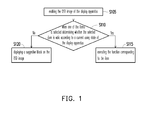
- Fig. 1 is a flow chart illustrating a method for displaying OSD image according to one embodiment of the invention.
- FIG. 2A to 2C respectively illustrate a schematic view of OSD image according to one embodiment of the invention.
- An on-screen display (OSD) image is generally used in a display apparatus so as to show a setting menu for a user for setting parameters.
- Each item of the setting menu represents a parameter setting function.
- the valid item may be different when the current using state of the display apparatus is different.
- a method for displaying OSD image is provided. Through a suggestive block, the user is informed that the selected item in the current using state is invalid.
- the following embodiment is taken as an embodiment capable to be put in practice.
- Fig. 1 is a flow chart illustrating a method for displaying OSD image according to one embodiment of the invention.
- an OSD image is enabled for showing a setting menu of the display apparatus.
- the user can enable the OSD image through the operation button of the display apparatus.
- the user can use an input apparatus (such as a remote control, a keyboard or the like) to transmit an enabled signal to the display apparatus for enabling the OSD image so as to display the setting menu.
- the setting menu includes a plurality of items.
- a plurality of tag pages are included in the setting menu.
- Each of the tag pages includes a plurality of items, and each of the items can be in one tag page or in the plurality of tag pages.
- step S110 when one of the items is selected, whether the selected item is valid is determined according to a current using state of the display apparatus. Specifically, the at least one of the item sets can be selected according to the current using state for marking each item of the selected item set as valid.
- the items can be classified into a plurality of item sets in the display apparatus in advance.
- each of the item sets corresponds to one kind of current using state or a plurality of kinds of current using states
- the one kind of current using state can also correspond to one item set or a plurality of item sets. Accordingly, when one of the items is selected, whether the selected item in the current using state is the item belonging to the item set corresponding to the current using state is determined.
- each item of the item set corresponding to the signal source can be marked as valid.
- the signal source includes one of the high definition multimedia interface (HDMI), the video graphics array (VGA), the digital visual interface (DVI) and the television signal.
- HDMI high definition multimedia interface
- VGA video graphics array
- DVI digital visual interface
- the signal source is the HDMI
- each item of the item set corresponding to the HDMI will be marked as valid.
- whether the input signal includes a specific content can further be determined for marking the item corresponding to the specific content in the selected item set as valid.
- the specific content includes at least one of a subtitle data, a sound effect and a grading data. For example, suppose the signal source of the input signal is the HDMI and the info-frame of the input signal includes a subtitle data and a sound effect (such as Dolby sound), then the item of the subtitle data and the item of the sound effect of the item set corresponding to the HDMI are marked as valid.
- the item set can also be selected according to whether a specific function of the display apparatus is started or not, in order to mark each item of the item set as valid. For example, suppose the user starts the subtitle function of the digital television so as to set the priority order of the subtitle language, then the subtitle item of the setting menu is marked as valid.
- a database can further be established in the display apparatus.
- the item set corresponding to each using state is established in the database in advance. Accordingly, the item set corresponding to the current using state of the display apparatus can be directly obtained from the database for marking each item of the selected item set as valid.
- each item can belong to one item set or a plurality of item sets, i.e., an item can belong to different item sets at the same time.
- the "brightness" item can belong to the item sets respectively corresponding to three kinds of using states, the HDMI, the VGA and the television signal, at the same time.
- the "brightness” items are valid under the using states of the HDMI, the VGA and the television signal. Accordingly, no matter the signal source of the input signal received by the display apparatus is from the HDMI, the VGA or the television signal, the user can select the "brightness" item of the OSD image for adjusting the brightness under those using states.
- it is only for an example and is not limited thereto.
- a function corresponding to the item is executed as shown in the step S115, if the selected item is valid in the step S110.
- a suggestive block is displayed on the OSD image as shown in the step S120, if the selected item is not valid.
- the suggestive block can be designed to be displayed inside or outside the setting menu.
- the item set includes a "focus adjustment” item and a "phase adjustment” item. And these two items do not belong to the item set corresponding to the signal source being the HDMI. Moreover, when the signal source is the VGA, the "focus adjustment” item and the “phase adjustment” item will be marked as valid; when the signal source is the HDMI, the "focus adjustment” item and the “phase adjustment” item will not be marked as valid. Thus, under the condition of the signal source being the HDMI, when the "focus adjustment” item or the "phase adjustment” item is selected, the corresponding function cannot be executed. And a suggestive block can be displayed to inform the user to be aware that the selected item is not valid.
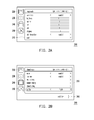
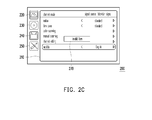
- FIG. 2A to 2C respectively illustrate a schematic view of OSD image according to one embodiment of the invention. Please refer to FIG. 2A to 2C .
- the OSD image 200 is used for showing the setting menu 210.
- the setting menu 210 includes four tag pages 220, 230, 240, 250.
- the tag page 220 includes the item set for adjusting the image parameter.
- the tag page 230 includes the item set for adjusting the DVD player.
- the tag page 240 includes the item set for adjusting the television signal.
- the tag page 250 includes the item set for adjusting the parameter setting of the display apparatus.
- the user can move the highlight frame of the OSD image 200 via the arrow keys of the remote control for selecting the function. For example, a tag page on the left is selected first, and then the item on the right is selected.
- the signal source of the input signal received by the display apparatus is a television signal
- the item set corresponding to the television signal is each item set respectively included in the tag pages 220, 240, 250. Accordingly, each item set respectively included in the tag pages 220, 240, 250 is marked as valid.
- FIG. 2A displays the tag page 220
- both FIG. 2B and FIG. 2C display the tag page 240.
- the tag page 220 is an image mode page, it is a sub-menu for setting image parameter.
- the tag page 220 includes 9 items and they are the items of scene mode, brightness, contrast, tint, color, sharpness, color temperature and reset. These 9 items belong to the same item set.
- the tag page 240 is a channel mode page, it is a sub-menu for adjusting the television signal.
- the tag page 240 includes 6 items and they are the items of nation, time zone, auto-scanning, manual scanning, channel editing and subtitle. These 6 items belong to the same item set.
- the subtitle item is marked as valid.
- the input signal does not include a subtitle data, then the subtitle item will not be marked as valid.
- the suggestive block 260 can be designed to be displayed outside the setting menu 210.
- the suggestive block 270 can also be designed to be displayed inside the setting menu 210. Furthermore, suppose the user starts the subtitle function of the display apparatus, then the subtitle item of the setting menu 210 is also marked as valid.
- a processing unit can be disposed in the display apparatus for executing the above mentioned steps.
- the method of present invention is capable to display a suggestive signal to inform the user to be aware that the item is unavailable. Whereupon the original display color of the OSD image does not have to change. Moreover, it is unnecessary to change the operating process of the OSD image.
Landscapes
- Engineering & Computer Science (AREA)
- Multimedia (AREA)
- Signal Processing (AREA)
- Human Computer Interaction (AREA)
- User Interface Of Digital Computer (AREA)
- Controls And Circuits For Display Device (AREA)
- Transforming Electric Information Into Light Information (AREA)
Abstract
Description
- The present invention generally relates to a method for displaying an on-screen display (OSD), and more particularly to a method for displaying an OSD having information suggestive functions.
- An OSD is an image superimposed on the screen image, generally used in television, video or digital video disc (DVD) player so that a variety of additional information such as volume, channel or time is displayed on the screen. For example, designing the function of the OSD menu to display the various specific parameters.
- In general, the user can adjust each parameter of the display apparatus through the menu displayed on the screen. And each item of the OSD menu of the display apparatus represents a parameter setting function. According to the different using states, the execution or non-execution of the parameter setting function is also different. In other words, the valid item is different according to the different using state. For instance, when the input signal is a television signal, the item of high definition multimedia interface (HDMI) cannot be used.
- Accordingly, a method for displaying on-screen display (OSD) image, capable to send a suggestive signal when a user selects an invalid item on the on-screen display image, is provided in the present invention.
- The method for displaying OSD image provided in the present invention is suitable for a display apparatus. The method at least includes the following steps: enabling an OSD image for showing a setting menu of the display apparatus, wherein the setting menu comprises a plurality of items; when one of the items is selected determining whether the selected item is valid according to a current using state of the display apparatus ; executing a function corresponding to the selected item if the selected item is valid; and displaying a suggestive block on the on-screen display image if the selected item is not valid.
- According to one embodiment of the present invention, each of the items belongs to at least one of a plurality of item sets. After enabling the OSD image, the at least one item set can be selected according to the current using state for marking each item of the selected item set as valid.
- According to one embodiment of the present invention, in the step of selecting the at least one item set according to the current using state, the at least one item set can be selected according to a signal source of an input signal received by the display apparatus. And the signal source includes one of the high definition multimedia interface (HDMI), the video graphics array (VGA), the digital visual interface (DVI) and the television signal.
- According to one embodiment of the present invention, in the step of selecting the at least one item set according to the current using state, whether the input signal includes a specific content can be further determined for marking the item corresponding to the specific content in the selected item set as valid. The specific content includes at least one of a subtitle data, a sound effect and a grading data.
- According to one embodiment of the present invention, in the step of selecting the at least one item set according to the current using state, the at least one item set can also be selected according to whether a specific function of the display apparatus is started or not.
- According to one embodiment of the present invention, in the step of selecting the at least one item set according to the current using state, the item set corresponding to the current using state of the display apparatus can be selected from a database.
- According to one embodiment of the present invention, in the step of displaying the suggestive block on the OSD image, the suggestive block can be designed to be displayed outside the setting menu, or the suggestive block can be designed to be displayed inside the setting menu.
- In light of the above, when a user selects the invalid item which is unable to use in the current using state, the method of present invention is capable to display a suggestive signal to inform the user that the item is unavailable, whereupon it is unnecessary to change the original display color or operation process.
- In order to make the aforementioned and other features and advantages of the invention more comprehensible, embodiments accompanying figures are described in detail below.
- The accompanying drawings are included to provide further understanding, and are incorporated in and constitute a part of this specification. The drawings illustrate exemplary embodiments and, together with the description, serve to explain the principles of the disclosure.
-
Fig. 1 is a flow chart illustrating a method for displaying OSD image according to one embodiment of the invention. -
FIG. 2A to 2C respectively illustrate a schematic view of OSD image according to one embodiment of the invention. - An on-screen display (OSD) image is generally used in a display apparatus so as to show a setting menu for a user for setting parameters. Each item of the setting menu represents a parameter setting function. And the valid item may be different when the current using state of the display apparatus is different. In order to enable the user to be aware whether the selected item is available or not, a method for displaying OSD image is provided. Through a suggestive block, the user is informed that the selected item in the current using state is invalid. In order to make the invention more comprehensible, the following embodiment is taken as an embodiment capable to be put in practice.
-
Fig. 1 is a flow chart illustrating a method for displaying OSD image according to one embodiment of the invention. Referring toFIG. 1 , in the step S105, an OSD image is enabled for showing a setting menu of the display apparatus. For example, the user can enable the OSD image through the operation button of the display apparatus. Or the user can use an input apparatus (such as a remote control, a keyboard or the like) to transmit an enabled signal to the display apparatus for enabling the OSD image so as to display the setting menu. For example, when the user presses the menu button of the remote control (here, the display apparatus receives a command from the remote control), then the OSD image is displayed on the display apparatus. Thereby, the setting menu includes a plurality of items. For example, a plurality of tag pages are included in the setting menu. Each of the tag pages includes a plurality of items, and each of the items can be in one tag page or in the plurality of tag pages. - Then, in the step S110, when one of the items is selected, whether the selected item is valid is determined according to a current using state of the display apparatus. Specifically, the at least one of the item sets can be selected according to the current using state for marking each item of the selected item set as valid.
- For example, the items can be classified into a plurality of item sets in the display apparatus in advance. Herein, each of the item sets corresponds to one kind of current using state or a plurality of kinds of current using states, and the one kind of current using state can also correspond to one item set or a plurality of item sets. Accordingly, when one of the items is selected, whether the selected item in the current using state is the item belonging to the item set corresponding to the current using state is determined.
- Furthermore, according to a signal source of an input signal received by the display apparatus, each item of the item set corresponding to the signal source can be marked as valid. For example, the signal source includes one of the high definition multimedia interface (HDMI), the video graphics array (VGA), the digital visual interface (DVI) and the television signal. When the signal source is the HDMI, each item of the item set corresponding to the HDMI will be marked as valid.
- In addition, whether the input signal includes a specific content can further be determined for marking the item corresponding to the specific content in the selected item set as valid. The specific content includes at least one of a subtitle data, a sound effect and a grading data. For example, suppose the signal source of the input signal is the HDMI and the info-frame of the input signal includes a subtitle data and a sound effect (such as Dolby sound), then the item of the subtitle data and the item of the sound effect of the item set corresponding to the HDMI are marked as valid. The item set can also be selected according to whether a specific function of the display apparatus is started or not, in order to mark each item of the item set as valid. For example, suppose the user starts the subtitle function of the digital television so as to set the priority order of the subtitle language, then the subtitle item of the setting menu is marked as valid.
- Additionally, a database can further be established in the display apparatus. The item set corresponding to each using state is established in the database in advance. Accordingly, the item set corresponding to the current using state of the display apparatus can be directly obtained from the database for marking each item of the selected item set as valid.
- It should be noted that each item can belong to one item set or a plurality of item sets, i.e., an item can belong to different item sets at the same time. For example, the "brightness" item can belong to the item sets respectively corresponding to three kinds of using states, the HDMI, the VGA and the television signal, at the same time. In other words, the "brightness" items are valid under the using states of the HDMI, the VGA and the television signal. Accordingly, no matter the signal source of the input signal received by the display apparatus is from the HDMI, the VGA or the television signal, the user can select the "brightness" item of the OSD image for adjusting the brightness under those using states. However, it is only for an example and is not limited thereto.
- A function corresponding to the item is executed as shown in the step S115, if the selected item is valid in the step S110. On the contrary, a suggestive block is displayed on the OSD image as shown in the step S120, if the selected item is not valid. For example, the suggestive block can be designed to be displayed inside or outside the setting menu.
- Regarding the case that the signal source is the VGA, the item set includes a "focus adjustment" item and a "phase adjustment" item. And these two items do not belong to the item set corresponding to the signal source being the HDMI. Moreover, when the signal source is the VGA, the "focus adjustment" item and the "phase adjustment" item will be marked as valid; when the signal source is the HDMI, the "focus adjustment" item and the "phase adjustment" item will not be marked as valid. Thus, under the condition of the signal source being the HDMI, when the "focus adjustment" item or the "phase adjustment" item is selected, the corresponding function cannot be executed. And a suggestive block can be displayed to inform the user to be aware that the selected item is not valid.
- An embodiment is further described as follows to illustrate the showing effect of the OSD image.
FIG. 2A to 2C respectively illustrate a schematic view of OSD image according to one embodiment of the invention. Please refer toFIG. 2A to 2C . TheOSD image 200 is used for showing thesetting menu 210. Thesetting menu 210 includes fourtag pages tag page 220 includes the item set for adjusting the image parameter. Thetag page 230 includes the item set for adjusting the DVD player. Thetag page 240 includes the item set for adjusting the television signal. Thetag page 250 includes the item set for adjusting the parameter setting of the display apparatus. - The user can move the highlight frame of the
OSD image 200 via the arrow keys of the remote control for selecting the function. For example, a tag page on the left is selected first, and then the item on the right is selected. In this embodiment, suppose the signal source of the input signal received by the display apparatus is a television signal, and suppose the item set corresponding to the television signal is each item set respectively included in the tag pages 220, 240, 250. Accordingly, each item set respectively included in the tag pages 220, 240, 250 is marked as valid. - Here,
FIG. 2A displays thetag page 220, bothFIG. 2B andFIG. 2C display thetag page 240. InFIG. 2A , thetag page 220 is an image mode page, it is a sub-menu for setting image parameter. Thetag page 220 includes 9 items and they are the items of scene mode, brightness, contrast, tint, color, sharpness, color temperature and reset. These 9 items belong to the same item set. - In
FIG. 2B andFIG. 2C , thetag page 240 is a channel mode page, it is a sub-menu for adjusting the television signal. Thetag page 240 includes 6 items and they are the items of nation, time zone, auto-scanning, manual scanning, channel editing and subtitle. These 6 items belong to the same item set. - Herein, if the input signal includes a subtitle data, then the subtitle item is marked as valid. Herein, if the input signal does not include a subtitle data, then the subtitle item will not be marked as valid. Accordingly, as shown in
FIG. 2B , when the subtitle item is selected, thesuggestive block 260 can be designed to be displayed outside thesetting menu 210. In addition, as shown inFIG. 2C , thesuggestive block 270 can also be designed to be displayed inside thesetting menu 210. Furthermore, suppose the user starts the subtitle function of the display apparatus, then the subtitle item of thesetting menu 210 is also marked as valid. - In actual application, a processing unit can be disposed in the display apparatus for executing the above mentioned steps.
- In light of the above, when a user selects the invalid item which is unable to use in the current using state, the method of present invention is capable to display a suggestive signal to inform the user to be aware that the item is unavailable. Whereupon the original display color of the OSD image does not have to change. Moreover, it is unnecessary to change the operating process of the OSD image.
Claims (9)
- A method for displaying on-screen display image, suitable for a display apparatus, comprising:enabling (S105) an on-screen display image for showing a setting menu (210) of the display apparatus, wherein the setting menu (210) comprises a plurality of items;when one of the items is selected determining (S110) whether the selected item is valid according to a current using state of the display apparatus;executing (S115) a function corresponding to the selected item if the selected item is valid; anddisplaying (S120) a suggestive block on the on-screen display image if the selected item is not valid.
- The method according to claim 1, wherein each of the items belongs to at least one of a plurality of item sets, after enabling the on-screen display image further comprising:selecting the at least one item set according to the current using state for marking each item of the selected item set as valid.
- The method according to claim 2, wherein the step of selecting the at least one item set according to the current using state comprises:selecting at least one item set according to a signal source of an input signal received by the display apparatus.
- The method according to claim 3, wherein the signal source comprises one of a high definition multimedia interface, a video graphics array, a digital visual interface and a television signal.
- The method according to claim 3 or 4, wherein the step of selecting the at least one item set according to the current using state further comprises:determining whether the input signal comprises a specific content for marking the item corresponding to the specific content in the selected item set as valid.
- The method according to claim 5, wherein the specific content comprises at least one of a subtitle data, a sound effect and a grading data.
- The method according to any one of claims 2 to 6, wherein the step of selecting the at least one item set according to the current using state comprises:selecting at least one item set according to whether a specific function of the display apparatus is started or not.
- The method according to any one of claims 2 to 7, wherein the step of selecting the at least one item set according to the current using state further comprises:selecting the item set corresponding to the current using state from a database.
- The method according to any one of claims 1 to 8, wherein the step of displaying (S120) the suggestive block on the on-screen display image comprises:designing the suggestive block to be displayed inside or outside the setting menu (210).
Applications Claiming Priority (1)
| Application Number | Priority Date | Filing Date | Title |
|---|---|---|---|
| TW100133973A TWI522885B (en) | 2011-09-21 | 2011-09-21 | Display method of screen display |
Publications (2)
| Publication Number | Publication Date |
|---|---|
| EP2574074A2 true EP2574074A2 (en) | 2013-03-27 |
| EP2574074A3 EP2574074A3 (en) | 2014-01-01 |
Family
ID=46832297
Family Applications (1)
| Application Number | Title | Priority Date | Filing Date |
|---|---|---|---|
| EP12184563.0A Withdrawn EP2574074A3 (en) | 2011-09-21 | 2012-09-14 | Method for displaying on-screen display image |
Country Status (3)
| Country | Link |
|---|---|
| US (1) | US20130070155A1 (en) |
| EP (1) | EP2574074A3 (en) |
| TW (1) | TWI522885B (en) |
Families Citing this family (1)
| Publication number | Priority date | Publication date | Assignee | Title |
|---|---|---|---|---|
| TWI653572B (en) | 2017-10-03 | 2019-03-11 | 冠捷投資有限公司 | Method for demonstrating osd functions on display device |
Family Cites Families (4)
| Publication number | Priority date | Publication date | Assignee | Title |
|---|---|---|---|---|
| KR100370080B1 (en) * | 2000-08-11 | 2003-01-29 | 엘지전자 주식회사 | Method and apparatus for displaying OSD menu of Monitor |
| KR20060054643A (en) * | 2004-11-15 | 2006-05-23 | 삼성전자주식회사 | Display device and control method |
| CN101388978A (en) * | 2007-09-13 | 2009-03-18 | 深圳Tcl新技术有限公司 | Management method and system for TV channel information |
| KR20100062590A (en) * | 2008-12-02 | 2010-06-10 | 삼성전자주식회사 | Display apparatus and control method thereof |
-
2011
- 2011-09-21 TW TW100133973A patent/TWI522885B/en not_active IP Right Cessation
-
2012
- 2012-09-14 EP EP12184563.0A patent/EP2574074A3/en not_active Withdrawn
- 2012-09-14 US US13/615,712 patent/US20130070155A1/en not_active Abandoned
Non-Patent Citations (1)
| Title |
|---|
| None |
Also Published As
| Publication number | Publication date |
|---|---|
| EP2574074A3 (en) | 2014-01-01 |
| TWI522885B (en) | 2016-02-21 |
| US20130070155A1 (en) | 2013-03-21 |
| TW201314550A (en) | 2013-04-01 |
Similar Documents
| Publication | Publication Date | Title |
|---|---|---|
| US10425677B2 (en) | Multimedia device connected to at least one electronic device and controlling method thereof | |
| CN105373287B (en) | Equipment and control method for the equipment | |
| CN101742079A (en) | Method for adjusting video setup and related device | |
| KR20150066129A (en) | Display appratus and the method thereof | |
| US11194993B2 (en) | Display apparatus and display control method for displaying images | |
| EP3035323A1 (en) | Display apparatus and controlling method | |
| JP2005197991A (en) | On-screen display device | |
| EP2750013A2 (en) | Display apparatus and method for controlling display apparatus thereof | |
| JP2010257290A (en) | Display device and display method | |
| EP3340015B1 (en) | Display device for adjusting transparency of indicated object and display method for the same | |
| EP2445206A1 (en) | Television and signal source displaying method thereof | |
| CN101119452A (en) | Video processing device and information display method thereof | |
| JP2006302084A (en) | Simple item selection method and electronic apparatus provided with the same | |
| KR20150092485A (en) | Display apparatus and the method thereof | |
| US20150078734A1 (en) | Display apparatus and controlling method thereof | |
| KR20020041948A (en) | Method for displaying manual of video apparatus | |
| CN103034405A (en) | Method for displaying screen display picture | |
| US20130070155A1 (en) | Method for displaying on-screen display image | |
| CN107743710B (en) | Display device and control method thereof | |
| JP2010283790A (en) | Content playback device | |
| US20050215903A1 (en) | Apparatus, method, and medium for adaptive display control | |
| US20100271386A1 (en) | Method for setting display apparatus and display apparatus using the same | |
| US20100164988A1 (en) | Image Display Device and Image Display Method | |
| JP5570639B2 (en) | Image processing apparatus and control method therefor, program, recording medium, broadcast receiving apparatus and control method therefor | |
| US20070040763A1 (en) | Image display system |
Legal Events
| Date | Code | Title | Description |
|---|---|---|---|
| PUAI | Public reference made under article 153(3) epc to a published international application that has entered the european phase |
Free format text: ORIGINAL CODE: 0009012 |
|
| AK | Designated contracting states |
Kind code of ref document: A2 Designated state(s): AL AT BE BG CH CY CZ DE DK EE ES FI FR GB GR HR HU IE IS IT LI LT LU LV MC MK MT NL NO PL PT RO RS SE SI SK SM TR |
|
| AX | Request for extension of the european patent |
Extension state: BA ME |
|
| PUAL | Search report despatched |
Free format text: ORIGINAL CODE: 0009013 |
|
| AK | Designated contracting states |
Kind code of ref document: A3 Designated state(s): AL AT BE BG CH CY CZ DE DK EE ES FI FR GB GR HR HU IE IS IT LI LT LU LV MC MK MT NL NO PL PT RO RS SE SI SK SM TR |
|
| AX | Request for extension of the european patent |
Extension state: BA ME |
|
| RIC1 | Information provided on ipc code assigned before grant |
Ipc: H04N 21/485 20110101ALI20131122BHEP Ipc: H04N 21/488 20110101AFI20131122BHEP |
|
| 17P | Request for examination filed |
Effective date: 20140624 |
|
| RBV | Designated contracting states (corrected) |
Designated state(s): AL AT BE BG CH CY CZ DE DK EE ES FI FR GB GR HR HU IE IS IT LI LT LU LV MC MK MT NL NO PL PT RO RS SE SI SK SM TR |
|
| 17Q | First examination report despatched |
Effective date: 20141120 |
|
| STAA | Information on the status of an ep patent application or granted ep patent |
Free format text: STATUS: THE APPLICATION IS DEEMED TO BE WITHDRAWN |
|
| 18D | Application deemed to be withdrawn |
Effective date: 20160614 |