EP2544174A1 - Pinch-to-zoom video apparatus and associated method - Google Patents
Pinch-to-zoom video apparatus and associated method Download PDFInfo
- Publication number
- EP2544174A1 EP2544174A1 EP12175013A EP12175013A EP2544174A1 EP 2544174 A1 EP2544174 A1 EP 2544174A1 EP 12175013 A EP12175013 A EP 12175013A EP 12175013 A EP12175013 A EP 12175013A EP 2544174 A1 EP2544174 A1 EP 2544174A1
- Authority
- EP
- European Patent Office
- Prior art keywords
- image
- video
- picture elements
- touch
- display device
- Prior art date
- Legal status (The legal status is an assumption and is not a legal conclusion. Google has not performed a legal analysis and makes no representation as to the accuracy of the status listed.)
- Withdrawn
Links
- 238000000034 method Methods 0.000 title claims description 18
- 238000004891 communication Methods 0.000 claims abstract description 46
- 230000003247 decreasing effect Effects 0.000 claims description 8
- 238000012935 Averaging Methods 0.000 claims 1
- 238000006243 chemical reaction Methods 0.000 claims 1
- 210000003811 finger Anatomy 0.000 description 15
- 238000010586 diagram Methods 0.000 description 5
- 230000006870 function Effects 0.000 description 4
- 238000000926 separation method Methods 0.000 description 4
- 238000011161 development Methods 0.000 description 3
- 230000008569 process Effects 0.000 description 3
- 230000005236 sound signal Effects 0.000 description 3
- 230000001413 cellular effect Effects 0.000 description 2
- 238000005516 engineering process Methods 0.000 description 2
- 230000006872 improvement Effects 0.000 description 2
- 238000012545 processing Methods 0.000 description 2
- 230000009467 reduction Effects 0.000 description 2
- 238000012360 testing method Methods 0.000 description 2
- XUIMIQQOPSSXEZ-UHFFFAOYSA-N Silicon Chemical compound [Si] XUIMIQQOPSSXEZ-UHFFFAOYSA-N 0.000 description 1
- 244000063498 Spondias mombin Species 0.000 description 1
- 230000004913 activation Effects 0.000 description 1
- 230000004075 alteration Effects 0.000 description 1
- 230000003190 augmentative effect Effects 0.000 description 1
- 238000004364 calculation method Methods 0.000 description 1
- 230000006835 compression Effects 0.000 description 1
- 238000007906 compression Methods 0.000 description 1
- 239000004020 conductor Substances 0.000 description 1
- 238000007796 conventional method Methods 0.000 description 1
- 230000000694 effects Effects 0.000 description 1
- 210000005224 forefinger Anatomy 0.000 description 1
- 238000001454 recorded image Methods 0.000 description 1
- 239000004065 semiconductor Substances 0.000 description 1
- 229910052710 silicon Inorganic materials 0.000 description 1
- 239000010703 silicon Substances 0.000 description 1
- 210000003813 thumb Anatomy 0.000 description 1
- 238000012546 transfer Methods 0.000 description 1
- 238000013519 translation Methods 0.000 description 1
- JLGLQAWTXXGVEM-UHFFFAOYSA-N triethylene glycol monomethyl ether Chemical compound COCCOCCOCCO JLGLQAWTXXGVEM-UHFFFAOYSA-N 0.000 description 1
Images


Classifications
-
- G—PHYSICS
- G09—EDUCATION; CRYPTOGRAPHY; DISPLAY; ADVERTISING; SEALS
- G09G—ARRANGEMENTS OR CIRCUITS FOR CONTROL OF INDICATING DEVICES USING STATIC MEANS TO PRESENT VARIABLE INFORMATION
- G09G5/00—Control arrangements or circuits for visual indicators common to cathode-ray tube indicators and other visual indicators
-
- G—PHYSICS
- G09—EDUCATION; CRYPTOGRAPHY; DISPLAY; ADVERTISING; SEALS
- G09G—ARRANGEMENTS OR CIRCUITS FOR CONTROL OF INDICATING DEVICES USING STATIC MEANS TO PRESENT VARIABLE INFORMATION
- G09G2340/00—Aspects of display data processing
- G09G2340/04—Changes in size, position or resolution of an image
-
- G—PHYSICS
- G09—EDUCATION; CRYPTOGRAPHY; DISPLAY; ADVERTISING; SEALS
- G09G—ARRANGEMENTS OR CIRCUITS FOR CONTROL OF INDICATING DEVICES USING STATIC MEANS TO PRESENT VARIABLE INFORMATION
- G09G2340/00—Aspects of display data processing
- G09G2340/04—Changes in size, position or resolution of an image
- G09G2340/0407—Resolution change, inclusive of the use of different resolutions for different screen areas
-
- G—PHYSICS
- G09—EDUCATION; CRYPTOGRAPHY; DISPLAY; ADVERTISING; SEALS
- G09G—ARRANGEMENTS OR CIRCUITS FOR CONTROL OF INDICATING DEVICES USING STATIC MEANS TO PRESENT VARIABLE INFORMATION
- G09G2340/00—Aspects of display data processing
- G09G2340/04—Changes in size, position or resolution of an image
- G09G2340/0464—Positioning
-
- G—PHYSICS
- G09—EDUCATION; CRYPTOGRAPHY; DISPLAY; ADVERTISING; SEALS
- G09G—ARRANGEMENTS OR CIRCUITS FOR CONTROL OF INDICATING DEVICES USING STATIC MEANS TO PRESENT VARIABLE INFORMATION
- G09G2340/00—Aspects of display data processing
- G09G2340/10—Mixing of images, i.e. displayed pixel being the result of an operation, e.g. adding, on the corresponding input pixels
-
- G—PHYSICS
- G09—EDUCATION; CRYPTOGRAPHY; DISPLAY; ADVERTISING; SEALS
- G09G—ARRANGEMENTS OR CIRCUITS FOR CONTROL OF INDICATING DEVICES USING STATIC MEANS TO PRESENT VARIABLE INFORMATION
- G09G2340/00—Aspects of display data processing
- G09G2340/14—Solving problems related to the presentation of information to be displayed
-
- G—PHYSICS
- G09—EDUCATION; CRYPTOGRAPHY; DISPLAY; ADVERTISING; SEALS
- G09G—ARRANGEMENTS OR CIRCUITS FOR CONTROL OF INDICATING DEVICES USING STATIC MEANS TO PRESENT VARIABLE INFORMATION
- G09G2354/00—Aspects of interface with display user
Definitions
- the present disclosure relates generally to a manner by which to facilitate viewing of full-motion video on a portable wireless device such as a so-called “tablet” personal computer or PC. More particularly, the present invention relates to an apparatus, and an associated method, by which full-motion video obtained from a variety of sources can be enlarged or reduced, i.e., "zoomed-in” or “zoomed-out,” using a tactile or input gesture to a touch-sensitive display screen.
- Wireless communications are typically effectuated through use of portable wireless devices, which are sometimes referred to as mobile stations.
- the wireless devices are typically of small dimensions, thereby to increase the likelihood that the device shall be hand-carried and available for use whenever needed as long as the wireless devices positioned within an area encompassed by a network of the cellular, or analogous, communication system.
- a wireless device includes transceiver circuitry to provide for radio communication, both to receive information and to send information.
- wireless devices are now provided with additional functionality. Some of the additional functionality provided to a wireless device is communication-related while other functionality is related to other technologies. When so-configured, the wireless device forms a multi-functional device, having multiple functionalities.
- a program once recorded, can be saved, for example, at a storage element of the wireless device and/or can be viewed on the device or perhaps transferred elsewhere because the television content is defined or kept as a file, which is generally considered to be a named or identified collection of information, such as a set of data bits or bytes used by a program. And, since the recorded image is kept as a file, the file can be appended to a data message and sent elsewhere.
- the data file forming the image or images is also storable at the wireless device, available subsequently to be viewed at the wireless device.
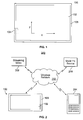
- FIG. 1 is a front elevation view of a portable communications device having video storage and playback capability
- FIG. 2 is a block diagram of a wireless communications system and a block diagram of a portable communications device depicted in FIG. 1 ;
- FIG. 3 is a block diagram of functional elements of the portable communications device depicted in FIGS. 1 and 2 ;
- FIG. 4 depicts a method of processing stored video image data files to provide zoom functionality by tactile inputs to a touch-sensitive display screen.
- FIG. 1 is a front view of a portable communications device commonly referred to as a tablet computer or simply a tablet 100.
- the tablet 100 is comprised of a capacitive touch-sensitive display screen 102. Because the display screen 102 is touch-sensitive, a user is able to interact with and operate the device 100 using "gestures.”
- Gestures are considered herein to be one or movements of one or more figures across the surface of the display screen 102, while the one or more fingers make contact with the surface of the display screen.
- a gesture can also include a movement of a pen or stylus against the surface of the display screen 102. Using gestures it is thus possible to duplicate the functionality of a conventional prior art mouse and keyboard.
- Gestures enable a user to scroll, select, open a program, close a program, and as described more fully below “zoom in” and “zoom out” of images and video displayed on the screen 102.
- the table 100 is able to receive and send data from and to external devices.
- a micro USB port 104 provides conventional universal serial bus or USB connectivity for the device 100.
- other interfaces to external devices include so-called I.E.E.E. 802.11(a)/(b)/(g) and (n)-compliant "Wi-Fi" and conventional Ethernet.
- the ability to receive data files representing "previously-captured" images and "previously-captured" video images imbues the tablet 100 with the ability to playback and zoom video that the tablet 100 obtains from other sources.
- the display screen 102 is a multi-touch, capacitive screen.
- the display screen 102 has a full or "native" resolution of 1024 x 600 picture elements or "pixels.” Stated another way, the display screen has 1024 individually addressable picture elements or pixels in the horizontal or "X" direction, in each of six hundred rows that are arranged above each other the vertical or "Y" direction.
- the screen 102 is thus capable of displaying, without scaling or compression, digital images having of 1024 x 600 image elements.
- digital images having different numbers of image elements in either the horizontal direction or the vertical require image processing to either crop or delete excess image elements or add image elements, if a full screen image on the display screen 102 is desired.
- FIG. 2 is a block diagram of a wireless communications system 200.
- the system 200 is comprised of a conventional wireless data network 202.
- the network 202 provides wireless connectivity to various types of portable, wireless communications devices.
- One such device is the table 100 shown in FIG. 1 , which is also considered herein to be a portable communications device.
- Another wireless communications device operable with the network 202 is a so-called "smart phone" 204.
- the wireless network 202 also provides connectivity to various communication endpoints. Two communication endpoints are exemplified in FIG. 2 by a mobile TV source 206 or a source of streaming video 208.
- Devices that are compatible with the network 202 are able to at least receive radio frequency signals carrying data representing previously-captured video images.
- previously captured image and “previously-captured video” means an image or video respectively, either captured by a camera, or generated by a graphics device such as a computer, not connected to, part of, or within, the tablet 100 or smart phone 204.
- video is considered herein to be comprised of a series or sequence of still image frames, each image frame being comprised of a predetermined number of individual image elements such that when the image frames are displayed on a display device they represent or depict scenes in motion.
- the number of image elements in an image frame will depend on the number of individual picture elements in the camera that captured the images. Image frames with relatively large numbers of image elements will have greater detail in them than will image frames will relatively small numbers of image elements.
- the number of image elements in a digital image is greater than the number of picture elements that a display screen 102 can display, some image elements are discarded or subtracted in order to display the image on the display device. Conversely, if the number of image elements in a digital image is less than the number of picture elements that a display screen 102 can display, image elements can be added to fill the display device or a black band can be used to "fill" the portion of the display device picture elements not needed to display an undersized image.
- the display screen 102 of the portable communications device 100 has a display size or viewable image size that is the actual amount of screen space available to display a picture, video or working space and does not include screen area obscured by the frame 106 of the device 100.
- the display screen 102 has six hundred horizontal rows, with each row containing 1024 individual picture elements.
- the maximum displayable size of an image is thus an image having 1024 picture elements in the horizontal or "X" direction and six hundred picture elements in the vertical or "Y" direction.
- a still image or video images having more or less than 1024 x 600 picture elements thus requires cropping or filling respectively in order to fill the display 102 to its maximum viewable image size.
- Cropping an image and the filling or adding of image elements can also be used to create the effects of an image being decreased in size or "zoomed out” and increased in size or “zoomed in.”
- the term “zoom” refers to manipulation of a displayed image or images, i.e., changing the size of one or more images displayed on the display screen 102, in order to make object's in a displayed image or images appear to be closer to, or farther from, an observer viewing the display screen 102.
- An object in a displayed image can be made to appear to increase or decrease in size by adding or subtracting image elements of the object, and which when displayed by a display device, depict the object as being larger or smaller respectively.
- FIG. 3 is block diagram of functional structures within the portable communications device 100, which provides among other things, wireless two-way communications via the network 202.
- a transmitter 300 and a receiver 302 are coupled to an antenna 304 through a conventional prior art duplexer, omitted from the figure for simplicity.
- a conventional microphone 306 detects audio signals and couples them into the transmitter 300. Audio signals are modulated onto a carrier generated by the transmitter and radiated from the antenna 304.
- a speaker 308 coupled to the receiver 302 generates audible sound waves from audio signals recovered from RF signals received from the antenna 304.
- the transmitter 300, receiver 302, microphone 306 and speaker 308 imbue the portable communications device 100 with two-way communications functionality.
- An optional keypad 310 is coupled to a processor 312 through a conventional bus 314.
- bus is considered to be a set of electrically-parallel conductors that connect components of computer system to each other.
- a bus allows the transfer of electric impulses from one component connected to the bus to any other component connected on the bus.
- the receiver 302 receives radio-frequency signals that carry data.
- data can include image data representing previously-captured still images and video.
- the receiver 302 is therefore coupled to a video data memory device 316, conventional in nature, wherein data representing images and full motion video is stored for subsequent playback or display.
- Video image data can also be obtained or received from external sources via other interfaces.
- interfaces include, but are not limited to, a transceiver 330 compatible with the well-known I.E.E.E. 802.11 standards, also known as "Wi-Fi.”
- An Ethernet adapter 332 and an USB port 334 also provide the ability to receive video data files, which can be routed through the processor 302 and into the video data memory device 316 via the first bus 324.
- a video image scaler 318 is coupled to the video data memory 316.
- the scaler 318 is configured to be able to read data directly from the video data memory 316 itself and provide that data to the touch-sensitive display panel 102.
- the video image scaler 318 is configured to process data that it reads from the video data memory 316 and thereafter send the processed data to the display screen 102 where it is used to generate an image that can be perceived from the display screen 102.
- the scaler 318 thus does not modify data representing original content but instead modifies the data "on the fly" and presents the modified data, which will render a modified image. Equally important is that the scaler 318 processes data of different formats and which represents images that were obtained from or captured by devices external to, i.e., other than, the portable communications device 100 itself.
- the scaler 318 is configured to convert video image file formats as they are read from the video data memory device 316.
- the scaler 318 is configured to convert so-called "AVI" format filed to MPEG-3 or MPEG-4 format files.
- the video image scaler 318 is configured to be able to read different sections of video data memory, and thus different portions of a digital image or images stored therein, via different memory ports, not shown but well known to those ordinary skill in the art.
- the video image scaler 318 is thus capable of reading data from the video data memory 316 which represents a portion of a full frame image stored in the video data memory 316 and is capable of "expanding" the data to fill, or over-fill the maximum image size displayable by the display panel 102.
- data output from the video image scaler 318 is selected and arranged such that the touch-sensitive display screen 102 is fully filled.
- the display screen has a resolution of 1024 x 600 pixels. It is therefore capable of displaying up to 1024 individual picture elements, "horizontally" across each of six hundred “vertical” rows.
- a touch input detector 320 is depicted in the figure to denote that when a user presses one or more fingers up against the touch-sensitive display panel 102, the users touch or tactile input is detected 320.
- the tactile input can thus be acted upon or processed to control the adjustment or alteration of images displayed on the panel 102.
- FIG. 3 The various structures shown in FIG. 3 (transmitter 300, receiver 302, video data memory 316, video image scaler 318, display panel 102 and the touch input detector 320) are connected to the processor 312 via a first bus that is identified in the figure by reference numeral 324.
- the processor 312 is thus able to communicate with each and every structure coupled to the bus 324.
- the processor 302 is able to detect or "read” an input gesture on the display screen 102 via the touch input detector 320 and thereafter issue commands to the video image scaler 318 to effectuate the addition as well as subtraction of picture elements to and from each image that forms video on the display screen 102.
- the operations that the processor 302 performs are determined by program instructions that the processor 312 obtains from a program memory 326 and executes.
- the program memory 326 and the processor 312 communicate with each other through a second bus 328.
- a second bus is depicted because in one embodiment, the processor 312 and the program memory 326 are co-located on the same silicon die.
- the bus 328 is thus comprised of various interconnections between the two functional devices on that die.
- the program memory 326 is one or more semi-conductor memory devices, separate and apart from the processor 312.
- the second bus 328 is thus a conventional address/control/data bus, well-known to those of ordinary skill in the art.
- Executable instructions stored in the program memory 326 imbue the processor 312 with the ability to read and detect tactile inputs or gestures that are themselves detected by the touch input detector 320.
- Such gestures and input include but are not limited to so-called pinching and un-pinching gestures.
- a pinching gesture is considered to be the simultaneous contact of two or more fingers against the surface of the display screen 102 and their lateral translation toward each other in a single, substantially continuous motion.
- a pinching gesture is pronounced of the act of pinching an object with one's thumb and forefinger.
- "Un-pinching" is considered to be the opposite motion, i.e., two fingers placed against the display screen 102 and spatially separated from each other while against the surface of the display screen 102.
- All tactile inputs to the touch-sensitive display panel 102 necessarily occur at some location on the panel's surface. Where someone places his or her fingers against the display panel 102 can be readily determined as "x" and "y” coordinates using conventional techniques. The act of touch the display panel with two fingers and separating them from each other thus defines a location on the display panel and defines opposing vertices of a rectangle, the diagonal dimension of which is equal to the separation distance between the two fingers.
- Instructions stored in the program memory 326 cause the processor 312 to "read" the starting location of a tactile input to the display panel 102 and the separation distance between the opposing vertices of a rectangle defined by the separation between two fingers as they are moved apart from each other and maintained in contact with the display screen surface.
- the contact and un-pinching motion thus define an enlargement or reduction factor, percentage or dimension, to be applied to subsequently-displayed image frames.
- Executable instructions in the program memory cause the processor to issue instructions to the video image scaler 318, which cause the scaler 318 to create or generate additional pixels using the pixels enclosed within the selected portion of the display panel 102 for each and every subsequent image that is read from the video data memory 316 and displayed on the display panel 102.
- the image frames stored in memory are thus read from the video data memory 316 and scaled to increase or decrease the size of objects depicted in the captured images.
- the video image scaler 318 thus is configured to provide continuous "zoom-in” (captured object image enlargement) and “zoom-out” (captured object image reduction) functionality to video regardless of when and where the video images were recorded and how they were recorded.
- the portable communications device 100 depicted in the figures and described above is able to operate on any source of video image information and provides the ability to zoom-in or zoom-out on areas of interest in a particular video stream or portion thereof.
- FIG. 4 depicts steps of a method for providing zoom-in and zoom-out functionality to any stream of video images.
- a frame of video data is obtained or received such as from a video data memory device 318 depicted in FIG. 3 .
- a test is executed at step 404 for activation or contact with the touch screen. If at step 404 it is determined that the touch screen has been contacted or activated the location of the tactile input and the movement of the fingers on the screen are determined are determined at step 406.
- the movement of fingers away from each other provide while they are in contact with a touch-sensitive display screen provides a scaling factor or number, usable by the video image scaler 318 to increase or decrease the size of a displayed image by adding or subtracting pixels from the image information obtained from the video data memory 316.
- the size or extent to which fingers are separated from each other in a un-pinching movement or moved toward each other in a pinching movement thus provides a scaling factor for the video image scaler 318. That same scaling factor is applied to all subsequently obtained images created from the data stored in the video data memory 316.
- a decision or test is executed to determine whether or not the finger space is increasing or decreasing. The direction of movement and the distance that the two fingers are separated from each other thus provides the aforementioned scaling factor.
- a scaling factor is calculated that is used to determine the number of pixels to add to the frame at step 420. Pixels within the selected region of the display are augmented by additional pixels that are generated to make the subsequent video image frames appear to be zoomed-in or enlarged.
- step 422 a calculation is made to determine the number of pixels or percentage of pixels that extracted or removed from the selected image field at step 424. Subsequent video image frames are processed by repeating the steps as shown.
- video image scaler 318 is depicted as a separate structural element, the functions described herein as being performed by the video image scaler 318 can in fact be performed by program instructions residing in the program memory 326 or another program store. In such an embodiment, the program instructions thus act as and are equivalent to structure identified and described herein as the video image scaler 318.
- touch input detector 320 and the functions it performs are depicted as being a separate structural element but can instead be accomplished by program instructions as well.
- program instructions that provide the functionality described herein and attributed to the touch input detector 320 in fact comprise structure.
- the functions provided by the structures described above can in fact be provided by instructions or software for one or more processors operatively coupled to at least a video data memory device and a touch-sensitive display panel 102.
Landscapes
- Engineering & Computer Science (AREA)
- Physics & Mathematics (AREA)
- Computer Hardware Design (AREA)
- General Physics & Mathematics (AREA)
- Theoretical Computer Science (AREA)
- Controls And Circuits For Display Device (AREA)
- User Interface Of Digital Computer (AREA)
Abstract
Full-motion video displayed on a portable communications device such as a tablet personal computer, can be processed "on the fly" to provide a "zoom-in" and "zoom-out" functionality. Image elements are added to video image frames as they are read out from memory and prior to being display on the picture elements (pixels) of a display device in order to make objects depicted in an image file as being larger than how it appears in the original image file. Similarly, image elements are subtracted or deleted from video image frames as they are read from memory and prior to their being displayed in order to make objects depicted in the image frames as being smaller. Video from any source can be zoomed in and zoomed out.
Description
- The present disclosure relates generally to a manner by which to facilitate viewing of full-motion video on a portable wireless device such as a so-called "tablet" personal computer or PC. More particularly, the present invention relates to an apparatus, and an associated method, by which full-motion video obtained from a variety of sources can be enlarged or reduced, i.e., "zoomed-in" or "zoomed-out," using a tactile or input gesture to a touch-sensitive display screen.
- Recent years have witnessed the development and deployment of a wide range of electronic devices and systems that provide many new functions and services. Advancements in communication technologies for instance, have permitted the development and deployment of a wide array of communication devices, equipment, and communication infrastructures. Their development, deployment, and popular use have changed the lives and daily habits of many.
- Cellular telephone and other wireless communication systems have been developed and deployed and have achieved significant levels of usage. Increasing technological capabilities along with decreasing equipment and operational costs have permitted, by way of such wireless communication systems, increased communication capabilities to be provided at lowered costs.
- Early-generation, wireless communication systems generally provided for voice communications and limited data communications. Successor-generation communication systems have provided increasingly data-intensive communication capabilities and services. New-generation communication system, for instance, provide for the communication of large data files at high through-put rates by their attachment to data messages.
- Wireless communications are typically effectuated through use of portable wireless devices, which are sometimes referred to as mobile stations. The wireless devices are typically of small dimensions, thereby to increase the likelihood that the device shall be hand-carried and available for use whenever needed as long as the wireless devices positioned within an area encompassed by a network of the cellular, or analogous, communication system. A wireless device includes transceiver circuitry to provide for radio communication, both to receive information and to send information.
- Some wireless devices are now provided with additional functionality. Some of the additional functionality provided to a wireless device is communication-related while other functionality is related to other technologies. When so-configured, the wireless device forms a multi-functional device, having multiple functionalities.
- The recordation, storage and playback of full-motion video is one functionality now provided to some wireless devices, which include tablet computers equipped with radio frequency transmitters and receivers. Because of the small dimensions of typical wireless devices, and the regular carriage of such devices by users, a wireless device having video playback functionality is desirable to many users. A program, once recorded, can be saved, for example, at a storage element of the wireless device and/or can be viewed on the device or perhaps transferred elsewhere because the television content is defined or kept as a file, which is generally considered to be a named or identified collection of information, such as a set of data bits or bytes used by a program. And, since the recorded image is kept as a file, the file can be appended to a data message and sent elsewhere. The data file forming the image or images is also storable at the wireless device, available subsequently to be viewed at the wireless device.
- Various methodologies have been developed by which to facilitate the viewing of video programming or content. A method and apparatus by which video content can be manipulated, i.e., zoomed in and zoomed-out, in order to provide the appearance of enlarging or decreasing the size of objects in a video, would be an improvement over the prior art. It is in light of this background information related to television programming information recording that the significant improvements of the present invention have evolved.
-
FIG. 1 is a front elevation view of a portable communications device having video storage and playback capability; -
FIG. 2 is a block diagram of a wireless communications system and a block diagram of a portable communications device depicted inFIG. 1 ; -
FIG. 3 is a block diagram of functional elements of the portable communications device depicted inFIGS. 1 and 2 ; and -
FIG. 4 depicts a method of processing stored video image data files to provide zoom functionality by tactile inputs to a touch-sensitive display screen. -
FIG. 1 is a front view of a portable communications device commonly referred to as a tablet computer or simply atablet 100. Thetablet 100 is comprised of a capacitive touch-sensitive display screen 102. Because thedisplay screen 102 is touch-sensitive, a user is able to interact with and operate thedevice 100 using "gestures." - Gestures are considered herein to be one or movements of one or more figures across the surface of the
display screen 102, while the one or more fingers make contact with the surface of the display screen. As used herein, a gesture can also include a movement of a pen or stylus against the surface of thedisplay screen 102. Using gestures it is thus possible to duplicate the functionality of a conventional prior art mouse and keyboard. Gestures enable a user to scroll, select, open a program, close a program, and as described more fully below "zoom in" and "zoom out" of images and video displayed on thescreen 102. - The table 100 is able to receive and send data from and to external devices. In
FIG. 1 , amicro USB port 104 provides conventional universal serial bus or USB connectivity for thedevice 100. As shown inFIG. 2 , other interfaces to external devices include so-called I.E.E.E. 802.11(a)/(b)/(g) and (n)-compliant "Wi-Fi" and conventional Ethernet. The ability to receive data files representing "previously-captured" images and "previously-captured" video images imbues thetablet 100 with the ability to playback and zoom video that thetablet 100 obtains from other sources. - The
display screen 102 is a multi-touch, capacitive screen. In one embodiment, thedisplay screen 102 has a full or "native" resolution of 1024 x 600 picture elements or "pixels." Stated another way, the display screen has 1024 individually addressable picture elements or pixels in the horizontal or "X" direction, in each of six hundred rows that are arranged above each other the vertical or "Y" direction. Thescreen 102 is thus capable of displaying, without scaling or compression, digital images having of 1024 x 600 image elements. Those of ordinary skill in the art recognize that digital images having different numbers of image elements in either the horizontal direction or the vertical require image processing to either crop or delete excess image elements or add image elements, if a full screen image on thedisplay screen 102 is desired. -
FIG. 2 is a block diagram of awireless communications system 200. Thesystem 200 is comprised of a conventionalwireless data network 202. Thenetwork 202 provides wireless connectivity to various types of portable, wireless communications devices. One such device is the table 100 shown inFIG. 1 , which is also considered herein to be a portable communications device. Another wireless communications device operable with thenetwork 202 is a so-called "smart phone" 204. - The
wireless network 202 also provides connectivity to various communication endpoints. Two communication endpoints are exemplified inFIG. 2 by amobile TV source 206 or a source ofstreaming video 208. - Devices that are compatible with the
network 202 are able to at least receive radio frequency signals carrying data representing previously-captured video images. As used herein, the term "previously captured image" and "previously-captured video" means an image or video respectively, either captured by a camera, or generated by a graphics device such as a computer, not connected to, part of, or within, thetablet 100 orsmart phone 204. - As used herein, "video" is considered herein to be comprised of a series or sequence of still image frames, each image frame being comprised of a predetermined number of individual image elements such that when the image frames are displayed on a display device they represent or depict scenes in motion. In the case of images captured by a digital camera, the number of image elements in an image frame will depend on the number of individual picture elements in the camera that captured the images. Image frames with relatively large numbers of image elements will have greater detail in them than will image frames will relatively small numbers of image elements.
- If the number of image elements in a digital image is greater than the number of picture elements that a
display screen 102 can display, some image elements are discarded or subtracted in order to display the image on the display device. Conversely, if the number of image elements in a digital image is less than the number of picture elements that adisplay screen 102 can display, image elements can be added to fill the display device or a black band can be used to "fill" the portion of the display device picture elements not needed to display an undersized image. - The
display screen 102 of theportable communications device 100 has a display size or viewable image size that is the actual amount of screen space available to display a picture, video or working space and does not include screen area obscured by theframe 106 of thedevice 100. In one embodiment, thedisplay screen 102 has six hundred horizontal rows, with each row containing 1024 individual picture elements. The maximum displayable size of an image is thus an image having 1024 picture elements in the horizontal or "X" direction and six hundred picture elements in the vertical or "Y" direction. A still image or video images having more or less than 1024 x 600 picture elements thus requires cropping or filling respectively in order to fill thedisplay 102 to its maximum viewable image size. Cropping an image and the filling or adding of image elements can also be used to create the effects of an image being decreased in size or "zoomed out" and increased in size or "zoomed in." As used herein, the term "zoom" refers to manipulation of a displayed image or images, i.e., changing the size of one or more images displayed on thedisplay screen 102, in order to make object's in a displayed image or images appear to be closer to, or farther from, an observer viewing thedisplay screen 102. An object in a displayed image can be made to appear to increase or decrease in size by adding or subtracting image elements of the object, and which when displayed by a display device, depict the object as being larger or smaller respectively. -
FIG. 3 is block diagram of functional structures within theportable communications device 100, which provides among other things, wireless two-way communications via thenetwork 202. Atransmitter 300 and areceiver 302 are coupled to anantenna 304 through a conventional prior art duplexer, omitted from the figure for simplicity. - A
conventional microphone 306 detects audio signals and couples them into thetransmitter 300. Audio signals are modulated onto a carrier generated by the transmitter and radiated from theantenna 304. Aspeaker 308 coupled to thereceiver 302 generates audible sound waves from audio signals recovered from RF signals received from theantenna 304. Thetransmitter 300,receiver 302,microphone 306 andspeaker 308 imbue theportable communications device 100 with two-way communications functionality. Anoptional keypad 310 is coupled to a processor 312 through a conventional bus 314. - As used herein, a "bus" is considered to be a set of electrically-parallel conductors that connect components of computer system to each other. A bus allows the transfer of electric impulses from one component connected to the bus to any other component connected on the bus.
- In
FIG. 3 , which is for purposes of illustration only, thereceiver 302 receives radio-frequency signals that carry data. Such data can include image data representing previously-captured still images and video. Thereceiver 302 is therefore coupled to a videodata memory device 316, conventional in nature, wherein data representing images and full motion video is stored for subsequent playback or display. - Video image data can also be obtained or received from external sources via other interfaces. Such interfaces include, but are not limited to, a
transceiver 330 compatible with the well-known I.E.E.E. 802.11 standards, also known as "Wi-Fi." AnEthernet adapter 332 and anUSB port 334 also provide the ability to receive video data files, which can be routed through theprocessor 302 and into the videodata memory device 316 via thefirst bus 324. - A
video image scaler 318 is coupled to thevideo data memory 316. Thescaler 318 is configured to be able to read data directly from thevideo data memory 316 itself and provide that data to the touch-sensitive display panel 102. Thevideo image scaler 318 is configured to process data that it reads from thevideo data memory 316 and thereafter send the processed data to thedisplay screen 102 where it is used to generate an image that can be perceived from thedisplay screen 102. Thescaler 318 thus does not modify data representing original content but instead modifies the data "on the fly" and presents the modified data, which will render a modified image. Equally important is that thescaler 318 processes data of different formats and which represents images that were obtained from or captured by devices external to, i.e., other than, theportable communications device 100 itself. - The
scaler 318 is configured to convert video image file formats as they are read from the videodata memory device 316. By way of example, thescaler 318 is configured to convert so-called "AVI" format filed to MPEG-3 or MPEG-4 format files. - The
video image scaler 318 is configured to be able to read different sections of video data memory, and thus different portions of a digital image or images stored therein, via different memory ports, not shown but well known to those ordinary skill in the art. Thevideo image scaler 318 is thus capable of reading data from thevideo data memory 316 which represents a portion of a full frame image stored in thevideo data memory 316 and is capable of "expanding" the data to fill, or over-fill the maximum image size displayable by thedisplay panel 102. - Processes or methods of "zooming-in" or enlarging a portion of a digital image are well-known but almost all of them require image elements to be generated and added to an original, captured image. New image elements can be derived using a variety of different algorithms well known in the art. Description of them is therefore omitted for brevity.
- In
FIG. 3 , data output from thevideo image scaler 318 is selected and arranged such that the touch-sensitive display screen 102 is fully filled. In the preferred embodiment, the display screen has a resolution of 1024 x 600 pixels. It is therefore capable of displaying up to 1024 individual picture elements, "horizontally" across each of six hundred "vertical" rows. - A
touch input detector 320 is depicted in the figure to denote that when a user presses one or more fingers up against the touch-sensitive display panel 102, the users touch or tactile input is detected 320. The tactile input can thus be acted upon or processed to control the adjustment or alteration of images displayed on thepanel 102. - The various structures shown in
FIG. 3 (transmitter 300,receiver 302,video data memory 316,video image scaler 318,display panel 102 and the touch input detector 320) are connected to the processor 312 via a first bus that is identified in the figure byreference numeral 324. The processor 312 is thus able to communicate with each and every structure coupled to thebus 324. - Using the structure depicted in
FIG. 3 , theprocessor 302 is able to detect or "read" an input gesture on thedisplay screen 102 via thetouch input detector 320 and thereafter issue commands to thevideo image scaler 318 to effectuate the addition as well as subtraction of picture elements to and from each image that forms video on thedisplay screen 102. - The operations that the
processor 302 performs are determined by program instructions that the processor 312 obtains from aprogram memory 326 and executes. As shown in the figure, theprogram memory 326 and the processor 312 communicate with each other through asecond bus 328. A second bus is depicted because in one embodiment, the processor 312 and theprogram memory 326 are co-located on the same silicon die. Thebus 328 is thus comprised of various interconnections between the two functional devices on that die. In alternate embodiment, theprogram memory 326 is one or more semi-conductor memory devices, separate and apart from the processor 312. In such an embodiment, thesecond bus 328 is thus a conventional address/control/data bus, well-known to those of ordinary skill in the art. - Executable instructions stored in the
program memory 326 imbue the processor 312 with the ability to read and detect tactile inputs or gestures that are themselves detected by thetouch input detector 320. Such gestures and input include but are not limited to so-called pinching and un-pinching gestures. - As used herein, a pinching gesture is considered to be the simultaneous contact of two or more fingers against the surface of the
display screen 102 and their lateral translation toward each other in a single, substantially continuous motion. As its name suggests, a pinching gesture is reminiscent of the act of pinching an object with one's thumb and forefinger. "Un-pinching" is considered to be the opposite motion, i.e., two fingers placed against thedisplay screen 102 and spatially separated from each other while against the surface of thedisplay screen 102. - All tactile inputs to the touch-
sensitive display panel 102 necessarily occur at some location on the panel's surface. Where someone places his or her fingers against thedisplay panel 102 can be readily determined as "x" and "y" coordinates using conventional techniques. The act of touch the display panel with two fingers and separating them from each other thus defines a location on the display panel and defines opposing vertices of a rectangle, the diagonal dimension of which is equal to the separation distance between the two fingers. - Instructions stored in the
program memory 326 cause the processor 312 to "read" the starting location of a tactile input to thedisplay panel 102 and the separation distance between the opposing vertices of a rectangle defined by the separation between two fingers as they are moved apart from each other and maintained in contact with the display screen surface. The contact and un-pinching motion thus define an enlargement or reduction factor, percentage or dimension, to be applied to subsequently-displayed image frames. - Executable instructions in the program memory cause the processor to issue instructions to the
video image scaler 318, which cause thescaler 318 to create or generate additional pixels using the pixels enclosed within the selected portion of thedisplay panel 102 for each and every subsequent image that is read from thevideo data memory 316 and displayed on thedisplay panel 102. The image frames stored in memory are thus read from thevideo data memory 316 and scaled to increase or decrease the size of objects depicted in the captured images. Thevideo image scaler 318 thus is configured to provide continuous "zoom-in" (captured object image enlargement) and "zoom-out" (captured object image reduction) functionality to video regardless of when and where the video images were recorded and how they were recorded. Unlike prior art devices, which are limited to operating on video captured by a device itself, theportable communications device 100 depicted in the figures and described above is able to operate on any source of video image information and provides the ability to zoom-in or zoom-out on areas of interest in a particular video stream or portion thereof. -
FIG. 4 depicts steps of a method for providing zoom-in and zoom-out functionality to any stream of video images. In a first step 402 a frame of video data is obtained or received such as from a videodata memory device 318 depicted inFIG. 3 . A test is executed atstep 404 for activation or contact with the touch screen. If atstep 404 it is determined that the touch screen has been contacted or activated the location of the tactile input and the movement of the fingers on the screen are determined are determined atstep 406. - The movement of fingers away from each other provide while they are in contact with a touch-sensitive display screen provides a scaling factor or number, usable by the
video image scaler 318 to increase or decrease the size of a displayed image by adding or subtracting pixels from the image information obtained from thevideo data memory 316. The size or extent to which fingers are separated from each other in a un-pinching movement or moved toward each other in a pinching movement thus provides a scaling factor for thevideo image scaler 318. That same scaling factor is applied to all subsequently obtained images created from the data stored in thevideo data memory 316. Atstep 408, a decision or test is executed to determine whether or not the finger space is increasing or decreasing. The direction of movement and the distance that the two fingers are separated from each other thus provides the aforementioned scaling factor. - At
step 408, if the finger spacing is increasing or decreasing if a scaling factor is generated accordingly. In the case of an increasing separation distance, at step 410 a scaling factor is calculated that is used to determine the number of pixels to add to the frame atstep 420. Pixels within the selected region of the display are augmented by additional pixels that are generated to make the subsequent video image frames appear to be zoomed-in or enlarged. - If the finger spacing is decreasing, at step 422 a calculation is made to determine the number of pixels or percentage of pixels that extracted or removed from the selected image field at
step 424. Subsequent video image frames are processed by repeating the steps as shown. - Those of ordinary skill in the art will recognize that while the
video image scaler 318 is depicted as a separate structural element, the functions described herein as being performed by thevideo image scaler 318 can in fact be performed by program instructions residing in theprogram memory 326 or another program store. In such an embodiment, the program instructions thus act as and are equivalent to structure identified and described herein as thevideo image scaler 318. - Similarly, the
touch input detector 320 and the functions it performs are depicted as being a separate structural element but can instead be accomplished by program instructions as well. In such an embodiment, program instructions that provide the functionality described herein and attributed to thetouch input detector 320 in fact comprise structure. - Stated another way, the functions provided by the structures described above can in fact be provided by instructions or software for one or more processors operatively coupled to at least a video data memory device and a touch-
sensitive display panel 102. - The foregoing description is for purposes of illustration only. The true scope of the invention is set forth in the appurtenant claims.
Claims (15)
- A portable communications device comprised of:a touch-sensitive display device (display device) having a first number of rows of picture elements and a second number of columns of picture elements, the picture elements being configured to emit light to generate an image, the display device configured to display video that is embodied as successive and temporally-adjacent frames of images, each image frame being comprised of a first number of image element rows and a second number of image element columns, a plurality of image elements of each image frame being displayed by the display device by corresponding picture elements;a processor coupled to the touch-sensitive display device, the processor being configured to detect an input gesture on the touch-sensitive display device, and configured to add new image elements to, and subtract image elements from, image frames obtained from a video data memory coupled to the processor, added and subtracted image elements increasing or decreasing respectively, the size of at least a portion of each image subsequently displayed by the display device picture elements, the number of picture elements added to video image frames and the number of picture elements subtracted from video image frames being determined responsive to the input gesture.
- The portable communications device of claim 1, further comprised of a video data memory wherein data representing video image frames is stored, and wherein the processor is configured to be responsive to an un-pinching input gesture, an un-pinching input gesture causing the processor to effectuate the addition of a number of picture elements to each video image frame obtained from the video data memory after the input gesture occurs, the number of added picture elements corresponding to a size of the input gesture and effectuating correspondingly increased-size video image frames after the input gesture, each increased-size video image frame having additional image element rows and additional image element columns, the number of image element rows and image element columns in each increased-size video image frame being greater than the first number of picture element rows and the second number of picture element columns respectively in the display device.
- The portable communications device of any of claims 1-2, wherein the processor is responsive to a pinching input gesture, a pinching input gesture causing the processor to subtract picture elements from each video image frame after the pinching input gesture and thereby decrease the size of a plurality of successive and temporally-adjacent frames of images displayed after the un-pinching gesture is detected, the decreased size of the plurality of successive images being less than the first maximum image size.
- The portable communications device of any of claims 1-3, further comprised of a radio frequency receiver, configured to be able to receive radio frequency signals carrying data that represents video image frames.
- The portable communications device of claim 4, wherein the receiver is additionally configured to store in a video data memory device, data that represents previously-captured images.
- The portable communications device of any of claims 1-2, further comprising a video scaling engine configured to generate new picture elements for each of a plurality of successive and temporally-adjacent image frames responsive to a first type of input gesture, the video scaling engine being additionally configured to delete picture elements from each of a plurality of successive and temporally-adjacent image frames, responsive to a second type of input gesture.
- The portable communications device of any of claims 1-6, wherein the processor is additionally configured to effectuate the conversion of a previously-captured video data from a first format to a second format, prior to display of the video data on a display device.
- The portable communications device of any of claims 1-7, wherein the touch-sensitive display and processor are configured to be responsive to a tactile input comprised of a movement of at least two fingers relative to each other, while the at least two fingers simultaneously make physical contact with the touch-sensitive display.
- A method of displaying video on a portable communications device having a touch-sensitive display device capable of displaying video by generating and displaying a plurality of successive images, the touch-sensitive display device comprised of a first number of image display elements, the method comprised of:receiving image data, which represents a series of temporally-adjacent images recorded by an image capture device;generating video on the touch-sensitive display device, by displaying a series of temporally-adjacent images using the received image data;selecting a portion of at least one displayed image of the series of temporally-adjacent images by a tactile input to the touch-sensitive display device; andgenerating and adding new picture elements to picture elements within the selected portion of the at least one displayed image of the series of temporally-adjacent images.
- The method of claim 9, wherein the step of receiving image data includes the step of receiving images recorded by an image capture device external to the portable communications device.
- The method of any of claims 9-10, wherein the step of generating new picture elements includes generating new picture elements by averaging adjacent picture elements.
- The method of any of claims 9-11, wherein the step of generating new picture elements includes generating new picture elements by evaluating neighboring picture elements and adding a new picture element based on surrounding picture elements.
- The method of any of claims 9-12, wherein the step of selecting a portion of at least one displayed image by a tactile input is comprised of:touching the touch-sensitive display with at least two fingers and simultaneously moving the at least two fingers away from each other.
- The method of claim 10, wherein the step of receiving image data is comprised of receiving image data wirelessly.
- The method of claim 11, wherein the step of receiving image data is comprised of receiving image data from a wired connection.
Applications Claiming Priority (1)
| Application Number | Priority Date | Filing Date | Title |
|---|---|---|---|
| US13/176,535 US20130009997A1 (en) | 2011-07-05 | 2011-07-05 | Pinch-to-zoom video apparatus and associated method |
Publications (1)
| Publication Number | Publication Date |
|---|---|
| EP2544174A1 true EP2544174A1 (en) | 2013-01-09 |
Family
ID=46717699
Family Applications (1)
| Application Number | Title | Priority Date | Filing Date |
|---|---|---|---|
| EP12175013A Withdrawn EP2544174A1 (en) | 2011-07-05 | 2012-07-04 | Pinch-to-zoom video apparatus and associated method |
Country Status (3)
| Country | Link |
|---|---|
| US (1) | US20130009997A1 (en) |
| EP (1) | EP2544174A1 (en) |
| CA (1) | CA2782150A1 (en) |
Cited By (1)
| Publication number | Priority date | Publication date | Assignee | Title |
|---|---|---|---|---|
| US9514710B2 (en) | 2014-03-31 | 2016-12-06 | International Business Machines Corporation | Resolution enhancer for electronic visual displays |
Families Citing this family (11)
| Publication number | Priority date | Publication date | Assignee | Title |
|---|---|---|---|---|
| US8681181B2 (en) * | 2011-08-24 | 2014-03-25 | Nokia Corporation | Methods, apparatuses, and computer program products for compression of visual space for facilitating the display of content |
| US20130246948A1 (en) * | 2012-03-16 | 2013-09-19 | Lenovo (Beijing) Co., Ltd. | Control method and control device |
| US9176537B2 (en) * | 2013-03-15 | 2015-11-03 | Intel Corporation | Connector assembly for an electronic device |
| US20150253974A1 (en) | 2014-03-07 | 2015-09-10 | Sony Corporation | Control of large screen display using wireless portable computer interfacing with display controller |
| US9626084B2 (en) | 2014-03-21 | 2017-04-18 | Amazon Technologies, Inc. | Object tracking in zoomed video |
| US20160098180A1 (en) * | 2014-10-01 | 2016-04-07 | Sony Corporation | Presentation of enlarged content on companion display device |
| CN104822088B (en) * | 2015-04-16 | 2019-03-19 | 腾讯科技(北京)有限公司 | Video image zooming method and apparatus |
| US10942633B2 (en) | 2018-12-20 | 2021-03-09 | Microsoft Technology Licensing, Llc | Interactive viewing and editing system |
| US10754526B2 (en) | 2018-12-20 | 2020-08-25 | Microsoft Technology Licensing, Llc | Interactive viewing system |
| CN111275726B (en) * | 2020-02-24 | 2021-02-05 | 北京字节跳动网络技术有限公司 | Image cropping method, device, device and storage medium |
| CN119648887B (en) * | 2025-02-17 | 2025-06-03 | 杭州海康机器人股份有限公司 | Image rendering method, display device, apparatus, storage medium, and program product |
Citations (1)
| Publication number | Priority date | Publication date | Assignee | Title |
|---|---|---|---|---|
| US20110074710A1 (en) * | 2009-09-25 | 2011-03-31 | Christopher Douglas Weeldreyer | Device, Method, and Graphical User Interface for Manipulating User Interface Objects |
Family Cites Families (3)
| Publication number | Priority date | Publication date | Assignee | Title |
|---|---|---|---|---|
| US6400852B1 (en) * | 1998-12-23 | 2002-06-04 | Luxsonor Semiconductors, Inc. | Arbitrary zoom “on -the -fly” |
| US20120092381A1 (en) * | 2010-10-19 | 2012-04-19 | Microsoft Corporation | Snapping User Interface Elements Based On Touch Input |
| CN103201705B (en) * | 2011-03-08 | 2016-08-17 | 英派尔科技开发有限公司 | Content output device and method for outputting video content on its display |
-
2011
- 2011-07-05 US US13/176,535 patent/US20130009997A1/en not_active Abandoned
-
2012
- 2012-07-04 EP EP12175013A patent/EP2544174A1/en not_active Withdrawn
- 2012-07-04 CA CA2782150A patent/CA2782150A1/en not_active Abandoned
Patent Citations (1)
| Publication number | Priority date | Publication date | Assignee | Title |
|---|---|---|---|---|
| US20110074710A1 (en) * | 2009-09-25 | 2011-03-31 | Christopher Douglas Weeldreyer | Device, Method, and Graphical User Interface for Manipulating User Interface Objects |
Non-Patent Citations (1)
| Title |
|---|
| ANONYMOUS: "Mobile Safari Tips and Tricks", INTERNET CITATION, 15 April 2009 (2009-04-15), pages 1, XP002663684, Retrieved from the Internet <URL:http://web.archive.org/web/20090415204508/http://www.appsafari.com/mobile-safari-tips-and-tricks/> [retrieved on 20111116] * |
Cited By (3)
| Publication number | Priority date | Publication date | Assignee | Title |
|---|---|---|---|---|
| US9514710B2 (en) | 2014-03-31 | 2016-12-06 | International Business Machines Corporation | Resolution enhancer for electronic visual displays |
| US9514711B2 (en) | 2014-03-31 | 2016-12-06 | International Business Machines Corporation | Resolution enhancer for electronic visual displays |
| US9858646B2 (en) | 2014-03-31 | 2018-01-02 | International Business Machines Corporation | Resolution enhancer for electronic visual displays |
Also Published As
| Publication number | Publication date |
|---|---|
| CA2782150A1 (en) | 2013-01-05 |
| US20130009997A1 (en) | 2013-01-10 |
Similar Documents
| Publication | Publication Date | Title |
|---|---|---|
| EP2544174A1 (en) | Pinch-to-zoom video apparatus and associated method | |
| CN111225150B (en) | Method for processing interpolation frame and related product | |
| US9319632B2 (en) | Display apparatus and method for video calling thereof | |
| CN107230192B (en) | Image processing method, apparatus, computer-readable storage medium, and mobile terminal | |
| CN107750451B (en) | Method and electronic device for stabilizing video | |
| US9826276B2 (en) | Method and computing device for performing virtual camera functions during playback of media content | |
| US9749541B2 (en) | Method and apparatus for displaying and recording images using multiple image capturing devices integrated into a single mobile device | |
| EP3065413B1 (en) | Media streaming system and control method thereof | |
| WO2017016339A1 (en) | Video sharing method and device, and video playing method and device | |
| CN114285958B (en) | Image processing circuit, image processing method and electronic device | |
| CN108184070A (en) | A kind of image pickup method and terminal | |
| EP3510767B1 (en) | Display device | |
| KR102459652B1 (en) | Display device and image processing method thereof | |
| KR20130040547A (en) | Device and method for controlling screen in wireless terminal | |
| US11551452B2 (en) | Apparatus and method for associating images from two image streams | |
| JP5189709B2 (en) | Terminal device and GUI screen generation method | |
| CN110321449B (en) | A picture display method and terminal | |
| KR20180027191A (en) | Terminal and method for controlling the same | |
| EP3156908A1 (en) | User terminal, method for controlling same, and multimedia system | |
| CN113596350A (en) | Image processing method, mobile terminal and readable storage medium | |
| CN112053372B (en) | A method for identifying screen display type and related device | |
| US11902502B2 (en) | Display apparatus and control method thereof | |
| CN115134527A (en) | Processing method, intelligent terminal and storage medium | |
| CN114666477A (en) | Video data processing method, device, equipment and storage medium | |
| CN104813342B (en) | The change video size of perception of content |
Legal Events
| Date | Code | Title | Description |
|---|---|---|---|
| PUAI | Public reference made under article 153(3) epc to a published international application that has entered the european phase |
Free format text: ORIGINAL CODE: 0009012 |
|
| 17P | Request for examination filed |
Effective date: 20120704 |
|
| AK | Designated contracting states |
Kind code of ref document: A1 Designated state(s): AL AT BE BG CH CY CZ DE DK EE ES FI FR GB GR HR HU IE IS IT LI LT LU LV MC MK MT NL NO PL PT RO RS SE SI SK SM TR |
|
| AX | Request for extension of the european patent |
Extension state: BA ME |
|
| STAA | Information on the status of an ep patent application or granted ep patent |
Free format text: STATUS: THE APPLICATION HAS BEEN WITHDRAWN |
|
| 18W | Application withdrawn |
Effective date: 20130410 |