EP2533157B1 - Pre-caching resources based on a cache manifest - Google Patents
Pre-caching resources based on a cache manifest Download PDFInfo
- Publication number
- EP2533157B1 EP2533157B1 EP11175247.3A EP11175247A EP2533157B1 EP 2533157 B1 EP2533157 B1 EP 2533157B1 EP 11175247 A EP11175247 A EP 11175247A EP 2533157 B1 EP2533157 B1 EP 2533157B1
- Authority
- EP
- European Patent Office
- Prior art keywords
- electronic device
- resource items
- cache
- cached
- application
- Prior art date
- Legal status (The legal status is an assumption and is not a legal conclusion. Google has not performed a legal analysis and makes no representation as to the accuracy of the status listed.)
- Active
Links
Images



Classifications
-
- H—ELECTRICITY
- H04—ELECTRIC COMMUNICATION TECHNIQUE
- H04L—TRANSMISSION OF DIGITAL INFORMATION, e.g. TELEGRAPHIC COMMUNICATION
- H04L63/00—Network architectures or network communication protocols for network security
- H04L63/10—Network architectures or network communication protocols for network security for controlling access to devices or network resources
-
- G—PHYSICS
- G06—COMPUTING OR CALCULATING; COUNTING
- G06F—ELECTRIC DIGITAL DATA PROCESSING
- G06F12/00—Accessing, addressing or allocating within memory systems or architectures
- G06F12/02—Addressing or allocation; Relocation
- G06F12/08—Addressing or allocation; Relocation in hierarchically structured memory systems, e.g. virtual memory systems
- G06F12/0802—Addressing of a memory level in which the access to the desired data or data block requires associative addressing means, e.g. caches
- G06F12/0862—Addressing of a memory level in which the access to the desired data or data block requires associative addressing means, e.g. caches with prefetch
-
- G—PHYSICS
- G06—COMPUTING OR CALCULATING; COUNTING
- G06F—ELECTRIC DIGITAL DATA PROCESSING
- G06F21/00—Security arrangements for protecting computers, components thereof, programs or data against unauthorised activity
- G06F21/60—Protecting data
- G06F21/62—Protecting access to data via a platform, e.g. using keys or access control rules
- G06F21/6218—Protecting access to data via a platform, e.g. using keys or access control rules to a system of files or objects, e.g. local or distributed file system or database
- G06F21/6245—Protecting personal data, e.g. for financial or medical purposes
- G06F21/6263—Protecting personal data, e.g. for financial or medical purposes during internet communication, e.g. revealing personal data from cookies
-
- H—ELECTRICITY
- H04—ELECTRIC COMMUNICATION TECHNIQUE
- H04L—TRANSMISSION OF DIGITAL INFORMATION, e.g. TELEGRAPHIC COMMUNICATION
- H04L63/00—Network architectures or network communication protocols for network security
- H04L63/08—Network architectures or network communication protocols for network security for authentication of entities
-
- H—ELECTRICITY
- H04—ELECTRIC COMMUNICATION TECHNIQUE
- H04L—TRANSMISSION OF DIGITAL INFORMATION, e.g. TELEGRAPHIC COMMUNICATION
- H04L67/00—Network arrangements or protocols for supporting network services or applications
- H04L67/50—Network services
- H04L67/56—Provisioning of proxy services
- H04L67/568—Storing data temporarily at an intermediate stage, e.g. caching
- H04L67/5682—Policies or rules for updating, deleting or replacing the stored data
-
- H—ELECTRICITY
- H04—ELECTRIC COMMUNICATION TECHNIQUE
- H04L—TRANSMISSION OF DIGITAL INFORMATION, e.g. TELEGRAPHIC COMMUNICATION
- H04L67/00—Network arrangements or protocols for supporting network services or applications
- H04L67/50—Network services
- H04L67/56—Provisioning of proxy services
- H04L67/568—Storing data temporarily at an intermediate stage, e.g. caching
- H04L67/5681—Pre-fetching or pre-delivering data based on network characteristics
-
- H—ELECTRICITY
- H04—ELECTRIC COMMUNICATION TECHNIQUE
- H04W—WIRELESS COMMUNICATION NETWORKS
- H04W88/00—Devices specially adapted for wireless communication networks, e.g. terminals, base stations or access point devices
- H04W88/02—Terminal devices
- H04W88/04—Terminal devices adapted for relaying to or from another terminal or user
Definitions
- the present technology relates generally to communications between web server and web client and, more particularly, to portable electronic devices accessing a remote web application.
- a client application may access a server application using known protocols.
- a web client that accesses a web server may use commonly known protocols, such as Hypertext Transfer Transfer Protocol (HTTP), WebSockets, etc.
- HTTP Hypertext Transfer Transfer Protocol
- a response from a web server includes a document that conforms to known formatting languages, such as Hypertext Markup Language (HTML), eXtensible Markup Language (XML), or others.
- Web content may be cached, i.e. temporarily stored as a technique to reduce bandwidth usage, server load, and response lag. Quite frequently an initial document provided by the web server will include references to further content that the web client must retrieve to properly display a web page.
- Pre-fetching further content based on the initial document enables a web browser to obtain additional content that might be subsequently requested by the user of the web browser.
- a common challenge with pre-fetching techniques is predicting which additional content might be subsequently requested.
- a tablet-style mobile device (referred to herein simply as a "tablet") may be tethered to another electronic device such as a mobile communications device to exploit the radiofrequency transceiver of the latter for transmitting and receiving data over a wireless network.
- a mobile communications device such as a mobile communications device to exploit the radiofrequency transceiver of the latter for transmitting and receiving data over a wireless network.
- the tablet may be tethered by a cable or wirelessly, e.g. via Bluetooth®, Wi-FiTM or any other short-range wireless protocol common to both devices.
- the wireless communications device serves data to the tablet as its client device.
- the data transmission rate between a tablet and the wireless communications device with which it is wirelessly tethered may be limited by the connection used to tether the devices, such as Bluetooth® or other short-range radio frequency connection.
- the user experience may thus be degraded due to bandwidth limitations.
- HTML5 Application Cache to create Offline Web Applications
- Peter Lubbers 22 December 2010 discloses how HTML5 introduces Application Cache, a new feature that enables you to make web apps and sites available offline.
- the new specification also provides an easy way to prefetch some or all of your web app's assets (HTML files, images, CSS, JavaScript, and so on) while the client is still online. During this caching process, files are stored in an application cache, where they sit ready for future offline use.
- HTML5 Application Cache is a mechanism which allows a web app to operate offline.
- a web app may create an App Cache manifest file which declares a set of static resources, such as images, stylesheets, scripts, etc. These resources are then cached locally by the user agent (eg a browser) and are not updated nor retrieved from the web server until the App Cache manifest file itself is updated.
- the App Cache allows for web apps to operate even when not connected to the Internet, and web apps can start quicker as they pull assets from local cache instead of the original web server.
- US 7,483,941 B2 discloses a method and system for embedding prefetch tags in the HTML of a user-requested webpage so that, after delivery of the user-requested webpage to the user, the proxy can cache webpages that the user is likely to request.
- the proxy After the browser issues a request for a webpage to the proxy, the proxy passes the request to the web server.
- the web server obtains the webpage and embeds prefetch tags into the HTML of the webpage.
- the selection of prefetch tags is determined by a personalization database or log/statistics database in the web server.
- the web server sends the user-requested webpage back to the user through the proxy.
- the proxy reads the prefetch tags and prefetches the webpages identified in the prefetch tags.
- the webpages identified in the prefetch tags are stored in the proxy cache memory so that they can be quickly sent to the user upon request.
- US 2007/0033569 A1 discloses client-server architectures for allowing web applications to operate even when the client and server are disconnected.
- Exemplary architectures include a local web engine associated with a local cache which can be separate from a browser cache and browser application.
- Exemplary data structures include web documents having one or more control commands embedded in the head with manifest code.
- Exemplary methods include operating web applications when the client is offline, caching web applications, executable code, web documents, security code, and/or remote files, allowing web application access of local files, and operating client/web applications.
- WO2012/044451 A1 discloses methods, systems, and program products for receiving a request to retrieve electronic resources that correspond to a first network address.
- the resources are retrieved from a cache.
- the retrieved resources are responsive to the received request, correspond to the first network address, and are configured to activate a first web application.
- Activation of the first web application requires that the computing device be authenticated.
- Instructions that are in the retrieved resources and are for activating the first web application are executed.
- the execution includes determining that the computing device is not authenticated to activate the first web application, and requesting to retrieve electronic resources that correspond to a second network address and that are configured to activate a second web application.
- Activation of the second web application does not require that the computing device be currently authenticated.
- EP 2 506 533 A1 discloses an application providing system that has a communication terminal, a Web server that manages resources of Web applications, and a push server that manages storage location addresses of resources.
- the push server has an address managing unit that manages a terminal ID, a storage location address, and providing timing in a manner associated with one another.
- the push server further has a timing monitoring unit that monitors the providing timing.
- the push, server further has a push transmitting unit that transmits a storage location address of a resource of a Web application associated with providing timing to the communication terminal associated with the providing timing upon detection of the providing timing to cache the resource of the Web application corresponding to the providing timing in the communication terminal.
- Independent claim 10 specifies a computer readable medium storing instructions that when executed carry out all method steps of independent claim 1.
- Another aspect of the invention is an electronic device as defined in independent claim 13. Further embodiments of the invention are specified in the respective appended dependent claims.
- the present technology provides a novel method, computer-readable medium, electronic device and system for pre-caching web content.
- the pre-caching techniques use a cache manifest received by the electronic device from a connected device that is serving the web content to the electronic device.
- pre-caching refers to downloading resources prior to a time when they are needed. The resources are downloaded and stored in a cache memory in anticipation of its use upon launching a client application.
- Pre-caching differs from traditional caching, in that pre-caching includes storing files that are expected to be used, whereas traditional caching deals with files already requested by the client application. Further references to caching in this disclosure refer to pre-caching.
- Pre-caching may include downloading (e.g. fetching, requesting, receiving) a resource item and storing of the resource item in a cache memory.
- One aspect of the present technology is a method executed on a first electronic device for accessing an application server on a second electronic device.
- the method includes receiving a cache manifest for an application, the cache manifest identifying a resource item that can be pre-cached on the first electronic device, pre-caching the resource item as a cached resource item in a cache memory of the first electronic device prior to launching an application client on the first electronic device.
- the method includes, upon launching the application client on the first electronic device, obtaining, from the cache memory, the cached resource item that corresponds to the resource item, and displaying an output based upon data from the application server and the cached resource item.
- Another aspect of the present technology is a computer-readable medium comprising instructions in code which when loaded into a memory and executed on a processor of a mobile device is adapted to cause the mobile device to perform one the foregoing method.
- Yet another aspect of the present technology is a electronic device that includes a cache memory and a processor operatively coupled to memory for executing an application client, the processor being configured to receive a cache manifest for an application, the cache manifest identifying a resource item that can be pre-cached on the electronic device, pre-cache the resource item as a cached resource item in a cache memory of the electronic device prior to launching an application client on the electronic device.
- the processor Upon launching the application client on the electronic device, the processor is configured to obtain, from the cache memory, the cached resource item that corresponds to the resource item, and display an output based upon data from the application server and the cached resource item.
- retrieving web content may be referred to as fetching (e.g. requesting and receiving) web content.
- Web content that is fetched or retrieved is generally received from a web server or other server (e.g. a proxy or firewall).
- the term pre-fetching refers to the retrieval of web content prior to a time when it is needed.
- pre-fetching may include the retrieval of second web content associated with first web content, wherein it is likely that the second web content will need to be retrieved for proper rendering of the first web content and where a request for the second web content has not yet been received.
- pre-fetching may refer to the fetching (e.g. requesting and receiving) of web content prior to receiving a user interface command associated with requesting the web content.
- Pre-fetching may be performed, for example, by a web browser client or a proxy client.
- Pre-caching refers to the pre-fetching of the web content and storing the pre-fetched web content in a device cache so that the web content is available for subsequent rendering.
- the device cache is checked so that the pre-fetched web content may be obtained from the device cache without the device sending a further request for the web content. Therefore, it may be said that pre-fetching is the automated retrieval of web content
- pre-caching refers to the automated retrieval and storage of web content to a memory cache.
- pre-caching involves downloading data pre-emptively in anticipation of its use. This may be particularly advantageous when an electronic device uses a wireless transport to obtain the web content since the user experiences less delay when requesting to view the web content. For example, the wireless transport may have low relatively low bandwidth available for transmission of the web content.
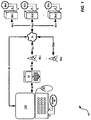
- FIG. 1 is a schematic representation of a system for accessing an application across a plurality of computers.
- a system for accessing an application across a plurality of computers is indicated generally at 50.
- an electronic device in the form of a mobile computing device 54 is able to access at least one server 58-1, 58-2 ... 58-n. (Generically, server 58, and collectively, servers 58. This nomenclature is used elsewhere herein).
- a wireless link 70 connects mobile computing device 54 with one of a plurality of wireless base stations 66.
- mobile computing device 54 is shown as connecting to a first base station 66-1 via wireless link 70, but mobile computing device 54 can also connect to other base stations 66 in system 50.
- Backhaul links 78 connect each base station 66 to a network 74.
- Additional backhaul links 82 connect network 74 to each server 58.
- Mobile computing device 54 can be any type of electronic device that can be used in a self-contained manner and to interact with content available on network 74. Interaction includes displaying of information on mobile computing device 54 as well as to receive input at mobile computing device 54 that can in turn be sent back over network 74.
- network 74 and links 70, 78 and 82 associated therewith is not particularly limited and are, in general, based on any combination of architectures that will support interactions between mobile computing device 54 and servers 58.
- network 74 includes the Internet as well as appropriate gateways and backhauls to links 78 and 82.
- backhaul links 78 and backhaul links 82 can be based on a T1, T3, 03 or any other suitable wired or wireless connections. Accordingly, the links 78 and 82 between network 74 and the interconnected components are complementary to functional requirements of those components.
- Link 70 may be based on, by way of non-limiting examples, a core mobile network infrastructure, such as, by way of non-limiting examples, one or more of wireless communications standards known to persons of skill in the art. Note that in an example variation of system 50 it is contemplated that link 70 may be a wired connection.
- an electronic device in the form of a client machine 100 also connects to mobile computing device 54 via a link 90.
- client machine 100 is a desktop, notebook, tablet, or laptop computer and link 90 is a direct connection effected wirelessly or wired.
- link 90 can be, for example, a BluetoothTM or a peer-to-peer Wi-FiTM connection between client machine 100 and mobile computing device 54.
- link 90 can be, for example, a universal serial bus (USB) or FirewireTM connection.
- USB universal serial bus
- FirewireTM FirewireTM connection.
- link 90 can be effected indirectly through, for example, a local area network or a Wi-FiTM network, or even through a wide area network (WAN) such as network 74.
- WAN wide area network
- Client machine 100 is initially configured to maintain or execute at least a web browser application 88, and need not have direct access to network 74, though in some cases such a direct connection to network 74 would be possible through a link 94. Accordingly, client machine 100 can be based on any computing environment that provides web browsing functionality. For example, such a computing environment can be based on a processor or microprocessor, with accompanying volatile storage (e.g. random access memory) and non-volatile storage (e.g. Flash, Hard disk drive), read only memory (ROM), network interface card(s), video cards that connect to one or more displays, a keyboard, a mouse (or other pointing device). An operating system may be used with the processor or microprocessor to control operation of the electronic device.
- volatile storage e.g. random access memory
- non-volatile storage e.g. Flash, Hard disk drive
- ROM read only memory
- network interface card(s) e.g. Flash, Hard disk drive
- video cards that connect to one or more displays, a keyboard
- Browser application 100 can be any browser application can be used that is executable on a respective operating system. Typically, though not necessarily, client machine 100 will have a display or a keyboard or both that are larger than that provided on mobile computing device 54. Client machine 100 may also have another configuration, such as a tablet computing device.
- Servers 58 can be based on any well-known server environment including a module that houses one or more central processing units, volatile memory (e.g. random access memory), persistent memory (e.g. hard disk devices) and network interfaces to allow servers 58 to communicate over network 74. It is contemplated that each server 58 may be implemented as a plurality of interconnected servers, in a so-called server farm, which are mirrored or otherwise configured for load balancing or failover or high availability or any or all of those.
- volatile memory e.g. random access memory
- persistent memory e.g. hard disk devices
- each server 58 may maintain a different networking application 60.
- Networking applications 60 can be any application whereby a corresponding client application executes on mobile computing device 54 which accesses data or any other server functions on a given server 58.
- Networking applications can be, by way of non-limiting examples, personal information management applications, social networking applications, or messaging applications.
- the mobile computing device 54 may be a first electronic device configured to run a client application.
- Each server 58 may be a second electronic device which executes a corresponding server application, providing application data to the client application.
- mobile computing device 54 may also comprise a server application for providing application data to the client machine 100.
- the client machine 100 may be a first electronic device configured to run a client application and the mobile computing device 54 may be a second electronic device configured to run a corresponding server application.
- the mobile computing device 54 acts as a client for a corresponding server 58 and the mobile computing device 54 also acts as a server for a corresponding client machine 100.
- first electronic device for accessing an application server on a second electronic device.
- first electronic device may be a tablet or other client machine 100 accessing a server on a mobile computing device via a short range wireless connection.
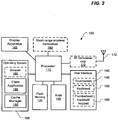
- FIG. 2 is a schematic depiction of an electronic device (such as client machine 100, mobile computing device 54, or server 58) on which the present technology may be implemented.
- the electronic device may be a tablet, wireless communications device, notebook, laptop or the like.
- the electronic device which is designated generally by reference numeral 100, includes a processor (or microprocessor) 110 for executing one or more applications, memory in the form of flash memory 120 and/or RAM 130 (or any equivalent memory or storage devices) for storing the one or more applications and related data, and a user interface 140 with which the user interacts with the device.
- the user interface 140 of the electronic device 100 may include a touch-sensitive display screen 145.
- the user interface 140 may include a non-touch-sensitive liquid crystal display (LCD) and an alphanumeric keypad/keyboard 150.
- the electronic device may include a trackball, thumbwheel or trackpad 160 for cursor movement and navigation. This electronic device is powered by an onboard battery (e.g. a lithium ion battery or equivalent rechargeable battery).
- an onboard battery e.g. a lithium ion battery or equivalent rechargeable battery.
- the electronic device 100 may include a radiofrequency (RF) transceiver chip 170 and associated antenna 172 for wireless communications using any one of known wireless communication protocols
- the device is a voice-enabled wireless communications device such as, for example, a smartphone or cell phone
- the device further includes a microphone (not shown) and a speaker (not shown) and/or an outlet jack for plugging in a set of earphones.
- This electronic device 100 may optionally further include a Global Positioning System (GPS) receiver chipset (not shown) or other such location-determining subsystem.
- GPS Global Positioning System
- the electronic device 100 may also have other components or subsystems that are not shown in this simplified figure.
- the electronic device 100 may include a short-range wireless transceiver 192, e.g. a Bluetooth® transceiver for Bluetooth® pairing. Other short-range wireless technologies may be used.
- the electronic device may include a Wi-FiTM short-range wireless transceiver for establishing a peer-to-peer Wi-FiTM connection.
- the electronic device 100 may include ports for cable connections, e.g. a USB port or a FirewireTM port.
- the electronic device 100 may comprise an operating system 105 for use with the processor 110. Also shown in FIG 2 , the electronic device 100 may include a browser application 180, a client application 185, and a cache manager 190.
- the cache manager 190 may be operatively configured to implement pre-caching described in this disclosure.
- the browser application 180 or client application 185 may first check the cache manager 190 to determine if a cached resource item is already stored in the cache memory.
- the cache memory may be implemented, for example, in the RAM 130 of the electronic device 100.
- the electronic device 100 may also comprise a display apparatus 165.
- the display apparatus 165 may be a display screen, such as a touch screen or other display hardware. It should be noted that the display apparatus 165 may comprise an external accessory connected using a display output interface of the electronic device 100.
- the display apparatus 165 may comprise an integrated display interface, or may be configured to output data to be rendered or painted to an external display unit such as an external monitor or panel, television screen, projector, or virtual retinal display (via a data port or transmitter, such as a Bluetooth® transceiver, USB port, HDMI port, DVI port, and the like).
- a data port or transmitter such as a Bluetooth® transceiver, USB port, HDMI port, DVI port, and the like.
- FIG. 3 depicts a method of pre-caching application resources for an application to be launched on an electronic device in accordance with one implementation of the present technology.
- the method is executed on a first electronic device for accessing an application server on a second electronic device.
- the method includes receiving a cache manifest for an application, the cache manifest identifying a resource item that can be pre-cached on the first electronic device (step 300), pre-caching the resource item as a cached resource item in a cache memory of the first electronic device prior to launching an application client on the first electronic device (step 302).
- the method includes, upon launching the application client on the first electronic device, obtaining, from the cache memory, the cached resource item that corresponds to the resource item (step 304), and displaying an output based upon the content and the cached resource item (step 306).
- the cache manifest may include a plurality of identified resource items that can be cached prior to launching an application client.
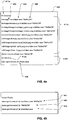
- FIG. 4a and FIG. 4b are examples of a cache manifest 400.
- the cache manifest 400 contains a list of resources (or resource items) that the application requires.
- Each resource item contains, as shown by way of example, an resource handle 402 ("messages", “contacts”, “util/images", etc.)
- the resource item may include a revalidation parameter 404 (e.g. revalidate-once) and an entity tag or "e-tag" 406 (e.g. "66d4a33b").
- the resource items 411 b listed after the "At Connect" heading 411 a represent a first subset of resources that the electronic device will pre-cache upon connection (i.e. communications connection being established between the client device and the server).
- the first subset of resources may be non-secured resources that are pre-fetched and stored in the cache memory prior to user authentication.
- the resource item(s) 412b listed after the "At Unlock” heading 412a represent a second subset of resources (e.g. "secured” or “private” resources) that the application will pre-cache only after user authentication.
- User authentication may be achieved in a variety of manners well known to persons of skill in the art - for example user authentication may be associated with the electronic device being unlocked by the user supplying a valid password, biometric input, or authentication input).
- all of the non-secured resource items 412a have an e-tag and a revalidation parameter to revalidate once per session.
- the list of secured resources 412b contains only a single resource item 408.
- the resource item 408 has no e-tag but a revalidation parameter to revalidate once per session.
- FIGS. 4a and 4b are provided as non-limiting examples only. It is contemplated that the cache manifest may take alternative forms or include various other data about the resource items that may be pre-cached.
- Revalidation is a term used herein to represent a process of verifying the integrity of a cached resource item. There are several types of revalidation described in this disclosure. An embodiment of this technology may optionally include one or more revalidation techniques. Several revalidation techniques are explained below with reference to FIG. 5 .
- FIG. 5 is a flowchart depicting processing of different types of resources that may be listed in a cache manifest.
- the electronic device determines (at step 500) for each resource whether the resource needs to be revalidated.
- resources with resource handle only (502) resources with resource handle and a prescribed revalidation parameter, e.g. "revalidate-once" (504), and resources with resource handle and e-tag and optionally also a revalidation parameter (506).
- An e-tag is an entity tag. For resource handle only (502), the resource is always revalidated (508).
- the resource is revalidated according to the number of revalidations specified by the revalidation parameter. For example, if the "revalidate-once" parameter is present, the revalidation of the resource is performed only once for the session.
- the server For e-tags, on connection or reconnection, the server provides an e-tag. If the e-tag in the cache manifest matches the e-tag in the cache memory, then the electronic device (client) knows that it already has the most current (i.e. valid) resource in its cache. No further checking is required. The sending of the cache manifest by the server to the client upon connection and subsequent reconnection thus saves the client the trouble of checking with the server if the resource is valid. Revalidation (step 512) is thus performed only if the e-tag is stale (it does not match the e-tag in the cache manifest).
- FIG. 6 is a flowchart depicting processing of non-secured (public) and secured (private) resources listed in a cache manifest.
- the resources are categorized as being either secured (private) resources or non-secured (public) resources.
- the non-secured resources may be pre-fetched prior to user authentication (e.g. password entry and validation), whereas the secured resources may only be pre-fetched once the user authentication has been complete (e.g. once the password has been entered and validated).
- Examples of non-secured resources are images for buttons, shared JavaScript, etc.
- Examples of secured resources are contacts, preferences, messages, calendar entries, etc. As depicted by way of example in FIG.
- a first subset of non-secured resources and a second subset of secured resources are identified (step 602).
- the resources of the first subset are pre-cached (step 604).
- the resources of the second subset are pre-cached (step 608).
- FIG. 7 is a message flow diagram in accordance with one implementation of the technology.
- the message flow diagram shows the flow of messages between a first electronic device (client device 700) and a second electronic device (the server 710).
- the server 710 is serving web content to the client device 700. Also shown are the communications between the client device 700 and its cache memory 705.
- the process is initiated by establishing a connection (at step 720) between the client device 700 and the server 710.
- the server At optional step 725, the server generates a cache manifest.
- a cache manifest may already be available (or have been previously generated prior to connection).
- the cache manifest is received from the server 710.
- the electronic device i.e. client device 700
- the electronic device checks the resources it has in its cache memory against those listed in the cache manifest.
- the cache may be empty. The first subset of resources will be pre-cached to fill the cache with cached resource items. On the other hand, if the connection formed at 720 is not the first connection between the client device 700 and the server 710, the cache may already have cached resources stored. Resources may be revalidated using entity tags ("e-tags") as will be explained below.
- e-tags entity tags
- the client device 700 may also identify a first subset of resource items in the cache manifest to pre-cache prior to a condition and a second subset of resource items in the cache manifest to pre-cache after the condition.
- the first subset of resource items may be associated with non-secured (public) application resources and a second subset of the resource items may be associated with secured (private) application resources.
- the cache manifest may be constructed such that the public (non-secured) resources are listed separately from the private (secured) resources to facilitate identification.
- other metadata or cache manifest formats may be used to identify subsets of resource items.
- the first subset may be pre-cached (740) prior to user authentication (750), e.g. prior to password entry and authentication.
- Pre-caching (740) of the resources belonging to the first subset may entail, as illustrated in this embodiment, pre-fetching (via request 742 and response 743) and storing (744) in the cache memory.
- the second subset may only be pre-cached (step 760) once the user authentication (750) is complete (e.g. after the user has entered a password and the password has been validated by the electronic device or by the server).
- Precaching (760) of resources from the second subset may entail pre-fetching (via request 762 and response 763) and storing (764) in the cache memory.
- Pre-fetched and pre-cached web content is thus available for more rapid access. This may be referred to as "priming the cache”. This has the effect of speeding up the start-up time for applications on the electronic device.
- an application is launched (770), e.g. in response to a command received at the user interface of the client device, the content for the application is retrieved or obtained (780).
- Pre-cached content is obtained from the local memory cache on the client device (via request 782 and response 784).
- Supplemental or additional data may be retrieved also, as needed, from the application server (via request 786 and response 788).
- content may also be retrieved/fetched from the server to supplement the pre-cached content.
- Application content is then rendered at step 790. In other words, the client device 700 displays an output based upon the content (data retrieved from the application server) and the cached resource item.
- the present technology may be implemented on any electronic device or computing device that is connected, "bridged”, “tethered”, or “paired” to another electronic device or computing device.
- An electronic device such as a handheld electronic device, wireless communications device or tablet may be connected to another such handheld electronic device, wireless communications device or tablet, to a laptop, to a desktop or to any other computing device.
- a tablet (that may not have its own cellular RF transceiver) may be wirelessly connected to a wireless communications device. Such bridging may be accomplished by pairing the tablet to the wireless communications device using Bluetooth® or any other short-range wireless technology.
- the wireless communications device thus acts as a server and serves web application data to the tablet.
- one exemplary application of this technology is a system for fetching data for caching on a first mobile device (e.g. a tablet) tethered wirelessly to a second mobile device (e.g. a wireless communications device).
- the first mobile device has a first processor, a first memory and a first short-range wireless transceiver and the second mobile device has a second processor, a second memory and (in addition to a cellular RF transceiver) a second short-range wireless transceiver for wirelessly tethering the first mobile device to the second mobile device via Bluetooth® or other short-range wireless connection.
- the first mobile device receives a cache manifest from the second mobile device listing all data that can be fetched from the second mobile device.
- the processor determines from the cache manifest which data to pre-fetch and cache.
- the first mobile device e.g. tablet
- the first mobile device can then display an output (application content) based upon data obtained from both the application server and from the cache memory.
- this technology may be used to pre-cache data for any electronic devices that are connected in a client-server relationship, whether the electronic devices are mobile devices, notebooks, laptops, tablets, or desktop computers.
- any of the methods discloses herein may be implemented in hardware, software, firmware or any combination thereof.
- the method steps, acts or operations may be programmed or coded as computer-readable instructions and recorded electronically, magnetically or optically on a non-transitory computer-readable medium, computer-readable memory, machine-readable memory or computer program product.
- the computer-readable memory or computer-readable medium comprises instructions in code which when loaded into a memory and executed on a processor of a mobile device or other computing device cause the mobile device or other computing device to perform one or more of the foregoing method(s).
- a computer-readable medium can be any means that contain, store, communicate, propagate or transport the program for use by or in connection with the instruction execution system, apparatus or device.
- the computer-readable medium may be electronic, magnetic, optical, electromagnetic, infrared or any semiconductor system or device.
- computer executable code to perform the methods disclosed herein may be tangibly recorded on a computer-readable medium including, but not limited to, a floppy-disk, a CD-ROM, a DVD, RAM, ROM, EPROM, Flash Memory or any suitable memory card, etc.
- the method may also be implemented in hardware.
- a hardware implementation might employ discrete logic circuits having logic gates for implementing logic functions on data signals, an application-specific integrated circuit (ASIC) having appropriate combinational logic gates, a programmable gate array (PGA), a field programmable gate array (FPGA), etc.
Landscapes
- Engineering & Computer Science (AREA)
- Theoretical Computer Science (AREA)
- General Engineering & Computer Science (AREA)
- Computer Hardware Design (AREA)
- Computer Security & Cryptography (AREA)
- Computer Networks & Wireless Communication (AREA)
- Signal Processing (AREA)
- General Physics & Mathematics (AREA)
- Physics & Mathematics (AREA)
- Computing Systems (AREA)
- Health & Medical Sciences (AREA)
- Bioethics (AREA)
- General Health & Medical Sciences (AREA)
- Medical Informatics (AREA)
- Databases & Information Systems (AREA)
- Software Systems (AREA)
- Information Transfer Between Computers (AREA)
Description
- The present technology relates generally to communications between web server and web client and, more particularly, to portable electronic devices accessing a remote web application.
- A client application may access a server application using known protocols. For example, a web client that accesses a web server may use commonly known protocols, such as Hypertext Transfer Transfer Protocol (HTTP), WebSockets, etc. Typically, a response from a web server includes a document that conforms to known formatting languages, such as Hypertext Markup Language (HTML), eXtensible Markup Language (XML), or others. Web content may be cached, i.e. temporarily stored as a technique to reduce bandwidth usage, server load, and response lag. Quite frequently an initial document provided by the web server will include references to further content that the web client must retrieve to properly display a web page.
- In traditional web browsers, it is common for a web browser to pre-fetch further resources based on the web page which is currently being viewed. Pre-fetching further content based on the initial document enables a web browser to obtain additional content that might be subsequently requested by the user of the web browser. A common challenge with pre-fetching techniques is predicting which additional content might be subsequently requested.
- Recently, new types of electronic devices are being developed. A tablet-style mobile device (referred to herein simply as a "tablet") may be tethered to another electronic device such as a mobile communications device to exploit the radiofrequency transceiver of the latter for transmitting and receiving data over a wireless network. This enables the tablet to surf the Web, exchange e-mails or perform myriad other tasks that require Internet connectivity. The tablet may be tethered by a cable or wirelessly, e.g. via Bluetooth®, Wi-Fi™ or any other short-range wireless protocol common to both devices. When tethered, the wireless communications device serves data to the tablet as its client device.
- The data transmission rate between a tablet and the wireless communications device with which it is wirelessly tethered may be limited by the connection used to tether the devices, such as Bluetooth® or other short-range radio frequency connection. The user experience may thus be degraded due to bandwidth limitations.
- "Using HTML5 Application Cache to create Offline Web Applications" by Peter Lubbers, 22 December 2010 discloses how HTML5 introduces Application Cache, a new feature that enables you to make web apps and sites available offline. The new specification also provides an easy way to prefetch some or all of your web app's assets (HTML files, images, CSS, JavaScript, and so on) while the client is still online. During this caching process, files are stored in an application cache, where they sit ready for future offline use.
- "Proposal to enhance HTML5 App Cache for Better Performance" by Seth Ladd, 5 October 2010 discloses that the HTML5 Application Cache is a mechanism which allows a web app to operate offline. A web app may create an App Cache manifest file which declares a set of static resources, such as images, stylesheets, scripts, etc. These resources are then cached locally by the user agent (eg a browser) and are not updated nor retrieved from the web server until the App Cache manifest file itself is updated. The App Cache allows for web apps to operate even when not connected to the Internet, and web apps can start quicker as they pull assets from local cache instead of the original web server.
-
US 7,483,941 B2 discloses a method and system for embedding prefetch tags in the HTML of a user-requested webpage so that, after delivery of the user-requested webpage to the user, the proxy can cache webpages that the user is likely to request. After the browser issues a request for a webpage to the proxy, the proxy passes the request to the web server. The web server obtains the webpage and embeds prefetch tags into the HTML of the webpage. The selection of prefetch tags is determined by a personalization database or log/statistics database in the web server. The web server sends the user-requested webpage back to the user through the proxy. The proxy reads the prefetch tags and prefetches the webpages identified in the prefetch tags. The webpages identified in the prefetch tags are stored in the proxy cache memory so that they can be quickly sent to the user upon request. -
US 2007/0033569 A1 discloses client-server architectures for allowing web applications to operate even when the client and server are disconnected. Exemplary architectures include a local web engine associated with a local cache which can be separate from a browser cache and browser application. Exemplary data structures include web documents having one or more control commands embedded in the head with manifest code. Exemplary methods include operating web applications when the client is offline, caching web applications, executable code, web documents, security code, and/or remote files, allowing web application access of local files, and operating client/web applications. -
WO2012/044451 A1 discloses methods, systems, and program products for receiving a request to retrieve electronic resources that correspond to a first network address. The resources are retrieved from a cache. The retrieved resources are responsive to the received request, correspond to the first network address, and are configured to activate a first web application. Activation of the first web application requires that the computing device be authenticated. Instructions that are in the retrieved resources and are for activating the first web application are executed. The execution includes determining that the computing device is not authenticated to activate the first web application, and requesting to retrieve electronic resources that correspond to a second network address and that are configured to activate a second web application. Activation of the second web application does not require that the computing device be currently authenticated. -
EP 2 506 533 A1 discloses an application providing system that has a communication terminal, a Web server that manages resources of Web applications, and a push server that manages storage location addresses of resources. The push server has an address managing unit that manages a terminal ID, a storage location address, and providing timing in a manner associated with one another. The push server further has a timing monitoring unit that monitors the providing timing. The push, server further has a push transmitting unit that transmits a storage location address of a resource of a Web application associated with providing timing to the communication terminal associated with the providing timing upon detection of the providing timing to cache the resource of the Web application corresponding to the providing timing in the communication terminal. - One aspect of the present invention is a method as defined in
independent claim 1. Independent claim 10 specifies a computer readable medium storing instructions that when executed carry out all method steps ofindependent claim 1. Another aspect of the invention is an electronic device as defined in independent claim 13. Further embodiments of the invention are specified in the respective appended dependent claims. - Further features and advantages of the present technology will become apparent from the following detailed description, taken in combination with the appended drawings, in which:
-
FIG. 1 depicts an example system in which the present technology may be used and includes a portable electronic device accessing a web application on a wireless communications device; -
FIG. 2 depicts an electronic device operable to implement various embodiments of the present technology; -
FIG. 3 depicts a method of pre-fetching data in accordance with one implementation of the present technology; -
FIG. 4a and FIG. 4b are examples of a cache manifest; -
FIG. 5 is a flowchart depicting processing of different types of resources listed in a cache manifest; -
FIG. 6 is a flowchart depicting processing of public and private resources listed in a cache manifest; and -
FIG. 7 is a message flow diagram in accordance with one implementation of the technology. - It will be noted that throughout the appended drawings, like features are identified by like reference numerals.
- In general, the present technology provides a novel method, computer-readable medium, electronic device and system for pre-caching web content. The pre-caching techniques use a cache manifest received by the electronic device from a connected device that is serving the web content to the electronic device. In this disclosure, pre-caching refers to downloading resources prior to a time when they are needed. The resources are downloaded and stored in a cache memory in anticipation of its use upon launching a client application. Pre-caching differs from traditional caching, in that pre-caching includes storing files that are expected to be used, whereas traditional caching deals with files already requested by the client application. Further references to caching in this disclosure refer to pre-caching. Pre-caching may include downloading (e.g. fetching, requesting, receiving) a resource item and storing of the resource item in a cache memory.
- One aspect of the present technology is a method executed on a first electronic device for accessing an application server on a second electronic device. The method includes receiving a cache manifest for an application, the cache manifest identifying a resource item that can be pre-cached on the first electronic device, pre-caching the resource item as a cached resource item in a cache memory of the first electronic device prior to launching an application client on the first electronic device. The method includes, upon launching the application client on the first electronic device, obtaining, from the cache memory, the cached resource item that corresponds to the resource item, and displaying an output based upon data from the application server and the cached resource item.
- Another aspect of the present technology is a computer-readable medium comprising instructions in code which when loaded into a memory and executed on a processor of a mobile device is adapted to cause the mobile device to perform one the foregoing method.
- Yet another aspect of the present technology is a electronic device that includes a cache memory and a processor operatively coupled to memory for executing an application client, the processor being configured to receive a cache manifest for an application, the cache manifest identifying a resource item that can be pre-cached on the electronic device, pre-cache the resource item as a cached resource item in a cache memory of the electronic device prior to launching an application client on the electronic device. Upon launching the application client on the electronic device, the processor is configured to obtain, from the cache memory, the cached resource item that corresponds to the resource item, and display an output based upon data from the application server and the cached resource item.
- In this disclosure, retrieving web content may be referred to as fetching (e.g. requesting and receiving) web content. Web content that is fetched or retrieved is generally received from a web server or other server (e.g. a proxy or firewall). The term pre-fetching refers to the retrieval of web content prior to a time when it is needed. For example, pre-fetching may include the retrieval of second web content associated with first web content, wherein it is likely that the second web content will need to be retrieved for proper rendering of the first web content and where a request for the second web content has not yet been received. Alternatively, pre-fetching may refer to the fetching (e.g. requesting and receiving) of web content prior to receiving a user interface command associated with requesting the web content. Pre-fetching may be performed, for example, by a web browser client or a proxy client.
- Pre-caching refers to the pre-fetching of the web content and storing the pre-fetched web content in a device cache so that the web content is available for subsequent rendering. When an application client is launched, the device cache is checked so that the pre-fetched web content may be obtained from the device cache without the device sending a further request for the web content. Therefore, it may be said that pre-fetching is the automated retrieval of web content, while pre-caching refers to the automated retrieval and storage of web content to a memory cache. In other words, pre-caching involves downloading data pre-emptively in anticipation of its use. This may be particularly advantageous when an electronic device uses a wireless transport to obtain the web content since the user experiences less delay when requesting to view the web content. For example, the wireless transport may have low relatively low bandwidth available for transmission of the web content.
- The details and particulars of these aspects of the technology will now be described below, by way of example, with reference to the attached drawings.
-
FIG. 1 is a schematic representation of a system for accessing an application across a plurality of computers. - Referring now to
FIG. 1 , a system for accessing an application across a plurality of computers is indicated generally at 50. In the illustratedsystem 50, an electronic device in the form of amobile computing device 54 is able to access at least one server 58-1, 58-2 ... 58-n. (Generically,server 58, and collectively,servers 58. This nomenclature is used elsewhere herein). - A
wireless link 70 connectsmobile computing device 54 with one of a plurality of wireless base stations 66. InFIG. 1 ,mobile computing device 54 is shown as connecting to a first base station 66-1 viawireless link 70, butmobile computing device 54 can also connect to other base stations 66 insystem 50. Backhaul links 78 connect each base station 66 to anetwork 74. Additional backhaul links 82connect network 74 to eachserver 58. -
Mobile computing device 54 can be any type of electronic device that can be used in a self-contained manner and to interact with content available onnetwork 74. Interaction includes displaying of information onmobile computing device 54 as well as to receive input atmobile computing device 54 that can in turn be sent back overnetwork 74. - It should now be understood that the nature of
network 74 andlinks 70, 78 and 82 associated therewith is not particularly limited and are, in general, based on any combination of architectures that will support interactions betweenmobile computing device 54 andservers 58. In apresent embodiment network 74 includes the Internet as well as appropriate gateways and backhauls to links 78 and 82. For example, backhaul links 78 and backhaul links 82 can be based on a T1, T3, 03 or any other suitable wired or wireless connections. Accordingly, the links 78 and 82 betweennetwork 74 and the interconnected components are complementary to functional requirements of those components. -
Link 70 may be based on, by way of non-limiting examples, a core mobile network infrastructure, such as, by way of non-limiting examples, one or more of wireless communications standards known to persons of skill in the art. Note that in an example variation ofsystem 50 it is contemplated that link 70 may be a wired connection. - In the illustrated
system 50, an electronic device in the form of aclient machine 100 also connects tomobile computing device 54 via alink 90. In a present example implementation,client machine 100 is a desktop, notebook, tablet, or laptop computer and link 90 is a direct connection effected wirelessly or wired. Where link 90 is wireless, then link 90 can be, for example, a Bluetooth™ or a peer-to-peer Wi-Fi™ connection betweenclient machine 100 andmobile computing device 54. Where link 90 is wired, then link 90 can be, for example, a universal serial bus (USB) or Firewire™ connection. Those skilled in the art will now recognize other types of wired or wireless connections that can be used to effect a direct connection forlink 90. In variations, link 90 can be effected indirectly through, for example, a local area network or a Wi-Fi™ network, or even through a wide area network (WAN) such asnetwork 74. -
Client machine 100 is initially configured to maintain or execute at least aweb browser application 88, and need not have direct access tonetwork 74, though in some cases such a direct connection to network 74 would be possible through alink 94. Accordingly,client machine 100 can be based on any computing environment that provides web browsing functionality. For example, such a computing environment can be based on a processor or microprocessor, with accompanying volatile storage (e.g. random access memory) and non-volatile storage (e.g. Flash, Hard disk drive), read only memory (ROM), network interface card(s), video cards that connect to one or more displays, a keyboard, a mouse (or other pointing device). An operating system may be used with the processor or microprocessor to control operation of the electronic device.Browser application 100 can be any browser application can be used that is executable on a respective operating system. Typically, though not necessarily,client machine 100 will have a display or a keyboard or both that are larger than that provided onmobile computing device 54.Client machine 100 may also have another configuration, such as a tablet computing device. -
Servers 58 can be based on any well-known server environment including a module that houses one or more central processing units, volatile memory (e.g. random access memory), persistent memory (e.g. hard disk devices) and network interfaces to allowservers 58 to communicate overnetwork 74. It is contemplated that eachserver 58 may be implemented as a plurality of interconnected servers, in a so-called server farm, which are mirrored or otherwise configured for load balancing or failover or high availability or any or all of those. - As will be discussed further below, each
server 58 may maintain adifferent networking application 60.Networking applications 60 can be any application whereby a corresponding client application executes onmobile computing device 54 which accesses data or any other server functions on a givenserver 58. Networking applications can be, by way of non-limiting examples, personal information management applications, social networking applications, or messaging applications. As will be understood, for the purposes of this disclosure themobile computing device 54 may be a first electronic device configured to run a client application. Eachserver 58 may be a second electronic device which executes a corresponding server application, providing application data to the client application. - In an example embodiment,
mobile computing device 54 may also comprise a server application for providing application data to theclient machine 100. For example, theclient machine 100 may be a first electronic device configured to run a client application and themobile computing device 54 may be a second electronic device configured to run a corresponding server application. In one embodiment, themobile computing device 54 acts as a client for a correspondingserver 58 and themobile computing device 54 also acts as a server for acorresponding client machine 100. - For simplicity, in this disclosure various aspects of the technology will be described in terms of a first electronic device for accessing an application server on a second electronic device. However it is contemplated that the first electronic device may be a tablet or
other client machine 100 accessing a server on a mobile computing device via a short range wireless connection. -
FIG. 2 is a schematic depiction of an electronic device (such asclient machine 100,mobile computing device 54, or server 58) on which the present technology may be implemented. The electronic device may be a tablet, wireless communications device, notebook, laptop or the like. As shown by way of example inFIG. 2 , the electronic device, which is designated generally byreference numeral 100, includes a processor (or microprocessor) 110 for executing one or more applications, memory in the form offlash memory 120 and/or RAM 130 (or any equivalent memory or storage devices) for storing the one or more applications and related data, and auser interface 140 with which the user interacts with the device. Theuser interface 140 of theelectronic device 100 may include a touch-sensitive display screen 145. Alternatively, theuser interface 140 may include a non-touch-sensitive liquid crystal display (LCD) and an alphanumeric keypad/keyboard 150. The electronic device may include a trackball, thumbwheel ortrackpad 160 for cursor movement and navigation. This electronic device is powered by an onboard battery (e.g. a lithium ion battery or equivalent rechargeable battery). - As shown by way of example in
FIG. 2 , theelectronic device 100 may include a radiofrequency (RF)transceiver chip 170 and associatedantenna 172 for wireless communications using any one of known wireless communication protocols Optionally, where the device is a voice-enabled wireless communications device such as, for example, a smartphone or cell phone, the device further includes a microphone (not shown) and a speaker (not shown) and/or an outlet jack for plugging in a set of earphones. Thiselectronic device 100 may optionally further include a Global Positioning System (GPS) receiver chipset (not shown) or other such location-determining subsystem. Theelectronic device 100 may also have other components or subsystems that are not shown in this simplified figure. Theelectronic device 100 may include a short-range wireless transceiver 192, e.g. a Bluetooth® transceiver for Bluetooth® pairing. Other short-range wireless technologies may be used. For example, the electronic device may include a Wi-Fi™ short-range wireless transceiver for establishing a peer-to-peer Wi-Fi™ connection. Theelectronic device 100 may include ports for cable connections, e.g. a USB port or a Firewire™ port. - The
electronic device 100 may comprise anoperating system 105 for use with theprocessor 110. Also shown inFIG 2 , theelectronic device 100 may include abrowser application 180, aclient application 185, and acache manager 190. Thecache manager 190 may be operatively configured to implement pre-caching described in this disclosure. When thebrowser application 180 orclient application 185 attempts to render application data, thebrowser application 180 orclient application 185 may first check thecache manager 190 to determine if a cached resource item is already stored in the cache memory. The cache memory may be implemented, for example, in theRAM 130 of theelectronic device 100. - The
electronic device 100 may also comprise a display apparatus 165. The display apparatus 165 may be a display screen, such as a touch screen or other display hardware. It should be noted that the display apparatus 165 may comprise an external accessory connected using a display output interface of theelectronic device 100. As contemplated herein, the display apparatus 165 may comprise an integrated display interface, or may be configured to output data to be rendered or painted to an external display unit such as an external monitor or panel, television screen, projector, or virtual retinal display (via a data port or transmitter, such as a Bluetooth® transceiver, USB port, HDMI port, DVI port, and the like). References herein to a "display" or "display apparatus" are intended to encompass both integrated and external display units. -
FIG. 3 depicts a method of pre-caching application resources for an application to be launched on an electronic device in accordance with one implementation of the present technology. In general, the method is executed on a first electronic device for accessing an application server on a second electronic device. The method includes receiving a cache manifest for an application, the cache manifest identifying a resource item that can be pre-cached on the first electronic device (step 300), pre-caching the resource item as a cached resource item in a cache memory of the first electronic device prior to launching an application client on the first electronic device (step 302). The method includes, upon launching the application client on the first electronic device, obtaining, from the cache memory, the cached resource item that corresponds to the resource item (step 304), and displaying an output based upon the content and the cached resource item (step 306). It should be understood that the cache manifest may include a plurality of identified resource items that can be cached prior to launching an application client. -
FIG. 4a and FIG. 4b are examples of acache manifest 400. InFIG. 4a , which is shown solely by way of example, thecache manifest 400 contains a list of resources (or resource items) that the application requires. Each resource item contains, as shown by way of example, an resource handle 402 ("messages", "contacts", "util/images", etc.) The resource item may include a revalidation parameter 404 (e.g. revalidate-once) and an entity tag or "e-tag" 406 (e.g. "66d4a33b"). - In
FIG. 4a , theresource items 411 b listed after the "At Connect" heading 411 a represent a first subset of resources that the electronic device will pre-cache upon connection (i.e. communications connection being established between the client device and the server). The first subset of resources may be non-secured resources that are pre-fetched and stored in the cache memory prior to user authentication. The resource item(s) 412b listed after the "At Unlock" heading 412a represent a second subset of resources (e.g. "secured" or "private" resources) that the application will pre-cache only after user authentication. User authentication may be achieved in a variety of manners well known to persons of skill in the art - for example user authentication may be associated with the electronic device being unlocked by the user supplying a valid password, biometric input, or authentication input). - In this illustrated example, all of the
non-secured resource items 412a have an e-tag and a revalidation parameter to revalidate once per session. In the example, the list ofsecured resources 412b contains only asingle resource item 408. In this example, theresource item 408 has no e-tag but a revalidation parameter to revalidate once per session. The examples inFIGS. 4a and 4b are provided as non-limiting examples only. It is contemplated that the cache manifest may take alternative forms or include various other data about the resource items that may be pre-cached. - Revalidation is a term used herein to represent a process of verifying the integrity of a cached resource item. There are several types of revalidation described in this disclosure. An embodiment of this technology may optionally include one or more revalidation techniques. Several revalidation techniques are explained below with reference to
FIG. 5 . -
FIG. 5 is a flowchart depicting processing of different types of resources that may be listed in a cache manifest. Upon receiving the cache manifest, the electronic device determines (at step 500) for each resource whether the resource needs to be revalidated. In the example presented inFIG. 5 , there are three types of resource revalidation scenarios: resources with resource handle only (502), resources with resource handle and a prescribed revalidation parameter, e.g. "revalidate-once" (504), and resources with resource handle and e-tag and optionally also a revalidation parameter (506). An e-tag is an entity tag. For resource handle only (502), the resource is always revalidated (508). For resource handle and revalidation parameter (but no e-tag), the resource is revalidated according to the number of revalidations specified by the revalidation parameter. For example, if the "revalidate-once" parameter is present, the revalidation of the resource is performed only once for the session. For e-tags, on connection or reconnection, the server provides an e-tag. If the e-tag in the cache manifest matches the e-tag in the cache memory, then the electronic device (client) knows that it already has the most current (i.e. valid) resource in its cache. No further checking is required. The sending of the cache manifest by the server to the client upon connection and subsequent reconnection thus saves the client the trouble of checking with the server if the resource is valid. Revalidation (step 512) is thus performed only if the e-tag is stale (it does not match the e-tag in the cache manifest). -
FIG. 6 is a flowchart depicting processing of non-secured (public) and secured (private) resources listed in a cache manifest. In one implementation, the resources are categorized as being either secured (private) resources or non-secured (public) resources. The non-secured resources may be pre-fetched prior to user authentication (e.g. password entry and validation), whereas the secured resources may only be pre-fetched once the user authentication has been complete (e.g. once the password has been entered and validated). Examples of non-secured resources are images for buttons, shared JavaScript, etc. Examples of secured resources are contacts, preferences, messages, calendar entries, etc. As depicted by way of example inFIG. 6 , upon receiving the cache manifest (step 600), a first subset of non-secured resources and a second subset of secured resources are identified (step 602). The resources of the first subset are pre-cached (step 604). After user authentication (step 606), the resources of the second subset are pre-cached (step 608). -
FIG. 7 is a message flow diagram in accordance with one implementation of the technology. The message flow diagram shows the flow of messages between a first electronic device (client device 700) and a second electronic device (the server 710). Theserver 710 is serving web content to theclient device 700. Also shown are the communications between theclient device 700 and itscache memory 705. The process is initiated by establishing a connection (at step 720) between theclient device 700 and theserver 710. Atoptional step 725, the server generates a cache manifest. A cache manifest may already be available (or have been previously generated prior to connection). Atstep 730, the cache manifest is received from theserver 710. Upon receiving the cache manifest, the electronic device (i.e. client device 700) checks the resources it has in its cache memory against those listed in the cache manifest. If the connection formed at 720 is the first connection between theclient device 700 and theserver 710, the cache may be empty. The first subset of resources will be pre-cached to fill the cache with cached resource items. On the other hand, if the connection formed at 720 is not the first connection between theclient device 700 and theserver 710, the cache may already have cached resources stored. Resources may be revalidated using entity tags ("e-tags") as will be explained below. - If the cache manifest includes resource items identified as belonging to subsets, the
client device 700 may also identify a first subset of resource items in the cache manifest to pre-cache prior to a condition and a second subset of resource items in the cache manifest to pre-cache after the condition. For example, the first subset of resource items may be associated with non-secured (public) application resources and a second subset of the resource items may be associated with secured (private) application resources. In one embodiment, as illustrated by way of example inFIG. 4a , the cache manifest may be constructed such that the public (non-secured) resources are listed separately from the private (secured) resources to facilitate identification. Alternatively, other metadata or cache manifest formats may be used to identify subsets of resource items. - The first subset may be pre-cached (740) prior to user authentication (750), e.g. prior to password entry and authentication. Pre-caching (740) of the resources belonging to the first subset may entail, as illustrated in this embodiment, pre-fetching (via
request 742 and response 743) and storing (744) in the cache memory. - The second subset may only be pre-cached (step 760) once the user authentication (750) is complete (e.g. after the user has entered a password and the password has been validated by the electronic device or by the server). Precaching (760) of resources from the second subset may entail pre-fetching (via
request 762 and response 763) and storing (764) in the cache memory. - Pre-fetched and pre-cached web content is thus available for more rapid access. This may be referred to as "priming the cache". This has the effect of speeding up the start-up time for applications on the electronic device. When an application is launched (770), e.g. in response to a command received at the user interface of the client device, the content for the application is retrieved or obtained (780). Pre-cached content is obtained from the local memory cache on the client device (via
request 782 and response 784). Supplemental or additional data may be retrieved also, as needed, from the application server (viarequest 786 and response 788). In other words, content may also be retrieved/fetched from the server to supplement the pre-cached content. Application content is then rendered atstep 790. In other words, theclient device 700 displays an output based upon the content (data retrieved from the application server) and the cached resource item. - The present technology may be implemented on any electronic device or computing device that is connected, "bridged", "tethered", or "paired" to another electronic device or computing device. An electronic device such as a handheld electronic device, wireless communications device or tablet may be connected to another such handheld electronic device, wireless communications device or tablet, to a laptop, to a desktop or to any other computing device. In one exemplary embodiment, a tablet (that may not have its own cellular RF transceiver) may be wirelessly connected to a wireless communications device. Such bridging may be accomplished by pairing the tablet to the wireless communications device using Bluetooth® or any other short-range wireless technology. The wireless communications device thus acts as a server and serves web application data to the tablet. Accordingly, one exemplary application of this technology is a system for fetching data for caching on a first mobile device (e.g. a tablet) tethered wirelessly to a second mobile device (e.g. a wireless communications device). The first mobile device has a first processor, a first memory and a first short-range wireless transceiver and the second mobile device has a second processor, a second memory and (in addition to a cellular RF transceiver) a second short-range wireless transceiver for wirelessly tethering the first mobile device to the second mobile device via Bluetooth® or other short-range wireless connection. The first mobile device receives a cache manifest from the second mobile device listing all data that can be fetched from the second mobile device. The processor determines from the cache manifest which data to pre-fetch and cache. When the application client on the first mobile device is launched, the first mobile device (e.g. tablet) obtains, from the cache memory, the cached resource item that corresponds to the resource item. The first mobile device can then display an output (application content) based upon data obtained from both the application server and from the cache memory. As noted above, this technology may be used to pre-cache data for any electronic devices that are connected in a client-server relationship, whether the electronic devices are mobile devices, notebooks, laptops, tablets, or desktop computers.
- Any of the methods discloses herein may be implemented in hardware, software, firmware or any combination thereof. Where implemented as software, the method steps, acts or operations may be programmed or coded as computer-readable instructions and recorded electronically, magnetically or optically on a non-transitory computer-readable medium, computer-readable memory, machine-readable memory or computer program product. In other words, the computer-readable memory or computer-readable medium comprises instructions in code which when loaded into a memory and executed on a processor of a mobile device or other computing device cause the mobile device or other computing device to perform one or more of the foregoing method(s).
- A computer-readable medium can be any means that contain, store, communicate, propagate or transport the program for use by or in connection with the instruction execution system, apparatus or device. The computer-readable medium may be electronic, magnetic, optical, electromagnetic, infrared or any semiconductor system or device. For example, computer executable code to perform the methods disclosed herein may be tangibly recorded on a computer-readable medium including, but not limited to, a floppy-disk, a CD-ROM, a DVD, RAM, ROM, EPROM, Flash Memory or any suitable memory card, etc. The method may also be implemented in hardware. A hardware implementation might employ discrete logic circuits having logic gates for implementing logic functions on data signals, an application-specific integrated circuit (ASIC) having appropriate combinational logic gates, a programmable gate array (PGA), a field programmable gate array (FPGA), etc.
Claims (15)
- A method executed on a first electronic device (100) for accessing an application server on a second electronic device (54), the method comprising:receiving (600) a cache manifest (400) for an application, the cache manifest (400) identifying a plurality of resource items (408) that can be pre-cached on the first electronic device (100);wherein the method is characterized by:identifying (602) a first subset (411b) of the resource items as being associated with non-secured application resources and a second subset (412b) of the resource items as being associated with secured application resources;pre-caching (740) the first subset (411b) prior to a user authentication as cached resource items in a cache memory of the first electronic device (100) and prior to launching an application client on the first electronic device (100);pre-caching the second subset (412b) only after the user authentication;upon launching the application client on the first electronic device, obtaining (780), from the cache memory, one or more of the cached resource items; anddisplaying (790) an output based upon data from the application server and the one or more cached resource items.
- The method of claim 1, wherein pre-caching includes pre-fetching and storing the resource items in the cache memory.
- The method of any preceding claim wherein the pre-caching comprises:requesting the resource items from the second electronic device (54);receiving the resource items and an entity tag (406) associated with the resource items (408); andstoring the resource items (408) and the entity tag (406) associated with the resource items (408) in the cache memory of the first electronic device (100).
- The method of claim 3, the method further comprising:determining if a second entity tag (406) in a further cache manifest received from the second electronic device (54) matches the entity tag in the cache memory of the first electronic device (100); andrevalidating the cached resource items if the entity tag in the further cache manifest does not match the entity tag in the cache memory.
- The method of claim 4, further comprising:revalidating cached resource items based on a revalidation parameter (506) in the further cache manifest.
- The method of any preceding claim, further comprising:establishing a communications connection between the first electronic device (100) and the second electronic device (54); andwherein the receiving of the cache manifest (400) is responsive to the establishing of the communications connection.
- The method of claim 6, wherein the communications connection comprises a short-range wireless connection.
- The method of claim 7 wherein the communications connection is a short-range wireless connection between a tablet as the first electronic device (100) and a wireless communications device as the second electronic device (54), the wireless communications device serving web application resources to the tablet for rendering on the tablet.
- The method of claim 8 further comprising:receiving from the wireless communications device a list of applications to provide on the tablet;receiving (600) one cache manifest (400) for each of the applications;identifying (602) from each cache manifest (400) which one or more application resources require revalidation; andif revalidation is required, revalidating the one or more application resources.
- A computer-readable medium storing instructions in code which when loaded into memory and executed on a processor of an electronic device cause the device to:receive (600) a cache manifest (400) for an application, the cache manifest (400) identifying a plurality of resource items (408) that can be pre-cached on the first electronic device (100);wherein the computer-readable medium is characterized by code that causes the device to:identify (602) a first subset (411b) of the resource items as being associated with non-secured application resources and a second subset (412b) of the resource items as being associated with secured application resources;pre-cache (740) the first subset (411b) prior to a user authentication as cached resource items in a cache memory of the first electronic device and prior to launching an application client on the first electronic device (100);pre-cache the second subset (412b) only after the user authentication;upon launching the application client on the first electronic device, obtain (780), from the cache memory, one or more of the cached resource items; anddisplay an output based upon data from an application server and the one or more cached resource items.
- The computer-readable medium of claim 10 wherein the code causing the device to pre-cache includes code causing the device to pre-fetch and store the resource items in the cache memory.
- The computer-readable medium of claim 11 wherein the computer-readable medium further comprises code for:requesting the resource items from the second electronic device (54);receiving the resource items and an entity tag (406) associated with the resource items (408); andstoring the resource items (408) and the entity tag (406) associated with the resource items in the cache memory of the first electronic device (100);determining whether a second entity tag (406) in a further cache manifest received from the second electronic device matches the entity tag in the cache memory of the first electronic device; andrevalidating the cached resource items if the entity tag in the cache manifest does not match the entity tag in the cache memory.
- An electronic device (100) comprising:a cache memory; anda processor (110) operatively coupled to the cache memory for executing an application client, the processor (110) configured to:receive a cache manifest (400) for an application, the cache manifest (400) identifying a plurality of resource items (408, 411, 412) that can be pre-cached in the cache memory;wherein the electronic device is characterized in that the processor is further configured to:identify (602) a first subset (411b) of the resource items as being associated with non-secured application resources and a second subset (412b) of the resource items as being associated with secured application resources;pre-cache (740) the first subset (411b) prior to a user authentication as cached resource items in the cache memory and prior to launching the application client;pre-cache the second subset (412b) only after the user authentication;upon launching the application client, obtain (780), from the cache memory, one or more of the cached resource items; anddisplay (790) an output based upon data from an application server and the one or more cached resource items.
- The electronic device (100) of claim 13 wherein the processor (110) is configured to:determine (500) a type of resource for the cached resource items listed in a further cache manifest received from the second electronic device;if the cached resource items have only resource handles (502), revalidate the cached resource items every time (508);if the cached resource items have resource handles and revalidation parameters (504), revalidate the cached resource items based on the revalidation parameters (510);if the cached resource items have resource handles and an entity tag (506), revalidate the cached resource items only if the entity tag is stale (512).
- The electronic device (100) of claim 14 wherein the processor (110) is configured to update the cached resources items if revalidation fails (514).
Applications Claiming Priority (1)
| Application Number | Priority Date | Filing Date | Title |
|---|---|---|---|
| US13/152,565 US9401917B2 (en) | 2011-06-03 | 2011-06-03 | Pre-caching resources based on a cache manifest |
Publications (3)
| Publication Number | Publication Date |
|---|---|
| EP2533157A2 EP2533157A2 (en) | 2012-12-12 |
| EP2533157A3 EP2533157A3 (en) | 2013-03-27 |
| EP2533157B1 true EP2533157B1 (en) | 2016-06-01 |
Family
ID=44582286
Family Applications (1)
| Application Number | Title | Priority Date | Filing Date |
|---|---|---|---|
| EP11175247.3A Active EP2533157B1 (en) | 2011-06-03 | 2011-07-25 | Pre-caching resources based on a cache manifest |
Country Status (3)
| Country | Link |
|---|---|
| US (1) | US9401917B2 (en) |
| EP (1) | EP2533157B1 (en) |
| CA (1) | CA2747114C (en) |
Families Citing this family (22)
| Publication number | Priority date | Publication date | Assignee | Title |
|---|---|---|---|---|
| US9823917B2 (en) * | 2011-10-20 | 2017-11-21 | Facebook, Inc. | Update application user interfaces on client devices |
| US8843758B2 (en) * | 2011-11-30 | 2014-09-23 | Microsoft Corporation | Migrating authenticated content towards content consumer |
| US9892202B2 (en) * | 2012-01-25 | 2018-02-13 | Microsoft Technology Licensing, Llc | Web page load time reduction by optimized authentication |
| US9582603B1 (en) * | 2012-02-27 | 2017-02-28 | Amazon Technologies, Inc. | Managing preloading of data on client systems |
| US9037662B2 (en) * | 2012-06-29 | 2015-05-19 | International Business Machines Corporation | Cache control for web application resources |
| EP2784714B1 (en) | 2013-03-28 | 2021-04-28 | Alcatel Lucent | Method of preventing access to sensitive data of a computing device |
| US9380040B1 (en) * | 2013-07-11 | 2016-06-28 | Parallels IP Holdings GmbH | Method for downloading preauthorized applications to desktop computer using secure connection |
| US9906595B2 (en) | 2013-07-19 | 2018-02-27 | Opanga Networks, Inc. | Content source discovery |
| EP3028241A4 (en) * | 2013-07-31 | 2017-04-19 | Opanga Networks, Inc. | Pre-delivery of content to a user device |
| US9819721B2 (en) | 2013-10-31 | 2017-11-14 | Akamai Technologies, Inc. | Dynamically populated manifests and manifest-based prefetching |
| US9736256B2 (en) | 2014-02-13 | 2017-08-15 | Microsoft Technology Licensing, Llc | Implementing server push at server stack |
| US20150229730A1 (en) * | 2014-02-13 | 2015-08-13 | Microsoft Corporation | Managing Server Pushed Resources at Client |
| US20170011133A1 (en) * | 2014-03-31 | 2017-01-12 | Open Garden Inc. | System and method for improving webpage loading speeds |
| JP6327959B2 (en) * | 2014-06-04 | 2018-05-23 | キヤノン株式会社 | Information processing terminal, cache control method, and web system |
| US9674698B2 (en) * | 2014-07-22 | 2017-06-06 | Nokia Technologies Oy | Method and apparatus for providing an anonymous communication session |
| US9858195B2 (en) * | 2014-12-10 | 2018-01-02 | International Business Machines Corporation | Near-cache distribution of manifest among peer applications in in-memory data grid (IMDG) non structured query language (NO-SQL) environments |
| US20170041422A1 (en) * | 2015-08-07 | 2017-02-09 | Futurewei Technologies, Inc. | Method and system for retrieving a content manifest in a network |
| US10447759B2 (en) * | 2016-05-27 | 2019-10-15 | Microsoft Technology Licensing, Llc | Web page accelerations for web application hosted in native mobile application |
| US10713286B2 (en) | 2017-06-27 | 2020-07-14 | Microsoft Technology Licensing, Llc | Storage of point of interest data on a user device for offline use |
| US11153285B2 (en) | 2018-11-07 | 2021-10-19 | Citrix Systems, Inc. | Systems and methods for application pre-launch |
| US11194461B2 (en) * | 2019-01-15 | 2021-12-07 | Fujifilm Medical Systems U.S.A., Inc. | Smooth image scrolling with dynamic scroll extension |
| US20260127020A1 (en) * | 2024-11-05 | 2026-05-07 | Roku, Inc. | Application pre-launch system |
Family Cites Families (30)
| Publication number | Priority date | Publication date | Assignee | Title |
|---|---|---|---|---|
| US6748450B1 (en) | 1999-10-28 | 2004-06-08 | International Business Machines Corporation | Delayed delivery of web pages via e-mail or push techniques from an overloaded or partially functional web server |
| US7058691B1 (en) | 2000-06-12 | 2006-06-06 | Trustees Of Princeton University | System for wireless push and pull based services |
| CN1489736A (en) | 2000-11-28 | 2004-04-14 | �����ĵ� | Method and system for maintaining and distributing wireless applications |
| BR0208206A (en) | 2001-03-19 | 2006-02-21 | Qualcomm Inc | dynamic download and execution of system services on a wireless device |
| US6990534B2 (en) | 2001-07-20 | 2006-01-24 | Flowfinity Wireless, Inc. | Method for a proactive browser system for implementing background frame maintenance and asynchronous frame submissions |
| US20030084165A1 (en) | 2001-10-12 | 2003-05-01 | Openwave Systems Inc. | User-centric session management for client-server interaction using multiple applications and devices |
| US20030079052A1 (en) | 2001-10-24 | 2003-04-24 | Kushnirskiy Igor Davidovich | Method and apparatus for a platform independent plug-in |
| US7254614B2 (en) | 2001-11-20 | 2007-08-07 | Nokia Corporation | Web services push gateway |
| US7444386B2 (en) | 2003-06-20 | 2008-10-28 | Sun Microsystems, Inc. | Application programming interface for provisioning services |
| US7996505B2 (en) | 2003-10-24 | 2011-08-09 | Microsoft Corporation | Network and interface selection on a computing device capable of establishing connections via multiple network communications media |
| US7483941B2 (en) | 2004-01-13 | 2009-01-27 | International Business Machines Corporation | System and method for dynamically inserting prefetch tags by the web server |
| US7509658B2 (en) | 2004-01-30 | 2009-03-24 | Research In Motion Limited | System and method for adaptable provisioning of generic application content |
| KR100612496B1 (en) | 2004-05-11 | 2006-08-14 | 삼성전자주식회사 | How to Discover Services in a Mobile Ad Hoc Network |
| US7594003B2 (en) | 2005-08-02 | 2009-09-22 | Aol Llc | Client/server web application architectures for offline usage, data structures, and related methods |
| US20070260674A1 (en) | 2006-05-02 | 2007-11-08 | Research In Motion Limited | Push framework for delivery of dynamic mobile content |
| EP1853045B1 (en) | 2006-05-02 | 2015-01-07 | BlackBerry Limited | Dynamic syndicated content delivery system and method |
| KR100783679B1 (en) | 2006-05-11 | 2007-12-07 | 한국과학기술원 | Middleware system that facilitates the development, deployment, and provision of services based on data streams |
| WO2008134880A1 (en) | 2007-05-04 | 2008-11-13 | Chalk Media Service Corp. | Method and system for pushing content to mobile devices |
| US8370424B2 (en) * | 2007-06-22 | 2013-02-05 | Aol Inc. | Systems and methods for caching and serving dynamic content |
| US20110276657A1 (en) | 2007-12-20 | 2011-11-10 | Chalk Media Service Corp. | Method and system for the delivery of large content assets to a mobile device over a mobile network |
| US20090177732A1 (en) | 2008-01-08 | 2009-07-09 | Daryl Martin | Method and system for automated and configurable remote cache refreshes |
| WO2009097044A1 (en) | 2008-01-28 | 2009-08-06 | Aircell Llc | Customizing content for delivery to a passenger in an airborne wireless cellular network |
| WO2009100539A1 (en) | 2008-02-15 | 2009-08-20 | Chalk Media Service Corp. | A system and method for delivering push content to a mobile device |
| US20090234863A1 (en) | 2008-03-12 | 2009-09-17 | Jeremy Evans | Method and apparatus for predictive downloading of attachments |
| US8320916B2 (en) | 2008-05-20 | 2012-11-27 | Alcatel Lucent | Method and apparatus for pre-fetching data in a mobile network environment using edge data storage |
| US8526928B2 (en) | 2008-06-18 | 2013-09-03 | Blackberry Limited | Method and system for republishing mobile content |
| US8364611B2 (en) * | 2009-08-13 | 2013-01-29 | Yahoo! Inc. | System and method for precaching information on a mobile device |
| US8761727B2 (en) | 2009-11-06 | 2014-06-24 | Telefonaktiebolaget L M Ericsson (Publ) | Method and apparatus for pre-caching in a telecommunication system |
| US8732855B2 (en) | 2010-09-30 | 2014-05-20 | Google Inc. | Launching a cached web application based on authentication status |
| JP5760716B2 (en) | 2011-03-30 | 2015-08-12 | 富士通株式会社 | Application providing system, application providing method, information processing apparatus, and information processing program |
-
2011
- 2011-06-03 US US13/152,565 patent/US9401917B2/en active Active
- 2011-07-22 CA CA2747114A patent/CA2747114C/en active Active
- 2011-07-25 EP EP11175247.3A patent/EP2533157B1/en active Active
Also Published As
| Publication number | Publication date |
|---|---|
| US20120311020A1 (en) | 2012-12-06 |
| CA2747114A1 (en) | 2012-12-03 |
| CA2747114C (en) | 2016-12-13 |
| EP2533157A3 (en) | 2013-03-27 |
| US9401917B2 (en) | 2016-07-26 |
| EP2533157A2 (en) | 2012-12-12 |
Similar Documents
| Publication | Publication Date | Title |
|---|---|---|
| CA2747114C (en) | Pre-caching resources based on a cache manifest | |
| KR102224760B1 (en) | Automatic application updates | |
| EP2741474B1 (en) | System and method for providing distributed online services | |
| JP7644936B2 (en) | System architecture for accessing secure data from a mobile device communicating with a remote server - Patents.com | |
| US11128621B2 (en) | Method and apparatus for accessing website | |
| US8954004B1 (en) | Systems and methods for accessing websites using smartphones | |
| EP2806357A1 (en) | Method and communication device for updating a web application | |
| EP2851833A1 (en) | Application Gateway Architecture with Multi-Level Security Policy and Rule Promulgations | |
| US9948750B2 (en) | Tailoring content to be delivered to mobile device based upon features of mobile device | |
| EP2831697B1 (en) | Client specific interactions with enterprise software systems | |
| US20160364219A9 (en) | Dynamically optimized content display | |
| US20140282032A1 (en) | Dynamically configuring user experiences with action uniform resource identifiers | |
| WO2018160358A1 (en) | Techniques for device discovery and configuration | |
| WO2012001223A1 (en) | Method and apparatus for dynamic network device start up | |
| KR101451001B1 (en) | Communication service system and control method thereof, and access point and control method thereof for providing mobile with communication service | |
| US20140157104A1 (en) | Dynamic sharing and updating of a web page | |
| TWI505100B (en) | Method for sharing and synchronizing data in local area network | |
| KR101748450B1 (en) | Method of Sharing Webpage by Connecting Multiple Platform and the Server thereof | |
| JP4643472B2 (en) | Communication method, connection management server, and mobile phone | |
| JP2011086016A (en) | Method of controlling program download | |
| WO2023242610A1 (en) | Techniques for providing credentials and other information | |
| KR100991093B1 (en) | Interface device, method between smart card web server and mobile communication terminal and smart card using same | |
| JP5695250B2 (en) | Terminal device, processing method, and server device |
Legal Events
| Date | Code | Title | Description |
|---|---|---|---|
| PUAI | Public reference made under article 153(3) epc to a published international application that has entered the european phase |
Free format text: ORIGINAL CODE: 0009012 |
|
| 17P | Request for examination filed |
Effective date: 20110725 |
|
| AK | Designated contracting states |
Kind code of ref document: A2 Designated state(s): AL AT BE BG CH CY CZ DE DK EE ES FI FR GB GR HR HU IE IS IT LI LT LU LV MC MK MT NL NO PL PT RO RS SE SI SK SM TR |
|
| AX | Request for extension of the european patent |
Extension state: BA ME |
|
| PUAL | Search report despatched |
Free format text: ORIGINAL CODE: 0009013 |
|
| AK | Designated contracting states |
Kind code of ref document: A3 Designated state(s): AL AT BE BG CH CY CZ DE DK EE ES FI FR GB GR HR HU IE IS IT LI LT LU LV MC MK MT NL NO PL PT RO RS SE SI SK SM TR |
|
| AX | Request for extension of the european patent |
Extension state: BA ME |
|
| RIC1 | Information provided on ipc code assigned before grant |
Ipc: G06F 12/08 20060101AFI20130308BHEP Ipc: H04L 29/06 20060101ALI20130308BHEP Ipc: G06F 21/00 20130101ALI20130308BHEP Ipc: G06F 17/30 20060101ALI20130308BHEP |
|
| RAP1 | Party data changed (applicant data changed or rights of an application transferred) |
Owner name: BLACKBERRY LIMITED |
|
| 17Q | First examination report despatched |
Effective date: 20130916 |
|
| RAP1 | Party data changed (applicant data changed or rights of an application transferred) |
Owner name: BLACKBERRY LIMITED |
|
| GRAP | Despatch of communication of intention to grant a patent |
Free format text: ORIGINAL CODE: EPIDOSNIGR1 |
|
| INTG | Intention to grant announced |
Effective date: 20151223 |
|
| GRAS | Grant fee paid |
Free format text: ORIGINAL CODE: EPIDOSNIGR3 |
|
| GRAA | (expected) grant |
Free format text: ORIGINAL CODE: 0009210 |
|
| AK | Designated contracting states |
Kind code of ref document: B1 Designated state(s): AL AT BE BG CH CY CZ DE DK EE ES FI FR GB GR HR HU IE IS IT LI LT LU LV MC MK MT NL NO PL PT RO RS SE SI SK SM TR |
|
| REG | Reference to a national code |
Ref country code: GB Ref legal event code: FG4D |
|
| REG | Reference to a national code |
Ref country code: CH Ref legal event code: EP Ref country code: AT Ref legal event code: REF Ref document number: 804261 Country of ref document: AT Kind code of ref document: T Effective date: 20160615 |
|
| REG | Reference to a national code |
Ref country code: IE Ref legal event code: FG4D |
|
| REG | Reference to a national code |
Ref country code: DE Ref legal event code: R096 Ref document number: 602011027055 Country of ref document: DE |
|
| REG | Reference to a national code |
Ref country code: FR Ref legal event code: PLFP Year of fee payment: 6 |
|
| REG | Reference to a national code |
Ref country code: NL Ref legal event code: FP |
|
| REG | Reference to a national code |
Ref country code: LT Ref legal event code: MG4D |
|
| PG25 | Lapsed in a contracting state [announced via postgrant information from national office to epo] |
Ref country code: LT Free format text: LAPSE BECAUSE OF FAILURE TO SUBMIT A TRANSLATION OF THE DESCRIPTION OR TO PAY THE FEE WITHIN THE PRESCRIBED TIME-LIMIT Effective date: 20160601 Ref country code: FI Free format text: LAPSE BECAUSE OF FAILURE TO SUBMIT A TRANSLATION OF THE DESCRIPTION OR TO PAY THE FEE WITHIN THE PRESCRIBED TIME-LIMIT Effective date: 20160601 Ref country code: NO Free format text: LAPSE BECAUSE OF FAILURE TO SUBMIT A TRANSLATION OF THE DESCRIPTION OR TO PAY THE FEE WITHIN THE PRESCRIBED TIME-LIMIT Effective date: 20160901 |
|
| REG | Reference to a national code |
Ref country code: AT Ref legal event code: MK05 Ref document number: 804261 Country of ref document: AT Kind code of ref document: T Effective date: 20160601 |
|
| PG25 | Lapsed in a contracting state [announced via postgrant information from national office to epo] |
Ref country code: RS Free format text: LAPSE BECAUSE OF FAILURE TO SUBMIT A TRANSLATION OF THE DESCRIPTION OR TO PAY THE FEE WITHIN THE PRESCRIBED TIME-LIMIT Effective date: 20160601 Ref country code: ES Free format text: LAPSE BECAUSE OF FAILURE TO SUBMIT A TRANSLATION OF THE DESCRIPTION OR TO PAY THE FEE WITHIN THE PRESCRIBED TIME-LIMIT Effective date: 20160601 Ref country code: GR Free format text: LAPSE BECAUSE OF FAILURE TO SUBMIT A TRANSLATION OF THE DESCRIPTION OR TO PAY THE FEE WITHIN THE PRESCRIBED TIME-LIMIT Effective date: 20160902 Ref country code: LV Free format text: LAPSE BECAUSE OF FAILURE TO SUBMIT A TRANSLATION OF THE DESCRIPTION OR TO PAY THE FEE WITHIN THE PRESCRIBED TIME-LIMIT Effective date: 20160601 Ref country code: SE Free format text: LAPSE BECAUSE OF FAILURE TO SUBMIT A TRANSLATION OF THE DESCRIPTION OR TO PAY THE FEE WITHIN THE PRESCRIBED TIME-LIMIT Effective date: 20160601 |
|
| PG25 | Lapsed in a contracting state [announced via postgrant information from national office to epo] |
Ref country code: BE Free format text: LAPSE BECAUSE OF NON-PAYMENT OF DUE FEES Effective date: 20160731 |
|
| PG25 | Lapsed in a contracting state [announced via postgrant information from national office to epo] |
Ref country code: IS Free format text: LAPSE BECAUSE OF FAILURE TO SUBMIT A TRANSLATION OF THE DESCRIPTION OR TO PAY THE FEE WITHIN THE PRESCRIBED TIME-LIMIT Effective date: 20161001 Ref country code: RO Free format text: LAPSE BECAUSE OF FAILURE TO SUBMIT A TRANSLATION OF THE DESCRIPTION OR TO PAY THE FEE WITHIN THE PRESCRIBED TIME-LIMIT Effective date: 20160601 Ref country code: SK Free format text: LAPSE BECAUSE OF FAILURE TO SUBMIT A TRANSLATION OF THE DESCRIPTION OR TO PAY THE FEE WITHIN THE PRESCRIBED TIME-LIMIT Effective date: 20160601 Ref country code: EE Free format text: LAPSE BECAUSE OF FAILURE TO SUBMIT A TRANSLATION OF THE DESCRIPTION OR TO PAY THE FEE WITHIN THE PRESCRIBED TIME-LIMIT Effective date: 20160601 Ref country code: CZ Free format text: LAPSE BECAUSE OF FAILURE TO SUBMIT A TRANSLATION OF THE DESCRIPTION OR TO PAY THE FEE WITHIN THE PRESCRIBED TIME-LIMIT Effective date: 20160601 Ref country code: IT Free format text: LAPSE BECAUSE OF FAILURE TO SUBMIT A TRANSLATION OF THE DESCRIPTION OR TO PAY THE FEE WITHIN THE PRESCRIBED TIME-LIMIT Effective date: 20160601 |
|
| PG25 | Lapsed in a contracting state [announced via postgrant information from national office to epo] |
Ref country code: BE Free format text: LAPSE BECAUSE OF FAILURE TO SUBMIT A TRANSLATION OF THE DESCRIPTION OR TO PAY THE FEE WITHIN THE PRESCRIBED TIME-LIMIT Effective date: 20160601 Ref country code: PT Free format text: LAPSE BECAUSE OF FAILURE TO SUBMIT A TRANSLATION OF THE DESCRIPTION OR TO PAY THE FEE WITHIN THE PRESCRIBED TIME-LIMIT Effective date: 20161003 Ref country code: AT Free format text: LAPSE BECAUSE OF FAILURE TO SUBMIT A TRANSLATION OF THE DESCRIPTION OR TO PAY THE FEE WITHIN THE PRESCRIBED TIME-LIMIT Effective date: 20160601 Ref country code: PL Free format text: LAPSE BECAUSE OF FAILURE TO SUBMIT A TRANSLATION OF THE DESCRIPTION OR TO PAY THE FEE WITHIN THE PRESCRIBED TIME-LIMIT Effective date: 20160601 Ref country code: SM Free format text: LAPSE BECAUSE OF FAILURE TO SUBMIT A TRANSLATION OF THE DESCRIPTION OR TO PAY THE FEE WITHIN THE PRESCRIBED TIME-LIMIT Effective date: 20160601 |
|
| REG | Reference to a national code |
Ref country code: CH Ref legal event code: PL |
|
| REG | Reference to a national code |
Ref country code: DE Ref legal event code: R097 Ref document number: 602011027055 Country of ref document: DE |
|
| PG25 | Lapsed in a contracting state [announced via postgrant information from national office to epo] |
Ref country code: MC Free format text: LAPSE BECAUSE OF FAILURE TO SUBMIT A TRANSLATION OF THE DESCRIPTION OR TO PAY THE FEE WITHIN THE PRESCRIBED TIME-LIMIT Effective date: 20160601 |
|
| PLBE | No opposition filed within time limit |
Free format text: ORIGINAL CODE: 0009261 |
|
| STAA | Information on the status of an ep patent application or granted ep patent |
Free format text: STATUS: NO OPPOSITION FILED WITHIN TIME LIMIT |
|
| PG25 | Lapsed in a contracting state [announced via postgrant information from national office to epo] |
Ref country code: LI Free format text: LAPSE BECAUSE OF NON-PAYMENT OF DUE FEES Effective date: 20160731 Ref country code: CH Free format text: LAPSE BECAUSE OF NON-PAYMENT OF DUE FEES Effective date: 20160731 |
|
| REG | Reference to a national code |
Ref country code: IE Ref legal event code: MM4A |
|
| 26N | No opposition filed |
Effective date: 20170302 |
|
| PG25 | Lapsed in a contracting state [announced via postgrant information from national office to epo] |
Ref country code: DK Free format text: LAPSE BECAUSE OF FAILURE TO SUBMIT A TRANSLATION OF THE DESCRIPTION OR TO PAY THE FEE WITHIN THE PRESCRIBED TIME-LIMIT Effective date: 20160601 Ref country code: SI Free format text: LAPSE BECAUSE OF FAILURE TO SUBMIT A TRANSLATION OF THE DESCRIPTION OR TO PAY THE FEE WITHIN THE PRESCRIBED TIME-LIMIT Effective date: 20160601 |
|
| REG | Reference to a national code |
Ref country code: FR Ref legal event code: PLFP Year of fee payment: 7 |
|
| PG25 | Lapsed in a contracting state [announced via postgrant information from national office to epo] |
Ref country code: IE Free format text: LAPSE BECAUSE OF NON-PAYMENT OF DUE FEES Effective date: 20160725 |
|
| PG25 | Lapsed in a contracting state [announced via postgrant information from national office to epo] |
Ref country code: LU Free format text: LAPSE BECAUSE OF NON-PAYMENT OF DUE FEES Effective date: 20160725 |
|
| PG25 | Lapsed in a contracting state [announced via postgrant information from national office to epo] |
Ref country code: HU Free format text: LAPSE BECAUSE OF FAILURE TO SUBMIT A TRANSLATION OF THE DESCRIPTION OR TO PAY THE FEE WITHIN THE PRESCRIBED TIME-LIMIT; INVALID AB INITIO Effective date: 20110725 Ref country code: CY Free format text: LAPSE BECAUSE OF FAILURE TO SUBMIT A TRANSLATION OF THE DESCRIPTION OR TO PAY THE FEE WITHIN THE PRESCRIBED TIME-LIMIT Effective date: 20160601 |
|
| PG25 | Lapsed in a contracting state [announced via postgrant information from national office to epo] |
Ref country code: MT Free format text: LAPSE BECAUSE OF NON-PAYMENT OF DUE FEES Effective date: 20160731 Ref country code: MK Free format text: LAPSE BECAUSE OF FAILURE TO SUBMIT A TRANSLATION OF THE DESCRIPTION OR TO PAY THE FEE WITHIN THE PRESCRIBED TIME-LIMIT Effective date: 20160601 Ref country code: TR Free format text: LAPSE BECAUSE OF FAILURE TO SUBMIT A TRANSLATION OF THE DESCRIPTION OR TO PAY THE FEE WITHIN THE PRESCRIBED TIME-LIMIT Effective date: 20160601 Ref country code: HR Free format text: LAPSE BECAUSE OF FAILURE TO SUBMIT A TRANSLATION OF THE DESCRIPTION OR TO PAY THE FEE WITHIN THE PRESCRIBED TIME-LIMIT Effective date: 20160601 |
|
| REG | Reference to a national code |
Ref country code: FR Ref legal event code: PLFP Year of fee payment: 8 |
|
| PG25 | Lapsed in a contracting state [announced via postgrant information from national office to epo] |
Ref country code: BG Free format text: LAPSE BECAUSE OF FAILURE TO SUBMIT A TRANSLATION OF THE DESCRIPTION OR TO PAY THE FEE WITHIN THE PRESCRIBED TIME-LIMIT Effective date: 20160601 |
|
| PG25 | Lapsed in a contracting state [announced via postgrant information from national office to epo] |
Ref country code: AL Free format text: LAPSE BECAUSE OF FAILURE TO SUBMIT A TRANSLATION OF THE DESCRIPTION OR TO PAY THE FEE WITHIN THE PRESCRIBED TIME-LIMIT Effective date: 20160601 |
|
| REG | Reference to a national code |
Ref country code: DE Ref legal event code: R082 Ref document number: 602011027055 Country of ref document: DE Ref country code: DE Ref legal event code: R081 Ref document number: 602011027055 Country of ref document: DE Owner name: MALIKIE INNOVATIONS LTD., IE Free format text: FORMER OWNER: BLACKBERRY LIMITED, WATERLOO, ONTARIO, CA |
|
| REG | Reference to a national code |
Ref country code: GB Ref legal event code: 732E Free format text: REGISTERED BETWEEN 20240620 AND 20240627 |
|
| PGFP | Annual fee paid to national office [announced via postgrant information from national office to epo] |
Ref country code: NL Payment date: 20250724 Year of fee payment: 15 |
|
| PGFP | Annual fee paid to national office [announced via postgrant information from national office to epo] |
Ref country code: DE Payment date: 20250728 Year of fee payment: 15 |
|
| PGFP | Annual fee paid to national office [announced via postgrant information from national office to epo] |
Ref country code: GB Payment date: 20250722 Year of fee payment: 15 |
|
| PGFP | Annual fee paid to national office [announced via postgrant information from national office to epo] |
Ref country code: FR Payment date: 20250725 Year of fee payment: 15 |