EP2521032A1 - Method for secure booting of a printer controller - Google Patents
Method for secure booting of a printer controller Download PDFInfo
- Publication number
- EP2521032A1 EP2521032A1 EP11305527A EP11305527A EP2521032A1 EP 2521032 A1 EP2521032 A1 EP 2521032A1 EP 11305527 A EP11305527 A EP 11305527A EP 11305527 A EP11305527 A EP 11305527A EP 2521032 A1 EP2521032 A1 EP 2521032A1
- Authority
- EP
- European Patent Office
- Prior art keywords
- memory
- program
- type
- boot
- case
- Prior art date
- Legal status (The legal status is an assumption and is not a legal conclusion. Google has not performed a legal analysis and makes no representation as to the accuracy of the status listed.)
- Withdrawn
Links
Images





Classifications
-
- G—PHYSICS
- G06—COMPUTING OR CALCULATING; COUNTING
- G06F—ELECTRIC DIGITAL DATA PROCESSING
- G06F21/00—Security arrangements for protecting computers, components thereof, programs or data against unauthorised activity
- G06F21/50—Monitoring users, programs or devices to maintain the integrity of platforms, e.g. of processors, firmware or operating systems
- G06F21/57—Certifying or maintaining trusted computer platforms, e.g. secure boots or power-downs, version controls, system software checks, secure updates or assessing vulnerabilities
- G06F21/575—Secure boot
-
- G—PHYSICS
- G06—COMPUTING OR CALCULATING; COUNTING
- G06F—ELECTRIC DIGITAL DATA PROCESSING
- G06F9/00—Arrangements for program control, e.g. control units
- G06F9/06—Arrangements for program control, e.g. control units using stored programs, i.e. using an internal store of processing equipment to receive or retain programs
- G06F9/44—Arrangements for executing specific programs
- G06F9/4401—Bootstrapping
-
- G—PHYSICS
- G06—COMPUTING OR CALCULATING; COUNTING
- G06F—ELECTRIC DIGITAL DATA PROCESSING
- G06F9/00—Arrangements for program control, e.g. control units
- G06F9/06—Arrangements for program control, e.g. control units using stored programs, i.e. using an internal store of processing equipment to receive or retain programs
- G06F9/44—Arrangements for executing specific programs
- G06F9/4401—Bootstrapping
- G06F9/4406—Loading of operating system
-
- G—PHYSICS
- G06—COMPUTING OR CALCULATING; COUNTING
- G06F—ELECTRIC DIGITAL DATA PROCESSING
- G06F21/00—Security arrangements for protecting computers, components thereof, programs or data against unauthorised activity
- G06F21/60—Protecting data
-
- G—PHYSICS
- G06—COMPUTING OR CALCULATING; COUNTING
- G06F—ELECTRIC DIGITAL DATA PROCESSING
- G06F2221/00—Indexing scheme relating to security arrangements for protecting computers, components thereof, programs or data against unauthorised activity
- G06F2221/21—Indexing scheme relating to G06F21/00 and subgroups addressing additional information or applications relating to security arrangements for protecting computers, components thereof, programs or data against unauthorised activity
- G06F2221/2129—Authenticate client device independently of the user
-
- G—PHYSICS
- G06—COMPUTING OR CALCULATING; COUNTING
- G06F—ELECTRIC DIGITAL DATA PROCESSING
- G06F8/00—Arrangements for software engineering
- G06F8/60—Software deployment
- G06F8/61—Installation
Definitions
- the present invention relates to a method for secure booting of a printer controller, the printer controller comprising a processor, a first memory, a second memory and a receptacle for receiving a third memory. Furthermore the invention relates to a printing system and to a memory device suited to be plugged in the receptacle for receiving the third memory.
- Control programs for printers are complex programs optimized for attaining best print results with specific hardware of the print engine and for attaining best performance also for complex print jobs. In order to achieve this goal such a printer control program is highly fine tuned to the processing hardware. These programs are vulnerable for modification by unauthorized persons, attacks of malware and viruses. In order to secure these kind of programs from manipulation in general it is important to prevent that an external program is able to take control over such a printer control program.
- At boot time when programs are loaded in memory for execution, and control is handed over from one program to a next program there is a window in time that is vulnerable for a hostile attack of malware aiming to gain control. Therefore there is a need for a secure booting method.
- a method for secure booting of a printer controller comprising a processor, a first memory, a second memory and a receptacle for receiving a third memory; the second memory comprising a secure boot program; the method comprising the steps of, upon power on of the controller: executing an initial boot procedure; continue booting from the second memory under control of the secure boot program; detecting if a third memory of a first type is inserted in the receptacle, where a third memory of the first type comprises a boot sector, a first identifier, an installation flag and a secure boot program suited for installation on the second memory; and in case a third memory of the first type is inserted in the receptacle and the installation flag is not set continue booting from the third memory.
- the secure boot program takes care that it is not possible to start from a foreign bootable USB key but one from the first type or second type only; only in case the hard disk is not yet formatted access is possible.
- a key of the first type that remains attached to the machine does neither jeopardize nor affect the software configuration in any way.
- So provided is a filter that only passes control to a trusted USB key, and that will not pass control to not trusted keys.
- the secure boot program is stored in an initial boot sector of the second memory.
- the method upon detection of a third memory of the first type, the method comprises the additional steps of: in case the installation flag is not set, installing the secure boot program on the second memory, setting the installation flag and installing an operating system on the second memory; in case the installation flag is set, activating the operating system, checking if a printer control program has been installed already and in case the printer control program has not yet been installed installing the printer control program and in case the printer control program has been installed activating the printer control program for bringing the printer controller in a normal operational mode.
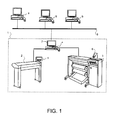
- Fig. 1 is a schematic diagram of an environment which comprises a reprographic system 1.
- the reprographic system 1 as presented here comprises a scanning device 2, a printing device 3 and a control unit 4.
- the control unit 4 is connected to a network 8 so that a number of client computers 9, also connected to the network 8, may make use of the reprographic system 1.
- the scanning device 2 is provided for scanning an image carrying object.
- the scanning device 2 may be provided with a colour image sensor (i.e. a photoelectric conversion device) which converts the reflected light into electric signals corresponding to the primary colours red (R), green (G) and blue (B).
- the colour image sensor may be for example a CCD type sensor or a CMOS type sensor.
- a local user interface panel 5 is provided for starting scan and copy operations.
- the printing unit 3 is provided for printing images on image receiving members.
- the printing unit may use any kind of printing technique. It may be an inkjet printer, a pen plotter, or a press system based on an electro-(photo)graphical technology, for instance.
- the inkjet printer may be for example a thermal inkjet printer, a piezoelectric inkjet printer, a continuous inkjet printer or a metal jet printer.
- a marking material to be disposed may be a fluid like an ink or a metal, or a toner product.
- printing is achieved using a wide format inkjet printer provided with four different basic inks, such as cyan, magenta, yellow and black.
- the housing contains a printhead which is mounted on a carriage for printing swaths of images.
- the images are printed on an ink receiving medium such as a sheet of paper supplied by a paper roll.
- a local user interface panel 6 may be provided with input means such as buttons.
- the scanning device 2 and the printing device 3 are both connected to the control unit 4.
- the control unit 4 executes various tasks such as receiving input data from the scanning device 2, handling and scheduling data files, which are submitted via the network 8, controlling the scanning device 2 and the printing device 3, converting image data into printable data etc.
- the control unit 4 is provided with a user interface panel 7 for offering the operator a menu of commands for executing tasks and making settings.
- control unit 4 comprises a Central Processing Unit (CPU) 40, a Graphical Processor Unit (GPU) 49, a Random Access Memory (RAM) 48, a Read Only Memory (ROM) 60, a network unit 46, an interface unit 47, a hard disk (HD) 50 and an image processing unit 54 such as a Raster Image Processor (RIP).
- CPU Central Processing Unit
- GPU Graphical Processor Unit
- RAM Random Access Memory
- ROM Read Only Memory
- network unit 46 such as a Raster Image Processor (RIP).
- RIP Raster Image Processor
- the aforementioned units 40, 49, 48, 60, 46, 47, 50, 54 are interconnected through a bus system 42.
- the control unit 4 may also be a distributed control unit.
- the controller has an IBM PC architecture.
- IBM PC architecture is well known in the art.
- the CPU 40 controls the respective devices 2, 3 of the reprographic system 1 in accordance with control programs stored in the ROM 60 or on the HD 50 and the local user interface panel 7.
- the CPU 40 also controls the image processing unit 54 and the GPU 49.
- the ROM 60 stores programs and data such as an initial boot program, set-up program, various set-up data or the like, which are to be read out and executed by the CPU 40.
- the hard disk 50 is an example of a non-volatile storage unit for storing and saving programs and data which make the CPU 40 execute a print process to be described later.
- the hard disk is provided with a Master Boot Record.
- a Master Boot Record is a first sector (typically 512 bytes) of a partitioned data storage device.
- the structure of a Master Boot Record is depicted in Fig. 3 .
- a first area (31), from address 0 up to 0 ⁇ 01 B8 is available for program code.
- Another area (32), from address 0 ⁇ 01 BE up to 0 ⁇ 01 FE contains a table of primary partitions.
- addresses 0 ⁇ 01 FE - 0 ⁇ 01 FFA contain the hex word 0xAA55, known as the MBR signature, indicating that it is a valid MBR.
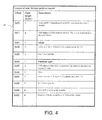
- Fig. 4 depicts the lay out of one 16-byte partition record.
- the first byte (41) indicates if it is bootable partition or a non-bootable partition. Any other value is invalid.
- the next three bytes give the CHS address of the first block in the partition.
- a Volume Boot Record is the first sector of a particular partition on a data storage deivce that has been partitioned or it is the first sector of a data storage device that has not been partitioned.
- the hard disk 50 also comprises an area for saving the data of externally submitted print jobs. The programs and data on the HD 50 are read out onto the RAM 48 by the CPU 40 as needed.
- the RAM 48 has an area for temporarily storing the programs and data read out from the ROM 60 and HD 50 by the CPU 40, and a work area which is used by the CPU 40 to execute various processes.
- the interface unit 47 connects the control unit 4 to scanning device 2 and printing device 3, and provides a USB socket for receiving a USB memory device.
- the network unit 46 connects the control unit 4 to the network 8 and is designed to provide communication with the workstations 9, and with other devices reachable via the network.
- the image processing unit 54 may be implemented as a software component running on an operation system of the control unit 4 or as a firmware program, for example embodied in a field-programmable gate array (FPGA) or an application-specific integrated circuit (ASIC).
- FPGA field-programmable gate array
- ASIC application-specific integrated circuit
- the image processing unit 54 has functions for reading, interpreting and rasterizing the print job data.
- Said print job data contains image data to be printed (i.e. fonts and graphics that describe the content of the document to be printed, described in a Page Description Language or the like), image processing attributes and print settings.
- Basic modes of operation for the reprographic system are scanning, copying and printing. With the electric signals corresponding to the primary colours red (R), green (G) and blue (B) obtained during scanning, a digital image is assembled in the form of a raster image file.
- a raster image file is generally defined to be an array of regularly sampled values, known as pixels.
- Each pixel has at least one value associated with it, generally specifying a colour or a shade of grey which the pixel should be displayed in.
- the representation of an image may have each pixel specified by three 8 bit (24 bits total) values (ranging from 0 - 255) defining the amount of R, G, and B respectively in each pixel.
- R, G, and B can be combined to form black, white, shades of grey, and an array of colours.
- the digital image obtained by the scanning device 2 may be stored on a memory of the control unit 4 and be handled according to a copy path, wherein the image is printed by the print device 3.
- the digital image may be transferred from the control unit 4 to a client computer 9 (scan-to-file path).
- a user of the client computer 9 may decide to print a digital image, which reflects the printing mode of operation of the system.
- Fig. 5 Upon switching on the controller an initial boot procedure as depicted in Fig. 5 will be invoked.
- This boot procedure is known in the art. With reference to Fig. 5 the initial boot procedure will be detailed further.
- the procedure is stored in ROM and at start up it will be invoked by the CPU (S501).
- BIOS Basic Input Output System
- BIOS Basic Input Output System
- S502 Power On Self Test
- This program initializes and tests the hardware components resident in the control unit. After finishing the Power On Self Test the control unit is in a predefined status and the initialization procedure will proceed by accessing peripheral devices in order to load further instructions to be carried out from a peripheral device in system RAM.
- BIOS program checks for bootable storage devices in a predetermined order until one is found.
- a bootable storage device is characterized by the availability of a boot sector on it.
- a boot sector is a first sector on a memory device. To be a valid boot sector it must end with the hex word 0 ⁇ AA55.
- Kinds of boot sectors are: a Master Boot Record and a Volume Boot Record.
- the order, set in the BIOS is: Hard Disk followed by USB storage device. So, after completion of the POST program (S502), next a check is carried out if a hard disk with a bootable partition is available (S503).
- a boot manager program is added to the boot procedure.
- a boot manager program is/will be stored in the master boot record of hard disk 50.
- a first part of the program is stored in the master boot record and next parts are stored in other sectors of the hard disk. Occasionally the first part comprises only an instruction for the BIOS to load the relevant sectors in RAM and start execution.
- the boot manager program according to the invention takes care that the controller software is protected against being brought under control of any other software control program that might be malicious or harmful, however whilst it remains possible to update the software, in which situation another, trusted, program has to take control.
- the Boot manager program is invoked during booting of the machine and responds, in dependence of the configuration at hand of hardware and software, by bringing the apparatus in a particular mode.
- This boot manager program behaves differently in different modes of the apparatus. Modes to be discerned are: an operational mode, a diagnostic mode and an installation mode. Besides these modes there is a pre-installation mode for installing the boot manager program on the apparatus.
- Fig. 6 presents the boot manager program 61 together with its relationship with the different modes and its relationship with the initial boot procedure, that is known in the art and has been described before with reference to Fig. 5 . After the controller is switched on the initial boot procedure is started. In step 504 control is handed over to the boot manager program, that is to say the boot manager program is loaded in RAM and starts execution.
- a USB memory device is inserted in receptacle 56 and if so, if it is provided with a boot sector and is provided with a particular signature. If not (N), because either no USB memory device is inserted, or a memory device is inserted, but it does not have a matching signature, the Boot Manager Program exits in step S602 and control is handed over to the normal operational mode (S603).
- the normal operational mode will be explained with reference to Fig. 7 later.
- step S604 it is checked if it is a USB memory device of the first type, where a USB memory of the first type is a USB memory with programs for installing or reinstalling controller software, including the boot manager program, on the hard drive of the controller. If not (N) it is a USB memory device of the second type, suited to bring the apparatus in a diagnostic mode. In this case the Boot Manager program exits (S605) and control is handed over to the diagnostic mode (S606). In the diagnostic mode, a service operator is able to perform numerous tests. If the outcome of step S604 is affirmative (Y), it is a USB memory device of the first type indeed and the method continues with step S607.
- step S607 it is checked if an installation flag is unset, indicating that it is a first time booting with the USB memory device of the first type. If not (N), the apparatus is in installation mode, the Boot Manager program exits (S608) and control is handed over to the install mode (S609), where after the program continues with the install mode. The install mode will be further explained in a later section with reference to Fig. 9 . If the outcome of Step S607 is affirmative (Y), the Boot Manager program exits (S610) and control is handed over to a re-install mode (S611), where after the program continues with the re-install mode (S611). In this situation a re-install is effectuated. In all cases when any of the programs S603, S606, S609 and S611 exits the apparatus is switched off in step S612.
- the apparatus In the normal operational mode the apparatus is ready for executing print, scan and copy jobs. After switching on of the apparatus the normal operational mode is reached when the Boot Manager program reaches step S602 according to Fig. 6 .
- the normal operational mode is depicted in Fig. 7 .
- the Boot Manager program hands over control to the operational mode.
- step S701 it will scan for a bootable partition on the hard disk.
- the partition table is consulted ( Fig.4 ).
- the first byte of a 16 byte entry indicates if a partition is bootable (0 ⁇ 80) or non-bootable (0 ⁇ 00). In the embodiment under consideration the first partition is bootable.
- the CHS Cylinder, Head, Sector
- step S702 this block is accessed and the code available there, being the NT Loader, is loaded in memory. Subsequently, in step S703, The NT Loader program is executed and loads the operating system, which is in the embodiment under consideration Windows XP. However Windows 7/ Windows ES 7 may equally be applied.
- step S704 the operating system is initialized and starts running.
- step S705 Win XP checks if the printer control program is installed and if so starts the printer control program.
- step S706 the printer control programming is up and running. The printer is now ready for use. The apparatus is available for carrying out jobs in response to commands entered via the local user interface or in response to jobs received via the network, until the apparatus is switched off in step S707.
- the installation method according to the invention comprises a pre-installation phase and an installation phase.
- ROM module 60 comprises the intial boot program, e.g. a conventional BIOS program.
- Fig. 8 gives a view of the code resident on the USB device of the first type.
- a boot sector (801) comprising an identifier in the form of a particular signature, the signature being also indicative of the type, being in this case the first type; and one partition comprising boot manager code (802), NT loader code (803), XP embedded code (804), controller software code (805) and an installation flag (806) indicating a first time booting or a second time booting with the USB device.
- the USB memory device comprises a key for secure identification of the device and in another, independent, variant the installation flag is stored in the boot sector of the second memory.
- the hard disk does not contain yet any software and is not formatted.
- a USB key of the first type is inserted.
- This USB key is a bootable key and it contains software programs that have to be installed on the controller.
- the initial boot procedure as explained before with reference to Fig. 5 will be invoked.
- no bootable hard disk is available. So, according to Fig.5 in step S506 the program will check if any bootable code on the USB key is available. This is the case indeed, so the bootable code on the key will be loaded in RAM and will be executed and control is handed over to it (S507) and the pre-installation program will start.
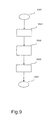
- step S901 an installation operating system, available on the key, will be loaded and launched. Under control of the installation operating system pre-installation steps will be carried out.
- step S902 the hard disk is partitioned and partitions are formatted.
- step S903 Boot Manager code is written into the Master Boot Record of the hard disk; a normal mode operating system, e.g. WinXP embedded, is deployed; and the installation flag is set.
- step S904 the apparatus has to be switched off (S904). This ends the pre-installation mode.
- the installation mode has to be invoked after the pre-installation mode has been executed.
- insertion of the USB memory device of the first type into the receptacle 56 of the machine is required.
- the initial boot procedure as depicted in Fig. 5 will be invoked.
- the initial boot procedure will inspect the MBR of the hard disk and the code available in the MBR of the hard disk will be loaded in RAM for execution. This is the Boot Manager program as depicted in Fig.6 , which is available now after the installation in the master boot record.
- a check is carried out if a bootable USB memory device of the first or the second type is inserted (S601). This is the case (Y), so the method continues with a check if a USB key of the first type is inserted (S604). This is the case (Y), so the method continues with a check if this is a first time booting or if it is not a first time booting on the USB key of the first type (S607). This is not the case, so in step S608 control will be handed over to the install program (S609).
- the install program is presented in Fig. 10 . After obtaining control in step 608 the install program takes control and starts executing.
- step S101 the install program inspects the MBR and detects the bootable partition.
- step S102 the NT Loader resident at the bootable partition will be invoked and activates the WinXP operating system.
- step S103 the control program is installed, that is available as an installable image on disk.
- step S104 the apparatus is switched off automatically and the installation mode ends. Next time the apparatus is switched on it will enter the normal operational mode.
- USB memory device could also be any other detachable memory device.
- installation flag is stored on the boot sector of the second memory device.
Landscapes
- Engineering & Computer Science (AREA)
- Software Systems (AREA)
- Theoretical Computer Science (AREA)
- Computer Security & Cryptography (AREA)
- General Engineering & Computer Science (AREA)
- Physics & Mathematics (AREA)
- General Physics & Mathematics (AREA)
- Computer Hardware Design (AREA)
- Stored Programmes (AREA)
Abstract
A printing system is provided with a secure boot program and a detachable memory device with an installable secure boot program.
Upon switching on the printer controller the secure boot program will check if a detachable memory device containing the secure boot program is plugged in. If this is the case the controller will boot from the detachable memory device, otherwise the controller will invoke the printer control program to bring the printer in its normal operational mode.
Description
- The present invention relates to a method for secure booting of a printer controller, the printer controller comprising a processor, a first memory, a second memory and a receptacle for receiving a third memory. Furthermore the invention relates to a printing system and to a memory device suited to be plugged in the receptacle for receiving the third memory.
- Control programs for printers are complex programs optimized for attaining best print results with specific hardware of the print engine and for attaining best performance also for complex print jobs. In order to achieve this goal such a printer control program is highly fine tuned to the processing hardware.
These programs are vulnerable for modification by unauthorized persons, attacks of malware and viruses.
In order to secure these kind of programs from manipulation in general it is important to prevent that an external program is able to take control over such a printer control program. At boot time, when programs are loaded in memory for execution, and control is handed over from one program to a next program there is a window in time that is vulnerable for a hostile attack of malware aiming to gain control. Therefore there is a need for a secure booting method. - In view of the above, it is an object of the present invention to provide a secure booting method.
To address this object, a method for secure booting of a printer controller is provided, the printer controller comprising a processor, a first memory, a second memory and a receptacle for receiving a third memory; the second memory comprising a secure boot program; the method comprising the steps of, upon power on of the controller: executing an initial boot procedure; continue booting from the second memory under control of the secure boot program; detecting if a third memory of a first type is inserted in the receptacle, where a third memory of the first type comprises a boot sector, a first identifier, an installation flag and a secure boot program suited for installation on the second memory; and in case a third memory of the first type is inserted in the receptacle and the installation flag is not set continue booting from the third memory. - With such a method of secure booting and its variants achievements obtained are that, once the system has been installed, the secure boot program takes care that it is not possible to start from a foreign bootable USB key but one from the first type or second type only; only in case the hard disk is not yet formatted access is possible. A key of the first type that remains attached to the machine does neither jeopardize nor affect the software configuration in any way. So provided is a filter that only passes control to a trusted USB key, and that will not pass control to not trusted keys.
In an advantageous embodiment the secure boot program is stored in an initial boot sector of the second memory. By installing the secure boot program in e.g. a master boot record of a hard disk it is not possible to prevent the secure boot program from executing upon booting from the hard disk.
In a further advantageous embodiment, where the third memory of the first type further comprises an installable operating system and installable printer control program, upon detection of a third memory of the first type, the method comprises the additional steps of: in case the installation flag is not set, installing the secure boot program on the second memory, setting the installation flag and installing an operating system on the second memory; in case the installation flag is set, activating the operating system, checking if a printer control program has been installed already and in case the printer control program has not yet been installed installing the printer control program and in case the printer control program has been installed activating the printer control program for bringing the printer controller in a normal operational mode.
By installing the boot manager program at a pre-installation step, there is no unsecure window, since formatting and installing the secure boot program is done in a same step upon a first time insertion, after which booting from the privileged USB keys only is possible.
The invention will be further explained by reference to the drawings in which embodiments of the method and a system according to the invention is schematically shown. The terms 'memory' and 'memory device' are used interchangeably. -
- Fig. 1
- is a schematic diagram of an environment comprising a reprographic system.
- Fig. 2
- is a schematic diagram of a control unit of a reprographic system according to
Fig. 1 . - Fig. 3
- schematically shows the structure of a Master Boot Record.
- Fig. 4
- depicts the lay out of one 16-byte partition record.
- Fig. 5
- illustrates an initialization procedure.
- Fig. 6
- illustrates the boot manager program together with its relationships with the different operational modes of the printer and with the initialization procedure.
- Fig. 7
- illustrates reaching the normal operational mode.
- Fig. 8
- illustrates a configuration of a USB device.
- Fig. 9
- illustrates the pre-installation mode. And
- Fig. 10
- illustrates the installation mode.
-
Fig. 1 is a schematic diagram of an environment which comprises areprographic system 1. Thereprographic system 1 as presented here comprises ascanning device 2, aprinting device 3 and acontrol unit 4. Thecontrol unit 4 is connected to anetwork 8 so that a number ofclient computers 9, also connected to thenetwork 8, may make use of thereprographic system 1. - The
scanning device 2 is provided for scanning an image carrying object. Thescanning device 2 may be provided with a colour image sensor (i.e. a photoelectric conversion device) which converts the reflected light into electric signals corresponding to the primary colours red (R), green (G) and blue (B). The colour image sensor may be for example a CCD type sensor or a CMOS type sensor. A localuser interface panel 5 is provided for starting scan and copy operations. - The
printing unit 3 is provided for printing images on image receiving members. The printing unit may use any kind of printing technique. It may be an inkjet printer, a pen plotter, or a press system based on an electro-(photo)graphical technology, for instance. The inkjet printer may be for example a thermal inkjet printer, a piezoelectric inkjet printer, a continuous inkjet printer or a metal jet printer. A marking material to be disposed may be a fluid like an ink or a metal, or a toner product. In the example shown inFig. 1 , printing is achieved using a wide format inkjet printer provided with four different basic inks, such as cyan, magenta, yellow and black. The housing contains a printhead which is mounted on a carriage for printing swaths of images. The images are printed on an ink receiving medium such as a sheet of paper supplied by a paper roll. A local user interface panel 6 may be provided with input means such as buttons. - The
scanning device 2 and theprinting device 3 are both connected to thecontrol unit 4. Thecontrol unit 4 executes various tasks such as receiving input data from thescanning device 2, handling and scheduling data files, which are submitted via thenetwork 8, controlling thescanning device 2 and theprinting device 3, converting image data into printable data etc. Thecontrol unit 4 is provided with auser interface panel 7 for offering the operator a menu of commands for executing tasks and making settings. - An embodiment of the
control unit 4 is in more detail presented inFig. 2 . As shown inFig. 2 , thecontrol unit 4 comprises a Central Processing Unit (CPU) 40, a Graphical Processor Unit (GPU) 49, a Random Access Memory (RAM) 48, a Read Only Memory (ROM) 60, anetwork unit 46, aninterface unit 47, a hard disk (HD) 50 and animage processing unit 54 such as a Raster Image Processor (RIP). Theaforementioned units bus system 42. However, thecontrol unit 4 may also be a distributed control unit.
For the purpose of explanation, in the embodiment under consideration the controller has an IBM PC architecture. The IBM PC architecture is well known in the art. However a person skilled in the art will recognize that the invention is also applicable with other architectures.
TheCPU 40 controls therespective devices reprographic system 1 in accordance with control programs stored in theROM 60 or on theHD 50 and the localuser interface panel 7. TheCPU 40 also controls theimage processing unit 54 and theGPU 49.
TheROM 60 stores programs and data such as an initial boot program, set-up program, various set-up data or the like, which are to be read out and executed by theCPU 40. Thehard disk 50 is an example of a non-volatile storage unit for storing and saving programs and data which make theCPU 40 execute a print process to be described later. The hard disk is provided with a Master Boot Record. A Master Boot Record is a first sector (typically 512 bytes) of a partitioned data storage device. The structure of a Master Boot Record is depicted inFig. 3 . A first area (31), from address 0 up to 0×01 B8 is available for program code. Another area (32), from address 0×01 BE up to 0×01 FE contains a table of primary partitions. Finally addresses 0×01 FE - 0×01 FFA contain the hex word 0xAA55, known as the MBR signature, indicating that it is a valid MBR. -
Fig. 4 depicts the lay out of one 16-byte partition record. The first byte (41) indicates if it is bootable partition or a non-bootable partition. Any other value is invalid. The next three bytes give the CHS address of the first block in the partition.
A Volume Boot Record is the first sector of a particular partition on a data storage deivce that has been partitioned or it is the first sector of a data storage device that has not been partitioned.
Thehard disk 50 also comprises an area for saving the data of externally submitted print jobs. The programs and data on theHD 50 are read out onto theRAM 48 by theCPU 40 as needed. TheRAM 48 has an area for temporarily storing the programs and data read out from theROM 60 andHD 50 by theCPU 40, and a work area which is used by theCPU 40 to execute various processes.
Theinterface unit 47 connects thecontrol unit 4 toscanning device 2 andprinting device 3, and provides a USB socket for receiving a USB memory device.
Thenetwork unit 46 connects thecontrol unit 4 to thenetwork 8 and is designed to provide communication with theworkstations 9, and with other devices reachable via the network.
Theimage processing unit 54 may be implemented as a software component running on an operation system of thecontrol unit 4 or as a firmware program, for example embodied in a field-programmable gate array (FPGA) or an application-specific integrated circuit (ASIC). Theimage processing unit 54 has functions for reading, interpreting and rasterizing the print job data. Said print job data contains image data to be printed (i.e. fonts and graphics that describe the content of the document to be printed, described in a Page Description Language or the like), image processing attributes and print settings.
Basic modes of operation for the reprographic system are scanning, copying and printing.
With the electric signals corresponding to the primary colours red (R), green (G) and blue (B) obtained during scanning, a digital image is assembled in the form of a raster image file. A raster image file is generally defined to be an array of regularly sampled values, known as pixels. Each pixel (picture element) has at least one value associated with it, generally specifying a colour or a shade of grey which the pixel should be displayed in. For example, the representation of an image may have each pixel specified by three 8 bit (24 bits total) values (ranging from 0 - 255) defining the amount of R, G, and B respectively in each pixel. In the right proportions, R, G, and B can be combined to form black, white, shades of grey, and an array of colours. - The digital image obtained by the
scanning device 2 may be stored on a memory of thecontrol unit 4 and be handled according to a copy path, wherein the image is printed by theprint device 3. Alternatively, the digital image may be transferred from thecontrol unit 4 to a client computer 9 (scan-to-file path). A user of theclient computer 9 may decide to print a digital image, which reflects the printing mode of operation of the system. - Upon switching on the controller an initial boot procedure as depicted in
Fig. 5 will be invoked. This boot procedure is known in the art.
With reference toFig. 5 the initial boot procedure will be detailed further. The procedure is stored in ROM and at start up it will be invoked by the CPU (S501). Within the IBM PC architecture this program is known as the BIOS (Basic Input Output System). After invocation firstly a so called Power On Self Test (POST) is executed (S502). This program initializes and tests the hardware components resident in the control unit. After finishing the Power On Self Test the control unit is in a predefined status and the initialization procedure will proceed by accessing peripheral devices in order to load further instructions to be carried out from a peripheral device in system RAM. Heretofore the BIOS program checks for bootable storage devices in a predetermined order until one is found.
A bootable storage device is characterized by the availability of a boot sector on it. A boot sector is a first sector on a memory device. To be a valid boot sector it must end with the hex word 0×AA55. Kinds of boot sectors are: a Master Boot Record and a Volume Boot Record.
In the embodiment under consideration the order, set in the BIOS, is: Hard Disk followed by USB storage device. So, after completion of the POST program (S502), next a check is carried out if a hard disk with a bootable partition is available (S503).
If this is the case (Y) the program will hand over control (S504) to the booting from hd program (S505). This will be illustrated later. If this is not the case (N) a check is carried out if a bootable USB memory device is inserted. If so (Y) booting will continue from the program resident on the inserted USB memory device (S507, S508). If not (N) the program will end and the apparatus will be switched off again (S509). - According to the invention a boot manager program is added to the boot procedure. In the embodiment under consideration a boot manager program is/will be stored in the master boot record of
hard disk 50. In a variant, advantageous in case the boot manager program does not fit in the master boot record, a first part of the program is stored in the master boot record and next parts are stored in other sectors of the hard disk. Occasionally the first part comprises only an instruction for the BIOS to load the relevant sectors in RAM and start execution. The boot manager program according to the invention takes care that the controller software is protected against being brought under control of any other software control program that might be malicious or harmful, however whilst it remains possible to update the software, in which situation another, trusted, program has to take control.
The Boot manager program is invoked during booting of the machine and responds, in dependence of the configuration at hand of hardware and software, by bringing the apparatus in a particular mode.
This boot manager program behaves differently in different modes of the apparatus. Modes to be discerned are: an operational mode, a diagnostic mode and an installation mode. Besides these modes there is a pre-installation mode for installing the boot manager program on the apparatus.
Fig. 6 presents theboot manager program 61 together with its relationship with the different modes and its relationship with the initial boot procedure, that is known in the art and has been described before with reference toFig. 5 .
After the controller is switched on the initial boot procedure is started.
Instep 504 control is handed over to the boot manager program, that is to say the boot manager program is loaded in RAM and starts execution. In a first step of the program (S601) it is checked if a USB memory device is inserted inreceptacle 56 and if so, if it is provided with a boot sector and is provided with a particular signature.
If not (N), because either no USB memory device is inserted, or a memory device is inserted, but it does not have a matching signature, the Boot Manager Program exits in step S602 and control is handed over to the normal operational mode (S603). The normal operational mode will be explained with reference toFig. 7 later.
If the check in step S601 yields a confirmative outcome (Y), in a next step (S604) it is checked if it is a USB memory device of the first type, where a USB memory of the first type is a USB memory with programs for installing or reinstalling controller software, including the boot manager program, on the hard drive of the controller.
If not (N) it is a USB memory device of the second type, suited to bring the apparatus in a diagnostic mode. In this case the Boot Manager program exits (S605) and control is handed over to the diagnostic mode (S606). In the diagnostic mode, a service operator is able to perform numerous tests.
If the outcome of step S604 is affirmative (Y), it is a USB memory device of the first type indeed and the method continues with step S607.
In step S607 it is checked if an installation flag is unset, indicating that it is a first time booting with the USB memory device of the first type.
If not (N), the apparatus is in installation mode, the Boot Manager program exits (S608) and control is handed over to the install mode (S609), where after the program continues with the install mode. The install mode will be further explained in a later section with reference toFig. 9 .
If the outcome of Step S607 is affirmative (Y), the Boot Manager program exits (S610) and control is handed over to a re-install mode (S611), where after the program continues with the re-install mode (S611). In this situation a re-install is effectuated.
In all cases when any of the programs S603, S606, S609 and S611 exits the apparatus is switched off in step S612. - The effects of the boot manager program according to the invention will now be illustrated with reference to the other parts of the control software and the various modes.
- In the normal operational mode the apparatus is ready for executing print, scan and copy jobs. After switching on of the apparatus the normal operational mode is reached when the Boot Manager program reaches step S602 according to
Fig. 6 . The normal operational mode is depicted inFig. 7 . In step S602 the Boot Manager program hands over control to the operational mode. Next, in step S701, it will scan for a bootable partition on the hard disk. Heretofore the partition table is consulted (Fig.4 ). The first byte of a 16 byte entry indicates if a partition is bootable (0×80) or non-bootable (0×00). In the embodiment under consideration the first partition is bootable. The CHS (Cylinder, Head, Sector) of the first block in the sector is given. In step S702 this block is accessed and the code available there, being the NT Loader, is loaded in memory. Subsequently, in step S703, The NT Loader program is executed and loads the operating system, which is in the embodiment under consideration Windows XP. HoweverWindows 7/Windows ES 7 may equally be applied. In step S704 the operating system is initialized and starts running. In step S705 Win XP checks if the printer control program is installed and if so starts the printer control program. In step S706 the printer control programming is up and running.
The printer is now ready for use. The apparatus is available for carrying out jobs in response to commands entered via the local user interface or in response to jobs received via the network, until the apparatus is switched off in step S707. - If the Boot Manager program results in the detection of a USB memory device of the second type a diagnostic program is loaded and given control.
- Also installation of the boot manager program as part of the installation of the controller software on the machine is provided with necessary precautions according to the invention in order to prevent intrusion of malicious software in the machine in the course of the installation process.
The installation method according to the invention comprises a pre-installation phase and an installation phase. - The pre-installation phase will be explained next. Prerequisite is a hardware configuration according to
Fig.2 with a usb memory of the first type inserted and a software configuration where the hard disk is unformatted and does not contain any software yet.ROM module 60 comprises the intial boot program, e.g. a conventional BIOS program.
Fig. 8 gives a view of the code resident on the USB device of the first type. Resident are a boot sector (801), comprising an identifier in the form of a particular signature, the signature being also indicative of the type, being in this case the first type; and one partition comprising boot manager code (802), NT loader code (803), XP embedded code (804), controller software code (805) and an installation flag (806) indicating a first time booting or a second time booting with the USB device. In one variant the USB memory device comprises a key for secure identification of the device and in another, independent, variant the installation flag is stored in the boot sector of the second memory. - Installation of the Boot Manager program according to the invention is further explained with reference to
Fig. 9 . In the configuration under consideration the hard disk does not contain yet any software and is not formatted. A USB key of the first type is inserted. This USB key is a bootable key and it contains software programs that have to be installed on the controller.
Upon switching on the controller the initial boot procedure as explained before with reference toFig. 5 will be invoked.
In the configuration under consideration, no bootable hard disk is available. So, according toFig.5 in step S506 the program will check if any bootable code on the USB key is available.
This is the case indeed, so the bootable code on the key will be loaded in RAM and will be executed and control is handed over to it (S507) and the pre-installation program will start.
With reference toFig. 9 after getting control in S507, in a next step (S901) an installation operating system, available on the key, will be loaded and launched. Under control of the installation operating system pre-installation steps will be carried out. In step S902 the hard disk is partitioned and partitions are formatted. In step S903 Boot Manager code is written into the Master Boot Record of the hard disk; a normal mode operating system, e.g. WinXP embedded, is deployed; and the installation flag is set. Next the apparatus has to be switched off (S904). This ends the pre-installation mode. - In order to complete the installation the installation mode has to be invoked after the pre-installation mode has been executed. In order to be able to execute the installation mode insertion of the USB memory device of the first type into the
receptacle 56 of the machine is required.
Upon switching on the apparatus after completion of the pre-installation mode, the initial boot procedure as depicted inFig. 5 will be invoked. The initial boot procedure will inspect the MBR of the hard disk and the code available in the MBR of the hard disk will be loaded in RAM for execution. This is the Boot Manager program as depicted inFig.6 , which is available now after the installation in the master boot record. With reference toFig.6 , at first a check is carried out if a bootable USB memory device of the first or the second type is inserted (S601). This is the case (Y), so the method continues with a check if a USB key of the first type is inserted (S604). This is the case (Y), so the method continues with a check if this is a first time booting or if it is not a first time booting on the USB key of the first type (S607).
This is not the case, so in step S608 control will be handed over to the install program (S609).
The install program is presented inFig. 10 . After obtaining control instep 608 the install program takes control and starts executing. In step S101 the install program inspects the MBR and detects the bootable partition. Next, in step S102, the NT Loader resident at the bootable partition will be invoked and activates the WinXP operating system. In step S103 the control program is installed, that is available as an installable image on disk. In the final step S104 the apparatus is switched off automatically and the installation mode ends.
Next time the apparatus is switched on it will enter the normal operational mode. - In case of a re-installation, code has to be re-installed from a USB memory device of the first type. This implies that the boot manager program is already resident. And thus the re-installation mode will be reached according to
Fig. 6 in step S611. The system will continue with booting from the USB memory device and accordingly the pre-installation mode and the installation mode as described before will be stepped through. - The invention is not limited to the above described embodiments, which can be varied in a number of ways within the scope of the claims. For example the USB memory device could also be any other detachable memory device. As a variant the installation flag is stored on the boot sector of the second memory device.
Claims (8)
- A method for secure booting of a printer controller, the printer controller comprising a processor, a first memory, a second memory and a receptacle for receiving a third memory;
the second memory comprising a secure boot program;
the method comprising the steps of, upon power on of the controller,:executing an initial boot procedure;continue booting from the second memory under control of the secure boot program;detecting if a third memory of a first type is inserted in the receptacle, where a third memory of the first type comprises a boot sector, a first identifier, an installation flag anda secure boot program suited for installation on the second memory; andin case a third memory of the first type is inserted in the receptacle and the installation flag is not set continue booting from the third memory. - The method according to claim 1, wherein the secure boot program is stored in an initial boot sector of the second memory.
- The method according to claim 2, wherein the second memory is a hard disk and the initial boot sector is a master boot record.
- The method according to any of the previous claims, comprising the further steps of:detecting if a third memory of a second type is inserted in the receptacle, where a third memory of a second type comprises a boot sector, a second identifier and a diagnostic program; andcontinue booting from the third memory and loading and executing the diagnostic program in case a third memory of the second type is inserted in the receptacle; andcontinue booting from the second memory if no memory of the first type or the second type is inserted in the receptacle.
- The method according to any of the previous claims where the third memory of the first type further comprises an installable operating system and installable printer control program, upon detection of a third memory of the first type, with the additional steps of:- in case the installation flag is not set, installing the secure boot program on the second memory, setting the installation flag and installing an operating system on the second memory;- in case the installation flag is set, activating the operating system, checking if a printer control program has been installed already and in case the printer control program has not yet been installed installing the printer control program and in case the printer control program has been installed activating the printer control program for bringing the printer controller in a normal operational mode.
- A printing system comprising a printer controller, the printer controller comprising a processor, a first memory, a second memory and a receptacle for receiving a third memory;
the second memory comprising secure booting means for, after an initial boot procedure upon power on, detecting if a third memory of a first type is inserted in the receptacle, where a third memory of the first type comprises a boot sector, a first identifier, an installation flag and a secure boot program suited for installation on the second memory; and
in case a third memory of the first type is inserted in the receptacle and the installation flag is not set continue booting from the third memory. - A printing system according to claim 4, where the second memory comprises a portion that is accessed during initialization of the memory and wherein the secure booting means are stored.
- A detachable memory device suited to be inserted in a receptacle of a printer controller comprising a boot section and a secure boot program suitable to be installed on a memory of the printer controller, and after installation suited for checking if a third memory of a first or second type is inserted in the receptacle; in case this is not bringing the printer controller in a normal operational mode;- in case a third memory of a first type is inserted in the receptacle checking an installation flag;- in case the installation flag is not set executing the step of continue booting from the third memory, installing the secure boot program on the second memory, setting the installation flag and installing an operating system on the second memory;- in case the installation flag is set, activating the operating system, checking if a printer control program has been installed already and in case the printer control program has not yet been installed installing the printer control program and in case the printer control program has been installed activating the printer control program for bringing the printer controller in a normal operational mode.
Priority Applications (4)
| Application Number | Priority Date | Filing Date | Title |
|---|---|---|---|
| EP11305527A EP2521032A1 (en) | 2011-05-04 | 2011-05-04 | Method for secure booting of a printer controller |
| PCT/EP2012/057629 WO2012150171A1 (en) | 2011-05-04 | 2012-04-26 | Method for secure booting of a printer controller |
| EP12717679.0A EP2710462A1 (en) | 2011-05-04 | 2012-04-26 | Method for secure booting of a printer controller |
| US14/067,626 US9405911B2 (en) | 2011-05-04 | 2013-10-30 | Method for secure booting of a printer controller |
Applications Claiming Priority (1)
| Application Number | Priority Date | Filing Date | Title |
|---|---|---|---|
| EP11305527A EP2521032A1 (en) | 2011-05-04 | 2011-05-04 | Method for secure booting of a printer controller |
Publications (1)
| Publication Number | Publication Date |
|---|---|
| EP2521032A1 true EP2521032A1 (en) | 2012-11-07 |
Family
ID=44483945
Family Applications (2)
| Application Number | Title | Priority Date | Filing Date |
|---|---|---|---|
| EP11305527A Withdrawn EP2521032A1 (en) | 2011-05-04 | 2011-05-04 | Method for secure booting of a printer controller |
| EP12717679.0A Withdrawn EP2710462A1 (en) | 2011-05-04 | 2012-04-26 | Method for secure booting of a printer controller |
Family Applications After (1)
| Application Number | Title | Priority Date | Filing Date |
|---|---|---|---|
| EP12717679.0A Withdrawn EP2710462A1 (en) | 2011-05-04 | 2012-04-26 | Method for secure booting of a printer controller |
Country Status (3)
| Country | Link |
|---|---|
| US (1) | US9405911B2 (en) |
| EP (2) | EP2521032A1 (en) |
| WO (1) | WO2012150171A1 (en) |
Cited By (1)
| Publication number | Priority date | Publication date | Assignee | Title |
|---|---|---|---|---|
| US10649754B2 (en) * | 2015-01-28 | 2020-05-12 | Ricoh Company, Ltd. | Image processing device and electronic whiteboard |
Families Citing this family (3)
| Publication number | Priority date | Publication date | Assignee | Title |
|---|---|---|---|---|
| WO2014019117A1 (en) * | 2012-07-30 | 2014-02-06 | Hewlett-Packard Development Company, L. P. | Booting printer |
| US9996362B2 (en) * | 2015-10-30 | 2018-06-12 | Ncr Corporation | Diagnostics only boot mode |
| JP7178839B2 (en) * | 2018-09-11 | 2022-11-28 | キヤノン株式会社 | Information processing device, its control method, and program |
Citations (4)
| Publication number | Priority date | Publication date | Assignee | Title |
|---|---|---|---|---|
| US5093915A (en) * | 1988-11-02 | 1992-03-03 | Xerox Corporation | Method for selectively loading bootable fiber to control apparatus based upon the corresponding bootable attributes |
| US20020144104A1 (en) * | 2001-04-02 | 2002-10-03 | Springfield Randall Scott | Method and system for providing a trusted flash boot source |
| US20060282652A1 (en) * | 2005-06-10 | 2006-12-14 | Dell Products L.P. | System and method for identifying bootable universal serial bus devices across multiple reboots |
| WO2007123728A2 (en) * | 2006-03-31 | 2007-11-01 | Huang Evans S | Methods and apparatuses for securely operating shared host computers with portable apparatuses |
Family Cites Families (4)
| Publication number | Priority date | Publication date | Assignee | Title |
|---|---|---|---|---|
| TW200512647A (en) * | 2003-09-25 | 2005-04-01 | Genesys Logic Inc | System and method for authenticating software installation on different personal computers, associated computer system and associated computer-readable recording media |
| GB2420659B (en) * | 2004-11-25 | 2006-10-11 | Simon Richard Daniel | Collapsible rechargeable battery assembly with integral connector |
| SE531992C2 (en) * | 2006-02-24 | 2009-09-22 | Oniteo Ab | Method and system for secure software commissioning |
| US20100318731A1 (en) * | 2009-06-16 | 2010-12-16 | Murray Mark R | Override boot sequence by presence of file on usb memory stick |
-
2011
- 2011-05-04 EP EP11305527A patent/EP2521032A1/en not_active Withdrawn
-
2012
- 2012-04-26 WO PCT/EP2012/057629 patent/WO2012150171A1/en not_active Ceased
- 2012-04-26 EP EP12717679.0A patent/EP2710462A1/en not_active Withdrawn
-
2013
- 2013-10-30 US US14/067,626 patent/US9405911B2/en not_active Expired - Fee Related
Patent Citations (4)
| Publication number | Priority date | Publication date | Assignee | Title |
|---|---|---|---|---|
| US5093915A (en) * | 1988-11-02 | 1992-03-03 | Xerox Corporation | Method for selectively loading bootable fiber to control apparatus based upon the corresponding bootable attributes |
| US20020144104A1 (en) * | 2001-04-02 | 2002-10-03 | Springfield Randall Scott | Method and system for providing a trusted flash boot source |
| US20060282652A1 (en) * | 2005-06-10 | 2006-12-14 | Dell Products L.P. | System and method for identifying bootable universal serial bus devices across multiple reboots |
| WO2007123728A2 (en) * | 2006-03-31 | 2007-11-01 | Huang Evans S | Methods and apparatuses for securely operating shared host computers with portable apparatuses |
Cited By (1)
| Publication number | Priority date | Publication date | Assignee | Title |
|---|---|---|---|---|
| US10649754B2 (en) * | 2015-01-28 | 2020-05-12 | Ricoh Company, Ltd. | Image processing device and electronic whiteboard |
Also Published As
| Publication number | Publication date |
|---|---|
| US20140059338A1 (en) | 2014-02-27 |
| WO2012150171A1 (en) | 2012-11-08 |
| US9405911B2 (en) | 2016-08-02 |
| EP2710462A1 (en) | 2014-03-26 |
Similar Documents
| Publication | Publication Date | Title |
|---|---|---|
| US6280105B1 (en) | Printing system and printing control method | |
| KR101101101B1 (en) | Information processing device and information processing method | |
| US8879075B2 (en) | Setting apparatus, inspection system, setting method of inspection processing, and program | |
| CN108292198B (en) | Information processing apparatus, setting method, and information processing system | |
| JP2013018209A (en) | Printing apparatus, method for controlling printing apparatus, and program | |
| US8902446B2 (en) | Printing system and information processing apparatus | |
| JP4497208B2 (en) | Image forming apparatus, printing control method, and control program | |
| US9405911B2 (en) | Method for secure booting of a printer controller | |
| US20180210685A1 (en) | Image forming system and image forming method | |
| JP2008012868A (en) | Recording apparatus, information processing apparatus, control method therefor, recording system, and program | |
| EP3026878B1 (en) | Image forming apparatus, and method and program for controlling image forming apparatus | |
| CN102999303B (en) | The method of signal conditioning package and control information treating apparatus | |
| JP2014119998A (en) | Output processing system and output processing method | |
| US20090296129A1 (en) | Printing system, printing apparatus, image processing apparatus, and control method of printing system | |
| US6724496B1 (en) | Remote print job processing | |
| US11614906B2 (en) | Information processing apparatus, control method of information processing apparatus, and program | |
| US20050254079A1 (en) | Printing apparatus and method enabled to save print option and print document file | |
| US10783413B2 (en) | Image forming apparatus for using a password in changing a setting of an interpreter | |
| US20120033256A1 (en) | Information processing apparatus, job processing system, job transmission path control method, and storage medium storing control program therefor | |
| EP3531345B1 (en) | Image processing system, image processing apparatus, image processing method and program | |
| US8467116B2 (en) | Apparatus, program product, and method for creating and printing a composite image including an additional image associated with externally acquired software | |
| US12197798B2 (en) | Information processing apparatus registers printer driver for a selected image forming apparatus with administrator authority, control method of information processing apparatus, and non-transitory computer-readable storage medium | |
| JP7722137B2 (en) | printer | |
| US8654376B2 (en) | Printing system, information processing apparatus, and printing apparatus, and control method and program for the same | |
| JP2024012811A (en) | printer |
Legal Events
| Date | Code | Title | Description |
|---|---|---|---|
| STAA | Information on the status of an ep patent application or granted ep patent |
Free format text: STATUS: THE APPLICATION HAS BEEN WITHDRAWN |
|
| PUAI | Public reference made under article 153(3) epc to a published international application that has entered the european phase |
Free format text: ORIGINAL CODE: 0009012 |
|
| AK | Designated contracting states |
Kind code of ref document: A1 Designated state(s): AL AT BE BG CH CY CZ DE DK EE ES FI FR GB GR HR HU IE IS IT LI LT LU LV MC MK MT NL NO PL PT RO RS SE SI SK SM TR |
|
| AX | Request for extension of the european patent |
Extension state: BA ME |
|
| 18W | Application withdrawn |
Effective date: 20121024 |